#helpdesk-twitch
1 messages · Page 514 of 1
 restive shadow
 zenith widget
so uninstalling OBS Studio only is the way to go, then install 23.2.1 and OBS.Live will want to update to rehook it self.
 carmine sparrow
Sometimes a person resub on my channel and types the text but it is read twice at the same time. Why?
 round brambleBOT
@carmine sparrow Make sure to ☑ “Shutdown source when not visible” for all browser sources (all OBS scenes). If using studio mode, uncheck “Swap Preview/Output scenes After Transitioning.” Also keep in mind that sound can play from any overlay loaded in the browser (editor or launched). https://i.imgur.com/FegZJQS.png https://i.imgur.com/yY0wcFl.png


 ruby skiff
Hi, I need help with ground control
zenith widget
I think I just replied to your email/ticket.
ruby skiff
yes
Okay I am re-downlaoding it now
when I was doing test compatibility on it though it said it wasn't compatible
ruby skiff
windows 10
zenith widget
32bit or 64bit?
ruby skiff
So i installed it, but when i click on it to open it it doesn't open
I am a 64bit Op system
zenith widget
ok, so follow the instructions i provided in the email.
ruby skiff
that's a negative
the first time i installed it today it opened but was connected to an account I don't even own
zenith widget
Yea I understood that part - we will get to it
Are you opening GC from the desktop shortcut?
ruby skiff
yes
zenith widget
or at least trying to open it, since its being a grumpy one atm
run as admin? if no dice, open the shortcut properties
and see where its installed
you can use this button to open the folder
ruby skiff
I tried run as admin... SO in taske manage now Ground Control is here 4 times under background processes
zenith widget
but there is nothing here like so?
ruby skiff
nope
ruby skiff
kill as in end tasks?

 zenith widget
end the task
open a command prompt
and type in del %homepath%\.se-gc\config.json
then run the exe again
zenith widget

ruby skiff
what does that mean that was wrong with it
ruby skiff
oh... well it works, thank you SOOOOO MUCH!!!
zenith widget

ruby skiff
now you can be a superhero to someone else... bye for now
zenith widget
to my self, as I want to eat breakfast
ruby skiff
oh im sorry.... hope you enjoy
zenith widget
don't worry about it 😉
its my own fault for not making breakfast for the past 2 hours
 hidden tartan
is this a twitch partner feature only? screencap from shroud's chat
zenith widget
Well you need to be an affiliate to be able to get subscribers
partner is 1 step above
 whole jay
Having some issues with SE pay if someone is able to talk to me in a non-public capacity. (obviously no details of my banking will be revealed)
still just need a bit of a help due to a weird circumstance
zenith widget
Sure. DM me
hidden tartan
already an affiliate but is it possible to make subscription notification to look like this?
zenith widget
That notification is chat only and only for VODs. @hidden tartan
 lament blade
hi i removed my chat window from obs and everytime i put it back it popup my stream not chat from stream
zenith widget
Streamelements on top -> chat
 jagged badge
ive downloaded voicemeeter but i got no sound for my game, i have sound for everything else though, any fix?
round brambleBOT
@jagged badge How to exclude audio sources for a stream or recording: https://obsproject.com/forum/resources/8/
Voicemeeter Banana guide: https://obsproject.com/forum/resources/397/
zenith widget
Or this video guide: https://www.youtube.com/watch?v=EdAhR_CdjLc
zenith widget
Then you have not routed your game sound properly
withing the game's sound output setting
and in Voicemeter
Check the windows mixer as well
jagged badge
there is no output setting in game
zenith widget
Check if you are routing the audio via here as well
change the device and find the game where its outputting
if you have the virtual cables
jagged badge
i got virtual cables yes
i hear everything just no my game sounds
its on full in mixer
zenith widget
You are NOT routing the game audio then
I can't help you more then this, as this tool is not ours.
Either recheck the guides and see what you might be doing wrong
or google search about the issue.
jagged badge
k thanks
 wary halo
@hidden tartan that is the default notification, you don't have to do anything for it to make it look like that. but i think that you can adjust the color yourself since the new design update.
the timestamp in front of it is only for VOD's
 tepid roost
I've got a problem, Stream elements browser isn't outputting the correct resolution on obs, and it does this for all of my scenes
ruby skiff
😦 I made overlays today & it all looked fine now that I am live it's messed up =[
@tepid roost It's doign that to me also
round brambleBOT
@tepid roost The default resolution for StreamElements overlays (theme and custom) is 1920x1080. Please add them in OBS at their full resolution and use CTRL+F to fit to screen if necessary. You can then downscale your stream in OBS settings > Video if you'd like https://i.imgur.com/6bWXxjR.png
 zenith widget
@ruby skiff ⤴
zenith widget
ok one moment
ruby skiff
now it's like it's shrinking it
tepid roost
Its always set to 1920x1080, I've changed nothing and this started today
ruby skiff
🙂
tepid roost
Thanks 🙂
 warm yew
Same thing happend to me as well
ruby skiff
:\
warm yew
LUL
ruby skiff
YAY you guys so are SOOOO QUICK and efficient =]
warm yew
Poggieess
zenith widget
 👍
👍
 coral monolith
hello, i'm IlBarba and I'm having an issue with the latest update. In the window where I should be able to modify the stream info now I only see empty black. Already tried to reopen the window and logout and back in the twitch account. anyone who's able to help me, please?
round brambleBOT
@coral monolith If you are not seeing the OBS Twitch integrations and have OBS.Live installed, please follow these steps:
- Make sure you are on the latest and greatest version of OBS.Live
- exit OBS (make sure OBS is not running)
- delete %appdata%\obs-studio\plugin_config\obs-browser\obs_profile_cookies
- start OBS.Live
- Settings -> Stream -> disconnect -> connect
zenith widget
which issue are we talking about here?
tepid roost
Noice! fixed! thanks @zenith widget !
warm yew
All the issues
tepid roost


 coral monolith
should I listen to the bot? @zenith widget ?
wary halo
i thought i was going crazy 😛
zenith widget
Yes 
wary halo
good to see it's fixed
coral monolith
will do immediatly then
wary halo
zenith widget
yuuuurrr 
coral monolith
now it vanished... in streamelements menu i can findo only activity feed, media request and chat
but not stream info
coral monolith
nope, can't find it
zenith widget
did you do step 5? 5) Settings -> Stream -> disconnect -> connec
coral monolith
yes
zenith widget
Cuz I just had someone else do the exact same thing in #helpdesk-selive
coral monolith
tried to log out manualy twitch acconut, then logged out from streamelements and closed obs. relogged everything and now it's back 😄 thank you very much!!!!
zenith widget
👍
 versed locust
Hey guys, is there a way I customise/set my twitch alerts once across all my overlays so that they are consistant?
zenith widget
You can copy the alert widget from one overlay to the other
Click on it -> then click on the 2 white papers with red dot next to "layers" on the left
versed locust
so there is no master option?
versed locust
I want them to have the same gif and sound
versed locust
But I have it set up in others
zenith widget
Change the alert widget how ever you want it to be setup.
Save the overlay
duplicate the widget to the other overlays
everything will be there - images, sounds, varitions, etc
that you've set will be duplicated
only thing you maybe want to change is, where the alert widget will be positioned in the other overlay.
versed locust
ok, I wish there was a way to set a master alert setup
 wanton mango
You can always make an overlay that's just the size of the alertbox and only contains said alertbox, then add that as a separate browser source in OBS across all your scenes, but then you're adding multiple browser sources which sort of defeats the point of having everything in one place
Buuuuut if you're constantly updating the alertbox for some reason then it just be the trade off to make
 wind dawn
Do you have to have ground control to have the name change of the bot?
lament blade
@wind dawn ground control or obs live
wind dawn
I have OBS live
lament blade
@wind dawn go in your activity feed widget in settings
wind dawn
aha i see it, couldnt find it before, thank you
 rustic meadow
can anyone take a crack at this one. hype cup is filling up with these weird slivers upon OBS relaunch. they also appear in the overlay editor. how can i remedy this so that my hype cup fills with the proper elements going forward - thanks!
zenith widget
Which event is that?
also, is the cup placed outside the widget boundaries?
I saw which event - poking devs
zenith widget
The default response to the !redeem command cannot be turned off currently.
lament blade
@lament blade please do not tag moderator, it will most times ping also champions and other people
zenith widget
We have plans to add a toggle and edit button for that, but no ETA on when
@lament blade don't worry, its fine.
lament blade
okay 🙂
zenith widget
I don't think so
 thin lion
Hey. :)
My timmers doesnt work. Can someone help me?
 dry hare
what issues are you having with timers?
thin lion
i create it but never shows up in stream
dry hare
Can you screenshot your timers settings?
dry hare
So when you are online for 15 minutes, and have 15 chat lines within that 15 minutes the timer does not activate?
thin lion
yes
also it never shows up at the first 15 min with or without chat lines
so both things
dry hare
unless the chat lines quota is met, it won't show up
if you set chat lines to 1, as long as someone has typed something in chat within 15 minutes of the timer it will activate
thin lion
thing is i had 15 lines in 15 min and didnt work
 real escarp
@thin lion in chat /mod streamelements
rustic meadow
@zenith widget i believe they were a bunch of cheer emotes. as you can see, there's a lone donation event that filled correctly
i toggled to use the whole screen for the hype cup widget, so it rests on the bottom. should i increase the size of the widget itself so it's the entire screen?
thin lion
its already a mod. thing is i changed to 1 line 15 min, someone texted and didnt trigger
real escarp
dry hare
If you test it with 1 line of chat, does it work
thin lion
yes i removed to try again thats why isnt there xD
does it work if i change the timmers being live? or need to turn off and turn on again
dry hare
You have online and offline timers set
online = 15, offline = 30
to test this, I would set offline to 1 and chat lines to 1 and then go type something in your chat
if it works, then you didn't hit the lines of chat required to trigger the timer within the timer window and the timer reset
thin lion
if the chat flow is low is it recommended to set online time to 30 min so they need text 15 lines within more time?
dry hare
if chat is slow, you want to increase the time so it isn't spamming your chat, but also decrease the lines so it doesn't require as many lines of chat
Since you can adjust these timers on the fly if needed, if you get a large raid or your chat starts hopping, you can adjust the timer settings while you're live and they'll apply immediately to the timer
dry hare
np
zenith widget
@rustic meadow I'm trying to work out with the devs on whats happening exactly as I was able to reproduce the same effect.
rustic meadow
@zenith widget oh perfect - so you see the slivers too. great thanks for checking in on this
 glass sundial
@real escarp when will this be fixed?
wind dawn
Can a bot not use commands? e.g nothing happens after the bot does the command (bot is half human ;))
lament blade
@wind dawn the bot itself cant execute commands he wrote himself
wind dawn
sad times
 woven crater
Hey guys. One of our viewers has recently had trouble redeeming items from our SE store. The bot tells him that he doesn't have enough points, but he clearly does (he has over 100k and the items he wants to redeem are a lot less than that) Any thoughts on what we can do to help him out?
real escarp
@glass sundial no ETA as of yet but I did notify the devs that are already aware of the issue
whats the user name @woven crater
and which item
woven crater
His user name is the_justin52987 and the items are...all of them in our store at this point 😛
 narrow coyote
This typically happens if the user logged into the SE site at one point, and then did something like change their name. If they go to the SE site, logout, and log back in, it will usually resolve this behavior
woven crater
Ok. That's what we were thinking because he had changed his name in the past. I'll pass the word along to him and get him to try that
 vocal galleon
Hello, is that correct place where i can get a bit help with my donation setup at streamelements? 🙂
lament blade
@vocal galleon whats the problem 🙂 ?
vocal galleon
hi @lament blade
I switched from tipanddonation to streamelements
i use streamlabs obs
i wanned to setup donator of the stream and of the week
round brambleBOT
@vocal galleon We're not able to troubleshoot issues with using our overlays in StreamLabs OBS (SLOBS) as we don't have the tools to support their software. We recommend using OBS Studio or OBS Studio with our plugin OBS.Live.
vocal galleon
i got some donations - u can see them on donationpage as rank
w8 till i get to the point
so u can see the donations on the donation page
but the overlay sayd no data
so its not a problem in streamlabs just in streamelements
i miss something
lament blade
@vocal galleon the main problem is that slobs blocks SE links, so every link from us will not be getting displayed because slobs blacklists and blocks our links
vocal galleon
ok but i am at streamelements website
lament blade
@vocal galleon but you said you use streamlabs obs?
real escarp
let me take a look what is the overlay name
vocal galleon
w8
real escarp
and what is your twitch name
vocal galleon
one more time - sorry my english isnt so good
PannaKreatywna
so i am at website from streamelements
i add the overlay for donations
to set up all time donator etc
on the donation page u can see some tips (ranking)
but the overlay on website says - no data
real escarp
top donate or last donate
real escarp
have you imported tips from Stream Labs
vocal galleon
i dont know 🙂
real escarp
have you joined the StreamElements bot to your chat and made it mo
vocal galleon
nope
real escarp
if you havent that would be why your tip revenue history is blank
vocal galleon
so i have to install bot?
real escarp
not sure when you changed your tip link on twitch panel but doesnt seem like anyone has made a tip since you made the switch
vocal galleon
after switching i got 2 tips
real escarp
if you are making the switch you will need to import tips from stream labs you will need to add the bot to channel and /mod it
vocal galleon
they are shown at donation site in rank
vocal galleon
oh crap 😛 how to mod bot 🙂
real escarp
in chat /mod streamelements
narrow coyote
real escarp
after you join the bot from SE dashboard
real escarp
youtube channel
vocal galleon
there is written no data
real escarp
this is help for twitch channel lets switch
vocal galleon
i need help for twitch 🙂 not YT
real escarp
those donations are on your YT channel
real escarp
now in twitch chat make sure you type /mod streamelements
vocal galleon
i bealive mine is dedicated to YT
real escarp
@vocal galleon you can manually add their tips here https://streamelements.com/dashboard/tipping/list

StreamElements
The Ultimate All in One Platform for Streamers
vocal galleon
@real escarp its working 🙂
 knotty ocean
can someone help me w making emotes on TTV
narrow coyote
you can find an artist for hire in #art-marketplace
knotty ocean
where can i fix my alerts
real escarp
StreamElements
The Ultimate All in One Platform for Streamers
all of your overlays with alerts
real escarp
you may want to start here with some videos to show you how to edit overlays https://www.youtube.com/playlist?list=PLCDDKlFdScbEwdx5AntcQIS1InkFJwHtv

YouTube
Need help? Check out our video guides, covering every feature in StreamElements.
jagged badge
is this why my in game voice isnt picking up my microphone? if so is there any fix?
voice chat *
narrow coyote
If this is checked in your mic properties, it could cause it
real escarp
multiple apps can use it at same time
lament blade
any chance i could get help to optimize my streamelements and learn how to set everything up
jagged badge
its not showing 'in use' though
round brambleBOT
@lament blade New to Stream Elements?
Check out our YouTube channel https://www.youtube.com/c/streamelements/videos
with tutorial videos from setting up the basics, to in depth details on how to use our product.

knotty ocean
how to add audio to a video on alert editor
lament blade
@knotty ocean upload a video with sound and enable it in the widget settings
lament blade
by the way im guessing based on your name your dutch right @knotty ocean? If you ever need dutch support be sure to ask us in #🇳🇱︱nederlands 
knotty ocean
oke thx
 obsidian notch
Hello, was not it always possible to show icon in the event list? A heart for follow, etc.
 plucky hearth
Hi! is the Song Request module offline? It's not letting me enable it, for some reason.
real escarp
viewer request was turned off its turned on no under media request @plucky hearth
 coarse heath
How do I enable the personalized chat command? I made another account linked to my own but in chat commands still read “stream elements” which is rather impersonal. PLZ TAG ME ON REPLY! Thanks bunches!!! 
lament blade
@coarse heath hey, do you mean renaming your bot account?
coarse heath
Yep
round brambleBOT
@coarse heath Custom bot name requirements
- StreamElements bot modded and in chat
- Active overlay with alerts
- StreamElements tipping page in the panels below the stream (!panels)
- OBS.Live or Ground Control open
- Create a twitch account for the name you want to use or run the bot under your own name
- Custom bot name doesn't work on Mac
coarse heath
And hi @lament blade thx for the reply
coarse heath
I use Xsplit not obs
lament blade
@coarse heath if you meet the requirements you will see a new option in your obs.live or ground control then
round brambleBOT
@coarse heath You can download our Desktop App Ground Control here: https://streamelements.com/groundcontrol
real escarp
@plucky hearth
lament blade
You will need obs.live or ground control to get a personalized bot account from streamelements
lament blade
@coarse heath ground control is a desktop app and not a plugin, its a seperate program
plucky hearth
oh, it's under the "more" tab! thanks @real escarp
lament blade
@coarse heath if you set up your custom bot successfully, you have to launch ground control every time you want to stream to use your custom name bot
coarse heath
Awesome! I’m stoked! I get to be on front page today and want everything smoooooth and goooood looooning
Looking
Gotcha! Thx @lament blade
lament blade
Can totally understand that yhea, hope you're going to have a great stream!
coarse heath
Thank you so very much!
lament blade
if you need any assistance during the stream, just be sure to ask here and we'll help you ASAP @coarse heath
coarse heath
I’m trying very hard to find where to download it and see a zillion links about it and how to use it but not the actual desktop app KEKW
lament blade
https://streamelements.com/groundcontrol @coarse heath

StreamElements
StreamElements is the leading platform for live streamers on Twitch and Youtube. StreamElements includes Overlay management, ChatBot, Tipping, Alerts & Loyalty

 thin needle
I have on a livestream a couple of people who redeem an item that isnt found?
lament blade
@thin needle just went to your channel via discord, but you are not live at the moment?
can you explain a bit more
thin needle
no sorry, I ment a livestreamer called ''andyhhhdx''
lament blade
It's the best for the streamer himself to join
thin needle
when i try to copy the name from the store i keep getting that the item isn't found.
Yet when i try to donatie it from the story the sound does play
lament blade
maybe the item is is disabled, have you asked the streamer himself?
thin needle
i'll ask right now
lament blade
^ supporting over at the streamers stream
coarse heath
That is a link to a forums on ground control @lament blade
Im looming for the actual link to ground control itself
Please
lament blade
no, it would have to take you to the actual ground control
are you logged in over at the streamelements website?
coarse heath
Yes
lament blade
it should take you here:
thin needle
so the spaces between the message is (-)?
coarse heath
It didn’t do that in my laptop but it does on my stream PC and game rig so that’s fine
lament blade
@thin needle underscore like _
thin needle
okay i understand
thin needle
yeah I got it now thanks. i'll put info on the server so I won't forget it ❤
lament blade
no worries!
 digital coral
How do I add the overlay for the stream elements store? To get the sounds to go through when redeeemed
lament blade
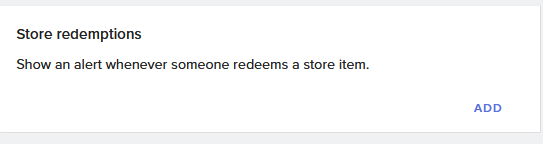
@digital coral redemtion widget if im not wrong
https://i.imgur.com/vuBDXTP.png @digital coral
 glass sundial
@real escarp will I be notified of the fixes, if it do happen?
real escarp
@glass sundial I've added your name to the ticket so we know to follow up
glass sundial
thanks!
 tight thistle
Hello! are there any staff members I can talk to about a chargeback on paypal?
digital coral
@lament blade where can I find the widget
It would be a link to add to slobs correct?
lament blade
@digital coral in your overlay editor -> widgets -> second line, last one
@digital coral no you have to add it to your overlay in your overlay editor
digital coral
Overlay editor in stream elements?
lament blade
@digital coral yes
digital coral
Oh hmm didn't see a tab for that but didn't look very hard. Thank you
I'll check again
lament blade
@digital coral you have to go in your overlay editor of you overlay. On the Top bar there is a tab called "Widgets", click on it and search for "Store Redemption" Widget, its in the beginning of the list
 trail cosmos
I had one person chatting in my Twitch stream today. However, there were several time where StreamElements timed him out for 5 minutes. I had to do the unban command several times to undo this. I can't find the settings in StreamElements that times out people if they "chat too much". Any help would be appreciated.
lament blade
@trail cosmos if he wrote many sentences with capslock ( even a few words ) and your bot spam filter is on a high protection level it could ban him, also too much emotes could be a problem, or he used a banned word or also the paragraph protection could be the cause
@trail cosmos you can check the spam filters over at the website: https://streamelements.com/dashboard/bot-spam-filters
StreamElements
The Ultimate All in One Platform for Streamers
just see if anything stands out for you there
 solar minnow
why cant i hear my audio through my obs studio
real escarp
audio from which source?
 icy tendon
Hi! I can't get my .png images to upload in streamelements. I have no issues with gifs.
real escarp
using google chrome???
icy tendon
no google chrome.
real escarp
you may want to try google chrome as it tends to work better with our site
icy tendon
ok thank you
i was also wondering is there a min/max file restriction on images for uploads?
size of image*
real escarp
i believe its 30mb per upload file
icy tendon
thanks for your help!
 open pendant
I am new to streamelements and setting my bot up. For the currency system, is there a way to give extra points to regulars or make rankings basked on the time people spend in my chat?
lament blade
hallo kan iemand mij helpen
real escarp
@open pendant there is no ranking system but you can suggest it or upvote it here https://strms.net/ideas
open pendant
Thank you very much! @real escarp
round brambleBOT
@spare portal Here is a guide on how to setup the most essential tools for streaming from your console, while using StreamElements tools without involving a Capture Card! It's easy to do, take 4 minutes to read and 10 to 15 minutes to setup!
Read all about it here: https://blog.streamelements.com/how-to-stream-on-console-7b620b1c46c3
 spare portal
It says you thing interrupted
digital coral
@lament blade thank you 😊
 untold isle
why do I get such crappy frames in apex :(
round brambleBOT
@untold isle Since Apex Legends doesn't have optimized GPU drivers yet, it tends to take up all your GPU resources, leaving nothing for OBS. If you're having OBS performance issues, you'll likely need to limit the game somehow. The easiest way to do this is to enable Vsync in the game, or use a frame limiter. You can limit the game to 60fps by adding `+fps_max 60` to the game's launch properties in Origin.
https://twitter.com/OBSProject/status/1093974215877951493

If you stream @PlayApex and are having FPS issues with OBS due to a maxed-out GPU, you'll need to reduce GPU usage so that OBS can run as well. The quickest way to do this is to enable Vsync with triple buffering and disable Windows 10 Game Mode. https://t.co/FOPmDyJMNx
Retweets
468
Likes
1339
 Twitter
lament blade
Twitter
lament blade
@untold isle you can use whatever framerate you want just to **+fps_max [MAX FPS in numbers] **
untold isle
If I do that will my stream lag on obs
lament blade
@untold isle if your pc can handle 60 fps? no ; if your pc can handle 300 fps? no, if you pc cant handle 80FPS? yes. You just have to look up your cpu/gpu usage while doing a test record / stream
untold isle
ok thanks 👍
 quartz nebula
can someone tell me how to set up commands cause i watch yt vids and its not working
lament blade
@quartz nebula you mean custom commands?
quartz nebula
yeah
 strong kernel
StreamElements
The Ultimate All in One Platform for Streamers
lament blade
@quartz nebula on your commands tab, the last tab is called "variables" there is everything listed you might need
real escarp
joining the bot from SE dashboard and making it mod /mod streamelements
@quartz nebula
quartz nebula
what is SE?
quartz nebula
where do i find that i am looking everywhere
lament blade
@quartz nebula first page when you log in into se, right middle
quartz nebula
thank you
 azure parrot
I'm trying to get the slots module to turn on for a person's channel, it keeps telling me "something is wrong". Any insight? It's the only module this happens to.
strong kernel
All modules update simultaneously so if you set up one module incorrectly, it'll stop all of them from saving.
azure parrot
It flickers on and then off and resets the settings to default. Nothing is working 😦
azure parrot
They all work 🤷
strong kernel
Whose account are you editing?
azure parrot
VisualArtGraphics
strong kernel
What changes are you trying to make? And what browser are you using?
azure parrot
Trying to turn the slot machine on. Opera GX
quartz nebula
i have overlays i want to use but i dont know how to set them up
round brambleBOT
@quartz nebula To add your overlays to OBS, add a new browser source in your scene. Paste your overlay URL in the browser source properties, set the dimensions to 1920x1080 (unless you changed them on the website), and ☑ “Shutdown source when not visible” https://youtu.be/KDvLynUqXI4
round brambleBOT
@untold isle To add your overlays to OBS, add a new browser source in your scene. Paste your overlay URL in the browser source properties, set the dimensions to 1920x1080 (unless you changed them on the website), and ☑ “Shutdown source when not visible” https://youtu.be/KDvLynUqXI4
untold isle
looks like this in the editor
strong kernel
Read the bot message. You missed a step when adding it into OBS.
untold isle
ok thanks
lament blade
hello i have a bug with my media request tool. if a viewer sends a link with !sr <youtube link>, the bots says the video is blocked or a complete different video adds to the queue. how can i fix it?
strong kernel
Can you screenshot an example?
 strong kernel
That's because you've set your Twitch channel to completely block the link. That's not StreamElements blocking it.
That's StreamElements reacting to *** and using it as a search query.
Change your moderation options in your Twitch dashboard.
lament blade
thanks!
round brambleBOT
@warm valley Please provide a log from your last stream. To do this, in OBS go to Help > Log Files > Upload Last Log File and paste the link to the log file here.
 compact rampart
hey so I setup everything in obs.live yesterday and streamed
and I opened it up today
and all my sources and scenes are gone
and it took me like an hour to set it up
 warm valley
strong kernel
warm valley
strong kernel
That link isn't for you.
strong kernel
Check to see if you accidentally changed scene collections. Scenes don't just vanish.
compact rampart
well when I opened it up it made me log in again
and then all my shit went poof
its like it reset
strong kernel
Logging in has nothing to do with scene collections.
compact rampart
not just scenes, everything I did is gone
hotkeys
resolution
everything got reset
is there any way I can get it back or nah
holdon, I think if my overlays are saved then the rest wont take too long to setup
ok all my overlays are saved, its annoying but I can deal with it as long as it doesnt happen again lol
wary halo
to be fair, this sounds more like an OBS problem than a SE problem, because SE only does the overlay part and not the settings in OBS
wary halo
sucks though, had to setup everything myself again this week
Windows 10 update screwed my whole pc
wary halo
yes, everything is at SE so it's in the cloud 😉
that is the best thing about SE, you can access your stuff everywhere
 next snow
hello i need help
round brambleBOT
@next snow Welcome to the helpdesk! Please let us know how we can assist you today and a support volunteer or staff member will assist you as soon as they are available. Thank you for your patience.
next snow
I would like to rename the streamelements bot
round brambleBOT
@next snow Custom bot name requirements
- StreamElements bot modded and in chat
- Active overlay with alerts
- StreamElements tipping page in the panels below the stream (!panels)
- OBS.Live or Ground Control open
- Create a twitch account for the name you want to use or run the bot under your own name
- Custom bot name doesn't work on Mac
 fading dragon
i changed my username on twitch awhile ago and my chatstats page has become a 404 only, is there's a email ticket i should fill out?
strong kernel
Nope. 🙂
 swift swan
Oh when we have a update for obs live do I upodatge obs 1st or just do live? Also do we have a update to live yet?
strong kernel
If there's an update, you'll know.
strong kernel
There is no rollback option, no.
swift swan
To see if that helps with the server issues?
strong kernel
What server issues?
swift swan
It started after updateing
OBS studio
strong kernel
You can get the last version of OBS Studio from here: https://github.com/obsproject/obs-studio/releases/tag/23.2.1

GitHub
OBS Studio - Free and open source software for live streaming and screen recording - obsproject/obs-studio
Well, last supported version, anyway.
swift swan
Yea but live won't work correct?
strong kernel
Why wouldn't it?
strong kernel
We don't support 24.0.1 yet. The last one we supported is 23.2.1. That one. ⤴
swift swan
So will it work with newest version of OBS?
strong kernel
The link I just provided is not the newest version.
It's the last version that OBS.Live supports.
strong kernel
Earlier versions of OBS.Live are not available. The most recent version of OBS.Live is the one that works with 23.2.1
 dense anchor
the store redemption widget isn't hidden while inactive anymore. it just constantly says "redeemed" on the screen. any way to fix?
 whole sage
Ok so I changed my url now my commands dont work why is that
round brambleBOT
@whole sage If you changed your name on Twitch please follow these steps:
🔹 Visit https://streamelements.com/logout and then log in again with by connecting with Twitch.
🔹 On the right side of the dashboard page that opens, select "Join" under bot settings. If it says "Part" select that and then select "Join" to send the bot to the chat. Don't forget to mod the bot by typing /mod streamelements in your channel if you have not already.
🔹 Post your new name here so that we can update your channel's chatstats tracking (must be done by staff).
 pulsar gulch
Hello, for some reason I have 1 of the webcam c920 ( total of 2 ) registered on Sound / video / game controllers and my USB MIC .. they shouldn't be here right ?
 sturdy bough
Hey guys, are there any known issues with Host Alerts at the moment? Ever since switching my alerts from SL to SE I am no longer getting any alerts for hosts
round brambleBOT
@sturdy bough Due to changes to Twitch API, we have filtered out hosts and will only show these ones on your activity feed:
- All hosts coming from an online channel with at least 1+ viewer
- Auto host events with at least 1 viewer - only from a channel that just went offline
Note: If you see "X channel has hosted you" with no viewers on the back, that is considered an offline host or a host with 0 viewers, we do not show these.
 gritty cape
i cant find how to hook up my loyalty system into the bots chat commands
strong kernel
What do you mean?
gritty cape
my viewers arent getting their in hat currency
chat*
im missing a bot or something and i cant find any online help when i google it
gritty cape
and nothing comes up for my vewers in responce to the on screen alert to the chat notification it should tell them how much they received in chat when the alert goes off on screen
strong kernel
What do you mean? Alerts don't tell you your points.
gritty cape
i know but NONE of my chat currency is showing at all for anyone
i had it set up before and it just stopped working
strong kernel
Still not sure what you're referring to. It looks fine to me.
strong kernel
Sees what, precisely?
gritty cape
it shoud tell them in chat when they follow or sub or tip etc
how much they receive*
not the total and ranking
strong kernel
It does not.
gritty cape
it used to
strong kernel
Not unless you specifically tell it to.
gritty cape
i didnt remove it in the first place.. when i started it did it automaticly
strong kernel
If you want to be creative with chat alerts, you certainly can, but it has never announced how many points you gained by default.
gritty cape
it did when i started streaming in july
wehen i set it all up it told people they got whatever amount per follow or sub etc
i didnt add any bots or anything. when i set up tipping it auto posted in my chat.... did i remove a bot by mistake?
gritty cape
it was SE that posted it for me im pretty sure... and i have no idea what happened to my custom named bot
strong kernel
You'd have to check up the setup in either OBS.Live or Ground Control, and it doesn't run when the program you set it up with isn't running.
gritty cape
thats what im ASKING... it was there when i signed up and i xidnt have to do anything
now its all gone and i didnt touch anything
strong kernel
The rename? No, it doesn't automatically set up a rename by default.
It's impossible for it to do so.
gritty cape
well its not cause it did it in july when i signed up with elements
it showed exactly what my loyalty settings were set to
per person and alert
strong kernel
A bot rename can't just be magically set up on its own. It needs to know the account to rename to, needs to be granted permissions to speak through it.
gritty cape
i dont mean my custom bot
i mean whatever it AUTO did when i signed up and set my loyalty stuff
strong kernel
But once again: The bot has never announced point gain by default.
gritty cape
well it used to
strong kernel
Never.
gritty cape
then you guys had a bug on something cause it did
and ive been trying to fix it since
strong kernel
We're an opt in system. Nearly everything is disabled by default, and then you enable and customize as you want.
gritty cape
yes.... i enabled the loyalty settings and it shared how much each person got in chat when they followed... not only the total when prompted
gritty cape
i didnt set anything other than enabling the loyalty settings themselved
strong kernel
You can be creative with the chat alert module and manually edit the text to indicate how many points you give for each event, but there is not and has never been a setting to automatically announce point gain in the chat.
gritty cape
that still doesnt explain why everything was removed
strong kernel
Nothing was removed.
gritty cape
cause i never set those up in the first place but there they were
strong kernel
Once more: there is not and has never been a setting to automatically announce point gain in the chat. We can't remove something that wasn't there to begin with.
gritty cape
and yes... my bot was removed and i dont knwo how
strong kernel
For your custom bot rename you'll need to check your settings in OBS.Live or Ground Control, whichever you used to rename it.
gritty cape
then what was i using when i digned up with elements cause no one else had access to my stuff
no idea what ground control is
strong kernel
Then check the rename settings in OBS.Live.
strong kernel
The menu in the top left of the activity feed.
gritty cape
theres no rename setting
strong kernel
Screenshot the settings please.
gritty cape
im not downloading more on my crap computer. where do i change the bot settings and add my custom one
strong kernel
In OBS.Live.
gritty cape
theres nothing in activity feed
strong kernel
Please screenshot what you're looking at.
strong kernel
OBS.Live is a plugin for OBS Studio. And 24.0.1 is the most recent version of OBS Studio.
gritty cape
and thats whats open... nothing there for bots
strong kernel
Again: Take a screenshot, please.
round brambleBOT
@gritty cape https://www.take-a-screenshot.org
gritty cape
yes.. .i know how... and my xbox settings WONT LET ME
gritty cape
yeha i dont have that
strong kernel
Bot rename is only possible through either Ground Control or OBS.Live. If you don't have either, you won't be able to rename the bot.
strong kernel
The StreamElements bot is still present in your stream as of your last stream.
gritty cape
just like the chat currency stuff
and yet nothing shows
ive been through the whole obs live AND the actual site dashboard theres NOTHING
strong kernel
You're going to need to provide screenshot examples of where you're looking and what isn't working, since from everything I've seen in your account all is as expected.
gritty cape
i cant
im telling you... there is NO bot.. everything that worked before... is gone and i dont know how becaus eno one had access to my stuff
strong kernel
This is a bot.
gritty cape
thats MY custom command and not bot related
strong kernel
But you're saying there's no bot, and it's right there.
gritty cape
MY BOT
strong kernel
That's the bot.
strong kernel
You're not being clear.
gritty cape
my bot is gone
i was
i said my custom bot is gone
just like the commands that SE used to do.
strong kernel
It's not "custom," it's a rename function that has that StreamElements bot speak through a different account. A rename function that is only available through either OBS.Live or Ground Control, of which it appears you have neither installed.
strong kernel
Do you see a StreamElements menu at the top of OBS?
gritty cape
a button you mean
strong kernel
gritty cape
im not downloading anymore programs on my computer and yes i do... but NO it doesnt show the tab you shared
strong kernel
Click it. Do you see an option that says Activity feed?
gritty cape
yes and i clicked that... and what you showed me to click ISNT THERE
strong kernel
Then click that menu at the top, use the Logout option, and log in again with your Twitch account.
strong kernel
Without being able to see what's in your OBS, there's not much else I can do for you at this point. There's no reason "Xbox" settings should prevent you from taking a screenshot. I'd recommend getting a program such as ShareX to make screenshotting simpler.
gritty cape
again... im not downloading more garbage
this was fine up untill sept
not even... mid aug
 stark swallow
Does anyone know why I keep getting the word "REDEMEED" on all my overlays?
strong kernel
@gritty cape Until you're able to provide me with more information via screenshots, I can't do much else for you.
@stark swallow Delete and add a new store redemption widget, see if that helps.
 normal igloo
believe me you always get fast answers here 
stark swallow
Huh. Didn't even realize that I had that added. I just removed them instead
Also does anyone have a better link to the "Stream Information" box? I don't know why but while using SE.Live, it seems OBS Studio likes to "forget" I'm signed in.
round brambleBOT
@stark swallow If you are not seeing the OBS Twitch integrations and have OBS.Live installed, please follow these steps:
- Make sure you are on the latest and greatest version of OBS.Live
- exit OBS (make sure OBS is not running)
- delete %appdata%\obs-studio\plugin_config\obs-browser\obs_profile_cookies
- start OBS.Live
- Settings -> Stream -> disconnect -> connect
stark swallow
Got it.
 quiet bison
round brambleBOT
quiet bison
round brambleBOT
@quiet bison For the best OBS support, please join their Official Discord @ discord.gg/obsproject
lament blade
Is there a way to set the tip goal to start from 0?
strong kernel
Goal progress is controlled at https://streamelements.com/dashboard/session
StreamElements
The Ultimate All in One Platform for Streamers
 halcyon bolt
Hey, so i set a donation alert as a video, and it plays on stream but freezes, then plays then freezes. My alert is 15 seconds long
round brambleBOT
@halcyon bolt Please connect your streaming account (Twitch, YouTube, or Facebook) with Discord by going to ⚙ Settings and then Connections here in Discord. https://streamable.com/eg92w
 halcyon bolt
okay
strong kernel
I'm not seeing the issue on my end. Also, why set it to 15 seconds when your video is 9 seconds?
halcyon bolt
you right ill change, it like stutters in obs but ill change it
strong kernel
Try disabling hardware acceleration in Settings>Advanced.
halcyon bolt
fixed it thank you so much!
strong kernel
I'd also recommend putting in animations like fade in/out.
halcyon bolt
^bet
 uneven sundial
I have a question about timers, regarding the online and offline intervals. Can somebody explain those for me?
strong kernel
Online: Live
Offline: Not Live
uneven sundial
So how can I tell how often the timer will post in chat?
strong kernel
Are you live?
Yes: Online interval.
No: Offline interval.
uneven sundial
Makes sense now. Thank you.
What will happen if I set the Chat lines interval to 0?
strong kernel
Then the timer won't care how active your chat is.
uneven sundial
tyvm, have a nice night @strong kernel
 austere stone
um excuse me but i cant seem to get my live screen capture to connect
can somebody help with that
round brambleBOT
@austere stone For the best OBS support, please join their Official Discord @ discord.gg/obsproject
 slim nova
quick question on how to use the countdown widget. how do i get it to not start till i turn stream on and how do you get it to reset
zenith widget
just before starting the stream(if thats its purpose)
reload the overlay
or if you have a 10 minute countdown, add like 2 minutes on top and start stream when it hits 10 minutes
slim nova
thank you
i thought i mighthave to do that
just wasnt sure if i was missing something
 vernal spruce
Not sure if I should ask this here, but I attempted to use the Media Request Widget during my stream tonight. Viewers could make requests and see the video, but they could not hear audio. Is there an extra step in OBS or am I missing something? Thank you!
zenith widget
Make sure OBS is capturing the default desktop audio device
Settings -> audio -> desktop audio first or 2nd option -> Default
The OBS docks and overlays default to the default audio device set on the PC, so if you have placed another audio device as the listening output in OBS
then thats the issue
vernal spruce
@zenith widget Makes sense. I’ll make some adjustments and test it out. Thank you!
@zenith widget And problem solved. Thank you again!
zenith widget

 fathom zodiac
hey is there a way to make the timer in stream elements show one message ever 15 mins for example
rather than it all showing up 15 minutes
fathom zodiac
thank you!
will look and test!
oof i see
Thought maybe there was a way to set up the timer once and then it rotates on a global scale but i guess not
also that count one looks cool too!
so much to learn!
 dreamy valve
is it possible to add the StreamElements bot to a different chat room?
a guy I watch wants to add a different room for !gamble.
so he made another room but can't find out how to add the StreamElements bot to it.
zenith widget
Chat rooms are not supported. They are not open via the Twitch API
obsidian notch
Hello, was not it always possible to show icon in the event list? A heart for follow, etc.
 reef leaf
Hi could i please get some help with a command?
zenith widget
@obsidian notch I see that the images have been updated in the code to images that should be hosted in your site. Those images are no longer there.
@reef leaf What kind of command?
obsidian notch
yes right wanted to change but I can not find the option in the menu. are not there any more? @zenith widget
 raven jackal
quick question about the bingo module.
you set the "maximum win amount". does that mean it can be anything between 0 and the set amount? and is it random?
 rough umbra
was just curious how to get the TTS for bits/cheer? its on band works for all my other stuff but cheers it wont activate. what do?
 untold crest
@rough umbra check alert variations for cheers
zenith widget
@raven jackal Thats just the max amount a bingo can have. As in, you can start with a 500 bingo or a 4000 bingo if the max amount is 4000
 violet raptor
Quick Qeustion, where it says Chat lines in the bot timer what does it actually mean?
 jade remnant
how many lines of chat
lament blade
Chat lines are the messages needed to let the timer go off
So say 5 chatlines, is 5 messages in your chat
Oops sorry tad didn't saw you typing 
zenith widget
https://discordapp.com/channels/141203863863558144/199460642975907840/508911738528333849 - or check pinned messages for timers guide an explanations
violet raptor
Well I get that but there's a time for it aswel
lament blade
Yes so if the time is 10 minutes and you have 0 chatlines, it will always go off after 10 minutes
If you have timer to 10 minutes but have 5 chatlines, it won't go off unless you have atleast 5 messages, this is if you don't want your chat to only consist out of timers
lament blade
No worries
versed locust
for my twitch alerts, is there a way to set up a profanity filter?
zenith widget
Tippings settings -> tip moderation
that affects all alert types
subs, follows, etc
versed locust
Thanks
Cool, I'm just hiding the message
Also what do suggest is the best length of time to leave alerts on screen.
I currently have it them at 5secs
zenith widget
seems ok
versed locust
You think that is long enough?
zenith widget
You can place the alert length to 30 seconds
so 5 seconds seems fine
as by default the alert widget is 8 seconds
or was it 10
w/e
versed locust
so 5 is fine?
zenith widget
seems ok
versed locust
default is 8
 inland vault
Hy guys! I'm just setting up my alerts for the first time. Is there any way to disable sub text in alerts? And what are the dynamic templates for text areas?
lament blade
@inland vault in your alert box settings you can remove the variable which shows text when I'm correct
inland vault
I'm using Nerd or Die Focus pack
lament blade
@ashen cedar try removing the exention and reinstall it
inland vault
@lament blade i don't find this variable
 ashen cedar
or in obs too?
lament blade
@inland vault can you post ascreenshot of your sub settings of your overlay editor?
@ashen cedar just in your browser
ashen cedar
ok trying right now
lament blade
@inland vault and you want to remove what exacly? the message of the user or that XXX user subscribed?
inland vault
the message he writes when subs/tips/cheers
lament blade
@inland vault uhm. wait a sec, i will check what you have to remove
inland vault
okay, thanks
ashen cedar
@lament blade after reinstalling extension same not working
yeasterday i just reinstal my win 10
and from this time extension stops working
lament blade
@ashen cedar can you maybe link your twitch account with discord? its easier to help you with your problem if i know if its twitch error or just your browser
ashen cedar
ok
lament blade
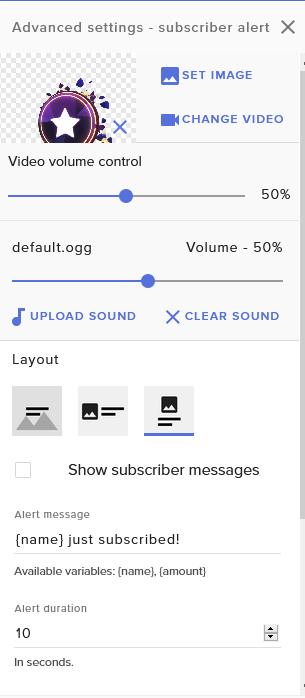
@inland vault uhm.. im not familiar with NOD packages, but if i create a new alert widget i have the option to Show subscriber message or not https://i.imgur.com/J0SG1ri.png
 inland vault
I checked it, when I disable the CSS, i can see that option, but if I enable it, i don't see that.
lament blade
@inland vault I'm sorry, i can't help with this problem but i will ask the staff if its possible to remove this
ashen cedar
my disc is now linked with twitch
 errant quail

all they see is white background
ppl can't chat on stream
can anyone help me pls ?
how do i fix this ?
lament blade
@errant quail when you livestream your own channel a inception will start, there is nothing to fix, just dont watch your own stream ^^
errant quail
this was a SS from a friend
lament blade
oh the chat im sorry, overread your message
errant quail
no worries
lament blade
reloading the page doesnt work?
lament blade
can only you write in the chat or no one?
@errant quail because when no one can write in the chat, twitch has an issue, most chat servers are currently offline -> https://twitchstatus.com/
lament blade
but will the message be displayed for others who cant write in chat?
ashen cedar
@lament blade its my browser problem..my friends seee leaderboards correctly
ashen cedar
@ do u known any solution for my problem?
lament blade
@ashen cedar try clearing your browser cache of twitch website in your browser settings
lament blade
@ashen cedar this shouldn't be a problem?
lament blade
@ashen cedar the dns is only there for transferin a domain into an ip. Have you any addons installed that could block scripts? (Adblock., Ublock, Noscript, matrix, antivurs extensions)
ashen cedar
no iv got pure win install
lament blade
@ashen cedar which browser do you use?
ashen cedar
firefox
edge wont load my twitch website
now twitch website working in all browsers firefox edge chrome ...after dns set to google
but extension not in any browser
lament blade
hmm thats weird
austere stone
@serene granite How Do I Connect my live screen capture
austere stone
<@&382267076632379392> I Need Some Help Figureing Out How To Connect My live screen capture Software
jade remnant
-
please dont ask in multiple servers after you were sent to obs, they would have much more knowledge on how to solve your issue
-
please dont ping random people
-
you need to be more specific on your issue, what are you trying to capture in obs?
austere stone
The Window
ashen cedar
are there any prerequirement software witch is need for this extension...like some visual C or .NET????
normal igloo
The window oh you mean Windows 10? @austere stone 
normal igloo
windows 7 mmm Think it might help if you upgrade
inland vault
@lament blade it's very complicated this message thing
ashen cedar
nobody have solution for me? 😦
dry hare
@ashen cedar your question is fairly vague and isn't specific enough to provide you with any sort of answer
ashen cedar
beatmakerdnes v 5:10
hello i need help..my stream elements twitch extension not working properly...
inland vault
is someone here using any nerd or die package?
ashen cedar
screenshot are above.....
dry hare
@ashen cedar did you configure the widget and tell it what data to pull from StreamElements?
@inland vault yes I am using a NoD package
inland vault
@dry hare I have the Focus package, and i don't see any option to turn off the message to show up on screen, is there any way for it?
dry hare
tbh that would be a question for Nerd or Die as they built the alerts. Looking at the alert box I believe I could do it, but I'm not certain what it would break if I did it
dry hare
I looked, and I'm not a coding genius. I'd test it but I don't want to break mine 😄
dry hare
what browser are you using?
inland vault
they helped me, if you're curious, in the Open CSS Editor, you have the HTML section and below there's a {usermessage} just that you should delete.
dry hare
oooh neato. Thanks for the info @inland vault I'll post it for the other support people
ashen cedar
java updated flash updated win updated
dry hare
How fresh? Like needs updates fresh?
ashen cedar
got all win updates
inland vault
@dry hare
lament blade
@dry hare the problem @ashen cedar has is browser specific, for himself its not working, but for others. clearing cache didnt worked out 😦
dry hare
Thanks @inland vault !!
ashen cedar
exactly
dry hare
Can you remove the extension and re-add it?
dry hare
are you running through a VPN?
ashen cedar
no
when i reinstalled my windows twitch website wont load till i set my dns to google
TWITCH WEBISTE NOW WORKING BUT EXTENSION NOT
sorry caps
dry hare
So if you set your DNS to auto, and run the network troubleshooter on your connection does twitch load correctly?
 slender ice
can i make the chat layer in the same angle as the screen here? wanna make it look real
ashen cedar
@dry hare ill try it in few minutes
real escarp
web cam or web cam border
OBS Forums
I'm new to OBS and am using the 21.0.2 bits on a MBP. I'm experimenting with virtual sets and I'm trying to figure out how to create perspective on videos that show up at an angle to the presenter. An example would be the video that goes in the large player C on the right in ...
@austere stone in the cloud overlay editor > find the cam border click on it and you should find a small black box bottom right corner > click and drag to adjust
slender ice
@real escarp so put the chat in a different page and do this process?
austere stone
Where is that by chance
real escarp
best guess as there is no way to do it from cloud overlay > @slender ice
StreamElements
The Ultimate All in One Platform for Streamers
ashen cedar
when i set my dns to auto twitch website not working correctly...troubleshooter not helps me
twitch wont load some modules now
now iam using cloudflare dns and twitch site working well bur extension still nothing
 merry escarp
I have a problem, when I import a browser source in OBS with my streamelements overlay de videos and alerts are lagging in obs while my frames stay on 60 fps
real escarp
obs 24? @merry escarp
merry escarp
yes
merry escarp
it is already enabled
real escarp
what if you disable it and restart obs
merry escarp
tnx it is fixed now
 gentle imp
@ashen cedar this is a problem with your ISP probably, did you try using google dns?
 stone olive


 gentle imp
#🇪🇸︱español por favor
ashen cedar
@gentle imp google dns same twitch working extension not
gentle imp
oh well, nothing we can do, I suggest contact your ISP, I'm assuming you removed the extension and added it back, uninstall and re-install really, not just enable/disable
 lavish flax
Hello anyone up who could help me please?? In last patch for Obs studio it keep crashing with error
Failed to recreate D3D11: Failed to create input layout (80070057
Sometimes i want to use AFK screen, and boom my stream crash... its like this like 2weeks, anyone know how to fix it or when they will patch it? please dont tell me im the only one who having this issue
ashen cedar
@gentle imp i uninstalled it and install again not deactivate and activate ..and not working....ISP is OK this streamelements extension works fine before i reinstall win10
@gentle imp now iv got newest win10 freshly installed and extension not working
this is 100% not ISP problem
i think maybe some prereq is missing for me now...
but i dont now whit is required for this extension
real escarp
first check your crash reports
round brambleBOT
@lavish flax Please provide a log from your last stream. To do this, in OBS go to Help > Log Files > Upload Last Log File and paste the link to the log file here.
lavish flax
thats what i did, it shows me where to go to check crash report, there is file and text from there i copy and paste here
real escarp
after you post the url to the log I can generate a link to make the report readable it will make suggestions
if the suggestions dont help then you will need to either roll back obs to obs 23 or ask in obs discord
lavish flax
its like this for last 2weeks since patch, i thought they will fix it soon, there is no issue with my laptop or game etc.. just new patch
ok lets go straight to point, how i can roll back to obs 23 ?
real escarp
well it sounds like your gonna wait on another hotfix
i can help you there
uninstall obs 24 > keep settings at uninstall
lavish flax
ps; i dont really need obs live, i keep switching always when i open obs, or it has to be there for online streaming etc ?
real escarp
here you go
lavish flax
and i have 1 really important question for you... how can i do backup ?
ashen cedar
now i try to dowload twitch app and in twitch app extension still not working for me 😦
real escarp
there is no all in one backup | obs lets you keep all scenes and settings when you uninstall | aside from that you will need to export the profile
lavish flax
i have scenes and inside scenes i have sources, i like how they are now, can i do backup ? like if i lost my data, i can pull out this from somewhere ? so dont need to setted up again ?
gentle imp
@ashen cedar which extension are we talking about?
gentle imp
twitch extension right? it can't be your windows hehe
lavish flax
so can i somehow export profile? i dont mind to set up again all stuff in settings, but scenes and sources, i made in really specific way you know .
jade remnant
scenes collection > export
profiles > export
real escarp
@lavish flax thats what the profile is export it to desktop
jade remnant
make sure the files you use stay in the same directory or they wont work when you import it into obs
ashen cedar
iv got neevst win patch...maybe this makes problem
newest
in my 2years not updated win 10 all works fine
gentle imp
I'm on your channel and I don't see the extension in any panel
lavish flax
@real escarp do you wanna go with me into Voice Chit Chat ? if you have time to help me set up something :]
ashen cedar
now i trying reinstall
now you can check it
it will works for you
but not for me 😄
real escarp
you can ask your questions here as all of our support staff can respond. I have a whole other system to monitor besides discord
gentle imp
you probably have something blocking it
ashen cedar
firewall??
gentle imp
nope, I have it too and works for me
ashen cedar
maybe?
gentle imp
firewall, adblocker, etc
ashen cedar
i dont click block anything
gentle imp
I bet it's an blocker
lavish flax
Ok, how i can make stream look better? i mean in quality ? i will write down here stuff what i set up... one second **EDIT
gentle imp
probably adblocker or something even stricter
gentle imp
that is so weird, but clearly it's something on your side blocking it, tried different browser?
real escarp
@lavish flax start with switching from laptop to dedicated streaming/gaming pc as for as settings
round brambleBOT
@lavish flax There are no "best settings".
Please understand that every setup, will be very different.
Any guides or videos that claim otherwise are misinforming. Your best option is to start with a base and adjust as necessary.
Test, test, and test again. We are happy to offer suggestions for any issues you may be having, but not a list of settings.
ashen cedar
yeah all the browsers same
i known its problem on my side....but witch problem
in twitch app same
 steel obsidian
I'm helping my sister with her channel and one thing I notice was...the StreamElements is showing up the wrong followers count.
On Twitch, it show 55, but on StreamElements dashboard only show 23.
lavish flax
Settings > Output -
Rate CBR
Bitrate 6000
Keyframe 2
Preset High Quality
Profile High
GPU 0
Max B frames 2
VIDEO
Base 1920x1080
Output 1920x1080
Downscale Lanczos {Sharpened Scaling 32 samples}
Common FPS 60
real escarp
dashboard shows for the month
gentle imp
try starting browser with all extensions disabled https://www.techsupportall.com/start-google-chrome-without-extensions/ @ashen cedar
round brambleBOT
@lavish flax Please provide a log from your last stream. To do this, in OBS go to Help > Log Files > Upload Last Log File and paste the link to the log file here.
jade remnant
again, no need to list eveything