#helpdesk-twitch
1 messages · Page 513 of 1
 cedar lynx
cedar lynx
cedar lynx
heya @lament blade, are you using GroundControl or OBS.Live?
 lament blade
apologies. didnt see it until just now. Ground Control
@cedar lynx Yes I'm using Ground Control. I also see this in my Twitch Channel AND my OBS that I have up.
cedar lynx
I'm guessing that somehow the GroundControl bot got started twice without being properly shut down – let me see if I can find the specific instructions. You're on Windows?
lament blade
Yes. Thank you for Helping me. I sure appreciate it.
Let me shoot you a link real quick so you can see what I'm talking about
cedar lynx
Steps to fix multiple instances of the bot running:
- Turn off Ground Control
- Open Task Manager
- Look for anything called "bot.exe"
- If yes to 3, shut it down
- Restart Ground Control and make sure you've enabled the custom bot name, resetting up the 2nd Twitch account with the oAuth token if necessary
lament blade
I deliberately set my current timer to go off every minute to see what it would look like and it shows the problem
cedar lynx
also, I recommend modding StreamElements as well as your custom bot name to ensure you don't run into weird issues
but that's separate from this problem
I see the double message and I still recommend the steps I mentioned above 🙂
lament blade
for sure. let me try this. thank you. (just modded SE like you suggested)
cedar lynx
awesome  let me know if it works!
lament blade
@cedar lynx Its appears to have worked. I didn't find the bot.exe but I did just shut down everything on the TM and now its moving like it should. Thanks again for all the help. SUPER appreciated!!
cedar lynx
sweeet you're welcome!
 jagged badge
anyone know how to make my music from media share quiet in my headphones but not affect how loud it is on my stream?
 round brambleBOT
@jagged badge How to exclude audio sources for a stream or recording: https://obsproject.com/forum/resources/8/
Voicemeeter Banana guide: https://obsproject.com/forum/resources/397/
 torpid pilot
How do i import my overlays from google streamelements to normal streamelemts
round brambleBOT
@torpid pilot To add your overlays to OBS, add a new browser source in your scene. Paste your overlay URL in the browser source properties, set the dimensions to 1920x1080 (unless you changed them on the website), and ☑ “Shutdown source when not visible” https://youtu.be/KDvLynUqXI4
lament blade
Hi all, I've had a developer build me an alert system because he didn't want to use any existing alert systems and now he's decided he doesn't want to help anymore. I have a follow alert that I want to duplicate and I have all the HTML/JS/CSS to make it work, but I need a hand with StreamElements to bring it in and I've spent an hour trying to get the alert code into the editor but I'm not getting anywhere close to the results I should be. Is anybody able to assist? Would be happy to talk compensation.
torpid pilot
My overlay does not fit the screen
round brambleBOT
@torpid pilot The default resolution for StreamElements overlays (theme and custom) is 1920x1080. Please add them in OBS at their full resolution and use CTRL+F to fit to screen if necessary. You can then downscale your stream in OBS settings > Video if you'd like https://i.imgur.com/6bWXxjR.png

 zenith widget
@lament blade You can just place the html and css in the alert custom code section - we handle most of the JS. If that is not enough I would recommend going to #dev-chat and someone from our Code guru might be able to help.
lament blade
Appreciate it, thank you.
jagged badge
anyone know how to make my music in media share quieter for myself but louder or stay the same for my stream?
zenith widget
!vac @Kavion#0375
round brambleBOT
How to exclude audio sources for a stream or recording: https://obsproject.com/forum/resources/8/
Voicemeeter Banana guide: https://obsproject.com/forum/resources/397/
jagged badge
eh?
cedar lynx
those resources will help you accomplish what you are looking for 🙂
 stuck acorn
Especially the Voicemeeter Banana one
lament blade
hallo ik heb een vraag ?
kan iemand van jullie mij helpen ?
 wary halo
@rustic parrot the channel points system is in beta at the moment, you can get yourself on the list though. just google it because i don't know the exact webpage
zenith widget
@lament blade #🇳🇱︱nederlands
 potent ibex

 boreal folio
Hi! Getting some complaints from followers today saying that the tips page suddenly is requiring you to sign up to G2A for direct credit card payments. It wasn't like that before. And the G2A signup has been confusing for followers.
Investigation into other streamers using Stream Labs seem to also use G2A but can just enter CC details normally as it has been with Stream Elements Tip page before.
Not sure why the change but it's bothering viewers so thought I'd try to ask if something changed or if I've messed something up inadvertently?
potent ibex
Streamlabs do not use g2a. But that sounds normal for streamelements 
zenith widget
G2A Pay seem to have changed something on their side, if they require login/sign up for direct card tips/payments.
Nothing we can do about it.
Unless the required login is to login to our dashboard with their twitch accounts.
cedar lynx
There was recently an update to EU laws about double-confirming credit card payments, it may be related to that
zenith widget
Aah yes - I actually got that my self - i could not pay directly to Steam, so I had to talk with my bank and we sorted it out with the 2FA for my card
so that might be it, if your viewers are from EU
cedar lynx
if it's on the SE side of things just double check your tipping settings here https://streamelements.com/dashboard/tipping-settings
potent ibex
Are you referring to this login screen?
boreal folio
Ohh sorry I misunderstood what chat was saying they made it seem that SL is using G2A
potent ibex
No, streamlabs uses stripe for CC payment processing.
zenith widget
Ty LazyMeme, for that info
boreal folio
No one of the viewers is from Singapore. Hmm
cedar lynx
did you double check your settings here? https://streamelements.com/dashboard/tipping-settings
potent ibex
That would be required streamelements login though? Nothing to do with g2a?
cedar lynx
I still am unclear on what login is being required TBH
potent ibex
Twitch/YT/Facebook
boreal folio
I'm double checking jic but yeah seems like a G2A issue. G2A always displays in Euro for whatever reason even though its HQ in HK. Maybe to do with that..
zenith widget
If there are 3 people providing questions and information right now, its gonna get confusing. 
cedar lynx
@boreal folio a lot of payment providers default to the most restrictive law so just because the end payee is not based in the EU they may be following all the EU laws anyways
almost especially if the person receiving the payment is EU based
(which I'm now seeing is not your case but)
boreal folio
Yeah but G2A has always displayed in Euro for some reason so it might explain it. I actually haven't been able to take out any of the money received through G2A because it's all in Euro so it confuses the hell out of me. And it's confusing viewers too...
Unfortunately I might have to switch donos over to something else to accomodate viewers... will see how it pans out I guess.
cedar lynx
oof, yeah. good luck!!
zenith widget
Have you checked the default currency your G2A Pay account is set to? @boreal folio
Usually that can affect what currency people see all the time and tip you with
Its a bit baffling seeing how you can't withdraw it if its locked in EUR, while PayPal doesn't care and lets your bank handle the currency exchange 
boreal folio
@zenith widget I have no idea how to. Viewers saying the same thing. I've browsed the site many times and it never makes sense to me. I'll have another browse when I get home and finish streaming...
But yeah I don't understand why it's like this. I also don't get why people can't just direct CC payment through Paypal when I know plenty of merchants have those physical machines for like $100 that will take CC payments without needing a Paypal account.
Things I don't understand shrug
cedar lynx
have you emailed or otherwise talked to G2A support about it?
 hard locust
ok so my cam is still not working i shut everything but obs off and i still can manuver it properly but i have to use the dials. the problem is that the red border around the cam wont show up so i cant change size or move it
zenith widget
If the red border around the source is not showing, unlock the source.
The lockpad next to the eye icon
also in the properties of the source
make sure you place a resolution
Also what camera is it?
and what dials? 🤔
 slender ridge
Variable of ${user.time_online} doesn't work correctly, and showing all the time 0 seconds 😉
 placid tartan
Greetings all
i need a bit of assistance but i dont know if this is the correct section to ask
lament blade
@placid tartan what problem or question do you have?
placid tartan
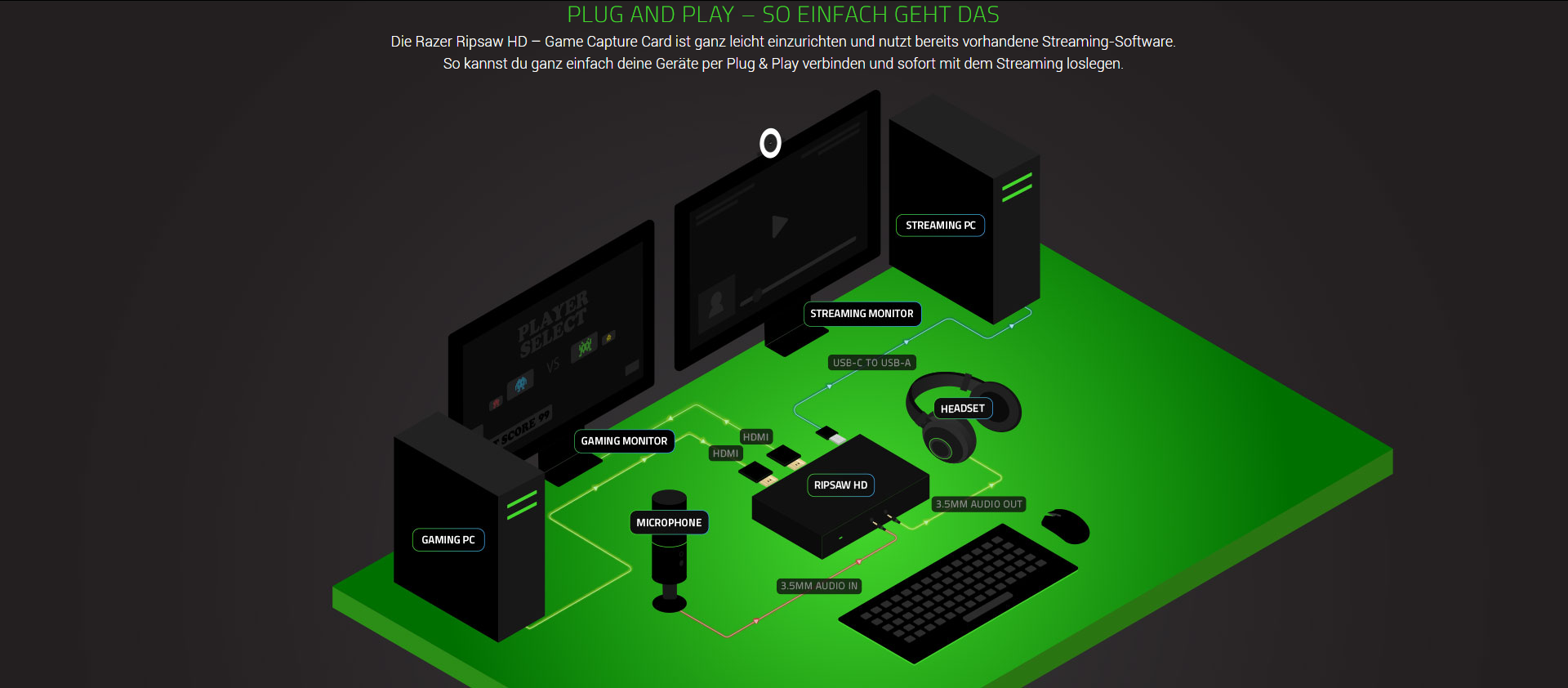
well ive bought a razer ripsaw gaming capture card so that i can stream my ps3 games via streamlabs OBS on my pc
but it appears for some reason the application does not receive any input
although ive connected everything correctly
it keeps saying this http://prntscr.com/pcvhhq
 lament blade
@placid tartan have you set it up like this? https://i.imgur.com/G52PrUl.png
 placid tartan
well first of all i dont have dual pc's
i havent connected mic and headphones due to they are already connected to my pc
lament blade
@placid tartan but you can imagine with certainty that a pc could be your ps3
placid tartan
what ive done is
i have connected the HDMI output to the HDMI input of the ripsaw and the output HDMI of the ripsaw i have connected it to my screen
and the USB 3.0 cable directly to my PC USB 3.0 port
lament blade
@placid tartan does the ps3 screen shows on the moitor?
placid tartan
no it doesnt
thats why i am wondering what is wrong
i dont think ive connected the cables on the wrong sequence but i will check
lament blade
@placid tartan I'm not familiar with razer, but does your capture card has an on / off button?
placid tartan
nop it gets powered by USB 3.0
lament blade
@placid tartan are both cables working?
placid tartan
yep they do
lament blade
@placid tartan i think for that problem you have to go on the razer discord (if it exists) or ask their support. Because I have no clue about how razers capture card works and what could be the issue.
placid tartan
alright i will check to find their discord server if they have and ask
 rain crypt
its a ps3, it has HDCP encryption which you need to disable
Every capture card is the same
 normal igloo
@rain crypt You can't disable hdcp on a ps3 tho
rain crypt
you can get hdcp strippers
 jade remnant
STRIPPERS 
 normal igloo
Yeah you can but you can't actually disable it on the ps3 Itself
rain crypt
@placid tartan tagging so u can see my reply above
didn't know that, never bought a ps3
normal igloo
👍
placid tartan
OK how can I disable the hdcp? Cause I don't find it any where in the ps3 display settings
placid tartan
Jesus........
jade remnant
yes?
lament blade
lmao
normal igloo
lmao tadpole 
placid tartan
So I spent 180 euro for the capture card for nothing
lament blade
you could give it back if you cant use it 😄
rain crypt
well... no, you just need extra equipment for a ps3
wary halo
maybe google it beforehand next time 😉
rain crypt
like a hdcp stripper is around £15
normal igloo
@lament blade I mean he can use it he will just need a hdmi splitter or a hdcp stripper
exactly invi
lament blade
@normal igloo i mean if he doesnt want to spend more then he could give it back 😄
 dry hare
The ripsaw lists the consoles it is compatible with in the tech specs. Personally I found the ripsaw less user-friendly than elgato’s cards.
normal igloo
unfortunately Sony made the PS3 at a time when they didn't really understand content creation until now hints the reason why PS4 can disable hdcp
normal igloo
what is the problem you having with the audio?
placid tartan
cant hear anything via the obs
i dont know if sound can be heard though if i go live
wary halo
probably not
normal igloo
are the audio bars on obs moving for the ps3? @placid tartan
normal igloo
you won't
placid tartan
hmm i wont unless i connect headphones to the ripsaw ah??
hmmm let me check i do have some handsfree around here somewhere
hmm nop no sound from there
hmmm i wonder if sound can be heard if i make a test stream
jade remnant
you can do a test recording, would be exactly the same
normal igloo
@placid tartan You do realise you won't be able to playback audio through obs for the ps3?
placid tartan
ok ive made a test recording and sound can be heard
the thing is the video output is too small if i switch it to full screen
Also @normal igloo yeah i noticed that
normal igloo
oh 
placid tartan
i guess i will play silent and only my audience can hear the game
i think that capture card was total waste of money
cedar lynx
I haven't used any of these products but monitoring the sound through OBS is not an option here?
normal igloo
I don't think it was a waste of money I just think next time do your research before buying @placid tartan
@cedar lynx as far as I'm aware no as OBS would have to pick up the audio from ps3 and send it to whatever audio output he's using at the same time
placid tartan
You made me sound like an idiot now James. Thank you for making me look ridiculous to anyone present here
normal igloo
Wait what 🤔
cedar lynx
ahh okay good to know, thanks @normal igloo 🙂
normal igloo
all I was said was do your research before buying
I don't think I said anything wrong here you wouldn't buy a new car without knowing what you're buying and what you would need for it the same replies to hardware🤔
placid tartan
ok whatever have a nice day....
torpid pilot
My streams not appering what shall i do
normal igloo
@torpid pilot What do you mean? 🤔
torpid pilot
When i start my stream it gors to another account which im not logged in to
normal igloo
I would recommend disconnecting and connecting with your stream key
torpid pilot
where do i find my stream key
 real escarp
 normal igloo
thx FriendlyNGeeks
torpid pilot
Where do i find it in stream elemnts
cedar lynx
your stream key is provided by Twitch, not StreamElements
so it only exists in your Twitch account
torpid pilot
yeah
jade remnant
stream keys are basically irrelevant now
go to settings > stream and connect your twitch account
make sure you are logged into your correct account in streamelements > logout then log in
 rustic meadow
my hype cup fills with my recent events in SLOBS. but when i launch OBS, my hype cup remains empty. anyone experience this?
normal igloo
@rustic meadow We can't help with issues with slobs as we are not streamlabs
rustic meadow
the problem is not in SLOBS - it's in regular OBS
and the problem is with the hype cup widget
real escarp
@rustic meadow im looking into it with the copy of your overlay
 thorn crystal
I have a gaming stream already, but I'm preparing to launch a weekly music stream in addition to gaming. I have my stream store set up for my gaming streams with lots of fun items and sfx, but I could see them getting in the way of a music stream. Is there any way to disable the entire stream store, or do I actually have to go through and disable each and every item before a music stream?
normal igloo
@thorn crystal You would have to disable each and every item before
your stream
mmm or
rustic meadow
@real escarp oh hey
didn't know you guys could do that
i saw a copy of my overlay and deleted it - thought i created it by accident - guess it was you
the cup fills up fine in the editor, but for some reason, remains empty when i launch OBS
all other elements appear to be working fine
normal igloo
Actually i'm stupid 
@thorn crystal disabled the store alert widgets in your overlay won't stop people from using the store but at least you won't get alerts
Don't know why I didn't think of that before saying disable each and every item 
thorn crystal
@normal igloo I had thought of that. I didn't want people wasting points to get nothing in return. I'll just disable the store alerts and deal with wasted points as they happen. Thanks!
normal igloo
I think you'll be fine as long as people are aware that they will be wasted points
thorn crystal
Hmm...true. Thanks!
normal igloo
np
real escarp
@rustic meadow clearing the cup in editor starts the recent events at that moment globally thus only new recent events will fill the cup going forward
tested on my overlay after clearing the cup then reloading the widget
rustic meadow
@real escarp
so i have to clear the cup to get it to work properly?
shame, i had a handful of recent events i would've liked to keep
real escarp
recent events going forward should show up in cup not sure if it was getting full and was cleared but you shouldnt have to do anything going forward it should start auto filling again with new recent events
 safe cosmos
you can make rote just for sub?
real escarp
^ you can make commands for subs
safe cosmos
And raffles only for subs?
lament blade
when you do a sub only stream
safe cosmos
i can say in portuguese? i think you're not understanding me
real escarp
the !raffle and !join can not be locked to subs only
unless you do a Subs only stream through twitch
safe cosmos
ok, tks
lament blade
ok i have a problem
streaming error
invalid path or connection
@lament blade have you tried reconnecting your twitch account in your obs settings?
how do i do that?
@lament blade settings -> stream -> logout -> login
its not showing log out?
@lament blade have you connected your twitch account with obs?
im using streamlabsOBS and it only ask for stream key
round brambleBOT
@lament blade We're not able to troubleshoot issues with using our overlays in StreamLabs OBS (SLOBS) as we don't have the tools to support their software. We recommend using OBS Studio or OBS Studio with our plugin OBS.Live.
lament blade
ops wrong command sorry
ok ty
@lament blade try repasting your stream key in your obs
ty that worked bizarlly
@lament blade no problem 🙂
 slate raven
is anybody else getting this issue where after testing an item redemption, the word "REDEEMED" persists on the overlay till the cache is refreshed but comes back again everytime you reload the browser source on OBS
real escarp
Known issue @slate raven its being tracked
slate raven
ah i see...thank you!
round brambleBOT
@static hare Please follow our community rules:
- No advertisement or stream promotion
- Respect ALL server members
- No NSFW/NSFL
Thank you
jade remnant
@static hare how many times?
normal igloo
@jade remnant but I thought I was special I thought the rules don't apply to me
 boreal locust
No working for me, no bot, no good name...
real escarp
hold on
let see if you can part the bot and join @boreal locust /bot remove
then join the bot from Stream Elements dashboard
boreal locust
Good
real escarp
now /mod streamelements
boreal locust
good
real escarp
now to use GilBreysse_Bot you need to have a twitch login for that name
good only one
now test with !uptime
gg
boreal locust
Thx
lament blade
@swift swan obs.live is not compatible with obs 24.0.1 yet
 swift swan
Any idea how long?!
lament blade
@swift swan no eta yet but the dev team is working on it
swift swan
Alright thanks ❤
Any I dea if it fixeds it?!
The dc's I mean
Lowkey gonna wait tho xD
NEED MY LIVE!
 narrow coyote
server issues are not going to be an OBS problem, if it was, everyone would be reporting issues
narrow coyote
its probably an issue with your network, or ISP, and the connection to the Twitch ingest servers
 stark furnace
Heya 🙂 May I ask - On the dashboard, when a new event appears it has a line/stripe on the left hand side. If you click on it, it changes to a dot. If you click again it goes back to a line. What is the significance of this please ?
swift swan
Anyway to check? @narrow coyote ❤
 elder sorrel
@stark furnace I assume for people keeping track of stuff they've read / unread.
lament blade
@stark furnace you can check or uncheck the event like as if you seen it, I mostly leave people i want to follow or who subbed to me unchecked
so i can check them out later
@swift swan you could check the twitch server status on this website https://twitchstatus.com/
narrow coyote
run a test, if the quality is low, contact your ISP https://r1ch.net/projects/twitchtest
stark furnace
Ok - Thanks @lament blade @elder sorrel 🙂
swift swan
Thanks ❤ @lament blade
lament blade
no worries o7
dry hare
Don't thank American.....That's just silly
swift swan
How do I make sense of this?! @lament blade
swift swan
I did
They are fine
It's the servers
I never lose FPS on my end and if it's my actual net I do show FPS drop in OBS
narrow coyote
what are the results of the test, if the quality is low, its not the server, its YOUR connection to the server
swift swan
Mostly 76+ 80mins max 88
 full arch
have you checked the twitch stream health
narrow coyote
if you have a server that has a quality of 88, and you are disconnecting a lot, its either a problem with your networking hardware, or your ISP
lament blade
@swift swan which router do you have? some offers analysis tools
swift swan
Started recently actually
narrow coyote
restart your modem and router. If your equipment is provided by your ISP, it would be best to contact them to do further testing
swift swan
NeatGear XR 500
lament blade
@swift swan this router has good tools as shown on the web, you could log in into your router and check for any errors / high usage
narrow coyote
chat servers
swift swan
true
narrow coyote
all ingest servers are online, and the ingest servers are what OBS will be connecting to
lament blade
@swift swan i dont know much about netgear routers, just google or read the user manual to which site you have to connect for your interface
swift swan
ok
full arch
To log in to your router: Launch a web browser from a computer or mobile device that is connected to your router’s network. Enter www.routerlogin.net.
A login window displays. Enter the router admin user name and password.
The user name is admin. The password is the one t...
swift swan
how to I check for errors?
 nova wren
So i changed my name on twitch today and in turn had to set up most of my stuff again. however i cant get my stream elements bot to announce shout outs and such as i used to can anyone help me
dry hare
@nova wren on your streamelements dashboard page part the bot then re-join the bot to your channel (don't forget to re-mod the bot after re-joining)
nova wren
thank you so much
dry hare
Also @nova wren make sure your loyalty points are working correctly. When changing your name on twitch there might be a chance that SE Staff will need to fix your loyalty points to reflect your new name
round brambleBOT
@nova wren If you changed your name on Twitch please follow these steps:
🔹 Visit https://streamelements.com/logout and then log in again with by connecting with Twitch.
🔹 On the right side of the dashboard page that opens, select "Join" under bot settings. If it says "Part" select that and then select "Join" to send the bot to the chat. Don't forget to mod the bot by typing /mod streamelements in your channel if you have not already.
🔹 Post your new name here so that we can update your channel's chatstats tracking (must be done by staff).
dry hare
need new name and old name for it to be correct
nova wren
yeah i had already changed the name of the bot and all just had to part and reconnect now its working fine, thank you so much for your help again @dry hare
 copper delta
Hi, I was wanting some help with my custom streamelements overlay, my host notification doesn’t work 😦
round brambleBOT
@copper delta Due to changes to Twitch API, we have filtered out hosts and will only show these ones on your activity feed:
- All hosts coming from an online channel with at least 1+ viewer
- Auto host events with at least 1 viewer - only from a channel that just went offline
Note: If you see "X channel has hosted you" with no viewers on the back, that is considered an offline host or a host with 0 viewers, we do not show these.
full arch
Is there a way to integrate who is actively viewing your stream. Like other than the number of viewers butthe name of them
full arch
Ok. I heard something about it was available on twitch but could not figure it out.
dry hare
you can click the viewer list in chat and see who is signed in and watching, but you can't see viewers if they aren't logged in
full arch
ok
 drowsy flicker
Is this a channel in which i can seek for help with my streamelements and streamlabs?
lament blade
@drowsy flicker yes or in #helpdesk-selive
drowsy flicker
So i just write it down here or there?
round brambleBOT
@drowsy flicker We're not able to troubleshoot issues with using our overlays in StreamLabs OBS (SLOBS) as we don't have the tools to support their software. We recommend using OBS Studio or OBS Studio with our plugin OBS.Live.
drowsy flicker
Alright
IS there any way i can just move all my scenes and options from Streamlabs to OBS Studio?
Ive got quiet a lot things set up in Slabs
Is there a quick way?
lament blade
@drowsy flicker you could import your scenes to streamelements and use it as browser source in your obs
jade remnant
as long as they arent copyright by SL or exceed 30mb file size
narrow coyote
There is no quick way, you will still have to do a lot of manual work. thank SL for taking an open platform and closing it off
jade remnant
then charging for it 👆
drowsy flicker
Awesome, thank you guys
Overlays seem to work in obs studio pretty good so far
no issues loading them up
normal igloo
open platforms 
narrow coyote

narrow coyote

 tidal pond
hi, can someone help please. im out of ideas. im trying to get my twitch donations tab on twitch panels but when i put the link in its dead. if i put the link directly in a browser or use a friends link it works fine. ive checked my paypal address and everything is fine including double checking the correct email
real escarp
what is your username
tidal pond
ani_cod for twitch
real escarp
https://streamelements.com/ani_cod/tip loads fine
tidal pond
the link on my panel?
 mortal hill
hi
tidal pond
the link it fine when put into the browser directly but not when loaded to a picture panel on twitch. ive used a friends and it works fine, just not mine for some reason
mortal hill
i have a problem about streamelements bot who can help me
lament blade
@mortal hill how can i help you
round brambleBOT
@mortal hill Welcome to the helpdesk! Please let us know how we can assist you today and a support volunteer or staff member will assist you as soon as they are available. Thank you for your patience.
real escarp
screen shot you typing it into twitch panel
mortal hill
@lament blade stream alert are not working on my stream
lament blade
@mortal hill is it working in your overlay editor?
mortal hill
yes
round brambleBOT
@mortal hill Right click on the BrowserSource > Properties > Scroll down a bit > Refresh Cache of current page
mortal hill
@lament blade my problem on chat not on stream overlay
lament blade
@tidal pond mayebe a space at the beginning of your link?
@mortal hill you mean the bot doesnt write alerts in chat?
mortal hill
@lament blade yes
lament blade
@mortal hill have you enabled him in your settings? ( to write alerts)
real escarp
np
mortal hill
@lament blade yes i enabled
lament blade
@mortal hill try parting your bot and rejoining it
 fallow finch
Hello, I am trying to figure out why my stream is so choppy. I have a green box, and twitch is giving me an excellent. Ive tried different bit rates, and resolution outputs and nothing is working. Here are my specs: GeForce GTX 1060 6GB i7-7700k CPU @ 4.20 GHx 16 gigs of ram. My internet speeds are: 94.76 Mbps Download 93.71 upload (This is with a school internet with an ethernet). To clarify, im not having internet problems, just the fact any game I play, it looks choppy.
mortal hill
@lament blade how can do it
round brambleBOT
@fallow finch Please provide a log from your last stream. To do this, in OBS go to Help > Log Files > Upload Last Log File and paste the link to the log file here.
lament blade
@mortal hill on your dashboard, first page when you log in -> right middl -> bot express settings
fallow finch
mortal hill
@lament blade thanks i will try it 🙂
real escarp
@mortal hill /mod streamelements in chat
mortal hill
@real escarp its already mod
jade remnant
@fallow finch there is no output data in that log, do you have a log from a stream with the issues?
jade remnant
still nothing, best to make a clean log
- Restart OBS
- Start your stream/recording for about 30 seconds. Make sure you replicate any issues as best you can, which means having any games/apps open and captured, etc.
- Stop your stream/recording.
- Select Help > Log Files > Upload Current Log File. Copy the URL and paste it here.
(Note: If you do not see an obsproject.com URL, you will need to update OBS Studio to version 22+)
fallow finch
i did the exact instructions, I restarted obs, started stream, played a game that i experience some choppy fps, then stopped.
real escarp
@mortal hill
mortal hill
@real escarp whats it 🙄
lament blade
@fallow finch yeah this log is giving some info, you can watch it here: https://h4ndy.eu/obslog?url=https%3A%2F%2Fobsproject.com%2Flogs%2FH8dGJTWcSTrLVrs6
real escarp
not modded in that picture
jade remnant
there we go
here is the report https://h4ndy.eu/obslog?url=https%3A%2F%2Fobsproject.com%2Flogs%2FH8dGJTWcSTrLVrs6
how-to links inside to read through
you can also use the new encoder, turn off psyco_visual tuning and look_ahead in encoder settings
not sure if you were trying to do it, but chrome cant be game captured, you would need window or monitor
mortal hill
@real escarp yea i know cause im not talking about my own Chanel :/
mortal hill
@jade remnant my bad sorry
jade remnant
if its not YOUR stream it is best to get the streamer here
help by proxy is never great
fallow finch
Is my main problem the GPU? I never realized to lower quality of the game, and limit FPS.
mortal hill
Ow ok i Will say to him @jade remnant
jade remnant
vsync is your first stop @fallow finch
make sure its on in every game settings
a useful obs dock to have is the stats dock, it can give you real time info
great for tweaking settings before going live
fallow finch
Thanks for your help!
jade remnant
np 👍
 limber python
can someone please help, i need to switch my bot account
i used an email for my first bot that i dont have access to anymore
so i created a new email and new second account
but i cannot for the life of me find out how to switch the chat bot from one account to another
lament blade
@limber python if you have the obs.live plug in.
Activity feed -> hamburger menu -> stream settings -> custom bot name -> remove custom bot account
lament blade
No worries!
 pure vapor
Is there a streamer that caused a problem like me? I play CS: GO with Webcam, but when I have a HD webcam, my game runs on the stream at 30 fps, even though I have 200 fps in the game. How do I fix it?
jade remnant
settings > video change the fps there
pure vapor
I am streaming in 60fps FullHD.
When I am streaming Minecraft with webcam so I havent any problem, but in CS:GO the problem is.
round brambleBOT
@pure vapor 1) Restart OBS
2) Start your stream/recording for about 30 seconds. Make sure you replicate any issues as best you can, which means having any games/apps open and captured, etc.
3) Stop your stream/recording.
4) Select Help > Log Files > Upload Current Log File. Copy the URL and paste the link here.
(Note: If you do not see an obsproject.com URL, you will need to update OBS Studio to version 22+)
pure vapor

MediaFire
As I wrote, Minecraft with webcam - no problem. CS: GO with webcam - drop images.
 frosty coral
hi, my chat alerts don't work. i already used the command ''/mod streamelements'' can someone help me?
round brambleBOT
@mint ridge You can find your JWT token on your account channels page ("Show Secrets" to reveal the token): https://streamelements.com/dashboard/account/channels
READ ME:
This is a private security token. Do NOT share this token here or other public places, only with a StreamElements staff member in private.
drowsy flicker
does anyone know do i enable chat and viewers count like in OBS Studio
kinda to make it look and feel like streamlabs
 mint ridge
thank you
dry hare
Chat can be found by clicking streamelements >> Chat.
Viewers are shown on the activity feed panel
drowsy flicker
Where can i find activity feed panel?
lament blade
I have asked it for you to the rest of support team @lament blade
dry hare
It will be inside obs studio
 dreamy valve
is it possible to add the StreamElements bot to a different chat room?
a guy I watch wants to add a different room for !gamble.
so he made another room but can't find out how to add the StreamElements bot to it.
 mild shell
hello. im trying to download the new update and it keeps telling me to close all programs and try again. I have nothing running and its still telling me to close programs
dry hare
go into task manager and make sure obs64.exe is not running
 brittle timber
I downloaded the latest update and my Stream Information widget is blank. I have restarted the program and then my computer but the widget is still blank.
round brambleBOT
@brittle timber If you are not seeing the OBS Twitch integrations and have OBS.Live installed, please follow these steps:
- Make sure you are on the latest and greatest version of OBS.Live
- exit OBS (make sure OBS is not running)
- delete %appdata%\obs-studio\plugin_config\obs-browser\obs_profile_cookies
- start OBS.Live
- Settings -> Stream -> disconnect -> connect
 strong flicker
how can I setup 2 messages to be show every 30 minutes (each one 15 minutes different)
dreamy valve
is it possible to add the StreamElements bot to a different chat room?
a guy I watch wants to add a different room for !gamble.
so he made another room but can't find out how to add the StreamElements bot to it.
 outer geyser
Hi guys. I am in the process changing bots/overlays. Is there a way to trigger a response when someone types in chat for the first time? Like streamlabs events?
dry hare
Tbh people would prefer to be greeted by the streamer or a mod
Just like they don’t like to be called out when lurking
Having the community welcome in new people means more and allows for organic engagement with new viewers and makes them feel more at home when being greeted by a human
Even if it’s the only viewer in your stream
outer geyser
I think you misunderstood. They are haha. It's a perk that can be used so when they TYPE in chat not lurking, they have a personalised greeting every time. It's a sub wheel perk, not my main form of communication with viewers.
outer geyser
My viewers love it. Of course I say hello to them lmao
dry hare
I’m unsure if there is such a thing. I do remember someone asked about it a while ago but I’m not sure if it’s in #command-share or #widget-share
Heck it could still be on the ideas board
But yes I know what you are referring to and I have seen it somewhere in here
outer geyser
So I do a spin of a wheel when someone subscribes. One of the prizes is a "personalised greeting command". They love to make their own which can include a sfx or I make a nice one for them.
dry hare
I am old so I forget things easily
outer geyser
I can't see anywhere on commands on SE to have a username trigger a command....
dry hare
I do know that currently there is no way to restrict a command to a specific user
It’s on the ideas board though
IIRC
outer geyser
ok hmm. I will have 16 sad people. Speaking of wheel spins, for SE I would have to use an outside source?
dry hare
There’s a widget!
one sec
not sure
that might do the custom shoutout
aaaand....https://discordapp.com/channels/141203863863558144/457957557470887947/463072521177006080 is the wheel thing
that might also work
 wanton mango
If you're looking for user-specific commands, this might help: https://discordapp.com/channels/141203863863558144/199460642975907840/568224420502437899
You can combine it with a long ass user cooldown and a greedy regex so that it'll return the specific response once per stream on the user's first message of said stream
(you can keep all your response in a single paste instead of making multiple like I wrote previously)
wanton mango
OH LOL I forgot I wrote a mini blog on it. This is probably easier to follow. Just substitute the regex for something greedy like .*
https://blog.thefyrewire.com/hi-hey-hello-custom-streamelements-greetings/
dry hare
@outer geyser ^^^
outer geyser
Oh god that looks so complicated. Also the wheel looks good apart from I don't see I can edit numbers into other options... I'll keep trying..
real escarp
@lament blade https://www.twitch.tv/settings/connections if you want to revoke the api access you have given StreamElements to your Twitch data
 ionic kelp
@lament blade looking around the website I don't see anything outside of tiltify for access. Anything else is done via the API with whatever method it interacts.
Then you'd probably need to do it on their website.
lament blade
anyone know how to find imported overlays from streamlabs?\
 ember kraken
The countdown timer hangs and skips seconds occasionally. This behavior is the same in the overlay editor and in OBS as a browser source
 dry hare
Which browser are you using for the editor?
 minor coyote
Question about Media request. is there a was to set up the mixer where its got its on vol bar instead of desktop audio?
dry hare
It's on the Activity feed panel >> Hamburger Menu >> stream Settings (I think)
@minor coyote not yet as OBS.Live doesn't fully support OBS Studio v24 which enables browser source audio routing/levels
 fleet tusk
Hello, just wondering if your able to help me with a page 404 error on chatstats screen?
 rigid fractal
could someone help me with setting up some VBI alerts? It works fine in Streamlabs but I'm having some trouble with the custom HTML/CSS in SE
zenith widget
@rigid fractal i would suhhest to talk with VBI - i believe they are gradually moving their stuff to us just like NoD
@fleet tusk dm me new name of youe channel
rigid fractal
thanks @zenith widget
 foggy shore
my chat only shows some messages anyone else have this problem?
foggy shore
obs dock
round brambleBOT
@foggy shore Streamelements on top of OBS -> Logout -> login
foggy shore
i have to run pop out chat and obs chat to see all the messages
i just installed it yesterday though still relog?
zenith widget
yes
foggy shore
okay ill give it a try when not Live if that doesnt work wh at else can I do?
zenith widget
You can do that while live.
foggy shore
okay also why does the chat keep saying " Welcome to the chat room" ?
zenith widget
because its loosing connection and reconnecting
foggy shore
anyway to fix that/
zenith widget
Did you relog?
foggy shore
i did and it hasnt said it since but it happened yesterday after install too
zenith widget
Sometimes the connection to Twitch gets a bit finicky and does that.
Relogging usually helps - the same old "did you turn it off and on again"
foggy shore
alright copy that thank you so much ❤
soo....it just did the Welcome to the chat room thing again its just going to happen sometimes
?
zenith widget
Then you are having issues with the chat dock connecting to twitch
do you have an anti-virus or anti-malware?
foggy shore
no i dont
zenith widget
Other thing i'm thinking then is this:
round brambleBOT
@foggy shore If you are not seeing the OBS Twitch integrations and have OBS.Live installed, please follow these steps:
- Make sure you are on the latest and greatest version of OBS.Live
- exit OBS (make sure OBS is not running)
- delete %appdata%\obs-studio\plugin_config\obs-browser\obs_profile_cookies
- start OBS.Live
- Settings -> Stream -> disconnect -> connect
foggy shore
alright ill try that after stream
 sturdy bough
Hey all, quick question - Is it currently possible to put up a different chat message dependent on the subscription Tier?
zenith widget
Based on tier? I don't think so.
round brambleBOT
@sturdy bough Check out the StreamElements ideas board: https://strms.net/ideas. You'll be able to add ideas, upvote ideas you agree with, and track their progress with email notifications. Adding and upvoting ideas also helps the staff know which ideas should be prioritized so please take some time to upvote.
round brambleBOT
@lament blade Please follow our community rules:
- No advertisement or stream promotion
- Respect ALL server members
- No NSFW/NSFL
Thank you
lament blade
okay
 toxic dagger
could someone help me set up a custom counter command? I want to make a command that counts the number of wins I get on Apex and be able to reset it at the start of every stream
zenith widget
 hollow sequoia
Hi everyone - just trying to test out streamelements moving from StreamLabs - used the import tool for my overlays but they are all out of position - any ideas?
zenith widget
Wdym out of position?
hollow sequoia
All these elements are out of position 😄 They should all be in the scene 😄
zenith widget
Yea sometimes the import tool from obs.live can do that
especially make an overlay sized 3800x3800 for example
Unless you have those assets as files on your PC, you will have to readjust them manually
If you want a guide on how to use the editor, lmk
hollow sequoia
I have got all the files locally thankfully 🙂
If you have any guides that would be helpful, just trying to move over from SLOBS due to such high CPU use on that
zenith widget
hollow sequoia
Is there a way to select multiple elements in the editor?
zenith widget
At the current moment - no.
hollow sequoia
E.g. my schedule is made up of multiple sources and all are equally off line. It is about 20 individual sources
Sorry, another question -added my overlays in but notice the animated elements are quite laggy?
zenith widget
OBS studio version?
hollow sequoia
Latest verison 24.0.1
zenith widget
with obs.live?
OBS.Live is not updated for 24.0.1
So its best to use 23.2.1 at hte current moment with our plugin
 bronze reef
Dose anyone know how to do the merch i went to get started it said it would send a email but i never got the email?
zenith widget
Beta spots are limited currently for the Merch
we gradually open new ones, so keep an eye out for that email
bronze reef
Ok thanks @zenith widget
hollow sequoia
Ah yes, it is running obs.live
zenith widget
I would suggest to look up 23.2.1 and downgrade https://github.com/obsproject/obs-studio/releases
uninstall 24.0.1(don't uninstall obs.live)
and install 23.2.1
then let obs.live update it self to hook properly to obs studio
but don't update to 24.0.1
hollow sequoia
Wouldn't it be easier to uninstall both (after saving the overlays) and then install OBS Studio via the optional install in the OBSLIVE installer?
zenith widget
OBS.Live's uninstaller is also not compatible with 24.0.1
so it will get stuck
but the obs.live installer comes packed with 23.2.1
I think
unless the installer downloads the latest version of obs studio
hollow sequoia
😄 I will test and let you know
zenith widget
but you won't be able to remove obs.live while having 24.0.1 installed
and you won't be able to remove obs.live if there is no obs studio installed
hollow sequoia
ah
zenith widget
thats a gimmick unfortunately that we can't do anything about
so just remove obs studio
and install the previous version
simple as that
hollow sequoia
yeah no problem, i will uninstall 24, manually install 23.2 and then do I just run obs.live?
kk thx
zenith widget
yes
 red trellis
Can I ask why when having a custom name on the bot the build in emotes don't show up?
zenith widget
elementsOkay is a sub emote of the main SE account which is "Streamelements"
hollow sequoia
Another quick question. Can I use the obs.live / studio scene editor and then somehow upload that into the elements webinterface? That way I can use all the editing tools in obs to make it all a lot faster than in the web interface?
zenith widget
No.
Our overlays are entirely cloud based
so you edit everything in the overlay editor
and slap the overlay link in OBS as a browser source
by default the overlays are 1920x1080 sized
use the fit and resize buttons on the top right to see the entire overlay zone
hollow sequoia
Not even using the import tool in some way?
 simple ice
Does anyone know how to fix the encoder error when swithcing scenes ?
hollow sequoia
With the web editor, is there a way to copy elements from one overlay into another?
round brambleBOT
@simple ice For the best OBS support, please join their Official Discord @ discord.gg/obsproject
simple ice
Im not entirely sure I use the stream elements overlay manager and import them as a browser source
zenith widget
@hollow sequoia Click on the widget -> next to layers the 2 white papers with red dot
that copies over the widget
simple ice
tahnk you
zenith widget
@simple ice I'm not sure if that is meant for Madals or for your encoder issue.
hollow sequoia
@zenith widget I have downgraded to obs 23.2.1 - the browser scenes I am pulling in with my overlay are still lagging a lot.
zenith widget
Go into "Settings" -> Advanced -> scroll down -> turn on/off hardware acceleration
hollow sequoia
That fixed it
 halcyon falcon
For a friend:
Items are enabled in the store. The !store shows the items in twitch. When anyone opens the store, it shows no items
?
real escarp
username
halcyon falcon
themontymole
real escarp
have him check and see if the Redeemable via website button is checked on their items
 remote sentinel
Does anyone know how to fix the issue where no data is shown on the leaderboard extension?
lament blade
@remote sentinel have you changed your name in the past?
remote sentinel
Nope, always had this username
real escarp
error 422 on server
can you try this for me log out of StreamElements website and log in
lament blade
@remote sentinel and for the future a Tipp for better support experinces:
round brambleBOT
@remote sentinel Please connect your streaming account (Twitch, YouTube, or Facebook) with Discord by going to ⚙ Settings and then Connections here in Discord. https://streamable.com/eg92w
 remote sentinel
oh yeah it's connected just not showing for some personal reasons, next time I'll provide the link. Sorry!
 granite agate
Good Morning. With the Store Redemption Overlay. If you go to the Activity Feed and "Retrigger" a redemption. It does not come up on the overlay. New store redemption do. Is this intended?
real escarp
@remote sentinel try this. StreamElements security( https://streamelements.com/dashboard/account/security )> reset my personal access token | then on twitch> edit panels > remove the extension panel all the way> then browse and re add the panel\

StreamElements
The Ultimate All in One Platform for Streamers
lament blade
hi
remote sentinel
Logging out of streamelements and logging back in seemed to have worked! Subs and bits have also appeared within streamelements now, maybe it had something to do with becoming affiliate
thanks for the help! :)
lament blade
how is everyone#
lament blade
good
granite agate
Good Morning
lament blade
can some call and if anythings rong
real escarp
???
real escarp
tell us what is going on?
real escarp
if you tell us whats wrong we might not be able to fix in a call
lament blade
trut me we will
real escarp
can you provide a screen shot of the error
round brambleBOT
@lament blade Please ask your question in one helpdesk channel only. A support volunteer or StreamElements staff member will assist you as soon as they are available. Asking in multiple places will only result in confusion, not faster answers. Thank you for your patience.
lament blade
ok
granite agate
Problem/Concern - With the Store Redemption Overlay. If you go to the Activity Feed and "Retrigger" a redemption. It does not come up on the overlay. New store redemption do. Is this intended?
lament blade
Where do I got to edit/add tts to my tips?
@lament blade in your overlay editor -> alert box widget -> Donation settings -> Left bottom: Text-To-Speech
real escarp
@granite agate not intended | we are experiencing issues the "Redeemed" being stuck on the widget after the trigger | I will find and update the bug ticket to include activity feed "Store item was not found" error
dry hare
Known issue @granite agate no eta on a fix but it’s being worked on
 glass sundial
In stream elements user management, i removed a few of my moderators from twitch but I can't seem to remove them on the panel, need help!
real escarp
@glass sundial I was able to replicate this on your account I will report to our devs as it only happens to a select few
 potent snow
Hello guys n gals
so I have an issue where recent subs wont show/ top gifted subs dont display until im offline
 alpine bone
having an issue where the camlink 4k is timing out & going black, but the camera is stayin on
round brambleBOT
@alpine bone For the best OBS support, please join their Official Discord @ discord.gg/obsproject
real escarp
drath im looking
potent snow
so its been weeks and the top gifted subs only show when i go offline, and then the subs roll just dont display any subs
I can get recent subs to show on a diferent overlay, but not on my end screen one
real escarp
resubscribers would have to elect to share their resubs
if they are gifted a resub they still have to share with chat
potent snow
none of my subs show
its been weeks and none show up on the end stream overlay
I have tried both recent subs widget, Subs roll, widget latest new sub. none work. yet recent subs widget works fine on another overlay
real escarp
subs of the day is a custom widget
potent snow
under that on my UI I have the subs roll
real escarp
subs roll is the custom widget
potent snow
hmm i pulled it from the widgets menu
ever the recent subs dont work on that overlay
real escarp
let me double check
lament blade
hi
real escarp
ah credit roll
potent snow
ahh yeah i may have had the name wrong
appologies
but nether work
its probably me^^ its normally user error^^
real escarp
nope not your fault was able to replicate and notifying devs so they can track the bug with this widget
potent snow
Epic!
thats brilliant news
as to the recent subs not displaying on that overlay!
ill try again and then if I run in to errors on my thursdays stream then ill get back to you
Cheers for the Support, the service is fantastic ❤
lament blade
help
@lament blade it would be better if you write your problem / issue down instead of writing help 🙂
my media share is playing twice and i dont know how to fix it
@lament blade do you use multiple overlays with media request in your scenes or the same one?
same one i think
round brambleBOT
@lament blade Make sure to ☑ “Shutdown source when not visible” for all browser sources (all OBS scenes). If using studio mode, uncheck “Swap Preview/Output scenes After Transitioning.” Also keep in mind that sound can play from any overlay loaded in the browser (editor or launched). https://i.imgur.com/FegZJQS.png https://i.imgur.com/yY0wcFl.png


 twin breach
anyone know how to sign out of one twitch account and into another? ....theres no switch account/user option...i can sign out but if i hit sign in it automatically signs me back into my main account....i need to sign into a different account
lament blade
how do i find the swap preview
@twin breach for that you have to logout on the twitch website and login with the other account -> after that login via twitch on streamelements
lament blade
wheres swap preview
@lament blade the second picture shows it but you wont see it if you havent enabled studio mode
its still playing twice
@lament blade have you maybe opend your browser with the overlay open while playing music?
 opaque cloak
hello all! just downloaded SE, coming here from SLOBS. is it possible to import all of my scenes/sources etc?
lament blade
no
@opaque cloak yes you can import it via web or obs.live
no buts its still playing twice
@lament blade have you maybe added the media request widget twice in your overlay?
nope
dry hare
Ground control running alongside OBS?
 torpid siren
With stream elements, is it possible to have an overlay go to a specific webpage?
For example, I have a database that holds my subscribers for a special game they play in my chat.. I want to toggle a "Subscriber" bit on their record when they subscribe. I can do this manually by going to a page I have set up and adding their username into the URL. Can an overlay I have for subscribers do this when the alert goes off?
If not, anyone have a different way to force a browser (perhaps running in the background) to do this when it happens?
 knotty ocean
what is setup wizard
ember kraken
@dry hare
Which browser are you using for the editor?
Chrome, fully up to date.
 restive swallow
Hi, helpdesk. I'm trying to stream for the first time, and I'm getting "Streaming error: Failed to connect to the streaming server. Please check your internet connection." I've tried most of the stuff on the stickied how-to post, but when I run the auto optimizer, it freezes at 33%. Any ideas?
lament blade
@restive swallow have you connected your twitch account with obs or do you use a streamkey?
restive swallow
I'm connected to the twitch account. Also, the stream keys match.
lament blade
@restive swallow it could be possible that the issue is only for 1 twitch server, try and run this program to test your twitch connection. If the quallity of all servers are not good your internet has a problem -> https://r1ch.net/projects/twitchtest
Test your upload bandwidth and connection quality to Twitch
restive swallow
@lament blade I'm failing the bandwidth test on all of the servers, so it looks like it could just be my own connection.
lament blade
@restive swallow failing all isnt possible, have you set up this:
round brambleBOT
@restive swallow If you are having issues streaming to Twitch recently, please make sure two-factor authentication is set up in your Twitch security settings (https://www.twitch.tv/settings/security) as this is now required to stream.
restive swallow
I did set up two-step.
lament blade
@restive swallow what is your upload / download speed? have you tried resetting your streaming key? tried reconnecting your twitch account in your obs settings?
restive swallow
I just did a speed test, and I'm at 53.5 down and 25.40 up. I'll try resetting the key. I've reconnected to twitch several times.
Resetting the key did not fix the problem.
jade remnant
log into your twitch account in settings > stream
are you using the obs.live plugin?
restive swallow
Under settings>stream, I don't see a login option. I've had obs.live installed, but I've since uninstalled it.
jade remnant
what version of obs are you on?
restive swallow
streamlabs obs version 0.17.1
 magic fox
Why wouldn
won't my chat from the obs extension work?
It doesn't show anything from chat
lament blade
@magic fox is it black?
magic fox
Yup @lament blade can I post a gyazo link to show?
round brambleBOT
@magic fox If you are not seeing the OBS Twitch integrations and have OBS.Live installed, please follow these steps:
- Make sure you are on the latest and greatest version of OBS.Live
- exit OBS (make sure OBS is not running)
- delete %appdata%\obs-studio\plugin_config\obs-browser\obs_profile_cookies
- start OBS.Live
- Settings -> Stream -> disconnect -> connect
magic fox
@lament blade Thank you.
jagged badge
anyone here know how to use voicemeeter to make sure my media share music is muted for me but not for everyone else on my stream?
also id like game music to stay as it is
round brambleBOT
@tall rivet Welcome to the helpdesk! Please let us know how we can assist you today and a support volunteer or staff member will assist you as soon as they are available. Thank you for your patience.
lament blade
@tall rivet you can introduce yourself in #590584291604561930, #general-chat is more for chatting 😄
round brambleBOT
@tall rivet Please follow our community rules:
- No advertisement or stream promotion
- Respect ALL server members
- No NSFW/NSFL
Thank you
lament blade
@tall rivet we're not that kind of a discord
 tall rivet
Ok sorry
lament blade
we can help you out with any problems you are having with StreamElements or have a chat in General, like said before
tall rivet
Ok
My stream overlay is cropping itself when I add it to OBS anyway I can make the stream see the full overlay
round brambleBOT
@tall rivet To add your overlays to OBS, add a new browser source in your scene. Paste your overlay URL in the browser source properties, set the dimensions to 1920x1080 (unless you changed them on the website), and ☑ “Shutdown source when not visible” https://youtu.be/KDvLynUqXI4
tall rivet
Thank you
Thx that video was a very good help
Umm also I have another question
How can I get myself views?
lament blade
@tall rivet have unique content and nice quallity
 vague kiln
im having an issue starting a stream. i added a display capture source. but it says "starting output failed. please check logs for details. if you are using NVENC or AMD encoders, make sure your video drivers are up to date."
vague kiln
Drivers are all up to date. and im not sure how do i find out? lol
real escarp
obs>settings>output encoder
vague kiln
its on Nvenc should i try the x264?
real escarp
does she say nvenc new as an option
 winged pewter
info tab stopped working last patch, how do i get it back?
lament blade
@winged pewter reconnect your twitch account in your settings
winged pewter
will give it a shot
worked awesome ty
why does it show up as a browser window instead of a dock though?
vague kiln
Got it going thank you friendly
lament blade
hi i was just wondering how i can test stuff like followers and donations on my stream
round brambleBOT
@lament blade You can test Alerts via the bell on the lower right corner of the Overlay Editor. Simply go to your Dashboard -> My Overlays -> Pencil/edit button on the overlay. Make sure the "Show Emulated events on stream" option is on to see the alert in OBS/Xsplit https://streamable.com/h6qgy
 torpid siren
So does the custom alert support sending an ajax call to a website?
torpid siren
kk
 eager lily
if i close out of the obs live chat box on the side how do i pull it back up?
 strong kernel
The StreamElements menu at the top.
 grave lance
you it would be real nice if we could place an image on our overlays for so we could get a quick idea of what it is on the fly. Sometimes we have to go in and make adjustments during a stream to fix something on the fly.
real escarp
you can always check here and suggest the idea https://strms.net/ideas
grave lance
why have they gone to black and white now as well.
 low path
so i downloaded stream elements and its just a black screen on gameplay capture. Any ideas on how to fix it ?
real escarp
small pencil lets you pick a game the overlay is for @grave lance
 autumn mulch
Does anyone know if I can change the HypeBoss name? I had to make some changes and it was reset to my name instead of the viewer who last became the hypeboss
low path
@real escarp i did and it doesnt show anything. its only audio
grave lance
one is a tip jar, then I have two different alerts and an contest. So they are not game related.
real escarp
you can suggest custom pic uploads at here https://strms.net/ideas
if it already exist upvote it
strong kernel
@autumn mulch Manually editing hypeboss info is not possible at this time.
real escarp
@low path are you on laptop or pc
low path
pc
 cloud vine
Plix can someone help me ? i try make a Tip goal and this start with a giant amount .. someone know how to fix ?
strong kernel
@cloud vine Goal progress is controlled at https://streamelements.com/dashboard/session
StreamElements
The Ultimate All in One Platform for Streamers
grave lance
@low path are you yoshi from CHS Tarpon's with the pickup truck
From years gone past
real escarp
which game? some games like "no mans sky" use a different display engine that can not be hooked with game capture. instead try window capture by name@low path
autumn mulch
@strong kernel thanks. I'll cheat and then clear my labels
low path
its destiny 2, it allows me to click it but no video is being played only audio
strong kernel
@low path Not all games can be captured with a Game Capture source. If it's not working, you can try running OBS as an administrator, but otherwise, you must instead use a Window Capture source.
grave lance
Sorry was not trying to pry Yoshi, if it is, or is not you. If it is you good to see your still around after all these years
grave lance
@low path you will find that is required for some games. I am left with at desk top when I alt because of screen capture with some games.
low path
thing is it used to work for destiny but it stopped
 swift parcel
and it'll be like this till someone fixes it (one being obs and the other destiny 2)
grave lance
@low path your name just brought back old high school memories and pranks they use to call me common danger in high school because the coach to me I was a danger to my self and others. so it stuck.
narrow coyote
Nothing to fix, working as designed https://www.bungie.net/en/Help/Article/46101
swift parcel
ah there we go so just go into windowed or borderless window
lament blade
"OBS and XSplit
The Game Capture mode of applications such as OBS and XSplit is not supported"
narrow coyote
There are multiple capture methods for a reason, game capture is not always going to work for every game just with the nature of how it actually works
 spark hearth
Got a quick question for the chat widget
the chat starts at the bottom of the chat widget how do I move it so it starts at the top
 compact rampart
^ chat widget question as well, how do you make it invisible?
wanton mango
@compact rampart set the chat theme to Custom
@spark hearth do you mean so that the newest message is always on top?
spark hearth
yes
compact rampart
ok thank you @wanton mango
spark hearth
I want the newest message to be on top then next message to go down
wanton mango
so like
username: hello
then
username: how are you?
username: hello
yes
wanton mango
In that case, in OBS, add this custom CSS to the overlay that has your chat widget.
se-widget-twitch-chat .twitch-chat {
  flex-direction: column-reverse;
}
thank you it worked much appreciated @wanton mango
 queen trellis
Anybody else have the problem when playing media request there is an echo. Like it's being played twice
round brambleBOT
@queen trellis Make sure to ☑ “Shutdown source when not visible” for all browser sources (all OBS scenes). If using studio mode, uncheck “Swap Preview/Output scenes After Transitioning.” Also keep in mind that sound can play from any overlay loaded in the browser (editor or launched). https://i.imgur.com/FegZJQS.png https://i.imgur.com/yY0wcFl.png
queen trellis
Okay i'll try
It's still doing it. I only have it on one scene anyway. But the main problem is it seems to play the media again through the browser source.
compact rampart
how do I change my follower goal?
It says I have 14 when I actually have 83
and I cant figure out how to change it
wanton mango
@compact rampart https://streamelements.com/dashboard/session > Goals
StreamElements
The Ultimate All in One Platform for Streamers
compact rampart
thank you
 eternal jay
So I've switched to OBS.Live to see if I can get Kappa Gen to work and it still doesn't work. I might get it to work once then it stops. I've tried so many different settings. Also having trouble getting the HypeCup to work.
I can't even get it to work in the browser when I have the browser link.
strong kernel
@eternal jay Looks to be fine. What browser are you using?
eternal jay
Chrome
When I do the test alerts for cheers they don't show for the hype cup. The only thing that works is the explosion on KappaGen
That works every time and even on stream
But the just the regular part of KappaGen I can't get to work, and cheers for the cup...
The setup is so simple that it's frustrating that I can't get it to work
strong kernel
What do you mean by the "regular" part?
eternal jay
when a user does an emote in chat, and the emote bounces on screen
strong kernel
Oh.
eternal jay
That part rarely ever works for me, even with standard twitch emotes
I thought maybe it had to do with custom emotes, but that's not the case
strong kernel
My bouncing Kappa says hi 
eternal jay
It just stumps me that the emote explosion works every time and the other functions rarely work....
Is it chrome? See, I do the Kappa emote event and see nothing
strong kernel
Yes, it's Chrome.
No, don't use the emulate. Just type emotes in your chat to test that function.
eternal jay
Ok. I'll try a different browser - then see if I can get it working in OBS.Live. I 'm normally a SLOBS user but I do like StreamElements better, so I'm trying to get these things to work before I fully switch
One more question, is there a way to turn off the function on the HypeCup where it shows the cheer emotes? I'd like them all the be coins, rather than the options for cheering on twitch that people can choose
strong kernel
No need to try a different browser. The system is optimized for Chromium, so Chrome is the best to use.
I don't believe you can disable its use of the used cheermotes, but I'll double check.
eternal jay
Yeah, typing in my chat I get nothing on the browser source and nothing in OBS.Live for the bouncing emotes.... I wonder what I have wrong
😦
strong kernel
As for your cup, it was broken because you set your coin images but didn't disable the advanced option stating that it was a sprite sheet, so the system got confused. I've disabled that option for your coins.
eternal jay
Thank you
eternal jay
I saw yours show up, but not mine, haha!
Is that normal
Finally, saw them bounce in OBSlive
strong kernel
🤔
eternal jay
But anything I put in there doesn't like to work.
I see it working on the browser source now, but not in OBSLive, for whenever I do an emote
When you do them, they show on both.
Ok, getting some of them to work, and others don't.
strong kernel
Type !emotes update in your chat.
And make sure to mod the bot, just a good idea in general.
 fleet gyro
how do i share an overlay?
strong kernel
Overlays can only be copied to accounts you have manager access to.
fleet gyro
what about links in #widget-share ?
strong kernel
Those links are generated by staff for that channel. Users cannot generate sharing links.
fleet gyro
Oh... okay thank you
eternal jay
Thanks for the help Nethyr
 valid coyote
Hiiiii. Is there anyone around that can help me figure out why my SE alerts aren't working? They work fine when I do test events (via the overlay editor), but not when something actually happens on-stream. I've disconnected and reconnected my twitch account, and done various forms of "log out everywhere, restart everything, log in again" and still no luck. Where do I go from here?
(Also, is there a way to actually do an end-to-end test from twitch all the way through the output without, like, having a friend tip me $1 for each test?)
strong kernel
@valid coyote Seems to be fine?
valid coyote
What did you do to do that? Since if you're sending simulated events, those work fine.
valid coyote
Via twitch (...can you do that?) or via SE? Since I suspect the issue is between the two.
strong kernel
Well, tips don't come from Twitch.
So that doesn't matter.
Is there a particular kind of alert you're having trouble with?
valid coyote
Oh, yeah, fair.
 royal token
Hello... Can anyone help me... I just installed Streamelements OBSlive and tried to click the start streaming icon but then this pops up.... My drivers are up to dat as far as I know so I dunno what to do
 swift mist
is there a way to add a command that will require to give all arguments or it will fail? currently i'm working on a counter commands based on the viewers name using the touser variable, but what annoys me is if they don't give the second argument it will just add one instead of giving the user an error that they haven't used the command properly .. the command is ${count ${touser} ${2}} i've also tried a few other variations with the same result
valid coyote
Once that I know haven't worked recently are follow and host. e.g. I specifically had someone host me last night to test, and didn't get anything.
round brambleBOT
@valid coyote Due to changes to Twitch API, we have filtered out hosts and will only show these ones on your activity feed:
- All hosts coming from an online channel with at least 1+ viewer
- Auto host events with at least 1 viewer - only from a channel that just went offline
Note: If you see "X channel has hosted you" with no viewers on the back, that is considered an offline host or a host with 0 viewers, we do not show these.
valid coyote
...huh.
swift mist
never mind, i figured it out, just had to change touser to 1
strong kernel
Why not use ${sender} if you're trying to do a count for the person who used the command?
valid coyote
Where would I go to see the above type of 'release notes'? Searching 'host' in the SE knowledgebase doesn't seem to return anything like that.
 mortal pewter
hey friends, im sure this is an FAQ, i love your bot, is there any way to have commands do multiple responses? 
swift mist
was trying to do a counter command a mod could du based on other usernames
strong kernel
@valid coyote Here, basically. Twitch changes things all the time with no real notice, so these things happen.
@mortal pewter Not at this time.
mortal pewter
😭
strong kernel
Unless you mean a randomly picked response out of several?
Then you could do ${random.pick}
valid coyote
I'd totally believe that twitch randomly changes things. I'm sure SE is documenting those somewhere that people could read if they want to figure out why something isn't working ... where is the somewhere?
mortal pewter
i have a list of responses, is there any way to make the bot randomly pick from that which one it displays @strong kernel
strong kernel
@mortal pewter ${random.pick 'This is a cool response' 'No this is' 'Wait this is pretty cool too' 'hey strimmer'}
 strong kernel
@valid coyote There's no public documentation about Twitch quirks.
You basically ask and expect it to change next month.
¯_(ツ)_/¯
valid coyote
So if something in SE isn't working, the only way I can tell if a problem I'm having is a known issue because of a change, or something I fucked up ... is to get on this discord and ask?
strong kernel
Or email or live chat.
mortal pewter
@strong kernel is it not possible to make the command if with all the responses combined it's over 500 characters?
strong kernel
@mortal pewter Correct, it's still beholden to the character limit.
Alternatively you can play with thefyrewire's API.
 valid coyote
Wow. SE seems to have pretty solid stuff, but that effort is ruined by failing to actually communicate with their customers. That's a common story, but a disappointing one to run into nonetheless.
mortal pewter
nethyr was quick to respond, plus i dont know if thats meant for this channel 
strong kernel
So... having a publicly accessible chat with staff is a failure to communicate? 
Major updates and information are shared in #270206314561404928 and #announcements
valid coyote
Having to hunt down the discord support server and start asking questions is pretty fail when you could have something on your support site that I could find in 2 seconds, yeah. It's like, you have the information, why make it more challenging to find than you need to?
mortal pewter
is there no way to get around this 500 char. limit without that confusing website 
strong kernel
The 500 character limit is set in stone. What's confusing about thefyrewire's API? He made it pretty cleanly, in my opinion.
mortal pewter
im new to this, i have no clue what an api even is 
valid coyote
Are there any other issues similar to the "hosting with 0 users doesn't create alerts" issue that I might run into?
strong kernel
Not that immediately comes to mind, though I am kinda multitasking.
valid coyote
Ah, wouldn't it be awesome if you had a support article you could point me at, so you didn't have to multitask? 🙂
mortal pewter
deadvix be like: 
strong kernel
I'd be multitasking no matter what question you asked me.
Just the nature of the job.
 final elk
Hello and I'm new to all this. I would like to know what equipment I need to be able to stream on Twitch? For the time being at least the only thing I have is a logitech webcam, but don't know what type it is.
strong kernel
There's no easy answer to that question.
Other than I guess... "a good computer and a good internet connection?"
grave lance
@final elk you can find what type of web cam you have under control panel > device manage
wanton mango
@mortal pewter are you still confused? 
mortal pewter
YES LOL
strong kernel
Oh, the man, myth, and legend himself.
mortal pewter
in fact "The remote server returned status code 400 Bad Request" just came up when i tried my command
😭
I'm a flop, I know 😔
grave lance
@final elk You will need some sort of head phones and mic if you intend on inter acting with your audience
mortal pewter
Im trying to get a command !tips to display a random tip from a list of tips i compiled, but it's over 500 characters so it doesn't fit on streamelements basic command thing so im now tyring to learn fyrewire thing, but i'm struggling
final elk
thanks for the info Common Danger
wanton mango
@mortal pewter what's the link to your paste? You can DM me if you don't feel like sharing it here.
grave lance
@final elk I would recommend a video card as well not the system board video output and at least an intel i7 or AMD equivalent with 16 gigs of ram.
That is only my thoughts though
lament blade
here, instead of having to read all these comments: https://www.tomsguide.com/us/twitch-streaming-guide,review-3009.html
Tom's Guide
Wondering how to become a Twitch streamer? Here's everything you need to know, including the gear, software and general tips for keeping your viewers hooked.
final elk
thanks for the info
grave lance
Many people would say I am wrong though so please research it look at the game requirements and what your going to use for streaming software.
final elk
Thank you very much and all this info has been very helpful!
mortal pewter
!watchtime doesn't work in my chat for some reason, it always says everyone has 0 watchtime anyone know why this is?
round brambleBOT
10 minutes of watchtime are given to those in chat when the loyalty points are handed out (every 10 minutes). Therefore, loyalty must be enabled for watchtime to work properly.
There is no direct link between watchtime and all-time points.
It can’t be calculated from the amount of all-time points a user has because subs may earn points at a faster rate and !bonus all command increases all-time points for users in chat at that time.
Giving points to a single user does NOT affect all-time, only when giving to all in chat.
mortal pewter
:D
 pseudo violet
why is is when i click start streaming it assumes i wantt tto stream to youtbe
super annoying
strong kernel
Log out in the StreamElements menu at the top and log in with Twitch.
pseudo violet
tyty
mortal pewter
on stream elements is there a place where i can see all the special things that make commands say names / count and stuff
strong kernel
StreamElements
The Ultimate All in One Platform for Streamers
mortal pewter
tyy
 clear elk
Not sure where I messed up but I'm not hearing TTS alerts with the overlay launched
strong kernel
Did you enable TTS for all of your variations as well? Enabling it solely for the main alert is not enough.
strong kernel
Variations are in the alertbox.
clear elk
As far as I can see it is enabled.
round brambleBOT
@clear elk Please connect your streaming account (Twitch, YouTube, or Facebook) with Discord by going to ⚙ Settings and then Connections here in Discord. https://streamable.com/eg92w
 strong kernel
What kinds of alerts are you trying to enable TTS for?
strong kernel
Looks and sounds fine on my end.
clear elk
I am on a 2 pc stream setup, and I'm trying to have my gaming rig run the overlay
Does that affect me?
rustic meadow
before my stream ended, my hype cup looked like this
after i ended the stream, i closed and relaunched OBS, and this is what my hype cup looked like - help please
i can send my hype cup settings if that helps
clear elk
Alright weird, no variation, I hear TTS, one variation with 100% chance on the donations I'm testing, nothing.
tall rivet
Hi anyone know the right dementions to use for your stream elements overlay to use 9n
OBs
round brambleBOT
@tall rivet To add your overlays to OBS, add a new browser source in your scene. Paste your overlay URL in the browser source properties, set the dimensions to 1920x1080 (unless you changed them on the website), and ☑ “Shutdown source when not visible” https://youtu.be/KDvLynUqXI4
tall rivet
Thx
rustic meadow
the event list and alert box completely missed a subscription event on my last stream. picked up donations and cheers just fine. known issue?
round brambleBOT
@rustic meadow Twitch prime (new and resub) and paid subscriptions (resub only) must be shared in chat manually by the person subscribing in order for the subscription information to be sent to StreamElements. For twitch prime, the user needs to have sharing enabled on https://www.twitch.tv/settings/prime. For paid subs, if the share box doesn't show up immediately it will when they refresh the page. https://i.imgur.com/VNJN0Uv.gif https://i.imgur.com/2297EA7.png




 rustic meadow
oooooohhh
 misty raft
i am having issues with Stream elements overlay editor not allowing me to upload images even though it says i have the space for it
zenith widget
Use Chrome/Firefox/Opera
 kindred sable
Can anyone help me with obs
zenith widget
misty raft
thanks again keizar, i should be paying you
 fathom zodiac
hey is there a way to make the timer in stream elements show one message ever 15 mins for example
rather than it all showing up 15 minutes
zenith widget
 restive shadow
eyy SE fam! is there a way to make the alerts and overlays 60fps? setting a custom fps in OBS doesn't seem to work that way haha
zenith widget
Where are you setting the FPS?
And tbh, you need to make sure the video/gif is a 60FPS as well
else whats the point in trying to play a 24-30FPS video/gif in 60FPS?
restive shadow
@zenith widget in OBS since I wasn't ab;e to find the options on the SE site. and the video is 60fps haha it's shows up just fine on the website, but when it shows up on obs.live it's only 30
zenith widget
There are 2 locations you can change the FPS -> Settings -> Output -> FPS
and in the browser source properties -> custom FPS
if you don't have custom FPS ticked on
it defaults to the output FPS afaik
zenith widget
Then go to "Settings" -> advanced -> turn on Hardware acceleration
restive shadow
browser source hardware acceleration is enabled as well
might just have to deal with it 😂
zenith widget
Does the alert stutter or something?
restive shadow
yes - it's abit sluggish
restive shadow
I do use OBS Live, and the newest version 24.0.1
zenith widget
OBS.Live is not updated for OBS Studio 24.0.1
I would recommend to use 23.2.1
https://github.com/obsproject/obs-studio/releases - you can downgrade here
Also trying to remove OBS.Live while OBS Studio 24.0.1 is installed is not possible due to our uninstaller not being compatible with 24.0.1
restive shadow
ahh that def could be the issue