#helpdesk-twitch
1 messages · Page 506 of 1
 round brambleBOT
Check out the StreamElements ideas board: https://strms.net/ideas. You'll be able to add ideas, upvote ideas you agree with, and track their progress with email notifications. Adding and upvoting ideas also helps the staff know which ideas should be prioritized so please take some time to upvote.
 deep widget
"Already planned and definitely important." A year ago..
Thanks for the link 👍
 feral hare
why does TTS not work for subs and bits
 zenith widget
Do you have it enabled?
feral hare
yes. i enabled it on tips and it works. did the exact same settings for subs and cheers and when i test it, i get no sound afterwards
zenith widget
Did you check the variations for subs and cheers?
feral hare
why would i have to individually check each one to enbale tts if i enabled it in the general cheers alert
zenith widget
Because variations can have different texts, images, sounds and different TTS settings - loud or not that loud, another TTS voice
or no TTS at all
feral hare
Yeah I get that but if I wanted them all unique I would then have to individually activate them but when i want them all the same, I should just be able to check it once if you get what im saying. Thanks for the help though. Have you guys thought of a UI overhaul? You guys have a lot of useful stuff but its not that intuitive
zenith widget
UI overhaul for the overlay? yes - we are in talks about it.
feral hare
glad to hear it 😄
also
https://streamelements.com/dashboard/session (how do i get to this page without actually typing this in the URL) i couldnt find it lol

StreamElements
The Ultimate All in One Platform for Streamers
zenith widget
Dashboard -> activity feed -> widget data on the right
in the overlay editor -> data on top
feral hare
thats crazy. do you think that is easy to find? not trying to be rude but like i said, its not that intuitive
thank you for the help though
much appreciated
 steel talon
Is it possible to set an audiofile and a videofile to one storeitem? Or i have to merge the sound with video first and us it as a single item?
 swift mist
Is there a way to have the top tipper widget show the total of a top tipper for a given period? So if person 1 donates $10 the top tipper will be "Person 1 - $10" then person 2 donates $15, now top tipper is "Person 2 - $15" then person 1 donates another $10 and then it changes to "Person 1 - $20" ?
zenith widget
@steel talon Yes you can have separate sounds and images/videos for store itesm
steel talon
For one item?
swift mist
I've tried but it doesn't work it still just show the top tip.
steel talon
I want to playback on redeem A soundfile and a videofile
zenith widget
each item can have its own image and sound @steel talon
swift mist
those marked is donated within 10 minutes
steel talon
So i have to chose one or another, i cant use both?
 cedar lynx
you're not highlighting the top tipper widget there though
this is the one that shows the collectively top tipper within a timerange
you've got it there on the right
swift mist
look at the lower left box, that is the top tipper
cedar lynx
that's the top tippers list
swift mist
sorry right box*
cedar lynx
yes I know, that's what I said 🙂 you've got it on there to the right 🙂
but I see what you're saying now
swift mist
oh i thought you referred to your own picture xD
cedar lynx
haha sorry
I realize why you shared it how you did
let me think about what setting might be causing this
swift mist
alright thx 😄
what would be nice is having the top tipper running weekly so viewers can "fight" for top spot
cedar lynx
right
I've never had an issue with this widget, do you ever manually try to adjust the data for your stream?
swift mist
i've done before untill i realised i used the wrong widget for sub and follower goal for what i wanted. but i\ve tried to recalculate and it doen's change anything
cedar lynx
OH
I see the problem
they need to donate using the same name
maniack_113 v.s. maniack_112
swift mist
I'm so used to see his name change after the underscore so my brain just ignores it
cedar lynx
hahaha yeah for sure
you can require they use their Twitch name or just let them know it's not gonna go towards their credit on the overlay if they play around with usernames
swift mist
anyway i'll edit it and then hide in a corner
cedar lynx

swift mist
oh the donation came through a bridge i've coded between danish MobilePay system and SE 😄 so i cant when they use that option 🙂
cedar lynx
ohhhhh fancy
swift mist
but again thx for being my eyes xD have a great day 💯
cedar lynx
no problemo  and likewise! 💯
 tawny pivot
MobilePay 
swift mist
Yep... they were really creative when they brainstormed xD
zenith widget
@tawny pivot  go back to your man cave
tawny pivot
Just enjoying the danish mobile payment services
zenith widget

swift mist
just waiting on the day we get SE.Pay 🙂 😉
zenith widget
Denmark? 
swift mist
yes 🙂 really want to drop paypal
zenith widget
I believe we do have Denmark support
zenith widget
Go to your twitch account, logout and login again and see if you see it on the right side.
If not, i'll poke our payments manager 
swift mist
i see it but i thought out country should be listed in the "Who can use SE.Pay? " in the SE.Pay menu
zenith widget
If you see it, use it
swift mist
i will 😄 (at work so I'll change later)
cedar lynx
hurray!
zenith widget
The countries who can't actually see it, but meet our actual minimum requirements, just don't see the option on the dashboard
swift mist
okay well that wasn't super clear but thx i will def do the switch
zenith widget
afaik, they are very few left from EU that don't see it
the text with listed countries is just not updated
DM me if you have any issues during the setup
swift mist
ah okay 🙂
swift mist
I will and thx KeiZar
 zenith widget
 For the Glory of @tawny pivot
swift mist
naah i think i'm good xD
tawny pivot
I tested the Danish SE.Pay integration myself 
swift mist
oh okay a fellow Dane i see 🙂
tawny pivot
🇩🇰 👍
👍
swift mist
oh so when using SE.Pay i can no longer use Danish KR in currency and have to switch to Euros :/ thats an issue as MobilePay is Danish KR and would mess up all alerts and such
 dawn geyser
Wait, can we use SE.Pay in Sweden? It's not listed. But neither is Denmark? 🤔
swift mist
alright, well then it's a no go unfortunately 😦
cedar lynx
they've not updated the country list but I'm pretty sure if you can see it, you can use it @dawn geyser (is that correct @zenith widget ?)
swift mist
From what KeiZar said, if you see the menu you can use it
zenith widget
Yes - Sweden is also supported
dawn geyser
Been wanting to switch to SE.Pay for a while but kept reading the fine print that listed every EU country except the non-Euro countries 😅 Didn't dare.
zenith widget
Also in EUR btw
dawn geyser
Still better than PayPal 🤷
zenith widget

dawn geyser
Different question :)
Is there a way to decay / decrease loyalty points for your channel without just Resetting all points?
zenith widget
No
round brambleBOT
@dawn geyser Check out the StreamElements ideas board: https://strms.net/ideas. You'll be able to add ideas, upvote ideas you agree with, and track their progress with email notifications. Adding and upvoting ideas also helps the staff know which ideas should be prioritized so please take some time to upvote.
 carmine knot
I want a specific host alert variation for subscribers, is this possible with StreamElements?
feral hare
yes
swift mist
click the alert widget @carmine knot and then setting icon for subscriber and then at the bottom left you have this
dawn geyser
Thanks for the quick response KeiZar 🙂 I suspected that was the case, but figured it was worth a shot ^_^
feral hare
how do I stop someone from saying bad words in a cheer or sub TTS
zenith widget
Tipping settings -> tip moderation @feral hare
its a global moderation for sub messages, tips and cheers
@carmine knot For your specific case - I don't believe we have a subscriber only host variation
swift mist
oh btw now I'm here.I have link protection moderation on and song request active, I have a few whitelisted sites twitch clips and such but not youtube. Now suddenly yesterday people using !sr is getting timed out, so now i've had to whitelist YT :/ Never been an issue before and i can see its SE that is timing them out not the twitch link protecting, but just for fun i verified that it was still off
zenith widget
add to the whitelist https://youtube.com/
swift mist
i did, to stop it, but then poeple in general is allowed to post yt videos and we all know how much garbage there is on that site
 swift mist
had to ban some one for posting really offensive yt links 🙂
swift mist
would be nice with a !sr +youtube combo being ignored by link protection so you can use YT links with SR but not in non-song request messages
swift mist
oh i did, but then they posted in chat
feral hare
will you guys give the option to add a spotify playlist as backup playlist instead of just audio?
swift mist
because link protection no longer removes YT links in normal messages
feral hare
instead of just youtube *
zenith widget
@feral hare No, due to the Terms of Spotify.
We recently had a widget that showed currently played Spotify song, but Spotify asked us kindly to remove the integration
and are working to use something similar to what Discord is using, but thats gonna take time
feral hare
im sure you guys could make a deal with them Kappa
zenith widget
We 'tried'
feral hare
i finally got TTS all setup thanks to you guys
swift mist
window capture spotify and then crop 🙂
feral hare
thanks
swift mist
but you get where i'm going KeiZar with the link protection should ignore "!sr [YT link]'-combo, but not messages like 'HEY! check out this video [YT link]' spam. Currently you have to whitelist YT for people using !sr so they don't get a timeout because of link protection. And i really don't like having YT on my whitelist as there is a lot of garbage that people post or use to advertise for their own channel (not that it helps them with my viewers numbers xD)
feral hare
@swift mist i dont want to show what song is playing, I want it to auto play my playlist when there isnt a requested song
I like that feature
but I cant do that with spotify unfortunately
zenith widget
Ok, so remove the whitelist YT link and instruct your viewers to use one of these 2 optiosn for !SR:
!sr <song name> or !sr <song YT id>
feral hare
because keizar ruined for me and didnt give me spotify backup playlist capabilities Kappa
zenith widget
examples:
!sr The prodigy spitfire
or
!sr w13VPLeOpqw
both should work perfectly fine @swift mist
swift mist
alright, i'll try it out 🙂 thx
feral hare
i have another question. I want to have an overlay just for my sub alert because they way i have it, I have to have a chroma key on it. I dont want to effect the other alerts by puting the chroma key on just for subsriber alert but when i change the image and save it, it still stays the same default sub alert. is it because I have both active on my main overlay and my stand alone sub alert overlay?
zenith widget
If resubs show the default graphic - check the variations
feral hare
those damn variations always be tricking me! that has to be it. thanks again
carmine knot
Using Ground control you can't get local files for things like recent donator information in a updating text file?
zenith widget
Those are stored in the labels
as in - you don't require local files to have recent tips/subs/follows shown
everything is a label widget in the overlay
carmine knot
Ok I understand.
zenith widget

StreamElements Overlays are loaded from a single browser source in your streaming software, making streaming easy. https://streamelements.com/ StreamElements...
carmine knot
Where do I change the font I think I saw it before but can't find it currently/now
zenith widget
collapse the layers tab
 red trellis
Hi I am trying a custom command to add quotes to a list so people can pull them directly but I don't want to use the built in system of Stream Elements cause that is used for a different type of quoting. I did this command:
${1} $(urlfetch http://twitch.center/customapi/addquote?tokenHIDDENTOCKEN&data=${1})
Issue is that it just adds the 1st word of the quote and not the rest
 twin sentinel
use ${1:}
red trellis
Ok let me try it

Thanks
Working now!

One more support question if I can

What do I need to add to this in order to mention the user calling the command before
$(urlfetch http://twitch.center/customapi/quote?token=HIDDENTOCKEN&data=&no_id=1)
 wanton mango
$(sender) is the name of the command user
wanton mango
Then put a space between the variables? 🤔
red trellis
I did but it connects them

to add a definite letter (space) should I just use
dang it
Doesn't show
LOL
wanton mango
Perhaps instead of the sender variable try changing the command type to 'reply', which automatically tags the user
 wanton mango
Are you doing this through chat or the dashboard?
red trellis
i do it through dashboard
wanton mango
If you click on advanced you'll see a dropdown for the reply type
 foggy cliff
Hi...how do I unmute alerts? They seem to have gotten muted by accident...
twin sentinel
On your activity feed in the top right.
foggy cliff
thanks @twin sentinel 🙂
foggy cliff
Is there any way to have SE automatically detect a lost follower/sub for the goal progress widgets? I'm constantly having to manually reset the numbers; it counts up properly but can't detect when someone unfollows/unsubs....
 lament blade
StreamElements doesn't track unfollowers etc
foggy cliff
ok....why?
lament blade
Afaik, Twitch doesn't provide unfollow events
but also asking the twitch API every few seconds if someone unfollowed is not a good idea
- too many resources
- twitch will dislike us
foggy cliff
I guess that makes sense, but manually resetting the widget data on SE every time is a pain. And it looks janky to have mismatches between the SE number and the Twitch number
I had a situation where I had a couple people sub to unlock a new emote slot cause the SE meter was so close...then I find out that I actually DIDN'T unlock that new emote slot due to actual current twitch subs being lower...huge feel bad situation
 strong flicker
good morning
I had g2a pay as a tip gateway and now I got over 20€ in donations. I can't seem to use the credit in G2A or withdraw it. Is it normal?
 timber trail
Has someone an idea how i could add a Text Slider with "Daily Sub Count; Daily XXX Count" ? so the Text is shown. Than after idk 10 sec the other and so on" I am not the best JS Dev tho i am confused D: With Custom Font and Text align oc
 tight harness
@strong flicker Did the donation just happen recently? They could still be processing the tip
tight harness
You should ask them why that is, seeing as G2A Pay tips go through them directly
strong flicker
I sent a ticket on sept 12
no answer yet
I came here to see if you had any info related on that matter
I can't even use my g2a balance on the g2a store
tight harness
We don't sadly, we have no access to G2A's systems
strong flicker
that's really odd
tight harness
I wonder why it is taking them so long to get back to you 🤔
strong flicker
exactly...
on their wiki they say
"Once the 7-day period has passed, funds will appear in the 'available balance' which is what is available for you to withdraw or use on the G2A.com services or merchants."
strong flicker
I have only 0.67€ on available balance
tight harness
Hmm, wish I had more information but seeing as they are their own thing only they could answer your enquiry
tight harness
Agreed
tight harness
👍
 soft bobcat
Hi. I have a problem with the bot - it does not join my stream anymore, so none of my commands is active and can't seem to make it join anymore. Any good suggestions how to fix this?
 real escarp
did you name change?
soft bobcat
Yes i did. But on stream elements is it updated
real escarp
PART bot in dashboard then log out of StreamElements website > log back in > JOIN bot
soft bobcat
Thank you it worked!
 fallen lava
if i set up chat alerts for the streamer i mod for is there a way to trigger what streamelements says such as (blank) just subscribed for (blank) months in a row to trigger like a !hype command set up?
or is that technically a command calling a command?
real escarp
SE bot does not read chat lines from itself for !<command>
fallen lava
makes sense just a random thought i had again 😂 thanks @real escarp
 sturdy bough
Hey everyone! Is this the correct place to get help with Ground Control?
real escarp
whats going on
sturdy bough
Just grappling with getting the custom name section to show up in the Settings
real escarp
- StreamElements bot modded and in chat
- Active overlay with alerts
- StreamElements tipping page in the panels below the stream (!panels)
- OBS.Live or Ground Control open
- Create a twitch account for the name you want to use or run the bot under your own name
sturdy bough
Hmm so the alerts is a new requirement?
sturdy bough
That will be whats holding me back
 silk marsh
hey ho, anyone else not able to get their overlays to refresh or even get into the editor window?
real escarp
^ try a private browser
silk marsh
what about them not showing up in OBS, does opening them in a private browser fix that?
oh nvm just got a 503. must be updating stuffs
 crude meteor
hey, i wanted to ask about the tts for donos, can i turn off the spam protection? i love the @@@@@@ spam and such
crude meteor
no but i can do it now
i didnt change a single setting, but i remember it from last stream, @@@@@@@@@@@@@@@@@@@@@@@@@@@ reads as @ only
brian is my tts for donos
ivy does the same
real escarp
DM me
 silent carbon
So my alerts now won't fire at all and I can't get into the editor window. Are they updating something?
real escarp
^ have you tried hard refresh Shift + refresh
 trim summit
so one has anything for the really thin Goal progress bars suddenly appearing?
 wary halo
i think there was a bug with the goals bar, not sure though
wary halo
yeah but i mean: they know about it and are working on a fix
lament blade
@hot dagger Hey so the BETA at the moment is not longer accepting new applicants, please keep watching our public channels for updates
 hot dagger
thanks
 dry hare
@gilded yew there is a known issue with the goals and it is being worked on.
 gilded yew
ok ty ty!
 stone gust
I've been busy all weekend trying to figure out how to stream . Seems like I need a capture card for windows 7 ... gonna buy one asap !
But does that mean a screen overlay on twitch isn't possible at all atm? I use xbox one and pc !?
lament blade
@stone gust i assume youre dutch right? You can ask me in #🇳🇱︱nederlands if you find that easier
 woeful juniper
I guess this would be the place to ask, if not, apologies. I'm not sure why I'm not able to view my "Chat Stats" page. It keeps giving me a "404 - Page Not Found" But I've seen it on other channels. Is there something in settings I have to turn on that I may have missed?
woeful juniper
Just from the Dashboard.
It's like, it tries to load the stats, but then doesn't and says "404 - Page Not Found"
lament blade
I do get the same for mine, ill have to ask someone what that' s about
woeful juniper
Hmm. Weird. Okay, thank you. I'd like to be able to view my stats.
lament blade
Chat stats need to be manually fixed by a staff member after a rename of the twitch channel.
ill send it to them
woeful juniper
I haven't renamed my channel .
lament blade
you havent? alright
woeful juniper
I changed it before I signed up with StreamElements. But since then, I haven't.
lament blade
We saw your chat stats page was under your old stream name tho, so we have asked staff for a chat stats fix!
woeful juniper
Hmm. Okay
 pulsar spire
sooo none of my streamelements features are working
the live extension for the notifications and chat are not loading anything new
i have zero idea what to do
lament blade
Can you elaborate the problem? Do you get an error?
pulsar spire
when i have the chat opened through obs live i can send messages or commands or anything and when i hit settings it says error loading
the activity feed just doesnt do anything and i cant reset it
i have gotten hosted and followed and nothing came up.
its almost as if the program is not loading
commands and timers are not
but for whatever reason song request works
twin sentinel
Part the bot in your dashboard, log our of your dashboard, log back in and invite the bot back to your channel.
If you are using OBS.Live select at the top in OBS.Live: StreamElements > Log out and log back in.
pulsar spire
perfect it worked
thank you kindly😘 for your awesomeness
oh also when i try to import settings from my streamlabs obs it gives me an error
lament blade
@woeful juniper can you try chat stats for me now? Should be fixed
twin sentinel
@pulsar spire Most likely when the import fails you are either trying to import copy right restricted sources by SL or a video file in your overlays which is too big for the import.
woeful juniper
@lament blade Yes it works 🙂
red trellis
I have one question for gambling
Can I make a command for Super Moderators to (steal) points from users
so intead of setting points to steal what they have for the luls
real escarp
^ that would require some sort of custom api calls you may want to check in #command-share or suggest it here https://strms.net/ideas
lament blade
<@&382267076632379392> Hello, I mistakenly banned someone from my songrequest feature in my twitch chat and I don't know how to unban them, could I get some assistance please?
real escarp
@lament blade you can DM your stream elements account ID and the name of the person to be unbanned
 real escarp
any other application using it before obs?
also check security settings sometimes windows/virus defenders can block access to cameras
 oblique steeple
Do you have two C920s?
 pulsar gulch
yes
oblique steeple
Yeah not possible with Logitechs drivers:
Here’s how to install native UVC drivers for your webcam:
Open Device Manager.
Expand Imaging devices.
Locate the name of your camera in the list and right-click on it.
Select Update Driver Software…
Click Browse my computer for driver software.
Click Let me pick from a list of device drivers on my computer.
Check Show compatible hardware, and then select USB Video Device.
Click Next and follow the on-screen instructions to update the driver.
I'd recommend to uninstall logitechs stuff first
pulsar gulch
u mean the gaming software ?
oblique steeple
If it's handling the webcams, yes. I don't use their G Hub stuff and whatever it's called
pulsar gulch
but it handles the keyboard / mouse and alll the macros
oblique steeple
Then try it without uninstalling. Chances are that it'll override Logi's driver.
pulsar gulch
ok now I have them like this
oblique steeple
Is that from step 3?
pulsar gulch
ye
I made both with that driver
so I test both of the on this "test webcam website " and they work. Let me try now on obs
same ..
no image ..
oblique steeple
Well here's an official guide from Logitech: https://blog.logitech.com/2018/01/03/multi-camera-streaming-with-logitech-webcams-a-how-to-guide/ but they're showing the same thing iirc. If that doesn't work either, you'd have to reach out to them
 oblique steeple


pulsar gulch
any idea how to get rid of this flickers thingy ?
oblique steeple
Right click your cam > properties > configure video > change the Hz


 steel talon
timed commands how i ahve to put response that !sraffle works? by just !sraffle it dosnt start as timer event. Thanks in advance
is it $!sraffle?
 short hound
Hello, I'm still having this issue with the chat box widget showing, badges i've tried deleting it the widget and signing out of SE on obs.live etc any other suggestions?
real escarp
@steel talon the bot will not run commands when the text is in a timer, prevents endless loops same is true you can not run a command from a command
@short hound open that overlay url in google chrome send a chat then right click on it in chrome and inspect | check console log for errors like this
 final elk
I'm having trouble setting up my tipping panel and need some help please with that.
cedar lynx
what have you tried and where are you stuck? @final elk
final elk
I've got to the bot set up and having trouble figuring out how to get the tipping panel to work.
round brambleBOT
@final elk Twitch's official help guide for Panels: https://help.twitch.tv/customer/portal/articles/2416760-how-to-edit-info-panels
final elk
thanks Anne
cedar lynx

 trail condor
Did something about the way the Goals widget works change? They seem to render totally differently and I haven't touched anything. Normally it's these big 3 colors, but sometime between Thursday last week and Tuesday this week, it's different.
real escarp
@trail condor it is a known issue with Goals are devs are looking into it
trail condor
@real escarp you're a gem, thanks! Anything I can do to help, lmk. ❤
feral hare
can i end my sub alert image before it gets done finishing the TTS?
 jade remnant
you can change the duration the alert is shown for if thats what you want.
but as each tts will be different in size there not really a way to do it for every alert
 digital vine
HI, i have a overlay question
round brambleBOT
@digital vine Welcome to the helpdesk! Please let us know how we can assist you today and a support volunteer or staff member will assist you as soon as they are available. Thank you for your patience.
digital vine
some of my "videos" in the overlay as i see them @ streamelemts are not shown in OBS
they are not set to "invisible" or hidden
 strong kernel
Can you provide screenshots?
wary halo
are they video's of custom alerts?
digital vine
and shown when i launch through the website, but not in OBS, the were shown, but have just disappeared
its an overlay.... wait a min^^
this is when i launch it in a new tab
and in OBS
the frames have just disappeared
strong kernel
Take a full screenshot of your whole OBS window.
digital vine
strong kernel
Was trying to get your OBS version in the top left.
digital vine
its the stream elements one^^
strong kernel
OBS.Live is a plugin for OBS Studio.
It's not its own version. Therefore, there's two version numbers we look at: version of OBS Studio and version of OBS.Live.
digital vine
23.2.1
strong kernel
Screenshot the browser source properties? I'm not able to replicate your issue in my OBS.
feral hare
@jade remnant so then I cant just end the alert image and still have the TTS for that alert still play afterwards? My alert looks weird if it keeps resetting after the audio for the alert is already done
strong kernel
You can try. I'm leaning toward a local issue on this one. Try temporarily disabling firewall/antivirus and restarting OBS.
digital vine
resetting cache helped
strong kernel
Great.
lament blade
@digital vine fancy seeing you here! 😄
jade remnant
@feral hare adjust the duration of the alert
 slender ice
i got this new animated alert and there just 1 of them that whenever the alert is done it still keeps some of it on the screen and its gone only when i refresh my overly, any help please? 😄
real escarp
^ is it a webm alert?
can you verify the animation times in the <animation settings> for that alert
slender ice
yes it is a webm and yes these are the settings:
strong kernel
Please replicate the behavior and provide a screenshot. I have a feeling I know what you're looking at, but I'd like to make sure.
slender ice
oh ok i changed the upper one to 1 and it seems ok now thanks 😄 i need to do it with all webm files i use?
real escarp
what you could of been seeing is the last frame of the webm which might not be full transparent using animation in and out should clear it on webm
 narrow kraken
Can we type something different in the Use Item button?
real escarp
@narrow kraken screen shot the button
 midnight plaza
did something change with the goals widgets? I have made no changes, but something is not right
strong kernel
Known issue.
narrow kraken
I want to change the use item item?
midnight plaza
me @strong kernel ?
real escarp
@narrow kraken on the twitch panel?
strong kernel
@midnight plaza Only if it makes you smile. 😛
midnight plaza
I am trying to find out if this is known thing, its driving me batty
strong kernel
Yes, it is.
midnight plaza
any eta on how to fix it?
strong kernel
Not at this time.
midnight plaza

 gritty vault
is it possible for streamelements bot to read random line from txt file and output it in chat?
strong kernel
StreamElements is a cloud-based system. It doesn't read any local files. You can, however, make use of thefyrewire's API: https://thefyrewire.com/docs/api/

That'll read a pastebin.
gritty vault
oh damn thank you Pog
 latent helm
anyone know why my stream chat widget in obs would not be registering? said error all night
strong kernel
Log out and log back in with the StreamElements menu at the top?
latent helm
thank you, that worked
midnight plaza
For the custom widgets do we DM the author or can we post in here?
strong kernel
Custom widgets are ultimately your responsibility to get working.
midnight plaza
I have it working, but i dont think the progress bar is reading correctly
strong kernel
You can ask your question here but we can't guarantee a solution.
midnight plaza
ok, I have my monthly bit goal set to 5000, this month i have 688 donated. it feels like the progress bar is filled in too much to have 4300 bits left in the goal
strong kernel
Best ask the creator.
midnight plaza
alright, thank you,
 violet yarrow
Hello, I'm having trouble getting my custom named bot to work. I made a second twitch account and connected it through ground control and obs live and i cant get it to send a test message in my chat. I don't have followers only mode on and I made sure the bot can talk in my chat too.
strong kernel
You should only be using one or the other, not both.
violet yarrow
it doesn't work through either
strong kernel
As in: Please start by picking one to use, and disable and close the other one.
And let me know when you've done so.
violet yarrow
okay i only have obs live open now
strong kernel
Okay. Screenshot the rename settings.
 haughty shoal
bots not wroking in chat
violet yarrow
nevermind got it
haughty shoal
any ideas
strong kernel
@haughty shoal Mod the bot.
feral hare
omg... I do a test of TTS and it works fine with a tip but when someone actually donated, it didnt say the TTS
what would cause this
 kindred hill
when I use the media request and click show on stream the music is coming through with and echo as if there were 2 sources playing at teh same time
any ideas?
round brambleBOT
@kindred hill Make sure to ☑ “Shutdown source when not visible” for all browser sources (all OBS scenes). If using studio mode, uncheck “Swap Preview/Output scenes After Transitioning.” Also keep in mind that sound can play from any overlay loaded in the browser (editor or launched). https://i.imgur.com/FegZJQS.png https://i.imgur.com/yY0wcFl.png

 feral hare
i had TTS WORKING but when someone actually dontaes, it doesnt TTS!
why cant i get this working ggs
ffs
this many staff online and no one can help? :/
strong kernel
- Not all staff provide support.
- We provide support to multiple channels in Discord, plus email, plus live chat.
Please be patient, and when someone has a moment to address your issue, they will.
midnight plaza
@feral hare as someone who used to work in the support field in this industry, at any given time, they can be helping 100s of users, they will answer as soon as they possibly can
strong kernel
@feral hare You're trying to replay a highly profane tip message. Did you change the tipping moderation settings while you were live? Did you press this button?
feral hare
I figured it out. thank you for the help. I didnt release you had to repost the link in obs. i thought it updated automatically. it usually does but it didnt for TTS
 thorn crystal
What happened to Ground Control for the Mac? I used to have it but now I can only find the Windows download.
strong kernel
Unfortunately, due to lack of use, development time to update Ground Control for Mac was diverted to other projects. At this point, as it's not commonly used, we do not have an ETA for when it will return.
thorn crystal
Is there any place I can download the latest updated version?
strong kernel
The latest update does not function, hence its removal.
thorn crystal
Ahh. Thanks.
 devout jewel
Hey I have all of my Alert Audio muted on my overlay, but for some reason the tip audio keeps playing no matter what I do. Is there something im missing?
strong kernel
Variation?
devout jewel
Yep! Thanks!
 upper steeple
are we okay to update to obs 24.0?
 elder sorrel
@upper steeple Prob best not. As mentioned in #helpdesk-selive
We have not updated OBS.Live for OBS 24 yet.
upper steeple
@elder sorrel 50+ messages unread in there, didnt' see it lol
thank you though, i'll postpone the update
elder sorrel
No worries 
 turbid gazelle
Hiya! 🙂 Since some weeks my widget isnt working with the bot anymore. To explain: If i do !party, the bot will say !kappagen 500 partyime! in the chat he does say that but in obs there is no emotes firework anymore, how to fix this?
 worn lance
Hello, I am trying to use the trigon theme on the site but the chat color is way too dark...how can I change that?
 pallid osprey
@midnight plaza the goal bar goes down, not fills
 primal sphinx
strong kernel
primal sphinx
strong kernel
A known issue.
 versed locust
Hey guys, what's the best way to do donations for a brand new streamer like me. I want to be able to put a donation goal in my overlays. I'm from Australia
strong kernel
So you can put a donation goal widget into your overlay and use the tipping page we provide you.
versed locust
It's it available in Australia. SE.pay is not
strong kernel
SE.Pay isn't required to use our tipping page, it's still usable with PayPal and G2A Pay.
versed locust
Ok, awesome
 vale nymph
did the look of donation goals or goals in general change? cause I wanna have it look like I had it in this screenshot several months ago, but I can't get to do it the exact way. I tried it with condensed look and without, but pretty sure in this screenshot I had it without the condensed look, because of the fill color
strong kernel
Known issue.
vale nymph
okay 
 weak kraken
anyone know how to fix the black screen issue for display capture? ive watched a bunch of tuts none really work. I used to never have this problem. just started recently..
round brambleBOT
@weak kraken For the best OBS support, please join their Official Discord @ discord.gg/obsproject
 digital fiber
Hello Guys ! I have a question about Twitch Leader Board . I currently updated a new emote, then I used !emote update command on my chat, but Leader board does not show the new emote....
zenith widget
Which leaderboard?
 mint flicker
Hey guys how does one go about giving permissions to someone to edit my SE account for me? Is that what the Super Moderator role is for?
Or do they have to absolutely have my Twitch Login information in order to be able to do that?
round brambleBOT
@mint flicker Follow these steps to grant managers/moderators access to your dashboard:
- Click on your Channel Name at the top of the dashboard and select Settings
- Create a new invite at one of three access levels (Bot Supervisor, Editor, Full Control)
- Send this invite to a mod/manager to give them access to your dashboard. The link is one-time-use and expires after 72 hours if not accepted
Video tutorial: https://youtu.be/zl_h-ttZDF0
mint flicker
nice. thank you
digital fiber
@zenith widget Twitch's discription area. StreamElements Leaderboards
 rotund flower
Not sure if this is the right place to ask this but here goes. I'm considering switching from SLOBS to this since for some reason it doesn't work in SLOBS. Can I get it to work with SLOBS or no?
zenith widget
@digital fiber If you mean these emotes - unfortunately, the new emote if used often enough will show up here eventually, but the old named emote will stay there. Afaik it will decay over time.
@rotund flower Get what exactly to work with SLOBS?
SLOBS tends to randomly block our overlays and there is nothing we can do about it, if that is what you are asking
rotund flower
My customized Alerts I made using your website
ohh...wow...well that's really dumb of them haha
zenith widget
Are the alerts with us or with them?
rotund flower
That leads me to this next point..I multistream. I like how in SLOBS I am able to customize alerts for each website. Is this possible using Streamelements?
feral hare
is there a way to test the media request feature when you donate the minimum amount just to make sure it pops up the way i want?
zenith widget
@feral hare Tip your self.
rotund flower
i made the alerts on your website, attempted to get it to work in SLOBS and they just do not work...idk why
zenith widget
@rotund flower You can sign up with us with Twitch Youtube and facebook. Each account will have its own overlays that you can edit, but OBS.Live doesn't have an overlay editor.
Every edit is made from the website
oblique steeple
StreamLabs and StreamElements are competitors. Since SLOBS is their product, they're able to block certain links, for example our overlay links. Sure it's not a nice move but it's their attempt to get people using their overlays etc.
rotund flower
Right, and then you'd just use those as a browser source inside of OBS.Live correct?
oblique steeple
yup
zenith widget
No no - @oblique steeple the block is not intentional imo, its just their own FORK of OBS sometimes doesn't load our widgets
rotund flower
@oblique steeple Well thier attempt sorta just forced me to get rid of thier software haha...so i don't think that was smart on them...LMAO sorry had to say it
zenith widget
due to a different CEF i believe
rotund flower
A Youtube sub/alert of any kind would not interact with my twitch at all correct?
oblique steeple
I'd highly doubt that. Their version of CEF can't be that screwed.
zenith widget
@rotund flower Back to the different accounts - each account will have its own overlay - you add the overlay from that account and your other account to OBS
thats it
but they will overlap if both play an alert at the same time
lament blade
but you could place them in a row, where they won't overlap ofcourse
like next to each other
rotund flower
I'm really not a professional lol so I'm trying not to be confusing...How I read that was..An alert will not show on anything but its own platform. Did I read it incorrectly? haha
zenith widget
By overlap - i mean they will play at the same time and not share the main alert queue
yes
twitch account type with an alert widget - will play alerts from the twitch account
same thing applies to the youtube account type
or facebook
non of the accounts will share information between them, even if merged
each account will have its own unique overlay link
 ashen sparrow
Is there a Leaderboard with hours watched somewhere? Or something like a !tophours command in chat?
ashen sparrow
ah nice. but it's limited to top 5 only I guess?
zenith widget
yes
ashen sparrow
and it includes streamer and bot, who are always on first and second place. any way to blacklist bots and streamer?
rotund flower
Ight heres what we gon do @zenith widget. Imma try to get this jank workin and if it doesn't work..I wholeheartedly blame you. Then i will come back crying for your guidance...cool?
Ty for your help so far tho!
rotund flower
Do I have to download OBS version 23 or will Streamelements/OBS.Live still work in version 24? asking since i seen it on the website
sorry for needing you guys to hold my hand!!
zenith widget
If you want OBS.Live I would recommend staying on OBS 23
Else if you go to OBS 24 you might encounter some issues with OBS.Live and OBS it self
rotund flower
I was reading through the version 24 changelog and seen this:
-Added channels widget for restream.io service integration [SoftwareArchitector]
That's what I use for multistreaming so I feel I at least have to test the waters. but thank you for your help man
zenith widget
We don't have Restream support
meaning OBS.Live doesn't have restream support
even if OBS Studio does
 winter barn
i have my chat up on obs
but says it isnt connecting ?
not sure why
error loading ?
round brambleBOT
@winter barn Streamelements on top of OBS -> Logout -> login
winter barn
how do i logout >
zenith widget
Click on Streamelements on top of OBS -> Logout -> login
 hot belfry
so the condensed version of the goal widgets is still not fixed. They're not showing at the correct size or showing the fill colour
zenith widget
We are aware of the issue and are working on fixing it.
No ETA on when the fix is going out.
 main thistle
Hello, i was on holiday for a while and now i see no any progres in the SE Dashboard, which i achieved so far. How can i fix this?
zenith widget
Can you elaborate what you mean?
 ember girder
Hello! I was wondering if its possible to make the chatbot do the /ban command ona user when the user uses a ceryain command. My exact thought where that the user uses !feet, the bot will respond with /ban <username>
zenith widget
as long as the bot is modded in your channel
it can use /ban
if you place it like this in the custom command response it should work normally
ember girder
I've made that one yesterday, but when testing it, the bot didnt respond, althou does respond when i remove the /
ember girder
Huh.. is it perhaps because a mod was using it?
zenith widget
yes
mods can't ban other mods
only broadcasters can ban mods
and that removes the sword/mod power
ember girder
Nice! Thank you very much!!!
zenith widget
unban me 
zenith widget

 uncut quarry
It seems that when I click off condensed on the Tip Goal that it removes the fill from the bar, any way of fixing this?
zenith widget
We are aware of the issues with the Condensed Goal bar and are working on fixing it.
No ETA on when the fix is going out.
uncut quarry
Gotcha, cheers and keep up the good work
turbid gazelle
Hiya! Since some weeks my widget isnt working with the bot anymore. To explain: If i do !party, the bot will say !kappagen 500 partyime! in the chat he does say that but in obs there is no emotes firework anymore, how to fix this?
zenith widget
Is this with a custom name?
if yes - then we have made it so the custom name doesn't respond to its own commands - this is to prevent looping
turbid gazelle
Ahh thats the reason why its not working anymore.. I didnt had problems tho
steel talon
When i put in mediarequest a amount of points do i have to put it in the !songrequest commands as well?
zenith widget
no
steel talon
so i just dont change anything there?
zenith widget
nope
 zenith widget
i bleed support
steel talon
Hahaha well said 😉
zenith widget

steel talon
Im now 3-4 days in SE and i wont go back to Streamlabs.
The bot is too good.
Im correct that !sr dosnt cost points for the broadcaster?
 hardy flame
nope it doesn't
steel talon
Ty
hardy flame
Aight I wanna know if it's normal for hosts to not show up, but everything else does
All subs and follows follow thru, but hosts dont
round brambleBOT
@hardy flame Due to changes to Twitch API, we have filtered out hosts and will only show these ones on your activity feed:
- All hosts coming from an online channel with at least 1+ viewer
- Auto host events with at least 1 viewer - only from a channel that just went offline
Note: If you see "X channel has hosted you" with no viewers on the back, that is considered an offline host or a host with 0 viewers, we do not show these.
carmine knot
I have a recent subscribers scrolling list that does not show up in my preview, but does in the the finished overlay
Is this a known issue
Nevermind. Refreshing fixed the issue
It's so nice you can do things like force caps on a text source.
main thistle
@zenith widget I mean the activity feed in obs Live is empty.
 random quail
what userlevel is subscriber again? 400 ?
twin sentinel
250 - Subscriber; 400 - vip
zenith widget
@main thistle can you show a screenshot
carmine knot
Anyone know if/how I can put a color bar behind a text source
Or is the only way to do that by just adding an image
zenith widget
When did you register with us?
Actually you said vacation
How long was the vacation?
main thistle
LAst year 2018. And three weeks away. I had to relog yesterday to SE. And i did not get the stream report from SE after the stream. 😦
random quail
do mods bypass user cooldowns ?
zenith widget
@main thistle 3 weeks is enough for the activity feed to stop showing past events - this is to preserve server space. If there were any events during those 3 weeks, the activity feed would not clear it self.
@random quail Depends on what - Media Request has an exempt level choice
random quail
just a custom command using a customapi @zenith widget
zenith widget
Custom commands don't have exempt level, so user cooldown should work on mods
random quail
thank you!
carmine knot
do I need ground control open to have a streamelements overlay update things like recent subscriber, sub goal, recent donator, bits goal, recent cheerer, or anything like that
real escarp
^ no you dont need ground control open
main thistle
@zenith widget ok, thank you. That is a pity. Is there no Chance to get the feedback e.g. Backup.
lament blade
Hello on the OBS.Live I can't see who is following me on the list?
tight harness
Have you by any chance filtered out follow events? As I just followed and my follow shows in your activity feed
 rich hearth
what source do i need to use to add streamlabs alert box?
real escarp
StreamLabs?
rich hearth
yeah i use streamlabs for my alerts and wanna know what soucre type i need to use to get it in OBS.Live
real escarp
You know we can import your alerts from Stream Labs to Stream Elements
rich hearth
it okay i figured it out, how do you do what your talking about?
real escarp
StreamElements
The Ultimate All in One Platform for Streamers
visit here with google chrome
rich hearth
ok thanks
real escarp
download the plugin
lament blade
@urban tartan hey, you' re the one i talked to on the subreddit right?
 urban tartan
Yes haha
lament blade
Alright! 
urban tartan
so i have this, but im either blind as a bat or its somewhere else?
lament blade
that is weird, since i do got them
you are logged in with your twitch account correct?
lament blade
oh that could be possibly it then
real escarp
try signing out of streamelements and log back in
lament blade
no worries, next time feel free to ask anything 😄
gritty vault
is there anyway to create command that would generate random 2 drops from paste bin but when one is generated the same one cannot be generated again
 real escarp
StreamElements is a cloud-based system. It doesn't read any local files. You can, however, make use of thefyrewire's API: https://thefyrewire.com/docs/api/
It can read paste bin
 simple vault
Hello, I have a question, I want to know how do I post messages with streamElements currencies and Google voice?
real escarp
Google Voice?
real escarp
you want to talk to google voice and have it send a command to chat?
simple vault
No, I want my viewers to text me on my Live
Is there any tutorial for these settings?
real escarp
OBS.Live has your twitch chat as a panel, not sure what you mean by viewers text you. All of our how to's can be found here in a playlist https://www.youtube.com/playlist?list=PLCDDKlFdScbEwdx5AntcQIS1InkFJwHtv

YouTube
Need help? Check out our video guides, covering every feature in StreamElements.
simple vault
No The store Can buy a message I want to know how to configure
real escarp
how to set up store items they can use loyalty points okay
https://streamelements.com/dashboard/store/items this is where you create store items
StreamElements
The Ultimate All in One Platform for Streamers
simple vault
But the message with the voice google you know how to do?
simple vault
this my friend
Where I see it I'm not knowing where I think
Thank you my friend found it
simple vault
Okay
you want to talk to google voice and have it send a command to chat?
about this setting can you help me?
If you have any tutorial can you give me?
real escarp
that would be a custom api we don't have that feature to talk to your google voice and send a command but you can look here to see if someone has mentioned it https://strms.net/ideas
simple vault
ok
 marsh nova
can i name my bot?
round brambleBOT
@marsh nova Custom bot name requirements
- StreamElements bot modded and in chat
- Active overlay with alerts
- StreamElements tipping page in the panels below the stream (!panels)
- OBS.Live or Ground Control open
- Create a twitch account for the name you want to use or run the bot under your own name
- Custom bot name doesn't work on Mac
 copper ice
Hey, is it possible that my Bot answers me on !hype with my Hypeemotes ? and if yes could u explain me how ? D:
marsh nova
is there instructions on how to setup custom bot name?
i meet all the requirements but will need to add twitch account
but dont know how to go from there
real escarp
are you using OBS.Live or Ground control
marsh nova
live
twin sentinel
@copper ice The bot needs to have a sub to your channel to use your emotes or you need to rename the bot to your own channel name via OBS.Live or GroundControl.
marsh nova
im not at home where OBS.live is installed so do i need to wait to get home to change my bot name? i want to name my bot Jarvis
real escarp
@marsh nova Activity Feed > hamburger menu > stream settings > scroll down
twin sentinel
real escarp
correct in app only @marsh nova
marsh nova
ok ill wait till i get home
copper ice
Thanks for the quick answer ! Solved 😄
steel talon
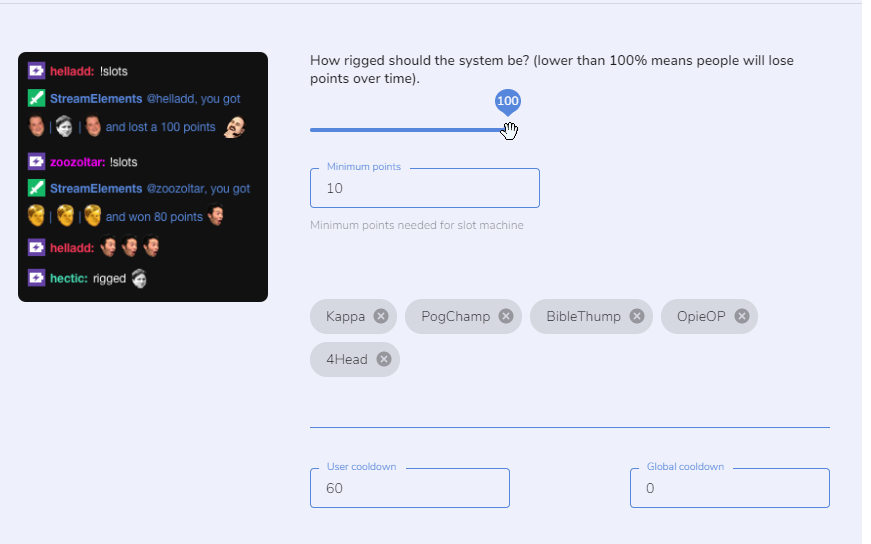
Mh it seems in my !slots everyone is loseing only. But i think i have the settings right.
Or do you see an issue here?
https://i.imgur.com/Ws5Be9t.png
 real escarp
if you changed it two 100% I would try parting the bot and have it join again
steel talon
I can do that and it wont change anything?
real escarp
move to 1 and part bot and join
steel talon
ok
real escarp
can you screen shot the messages
tight harness
The slots win % is entirely determined by how many emotes you add, the rigged % is determining the amount of points paid out
!slots
round brambleBOT
The slider increases the payout if you manage to win
Less than 100 on the slider means people will not win money over time using the slot machine. 80-100 is a good range
less emotes = higher win chance
It's like 5 emotes = 3%, 4 emotes = 7%, 3 = 12%
actual formula : n / n^3
n = number of emotes
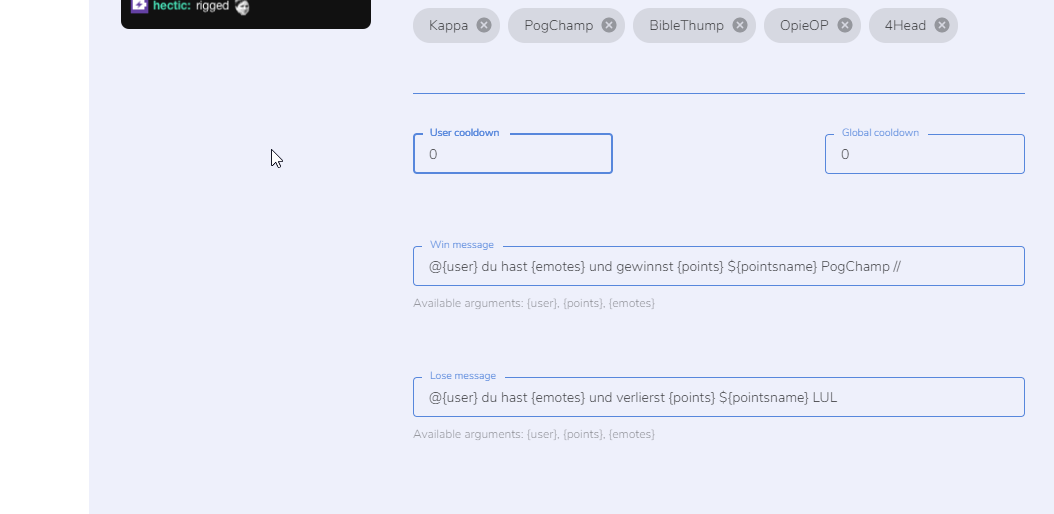 real escarp
you may want to change % to 80-100 and remove some emotes to increase chances
steel talon
Gotcha
5 emotes are 4% in my math...
But dosnt matter i guess. Okay now i understood it.
Thank you guys
 elfin yew
Hi, my overlays have stopped appearing in my stream
real escarp
try refreshing the cache OBS> right click on the browser source > properties > scroll down> refresh cache
elfin yew
Tried that and just end up with a white screen
real escarp
can you provide a screen shot
round brambleBOT
@elfin yew We're not able to troubleshoot issues with using our overlays in StreamLabs OBS (SLOBS) as we don't have the tools to support their software. We recommend using OBS Studio or OBS Studio with our plugin OBS.Live.
jade remnant
slobs try and block our overlays as they are competitors
elfin yew
Oh, it was working yesterday
ill try OBS Studio then, however I was struggling getting the same stream quality when I tried it
steel talon
Can i deactivate snapping in overlaysettings? I try to align an object but it always snaps wrong?
twin sentinel
At the top right in the overlay editor, disable the snapping with the grid symbol.
steel talon
ty
Yesterday i had a sub that wasnt counted, no alerts or anything was triggerd but it was made. Can i adjust the number in the Dashboard somehow? The widgets show correct number, just the dashboard is wrong.
I think the bot took a piss in that moment xD

 marble vortex
hi there my streaming information isnt longer shown on the left side
round brambleBOT
If you are not seeing the OBS Twitch integrations and have OBS.Live installed, please follow these steps:
- Make sure you are on the latest and greatest version of OBS.Live
- exit OBS (make sure OBS is not running)
- delete %appdata%\obs-studio\plugin_config\obs-browser\obs_profile_cookies
- start OBS.Live
- Settings -> Stream -> disconnect -> connect
steel talon
It was a first sub @real escarp
real escarp
are they showing up in the twitch tv side under subscribers list
steel talon
Yes the Dashboard in SE is -1 to the one in OBS.
Not a big deal. Total Subs is correctly shown in the widget. Im maybe just a bit weird.
real escarp
if somone has subbed last month and their sub doesnt run out until 9.20.19
they wont show on the dashboard as it shows month of September
steel talon
Im a new affiliate, so it wasnt a month change.
As i said the Alerts and Eventlist didnt get this one as well, the follow 2 mins after wasshown again.
Maybe lag ... i dont know.
real escarp
yeah weird indeed keep an eye on it if it happens again let us know
steel talon
Is fine. 😉 thank you for your time.
 topaz frigate
ive set up media request, where can i find a link for people to send links to
real escarp
in chat !sr <youtube link>
real escarp
is your twitch the same as discord
 lavish aspen
is it possible for event list to hide when nothing new has popped up? was super simple to do with streamlabs
tight harness
Only for a custom event list, not the default one
tight harness
For a custom event list there is coding involved, yes. Although we have people who can help with that in #dev-chat
 tired ridge
Right now, I have sound alerts set to redeem commands in SE, which gives a response in chat whenever someone uses that sound command. Is there any way to make it so that the SE bot doesn't respond when stuff is redeemed, or a better way to include sound commands for Twitch?
 proper leaf
hey hey not really sure where to ask this exactly but i have changed my name on twitch and while it changed almost everywhere it hasn't changed on my tip page. Is there away for me to do change it?
twin sentinel
The response when a item is redeemed via chat is always there at the moment. You cansubmit an idea or upvote it if it is already in the ideas board here: https://streamelements.helprace.com/s1-streamelements/ideas
strong kernel
@proper leaf Tipping settings will let you change the header on your tipping page.
...or change the Heather, as the case may be. 
proper leaf
this is what i am seeing its that Skullygurl part that i can't change anywhere or at least that i can't see
strong kernel
Look in the top right.
strong kernel
👍
 rocky quail
I have a question. Stream elements is not acquiring all the information about my channel such as the subs and the donation which is resulting in it not uploading it to the leaderboard
strong kernel
If you've only just connected, Twitch doesn't sent a history of activity through the API.
rocky quail
I used to use stream labs and it worked for a second but then not again
strong kernel
And tips of course would need to be imported from your previous tipping platform.
 ripe scarab
@strong kernel Any news on the "Store redemption GIF alerts" bug/issue?
rocky quail
Ok but when I upload the tips the loyalty in the leaderboards still does not update as well
strong kernel
@ripe scarab Have you tested it today?
@rocky quail It won't. Imported tips don't trigger the loyalty rewards.
ripe scarab
Not yet, but I can really quick...
strong kernel
If you want to provide points to past tippers, you'll need to do so manually.
ripe scarab
Yay! No more weird ending! Thank you guys so much!
Is it easy to explain/understand what was going wrong behind the scenes?
 untold adder
sorry its been a bit since i used streamelements, but last time i was here there was a "subscriber bonus points" and also the option to do "subscriber only item". i was just wondering why you guys took that because it was a really cool feature
.
strong kernel
Except we didn't. 🤔
untold adder
yes like 3 days ago
ohhh now its works, thanks. i was wondering why you guys would take out such a cool feature 😂
 misty crypt
Anyone having issues with the bot right now? SR and giveaways aren't working for the stream I'm moderating.
real escarp
in their SE dashboard can you PART the bot and JOIN it to their channel
misty crypt
I did that already
 mint fog
Just need help figuring out this small issue. I cannot get my latest follower name's to end in the same spot when I seem to have the right text settings selected. I just need them to end directly next to the heart, but depending on the length of the name, the end of the name moves. What do I need to have selected to keep that from happening?
real escarp
!SR and !giveway bot still enabled?
@mint fog
stretch the box and keep the align right
misty crypt
SR works now, but I can't get the giveaway to work. It'll announce the giveaway, but if anyone types "!ticket 1", no entrants come up.
I check off:
mint fog
@real escarp got it, thanks!
real escarp
whats the streamers name
 umbral tapir
anyone know how to fix a !sr command that was changed to just a message command?
strong kernel
@misty crypt No links. Name only please.
real escarp
just the name sir
strong kernel
Command needs to be enabled.
@umbral tapir Default commands cannot be edited. Please be more descriptive about the behavior.
umbral tapir
songrequest wont work... theres a !sr command but it only gives a message basically saying there are no song requests here
strong kernel
Not your channel, I'm assuming.
umbral tapir
nope, mod
strong kernel
Please let us know what channel if it's not yours when you're first describing the issue. It speeds up the process greatly.
umbral tapir
Suspect
strong kernel
It's a custom command. Delete the custom command.
misty crypt
@real escarp @strong kernel I appreciate the help!!! I didn't think to check the default commands.
 arctic yew
Hello! Tried streaming with SE for the first time today instead of Streamlabs but my CPU basically lit on fire and caused huge lag whenever I got into a game so I had to switch again. Any idea why?
(It did not go up in flames, but it got hot and was 100% used xD)
 boreal bear
I'm trying to add my first item to my loyalty store and it keeps saying "something went wrong" and nothing is added. Any idea what's going one?
real escarp
@arctic yew we saw OW look like it was lagging are you using any of our overlays yet in OBS.Live
arctic yew
Yeah, I got everything set up in OBS.Live
real escarp
lets turn off hardware acceleration OBS>settings>advance>scroll down Disable Hardware acceleration for browser sources
arctic yew
Did that
round brambleBOT
@arctic yew Please provide a log from your last stream. To do this, in OBS go to Help > Log Files > Upload Last Log File and paste the link to the log file here.
arctic yew
Hardware encoding on, right?
 static pebble
I keep trying to stream on twitch but it keeps sending me to the youtube directory
strong kernel
Log out with the StreamElements menu at the top and log in with Twitch.
 limber berry
Hello. Can I still ask question about StreamElements even if I am not a streamer?
real escarp
Yes
limber berry
Ok. My question is related with the stream of the twitch streamer Skadoodle. Everytime I donate or cheer or resub there is no alert but when others do something pops up. I tried it out with other streamers who don´t use StreamElements and it works there, so I think the problem has to be with StreamElements. Is there anything that can be done about this?
I am also in contact with the twitch support but you don´t get a fast reply from them unfortunatly
real escarp
Moderation of alerts and messages are at the discretion of the streamer and their mods to approve. If the streamer is not seeing your donations pop up they can reach out to StreamElements staff on why donations are not working
boreal bear
I'm still having trouble with my stream store, it won't let me add an item.
limber berry
Ok. Thank you!
real escarp
can you screen shot the error @boreal bear
boreal bear
i can try. the only thing that happens is on the last step create item a little notification pops up at the bottom of the browser that says "something went wrong"
strong kernel
I mean I'm feeling a little depressed but the system's working.
real escarp
connection to twitch digest server could of been lost | run a speed test and reconnect
boreal bear
This is what happened after I clicked save. A small error in the bottom right.
real escarp
can you try in a private browser tab?
 dull glen
oh never mind my intenert broke
arctic yew
Also, is there any way to pull all my commands from the Streamlabs Chatbot to Stream Elements?
I know ther is the Browser Widget, but it doesn´t work for me
strong kernel

StreamElements
Importing other tools into your StreamElements account is really quick and simple.
Use this guide to learn how to import: Streamlabs, Nightbot, Ankhbot/Streamlabs Chatbot, CSV files, Deepbot, St...
The browser extension only pulls alertbox and tipping history.
arctic yew
Yeah, it just says "an error occured", but I didn´t want alert box and tipping history anyways
Guess I just gotta pull the files over manually
strong kernel
Read the article I linked you.
boreal bear
@real escarp a private browser worked!
 wary ruin
Heyo! Ive been streaming using Streamlabs OBS up until now, so i got my follower alerts etc setup there, i just installed streamelements so i put off my streamlabs bot ,but now my popups wont show, i've tried to import streamlabs on streamelements but nothing happens whie i did add the extension to chrome. Any ideas how to fix it ?
real escarp
change the server @dull glen
your overlays here https://streamelements.com/dashboard/overlays need the URL to be copied into OBS.Live
StreamElements
The Ultimate All in One Platform for Streamers
dull glen
ok i fixed it thanks
 devout sinew
Hello got a small problem. I am using the phoenix theme for a while now, the donation goal to be specific. Today I saw it changed the font, text size and it just is out of shape and too big. Whenever I change it a bit and save it, it says it is saved, but it is not. When I then try to edit it again it is just in this bugged state again?
Also noted it only says 'ends' rather than the 'ends in x days or ends on x date
 dense anchor
I'm having the same problem ^
It was fine before today, but now the text is suddenly too big and it says "ended" even though i changed the end date
devout sinew
Yeah and no change I apply to the size, font, date or anything it says it's saved but it is not saved in the end, good to know I am not the only one though
random quail
a custom command I made with 60 seconds user cooldown is bypassed by mods
is there any way to not make them bypass it?
strong kernel
Just tested it and goal widgets should be saving as expected. The end date issue is a known bug; for now, remove the date entirely to remove that text.
@random quail Unfortunately not. Global cooldown won't be bypassed, though.
devout sinew
Okay, what about the text size and font stuff? It doesn't change for me, like when I press save it messages the little toast popup with saved but when I reopen it it is in the previous state
round brambleBOT
@devout sinew Please connect your streaming account (Twitch, YouTube, or Facebook) with Discord by going to ⚙ Settings and then Connections here in Discord. https://streamable.com/eg92w

 zealous condor
Why is there a "redeemed" on all my overlays
It keeps being there even after refreshing
strong kernel
@zealous condor Screenshot please?
zealous condor
Right over my character
If I try and refresh, the Scene I was in doesn't have it anymore, but all the others do
I went on the Overlay editor
It seems that the redemption box is broken
 north scarab
is anyone available to help with se.pay?
round brambleBOT
@north scarab Please contact us via email for support with SE.Pay. You can use our contact form here: https://streamelements.com/contact Thank you
devout sinew
Why should I link my twitch to dc?
strong kernel
So we don't have to ask you for your username every time. 🙂
devout sinew
Done I guess
strong kernel
What changes are you trying to make to the goal?
devout sinew
Font size for now as it just pops out, like it was fine till this day, it just changed to this massive pop out thing
strong kernel
What size?
devout sinew
18 seems a fine fit
strong kernel
That's interesting.
Have you tried deleting and recreating the goal widget? There was a recently fixed issue regarding a goal widget setting, but perhaps it caused old widgets to cause trouble.
devout sinew
No I did not, can I just clone this one since it is from a theme or?
strong kernel
I'd say just write down the color and font, should be easy enough.
You don't need to delete the video behind it.
devout sinew
ah so in the thing just delete the widget, add a new one and reapply color
strong kernel
Yep.
devout sinew
Got it, will try
Seems to have fixed it, thanks, got a rough idea about the date thing as it kind of has a bit of emty space in that video down now haha
 dire glacier
how do you make a streamelements merch store?
strong kernel
We are currently announcing the merch stores as Coming Soon. At the moment we do not offer this yet on a large scale, but keep a close eye on our #announcements .
rocky quail
How to I get my current subscriber to show up on my stream elements leader board?
dry hare
Enable loyalty settings from your dashboard
rocky quail
from my twitch dashboard
dry hare
Are you talking about the twitch panel extension?
Because streamelements =/= twitch dashboard
dry hare
If they are subscribed to you, and you have loyalty settings enabled in your StreamElements dashboard, then the information from StreamElements will be sent to the panel extension on Twitch
rocky quail
I do have it enabled but nothing is showing up. They are not receiving points for being subscribed.
dry hare
Screenshot your loyalty settings
rocky quail
Here you go
dry hare
See where it says “ 50 Loyalty upon subscribing” in the right side? And “30 points every 10 minutes”?
Are they not getting any points?
At all while you are live?
rocky quail
No I had uploaded the leaderboard and before they had subscibed
I haven't been able to go live yet though
dry hare
So nobody has earned points
rocky quail
do you think it would update once I go live
dry hare
It should
strong kernel
Points are not granted retroactively.
dry hare
^^
rocky quail
Would they not have been awarded to the people that are already subscribed
dry hare
No
rocky quail
for example on making the panel it would update and show my subs as well
and the points for getting the subs
dry hare
Your points that were imported will gain points when you are live and everything will update over time and be correct
It won’t populate the leaderboard until someone gains points through the system
rocky quail
Gotcha so when I go live the points that should have transfered over will then become visible
dry hare
So watching and getting points should add to the existing imported total and show up
rocky quail
Ok next time I go live I will look for the update in points
thank you so uch
much*
dry hare
Yep
 shrewd maple
guys, is there any incompatibility with OBS v24?
strong kernel
Well, it was released yesterday and we haven't had a chance to put out an update yet.
So... bad idea to update right now. 🙂
shrewd maple
uh

so maybe that's why there are some
Error while parsing the 'sandbox' attribute: '{{vm.sandbox}}' is an invalid sandbox flag. (source: https://streamelements.com/overlay/scripts/vendor-85e2b38e5f.js:25)
and
Blocked script execution in 'about:blank' because the document's frame is sandboxed and the 'allow-scripts' permission is not set. (source: https://streamelements.com/overlay/scripts/app-7d54559dfe.js:62)
the weird thing is that the new "customizable docks" thing works with overlays (I created one with chat to test and it works) 
 cold bridge
I logged a secondary account (and create a secondary scene collection)
so i change back to my regular account
and my activity feed wont changes
still showing my secondary follow feed
tried to delete the secondary scene collection, logout and relogin
nothing changes
what i suppose to do?
strong kernel
You need to log out in the StreamElements menu, not in the OBS settings.
shrewd maple
okay, update:
- Everything works, but one custom thing I have that I can't understand why it's not working on the OBS v24.
- Yeah, I think maybe it's not StreamElements' issue :3
 gritty jay
why doesnt my chatstats work on my dashboard of stream elements
strong kernel
Because you change usernames more than shoes, apparently. 
It's been renamed for you now.
gritty jay
for real lol! ya im staying with this one! thank you!
 mild ridge
Hi I set up a csv excell document with all the loyalty point info layed out in 3 lists but stream elements fails to upload the points info?
 winter wagon
hey, anyone can help me? problem with StreamElements Chat Stats, 404 - Page Not Found
Yes i changed my name
before : baiter_tot
now : baiteryamato
strong kernel
Looks fine to me 
mild ridge
So does anyone know if I used the right format for import points using csv file?
 torn geode
Hey can you active two commands at once(with one !)
strong kernel
No.
torn geode
@strong kernel was that to me?
strong kernel
Yes.
torn geode
Thanks
strong kernel
@mild ridge Probably didn't save it correctly?
mild ridge
well I did like lists to keep them seperate to insure they copied right
torn geode
Is there a way to hide the "@XXXX you successfully redeemed yyyy for ## points." message?
strong kernel
@torn geode Not if redeeming from chat. Redeems from site or extension won't print in chat.
torn geode
Okay thanks
mild ridge
name points hours that format the site suggests but excel can't do that
So I may need to use microsoft word.
Nope that lacks a csv save option so I'll need a different app.
winter wagon
 curious, it was giving error until a few minutes ago


 strong kernel
Very curious indeed. 
 versed basin
anyone elses alert sounds not coming up with new obs update?
 swift parcel
@versed basin so the browser sources can now have their audio show in the mixer area. make sure they're being outputed to you through the advanced audio properties or uncheck the box at the bottom of the browser source that says (route audio through obs) and it'll go back to the way it was
 undone comet
Is there a set command that displays live league of legends rank?
zenith widget
For custom commands to get LoL rank use this variable: ${leagueoflegends}
Usage:
${leagueoflegends <region> <username>}
example:
${leagueoflegends na captainpickles}
undone comet
Thank you
So, I am probably doing something wrong but that's not working.
${leagueoflegends <region> NA <username> Example} --- I did put the username after it w.e it displays "no summoner found"
I had to leave <region> in order for it to get that far...
zenith widget
Did you look at my example?
undone comet
Yes, I replaced what you did... with my own, and it displayed " not a valid region, so I had to leave in <region> then I inputed as the example shows the username, but it displayed "no summoner found"
zenith widget