#helpdesk-twitch
1 messages · Page 502 of 1
 cedar lynx
 shut flower
Hmmm
it's like you have 3 buttons
1 2 3
you want to clic on number 3
but when you do it, the selection moves like you are pressing the left arrow on the keyboard
and it continues to the first button
cedar lynx
strange. what version of OBS and OBS.live are you using? I think those are shown in the corners of the app so you shouldn't need to click on anything for that info
cedar lynx
 I'll wait
cedar lynx
upper left corner should be:
OBS 23.2.1
lower right should be:
OBS.Live version 19.8.25.452
shut flower
it's like someone is trying to troll me
I'm using my microphone to write on the keyboard cuz I can't
cedar lynx
you should be able to reinstall the plugin by downloading a fresh file from the site and see if that helps

OBS.Live | Open Broadcaster Software Streaming Knowledge Base
OBS (open broadcaster software) knowledge base for live streaming. Find articles and videos about streaming with OBS.
shut flower
I'm doing copy and paste cuz the problem still happening and I have the program closed
should I uninstall the program right now?
cedar lynx
you should be able to reinstall over it without uninstalling first, I would do that first
cedar lynx
ah well in that case reinstall it 🙂
shut flower
the worse is tha that thing happens when i open the program
even i had it cloeds
and it keeps happening
cedar lynx
it sounds like it might not be the program that's causing the issue then
cedar lynx
will ask about it with the team 🙂
 bold kraken
Is this the right channel to ask about problems when Redeeming Items in StreamElements?
 rustic meadow
hello
just a question regarding the hypecup
need clarification on "events to fill the cup". i have mine currently set to 20. even if i have 20 events, it doesn't look like it will actually "fill" the cup. what does the setting mean exactly? does it mean it will remember only the last 20 events in my case?
 dry hare
i was doing the same thing anne
 tight harness
@bold kraken If you have redeemed an item from a streamer they or their moderation team would be the people to ask about your redemption
bold kraken
Okay, thanks @tight harness
 errant solar
@tight harness dear can you help me
tight harness
Please refrain from posting the same question in multiple channels, I left your post in #helpdesk-selive and deleted the rest
 short hound
I wondered if anyone could help me i've added a stinger to obs.live but once the transition has completed the scene behind isn't fully loaded any suggestions or resolving this the stinger is 2 seconds long if that makes a difference? thank you 🙂
 radiant imp
Does it require Paypal to create tip page, for twitch?
 lament blade
can someoone help me add the overlay for sr plz 🙂
 real escarp
@short hound do you have any sources that say turn off when not visble
@lament blade https://gyazo.com/82236fb7536606b63ead331e0f674b83
 lament blade
where do i find this??
real escarp
in the overlay with green background at the top it says widgets
lament blade
on the streamelements website?
real escarp

StreamElements Overlays are loaded from a single browser source in your streaming software, making streaming easy. https://streamelements.com/ StreamElements...
 wary halo
@short hound try 1000 millisecs
real escarp
yes
 long breach
Hey there, hopefully someone can lead me into the right direction. Inside the alertbox - followevent, I'm trying to fetch the attached video but for some reasons it won't play. (Well, it plays but it freezes at the first frame - even tho using webm without audio or "muted") - I tried using simple html, something like: html <video playsinline autoplay muted style="width:100%; height:100%"> <source src="{{video}}" type="video/webm"> </video>
 scarlet tiger
Hi 
Is it possible to reload overlay remotely?
 dense reef
Guys, can anyone pls help.
Latest tipper and top tipper, some letters are in upper case and some are not.
https://i.gyazo.com/d350e4450cdad75a6d8496b11aa41997.png
 real escarp
^ looks like its based on their display name not username
@scarlet tiger from your dashboard you are able to move and save overlays
no one can refresh browser cache over obs besides you
scarlet tiger
I am a stream moderator and I have Full Control permissions. She doesn't see alerts. Actually, the entire browser source is not displayed. We have this problem for about 2 weeks, one stream goes, sometimes it is not possible.
real escarp
make sure she has the resolution set in obs | right click on browswer source go to properties and make sure its 1920 x 1080 and not 800 x 600
@scarlet tiger you can try to reload her overlays if you're a moderator on the dashboard

StreamElements
The Ultimate All in One Platform for Streamers

small refresh button to reload the streamers overlays
scarlet tiger
Okay, let's see. But earlier this problem was not. Could this be a problem updating Streamlabs OBS?
Reload overlay in dashboard It doesn't help. 
real escarp
we can not guarantee our overlays in any third party programs
 teal rivet
So I want to set up my merch store and I have clicked sign up a few times but I still haven’t received the email it says it will send me
 plush crest
hi i cant find the tts option on the overlay editor
real escarp
Right now the emails are being sent out in batches as our team process the request. As you can imagine how many people clicked on the more info button
^tts is per widget
under settings in the widget tts settings per variation
plush crest
under what category iin widget eg static seasonal etc
teal rivet
Okay thanks, It had just been a few days so I wanted to check
plush crest
i have a alert box set up im trying to edit it now but the stuff like donation alert etc arent coming up
what do i press now
 jade remnant
it depends where you got to
 plush crest
im not being able to go on the section to edit the alerts
doesnt allow me to scroll up
real escarp
hit the arrows
real escarp
Blue Bell lets you simulate donations and alerts
 strong kernel
It's also a great ice cream brand. 😂
jade remnant
...
 empty plover
How long does it take for SE Pay donations to make it to my bank after i withdrawl?
real escarp
can take up to 5-7 Business days
strong kernel
@empty plover It's a bank transfer and subject to the same delays as any other bank transfer. If you withdrew before a weekend, it can take longer, as banks won't process over the weekend.
empty plover
@strong kernel thank you
real escarp
@shut flower what happens when you uninstall obs live plugin and just use OBS studio?
shut flower
well
nothing
the issue keeps
i had to restar my pc
when i turn on my pc
the problem is not appearing
but when i open the program, the problem appears
real escarp
if the issue is happening with OBS in general https://obsproject.com/ you might need OBS support
OBS (Open Broadcaster Software) is free and open source software for video recording and live streaming. Stream to Twitch, YouTube and many other providers or record your own videos with high quality H264 / AAC encoding.
!obshelp
 round brambleBOT
For the best OBS support, please join their Official Discord @ discord.gg/obsproject
real escarp
weird set of driver conflicts sounds like
real escarp
drivers that run OBS could be conflicting with drivers on your computer
real escarp
could be an issue again if your having same issues with plain OBS Studio you might want to ask them if there are any known issues
 gilded marten
hey folks so i have a quick question. most of my alerts are working on stream wheneveer something happens BUT when someone hosts or raids me it isnt showing anything besides in chat
my overlays are set to every scene i have so its not game dependent
round brambleBOT
@gilded marten Due to changes to Twitch API, we have filtered out hosts and will only show these ones on your activity feed:
- All hosts coming from an online channel with at least 1+ viewer
- Auto host events with at least 1 viewer - only from a channel that just went offline
Note: If you see "X channel has hosted you" with no viewers on the back, that is considered an offline host or a host with 0 viewers, we do not show these.
lament blade
how can i import overlays into obs?
round brambleBOT
@lament blade To add your overlays to OBS, add a new browser source in your scene. Paste your overlay URL in the browser source properties, set the dimensions to 1920x1080 (unless you changed them on the website), and ☑ “Shutdown source when not visible” https://youtu.be/KDvLynUqXI4
 pliant summit
hey guys. i started my stream tonight and for the first time ever my overlays started to lag. i tried to refresh the cache or restart the program, i restarded OBS and my Pc but nothing seems to fix it. when i start up obs the overlay is fine, then 2-3 seconds after that it starts to lag like it only has 10 fps instead of 30.. would appreciate help cause i cant find something online..
strong kernel
@pliant summit Disable hardware acceleration in Settings>Advanced
pliant summit
@strong kernel thank you so much! whatever this option did, its off now x)
lament blade
I'm having an issue where where nothing is showing up when I go live
strong kernel
@lament blade Can you explain in more detail?
lament blade
So the webcam section doesn't show up
For some reason
Do I have to create a video source
strong kernel
Yes, to get your webcam feed, you do need to add a video capture source.
 analog hawk
Is On the SUB-GOAL Widget the End Date still broken?
strong kernel
@analog hawk Did you look at it today?
lament blade
After that I'm assuming I add a game soucre?
strong kernel
That's one option for capturing your game, yes.
lament blade
Does it automatically know what to capture or
strong kernel
Give it a try, see what it shows you when you add the source. 🙂
 drifting otter
My friend thinks u guys r gonna respond "in like 2 weeks"
answer so i can prove him wrong
please
He has a question btw
 tepid moat
hi there
drifting otter
hi dumb
drifting otter
ask the question
tepid moat
Ok
drifting otter
click helpdesk youtube
 strong kernel
No links.
lament blade
Mean
Fine my nickname is sushi1735 on Twitch
Nothing shows up
I added a game capture
strong kernel
Did you set its properties?
lament blade
Yes
strong kernel
Screenshot what you set, please.
 devout fjord
hello guys, I have this little problem to login, I click to login with a Twitch account but it goes white. Can anyone help me?
strong kernel
@devout fjord This is a local issue involving something blocking the plugin's connection to the login page.
lament blade
strong kernel
You're capturing the wrong window.
strong kernel
Look at the Window dropdown. In fact, if you'd like, open it up and I can point which one you should be choosing.
And screenshot.
strong kernel
Well, I'm assuming you'd like to capture the correct one to actually show your game.
strong kernel
No.
strong kernel
I'd be happy to tell you if you opened up the Window dropdown and took a screenshot.
lament blade
It won't let me
 sand pilot
Good afternoon.
I'm having an issue with the stream store, i've made an audio item for subs only but that restriction is being ignored and any user with enough currency is able to redeem the audio. Is it a known issue or might be something in my end?
sand pilot
oh i'm sorry, i'm setting this up for another streamer
lament blade
I see start window and geforce now @strong kernel
lament blade
Which one do I choose
strong kernel
@lament blade Ah, I see, I wasn't familiar with what Geforce Now was. Now I understand. You shouldn't be using game capture for it.
sand pilot
@strong kernel It's in this store, i help this person run their stream and store https://streamelements.com/naiiomi/store , it's the only sub-only audio
lament blade
Which one
strong kernel
@sand pilot Please be patient, I'm only one person.
devout fjord
@strong kernel
I tried to uninstall adblock, use another browser and tried another wifi, but nothing ... do you recommend any other procedure?
sand pilot
@strong kernel I apologize, was just making sure i had linked you to the correct audio
strong kernel
@devout fjord Got an antivirus?
 signal ravine
is there a way to hotkey a pause/resume for alerts? i looed at this site to see if there was a way but i dont see a setting for it in ground control
strong kernel
@signal ravine Use OBS.Live for it.
devout fjord
I don't use any
strong kernel
@lament blade Display or Window capture.
@sand pilot Have a non-sub, non-moderator attempt to redeem it please.
sand pilot
I did, i have an alt account and i was able to redeem it a few minutes ago
tepid moat
Please Help me now
tepid moat
Screen shot sent btw 😉
lament blade
Still no luck 😦
strong kernel
@tepid moat You need to be patient. You're not the only one I need to help.
sand pilot
i'll wait these 5min and @you so you can check it again
@strong kernel I'm ready to redeem again with my alt account
strong kernel
Have them log out and back into the StreamElements site.
strong kernel
Yes.
lament blade
I tried to add a display and window source and nothing appeared
strong kernel
The streamer.
sand pilot
Ok
strong kernel
@lament blade One or the other, not both.
lament blade
I know
I'm just saying I tried both
Nothing w/ both at the same time
Just in general
strong kernel
Then this is outside of what we can help with here and you should ask OBS Project's volunteer support:
round brambleBOT
@lament blade For the best OBS support, please join their Official Discord @ discord.gg/obsproject
sand pilot
@strong kernel She did it, a few seconds ago
strong kernel
@sand pilot Okay, now try redeeming it again in chat.
sand pilot
Ok
Just a few moments for the cooldown
ok cd is up, i'll redeem by chat
It worked again 
strong kernel
@devout fjord You've already asked here. You've been told it's a local computer issue and there's only so much guidance we can provide regarding that.
Something locally is blocking your connection to the login through the plugin. Doing things in the browser will not affect that.
devout fjord
ok, thx
strong kernel
@sand pilot Try again please.
strong kernel
This is looking to be something we won't be able to provide an immediate solution for.
strong kernel
It's been brought up. Nothing you need to do.
 heady crest
can someone help me?
round brambleBOT
@heady crest Welcome to the helpdesk! Please let us know how we can assist you today and a support volunteer or staff member will assist you as soon as they are available. Thank you for your patience.
heady crest
so my tiwtch chat isnt coming up on my streamelements obs
it shows on twitch.tv but not on my obs
strong kernel
First, let's clear a misconception: There's no StreamElements OBS. There's OBS.Live, which is a plugin for OBS Studio, not its own version.
 fresh lagoon
i need help with my channel management
round brambleBOT
@fresh lagoon Welcome to the helpdesk! Please let us know how we can assist you today and a support volunteer or staff member will assist you as soon as they are available. Thank you for your patience.
strong kernel
@heady crest Second, can you screenshot your entire OBS window for me?
heady crest
idk how
round brambleBOT
@heady crest https://www.take-a-screenshot.org
fresh lagoon
@sly egret are you available?!
strong kernel
@fresh lagoon Don't ping people randomly.
fresh lagoon
ok
strong kernel
And we can't answer a question you haven't asked.
fresh lagoon
well i wanna get rid of a twitch account i added by mistake on stream elements
in the channels tab
strong kernel
Once merged, we can't unmerge channels.
Not without deleting everything all together.
fresh lagoon
how can i do that
heady crest
i screenshoted but idk how to find it
strong kernel
Then you can go to https://streamelements.com/dashboard/account/security to submit a request to close your account.
StreamElements
The Ultimate All in One Platform for Streamers
fresh lagoon
how long will it take?!
strong kernel
Depends on how busy the devs are.
fresh lagoon
thanks for the help
strong kernel
@heady crest Read everything on that webpage again.
fresh lagoon
does it work if i reset my access tokens?!
strong kernel
No.
fresh lagoon
i wanted to change my bot name and for some reason after i added the account that i made for it on stream elements it didn't work anymore on testing the bot
strong kernel
Okay. So your stream chat is on the right. If it's not coming in, then you're probably logged in with the wrong account.
So log out from the StreamElements menu at the top and log in with the correct account.
fresh lagoon
is there a way to rename my bot without deleting everything
with the same twitch account i made for the bot
strong kernel
For renaming with OBS.Live, you can watch the video in the pinned messages in #helpdesk-selive
round brambleBOT
@fresh lagoon Custom bot name requirements
- StreamElements bot modded and in chat
- Active overlay with alerts
- StreamElements tipping page in the panels below the stream (!panels)
- OBS.Live or Ground Control open
- Create a twitch account for the name you want to use or run the bot under your own name
- Custom bot name doesn't work on Mac
heady crest
its still not working after i logged back in thanks for the help tho
fresh lagoon
i applied what i saw in the pinned video
it works perfectly on streamelements
but when i switch it to my custom name mod
round brambleBOT
@fresh lagoon Please connect your streaming account (Twitch, YouTube, or Facebook) with Discord by going to ⚙ Settings and then Connections here in Discord. https://streamable.com/eg92w
 fresh lagoon
ok i thought since it's a obslive problem i switched there
strong kernel
Screenshot your custom bot name settings please.
fresh lagoon
you mean in ground control?
strong kernel
I thought you were doing it in OBS.Live?
Sure. In Ground Control. That's fine too.
fresh lagoon
well i found that i need ground control to do that
strong kernel
You can use either or.
round brambleBOT
@fresh lagoon https://www.take-a-screenshot.org
 radiant zenith
ok, i've been trying to use ground control to change the name of the bot, not sure if im doing something wrong or if the feature still works or not?
strong kernel
It still works, assuming you're using it correctly.
Ground Control instructions are in the pinned messages in this channel.
radiant zenith
ok, i created the bot account on twitch, logged in, plugged in the new bot name use got the token and plugged it in. i've tried pulling the bot out of the channel and putting it back in and the name never changed?
ok, i'll go over that as well
fresh lagoon
strong kernel
@fresh lagoon Were you logged in as the bot in your browser when you generated the OAuth token?
fresh lagoon
yes
radiant zenith
yeah, i exited all windows and made sure i logged in under the bot account
when i use the website to part channel, the bot never leaves the channel if that makes sense, or it doesn't seem to leave
strong kernel
@fresh lagoon You should probably mod your custom bot name in your chat.
fresh lagoon
it worked but is it normal to send the same test message 3 times after i click test once ?!
 white stump
Hi all, I am trying to add a loyalty system to my channel and I want my subscribers to be able to redeem some gifs/videos during my stream. I was able to add the items to my store but I am not really sure of how to have the video appear on my stream when it's redeemed. If I create a widget for when something is redeemed it won't show the item just the widget for store redemption. Does anyone know how to set it up? Thank you!
radiant zenith
oof that worked as well. thanks for all the help
strong kernel
@fresh lagoon End all instances of bot.exe in Task Manager and restart Ground Control.
@white stump You need to have a store redemption widget in your overlay. When the item is redeemed, it will use its sound and image where applicable, or the default one if none is set.
white stump
Ok, so even if i setup a different image for the store redemption widget it will use the video I have setup in my store?
strong kernel
The widget's set image and sound is what will play if none is set in the store.
strong kernel
Not if you're using the rename function in OBS.Live.
fresh lagoon
i am
strong kernel
Then you don't.
fresh lagoon
alright
strong kernel
It's either or. Not both.
radiant zenith
damn, wish i knew that lol
fresh lagoon
i wonder if you're gonna put a feature of modifying or deleting channels in the future
without having to delete everything
white stump
Thank you @strong kernel I am tryin now
 normal bane
How do you import overlays into OBS.Live
round brambleBOT
@normal bane To add your overlays to OBS, add a new browser source in your scene. Paste your overlay URL in the browser source properties, set the dimensions to 1920x1080 (unless you changed them on the website), and ☑ “Shutdown source when not visible” https://youtu.be/KDvLynUqXI4
normal bane
camera out of sync
round brambleBOT
@normal bane For the best OBS support, please join their Official Discord @ discord.gg/obsproject
 peak sentinel
Some reason Ground Control Bot Works fine with my "The Stagehand" and yet my channel Name in OBS Live is showing https://gyazo.com/9e6e502cdc4d2d8a4c4acf9f34b8c724

how do I make it only the 1
strong kernel
It looks like you're using rename functions in both Ground Control and OBS.Live. Please only use one.
 uncut night
hello! very noob question, apologies if its already been answered before. I recently installed obs.live and was messing around with the activity feed and chat window but closed them trying to mess with them. How do I reopen these windows that were there when I initially started the program?
strong kernel
Click the StreamElements menu at the top.
 brave nymph
Hey eveyone, I'm new to streaming and I just built a PC. I downloaded streamelements and obs, and every time I open it - it makes my computer the slowest thing on the planet. It lags and freezes up, especially when I turn on my capture card and overlay. Can anyone help me solve this issue please or point me in the right direction for troubleshooting?
 strong kernel

 mystic wolf
Still can't seem to get alerts to work for past 4 days. Haven't adjusted any settings from where it has been working up til then. This is what I've got set.
I've copy and pasted the URL in case that changed over time. Also tried countless variations with the refresh when active, and shutdown when not
strong kernel
We can't really troubleshoot issues with the overlays in SLOBS, as we don't have the tools to troubleshoot their software for them. If it plays in the browser when launched, the most we can recommend is making sure your streaming software is up to date.
Otherwise, we recommend using OBS Studio with our plugin, OBS.Live.
 crisp lotus
Is there a way to control individual store redemptions play lengths? I have one redemption that has a .gif image that lasts 10 seconds and plays the sound, but I have another that I want to only last 2 seconds and play a different sound.
My issue is that I plan to have many unique redemptions but the overlay widget will have global settings for them all equally.
Is there a work around for this?
strong kernel
There is not.
But you can look into the video on command widget in #widget-share if you want.
crisp lotus
Thanks anyway. I guess that would be an idea if you can assign a redemption item to be controlled by a specific overlay.
round brambleBOT
@crisp lotus Check out the StreamElements ideas board: https://strms.net/ideas. You'll be able to add ideas, upvote ideas you agree with, and track their progress with email notifications. Adding and upvoting ideas also helps the staff know which ideas should be prioritized so please take some time to upvote.
 jaunty reef
Anyone around that could help?
round brambleBOT
@jaunty reef Welcome to the helpdesk! Please let us know how we can assist you today and a support volunteer or staff member will assist you as soon as they are available. Thank you for your patience.
jaunty reef
So i was talking to Tadpole yesterday and even him assisting we couldn't get the following command to work with custom commands. It works with !redeem then the sfx but to do the following wouldn't work. !airblast
$(redeem airblast)Any ideas?
the cost?
strong kernel
@jaunty reef This could be your problem.
You should also mod the bot in your chat.
jaunty reef
okey so if i'm correct in thinking could that I had double cost causing a conflict?
strong kernel
Well, not so much a conflict, you were just charging people twice.
jaunty reef
true i realize this now lol ty for that fix true it does appear to be working but was that my cause?
strong kernel
Probably.
jaunty reef
awesomeness it was bugging me and tadpole for over 2 hours yesterday 😦 you're awesome! thank you so much!

appreciate the help 😄
strong kernel

 wise dagger
Does Ground control still allow us to change chat bot name? I am getting mixed info on Google.
 elder sorrel
Why not use OBS.Live Custom bot name?
wise dagger
this is what I was trying but it hasn't helped, i do not get the cog that says chat bot
I can try that, I am using streamelements bot
 ashen sparrow
Hey guys! I really like the streamelements info panel but appearently Subs are vanishing from this list. There is a sub called Gewarom with 4 months. He was in the list a few days ago. Now he is gone 😦 :(
(His sub is active btw.)
elder sorrel
@wise dagger Check the pinned messages in #helpdesk-selive
There's a video there for setting up the custom bot name through OBS.Live.
wise dagger
thanks checking now.
so what if you can't register the second account on twitch as someone else has used that account?
@elder sorrel
elder sorrel
Create another Twitch Account?
wise dagger
you mean name it something else. MEaning, someone has taken the name on twitch, that I want to use as a bot
elder sorrel
Right. As that is how the Custom Bot name works from the Twitch Username from the other Twitch Account.
 stark scaffold
@elder sorrel i know this is off channel
but
is there a way for help on monitor settings?
elder sorrel
Not really. Not too experienced with Monitor related stuff 
But you can always ask in #general-chat if someone else may know.
 rapid oxide
I've seen people using !gamble in chat from streamelements, but I don't see that in the modules
rapid oxide
So they both work the same basically?
 zenith widget
!roulette is the main command and module name
!gamble is the alternative usage for that module
rapid oxide
So they're basically interchangeable?
As long as the !roulette module is active, then gamble will work?
zenith widget
Yes you can switch places of roulette and gamble if you'd like
but there is no need to do it, because gamble is an alias
zenith widget
Just check each default command that has a module tag on it and see what alias it has.
rapid oxide
Thank you!
 scenic peak
not sure if this is the correct channel - or if I should be asking NoD - but when trying to add the updated "stream elements-friendly" alert update, I get this error with streamelements
I can re-add the old version no problem though
what is a platform mismatch / what is the correct channel..?
I'm clicking the twitch link, and my account is set up for twitch
zenith widget
You are not on the right account.
As in, you need to be logged into a Twitch account
From what I can tell, you are not.
scenic peak
I am though
zenith widget
aah
lower resolution hides the icon
so it looks like you are not on your twitch
logout from the dashboard and log back in
and try again
scenic peak
didn't work 😦
zenith widget
can you DM me the file please
scenic peak
sure
lament blade
SE pay keeps coming up with an error when i try to sign up. There are donations in my balance and i would like to withdraw but setup keeps failing...
zenith widget
Are you filling out the forms?
Because I see that its asking you for personal details and bank details
lament blade
yes i fill it out and click submit but it tells me it failed and to try again. i have many times
zenith widget
If you want to, you can DM me the details you are filling out so that I can try from my side and see what the actual issue is
lament blade
what details, my SSN and address...
zenith widget
Yes
lament blade
nah
zenith widget
Everything that you fill in the form
lament blade
lol
zenith widget
Right, then I'll give you the hard work to do 🙂
lament blade
ok
zenith widget
Press F12 on your browser, navigate to the console tab
refresh the page
fill out hte form
if there is an error, it will show in red.
Then click on "Network" tab and find on the bottom what is in RED
and click on that
then on "preview" subtab
screenshot it
GL 😉
ooh and DM me the screenshot
lament blade
ok
 whole jay
hey guys having problem i am starting new streaming however streamelements overlays layout is 19201080 when i try to set up for 1280720 it cut the half screen , everything in it only half of it screen is showing . HELP for set up all overlays input from 1080 to 720 and i am talking about online streamelements overlay editing
round brambleBOT
@whole jay The default resolution for StreamElements overlays (theme and custom) is 1920x1080. Please add them in OBS at their full resolution and use CTRL+F to fit to screen if necessary. You can then downscale your stream in OBS settings > Video if you'd like https://i.imgur.com/6bWXxjR.png

 versed dune
Hello, is there someway to unban someone from Media Requests?
zenith widget
Yes - DM me their name
 regal breach
Hey! I am a Twitch Streamer.
So, I want to use Equalizer for my Headphones so that the EQ I have set should affect my Headphone only.
So it shouldn't affect my Twitch Stream. The audio of my stream should be without EQ.
How can I set this up?
Because, I have tried using Motherboard's Realtek Audio Manager.
Whenever I set Equalizer there. It affects the whole system. So whatever I stream on Twitch goes with the Equalizer Settings.
Please help!
Thanks.
round brambleBOT
@regal breach How to exclude audio sources for a stream or recording: https://obsproject.com/forum/resources/8/
Voicemeeter Banana guide: https://obsproject.com/forum/resources/397/
zenith widget
You want different sounds(or equalizer sure) to go to your headphones
but to NOT affect the stream
regal breach
I want to use EQ only for my headphones but not for the Stream.
zenith widget
Voicemeeter banan is the answer to "how can i set this up?" question
regal breach
Stream should be neutral without any EQ.
zenith widget
Right, so read what I gave you above.
regal breach
Which one of them is suited for my requirement?
zenith widget
both
regal breach
I'm sorry to ask but the guide is talking about " Excluding ".
I don't want to exclude any audio.
I want to exclude the EQ.
zenith widget
So you reroute the audio towards your headphones
towards an EQ software
which in term should reroute it to the headphones only
regal breach
Which EQ Software do you recommend?
regal breach
I play Rainbow Six Siege. So to hear the footsteps I need to supress Bass.
Bass makes it difficult to hear the footsteps far away.
Treble makes it easier.
zenith widget
Right - this isn't something we can help with
the best thing we can do is, help you reroute the audio around
if the EQ software can't detect multiple audio channels
that voicemeter can help you utilize via the virtual cables
then you will need to research this via Google
regal breach
Actually, I found this software which is widely known "Equalizer APO".
It can detect the devices specifically.
But the thing is, it is still doing EQ on whole system even though I have selected the specific device.
zenith widget
I'm sorry, but we can't really help.
zenith widget
This is not related to what we offer to streamers
regal breach
I'll report back.
zenith widget
and the best thing, as mentioned is to give you a guide to voicemeter banana
hoping it can help you reroute audio channels
but you need the virual cables as well
analog hawk
Hey ya'll can any1 tell me if its possible to set up a wish list for amazon over The Streamelements Dashboard?
zenith widget
We don't have amazon integration if that is what you are looking for.
Unless you are referring to a tip goal widget
analog hawk
Hey Keizar 😄 I am looking for something where viewers can buy things over my donation page over a amazon wishlist i will do
an amazon*
Pretty much my viewers asked me to set up an amazon wishlist and i wanted to know if i can somehow implement that over streamelements @zenith widget
zenith widget
Nope, we don't have anything that could potentially support Amazon wishlists
round brambleBOT
@analog hawk Check out the StreamElements ideas board: https://strms.net/ideas. You'll be able to add ideas, upvote ideas you agree with, and track their progress with email notifications. Adding and upvoting ideas also helps the staff know which ideas should be prioritized so please take some time to upvote.
analog hawk
Ok, then i have to do it with a twitch panel setup i suppose 😄
jade remnant
honestly, if you want to sound whore in siege then dont go for eq, not only will it be a pain to set up and route through the eq software, its also pointless.
get a decent headset, i used this one when i was playing siege, not only is it great in normal mode, but when you turn on the virtual surround sound to max its amazing what you can hear
https://www.amazon.co.uk/gp/product/B01FHE18D6/ref=ppx_yo_dt_b_asin_title_o06_s00?ie=UTF8&psc=1
if you want to spend a bit more money, this is what i have now and its miles better than the first
https://www.amazon.co.uk/gp/product/B01MYW8COY/ref=ppx_yo_dt_b_asin_title_o00_s00?ie=UTF8&psc=1
@regal breach
analog hawk
Also Keizar any new updates on the Date time for the subgoal widget being fixed?
lament blade
Can people who do Tilify donations send video requests if I set it up?
zenith widget
They can leave the link in the description of the tip
and you can click it from the tiltify dashboard i believe
lament blade
ok~
lament blade
Does Chat Alerts work with BTTTV emotes?
zenith widget
As in, can the bot respond with BTTV emotes? Yes
just write the name of the emote in the chat alert response
lament blade
thank you
 swift swan
Hi I can't get the streamelements overlay to show up with followe ect can I get some help thanks!
zenith widget
Well what have you tried so far?
swift swan
reset cache foleder deleted
re-signed in with account
That's it
I updated and it's gone
zenith widget
which overlay?
swift swan
It's not a overlay it shows who recently followed
zenith widget
I looked into all 4 of your overlays
and there isn't a single "Recent followers" widget added to them
zenith widget
thats different then the overlays.
round brambleBOT
@swift swan If you are not seeing the OBS Twitch integrations and have OBS.Live installed, please follow these steps:
- Make sure you are on the latest and greatest version of OBS.Live
- exit OBS (make sure OBS is not running)
- delete %appdata%\obs-studio\plugin_config\obs-browser\obs_profile_cookies
- start OBS.Live
- Settings -> Stream -> disconnect -> connect
zenith widget
I'm not sure as to what you are referring to
As you talking abotu the actitivity feed in OBS?
this thing?
zenith widget
Streamelements on top -> activity feed
swift swan
ty
analog hawk
Keizar how to delete the default !donate command from streamelements?
cos everytime i write !donate it says "you can donate..."
 bright plank
hey i was wondering if I could get some help
analog hawk
i set up a message the bot is responding when some1 writes donate so ye i want the default to be removed from my channel but idk where i can find that
!donate* i meant sry
bright plank
How can I unauthorise streamelements?
analog hawk
@zenith widget please D:
 solemn arch
Not done this in a while so please remind me what the command is, I want to do a !addwin 5 and have the 5 be added to the counter. So if I have 1 win, it'll become 6 wins with a print out like
Added 5 wins to the counter
I then also want to be able to do !delwin and remove wins if need be
 twin sentinel
@analog hawk Disable the dafault command !tip.
@bright plank You can unauthorize StreamElements on twtich here: https://www.twitch.tv/settings/connections
If you want to make the bot leave your channel this is on your dashboard: https://streamelements.com/dashboard
analog hawk
@twin sentinel thank you man! ❤
twin sentinel
@solemn arch
You can use this variable as response to the !addwin command: ${count win '+$(1:)'}
To reset the timer via !delwin create a custom command with this response: ${count win 0}
And thx for the video with redesigning ninjas overlays. 😄
 slim dock
Is there any plans to make the extension available on the twitch overlay and usable in mobile extension like streamlabs does to allow viewers to make song requests and redeem store items without in chat commands?
 austere lava
Hey, how can I change the name of my chatbot within SE please
round brambleBOT
@austere lava Custom bot name requirements
- StreamElements bot modded and in chat
- Active overlay with alerts
- StreamElements tipping page in the panels below the stream (!panels)
- OBS.Live or Ground Control open
- Create a twitch account for the name you want to use or run the bot under your own name
- Custom bot name doesn't work on Mac
austere lava
I believe I have all that but not sure where I change the name of it?
tight harness
This part: "Create a twitch account for the name you want to use or run the bot under your own name"
austere lava
Ah right so you have to create a whole new second account, interesting
tight harness
Yes, this is normal for using a different name for your bot
As the user must first exist on Twitch (in the form of an account)
austere lava
Ok i have now created one not sure what I do now?
tight harness
Are you trying to rename it via Ground Control or OBS.Live?
austere lava
OBS.Live
twin sentinel
austere lava
Awesome that work's perfectly Thanks
 lunar flame
any idea why the rest of the text is cut off from my sub alert?
cedar lynx
is this a custom widget or the default one?
cedar lynx
what are your current text settings?
lunar flame
cedar lynx
try making line height 1 or 1.5 instead
cedar lynx
you're welcome!
 devout sorrel
Is there any chance that more people have this problem right now? Leaderboards streamelements extension is loading very slow on the channel right now and i cannot even update my schedule right now because i keep pressing on save but nothing is happening.
 hallow mulch
can i get hekp making my webcam look the way its supposed to
real escarp
extension server is getting hit pretty hard right now, could be a few big streamers going live all at same time, should resolve itself shortly
real escarp
^ whats going on?
 faint musk
delayed notifications
from yesterday thought it was just servers
but today same thing
faint musk
can some1 follow to see if it works now, then unfollow, i reinstalled ground control
real escarp
twitch channel?
real escarp
can i DM you
 slender anvil
devout sorrel
slender anvil
devout sorrel
Thank you FriendlyNGeeks its working again the extension
 north fox
hey guys i got a problem with streamelements and tipeeestream working together, maybe one of u are able to help me with it 🙂
lament blade
What issue are you exactly experiencing Sirius?
north fox
ive used tipeee for a long time but streamelement in obs is pretty nice so i decidet to use the app but use my alert box and donation button on tipeeestream. my problem is, the elements bot is blocking my counting page on tipeeestream and blocks my tipeee alert box too.
now i need to deactivate the bot to use tipeee again, is there a way to use this two similar at the same time?
lament blade
How does it actually block it, do you get a error or will it not take you to the tipeee page?
north fox
the follow cant reach the tipeeestream website, like nothing happened. but streamelements is showhing the new history, strange stuff xD
but no error
lament blade
im just looking at the tipeestream site since im not really familiar with it
north fox
i think the problem is streamelements, ive looked on all settings on tipeee, nothing in there
lament blade
so like you don't get a new alert created for if someone follows you then over at tipeee if im correct right?
lament blade
alright, ill just try their chat alert creator for a second see if i get the same
north fox
hey man u dont need to do this, tipeee is really annoying 😄 i just let the bot offline, less trouble for all of us 😄
lament blade
nah man its okay, im here to help and enjoy doing it 😄
north fox
haha okay have fun mate 😄
also i cant import my alertbox to streamelements 😄 this is an error everytime... just saying but no problem for me 😄
lament blade
have you tried the importing via the import option on the streamelements website dashboard?
north fox
yes, several times everytime an error 😄
it took 1,5 hours till i found out its the bots fault btw... 😄 this makes me wanna puke xD
lament blade
okay so if i have my alert box within my obs.live and simulate a follow from the website it works (even with the bot in chat)
i got the alert box in a browser source
lament blade
no, what do you mean stupid??
im just trying to figure out if i can replicate your problem so i might now a fix 😄
north fox
haha lets try 😄
lament blade
Hey guys, having an issue with alerts showing in SLOBS, they show on the preview browser link and they work and the sounds work on SE but they do not work on SLOBS at all, I know a few others are talking so if someone could pm me if they know my issue that I am experiencing or whatever, it would be most appreciated, I am so lost on why they won't work
north fox
now it works with bot on 😄 ive just deactivated and activated, now it works ???
real escarp
^ can you verify the overlay is working in OBS.Live
lament blade
@north fox sometimes restarting it is what fixes it, basic tech stuff 
north fox
ive done this before 😄
lament blade
Hope it all goes smooth now!
north fox
Thank you very much mate, i owe you ! 🙂
lament blade
nah no worries man! Glad to help 
Hey guys, having an issue with alerts showing in SLOBS, they show on the preview browser link and they work in the SE overlays but they do not work on SLOBS at all, any suggestions for me?
real escarp
@lament blade ^ can you verify the overlay is working in OBS.Live
lament blade
Why OBS.Live?
real escarp
We can not guarantee over overlays will work 100% in third party apps
real escarp
there you go SLOBS is to blame
lament blade
Okay thats good to know! so is there like a reset button I can do or something?
I already deleted all my overlays and I have some regrets.... lmao
lament blade
Deleted my overlays from SE because I thought they were broken xD, but I know those are gone, is there any reset button for slobs so I can maybe fix my issue with that platform? I really like SLOBS and now it looks like I might need to move to OBS.live
tight harness
I don't know about any reset button for SLOBS as it isn't our program, sorry
lament blade
No worries, going to give OBS a try over OBS.Live I think, thanks anyways ❤
tight harness
No problem
 novel palm
Hello :3 A friend of me has the problem that the bot doesn't track any chatstats or watchtime
The chatstat for example can't be found
real escarp
make sure loyalty is enabled on stream elements
 upbeat surge
where do i turn off the command that posts in chat when i got a follow
upbeat surge
thanks
 molten trout
Does anyone have the command for instagram with streamelements?
real escarp
??? you mean to make a custom command for your instagram
 unreal yew
hey everyone. I'm trying to help get my friends loyalty/leaderboard working. I have editor and have configured the loyalty portion. I purged the leadboard as it hadn't been used in ages, however, no one is getting points for hitting any of the critiera. what am I doing wrong?
oddly, nevermind... it just started working lol
real escarp
< waves magic wand then sadly puts it down
dry hare
Takes credit for doing nothing
 frail fossil
Game capture not showing on screen
round brambleBOT
@frail fossil For the best OBS support, please join their Official Discord @ discord.gg/obsproject
regal breach
Hey! I am Streaming on YouTube and Twitch at the same time. How can I have the chat for both inside the single chat widget?
strong kernel
You cannot. StreamElements does not support multistreaming on multiple channels.
jade remnant
use restream and sign into it in obs
regal breach
@jade remnant I am using Restream only.
But, Question is about the Chat Widget.
I want the chat of YouTube and Twitch both.
strong kernel
@jade remnant Widget. He wants it visible on stream.
regal breach
Yes.
jade remnant
ah, should have said that it was for the overlays
regal breach
One thing more @strong kernel, How can I have the alerts of both platform?
@jade remnant I don't know but it seems you have very good roles inside this Discord Server but there is no harm accepting a mistake. You were bit rude and didn't understand the stuff yourself and throwing the ball to me now.
End of conversation between you and me.
jade remnant
lol, no i didnt understand, but i also said "overlays" and yet you focus on something else..... anyway, have a nice night, hope you find a way to get the chat in you overlays
its quite easy with the app
as you said, end of conversation between us
good night
regal breach
Night!
 ripe scarab
Can anyone let me know if any progress has been made regarding gif alerts ending wrong?
real escarp
^ what do you mean ending wrong
 wanton mango
@wary beacon it would be possible with the help of customapi, but just in case you weren't aware, the !addpoints response wouldn't work as the bot can't trigger itself
 wary beacon
Ah, awesome, thank you!
lament blade
Is there a spinner widget?
strong kernel
Check #widget-share
 cobalt turtle
hello can anyone help me?
round brambleBOT
@cobalt turtle Welcome to the helpdesk! Please let us know how we can assist you today and a support volunteer or staff member will assist you as soon as they are available. Thank you for your patience.
 amber obsidian
is it possible to exclude twitch auto join bots / all bots from getting Loyalty points?
strong kernel
If you manually add their names to the ignore list.
amber obsidian
where do I find the ignore list? (goes looking)*
strong kernel
Loyalty settings.
 hazy ivy
I have an overlay that is completely blocking my stream. should only show the Camera and donations, but instead it shows that, with a black screen in the background instead of my stream. any suggestions on how to fix?
amber obsidian
i see it, thanks
strong kernel
@hazy ivy Take a screenshot please.
hazy ivy
You're talking to a person who isn't technologically advanced... sorry. how do i do that?
round brambleBOT
@hazy ivy https://www.take-a-screenshot.org
hazy ivy
strong kernel
A screenshot of OBS.
hazy ivy
Any Better?
strong kernel
Uh...
Just checking...
Is that "Game Play" source the browser source you pasted your overlay link into?
So... you haven't added a game, window, or display capture source yet?
hazy ivy
I don't believe so, it took me 3 hours to figure this out.
strong kernel
We've got some basic starter tutorials available at https://obs.live/articles
OBS.Live | Open Broadcaster Software Streaming Knowledge Base
OBS (Open Broadcaster Software) knowledge base for live streaming. OBS.Live is optimized for live streaming, Integrating Twitch with OBS Studio, making your stream management flawless
 astral lance
Anyone having an issue with the top portion of the OBS window showing white only?
after SE updating
and when i go to streamelements - login, nothing happens
hazy ivy
Nothing helps, don't have the patience to deal with this currently. just going to delete and start over another time. thanks.
wary halo
gameplay and overlay should be two seperate sources
it seems that you have the overlay now, but you deleted the game input
hazy ivy
No idea how i did that, but thanks. i'll try all this again tomorrow.
 timber zinc
can i get someone in voice chat to help me with stuff please?
strong kernel
We cannot offer one on one time. Please ask your question here.
timber zinc
im trying to get a chatbox overlay from twitch to my stream im wathcing a video but i cant get the same page up he just logs into streamlabs and his dashboard shows up but i cant find mine
strong kernel
Well, for starters, we're not Streamlabs, so if you're trying to set it up with us, logging in to Streamlabs won't help you.
But when you're editing an overlay in your StreamElements account, there will be a widget called "Your stream's chat" available in the Widgets tab at the top.
timber zinc
so whats streamlabs OBS becuase that brought me to this discord
strong kernel
Streamlabs OBS is a fork of OBS Studio made by Streamlabs.
We, meanwhile, made a plugin for OBS Studio called OBS.Live, because we'd rather add to good work than mess around with it. 🙂
timber zinc
so i need obs live instead?
strong kernel
It'd be ideal when using StreamElements.
strong kernel
OBS.Live | Open Broadcaster Software Streaming Knowledge Base
OBS (open broadcaster software) knowledge base for live streaming. Find articles and videos about streaming with OBS.
 tulip delta
Every once in awhile I reset a bot's amount of stream currency so it isn't knocking my viewers down the leaderboard. Is there a way to input some usernames that simply don't earn points?
strong kernel
Ignore list in Loyalty settings prevents passive point game from watching.
tulip delta
thanks
strong kernel

timber zinc
ok ive downloaded it and running it now
what do i do now ::D
@strong kernel what do i do now?
strong kernel
The software you're using has nothing to do with the steps I gave you earlier.
That's all done in your account on our site.
timber zinc
so i need to go on stream elements on internet?
strong kernel
Yes.
strong kernel
StreamElements Overlays are loaded from a single browser source in your streaming software, making streaming easy. https://streamelements.com/ StreamElements...
 arctic kernel
My overlay is lagging in obs but that is it. My game is not lagging and my cpu is stable. I refreshed it and and everything.
strong kernel
Disable hardware acceleration in Settings>Advanced.
arctic kernel
You are the best thanks a lot
timber zinc
i cant get this chat box overlay to work
round brambleBOT
@timber zinc Please connect your streaming account (Twitch, YouTube, or Facebook) with Discord by going to ⚙ Settings and then Connections here in Discord. https://streamable.com/eg92w
 timber zinc
i just need someone to talk me through this lol
strong kernel
@rapid oxide Create a stream store item and redeem it via commands.
rapid oxide
Cool, thanks
timber zinc
nethyr i followed the video
i added the widget for alerts and stuff for followers and a chat box in my top right
but its not visable on my stream im testing by typing in it and nothing is show
round brambleBOT
@timber zinc To add your overlays to OBS, add a new browser source in your scene. Paste your overlay URL in the browser source properties, set the dimensions to 1920x1080 (unless you changed them on the website), and ☑ “Shutdown source when not visible” https://youtu.be/KDvLynUqXI4
strong kernel
Screenshot your OBS window.
 modest pasture
I'm trying to use the sub train widget but it only says 0:00 on the stream but on the streamelements website it shows the sub counter going down and the latest sub
strong kernel
Have you cleared the browser source's cache with the button in its properties?
That's the overlay editor. That's not OBS.
modest pasture
I clicked refresh cache
timber zinc
 strong kernel
Screenshot the browser source properties.
Select the browser source in the sources list and press Ctrl+F.
timber zinc
yes boiii its on
but it looks fucking shit
how do i get a better one
your so smart man omg im so bad at this
im so sorry i bet you dont have people as retarded as me trying this
strong kernel
@modest pasture Looks to be going.
timber zinc
where can i find nice chat box overlay?
strong kernel
What's there is what's there. Play with the settings.
dry hare
Okay dumb question: Can I have a store item be a webm file in my library? So when it redeems, it plays the video in the overlay?
strong kernel
Nope. But you can use Benno's video on command widget in #widget-share
dry hare
I'll go throw it in #💭︱feedback-and-ideas
I don't mind putting it as a GIF + Audio, but I'd rather have it load a webm
strong kernel
Benno's widget will do what you want.
rapid oxide
So to use the stream store for sound effects via chat command, you always have to type !redeem first?
strong kernel
Unless you make a custom command with the ${redeem} variable.
rapid oxide
Ok, lemme check it out
Is this redemption thing just a backdoor workaround for actually being able to assign a sound effect to a command?
Don't want it to say anything in chat, I just want the effect to play
strong kernel
It's the exact same result as the !redeem command.
rapid oxide
So there's no way to turn off the notification in chat?
strong kernel
A confirmation will always play in chat when it is redeemed in chat. A confirmation will not play if it is redeemed via the site or the panel extension.
rapid oxide
Like goobermcgoo successfully redeemed blah blah for blah blah
Ahh
One of the few flaws of streamelements
 honest notch
I've been having some trouble with my alerts. Just got a custom gif and it's been incredibly laggy on OBS with all the gameplay and stuff being fine.
CPU and GPU don't go above 45%, is there anything that I'm doing wrong/should change to make the alerts run smooth?
zenith widget
@honest notch What version of OBS.Live do you have? (lower right corner)
 ruby shell
Hey i need some help with my StreamElements Account
zenith widget
what exactly do you need help with?
ruby shell
Well i lost my old MasterCard and i got a new one. I want to change the settings cause the old one is deactivated but i cant change it sadly.
zenith widget
SE.Pay uses bank details
meaning, if you've placed your bank details, not card details
then all should be fine
bank details don't change when you change your card
zenith widget
Sure 👍
honest notch
@zenith widget I have 19.9.8.457
zenith widget
Ok I'll DM you a list of things I would like to gather as information and will provide a possible solution
zenith widget
Handling in #helpdesk-selive
lament blade

 oak creek
is there an est date for the merch platform release yet
cedar lynx
not that I'm aware of
zenith widget
No ETA but keep your eyes open on the email 😉
cedar lynx
👀
 lament blade
Oh i believe you, I think everyone is very hyped about it 
 jaunty walrus
hey i need some help with my stream Elements
round brambleBOT
@jaunty walrus Welcome to the helpdesk! Please let us know how we can assist you today and a support volunteer or staff member will assist you as soon as they are available. Thank you for your patience.
 noble swan
Is there anyway to add an array of values and then have a command pick from a random one and post it in chat? Something like ${myList.random}
twin sentinel
Either use the variable ${random.pick '1' '2' 'X'} or use the customAPI to pick a random line from a pastebin sheet: https://thefyrewire.com/docs/api/twitch/pastebin/
jaunty walrus
i need some help with my chat box on stream elements
noble swan
@twin sentinel thanks! appreciate it!
twin sentinel
@jaunty walrus What exectly do you need help with the chat box on streaelements? Can you elaborate please?
jaunty walrus
the chat box for some reason isnt connecting to twitch
twin sentinel
Have you reanamed your self on twtich lately?
jaunty walrus
ya
twin sentinel
Log out of the streamelements dashboard and log back in please.
Are you referring to the OBS.Live chat box or the overlay widget?
jaunty walrus
ya it works now thanks
 hazy echo
Hey im curious if i can trigger custom alerts in my stream. My thinking is i would like to trigger 'react' type images or gifs when i pull of sweet shot or, get killed. Thanks.
zenith widget
Sort of
You can have commands trigger store items
with specific sounds and images
 pine goblet
Hey whats up guys... I've been having issues with my StreamElements overlay these past two weeks... they are always lagging in my OBS window and in live stream... it never did that before and I dont remember changing any setting, so I'm really confused. Please help!
Nothing else is lagging on OBS or in the stream.. only those pre-made overlays you can find on StreamElements
lament blade
handling in #helpdesk-selive
 thorn crystal
I have a little issue with my overlay. I've got TTS deselected and have turned the volume to 0, but Mr. Robot Voice still talks any time there's a subscriber. Any idea how I can turn it off?
cedar lynx

 humble fable
Can I expect/request support for INR currency? Not for the actual payment gateway but just for any payment made in other currencies to be shown in INR.
Right now I use se API to show alerts for payments received via local payment methods. but it shows up in USD instead of INR
real escarp
^ you can always search and request ideas here https://strms.net/ideas for people to upvote
 gusty quartz
Hey i got a question about tts , anyone here ? 😄
real escarp
yes
gusty quartz
I want to add a spam filter for cheer.... someone posted <3<3<3<3< etc and my chat was angry, i don't even know how to cancel the TTS during he is speaking
real escarp
with the activity feed up in obs.live or ground control you can Skip alert
gusty quartz
so no spam filter for tts ?
real escarp
StreamElements
The Ultimate All in One Platform for Streamers
you can add TTS anti spam or enable manual approval
top of the page tipping settings
faint musk
geeks any update on GC ?
real escarp
^no changes that I'm aware of but feel free to try it today but i would leave website one up until i know its working
faint musk
ok thank you
gusty quartz
@real escarp does it work for bit cheer too ?
hazy echo
@zenith widget Thanks KeiZar can i find that in the online help? If so which section would i look in?
 vapid sundial
hey, some of my chat timers won't work! It's just actually one thats working, please help 🙂
real escarp
^ have the bot PART channel and JOIN channel
humble fable
I don't mean to whine but literally every streamer I know in my country uses streamlabs (except for me and my friend). So I don't think idea will get enough votes.
 tribal raven
I'm trying to add !bet alias to !roulette and it's not working, why?
 gentle imp
!bet is already a command
gusty quartz
thanks @real escarp its working
gentle imp
so which error are u getting?
gentle imp
you setup bet on alias followed by an enter?
tribal raven
tribal raven
okey 😄
real escarp
while he tries to replicate can you have the bot PART channel and JOIN channel
tribal raven
Still nothing
tribal raven
i dont know.. I didn't change anything and it worked 2 days ago
tribal raven
It works, thanks!
gentle imp
you're welcome  took me a bit lol
tribal raven
Additional question, can i change !top online to e.g !hours?
gentle imp
that command is special, asked about it before and it's StreamElements magic, gotta use the default
at least that I'm aware of
tribal raven
ah, okey. Where can i change !redeem message?
gentle imp
can't either but can create shortcut commands to each item
for instance you add something on store called nuts, then go here https://streamelements.com/dashboard/bot/commands/custom and make a new command called nuts and on response $(redeem nuts)
the message of the bot will be the same but easier to redeem stuff for u and viewers
tribal raven
I have problem, beacuse i'm getting double message of !redeem
gentle imp
the idea is requested here you can upvote it https://streamelements.helprace.com/i191-allow-more-customization-to-default-commands
that's easy, disable redemption alert on bot module
tribal raven
lol, i can't find it in modules
tribal raven
ahhh, okey, nevermind
i saw someone on stream command like !robbery <points>. This is similar to roulette, but global. Where can i find it?
gentle imp
that was done with StreamElements bot?
afaik that is a heist and unfortunately we don't have it yet
tribal raven
Yeah, 100% streamelements bot
lament blade
Hi I need help with my points/currency system...I made my twitch account 3 years ago and set my currency to "!cookies" and now I changed it but in my chat it still says cookies and also says it on my leaderboard...how do I revert it back to default ???
real escarp
^ have the bot PART channel and JOIN channel | also hard refresh your browser using Shift + refresh
did you change it in the stream elements dashboard @lament blade
StreamElements
The Ultimate All in One Platform for Streamers
did you change currency name here
 uneven nymph
Hi guys, is there any way to use widget info outside overlay editor? I mean like load las followers, subs and stuff as web source or something to obs without using overlay editor. Cause moving layer by layer on overlay editor is out of question for me.
real escarp
you want to have multiple obs browser sources in one scene
you can make an overlay with custom resolution and throw one widget in it | copy that url to obs and move it there
uneven nymph
@real escarp oh man, so simple, sometimes we dont see the obvious. Thx man.
regal breach
Hey! I want to make a new chat widget which has less opacity of background color but full opacity of text. How can I do so?
So background color should be transparent.
gentle imp
add chat widget, click custom and go nuts
regal breach
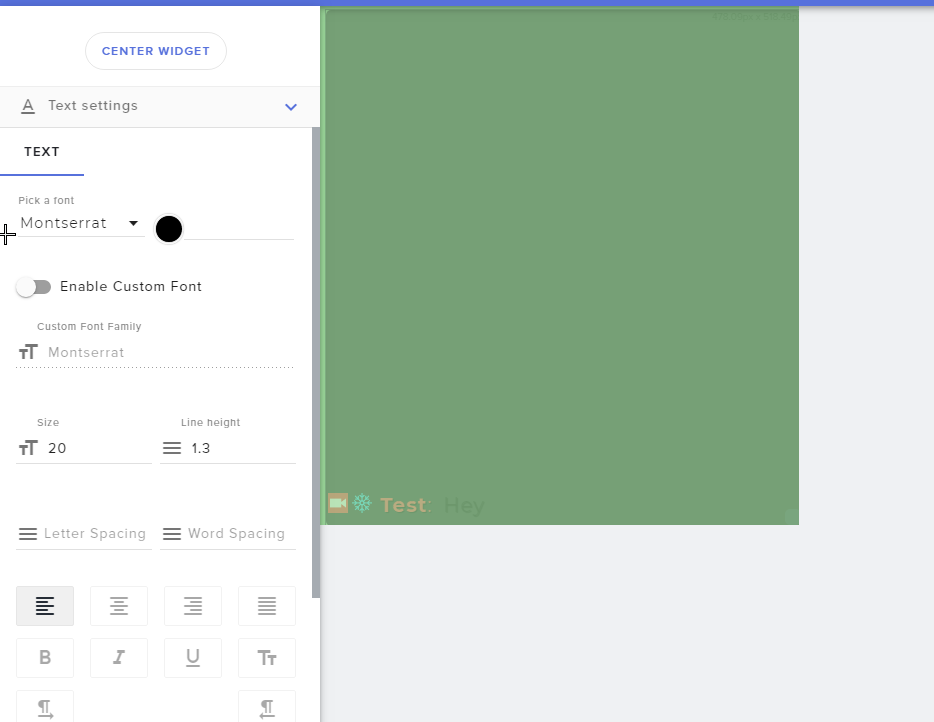
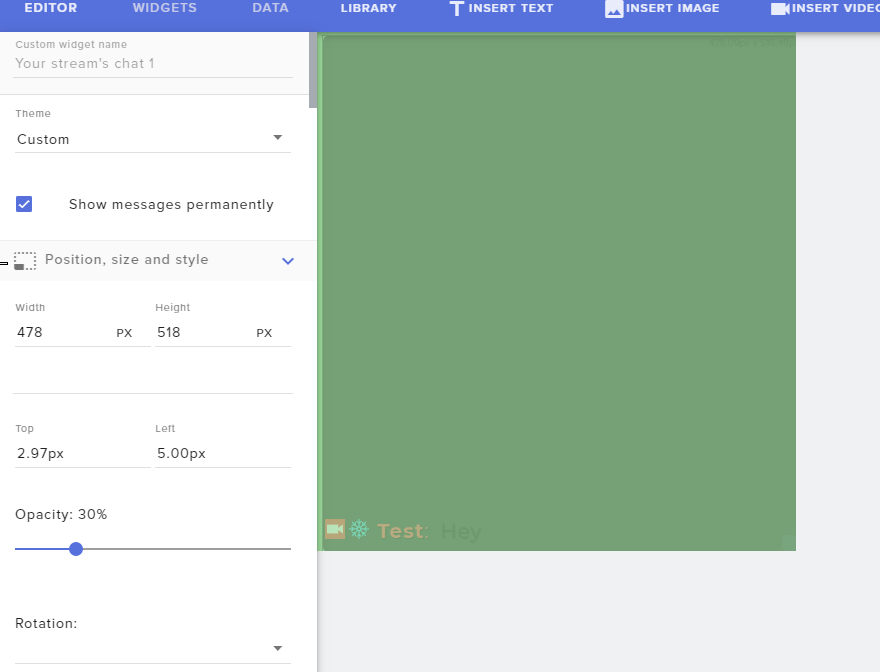
@gentle imp I did try. But whenever I try to reduce the opacity. It reduces it for the text also.
real escarp
@regal breach theme should be custom
 charred basin
anyone else getting a black screen on display capture?
regal breach
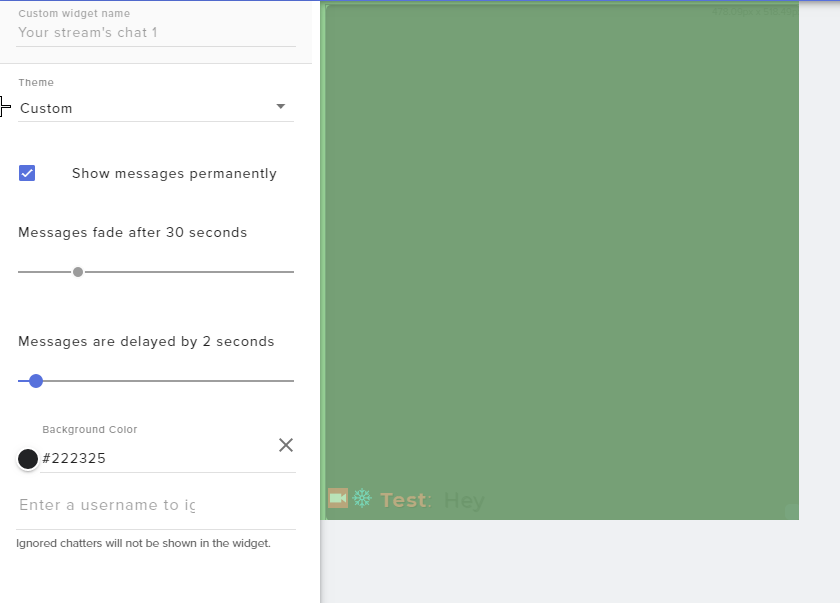
@gentle imp I want to use #222325 as Background Color with 30% Opacity.
Within the editor itself, whenever I reduce the opacity. It's reducing the opacity of text and username also.
Yes, Color is selected in text setting
gentle imp
@charred basin run OBS as admin
charred basin
ill try that
 gentle imp
checking



 gentle imp
how do u set transparency? xD
jade remnant
you are adjusting the transparency of the widget not the background
regal breach
How can I adjust that only for the background?
gentle imp
exactly lol
jade remnant
regal breach
OMG. Thanks @jade remnant I have never used such thing before. It's crazy color picker.