#helpdesk-twitch
1 messages · Page 501 of 1
 deft vapor
 real escarp
there are certain assets that can not be imported from Stream Labs that are copy written. Also some assets MOV files might be two big to upload to the cloud
 ripe scarab
Found other streamers experiencing the GIF alerts derp issue... It's not just me... @strong kernel
 desert sapphire
Does anyone here stream Friday The 13th? if so anyone know how to cap the framerate in it for lag purposes? cuz the game settings dont allow it
real escarp
@desert sapphire check nvidia control panel per application settings and set frame rate for that app
 knotty scarab
Hey all, my streamelements bot isnt responding to commands or anything. And ideas?
real escarp
Hey, please do the following: Click on Part Channel on the dashboard, click on Sign Out, sign back in and then click on Join Channel on the dashboard
knotty scarab
Thank you
desert sapphire
@real escarp Where do i access the control panels per app?
real escarp
@desert sapphire
desert sapphire
my graphics card isnt nvidia so it isnt detecting anything @real escarp
 unique ore
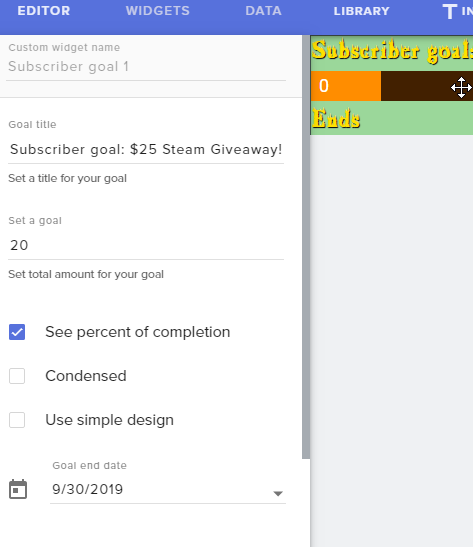
Any idea what can be causing this on my goal widgets? doesn't have the remaining time. https://i.imgur.com/NqxrUkD.png
Also does this on a cheer goal one.
 deft vapor
Can someone explain to me what Transaction value fee % means?
 real tapir
Hi there! Have Two questions - Just wanted to ask if there is a way we can set up a command for our Chat bot to skip alerts (ie. a bad tts) for our mods? We do not want to give our mods access but would like to route a command to have our mods have an exclusive command to skip tts. Also, we wanted our chatbot to create markers for mods by them typing !marker and the bot would do /marker was created by {user} but it doesn't appear to be working when we look at our highlight reel. How would we fix this so our bot can make markers on command.
 vague rock
is there a toggle mute button for those 7777777777777777777777 TTS donations?
 civic cypress
how can I record without my webcam but still have it on in the livestream ?
 ashen cairn
@vague rock When you're setting up your tipping page there's an option for it I believe
I can't edit any of the overlays or widgets here. Whenever I click the pencil button to edit the overlay it takes me to a white screen
This is the case for literally every overlay that I have installed including some new ones I pulled to test the problem
Even when I create a new blank overlay I can't edit it
 oblique sleet
When setting up the Store Items, which has just Sound Effects for now, do you really have to refresh the page in order to redeem them again? The global time and user time doesn't seem to do anything in that regard.
 spring prism
Im having a problem trying to have my game capture capture a game called Ring of Elysuim but its not detecting it
 elder sorrel
@sleek moat >>>Go to the StreamElements website
Part the Bot
Log out of Streamelements
Sign back in and join the bot back to your channel
 sleek moat
thank you
elder sorrel
@oblique sleet Shouldn’t have to. Other option is they can redeem via chat
 graceful spoke
has anyone had trouble with tips not reading through stream elements (alert, not showing in chat alert, or on overlay)
 zenith widget
Does the tip show in the activity feed?
graceful spoke
Nope not in activity
zenith widget
Then how are you sure you got tipped?
zenith widget
And what does the email say?
graceful spoke
trans I.D, name , dates and times
zenith widget
I believe i answered your ticket as well 10 minutes ago
I'm 99% sure you need to go to your paypal to confirm either your email or approve the tip coming towards your paypal
graceful spoke
okay thank you
ashen cairn
I can't edit any of the overlays or widgets here. Whenever I click the pencil button to edit the overlay it takes me to a white screen
This is the case for literally every overlay that I have installed including some new ones I pulled to test the problem
Even when I create a new blank overlay I can't edit it
zenith widget
What browser are you using?
deft vapor
Can someone explain to me what Transaction value fee % means?
zenith widget
Thats the fee the specific tipping type (example paysafecard) takes - the system it self
This is set by our Payments Mediator and the fixed fee is as low as we can talk it over with them as well.
deft vapor
So then your saying using a US debit card for example, it's 2.8% of the tip and .28 cents or whichever is worth more?
zenith widget
yes
deft vapor
That isn't a question you can yes to though. is it just whichever one is worth more or is it both combined?
zenith widget
aah didn't see the "whichever is worth more"
its 0.28 cents + the 2.8% fee for Visa/mastercard
ashen cairn
@fleet spire O
Google chrome
it was working before, but a couple hours after i set up my first one it stopped working
zenith widget
Logout of the dashboard and log back in
ashen cairn
already did that as well
zenith widget
Then something is blocking the overlay editor from loading
an extension for example
ashen cairn
i disabled all of my extensions for chrome for the website
I've also tried clearing my cookies
Before the overlay itself wouldnt open up, but right now it's just the editor
zenith widget
Go to "My Overlays" -> open dev console with F12 -> navigate to console
refresh the page -> click big pencil
if there is an error in the loading it will show in red in the bottom
ashen cairn
There's definitely an error in loading
zenith widget
show it
zenith widget
screenshot
zenith widget
oh god not this error again 
ashen cairn
how many days does she have to live doc
ashen cairn
I don't remember setting a language for anything
my os language is english
my dashboard is in english
Also that same exact error seems to be the case for every overlay, it's not just one with the lang error
zenith widget
the editor is 1
so its going to affect all the overlays you open
ok try this: go out of the editor
on the top right change the dashboard language from EN to anything else
and then back to EN
logout, clear cache, login again
and try
ashen cairn
how do i clear cache?
zenith widget
When you use a browser, like Chrome, it saves some information from websites in its cache and cookies. Clearing them fixes certain problems, like loading or formatting issues on sites.
In Chrome
 ashen cairn
lol
 dull glen
How do i login without getting dumb authy thing
I dont have a cell phone number anymore
zenith widget
If you don't have a phone for 2FA for your twitch account
then I don't know how to help you, besides telling you to find a way to remove the 2FA from your account
How? Either Authy support or Twitch Support.
I believe there are articles on this
dull glen
is there a way to use obs live without logging in
 neon gorge
not twitch help: is there a way to change the output of a custom command with a command (ie. !mission = We're going to the Moon, !mission update "We're going to Mars")
zenith widget
@dull glen No.
@neon gorge Our bot can't trigger its own commands.
If that is what you are looking for
@dull glen Only thing I can suggest is to not use OBS.Live
neon gorge
@zenith widget , not trigger. use a command in chat to change a command response
dull glen
guess i have to wait 4 to 6 days for them to fix it
 zealous pumice
hey guys, im having some issues with my stream, there seems to be a 15 second delay on all sound thats not coming from my mic, my webcam mic and video is all synced up but all the other sound is about 15 seconds off
ashen cairn
Is it just audio or is it also video?
 round brambleBOT
@zealous pumice For the best OBS support, please join their Official Discord @ discord.gg/obsproject
zealous pumice
@ashen cairn its just the audio
ashen cairn
15 seconds is a very long time for a delay to be added
have you checked to make sure that there isn't a delay filter on your dekstop audio source already? If not that's the easiest place to start
zealous pumice
ashen cairn
Interesting
zealous pumice
i can show you a clip if u want
zealous pumice
ashen cairn
I think he meant on the mic audio source
zealous pumice
ashen cairn
yeah
zenith widget
mic, desktop - on everything
zealous pumice
wait sorry i dont follow
zenith widget
Specifically on the microphone audio track enable/disable timestamps option
in its properties
Even if your mic is your camera
thats what i meant
zealous pumice
not sure why there are 2 desktop audios
gonna see if it makes a difference
now my ingame sound seems to be completely gone
zenith widget
You've most likely removed the wrong audio source
or device
for desktop audio i would leave it at "default"
unless you are using Voicemetter
which it seems you are
round brambleBOT
@zealous pumice How to exclude audio sources for a stream or recording: https://obsproject.com/forum/resources/8/
Voicemeeter Banana guide: https://obsproject.com/forum/resources/397/
 lethal pulsar
hello 🙂 i' having problems because of some people coming to my stream and spamming follow alerts again and again and again, what should i do? should i pause the alerts? or
they're creating fake accounts
zenith widget
just ignore them
they will get bored and stop
unless its a constant spam
then you are getting botted
lethal pulsar
its 3 day
zenith widget
and only turning off the follower alert
and reloading the overaly will stop the queue
 cerulean marsh
Hey helpers! Wondering if anyone has ANY idea why when I upload a custom alert sound and/or picture, the alertbox just decides to not work at all?
zenith widget
Define "not work at all"
cerulean marsh
Sorry! When I simulate a new follower with the default alertbox sound, it works fine. But as soon as I upload my own, the graphic doesn't work and the sound doesn't come through at all :\ I'm uploading sound as Mp4
zenith widget
mp4 is not fully supported
for video use .webm
for sounds .mp3
or .ogg
or .wav
cerulean marsh
sorry I mean .m4a, is that not supported either?
cerulean marsh
No wonder! I'll try converting it thanks!
zenith widget
Convertio - Easy tool to convert files online. More than 309 different document, image, spreadsheet, ebook, archive, presentation, audio and video formats supported.
cerulean marsh
Wow what an awesome website. Thanks!
Thanks @zenith widget that worked a charm. My audio files were messing everything up!
 warped kindle
Is there a way in the alertbox to add a custom sound for gifted subs?
zenith widget
Yes - in the variations
By default there is a gift variation, but you can add your own condition as well
warped kindle
Is it in the default alert box settings? Im using a super theme and I dont see it under that alert box
zenith widget
Click the alert widget -> cogwheel on the sub alert -> variations
warped kindle
Got it! Thanks so much!
 formal plaza
Hi guys. I don't know what section to post in with needing this type of help, hopefully i'm in the right bit. I've uploaded a webm file for my alert into the my overlays section, but when it goes onto obs ( when im not live ) its laggy and looks like its missing a load of frames, could someone help please? 🙂
 jade remnant
try turning off browser accell in settings > advanced > sources
refresh the cache of the overlay in obs and try again
zenith widget
@formal plaza Wait, before doing the above, can you please DM me so that I can gather some additional information and we can try somethings
 short moss
So last night i was streaming rainbow six siege, and my connection kept dropping to the red/amber colour in the box and my dropped frames was higher than usual, i have roughly 5/6 upload and a decent pc (i7 8700k/1080ti/32gb ram). Should i try lowering my bitrate from 6000 or change something else?
zenith widget
I think there was connection issues in general for NA streamers
short moss
I'm from the uk so will that still affect me?
zenith widget
Aah, well i heard it was only NA
round brambleBOT
@short moss Please provide a log from your last stream. To do this, in OBS go to Help > Log Files > Upload Last Log File and paste the link to the log file here.
short moss
short moss
ok thanks, i've looked at and fixed everything apart from the capture interference's (have 1 game capture and 1 window capture, only have one enabled at a time) and i'll see how it is next stream
 wide hollow
Hi im using a 4 year old laptop with my ps4 pro and also streaming without using a catcher card. So I'm using remote play.. I seem to lag alot an states bottom left of obs that i lose alot of frames every now and then
. Is it because of the laptop being old. Not sure on its specs but I put it back to factory settings an installed all needed software
 glossy flax
Hi, i was wondering how i get the standard twitch bits sounds and images.
 tight harness
@wide hollow Yeah, sounds like your hardware isn't quite up to what is being asked of it
@glossy flax When you create the alert box, so you'd need to re-add it to get these back
wide hollow
@tight harness what do u think the best/minimum spec is need an I'll have a look later when I finish work what specs I'm running off?
glossy flax
@wide hollow ive only just made the alert box
@wide hollow is there a way to delete the cheer alert or do i need to delete the whole thing and start again?
tight harness
@wide hollow I'd suggest researching that online, as it can tend to change quite frequently and is up for debate
@glossy flax You're tagging the wrong person
wide hollow
@tight harnesssean thanks for the info I'll look into it.. :)
glossy flax
oh lmao
tight harness
To remake an alert box you'd need to delete it and start fresh, yes
glossy flax
@tight harness my bad
@tight harness ive only just made it tho
@tight harness i just want the standard twitch cheers noise and images, shall i start again then come back if it doesn't work
glossy flax
@tight harness its not 😦 its the only thing i cant work out
 wanton mango
If you mean the default SE assets: https://discordapp.com/channels/141203863863558144/199460642975907840/344061720974589962
glossy flax
@wanton mango its not the streamelements sounds i want, its when i get bits i want the standard twitch sounds and images
@wanton mango just cant work it out
 glossy flax
@wanton mango yes
wanton mango
Those are in the link I just gave you
glossy flax
@wanton mango i dont want the streamelements ones
really i didnt see
@wanton mango ok now i see but dont see any sounds? sorry to be a pain
wanton mango
There's an images and a sounds folder
glossy flax
yh the only sounds are the elements
i really like the standard twitch sounds with them images
wanton mango
Are you talking about these sounds?
glossy flax
@wanton mango nope
the ones from twitch
like the standard twitch bits sound
i just tried to make a new overlay and start again and it still has the streamelements sounds
wanton mango
Well the default SE overlays will use the default assets so... 
what about this?
Otherwise I don't know what sounds you're referring to, do you have a clip?
glossy flax
@wanton mango its not that ermm let me try and find one
elder sorrel
He prob talking about this kind of stuff 
elder sorrel
Tbh I think those sounds come from SL 
wanton mango
Does Twitch chat usually make that sound?  I've never noticed lol. And yeah, they're all over on SL. I just DM-ed that sfx to you @glossy flax
glossy flax
SL?
 wary halo
if you just google: twitch bits sounds mp3 you find it in 10 seconds
download the sounds and upload them to your alertbox
 vivid spear
Keep coming across this!
Stream elements dashboard from web won’t allow me to toggle the song request feature
And it’s nowhere to be found in the module controls
real escarp
moderation is in the media request module
if viewers is not enabled in media request then your the only one who can use it
vivid spear
it's all enabled
I followed the video that's provided on the dash on how to set it up to the T
real escarp
what are you trying to edit in the !sr command

StreamElements
The Ultimate All in One Platform for Streamers
real escarp
you want viewers to be able to make song request
vivid spear
yes
real escarp
when you turn on viewer request they will be able to use it
use the link i sent you to control if its free or not
glossy flax
@wary halo thanks ill try
real escarp
you ready for me to make a SR
vivid spear
YUH
Nothing happens because it won't allow me to enable the main command 
It's so broken
real escarp
i DM you
tight harness
The problem here is that you have the songrequest command only set to work when you are live
See where it says "Online"
vivid spear
hey
glossy flax
does anyone know how to get the text from the widgets into the obs
round brambleBOT
@glossy flax To add your overlays to OBS, add a new browser source in your scene. Paste your overlay URL in the browser source properties, set the dimensions to 1920x1080 (unless you changed them on the website), and ☑ “Shutdown source when not visible” https://youtu.be/KDvLynUqXI4
vivid spear
Hero @real escarp Thank you
glossy flax
yh but just the text@round bramble
jade remnant
if you just want text then you can add a text source in obs
glossy flax
like recent follower
jade remnant
you will need to use the overlay.
just make a blank one with text and use that
 lavish flax
Hello anyone online who can help me with my problem / help me with my idea make it happen ?
I did stream for Twitch and upload everything on YouTube as kinda record library, now i find the way how to do Stream for both in same time for Twitch and YouTube.
I have setup up for Twitch for OBS Studio, and OBS Live for Youtube, same as Overlays thru StreamElements {separately for Twitch / YouTube}
Now the question is.... Is there any way how i can still do stream for both, and connect Twitch alerts with YouTube alerts in stream ? Like if someone give me follow on Twitch, i have alerts for that, but dont shows up YouTube alerts, is there any way how to connect them? so both alerts will work in same time?
Anyone for Chit Chat Voice channel ? or anyone who can help me go thru, how to set it up ? Thank you :]
elder sorrel
@lavish flax You need a Separate Browser Source for your Twitch Overlay & YouTube Overlay.
Also don't post in multiple channels please. One is fine. 🙂
As I see you're already getting help in #general-chat
lavish flax
OK, thanks, i didnt knew where to post :]
 wide stump
Hi, is there a known bug on the all-time top gifter widget?
Each time someone gift a sub, the leaderboard disappears...
real escarp
^ correct
wide stump
How do we fix this?
real escarp
the twitch panel leaderboard?
wide stump
no the widget
glossy flax
hey guys does anyone know why it wont let me move the widgets about
tight harness
Are you trying to move them in the overlay editor?
glossy flax
yes it just has a red circle thing
tight harness
Go to Layers, you've got them locked, use the padlock symbol to unlock them
glossy flax
ive tried that
tight harness
Not on the correct layer it would seem
wide stump
OK problem solved... I recreated another widget and now it is working for whatever reason... Sorry for your time
 crisp vector
is there a public repository or bug tracker for SE?
crisp vector
i've noticed that sometimes songs that shouldn't have any reason to be blocked in media request are auto-skipped by the system. i'm guessing it might be a region permission thing if the servers are in israel or around there, but that doesn't change the fact that it seems to be frustrating viewers / subs
curious what's going on and if there is any plans for a fix
real escarp
are you able to open the song in youtube on your computer
crisp vector
yeah, though I can't confirm that for the streamer i'm modding for as she's in a different country than me
are the media requests played locally from the streamer's computer?
real escarp
region block is a limitation of YouTube
crisp vector
okay, i think that's probably enough of an explanation to add a command as to why certain songs are skipped. just wanted to make it clear that it's not the streamer, mods or SE's fault
real escarp
🙂
crisp vector
thanks for the help 
 golden wraith
im having trouble getting my monitor capture source to work
elder sorrel
@golden wraith Are you running OBS as administrator?
 woven bison
How do i change/remove the streamelements bot that is in chat?
golden wraith
any idea why it doent work
real escarp
@golden wraith are you on laptop?
woven bison
Where is the Dashboard? 0.o
golden wraith
yes with an extra monitor
real escarp
woven bison
^ where is that, i dont see that in OBS.
golden wraith
@woven bison in the brownser
real escarp
StreamElements
The Ultimate All in One Platform for Streamers
woven bison
ahhh ok thank you!
round brambleBOT
For the best OBS support, please join their Official Discord @ discord.gg/obsproject
elder sorrel
I believe the command is !userlevel {name of person} 300
So for example: !userlevel American 300
 obsidian tulip
Thank you @elder sorrel 🙂
 real escarp
!levels
round brambleBOT
Chat/Bot Levels
100 - Viewer
250 - Subscriber (Twitch subscribers automatically placed at this level)
300 - Regular
400 - VIP (Twitch VIP automatically placed at this level)
500 - Moderator (Twitch chat moderators automatically placed at this level)
1000 - Super Moderator
1500 - Broadcaster
Dashboard Manager Levels
Bot Supervisor
Editor
Full Access
Owner
https://i.imgur.com/s61Liry.png

 strong cairn
Hey, does anyone has an idea of when are the tchat animations going to be released ? (Message appears animation and disappears if activated)
 left gate
How long does it usually take to hear back for Dream Team application? 🙂
tight harness
That can vary, I see you applied 17 minutes ago
 formal glen
Hey guys, hope your doing well, i have an issue with the media request feature. Mods and me on twitch can request songs but no one else watching
I have everything set to allow access to everyone and cant find anything on twitch settings that would stop them from requesting
real escarp
is there a cost for !sr ^
StreamElements
The Ultimate All in One Platform for Streamers
real escarp
@formal glen can i DM you
left gate
Yeah @tight harness. I guess its like 7 days? Just wanted to know since it didn't say on the application
formal glen
Thank you very much for the help
 upbeat surge
I tend to play marbles on Twitch and use streamelements but everytime someone types !play it says songrequest has started, how can i disable this?
tight harness
@left gate Really varies, shouldn't take long at all though really
left gate
Okay, thanks for the info!
real escarp
!sr or !songrequest if the streamer has them turned on with viewer request enabled and no cost
 pliant obsidian
thnx
 fleet lark
 twin sentinel
 viscid osprey
Question, how can I add a number and name manually to my sub widget? They subbed off stream but aren't going to be able to redeem onstream yet, so I wanted to manually add them
I see i can change the name in labels but im not sure of the count
real escarp
StreamElements
The Ultimate All in One Platform for Streamers
set subscriber count in session data
viscid osprey
the count is now accurate for sub points
im going off sub points due to emote goal - but the name, i changed it but still shows the older perso
Latest subscriber
The latest user to subscribe to the stream
I put the new one's name here
still shows old name
real escarp
subscriber goal or total subscribers?
viscid osprey
this has "total sub points" and "latest new sub"
my brother subbed off stream and hasn't been on to redeem it on stream, so i wanted to manually add him to the goal
real escarp
did he choose to announce it in chat?
viscid osprey
he hasn't been online to do it, and didn't announce when he did it yet
wide hollow
Hi guys. Managed to get obs working with decent streaming through remote play.. just stuck on how to get the audio working so the game audio runs through obs? Any ideas?
 humble rune
Once I sign up for merch, I just wait to see if I get accepted?
real escarp
Right now the emails are being sent out in batches as our team process the request. As you can imagine how many people clicked on the more info button
@wide hollow go to the sound mixer on windows see which device is playing audio make OBS match that when you go to OBS>file>settings>audio
viscid osprey
thanks a ton for the help!
 nocturne cypress
im having trouble with my timers. I have 3 timers set up, but they arent posting at all in my chatroom when im live or when im offline. Can anyone help with this?
real escarp
@nocturne cypress make sure you have chat lines turned down to 0 or 1 (for testing) then have the bot PART the channel and JOIN
nocturne cypress
how do i set it up to where it parts the channel?
real escarp
StreamElements
The Ultimate All in One Platform for Streamers
nocturne cypress
okay thankyou
 shadow flax
Does anyone know the equipment I would need to live stream while riding my Harley?
 sharp dome
Hello SE, Im running into a issue that i need a little help with. im trying to set up the Sub goal. i got it set up just fine. but what i cant find is how to add custom look to it. is there a way to make it not look basic?
such as
 analog hawk
Guys, if i put a sub goal date into the editor on the webpage it says Ends, even doe i put it on a future date? I am confused :p
 ruby berry
in obs i can see my game but on stream the screen is black. i am using a HP pavilion laptop with UHD graphic card 620
humble rune
Is there no way to display top monthly gifter? I found top all time gifter or a whole list :/
 faint copper
So I can't set a custom bot name unless I accept tips? Seems kind of silly
 woeful ledge
Hello there
Is it possible to make a giveway to subs, using the streamelements bot?
 craggy bear
Is there a reason why the "recent subscribers" widget is showing test data as opposed to my actual subscribers?
 swift parcel
@woeful ledge there is a subscribers only check box in the giveaways section of the dash
@craggy bear I believe if you refresh your overlay the test data will go away
@analog hawk could I get a screenshot of it to understand the problem more
woeful ledge
@swift parcel thx
craggy bear
Cool
swift parcel
@sharp dome if you check out #widget-share you can find some great goal widgets that might work for it
craggy bear
Besides setting "default" as the sound effects, is there a place where we can download or select the default sound effect for something. I am copying my 100 bit animation to the 1000 bit animation, but I don't want to lose the sound effect
swift parcel
That would be something the staff can answer (and it's like 2am for most of them)
twin sentinel
Here are the stock files: https://discordapp.com/channels/141203863863558144/199460642975907840/344061720974589962
 radiant tulip
Hello!
I'm trying to create a new command for a subathon which have some maths on it, but I cant see a way to put the maths to work.
For example, a 1000 subs goal, I would use the math: (${channel.subs} - 1000) * -1
twin sentinel
Try this: ${customapi.https://decapi.me/math?exp=(${channel.subs}-1000)*(-1)}
This is the documentation for the endpoint: https://docs.decapi.me/math?endpoint=%2F
radiant tulip
It worked! Thanks @twin sentinel ! 
 clear cliff
Hey! I recently switched to streamelements. Just 1 question. I got the loyalty all set up with some youtube and help but whenever some1 is using the !redeem (...) It's using the Tokens but there's no sound popping up. Please help me step by step.
twin sentinel
Have you added the store redemptions widget to your active overlay?
twin sentinel
Go to your overlays, if there is none, create one. Edit the overlay with the big pencil. On the top left select widgets > add the store redemptions widget > add the overlay as browser source to your OBS.
clear cliff
i am using streamlabs Obs :3
twin sentinel
Same there.
clear cliff
Sorry but i can't find the pencil. Tried both on the site and the app
i already have an overlay in streamlabs obs
twin sentinel
On the website in the overlay section https://streamelements.com/dashboard/overlays
clear cliff
oke new question. how do i import my overlay from streamlabs
twin sentinel
In OBS.Live there is a section (StreamElements > Import from other services) where you can import the overlays.
 thick rover
can i have it so when i send a command it also triggers another?
example being when i send !test it also triggers !test 2 at the same time
twin sentinel
The bot cannot trigger itself after one command was triggered.
thick rover
alright, thank you
can i have it where when i send a command in chat like "!timeout Duckie" it doesnt show the message/ command in chat?
twin sentinel
You can try to make the timeout the response of the command.
 barren anvil
is there an easy way to access widgets
 spiral furnace
Is there an easy way to duplicate an alert box widget config across overlays?
....or is it realistic to expect to have to configure the alert box and all alerts, sounds, variations manually on each starting, gaming, BRB, and ending scenes?
I'm curious if the preferred method is to just create a single overlay with just the alert box config and import that as a separate browser source in each scene?
 merry egret
 cedar lynx
you can duplicate a widget to other overlays @spiral furnace 🙂
@barren anvil there's a "widget" tab in the overlay editor
 glass sundial
hi i have a question, how does "contest" work? the multiplier and etc ...
 gilded current
hi, can someone help me here? whenever i stream my internet keeps crashing but whenever i play games without streaming or anything, i dont crash
is it streamelement or my internet?
twin sentinel
Is there a crash report?
gilded current
no crash report, it just keeps going red button and my internet has a red X
round brambleBOT
@gilded current Please provide a log from your last stream. To do this, in OBS go to Help > Log Files > Upload Last Log File and paste the link to the log file here.
gilded current
twin sentinel
Can you elaborate what you mean keeps going to red button and your internet has a red X? Maybe share a screenshot?
gilded current
twin sentinel
I recommend walking through this analysis and take a special look at the dropped frames warning.
gilded current
and that ^
but instead of yellow triangle
its a red x
idk why i cant click the link
nvm i just pasted it
twin sentinel
The first photo says that there are issues with your internet or your bandwith not keeping up with the streaming data.
The second picture is then the windows connection, which tells you are disconnected from the internet.
gilded current
ok ty for the help, will see if it works later
 stable heart
Um, how do i set up streamelements if i use restream
twin sentinel
There are a lot of guides which can assist you.
stable heart
Could you send?
I'm very confused
I'm trying to work out how i can use bots for both
twin sentinel
No, I am sorry. I don't have any guide at hand right now.
stable heart
i cant find any guides
jade remnant
What bots?
The se bot works on both platforms, you need to sign in on the se dashboard and join you channel
 rain wagon
Hi! is there a way to turn off playsounds command without clicking disable on evry single one?
(not sure if this is the right place to ask D: )
twin sentinel
Not that I am aware of. You could delete the redemptions widget in your overlay, but not sure if this is the effect you are searching for.
rain wagon
just want to like make the chat command not work with a on and off button pretty much
twin sentinel
You can disable the !redeem command in the default commands settings. But the user would still be able to redeem the items via the store webpage itself.
rain wagon
😮 that works! thanks 😄
 dry trench
hello?
im tryna work the giveaway thing and was wondering if i just want the viewers to just buy one ticket thats worth 1000 points is this right
 twin sentinel
If you disabled the setting that the first ticket is for free, then yes.
dry trench
okay awesome thank you!
twin sentinel
also make sure it is not subscriber only ofc.
dry trench
also does streamelemnts have a spin the wheel thing?
twin sentinel
Not that I am aware of at this time.
round brambleBOT
@dry trench Check out the StreamElements ideas board: https://strms.net/ideas. You'll be able to add ideas, upvote ideas you agree with, and track their progress with email notifications. Adding and upvoting ideas also helps the staff know which ideas should be prioritized so please take some time to upvote.
dry trench
okay thank you!
 dense reef
Hey guys!
Could you please advise, can I move a couple of objects on overlay editor at the same time?
twin sentinel
Unfortunately not.
 lament blade
Heyo  could I bother you as to what this means?
I've got the same issue in 2 different streams atm
jade remnant
is it only with the redeem command?
lament blade
yup
jade remnant
ok, gimme a sec
can confirm there is an issue, will raise it to the admin as this is the first time it been listed
we will get back to you
lament blade
thank you, just wanted to make sure it was SE side and not their setup 😄
jade remnant
😁
 idle apex
So I have been desperetly been trying to remove quote number 9 in my quoe thing, but no matter how I try I cannot remove it, what is the command, Ive read the instruction a million times but I feel lik an infant... 😄
 swift mist
can any staff tell me what the status is for fixing the tiltify widget? No other than the owner can change settings like campaign link and it is really a big issue as tiltify campaigns are time limited and in our case we change them often as the whole stream is a charity based stream.
 fiery flower
How can I use api for my bot? When I make request to api, it's return {"statusCode":403,"error":"Forbidden","message":"No channel authorization found"}
 bright oak
Gm, I created an intro movie & finally got it below 30MB uploaded to Streamelements, turned off loop as I only want it to play once, when I go to that scene. The issue is, it plays no matter what scene I am in. Is there a setting or script I can add to only play when I want or need?
fiery flower
I can send code
fiery flower
Ok
 serene granite
@bright oak try changing the source settings on OBS to shutdown when inactive
@swift mist i'll see if there's something we can do here, but it is problematic because external integrations don't normally work with the roleplay system
 inland knoll
is there an error with the stream store, people are getting 'internal error' when they buy sounds
swift mist
@serene granite thank you, it's just the channel owner don't do the tech stuff and having to explain to him how to do it every time is quite a hassel xD but i appreciate any help and maybe a fix 🙂
serene granite
@inland knoll @lament blade we released a fix, can you check again?
inland knoll
still not working
@serene granite I'm streaming live now (inwils) if you want to see it
 thorn elk
i need help to unban user from song request
jade remnant
whats the twitch stream name and who is the user that needs to be unbanned
 rare whale
anyone else having issues with alert notifications? They've been working lately and right now they are not working at all
Just kidding its suddenly working now.....
Figured it out, chat redeem command for the store isn't working
 tacit granite
is there anyway to change the upload file max, I'm trying to upload my sub alert video and my donation alert?
 regal breach
Hey! I want to import the overlay from my TEST TWITCH Account to my MAIN Account. How to do so?
Import from Other Channels Button is not clickable.
twin sentinel
Either add the channel to your account or make them marge if possible. Or make the one an editor to the other one.
 fading ermine
Hey i'm getting 404 on my chat stats any idea why this might be happening?
twin sentinel
@tacit granite No, there is no way to change the uploadmax. Best to convert it to another format.
@fading ermine You changed your twitch name?
fading ermine
long time ago yes
twin sentinel
what was your old name and what is your new one?
fading ermine
old one was dahahaka new one is vannomad
twin sentinel
Your chat stats have been fixed.
fading ermine
ohhh thank you! 😄 i've been trying for weeks to fix it
thorn elk
@jade remnant , Hi tadpole, twitch stream name is Knukka_bear, user needed to be unbanned is Vennyyo
jade remnant
i will pass this on to the admin
 flint plover
I couldn't find a channel for just SE help. How long does it take for Profile/Leaderboard/Store banners to update?
 vast sphinx
 round brambleBOT
@vast sphinx Please follow our community rules:
- No advertisement or stream promotion
- Respect ALL server members
- No NSFW/NSFL
Thank you
vast sphinx
So i have this proplem. When i launch streamelements obs it starts normal but after a second it starts lagging. I dont know what to do. My cpu should handle it. Its at 15% usage when i stream so thats not the problem :/
round brambleBOT
@vast sphinx Please provide a log from your last stream. To do this, in OBS go to Help > Log Files > Upload Last Log File and paste the link to the log file here.
 jaunty reef
Hey i've got an issue where as I got my redemptions to work and SE shows it in chat and same with music from the !sr command but I hear no audio any ideas?
twin sentinel
Have you added the MediaRequest and the Store redemptions overlay widgets to your active overlay?
jaunty reef
ok correction, music plays now from media request i was being blonde and forgot to hit play in obs live. it's just the sfx that now don't play. yes I have the store redemptions overlay as it's own overlay and added to all scenes. Thank you for replying btw i truly appreciate the help.
 sleek cove
Hey i need a help
round brambleBOT
@sleek cove Welcome to the helpdesk! Please let us know how we can assist you today and a support volunteer or staff member will assist you as soon as they are available. Thank you for your patience.
twin sentinel
@jaunty reef Delete the browser source in OBS and readd it. Then try to redeem the item again and see if it plays sound.
jaunty reef
will do! i'll brb.
analog hawk
Why can i not adjust the date of the Subgoal widget? it always says "Ends" please help me 😄
twin sentinel
Try to disable browser hardware acceleration in the settings.
vast sphinx
where can i find this option ?
analog hawk
are alerts down?
vast sphinx
nvm found it but it doesnt change anything
it worked just restarted it thank you very much 🙂
 elfin roost
Hello, I just thougt about this now and I feel dumb
I have a tournament race in two hours, which requires me to mute alerts. How can I do so quickly without changing the volume of every single alert? 
eventually if someone knows how to just mute it in obs it works too
twin sentinel
On your activity feed there is an option to mute the alerts. https://streamelements.com/dashboard/activity
elfin roost
right there? oh nice, didn't see it
Thanks 
(they'll still play silently, tho, right?)
twin sentinel
yes.
elfin roost
jaunty reef
@twin sentinel i removed and re added the source to the scene and my command is working because i get this: StreamElements: @jaunty reef, you successfully redeemed airblast for 100 credits. elementsOkay however still no sound from the sfx any ideas?
twin sentinel
When you have got the overlay editor with the redemptions widget open in the editor view and nothing is muted and you redeem the item, is the sound coming up then?
jaunty reef
@twin sentinel this is how it looks:
twin sentinel
When you redeem an item now, is the sound playing in the overlay editor?
jaunty reef
no
twin sentinel
Are your alerts muted in the activity feed by chance?
jaunty reef
unfortunately not
twin sentinel
Try to delete the store redemptions widget. Save and exit the overlay and reenter it and readd the widget and save it. Then try it again please.
jaunty reef
okey
still nothing, only thing i see when i click on edit item in the steam store is that it changes the file name is that normal?
twin sentinel
Then I am sorry, I have no idea left. A staff would have to look at your settings what might be the issue.
jaunty reef
okey thanks for trying. Would one of them happen to be available to assist or know how i can best contact them?
twin sentinel
I can ask internally for assistance, but as it is weekend it can take some time.
jaunty reef
that's understandable :p
round brambleBOT
@thorn elk Please provide your account ID found at the top of this page: https://streamelements.com/dashboard/account/channels This ID is public info and safe to share here.
thorn elk
id in twitch or streamelements?
thorn elk
alright
 worldly shore
how do I reset session to reset the top donator for the session ?
jade remnant
worldly shore
❤ thanks
 storm cobalt
Hello is there a way to have a command that only one user can use? Like have them use it and then an audio clip and then something bin chat? But only for a specific user
jade remnant
not for a specific user, you can have it for a group (mod, vip etc...), but not for 1 person
storm cobalt
Damn
 formal galleon
hello
jade remnant
you can see if there is something on the ideas board if you want, upvotes help
formal galleon
how do i create a link for subscribing to my channel?
round brambleBOT
@storm cobalt Check out the StreamElements ideas board: https://strms.net/ideas. You'll be able to add ideas, upvote ideas you agree with, and track their progress with email notifications. Adding and upvoting ideas also helps the staff know which ideas should be prioritized so please take some time to upvote.
formal galleon
direct link to subscribe page, is it possible?
jade remnant
this can do it for you https://www.youtube.com/watch?v=v2l0oYdMzTE
@jaunty reef can we have a look at your overlay?
round brambleBOT
@jaunty reef Follow these steps to grant managers/moderators access to your dashboard:
- Click on your Channel Name at the top of the dashboard and select Settings
- Create a new invite at one of three access levels (Bot Supervisor, Editor, Full Control)
- Send this invite to a mod/manager to give them access to your dashboard. The link is one-time-use and expires after 72 hours if not accepted
Video tutorial: https://youtu.be/zl_h-ttZDF0
 wispy grove
Hello, I'm using obs live with obs studio and i use the stream elements activity feed. It shoes donations but it does not show me when someone follows me, is there something i need to activate ?
jade remnant
pm me the link if youre ok with it @jaunty reef
jaunty reef
Sent @jade remnant
wispy grove
@jade remnant yes everything is ticked
and also when i tried to replay tips with with the SE activity feed it does not popup on my alerts box
 normal prism
Hello all! I am looking to move my alerts over to Streamelements. Though I can't figure out how when the alert box triggers, how I will know an alert happened. Like will it make a sound in my headset?
Because I am trying to test this via the browser source to Streamlabs OBS - and the emulator does not even show up on the browser source
So I am completely unsure if it makes sounds or what it looks like on OBS
 supple eagle
Is it possible to show Twitch & YouTube alerts in the same Overlay?
Because I want to use restream
 ivory pivot
does anyone know if and when they will add a new lot of overlays ?
 waxen storm
I'm trying to set up a stream for the first time
waxen storm
and when I hit start streaming it says invalid path or connection URL how do I fix this
jade remnant
@upper steeple known issue fluffy, we is looking into it
 upper steeple
@jade remnant oh phew thank you, thought i broke something
jade remnant
@waxen storm are you logged in with your twitch account or using stream key?
swift parcel
totally broke things 
jade remnant
i agree, fluffy always breaks things 😁
@supple eagle they cant be in the same overlay, you need to make 2 separate ones. i use restream for twitch and youtube, it works fine
supple eagle
@jade remnant but if someone follows me on both platforms at the same time the alerts will play at the same time?
jade remnant
@upper steeple they can still redeem items via your store page link
yep
the thing with youtube is that if their account is privet it wont show, it needs to be public
upper steeple
@jade remnant yeah its mainly sound effects and they don't go off even when redeemed through the store
jade remnant
can i pm you?
upper steeple
yes
waxen storm
@jade remnant my twitch
jade remnant
click the drop down and try a different server
supple eagle
@jade remnant whats about a donation wont it show the donation 2 times?
 mint crane
Hey. For some reason my stream store stopped working via chat. You can redeem stuff from the store page but it doesn't show allert when redeemed via chat but still takes ppl points and shows a message that it was redeemed
jade remnant
@supple eagle you can turn off donation for 1 platform (say youtube), as long as they use the same tip link it will be fine and only register once
supple eagle
ah okey thank you very much
jade remnant
@mint crane know issue
https://streamelements.com/your_twicth_name_here/store
the link works fine,
people can redeem through that (replace with your twitch name)
mint crane
"You can redeem stuff from the store page" that;s what i said
but i want it to work via chat like always
and for who knows what reason it doesn't work now
jade remnant
yeh, it not working is a known issue, so through chat doesnt work atm
mint crane
Thx. Any infos when it will work again?
jade remnant
no ETA, devs/admin are aware, should be later tonight
waxen storm
@jade remnant wheres the drop down?
jade remnant
settings > stream > server
supple eagle
How can I have the same profile page for youtube and twitch?
 strong kernel
StreamElements doesn't support multistreaming and channels are kept entirely separate. There's no way to share data between different channels.
supple eagle
oh okey :c
clear cliff
so i finnaly managed to get the !redeem working last night but when i am streaming right now and do !redeem It's making no sound
it worked yesterday..
 formal totem
I'm having a different issue and have had it for almost a week. A regular viewer/sub lost her ability to !redeem in the middle of a stream last Tuesday and it still won't let her. It keep saying "you don't have enough points" but she has over 15k and my items are far cheaper than that. I reset her points entirely and then refilled them but it's still giving her trouble. No other users seem to be affected.
jade remnant
dense reef
Hey, guys, could you please help.
Why my two lables of top month tipper and latest tipper are different
https://i.gyazo.com/f4a4c57f3489954fbb70219cc03240ba.png
 clear cliff
no i know that bud there is just no sound anymore popping up
strong kernel
@clear cliff I believe he is telling you that sound will play when redeemed from the site. Not from the chat. It's a known issue.
clear cliff
yeah it's saying something went wrong now..
strong kernel
Thanks, we'll investigate that as well.
formal totem
@strong kernel any idea what would cause a single viewer to receive "not enough points" message despite having more than enough for store sounds?
strong kernel
@formal totem What user?
formal totem
How do you mean? One of my regular viewers is receiving that message when she tries to redeem store sounds, but she has more than enough for any of the items.
strong kernel
Yes. What is the name of the viewer?
formal totem
Apologies. Current name is guns_and_gardenias, she changed it from smokeabola about a week ago
strong kernel
Have them log out and back in to the StreamElements site.
formal totem
They've been redeeming straight through Twitch chat, not sure they've ever logged into SE initially.
 pastel elk
Does anyone have issues with the setgame command with the bot?
strong kernel
@pastel elk Nope.
pastel elk
ok in a channel i mod for, quqco, it doesn't work for any mods. and the permissions are set for mod
formal totem
@strong kernel I asked her to try logging in and it seems to have cleared it up! I had no idea they had to do an initial log in. Thank you!
strong kernel
👍
Renames mess with things, whether it's a streamer renaming or a viewer. Twitch doesn't announce renames to the world so it's kinda touch and go with dealing with them.
formal totem
Gotcha. You da best, have a great day!
strong kernel
@pastel elk Try again please.
pastel elk
nope, still broken
strong kernel
Try now.
strong kernel
In the future make sure to start by trying to part and rejoin the bot to the channel. 🙂
"Turning it off and on again" as it were. 😛
pastel elk
oh i didn't have permissions lol, will do
upper steeple
sound effects are back in action
strong kernel

normal prism
-reposting:
Hello all! I am looking to move my alerts over to Streamelements. Though I can't figure out how when the alert box triggers, how I will know an alert happened. Like will it make a sound in my headset?
Because I am trying to test this via the browser source to Streamlabs OBS - and the emulator does not even show up on the browser source
So I am completely unsure if it makes sounds or what it looks like on OBS
round brambleBOT
@normal prism You can test Alerts via the bell on the lower right corner of the Overlay Editor. Simply go to your Dashboard -> My Overlays -> Pencil/edit button on the overlay. Make sure the "Show Emulated events on stream" option is on to see the alert in OBS/Xsplit https://streamable.com/h6qgy
 strong kernel
Read the bold part
Also, while we'll always recommend using OBS Studio with our OBS.Live plugin instead, as we can't troubleshoot issues with Streamlabs' software, we do at least know their older versions like to break down and you should make sure you're on the most recent by downloading it again from their site.
normal prism
Thank you @strong kernel !
I tried OBS.LIve and my transition stinger didnt work
it would glitch and stop half way through each time
with the same exact settings as streamlabs obs
wispy grove
Follower count on dashborad is showing zero and followers not showing in obs SE activity feed why is this ?
normal prism
so I just quit on that
 hidden river
hi, how can i change my bot name?
strong kernel
Through OBS.Live or Ground Control?
hidden river
idk i use OBS but i also have the groudn control installed
strong kernel
Do you use OBS with our plugin with it?
wispy grove
yes i used obs studio just switch over today
hidden river
with the plugin
wispy grove
wait youre not talking to me
strong kernel
@hidden river If you use the plugin, check pinned messages in #helpdesk-selive for a video tutorial.
@wispy grove Dashboard defaults to monthly, not all time stats.
wispy grove
I put it to yearly and it still shows zero 😦
strong kernel
If you only just signed up to us today, then nothing will display.
Twitch doesn't send us a history.
wispy grove
I just switch over from SLOBS today will it take sometime for it to catch up ?
strong kernel
Moving forward, things will populate.
wispy grove
ok will i get my history in SE as I would like it to be up to date with my twitch ?
strong kernel
No, a full history will never be sent from Twitch, but we'll at least have the important stats like total followers, etc.
And moving forward new events will appear in your account.
wispy grove
I see ok thanks. Also how do i replay an alert using the obs live activity feed i used streamlabs alerts still
wispy grove
ok i press it but nothing happens is this to do with me using streamlabs alerts still ?
strong kernel
If you click replay on our system, you need to be using our alertbox and overlays.
strong kernel
I'm sure they did and still do. But if you're clicking the replay button in our activity feed while logged into our plugin, it's our system that'll respond, not theirs.
wispy grove
i see
thanks very much i got it working now, maybe i will fully switch over to SE if it has everything i need 🙂
strong kernel
@analog hawk We're aware of the issue with the end date not appearing and are looking into it. Unfortunately, I cannot provide an ETA for a fix at this time.
analog hawk
ahhh ok, i didnt know that u guys were already aware of that @strong kernel thanks for letting me know 🙂
Also i noticed that the texts in the Editor are for some reason now smaller than they were, even doe i didnt change any font settings @strong kernel t
without the "t"*
strong kernel
Not sure what you mean by that.
storm cobalt
how does one remove the stream elements bot so it doesn't double up commands with another bot?
strong kernel
You can remove it using the "Part Channel" button in your account on the site, though you should be able to import other bots' commands into StreamElements.
storm cobalt
yeah i was able to import but there is a function that SL chatbot has that yall dont at the moment so i'm just going to wait to fully import
analog hawk
@strong kernel For some reason when i reloaded my overlay in streamelements obs the text fonts from the Browser were smaller but now they are fixed again after reloading another time
 tawny bay
Can streamelement handle a if then style? basically the outcome of a random does something
formal galleon
.
direct link to subscribe page, is it possible?
sorry iv'e missed!
im asking for a direct link for subscribe on Twitch @jade remnant
not on YouTube
 nocturne lantern
how do i add pre made scense to the Stream elements OBS
 grave lance
**I turned off the "Shark Tip Cup Overlay" in my OBS Studio the reason being is it is to big and I wanted to reduce the size. As I have had numerous complaints and compliments at the same time with mixed feelings. The fist is to big, the next, is the bits drop mid screen and not from the very top right. it would be cool if the could drop as they do during the test, yet from the second 12px row down in to the sharks mouth. ** I want to make simple statement "My Deepest apologies to those who may have been offended with my questions, It is only because I do not understand to the fullest as yet. My questions have only been to enhance my stream. Not frustrate anyone." ☮
round brambleBOT
@nocturne lantern To add your overlays to OBS, add a new browser source in your scene. Paste your overlay URL in the browser source properties, set the dimensions to 1920x1080 (unless you changed them on the website), and ☑ “Shutdown source when not visible” https://youtu.be/KDvLynUqXI4
grave lance
I already have it set up correctly one of your people helped me set it up. In the past SE has helped me modify templets like "LX" did using code. At this point I need you help once again. Maybe the hypcup person could help with this modification
strong kernel
@grave lance There is a "Cup scale" option in the "Change cup" menu.
grave lance
@strong kernel, I have been looking over the stuff and trying to figure it out, that is why I am here
 vestal oyster
can someone please help me
round brambleBOT
@vestal oyster Welcome to the helpdesk! Please let us know how we can assist you today and a support volunteer or staff member will assist you as soon as they are available. Thank you for your patience.
vestal oyster
so im streaming rn on twitch KevinPlayTV and pepole cant hear my game volume
strong kernel
Check your audio settings in OBS. If you still can't get it sorted...
round brambleBOT
@vestal oyster For the best OBS support, please join their Official Discord @ discord.gg/obsproject
vestal oyster
no one is active in there
strong kernel
OBS Project is supported by volunteers, so while they may sometimes have a slower response time, they will respond, just be patient.
 versed basin
Hey guys i just made a donation goal now and it says i have 5k / 1000 but i never got 5k at all haha how do i get it to start at zero
strong kernel
Goals are counters. They don't reset on their own, just keep counting up. You can manage goal progress at https://streamelements.com/dashboard/session
StreamElements
The Ultimate All in One Platform for Streamers
grave lance
@strong kernel Thank you, [297,246,234,243,240,212,302,204], [341,359,272,518,234,243,297,246], [174,555,272,518,278,600,144,576], [272,518,341,359,278,600], [555,597,548,443,631,439,748,485], [426,325,469,202,495,204,548,443,555,597] What line of numbers decides what the shark eats, I saw one was fish, I would like to drop coins in its mouth as well as Great White's have been know to eat to eat metal as well
strong kernel
That's not deciding what it eats. That determines its collisions.
short moss
is 0.5% dropped frames and 0.1% rendering lag good for a 2.5 hour stream?
 radiant imp
How do I setup donations for my channel on Twitch?
grave lance
oh ok did not know thank you for telling me. Thank you very much for your help.
strong kernel
@short moss Fairly negligible if you ask me, but you can paste your OBS log here if you're worried about it.
short moss
i've had higher %'s, i think i'm starting to get everything working properly, but here
https://obsproject.com/logs/Z-6PMGTl07MYEsj8
i think the only thing limiting it now will be my internet speeds, can only get 5 upload in my area atm
strong kernel
@radiant imp https://www.youtube.com/watch?v=JdRLzlOat6M

StreamElements tipping presets feature is guaranteed to increase your overall tips. Receive tips via Paypal, credit cards or multiple local payment methods. ...
radiant imp
Ok thank you!!
 fringe stirrup
hey im having issues with alerts where there isn't any sound on subs or donations or hosts
it works if i empty the cache on obs for like 5 minutes
but after that it goes silent again
strong kernel
Hey @fringe stirrup don't forget you have the #dreamteam channel for support.
fringe stirrup
o ok
sleek cove
Hey can someone see logs from staff becouse i have a problem
someone from mods edited commands and i cant see who do this
strong kernel
@sleek cove While this isn't something we really track, we can see if there's anything we can pull up, but it's unlikely.
What command was edited?
desert sapphire
any twitch con peeps that happen to be SUPER dope at designing backgrounds to put logo's onto for buisness cards/banners wanna help a brotha out? would REALLY appreciate guidance/photoshop assistance haha
strong kernel
@desert sapphire You can commission artists who have posted in the #art-marketplace channel.
sleek cove
@strong kernel few commands and with girl we wanna know who do this
strong kernel
Your account or someone else's?
tawny bay
Does {$count} work for each user? like assigned
sleek cove
@strong kernel girl account
strong kernel
First, make sure you're typing it correctly, with the $ on the outside of the brackets.
@sleek cove Then she needs to come ask, as we don't just go releasing names in public channels even if we do find something.
@tawny bay Second, what do you mean for each user? You can be creative with user-specific counts by implementing ${user} or ${sender} in the count's name.
sleek cove
@strong kernel no problem but she can send you private msg on dsc about this?
 lilac moat
so here I am
sleek cove
@strong kernel @lilac moat joined so if you can send her logs who edited commands
wary halo
StreamElements
The Ultimate All in One Platform for Streamers
what are the commands that are changed?
@lilac moat btw, the twitch in your profile does not redirect to your channel, it's the wrong page
lament blade
hello
pls help me
how to include donate command. Can't find her and exclude her please help.
strong kernel
You were already told that there is a default !tip command with the bot.
It does not need to be set up.
It's already there.
strong kernel
@lament blade Please keep questions in one channel. There is no option to reset to default tipping settings.
 mystic wolf
Did something get changed with StreamElements or Twitch 3 days ago?
Usually it will fix itself when Stream Store alerts stop working. But it's been 3 days, I updated the URL linking to them as well, but nothing fixes it.
strong kernel
There was an issue with store redemptions yesterday but it was fixed. There's currently no issue with it as far as I'm aware.
 rustic meadow
hey all
streamelements hypcup
mine only appears to be remembering followers
ie. my cup is filled with all sorts of items during a stream
and upon launching OBS next time, only fills with the follower chips
anyone know how i can get my other events in there?
 rough compass
I wanna add: create a store item like a sound effect. Do i need an overlay for that or no ?
zenith widget
@rough compass you can follow some of these instructions
Steps to make a command trigger sound on stream:
- Go to Stream Store page here: https://streamelements.com/dashboard/store/items
- Add an item that has these settings on it:
- Stream Perk
- Loyalty settings to your desire
- (Next step) Add contents (image and/or sound you want to play)
- "Redeeming this item shows an alert
- Redemable via chat
- Skip Requirements
- Get the item name/command from the 2nd creation page
- Go to commands page here: https://streamelements.com/dashboard/bot/commands/custom
- Add command with desired name and have response for command as:
${redeem item_name_here} - Go to your overlays and edit the overlay you use.
- Click on "widgets" and add "Store redemptions" widget. Click save and you should be golden.
- Test your own command in chat and have OBS or editor open to hear sound
- ???
- Profit in viewer interaction and that dosh

@rustic meadow have you tried to reset the cup?
 celest siren



 restive shadow
hello! would there be a reason why my goal widgets aren't matching my current numbers? like right now I have 391 followers with a goal of 400, but the progress bar says I have 264 follows.
 potent vapor
As I add to my Store an option to "Send live message" with live currencies
 lean hound
how do i test my widgets?
rough compass
@zenith widget do i need a overlay for sound only ??
round brambleBOT
@celest siren To add your overlays to OBS, add a new browser source in your scene. Paste your overlay URL in the browser source properties, set the dimensions to 1920x1080 (unless you changed them on the website), and ☑ “Shutdown source when not visible” https://youtu.be/KDvLynUqXI4
round brambleBOT
To reset goals:
- from the overlay editor -> data on top -> goal tab -> reset progress of desired goal
- from the dashboard -> activity feed on the left -> widget data on the right -> goals tab -> reset progress of desired goal
Note: Goal widgets(progress) only counts up and doesn't go down automatically, if you loose followers/subs
zenith widget
@rough compass Yes - if you read the instructions you will see that at some point its mentioned you need to enter the overlay and add the redemption widget in order to hear the sounds from the store items
restive shadow
@zenith widget I had no idea you could do that!! haha thank you!!
rough compass
@zenith widget oh ok rip haha but thnx bro. Btw u should have elgato for overlay no ?
zenith widget
I don't understand the question
rough compass
Im streaming on playstation so overlays arent possible right ?
 ionic kelp
Well technically just OBS and a PC but for best stuff a capture card would be better.
potent vapor
How do I add "Send a Message" to my StreamElements Store?
 stark scaffold
Do I put this here?
So does anyone have a good output resolution for a 2560x1440p monitor? And a bitrate for it? I use the new nvec encoder and have a 2070 super, i7-8700, and my download is 545 mbps <-included all this cause I’m going to bed so can’t answer any questions till I wake up sorry lmao
I just switched to OBS live from slobs today and everyone said my original settings were bad so I kinda need help :/
zenith widget
download in streaming doesn't matter
what matters is upload
1440p - thats still 16:9, but i'd output at 720p or 1080p maximum at 30fps
zenith widget
Please don't
Click the link
Regardless of PC, just don't stream at 1080p60fps on a 1 PC setup
 remote crypt
😄
stark scaffold
Other discord servers said it’s fine why not if I may ask?
zenith widget
Since it seems you have not clicked the above link I will show you why.
Here are general settings to follow
stark scaffold
I clicked the link but like I don’t understand why lol
zenith widget
So I'm strongly recommending 720p or even 900p streaming sure, but the general settings you need to place in OBS for those types of quality streams can be found in the link
⤴
stark scaffold
Sorry if I’m a little slow at picking this up it’s late and I’m a little confused
Cause I streamed 1600x900 and 1280x720 at 60 FPS and just capped my game at 165 FPS and it went good so that’s why I’m confused
zenith widget
then keep it at those output resolutions
zenith widget
If you have permanent transcoding from Twitch(as in being a partner or a high viewer affiliate) for 1080p
sure
stark scaffold
I’m averaging like 5 ppl per stream
But my brother gave me his PC last week and its just chilling in my room
zenith widget
If you don't have transcoding most of the time while streaming, as transcoding from Twitch is limited (reserved for partners and high viewer count affiliates get them if there are slots)
then 1080p can actually hinder you
as some people can't watch you on 1080p
zenith widget
transcoding is the option for viewers to change at what quality they watch you
yes the cog
zenith widget
forcing someone to watch you at 1080p - they can buffer all the time
stark scaffold
1600x900 60 FPS or 1280x720 60 FPS good?
I just honestly wouldn’t know the differences between the Rez and if it would be worth it
zenith widget
Imo 720p60fps is good enough
 peak sentinel
So I just made a fresh new Twitch Account to use as a bot Account for Stream Elements and yet I can't use the username for the bot account in my Stream Elements. It gives me my main Stream Channel and one of my other accounts but not my 3rd account
zenith widget
Where are you setting that bot account?
peak sentinel
Ground Control
Then I test it and it spams my personal name
and in the Live Plugin for OBS Studio I can change to streamelements/Me/1 Other
zenith widget
You need to login to Twitch with the 2nd account and visit the ouath token place
to get an oauth token
and place that in Ground Control
if its using your own name
then you've used your channel name
to get the oauth token
peak sentinel
and then after I do that. Will it port over as a Bot?
zenith widget
yes
peak sentinel
so using Ground Control > the JWT Token is needed too right?
zenith widget
Not the JWT token
Login with your bot account ON twitch
and click that button
get the oauth token
and then paste it in the oauth token field
zenith widget
sure
 amber obsidian
am I just totally blind? Is their no Loyalty Points adjustable amount for Subscribers?? - Shows it here: https://support.streamelements.com/hc/en-us/articles/115000370912-Loyalty-System

StreamElements
Jump to section
The Loyalty program is the key to interacting with your viewers, increase engagement and get points.
This quick walkthrough video covers all the basics of the loyalty settings.
Sti...
but it's not on the Dashboard
zenith widget
Are you an affiliate?
amber obsidian
no, just started.. Streamlabs didn't require you to be affiliate for Sub Loyality points not sure why I would have to be one here.
Seems like such a simple thing
Wanted to give Elements a shot, seemed like it had more to offer but this kind of bothers me a little. Don't see the point in holding that option back.
zenith widget
We show settings based on the information Twitch gives us when you login
when you are not an affiliate, we won't show the affiliate/partner options
as there is no need to
even if you see them you won't be able to utilize them
amber obsidian
okay, maybe I don't fully understand (new to all this) but when people Sub to any streamer new or not is the streamer not "supported" if new to streaming? If in a small channel starting out someone Subs shouldn't I be able to give them Loyalty currency just like someone who follows.
zenith widget
You are not a Twitch Affiliate, so you don't have a subscribe button yet.
You have it right, but you yourself are missing a step here 🙂
amber obsidian
okay, didn't realize that. I recently Sub'd to a small channel guess I didn't realize you had to earn the Sub button.
Thanks for clearing that up for me.
zenith widget
👍
 scenic oak
are there api endpoints for media request? specifically for pausing/playing media
 gritty pike
Hi, i've got a problem with my streamelements activity feed, hosts/raids seems to not working.
I tested to go on the streamlabs dashboard and i can see the hosts, but on the streamelements one i have none. i stream with obs live streamelements, and i'd like to fix that problem, can you help me ?
round brambleBOT
@gritty pike Due to changes to Twitch API, we have filtered out hosts and will only show these ones on your activity feed:
- All hosts coming from an online channel with at least 1+ viewer
- Auto host events with at least 1 viewer - only from a channel that just went offline
Note: If you see "X channel has hosted you" with no viewers on the back, that is considered an offline host or a host with 0 viewers, we do not show these.
gritty pike
ow ok, but the hosts were with one viewer, as you can see on the feed at right
zenith widget
Did you see "LikhoNaSS hosted you with 1 viewer" message in chat or did you see "LikhoNaSS hosted you" only?
gritty pike
in the chat ? i don't remember to be honest. it's possible that i saw only hosted me
i'll keep an eye next time on the chat message
zenith widget
Its if the later, then its an OFFLINE host
meaning we don't see how many viewers come in
as twitch doesn't send us that info
as to why SL shows it - i can't say
They have most def. decided to approach this in another way
gritty pike
so those hosts will not give some loyalty points right ? loyalty work only if the activity feed detect the action ? no alert = no points
zenith widget
yes
gritty pike
Ok thank you for the quick answer. have a nice day 😉
idle apex
o I have been desperetly been trying to remove quote number 9 in my quoe thing, but no matter how I try I cannot remove it, what is the command, Ive read the instruction a million times but I feel lik an infant..
zenith widget
!quote remove 9
rustic meadow
@zenith widget events to fill cup set to 20. Is the 'restart cup' option supposed to fetch the last 20 events? I tried it and it is still only grabbing the follower events
obsidian tulip
Seems to be white backgrounds behind my overlay stuff?????
And goals?
How to remove
zenith widget
Is that in obs?
@rustic meadow if the cup is in its own ovwrlay remove the browser source
So that its local storage is cleared
And add it again
It should start pilling up properly again
 crisp minnow
Hi! I'm having problems with my goal overlays. When I set and end date all that shows below the goal bar is "ends" or "ended" with no information afterwards. I also noticed that it became harder to find how to set the date, when previously it wasn't an issue. The area for scrolling seems smaller.
rustic meadow
@zenith widget correct in OBS
The cup is not in its own overlay. It's in a consolidated overlay with my stream labels, chat box, etc. Should it be in its own overlay? I'll remove it and re-add it. If I want to retroactively fill it with past events, do I just hit the replay buttons in the event list? Will the hype cup remember this for my next stream?
zenith widget
@crisp minnow the missing end date is a known issue
Not sure on the other issue
May need a screenshot to take a look
@rustic meadow yes for the refill
Not sure if it will remember the refill
crisp minnow
before I could see the end dat and where to change it. Now I have to scroll down to do that. This took me a couple days to figure out.
zenith widget
Colapse the layers tab
 rain frost
how can i setup up my webcam when i'm going the Streaam?
twin sentinel
Add a video device to the scene via the plus at the boottom of the sources list in OBS Studio.
rain frost
ty
 halcyon ridge
my media request is not working
i have my backup list on autoplay but it just stops at one song
help anyone?
rain frost
i did put my web cam in thhere but its not sending out only the game is sendging out on twitch
round brambleBOT
@rain frost For the best OBS support, please join their Official Discord @ discord.gg/obsproject
 wooden cape
Would anyone have a good link to a tutorial on sound commands in stream elements? I followed one on youtube and unfortunately it does not work
rustic meadow
@zenith widget hi keizar
so i removed the widget, re-added it, set it up (size, position, cup), and hit "reload cup", but it still only pulled in follower events (i currently have ~6 follower icons in the cup)
- should it now fill properly going forward?
- what is the mechanic behind the cup remembering the past x events? do the events have to happen during a stream?
- also, just a clarification on "events to fill the cup". i have mine currently set to 20. even if i have 20 events, it doesn't look like it will actually "fill" the cup. what does the setting mean exactly? does it mean it will remember only the last 20 events in my case?
please and thanks
real escarp
@wooden cape right now there is no command persay to trigger sounds on overlay however people are using their Stream Elements Store Items to play sounds on stream by adding the Store Redemption widget to their overlays
wooden cape
@real escarp that's the ticket, I've done exactly as the instructions advise to no avail. I was curious on whether there are common causes or something along those lines that might help
real escarp
can i DM you
 uneven sun
hello i have a question
real escarp
Whats up ^
uneven sun
so with the overlays do i need OBS for it ?
real escarp
or xSplit or elgato game capture software or software that lets you add Browser sources
uneven sun
preciate it
lament blade
Comment on rec notre ecran
 bold kraken
I withdrew 1UP credits from StreamElements (https://streamelements.com/uptrennd/store) yesterday. Has not shown on my ERC20 account. How long does it take to post the transaction?
StreamElements
The Ultimate All in One Platform for Streamers
real escarp
^ if your dropping frames check here first https://h4ndy.eu/obslog
round brambleBOT
@shut flower Welcome to the helpdesk! Please let us know how we can assist you today and a support volunteer or staff member will assist you as soon as they are available. Thank you for your patience.
 shut flower
when i open the streamlabs my keyboard gets crazy. When i start writing, the label go back like to the start and it looks like i'm writing from foward to back
Only when i open the Streamelements
cedar lynx
are you using Streamlabs or StreamElements? You mentioned both in your post
cedar lynx
what program is causing this issue, specifically?
cedar lynx
are you in the StreamElements website using the overlay editor?
shut flower
No
cedar lynx
so, are you using OBS with the OBS.live plugin and you're referring to that?
shut flower
i open the program with the rocket launcher starting flying
and the OBS.live start as second process
i guess it's said like that?
cedar lynx
ah okay yeah so you are using OBS with the OBS.live plugin then 🙂
just to double check, did restarting the program and/or also your PC not fix the issue?
cedar lynx
and it's still happening today I take it
cedar lynx
okay, can you explain exactly where in the program this weird text bug is happening?