#helpdesk-twitch
1 messages · Page 477 of 1
 patent zodiac
 inland lodge
Live subgoal but based on points. Is this doable?
 zenith widget
There is a total subscriber points widget.
You can add additional text to it to be like 2323/10000 (as in current points/goal)
inland lodge
Perfect looked under goals so missed that
Thanks ❤
Props to SE always quick and super helpful answers
 covert hemlock
i could really use someone's help right about now haha. I'm trying to make an animated overlay alert for my webcam. I've got it all done and whatnot but the only issue is i want the text to get cut off instead of fading back up into the cam. I'll send a gif of what i mean
https://gyazo.com/3e3a649920d1dc1840d352c065edcbe3

 twin sentinel
What do you mean with cut off? You can edit the exit animation in tje animation settings behind the cogwheel of the event in the alertbox settings.
covert hemlock
like you see how the text goes back over the cam border?
same with when it fades in
I want to make it so that it's like the grey box how when it goes back up it doesnt go past the cam border
twin sentinel
What widget is this, it this the default alertbox with custom css, or a complete custom widget?
 jade remnant
you can always put the alert box behind the cam overlay in the layers
if that would be easy for you
covert hemlock
Yeah that would be an idea. Let me give that a go but i need to edit the ae file now haha
only issue then would be the Logo spinning so i would need to create 2 Alert box's in the one overlay thingy
 strange lion
is there still an issue with the host/raid? i have people hosting and the alert doesnt show and they arent getting the points for it, i told them the auto host doesnt seem to count but even manually hosting doesnt seem to work.. raids work fine though
jade remnant
@covert hemlock is the cam boarder yours or a premade one?
 nocturne pelicanBOT
@strange lion Due to changes to Twitch API, we have filtered out hosts and will only show these ones on your activity feed:
- All manual host events (0 hosts included and if filter set to 0)
- All hosts coming from an online channel. If the hosting channel has been offline, we do not show it
- All auto host events with at least 1 viewer
Note: An offline host is when you see "X channel has just hosted you" - with no viewer numbers on the back
covert hemlock
premade @jade remnant
 winter pivot
I am trying to import my alert boxes from stream labs and when I download the extension it still isn't letting me click the required field for import alerts. Does anyone have any insight
twin sentinel
@winter pivot Try to log out of your dashboard, restart your chrome browser, log back in your dahboard and try to import again please.
winter pivot
it worked ty
 north flare
hey hey, having some small issues with Bit Cup, it's all sideways, she reset it yesterday and it's back to sideways.. twitch.tv/bbxh
twin sentinel
^handled in DT channel
covert hemlock
is there a way to group items in the sources?
twin sentinel
You can't group layers in the overlay editor at this time.
covert hemlock
damn ok
 dawn wasp
Bit of a weird developer request - somewhere in the javascript bundle that's loaded on the overlay screens there's a bit of code that references localStorage["StreamElements.lang"]. localStorage doesn't exist in android webviews by default, which is preventing SE overlays being used in some android apps (notably the old Bitstream app).
Would someone please be able to change it at some point so it doesn't cause an error to make the overlays work again?
twin sentinel
@dawn wasp I am asking internally if someone can take a look. Also you have always #dreamteam to ask your questions as well.
dawn wasp
Thanks appreciate it! Will do next time 😃
twin sentinel
👍
 terse cargo
hi i have my overlays on the website ready to go but how do i transport them to my stream elements obs
nocturne pelicanBOT
@terse cargo To add your overlays to OBS, add a new browser source in your scene. Paste your overlay URL in the browser source properties, set the dimensions to 1920x1080 (unless you changed them on the website), and ☑ “Shutdown source when not visible” https://youtu.be/KDvLynUqXI4
terse cargo
thank you
For the alerts overlays do they only show when the alert ( for example someone following ) happens
twin sentinel
The alertbox only shows then, yes.
twin sentinel
You can create an overaly you want from the gallery and then just hide or delete the cam border widget.
 red whale
What is the Donation Free for Streamelements?
terse cargo
oh yeah didnt see that. Thanks again for the help
twin sentinel
StreamElements does not take any cut from your donations. The payment provider do take a fee you can see here: https://streamelements.com/dashboard/tipping/fees
red whale
It says that when I try to connect G2A Pay it says I should contact the Support but when I click on the Support Thing, this comes https://i.imgur.com/cJjYY2r.png
 twin sentinel
There is an issue with connecting G2A Pay at the moment. We are working with G2A to resolve this issue.
red whale
👍
 blazing siren
nocturne pelicanBOT
blazing siren
nocturne pelicanBOT
@blazing siren Welcome to the helpdesk! Please let us know how we can assist you today and a support volunteer or staff member will assist you as soon as they are available. Thank you for your patience.
twin sentinel
Any error message?
 tropic jasper
Having an issue where when we draw a giveaway winner, the bot pulls multiple winners at once. Over at Docgotgame's Channel.
twin sentinel
Can you hand in the accountId of the channel this is happening and a clip of it happening, too please? So we can look into this.
tropic jasper
Will do
 lament blade
Hey everyone! People can't post any links for !sr in my chat, even though i have ALL filters off, no protection, no external bot, what can i do?
twin sentinel
What is happening when they do !sr? Are they timedout or is there no answer from the bot at all?
lament blade
Usually it says the requested song is too long, even though the limit is 100 minutes
otherwise it just shows
!sr ***
twin sentinel
Disable the twitch link protection to disable the ***
lament blade
and if it appears to work it pulls "irans got talent" or other trending videos from youtube for some reason
Thanks @twin sentinel i never thought to check
 spark violet
How do I get the bot to say something once every 30 seconds
twin sentinel
Create a timer in the timer section of the bot.
spark violet
Ok and how do I make a song request box so music will play during the stream
twin sentinel
Create an overlay and add the Media Request widget to your overlay. Then add this overlay to your OBS Studio.
 opaque elbow
Hey guys, I want to add my alerts to OBS using the browser source. When I emulate it however I see nothing pop up on OBS
nocturne pelicanBOT
@opaque elbow You can test Alerts via the bell on the lower right corner of the Overlay Editor. Simply go to your Dashboard -> My Overlays -> Pencil/edit button on the overlay. Make sure the "Show Emulated events on stream" option is on to see the alert in OBS/Xsplit https://streamable.com/h6qgy

@opaque elbow To add your overlays to OBS, add a new browser source in your scene. Paste your overlay URL in the browser source properties, set the dimensions to 1920x1080 (unless you changed them on the website), and ☑ “Shutdown source when not visible” https://youtu.be/KDvLynUqXI4
opaque elbow
oh thank you
:)
I have the ''show emulated events on stream'' checked, yet still it doesn't show when I emulate
twin sentinel
Have you made the source the first source in the sources list in OBS?
 green patio
stream elements isn't keeping track of my followers again i don't know why
opaque elbow
oh I think I already see the issue. I set the source resolution to the size of the box
but it needs to be 1920x1080
sorry, didn't notice that until now
twin sentinel
@green patio Is this for all followers you recieved, or just for some here and there?
green patio
all
nocturne pelicanBOT
@green patio Please provide your account ID found at the top of this page: https://streamelements.com/dashboard/account/channels This ID is public info and safe to share here.
green patio
5ada4f599ea2792baa02e1cd
spark violet
How do I make the bot join my chat and start responding to commands?
twin sentinel
On your dashboard https://streamelements.com/dashboard on the right side is a button to make the bot join your channel.
@green patio Your follower alerts should be back up working. Please contact us here if they are still not working and we'll investigate further.
green patio
ok thanks
twin sentinel
Best to ask such a question in #dev-chat they will most likely know what exact regex type StreamElements is using.
 tiny roost
Thanks @twin sentinel moving
 fluid igloo
I'm trying to make a afk command with last message sent. But when triggering it, it also shows the command (!afk) Can I exclude just the command from the bot reponse?
twin sentinel
Can you share a screenshot of this situation in your twitch chat please?
fluid igloo
twin sentinel
At this point your last message was !afk This is a screenshot. What do you want to achieve with the comamnd !afk? That the user can see their last message: Then this is most lilkely the closest result you can get. When you want to make users able to ask of someones last message then just in your test case cause you are testing with yourself will give you this response.
fluid igloo
This is how I'd like it to be. Basically removing the !afk from last message so the last message would be: "This is a screenshot." I'm also trying to figure out if its possible to make it so the bot response with "user no longer afk, their last message was insert msg here
twin sentinel
I think when you yourself ask for your latest message there is no way to remove the !afk as it is in your last message. If you set up the !afk command to ask the latest message of for example the person specified after it, the latest message of the person asked for does not necessarily have to contain the !afk of course.
For the welcome back message: when they enter this command themselves, you will always get the comand being entered as their latest message. The variable is designed that another peson can ask the latest message of the person.
fluid igloo
Imma look into that when I get off work tomorrow. Thanks for the input @twin sentinel :D
 fallen lava
Is there a way to set up a minimum of $5 donation to include a link or song or something to play? I am looking to set up a "jump scare" stream for a streamer
 idle vector
Can you not have it so song requests are by tip only?
tropic jasper
This is for the Giveaway showing multiple winners. I'm only an editor for the bot so I can't get to his account id. It's for Docgotgame. https://clips.twitch.tv/RockyPowerfulFiddleheadsSeemsGood
 twin sentinel
@idle vector Set the media request mode to both or another setting here: https://streamelements.com/dashboard/mediarequest/settings
@fallen lava You can either edit your alert or make it so a song can be requeted with a tip and added to your songrequest playlist, but note this will most likely be not playing when the alert for the event comes in.
fallen lava
ahhh okay so @twin sentinel stream elements doesnt allow individuals to place a youtube link or something if they donated $5 for example?
twin sentinel
You can set this up and the song will be added to the queue of the media request.
@tropic jasper Thank you. We will investigate this further.
terse cargo
if i have a downloaded an overlay how do i get it on my stream
 paper mural
Is there a way to do this with the StreamElements Bot; I would like, let's say: a User would type !request 'text here' -- then it would add the 'text' to a Queue where I can see the viewers message/request ? ---
then I can type !rqadded 'username' and it would tell the user I added or red his message ? (might be too specific but would it be doable without coding?)
nocturne pelicanBOT
@terse cargo To add your overlays to OBS, add a new browser source in your scene. Paste your overlay URL in the browser source properties, set the dimensions to 1920x1080 (unless you changed them on the website), and ☑ “Shutdown source when not visible” https://youtu.be/KDvLynUqXI4
twin sentinel
@paper mural Take a look at this Queue API https://thefyrewire.com/docs/api/twitch/queue/ and see if it fits youe needs.
paper mural
ok thx @twin sentinel
 bright oak
Is there a way to add a !clip command in streamelements to use to clip a 'clip' I know how to add commands, just not sure how to script it.
twin sentinel
There is a third party API you can use for this: https://thefyrewire.com/docs/api/twitch/clips/
bright oak
Thanks @twin sentinel do I just add my twitch token where it says token?
twin sentinel
This endpoint requires authorization: https://thefyrewire.com/auth/twitch?scope=clips:edit&redirect=clips/create
bright oak
OK, I will read through it. I see there is documentation. Thanks again.
lament blade
I was streaming last night and Stream Elements overlay didn't give an Alert for an event... As far as I could tell it wasn't registered at all. Afterwards I emulated the event and everything was fine... Any ideas as to what went wrong during the stream?
twin sentinel
What event type was not showing up?
lament blade
Host
nocturne pelicanBOT
@lament blade Due to changes to Twitch API, we have filtered out hosts and will only show these ones on your activity feed:
- All manual host events (0 hosts included and if filter set to 0)
- All hosts coming from an online channel. If the hosting channel has been offline, we do not show it
- All auto host events with at least 1 viewer
Note: An offline host is when you see "X channel has just hosted you" - with no viewer numbers on the back
lament blade
Ic. Thanks much for the info.
Just checked the activity feed and the Host isn't there either though. :-/
twin sentinel
Live channel that manually hosts (/host) = ✅
offline channel that manually hosts (/host) for 0 people = ❌ (this will show in your chat as "X channel has just hosted you")
auto-host which which hosts for at least 1 person = ✅
auto-host event which hosts for 0 people = ❌ (this will show in your chat as "X channel has just hosted you")
lament blade
The first checkmark, sounds like it describes a raid? 🤔
The the 'X' ones honestly sound more like what an average Host would be. As one would normally assume nobody is on their page when the channel is offline.
I don't suppose you know where I can find the change log for the Twitch API since this implementation atm makes no sense to this Newb.
twin sentinel
We can only show the raids/hosts with the green checkmark in your activity feed and emulate an alert.
 mighty sundial
Can I get a bit of help ? I would like to switch my donation link to one from stream elements because I hard about the charge back protection
twin sentinel
With what do you need help exactly?
 shut orbit
I have a problem everytime i want to type something in my chat in obs i have to login again thats really anoying
nocturne pelicanBOT
@shut orbit If you are not seeing the OBS Twitch integrations and have OBS.Live installed, please follow these steps:
- Make sure you are on the latest and greatest version of OBS.Live ( 19.5.27.394 )
- exit OBS (make sure OBS is not running)
- delete
%appdata%\obs-studio\plugin_config\obs-browser\obs_profile_cookies - start OBS.Live
- Settings -> Stream -> disconnect -> connect
 pulsar gulch
Can someone please tell me if there is something wrong on this https://obsproject.com/logs/LP4npF02ozszZCol
twin sentinel
pulsar gulch
oh thank you Benno 
shut orbit
I have a problem my songrequest does not work if i type !sr ... in the chat the streamelements bot says the song is added the the qeue but it is not it stays on the backup playlist
 strong kernel
@shut orbit I see a queue of 12 videos, which is already above your maximum.
shut orbit
is that my queue
strong kernel
Yes.
strong kernel
Screenshot please? Don't forget you can skip the current song.
shut orbit
i can skip as much songs as i want it stays on bac-up playlist
strong kernel
Please screenshot what you're seeing.
twin sentinel
You can edit your tip moderation settings here: https://streamelements.com/dashboard/tipping-settings -> Tip moderation
strong kernel
You're currently paused on your backup playlist. If you expand the media share window there, you should be able to see your queue.
strong kernel
Screenshot please.
shut orbit
strong kernel
Log out and back in using the StreamElements menu at the top of OBS.
shut orbit
Thanks it works now
but i also have another problem
my activity feed does not work
No
no mind it already works xD
thanks
 modest jewel
hey, my obs live says to increase encoding, what should i do then? audio? video? the encoder to hard drive? idk what to increase it to and can it damage my pc?
nocturne pelicanBOT
@modest jewel Please provide a log from your last stream. To do this, in OBS go to Help > Log Files > Upload Last Log File and paste the link to the log file here.
modest jewel
https://obsproject.com/logs/2aPtYi-7TYA13TY5 here it is
twin sentinel
 limber ice
when buying loyalty points for my stream can users use those point that are purchased with tips in chat games?
twin sentinel
The loyalty points can be used in the mini games in the module section of your dashboard.
limber ice
right, but i have it set up that if you tip you get loyalty points, but one of my followers is not able to use those purchased points in the mini games. only points earned from watching
strong kernel
If they tipped anonymously or under an alternate name, then the points cannot be applied to them.
limber ice
the points do show up on the leaderboard but when trying to use them it doesnt work
twin sentinel
Any error given by the bot why they cannot redeem an item for example?
limber ice
no error, for example for every dollar tiped they receive 100 points, was tipped 7 and they received 700 points, watcher then trys to play !slots with those points and it say they only have 80 points
strong kernel
Tell me the issue you see here. 😃
If they tipped anonymously or under an alternate name, then the points cannot be applied to them.
limber ice
gotcha, thank you very much
shut orbit
Use for what?
 brazen pike
Like when your live streambot??
brazen pike
I have the app
shut orbit
You need to go to the site
brazen pike
Not the app then
brazen pike
Thx!
shut orbit
Then you have a grey long box on the left
Scroll down
And there you find everything
Np
brazen pike
Okay
 novel palm
Hello,
my problem is first the Bot isn't deleting nonsubs that post links and if I request a song with !sr the bot says that the requested song are to long but the limit is 1 Minute and the song is 0:53 Long
nocturne pelicanBOT
@novel palm Please connect your streaming account (Twitch, YouTube, or Facebook) with Discord by going to ⚙ Settings and then Connections here in Discord. https://streamable.com/eg92w
 novel palm
I already linkend my twitch to discord
twin sentinel
Have you changed your name? the conneted channel is not available.
strong kernel
@novel palm It can't time out people if it's not a mod in your channel.
 strong kernel
Don't know what chat you're looking at but this is from yours:
novel palm
But it's about a channel of a friend
strong kernel
That information would've been helpful from the start.
novel palm
Sorry...
So as a supermod I can use the !sr command
But as normal user you can't use !sr

One Minute should be possible, right?
strong kernel
Do you get a message when you attempt to request a song?
novel palm
Yeah
strong kernel
Take a screenshot please.
 strong kernel
Twitch itself is blocking all links due to the streamer's Twitch settings. Links are being replaced by *** which the bot is using as its search query for the song.
*** happens to be pulling up a song that is too long.
strong kernel
That is a Twitch setting.
strong kernel
novel palm
Do you have a link for that?
strong kernel
It's in the dashboard.
novel palm
Okay I will tell him this
Thank you very much
One of the best support teams that I Know 
novel palm
Btw is it possible that if you post a link that the message get deleted and not all message (Time-Out)
So that the person don't get timeouted
Only the Link should get deleted
strong kernel
The bot does not currently have the ability to delete single messages.
novel palm
Okay thank you
lament blade
How do you set up ?add com
Do do you set up !add com s
How can you make add coms
How do you put stream bot
strong kernel
Please describe what you're looking to do in more detail and full sentences. I don't understand what you mean.
 low saffron
Hello, sometimes streamelements miss some followers
is that normal?
I am using obs.live aswell
for example:
left side obs.live, right side twitch dashboard
IREBUSI was missed, this is the 2nd time this happens to me
strong kernel
This is a known issue we've been looking into. I've added your information to the report, but unfortunately we can't provide an immediate solution.
strong kernel
What do you mean?
 solemn arch
The left and right side are too close to the text for my liking
Was wondering if it's possible to add some margins or padding
strong kernel
There isn't. You're better off setting it to transparent and using your own image as a chat background, in an image widget.
low saffron
@strong kernel thanks for the answer.
 raw wind
Hi! Can I change bot name without opening SE desktop app everytime I stream?
strong kernel
Either Ground Control or OBS.Live must be open for the rename to be in effect.
 karmic pier
@dry steppe.staff
strong kernel
First off, don't ping entire groups. Second, you pinged some poor person.
karmic pier
lol but i have a sincere question
strong kernel
Then ask it without pinging.
karmic pier
so i just changed my twitch name and my stream elements chat alerts are not working anymore i tried un enabling and all that so idk what to do
strong kernel
Part the bot from your channel, log out of StreamElements, log back in, and join the bot to your channel.
karmic pier
ok
i need sum1 to follow my channel rq to see if it works or is there a way i can do it my self
strong kernel
If the bot is present and responding to commands then it will also send the chat alerts provided you've set them up correctly.
Renaming causes problems because the bot still expects to join the chat for your old username. Performing the above steps sends it to the correct chat.
If it's there, then it's business as usual.
karmic pier
ok then it works i appreciate it
 tiny tusk
How do I fix recent followers not showing on my activity feed?
tiny tusk
One of my friends followed me but it never popped up so that's why I asked
But it says he's following me on twitch
strong kernel
The missed follows will not suddenly appear.
Only the ones going forward will start showing up.
tiny tusk
Ok thank you
 white pendant
hi my host and raids popup isnt working it does'nt even show up on activity feed please help
 charred garnet
how come the paragraph protection is not working
nocturne pelicanBOT
@white pendant Due to changes to Twitch API, we have filtered out hosts and will only show these ones on your activity feed:
- All manual host events (0 hosts included and if filter set to 0)
- All hosts coming from an online channel. If the hosting channel has been offline, we do not show it
- All auto host events with at least 1 viewer
Note: An offline host is when you see "X channel has just hosted you" - with no viewer numbers on the back
zenith widget
@charred garnet do you mean the filter?
charred garnet
yes
zenith widget
How many characters have you placed?
charred garnet
90
white pendant
it is happening when im streaming
charred garnet
if someone types the same letters over and over will it catch it. like one big long sentence
zenith widget
@white pendant it matters if the channel hosting or raiding you is live or not
@charred garnet one moment ill take a look
charred garnet
do i need to be live for it to work as well
because i was just testing it offline
zenith widget
I dont think so
charred garnet
well then what do i do to fix it
zenith widget
One moment looking at it now
charred garnet
ok
charred garnet
thats weird it was not timing out my alt account
 charred garnet
how are u sending the characters without typing anything
zenith widget
charred garnet
ok thanks
zenith widget
copy pasting this message pretty much
Heres with BTTV showing the message
but for some reason the chat on chrome was sluggish 
zenith widget
The thing is, when i typed the above command, i didn't see it right away in Firefox as well
its like both browsers desynced
but thats another thing
charred garnet
when i did it first one did not work second one worked and then timed me out for both
thats weird
is that a bug or something
zenith widget
which? the delay?
charred garnet
ya the delay
zenith widget
I think thats Twitch chat being slow
 serene sequoia
Hey so I use the StreamElements modules to show in chat whenever someone follows me, but I noticed that it has been very inconsistent with showing them. Is there any way I can fix this?
zenith widget
There is an issue with the followers events and we are working with Twitch on resolving it. No ETA on when unfortunately.
serene sequoia
Ok thanks for the info
tiny tusk
Does the activity feed update only when live?
I got a follower just now but it's not showing in the activity feed
zenith widget
There is an issue with the followers events and we are working with Twitch on resolving it. No ETA on when unfortunately.
tiny tusk
Oh ok thank you
 regal tulip
I cant create a g2a pay account and when i try in Streamelemnts it doesnt do anything. Any help?
zenith widget
G2A Pay sign up is currently down due to an issue on their side with sign ups. There is nothing we can do about it.
 nova quest
so I have a question... Is there a way to make a command for a win streak.... Like in Apex, if you going on a win streak, is there a way to create a command for that streak without creating multiple in a day?
twin sentinel
You can use a count variable and create a command to increment it every time the command is used and one command to display the actual count point.
nova quest
but say you lose and have to start a new one, or is it just resetting the command?
twin sentinel
you can create also a reset command.
nova quest
so how would I put in the reset command?
twin sentinel
There is a variable you can use to reset the counter by namecall: ${count <name> <value>} -> ${count <counternamename> 0}
nova quest
I gotcha now lol... Thank you so much. I know this one is a long shot, but is there a way to save a count... say like you wanted to see your last win streak while on a new one... is there a way to do that?
twin sentinel
create a new counter for the highest win streak and edit this one when a new best winstreak is reached you can put both (highest and actual streak) in one display command by namecall
Winstreak: ${getcount nowwins} highest winstream was: ${getcount higheststreak}
nova quest
ohhhh omg excellent
 orchid crown
I have a question, my Activity feed isnt updating when im streaming, im not sure how to fix this issue.
twin sentinel
What type of events are missing?
orchid crown
its not showing recent followers, subs, donations etc..
twin sentinel
Checked the filter settings at the top? Is it on the website or OBS.Live or groundcontrol?
twin sentinel
Are they showing on the website in the activity feed?
orchid crown
nope it is not
twin sentinel
Can you please part the bot from your dashboard, log out of the dashboard, log back in and invite the bot back to your channel?
nova quest
I am sorry to bug you again @twin sentinel but how would the win streak command you gave me work... does it save your current and then move it over if it is the highest streak
twin sentinel
you would need to edit both counters manually.
nova quest
ohhhhh ok
 rain wagon
when i do mediarequest sometimes the vidoes requested has different audio volumes, is there a way to like cap the volume to a certain amount in obs?
twin sentinel
Not that I am aware of. You would need to change the volume of MediaRequest.
rain wagon
oh okai 😦
 bleak escarp
Hello there, I can't connect StreamElements with G2A Pay. Gives error.
twin sentinel
G2A Pay sign up is currently down due to an issue on their side with sign ups. There is nothing we can do about it.
 strong flicker
good morning
i'd like to know if I'm able to do a sfx command without getting the message that something was redeemes successfully
twin sentinel
There is no way at this time to disable the message when they redeemed an item via chat.
twin sentinel
One message is the chat notifications module and the first one is the default answer when redeeming an item via chat.
You can upvot these two ideas on our ideas board: https://streamelements.helprace.com/i832-allow-channel-owners-to-disable-notifications-for-sound-redemption-in-chat https://streamelements.helprace.com/i191-allow-more-customization-to-default-commands
 worthy dawn
hallo
on loyality leaderboard bots are ignored but they still get points why?
twin sentinel
Have you entered the bots in the ignored useres section here: https://streamelements.com/dashboard/loyalty?
twin sentinel
Yes. The irgnored users are only for the gaining points by watching the stream
twin sentinel
Yes. This would be the best way here.
 faint stratus
hey guys i know this is help desk top but there was no section for ps4 streaming so does anyone have some nice tipes to help me with my ps4 streaming (fortnite)
twin sentinel
Do you own a capture card?
faint stratus
No
nocturne pelicanBOT
@faint stratus Here is a guide on how to setup the most essential tools for streaming from your console, while using StreamElements tools without involving a Capture Card! It's easy to do, take 4 minutes to read and 10 to 15 minutes to setup!
Read all about it here: https://blog.streamelements.com/how-to-stream-on-console-7b620b1c46c3
twin sentinel
I have streamed myself a few months back.
faint stratus
Whats your your Twitch i will shorly follow
twin sentinel
No need thank you very much. 😄 I am here to support you.
faint stratus
k
twin sentinel
Sorry had to delete the message cause self promotion is not allowed in this server. I am a volunteer supporter for StreamElements. So if you have got questions with StreamElements, le me know.
 dawn lily
hi
how do i make a command , !song in my chat which comes up with the song playing on spotify
?
twin sentinel
dawn lily
cheers m8
lament blade
is there a way to add a command that runs just what i put in chat? like a one time use command. for example i needed to remove a death from the death counter so i added a command that was just ${1} but that just printed my command. then i tried ${${1}} and just did not start my command in the chat with ${ or end it with } and it worked but when i did count ${game} -1 it printed 1 instead of the correct number that would be 4.
twin sentinel
You want to reset a counter do I get you right here?
lament blade
no really i just want to make a command that will run whatever i put in chat. my example was i had to take 1 off of the counter but i did not want to make a command to just run once
twin sentinel
If you want to reduce a counter, there is a default command !editcounter. As the bot cannot trigger itself, it depends on what you insert in the command what happens there.
 karmic rover
Hey question, is there an intereactive timer that i can use for a subathon that runs alongside Streamelements???
lament blade
yes i know about counters and all of the variables. i want to make a command that i can just type something IN TWITCH CHAT like !remotecommand the game is ${game} and it will print the game is [game name] where i dont have to make a custom command to do one thing one time.
like i said, i tried to start the user input inside a variable already with ${${1}} and it worked in the sense that it ran a command and used the variables but it did it wrong because the number it returned was incorrect.
twin sentinel
Best to ask in #dev-chat about this issue as there are the god gurus who may be able to help you out on in this case.
 craggy herald
i cant access the modules section, can anyone help?
twin sentinel
What browser are you on?
craggy herald
microsoft edge
twin sentinel
Try it in Google Chrome please.
covert hemlock
Okay sorry 😃
 tight harness
No problem 👍
 somber nacelle
hello. i am new to SE and i have a privacy question:
if i setup donations through SE and i set it to be paid via my paypal... do the donators see my paypal private info (usually it works that way unless you make a business paypal account)
twin sentinel
Via us? pretty much nothing. Via PayPal - that they can see your paypal email via the transaction(essentially tip) they do towards you
lament blade
i have a question, i cant connect G2A from twitch.... Can anyone help me?
twin sentinel
G2A Pay sign up is currently down due to an issue on their side with sign ups. There is nothing we can do about it.
lament blade
ok, thanks for the information ^_^
somber nacelle
@twin sentinel i mean if i use SE.pay ... i setup to RECEIVE donos via paypal or credit card... and i setup my paypal to be paid out...
do donators see my paypal info (it doesnt only show email, it shows real name and everything unless i get a business account, which i try to avoid for now)
or does it go 100% through SE.pay and none of my info is shown (this would be ideal)
 analog vortex
Hi i need help renaming the stream Lab elements bot and setting up my own currency
Could anyone help me
twin sentinel
@analog vortex You can set up the loyalty system in StreamElemente here: https://streamelements.com/dashboard/loyalty
@somber nacelle That is a question better answered by a staff.
somber nacelle
ok @twin sentinel , any way to get in touch with staff ?
twin sentinel
I am trying to reach someone internally. Another way would be via E-Mail: https://streamelements.com/contact
tight harness
Usually if people are worried about privacy concerns they should set up their PayPal to be a business account in any case
As a streamer, having a business PayPal account is common practice, so that'd be my suggestion
In regards to SE.Pay, that only goes out to your bank account, not PayPal, and no details are shared there at all
somber nacelle
@tight harness
i am a early adopter of paypal in my country. i have had this personal account for many years. i don't want to change anything about it.
the other option for me would be to make a new account of course.
but i wanted to know if SE.pay would avoid me all that trouble or not
ah so if i use SE.pay it doesn't go to my paypal anyways, ok
tight harness
Correct
somber nacelle
@tight harness
thx.
i didn't fully read the documentation on SE.pay yet, but i understand that it doesn't have any fixed fees, just takes a % of my donos? and it has chargeback protection (my biggest concern after privacy)?
 scarlet pumice
Hello everyone! I’m new here and just started using streamelements yesterday 😃 I was wondering if SE.Pay is supported in Canada as of yet?
tight harness
@somber nacelle
somber nacelle
brilliant, thx. was i correct about chargebacks?
tight harness
SE.Pay has chargeback protection, yes
@scarlet pumice Not yet, we have no ETA for Canada just yet, but it is planned
somber nacelle
last bunch of questions @tight harness i promise :)
- do i have to setup both "tipping settings (my paypal)" and se.pay or can i just setup se.pay?
- is there a way in se.pay to limit what people can use to donate? i'd like to disable certain features like tipping through g2a
tight harness
- You can do either or both
- G2A isn't an option for tipping through SE.Pay, as far as I know
We have G2A integration separately
somber nacelle
ok, thanks. but can the SE.pay options be customised?
tight harness
In what way?
somber nacelle
i would like to only enable tips through paypal and visa, nothing else. for example
(visa: credit card)
 rapid egret
Hi is it here to get help witth Streamelements?
nocturne pelicanBOT
@rapid egret Welcome to the helpdesk! Please let us know how we can assist you today and a support volunteer or staff member will assist you as soon as they are available. Thank you for your patience.
tight harness
@somber nacelle SE.Pay tips can't come from PayPal, it's not an option
rapid egret
there is to much space between my primary and secondary text. How to I make them closer?
somber nacelle
@tight harness
tryue. but what i mean is: when i look at the detailed info , i see this:
PaySafeCard
16-21 days
18%
0.2
let's say i don't want people to use PaySafeCard ... is that optional or is it fixed?
twin sentinel
@rapid egret Can you share a screenshot of your current setup? What widget are you referring to?
rapid egret
The alert box
tight harness
You don't currently get the option to control what they can and can't use to tip, haven't heard any discussion about introducing that either
rapid egret
Don't know if you can see it but, this is my alert box. The primary and secondary text are to much aways from each other
somber nacelle
ok i think that would be all. thx Sean
scarlet pumice
@tight harness ah that is a shame, I guess G2A Pay is what I'll have to do... I do have some reservations about using it, I've heard some horror stories about double and unwanted charges
twin sentinel
@rapid egret Can you create a screenshot with an active alert please. But I think it is not possible, but I'll look into it.
rapid egret
See, i'd like to know if it's possible to close that game betwen first and second text
gap
They to far away from each other in my opinion
 grand basin
when I hit authorize on the streamelements website it gives me an error "{"status":401,"message":"invalid csrf token"}"
analog vortex
Does anyone know how to change the streamelemnets bots name please
twin sentinel
@rapid egret I have to ask internally if this is possible.
@grand basin This is a local issue that's blocking the OAuth connection, usually to do with adblockers, cookie blocking, or similar.
nocturne pelicanBOT
@analog vortex Custom bot name requirements
- StreamElements bot modded and in chat
- Active overlay with alerts
- StreamElements tipping page in the panels below the stream (!panels)
- OBS.Live or Ground Control open
- Create a twitch account for the name you want to use or run the bot under your own name
- Custom bot name doesn't work on Mac
grand basin
@twin sentinel hmmmm turned off adblocker and it didn't fix :/
twin sentinel
You can also try to look in this article: https://get.todoist.help/hc/en-us/articles/208951085-CSRF-token-error-messages
grand basin
still nothing 😦
twin sentinel
I am sorry, as this is definetly a local issue. I don't have any other idea on how to solve this.
 woeful juniper
@clever mango Was there anything figured out as to why my store item redemptions weren't working properly?
grand basin
is there anyone I can reach out to? I know a month or so ago I had one of the stream elements reps DM me about joining elements but I don't remember his name and it's buried somewhere
rapid egret
@twin sentinel alright
twin sentinel
Something such as an adblocker, antivirus, popup blocker, another extension, or something preventing the OAuth connection from Twitch. Nothing we can do for you here as this is a local issue. @grand basin
 clever mango
Hey @grand basin shoot me a message and I'll do my best to take care of the issue
covert hemlock
is there a way to mask text in the alertsbox?
twin sentinel
mask?
covert hemlock
like for the animation sequence for the text cut it off at a certain point
twin sentinel
You can define the animation length for the whole alert box. But I think the text animations are set and cannot be edited afaik.
covert hemlock
no no i mean like

make the text follow that drop-down box and get cut off when it goes back up if that makes sense?
twin sentinel
The guys who can answer this are in the #dev-chat cause they can maybe help you with custom css reaching this.
scarlet pumice
Trying to connect G2A Pay but it’s saying the connection failed,, is something going on over on their end?
twin sentinel
G2A Pay sign up is currently down due to an issue on their side with sign ups. There is nothing we can do about it.
tight harness
Yeah it is, they're looking into it
scarlet pumice
Okay thanks guys
tight harness
Is it working for you now? @scarlet pumice
scarlet pumice
@tight harness unfortunately not I’m still getting a big red circle with a ‘!’
 serene granite
@scarlet pumice can you DM me all your details so I can take a look
scarlet pumice
@serene granite sure!
lament blade
Hello streambot how do I set up a donation button?
twin sentinel
Set up tipping here and add this link to your twitch panels: https://streamelements.com/dashboard/tipping-settings
nocturne pelicanBOT
Twitch's official help guide for Panels: https://help.twitch.tv/customer/portal/articles/2416760-how-to-edit-info-panels
somber nacelle
hey guys it's me again with another question:
is it possible, through a chat !command to enable/disable a scene or source? even if it requires to use "OBS Live"?
ex: !derp enable a VLC source that plays a small clip of myself derping
closest i have seen is "media request" but that uses the same queue for both song request and videos, ergo, not what i am looking for
twin sentinel
You could try to set up a store item for the video and see if this fits your needs.
somber nacelle
store item? will check
 narrow coyote
If you want to control OBS from something like a command, you would need to write something yourself using the OBS Websocket API
somber nacelle
@twin sentinel
the web shop lets me upload a video WEBM file, but it doesn't let me chose it for redeeming. the only way i can see is separating all my WEBM and MP4 files into a GIF+MP3 and do it that way.
or am i missing something?
twin sentinel
The store only supports gif and sound as stream perk item.
somber nacelle
dunno why it allows to upload WEBM files then xD
twin sentinel
For alerts.
somber nacelle
hmmm. could this be done through alerts? can alerts interact with chat !commands?
twin sentinel
Yes, but the coding of the custom widget would be up to you.
somber nacelle
is there maybe a forum or something where people uploads their custom widged? i bet some one already throught of this before me
twin sentinel
 vale escarp
hello, my kappagen isn't working in slobs. it used to work but it wont now. the emotes show up in the overlay browser but not on my stream
nocturne pelicanBOT
@vale escarp We're not able to troubleshoot issues with using our overlays in StreamLabs OBS (SLOBS) as we don't have the tools to support their software. We recommend using OBS Studio or OBS Studio with our plugin OBS.Live.
somber nacelle
thx Benno
 civic gulch
Hi So my follower alert sound is stuck to an old sound that I want to change
ive done everything including deleting the sound from stream elements and uploading a new sound and nothing will change it
tight harness
Are you sure you don't have any other alert boxes that could have the old sound on it still?
Also, have you tried refreshing the cache of your overlay?
civic gulch
i dont have any alerts with that sound
and do you mean in stream elements? because in stream elements it makes the wrong noise
nvm i got it
i had to change it in the variation settings
every time i ask for help i figure it out 5 minutes later lols
thanks @tight harness
tight harness
Ah I see, that tends to be the problem for other alerts like cheers and subs more than follow alerts, but glad you got it 😃
 autumn brook
i need help
 viscid pebbleBOT
Hi @autumn brook, Please ask your question(s) or describe the problem you're looking to solve so staff or a support volunteer can assist you as soon as they are available.
autumn brook
i cant open up the website every time i try it gose blank
what do i do about it
idk if this is even the right chat but its a struggle
tight harness
Do you know if you have cookies disabled in your browser?
autumn brook
im not sure
i wouldn't know how to change that
ok i checked and it on
idk what to do at this point
im going to shut off my computer and try later and hope for the best
 eternal barn
Hi, I stream Mario Maker and I like to play viewer levels. I have been searching high and low for a way for my viewers to submit their levels without me having to scroll through chat to find who’s level is next. I see other streamers use the add command followed by the users level. My question is, is there a way for me to set this up?
 sour cedar
hey
im a super mod on friends steam
but i dont know how to login and like make commands and stuff
strong kernel
A super moderator is not given access to the streamer's account. The streamer must generate a manager link and send it to you to provide you with access.
strong kernel
On the page you get to by clicking your username in the top right.
sour cedar
thx so much
 honest onyx
How would I make a followers and sub command? (I do !followers and it tells me how many followers I have)
Please tag me when someone responds ❤❤
jade remnant
response for !followers
${customapi.https://decapi.me/twitch/followcount/:channel}
replace :channel with your twitch name
 drowsy sequoia
Hello, I've been having some trouble getting sound effects to work properly. I set up the sound effects and created an overlay. I then copied the link to that overlay and added it as a scene in my el gato software. When i'm live streaming the commands to trigger the sound effect only works once. So once one sound effect is played none will play after that. Any clue why this is happening?
 night ginkgo
Hello I am a bot supervisor for a streamer and I am trying to get the media request working. Why do the streamer and I have different media request queues? The idea was basically for me manually add the bits donations into the queue
 fickle summit
Hello, can someone tell me how I can get the overlay as a scene in OBS?
nocturne pelicanBOT
@fickle summit To add your overlays to OBS, add a new browser source in your scene. Paste your overlay URL in the browser source properties, set the dimensions to 1920x1080 (unless you changed them on the website), and ☑ “Shutdown source when not visible” https://youtu.be/KDvLynUqXI4
fickle summit
Huh, that was fast. Thanks for answering!
strong kernel
@night ginkgo If you're currently looking at their account and not your own, the queue should look the same for you as it does for them.
night ginkgo
It wasn't syncing for some reason. It is going now though. Thank you
strong kernel
@boreal folio Please note we have the #helpdesk-mobile channel for app discussion.
The app stopping when exiting the app to home or a call is as designed, and it's meant to reconnect when you return.
We're aware of the issues with the sounds not playing and are working on a fix.
strong kernel
Once you finish setup.
 pearl flint
Anyone know how to setup DBH alerts on Elements, or do I just have to put it in OBS directly
strong kernel
If it's compatible it should come with instructions on how to do so.
 gentle dagger
I had alerts set up in an overlay yesterday, but they are no longer appearing on obs/ my twitch stream. does anyone know how I can fix this?
nocturne pelicanBOT
@gentle dagger To add your overlays to OBS, add a new browser source in your scene. Paste your overlay URL in the browser source properties, set the dimensions to 1920x1080 (unless you changed them on the website), and ☑ “Shutdown source when not visible” https://youtu.be/KDvLynUqXI4
strong kernel
They're coming through just fine on our end.
Just tested it in your account.
Check your setup.
 rustic karma
Hello! I think the stream elements stream summaries are doubling the unique chatters. All other services show half that number. FYI
strong kernel
Unique chatters are logged in accounts that enter your chat. They don't have to send a message to be counted.
gentle dagger
@strong kernel Check my setup how? I have removed the overlays on both streamelements and obs and redone them, but when i emulate a follow or sub on editor it no longer shows up on obs/twitch.
nocturne pelicanBOT
@gentle dagger You can test Alerts via the bell on the lower right corner of the Overlay Editor. Simply go to your Dashboard -> My Overlays -> Pencil/edit button on the overlay. Make sure the "Show Emulated events on stream" option is on to see the alert in OBS/Xsplit https://streamable.com/h6qgy
 gentle dagger
oh snap the bot answered my question 😄 thanks Nethyr! Hahah sorry I am very new to this
 charred flame
Hi, who can I talk to? my bot commands are not working since yesterday 😦
strong kernel
Check again. 😉
charred flame
@strong kernel some of them are working, but when a link have to apper as an answer, they dont
strong kernel
Links being changed to *** is a Twitch setting and has nothing to do with StreamElements.
Check your Twitch dashboard.
charred flame
Ok, i'll check that then. Thanks !!
 gray sphinx
When I put media share on stream, i hear double audio, and its staggered. Any ideas why/how to fix?
nocturne pelicanBOT
@gray sphinx Make sure to ☑ “Shutdown source when not visible” for all browser sources (all OBS scenes). If using studio mode, uncheck “Swap Preview/Output scenes After Transitioning.” Also keep in mind that sound can play from any overlay loaded in the browser (editor or launched). https://i.imgur.com/FegZJQS.png https://i.imgur.com/yY0wcFl.png


 opal meadow
Hey, i'm having some troubles trying to connect with Twitch
i click to login and i got this page
and then
strong kernel
That's a local issue with an adblocker, popup blocker, antivirus, or some other extension blocking the OAuth connection from Twitch.
opal meadow
but it was working fine 1day ago, already tested with 2 browser, and its working fine in another computer here
strong kernel
Which, again, shows that it's a local issue specific to that computer.
opal meadow
and can you help me with that?
strong kernel
Start disabling extensions until it works.
opal meadow
i just removed all of them
 boreal folio
@strong kernel My apologies! I didn't realise that was the location to post. Thank you!
 fierce scaffold
went to start up stream and it said the output failed, checked the amd vid card to make sure there wasnt any updates. any other ideas??
strong kernel
Please screenshot the error.
 tough oriole
I stream everyday and for some reason the only widgets in my alert box that works is followers
strong kernel
Do you have an example of an event that didn't trigger an alert?
fierce scaffold
nocturne pelicanBOT
@fierce scaffold Please provide a log from your last stream. To do this, in OBS go to Help > Log Files > Upload Last Log File and paste the link to the log file here.
tough oriole
@strong kernel I have no evidence of this other than my chat saying there has been no alrets
Alerts**
fierce scaffold
strong kernel
@tough oriole I'm going to replay past events to see what happens.
fierce scaffold
ok thank you
strong kernel
The host for 1 was ignored because you have a minimum of 5 set.
fierce scaffold
?
strong kernel
The 5 bit cheer was ignored because you have a minimum of 100 set.
Talking to @tough oriole
Please be patient, I can only solve one thing at a time.
fierce scaffold
ok
tough oriole
Also the loyalty bonus for hosting doesnt work
its like the website isnt receiving the information
strong kernel
It has to be a valid host.
Your resubscribe works fine.
It looks like it's just a matter of people not meeting the minimums.
fierce scaffold
ok sry i thought you were talking to me
 lucid orchid
How do I add chatbot to stream
strong kernel
@lucid orchid The "Join Channel" button on your StreamElements dashboard.
lucid orchid
Ok
 uneven ermine
Anyone able to help me?
nocturne pelicanBOT
@uneven ermine Welcome to the helpdesk! Please let us know how we can assist you today and a support volunteer or staff member will assist you as soon as they are available. Thank you for your patience.
uneven ermine
I have a problem with "failed to connect to a sever"
I've tried looking videos up and none have been of use to me
I don't really know what to do considering it came out of the blue
strong kernel
Please provide all of the details regarding the problem you're having, or screenshot the error.
lucid orchid
So on the website
fierce scaffold
trying to find the screen shot folder on my pc now, thank you
uneven ermine
strong kernel
@uneven ermine Please screenshot the Stream section of your OBS settings.
@lucid orchid Yes, on the website.
strong kernel
Try clearing out the stream key and logging in instead.
@fierce scaffold The log you provided is not the correct log with information about the issue.
tough oriole
I was just hosted and the alert didnt come up :/
nocturne pelicanBOT
@tough oriole Due to changes to Twitch API, we have filtered out hosts and will only show these ones on your activity feed:
- All manual host events (0 hosts included and if filter set to 0)
- All hosts coming from an online channel. If the hosting channel has been offline, we do not show it
- All auto host events with at least 1 viewer
Note: An offline host is when you see "X channel has just hosted you" - with no viewer numbers on the back
uneven ermine
I've tried deleting it, uninstalling it, reinstalling it, and some other things
just messing with settings
It happened out of nowhere and I didn't even touch anything in my settings initially
 novel ferry
is there a way to test overlays on your through like someway to know its working?
nocturne pelicanBOT
@novel ferry You can test Alerts via the bell on the lower right corner of the Overlay Editor. Simply go to your Dashboard -> My Overlays -> Pencil/edit button on the overlay. Make sure the "Show Emulated events on stream" option is on to see the alert in OBS/Xsplit https://streamable.com/h6qgy
 novel ferry
thank you
uneven ermine
Anyone able to help?
strong kernel
Please be patient, thank you.
uneven ermine
Of course.
nocturne pelicanBOT
@uneven ermine Please connect your streaming account (Twitch, YouTube, or Facebook) with Discord by going to ⚙ Settings and then Connections here in Discord. https://streamable.com/eg92w
 uneven ermine
Done
nocturne pelicanBOT
@uneven ermine For the best OBS support, please join their Official Discord @ discord.gg/obsproject
tough oriole
I was just told that my follower alert isnt working either
strong kernel
Looks like it's working to me.
strong kernel
Reset your browser source's cache using the button in its properties.
 pure rover
Does anyone know how to add a media request audio source
strong kernel
There's no way to add a separate audio source specifically for media request.
pure rover
ok thank you
strong kernel
Not the right one either.
fierce scaffold
how do i send the right one? wich one would you need?? the first time i tried to launch my stream and had the issue?
strong kernel
Couldn't tell you. Just have to go through them. But that log isn't saying anything relevant about the issue.
fierce scaffold
ok, thank you for trying
19:58:29.789: Running as administrator: false
would that have anything to do with it?
strong kernel
Well, in general you should always run as an administrator.
But I wouldn't get my hopes up for that being the solution. Still, you never know.
 mild osprey
!settitle not working?
strong kernel
Should be.
mild osprey
mild osprey
strong kernel
I dunno.
 hazy comet
So, I’ve been having this issue with song requests that when people request a song, instead of that requested song playing it just skips the current playing song in the backup playlist and plays the next song in the backup playlist with actually song requests working every once in a while. I have almost every restriction and moderation turned off trying to get it to work. Any ideas of what’s going on?
narrow coyote
@fierce scaffold there is a problem with the AMF encoder. You can try updating your GPU drivers, but this encoder was made by a community contributor and not managed by the main OBS devs. Your CPU is pretty weak for x264 encoding, so you unfortunately do not have many options for your rig. Error from the log [AMF] <Id: 5> Failed to initialize encoder, error AMF_FAIL (code 1)
fierce scaffold
thank you
amf encoder?
so in my device manager what should i search to upgrade drivers on?
@narrow coyote
narrow coyote
Your graphics card. AMF = AMD Media Framework, it's their hardware encoder
fierce scaffold
it was working before, could an update have stoped it form working??
narrow coyote
Always a possibility, but I don't really have any experience with the AMF encoder, it is the least used, and pretty much has not been updated in ages. Best to start with a clean install of the latest drivers for your GPU. Otherwise you can try asking in the OBS discord
fierce scaffold
thank you i restarted my computer and it worked lol
narrow coyote

hazy comet
Where can I post if I have a question about song requests?
strong kernel
Here's fine.
hazy comet
Ok. I posted a question because I was having an issue, it’s a few messages up ^
strong kernel
Where are you controlling media request?
hazy comet
On my laptop, I have the tab open in the background, when I make an active tab one request will work, then the next requests just skips a song in the backup playlist
strong kernel
So on the site?
strong kernel
I am going to take control of the media request page in your account. I'd like to ask you to request a song. I tend to go with Darude Sandstorm for the memes.
strong kernel
Please feel free to come back and ask again when you are in a position to troubleshoot the issue.
hazy comet
Ok lol sry about that
Also it works when I request personally, it often turns into me submitting their requests myself
twin sentinel
That would be something for the ideas board I think: https://strms.net/ideas But you can add the contest widget to your overlay to display the current contest on stream.
viscid pebbleBOT
Hi @lament blade, Please ask your question(s) or describe the problem you're looking to solve so staff or a support volunteer can assist you as soon as they are available.
nocturne pelicanBOT
@lament blade To add your overlays to OBS, add a new browser source in your scene. Paste your overlay URL in the browser source properties, set the dimensions to 1920x1080 (unless you changed them on the website), and ☑ “Shutdown source when not visible” https://youtu.be/KDvLynUqXI4
 molten crest
Hello. When I preview my in-game overlay in Studio Mode, my webcam input doesn't snap to the cam window. It stays in the middle of the screen. Did I set something up wrong?
strong kernel
No. It doesn't snap automatically. You need to line it up.
molten crest
Do I need to manually scale it down to the widget size as well?
strong kernel
Yes.
molten crest
OK, thanks @strong kernel . I'll give it a try, and come back if I'm still having trouble. Thanks for the help.
strong kernel
It's a transparent opening for the camera. Your camera source should be below your overlay source.
So it's not a pixel perfect operation. You have room to breathe.
molten crest
Good to know.
OK, another question: is it possible to have the webcam position change based on the overlay I'm using?
strong kernel
Of course. You make a scene for each layout you need.
molten crest
Separate scenes...never thought of that.
Gives me something to work on.
Thank you again, @strong kernel
strong kernel
Sounds like you're new to this. I'd recommend checking out some basic OBS tutorials. You can find some at https://obs.live

OBS.Live | Open Broadcaster Software Streaming Knowledge Base
OBS (open broadcaster software) knowledge base for live streaming. Find articles and videos about streaming with OBS.
molten crest
I am.
 empty peak
Hello sorry but I set up a follower counter today and it says I have 52 followers when I only have 44. How can I fix this?
strong kernel
That's a goal, not a counter. Goals just count up and don't reflect your actual total unless you've manually set the value. Goal progress is controlled at https://streamelements.com/dashboard/session

StreamElements
The Ultimate All in One Platform for Streamers
empty peak
Ah, thank you.
 stone plank
Hey guys, I'm hoping for some help here. In obs live, is there a way to control the audio more granularly for song request and alerts in obs live? Like to have a good volume for notifications I gotta have it turned up, but then I can't get the music quiet enough.....
strong kernel
No, there isn't. Media request should have a volume slider available to you in its own window, but alert volume is controlled by the settings in the alertbox widget in your overlay.
You should probably adjust your volume based on what you've done with the alerts in your overlay, and then control the media request volume with the slider as shown.
stone plank
Yeah it can't go low enough. Might have to remake the alerts with an audio boost lol thanks
 trail raven
Hello I was trying to set up my friends SE settings and for some reason every time i try to add a song as a regular user (not mod or brodcaster) it request a different video than requested
zenith widget
@trail raven let me guess the video is fuck the world oe something of this sorts right?
trail raven
@zenith widget the video was "HAVE NAIL FUNGUS? YOU NEED TO BE DOING THIS!!!! SUPER IMPORTANT TIP" and it doesnt matter what video i request its always that
zenith widget
Chexk and see if the streamer is blocking hyperlinks
trail raven
that worked HELL YA. thank you so much
 upbeat orchid
@zenith widget is it possible to do like a heist system with Streamelements?
zenith widget
Unfortunately, no. @upbeat orchid
upbeat orchid
RIP
lament blade
could someone help me troubleshoot why none of my alerts show in chat or on stream?
maybe some areas to check.
zenith widget
Is it all alerts or just specific alerts?
lament blade
pretty much all.
ok well it works in one of my overlays, the afk one, but none of the other ones.
zenith widget
Because the alert widget was hiden
lament blade
is it that its hidden in the overlay or in my obs
lament blade
oh you just fixed it for me?
zenith widget
yes
lament blade
amazing.
didn't know you guys had that access, thank you so much kind sir or ma'am.
zenith widget

 vast orbit
Hello, is it possible to have the watchtime of my viewers exported from StreamElements?
zenith widget
Not exactly.
https://github.com/Slikrick/streamelements-csv you can export the loyalty with this.
but do note this:
nocturne pelicanBOT
10 minutes of watchtime are given to those in chat when the loyalty points are handed out (every 10 minutes). Therefore, loyalty must be enabled for watchtime to work properly. There is no direct link between watchtime and all-time points. It can’t be calculated from the amount of all-time points a user has because subs may earn points at a faster rate and !bonus all command increases all-time points for users in chat at that time. Giving points to a single user does NOT affect all-time, only when giving to all in chat.
vast orbit
Thank you. @zenith widget so this only exports the points and not the watchtime? I knew these are two different stats, and I was able to export points, but the watchtime is showing 0 for every viewer.
zenith widget
Well I think you can get the proper watchtime via our API endpoint: https://docs.streamelements.com/reference/points#pointswatchtimebychannelget but this is only if you know how to code/utilize it
vast orbit
Okay, thanks
 north wyvern
No sure where to ask this question but i'll put it here since i am predominately on twitch. I am getting a few followers lately but everytime an alert happens or i try to do media requests the "desktop audio" on my OBS always cuts out, to teh point i have to go back into the audio settings and hit apply and this seems to refresh and i get the sound back. now im lucky im a small streamer so i get like one alert per stream, but im worried i am goign to start needing to do this more and more, is there anything i can do?
I have checked and my OBS is the latest version (please note i am on a Mac so I am not using your OBSLive, though i wish i could)
thanks in advance for any help
zenith widget
There is an issue with the follower events coming from Twitch and we are working with them on fixing it. Unfortunately, no ETA on when the fix is coming out.
hazy comet
Ok I’m home now. I posted a question about viewers song requests causing the backup playlist to skip a song in the backup playlist instead of playing the requested song?
zenith widget
In the MR settings
If you have this ticked on, it will skip the currently played backup song
hazy comet
Right but when it skips, it plays the next song in the backup playlist instead of the requested song
So someone would post, !sr (song title) and it skips the current playing song and plays the next song in the backup playlist instead of the requested song
zenith widget
Can you show a clip or VOD with the person requesting it in chat?
hazy comet
Ok where do I post the link?
zenith widget
DM me to me
hazy comet
Ok
 stuck osprey
Would you be adding an overlay (extension) to, for example, give loyalty points that way instead? I don't have a good feeling about relying on chat for that feature
twin sentinel
@stuck osprey There is a confirmation in chat when you give loyalty points. So you can always see what happened.
 south elbow
Hello, I onnly get around 20 fps while streaming. What can i do to make it better?
nocturne pelicanBOT
@south elbow Please provide a log from your last stream. To do this, in OBS go to Help > Log Files > Upload Last Log File and paste the link to the log file here.
south elbow
Can i do a test stream?
twin sentinel
You can upload a log from a previous stream.
north wyvern
@zenith widget ahhhh ok thanks for the heads up, that makes sense.
south elbow
But does it work with a test stream? @twin sentinel
twin sentinel
Not sure. You could try.
twin sentinel
In this log is no ouptput session. So there is no way to see why you are having these problems.
south elbow
How do i fix that?
twin sentinel
Your log contains no recording or streaming session. Results of this log analysis are limited. Please post a link to a clean log file.
To make a clean log file, please follow these steps:
- Restart OBS.
- Start your stream for about 30 seconds. Make sure you replicate any issues as best you can, which means having any games/apps open and captured, etc.
- Stop your stream/recording.
- Select Help > Log Files > Upload Current Log File. > Post link here
south elbow
Maybe I should do a real stream instead?
twin sentinel
think would be better.
 slender vault
I want to make overlays for my friends but if i give them the link it will show my data, like my followers and stuff when i want it to show theirs, help
south elbow
@twin sentinel the link is done
zenith widget
@slender vault They will have to add you as a manager to their accounts in order to duplicate the overlay to their accounts
nocturne pelicanBOT
@slender vault Follow these steps to grant managers/moderators access to your dashboard:
- Click on your Channel Name at the top of the dashboard and select Settings
- Create a new invite at one of three access levels (Bot Supervisor, Editor, Full Control)
- Send this invite to a mod/manager to give them access to your dashboard. The link is one-time-use and expires after 72 hours if not accepted
Video tutorial: https://youtu.be/zl_h-ttZDF0
zenith widget
Are you clicking on "Last log" or "current log"? @south elbow
south elbow
Last log
zenith widget
click the other one
south elbow
ok
It's still lagging, I am gonna do a new test if there is something more to fix.
south elbow
"A server error occurred. Please contact the administrator."
lol
now it works
It says the excact same as before.
But i fixed everything
twin sentinel
Then you maybe handed in the same log again?
south elbow
no, i didnt
twin sentinel
No you dind't the logas are different. But have the same errors.
south elbow
Wierd, because I fixed everything.
 idle apex
I am wondering the leaderboard has two sections, one "Current" and one All-time, what is the difference and can I remove the Current one?
twin sentinel
All time are the points just earned by watching the stream. Current are the points made with losing or winning mini games for example.
idle apex
Is there a way to change the names of these two?
twin sentinel
Not that I am aware of.
craggy herald
hi, what link to i put i on my stream so my viewers can acces my stream store
nocturne pelicanBOT
@craggy herald Please connect your streaming account (Twitch, YouTube, or Facebook) with Discord by going to ⚙ Settings and then Connections here in Discord. https://streamable.com/eg92w





 twin sentinel
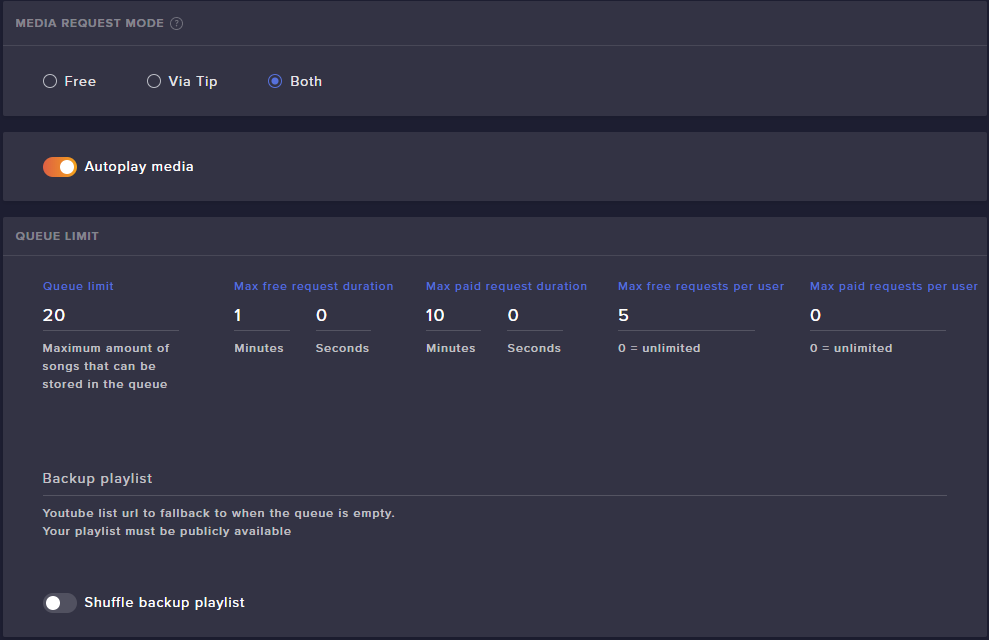
You can use the default command !items.
craggy herald
thank you again, your service has been so quick! i will definitely be recommending streamelements!!!
twin sentinel
Thank you. We are here to support you. 
covert hemlock
lets say i have my alerts on streamlabs and there in a css form. can i just copy the CSS and upload the same files to streamelements and it'll work the same?
zenith widget
Not entirely. Their CSS depends on the auto size adjustments to their alert box window asfaik
while when you place the CSS in our editor, it takes the entire screen of the overlay editor for some reason
covert hemlock
so all i'd really have to do is change the scale?
zenith widget
@untold crest might be able to answer that properly.
covert hemlock
okay
also why when using the Exit animation on the Widget's box the texts disappears before the exit animation finishes? how do i make it so that it doesnt disappear
zenith widget
Each alert has its own animation settings
including separate text appearance and disappearance delays
including variations
covert hemlock
the disappearance is on 0
 bronze goblet
How to make a follower goal?
covert hemlock
widgets tab
bronze goblet
I really dont know how to do that
covert hemlock
StreamElements
The Ultimate All in One Platform for Streamers
create and overlay if you have one already edit it
bronze goblet
ok thank you
zenith widget
@covert hemlock How many alerts did you simulate? 
covert hemlock
dw i figured it out haha
zenith widget

covert hemlock
i just deleted the alerts box and redid it with the original animations and it worked
zenith widget
👍
 sage pier
Hi guys, I need help !!
nocturne pelicanBOT
@sage pier Welcome to the helpdesk! Please let us know how we can assist you today and a support volunteer or staff member will assist you as soon as they are available. Thank you for your patience.
sage pier
I need help with my overlay, its showing only Half and notifications are not showing, only the sound.
nocturne pelicanBOT
To add your overlays to OBS, add a new browser source in your scene. Paste your overlay URL in the browser source properties, set the dimensions to 1920x1080 (unless you changed them on the website), and ☑ “Shutdown source when not visible” https://youtu.be/KDvLynUqXI4
sage pier
Ive done that. Notifications are not poppin out, only the sound.
tight harness
If you go to the properties of the browser source you added into OBS, what dimensions does it say that browser source is?
That isn't 1920 x 1080, that shows the resoultion as 801 x 600
You didn't change the resolution of your browser source to the correct resolution
sage pier
thnkas!
lament blade
I have 2 different stream elements accounts. One is for twitch and one is for youtube. How can I link both ?
inland lodge
How to have a counter you have on your stream show in the overlay?
covert hemlock
how do i rescale the Alerts Widget without it making the image/video smaller? because i'd prefer to have my overlay in 1 scene instead of 2 and then matching them together
@inland lodge what kind of counter?
inland lodge
The ones you can have in commands
the can increase by command
Tried to have this in a text but didnt work
Wins: ${getcount LMSWIN}
oh found the widget
covert hemlock
wdym
inland lodge
Have the highest in the layer menu
inland lodge
Is that a screenshot or game?
inland lodge
In your obs or what stream program you use
 verbal knot
obs
inland lodge
have csgo at the bottem of the list
inland lodge
The source that captures the game
verbal knot
homg
AFTER SEARCHING IT ON YT EVERYDAY
TY MAN!
i am just starting my stream hehe
ty btw man
covert hemlock
if you searched it on youtube you would've found out how to do it?
covert hemlock
true
 thick ether
hello! My alerts animation show up and then its blank
what do i need to do to fix this
covert hemlock
@thick ether send a gif?
stuck osprey
I noticed there's one streamer that's using exactly the same panel style as your leaderboard extension; does it mean that it can be created somewhere in my dashboard as well?
thick ether
I actually can't because I don't know how. but I'm using the "spitfire" alert
Anyway I can give more information
tight harness
@lament blade Send me a DM with your username and JWT token for both accounts. You can find your JWT token on your account channels page: https://streamelements.com/dashboard/account/channels (Don't forget to click on "Show Secrets")
StreamElements
The Ultimate All in One Platform for Streamers
 lament sentinel
@tight harness sorry for the tag bud, but i see that u are one of the staff online that can help me with this problem before i stream... I have been in vacations for 1 month and came back and I still have the same number of subs and subgoal i had before i went, i log out and update everytyhing and its still have the same numbers as the last time i streamed
tight harness
Lets see if I can force it to update
lament sentinel
thank you! can u tell me how u did it so i can make it in case it happens again? :)
tight harness
I went to https://streamelements.com/dashboard/session then the Settings tab, clicked on Save Changes and it forces it to refresh totals
StreamElements
The Ultimate All in One Platform for Streamers
lament sentinel
@tight harness thank you so much bud
tight harness
No problem, have a great stream 😃
covert hemlock
how do i rescale the Alerts Widget without it making the image/video smaller? because i'd prefer to have my overlay in 1 scene instead of 2 and then matching them together
tight harness
I imagine you'd need to use a custom widget to do that
You can try asking in #dev-chat
stuck osprey
sorry, but I still have an unanswered question from 30 mins ago
covert hemlock
the leaderboard is within twitch

Twitch
The ultimate all in one tools platform leaderboard extension. Keep your viewers updated on Points, Schedule, Bits, Subs and Chat stats.
stuck osprey
yes that
tight harness
Not sure I really understand the question, it can't be used on your dashboard as it is a Twitch extension
covert hemlock
click that link and install the extension, once installed go to your twitch panels section and add a new panel
sorry add an Extension Panel
stuck osprey
that streamer has custom made images in panels, but it uses the exact same style as how this leaderboard looks like
im not new to this, I know it's an extension, in fact it's a screenshot from my channel so I have it already
I don't think you understand what I'm asking
covert hemlock
have you configured the extension?
stuck osprey
🤦
covert hemlock
to show what you want?
tight harness
I definitely don't understand, sorry. You haven't told us who you're referring to or shown us what they have, only what you have (which is our extension)
stuck osprey
I don't really want to start promoting/advertise them by saying their name, but basically they have their own panels for example "about me" images, but I was concerned as to how it uses the same style as that leaderboard extension
tight harness
You can DM me who you mean
covert hemlock
or send a screenshot of their panel?
stuck osprey
is this a good enough example?
covert hemlock
I see what they've done
i think they've made those panels? besides a few?
unless theres StreamElements panels
stuck osprey
yeah the leaderboard is the only extension panel by streamelements, the rest are normal image panels
tight harness
Seems they've just made them to copy the design
covert hemlock
Most likely they've made the panels themselves
stuck osprey
I see
covert hemlock
you can always ask in their chat who made their panels and if they made them then i guess give it a go?
stuck osprey
but do you not forbid anyone from using your designs?
covert hemlock
it's not stealing
tight harness
I've asked internally if there's a problem with it, we'll see in due time
Feel free to DM me where you found them in any case
stuck osprey
the streamer or panels?
covert hemlock
I mean if anything there shouldn't be a problem in using the same design panels to match
only really becomes an issue when you claim its your design
 atomic wedge
Hello guys, I have a custom countdown (It's actually from the stock Apex Spitfire overlay) how can i reset the countdown timer? do i have to go to the overlay editor and reset from there everytime i start a stream?
lament blade
Restart OBS
 elder sorrel
@atomic wedge The Source with the Countdown timer on OBS.Studio -> Right click for Properties -> Scroll down to click "Shutdown when not visible".
 livid ingot
Sorry wrong channel 😛
atomic wedge
@elder sorrel , Damn thank you so much bro! appreciate it.
elder sorrel
No problem! 
lament blade
hi guy, i tried streaming today and a message poped up saying cant "make sure stream key is correct" and " cant connect to server" my stream key is 100% correct
tight harness
Try entering it again from scratch (your stream key)
lament blade
done twice and nothing, still geting the same pop up
tight harness
Have you tried connecting to a different server?
elder sorrel
Hmm I feel like I've seen that before as well...
covert hemlock
can't you get a new stream key?
elder sorrel
Do you have 2FA enabled in your twitch account @lament blade ?
lament blade
not sure
elder sorrel
Can check at https://www.twitch.tv/settings/security

As it's required now for 2FA.
To be able to stream
lament blade
yeah i do
 sour tiger
hello, where can i ask for some help with stream elements song requests ?
elder sorrel
What about when you go to OBS.Studio -> Settings -> Stream, William?
Does it give you the option to click 'Connect'?
Are you using it with OBS.Live, @sour tiger ?
sour tiger
yes
lament blade
yeah it dose
elder sorrel
Try that & connect your twitch account @lament blade
Let's move to #helpdesk-selive . M7md
sour tiger
ok
lament blade
still nothing
elder sorrel
That's some funky shish going on 
May have to contact Twitch about that as I have no idea what would be causing it. As one of those options should've worked 
rapid egret
Hello @twin sentinel did you get more info abou tmy issue?
 cinder wedge
Hi! I have a problem with my chat stats, it says 404 page not found. I changed my name from Rutherford_swag to Swagnificent_gaming and I am wondering if this effects everything (tips, chat, etc.) or just chat stats. Thank you for your help
tight harness
All done
 sacred harbor
have alerts been bugging out for anyone today? mines are acting wonky.
elder sorrel
What alerts? Followers, Hosts?