#helpdesk-twitch
1 messages · Page 476 of 1
 carmine sparrow
 zenith widget
@rich palm Run oBS as admin
@carmine sparrow There is a pinned message on how to make them trigger more or less independent
 rich palm
@zenith widget still same problem
zenith widget
@lament blade https://streamelements.com/dashboard/loyalty here
rich palm
And it's somethig weird, i'm trying to capture Dofus, but instead it captures obs, the sw itself
 nocturne pelicanBOT
@rich palm For the best OBS support, please join their Official Discord @ discord.gg/obsproject
rich palm
thx
 lament blade
@zenith widget ty
 limpid wraith
What is stream elements about?
zenith widget
We provide tools for streamers to track their events and an all-in-one overlay system that can be added as just 1 source in OBS.
We also provide interactive tools and features for viewers like Loyalty system, stream store and some mini-games via the chat bot.
As long as the streamer has enabled them
limpid wraith
Is stream elements reliable?
zenith widget
Im not sure what you mean by that. Reliable with what?
limpid wraith
Oh sorry nevermind
lament blade
hello, is here the right place to get help for streamelements ? im on twitch
need some help with the !uptime command
lament blade
Hey so when i type !uptime on my chat , i get :Streamelements has been running for 7Days 22Hours
zenith widget
Whats your twitch name?
zenith widget
You've renamed the !ping command to !uptime
zenith widget
Sure 😃
lament blade
i would have never found it
 worthy dawn
hallo
how can i give all my viewers points? i only can type in 1 name
zenith widget
!addpoints all <points>
this will give points to everyone currently in your channel.
 balmy light
Hi. I have this issue importing overlays to a new channel. Basically, I have overlays on one twitch account but I made a new twitch. I want to import overlays and settings to the new account however the option to import is greyed out? I visit the "My overlays" section on the new dashboard in StreamElements but I can't click the "import from other channels" button at all. Is there some guide to help me with this someone can link please?
zenith widget
Click the 2 white sheets button on the overlay you want to copy
If you are an editor of the other account they will be listed there.
zenith widget
Elaborate
balmy light
@zenith widget Thank you I will give it a try now
 hollow falcon
There's something weird happening, i'm editing my overlays through the Alerts Box Widget, i can add custom sounds and videos to each event except the subscriber event, i delete the standard shark video and add my custom one, it shows up as added and i can adjust it's volume, i save it, but when i trigger the event the shark video still shows up, i've deleted the alert box and made all over again even going as far as adding it to a different overlay group.
zenith widget
@hollow falcon Check the variations.
@jade flicker Do you get an error or something?
hollow falcon
@ KeiZar can you concretize what you mean with variations
 jade flicker
no I click connect with twitch then i click on log in then the side refresh but nothing happens
hollow falcon
Nevermind
zenith widget
@hollow falcon Each alert type can have its own variations. By default when adding an alert widget, the shark is present in the variations of subscriber alerts.
@jade flicker What browser are you using and are you logged into your Twitch account on Twitch?
hollow falcon
I found it, thank you very much for you help, now i've deleted all variations, it wasn't showing up because the alert test always triggered a resub instead of a sub
Thanks a lot
jade flicker
I use Firefox and Yes
zenith widget
Do you have installed extensions on Firefox?
zenith widget
👍
 rustic karma
So, Followers goal! It's not showing my total follows but seems to be going by a fixed start date? I can't see settings anywhere to sort this out.
Does it just start a "session" when you add a widget?
zenith widget
The goal progress is separate from the session - from the overlay editor click on "Data" on top and then "Goals" tab -> progress is stored and controlled there.
For our of the editor -> activity feed on the left -> widget data on the right -> goals tab
rustic karma
Ah thankyou! I didn't realised it was tucked away in there.
 strange yacht
So I would like to make recordings, I tried one and it was fairly blurry, how can I make it high quality Crystal clear recording 😛
nocturne pelicanBOT
@strange yacht Please provide a log from your last stream. To do this, in OBS go to Help > Log Files > Upload Last Log File and paste the link to the log file here.
nocturne pelicanBOT
@strange yacht For the best OBS support, please join their Official Discord @ discord.gg/obsproject
 twin sentinel
Let's jump in #helpdesk-mobile
lament blade
my facecam have a delay on stream how can i fix that?
twin sentinel
Do you use OBS Studio with the plugin OBS.Live?
lament blade
obs.live
nocturne pelicanBOT
@lament blade For the best OBS support, please join their Official Discord @ discord.gg/obsproject
lament blade
obs say go to streamelements
 tight harness
@timid cape Don't quote me on this but I generally see it take about 3 or so days
 timid cape
yea
tight harness
Settlement time is different, yeah
I thought you mean withdrawal time to get to your bank account from your balance 😃
timid cape
Wait no, actually I was asking to go to your bank
Just went to the website and read it
But yea ~3 days aight seems good.
twin sentinel
@lament blade OBS.Live is a plugin for OBS Studio. We don't change anything with the cam settings. Best to ask the OBS Support.
tight harness
Then yeah, around 3 days is normal
timid cape
cool! thanks for the help
tight harness
No problem
jade flicker
Hello, when will SE Pay be released
twin sentinel
SE.Pay is available for streamers with more than 100 followers, with a bank account in one of the following countries: Austria, Belgium, Czech Republic, Finland, France, Germany, Ireland , Italy, Netherlands, Poland, Portugal, Spain, Switzerland, United Kingdom, United States. We plan on adding other countries. No ETA.
jade flicker
I have more than 100 followers and i cant use SE. Pay
nocturne pelicanBOT
@jade flicker Please provide your account ID found at the top of this page: https://streamelements.com/dashboard/account/channels This ID is public info and safe to share here.
twin sentinel
You are from germany?
twin sentinel
You should be able to use SE.Pay now.
 cinder olive
Was wondering if it was possible to export all my donations into a pdf?
 west canyon
Hey guys, been at this for an hour. Can't figure it out. So half a year ago I got tipped $44. All nice and good, but now I want to make a new tipping goal from 0-30. But if I put the goal at $30 the streamelements widget shows $44/30.... like I already reached my goal... How do I reset this thing?
I even deleted the guys from my tipping history, so the leaderboard only shows $9, but the widget still shows $44
twin sentinel
@cinder olive I only know that you should be able to creaet a income report here: https://streamelements.com/dashboard/tipping/income-report
@west canyon Control the goal progress here: https://streamelements.com/dashboard/session -> goals tab
west canyon
Thanks @twin sentinel but how did you get there? I haven't used SE in a while, but I can't see any link/button on the dashboard that goes there (I wanna figure out why I couldn't find that page"
twin sentinel
In the dashboard -> activity feed on the left -> widget data on the right -> goals tab
Or from the overlay editor click on "Data" on top and then "Goals" tab
 scenic jungle
how do i use ground control
twin sentinel
Download it (https://streamelements.com/groundcontrol) and you can see your activity feed and control your music by selecting the categories when selecting the burger menu (three horizontal lines) at the top.
scenic jungle
its asking for a jwt token
twin sentinel
What version of GroundControl are you on?
Afaik when you just see the option to enter your JWT token, you are most likely using an old version. You should be able to log in via streamelements.com. Best to download the latest version of GroundControl here: >https://streamelements.com/groundcontrol>

StreamElements
The Ultimate All in One Platform for Streamers
scenic jungle
mac
nocturne pelicanBOT
@scenic jungle You can find your JWT token on your account channels page ("Show Secrets" to reveal the token): https://streamelements.com/dashboard/account/channels
READ ME:
This is a private security token. Do NOT share this token here or other public places, only with a StreamElements staff member in private.
 inland python
Can someone call me I need help
 elder sorrel
Not a lot of us are available for voice.
Like myself I'm at work. Best to post here or another helpdesk to help ASAP. 🙂
inland python
Well I was streaming yesterday on fine internet connection and I added streamlabs to my OBS afterwardsa
and I just woke up and started my stream and im getting 300 ping
elder sorrel
Streamlabs? 
tight harness
🤔
inland python
Streamelemnts*
elder sorrel
Gonna need a log of that stream.
nocturne pelicanBOT
@inland python Please provide a log from your last stream. To do this, in OBS go to Help > Log Files > Upload Last Log File and paste the link to the log file here.
 lament blade
i want a tipping system but GPA2 Pay dont connect
elder sorrel
@inland python The log is from your last stream on OBS.Studio. Follow the steps provided from the Streamelements Ping to get that log.
twin sentinel
@lament blade What browser are you using? Any error message?
inland python
@elder sorrel check dms
did u block me
it just let me message you and now it doesnt
I have the log
but i dont wanna spam chat
elder sorrel
No worries. Just post it here. So I & other support people can look.
Ah. well you almost had it 
elder sorrel
What version of OBS.Studio are you using? Top left
inland python
22.0.2
twin sentinel
@lament blade So you are using Google chrome. What happens when you try to connect G2A?
elder sorrel
Ah. You need to update!
inland python
Did the update come out today?
elder sorrel
OBS (Open Broadcaster Software) is free and open source software for video recording and live streaming. Stream to Twitch, YouTube and many other providers or record your own videos with high quality H264 / AAC encoding.
No.
inland python
Then why did it work yesterday
elder sorrel
23.2.1 has been out for a couple weeks I believe.
twin sentinel
The version you are on has a broken auto updater.
lament blade
@twin sentinel google
inland python
Did it look like my PC was working properly like, could run streaming tho?
twin sentinel
@lament blade What happens when you try to connect G2A? Any error message?
lament blade
connection error
twin sentinel
Can you share a screenshot of the error please?
lament blade
private or public?
twin sentinel
private if there are private information on the screenshot please.
elder sorrel
I believe so, @inland python You should also turn off Game DVR in your windows 10 game settings.
inland python
How doi I do that
do*
Also it says I downloaded the new version but how do I open it?
elder sorrel
If you're using Chrome as your browser: You should be able to click the downloaded obs update at the bottom left tray to begin the update.
 twin quiver
I've just switched to using firefox, having some icon display issues in the dashboard
twin sentinel
Our site is optimised to work on chrome. We recommend unsing Google Chrome.
inland python
@elder sorrel how do i disable Gamer DVR
twin sentinel
elder sorrel
 Sorry at work.
twin sentinel
How much upload and how much download Speed does your internet connection have?
 ember jolt
hiya got a little issue trying to run a mulit raffle and it only picks 1 winner not mutli is there a way to fix this please i get this mesage when i run it The Multi-Raffle for 2000 Silver will end in 45 Seconds. Enter by typing "!join" FeelsGoodMan
twin sentinel
How many entrants did you have who typed !join to join the raffle?
ember jolt
about 10 people its always been like this
twin sentinel
Do you have a clip of this happening please?
ember jolt
ile pm my twitch to you and ile start one in chat when your here
twin sentinel
Not sure if only two people join, if it will pick us two then or just one of us two.
ember jolt
ok for weeks its only picked 1 winner and its just picked 2 im so confused
twin sentinel
Glad it is working.
ember jolt
im sooo confused right now hahaha
 pale wave
<@&382267076632379392> I need some assistance
twin sentinel
Pong.
pale wave
I need the dimensions for the background image
 weary mist
ask your question before pinging support
weary mist
and if you are looking for a certain image size, you need to give more information. There are a lot of image locations you can customize on the site
 obtuse patio
1920x310
For the store header.
Profile Page section, looks like it just uses your profile page header background.
pale wave
how do i set it up
I also had an issue with media requests during yesterday's stream
I tested it with the song request command
twin sentinel
Go here and upload your page header picture: https://streamelements.com/dashboard/profile
pale wave
and it just kept loading and nothing was playing
twin sentinel
What Browser are you using?
twin sentinel
If you are referring to the background picture at the top of your screenshot: You can edit it at the given link.
pale wave
that i got, I just needed the dimensions to correctly size the image
twin sentinel
The dimensions are at the lower right of the picture: 1920x310px
 pale wave
how do I go about setting it up
twin sentinel
I recommend watching this video on this help-page: https://support.streamelements.com/hc/en-us/articles/115000373792-Stream-Store
pale wave
I also had an issue with media requests during yesterday's stream
I tested it with the song request command
but nothing was playing
it just showed it as loading and gave me an error saying that the widget wasn't instaleld
installed
twin sentinel
Have you added the widget to your active overlay? the media redemptions widget?
pale wave
😮
that I did not know
one more thing, is there a way to integrate merch as well
so, If I wanted to sell a t-shirt for instance
twin sentinel
Merch stores are only available for a select few at the moment, sorry.
 zealous gate
list of subscribers arent being shown on twitch extension, any advice?
lament blade
i got a conection error for G2A Pay anybody how to fix that?
twin sentinel
On the page that gives an error, press F12 to open Developer Tools. Navigate to “Network” at the top and then Select “XHR” in the filter section. Try the action again that gave the error and note in the network tab any red text. Please copy and paste the error information that is given when clicking on this red text.
zealous gate
@twin sentinel any help with my problem?
twin sentinel
Have you become affiliate recently?
zealous gate
no lol
had this problem before now it came back and erased all my previous subscriber list on the extension
nocturne pelicanBOT
@zealous gate Please provide your account ID found at the top of this page: https://streamelements.com/dashboard/account/channels This ID is public info and safe to share here.
zealous gate
@nocturne pelican 59441df1a933dd511650c975
twin sentinel
@pale wave What widget are you reffering to do what?
@zealous gate I asked internally about your issue.
zealous gate
@twin sentinel ty
pale wave
the media request
the one that you brought up
so, my song request command can work properly
pale wave
wait is this obs
twin sentinel
No it is in the overlay Editor. https://streamelements.com/dashboard/overlays
pale wave
twin sentinel
Edit the overlay which you want the MR widget to be added to. When you are in the overlay editor, select widgets at the top and add the widget to the overlay.
pale wave
i just stumbled upon it
now do I need multiple urls to import all the widgets into streamlabs or can I do with with just one
twin sentinel
You can also do just one. Be aware, that we can't support whe the overlays have issues in SLOBS, as we don't have the tools to do this. We recommend using OBS Studio or OBS Studio with our pluginOBS.Live.
 idle pier
I am having a hard time configuring a shoutout command
does anyone have an example of the configuration
Something like
Go check out ${user.name} at ${title} / ${status}. There were last seen playing (game). I love them and you will too!
is what I'm trying to accomplish
pale wave
gotcha
idle pier
but the code someone gave me isnt working
pale wave
just one more thing
twin sentinel
When you create a custom command, there is an example of a shoutout command.
pale wave
why doesn't my profile show my urls
idle pier
@twin sentinel I cant see an example, everything is blank
twin sentinel
Is it the size recommended for this picture?
idle pier
@twin sentinel I see what you are referring to - I think I can fix from there, thank you!
twin sentinel
@idle pier If you need help editing it, let us know.
idle pier
@twin sentinel thank you - little help on fixing this
Check out ${1}, they were last seen playing ${game ${1}} at https://twitch.tv/${channel ${1}}. I love them and you will too! <3
turns into:
Check out mrdartsbroadcast, they were last seen playing State of Decay 2 at ***. I love them and you will too! <3
What do i need to do to the code to fix the asterisks?
lament blade
Question 😃 if I want to add my emotes to one of the commands. Let’s say a !hype command. How would I properly do this?
twin sentinel
@idle pier disable the twitch Link protection.
idle pier
Ahhhhh! @twin sentinel THANK YOU!
twin sentinel
@lament blade either change the bots Name to your channel so it can use your emotes or Gift your bot a sub.
pale wave
no the profile pic
limpid wraith
Can I trust stream elements with my personal info?
pale wave
I am referring to my discord, twitter, and so on
lament blade
I tried using emotes from a streamer I’m already subscribed to & I have added it to the “response” option when editing your commands & it doesn’t show up
twin sentinel
@pale wave You cannot edit the social pictures. They are set like this.
pale wave
my thing is that they aren't showing up
twin sentinel
The icons of your socials are not editeable.
@lament blade Afaik the bot can only use your own emotes, if it is a sub to your channel. I don't think it can use external sub emotes. But not sure on this.
@limpid wraith This is a question for a staff. But I fully trust StreamElements myself. They do not store your data of your bank accounts. They are directly submitted to your bank as reference.
twin sentinel
How old are you if I may ask?
@limpid wraith The StreamElements Services are only intended for individuals aged thirteen (13) years or older. If you are under 13 years please do not visit or use the Services. Thank you.
twin sentinel
twin sentinel
Sorry, but I am afraid I have to remove you from this server now. Have a nice day.
 proper path
<@&382267076632379392> My StreamElements Bot is displaying all timers twice. any Idea on how i can stop it from doing that? Just started doing it about a week ago.
twin sentinel
Do you use GroundControl?
proper path
Yes. i use both ground control and obs live
twin sentinel
May I ask why you use both at the same time?
proper path
ground control is used because i need to separate the audio coming from media request.
Would not be an issue if media request had its own audio channel in obs live but it does not.
twin sentinel
Please kill all bot.exe and GroundControl using the task manager.
proper path
Ok ill give that a shot and let you know if it works. wont be for a while though. I'm at work at the moment.
cinder olive
Thanks ^^.
 flint drift
I've got my overlay set and in use, but for some reason alerts / recent hosts etc aren't coming in. The previous ones can be replayed just fine, but nothing in the past three days. Is it something on twitch or the software side? Kinda confused here. :p
twin sentinel
Is this for all types of events, or only hosts?
flint drift
Uh my friends tried hosting, it didn't seem to work but a follow just now did. I was wondering if it just wasn't connecting from twitch or what :p
It hasn't recorded hosts in the past few days.
nocturne pelicanBOT
@flint drift Due to changes to Twitch API, we have filtered out hosts and will only show these ones on your activity feed:
- All manual host events (0 hosts included and if filter set to 0)
- All hosts coming from an online channel. If the hosting channel has been offline, we do not show it
- All auto host events with at least 1 viewer
Note: An offline host is when you see "X channel has just hosted you" - with no viewer numbers on the back
 tough mesa
Where do you check to see what bank information is linked in SE.Pay? I can't find it anywhere.
 vernal sedge
is there a way to see how many "Currently watching" the stream? can't see it in obs and don't want to open a browser
twin sentinel
When you select the burger menu in the activity feed in OBS.Live you can activate the viewer count in the stream settings.
vernal sedge
thanks @twin sentinel
 orchid tide
Anyone else's sub count not working? It always displays as 0 when I use the chat command now
twin sentinel
You can always ask your question in #dreamteam . Just answered you there.
 cedar scarab
could anyone help me get my chat back on streamelements obs cus i pressed the X button for accident ;/
twin sentinel
StreamElements at the top in OBS > Chat
cedar scarab
tysm ❤
 muted tusk
how i clear £4.49 as tip since old TIP and i have cleared it off list but my overlays hasnt updated
 jade remnant
refresh the overlay, right click > properties > clear cache
twin sentinel
If you want to control your goal progress, that would be here: https://streamelements.com/dashboard/session -> goals tab
muted tusk
that did trick 2nd 1 thanks
 rich spoke
hi let you no media requst an spotify now playing double pleases help an fix
@nocturne pelican @tawny pivot
elder sorrel
Pinging a bot & the person listed in the members list 
With Media Request with YouTube & having Spotify would cause double sound.
As Media Request doesn't work with Spotify.
 strong kernel
Run as administrator?
 rustic parrot
Currently I'm not running it as administrator.
strong kernel
Always run as administrator.
 old mirage
hello,
i wanna reset the loyalty leaderboard and restore it afterwards.
is there a way to export the info from leaderboard (username,twitchID,currentPoints,alltimePoints) in addition to watchtime?
i saw there's an option to import that data but not to export it
strong kernel
There's no export option on the site at this time.
You might be able to manage something with our API if you're skilled in such, but other than that, there's nothing really for that right now.
Or there's this if you can figure it out. https://github.com/Slikrick/streamelements-csv

GitHub
Exports streamelements points to csv. Contribute to Slikrick/streamelements-csv development by creating an account on GitHub.
old mirage
i was able to get the current points and all time points but not the watchtime
twin sentinel
As for exporting the watchtime, unfortunately, it can't be done really.
nocturne pelicanBOT
@lament blade Please follow our community rules:
- No advertisement or stream promotion
- Respect ALL server members
- No NSFW/NSFL
Thank you
lament blade
How To Set Up Chat Alerts To Your Custom Messages With Your Emotes Instead of the Default PogChamp Emote When You Get Subs Followers Cheers/Bits Raids Host
strong kernel
Edit the chat alerts module.
Also, why are you capitalizing every word?
Seeing that a lot tonight and I don't get it.
rustic karma
Is it normal that personal BTTV emotes don't show properly in a chat overlay but the global/shared ones do?
strong kernel
Try typing !emotes update in your chat.
rustic karma
Hmm that didn't seem to do anything
strong kernel
Try again.
rustic karma
They did only get approved today, if that makes a difference
rustic karma
Oh have I? Ok pokes stuff
Ok, that triggered a response. No joy on my emotes though
strong kernel
Normal chat widget works fine. We can't support your custom widget.
Editing that to work is your own responsibility.
rustic karma
Ah. Hmm it was a custom widget sent to me by support. I'll look into the editor
Only using it so I can exclude commands and bot responses
lament blade
I did that but what happened
rustic karma
Oh ok. I just tried the default chat widget. Doesn't work in there either. They show in the editor for both but not in OBS. Which is interesting
Right! It was a cache issue
If that pops up for anyone else
lament blade
I seen people use chat commands with their Emotes showing up too that’s what I want to do also
strong kernel
The bot needs to be subbed to use your emotes. Same as any other account.
lament blade
How can you sub bots to your channel
strong kernel
Gift it a sub.
lament blade
You have to gift a sub to a bot
strong kernel
Yup.
strong kernel
Only Twitch Partners get free permanent subs for bots.
lament blade
Out
strong kernel
You gift it again.
lament blade
That’s So Fucking Dumb SMH
strong kernel
It's no different for any bot.
 This is My Emote
strong kernel
This is My Emote
strong kernel
If it's not a global emote, the bot must be subbed to the channel that has the emote.
lament blade
So how can I set it up if they’re global Emotes
strong kernel
Type the emote into the chat command's response exactly how you would in Twitch, case sensitive.
lament blade
Give me an example Please
Cause I have no idea what I’m doing and want to make sure I’m doing it right
strong kernel
Just like you would in a chat.
lament blade
I mean you have spell the name of the Emote in StreamElements but you don’t have to in chat
strong kernel
Of course you have to enter the name. Using the emote menu just types it into the chat box for you.
lament blade
So do you have to do /Emote name or something
lament blade
So I’ll test the global Emote
 vapid sundial
Hey guys! I was wondering, is there anyway to import overlays from streamlabs to streamelements? :)
strong kernel
Import function in OBS.Live.
vapid sundial
Does that make it a browser source?
strong kernel
It uploads everything into your StreamElements account to be used as a browser source, yes.
vapid sundial
That's awesome, thanks ^^
I've been back and forth from streamlabs and streamelements.. but I've gotta say when you first go streamelements you never go back xD
 novel anchor
Hey Gamers can someone help me steup my over lays in the stream elements OBS
strong kernel
You can find video tutorials on all our features in our YouTube channel: https://www.youtube.com/c/streamelements

YouTube
Official youtube channel for StreamElements tutorials https://StreamElements.com
 pliant zephyr
im dropping frames for no reason
nocturne pelicanBOT
@pliant zephyr Please provide a log from your last stream. To do this, in OBS go to Help > Log Files > Upload Last Log File and paste the link to the log file here.
pliant zephyr
it wont let me
strong kernel
If you provide a proper log link, it'll be fine.
strong kernel
Are you using OBS Studio?
pliant zephyr
yes
strong kernel
Take a screenshot for me.
pliant zephyr
strong kernel
That's not right. Do you have some other plugin that might be interfering with that function?
strong kernel
An OBS log starts with https://obsproject.com/logs/
Oh.
Well, that explains a lot.
You need to update OBS.
strong kernel
You need to download it manually. That version has a broken auto-updater.
pliant zephyr
link?
strong kernel
Most recent version last I checked is 23.2.1
strong kernel
Well, possibly both, but in this case I'm talking about Studio.
strong kernel
Definitely doesn't help.
pliant zephyr
pliant zephyr
https://obsproject.com/logs/Ce-ma5T1LGc-6rzC this one work?
strong kernel
Same thing, no output session.
pliant zephyr
pliant zephyr
yikes
 round geyser
So uhh, I'm trying to login to streamelements. And it's making me reauthorize my twitch, and when I authorize it, I get this pretty screen https://s.phantom.bot/wQuPiL
 strong kernel
That's something blocking the OAuth from Twitch. Adblocker, popup blocker, antivirus, some other extension.
round geyser
None of which I have enabled for twitch or streamelements
strong kernel
Just start turning things off until it lets you through. This is a local issue.
lament blade
Question. What is your position when streamers using SE platform are breaking TOS/ Streaming copyrighted content?
round geyser
@strong kernel Not sure what was going on, but clearing cache / cookies fixed it.
strong kernel
@lament blade When we receive a report, we investigate the matter, but we have a policy not to discuss any decisions or actions taken in regards to Terms of Service violations and enforcement.
lament blade
Sure that is completely understandable. How would one file a report if they were so inclined?
strong kernel
Contact form on our site is probably the best way.
 thorny atlas
is this where i ask for help
nocturne pelicanBOT
@thorny atlas Welcome to the helpdesk! Please let us know how we can assist you today and a support volunteer or staff member will assist you as soon as they are available. Thank you for your patience.
 vivid laurel
hey @everyone im struggling to make a customed overlay and if theres someone that can make me a overlay that would be great. add me as a friend if you can help
strong kernel
@vivid laurel Please do not @ everyone.
If you need something made for you, you can commission one of the artists in the #art-marketplace channel.
vivid laurel
@strong kernel ok thankyou
@strong kernel i dont have permissions to chat in the commisions one
strong kernel
You're not supposed to chat in there.
 native dragon
why is obs saying that it cant authenticate my twich
 fast crane
hi i cant find the option for scene transition
well actually i did find it its just that it appears like i cant selected https://cdn.discordapp.com/attachments/370226812669788161/597999759265103882/unknown.png
 nocturne pelicanBOT
@fast crane For the best OBS support, please join their Official Discord @ discord.gg/obsproject
zenith widget
@native dragon make sure you have 2fa on your account
 fleet tusk
Hey guys trying to set up a sub goal, anyone know why I am getting a 155 number not a 0?
fleet tusk
ahhh! got ya next to the widget tab, roger, thanks mate.
 narrow rune
Aloha,
having a hard time streaming my xbox one through obs on laptop. its not connecting with obs from xbox one? plz help
nocturne pelicanBOT
@narrow rune For the best OBS support, please join their Official Discord @ discord.gg/obsproject
 somber nacelle
hello. i am new to streamelements. want to migrate from another service that i am using.
question: user management-regulars... is there a way to setup automatic regulars, ex after X amount of hours?
nocturne pelicanBOT
Chat/Bot Levels
100 - Viewer
250 - Subscriber (Twitch subscribers automatically placed at this level)
300 - Regular
400 - VIP (Twitch VIP automatically placed at this level)
500 - Moderator (Twitch chat moderators automatically placed at this level)
1000 - Super Moderator
1500 - Broadcaster
Dashboard Manager Levels
Bot Supervisor
Editor
Full Access
Owner
https://i.imgur.com/s61Liry.png
 somber nacelle
but i'd have to type the command every time? is there no way to automate that?
zenith widget
No.
somber nacelle
can i set levels with custome commands or only the default !level ? if i could make it through custom commands, i could create a command that viewers execute themselves and it would check/set their level based on followage or some other variable?
zenith widget
There is this variable ${user.level}
But I don't think what you are asking is possible for a single command to do. (check followage and assign the level)
somber nacelle
besides that variable only shows the level, it can't set it 😦
 nimble glacier
Hey guys! So my notifications for when someone subs to me takes so long and streamelements seems to take long to even recognise it, is there anyway to fix this?
zenith widget
I resubbed your webhooks in case they were lagging behind or something
but I haven't heard anything like this before
nimble glacier
My friend used his twitch prime sub on me and it took 24 minutes to come through
But thank you!
nimble glacier
With my alerts with yourselves
nimble glacier
No it didn’t show up in chat until then either, which i don’t understand to
zenith widget
So it took 24 minutes to show up in Chat as a message that "X person just subbed with twitch prime"?
nimble glacier
Yes
zenith widget
Then there was a delay with Twitch or something
nimble glacier
Okay, so nothing to do with your end on how to fix it or anything ?
zenith widget
No
nimble glacier
Okay thank you!
nocturne pelicanBOT
Chat/Bot Levels
100 - Viewer
250 - Subscriber (Twitch subscribers automatically placed at this level)
300 - Regular
400 - VIP (Twitch VIP automatically placed at this level)
500 - Moderator (Twitch chat moderators automatically placed at this level)
1000 - Super Moderator
1500 - Broadcaster
Dashboard Manager Levels
Bot Supervisor
Editor
Full Access
Owner
https://i.imgur.com/s61Liry.png
 solemn briar
Hi all, i have a problem. I changed my twitch name months ago and after that, my chatstats was in error like that .. Can anyone help me?
zenith widget
current name?
zenith widget
fixed
solemn briar
Thanks you a lot sir
 zenith widget
from the dashboard -> activity feed on the left -> widget data on the right -> goals tab```I guess its time to make it a command 
 tepid roost
can't wait for the sequel
aaa
I love that the style of the games are these obscure japanese VN aesthetics
that can only run on very select Japanese only Machines
zenith widget
uuum
tepid roost
oh
zenith widget
gomenasai? 
zenith widget
weebs to the  👉 #general-chat please
tepid roost
OwO
 swift mist
I might have overlooked an option, but is there a way to have a command respond different depending on the game set? Like !server responds with server information for FiveM GTA RP when GTA 5 is selected as game, and it will respond with server name for theHunter when that game is selected and so on?
zenith widget
Not with what we offer unfortunately
swift mist
alright, i'll drop it in the idea area
tepid roost
are there any custom designs/borders for Tip Goals?
wait, I think you already answered this one
zenith widget
Yes, was about to send you to #widget-share 😃
tepid roost

 viral sigil
hey guys quick question StreamElements only seems to pick up followers i have gained since using it how do i get it to see my other followers?
twin sentinel
We don't get the data before you signed up with us.
viral sigil
ok at least i can stop looking 😃
 serene kettle
I'm new to streaming and I'm trying to set up my commands in StreamElements. I want to use some default commands so I'm at least covering the essentials but they aren't working as expected, specifically the !watchtime command. Every time I try it with my dummy account(which I have been keeping in the channel when I stream) it always says "user has spent 0 seconds watching streamer." I know that I'm supposed to turn on the loyalty system but even then the result is the same. I tried searching reddit, google and youtube but even when I find someone who has the same problem there isn't an answer. I could use some advice
twin sentinel
Have you enabled the loyalty settings in the loyalty section. Loyalty has to be enable for the watchtime to work.
serene kettle
I did say that I did set that to "on." what now?
Do I need to go live to start the watch timer? I'm testing it offline
twin sentinel
Afaik, watchtime gets added to the account when you are live.
Not sure what time slots it updates, if it is seconds based.
serene kettle
ok so it doesn't count anything before the setting was activated?
twin sentinel
No.
serene kettle
It's a default command, I can't edit the time slots but it only has seconds in the parameters. I tried to make a custom command...same deal
twin sentinel
Use this as response to create a custom command ${user} has spent ${user.time_online|'0 seconds'} watching ${channel}
serene kettle
just so I'm on the same page, this is the same command line as the default?
Because I already tried that with a custom command
twin sentinel
just add the same line as response to a custom command and it will work like the default command. ofc disable the default command then, to not get double answers.
nocturne pelicanBOT
10 minutes of watchtime are given to those in chat when the loyalty points are handed out (every 10 minutes). Therefore, loyalty must be enabled for watchtime to work properly. There is no direct link between watchtime and all-time points. It can’t be calculated from the amount of all-time points a user has because subs may earn points at a faster rate and !bonus all command increases all-time points for users in chat at that time. Giving points to a single user does NOT affect all-time, only when giving to all in chat.
lament blade
Good day everyone! Is it normal that Overlay alert simulation does not show up in OBS.live, while labels and other widgets like media request are working fine?
nocturne pelicanBOT
@lament blade You can test Alerts via the bell on the lower right corner of the Overlay Editor. Simply go to your Dashboard -> My Overlays -> Pencil/edit button on the overlay. Make sure the "Show Emulated events on stream" option is on to see the alert in OBS/Xsplit https://streamable.com/h6qgy
 serene kettle
Still not working. I did everything you said @twin sentinel
lament blade
@nocturne pelican your bot is amazing! Thanks!
serene kettle
I understand how it should work I've been troubleshooting for two hours on just this command, but it won't show anything more than 0 seconds
twin sentinel
Have you streamed with the loyalty points on for more than 20 min and the user you are asking the watchtime for was in your chat watching your stream?
serene kettle
I see, I misread what you said earlier, so to be clear: after turning on Loyalty I must start streaming for some time with the viewer account in chat before the command will progresses beyond 0?
and its not retroactive for my regulars?
lament blade
Hello
twin sentinel
yes, cause just after the loyalty points are enabled, we are able to give out time every 10 min. There is no way to add retroactive watchtime to an account.
nocturne pelicanBOT
@lament blade Welcome to the helpdesk! Please let us know how we can assist you today and a support volunteer or staff member will assist you as soon as they are available. Thank you for your patience.
lament blade
@nocturne pelican thank you
serene kettle
Thanks @twin sentinel that clears things up. Thanks for your patients!
twin sentinel
Sorry, I couldn't answer your question right away cearlay. Will try to be more precise next time. Thank you.
 vapid sundial
Hey. I'm importing my overlays and stuff from streamlabs obs.. does it usually take a long time? I've been on 5% for like 10/15 minutes now? :P=
twin sentinel
We can't import StreamLabs assets as well as videos greater than 10Mb. Please make sue you don't have these to upload.
twin sentinel
You should be able to import overlays not containing these items.
vapid sundial
oh okey
I have alerts from Nerd or die, but when I imported these now I lost all the features
It stands that my video file is there, but it wont appear when I try it out, also the text only stand (Bottom text) and so on
elder sorrel
What Alerts from NoD? As I'm unsure if all options are available to use with SE yet.
vapid sundial
I have the Glitch alerts number 1
elder sorrel
Yep yep.
Glitch 1 doesn't show Streamelements compatible yet in their website.
Glitch 2 does.
vapid sundial
Oh okey
elder sorrel
I know they're converting their older stuff to be used.
I just don't know when that'll be done.
vapid sundial
I'm talking with a guy from ner or die, and he says it should be possible
vapid sundial
thanks for the help 😄
Now i just hav to set up everything on streamelements cause I cant't import my stuff from streamlabs 😦
hehe
nocturne pelicanBOT
@alpine fern Please follow our community rules:
- No advertisement or stream promotion
- Respect ALL server members
- No NSFW/NSFL
Thank you
 cedar gull
Hey, my chatstats still doesn't work, probably because I used to have different Twitch username around 1 year ago (which has logs), my old name was "Belivable" and current one is "UnbelivableTV"
I was hoping one of the staff members could look into it, much appreciated <3
vapid sundial
Btw, when I'm in the editor site (editing my overlays) How can i make the pic/video fit the whole canvas?
twin sentinel
Edit the width and heigth in the position, size and style card in the settings on the left when you select the video widget.
twin sentinel
Can you share a screenshot please? What resolution does your video have?
twin sentinel
Set top and left both to 0.
vapid sundial
Width and height you mean?
twin sentinel
No, beneth this is the position. Set left and top to 0.
lament blade
Looking for some help for a beginner streamer , i see people doing shout outs with the !so command but i cant seem to find it any where
is it a own made command?
twin sentinel
When you create a custom command here: https://streamelements.com/dashboard/bot/commands/custom there is a shoutout command template at the top.
lament blade
ty Benno ill look into it
 sage spindle
hi chat stats does not work for me
twin sentinel
Have you renamed your self recently?
twin sentinel
Asked internally to fix your chat stats.
sage spindle
what do i need to do to accept that 
twin sentinel
You don't need anything to do. We are looking into it and fixing it internally.
sage spindle
oh my bad i thought u were asking me
lament blade
hi im streaming on twitch obs live and my audio is doubled
twin sentinel
Your mic audio?
lament blade
nah the game
nocturne pelicanBOT
@lament blade Please connect your streaming account (Twitch, YouTube, or Facebook) with Discord by going to ⚙ Settings and then Connections here in Discord. https://streamable.com/eg92w
 lament blade
@twin sentinel
sage spindle
im not trying to rush or anything i just would like to know if you know when you guys will be done cause i go live at 10 so i wont be able to chat
twin sentinel
I will ping you here in this channel when it is fixed.
sage spindle
ok cool thx for the help @twin sentinel 😃
twin sentinel
@lament blade Please connect your account as described by the bot, so I can take a look. Also what version of OBS Studio do you use?
elder sorrel
Open OBS.Studio if you haven't already & it would be on the top left for the version.
lament blade
OBS 23.2.1
twin sentinel
From the VOD from 6 ours ago, I cannot hear any doubling gameplay sound. Do you have a clip of that happening?
lament blade
 twin sentinel
I saw that video. Can't hear double gameplay audio in this video.
lament blade
skim though it?
twin sentinel
Sorry, what do you mean?
lament blade
like skip though it
and turn it full volume
and go to 2:44:35
and watch from there
twin sentinel
I am sorry, but I still can't hear double audio.
lament blade
hm it sounds off for me?
twin sentinel
Not for me.
twin sentinel
You can set the Win chance (by %) with this slider in the roulettes module settings here: https://streamelements.com/dashboard/bot-modules -> Roulette
Possible for me:
The gamble command is enabled when you enabled the Roulette module.
nocturne pelicanBOT
@lunar oxide Please connect your streaming account (Twitch, YouTube, or Facebook) with Discord by going to ⚙ Settings and then Connections here in Discord. https://streamable.com/eg92w
elder sorrel
Streamlabs bot? 
 lunar oxide
Looks like im not in the right place my bad!
elder sorrel
No worries. It happens 
 mellow flower
hey guys, im getting an error when i try to update my profile on my dashboard
someone can help me?
twin sentinel
What error are you getting exactly? What are you trying to change? What browser do you use?
somber nacelle
hello. is there a way to list top chatters for a given period of time (per stream or per week/month) ? and/or is there a way to reset the top chatters?
(because i'd like to reward top chatters every week)
twin sentinel
That would require custom coding to show these on stream in an overlay.
Afaik there is no way to reset your top chatters on your chat stats page.
mellow flower
Im using google Chrome, my display name for example, or just a socialmedia
the error is:
twin sentinel
Can you try to log out of the dasboard and log back in please?
mellow flower
Sure
still getting error, on console
:
json {statusCode: 403, error: "Forbidden", message: "missing scope channel:write"} error: "Forbidden" message: "missing scope channel:write" statusCode: 403}
the request
is using a put method
but i think that im not finding the correct endpoint
somber nacelle
@twin sentinel
well, apparently it can't be done through the dashboard, but the twitch panel leaderboard extension is what i needed.
mellow flower
or i dont have permission
somber nacelle
next question: in dashboard stats OR twitch panel extension... is there a way to ignore !commands? i want to know how much people ACTUALLY chatted, not how much they abused my !minigames 😄
twin sentinel
I don't think there is a way to exclude these commands from the stats page.
@mellow flower I have to ask internally about this issue.
nocturne pelicanBOT
@mellow flower On the page that gives an error, press F12 to open Developer Tools. Navigate to “Network” at the top and then Select “XHR” in the filter section. Try the action again that gave the error and note in the network tab any red text. Please copy and paste the error information that is given when clicking on this red text.
mellow flower
okay
on preview
{statusCode: 403, error: "Forbidden", message: "missing scope channel:write"}
error: "Forbidden"
message: "missing scope channel:write"
statusCode: 403
on response
{"statusCode":403,"error":"Forbidden","message":"missing scope channel:write"}
somber nacelle
@twin sentinel
oof, nevermind, the leaderboard panel extension only has "week/month" for cheers... for chatters and other stats it's only total. dang 😦
mellow flower
General request: Request URL: https://api.streamelements.com/kappa/v2/channels/5d08249e664b727329755e85/profile Request Method: PUT Status Code: 403 Remote Address: 104.20.30.192:443 Referrer Policy: strict-origin-when-cross-origin
nocturne pelicanBOT
@mellow flower Please provide your account ID found at the top of this page: https://streamelements.com/dashboard/account/channels This ID is public info and safe to share here.
mellow flower
@twin sentinel 5d08249e664b727329755e85
 sacred narwhal
hi can you set a limit to kappagen ? i mean not 1000 or more emoticons?
mellow flower
@sacred narwhal in the kappagen widget you have a second tab
let me see the name
sacred narwhal
thx @mellow flower
mellow flower
😄
 surreal parrot
Hello there, is there a !clip command made, so viewers can clip the last 30-60 seconds without clicking on the icon on twitch... i saw one for streamlabs and nightbot, but i use streamelements... anybody?
mellow flower
i see something like this
and a replay command to
that shows the clip as a widget on screen
twin sentinel
@mellow flower I have got the info that when you had something entered in one of the fields on your profile, there is no way to delete it at this time, so there has to be something in there to save. Please make sure you have entered the data in the fields.
mellow flower
Ok Benno
twin sentinel
mellow flower
i will try to edit something
mellow flower
@twin sentinel still the same error, i have put a new title, and some social media
 jovial crane
is there a way to import overlays you already have in obs to the "My Overlays" part of the stream elements website
twin sentinel
Where are the overlays from?
jovial crane
obs live
twin sentinel
What sources does your overlay have?
jovial crane
Im a bit tired and Im confused
twin sentinel
@mellow flower Do you have it entered directly or with an auto fill form?
 swift swan
How can I get the stream information to show?
twin sentinel
What stream information are you referring to? The panel in OBS.Live?
lament blade
Hi, how does one use something that was redeemed in the stream store??
twin sentinel
What do you mean with use? Is it your channel you redeemed something?
lament blade
Yeah I put something in the stream store and a friend used points to get it and he doesn't know how to use it
mellow flower
@twin sentinel i tried both
sometimes works sometimes dont
now im trying to update default language
but still gettting the erro
but i could edit some of social media with success
twin sentinel
@lament blade What did you put in the stream store?
lament blade
@twin sentinel I used a imagine of a character
Or is the stream store only for tips
twin sentinel
What is he supposed to get when he redeemed the item? The transfer of the items is up to you.
@mellow flower What do you see in the network tab at XHR, when you try to change the language, any red error?
elder sorrel
You only have one store item @lament blade
lament blade
Yeah I know, was testing...I trying to use it like an emote for my friend to use
I'm guessing it's not like that
elder sorrel
Yeah if you’re thinking redeeming it would give access to use the emote in chat. It won’t.
lament blade
I see
mellow flower
swift swan
yes @twin sentinel
mellow flower
{statusCode: 400, error: "Bad Request",…} details: [{path: ["language"], message: ""language" length must be 2 characters long"}, {path: ["language"],…}] error: "Bad Request" message: "child "language" fails because ["language" length must be 2 characters long, "language" with value "pt-BR" fails to match the required pattern: /^[a-z]+$/]" statusCode: 400
{"statusCode":400,"error":"Bad Request","message":"child \"language\" fails because [\"language\" length must be 2 characters long, \"language\" with value \"pt-BR\" fails to match the required pattern: /^[a-z]+$/]","details":[{"path":["language"],"message":"\"language\" length must be 2 characters long"},{"path":["language"],"message":"\"language\" with value \"pt-BR\" fails to match the required pattern: /^[a-z]+$/"}]}
twin sentinel
@mellow flower Asking internally about this again.
mellow flower
this is the source that website is sending
to endpoint {"social":{"facebook":"https://facebook.com/nikkisplay","youtube":"https://youtube.com/nikkisplay","instagram":"https://instagram.com/nikkisplay","twitter":"https://twitter.com/nikkisplay","discord":"https://discord.gg/HtjjjSR","website":"https://conexoesgames.com.br"},"headerImage":"https://cdn.streamelements.com/static/user/profile_header_default.png","title":"NikkisPlay","language":"pt-BR"}
"language":"pt-BR"}
twin sentinel
@swift swan What version of OBS Studio (top left) are you on?
swift swan
23.1.0
twin sentinel
@lament blade This are examples of store items the streamer performs on most of them an action: https://discordapp.com/channels/141203863863558144/370226812669788161/501442163112935444
jovial crane
Alert Activity not really working I suppose, got some more follows and it's not coming up but it shows up on the stream in my alert box
twin sentinel
@swift swan Please update your OBS and OBS.Live to the latest versions and see if you can activate the dock selecting View > docks > stream information at the top in OBS.
swift swan
ok ty
twin sentinel
@jovial crane Is this just for some followers here and there?
swift swan
I will let you know!
jovial crane
No every follower isn't showing up even though I have it checked
nocturne pelicanBOT
@jovial crane Please provide your account ID found at the top of this page: https://streamelements.com/dashboard/account/channels This ID is public info and safe to share here.
swift swan
@twin sentinel Still does not show it
nocturne pelicanBOT
@swift swan If you are not seeing the OBS Twitch integrations and have OBS.Live installed, please follow these steps:
- Make sure you are on the latest and greatest version of OBS.Live ( 19.5.27.394 )
- exit OBS (make sure OBS is not running)
- delete
%appdata%\obs-studio\plugin_config\obs-browser\obs_profile_cookies - start OBS.Live
- Settings -> Stream -> disconnect -> connect
swift swan
It's not there @twin sentinel
twin sentinel
Please follow the steps linked by the bot above.
swift swan
I don't the the
cookies
I have files named
Cookies and Cookie-journal
derp
seen it xD
I had a derp moment
 vale cosmos
How do i activate/setutp songrequest?`
twin sentinel
jovial crane
Is it okay if I send the id in a couple hours?
swift swan
Thanks @twin sentinel ❤
twin sentinel
sure @jovial crane
pale wave
So, i uploaded the background image with the exact dimensions and it's still cuts off
twin sentinel
What is your display resolution?
twin sentinel
You won't be able to upload a .jfif file.
twin sentinel
I could not uplaod this image cause it was required to upload one of these formats: gif|jpg|jpeg|png
 green reef
My module section keeps on loading what am I supposed to do ?
twin sentinel
What browser are you using?
twin sentinel
I meant what web browser, like Google chrome or firefox and not what search engine.
twin sentinel
Try it in chrome please.
green reef
Thanks
 tough garden
not sure this is the right place to ask but: any idea how to get loots to work with stream elements?
twin sentinel
tough garden
@twin sentinel to bad tbh
 thick ether
hello! im new at streamelements and I wanna setup can anyone walk me through it?
twin sentinel
There are a lot of helpful tutorial videos on our youtube channel called StreamElements.
thick ether
Okay thanks!
Uh, ive checked out the vids, im setting up already. Where do I fix this? the alert gif is cropped in half, i tried pressing the "center widget" button and it's still cropped
nocturne pelicanBOT
@thick ether To add your overlays to OBS, add a new browser source in your scene. Paste your overlay URL in the browser source properties, set the dimensions to 1920x1080 (unless you changed them on the website), and ☑ “Shutdown source when not visible” https://youtu.be/KDvLynUqXI4
thick ether
alright thanks
sage spindle
@twin sentinel @did my chatstats get fixed or are yall still fixing them ?
twin sentinel
We are still looking into this.
sage spindle
alr
twin sentinel
@sage spindle Your chat stats are fixed.
sage spindle
thank you benno ❤
 unique juniper
how can i enable that my bot posting my clips ?
twin sentinel
To post a link in your channel the bot needs to be a moderator in your twitch channel. Do it with /mod streamelements in your twitch channel.
unique juniper
streamelements is already mod
but i searching the function, that the bot posting my own clips
in my chat
twin sentinel
You can create a timer or a command with your clip link as response.
unique juniper
kk thanks
sage spindle
also @twin sentinel is there a way to change the way the emote looks because my gg emote i updated a few months ago hasnt change on here its still my old on
one
twin sentinel
Are you talking of an emote added to the response to a command from your StreamElements bot?
twin sentinel
I am not sure, but I think as it is a new emote it should with a count of 0 and should come up in the list when it reaches more usages.
sage spindle
its the same code as the old one so i dont think it will 
strong kernel
Emotes are more than just the text you type to enter them. They're unique codes. So over time you'll see both iterations of the emote in your chat stats.
sage spindle
@strong kernel but its the same code just different looking emote
or is that not what you meant
strong kernel
Not what I meant.
sage spindle
oh, my bad
strong kernel
For instance, Kappa is the text you type for  but it also has a unique backend identifier.
Every time you change an emote's image, it also receives a new identifier.
So each iteration, even though you type the same text for them, will have its own unique identifier that's not visible to you.
sage spindle
i was testing it out but it was updating the old one but im sure it will update over time ( im sorry if its still not whta you meant i only got 3 hours of sleep) @strong kernel
oh nvm its updating now
thx guys
nocturne pelicanBOT
@uneven saffron Please follow our community rules:
- No advertisement or stream promotion
- Respect ALL server members
- No NSFW/NSFL
Thank you
jovial crane
599616ea671333297bcdcbc6
twin sentinel
@jovial crane We have resetted something internally. You should recieve follower events now. If you don't please let us know and we'll investigate further.
jovial crane
Thank you I appreciate that
 sharp mural
My twitch won’t start up on mybps4
twin sentinel
Can you elaborate please?
 woven storm
My host alerts will not play when someone uses the /host command in chat, even after setting minimum host amount to 0 on my alerts. Is there a way around this?
nocturne pelicanBOT
@woven storm Due to changes to Twitch API, we have filtered out hosts and will only show these ones on your activity feed:
- All manual host events (0 hosts included and if filter set to 0)
- All hosts coming from an online channel. If the hosting channel has been offline, we do not show it
- All auto host events with at least 1 viewer
Note: An offline host is when you see "X channel has just hosted you" - with no viewer numbers on the back
woven storm
Even with the filter set to 0, it will still not show manual host events.
strong kernel
If the channel hosted while offline, it will not appear.
woven storm
Okay I see. Thank you!
 sacred adder
Sometimes when someone give bits, there name changes to something crazy. Is that a twitch thing or did I set something up wrong? Using N.O.D arcade pop alerts if that makes a difference
twin sentinel
Do you have a clip of that happening?
sacred adder
I can get one
twin sentinel
Please post it here.
sacred adder

Came up as m4head the first time
My events list shows the correct name as well as the top overlay
strong kernel
It's the profanity filter.
It's flagging the "anus" part of the name.
Check your tipping settings for the profanity filter settings.
sacred adder
Ahhhhhhh ok
 celest trout
how can i enable text to speech for donations and subs?
strong kernel
The TTS options in the alertbox widget in your overlay(s). Each variation has its own settings, so make sure to go through them all.
sacred narwhal
have Subscribers only on in kappagen setting but Subscribers cant use kappagen any idea?
twin sentinel
Where have you set it for subscriber only?
west canyon
So on the obs.live page it says it will give you the ability to change the bot name. But I can't seem to figure out how that works ^^
Tried to google it but can't find info on it
 nocturne wave
hey could someone help me with songrequests?
strong kernel
@west canyon Check pinned messages in #helpdesk-selive
twin sentinel
west canyon
oh alright thanks will check
strong kernel
@nocturne wave Start here: https://www.youtube.com/watch?v=17eUkoZ6eIs
nocturne wave
yeah that didnt help cause i cant get the !songrequest command to turn on...
twin sentinel
Turn on the viewer request in the mediarequest section in your dashboard.
nocturne wave
okay
 orchid radish
Hi I was wondering if someone had any clue on how to make a command message in chat pop in chat with a certain word ex - crab message - time to start a rave any ideas ?
strong kernel
@nocturne wave
twin sentinel
@orchid radish Sorry, but what should pop up when as a chat message in your chat? Can you elaborate please?
lament blade
I've been having issues with OBS Live and my StreamDeck
 lethal swift
If I use the media share but have it show on my stream I get double the audio and don't know how to fix it. I've started to pull my hair out over the issue.
 solid bobcat
Hey everyone! Got a quick question. I have a scene with a TOP GIFED SUBS list on it. Everytime that changes it goes blank instead of updating. Is there a setting somewhere to get it to stop going blank and update instead?
nocturne pelicanBOT
@lethal swift Make sure to ☑ “Shutdown source when not visible” for all browser sources (all OBS scenes). If using studio mode, uncheck “Swap Preview/Output scenes After Transitioning.” Also keep in mind that sound can play from any overlay loaded in the browser (editor or launched). https://i.imgur.com/FegZJQS.png https://i.imgur.com/yY0wcFl.png

 west canyon
sweet, thanks. you guys really changed a lot since you started.
nocturne wave
that didnt work either it still says its controlled by module settings and it wont let me turn it on still
orchid radish
@twin sentinel The message says - (it's time to rave) and I would like to have in chat where the person just types (Crab) and it says the message
twin sentinel
@lament blade What issue exactly? Try to reinstall/repair the streamDeck software please.
lament blade
ok, I try to press a OBS Live button and it shows a yellow exclamation mark. But I will try the reinstall option
twin sentinel
@orchid radish You can set up a keyword to a command to post a message in chat.
orchid radish
@twin sentinel srry any idea what command that would be tried to figure it out for ages now
nocturne wave
that didnt work either it still says its controlled by module settings and it wont let me turn it on still
celest trout
thanks alot @strong kernel 😃
twin sentinel
@nocturne wave If you activated the switch for the viewer requests here: https://streamelements.com/dashboard/mediarequest/general then the !songrequest command will be activated.
@solid bobcat What widget is that exactly you are using?
 jolly basin
question is there a way to tell what all the twitch botnames are so I can delete them from the leaderboard so they don't show up anymore? I know lurxx is one
lament blade
It's still not allowing me to do anything involving OBS LIVE. I tried to reload my overlays but it shows a yellow warning symbol
twin sentinel
@nocturne wave Also you need to set your mediarequest mode to either Free or Both here, to have it activated: https://streamelements.com/dashboard/mediarequest/settings
 slim pulsar
@jolly basin I don't know many, but some are: Nightbot, moobot, streamelements, streamlabs, boomtvmod.
solid bobcat
@twin sentinel The Top Gifted Sub list
strong kernel
@jolly basin There's no specific way to tell what account is or isn't a bot. You can make assumptions, but that's all they'll be.
@lament blade Screenshot please.
jolly basin
Thanks @slim pulsar and @strong kernel
So do I just delete them off the leaderboard or change the points to 0 to keep it them from showing up again?
strong kernel
Delete 'em and add the name to the ignore list in your loyalty settings.
They can still gain points through being given them, but not by being present.
jolly basin
Thanks, I thought there might be some info here on it https://support.streamelements.com/hc/en-us/articles/115000373772-Leaderboard

StreamElements
Jump to section
The leaderboard is where your viewer's points are managed. Here you can add or take away from your viewers, and design your public leaderboard.
Leaderboard settings button index
...
orchid radish
@twin sentinel any idea how to set up a keyword without using (!) ?
strong kernel
@orchid radish
twin sentinel
Keywords are alternate ways to trigger a command.
They can be anywhere in the message and do not need an exclamation mark (!)
(press enter to submit)
strange yacht
okay so im trying to do the alertbox and i want the text on my custom image how can i do that
strong kernel
@strange yacht Adjust text position using margins in text settings advanced tab.
orchid radish
Ah gotcha ty was cut off for some reason didn't see that @strong kernel also thank you as well @twin sentinel
strange yacht
@strong kernel I put in numbers in there?
strong kernel
Yup.
twin sentinel
@solid bobcat Can you share a screenshot of the list being black if possible?
strange yacht
@strong kernel thanks
 modest jewel
Hello, I messaged a couple days ago about my stream messing up as soon as I started using the obs live. Like my streams and gameplay is seriously messing up and I have no clue what to do
twin sentinel
What do you mean your streams and gameplay are messed up? Like the broadcasting qualitiy is not good?
twin sentinel
Can you send me your pic you are uploading in the proper format please?
proper path
my viewers are getting an error that the video is too long when they request a song in media request. how can i fix this?
twin sentinel
You can edit the max request duration here: https://streamelements.com/dashboard/mediarequest/settings
proper path
its set to 7 min and they are getting that error on songs that are 3 min long
twin sentinel
Can you send me a clip of that happening please?
lament blade
how do i use the overlay i created
nocturne pelicanBOT
@lament blade To add your overlays to OBS, add a new browser source in your scene. Paste your overlay URL in the browser source properties, set the dimensions to 1920x1080 (unless you changed them on the website), and ☑ “Shutdown source when not visible” https://youtu.be/KDvLynUqXI4
lament blade
thanks 😄
 fallen lava
Hello! I am looking to get my into streaming and i was on the Profile Page on StreamElements website and was trying to update Twitter and Instagram but everytime I go to save it says "There was an error updating your settings"
nocturne pelicanBOT
@fallen lava On the page that gives an error, press F12 to open Developer Tools. Navigate to “Network” at the top and then Select “XHR” in the filter section. Try the action again that gave the error and note in the network tab any red text. Please copy and paste the error information that is given when clicking on this red text.
fallen lava
{statusCode: 400, error: "Bad Request",…}
details: [{path: ["social", "discord"], message: ""discord" is not allowed to be empty"},…]
error: "Bad Request"
message: "child "social" fails because [child "discord" fails because ["discord" is not allowed to be empty, "discord" with value "" fails to match the required pattern: /(?:https?://)?(?:[\w]+.)?(discordapp.com|discord.gg)/[\w]+/]]"
statusCode: 400
ahh it seems as if i have to have my own discord
twin sentinel
Yes, please try to enter your discord link in there.
lament blade
why is my overlay stopping?
twin sentinel
Can you elaborate please? What do you mean with stopping exactly?
fallen lava
thanks @twin sentinel i just created my own server just to prevent that error from happening! thank you!
lament blade
also my currently playing wont work
twin sentinel
So first to yoru overlays: What do you mean with they stopped working? Are they not showing up in OBS anymore? Can you try to readd the browser source?
what widget are you using to display what song?
lament blade
well they dont stop but it feels like they freeze frame for a sec them go again?
sorry im not good at explaining
twin sentinel
Is it an animated overlay?
lament blade
yeah
nocturne pelicanBOT
@lament blade Please provide a log from your last stream. To do this, in OBS go to Help > Log Files > Upload Last Log File and paste the link to the log file here.
lament blade
wait nvm my frames was just bad
 grand basalt
StreamElements is announcing gifted sub actions even though it's unchecked in the editor. How can I fix this? Channel name is Katerino
strong kernel
Announcing how?
lament blade
why does it have a black screen until i click the browser?
twin sentinel
What capture source are you using?
lament blade
wdym
twin sentinel
Is it a game capture, screen or window capture?
lament blade
display but when i try to use the overlay i have to click the browser source
sorry i thought i mentioned the overlay im really tired
nocturne pelicanBOT
@lament blade Please provide a log from your last stream. To do this, in OBS go to Help > Log Files > Upload Last Log File and paste the link to the log file here.
lament blade
twin sentinel
Your display capture seems to be on top of your overly, please put the overlay at the first souces place in the sources list.
lament blade
hm ok
it is
my browser is on top of everything
it only activates when i click it tho
grand basalt
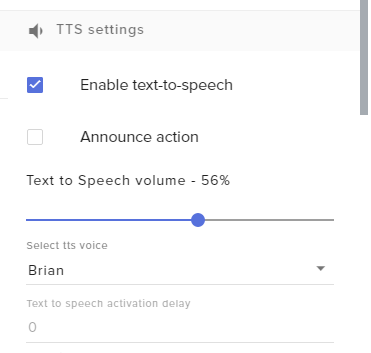
I have TTS enabled for cheers, but they aren't being read out. Can someone help me fix this
strong kernel
Did you enable TTS for all of the variations that control cheers?
Can't just do it in the main cheer alert settings.
grand basalt
Yes I did
strong kernel
Your own account this time or?
twin sentinel
@lament blade Can you try to hide every source (select the eye icon next to the source) except the browser source and see if the overlay is coming up then even when you don't have it selected?
lament blade
kk
grand basalt
Still Katerino
strong kernel
Doesn't look enabled to me.
lament blade
its working but it loads super slow
strong kernel
Again, you must do it in the variations, not just the main cheer alerts section. And don't forget to save.
grand basalt
This is what it looks like for me https://i.imgur.com/PiaM49l.png , and I did save it. I am changing it for the variation as well. I'll test again
 twin sentinel
@lament blade The browser source in OBS is just like opening a website in a normal web browser. It takes some time to load all the assets.
lament blade
is there a way i could save it? it just loads painfully slow
twin sentinel
You can disable the shutdown source when not visible option in the properties of the browser source. But there might be other issues when you do this, cause the overlay is then loaded in the background the whole time. I recommed using studio mode to preload scenes.
nocturne pelicanBOT
Check out this tutorial for OBS’ studio mode which allows you to preload scenes before transitioning. https://www.youtube.com/watch?v=W8iWsD2Lq3U
lament blade
kk
grand basalt
The gifted subs are being announced like, if someone has gifted 27 subs in the channel TTS reads out "[username] gifted a sub to [username]. They have gifted 27 subs in this chat"
twin sentinel
This is most likely the message twitch sends with gifted subs, as the user cannot enter a message for gifted subs afaik.
 solemn arch
If I want more people to win than loose at slots, what value does the slider need to be at?
Being at 100% is still giving losses
strong kernel
The slider does not control odds, only payout. Odds are controlled by how many emotes are in the pool.
solemn arch
So how do I make it more winnable?
strong kernel
Take out some emotes.
 echo tendon
How to deal with lagging stream
nocturne pelicanBOT
@echo tendon Please provide a log from your last stream. To do this, in OBS go to Help > Log Files > Upload Last Log File and paste the link to the log file here.
 spark violet
How do I have the bot react to when I get a subscriber
zenith widget
In the dashboard go to "Modules" on the left side -> Chat alerts module
 sturdy violet
Hey @clever mango I saw your message last sunday about Spotify. Didn't rly catch the context so I'll ask. Does working on 'it' mean songrequest via chat for Spotify might get enabled in the near future?
Or @zenith widget ofc 😃
zenith widget
Song requests as far as I know won't be possible via Spotify, because that will break their Terms of Service.
sturdy violet
I still think it's crazy they disabled all of their API's
I mean, I have a premium account... -_-
But that's a different discussion - offmychest.
zenith widget
As our SR can be made to take tips in - this means if you set to get tips and spotify - you are basically monetazing songs provided by them
and that is part of the ToS to not do
sturdy violet
I understand.
zenith widget
I have a premium account as well, but that doesn't give more permissions over their api 
 patent zodiac
Dear mods, is there any chance in obs.live that you can test your alerts like streamlabs do
zenith widget
Unfortunately, no.
nocturne pelicanBOT
@patent zodiac You can test Alerts via the bell on the lower right corner of the Overlay Editor. Simply go to your Dashboard -> My Overlays -> Pencil/edit button on the overlay. Make sure the "Show Emulated events on stream" option is on to see the alert in OBS/Xsplit https://streamable.com/h6qgy


 zenith widget
Or you can replay old events from the activity feed from OBS.Live