#helpdesk-twitch
1 messages · Page 465 of 1
 strong kernel
 weak vault
Has anyone had any troubles with the super themes not scaling down to 720p even when selecting the option in the settings? Mine seems to be stuck at 1920x1080.
strong kernel
@weak vault Changing the resolution does not change the position or size of widgets in the overlay. Super Themes are designed at 1920x1080. If you absolutely want them at 720p you'll need to adjust them manually, but you should probably just add them to OBS at 1080p and press Ctrl+F instead.
weak vault
Thank you for letting me know @strong kernel . I will try that! 😄
 opaque stream
@strong kernel I'm having uptime uptime I have been testing it if it would work again like this !time but it isn't working.
strong kernel
Can you write that again a bit more clearly?
opaque stream
@strong kernel I'm having a uptime command problem for days now I have been testing it if it's going to work again by using !time & it still not working.
strong kernel
You don't need to @ me.
Is any command working?
Have you made the bot a mod in your channel?
opaque stream
I found the reason it was banned it's my computer fault doing that
 soft latch
my chatstats are still broken
previous handle: rootdarkarchon, new handle: darkdoingstuff
 real gate
is there a way to set a store item to Moderators only?
 twin sentinel
Not that I am aware of.
 lavish dew
I have a picture that I want to put in front of the webcam, but it shows behind it, how do I bring it to the front?
twin sentinel
Set the overlay source on top of the cam source in OBS.
 lament blade
Is there a way to add sound files in custom commands?
lavish dew
i use streamlabs
 pallid osprey
There is, there is a widget on the GitHub for it
twin sentinel
@lament blade You can also create a store item and use the variable {redeem <itemname>} in yoru custom command.
@lavish dew Then reposition the browser source in your sources list in StreamLabs.
lavish dew
@twin sentinel omg thank you
lament blade
@twin sentinel Thanks for the quick reply ^^
 rigid hatch
Hey guys, I know you probably get this question asked 100 times a day but how do you test alerts ? 
 pale thunder
LITERALLY WHAT I CAME HERE TO ASK ^
 nocturne pelicanBOT
@rigid hatch To test/emulate alerts, hover over the blue bell at the bottom of the overlay editor. From here you can select the type of event and the amount to test.
rigid hatch
Ooh perfect thanks bot
pale thunder
So if im using obs and have the stream labs alert plugin in a scene with the browser extension, can i still test an alert somehow?
twin sentinel
On how to test StreamLabs alerts, best to ask StreamLabs.
pale thunder
I figured it out but thanks!
The only problem i run into is when the alert comes up, its like cut in half lol
jk got it ❤
 jagged matrix
is anyone available I need some help with transfering over to se
nocturne pelicanBOT
@jagged matrix Welcome to the support channel! Please let us know how we can assist you today and a member of the support staff will be with you as soon as possible.
 modern sage
how do you do your social on sliders?
strong kernel
Sliders?
jagged matrix
ive been trying to import my files from deepbot to se ive been waiting 2 hours and its stuck on a page that says loading 247758 users...
strong kernel
That's... a lot of users.
jagged matrix
yes i know how long will that take to import?
strong kernel
I honestly couldn't give you an estimate but from my personal experience of having to import and export large user lists like that, it can take a very long time.
jagged matrix
okay thanks I was wondering since someone else told me it would only be a few minutes and they were very wrong
strong kernel
Most imports do only take a few minutes. Massive leaderboards, though...
jagged matrix
understandable
 wintry shore
idk what to do
nocturne pelicanBOT
@wintry shore Welcome to the support channel! Please let us know how we can assist you today and a member of the support staff will be with you as soon as possible.
 shell marlin
I can't use chatstats...
"404 - Page Not Found"
strong kernel
Did you rename yourself on Twitch?
shell marlin
yes
strong kernel
And what was your old username?
shell marlin
dekozz to firminodocs
strong kernel
Before that?
shell marlin
like my first username?
shell marlin
dekondz > firmino_do_cs > firminodatwitch > dekozz > firminodocs
strong kernel
All set.

 shell marlin
Can I change the command lines?
for example:
EmissoraInscrito de 13 mês/meses (distintivo 1 ano)FirminoDoCS: !duelo k4tuto 10
ModeradorVerificadoStreamElements: @k4tuto, @FirminoDoCS wants to duel you for 10 Firmipoints, you can !accept or !deny within 2 minutes
I want to change the english part for my language...
strong kernel
For duels specifically, that's edited in the Module settings.
 soft tartan
is any one an expexrt in here with streaming league of legends on obs live?
shell marlin
@strong kernel Yeah, but I can't find where I can change parts like that : "wants to duel you for 10 Firmipoints, you can !accept or !deny within 2 minutes"
strong kernel
Oh, that's actually a fair point. That bit's not editable.
shell marlin

 shell maple
Hi 🙂 I added an alert for store redemptions. It shows up in my OBS studio when I emulate the alert. But when I write !redeem "item" in chat the soundeffect is triggered but the alert DOESNT show up. Any ideas?
 zenith widget
Steps to make a command trigger sound on stream:
- Go to Stream Store page here: https://streamelements.com/dashboard/store/items
- Add an item that has these settings on it:
- Stream Perk
- Loyalty settings to your desire
- (Next step) Add contents (image and/or sound you want to play)
- "Redeeming this item shows an alert
- Redemable via chat
- Skip Requirements
- Get the item name/command from the 2nd creation page
- Go to commands page here: https://streamelements.com/dashboard/bot/commands/custom
- Add command with desired name and have response for command as:
${redeem item_name_here} - Go to your overlays and edit the overlay you use.
- Click on "widgets" and add "Store redemptions" widget. Click save and you should be golden.
- Test your own command in chat and have OBS or editor open to hear sound
shell maple
Thank you very much 
 lone turret
- Is there a way to filter a background color (green) in a video in the streamelements overlay?
- Is there something similar to OBS Browser Source in streamelements overlays?
zenith widget
- You can change the color hue via the filters for the source in OBS
- The overlays are a webpage essentially, so they are added as a browser source to OBS. Elaborate what you mean if I didn't answer your question.
lone turret
ok, so those have to be done in OBS and cannot be done within streamelements, right? That was my question basically.
zenith widget
Do you want to key out a specific color?
lone turret
yes
lone turret
yes, I know how to do it in OBS. my question was only if it could be done within streamelemtns overlay
zenith widget
No.
lone turret
thank you 😃
btw you may consider adding a brower source feature because it's a matter of order of the overlays in obs - ie what is on top
zenith widget
I still don't understand what you mean by "browser source" in our overlays.
Do you want to load a separate page directly via the editor in the overlay?
lone turret
in obs a browser source is an element you add to the overlay, basically an element from a website (url link).
if you add this on top of the streamelemts overlay but want stream events on top it’s a conflict. there is workourounds though
zenith widget
So you mean when you add a new browser source to OBS, it goes on top of our own overlay in the OBS canvas(not overlay - different things). Just move the browser source with our overlay or the new browser source that you added down in the source list.
lone turret
yes that’s what I mean. and the conflict happens if something in the streamelements overlay has to be below and another thing has to be on top of that source. the resolution is to split the streamelements overlay in two pieces. I just thought it would be nice to avoid this and complete the overlay in streamelements
 thin tundra
Hello, i use the Kappagen widget for several months already and like it a lot.
I tried to optimze my streaming setup and saw that Kappagen uses 10% of my CPU not even streaming or anything happening).
Is that normal? And is there a way to lower the CPU usage of Kappagen?
zenith widget
@thin tundra Are you using OBS.Live?
 desert flame
Hi Friends! Quick query with Variations on Alerts, I've added about 15 different Follow Alert variations, when I test them it runs fine, but when I get a new follower on stream, it also plays the default noise after my custom alert.. Any ideas?
thin tundra
@zenith widget No, i just use Kappagen.
zenith widget
So what streaming software do you use?
thin tundra
Streamlabs OBS
zenith widget
Usually SLOBS tends to randomly block stuff from our overlays. I've seen reports flickering emotes, not rendering emotes properly and so on. The CPU usage - thats another thing - I suggest to turn on Hardware Acceleration - although I don't know if they have that option.
@desert flame It is possible for you to have missed one of the variations sound settings. I suggest rechecking the variations and also checking the default follower alert sound.
I do mean this
desert flame
I think I've just found the default.ogg sound still loaded, will look into it further! Thanks
thin tundra
@zenith widget That was turned on a while ago by slobs, which ended up that kappagen and my alerts stop to work properly. I talked with their support and they suggested to turn that off and that made it work again. Thank you for your help. How much CPU should Kappagen usually take?
zenith widget
I can't say - its different with everyone's PC setup
 livid ingot
Hey folks, Do ya know if any of the Nerd or die Overlays work with StreamElements OBS or the Overlay edior on the StreamElements webpage at all?
zenith widget
They are gradually making their overlay packages available for us. No ETA on when their next package is going to be made for us.
livid ingot
Hmm...so buy at your own risk type of deal?
zenith widget
I think which ever NoD package has been ported by them to work with us, will have a text on it saying it that it does.
That doesn't mean that we can't import it.
As long as you've bought it and its in your SL account.
livid ingot
Nah, i just use SE 😃 SL was way too confusing for me lol
livid ingot
Well then, i guess im limited, and i really liked the Glitch pack to go with the voice UI pack for Division 2 overlay
Thanks for your help Keizar 😃
pallid osprey
@romire their layout packages can be setup on here. When you download them, they come with everthing (depending on the package). The layout should be the easiest. Just add each piece and done. The widgets and alerts are a different story. If they aren't set up for SE then it takes some reprograming
I know there retro alerts come with a SE install file
livid ingot
I shot them an email as im interested in the Uplink package as it goes real well with the voice SFX package, since im playing the Div 2 so much 😛
 covert nymph
Hi, Any idea's why the bot is spitting the first response out and not just the 2nd one?
twin sentinel
Do you have a custom command imported from another bot?
covert nymph
yes 😃
the result works though
just wondering why it shows the command in chat first then the result ?
twin sentinel
!followage is the trigger
$userid has been following the channel for $readapi(https://api. ... is the answer of the custom command !followage
@Sasmaz_sj has been following liamh for 1 year ... is the answer of the default command !followage
I recommend disabling or deleting the !followage-command in the custom command list here: https://streamelements.com/dashboard/bot/commands/custom
covert nymph
perfect thank you! ❤
 daring cosmos
For some reason when someone subs or host, the notification pops up but there is no sound alert. What do I need to do to fix that. It used to work now all of a sudden its not
 tight harness
@daring cosmos Lets take this to the DreamTeam channel 😃
 mystic pendant
hey there, how long do tips usually take to go to paypal?
 grand peak
hi i am trying to setup alerts on my OBS live however I am hearing double when i go to test the alert sounds. I am capturing my audio on my desktop so when I play games the viewers can hear them.
tight harness
@mystic pendant If you have your PayPal account fully setup/verified and you've not got them awaiting your approval then it's usually immediately
nocturne pelicanBOT
@grand peak Make sure to ☑ “Shutdown source when not visible” for all browser sources (all OBS scenes). If using studio mode, uncheck “Swap Preview/Output scenes After Transitioning.” Also keep in mind that sound can play from any overlay loaded in the browser (editor or launched). https://i.imgur.com/FegZJQS.png https://i.imgur.com/yY0wcFl.png

 nocturne pelicanBOT
@lament blade Custom bot name requirements
- StreamElements bot modded and in chat
- Active overlay with alerts
- StreamElements tipping page in the panels below the stream (!panels)
- OBS.Live or Ground Control open
- Create a twitch account for the name you want to use or run the bot under your own name
- Custom bot name doesn't work on Mac
lament blade
?
 zinc stirrup
hey guys, ii am testing out streamelements atm. is there a way to disabele the default "bling"-sound?? i uploaded an own soundfile in the editor but the "bling" still appears. i am using an animated alert from the streamelements gallery
twin sentinel
@zinc stirrup Check the variations on the event.
zinc stirrup
there are none
twin sentinel
@lament blade You can rename the bot via the tool GrondControl or OBS.Live.
zinc stirrup
"pick alert randomly" also unchecked
twin sentinel
Have you enabled the custom css option? If yes, disable it please.
zinc stirrup
@twin sentinel nope, is disabled
also if i "Clear sound", turn down volume, the "Bling" is still comin
twin sentinel
Do you have an active alert box somewhere else? Like in OBS, or open in a browser tab?
lament blade
how do you transform the webcam so the aspect ratio changes?
i try to make it fit to my overlay but when i move the sides the vertical moves with it
twin sentinel
Are you using OBS Studio?
nocturne pelicanBOT
@lament blade For the best OBS support, please join their Official Discord @ discord.gg/obsproject
mystic pendant
@tight harness I do have it all setup and ready to go and the money hasn't come in my PayPal account yet
Used to be instantaneous when I used streamlabs
It's been 2 hours
lament blade
@twin sentinel are you still there?
twin sentinel
Best to ask your question at the OBS discord. The plugin OBS.Live has nothing to do with how the camera is handled in OBS Studio.
lament blade
do you know how to change the aspect raio of the webcam?
 split rivet
I linked my Paypal account to my streamelements donation link and I got 2 donations yesterday. When I checked my Paypal my balance was still zero (0), Can anyone explain? (I have no bank account yet so maybe thats the cause?)
 normal igloo
so @split rivet you have no bank card linked to your PayPal?
split rivet
I have no bank account listed in paypal but I do have a prepaid card linked.
split rivet
and if I'm correct, I added my same email from paypal to the link that I had to put it for the donation link. (i didn't add paypal.me link)
normal igloo
did you any kind of notification off the bot for the donations @split rivet ?
and yes you are correct
 tight harness
@mystic pendant Is this the tip from ManittasHS? Interestingly, we don't hear about PayPal tips unless they have been successfully sent through PayPal (seeing as they handle PayPal tips entirely themselves and we find out about them afterwards). And yet that tip shows in your Revenue History, so that means PayPal tells us that it was sent and received successfully
split rivet
@normal igloo i already contacted twitch support to help me but they haven't responded yet.
normal igloo
Good luck getting a response from twitch support and even if they do they will not help as this has nothing to do with them for some reason PayPal isn't taking your donations So I would recommend getting hold of PayPal support unless told otherwise by one of the member of staff here @split rivet
split rivet
oh ok the.. thanks for your help James
normal igloo
np 
mystic pendant
So I should take care of it with PayPal? @tight harness
normal igloo
@mystic pendant based on what sean said I would say you should probably take this up with PayPal support 👍
normal igloo
np 👍
normal igloo
@split rivet that's totally up to you I personally hate g2a but by limiting yourself to PayPal only yes it makes donations easier to handle but you are limiting yourself to potential people who can donate to you not everyone in the world can use PayPal and/or simply choose not to use it
 glad elm
How do I add overlays on the app
normal igloo
@glad elm are you talking about the se app?
glad elm
Yes
normal igloo
I would recommend asking in #helpdesk-mobile then @glad elm 
glad elm
Thank you I only asked here cause twitch is where I'm trying to stream to
split rivet
@normal igloo so for example. My donator donated me through G2A. So does that mean that the donations I got went to G2A?
normal igloo
@split rivet I have never used g2a for donations but I would guess so yes
split rivet
no fucking way I forgot to add my Paypal account from g2a

 scarlet tiger
Can I export commands from streamelements?
tight harness
I imagine there's likely external ways to do it, we haven't made anything ourselves which does this
 remote wigeon
So I'm in the middle of transitioning from StreamLabs to StreamElements and I'm adding the donations I got from StreamLabs into StreamElements and it's asking for a PayPal email. Do I use my PayPal email or the persons who donated?
May sound like a dumb question, but I'm not getting it.
tight harness
If you're setting up your tipping on our site it's your PayPal email
remote wigeon
Okay.
 worldly ivy
Hello, My dashboard is not detecting when I get new followers but it has detected I got some bits donated. I have tested the alerts and they are working fine just not showing that I am getting followers. How can I fix this?
Also can you use the YouTube notifications at the same time as twitch? Because it isn't detecting my subs on youtube either
twin sentinel
@worldly ivy Have you renamed yourself on twtich recently? Was the follow by any chance a refollow?
worldly ivy
no not a refollow and yes i have renamed
twin sentinel
Then please part the bot from your channel, log out of the dashboard, log back in and invite the bot back to your channel.
worldly ivy
ok i will try that
how will i know if it works? It still says 0 followers for this month
twin sentinel
Is my follow in your activity feed?
worldly ivy
I only have the bit donation in my active feed on streamelements, but it shows all my recent followers on twitch active feed
twin sentinel
Have you set any filter on the SE activity feed?
worldly ivy
your follow just showed up now
I think it worked thanks. Also for youtube, can i use both notifications at the same time?
twin sentinel
Youtube is a different acount, so the activity feeds and overlays won't mix and for youtube you have to be live, to see the bot in your channel and the alerts.
worldly ivy
Yeah I have both connected to streamelements with different accounts just making sure that because i stream on both thta my subs on youtube will show if i have twitch ones showing as well
I have 2 things on my obs for both alerts also
twin sentinel
Should be good then.
worldly ivy
perfect, thank you
does it matter which dashboard i am signed into btw?
Or can it be either of them
twin sentinel
You would need to have both up next to each other, as the events don't mix, as youtube and twitch are separate accounts in our system.
worldly ivy
How do i do both? Because i sign in using twitch and have to click on my youtube one in the top left. If i sign in using youtube it doesnt have any of my setting saved
or overlays
twin sentinel
Make both open in different tabs.
You can also pop them out via the popout icon on the top left of the activity feed.
worldly ivy
ah right so if i have active feed poped out I can swap over and pop the other one out and they both work then?
twin sentinel
You should be able to have both next to each other.
worldly ivy
ok thats fine 😃 Thank you
 shadow ivy
am I correct in assuming the only way to change bot color through /me is through ground control?
twin sentinel
you would need to get your bot a custom name, or your own name and change the color for this account in twitch.
shadow ivy
cool thanks I'll see if I can figure out how one of our admins did that!
 lucid wren
Anyone here that can help me out ?
Want to switch over from streamlabs, but cant get the streamlabels right in my header in obs studio ..
twin sentinel
You can set them all on one overlay at StreamElements and use the positioning numbers to align them up.
lucid wren
I would, but it messes up my header while its fine in obs studio.
twin sentinel
What do you mean with it messes it up? Can you share a screenshot please?
lucid wren
Can I message you ?
twin sentinel
Best to just post it here.
lucid wren
okay, this is how it looks in obs studio
(its from streamlabs, im switching over)
this is how it looks like on streamelements website
(import from streamlabs, tried to fix manually makes it look blurry)
twin sentinel
Try to change the video size on the left side and try to make it wider and not that high.
lucid wren
header has no set size in obs or in slobs because its a video file or something
this is from streamlabsobs
twin sentinel
Can you send me the video via DM please? Right click on the preview and save it to your PC and send it to me please.
 crude nymph
any way you can have 2x media request video in 2 different overlays without the sound being played twice on stream?
twin sentinel
Make the overlays shutdown when not visible in OBS. Not sure what you mean with 2 media requests in 2 different overlays.
crude nymph
I have 2 different overlays on streamelements, both of them have the media request video show on screen, but when a songrequest or something is being played and shown on stream, the audio comes out double
Ill try the shutdown overlay when not visible 😄
nocturne pelicanBOT
@crude nymph Make sure to ☑ “Shutdown source when not visible” for all browser sources (all OBS scenes). If using studio mode, uncheck “Swap Preview/Output scenes After Transitioning.” Also keep in mind that sound can play from any overlay loaded in the browser (editor or launched). https://i.imgur.com/FegZJQS.png https://i.imgur.com/yY0wcFl.png
 clever mango
@winged sundial Another user was able to fix a similar issue with streamdeck by uninstalling the software and deleting the appdata folder for the app. Then he reinstalled the streamdeck app.
After uninstalling, follow these steps to delete the appdata folder for streamdeck:
Press  key + R which will open the Run popup
Type %appdata% in the box and press enter
click on Elgato folder
Delete the streamdeck folder
 weak zodiac
hi can you tell me if im streaming to twitch directly through ps4, how do i use stream elements to use overlays please.
tight harness
Overlays are a browser source, so you need software that supports them. The PS4 won't natively support browser sources, so you'd need to get your PS4 gameplay to a computer and then stream from there instead
weak zodiac
can i do that using an elgato capture card? if so how? sorry im new to all this and trying to setup
 solemn locust
how can I make my stream look like this
twin sentinel
@weak zodiac Yes this would be able with an elagto capture card. Here is an explanation video: https://www.youtube.com/watch?v=nYyl3oh0fn0
@solemn locust What are you referring to in the screenshot exactly?
solemn locust
@twin sentinel Im try in to stream fight simulation but on the screen I want to display the flhgt info
and no background on the camera
jagged matrix
is someone availble to help? I w as importing in deepbot to se and i let it import over night 12+ hours total but it was only able to import 201675 outta 247758 anyway to finish getting the rest imported?
twin sentinel
@solemn locust To have no background on your camera you would need a greenscreen and set this up in OBS.
For the flightinfo I am sorry, but I have no idea how he is displaying them. I would assume it is something in the game, which lets you displaying these.
 blissful cove
I cant get the bot counter to update no matter how i change the ocmmands. not sure what im doing worng but probably all of it
twin sentinel
What have you entered in the overlay widget to display the counter? What commands do you have to display the counter?
blissful cove
i literally turned my brain on and fixed it -.- im sorry im apparently tired today...
twin sentinel
Glad you could fix it.
weak zodiac
thanks @twin sentinel
blissful cove
yes thank you ❤
solemn locust
is any one knows about a company that can help me set up my twich channel
 lapis flax
Guys I am feeling really weird about something. I got legit donation alerts today from regular donators, and it did NOT go through to my paypal but the alerts did trigger. Why would that be?
blissful cove
Ok so turns out i got the bot to count up, but i can not figure out the proper commant ot reset it or remove 1 from it
twin sentinel
Use the variable ${count <name> -<step>} for it.
blissful cove
simply replacing the name with the variable i have the counter set to?
twin sentinel
You can replace the name and set the step to -1, so it will be reduced every time the command is used by -1.
To set a counter use this variable: ${count <name> 0}
 dawn fern
Does someone know how to change the icons in the "SocialMedia ROTATION WIDGET By Benno" 😄 been looking but i just cant seem to find it
twin sentinel
You can either upload an icon, or choose one from awesome font.
dawn fern
Its doesnt change it when i change the image. its unaffected
twin sentinel
Can you share a screenshot of the section in the editing field of the widget please. And what image you are trying to use? If it is an awesome font icon, or an uploaded one.
dawn fern
Its just an uploaded one, im not even sure how i get an icon from awesome fonts
https://i.imgur.com/pBd78zV.png
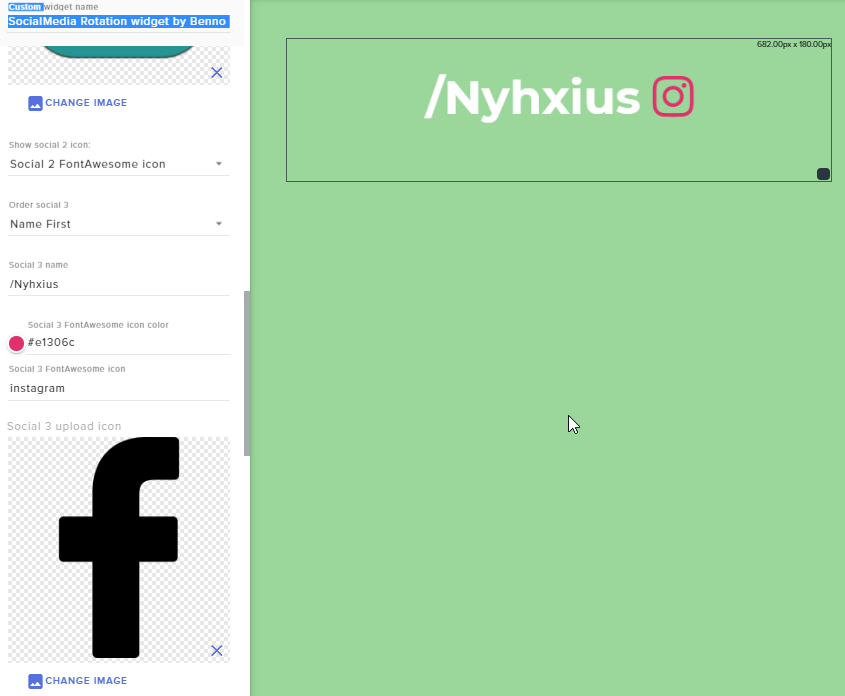 twin sentinel
So you want the facebook f to be displayed, instead of the instagram icon?
Set the Show social 3 icon to Social 3 upload icon
 weary anvil
Hey guys I have a question, I got my first donation on TTV, and my first sub & my first cheer(bits) - A good day. I wonder how I withdraw theese money because they are not on my paypal?
Thanks for help.
dawn fern
@twin sentinel Jesus, can't believe i missed that lol. ty
nocturne pelicanBOT
@weary anvil Please connect your Twitch and/or YouTube channel with Discord by going to ⚙ Settings and then Connections here in Discord. https://streamable.com/eg92w
 weary anvil
I just did that, what now?
twin sentinel
For the donation, if you have your PayPal account fully setup/verified and you've not got them awaiting your approval then it's usually immediately on your PayPal.
For the bits/cheers and subs please check the payout terms of twitch. https://help.twitch.tv/s/article/affiliate-payout-faq?language=en_US or/and https://help.twitch.tv/s/article/net-15-payout-faq?language=en_US
soft tartan
Dose any one know how i can reduce the streaming quality to reduce my ping?
<@&382267076632379392>
strong kernel
I think you may be misunderstanding the possible types of lag. Ping is solely to do with connection speed, not hardware usage. Reducing stream quality won't reduce your ping. The only thing that might help is to reduce your bitrate, to lower the amount of upload speed you're using.
soft tartan
how can i do that?
strong kernel
In your OBS settings.
soft tartan
'.' bit more details please im terrible
weary anvil
@twin sentinel my account is verified (paypal) its fully used, I pay with my paypal for the last year. Who can I ask about this?
There's gotta be someone who can check this out
strong kernel
@weary anvil PayPal support. We're a passthrough service. We get a username and some info, pass them along to PayPal to handle everything, and they send us back a confirmation. We're not involved in the transaction itself.
weary anvil
ok thanks 😃
strong kernel
@soft tartan Output section of Settings.
soft tartan
i need to change the videoo bit rate?
strong kernel
What's it set to?
soft tartan
4034
strong kernel
If I recall, a good rule of thumb is to use like 75-80% of your upload speed as your bitrate.
soft tartan
5.95
what should i change it to?
from 4034
is there any other number i need to chage?
change
soft tartan
T.T any other ideas to stop ping spike? while streaming
 oblique steeple
@soft tartan Quick question: How high does your ping go? A little bit or a lot?
soft tartan
i play league of legends
so my normal ping is 25/26
when im streaming it goes 35/45
oblique steeple
...
strong kernel
That's... great ping, actually.
 weary mist
what is the "spike"?
weary mist
no. that is a regular fluxuation
a spike is it going to 450
those numbers are in milliseconds. Which is 1/1000th of a second
so you are seeing the difference of 20/1000ths of a second
weary mist
you might be feeling hardware lag then, which could happen due to processes capping on your GPU and CPU
but what you have is something the human body can't tell the difference between
oblique steeple
You're playing League, not a shooter. Disable your ping (so you can't see it anymore) and try to tell a difference.
pallid osprey
placebo effect
 indigo anvil
Is there any way to make it so my music only plays for my viewers and not me?
pallid osprey
sure. how do you play your music. like the source
pallid osprey
let me test something real fast. i use chrome. so i dont want to give u the wrong answer, just want to see if what i do would work
indigo anvil
okay.
Just asking because like, I I've notice I am much better with my gameplay when I am not playing music the start of my stream versus when people are here late stream playin music.
pallid osprey
ifffffff. you launch it from the browser and control it there, it would work. but the other method u wont get any sound of obs
i will dm you a video of what i do. if u want you to try it. go hog wild
 solemn rapids
could anyone tell me if there is a custom command to whisper a person? i want people to enter a command, and the bot to whisper the answer
strong kernel
@solemn rapids The option to have the response whispered is in the advanced options for a custom command.
 unique python
I uploaded my own gift to the alert box and the image was frozen. Any ideas as to why this is?
 viscid osprey
When I click the mute alerts button in OBS.live, does that also stop the visual from appearing as well as the sound
 soft otter
Hi sorry to be a bother again but how can I edit custom commands on my boy?
Boy
Omg bot
strong kernel
You can create, edit, and delete custom commands at https://streamelements.com/dashboard/bot/commands/custom

StreamElements
The Ultimate All in One Platform for Streamers
soft otter
Ok I’m there but I see no edit
strong kernel
Scroll right.
soft otter
Wow I feel dumb lol so didn’t see that thanks
viscid osprey
Anyone know about the mute?
twin sentinel
It only gets muted when muted, so no sound, but the alert will pop up.
There is also a pause alerts button. Thsi will pause teh sound and alert from popping up, till you hit resume and all the alerts are getting played from a queue.
viscid osprey
Great thank you I need the pause alerts while I show a quick video
strong kernel
That's an event list.
lament blade
how do i make it sorry im new to stream elements
strong kernel
You can add the event list widget to your overlay or make/add a custom made one with the custom widget.
lament blade
i dont see events?
 umbral jungle
Hee there my chatbox overlay doesnt work the messages the dont show on the screen but i have the right link!
umbral jungle
Hhahaah no for real?
umbral jungle
Yeah i now men im just joking but thats not work it wil show my messages if i type like 10 messages
strong kernel
Only needed one but okay.
strong kernel
That's the overlay.
umbral jungle
Yeah i no but why its show like 3 messages later
strong kernel
What do you mean?
umbral jungle
in my obs it wil not show right a way
strong kernel
Take a screenshot.
umbral jungle
strong kernel
You didn't add the overlay correctly.
nocturne pelicanBOT
@umbral jungle To add your overlays to OBS, add a new browser source in your scene. Paste your overlay URL in the browser source properties, set the dimensions to 1920x1080 (unless you changed them on the website), and ☑ “Shutdown source when not visible” https://youtu.be/KDvLynUqXI4
umbral jungle
Wouw that was it al thx dude haha
 fierce kindle
Is this the channel I'd ask about the StreamElements bot in? 
twin sentinel
Yes, how can we assist you?
fierce kindle
Awesome. Is there a way to make a bot command show an alert of some sort? Or play some sound? Like, I want to make a !twss command that just says has a clip of Michael Scott saying "that's what she said."
twin sentinel
You can create a stream perk in the store here: https://streamelements.com/dashboard/store/items
Add the redemptions widget to your active overlay here: https://streamelements.com/dashboard/overlays
And create a custom bot command here. https://streamelements.com/dashboard/bot/commands/custom using the variable {redeem <itemname>} as response
fierce kindle
Bless you!
lament blade
can someone help me with events overlay
twin sentinel
Have you added this widget to your overlay? https://cdn.discordapp.com/attachments/199460642975907840/588486770128322588/unknown.png
 lament blade
is it possible to see who has chatted the most per day ? which user chatted the most
their username
@twin sentinel im trying to get the most revent alert to show color only
 narrow coyote
That would require custom code in a custom widget. If you are not familiar with coding, you can ask in #dev-chat to see if someone would be willing to help
lament blade
ok thank you
fierce kindle
@twin sentinel I'm doing something wrong 
twin sentinel
Edited (removed other letters in response): Just put ${redeem twss} in the response for !twss.
fierce kindle
Okay gimme sec
strong kernel
No point in putting the phrase in, it won't show up.
fierce kindle
nani?
strong kernel
Redeem variables overwrite basically everything else and only respond with the redemption confirmation message.
You'll never see the "That's what she said!" part.
 jade remnant
lol, thats what she said
fierce kindle
This command is literally only for my dad cuz he's constantly saying this to me on stream
And ohhh
I see, I see
How do I set this up to actually play on the stream?
 viscid loom
Is there a way to set store items for mod use only?
strong kernel
No, only sub only or everyone.
strong kernel
If the mod has manager access to your StreamElements account, they can log in, enable the item, redeem it, and disable it again.
fierce kindle
Does the store thing need to say something in the overlay when someone redeems something?
strong kernel
Hm?
fierce kindle
Never mind, I think I answered my own question
Just deleted everything and it didn't show up
One last question from me (I hope). Is there a way to make it that the bot doesn't respond to redemptions?
strong kernel
The bot will always respond to chat redemptions.
You can choose whether or not it responds to redemptions done via the store page or extension.
fierce kindle
Sad
 hazy coral
Hi, I was wondering if you guys can help as SLOBS help are awful, so basically i want to switch over to SE
I have everything set up however on my SLOBS but I just want to copy it all over to SE, is that possible?
strong kernel
There's an import function in OBS.Live you can use.

OBS.Live | Open Broadcaster Software Streaming Knowledge Base
OBS (open broadcaster software) knowledge base for live streaming. Find articles and videos about streaming with OBS.
hazy coral
Awesome 😄
viscid loom
Will The Feature of Only Mods Being able to use Store items ever get added?
nocturne pelicanBOT
@viscid loom Check out the new ideas board https://strms.net/ideas. You'll be able to add your ideas, upvote others that you like, and track their progress with email notifications. Adding and upvoting ideas also helps the staff know which ideas should be prioritized so please take some time to upvote the features that you’d like. The #💭︱feedback-and-ideas channel is best used for discussing ideas already on the board.
viscid loom
^ whats the point coz theres already a post about that thas a year old
strong kernel
So upvote it.
viscid loom
i have
strong kernel
Great. The more upvotes an idea has, the more likely it is to be implemented.
 pale urchin
I'm having trouble with the overlay - when I set the browser to 1080p, the overlay size is much larger than my stream screen, even when set to 1080p as well.
pallid osprey
If they are both set to 1920x1080 try to do properties > transform > reset transform
pale urchin
I did resize output-source size and that worked for some reason.
pallid osprey
Good deal
 wide raft
Hi can someone DM me I have a question about a donations issue
strong kernel
Payment issues are typically handled via email.
StreamElements
StreamElements is the leading platform for live streamers on Twitch and Youtube. StreamElements includes Overlay management, ChatBot, Tipping, Alerts & Loyalty
wide raft
ty
covert nymph
can StreamElements track time spent in the stream by viewers ?
nocturne pelicanBOT
10 minutes of watchtime are given to those in chat when the loyalty points are handed out (every 10 minutes). Therefore, loyalty must be enabled for watchtime to work properly. There is no direct link between watchtime and all-time points. It can’t be calculated from the amount of all-time points a user has because subs may earn points at a faster rate and !bonus all command increases all-time points for users in chat at that time. Giving points to a single user does NOT affect all-time, only when giving to all in chat.
strong kernel
There you go.
covert nymph
❤
strong kernel
In other news I apparently need more caffeine.
covert nymph
ah so I cannot carry on with the total time users have built up watching since I imported from streamlabs chatbot?
 torpid lynx
Hello so i have got a donation on my twitch it says in my donations but i did not get in my paypal how do i claim it
strong kernel
PayPal is currently having an issue with their system. While it's in your account, it won't be reflected on the site until they've fixed things.
torpid lynx
ok
 dusky cipher
Does stream labs have a queue system for things like twitch sings?
strong kernel
You should probably ask Streamlabs that question. We're not Streamlabs.
 placid berry
Hello can just sameone help me?
I Just want import settings from other OBS settings (streamlabs) and when i put streamlabs all settings just loading and after when have 100% just stopped and nothing working
whats going on?!
strong kernel
I think you may be missing a few words that'd make that sentence readable.
placid berry
i just want importing settings from other OBS settings on OBS Streamelement
i want importing from streamlabs to streamelement obs
and when i just have 100% (all files are download) just stoped and doing nothing
strong kernel
Still don't follow.
placid berry
what
placid berry
i just importing settings from OBSstreamlabs
and i just download now OBSstreamelements
and i want my OBS settings change from labs to element
pallid osprey
your scenes and layout? you wont be able to import your "settings"
strong kernel
If English isn't your first language, you may have better luck asking your question in one of the Non-English support channels.
placid berry
sorry about english but im not teaching 😄
is here from staffs someone from CZE or SVK?
strong kernel
People able to answer questions in other languages are not as abundant as those who provide support in English, so it may take time before your question is answered.
nocturne pelicanBOT
@lament blade Please abide by our server rules:
- No advertisement or stream promotion
- Respect ALL server members
- No NSFW/NSFL
 manic quail
Hello! I'm using ${time.JST} in a command but it shows time 9 hours earlier. Am I doing something wrong?
 radiant wyvern
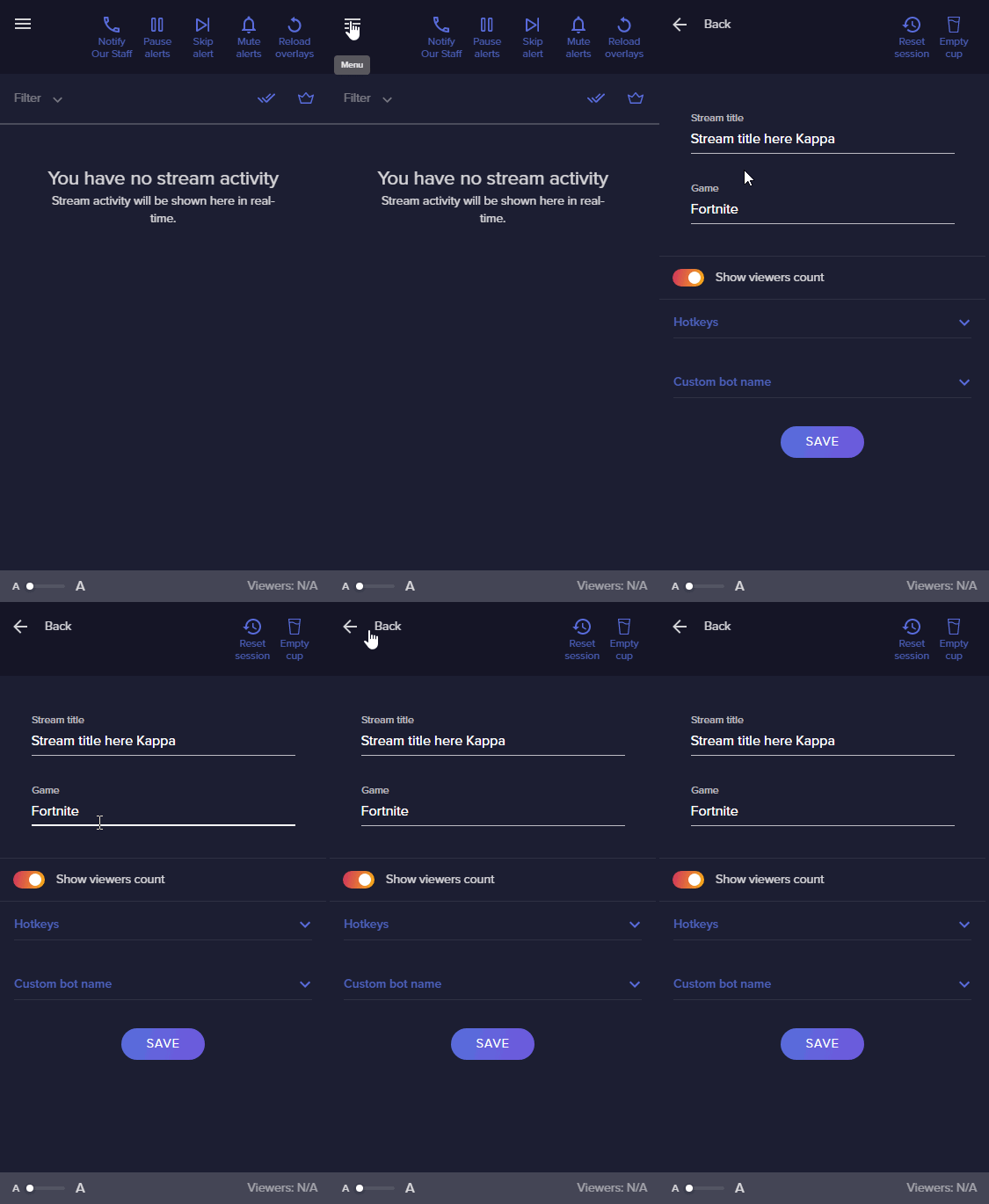
Anyone here know how to title my stream and select my game in OBS Live 21.1.2?
Updated my version today and my previous version allowed me to to this within obs
clever mango
@radiant wyvern OBS 23.1.0 is the latest version so start by updating 😃
Then you can set your title and game by clicking on the menu icon in the activity feed > Stream Settings
 radiant wyvern
Awesome! Thank you!
Separately I went to check for updates and I'm getting a notification saying that there are no updates. I'm on 21.1.2 and on Windows 7
is 23.1.0 only for Windows 8 and/or 10?
clever mango
@radiant wyvern you'll need to update at https://obsproject.com/download
OBS (Open Broadcaster Software) is free and open source software for video recording and live streaming. Stream to Twitch, YouTube and many other providers or record your own videos with high quality H264 / AAC encoding.
 dim nexus
so i just received my first donation but i dont see it being sent to my paypal is there a delay through stream elements
clever mango
21.1.0 has a broken auto-updater
@dim nexus PayPal is having service issues so the money is in your account but may not be visible in your Paypal dashboard
dim nexus
ahh ok thank you
 empty dust
Hello! I saw some past chatter about integrating w/ Spotify back in 2018, but haven't seen anything since.
Their devs still blocking any integration progress?
clever mango
@empty dust We'll have some news for you about this very soon
empty dust
ooooo that's exciting, thank you!
 coarse spade
 woeful juniper
I have had three $10 donations sent in between yesterday and today, which none of them have been sent to my PayPal. I'd like to know what's going on with that ASAP.
clever mango
!paypalstatus
nocturne pelicanBOT
PayPal Product Status: https://www.paypal-status.com/product/production
clever mango
Service disruptions over at PayPal ⬆
woeful juniper
Oh....weird. Yeah cause yesterday, I had one donation came in, that went through. The second one didn't and then a third one went through. Tonight had 2 donations that didn't go through. I guess will have to contact Paypal.
I'm also having trouble with stream store redemptions. Viewers are redeeming SFX in chat, and the redemption shows up, but the SFX doesn't play.
zenith widget
You need the redempyion widget in your overlay
woeful juniper
I do have the redemption widget in the overlay.
zenith widget
I just played all 3 of your store items and all 3 played sound with the overlay open.
@woeful juniper Well now 
zenith widget
no worries
zenith widget
Elaborate what you mean by that.
woeful juniper
@zenith widget Fixed it. Sorry about that. LOL
 vestal widget
buddy tried to check jis email to see if tip went through and it said that he is waiting for me to accept it??
zenith widget
Well, go into your paypal account and accept the payment. @vestal widget
@woeful juniper No worries 
vestal widget
ok i dont know where to do that at and it also wont show up on the stream how do i fix that
zenith widget
so about that sound not being played - i managed to play all 3 sounds from the store @woeful juniper
nocturne pelicanBOT
@vestal widget Please connect your Twitch and/or YouTube channel with Discord by going to ⚙ Settings and then Connections here in Discord. https://streamable.com/eg92w
 woeful juniper
@zenith widget It plays from the store, but when being redeemed via chat while stream is online, it doesn't work.
vestal widget
thanks
zenith widget
Well I redeemed all 3 items from the store, via chat. I used !redeem biff and so on and I had your overlay open and it worked just fine  @woeful juniper
@vestal widget I still don't see your account
woeful juniper
@zenith widget Hmm. I'll have to check it next time I'm streaming. Tonight, !redeem biff worked only once and from there nothing else worked.
zenith widget
You can poke here if its not working while live and someone will take a look or help on resolving it.
@vestal widget Your account on our side seems fine. So go into your PayPal account and verify your email and make sure you don't have anything in the resolution center. If that doesn't help then you are affected by the current PayPal issue they have, which we can't do anything about.
nocturne pelicanBOT
PayPal Product Status: https://www.paypal-status.com/product/production
zenith widget
!paypalstatus
woeful juniper
@zenith widget Okay will do. Thank you.
vestal widget
worked thanks man
 rigid girder
So I’m using a preset from StreamElements as my alerts and I want to add my own alert gif and notification sound for all the different alerts, anyone know how? I tried finding a solution online but nothing helped
zenith widget
Go into the overlay editor -> click the alert widget -> click the cogwheel of the alert you want to change.
Here is a video guide for the alert widget: https://www.youtube.com/watch?v=8LVRd2X4HvU&list=PLCDDKlFdScbEwdx5AntcQIS1InkFJwHtv&index=6
rigid girder
I’m gonna try once I get on my PC, thank you for the help person, have a good rest of your day 
 wicked trellis
how do i set up roulette for people to gamble their points
twin sentinel
Have you enabled the module in the module settings here?: https://streamelements.com/dashboard/bot-modules
wicked trellis
i dont want it to show on stream i want it for the chat
twin sentinel
sorry, gave you the wrong link.
twin sentinel
Edited the one above.
wicked trellis
ok thanks
 amber granite
hey guys... is there a setting to stop VIP's spamming emotes in chat too fast?
 cedar lynx
if VIPs are abusing their status I recommend taking away their VIP status
twin sentinel
You can just set up a spam filter for VIPs and lower, which removes messages containing an excessive amount of Emotes.
amber granite
where is that setting @twin sentinel
no i have hype scenes where i encourage spam but VIP's are OP and cause the encoder to struggle with kappagen
twin sentinel
https://streamelements.com/dashboard/bot/filters ->Emote protection
amber granite
thank you
oh no... i dont want that... i want them to be limited how quick they can spam like reg viewers are
twin sentinel
This is not possible, as it is a feature of twitch, that vips are not being affected by rate limits.
 dreamy palm
Hey guys! I have a bit of an issue! I have one person that whenever she resubs, gifts a sub, drops bits etc etc the alerts dont come up! and its just her! What could be the cause?
twin sentinel
What is their name?
dreamy palm
Lore_BadAss
twin sentinel
Have you enabled the standard profanity protection in the Tip moderation in the tipping settings here https://streamelements.com/dashboard/tipping-settings?
dreamy palm
yes its enabled
 sacred narwhal
hi is there a widget for viewers thats are online is the stream
zenith widget
Sorted over live chat ⤴
twin sentinel
@dreamy palm The name may be filtered out by the profanity filter. You can either disable it, or change the filter action.
dreamy palm
alright Benno! thank you! ❤
 sinful wraith
hi
Just saw the recent spotify integration with streamelements. Is it allowed to stream on twitch and play spotify music?
zenith widget
Yes, but not monetize it, as thats against Spotify's ToS
 rocky oracle
Hey guys, quick question: I understand that by default, the StreamElements bot does not reply to itself. So if as a response to a certain command, I would put out another command, that would not trigger. Correct? Is there a way to change this?
What I am trying to do it have my slot machine module trigger a Kappagen Emotesplosion every time somebody wins. The easiest way (from what I came up with) would be to have the bot's winning response contain the !Kappagen command at the beginning. But since the bot would not be triggered by its own responses, that would not work. Any other way to achieve this?
Thanks for you help! 🙂
sinful wraith
@zenith widget you cant monitise a live stream on twitch can you? only VOD's?
zenith widget
We have not added Spotify integration to Media Request, due to Spotify forbidding monetization via their platform.
 buoyant onyx
Since Spotify integration is now there, can you also add a "Now Playing" info to a command? So that people can just do !song and they get the artist and title?
lament blade
does it take some time for the integration to take an effect? I've linked my Spotify and have added the widget. but it only says Currently playing : ?
lament blade
i was thinking it was on Spotifys end, i just noticed the discord integration for it is not working too . thanks for the help 😃
 serene granite
@lament blade should be good now
unique python
Gif frozen and not animating when I hit test button. Any thoughts?
twin sentinel
Is the gif playing in a normal video player?
 gilded narwhal
@twin sentinel can I DM you for question ?
so I just instal OBS for start streaming but when I start streaming in OBS/OBS-live I can heard the sound on my live but I only see black screen
twin sentinel
Have you started OBS as admin? Have you added sources to your scene?
gilded narwhal
Ok thx U very much i just understand now thx for help have a good day
 placid terrace
Hi there ive just installed OBS.live , was using SLOBS.
Iwas wondering how i go about adding my chat text to my sources.
 urban prairie
I still have the same problem. Followers are not synchronized with streamelements
 vernal bronze
is this the desk for twitch?
nocturne pelicanBOT
@vernal bronze Welcome to the support channel! Please let us know how we can assist you today and a member of the support staff will be with you as soon as possible.
vernal bronze
i am streaming live on twitch and only audio is coming through, no video...
i am new to stream elements so maybe i didn't set something up correctly
twin sentinel
Have you started OBS as admin? Have you added sources to your scene?
vernal bronze
how would i add a source
twin sentinel
@placid terrace You can create an overlay, add the wdget my channels twitch chat in there and add this overlay as browser source to OBS.
nocturne pelicanBOT
@vernal bronze To add your overlays to OBS, add a new browser source in your scene. Paste your overlay URL in the browser source properties, set the dimensions to 1920x1080 (unless you changed them on the website), and ☑ “Shutdown source when not visible” https://youtu.be/KDvLynUqXI4
lament blade
what settings should i use to make stream as smooth as possible
vernal bronze
somehow i just made my sources tab disappear
 vague tendon
Hello I set the slots setting to 100% and it still does not let users win no matter how many times they try... is it broken?
vernal bronze
i got it back sry
cedar lynx
@lament blade If you are using OBS I recommend asking for support in their Discord for ideal stream settings!
nocturne pelicanBOT
@lament blade For the best OBS support, please join their Official Discord @ discord.gg/obsproject
placid terrace
@twin sentinel sorry i cant find this widget part, i have installed the grey area theme to work from
twin sentinel
What theme exactly?
twin sentinel
So select the big pencil > on the top left WIDGETS > on Your stream's chat ADD
placid terrace
aaah thank you so much matey 😃
twin sentinel
@urban prairie Try to part the bot from your channel, log out of the StreamElements dashboard, log back in and invite the bot back to your channel.
solemn locust
how can I inport my overlays ?
twin sentinel
In OBS.Live in the StreamElements tab, there is an option to import the overlays.
placid terrace
im trying to make a subscriber variation, how do i make it show how many months ?
twin sentinel
You can add {amount} months to the alert message.
placid terrace
I had done that , but when i test it doesnt show
 crimson robin
How to add subs leaderboard to twitch panel added
urban prairie
@twin sentinel dont work your solution
placid terrace
so is tipping to stream elements the same as donations is Streamlabs ?
 pulsar gulch
Hello, how is it possible to have the latest events ? followers subs etc ? 
twin sentinel
@urban prairie Have you added the alert box to your active overlay in OBS and is the follow event active.
unique python
Yes it is
@twin sentinel yes the gif is playing in the editor in top left corner fine
twin sentinel
Have you set the length of the alert too low? Can you DM me the gif please?
@placid terrace Yes, tip is another word for donation.
unique python
I don’t know. I can check when I get home from work. I will dm you then
twin sentinel
@pulsar gulch Add a recent event list to your overlay.
pulsar gulch
is that an widget ?
twin sentinel
yes. it is called event list.
pulsar gulch
oh found it, ty @twin sentinel
crimson robin
@twin sentinel my question was not answered
placid terrace
So, I have a downloaded the grey area super theme.
Are the other widgets, such as top tip, latest subscriber etc auto set ? or do i need to go in and adjust anything
twin sentinel
@pulsar gulch There is another format for an event list when you add the custom widget to your overlay by default.
twin sentinel
@crimson robin Get in the configuration of the panel and activate the displayed panel SUB there.
@pulsar gulch Sorry, can't follow you. What do you mean?
pulsar gulch
like I can give him a link with my recent activities or something ?
so he can open and see whenever something happends
You know what I mean ?
twin sentinel
Who is the person you are referring to? I though you wanted to see the latest events in your overlay.
pulsar gulch
is a friend of mine who's gonna stream on my channel
I use the invitation methon
method
so he would get a link like a stream key
I gave him the alerts notification link but he doesnt have that events list when it shows who followed sub etc
twin sentinel
@placid terrace The labels will fill when you get the events happen, after you signed up for StreamElements.
crimson robin
@twin sentinel can you tell by picture
placid terrace
yeah im all linked up thank you
twin sentinel
@pulsar gulch I think he will only see his own overlays, not yours. The overlays are channel based. So he can use his own overlays in OBS.
 cobalt kindle
I see you've added a Spotify integration into StreamElements.... I'm curious as to why though? In what format/use case would utilizing Spotify on Twitch ever be within Spotify's terms and conditions in the first place?
twin sentinel
@crimson robin
placid terrace
do i have to adjust each individual alert sound for each alerat box on each scene ?
am i mmissing the trick to get them all adjusted at once ?
cobalt kindle
I understand that people do it.... against terms of service. Why create an integration to assist that?
twin sentinel
@placid terrace You can copy widgets between overlays by selecting the two papers with the red dot in the layers section.
pulsar gulch
oh I see, ok ty
and what if i made him a mod and I give him the role to see my activity @twin sentinel ? would that be possible ?
to see my activity page
twin sentinel
@cobalt kindle It is against their ToS to monetize it.
placid terrace
@twin sentinel do i delete the one that is there first or does it paste over ? i dont want two alert boxes going off lol
cobalt kindle
@twin sentinel It is illegal to rebroadcast copyrighted music across any airwaves, regardless of monetization - and their license, even on premium, is "personal use" - as in, not for rebroadcast.
I imagine you've worked with the Spotify team to create this though, so that would lead me to believe there's an element of this I'm missing anyways.
Just wanting to understand it better.
twin sentinel
@cobalt kindle Best to talk to a staff about this. Thank you.
pulsar gulch
like adding him as a manager or so ?
 finite dagger
Hey guys, modding for a streamer, which as become fairly large and we have a problematic concerning duels. People really like them so we want to keep them but it's become hard for the streamer to read chat. We had the idea of making the duels in another stream room, but Streamelements can't be in 2 rooms at the same time. So I wonder if someone has an idea for that ? @twin sentinel
twin sentinel
@pulsar gulch I am not sure about this shared access, sorry. I don't know if he will get your followers notifications, or the one of his own channel, when he streams on your account.
pulsar gulch
but he uses something different than stream elements for alerts
if I invite him as a manger and I give the Editor permission
twin sentinel
@pulsar gulch What I think, but I am not sure on this is, that he only broadcasts his picture in your channel. I have no idea on what happens, when he is streaming on your account and someone is following you, like I don't know if he will get the notify for your account on his one to display.
pulsar gulch
I see
twin sentinel
@placid terrace Best to delete the old one.
@finite dagger Our bot does not support different stream rooms at this time.
placid terrace
Thanks
finite dagger
So there's no good solution for now ? @twin sentinel
placid terrace
last one for now ( i think lol ) i have added custom sound to an alert but still get the standard PING noise aswell ?
when i test ^
crimson robin
@twin sentinel trying to enter from the browser could not reach that screen
?
@twin sentinel
help
finite dagger
Thanks anyways guys :)
urban prairie
@twin sentinel sur mon dashboard il n'y a pas écrit toutes les nouvelles actions. IL y en a écrites mais pas toutes donc l'alert box ne peut pas les détecter.
empty dust
What timing on the Spotify news with my question from last night! lol. Is there any command for chat (!song) that can be used to see what song is playing off Spotify?
tight harness
@urban prairie #🇫🇷︱français - for French support
nocturne pelicanBOT
@placid terrace Make sure to ☑ “Shutdown source when not visible” for all browser sources (all OBS scenes). If using studio mode, uncheck “Swap Preview/Output scenes After Transitioning.” Also keep in mind that sound can play from any overlay loaded in the browser (editor or launched). https://i.imgur.com/FegZJQS.png https://i.imgur.com/yY0wcFl.png
tight harness
@crimson robin If you can't use the configuration page make sure you have an account on our website first
@empty dust There's one in #command-share for now
empty dust
@tight harness any chance you have that command at the ready?
was looking through that channel earlier and couldn't find it
nevermind, got it -- thanks
tight harness
No problem
empty dust
keep getting this when I use it -- they throttling pings pretty hard?
tight harness
Not sure as it's a 3rd party thing
I imagine we'll have something, but I don't have any ETA on that just yet
I know we have an overlay widget for it
empty dust
yeah that's definitely working and is great... I just like to keep my overlay more minimal without that constantly on the screen
thank you!
tight harness
No problem
Sorry, that's not a StreamElements question. Best to ask in #general-chat
 shut parcel
oh ok it is and it isnt but ok i will ask there
urban prairie
on my dashboard there is not written any new actions. There are some, but not all, so the alert box can not detect them.
lament blade
Hello i need some help , someone on my channel requested a song and hes now banned from requesting videos and i didnt ban him , how can i unban him??
Anyone there??
 slender anvil
hello so originally I had alerts on one of my overlays, however now they are showing black when they were originally no background? Im just a little confused
tight harness
@urban prairie Try logging out and back in
lament blade
anyone here can help me with my problem??
slender anvil
the staff when get to you when they can @lament blade
tight harness
Yeah sorry, i'm currently quite ill and it seems everyone else is rather busy
urban prairie
@tight harness I've already done it
tight harness
@lament blade Could you DM me with both your username and then username of the person who is banned?
@slender anvil Are you using Chrome?
slender anvil
no im using Microsoft edge
tight harness
Could you try with Chrome?
lament blade
@tight harness done
tight harness
Thanks, posted the task and replied to the DM
urban prairie
You have my solution
tight harness
@urban prairie To be clear, this won't make missed events show, but if it was the issue then it will make new events show
urban prairie
But it does not work
tight harness
I see events in your activity feed from as recently as 2 hours ago 🤔
slender anvil
not at the moment legendary, I got locked out due to two many sms
tight harness
I believe some browsers have issues with transparency but I know Chrome tends to work perfectly, that's why I ask 😃
slender anvil
ah ok ill try to get to it, thank you 😄
urban prairie
Yes but I received twitch mails as new people come from follows but did not appear on twitch while some events yes
tight harness
I resubscribed the webhooks connection between your SE account and your Twitch account in case there was a problem there, but in general we haven't had any other reports of this issue so we'll need to keep an eye out for any more reports 🤔
urban prairie
thx u
 radiant quail
how do i make it so that my stream can se what song is playing on spotify?
twin sentinel
You can add the Now playing widget to your overlay and connect your spotify accont in the settings of the widget.
 steady ingot
Hi, up until yesterday my alerts have been playing fine, but I went to test them today and they play in the overlay editor but aren't showing up in OBS, is there any reason this would happen? If it helps, my 'latest follower' etc. overlay usually updates to the test name but that has also stopped updating.
twin sentinel
Have you activated the checkbox next to the emulation bell, when testing your alerts? @steady ingot
steady ingot
@twin sentinel ah! Sorted, awesome, I must have unchecked it accidently. Cheers for the quick response, I must have unchecked it accidently.
 cursive lotus
Hi there. I am trying to import from Streamlabs to Streamelements. I have installed the extension and logged in to both sites. I am on the dashboard and initiated the import while in the StreamElements "Imports" tab. It seems to be taking a long time. Is there a permission I missed or another step that needs to be taken?
twin sentinel
You are using the chrome extension, to import your alertboy from StreamLabs?
gilded narwhal
hello i try to stream on csgo i play 4/3 1280x960 full screen but i can't put the csgo window in full screen on twitch (idk if U understand i have a bad english)
twin sentinel
Is it stuck at a specific percentage or point or doesn't it even start? @cursive lotus
cursive lotus
Permission to post a pic?
twin sentinel
just post it.
cursive lotus
twin sentinel
@gilded narwhal Are you using OBS.Live?
gilded narwhal
yes
twin sentinel
Let's hop in #helpdesk-selive
@cursive lotus Try to log out of both dashboards and log back in to both and start the import again.
twin sentinel
You could try that.
tight harness
Good to check that none of your other browser extensions are blocking anything too
cursive lotus
How would I check that?
tight harness
Disabling the other extensions
cursive lotus
Ok. All extensions but Import Extension are disabled. Cache cleared. Restarted Chrome. Logged into both dashboards. 🤞
How long should the import take?
tight harness
Depends on the amount of data
cursive lotus
Seems it is the same result
twin sentinel
Can you please open the developers console and try to import it again. If there is a red error message, please screenshot this.
 strange summit
With official Spotify integration, any plans for a bot module to automate change of song in chat? Or a variable for (custom) chat commands to show current song?
twin sentinel
Here is a custom API for a Spotify !song command: https://discordapp.com/channels/141203863863558144/424943321794871296/460471841690222622
tight harness
Think it's unreliable atm
twin sentinel
Yeah, I see: https://twitter.com/SpotifyStatus/status/1139228076502446085 post of SpotifyStatus at Twitter Something’s out of tune. We’re currently investigating, and we’ll keep you posted here!
lament blade
Can someone help me.
The Chat from the Streamelements OBS Program doesnt work
strange summit
Yeah, I know about the 3rd party API for Spotify, but since there's official integration now... would be easier if it was built-in.
twin sentinel
@lament blade Log out and back in using StreamElements at the top.
tight harness
@strange summit Agreed, I'm asking about it
lament blade
@twin sentinel I have uninstalled and installed it again and now there is no function to log in on the program
There is only the old function where you have to put your Streaming Key to log in.
How can i get the other version back
twin sentinel
Let's hop in #helpdesk-selive
lament blade
k
 wanton mango
@strange summit your profile pic scared me 😦
tight harness

strange summit

shadow ivy
I've succesfully setup a custombot name, does that account not being subscribed unlike regular StreamElements potentially cause any issues?
tight harness
It just means that it can't use your sub emotes, unless you sub it
shadow ivy
ah of course. thanks dude
 boreal rose
Im trying to connect my stream elements to my twitch account from the website & it gives me the error "CHANNEL IS ALREADY CLAIMED".
It is currently linked with my youtube channel only
 scenic zealot
Hello, Trying to connect to my Twitch account and it just keeps telling me "Could not access specified channel or stream key, please double-check your stream key. If it is correct, there may be a problem connecting to the server." Please help
twin sentinel
@scenic zealot Have you enabled the 2fAuthentification?
scenic zealot
Forgive me, in Twitch or OBS?
 ashen hinge
hello if anyone has a second I have a few problems: I had someone come into stream and donate a dollar with a bad name, one that could get me banned I DIDNT SAY THE NAME OUTLOUD but now the person is the top tipper and I deleted the transaction. Also I blocked another person from being able to tip who I didnt mean to do that
Excuse me, I meant latest tipper not top
scenic zealot
@twin sentinel, if Twitch, I have not
twin sentinel
Enable it please.
@boreal rose Can you log out of your dashboard and log in with your youtube account?
If you want to have your YT account and the twtich account merged, please send me the channel namen and the jwt tokens of both accounts via PM.
scenic zealot
@twin sentinel, i have activated the 2fAuthentification
 tawny shard
With the spotify integration, will there be song requests/queue and/or the ability to have a command trigger the name of the song?
in chat, rather than an overlay?
scenic zealot
@twin sentinel still getting message
 placid escarp
how come i cant get spotify widget to stay with the current song im playing on stream
 wanton plover
anyone available for some settings help?
nocturne pelicanBOT
@wanton plover Welcome to the support channel! Please let us know how we can assist you today and a member of the support staff will be with you as soon as possible.
placid escarp
Never mind figured it out
wanton plover
I get 30/60 FPS when Im clicked on my second monitor, but second I click over to the game, it drops to 1 or less than 1. Streaming quality mirrored on twitch also.
even though the game is at 80/100fps
 tough garden
will it be possible soon to add mobile pay as a robot as payplal ?
strong kernel
@wanton plover Do not ask in multiple channels.
@wanton plover I don't understand what you mean. Can you go into more detail?
@tough garden You too, no idea what you mean. Can you elaborate?
wanton plover
sorry, figured the OBS once was the more correct channel...
My issue is, when obs is launched, and im hovering over it, or doing ANYTHING on that particular screen (monitor 2) it looks beautiful, and the game (monitor 1) is also streaming perfectly.
but once I click over to monitor 1 (the game) and take control, the FPS on OBS drops to less than 1, becomes severely laggy, and streams that same quality to twitch
strong kernel
Sounds like the game lowers its FPS and quality while tabbed out and tries to go back to full quality when you click back in, but that full quality is too much so everything drops.
wanton plover
ive changed quite a few settings, and have effectively made it worse
it had worked just fine yesterday, then I got a new camera, then things started going south, since, I'm on my third streaming program, was told streamelements was the better of the ones I was using, but again, its gotten worse. It started off as twitch being a bit laggy, but streamlabs was running just fine. Tried to adjust some things, now twitch is not even an option. and the program (streamelements now) drops to .98FPS
strong kernel
Hm.
wanton plover
I'm positive my PC is more than capable of doing what I have asked it to do.
strong kernel
I wonder if the camera is related, then, since that's what changed.
Do you have it set to its default resolution?
wanton plover
through the camera settings or through the streamelements settings?
strong kernel
Check both camera settings and OBS settings.
tough garden
@strong kernel i can add paypal as a bot to stream elements and set it up to show on twitch ive used hours trying to figure out how to do the same with mobile pay
strong kernel
?
tough garden
maybe wrongf channel to ask help in?
strong kernel
What do you mean by "as a bot?"
tough garden
when one pays thrue payplal it shows on my stream when ppl pays thrue mobile pay i want it to show to
pallid osprey
🤔
strong kernel
We do not have MobilePay support.
tough garden
and that was the question in the first place sorry for my bad explanation will it happen some day?
wanton plover
I am seeing an issue (sorry to break jocast issue up) with the c922x launched, when I have a game playing, I get the warning that I dont have the resources to maintain the quality, which is ridiculous on a 1070TI with a ryzen 7 1700x...
strong kernel
Couldn't tell you. This is the first time I've personally even heard of MobilePay.
tough garden
hmm maybe its only danish u pay directly from your phone
strong kernel
@wanton plover Never assume your hardware is enough unless you have a 2-PC setup. Streaming takes a lot of resources, games can take more of your resources than you expect particularly when you unlock the FPS, and your computer also has to work the camera. It's a lot more than you think.
wanton plover
should I try locking the FPS down to 60?
strong kernel
That'd be a good start.
wanton plover
more of a hardware question, but does it matter that the camera isnt in a primary USB slot?
I have it connected to the extension pack, due to its cable being so short.
strong kernel
You mean like a hub?
strong kernel
Hopefully the hub itself isn't stuck into a 3.0 port? That could end up using too much as well. Stick it into a 2.0 port.
pallid osprey
if you take the cam completly out of obs, does it still have that issue?
strong kernel
I actually just had that problem when setting up an Oculus Rift lol.
wanton plover
the oculus rift is a whole other nightmare. haha, thats kind of where all of my power issues are coming from, and why I needed the hub
mrboost, ill try that here in a second also
what do you mean about the 3.0 to a 3.0?
i DID plug the hub into a 3.0 slot
I thought thats what it wants?
strong kernel
Stick the HMD itself directly into a 3.0 only, no more than 2 sensors into 3.0 but they're fine in 2.0, and use your hub in a 2.0 and plug all your other peripherals (camera, mouse, keyboard) into the hub.
You'll thank me later.
wanton plover
alright, im gonna do some swapping around real fast. lol
nocturne pelicanBOT
@scenic zealot For the best OBS support, please join their Official Discord @ discord.gg/obsproject
wanton plover
I just swapped it
strong kernel
That should ease strain on the USB controllers.
 fringe oracle
Hello, am i able to get some help please?
nocturne pelicanBOT
@fringe oracle Welcome to the support channel! Please let us know how we can assist you today and a member of the support staff will be with you as soon as possible.
fringe oracle
So currently my setup is 2 PC stream set up, and before I downloaded streamelements the 2PC set up was working fine (NDI Pluggin btw). Now both of my PCs can not find eachother through the NDI pluggin. I tried using NDI 3.8 but that works fine, but NDI 3.8 isnt that smooth as i like it to be
nocturne pelicanBOT
@wanton plover Please provide a log from your last stream. To do this, in OBS go to Help > Log Files > Upload Last Log File and paste the link to the log file here.
strong kernel
Yes.
placid terrace
I can't seem to find where to change it
nocturne pelicanBOT
@placid terrace Custom bot name requirements
- StreamElements bot modded and in chat
- Active overlay with alerts
- StreamElements tipping page in the panels below the stream (!panels)
- OBS.Live or Ground Control open
- Create a twitch account for the name you want to use or run the bot under your own name
- Custom bot name doesn't work on Mac
placid terrace
oh i hadnt done the seprate twitch
how to run under my own name , may be easier
how do i use a seperate twitch name once it is created
strong kernel
If you meet all the requirements, the option will be usable in either Ground Control or OBS.Live.
placid terrace
i dont know what ground control is
strong kernel
Then do it in OBS.Live.
placid terrace
im signed into my bot account and have obs.live open
strong kernel
The option is in the menu in the top left of the activity feed.
placid terrace
AH, it popped up after a restart
wait, i didnt get a chance to reanme it on that wizard
so, ive verified everything made an account called stashbot on twotch, ran the wizard, still don't know how to change its name lol
twin sentinel
Here is an example video on how to so in OBS.Live: https://discordapp.com/channels/141203863863558144/494513233416421386/561516184718278676
 hallow zinc
Hi guys, up until recently my audio has been running perfect, however today my PC Audio has switched to Mono (Only one line visible) with no option or so it would seem to change back to Stereo. Checked the advanced audio tab, no option to select mono or stereo on that line
Using a Mixer, duel PC Stream. Everything still works, just that line is Mono now? Very confused
No cable changes were made either
When checking the Audio Sources in OBS Everything is appearing as it should be as well
nocturne pelicanBOT
@hallow zinc For the best OBS support, please join their Official Discord @ discord.gg/obsproject
 sharp wharf
how does one get the oath for the bot renaming?
twin sentinel
In ground control, there is a link next to the rename fields.
sharp wharf
I see my error. Thank you
 green patio
someone said they donated but i didn't get the money and they said they got a notification that they lost the money. does anyone know what happened?
strong kernel
Do you see it in your revenue history?
green patio
no that's what i don't get because they sent a pic of the money being sent to my paypal
 slender parrot
Hi Everyone ! How are you doing? I have a question about the bot someone can help me?
nocturne pelicanBOT
@slender parrot Welcome to the support channel! Please let us know how we can assist you today and a member of the support staff will be with you as soon as possible.
strong kernel
@green patio Then it's likely PayPal held it for verification. This happens sometimes. Basically, if the tip doesn't appear in your revenue history in StreamElements, PayPal did not send us a confirmation. We're a passthrough service; we don't handle the transaction itself, we just get that confirmation. So if they didn't send it, there's something going on on their end.
green patio
@strong kernel ohh ok thanks
slender parrot
I would like to change the name of the bot is it possible?
nocturne pelicanBOT
@slender parrot Custom bot name requirements
- StreamElements bot modded and in chat
- Active overlay with alerts
- StreamElements tipping page in the panels below the stream (!panels)
- OBS.Live or Ground Control open
- Create a twitch account for the name you want to use or run the bot under your own name
- Custom bot name doesn't work on Mac
slender parrot
I'm on Mac 😦
 midnight lodge
I have made alerts on stream elements but when i got a follow on twitch my alert would no pop up nut when i test the widget it pops up???
jade remnant
make sure that no variations are checked for the alert
 paper grove
How do i get the overlays into obs?
nocturne pelicanBOT
@paper grove To add your overlays to OBS, add a new browser source in your scene. Paste your overlay URL in the browser source properties, set the dimensions to 1920x1080 (unless you changed them on the website), and ☑ “Shutdown source when not visible” https://youtu.be/KDvLynUqXI4
 unreal ivy
with the new spotify intregration, will my twitch viewers be ableto see my personal info , such as my spotify username, etc? Or will it only be the song name and artist on display?
strong kernel
Only song info. Also, don't forget you have the #dreamteam channel for support.
unreal ivy
tysm 
midnight lodge
How do you add alerts to obs.live with stream elements
nocturne pelicanBOT
@midnight lodge To add your overlays to OBS, add a new browser source in your scene. Paste your overlay URL in the browser source properties, set the dimensions to 1920x1080 (unless you changed them on the website), and ☑ “Shutdown source when not visible” https://youtu.be/KDvLynUqXI4
midnight lodge
My alerts are not working and i need help
nocturne pelicanBOT
@midnight lodge Please connect your Twitch and/or YouTube channel with Discord by going to ⚙ Settings and then Connections here in Discord. https://streamable.com/eg92w
 midnight lodge
done
strong kernel
You... don't have a StreamElements account.
 willow ginkgo
hello everyone . im new to stream labs...i was wondering will streamlabs give me the ability to play music during my twitch stream and if so how do i enable that?
strong kernel
Dunno! You should ask Streamlabs. We're StreamElements. 😃
willow ginkgo
oof sorry i meant elements
strong kernel
You can play music through the Media request feature.
midnight lodge
i do have a streamelemnts account
strong kernel
@midnight lodge Not under "go0fiy"
midnight lodge
funny
strong kernel
Not a joke. I don't see an account made under that Twitch name.
willow ginkgo
im sorry i dont mean to sound like such a noob ,but do i configure that through the twitch side or the obs side?
strong kernel
In your StreamElements account.
We've also got a Spotify integration now, so you can play your Spotify and display song information in your overlay.
willow ginkgo
im very new to overlays i suppose i need to watch some tutorials
strong kernel
Would be recommended. :)
https://www.youtube.com/channel/UCjerlCIbLPQwSnYlClkjDXg/videos

YouTube
Official youtube channel for StreamElements tutorials https://StreamElements.com
slender anvil
hey my streamelements alerts are not working currently
strong kernel
@slender anvil Looks like it's working fine.
slender anvil
is twitch having problems
strong kernel
Not that I'm aware of. Why?
slender anvil
because none of the hosts are going through on the webpage
nocturne pelicanBOT
@slender anvil Due to changes to Twitch API, we have filtered out hosts and will only show these ones on your activity feed:
- All manual host events (0 hosts included and if filter set to 0)
- All hosts coming from an online channel. If the hosting channel has been offline, we do not show it
- All auto host events with at least 1 viewer
 upper pendant
When I search by email address on the Tip List, it doesn't always work. Will it do partial searches? I need to find a particular donation.
 tranquil horizon
Hey question! How do I make my stream store alerts move differently?
Like instead of appearing and disappearing to the bottom of the screen can I have them slide off the side?
upper pendant
Any idea why the search doesn't work? I clicked on the tip name to find more donations by this user. It puts the email in the search bar, but nothing shows up. Not even the donation I just clicked on.
tranquil horizon
Where do I find the settings for animation?
strong kernel
The aptly named section.
@upper pendant If nothing shows up, then nothing matches your search parameters.
tranquil horizon
So its in the overlay editor then. Appreciate it
 granite hinge
Hey does anyone know how to setup a timer for a subathon where time gets added for subs and such?
strong kernel
@granite hinge #widget-share
granite hinge
Thanks!
 steady heron
How do u pull your tips from stream elements
strong kernel
Depending on how the tips were sent is how you'll receive them.
PayPal tips go to your PayPal account.
G2A Pay tips go to your G2A Pay account.
SE.Pay tips are in the SE.Pay section of your StreamElements account.
midnight lodge
i have made the account and made my alerts but when i stream my alerts does not show up so im stuck again
strong kernel
Did you add your overlay to OBS?
midnight lodge
yes
strong kernel
Screenshot your browser source properties please.
midnight lodge
strong kernel
The URL too.
midnight lodge
should i just give you the link or the screenshot
strong kernel
Screenshot.
Thank you. Deleting it to hide the URL.
You haven't had any particularly recent events. Are you referring to emulations?
midnight lodge
i had a friend to follow me and to see if the alert works and it hasent
strong kernel
I just replayed it and it worked fine.
midnight lodge
When i am live i told a friend to follow me and the alert didn't work for me and i don't know why it works fine when i replay it and test it but on stream it doesn't
strong kernel
If they're attempting to unfollow and refollow, that won't work.
The system is designed not to react to that.
midnight lodge
ok can i just make a fake account and try to follow myself to see if it works
Thank you for the hlep
nocturne pelicanBOT
@paper cobalt Please abide by our server rules:
- No advertisement or stream promotion
- Respect ALL server members
- No NSFW/NSFL
midnight lodge
I was able to hear the alert but not see it
nocturne pelicanBOT
@midnight lodge To add your overlays to OBS, add a new browser source in your scene. Paste your overlay URL in the browser source properties, set the dimensions to 1920x1080 (unless you changed them on the website), and ☑ “Shutdown source when not visible” https://youtu.be/KDvLynUqXI4
strong kernel
Make sure you've added the overlay at the correct size and fit it to your canvas.
midnight lodge
i have 1920 by 1080
pallid osprey
right click the browser source > transform > reset transform
 clever nimbus
Congrats on the spotify integration. Does this integration allow song requests from chat to spotify?
strong kernel
Spotify integration will not have media request functionality as monetizing it would be against their ToS.
clever nimbus
Ok. Thank you. So this is an integration to be able to show "now playing" on screen through widget, correct?
strong kernel
Yes.
clever nimbus
Thank you and great work!~
midnight lodge
when ever i test the alert it works but when a friend who hasn't followed yet follows it dosent shoe
show
 unkempt totem
is this where i go for overlay issues?
nocturne pelicanBOT
@unkempt totem Welcome to the support channel! Please let us know how we can assist you today and a member of the support staff will be with you as soon as possible.
 candid vortex


 livid olive
what's the best program to remove cam background?
zenith widget
@livid olive Search up OBS Chroma key
livid olive
@zenith widget hi man! i got a i9 9900K and RTX 2080... when i stream on NVEC is lose some frames... my cpu is only under 14% load.. should i use cpu to stream?
zenith widget
Yes
 hushed ferry
live now and alerts are broken, is SE down?
zenith widget
No we are not. No other reports of 'broken' alerts at the moment as well.
Reload your overlays and replay an alert.
scarlet tiger
Hello 
What needs to be done to avoid streamer losing any data in streamelements if it changes the username? (chat stats, points, bit stats, Etc...)
zenith widget
When renaming everything is kept. Only a manual update to the chatstats page needs to be done from our side
to fix the chatstats page.
and the bot needs to be parted and joined.
scarlet tiger
So when you rename you just ask to fix chat stats and disconnect, then connect your bot?
zenith widget
ye
scarlet tiger
Thanks 

 distant dune
Hello! I installed the Leaderboards extension in an effort to show top chatters, but it always shows No Data. I went to my Dashboard on the StreamElements website, and clicked ChatStats and it goes to a 404(
zenith widget
Fixed