#helpdesk-twitch
1 messages · Page 442 of 1
 strong kernel
 worthy badge
good thing to update 😃
any easy way to viewers see which commands they can use at the moment?
strong kernel
!commands command in chat by default links them to your commands page.
strong kernel
Pardon? That's just your account on our website.
strong kernel
That's... still our website, though. https://streamelements.com/dashboard

StreamElements
The Ultimate All in One Platform for Streamers
worthy badge
yeyeye oki oki 😃
 stoic stream
I’m not at my pc right now but whilst I remember.... is there any reason why the very first alert that gets triggered during my stream gets double played like there’s an echo but after that they’re all ok? It could be any of the twitch alerts that it happens too: host/raid/sub/bit cheer etc and nothing I’ve tried has fixed it.
 nocturne pelicanBOT
@stoic stream Make sure to ☑ “Shutdown source when not visible” for all browser sources (all OBS scenes). If using studio mode, uncheck “Swap Preview/Output scenes After Transitioning.” Also keep in mind that sound can play from any overlay loaded in the browser (editor or launched). https://i.imgur.com/FegZJQS.png https://i.imgur.com/yY0wcFl.png

 stoic stream
That is already ticked and I don’t use studio mode in OBS
I also have my chrome tabs muted so there’s no background noise while I’m streaming so it’s definitely coming through OBS from the alert
It’s literally just the first alert that gets triggered. From then on they don’t double play
 twilit rock
it says that i am steaming but when I go to my twitch stream it isn't streaming
strong kernel
@fresh grove Keep your issue in one channel please.
 fresh grove
im trying sorry it was a mistake
strong kernel
Funny thing is you do. They're perfectly on top of one another. Open the layers tab in the bottom left.
fresh grove
honestly i wont be using this help site anymore thanks buh bye
 shut phoenix
Anyone having problems with host alert only not working..all others are fine
 ancient otter
Guys to remove this text, isn't just remove the 'Enable Custom Font' ?
In text settings I mean
strong kernel
Text settings change how the text looks, it doesn't remove the text.
ancient otter
Oooh
strong kernel
If that's a sub alert, uncheck "show subscriber messages."
ancient otter
Hm, is a sub alert, but this option shoud be where? on the main tab? because the only thing that I see is here
strong kernel
That's because you've enabled custom CSS.
So the custom code is handling everything.
shut phoenix
@strong kernel have u heard of only the host alerts not working during stream?
As of just recently
nocturne pelicanBOT
@shut phoenix Due to recent changes to Twitch API, we have filtered out hosts and will only show these ones on your activity feed:
- All manual host events (0 hosts included and if filter set to 0)
- All auto host events with at least 1 viewer
 sleek flax
Where do I go for help?
strong kernel
I believe there may have been a recent change with Twitch no longer sending data for 0 viewer hosts at all. That aside, 1+ viewer hosts are working as expected.
shut phoenix
Ok then that makes sense..kinda sucks but makes sense
 deep leaf
Hey guys, little more of a technical question with hopefully an easy fix
Got my new PC and setting up stream (hype), but my C920 webcam is displaying a 4:3 ratio
I tried changing in the settings
But I get no video output
This worked on my previous PC
strong kernel
You can try updating your drivers, but otherwise this would be a question better suited for the OBS Project support guys.
nocturne pelicanBOT
@deep leaf For the best OBS support, please join their Official Discord @ discord.gg/obsproject
deep leaf
👌 Much appreciated
 real gate
Are the raid and hosts fixed in the activity feed?
strong kernel
Hosts and raids are working as far as we're aware, though 0 viewer hosts will not appear.
real gate
Thanks!
 hardy yew
Any reason why when I get hosted or raided, the activity feed shows that I've been BOTH hosted and raided by the same person with two different viewers amounts?
strong kernel
Because when you raid someone, Twitch automatically hosts them too, and not everyone joins in on the raid.
 lament blade
Hi, where can I apply to get helped?
I'm having problems setting up my alerts with custom css
 viscid osprey
It seems my subpoint widget didn’t update, I have one less subpoint than it says. I switched to this widget from subcount because I was told it would update itself every few min?
 slender ice
Ok so i have an annoying issue: my overly (all of them) get like a facebook page all over it, until I press interact on the obs it stays there, of course after i do it it’s always back and sometimes it appears in my stream:(( any solution?
How do i stop it from getting back every few hours/minutes
 cedar lynx
Can you take a screenshot of the issue? @slender ice
slender ice
I’m not home atm, but I’ve sent it before you guide me to press on interact but it keeps coming back
 wicked reef
I have a few questions if anyone can help
Im an IRL streamer and I was wondering how do I make my alerts work with StreamElements and no streamlabs OBS anymore?
I use Iphone X
slender ice
Ok so i have an annoying issue: my overly (all of them) get like a facebook page all over it, until I press interact on the obs it stays there, of course after i do it it’s always back and sometimes it appears in my stream:(( any solution?
I’ve tried: duplicate the overlay and use a new one, re enter the source link, create new overlay and use it, nothing helps so far it keeps on coming back and it’s annoying, i can get this al over my screen in the middle of the stream://
cedar lynx
I’ve literally never seen this before 😮 can you check all your browser sources on the scenes? Are any of them Facebook URLs?
 vestal rain
Hi guys, can someone to help me with streamelements leaderboard points? None of our viewers received points for host us. I'm sure that was viewers on those hosts.
 thorny pelican
Hello Guys, my !watchtime command doesnt work
Die I need to change something on the command?
 dense thicket
Hello, I am having an issue with the chat stats where it will not display (error 404). Did some google searches and apparently is has to do with changing my username, which I did. (current username: 9OutOfBen ...old username: 9999ben9). Was wondering what the solution to this problem is? Thanks in advance 😄
 untold crest
@dense thicket forwarded your issue, but people are coming back from TCEU, so fix might not happen right now but bit later
dense thicket
No worries! Appreciate it.
 tight harness
@dense thicket Fixed
dense thicket
appreciate it! thanks a ton 😄 @tight harness
tight harness
@hazy mural Your question should be asked in the relevant channel - #helpdesk-selive
 karmic canopy
Any way to do a Test follow/Sub altert?
nocturne pelicanBOT
@karmic canopy To test/emulate alerts, hover over the blue bell at the bottom of the overlay editor. From here you can select the type of event and the amount to test.
nocturne pelicanBOT
@karmic canopy We have added a new feature, which allows testing of alerts only in the Editor or in both Editor and OBS. Hover over the bell and on the right side toggle it on.
https://media.discordapp.net/attachments/342748377416466442/564781551649292299/unknown.png
 karmic canopy
Thanks heaps!
 eager hollow
Whenever someone follows me on Twitch I don’t get a message from my stream elements bot in the chat does anyone know how to fix this
 twin sentinel
Let's go in #helpdesk-mobile @lament blade
lament blade
@twin sentinelthanks I will go there
twin sentinel
@eager hollow Are the events in your activity feed?
eager hollow
Yes
twin sentinel
Check the alerts module settings, if you have enabled the module and the follower notification correctly please.
 silver laurel
@viscid osprey I have the same problem too. Not all my subs are counted by the sub count widget and also not all my sub alerts come through... and I know when someone resubs he/she has to share it but I just started so that’s not the reason why.
I already miss 2 subs in my sub widget
With both subs I didn’t get an notification either. I only knew because my sub badge appeared next to their name
eager hollow
@twin sentinel thanks it was disabled I fixed it
nocturne pelicanBOT
@silver laurel Twitch prime (new and resub) and paid subscriptions (resub only) must be shared in chat manually by the person subscribing in order for the subscription information to be sent to StreamElements. For twitch prime, the user needs to have sharing enabled on https://www.twitch.tv/settings/prime. For paid subs, if the share box doesn't show up immediately it will when they refresh the page. https://i.imgur.com/VNJN0Uv.gif https://i.imgur.com/2297EA7.png

 silver laurel
Thanks for the reply bot, but that’s not it 😅
 gentle imp
how that's not it?
if it isn't displayed by widgets nor triggered any alerts, it is that
unless you didn't setup the alerts for them or checked variations
still, widgets would pick it up, just no alerts
karmic canopy
How do I change the name of my chatbot on Streamelements?
twin sentinel
Do you use OBS.Live?
karmic canopy
yes
twin sentinel
Take a look in the pinned messages in the channel #helpdesk-selive please.
karmic canopy
Which one?
twin sentinel
The first pinned message.
karmic canopy
ty mate
 drifting brook
Hi there guys, need some help
for some reason my overlay is much bigger than my preview screen
and also, for some reason this label changed by himself
it was visible when i started stream, but just dissapeared without any reason after
 rose mantle
I need som help with obs. When i stream the screen is just green plz help
karmic canopy
Before switching to Obs.live I had an info panel on my OBS to change stream title, etc. How do I find this on OBS live?
drifting brook
@karmic canopy
click that three lines on Activity Feed panel
Than Stream Settings
nocturne pelicanBOT
@karmic canopy If you have issues with OBS logging you out of the integration all the time, follow these steps:
- Make sure you are on the latest and greatest version of OBS.Live ( 19.3.24.375)
- exit OBS (make sure OBS is not running)
- delete
%appdata%\obs-studio\plugin_config\obs-browser\obs_profile_cookies - start OBS.Live
- Settings -> Stream -> disconnect -> connect
karmic canopy
Cheers @drifting brook
twin sentinel
If you want to get the twitch panels back, follow the steps posted by the bot above please.
 slate flame
Been having a problem with media request. If I "Show on Screen" it plays the audio twice
nocturne pelicanBOT
@slate flame Make sure to ☑ “Shutdown source when not visible” for all browser sources (all OBS scenes). If using studio mode, uncheck “Swap Preview/Output scenes After Transitioning.” Also keep in mind that sound can play from any overlay loaded in the browser (editor or launched). https://i.imgur.com/FegZJQS.png https://i.imgur.com/yY0wcFl.png
nocturne pelicanBOT
@rose mantle Welcome to the support channel! Please let us know how we can assist you today and a member of the support staff will be with you as soon as possible.
lament blade
I have a problem with the streamelement alerts not showing in OBS and such
and if I choose "open in new tab" from the site, that is just completely blank
twin sentinel
Are they showing up in the ovleray editor correctly when you emulate a test alert?
lament blade
Yes
nocturne pelicanBOT
@lament blade We have added a new feature, which allows testing of alerts only in the Editor or in both Editor and OBS. Hover over the bell and on the right side toggle it on.
https://media.discordapp.net/attachments/342748377416466442/564781551649292299/unknown.png
slate flame
Still doing it
twin sentinel
Please make sure you apply this to all browser sources in OBS and close or mue the overlay editor.
lament blade
Yes, correct me if I'm wrong now though, but it is possible to have everything in one browser source, right?
I mean, it doesn't give any issues and such
Because I have set it up very nicely with having latest follower, donation etc. etc. placed where I want them on the screen, within the overlay I made, and just set it all up where it's suppose to be.
That doesn't give any complications, right?
 narrow oxide
Hey there guys. Do the Chatbot of Streamelements allow webrequests and scripts?
karmic canopy
@twin sentinel I did what you said and it didnt come back
Just want my OBS twitch stream name, etc window back
twin sentinel
@narrow oxide You can input a customapi link in the variable in custom command @narrow oxide
narrow oxide
Oh cool ty 😃
twin sentinel
@lament blade It should not. The overlay editor is designed to have multiple widgets in one overlay, so you have to have les browser sources in OBS which need to be rendered.
@karmic canopy Please follow the steps closely, as it is working as intended.
karmic canopy
I did follow them exactly. What exactly do I do after it all to bring it back?
I re-opened OBS and re paired my stream but nothing changed
(and deleteyd the cookies, etc)
Figured it out mate
slate flame
Followed what you said, still getting double. Not sure why
karmic canopy
You have to connect via pairing, not pairing code
slate flame
Will recheck overlay but...
twin sentinel
@karmic canopy You should be able to get the panels via view > docks > stream information
@slate flame Please make sure you don't have two media request widgets in one overlay.
slate flame
It's what I'm checking now.
lament blade
Gotta said, Obs.live and using streamelements, really makes it all easier. Good job and thanks for the help, have a good one.
nocturne pelicanBOT
@slate flame To add your overlays to OBS, add a new browser source in your scene. Paste your overlay URL in the browser source properties, set the dimensions to 1920x1080 (unless you changed them on the website), and ☑ “Shutdown source when not visible” https://youtu.be/KDvLynUqXI4
gentle imp
make sure u have that ticked on all overlays on OBS 😃
slate flame
If I did display capture and one of ya'll came to my stream and walked me through this, would that work? I'm pretty sure I've done all that
I've ticked the boxes on all 3 overlays I have
Heck, on the scene I'm currently on it was doing it with one overlay on
But all overlays on obs are ticker regardless
twin sentinel
So in every scene, every source with an overlay it has to be ticked. Please also make sure to mute or close the overlay editor which might be in the background.
Where do you control the MediaRequest from? OBS.Live?
slate flame
obs live
Overlay editor has been closed for all this time. Opened it only to check for double media request.
Working now, not sure why. Thanks for assistance
 grand torrent
hi guys the bot keeps ban my viewer when they spam emotes how i turn off that?
 gaunt mantle
I received a $20 donation yesterday and it’s not in any of my accounts
twin sentinel
Disable the emote protecton in the spam filter section of the bot: https://streamelements.com/dashboard/bot/filters
@gaunt mantle Was the tip made through our tipping link? Is the tip in your activity feed?
gaunt mantle
Yes it was and yeh it is
grand torrent
thanks @twin sentinel
twin sentinel
As I am just a volunteer supporter, I don't have access to your payment data. A stafff member has to take a look I think.
gaunt mantle
Ok no worries... do you know how I can get in contact
twin sentinel
I can forward your issue internally. How did you recieve the tip? Through paypal, G2A or SE.Pay?
Please also give me your twitch name.
gaunt mantle
Paypal.... the guy tipped through PayPal but it’s not in my acc.... twitch name is same as discord
Sorry
gaunt mantle
No I didn’t receive anything from paypal
 zenith widget
And its in in the activity feed?
gaunt mantle
I know I got the tip because it went into my activity feed
zenith widget
Go into revenue history page
gaunt mantle
Yep
zenith widget
And check if its rly paypal
twin sentinel
lament blade
Hi! I'm here again, is there someone that can help me?
nocturne pelicanBOT
@lament blade Welcome to the support channel! Please let us know how we can assist you today and a member of the support staff will be with you as soon as possible.
gaunt mantle
What is g2a
lament blade
I'm having problem dispaying the text on my custom alerts..
twin sentinel
@gaunt mantle G2A is an online payment gateway, that combines a number of different payment options in one easy checkout option.
gaunt mantle
Ok
lament blade
hey I have submitted a request to change bank info in my se.pay account and no response can you guys do something to speed the process?
gaunt mantle
And where will the tip go? Bcos I don’t have a g2a account
 elder sorrel
@lament blade What alerts are you referring to?
cedar lynx
Don’t use G2A as an option for tipping if you don’t have an account with them 😃 @gaunt mantle you can also use PayPal instead
twin sentinel
@gaunt mantle It went into your G2A account.
gaunt mantle
But I don’t have a g2a account... or I don’t think I do
twin sentinel
As you connected the payment option G2A pay, you have been asked for an e-mail adress I think. There have been send instructions to set up the G2A account.
untold crest
You cannot connect with G2A without G2A pay account - it is not just "type addresse and save" like with paypal
 gentle mortar
Hi, is it possible to change this emote? I changed bot name to custom name and now bot is sending not twitch global emote :c
I would like to replace it with streamer emote
silver laurel
@gentle imp No it's not it. I already messaged StreamElements about it (help desk) and they said it's a problem within Twitch itself. For some reason it doesn't always sends out all the data. Because it's about first time paid subs. Like I said before I just started so I don't have resubs yet. So what the bot said doesn't apply to me, because it's not the same situation. And I set up every alert so it's not that because usually it picks up every sub but it didn't do it twice.
gaunt mantle
Ok... I’ll double check because I just straight up put in my debit card where it said g2a and it accepted it
lament blade
@elder sorrel custom follow alerts, i've set up the webm file into the html file, but the text is not showing up after the video finish
gaunt mantle
Ok I just checked guys I have g2a account thanks so much for ur help
elder sorrel
Ah. I would have no idea about Custom Alerts in that way 
With most custom stuff I believe is usually best in #dev-chat
lament blade
Ok I go there then, thanks
twin sentinel
@lament blade I have asked internally about your isse and awaiting response.
gentle imp
@silver laurel ahh alright, strange since I never had that except when a sub didn't share it
perhaps I'm lucky 😛
karmic canopy
How do I change points name?
twin sentinel
https://streamelements.com/dashboard/loyalty Field Currency name
karmic canopy
ty mate
Also, how do I change the commands text
for example when someone does !points how do I change what the command replies with
twin sentinel
Disable the default command and set up a custom command with the variables.
karmic canopy
Sweet, cheers mate
One more question
How do I change the text of the bot message when you dont have any points to gamble
twin sentinel
I am afraid you can't change that.
karmic canopy
Damn
Is there any way to make it so everybody has at least 1 point then?
actaully nvm
Is there any way to change the game name from Roulette so it doesn't call it that
I have basically set it up to refer to "roullette" as something else
But it still refers to it as roullette in the 0 points message
silver laurel
@gentle imp or I have just bad luck XD
gentle imp
hehe
karmic canopy
any way to set !song to show what song you are playing on spotify?
elder sorrel
Don't think there is. Especially when using Spotify while streaming is against their TOS 
karmic canopy
wtf why
twin sentinel
I have checked, you can't change the 0 points message of the roulette module.

 jade remnant
its not the music, its the TOS. but if you think its fine who are we to stop you
elder sorrel
⤴
twin sentinel
@karmic canopy There is a command to show your current spotify song i chat in #command-share
karmic canopy
Cheers ben, lifesaver
lament blade
last few streams i have noticed that any offline follows/subs i get will show the alerts after about 10 mins-ish of being live, it will just spam all the offline alerts. pausing/skipping does nothing, and i just have to let them play through. is there anyway to fix this? i am use streamelements and obslive. thanks
 kind epoch
Hi, is there a command to tell time around the world for example !time (country/state)?
I've got a command for weather but not time
 dire crag
has anybody else got an issue with the streamelements obs software causing just a green screen instead of gameplay
twin sentinel
@dire crag For some users it helped to set the color format in OBS to i420. in OBS: Settings > Advanced > In Video > Color format = i420.
@kind epoch There is an option to try this with an external API: https://decapi.me/misc/time?format=Y-m-d%20G:i:s&timezone=${1}
dire crag
@twin sentinel that worked thankyou!
kind epoch
Oh neat Thanks @twin sentinel
 wanton mango
There's also the $(time) variable, for valid timezones, check the very first pinned post in this channel 
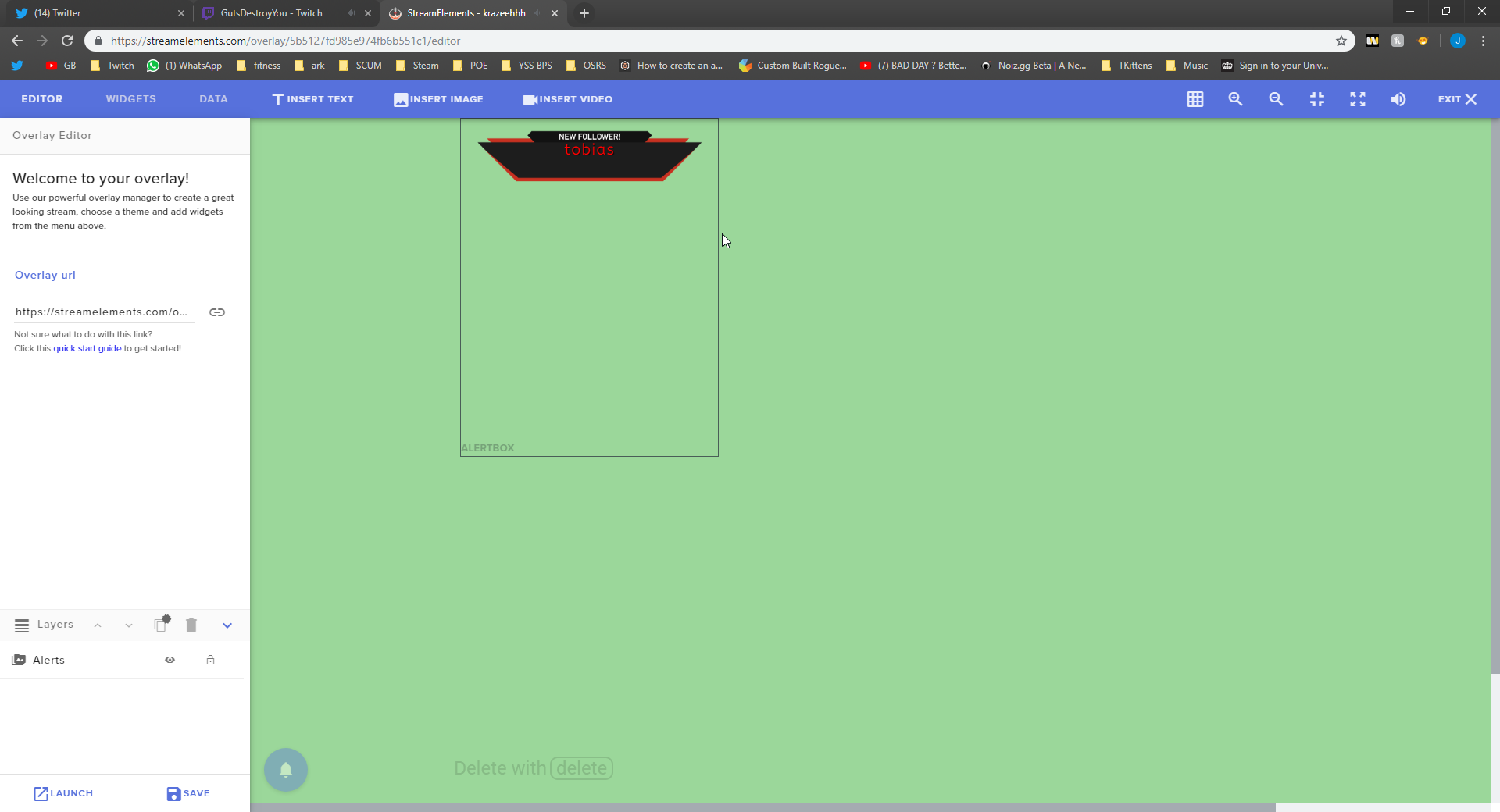 twin sentinel
In the text settings after selecting the cogwheel of an alert type and switching to advanced.
lament blade
Thankyou so much 
kind epoch
@${customapi.https://decapi.me/misc/time?format=Y-m-d G:i:s&timezone=${sender}/${1:}} do you think this command will work @twin sentinel ?
oops
@${customapi.https://decapi. me/misc/time?format=Y-m-d%20G:i:s&timezone=${sender}/${1:}}
twin sentinel
@lament blade You can try to mute the alerts in OBS.Live.
That will not work, cause ${sender} is just the twitch name of the sender.
kind epoch
@-- Invalid timezone ("england") - Available timezones:Africa/AbidjanAfrica/AccraAfrica/Addis_Abab and it truncates, what am i doing wrong?
@${customapi.https://decapi .me/misc/time?format=Y-m-d%20G:i:s&timezone=${1}} this is the new command line
wanton mango
You would need to type a valid timezone, such as Europe/London
It's also case-sensitive
twin sentinel
Here is a list with all valid timeZones; https://en.wikipedia.org/wiki/List_of_tz_database_time_zones in column TZ database name
kind epoch
Okay thanks guys, that worked. Was nothing wrong with the command line . Thanks
karmic canopy
How do I show a redemtpion alert on my stream
twin sentinel
Add the store redemptions widget to your overlay.
twin sentinel
The redemption image can only be changed when the type is stream perk, as it will show the gif/pic you uploaded to the stream perk itself as preview image.
 median pine
When I do the command ${time.PST} it is giving back the wrong time. Any help appreciated. Its 9:00 roughly and it keeps coming up as 16:00
twin sentinel
PST = Pacific standard time it is 09:10 currently in this timezone.
median pine
Yup. It keeps coming up in the 16:00 hour
wanton mango
Use ${time.PST8PDT}
wanton mango
8, not ampersand lol
wanton mango
It's also case-sensitive*
median pine
That did it. Thanks !
karmic canopy
How do I make my chatbot a supermoderator?
jade remnant
in twitch chat /mod streamelements
elder sorrel
@karmic canopy !level username 1000
karmic canopy
ty
median pine
Is there a full list of variables? One that is expanded farther than the one on the stream elements website.
karmic canopy
Any way to re-order my redemption store layout?
 cedar fiber
Is there a way to turn StreamElements media requests to play the requests via a discord bot (i.e someone requests a song in twitch chat, a streamelements discord bot joins a selected voice channel to play the requests vs media request in OBS/browser)?
twin sentinel
There is no discord bot at this time. It is planned. No ETA.
lament blade
<@&382267076632379392> When somebody joins the stream how would I put a link?
Like a message when they join.
cedar lynx
There’s not anything to support that, to my knowledge
 weary mist
only thing would be the welcome message that Twitch offers
lament blade
<@&382267076632379392> I'm wondering how StreamElements says stuff without a command said.
elder sorrel
Timers!
cedar lynx
Timers, but those aren’t reacting to anything but the passage of time
strong kernel
@lament blade And in fact you're likely to piss people off doing so.
elder sorrel


strong kernel
@elder sorrel You forgot to ping him
weary mist
@strong kernel 
lament blade
 elder sorrel
@strong kernel Next time for sure! 


 elder sorrel
@lament blade Back in seriousness though. Timers would be what you're referencing 😃
Can also check the Ideas board at https://strms.net/ideas if someone already pitched the idea for a welcome message
Which you can upvote 👍🏻 for more exposure.
lament blade
Kk
 azure smelt
Anyone able to help me with some overlay help?
nocturne pelicanBOT
@azure smelt Welcome to the support channel! Please let us know how we can assist you today and a member of the support staff will be with you as soon as possible.
azure smelt
nvm i got it figured out
slender ice
@cedar lynx of course it not.. as i said ive even try to create new scene and applying it and its still happens can someone please help? :(((
slender ice
@jade remnant me?
jade remnant
yah, sorry, thought i @ you... 🤦
 ocean yacht
Streamelements site down?
twin sentinel
working fine for me. What site do you want to access?
ocean yacht
Im trying to get into streamelements and its just a white screen
twin sentinel
We are checking internally at the moment.
ocean yacht
Okay
 quiet coral
Down for me too
 hidden hamlet
I have the same thing but i just get a black screen
 sturdy scarab
Is there any way to rename the SE bot?
elder sorrel
Yes. Are you using Ground Control or OBS.Live @sturdy scarab ?
sturdy scarab
im. a. bot. haha what am I missing then? xD
tight harness
You click on the menu icon in the activity feed, then you click on Stream Settings, then Custom bot name
Follow the instructions
sturdy scarab
Ahh I didnt see this option in GC for some reason.. But its literally RIGHT THERE. Thanks!
tight harness
No problem 😃
 tulip badger
Hello, i've got some problems with my custom widget for the last follower. Custom widgt because i wanted to add custom css to the last follower name. My problem is that it shows the correct last follower name in the web but not in my OBS when import the overlay as Browser source. It displays another pseudo. Why is that ? Can somebody help me please. I'm running out of ideas to fix it
nocturne pelicanBOT
@last adder Please abide by our server rules:
- No advertisement or stream promotion
- Respect ALL server members
- No NSFW/NSFL
 sharp dawn
hey i don't know what's happened but the "banned words" filter is just banning everyone
literally changed no settings it just started timing everyone out, even though they're not saying any of the banned words
is it a bug, can anyone confirm?
strong kernel
@sharp dawn You're not even using our bot.
sharp dawn
it's not for my channel, it's for a streamer i mod for
strong kernel
That would've helped. Username?
sharp dawn
kiwo
strong kernel
Oh, the other other kiwi.
sharp dawn
please don't activate it as she's currently streaming
strong kernel
Can you screenshot a message that was timed out?
 languid dagger
So someone redeemed something from my store and when i go to the redemption side he isnt showing now
sharp dawn
it's the message we put for the banned phrase group
but it's just randomly started timing everything out
strong kernel
Your RegEx filter isn't written correctly.
After "rhaegar" there's an extra | that's causing it to look for literally anything.
Remove that | and you're good.
strong kernel
Highly recommended to learn it, it's a great tool. 😃
And not hard to learn.
http://regex101.com is a good tool for it.
Regex101 allows you to create, debug, test and have your expressions explained for PHP, PCRE, Python, Golang and JavaScript. The website also features a community where you can share useful expressions.
sharp dawn
oh nice! that'll be very helpful
lament blade
Is there a Stream Label that shows total Chat messages sent?
twin sentinel
@languid dagger Is the redemption in your activity feed? Was there an alert and a chat message?
@lament blade I am afraid you would have to code that yourself as a custom widget.
languid dagger
@twin sentinel its not in the redemption history but there was a chat message
lament blade
@twin sentinel No of any code readily available?
twin sentinel
There is a chat emote counter widget, but I think it is not that it will be helpful.
lament blade
@twin sentinel Have a link? thanks 😄
languid dagger
i searched the name of the person and nothing was there
 worn blaze
Hello, Anyone mind helping me? My host alert is not appearing on screen at all. Minimum is set to 0 and everything else is working but host.
strong kernel
0 viewer hosts will not appear.
strong kernel
How long ago?
worn blaze
about 30 mins ago
Im getting the notifications in my chat as a greyed thing so i know they are happening, but it isnt showing in my activity feed and i do have it checked in the filter
Is there something I can change to fix this?
 clever mango
@worn blaze was your friend live or had they already gone offline when they hosted?
worn blaze
Ive tried both online and offline hosting
clever mango
Our system typically does not show hosts that come from offline channels as a way to limit auto-hosts. This decision was made as a result of feedback from a lot of the community who asked for us to not show auto-hosts.
worn blaze
Is this a recent update?
clever mango
It is not
clever mango
Let me look into your account
worn blaze
Thank you
grand torrent
hi how i make icon size big abit its look like small here?
worn blaze
Thank you Terra! Was it something I did wrong in my settings?
clever mango
@worn blaze
Everything seems fine here according to current system behavior:
In order for a host to be received by StreamElements:
- the person hosting must be online according to Twitch when they host (not auto-host and not an offline /host)
In order for a host alert to show:
- the host must include at least the minimum number of viewers set in the alertbox settings
grand torrent
do i can chagne size of icone or not ?
worn blaze
So 0 no longer works as a place holder?
clever mango
@grand torrent When you select the hypecup widget there are settings in the left side menu
in there you will be able to adjust the size of the tokens
for each event (follow, sub, etc.)
strong kernel
The large slider bar labeled Token size.
clever mango
 hidden hamlet
Is it something wrong with the streamelements website?
clever mango
token size
hidden hamlet
I just get a black screen when i load it up
clever mango
We are StreamElements
worn blaze
Thank you for your help Terra! Have a great day
hidden hamlet
Meant elements not labs
clever mango
@worn blaze Please let us know if you have receive a host that meets those conditions but does not appear and we will do our best to look into it
@hidden hamlet The site is loading just fine here
worn blaze
Will do :] thank you so much
clever mango
Which page are you trying to load?
hidden hamlet

StreamElements
StreamElements is the leading platform for live streaming on Twitch and Youtube. StreamElements features include Overlays, Tipping, Chat Bot, Alerts, Loyalty, all fully integrated and cloud-based.
Just brings me to a black screen
clever mango
chrome?
hidden hamlet
Explorer
clever mango
Try control+shift+r
but I also recommend google chrome for best experience with our website
grand torrent
oh my freaking god thank you so much @clever mango
hidden hamlet
Looks like it was a browser problem @clever mango
clever mango
👍
worn blaze
Urm is it possible for top tip to be truly of all time rather than yearly?
clever mango
top tip overlay widget?
worn blaze
It is displaying it within 365 days
clever mango
all-time top tip would be the top single tip received in the entire history
in the overlay widgets there is no calendar year or 365 day period
The options are session, week OR 7days, month OR 30 days, or all-time
worn blaze
Ill check it again
clever mango
ok 😃
clever mango
I'll take a look
worn blaze
Is it single donation?
worn blaze
Oh that makes sense, okay never mind my bad
worn blaze
Oh then it isnt correct
clever mango
👍
worn blaze
a guy donated till it met $200+
clever mango
I see, so he would appear possibly as the top tipper
worn blaze
grand torrent
i have problem with follower its look like out of cup ?
kind epoch
Hi, so i switched hype cups and after doing so, the cup never got filled up again with the pre set amount that i had set. Is this normal or does obs treat the new cup as brand new information from scratch?
grand torrent
can someone help me with this?
worn blaze
@grand torrent Its going to look like that if you have a big image
The cup is an image its not the best barrier
grand torrent
what size is good?
worn blaze
Cup resets :p
grand torrent
nope thanks for the help^ but i think i will talk supporters 😄
i even chagne picutre
still out of it
strong kernel
Change the token body bounds.
grand torrent
which token size i put?
grand torrent
oh what i should put?
strong kernel
That's up to you to figure out by testing it.
grand torrent
my token size is x2.5 is there anything i can make fit ?
strong kernel
Again, it's not token size you're changing right now, it's body bounds.
grand torrent
what is normaly for body bounds?
strong kernel
There's no "normal" or "right" setting for it. It's what you need it to be for your token.
grand torrent
i think i fix it thanks guys
can i ask 1 thing how i make everything showing like subs ...etc all showing with out disappear after i exit obs ?
kind epoch
Oh my welcome to my club @grand torrent
That's what i would like to know as well.
Been like that for weeks for me
So now i'm not the only one with the problem.
grand torrent
dose have anything to do with this ?
 torn yacht
How do I get the audio from media/song requests to be heard in my stream?
strong kernel
Either just have media request playing wherever you're controlling it, or add a media share widget to your overlay and use the "show on stream" option.
In either case, it's considered desktop audio.
strong kernel
Then you can't use much anything.
Consoles aren't capable of much when it comes to streaming.
 jade flicker
hi can someone please help me im dropping frames and i dont know why. i should my internet is good and my PC isn't bad?
nocturne pelicanBOT
@jade flicker Can you please provide a log from your last stream. In OBS go to Help > Log Files > Upload Last Log File. Once this is complete, please provide the link to the log file.
jade flicker
Ive been streaming for 2 years or 3 and ive been having frame drops badly lately i cant even stream now.
strong kernel
Follow the instructions in the link above.
jade flicker
i dont understand what im looking at?
twin sentinel
This is an analysis of your log file with tips how to improve your set up.
grand torrent
do guys know how do that?
how i make everything showing like subs ...etc all showing with out disappear after i exit obs ?
twin sentinel
Create an overlay and add it as browser to your OBS.
 craggy jewel
@twin sentinel any idea why the follower goal is pulling numbers from twitch?
it says 177 followers when I have 196
twin sentinel
https://streamelements.com/dashboard/session -> Goals tab
craggy jewel
ah cheers lad
jade flicker
so which server would be best for me? https://i.imgur.com/GFhuT6U.png
 twin sentinel
Picking a server with sufficient bandwidth, low RTT and a high quality rating will ensure the best results when streaming to Twitch.
twin sentinel
I would try Chicago.
craggy jewel
@twin sentinel how do I get the text to sit under the part where it says "new follower"
twin sentinel
Select the cog wheel next to the event, text settings > advanced settings.
craggy jewel
thanks lad
 grave lance
I would like to set my chat to only allow mods and subs to only be able to post clips, does stream elements some allow for this and prevent others from doing so.
strong kernel
You can use the link filter in the spam filters.
grave lance
ok thank you for this information.
 midnight aurora
My streamelemnts randomly stopped working for some reason. it isn't banned or muted, and it is modded.
twin sentinel
Make the bot leave your channel, log out, log back in and reinvite the bot.
midnight aurora
alr trying right now
 quiet mesa
Hi, I can't get an image (png format) to upload regardless of how many times I try. It's just a little bar to highlight the last event that I wanted to add to my event list to customize it.
strong kernel
Use Chrome.
quiet mesa
Chrome was un-installed bc it was crashing my CPU
strong kernel
The site's optimized for Chromium as that's what's used in OBS browser sources.
Other browsers, especially Edge, have issues sometimes.
strong kernel
Your mileage may vary but I hear fewer issues with Firefox compared to Edge.
quiet mesa
and thanks for the help 😃 nothing against you with chrome, just my pc can't handle it
ok, thanks for the information
strong kernel
But to summarize: Edge is 💩
😄
Though they're actually changing it to use Chromium soon.
Hopefully that helps things out.
quiet mesa
alright, thanks again for the help
grave lance
so link protection is supose to be turned on correct, will this still allowed moderators to post links as well. becuase I do not see a way to have them allowed as well. I do see that subs is turned on as per our conversation.
strong kernel
Moderators can't time out moderators.
grave lance
ok thank you, oh and one more question I do not have word count on and yet ppl still have posts being deleted based on the number of words posted
strong kernel
Do you have a screenshot of this happening?
grave lance
i will make a screen shot next time it happens, on my next stream
 subtle orbit
twin sentinel
subtle orbit
twin sentinel
This is the StreamElements Support discord. Better to watch videos about comparison for Voice-Tools on the internet.
 regal heron
Hi guys, I'm trying to set up the spam filter and it's not working
I've got everything checked as enabled, I had the bot part the channel and rejoin, I tested the exact same messages in the test thing and confirmed that it matches a control group
what am I missing?
I'm using the banned words section
I've also made sure there are no user levels excluded
strong kernel
@regal heron
regal heron
we had a non-mod try it too, it didn't work
strong kernel
You're... missing the point.
Take a nice look and tell me what isn't listed there.
regal heron
Oh, got it.
Okay thanks.
We have the bot running under a different name via ground control, which is a moderator
that's where the confusion came in
strong kernel
That's useful information.
regal heron
For some reason I was thinking the spam filter would act under the updated bot's name
strong kernel
It should.
regal heron
we'll try it out and let you know in a bit
strong kernel
Bot's not responding at all. Double check settings, part bot from channel, close and reopen Ground Control, and join the bot to the channel.
regal heron
I disabled the !ping command, that's the only reason it doesn't respond
strong kernel
You can't disable the ping command. You made it moderator only.
 main musk
how do i setup stream elements?
strong kernel
Check https://strms.net/welcome for some starter videos.
StreamElements Chat Bot for Twitch and YouTube Live moderates your chat and keeps it clean so that you can focus on what’s important, your stream. StreamElem...
 nocturne arch
Is there a way to disable incoming emails?
Trying to find email preferences or notifications, is there options for this?
strong kernel
There's an unsubscribe link at the bottom of every email. Be sure it's what you want, as it's much harder to get back on the list.
 bright rune
trying to set up obs-live with the best settings for twitch in the system settings area
any help?
 icy topaz
Anyone having any issues with SE's website not loading once you connect your account, and overlay links not showing up in OBS found a fix?
Some people are having the issues and some people arnt
 novel whale
is there a list of what subs StreamElements have Perm?
zenith widget
@bright rune it highly dependent on a lot od things, one common thing is your pc specs. I suggest googling the question but inateqd of obs.live just use obs studio
@novel whale theres is no such list
 zenith widget
@icy topaz i dont see any other reports of this. What browser are you using?
icy topaz
Im not the one experiencing it, im a mod of two streamers who're experiencing it who're both using chrome afaik. I also use chrome and it works fine for me
But its the website and the browser source overlay links
zenith widget
@icy topaz tell them to clear cache and restart router for 5 minutes to cleae the routers cache
icy topaz
Theres 2 of them on the same router one is experiencing it and another isnt too
zenith widget
It doesnt hurt to try what im suggesting. It might be a connwction thing between the pc it self and the router and restarting the router might help
Do it and if it doesnt help then we can move to the more advamced things.
 oblique compass
I'm not sure if this is a twitch server issue or something with OBS. I have been streaming at 720p 60fps no problem, as my PC can do more, however, my average upload speed isn't the greatest, at 7-8 mb/s. I tried all day to stream but for some reason kept dropping a massive amount of frames (unwatchable) due to network issues. My internet has been fine all day, and continues to hold a steady download and upload rate both off stream, and attempting to stream. Is this due to NA twitch server communication, or something else? I have tried connecting to every server available to me, only 1 of which was marginally better, only dropping about 25% as opposed to 30%. My closest server is ATL if that matters.
I should also note I have varied resolutions and bitrates from 5000-2500, still dropping 30%
zenith widget
@oblique compass use the twitch server tester pinned in #helpdesk-selive
Try thr router restart i mentioned above as well
Dont use 5000 bitrate
Try only 4000 or 4500 because you are close to the max upload speee
icy topaz
One of them cant try it because the other person on the same connection is live atm, but the other one is going to try it in a bit. ill let you know how it goes.
zenith widget
Well they can try when its safe to try it
Also edtensions might be causing the issue, firewqll/anti vieus program
If these fail to help the load issue then we can check the more advanced
oblique compass
I really just wanted to emphasize that I tried many settings to remedy the issues. My usual settings are 720p60fps at 4200 bitrate. I usually drop no more than 0.2% due to network and 0 from rendering/encoding. I tried lowering settings all the way down to 480p 2500 bitrate, still dropped 30% due to network. Ran the software also, every server is quality 0, highest server is 3400 kbps
Again, I did not have a problem with any settings for the last week, it has only been a problem today.
 slate mulch
So on twitch ${user} is the person you're mentioning. But what is the one for the user of the command?
icy topaz
should be ${sender}
slate mulch
Thanx
zenith widget
@oblique compass if the server checker is giving you 0 quality on alk servers thrn most likely its an ISP issue
oblique compass
Thanks, hopefully I can get it fixed tomorrow
icy topaz
Power cycling their router worked for one of them, the other will try it later when the net isnt being used by others. Thanks for the help
zenith widget

 cosmic lynx
Hey I can't add donation panels on twitch I'm using stream elements, this is struggle now
nocturne pelicanBOT
@cosmic lynx Twitch's official help guide for Panels: https://help.twitch.tv/customer/portal/articles/2416760-how-to-edit-info-panels
zenith widget
just click on the link after the image
cosmic lynx
I did but it's a zip file and tho
zenith widget
Click on the link thats the 2nd sub step
zenith widget
i'm not sure what you are showing at the moment 
also can you please use the windows screenshot?
zenith widget
this has nothing to do with us.
sharp dawn
hello!
in the banned word filter, is there a way to actually ban people who use the words? right now there is timeout option only
 floral vortex
@zenith widget I am here. At the moment im live at my stream, but i guess we will find some time to handle the import from Tipeeestream to SE :)?! best regards
wanton mango
@sharp dawn I believe the bot can only time people out but cannot automatically issue bans, they still have to be done manually
zenith widget
@floral vortex Last I heard they were being DDoSed.
but still, it doesn't hurt
make sure you have thier dashboard open and ours as well
and then use the import tool
make sure you are logged in there
sharp dawn
ah ok!
wanton mango
Also welcome back @zenith widget! hope you had a nice time
zenith widget

 trim narwhal
anyone else has problem with alerts? if i launch the overlay it doesnt show the alert...
nocturne pelicanBOT
@trim narwhal We have added a new feature, which allows testing of alerts only in the Editor or in both Editor and OBS. Hover over the bell and on the right side toggle it on.
https://media.discordapp.net/attachments/342748377416466442/564781551649292299/unknown.png
trim narwhal
ok this is epic
floral vortex
@zenith widget I opened both Dashboards.
And i tried the import of the alertbox again.
Maybe i just dont know how to find it, but nothing happened.
twin sentinel
What version of alertbox are you using on Tipeee?
floral vortex
@twin sentinel Alertbox v2
twin sentinel
The import just copies the assets to the StreamElements library, not the whole alertbox afaik. So you would have to set up an alertbox in our system and customize it with the assets imported from Tipeee.
floral vortex
And where do i find this? I cant find "alertbox" or "chatbox" and so on
zenith widget
Go inside an overlay -> widgets on top -> add and alert box -> click on it
cogwheel on follower alert for example
 graceful cloud
Anyone around to help out with a problem?
zenith widget
and try and change the shart
floral vortex
 nocturne pelicanBOT
@graceful cloud Welcome to the support channel! Please let us know how we can assist you today and a member of the support staff will be with you as soon as possible.
graceful cloud
I've been using an overlay/alert package i got from a 3rd party site awhile back, good quality video files etc, always built my overlays manually via OBS and recently found out the gloriousness that is stream elements, had no problem importing the alertbox via the files i have from the download, but when i attempt to import a scene/overlay i get an error "platform mismatch, please change to your twitch channel"
zenith widget
where are you getting that?
graceful cloud
So there are url files in the files ihave that auto import into SE, it worked perfectly fine with alertbox but throws up that error with overlays
cedar lynx
where does the actual error happen? in OBS?
graceful cloud
Oh
zenith widget
@graceful cloud Sorry
zenith widget
but don't share links like that
zenith widget
who provided you that link?
graceful cloud
This is from nerdordie.com from a overlay package i purchased a while back
zenith widget
graceful cloud
just recently found out about SE, and also found out they support SE import for the package
cedar lynx
Nerd or Die supports it?
graceful cloud
yeah theres whole sections of their site talking about it
zenith widget

cedar lynx
you might be able to get support from them to do the import then 🤔
if their package is the one causing errors
cedar lynx
ohhh makes sense
graceful cloud
I mean technically I could go through and build it manually in SE, i have all the assets on comp, but honestly i'm just hoping i can get an easy import to configure
end of the night, streamed all night, felt like working on overlay a bit, default SE overlays just arent my taste
zenith widget
i think i found the issue 
so at this point check with them really
and if you have to, give them this screenshot
tell them that we found this error message
graceful cloud
blah they don't have quick support like this though hah
zenith widget
sorry 😦
we are working with them in helping them integrate their things to us, but i'm not sure on the stage we are at
and how our contact with them works.
graceful cloud
Ahhhh okay
It's not the end of the world tbh, worst case scenario I just wake up tomorrow and build it manually
zenith widget
graceful cloud
its weird though
i bought the overlays about a year ago, bought the alerts today, the alert link worked but overlays didnt
year ago, september shrug
zenith widget
well the work with nerd or die started most recently
most likely they deleted the overlay from their account
if i see that error in the dev console
i just tried using the shareable links i use in #widget-share and it worked normally
graceful cloud
well in general i've been using those files for stream since september, never altered them but never got around to stream elements until about last week
zenith widget

 sterile solar
Hi, I wasn't sure what channel to ask this in. but im having problems loading the website or even logging in the whole page is White for me except from the main page. im trying to goto my dashboard and this is all i get
sterile solar
ok so im assuming i just clear cookies? 😄
zenith widget
What I wanted to post is this: If your tipping settings page is white, that would mean a specific cookie is being blocked on the page. Make sure that streamelements-yoink.netlify.com is allowed and not being blocked. In Google Chrome you can check by clicking Secure on the address bar, and going into cookies. You can also access these settings from chrome://settings/content/cookies
sterile solar
Theres nothing blocked and i just allowed "streamelements-yoink.netlify.com" but its still white for me
zenith widget
chrome right?
sterile solar
yup
zenith widget
try incognito
sterile solar
Still white, I dont know if it has anything to do with this but i've also had a huge increase of reCAPTCHA's appearing for most sites i regularly use
 carmine prairie
@zenith widget any particular reason S.E. Pay isnt shown up under the Revenue section of my Stream Elements Dashboard?
carmine prairie
@zenith widget so im not an isolated incident? xD
zenith widget
no
carmine prairie
ok cool
zenith widget
@carmine prairie can you tell me where you are from and provide a screenshot from the dashboard?
a full screenshot
to DMs
carmine prairie
@zenith widget sure thing
zenith widget
got it
carmine prairie
was meant to send as a DM
zenith widget
no worries
Can you go here: https://streamelements.com/dashboard/tipping-settings
and tell me on the other tab if you see SE-pay?
carmine prairie
yep
zenith widget
if yes - screenshot and DM it
carmine prairie
oh, i can go to this page but i dont see SE-pay
zenith widget
@sterile solar the reCAPTCHA warnings are actually ISP issued ones. Contact them or restart your router for 5 minutes
sorry for not saying anything
sterile solar
its fine dont worry about it 😄
 raven wharf
Hello. I need help migrating my allerts from U.Muxy to StreamElements
I get the videos but can't flip the video using Y axis as I did in u.muxy
How is it done ins StreamElements?
(I used CSS)
twin sentinel
When you are in the settings of the alertbox in an event at the overlay editor, there is a switch to enable custom CSS.
twin sentinel
We maybe use other variables to catch something like the message or the user. Check the channel header of #dev-chat for a documentation for the variables.
 foggy cliff
Yo, is there a way to use SE to auto-tweet when I go live, but to have the content of the tweet include the most current Title instead of a generic message?
 rapid vault
I've been having an issue where one person has been charged for a tip, but it does not show up on my end at all in Streamelements. Is there something I'm missing or a way to tell if their payment failed or something else happened?
zenith widget
@rapid vault Did they use PayPal? I know about this sort of, as they contacted us over ticket, but for this type of things its best the streamer gets in contact with us
@foggy cliff Social Media on the left of the dashboard
foggy cliff
I got to that section and linked twitter
but it appears the auto-tweets will just be a generic message "so-and-so just went live" every time
rapid vault
@zenith widget Hmm, I assumed they used StreamElements pay because they said they used a credit card. But maybe it was paypal instead. Good question, let me ask them
zenith widget
@rapid vault If its paypal - they need to check their paypal account, if its credit card, then maybe there is a long process currently between his bank and our mediator for SE.Pay of verifying the tip, as I don't see anything on our side as well.
@foggy cliff Yes, exactly that. Unfortunately, there is no way from our side to make it be "I just went live with this game" - the variable has been requested a lot of times.
nocturne pelicanBOT
@foggy cliff Check out the new ideas board https://strms.net/ideas. You'll be able to add your ideas, upvote others that you like, and track their progress with email notifications. Adding and upvoting ideas also helps the staff know which ideas should be prioritized so please take some time to upvote the features that you’d like. The #💭︱feedback-and-ideas channel is best used for discussing ideas already on the board.
foggy cliff
@zenith widget not even the "Title" item from Twitch? (I don't change games)
zenith widget
no
 frank dove
Hi there! I've been having this issue for a while now and I couldn't find a way to fix it so here I am. When I change in between scenes in obs I have to wait a while before my overlay loads which results in a very awkard moment of waiting for all the stuff to appear on screen. I could only avoid this if I had the "keep visible at all times" thing ticked. However, if I do have it like that my alert sounds are doubled.... Could you please help me fix this?
nocturne pelicanBOT
@frank dove Check out this tutorial for OBS’ studio mode which allows you to preload scenes before transitioning. https://www.youtube.com/watch?v=W8iWsD2Lq3U
frank dove
I already did that, they do not load in the preview section
gentle imp
!add
nocturne pelicanBOT
To add your overlays to OBS, add a new browser source in your scene. Paste your overlay URL in the browser source properties, set the dimensions to 1920x1080 (unless you changed them on the website), and ☑ “Shutdown source when not visible” https://youtu.be/KDvLynUqXI4
gentle imp
make sure to tick that on all browser sources or it will double sounds
also if you are with 2 always open, like in preview mode it will double sounds
frank dove
they used to be ticked on all of them and I had the double sound problem until I unticked everything but the source I was in
no, I am not open with both of them at all times
gentle imp
scenes take sometime to preload, max 3 seconds
frank dove
I have 2 scenes I switch from all the time with my streamdeck
gentle imp
check that video regarding scenes transitioning
frank dove
I did, I did it now as well and the other scene is not loading the overlay ( the one in studio mode which is not visible )
gentle imp
animated one?
there isn't much to be done afaik, it depends on your hardware and connection
frank dove
It is not animated 😦 and my streaming PC is pretty good too, my internet speed is 1 gbps >.<
well... thank you for your time, I guess I have to suck it up :/
gentle imp
solved in DM ⤴
worthy badge
I didnt really understand what people do with the stream perks/
anyone can explain me shortly?
twin sentinel
Here are examples of stores of other streamers: https://ptb.discordapp.com/channels/141203863863558144/370226812669788161/501442163112935444
gentle mortar
Is it possible to get current song command if the streamer is listening to the music on youtube?
gentle imp
if he is playing the music with SE media request yes
gentle mortar
nope
gentle imp
not that I'm aware then
gentle mortar
meh
gentle imp
no problem
worthy badge
add shuffle for the playlist while no media requested please
cedar lynx
hey friends, we are real people in here trying to help out, there are definitely staff around but a lot of us are simply community volunteers (like me) 😃 just keep that in mind as you are requesting help/support!
@lament blade I think you will receive better support from the OBS discord, as game capture isn't related to StreamElements
nocturne pelicanBOT
@lament blade For the best OBS support, please join their Official Discord @ discord.gg/obsproject
floral vortex
@zenith widget I guess im just to dumb. I try to make a working AlertBox.. on SE... Since one Hour. As you can see i uploaded my "video" and a sound, i overwrited a Alert Message. And i disabled variation Follower alerts.
But this comes up....
I saved multiple times and i reseted multiple times, i deleted all, created again.
Why is this so complicated ffs.
zenith widget
let me take a look
floral vortex
@zenith widget Is it also possible to make it looke like my old one, in TipeeStream?
https://i.gyazo.com/ca65745cab45746c493b78bbf9f03b83.mp4
I didnt found options like that.Also to move the "Video" -30° for example.
zenith widget
no
but since i'm not familiar with the tippeeestream thing
didn't what Benno hold true?
Ok I see what the issue is
you've turned on custom css
floral vortex
@zenith widget Benno just told me that not the alertbox will be Copied. Only assets. No idead what assets are. But i made all my alerts like "1 $ alert video/gif" on my computer. So it doenst matter, if the "online cloud data" got copied. I can easylie upload the videos/gif or whatever and Mp3/sounds. Cause i named them all for what i am using them
floral vortex
@zenith widget okay i see. I tried to get the EXACT same css from tipee alerts. but i dont get them
zenith widget
floral vortex
okay. got it.
floral vortex
But getting the alert like this, isnt possible?
https://i.gyazo.com/ca65745cab45746c493b78bbf9f03b83.mp4
twin sentinel
It is possible, but you have to custom code it with CSS yourself.
 scarlet tiger
Why does streamelements bot last month delay a few seconds (for example, when redeems)?
floral vortex
@twin sentinel okay, good2know. So i need to get the css code from my alerts 1to1.
twin sentinel
Not 1to1, as we are maybe using different variables for like the message which was send by the user and the vido file variable.
In top of the #dev-chat there are links with the variables supported in our system.
@scarlet tiger For me the bot is answering instantly in your channel and a lot of other bots, too.
scarlet tiger
@twin sentinel Not at my channel. With a few streamers, the shoe has a few seconds delay in redeems.
twin sentinel
Maybe the redeems have to be processed in our system first.
scarlet tiger
Previously the answer was immediate, but it doesn't matter.
 short hound
Hellooo, I'm trying to go through my custom commands key words and the ones I have already added aren't showing up?
twin sentinel
Is the command set to be usable online, too. Have you hit enter after entering a keyword?
short hound
@twin sentinel it's set to both, and yeah I have
twin sentinel
can you post me a screenshot of the set up of an command with a keyword, which is not working?
short hound
Once I push enter the keyword it disappear
twin sentinel
So when you hit enter, it does not apper as a bubble after that?
short hound
@twin sentinel Some of the custom commands it works but other it doesn't show up?
twin sentinel
I am not sure what could cause this. You could try to clear the browser cache and log out and log back in your dashboard.
 untold pollen
is there any place i can download the sounds streamelements uses for the bit sound effect?
sound effects*
short hound
@twin sentinel I will try thank you
twin sentinel
untold pollen
thank u ! :D
 upper steeple
I have a donation alert variation set up to go off when the amount is exactly 6.66, but I had a donation today that was 6.67 and it went off with the 6.66 variation.
Is this a bug?
viscid osprey
Isn’t the sub point widget supposed to auto update upon losing sub points?
@hoary python just a guess, do you have some setting that says “greater than or equal to”
upper steeple
@viscid osprey
you tagged the wrong person, but since I know it was towards me.
No I have it set to "when amount is exactly 6.66"
lament blade
When putting your own image in as a follower notification/overlay, isn't it possible to freely! move the text that says "bla bla bla has followed" ? otherwise, this is a feature that you must add
twin sentinel
You can freely move the text @lament blade In the advanced text settings.
lament blade
Thanks! can you also rotate it somehow?
twin sentinel
I am afraid that has to be coded in custom CSS.
lament blade
Damn, please note that as a feature for the future. Because I think many, as myself, prefer to make a somewhat final product in photoshop/illustrator and simply add the text/effect and so forth, through something like this.
But gotta say, the more I get into this streamelements thing and with the obs.live etc. it's all very well made, compliments for that to the whole team!
nocturne pelicanBOT
@lament blade Check out the new ideas board https://strms.net/ideas. You'll be able to add your ideas, upvote others that you like, and track their progress with email notifications. Adding and upvoting ideas also helps the staff know which ideas should be prioritized so please take some time to upvote the features that you’d like. The #💭︱feedback-and-ideas channel is best used for discussing ideas already on the board.
 unborn pelican
hi im really new to streamelements and have specifically downloaded and installed windows on my MacBook so I could install obs.live. I was wondering if there is any tutorials on how to get game capture to work or do I have to use window capture like I do with obs studio and have to split my screen?
twin sentinel
OBS.Live is just a plugin for OBS Studio which brings the chat and the Activity feed to it. You can try to add your gameplay to your OBS scenes. Make sure some games require OBS to be started as admin to be able to game capture them.
unborn pelican
how would i run obs as admin buddy? Iv tried to game capture but the elgato isnt an option
i mean iv tried adding game capture to my scenes
twin sentinel
I am not familiar how to set up the elgato. But isn't it listed in video capture devices?
You can start OBS as admin by right click the link on your desktop and select start as admin.
unborn pelican
ahhhhh you legend i think iv got it working it was in video capture devices not game capture.
Last question do i have to have elgato game capture running at the same time as obs live
sorry for the hassle
twin sentinel
I am not 100% sure, but I think the Elgato Software has to be runing to make OBS able to see and capture the device.
twin sentinel
Try to unplug all cables, reboot your PC and hook everything back up and start the elgato Software and then OBS. I am not sure on this one, but I had one user which helped these steps with a similar issue.
unborn pelican
perfect ill give that a blast u legend thank you
twin sentinel
Where are you streaming from? Where do you game from? console?
 whole wolf
I set up a store item (sound effect) - the GIF plays in the edit screen when the sound plays, but not in the browser source itself.
twin sentinel
Try to clear the browser source cache in OBS.
whole wolf
I did. It also does play when I just view the browser source in a chrome tab.
doesnt play
elder sorrel
Change it to Stream Perk
whole wolf
Ah. That worked.
Why does Sound Effect option have a GIF then? hehe
image rather. hehe
elder sorrel
Sound Effect is only the audio. Stream Perk being the image/gif + audio 
real gate
So I made a store redemption that has a gif, but my other redemptions do not have a gif and the gif is now showing up on all my store redemptions, and I did check the store overlay and it doesnt havfe the image in it
elder sorrel
Do the other store items have their own image?
real gate
No, they're sound effects
elder sorrel
Change it to stream perk for all that have Sound effects
real gate
stream perk?
elder sorrel
As I mentioned just above your first post: "Sound Effect is only the audio. Stream Perk being the image/gif + audio"
upper steeple
I have a donation alert variation set up to go off when the amount is exactly 6.66, but I had a donation today that was 6.67 and it went off with the 6.66 variation.
Is this a bug?
real gate
Just checked
it is set as a stream perk?
the rest are sound effects? or should I set all of them as stream perks?
elder sorrel
Set them all as Stream Perk.
real gate
Thank you
elder sorrel
Maybe a bug, @upper steeple
Sorry I saw your message earlier but just been super swamped at my day job.
On lunch 🌮
Looking to see if Dev is available 
upper steeple
@elder sorrel ah gotcha, thank you
 fervent salmon
hi guys, i just tried turning my stream on, and my whole screen is green on twitch when obs is showing my game
only sound works
looking like this https://gyazo.com/ffbbc695bf20a58f422adf53d5c00127


 elder sorrel
@fervent salmon For some users it helped to set the color format in OBS to i420. in OBS: Settings > Advanced > In Video > Color format = i420.
fervent salmon
amazing that fixed the job, thanks a lot
elder sorrel

real gate
@elder sorrel So it fixed it for a minute doing that but now its showing the gif on half the of the sounds even though they're all stream perks
elder sorrel
Try removing the store redemption widget in your overlay -> Save -> Add the Store Redemption Widget again.
elder sorrel
no prob
@upper steeple If you're not streaming currently: Have you tried doing a Test alert in the overlay editor entering $6.67?
viscid osprey
Anyone know about the sub point widget not auto updating when someone falls off? Or do I have to go live for it to update? In OBS it still shows the old number
elder sorrel
Can you show a screenshot of the tip variation, SimplyFluffy 😃
@viscid osprey That's the one provided directly from Twitch right? Not a widget SE Provides?
I haven't used the new stuff yet personally 😅
viscid osprey
I went into SE widgets yes and used the sub point widget
it pulls from twitch data
upper steeple
@elder sorrel
elder sorrel
@viscid osprey Also I believe just like the other ones: It only goes up. It does not go down. You'll have to manually update.
@upper steeple  Now that's puzzling.
upper steeple
@elder sorrel yep i thought the same thing
unborn pelican
hi could someone help, im on streamelements trying to update one of the template overlays and add my own custom alerts. However when i upload my webm file its not transparent and the video plays with a black background
wanton mango
@unborn pelican Are you using Chrome or Firefox?
unborn pelican
its ok buddy i figured it out 😃 only took me about a hour hahaha
 thin garden
Hi, i need help with the stream elements "contest"
(In spanish the exclamatin works with the opening "¡" on the start of the sentence and ending with this one "!")
when the timer ends for the contest it puts a msg with an opening exclamation being like this: "¡/me" so it just sends a msg on white since there is an "¡" before the /me command, i guess it's because since it's on spanish lang it wasn't checked or something but that is an error, is there a way i can change this?
 dawn lily
hello whenever I stream and someone hosts me the alert doesn't come up on stream but every other alert does please help
nocturne pelicanBOT
@dawn lily Due to recent changes to Twitch API, we have filtered out hosts and will only show these ones on your activity feed:
- All manual host events (0 hosts included and if filter set to 0)
- All auto host events with at least 1 viewer
 woven sapphire
where do i activate a tts doantion?
cedar lynx
it means it was not filtered because it was a test, and it was NOT a manual (0) host or auto host event @dawn lily 😃
twin sentinel
@woven sapphire In the settings of the alert in the alert box.
woven sapphire
in the overlays right?
twin sentinel
yeah, in the overlay editor.
dawn lily
@cedar lynx I am confused what do you mean filtered and what do you mean test someone physically hosted me and the alert didn't work
cedar lynx
you said the host testing works. I was explaining why the test worked, but perhaps not a live host that you got that was filtered as explained by the bot.
filtered means, it won't show up
woven sapphire
thanks so much @twin sentinel
thin garden
any wonder about my problem? e.e
cedar lynx
@thin garden unfortunately I am not familiar with the multi-lingual settings
thin garden
but do you know any way to change that response?
the one that pops up when a contest ends?
dawn lily
@cedar lynx so why are actual hosts filtered I do not want that to happen
cedar lynx
it's part of how Twitch sends through hosts and StreamElements reducing alert spam. I am a volunteer though so I do not know all the internal reasons for it. ¯_(ツ)_/¯
strong kernel
Hosts are only recognized when the channel doing the hosting is still online.
dawn lily
i understand but i have been hosted several times in the past weeks and none of the alerts have come up so ...
?
/
?
strong kernel
Stop spamming.
 bleak totem
@strong kernel pls can u talk?, just 1 second
nocturne pelicanBOT
@bleak totem Welcome to the support channel! Please let us know how we can assist you today and a member of the support staff will be with you as soon as possible.
dawn lily
i understand but i have been hosted several times in the past weeks and none of the alerts have come up so … how do i fix this
@cedar lynx
strong kernel
You have been given all of the information about the behavior. Please stop pinging anne and read the responses again.
dawn lily
ok its fine i will just use slobs for alerts
thin garden
are you using streamlabs obs or live obs? @dusty light
 dusty light
live obs
thin garden
isn't there supposed to be a chat in the live obs next to the preview? e.e @dusty light
cedar lynx
you can use the chat widget in your overlay editor @thin garden
cedar lynx
you want it to appear on your stream overlay, correct?
dusty light
yea
cedar lynx
have you created a StreamElements overlay yet?
strong kernel
This video is a full guide on how to use our overlay editor, which you'll be using to create an overlay that includes your Twitch chat: https://www.youtube.com/watch?v=LwAfMIR3Cj0

StreamElements Overlays are loaded from a single browser source in your streaming software, making streaming easy. https://streamelements.com/ StreamElements...
cedar lynx
nethyr got you covered by now, I ran off looking for that link 😅
 serene rune
Can someone help me setting it up so my viewers can request a song when they donated?
and it comes up on my stream
strong kernel

StreamElements Media request enables playing songs and videos in your stream. It's an upgrade of StreamElements Song request and Media share features. ----- ...
serene rune
Thanks 😃