#helpdesk-twitch
1 messages · Page 441 of 1
 trim pebble
 pliant axle
for this overlay, its running a custom widget to pull and display the info
havent quite figured out what exactly its doing, but that's how its done. custom widget apparently in this case
@trim pebble
if anyone can help with my bot issues, just @ me. Thanks
 naive beacon
Is this a known issue? still getting error could not save progress when trying to reset the tip goal to 0. I am an editor for another streamer using chrome get this same error in other browsers. I reported this on Sunday and did not get a response.
https://cdn.discordapp.com/attachments/199460642975907840/564256746198138900/unknown.png

 strong kernel
@naive beacon Check all tabs and make sure there isn't any invalid fields.
naive beacon
there is not that is the only field i am changing everything looks fine
strong kernel
Which streamer do you have manager access for?
strong kernel
Refresh and try again.
pliant axle
So no ideas on the bot randomly not working or posting double messages ? 😄
strong kernel
@pliant axle Force close all instances of bot.exe in Task manager and restart Ground Control.
naive beacon
still same error
strong kernel
Where precisely are you looking? Take a screenshot of the full screen, please.
pliant axle
yeah that's been the only way to get it to work part of the time
naive beacon
i get the error at the bottom right
strong kernel
Now screenshot the data in Labels and Session Data as well.
strong kernel
403 is a forbidden error. Try logging out and logging back in.
strong kernel
You completely logged out of StreamElements? Not just from her account?
naive beacon
yes, just tried incognito mode and that didnt work either
strong kernel
Okay, this seems to be because you're roleplaying her account. I'll bring it up with the devs. Nothing to be done at this time.
naive beacon
someone else did mention they had the issue as well on Saturday
seeing this as well
strong kernel
That's normal, don't worry about it.
Again: The issue is being reported and there is nothing else to be done at this time.
naive beacon
ok thanks
 lament blade
Hey, any problems with alerts? - I have worked with this for some time now, with no problem - but the last 24 hours I have been unable to make alerts work? - It works in the editor, but just cant fetch it from OBS?
 nocturne pelicanBOT
@lament blade We have added a new feature, which allows testing of alerts only in the Editor or in both Editor and OBS. Hover over the bell and on the right side toggle it on.
https://media.discordapp.net/attachments/342748377416466442/564781551649292299/unknown.png

 keen wadi
heyyo 😄
can anyone help me with 1: my alerts arent doing tts even though its turned on and everything looks correct (yes I checked >.< ) and 2: is there a way to make it so i can have my widgets for recent sub/cheer to line up better. atm i have to have the box large enough for a big name, but i dont want it to be scrolling. i didnt know if there is a better way to set it up so it resizes the name or something. i know its slightly hard to explain, but just a matter of if someone with a long name subs then you have to move over all of the names
strong kernel
@keen wadi 1. Check your variations too.
2. Remove width in the position/size section and it automatically resizes to fit the width of the name.
Or wait, you want it the other way around, don't you?
keen wadi
Its turned on for everything. And yea i got that where the box resizes, but is there a way to make it so maybe more then one widget works together to resize
um well
kinda a mix of both almost?
the best way i could show you is a screen shot from a streamer who i noticed the entire bar changed one sec
strong kernel
You want a larger name to fit in a smaller box, not a small box to expand to fit a larger name.
keen wadi
if possible yes, just the best solution to making everything look nice and uniform regardless of the length of someones name

 strong kernel
Can't resize the font automatically in the default widgets, you'd need to custom code that. But generally I'd make a set size for the widget and use center alignment so no matter the length the name is centered in that box.
What you've taken a screenshot of is definitely custom coding work.
keen wadi
ok i kinda figured as much, wasnt sure how to go about that
since it skips the , oh someone just cheered with a long ass name and all of a sudden my other stuff overlaps xD
strong kernel
The only way to have the icons adjust position like that too is having them part of the custom coding.
keen wadi
i gotcha
so the box will resize on its own if you have the width removed
so best solution without coding got it
strong kernel
Yes, a text information widget without a set width will resize its width to fit the name being used.
strong kernel
Check your variations.
keen wadi
I would like to say im not one of those "is it turned on and plugged in " kinda users. I checked everything, and even tried remaking it. the tts is enabled on everything
strong kernel
Seems like it works fine.
keen wadi
and the tts works?
strong kernel
Yep.
keen wadi
I hear nothing. that makes no sense. I dont hear it on se website or on obs
it plays the song, then doesnt do the tts after, it shows the words but no tts
hasnt worked on stream in a long time too
strong kernel
Dunno what to tell you. I can hear it just fine.
keen wadi
does it wait until after the music is over to do the tts?
strong kernel
Yes.
strong kernel
Dunno. This is what I get.
 strong kernel
Depends on your capture software. Can't walk you through that.
strong kernel
I hear the TTS in there.
strong kernel
Starting from 12 seconds in.
keen wadi
does the overall volume of the alert effect the tts?
strong kernel
TTS has its own volume.
keen wadi
i have it at 100
strong kernel
But what it sounds like is you just have everything quiet on your computer.
Compare the overall audio of my capture versus yours.
 strong kernel
I'm not an audio expert, unfortunately.
keen wadi
im so lost as to how you hear it and i dont >.< ahhhh
hm so I noticed the sound bar moving for the audio when it should be talking
but i legit dont hear anything
strong kernel
That's the limit of what I can do. Like I said, unfortunately I am not an audio expert.
keen wadi
its ok thank you for trying
strong kernel
But perhaps...
nocturne pelicanBOT
@keen wadi For the best OBS support, please join their Official Discord @ discord.gg/obsproject
strong kernel
Someone over there might be able to help.
 drowsy gyro
someone just donated and the alert didnt pop up can someone explain?
 rigid shadow
Is there any way for the media request window not play video when Im not showing it on stream but have the audio playing?at the moment when I click on the hide/show video eye icon it only works when on stream
 gentle yoke
I'm not sure if anyone else is having the same issue but I updated my OBS studio this morning and my alert boxes aren't working anymore. I've restarted my PC and re configured the browser source in my sources but still no luck. Any ideas?
 unborn kernel
My Alertboxes aren't working as well. Media request/Chat widget/Alerts all on the same overlay page. Chat and media request work, but any alerts don't go off on stream or the browser page if I try and launch it in a new tab. They work on the streamelements editor page, but not anywhere else
(Neither audio nor video work for either the alert widget or item redemption widget on test emulations)
gentle yoke
@unborn kernel exactly the same on mine bro!
 gentle imp
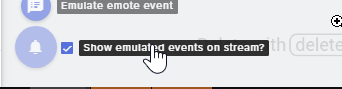
on the overlay editor, on the bell, make sure to tick that alert works on obs and overlay @gentle yoke @unborn kernel
it's a new option
Show emulated events on stream?
tick that on the bell
 scarlet tiger
For example, does the / w <user> $ {1:} answer? I know the whisper answer works, but I need it to be sent to another user.
gentle imp
read above @lament blade
lament blade
 gentle imp
does it work now?
gentle yoke
All good! Ticking that show emulated event worked! Thanks everyone
gentle imp
great, thanks for the feedback
 crude swallow
looking for help or a guide on how to get /set up macros that i can then link to keybinds ( if possible)
 smoky latch
i have no idea if this will happen if i actually get a cheer on stream, but whenever i do a test cheer alert the message is always "my name is bill" even if i set it as something else
 twin sentinel
This is a known issue. On Stream when you recieve a live evnet, it will display the correct message.
smoky latch
great, thank you!
also, when setting up a contest do I have to do that through my streamelements dashboard or is there a way to do it in twitch chat with the bot?
twin sentinel
Afaik the contest can only be managed/started on the website.
smoky latch
ah alright, that's fine
lament blade
Hey guys
I have an issue with alerts popping up, whenever someone follows / subs / donates and such, the picture + text & sound doesn't pop up. Anyone able to help?
twin sentinel
Does the alert come up in the overlay editor when you emulate an event in the overlay editor?
lament blade
It doesn't come up even at the OBS
twin sentinel
Does it come up in the overlay editor?
lament blade
U mean on the chrome?
twin sentinel
yes.
lament blade
Ye
nocturne pelicanBOT
@lament blade We have added a new feature, which allows testing of alerts only in the Editor or in both Editor and OBS. Hover over the bell and on the right side toggle it on.
https://media.discordapp.net/attachments/342748377416466442/564781551649292299/unknown.png

 jade remnant
its 2019 man....
lament blade
@twin sentinel Thanks for the help
 leaden meadow
Just want to ask how can I make a command that can play a sound, thanks.
twin sentinel
That is only possible with our store items and a custom command which will trigger the store item.
leaden meadow
That mean I have to upload the sound to the store first?
twin sentinel
yeah and create a store item for it.
leaden meadow
Ok thanks I will try first
Just new to streamelements
So the global cooldown is for everyone in chat right?
twin sentinel
yeah, after one user entered the command, everyone has to wait that amount.
 worthy badge
how do I setup regulars? I still need nightbot or I can do everyhing through stream elements?
leaden meadow
thanks so much
 fallow crescent
My URL link is not working when I launch it from Stream Elements, I have done a hard refresh cashe but nothing, any ideas how to get it to work
twin sentinel
You can enter regulars here: https://streamelements.com/dashboard/bot/users/regulars
@fallow crescent You are talking about an overlay link?
twin sentinel
have you added the overlay with the right dimensions and set it as first source in OBS?
fallow crescent
yes
twin sentinel
when you open the url in a browser, does it display your overlay in the browser?
fallow crescent
no
twin sentinel
can you dm me the overlay link please.
 coarse heath
I saw a “how to set up streamdeck with OBS live” video but now can’t find it on the site 😦 link plz
Oh and plz tag me
 untold crest
@coarse heath https://blog.streamelements.com/streamelements-obs-live-elgato-stream-deck-the-perfect-match-85c194bf894a

StreamElements - Legendary Live Streaming
StreamElements OBS.Live add-on makes stream management easy. The add-on is fully integrated with OBS Studio and allows you to declutter…
That one?
coarse heath
Thank you!
untold crest
You're welcome 😉
 rain parrot
I have a static image I want to hide whenever the alert window is active. Is that possible?
twin sentinel
I think you would need to custom code that yourself with css.
rain parrot
Use the alert box custom CSS? Gotchya. Thanks!
twin sentinel
you can try to use that, or create your own custom code widget.
rain parrot
I will check that out, good idea.
 quiet coral
Can someone assist me with my alerts? They are not working, not showing up in the feed or on stream. They are not paused. This is the 4th time the overlay has been recreated.
twin sentinel
Can you log out of streamelements and log back in on the dashboard. Are emulated test alerts coming through?
quiet coral
Before i started streaming i logged out and back in and the test alerts did work. But I just got 2 follows and neither showed in the feed and no alert.
 glass sluice
Hey guys. I have sound effects you can redeem in my store but they're not playing on stream. I have the store redemptions widget placed but it's not going off.
twin sentinel
@glass sluice After you added the widget, you hit save right? Please try to clear the browser source cache in OBS.
quiet coral
Yes i saved.
 weary creek
hi, iwas using obs (normal) and my webcam was viewing fine, i just downloaded obs live and when i add a video capture sourse its not pickign it up nor is it pickign out my audio input
twin sentinel
@weary creek OBS.Live does not change the video devices. Best to head over to the OBS support discord.
@glass sluice Please try to clear the browser source cache in OBS.
quiet coral
I have cleared the cache as well
Or rather I've hit the button that says "Refresh Cache of Current Page"
twin sentinel
@quiet coral Please make the bot leave the channel, log out of the dashboard, log back in and make the bot join your channel again.
coarse heath
Hi. I deleted my chat box from my overlay layers a while back... is there any way to add it back without having to redo the whole thing like all the alerts etc? Plz tag me in your reply oh mighty and powerful SE gods and goddesses
twin sentinel
@coarse heath Have you just deleted the chat widget or the whole ovleray in the overlays section?
coarse heath
Ahhh it’s a widget
I didn’t see it under widgets
Uhhhh
Derp
I see it... let’s just keep this between us plz
Hmmmm hi @twin sentinel so I added the widget but it isn’t showing up 😦 plz halo
Halp
twin sentinel
Where is it not showing up? in the overlay editor or obs?
twin sentinel
Please save the overlay and clear the browser source cache in OBS.
coarse heath
Clear the browser source oh oh oh you mean Re-add the SE browser?!?!
twin sentinel
No. When you go in the properties of the browser source at the very bottom there is a button to clear the browser source cache.
twin sentinel
yeah, exactly that button.
coarse heath
Okedokee
Sadly I did that a few times and closed and reopened OBS twice just in case but nope- still no chat even though it shows in my overlays on my se dashboard of overlays
twin sentinel
So in the overlay editor you see the chat messages but not on OBS?
twin sentinel
Please go here https://streamelements.com/dashboard/activity and hit the reload overlays button.
coarse heath
Ok
Actually my activity feed opened
Oh I see the button
It showed up!!!!
Thanks bunches and bunches!!!
Have a banana 🍌 and thanks
Hahahahahahaha now the chat shows up on all my overlays @twin sentinel
I’ll go through and delete it off the wrong overlays and then do that refresh button in activity
Hmmm it doesn’t show up in SE on the other overlays just in OBS
twin sentinel
Have you added it to the other overlays, too?
coarse heath
Nope
And like I said... it doesn’t show up on SE overlays just in OBS :/
I know that’s not rly an SE problem- but u might know how to fix that
So what I did was copy paste the overlay link for each overlay in their corresponding overlay in OBS
It worked but it took the chat out of all of them lol
If I didn’t have to redo all the dang alerts I’d just make a new one but eek it’s a pain in the buttocks
It’s just weird that it shows up right in SE and not OBS
 solemn arch
Any reason I'm getting this through my bot? It's when someone tries to give currency %!(EXTRA string=
 astral igloo
my stream is just showing up as a green screen..... not sure wtf to do
twin sentinel
@coarse heath Sorry, but I don't get what you are searching for exactly.
What I got was that you deleted the chat widget in your overlay. So you can get it back by readding the widget via the SE editor. After that you have to reload the overlay to refresh the connection.
@astral igloo For some users it helped to set the color format in OBS to i420. in OBS: Settings > Advanced > In Video > Color format = i420.
coarse heath
I wanted a chat in my overlay where I’m just chatting before gaming but not while I’m gaming in another overlay
 real gate
My raid and host alerts were not showing up at all during my stream in my activity feed, but bits were I didnt get a dono to know if that was working but I'm not sure if twitch or OBS wasnt picking it up
 midnight plaza
Any staff around? I have a question
nocturne pelicanBOT
@midnight plaza Welcome to the support channel! Please let us know how we can assist you today and a member of the support staff will be with you as soon as possible.
midnight plaza
If i wanted to disconnect my paypal and just let tips sit in my account until i am ready to withdraw to paypal, would that work?
jade remnant
hi @coarse heath dm me the link from the next message and i will take a look for you. also let me know what overlay youre having issues with
nocturne pelicanBOT
@coarse heath To invite managers to your dashboard, Click on your Channel Name at the top of the dashboard and scroll down to Settings. Click the drop down arrow to expand your channel managers and then create a new invite at one of three access levels (Bot Supervisor, Editor, Full Control) Check this video out for more help: https://youtu.be/zl_h-ttZDF0
@real gate Due to recent changes to Twitch API, we have filtered out hosts and will only show these ones on your activity feed:
- All manual host events (0 hosts included and if filter set to 0)
- All auto host events with at least 1 viewer
real gate
The manual hosts weren't even showing, nor the raids
At all
the only reason I knew I had a host is because it showed up in the chat like a mod command.
Never popped in my activity feed
twin sentinel
@solemn arch What is the command you are using to give points? Is it the default !givepoints command? Do you have a screenshot of the message you are recieving when the points do not get shared?
jade remnant
@midnight plaza yes thats possible. however (from what i know and what i can find online), the bits go to your paypal account (no storage on twitch). if you remove your paypal tipping link (i believe) people wont be able to tip you. but i can be wrong
solemn arch
@twin sentinel I changed it to just !give, I believe someone mispelt a username and it gave that response
midnight plaza
@jade remnant im not talking about bits. I am talking about tips. I would like to get some confirmation before I make any changes
twin sentinel
@solemn arch I can reproduce the message when I enter a wrong username. I will forward this to dev for review.
midnight plaza
i guess i can make a second paypal, then when i am ready i can paypal it to myself
jade remnant
sorry my bad. same thing applies tho, yes you can leave them in your account but removing the link will mean people wont be able to tip anymore. there isnt a time limit on how long money can stay in your paypal account
midnight plaza
I was just trying to stop it from going to my paypal right away, its ok, ill figure it out
 civic marten
Is it possible to change the points in a raffle? :o
jade remnant
@real gate we are just finding out the situation with hosts/raids. we will let you know soon
 crystal crater
I cant find how i can disconnect streamelements. can someone help me ?
civic marten
In the dashboard "part channel" on the right
crystal crater
thanks much, to small for my eyes 😉
civic marten
np :3
 brazen iris
How do I save my edits on a contest that's already ended?
jade remnant
the contest save automatically. what do you mean by edits?
 opal whale
Someone Help. Black screen.
brazen iris
@jade remnant changes that’s what I meant
jade remnant
@opal whale could you try re selecting the "window" to minecraft again, if that doesnt work try running obs as admin
lament blade
i've given my mod the link for bot control, how do i let them manage a media share queue
jade remnant
@brazen iris by the looks of it, changes to the contest cant be made once it is running (live). the contest itself will save when closed
opal whale
@jade remnant It didn't work
jade remnant
try setting the mode to "any full screen"
 errant lance
i am new using stream element and was wondering how alerts work with obs streaming to twitch
jade remnant
if that doesnt work you might want to ask obs themselves
twin sentinel
@errant lance In this video we are going through the setup of an alert box. https://www.youtube.com/watch?v=8LVRd2X4HvU
If there are any questions left after watching the video, feel free to ask in here again.
 zenith frost
Hello ! I'm usi,ng stream elements for twitch alert follow etc...
But I have two computer setup and i'm trying to hear stream elements alerts only on my gaming computer. Is that possible ?
jade remnant
so you have 2 options (that i can think of):
easy: have an alert overlay open in chrome in the background
not easy: have an audio mixer for both pc's to your headset
zenith frost
easy method is what i'm using now, but i have to keep focus on this tab , even sound doesn't start
Any way to get sound start whitout tab focus on chrome ?
jade remnant
do you have the overlay editor open or the "launch browser" option?
zenith frost
I opened the overlay with same link used in my obs
keen wadi
Can I pick your brain here with an interesting question. Nethyr tried to help me yesterday and we couldnt figure it out. In my overlay, my alert box, i dont hear my tts. but you can hear it on stream, i cant hear it on obs, or on the stream element overlay edit page. but anyone else can hear it and im so confused. i hear the alert sound, just not the tts. even my obs sound is showing like its capturing sound from the desktop its just not coming through my heaadphones
jade remnant
try keeping the editor open, it wont wont interfere with you obs
real gate
Another issue I was wondering happened with the update or is just me not being able to figure out how to fix is I can't find the dock window that used to be there to update your stream info and tags. Was that taken out?
zenith frost
ok i'll try that THANKS
nocturne pelicanBOT
@real gate If you have issues with OBS logging you out of the integration all the time, follow these steps:
- Make sure you are on the latest and greatest version of OBS.Live ( 19.3.24.375)
- exit OBS (make sure OBS is not running)
- delete
%appdata%\obs-studio\plugin_config\obs-browser\obs_profile_cookies - start OBS.Live
- Settings -> Stream -> disconnect -> connect
jade remnant
@keen wadi if you could dm me a link from the next message i will take a look for you
real gate
Will that fix the Stream Information tab?
nocturne pelicanBOT
@keen wadi To invite managers to your dashboard, Click on your Channel Name at the top of the dashboard and scroll down to Settings. Click the drop down arrow to expand your channel managers and then create a new invite at one of three access levels (Bot Supervisor, Editor, Full Control) Check this video out for more help: https://youtu.be/zl_h-ttZDF0
real gate
Dock*
twin sentinel
@real gate Yes it will.
real gate
Thanks1
 frosty onyx
do i need to download stream elements desktop version if i am using 0bs;live?
*OBS.live
real gate
Worked! Thanks so much! :D
twin sentinel
@frosty onyx If you are referring to GroundControl it has the same features as OBS.Live. I would stick with OBS.Live.
frosty onyx
@twin sentinel thank you very much
nocturne pelicanBOT
@golden sonnet Welcome to the support channel! Please let us know how we can assist you today and a member of the support staff will be with you as soon as possible.
 golden sonnet
I cant redeem a sound effect that i uploaded to the store
jade remnant
i only see 1 item, is it surprise?
 rustic creek
Hi, I am having some issues setting up S.E.Pay
jade remnant
cool, so what is happening when you go to redeem it? what do you type and what is the response?
golden sonnet
i have a couple question
excuse my english
1: do i hace to type the name? ex: !sorpresa
or the whole thing like: !redeem sorpresa
twin sentinel
@rustic creek What is the issue with SE.Pay?
golden sonnet
2: I have to bw online to redeem it?
rustic creek
@twin sentinel when I try to enter the "main shareholder information" it says form submission failed
golden sonnet
3: do i have to keep stream elements page opened in browser for it to work?
jade remnant
default redeem is !redeem {item_name}
(however you can make a custom code for it to be !sorpresa
golden sonnet
nice! how can i get to that?
jade remnant
2: you dont have to be online, but then no one will hear it
3: no page need to be kept open
custom code:
name: !sorpresa
response: $(redeem sorpresa)
golden sonnet
2: i already redeem it but i didnt hear anything
i have obs open
where do i go to set up the custom code?
jade remnant
have you added the redemption widget to your overlay?
twin sentinel
@rustic creek I am not that familiar with SE.Pay unfortunately. So I am afraid I can't help you with that. Maybe another supporter has any ideas.
golden sonnet
please
jade remnant
custom commands are here https://streamelements.com/dashboard/bot/commands/custom
widget here
rustic creek
@twin sentinel okay thanks.
golden sonnet
so i should write the custom command just as you told me and it will works?
and if i add more sounds i have to make a CC for every single one?
i can not find the widget thing 😦
jade remnant
yes you will need to make a custom command if you dont want to do !redeem sorpresa
jade remnant
https://streamelements.com/dashboard/overlays select your overlay then go to widgets at the top
np 👍
jade remnant
theres the issue. so the thing to do is to make a blank overlay and add the widget. then add it to obs
golden sonnet
ohhh ok
and then it should works and sounds no matter if im offline
??
WOW there is a lot of new things in the overlay thing i didnt know
jade remnant
yes it will. as a precaution make sure to enable the below function
nocturne pelicanBOT
@golden sonnet We have added a new feature, which allows testing of alerts only in the Editor or in both Editor and OBS. Hover over the bell and on the right side toggle it on.
https://media.discordapp.net/attachments/342748377416466442/564781551649292299/unknown.png
 kind epoch
Hype cup is still not functional. After so many days now weeks the cup remains empty even with a pre-filled amount. StreamElements overlay shows there's content in the cup but obs fails to show it. Any ideas? I feel this question is being ignored as i asked yesterday and got no reply. This is rather sad.
golden sonnet
its still not working
@jade remnant
i alrdeady added the overlay to obs but when i type !redeem sorpresa in my chat nothing happends
twin sentinel
Have you enabled the default redeem command?
jade remnant
@kind epoch is the hype cup in an overlay that isnt being refreshed in obs?
jade remnant
https://streamelements.com/dashboard/bot/commands/default look for the !redeem
it should be like this
rustic creek
Is there any way to restart the SE Pay signup process without losing the money I have sitting in SE Pay
golden sonnet
wait! one last thing
i added an image of a gift to when its redeemed but that isnt showing
jade remnant
if you click the bell in the bottom left and choose emulate item redemption dose it come work?
jade remnant
try setting the item as a perk. the opacity settings for the widget should be 100%
 hot apex
Hey, everyone! I was wondering if anyone knew how to make text or widgets move on the layover? I wanted to make a sort of credits scene
kind epoch
@jade remnant yes it's an overlay on its own with the hype cup in it.
twin sentinel
Take a look in the #widget-share there is a credit roll example you can use.
hot apex
Thanks!
I must be hella dumb, because the overlay from there isn't showing anything at all when I use it as a browser on OBS
twin sentinel
Is the overlay showing when you launch the URL in your browser?
hot apex
@twin sentinel no, it's also just blank
twin sentinel
Have you hit save after the changes? What sould be displayed in the overlay?
hot apex
Can I message you privately? I don't want to spam this section
twin sentinel
this place is made for support. but sure.
hot apex
Ok, either way is fine then. So it's supposed to show a credit scene with subs, followers, donos, tippers and the like
I did hit save
twin sentinel
is it the code from #widget-share ?
hot apex
Yeah
twin sentinel
In your session data here: https://streamelements.com/dashboard/session are there events listed with numbers?
hot apex
yeah
twin sentinel
would you mind sending me an editor access link to your bot so I can take a look? via PM please.
hot apex
sure
 sharp tundra
I'm Just trying out streamelements, I was using streamlabs but i'm trying to see is there a addition where i can add in Alerts for example new followers, subs, and etc. I can't seem to find that in the scene section.
 thin ether
how do i get back the thing on OBS so i can se who follwd and stuff like that?
twin sentinel
@sharp tundra You can create an alertbox to get an alert when an event happens.
@thin ether Select StreamElements on top in OBS and then select Actifity feed.
errant lance
I have custom alerts images and songs how do i put them in
switching to obs from slobs
i tried using it but happend to not work with browser source
twin sentinel
You can either create a new overlay with an alertbox and add the files uploaded to StreamElements to it adn add the overlay as browser source to your OBS or you can try to import the alert box from streamlabs to streamelements using our import tool.
kind epoch
@jade remnant is gone?
twin sentinel
@kind epoch Yes, tadpole is gone. I am not that familiar with the hype cup. But the overlay the hype cup is in, it is not set to shutdown when not visible right?
 loud trail
Hello. I have a custom command for the bot to redeem an item from the stream store using the ${redeem} variable. However, using this variable does not allow me to have any of my own custom text in the response. Instead the bot will simply say "@chatter, you successfully redeemed etc." Is it possible to have a customized command text response in chat instead of the default redemption response? Thank you.
twin sentinel
@kind epoch no, please try to don't do that for the overly the hype cup is in, cause afaik this will clear the hype cup everytime you swich to this scene. You can reate an own overlay for the hypecup.
kind epoch
Oh nice, okay, i'll try it now, thanks @twin sentinel
@twin sentinel Recreated the cup and source in obs as instructed now only one token shows but se layout shows a few more but at least there is something in it
lament blade
Nothing is here ...??
refreshing does nothing
twin sentinel
Please hit do it later, when you have set up tipping yet.
lament blade
How do i import an overlay file from streamlabs?
that i exported?
twin sentinel
https://streamelements.com/dashboard/account/import you have to have both dashboards open in the same chrome browser at the same time and use our import tool.
lament blade
okay i did that, but i want to import my custom overlay. i already have it exported as an overlay file, but how to i Import it?
twin sentinel
Afaik you only can import the alert box, as StreamLabs uses a closed format for their overlays, which can't be accessed by others.
lament blade
i swear to god, if i have to remake every thing and readd everything im going to die inside
 worthy crest
hey folks, all of a sudden my alert package isnt coming through in OBS. they show on the test screen, but I get nothing in OBS.
nocturne pelicanBOT
@worthy crest We have added a new feature, which allows testing of alerts only in the Editor or in both Editor and OBS. Hover over the bell and on the right side toggle it on.
https://media.discordapp.net/attachments/342748377416466442/564781551649292299/unknown.png
worthy crest
sweet
 long pebble
im streaming today on obs.live and all the suddon my stream just started freezing on all my viewers
twin sentinel
what do you mean exactly with it started freezing on all of your viewers?
sharp tundra
@thin ether I clicked activity feed but all it comes up is to update my stream on for title and etc but no widgets
twin sentinel
You can add widets to your overlays when you are in the overlay manager and edit one overlay. In the blue bar on top it says widgets.
 hallow hound
hello. alerts are not showing up in obs when i test them nor on stream!
tried duplicating and tried again but still not working
nocturne pelicanBOT
@hallow hound We have added a new feature, which allows testing of alerts only in the Editor or in both Editor and OBS. Hover over the bell and on the right side toggle it on.
https://media.discordapp.net/attachments/342748377416466442/564781551649292299/unknown.png
hallow hound
ok that fixed emulation, but on stream earlier they werent popping up at all after even 10 gifted subs
twin sentinel
Is the gifted sub in your activity feed?
hallow hound
yes
twin sentinel
There is a variation for the gifted subs. What happens when you replay the activity? Does it come up corretly?
hallow hound
it says (gifter) has subscribed, and THEN says (receiver) was gifted a sub..
which is odd
when i emulate it it is working fine now though.
may just try it again and see if it works
if it doesn't end up working I will come back to you! thanks for the help on the emulation part @twin sentinel I will keep you updated
 daring crater
Good evening.. 😃 Is there a way to count a username in a command? I've tried to do this in an example: !punch ${user} I would like the output to be ${user} has punched ${count user} times! -- hoping to count the individual users that the command has been used on.
twin sentinel
I am not sure, but I think this cannot be made via SE alone. You would need to consider a custom API to track the times for every user how often he was already hit. Maybe a code guru in #dev-chat has an idea on this.
real gate
So I'm making a gif redemption in my streamelements store but the streamloots alert is picking up on the gif despite using two different browser sources?
 sharp oak
ok my cpu usage and fps keep bottoming out and my cpu usage is all over the place and i know its not my computer its a brand new gaming pc PLEASE HELP
nocturne pelicanBOT
@sharp oak Can you please provide a log from your last stream. In OBS go to Help > Log Files > Upload Last Log File. Once this is complete, please provide the link to the log file.
twin sentinel
@real gate What do you mean with streamloots alert? Do you have set the browsersources to "shutdown when not visible"?
real gate
its a completely seperate browser source, URL and everything are not even the same
daring crater
Thanks a million @twin sentinel
twin sentinel
@real gate What do you mean with streamloots alert? What is the issue here exactly?
real gate
I'm making a gif store redemption on StreamElements, when I use it in OBS I get a double in a seperate browser source that has no connection to the SE store redemptions
the URL isnt even the same
twin sentinel
Make sure to ☑ “Shutdown source when not visible” for all browser sources (all OBS scenes). If using studio mode, uncheck “Swap Preview/Output scenes After Transitioning.” Also keep in mind that sound can play from any overlay loaded in the browser (editor or launched). https://i.imgur.com/FegZJQS.png https://i.imgur.com/yY0wcFl.png

 real gate
I'll try it thanks
 silent bluff
hello someome to help me ?
nocturne pelicanBOT
@silent bluff Welcome to the support channel! Please let us know how we can assist you today and a member of the support staff will be with you as soon as possible.
silent bluff
i created a command on the website, now i decided to delete it because i dont want it
the problem is that when i type !(commandname) on my channel it keeps working
and i already deleted it
 elder sorrel
What's your twitch name & what's the command
silent bluff
Tocla: twitch name !penal:command
elder sorrel
You can try parting the bot. Sign out of your account through the website. Sign back in & have the bot join the channel.
If that didn't work. You're going to have to check the alias of each command. As you may have a alias assigned penal in another command.
silent bluff
thank you very much!
 rustic latch
I have a question. I added a shoutout command, but I can't use the @lament blade after the command without the bot adding the @ into the message as well. Is there a way to have it drop the @ in the output message?
 proud grove
Is there any way to have a "custom" followage so im not using the default response?
silent bluff
quick quesstion
user level: Regular it means followers?
whats the difference between regulars and eberybody?
lament blade
hey
crude swallow
@rustic latch should work if you don't add the @at all
rustic latch
I'm aware of that @crude swallow , but when there are multiple users or long names, @function is faster.
and without going back to delete
crude swallow
Ok get ya
rustic latch
Yeah, just need the output to remove it
twin sentinel
@rustic latch
the issue before with @'ing usernames in shoutout is fixed with variable ${channel ${1}}
See examples here:
https://discordapp.com/channels/141203863863558144/424943321794871296/426835740530311168
@silent bluff The regulars are not your followers. You can edit your regulars manually here https://streamelements.com/dashboard/bot/users/regulars and grant them access to commands or exclude them from spam filters.
nocturne pelicanBOT
@lament blade Welcome to the support channel! Please let us know how we can assist you today and a member of the support staff will be with you as soon as possible.
twin sentinel
@proud grove If you have got a custom API giving back the followage you can use that and disable the default command. The message of default commands cannot be changed.
rustic latch
@twin sentinel Thank you very much for the information.
 fluid ibex
I'm trying to add my new bttv emotes to kappagen but it doesn't seem to be show the new ones just to old ones in emote options I have logged out and in and i have also deleted my entire overlay with no luck.. am i missing an update emote button lol
 cedar lynx
It can take a bit to sync
fluid ibex
Ok i was just worried i was missing something
still no luck has been about an hour now just wait it out then???
cedar lynx
Yeah when I updated my BTTV I think it took a few days even
 shell magnet
Has the emote been accepted by twitch?
Because I know twitch have to email letting you know they reviewed and accepted them
kind epoch
New session of stream and the hype cup still remains empty despite recreating the overlay and not refreshing the scene option selected. Any other advice on this?
 versed hatch
Hey I have a question.How do I put the Stream starting soon overlay on the OBS studio
lament blade
Hey uh guys i got a dumd question, whenever i try to play marbles and type !play
I get the "songrequest is now playing!"
How can i turn that off / change the command for it
I found it ❤
nocturne pelicanBOT
@versed hatch To add your overlays to OBS, add a new browser source in your scene. Paste your overlay URL in the browser source properties, set the dimensions to 1920x1080 (unless you changed them on the website), and ☑ “Shutdown source when not visible” https://youtu.be/KDvLynUqXI4
lament blade
Hey its been a while and my bank hasn’t been verified for se.pay
where can i check the status?
 raven oak
Guys I need help, I should unplug a youtube account from my streamelements account. But it tells me that I can't delete it because it's my main account?
twin sentinel
@raven oak
Please send the following details to this email adress so we can try to delete your account:
E-mail to: reem@streamelements.com
details: username and JWT token with the fact that you want to delete your account
 balmy sleet
Hi guys i'm having trouble with my alerts, they aren't showing up in OBS or twitch stream i haven't changed anything since they were working 2 days ago
twin sentinel
Is this for testing alerts, or when Live?
 serene wharf
I was just about to type the same
I'm creating a new overlay and nothing is coming through...in OBS or even on the launch in browser winodw
nocturne pelicanBOT
@serene wharf We have added a new feature, which allows testing of alerts only in the Editor or in both Editor and OBS. Hover over the bell and on the right side toggle it on.
https://media.discordapp.net/attachments/342748377416466442/564781551649292299/unknown.png
raven oak
@twin sentinelok sended
 turbid helm
Hello is there an easier way to start Streamelements contents on Twitch? - I would like to be able to simply type a command to start the content, type another to pick the outcome without having to go onto the streamelements website every time
** Contests not contents **
twin sentinel
Afaik the contest can only be set up and started from the website.
twin sentinel
I can try to ask a staff member internally, if he can do it, but as it is weekend, this can take some time.
Please send your twitch name and if it is different your account name in se, so I can attatch it to the request.
lament blade
thatcoolfoolguy
but I like I also like entered that contact me form and like please make sure you don’t reset it twice
thanks 😃
 sly dawn
does anyone know if there is a way to have a redeem cooldown timer be shown in the response so chat is not filed with chatters trying to redeem an item
twin sentinel
@sly dawn Afaik this is not possible.
lament blade
also please ping me if there’s progress. aand hope you have a good weekend:)
sly dawn
bummer, how about chain cmds for a different idea
twin sentinel
What do you mean with chain commands? I don't seem to get your idea here, I am sorry.
sly dawn
so i am trying to see if there is a cmd i can make that will allow me to add a set amount of points to target user but in the response in chat it has msg not "user set user points to"
twin sentinel
can you show me a screenshot of the command and the response in chat please?
sly dawn
well the basic addpoints cmd i am guessing you know, but i am thinking a cmd like !thanks "user" with a response of "Thank you "user" for being helpful in chat!" and it adds maybe 25 points
twin sentinel
I am not aware of a solution on how to do so.
sly dawn
darn btw what does Afaik mean
twin sentinel
As far as I know = Afaik
sly dawn
lol
got it
ok so back to the 1st question is there a parameter for a countdown that can be started with a different cmd so when a redeem is used we can do the other cmd to start a cooldown type of timer
twin sentinel
No, the bot can't trigger itself.
sly dawn
i was more thinking a mod could type a cmd that would trigger a countdown timer
twin sentinel
Afaik timers can't be started via command, as the bot can't trigger itslef.
sly dawn
ok thnx
crude swallow
Is there a command to clip my stream?
twin sentinel
There is an API programmed by @wanton mango you can use to create a command to clip your stream: https://thefyrewire.com/docs/api/twitch/clips/#required-parameters Also with StreamElements there is a cool replay feature you can also use when you created a clip and want it to be replayed on your stream.
gentle yoke
I've set up a loyalty point system where people are earning points from watching. Does anyone no how I can get this as a chat command so people no how many points they have?
twin sentinel
There is a default command called !points which has to be activated, your viewers can use.
kind epoch
How about the hype cup? Any news of an update for it? Still NOT getting pre set filled amounts showing in it.
 rapid latch
I have added a !sr command to my stream and the music isn't playing.
 trail condor
I just watched the giveaway module fail.
- Created giveaway
- Default text said to use !ticket 1 to enter
- Chat uses !ticket 1
- No entrants detected
- Closes giveaway
- Streamer checks default commands, activates !enter
- Reopens giveaway
- Chat can use !enter to join giveaway, even though the default start text says !ticket
Is there a place to change this default text? Did giveaways change recently at all? My SE giveaway workflow seems totally different than the one I just watched
 swift swan
When I used to !SO @fiery jasper1234 to make sure I don't @ someone but it used to shout out them without the @ sign now it adds the @ sign to their link can I get this fixed?
Sorry
twin sentinel
@swift swan There are examples for shoutout commands in #command-share or when you create a custom command you can choose the !shoutout. They all should be able to address your issue correctly.
swift swan
@twin sentinel It was working but now adds the @ before the name
Let me look @twin sentinel
Never been good at commands xD
twin sentinel
@trail condor You can't change the default text. For me they did not change recently. If your workflow works for you, I would say stick with it. If you are experiencing issues, just ask in here.
@rapid latch Have you added the media request overlay to your stream?
rapid latch
Yes I believe. I will check when I’m back home.
swift swan
I will delete it
But it does the @.tv/@swift swan
So why?
Also of course it won't link to their channels either
anymore
twin sentinel
Please make this as response for the command: Be sure to go give this person ${1} some hugs! https://twitch.tv/${channel ${1}} The last game they been seen playing was ${game ${1}} .
swift swan
ok how I edit the command?
twin sentinel
Go here https://streamelements.com/dashboard/bot/commands/custom and edit the response of the shoutout command by selecting the little pencil at the far right of the command.
 warped panther
Hi, I came some days ago with problems about hosting alerts not showing. I managed to get the emulated alerts to show on obs, but the real host alerts still don't show when I'm live
swift swan
Thanks checking @twin sentinel ❤
TYSM! @twin sentinel Always here to help! ❤
Deleted the link tysm again! 😄
 heavy field
My alerts are not appearing in OBS
 tight harness
!alerts
nocturne pelicanBOT
We have added a new feature, which allows testing of alerts only in the Editor or in both Editor and OBS. Hover over the bell and on the right side toggle it on.
https://media.discordapp.net/attachments/342748377416466442/564781551649292299/unknown.png
heavy field
Lol I don't know how I missed that... Time to get my eyes checked thanks!
 storm stirrup
Hi friends everytime i hit start streaming all that is broadcasting is a green screen... any ideas as to what i am doing wrong?
twin sentinel
For some users it helped to set the color format in OBS to i420. in OBS: Settings > Advanced > In Video > Color format = i420.
 cyan iron
uhh wtf. when i mute my mic in streamelements it's not muting it for my live show
any input? seriously whacky
i only have 2 audio inputs and they're both muted but you can still hear me talk on my stream
twin sentinel
where have you muted what exactly?
 neon grove
Hi, does anyone know why the bot does not give points when a viewer give me host? 🤔
cyan iron
got the audio figured out.. now my recent follower isn't upodating based on who's following me.. how do i fix that? it's based on the widget so it should just work?
twin sentinel
@neon grove I am not too sure, but I think the host has to be greater then 1 viewer.
@cyan iron Is the widget showing the latest follower of your actifity feed? what widget have you exactly?
neon grove
@twin sentinel thank you very much bro, maybe that's why 😮
rustic creek
I know I asked yesterday but nobody was able to help but can anyone here help me with setting up SE Pay. When I am finished inputting the "Primary Shareholder Information" I get an error screen that says form submission failed. I have tried many times over several days and double checked to make sure the info is correct and it still hasn't worked.
rustic creek
Or is there a way to restart the process to setup SE Pay without losing the money I have in there?
 ivory holly
Hello, any1 can help me with the Elgato Stream Deck? I' using "Tippeeee scene alerts" with obs but since last update nothing shows up any more.. even with new source link... guess it's because of that new upgrade? If i turn @Tippeee page "show always ON" it works, when i choose control wiht elgato stream deck, nothing happens when ever i press the button.. any help?
twin sentinel
Sorry, but we are StreamElements and I am not sure, if we can help you with Tipeee scene alerts. I think you have to ask tipeee or elgato about this issue.
ivory holly
well I'm not sure where the problem comes from.. that's the problem
finaly it doesnt show up at obs..
not sure its because elgato doesnt work with obs fine.. or tippee with elgato.. or..
twin sentinel
Has OBS.Live or the OBS.Live plugin for StreamDeck any connection, or has StreamElements on general has any connection to the problem?
ivory holly
Well I don't know, all I know is, that obs/live made an upgrade with elgato integration and after that my tippeee alerts doesnt show up at obs when i press elgato button.. like before..
 oak fox
Hey everyone, has anyone ever successfully transitioned their OBS setup from Mac to Windows?
I've imported my Mac settings okay for the most part, but my camera's acting up on me. Was looking for some pointers.
twin sentinel
@ivory holly We can only support OBS.Live with the elgato OBS.Live plugin. We don't have the tools to support Tipeees tools. You might have to ask tipeee.
ivory holly
What happens when I press importat and choose tippeee at live page?
does it bring all alerts or just elgato settings?
twin sentinel
You can import your tipeee alert box v2 assets to set them up in streamelements.
ivory holly
well.. always those problems with updates.. I know it's not your fault but losing time for this is bad.. and it's rly hard to find out where the real problem is
nocturne pelicanBOT
@oak fox For the best OBS support, please join their Official Discord @ discord.gg/obsproject
 woven umbra
I am having a problem with getting the screen to fit the hole area on twitch?
twin sentinel
What output resolution have you choosen in OBS Studio?
twin sentinel
Can you show me a screenshot what is not lignign up correctly?
woven umbra
i would need to go live to do so
twin sentinel
In OBS, go to Settings > Video and post a screenshot of these settings here please.
woven umbra
how do i do a screen shot i thought it was like something print screen
twin sentinel
are you on windows 10?
woven umbra
yea
oak fox
This is for OBS.live though and I got linked to Streamelements support.
twin sentinel
just use the so called snipping tool to take a screenshot and copy it in here please.
twin sentinel
@woven umbra Your resolution seems to be wrong. What is your monitor resolution you want to show?
woven umbra
the one i use for my games is 1920 x 1080
twin sentinel
@oak fox I am sorry, as I don't get your problem really.
woven umbra
@oak fox there is a obs live help below this one on the list
oak fox
Oh yes, thank you @woven umbra
woven umbra
your welcome
twin sentinel
put this in base resolution. Then either put this in the output, too or I recommend putting 1280x720 in it. Maybe you have to adapt your bitrate to your settings.
 tawny bay
whats this GPU setting in the NCENC? like how much i want encoding thru GPU?
I normally use x264 so it's a bit different
woven umbra
i will try it
twin sentinel
@tawny bay The NVENC setting is to use kinda your graphics card to render the stream, like there is normally a special NVENC chip on the graphics card to render the stream.
tawny bay
yes but question was about the settings
the "GPU" setting doesn't have a scale or context
just a number you can go up and down with
twin sentinel
I think it is better to ask this the OBS guys.
tawny bay
ok
nocturne pelicanBOT
@tawny bay For the best OBS support, please join their Official Discord @ discord.gg/obsproject
woven umbra
some how i have locked my streamelements screen in place and i can not minimize it
twin sentinel
What StreamElement screen exactly?
woven umbra
the one where you do the sources and watch the stream
twin sentinel
Hit F11 to get out of fullscreen maybe? Can you share a screenshot?
woven umbra
F11 worked thanks
and thanks for the help before that worked also
is there a place i can go to add sound clips to my alerts?
 languid dagger
does the !addpoints all command add points to everyone that has been in the channel or whoever is active rn?
twin sentinel
You can just upload them to your alert box in the overlay editor.
@languid dagger I think it adds it to everyone in the channel in the viewers list.
languid dagger
is there anyone else u can ask?
elder sorrel
@languid dagger to everyone in chat.
languid dagger
ok ty*
elder sorrel
If you do !addpoints all
lament blade
hello so , do i have to use gamble command or roullet coz i have been seee another channels where the roullete appears as gamble but when i use gamble send a message
so i think i am going to start stream and send capture
idk what to do
twin sentinel
The default command will be !roulette, but there is an alias which should be also set to !gamble, so you sould be able to use both, when you aativated the module and the default command.
 dark birch
I didn't type I agree and now I don't have premission to chat
twin sentinel
Sorry, but what are you talking about exactly @dark birch ?
twin sentinel
The only thing which comes to my mind directly without looking at your bot in detail could be that behind the !enter default command the !gamble is set as alias.
lament blade
ok so i eliminate as a alias to fix it? ok im going to see
and it doesent acumulate points when you are seeing the stream how do i fix that too?
twin sentinel
What do you mean by accumulate?
lament blade
like
if you are 2 minutes or more seeing the stream
you are going to have 0 points aniways
twin sentinel
The points are given out every 10 minutes when you watched this time.
twin sentinel
the 10 minutes is fix.
At this page on the right you can see a sum up of your settings: https://streamelements.com/dashboard/loyalty
lament blade
hey guys
i cant see the top right alert
its like not showing up
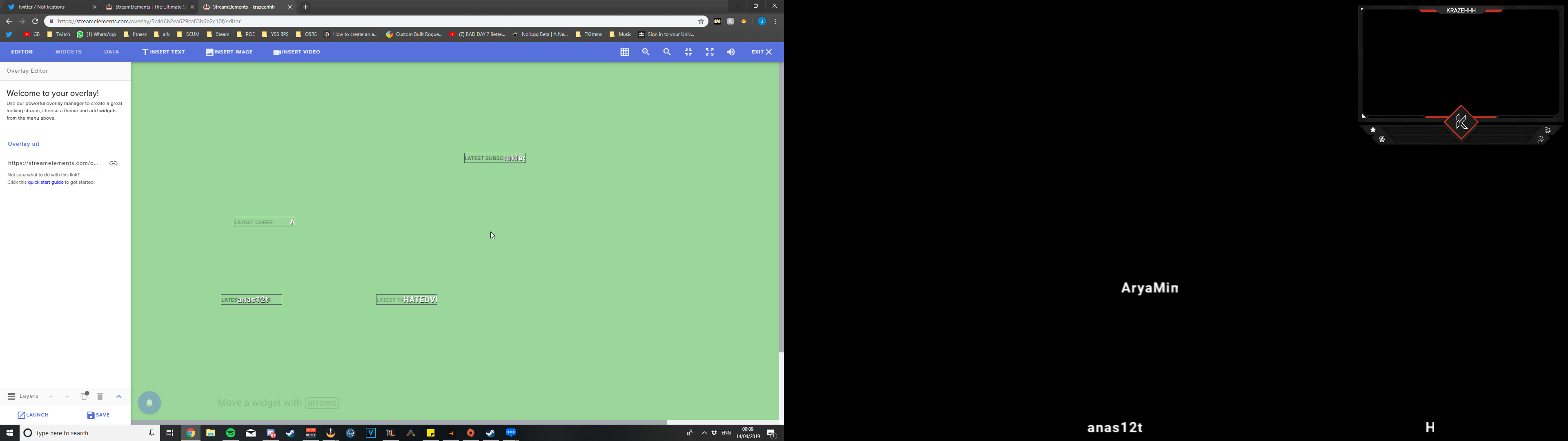
maybe resolution to big or someting?
twin sentinel
Please try to select this to get the whole editor on your screen.
 nocturne pelicanBOT
To add your overlays to OBS, add a new browser source in your scene. Paste your overlay URL in the browser source properties, set the dimensions to 1920x1080 (unless you changed them on the website), and ☑ “Shutdown source when not visible” https://youtu.be/KDvLynUqXI4
lament blade
ahahaha
im brain dead
thank you mate
where do i change the name of the point??
i dont found it
coz t appears whit $(
 strange summit
The Train Count widget could really use an auto-hide when there's no active sub train. 
nocturne pelicanBOT
@strange summit Check out the new ideas board https://strms.net/ideas. You'll be able to add your ideas, upvote others that you like, and track their progress with email notifications. Adding and upvoting ideas also helps the staff know which ideas should be prioritized so please take some time to upvote the features that you’d like. The #💭︱feedback-and-ideas channel is best used for discussing ideas already on the board.
lament blade
@twin sentinel i already fix it thanks for the help
 brave dune
Does anyone know why my event list would be showing fine but the alerts won't show?
twin sentinel
@brave dune Have you added the alert box properly to your OBS? What happens when you replay one of them?
brave dune
Well I emulate a follower in my overlays on stream elements website, the alert shows on the website and the sound plays but I don't see it in my obs
I only see my event list in obs
twin sentinel
ok. gimme a sec.
nocturne pelicanBOT
We have added a new feature, which allows testing of alerts only in the Editor or in both Editor and OBS. Hover over the bell and on the right side toggle it on.
https://media.discordapp.net/attachments/342748377416466442/564781551649292299/unknown.png
hot apex
Hey! Can anyone tell me how to get something in the Streamelements shop that triggers a small clip and sound when redeemed?
twin sentinel
Steps to make a command trigger sound on stream:
- Go to Stream Store page here: https://streamelements.com/dashboard/store/items
- Add an item that has these settings on it:
- Stream Perk
- Loyalty settings to your desire
- (Next step) Add contents (image and/or sound you want to play)
- "Redeeming this item shows an alert
- Redemable via chat
- Skip Requirements
- Get the item name/command from the 2nd creation page
- Go to commands page here: https://streamelements.com/dashboard/bot/commands/custom
- Add command with desired name and have response for command as: ${redeem item_name_here}
- Go to your overlays and edit the overlay you use.
- Click on "widgets" and add "Store redemptions" widget. Click save and you should be golden.
- Test your own command in chat and have OBS or editor open to hear sound
- ???
- Profit in viewer interaction and that dosh
 nimble cove
Hey! Can I add my Events/Goals from Streamlabs to Streamelements?
hot apex
@twin sentinel wow, that's complicated. Let me give it a bash and see how it goes! Thanks 😃
twin sentinel
@nimble cove You would need to recreate them in SE afaik.
nimble cove
So I have to recreate all my overlay again for Streamelements?
twin sentinel
As StreamLabs uses a closed format we can't import anything than the alertbox, as we don't have access to their data.
rustic latch
@twin sentinel When adding the redeemables. Is there a way to stop the bot from telling the chat that the person that triggers the SFX. "user has redeemed 'sound' for 0 points"
So if someone uses !soundfx, the bot won't respond with redeemed such with
twin sentinel
I think there is not.
rustic latch
ok
 shut lance
I have a question, I was wondering if anyone would be able to verify if a donation I made to someone successfully went through
twin sentinel
@shut lance I think best would be to contact the streamer if he/she recieved your donation.
shut lance
I did that already and they said they didnt receive it
twin sentinel
I am sorry, I can't look into the tip history of any streamers account, as I am just a volunteer supporter.
nimble cove
Another question.
I'm using full screen video for my stream is starting scene and when I put it in OBS via the media option -> starting.mp4 it uses 10-12% of my CPU. So far so good.
When I use the Streamelements overlay thingy, upload my video and put in OBS via the Browser option it uses only 6-8% of my CPU. How come?
shut lance
Its alright, but I was going for a refund on the donation because he said he didnt receive it, and we both made tickets and they told him that they would offer me a refund, and I still have not received it
twin sentinel
@nimble cove I am not 100% sure, but streamelements overlays are used as browser sources. so it is not stored on your local pc, but in the cloud and mostly dependant on your internet connection.
shut lance
Also, I have received receipts from paypal, I have gotten 2 confirming that I have sent the money, but they say they have not received it, what do I do in this situation?
nimble cove
Does the Streamelements Stream Labels auto update when someone follows/donates/subs?
 rapid oxide
Sitrep...I got a AverMedia 2 plus. I've got it hooked up from my main gaming PC to my laptop. I've got the audio going through HDMI and I'm listening to the audio from the 3.5mm port on the Avermedia...
Issue...OBS on the laptop sees the audio coming in as "mic/aux"
I am unable to hook up a 3.5mm microphone or use the mic in my webcam for some reason.
Is there a way to get OBS to recognize these other audio input sources?
Just figured it out...
 signal cedar
hi Ive been streaming fortnite for awhile and never ran into any issues and tonight I decided to try and stream apex legends but everytime im in game my stream is crazy laggy and saying encoder overloaded but my cpu usage is low and it says it doesnt break 60 fps on OBS is there anyway someone can help me
Im using all of the correct settings provided by you guys
for the new encoder
 soft elm
Any staffmember here?
cedar lynx
If you post your issue someone who is able to help will get to you when they are able @soft elm 😃
silent bluff
hello i have problems with my alert boxes. they doesnt show up on stream, neither on streamelements OBS
i click the "emute follower event" on the website and its goes ok, but it doesnt show on my OBS. and i didnt change anything, just from one day to another
 ancient otter
Guys, why we don't have custom CSS to merch items? D: Or am I missing something?
kind epoch
Help Hype cup Help! Still at large missing tokens. Please add back!!!
Why do i feel this is being ignored?
Please help. the hype cup has not shown any tokens in it in OBS. now and i've done almost every step you guys have asked of me in regards to not shutting down the scene when not displayed and despite this it's still the same. No pre set amount of tokens or previous activity of tokens are shown. This is now going on nearly the third week. And i feel noone has really given this much attention and it's been brought to my attention that there may be a known issue with this that i may not be wary off. If there is any remedy to this issue please let know. And thanks.
 turbid ingot
Sorry about this, I'm trying to start streaming and I was wondering if this was a replacement for OBS? Or should I install both? Thanks!
 foggy cliff
@turbid ingot you need both
turbid ingot
Oh, thank you!
foggy cliff
np 😄
The "right alignment" button for my text widget (latest follower) doesn't seem to do anything. Anyone know how to make this work?
oh crap maybe I just need to expand the extents of the bounding box a ton
still, pretty unintuitive
Anyone know how to get the top of the settings column to not be "hidden" underneath the top blue "editor" row? this is super annoying
lament blade
Is the stream element bot not working for anyone else or is it just me?
foggy cliff
@lament blade worked for me last night
lament blade
It's not working for me at all today
kind epoch
Just asked OBS Studio about my hype cup issue and the reply i got was that it's a StreamElements issue. Is there any help on this topic?
cedar lynx
@foggy cliff if you don't have a big screen, zooming out in your browser can help!
@kind epoch were the tokens you expect to see from an event this that happened before you added StreamElements bot as a mod in your chat?
 tardy fjord
yo
kind epoch
@cedar lynx , i've been using StreamElements bot for over a year and a half now and never had issues with the hype jar. Till now. Is this it?
Should i unmod the bot?
cedar lynx
Are the events showing up as tokens during stream?
Or are they just not loading in on the following stream
cedar lynx
Ahh okay. Very odd. Have you checked all your session settings as well as hype cup settings? There’s maybe a chance they made a small tweak to the logic in one or the other that would be telling it to start fresh on every stream
kind epoch
Having it refresh on every stream still doesn't count for the fact that the jar remains empty with a pre configured setting to show a 60 or 80 % fill rate prior to any given activity. So i think that logic could be null and void.
And the source is a refernece copy in all my other scenese
And set Not to shut the source down on swap.
cedar lynx
All I know is most overlay issues stem from a small unexpected setting. I’m on mobile in bed so I can’t go through checking all the possible settings that might hang up the cup. I’d still encourage you to give a quick peek at both of those even if you think there’s no possibility. You could definitely be right. I would also test a brand new hype cup and see if it works as expected so you can see whether it’s all hype cups for you or just the one.
kind epoch
I've tried that too, creating a new layout for the hype cup and the issue still stands.
And wow, still in bed, hah , half your luck.
 warm light
hello
cedar lynx
At TwitchCon EU and taking the mornings easy 😛
nocturne pelicanBOT
@warm light Welcome to the support channel! Please let us know how we can assist you today and a member of the support staff will be with you as soon as possible.
 vagrant flame


 warm light
hello all i just have problem witn obs browser page eating all my cpu ?
i have just 1 browser page open in my stream but it open 4 why
cedar lynx
Can you send a screenshot of the issue @warm light ?
twin sentinel
The integrated chat and AF of OBS.Live are also Browser Pages internally.
kind epoch
@cedar lynx so any other ideas you can think off then?
cedar lynx
Nothing I can think of without having access to a computer to brainstorm. You might consider submitting a proper support ticket if it’s really just malfunctioning for you on every overlay and every instance of your hype cup.
vagrant flame
hi ill be stream later https://www.twitch.tv/driver55 and my stream looks well one word for it poo.my stream is dying because of it.can someone pop into my stream and have look and say wot settings are best thank you.i am one off the top 10 players in the world on dirt rally 2.0 need help bad thank you

i use your obs live
cedar lynx
Please, no self promotion of your channel @vagrant flame
warm light
kind epoch
Where do i submit a ticket? And it's fine if i gave you the chance later to ping me about this @cedar lynx?
cedar lynx
I’m not staff, just a community member volunteering time so feel free to post in here and add me with a tag but that way someone else has the chance to help if they see it before I’m able to jump in
vagrant flame
no on the help then thx
kind epoch
The support page has no where to submit a ticket 😦
cedar lynx
If you need help getting StreamElements to work we are here for you. If you need people to help you with artwork and other stuff you’ll want to hire artists, consultants, etc or find groups who are formed specifically for that kind of thing @vagrant flame
You might need to create an account? To be fair when I had a deeper issue my ticket was created for me I just was assuming you could also submit one. If you give it some time I am sure a staff member will check into it soon though based on this convo. A lot of the main team is at TwitchCon also though so many of them may be especially busy until Monday or Tuesday.
vagrant flame
help with obslive and stream thats why sombody needs to watch my stream please and then tell me best settings so my followers get a great stream.that why i post my link to stream thats all i was doing
cedar lynx
What is wrong with your OBS.live?
cedar lynx
If you need help configuring OBS for best stream settings then you will want to join their discord and ask for help. But they will not be able to help you just by watching your stream, they’ll be helping you review your specs and choose the right settings
nocturne pelicanBOT
@vagrant flame For the best OBS support, please join their Official Discord @ discord.gg/obsproject
cedar lynx
It sounds to me like you may not have a powerful enough computer for whatever you’re trying to play but hopefully over there they can help you find some settings that work. OBS.live is just a plug-in to be able to see your SE activity and such while live.
nimble cove
Hey! Does the StreamElements Stream Labels auto updates when someone follows/subs/donates or I have to start a program to refresh them manually?
kind epoch
@cedar lynx i don't see a place to submit a support ticket from the site you supplied.
cedar lynx
Yes, again, as I said, you might have to wait till staff follows up on our convo and addresses this or creates one for you
kind epoch
Okay
 vestal spear
@nimble cove Hey they update automatically when a person for example follows to your Channel
 slender ice
hey! can someone help me with the song request via tip? i have the option on the donation page, the alert works fine its just the song doesn't play in the background, what am i missing? and i cant really test it and try to see if it works ^^"
twin sentinel
Have you added the MR widget to your overlay?
 copper flint
Hello, I've got a question about receiving tips. Am I at the right place to ask?
nocturne pelicanBOT
@copper flint Welcome to the support channel! Please let us know how we can assist you today and a member of the support staff will be with you as soon as possible.
copper flint
How long does it take that you receive a tip through G2A PAY?
cedar lynx
That’s probably a better question for G2A Pay 🤔
slender ice
yes. i needed only to the the media request to the overly right? ill try again. except that @twin sentinel
twin sentinel
Try it and if doesn't work, please come back here. We'll do our best to support you.
slender ice
thanks (:
 unkempt flare
How do I allow the bit cup to tip over
 burnt yarrow
Hello, Can I make the game capture screen invisible for performance or reduce the resolution ?
twin sentinel
@unkempt flare In the settings of the hype cup, select the cogwheel next to change cup and and at the very buttom is a setting called "Set opacity of the cup". Tick that option please.
@burnt yarrow What do you mean with make the game capture screen invisible?
 woeful zenith
Hi, we get status code 401 or "something went wrong while trying to update the game" when trying to set game. We have not changed any settings for the bot since last time it worked. Any suggestions?
smoky latch
is there a way to exclude certain users from the leaderboard?
twin sentinel
@woeful zenith Where are you trying to set the game?
@smoky latch What leaderboard exactly, exclude from what?
smoky latch
the points leaderboard (i.e. this one), it'd be nice to not have me at the top of the leaderboard since I give myself a ton of points to test things out
twin sentinel
You cannot exclude one from showing up. You can just exclude someone from gaining points for watching and deleting their current points.
smoky latch
ah alright, thank you!
woeful zenith
@twin sentinel setting game from chat.
We have parted and joined the bot and the streamer has also logged out and in.
twin sentinel
Are other custom commands working correctly?
woeful zenith
Nevermind, we solved it this second 😃
twin sentinel
what was the issue?
woeful zenith
Tbh, dont really know. We tried a lot of things at once.
twin sentinel
ok. If it occurs again, please come back here.
woeful zenith
Yes, thanks!
 hard pewter
Hello, I have a question. How big is the Streamelements leaderboard extension panel on twitch in px wide, px height?
twin sentinel
318.02 or 320 wide and 500 height
rapid latch
@twin sentinel Going back to yesterday I do have Media Request added to my overlay.
twin sentinel
Do you hear the sound, when you add a song manually to the queue and play it?
rapid latch
Nothing. I don’t want to see a video on stream, just the music.
twin sentinel
You can disable the video in the settings in the media request section after you hit show on stream.
nocturne pelicanBOT
@tidal arch We have added a new feature, which allows testing of alerts only in the Editor or in both Editor and OBS. Hover over the bell and on the right side toggle it on.
https://media.discordapp.net/attachments/342748377416466442/564781551649292299/unknown.png
 tidal arch
fell for that for the second time sorry and thank you!
 void eagle
my alertbox is working but in the new follower box nothing shows up. any suggestions?
twin sentinel
Does the alert show up in the overlay editor when you emulate an event?
 lilac spade
Anyone know if the ability to edit a users hours watched can be done yet or do you still need to import a database with just that user?
foggy cliff
Hi...I can't seem to be able to log out of my SE twitch account and onto my SE YouTube account (different channels/entities). When I go to log out and then log in, it just auto-connects to the Twitch one. Help?
void eagle
yes it does @twin sentinel
twin sentinel
Please look a few lines above, the bot posted the answer earlier.
@foggy cliff Can you change the channels to your youtube maybe after you logged in to twitch, by selecting the arrow next to your name on the top left and switch the account?
foggy cliff
@twin sentinel no, it's not there as an option. I have 2 totally separate streaming brands, one on YouTube and one on Twitch, and it's a pain in the ass to switch between them
I figured it out eventually, I have to go through the "allow YouTube"/Twitch to access your account nonsense every single time
twin sentinel
I can request to merge your accounts, but please notice that you won't be bale to share widgets and overlays between these accounts even after the merge.
Please PM! me your twitch name and the JWT-Token fo the twitch account and your youtube name and channel ID and the JWT-Token of the other account. I will forward these data that your account will get merged.
slender ice
@twin sentinel ok so i have the media request layer on the overly and its still not working 😐
twin sentinel
do you hear the song when you enter it manually to the queue?
After a user tipped to enter a song, is it in the queue?
slender ice
nope its not getting in the queue, and yes, i added a song manually to the queue and i can hear it
twin sentinel
Maybe the requested song does not match the limits and restrictions set up in the settings.
 gentle dew
hi guys
so I started using OBS plugin yesterday
and today somone linked a clip which I clicked on
and now I am stuck and i cant go back to the Integrated chat


that pannel on the right is supposed to be the chat
Closing chat and reopening it makes no difference

 twin sentinel
Try to log out using: StreamElements on top > Log out and log back in please.
 mental moth
do u actually need to have to website open for any alerts to work?
twin sentinel
No.
mental moth
yay thx so much again. sorry last question (ik im asking a lot of questions, lol) is there a way to switch accounts in ground control?
twin sentinel
Try to delete the JWT Token and restart ground control.
mental moth
yeah that works.
tho, as a suggestion, i think there should be able to be a easier way to switch accounts
 inland hedge
I help several less computer saavy friends manage their StreamElements pages.. 2 of them for the last several weeks have issues with Host Alerts not showing in the Activity Feed which ulitmately causes the alert to not trigger, suggestions?
nocturne pelicanBOT
@inland hedge Due to recent changes to Twitch API, we have filtered out hosts and will only show these ones on your activity feed:
- All manual host events (0 hosts included and if filter set to 0)
- All auto host events with at least 1 viewer
inland hedge
Yes, I've noticed that, I have both of their alerts set to 0 and I have manually hosted as well as others in our circle to test the alerts and still nothing... ??
twin sentinel
Twitch sends us a lot of host notifications at once and majority of them are 0 viewer hosts, so either we might filter ones by accident and think they are automatic ones, or we just don't receive it due to the amount of host events which might have not been send from twitch.
inland hedge
@twin sentinel I understand that thought process as well, but even manual hosts with several viewers are not popping or showing in the Activity Feed
twin sentinel
How many viewers did the hosts have?
inland hedge
over the course of time there have been several occasions which the host may have 3 up to 20 viewers
any chance the communication feed between Twitch and StreamElements is corrupted some how and perhaps reestablishing a fresh connection would work?
twin sentinel
What twitch accounts are affected by that? I can ask internally to reset their connection to twitch.
inland hedge
Jimgking and JaxPotential
tight harness
I'll reset the connection to twitch for those accounts now
inland hedge
Excellent... thank you
tight harness
Done for both accounts 👍
inland hedge
ok, I will test with my Alt Account
errant lance
Is stream elements good bot for twitch just trying to explore and know what to use for twitch
 solemn rapids
what is the proper use of ${quote}?
inland hedge
@errant lance yes it is... and as you can see even on a Sunday you get live support if by chance you need it
solemn rapids
@errant lance i feel like it is one of the most customizable and active stream service out there
errant lance
Does it have song requests and does it let you do it without Spotify premium
@solemn rapids
inland hedge
I manually hosted with my Alt Acct and it showed the alert in the Twitch Dashboard feed but still not in the Activity Feed for StreamElements
solemn rapids
yes they do!
they have a widget too where you can see/hide video on stream overlay
twin sentinel
We just can support Youtube in our Media Request feature.
@solemn rapids You can set up a custom command with this variable and it displays a random quote.
solemn rapids
@twin sentinel how do you set code without using !quote add
also, is it possible to use customapi with spotify for users to change songs?
twin sentinel
You can just type !quote add <Quotetext> and it will get added as a quote.
If you have got a customapi, you should be good to use it with the variable ${customapi.<link>}.
solemn rapids
ill check that out thanks!
 dark patio
Hi i want to add a counter on my obs for example for how many legendarys i find how i go about that ?
inland hedge
Add a text source that you edit each time you find one
twin sentinel
There is a custom widget on our git hub for that: https://github.com/StreamElements/widgets/tree/master/CommandCounters
Maybe another helpful tip:
https://media.discordapp.net/attachments/199460642975907840/523426087594754049/unknown.png?width=705&height=362 [Source: KeiZar]

 dark patio
There 3 on that site which one i use
twin sentinel
You need to add them all into a custom widget in the overlay.
solemn rapids
so, im attempting to do a "draw a challenge out of the hat" type of command where viewers can add their idea, and i can pull something out randomly, then delete the challenge
and i thought i could use the quote variable in a way
like ${quote add ${1:}}
twin sentinel
Just use !quote add <Quotetext> Like !quote add This is the first task.
twin sentinel
There is a more customizable quote system API pinned as the first post in #dev-chat . Worth taking a look at it. I think it may fit your needs.
solemn rapids
nice! ill check that out. ty
inland hedge
@twin sentinel still haveing issue with Host alerts... could it be with the filter in the Activity Feed... it asks for a minimum and even if I set it to 0 it does not take
kind epoch
Why is my hype cup still empty? And no neither is because i've had no activity nor i have cleared the cup manually since. This is getting beyond a joke now.
 hoary pebble
Did I read somewhere you can now change the name of the bot? If so how
twin sentinel
Do you use OBS.Live @hoary pebble ?
hoary pebble
yes
twin sentinel
@inland hedge i am sorry, as I have no more idea on this. Maybe another Supporter has any Ideas.
Check the pinned messages in #helpdesk-selive please. @hoary pebble
inland hedge
@twin sentinel thank you for your help, I have no idea why this isn't working for them or what to even do at this point
kind epoch
So do i get a response about my enquiry or do i just give up using the hype cup or the plugin. Geesh.
Ignoring it isn't going to make the problem go away as I and the problem will always exist untill.
 coral spear
Hi! I am wondering how to edit my chatbot using OBS
I want my chatbot to give challenge rules with a command
kind epoch
Just to add a few notes, When obs is open for each new start of each session, the hype cup contents are missing. But when i replay a few past events the contents fill the cup and while the session is over , i can switch scenes and the contents will remain in the hype cup, but as soon as obs is reopened the contents are gone. That's the latest i've found.
solemn rapids
@coral spear you can just add a custom command stating the rules
coral spear
how?
solemn rapids
go to your streamelements dashboard, go to chat commands, then custom commands
there is a button off to the left "new command"
right*
coral spear
Thank you! I figured it out
Why won't it let me paste a link in the command response?
twin sentinel
can you show me a screenshot of the command in the command settings and a screenshow of how it looks in chat?
coral spear
twin sentinel
So just input the link in the response field.
coral spear
I haven't activated the command yet because I want the response to be a link
Okay I had to type the link out letter by letter, but it works
rapid latch
@twin sentinel I don't see an option to to disable video or "hit show in stream".
twin sentinel
It is on the general MediaRequest settings: https://streamelements.com/dashboard/mediarequest/general
 last sleet
Hey! I'm looking throught the widgets and I can only see <Countdown> is there a widget for stream uptime?
I cant seem to find it, or maybe its labelled under something else
rapid latch
@twin sentinel
twin sentinel
Seems to be correct. The audio should be playing in the widget now.
 fresh grove
hello i need help my custom alerts will not show on my obs,live
rapid latch
Ok I will test. Thanks @twin sentinel
twin sentinel
@fresh grove Are they showing up correctly when you emulate an event in the overlay editor?
nocturne pelicanBOT
@fresh grove We have added a new feature, which allows testing of alerts only in the Editor or in both Editor and OBS. Hover over the bell and on the right side toggle it on.
https://media.discordapp.net/attachments/342748377416466442/564781551649292299/unknown.png
fresh grove
thanks you they wpork now ive been so mad it was not working i spent 8 hrs making my new layout lol
i feell dumb now lol
twin sentinel
Are you using OBS.Live?
fresh grove
yes there is on your activity feed on obs theres a mute button you click
twin sentinel
There are keybind settings, when you select the burger menu in the activity feed.
solemn rapids
i only see skip and reload
twin sentinel
Oh, then I am sorry.
last sleet
Hey! I'm looking throught the widgets and I can only see <Countdown> is there a widget for stream uptime?
twin sentinel
Afaik there is not.
twin sentinel
@last sleet I found a widget in #widget-share : "Stream Uptime counter" which will fit your needs. Please take a look at that.
void eagle
my chat overlay shows chat in editor but not in obs. any ideas?
twin sentinel
Try to clear the browser cache of the source and reload your overlays please.
solemn rapids
@last sleet if you are willing to display it in chat instead of on stream, there is a custom command called ${uptime}
@twin sentinel do you know of a custom command to delete viewers message. i want to hide my viewers challenge from chat so i do see the challenge
dont*
 lavish path
Heyo Streamelements team! Loving the OBS live stuff. After the last update, I cant seem to find the stream info dock? I loved using that to update the game I was playing and stream title inside OBS... is it still around or am I just a blind person ??
twin sentinel
I don't really get your question. Sorry. Do you want to timeout someone or do you need help with the word filter for chat?
nocturne pelicanBOT
@lavish path If you have issues with OBS logging you out of the integration all the time, follow these steps:
- Make sure you are on the latest and greatest version of OBS.Live ( 19.3.24.375)
- exit OBS (make sure OBS is not running)
- delete
%appdata%\obs-studio\plugin_config\obs-browser\obs_profile_cookies - start OBS.Live
- Settings -> Stream -> disconnect -> connect
solemn rapids
@twin sentinel in short, viewer submits a quote, bot removes the message from chat so that the quote remains a mystery to me, then i can pull out a random quote; not knowing what it is..
@lavish path if you are looking to edit your stream title in obs, it is under the activity feed menu
kind epoch
With that uptime counter in widget-share , is there a way to reset the counter or pause or start it?
twin sentinel
@solemn rapids What quote system are you using?
solemn rapids
the one on the api pin board
twin sentinel
@kind epoch In this widget is no option for this.
kind epoch
Okay , thanks @twin sentinel
solemn rapids
if you are getting the counter from a site
kind epoch
Using the counter from widget-share that is @solemn rapids
solemn rapids
ok, so snaz has a counter with a start/stop macro option
twin sentinel
@solemn rapids There is a way to get entries into the list withoput writing in chat. The problem I see with it is, it that the viewer would need to do a post to the add address and you would show your edittoken, so with that a viewer could easily delete all your entries.
solemn rapids
you can download it and add a scene for it in obs
kind epoch
I used to use snaz but that involves another app.
fresh grove
ok my alerts are custom and there not showing up on my obs again all i get is the dang shark what am i doing wrong i deleted the shark put my alert on and it still shows the shark
twin sentinel
Have you saved the overlay in the editor? Take a look at the variations? Is it emulating correct in the browser and not in OBS, or in both wrong?
fresh grove
ive saved it and everytthing i do it does not work im annoyed with this i spent money to have this work and its not
the basic emilator is shark no matter what i do
twin sentinel
@fresh grove If they are custom, best to ask in #dev-chat as this is where all the code gurus are sitting. Also let them knwo where you bought the alerts and what package exactly you purchased please.
fresh grove
yup will do
twin sentinel
I think you do not have to or are allowed to type in this channel.
rapid latch
@twin sentinel SR is working now. Must have been something with the media request on the website. Thanks for you help
twin sentinel
You are welcome. Glad it is workong. 
lament blade
any issues with the twitch text widget?
twin sentinel
Not that I am aware of. What issue are you experinecing?
rapid latch
@twin sentinel How do I delete the Backup List songs?
lament blade
i see the black box I go to my channel and type get no text noticed last night in the live stream
deleted it and tried again same thing
twin sentinel
Please refresh the browser cache of the browser source of OBS and reload your overlays.
@rapid latch When you are in the settings of the Media request on the website or GroundControl or OBS.Live you can delete the link to the backup playlist.
rapid latch
Ground Control to the rescue. I didn't like any of the songs in the backup queue
twin sentinel
so you managed to clear the backup playlist?
rapid latch
yes
quiet coral
My alerts are broken once again. (Actually they never worked) They are not paused. I've made the bot leave the channel, signed out and sign back in with the bot. Remade the alert overlay about 5 times now. Any and all alerts do not show up in ground control activity feed and nothing pops up on my stream.
rapid latch
I actually have viewers requesting songs now. 

quiet coral
Is there incompatibility with Stream Elements and StreamLabs OBS? Because my alerts have never worked properly or at all. So I'm curious if thats the reason
inland hedge
@twin sentinel Not sure what your actual role with SE is but I have tested manually hosting many channels since our last discussion all of which use SE, none of them had an alert pop up. Would really appreciate if you would pass this up the chain. What ever was done to filter 0 viewer auto hosts out has also affected manual hosts. As a small streamer I can't tell you how much every little sign of life... such as host alerts make a difference to the broadcaster, gives you a little hope that someone is watching and keeps you going... Please address and fix this issue.
twin sentinel
I have passed along your concearn internally. Nothing more I can do about it, as I am a volunteer supporter, I am sorry. But thank you very much for that feedback.
inland hedge
@twin sentinel thank you, I figured you were a volunteer but would know how to elevate it to the next level. Thank you for doing what you do... you don't hear it much but I at least appreciate it.
worthy badge
Contests and Giveaways can only be set from the website right? not even from the ground control app.... id rather have a way to set it up from the streamelements in the obs