#helpdesk-twitch
1 messages · Page 431 of 1
 native stirrup
 copper bobcat
Is there a way to adjust quotes?
 twin sentinel
There is a default command: !quote add/remove Add, remove and show quotes.
copper bobcat
Hm, adjust wasn't the best word. What about edit? Not remove a quote fully, but tweak it.
twin sentinel
I think there is not. You can remove it and add the corrected one back in.
copper bobcat
Also, is there a way to adjust WHO can add quotes? Right now my mod can but I don't remember setting that up.
twin sentinel
You cn try to edit the user level of the default command, but I am not 100% sure hwo it will affect the "3" commands.
 ivory summit
hi, I got a question. if a viewer write !commands – the bot will send a link to my commands. but unfortunately there are a lot of more commands in the link. even the commands that I did not activate. can some1 help?
 cedar lynx
I think when you edit a command you can set it to not show on the commands list
copper bobcat
Yeah because I want anyone to do !quote, but only super mods to have the ability to !quote add - any solutions to that?
twin sentinel
@copper bobcat I think when you edit the user level of the command, it should be for !quote add and !quote remove. The !quote is always for everyone.
 covert ore
hi there wanted to know if i can rename the stream elements bot ?
 nocturne pelicanBOT
@covert ore Custom bot name requirements
- StreamElements bot modded and in chat
- Active overlay with alerts
- StreamElements tipping page in the panels below the stream (!panels)
- Create a twitch account for the name you want to use
- Ground Control app must be running
Steps to enable custom name
- Sign in to https://twitch.tv with the bot account
- Install and run Ground Control (!gc for download)
- Visit https://twitchapps.com/tmi/ and generate an oAUTH token
- Copy/paste everything in the box to Ground Control oAuth settings and enter the name for the bot account
- Restart Ground Control (custom name may take a few minutes to take effect)
Mac does not currently support renaming the bot.
ivory summit
@cedar lynx its just, when I create a command. but not in the list of all the default commands
 remote ice
Hello, I have a problem. When someone gifts more than 1 sub, it only picks a random alert and plays it for 1 SUB. Meaning it's not doing a separate alert for each gifted sub, it just does 1 alert even if there was 5 gifted subs. I have no idea why because it didn't do this before and it's only recently started happening 
 winter zenith
@remote ice no alert variation for "gifted subs" in your alert box?
remote ice
@winter zenith there is only 1, and it triggers if someone gifts 100 subs
winter zenith
And what random alert geht's picked out?
 remote ice
It picks any random one from that list, which is how I want it
the problem is that it only plays the sub alert for 1 of the gifted subs, and for example the other 9 don't get any alert at all
winter zenith
That is wierd... 
What happens when you make a custom event in the editor on the bottom left with the blue bell?
remote ice
well if I do this https://gyazo.com/c9905a7bc862b134bba995640e9606c9

it still only does the alert 1 time
and it picks a random one from that list previously shown
or maybe not actually
it only plays the main alert from the page before you click variations settings
remote ice
what do you suggest I do?
Just create a completely new overlay and re-add everything?
it'll take time but if it fixes it then
winter zenith
Try to do a new overlay and put a new alert box in you didn't alter at all
Try the 10 Gifted subs in that overlay
remote ice
ok, good idea
winter zenith
If this also happens then appearently that's just how se treats gifted subs
remote ice
It cant be though because it didn't used to do this
it used to play a separate alert for all gifted subs
Maybe it's because of an update they did?
I have updated it a couple of times since I encountered the problem
twin sentinel
Try to add a variation with these settings:
twin sentinel
For me when I add this variation, which is in the alert box by default, in case you did not delte it and save it, it shows an alert for every gifted sub, if I remuate a community guft, it shows everyone of the 10 gifted persons.
So if you create a default alertbox, a fresh one, there is a variation for the gifts and for community gifts, and when you delete the community gift variation, every gift in a community gift will be catched by the normal gift variation and will be played every time for everyone who was gifted a sub.
 zinc nexus
hey whatsup people
 molten glacier
Hey guys, does anyone know if the bot works if I'm streaming via ps4 or if it just auto detects when I'm live?
zinc nexus
I made a custom alert box but the issue is that when I emulate everything works except for cheer. The emulate cheer will always just say ("1000 my")
twin sentinel
@molten glacier If you are streaming to Twitch, teh bot has to be in your channel to answer commands for example.
@zinc nexus I think there is an issue with the emulating of cheers. It should work as you set it up, when you recieve live events.
zinc nexus
oh ok thanks benno
molten glacier
Bot is in chat as far as I am aware (have clicked "join chat") but commands aren't working. Should I go live to test it?
twin sentinel
Have you renamed youself recently?
molten glacier
yes, within about a week
twin sentinel
Plesae make the bot leave your channel, wait 3 min and make it rejoin again.
molten glacier
It has left and rejoined
 distant kelp
Hello! I have a problem right now with the loyalty settings in the ignored users section. I can't put streamelements, nightbot or myself in there for some reason. Can someone help me out? Thanks!
twin sentinel
You have to hit enter after each name and then hit save.
remote ice
@twin sentinel omg you just fixed the problem, it actually was because I had the 100 gifted variation... no idea why that interferes with it when it's set to at least 100 but there you go, I guess that's just how it works. Thank you so much for the help (:
twin sentinel
So after you enter each name you have to hit enter and save the whole page afterwards.
distant kelp
So after i put my name i save it on the right side and then what?
twin sentinel
@molten glacier You used a chstom name for your bot?
distant kelp
what page do i go to?
molten glacier
not that I can remember
 elder sorrel
@distant kelp Enter name -> Press enter -> Press save
distant kelp
It worked. i didn't press enter before, Thank you @twin sentinel and @elder sorrel
molten glacier
It's rejoined chat but the commands I have enabled aren't working still
twin sentinel
@molten glacier I have forwarded your problem internally.
molten glacier
thank you, its much appreciated
twin sentinel
Please also mod streamelements in your chat.
molten glacier
Fixed, thanks for the help @twin sentinel
 glass sluice
Hey. Ground Control has been updated and isn't brilliant to be honest but where's the song request toggle gone to?
I can't see how to allow people in the stream to put in song request or how to turn it off.
twin sentinel
twin sentinel
Select the burger menu on top.
glass sluice
I closed it and opened it again and now it is.
This update isn't good. Can it be rolled back?
It's made it a lot more fiddly than it was.
twin sentinel
I think there is no way to download an older version.
glass sluice
Shame. The UI isn't good.
It was nice as it was before as it was easy to see what you needed to. Contextual menus when you're on stream and hiding options away when there's plenty of real estate in the program to have no need to do so is just ugh. I know this is your support channel and that you aren't responsible for design but someone's really screwed up the easy use it used to have for no reason shrug
 regal badge
Anyone else having this ISSUE? With Twitch adding new ways to celebrate your Sub Anniversary that is different than your Sub Day/Announcement (on a new sub), it double dips the Loyalty Points given. For example say today is a renewal expiration for a sub to the channel, it shows to celebrate 6 month anniversary in the chat box since this is separate from sub streaks. You can click on this anniversary announcement and get your full loyalty points. THEN tomorrow if they renew their sub, they will be able to announce their Sub and streak and get loyalty points again. How do we prevent this as I have noticed my viewers are announcing anniversary middle of their sub and I have to keep asking if this is a REAL sub or not. 😦
 kind epoch
Hi, So, why does kappagen utilise cpu? I've always thought that was a gpu intensive component. I've added kappagen and now my cpu usage has gone up 4-5%
 violet tusk
hey so i have a message coming up saying that i have the conection URL or invalid path how do i fix this?
twin sentinel
@violet tusk It is when you want to start your stream in OBS right?
twin sentinel
Please check your StreamKey settings.
violet tusk
how do i do that? im new too this
twin sentinel
When in your OBS: Settings > Stream > Either enter stream key or connect account.
@kind epoch I think Kappagen is the most expensive overlay for your GPU, but it also uses a bit of your CPU power maybe.
elder sorrel
Kappagen is CPU Intensive just like the Hypecup.
violet tusk
oh thank yoou got it sorted @copper wolf
 plush depot
hey, idk were to find the jwt token?
nocturne pelicanBOT
@plush depot You can find your JWT token on your account channels page: https://streamelements.com/dashboard/account/channels
(Don't forget to click on "Show Secrets")
nocturne pelicanBOT
@lament blade Welcome to the support channel! Please let us know how we can assist you today and a member of the support staff will be with you as soon as possible.
plush depot
Sanks
 mighty orchid
hi I'm looking for some help to do with the new OBS L:IVE widgets. I can't get the media request addon in obs
twin sentinel
@mighty orchid For OBS.Lvie support post in #helpdesk-selive please.
mighty orchid
thanks,sorry
 ebon atlas
for alerts is there a a way to set a overall delay as i wan't the alert sound to play and becuase im using a snipit of a song i want to show on the drop
twin sentinel
I am not aware of such a thing. You can use a video for the alert, it should always start from the beginning.
ebon atlas
you know where i could find the background of the Trigon theme
twin sentinel
You can copy the backkround from one scene to another I think.
twin sentinel
You can copy the alertbox and change it you want it to be.
It is against our TOS, to download overlays and not use them as browser source.
ebon atlas
so im not allowed to downloaded and make it a video to add the delay?
twin sentinel
I am not 100% sure on this one. Maybe anotehr support can give you a more secure advise here.
ebon atlas
ok
 strong flicker
ebon atlas
strong flicker
ebon atlas
they should automaticy go to yout paypal
elder sorrel
G2A has G2A Wallet you can check if there's a balance
elder sorrel
Oh and I forgot can't transfer from G2a to paypal. My fault 😅
 winged sundial
hey there guys. Is there something going on with the sound. I am uploading sounds for alerts and I cant hear them I also can't hear if I click preview. And yes I have volume on
twin sentinel
What browser do you use?
winged sundial
chrome
twin sentinel
Check if you have not muted the alert sound, also check the alert sound for a variation if it is one and check if the overlay editor is not muted itself.
winged sundial
yup not muted still no sound
twin sentinel
So when you emulate an alert in the overlay Editor, there is no sound?
 short hound
Hello everyone is there a way to get the "Tisha Following" part of the alert to have a black background behind it when the alert is activated? how would I do that?
winged sundial
All my other sounds work, but I have new tip,cheer alerts and I want to add them and there is no sound coming when I emulate them
@twin sentinel
twin sentinel
Please close the editor and open it back up, change the sound you want, save it and try to emulate it.
@short hound Think this can be done by nimate the entire sliding in and out as a gif or css animate in and out.
winged sundial
Still no sound 😦
twin sentinel
Please also check the variations alerts.
winged sundial
No sound in variation also. If I go to all my sounds in the uploaded tab and click them none of them make sound
Ok I found the issue the site itself was muted. Strange this nver happened
Thank you @twin sentinel for the help
 lone stream
Oi
I changed my name away from riflabconggx to riflabaconbbx, is it possible to tranfer back the chat stats I had on my old name to the new one? this is on twitch.
elder sorrel
Yee. A Staff member will have to do that which I have asked internally to assist & will update once it's done 
elder sorrel
@lone stream Should be all good!
lone stream
nice, how long does it take to update to show up in "top chatters"
elder sorrel
Should all be available now. You may have to log out & sign back in the Streamelements website & check the Chat Stats page again 😄
lone stream
Just checked, nohthing have moved
elder sorrel
Staff told me apparently they didn't have a chatstats page for either name you provided. So a new page has been created.
lone stream
what does this mean, sorry i'm a pepega
elder sorrel
It means both names you provided never had a Chatstats page.
So a new Chatstats page has been created for your account.
So the next time you stream it should update 
lone stream
ooohhhhhhhh maaaaannnnnn
im soo retarded
what im talking about is transfering my chat stats in greekgodx's stream
sorry for not mentioning that
elder sorrel
Don't think that's possible. Going to ask real quick just to be sure.
 runic bridge
Hello there, Is there a way for me to recover deleted overlays? I mistakenly deleted an overlay a few minutes ago.
elder sorrel
@runic bridge Did you hit save after deleting it?
Oh wait overlays. Not in editor

@lone stream Yeah that's not possible.
runic bridge
I still have the overlay link if you need it
 wild heath
for the twitch chat overlay widget is there a setting to hide chat messages that begin with "!" ? i dont see one
short hound
Hello, is there a way to customise the responses by SE bot that say example "No one entered the raffle LUL" ? I can't find them
twin sentinel
@wild heath I think there is not.
@short hound I think you can just disable the LUL at the end. But I am not 100% sure. There is no way to edit the whole text.
 spiral valve
what do I use to get my Followers to pop up on the screen when they follow
twin sentinel
@spiral valve Create an overlay with an alertbox in your StreamElements Overlay-Section and add it to OBS Studio or OBS.Live.
 mossy token
Is the default twitch alert sound downloadable somewhere ? if you change the alert box sound to something different, i'm unsure of how to get it back to the default
twin sentinel
@spiral valve When you edit your overlays you can add widgets. There is an alert box you can add, which will display an alert when an event on twitch happens.
I suggest watching this video: https://www.youtube.com/watch?v=LwAfMIR3Cj0
@mossy token There is a pinned message in this channel with the stock Stream Elements alert gifs/sounds.
mossy token
okay, thank you
 foggy current
Hey guys, so one of my Twitch viewers is banned from using song request commands. Can I see this list of banend users, and how do I unban them?
foggy current
Didn't work, media request is still saying they're banned from requesting songs
 lament blade
ouh
foggy current
I'm using media request inside OBS byw
twin sentinel
@foggy current This is not possible at the moment. We are working on a way to unban these people. I am sorry.
spiral valve
That video is great but she has a menu bar on the left side mine does not have that
foggy current
F. Well that's fine, as long as I didn't miss some option that is there already. Thanks
twin sentinel
@spiral valve You can open it by selecting the burger menu at the top left.
 cedar fiber
Apologies if this has been asked/answered already, but is there a way to mass delete multiple commands? Doing a clean sweep of all things and starting fresh
twin sentinel
I am not aware of a mass deletion solution for commands. I am sorry.
cedar fiber
It's okay! Was just curious
 sullen dock
hey guys, so for the past week or so, whenever i turn on obs all my scenes load properly except for my conversation cam
i have to manually refresh the cache each time i use that scene for the first time
any idea? i tried removing the browser source and readding it
didn't do anything
 frigid radish
Check privacy settings for cam access on windows 10 if you’re running win10 @sullen dock
sullen dock
it's literally just my browser source
everything else loads lol
even all my other browser sources from streamelements load no prob
it's specifically my convo cam
 severe hornet
hello so i'm having some issues with my alerts not going on when some one hosts me i use obs.live it does show on my chat but does not come up on my activity feed or my overlay when im live can anyone help me out
twin sentinel
@sullen dock You have added all the browser sources the same?
nocturne pelicanBOT
@severe hornet Due to recent changes to Twitch API, we have filtered out hosts and will only show these ones on your activity feed:
- All manual host events (0 hosts included and if filter set to 0)
- All auto host events with at least 1 viewer
twin sentinel
It is saying: - All manual host events (0 hosts included and if filter set to 0) in the first dash
severe hornet
right thats my issue someone hosted me through the dashboard and the alert didnt pop up only on my chat
everything is set to 0
twin sentinel
If Twitch doesn't send us the info about the 0 viewer host, we can't show the alert.
severe hornet
oh alright thanks for the help 😃
 upper pendant
I'm getting double timeouts from the chat bot on every action. [21:08:34] <streamelements> /timeout XXX 5 Excessive symbols
[21:08:35] <streamelements> /timeout XXX 5 Excessive symbols
Any idea why?
twin sentinel
SE sends out two timeout messages to make sure one message comes definelty through and a timeout is definetly reached. there have been issues in the past that one timeout was not recognised by Twitch.
upper pendant
I definitely have seen that problem before and am glad SE handles it!
 green cobalt
Hi guys! I was wondering, is there a way to test widgets?
I'm trying to test everything before going live.
cedar fiber
Sorry for the questions, but with connecting a custom chatbot name for StreamElements, is there a way to keep it connected at all times without OBS open?
 regal heron
@cedar fiber You can use Ground Control
 crude dirge
Hi guys with south effects is it possible to get them to play while offline? Was trying to test and didn't want to go live
regal heron
@cedar fiber https://streamelements.com/groundcontrol

StreamElements
StreamElements is the leading platform for live streamers on Twitch and Youtube. StreamElements includes Overlay management, ChatBot, Tipping, Alerts & Loyalty
@cedar fiber It's much more lightweight than OBS. However, the chatbot will be called streamelements unless you have the Ground Control application running. If you're looking for a way to keep the chatbot's custom name when you close your PC, I can't help you- but I'm not sure why you would care if you're offline.
@cedar fiber The chatbot itself will remain in your chat, even while you're offline. It will just be called streamelements until you launch ground control again.
@cedar fiber If you need any help setting it up, you can message me personally. I'm not an official, but I just figured all that out recently.
lament blade
I'm trying to set up gif/sound to be redeemed through store redemption, i've added an alert box through browser source also added it through my current alert source, i can hear the audio but can't see the gif at all....help?? 😦
cedar fiber
Thank you @regal heron I'm more so curious on keeping the custom name if streaming on the go and not at my PC/with obs rather using my phone. I appreciate the information.
 drowsy path
I've enabled TTS for multiple variation cheers of 100 bits+ but all it is saying is "my"... please help
crude dirge
Hi guys with south effects is it possible to get them to play while offline? Was trying to test and didn't want to go live
 sudden fog
does anyone know how i get my twitch video to go through streamelements??
 zenith widget
@lament blade to see the gif set the item as stream perk
@drowsy path that is a known issue with testing cheer tts - best replay an old cheer from the acticity feed
@crude dirge which effects?
@sudden fog what do you mean?
drowsy path
Thank you @zenith widget, is there a way to crop videos in the overlay editor? I'm trying to remove the left side of it.
zenith widget
Overlay editor is not a graphics editor - so no
drowsy path
ok, thank you 👍
crude dirge
@zenith widget sorry when you create sound effects
I added some to.the store and setup the command So you don't need to use redeem but I wanted to ensure they where working
zenith widget
@crude dirge You can redeem the items your self while offline to see how they look or sound in the overlay editor
crude dirge
@zenith widget ah ok cool so I would need to load the lpverlat editor and redeem.via twitch chat to test? Or have I missed something
zenith widget
you can redeem via chat or via the store which should be streamelements.com/YOURNAMEHERE/store
crude dirge
OK cool I'll give it a ago. I tried before and it showed it had redeemed but had no sound play @zenith widget
sudden fog
@zenith widget I stream from my ps4, and idk how to get my twitch video to go on through my stream elements. Can it go through it even?
 carmine prairie
the Song Request command mentions "controlled by module settings" and wotn elt me move the slider over to enable it; any idea how to fix that
zenith widget
@carmine prairie "Media Request" on the left -> "Viewer Request" toggle on top
nocturne pelicanBOT
@sudden fog Here is a guide on how to setup the most essential tools for streaming from your console, while using StreamElements tools without involving a Capture Card! It's easy to do, take 4 minutes to read and 10 to 15 minutes to setup!
Read all about it here: https://blog.streamelements.com/how-to-stream-on-console-7b620b1c46c3
carmine prairie
@zenith widget thats turned on but the default command still has the slider turned off
zenith widget
The command toggle is just a visual 'bug' of sorts.
carmine prairie
oh ok
zenith widget
Trust me - its working when you toggle viewer requests.
carmine prairie
i do trust you @zenith widget ❤
 rough folio
do u guys know how to put a chatbox in streamelements?
rough folio
im new to Streamelements and one of my scenes has a chat overlay but idk if there is a chatbox
And I do stream
zenith widget
Are you using OBS Studio?
rough folio
Yeah
zenith widget
View -> docks -> chat
rough folio
What?
zenith widget
What exactly do you want to show or view?
rough folio
When I start my stream there is a chat overlay and I want to put a chatbox
zenith widget
Either i'm not understanding what you want or you are talking about the same thing here -> chat overlay = chatbox.
If your overlay has a chat widget in it, it will show to the stream what is typed in chat.
rough folio
Ok
zenith widget
If you want to see your chat without actually looking at the Overlay, click on "View" then "Docks" then "Chat" in OBS.
And place that chat window on your 2nd monitor.
zenith widget
Then if you want to look at your chat while in game and streaming
open your channel from your phone (twitch app)
zenith widget
Go here: https://streamelements.com/dashboard -> my overlays -> big pencil on your overlay -> widgets on top -> twitch chat -> add -> adjust size -> click save.
Make sure this overlay is added as 1920x1080 in OBS so that chat shows on stream properly.
rough folio
Ok
Thank you @zenith widget
but do u know if u were to stream on this software would there be frame drops like the other softwares ive tried?
zenith widget
I don't know what other software you have tried or what you are using at the moment.
Its highly dependent on your PC for this and your internet connection.
 inland knoll
Morning everyone, my community has asked for a store item which plays a video when it is redeemed, is this possible - do I need to change it to a gif?
zenith widget
Unfortunately, videos are still not supported with stream store items @inland knoll
@rough folio You should see an increase in performance, but you need to understand what settings you are changing in order to get the proper good quality and non-lag for your game and stream. Its a balance that depends on your PC specs.
inland knoll
😦
rough folio
lets just say i have a god pc😉
zenith widget
find the quantum realm with your god pc then 
rough folio
what?
zenith widget
What does that have to do with your 'question' above?
I would suggest to take a look at this video guide for OBS Studio: https://www.youtube.com/watch?v=BtZazqLgBjw (this works for OBS.Live)
This will help you to get a basic understanding of OBS Studio and the settings you want to change.
 blazing roost
OBS.live keeps telling me that "no active widgets were detected for media request".... I've reloaded the overlay. made a new one. restarted obs. any ideas?
zenith widget
Did you add the media request widget to the overlay?
blazing roost
yes
blazing roost
yes. It was working previously and just quit today
zenith widget
Streamelements on top -> logout -> restart OBS as admin -> login
make sure you are alsot updated to the latest OBS.Live version
blazing roost
Got it. the login got borked some how
 wise bloom
I have been having performance issue with obs.live
My streaming pc is at 100% cpu usage lately
So I uninstalled Obs.live
Now its stable
nocturne pelicanBOT
@wise bloom Can you please provide a log from your last stream. In OBS go to Help > Log Files > Upload Last Log File. Once this is complete, please provide the link to the log file.
wise bloom
Anybody knows anything about this issue?
zenith widget
Also wrong channel -> #helpdesk-selive
wise bloom
Oh sorru#y
 wanton mango
@lament blade also can I ask what kind of 'fun commands' you had? Might be able to see what we can do 
lament blade
Of course i had a api link i think that pulled random dad jokes that were just so bad it was funny and i also had one i found from idk where that when i did !chucknorris it randomly generated some chuck Norris quote and it was honestly a blast i was having fun with lol bcuz some of the replys it gave was honestly just historical
Like in one of my buddys chat he has a command that lets people play jenga and i was like that is really cool but i have no idea how i would do that, or he has one where when the bot says like 1st one to write, something you get x amount of points
wanton mango
Dad jokes: $(customapi.http://api.scorpstuff.com/dadjokes.php)
Chuck Norris: $(customapi.http://api.scorpstuff.com/chucknorris.php)
And unfortunately point based scripts aren't possible right now for security reasons, unless you make them yourself. Fingers crossed for soon!
 grave python
@tawny pivot  👉 404ing again
 tawny pivot

 echo dust
on the editor, is there a way to group images so i can move them easier? it’s so frustrating to move items piece by piece everytime i play a new game...
twin sentinel
There is not unfortnuately.
echo dust
welp
 gentle imp
it's planned and you can upvote it here @echo dust https://streamelements.helprace.com/i552-allow-for-layers-to-be-linked-grouped-together-in-the-editor-to-move-them-as-one
 spiral temple
hey so im trying to have my own sound for a follower alert and it works just fine but theres still the default sound in there anyone have a clue how to delete that?
twin sentinel
when you emulate a follower event, the normal soud comes up and the default sound?
spiral temple
yeah my custom sound and the little ringing or whatever default sound
twin sentinel
Do you have two alert boxes in the overlay?
spiral temple
only the follower, all the other ones are unchecked
twin sentinel
Maybe in teh background in the overlay there is another alert box which is giving out the default alert?
spiral temple
saved it with no sound and then added it, now it works!
thanks for your help anyway!
 open rose
Any reason why some store redemption items will show up in activity center/overlay and others will not?
gentle imp
perhaps you didn't tick, redeeming this item activates an alert
just edit the item on store and select this @open rose
open rose
Let me check... which screen does that tick box land on in the dialogue sequence for adding the new item?
gentle imp
2nd page
open rose
I'm on the second page... I only see Redeemable via chat, and Subscriber only as tickboxes.
gentle imp
what kind of item is it?
open rose
stream sound
Sound Effects, sorry
should it be classified as a stream perk or access-code list?
gentle imp
for that option needs to be stream perk, yep
sound won't trigger an alert, just the sound
since it's an alert itself 😄
open rose
Ah, gotcha. Thanks, that was really confusing the hell out of me.
gentle imp
hehe you're welcome
 lucid zealot
Does the xbox screen capture thing work through OBS if I’m on a laptop?
elder sorrel
Are you talking about the new Wireless Display thingy downloaded on your console?
 primal drift
hi, I am tryihg to use the media request thing. but it doesent come any music
any body that can help `
winter zenith
do you have the media request page open?
primal drift
yeah
winter zenith
do you use a wierd audio set up?
primal drift
I do yes 😄
 primal drift
I got it to work now actually after I have reloadet the site maybe 10 times 😄
winter zenith
lol
primal drift
it deleted my playlist tho -_-
winter zenith
primal drift
now it works 😄 just had to reset the whole damn thing with new playlist and everything 😄
 empty anchor
is there a way i change my thumbnail for my custom overlays in stream elements?
help^
twin sentinel
The thumbnail is set by the game you enter when you edit the overlay in your overlay section.
empty anchor
oh ok! you could should really consider letting us custom our thumbnail to our own liking that way it would not only be easier to just look at the thumbnail and now which is which when you have a lot of overlays. Also it would look really cool and neat
@twin sentinel @gaunt crowyone^
@everyone
nocturne pelicanBOT
Please refrain from using [at]everyone or [at]here
@empty anchor Here is the StreamElements Ideas Board: https://strms.net/ideas
twin sentinel
Please check if someone already submitted this idea and upvote it, or create it please.
 narrow coyote
@empty anchor that is absolutely not something to try and ping everyone for 
 livid cargo
i recently changed my twitch name
and streamelements bot disappeared despite me logging otu and relogging back in
 jade remnant
part the bot, log out of SE dashboard, log in, join the bot
livid cargo
how do i part the bot, ive been looking for that
jade remnant
haha, np 👍
 urban basin
Trying to get ground control working out but the app's just got a button to login, when I go there its it asks me to Authenticate however upon pressing that it spits out "An error occurred, please try again or enter the JWT token manually." Cant find out how to do this as the App just has the login button and nothing else 
elder sorrel
Have you tried using the JWT option yet?
urban basin
I dont have any other options on the app currently.
Just says Login and nothing else so I'm not sure what to do currently.
lament blade
I'm having a bit of an issue when I start my stream on twitch. Every time I start the stream I get a green screen. any help on how to fix it?
 desert sapphire
Hey! im having trouble with my notification settings for donations/followers can anyone help me?
desert sapphire
Im having a really annoying issue that id love resolved! I created a new Widget for my notifications for Followers. I made sure the files were saved, copied the correct URL and created it as a source in my OBS for my main display page. Tested the notification through Streamlabs.com and the notification works on my OBS. However, whenever I get a new follower, the only notification that plays is the old default one that Twitch comes with where it is the basic notification and sound box as before I created the custom one. Any idea how to fix this issue anyone? thanks!
twin sentinel
@urban basin Please close your browser and ground control and start ground control again and try to login. For me it worked the second time.
desert sapphire
I thought it was the notification alert box that I had set up through my overlay on streamelements so i went and removed the alert box from the overlay and now no notifications are showing
twin sentinel
@lament blade Are you using OBS.Live?
What OBS Studio Version and what OBS.Live version are you on?
 meager ridge
My custom commands aren't working any idea why?
desert sapphire
So its playing the notification settings I have set in my overlay from SteamElements but not the notification setttings I have set on Streamlabs
any idea how to fix it so streamlabs notifications come up instead?
im not using ground control i am using the regular OBS Live program
twin sentinel
@desert sapphire You sure you mean Streamlabs? Because we can only support issues with streamelements.
desert sapphire
Yea streamlabs
urban basin
Still getting the same thing sadly.
desert sapphire
I have notification settings set up on streamlabs but they wont pop up
but when i run a test of them through streamlabs it shows up in my OBS
twin sentinel
@desert sapphire We can't support StreamLabs. You would have to ask them.
desert sapphire
but when i replay a notification it wont work
cedar lynx
if you replay a StreamElements notification it's not going to trigger a Streamlabs notification 😉
you'll need to contact Streamlabs to figure out how to replay their alerts
twin sentinel
@meager ridge Have you tried to reane the bot?
Also please join the bot from the streamelements dasboard.
meager ridge
ok ty
 rain terrace
Hey, so I downloaded Streamelements OBS, I have a i7-6700k cpu, with a GTX 1070. I put the required settings and I have a 1000 up and a 1000 down internet. My cpu is using like 30% and I drop to 20 fps when I open a game to stream
twin sentinel
@urban basinwhat browser are you using?
urban basin
Firefox currently.
twin sentinel
@rain terrace Please ask this in #helpdesk-selive Thank you.
urban basin
I'll try pulling it up in Chrome now.
twin sentinel
@urban basin Please try to use chrome.
lament blade
@twin sentinel I managed to fix it, I just uninstalled > reboot > reinstall
urban basin
Same Error on Chrome.
cedar lynx
StreamElements has a plugin for OBS, do you mean OBS.live @rain terrace ? Were your OBS settings working before?
rain terrace
I meant obs live, and my harddrives fried. So when I got new ones I lost everything and all the settings. And I can't remember what I had before. So I'm confused for what settings and I've been playing around with it for 2 hours
twin sentinel
@urban basin Please try to copy the url into an incognito window of chrome.
cedar lynx
in that case you might want to get advice in the OBS discord @rain terrace as to what settings will work best with your setup
rain terrace
Thanks
nocturne pelicanBOT
@rain terrace For the best OBS support, please join their Official Discord @ discord.gg/obsproject
urban basin
Same in Incognito Chrome and Private on Firefox.
twin sentinel
Please try to log out of your stream elements account and your twitch account and try to connet ground control again.
urban basin
Same error again.
twin sentinel
I have forwarded your problem internally.
urban basin
Okay thank you, I'll try fully reinstalling for now and see if that fixes the issue.
Nope still the same. Guess I'm cursed 
desert sapphire
So i followed the steps to make a custom bot name however, i have it set as moderator and everything yet the only bot that keeps showing up messages is streamelements not the one i made
how do i fix that?
elder sorrel
Are you using Ground Control or OBS.Live?
desert sapphire
both haha
elder sorrel
Try closing Ground control & try again with OBS.Live
 fallow stratus
so i have an issue with my donation goal, it lists it as having 190$ donated already but i haven't had a single donation. whats going on?
twin sentinel
You can change the goal settings here: https://streamelements.com/dashboard/session -> Goals Tab
desert sapphire
How do i even set up goals to show up on my stream?
twin sentinel
There are widgets for the Stream Goals you can add to your overlay in the overlayEditor.
desert sapphire
got it!
 wanton copper
I was trying to use the Media Request feature on stream today, and I couldn't figure out where to send my mods to approve pending requests coming in. What should I tell them to look for or is there a chat command for it?
Also, I have my settings to charge loyalty points for songs, but it didn't seem to be charging my mods, is that how it's supposed to work?
twin sentinel
I think you have to give at least bot acces to your streamelements bot for your mods to be able to approve songs.
You can set up an exempt user level which level will be exempted from layalty costs and other limitations.
wanton copper
ahh I see for the exemption
my mods are considered supermoderators for the streamelements bot
under user management
twin sentinel
THis is just for which commands they are allowed to use in chat.
You have to grant them bot access right in your settings.
wanton copper
in which settings would that be?
nocturne pelicanBOT
@wanton copper To invite managers to your dashboard, Click on your Channel Name at the top of the dashboard and scroll down to Settings. Click the drop down arrow to expand your channel managers and then create a new invite at one of three access levels (Bot Supervisor, Editor, Full Control) Check this video out for more help: https://youtu.be/zl_h-ttZDF0
wanton copper
ah, perfect, thank you so much for your help!
lament blade
so my duel command will wont work i have it turned on but in the commands it is set at off
narrow coyote
it is not off, it is controlled by the module, which if you enabled, the command is as well
narrow coyote
I literally showed the command enabled on YOUR command list. The default command says controlled by module, so enabling the module enables the command, does not change what is on the default commands page, as it is controlled by the module, like it says
 tepid condor
Just woking on a subgoal widget is there a way to make it so it only shows this months subs? its currently showing my all time subs
twin sentinel
The subscriber goal widget does not have such a function I think.
But you can build your own subgoal with the subscriber count widget and set the period to 30 days. There won't be a progress bar then.
tepid condor
Gotcha
 grizzled bolt
need help
nocturne pelicanBOT
@grizzled bolt Welcome to the support channel! Please let us know how we can assist you today and a member of the support staff will be with you as soon as possible.
grizzled bolt
when im streaming obs.live is displaying a green screen. i can ehar everythign just cant see. 😦
twin sentinel
@grizzled bolt Let's jump in #helpdesk-selive
 tidal ether
I have a question. I there a way to make a command with a Notepad File to have the ability to use the command and tells them everything at random?
twin sentinel
There is an api where you can use a pastebin hosted file https://thefyrewire.com/docs/api/
tidal ether
Thanks 😃
 cloud cave
so im trying to add stuff like a top dono and recent sub to my webcam over can someone help me? please
twin sentinel
you can add these widgets to your overlay and add this as browser sources to OBS Studio or OBS.Live.
 bronze snow
I have a question about the raffle module. If i do !raffle instead of !sraffle... there is still a chance of only one person win? or its always at least 2?
twin sentinel
I am not 100% sure on this one, but I think there are always more than one winner in a !raffle.
 heady knot
one of my overlays in the editor arent showing in the list when i want to copy an alert over to it
ive named it something eyecatch worthy so i make sure im not missing it
and its not showing
cloud cave
wait may i ask what widgets ?
heady knot
alerts
twin sentinel
@cloud cave There are a lot of widgets, which one will fit your needs.
@heady knot You can give me an editor acces to your bot, so I can take a look. I have no idea why it should not show.
You could try to log out and log ack in in the dashboard on the top right first.
nocturne pelicanBOT
@heady knot To invite managers to your dashboard, Click on your Channel Name at the top of the dashboard and scroll down to Settings. Click the drop down arrow to expand your channel managers and then create a new invite at one of three access levels (Bot Supervisor, Editor, Full Control) Check this video out for more help: https://youtu.be/zl_h-ttZDF0
twin sentinel
Please send me the link via PN.
twin sentinel
^sorted.
cloud cave
last question so when i got to change a scene say from game to full cam(scene2) it doesnt show my face when i got full cam but will when i go to scene 1 does any one know why?
twin sentinel
In both scenes you added the cam exactly the same way?
cloud cave
yep
nocturne pelicanBOT
@cloud cave For the best OBS support, please join their Official Discord @ discord.gg/obsproject
 opaque shore
@everyone
nocturne pelicanBOT
Please refrain from using [at]everyone or [at]here
 normal igloo
@opaque shore Hey there is there something you need help with 
 frozen trout
Hey James
normal igloo
hey
frozen trout
Do you know when the app will come to IOS?
normal igloo
Unfortunately no ETA at the moment 
frozen trout
Sad okay thanks
normal igloo
np
 rigid terrace
Hey guys, I've noticed that my OBS (with streamelements integration) barely uses more than 2% of my CPU, and yet my stream quality feels like it could use the help from some more CPU power. Any suggestions as to how I can make OBS use some more CPU?
normal igloo
@rigid terrace less CPU is a good thing tho and judging by your twitch clips as you do not have your past broadcasts turned on  Your quality issue you are using 480p not even HD quality so of course it's not going look great
rigid terrace
I've upped it to 720p, still in testing
normal igloo
anything under 720p the quality will always be bad
rigid terrace
it's not really about how it looks, it drops a lot of frames. I was wondering if I could get the CPU to help with encoding a little more so that I have a little more wiggle room and less frame drops overall
normal igloo
Wait so you're telling me you're having frame drops at 480p? 
rigid terrace
720
normal igloo
oh I was going to say good luck trying to HD quality 
mmm 
who to message
@narrow coyote maybe you can assist in this ^^^^
 covert tartan
Need help, when a viewer tries to request a song for "media request" it defaults all links to a netflix thing
covert tartan
no
they are friends im good with
they screenshot what they are requesting and sent pic to me
streamelements thinks they are requesting this one thing now matter what song they do
normal igloo
^^^ Problem resolved by twitch chat ^^^ 👍
 dapper raft
is there a way to make it so that i don't have to watch the video on media requests? it makes my cpu usage higher,
zenith widget
Unfortunately, no.
dapper raft
ok np
zenith widget
If we hide the video, there won't be any sound coming.
zenith widget
There might be a way around it, but i'm not sure on that. If you want you can toss it into our ideas board or check if its been requested before.
nocturne pelicanBOT
@dapper raft Here is the StreamElements Ideas Board: https://strms.net/ideas
 mental palm
Help? None of my alerts are working on my stream today.
Please fix?
I'm live right now and could use the assistance.
 potent snow
good morning. I wanted to know how to merger names as some users have changed and lost the watchtime stats associated with their old name
zenith widget
@mental palm Have you added the overlay with the alert widget?
mental palm
Yes
It was working up until today.
I've been using it for the last week or so.
No issues.
zenith widget
@potent snow Watchtime is not editable.
nocturne pelicanBOT
@mental palm Right click on the BrowserSource > Properties > Scroll down a bit > Refresh Cache of current page
potent snow
thanks @zenith widget
mental palm
Thank you
zenith widget
It seems to be working. 
nocturne pelicanBOT
@mental palm Due to recent changes to Twitch API, we have filtered out hosts and will only show these ones on your activity feed:
- All manual host events (0 hosts included and if filter set to 0)
- All auto host events with at least 1 viewer
zenith widget
Sure I will do it for you
All done
and I replayed your host alerts
Working fine now @mental palm

 lunar owl
can i have some help please 😃
nocturne pelicanBOT
@lunar owl Welcome to the support channel! Please let us know how we can assist you today and a member of the support staff will be with you as soon as possible.
lunar owl
i want a command on my twitch along the lines of !rank and it displays what rank the account is and will update as my rank updates, is this possible?
zenith widget
lunar owl
alright
 ashen sparrow
Is there a way to remove Bots in the "!top online" list?
zenith widget
Unfortunately, no. Watchtime is not editable
But you can try and add them to the ignore list of the loyalty settings
so potentially no new minutes are given to them
heady knot
okay.....lol
i have a media request on my overlay but when i go into obs and click show on stream, it says it can't detect it
is this a known error?
i am using the correct overlay, and i did save and launch the url and it is the same url i am using in obs
gentle imp
did you click dismiss and check if it works?
a lot of ppl reporting that issue but it eventually works
gentle imp
😄
heady knot
it's still early mmkay
gentle imp
hihi it's Wednesday my dude, all is allowed and fine (well some of it)
but if it's working, glad to hear it 😉
 sly nacelle
hello people, im new here 👋 and i allready have a question haha. So i use bttv but i cant see the bttv emotes (shared or my own chanel bttv emotes) in my obs.live chat
somebody knows why?
 smoky hemlock
Is there a way to make a command user specific? Like only one user (outside of mods and the broadcaster) can use the command?
 torpid estuary
@smoky hemlock no, there is no such option.
@sly nacelle let's move this to the correct board #helpdesk-selive
 runic stone
Hey there, I'm having trouble changing the bot name. There was a setting I activated to use my channel as the bot but I am trying to change that, I haven't had any luck finding the right settings. Any ideas?
twin sentinel
Did you rename it using Ground Control or OBS.Live?
runic stone
I wasn't paying attention too much but I'm sure it was OBS.Live, maybe? I've looked through Ground Control and I haven't found any settings on that for the bot.
It was just a while ago so I can't remember 100%
twin sentinel
In Ground control the rename settings are in the burger menu at the top left > settings > custom bot name
In OBS.Live burger menu at the activity feed > Stream Settings
These are the requirements to use the custom name in ground control:
- StreamElements bot modded and in chat
- Active overlay with alerts
- StreamElements tipping page in the panels below the stream (!panels)
- Create a twitch account for the name you want to use
- Ground Control app must be running
 strong wyvern
I keep getting frame drops and cannot for the life of me figure out what the issue is.
I've reset my modem, I've called my isp, I've tested my connection and everything is showing up fine. 600-700 down / 15-20 up (at all times) but when I go live every 30seconds - 1minute my connection is causing dropped frames.
nocturne pelicanBOT
@strong wyvern Can you please provide a log from your last stream. In OBS go to Help > Log Files > Upload Last Log File. Once this is complete, please provide the link to the log file.
strong wyvern
 rigid shoal
was wondering if you could help, when i add my webcam to obs it is in 4:3 not 16:9 why?
twin sentinel
In this log file there is no output session.
To make a clean log file, please follow these steps:
- Restart OBS.
- Start your stream/recording for about 30 seconds. Make sure you replicate any issues as best you can, which means having any games/apps open and captured, etc.
- Stop your stream/recording.
nocturne pelicanBOT
@rigid shoal For the best OBS support, please join their Official Discord @ discord.gg/obsproject
rigid shoal
my b
strong wyvern
Benno does the log file show up if I run the stream onto the test server? because that's what I did
adding ?bandwidth etc... to the key
twin sentinel
I don't think so, cause this only measures your bandwith. You can try to create a new account and use this as a test account to stream to, if you don't want to go live on your main account.
strong wyvern
w.e i'll just golive for 30seconds on my account. it drops frames pretty quickly no amtter what im doing anyway
one sec.
 wispy epoch
Is there a way to recover deleted command(s) from SE dashboard? I guess no?
twin sentinel
@wispy epoch As far as I know, there is not. I am sorry.
wispy epoch
Damn, just removed couple when I could just disable them. Thanks.
twin sentinel
Your log contains streaming sessions with dropped frames. This can only be caused by a failure in your internet connection or your networking hardware. It is not caused by OBS. Follow the troubleshooting steps at: https://obsproject.com/wiki/Dropped-Frames-and-General-Connection-Issues
 severe spade
Why does StreamElements time someone out for paragraph protection even when the message is under the limit
 fair flower
what is the command to give super mod?
lament blade
somehow OBS doesnt caputre my mic input after i switched from streamlabs obs to thisone
jade remnant
they are 2 different programs. im guessing you havent set your mic in the obs settings
lament blade
Hey Guys

Why is it cut off like that?
I've tried making the overlay differant resolutions.
 warm moss
Hi there, anyone has the same prbolem trying to record from obs? I was trying the new nvenc before stream, but without the record tests I'm not sure... I already search on google and yt, the common answer it's change encoder...
 chilly marten
i Need Help i created a custom Command and now i cant edit or delete. Anyone can help me?
 waxen grotto
! i need help
for me to continue using the Streamelements functions it is nessecario that the tip link is in the description, and I can make a custom TIP icon
for me to continue using the Streamelements functions it is necessary that the tip link is in the description, and I can make a custom TIP icon
jade remnant
@lament blade it looks like the text for the user name needs adjusting, this can be done in the overlay editor
@chilly marten it may be a cache issue, log out of SE, delete your cache and log back in
@waxen grotto so what exactly are you asking help with?
waxen grotto
I need know for me to continue using the Streamelements functions it is necessary that the tip link is in the description?
jade remnant
not really, unless you have a custom bot name
and you want tip alerts on your overlays and dashboard
jade remnant
yes, twitch let you upload images for you panels
jade remnant
?
waxen grotto
I tested the tip donations on my offiline overlay and it appeared on the screen, everything is ok, I need to put the tips in fullscren ?
nocturne pelicanBOT
@waxen grotto To add your overlays to OBS, add a new browser source in your scene. Paste your overlay URL in the browser source properties, set the dimensions to 1920x1080 (unless you changed them on the website), and :ballot_box_with_check: “Shutdown source when not visible” https://youtu.be/KDvLynUqXI4
chilly marten
thank you! @jade remnant it worked!
jade remnant
Np :+1:
 neon seal
hey guys. i'm at GDC trying to livestream, but some reason the stream is coming up GREEN the whole time...
i'm testing it out on twitch.tv/smu_bot - anyone can help?
inland knoll
I'm trying to run a giveaway, but it says in my back end it is running, but when people enter !tickets 1in the chat nothing happens - pls help 😃
neon seal
thanks worked.
 lilac forge
Quick question about contests: if I launch the contest during a live broadcast, is there a way to have the link to the Public Contest Page show up in the chat?
inland knoll
I'm actually live streaming at the moment, trying to do a giveaway, if someone can help me I would really appreciate it
 tight harness
@inland knoll have you checked that !enter / !ticket is enabled in Chat Commands > Default Commands? Also check that people are entering the command correctly
@lilac forge have you checked Chat Commands > Default Commands? I believe there's a contest command but if there's not you can make a default one which links to it
inland knoll
thanks @tight harness that was it 😃 d0h #notaprostreamer or #notinthedreamteam 😦
 alpine harness
I was told in another Discord to pop in here with some Nerd or Die SLOBS to StreamElements?
Copy and pasting the code doesn’t help. Any help would be appreciated
 strong kernel
@alpine harness While someone might be merciful and assist in #dev-chat it's ultimately NoD's responsibility to make their code compatible with our system.
alpine harness
Ahhh makes complete sense. It’s honestly the only thing holding me back from StreamElements. I’ll do a deep search on the Discord sever here and see if anything was mentioned
strong kernel
Some of their offerings provide StreamElements instructions and code, but many still don't.
 pallid fossil
Hello, do Streamavatars work with the new streamelements, obs live
Cuz it cant get recorded for me 😮
 daring anchor
how do you remove a channel from your my channels area? as ive created a different twitch but i want the same youtube on it, so how do i unlink so i can add to new one? As currently is says channel already claimed.
torpid estuary
send me the jwt token from the twitch channel you want to use and the youtube channel you want to use in a dm and i will forward them to a staff member to relink them. @daring anchor
 wind finch
How I get paid
strong kernel
Provide content people are willing to tip you for.
 glad ruin
Where is the best place to direct someone that has an issue with merch they received?
glad ruin
Trying to help someone out. I'll send him your way. Apparently he received 100 plastic bags instead of a streamer tshirt 
 weary mist
LMAO
normal igloo
weary mist
IDK how that would have happened, but I will def make it up to him, lmao. Thats a new one on me
 final edge
Hi. I'm the guy that received 100 bags.
weary mist
@final edge Send me a DM, I will get this sorted.
 analog pivot
Is there a way to custom name the stream elements twitch chat bot?
nocturne pelicanBOT
@analog pivot Custom bot name requirements
- StreamElements bot modded and in chat
- Active overlay with alerts
- StreamElements tipping page in the panels below the stream (!panels)
- Create a twitch account for the name you want to use
- Ground Control app must be running
Steps to enable custom name
- Sign in to https://twitch.tv with the bot account
- Install and run Ground Control (!gc for download)
- Visit https://twitchapps.com/tmi/ and generate an oAUTH token
- Copy/paste everything in the box to Ground Control oAuth settings and enter the name for the bot account
- Restart Ground Control (custom name may take a few minutes to take effect)
Mac does not currently support renaming the bot.
analog pivot
Will this replace stream elements in chat?
twin sentinel
yes, it will rename it to your custom bot name.
analog pivot
o sweet thanks
normal igloo
np
 real tulip
Hey, was wondering if someone could help. Trying to load my alerts + tips from Streamlabs using your Chrome extension and everytime I get the error "An error occurred". Tried removing browser cache + different browsers whilst being logged into both services and it just won't migrate over.
strong kernel
Have two tabs open, one logged into SE, one logged into SL, before running the extension.
real tulip
Same problem unfortunately (thanks for the suggestion however)
nocturne pelicanBOT
@real tulip Please connect your Twitch and/or YouTube channel with Discord by going to ⚙ Settings and then Connections here in Discord. https://streamable.com/eg92w
 strong kernel
@real tulip Try updating Chrome please.
And check your version at chrome://settings/help
 shut raven
hi there! are there any chances that the bot rename will be available for mac anytime soon?
strong kernel
No ETA.
shut raven
okie doke, thanks
 reef egret
Hello. Just recently decided to give streamelements a try and I'm still in the process of setting things up. I downloaded ground control and pressed the botton to login via streamelements.com , but when I try it tells me an error occured and I need to enter the JWT token manually. This is what I'm wondering how to do. I have the token, just need to know how to enter it for ground control
strong kernel
Should be in the settings menu, at the top.
reef egret
hmm, there is nothing at the top for me. just a window with the button to login via the site
reef egret
I don't have any of that, literally just the one button
 drowsy rapids
Greetings everyone please pardon my ignorance but I am having some trouble getting the custom bot name functionality in Ground Control on the mac version. I have been searching for a while now and have tried numerous solutions and have recieved no dice. I have linked that tip panel, activated and overlay, and added Stream Elements as a moderator for my Twitch channel, as well as restarted Ground Control. This leads me to believe it may not be possible on the Mac version unless I am missing something. Help me Obi-Won Kenobi you are my only hope..... to save my sanity.
strong kernel
@drowsy rapids Rename does not work on Mac.
drowsy rapids
@strong kernel thank you much for the confirmation and saving my sanity i can now rest easy.
reef egret
Suppose I'll try uninstalling
 native stone
hi, i seem to be having a hard time getting my game audio and other audio's to play at the same time so that i can hear my game and alerts from stream. can someone help please?
 trail lichen
Hi, I had a quick question! If someone gifts a sub in the chat, do they earn loyalty points? Or just the subscriber? If anyone can clarify that'd be great!
(I had no idea where to post this question but I hope here is okay!)
strong kernel
Only to the person who received the gift.
trail lichen
Oh okay, thank you! 💜
 young zodiac
Hey, I am trying to switch from SLOBS to OBS.live and I am having trouble bringing over my overlay. When I try to export my overlay on SLOBS it outputs it as a .overlay but obs.live only accepts .JSON files
strong kernel
Yes, that's because SLOBS uses a custom filetype for their exports. It's on purpose on their part.
young zodiac
that's stupid, i guess i'll get a different overlay
 pale plover
I am having serious frame dropping issues and I cannot seem to get them settled
nocturne pelicanBOT
@pale plover For the best OBS support, please join their Official Discord @ discord.gg/obsproject
young zodiac
I may be missing something but how do i move the themes from the theme selector on the stream elements website to obs.live
nocturne pelicanBOT
@young zodiac To add your overlays to OBS, add a new browser source in your scene. Paste your overlay URL in the browser source properties, set the dimensions to 1920x1080 (unless you changed them on the website), and :ballot_box_with_check: “Shutdown source when not visible” https://youtu.be/KDvLynUqXI4
 long frost
ECheck donations via PayPal do not trigger an alert or enter into revenue history-is there any way to trigger these events manually or allow these EChecks to be entered?
strong kernel
If it's not through your tipping page, or if PayPal does not send back a confirmation of received tip, there's nothing we can do.
long frost
Okay, thank you
 scenic kayak
Hello I just downloaded the streamelements ground control app and tried to make a custom bot name. Now every time i type in a command in my stream it shows up 4 times instead of just one.
sullen dock
still having issues with my conversation cam browser source never loading properly
always have to manually refresh it
torpid estuary
@scenic kayak go into your task manager and look for "bot.exe". Close GC, Kill all instances of the bot exe and restart GC!
scenic kayak
Thanks you that worked.
Now im just having the issue of not being able to name my custom bot. Its making the custom bot name the same name as my channels name.
torpid estuary
Have you created a twitch account with the name you want your bot to use?
nocturne pelicanBOT
@scenic kayak Custom bot name requirements
- StreamElements bot modded and in chat
- Active overlay with alerts
- StreamElements tipping page in the panels below the stream (!panels)
- Create a twitch account for the name you want to use
- Ground Control app must be running
Steps to enable custom name
- Sign in to https://twitch.tv with the bot account
- Install and run Ground Control (!gc for download)
- Visit https://twitchapps.com/tmi/ and generate an oAUTH token
- Copy/paste everything in the box to Ground Control oAuth settings and enter the name for the bot account
- Restart Ground Control (custom name may take a few minutes to take effect)
Mac does not currently support renaming the bot.
scenic kayak
thanks!
torpid estuary


 thick storm
Hey @everyone I need help streaming from ps4 to a laptop with an avermedia capture card and I'm not getting audio from the ps4
nocturne pelicanBOT
Please refrain from using [at]everyone or [at]here
thick storm
Hey I need help streaming from ps4 to a laptop with an avermedia capture card and I'm not getting audio from the ps4
nocturne pelicanBOT
@thick storm For the best OBS support, please join their Official Discord @ discord.gg/obsproject
thick storm
@pine hemlock on their website?
 pine hemlock
??
Join that discord and ask their support team.
This isnt related to StreamElements products.
reef egret
I'm hoping someone might be able to help me. I seem to have no way to enter my JWT token manually in Ground Control
strong kernel
Are you running Ground Control as an administrator? Also, note that Ground Control doesn't have anything that isn't already in OBS.Live.
reef egret
I'm sorry, I'm not sure what running it as an administrator means. I guess if it has nothing obs.live doesn't have I shouldn't need to worry about it though
regal heron
So I know that the streamelements chatbot can typically use /me and other generic twitch chat commands, but /color doesn't seem to allow any color changes. If you tell it to change its color to blue, it just outputs /color blue into twitch chat. This is the case whether the bot has a new name via Ground Control or not. Of course, I can always log in to the bot's connected account and change it manually, but I don't understand why this doesn't work. Any ideas on how I can make a command like that work, or an explanation as to why I can't?
strong kernel
Because by default it's commands for a public bot account and we're not going to let anyone and everyone change the color on a public bot account. Renaming is the same coding, put through a different username, so that restriction is still there.
 humble leaf
hello
I had configured on streamelements a chat warning, through a store item
It was working 3 hours ago, I did not change ANYTHING and it stopped working, this is the second time this happens
if I use a redeem for the store item, it works
but my shortcup no longer works
it displays the redeeming message, but the voice file does not play
zenith widget
@humble leaf Which item is that?
 oak creek
I have an issue with the loyalty points at my twitch chat again, one of my regulars changed their name and i can't seem to move their points to their new name
this is the stats for the current leaderboard
cursor is hovering over where they stand at the leaderboards
however for the all time .....
it's bugged and they aren't even at the #11 place, their original name is kurajien743, and they had 915 points
but i asked them to check their points and this showed up in the twitch chat
zenith widget
Let me check something first before I puke out something wrong
oak creek
take your time! The last time this happened to one of my regulars too and you managed to fix it out!
zenith widget
Ok so the issue is with all time points or current points?
 dense wren
how d you show what you want to stream
zenith widget
You add a source of it
dense wren
?
zenith widget
Check this OBS guide: https://www.youtube.com/watch?v=BtZazqLgBjw
dense wren
ok thx
oak creek
since the twitch chat shows points for current, i want kurajien's points to be changed to how it's on the leaderboards = 5,095 points
instead of 90
oak creek
alright i'll give it a try!!
zenith widget
Do note that this won't affect the all-time points as those are not editable
oak creek
ahh interesting!! thanks a lot Kei 💖
zenith widget
dense wren
so i did eveything he said but it is still not working
nocturne pelicanBOT
@dense wren For the best OBS support, please join their Official Discord @ discord.gg/obsproject
humble leaf
@zenith widget it's a sound byte for the chat to call my attention if I'm too focused on what I'm doing
the shortcut on my stream is !chat
it's a shortcut to 'redeem OlhaOChat'
zenith widget
And its not worked the entire stream?
humble leaf
it works almost all the time
then sometimes people use it, but the sound does not play
zenith widget
humble leaf
already happened 3 times in the past two weeks since I set it
no, it's no the cooldown
I checked it, it was not on cooldown when people used it
the message that the item was redeemed appeared on chat
but the sound clip did not play
I restarted the stream, and it worked
zenith widget
Here are a few things you can try:
- Recreate the item + the custom command
- Part the bot and join it again
- remove the redemption widget from the overlay, save, refresh, add the widget again, save.
Also I've noticed that hte sound is fairly short and it might have played but you couldn't hear it due to gameplay or music 
zenith widget
humble leaf
my browser is at 100% volume, that clip is meant to make me jump out of the chair
if I'm not paying attention to the chat
zenith widget
But also you can try doing the above things
humble leaf
I'll do that, thank you
 torpid quiver
Is there CSS support for the Eventlist?
I can't seem to find anything...only streamlabs stuff
zenith widget
Are you referring to the default event list? No.
You can use the custom widget which has an event list by default
and you can fiddle with that if you'd want to.
torpid quiver
Ohh ok i'll take a look into that, thanks
warm moss
nobody's having trouble recording with the new nvenc?
nocturne pelicanBOT
@warm moss For the best OBS support, please join their Official Discord @ discord.gg/obsproject
 sharp salmon
Im having some trouble with gifted sub alerts... when i replay a gifted sub alerts, first it shows the gifter subscribed for 1 month and only after it shows the gifted sub alert.. idk what im doing wrong 😒
 exotic nexus
how do I add the media request widget as a source in multiple scenes? It does it via the wizard for the first scene but i want to use it in multiple scenes?
zenith widget
@sharp salmon That is a known issue when replaying gifted subs.
@exotic nexus Just copy the source and paste it as reference into the other scenes
sharp salmon
@zenith widget ah okay thanks! thought it was smt i did wrong 😄
exotic nexus
@zenith widget Thanks dude, ill go hang my head in shame for it being something so simple - I clearly still need to wake up properly LUL
zenith widget
No worries 😉
torpid quiver
Hey Keyzar, thank you very much for the Custom EventList stuff, i managed to convert my CSS code into SE. I just have some stuff i need to add, so my question is, where can i find the documentation for CSS on SE? I can't find anything in the Github for Widgets.
"I want to limit my Custom Eventlist to 3 instead of 4"
torpid quiver
Oh wow, i was wondering why the github was so empty lol Thanks

 torpid estuary
the checkbox is for subscribers, i dont know why there is such a big space behind it tho. what browser?
lament blade
helloo I am having trouble setting up SE pay. can anyone help me?
tight harness
Could you please explain the issue you're having?
lament blade
hello
YOU MUST DISABLE YOUR G2A ACCOUNT FIRST
I want to try the se.pay
but when I hit "take me there"
it goes to dashboard tipping-settings but that's it I can't edit, add anything it's all on connected yet? What am I missing here/
gentle imp
go to tipping settings and disconnect G2A
it takes a while to load so just wait for it 😃
tipping settings tab
 frank night
how do you add the stream's chat on your stream?
I see a bunch of videos with stream labs but I want to use Stream Elements
strong kernel
It's a widget in the overlay editor.
strong kernel
The thing that shows up when you edit an overlay in the "My overlays" section.
If you want to show something on stream, it's an overlay.
frank night
do I have to do these things all on the website?
strong kernel
Yes.
strong kernel
I highly recommend you watch our tutorial playlist: https://strms.net/welcome
lament blade
I’m putting all correct information for se pay and it keeps failing
i have been trying for the past few days @strong kernel
 fervent mist
i have a lot of questions about streaming, so if anyone could hop in this call that would be very much appreciated
 hollow ginkgo
hi i'm just wondering if there is a way to implement a !rank command in streamelements?
strong kernel
There's no rank system at this time.
hollow ginkgo
is there a plan of implementing one in the future?
 polar dust
Hey! My friend's using streamelements and his !watchtime says 0 on everyone. How do you fix it?
strong kernel
Enable the loyalty system and it'll start counting up from 0.
It won't be retroactive.
polar dust
do you need to restart stream if he enabled it now while streaming?
strong kernel
No.
elder sorrel
Ranks with the loyalty system is planned but no ETA @hollow ginkgo
polar dust
@strong kernel his watchtime still says 0. He's on www.twitch.tv/shaqetv
hollow ginkgo
oh what i meant was like a !rank command for league of legends @elder sorrel
strong kernel
@polar dust Again: It's not retroactive. It will still be 0, it'll just start counting up from now on.
@hollow ginkgo Check #command-share
polar dust
yeah but he enabled it and it still says 0 seconds
 polar dust
aight i'll come back with more info in 10mins
lament blade
@strong kernel any help with SE pay?
strong kernel
@lament blade Your SE.Pay issue is being addressed and you should expect a response via email, not here.
tight harness
Not sure I understand what you mean
tight harness
There is a !songqueue command
 jade mortar
Hi there! I'd like some help with the !quote command. Is it possible to have specific information be added to the quote and be shown up with it once it gets called? For example, I would like quotes to show the game I was playing at the time it was created. Is that possible? Thanks in advance!
hollow ginkgo
is there a moderator command to clear the playlist from songquests?
 glossy tiger
Yes, it is - !removesong
glossy tiger
no , just song all from NICKNAME
hollow ginkgo
??
glossy tiger
you can clear all song from any person
like !removesong adragon removes all what adragon requested
hollow ginkgo
it just says there song is skipped when i execute that command
doesn't remove it from the playlist
tight harness
@jade mortar Not to my knowledge, not unless the person adding the quote adds the game as part of the quote, i.e. adding "- [Apex Legends]" at the end of the quote for example
hollow ginkgo
only skips the song, doesn't remove it from the playlist
narrow coyote
if its a backup playlist, that would need to be done on the youtube playlist itself, cant be done through us or chat
jade mortar
@tight harness thank you!
 spiral yew
I need help with chat alert for donations
can I put a range for the amount? ie: 1.00 - 5.00
hollow ginkgo
@narrow coyote this is through streamelements media request where people request songs
spiral yew
or do i have to put and individual message for each dollar amount
narrow coyote
playlist <> song queue. If you are talking about the song queue, there is no way to clear the entire queue. Only a single song or a users song
 summer apex
Can i add donation goal on streamelements?
 stark furnace
Heya 😃 Anyone around ? Is it possible to be able to view the media history with Ground Control please ?
Damn it - Doesn't matter - I found it 😄
 atomic silo
Pls @me if it’s solveable
 trim dagger
Is there a reason besides not wanting duplicated alerts sounds that we check "Shutdown source when not visible" on our overlays?
Because that causes another problem for my workflow, but I did find a workaround
I'm wondering if the workaround may cause other problems
tight harness
@trim dagger That's basically it so your workaround should be fine
trim dagger
Got it, just to explain, I put anything that makes a noise in a seperate overlay.
tight harness
@Yisus#3088 Yes, this is a Widget called Tip Goal
trim dagger
And the noisy overlay has "shutdown when not visible enabled"
But the regular overlay assets do not enable shutdown
tight harness
That's fine
trim dagger
That's how I get around the weird refresh/loading problem
 wet dune
Do poeple in the Dreamteam have a bigger File Size cap or is it the same as the ones without it?
trim dagger
Did I mess up the settings somewhere or is it intended that the HypeCup only remembers tips (not subs, cheers, follows, etc) between sessions?
lament blade
Hey there <@&382267076632379392> I'm looking for some assistance with the song request feature, it seems like any incoming song request skips the currently playing song for no valid reason, any idea why?
weary mist
Are the songs being skipped backup playlist songs?
 acoustic rock
I have a question about SE.Pay if anyone can help?
weary mist
only if you ask the question @acoustic rock
acoustic rock
true lol
 fading kite
Just a question, can you change all of the alerts durations variations at once or do you have to do it all manually?
acoustic rock
So i set up the Pay for some unknown reason and i got a 20 dollar tip and now i cannot access it
@fading kite manually
fading kite
@acoustic rock oof
weary mist
@acoustic rock have you submitted the documentation that might be requested? Or can you DM me a screenshot of what you mean so I better understand?
acoustic rock
I was wondering if i can route that money into my paypal because that is where i usually put the tip money
weary mist
Ah, no.
acoustic rock
i did all the documenation
weary mist
The only way to do that would be to withdraw the money to a bank account, then access it through paypal from there
wet dune
Is there any way i can put in a 45.6 mb file?
strong kernel
You've been told repeatedly: No.
 strong kernel
 turbid kestrel
thank u
trim dagger
Are there any plans to do/support Ground Control for Linux? Looks like it's Electron and theoretically cross-compatible
strong kernel
Linux support isn't frequently requested. Show your interest by upvoting an idea on our ideas board: https://strms.net/ideas
trim dagger
I'm finding I'm really liking this app during my game streams, kinda want to try it in my Linux/Code streams
Understood
My understanding is that OBSL is mostly GC that is embedded as an OBS plugin or am I mistaken?
strong kernel
It's got more than Ground Control.
severe spade
Why does StreamElements time someone out for paragraph protection even when the message is under the limit?
 mint flame
hello! I'm experiencing an issue with double alert sounds . basically the sound for my alerts is playing twice, even though the alert is only playing once. is anyone else experiencing this issue or know of a fix?
nocturne pelicanBOT
@mint flame Make sure to :ballot_box_with_check: “Shutdown source when not visible” for all browser sources (all OBS scenes). If using studio mode, uncheck “Swap Preview/Output scenes After Transitioning.” Also keep in mind that sound can play from any overlay loaded in the browser (editor or launched). https://i.imgur.com/FegZJQS.png https://i.imgur.com/yY0wcFl.png


 bright tartan
Right now my Top Tip goes off overruling all the rest of these. Is there a way to make it where Top Tip only goes off if none of the others are met?
lament blade
<@&382267076632379392> Hello! Is there any ways to have tipped mediashare enabled 24/7 through the media request feature, by that I mean having it automatically play the embedded source OBS version without me having to open StreamElements over on my web browser and manually clicking the "Show video on stream" button?
weary mist
If you use the OBS.Live plugin to OBS Studio, it is built in (you could hotkey it)
lament blade
OBS.Live plugin? Is that another executable for OBS kind of à la Streamlabs OBS?
weary mist
SLOBS is a hard-fork of the open source code. OBS.Live is a plugin to OBS Studio: adds features to the tool you currently use
lament blade
So no 3rd party obs, i'll still launch OBS Studio and still get the latest updates of OBS Studio?
weary mist
100%
lament blade
That sounds pretty damn neat, thanks for pointing that out
weary mist
!obslive
nocturne pelicanBOT
OBS.Live is a Plugin for OBS created by StreamElements. You can download OBS.Live here: https://streamelements.com/obslive
Please make sure you have the latest version of OBS installed, Current Version: 22.0.2. You can install OBS here: https://obsproject.com/
 lament blade
I think mentioning it's not another executable might help to sell it, I genuinely thought it was like Streamlabs OBS at first glance, my bad o/
And so I could hotkey enabling mediashare through that?
normal igloo

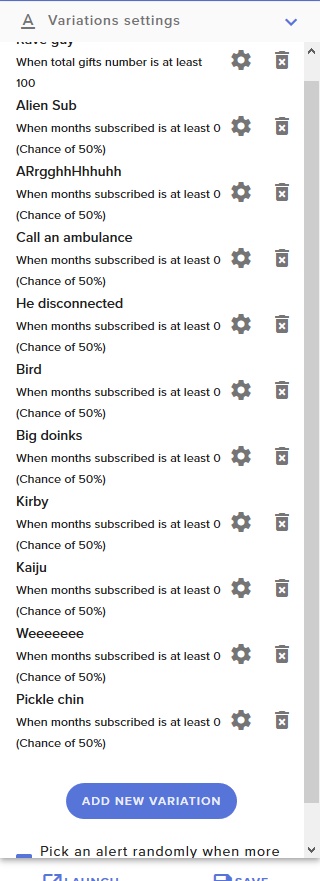


OBS.Live is the StreamElements OBS Studio add-on for streaming. It makes Twitch stream management easy. Download it for free here: http://p.strms.net/obslive...
weary mist
100%, it even has streamdeck integration 😃
lament blade
I don't have one of those fancy tools yet, looking into it though, nice to know it'd work with it 😉
weary mist
keep an eye on amazon, I picked mine up when they went on sale xD
lament blade
I'll keep an eye on it for sure, it seems like a very practical thing, atm i'm using alt+1/2 etc kind of macros
weary mist
its handy 😃
lament blade
@weary mist Another question, I saw SE.Pay is reserved to bigger american/german streamers, living in France atm and not really a big streamer, is there any way for me to set up credit card donations without passing through G2A which seems to be the only other option?
weary mist
I believe France is on the road-map, its just taking some time to get through to all the other countries (99% of this on the payment processor we use, so just waiting on them to give us the thumbs up).
 oblique steeple
And you don't have to be a big streamer. 100+Followers was the minimum iirc.
lament blade
Oh okay, so whenever France is added I'll be eligible, just to make sure, there's currently no option to get credit card donations on SE besides SE.pay correct?
Because some people dislike paypal so I have both options available through my Streamlabs donation page, but I've pretty much started switching off of streamlabs because their chatbot wasn't adequate.
 harsh hare
Is there a permit feature for links on streamelements??
weary mist
@harsh hare !permit is the command
@lament blade yeah. I do believe paypal also can accept credit cards for those that don't have an account, but I am not 100% on this. But yes, once it comes available for france, the option should appear (I believe the follower minimum is 100 to avoid fake accounts)
harsh hare
@weary mist thank you 😃 also do you know why when a link is deleted (using link protection filter) the message is posted twice? hopefully i make sense
 plain magnet
Does anyone know tell me, why do I add a game capture> specific window and it does not show anything?
twin sentinel
@plain magnet Try to start OBS as admin.
lament blade
@weary mist My last question in hopes I can figure that out, I got OBS.Live, and have the docked media request thing, but I would like to use the Show video option on stream, like the one I set up in my overlay ( In this case top right of my screen ) I can't seem to figure out how to turn that on through the docked version and not the website version?
weary mist
The other thing, @plain magnet is that certain games block the ability for games to be captured via their GPU feed (game capture). This is a measure introduced to help reduce cheating.
There should be a show on stream button. give me a few seconds, I am remoting into my home computer and loading up OBS, lol
lament blade
There's a video on or off button, but i can't see the show on stream one in the OBS.Live version ;-;
weary mist
this is what I see
lament blade
Okay I just reloaded and it appeared
weary mist
xD
lament blade
I think it was a formatting issue
Like the size I made the dock
was hiding the lower half of the thing
I didn't have the list either
weary mist
ahh
lament blade
which was super confusing D:
Okay, thanks for the help! That's super neat o/ Have a great rest of your day/night whatever time zone you are in 
weary mist
