#helpdesk-twitch
1 messages · Page 420 of 1
 strong kernel
No, the default watchtime command can't be sent via whisper.
 whole heron
Im still getting auto logged ive logged out of twitch and cleared my cache
strong kernel
You logged out of Twitch in the same browser you're trying to log into StreamElements with?
whole heron
Yup
 twin sentinel
Ok, sorry. That is correct the default command can not been send by a whisper. Maybe think of making it a custom command with variables. This one can you be send via Twitch PM.
strong kernel
Can you take a screenshot of Twitch just to verify, and a screenshot of the StreamElements homepage, logged out as well?
@hasty cairn Custom command with ${user.time_online} variable to be specific.
 lament blade
@strong kernel ty for your help i was able to get the stuff to work kinda. The streamelements software likes specifice deminsions, fonts, spacing, etc , etc , so i find it difficult to line things up correctly and fit everything in the alert box space. Like i try to strech so that alert image and messages show but i can only strech and rezzize so much before something is cut off or distoreted, eaither way , i got the alerts to work on streamelements. Thank you for ur time and help
whole heron
 hasty cairn
@twin sentinel @strong kernel I'll try that one. Thanks 
whole heron
Ok well lets forget that mess the main reason im trying this is because im trying to get the music to play/work on my pc i have the sr set up all that works but when the video plays there is no sound
strong kernel
No sound where, exactly?
whole heron
On my pc when i try to play anything
Thats a terrible pic but focus on the upper halve the music is playing but there is no sound
It was working yesterday when i set it up
strong kernel
Silly question but play the song in your browser on YouTube and tell me if you have sound there.
hasty cairn
By using /w ${user} at the beginning of the command, it doesn't whisper the watchtime to the user. It actually just prints out /w zTyra ... in the regular chat. How do I make the bot whisper me a command again 
hasty cairn

whole heron
Yup yup
twin sentinel
hasty cairn
Found it, thanks again 
whole heron
Any idea what my issue is?
 humble radish
I'm trying to import > Points (Currency.csv) and just keeps loading and loading... Someone know whats happening?
 vast bison
Hello everyone, i ran into an issue last night with my Nightbot or i think its Ankhbot im not quite sure but its duplicating its messages four times. Does anyone know what is causing this?
twin sentinel
@vast bison We can only support our StreamElements Bot here. If you have trouble with other bots you have to ask their support. I think if you want to switch to StreamElements only, we can try to assist you in making otehr bots leave the channel.
vast bison
@twin sentinel Yeaah im an idiot its actually your bot
i saw it in my viewerlist just now. i had it renamed so i forgot
 thorn crystal
(I thought your issue was closed. I'll wait and post after you're finished 😃 )
strong kernel
@vast bison Renamed via Ground Control?
vast bison
Yes
strong kernel
Close and reopen Ground Control.
humble radish
Well I was first but @thorn crystal
humble radish
I have always imported well my currency with google chrome @strong kernel
vast bison
@strong kernel Is the test message suppose to send two messages?
strong kernel
@vast bison Close Ground Control completely, part the bot from your channel, open Ground Control again, join the bot to your channel.
@humble radish Refresh, press F12, open console to watch for errors, try again, let me know if anything pops up in red.
vast bison
I think its working, to clairify it sent a "running pajal" message and "is this thing on"
humble radish
Yes something is in red @strong kernel ''Refuse to execute script from ....''
strong kernel
Screenshot it.
humble radish
Whats this ? lol
vast bison
@strong kernel Thanks , i cant believe "turning it off and on" was the solution 
humble radish
Just keeps loading and loading @strong kernel
strong kernel
Send me the csv file.
strong kernel
Sent the error info to the devs, nothing to be done immediately.
humble radish
So its an error of the website?
humble radish
Oh ok ^^ well I'll wait for a response ,thank you~
strong kernel
Won't be for a while. Not tonight, most likely.
thorn crystal
So I've got a slight issue and I'm not sure there's a good answer, but might as well try. I had the idea to create a new overlay just for my chat so I can see the chat over my gameplay on my display. Note, this overlay is never seen by my viewers. It is simply so I can more easily see the chat and interact without having to take my eyes off the game. So I'm seeing this overlay while my viewers are seeing my main overlay. The problem comes anytime a sound is triggered. Because there's two overlays active, everything plays twice. I've tried turning the sounds down on the chat overlay but it still doubles the sounds of anything redeemed with points, like SFX. Do you know of any way to completely remove the sounds on the second overlay so that they only play from my main overlay?
 strange thicket
I am currently trying to stream Rainbow Six with OBS.Live. My ingame fps is high, but on OBS it is <60. I've had it working fine with these settings but this suddenly happened, I can't figure out what causes this problem? It is really frustrating, if you know a fix, please let me know. (GTX 1080, i7 8700K, 16GB 3000mhz, NVENC 6k bitrate high quality, main output 1440p scaled down to 1600x900. Thanks in advance! (please @ me when mentioning)
 nocturne pelicanBOT
@strange thicket Can you please provide a log from your last stream. In OBS go to Help > Log Files > Upload Last Log File. Once this is complete, please provide the link to the log file.
strange thicket
I did not stream using streamelements yet.
I can see the fps dropping to <60 in the preview
twin sentinel
What Broadcasting Software do you use?
strange thicket
OBS 22.0.2 with OBS.Live plugin
twin sentinel
then follow the steps described by the bot above, to generate alog file please and post it in #helpdesk-selive
strange thicket
Does that help even if I didnt stream? Appreciate the quick response btw.
 formal holly
Hello, I have noticed that my stream labels do not stay centered, even when I put on Center. Is there a way I can keep them from shifting?
strong kernel
@formal holly The widget width should match the width of that section of the graphic.
 thin pine
how do disable the command !donate? im using my own donate command.. but stream element bot keeps popping up with the Streamelements command
twin sentinel
@thorn crystal you can try to set the Overlay to "shutdown source when not visible". But I am not sure if it will be displyed at all then.
@thin pine There should be a default command for the tip link called !tip. Try to disalbe this here: https://streamelements.com/dashboard/bot/commands/default
thin pine
@twin sentinel thank you
thorn crystal
@twin sentinel I've just tried that. As the scene is visible in my preview window, the overlay is active and sending audio.
 narrow coyote
Why do you have multiple overlays in the same scene that appear to have the same widgets that play sound
thorn crystal
They're not in the same scene. They're on a separate scene that is only used on my preview monitor.
I have chat and alerts on preview so I can better interact with my chat, but I don't want the chat overlay being broadcast, so I created a scene just for my preview window.
narrow coyote
Now you really lost me with what you are doing. End of the day, if you have duplicate audio, you have multiple sources active with the same widget playing the audio
And if you want to see stuff in your chat, why not have your chat open or use OBS.Live
thorn crystal
In the past I've opened chat on my secondary monitor, but I thought it would be helpful to create an overlay to put chat over my gameplay so I can interact with the chat without having to take my eyes off the game. That way I can more quickly respond. I don't want that chat overlay on the broadcast. Just my preview that I game from. So I created an overlay and scene just for my preview. So yes, there are two overlays open. One is for the broadcast. The other is for my preview. I want to mute my preview overlay if it is possible.
As for OBS.Live, I'm on a mac and that is not available for mac as of yet.
narrow coyote
Why have widgets that play audio in that overlay?
thorn crystal
I have an alert widget so I can see immediately if anyone follows or subscribes.
narrow coyote
Then remove the audio from those alerts, or turn the volume down on all of the alerts in that overlay
thorn crystal
Alright, thanks!
 lofty oar
How do you get obs.live
narrow coyote
lofty oar
Do you have to get it on computer?
twin sentinel
yes. OBS Live is a plugin for OBS Studio.
 fast radish
@strong kernel Yes I do see the StreamElements Tab there. But nothing about Chat or Activity. I'm sorry for the at sign and the late response.
strong kernel
@fast radish Log out and log in.
lament blade
Um I need somehelp, I can't uninstall streamelements or even reinstall it
strong kernel
Can you be more specific about what you're trying to uninstall or reinstall?
fast radish
@strong kernel Thanks man! it's all there! ❤
lament blade
Um the actual application "streamelements Obs.Live", when I try to uninstall I get an
"extract: error writing to file
C:\Users\Owner\AppData\Local\temp
\nskB.10D\NSISConfig.dll
strong kernel
How did you try to uninstall?
lament blade
Went to app and features in windows, went to the app and pressed uninstall
strong kernel
Open OBS and go to StreamElements>Uninstall OBS.Live.
lament blade
I don't see StreamElements in my OBS
I think that has to do with the fact I uninstalled Obs thinkng it was the problem
strong kernel
So at this point what do you want to do?
lament blade
Well I am trying to get streamElements obs off my pc so I can reinstall it
But I can't
due to this
extract: error writing to file
C:\Users\Owner\AppData\Local\temp
\nskB.10D\NSISConfig.dll
strong kernel
Try to use the installer now.
nocturne pelicanBOT
@cold wigeon To add your overlays to OBS, add a new browser source in your scene. Paste your overlay URL in the browser source properties, set the dimensions to 1920x1080 (unless you changed them on the website), and :ballot_box_with_check: “Shutdown source when not visible” https://youtu.be/KDvLynUqXI4
 cold wigeon
thank u
lament blade
hmm Now My Pc is telling me something about Malware, W32.Trojan.Gen
honestly dunno what Is going on
 opaque shore
hello
How do I get spotify to play music in my chat. I have the widget for my viewers to request and queue songs and videos from youtube
strong kernel
You can't. Spotify removed the capability from their API and it's against their TOS.
opaque shore
ohh gotcha
 glass flame
im getting error "Unexpected token u in JSON at position 0" on Ground Control
strong kernel
And what happens if you ignore it and click connect with twitch?
glass flame
I just ran it in dark mode and it worked
 terse oyster
has anyone been having issues with follow notifications on Twitch? Overlay worked fine yesterday and prior, but was very spotty today. Any known issues?
formal holly
@strong kernel  thank you, lemme adjust that rn
 mild marsh
Any idea how to easily export my scenes from SLOBS and import to OBS Live?
strong kernel
You can't. They made their own filetype for their exports.
mild marsh
FML
glass flame
How do I setup media requests widget because I added it to my overlay and when I click show on stream i can "No active wedgets were deteced for media request
strong kernel
Don't try to show the tutorial video.
 prisma grove
What permissions (mod / super mod) are needed for others to control !volume 10
thanks in advance!
strong kernel
By default, they need to be a super moderator.
prisma grove
ooooh, is there an option where regular moderators can control?
strong kernel
Edit the default command's permissions.
prisma grove
default command?
strong kernel
Yes. In the default commands section of your account?
 lethal vapor
So i can start a stream using stream elements but the stream does not capture my game. does anyone know how to fix this?
strong kernel
Did you actually add a display, game, or window capture source?
lethal vapor
How do you doo that
strong kernel
Best if you look up some basic OBS Studio tutorials.
strong kernel
Go look up those tutorials.
 feral robin
Hello, was curious about the giveaway future and if you need affiliate status for it to work
Currently only my mods can enter the giveaway for some reason
strong kernel
You don't.
feral robin
Am i doing something wrong that only mods can join?
strong kernel
Didn't I just answer your email?
 spring rampart
so anyone know why I can't change make a custom bot name after i installed ground control and linked the donations to my twitch panel and installed a overlay and added the OAuth token?
 median mauve
How do I make the shout out command just !so
No @
So people can !so and it shouts them out
strong kernel
You mean you want anyone to be able to shout themselves out with the command?
@spring rampart Have you launched and used an overlay yet?
@spring rampart You also need to mod StreamElements itself first.
spring rampart
the bot is modded right now in chat and i have a streamelements overlay up right now, but do i have to go live or can i just be messing around with the overlay in the preview screen?
strong kernel
Looking at your chat it seems like you've already renamed it.
You might want to restart Ground Control though.
spring rampart
ok thanks! for some reason it just shows as my name is saying it when i look at chat
at least on OBS.streamelements
strong kernel
Did you make a Twitch account with the name you want?
spring rampart
no, i have a feeling that's why it's just showing as my name
strong kernel
That's why it's just showing as your name.
spring rampart
gotcha, thanks!
 woven dew
Hey I have a issue with double sound if anyone could help that would be appreciated
nocturne pelicanBOT
@woven dew Make sure to :ballot_box_with_check: “Shutdown source when not visible” for all browser sources (all OBS scenes). If using studio mode, uncheck “Swap Preview/Output scenes After Transitioning.” Also keep in mind that sound can play from any overlay loaded in the browser (editor or launched). https://i.imgur.com/FegZJQS.png https://i.imgur.com/yY0wcFl.png

 spring rampart
any reason why when i press the test bot button it shows my bot and my account saying the same thing?
strong kernel
Turn off rename, part the bot from your channel, turn on rename, join the bot.
spring rampart
thank you!
woven dew
I think my issue is more because I'm running dual pc's for streaming and im trying to get my capture card audio to go through my headset and im having a hard time figuring that out without going through the mixer and monitoring the audio
I don't know I'm so confused!
strong kernel
Not everyone here has experience with two-PC setups, so you may have to wait a little for assistance with it.
 livid ingot
How do i get a SFX working with a command? example:
!raid, id love to have a warning siren or something go off when it happens i use the !raid command
strong kernel
Create a store item for the sound effect, and then create a custom command using the ${redeem} variable.
 sonic cargo
Anyone know anyway to have the Spitfire Animated Super Theme but without the Apex Logo in the middle
 zenith widget
Unfortunately, the logo and the side bars is an entire asset.
 inner wagon
I've imported my alertbox from TwitchAlerts and have most of it setup again properly but the text won't stay inside the box properly. It just sets it too large and it won't get any smaller.
zenith widget
Use the text settings (font size and margin in the advanced tab)
inner wagon
The font size is on 1 and it's still humongous, it doesn't seem to shrink at all.
zenith widget
Ah, click on "Custom css" toggle to turn it on and then again to turn it off and test an alert and see if the font is ok.
inner wagon
No, the text is just staying large.
inner wagon
Sub, yes.
zenith widget
So do the above for the variations as well.
inner wagon
Oh, blugh. This is where the variety comes back to bite me.
Was hoping I could reset it once for each thing.
zenith widget
If the variations are not so different from each other
you can delete them
setup the main alert, then add variations again
they inherit the main alert when created.
 fathom cedar
Hello, newish to Stream Elements but enjoying it so far. Can someone tell me how to switch what Twitch account is linked to the Stream Elements dashboard?
zenith widget
Our login system is dependent to an extent to the currently logged in twitch account.
So you will need to logout from our dashboard, logout of your currently logged out twitch account, login to the other account then login to our dashboard.
Also you can setup manager links between accounts.
nocturne pelicanBOT
@fathom cedar To invite managers to your dashboard, Click on your Channel Name at the top of the dashboard and scroll down to Settings. Click the drop down arrow to expand your channel managers and then create a new invite at one of three access levels (Bot Supervisor, Editor, Full Control) Check this video out for more help: https://youtu.be/zl_h-ttZDF0
fathom cedar
Thank you, just got it fixed.
lament blade
how could i add emotes to command messages?
zenith widget
just type the emotes.
lament blade
it’s a default emote though so how would i find the name of it?
zenith widget
Which emote then?
 glacial jolt
some1 s up to help me?
zenith widget
What is the issue you are facing?
lament blade
it’s the cat with sunglasses
 this one?
glacial jolt
this one?
glacial jolt
im using the commands !elo and !rank, but it doesnt work anymore
i see so much channel running it
but on mine doesnt work anymore
zenith widget
We don't have default commands that have LoL api calls.
lament blade
yes!! thank you
glacial jolt
so what can i do?
zenith widget
If you are using the commands from #command-share we can't guarantee those external APIs will work after a period of time.
lament blade
another question i have, is there a way to add a time zone command so my chat can know what time it is for me?
 untold crest
It is.
zenith widget
zenith widget
example of accurate times $(time.PST8PDT) ${time.Asia/Seoul} You can specify time zones using locations so LA would be ${time.America/Los_Angeles} https://en.wikipedia.org/wiki/List_of_tz_database_time_zones
untold crest
I wish I could know how to link to messages 😉
lament blade
thank you guys so much!!
now that i have that is there a way to make it say whether it’s am or pm
zenith widget
afiak its 24:00 format by default
lament blade
oh well that should work for now i suppose thank you!
untold crest
@lament blade You can use external API for that ${customapi.https://decapi.me/misc/time?timezone=America/Chicago&format=g:i:s%20A}
lament blade
you are amazing @untold crest
 amber granite
Hey guys, is their a fix yet for the issue with ground controll not saving changes.... when I change the backup playlist (or any other setting) it doesn't save
zenith widget
Are you able to change teh backup playlist via the website?
amber granite
Its letting me change the playlist that way! But not changing settings (ie limit to music)
zenith widget
In the website?
zenith widget
ugh, yeah I'm also experiencing this issue
Let me see if I can poke the devs about this
amber granite
I know a few are... seems to be since the media player integration into live was announced
Just to note... when you try to change settings it breaks the player, website or GC... theirs no sound, you have to close it and reopen it to get sound (again, website or player)
zenith widget
Where does the player break?
amber granite
It just makes no sound
Still 'looks' like its playing, plays the video, but no sound
Again, exact same on GC and website
zenith widget
I think I found the issue
is your request type set to anything else besides "Free"?
amber granite
It's set to "both"...
zenith widget
Ok hold on.
amber granite
Ok.... setting it to free allows me to change settings at least.... then I have to close it and re open it for the sound to actually work
zenith widget
noooo
wait

i wanted to checking something but was checking another account before yours
amber granite
Didn't know you was going to look at my account
zenith widget
Ok, so go back to "Both" and check if you have set a minimum amount for tips
amber granite
No minimum
zenith widget
Thats the issue. Place a 1 or something.
amber granite
Ok... weird... I've never changed anything
zenith widget
Another person also had that issue.
On tickets this morning and I was trying to figure it out, but then you came and I wanted to check both your accounts as more samples to work with.
but ooh well
thats the issue.
amber granite
I'll try now thnx
Ok, saving changes now..... still have to close and reopen (either website or GC) in order for music to play... but can live with it
zenith widget
So heres the deal. OBS.Live has the most updated MR, GC is like 1 version behind and the website MR is like way behind.
We do have plans to have the MR version in OBS.Live to be on the website, but no ETA on when its going to happen.
So any changes that you do to settings in GC or Website MR, a restart of one of the other will be required to take affect as they can't dynamically sync at the moment.
amber granite
Oooookkkk... I'd like to get live but even with the import features its be a pain moving everything across from SLabs... i will one day. Thanks for your help
zenith widget
Yeah we recently had issues with the import tools, but I think they should be good to go now
 velvet cradle
I have an issue where the animation of my alerts not being in the center of the alert box. Tried everything... 😦
It's in the center on Streamelements but not in my alert box in the stream.
velvet cradle
Nopes, nothing changed. except for I dont see the animation at all in the stream now.
@zenith widget And I can't find the chat support on the website either anymore. Whaaat is happening 😦
zenith widget
We focus our support effort more on discord.
velvet cradle
Alrighty. @zenith widget Do you have any other ideas why it doesn't work?
zenith widget
centered
Video is 8 seconds while the alert duration(for the sub) is 30 seconds.
I don't know how it was in SL, but most likely the same thing happens
tip alert duration - 15 seconds.
velvet cradle
I don't get it, I can set it to loop or what ever? But I mean when on the stream it doesn't show. None of the alerts does.
velvet cradle
nocturne pelicanBOT
@velvet cradle The default resolution for StreamElements overlays (theme and custom) is 1920x1080. Please add them in OBS at their full resolution and use CTRL+F to fit to screen if necessary. You can then downscale your stream in OBS settings > Video if you'd like https://i.imgur.com/6bWXxjR.png
 zenith widget
The overlay has been imported as 1920x1080 resolution
thats why its not showing properly.
zenith widget

velvet cradle
So another question, I cannot set the animation on loop? 😒
twin sentinel
I think you have to use a gif to get the looping video.
velvet cradle
@twin sentinel Thing is that I can set a video to loop, but I cannot set the alert animation on loop.. 😒
twin sentinel
Upload the video as gif and I think it will just keep looping till the animation ends.
velvet cradle
@twin sentinel and that is possible? since I can only upload the video..
twin sentinel
yes. You can upload gifs, too. The video cannot be looped. It will stop with the animation when the video has ended. Just gifs can set ti loop I think.
velvet cradle
Alright, so how do I upload it as a gif? How do I get it to become a gif and not a video?
twin sentinel
You can try to use an online converter to convert your video to gif format and just upload in the SE tool and use it as known.
velvet cradle
Yeah can't use it...
twin sentinel
you can't use what and where exactly not?
velvet cradle
It looks like some 5 year old made it lul 😄
I need a transparent background for it to look good. With this blackbackground it's just craaazy ugly
twin sentinel
I am sorry, as I can't really help you with that, as I only know if you want to have an infinitive loop you have to add it as a gif.
Maybe another support has another approach to this.
lament blade
i could help u
velvet cradle
@twin sentinel Thanks for helping me out. 😃 Would be great to have a loop options for videos in alerts overlay as well.
@lament blade really? 😄
velvet cradle
Cool sure ! 😃
lament blade
but before we dive in can i dm u to as for a few details?
velvet cradle
Yes sure
lament blade
@zenith widget my friend. Is the Apex Overlay fixed yet ?
zenith widget
@lament blade yes but you will need to recreate the entire package
lament blade
kk no problem thx
 wooden silo
Question about overlays, just need a quick clarification, the default the notifications have to be is 1920x1080? Yes or No?
 jade remnant
no the overlay is 1920x1080 the alerts are set by the makers, you cant change them
jade remnant
do you have the alert widget in your overlay
is the "eye" on the alert box showing
can you test with the bell in the overlay editor
have you check the variations (if you have any)
 quartz otter
hi all, i can't get my !songrequest command to work reliably
i'm using chrome to play the music with a tab open to the mediarequest section of streamelements
chrome version: Version 72.0.3626.119 (Official Build) (64-bit)
i have to toggle the volume to get music play as well as refresh the page when new songs are added
also, only the first song in the queue plays until i press next sometimes.
 winter zenith
@quartz otter did you try opening up mediarequest in an incognito tab and play it?
Could be that a Plug in is blocking stuff.
quartz otter
i did not. i don't have many extensions installed but will try
weird it's workign. the extensions that i have installed are: gmail, bitly, 1password, pocket, bttv, currently
 plain lagoon
Hey Discord peeps, I'm about to build a pc for streaming on twitch w/ streamelements. What are the recommended specs for my CPU?
Is there a specific room I need to ask for this information? I'm fairly new to discord
 elder sorrel
#general-chat will be the best option. As this helpdesk is for Streamelements related support for Twitch streamers
plain lagoon
thank you
 sudden river
Hey team! I love SE. I have a couple of questions though..
Can someone help me?
Q: I've added the subscriber credits roll widget to a scene, but how do I make them roll? I see nothing. Couldn't find a guide anywhere.
 gentle imp
afaik it should show on OBS
if you added it to a scene you have on your OBS of course
sudden river
I see nothing.
I've turned layer off and on again also
I've saved, exited editor. Launched overlay on web.. nothing happens.
nocturne pelicanBOT
To add your overlays to OBS, add a new browser source in your scene. Paste your overlay URL in the browser source properties, set the dimensions to 1920x1080 (unless you changed them on the website), and :ballot_box_with_check: “Shutdown source when not visible” https://youtu.be/KDvLynUqXI4
gentle imp
if you have it on the overlay you use and also on browser source it will populate when you get followers etc
at stream end afaik
I never used it though but from what I've seen ppl use it and say
jade remnant
its from every sub/follow during your stream. when you end you go to that overlay (widget) and it will display those people
sudden river
I have subs. It's set to the last "month" worth. I've never seen it actually roll.
Weird.
One more for you peeps..
Q: How do I use the counter function? I can't figure that one out either.
I'd like to have a death counter on screen, and add to it.
jade remnant
theres 2 you can use, bot counter and the custom widget (both in the widget section of the overlay editor). to use the custom widget add it to your overlay, open the css panel on the left hand side then copy everything from here https://github.com/StreamElements/widgets/tree/master/BotCounter in to the respective fields. just add you JWT, twitch name and what the counter is (wins/deaths)
quartz otter
@winter zenith do you know of any particular chrome extensions that conflict w media request?
the extensions i have installed are pretty common 😕
 analog crypt
dumb question related to my problem: how does one allow a site through a firewall?
 devout mirage
Greetings awesome people, is it possible to make a counter for bits, without using SE dashboard? purely chat command counter
 plush dome
ok minor issue has arisen.... i have 2 shoutout commands set up, but it only gives the one result for both.
they are supposed to say 2 different things and have 2 different commands
 tight harness
@plush dome Try parting the bot from the dashboard then join it, then try again
plush dome
tried that already when we were trying to figure out why the streamelements bot won't let me configure a schedule panel with it
devout mirage
@tight harness anything you know which can help me?
tight harness
I removed the !so someone added to the !sobff command, now it's fine
@devout mirage Not that i'm aware of, would have been better to ask in #dev-chat most likely
devout mirage
Thanks Sean ❤
plush dome
ok @tight harness Thank you for that
tight harness
No problem
lament blade
So, while using my Media Requests (First thought it was just a bug for OBS Live) But no it is a bit more than that. Basically it is auto-skipping songs in my backup playlist? So I disabled it on OBS LIve, went to the browser same thing. Then it tries to go to the old backup playlist that is no longer listed...?
 misty sparrow
where did my txt go?
tight harness
Questions not relevant to SE can go in #general-chat
lament blade
Hello guys, I've a stupid question but I don't understand how to set up the bot chat when someone follow/sub/host/bits/donation, is it [user]?
elder sorrel
@lament blade All you have to do is enable the Chat Alerts Under 'Modules' in the Streamelements Dashboard
You can edit what they say as well by clicking the pencil icon to edit each Chat alert. {user} is the correct variable which would be listed.
lament blade
SE seems to be skipping songs in my back up playlist sometimes going back to songs that are not even in my backup playlist anymore? (On Web Browser)
elder sorrel
I believe that is a known issue but cannot confirm. Haven't streamed/ touched OBS.Live Media Request yet 
 delicate wadi
Hey all need some help. I changed my twitch username last night and after relogging into stream elements I'm having an issue with my custom chat commands not working. I unmodded streamelements and added again. Can't get it figured out. Any help would be great!
elder sorrel
@delicate wadi Part the bot, log out of Streamelements. Sign back in & have the bot join your channel.
Then you should be good 
 gilded bronze
quick questions, how to disable the e-mail sent to your inbox after you finish every stream?
delicate wadi
@elder sorrel You are a rockstar! Thank you!
narrow coyote
@gilded bronze Click the part in the email that says "to unsubscribe click here"
fast radish
Hey guys my home girl has a problem with OBS.Live
The games that she's about to stream isn't showing up on there. Is there any known issues about that? I'm trying to get her to use streamelements because SLOBS is jacking up her frame rate
elder sorrel
No problem, Tracerec_177 
gilded bronze
and if i want it later on?
narrow coyote
someone will need to manually add you back to the list
gilded bronze
so i'll come here and ask for it pretty much, correct?
narrow coyote
yes
gilded bronze
thank you so much for the fast help @narrow coyote appreciated
narrow coyote

lament blade
I hit the skip button once and it skipped more than 1 song... https://gyazo.com/a5c084a184768316b8298a72577af865
 elder sorrel
@fast radish What games?
fast radish
@elder sorrel Every game she's tried so far. PUBG, Assassin's Creed, Apex..
narrow coyote
 pulsar gulch
Hello guys , I got a problem , I opened a link from chat and it opened in the chat window and I don't know how to go back
I tried closing it and open it again but didn't worked
narrow coyote
StreamElements > logout, then log back in, then be sure to not use the middle mouse to open links
lament blade
@elder sorrel so it's {} and not []?
elder sorrel
Correctamundo
 strong flicker
good evening
after setting up my 4 scenes with different browser sources (overlays) I can hear multiple alert sounds
what do I need to do about it?
using OBS.live
 fallen wind
${time.TIMEZONE} not working ?
nocturne pelicanBOT
@strong flicker Make sure to :ballot_box_with_check: “Shutdown source when not visible” for all browser sources (all OBS scenes). If using studio mode, uncheck “Swap Preview/Output scenes After Transitioning.” Also keep in mind that sound can play from any overlay loaded in the browser (editor or launched). https://i.imgur.com/FegZJQS.png https://i.imgur.com/yY0wcFl.png
strong flicker
after changing it takes some time to load and people can see a black screen
nocturne pelicanBOT
@strong flicker Check out this tutorial for OBS’ studio mode which allows you to preload scenes before transitioning. https://www.youtube.com/watch?v=W8iWsD2Lq3U
fallen wind
@elder sorrel Can I change the nickname of the bot?
elder sorrel
Are you using OBS.Live?
lament blade
On Web Browser I am still having songs skipped. It has gone through a almost 70 song playlist in just 30 minutes twice now. Skip button skips 3 songs (Which includes the one i meant to skip)
https://gyazo.com/a5c084a184768316b8298a72577af865
 weary terrace
hey yall for the SE groundcontrol you can change the name of your bot, but does it always have to be on for the name to show? i do irl streams and cant download the pc groundcontrol to my android. will it stay up in the web?
twin sentinel
either Ground Control or OBS.Live has to be on, to rename the bot. @weary terrace
weary terrace
@twin sentinel is there a way to get those on a chromebook?
narrow coyote
no
@lament blade Playlist skipping issues are known and being investigated by the devs
fallen wind
how to change the nickname of the bot in Ground Control ?
nocturne pelicanBOT
@fallen wind Custom bot name requirements
- StreamElements bot modded and in chat
- Active overlay with alerts
- StreamElements tipping page in the panels below the stream (!panels)
- Create a twitch account for the name you want to use
- Ground Control app must be running
Steps to enable custom name
- Sign in to https://twitch.tv with the bot account
- Install and run Ground Control (!gc for download)
- Visit https://twitchapps.com/tmi/ and generate an oAUTH token
- Copy/paste everything in the box to Ground Control oAuth settings and enter the name for the bot account
- Restart Ground Control (custom name may take a few minutes to take effect)
Mac does not currently support renaming the bot.
jade remnant
the text lines are probably too long, you can change the text line in the overlay editor
 brisk pivot
i imported them from streamlabs
jade remnant
its the formatting from them, but you should still be able to edit the text
let me get a pic, hang on
the highlighted area is where you can adjust it
jade remnant
click the cog of whatever alert is clipping out, then go to text settings
brisk pivot
ahh
nvm the problem was in obs, i had the web source 800x600
i put it to 1920x1080 and its fine
jade remnant
😁
brisk pivot
ty 😃
jade remnant
np 👍
brisk pivot
any idea why the emote is so far away from the text
jade remnant
that might be the same as above, check in the alert where the icon is and see if theres any "dead space" by selecting and highlighting the gap between the start of the icon name and the end of the previous word... unless its an image, then you should be able to drag and drop it : )
jade remnant
do you see a place in the highlighted box with the name of the emote?
brisk pivot
i can only edit the size of the whole alert on this page
the original alert is from streamlabs
oh
there was a cog wheel
ohh i get it now
fixed 😃
 tropic helm
What happens if it says this?
jade remnant
@brisk pivot sorry bud, was fixing my own overlay 😁 glad its working
@tropic helm you need to ask streamlabs
tropic helm
Ok
 alpine surge
hey fam!!! for the hype cup, any way for the token drop to be higher up?
is there any way the token can drop from higher up?
alpine surge
i figured it out but im not sure how 😃
 snow needle
Good evening everyone, I'm not sure if this is the place to ask, if not, My apologies. So the matter at hand, I wanna know if it is possible to prohibit/block someone from redeeming specific itens from the store?
 maiden ledge
I have a sub alert set up, and also a variation set up for resubs of at least 2, a gifted variation, and a community sub variation of at least 3.
The gifted variation works if a named person gifts it to someone, but it breaks if someone gifts a sub anonymously. It'll either say ananonymousgifter subscribed, or "ananonymousgifter gifted 10 subs" when it only gifted a resub.
Not sure what I'm doing wrong
lament blade
hey, i don't know if this is where to ask but my bot isn't in my chat anymore.
so i can't use commands, nor can other people and its quite frustrating. i dont know how to fix it and i cant find anything on google thats similar to my problem.
 ruby tapir
he all, tts is not working for my resub, i have all the settings enabled it just wont read
 spare swift
i'm trying to tip a streamer and i'm getting "error! seller restriction" - HELP?
 torpid estuary
@snow needle hey, you can set your items to be only redeemable by subs. other than that, you can not block someone from redeeming items
@maiden ledge thanks for the heads up, let me try that for myself and ask internally about it if i can recreate the problem!
@quartz cypressi#5984 please go to your SE dashboard https://streamelements.com and click on "join channel"
@ruby tapir did you make sure to also check the variations?
@spare swift are you logged in when trying to tip them? also, can you give me the name of the streamer? only name, no link please
 stuck thistle
Hello y’all. New guy here! Was directed to post my question here, as opposed to Twitter. So, here goes:
How do I mute one of the audios caused by MediaRequest? For example, both (MR window bottom right, and actual video mid-left) are both playing the song. So, HUGE echo. Nothing else open on my PC. How do I stop this?
spare swift
@torpid estuary I'm logged in yes. The streamer is Myles_Away
torpid estuary
@stuck thistle wait, so you mean your SR is playing, while you also get the audio from the "show on stream function"?
@spare swift what browser are you using?
spare swift
@torpid estuary google chrome and i've been able to dono's in other channels just now
stuck thistle
@torpid estuary I guess basically, yes. Both are playing the audio.
torpid estuary
@spare swift can you do me a favor and try to donate while using incognito mode?
@stuck thistle so as soon as you pause SR via the menu in OBS.live it stops both instances?
stuck thistle
@torpid estuary Yes
torpid estuary
@stuck thistle ok, might be you have more than one scene with the media request widget in it. does the problem only occur when you click "show on stream" or always?
@spare swift im trying to find out what that problem means. asking internally about it and will ping you once i found something out
sorry for the wait, i know its frustrating
spare swift
@torpid estuary thank you for checking mroe
stuck thistle
@torpid estuary Ahhh. Only when I click SOS.
torpid estuary
ok uhm, that is really weird, since i use that function often and never had that problem. can you do me the favor to report the problem via the "StreamElements" menu in OBS.live?
also, just to make absolutely sure, you dont have, by any chance, the browser open in the background with the MR site open?
stuck thistle
Hmm, I have the widget in most of my scenes. Strange that it would trigger audio from an inactive OBS scene while using another scene.
Correct. No browser window open.
torpid estuary
oh ok, so it triggers from another scene?
stuck thistle
I don’t know but since you mentioned that, maybe that’s what’s happening. But if so, I would think it would happen all the time.
torpid estuary
then please do the following:
nocturne pelicanBOT
@stuck thistle Make sure to :ballot_box_with_check: “Shutdown source when not visible” for all browser sources (all OBS scenes). If using studio mode, uncheck “Swap Preview/Output scenes After Transitioning.” Also keep in mind that sound can play from any overlay loaded in the browser (editor or launched). https://i.imgur.com/FegZJQS.png https://i.imgur.com/yY0wcFl.png
stuck thistle
Oh man, I didn’t even realize that was an option.
torpid estuary
not a problem, thats what we're here for!
 soft fulcrum
Hey my overlay is not working anymore in OBS. It's the furthest to front was working a couple of days ago and have deleted all versions, redone the source and copied the correct website link. Works in Chrome when testing, non responsive in OBS. any tips?
stuck thistle
@torpid estuary I will try that once I’m no longer live and report back. THANKS!
soft fulcrum
Refreshed cache as well
torpid estuary
@stuck thistle most welcome my dude! hope it works out! if not, dont hesitate to come here again!
@soft fulcrum did you make sure you set the right resolution in the OBS browser source when adding it?
by default SE overlays are 1920x1080, but if you set anything else while creating the overlay, youd have to match that
torpid estuary
oh, this is SLOBS?
soft fulcrum
Yeah I used both platforms
torpid estuary
we have had some reports of SE overlays not working/stop working in SLOBS. your best bet would be to try OBS Studio, or OBS.live.
soft fulcrum
Ouch! Okay thanks.
torpid estuary
hope you can get it sorted!
stuck thistle
@torpid estuary Genius!! Clicked “Shutdown source when not active” and now ZERO echo! THANK YOU!
torpid estuary
hey, glad i could help!
stuck thistle
Excellent! Thank you so much
torpid estuary
you are most welcome!
 stone cypress
Hello. Is there any guide for a good bot? I like it to do things like telling people their loyalty coins .. posting leader boards etc in my stream chat ..
My problem now is people come and go in my streams. I know the problem is me but I figured a little bit help is good :p
 normal igloo
@stone cypress you're asking for a guide for a good bot I take it you do not realise what server you are in then 
torpid estuary
@stone cypress well, you can just use the StreamElements bot then! it comes equipped with very cool things, so you might just want to check it out!
normal igloo
or what void Said 
stone cypress
Yes I have checked it out. However not sure what I am doing wrong. It doesn't appear anywhere .. 😬
torpid estuary
did you click on "join channel" in your SE dashboard?
 kindred glacier
need help streaming poker tables at Global poker. I use display capture but it takes up entire screen and if i click on other tabs it show whatever tab, etc
nocturne pelicanBOT
@kindred glacier For the best OBS support, please join their Official Discord @ discord.gg/obsproject
kindred glacier
ok thank you
 severe spade
Can i give my twitch mods access to control streamelements commands?
twin sentinel
Please take a look at this explanation: https://support.streamelements.com/hc/en-us/articles/360000485152-How-to-set-up-Dashboard-access
severe spade
Thank you so much
 unborn obsidian
are they working on a way to incorporate BTTV Emotes into the chat window?
twin sentinel
the widget for your twitch chat or the chat window in OBS.Live?
Because I think it is alredady implemented.
unborn obsidian
is it? how do i get it on the widget? its not showing
 tepid frigate
Question, stream elements song requests- I have to manually select the next song, is there a reason for that? Also when I put the overlay for how i want to the music player to look on stream, it doesnt show.
twin sentinel
@unborn obsidian I really just added these emotes to my channel and they are showing in the widget chat.
 echo lodge
Hey SE! I was having a problem with host notifications tonight. I received 2 big host notifications. and I ALWAYS test my stream for follow/subs/hosts before I go live to make sure everything is in order. Everything was working just fine. When I raided someone at the end of the night they didnt pop a host notification either. Afterwards I watched a friend of my stream later that night, and he hosted someone as well and no notification went off for him either, they were using SLOBS. Was twitch having issues today or something?
I use stream elements myself for OBS.
unborn obsidian
@twin sentinel it’s being weird. Some emotes show but some show the code
zenith widget
@unborn obsidian What is this about?
@echo lodge What were the amounts of the hosts?
unborn obsidian
BTTV emotes
unborn obsidian
Some times the emote shows but sometimes it shows the code
zenith widget
The same emote?
unborn obsidian
Yea
zenith widget
Where exactly? OBS.Live chat or normal twitch chat?
Or command response?
See the missing details? 
unborn obsidian
Obs live chat.
zenith widget
so the OBS.Live chat is a 1:1 integration with the future OBS Studio 23.0.0 beta update.
What they have is what we have also implemented to make sure there are no conflicts when the version comes out publicly.
BTTV emotes for some reason are not working with them, ours devs know and so does the OBS guys know about it.
unborn obsidian
Oh ok
 crimson basin
Probably been asked alot, but how does one get a customized cheer cup?
 slate sun
So, trying to setup simple alerts. But my .gif I have selected doesn't restart everytime the alert is played? it just constanly loops in the background so whenever it plays it starts at some random part of the .gif?
zenith widget
Thats how loaded and cached gifs work in browsers.
slate sun
doesn't work like that with Streamlabs tho...
I'm just trying to switch my stuff over from streamlabs, if I can't match the same effects I get there I'm out :<
zenith widget
So once you load an overlay into OBS
and the gif plays once
its cached and loaded
so it goes on a complete loop
thats how GIFs work in browsers.
slate sun
so the answer is "no, you cannot do anything about it. continue using the other service which DOES do it correctly." thanks
zenith widget
convert the gif to a video.
If you want to even try, here is a site to convert it to a video: https://convertio.co/
slate sun
I'll see if that solves it.
 round nexus
why wont it show that im live on the streamelemets web browser dashboard, i also dont think any of my alerts have been working could someone please help me ?
slate sun
I don't want it to loop, but now my issue is this: Supported formats are: (.png, .gif, .jpeg, .jpg, .mp3, .aac, .wav, .ogg and .webm.)
none of those are video formats lol
zenith widget
conver to .webm
zenith widget
@round nexus Log out of the dashboard and back in. I did some things to your account and hopefully it works.
round nexus
its still saying im offline.
zenith widget
Let me see if I can get a dev to answer me.
round nexus
ok
slate sun
@zenith widget not the best solution imo, but it does work. My thanks.
 white palm
Hey i hope thats the right channel for my question ... i want to give out steam keys via the stream store (acces code list) .... but i cant set a command for the viewers so they can redeem them in the chat is there a way?
or do they have to go to the stream store on the page?
zenith widget
Access code type stream store item can't be redeemed via chat.
The items can only be redeemed via the stream store as it gives them the code privately.
Else the entire chat will see it.
white palm
But why is there an option" redeemable via chat" ... i thought u can do e.g "!redeem key" and it will tell you to go on the page and check the key or something like this
zenith widget
Honestly I have no idea, but it is present with sound and stream perk as well.
white palm
Hm ok :/ anyway thx for the help 😃
echo lodge
@zenith widget the hosts were 10-20
zenith widget
@slate sun Did you also send in a ticket?
@echo lodge Then what exactly is the issue? Host event not shown in the activity feed?
I took a look and I don't see any host events. We by default filter out 0 viewer hosts, so the 10-20 amounts should show up in your activity feed. @echo lodge
 nimble owl
In your Subgoal widget it sais that i got 53 Subs. but i dont. Is there any way to refresh it in some way?
zenith widget
https://streamelements.com/dashboard/session -> goals tab
The goal progress only goes up, but doesn't go down automatically.
To get to this page again -> Activity feed on the left menu -> Widget data on the right.
nimble owl
thanks ^^
lament blade
hoe zorg ik dat streamellements mod bij mij word????
slate sun
@zenith widget yes, I did. Everything is fixed now.
zenith widget
@lament blade I'm sorry, but we don't have dutch support and to answer your question, if you are on twitch use /mod streamelements
@lament blade https://youtube.com/c/streamelements - YT bot
https://www.youtube.com/comment_management - place to add YT mods
torpid estuary
@spare swift sorry for the long wait, so it seems your streamer has an issue with paypal. they need to contact paypal, as there is nothing we can do about it.
 tight rover
So, how does one's mods initiate a contest? Can they?
zenith widget
They can be invited as managers to your dashboard.
nocturne pelicanBOT
@tight rover To invite managers to your dashboard, Click on your Channel Name at the top of the dashboard and scroll down to Settings. Click the drop down arrow to expand your channel managers and then create a new invite at one of three access levels (Bot Supervisor, Editor, Full Control) Check this video out for more help: https://youtu.be/zl_h-ttZDF0
@tight rover
Chat/Bot Levels
100 - viewer
250 - subscriber
300 - __regular __
400 - __VIP __
500 - moderator (twitch mods automatically placed at this level)
1000 - super moderator
1500 - broadcaster
Dashboard Manager Levels (least to most access)
Bot Supervisor (can add super moderators from dashboard)
Editor
Full Access
https://i.imgur.com/s61Liry.png
 tight rover
Thanks!
spare swift
@torpid estuary thanks for checking and finding answer!
 opaque field
He clearly likes it!
torpid estuary
winter zenith
@lament blade what's your problem? 
lament blade
nothing
 cold bridge
i cant change my bot for a custom name in OBSLive... it just didnt work
winter zenith
@cold bridge you don't see the option or you get a error message?
cold bridge
i've connected the alt account, log in the twitch, and they send me to streamelements page
with ground control i got the custom name, but i dont wanna to use ground if im using OBSLive
winter zenith
Understand able so you connected to your bot account and logged in and you can't select it now?

cold bridge
when you click in "connect custom bot account" it suppose to login your twitch account bot to get access to use with botname in your main channel, right?
winter zenith
Yes by logging in with the twitch account wich will have the bot name
winter zenith
So when you connect with twitch on the last screenshot you get connected to the dashboard?
What obs live version are you on?
Also you can try to log out and back in in on the top right StreamElements tab
 kind epoch
Hi , is there a way to promote a song from the song request queue?
 upbeat geyser
whats the command to request a song being a viewer
kind epoch
!sr or !songrequest ueually @upbeat geyser
upbeat geyser
thx
kind epoch
yw mate
winter zenith
@cold bridge it is either on the top. Left or bottom right
tight harness
Then you need to enter your stream key
 timber niche
I did
kind epoch
@winter zenith any joy to my quesstion?
timber niche
I put in the stream key and now its says connecting but then after is says Could not access the specified channel or stream key.
winter zenith
@kind epoch what you mean promote?
Like pushing it up the que?
You can just drag and drop it higher or if someone donates and you set it up right it can get pushed up to the que
timber niche
@tight harness is there a way to fix it or not??
narrow coyote
we cant help you with problems related to your stream key
you would need to contact Twitch
tight harness
⤴
kind epoch
Okay, so why is my songrequest queue empty when there have been songs requested.
 quaint bear
every time i start streaming, i immediately start dropping frames. I'm not even playing a game yet and my obs is all over the place. My CPU is below 10% and everything is fine, but OBS is not having it.
winter zenith
@kind epoch refresh the widget
@quaint bear framed roping normaly is a sign of bad Internet connection
But if you provide a log some one can help you figure it out
nocturne pelicanBOT
@quaint bear Can you please provide a log from your last stream. In OBS go to Help > Log Files > Upload Last Log File. Once this is complete, please provide the link to the log file.
quaint bear
@winter zenith i reset my modem and router and did a speed test, everything came back to how it should be running. Still the same frame issues
this is the most recent https://obsproject.com/logs/9vqhrVr1F82zHq3Y
lament blade
Anyone available to help? 😃
nocturne pelicanBOT
@lament blade Welcome to the support channel! Please let us know how we can assist you today and a member of the support staff will be with you as soon as possible.
winter zenith
@quaint bear you can do a twitch bandwidth test. Becauss your log sayes that your bandwidth I the issue for the dropped frames wich is what I suspected
@fresh mural pls no links just state your issue
If we need your twitch handle you probably have it linked on discord anyway
 fresh mural
Okay, sorry my bad. My display capture stopped working.
fresh mural
I may have to restart the stream then. I was already live when I edited things.
lament blade
@winter zenith Do you have any suggestions for the following problem? I've ran the Auto optimizer thingy to get the best settings for my build. However, my stream is lagging severly on Twitch. I have decreased the bitrate already a couple of times but it didn't have any effect what so ever
or anyone else? ^
tight rover
I sent "bot supervisor" links to two community members but they are getting error messages. I sent them unique links. They are already Super Moderators - does that mean they also count as Bot Supervisors? And if so, how do I instruct them on how to perform moderator actions like triggering Contests?
winter zenith
@lament blade can you send a log from. That stream?
nocturne pelicanBOT
@lament blade Can you please provide a log from your last stream. In OBS go to Help > Log Files > Upload Last Log File. Once this is complete, please provide the link to the log file.
 quasi night
Hello 😃 is it possible to enable/disable items in the streamstore via command/elgato streamdeck ?
 sleek grove
I'm having trouble changing the StreamElements Bot name. I change change it to MY name, but I can't seem to get the custom name to work.
- I use OBS.Live
- It's connected a alive in my chat room, and has been modded.
- There is a StreamElements Tippling link in my twitch panel. All three boxes are checked green.
What's going on here?
winter zenith
@tight rover cam they switch profiles to yours on the top left?
@quasi night no but that's a good suggestion maybe put it in the ideas board
nocturne pelicanBOT
@quasi night Here is the StreamElements Ideas Board: https://strms.net/ideas
winter zenith
@sleek grove you should have loged into the botname twitch account while creating it not yours. Do thr process again but log in as the bot account
quasi night
Okay thank you 😃
nimble owl
Is there a function where the bot awnsers with a sentence without using a prefix like '!' ?
like if you use a word?
and the bot awnsers?
twin sentinel
you can setup a keyword in the command settings.
nimble owl
so whenever and where ever I use that keyword in a sentence the bot would reply?
with a preset awnser?
twin sentinel
yeah, I think so.
tight rover
@winter zenith Thanks, asking now.
Unrelated: is it possible to trigger a prefab contest from a chat command or via streamdeck/OBSlive?
winter zenith
I think not sorry
 whole spade
my streamelements twitch bot has stopped working and i dont know why nor how to fix it
nimble owl
If you make a new Command there are under the advanced option,
"Keywords are alternate ways to trigger a command.
They can be anywhere in the message and do not need an exclamation mark (!)
(press enter to submit)"
@twin sentinel
thanks for your help man ❤
tight rover
@winter zenith My mods aren't sure how to change their profiles to mine?
I don't know how to either
lament blade
@winter zenith Where do I send it to?
winter zenith
@whole spade did you try parting it and letting it join again?
@tight rover on the top left it sayes "channel" click on it to reveal a drop down menu
Of they can switch over to yours as bot supervisors they can start contests and Controll the bot
Of not they need new invite links
whole spade
where do i find the bot in twitch
 twin sentinel
Please take a look at this explanation: https://support.streamelements.com/hc/en-us/articles/360000485152-How-to-set-up-Dashboard-access
tight rover
Thanks @twin sentinel , that's kinda what we're trying to do, but when I send them Bot Supervisor links they get errors saying the link is either "already redeemed" or that they are "trying to manage a channel they already manage" or something.
winter zenith
Then they should try to log out and back in and Zou delete the rights on your side
And send them new links again
@whole spade on your StreamElements Dashboard
Part bot
Join bot
tight rover
Okay so, I need to delete their current moderator rights, then have them log out, log back in, and then I send them a bot supervisor link?
twin sentinel
I think you have to create a new link for every moderator you want to invite.
tight harness
You do
tight rover
I have been. So, I invited my friend Cocoa. He clicked the link, got an error that said it was already redeemed. That was close to 30-45 minutes ago. I just checked, and now he's listed as a bot supervisor... weird... so, is there just a lot of bugginess/lag?
whole spade
ty@winter zenith
tight rover
Guess its working now, other guy was able to get in. Not sure what was wrong but it seems to have mysteriously fixed itself.
tight harness
👍
nimble owl
if you ban a word on the bot it sais the reason why it baned the sentence twice.
how come?
 twin sentinel
yes, the bot sends out 2 timeout messages and actions, to make sure the timeout goes through, because we had problems in the past where just one timeout didn't go through.
sleek grove
@winter zenith kiwi didn't realize I had t9 make a new account for the bot.
Does it mess anything up if I used my own twitch account as the bot?
torpid estuary
No, it doesn't mess anything up. When you use your own account you can even use your sub emotes @sleek grove
 true halo
hello , i made a command with ${channel.subs} for the channel but it keeps returning 0 , same with ${channel.subpoints} , does the bot need other requirements for it to work ?
 dull drum
Question: how do you become a streamelements ambassador?
pulsar gulch
Hello , I'm trying to add a transition .avi file that's 3 seconds and it's not showing me the whole transition . I setted to ms and use 3200 .. Where I did wrong ? 
 unkempt bolt
how do i setup a custom name for chatbot?
nocturne pelicanBOT
@unkempt bolt Custom bot name requirements
- StreamElements bot modded and in chat
- Active overlay with alerts
- StreamElements tipping page in the panels below the stream (!panels)
- Create a twitch account for the name you want to use
- Ground Control app must be running
Steps to enable custom name
- Sign in to https://twitch.tv with the bot account
- Install and run Ground Control (!gc for download)
- Visit https://twitchapps.com/tmi/ and generate an oAUTH token
- Copy/paste everything in the box to Ground Control oAuth settings and enter the name for the bot account
- Restart Ground Control (custom name may take a few minutes to take effect)
Mac does not currently support renaming the bot.
untold crest
You can also rename it in OBS.Live
unkempt bolt
tyvm!
sleek grove
@here i was just told by StreamElements tech support that adding new custom named twitch bots is broken right now, and there isn't a current ETA on fixing it.
nocturne pelicanBOT
Please refrain from using [at]everyone or [at]here
sleek grove
@unkempt bolt looks like its not even worth trying right now.
 fast topaz
Not sure if this is where to ask but i added a couple new items to my store and the image i put isn't showing up for some reason.
unkempt bolt
@sleek grove How long ago was that told to you?
@pulsar gulch I was told the best way to use transition files is use the .webm format. Dont know how to convert to avi to webm, but i would start there.
 spiral saddle
hello, can someone help me to added a media widged on my over please??
 patent orbit
I cannot link my modules to my twitch help I have been trying for 3 hours
tepid frigate
Question, stream elements song requests- I have to manually select the next song, is there a reason for that? Also when I put the overlay for how i want to the music player to look on stream, it doesnt show.
sleek grove
@unkempt bolt i was talking with SE support and they told me the same time I posted that message. They said there was an update to the twitch API that broke custom bot names for new bots. Not sure if currently created bots are effective, but new bot names are not working.
elder sorrel
Custom Bot Name working fine for me when using OBS.Live 
 heavy pecan
Hi Guys, the chatbox no longer gives me the option to use BTTV emotes. I can still type them out while streaming but picking them from a list is much easier, any ideas what I messed up? haha
whole spade
how does the streamelements ground thign work?
it doesnt go on a flow with the song req
sleek grove
@elder sorrel You created your bot previously. Try to make a new bot. It wont work.
winter zenith
@heavy pecan we had to swap out our chat box to the one that will come out with stock OBS from version 23.0.0 wich will come out soon.
But it doesn't have BTTV.
OBS knows this and is working on it as far as I understood it.
Sadly out of our hands here
@whole spade do you have ground Controll open and use OBS live?
heavy pecan
@winter zenith Good to know, appreciate the response
whole spade
@winter zenith i have it open and use streamlabs obs
winter zenith
@whole spade and if you use a browser tab instead of GroundControlls? Doese it work normaly then?
whole spade
ill try
 visual solar
Hello, can someone help me with streamelements please? I'm lagging when I try and stream on it and have 0 idea what to do. Will be much appreciated
 quartz geyser
Hey, having an issue with the giveaways. Currently have an active giveaway but some viewers getting error message even though they are subscribed and have enough tokens to enter. - "An error occurred and we couldn't process the request."
 buoyant delta
Has anyone else had this issue and know a resolve? ^^
nocturne pelicanBOT
@visual solar Can you please provide a log from your last stream. In OBS go to Help > Log Files > Upload Last Log File. Once this is complete, please provide the link to the log file.
 mint rampart
congrats on the new update! where can i find the chat ? :p
twin sentinel
@mint rampart You are talking about OBS.Live?
mint rampart
yes obs SE i guess. am i in the wrong channel ?
twin sentinel
yes, let's ho over to #helpdesk-selive
mint rampart
ty !
visual solar
@nocturne pelican I done that but where do I find the log file?
twin sentinel
You will see a window with the link to the log file. Just post the link in here please.
What OBS are you using?
visual solar
the newest one
visual solar
yes im on that part, i click it but it don't come up with anything?
twin sentinel
when you select upload current log, there is no link window comming up?
twin sentinel
This is an analysis of your log. Try to go through the errors and try to fix them: https://glorp.ninja/obslog?url=https%3A%2F%2Fpastebin.com%2FJinE8Uy9
visual solar
thank you
quartz geyser
@twin sentinel Do you know if you could get someone to help with the giveaway issue?
twin sentinel
I am sorry, as I have no idea on how to really solve this issue. You could try to refund the issue and start it again.
But I'll ask internelly if there is a support member around to assist you.
quartz geyser
Much appreciated, thank you.
twin sentinel
Also make sure to connect your Twitch and discord to make support easier for us. Thank you.
quartz geyser
So people can enter using !enter <numberoftickets> but when clicking and entering direct through the link it gives an error,
buoyant delta
^^^
twin sentinel
Thank you for the info. I have forwarded all the information internally. A supporter will be here as soon as possible ti support you.
 jagged tree
How can i accept an sound effect for my streamstore item
twin sentinel
You can upload the sound when creatig the sound effect or stream perks item.
visual solar
Hey I still can't get it to work
nocturne pelicanBOT
@visual solar For the best OBS support, please join their Official Discord @ discord.gg/obsproject
visual solar
thank you
jagged tree
In the Stream Store I can add Sounds but it wont work
twin sentinel
I think you have to add the widget "store redemptions" to your Overlay.
jagged tree
Okay thx ill try
 balmy pilot
hello i was wondering if anyone could tell me why a bot moderator would keep disappearing from the list
its the only one i want to add
twin sentinel
He can make himself stop being a moderator.
jagged tree
I can do a Widget for whenever someone buys something in the Streamstore. Can i have for each Store Item one other Widget?
twin sentinel
just one widget for all the stream items, which are redeemed.
the gifs ot the store items should show on stream then.
@balmy pilot So you add your own account as editor to your other account. And when does it disappear? Any specific event you did before that happened?
balmy pilot
nah i have rights tho to those commands so maybe the list just isent populating correct for me on my end
thanks tho it works now
 gloomy cape
is this where I can ask questions?
twin sentinel
yes. sure. depending on what topic. there is also #helpdesk-selive for example for question on the plugin.
twin sentinel
when you want to import things from StreamElements into StreamLabs, you have to ask at the StreamLabs side.
gloomy cape
But i'm looking for "Please copy and paste the required values available from your accounts settings page on the StreamElements site" on elements website
jagged tree
I set up an Alert for my Store but only a sound Comes and no picture
normal igloo
@jagged tree how did you set it up Stream perks
Sound effects?
twin sentinel
@gloomy cape Can you please provbide a screenshot where you found that sencence to give me some context. I can't remember seeing this.
jagged tree
yes streamperks
gloomy cape
I think im looking for the JWT
jagged tree
nocturne pelicanBOT
@gloomy cape You can find your JWT token on your account channels page: https://streamelements.com/dashboard/account/channels
(Don't forget to click on "Show Secrets")
gloomy cape
ooohhhh it was a secret button! thank you!
normal igloo
@jagged tree Interesting drop me a dm and I'll see what I can do further 👍
jagged tree
dm wont work
normal igloo
?
lament blade
hi im just joining stream elements and im setting up my overlay , im currently working on my alerts, i have setup and completed all but the CHEER ALERTS, no matter what i have tried the CHEER ALERT is not changing from the org in the overlay, please help
hello? @everyone
nocturne pelicanBOT
Please refrain from using [at]everyone or [at]here
lament blade
hello? @tawny pivot how do i get help?
 clever scaffold
Just wondering if there's any plan on adding the ability to set Stream Tags from the SE dashboard
lament blade
hello ? @rapid tapir @misty wagon anyone here to help?
I need help! i am trying to run my PS4 through OBS using an AverMedia 2 Plus but I cannot seem to get it working. All i get is white static on my captured audio and video.
 abstract anchor
@lament blade do you have HDCP disabled? also that sounds like you need to go to the OBS discord not here
also does anybody know if song requests will ever work for spotify?
normal igloo
@lament blade Please refrain from tagging everyone and be patient
@lament blade When you say not changing I resume you mean when you do test?
lament blade
correct
every other alert has been done and works fine
@abstract anchor how do I disable that?
and sorry first time on ur discord didnt know not allowd to say every-one
normal igloo
@lament blade did you get rid of Variations?
abstract anchor
@lament blade it's in the settings on your ps4, you'll have to find it, it's just a check box. look up "how to disable hdcp on ps4
you won't be able to open apps that require hdcp tho like netflix and the likes
lament blade
um @normal igloo where is that option , i see when i press on vari options it just shows something about subs but not cheers
ok james i removed the ones that said subs that seemed to work , just confused me since it said (amounts subs)
ill keep u posted thanks buddy


 lament blade
oh james
last issue with the cheer gif
how do i stop it from fading
it says i have no animation settings but its still fading out
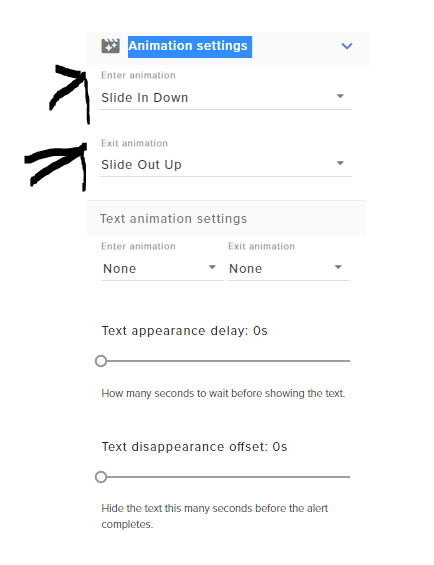 lament blade
hahahaha got it awesome thanks buddy
normal igloo
np
lament blade
most say the support here has been awesome
thats the reason im switching to stream elements from the other GUY!
normal igloo
well we try our best 
lament blade
hey james can i bug you for my hopfully last issue so i can start my stream
normal igloo
You are not bugging me this is a Support Channel for reason
lament blade
on the overlay i chose on the top left side the things it shows all the time is , recent tip , top don', recent sub, recent follower, how can i change secent tip to recent cheer , and top donation to top cheer !
because of being a small streamer i get cheers alot but rarely tips
normal igloo
@lament blade what like move the location?
lament blade
more like the info
i dont want recent tip or top donation
i want it to be recent cheer and top cheer instead
lament blade
can i show u somehow what im looking at ?
normal igloo
Sure thing drop a screenshot here
lament blade
so thats the overlay i chose
and the top left 4 things are cool
but i just want the first two to be recent cheer and top cheer instead if possible
normal igloo
Oh I get what you mean now
I'm guessing that's one of the pre-made SE ones you chose?
normal igloo
Then yeah you can't really move them about
lament blade
but can u change the info it gives
normal igloo
like the text?
lament blade
kinda so the top one says recent tip and then gives info in scrolling of the recent tips like real$$$$$
however i want it to say recent cheer! and show the recent cheer's scrolling
like bitties
because i dont get real $$ tips but i do get bitties
 glass heron
okay... here me out here because I might be dumb... but nothing I enter or choose on this page saves. https://streamelements.com/dashboard/mediarequest/settings
I tried to change my backup playlist and noticed it didn't save... but then I realized none of my filter settings or anything like that saved either

StreamElements
The Ultimate All in One Platform for Streamers
lament blade
yes so i think i just need the name changed and the data it gives
normal igloo
yep
lament blade
but not sure how lol
ok i figured out how to change the names
now the names are , recent cheer! then next is top cheer! , then recent sub , recent follower
normal igloo
@glass heron what browser are you using
lament blade
now i just need help to change the data the top two give
normal igloo
top two?
lament blade
recent cheer and top cheer
glass heron
I tried firefox and chrome @normal igloo
lament blade
because now it says that but still gives the real $$$ tips info
normal igloo
@lament blade drop me a DM and I see what I can do for you
lament blade
ok thanks
glass heron
I don't see anything in the console particularly error-ey.... interestingly enough I'm actually an angular developer and can see that this site was built with the Angular framework
I have seen this show up more than once though
Successfully reconnected to the socket after 1 retries vendor.js:25065:15
Failed to reconnect to topic > Object { status: 1, message: "Super Internal Server Error 🤔" }
Hey, I have heard that if you stream directley from ps4 you can't have themes. Is this true?
normal igloo
^^^ realskandertv's was resolved in dms
@glass heron I'm not a developer so I wouldn't have the first clue on how to help you with that unfortunately
@lament blade yes
normal igloo
@lament blade yes you will need a pc obs and a Capture card or you can use remote play
lament blade
Anyone have a list of suggested blocked media for media requests?
Also, trying to make this have nothing in the center.
Remote play?
 queen thunder
Anyone having issue game capturing Diablo 3?
nocturne pelicanBOT
@queen thunder For the best OBS support, please join their Official Discord @ discord.gg/obsproject
 opal bridge
how would a mod add a command with a timer
narrow coyote
I dont really follow what you are asking
opal bridge
how do i add a command with a timer @narrow coyote
narrow coyote
Repeating the same thing does not clarify what you are asking, I do not understand what you are asking for
commands and timers are 2 different things
timers cannot add commands, so again, I dont understand what you are asking
opal bridge
how do i add a timer then im sorry @narrow coyote
narrow coyote
opal bridge
yea but im a mod so how could i add the timer from chat ?
nocturne pelicanBOT
To invite managers to your dashboard, Click on your Channel Name at the top of the dashboard and scroll down to Settings. Click the drop down arrow to expand your channel managers and then create a new invite at one of three access levels (Bot Supervisor, Editor, Full Control) Check this video out for more help: https://youtu.be/zl_h-ttZDF0
narrow coyote
they need to send you an invite for account access
 arctic bay
Hello. Apologies, but can anyone direct me to where I need to be to get help with framerate issues?
 primal stirrup
hello, i was streaming just now for around 1 hour perfectly fine then out of no where i get random disconnects and dropped frames, i havent changed anything during the stream. any ideas?
opal bridge
@narrow coyote how do they give me account acsess
narrow coyote
I already provided that information, look at the post from the bot
 wise trail
pulsar gulch
wise trail
pulsar gulch
Hello guys , any idea why my transition are not workin ? 
it's cutting off at some point
I'm using a .mov file and the transition is a 4sec one
also trying to use the studio mode
 ruby obsidian
Hey, I'm trying to get my twitter connected to automatically tweet when I go live but every time I try, it gives me an internal server error, any way to fix this orrr just wait it out?
 wise talon
hi, I got this overlay from stream elements. For the follower sections and stuff it says "no data", how would I fill that in?
 cloud rock
Hello im trying to switch from streamlabs to streamelements and i imported my alerts but its not working %100 the text gets cut off on my alerts thanks
nocturne pelicanBOT
@pulsar gulch For the best OBS support, please join their Official Discord @ discord.gg/obsproject
normal igloo
@wise talon I'm guessing you only just started using SE?
normal igloo
@cloud rock can you send a screenshot of what's going on
@wise talon that's why SE is unable to get data from other services as soon as you get a follow or whatever whilst using SE this shall automatically update In the meantime if you wish to still show your last follow you can do this manually in data then LABELS In your overlay I hope this helps
lament blade
Hi! Is it possible to do a random giveaway like you can do on nighgbot? For example people just put a command to enter and a winner is chosen at random.. no need to use tickets or anything like that
 main abyss
Is there a way to make streamelements tweet out the stream with the title of the stream?
Also I find the bot sometimes spamming timers without taking in account what's set
For example, first timer is set to every 20 minutes and 20 lines and the second is every 25 minutes and 20 lines but they showed up in less time/lines
 spiral agate
it wont let me livestream because of a wrong url
winter zenith
@cloud rock where your alerts custom css?
@lament blade yes we have a giveaway section on the StreamElements Dashboard
@main abyss is it really in less time? Both timers are set up really similar I would bring them farther apart
@spiral agate probably wrong twitch stream key? Not really a StreamElements issue 🙈
median mauve
@winter zenith hellp
I meant heloo
Hello
@@winter zenith Is there any way to add a shoutout command with just !so . So that they don't need @ and when they the user themselves type !me the command will trigger a shout out for them I have tried ${1} ${user} neither one will trigger the command without a name or @
winter zenith
@median mauve so you are sure if you use a command set up like that:
Check out $(user), last game they played was $(game $(user)) Go check them out here: https://twitch.tv/$(user)
You can't use the @ Infront of a name?
I disabled the default SO command and added what I past you above and it works fine
median mauve
I don't want the @ just !me or !so
median mauve
Wait it worked
winter zenith
Check out $(sender), last game they played was $(game $(sender)) Go check them out here: https://twitch.tv/$(sender)
Try that
Oh it worked?
median mauve
I changed the first part to actual (()) instead of {} and it worked
winter zenith

 fierce flume
When I stream Apex Legends and pick a character my fps on stream elements goes from 60 to like 23. Does anyone know why?
When I play the game out the fps stays at 60, it just changes when I pick a character.
 meager owl
I need help with SE Pay it says withdraw failed
prisma grove
anyone know a chat command for the SE bot to disable a command? On nightbot it's !commands edit !something - please @ ping me with the answer ty! 😃
 valid pagoda
any way to edit the !redeem command I want to remove the emote in the output
winter zenith
@fierce flume probably a apex issue
nocturne pelicanBOT
@fierce flume Since Apex Legends doesn't have optimized GPU drivers yet, it tends to take up all your GPU resources, leaving nothing for OBS. If you're having OBS performance issues, you'll likely need to limit the game somehow. The easiest way to do this is to enable Vsync in the game, or use a frame limiter. You can limit the game to 60fps by adding +fps_max 60 to the game's launch properties in Origin.
https://twitter.com/OBSProject/status/1093974215877951493


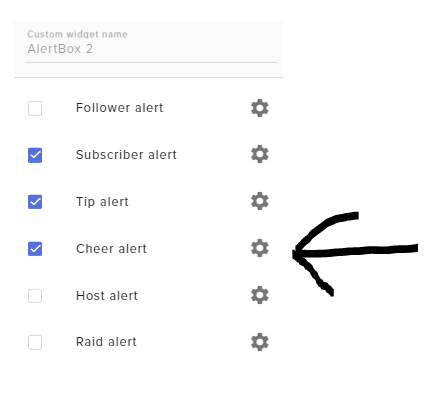
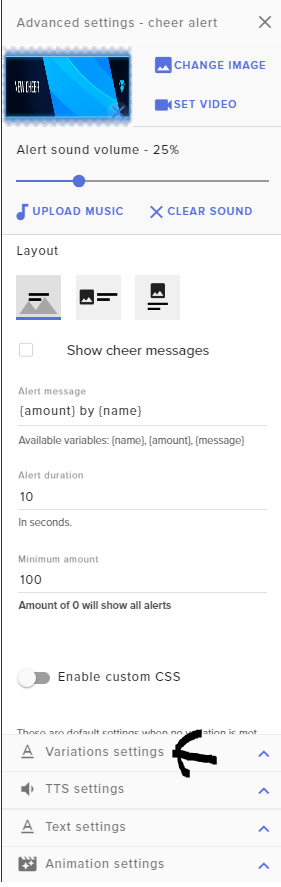
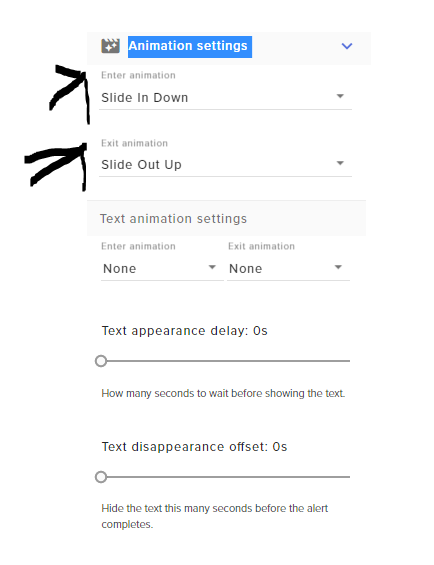
If you stream @PlayApex and are having FPS issues with OBS due to a maxed-out GPU, you'll need to reduce GPU usage so that OBS can run as well. The quickest way to do this is to enable Vsync with triple buffering and disable Windows 10 Game Mode. https://t.co/FOPmDyJMNx
Retweets
471
Likes
1344
 Twitter
winter zenith
Twitter
winter zenith
@meager owl is it over 10usd and a week old. Tips? It needs sometime to actually get collected to be able to withdrawal
meager owl
It was a week ago yesterday
winter zenith
@valid pagoda what emote?