#helpdesk-twitch
1 messages · Page 411 of 1
 hot fulcrum
@normal igloo should I donate to myself to see if everything is working properly? And if it doesn't what steps should I take?
 latent marten
 normal igloo
@hot fulcrum I guess you could try that and if that doesn't work maybe contact PayPalto see why you cannot receive donations
hot fulcrum
@normal igloo ok thank you for the help!
normal igloo
Well you can always use this as a panel with a few kind words
 oblique steeple
@latent marten We have the DreamTeam. Check it out at https://streamelements.com/dreamteam
 glass sluice
Hi guys. Is there something wrong with the activity feed? It keeps breaking when I go to update it.
I have to close it, reopen it, refresh the overlays, and then it will let me go back from the editing panel to the activity feed itself.
 twin sentinel
@glass sluice You are talking about the Activity Feed of OBS Live?
glass sluice
I am indeed.
twin sentinel
So when you are for example trying to update your game or title you can't switch back to the Activity Feed by selecting the "Back"-Arrow right?
glass sluice
Yep. It just won't do it no matter what I do.
I have to close the widget and reopen it to make it do it.
twin sentinel
The devs are informed about this problem and they are working on it. For some users it helped to shutdown OBS and restart it.
 tight harness
A hot fix was deployed to fix this 4 hours ago, make sure your OBS.Live is up to date
 lament blade
I have question don’t know if you guys know but what is the widget xqc uses for emote combo that show on screen
 mystic vapor
Hey guys! New here...i was wondering if streamelements can be done on the phone if I want to stream game play?
twin sentinel
@lament blade What widget do mean by xqc exactly?
@mystic vapor At the moment the mobile SE App is just made for IRL Streams, so just your cameras. But the gameplay capturing is planned, I think.
lament blade
Can I share an image to show you @twin sentinel ?
twin sentinel
yeah.
mystic vapor
Great thanks! One more question...when streaming a game will i need to use my computer or can i use the twitch app on the xbox?
twin sentinel
@mystic vapor You can stream with the XBOX app, but if you want to use Overlays you need a computer.
mystic vapor
Ahhh gotcha...thanks!
twin sentinel
@lament blade You mean that the emote is not crystal clear shown in your stream? What emote size did you set up in your settings of the Kappagen widget?
 pulsar gulch
Hello , I got a problem with my follower alert
I use a gif and the gif is not 100% showing off .. but it worked a few days ago
lament blade
@twin sentinel no I mean I don’t know how to set it up like that
twin sentinel
@lament blade You can add the widget "Kappagen" to your Overlay Editor on the StreamElements website.
lament blade
 yes but I don’t know how to put it like that because I added it but it doesn’t look like that it shows multiple emotes not just one
 viscid marsh
xQc pog
twin sentinel
@lament blade I think it shows just the emote when 5 of that emote were posted within 10 seconds in chat. I don't know if it is possible to restrict it to just one emote.
lament blade
I see well I’ll try that then thank you 

Wait what about the the other setting is set to unlimited emotes per person ?
twin sentinel
Then every emote posted in chat will be displayed and not just the comboed ones.
 strong kernel
@lament blade That widget he has is a custom made one.
twin sentinel
@pulsar gulch Is the gif of the Alert showing correctly in the Overlay-Editor when you try to emulate a Follower alert on the SE website?
 edgy stone
my overlays arent showing on my stream. what can i do to fix this
pulsar gulch
Yes , but I fix it getting the alert box a little bit down .. but it was weird cuz it worked before and I didn't changed anything
twin sentinel
@edgy stone You added the Overlay url as a Browser Source in your OBS Studio?
edgy stone
yea it was working when i streamed the other day but now its just blac
twin sentinel
Try to clear the cache.
 nocturne pelicanBOT
@edgy stone Right click on the BrowserSource > Properties > Scroll down a bit > Refresh Cache of current page
edgy stone
that worked thank you
 static eagle
How do I use an image uploaded to stream elements in my custom CSS? Is there a useable link? In the CSS there's only the default.
strong kernel
Custom alert or something else?
static eagle
Yeah, for a custom alert.
static eagle

strong kernel
Keep future coding questions in there, by the way.
 wind dirge
We're currently experiencing an issue with all giveaways we've setup where any points bought off of the public page don't show up on the backend.
Refreshing the page a few times will randomly show what seems to be public page entrants and their points pent but there is no way to actually dive in and confirm those people are even part of the giveaway as they don't show up.
Closing and refunding the giveaway doesn't refund any of the points spent on the public page and we've reset giveaways several times and run into the same issue with each. Seems like they're going into two different pools but the public page pool is just disappearing entirely.
strong kernel
The giveaway section in your dashboard looks fine.
wind dirge
Correct, those are the people who entered using the chat, anybody you spent points through the UI on the public page doesn't show anywhere.
A few times after refreshing you'll find a different number of entrants and tickets which matches more closely to the people who used the page but there's no place to see that elsewhere and it doesn't go into that list that you've screenshotted.
 nocturne drum
hello all. is it possible to use bluetooth audio devices with this app?
 tranquil sierra
Is there a way to use a custom font? Specifically with the sub/follow widgets
strong kernel
@tranquil sierra Through custom CSS and hosting a font you have a license for somewhere.
tranquil sierra
Thanks! @strong kernel
strong kernel
@wind dirge Still no issue using it. Followed and bought 20 tickets via the public page.
Most I can offer is tell people to use Chrome. Site works best with it. But I don't see any issue with the functionality.
wind dirge
went and added points from the chat and it refreshed to the other pool of people
No clue where those 11 people and 3772 tickets are going
but using both chat and public page seems to mess up giveaways and completely throw away half of the entrants into an inaccessible pool
twin sentinel
@nocturne drum if you are referring to the mobile app of Stream Elements, please use #helpdesk-mobile
strong kernel
They should be referencing the same pool unless you somehow managed to open two giveaways, which the system shouldn't do, but it can happen rarely.
Which it looks like you did.
wind dirge
This happens anytime we open a giveaway and use both pages, is the issue that entrants should only enter with one or the other?
Is there a way to close this 11 entrant giveaway and refund the points without closing the 24 entrant one and putting them together?
tranquil sierra
Thought I could find it on my own but having a hard time, where is the the custom CSS located? @strong kernel
wind dirge
Not really sure what's causing two giveaways to be made or even how to fix it or why they're both referencing the exact same URL
strong kernel
@tranquil sierra Depending on the widget, you'll find an "Enable custom CSS" toggle switch.
@wind dirge Yeah, I'll close and refund the 11 entrants for you.
@wind dirge If you want. I can't guarantee what'll happen.
@wind dirge Could work. Could implode everything. Up to you.
wind dirge
That's fine, better that than the disgruntled people who'll have to watch winners get picked and wonder why their name isn't even in the list.
strong kernel
K, implosion in progress.
wind dirge
That should ideally make the public page work as intended?
 jolly basin
How to troubleshoot when the chat alerts aren't working? I had someone host my channel for 30 viewers 3 days ago but I never saw the chat alert. I was streaming on PS4 so no overlays, but shouldn't it have showed up in the chat?
strong kernel
@wind dirge Think we're safe. Command should reference the correct public page.
wind dirge
Looks good! Thank you!
tranquil sierra
So the Latest Subscriber widget, or the Latest Follower Widget both don't have any custom CSS available. Which widget do I need to use to display these labels but with custom css?
wind dirge
Any recommendation to avoid that in the future?
wind dirge

strong kernel
@tranquil sierra Custom widget. You'd have to code the entire thing from scratch.
tranquil sierra
And thus begins the test of my determination to move away from SL
twin sentinel
There are kinda examples for sliders of the latest followers and subs in #widget-share . Maybe they help you a bit.
tranquil sierra
Thank you 😃 @twin sentinel
 jaunty blaze
Hey my sound effect things on my stream store aren't working 😭
twin sentinel
@jaunty blaze You added the widget to your scene in the Overlay-Editor on the SE website?
 vale eagle
Im trying to link my Streamelemnts to my twitch, apparently it isn't? but it's saying "The Channel you tried to add is linked to a different account"
jaunty blaze
@twin sentinel lol no realized it
 dry lynx
I saw a place where you can change the user the bot is attached to. I have a bot profile from Streamlabs and would rather use it. It shows up but it is greyed out. How would I be able to use it? Or is there a way?
 urban herald
Hello 😃 The other day I was told, that the bot is designed to not write in chat when someone is banned, but only show the mod message (which the banned person also would able to see) - I have just tested this, and the banned person can't see the message, so they will never know why they're banned unless they ask. - Is it supposed to work like that?
twin sentinel
yeah, as I think Twitch had a time when it showed the timeout reason to the user, but it has been changed, so the user can't see why he got timed out.
urban herald
hmm. - Something I can change in the bot so they can see the message, or are the developers aware of this?
twin sentinel
Here is an idea in the ideas board you can upvote: https://streamelements.helprace.com/i1334-custom-message-for-viewers-with-the-spam-filters
strong kernel
@vale eagle What Twitch username are you trying to link?
@dry lynx What's grayed out?
vale eagle
@strong kernel TrueTwoFace
dry lynx
@strong kernel I cant find it now but the other accounts it seemed like I could choose tonuse for the bot.
strong kernel
@vale eagle The one that's already listed as connected in your screenshot?
urban herald
@twin sentinel Thank you very much.
strong kernel
@dry lynx Where are you renaming? Can you take a screenshot?
vale eagle
Ok.
Secondary oto that, one of the streamers I've been subbed to for forever, Puhdado, just switched to Streamelements. But it's not showing me as a subscriber for him.
dry lynx
I cant find it anymore. Was somewhere under bot but dont know where I found it anymore.
dry lynx
Yeah
strong kernel
Menu in top left of activity feed.
strong kernel
@vale eagle What do you mean by "not showing as a subscriber?" Where are you looking?
vale eagle
It's showing 5 per 10 minutes. He said he gives 20 per subs. Is that just something that won't show for subs?
strong kernel
@vale eagle Pretty sure it'll always display like that no matter what.
static eagle
Will my previous follows show up on my Ground Control and event list widgets before migrating to stream elements?
strong kernel
Previous follows as in?
static eagle
Before migration.
 fiery pasture
Can anyone help me with this, so ive been messing around on stream elements obs and I cant figure out how to title the stream before I go live. This is my first time using obs as a whole so everything is pretty new.
strong kernel
There's an option in the menu in the top left of the activity feed.
fiery pasture
thank you
 brazen moon
hi! so im streaming atm, any reason why recent events hasent updated for 6 days now ? :/
or the activity feed
nvm seems like it works now
thanks anyways! good day! 😃
 pine hemlock
Thats because @strong kernel is a wizard
 long frost
For a few days 0 viewer hosts returned to the activity feed and they're gone once again. Do we know why they returned and disappeared again? I have one channel I manage that they come through on, others that they won't, and then some that they came through for a few days and then gone again. The activity feed is set to 0 viewers for hosts and I have the proper variations set for chat and overlay alerts. Anyone have any thoughts?
nocturne pelicanBOT
@long frost Due to recent changes to Twitch API, we have filtered out hosts and will only show these ones on your activity feed:
- All manual host events (0 hosts included and if filter set to 0)
- All auto host events with at least 1 viewer
long frost
Thanks for the reply. Unfortunately only hosts with 1+ viewer are showing up in the activity feed, and manual 0 viewer hosts are not coming through. They weren't for a period of time (which I knew was due to an API change), but they returned for about 3-5 days in the recent week and now they're gone again...
 modest palm
Is there a way so i can open an overlay and have it play sounds? As of now I have no way to hear it
Nvm. Just discovered that if i open the overlay it plays sound
 dusky perch
Hi chat! I heard there may be a known way to export Loyalty Points from Streamlabs Extension; is this true?
 tawdry quartz
yo i am wanting to stream to twitch and i have gone through many tutorials and settings in obs and streamlabs and now OBS.Live but I have not been satisfied with my stream quality. I have just recently bought a new pc with an RTX 2070 and i7-8700 processor with 32GB Ram and am looking for recomendation on stream settings. This can range from encoders to presets or whatever u guys think. BTW I can upload comfotably at 6000 bit rate and am playing fortnite at 1440p 120hz so whatever good setting are for a 720p60 stream or 900p60 stream. If possible leave recomendations for 1080p60 stream. PS:NO DEDICATED STREAM PC
nocturne pelicanBOT
@tawdry quartz For the best OBS support, please join their Official Discord @ discord.gg/obsproject
 worthy slate
guysd
i changed my twitch name and now all my commands/loyalty pts and everything reseted for everybody in the community
i need help 😦
tawdry quartz
somebody know what remote or third party phone app i should use to control OBS from phone during my stream
 zenith widget
Answered in #helpdesk-selive ⤴
@worthy slate I see that everything looks fine on the leaderboard.
 proven bolt
I'm trying to change the chat bot name, but the directions in the pinned messages aren't helping me. I don't see a field for OAuth to be input in Ground Control settings. Any help would be appreciatedd ❤
nocturne pelicanBOT
@proven bolt Custom bot name requirements
- StreamElements bot modded and in chat
- Active overlay with alerts
- StreamElements tipping page in the panels below the stream (!panels)
- Create a twitch account for the name you want to use
- Ground Control app must be running
Steps to enable custom name
- Sign in to https://twitch.tv with the bot account
- Install and run Ground Control (!gc for download)
- Visit https://twitchapps.com/tmi/ and generate an oAUTH token
- Copy/paste everything in the box to Ground Control oAuth settings and enter the name for the bot account
- Restart Ground Control (custom name may take a few minutes to take effect)
Mac does not currently support renaming the bot.
zenith widget
Make sure you are covering all requirements
 gentle imp
need help @lament blade ?
lament blade
i need help, how do you bring your overlays to obs
nocturne pelicanBOT
@lament blade To add your overlays to OBS, add a new browser source in your scene. Paste your overlay URL in the browser source properties, set the dimensions to 1920x1080 (unless you changed them on the website), and :ballot_box_with_check: “Shutdown source when not visible” https://youtu.be/KDvLynUqXI4
 blissful gull
Hi ... is there a way to get a command triggered by an alert? Like i want to show a !shoutout to somebody hosting me .. already have the !shoutout command set up
zenith widget
Unfortunately, only manual way.
blissful gull
ok nvm thx @zenith widget
 deep fiber
how do i know if musics plying on stream 😮
deep fiber
seee, bu when i use remotplay on ps4 i hear it but stream dont
zenith widget
I don't know how remoteplay from the ps4 works.
deep fiber
thanks for the help though 😄
zenith widget
Does remoteplay allow the gameplay to be streamed towards your PC?
deep fiber
yeah
deep fiber
mhm
zenith widget
Then play music from your PC browser
and OBS should pick it up.
If not, make sure to add desktop audio as default, from the OBS audio settings.
deep fiber
okay
 cosmic elm
I can't seem to get the community sub gifts to trigger on the overlay testing thing
zenith widget
custom sub alert -> community gift tick box
cosmic elm
I was doing that, but once I complained it works now
zenith widget
Something doesn't work? yell at it. Doesn't still work? complain about it to someone, all of a sudden it works
101 programming 
cosmic elm
Maybe it was the order I was doing the test
zenith widget
bonus: find why it started working
doesn't matter as long as you have that ticked, have an amount and tier selected
cosmic elm
It works without a tier too
zenith widget
that i didn't knew as I didn't test 
cosmic elm
Since you can't specify amount and tier in the same variation, it doesn't need tier
 brittle birch
Is there a variable to add to bit cheer command, to also include total bits cheered by the person cheering?
twin sentinel
I don't think so, but I am not sure 100% on this.
 mint rampart
hello, is there a way to put on a custom delay on the stream? nad is there a limit ?
mint rampart
is there a limit ?
 hybrid parrot
Would someone be able to tell me why my stream elements is running so bad and crunching my cpu https://obsproject.com/logs/s4j1qTAsAnZqaBxD
zenith widget
@mint rampart I think you can also place up to 15 or 30 minutes 
hybrid parrot
says in task manager that obs is running 12 pages and slowing everything down
mint rampart
beautiful
i am sorry for being slow. i appreciate that you guys take the time to answer me ❤
brittle birch
@zenith widget damn ok ty.
zenith widget
tight harness
@brittle birch check if it's on the ideas board already, I think it is, it's linked at the top of the #💭︱feedback-and-ideas channel
hybrid parrot
@zenith widget not sure what thats suppose to do its not crashing just running rough
zenith widget
So at what point does the analysis tell you OBS is crashing?
I'm giving an analysis of the log file.
run as admin, turn off the gaming features with the provided link in the analysis
run a recording and lets see that log file.
 rustic matrix
hi can anyone help so i reached my tip goal and i want to add a new one but it keeps showing old tip goal how to i reset it so it shows zero thx
hybrid parrot
@zenith widget its not crashing unless i tab out ok will try that
zenith widget
From what I see you are using OK settings, but without an output session(stream/recording) I can't see anything else.
twin sentinel
You can reset the tip goal reached amount in the goal settings.
brittle birch
Thanks. I know I've seen a bot do it before, but think it was a custom one. I hope it makes it's way to streamelements soon
zenith widget
Ok, if OBS is crashing thats entirely different then us looking at a log file. @hybrid parrot
nocturne pelicanBOT
@hybrid parrot For the best OBS support, please join their Official Discord @ discord.gg/obsproject
hybrid parrot
@zenith widget it hasnt crashed in a while just trying to figure why its using so much of my cpu. Sorry i am not a computer guy thank you for the help
zenith widget
And this doesn't look like its related to our Plugin for OBS, so sorry, its best to ask the OBS guys.
rustic matrix
where will i find the goal settings only one i see is tipping settings ?
rustic matrix
thank you so much 😊
tight harness
To get there in the future you can go to Activity Feed > Widget Data > Goals
rustic matrix
ok thank you again 🙂
hybrid parrot
https://obsproject.com/logs/tichNc_dTeehpe8c @zenith widget i ran a test run here it is
 next bronze
Need a bit of help, have the latest drivers installed, however the option of encoding via H.264 with my CPU is not showing up, any idea why ? ( cpu = i5 9600k )
nocturne pelicanBOT
@next bronze For the best OBS support, please join their Official Discord @ discord.gg/obsproject
@hybrid parrot For the best OBS support, please join their Official Discord @ discord.gg/obsproject
 round folio
i got a question about the streamelements Leaderboard Extension. i need to blacklist myself and bots but it doesnt seem to work. i guess im overlooking something. i ignored the users on the website -> loyalty settings. is this the wrong place?
tight harness
Did you also clear your points on that Leaderboard page on the site?
round folio
points are fine. talking about chat stats. or is that not possible
tight harness
Not possible at this time
round folio
ah i see alright
 minor vigil
Is there a rough ETA for the streamelements mobile app? Is it too late to get access to the testing?
 slate hinge
Where can I find documentation on options for widgets? The HypeBoss widget has several modes, but don't really explain ind etail what they do in terms of changing the experience.
twin sentinel
@slate hinge Maybe this helps https://blog.streamelements.com/the-hype-boss-is-real-506cc133a0c2
slate hinge
Appreciate that, but I found that before.
It's this one that I am interested in.
It doesn't say how much more HP the boss will have and I can't find a setting to set it like you can in Streamlabs
gentle imp
you can test how much it increases by testing alerts, subs etc
slate hinge
I haven't found that option yet either
gentle imp
but afaik there's no documentation on it
option to test?
it's a bell on the bottom left while on the overlay editor
slate hinge
ty
minor vigil
@jade remnant I guess there’s no iOS app?
 dull wyvern
Hi can someone help me figure out why my alerts won't show on my OBS but I can hear the sound?
gentle imp
!add
nocturne pelicanBOT
To add your overlays to OBS, add a new browser source in your scene. Paste your overlay URL in the browser source properties, set the dimensions to 1920x1080 (unless you changed them on the website), and :ballot_box_with_check: “Shutdown source when not visible” https://youtu.be/KDvLynUqXI4
gentle imp
did you follow those steps? especially the size one @dull wyvern
dull wyvern
@gentle imp Yeah wasn't working before, but just got it thank you 😃
gentle imp
awesome 
 knotty basin
Would anyone know if I want to run the media and play songs on stream , do I need to have OBS?
Also , I have 3 timers set but during stream only 1 displays
 cinder olive
You can use any streaming software that will pickup sound from your PC to stream music, and mind posting a picture of your timers here?
knotty basin
So I don’t currently use a software , maybe that’s why it won’t work. I stream directly from the Xbox.
 elder sorrel
@knotty basin In your Timers do you have Chat Lines set to more than 0?
Also streaming Directly from Console to listen to music I'm not sure if it works.
I forget if Groove Music is still with Xbox to use to play music (if it allows you while streaming).
Oh the screenshot came up just now.
The Chat lines are the reason why. Like the first one with 16 chat lines: There must be 16 posts in chat within the 21 minute threshold for the timer to trigger.
If you want them to trigger automatically: Set the Chat lines to 0.
knotty basin
Oh okay I always thought it was either or whichever came first. Thank you !
 inland knoll
is there a widget that acts like a ticker tape news reel?
 smoky tide
OBS has the text source that you can put a scroll on
 barren trout
How can it see my twitch shat in OBS live with stream elements? in the beginning it was there and now it is gone
thanks for the feedback 😄
elder sorrel
@barren trout
barren trout
i don't see them here sorry so probably went something wrong when i did the install
elder sorrel
Try logging out of OBS.Live then sign back in.
 naive beacon
Are there going to be new alerts for cumlative subs and sub streaks when its rolled out next week?
 jolly furnace
having a problem with the Media request "show on stream" option.. it will play on stream for a few seconds and the turn off then I get the message of there is no active widgets detected for the media request. but it was just showing it on the stream.
elder sorrel
It's a known issue with that.
jolly furnace
is there a work around ?
 real mica
Hey guys, having an issue uploading some custom alerts. The alert image isn't symmetrical, so when I select "text over image" for the text for the alert, the text is showing up below the actual image. Is there a way to manually select where on the image the text appears?
Found it, disregard thank you c:
 autumn trench
How do i set doantion alerts to notfiy in chat since i use my phone for chat
slate hinge
The answer to my above question, through testing, appears to be 10% is added to the dungeon boxx HP with "Increasing HP" You would think they could have just said that.
It would also be nice to be able to set this amount like you can in streamlabs. not having round numbers gives me the heebie geebies
Hope that helps someone
mint rampart
eeeh hey, my bot stopped working? it worked fine some minutes ago, anybody have that problem ?
twin sentinel
@autumn trench On the SE website > Modules > Chat alerts.
And please don't spam two channels with the same question. Thank you.
@jolly furnace If you are using OBS Live and you have added the Media Request widget to the scene you can try to log out of OBS Live and log back in, or try to restart OBS Live as Administrator.
@mint rampart My bot is working right now. Can you please connect discord and Twitch, to make support easier, as we can then look at your stream directly.
 quaint rune
When a try to stream my capture card (AverMedia 2 live gamer portable 2) it is telling me copy protectedd content and that its unable to capture content?
and is saying something about using apple as an input source but im not on apple
twin sentinel
@quaint rune Are you using OBS or OBS Live?
quaint rune
obs live
nocturne pelicanBOT
@quaint rune For the best OBS support, please join their Official Discord @ discord.gg/obsproject
 cedar heath
I don't seem to be able to change the text position on Follower alerts in the alert box widget. I see the preview moving but when I do a "test follow" it's not where I want it to be, same goes for Tip alert, But the Sub Alert was no issues at all to move where I wanted it to with the exact same method, any ideas?
twin sentinel
@cedar heath You clicked Save after editing the alertBox on the SE website, before emulating an event?
 hardy salmon
The Kappagen source overlay seems to use a lot of CPU even with the "disable when not active" box checked. Is there a way to optimize this better for less CPU usage? I'm currently using OBS live, but it also did this in OBS studio.
quaint rune
another question, when I am streaming you cannot hear game chat or party chat only my voice. What can I do to fix this issue! 😄
cedar heath
@twin sentinel yes plenty of times
It worked perfectly for the sub alert but not the others
twin sentinel
So the alert box is showing on the website for Follower and so on correctly, but not in OBS? Or is the alertbox already on the website not showing it correctly?
cedar heath
Website and OBS
 midnight hamlet
Was wondering do framed overlays like this work for Stream Elements? https://media.discordapp.net/attachments/439969154334851089/541009927238451200/Screenshot_20190201-164200.png?width=1389&height=676
 twin sentinel
@midnight hamlet Yeah that sould be possible.
midnight hamlet
Ok thank you  If I have any problems I will just come here
cedar heath
@twin sentinel I found a solution to the issue, instead of changing "Bottom" margin I changed top and started with -180 and found my way there, but ty for trying to help.
twin sentinel
@quaint rune You are streamig on XBOX right? As I don't have an XBOX myself, I am very sorry, but I can't help you with this issue. Maybe someone on the OBS Discord I linked you above has a solution for this.
@hardy salmon I think the Kappagen widget is one of the most hardest for the CPU. Afaik there is no way to make it use less CPU. You could try to disable the widget via the Overlay Editor on the webiste and reload the Overlay. Maybe it uses less then when not needed.
hardy salmon
@twin sentinel I currently use the kappagen overlay as a "hype" usage. Anytime anyone subs/donos/cheers/etc I use the obs live integration on my stream deck to set off a wonderful firework of kappagen emotes! I noticed turning the overlay visibility to off drastically reduces CPU, but then my mods would not be able to trigger, plus I'd have to turn the visibility back on every time I'd like to use it. Do you know if there is anything in the overlay editor I could do to possibly assist with less strain?
 ripe scarab
I'm having an issue where my alerts aren't triggering for one of my overlays (possibly more).
twin sentinel
@hardy salmon I am sorry, but I don't have any solution or idea for this. Maybe another supporter has any ideas.
@ripe scarab You added the Widget to every Overlay in the Overlay Editor?
hardy salmon
@twin sentinel thank you for your help!
ripe scarab
@twin sentinel The widget is added, because I can see the widget/notice when I trigger it myself with the "redo" button is SE OBS
But it never triggers itself when it initially happens
twin sentinel
Is this for every event like Follower or Sub or Donation or is this just for one of the events?
 hushed void
hi i imported nightbot to stream elements where can i play the music from now?
twin sentinel
@hushed void There is a Media Request in StreamElements.
ripe scarab
From what I can tell, none of them trigger initially. But I may be wrong on that, I don't have enough data to be sure.
hushed void
where'd all my music go though
ripe scarab
But I know for sure follower alerts don't pop up on the screen until I hit the redo button
twin sentinel
So when you try to emulate an event from the Overlay Editor it is not showing up in your OBS?
@hushed void You can add a widget called "MediaRequest" I think.
elder sorrel
You'll have to enter that manually in the Media Request webpage @hushed void
As you can copy Youtube URLs to paste to add to the queue.
Here's the tutorial for setting that up https://www.youtube.com/watch?v=17eUkoZ6eIs&t=66s

StreamElements Media request enables playing songs and videos in your stream. It's an upgrade of StreamElements Song request and Media share features. ----- ...
ripe scarab
No, those show up. They don't show up when they're supposed to happen automatically.
hushed void
I have to re copy paste all my songs from night bot ?
elder sorrel
I'm not sure what nightbot uses but if it's YouTube Videos. Yes
ripe scarab
What I've had to do, is watch my chat and the "Activity Feed" to see new viewer events, and then "re-trigger" the alert from the activity feed in my SE OBS.
But Kappagens, and store redemptions work, because they're "user invoked"
I've tried disabling them all via the overlay editor, saving, then re-enabling them, and saving again.
twin sentinel
Have you set up any variations?
ripe scarab
Nope.
 gloomy cape
quick question before i decide to get in with streamelements, i stream straight through my ps4, can i still enjoy the chat features without going through OBS?
ripe scarab
@gloomy cape Like chat games, loyalty points, etc? you should be able to use most/all chat bot features via the SE dashboard webpage.
gloomy cape
yes! oh awesome! a lot of customizations require obs so im grateful for this.
ripe scarab
You might miss out on some features (I'm not familiar with console streaming), but a lot should be available to you.
twin sentinel
@ripe scarab I am sorry, but I have no idea why your alerts are not showing up. I'll ask about that internally, but as it is weekend now, the answer can take some time.
ripe scarab
Is there any way you can put my account into a more detailed degugging/logging state?
I plan on streaming some this weekend, maybe more data would be helpful for diagnosis?
Or is it already as "verbose" as you can get it on your end?
nocturne pelicanBOT
@gloomy cape Here is a guide on how to setup the most essential tools for streaming from your console, while using StreamElements tools without involving a Capture Card! It's easy to do, take 4 minutes to read and 10 to 15 minutes to setup!
Read all about it here: https://blog.streamelements.com/how-to-stream-on-console-7b620b1c46c3
 coarse heath
Hi SE masters of the world- I use OBS live as of last night and got video stuttering where I didn’t have it before... idk if it is correlation or causation but would LOVE any help! I had to cut the stream really short 😦 plz tag me in your reply- THANKS
nocturne pelicanBOT
@coarse heath Can you please provide a log from your last stream. In OBS go to Help > Log Files > Upload Last Log File. Once this is complete, please provide the link to the log file.
twin sentinel
@ripe scarab I don't know any way to track Live Events and log them. The only thing we can log somehow are the emulated testing alerts in the browser by openig the web console, but I don't know if it keeps track of the Live Alerts.
You can also provide a log after your stream as described above my message, but this is normally just the log to discover problems with OBS, and not for the connection between Twitch and SE.
ripe scarab
@twin sentinel Here's my log from my last stream, maybe it'll help? https://pastebin.com/03Rz4BhW
 coarse heath
okedokee @nocturne pelican here ya go https://obsproject.com/logs/ZgfkWpM8Oy24fBoi
that one was super short tho... theere is a 2hour one before that if you need it
twin sentinel
@ripe scarab Thank you. I have added it to the internal request on your problem. It is there, when staff needs it.
ripe scarab
Thank you, I appreciate you guys looking into it.
 royal flower
James directed me to this forum for the following: Pardon the interruption....I started using some templates and one of them has a 10 min countdown timer. I think I'm missing something because it only seems to stream the timer sometimes, for reasons I cant determine. Is someone comfortably familiar with similar issues that they wouldn't mind pointing me in the right direction for a solution?
ripe scarab
Countdown timer stuck on 0:00?
royal flower
yes
ripe scarab
twin sentinel
@royal flower just answered in the same moment in #helpdesk-selive
ripe scarab
That one had me stuck for a bit too. 😃
twin sentinel
@coarse heath https://glorp.ninja/obslog?url=https%3A%2F%2Fobsproject.com%2Flogs%2FZgfkWpM8Oy24fBoi There are solution guides in this analysis. It states that you are dropping frames which causes the stutters on stream.
coarse heath
uhhhh ok. why?
why dropping frames... i thought that was sorta just restating the same thing
i restarted my dem so that might help
modem
twin sentinel
There is a solutions guide in the analysis with solution ideas. Take a look at them, too.
coarse heath
i reset bitrate to just 4k since i am not at my usual home. Maybe that'll help. I jhope i didnt sound like a twit. It seemed like you were telling me the same thing like "you're not cold because you are warm"... that is why I was like... uhhh ok. LOL I didnt mean to sound rude.
 flat solstice
can anyone tell me why my hype cup wont show up on my stream?
twin sentinel
@ripe scarab try this: go to the dashboard, log out using the menu, clear cache, and log back in and restart OBS / OBS Live.
normal igloo
@flat solstice did you recently added to your overlay?
flat solstice
i made the switch to SE about a week a ago, an yes i did add it
like a week ago lol
normal igloo
Did you make sure to save changes to the overlay? 
normal igloo
Can you see the hype cup in overlay editor on the SE Website?
flat solstice
yap yap and even when i go to launch it i see it was well
 flat solstice
i add it in browser right?
normal igloo
yes
normal igloo
Can you send a Screenshot of your overlay editor and what you see on your obs or whatever you using
flat solstice
ok i sent em too you
normal igloo
@narrow coyote my man aka the obs guru I need your assistance with ShaHealOneil's Issue to run down the story for you Hype cup isn't showing in obs but when launched and in the editor it's working fine I have made sure that they are saving and have the right link I have run out of ideas at this point So if you or someone who knows knowledge of this issue could help out would be great thanks 

jolly furnace
Hi was here before asking about this using the latest version of OBS live, and have a media request widget active on my overlay. Attempting to get media requests to show on the overlay, but it stops playing and goes back to the media player, then i get a message that i don't have a widget active. was told this is a known issue.. OBS live is set to admin on the PC and i have logged out and in to SE. is there any other things i can try ot get this to work or disable to media play in OBS.Live and go back to the website Media request page?
twin sentinel
Try to clear the cache of the Browser Source maybe @normal igloo
normal igloo
@jolly furnace If this is a known issue you will have to wait until it gets fixed
Unfortunately
jolly furnace
can i disable the broken program and go back the the website option.
normal igloo
@flat solstice like what Benno Said Try to clear the cache of the Browser Source maybe
ps tx for Assist Benno
nocturne pelicanBOT
@flat solstice Right click on the BrowserSource > Properties > Scroll down a bit > Refresh Cache of current page
 unkempt nova
Hi i'm having an issue where my new subs aren't popping up on stream elements website or on obs live could i get some help pls thanks
normal igloo
@unkempt nova did you recently get twitch affiliate / Partner?
@jolly furnace clicking on the x Button on obs will get rid of media request widget
jolly furnace
yeah that didn't work.. i jsut stoped useing the live and will use the website version till it is fixed.

 jolly furnace
that option doesn't work either the widget isnt showing up
alrighty... well thanks anyway... lets hope they get it working soon.
 proper pilot
unkempt nova
proper pilot
unkempt nova
@normal igloo No i got affiliate in october or november of last year
and it was working yesterday
twin sentinel
@unkempt nova try this please: go to the dashboard, log out using the menu, clear cache, and log back
 delicate ivy
Hey i have a question, is there a way to add custom widgets? I want to add a twitch-DJ widget to my stream but i don't know how and if it even possible
twin sentinel
@delicate ivy You can add the "Custom widget" via the Overlay Editor. There you can insert source code.
delicate ivy
@twin sentinel i tried that but I'm not sure where to insert the link
twin sentinel
can you send me the link via pm please. But I think adding this widget won't be possible.
You could try to add this as a browser source to OBS.
But it is not possible to add this to the SE Overlay directly.
delicate ivy
it worked! thank you very much!
 naive forge
can i ask antyone a question
about lag stream
i have this issue
when i play my game fullscreen my stream is laggy
but when i play
through the preview window
its smooth as hell
what is the problem?
nocturne pelicanBOT
@naive forge For the best OBS support, please join their Official Discord @ discord.gg/obsproject
 craggy lichen
Hello 👋 So I'm wondering if it was just me or anyone else too but yesterday when I streamed, the bot didn't connect and I wasn't able to use anything from it with commands and wasn't showing up. So I'm thinking maybe it might have to do after changing my username on Twitch and I have to part way and reconnect again?
twin sentinel
@craggy lichen Yeah, parting and rejoining the bot after a name change could resolve the issue. Please try that.
pine hemlock
Part, log out , log in, rejoin
 rain roost
Hey there for some reason it seems like my mods always win roulette and no one else on the channel can ever win it, is it possible i messed something up with the roulette rules?
 calm shard
can anyone tell me how to remove a widget from one of my overlays?
pine hemlock
Edit your overlay on the website and click the widget and hit delete, or click the widget and press the trash can icon.
calm shard
thank you
 slender sail
Hello
midnight hamlet
Does anyone know a font in Streamelements like this or that matches this?
Actually nevermind
nocturne pelicanBOT
@midnight hamlet More than 800 google fonts are supported at this time. You can preview them here: https://fonts.google.com/
 viral ferry
Hi having a problem with Kappagen
Kappagen works when I emulate an event (follow, sub, etc.) but does not work when I type in chat
cinder olive
I know on Nightbot you can have a command simply"^" and it will respond wwith "^" like so: https://i.imgur.com/cGjhfFd.png , is there anyway to make the bot do this in chat?
 hollow geyser
hello
pine hemlock
@cinder olive yes. Create a command and add a keyword.
 flat kiln
anyone can help me on how do I align text from the right to the left?
it doesn't work selecting this: https://imgur.com/CSYtYrh
 zenith widget
Save and refresh the editor
 valid pagoda
does ground control on mac support custom bots?
flat kiln
@zenith widget I did and it's still like this: https://imgur.com/gWvRnDH even tho I put it in the right place and aligned from right to left
 nocturne pelicanBOT
@flat kiln Please connect your Twitch and/or YouTube channel with Discord by going to ⚙ Settings and then Connections here in Discord. https://streamable.com/eg92w
 flat kiln
what
 twin kernel
Hello I need help with my donations not showing up on my Twitch alerts
also not linking with my Paypal either
zenith widget
@flat kiln Connect your twitch to your discord.
@twin kernel https://streamelements.com/dashboard/tipping-settings this page should have some steps to help you setup tipping.
flat kiln
it's connected
zenith widget
turn off streamer mode
flat kiln
done
zenith widget
@twin kernel If you have an overlay, make sure it has an alert widget, if it doesn't, add one, adjust it, click save and then add the overlay to OBS.
flat kiln
it just wasn't shown on my profile
twin kernel
ok np
flat kiln
yeah I aligned it just now, but before PATK_ resubed, there was another person's username there all aligned and etc, and when patk resubbed it just attached the text to the right
zenith widget
either you figured it out just now or no. 😃
flat kiln
ok looks fine now xD
does resizing the box makes it the limit for the text size?
for big names
zenith widget
yes
flat kiln
cool
zenith widget
thats why i stretched the boxes and could use the left/right alignement as well 😃
flat kiln
i see
midnight hamlet
Uh could someone help me with my alerts? This is my new overlay and was wondering what Resolution should I put my alerts in SE so they come up nice on the framed overlay
zenith widget
By default our overlays are 1920x1080 resolution.
As for how and where to place the alert box, thats up to you - you can make it as big as the entire overlay or as small as you want.
or stretch it
midnight hamlet
Hmm well how does scaling it in SE affect it in OBS?
zenith widget
As long as you have your base canvas setting to 1080p you should be fine.
Like I said, by default our overlays are 1920x1080
you can change that size as well.
midnight hamlet
Oh alright thanks
 wooden glade
How can I set up alerts on console
nocturne pelicanBOT
@wooden glade Here is a guide on how to setup the most essential tools for streaming from your console, while using StreamElements tools without involving a Capture Card! It's easy to do, take 4 minutes to read and 10 to 15 minutes to setup!
Read all about it here: https://blog.streamelements.com/how-to-stream-on-console-7b620b1c46c3
 sullen hamlet
yo whats good
does anyone mind helping me with the stream store
i cant seem to add a sound effect
and create a new item
zenith widget
What browser are you using?
sullen hamlet
chrome
zenith widget
Then what exactly is the issue? You can't upload a sound file? Does the item not show up after you create it?
sullen hamlet
i upload the file mp4 of knocking sound has video as well btw ... i can see it in the all files and videos section ... i cant seem to select it
if i hover over it
it only comes up with delete
at the top where the title is
sullen hamlet
do u know a program i can use to convert it /
?
thanks for the speedy help btw
nvm i can use vlc
zenith widget
You can try using Audacity maybe to extract the sound
 oblique steeple
Audacity can do it but I think you need a dll / plugin to do it. There should be a message popping up when trying to add a MP4.
zenith widget
👍

 echo shell
Hi guys, there is any way to "ban" people (bots) from the SE Leaderboard twitch (description) extension ? If not any features about that planned ?
zenith widget
From the extension? No. From the loyalty points leaderboard - yes - bottom of here https://streamelements.com/dashboard/loyalty
Remember to remove their points afterwards.
echo shell
ok thanks i'm checking that 😃
that loyalty thing looks independent from the extension right ?
zenith widget
the extension shows same information you will get from using the !points command
or looking at the points leaderboard on your profile page.
echo shell
ok
zenith widget
For chatstats for example - can't be removed or ignored.
echo shell
oh yeah i see now, good call man
 tired zephyr
hey, I was wondering if anyone else was having issues with the media player?
it will sometimes stop after a song and not keep playing new songs
it sometimes doesn't even seem to add the songs to the list, until I refresh the window
zenith widget
Yes its a known issue.
No work around unfortunately.
But just in case, I'd suggest to check your backup playlist.
For any deleted or unavaible songs
or update with another backup playlist
lament blade
hi can you change the url of tipping in the bot ? You can Tip to helmond using this link
i have other tipping link
zenith widget
Did you rename your twitch name?
lament blade
@zenith widget no same twtch name
nocturne pelicanBOT
@lament blade Please connect your Twitch and/or YouTube channel with Discord by going to ⚙ Settings and then Connections here in Discord. https://streamable.com/eg92w

 stray brook
Hello, I’ve been trying to add overlays such as chatbox etc in my game. So that I don’t have to reopen steamlabs tab again and again, but it’s not working. Any help ?
zenith widget
We do not provide any way to inject the chat widget or chat popout box into a game.
And this is Streamelements support.
 low fractal
Lawl.. 😂 😂
 fading turret
Hey guys, is there any idea on when will SE support Mixer? :T
any1 knows sumthing?
zenith widget
Its been requested before for Mixer, but at the moment we don't have plans.
fading turret
ok thnx
oh btw, If I'd multistream on YT and Twitch at same time, and I would want my overlay to react to both platforms, is that possible? I mean, can I copy a widget from my YT overlay to a Twitch one or viceversa?
or something like that :T
zenith widget
1 widget no, but the entire overlay is possible, but you need to setup your twitch and youtube account as editors to one another.
nocturne pelicanBOT
@fading turret To invite managers to your dashboard, Click on your Channel Name at the top of the dashboard and scroll down to Settings. Click the drop down arrow to expand your channel managers and then create a new invite at one of three access levels (Bot Supervisor, Editor, Full Control) Check this video out for more help: https://youtu.be/zl_h-ttZDF0
zenith widget
But if you are an affiliate to Twitch, restreaming at the same time is not a good idea due to Twitch's Affiliate agreement and ToS
 dire badge
Can you add Skrill payment option to stream elements?
zenith widget
G2a pay i think works with skrill
dire badge
@zenith widget i was more thinking about how i could integrate skrill as a donation option in to my stream elements. Thats what i was trying to ask.
zenith widget
I dont think we have any plans for skrill
dire badge
okey thats a shame becouse there is a small portion of people out there that cant donate through paypal becouse they dont have a bank account.
 timber siren
Hello! Is it possible to make a Moobot-command in the chat, which shows the number of messages typed? like your bot. Recently there appeared support URL fetching, and I thought that i can use your api of top for this
twin sentinel
I think you have to ask this the Moobot-Support if this is possible. Maybe this API reference of SE helps you: https://docs.streamelements.com/v2.0/reference
 upper grotto
I have a custom style Event List alert on StreamLabs from Nerd Or Die that I want to use in StreamElements as I'm trying to port everything over to SE. Is there a way to import it, as it doesn't come with any instructions for setting it up in StreamElements.
twin sentinel
You could try to import this via the import tool SE provides for imports from SL.
upper grotto
Ah right OK @twin sentinel I thought that was just for Extensions not overlay widgets?
twin sentinel
I am not sure on that one, but I think the Import tool can handle the Overlay, too.
upper grotto
As I'm using StreamElements anyway I didn't want the data to duplicate
I'll give it a look see and report back.
Thanks @twin sentinel
 wanton jetty
All the work 😄
low fractal
All right real talk with the new mod updates for twitch and chat are there any plans to integrate the new twitch chat controls into the stream elements obs program?
zenith widget
Most likely no, as OBS Studio has plans to integrate the Twitch chat completely.
upper grotto
@twin sentinel Doesn't look like it will. The only two options are import tips and import alerts. But I think it means the alerts and tips that have come in, not the overlays. 😦
zenith widget
I would suggest to ask NoD if they could provide you with the widget designed for our overlays.
upper grotto
@zenith widget Yeah I will . They didn't detail SE only SL. 😦
PS @zenith widget Everytime I see your profile pic it makes me happy. Is that your huskey? Such a cutie. 😍
upper grotto
Oh god. Sorry @zenith widget 😢
zenith widget
No worries, my love for huskies and their derpyness will always be with me and my memory of my own 😃
upper grotto
😄
blissful gull
Is there a log of what the bot did? I had some bans/timeouts happen in chat and bc I did not have any custom message setup I had no idea why that happened. It turned out to be link spam protection using the !sr command and media request didn’t work properly and again bc a normal link was posted. I was wondering whether there is a log page I haven’t found yet like within nightbot where these actions get logged.
zenith widget
No. We don't have a log filing system, but soon Twitch will push some mod tools that will allow such tracking from within twitch.
So here is a suggestion
As it seems twitch has pushed their mod tools already.
Unban the person, let them speak in your chat, click on their name then click messages and see how they've acted. @blissful gull
I assume clicking on timeouts will show why they were banned by the bot
more info on the twitch mod tools
lament blade
Hii! Someone just cheered with 100 bits in my stream, but the text to speech didn't work? The minimum is 100, it did work with another cheer. Is there some spam filter? Where can I find it? :)
zenith widget
Variations?
lament blade
It's on
lament blade
But I feel like it could be a spam protection xD histstststststststststststststststststs
lament blade
that's the one for tips?
 zenith widget
Ah you turned it off.
blissful gull
@zenith widget that’s a cool new feature in twitch .. do you think it could moved into that OBS.Live Chat window as well? I have been using this to follow chat so I don’t need to have the twitch app open
zenith widget
I don't think so. OBS Studio is testing out their own integrated Twitch chat, which so far looks like a 1:1 integration.
Most likely we will have our chat moved away, but we need a proper test on it at some point to decide.
blissful gull
Oh sry when writing obs.live I meant to say obs studio with the obs.live plugin .. mb I should make this more clear next time
zenith widget
And I'm saying that OBS Studio developers are working on their own Twitch Chat integration.
blissful gull
Ok got that (y)
 lilac zenith
hey guys i got idea for the music requests in streameelements site when i put songs in queue list new songs or requests are going to the last number on the list is there any way that requests would get trigger like after current song that is on the list ?
 deep epoch
Good morning. So when I do music requests from the StreamElements Web site, everything works fine then the StreamElements,Live Media Request window (which I do not have selected) starts playing music as well. Can this be disabled and music requests only handled through web?
lament blade
@deep epoch yup u could
pulsar gulch
Hello guys , is it possible to connect SE with spotify so people can use the command !song for the recent song ?
pulsar gulch
how is it possible to do it ?
lament blade
r u on the site
pulsar gulch
on SE ?
lament blade
settings/conections/spotify
pulsar gulch
are we talkin about twitch website or ?
lament blade
SE
pulsar gulch
I don't know where connections are here
 pulsar gulch
yea
lament blade
conect
pulsar gulch
I'm on my account rn
pulsar gulch
u mean here ?
I have like tipping settings / loyality settings but not " Settings "
normal igloo
@pulsar gulch it's not possible to use Spotify as it's not supported by SE also using Spotify on Twitch is against Spotify TOS
lament blade
i knew at some point it was
pulsar gulch
since when is it against tos ? u can use it with no copyright music
lament blade
hmmmmmmmmmmmmmmmmmmmmmmmmmmmmmmmmmmmmmmmmmmmmmmmmmm
actually lets take it another way
normal igloo
@pulsar gulch since like 2018 why do you think SL removed Spotify and SE refuses to support Spotify
pulsar gulch
But I think the most of the streamers are using spotify or this pretzel program
lament blade
wait
 still gust
hello! Any chance anyone could help me set up a few things?
normal igloo
@lament blade take it anyway you want it's not possible 
@still gust what do you need help with?
lament blade
record the spotify window
pulsar gulch
there is this bot called spottybot which is a Twitch IRC bot that can play only tos compliment music 🤔
I know what u mean by that but I wanted it as a command @lament blade
still gust
I want to set up a few things I had in SLOBs but no longer see easy access to, donation goals/follower goals etc, latest interaction displays like the little boxes that show follower subscriber donation etc
also the jar
lament blade
ok
normal igloo
@pulsar gulch I mean if you want to do it and get banned be my guest bro
pulsar gulch
so using spotify is against TOS or some songs are against TOS ?
 misty sparrow
hi i tried to create a hype command for subs... i did the commmand add etc and put in lits of emotes, when i tried to use it the emotes were all txt?
lament blade
@still gust
still gust
yeah Bill?
pulsar gulch
it's weird cuz twitch has a spotify playlist
that is "recommended" to use on spotify
misty sparrow
any ideas anybody?
 foggy flame
how do i fix my follower goal? like i want it to start from 0 not 119
normal igloo
@foggy flame go to data then goals 👍
foggy flame
@normal igloo tnx man
normal igloo
np
 wraith adder
A buddy told me that you could change the bot’s name LOL!!!!!
Not even an option in ground control
That’s why I got the bot
nocturne pelicanBOT
@wraith adder Custom bot name requirements
- StreamElements bot modded and in chat
- Active overlay with alerts
- StreamElements tipping page in the panels below the stream (!panels)
- Create a twitch account for the name you want to use
- Ground Control app must be running
Steps to enable custom name
- Sign in to https://twitch.tv with the bot account
- Install and run Ground Control (!gc for download)
- Visit https://twitchapps.com/tmi/ and generate an oAUTH token
- Copy/paste everything in the box to Ground Control oAuth settings and enter the name for the bot account
- Restart Ground Control (custom name may take a few minutes to take effect)
Mac does not currently support renaming the bot.
wraith adder
Well it’s a great thing that the requirement that I didn’t meet is the one at the very bottom
So weird that because it’s a Mac you can’t change a bots name! Why does the bot discriminate I wonder
 placid crane
can someone help me please..., i have an issue due to laggy streamelements
i like it a lot and don't want to switch to streamlabs obs but streamlabs obs works... why?!?!?!
normal igloo
@placid crane What exactly is going on?
placid crane
when i start OBS there are lags in obs Screen as if every second there is missing some frames... it is NOT due to any game or so... it is just the OBS that not work properly, because there is no game running atm.
nocturne pelicanBOT
@placid crane For the best OBS support, please join their Official Discord @ discord.gg/obsproject
placid crane
I joined this support few days ago, but they could not help me there... more they are not willing to help me there...
normal igloo
One thing to bear in mind with OBS support and I guess this applies here to https://i.gyazo.com/7024ab149268c7111e28ec2a86315576.png

jaunty blaze
Can I add different sound effect for a follow event so one time it's one sfx and another time a different sfx?
twin sentinel
yeah this can be done with variations
@pulsar gulch please have a look in #command-share there is an example of a spotify-command.
jaunty blaze
Ah ok would I just do this in the alert box settings with the overlay?
twin sentinel
yeah. when you select the cogwhell of the event, there is a variations tab at the bottom then.
jaunty blaze
Ok thanks a bunch
lament blade
So how do I put the different overlays on my stream
nocturne pelicanBOT
@lament blade To add your overlays to OBS, add a new browser source in your scene. Paste your overlay URL in the browser source properties, set the dimensions to 1920x1080 (unless you changed them on the website), and :ballot_box_with_check: “Shutdown source when not visible” https://youtu.be/KDvLynUqXI4
pulsar gulch
@twin sentinel thank you
 whole laurel
Hey guys... having some issues with removing an account. Short story is it's a duplicate account and the Twitch channel that's linked to needs to go into another account (also mine)
Anyone around?
twin sentinel
@pulsar gulch The one answer is from the Media-Request Tool and the other from your custom command.
You can disable the command from the media request tool in the default commands. Maybe you have to disable the whole MR for this.
whole laurel
A better explanation would be that I'm trying to import my Twitch channel into my account, but that channel was linked a long time ago to another account - I want to get rid of that old account, or at least unlink Twitch from it, so I can attach it to my current account.
timber siren
@twin sentinel Hello! I looked at your link with api. Found this one there: https://api.streamelements.com/kappa/v2/chatstats/username/stats But it gives me all the chat statistics.
How can I get a response on a specific user?
For example: when accessing https://api.streamelements.com/kappa/v2/chatstats/username/stats/nickname I will receive the response "1200" (messages in chat)
twin sentinel
@timber siren Please ask this in #dev-chat as this is where the real code gurus are sitting.
timber siren
Oh, thanks, anyway. 
 bleak flint
Hi! sorry to bother you guys. But im having a lil issue with my tipping settings ! I used to accept G2Pay thing for credit cards and everything else. But since we can't withdraw with paypal anymore, I would like to remove it for the options of tipping, but I can't figure out where I can do that ! Thanks a lot 😃
 hasty garden
hi has anyone successfully managed to import alerts from streamlabs to stream elements?
twin sentinel
@nova gorge Try to disconnect your Tipping Settings by logging in to your account > TippingSettings > Tipping Settings. There you should be able to disconnect the tipping accounts.
 worthy depot
I'm having the same issue, @bleak flint it doesn't show g2a as an available option to disconnect...
I attempt to click the "take me there" option to disable the g2a pay and it doesn't even show it in said section :/
worthy depot
it also has both SE Pay and g2a pay activated on the tipping page... somehow...
 willow meadow
Hey guys!!! my friend is having problems with her stream elements. All the alerts work BUT not hosts? She has the things up and signed out of it multiple times and still no luck... any ideas??
nocturne pelicanBOT
@willow meadow Due to recent changes to Twitch API, we have filtered out hosts and will only show these ones on your activity feed:
- All manual host events (0 hosts included and if filter set to 0)
- All auto host events with at least 1 viewer
willow meadow
The filter is set to 0 and im manually hosting my friend and it doesnt come up and so is 30 other people that is hosting and not coming up in the alerts or feed
bleak flint
@twin sentinel There's no option to disconnect sadly.
twin sentinel
@nova gorge I have forwarded this problem to the SE Staff. Waiting for response, but as it is weekend, this could take some time.
jaunty blaze
can I make a follower goal go back to 0 and count up from there?
twin sentinel
At the SE website: Activity Feed > Widget Data > Goals > Set Follower goal progress back to 0 > Save changes
jaunty blaze
thanks
 earnest coral
Hellow Guys, i just founded StreamElements and i have some questions, maybe you can help me out 😃
twin sentinel
@earnest coral Just post your questions here and we'll try to assist you.
 lone egret
Hello i was wondering if its possible to change the name of the bot in the twitch chat
earnest coral
nice! I've been using Streamlabs since now, but i wanna give a try to Streamelements. Can i import scenes from Streamlabs to streamelements directly?
twin sentinel
@lone egret Please take a look at the pinned messages in this channel.
@earnest coral I think you can import the Overlays from SL to StreamElements using the import Tool of SE. I would Suggest using OBS or OBS Live to add the Overlays from SE via a Browser Source.
 untold crest
At this moment it is possible to import alerts only (IIRC) from SL to SE, but creating whole overlays is not that hard, especially if you just customize one of our Themes
 snow terrace
hello
earnest coral
@twin sentinel exactly, i can just import alerts
twin sentinel
@snow terrace On the SE dashboard you can part the bot from your channel.
bleak flint
okayy thankss
 nocturne tendon
anyone available for help in the voice support channel?
twin sentinel
@nocturne tendon just post your question here and we'll try to assist you. A lot of are in the weekend right now, so asking here will most likely be faster than waiting for a voice support.
untold crest
Especially our skillset differs, so it is best to ask here
nocturne tendon
ive found a bug whild dual pc streaming with the mediashare audio playing twice
all sounds go through elgato between the two pc. so when it actually works for a second and shows on stream, it plays audio from the browser source as well as throught he elgato sounds
that is, when media share actually works. most the time it kiks out saying no overlay detected. but
untold crest
About double sounds:
nocturne pelicanBOT
@nocturne tendon Make sure to :ballot_box_with_check: “Shutdown source when not visible” for all browser sources (all OBS scenes). If using studio mode, uncheck “Swap Preview/Output scenes After Transitioning.” Also keep in mind that sound can play from any overlay loaded in the browser (editor or launched). https://i.imgur.com/FegZJQS.png https://i.imgur.com/yY0wcFl.png

 untold crest
Or you can use OBS.Live which takes care of muting "non visible" browser sources
 somber token
where do you go to set up media share minimum donation? for example im trying to set it to at least $2, i only see the cost per second
 rugged kiln
is the SE discord bot a thing yet? because i asked about it 3 months ago and they said it would be soon so i was just wondering... @ me with response
elder sorrel
@somber token Should be able to apply that in the Media Request Webpage in Settings.
@rugged kiln Not yet but it's planned. No ETA.
elder sorrel
Cost per second would be it. Otherwise I think the only other option would be setting up your Tipping page settings to change the minimum amount to 2.
somber token
thank you! i just figured out the cost per second part
elder sorrel
No problem 
 atomic cobalt
Could someone please help me with the Quote command?
twin sentinel
@atomic cobalt What is the matter?
atomic cobalt
I enabled the command for everyone, but it only works for MODs and streamer is that by design or is something not setup right @twin sentinel
twin sentinel
As far as I can see, you don't have any command called !quote. What is the name of the command?
atomic cobalt
oh I set it up on another Streamer I MOD and an Admin for @twin sentinel and the command name is !quote but I did try renameing it to something else
both work but only for MODs
Do you want the Streamer name I am refering too @twin sentinel ?
twin sentinel
can you send me a picture of the setup of the command please and the channel name you want to set it up via PN please?
atomic cobalt
ok I renamed it back to what I customized it to I will DM it to you now
Sent @twin sentinel
 native python
Hey guys anyone able to help me out?
I am using stream elemets's music request via obs live but whenver i click "show on stream" i'll get echos from the music. I've already made sure that all of my tabs from my stream is closed the only one open is obs.live
nocturne pelicanBOT
@native python Make sure to :ballot_box_with_check: “Shutdown source when not visible” for all browser sources (all OBS scenes). If using studio mode, uncheck “Swap Preview/Output scenes After Transitioning.” Also keep in mind that sound can play from any overlay loaded in the browser (editor or launched). https://i.imgur.com/FegZJQS.png https://i.imgur.com/yY0wcFl.png
twin sentinel
make sure to hit "shutdown source when not visible"
twin sentinel
Have you done it in every source in every scene containing a SE Overlay? Also make sure you don't have the Overlay-Editor Tab open in the background.
native python
Yeap i only have 1 scene containing SE overlay. Yeap no overlay-editor tab open as well
 sick terrace
is the asset rotator only visible when youre live?
twin sentinel
The Overlay does not contain 2 MediaRequest widgets?
native python
Right give me a sec i'll check if there's 2 media request in the overlay
twin sentinel
@sick terrace What asset rotator are you reffering to? I think it should be visible at least in the Overlay-Editor.
sick terrace
the widget that is like a slideshow, im trying to see it on SLOBS prior to going live
twin sentinel
@sick terrace You are on the StreamElements Discord. Are you using a SE widget in SLOBS?
sick terrace
yeah through browser source
twin sentinel
SLOBS is known to block some of our overlay functions. So I would recommend using OBS Studio or OBS Live.
native python
@twin sentinel Hey man it's have been resolved already! Thank you for your help!
twin sentinel
At this moment it is possible to import alerts only (IIRC) from SL to SE, but creating whole overlays is not that hard, especially if you just customize one of our Themes.
@native python What was the solution? How did you solve it?
native python
There was two media widget stacked on top of each other. After i've looked at the layers i realised that lol
 tight swallow
Is it possible to get help for perfomance here? As in if your game is lagging when youre tabbed in, but not when you're tabbed out
Just decided to ask here since i dont know anyone else to ask
nocturne pelicanBOT
@tight swallow For the best OBS support, please join their Official Discord @ discord.gg/obsproject
 pale glacier
Been using streamelements for months without issue until recently. My browser source isnt loading in OBS at all. Its invisible (completely transparent like its not even there). Already did a hard refresh and also used the edit browser source properties and clicked refresh cache button but doing that makes the entire screen go white. I have duplicated the overlays and made new ones with new links, still same issue. This is happening with all my overlays I have within streamelements. Any ideas?
lament blade
Im having an issue, on my follower goal widget, it displays the wrong amount. Any fix?
 narrow coyote
Activity Feed > Widget data > Goals. Or from the overlay editor, Data tab > Goals
lament blade
Thank
 sonic hearth
Been having something happen lately on StreamElements webpage where I cannot change the number of host and raids for minimum number to be zero under the Chat Alerts Module. It'll let me change number to 0 from the default 1, but when I click save, it does not update. I'm unsure as to what has happened, because it used to save as 0 for min number of ppl for host alert to show, but can't seem to get it to work now. Suggestions? Thanks.
 formal monolith
Hey, is anyone available to talk for a minute in the help section?
 stable moth
Need some help with an overlay
 lone rose
hello i was wondering how to add a "supertheme" to a stream?
 alpine wraith
Heya, I was trying to make my own pictures for my hypecup on stream elements. Except when I load up an image and something triggers off the hypecup, no image falls into the cup. Do you have any suggestions to make this work?
Thanks in advance
 crystal lodge
oi, if someone added me as a super mod can i use the dashboard to help control their stream?
 raw glen
is the media player down
cinder olive
@crystal lodge yes and no, super mod gets more powers but not all.
@raw glen media player is working fine for me, maybe try a different browser?
raw glen
@cinder olive do ity let you play it in stream
cinder olive
not personally, but I am watching 2 streamers where it is working right meow
raw glen
@cinder olive when i try to do it on my it says no active widgets were detected for media request
 short hound
Hello everyone, wondered if there is any way to remove the anonymous donating feature as people keep donating anonymously by accident? 😃
 golden perch
does streamelements have a client
 ruby elk
@cinder olive idk who to as since im new to all this but do u or anyone know how to actually launch my overlay on twitch or is that done like when the streaming starts?
 proven compass
 silver egret
Good afternoon, I have been trying to change bot name according to this reddit thread: https://www.reddit.com/r/streamelements/comments/7y9l5y/how_to_change_the_chatbot_name/
I have a tipping page setup, I have multiple overlays(each has been streamed with) and the Streamelements bot is a moderator on my channel, however the option to put my OAUTH and CHATBOT name into Ground Control is not present. Is this feature still offered? Or am I doing something wrong?

 wraith hemlock
Why am i still getting fps drop? I just got a new motherboard and a CPU
still same issue as before
in csgo
 dusky ice
@silver egret can you dm me a screenshot of your Ground Control settings?
 jade remnant
@wraith hemlock change your encoder from x264 to NEVEC and disable game DVR
wraith hemlock
Should thart be nessesary when i got an amd ryzen 7 2700x?
my cpu should be able to handle that
jade remnant
X264 would mean the processor does everything, game, displays, stream. Nevec would put the some of the load onto your gpu
wraith hemlock
So most people are streaming with NEVEC _
oblique steeple
@wraith hemlock
11:05:34.474: Output 'adv_stream': Number of dropped frames due to insufficient bandwidth/connection stalls: 2483 (20.4%)```
Rendering Lag: GPU overload
Insufficient bandwidth: Problems with your internet/network.

Your CPU usage is fine. Not a single skipped frame due to encoding lag.
You have a little bit of rendering lag but this shouldn't be noticeable. The main problem are your dropped frames.
You can check your connection to the twitch servers by running this tool: <https://r1ch.net/projects/twitchtest>thanks
its just sometimes i get those fps drom from 200 to 90, wich makes no sence
cus ive been asking alot of people with a ryzen and they never go below 200 when streaming
oblique steeple
Could have a lot of reasons. I would need a lot from a session where it happened.
wraith hemlock
https://i.imgur.com/txIqEaP.png i'm gonna try these settings and see how they do
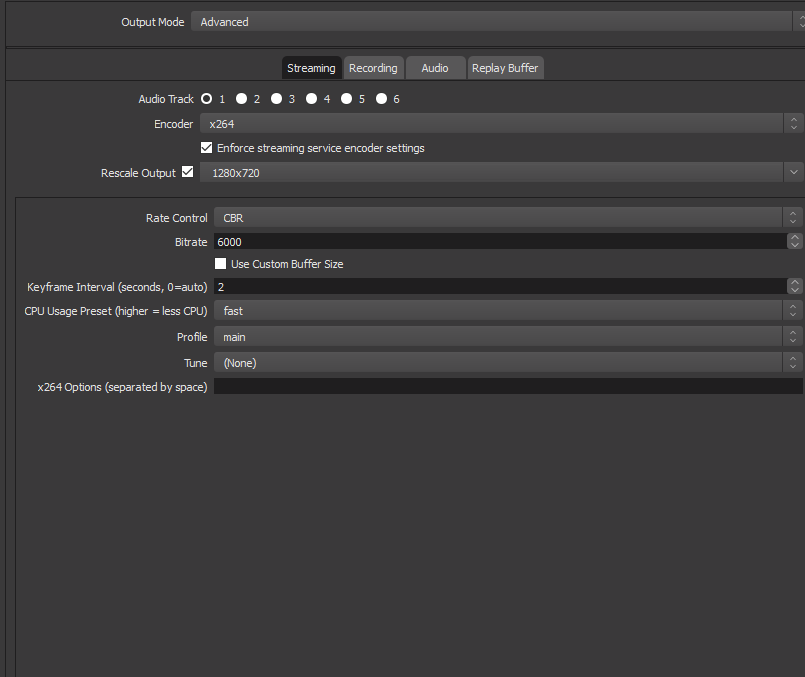




 oblique steeple
wait
wraith hemlock
Okey
oblique steeple
Don't rescale your output in this window. Doing it in this tab means that it will rescaled with your CPU. Do it here:
wraith hemlock
should i use bicubic or lanczos*
oblique steeple
bicubic should do the trick. Lanczos often looks washed out or and/or is overkill
wraith hemlock
aight then 😄
lament blade
How do i fix my issue with importing streamlabs tips/donations into stream elements? i downloaded the chrome extension but an error pops up when i click import.
@lament blade try to reconect
i have logged out of both websites twice
try to log out paypal
if u use it
and then log back with paypal
why paypal? its trying to import from streamlabs to stream elements
it doesnt ask me to have paypal open
oh
did u loged out?
????
i have logged in and out of stream labs and stream elements
and tried importing
i get an error
im trying to get my donos from stream labs onto stream elements
do you get any error message or error code
lets take it another way
error messgae or error code
ill try and get a staff member to help me
can u send me a screenshoot?
already did
wraith hemlock
He just did
lament blade
sorry slow internet
 torpid estuary
@lament blade can you press F12 and see if there is an error showing up in the console when the error occurs?
lament blade
didnt work
torpid estuary
What do you mean? Is there an error in the console or not?
lament blade
console didnt pop up
torpid estuary
When you press F12 in the browser nothing opens? Normally there should be a part of the window that opens up, with different tabs, one if them being said console
lament blade
it worked this time cx
nothing showed up in console
This is a recurring problem for people. i looked it up, but there was no answers
torpid estuary
@lament blade I asked about it internally
I will ping you when I get an answer
Thank you for bringing this up and I hope we can get this resolved soon!
 opaque dust
Hi there,
I'm new to StreamElements and am tryin' to figure out stream alerts. My inquiry is if it's possible to make alerts with two different conditions. What I'd like is to make specific alerts for resubscriptions for each tier (tier 1, 2, 3) and for Twitch Prime as well. Thank you.
lament blade
thanks
torpid estuary
@opaque dust yes, this is possible
@lament blade can you check if it didn't import anyway? Also, please make sure that you are still authorized with twitch on both accounts
opaque dust
@torpid estuary May I ask how it is possible? As far as I can tell, I'm only able to set a single condition per alert.
lament blade
yes, they are both authorized @torpid estuary
short hound
Hello everyone, wondered if there is any way to remove the anonymous donating feature as people keep donating anonymously by accident? 😃
torpid estuary
@opaque dust you can do variations for the alerts
@lament blade and they didn't import anyway? Did you check?
torpid estuary
@short hound you can require users to login to be allowed to donate. You can check this option in the tipping settings.
 wary solar
Hey quite new to store redeem thing is there anyway to remove the message that shows on chat after you redeem it?
lament blade
from like a year and a half ago
opaque dust
@torpid estuary I know that. But is it actually possible to customize resubscriptions for each tier in any way? If yes, how exactly?
lament blade
i also unmodded and remodded streamelements in my chat
wary solar
Ah i see thanks for replying
torpid estuary
@opaque dust as far as I can find there is no way to specify resub with the different tiers. Sorry! But this looks like something that would be great for the ideas board!
nocturne pelicanBOT
@opaque dust Here is the StreamElements Ideas Board: https://strms.net/ideas
torpid estuary
@lament blade this shouldn't have anything to so with the bot being modded. Your data most likely needs time and an actual stream of yours to populate.
Can you check back after the next time you stream?
torpid estuary
I think so, yes
opaque dust
@torpid estuary Ok, I appreciate your help. Thank you for your time & assistance.
torpid estuary
I am sorry I couldn't solve your issue! Thanks for your patience!
opaque dust
No problem.
 heady knot
is there a way to set my own custom bitcup? it has a transparent center to see the bits fall in.
inland knoll
Hi there, can I use any emotes in the !slots command or just the Twitch one - wondered if I could add my sub emotes
torpid estuary
@inland knoll you could use your sub emotes, but then you would need to gift your bot a subscription. Otherwise it would only put out the text
heady knot
waves hand
inland knoll
thanks @torpid estuary thats what we thought
 devout mirage
Is it possible to make streamelements have a different name in chat?
twin sentinel
@devout mirage Take a look at the pinned messages in this channel.
devout mirage
Thanks Benno
 cloud solstice
Hi folks , quick one . are we able to upload video files to the stores ? The only thing i can post in there is a gif -image file or sounds files .
twin sentinel
No, these are the only formats supported I think.
cloud solstice
no worries , i will try to convert these video files into a transparent gif and see how it works
thanks for the feedback
heady knot
hey, i have media request on my overlay, when i turn on view on stream, it plays for a few seconds then says the widget cant be detected
twin sentinel
@heady knot lets hop over to #helpdesk-selive
heady knot
okay no probs
twin sentinel
Just post your question an we'll try to assist you.
 worthy laurel
okay'
Basically, ive tried to stream and whenever i do my audio loops and i dont know how to fix it
twin sentinel
Are you using OBS or OBS Live?
worthy laurel
OBS
twin sentinel
What do you mean exactly with audio loops? Are the alerts repeating like an echo after 5 secons or so? Or what do you mean with looping audio?
worthy laurel
Its not alerts, like when an add plays before the stream, you can still hear the add music/audio when im playing
and you cant hear me talk
twin sentinel
What system are you trying to stream, are you streaming on console or PC?
worthy laurel
PC
 analog fiber
hey i seem to have a problem when i open stream elements on browser i just get a blank page anyone had this problem or know how to fix?
twin sentinel
@analog fiber Try to hit F5, or delete your cache or try to access the SE website via the incognito in Chrome.
worthy laurel
@twin sentinel ?
twin sentinel
@worthy laurel I am still here, trying to understand and solve your problem, don't worry.
worthy laurel
okay thank you
twin sentinel
So your viewers are telling you that after they entered your stream and they watched the ad and the ad is finished, your viewers still hear the ad sounds, but not your voice or game sound, but they can already see your screenplay?
worthy laurel
they can hear gameplay sound but my voice and add audio keeps looping
twin sentinel
are you live atm?
worthy laurel
no
twin sentinel
Please connect your twitch and your discord, to make support easier to access your channel.
analog fiber
got it thanks man @twin sentinel
twin sentinel
Can you please provide a log of your latest broadcast.
nocturne pelicanBOT
@worthy laurel Can you please provide a log from your last stream. In OBS go to Help > Log Files > Upload Last Log File. Once this is complete, please provide the link to the log file.
jade remnant
@worthy laurel are you watching your own stream?
worthy laurel
yeah]
jade remnant
then mute the stream
worthy laurel
i have it still dosnt work
jade remnant
going by what you said (they can hear gameplay sound but my voice and add audio keeps looping) its because obs is picking up another source of your mic. check that all audio sources of whatever youre watching your stream on is muted and check that you mic settings in obs is monitor off
lament blade
Hi! When someone hosts me it's not showing up in my activity feed thus no alert either
I thought it was just a bug from that day last time but it just happened again
Minimum is 0 and the alert is 0 too
nocturne pelicanBOT
@lament blade Due to recent changes to Twitch API, we have filtered out hosts and will only show these ones on your activity feed:
- All manual host events (0 hosts included and if filter set to 0)
- All auto host events with at least 1 viewer
lament blade
It's a manual host with 0 and filter is set to 0
twin sentinel
These "0" hosts are still filtered out.
lament blade
Why tho? What changed?
twin sentinel
We filter out 0 viewer auto-hosts by default, but usually don't have a problem showing 0 manual hosts, unless Twitch just outright doesn't notify us.
hasty garden
hey do you guys know how greekgodx displays the emotes on screen when chat spams it?
twin sentinel
@hasty garden There is an widget called "kappagen" which can bes used for this.
@lament blade Because Twitch changed the way to notify us, we can't make sure 100% these alerts are shwoing up every time.
lament blade
I'm sorry what? just these 0 alerts or all alerts?
hasty garden
@twin sentinel and are the sound effects on by default?
 restive trellis
How do I put your overlays on my stream?
nocturne pelicanBOT
@restive trellis To add your overlays to OBS, add a new browser source in your scene. Paste your overlay URL in the browser source properties, set the dimensions to 1920x1080 (unless you changed them on the website), and :ballot_box_with_check: “Shutdown source when not visible” https://youtu.be/KDvLynUqXI4
twin sentinel
@hasty garden I can't remember there are any sounds when there is a kappagen.
hasty garden
idk greek has them idk how
restive trellis
it looks like my overlay isnt fitting the dimensions of the box properly, its slightly too long for the box is there anything i can do about that
pine hemlock
Set the dimensions correctly
twin sentinel
@lament blade Manual hosts with at least 1 viewer should show up on screen, I think.
restive trellis
@pine hemlock i can set it manually so the red box matches my video box but then the bottom bar in my overlay doesnt go to the bottom
 hasty crow
how do i set up my chat bot
twin sentinel
Here is a useful tutorial video: https://strms.net/welcome
glass sluice
How do I invite someone as a mod into the SE settings?
I've put them on the list but how do they get onto the site to change settings when the bot is spamming because the channel has gone crazy with messages?
twin sentinel
@glass sluice They log in on the SE webiste and then can select your channel at the top left when selecting their own.
glass sluice
Does it recognise them because of their Twitch?
hasty crow
how do i set up my chat bot
twin sentinel
you have to give them special access to your website and add them as Editor in your dashboard.
hasty crow
how do i that
twin sentinel
@hasty crow Select "Do it later"
twin sentinel
@glass sluice Here is a usefil YT-Video on how to get someone access to your SE Settings. https://support.streamelements.com/hc/en-us/articles/360000485152-How-to-set-up-Dashboard-access
@hasty crow What are you seeing now. Are you seeing the Chat now in the OBS Live windows.
Have you added the Chatbot to your channel?