#helpdesk-twitch
1 messages · Page 410 of 1
 wanton jetty
 tawny bay
but in twitch chat it's not clickable
wanton jetty
🤔
tawny bay
oh now it works
wanton jetty
😃
wanton jetty
🤔 delete the / its not needed if you added a space between it just have
http://yourlink.here !
tawny bay
done
 wind dirge
Was there a more general spot to ask our question? Realizing now it isn't necessarily exclusive to Twitch.
 jade remnant
i will see if someone with knowledge is able to help you
wanton jetty
ask away
jade remnant
look up Kat, not really a question just a list of something wrong
wind dirge
Thank you 😄
wanton jetty
 things wrong they never happen
jade remnant

 hallow vault
Hello, completely new to StreamElements; I'm setting up the Black Gold Alerts with XSplit and noticed that in the Cheer emulation, any emotes in the message don't show up on the XSplit side (just several broken images where the emotes should be), however, on the StreamElements / testing side, they show up no problem.
Is this an XSplit thing, or Twitch thing, or did I bugger something up?
for example:
jade remnant
xsplit isnt currently fully supported
 elder sorrel
XSplit is rarely used. Shoot I haven't heard that name in awhile
jade remnant
oh no, ive said something wrong
hallow vault
It gets used when you've been given a lifetime license. 😃
jade remnant
 elder sorrel
I only know one person here who used to use XSplit but I think prob sleeping right now.
hallow vault
ah well, no worries. Good to know that I'm not by myself. I understand StreamElements has it's own OBS version but I guess i'll have to wait for other platforms to be supported.
Appreciate the responses. Will continue to muddle my way through things. Peace!
elder sorrel
We don't have our own Fork like SLOBS. Just OBS.Live which is a Plugin for OBS.Studio 🙂
 deep bay
hi all. i cant connect to twitch
jade remnant
what message are you getting?
deep bay
i asked for my account to be deleted as i was getting frustrated with it. well the account got deleted but i have been shown how to use SE and now need my account reinstated
jade remnant
if its been deleted i highly doubt it can be reinstated, but i will ask the staff
jade remnant
you should be able to just sign up again
jade remnant
hang on, just so i understand, when you say "connect" do you mean get into SE with a log in or "connect" as in stream to twitch?
ah ok
deep bay
thanks
 cloud solstice
Hi there , quick one : is there any issue with the media request feature on OBS.Live ? for some reason it's not working . just a blank tab
 twin sentinel
@cloud solstice Try try to log out of OBS Live and log back in please.
 ivory hamlet
i have a problem with the echo when i stream its sounds like i am in a cave
twin sentinel
@ivory hamlet Do you use OBS Live?
ivory hamlet
yes
twin sentinel
Let's go on here #helpdesk-selive
 heavy sapphire
@serene granite I got charged back for 2 thousand dollars and I need help fighting the case. I dm'd one of the support staff on twitter about your advanded chargeback protection and he said to come to you. Thanks!
 eager pine
Hi I can't seem to import from streamlabs all i get is an error I am logged into both accounts on chrome
twin sentinel
@eager pine Can you provide a screenshot of the Error message please?
 reef gate
hi, this is the third time i have had to message about this issue in about a week, a streamer that i mod for is having issues with his host alert, the previous 2 times the issue was repaired and happened again, this is the third time, i know the webhooks were re subbed last time, the streamers name is bigshotsmithy, is there a permanent fix for this issue as it is a little bit tedious sending this message every 3 days or so.
eager pine
jade remnant
@reef gate i will let them know and get back to you
reef gate
thanks @jade remnant
twin sentinel
@eager pine What happens if you hit "Start Import to StreamElements?
eager pine
 upbeat willow
where do i find the place i can change the title of my stream?
elder sorrel
@upbeat willow In the Dashboard in the StreamElements webpage. Also are you using OBS.Live?
upbeat willow
@elder sorrel i am using the obs.live yes...trying to test it
elder sorrel
With OBS.Live you can change the Title of your Stream from there as well.
On the Activity Feed in OBS.Live. You can click the Burger Menu on the top left of it & click "Stream Settings" to be able to change your title
twin sentinel
@eager pine So you have both dashboard windows open in chrome at the same time?
eager pine
yes
twin sentinel
@eager pine Try to log out and log back in into both accounts. Then try to import again. If it is still greyed out please check your "My Overlays" on the StreamElements webpage to see if they are already imported.
eager pine
done all that
jade remnant
@reef gate the '0 viewer host' has been filtered out again. currently due to twitch api sometimes this will happen, sometime it wont. as for a permanent fix, it doesnt look like there will be one on the twitch end, and nothing planned SE side yet
reef gate
so we cant have a host alert anymore?
wanton jetty
do you have a host alert ticked ?
twin sentinel
@eager pine Please log out of the SE dashboard. Hit F12 for the console. Refresh the page please. Log back into SE and try to import again. If there is an error while importing it will pop up in red in the console. Please make a screenshot of the console then and send it here please.
wanton jetty
and as @jade remnant said @reef gate the '0 viewer host' has been filtered out again. currently due to twitch api sometimes this will happen, sometime it wont. as for a permanent fix, it doesnt look like there will be one on the twitch end, and nothing planned SE side yet
Meaning they need 1+ viewers to trigger the alert.
reef gate
so a manual host of 0 will not trigger the alert?
wanton jetty
nope
reef gate
is this only with SE or all plug ins
wanton jetty
Why would you want to show 0 host's anyway ?
also its a twitch thing so its everywhere.
reef gate
because it lets the host know you have seen it plus gets their name out a little bit, also as i say it is not my stream so that is entirely up to the streamer
wanton jetty
Something you will learn is that hosting someone gives very little in return to the hostee.
The hoster isnt looking for something in return and if they are there hosting for the wrong reasons.
reef gate
you dont need to explain twitch to me, i have streamed myself long enough, and again it is not my stream, merely a stream i host for, it is the streamers preference to give the host a little shout out so who are we to say there is no point, it is also not for you to decide what a host should and shouldnt do and extreamely unprofessional of somebody representing stream elements
wanton jetty
I by no means represent stream elements...
soooo there's that, Also your coming across rather hostile so ill put this to bed real quick... SE cant do anything about it its a twitch API thing...
reef gate
so even though this has been fixed twice already al be it temporarily, they dont have a fix?
wanton jetty
No as its down to twitch's API on wether it wants to send a ping or not out.
reef gate
so how was it fixed before?
wanton jetty
How long ago was before because twitch's API's are always in flux.
reef gate
well this is the third time i have messaged in a week
wanton jetty
Also its been done this way to elevate stress on twitch's API and server's thousands of people host one another every few mins on twitch this can cause backlog slowing down things that don't need to be slowed down, Removing 0 Host alerts releases alot of stress.
I understand you want to welcome everyone but the amount of pings twitch gets for 0 hosts isn't worth the costs on the servers to maintain that, Since that 0 hosts includes auto hosts with nobody coming over aswel
Its also why you no longer see auto hosts in twitch chat.
as a Streamer
reef gate
that still doesnt answer the question of how was it fixed before but not now
wanton jetty
Ok were going in circles here.. im going to let someone else take over.
reef gate
well the twitch api change was a while ago that doesnt explain the fix being made twice already this week but suddenly cant be made now
wanton jetty
There API is constantly changing, Something that can work 1 min can be changed another.
reef gate
right ok
 haughty gyro
Is there a way to set CBR ( constant bit rate ) with stream elements ?
 narrow coyote
That is a setting in your broadcasting software
haughty gyro
Ok so the OBS with StreamElements ?
narrow coyote
Standard setting in OBS, our plugin does not change any of that
wanton jetty
https://cruxedkat.live/s/201918555716.png
Choose encoder as you please.

but its under this tab in OBS @haughty gyro
 outer vessel
how to use the command correct, that changes the title of the stream?
wanton jetty
!settitle !setgame unless you have disabled them
outer vessel
thanks!
wanton jetty
make sure you spell the game how twitch has it though or it will not categories you @outer vessel
Check under here to make sure there enabled

StreamElements
The Ultimate All in One Platform for Streamers
 outer vessel
Thanks!
 coarse heath
I’d like to make cheers under 100 have a different alert. Putting “at least 99” does not work. Is there something I’m missing?
I’d like to have a “under X amount” instead 😦
Please tag me in your reply! Ty!!
coarse heath
Ahhhh
wanton jetty
😃
coarse heath
So it still does the one for over 100
wanton jetty
yup
 clever mango
I recommend a variation for at least 1 and a variation for at least 100
wanton jetty
because "atleast more than 100" trigger this alert
coarse heath
No wait!!! It works!!! Ty
wanton jetty
❤
coarse heath
Ty @wanton jetty
clever mango
👍
wanton jetty
@clever mango Buddy your about could i get your assist in #helpdesk-selive where i tagged scalper
coarse heath
And hiya @clever mango it’s been a minute. Have a great day!
clever mango
Hi Yvonna thanks! Hope you are well
wanton jetty
also @coarse heath Your welcome 
coarse heath
Yup super duper thx ❤ @clever mango
 thorn bobcat
hey there, does anybody know what's wrong with this command? !command edit !thanos $(sender) $(random.pick '/timeout $(sender) 30 vanishes into thin air' 'is still standing') If a user gets the first option, it literally just puts out the text "User123 /timeout User123 30 vanished into thin air". Thanks in advance
thorn bobcat
Hi tadpole, thanks for the answer, but that doesn't solve it. The options for the random.pick have to be inside the brackets. And the closing bracket for the random.pick is at the very end.
narrow coyote
$(sender) $(random.pick '/timeout $(sender) 30 vanishes into thin air' 'is still standing'))
You are missing the close, as you have nested a variable within a variable.
thorn bobcat
Hey @narrow coyote. Thanks for your answer. Sadly, this doesn't solve the issue. Your code produces the output "User123 /timeout User123 30 vanishes into thin air)" I guess I have to somehow escape the /timeout command so it's not interpreted as pure text, but I have no clue how 😦
 small yarrow
Hey there
The streamelements bot doesnt seem to be in my channel.
I tried making the bot leave and rejoin
I disabled and reenabled all chat commands
but no response from the bot.
I still get overlay sounds when i get a follower
nvm somebody banned the bot i think
got it solved
narrow coyote
Try $(sender) $(random.pick '/timeout $(sender) 30 vanishes into thin air''is still standing')
if that does not work, maybe try
$(random.pick '/timeout $(sender) 30 vanishes into thin air''$(sender) is still standing')
 upper steeple
On the Twitter module, if I don't have replies and retweets enabled will it still put my tweets in the chat?
 strong kernel
Of course, just not replies and retweets.
upper steeple
awesome thank you, was making sure
I have to add my twitter name to the follow section or is that just for any other accounts I wish it to tweet?
 lament blade
hey, how do i make FFZ emotes show up in the chat widget ?
 radiant steeple
getting double sound clip audio's in my stream all of a sudden, any idea? only one store redemption on my overlay and no monitor and output on my OBS
not alerts, but store sound clip redemptions
jade remnant
make sure all obs overlays have shut down option ticked in its properties
radiant steeple
k
thorn bobcat
hi @narrow coyote I tried both suggestions. The first one still created the "User123 /timeout User123 30 vanishes into thin air". The second one actually timed out the user. It didn't display a public message, but a reason for the timeout (visible only for mods). Not exactly what I wanted, but close enough. So I will use the second option. Thank you all very much for the support.
jade remnant
lol, np 👍
 compact owl
is this a good place to make a streamdeck idea request
strong kernel
Ideas are submitted on our ideas board: https://strms.net/ideas
upper steeple
I have retweets and replies enabled on the twitter module, but nothing is being posted in my chat
strong kernel
Put the name in lowercase.
upper steeple
i d id
lament blade
my emotes arent showing, can u plz help ?
upper steeple
just retweeted something and nothing in chat
lament blade
things like pepeJAM and WeirdChamp just wont show on the overlay
narrow coyote
!emotes update
lament blade
still doesnt work
upper steeple
so is the retweet thing only when someone retweets a tweet of your's?
 smoky tide
thats weird. the !emotes command doesnt work for me either 😦
 strange summit
Is the Streamelements bot able to execute commands like /followersoff if certain keywords are triggered, such as by itself after announcing a host/raid in chat? I tried this yesterday but it didn't seem to trigger, not sure if intentional.
narrow coyote
if the bot is not a mod in your channel, it wont be able to trigger any commands like not. I am also not sure if mods can use those commands themselves. If its a broadcaster command, the bot wont be able to use it
strange summit
Bot is modded and it's a command available to moderators and above.
 naive depot
Got a stream live atm but SE bot isn't responding to any commands 😦 Bot isn't muted.
upper steeple
uh the twitter module is not working, so I tried to !ping the bot and nothing is happening
naive depot
!ping fails here too
smoky tide
mods can use those commands @narrow coyote
upper steeple

smoky tide
ruh roh
 upper steeple

elder sorrel
I'll place one before I go off the deep end 
upper steeple
hope the bot comes back soon
 worthy sparrow
bot dead yeah?
naive depot
ya
elder sorrel
Try again 
upper steeple
ITS ALIVE!
elder sorrel

 proud pumice
we're restarting the bot in some regions to see why it disconnected from twitch, join/part the bot if you still dont see it replying
naive depot
It worked, thanks 😄
 valid pagoda
I had to part and rejoin, now it works fine
 restive shadow
ok it's been a while since i've usewd SE lol how do you part, rejoin again? 😂
proud pumice
@restive shadow https://i.imgur.com/nKjyl6i.png
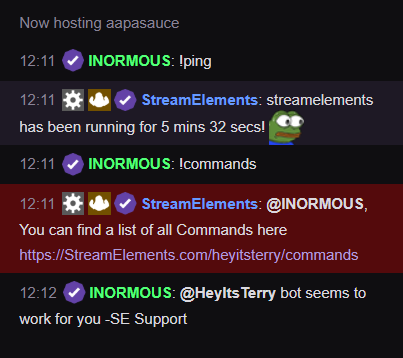
and you can part/join from your dashboard https://streamelements.com/dashboard
StreamElements
The Ultimate All in One Platform for Streamers
narrow coyote
That was in your chat
restive shadow
I know it was.
proud pumice
like it works for someone else trying to ask the bot for a command ;X
restive shadow
what I mean it I was working with it for 10 mins before hand trying to get it to work lol
proud pumice
even i got it kituuu
narrow coyote

restive shadow
^ me right now
elder sorrel
 thorny swallow
This is probly an overasked question but can stream elements create a twich chat overlay that i can see because I only have one moniter and i cant just alt+tab between my game and twitch
strong kernel
No, it won't display your chat over your game for you, just in OBS. Typically people will monitor their chat with their phone or something if they're restricted to a single monitor.
 narrow coyote
If you have a mobile device, you can use the Twitch app to view your chat
thorny swallow
i dont
my phones on button just stoped working all the sudden
so i cant turn it on
mega OOF
lament blade
Hi, I try to start my stream but it says theres a wrong url, any idea why is that?
strong kernel
@lament blade We need to know the exact message.
 jovial bronze
I am unable to change my Chat Alert Modules for any alerts and I tried it on multiple PC's. When i hit SAVE nothing saves.
 ripe moth
mmmm i been having trouble with the song request site, it keeps auto playing my backup playlist every time i open the page, i'm not even clicking on the play button. also i can't skip to next song or clear my playlist
strong kernel
@jovial bronze What are you trying to change? Can you take a screenshot?
@ripe moth What browser are you using, out of curiosity? Never heard of that before.
 uncut briar
Hey there I am having issues getting my game sound to come in on my stream through the stream elements obs it was working yesterday but now there is no game sound
I have my hd60s hooked up to my laptop and ps4 correctly too
 nocturne pelicanBOT
@uncut briar For the best OBS support, please join their Official Discord @ discord.gg/obsproject
elder sorrel
OBS.Live is a Plugin & does not mess with the Audio. That'll be OBS.Studio
 loud vector
so
how do i get the bot to say when someone has followed in chat
like if someone follows the bot will say in chat who followed
strong kernel
Chat alerts module: https://streamelements.com/dashboard/bot/modules
StreamElements
The Ultimate All in One Platform for Streamers
 prisma grove
Is there a way to change hex colors that the bot says in twitch chat?
strong kernel
Pardon?
prisma grove
oops let me rephrase!
I have timers going off - I'd like to have some of the words in some of those timers a different color - is that possible?
strong kernel
No.
prisma grove
Okay! I just found a work around, thanks for trying to help! 😃
or I found a way to change the colors rather
worthy sparrow
is it possible to combine watchtime? also for chat stats, is it possible to combine those too for those who have changed their names
strong kernel
Unfortunately not.
 quasi cobalt
My Twitch account isn't set as a Broadcaster (1500) in StreamElements. It also won't let me change my own level via the !levels command. How can I set my level as Broadcaster?
To be clear... The account I am referencing is the same as the stream account. I'm not just a moderator on someone else's account or something. Lol.
Nevermind. I figured out what my issue was!
cloud solstice
@twin sentinel nothing happen . still can't access media request ..
 hushed void
how do i show chat in obs
strong kernel
@hushed void Do you see the StreamElements menu at the top?
 autumn cypress
Hey its there a way to set up my gift sub alerts to just say how many subs were gifted instead of playing the alert for each one? Like if someone gifts 10 subs it would just say "user has gifted 10 subs" and play the alert one time instead of 10
strong kernel
Yes. Use a community gift variation.
autumn cypress
ahhh excellent. Thanks!
 blissful gull
Is there an issue with follower goals and OBS Studio? I setup a follower goal and it is shown in the overlay when viewed in the browser. However in OBS the overlay does not show the foreground colour, i.e. how far the goal is already reached.
strong kernel
Give it a height.
blissful gull
I still have an issue with media requests ... when played from the browser they are shown on stream but i get an echo from OBS ... when i start the same video from within OBS Studio Media Request, the video runs for a couple os seconds and then stops (OBS runs as admin)
strong kernel
Yes, because it's playing simultaneously from the browser and OBS. We're aware of both of these issues and are looking into them.
 urban herald
Hello 😃 The bot doesn't write in chat if it times people out etc. - The custom message is only the dark-grey-moderator-message, that normal plebs can't see 😃 - is it supposed to be like that? Can I change it to let people know why they're timedout? 😃
strong kernel
Yes, that's as designed.
urban herald
But can the timed out person see that?
strong kernel
Yes.
urban herald
ah, so it's to not spam other people why the person was timed out
 swift furnace
Can someone help me figure out why the SE overlays render perfectly in browser, but when streamed from OBS at my 1080 native res the fonts become super blocky?
strong kernel
Does it only look blocky in OBS, and fine on the stream? Could just be an issue of scaling.
swift furnace
I've made quadruple sure I'm not scaling, cuz that's what I thought too
strong kernel
Not what I mean.
Is the "canvas" in the browser visually bigger than the canvas when you view it in OBS?
swift furnace
my Chat is telling me the text is too blocky to read
Canvas in OBS is 1080
screen is 1080 too
strong kernel
You're still not understanding.
swift furnace
I'm afraid not
strong kernel
I'm not talking about the actual setting.
Visually speaking only, when looking at the preview box in OBS.
Does it LOOK smaller than what you're viewing in the browser?
swift furnace
No
I have the preview set to window, and maximize it, and looks bad at full screen as well
Same section when loading overlay directly in firefox:
swift furnace
It looks like it's being rendered then scaled down. Where would I find the settings you think are responsible? Base and output are both 1080. Browser source is set to 1080 as well. I appreciate your help. I've been working on this for a while
When I add Text (GDI+) it is quite smooth, so I thought the problem was related to the Browser plugin
Should I be asking in the OBSlive-Helpdesk server?
strong kernel
I'm not even certain there's a setting in OBS that changes how text in browser sources is displayed.
This may go beyond OBS.
swift furnace
Weird - leave it to me...
strong kernel
You can start by asking there, sure.
nocturne pelicanBOT
@swift furnace For the best OBS support, please join their Official Discord @ discord.gg/obsproject
strong kernel
👍
 torn socket
How come sometimes my overlays just stop working in OBS studio? Whenever I switch to another scene with another overlay in it, it doesn't load.
(Shutdown source when not visible) and (Refresh browser when scene becomes active) is turned ON. As well as Browser Source Hardware Acceleration, that's also turned on.
 terse hinge
Hello, I am trying to add a browser source to my obs, the screen is black, even when I refresh cache. What should I do here?
I am trying to add a streamelements theme.
 meager tree
Why is it that none of my stream element commands are not working
blissful gull
@strong kernel
"Yes, because it's playing simultaneously from the browser and OBS. We're aware of both of these issues and are looking into them."
Is there a way to make it work atm? Or is the status like a nice preview? Can live with both .. i just won't spend any more time atm and just wait.
*then
strong kernel
Viewing on stream via OBS.Live doesn't work for some, but works for others, and it's taking some time to look into.
 high grove
Can someone help me with my YouTube problem?
cloud solstice
Hi , anyone having problem with media request feature not showing up or loading in OBS.live ?
strong kernel
Uh, no, that's a new one. What version does it say in the bottom right?
 dull olive
need help in voice chat
cloud solstice
@strong kernel 19.1.8.305
 soft fulcrum
Hi guys, is there a way I can download all my image and sound files from streamelements?
 zenith widget
@soft fulcrum unfortunately no
soft fulcrum
Thanks, all good. I can go into the website coding and pull the source file for the gifs. Will just have to record the sounds through audacity
 unreal smelt
hello, guys! I just wanted to ask quickly if there's any way to add additional email addresses to get the streams stats summary emails
zenith widget
Unfortunately, no. The stream report is sent to the email address on the account. It can also be changed when you change it on your Twitch account.
unreal smelt
I see, thanks for the quick reply @zenith widget  /
/
 flat tangle
Hello I made a enquiry about my tip page status at https://streamelements.com/savagewolfie03/tip
I have not received any updates after 24hrs 😦
flat tangle
LOL
Yes it was you haha
I'm not mad or anything, just wanted to know about the status of the fix 😃
zenith widget
Trying to see if I actually asked about this 
I haven't, i'm sorry 
will do a task for the devs to fix ya right up, but I don't guarantee it will happen right away
@flat tangle task raised, now we wait
flat tangle
Alright thank you!!
ripe moth
@strong kernel sorry for the late reply but I’m using chrome
zenith widget
Thats an odd issue you have. Do you have Ground Control running?
jovial bronze
@strong kernel I am attempting to change the message that is in the screenshot, and when i press save many times and it doesn't do anything. The messages remains unaltered on every field doesn't matter if i change only one message or them all. And this happens every time that I have tried this. This is the chat alert module.
zenith widget
Are you getting an error o nteh website when you are trying to change the alert message?
jovial bronze
No error, just pressing the save button does not exit out the small window.
 desert temple
Hey there, i'm having a trouble with my sub alert, i uploaded a new animation and it still showing the default one
 torpid estuary
@jovial bronze what browser are you using?
desert temple
chrome
zenith widget
@desert temple Check variations
torpid estuary
@jovial bronze can you try opening the site in incognito mode and see if the problem still occurs?
zenith widget
@jovial bronze Sorry I forgot about you due to some other things that came up. I just checked the chat alert module settings on your account and you were missing a number for one of the varations for resub - I placed a 3 where I have marked and was able to save the settings:
desert temple
Now i have another problem, the video as alert starts not at the beginning of the video but at the middle
desert temple
ok
zenith widget
Are you clicking on Set/Change video?
These are the supported formats for all files
 scarlet mauve
Importing from nightbot doesnt seem to be working
twin sentinel
do you get any error message?
twin sentinel
Has there been a succes message, before you get back to the import page after clicking to import?
zenith widget
@scarlet mauve Make sure you have nightbot's dashboard and ours open before trying the import.
scarlet mauve
Still doesnt seem to work
 ebon lantern
Hey guys. I'm trying to configure alert sounds on streamlabs, but when I do the 'emulate follower event' test, I can't hear the sound. Is there something im missing
scarlet mauve
Lemme try with a diffrent browser
scarlet mauve
I was already using chrome
zenith widget
Then open the dev console (f12) and open the console
and try to import again.
If it fails it will give a red line in the console
ebon lantern
Sorry I mean streamelements
zenith widget
In the overlay editor -> lower left corner -> bell icon 😃
scarlet mauve
Uncaught (in promise)
/dashboard/account/import?provider=nightbot:1 Uncaught (in promise) undefined
zenith widget
Screenshot please.
ebon lantern
Yeh I've clicked there, and i've tested the follower alert, but there's no sound. I've included the sound and put up the alert sound volume, but it's still not playing when i test it on streamelements
zenith widget


twin sentinel
@ebon lantern Check if the Browser or the Tab or the SE Overlay Editor is muted and umute if necessary please. And what browser are you using?
Are other alerts working when trying to test them?
ebon lantern
Thanks, Benno. It seems that the sound comes through OBS, and not through the browser. That's fine for me.
I think it's because I am running a dual pc set-up, which complicates things a little bit.
twin sentinel
Could be. But if its working now. 👍 If there are any other problems or other questions please don't hesitate to come back here. We'll be happy to assist you.
 cosmic elm
Is there any way to add browser sources to the StreamElements overlay, so I only need that one in OBS itself?
zenith widget
browser sources are an OBS thing.
Do you want to load a specific page into the overlay?
cosmic elm
I want to consolidate all of them into 1 to save on CPU usage
zenith widget
If you have widgets spread across multiple overlays, just copy them over to 1 overlay.
Thats the idea of having 1 overlay that holds everything 😃
wanton jetty
So copy the "widgets" to a single overlay 😃
zenith widget
Maybe i'm failing to understand but, what do you even have on those sources that you want them "implemented" into the overlay?
@wanton jetty I already said that. Pay attention.
wanton jetty
.<
cosmic elm
I'm currently using 4 browser sources in OBS
Bit Boss Battles
Quest Mode
Kappamon
StreamElements
zenith widget
We have our own bit boss called hype boss
cosmic elm
I want to move the first 3 into the 4th
zenith widget
no idea what Quest mode is, and kappamon can't be loaded into our overlays.
cosmic elm
I'm aware of that, but I prefer BBB
zenith widget
Then, no - those can't be loaded into our overlays and combined into 1 source.
Those are from different platforms and the chances of them being able to work as loaded frames/widgets into our overlay are super slim.
cosmic elm
Okay  . Thanks for the help!
 oak creek
why does this happen, i actually have the widget at the overlays
but whenever i tried to show the video on stream, it appears on the overlay but bounces back in a few second
is there a way to fix this? please help
twin sentinel
try to log out of OBS Live and log back in please.
 hybrid bluff
I recently made the switch to StreamElements and have my alerts all setup . Most work fine however I am having an issue with Host Alerts. I have the minimum set to "0" so all alerts play, however none of the small, zero or 1 viewer host display. Is there a way to resolve this? Also, is the a way to not have host from raids not trigger an alert since they come in at the same time?
torpid estuary
a raid will always also trigger the host alert
as for the host alerts not playing, auto hosts with 0 viewers will never play, no matter if you set the minimum to 0.
nocturne pelicanBOT
@hybrid bluff Due to recent changes to Twitch API, we have filtered out hosts and will only show these ones on your activity feed:
- All manual host events (0 hosts included and if filter set to 0)
- All auto host events with at least 1 viewer
 celest fractal
Is there a way to set a delay between Store Sounds?
I have the alert at 20seconds, but that doesn't do much
torpid estuary
between different sounds? no, but i think it was posted on the ideas board
 twin sentinel
@celest fractal So if I get you correctly you request a cooldown after someone redeemed the item, before anyone else can redeem the item again?
clever mango
Global cooldown @benno so before any item can be redeemed
twin sentinel
oh ok. got it.
 fading turret
Hey guys, I'm having this problem here:
I alrdy blocked those bots on twitch but they still appearing there on mi leaderboard
is there any way to stop giving points only to them?
jade remnant
they are bots, you can remove (reset) their points and add them to the ignore list
i had to do the same
fading turret
so there's an ignore list on streamelemens, where is it? D:
I need to add them there
let me look for it
elder sorrel
https://streamelements.com/dashboard/loyalty @fading turret
StreamElements
The Ultimate All in One Platform for Streamers
jade remnant
under the loyalty settings
jade remnant
np 👍
ivory hamlet
i have a problem when i streaming its just closes in twitch but in the obs live its says stop streaming
 pine hemlock
That means you're live
ivory hamlet
i am watching my twitch right now and i am not
pine hemlock
Then you have the wrong stream key.
ivory hamlet
do you want a ss of my steam key to see that its right ?
 mortal plover
Anyone know how to remove this language tag im not danish
ivory hamlet
just press the x boton
mortal plover
yea
pine hemlock
Providing me your stream key does nothing other than risking your account
mortal plover
@jade remnant i have
pine hemlock
Try a different twitch server, request a new stream key.
mortal plover
i honestly got no clue why it happens
ivory hamlet
jade remnant
there is no x on Danish
ivory hamlet
i can reset the stream key
jade remnant
what was the last game you played banana?
if you update the game to something else does Danish go away?
blissful gull
@twin sentinel @zenith widget Just as a feedback, i do not get this "Media Widget not found" msg on the Media Request Window of OBS Studio and it runs fine when i not streaming. I can pause and restart the video, i can stop showing on stream and back to showing on stream and there is no echo. Just when i am streaming it stops after some seconds with the known message in the media request window (no active media widget found...)
wanton jetty
To those having issues on twitch right now
https://twitter.com/TwitchSupport/status/1090671927495077888

🔎 We are looking into the issue preventing users from going Live. Hang tight, we're on it!
 Twitter
@ivory hamlet ^
pine hemlock
^
 digital furnace
Got a question, so in Stream elements I used to have option for camera that says Device : USB VIDEO DEVICE,
but now it randomly changed to Device : Logitech HD webcam c270 and I can't change it back to USB VIDEO DEVICE,
and now when I wana configure Video, some options are gone for editing the camera.
jade remnant
@spare crystal no self promo
twin sentinel
@digital furnace are you using OBS or OBS Live the plugin from StreamElements?
digital furnace
@twin sentinel StreamElements OBS Live
twin sentinel
Since the plugin doesn't change anything of the core features of OBS, like the capturing devices, I would suggest to ask at the OBS Support.
nocturne pelicanBOT
@digital furnace For the best OBS support, please join their Official Discord @ discord.gg/obsproject
digital furnace
@twin sentinel okej, thank u 
 buoyant onyx
Is there a way to make a command user-specific?
lament blade
hello, for the !duel command, as a host, how can I give points to my viewers?
 dusk wolf
Just turned on the Loyalty rewards, how long until the points start populating for viewers and the leaderboard?
jade remnant
every 10 minutes of watchtime
dusk wolf
it was going on 20 just sent that, went back and refreshes, and they showed lol
jade remnant
lol
torpid estuary
If you want to give them points that will be deducted from your points then it is !givepoints @lament blade
torpid estuary
The streamer might need to enable the command. It's turned on by default normally.
 static swallow
hello! im new to streamelements and imported over from the stream labs extension. How do i get the subs and cheers to show on my streamelements extension? Only the points are showing.
terse hinge
Hi, I am trying to add a stream theme link as my browser source on obs, but I only get a black screen. When I refresh cache, I get a white screen. How can I fix this?
jade remnant
@last hare place it in #426825216887619594
@terse hinge what form of obs are you using? normal, studio, SL, SE
@static swallow the streamelements extension, are you talking about the twitch panel extension or the widget overlays?
static swallow
twtich panel extension
ive tried to import using the chrome extension but it keeps giving me an error
jade remnant
when you import using chrome, do you have both SE and SL pages open and logged in?
static swallow
yes
jade remnant
cool, im not too familiar with the twitch extension. i will ask internally for you
static swallow
thank you
 gusty veldt
cani see my overlay in chat
 grand tusk
yo, so Im using obs.live and when I put an overlay in it as a browser sorce only half of it appears
elder sorrel
Make sure it's 1920x1080 @grand tusk and if it is: Click Ctrl+F
elder sorrel
@gusty veldt I don't understand you're asking. What are you trying to do?
In OBS, mrlink 😄
gusty veldt
i got it now thx
grand tusk
should the resolution being 1080p instead of 720p affect my CPU at all?
https://gyazo.com/ecb04596887e9ae3ae05dfbe83863402 hmm I still only get this
 elder sorrel
It shouldn't. 1920x1080 is what it should be. Did you change the resolution in the overlay editor by chance?
grand tusk
no i didnt
elder sorrel
Only other thing I can think of is to check in My Overlays & click the pencil
 lost pebble
what do you do when it says could not access stream channel or stream key
elder sorrel
Otherwise check your Source for your Browser source & make sure it's 1920x1080
@lost pebble Get your Stream Key from Twitch again & apply it to your broadcasting software
grand tusk
oh yeah changing the browser source worked. Thanks
elder sorrel
The stream key is what connects your Twitch channel to be able to Broadcast from Broadcasting software such as OBS.Studio
With a quick google search: https://www.twitch.tv/broadcast/dashboard/streamkey


 elder sorrel
There! ⤴ @grand tusk
terse hinge
Can we use SE themes on SLOBS?
grand tusk
yes
terse hinge
Or is that not recommended. I've been getting black screen from adding browser source, white screen from refreshing the browser source.
grand tusk
idk, slobs has some built-in overlays though if these dont work
terse hinge
Should be able to function like my obs studio if it uses browser source. Not sure why the overlay doesn't show up.
elder sorrel
@terse hinge You can still use our overlays with SLOBS, but it is known that they either block some of our overlays and/or SLOBS is CPU heavy then the original OBS Studio.
terse hinge
I haven't had issues before, not sure why now. I'll check.
 silk fern
Hi my video looks crappy when i stream from obs live. I updated everything and did the auto resolution
silk fern
@jade remnant resolution is at 1920x1080 bit rate 6k
grand tusk
put bit rate to 2k or something. 6k is way too high
nocturne pelicanBOT
@silk fern Can you please provide a log from your last stream. In OBS go to Help > Log Files > Upload Last Log File. Once this is complete, please provide the link to the log file.
 lost halo
my stream looks laggy on twitch
nocturne pelicanBOT
@lost halo Can you please provide a log from your last stream. In OBS go to Help > Log Files > Upload Last Log File. Once this is complete, please provide the link to the log file.
silk fern
@nocturne pelican here is the link https://obsproject.com/logs/NjRZrSoieHmgXqv9
silk fern
@grand tusk i moved the bit rate to 2k still looks bad
elder sorrel
@silk fern Make OBS.Studio run as administrator & turn off Game DVR on your PC.
grand tusk
by bad do u mean alot of frame drops or pixelated?
silk fern
@grand tusk pixelated
terse hinge
Is there a way to select multiple objects on the overlay editor?
jade remnant
click and drag
silk fern
@elder sorrel i made obs run as administrator how do i turn game dvr off
lost halo
My stream elements makes it look like my game is laggint but it isnt
terse hinge
I'm sorry? I want to be able to have more than one object selected
silk fern
@elder sorrel i dont dvr on
grand tusk
does streamelements have any transitions to use?
jade remnant
silk fern
@elder sorrel i dont have dvr on
jade remnant
the same with you @lost halo turn off game dvr
@silk fern you also have the encoder as x264 try changing it to NVENC
silk fern
@jade remnant still looking for the dvr i play on ps4 tho. And i changed the encoder
jade remnant
press windows+g
 carmine herald
starting into OBS, looking at streamlabs, but interested in StreamElements - is there an advantage to going vanilla OBS or perhaps Moxy to have a better SE experience? any advice on a way to proceed?
lost halo
i did
silk fern
What now?
silk fern
This what my stream looks like from twitch @jade remnant
97 upload
@jade remnant 97mbps upload
jade remnant
are you still streaming?
silk fern
Yes @jade remnant i am
jade remnant
whats your twitch name?
lament blade
hi is there a way to get the kappa emoticons later then the alert if new alert is coming ? because cant read the message if it coming up
pine hemlock
@lament blade use the activity feed to read the message?
jade remnant
@silk fern the quality seems fine for now. what i would say is finish your stream and post a new obs log. the video is clear to make out whats going on, however you have no sound coming through
silk fern
@jade remnant ill stop the stream now and send the log. Thanks i dont have my mic hooked it i was trying to make sure the picture was good first
@jade remnant https://obsproject.com/logs/kffRWUv4CD5YpW7U
@jade remnant i just looked at the stream its all Pixelated
jade remnant
@silk fern your encoder is still set as x264
lost halo
@silk fern
jade remnant
@lost halo i was watching your stream when you said "stream elements makes it look like my game is laggint but it isnt" your stream was fine then and its fine now
silk fern
@jade remnant mybad i thought i fixed it
lost halo
https://clips.twitch.tv/AgileSpookyGrassDoritosChip
@jade remnant
 jade remnant
yes, i saw that too, when you came out of the game to type in twitch chat and discord. did you alt tab?
jade remnant
it wouldnt really matter, coming out of the game then going back in would cause some lag. but after that its fine
lost halo
Ok, so it only happens when I go our of game
should I up bitrate
thanks for the help
 next glen
so one of my viewers wanted to tip me through pay pal but it didnt work
buoyant onyx
@jade remnant I want only a single user to be able to redeem a sound effect in the store. I already have the command that does ${redeem soundeffect}, but now I need that command to be used by only a single user. Can I use the regular expression field for that, if so, how?
 pale jewel
I need help! twitch tells me I have 203 followers but my overlay says i got 216 HOW DO I FIX THIS
strong kernel
What widget?
pale jewel
my follower goal
strong kernel
Goal progress is controlled at https://streamelements.com/dashboard/session and can be manually edited.
StreamElements
The Ultimate All in One Platform for Streamers
 lost ridge
Can someone please help, i am signed in on a web browser and my wife now wants to use Stream Elements, but i can't sign her in.
I sign out myself and click login, logs me back in. I select connect with Twitch and it signs me in.
strong kernel
Sign out of Twitch itself before trying.
lost ridge
yep, worked, thank yous @strong kernel
 ivory sluice
every time I start streaming i drop a ton of frames on stream. How do I fix this?
nocturne pelicanBOT
@ivory sluice Can you please provide a log from your last stream. In OBS go to Help > Log Files > Upload Last Log File. Once this is complete, please provide the link to the log file.
ivory sluice
elder sorrel
You can try to start by running OBS.Studio as administrator & turn off Game DVR.
Can find that in your settings -> Gaming -> Game DVR
 languid dagger
Are any of the staff free? i need to DM someone about something 😃
strong kernel
Keep questions in the public channels.
languid dagger
its streamelements related
strong kernel
That's fine. Ask here, not in DMs.
languid dagger
sorry im just trying to remember :3 it was on the tip of my tongue xD
ivory sluice
still giving me an encoding overloaded messages and fps drop
do you want my logs again?
elder sorrel
Also looks like your GPU is being overloaded? Number of lagged frames due to rendering lag/stalls: 430 (47.8%)
I think. My intel on reading logs is not average /above average as I'm using other people's logs as examples if an option is available to do something 😅
ivory sluice
idk how my gpu would be overloaded tho 😦
elder sorrel
Is the game you're trying to play is League?
elder sorrel
Well Altas sure does have work to do.
Best options are to lock framerate, and try lowering in-game graphic settings. I would also suggest not having a source for each game, you should only use one game capture source, and change the game in there. Having multiple game capture sources will cause problems
ivory sluice
yea i got rid of the multiple sources already
 drifting crater
I'm currently in a live stream and StreamElements isn't recognizing when someone hosts my channel. I'm not sure about other activities.
nocturne pelicanBOT
@drifting crater Due to recent changes to Twitch API, we have filtered out hosts and will only show these ones on your activity feed:
- All manual host events (0 hosts included and if filter set to 0)
- All auto host events with at least 1 viewer
 modest dome
Hi, ! need help with the media request box it is not loading since a couple of days ago, the plug-in one in obs!
strong kernel
Log out and back in.
 full cove
Is it possible to get VIPS in a channel through a command? I know you can do it with /vips but can I have my bot post the names in chat?
modest dome
@strong kernel that didn't work it still doesn't load
strong kernel
Click the StreamElements menu at the top. Do you see a Media Request option?
languid dagger
Is there a way of setting up a top 10 command to show in chat from the leaderboard
 copper bobcat
Media player is really struggling tonight, any fixes to make it run smoother?
modest dome
@copper bobcat I've been having problems with it too, its not loading its just a empty box!
swift furnace
@strong kernel Do you remember the problem we discussed briefly last night with my down-scaling text corruption? I've played with some settings on a fresh install of OBS/OBS.Live and realized that after uninstalling OBS.Live, the fonts smooth out. Still testing, but does that mean anything to you?
strong kernel
Nope, as I use OBS.Live and did not get the issue.
swift furnace
My question is, when using stream elements for overlays and analytics, is OBS.Live critical or can I use vanilla OBS if it works better for me?
Will I be missing data in the web GUI?
strong kernel
No. It's there for your convenience.
swift furnace
And if I use ground control, I'm only missing activity monitor and changing stream settings in OBS, at that point, right?
modest dome
@strong kernel Sorry to boder but have you find any solution for the media share not loading problem?
swift furnace
(woah, you're busy - thanks for the help! I'll swing back in if I get stuck anywhere.) @strong kernel 👍
copper bobcat
@modest dome Yeah I had to switch to Spotify
strong kernel
@modest dome I haven't been able to replicate that issue whatsoever, so I'm afraid there's not much I can really say there.
modest dome
@copper bobcat that sucks i really like the media share for the viewers
strong kernel
I'd say wait for it to be updated.
modest dome
@strong kernel can i upload a photo so you can see what it looks like?
strong kernel
I mean sure but I'm pretty sure I already know.
modest dome
@strong kernel just in case https://gyazo.com/2ff927bd5840777ae748bb6110b918c9
 strong kernel
Yeah, I gathered from you saying it was empty. I've never seen that happen.
modest dome
@strong kernel guess i'll wait for a fix, thanks for your time tho!
strong kernel
You can try to reinstall if you'd like, but I can't really guarantee a fix.
Haven't really encountered that.
 carmine prairie
Any idea why the Hype boss HP doesn't move past 1000 even after i've changed it?
strong kernel
Did you reset it?
carmine prairie
i changed the HP to 1500 and hit save, i'm guessing that doesnt count
omg..
sorry, I got it
strong kernel
👍
 granite forum
so I cannot redeem anything on a streamer's channel, and haven't been able to do so for at least a month
I was chatting with KeiZar through email and they stated it's best to contact the Discord channel
I have screenshots illustrating my issue
bear in mind, this is DuskHorror's channel, so his currency system uses wounds
I have 27759 wounds, the hail I tried to redeem cost 250, yet the stream elements plugin states that I don't have enough
prisma grove
For !bingo - do chatters just type any emote in chat? like PogChamp or do like have to type !bingo PogChamp or some other syntax
strong kernel
Just the emote, one at a time.
There's like 200 of the things, it's gonna take a while.
And that's just Twitch emotes.
prisma grove
ok ty Nethyr!!!
drifting crater
pine hemlock
 unborn obsidian
how do i copy my alert box into myother overlays?
strong kernel
Select it and use the duplicate button in the bottom left. The one with the red dot.
unborn obsidian
thanks. 😄
granite forum
does not work fine for me @strong kernel , hasn't for a looong time
narrow coyote
@granite forum Try logging out from the SE site, and logging back in https://streamelements.com/logout This issue usually happens when your Twitch token to our site expires
 gray dove
i have
i even tried to delete my account on the site to fix it but that function doesnt work
narrow coyote
 That was not directed to you, I clearly tagged someone else. For your issue you will probably need to check the console for errors. Press F12, click the console tab, do something to trigger the something went wrong error, and provide the error that is in the console. Also, if you have not yet, try in an incognito tab incase something like an extension is causing a problem
gray dove
its a PUT error with raven error 400
pine hemlock
Did you try incognito
gray dove
yep same error
400 error
Failed to load resource: the server responded with a status of 400 ()
pine hemlock
can you provide a screenshot of the error
gray dove
@pine hemlock pm'd
 worn moss
Hello anyone, I've asked for help without any answers or even greetings at all. perhaps I've missed something obvious that you could point me to. I am having trouble importing donation and bit history into streamelements. I've used the web tool app and it appears successful, but it doesn't show my top donator and top bit tipper information correctly. I would appreciate whatever help can be given.
 vestal spade
go on streamlabs websites and streamelements website
then click the extensions
extension
ah damn i didnt read that correctly nvm idk
I didn't drop frames much while streaming on STOBS but i'm dropping frames (11-12%) on here. Any advice?
 humble sorrel
is there a way to emulate Tiltify donations? 🤔
 junior nymph
It is possible to zoom in web cam using the logitech software so I can see how it changes in real time?
vestal spade
right click the video capture and click properties
junior nymph
I do that and click configure video but the zoom there is grayed out
granite forum
@narrow coyote I never logged into the SE site to begin with, and it was working just fine without even knowing about the site until a few months ago
I will try that the next time Dusk is streaming to see if it fixed it just by connecting SE to my twitch account
 unkempt flare
Hey guys, I have a question about Twitch. Under Analytics > Channel - I see my revenue but it seems to be getting lower from the total amount I saw before earlier this month. I have watched the numbers drop twice. I doubt i'm actually losing the money I earned but I'm not sure why that is happening or what it means. Anyone understand how it all works?
 dusky ice
Hi all. So i've been trying to work out a way to get keywords working for emotes with my bot... which has been working. However when I am using ground control with a custom username, the bot posts a response to the emotes in response to itself but when it is just at StreamElements, it doesn't. I was wondering if anyone would be able to guide me in stopping the bot from responding to itself? I will post some images to explain.
Without Ground Control Active
With Active
zenith widget
@worn moss For the aggregates to populate with your imported info, you need to stream at least once after the import.
@vestal spade Give us a log file but in #helpdesk-selive
@humble sorrel no
@junior nymph Not related to us, but just increase the window in OBS and use ALT + Mouse drag to cut the sides for example 
@unkempt flare Where is this? Are you referring to the twitch site or our site? If Twitch, not related to us, but the Twitch Analytics shows the revenue on the last 30 days. Adjust your period from the top of the page.
@dusky ice Interesting. This should not happen at all
I'll ask the devs

dusky ice
Cool, thank you 
vestal spade
@junior nymph then I don’t think ur cam can zoom in tbh. I just came back I can do the log file tomorrow cause I’m not on the computer rn but thank you
zenith widget
👍
 silk moss
My remder lag is hitting 40% how do i fix this ?
nocturne pelicanBOT
@silk moss Can you please provide a log from your last stream. In OBS go to Help > Log Files > Upload Last Log File. Once this is complete, please provide the link to the log file.
zenith widget
Also are you using OBS.Live? If yes, place that log in #helpdesk-selive @silk moss
zenith widget
Yes
 delicate prairie
I accidentally did damage to the current leader
zenith widget
The one who is a boss right now can heal by doing something like resub/tip/cheer
delicate prairie
Ah crap no I mean like I did damage to it by testing my alerts - and i want to heal him back to full cause it wasn't legit damage lmaooo
zenith widget
Like I said, the only way to heal it is via the above method
zenith widget
Or try refreshing the editor
delicate prairie
How do I do that?
 delicate prairie
AH CRAP no i think it was last night and i saved it without realizing what I've done lmaoo
Cause i was changing alerts, and then testing them
zenith widget
if you saved the drop in HP...well....
the current boss needs to heal themselves
afaik, its planned to have a heal button on the streamer's side, but not sure on that 
currently the hypeboss is not on the focus list, so can't say when improvements on it will come, but there are lots of them planned.
 noble rune
how do you show your overlay during stream?
nocturne pelicanBOT
@noble rune To add your overlays to OBS, add a new browser source in your scene. Paste your overlay URL in the browser source properties, set the dimensions to 1920x1080 (unless you changed them on the website), and :ballot_box_with_check: “Shutdown source when not visible” https://youtu.be/KDvLynUqXI4
 tranquil sierra
Hey @zenith widget!
zenith widget
sorting in DMs
prisma grove
😮
worn moss
@@nocturne pelican do I have to stream with your obslive version or just have ground control going on during any line stream? (Which I've already done)
zenith widget
Either of the 2.
nocturne pelicanBOT
@worn moss OBS.Live is a Plugin for OBS created by StreamElements. You can download OBS.Live here: https://streamelements.com/obslive
Please make sure you have the latest version of OBS installed, Current Version: 22.0.2. You can install OBS here: https://obsproject.com/
worn moss
I've streamed with ground control going while still using my streamlabsobs setup, but it doesn't seem to populate any of the old data, just new
zenith widget
We can't get old data like cheers, follows and subs.
Those populate overtime with new data.
worn moss
Ok is there a way to manually assign data? To people for donos etc?, thank you for answering my questions btw
zenith widget
You can import previous Tip data from SL, if thats what you are asking.
worn moss
I did, but it doesn't appear to show, that's my problem
zenith widget
Are you using our overlays in SLOBS?
Because SLOBS is known to block some of our overlay functions.
worn moss
No, I am trying out your obslive, and I like it and want to switch, but have hundreds in top donos I don't want to lose
zenith widget
So if you've imported your tip info and the alert box from SL, you will have to manually add some additional widgets like recent dono or tipper for example.
And no, you don't have to download anything as those are cloud based.
Also if you've imported your tip info just now from SL, a stream needs to happen in order for the aggregates to populate with the tip info.
And you need to change the tipping link under your channel to ours, in order to keep track of new tips
worn moss
I've done 2 or 3 streams but it only seems to be using new data for the widgets
zenith widget
Depending on which widgets you are using, some show only the last tip/sub you've got, while other widgets can show other info, like top all time tipper or session top tipper.
 willow canopy
Hey guys what’s the command to give views points in chat?
willow canopy
@zenith widget thanks 🙏🏼
lament blade
I'm getting no new people or staying viewers who aren't my followers or IRL friends that watch most of my streams but this is the case no matter what game or how long
willow canopy
Also, everyone was asking how long they have been watching, is there a command for that?
zenith widget
This has nothing to do with our tools and features and not the right place to talk about @lament blade
Either research on how to keep viewers or just talk it out in #general-chat
lament blade
K
zenith widget
!watchtime @willow canopy
willow canopy
Ahhhh tried everything but that! Sorry I’m new to this! Thanks again!
 fathom zodiac
hello everyone
hey is it possible for us twitch streams to post in here somewhere when we go live?
nocturne pelicanBOT
@fathom zodiac Are you a StreamElements all-in-one streamer and interested in stream promotion when you go live? Please fill out this application https://strms.net/sellout and if you meet the 3 requirements posted in the :pushpin: pinned message in #welcome you will be added to the stream announcements.
fathom zodiac
done and done!
 midnight hamlet
Dumb question but was wondering the chat lines for timed messages is how many lines of text until the msg is posted? Or do I have that wrong?
zenith widget
Check the pinned message in this channel about timers and chat lines
midnight hamlet
hmm ok thank you I needed that in depth guide 
zenith widget

midnight hamlet
Oh yeah also I was wondering how do I change my pfp in the Stream Elements Dashboard? I changed my Twitch PFP but it didn't seem to update
zenith widget
what is pfp?
midnight hamlet
Oh my profile picture
zenith widget
https://streamelements.com/lostlambv2 -> click on your picture here
StreamElements
The Ultimate All in One Platform for Streamers
midnight hamlet
 Thanks again for the save lol for the life of me I couldn't figure out how to change it
zenith widget

 austere storm
oke so how can i get ride of the G2A option on the donation page ?!
zenith widget
From the tipping settings -> click disconnect
austere storm
oke so thats disconnected PayPal
zenith widget
Refresh the page and you should see the g2a pay option
austere storm
Thanks it worked 😄
willow canopy
How much is that charge back protection subscription and I take it it’s worth it?
zenith widget
Its free and its worth it.
wanton jetty
Can anyone use the G2A payment stuff ?
zenith widget
UK doesn't have proper g2a pay support.
zenith widget
I can enable it for you, but you might encounter issues with it.
 wanton jetty

 gentle imp
Brexit!! 😛
wanton jetty
Fuckedit more like xD
gentle imp
😂
wanton jetty
 cosmic elm
Can I not have multiple conditions on alert variations?
lament blade
you could
zenith widget
@cosmic elm Thats called "variations". Click o nthe alert widget and then on the cogwheel of the sub alert for example and look for the variation tab
gentle imp
you can delete all variations
zenith widget
Well 1 condition makes the varition anyway
so you can have similar conditions
or the same and use change to trigger and the randomizer
cosmic elm
I have resub notifications made for each tier. How do I make sure the right one plays every time?
zenith widget
Bell on the lower left -> sub -> custom alert -> set amount to 50 -> tier 3
cosmic elm
I mean in terms of setting up the alerts
cosmic elm
I have made custom alerts for each tier and each amount of resubs. Can I make each type play only when appropriate
So Tier 1 3months, Tier 1 6months etc
Tier 2 3months, Tier 2 6months etc
zenith widget
That specifically - no
cosmic elm
Okay
buoyant onyx
I just saw that the alert box is supposed to show all manual hosts & all auto hosts for at least 1 viewer. However, even though I have my host alert set to 0, it doesn't show manual hosts of 0 viewers anymore. How can I fix that?
zenith widget
We filter out 0 viewer auto-hosts by default, but usually don't have a problem showing 0 manual hosts, unless Twitch just outright doesn't notify us.
 errant imp
I'm trying to figure out how to fix the chat stats pages for two channels that i help maintain. https://stats.streamelements.com/c/aylaahmao and https://stats.streamelements.com/c/shiny
 tight harness
@errant imp I'll take a look for you
errant imp
ok thanks
errant imp
thank you so much 
tight harness
No problem
 placid crane
Hello, I have kind of micro lags in my stream and also in OBS itself... can andyone help me please
nocturne pelicanBOT
@placid crane For the best OBS support, please join their Official Discord @ discord.gg/obsproject
lament blade
hmmmmmmmmm
 misty wagon
@amber turtle here
 amber turtle
my activity feed isnt letting me go back to my alerts thing in order to see whos followed/subbed or anything any halp ples
@misty wagon hey qt
twin sentinel
@amber turtle Are you talking about the Activity feed on the website, in Ground Control or in OBS Live?
twin sentinel
Try to click the reload Button at the top of the window please.
amber turtle
i reloaded and tried closing and reopening through the tab in obs
 normal igloo
I spy with my little eye a new Support Hero 
twin sentinel
Try to log out of OBS Live and log back in please. This can be done at the top of OBS, via a click on StreamElements -> Logout. This just affects the features of OBS Live. Your Broadcast sould not be interruped by this.
amber turtle
it did fix for the time being
then it did the same thing ill relog again but im just letting you know the bug is there
thank you!
zenith widget
@amber turtle What OBS.Live version are you on at the moment?
modest dome
Hi so have anyone been able to find a solution to the media request box not loading on ob.live?
twin sentinel
let's go over here @modest dome #helpdesk-selive
modest dome
oh sorry tought i was there!
 echo lodge
Hey SE! Trying to figure out why my hosts aren't working correctly in my alerts. any help is appreciated! 😃
zenith widget
@amber turtle Hey, I would like to ask you if you could restart OBS and see if the back button works.
twin sentinel
@smoky void Let's go over in here #helpdesk-selive
 smoky void
Okay np
twin sentinel
@echo lodge What is not working with your alerts exectly?
 devout mirage
Greetings awesome lovely people, is it possibly to make a command with different responses?
 knotty karma


 timber dagger
I need help please i have triad to withdraw money and its not working someone Dm me please
twin sentinel
There is a way to select responses randomly out if a list. Are you serchig for something like this? Or what are you searching exactly @devout mirage
devout mirage
Yeah
echo lodge
@twin sentinel I think the OBS livedesk helped me out, but basically a few people were coming in just to host my channel to their page with like 0-1 viewer(Themselves) and the host notification wasn't popping up, the other channel said that 0-1 viewers dont pop up a host notification, that's true correct?
devout mirage
That would be it @twin sentinel
echo lodge
However, I did have one the other day that rather large, around 40 viewer host, and it didnt pop up. but I forgot to run ground control, do we still need to run ground control with OBS Stream elements?
devout mirage
A random response from a list of possible responses @twin sentinel
twin sentinel
@devout mirage Look here https://streamelements.com/dashboard/bot/commands/variables you are searching fot the variable ${random.pick}
@echo lodge Yeah these 0-1 viewer hosts are not popping up any more.
echo lodge
Good to know! that must have been a recent update
I'm assuming that's across twitch then and not just stream elements
twin sentinel
And you should not need ground control to display these hosts on stream.
echo lodge
Ok so my viewership spiked from like 20-40 one night and I didn't see a host notification in my activity feed. and I know someone hosted me
is there a way I can view on twitch itself if someone hosted me to double check OBS SE isn't bugging out?
devout mirage
@twin sentinel but with ${random.pick} I still only have 1 line to write in the response, I need it to pick a random response from a list of several different responses
twin sentinel
unfortunately I don't know a way to double check this. @echo lodge
echo lodge
ok @twin sentinel thank you for your time and help 😃
devout mirage
@twin sentinel I think ${random.pick} can work but it's very limited with max response length of 500 letters since it still only has 1 thingy, I was hoping for something more 8ball'ish
tight harness
@devout mirage There's only ${random.pick} for now
The only way to do it any differently would be if you have an API to pull things from
devout mirage
@tight harness I feared as much
twin sentinel
@devout mirage take a look in #dev-chat there is provided a custom api useable with pastebin by the user thefyrewire a week ago or so.
outer vessel
Is there an API for the current nightbot song?
twin sentinel
@outer vessel What do you mean by nightbot song? Afaik Is nightbot just using a queue. At StreamElements there is a similar feature with the media request and you can easily catch the current played song from.
 lucid goblet
sup guys, is there a way to reset the leaderboards from the streamelements extension? I would like to reset the top chatter 1 time per month, for example
outer vessel
Mediarequest has some issues at the moment, we were forced to outsource the songrequest due to consistency issues
twin sentinel
I don't think there is a way to catch the song playing in Nightbot. At least none I am aware of.
outer vessel
Thanks, nightbot provides an programm for it, thought there were some better way to implement it
twin sentinel
@lucid goblet I only know a way to reset the points leaderboard. Is that what you are looking for?
lucid goblet
i found this page -> https://support.streamelements.com/hc/en-us/articles/115000373772-Leaderboard . I dont use the points from the streamelements, if i reset that the top chatter would reset also?

StreamElements
Jump to section
The leaderboard is where your viewer's points are managed. Here you can add or take away from your viewers, and design your public leaderboard.
Leaderboard settings button index
...
twin sentinel
can you send me a screenshot of the top chatter list you are referring to you want to be reset please?
lucid goblet
this one @twin sentinel
twin sentinel
@lucid goblet The reset of this statistic is not possible at the moment.
dusk wolf
The streamer I mod for is looking to turn of the group gifted sub message and go back to them popping up individually. can anyone point me in the direction of where to find how to change that?
twin sentinel
@dusk wolf Check the variations tab in the alert box widget by clicking the alert box in the overlay Editor and then the cogwhel next to "Subscriber alert" and then "Variations settings". There you can set this up I think.
outer vessel
$(count countname 0) does not reset the count back to 0. Wrong syntax?
dusk wolf
@twin sentinel probably delete the communtiy gift option? that's my guess
twin sentinel
@outer vessel ${count countname 0}
outer vessel
thanks!
twin sentinel
@dusk wolf Yeah I think that is it. You can test it afterwadrs by emulationg a test event by clicking the blue bell in the bottom left of the overlay editor and emulate a custom subscriber event.
dusk wolf
@twin sentinel thanks! that did the trick.
twin sentinel
@lament blade Just oust your question please and a supporter will be here to help you soon. Thank you.
lucid goblet
is there a way to deactive the default commands of streamelements?
twin sentinel
@lucid goblet You can deactivate some here https://streamelements.com/dashboard/bot/commands/default and some are controlled by Modules, so you have to disable the module to get them disabled.
@lament blade You can check your Stream Key in OBS by selecting "Settings" in OBS and then select "Stream" and your Key will be displayed there.
lucid goblet
ty @twin sentinel
lament blade
but it says "could not access the specified channel or stream key, please double-check your stream key. if it is correct, there may be a problem connecting to the server."
twin sentinel
So you can't access the page to change your Stream Key?
twin sentinel
You can check your Stream Key in OBS by selecting "Settings" in OBS and then select "Stream" and your Key will be displayed there. Or do you get any error message while following these steps?
 inner tangle
Why can not select videos in Stream store redemtions alert?
twin sentinel
The store redemption widget only supports images and gifs.
lament blade
no there is no error messages
twin sentinel
Then you can change your steram key via the path I provided you. selecting "Settings" in OBS and then select "Stream" and your Key will be displayed there
inner tangle
@twin sentinel Do you know if will be supported in the future?
twin sentinel
No, I don't know. Sorry. But you can check the Ideas Board if there is already an Idea or submit one. I don't know if it was not implemented, because of technically issues and can't be done anyway.
nocturne pelicanBOT
@inner tangle Here is the StreamElements Ideas Board: https://strms.net/ideas
 cinder olive
Is there any discord bot for StreamElements? to use commands in chat/etc
lament blade
i know my key but where do i put it
twin sentinel
@cinder olive ATM there is no Discord bot, but I think it is already on the ideas Board and has already set to status Planned.
cinder olive
thanks!
elder sorrel
@lament blade
lament blade
my stream key is there
lament blade
i did
elder sorrel
If it's still not working. Then you gotta contact Twitch about that
lament blade
ok
outer vessel
Is the !duel rigged in some way? I am a super mod and I tend to win every duel/raffle
twin sentinel
No, it is not rigged afaik.
outer vessel
thanks
 quasi maple
How I suppose to put my own emotes into the bot replays after the commands?
twin sentinel
You can either gift the bot a subscription for the corresponding emotes (T1-T3). Or you can use Ground Control or OBS Live to set your channelname as the bot name so the Bot can use the emotes, I think.
 brittle lynx
Hello 
I hope this is the right channel:
How can I remove the name of the latest follower?
I don't wanna have it on my overlay since it was a troll with an offensive name that I blocked...
twin sentinel
@brittle lynx You can delete the follower here: https://streamelements.com/dashboard/session
Make sure to delete the follower in the list of the recent followers as well as set the latest user that followed at the beginning of the page at the username before the troll happen from the follower list.
brittle lynx
Thank you 😃
 pale elk
Anyone else having trouble with sub and host alerts not working?
normal igloo
@pale elk Not sure about sub Host never works
pale elk
It WAS working last week
normal igloo
Weird host never works for me 
 latent marten
I have a ? To ask
nocturne pelicanBOT
@latent marten Welcome to the support channel! Please let us know how we can assist you today and a member of the support staff will be with you as soon as possible.
normal igloo
Ask away 
normal igloo
@latent marten https://www.youtube.com/watch?v=eLzxRkq7tJo
StreamElements tipping system is guaranteed to increase your tips! Watch our guide to learn how to setup your own. ----- Got any questions, or just want to s...
normal igloo

latent marten
Thank you @normal igloo
normal igloo
np
nocturne pelicanBOT
@north glacier Due to recent changes to Twitch API, we have filtered out hosts and will only show these ones on your activity feed:
- All manual host events (0 hosts included and if filter set to 0)
- All auto host events with at least 1 viewer
 hot fulcrum
Hello, so i have donations set up with overlaysand such but i just recently got a dono and the only notification i recieved was through my email. any ideas of the problem?
normal igloo
@hot fulcrum Did you receive any kind of notification in Recent events ?
or acitvily feed
latent marten
@normal igloo can I talk to you
hot fulcrum
@normal igloo no there was no other notification. I looked on stream elements and twitch, even my PayPal and nothing. Only my email said I had a dono
normal igloo
@latent marten sup?