#helpdesk-twitch
1 messages · Page 402 of 1
 weary mist
 opaque patrol
output section, dunno what other names it has
 strong kernel
@jagged kayak Congratulations, you now have a shiny new stats page.
 jagged kayak
? I do?
weary mist
@opaque patrol can you send me a screenshot?
opaque patrol
in private right?
weary mist
thats fine
jagged kayak
so is there any fix for this?
weary mist
as people send bits or sub, it will update
jagged kayak
ok people sent in some bits today but it didn't update, does it update at a certain time?
strong kernel
You just hit affiliate, didn't you?
jagged kayak
yes
strong kernel
Log out and back in to StreamElements.
jagged kayak
ok
 misty wagon
 normal igloo

misty wagon
Always wanted to use that one once
jagged kayak
tysm @strong kernel it worked
 trail condor
@misty wagon bb I'm so happy to be testing the mobile app
Just wanted to send the ❤ lol
strong kernel
@trail condor Actually can you screenshot all your settings for me?
strong kernel
Oh, you lowered it down to 1?
 coarse heath
New problem- why are my infinite loop gifs and webmv only previewing infinite but going only once in alerts? PLZ help. And tag me in your reply. Thank you!!!
strong kernel
Videos play once. Gifs loop.
trail condor
@strong kernel yeah audio was still choppy even at 1mb
strong kernel
Depends on your settings, but that is a nearly 5 year old processor that was discontinued in 2017.
 wraith hemlock
its overclocked to 4,5
tho, i'm running my stream through my GPU thought
this is the settings im using atm
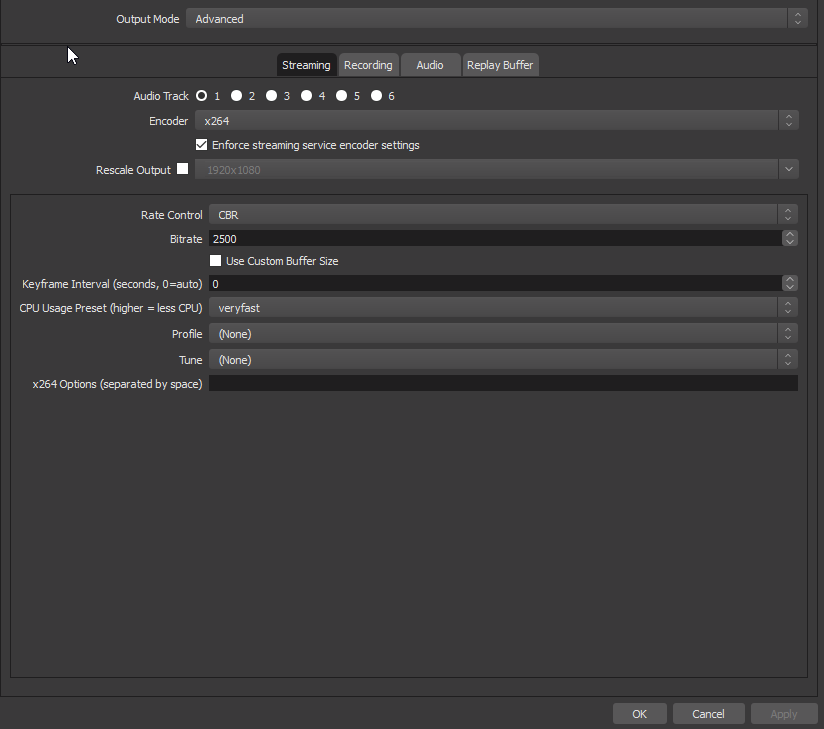
 narrow coyote
You are using x264, which is software, which uses the CPU
also, that is only one part of the equation, the video tab matters greatly as well
wraith hemlock
Well i did change it to my GPU just now, but im still having fps drops in game like CSGO
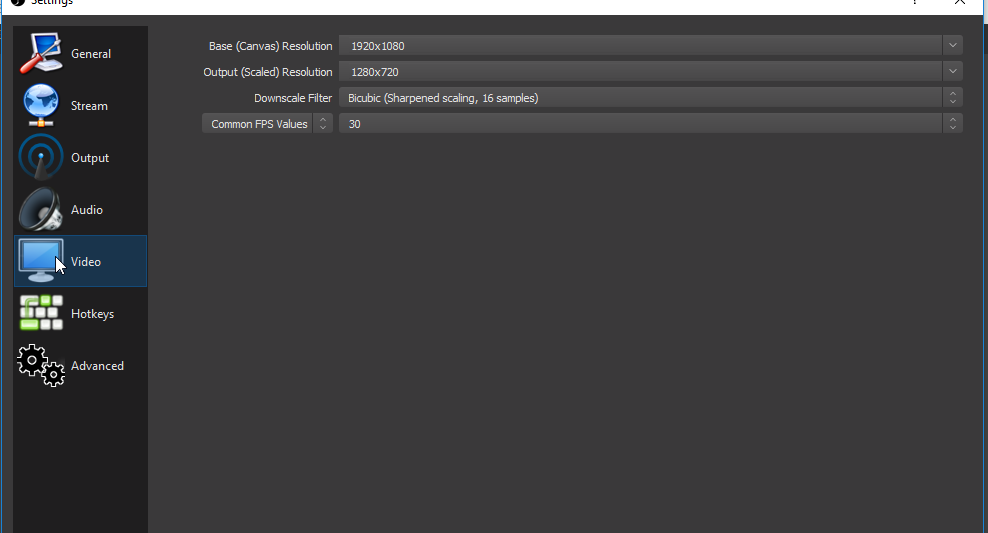 narrow coyote
getting a lower FPS in game will happen when streaming from the same PC
wraith hemlock
yaeh but it drops from 250 to 80
 undone hearth
I used the followers template just to make sure I was doing it correctly, but the bot spams the response multiple times. I've connected my twitch bot per instructions. Suggestions anyone?
narrow coyote
multiple bot responses is an indication of multiple rename processes from Ground Control running, restarting Ground Control will usually fix this
coarse heath
Kiiiiiiiiite kite kite kite oh wise one @narrow coyote would you know why when I load up alerts in my overlay alert layer that my gif will repeat on loop but when I play an activity feed alert, the video portion plays once?
undone hearth
ty, will try that.
strong kernel
Gifs repeat. Videos play once.
narrow coyote
@coarse heath When using a gif it should loop for the duration that is set for the alert duration, if its an actual video, it should only play once
coarse heath
Hmmm maybe my gif was made to not loop
I’ll redo it
And thank you, oh blessed one among humans
narrow coyote

undone hearth
fixed, ty!
narrow coyote


wraith hemlock
I really have to figure this stuff out man
my pc is not overheating, its below 60% all the time
even in games
narrow coyote
if you are using NVENC, try the new beta build of OBS, it uses way less system resources for NVENC
wraith hemlock
How do i get thebeta build?
 limpid ginkgo
Hey guys, Wondering if i could get some help? Today was my 1st day using StreamElements since i switched from SLOBS over the weekend & Everything went perfect EXCEPT my host alerts weren't being triggered when getting hosted & The alerts are turned on in the overlay manager, Any suggestions?
narrow coyote
its a zip file, you extract it
wraith hemlock
in to the OBS folder itself?
narrow coyote
put it in its own folder
you will just bork all of OBS if you copy over the existing install. You should be able to run it from anywhere, and it wont interfere with the current installed OBS
 pine hemlock
i dont think it has its own exe kite
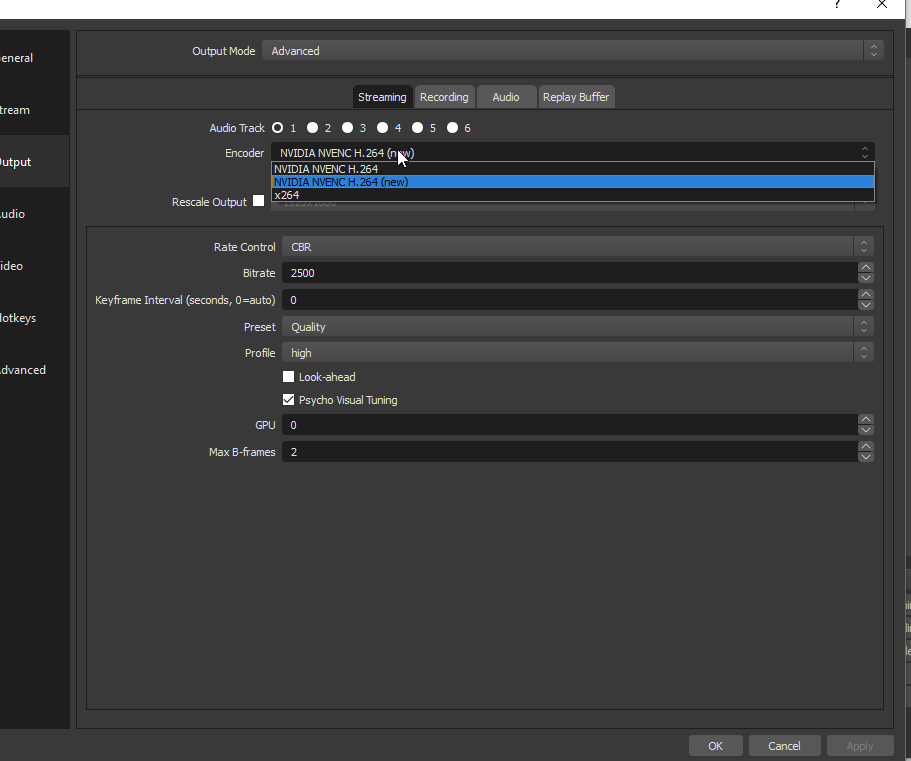 pine hemlock
pretty sure its an overwrite
or addition to current
Csgo and streaming naturally lowers fps btw
narrow coyote
I need to look again, I have not used it yet, waiting for my 2080 to get here tomorrow to try it 
pine hemlock
also depends on your csgo settings, if you have the windows DVR feature on/off, etc
narrow coyote
beta is its own thing, and the binaries are not signed, so I would for sure not overwrite an existing install
wraith hemlock
yeah it was turned on, let me try again
it helped, but sometimes it drops again from 250 fps to 80 wich is very weird
 elder sorrel
Can you also Cap the FPS on CS:GO?
I haven't played in a long time if they even have that option.
pine hemlock
csgo doesnt use a lot of gpu power and its on a pretty old engine
most streamers run into similar problems
narrow coyote
Yeah, its not GPU bound, its CPU bound for sure
I would still limit ingame FPS to like 120, so the dips dont feel as bad
wraith hemlock
cheers ill check that out
coarse heath
@narrow coyote new issue. When making alerts: I have a cheers variation. 1) at least 5bits (for those who painfully watch ads and 2) at least 100bits with a different gif and audio. Both do only the small one... do you know how to fix that? (It shows in preview fine- just not on activity feed replay)
narrow coyote
Are you just checking in the overlay editor, or in OBS as well? If OBS does not match the overlay editor, make sure the overlay is saved. Otherwise I would need to see whats happening to get a better understanding
If you need me to take a look, you can DM me an editor link, I have about 30 min before I am going to go pass out
!invite
 nocturne pelicanBOT
To invite managers to your dashboard, Click on your Channel Name at the top of the dashboard and scroll down to Settings. Click the drop down arrow to expand your channel managers and then create a new invite at one of three access levels (Bot Supervisor, Editor, Full Control) Check this video out for more help: https://youtu.be/zl_h-ttZDF0
coarse heath
Overlay is being saved & ok!
Actually... let’s tackle this bear tomorrow and get some rest. Sleep well, @narrow coyote
narrow coyote

coarse heath
Oh gawd.... now alerts are giving the ridiculous are you kidding me left shark with no audio for all cheer sizes. Ughhhhhhh . I can’t be the only one with so many issues. This is absurd
I can’t put this stupid shark on my stream. Literally worst default ever
Especially when I have such great ones uploaded! And saved
 copper bobcat
What's a variable for the bot to repeat something someone said? One of my viewers had an idea for there to be a !clip command where a viewer could type !clip WalrusRandomWordsTwitchClips and then the bot could respond with clips.tv/{that message} to finish the link.
limpid ginkgo
Can i get some help/suggestions with my "Host Alerts"? All the other alerts work perfect except the host alert, I was hosted 3 times today & Only noticed them because the StreamElements Bot alerted in chat
nocturne pelicanBOT
@limpid ginkgo Due to recent changes to Twitch API, we have filtered out hosts and will only show these ones on your activity feed:
- All manual host events (0 hosts included and if filter set to 0)
- All auto host events with at least 1 viewer
 zenith widget
@coarse heath Check the variations of the alerts.
limpid ginkgo
They were manual hosts & My filter is set to 0, So it should show every host that's manually done
zenith widget
@copper bobcat You can have a !clips command like that by doing this:
Command: !clips
Response: https://clips.twitch.tv/${1}
The ${1} variable will place the first thing that is after the command is used.
@limpid ginkgo You are not live at the moment, so you can't get host alerts.
zenith widget
I resubbed your webhooks, so you should be able to see the mentioned hosts from the bot.
 potent socket
Hello. I changed my twitch name a little while ago and now I'm getting a 404 when I visit my chatstats page. Previous name was the_couchman new one is edgar_swann
zenith widget
Fixed 
potent socket
Thanks 👍
 grave lance
i would like to use the streamlabs bot from my desk top and have it run under an twitch account name of my chossing
nocturne pelicanBOT
Custom bot name requirements
- StreamElements bot modded and in chat
- Active overlay with alerts
- StreamElements tipping page in the panels below the stream (!panels)
- Create a twitch account for the name you want to use
- Ground Control app must be running
Steps to enable custom name
- Sign in to https://twitch.tv with the bot account
- Install and run Ground Control (!gc for download)
- Visit https://twitchapps.com/tmi/ and generate an oAUTH token
- Copy/paste everything in the box to Ground Control oAuth settings and enter the name for the bot account
- Restart Ground Control (custom name may take a few minutes to take effect)
Mac does not currently support renaming the bot.
grave lance
could some one tel me if this is possiblei mean stream elements sorry
this what i wanted to do i have ground control downloaded
and on my desk top
thank you for the quick responce
does your bor support stream music to my obs or to the stream as an over lay
bor = bot
zenith widget
I suggest looking at this video we have: https://www.youtube.com/watch?v=17eUkoZ6eIs&t=1s&list=PLCDDKlFdScbEwdx5AntcQIS1InkFJwHtv&index=9
grave lance
you ppl are awsum i never get quick answers from any one else ever
grave lance
ok i am confussed on loyalty points is that the points they get from watching my stream as i have done before, they get so many points per min hr etc
or can they by points if they are out and i get the money for the points
zenith widget
i don't see the loyalty system turned on, on your account. https://streamelements.com/thecommondanger
zenith widget
@grave lance Sorry, so what exactly you don't understand from the loyalty system?
 analog dagger
so, i am trying to make custom alerts and they arent working very well, the cheer gif wont play, and the subscriber gif did play at first but wont now, and no matter how i try to upload my sound, in any supported format it doesnt allow me to and it says in red i must use said supported formats
zenith widget
supported formats for sounds is .wav/.mp3
analog dagger
tried both
zenith widget
So you mention "custom alerts" - have you turned on the custom css option on?
analog dagger
ill give it a shot
zenith widget
I'm asking if you have, as that might cause the issue you are facing.
If you have not, I will take a look at the alerts on your account.
grave lance
@zenith widget cool dog by the way , ok i want to control my give aways better, then i also want them to be able to spend the points they have accumulated to access the game server if they wish to as well as play music
zenith widget
You have to think of a good elaborate way for the game server thingy, but for the other things, what exactly is the problem or thing you want to accomplish?
grave lance
right now ppl have found out a way to exploit the giveaways and points systems on other places
zenith widget
@analog dagger So, you changed images and sounds, but they never show up as an alert correct? Does a blue shark pop up instead?
zenith widget
Try uploading with chrome, if you haven't so far.
analog dagger
so i cant change sounds
zenith widget
our site is chromium optimized
analog dagger
ok
grave lance
yet i still want my donations to come in on the other bbot and handle the load of message it has to deal with there
zenith widget
I'm not understanding what you mean by donations to come in on the other bot
what other bot?
grave lance
you mean i have to have google chrom on my computer
zenith widget
What is your native language btw? @grave lance
The chrome comment was for the other person asking help.
grave lance
english i had as stoke sorry
analog dagger
ok how do i get rid of the blue shark now?
grave lance
i am on blodd thinners now and i am not old
analog dagger
the sounds worked in chrome
zenith widget
@analog dagger Check variations of the alert you want to update.
 prisma grove
@zenith widget 
zenith widget
@grave lance Ok, so this might take a bit of time to sort out, but if you are medicating at the moment, I'd suggest to first get well :/
grave lance
i am terminal there is no getting well and i refuse to take pain releivers
zenith widget
Ok, well so lets start from a previous point - you want to use media request so people can request songs on your channel, right? But to be able to use loyalty points.
grave lance
yes
analog dagger
what exactly do i do in variation settings, i made the variation but i still get the shark
zenith widget
Ok, so you just need to adjust how much 1 song request costs as points and have a decent X amount of points per 10 minutes gained.
grave lance
ok
zenith widget
You can set additional bonus points for tipping and cheering, but make sure they are not a huge number.
wraith hemlock
Ok, my fps spikes in WoW to, something is terrible wrong here man
zenith widget
@analog dagger I'm going to test alerts.
grave lance
i will make a name for the bot as per you intructions first
zenith widget
@wraith hemlock Are you using OBS.Live?
wraith hemlock
studio
zenith widget
@wraith hemlock So you are not using our plugin?
nocturne pelicanBOT
@wraith hemlock For the best OBS support, please join their Official Discord @ discord.gg/obsproject
wraith hemlock
Wait, you got a plugin?
nocturne pelicanBOT
@wraith hemlock OBS.Live is a Plugin for OBS created by StreamElements. You can download OBS.Live here: https://streamelements.com/obslive
Please make sure you have the latest version of OBS installed, Current Version: 22.0.2. You can install OBS here: https://obsproject.com/
zenith widget
@grave lance We also have a video guide for the loyalty system if you think that would help better?
grave lance
i was watching that
zenith widget
@analog dagger Mind not editing the alert widget?
grave lance
ok so when i get this set up do i run it through browser link or plugin
analog dagger
i wasnt doing anything
zenith widget
There was an image for the follower alert and now i don't see it set there and I found the issue. @analog dagger

hmm
analog dagger
i closed it though
wraith hemlock
<- installed live now
zenith widget
@grave lance As long as our chat bot is in your channel, the loyalty system will work and also the media request as well, as long as its turned on.
But you will have to keep media request page open all the time to hear the songs.
@wraith hemlock Good, now run a test recording of 20-30 minutes and if the FPS drop is still there ask in #helpdesk-selive
grave lance
so it plays using the desk top audio then correct
wraith hemlock
A recording or a stream?
zenith widget
recording
zenith widget
@analog dagger
There was a variation for the follower alert, which is not supported
also the custom css option was enabled on it.
zenith widget
subscriber alerts seem to be the default at the moment
unchanged from your side
was the follower alert the issue you were getting and decided to ask for help before moving along?
analog dagger
hadnt tested those in chrome yet
zenith widget
cool. cuz the alert widget looks like a fresh one just added to the overlay
analog dagger
yeah, started over in chrome
zenith widget
@grave lance Sorry again, yes correct, it plays via the desktop audio like a normal youtube video
prisma grove
@zenith widget How are you? 😄
zenith widget
busy
 gentle imp
shoot, we'll help if we can
zenith widget
Can it be in #helpdesk-selive ? 
 tulip pecan
Hey all, I'm still on this .webm thing... I have .webm files with the alpha channel on, this means that you can have transparent BGs in videos and if you play around with it you can achieve some really cool things for your alerts... But it seems that the SE overlay editor does not accept them and converts the transparent alpha layer to solid black when I upload the file.
Has anyone had actual success using a .webm with RGBA in SE and if so, what program did you use to create the file please?
zenith widget
@tulip pecan Don't use Firefox to show .webm files on a webpage.
zenith widget
Interesting. Edge also replaces transparency with black layer
I knew only Firefox did that.
tulip pecan
Lol I'll try using chrome. What idiot uses edge for anything?
zenith widget
When Chrome doesn't respond, we all resort to Edge/IE to get Firefox/Opera in the mean time 
tulip pecan
So do you know then, will the html source in xsplit read the alpha? I imagine so as it does for transitions that are .webm
zenith widget
If the browser source they have is chromium based it should
tulip pecan
I can't believe I just admitted to using both MS EDGE and XSPLIT in this forum and not CHROME and OBS YIIIIKES
 pale elk
Is there anyway to get the credits widget in #widget-share to not display multiple cheers from the same person? 
zenith widget
@tulip pecan Hey, we don't judge, its just that not a lot of us here use XSplit
but I think it supports transparency in .webm properly.
@pale elk Clear your session data manually after a stream and see if that sorts it out.
we do have an issue with the cheer data being processed from a custom widget.
pale elk
@zenith widget Remind me how I do that again?
zenith widget

StreamElements
The Ultimate All in One Platform for Streamers
 analog dagger
alright @zenith widget everything works but the cheer alert
analog dagger
i get it now
 versed gull
is there a possibility to import loyalty points(leaderboard) from streamlabs?
zenith widget
Yes. Click on "Import" on the top right corner and then choose "Streamlabs".
Makre sure you are on Chrome and have their dashboard open and logged in.
versed gull
isn't it only for alertbox and tips?
zenith widget
StreamElements
The Ultimate All in One Platform for Streamers
Sorry, forgot that the drop down doesn't show SL next to ankhbot.
versed gull
hm, it seems that i can't export points from streamlabs website, so i guess it only works if i used currency in their bot?
zenith widget
I think you can still export the points from the website
gentle imp
or revert them back to bot if I remember correctly
versed gull
oh, yeah, how do i export them from their chatbot then?
zenith widget
 gentle imp
create excel files
versed gull
i did
gentle imp
that's it then, now that file should be imported in StreamElements I think
gentle imp
there you go, points
versed gull
it doesn't work
gentle imp
if csv is needed you can try converting here https://convertio.co/xlsx-csv/
I don't have home pc on atm so can't walk you through the whole process, I know they updated the bot perhaps that option was removed
what does that points file contain?
versed gull
yeah i did, i sent a screenshot above of what it creates
well, i'll try to contact them, thanks
gentle imp
good luck and sorry it used to be more simple to export
zenith widget
the panel extension is known to not be able to export points from it.
if the file you exported from SLOBS is empty, then most likely you've never been tracking points via chatbot/SLOBS function
Unfortunately, SL has 2 or 3 different methods to track loyalty points and non of them are connected to each other, afaik.
We on the other hand don't have this issue.
gentle imp
wow, that sucks
versed gull
^
zenith widget
That falls more like a general question not related to the purpose of this help channel.
Ask in #general-chat
 prime swan
once my alert is prompted on scene#1 it will also prompt on all my other scenes. whats worse its that they stack, so say 14 new followers happened on scenes1 during the span of an hour. when i switch off that scene to different one with an alert box in it, it pops them all one after the other. its annoying, specially when i have 6 different scenes with that alert box.
nocturne pelicanBOT
Make sure to :ballot_box_with_check: “Shutdown source when not visible” for all browser sources (all OBS scenes). If using studio mode, uncheck “Swap Preview/Output scenes After Transitioning.” Also keep in mind that sound can play from any overlay loaded in the browser (editor or launched). https://i.imgur.com/FegZJQS.png https://i.imgur.com/yY0wcFl.png

 prime swan
i will thank u
gentle imp
should solve the problem and you're welcome 😃
 dusk talon
quick question everything is set up but my league of legends lags in SE but not on screen so i run it on 165 fps but the OBS SE lags any ideas?
gentle imp
awesome, thanks for getting back to us
can be so many things @dusk talon can you tell us your rig and obs config?
narrow coyote
!obslog
nocturne pelicanBOT
Can you please provide a log from your last stream. You can find this log in " %appdata%/obs-studio/logs " OR Help > Log Files > Show Log Files. You can simply drag and drop the log file into Discord.
dusk talon
i did not stream yet cause it doesn't work
but i can say i have everything at the highest setting?
and my rig handles it easy
gentle imp
run obs as admin, disable the option to capture cursor on game capture
dusk talon
ok
 lament blade
run obs as admin, disable the option to capture cursor on game capture
narrow coyote
the log will show your hardware, and OBS settings. New more details than saying that "OBS lags" that really does not give any details on what the problem is
gentle imp
can you show video and output screenshots?
narrow coyote
Or you know, a log like I asked for 
gentle imp
⤴
narrow coyote
also #helpdesk-selive
lament blade
i need store ideas
narrow coyote
pinned messages in #general-chat
lament blade
I saw Those but idk about those
narrow coyote

lament blade
Like when will I Use a hammer from another game??
in my store
ncm i got a new idea lemme give it a shot
dusk talon
@gentle imp where can i send the screenshots here?
lament blade
Just in here
gentle imp
yea
lament blade
Pls tell me my Store looks good
gentle imp
wow, there's a lot needed to be changed, also what is your cpu/gpu/ram?
gentle imp
nice!
dusk talon
i thought i did it good
 winter zenith
@lament blade calm down you looked at the pinned posts just come up with ideas also ask your community what they'll like to see
this is a support channel after all not a ideas channel 
lament blade
i can not ask For ideas in The ideas channel??
narrow coyote
winter zenith
⤴
lament blade

gentle imp
check these settings @dusk talon https://stream.twitch.tv/encoding/
you will notice the profiles you set aren't correct
narrow coyote
6K for 1080p 60 is fine, using the enforce encoder settings is not, Lanczos will use more GPU as well. It would have been great to see the log to confirm a few other things but Since you are using an RTX card, you should probably try the new OBS beta that includes updates to NVENC and the SDK to greatly improve performance and quality
doing 2 pass is also going to add a bunch of load to the GPU encoder
dusk talon
ihow can i give oyu the log
 nocturne pelicanBOT
Can you please provide a log from your last stream. You can find this log in " %appdata%/obs-studio/logs " OR Help > Log Files > Show Log Files. You can simply drag and drop the log file into Discord.
narrow coyote

dusk talon
gentle imp
make sure keyframe interval is set to 2 on output
narrow coyote
I would try Window capture over Game capture as well
dusk talon
ok
gentle imp
and disable game bar, search game bar or dvr
dusk talon
disabled
gentle imp
should work now if you fixed your profile too like KITE said
dusk talon
windows capture works better but drops my frames to 60 @narrow coyote
gentle imp
well, try game capture again hehe
but obviously sync game + obs will lower the chance to have frame drops
dusk talon
yes i will not play league on 60 fps tbh
gentle imp
when it's bad, it's even suggested to use v-sync
dusk talon
but @narrow coyote did not answer me after my logd xD
gentle imp
he's probably busy
 potent ibex
theres an ffz emote thats a bit broken on the chat overlay 
gentle imp
if you want to test it out you can try a test stream, no one will see that you are online
Step 1
Get your stream key from the Twitch Dashboard.

Step 2
In the encoder (such as OBS), add a parameter to where the stream key is added: e.g. type "?bandwidthtest=true" after the stream key.

live_0000000_xxxxxxxxxxxx?bandwidthtest=true

Step 3
Start Broadcasting. Using the "bandwidthtest" flag allows you to broadcast without appearing online to viewers or sending notifications. This helps to test new settings or stability before a broadcast.``` @dusk talonok
potent ibex
what's the problem, maybe I can help
dusk talon
scroll up
potent ibex
You're having lagged frames in league of legends?
dusk talon
no
potent ibex
so its lagging for the stream, not you?
dusk talon
yes
potent ibex
thats what I just said, lagged frames
dusk talon
ALazyMemeToday at 4:43 PM
You're having lagged frames in league of legends?
potent ibex
lagged frames occur when the gpu usage is too high and there's not enough for obs to render the scene
dusk talon
medium i would say
potent ibex
is it animated?
dusk talon
yes
potent ibex
that could be a reason why
gentle imp
did you change your profile?
dusk talon
yes i changed it @gentle imp
potent ibex
the logs earlier up in chat, those are current logs?
dusk talon
yes
potent ibex
you need to turn off game dvr for starters
gentle imp
and disabled 2 pass?
potent ibex
Not according to those logs you didn't
gentle imp
and the 2 pass on the output
potent ibex
2 pass shouldn't be causing issues 
it uses cuda
gentle imp
tbh with your setup I would go with x264 not NVENC but your choice 😄
potent ibex
@dusk talon can you get me some fresh logs according to the changes that you made?
for a 9700k, x264 is not what I'd recommend
I'd recommend using the latest beta version of obs studio
gentle imp
yeah that was recommended already
dusk talon
potent ibex
but obs live isnt at that version, so maybe just stick to this version
game dvr is still on
potent ibex
I've got some steps for you to turn it off, its a little hard though
dusk talon
your talking about xbox thing right?
potent ibex
yes
potent ibex
Follow the first set of steps on this page: https://support.steampowered.com/kb_article.php?ref=6239-DZCB-8600
If you know a bit about regedit, then you can do the second option
Article "Disabling Xbox DVR in Windows 10"
then I have some more steps for you if that doesn't fix it
actually you have quite a few animated scenes
dusk talon
1 for now tbh
potent ibex
Under Settings > Advanced, disable the Enable Browser Source Hardware Acceleration option
gentle imp
here's the output config since u are at it @potent ibex https://cdn.discordapp.com/attachments/199460642975907840/534753014813163520/Capture1.PNG

probably not same anymore though but that was how it was
 👍🏾
dusk talon
👍🏾
dusk talon
ok i did
potent ibex
this log file has no output session, but I know the issue
restart your pc
@gentle imp there's an issue with this emote on the chat overlay btw: https://www.frankerfacez.com/emoticon/296645-WidestHard
dusk talon
and i am back
potent ibex
potent ibex

@dusk talon try a test stream using the method that Rippz0r posted above
after you've done the test stream, send the log of that stream
potent ibex
a minute or few
dusk talon
ok
potent ibex
I gotta go to mobile, wont be a moment
 tough quartz
Hello @staff, I need to have g2a enabled on my account can you fix this for me?
dusk talon
potent ibex
@dusk talon change preset to high quality and give it another spin. Don't send a log this time, check GPU usage in task manager instead and tell me what's using most of the GPU
Screenshot both the main tab and performance tab
@narrow coyote are you able to enable g2a on this person's account?
gentle imp
for a lazy dude u are quite active 😂
narrow coyote
nope, need staff to do it
potent ibex
I used to work for streamlabs support, I volunteered 5 months before I worked there for 3 months. They got rid of me because they didn't like my attitude. They replaced me with 4 subpar streamers who knew nothing about support.
I was one of the best discord support members they had 
dusk talon
the game is using more @potent ibex
potent ibex
What fps is it running at?
tough quartz
https://youtu.be/CXAndapQCK8?t=42 Yaay a snip in the fingers and i got it enabled... NOT
G2A is an online payment enables receiving tips via credit cards and multiple local payment methods. StreamElements and G2A cover chargebacks, to avoid fraud...
potent ibex
@tough quartz they just said, only staff can do it. If you can submit a ticket somewhere, do that. I'm not sure where though
They're volunteers and don't have account access
 torpid estuary
i will ask internally about it. what is the situation? did you just sign up with SE? @tough quartz
potent ibex
@dusk talon can you screenshot the performance tab for me? While streaming and gaming
tough quartz
@torpid estuary I want people to donate through IDEAL only way to that is through SE with G2APay enabled the video says a snap in the fingers would fix that for ya.
torpid estuary
@tough quartz you did not answer my question. did you just sign up with SE? and you enabled your tipping page and did not get G2A as an option?
dusk talon
well the thing is if i alt tab it goes to 0 gpu usage @potent ibex
tough quartz
You dont understand the normal payment method in the netherlands is through ideal not everyone has got a paypal account
potent ibex
Oh right good point, can you try lowering in game graphics setting? @dusk talon
normal igloo
That still doesn't answer void question @tough quartz 
tough quartz
@torpid estuary I signed up with SE yes but with a different name then my discord one. And i not get the G2A option yes.
potent ibex
Yes, it should reduce the GPU usage enough to stop the lagging in obs
torpid estuary
with what account was that @tough quartz
only the name, no link
tough quartz
Rogue1308
torpid estuary
and you signed up today? i will ask internally for staff to take a look at your account and why G2A isnt available. one last thing: paypal is available in your tipping setup?
tough quartz
No im using SE for a long time now cant remember how long. Yes paypal is available but i dont want that.
torpid estuary
i was not saying you should use paypal, just making sure i got all the info.
i asked internally about your issue and will ping you once a staff member answers.
tough quartz
@modern mauve Thank you!
torpid estuary
sure!
potent ibex
I've seen lagged, skipped and dropped frames happen to the best of people. Russians with 200/200 getting dropped frames and people with GTX 1080s getting lagged frames. It's interesting what you seee
dusk talon
@potent ibex thanks man it is not fully fixed i guess but its good enough!
potent ibex
The problem is GPU usage. You need to reduce that as much as possible in game so that obs doesn't have issues. Even turning league down to medium settings will help
dusk talon
ok ok
potent ibex
Let me know if you need anymore help
 vale arch
quick question
dusk talon
will do thank you all!
potent ibex
Yes what's up
vale arch
so im using the purple static force field super theme package.
on my starting soon screen, the latest tipper is updated, but on the brb scene, its just blank
torpid estuary
did you make sure that the "latest tipper" widget is in the brb scene?
and not just the text?
potent ibex
Or did you accidentally delete it?
vale arch
no i didnt delete it. when i edited the starting soon scene, the information was already there, didnt need to change anything, but the brb scene just doesnt have it
it shows recent donation, but no information
potent ibex
You'll need to make the widget then
torpid estuary
again, make sure the widget is in there
vale arch
okay okay, ill fiddle with it. thanks guys
might be hard to see cuz of the second monitor but the widget is in there. should i just delete the widget and re-create it and see if that works
potent ibex
I can't see shit on mobile 
vale arch
lol
winter zenith
@vale arch clear that cache
vale arch
what do you mean
winter zenith
In obs
nocturne pelicanBOT
@vale arch Right click on the BrowserSource > Properties > Scroll down a bit > Refresh Cache of current page
winter zenith
And also show me a screenshot how it looks in your obs
winter zenith
Hmm did you clear the cache and nothing?
torpid estuary
ok, crazy idea, but can you click on "center widget" in your overlay editor when selecting the recent tipper?
vale arch
yeah cleared it and nothing happened
torpid estuary
maybe you placed it off screen by accident
winter zenith
What if you open the overlay in your browser
? (not in the editor just in a new browser tab=
vale arch
sure one sec
it's still blank after opening in a new tab in my browser
@torpid estuary im a noob, exactly how do i center the widget lol
torpid estuary

vale arch
so my guess is, the widget was just off screen somewhere? i mustve dragged it by accident
OHHH
I KNOW WHAT IT IS. Maybe its just the way the theme was set up but it was under the background layer
gentle imp
yeah especially if you change res to something else lol, been there
vale arch
no it wasn't me. the theme was just set up improperly. no worries though. with the help from you guys, we can do ANYTHING!
😃
just layered wrong
elder sorrel


 jade remnant
 tough quartz
Kind a weird how the community is actually more helpful then the actual SE staff
 smoky tide
Sounds like a community I want to be a part of! 😉
normal igloo
@tough quartz You have to remember that the staff are only volunteers and can't be on 24/7 + many of the staff started out as nothing more but just community members like you and I hell some the people who are staff were not even staff members when I first joined SE 
 round minnow
anyone got problems with the Songrequest at SE page or Ground controll? After a few songs it stucks and I have to restart the page -.-
normal igloo
@round minnow I would recommend using Songrequest at SE page What browser are you currently using if you are having issues ?
limpid ginkgo
I asked this yesterday but kinda got shrugged off, My host alerts aren't working properly while i'm live, They're not being triggered when i get hosted nor are they showing up in my recent events, The only way i know i get hosted is because of the SE Bot in chat, Any suggestion, The person that "Helped" me last night reset my weebhooks & Said "Nothing else i can do"
normal igloo
@limpid ginkgo This is a common problem and it's really twitch to blame as SE can only give you data they have received off twitch
round minnow
@normal igloo i use it at chrome
torpid estuary
@tough quartz what seems to be the problem? Staff can be busy and they don't mean to ignore anyone who needs help. Having many volunteers can help, but there is stuff only staff can do.
normal igloo
@round minnow and you are still having issues regardless of using chrome?
torpid estuary
So please have patience. I know that waiting can be hard and one can get upset, but as you can imagine there is much work to be done. So waiting is sometimes a necessity.
@limpid ginkgo are these hosts with 0 viewers?
normal igloo
Especially behind-the-scenes work ^^^
limpid ginkgo
@torpid estuary My host alerts are set to 0 so it should show all of the manual host, But nothing shows up besides my SE Bot telling me in chat
torpid estuary
And with you too I get that waiting can be annoying but you being sarcastic won't solve the problem any sooner. I apologize that your problem persists so let's work on that.
normal igloo
Oh yeah that's my bad I probably should have asked that first Thanks on picking that up
Void
round minnow
@normal igloo yes dosnt care which browser i use
torpid estuary
If your webhooks got resubbed you should get host alerts from manual hosts and all above 1 viewer. This isn't the case for you?
limpid ginkgo
@James thank you for that info, Alot more helpful than the person last night
narrow coyote
If the SE bot is alerting in chat, that means our systems are getting the host notifications from Twitch
normal igloo
anyone have any recommendations for Faebss's Issue with a media request Freezing after so many songs? 
@limpid ginkgo np I like to try my best
limpid ginkgo
@torpid estuary I'll be going live in 30 mins, So we'll see if that works. Thank you for showing interest in helping me 😄
If it doesn't work i'll comeback to you tonight if you're available @torpid estuary
jade remnant
@round minnow how do you mean freezing? something stuck on screen or just not accepting requests?
normal igloo
No need to worry there's always someone here who can help you If Void is not available @limpid ginkgo 
torpid estuary
⤴
limpid ginkgo
@James You guys are awesome 😄
Btw switched from SLOBS to SE over this past weekend & Yesterday was my 1st day using SE & I LOVED IT 😄
normal igloo
Is the guys in red and blue you need to be Thanking I'm just a twitch beta tester 
 winged sundial
Good afternoon. I wanted to know if someone can help me with this. I want a text on an alert only show for a couple of seconds, how can I do that. I see an option for when the text should appear, but not when it should disapear
 tight harness
In Variation Settings you have Text Disappearance Offset
So if you make a variation for this, you can go into Variation Settings and set that to set the text to disappear that many seconds before the alert completes
winged sundial
I have the text appear after 7 seconds and offset to 4 seconds, but it still shows it until the whole alert is done
tough quartz
@torpid estuary Does it always take this long to get an answer?
torpid estuary
@tough quartz there are a lot of things happening right now that need to be worked on by the staff. i can not give you an ETA and you being stressed out about it and constantly asking is not going to speed up the process sadly.
tough quartz
Then they shouldnt have said it's done with a snap in the finger i guess
torpid estuary
you do understand that that is normally the case
and that it is a figure of speech?
you being smug about the wording in a tutorial video for a feature that normally works and for some reason doenst for you and needs to be looked at, isnt really helpful.
zenith widget
@tough quartz g2s has been enabled for you.
tough quartz
@zenith widget Thanks man, im not being smug im just being lied to thats all
zenith widget
I have no idea what you are talking about. 
weary mist
@tough quartz it can be done "with the snap of the finger", but we also want to try to figure out why it isn't showing up for you. It is a weird issue that doesn't happen often.
winged sundial
If anyone has a min for my question above, let me know 😃
opaque patrol
Hello there. So what do I need to do in order to show correct bit amounts in my streamelements addon in twitch?
It shows approx half of my bit leaders bits
jade remnant
ask streamlabs, this is stream elements
opaque patrol
oh sorry typo
There you go, question still remains
Other addon did not have this problem
jade remnant
do yo have the alert box for the bits and the variations set up in the editor
opaque patrol
Had no idea I had to go in editor, since the other addon was just plug n play in twitch
jade remnant
im guessing youre referring to sl
opaque patrol
Then the other question arises, if it gets data somewhere, why it gives false data and not the correct one?
torpid estuary
Do you mean the extension in your twitch panels?
jade remnant
sl is its own version of obs. SE is only a plugin
opaque patrol
this should not have anything to do with obs
since its TWITCH extension BELOW your stream
same place where you put other information panels
torpid estuary
The extension has nothing to do with the overlays. So one question, did you import from SL to SE shortly ago?
jade remnant
ah sorry, i misread your question
opaque patrol
yesterday
torpid estuary
Ok, so my guess is that your data is still being populated. Have you streamed since the switch?
opaque patrol
nope, just finishing everything for the first go with streamelements. this is pretty much the last thing
So I guess it could be that, need to go online
torpid estuary
Alright, then I would have to ask you to stream once with SE and see if the data is completed then. If not please come here again and ask for help regarding the panels again!
Sorry for the confusion!
winged sundial
Thank you
torpid estuary
The offset should work as sean described
winged sundial
I know but it does not do it 😃
weary mist
I believe the disappearance offset is how long before the end of the alert does the text disappear
so if its at 1s, its 1 second before the alert ends
if the alert is 8 seconds, it should disappear at the 7 second mark
I played around with it on sunday, and it worked well. I just increased the offset until it matched how I wanted it to work with the alert
winged sundial
I want the text to a appear 5 seconds into it and stay for only about 3 to 4 seconds
 serene granite
how much is the entire alert duration?
winged sundial
17 seconds
serene granite
so set appearance offset to 5, and disappearance offset to 9
emulate, see how it looks, and play with it
actually try 6 as disappearance offset
winged sundial
Still stays until the end 😦
serene granite
try saving the overlay and doing a hard refresh
did you enable custom CSS by any chance?
serene granite
ctrl+shift+r
lament blade
Hello. I cant disconnect my StreamElement Chatbot of my Stream.
http://prntscr.com/m7mzkd
 jade remnant
@lament blade on the SE dashboard there is a button on th right hand side saying "part channel"
lament blade
Finally :D
thanks alot @jade remnant
jade remnant
np 👍
 cold axle
hello just started streaming on twitch and am trying to use kappagen and some of the chat games roulette etc having trouble with initial set up of both, kappagen only seems to work for me not the viewers and none of the chat games I enabled are working can anyone help please
nocturne pelicanBOT
@cold axle Please connect your Twitch and/or YouTube channel with Discord by going to ⚙ Settings and then Connections here in Discord. https://streamable.com/eg92w
 elder sorrel
@cold axle You have Kappagen set for Moderator & up
If you want to for everyone to use: You will have to edit the command to change it for "Everyone" to use.
cold axle
edit commands on streamelements?
elder sorrel
Correct. Also Roulette is working fine for me in your Chat Room.
elder sorrel
Go to your StreamElements Dashboard -> Bottom left click "Chat Commands" -> Click Default Commands
Find Kappagen & click the ✏ to edit it & change the User Level to Everyone if you want all your viewers to be able to use Kappagen.
coarse heath
Why are my raid alerts going off as host alerts? Common problem? Easily fixed?
strong kernel
All raids also automatically host you, too.
coarse heath
Yes but I’d like my loaded raid alert to go off
Instead my stupid host one does >.<
Any help would be gratefully appreciated @strong kernel
strong kernel
The last raid I've seen in your channel is from 4 days ago.
Buuuuut replaying it did the host alert instead of the raid one so 
Gonna pass it along to the devs.
coarse heath
Thank you
strong kernel
@coarse heath
lament blade
Is there any reason i can't use the import from other channels feature in the overlay section?
Or am i just doing soemthing wrong
 heavy brook
Everytime someone get's timed out, it times them out 2 times, bug? https://gyazo.com/637dec20cc1378d944a0c57de83337aa
 trail condor
@strong kernel still audio chopping on mobile. 720p and 2mb, no other apps running
elder sorrel
strong kernel
Yes, yes it is. 😃


 zealous haven
Hello my friend is starting a twitch channel and he wants me to help him set up bots is there any way I can edit things on his channel without him giving me the password
narrow coyote
!invite
nocturne pelicanBOT
To invite managers to your dashboard, Click on your Channel Name at the top of the dashboard and scroll down to Settings. Click the drop down arrow to expand your channel managers and then create a new invite at one of three access levels (Bot Supervisor, Editor, Full Control) Check this video out for more help: https://youtu.be/zl_h-ttZDF0
narrow coyote
they can do that ⤴
nocturne pelicanBOT
command 10 minutes of watchtime are given to those in chat when the loyalty points are handed out (every 10 minutes). Therefore, loyalty must be enabled for watchtime to work properly. There is no direct link between watchtime and all-time points. It can’t be calculated from the amount of all-time points a user has because subs may earn points at a faster rate and !bonus all command increases all-time points for users in chat at that time. Giving points to a single user does NOT affect all-time, only when giving to all in chat.
 old pecan
Im currently a SuperMod on my friends channel but im not able to use the !setgame command
He aint sure about why i cant either
narrow coyote
Check the level on the command
old pecan
its ok fixed it
 fierce night
Nicu
 heady knot
how do i access my commands store
i recently changed my channel name so the link is invalid, need to change it but i can't find the original source page
strong kernel
Log out and back in to StreamElements.
strong kernel
Widget called "Your channel's Twitch chat"
strong kernel
Choose "custom."
strong kernel
Because it's black text and you don't have anything behind it?
strong kernel
Probably a good idea. White with text shadow is kind of the standard.
strong kernel
Default.
 kind epoch
Is there a way to clear media share widget from the overlay when you pause a playlist or a song for example? One way i guess is to reload the overlay... any other quick method? i am also using GC.
 grave helm
anyone know how to make emotes?
elder sorrel
#art-marketplace @grave helm
strong kernel
Artists need to eat. Nobody who doesn't know you will just make you an emote because you want one.
Everyone deserves to be paid for their work.
kind epoch
Unless you have TALENTED FRIENDS 😄
strong kernel
That's why I qualified it with "who doesn't know you."
elder sorrel
As for you @kind epoch Don’t think there’s another way to clear the media share besides reloading the overlay
Quickest way would be a hotkey set up
kind epoch
dang, could that be an improvement like a stop button?
Stop should clear everything i reckon.
wraith hemlock
is obs live more steadier then the normal version of obs ?
strong kernel
It's a plugin.
wraith hemlock
oh right
 fast sandal
so when someone is donating small amounts it came through (alert) but the two bigger donations did not come through. thoughts?
normal igloo
@fast sandal did the donations appear in your activity feed ?
 sudden pendant
when i put a link in a Custom Command , the link comes up as stars
strong kernel
Disable link blocking in your Twitch settings.
sudden pendant
ahh ok thanks @strong kernel
fast sandal
THE SMALLER donation did but the bigger donation didnt but BOTH are in my paypal
sudden pendant
where are the settings for the link blocking
normal igloo
What does it say in your Paypal does it say something like pending by any chance ? @fast sandal
winter zenith
did you see the event in your dashboard? @fast sandal
normal igloo
@sudden pendant Settings then channel & videos
sudden pendant
oh got it thanks so much
normal igloo
np
normal igloo
^^^^ Maybe that would have something to do with it @winter zenith ?
fast sandal
oh nvm the smaller one is complete but the larger ones arnt
winter zenith
there you have it
fast sandal
hmmmmmmmmmmmmm
 fading turret
Hey guys, I have a lil problem, I started to try the widget "mediashare" on my overlay, and while in the SE overlay editor page, it works correctly, but once I open my OBS and try it there, somehow I hear the songs doubled! with a small delay that hears like echo
I have no clue where the 2nd one comes from
winter zenith
@fading turret do you have the overlay editor open?
fading turret
windows sounds mixer says both comes from OBS
winter zenith
while testing?
fading turret
no, I close it
 worn hatch
how do i add the alerts box
fading turret
I just open ground control and OBS, nothing elese!
worn hatch
i did not get any alerts when i got a follow
winter zenith
aka do you have the media share widget in another overlay on another scene? @fading turret
winter zenith
@worn hatch did you selecte a premade theme? or did you make your own overlay?
winter zenith
@fading turret if so is the Overlay set to "shut down if not visable! ?
@worn hatch its nearly 4am so not really sorry 
normal igloo
I think the alert Widgets are having issues today by the way Kiwa as they were not working for me properly today too
winter zenith
@worn hatch did you input the overlay link into your obs?
worn hatch
yeah
fading turret
no, I don't usually do it with those I'll be using frequently cuz they are slow to load and it looks not cool during a streaming but now I did it
winter zenith
are the follows and events actual events in your StreamElements Activity Feed/dashboard ?
@worn hatch
winter zenith
@fading turret studio mode is a good tool to get around those loading times
worn hatch
i see them there yeah
winter zenith
@fading turret we do not recommend for you to skip this step because al lyour overlays will be loaded and stored in the background wich costs a lot of CPU
and also doubled alerts and mediashare
@worn hatch what if you replay from there? do they appear in your OBS and your Overlay editor? aka if you have the Overlay link open as a new tab in your browser?
worn hatch
if hit replay i see something on the screen
winter zenith
lol you cut the source...
normal igloo
mmm
nocturne pelicanBOT
@worn hatch To add your overlays to OBS, add a new browser source in your scene. Paste your overlay URL in the browser source properties, set the dimensions to 1920x1080 (unless you changed them on the website), and :ballot_box_with_check: “Shutdown source when not visible” https://youtu.be/KDvLynUqXI4
winter zenith
what the overlay is set to
we advise to make it 1080 no matter what resolution you stream in because the alerts will look sharper even in a 720p stream
so you would still set the resolution to 1929x1989 because the overlay source would be set to 1080 anyway
and thenn press crtl+F
to make it full screen and not cut off
@worn hatch
fading turret
hey guys, now f I don't want to get double sound by using the media share widget, I have to mark the "shutdown when not visible" option on every overlay, which means they will load over again every time I switch between scenes, and they usually take too long to load, and looks awful to viewers, is there a way to make it load faster?
winter zenith
yes as I told you: Studio mode  @fading turret
fading turret
oh, sorry, wasn't reading, let me scroll up...
winter zenith
activate studio mode
select the scene
let it load
transition to it
deactivate Studio mode
or you can make the alert box as a seperated source (aswell as the media share) and only set that to "Shut down if not visable"
winter zenith
this will still drain a lot of CPU if you have widgets liek HypeCup or roling animated text and boarders/themes. but it would help with the double sound issue
fading turret
nah, dun have much spare CPU xD so I'll go for the studio mode one
winter zenith
nice your cpu will be thankfull
fading turret
yeh xD
@winter zenith luv u!!! u solved 2 problems at once for me, now I have a lot more CPU to improve my game's graphics!!! 😄
winter zenith
hell yeah!
winter zenith
hey any time! if you have a issue just come to zs we have the best support in town
lament blade
I need help with updating my streamelements account, it stopped tracking my chat after I changed my nickname
normal igloo
@lament blade We are not streamlabs 
lament blade
I meant streamelements 
weary mist
go to the main website, log out through the menu, clear your cache, even restart the browser, and then log back in. Then part and rejoin the bot
strong kernel
⤴ All sorted.
lament blade
@strong kernel sorry for bothering you, is it possible to reset it ?
strong kernel
I don't believe so, no.
 twin wren
i recently made the switch over to all my alerts through your interface but single viewer hosts dont show in my activity feed, nor alerts come thru. Minimum is set to 0. any suggestions?
worn hatch
how do i add a donation that i had before manually
i added the donation in steamelement
manually
they ask me for email
and the donation amount
i did all that
in streamelement they call it latest tipper
instead of donation
strong kernel
@worn hatch
Or for labels: https://streamelements.com/dashboard/session
StreamElements
The Ultimate All in One Platform for Streamers
@twin wren 1 viewer hosts appear just fine in your activity feed.
twin wren
i had people test it last night @strong kernel and nothing was coming through
twin wren
ok so maybe last night was just not working then...
i'll see what happens on the next stream
thanks for response
sorry for the "other" screenshot. only place i could capture it
worn hatch
thanks for the supports guys
you fix everything so far
better then streamlabs crap that doesn't work
question guys when should i check this box when i am adding animated overlays ?
 boreal gyro
I have an average of 25 Mbps Download and 17 Mbps Upload in local server connection (for Twitch) and I have an NVIDIA GeForce GTX 1050 Ti
BUT I can't stream 720p 60fps without dropping frames and having a laggy output.
I stream with 2500 bitrate and 648p 30 fps and use the NVENC encoder -- even though I feel like I can get away with higher quality than that. How do I optimize my stream better?
 midnight hamlet
Can someone explain to me what this means? Think I am being a bit dumb 😅
weary mist
the variation settings allow for different alerts for different level of events. So you can set multiple variations that correspond to a specific event (lest say 6mo sub). With this box checked, it will randomly pick the variation that fits for 6mo subs, so it isn't the same every time (if you want it that way)
midnight hamlet
Ohhhh ok thank you
So having it on for Follower alerts wont do anything? @weary mist
weary mist
I believe it could, it could do a random follow alert
if you have tat option selected and multiple alert options
 red flame
Hi there! For some reason I can't change the Hype Boss base HP. It doesn't change no matter what number I enter. Using Google Chrome and Windows 10.
Also, is there any way to change the hype boss health bar color? 😃
 ocean summit
Hi! I love StreamElements overlays, and since last night, the overlay I hace for my countdown isn't working 😦 Who can help me?
 unreal smelt
@ocean summit what's the issue you're having? is the counter not displaying at all, is the overlay not loading or is it frozen?
I personally just want to know if it's possible to make the chatbot use either python or javascript code to generate an answer
I've seen that nightbot has an option that lets you execute javascript, which makes it possible for someone to make cool custom commands. I personally have a database of units and stats for a videogame that I stream that I'd love to make a script for.. since right now my implementation consists of inputting 400+ different commands by hand which not only is time consuming but also hard to maintain with game updates
I'd also love to know if there's an option to make trivia or if it's planned for the future, as I need to use a local bot on my pc to have trivia games and it's a pity because I can't integrate correct answers to loyalty currency
zenith widget
@red flame I'd suggest to click save and refresh the editor and see if the boss hp changes. As for the color I think there was some option on the left menu.
@unreal smelt For JS/Python like nightbot, I don't think we will allow that kind of behavior. For the trivia I think its already in our Ideas board.
nocturne pelicanBOT
@unreal smelt Here is the StreamElements Ideas Board: https://strms.net/ideas
unreal smelt
@zenith widget thanks for your answer! I'm looking forward to the trivia feature. Is there any way to import commands from a spreadsheet using column a for command and column b for answer? doing so much maintenance with large sets of commands can become time consuming
zenith widget
Directly from a spreadsheet? I highly doubt it
unreal smelt
any other way to generate command sets other than inputting them by hand?
zenith widget
importing from another bot.
unreal smelt
can I import additional commands on top of existing ones? thanks for answering
zenith widget
As long as they are not part of the custom list, most likely yes.
 /
red flame
/
red flame
@zenith widget Thanks! You can change the color but not the health bar, which makes color matching your brand pretty difficult. 😦
zenith widget
I think the hp color is a feature planned for a future update to the widget
 split sluice
Is there a reason or setting I'm not "Checking" that is causing my scene to not be loaded when I switch scenes? I mean, I switch to a scene and it has to load it. I'm nearly 100mb download speed, but I'm thinking something isn't right in my settings maybe?
nocturne pelicanBOT
@split sluice Check out this tutorial for OBS’ studio mode which allows you to preload scenes before transitioning. https://www.youtube.com/watch?v=W8iWsD2Lq3U
 green yacht
Does anyone knows if i gift a sub to the stream elements bot it would be able to use my emotes on the timers?
zenith widget
yes it will
green yacht
alright, thx
split sluice
Is the new streamdeck integration going to handle loading the next scene so it doesn't buffer before changing scenes, without having to use "Studio Mode" ? I mean, the last thing I really want to do is ad another step to change scenes to prevent it having to reload.
zenith widget
You can pretty much add the entire sequence of turning studio mode and have the scene you want to switch to pre-load and then have a wait timer in the sequence that later switches the scenes and turns off studio mode.
I don't have a stream deck but I know that was possible way before our integration.
Having an integration with stream deck, doesn't mean instant load of the overlays, which are essentially a webpage that needs to load in.
Other thing you can do is, turn off shutdown when in active option, but you are risking of having multiple alert sounds.
nocturne pelicanBOT
command 10 minutes of watchtime are given to those in chat when the loyalty points are handed out (every 10 minutes). Therefore, loyalty must be enabled for watchtime to work properly. There is no direct link between watchtime and all-time points. It can’t be calculated from the amount of all-time points a user has because subs may earn points at a faster rate and !bonus all command increases all-time points for users in chat at that time. Giving points to a single user does NOT affect all-time, only when giving to all in chat.
 hot meteor
ok thanks
zenith widget
 dapper tide
Couldn't find this online anywhere but is there a way to import viewer hours from a different chatbot into stream elements or is everyone forced to start back at 0 hours?
zenith widget
I think we can import watchtime from SL's bot
dapper tide
@zenith widget that's the one that I imported from. However on the website it only gives you the option to import alerts and tips. It doesn't allow you to import current points balances or hours. I can manually adjust points balances through stream elements however not the hours
zenith widget
StreamElements
The Ultimate All in One Platform for Streamers
It doesn't list watchtime as watchtime for us is connected to the points system
dapper tide
Hmmmm - unfortunately it pulled in all the points but not the watchtime.
 rigid shadow
What time variables does SE use?
zenith widget
$(time.PST8PDT)
${time.Asia/Seoul}
You can specify time zones using locations so LA would be ${time.America/Los_Angeles}
https://en.wikipedia.org/wiki/List_of_tz_database_time_zones

This is a list of time zones from release 2017c of the tz database.
rigid shadow
Does it support dddd, MMMM Do YYYY, etc?
zenith widget
Are you referring to a custom widget code or the chat bot?
rigid shadow
The chat bot
rigid shadow
Forr example, in nightbot, you can us js to get a !time command to spit out a more extended format.
For example, I would like to see a return where I get 9:23 pm, Wednesday 16th of January etc
zenith widget
for dates, no , but you can add a month and a year manually.
dapper tide
is there a way to make a command a one time use command? So that someone can only use that command once in their lifetime in the channel?
zenith widget
No
nocturne pelicanBOT
@dapper tide Here is the StreamElements Ideas Board: https://strms.net/ideas
dapper tide
thanks!
Any other ideas to get hours in? The currency.csv does include points and hours in it when imported however it does not seem to transfer to the watchtime command within stream elements
zenith widget
Interesting. It should work, as its a recent addition for the watchtime.
dapper tide
Do you think that it might require a stream to be live to update?
zenith widget
Can you DM me the file?
 echo linden
Is there a command to reset a counter?
I've done some looking around and can only fight commands for nightbot on it
echo linden
StreamElements
Eg !cmd add !test ${count}
then I wanted a !resettest
To make it back to 0
zenith widget
In that format, it won't work, unless you shortened it, for the same of example.
echo linden
I can change formatting. Just new to modding and SE so i'm pretty basic
 fluid moon
Hey guys I am having some issues with twitch the host notification doesn't work at all can someone please help 😃
😦 *
nocturne pelicanBOT
@fluid moon Due to recent changes to Twitch API, we have filtered out hosts and will only show these ones on your activity feed:
- All manual host events (0 hosts included and if filter set to 0)
- All auto host events with at least 1 viewer
 lavish kite
can you repiar my chat stats? old name account -"ckkonowal" new - "oldnewplayer"
split sluice
I cant get the commands file to import, keeping getting failed message. I did get the currency to import though.
from chatbot that is
lament blade
Heya guys, having issues with my host alerts. Every other alert works and host alert pops up when I get raided but never any other time. Hosts also dont show up in activity feed like follows/subs and such do. Odd.
split sluice
hmmm, Says Failed when trying to import the commands, but looking at my chat commands on SE site, they all seem to be there. (scratches head)
winter zenith
@lavish kite done
nocturne pelicanBOT
@lament blade Due to recent changes to Twitch API, we have filtered out hosts and will only show these ones on your activity feed:
- All manual host events (0 hosts included and if filter set to 0)
- All auto host events with at least 1 viewer
lament blade
It filters those two out? Or alerts to only those?
Because it's not showing those at all.
lament blade
Only way I'm alerted to a host is through the active streamlabs chatbot I'm still using
Oh I see.
Well that makes sense then thanks
winter zenith
no problem 
 odd forge
Okay, i have tried to setup my (own) Animated overlay scene. And get hiiigh cpu usage. I compared to streamelements own Animated overlays and mine are about 15% cpu usage higher. How is that happening? I am noob as fuck on this. I have only converted my delivered .flv filez to .webm files. Is there anything else i have to do to reduce cpu consuming when added into the editor?
I mean, since "yours" animated scenes consumes alot less cpu power ^^
 odd forge
I have 3 "video feed" added to the scene
 ripe herald
I more depends on your PC
odd forge
I have i7 8700k cpu
ripe herald
did you try to load any other overlay from our site just to test
odd forge
Yes, and ours premade ones consumes alot less power
winter zenith
he ment that the animated super themes from us are not as draining as his webM files
odd forge
yeah 😃
ripe herald
how big are the webm files
 lean creek
Does anyone nkow how to fix the issue where KappaGen works for chat messages but not follows/subs, etc?
odd forge
5077kb, 3245kb, 845kb to be exact ^^
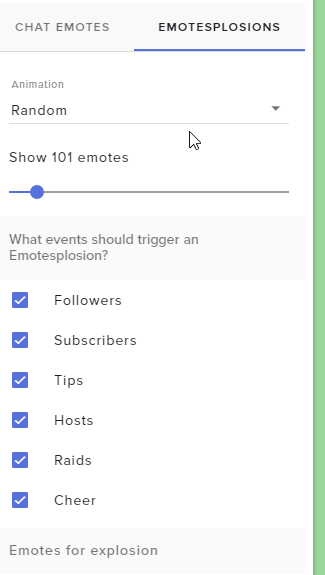
winter zenith
@lean creek did you activate the trigger events?
 winter zenith
looks good


 winter zenith
and if ou open the overlay source in a browser tab?
ripe herald
@odd forge can you send me on private to check it
lean creek
It only works if i activate from overlay editor but not obs tests
winter zenith
in the browser ?
not in the overlay editor
I want you to input the Overlay URL in a plain browser tab on chrome and trigger a past even from your dashboard like a follow or what ever.
Doese the kappagen trigegr in the browser tab?
winter zenith
if yes: Somethings wrong with your obs
if no: somethings wrong with your overlay
I need you to trouble shoot with me here in order to identify the cause
lean creek
it shows up on obs for chat emotes just doesnt work for events, would it be obs then?
winter zenith
did you put the URl in a plain browser tab yet, yes or no?
lean creek
yea
winter zenith
and it doesnt show up for events
lean creek
no
winter zenith
also not in the overla editor?
when replay a alert fro myour dashboard
not a emuated one
lean creek
When I replay from stream elements dashboard it works yes
lean creek
when i replayed it from dashboard it works in all 3
winter zenith
uhm.... then what was the issue?
lean creek
The issue was that when the events happened live they didnt show up, but it did when i replayed it