#helpdesk-twitch
1 messages · Page 380 of 1
 lament blade
and theres no way to mute the sound of or change the loudness of a donation
this is really making it hard to stream
 dense jackal
solved ✅
 distant jacinth
hey there! For some reason, my Subscriber Goal widget is showing I have more subs than I actually have. I currently have 3, and it says I have 10. How can I get this to display accurately?
 zenith widget
@distant jacinth 2 ways:
- Overlay editor -> DATA on top -> Goals tab -> subscriber goal progress
- Main dashboard -> left side Acitivity feed -> Widget data on the right -> Goals tab
The goals progress only goes up, but doesn't go down automatically (sub/follow/tip)
 inland lion
Is there any way to move several layers at the same time when editing overlays?
zenith widget
Unfortunately, no. This has been requested multiple times and I think its as an idea in our ideas board.
zenith widget
Is this the activity feed or alerts on overlay?
 lost folio
alerts on overlay
zenith widget
Ok, so I assume you have added the alert widget to the overlay, right? Did you click "Save" on the bottom right after editing the alert widget?
lament blade
How can i get access to the the early access app on android phone??
 nocturne pelicanBOT
@lament blade The StreamElements Mobile IRL streaming app is currently in closed beta.
If you'd like to assist with testing when public beta testing becomes available, please fill out this form: https://goo.gl/forms/3DaiLckKDjeMAeVt2
This does not guarantee you to receive a Code.
lament blade
Thanks
 floral badger
hey i'm having some trouble with my allert widget the text to speach is not working for me on my subscribers i have it enabled volume up and even in variations its enabled
lament blade
Hey guys! Not really a question about streamelemnets but a question about twitch itsself if anyone knows! My friend and I are trying to get him set up streaming and hes trying to stream LoL right now. He has gone into a custom and set his game capture on LoL.exe League TM client but his stream still shows a black screen. Also has client/game in 2 different scenes if anyone knows the answer pls help!
 slender comet
more of an OBS set-up thing so you might want to hit up their discord, I remember for league there are two processes - one for the client (where you queue up) and one for the game
zenith widget
@lament blade https://www.youtube.com/watch?v=BSQM-W4ewKo
@floral badger Is the custom CSS option enabled for the sub alert(and its variations)?
floral badger
let me check
no
should it be?
i'm using 2 allert widgets atm
the normal one
variation
floral badger
np should i wait for a sec with making changes
zenith widget
I'd suggest to exit the editor, as I might scare you 😄
floral badger
ENERGY FLOW ANIMATED ALERTS
 hybrid path
Is it possible to get an early access code for the streamelement app ?
nocturne pelicanBOT
@hybrid path The StreamElements Mobile IRL streaming app is currently in closed beta.
If you'd like to assist with testing when public beta testing becomes available, please fill out this form: https://goo.gl/forms/3DaiLckKDjeMAeVt2
This does not guarantee you to receive a Code.
zenith widget
@floral badger I made a test overlay - go test the alert there - the TTS triggerd. So here is the deal. You have 2 alert boxes - one has TTS and the other doesn't. Usually we don't recommend having 2 alert boxes in the same overlay, due to possible conflict between the widgets.
In your case it happened.
floral badger
okay
 teal vortex
Hello! Any chance of getting one of those fancy codes to use the SE app? 🙃
nocturne pelicanBOT
@teal vortex The StreamElements Mobile IRL streaming app is currently in closed beta.
If you'd like to assist with testing when public beta testing becomes available, please fill out this form: https://goo.gl/forms/3DaiLckKDjeMAeVt2
This does not guarantee you to receive a Code.
 cerulean hound
Ok I’m trying set up song requests but the actual command for it won’t let me turn it on
zenith widget
If you've enabled the viewer requests, the command becomes active, even though it might show disabled in the command list.
cerulean hound
u sure? because it tells me its controlled by module settings
zenith widget
Because it is controlled by the module, which the Media Share page.
cerulean hound
ok
zenith widget
cerulean hound
was just annoying me because i couldnt turn it on
zenith widget
cerulean hound
yep
zenith widget
Turn on viewer requests and place one of the 2 shown above
@cerulean hound Have you placed point cost for a request?
cerulean hound
try now
zenith widget
@cerulean hound
This is the problem
So the song request command will only work when you are streaming, but will not work when you are offline
thats why i was not able to request any songs
cerulean hound
so both
zenith widget
both = offline and online(streaming and not)
cerulean hound
where do i find it
zenith widget
On the command it self, click the pencil and you will see the option in the middle
zenith widget

 charred shard
I need an invite code for the stream elements app
nocturne pelicanBOT
@charred shard The StreamElements Mobile IRL streaming app is currently in closed beta.
If you'd like to assist with testing when public beta testing becomes available, please fill out this form: https://goo.gl/forms/3DaiLckKDjeMAeVt2
This does not guarantee you to receive a Code.
lament blade
hi guys, was wondering if someone can help me with a stream elements issue I can't figure out? 😃 I want to use a daily Sub Goal but it keeps pulling a wrong number. IS there any way to refresh sub count ?!
 dark smelt
Hey how get code
 untold crest
@lament blade hello. AFAIK there's only "sub goal" for total number in regular widgets. If you want to achieve session/weekly/monthly goal I can suggest you a custom widget - https://github.com/StreamElements/widgets/tree/master/GoalsOverPeriod
You have to create "Custom Widget", click "Open Editor" in left panel then paste contents of each file from link above to corresponding tab of editor (json file goes to FIELDS tab)

GitHub
Contribute to StreamElements/widgets development by creating an account on GitHub.
teal vortex
Great thanks!
 formal galleon
Hello, im a new user of stream elements and the se extension.
The extension doest show my store item, can you guys help me fix this ?
 narrow coyote
The item has to be set to be redeemable via chat to show. If its the key code item, there is a bug where that will not show
formal galleon
it is redeemable, my viewers use it, but it is a key code
is a Access-code list item type
narrow coyote
Yeah, thats the problem then, there is an issue preventing it from showing in the extension
 atomic silo
i'm having problems importing donations and such
is it enough if I give my email but don't setup an overlay, to make donations able to pump up the marathon timer / give points for donos?
narrow coyote
Importing donations will not do any of that. It just imports data to have a history of the tips, will do nothing for a marathon timer, and will not give loyalty points
atomic silo
ok, but i'm curious how to do the other part, like do i have to make my donation link a streamelements one? or can it be done without that?
because rn i have to do it manually
narrow coyote
If you want donations to interact with our systems, then you need to use our tipping page
 prisma grove
I have a question about SE Pay, I set it up, but most of my tips are still going through paypal, I only have about $3 going to SE Pay and hundreds of others going to paypal, did I do something wrong?
narrow coyote
That means people are using paypal on your tipping page. If you only want to use one tipping service, then you need to go into your tipping settings and set it up to not use paypal
atomic silo
well ok that much i can do, but i really need to import donation records somehow because i'm leading a leaderboard
narrow coyote
Depending on where they were from, we have import options, or you will need to manually make the entries and mark them as imported
atomic silo
oof okay
 junior pine
If we have a question regarding a specific widget that was shared is it better to ask here or DM the person? -- I am trying to get @empty fjord t's credit roll show the listed events for the calendar week rather than the session.
 winter zenith
@junior pine you could ask in #dev-chat or DM grot for this since not everyone (like me) understands coding and could help out.
Your message probably would drovn in this channel and then no one could see it to help.
So best to ask in #dev-chat since this Chanelle is not as busy and try to DM grot :)
junior pine
Thanks @winter zenith - Headed to sleep for a few but will do that once I am no longer a zombie again. 
atomic silo
ok i'm onto adding them manually, but it has top tippers already i can't remove, any help?
it recorded some
 tight harness
Top Tippers is based on the information in your Tip List, so delete them from the Tip List and it'll fix the Top Tippers list
atomic silo
@winter zenith it's streamlabs but the extension doesnt work
I have the deleted, yet they are still there @tight harness
tight harness
Did you expand the search dates to check you're not missing any earlier ones?
tight harness
Those show as September 2017, your search parameters only go back to November 2017
atomic silo
got it ty 
tight harness
No problem
lament blade
@untold crest great thanks ! That worked! 😃 If I want to get rid off the bar and have a simplistic layout (Sub Goal: 0/5) do I simply get rid off the code bits that use the word bar in them? Sorry total code noob here 
atomic silo
one last question, if i have my dono alerts in streamlabs, will they still work?
or do i have to redo that part aswell entirely
untold crest
@lament blade you can remove two parts of code
HTML:
    <div class="meter">
        <span id="bar" style="width: 25%"></span>
    </div>
JS:
$("#bar").css('width', percentage + "%");
@atomic silo No they won't work, you need to use our donation system for your alerts to work in our overlay
atomic silo
any way to import those?
lament blade
@untold crest legend thx ❤
atomic silo
also i can't import tips because i don't know the e-mails 
oh i was able to import  not the alerts tho
tight harness
@atomic silo You can import that at the time using the import tools, but after that you should be using our system, the import tool will not create any lasting link between the 2 systems, it's just a one-time transfer of data
untold crest
You're very welcom @lament blade. Glad I could help
atomic silo
okay one last question, if i don't use an overlay for donos it'll still update the marathon timer and add to the leaderboards, add points to users right? @tight harness
 sweet roost
Hey is the loyalty system timer based on total minutes watched or does it have to be in the same session
i.e if i watch 9 min and click away, do i have to watch another 10 min for the next points award? or just 1 min
tight harness
@atomic silo If you don't have an overlay how would you have a marathon timer? 🤔
To everything else, yes
atomic silo
i have that one, but no follower / dono / any other alerts @tight harness so am i fine like that?
 empty fjord
@junior pine that would require rebuilding almost the whole JS part of the widget. What happens now is that when the widget loads it loops through a list of all recent events, and adds them to their respective group up to the amount defined by the event count in the session data tab (that sentence was way too long). You would need to ditch the count part and compare the event date with the date of the last monday.. Guess it could be sort of popular among smaller streamers, but i cant put any time into this before the next weekend :/
 arctic terrace
hi folks, i have an issue with my stream if anyone can help?
tight harness
@atomic silo Yes
atomic silo
ty
tight harness
@sweet roost Every 10 minutes the points are awarded, so you do need to be actively watching for those 10 full minutes, if you leave the chatters list during those 10 minutes it'll start again when you re-appear from 0
 mystic cedar
Hello, I have a small question: Is there a way to start a raffle on a sub? I tried it with RegEx But RegEx doesn't check streamelements messages
arctic terrace
when i am streaming, the game lags and sound 'buzzes' but at no other time, has anyone else experienced this?
tight harness
@arctic terrace You'd be best asking in #general-chat - this channel is specifically for StreamElements related issues 😃
arctic terrace
ah ok, it just im using the SE obs thats why i can here, thank u
tight harness
@arctic terrace We have a #helpdesk-selive channel for questions related to OBS.Live
arctic terrace
thank you 😃
lament blade
One more question 😅 Is there a way to pop out the dashboard?
tight harness
@lament blade Any particular part of it? You can pop out the activity feed but nothing else
mystic cedar
Is there any way to start an other command from a StreamElements Bot message?
tight harness
@mystic cedar If you mean can the bot cause itself to trigger another message from it's own messages then no that's not possible
That could cause all sorts of problems like infinite looping
mystic cedar
Ow okey :/ I wanted to start a raffle after a sub
tight harness
You can suggest that here as a feature: https://strms.net/ideas
mystic cedar
Okey thank you
tight harness
@lament blade Browser sources, yes
 elder sorrel
Go to the Overlay Editor -> Top left click Widgets.
One of the Widgets will be for the chat that you can add to the overlay.
lament blade
It is weird
when i pull it up
I got it
But how do i move it around
bc its green
can somebody help me
on screenshare?
 torpid estuary
@lament blade make sure the think you want to move is on the top of the layers or move it up with the arrows there.
then you can click it and move it, otherwise something else might be in front of it.
lament blade
can you help with screenshare?
torpid estuary
when it is selected you can also use the arrow keys
no i can not
did you try what i told you?
torpid estuary
for the overlays? standard is 1920x1080. for the widgets? depends on how big you want them.
torpid estuary

 pseudo ravine
Hello, in my OBS live the chat on the left shows "connect with twitch" (underlined in red in the screenshot) and when I click on it, it loads a little and goes back to "connect with twitch" not allowing me to connect. On the right of that you can see my main display showing the S.E. main page before logging in (I am logged in streamelements.com already so I've no idea why this is showing). This page is connected to my S.E. alerts page and my S.E. overlays page and I know that for sure because when I toggle them off in OBS live they disappear and show my actual monitor desktop
Any idea why this is happening?
I'm already logged in so I duno why :[
Ok, apparently the URL path has of my overlays has changed. Strange I haven't touched it in 2 months
pseudo ravine
Yeah I did that already
It was the URL path... You know if those change by themselves every now and then?
zenith widget
They only change if something on your account has changed drastically
So to fix the left side -> click on "Streamelements" -> logout -> login with the big button
pseudo ravine
oh... right... I did generate a new invite link...
zenith widget
to fix your URL issue, just get your overlay link from your overlays
pseudo ravine
some weeks ago
zenith widget
that has nothing to do with the overlay links changing.
Most likely your twitch token with us has hard reset or something, so you will also need to log out of the dashboard and login again
just in case
then do the logout/login on obs.live
pseudo ravine
I did that, it fixed the issue on the left as you explained. Thank you so much
Now I have to readjust all the paths xd it's ok
👌 @zenith widget
 worldly obsidian
is there an option to give loyalty points to more than one user at a time .
 mighty pawn
dashboard is hooked up as well but leaderboard tab shows "no data available"
but the activity feed as working and accurate
zenith widget
@worldly obsidian !addpoints all <points> - if you want to give 2-3-4 people points, manually is the only way.
@mighty pawn I'd suggest to log out of the SE Dashboard, uninstall the extension afterwards, then log back into the dashboard, then install the extension.
worldly obsidian
so if I use !addpoints all 10 then it would give everyone 10 points
zenith widget
I had to remove your original question, due to providing a direct link to your stream.
@worldly obsidian It will give 10 points to everyone currently in your chat.
worldly obsidian
ok thank you awesome.
zenith widget
Including yourself and any other ignored person that you've placed in the ignore list.
worldly obsidian
gotcha
mighty pawn
@zenith widget got it and understood, let me try it out
 untold edge
Anyone know how to prevent the painful reload times on the SE browser sources in xsplit I have them set to stay in memory but they still reload
When swtlitchinf scenses
zenith widget
@winter zenith ⤴
mighty pawn
worked perfectly, thanks so much!
zenith widget
winter zenith
@untold edge if you have the browser source saved it should not load anymore
untold edge
@winter zenith what do you mean by saved?
 azure spoke
Hey everybody, how's it going? I've been having a reoccurring issue that i need some help with. When i'm getting follows during a stream, I can hear the audio from my alert, but I can't see the graphics associated with it. I have my overlay's activated with SE, and i even have the plugin installed for OBS.Live (if that matters) any help in this matter?
untold edge
Like in steam elements
winter zenith
@untold edge yeah what you claimed to have done! Stay in memory
zenith widget
@azure spoke Have you added the overlays to OBS?
winter zenith
Only two thing I can think of is turning off browser exceleraration and adding a stinger animation to conpansate the loading time if it still there
@untold edge
zenith widget
@azure spoke Sorry, stupid question. You hear the audio. What resolution have you placed the overlay in the browser source?
untold edge
@winter zenith turn off browser acceleration haha okay I'll try that would never thought to try that. It's like a 15-25 second delay for the overlays to full load it's rather depressing to watch. The main issue I have with it is if I clip to my BRB screen the chat reloads on it and the live screen which is pretty sad.
winter zenith
@untold edge that doese sound sucky... Doesn't do that for me...
Do you have "keep in memory" for every overlay in every scene on?
Also 20sec sounds WILD
untold edge
@winter zenith yup I only use one browser source on the BRB the live screen is 3 all set to stay in memory and it's on my overclocked 1700 dedicated rendering machine with 16gb of memory haha
winter zenith
Well that really shouldn't be a issue then... Try browser excelleration 🙏
How doese your overlay look like? Heavy CPU widgets?
untold edge
@winter zenith not really cup and hype boss basic other than that
azure spoke
1920x1080 same as m y canvas size @zenith widget
winter zenith
@untold edge no scrolling text? I cant look right not but yeah doesn't sound as too many CPU usage.
Wierd. Let me know if the browser exceleraration did it
untold edge
@winter zenith will do and yeah no scrolling text 5 data plug static text 2 images
I'll give it a go when I get off work would be the weirdest solution lol
winter zenith
Trust me I talked a lot to the XSplit support that's not the weirdest solution I encountered @untold edge
untold edge
@winter zenith oh I don't doubt it I'm still waiting for them to un**** the ndi
And that's been a known issue for months
winter zenith
@untold edge yeah they lazy... Wich is wierd for a PQYED SERVICE
 kind epoch
So i had a 1up donation and it did not register on streamelements as a donation, can this be resolved?
 ember lantern
hello, Hot Corner help buttons don't work for me
narrow coyote
@ember lantern How about not spamming that in several channels
main support is done here anyways if you have an issue
 fringe igloo
hi everyone! i was wondering if anyone could help me... i love asmr and i wanted to give it a try myself on streaming it... i got 2 microphones for starting but i dont know how to make them possible that one microphone functions for the left ear and the other for the right ear.. 😦 could someone help me or tell me where i could read something about that?
narrow coyote
That would not be anything related to our services, best to ask questions like that in #general-chat
kind epoch
Any luck with my question?
 thin gorge
is there any simple fix to stop my custom named bot from saying things twice/three times?
narrow coyote
Restart Ground Control, if you use OBS, I would recommend using OBS.Live for the bot rename
 tulip whale
Okay, so for this invite code on my phone, how do I receive an invite code? I didnt know if it was for like big streamers only, because I'm not. I just feel that it would be easier to access on my phone
I tapped the contact us link, and this is where it took me
narrow coyote
The app is for streaming from your phone
nocturne pelicanBOT
@tulip whale The StreamElements Mobile IRL streaming app is currently in closed beta.
If you'd like to assist with testing when public beta testing becomes available, please fill out this form: https://goo.gl/forms/3DaiLckKDjeMAeVt2
This does not guarantee you to receive a Code.
tulip whale
Okay thank you
 umbral cobalt
For some reason, I can't activate chat bot for StreamElements. Does anyone have any idea as to why I can't? Or like, how I would be able to? Tyvm. 😋
narrow coyote
What is happening exactly?
Did you rename your Twitch since signing up with SE, because the Twitch linked to your Discord is not valid
umbral cobalt
@narrow coyote I did change my name on Twitch a week ago, but that was before I started using StreamElements.
I'll try disconnecting my Twitch account to my Discord and then re-connecting it.
narrow coyote
ok, so what is the problem when you try to join the bot to your channel?
umbral cobalt
Lul, so I've started streaming, and I'm trying to figure out how to make StreamElements notify me in the Twitch chat whenever someone new follows me. And a friend of mine told me that in order to do that I should enable the chat bot.
But then I can't?
🤔
narrow coyote
that means its already in your channel
umbral cobalt
Oh shnap.
narrow coyote
narrow coyote
for it to notify for stuff, on the left side of the site, towards the bottom, go into modules, and activate the chat alert modules
narrow coyote
torpid estuary
@boreal parcel this is a helpdesk. Please refrain from using it to find people to play with
untold edge
@narrow coyote wait you don't need ground control for bot rename if you use obs live?!?
narrow coyote
nope, and if you are running both, that could be part of the problem
torpid estuary
@boreal parcel last warning bruh
Read my messages
Np. You can chat with other people in #general-chat, just dont self promote!
 granite dock
When I have the requirements to be afiliate , they send me automatically an email or I need to contact them
 jagged void
@nocturne pelican
narrow coyote
Its all automatic. Also, these help desk channels are for support with our services themselves. If you have general questions about Twitch stuff, its best to ask in #general-chat
The bot enjoys the attention, but tagging it does nothing
 upper scarab
How I get stream elements into my discord and get it working on my twitch like saying a message every 10 minutes and setting up my paypal so I get donations and bit donations on twitch
lament blade
You neeed a Paypal
narrow coyote
We dont have a discord bot
upper scarab
Oh
upper scarab
How do I set it up to say when someone subscribed
elder sorrel
You can have the bot join your Twitch channel. Go to the Dashboard -> Right now 'Join bot'.
elder sorrel
Sweet. As for saying a message every 10 minutes. You can go to the bottom left of the dashboard & click 'Timers'.
You can create a message & set the time online interval every 10 minutes with 0 chat lines so the message pops up every 10 minutes.
elder sorrel
If you want to have the alerts in chat. Go to the left side again of the dashboard - > Modules -> Enable Chat module.
If you want the alert to show on your screen: You'll can add the Alert Widget with/without a Super Theme by going to the 'Themes Gallery' on the left side Dashboard.
 atomic cobalt
Afternoon, I was looking for some help with More advance command Variables for the lasttweet.id command. Could some help with that?
narrow coyote
what did you need help with exactly? should just be ${lasttweet.USER} where USER is replaced with the Twitter account you want it to post
atomic cobalt
Hello @narrow coyote ,I am looking to see what other Variable for LastTweet."Variable "
nocturne pelicanBOT
@honest cedar The StreamElements Mobile IRL streaming app is currently in closed beta.
If you'd like to assist with testing when public beta testing becomes available, please fill out this form: https://goo.gl/forms/3DaiLckKDjeMAeVt2
This does not guarantee you to receive a Code.
elder sorrel
Also I would recommend changing your name 
 jade remnant
lol
 honest cedar
Eh nvm then I'll stick with streamlabs then
Lmao
I didnt get this name for nothing
jade remnant
haha
 wintry dagger
How can I get a early access code for the stream elements app
honest cedar
Oh and another question
jade remnant
@wintry dagger The StreamElements Mobile IRL streaming app is currently in closed beta.
If you'd like to assist with testing when public beta testing becomes available, please fill out this form: https://goo.gl/forms/3DaiLckKDjeMAeVt2
This does not guarantee you to receive a Code.

Google Docs
The app is only available for Android phones. Please be aware that filling out this form does not guarantee access to the beta.
honest cedar
I'm on the galaxy note 9 and whenever I go live with my headset plugged in my audio is cut out but my mic works
On streamlabs
honest cedar
Its literally the same damn thing
I used YouTube live and twitch and I have the same exact issue
jade remnant
then go there, you said you was going back there anyway
zenith widget
Is the Streamlabs app made by us? No.
jade remnant
these guys support and look after stream elements. not stream labs
zenith widget
Go ask Streamlabs about an issue with their app.
jade remnant
🤦
atomic cobalt
@narrow coyote Do you need me to provide more information?
 dawn vector
How do i get into Stream elements i need a code
jade remnant
for the mobile app?
nocturne pelicanBOT
@dawn vector The StreamElements Mobile IRL streaming app is currently in closed beta.
If you'd like to assist with testing when public beta testing becomes available, please fill out this form: https://goo.gl/forms/3DaiLckKDjeMAeVt2
This does not guarantee you to receive a Code.
atomic cobalt
I was looking for some help with More advance command Variables for the lasttweet.id command. Could some help with that?
narrow coyote
What are you looking for, there is only one variable, the one that I mentioned
upper scarab
How do I have people get points via watching me?
upper scarab
Thanks!
jade remnant
👍 np
atomic cobalt
@narrow coyote ,I am looking to see what other Variable for LastTweet."Variable " like being able to pull a certain tweet not just the last one
narrow coyote
There are no other variables
You can only get the last tweet, not specific ones
all the variables you see listed in the variables page are all the variables that you get
atomic cobalt
ah ok @narrow coyote thanks I thought there was a way to pull a certain tweet using that but I think I mixed it up.
lament blade
my obslive is showing my other account on my activity feed and chat how do i change accounts? could someone help with that? noone is replying in the obs live help desk
nevermind
narrow coyote

jade remnant
lol KITE
atomic cobalt
@narrow coyote is there a way to shorten the output of the lasttweet ?
 pearl current
how i add camera to overlay
jade remnant
add your camera as a source in obs
upper scarab
How do people buy a ticket for my giveaway?
With the points
And can I use a theme without face cam? On PS4?
elder sorrel
The default command for entering a giveaway is !enter or the alias !ticket
Are you streaming directly from your PS4?
elder sorrel
Hm. Does PS4 over a Webcam to use? Cause I don't think a Third Party Webcam would work.
elder sorrel
Bit donations are available when you become a Twitch Affiliate.
untold edge
@upper scarab are you using capture card?
jade remnant
you can use the overlay without face cam, you just need to turn the cam overlay off in the overlay editor
untold edge
@upper scarab unless I'm mistaken you will need a PC and a capture card this software is not native to ps4
jade remnant
i found this, if it helps @upper scarab
Start the game you wish to stream.
Press the 'Share' Button.
Select "Broadcast Gameplay"
Select the service you wish to stream to
(Twitch.tv or UStream)
Link your Twitch / UStream profile to your PS4
(This is done on their respective websites)
Title your broadcast / set streaming options
Select "Start Broadcasting"
Comments appear visible on the PS4 user's screen through a narrow scrolling display.
Streaming sessions are ended by pressing the Share button.
On Live from Playstation (the app for watching streams on PS4), you may only watch streams coming from a PS4. Therefore, you can't watch a Dota 2 or League of Legends stream (unless they come to PS4).
elder sorrel
@jade remnant Overlays won't work streaming directly from console.
upper scarab
Ok
jade remnant
i know, just trying to get the stream going without a capture card
elder sorrel
Ah 👍🏼 Sorry. Juggling work & Discord 😆
jade remnant
no worries dude 😁
 heavy spoke

 ebon atlas
when does the christmas superthemes drop?
ebon atlas
ok time to go searching
jade remnant
ooooh purrrrty
lament blade
my screen is black
jade remnant
did you turn it on?
lament blade
what trun in
jade remnant
what screen are you talking about? is it obs screen?
jade remnant
best place to ask is #helpdesk-selive but i would say look at your game/screen/ect capture input and make sure obs is picking it up
ebon atlas
whats the link you put into the browser source
lament blade
i didn't put any browser source
jade remnant
you can create an account for youtube. go to settings and add account
lament blade
look
elder sorrel
OBS.Live is only for Twitch. Not available for YouTube.
jade remnant
ah, it doesnt yet support youtube
ebon atlas
press continue wothout logging in
lament blade
i did but the screen is black'
jade remnant
@ebon atlas when in your editor look for the url on the left side
lament blade
how to do this
jade remnant
copy that and put it in obs browser source
ebon atlas
cough you tagged me not him
lament blade
what to copy
jade remnant
sorry, thought you asked what to copy to put in browser source
lament blade
wait i login to my twitch but also its black screen
jade remnant
can you do another screen shot of that?
 frail agate
is there an addon that lets you know when someone comes into your channel to watch, the viewer count, just shows that and to have too click another button to show names, is annoying. anything out there that is easier
lament blade
why
jade remnant
try removing the current display and add a new one or check the settings to see what its 'looking at'
jade remnant
in the top left of the obs window you can see some red circles, thats the display capture
can you drag and resize it?
ive seen this before but cant remember how to fix it
lament blade
i did it didn't work
jade remnant
the best thing is to go onto the OBS discord and ask there, unless someone here with the knowledge knows what to do
ebon atlas
does adding a picture or video on top help
elder sorrel
@lament blade Can you click the OBS screen then press Ctrl + F?
nocturne pelicanBOT
Right click on the BrowserSource > Properties > Scroll down a bit > Refresh Cache of current page
lament blade
@elder sorrel i make it
it happen me last time too
then it work i did same and it work
@elder sorrel thanks for help
nocturne pelicanBOT
@grave burrow The StreamElements Mobile IRL streaming app is currently in closed beta.
If you'd like to assist with testing when public beta testing becomes available, please fill out this form: https://goo.gl/forms/3DaiLckKDjeMAeVt2
This does not guarantee you to receive a Code.
elder sorrel
Are you referring to OBS.Live?
If so: That's not possible with the OBS.Live plug in @lament blade OBS.Live is available with Twitch only currently.
jade remnant
you can live stream with obslive to youtube, but the pannels only work for twitch
elder sorrel
⤴
jade remnant
so you cant login with your yt account
lament blade
@elder sorrel @jade remnant thanks for help
jade remnant
👍 np
elder sorrel
No problem 🤘🏼
elder sorrel
Howdy 🤠
elder sorrel
What are you referring to?
 terse walrus
Dashboard page affiliate downloads per dollar
elder sorrel
Going to need a screenshot cause that is new to me.
terse walrus
I cant my pc dead
But go to affiliates in stream labs
And dashboard
Says a little icon $1 per installation
terse walrus
Ohhhhhh
elder sorrel
You're going to have to ask Streamlabs that question.
elder sorrel
I have no idea. That is unrelated to this Helpdesk. You would have to check wherever you're storing money.
 shadow flax
My redemptions are coming through my stream twice when redeemed only once
nocturne pelicanBOT
@shadow flax Make sure to :ballot_box_with_check: “Shutdown source when not visible” for all browser sources (all OBS scenes). If using studio mode, uncheck “Swap Preview/Output scenes After Transitioning.” Also keep in mind that sound can play from any overlay loaded in the browser (editor or launched). https://i.imgur.com/FegZJQS.png https://i.imgur.com/yY0wcFl.png


 north finch
hi i need help
elder sorrel
@north finch Whatcha need help with? 🤠
north finch
i'm trying to setup my donation/subscribe/follow alerts
but 1. it won't center and 2. the default animation won't clear
elder sorrel
You can click on the Alert box in the layers on the bottom left of the Overlay Editor.
As it does provide the option to 'Center Widget'. As well you would have to change your variations for your 2nd question.
 honest loom
Hi guys! I emailed through my issue and Sean got back to me suggestion I sign in and out, unfortunately that hasn’t solved my issue. The leaderboard extension for your twitch panels won’t upload any other information other than points, I want to be able to display my subs, top chatters and top bits however it won’t even allow me to save the options. How can I fix this?
shadow flax
ok I have all the redemptions set up and clicked off the swap from studio which I do not use and no other source is playing to duplicate the sound. it is actually redeeming twice for one time redemptions
winter zenith
@shadow flax do you have chat alerts on to display the redemption request in chat?
honest loom
It gives me the option but I’m unable to click and save, I can smash the right click all I want it won’t save 😂 @elder sorrel
elder sorrel
Are you using Chrome?
honest loom
I am indeed
winter zenith
@honest loom try incognito mode?
elder sorrel
Working fine for me when I update. Either try incognito mode or clear your cache on Chrome.
winter zenith
If not maybe try another browser
 unreal spruce
Is there anyway i can stream from my console and put an overlay using my phone
nocturne pelicanBOT
@unreal spruce Here is a guide on how to setup the most essential tools for streaming from your console, while using StreamElements tools without involving a Capture Card! It's easy to do, take 4 minutes to read and 10 to 15 minutes to setup!
Read all about it here: https://blog.streamelements.com/how-to-stream-on-console-7b620b1c46c3
unreal spruce
Thank you
winter zenith
Spoiler : you need a capture card to display a overlay or remote play for ps4 on your pc to utelise obs to stream
shadow flax
@winter zenith Yes I do
unreal spruce
Also how do i get an invite code to work from my phone
honest loom
Both safari and chrome on both incognito are giving me hell too ahah
nocturne pelicanBOT
@unreal spruce The StreamElements Mobile IRL streaming app is currently in closed beta.
If you'd like to assist with testing when public beta testing becomes available, please fill out this form: https://goo.gl/forms/3DaiLckKDjeMAeVt2
This does not guarantee you to receive a Code.
shadow flax
yea it says Streamelements: Onwego just redeemed laugh....then again says Streamelements: @graceful holly successfully redeemed laugh
winter zenith
@honest loom deinstall the extension log out of twitch and StreamElements.
Log back in and install the extension
north finch
ok i managed to erase the default variations
my follower/donation alert are perfect
but the subscribe is still not aligned correctly
winter zenith
@shadow flax part bot from your channel then let it rejoin.
Where do you redeem them? Chat, extension, store page?
honest loom
alright, will do
north finch
even tho all follower/donation/subscribe have the same margins
winter zenith
@north finch what do you mean?
 wraith oasis
hi guys im new with streamelements, i used to streamlabs and now i want to use streamelements but the thing that i need is "ask me or send me a message" with streamlabs i use the loyalty system and my viwers send me a message with points and i need to know how to do this with streamelements, my users will receive points while watching but how they can send me a message using those points?
north finch
go to my stream www.twitch.tv/billygotbac
i'm testing it right now
it's a little hard to explain
winter zenith
@wraith oasis store Redemptions I would assume
wraith oasis
i created an item on store but idk how to use
shadow flax
@winter zenith I have used chat, store page and still does it. parting channel and going to test again
still does it
winter zenith
If you use our twitch extension people can redeem an item in your channel with there points. Or with "!store" you can access the store and redeem an item.
The item will be displayed in your "store Redemption history"
Make sure to add a "requirement" to your store item so people actually can ask a question @wraith oasis
@shadow flax you use GC? Or obs.live?
unreal spruce
How lond does it usually take for you guys to review an application
shadow flax
also my stream is Onwego317 on twitch
winter zenith
I would restart obs. If you are 100% sure that all the overlays are set to "don't show if not visable"
And you don't have the store Redemption Widget in your scene twice
@shadow flax
torpid estuary
@unreal spruce application for what?
unreal spruce
Android beta
torpid estuary
no ETA
winter zenith
Long
unreal spruce
Oh well im not in a hurry
winter zenith
 then just hang around you will be notified
unreal spruce
K
worldly obsidian
Congratulations to Shawvereign the winner of this weeks mystery skin giveaway
winter zenith
...
torpid estuary

 north finch
how do i make the subscriber message pop up under "XXX has subscribed" ??
i have the "show subscriber message" checked already
winter zenith
Is your alert box wide/long enough aka how far did you offset it? @north finch
 hot wigeon
Maybe add an internal audio idk how but youll be a really good streaming aoo if you added internal audio cause NO APP USES INTERNAL AUDIO NONE
winter zenith
Maybe it's out of the visable area @north finch
torpid estuary
@hot wigeon i am not quite sure what you mean
winter zenith
@hot wigeon 
north finch
it's in the visible area
because when i do a test "donation alert", then the message for THAT shows up
hot wigeon
In game audio/ no mic audio or backround noise
hot wigeon
Wait how do i get an invite code?
nocturne pelicanBOT
@hot wigeon The StreamElements Mobile IRL streaming app is currently in closed beta.
If you'd like to assist with testing when public beta testing becomes available, please fill out this form: https://goo.gl/forms/3DaiLckKDjeMAeVt2
This does not guarantee you to receive a Code.
shadow flax
@winter zenith nothing doubled, shut it down and restarted still does it
winter zenith
@north finch if you put a standart alert box in without your edits doese the message appear when checked? Also check your variation settings maybe it's ticked of there for resubs and. So forth
How many store Items do you have? Maybe they trigger the same way because of store name @shadow flax
north finch
wow nvm i found the answer
wraith oasis
ok i created an item on store with name "ask me a question" but how my viewers use this item and this message appears on stream
north finch
there is a difference between a height of "zero" and leaving it blank
shadow flax
I only have 3
winter zenith
@north finch
north finch
with zero, the message goes off screen
leaving it blank will have the message directly underneath "XXX has subscribed"
winter zenith
@wraith oasis message won't appear on stream. It's in your Redemption history. You can buy the item to test it yourself
wraith oasis
can my users send me a message while streaming and those message appear ?
winter zenith
On stream?
wraith oasis
yeah like slabs with speech
winter zenith
We dont have that unfortunarly
honest loom
Okay I’m still haven’t issues with the widget displaying any other content beside the points system. I have tried on multiple different browsers now 😭
And it still won’t let me save the choices 😂
winter zenith
@honest loom tried to deinstall it and reinstall it?
honest loom
yeah still nothing, it independently shows on all of individual pages, but just not the widget
 brittle tulip
does any one know how long it should take for stream elements to reply rather or not i am able to get a code for the beta on the phone?
mighty pawn
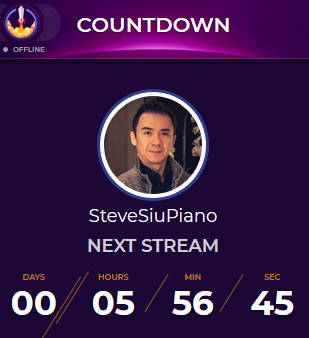
um, the countdown on our page is off by 24 hours
we have a stream scheduled 6 hours from now but the timer is showing 1 day 6 hours
i disabled all scheduled streams and reenabled them all and still same thing
(streamelements leaderboard extension)
torpid estuary
@brittle tulip there is no ETA on when the app leaves closed beta. For now all spots are taken but you will be contacted once it leaves closed beta if you filled out the form.
@mighty pawn the panel extension sometimes has a bug, where the countdown of the hosted person is shown instead of your own. Do you by any chance host someone at the moment?
mighty pawn
no, the channel isn't hosting nayone else
stevesiupiano is the channel name, delete this message if it breaks the rules (can't remember which server, but one of them didn't want me posting links)
brittle tulip
Ok thank you but I was confused because I downloaded it and I streamed on it then the next day it said I needed a codr
torpid estuary
Its been in closed beta for a while now @brittle tulip . That must have been a while ago.
@mighty pawn try removing the extension from twitch and re adding it. You can also try to change the stream dates, save and then change them back again.
mighty pawn
i did the first when the panel wasn't loading at all earlier today, and i just did the second
i'll try both together now once more just to be sure
 mighty pawn
err configuration won't load, neither will the panel in incognito mode (just ellipsis animation)
i'll do the remove widget - log out - log in - re-add widget
torpid estuary
try another browser then? you said correct time would be in 6 hours? it displays correctly for me as you can see in the screenshot
mighty pawn
both firefox and chrome incognito
safari as well on the mac shows 1 day 6 hours too, though i can't screenshot that into discord
actually, it's not totally out of whack, we technically do have a stream in 1 day 6 hours
i set the stream today to be this morning (already passed), and streamelements now thinks its in a few hours
so i'm pretty sure this is something out of my control
torpid estuary
i will ask internally about your issue. i will ping you when i hear something back!
mighty pawn
thanks!
i remoted into my computer in EST (different time zone) and it is also saying the upcoming stream is 1 day 6 hours, both chrome and firefox incognito. I also wonder if it has to do with today being the last day of the month? just stuff for your internal team to consider
torpid estuary
you can enable your loyalty settings and add it as a store item
https://streamelements.com/dashboard/store/items @agile charm
 agile charm
I set it up but still confused on how it will be a command. It won't let me put for example !dog
@torpid estuary
 pseudo minnow
hello all. I guess it´s here where questions are made so let´s go. Alerts don´t come up on my stream. I do everything like in the tutorials. go to alert box, copy the URL, create a browser source in OBS Studio, test follows and everything, and tests work fine but they don´t come up whey sb follows me. Any ideas?
thx in advance
torpid estuary
@agile charm you would have to type !redeem ItemName or add a custom command thats called !dog for example, the response in this case would be ${redeem dog} in this example
@pseudo minnow so tests in your overlay editor come thru?
agile charm
hmmmm it's still not working. like there is no sound affect of a dog barking. i made the command like you said
@torpid estuary
torpid estuary
and you added the sound to it?
agile charm
Yes.
torpid estuary
ok, so the item you added to your streamstore triggers the profanity filter of the bot it seems
@agile charm
 gusty tree
Is it possible to approve song requests via chat command?
narrow coyote
no, queue moderation can only be done from the media request page
 lone jetty
How do i get a code?
 dawn warren
@agile charmhello
nocturne pelicanBOT
@lone jetty The StreamElements Mobile IRL streaming app is currently in closed beta.
If you'd like to assist with testing when public beta testing becomes available, please fill out this form: https://goo.gl/forms/3DaiLckKDjeMAeVt2
This does not guarantee you to receive a Code.
 vernal quail
i need help
hey i need help with when someone follows me it doesnt pop up on my twitch screen or chat so is the anyway to get that to work
zenith widget
For the chat you will need Chat Alert module for the bot activated. On the left menu click on "Modules" then scroll down a bit
For on screen, have you added an overlay to OBS?
vernal quail
what if im on an xbox and not using obs
zenith widget
You will need a capture card + PC in order to have an overlay
vernal quail
i have a laptop next to me that has the stream elements next to me
nocturne pelicanBOT
@vernal quail Here is a guide on how to setup the most essential tools for streaming from your console, while using StreamElements tools without involving a Capture Card! It's easy to do, take 4 minutes to read and 10 to 15 minutes to setup!
Read all about it here: https://blog.streamelements.com/how-to-stream-on-console-7b620b1c46c3
zenith widget
If you want an overlay, you will have to get a capture card, hook it up to your PC or Laptop if your laptop can handle the streaming from a capture card, get OBS Studio(or OBS.Live), make an overlay(add an alert widget and other shiny widgets) and then add the overlay to OBS.
vernal quail
nah i tried stream labs and my laptop couldnt handle it
zenith widget
Do you have a capture card?
vernal quail
i got it to work
thanks for th hellp
now how do i get and overlay for xbox or can u not do that
zenith widget
Do you have a capture card? If yes, then hook up the console to it and hook up the capture card to your PC/Laptop.
Get OBS Studio, add the video from the capture card to OBS, make an overlay and add the overlay to OBS.
Start Streaming
vernal quail
is a capture card like an elgato
zenith widget
yes
vernal quail
oh no not yet
zenith widget
Ok, so the other answer is, no.
vernal quail
ordered it and wont be here till the 22nd
ight bet
how do i play sogs thru my stream
songs*
zenith widget
You will need OBS to play your own songs for starters and if you want requested songs to play, an overlay.
zenith widget
No.
vernal quail
ight well no music for my stream then i guess
zenith widget
From what I know Xbox provides somekind of screenplay/screenshare with Windows, but I don't know how that works.
vernal quail
ahh thats find ill just look at this as a stepping stone in my progrees to become a streamer
zenith widget
👍
vernal quail
thanks for th help
zenith widget

 snow estuary
Hello! I have a question regarding alerts while streaming. I use a set of different overlays while streaming, I have a start up scene, a scene when I am playing games, and some more. Each come with their own alertbox for when people follow, host etc. The problem is, the first few alerts are always double audio, and after a few alerts, this stops. Any idea why this is happening? I feel like it has something to do with the fact that I hear the audio from alerts on my other scenes as well as the one I am using, and am wondering if there is a way around this WITHOUT having to hide them when not visible.
nocturne pelicanBOT
@snow estuary Make sure to :ballot_box_with_check: “Shutdown source when not visible” for all browser sources (all OBS scenes). If using studio mode, uncheck “Swap Preview/Output scenes After Transitioning.” Also keep in mind that sound can play from any overlay loaded in the browser (editor or launched). https://i.imgur.com/FegZJQS.png https://i.imgur.com/yY0wcFl.png
snow estuary
Like i said, I know that is a "fix" I was just wondering if there are any known ways around this, but i'll take that as a no
zenith widget
One thing is "hiding" an overlay, another thing is to "shutdown when inactive".
And also having them in a different scene.
From what I gather, you have all your overlays in 1 scene.
snow estuary
Negative. I have several scenes, each scene has a different overlay, theres a starting soon scene, theres an intro scene, theres an overlay on my gaming scene
zenith widget
Ok, so to not hear double sound, use the "shutdown when inacitve" option
and use Studio mode to pre-load your scenes
if the overlays load slow upon switching scenes
snow estuary
Aye. Fair enough. Cheers.
granite dock
Hi , how can I see my very old clips , right now I can only see last 24hours clips
 copper bobcat
Do BetterTTV emotes work with Kappagen?
zenith widget
This is not really Streamelements related but if you go to your clips you can adjust the time here:
@copper bobcat yes
granite dock
Ok thanks
copper bobcat
@zenith widget How do you get them to show up? I'm not seeing them..
 tame hull
can someone hekp me
zenith widget
What is the issue you are facing?
 willow rivet
Hi I need help! my alerts will not show up in obs when i test them!
zenith widget
Did you click save on the overlay editor and add the overlay to OBS?
willow rivet
yes
zenith widget
Did you set the browser source to 1920x1080 resolution?
zenith widget
Do you see the alert popping up in the overlay editor?
zenith widget
Then either you've not clicked "save" or have not added the overlay properly to OBS.
Or if you have soemthing else running atm
its on top of the overlay
so move your sources around.
willow rivet
i fixed it! the save worked although i save it before and it didnt work thank you!
will check back if i get any more issues
zenith widget
👍
 terse canyon
I'm redoing all my alerts and it seems the AlertBox isn't updating
it's just one scene that has an alert box and event list. nothing else. It seems logging out completely and logging back in fixes it, but not completely. help?
 sinful heron
Hi guys, i'm trying to use a decapi url. the url gives back a line of text and i'm using a command with this format : ${url of the api call} as stated in the documentation. but the commands just writes back at me the same ${stuff}. Any idea ?
zenith widget
${customapi.<decapi.me.link.here>}
If what you have is the above, can you provide a screenshot of what the bot actually provides as a response from your chat and what you've placed in your command response settings?
sinful heron
yep give me a sec to try it out
zenith widget
@terse canyon Have you tried to just open the overlay in your browser and running some test alerts?
terse canyon
i've had the editor open the whole time, i'm changing every alert setting.
browser and OBS is the same.
sinful heron
@zenith widget ho thanks man i looked into the doc and never realised there was a " customapi." parameter. all good now thanks
zenith widget
I assume by document you are referring to this one: https://streamelements.com/dashboard/bot/commands/variables 
sinful heron
tbh
i was looking for a more structured doc but all i could find was a forum and this
if you have a complete doc i'm all for it xd
terse canyon
looking like I can only edit one text setting at a time, then I either have to relog or refresh :/
zenith widget
@sinful heron Well depends on your needs really. The bot has different variables on the link I pasted, but for overlay custom widgets there is a doc in #dev-chat that lists them all. But they don't work on the bot.
@terse canyon Sorry, gonna look into your account now.
terse canyon
@copper bobcat appreciate it
zenith widget
@terse canyon I assume its the "TICKER" overlay?
terse canyon
correct
terse canyon
no, that's me
XD
if you look at the text settings of each, i think you can figure it out
zenith widget
You didn't ping me, thats what i meant 😉
sinful heron
@zenith widget shame. if everything was centralized that would be neat
zenith widget
@sinful heron Well if you do want to make something out of everthing, twitch-js to read chat from the custom widget, our bot API endpoint I think provides a way for the bot to respond...not sure
@terse canyon What browser are you using?
terse canyon
chrome
sinful heron
i'll figure out. many thanks o7
zenith widget
I mightn ot be understanding your issue 
terse canyon
i can tell you what I want as a temp fix, I can also direct call you, screen share, and show you.
after a few changes, it jsut won't save my changes
sometimes even if I click to save and the alert says it saved, it didn't.
zenith widget
Ok, so you change 1 text setting, but then when you try to do another text setttings it isn't updating?
and you need to relog to fix it?
@terse canyon
 keen bloom
hey!
terse canyon
@zenith widget Can you join voice? There's a lot to explain. I tested a lot
zenith widget
Have you tried clearing your cache?
zenith widget
I'd go as far as clearing cookies as well, but that will heck up your other webistes
terse canyon
standard troubleshooting sop ... cache first, cookies after
wait a minute
i tried incognito and same results
zenith widget

terse canyon
yeah, it ain't cache/cookies
i just tried after clearing cache, same issues
just gonna continue in incognito
lament blade
hi, i changed my username on twitch, and now in streamelements my chatstats page is not available 404 - Page Not Found. i have already tried parting bot and logging out etc
zenith widget
Ok, i'm still not understanding your issue. You change a text option on one of the alerts, but then if you want to change another text settings for the same alert or another alert, you have to log out and log back in?
@terse canyon
@lament blade DM me your old name and new name.
terse canyon
relogging MAY fix, normally not. Right now it's not saving at all no matter what I do.
lament blade
@zenith widget done
terse canyon
when this started, it would stop saving after I made too many changes or saved too many times
 dire bloom
not sure if this is the right channel but in the Alert Box can i change the ping noise when i get an alert?
dire bloom
i added my own sound but the ping is still there
terse canyon
@pulsar aurora save?
zenith widget
Check variations for the alert(subs/hosts/tips)
terse canyon
hey, i didn't give permission to show my character 
zenith widget


 dire bloom
got it the clear button didnt work the first time thanks everyone
terse canyon
❤ @dire bloom
zenith widget
@terse canyon I'm not really sure why thats an issue for you with your text settings
zenith widget
I'm also not sure what exactly is the issue. I understand it as: you try to change text settings for an alert, but in order to change another alert's text settings you need to relog first and hope you can change them.
Or relog after you click save?
terse canyon
those are potential fixes yes, doesn't work every time
right now i can't change it at all
and all issues persist in incognito too
zenith widget
but the main issue is correct? can't change more then 1 text setting?
terse canyon
can't change anything at all, not even 1 setting now
initially it could be only 1, or could be a few
I think I may have bugged the system cause I kept clicking save so much
i'm seeing the tests, but the tip alert highlight text color still hasn't changed
zenith widget
I'm changing all sorts of text settings.
and I can't replicate the issue on my end, on our account
terse canyon
you can change my account's text settings?
zenith widget
yes
terse canyon
did you ever see the tip alert highlight text as red?
zenith widget
Here is something interesting. If you are also in the overlay editor and changing stuff on your side, I won't see themuntil I reload the overlay editor my self.
So no I didn't see any read.
If you want me to see any changes you've made i need to open your overlay normally
zenith widget
i changed your tip alert margins by a lot and then follower text margin by al ot
terse canyon
i never saw the red text
terse canyon
whence this issue started, I could not change that eitehr
can you change the tip highlight text to red, save, and let me test?
terse canyon
wrong one, but lemme see XD
okay, got obs with the scene/overlay up
send test pls?
zenith widget
sent
terse canyon
okay, leave it alone now. lemme see what i can do
dire bloom
the noise is back!
zenith widget
Did you click save after saving the changes?
dire bloom
wait do i have to save if i stay on sub setting but got off variations?
terse canyon
Didn't save (yes, clicked save after changing highlight text color)
ERRMAGURD 
figured it out
terse canyon
rgb(81, 0, 0) is valid
rgb(81,0,0) is not and was auto correcting for me at first, but not if I click save right after
zenith widget

terse canyon
if I type the text color then click into another editable field, the color will autocorrect to the proper syntax, if I click save right away, SE doesn't recognize it and CAN'T save.
zenith widget
the spaces should not matter in the rgb(0,0,0) way
terse canyon
try it?
just tested on new alert highlight text color, without spaces won't save, with will
 terse canyon
yes, cause the space is in there.
zenith widget
but your is not correcting the spaces?
terse canyon
nope
zenith widget
Well I think thats an issue on your end 
terse canyon
okay, NOW it is. WTH
zenith widget

terse canyon
i know I was typing (81,0,0)
then clicking save right away
and it wouldn't save
JUST DID IT AGAIN!
zenith widget
Right, so by some standards, when ever you have cursor focus on a field and then click on a button, the code still thinks you have focus on the field, so it does not correct the spaces
so when you are changing colors, click somewhere else to make the focus something else to correct the color
as for margin, do the same thing just case - click somewhere else so that the focus is not on the field after making achange
this most likely confuses chrome
terse canyon
I click on the blank white space, does not correct
zenith widget
Then you have an issue with chrome
terse canyon
(╯°□°)╯︵ ┻━┻
dire bloom
so long question but easy answer i have one sub variation that is one gifted sub (set as gift not community) and another variation thats 2+ gifted subs. they wont affect each other right?
terse canyon
IT JKUST AUTOCORRECTED WHEN I CLICKED BACK IN
EVEN THOUGH I DID THAT ZILLION TIMES BEFORE AND DIDN'T
okay yeah, I agree. my end XD
zenith widget
terse canyon
least now I know what it is XD

oh and one more thing XD
if that color field is wrong, it won't save at all even if other fields are changed properly
that sorta makes sense though
jussayin
zenith widget
@dire bloom Those are 2 different variations. So if 2 people get gifted its a community gift, if its just 1 person its going to trigger the 1 gifted variation
if that makes sense
dire bloom
okay just making sure the 1 gift wont take priority in any way
zenith widget
it won't
terse canyon
FIGURED IT OUT KEL!
 unborn mist
Quick question about that then, is there a way of getting the "mysterygift" event from the websocket, since from my testing we're only able to receive the actual gift? ( yes I know this goes more under dev, but since you guys brought up the topic )
terse canyon
i have to click out of the alert (not the field i'm editing), then click back in for it to correct
lament blade
Hey
zenith widget
@unborn mist What? I don't understand what "mysterygift" you are referring to.
unborn mist
the event from twitch is called "submysterygift" which referrers to gifting a "gift bomb"
AKA - No specified receiver of the "gifted" sub.
lament blade
Why cant i log into streamlabs?
zenith widget
!code @lament blade
nocturne pelicanBOT
@lament blade The StreamElements Mobile IRL streaming app is currently in closed beta.
If you'd like to assist with testing when public beta testing becomes available, please fill out this form: https://goo.gl/forms/3DaiLckKDjeMAeVt2
This does not guarantee you to receive a Code.
zenith widget
@unborn mist I think you are referring to the anonymous gifting right? I think that still falls under normal community gifting
unborn mist
No.. I am talking about gifting to a none specified receiver
But it goes under "dev" so kind of wrong channel to maybe bring it up in, were just wondering since you guys brought up the topic about "event" when its more than 1 person who gets a gift, (2+ ..)
nocturne pelicanBOT
@dire bloom Make sure to :ballot_box_with_check: “Shutdown source when not visible” for all browser sources (all OBS scenes). If using studio mode, uncheck “Swap Preview/Output scenes After Transitioning.” Also keep in mind that sound can play from any overlay loaded in the browser (editor or launched). https://i.imgur.com/FegZJQS.png https://i.imgur.com/yY0wcFl.png
dire bloom
lol uhh that wasnt the problem but im too embarrassed to say what the problem actually was
so lets just ignore that'
zenith widget

terse canyon
@zenith widget It won't be a huge system impact if I have 3 browser overlays right?
1 of the main 1, 1 just for chat
zenith widget
Depends on what widgets you have on those overlays
terse canyon
1 for other alerts.
i want that ticker on a lot, but some will have chat, some will have alerts, some won't
 small zenith
So when can I remove a giveaway? 🤔
small zenith
It's closed, but no winner has been drawn.
zenith widget
Draw a winner then remove it
small zenith
The bot doesn't notify in chat right?
Because I'll wait with removing if that's the case
zenith widget
I don't think it says anything when its removed
but it does say when its closed and the winner when drawn
small zenith
Alright, I'll wait then. Thanks
terse canyon
hey, for the cheer cup, animated items won't display for me on obs, but will on the browser
zenith widget
make sure the animated bits are set as sprites
terse canyon
they're defaulted, I didn't touch them
zenith widget
clear the cache of the browser source
nocturne pelicanBOT
@terse canyon Right click on the BrowserSource > Properties > Scroll down a bit > Refresh Cache of current page
zenith widget
So did it help?
terse canyon
i have no idea XD
i'll be sure to clear it though
also
why does the hypeboss get cut off?
the animation of the profile image gets cut off on the right side and I can't move the bounding box to give extra space
zenith widget
Can you screenshot it?
terse canyon
not reaaaly. it's only when the animation plays and that's hard to capture
i can send a test alert though if you can watch it
terse canyon
i can't wait, no rush
zenith widget
use ShareX to make a quick video showcasing it
terse canyon
i know i've asked a lot ❤
terse canyon
nvm on the hypeboss, way to buggy and not configurable enough to use. :/
 azure finch
Hey everyone, I need your help, remember I am deaf, I not have webcam or my Alienware. Laptop is broke only I have use phone but pc is regular not pc gaming j can’t Download for obs but how I can put sounds with song so people can listen and watch my game cause I am not speak or not have webcam but only I can chat room text so any advice how I can add song and sounds? I use Xbox one twitch stream for BO4 and fortnite of course so but I use mobile game for power ranger leagcy was not have sounds or song... I wonder twitch itself does have song during I put stream live ?
zenith widget
@azure finch You will need a PC + capture card, in order to properly have any songs that your viewer requests, play on stream.
 amber lotus
How do i setup an in game overlay with the game i want in it?
zenith widget
You will need OBS, add the game as a source, then add the overlay on top and you should be fine that way.
make sure the overlay is the same resolution as your base resolution in OBS.
but in general its 1920x1080
amber lotus
Thx! I'll try that.
 muted snow
hi everyone, there is a way to use sounds in the store without display the message: You successfully redeemed sfx2 for 100 points!
amber lotus
Thank you so much KeiZar!
zenith widget
@muted snow One this is, turn off chat alert module but only for redemption alert, but if its fro mteh command usage - thats not possible to be turned of atm.
muted snow
ok thank you KeiZar
zenith widget
 glacial barn
KeiZar my chatstats don't work, shows me error 404. I changed my username, before was Embor8 and now is Embor_


 glacial barn
Thank you ^.^
 chilly vigil
hello. is there any way to use chat command to display message on the screen?
jade remnant
to display chat messages on your overlay?
chilly vigil
yup.
not exactly chat message. but the command message you set up in custom command
zenith widget
What exactly do you want to show? The chat it self or just a specific thing in chat?
but on your overlay for some time?
chilly vigil
for e.g. if I type !sayhi, on the overlay somewhere will pop out the message I have set for the command !sayhi
zenith widget
This is only possible via custom widget.
chilly vigil
so I just use a text widget?
zenith widget
no. custom widget = custom coded widget that does what you want
text widget = just add text in its options - not controlled from a custom command
chilly vigil
ah i see. just saw the custom widget. gonna explore it a while. thanks
 candid drum
Hi I don't know if this is the right place to ask but I was looking to figure out how to add the Ordinal Indicators to the end of my count variables.
I want to be able to say "Cyberius died for the 1st time rather than "Cyberius died 1 time"
Is there anyway I can do that?
lament blade
How long does it take for a response for the mobile app beta?
I have been waiting months please help!
zenith widget
@candid drum Besides custom scripting of your kill count, I don't think there is an easy way to do it via custom commands.
@lament blade When we open up beta spots or full release the app.
No ETA on both of those.
zenith widget
We have not opened any spots for the closed beta.
zenith widget
Any spots he had, were filled from people who attended Gamescom
candid drum
Dang it okay, I don't know how to do that. Thank you for your help KeiZar! 😄
pseudo minnow
@torpid estuary tests come through my overlay perfectly fine, but during the stream, they just don´t come up and it´s very frustrating. i´ve asked other streamers, they´ve guided me in every step during the set up of the ubs, and it´s doesn´t work yet.
jade remnant
how many browser sources do you have @pseudo minnow
is it just not showing anything or just no sound?
 prime verge
I've tried looking around but I can't seem to find much documentation, is there any possible way for a custom command to have If/else statements inside them or not? Nightbots $eval allows for this but I don't see anything like this in SE
pseudo minnow
@jade remnant i have browser source for alert box, viewer count and text,and they all work except the one for alert box. no sound and no image. text and viewer counter show up totally fine on the stream, alert box doesnt
jade remnant
what i found in obs when setting up my overlays, is that you can only have a few browser sources that will play sound and work properly. once i got everything into one browser source it worked fine with no problems. if you can combine everything that might help
pseudo minnow
how can i combine everything into one browser source?
zenith widget
@prime verge We don't have a if/else raviable or statement be we do have OR one ( | )
jade remnant
what i would say is find/make a minimalistic overlay on SE (https://streamelements.com/dashboard/themes) and just have that as your only browser source

StreamElements
The Ultimate All in One Platform for Streamers
that can contain all of your alerts/text/view counters in one
pseudo minnow
thx a lot, i will have a look and see if it works better. very greatful, you guys rock!!
jade remnant
no worries, i hope it help you 👍
prime verge
@zenith widget thanks for the answer, I was thinking about making some dynamic commands based on say someone's userlevel and/or how many parameters were passed into a command. I guess I'd need to write something outside of the bot to accomplish this in that case 🤔