#helpdesk-twitch
1 messages · Page 375 of 1
 zenith widget
 graceful wave
I know but how do I give myself more points on my own stream
graceful wave
thank you ❤
 robust peak
 nocturne pelicanBOT
@robust peak The StreamElements Mobile IRL streaming app is currently in closed beta.
If you'd like to assist with testing when public beta testing becomes available, please fill out this form: https://goo.gl/forms/3DaiLckKDjeMAeVt2
This does not guarantee you to receive a Code.
zenith widget
 lament blade
Hey. Normally im using SLOB. Right now want to try streamelements obs. Can someone help me with setup ?
I need set alerts etc
zenith widget
I'm not sure under what folder SLOBS is installed on, but its best to first install OBS Studio and then our plugin, or just use our installer.
As for alerts
Here is a guide for our overlay editor: https://www.youtube.com/watch?v=LwAfMIR3Cj0&t=1s&index=17&list=PLCDDKlFdScbEwdx5AntcQIS1InkFJwHtv
lament blade
@zenith widget bro when I was using SLOB in COD black ops 4 stream was dropping frames and stream was lagging so much. I heard that with streamelements obs frames are not dropping and performance is better. Im right ?
zenith widget
SLOBS is known to take more CPU power then usually OBS Studio. But also Black Ops 4 is not a small game and its resource intensive as well.
 waxen shuttle
 tough dock
quick question where do i get the streamelements plug in for obs, , i have already imported my streamlabs data in to streamelements but hate using the slobs , second question do you support streamdeck ? thanks in advance
nocturne pelicanBOT
@tough dock OBS.Live is a Plugin for OBS created by StreamElements. You can download OBS.Live here: https://streamelements.com/obslive
Please make sure you have the latest version of OBS installed, Current Version: 22.0.2. You can install OBS here: https://obsproject.com/
 torpid estuary
Here you can download the plugin obs.live.
You can use your streamdeck with obs, SE does not have a direct integration yet. It is in the works tho.
tough dock
yep running the latest obs and using restream to stream ..and side note your support community rocks i spen the lase few hours reading the threads and found lots of great help just reading previous q&a ...
torpid estuary
Aww, thank you! We are here to help! Glad you like it here!
tough dock
@torpid estuary i hope it is soon ..that would be the missing part in my setup i use streamdeck but it is limited as far as integration .....
torpid estuary
Sadly no ETA yet, but it is being worked on!
tough dock
https://giphy.com/gifs/studiosoriginals-3ohs7JG6cq7EWesFcQ thanks again and have a great monday ...

 torpid estuary
You too 
 pulsar gulch
Hello guys , to stream 720p do I need to make the base res same as output one ?
 narrow coyote
No, output is what you are streaming at, base is the size of the canvas before downsampling
zenith widget
yes
pulsar gulch
Thank you
 lapis vault
Yo boys, is there a way to refresh the avatar image?
i get this for a lot of channels
torpid estuary
try logging out and in again
zenith widget
They need to go to their profile page (example: streamelements.com/enkkfull) and update their picture there
lapis vault
Oh ok, ty
zenith widget
lapis vault
(you remember my nick LUL)
 lapis vault
D: i felt loved
zenith widget
WHAT IS LOVE?? 
torpid estuary
baby dont hurt me

 torpid estuary

 small pelican
hi, why do chat messages during twitch streams sometimes not appear through obs.live chat for about 10 minutes, then pop in all at once? it has happened multiple times, is it a known issue?
torpid estuary
are you on the latest OBS version and using the latest version of the plugin?
small pelican
yeah. i also just noticed there's an obs.live channel where i should've asked this, sorry...
nocturne pelicanBOT
You can find your JWT token on your account channels page: https://streamelements.com/dashboard/account/channels
(Don't forget to click on "Show Secrets")
 gentle imp
hehe iFailed 😄
 upper geyser
Thank you
gentle imp
no prob mate
 balmy pilot
Hey there! I was wondering how I would configure a command so viewers can see how many loyalty points they have? I'm new to this and haven't quite figured it out yet so apologies 😪 :
narrow coyote
There is already a default command for that !points
balmy pilot
I've tried that and it hasnt worked, is there something I need to turn on?
narrow coyote
Make sure you have not disabled the command, and that you have the loyalty system enabled
balmy pilot
alright, thank you! ❤
 stiff tapir
Hey friends! I have a question about SEPay. A friend gifted me some funds to help me buy a game and I withdrew it last week. It no longer shows on the SEPay dashboard that it's there, but it's also not in my bank account either. Did something go wrong?
torpid estuary
hi @stiff tapir , just some questions: you added your bank details at least a weak before you tried to withdraw and approved it? also, when did you withdraw the funds?
stiff tapir
@torpid estuary Yes, I couldn't click withdraw until my banking info was approved, and if I remember correctly, I withdrew either on a Tuesday or Wednesday. Does it take a full week to transfer?
torpid estuary
I will ask about it internally. I will ping you when I hear something!
stiff tapir
Okay, thank you so much!
torpid estuary
@stiff tapir ok, it is a normal bank transfer, it can take up to 5 business days until the money reaches your account.
stiff tapir
Okay, so it should be there sometime in the next couple of days. Got it! I appreciate the help, @torpid estuary !
torpid estuary

 main thistle
Hi, the timeout unit for banned words is in seconds, right?
torpid estuary
yes @main thistle
 cerulean grail
Can I get an early access code?
nocturne pelicanBOT
@cerulean grail The StreamElements Mobile IRL streaming app is currently in closed beta.
If you'd like to assist with testing when public beta testing becomes available, please fill out this form: https://goo.gl/forms/3DaiLckKDjeMAeVt2
This does not guarantee you to receive a Code.
main thistle
@torpid estuary thx, the unit is unfortunately missing in the chatbot settings. Can this be fixed by SE?
!ranks
!rank
torpid estuary
i will relate it.
pulsar gulch
Are these settings alright here ? or should it be Above normal at priority ?
zenith widget
What are you PC specs?
narrow coyote
usually works best to have it set to high
 noble estuary
Anyone able to help with padding in an alert?
no matter the padding, doesnt seem like it ever gets applied to the text
 winter zenith
what browser do you use?
noble estuary
chrome
winter zenith
hmm should work just fine 
what text are we speaking about? CSS?
or in the editor?
noble estuary
in the editor for sub alert
i have an image that i want the text to appear on top of, but no matter the padding to move the text it will not move
winter zenith
how big i your alertbox widget?
is it big enough for the text to allow be on top of it?
and what base positioning did you select?
noble estuary
yes, base position text over image
winter zenith
clear the cache maybe?
 surreal carbon
I didnt get my invite code to StreamElements
nocturne pelicanBOT
@surreal carbon The StreamElements Mobile IRL streaming app is currently in closed beta.
If you'd like to assist with testing when public beta testing becomes available, please fill out this form: https://goo.gl/forms/3DaiLckKDjeMAeVt2
This does not guarantee you to receive a Code.
pulsar gulch
@zenith widget i7 6800k , 16gb ram with 1070
Is it also good to have the Browser source hardware acceleration activated ?
zenith widget
sorry, corrected my self
zenith widget
@surreal carbon No. The app is mobile only.
 elder sorrel
I think I need to turn off Hardware acceleration lmao. I forgot about that cause my Animated Overlay drops my frames to 45-50 😓
surreal carbon
Kk @zenith widget
 wintry fog
so i just became an affilate on twitch and now have a sub badge i go to my subscriber alert and upload a Gif image for the alert image and it uploaded fine and i clicked save settings when i go to test it it still shows the dumb shark gif default.... what am i doing wrong
 weary mist
@wintry fog The sub alert has default variations for different sub events. Go to the varitations tab to change them to the GIF you want to use
wintry fog
ahh alright thank you!!!
pulsar gulch
Downscale filter should stay bicubic ?
zenith widget
@pulsar gulch https://stream.twitch.tv/encoding/ these should be the settings you need to adjust in order to stream at said quality. Anything else is just advanced settings you need to adjust based on your setup or needs.
If you need explanation on what each option does, its best to go to OBS Support discord.
pulsar gulch
Got it , thank you @zenith widget 
 dreamy lagoon
how to add overlays to obs with stream elements live plug-in?
 strange cloak
Even though I have the redemption chat alert disabled within the "Chat alerts" module in StreamElements, redemption alerts continue to appear. Is there any other way I can disable redemption chat alerts?
torpid estuary
@dreamy lagoon same as in OBS Studio. You add them via browser sources. Please watch our video guides linked for you in #welcome
@strange cloak where are the redemptions played? On stream or in chat?
strange cloak
@torpid estuary The redemptions are sound redemptions on stream.
torpid estuary
And you disabled what exactly? The items in your store?
strange cloak
Just the chat alerts for store redemptions. The chat alerts that say "so and so redeemed such and such item for such and such amount"
Here's the setting:
torpid estuary
Oh ok, you want the sounds to be played without any chat alert about who redeemed them?
strange cloak
Exactly! 😄
torpid estuary
You have the store items Set as Sound effects, right? Im on mobile atm, so cant check, but if you set them to stream perks it should be possible to redeem them without a Chat alert
strange cloak
I have them set to sound effects, yeah. I could try switching them to sound perks real quick and let you know if that takes care of it. Brb
Still shows chat alerts when they're set as stream perks 😦
torpid estuary
On step 2 you have the option to deselect "show alert on redemption" when choosing stream perk
strange cloak
Oh gosh... 🤦 my bad, let me give that a shot real quick
Hmm... it's still generating the chat alerts even with that unchecked for some reason.
weary mist
When redeeming through chat, (either !redeem item or using a custom command), the redeem command itself has a response, which at this moment is not editable or able to be turned off (unless you don't allow the item to be redeemed via command)
strange cloak
Aw bummer... I was wanting it to be redeemable via chat, yeah. Do you know if there are any plans to change that in the future?
nocturne pelicanBOT
@plain snow The StreamElements Mobile IRL streaming app is currently in closed beta.
If you'd like to assist with testing when public beta testing becomes available, please fill out this form: https://goo.gl/forms/3DaiLckKDjeMAeVt2
This does not guarantee you to receive a Code.
 plain snow
Thanks @elder sorrel
elder sorrel
No problem 🤘🏼
dreamy lagoon
@torpid estuary thank you so much 😃
torpid estuary
pulsar gulch
What could be the reason that I'm getting 20 - 30 - 40 fps in a game ?
I'm currently using the inspector to test thee stream and got into fortnite having fps caped at 60 but getting 20 - 30 and it's not playable
 leaden bramble
I have an available balance on S.E pay but the withdrawal keeps failing is there a reason why?
 misty wagon
@pulsar gulch if I'd use a i89 with a ps6.1 and ripple the bottom neck.... WHY did we not meet at TwitchLDN!!! 
elder sorrel
@leaden bramble Was that your first Tip through S.E Pay?
 elder sorrel
Is your balance $5 or less than $5? You'll be able to withdraw every time you have more than $5 in your available balance.
 ember kraken
@zenith widget Hey - just hitting the buttons doesn't work, tried that already but did it again just for consistency's sake. It just takes me to the overlay screen, and I already have an overlay.
Same with importing from other tools.
lament blade
Does anyone know how to add when someone sends you bits, it tells you the total of bits of all time? Like XX cheers you 100 bits, a total of 200 bits.
 random roost
Does SE have a Discord Twitch announcement bot? Like where it automatically announces my stream going live. I used to use Going Live and TwitchBot but these services aren’t reliable and have big announcement delays
random roost
I’ve heard about using MEE6. Could you send me how to set up the announcement w MEE6
elder sorrel
@random roost I have no idea how. Googling it does come with Guides on how to Video or no video.
 elder sorrel
@grave python Not sure what you mean 🤔 What are you trying to do exactly?
pulsar gulch
@misty wagon where were YOU ?
 grave python
allow my sub requests for media play queue without having need to approve em
 storm timber
why cant i change the hype cup cheer tokens??
and why dont the default twitch ones work??
 potent bear
How do i operate the bot automatic to welcome people to my stream when they are watching
narrow coyote
@pulsar gulch That means that your PC cant keep up with encoding, you eirther need to try a faster preset, lower your video settings, like FPS, or try a different encoder, like nvenc instead of x264
@potent bear That is not really possible, pretty sure there is an idea post you can find for it and upvote
 brittle tulip
if i have a question on how to stream on a chrombook would i post it here?
And I need help starting a stream on my chrombook
 plush tiger
Will the timer bots go off on their own if I set the chat lines to 0?
brittle tulip
i need help also'
narrow coyote
These channels are for support with StreamElements services themselves, you can try asking in #general-chat , but streaming on a chromebook is not really going to be possible
brittle tulip
ok thank you
 snow estuary
Hey there, I have an issue regarding your twitch chat widget, the chat messages just do not show up on the widget, any advice?
narrow coyote
Most common cause is incorrect resolution, the browser source needs to be 1920x1080
snow estuary
The browser source resolution is correct, and I see it on OBS, i'm trying to add a twitch chat widget into an overlay I am customizing from your library, i can see the chat window on the overlay, just not the actual messages, no matter what I try
narrow coyote
@snow estuary Save your overlay, log out of StreamElements site, and then log back in. If you see no chat at all, then your Twitch token might have expired
snow estuary
I'll give it a shot
 ionic oyster
I switched to stream elements from Streamlabs and I love it but my viewers miss the !boss mini game. Is there a way I can set something like that up on stream elements? Also, when will the mobile app be coming out? I thought it was disposed to come out in October.
snow estuary
@narrow coyote That did the trick! Thanks!
narrow coyote
 ocean eagle
Does SE have anything similar to a Queue system for Viewer Games ?
narrow coyote
Queue system is on a long list of things to implement. Currently, best way to do it is with a store redemption item, and use the redemption list to track users in the queue
 quaint glen
In the tipping system under the G2A option it says "Charge-back fees: Full CB Protection by StreamElements". Does that mean that people can't make chargebacks or that if they do the streamer doesn't pay a fee for that chargeback ?
ocean eagle
Thank you @narrow coyote
 bright tartan
I cant click on settings, Viewer Requests, or Queue Moderation. Any ideas?
 rotund drum
so I have sound request on... how do I set it up only for mods???
 pine hemlock
@bright tartan Use the website for media request not the app. Its not 100% supported on the app yet
 sly moat
ionic oyster
sly moat
ionic oyster
they work
torpid estuary
@sly moat is the bot joined to your stream?
Part it and rejoin it via your dashboard
quaint glen
Need some help with this. In the tipping system under the G2A option it says "Charge-back fees: Full CB Protection by StreamElements". Does that mean that people can't make chargebacks or that if they do the streamer doesn't pay a fee for that chargeback ? Also if a chargeback is allowed what is the process?
 raven siren
I have a rather technical issue regarding customapi on the server-side. is there a developer who I could contact by DM?
I am the developer of a popular chatbot API hosting site (2500+ hits per day) and I am getting complaints from users, which I cannot resolve without your help
raven siren
@narrow coyote not that API, customapi like used in commands
I make commands like !teamlive !weather and !urban possible
leaden bramble
@elder sorrel my balance is way above that
lament blade
my watchtime command isnt working, whenever i use it, it says user has watched 0 seconds
can any1 help plz
pine hemlock
Do you have loyalty points enabled
pine hemlock
Watchtime/loyalty updates in 10 minute intervals
lament blade
i didnt understand a single thing u just said in that sentence, can u clarify plz @pine hemlock
pine hemlock
If you have loyalty enabled, which im not sure you do because your leaderboard has no one it, is updated once every 10 minutes, which is what updates watchtime
lament blade
can we do like a private call and ill screen share u my screen?
pine hemlock
Go to https://streamelements.com/dashboard/loyalty and make sure this is enabled
pine hemlock
If you just enabled it, wait 10 minutes and try again
 odd tapir
Hi there, I'm having an issue with the !time command, were it doesn't matter what time zone i put in its always showing up as UTC time
pine hemlock
What timezone are u wanting @odd tapir
odd tapir
@pine hemlock its AEST
 ebon stag
hey guys. I am looking to chroma a sub alert. i know i can do it through obs but not all my alerts are needed to be chroma keyed......any way to do it on streamelements itselkf?
pine hemlock
${time.Australia/Brisbane} @odd tapir
@ebon stag Why are you chroma keying? 
if you add the overlay url to obs, the green in the overlay editor is removed regardless.
@odd tapir That is me winging it, i think its the same timezone
odd tapir
ok no worries, Thank you @pine hemlock I had tried a similiar but that worked a treat, you nailed it
ebon stag
@pine hemlock thanks for responding. I have me on a green screen dancing for some alerts. I want to chroma the green screen behind me out of it.
pine hemlock
You'd probably want to find a way to remove the greenscreen prior to using the file on obs/streamelements
narrow coyote
If you are not capable of editing the video, the only option to use chroma key in this way would be to have this alert in its own overlay, that would be in a separate browser source that has the chroma key filter on it
ebon stag
i can edit....but i dont think thats possible even with premiere pro
it would just then be a black backgorund
narrow coyote
you can render videos out with an alpha channel
 whole narwhal
hello guys, so I want to change my tipping name from archeloncs to shyguy, but I cant find a way to do that
In my tipping settings, my tip link is on my archelon, but I want to change it to shyguy
The link itself it can be only copied, I want to edit it, any help?
 strong kernel
^Answered in live chat.
ebon stag
one more question im changing the sub alert to an image instead of a video. it shows the image but when i press to emulate the sub alert it still shows the shark dfancing
strong kernel
Check your variations.
ebon stag
thank you!!
 earnest sun
I would like to disable the options for the Hypeboss and add or subtract the HP itself or enter how much HP it has. Is there a setting for this somewhere?
 unkempt swallow
Twitch chat wont connect on obs live. Help please!!
zenith widget
@earnest sun There is a setting to disable healing of the hypeboss
HP is also based on the amount the previous attacker has used
or remainder of it - click on "overkill"
@unkempt swallow What does it show? An error?
If yes, make sure you have logged in, at least once in the SE Dashboard here:http://streamelements.com/dashboard/
unkempt swallow
Yes I'm logged into stream elements, and logged into ground control, and also twitch. It says, connect with twitch, twitch session expired
zenith widget
Have you clicked on the button?
I've seen this last night on my own OBS.Live and it connected properly
unkempt swallow
Yes I clicked on the button and it wont load
zenith widget
Restart OBS.Live and run as admin.
zenith widget
Click on "Streamelements" on top then click "Logout" and then same menu -> Login
or just login via the button in the middle again
unkempt swallow
Its currently loading, or buffering 🤣 I'll let you know if it loads. If it doesn't, I'll exit out then restart obs
Yes!!!! It worked, thank you so much!!!!
zenith widget

 signal notch
How do I export my SE Chatbot commands?
zenith widget
Usually via our API, but I can't give you a direct link to the API point, due to changes in our website that shows all our API points. Why do you need them exported?
 spiral temple
I need some help, I got an accidental 24h ban, which has been lifted and the strike removed, but ever since that happened, my StreamElements has not been working right, my Alerts usually don't go off, my Kappagen doesn't work, and my overlays are not populating with anything (like chat boxes) etc. Please Help!
zenith widget
@spiral temple Log out from the dashboard via the "Sign out" button on the top right and the log back in
spiral temple
@zenith widget tried that, didn't seem to do anything
zenith widget
Are you sure? This usually refreshes your token with twitch and it should work in syncing your account again.
I think this also changes overlay links, so you may need to re-add them
spiral temple
@zenith widget I removed the connection on the Twitch side, and then did the "Sign Out" thing you just from from the SE side, so far, seems to have not really fixed anything, but just did it all again and will I guess report back when I stream tomorrow
zenith widget
No need to tag me every time as I'm here 😉
Like I said, if you get banned, then its lifted and reloged in our dashboard, not only your token with twitch is refreshed, but most likely the overlay links are changed. Readding them and running a test alert should give you a result right away.
 rocky crater
I have no idea if im in the right place but i tried asking support about a "purchase with points" transaction i made for a casinodaddy shirt 5-6 weeks ago and was just curious if i shouldve gotten a confirmation email or... Anything at all? I know it was on back order and im in US so i was just curious on how it all works
zenith widget
if its with loyalty points from a streamer - you should ask the streamer or their mods about it
rocky crater
Ok, thank you! :)
 amber kettle
So im trying to make a community on twitch from my phone how can i do it
zenith widget
Stream from your phone. Unfortunately, out app for the phone is in closed beta.
nocturne pelicanBOT
@amber kettle The StreamElements Mobile IRL streaming app is currently in closed beta.
If you'd like to assist with testing when public beta testing becomes available, please fill out this form: https://goo.gl/forms/3DaiLckKDjeMAeVt2
This does not guarantee you to receive a Code.
 random saffron
Hi when i start streaming it only shows black screen. What can i do?? It shows the scenes too.
zenith widget
Have you added your game as a source to your scene?
zenith widget
👍
 buoyant raven
Hello
zenith widget

 harsh frigate
is there any way i can use streamelements to count the amount of bits a person has donated?
for each individual person that is
winter zenith
should be on the Bits Leaderboard on Twitch or in our Extension on Twitch @harsh frigate
random saffron
umm.. Keizar i just added my game as a source to my scene and it didint work. What can i do?
zenith widget
What game?
random saffron
tom clancys rainbow six siege
zenith widget
Ugh..not sure
random saffron
or i think i did
nocturne pelicanBOT
@random saffron For the best OBS support, please join their discord where OBS devs and support volunteers are available all the time discord.gg/obsproject
winter zenith
@random saffron try display capture
But beware people will be able. To see what's on your desktop when you tab out of the game I think
 clever nimbus
Hello, did I see that you can now change your bot name in SE OBS Live?
I'm a ground control user
Wondering if I do away with Ground Control and move to SE OBS Live.
clever nimbus
Thank you
 crimson yew
Isn't Ground Control different from OBS, though?
clever nimbus
Yes. But the bot name was one of the reasons I was still using it
zenith widget
Ground Control only gives you an activity feed, bot rename and media share, but GC is known to be buggy with media share
Next version of OBS.Live is planned to have media share as well.
crimson yew

clever nimbus
OBS Live looks great. Easy change on the bot name thank you. Quick question, on the media, I would still need either the website open or ground control open, for the media to play correct?
zenith widget
I'd recommend the website/dashboard
clever nimbus
And once media share is in OBS Live I won't even need that open correct?
zenith widget
Hopefully yes
 hardy sinew
Hello, how long it takes for me to know if i was accepted at sellout? And how do i know it?
clever nimbus
Thanks everyone! You guys rock
zenith widget
@hardy sinew We update the sellout list once a week afaik.
 waxen bane
Invite code ????
hardy sinew
Oh nice, and at what day? @zenith widget
zenith widget
No idea.
nocturne pelicanBOT
@waxen bane The StreamElements Mobile IRL streaming app is currently in closed beta.
If you'd like to assist with testing when public beta testing becomes available, please fill out this form: https://goo.gl/forms/3DaiLckKDjeMAeVt2
This does not guarantee you to receive a Code.
hardy sinew
No problem gotta wait, thanks @zenith widget 😉
 tidal mortar
How do I get a code for the mobile app? I want to try it out!
nocturne pelicanBOT
@tidal mortar The StreamElements Mobile IRL streaming app is currently in closed beta.
If you'd like to assist with testing when public beta testing becomes available, please fill out this form: https://goo.gl/forms/3DaiLckKDjeMAeVt2
This does not guarantee you to receive a Code.
earnest sun
Thank you @zenith widget But I wanted to do the follow thing. in Viewerbattles after someone beat me, I wanted to drop the HP for a little bit.
And there should not be any other option
zenith widget
For manual lowering of the hypeboss HP? I can ask if this a thing that will be implemented.
earnest sun
That would be crazy
I suppose that so many people develop ideas and systems and it is always flexible to use.
For example, in the chat, if the admin types -hb -/+20
You lose or win 20 HP
btw. how does healing work?
Do i have to tipping myself to get hp back xD?
zenith widget
healing works, by the current hypeboss(example - Perry) donates/cheers/subs while they are the boss
earnest sun
AHHHHHHHHHHH
Yeah i remember how that system works right now
Everyone can be the boss
😬
Okay, okay
That's good for big streamers, but my idea is, that I´m the fix boss, and when my HP drops Zero I will turn off the stream
zenith widget
the manual taking/healing of the boss can be added as a default command
zenith widget
At least thats what the dev said just now
lament blade
How i add command while use the chat ?
nocturne pelicanBOT
@lament blade You can make changes to custom commands in chat with!command add/remove/edit/options/show Valid flags for !cmd options are: -cd (number) -usercd (number) -cost (number) -level (number) -type (say, whisper or reply) -count (number). --- Example: !cmd options twitter -usercd 60 -type reply -level 250
 dull girder
Does streamelements have a app similar to streamlabs that you can download to see your recent follows host sub etc
 tight harness
Yes we have Ground Control
Or you can use the OBS Studio plugin we made called OBS.Live
Ground Control: https://streamelements.com/groundcontrol
OBS.Live - https://www.obs.live/
 plucky cargo
How can I get an invite code for the android app?
nocturne pelicanBOT
@plucky cargo The StreamElements Mobile IRL streaming app is currently in closed beta.
If you'd like to assist with testing when public beta testing becomes available, please fill out this form: https://goo.gl/forms/3DaiLckKDjeMAeVt2
This does not guarantee you to receive a Code.
plucky cargo
Thanks
 stoic night
good day maam sir. may i ask what should i put or where i can get that invite code... thanks
crimson yew
Reading some of this is funny.
nocturne pelicanBOT
@stoic night The StreamElements Mobile IRL streaming app is currently in closed beta.
If you'd like to assist with testing when public beta testing becomes available, please fill out this form: https://goo.gl/forms/3DaiLckKDjeMAeVt2
This does not guarantee you to receive a Code.
stoic night
ahhh okey thank you very much.. 😗
 jade remnant
You have ground control? Did you send it to major Tom?
dreamy lagoon
is that app gonna be on iOS?
elder sorrel
@dreamy lagoon Probably. Just no ETA when as the IRL App is currently Android only.
dreamy lagoon
k
 dry olive
hey guys.. i'm sure this is probably documented somewhere, but I can't find it
is there any way for me to remove the last person from my followers labels on streamelements? last person who followed me had a very inappropriate username
elder sorrel
@dry olive Try this: Activity Feed > Widget Data or DATA in the overlay editor,
You may need to refresh your overlay cache as well.
dry olive
ahh, cool, that's where it is
so I assume if I just delete them from the recent followers and change the name in the latest followers box, that should be good? 😃
elder sorrel
Yep. As the new name should replace the one with the bad words 🤠
You can edit the Latest follower & can go down to Recent followers to remove the person's name.
 dark hearth
Good afternoon: When requesting songs with the song request, when the alert comes out in the chat, the name of the song does not appear, only the YouTube link, is there any solution?
dark hearth
ok! Thanks 😃
 weary island
What's the fire steam app app about?
elder sorrel
IRL Streaming @weary island 🤠
 lime wraith
I cant seem to figure out how to resize my game capture to fit inside my overlay and the game capture wont load...
nocturne pelicanBOT
@lime wraith To add your overlays to OBS, add a new browser source in your scene. Paste your overlay URL in the browser source properties, set the dimensions to 1920x1080 (unless you changed them on the website), and :ballot_box_with_check: “Shutdown source when not visible” https://youtu.be/KDvLynUqXI4
lament blade
how is it possible that emotes from betterttv are displayed correctly in my chatbox?
lime wraith
And how do i stretch my display capture by length and not width
nocturne pelicanBOT
@lime wraith For the best OBS support, please join their discord where OBS devs and support volunteers are available all the time discord.gg/obsproject
lime wraith
Ty
torpid estuary
@lament blade where? on twitch, in obs.live?
weary island
Have there any overlays been designed for a poker streamer? When I look in the overlay gallery, there only ever appears to be overlays for gamers.
elder sorrel
@lament blade Did you download the Twitch extension for BBTV? 🤔
lament blade
yes. in twitch chat the emotes are also displayed but not in my overlay in the chatbox (obs studio). instead of the emote only the font is shown here.
elder sorrel
Hm. I think you need to add in the Chat Widget to enable BBTV. Checking real quick.
Gah. I would have to check later when I get home or if someone answers ahead. Using Mobile is not being friendly with the Overlay Editor.
 covert grove
guys watchtime is not working for me. always shows 0 seconds
can you come help ples?
elder sorrel
@covert grove Do you have Loyalty enabled? Loyalty will have to be enabled for Watch time to work.
lament blade
Unfortunately I can't find an option to activate BBTV in the overlay settings of "Your channel's Twitch chat" :/
covert grove
still doesn't work
nocturne pelicanBOT
10 minutes of watchtime are given to those in chat when the loyalty points are handed out (every 10 minutes). Therefore, loyalty must be enabled for watchtime to work properly. There is no direct link between watchtime and all-time points. It can’t be calculated from the amount of all-time points a user has because subs may earn points at a faster rate and !bonus all command increases all-time points for users in chat at that time. Giving points to a single user does NOT affect all-time, only when giving to all in chat.
elder sorrel
@lament blade I think you will have to go directly in BTTV Settings. As I've seen other SE users have the Twitch Chat open & have BTTV Emotes show 🤔
lament blade
ok but i can't find which option it could be in these settings to display the emotes?
 keen pelican
hey, can i trigger an gif with an command ? and the gif ll be shown on stream ?
torpid estuary
@lament blade hast du das betterTTV addon installiert? also im browser?
@keen pelican you could do a store item and redeem it via a command
lament blade
ja ist installiert. sonst wäre das nicht möglich:
und im obs studio schaut es eben so aus:
torpid estuary
ich teste grade. finde auch nichts zum anhaken, wird aber korrekt sowohl in OBS als auch im chat widget angezeigt. lass mich nochmal nachsehen
lament blade
das es gehen muss, sehe ich bei anderen streamern. aber ich finde bei der chatbox einstellung in den SE Overlays nichts dazu und auch bei den BTTV weiß ich nicht, was ich noch extra anhaken müsste damit es funktioniert 😦
BTTV support hat mir gerade das geantwortet: that's a question for obs my dude
we dont officially support obs
keen pelican
can i set an store item for only Mods/streamer ?
torpid estuary
@lament blade ich bin am nachforschen. ist nur so ewig her dass ich das einstellen musste! wenn ich was raus finde ping ich dich an!
@keen pelican no, you can make sub only items, but not mod/streamer
lament blade
danke, das wär echt lieb! hauptsache es funktioniert dann 😄 ich komme nämlich von alleine nicht darauf wo diese einstellung zu finden wäre 😄
brittle tulip
The app on my phone said to ask for a invite code how do I get that?
torpid estuary
@lament blade ok, also. bitte öffne mal die seite https://streamelements.com/dashboard/bot/commands/default und stelle sicher dass der command !commands aktiviert ist. danach tippe in deinen chat !emotes update, da es eigentlich schon funktionieren sollte.
nocturne pelicanBOT
@brittle tulip The StreamElements Mobile IRL streaming app is currently in closed beta.
If you'd like to assist with testing when public beta testing becomes available, please fill out this form: https://goo.gl/forms/3DaiLckKDjeMAeVt2
This does not guarantee you to receive a Code.
lament blade
danke jetzt funktioniert es!! 😃
torpid estuary
torpid estuary
yep it is. it was an issue with updating the emotes by using !emotes update since it should have worked after installing betterTTV
elder sorrel
A easy change I didn't know of first  The more I learn each day 🤠
keen pelican
so, when i do a store item fpr my gif, how i can shows it on stream ?
 cloud kelp
hey, you know that fanboy @normal igloo ? Well in his streams he has slots and no one ever wins it and i think its too hard to win, is there anything you can do? maybe make it possible to bring the odds up?
torpid estuary
by adding a "store redemption" widget to your overlay @keen pelican
@cloud kelp there is a slider to up the odds. but we can not make streamers do that.
they can set the slider however they want.
cloud kelp
Oh okay, thanks for the help
torpid estuary
 torpid estuary
james, stop robbing your viewers!
 normal igloo
@torpid estuary stop robbing my viewers... have you even seen my leaderboard ? 
jade remnant
give me your viewers, i needs thems
rotund drum
is there a widget to show my "twitter, Instagram, discord, etc." ?
normal igloo
@jade remnant sure for £250 per month
jade remnant
..... £375 and you have a deal
normal igloo
Per month tho 
jade remnant
ah, in that case £400
normal igloo
400 per month
rotund drum
Is there a widget to show my "twitter, Instagram, discord, etc." ?
jade remnant
yes Big, there is a twitter option you can enable in the modules
elder sorrel
I believe Crafter's referring to show on the Stream overlay.
jade remnant
ah, i shall go back to my corner then
elder sorrel
I don't think there is 🤔 Unless maybe using the Image Rotator?
I personally haven't used it myself so no idea.
torpid estuary
@rotund drum what do you want to do? most of our themes in the theme gallery for example come preequipped with fields for your social media. its more or less just a graphic of the social media and a text field where you add your name to it. its not clickable by the viewer, just displays it.
lament blade
Salut je suis nouveau
stiff tapir
Just as a follow up @torpid estuary , the payout came through today. I'm sorry for being impatient, and thank you for the help!
torpid estuary
@stiff tapir hey np, thank you so much for following up!
elder sorrel
@lament blade #🇫🇷︱français
lament blade
Oui
 tepid knot
Can I have a access code for stream element mobile
nocturne pelicanBOT
@tepid knot The StreamElements Mobile IRL streaming app is currently in closed beta.
If you'd like to assist with testing when public beta testing becomes available, please fill out this form: https://goo.gl/forms/3DaiLckKDjeMAeVt2
This does not guarantee you to receive a Code.
tepid knot
I can't get a media request widget
elder sorrel
@tepid knot Are you streaming directly from your Xbox?
tepid knot
I stream from my Xbox and I have been trying setup my stream on my your website using my cromeboom cause I don't know how to get stream element on my Xbox
elder sorrel
!console
nocturne pelicanBOT
Here is a guide on how to setup the most essential tools for streaming from your console, while using StreamElements tools without involving a Capture Card! It's easy to do, take 4 minutes to read and 10 to 15 minutes to setup!
Read all about it here: https://blog.streamelements.com/how-to-stream-on-console-7b620b1c46c3
strong kernel
Consoles on their own can't support overlays. You need either a capture card or some kind of remote play on your PC to do it.
tepid knot
How much is a capture card for Xbox one
strong kernel
There's no one price for capture cards. Do your research.
tepid knot
Do you know how much the cheapest one would be
strong kernel
Rabbi Dr. Google might be able to help you with that question.
 serene granite
dont forget to wait for black friday sales
strong kernel
^ Good point
tepid knot
I'm only 15
jade remnant
serene granite
for now, streaming with an overlay might be out of your reach, but our bot has a great Chat Alerts module that can make it a fun experience 😃
tepid knot
I can't afford a head set or a face came and I can't entertain any one so I was hoping to have song request to entertain people
elder sorrel
Doesn't Xbox use Groove Music that can play in the background? 🤔
I haven't played music through Xbox in a long time.
tepid knot
But don't it more my stream
And is it free
elder sorrel
No idea if it's free. As I said I haven't played music through Xbox in a long time.
You can check the Xbox Store to see if it is.
strong kernel
Ecks-bawks? What is this eldritch device you speak of? 
tepid knot
?
strong kernel
Don't mind me. Being silly.
tepid knot
Oh
It' a device that souldent be able to stream with twitch cause you can't make you stream like a normal stream with overlays
 thick tusk
Can I get a invite code for the mobile app?
nocturne pelicanBOT
@thick tusk The StreamElements Mobile IRL streaming app is currently in closed beta.
If you'd like to assist with testing when public beta testing becomes available, please fill out this form: https://goo.gl/forms/3DaiLckKDjeMAeVt2
This does not guarantee you to receive a Code.
 sick trench
Hi my gifted sub alert keeps spamming on my main gaming scene on obs, dont know how to stop it. it keeps spamming when no one is gifting subs
torpid estuary
just like that, or when switching scenes?
weary mist
@sick trench have you had a gift bomb? It could be working through the queue on that. A good way to prevent that is to add the community gift sub variation, which will grab all those bombs and put them into one alert instead of several
 blazing jolt
after i used your services to donate to a streamer i lost all the streamer i was following
jade remnant
stream elements unsub'd/followed everything?
blazing jolt
yeah
jade remnant
so you went to a streamers page, clicked donate and it unfollowed?
weary mist
We don't have the ability to do that. Make sure you are signed into the correct account. if you accidentally signed in with a different one, then who you follow could change
blazing jolt
could be a problem that just happen on the same time but it happen right after i donated
 thorny remnant
Hello! I can't get the meda requests to work
jade remnant
thats not how stream elements works
torpid estuary
@thorny remnant what exactly isnt working?
thorny remnant
I have the media share widget on my overlay but doesn't allow to show on stream
torpid estuary
so what happens? the button is greyed out, no window is showing up?
 weary mist
Ah, that video does not show on overlay. You need to add another video, something else to push to the overlay
 nocturne tulip
Heya! So i've got a set of overlays how to I actually get them onto my stream?
torpid estuary
input their url into browser source in your OBS
or are you streaming with console?
nocturne tulip
Ah thank you!
 bright smelt
Early Access code?
nocturne pelicanBOT
@bright smelt The StreamElements Mobile IRL streaming app is currently in closed beta.
If you'd like to assist with testing when public beta testing becomes available, please fill out this form: https://goo.gl/forms/3DaiLckKDjeMAeVt2
This does not guarantee you to receive a Code.
 tawdry lark
Hi all, 2 things if I may?
- Multi Raffle only draws 1 winner?
- Giveaway command to enter for me is !sit but the auto text says !raffle
weary mist
@tawdry lark multi raffle draws more winners as you have more people sign up.
2. I can't check the module settings for it right now, but it might be editable there. If not, I recommend keeping the default command the same, and just adding an alias
weary mist
if you want to award everyone, just use !bonus all #
The idea is that there are more winners the more people that join, and it just doesn't get give to the few who might join
tawdry lark
hmm ok i was using it as a transfer type scheme
they type the command to enter which costs loyalty points but awards a different type
confusing I know
weary mist
loll, a bit yes
tawdry lark
i can pm if want?
tawdry lark
@pulsar gulch oh hi >.<
pulsar gulch
oooi Pug ❤
tawdry lark
working for me if that helps
strong kernel
Icons aren't loading in your browser? 
strong kernel
You're using Chrome right?
pulsar gulch
yep
strong kernel
It has nothing to do with a plugin.
Something might be blocking the icons for some weird reason.
 limpid harness
Hello, is this the correct channel if need SE help?
pulsar gulch
@limpid harness yes
limpid harness
Perfect
so quick question
Im new to Se. How do I setup an automatic welcome message <ViewerName>?
in chat
pulsar gulch
@strong kernel tried to close ad block , deleted cache and cookies .. still the same
strong kernel
StreamElements doesn't automatically recognize new viewers who just enter your channel.
limpid harness
oh
strong kernel
We're not in the business of calling out people who might just want to lurk.
limpid harness
so all I could do is setup a timer to say hello at intervals?
strong kernel
You could if you'd like.
limpid harness
ok what about a welcome msg without calling someone out, but that is more in time with a new person joining the channel?
strong kernel
Nope.
limpid harness
Ok. thanks
strong kernel
@pulsar gulch Unfortunately there's not much more I can offer than "that's really weird dude" and "the site's working fine."
pulsar gulch
FeelsBadMan..
 marble plover
does watch time accumulate if you watch a streamer's VODs?
strong kernel
@marble plover No.
marble plover
ty @strong kernel
 upper idol
i need some help
strong kernel
Check the basket in the corner, there might be some in there. Or, you can ask your question. 😃
upper idol
were do i find my jwt token
nocturne pelicanBOT
@upper idol You can find your JWT token on your account channels page: https://streamelements.com/dashboard/account/channels
(Don't forget to click on "Show Secrets")
 hasty rain
@serene granite for the custom rotating event list you posted in #widget-share can I change the font for Latest without screwing everything up? My css knowledge is limited.
upper idol
id there a way i can copy and pase this
strong kernel
There's nothing stopping you from copying and pasting it. That's what it's there for, technically.
upper idol
it wont let me
strong kernel
We can't sit here teaching you various methods to copy and paste, unfortunately.
upper idol
it wont paste in the app
strong kernel
@hasty rain First, Hectic only posted the widgets in there, he didn't make them. The author is listed. Second, probably don't ping the author, either, they're European and are likely asleep. Third, yes, you can change the font.
hasty rain
Ah alright, my bad. Like I said my css is limited. When I try to make a change it affects the whole thing adversely.
strong kernel
@hasty rain ```@import url('https://fonts.googleapis.com/css?family=Font1');
@import url('https://fonts.googleapis.com/css?family=Font2');
p {
color: black;
font-family:"Font1"; /* "Latest" font */
}
span {
color: white;
font-family:"Font2"; /* Event font */
font-weight:bold;
vertical-align: top;
}```
Find the fonts you want at fonts.google.com
hasty rain
Thanks, I thought I tried changing just p and it didn't really work if I changed the font to be slightly bigger and bold.
 sterile pelican
i am having some trouble setting up
hasty rain
I got it, thanks. can't have it stay p span{}
sterile pelican
well my question is two parts ? first off i am streaming through remote play on my p4 using obs without a capture card . each time i select activate overlay it take me to the list in which i choose the black gold and then nothing happens after that. what am i doing wrong? or does it only activate once i go live
 lethal violet
just a quick question for anyone who might know the answer. I'm trying to set the StreamElements bot to show my local time in chat by using an !time command but can't figure out how to do it. the ${Time.TIMEZONE} isn't working
sterile pelican
the second question is that since i am using the obs version . is there a way to use the wecam on my laptop. while i stream from my playstation. if so what are the steps?
 celest vortex
Hey! Does streamlabs work with nightbot or can I only use one of these services as a moderator on my stream?
torpid estuary
@celest vortex this is neither streamlabs, nor nightbot. but you can use as many bots/services as you like, even tho we recommend using StreamElements of course.
@sterile pelican you must choose a theme from the themes SE offers you or build your own overlay. then insert said overlay into OBS via browser source. there are video guides explaining this linked for you in the #welcome channel, thus my question if you watched them.
@sterile pelican as for your second question, yes, if you use remote play and add that to your OBS you can use your webcam too for your stream.
@lethal violet you have to specify your timezone as location like found here https://en.wikipedia.org/wiki/List_of_tz_database_time_zones
lethal violet
i got it working but the time in wrong
strong kernel
What timezone?
lethal violet
aest
we have daylight savings where we set our clocks back an hour so there is more daylight at the end of the day (i hate it)
the time here currently is 12:50 showing 1:50
strong kernel
Please stop spamming here and be patient.
Just a moment, I'm looking.
Right. Try ${time.Australia/Sydney}
That should do you fine.
lethal violet
it's still not accounting for daylight savings, current time for Melbourne Australia is -1hr of time that is shown ( 1:00pm here now but shows 2:00pm) could this be a problem with our daylight savings thing changing our time? as we currently use AEDT. sorry for spamming before I was just adding things as they came to my head.
lethal violet
awesome TY
 quartz geyser
If I wanted to make a command, for example !wins. Is there anyway I can link that to a stat tracker page so it updates automatically rather than having to do it maunally?
strong kernel
Is the count variable not enough?
Or, oh, I think I see what you mean.
I dunno, you'd have to find an API call for it.
 fossil kindle
Anyone available? 😃
strong kernel
 fossil kindle
Lmao
okay so I had someone relink my stream elements to my twitch channel from "the other side" to resync my alerts in the past
are you able to do that?
I forgot who did it but it worked
fossil kindle
lol yea
my alerts are showing up late or they wont at all
before my bios wasnt updated and that was the problem then the next time I had a staff member in this discord do something on their side it fixed it immediately
strong kernel
Seems to be okay in general, no delay.
But I mean, that's support, right? Nothing works until you ask for help, and then it does.
fossil kindle
lol exactly!! love you!! well thanks for the help
lament blade
i added an animated overlay to my stream but my alerts dont seem to work
 valid plank
Same^
strong kernel
@valid plank Works fine.
@lament blade What's your Twitch name? Name only, no link.
lament blade
Curbeks
strong kernel
@lament blade Yours work fine too.
lament blade
it does? it doesnt work on streamlabs obs when i tested it
strong kernel
Don't use Streamlabs OBS.
They don't like us. And they've blocked our widgets before.
lament blade
Oh ok what do i use then
strong kernel
Use OBS Studio with our plugin, OBS.Live
lament blade
and yeah screw them
strong kernel
lament blade
ok thanks ❤
strong kernel
No problem.
valid plank
You are the greatest admin, I was also using streamlabs obs
lament blade
is there way to test my alerts on obs.live
strong kernel
In the overlay editor, there's a blue circle with a bell icon in the bottom left. Mouse over it.
There's no standalone functionality for testing in OBS.Live.
lament blade
Ok thank you, hope you're having a good day. ❤

 abstract token
hello i am here to ask aquestion about the stream elements channel leaderboard
strong kernel
Sure but I gotta ask first, is it "Streams by Q" or is it "Streamsby Q" like "My name is Streamsby." Sounds very British.
abstract token
Streams by Q
strong kernel
Okay, I'll try my best to hide my slight disappointment. What's up?
abstract token
its oki
the all-time cheers is not the same as the all time cheers for my twitch
i have cheerers with over 20k dropped and theyre not showing up on this cheers leaderboard for all time is there a way i can add them to it?
strong kernel
I personally don't know the specifics of how that information is pulled and why there might be a discrepancy. The devs should be getting into the office in a few hours if you're willing to wait for an answer.
 ocean venture
anyone available?
 split stratus
Me
ocean venture
how do i set up music for people in the stream
split stratus
Do u mean songrequest?
ocean venture
yes
split stratus
Ah ok
ocean venture
does it automatically play?
split stratus
Yes it does
ocean venture
i play on ps4 and no capture card
split stratus

StreamElements Media request enables playing songs and videos in your stream. It's an upgrade of StreamElements Song request and Media share features. ----- ...
There u go :]
ocean venture
that would work with ps4 and no capture card?
split stratus
I think yes
ocean venture
ok thanks 😗
split stratus
Np come back if u need any more help
ocean venture
ok
strong kernel
Uh, no. If you're streaming from a PS4 you either need to use a capture card or remote play to use anything involving visuals or sounds.
@ocean venture
split stratus
Oof i thought i was right and u didn't ;-;
strong kernel
Consoles don't have the functionality to support anything even remotely fancy when it comes to streaming. You need to stream through a PC.
ocean venture
thanks for trying anyways @split stratus ❤
split stratus
Np :3
ocean venture
yea consoles are doodoo @strong kernel
split stratus
Thats why ill never buy a console
strong kernel
Remote play on PS4 is fine and its exclusives are fun. That's why I have one.
split stratus
They doo doo
I still dont get why i need to pay like 20 bucks a month on my xbox to play online with my friends
When i can play for free on pc
ocean venture
@strong kernel with remote play i can set up song request for chat?
strong kernel
With remote play you can do whatever because you're doing everything on your computer.
split stratus
Hey nethyr how do i become a helper here i wanna help people with there stream
strong kernel
Be active, be helpful... be correct... 
split stratus
Oki
strong kernel
Senpai will notice you if you do a good job.
split stratus
Yay!
strong kernel
Senpai will also notice you if you do a bad job. I wouldn't recommend that one though.
ocean venture
@strong kernel Thanks ❤
split stratus
Who is the senpai
strong kernel
No problem. 
split stratus
I wanna be noticed
strong kernel
You don't force senpai to notice. Senpai will notice if everything is in place.
ocean venture
@strong kernel would i have to connect the controller to the computer or would it just connect automatically?
strong kernel
To the computer.
ocean venture
connect it with a usb
strong kernel
Whether you use a wire or a wireless sensor.
Fun fact, the plug that connects an Xbox One controller to your computer also conveniently works for PS4 controllers.
That tidbit amused me the other day.
abstract token
okay i understand @strong kernel thanks for answering i went afk didnt know if you replied
 abstract token
oh to me its okay i dont mind
split stratus
Your discord profile
I relly hate the person who took the name notleo on twitch ;-;
ocean venture
@strong kernel do i have to connect the controller to the pc or else i cant set it up?
strong kernel
More like "good luck playing."
ocean venture
so i would have to keep it plugged in whilst im playing to play music and the game?
the music would be just for the stream
strong kernel
Music, no, that's all your computer.
The game, yeah, you tend to need a controller to play console games.
split stratus
You can use your keyboard and mouse too
strong kernel
With remote play? I mean may the force be with you on that one.
split stratus
Oof
strong kernel
I wouldn't want to deal with the logistics of that. Those games were not designed to be controlled like that.
split stratus
True
 vast oak
New to the Discord. Is there a way to get overlays onto a stream from your phone onto twitch
split stratus
@vast oak
There isn't a way to actually put the overlys into your stream though your phone
But, there is however a way to create them on your phone and later when you are on your pc you can add them to OBS
Ping me if you need more help
:3
brittle tulip
If I filled out a application for the mobile app about how long will it take either to get a activation code or say I can't have one?
pine hemlock
Your guess is as good as mine.
brittle tulip

ebon stag
anyway we can upload videos that are bigger then 30mb?
zenith widget
Unfortunately, no.
split stratus
If anyone needs any help ping me :33
 alpine plume
@split stratus Hi!) What should i do if my tipping settings never load? All other pages work nice^^
alpine plume
alpine plume
It just dont work. 3 days
split stratus
Ummm
I would probably say to reset your pc maybe
Or your wifi
I've never saw this happen before
alpine plume
kk, i will try now. I'll back soon.
split stratus
Kk
nocturne pelicanBOT
@alpine plume If your tipping settings page is white, that would mean a specific cookie is being blocked on the page. Make sure that streamelements-yoink.netlify.com is allowed and not being blocked. In Google Chrome you can check by clicking Secure on the address bar, and going into cookies. You can also access these settings from chrome://settings/content/cookies
zenith widget
@alpine plume Also use Chrome, not edge
zenith widget
Website is best used under Chromium based browser
Well I saw that you suggested something, that is not gonna help 😉
 zenith widget
Don't feel bad. Its good that we can get more helpers around.
split stratus
Yay!
zenith widget
I just joined to show the proper fixes
split stratus
Im a helper
zenith widget
Just remember 1 thing - website is optimized and best used under chrome. If you see a person using something different then Chrome(or chromium based browser), first thing to do is suggest the switch 😉
but most of the time, its ok under Firefox.
split stratus
K
alpine plume
@zenith widget @split stratus @nocturne pelican thx for help. When i delete all cookies all start works^^
split stratus
Np :]
zenith widget
Well the bot didn't say to delete cookies 
split stratus
Big oof
alpine plume
split stratus
!cookies
split stratus
;-; i wish i could do commands
zenith widget
You can't. You need a role for that.
 zenith widget
Like I said. You can help out, but if I notice you struggling/not providing the proper solution i will join in.
split stratus
If your tipping settings page is white, that would mean a specific cookie is being blocked on the page. Make sure that streamelements-yoink.netlify.com is allowed and not being blocked. In Google Chrome you can check by clicking Secure on the address bar, and going into cookies. You can also access these settings from chrome://settings/content/cookies
zenith widget
All the help is appreciated
split stratus
Ping me if u need help :]
lament blade
Hello I'm Noah/Sploosh_TurtLes
I was wondering if anyone could help me..?
I have been having an issue with Stream Elements
It says I need a code to be able to use the app..? Where do I get the code from..? Please and Thank you..
nocturne pelicanBOT
@lament blade The StreamElements Mobile IRL streaming app is currently in closed beta.
If you'd like to assist with testing when public beta testing becomes available, please fill out this form: https://goo.gl/forms/3DaiLckKDjeMAeVt2
This does not guarantee you to receive a Code.
lament blade
Thank you..!
 indigo pine
Does anyone know if /delete support for the twitch chat overlay is coming soon? At the moment it's not removing deleted messages, only timeouts or bans.
zenith widget
This is a good question. I'll poke internally
 sonic hazel
Were i can get a invite for the Controlobs new APP???
nocturne pelicanBOT
@sonic hazel The StreamElements Mobile IRL streaming app is currently in closed beta.
If you'd like to assist with testing when public beta testing becomes available, please fill out this form: https://goo.gl/forms/3DaiLckKDjeMAeVt2
This does not guarantee you to receive a Code.
 dusky summit
I've got a question (let me know if I'm in the wrong section)
I'm trying to import my Streamlabs alerts etc to Streamelements, and I have installed the plugin needed. Still the "Import now" option doesnt show below StreamLabs. And if I hit "Install" again it simply forwards me to the Chrome app site where it says it's already installed.
sonic hazel
@zenith widget the new APP then you controle your obs streamelementos... The APP like a control deck
zenith widget
make sure you are logged in and have SL dashboard open and SE Dashboard open - click extension and you are done
@sonic hazel We don't have a mobile app that controls OBS.Live. I don't think there are even plans or discussions for that.
dusky summit
Appreciated bud, jesus I've searched longer than needed for a solution
zenith widget
What you see in the Google Play store is a mobile streaming app @sonic hazel
sonic hazel
Watt??? Lol go to the APP store and you find a streamelements app to controle de obs.live
zenith widget
???
That on top is our closed beta IRL streaming app for phones
not a control app for OBS.
split stratus
Anyone got an extra code :>
nocturne pelicanBOT
@split stratus The StreamElements Mobile IRL streaming app is currently in closed beta.
If you'd like to assist with testing when public beta testing becomes available, please fill out this form: https://goo.gl/forms/3DaiLckKDjeMAeVt2
This does not guarantee you to receive a Code.
zenith widget
Good. Now wait.
split stratus
Oki
 untold crest
I tried to paste "fckgw rhqq2 yxrkt 8tg6w 2b7q8" as invite code and it didn't work. What am I doing wrong? 😉
zenith widget
Try this one: EGTW-ZPWC-62NM-UBCV 
split stratus
What are the odds me completely spamming keys and it works


 <---- my friend
dusky summit
<---- my friend
dusky summit
How do I use an imported alertbox in an overlay? When I choose Widget and Alertbox I see no option of importing my Alertbox which is on another overlay
zenith widget
Ooh you want to move the alerbox
dusky summit
Yeah
zenith widget
click on the widget/alertbox
and next to layers on the left side there are 2 white papers with a red dot on them
click - duplicate to another overlay
dusky summit
Thanks!
 regal pumice
Hola gente, soy colombiano me pueden ayudar a ingresar el código en fire stream
Necesito un código de invitación, alguien me lo puede obsequiar?
🤔 👌

nocturne pelicanBOT
@regal pumice The StreamElements Mobile IRL streaming app is currently in closed beta.
If you'd like to assist with testing when public beta testing becomes available, please fill out this form: https://goo.gl/forms/3DaiLckKDjeMAeVt2
This does not guarantee you to receive a Code.
regal pumice
Thank you
zenith widget
 👍
👍
lament blade
Can i get some help? whenever i try to go to my tipping settings this is what i get
nocturne pelicanBOT
@lament blade If your tipping settings page is white, that would mean a specific cookie is being blocked on the page. Make sure that streamelements-yoink.netlify.com is allowed and not being blocked. In Google Chrome you can check by clicking Secure on the address bar, and going into cookies. You can also access these settings from chrome://settings/content/cookies
lament blade
ahhh ok makes sense lol i know which one it is then
 royal roost
I using a streaming overlay template from the site, when i switch schene the alerts pops up again, how will i fix that?
nocturne pelicanBOT
@royal roost Make sure to :ballot_box_with_check: “Shutdown source when not visible” for all browser sources (all OBS scenes). If using studio mode, uncheck “Swap Preview/Output scenes After Transitioning.” Also keep in mind that sound can play from any overlay loaded in the browser (editor or launched). https://i.imgur.com/FegZJQS.png https://i.imgur.com/yY0wcFl.png

 royal roost
oh so simple. thank you sooo much 😃
torpid estuary
royal roost
then its 1 new issue i got its take up to 0.5 sec before the template showing on my obs.
torpid estuary
you can preload the scene via studio mode in OBS. the overlays can take a short while to load, since they are a browser source and not local.
royal roost
how do to that? 😃
torpid estuary
in your OBS on the right hand side, where the buttons for "start stream" etc are located, there is a button called "studio mode". with that you can preload scenes before actually switching to them
royal roost
ah ill see if i can get it fixed. atm its take up to 1 sec before the overlay have been loaded.
its still loading slow in studio mode.
torpid estuary
if you switch to studio mode you get 2 windows in the preview. let the left window load the overlay completely before switching.
royal roost
ye but i have 5-6 scenes.
dry olive
is there any way using the widgets to combine the most recent donation/cheer into 1 label? so.. if someone donates me 500 bits, it shows as the most recent tip.. and then if someone donates say $5, that takes it place as the most recent tip and vice versa?
royal roost
this fix it only for that scene i have in the left window
torpid estuary
@royal roost whatever scene you click on will be preloaded on the left.
@dry olive you would have to make a custom widget for that.
zenith widget
@dry olive There is an event rotator in #widget-share
torpid estuary
royal roost
if i open stream in starting soon scene its will only be the starting soon in the left window, it dosent change it on the left preview window
torpid estuary
left window is the preview, right window is whats showing on stream. if you click on transition, you load the preview screen to the right, thus showing it.
but this is all OBS usage, if you have any further questions regarding this, i would have to tell you to go to the OBS discord and ask them.
!obshelp
nocturne pelicanBOT
For the best OBS support, please join their discord where OBS devs and support volunteers are available all the time discord.gg/obsproject
royal roost
i think i fixed it, but can i make the live window bigger? without making whole obs program in full screen
?
zenith widget
Turn off studio mode
royal roost
then it will load slow again?
nocturne pelicanBOT
@royal roost Check out this tutorial for OBS’ studio mode which allows you to preload scenes before transitioning. https://www.youtube.com/watch?v=W8iWsD2Lq3U
narrow coyote
you dont want to leave it in studio mode the entire time
royal roost
well when i play a game and swap from game scene to maybe webcam scene its take up to 1-2 sec before the overlay loaded without studiomode, with studio mode it changing directly
narrow coyote
you enable studio mode, transition, disable studio mode
royal roost
i have it at 300milliseconds now but why should i put it in like 2 sec? (2000milliseconds) ?
just becouse the alerts replaying after change scenes it should be a easier workaround.
jade remnant
The reason it takes a while to load when swapping scenes without studio mode is because it's loading everything up from scratch. When it's in studio mode it can load everything before switching the scenes. The best advice if you don't want to use studio mode us to go through and right click on every overlay you have before you start your stream and click refresh cashe. This is how I get everything to work and update before streaming
royal roost
illl try it out and see if its loading faster.
still slow.
will it work better if i use obs live?
narrow coyote
No it wont. The overlays are essentially a web page. They need to load. For smooth transitions you use studio mode to preload the scenes. When using studio mode it is not designed to leave active the entire time when you are streaming, only when you want to transition scenes. you can even setup hot keys to control this. Its really not that hard of a concept
royal roost
well it there always if i dont press in "shutdown source when not visible" but then the alerts pops up when i switching scenes
but dont worry i found another workaround :))
jade remnant
Are the alerts always there in the editor (when you customise it)? It may not have a fade out command (whatever you call it)
narrow coyote
yes, when its not shutdown, its always running so it does not need to load, but then it is always running, so if you have alerts, you will get multiple audio
leaden bramble
I still cant withdrawl its like yall are holding my money hostage nobodys got back to me in over a few days 🙄
pine hemlock
@leaden bramble You've already linked your bank account and withdrawn before?
nocturne pelicanBOT
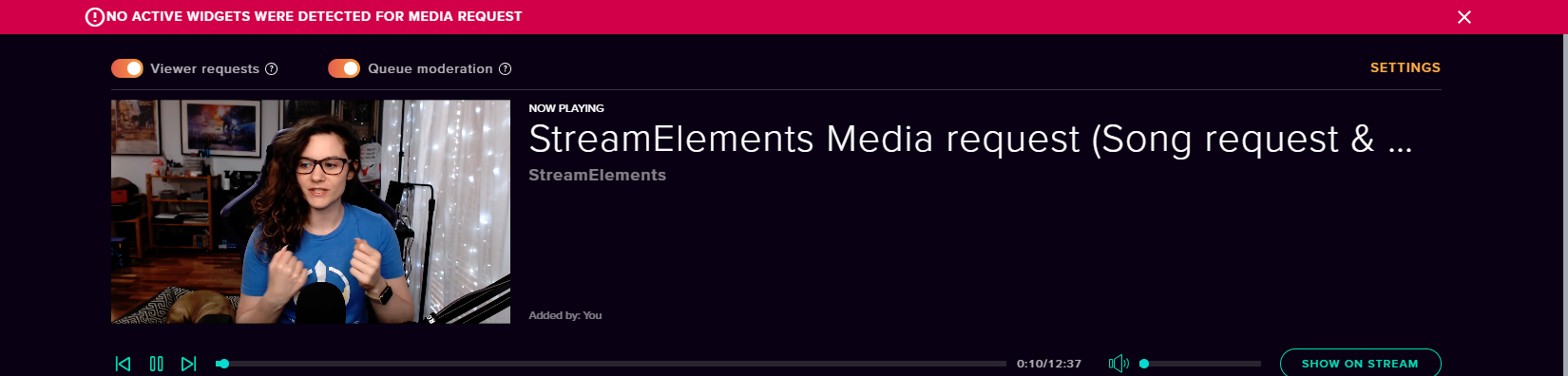
@leaden bramble Please connect your Twitch and/or YouTube channel with Discord by going to ⚙ Settings and then Connections here in Discord. https://streamable.com/eg92w


 weary mist
@leaden bramble once you connect your account, I will be able to look into it and see what I can find out
 pseudo tapir
Is there a way to make a !hostme command where if they type it adds them to my auto host?
weary mist
 first I have heard of this one. There may be a way todo that through the twitch API, but that is something that is not inherintly built in to our system
 zenith wyvern
Hi, i wanna create a command to remove points (currency of the channel) like the default command "!addpoints"
weary mist
@zenith wyvern use a negative value for the !addpoints command
!addpoints Scalper -10000
weary mist
one second, I am jumping into your chat. Go ahead and try again, so I can see it happen
lament blade
my media request wont allot me to add more songs and when i try o play on stream it says there is not widget and there is a widget there for it
and when i use the !skip command it says there is no song playing
nocturne pelicanBOT
@lament blade Please connect your Twitch and/or YouTube channel with Discord by going to ⚙ Settings and then Connections here in Discord. https://streamable.com/eg92w
lament blade
there i did it
weary mist
ty, I will check out your settings to see what I can find. give me a few minutes
lament blade
weary mist
^^ helping in chat
weary mist
are you talking about overlays, or text alerts in chat
if you want a text alert in chat, just go to modules and turn on the chat alerts. If you want overlays, pick a theme, add it toyour collection, then add the browser source to your broadcasting software
 young heron
how long will it take
weary mist
less time than you spent here asking how long it will take 
young heron
lol
lament blade
no dice on that scalper
i refreshed both of them
Hey guys, I have a question. Is there any way I can get the code for StreamElements on mobile. I want to stream some games and the only thing I have is Streamlabs which keeps crashing every 15 minutes
 upper steeple
Is there any reason that you guys have tts by default to not say repeating letters? Shouldn't there be an option to let it say the repeating letters or not?
I've had to explain to many people why their text to speech "Reeeeee" only says Re or their "@@@@@" only says "at" instead of sounding funny or like a machine gun.
And yes I have "Enable TTS anti spam" turned off in tipping settings. This question is mainly for cheers.
nocturne pelicanBOT
@lament blade The StreamElements Mobile IRL streaming app is currently in closed beta.
If you'd like to assist with testing when public beta testing becomes available, please fill out this form: https://goo.gl/forms/3DaiLckKDjeMAeVt2
This does not guarantee you to receive a Code.
lament blade
OK thanks a bunch
elder sorrel
@analog shuttle No invite code. Check the post above you to sign up. Signing up does not guarantee a code.
 analog shuttle
Oh thanks alot
weary mist
@lament blade yes, its $(user) to target a user (also works with $(1)), or $(sender) to always target the sender
lament blade
ty
elder sorrel
@upper steeple That is a good question that I'm trying to figure out (sadly using a mobile phone making me slower) 😒
upper steeple
@elder sorrel its okay, the only way around it that my viewers have found is to put a space in between each repeating symbol or letter. So the TTS will say each one separately.
but someone new isn't going to know that and just wish there was an option for it
elder sorrel
Do you have Spam Filters enabled? Like Symbol Protection / Paragraph Protection?
upper steeple
nope
and "enable TTS anti-spam" under tipping settings is disabled
of course this is happening on cheers, so i don't know if the tipping settings thing has any effect on cheers
lament blade
I can edit timers in chat??
analog shuttle
What is my invite code!
nocturne pelicanBOT
@analog shuttle The StreamElements Mobile IRL streaming app is currently in closed beta.
If you'd like to assist with testing when public beta testing becomes available, please fill out this form: https://goo.gl/forms/3DaiLckKDjeMAeVt2
This does not guarantee you to receive a Code.
analog shuttle
!code@tudk
 south sluice
torpid estuary
fill out the form and then you have to wait. maybe you get lucky and are selected to participate in the closed beta.
tepid knot
When you any of you guys get done streaming Do you go to your videos to see how many views your video got
hasty rain
Is it possible to do an if statement for a command? Like for weather. If location is put it lookup that weather else use Los Angeles
tepid knot
Everyone I'm done stream I go to my videos to make sure it shows how many the video got and it always say 0 when I know I got 2 to 3 to 4 views and I think it's is affecting me from becoming affiliate
hasty rain
Past Broadcast views are not Stream views
You have to go to your dashboard > stream summary
That'll show the stats for that specific stream
tepid knot
I use my Xbox to stream and my phone fore chat some time I bradcat with my phone
hasty rain
Okay but on your PC go to your dashboard and check stream summary.
tepid knot
I don't have a pc
hasty rain
Try using your phone and request desktop mode. Using the mobile twitch apps or site is annoying to do anything.
tepid knot
Got to my twitch and click the videos section and see how many views my videos have and you will see what I mean my twitch name is johnnybugatti79
hasty rain
The videos section show views on that video. Not of the stream of that video
torpid estuary
@hasty rain yes, that is possible. like for weather:
@${customapi.http://twi.exlux.co/weather/${sender}/${{1:|'New York'}}
lament blade
Hey can anyone help me with an issue I have been having with my stream elements? I can't get TTS working for donated bits, as well as can't get host notifications to work? Any help would be greatly appreciated! (Anyone who helps me throughout the whole process and gets it working will be rewarded with a choice of : Overwatch, Destiny 2 (Although practically everyone got it for free) Dead rising 4, H1Z1 or Overcooked!)
pulsar gulch
Hello guys , any idea how i can solve this chrome problem ?
i tried .. deleting cache / cookies still the same
lament blade
Oh and for anyone willing to help me through that up there you can DM me 😃
hasty rain
@lament blade for bits do you have variations on the bit alerts
lament blade
Uhh
Not that I know of
Ill give you both a game since you both messages at the same time if you guys help me 😃
hasty rain
I would check if you still have the default variations for bit alerts
lament blade
one second ^.^