#helpdesk-twitch
1 messages · Page 363 of 1
 zenith widget
 blissful steeple
cuz i saw Yassuo/Moe has it , thats why @zenith widget
zenith widget
if you do !hi @bob then you can use ${user}
100% not from us, as we don't have a spotify widget for overlays @blissful steeple

 obtuse elk
Huge thanks @zenith widget
zenith widget
I see they use SE, but thats not from us. Most likely a 3rd party widget from somewhere else  @blissful steeple
blissful steeple
oof
zenith widget
I can say that its most likely not from SL as well, due to them removing their spotify integration recently.
blissful steeple
thank you ❤
obtuse elk
I have one last question @zenith widget .. is there a where to modify the above mentioned command so it can accommodate either 'bob' or '@tulip rover' ?
blissful steeple
i found that stream elements is better than Stream Labs , thats why i moved , you guys have more stuff to use and freedom is nice
zenith widget
@obtuse elk use ${1}
obtuse elk
Sorry, I didnt articulate well
I left out part of what Im hoping to achieve
Do you mind me still asking?
zenith widget
sure.
obtuse elk
Ok, so I hoping to get response to @ mention the viewer who is entered as an argument to the command
!hi bob >>> Hey @tulip rover
but ideally, would like a command that can handle both of the input scenarios below
#1
!hi Bob
#2
!hi @Bob
Does that make sense?
My quick test found that using ${1} wont include the @ symbol it if isnt included in the cmd
 frank dove
@zenith widget I am back, sorry. I am losing my mind :))) So my overlay contains white transparent bits - exported it smalled, transformed it to webm ... and when I upload it into stream elements the white bits look grey. Do you happen to know the reason why this happens? 😦
zenith widget
@obtuse elk Have you tried with ${user} instead of ${1}?
 lament blade
Hello so I stream on twitch an love streamelements how can I get an invite code for the mobile app?
zenith widget
@frank dove I'm sorry, what were we talking originally? Also which overlay are you exporting and how are you exporting it? From where?
 nocturne pelicanBOT
@lament blade The StreamElements Mobile IRL streaming app is currently in closed beta.
If you'd like to assist with testing when public beta testing becomes available, please fill out this form: https://goo.gl/forms/3DaiLckKDjeMAeVt2
obtuse elk
@zenith widget Yes, if I use ${user} it just displays my username (sender)
frank dove
@zenith widget I was asking about the fact that I made an animated overlay and it was too big to upload. And you suggested I make it smaller and convert it to webm. The file I work with is in After Effects and that is the destination I am exporting it from.
frank dove
My original overlay, the one that I have as jpeg looks perfect with white and transparent bits as it should. But the video itself turns them to gray because I have to export with alpha channels and stuff so that I would have it transparent...otherwise it would have a black background.
obtuse elk
@HypeKeiZar same results, ommiting the @ symbol
so the response is not mentioning the specific user
frank dove
@zenith widget I have the video uploaded on my profile if you want to take a look at it. Everything that looks grey, including the weird grey gradient on the bottom - that is supposed to be transparent, not grey. I hope I am explaining well >.<
zenith widget
@obtuse elk
I guess ${user} is suppose to remove the @ infront
so one way is to add it manually infront
let me try something
obtuse elk
I do like your OR operator though
zenith widget
Well let me try something in your chat
obtuse elk
sure
zenith widget
Can you remove the cooldown?
@frank dove Sorry, i'm not a designer or animator really, so can't help much with that
obtuse elk
the second attempt had a typo @zenith widget
 tight harness
@frank dove I'm also not a designer but can I ask what browser you're using?
obtuse elk
@HypeKeiZar really appreciate your help with this
zenith widget
Check your chat
lament blade
hi guys , i was using bebo but now u cant use it anymore , and ages ago i had dragged the streamlabs window off to the side and now its opening up away off where i cant see it and i cant get it to open on screen , i uninstalled and tried everything , but thankfully this new obs live 2.0 is workign but i have to figure it all out again , where can i find the link for my donations please where i put below my channel ? thank you so much guys
its ok , i found the donation link
 winter zenith
streamlabs? 
lament blade
but i will no doubt have some other questions , as bebo was a simplistic layout and now they not doing it anymore and now im going back to this but i wont be using streamlabs as i cant get the thing open so its obs live 2.0
im glad im back as i always wanted to use this anyway
winter zenith
Well.... StreamElements is better then Streamlabs anyway
lament blade
good thank god !
winter zenith
so.... if you have questions about StreamElements we are here
lament blade
to tell you the truth guys im a bit scared to use this again because of all the options , im not sure what to do with certain things
awwhhh thank you so much
where do i find how to put text overlays in ? like blue yeti mic $70 of $140 etc please ?
thank you
winter zenith
I think you are talking about a Tip Goal
so its a widget called "Tipping goal" in the Widget tab of the StreanElements Overlay Editor
frank dove
@tight harness Google Chrome. I used to have the same problem when uploading the video directly into OBS
I feel like it is an encoder problem or something and I can't find solutions anywhere on the internet 😦
tight harness
Ah, I was just asking because browsers other than Chrome have had issues in the past, but if you're using Chrome it's not that
frank dove
oof 😦
lament blade
guys i have a problem , im new to using this again and when i go to go liove its saying failed to connect to server hostname found but no data of the requested type this can occur if you have bound to an ipv6 address and your streaming service only has ipv4 addresses use settings advanced , but i dont know what to clik on once i get there for server stuffnetwork
winter zenith
you are talking about.... OBS right?
like thats a issue OBS gives ou when you try to go live?
winter zenith
do you know how to stream with obs? Like inputing yur stream key? Bitrates and stuff?
lament blade
i did for a little while but i bene using bebo for ages
what do i set the network bind to ip to ? as ive tried all of them but its still not working , its probabl;y the stream key right ? as i changed it ages ago and now im using this again
ok ive put the up to date stream key in now
hopefully this works
ill set bind to ip to default you think ?
zenith widget
https://www.youtube.com/watch?v=BtZazqLgBjw @lament blade
Here is a guide for OBS 😃
lament blade
yeah thanks but thats 2 years old that guide , and im not using streamlabs im using obs , how do i set up on screen alerts for bits , subscribers and donations please guys ? as this is really frustrating me how to find it , p.s i cannot use streamolabs for anythign , the window was dragged off to the side and now i cant get it back ,
winter zenith
Well... You got a welcome message in this channel
zenith widget
You asked how to setup some IP connection in OBS. I gave you the optimal guide for OBS setup.
The guide still holds solid so far.
 narrow coyote
That video is for OBS Studio, not SLOBS. If you want alerts on stream you need to either pick a theme or make your own overlay and include the alert widget
zenith widget
Here are guides for our tools and features: https://www.youtube.com/playlist?list=PLCDDKlFdScbEwdx5AntcQIS1InkFJwHtv
narrow coyote
We have plenty of guides here https://www.obs.live
 upper steeple
so is the sound effects being played over one another still in the list of things to fix?
winter zenith
@upper steeple I don't know what you are talking about but if someone said yes to it. Then it's probably still in the list yes
upper steeple
this was a long time ago lol
its just that sometimes the sound effects overlap each other if they are set off too close together instead of one going off then the other after it
winter zenith
We are talking about the store Redemption I would assume?
lament blade
Where should I get the early access mobile code?
nocturne pelicanBOT
@lament blade The StreamElements Mobile IRL streaming app is currently in closed beta.
If you'd like to assist with testing when public beta testing becomes available, please fill out this form: https://goo.gl/forms/3DaiLckKDjeMAeVt2
upper steeple
@winter zenith yes
winter zenith
@upper steeple well since it's a really minor issue and you said yourself it's "sometimes" it's probably far down of the list so it will Probably take even more time
I would just do a work around it like either making the store Redemption duration as long as your loungest sound effect, or add a little sillent pause Infront of every sound effect if it really bothers you that much
upper steeple
@winter zenith it picks and chooses when it wants to do it lol, but yeah i understand
winter zenith
Yeah try the work around solutions I offered you 
upper steeple
that is a lot of work for all my sound effects lol
but i just ask my viewers to take a break from the sfx for a little to let it calm down
winter zenith
@upper steeple I mean... Changing the duration of the store Redemption Widget is like... 3-5 clicks?
upper steeple
for almost 20 sound effects T_T
winter zenith
I am not sure it it would work I would at least try it you Know?
Honey it's just the alert widget in the overlay Editor
Not every singe sound effect
I would try that first! If it doesn't work well... Either tell your viewers to calm down or add a pause to the sound effects
But if it works it was only 5 clicks 
 crisp cargo
hi there, how can I set up a command to show the people their currency in the chanel?
I used to have one in chatbot from streamlabs but now I don't know where can I put it, because in loyalty I can't see any way to do it
crisp cargo
and is not any chance to set up with the name of my "coins"
winter zenith
@crisp cargo go to the default commands in the "Commands" tab on the left. Search for "!Points" and edit it by clicking the Pencil icon on the right.
Ther you can set n "Alias" if you expand the settings and scroll down.
dont forgett to press "Enter" and "Save" after you typed your aliases in (you can have more then one for them just be carefull to not use words that also trigger diffrent commands because then they block each other)
crisp cargo
perfecto! thanks so much
lament blade
Hi . With obs stream elements . Do the tips we get automatically go into our paypals or do we need to click on something first to cash out ? Thanks guys
 cedar fulcrum
When you setup the Tipping page the Tips will go into your Paypal, nothing to do with the OBS
lament blade
Thank you attack hunter . As on bebo u had to click on cash out
winter zenith
only need todo that if you use the g2A service of the tipping page
winter zenith
it fine dont worry about it ^^
lament blade
Someone else said paypal dons go straight through but if they tip by credit card then u gotta cash out . But i dont yet know how to cash out Lol sorry
winter zenith
Paypal is direct
no matter what
G2A is a different service we offer in our Tipping settings (mostly popular in Europe) for more and diffrent tipping options beside Paypal
since G2A Pay handles everything on there site (like paypal too) every donation done through the G2A donation's are deposited on your account there and need to be withdrawn
but again I just told you about it so you arent surprised because you are new here.
If you dont enable it: Dont worry about it.
lament blade
Thank you . Ive much to learn as im a young obs streamelements padawn
winter zenith
you will get the hang of it
lament blade
I hope so as its making me feel shit . Also i dont know how to make text overlays like follower goals etc . Im sorry
winter zenith
did you watch our tutorials?
we have all kind of tutorials there to walk you through the site
lament blade
HI! can I edit commands from the chat directly?
nocturne pelicanBOT
You can make changes to custom commands in chat with!command add/remove/edit/options/show Valid flags for !cmd options are: -cd (number) -usercd (number) -cost (number) -level (number) -type (say, whisper or reply) -count (number). --- Example: !cmd options twitter -usercd 60 -type reply -level 250
 torpid estuary
!cmd add TEST options -cost 0 -type say TEST123
lament blade
how can I add a moderator to edit it?
 vital wyvern
^
upper steeple
@winter zenith I'm looking at the alert widget in the overlay editor and i don't see a cooldown thing or am I missing somethin?
nocturne pelicanBOT
@lament blade To invite managers to your dashboard, Click on your Channel Name at the top of the dashboard and scroll down to Settings. Click the drop down arrow to expand your channel managers and then create a new invite at one of three access levels (Bot Supervisor, Editor, Full Control) Check this video out for more help: https://youtu.be/zl_h-ttZDF0
lament blade
doesnt seem to add the command
:/
tried !cmd add TEST options -cost 0 -type say TEST123
vital wyvern
have you add the StreamElements bot to your chat? 😃
torpid estuary
vital wyvern
^
torpid estuary
just tested it in my channel
this works. if it doesnt you are not logged in with an account that is modded/the streamer
vital wyvern
can confirm it also, it works fine from my end too
torpid estuary
if it doesnt it might be your bot needs to be parted and rejoined. but he reacts to all other commands normally?
 half falcon
Hello
lament blade
I cannot do "!cmd add TEST options -cost 0 -type say TEST123" and Im streaming now
torpid estuary
@lament blade i saw in your chat. it might either be interference from another bot or you would need to part and rejoin your SE bot!
vital wyvern
@lament blade looking at the chat now, do !test
lament blade
not working
narrow coyote

lament blade
what permission is it to give a moderator to give the edit/add mode for commands
narrow coyote
!levels
nocturne pelicanBOT
Chat/Bot Levels
100 - viewer
250 - subscriber
300 - __regular __
500 - moderator (twitch mods automatically placed at this level)
1000 - super moderator
1500 - broadcaster
Dashboard Manager Levels (least to most access)
Bot Supervisor (can add super moderators from dashboard)
Editor
Full Access
https://i.imgur.com/s61Liry.png
 narrow coyote
anything bot supervisor and above and edit commands
 slender yew
Hello guys I’m low on money has anyone got a decent but cheap setup
that I can like try out because my stream is lacking and I haven’t got a setup and my parents don’t get me money so but of a struggle trying to earn it myself
narrow coyote
This channel is for support with our services, you can ask about stuff like a setup recommendation in #general-chat
winter zenith
@upper steeple you can set a "duration" time I think
And set it as long as your longest sound effect
Not sure if it would effect it. I would just test it?
upper steeple
@winter zenith isn't duration for the amount of time the alert shows on stream?
winter zenith
@upper steeple yes so if the duration is like 10 seconds it would show the picture and the sound file for AT LEAST 10 seconds befor quing the next alert in the list
so in theory a overlaping shouldnt appear anymore
it wil also not repeat itself
//I N T H E O R Y//
upper steeple
oh i see, i'll fiddle with it
winter zenith
let me know if it worked
@upper steeple
 compact tapir
So I know this might be a long shot but I'm looking for font to match or be similar to Sonic the Hedgehog. The fonts names are Andes and Gaslight but neither are available in the options. Can anyone suggest a font that's similar?
winter zenith
@compact tapir go to the Google fonts site and look there
We nearly support all 800 fonts from them
Surely there must be one that looks similar and is usable
compact tapir
Ah ok @winter zenith ! I didn't know where the list of fonts was and going through each individual one in the Overlay editor was gonna make crazy. 😂
Thank you!
winter zenith
No worries 
 vague roost
Hi, I just signed up for SE Pay, I was wondering how I would put a link for that on my twitch so people can use it, instead of paypal?
vague roost
so that is the link I would replace on my twitch?
 serene granite
yes, but you already have it
vague roost
or rather the link I would use, to replace my paypal link
I mean I have a donations button on my twitch, which I want it to bring here
instead of bring people to paypal
serene granite
yup, you already have it set to https://streamelements.com/sikvicious/tip
your viewers can now choose whether to tip you with paypal, or with a credit card
vague roost
oh, it did it automatically LOL
serene granite
😃
 weary mist
its automagical
vague roost
what a bootiful thing
so I asked a whole bunch for no reason! sorry to waste you guys time hahahaa
 wanton jetty
Has SE.Pay been rolled out to everyone yet or naw ? I asked earlier but missed responses 😃
vague roost
what you mean everyone? you just add it on your SE
 bright creek
What my early assess code for the streamelements app?
winter zenith
@wanton jetty not to everyone no
wanton jetty
It was a regional release 😛
bright creek
Where
vague roost
ohhhh
nocturne pelicanBOT
@bright creek The StreamElements Mobile IRL streaming app is currently in closed beta.
If you'd like to assist with testing when public beta testing becomes available, please fill out this form: https://goo.gl/forms/3DaiLckKDjeMAeVt2
 turbid helm
Hello i'm setting up a hype boss. Is there a way to change the image and name of the boss?
narrow coyote
Once its defeated, whoever killed it becomes the new boss, and will use their avatar
an option to change the image is planned
turbid helm
"who killed it" is this the person that deals the most damage or the final blow?
narrow coyote
final blow
turbid helm
thanks
and how long can we expect the image/ name change to take until it's implemented?
narrow coyote
No ETA on that sadly
turbid helm
thanks. Have a good day
narrow coyote
lament blade
How can one obtain an invite code for the mobile app?
nocturne pelicanBOT
@lament blade The StreamElements Mobile IRL streaming app is currently in closed beta.
If you'd like to assist with testing when public beta testing becomes available, please fill out this form: https://goo.gl/forms/3DaiLckKDjeMAeVt2
lament blade
Oh so that's all it does? Damn. Thought it had a remote for obslive too. Nm then.
narrow coyote
The description and images on the play store show it's a streaming app 
 burnt sky
How long does it take before the application is looked at 😃 ?
weary mist
That depends on a few things:
- How many active testers we currently have, and how many we need
- how many other people are in front of you
 cursive ivy
quick question: is there a way to test a sub alert but with a custom message? im only seeing custom months
burnt sky
Sure 😃 i understand 😃 just wanted to know 😃 ill just use something else until 😃
vague roost
anyone experiencing tab being unresponsive when editing layouts?
weary mist
@cursive ivy not with a custom message, no. It does pop a message on most of the emulations for subs and tips
cursive ivy
hm.. okay
another quick question: is there a way to have two different tts voices?
for example, have a korean one read the korean only and an english one read the english
weary mist
yes, you can set the voice in the variations
ahh, no, I don't think that is something we have set up
turbid helm
How can you preview the various kill animations for the hype boss?
weary mist
That looks like StreamLabs, not StreamElements
torpid estuary

turbid helm
Oh i thought it was the same thing
vague roost
stream elements loading overlay editor veeeery slowly or not at all
weary mist
@vague roost im not sure how much of a difference this could make, but try going into your settings of your browser, and disabling hardware acceleration
That used to cause a lot of issues in the past
vague roost
even though my hardware is very good?
weary mist
yeah
 rigid rock
nocturne pelicanBOT
rigid rock
nocturne pelicanBOT
@rigid rock The StreamElements Mobile IRL streaming app is currently in closed beta.
If you'd like to assist with testing when public beta testing becomes available, please fill out this form: https://goo.gl/forms/3DaiLckKDjeMAeVt2
vague roost
@weary mist no dice :/
weary mist
I haven't been able to test if I'm getting lag and such, as I'm mobile, maybe one of the other support peeps can
narrow coyote
Overlay editor is loading overlays fine for me, even some heavier premade theme overlays 
 soft apex
Кто рускиц
narrow coyote
F12 > Console might give more insight into your loading issues
lament blade
hi guys , im new to obs and streamelements ok , im stuck on something , how do i get the scene overlays i want from streamelements over to obs ? please ,
nocturne pelicanBOT
@lament blade To add your overlays to OBS, add a new browser source in your scene. Paste your overlay URL in the browser source properties, set the dimensions to 1920x1080 (unless you changed them on the website), and :ballot_box_with_check: “Shutdown source when not visible” https://youtu.be/KDvLynUqXI4
 minor socket
When starting a 'contest', is there any way to auto-tweet that out as well with a link to the stream? Or any type of twitter integration around contests in general?
 radiant gulch
Invitation code for mobile app
nocturne pelicanBOT
@radiant gulch The StreamElements Mobile IRL streaming app is currently in closed beta.
If you'd like to assist with testing when public beta testing becomes available, please fill out this form: https://goo.gl/forms/3DaiLckKDjeMAeVt2
weary mist
@minor socket no, the Twitter Integration is limited to going live auto tweets, and sharing your tweets in chat
 empty plume
hey guys i'm new to twitch and streamelements! I'm setting up my sound notifications for follower, tip, and subscriber events, and for some reason the subscriber alert will not budge from the original sound clip. I've tried a bunch of other different ones, and got the sound clip I wanted to use for subscribers working for other alerts. For some reason the subscriber alert seems "stuck." anyone else have this problem?
narrow coyote
Subs and cheer alerts have variations by default, check the variations as that is most likely being triggered
minor socket
Thank you @weary mist
empty plume
Thanks @narrow coyote hype it worked 😃
narrow coyote
lament blade
thank god i sussed obs out now , ill be using for first time tomorrow , was using bebo but not they have abandoned streamers to conbcentrate on tournaments
but i realize obs is totally superior
 normal relic
How does it live screen to twitch?
narrow coyote
What do you mean?
 minor depot
hii if i emport form streamlabs is it incloding the link
narrow coyote
what do you mean exactly, what link?
 spiral sleet
Hi all, I'm running the media requests from Firefox, and it will skip over requests, or display one in the over, but still show the previous song in my browser. Is this a known issue?
narrow coyote
Firefox has been known to be a bit wonky with Media Request at times, it is recommended to use Chrome
spiral sleet
ah ha! OK, I'll try that next time. Thanks 😃 
 copper valve
Can I get the invite code for the Streamelements app? Do I have to provide any details about myself for the invite
nocturne pelicanBOT
@copper valve The StreamElements Mobile IRL streaming app is currently in closed beta.
If you'd like to assist with testing when public beta testing becomes available, please fill out this form: https://goo.gl/forms/3DaiLckKDjeMAeVt2
 reef quarry
how to get invite code
narrow coyote
Look at the comment above yours
 copper bobcat
Is it possible to make a store item one worded commands? Instead of !redeem failhorn, have it just be !failhorn
narrow coyote
use the ${redeem} variable in a custom command
lament blade
How can we enable the new SEPay thing? Clicking the activate button tries to go to https://streamelements.com/dashboard/se-pay which just loops back to the Dashboard homepage and it's not under Tipping settings either 

StreamElements
The Ultimate All in One Platform for Streamers
weary mist
@lament blade Try going to Tipping Settings, then there is an "connect" button
lament blade
Already looked, there isn't https://cosi.page.link/qQqn
 narrow coyote
Are you located in the US?
lament blade
Yep
 opaque path
So... if I have a video element set up for a follower alert, works fine. If I enable custom CSS, stops working and goes to the default image, per what's in the HTML. Fine. But if I replace that with <video> tags for the .webm of the video element I want to use instead, it doesn't display. I'm assuming I am being thwarted either by something simple and obvious, or by web security settings, but I'm not sure which is likely.
weary mist
use {{video}} instead of <video>, as the <> are HTML tags, and are pulled out
opaque path
Actually, interestingly, if I strip the URL for the webm from https to http, I can -hear- it, but not see it.
Oh, god bless. OK. I figured it was something that basic.
weary mist
Don't trust me 100%, but it should help
opaque path
That is exactly what I was looking for, thanks
Hm. I'm still hearing it but not seeing it.
 tall sequoia
Hello, does anyone know who to fix Tip donation alerts? My overlay has it but donations aren’t being alerted.
narrow coyote
Do you see the donations in the activity feed?
narrow coyote
Then it sounds like it did not come from the StreamElements tipping page
What does the transaction memo say on PayPal
@opaque path I would recommend posting in #dev-chat that is where the code gurus hang out
opaque path
Gotcha, thanks.
tall sequoia
My paypal email is linked to stream elements
And my donation button was made by streamelements too
narrow coyote
What does the memo say on the transaction in PayPal
nocturne pelicanBOT
@tall sequoia Please connect your Twitch and/or YouTube channel with Discord by going to ⚙ Settings and then Connections here in Discord. https://streamable.com/eg92w
 narrow coyote
If it came from our tipping page, the memo will say "Tip - Thanks for tipping!"
narrow coyote
does your activity feed have anything in pending?
tall sequoia
Negative. Feed shows no donations. I received an email from PayPal saying “user” is tipping
Linked my Twitch to discord !
narrow coyote
We are looking into it
tall sequoia
Thank you!
weary mist
@tall sequoia I just did a test tip. It appears that you are using an unverified Paypal account. Because of this, you have to go into paypal and accept any tips. I highly recommend you go through the verification steps
narrow coyote
Why not just verify the PayPal account
weary mist
he might just be talking about my tip, lol. But once you hit accept, it should trigger the alerts and such. Once you verify, this won't be a problem
narrow coyote
ah, 
 undone rivet
I guess that's a question quite often asked. I just implemented the StreamElements Leaderboard as a Panel on my Twitch page... The "subs" category is showing "1" for everyone after 1 stream now - is it possible to get the panel to use the actual numbers of months subbed? i have some people being subs for 10-12 months already ? 🤔
 late heron
can someone send me the OBS discord again , its happening agian random dc and i want it fixed ASAP...
nocturne pelicanBOT
@late heron For the best OBS support, please join their discord where OBS devs and support volunteers are available all the time discord.gg/obsproject
tall sequoia
It was the unverified email, making you tip refund now! Thank you for the support guys!
 oblique pilot
Hi guys, i have a question.. if i use a video as my alerts and the video has a green Background .. (like a green screen).. would it make it transparent?? the background?
late heron
Obs said they did not change anything Network wise in quite some time did StreamElements do anything Network wise that might inpact OBS stability? as my lines were all tested and going stable
narrow coyote
We are not StreamLabs, and nothing from our services would cause OBS to drop your connection
late heron
corrected
weary mist
We only added things to OBS, we would have no reason to mess with the network stuffs. What about a speedtest, what does that show?>
late heron
i did a few speedtests and they all show 0 problem no jitter low latency
normal speeds
weary mist
What is your upload speed, and what is your bitrate?
narrow coyote
6k for 720/ 60 is complete overkill
oblique pilot
Hi guys, i have a question.. if i use a video as my alerts and the video has a green Background .. (like a green screen).. would it make it transparent?? the background?
narrow coyote
if you chroma key out that color it might
late heron
@narrow coyote so what do you reckon would be good for 720p 60fps
narrow coyote
4500 on the high end
If you have not, you might need to run some actual tests against the Twitch server you are using, as a speed test wont help much if there is an actual issue between your system and the Twitch server
oblique pilot
@narrow coyote Thank you.. ill try it!
narrow coyote
weary mist
@late heron kite has a good point. I occationaly have to switch my twitch server to a different one when I am having bitrate issues (though, most of the time its my internet xD)
 wraith zinc
have obs for ps4??
wraith zinc
oh ok
narrow coyote
Dont advertise your stream here again
undone rivet
Hey - bumping -
Is it possible to make the "StreamElements-Leaderboards-Plugin" show the actual sub-months? I have some people being subs for over 12 months but just started using StreamElements and the leaderboard is only showing 1 month for everyone..
weary mist
@undone rivet It should update once they resub in the next month
undone rivet
Perfect. 👌
Annnddd .. i guess it's not possible to get the "top gifter" list to show the actual numbers as well?
weary mist
that might also be along the same lines
when they gift another, it should update (because twitch includes that info when they gift)
lament blade
how to reset tip goal down to 0$?
Hello everyone !
I have several Twitch channels that are permanently connected to my chat (no matter if I'm streaming or not). I think they are bots since they never talk on the chat, but the problem is that the ranking of those who watch my streams the most is distorted.
I tried to reset the leaderboard and add them to the "ignored users" in loyalty settings, but it only works for the points and not for !top online (users who most watch my streams) as you can see in the screenshot.
https://valentinbraem.s-ul.eu/WF0bV3VV
Could someone help me solve this problem?
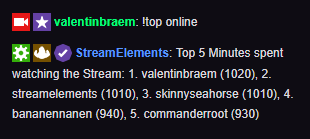
commanderroot is a bot
Yes for this account, I was sure, because I saw it at many other streamers.
yeah i see that account for many streamers too
your not alone
but liek
is any se staff gonss repsond?
weary mist
@lament blade 1. we mostly work when we can, this is a volunteer job providing support. you asked 6 minutes ago.
2. You can reset it either by going to your activity feed, then widget data, then the goals tab, or from the overlay editor, click data in the top left, then go to the goals tab
lament blade
im sorry
undone rivet
Wow.. i have them as well... "skinnyseahorse" "bananennanen" and "commanderroot".. wonder where they come from and why they re in the chat.. 🤔
weary mist
@lament blade I am not sure on how to change that information, did you reset their points in the All-time leaderboard?
lament blade
@weary mist Yes, I reset in "current" and "all time" section.
weary mist
that is as far as I know, I am not sure if there is a way to change the time easily at this point. There might be a way via API, but im not that smert
lament blade
Ouch.... It would be a shame if we can't fix this easily, because all streamers that are in the same situation as me with these bots couldn't take advantage of this command.
 limber vessel
Is Se pay not showing up for anyone else after accepting
Not showing under revenue tab
 glass garnet
There is any way to make automatic commercials on elements? Like moobot has for example.
lament blade
does the loyalty points have a backup?
if points gets reseted
and can a Editor reset the loyalty points?
tight harness
@lament blade We don't provide a backup but it's possible to make one using this: https://github.com/Slikrick/streamelements-csv - and judging by the list of access for each dashboard access rank every rank has access to the leaderboard page which has a reset button
@glass garnet I believe if you make the bot an editor of your Twitch channel in your Twitch settings and then make a timer which runs the command it should work
 fossil kindle
Hello! Anyone available for a question?
tight harness
Ask away
fossil kindle
Awesome! thank you!
Okay so after I updated to OBS.live My follow alerts wont go off on my live stream...and it's just my follow alerts everything else pops up
They also do not show up in my activity feed on ground control or OBS.live
tight harness
That means we weren't getting them from Twitch in the first place, I just reconnected your account to the Twitch webhook, let us know if that does it
fossil kindle
Okay thank you!
I'm going live soon so I'll report back once I get sone one to test it
 pastel anvil
How do I use a link as a scene for an overlay? Like I created an overlay, but am not sure how to set the overlay using the link
tight harness
Hey, you can follow this tutorial video: https://www.youtube.com/watch?v=KDvLynUqXI4
pastel anvil
Thanks so much! ❤
tight harness
No problem 😄 
 gray laurel
hi, i just want to know: is possible make long-running giveaways? I mean about 2 weeks long? Thank you in advance
weary mist
yes, you can run them all year if you want. I ran one for 6 weeks because I forgot about it xD
gray laurel
lmao xD so the giveaway is finished when i click: close giveaway?
weary mist
yes
gray laurel
ty @weary mist ❤
 magic blade
How to get invite code
nocturne pelicanBOT
@magic blade The StreamElements Mobile IRL streaming app is currently in closed beta.
If you'd like to assist with testing when public beta testing becomes available, please fill out this form: https://goo.gl/forms/3DaiLckKDjeMAeVt2
 rain axle
Hi, I'm streaming and my game is lagging while trying to stream. Was hoping to get some assistance if possible
 mint moat
why are all my videos from my media request playlist n ot av ailable
 dusk badger
Hello, I have two questions. One: how do I reset the sub goal? it just combined all the subs I got for the past few days. I want to have an everyday sub goal but it just counts all the subs I get ;-; Two: how do I use my streamlabs bot? and import the commands to streamelement?
also I have this chat problem. every time people talk, it says " more messages below" it's so annoying. i have to click on it to see the chat and it doesn't even work properly. i have to go to my twitch page to check the chat.. How do I fix this problem?
 bitter grotto
hey I'm streaming at the moment and when people follow me the notification doesn't pop up in chat anymore and i have chat alerts enabled
lament blade
what OBS are u using?
bitter grotto
streamlabs
lament blade
ok
Do u have your alert box on top of everything else?
It has to be on top of your display capture if you want it to appear
@bitter grotto
 formal cliff
Hey, I'm also having some issues with activities
Things aren't showing up in the activity feed, and what is there is incomplete
muxy is capturing them though
I've tried disconnecting from twitch and re-adding, as well as parting and re-adding the bot
 dense jackal
@dusk badger If you want an everyday subgoal you can use the "sub count" widget and it will display your sub number by session week or month. if you want it to be a goal you can simply add "/10" or however many per stream. To import from the streamlabs chatbot you need to get the excel files, to get those open the chatbot and click the person in the bottom left corner, then click Cloud ----> Create excel files. They can be imported here https://streamelements.com/dashboard/account/import
@formal cliff @bitter grotto I've refreshed your follow webhooks and followed you both let me know if the notifications showed up
formal cliff
Yeah, just saw it. Thanks a bunch
dense jackal

dense jackal
@dusk badger does this chat issue only happen with obs.live open?
 signal sky
Noob question, I don't get notifications when someone follows or anything.... my stream notifies but my mic picks up if i enable sound so i hear it
dusk badger
@dense jackal yeah :(
dense jackal
I'm confused on your question @signal sky can you elaborate?
@dusk badger I'm in your channel right now
can your turn on OBS to test for me?
signal sky
Basically, if someone follows me, my alert box sound goes off in my stream but doesn't personally notify me in dashboard
 pine hemlock
Follow events show in your activity feed.
Not sure what dashboard you're referring to
signal sky
Streamelements.
dense jackal
@dusk badger OH are you referring to the chat in OBS not scrolling automatically?
dusk badger
yeah ._.
dense jackal
My bad I misunderstood I thought your account was spamming for some reason, this is really uncommon bug we've seen and we are currently working on a fix!
dense jackal
May I ask what is your version of OBS? top left?
dusk badger
22.0.2 i just updated today
dense jackal
Gotchya and StreamElements is 18.10.17.237 in bottom right?
dusk badger
yup
dense jackal
Yep this is just a bug atm, we are working on a fix as we speak. Sorry for the inconvenience. You can always remove the chat for the time being by clicking streamelements at the top and clicking chat. You can try completely uninstalling and reinstalling as it's working fine on mine currently.
limber vessel
Hey everyone I have a question that might be easy. Is there a way to trigger a video with a hot key
For instance when I miss a shot in rocket league
Which never happens
dense jackal
That would be done through OBS
dense jackal
and 
limber vessel
😎👍
 dusk badger
okie maybe i'll try to reinstall. thank you for the help!
dense jackal
Did your other issues get solved as well @dusk badger ?
 dense jackal

limber vessel
Just FYI for anyone who was interested it looks like I make a new scene in OBS and attach the browser overlay with the video I want to play at the time I hypothetically miss the shot and set a hot key to switch to that scene
💚
And a hot key to switch back I guess
 dry flame
Hey i got a question about the song request functionality. I have a big backup playlist of almost 5k videos, but everytime i boot the media request window it queues up the same 5 videos from that list. Sure, i can reopen the page to go to the next 5, but a few weeks down the line i find myself reopening the media request page 100 page to end up at new music. Is there any more efficient way to tackle this? (and i dont mean load in a new playlist)
zenith widget
There is already a posted idea about shuffling the backup list in the Ideas board, and unfortunately, no there is no other way. I'd suggest to have several smaller backup playlists and change them around once in a while
dry flame
alright, good to know. I worried i was overlooking something obvious again xD Thanks ❤
Also, is it possible to ban videos from the history list, or is that upcoming?
zenith widget
@dry flame You will need the yt link and add it here:
dry flame
so no clickway like there is from queue? alright
zenith widget
Afaik, no.
dry flame
i usually just re-add it to queue to then ban it from there and then remove it again, was wondering if there was a quick way
alright cheers 😃
 dense reef
guys, can i give moder ability to !bonus loyalty points to other viewers
zenith widget
Yes. You can set the moderator as super mod or change the command from Super Mod level to Mod level in the command settings.
Here is where you add them as a super mod: https://streamelements.com/dashboard/bot/users/moderators
The command name is !addpoints originally and bonus is just an alias and is located in the defualts command list:
edit the marked field
zenith widget
just ask and someone will answer 😃
 exotic egret
so I normally use streamlabs obs
and everything there is integrated and works perfect and is simple to use
theres a layout on stream elements I really like but I cant seem to get it to work all around with streamlabs
like the tips and followers, etc notifications are synced
arent*
zenith widget
If you get tipped using SL tipping link, we can't see that.
exotic egret
but i dont understand, its on the layout.. how do i get them to actually work?
zenith widget
But everything else like follows/subs/cheers we should be able to.
exotic egret
like this layout has a recent tip and top tip widget
exotic egret
how do i get those to work?
zenith widget
If you want our overlay to show top tipper and who tipped you in real time, you will have to add a our tipping link.
exotic egret
how do i do that?
and also
the layout has its own alert box but i cant seem to find ANY way to get it to actually work whenever i test follows or subs on SL
i have to use my own alert box from SL
zenith widget
Like I said, we are different companies with our own platforms. If you want to test alerts like followers and see them via our Overlay, you will have to go to the overlay editor and use the bell icon on the bottom right.
https://streamelements.com/hifox/tip - this is your tipping link with us, but you haven't setup your account to have it enabled
So you grab this link and place(or replace) it in your panels on your channel.
exotic egret
ok i totally understand about tipping now
im stupid
lol
just didnt really put two and two togethe
r
but
im still confused about the alert box
and im testing it just like you just told me and its not working still
zenith widget
Just to make sure, where are you testing it?
@young wagon Please don't link your overlay like so.
 young wagon
Alright.
zenith widget
It contains some info on the link that is connected to your account id
Sorry I had to delete it, but its best to protect your account.
young wagon
Thanks in that case 👍
zenith widget
Can you ask again, but this time without the link? 😃
 calm wadi
So I changed my twitch name, can I still get the points I had?
exotic egret
but what do i have to do to get it to work while im just regularly streaming thru SL and someone follows me or subs to me?
zenith widget
@exotic egret Then the next step is to make sure the overlay is added to SLOBS with 1920x1080 dimensions
young wagon
So I have that overlay setup purely because its the only donation tracker I can find that works with Extra Life donations, but when I import it into OBS and Streamlabs OBS (I've tried both) as browser source, it doesnt display
zenith widget
@calm wadi Are you the streamer or you a viewer of someone else that gives points?
calm wadi
A viewer
nocturne pelicanBOT
@young wagon The default resolution for StreamElements overlays (theme and custom) is 1920x1080. Please add them in OBS at their full resolution and use CTRL+F to fit to screen if necessary. You can then downscale your stream in OBS settings > Video if you'd like https://i.imgur.com/6bWXxjR.png
 exotic egret
yes already did all that
zenith widget
@calm wadi Your best bet is to ask the streamer or their mods to transfer your points.
young wagon
That worked! Thank you
calm wadi
How do they do that, transfer points?
exotic egret
when i test follow on SL, it doesnt show the alertbox for the overlay
thats what im trying to say
zenith widget
@calm wadi We don't directly manage points of viewers for a streamer. Contact the streamer and tell them you've changed your twitch name and to transfer your points. If they are not sure how to do so, tell them they are free to contact us about it.
@exotic egret Because SL and we have different simulated alert systems. We are not connected to their system, as they are not connected to ours. If you test via the overlay editor, their alert box won't trigger as our alert box won't trigger from their simulations
exotic egret
ok so if i get a follower while streaming
zenith widget
You should be fine.
exotic egret
and i have the alert box from sl off, will it show?
zenith widget
Yes from our alert box
calm wadi
So you can mod someone from or with stream elements
zenith widget
SL and we are both connected to Twitch's API, so we both should see the new follower/sub/cheer
but like I said, tipping is the difference
@calm wadi I don't understand what you mean.
zenith widget
No worries 
calm wadi
How do you mod someone in stream elements
zenith widget
Depends on what level you want to give them. Be defaults when you mod someone in your channel, they are automatically a mod for your bot commands that are mod level.
young wagon
Is there a way I can use TTS on extra life donation alerts? streampro did this but it is dead 😦
zenith widget
Let me check as I'm not sure my self.
young wagon
Thank you!
zenith widget
From what I can tell, there is no TTS for the extra life widget
young wagon
Righto, well props for having the only extra life donation tracker that works 😉
I'll see what else I can frankenstein together in my obs. Thanks for checking 👍
 waxen sail
Can I stream through twitch on my PS4 and use obs? I created my stream element overlays but when I tried to stream the background stayed black on obs with no stream/sound..
I could use remote play and have it shown on obs but I want to play through my tv, not my laptop.. is this even possible or do I need a capture card. I’m super noob when it comes to this so maybe I’m just doing something wrong..
nocturne pelicanBOT
Here is a guide on how to setup the most essential tools for streaming from your console, while using StreamElements tools without involving a Capture Card! It's easy to do, take 4 minutes to read and 10 to 15 minutes to setup!
Read all about it here: https://blog.streamelements.com/how-to-stream-on-console-7b620b1c46c3
 gentle imp
check that video 😃
that video is to stream without capture card but if you want overlays you have to get one
 last fossil
Hi I need this app in the playstor to reset up my elements bot
nocturne pelicanBOT
@last fossil The StreamElements Mobile IRL streaming app is currently in closed beta.
If you'd like to assist with testing when public beta testing becomes available, please fill out this form: https://goo.gl/forms/3DaiLckKDjeMAeVt2
last fossil
Thx
torpid estuary
The app is for IRL streams, not to reset your bot
 lunar owl
how do i change my paypal donation link again :/
 short steppe
I have 2 questions, I'm trying out the method in ground control to change the bot's name, but it's not appearing in ground control even after restarting 5 times. Step B about the panel setup to link back to stream elements tipping page, I enabled it in the tipping settings, but I don't have it on my profile, is that required? Because I use another tipping page from another server (because of more options. 2nd question, if you change the bot name, is there an enable/disable button if you decide to not use it anymore and go back to 'StreamElements'?
torpid estuary
@short steppe all steps must be completed to get the option. Also yes, you can choose to not activate the rename by simply not opening GC when you stream.
short steppe
well I need to open it for songrequest so that's not an option
torpid estuary
If you use OBS.live it now also has the feature for bot renaming
Im on mobile at the moment, but I am pretty sure you can disable it in GC. If not, you could also take out the info in there
short steppe
okay
so for the tipping page part, you have to put the banner on your profile? just linking it with the banner is not enough?
torpid estuary
You have to link to your tipping page via a picture in your panels on twitch. If you already did that check if it's case sensitive, so write everything lower case, for example.
short steppe
I don't understand why there has to be a banner on the profile that links to the tipping page for the bot name changing to work? because in the streamelements settings I clicked on connect, so there is a link, there is a banner, but I do not want it on my profile, why does it have to be in my profile to be able to work? what does it have to do with the name? :/ the link exists but it's just not on my profile
 oblique galleon
Anyway to chromakey alert videos yet in Stream-Elemements?
 ebon forum
@oblique galleon not yet, you have to edit them outside, just save with alpha channel enabled to have the transparency in the video alert later
winter zenith
@short steppe we only hand the rename option to people that are 100% with us. Normaly this feature cost money with other bots or is a complicated work around.
To ensure that = we scan your Pannels to see if you use our tipping. So that's why it has to be there
If you don't want a "tipping" Pannel on your twitch you could just upload a transparent png to your twitch Pannels with the tipping link.
 unkempt nova
My new followers don't pop up on streamelements anymore neither on the website or obs.live. So i get no notification whenever i get a new follower and it doesn't even show on my overlays how do i fix?
winter zenith
@unkempt nova but you are sure you got a follow? From the twitch emails for exsample?
unkempt nova
my follower count went up and i see the new followers on twitch dashboard
and i got emails aswell
zenith widget
@unkempt nova You should be fine now.
unkempt nova
thanks
lament blade
hi would like to enabler SEPAY, can anybody fix that for me 😃
lament blade
@zenith widget thank you for fast respond ^
zenith widget

last fossil
Can I have an invite code
nocturne pelicanBOT
@last fossil The StreamElements Mobile IRL streaming app is currently in closed beta.
If you'd like to assist with testing when public beta testing becomes available, please fill out this form: https://goo.gl/forms/3DaiLckKDjeMAeVt2
 frosty crown
How do I set up a bot to tell me when I get a new sub
I dont have access to OBS as I stream from a PS4
torpid estuary
@frosty crown go here https://streamelements.com/dashboard/bot/modules and enable chat alerts
if you have the bot in your channel it will then shout out the things you set up in this module
 steady jacinth
How do i login to the app? I'm on android and it asks for a code.
nocturne pelicanBOT
@steady jacinth The StreamElements Mobile IRL streaming app is currently in closed beta.
If you'd like to assist with testing when public beta testing becomes available, please fill out this form: https://goo.gl/forms/3DaiLckKDjeMAeVt2
steady jacinth
!code
nocturne pelicanBOT
The StreamElements Mobile IRL streaming app is currently in closed beta.
If you'd like to assist with testing when public beta testing becomes available, please fill out this form: https://goo.gl/forms/3DaiLckKDjeMAeVt2
steady jacinth
Thanks
undone rivet
What exactly is the difference between the "Current" and "All Time" Numbers in the StreamElements Leaderboards Panel?! And why is "all time" lower in numbers than current? 🤔
narrow coyote
undone rivet
Wait so... the All-Time-Points are points only gained by the first two categories (Viewing - every 10 minutes, subscribers - every 10 minutes)?
pine hemlock
All time is only gained by being in the stream.
undone rivet
Okay.. how can someone have "845" in my stream when my loyalty system is set to (10 points every 10 minutes for viewers and 20 every 10 minutes for subscribers) ?
Or does it not actually give Points every 10 minutes but every minute..?
zenith widget
Its every 10 minutes
nocturne pelicanBOT
@undone rivet 10 minutes of watchtime are given to those in chat when the loyalty points are handed out (every 10 minutes). Therefore, loyalty must be enabled for watchtime to work properly. There is no direct link between watchtime and all-time points. It can’t be calculated from the amount of all-time points a user has because subs may earn points at a faster rate and !bonus all command increases all-time points for users in chat at that time. Giving points to a single user does NOT affect all-time, only when giving to all in chat.
undone rivet
👌 Perfect thanks
 fallen elk
Hello everyone, I'm a little YouTube creator from Mexico and I'd like get a code for your app I'll promote in my channel, I hope your answer ^u^
nocturne pelicanBOT
@fallen elk The StreamElements Mobile IRL streaming app is currently in closed beta.
If you'd like to assist with testing when public beta testing becomes available, please fill out this form: https://goo.gl/forms/3DaiLckKDjeMAeVt2
 tribal anvil
When you receive a tip how do you cash it out and actually get the money?
narrow coyote
Depends on what you are using for your tips. PayPal, G2A, or SE.Pay
tribal anvil
I have both PayPal and G2A enables but this one came through g2a
narrow coyote
Then once the money is available in your G2A wallet, you can withdraw it from there
tribal anvil
Ok thanks, any idea how long that could take?
narrow coyote
I dont know exactly, but here is their FAQ on withdrawing from the wallet https://supporthub.g2a.com/marketplace/en/payments/how-can-i-make-a-payout
tribal anvil
Ok thanks again
narrow coyote
 foggy belfry
Anyone here to help? I'm having audio issues so my streams are now mute
 deep elm
Hi
foggy belfry
Hi
deep elm
I'm new to the stream elements app
narrow coyote
@foggy belfry This channel is for support with StreamElements services, if you have no audio that would be a problem with your broadcasting software, it would be best to get support from them
foggy belfry
Welcome!
deep elm
How do i get a invite code?
nocturne pelicanBOT
@deep elm The StreamElements Mobile IRL streaming app is currently in closed beta.
If you'd like to assist with testing when public beta testing becomes available, please fill out this form: https://goo.gl/forms/3DaiLckKDjeMAeVt2
 azure sedge
can i ask somthing ?
zenith widget
Ask away.
narrow coyote
You need to ask your question then 
azure sedge
yep
you do not have a Greek language at tts.can i put it in some way if there is no way to put it in some future update ?
narrow coyote
If you don't see it in the list of options, then its not available. It looks like it has already been requested https://streamelements.helprace.com/i227-new-tts-languages
azure sedge
ok tnx 😛
waxen sail
Ty @gentle imp I fell asleep last night but will check out the video right now, will also put it in my budget to get that capture card, I love the overlays!
 hearty mica
i want to make a weather widget !
zenith widget
@hearty mica http://monkeecreate.github.io/jquery.simpleWeather/
lament blade
Hi, everyone. I've been having a very weird issue for my last several streams. All of my alerts work EXCEPT the Host Alert. I had changed absolutely nothing, and nothing appears to have been deleted from my StreamElements profile. But neither the visual nor audio alert work now (however, it appears in chat as it's supposed to). I have tried disabling and re-enabling this alert on all of my active overlays, but nothing has worked so far. The issue began during one particular stream; someone hosted me, and the alert went off fine, but when someone else hosted me during the same stream, it didn't, and it's been broken ever since. Any ideas? My StreamElements/Twitch ID is GamerMan_X.
 elder sorrel
@lament blade Were they auto hosts or manual hosts? Auto hosts don't trigger unless it's 1+ viewer. Manually would go through even with 0 views or more.
lament blade
These were definitely manual hosts.
elder sorrel
Have you already tried parting the bot from your channel & rejoining it?
lament blade
No, I haven't. Can you give me a quick how-to on that? And will it affect my settings in any way?
elder sorrel
It won't. You can go to the SE Dashboard & see on the far right Part Bot / Join Bot.
StreamElements
The Ultimate All in One Platform for Streamers
lament blade
Okay. I'll go ahead and try that and see if it helps. I'll post back here later on if it doesn't.
elder sorrel
Sounds good.
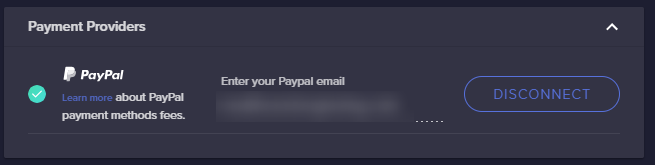
 celest viper
This new payment method. What exactly is the chargeback protection? PayPal is currently screwing me over on chargebacks so looking for a new solution.
SEPAY that is
 radiant linden
quick question i setted up the bank thing to my sepay but its been a day and i cant withdraw the money
any help?
lament blade
my emotesplosions from kappagen arent appearing again 😦 KeiZar worked with me earlier and we managed to fix it but now its not working again and hosts arent showing in my acitivity feed - definitely manual hosts 😦
 naive dirge
Hey guys  when is it the watch time command updates the time someone has watched
  i enabled loyalty settings and still no update?
 tepid horizon
evening
tight harness
@naive dirge Every 10 minutes
naive dirge
Thanks 😃 sorry i just made the move from night bot to Streamelements
tight harness
@radiant linden I believe it takes 7 days
radiant linden
ok
tight harness
@naive dirge No problem
radiant linden
thanks man
tight harness
@celest viper The way I understand it is that the payments are monitored and ones which are deemed particularly high risk of being charged back get evaluated, there could be more to it but that's what I'm currently aware of
celest viper
Ok so if charge backs occur there is not protection for that it’s just on the front they try to@litigate bad donations?
Mitigate*
tight harness
@lament blade I resubscribed your webhooks as that is how we get our data from Twitch, reload your overlay and see if that helps
@celest viper I didn't say that, I said there could be more to it but that's what I'm currently aware of. I don't know enough about the rest of it to answer fully and the internal FAQ document we've been provided on SE.Pay doesn't go into detail about it either, apologies
lament blade
ive clicked reload overlay but its still not showing :/
i dont understand why it worked but hten just stopped working 😦
tight harness
@lament blade Tried remaking the widget?
lament blade
no i did that when i was speaking with you we had it working i havent changed anything since then and now it randomly doesnt work or show in activity feed again :/ 😦
narrow coyote
You would need to get a new host to see if the resub to the webhook helped, its not going to make past events just show up
lament blade
ok but the resub to the webhook was before i went live again and it didnt show up then
thats what i mean we already did the webhook but its randomly just broken
and i havent touched anything since we had it working so im very confused 😦 just want my emotesplosions back 😢
would anyone mind hosting me to see if the reload worked 😦 channel name rumfaceplaysgames
@tight harness
just got another manual host and nothing in my activity feed even tho i refreshed overlays and such :/
tight harness
It worked perfectly fine
lament blade
yh idk why it didnt when siclaan tried to host just before you
charlie tried to at the start of this stream as well but it didnt work either so im really confused rn xDD but ty for whatever you did >_<
 brisk pebble
Is there a way to make the bot reply with a whisper to certain commands?
narrow coyote
For custom commands you can
 full jay
was it added, guys?!!
torpid estuary
Yes, it was!
full jay
maybe I don't see where it is, is it under a specific menu?
got it
I see where it is
actually, it's pretty sneaky sneaky. Haha!
narrow coyote
Pretty much everything is in the burger menu, under stream settings
full jay
I had no idea that even existed 
elder sorrel
The more you know 😎
full jay
Hah
by the way
I wanted to use some custom shadow on the alerts but I don't have the original custom code for all alerts
where can I find it?
narrow coyote
When you enable custom css on an alert, it has the basic event stuff all hooked up for that event, but it will be on you to code the rest of it
lament blade
Hey all my host notifications aint working on twitch
lament blade
Anyone have stream element app I need invite code for some reason
nocturne pelicanBOT
@lament blade The StreamElements Mobile IRL streaming app is currently in closed beta.
If you'd like to assist with testing when public beta testing becomes available, please fill out this form: https://goo.gl/forms/3DaiLckKDjeMAeVt2
 sour bridge
Hi, i need fire stream (mobile stream app) invite code, please help me
narrow coyote
see the bot response above your message
 thin spoke
how can i change the bot name? because i cant find the options
narrow coyote
In Ground Control or OBS.Live
lament blade
just had a host and the emotesplosions are gone again xD ffs xD
no activity feed either maybe hosts are just broken atm
thin spoke
i did it but it still on my name
narrow coyote
Are you using Ground Control or OBS.Live to change the bot name
thin spoke
Ground control
narrow coyote
If you don't see the rename options, then you don't meet the requirements, or you are on a Mac
!rename
nocturne pelicanBOT
Custom bot name requirements
- StreamElements bot modded and in chat
- Active overlay with alerts
- StreamElements tipping page in the panels below the stream (!panels)
- Create a twitch account for the name you want to use
- Ground Control app must be running
Steps to enable custom name
- Sign in to https://twitch.tv with the bot account
- Install and run Ground Control (!gc for download)
- Visit https://twitchapps.com/tmi/ and generate an oAUTH token
- Copy/paste everything in the box to Ground Control oAuth settings and enter the name for the bot account
- Restart Ground Control (custom name may take a few minutes to take effect)
Mac does not currently support renaming the bot.
thin spoke
i have windows, and i did this steps, and it didn't change my name. because on the instal i can choose in 3 options: bot name (streamelements, host name (my stream name), and other one that i forgot
narrow coyote
Ground Control bot rename options should expose a field you enter the OAuth for the twitch account you want to use the name of for the bot
narrow coyote
If it is still using the StreamElements name, then it could be a bad OAuth code. If you close task manger, you can look for a process, its something like bot.exe, and kill that before you restart Ground Control
thin spoke
oke i thinks i did someting wrong, now i can't write it my channel from twitch
you don't have permission to perform that action
narrow coyote
I dont really follow
thin spoke
can you call me private? i can show you
narrow coyote
Nope, I am at work
thin spoke
oke , i try to reinstal
 unique pond
streamelements timers not showing?
I have two timers set to appear after five lines but have more than 5 with no alerts.
thin spoke
i got this warning when i press on Twitch: The Channel you tried to add is linked to a different account.
on streamelement website on mu profile settings
pine hemlock
Why are you linking a second twitch account?
pine hemlock
If you follow the steps in order that the bot posts, the bot name will change.
!rename
nocturne pelicanBOT
Custom bot name requirements
- StreamElements bot modded and in chat
- Active overlay with alerts
- StreamElements tipping page in the panels below the stream (!panels)
- Create a twitch account for the name you want to use
- Ground Control app must be running
Steps to enable custom name
- Sign in to https://twitch.tv with the bot account
- Install and run Ground Control (!gc for download)
- Visit https://twitchapps.com/tmi/ and generate an oAUTH token
- Copy/paste everything in the box to Ground Control oAuth settings and enter the name for the bot account
- Restart Ground Control (custom name may take a few minutes to take effect)
Mac does not currently support renaming the bot.
pine hemlock
@unique pond Timers work but if the line requirements arent met after the 5 minute internal timer, it starts over.
thin spoke
oke but if i mod the bot it says this: StreamElements bot running elementsS. is that good? or did i something wrong?
narrow coyote
You dont need to link the bot account to the SE site anywhere, you simply need to get the OAuth for the Twitch account that has the name you want to use, and add that to Ground Control
 echo hound
Why is stream elements "total subscribers" widget showing a different number than my twitch dashboard?
thin spoke
oke
narrow coyote
If you have having this many problems with the bot rename, I would suggest trying OBS.Live as you just need to connect the bot account by clicking a button and logging in
If the bot is responding with your name, then that means you have used the OAuth from your main twitch account, not a bot account
 frail lake
How can I get an invite code?
nocturne pelicanBOT
@frail lake The StreamElements Mobile IRL streaming app is currently in closed beta.
If you'd like to assist with testing when public beta testing becomes available, please fill out this form: https://goo.gl/forms/3DaiLckKDjeMAeVt2
echo hound
Why is stream elements "total subscribers" widget showing a different number than my twitch dashboard?
narrow coyote
go here, click the reset session button, see if that corrects it https://streamelements.com/dashboard/activity
narrow coyote
how many is it off by, because we should be pulling the totals from twitch
narrow coyote
are you referring to the sub goal widget then?
https://streamelements.com/dashboard/session does the Totals tab match what Twitch shows?
echo hound
Twitch dahsboard says
40 subs, 45 sub points
I don't know what 47 could be
yeah totals on that link works fine
narrow coyote
what does the goals tab show
narrow coyote
does not matter if you set them or not, does the goals tab show 47 subs
echo hound
No
It shows a lot of high numbers
4 digit numbers everywhere
No idea where those numbers are from
narrow coyote
well, the sub totals widget pulls the data from the totals tab
narrow coyote
the goals track from the time you signup until you reset them
narrow coyote
ok cool, the reset session might have done the trick then, and the overlay just needed to be reloaded
lament blade
I need invite code to run app any help
narrow coyote
you already asked this, and received a response
 pulsar gulch
Hello ^^ how do i make that command with !game and it's gonna say what's the actual game ?
 modest carbon
 carmine prairie
Anyone know why when I get a twitch prime sub it mentions in chat that the person has subscribed with an "undefined" sub?
upper steeple
for tts is there something that keeps multiple letters from being said? I had someone cheer today and put reeeeeeee but all it said was re
and i don't remember if i set something up to stop the the individual e's from being said
pine hemlock
@carmine prairie Screenshot?
carmine prairie
Unfortunately no :( I was mid stream
But it popped up in twitch chat the same as any other sub. Only that it mentioned it was undefined
Also, my alerts haven't always been going off? Only been happening recently
narrow coyote
@upper steeple Tipping settings > Tipping moderation > TTS anti-spam
upper steeple
@narrow coyote its not enabled and this was for a cheer
narrow coyote
the tipping anti-spam is for all TTS, not just tips, that should be what controls it
@pulsar gulch the variable ${game} will resolve to the game the stream is set to
upper steeple
@narrow coyote but its not enabled T_T
narrow coyote

upper steeple
could it be cause i have "automatic tip message filtering enabled"? even though "enable tts anti spam is disabled?
pulsar gulch
@narrow coyote ty ^^
lament blade
How do I get a invite code?
narrow coyote
@upper steeple I dont think so, but I am not sure, I asked internally about this as I thought it was just the TTS anti-spam that controlled this
nocturne pelicanBOT
@lament blade The StreamElements Mobile IRL streaming app is currently in closed beta.
If you'd like to assist with testing when public beta testing becomes available, please fill out this form: https://goo.gl/forms/3DaiLckKDjeMAeVt2
upper steeple
@narrow coyote so i will disabled the "automatic tip message flitering" option and test it tomorrow
narrow coyote
sounds good, I will ping you if I get some more information on this from what I asked internally
hearty mica
is there any way to change a font to one no listed in the editor
lunar owl
how do i change the paypal that the donations go into?
narrow coyote
You change the email in your tipping settings
lunar owl
when i click on my donation panel on twitch its taking it to my old paypal account
torpid estuary
You have to edit your panels on twitch
nocturne pelicanBOT
@lunar owl Twitch's official help guide for Panels: https://help.twitch.tv/customer/portal/articles/2416760-how-to-edit-info-panels
lunar owl
yeah but i cant get the link for my new paypal account
narrow coyote
If you are using our services for tipping, you use the URL for your tipping page you get from the tipping settings
we cannot help you if you are trying to do a direct link to your PayPal
lunar owl
so if i use your services
and someone donates to me
how do i recieve the money?
is it because my paypal is linked in the tipping settings?
 atomic silo
Is there a way to get a countdown that increases if somebody donates or subs etc?
lunar owl
like a sub train u mean?
narrow coyote
If you added your PayPal email to the tipping settings, it would go to your PayPal
@atomic silo check #widget-share
atomic silo
could you tell which one am i looking for?
torpid estuary
@lunar owl and your tipping page would be https://streamelements.com/YourTwitchName/tip. You would need to add that link to your panels.
narrow coyote
lunar owl
my friend tried it and it says "at the moment we can not process the transfer" is that something on his end or mine?
narrow coyote
Could be either, especially if your account has not been verified
atomic silo
i don't know how to set the starting time with this one
hearty mica
why cant i write this weather widget thingy ?
torpid estuary
What do you mean? What isnt working @hearty mica
hearty mica
i want to add the C and sunrise and sunset to widget and it just wont go
it is currently in F i want bpth to be fair to those that us C
i been at this 7 am now almost 9 pm
torpid estuary
Have you tried this? Or is this the command you added?
Add from Chat
!cmd add !weather @${customapi.http://twi.exlux.co/weather/${sender}/${1:}}
Add from Dashboard
Command: !weather
Response: @${customapi.http://twi.exlux.co/weather/${sender}/${1:}}
hearty mica
no i am trying to write my own HTML , CSS, JS code for it
 dull monolith
Sorry, typed in wrong place earlier, but is there any way for me to be able to add the chat and activity box back in?
narrow coyote
torpid estuary
Yes @dull monolith you can add removed widgets back in. In your overlay editor click on widgets. Click on "your twitch Chat" and "alert box"
dull monolith
No, I mean on obs.live sorry I didn’t say that earlier



 narrow coyote
 wintry hound
is there a way to turn SE overlays into scene collections to import to SLOBS?
narrow coyote
The overlays are added as browser sources
narrow coyote
why, our overlays have to be used as a browser source per the terms of service, and StreamLabs is our competitor, and they are known to block our services, including the times they have blocked our overlays in their apps
pine hemlock
lol
narrow coyote
If anything, we would do something to make adding overlays easier to our plugin, OBS.Live
fossil kindle
Anyone available for a quick question?
torpid estuary
Sure! Shoot
fossil kindle
Thanks!
hearty mica
i moved my question to delvelopers-api
fossil kindle
So when I add my Sub Goal widget it keeps saying NaN/25 instead of the number I have
No clue why
narrow coyote
if you are in the overlay editor, go into the data tab, and into goals, and set a starting number in there @fossil kindle
pine hemlock
@sullen peak Its easier if you ask your question
 sullen peak
When viewer host your channel, they will not add and messages on stream
When viewer host your channel, they will not add point and messages on stream
pine hemlock
Points are given if a user hosts your stream with more than 1 viewer per stream session.
Messages do not show for autohosts of below 2(?) or hosts for 0
@narrow coyote correct me if im wrong pls ty
narrow coyote
should be below 1 for auto hosts are filtered out
fossil kindle
@narrow coyote k let me try that
sullen peak
ok thank @pine hemlock
fossil kindle
@narrow coyote It worked! Thank you so much!!
narrow coyote
narrow coyote
Maybe, would really be helpful if you said what the problem is
 dapper mural
LUL
Ok, i was in 1st place in points on AylienMimi channel on Twitch, , i went to the leaderboard about 10 minutes after the stream started and i lost like 99% of my points, i went from 1st overall to 23rd overall. I had 122 trillion points, and after stream starts, i had only 2.1b
Username : apsnotify
I have witnesses that saw me gamble just before the stream started
When roulette is turned off
StreamElements
The Ultimate All in One Platform for Streamers
Fyi, i saw it happen to another guy that was in 1st place the day before
He was pissed
Can you please help me figure this out?
 split pecan
Having an issue,
leaderboard wont show anything, already sycned with google extension, refreshed, tried again. and no dice
you can clearly see people have cheered and have points
narrow coyote
The StreamElements leaderboard will not show StreamLabs points
@dapper mural If the streamer has problems with commands and the leaderboard, it would be best for them to come for support
split pecan
ok, so wait.. if cheers and points are set up via streamlabs in the first place and thats where they are directed to, how do any make it to streamelements at all?
narrow coyote
StreamLabs is a competitor of ours. We will only show points from OUR system. We will only show cheers that happen from when you started using StreamElements, as we cannot track data until you sign up for our services
split pecan
oh so it will show up from now on,, just not from before SE. i mean, subs are twitch subs, i have them activated on SE and SL both.
oh thats odd cause the import from streamlabs option seemed to mean import data, so what did i actually import?
dapper mural
Then why do i still have some points ?
narrow coyote
it depends on what you imported, there are tons of options
dapper mural
If i wast signed up with streamelements, shouldnt i have 0 points?
split pecan
its the google crhome plug in, it didnt give options, one sec ill show you
narrow coyote
that would be tips and the alert box
narrow coyote
you would need to use one of these options for points
split pecan
ok so if i import everything from obs will it deactivate obs? or can i still use both programs evenly?
narrow coyote
OBS is broadcasting software, we dont have anything to import from that
split pecan
makes sense. thanks for your help!
narrow coyote
 sturdy sun
hi, yesterday someone hosted me but didnt get their set points they shouldve got for hosting. any idea why?
 rapid oxide
Chat timers not working after recent update to OBS live?
pine hemlock
Timers arent relative to obs live.
pine hemlock
https://i.nuuls.com/iU7HR.png @sturdy sun

 rapid oxide
I've got streamelements open, I've tried changing the times and resaving the timers
sturdy sun
@pine hemlock thanks thats probably why he only had 1 viewer
 proud stone
Why can I not see SE.Pay on my dashboard ?
narrow coyote
You either are not in the right region (US), or your channel is not large enough (below 100 followers)
proud stone
Well I'm in the US so i guess it's because I don't have 100 followers
narrow coyote
@rapid oxide Do you have chat lines set? Is the bot responding to commands?
rapid oxide
Ok, looks like it started working
Took 1 hour to do the 20 minute cycle
The bot did respond to the !play command
 tacit ridge
Is there a way to take a video out from 1 theme and put it into another theme? more specifically one of the camera boxes
narrow coyote
open the overlay in the overlay editor, select the widget, and use the duplicate widget button in the lower left by the layers
tacit ridge
@narrow coyote ... HOLY CRAP THAT WAS EASY THANK YOU!!!!
narrow coyote
rapid oxide
Yeah, @narrow coyote is awesome
narrow coyote


tacit ridge
whoa that one gif is goin fasssssst XD
is there a way to put a picture above another picture in an overlay?>
narrow coyote
you can add another picture widget, and then just make sure its higher in the layers list, there are little up and down arrows in the layers to move a layer higher or lower in the list
tacit ridge
thanks again!
narrow coyote

lament blade
Can someone help me with Media Song Requests thing Like the settings I setup for it don't SAVE? they go back to default
Please reply with LIke now since I need to sleep since its my brithday and I'm tried and itsgetting late
PLEASE 😦
😦
@strong kernel
Sorry but i need to do this now 😦
and i can't wait
dusk badger
can I add a command with sound effect?
lament blade
yes
dusk badger
how?
lament blade
oh no you can't
dusk badger
oh ._.
lament blade
only on StreamLabs not Stream Elements
dusk badger
can you bring your streamlabs commands to streamelements?
 strong kernel
@lament blade Please refrain from @ people.
@dusk badger You can use the ${redeem} variable to create sound redeems. No accompanying message though, it'll just verify the redeem.
lament blade
SOrry but I need to get this done now 😦 its my birthday and I'm tried
can you please help me 😦 read up what i said please
strong kernel
@lament blade What exactly are you trying to save?
lament blade
well the Request Media song requests don't save* when I fill the info in? and my song requests don't work in chat
strong kernel
@dusk badger To clarify, this is in conjunction with the stream store. You'd create an item, and then in a custom command, the response would be ${redeem itemname}
@lament blade What info are you filling in? Be precise.
narrow coyote
@upper steeple I have learned that the TTS system itself ignores the duplicate characters, and is not something that we have control over
dusk badger
ahh.. i don't really know about those code things.. i guess i'll just use streamlabs bot
strong kernel
@lament blade And the requests need to be enabled for the command to work
lament blade
i tick that but it goes off
strong kernel
You need to set an actual maximum. Setting it all at 0 doesn't work in this case.
dusk badger
so I set up a subscriber count but I want to set it by day, not per week or month. is it possible to set it by day? also it counts all of the subscribers even tho i set it to "new subscribers"
lament blade
confused??
strong kernel
@dusk badger The sound commands really aren't hard. In your stream store, create a sound effect item like so.
Once it's created, when making a new command, you set the command to whatever you want, and the response is literally just ${redeem item} except in place of item you put whatever you named the sound effect item.
@lament blade What are you confused about?
This doesn't work. You have to actually set a maximum duration for requests or it just won't save anything you change.