#helpdesk-twitch
1 messages · Page 344 of 1
 heady moat
 winter zenith
@pulsar gulch check your windows sound mixer options if chrome is muted there
winter zenith
@vagrant copper closed beta is started. No ETA at the moment
 pulsar gulch
I tried to reinstall chrome too same problem ..
 peak ice
@winter zenith what do you mean by 0-1 host?
 vagrant copper
OK :)
winter zenith
@heady moat you can make one now with the same. Email. Do t forget to varyfie paypal/bankccount and the merchant status with your id
@heady moat because your anti virus seems to be more easily triggered then a tumblr user 
G2a is a trusted service around many other sites
@peak ice are those 0-1 viewer hosts?
@peak ice we got complaints of people being sick that on the beginning of there streams they get a bunch of Auto host alerts with 0-1 view. So we lifted the limit on every account to only display host alerts when more views are attached to a host.
You can change that by going to the overlay Editor in your alert box - select host - put it back at 0 to show a alert
peak ice
Ok thanks for letting me know I did not know that
heady moat
Wait: if I had any money on G2A pay, I COULD withdraw it with iDeal, right? @winter zenith
winter zenith
@heady moat I have no clue what IDeal is.. 
But you have diffrent options to withdraw shown on G2A Pay
It's crucial to varify your merchant settings befor you can start withdraw money
heady moat
Ah okay ty
 misty wagon
@heady moat Als ik bij een Nederlandse streamer kijk, krijg ik IDeal te zien bij G2A Pay als donatie mogelijkheid. Ik ben onderweg maar kan later checken of je ook naar je account kunt overmaken. Ben er redelijk zeker van 😉 
 agile sandal
hi! i have an odd problem where
i can add commands on my friend's stream via twitch chat since i'm a super mod
"!commands add !___ asdsghs"
but i cannot do so through my chat
i was wondering what i could be doing wrong with SE?
i just get the default message back: @TrichaelMan, You can find a list of all Commands here https://StreamElements.com/trichaelman/commands

StreamElements
The Ultimate All in One Platform for Streamers
but nothing indicating that attempting to add the command succeeded or failed
 torpid estuary
You have to type command and not commandS
 tight harness
Was just about to say the same thing 😄
The only way you could get the !commands response is if you're typing !commands by accident
agile sandal
when i do that i don't get any response
from the bot
wait
do i ned to be only for that to work?
wait
torpid estuary
No you dont need to be online
agile sandal
so this is in my friends chat
and my chat
i'm guessing i have something odd in my SE settings?
 dense panther
nothing shows up when i put in the link for my overlay from the overlay editor tab in obs
really confused
agile sandal
@tight harness that did it
torpid estuary
So you have made an overlay and put stuff in it?
tight harness
That was it? 😄 ahh cool
tight harness

dense panther
its just black
torpid estuary
Did you change the resolution OT 1920x1080
agile sandal
yup! it works now @tight harness ❤ i appreciate the prompt response
dense panther
yes
agile sandal
also what is the difference between a normal mod and super mod?
i tried togoogle it but to no avail
tight harness
No problem 😃
They're different user levels, super mod is a higher level than mod
You can assign commands etc to a certain user level
agile sandal
asides from commands are there any other differences?
tight harness
Exempt user level for Media Request
agile sandal
oh so it's just setting levels then
hm
i guess in my case when i just want a simpler stream
there would be little to no difference between the roles?
 clear valley
Is there any way to see all the quotes?
agile sandal
OH there are different "default commands" for mod and super mod
tight harness
@agile sandal Yes that's right
@clear valley There's no UI for it currently, only through the chat
heady moat
@misty wagon heel erg bedankt alvast btw 
clear valley
Is there at least a way to figure out how many quotes you have?
agile sandal
is there a way to disable the SE bot from shouting out auto hosts? like i want them to only acknowledge manual hosts
torpid estuary
you can set a minimum amount of viewers to trigger the host alert @agile sandal
torpid estuary
other than that there is no way to discern between manual and auto hosting, no.
clear valley
Also yesterday, the streamelements overlays weren't working well. I did everything right, it just wouldn't show up
torpid estuary
i had no problems with streamelements overlays yesterday. what happened for you?
agile sandal
thanks for the info!
clear valley
It would show in my other overlay that some hosted for example but it wouldn't activate the alert box overlay
torpid estuary
what is your "other overlay"?
clear valley
the latest activity overlay
torpid estuary
if you have a minimum amount of viewers activated for hosts, the alert wont play but it will still show up in your event list for example.
clear valley
I will check if thats the case
torpid estuary
so go to your overlay editor and edit your alert box -> hosts. click on the cog and check mimimum amount.
clear valley
I had it on 1 but all these people had at least 1 viewer
torpid estuary
did other alerts play normally?
torpid estuary
the alert wouldnt play but you would have sound of an alert?
torpid estuary
i would try to copy the link to your overlay again and make a new browser source in your OBS and try out some alerts in your overlay editor
clear valley
It did work when I did that and tried out some alerts but when an actual viewer triggered an alert, it wouldn't
Normally everything works fine
torpid estuary
i ask you to make a new browser source. maybe something with the cache of the old one is not working properly
torpid estuary

also if that doesnt work, check if you maybe have wrong variations, with for example no sound, or no image. to check that go into your alert box and select the alert that is not working and check the variations settings @clear valley
clear valley
Alright, thanks again!
 split ivy
anybody know a way to get overlay on shadowplay?
 pine hemlock
Doesn't support browser sources so it's not possible to use overlays on shadow play.
 lofty raven
Is there a way to remove an entry in the event list? Occassionally, I will have a someone follow the channel then immediately unfollow just so they can show up in the event list. The only way I have right now of getting rid of them is to uncheck the followers option for my event list overlay, which of course removes legit followers as well.
torpid estuary
if something like this happens to me i normally just replay legit events that happened earlier to get rid of the trolls, but maybe there is a more elegant way to do it.
 fallen drift
i need help
 narrow coyote
its best to just post your question or problem
fallen drift
tru tru
it’s a dumb one tho
i’m tryna make a command for like what server i play on and stuff like that but it won’t let me type like "!server" to set up he command... it makes me pick from a group of command names i don’t want if that makes sense
i just wanna know how to make a custom command
narrow coyote
easiest way is to do it from your dashboard https://streamelements.com/dashboard/bot/commands/custom
then you just type what you want for the command, and response
 cosmic trail
hi i use streamelements overlay and alerts, yesterday and today my alerts are working fine but host are now not working is there a fix??
 proud pumice
@cosmic trail did you see the event in your activity feed?
how many viewers were hosted? 0-1?
 amber perch
I have same issue with point system, when someone follow/host/donate (Not mine btw) http://prntscr.com/kur2st
 cosmic trail
@proud pumice hi yes shows the host on the bot dashboard, I’ve also tried replaying the host alert and still doesn’t show on obs stream
amber perch
if anyone can assist me with the point system bot doesn't give points to those who follow /donate or host.
tight harness
@amber perch Have you watched this yet? https://www.youtube.com/watch?v=mBDY4RdoZ4A
StreamElements Loyalty System helps grow your community and turn your viewers into fans. Viewers are awarded points for viewing your stream that can be redee...
proud pumice
@cosmic trail im looking at your alertbox settings in the 'intro' overlay
has 1 as minimum, so if a host is 0 viewers, it won't show.
amber perch
did you see the above image i posted? @tight harness
 dull quiver
cant get font to update on any of the widgets, any ideas?
proud pumice
@amber perch we need some more info than what you provided... if its not your account, who's account has issues?
how do you know there are issues?
tight harness
Also did you get them to try what I suggested yesterday which is: Click on Part Channel on the dashboard, click on Sign Out, sign back in and then click on Join Channel on the dashboard
amber perch
yes @tight harness
tight harness
And the answers to Perry's questions?
amber perch
@proud pumice its someone friend of mine, i am superuser to this friend i edited everything there myself , this occurs since a week now
tight harness
I think he means a username
proud pumice
@amber perch you can't fix it, its actions your friend has to do - reconnect with twitch.
amber perch
@proud pumice she did it too see what a edited if its there
cosmic trail
@proud pumice I’m sure the host I had was one of more viewers. I can get a screenshot of host if that helps
proud pumice
i checked your overlays, 3 viewers host played just fine
0 hosts didnt play due to the settings
heard the taquilla just fine
so the system is operating according to the settings in the overlay manager just fine :>
cosmic trail
They were replays from the day before, every host I had on yesterday’s stream didn’t work. I had to add stream lab alert to have a host sound. My replays from the day before yesterday will work fine and even when testing in editing overlay works fine.
dull quiver
@proud pumice whenever you're not busy could I get some help please
cosmic trail
I did a test stream today and had friends host and still alert wasn’t working. I tried to replay a host from yesterday’s stream which didn’t work but 2 days ago alert will replay fine
tight harness
@dull quiver The font not updating issue? Have you tried Ctrl + Shift + R?
dull quiver
will try now
proud pumice
@dull quiver can be a connection issue, save the overlay, exit, re-enter the overlay. should work just fine
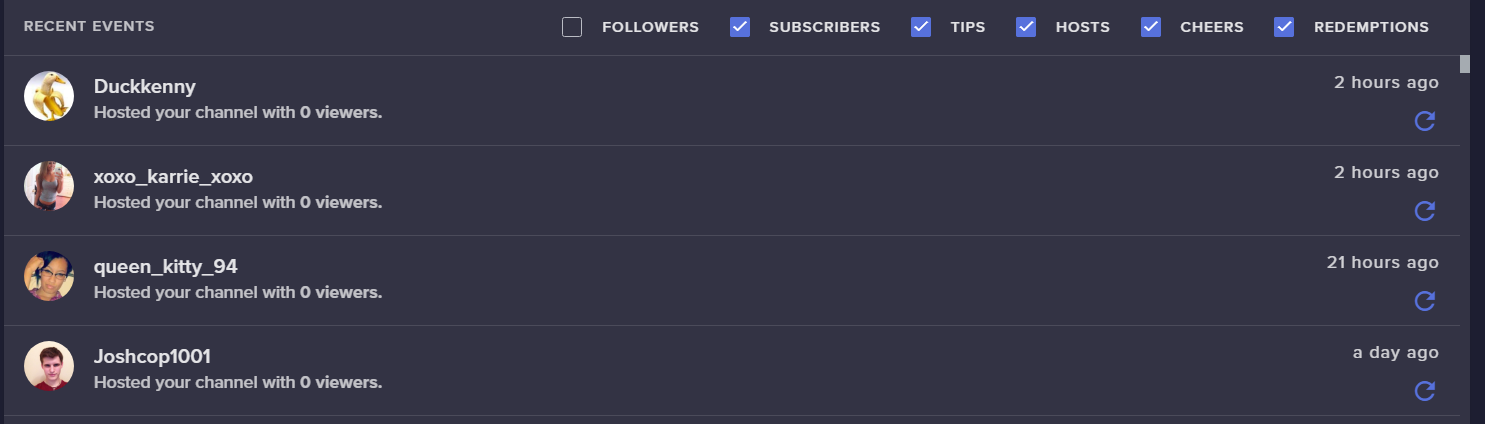
@cosmic trail look at your activity feed: 0 viewer hosts https://i.imgur.com/cmDw5LD.png
 proud pumice
take the overlay itself into OBS @dull quiver see if it updates there
can be a browser bug
amber perch
so how can we fix the issue with points? @proud pumice
proud pumice
@amber perch have the streamer reconnect his twitch account with SE (logout, login) him, not you.
dull quiver
worked thank you!! perry
 unborn knoll
Hello @everyone
 nocturne pelicanBOT
Please refrain from using [at]everyone or [at]here
unborn knoll
Hello everyone
tight harness
Hey
proud pumice
@dull quiver 
amber perch
@proud pumice so what else can we do about it?
proud pumice
@amber perch you still didnt provide the username of the user having issues
 dawn wasp
Hey guys is there any way to have the September dollar resubs announced? Also is it possible to make the bot whisper me on a timer or with api out something?
amber perch
@proud pumice pls check DM
proud pumice
^ everything works just fine, seems like a user error, spam events to get more pts doesnt work
 wind leaf
Code for early access app? 👀
nocturne pelicanBOT
@wind leaf The app is currently in closed beta, keys were given away at the Gamescom in Cologne, Germany.
Please wait and stay tuned for the open beta.

 elder sorrel
Same 
proud pumice
@wind leaf do you stream daily?
 thin bronze
Hi I require some help with the points system, I want to give points to all of my followers manually in the chat but I am not sure of the command to do this, could you help me please?
 zenith widget
You can't give point specifically to people who follow you. You can add to everyone that is currently in your viewer list with !addpoints all <points>
thin bronze
I see, that is is a shame as I have only just set up StreamElements and I have had viewers thats been followed for ages, is the only way to do that using the SE site and doing it all manually?
 vestal pendant
please help how can i get an invite code for Stream Elements on Android ?
zenith widget
You can manually add to someone points, again via the !addpoints <username> <points> or find them in your leaderboard here: https://streamelements.com/dashboard/leaderboard/current @thin bronze
nocturne pelicanBOT
@vestal pendant The app is currently in closed beta, keys were given away at the Gamescom in Cologne, Germany.
Please wait and stay tuned for the open beta.
thin bronze
thanks for that @zenith widget would that be !addpoints or is is !add(the name of my points)
vestal pendant
ok thx
zenith widget
!addpoints <username> <points> - example !addpoints keizar 10000
thin bronze
ahh ok thank you for that, thats brilliant 😃
zenith widget
you can set an alias to the default command and have it !add<nameofyourpoints>
 toxic pine
Give me invite code
nocturne pelicanBOT
@toxic pine The app is currently in closed beta, keys were given away at the Gamescom in Cologne, Germany.
Please wait and stay tuned for the open beta.
 oblique marsh
Does anyone have a moment to help walk me through how to do some transfering things. I dont wanna screw stuff up with "trial and error"
 tawny salmon

tight harness
@oblique marsh If you tell us what you're wanting to transfer exactly we can point you in the right direction for sure
oblique marsh
I’m looking to “copy” some store redemption gif/sounds from one store to another. I want them to stay in one store but also be on another, so essentially I need a way to download and then re-upload. But I can’t seem to find where the images and sounds are saved to try and download. It might not be something I can personally do myself
🤔
(Hoping in the shower bbs)
 crimson yew
If you edit one of your current items, you can find where they're saved. @oblique marsh
wind leaf
@proud pumice currently im organizing my life a bit since im starting my job on monday! But i was planning on doing some IRL streams to keep my community up-to-date on whats happening
 errant fractal
are song requests possible for spotify or is it strictly youtube?
 atomic wave
Hi I'm new to the streaming industry, I have no idea how to get fully set up and was wondering if I could get help
torpid estuary
@errant fractal as far as i know its not possible to songrequest with spotify, since spotify doesnt allow that. only youtube as far as i know!
errant fractal
alrighty thanks
torpid estuary
@atomic wave welcome to the streaming life! we have some awesome tutorials to get you started. please visit https://support.streamelements.com/hc/en-us/articles/115003424812-Quick-Start-Guide for example

StreamElements
StreamElements introduction and initial overlay setup
(scroll down for overlay setup guide) StreamElements is the ultimate platform for streamers, a powerhouse of interconnected tools made to enh...
there are more guides to the left that you can click on
oblique marsh
@crimson yew thanks I’ll try that! Hopefully I can pull from the servers 
tight harness
You can't download from our servers, i did wonder if you meant that 🤔
oblique marsh
Yes, I don’t have the originals, so I need to copy from one user to another
crimson yew
Did you delete the originals? xD
crimson yew
Oh damn.
torpid estuary
downloading sounds from the overlay manager is not a thing i am afraid.
 brisk jackal
Hey there looking for some help. Wondering what the optimal settings are for streaming Xbox through OBSlive on my laptop
narrow coyote
Can't really suggest anything without knowing the specs of the laptop, also, OBS has an auto configuration that does a pretty good job
the auto configure is under the Tools menu
we also have tons of OBS guides here https://www.obs.live/
 dense beacon
I'm having trouble with my overlay, alerts and many stuff. Something going on with Streamelements or ?
proud pumice
everything operational @dense beacon
dense beacon
Alright.
 azure drift
torpid estuary
azure drift
torpid estuary
Yes, you are in the helpdesk right now mattattack. How can we help you?
crimson yew
XD
azure drift
@torpid estuary what is the invitation code
nocturne pelicanBOT
@azure drift The app is currently in closed beta, keys were given away at the Gamescom in Cologne, Germany.
Please wait and stay tuned for the open beta.
dense beacon
Something is happening, my twitch chat and alerts on my screen is not working now.-
torpid estuary
dense beacon
The chat does not update itself.
azure drift
@torpid estuary are u on twitch
torpid estuary
Yes Matt! If you click on my name you can see my profile. I linked it there!
dense beacon
I go to my overlay on streamelements dashboard and try to emulate a follow alert to try and it does not even show up :S
torpid estuary
In the overlay editor? @dense beacon
dense beacon
Yes @torpid estuary
torpid estuary

azure drift
@torpid estuary do u play games or irls
dense beacon
Something is going on with streamelements :S
torpid estuary
let me check in my overlay editor @dense beacon
@azure drift both, but this is not the correct board for smalltalk! you can go to #general-chat and have a chat there! and thanks for following
dense beacon
I removed a text from my overlay editor and saved. Have not been removed from the overlay in OBS .. I even did the reload overlays and not working
torpid estuary
i can trigger test alerts without problem in the overlay editor. you might want to try to restart your browser and/or pc
dense beacon
I have tried with 3 different browsers
The overlay on my stream is not even working.
So it's not my browsers
torpid estuary
ok, so make sure that you have the alert widget in your overlay
maybe you accidentally deleted it
do you have the "AlertBox" here?
 violet crater
So I use a mobile streaming app called mobcrush, is there a way to get follower and sub recognition
torpid estuary
i don't know that streaming app. if you can insert browser sources you could try adding an overlay from SE
other than that i would ask the makers of the app you are using.
torpid estuary
no, sadly there is not right now.
violet crater
Ok
nocturne pelicanBOT
@oak mortar The app is currently in closed beta, keys were given away at the Gamescom in Cologne, Germany.
Please wait and stay tuned for the open beta.
zenith widget

Well, we don't have available codes or spots for the closed beta.
Like the text above says - please wait and stay tuned for open beta.
No.
pine hemlock
There is no eta
torpid estuary
By "there is no eta" we mean that it could take days, weeks or even longer.
I have to ask you to please refrain from spamming the helpdesk
zenith widget
@oak mortar Please refrain from spamming emotes. We are not gone, we are always here checking on who needs help. Either be me or Void or someone else.
If you don't have any issues with our tools and features, either move to #general-chat or don't tag like that!
torpid estuary
By "there is no eta" we mean that it could take days, weeks or even longer.
zenith widget
This is the 2nd time I'm going to say this. We do not have available codes at this current time! All spots for the closed beta are used up!
Wait patiently for when we have more information in the future! Waiting 5 minutes or 1 hour is not long enough!
Because its a closed beta! Only select few people are in it! hence closed beta.
 amber hamlet
Hello guys, I have a quick question that I haven't been able to find a straight answer for in the current StreamElements build:
Is it possible, or is there current development for the ability, to trigger two separate bot responses in Twitch chat with one command? In messing around with keywords and aliases, it doesn't seem to be possible, but I wanted to check.
I'm sorry if this has been asked before, but I wasn't able to find a straight answer with a Google search, or on the SE Reddit. Thank you in advance for any response! 😄
zenith widget
It has been asked before and its disabled on purpose, for the bot to not be able to trigger its own commands via its own responses. This is to prevent infinite looping.
and potential spam
amber hamlet
Ah yeah, I could imagine that would be an issue... and infinite looping could shut things down for everyone, for sure. :l Thank you for the response, @zenith widget . You think there might be a workaround in the future with a way to terminate after x amount of triggers? Or is the risk too great that some people may abuse it that it's not worth it?
zenith widget
You answered your own question with the 2nd question 😉
amber hamlet
I figured so. 😉 Thank you so much for your help, friend!
zenith widget

 lament blade
Trying to get rid of a command but can't find it anywhere
The !bonus command, it isn't in the list
zenith widget
Its an alias for !addpoints
lament blade
Can I have the code
nocturne pelicanBOT
@lament blade The app is currently in closed beta, keys were given away at the Gamescom in Cologne, Germany.
Please wait and stay tuned for the open beta.
lament blade
Can I have the code
zenith widget
Read above you.
 frank merlin
im using the retro them VIOLET MOMENTUM ANIMATED SUPER THEME. and when i switch between scenes there is noticeable delay before the stream elements scene loads
torpid estuary
A certain loading time is always there. You could try activating studio mode in OBS and preload the next scene you want to switch to
nocturne pelicanBOT
@frank merlin Check out this tutorial for OBS’ studio mode which allows you to preload scenes before transitioning. https://www.youtube.com/watch?v=W8iWsD2Lq3U
zenith widget
Hello, we may have an answer
 buoyant egret
ok on Streamelements how do i work the point system?
buoyant egret
By that every sertain mins you can gain points how do i do that?
torpid estuary
What templates do you mean @minor cedar
zenith widget
@buoyant egret I would suggest to take a look at this video guide we have: https://www.youtube.com/watch?v=mBDY4RdoZ4A&index=17&list=PLCDDKlFdScbEwdx5AntcQIS1InkFJwHtv
narrow coyote
 minor cedar
Well i want to change the colour of my overlays but idk how to
buoyant egret
ok thank you @zenith widget
narrow coyote
if you are talking about overlays we offer, you cant really change the color
minor cedar
Its not
narrow coyote
then what are you talking about?
minor cedar
Well my friends purcahased them and i got them from him
narrow coyote
if its something you have, like images, you will need to use an image editor
minor cedar
But they are not brght enough to be the colour white
narrow coyote

torpid estuary
I dont think this is an issue related to SE.
 winged sundial
can soome one tell me how the volume system on song req works for my mods
narrow coyote
there is a command !volume you can pass a number up to 100, which would be full volume
 thin pier
how do you add overlays to stream elements obs
nocturne pelicanBOT
@thin pier To add your overlays to OBS, add a new browser source in your scene. Paste your overlay URL in the browser source properties, set the dimensions to 1920x1080 (unless you changed them on the website), and :ballot_box_with_check: “Shutdown source when not visible” https://youtu.be/KDvLynUqXI4
thin pier
thank you
 echo laurel
where can i set new follower messages and such to metion me in chat? i dont recall
narrow coyote
https://streamelements.com/dashboard/bot/modules chat alert module
echo laurel
thanks
 earnest wedge
Thanks a really big help, the best actually
dense beacon
Hey, the widget (Recent Followers) is it possible to have a larger space between each names? If so, how?
 wanton jetty
Just to confirm this since its in the TOS
https://pbs.twimg.com/media/DnC4z8OUwAIznbt.jpg:large
If someone charged back we can get help from SE in regards to fighting it ?
 pine hemlock
This isnt a support question.
@dense beacon Doesn't seem so.
Similar wording is in other companies ToS and chargebacks still occur, that is what i will say. I'm not a legal advisor.
 open lava
hi, is there a command to show ranks in rocket league?
narrow coyote
you would need to find an api endpoint you could use
open lava
Ok
 ancient cloud
need help with something, i changed my profile picture on twitch and now the Stream elements profile picture is gone. how do i change it or at least fix it??
narrow coyote
https://streamelements.com/dashboard/profile click on open profile, and on the profile page, on the left there is a change button on the profile pic
narrow coyote

lament blade
Hi! What can I do if G2A does not show up under Payment Providers in my tipping settings? I want to set it up and create an account with them.
winged sundial
an sound item in my store is listed but it wont work. Can someone help
 polar ravine
I have the message "The Channel you tried to add is linked to a different account." across the top of my channel screen. Any ideas?
 keen stream
is there anyway to shuffle the backup playlist ?
 queen zealot
 formal ore
quick question, am I able to edit the timers? I don't see any option to do that
the bot timers
nvm dumb question
I just found it
 hearty moon
Hi ı am New streamer for twitch and ı wanna take a code for streamelements mobile app . How can ı take it
nocturne pelicanBOT
@hearty moon The app is currently in closed beta, keys were given away at the Gamescom in Cologne, Germany.
Please wait and stay tuned for the open beta.
 bold hill
Can you help me set up the chat bot? Yesterday evening the Timer did not work. You could take a look at my settings
 junior lily
im new streamer, any tips for growing my stream? thankyou

 zenith widget
See if you are logged into the dashboard
If yes, replace your overlay links.
That happens only when the overlay link is wrong or missing some symbols. In this case it might have expired? Which should not happen. Other thing you can do is clear your browser cache before updating your overlay links @orchid nova
 orchid nova
I did reset my JWT token or whatever it's called last night as I had to give access to do something for me
would that of caused it?
zenith widget
Most likely yes.
and if its the JWT token for LX, you can trust him as his a Champion and a code guru here
zenith widget

orchid nova
okay perfect, just done it now. Should of tried before asking. Consumption of alcohol last night created a brain slug 
 untold crest
(Pls, don't make such statements as people might think it is not a joke)
zenith widget
Well there is a Kappa for sarcasm at the end 
orchid nova

zenith widget
I'll just...hide something 
orchid nova
I deleted comment anyways, thank you 😃
zenith widget
Ok, so go get your overlay links and tell us if its working properly
orchid nova
It's working, thank you sir 😃
zenith widget
 teal adder
How do i get an invite code for android app
nocturne pelicanBOT
@teal adder The app is currently in closed beta, keys were given away at the Gamescom in Cologne, Germany.
Please wait and stay tuned for the open beta.
teal adder
Ooo
 vital wyvern

 upper steeple
@zenith widget ty
 burnt pollen
Hi guys, all of a sudden my alerts aren't working anymore, something changed ?
nocturne pelicanBOT
@burnt pollen Please connect your Twitch and/or YouTube channel with Discord by going to ⚙ Settings and then Connections here in Discord. https://streamable.com/eg92w
 vital wyvern
Il check it out real quick if you are live atm 😃
 stray cargo
How do I get invite code
nocturne pelicanBOT
@stray cargo The app is currently in closed beta, keys were given away at the Gamescom in Cologne, Germany.
Please wait and stay tuned for the open beta.
vital wyvern

burnt pollen
all done @vital wyvern 😃
vital wyvern
okay since you are not live atm, have you tried going to [https://streamelements.com/dashboard/overlays] and emulated a alert? 😄
burnt pollen
doing it right now
vital wyvern
allright 
burnt pollen
Some aren't working, and those were working before
vital wyvern
 allright thats weird
burnt pollen
and if I try to do it twice, like follower alert, it only does 1 alert
burnt pollen
i made all my alerts in streamelements
 strong kernel
So we're looking in the same place, which overlay are you looking at?
strong kernel
Thanks. Just a minute.
burnt pollen
k
strong kernel
I see, you have two alertboxes. They're going to conflict and cause problems. The system's designed to only have one alertbox in an overlay due to the way events queue.
lament blade
I dont have an invite code
nocturne pelicanBOT
@lament blade The app is currently in closed beta, keys were given away at the Gamescom in Cologne, Germany.
Please wait and stay tuned for the open beta.
burnt pollen
But some alerts aren't showing
and if I press them like 1x, and wait a bit, and then another, it doesn't show
strong kernel
Right. That's due to the two alertboxes.
strong kernel
Okay.
buoyant egret
i have a question, how do i put it so when someone follows it will pop up in chat?
vital wyvern
@buoyant egret that would be chat alerts which you can find here https://streamelements.com/dashboard/bot/modules
StreamElements
The Ultimate All in One Platform for Streamers
strong kernel
@burnt pollen You should have only one alertbox in each overlay. Again, it's due to how it processes the requests in the queue
What they're named in separate overlays doesn't matter.
burnt pollen
k some overlays had like 3 alertboxes, that's odd somehow
ok deleted them all but 1 in each overlay
Testing
strong kernel
If the alertboxes handle different kinds of events, then that's fine.
Like, one alertbox ONLY for followers, one ONLY for subscribers, that works fine.
But if two try to react to the same event, that causes issues.
burnt pollen
@strong kernel you are myyyyyyyyyyyy guy !
All is working again !!
Thanks so much !!!!!
Oh maybe someone knows this other problem I'm having, maybe not related to Streamelents but I'll ask :)
I'm not able to get Command & Conquer series (any game at all) to show on Obs, window capture or display capture doesn't work at all
vital wyvern
@burnt pollen sorry fellow C&C fan :/ id tell you if i knew
i recommend asking
!obshelp
nocturne pelicanBOT
For the best OBS support, please join their discord where OBS devs and support volunteers are available all the time discord.gg/obsproject
burnt pollen
@vital wyvern if I find out I will let you know 😃
vital wyvern
Thank you!! 🙏
strong kernel
@burnt pollen
pulsar gulch
@strong kernel , is there a way to add html code to the sub alert ?
winter zenith
@pulsar gulch yes even css and js
pulsar gulch
Thank you @winter zenith^^
 wanton glacier

pulsar gulch
Any idea why my sub alert is not showing?
i added a gif but i can't see it when i test it out
 normal igloo
any known issues for alerts? 
burnt pollen
@vital wyvern I did it !! Found how to stream the game aaarrrggghhh awesome !!
vital wyvern
@burnt pollen send me a DM of the details ! 😄
pulsar gulch
would the html / css code from muxy work here ?
buoyant egret
anyone know how to set up bit donations?
normal igloo
@buoyant egret go to tipping settings 
vital wyvern
@buoyant egret it would be here https://streamelements.com/dashboard/tipping-settings
StreamElements
The Ultimate All in One Platform for Streamers
normal igloo
@vital wyvern thx
vital wyvern
no problem 
normal igloo
@vital wyvern any known issues for alerts? 
vital wyvern
Afaik no
normal igloo
buoyant egret
thats real donations
 green light
where can i make/choose alerts for follows and stuff like that
normal igloo
@green light https://streamelements.com/dashboard/overlays
StreamElements
The Ultimate All in One Platform for Streamers
green light
thx
normal igloo
np
pulsar gulch
I added a css code and now my alert is not showing anymore 🤔 any ideas ?
normal igloo
@pulsar gulch So you using custom Made alerts?
pulsar gulch
yes
normal igloo
@pulsar gulch By any chance not anything off Nerd or die? 
normal igloo
Only thing I can say is the css code Isn't compatible for se Unless one of the staff can look more into it for you And tell you something different unfortunately that's all I have for you
normal igloo
Yeah I have never really done much for css code so Can't really tell you much
pulsar gulch
and with who do i need to talk aboutt his :3 ?
buoyant egret
i cant find the area for the bit donations i can only find money donations
normal igloo
then that it's on your twitch
buoyant egret
where about on twitch?
bc i stream on xbox but i use my computer
for streamelements
normal igloo
Yes you're after bits that it's on your twitch not se se is not twitch
buoyant egret
to set them up or?
strong kernel
You need to be an affiliate to receive bits, as far as I'm aware.
narrow coyote
@pulsar gulch if you are using custom code, #dev-chat there is also a doc in pinned messages for custom widgets and event list
normal igloo
affiliate or Partner
pulsar gulch
thank you @narrow coyote i will have a look
strong kernel
@buoyant egret https://help.twitch.tv/customer/portal/articles/2785927-joining-the-affiliate-program
Twitch
This article explains how qualified broadcasters can start monetizing their channels.
#guide{
font-family:'Helve...
 buoyant egret
ok thanks 😄
normal igloo
and Of course thx @strong kernel
buoyant egret
what does it mean by 7 unquie streams?
strong kernel
Start stream, stop stream. <- Unique stream.
buoyant egret
like fast or?
strong kernel
Doing fast won't do anything for you for the other requirements.
If you streamed once a day, every day, for the next week, that's 7 unique streams, one for each day.
buoyant egret
ok thats what i have been doing 😄
you guys are the best, great responce thank you 5 stars 😄
strong kernel
normal igloo

pulsar gulch

buoyant egret
😄
 molten bone
How to get Invite code for mobile?
nocturne pelicanBOT
@molten bone The app is currently in closed beta, keys were given away at the Gamescom in Cologne, Germany.
Please wait and stay tuned for the open beta.
molten bone
Okay, thanks
 abstract meadow
I want to close the donation link that streamelementsin gives me when I write my donation!
 elfin dagger
Is there a place to go on this discord to talk about streaming with other streamers?
elfin dagger
Like, can we talk about our channels and collab with others
narrow coyote
https://streamelements.com/dashboard/bot/commands/default disable the default command tip
abstract meadow
Oh, Thanks
strong kernel
@languid marlin Self-promotion is not allowed. Please see the rules in the title of the #general-chat
strong kernel
@languid marlin We have a guide you can look over: https://support.streamelements.com/hc/en-us/articles/115002453351-Becoming-a-Twitch-Affiliate-and-Partner-guide
StreamElements
Passion and struggle explains the road to Twitch Affiliate then on to Twitch Partner.
Remember you just hit “New Game” on what you want to do in life. There will be plenty of ups and downs. Bein...
 languid marlin
But I don't get not even 1 View
elder sorrel
@languid marlin You can use this link that @inland knoll shared with us in the #general-chat
It's a pretty great read! https://blog.gleam.io/twitch-growth/

It wasn't all that long ago that when a new video game was released, the only way to check it out was by watching over the shoulders of friends or family who had already managed to get their hands on
normal igloo
Agreed with @elder sorrel Normally I don't bother Reading These ways to grow Things But that one is a interesting read
 smoky zealot
Hi,
I create overlay. I cant see on OBS. But i looking on chrome everthings fine?
torpid estuary
Did you put the overlay URL into a browser source in OBS?
smoky zealot
yes
torpid estuary
Did you change the resolution of the browser source to 1920x1080 and made sure it is above your game source in OBS?
smoky zealot
Sure 😃
 rose juniper
I need 2 complete professional overlay pack designs who cares for me please take several days trying to contact them.
smoky zealot
Its working 5 days ago but i delete my overlay create new one but not working
torpid estuary
Not sure what you mean @rose juniper , do you need overlays made for you? If so, you may want to look into #art-marketplace
@smoky zealot why did you delete your overlay? And where? In your SE dashboard or OBS? and what is happening? Nothing showing up?
smoky zealot
Firstly i create overlay from SE. And added OBS browser source. 1280x720 Work perfectly. A few days later dont working my overlay. I try open my internet browser than paste my overlay url working. But dont working on Browser Source in OBS.
elder sorrel
@smoky zealot You can try duplicating the Overlay & try again with the URL to paste in OBS.
I believe that has worked with others before having that issue.
smoky zealot
I deleted everything. Create new one and add only TEXT. And try all options. But dont working again OBS. And i download & try Streamlabs OBS its working. But real OBS dont working.
elder sorrel
@fallen drift https://streamelements.com/dashboard/bot/commands/
StreamElements
The Ultimate All in One Platform for Streamers
narrow coyote
@smoky zealot You can try disabling the hardware acceleration on the browser source, that has been known to cause issues for some people
elder sorrel
Very true ^. Forgot that was a thing.
smoky zealot
@narrow coyote @elder sorrel not working. maybe my OBS broken. I try complete uninstall than install. Thanks.
 summer mulch
@smoky zealot wait, did you restart obs after unchecking that box?
smoky zealot
yes 😃
 wind notch
Hello, I Am interested in testing / checking out the StreamElements Mobile App (Android) it says of I want to use to contact "us" and brings me here, ive looked thru the channels and don't see anything directly about it, any help is appreciated 👍
nocturne pelicanBOT
@wind notch The app is currently in closed beta, keys were given away at the Gamescom in Cologne, Germany.
Please wait and stay tuned for the open beta.
wind notch
Oh ok, I apologise, it allowed me to download so I thought it was good, even though it says unreleased. thank you, looking forward to it👍👍
lament blade
I have finished setting up a G2A account for donations. What are the essential things I should have configured in my G2A account to avoid as few problems as possible? I have configured a lot, I just want to make sure I haven't missed anything.
summer mulch
@lament blade here's our g2a tutorial:
https://www.youtube.com/watch?v=CXAndapQCK8&t=83s
 serene yew
lament blade
serene yew
lament blade
@summer mulch This is what I have been following. Is there any other advice or recommendation you guys can give me about making sure it is set up properly? I've never really used anything like this before, so I'm scared, LOL.
summer mulch
As long as you follow the provided video guide you'll be good
If you have any problems you can always contact us here 😃
lament blade
Alrighty. Thanks so much!
 deft shard
how can i set longer activities in Activity feed
 limber sorrel
I've noticed that twitch mobile app and twitch on desktop sometimes have glitches, and one I've been experiencing different amounts of points on the same channel. Is there any way to fix that?
Also, are there any mobile browsers that work with stream elements?
 worn flame
Hi sorry to bother at the moment I'm new to this stream element app I've just installed it now on mobile and it's asking for an invite code when I log into my twitch account could anyone please assist me how to get this invite code
normal igloo
!code
nocturne pelicanBOT
The app is currently in closed beta, keys were given away at the Gamescom in Cologne, Germany.
Please wait and stay tuned for the open beta.
normal igloo
@worn flame
 hasty glacier
With OBS live, is it possible to get the chat to be positioned below the preview? Or only next to it? I am trying to drag it below, but doesnt seem to want to go there. Monitor is in portrait mode so ideally I would want it so the preview is full width at the top, below is chat and feed. Then below that is the scene stuff
lament blade
Trying to get rid of a command that I can't find on the site.
!bonus
It's related to points which I have turned oof.
worn flame
Thanks a million @OMGITSJAMESPLAY really do appreciate it will have to wait a bit but not a problem thank you
strong kernel
@hasty glacier Technically, but rather than below the preview itself, it's above one of the settings sections, like above mixer for instance.
 late gulch
Öhm where can i delete my donation goal to reset it?
strong kernel
@lament blade !bonus is an alias for !addpoints
@late gulch https://streamelements.com/dashboard/session
StreamElements
The Ultimate All in One Platform for Streamers
hasty glacier
@strong kernel I have managed to get it like that, so its above the preview. which is fine with me. I would prefer it to below, but it will do
Swapped my monitor to portrait, so its a better layout like that
limber sorrel
Is my question regarding viewing twitch channels that use stream elements better asked in another channel?
torpid estuary
hi, what glitches are you talking about? streams that use SE are not any different than other streams when you watch them on your twitch app, except that they may look better 😉
@late gulch go to your overlay editor. click on "Data" in the upper portion of the screen and then click on the tab "goals". there you can set your progress manually, reset it, etc.
limber sorrel
I am using the twitch mobile app and have about 4k points on there for one streamer in particular but whenever I'm that channel on desktop browser, I have over 8000 points.
It's not about streams I do, but streams I am viewing.
torpid estuary
can you tell me the name of one of those channels where this is happening? not a link, only username on twitch.
limber sorrel
TheSpookyPoops
torpid estuary
and you made sure that you are using the same twitch account for both mobile and desktop?
limber sorrel
I did.
torpid estuary
we just checked internally, your username has 3010 points. can you provide a screenshot with the differing points?
limber sorrel
 abstract token
hello, I've just gotten the stream elements, and I've been using streamlabs chatbot/ankhbot for the past 7 months or so. The streamelements leaderboard looks nice to me but is showing that I have 0 subscribers can someone help me?
torpid estuary
@limber sorrel those are 2 different bots in chat. one of them is SE, the other one has nothing to do with SE.
limber sorrel
Oh, I see.
torpid estuary
@abstract token since when are you using SE?
limber sorrel
Okay then. I'll ask him which one is the correct one then. It's probably the other one.
abstract token
today @torpid estuary
torpid estuary
well, chances are you didnt get a new subscriber since switching to SE. SE will pull your subscriber stats once you get a new sub.
abstract token
ok thank you 😃 and also the bits aswell?\
torpid estuary
yes!
abstract token
so what if someone donates bits but i dont get a sub today
will it still transfer?
torpid estuary
everything that is a transaction should pull your info, so if someone throws bitties at you you should get all your stats hopefully!
abstract token
thank you dude I really appreciate the help
do i have to have stream elements open?
like on the tab or no
fallen drift
are you able to use stream labs to play music if you’re streaming off xbox
@torpid estuary
torpid estuary
no @abstract token , your bot will get all the data that is needed.
everything happens in the cloud
abstract token
okay 😄 thanks
limber sorrel
Ah, he isn't using StreamElements after all. 
torpid estuary
@fallen drift i wouldnt know about streamlabs, if you mean streamelements i could maybe know something
torpid estuary
so, are you using a desktop pc for your streaming? or directly from xbox?
fallen drift
directly from my xbox
like the bot works fine
and the song request command works but no music plays
 fading isle
Just installed streamelements mobile app n it says to type invite code. Where do i get this code from??
torpid estuary
do you have a pc? you could have songrequests open there and play the music over your mic. which would sound indirect and silent. other than that there would be no way to SR @fallen drift
nocturne pelicanBOT
@fading isle The app is currently in closed beta, keys were given away at the Gamescom in Cologne, Germany.
Please wait and stay tuned for the open beta.
fallen drift
you’re saying to play it out loud?
torpid estuary
there is no way to directly play the songs of SR over your xbox, so your only bet would be to play the music over your pc speakers.
and have your mic pick up the music.
fallen drift
rip:( do u think they’ll ever add that ability to do that
torpid estuary
to where? SR is working, but you would need a capture card to stream over your desktop
fallen drift
to be able to play music through xbox or is it impossible to do it without a capture card
torpid estuary
it is impossible without capture card
fallen drift
i also have one more question... is there a way to delete commands since i accidentally messed up a command trying to figure out how to set up a countdown
 narrow crater
I was on the website snd trying to modify my chat alert settings module but it wont let me save any changes. I've tried chrome and edge . Any idea why the save button doesn't work?
nocturne pelicanBOT
@fallen drift You can make changes to custom commands in chat with!command add/remove/edit/options/show Valid flags for !cmd options are: -cd (number) -usercd (number) -cost (number) -level (number) -type (say, whisper or reply) -count (number). --- Example: !cmd options twitter -usercd 60 -type reply -level 250
torpid estuary
so you would type
!command remove YOURCOMMANDNAME @fallen drift
@narrow crater how does your save button not work? can you clarify?
narrow crater
Certainly. I input the text and the amount and when I click "save" it does nothing.
It can cancel and I can x but I can't save.
I've restarted the browser, tried a different browser even and the same result.
torpid estuary
@narrow crater so you edit a text widget and hit save on the lower left portion of the screen?
np @fallen drift we are here to help
narrow crater
Widgets > chat alert settings >settings
When this opens and I make my changes and click save in the lower right, it will not save
As in the pop up remains, versus if I cancel it it closes. If I hit the X to close and reopen, my change has not taken effect.
torpid estuary
there is no widget named chat alert settings, so im not sure where you are navigating to
narrow crater
My apologies, chat slerts
Alerts*
And then I click settings
And it's in modules
Sorry if my phone messed anything up
So let me rephrase because I made that a mess
Modules >chat alerts >settings
Any changes I try to make will not save.
torpid estuary
what happens when you click on save? the window should close and a green bar saying "settings saved" or something along those lines should appear
narrow crater
Nothing. I've just attempted it from my phone as well with the same result.
I've tried chrome on pc, edge on pc and chrome on phone.
torpid estuary
ok so you may want to try to clear your cache. turn of the module, wait for 5 minutes, then turn them on again. try to edit and see if it works then.
narrow crater
Ok bc it's doing the same thing on my phone
torpid estuary
well, then you might want to try to catch the error in the console.
in chrome open dev console by pressing F12
refresh the page, to clean any old errors and/or make it track properly
try to edit module and click save - if it fails, it says the error there on the console tab
narrow crater
Ok I'm getting an error message.
An invalid form control with name='cheersAmount0' is not focusable
narrow crater
No.
zenith widget
Try changing it around.
narrow crater
K.
It's just that this has never happened before so made me a tad concerned lol
Ok changing the amount from 1 to 2 it saved.
zenith widget
try making the other changes you wanted
 vapid sundial
Hey guys
narrow crater
It looks like it is now saving
vapid sundial
I cant seem to find the JWT
narrow crater
Thanks for the help yall.
zenith widget
Maybe if you've changed the minimum amount of your activity feed for cheer amount, the module reacted as well @narrow crater 
nocturne pelicanBOT
@vapid sundial You can find your JWT token on your account channels page: https://streamelements.com/dashboard/account/channels
(Don't forget to click on "Show Secrets")
zenith widget
but it seems that was the issue
narrow crater
Definitely. Appreciate the assistance.
vapid sundial
thx ^^
 near grail
tight harness
near grail
tight harness
Reruns are organised through the Twitch Dashboard, isn't done through us
 ashen fable
Where should I go to ask for help with setting up my webcam on obs? I am using a streamlabs overlay and can't get my webcam to work
narrow coyote
 StreamLabs
torpid estuary
to get your facecam to work you should probably ask in OBS discord
narrow coyote
So whats the problem exactly, do you see your webcam when you add the video capture device source?
ashen fable
I don't. I ran as admin, as it worked until I tried to resize it and it dissapeared and isn't coming back. I've tried deleting it and re-adding it. Nothing
narrow coyote
resize in as drag the source in the preview, or change the resolution in the settings of the source?
ashen fable
ummm, clicking the box corners and resizing it
narrow coyote
and the source is not behind anything the is blocking it?
ashen fable
Correct
nocturne pelicanBOT
Can you please provide a log from your last stream. You can find this log in " %appdata%/obs-studio/logs " OR Help > Log Files > Show Log Files. You can simply drag and drop the log file into Discord.
narrow coyote
the most recent log would do, does not have to be one from a stream
ashen fable
!obslog
nocturne pelicanBOT
Can you please provide a log from your last stream. You can find this log in " %appdata%/obs-studio/logs " OR Help > Log Files > Show Log Files. You can simply drag and drop the log file into Discord.
ashen fable
This thing?
fallen drift
i do stream snipes and i need a countdown so we can ready up same time
is there anyway i can make a command for the bot to countdown... like 5 4 3 2 1 go
narrow coyote
Looks like a problem with the resolution in the settings
13:45:31.235: Webcam: ResolutionValid failed
13:45:31.235: Webcam: Video configuration failed
@fallen drift 
 Stream sniping is against Twitch guidelines
ashen fable
Ok, I deleted the entire config and redid and it and now its working. Strange, now I have to figure out how to resize it. Now its just resizing proportionally and I can't individually change it vertically or horizontally
fallen drift
i thought that stuff was allowed cuz why would epic and twitch allow tfue and like ninja do scrims??
narrow coyote
you said you stream snipe 
fallen drift
but ok then i need a countdown for another reason lol how do i set it up
my b
just like solo ques tho we all ready up the same time and play the game out
 coarse goblet
Can I get invite code for mobile?
nocturne pelicanBOT
@coarse goblet The app is currently in closed beta, keys were given away at the Gamescom in Cologne, Germany.
Please wait and stay tuned for the open beta.
narrow coyote
there is nothing like that currently for the bot, but it has been requested https://streamelements.helprace.com/i622-countdown-timer-in-chat-so-everyone-can-start-an-mmo-game-battle-at-the-same-time
fallen drift
there’s a timer thing what’s that
narrow coyote
the bot timers are to post messages in chat at certain intervals, like at 5min, 10 min, etc
coarse goblet
!code
nocturne pelicanBOT
The app is currently in closed beta, keys were given away at the Gamescom in Cologne, Germany.
Please wait and stay tuned for the open beta.
narrow coyote
when the timer interval is met, it would check the past 5 min of chat, to see if the number of chat lines is met, if not it resets the timer
fallen drift
oh alright, and what does the name part do?
narrow coyote
just a name so you can identify the timer
 woven obsidian
Cam any one help me my alerts have stop working through the bot?
narrow coyote
@woven obsidian seems to be working fine
woven obsidian
hosts aren't though @narrow coyote
thats definate as ive had no host alerts for days but its coming up on twitch its self
 main plover
narrow coyote
main plover
narrow coyote
host will depend on what is set, and how many viewers the host is
tight harness
Consoles don't offer native support for browser sources, but if you use a PC and for example a capture card you'll be able to do it that way @main plover
nocturne pelicanBOT
@main plover Here is a guide on how to setup the most essential tools for streaming from your console, while using StreamElements tools without involving a Capture Card! It's easy to do, take 4 minutes to read and 10 to 15 minutes to setup!
Read all about it here: https://blog.streamelements.com/how-to-stream-on-console-7b620b1c46c3
woven obsidian
@narrow coyote its set to 1 and still doesnt show
narrow coyote
does the host show in your StreamElements activity feed
woven obsidian
yes
narrow coyote
and they all say 0 viewers 
needs to have at least 1 viewer to trigger, if you want it to always trigger, set it to 0 in the chat alert module
woven obsidian
not all of them look at the ones that say 8 viewers they didnt come up either ive had the issue for 2 days now
narrow coyote
this is from your vod form yesterday
so everything seems to be working as it should
lament blade
Where do I edit the message the chatbot says when someone follows?
or gives bits or subs
the chat bot o:
zenith widget
@lament blade Chat module in the bot modules - scroll on the menu on the left and find Modules.
lament blade
Ty ❤
 whole tulip
Hey everyone, wanted some help please with why my alerts aren’t popping up on my stream. First time it’s happened
tight harness
@whole tulip Which alerts would that be?
whole tulip
Well someone just hosted me and no pop up. Does emulate when I click, bit no pop up when they do it
tight harness
Something I noticed is that you have chat alerts disabled in Modules
They hosted for 0 viewers
Minimum amount is set to 1
So yes, it didn't pop up because of that 😃
tight harness
No problem 😃
 keen hawk
Can I get a invite code?
nocturne pelicanBOT
@keen hawk The app is currently in closed beta, keys were given away at the Gamescom in Cologne, Germany.
Please wait and stay tuned for the open beta.
 tired ingot
So im back here!
I put my application in a week ago for the sellout channel
Second time too
And still nothing
Not really sure why when ive met all the requirements :/
Anyone I can talk too for some more info?
vital wyvern
Hello @tired ingot this would be something @clever mango needs to answer on, but sadly he is not currently online 
tired ingot
Alright, thank you
 hidden sundial
Good Evening/morning/afternoon guys. Just a quick Q, i cant add myself as a mod to my own stream. I does'nt save it . Am i dong something wrong or is there a reason for it ?
vital wyvern
Since you are the broadcaster, you got the highest access
nocturne pelicanBOT
@hidden sundial
Chat/Bot Levels
100 - viewer
250 - subscriber
300 - __regular __
500 - moderator (twitch mods automatically placed at this level)
1000 - super moderator
1500 - broadcaster
Dashboard Manager Levels (least to most access)
Bot Supervisor (can add super moderators from dashboard)
Editor
Full Access
https://i.imgur.com/s61Liry.png
 vital wyvern
So you shouldn't need to add yourself as a moderator
hidden sundial
Thank you for the response and the info appreciated
lament blade
Hi, turned on the loyalty settings on my profile but it doesn’t seem to work?
It’s not giving out coins or the command !quikcoins that I called the coins doesn’t seem to work
Thanks
When will it be in open beta
torpid estuary
there is not ETA for now @lament blade
lament blade
Ok
torpid estuary
@lament blade so you have the loyalty enabled in your loyalty settings?
lament blade
Yeah
torpid estuary
what is the amount you have set?
also what is your name on twitch? no link please, just username
torpid estuary
where did you make the command? i dont see it in your command list
torpid estuary
it gives out currency automatically, but you said you had a command
 ornate salmon
How can i get Code For Streamelements Streaming App From Google Store
nocturne pelicanBOT
@ornate salmon The app is currently in closed beta, keys were given away at the Gamescom in Cologne, Germany.
Please wait and stay tuned for the open beta.
abstract token
hello the top cheers all time and subs all time still isnt working
for the extension
torpid estuary
@lament blade
Here are a couple examples to inspire you for your own store redemptions;
https://streamelements.com/randomgirlsinging/store
https://streamelements.com/1ceprime/store
https://streamelements.com/veetus/store
https://streamelements.com/itsthesheppy/store
https://streamelements.com/jempanada/store
https://streamelements.com/orienator/store
https://streamelements.com/kiwaplay/store
StreamElements
The Ultimate All in One Platform for Streamers
StreamElements
The Ultimate All in One Platform for Streamers
StreamElements
The Ultimate All in One Platform for Streamers
StreamElements
The Ultimate All in One Platform for Streamers
StreamElements
The Ultimate All in One Platform for Streamers
ornate salmon
why are people allowed to download even tho in closed beta
lament blade
Awesome thanks mate
lament blade
👍
ornate salmon
how long will that be
torpid estuary
no ETA yet
pulsar gulch
can anyone help me with this css code ? trying to do a custom sub alert but getting the code from muxy won't work :/
torpid estuary
what are you trying to do?
pulsar gulch
well i have the gif for the sub alert but now i want to make the text to appear right after the gif is ending
so basically just to show me the new subs and the resubs
 pine hemlock
Enough
zenith widget
@pulsar gulch DM me what code you've made so far
pine hemlock
Is this one cuter
 pine hemlock
$5 and ill change it back
 light mauve
Is there a way to start a timer upon starting a stream? I've been active for an hour and the Timers have not fired. They're set to fire every 30 minutes with 0 chat lines.
torpid estuary
have you made sure that the timer is enabled?
light mauve
Yes.
torpid estuary
and have you checked online and offline?
lament blade
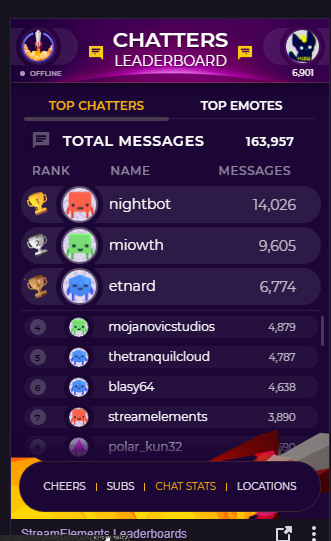
is there a way to exclude names from this?

like nightbot and myself?
and the icons aren't registering either
narrow coyote
they cant be removed from chat stats at this time 
light mauve
@torpid estuary Of course. I've used timers before, reporting it as a potential bug.
lament blade

torpid estuary
i dont know how much experience you have with timers, im just making sure you have everything set up correctly. thanks for reporting the bug!
light mauve
For sure. It just played. Stream has been up for 100 minutes, only chat has been mine, which I posted about 10 minutes ago to hope it would kickstart it. I don't know what's up, lol
 dense jackal
Try parting and rejoining the bot, can't hurt @light mauve
light mauve
I'll give it a shot, thanks @dense jackal . For what it's worth I created the timer after the stream was already active, so that might have something to do with it.
wanton jetty
Does "browser" sound come from the desktop audio track or no ?
narrow coyote
it should be playing from whatever the default audio source is in Windows, which would most likely be set to the desktop audio track
 rare cairn
question how do i setup auto chat posts for my stream chat
narrow coyote
rare cairn
@narrow coyote what is the offiline interval for the timers?
narrow coyote
for posting messages when your stream is offline
narrow coyote
 tired raft
What are the qualifications for someone to get an access code for the mobile app?
nocturne pelicanBOT
@tired raft The app is currently in closed beta, keys were given away at the Gamescom in Cologne, Germany.
Please wait and stay tuned for the open beta.
 vapid sundial
hey guys! How do i use the bot too thank a new follower? 😃
narrow coyote
https://streamelements.com/dashboard/bot/modules chat alert module
vapid sundial
ty ^^
narrow coyote
vapid sundial

 echo forge
How do I get the access code ?
nocturne pelicanBOT
@echo forge The app is currently in closed beta, keys were given away at the Gamescom in Cologne, Germany.
Please wait and stay tuned for the open beta.
echo forge
Ok
 random roost
Hello all! I really need help. I’m trying to set up my store items but I can’t upload any image at all. I’m using Google Chrome and have tried for hours without success.
narrow coyote
What exactly is happening?
upper steeple
Is there anyway to make tts to not say emotes names?
pine hemlock
negative
lament blade
How do I use dat app
pine hemlock
!code
nocturne pelicanBOT
The app is currently in closed beta, keys were given away at the Gamescom in Cologne, Germany.
Please wait and stay tuned for the open beta.
 simple island
When making a theme, I get most of the way through the alerts, but the last few will not show the proper one when I try to run them in the SE emulator site. Any ideas?
narrow coyote
are you saying you changed the alerts and not showing what you expect? what alerts exactly? check the variations, subs and cheers by default have variations
simple island
I removed the default one and put in variations. I've done this on other overlays and they work, but when I put them on my BRB overlay, even after I cleared the default one, it shows it anyway.
I did this for my host and raid ones.
Same settings every time. It's kinda odd.
narrow coyote
why not clone the widget you set up in the one overlay to the rest of them
simple island
How can you do that?
narrow coyote
Select the widget, click this button
just make sure to remove the old alert widget from the overlays after you duplicate the widget
simple island
Oh my goodness! YOU ARE MY HERO!! Thank you!!!
narrow coyote
 red sail
nocturne pelicanBOT
red sail
nocturne pelicanBOT
@red sail The app is currently in closed beta, keys were given away at the Gamescom in Cologne, Germany.
Please wait and stay tuned for the open beta.
 sinful elbow
Need a code
winter zenith
@sinful elbow The app is currently in closed beta, keys were given away at the Gamescom in Cologne, Germany.
Please wait and stay tuned for the open beta.
zenith widget
Make sure you are logged into their dashboard and ours - leave the tabs open and then try the import extension.
 solemn crater
Yeah, that worked for the Alerts/Tips. Importing the csv and xslx files isn't working 😦


 solemn crater
Yep. I get an "Import Failed Want to try again?"
Even tried doing each file on it's own and it still failed
zenith widget
I can do the import of points for you, but not sure about the commands.
solemn crater
I'm curious, does the points do both points AND hours?
zenith widget
No. Only points.
nocturne pelicanBOT
@solemn crater 10 minutes of watchtime are given to those in chat when the loyalty points are handed out (every 10 minutes). Therefore, loyalty must be enabled for watchtime to work properly. There is no direct link between watchtime and all-time points. It can’t be calculated from the amount of all-time points a user has because subs may earn points at a faster rate and !bonus all command increases all-time points for users in chat at that time. Giving points to a single user does NOT affect all-time, only when giving to all in chat.
zenith widget
So DM me the files.
 pine iris
Goooood morning all. I have a question not related to SE, does anyone know if you can add audio to webm videos? And which video editors support this?
untold crest
Of course you can
zenith widget
Most .webm files should come with an audio in them. But there are a lot of programs you can use.
adobe premiere comes to mind
untold crest
I think every software should be able to do that.
Even free software
(Of course you can use Adobe Premiere or Sony Vegas as well)
pine iris
I use davinci resolve when and if I do edit video - this should work fine?
It won't save as MP4? I have heard that webm is probably best for alerts
untold crest
If it has no export to webm, you can export to mp4/avi/mpeg/mkv and so on...
then convert it to webm via VLC
pine iris
VLC can convert files? Wait what?
zenith widget
Or use this site to convert: https://convertio.co/
untold crest
zenith widget
sorry wrong link - edited
untold crest
4th option from bottom
pine iris
Thank you muchness!
zenith widget
So many options 
untold crest
Oh. I just found out that VLC do not preserve alpha channel (transparent background), and this https://github.com/WebMBro/WebMConverter/releases converts alpha channel as well

GitHub
WebM for bakas. Contribute to WebMBro/WebMConverter development by creating an account on GitHub.
pine iris
Ah! Thank you!
zenith widget
@fossil acorn ??
vital wyvern
 fossil acorn
Haha yeee
fossil acorn
:💯
 gentle imp
no advertising plz 😃
 coarse quest
hi, just a question about the stats.streamelements site, does it need a specific bot to be added to the channel? or does it just take some time for larger channels to get the stats ready?
coarse quest
😃 i dont have him in my personal channel and it has stats
but the other channel i was wondering about just started collecting data now, took ~20 min i think. but weird that i have old stats in my channel but none on the big channel that just connected to streamelements
gentle imp
I thought bot had to be in channel, but if that isn't the case then it must be getting stats from twitch
coarse quest
yeah was wondering if it was like that and if there was a delay
gentle imp
which I don't know the poll frequency but for obvious reasons can't be constant hehe
coarse quest
but the big channel has only messages from the last couple of minutes
gentle imp
there's a limit for how much info is stored iirc
coarse quest
😦 yeah thought so
strong kernel
The system needs to be given a reason to start watching a given chat, or it won't be. Basically it sounds like that chat wasn't on the watchlist until that point.
coarse quest
yeah, the streamer just connected to streamelements, but i have older stats in my channel and i also just connected
strong kernel
Could be any number of reasons why you got on the list first. I couldn't speculate
gentle imp
yep, probably someone looked up your name/channel with the bot
coarse quest
could be i have a really old account ¯_(ツ)_/¯
ah, maybe logviewer i see that cbenni is here 😃
that explains things
gentle imp
^^
coarse quest
😦 too bad the big channel just has overrustle logs from the last year
 spring lake
Any idea when the bot name bug will be fixed? My bot is subbed and can use my emotes, streamelements bot can't. Otherwise I need to turn on Streamlabs chatbot for my raiding command. Bit annoying to start it up for 1 command.
torpid estuary
Do you have Ground Controls open?
zenith widget
Your bot name and SE bot are 2 different accounts. They can't share emotes.
gentle imp
bot name bug?
winter zenith
@spring lake If you use our App Ground Control you can use the Twitch account for your bot to Rename StreamElements. You also need to use our tipping and Overlay to unlock this setting in Ground Controll.
So if you give your Bot Account a sub. The StreamElements Bot (Now also using your bot account to speak through) can also use your emotes.
Keep in mind to have Ground Controll open 
nocturne pelicanBOT
Our Desktop App Ground Control: https://streamelements.com/groundcontrol
Custom bot name requirements
- StreamElements bot modded and in chat
- Active overlay with alerts
- StreamElements tipping page in the panels below the stream (!panels)
- Create a twitch account for the name you want to use
- Ground Control app must be running
Steps to enable custom name
- Sign in to https://twitch.tv with the bot account
- Install and run Ground Control (!gc for download)
- Visit https://twitchapps.com/tmi/ and generate an oAUTH token
- Copy/paste everything in the box to Ground Control oAuth settings and enter the name for the bot account
- Restart Ground Control (custom name may take a few minutes to take effect)
Mac does not currently support renaming the bot.
spring lake
@winter zenith I have done that. But it disappeared. I have been told that was a known bug. Just want to know how long until fixed.
winter zenith
There is no bug I know like that... You remember the name of the Support person telling you this?
@spring lake
You need to have GC open the whole time. And as I said use our overlay and tipping. If Ou switch to another service the option will automaticly disapear in Ground Controll. There for no rename. @spring lake
@spring lake are you using a Mac by any chance? Because renaming doesn't work on that.
 upbeat flame
When will the open beta release
zenith widget
No ETA on the open beta for the app
 limber hinge
Hi im new to streaming and extremely new to streamelements. I have my chat commands etc working properly but I was wondering how I can get ‘new follower...’ in my chat. Im streaming direct from PS4 and using stream elements on my phone as my PC doesn’t work. Thanks.
gentle imp
hey @limber hinge
go here https://streamelements.com/dashboard/bot/modules and setup ** Chat alerts ** Module, don't forget to save and activate them
limber hinge
Awesome I’ll try that! Appreciate it. I’m so new to all of this but loving the grind!
gentle imp
hehe good luck and don't hesitate to ask us stuff
zenith widget
limber hinge
Will do! Thanks a lot!
spring lake
@winter zenith I don't remember who it was. I have windows 10. The bot worked fine the first time. Didn't change any settings so I still have every requirement checked. But the bot is called streamelements now even tough ground control is open. And when I go into options the costum name area is totally gone. Like I don't have all requirements, but I do.
zenith widget
@spring lake If the custom bot name field is gone, then you are missing something. Here are things to recheck:
- StreamElements bot modded and in chat
- Active overlay with alerts
- StreamElements tipping page in the panels below the stream (!panels)
- YOUR JWT token in GC
@zenith widget It worked before with the same settings though. I don't know what modded means though.
zenith widget
/mod streamelements
spring lake
Is that a clickable link? Because I can't click on it
zenith widget
its a chat command for your twitch chat
spring lake
Ow wait make it a mod.. yeah I did that. I thought modding it as doing something in the code
spring lake
I have 3 active overlays. Got a link in my panels and got the authorisation token in the bot (well that piece in the settings dissapeared though).
zenith widget
Did you recheck your JWT token? Just copy and paste it again into GC
nocturne pelicanBOT
@spring lake You can find your JWT token on your account channels page: https://streamelements.com/dashboard/account/channels
(Don't forget to click on "Show Secrets")
zenith widget
start GC as admin as well.
spring lake
Yeah did that too. I can see all follows and stuff in it.
tight harness
@spring lake I'm going to try something on our end, let me know if you see it after restarting GC
spring lake
@tight harness Thanks 🙂
tight harness
Manually enabled the bot renaming for you seeing as I see you meet the requirements
spring lake
That would be awesome. The bot is called Truibot (don't know if you need that) I am currently not at my streaming pc, altough I can download GC on my pc here so I can check if it works. The thing you are doing doesn't get affected by the pc I am starting things up with right? Or do I better wait until tomorrow when I am at my Streaming pc (kinda live between 2 houses now).
tight harness
What I just did basically means that the setting is always there, it bypasses the check for the 3 features before showing the option
So as long as the JWT token belongs to your account it'll always show the option in GC now
spring lake
That is great!
tight harness
Happy to help
spring lake
It works on this pc! Thank you very much
tight harness
No problem
 floral badger
hey i had a question is there a way to get more options to donate? and is there a way to make your follower goal also detect unfollows because i have to update it after every stream because its of my one or so
zenith widget
@floral badger We have some plans for additional donation options. No ETA or info on that.
As for the follower goal, we can only track new entries, as Twitch doesn't send info when someone unfollows you.
 steel pike
Im using a super theme and its 19201080 while i stream at 16801050. can anyone help me change the resolution of a supertheme?
strong kernel
@steel pike Click there, and you can change it, but be aware the assets don't move around as a result. Will take manual work to adjust as well.
steel pike
k thx
also when i try to change my tipping screen settings it says that something went wrong.
strong kernel
What are you trying to change?
 small pecan
So does anyone know how to move or remove the twitch blue status bar at the bottom middle of the screen for xbox one?
pine hemlock
Tweet @ Twitchsupport or ask in general - this isn't related to StreamElements.
strong kernel
Omg cuda that profile pic is adorable.
pine hemlock
ty
small pecan
Ok
steel pike
im trying to change my donation page settings
small pecan
Whats the invite cide for the elements app?
nocturne pelicanBOT
@small pecan The app is currently in closed beta, keys were given away at the Gamescom in Cologne, Germany.
Please wait and stay tuned for the open beta.
strong kernel
@steel pike Please be specific.
steel pike
It's the page where people come to donate, and if i try to change any of the settings, it says that "Something Went Wrong" while it was trying to save