#helpdesk-twitch
1 messages · Page 325 of 1
 narrow coyote
narrow coyote
narrow coyote
I have no idea what you are asking 
 clear island
i want help with streaming
i want to start
i don't know how to broadcast nintendo switch or broadcast in general
narrow coyote
oh, right
you need a capture card for switch, and a PC that is capable of streaming
narrow coyote
sure
narrow coyote
well, not knowing the processor model does not really help, but I can pretty much tell you already that PC is not really going to be designed for streaming
clear island
i have a 64 bit operating system and an x64-based processor
narrow coyote
that does not really matter, 4GB is not a lot, and the Pentium series are more budget processors, not really designed for real time encoding for streaming
 gilded otter
So every time I restart my stream, my hype cup is reset back to 0 and not refilling with the bits
 drowsy basin
Hello, 2 people just resubbed. a 2 month sub shows on my alerts, but the 3 month doesn't even if I replay it
gilded otter
seems support it out...
narrow coyote
@drowsy basin Was there a message with the sub, and do you use profanity filtering? Otherwise might be a problem with the resub variation you have setup in your alerts
@gilded otter Sorry, I dont use the cup or have much experience with it, but most cup issues are usually resolved with recreating the cup
drowsy basin
might be profanity, how do you disable?
 wooden heron
im not sure what im doing wrong but the browser source im using on obs doesnt show up if someone redeems stuff from the store
drowsy basin
@narrow coyote
narrow coyote
for alerts it should be tied to the anti-tts spam if it was in a message
@wooden heron you need a store redemption widget in your overlay
Anti TTS spam is in the tipping settings https://streamelements.com/dashboard/tipping-settings
narrow coyote
does it work if you test in the overlay editor
narrow coyote
then make sure the overlay has been saved, and the browser source was added properly
narrow coyote
!add
 nocturne pelicanBOT
To add your overlays to OBS, add a new browser source in your scene. Paste your overlay URL in the browser source properties, set the dimensions to 1920x1080 (unless you changed them on the website), and :ballot_box_with_check: “Shutdown source when not visible” https://youtu.be/KDvLynUqXI4
wooden heron
o
what i notice now is
when i launch the overlay it is just white
i can see
follower goal
and latest follower
but i cant see the image that would show up
narrow coyote
if you launch it in the browser, the background will be white, you will only see an alert image when its triggered
wooden heron
o
narrow coyote
you launch it to get the link to use in the browser source
wooden heron
should i make a seperate overlay for everything or?
narrow coyote
if you really wanted to, but the main idea with StreamElements is to have everything in 1 to cut down on sources used
I have a few overlays for some of my scenes, because it fits my needs, but you can have everything in 1 overlay no problem
wooden heron
o okay ty
 fallen valve
Is it possible to alter, or add an alias to the command to disable a module?
narrow coyote
 what are you trying to do exactly
 terse raft
I added stream elements to my stream, however the song requests dont play. is there something im missing? they add to the queue and everything but dont actually play on the stream
narrow coyote
do you have the media request page open
terse raft
i do now
fallen valve
I'm trying to disable modules during most of the Stream, except intro and outro, soo it doesn't fill chat so much
narrow coyote
wooden heron
another dumb question..i installed streamelements leaderboards but idk how to set this up
fallen valve
That fully disabling or enabling them. I want to disable them via a command that isn't as loong 😄
narrow coyote
thats the only way to do it, you can add an alias, but you will still need to have the full command syntax
fallen valve
So let's say, I want to disable the gambling module, which is "!module roulette disable". I want to make that like "!gambleoff"
narrow coyote
@wooden heron From your Twitch dashboard > extensions > my extensions > then click the gear to configure it
thats not going to be possible
wooden heron
after configuring i press save but it doesnt show up on the panel
 naive beacon
how do i allow subs and regular to post links. is exclude regulars and it covers both subs and regulars
narrow coyote
did you add it to your panels?
wooden heron
how do i add it?
narrow coyote
you need to add an extension panel, and select it
from your channel, click edit panels, and you should be able to add an extension panel
@naive beacon regulars are above subs, you if you just exclude subs, regulars should be excluded as well
naive beacon
okay, i think the list should show regulars above subs. thats why i thought regulars covered both
wooden heron
ok so i press on extension panel then it sends me to configuring
o nvm
i found it

 lament pollen
Can someone help me my overlay I put the link in OBS with the right resolution and everything
And it won’t load
narrow coyote
do you have it on top of the rest of your sources
narrow coyote
are you sure the resolution is right? you have it selected but I dont see the transform widget in your preview
oh, it looks like its locked, can you unlock the layer and show again?
and if you are using discord on the PC, snipping tool, plus copy paste into discord is the best way to give screenshots
narrow coyote

narrow coyote
whats in the overlay? because it should show in the browser source properties, unless something is blocking it
 static gate
I have a question ..maybe in wrong spot..but what is best spot to clip sounds clips off youtube for/to use as sound clips on stream .
lament pollen
It’s the animated overlay
narrow coyote
then it sounds like something might be blocking it like, antivirus, firewall, or if you have a killer nic for the network adapter
lament pollen
How do I change that?
narrow coyote
change what 
narrow coyote
@static gate thats not really related to SE services so best to ask in #general-chat
static gate
thank you for responding i will ask in there.
lament pollen
Should I just not use the overlay then? :[
narrow coyote
@lament pollen if the packets are being blocked, animated or not would not really work. If something is blocking it, it would depend on what anti-virus, firewall, and networking adapter you are using
you can try a static overlay if you want
lament pollen
What’s the difference between static and animated
Animated is the live updating one ?
narrow coyote
animated is just that, it has animated elements, where the static ones elements are made from images, not videos
lament pollen
Animated elements as in the alerts ?
narrow coyote
no, as is pretty much everything
narrow coyote
if you launch the overlay in a browser, or the overlay editor, you should see
narrow coyote
depends on what you are using, if its the standard windows firewall, it should not be blocking it, unless you did not allow OBS through the firewall
lament pollen
Do you know how I check
 abstract elm
Zero alerts working on streamelements?
Using streamlab right now
Another 5 gift subs
Doesn’t work
narrow coyote
well, do you have any antivirus installed? if you hit start and search for Windows Firewall and open it, it will tell you if are using windows fire wall or something else
lament pollen
It’s allowed through the firewall I just checked
narrow coyote
@abstract elm are you using the SL mobile app? last I heard they blocked SE services again
 clever mango
@abstract elm I'm checking your overlays now
narrow coyote
yes, I just tried bitstream and my overlays wont load at all
narrow coyote
i mean, its a good app, its just still SL so they like to block us there also
narrow coyote
If you launch the overlay in a browser does it load ok?
lament pollen
Yes it does
narrow coyote
Ok, if you hit start and type services, and open services, and look for something like killer network is there anything like that?
narrow coyote
thats understandable, but if something is preventing your overlays from loading in OBS, its not always exact science to what it is
You could try using our OBS.Live plugin, the logs from that might give some more insight on the overlays not loading
lament pollen
How do I do that
narrow coyote
!obslive
nocturne pelicanBOT
OBS.Live is a Plugin for OBS created by StreamElements. You can download OBS.Live here: https://streamelements.com/obslive
Please make sure you have the latest version of OBS installed, Current Version: 21.1.2. You can install OBS here: https://obsproject.com/
 inner hawk
How do I get my stream promotion here
nocturne pelicanBOT
@inner hawk Are you a StreamElements all-in-one streamer and interested in stream promotion when you go live? Please fill out this application https://strms.net/sellout and if you meet the 3 requirements posted in the :pushpin: pinned message in #welcome you will be added to the stream announcements.
narrow coyote
The only thing you can do is wait, the application approval is a manual process. If you were added your channel will show up in #402919550066229250 only when you are live
narrow coyote
I dont know
 heavy brook
I wish that creditrole widget in #widget-share worked with the new bulk gift sub feature
they don't show up in it 
lament pollen
Ugh
 glossy walrus
 lean osprey
I'm using: !cmd add ggds has died $(count deaths) times
Then I use: !cmd options ggds -count 25
But then when I use the command it just goes by 2,3, etc. I cant manage to set the count to the given number. What am I doing wrong?
 lament blade
Hi There, I am Streaming in 720p from OBS and I'm trying to scale the overlays... I have set the overlay to 720p and set my BrowerSource to 1280 x 720 byt the overlays appear too big in the screen
 pine hemlock
@glossy walrus Not sure what you mean. Thats the default bits icon animation for 100-999 bits.
@lean osprey !editcount ggds +1,-1,1
@lament blade If you're using a premade overlay and you set it to 720p on the site, you have to scale everything manually inside the overlay to fit corrently.
@heavy brook may get updated at some point im sure
 wicked pagoda
Hi, got a response from an email from Sean and he asked for my username. Is he wanting my StreamElements username or my Twitch user name?
pine hemlock
Your twitch username is generally your SE username
wicked pagoda
ah didnt know that
okies thanks for the confirmation. I have sent him an email reply. Normally how quickly are these replies? This is my first time getting support from SE
lean osprey
@pine hemlock that worked, but had to use deaths the count id instead of the command. tyvm
pine hemlock
@wicked pagoda He's EU so he's probably asleep but generally quick
wicked pagoda
ah okies tnks
 rain imp
any tips on having a text slide show like the image slide show 🤔
or do I have to make graphics for those
 stuck hamlet
You have to make a graphic
 rain imp
i have the IQ of a peanut
lol ill wait till someone makes one
for now ill make my graphics
 cobalt kindle
Any way to filter auto-hosts so they don't generate an alert on screen? I get hosted by several dozen channels every stream over time. While I do have a minimum viewer count set for these, many of these channels have a few lurkers in there, and they still trigger it.
The only reason I want to do that - is because viewers will interpret these alerts as raids and stuff, and they'll respond to them as if the person is there.
 strong silo
https://twitter.com/StreamElements/status/1026535503196250112
I really like the new joyride overlay and especially the alertbox (phone alerts) and I was just wondering if there is any way to change the colour from purple to other colours?? I doubt there is but if anyone knows I would love to know how. Thanks 


Celebrating the new "JoyRide" SuperTheme for GTA V with @steam_games vouchers giveaway.
Cruisin' the streets of Los Santos never looked better.
Launch “JoyRide” #SuperTheme: https://t.co/1xLvsmRu9q
Join giveaway at: https://t.co/GKYMFMZca6
#GTA5 #GTAOnline #GTAV...
Retweets
164
 Twitter
And if anyone responds to CharliePryors question @ me coz I'd be interested on how to stop auto-hosts as well
Thanks
pine hemlock
Theres no way to filter autohosts currently
Changing colors of premade overlays isn't possible unless the artist creates them in different schemes. you can always copy widgets to other overlays if you like certain aspects of one
rain imp
yo wtf. since when was there a shark cheer cup o-o its fuckin amazing
 floral badger
Is it possible to maken items in the stream store that only regulars can use
 floral badger
Is it possible then to trigger an allert via a chat command so i can make the command only available to regulars
 zenith widget
@floral badger You can make a stream store item with "Stream Perk", image and sound, but make sure it has "Redeemable via chat". This will give you a variable you can place in a command response such as ${redeem <item_name>} then set the command to be Regulars.
I think you then need to set the store item as Subscriber only, but not sure if you set this, if the command will work only for regulars or subs and regulars as well, but I do know that if you don't set the sub only item, it can be redeemed by normal viewers via the store
floral badger
What does the acces code list actuarly mean and do?
zenith widget
you can place game codes for example or discount codes there and have it pick in random when someone gets said store item
floral badger
zenith widget
Only thing you need to know about it, is that it CANNOT be redeemed via chat
floral badger
Oooh
Okay
Is there allready an idea on te idea board for stream store with rolles?
zenith widget
other thing you would need to know is, that upon redeeming an access code list item, the person will get the code in a pop-up and may loose it, so you may need to check the history of redeemed items and provide the code to the person in whisper
most likely yes
zenith widget
they can do /mods and see the list of mods
but no way to setup a command like that
I don't even see a point in that command, because people can open the viewer list and see who's online from the mods

 wanton jetty
is the panel width and dimensions going to be being fixed ? looks squished
http://chrisis.live/s/1533795126_0.png

Also cuts bigger numbers off and also cuts off the points count in the top right corner
and no im not zoomed out thats at 100%
zenith widget
Most likely when everyone moves to the new design of twitch it will be sorted out. As far as I know, changing the extension on our side is fast, but then it needs to be approved by Twitch as well so that takes time.
wanton jetty
ahh
New layout is dope 😄
I dig it
they just need to make that left side minimizable like the chat
floral badger
Is there a place i could find beta commands i went thru the command share but would like to get a few more ideas?
wanton jetty
Like what @floral badger ? The only other commands are ones users created and most likely private
zenith widget
beta commands? Not really. #command-share is the best place for commands that people have made up using open variables and customapi calls
 pale ingot
is there anyway to download the overlays and used them from the HDD instead of a webpage?
zenith widget
No and there is no plan to do so, as its against our terms
Well for the pre-made overlays at least
pale ingot
Ah okay! was curious thank you!
zenith widget
Why do you want to use the overlay from your HDD?
pale ingot
i thought it would be less network intensive then from a web page itself, im using a old potato and trying to jkeep down anything that slows down the stream
zenith widget
(you can use part of your overlay from your HDD like static images/gifs/videos, but alerts and other widgets that track data, need to be from an overlay)
If you have your own images, having a simple overlay can be better sometimes
You don't really need fancy stuff besides alerts and maybe last follower/sub
pale ingot
okay thank you!
lament blade
Hello, is it possible to change the name of stream elements bot?
 paper grove
hello i need some help 😃
nocturne pelicanBOT
@lament blade Custom bot name requirements
- StreamElements bot modded and in chat
- Active overlay with alerts
- StreamElements tipping page in the panels below the stream (!panels)
- Create a twitch account for the name you want to use
- Ground Control app must be running
Steps to enable custom name
- Sign in to https://twitch.tv with the bot account
- Install and run Ground Control (!gc for download)
- Visit https://twitchapps.com/tmi/ and generate an oAUTH token
- Copy/paste everything in the box to Ground Control oAuth settings and enter the name for the bot account
- Restart Ground Control (custom name may take a few minutes to take effect)
Mac does not currently support renaming the bot.
stuck hamlet
@paper grove how can i help?
paper grove
When i try to put my overlay in my obs it doesnt work it shows like a black screen and thats it
nocturne pelicanBOT
@paper grove To add your overlays to OBS, add a new browser source in your scene. Paste your overlay URL in the browser source properties, set the dimensions to 1920x1080 (unless you changed them on the website), and :ballot_box_with_check: “Shutdown source when not visible” https://youtu.be/KDvLynUqXI4
lament blade
!gc
nocturne pelicanBOT
Our Desktop App Ground Control: https://streamelements.com/groundcontrol
stuck hamlet
Which overlay might this be @paper grove ? 
paper grove
my alerts 😃
stuck hamlet
From what I see here, you only have an alertbox, which when it's not playing an alert, will be transparent. so the "black" you see is actually the OBS background
once you play an alerts, you'll see it show up
paper grove
but they wont pop up like when the alerts pop up on the editor
stuck hamlet
Are you sur you copied the right link? and set the custom resolution like the bot said up there? 
paper grove
yea
 mossy verge
Hello guys 😃 is there a Way to get Text to Speech on the Stream as a Store Item for Viewers?
 gentle imp
as far as I know it's only available for subs/donations
 vernal fiber
Hey there. Quick question about when changing scenes. When I am streaming and change scenes from say live screen to brb for example, there’s a pause where the screen goes black before the screen appears. It doesn’t seem very fluent. Is there something I can change so that’s it’s smoother? Thanks.
nocturne pelicanBOT
@vernal fiber Check out this tutorial for OBS’ studio mode which allows you to preload scenes before transitioning. https://www.youtube.com/watch?v=W8iWsD2Lq3U
vernal fiber
Cool. Thanks. I’ll check that out.
 sour lava
@weary mist Thanks again for support last night. Have re-auth'd my custom bot name's twitch account (ie, got new oauth key) but it's still not working. For now I'm happy to have the SE bot talking so no huge deal, just thought I'd mention incase it's a wider issue (which I doubt!). Thanks!
vernal fiber
I’ve watched the video you suggested. Next question leading from that is will this work from stream deck as I use this when changing scenes. This is where things star going right over my head lol 😆
zenith widget
I assume you have a macro in stream deck to change the scene? @vernal fiber
vernal fiber
Yes I do
zenith widget
I'd suggest making a macro to turn on studio mode, then use the normal macro to load the scene
and a new macro to trigger the transition
same macro to turn on studio mode I assume can be used to turn it off again or to load the new scene then
vernal fiber
🤔I’ll have a play around with the macros in stream deck. See what I can do. Thx
zenith widget
I have hotkeys set on my own OBS using numpad numbers and other key combo
so, basically I've set one hotkey to turn on and off studio mode
then have a hotkey for each scene and some control within the scenes
so I guess its the same principle for stream deck

vernal fiber
So I’m going to have multiple smaller macros within one main macro to make it just one button press like it is now. I have multiple commands within one button press. So I guess I should be able to do the same for this. Kinda making my brain hurt now lol
lament blade
Good morning.
I setup the bot to remove links but i want to enable twitch clips.
In the white list do i need to add
clips.twitch.tv
or
clips.twitch.tv/*
zenith widget
I wish sometimes I had a stream deck, but elgato
@lament blade I think you just need *.twitch.tv*
lament blade
okey thank you
vernal fiber
I’ll play around with stream deck some. Thanks for the help @zenith widget
zenith widget

lament pollen
Can someone help me my streamelements overlay I copy and pasted it into my obs perfectly and it just won’t show
gentle imp
did u put the resolution as 1920x1080 on obs when pasting the browser source overlay?
gentle imp
which obs are you using?
lament pollen
OBS 64x?
Cause the system is 64
I’m on team viewer right now and the person helping me
Put my overlay link into their obs
And it worked
So Idk why it won’t work for my computer
I’ve been at this for hours
I’m about to just give up
gentle imp
are u running it as admin?
lament pollen
Does anyone here do team viewer who can help me cause its seriously just doesn’t work for me
Yes I believe I am
Even the base obs project doesn’t show anything
gentle imp
o_O
I'm not following lol
I can try teamviewer, have it installed, just send me details in private
lament pollen
gentle imp
strange, that should show default obs page
abstract elm
hi
im making my dono bar to have fill colors but it's not showing up
or trying to create a filler color for my dono bar, but no matter what color I chose it doesn't show on my dono bar anymore
just became clear
 winter zenith
@abstract elm answered you in #dreamteam
 candid wigeon
hey guys, is there any easy way to reset a donation goal?
without creating a new one
got my answer, thanks guys ^-^
zenith widget
Was a pleasure helping
wanton jetty
Can a random response be inside a random response so for example i could have 2 random responses but inside of of those responses have another random response that lets say selects a different emote ? or no ?
So the text would remain but the emote could change ?
I want to make a !coin command with a 50% chance of heads or tails
One side is a timeout the other will give some Whitty reply with a random reply
Hence a random response inside a random response 😄
zenith widget
Example command for random slap responses:
Command: !slap <user>
response: ${sender} has slapped ${user} with ${random.pick 'toaster' 'bowling ball' 'golf ball} for ${random.1-100} % power
wanton jetty
can a random pick be inside a random pick yeah ?
if so dope
as those 2 are 2 seperate random tags
zenith widget
you mean ${random.pick '${random.pick 'SUCC' '/timeout ${sender}'}' '${sender} won a biscuit'}?
No idea
try it
sorry, wrong example for the above
proper example: !hug @KeiZar ${sender} has ${random.pick 'pounced ${user} like a cat' 'bear hugged ${user}' 'kawaii jumped ${user}'}
wanton jetty
Also is there a way to run a responce and a command simultainiously so if the user gets timed out the bot will also post a public chat message ?
zenith widget
not really
wanton jetty
Damn
Nvm then
Ill look onto a API solution possibly
Can the bot read "Get" responces so if a api gives feedback it could run a timeout command and a reponce or is the API side of the bot not developed in that way ?
If it can iv a OLD api ill try tweak to work with SE
used to use it on Phantombot
zenith widget
The bot will take a command, go ask the custom api call and return what ever the api call returns as a response. So fi the API call tries to send 2 responses(mesage then timeout, or timeout then message) it will always reponse with teh 1st response
so command wise or api call, at the current moment it can't do 2 responses out of 1 command
wanton jetty
Was originally coded for DeepBot 
Damn it :(
Anything in the works for multi calls ?
If so i could make alot of my OLDER game API's publicly available to SE
Had trivia mini-games and all sorts :D
Just need Multi Call support
zenith widget
No idea for that.
wanton jetty
Oki
zenith widget
Maybe it is planned
wanton jetty
Yh maybe.
Ill make a request later after my nap :)
2 things id love to see come to SE and it would open so many developer gates for SE, Command Chaining & Multi call API support :) could deffo get API games going then :D
zenith widget
command chaining is something purposely blocked to prevent recursion, as for multi call, like I said, maybe its planned internally
 full jay
Hello @zenith widget , do you know how to add twitter mentions and tweets to the overlay?
 molten marten
Is it just me or do my keybinds not work when alt tabbed in streamelements obs
sometimes they do, mostly don't do. Have to click back on obs to make em work..
zenith widget
@full jay Its currently in closed beta testing. Do you want me to request it being open to you?
@molten marten We are aware of this issue and is being looked at. Best thing I can suggest is, close OBS.Live, then open it, without clicking any other window and wait for OBS to focus it self when it opens up. This may help you currently to somewhat solve the working-not-working occasions
full jay
@zenith widget I'd love to
 oblique galleon
Is there anyway to ChromaKey ur video alerts on Streamelements? I have a good GreenScreen setup and i wanna do custom made alerts. But cant seem to figure out how to not get that background cut out withnout chromakey features? Any ideas?
 harsh plinth
is there any variable to make command to counting time FROM date e.g. "Johny is not smoking since 3 days 2 hours 12 minutes" ?
 ripe herald
@oblique galleon if you are using a After effect or anything that support transparency you can render as mov RGB+Alpha channel and then convert to webm. Depend how you are doing those alerts.
 willow goblet
My followers alert pop out . but my donation alert doesnt pop out can i know whats the problem
?
narrow coyote
Did you receive any emails from PayPal about a successful transaction or pending transaction? Do you see anything in PayPal? Do you have tipping moderation enabled in the tipping settings?
floral badger
hey guys i was wondering i have a counter with wins with the command !addwin ${counter wins} but is it possible to remove a point from this counter with a command like ${counter wins -1}?
narrow coyote
if you click download, and then click on the link to copy the URL, does it let you complete it?
@floral badger does not work that way, you need to use the !editcount command to edit a counter
floral badger
okay
fallen valve
One more question. Can you enable/disable a command via chat? Like "!cmd options <command name> -enable or disable"
nocturne pelicanBOT
@fallen valve You can make changes to custom commands in chat with!command add/remove/edit/options/show Valid flags for !cmd options are: -cd (number) -usercd (number) -cost (number) -level (number) -type (say, whisper or reply) -count (number). --- Example: !cmd options twitter -usercd 60 -type reply -level 250
 hot urchin
Hey there! When im in my Overlay Editor is there a way to turn off the bar snapping of the widgets?
fallen valve
🤔 I can not change the commands via chat, or they don't seem to be working for me. What do I do wrong here "!cmd options !points -type whisper"
zenith widget
@hot urchin Yes on top of the overlay editor the grid looking button
@fallen valve Most likely there are 2 things:
- you are not typing the command name correctly (example:
!command edit tweetter yadayadabut the name of the command istwitter) - you can go to your dashboard and faster edit the commands there, enable and disable them as well.
 exotic hinge
Hey Keizer
I need help but I don’t want to release my image on here 😃
How do I put a non static stream starting screen into play
It’s got animation to it
cobalt kindle
For the Roulette module... is there a way to set a MAX bet? I have a very matured currency, and the potential for people to get to a million points in a couple lucky rolls isn't gonna work for me
I'm interested in turning this on for my channel, but I want to make sure it's got the controls in place I want
 whole orchid
any current issues with loyalty points?
trying to give everyone points and command is not working
winter zenith
@exotic hinge you use a StreamElements theme?
We have all the overlays also in static (aka not Animated)
winter zenith
@cobalt kindle no but you can skew the odds so the dont win as often there for balancing the high amounts back 
exotic hinge
I got everything set up. I just need to know how to use my stream starting soon screen which is animate d
winter zenith
@exotic hinge well you would need to make a PNG put of that Animated one you have
But what is the Problem with it being Animated?
exotic hinge
There is none I was just wondering how I can add it?
Does it go through SE or browser source via obs
winter zenith
@whole orchid what command do you use?
!addpoints all 100
!bonud all 100
Should work just fine. Or you have this default command disabled for some odd reason
@exotic hinge Wut?
You said you have a Animated overlay for "Starting soon"
exotic hinge
Yeah it’s in whole screen
winter zenith
Either you upload it to StreamElements. And input the URL of this overlay to obs
Or u drag the Animated screen I to obs and Set it to loop
exotic hinge
Hmm okay let me try those
whole orchid
we actually have it !perk ...but its been working forever
@winter zenith
!perk all 50k
ill try bonus, cause my channel has bonus, but i mod for another
Nevermind @winter zenith
super sorry, i was messing with regular status and it removed my super moderator status
L(
winter zenith
Okay 
cobalt kindle
@winter zenith Thanks for letting me know, but without a maximum setting there's no way I'm using this. As much as I don't want people doubling 300,000 in a single command, I also don't want them losing 300,000 in a single command.
winter zenith
Then it's best to just not enabling it 
floral badger
is there a variation to give points
i want to give donators to do !dailyreward and get 20 points
 twin remnant
Hello
winter zenith
@floral badger
what command do you use?
!addpoints username/all 100
!bonud username/all 100
Should work just fine. Or you have this default command disabled for some odd reason
Donators get bonuses for donating
If you have that enabled
Can even Set the multiplyer on the amount
floral badger
no i want to add a command that they could use ones a day to get 20 points
winter zenith
You cant
First of All this command would be able to be triggered by ANYONE not just donators
twin remnant
I need to know how to play the sounds purchased in my store in livestream, I need to put something in the OBS?
winter zenith
You could Set it to subscriber only but 🤷🏻♀️
floral badger
oh yea i use the regulars as donators
gentle imp
@twin remnant add the store widget to overlay
winter zenith
Okay you can Set it to regulars then
floral badger
but what would the command look like then i can't get it to work
gentle imp
it's called store redemptions @twin remnant
winter zenith
@floral badger
You can try to make a command only for regulars
Call it
!dailyreward
And let the bot reply with
!bonus ${User} 20
But I am pretty sure that wont work
twin remnant
@gentle imp thank you !
winter zenith
Since the bot cant command itself to do something. But try it out 
floral badger
hhm
narrow coyote
bot cant trigger its own commands, you would need to use API for a custom command of that nature, since there is no variable for giving points
winter zenith
Yeah and that's complicated af
floral badger
yea it didn't work
and hmmm haha that will be a biigggg challange but still thanks for the help
twin remnant
i put stream store widget and trying to test the sounds, nothing is happening 😦
 strong kernel
@honest prism In the overlay editor, you click on widgets at the top and add the AlertBox widget. 😃
 honest prism
do i got my overlays or where
narrow coyote
you can either use a theme or create your own overlay from scratch
honest prism
okay
winter zenith
@twin remnant dont test it in the overlay Editor. You have to redeem the item from the store to test it out in the overlay
Since trying to test it in the overlay Editor resulting in the normal "ding" Sound effect
twin remnant
i try that @winter zenith
 fading scaffold
How can i find my jwt token?
 atomic hollow
!jwt
nocturne pelicanBOT
You can find your JWT token on your account channels page: https://streamelements.com/dashboard/account/channels
(Don't forget to click on "Show Secrets")
fading scaffold
it takes me to the front page
fading scaffold
thank you very much
narrow coyote

 spare violet
Hello is there more payment methods than paypal and g2a pay?
narrow coyote
There are more currently in the works
 wise ridge
@twin remnant my problem was that i had disabled !redeem. go check that
wise ridge

StreamElements
The Ultimate All in One Platform for Streamers
i think it is turned off by default. so if you didn’t set it, then it won’t go
@twin remnant
twin remnant
i see, thx so much
wooden heron
hmm my store redemption widget still doesnt show up on stream when something is redeemed
nor is the alertbox working
winter zenith
@wooden heron what Software do you use?
floral badger
my gifs aren't fitting in to the place holders is there something i can do to fix that some of them do fit do
 weary mist
downsize them to 235x186 pixels
 knotty marlin
okay so i found my overlays now i just need to figure out how to size them (or are superthemes already sized properly?)
wooden heron
@winter zenith obs
 uncut olive
Hello, I'm using the item store, and wondering if I can remove the "elementsokay" from the redemption message?
 rocky elm
my !sr & !songrequest is not working any ideas as far as i know its set up right
narrow coyote
@uncut olive If you use the !pepes command to disable them
@rocky elm Do you have viewer request enabled here https://streamelements.com/dashboard/mediarequest/general
 vivid lodge
Testing my latest tip label and everytime i test it, it has the USD next it https://gyazo.com/eb6b93ff5fda6c4ec3d6ec94efbef625 anyone know how to fix this?
 knotty marlin
its there to let other nationalities or currency spenders its USD translated ?
narrow coyote
do you have your currency set to USD? https://streamelements.com/dashboard/tipping-settings
vivid lodge
my top monthly label doesn't have the USD next to it https://gyazo.com/535f6abbff988b2479b514f3113d3760

I do @narrow coyote
narrow coyote
and is it latest tipper widget you are seeing USD on it?
vivid lodge
Never mind It's working now, i'm sorry for the bother :/ @narrow coyote
narrow coyote
No worries 
uncut olive
Thank you
narrow coyote
exotic hinge
where do i type !rank at lol
narrow coyote
you can type it anywhere, it just wont do anything
 wicked crown
Okay weird thing. Just installed the leaderboard extension, went to configure, the only thing that is selectable is the "Default panel" and the "Default period", nothing else is selectable. Timezone does not show any timezones. Also the save button just "Refreshes" the page it seems. I've installed and uninstalled multiple times, disabled all other leaderboards and extensions. Still not working correctly. Also on chrome.
lament blade
Hello I had a question, im streaming GTA on max graphics on 60fps 1280/720 on streamlabs and it runs hella smooth but when i try it on streamelements obs i experience extreme fps drops
any help?
 west gull
do you have vsync on?
lament blade
on gta?
west gull
yes
lament blade
ye
west gull
can you send us a log of when it happened?
lament blade
I just got Streamelements OBS
narrow coyote
OBS.Live
lament blade
yeye
and when im previewing my shit the fps just goes down hella fast
im rocking a 1080ti 7700k 32gb rams
west gull
still, can you send us a log? I might be able to figure out what is going on from the log
narrow coyote
have you ever used OBS Studio? cant really compare it to SLOBS
narrow coyote
yeah, but you cant really compare performance from SLOBS to OBS.Live, it would be more of comparing OBS Studio to OBS.Live
that is what I am trying to get at
west gull
In OBS.Live goto help at the top, then to "log files" and send the log from when the issue happened
lament blade
Kay
in general
what streaming program would u guys recommend
cus tbh ive tried most of em
and streamlabs is fucking dominating this shit
crazy
 echo hound
Is it safe to give out my StreamElements ID?
narrow coyote
OBS Studio or OBS.Live
echo hound
Account ID I mean
lament blade
how do i send u the log
narrow coyote
why do you want to give out your account ID?
west gull
just put the text file itself in to this room @lament blade
wise ridge
i would recommend bebo. but you have probably tried it. obs studio worked pretty good for me too, but my computer started not liking it after a while @lament blade
lament blade
YEET
narrow coyote
We dont recommend giving out account information unless you absolutely trust the person, and if they are making a plugin for you, not really sure why they would be asking for your account id, does not add up to me
echo hound
What can they do with an account ID?
west gull
well, that doesn't have a streaming or recording started or finished, so I can't tell exactly what is going on from that @lament blade
echo hound
They probably need the account ID to create a plugin via the API, do they not?
narrow coyote
the account id has nothing to do with the API, the JWT is your API token, and you should not give that out
west gull
to get a log that would help, start a recording/stream for about 30 seconds and I should be able to find out what is causing the rendering/preview issues @lament blade
echo hound
The person is very trustworthy @narrow coyote
 inland torrent
Do I not need the account id to get information about the account via the api?https://i.lpprofit.xyz/eq1J6LK.png
 echo hound
I just don't know what info is accessible with my account ID, they probably need it
Oh there he is lol
inland torrent
I would need the jwt and account id to make any changes. I just want to account id to access a non-auth part of the api
Please correct me if I am wrong as I have not used the API before today
narrow coyote
Probably should have started the questioning with that, and the account id should be the channel id
also, #dev-chat is the dedicated channel for support with API
echo hound
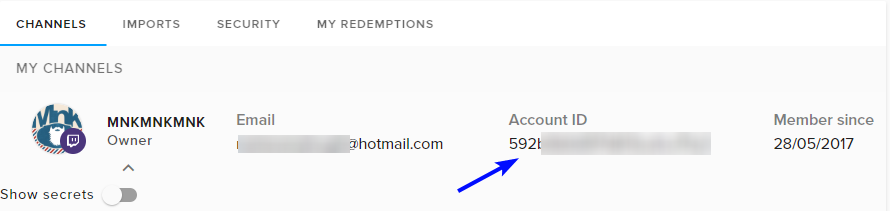
So is it safe to give this out? https://i.imgur.com/MbYC0cI.png
 narrow coyote
For this, yes it should be, its the JWT you really want to be carful with. As far as I am aware you can only get information from the account id, nothing could be altered with it, only the JWT
echo hound
ty
echo hound
Yes ma'am
narrow coyote
 not a ma'am
echo hound
Sorry sir
narrow coyote
 barren pawn
One of my good viewers recently changed their name, how do their points transfer??
wise ridge
can’t you just give them the points to the new username?
narrow coyote
they dont, you will need to !bonus them points
 dull wyvern
I know this is help desk for streamelements but I was wondering if someone could tell me why my sub badges won't submit, they are the right size files
narrow coyote
if you are not getting any errors on the page, maybe try a different browser, otherwise you may need to contact twitch support
dull wyvern
hmm different browsers didn't work, I'll contact Twitch
 orchid flicker
i need help about OBS
when i put a overlay in obs it works but how do i get the screen capture because when i did it, it covered the overlay
i really need help please can someone answer
pine hemlock
You have to move the g ame capture below the overlay.
orchid flicker
okay ill try it
 glass snow
I am having a issue on streamelements where it's not posting in twitch chat for a new follower. It will post for hosts and raids but not new followers. I have everything Enabled and also removed and readied the bot to my twitch. Any insight will be helpful
It is also not registering new follows on the dashboard
pine hemlock
Log out of the SE site and log back in
pine hemlock
someone is looking into it
orchid flicker
`how do i move the game capture below the overlay?
 narrow coyote
You can also use the arrows
glass snow
you drag the source on the list for your scene and movie it down to the bottom of the list
its fixed now!
thank you!
stuck hamlet

orchid flicker
nothing is happening
stuck hamlet
nope, an internal thing, dont worry too much about it 😄
orchid flicker
it worked thank you
 lunar belfry
Hey, i have a problem with my overlay. Ive set a video for my alert Box and it dnt Show up on stream, just when i test it in the overlay Manager. Can someone help me plz
weary mist
@lunar belfry is that video an MP4?
paper grove
Is there a bug with chat stats?
lunar belfry
@weary mist Yes
 pearl flint
so I have a specific overlay for alerts, and I want to import that overlay into others, without setting up all my alerts over again. Is that possible?
pine hemlock
There is a button when you select a layer in your overlay to copy the widget.
pearl flint
Can that copy between overlays?
I also dont see the button
I see duplicate @pine hemlock
pine hemlock
Yes you can do it between overlays.
Its copy or duplicate.
i dont remember the wording
it lights up when you select a layer.
pearl flint
OOO THANK U!
lunar belfry
I rly need help plz 😅
 willow skiff
How viewers use the media share an viewer request?
willow skiff
can stream elements play a diferent gifs from the store?
How viewers use the media share an viewer request?
narrow coyote
@lunar belfry What broadcast software are you using?
@willow skiff you have posted these questions in too many channels to even know what service you are trying to stream to, please do not spam channels, and what service are you streaming to youtube or twitch?
@unkempt scroll most extension issues are solved by removing and re-adding the extension, if you have not linked your twitch account to SE you will want to do this first
lunar belfry
@narrow coyote i use streamlabs obs
 unkempt scroll
Removing and re-adding doesnt fix the issue ive tried maybe 20 times
unkempt scroll
How can I link to SE? Pretty sure i need to do that still
narrow coyote
probably an issue with their browser source, not working with .mp4, can only suggest you convert to webm, or use OBS Studio or OBS.Live @lunar belfry
@unkempt scroll you go here https://streamelements.com/ and login with twitch
@lament blade if you are talking about in chat, you will need to have the bot in your channel, and enable the chat alert module https://streamelements.com/dashboard/bot/modules
lament blade
Thx
lunar belfry
@narrow coyote thak you !! ive tried right now obs and it works.. yes its your tought .. thank you !! 
narrow coyote
unkempt scroll
@narrow coyote thank you. Going to take another crack at it once im at my PC now that they are linked
narrow coyote
 crisp comet
I am using OBS Studio with the Stream Elements OBS.Live add-on and I don't see a way to add a Window capture. It's there if I use Steam Labs OBS and original OBS, but not in this version. Is that functionality gone? Or am I just a derp and missing something? Also, I want it to capture a chrome window and I don't like doing it as a display capture because I possibly have shady stuff up on my other monitor or behind the chrome window >.>
weary mist
Chrome is annoying in that it is difficult to capture
I personally have yet to be able to capture it without desktop capture
narrow coyote
Window capture is for sure in OBS.Live, and if you hardware rendering enabled in chrome, you will not be able to use window capture for it
crisp comet
I don't see the option for Window capture when I do a new source.
And no, I don;t have hardware acceleratio enabled
weary mist
our plugin only added functionality, we didn't remove anything from obs
narrow coyote
its there, nothing with the plugin should have removed it
 wary gazelle
Can I get a download link for streamelements obs live please? Having trouble finding it
nocturne pelicanBOT
@wary gazelle OBS.Live is a Plugin for OBS created by StreamElements. You can download OBS.Live here: https://streamelements.com/obslive
Please make sure you have the latest version of OBS installed, Current Version: 21.1.2. You can install OBS here: https://obsproject.com/
 sullen peak
HEY GUY
I HAVE 1 MORE QUESTION
I JOIN STREAMELEMENT BUT
I DO NOT SEE STREAM DATA ON TWITCH CHANNEL
WHO CAN HELP ME
NO data(edited)

Why no load DATA
narrow coyote
Please dont shout, it will only track data since you signed up
narrow coyote
data widgets will have your total follower count and sub count, but the dashboard and activity feed will only show data that we receive since you sign up
 crimson osprey
anyone have any clue why my stream elements overlay stopped showing up on my xsplit gamecaster?
sullen peak
I joined 2 days ago but in the last 2 days the data is not displayed.
Loyalty points are also not displayed.
I joined 2 days ago but in the last 2 days the data is not displayed.
Loyalty points are also not displayed ?
weary mist
repeating your question doesn't get it answered any faster. Have you streamed in the last 2 days?
wooden heron
i rly cant get behind wtf is wrong last follower the alert worked and showed up but this one it didnt,and store redemption still doesnt show anythin g:(
weary mist
@sullen peak I just followed you, and the information appeared on your dashboard just fine
@wooden heron for the store redemption, are people redeeming a stream perk or a sound effect?
wooden heron
@weary mist its a soundeffect
sullen peak
I set Follower = 0.01 point
weary mist
@wooden heron sound effects only play sounds.
@sullen peak with the way you have loyalty points set up, it would take 7 hours of watching your stream for a person to have a single (one) point
6.4 hours with the follow bonus
so that is probably the reason why people are not showing loyalty points, they just don't have enough to show anything at all
sullen peak
oh
weary mist
I recommend using whole values
if you don't want them to earn points fast, make it 1 point per 10 minutes
but at the values you have now, its likely they might not ever show any points
unless they tip
sullen peak
i set follower = 0.01 point
weary mist
I am looking at your loyalty settings right now. Like I said, they are way too low for anyone to show any points
We show integer values (1, 2, 3, etc), not decimal values
sullen peak
Can I set point = 0.01 or set point = 1, 2, 3?
weary mist
use 1, 2, 3, etc
weary mist

sullen peak
People who have followed my stream channel before they get loyatly points?
weary mist
If they followed before you joined, they can un-follow, and re-follow to get those points
sullen peak
oh good thank u
 tardy tiger
okay i did all the fixes recommended but still I have every alert playing twice
HALP
crimson osprey
i don't think any content from streamelements is working, the song request and my overlay do not work
lament blade
need a command that will respond with hours and a specific target for instance
response: Univarseman has been in the stream for a total of x hours```if someone could tag me when they respond to that, that would be perfect. I'm kinda currently in the desert doing army stuff so I don't have a lot of free time
 jade elbow
So my followers are not showing in my activity feed and the aleart is not working but all the others are
weary mist
@lament blade try typing !uptime in your chat ;)
@tardy tiger if you checked "shutdown when not visible" in all sources in ALL scenes, checked to make sure there are no extra alertbox in your overlay, refreshed the cache on OBS, and closed all other windows before testing, then idk
I am not up to date on what you tried, but those are all the steps. Only thing I would recommend is too close one, and just test in the editor to make sure it isn't the overlay itself
@crimson osprey all the content is working, it's more likely what you are doing is incorrect. Can you give more details about what you are trying to do?
@jade elbow yours is something back end, I sent the relevant info to the right staffer, it should be fixed once he gets to it
jade elbow
@weary mist Thank you
 lucid saddle
Can I stream from SE to twitch on mobile?
 raven owl
Constant issues with audio not syncing up and minimum frame loss of 10%. Any ideas what is cause this. Never had an issue before?
pine hemlock
@lucid saddle You can add browser sources if the mobile application supports them.
nocturne pelicanBOT
@raven owl For the best OBS support, please join their discord where OBS devs and support volunteers are available all the time discord.gg/obsproject
lament blade
@weary mist I'm asking for hours specific people have been in the channel Total, not how long the stream has been going
so my example from earlier:
response: Scalper has been in stream a total of x hours```again, another tag for the response would be most appreciated and thank you for responding so far
lament blade
it's a default command that will accept a target?
pine hemlock
lament blade
wait so that variable still works? Hmm maybe it is the fact that loyalty hasn't been turned on
I personally don't use streamelements bot, but it's seriously the best option for a completely unintrusive chatbot
 dusk skiff
MY Extra Life widget started spamming all the past alerts suddenly every time the source reactivated. It was not doing this previously. Is there any Idea what is happening here?
 dawn wasp
Hey guys ! Just a heads up that the volume slider on media request doesn't render on mobile, which means sound is permanently stuck at 50%! It was driving me nuts yesterday wondering why song requests were so soft. Would it be able to be added (or by default set to max volume, then it can be controlled via system audio)? Also you can work around it by requesting the desktop site
Also is there a better place to report weird little bugs like these?
 crimson yew
Hey, I need some help right quick. I had an overlay done and I'm working on it in the overlay editor. Trying to add a widgets, but when I change the image for follower alert, I can't see it.
A little weird.
Wait, never mind. I think I figured it out.
Only issue I'm having now is trying to get the text to stay within the alert image.
NVM. xD Goodness. 😂 Figured this part out, too.
I apologise.
dawn wasp
That works too, never in a million years would have guessed it though :P
 jade anvil
my stream has been workin fine up until today and i have no clue why. getting 10-20 FPS on stream when in a game
CPU doesn't go above around 15%
my connection speed isn't dropping
so idk whats causing the frame loss
any thoughts?
weary mist
Are you using GPU encoding? If you are, that means OBS is competing with your game for resources on the GPU (the encoding for GPU is nvenc for GTX cards, H264/AVC encoder for AMD cards, x264 for CPU)
@jade anvil
crimson yew
is there a way to keep alert up so I can get the text in the right spot?
jade anvil
@weary mist I'm using CPU (Software (x264)
im running a 8700K @ 4.7 and a 1080 TI
i dont think its my hardware, and i did a test of internet and i have only 1.2ms of jitter
can't test packet loss with Speedtest in seattle
 hearty flare
is the API website down? I get an error while trying to access it
jade anvil
was working perfectly yesterday, didn't download any patches or driver updates. now im getting 10 FPS on stream when i open a game
Number of memory leaks: 17 (from the log file)
17:43:29.518: Output 'simple_stream': Number of lagged frames due to rendering lag/stalls: 281083 (55.8%)
17:43:29.518: Output 'simple_stream': Number of dropped frames due to insufficient bandwidth/connection stalls: 85623 (17.0%)
narrow coyote
memory leaks does not mean anything, dropped frames from rendering lag means the gpu was overloaded, and could not handle the work load, then you dropped more frames from your internet connection
jade anvil
my hardware seems fine though, no overheating or stuttering
crimson yew
Does 0.03 mean 3 in the section where you're creating a subscriber variation (number of months)
nocturne pelicanBOT
@jade anvil For the best OBS support, please join their discord where OBS devs and support volunteers are available all the time discord.gg/obsproject
crimson yew
Thanks, dude. 
narrow coyote
weary mist
@jade anvil something is lagging it down. Can you screenshot your settings in OBS
jade anvil
which part? output?
narrow coyote
output and video
 pliant fjord
pine hemlock
pliant fjord
pine hemlock
We dont store your money.
If you have paypal set up, it goes direct to your paypal assuming you recieved a tip
 haughty talon
how do i start a raffle on twitch? i have the module active but i don't understand the command to start the raffle itself
 vital wyvern
Use the !raffleto start a raffle and !cancelraffleto stop one
check here https://streamelements.com/dashboard/bot/commands/default if the commands are enabled
StreamElements
The Ultimate All in One Platform for Streamers
 scenic hazel
Hey how do I disable the !songlist command?
scenic hazel
@zenith widget Thanks
 proven copper
How do i turn of mini games such as roulette when i am offline?
zenith widget
@proven copper You edit the default command associated with the mini-game:
 royal quarry
Hi there is there a way to get out of the "windowed" mode for the chat and activity panels in obs live and just have them snap to the edges instead?
I misclicked something on screen and havent been able to get them back
zenith widget
@royal quarry Do you mean from this location?
 round nest
I keep hearing more then one notification playing in the alert box, any thoughts on that?
nocturne pelicanBOT
@round nest Make sure to :ballot_box_with_check: “Shutdown source when not visible” for all browser sources (all OBS scenes). If using studio mode, uncheck “Swap Preview/Output scenes After Transitioning.” Also keep in mind that sound can play from any overlay loaded in the browser (editor or launched). https://i.imgur.com/FegZJQS.png https://i.imgur.com/yY0wcFl.png

 round nest
you guys are awesome!
royal quarry
@keizer Yes it's in that format, I thought I had both the feeds "locked" on each side of OBS before? Or is it like this by default?
round nest
this is why I switch to you guys from streamlabs 👌
zenith widget
@royal quarry Just click hold and drag the top bar of the chat and see how the anchors work in the window
royal quarry
Think I've just been awake for too long, thank you mang.
 unborn tiger
Hi, can anyone help me how to run a raffle or giveaway based on KEYWORD typed in chat? Does streamelements even support this? thanks
zenith widget
@unborn tiger Raffles can be started via a chat command or the dashboard, but giveaways can only be started from the dashboard.
Non of the default commands for said things, support Keywords at the current moment.
unborn tiger
@zenith widget OK, so, no keywords then ... how can I then run a raffle for someone to participate in gameplay? The one who gets most points, for example?
zenith widget
the winner for the raffle? raffles only give out points really
And to add him to your game you are streaming, well I think thats up to you how to add him
we don't have a queue system if thats what you are talking about, but its been posted in the Ideas board
floral badger
hey i have a question i've made song request free for subscribers but does that also make it free for regulars?
 swift peak
how do people actually use their loyalty points and access your stream store?
winter zenith
@floral badger the best bet is to try it out.
Regulars have a Higher category then subscriber's
honestly never thought about if some one is a Mod if it is also free for them if they are not a subscriber
@swift peak you can either have the Twitch extension to display the store or by typing in:
!Store
In my stream people like to use the !slot Modual or duel eache other for points.
Also they use the StreamStore
 dense beacon
Hello, can I select several Layers ?
gentle imp
no, sadly
dense beacon
Are they working on be able to make the Layers window larger? 😃
zenith widget
Its been asked before I and believe that it was suggested on the Ideas board and I think its planned, but no actual ETA on it.
dense beacon
Alright 😃
 plucky marsh
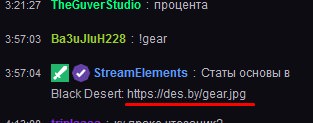
@ebon forum Приветствую, как поправить что бы ссылки были кликабельными в чате ? https://i.imgur.com/NfsNy0S.jpg
 ebon forum
@plucky marsh это не у нас, это твич сам решает какая ссылка кликабельная. Чат то не наш. Рекомендую не пользоватся короткими ссылками для этого.
plucky marsh
@ebon forum ссылки то не короткие по факту, ну суть понял
@ebon forum думал что может в команде созданной чтото не так сделал
ebon forum
@plucky marsh нене с командой всё в порядке, вы увидите такой же результат если сами ссылку просто в чат кинете, а не через бота.
plucky marsh
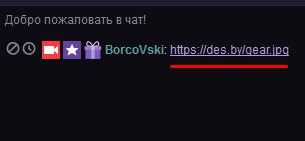
@ebon forum хммм ) https://i.imgur.com/S0GQ1A3.jpg
 ebon forum
@plucky marsh ещё раз - настройки не у нас, трясите техподдержку твича) в командах нет настроек для ссылок в принципе.
plucky marsh
@ebon forum понял, ок
 dusk pendant
I downloaded stream elements add on and now my OBS chrashes on startup
ebon forum
@pearl light ⬆ obs.live crash, ideas?
narrow coyote
Update to the lastest version of OBS Studio
dusk pendant
Thx
zenith widget
From here: https://obsproject.com/download
 echo pivot
but my is already 21.1.2
still the stream stops after 2-3 mins and says unable to connect to server
narrow coyote
It not connecting to the server is not the same as crashing
echo pivot
but what i do in that case
narrow coyote
Try a different server, that should be completely unrelated to the plugin
zenith widget
re-check your stream key from twitch
narrow coyote
⤴
echo pivot
ok
 olive bloom
so I don't have a screenshot but last night during my stream, the chat was acting up and everyone who had moderator status (streamelements bot included) would appear to lose the mod sword icon and have it reappear after a few messages. That made the streamelements bot timer commands have their links deleted (because it had momentarily lost its moderator status).
Did anyone else experience this? It looks like it fixed it self after a while and hadn't encountered it ever before. I'll keep an eye during today's stream to see if it does it again.
narrow coyote
Twitch chat seemed to have some issues yesterday, I saw badges missing in some streams, then they came back
 gaunt fjord
I’ll fix ok?
narrow coyote
What 
gaunt fjord
That cuz I know how to
narrow coyote
@jade anvil your issues are most likely related to streaming at 1080/60, and the renderer can't keep up. You can try 1080/30, or 720/60. If you are not a twitch partner you are better off at 720/60 so you can lower your bitrate allowing more potential viewers. Not everyone can watch a stream at 6 Mbps
 snow plank
is there a reason why my stream elements giveaway isnt working right now? it isnt letting people enter with the !ticket 1 command like it normally does and i havent changed anything
zenith widget
Do you have the loyalty points enabled?
snow plank
yes
zenith widget
I would suggest to check the default command !enter if you've changed something there
gentle imp
or if u put a too high cost to enter
zenith widget
These are the default settings of the !enter command
(default, as I have not changed them so far)
snow plank
i had the !enter disabled and it usually worked fine entering with !ticket 1, the giveaway is set to max 1 ticket per user and free entry but either way enabling the enter command has worked for now thanks for the help!
zenith widget
I'm not sure how !ticket worked for you, since in an alias to the main enter command 
but its great to hear its working again
snow plank
yeah thanks for the help!
dusk pendant
Using the Host this shows up after the message itself, Dont know why, a weird window, any way to remove it
first this window, then blank for like 0,5 sec then the gray 1 pops up
gentle imp
??
the grey is not visible on stream/obs, it's there after u test alerts
or am I missing something @dusk pendant
zenith widget
Woops mobile didnt scroll
dusk pendant
ur prob right @gentle imp 😛
Latest follower doesnt show up on even tho i got a few. Is it simply because i got those followers before i installed streamelements?
weary mist
yes
 dark patio
Can the outline box over lap each other because it wont let me place my other latest sub on my own overlay
gentle imp
can u show us with a pic what do u mean @dark patio ?
I have widgets all over each others on my overlays


 narrow coyote
turn off snapping, and then try moving it
gentle imp
yeah or use coordinates to move them, it's fine, they can overlap np
dark patio
im new to creating overlays so where i find snapping lol
gentle imp
just use coordinates, easier
narrow coyote
its the little grid icon on the upper right
gentle imp
dark patio
oh snap it worked i feel like a noob lol but thanks guys
gentle imp
aren't we all hehe 
dark patio
i may be back lol
gentle imp
feel free to, we'll gladly help if we can
dark patio
knew it im back lol for some reason when i add widget for latest cheer there no name ?
weary mist
@dark patio have you gotten a cheer since signing up for StreamElements
dark patio
ok i try that
try that option still wont show my latest bit cheer name
the other widgets doing same thing
set for one which is total cheers
narrow coyote
I just did a test, added latest and recent cheer widgets, they were blank, but saving the overlay and reloading it populated them
dark patio
tried all sorts saving , reloading but still get black widget
that the last thing i need on my overlay before send it to obs
dark patio
any idea guys on how to get it working
gentle imp
it's like we said, if it's on dashboard means you got it with StreamElements so adding widget, saving and reloading should work, check your data while on overlay see if the cheers show there
if not I think you can even add it manually
narrow coyote
I would also suggest loading the overlay into OBS
I just did another test where the info is not showing in the overlay editor, but it displays fine in OBS
narrow coyote
if you move it in the overlay editor, and hit save, it should update in OBS
dark patio
thanks guys
narrow coyote
narrow coyote
we can only help if you tell us what you need help with 
 half shell
Ok so, it's as if StreamElements doesn't register my stream activity
it doesn't show my follows or anything
i've tried to part with the bot, log out, log in again and make the bot rejoin
but still nothing works
narrow coyote
is it only follower events, like do you see any other events in your activity feed?
half shell
i can test it, brb
okay, donation are shown on the dashboard, i heard the sound aswell but the alert didnt pop up on stream
so seems only follows doesnt show at all¨
narrow coyote
I have pinged someone to look into your account, its most likely something that will need to be fixed on our end. I will let you know once I hear back from them
half shell
alright
 strong terrace
the bot isn´t posting twitter messages in the twitch channel, even though I have it set up for that? And it doesn´t send the auto message when I go live? Is it broken?
 hot wind
How do I set up a song request thing
narrow coyote
 fresh lily
how to get my many ??
narrow coyote
get many what
narrow coyote
dont really follow what you are getting at still
the donations all go directly to the service you are using, PayPal or G2A, SE does nothing with the money, does not touch it at all
 charred garnet
how do i set up a promotional message to go off in my chat ever so often with like my discord or youtube links
narrow coyote
crimson yew
@narrow coyote is there a way to keep alert up. Trying to align text with the alert image.
if that makes any sense. xD
fresh lily
Кто говорит на русском тут
narrow coyote
@crimson yew Can you try emulating an alert? I am pretty sure it should show it as grey-ish with the alert selected still
narrow coyote
Do you see anything? it does seem inconsistent for me, where if I test with my real alerts that use gifs, I only see the text after it plays
crimson yew
All I see is that square. xD when i plan an alert it'll show, but then it goes away. I'm having to constantly play alert so I can align it right and it gets kind of annoying.
narrow coyote
I am not sure if there is a better way to do it
 lone gull
my streamelemnts obs is not connecting to chat or activity feed
 elder sorrel
@lone gull Have you tried reconnecting Streamelements on OBS? It should make you sign in again.
lone gull
no how would i do that?
elder sorrel
It should be on top of OBS when open to click 'Streamelements' I believe to click 'reconnect'.
I'm not home so I can't look myself. lol
lone gull
reconnect streaming account?
elder sorrel
Right. It'll ask for your Twitch User + Pass to log in.
lone gull
yes it worked thanks!
elder sorrel
Awesome 👍
 terse oyster
Hello. I s there a way to access or reset the cooldown counters for items redeemed in the Streamstore? For example, if an item is redeemed requiring the streamer's direct action and there is a cooldown, how can you reset the counter such that it starts after the streamer has completed the action and not after the redeem command?
weary mist
That specifically is not something that is possible. The best way for that to happen would be to manually handle the quantity of the perk that is available (make one available, once redeemed and approved, make another item available). This is pretty intensive, so I recommend getting a mod you trust to handle setting these up
terse oyster
Thank you @weary mist. I am the mod. Looking for a way to automate the process. Can an item by dynamically restocked via a command?
 charred nexus
when i switch scenes in obs it takes a couple seconds for the overlay to load, is there anyway to fix that so it isn't so awkward ?
nocturne pelicanBOT
@charred nexus Check out this tutorial for OBS’ studio mode which allows you to preload scenes before transitioning. https://www.youtube.com/watch?v=W8iWsD2Lq3U
weary mist
@terse oyster not that I know of
 hasty glacier
I am looking for a command similar to one I used in SL. I would like viewers to be able to bet points on the outcome of my game, win or lose. If they are correct they double their money, if they are wrong they lose it all
narrow coyote
best thing for that would be to run a contest https://streamelements.com/dashboard/contests
weary mist
Just keep in mind, contests do not create new points, they are like a round of poker. Everyone puts their money into the pot, the winners get their share
hasty glacier
Can that have multiple winners?
narrow coyote
anyone that is part of the winning bet wins
some make them themselves, others hire people to make them
depends on what exactly you want to make, and what you are capable of making.
if you want something animated, AfterEffects. If something static then Photoshop. If you are able to there is also custom html/css/js
lament blade
Hey just wondering to get an donation thru streamelements do you have too have an paypal? #helpdesk-twitch
@lament blade so i have g2apay will it go straight into my account or?
lol okayy
IS there any kind off like age to using g2
just wondering
And is there some way to transfer that money somewhere else
ebon forum
Withdraw to paypal or bank account, so you should be old enough to have those.
lament blade
Ok
thx both of u

Ye ye i see how it works now
Ye same jojo
but i dont have paypal
ebon forum
@lament blade that depends on the region, some people use accounts from parents - of course they have to agree with that.
1upcoin has an option to be integrated, check it out: https://1upcoin.com/
1UpCoin - Cryptocurrency donations done easy!
lament blade
Just one more question @ebon forum Should you have some specific currency for example should i use SEK (swedish currency) or for ex USD cause that is probaly the biggest one and i stream in english?
ebon forum
@lament blade go by your demographics. USD is simple, if you have more than 40% of viewers outside of Sweden, i would use USD only.
lament blade
Ye thinks that is the best way to go
ebon forum
@lament blade and the currency is tied into a few things in our system like paid media share, so you will need to find what works for you when it comes to minimum amount and cost per second for videos etc 😃
ebon forum
@lament blade https://streamelements.com/dashboard/account/channels
go there, click on show secrets. do not share that with anyone.
StreamElements
The Ultimate All in One Platform for Streamers
narrow coyote
you add an alert widget to an overlay, and customize it with the settings in there
you can also use prebuilt themes that we have https://streamelements.com/dashboard/themes
floral badger
Is it dangerous to hand out your jwt token people can only manage your songrequest and see allerts right?
 copper bobcat
My goal bar wasn't progressing last stream, any fixes?
I had to refresh cache every time a donation or follow came in.
 patent venture
Hello! I have a problem regarding streamelements donations
A lot of my viewers used g2apay as a way to donate. So when I go to g2apay, it states that I have 1 subaccount in my g2awallet called 'External merchant sale'
when I click 'Receive payment' it says I have €0,00 even though I have 33 euro's in my 'external merchant sale'. How do I receive the money now?
narrow coyote
@floral badger
floral badger
@narrow coyote thx
narrow coyote
@copper bobcat first report I have seen of this, if you were getting alerts the goal should have incremented, as everything uses the same event listeners. It would be best to come here when it happens, so we can look into as its happening. In this regard, we may need to wait and see if it happens again
 autumn verge
heyo! this is gonna be the most non-detailed question ever but i seem to remember a way to merge twitch chat with stream elements activity in one panel
but i'm on a mac so i kinda just ignored it until my streamer (and his pc) were back from travelling
any idea where i can go look for info on that to pass on?
narrow coyote
what do you mean by merging them into one panel?
autumn verge
umm
i'm trying to find the update post that i saw
any idea where i can find the stream elements blog/updates posts?
narrow coyote
autumn verge
yeah it's not there
whatever the update previous to this current one changed
but i can't find a list of updates or whatever
dammit i wish i'd paid better attention to the update popup last week
narrow coyote
but what exactly are you talking about when you say having these in one panel
autumn verge
it said something about integrating twitch chat in with the activity feed
narrow coyote
the only thing that we have that allows you to have Twitch Chat and Activity Feed in one place is with OBS.Live, and that is PC only at this time
autumn verge
YES
that's what it was
(that's why i ignored it, cause my streamer was away)
thank you
nocturne pelicanBOT
OBS.Live is a Plugin for OBS created by StreamElements. You can download OBS.Live here: https://streamelements.com/obslive
Please make sure you have the latest version of OBS installed, Current Version: 21.1.2. You can install OBS here: https://obsproject.com/
autumn verge
ty ty ❤ i was able to find it once you told me the name of it
i feel dumb but i appreciate it
narrow coyote
No worries
autumn verge
my thought process was "hey i should be able to find this feature in dashboard once my streamer is back with his PC cause there's no use figuring it out with my mac rn"
and then i couldn't find any mention of it anywhere on the website or dashboard and i was just like crappp i have to go be all cryptic in discord and hope that someone can translate
really tho, why is it not linked anywhere in dashboard?!
narrow coyote
not really sure, might be because this was a smaller release of the plugin, it might become more front and center once more updates and features roll out with it
weary mist
it should be linked on the main page, lol, though how many people spend more than 2 seconds there
 outer topaz
first time poster in here, but i have a few questions and i hope this is the right channel
I was wondering how to get sounds to play with the just a (!x) in chat and also how to get the bot to say how much someone has cheered after cheer, so when someone cheers it thanks them for cheering and says their total
 serene granite
@patent venture you need to do a couple of simple things on your g2apay account. We have a video tutorial for this on our YouTube
G2A is an online payment enables receiving tips via credit cards and multiple local payment methods. StreamElements and G2A cover chargebacks, to avoid fraud...
patent venture
@serene granite I already have that done. The first few donations came in monday. So it might take as long as 7 days to get verified then? Does it always take that long then?
weary mist
@outer topaz Create the sound as a Sound Effect on your stream store, then create a custom command using $(redeem itemName) variable
also make sure that you ahve the store redemption widget in your overlay
outer topaz
is redeeming an item the only way?