
#helpdesk-twitch
1 messages · Page 294 of 1
 zenith widget
If yes, set a user cooldown
and keep the win percentage around 40 and 50%, although I've noticed 50% gives out more winnings.
 vital wyvern
⏫
 warm monolith
no i just started it saw another streamer doing it and trying to figure out how to set it up myself i managed to set up the points system so people can gain points
zenith widget
Then go to the bot modules where ChanPai linked, turn on the raffle and you are good to go @warm monolith
warm monolith
k ill look into it thank you.....
 last viper
Hi, I am trying to activate Chatstats but everytime i get a response that something went wrong.
 atomic hollow
you changed your name recently @last viper ?
last viper
like 5 months ago
atomic hollow
you were able to see your stats since then?
last viper
i didnt use streamelemts back then. i started use it the last 40 days
atomic hollow
its up now @last viper
last viper
love you 😃
atomic hollow

vital wyvern

warm monolith
i imported my nightbot setting on elements now when i type in command both bots pop up.....do i need disable nightbot?
zenith widget
If you want to avoid duplication, yes
vital wyvern
^
warm monolith
do i do that off elelemts or nightbot
atomic hollow
@warm monolith remove it dont disable it
 bitter nest
hey there, does anyone know if there is a live viewer count i can add inot my overlay? i thought i saw one yesterday but now cvant find it
*into
*cant
warm monolith
got it thanks =]
atomic hollow
@bitter nest twitch already does that for you, why add it to the overlay?
bitter nest
because it means i have to keep reaching over to my ipad to see the viewer count i had one on my streamlabs chatbot it just allows me to focus on the stream without messing with my Ipad
on the ipad the only way to see the couns is to press the screen
*count
zenith widget
Best advise here is, ignore the viewer count and focus on entertainment. Have only the chat pop out from twitch
in case some one pops in and talks
atomic hollow
^^
vital wyvern
⤴
bitter nest
so thats a no then?
zenith widget
In short - no
bitter nest
okay no problem thanks anyway
warm monolith
you guys are great help who needs youtube lol
vital wyvern

 tight harness


 warm monolith
ok another dumb question.......is their an uptime commond on elements ? i tried setting one up on nightbot but i could never get it to work right
zenith widget
make sure to check out all the default commands: https://streamelements.com/dashboard/bot/commands/default
warm monolith
i did check that list couldnt see uptime unless i overlooked it
zenith widget
warm monolith
nvm found it im an idiot =[
zenith widget
Like I say everytime some says "i have a dumb question"
tight harness
You learn something new every day 
zenith widget
They are not dumb questions, people overlook stuff or just can't find what they are looking for
vital wyvern

warm monolith
ok last question for a bit.......i stream directly off my ps4 no capture card or remote play and im doing all settings and everything off a laptop. i set up a song request thing and it works but only i can hear the song that gets played any way i can make it where stream hears it too or do i need a pc with capture card
warm monolith
i plan too but i need to get / build a pc first
laptop not good enough to run obs or anything like that
vital wyvern
⚠ pls no laptopo, give room for PC master raceo 
tight harness
I hear that remote play has quite a bit of delay too, so a capture card would be best
vital wyvern
⤴
warm monolith
i want to chanpai lol but need to save up for pc
and with a wedding coming up almost impossible
tight harness
You're getting married?
 tight harness
Congratulations!
warm monolith
is their stream alerts in chat everytime someone follows or subs or host me?
 winter zenith
If you enable it yes
warm monolith
under what tab ?
tight harness
Click on settings in the Chat Alerts sections, then go to the different tabs to enable/disable the message for different events and edit the different messages 😃
warm monolith
thank youuuuu
 timber torrent
@zenith widget
Thank your for your help. Everything works now without Double Alertsounds. 😃
warm monolith
once i set a command is their anyway i can edit what comes out on stream
atomic hollow
that would be the response field
warm monolith
ok wow diddnt see you can scroll to the right to see the edit option
atomic hollow
😃
 wanton jetty
is something broken on the bot
iv got a weekly top tipper on my overlay and his name is showing but not the amount
and yes before anyone says iv tried re-adding the widget
i fixed it :/
 worthy vigil
So, I've managed to get the alerts to work for the people who are hosting with 0 people watching, but I noticed they aren't showing up in chat when it hosts, Does it not count auto-hosts when it comes to posting in chat?
 narrow coyote
@worthy vigil https://streamelements.com/dashboard/bot/modules Chat alerts > host. Change this from 1 to 0
 small veldt
Any staff that can come help in Voice Support?
vital wyvern
@small veldt what is the problem 😃 maby i can help you out with it 😃
small veldt
I'm having issues in the overlay editor thingy
vital wyvern
can you give me a little more detail ? 😃
small veldt
Ehm i downloaded a theme from the Themes gallery and wanted to edit it a littlebit and on the like "live stream" page or whatever there is a Recent donation widget but i want to change it to Top Donation but i can only change the message and the name of the widget i think?
It says "Custom widget name" and i can change it but i guess if i write "Top Donation" it still will launch the Recent Donation widget right?
vital wyvern
Have you seen some of our video guide´s? 😃 if not i can link it you
small veldt
Depends on which one ^^ i have seen some yes
vital wyvern
So the middle left on is the Top donation/tipper, you will want to switch the "recent donation" with this one
If you are using Chrome, use the shortcut for searching up Keyword when you are in the widget section (CTRL pluss F)
small veldt
Wait, where are u now? hah
vital wyvern
This will be on the editor 😃
small veldt
On the create blank editor or? 😲 Cant find it 🤦
narrow coyote
Its the widgets tab
vital wyvern
Are you on the overlay editor at this moment @small veldt ?
vital wyvern
@small veldt il contact you over DM and do it over video share if you rather like that 😃
small veldt
haha yes lets do that
 empty gull
@staff by previous subs arent showing up on leaderboard
 serene granite
@empty gull we only know of sub events that happened since you signed up
 grim kiln
Hi all,
So - My host alert is going nuts recently, i changed it to a minimum of 1 but now even if the alert doesn trigger the video - it still splashed kappagen all over my screen. I also find that my host alert sticks on a thumbnail on the screen forever unless i reload overlay.
These known issues?
empty gull
use muxy
it never glitches
i went form streamlabs to streaelemetns to muxy adn muxy is the most realiable for alerts
@grim kiln
serene granite
the reason kappagen is exploding due to many host alerts is because we're the only service on twitch that gets all these host alerts
others such as muxy are simply unaware of these hosts
grim kiln
thats not the reason...
 tulip gyro
hey guys i need some help with downloading streamlabs could someone help?
grim kiln
the hosts come through fine.. the reason is more likely because u r not correctly ignoring the ones under the minimum
narrow coyote
kappagen has no options for setting a minimum, its either on or off for explosions
atomic hollow
I would remove hosts from Kappagen
grim kiln
thats ridiculous?
tulip gyro
help?
grim kiln
so u can ensure that the alert works on a number but not the kappagen? ><
comeon guys, u've fixed worse than that before 😄
narrow coyote
@tulip gyro This is not StreamLabs, what are you trying to download?
 normal igloo
@tulip gyro We are not streamlabs 🤔
vital wyvern
@tulip gyro This is Stream Elements, we can help you with everything regarding that but not Streamlabs 😃
grim kiln
also, stop with the muxy and streamlabs stuff here guys - im sure they have their own discords or support u can try and ask for help for the next week or two? lol
normal igloo
^^^^^
serene granite
@grim kiln we will definitely fix it by adding a minimal amount to trigger to kappagen, in the meantime the best way is to disable emote explosions on hosts
tulip gyro
steamlabs but i want streamelemets aswell if possible
grim kiln
nice cheers @serene granite thats kinda what i was hoping to hear (a fix will come) ... i wondered if id missed a setting, happy again 😄
u have any idea on the host alert sticking? >< its most peculiar,
tends to happen the firsttime it runs
narrow coyote
cant help you with anything streamlabs. If you are referring to broadcasting software, OBS Studio is better than SLOBS
vital wyvern
^
grim kiln
@tulip gyro its entirely possible and i would advise investing time into setting up ur streamelements as it will be massive in the future
serene granite
@grim kiln can you elaborate on the host alert sticking ? i'm not sure I understand
grim kiln
so i open obs, i hit start streaming and my hosts go off like a bomb ... the alert runs but it pauses halfway through on one frame and that never changes unless i reload the overlay
but audio carries on
serene granite
are you using the latest version of OBS ?
grim kiln
i can grab a clip of it later if ud like? and yes my obs is upto date
serene granite
yes please.
grim kiln
cool ill sortit when i get to pc, thanks ! ♥
serene granite
thank you 😃
 heady cedar
I am a little confused. Are thhe animated overlays have animated transitions from scene to scene?
sorry for bad english
atomic hollow
no, super themes do not include transitions
heady cedar
ok thank you.
 lucid spear
hi, can someone tell me why my text always looks blurry?
heady cedar
one more question ... how do i put the overlays into my scene? do i make a new scene or do i import it as browser source?
atomic hollow
@lucid spear check the font or the font settings
@heady cedar you can do either, its recommended to use each scene as an OBS scene
heady cedar
ok thank you so much 😃
atomic hollow
@lament blade right here - https://streamelements.com/dashboard/loyalty
lucid spear
it's weird cause my text is normal and I don't see a lot of options
 obtuse gyro
@lucid spear check your dpi scaling
 wraith hemlock
I cant game capture Neverwinter, why is this? its in windowed
 ebon forum
@wraith hemlock try to enable anticheat hook in the game capture settings. if that does not help - window capture or monitor capture
wraith hemlock
first one didnt work.. the window capture, doesnt that show when i alt + tab?
ebon forum
window capture will capture a specific window
monitor capture will capture everything on that monitor
wraith hemlock
Ohhh
ebon forum
and in that case google is your best friend, the game is older.
 pulsar gulch
Hello guys
So i setted a 8min delay on obs .. but stream will start after 8 min ..
is there an option to start immediately ? but using that delay ?
 weary mist
You start right away, but the stream that is going to twitch will start after that 8 minutes
weary mist
pretty much. With the delay, OBS has to build up data to send for that 8 minutes, but it can't start sending it right away because twitch doesn't honor that delay (unless you are partner I believe)
vital wyvern
@worldly gyro you will find the default commands here https://streamelements.com/dashboard/bot/commands/default
StreamElements
The Ultimate All in One Platform for Streamers
but the command is !givepoints USERNAME AMOUNT
 worldly gyro
I mean an automated system
vital wyvern
ah the Loyalty points
worldly gyro
Yes
vital wyvern
do you have our bot add as one of our mods?
worldly gyro
Yes, I do
I have it set up to give them points by being in the stream but they do not get points for actively chatting.
vital wyvern
StreamElements
The Ultimate All in One Platform for Streamers
weary mist
there is no system set up for active chatters. You would have to have yourself or a mod reward the active chatters. Just remember though, lurkers are the backbone of twitch
vital wyvern
^
 sharp snow
Hey, some reason the alert boxes wont work on my stream, When i press emulate in streamelements they work, but they wont pop up on my stream some reason. I have the overlay correctly copy/pasted in OBS, it even shows the red box on OBS but it never pops up on my stream, did i miss something?
vital wyvern
Also @worldly gyro i recommend adding the Stream Elements leaderboard extension on your twitch panel, this will fully integrate all your leaderboard´s and also show your stream store item 😃
weary mist
@sharp snow what version of OBS are you using?
sharp snow
OBS 21.1.2 for windows @weary mist
weary mist
ok
 nocturne pelicanBOT
@sharp snow Please connect your Twitch and/or YouTube channel with Discord by going to ⚙ Settings and then Connections here in Discord. https://streamable.com/eg92w

 green grove
how to see you're viewers and chat with streamelements?
today someone asked me to join my game but i was to late due the 2min delay opn my stream?
 lament blade
Trying to setup Alert Variations, I want it to just pick out of 2 alert sounds... Have 2 alerts set to Meets at least 1 dollar. Still only plays 1 song
green grove
i only see notifications with streamelements ground control
narrow coyote
either use a pop out twitch chat, or a third party app like chatty
@lament blade Do you have this checked
lament blade
Yeah I do which is why I'm lost lol
narrow coyote
you might want to check all of the variation settings and default alert setting again, to see if the requirements are different on one. I just tested and this works fine as long as the variation settings meet the requirements to trigger the alert
lament blade
So i would just set the 2 variations to the same thing correct? So must = at least $1 and then check the random box
 upper steeple
Is there any plans for when someone song requests and their song gets denied for whatever reason or they request the wrong song for the currency they used to be refunded?
serene granite
no plans to do it if it's a real money donation, but for loyalty points it can be done
can you add it to the ideas board? 😃
upper steeple
@serene granite yes was only meaning for loyalty sorry used the wrong word
I will add it
serene granite
great, thanks ! 😃
 autumn verge
command for inserting the overlay into OBS please?
i keep forgetting the res to set it to 😓
sharp snow
1920x1080
nocturne pelicanBOT
The default resolution for StreamElements overlays (theme and custom) is 1920x1080. Please add them in OBS at their full resolution and use CTRL+F to fit to screen if necessary. You can then downscale your stream in OBS settings > Video if you'd like https://i.imgur.com/6bWXxjR.png
 autumn verge
tyty
upper steeple
@serene granite posted
autumn verge
So um the bottom menu bar, I know I can move down, obviously - but the width is trolling me? because in the overlay editor, it's end to end , so i can't get it any wider
sharp snow
are you mac or pc
autumn verge
mac
sharp snow
theres a way to scale it
lament blade
Can i change the shadow color of text?
tight harness
@autumn verge What resolution have you set it to? 🤔
autumn verge
just set it to the 1920 1080
that's why i asked
cause i was hoping that's what the problem was 😛
weary mist
@lament blade not currently
autumn verge
the menu backgrounds (the black bars) at the top and bottom also say their width is 1920 px in the overlay editor so not sure why it's appearing this wya
weary mist
@autumn verge what is your obs canvas resolution?
autumn verge
the same
weary mist
is this for you, or someone else
autumn verge
for someone else but the "game" in the background is a screenshot off his machine
it's just an image
weary mist
ok, I need his twitch name
autumn verge
kenreo
he's not on/around rn , like i said i was just using a screenshot to fit the overlay for now
weary mist
I am not sure what is up, because I just tossed that overlay into my OBS, and it fits perfectly
 lost mountain
I just got spotify premium and set up snip, does anyone know how to set up spotify song requests in the chat bot?
autumn verge
yeah, and it's not like typing in the two reso numbers and hitting enter is something i can screw up either -_-
autumn verge
so i'm not actually sure what i'm doing wrong
lost mountain
Does anyone know an alternative in the meantime
weary mist
@lost mountain there are some posted in #command-share and #dev-chat
@autumn verge just to check, can you get me snips of your obs settings->video?
I trust you typed in the dimensions correctly
for the browser source
lost mountain
theres no commands for requests only to show now playing
autumn verge
my potato wouldn't actually be able to stream on those, but i'm just working offline for ken at that res
weary mist
@lost mountain did you read everything? because the second channel has that
autumn verge
 autumn verge
(and i've deleted and re-done the source a couple times in case it felt temperamental)
weary mist
idk
weary mist
lol, yeah
autumn verge
mhm
 sonic bough
Please tell me the new twitter alert function is ready!!! I'm super excited to use it!
 elder sorrel
Go to “My Overlays” real quick @autumn verge
On the overlay. Click the pencil symbol that should be next to the name of the overlay on the right
autumn verge
i already tried setting that to 1920 x 1080 😦
elder sorrel
autumn verge
elder sorrel
That shows 1080?
autumn verge
yup yup
elder sorrel
Welp
autumn verge
lool i was gonna say if only 😛
but that would only be larger in height not in width
now if i'd set it to like 2100 or something that might explain the weird
as in 2100x1080 but unfortunately
clearly ken just plays league on a derpy screen res
elder sorrel
No idea. All I know 1920x1080 is the native resolution for the Overlays 
autumn verge
so i just tried like a random preset overlay
and those still give me the weird width thing too
bout 100px on either side too short
zenith widget
Have you tried doing a native resolution for the browser source(1440p native)
autumn verge
yup
 zenith widget
on the overlay blackbars?
autumn verge
which i guess i could stick some randomb ackground to fill but that feels HELLA distracting to watch a game and have it not be actually fullscreen
zenith widget
ooh so you fixed the overlay, but the game is messed up?
i blaim LoL
won't windowed fullscreen help?
autumn verge
yeah everything i try either wants to fit the game or the overlay
vital wyvern
yea blame RIOT
autumn verge
fullscreen causes higher ping in-game for w/e reason
zenith widget
windowed fullscreen causes high ping?
autumn verge
so pretty overlay/inting adc doesn't sound like a good tradeoff either 🤦
zenith widget

autumn verge
yeah can confirm it happens on my end/other streamers' too
it's not ken's fault for once :p
idk what logic riot uses to write their game buut 🤷
zenith widget
"Lets make skins and champs" logic 
autumn verge
yeah honestly not sure why borderless and fullscreen have literally like 40 ping difference (minimum)
i might just end up making an overlay just for league so i can just not have to deal with it being temperamental
cause scalp tried the overlay on his end and says it works fine, and i can confirm it works for not-league games
just doesn't like THIS ONE GAME that my streamer actually spends the bulk of his time on 🤦
vital wyvern
does he have the same issue on other streams?
autumn verge
other streams? you mean with other games? nope
those work just fine with the resolutions SE/OBS uses
vital wyvern
thats hecking strange (yea meant to type games)
autumn verge
yeah like i said, i might just come back in a bit and just make a league-specific overlay ... probably faster than trying to figure out wtf it wants from me
but if anyone can think of another solution lmk ! thanks for troubleshooting though, like i told scalper, typing in resolution numbers should not be the hard part of SE setup 🤦
vital wyvern
Yea that should not be the hard part
heady cedar
so im setting up my overlays. One of the overlays say "stream ended". Im trying to insert it into my video player banner (when your channel is offline). I cant inport it because it only accepts files, and all i have is a link
how do i do this
vital wyvern
You can only import new files, not export files from the editor @heady cedar
heady cedar
i know that, but i want to import the overlay as a file, not as a link
vital wyvern
from what i know, there is no way to import the overlay as a file to be used for your video player banner
ill hear around with some colleagues
autumn verge
well i'm assuming "screen ended" is a fully opaque thing that you leave on your stream
so emulating it through OBS and screenshotting a static image would work just fine
 oak charm
Hi guys! How do you setup Cheers notification in the overlay editor? No matter what I change, the settings are still default.
vital wyvern
LoL yea i forgot about that
@oak charm have you added the Alertbox widget to your overlay ? 😃
oak charm
Sure, it works fine for everything apart from cheers.
I changed followers notification, subscribers, etc
Looks like noone had the same issue 
 dapper patrol
Hey everyone. I have been having issues with multiple sound alters happening when I get followers, tips, hosts, etc, etc. has anyone else been having this kind of issue? any help would be appreciated as my views are getting annoyed by it and so am I. Thanks
 summer mulch
@dapper patrol Check your overlays, you might have 2 alertboxes
Or you have a couple of scenes with an alertbox but didn't toggle the "shutdown source when not visible" button in OBS
 heavy brook
$(lastfm dasmehdi "dasMEHDI is currently playing: {{title}} by {{artist}}") - Is there any way to make this work with Streamelements, this command was originally made in Nightbot.
dapper patrol
@summer mulch Thanks I will take a look through all the overlays. Appreciate it
 clever mango
@heavy brook https://www.last.fm/user/dasmehdi ?
heavy brook
I think that's it yeah 😛
clever mango
$(customapi.https://onslaught.ca/api/lastfm/?username=dasmehdi) will output Artist - Song
 bold bear
Hello, is anyone familiar with the overlay elements being off base canvas despite resolution size?
heavy brook
@clever mango you are a legend 🙏
@bold bear right click the source in obs, transform, fit to screen?
bold bear
the elements are still off canvas.
it's got something to do with the source.
only thing i could do is move each individual element over and even then it'll probably mess everything up with the animations.
in essence, the individual elements are scaling with the resolution selected.
heavy brook
when you created the overlay on streamelements, did you put it to 1080p, and also when you added it to your obs, change it to 1920x1080
bold bear
I select 720p in Streamelements, then import into browser source and set to 1280x720 but the elements are still off canvas/screen.
clever mango
Is this a supertheme?
bold bear
i tried with 1080p for fun, but things still turn out the same way. Supertheme. Animated ones?
yes
clever mango
If you change the resolution of an supertheme/theme you'll need to adjust all elements manually. The superthemes are created to be used on a 1080p canvas.
weary mist
once you add to obs (with the 1920x1080), hit CTRL+T to make it size to your 1280x720
clever mango
^^ assuming the overlay is set to 1080p on the site and nothing has been resized before adding to OBS
Since you said you changed to 720p
bold bear
so superthemes are designed not to be small resolution friendly. okay, as long as it wasn't anything i was missing.
thank you for your help.
clever mango
They're designed to be friendly to 1080p canvas, which is the majority of stream setups but they can be fit or stretched inside of OBS easily.
bold bear
Indeed.
weary mist
I stream at 720p, and this is the process I use
I keep all my overlays at 1080p, then just transform it to the size of my canvas.
 sly oak
hello
I'm attempting to do a redeemable ticket in my stream store that should only be able to be bought once by an individual. How would I make sure they cannot buy more than one?
weary mist
@sly oak currently, something like that isn't automatable. If you make it a stream perk, you can accept/deny, and if they bought more than once, just deny the rest
sly oak
oh how do I go about acceppting declining
dapper patrol
another question.... why does it take a while for overlays to pop up when switch from one scene to another? I have noticed that it takes a few secs to pop up. it isn't instant. is this normal?
sly oak
is there a way for subscribers to know that they get more points? on the !store it doesnt show this on the left
I have a 3x multiplier on
 umbral drum
my donation pop-ups are not working, i get the dono's but they wont pop up on screen or "recent donations"
🤔
ebon forum
@umbral drum so you get the money on paypal, but you do not get them to pop up in the activity feed? (let's ignore the overlay for now, we need to see if the donations appear there first).
umbral drum
they dont appear on my stream
ebon forum
@umbral drum checked your channel, the link is right (and your discord profile has the old twitch name, update that please).
@umbral drum https://streamelements.com/dashboard/activity
do you see the donations here?
StreamElements
The Ultimate All in One Platform for Streamers
 elder granite
dumb question but have you approved the donation?
ebon forum
Yeah the next thing is - do you have the tip moderation enabled? It is here: https://streamelements.com/dashboard/tipping-settings
StreamElements
The Ultimate All in One Platform for Streamers
Scroll down, click on tipping settings and check "Tip Moderation" - the automatic tip message filtering should be disabled.
All 3 should be disabled i mean.,
umbral drum
its not popping up, cuz i didnt follow these steps, i had a link on my stream alrdy, i just changed the link after i got streamelements
i think
ebon forum
hmmmm ok. go trough the settings and check everything. also check your previous donation platform if the donations landed there if you replaced the link later.
 worthy ore
Is there by any chance a way to change the quoting system by making it into a default command so that it doesn't target the viewer that triggers the command and possibly make sure we can add the game behind the quote?
umbral drum
okay, so i now enabled automatic tip message filtering 🤔
ebon forum
@umbral drum it should be disabled, all 3 options under tip moderation should be disabled.
ebon forum
@umbral drum mh ok, then this is not it. that means the donations did not go through our system. what did you use before switching? i suggest checking that out.
umbral drum
previously i just had a PP site for donations
i have changed the link for the tipping site from streamelements tho
ebon forum
ok that explains a lot. right now you have our tipping set up, so it will work
and if there is something going through, you will see that in the activity feed, even if the stream was offline at that time
 dusty dew
Hey guys! I'm trying to use streamelements instead of streamlabs and since I don't have anything yet in my activity feed, I can't put my overlays like it should (latest sub by example). Anyone knows how to do it?
 heady coyote
hello I need help setting up my custom overlay and alerts
weary mist
@dusty dew https://streamelements.com/dashboard/session
StreamElements
The Ultimate All in One Platform for Streamers
@heady coyote what help do you need?
heady coyote
I need help setting up my overlay and alerts
heady coyote
I dont know to do it all all lol
weary mist
then watch the videos
heady coyote
lol setting up the play scene or even adding the alerts
weary mist
@heady coyote
dusty dew
@weary mist Thanks Scalper I don't see the top cheers tho right?
weary mist
"Top" widgets use accumulated data
so with cheers, we can only give what we have received in information
IE cheers sent since you first singed in with SE
dusty dew
Nope, and I have someone sending a lot. So I think I'll just write it by hand each time. I mean, it's kinda sucks a bit cause I'll never have his overall amount
 elfin pawn
i need help, i have 4 timers and everytime they activate they all go off at the same time
how can i spread them out so it doesnt do that
heady coyote
Is there any staff I can pay to setup this for me ?
weary mist
@heady coyote we have themes that are already pre-made for free, you just need to add them
@heady coyote asking multiple channels is not going to help. Like I said, there are already premade ones for you
@elfin pawn you can try adding chat lines, or changing the timing (have one at 4 minutes, one at 6, one at 7, etc)
heady coyote
what widget would you use for when you receive a new follower
heady coyote
How do you get to that @elfin pawn
elfin pawn
streamelements website then timers
 heady coyote
streamlabs ?
zenith widget
This is StreamELEMENTS buddy
vital wyvern
What is Stream Elements ? 
heady coyote
lol
zenith widget
@elfin pawn As for your question, if you don't want them to trigger at the same time, change the chat lines or the timers
They are all the same at the moment
@heady coyote As for you, I suggest watching the videos from here to get acquainted with our tools: https://www.youtube.com/playlist?list=PLCDDKlFdScbEwdx5AntcQIS1InkFJwHtv
elfin pawn
alright
zenith widget
If you have other questions afterwards, feel free to ask
heady coyote
It wont allow me to upload my video for the alert
ebon forum
@heady coyote videos are allowed in the .webm format - check that. and check filesize too.
heady coyote
okay
If its to big of a file what do you recommend or how can I make it smaller ??
there both in webcam format but its stating invalid
autumn verge
So for league is it possible to do a window capture - but "part" of window just to show the in queue part?
Instead of the entire lobby/window? I feel like that may possibly be an obs setting thing though
 dense jackal
You can crop any source in OBS to only show a part if you right click the source and go to filters -> hit the plus sign -> crop @autumn verge
autumn verge
kk ty!
and can anyone confirm if/that the auto-tweeting works ?
wait nvm i tried to add variables to the tweet (to show the name of the game) and i think that was the part that went weird
dense jackal
👍
dense jackal
Haha totally understand
autumn verge
lol i need to obviously post that - please allow command variables in the social media function so i can automate the game he's playing too
heady coyote
I fixed that problem I was doing something wrong
Only problem im having now is inserting a image every time I select file once I click upload it doesnt do anything
dense jackal
Are you using chrome @heady coyote
heady coyote
no
 unique void
when I get a new follower on twitch, the bot doesnt announce it in chat, what do I do to have it type in chat
narrow coyote
https://streamelements.com/dashboard/bot/modules Chat Alerts
unique void
thx
 crimson yew
Any reason why alerts come so late?
 queen mural
i need some help, i renamed my bot but now it is coming up as myself
nevermind, didn't realise i had to make a new account
dense jackal
@crimson yew what alert?
narrow coyote
what broadcasting software? Because follow alerts are almost instant
clever mango
@still salmon When you add/edit a command on the dashboard you can add aliases for the command by clicking on advanced
Aliases are another !command that will trigger the same response
 still salmon
thank you
crimson yew
OBS. @narrow coyote
Alerts in chat are instant, but alerts on screen don't appear til minutes after. Probably about 5 minutes after.
 pearl flint
I have an alerts issue. Could someone help me in VC
 limpid spire
Is there a way to have sound effects wait for each other to complete? As right now they can all run at the same time...
I am specifically referring to sound effects redeemed from the store.
 plain compass
Hey guys! This might be a wied question but is there anyway you can test the alerts ?
crimson yew
Overlay Editor.
 keen wadi
is there a way to reset a counter from the ${count <count>} variable
tight harness
@keen wadi Hey sara, yeah you can use the !editcounter command
 signal depot
Is there a way to export your commands so I could share with another user?
keen wadi
ohh got it thanks!
also the custom event box resets when i change scenes is there a way to make that not happen, along with chat maybe
 velvet fractal
How do I reset my Tip Bar?
narrow coyote
lament blade
I want to put a pic on a stream for strem perk
But it won't work
I do set preview
I click upload and up load it but I don't know what to do next
narrow coyote
Step 1: change your discord name to something that is not offensive
Step 2: when the image has been uploaded, click the submit button on the image you want to use
 kind epoch
Problem, tts announcements read the letter e as a d any ideas?
lament blade
I press upload but it doesn't do anything
narrow coyote
Are you using chrome? there can be upload problems in other browsers, as the system is built for chromium
lament blade
No I will
clever mango
@kind epoch Which voice and what was the message?
 fierce lily
i have a question do i need to stream off the pc i set up stream elements bc i stream off my ps4 but i want to use the stream element overlays
tight harness
@fierce lily The overlays need to run in software which supports browser sources, which your console won't. So you need to link your PS4 to a PC, either via a capture card or Remote Play, although I hear Remote Play has quite a bit of a delay
tight harness
No problem
fierce lily
i know this isnt apart of your app but how much does a good capture card?
tight harness
I don't use a console so I'm not sure how much they go for, you're best off asking general questions in #general-chat 😃
fierce lily
ok
limpid spire
Is there a way to have sound effects wait for each other to complete? As right now they can all run at the same time... I am specifically referring to sound effects redeemed from the store.
 rough kindle
@wraith hemlock That's probably not going to have anything to do with StreamElements. Likely an OBS setting.
rough kindle
@fierce lily Capture cards run in the ballpark of about $150-$200
fierce lily
ok ty
wraith hemlock
I want my stream crystal clear
 frosty lantern
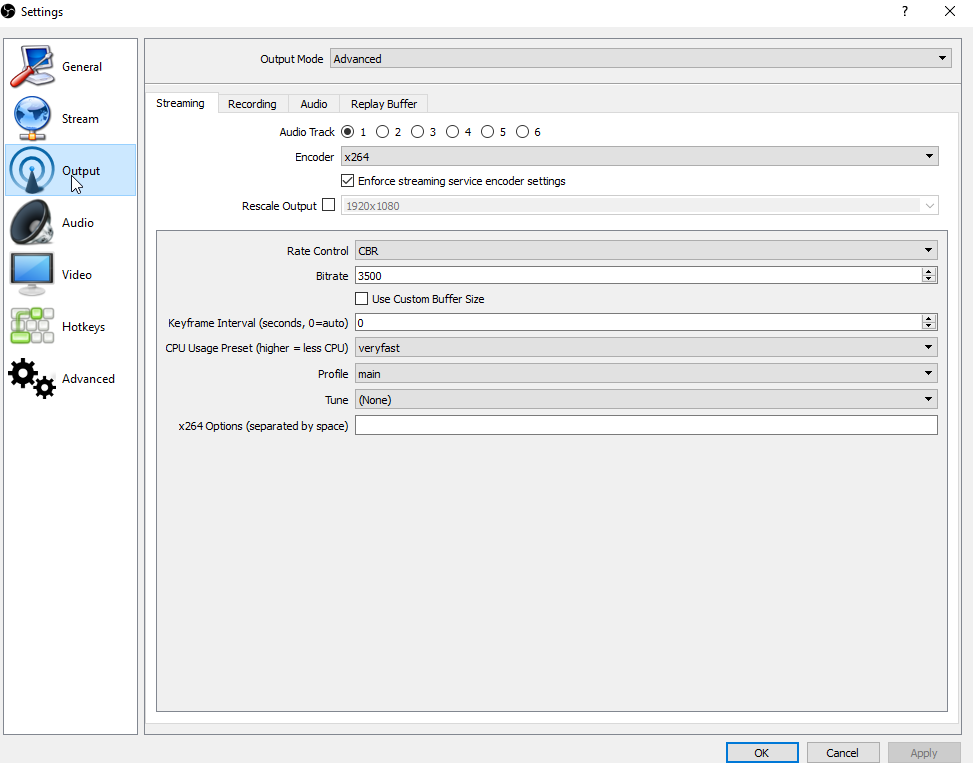
whats your bitrate and resolution set to @wraith hemlock
wraith hemlock
uh
frosty lantern
what do you use to stream? software wise
 frosty lantern
can you link me your channel? i want to see the vod if you have it up
wraith hemlock
give me a few minutes
rough kindle
I'm having an issue with song requests randomly being skipped.
frosty lantern
is it skipping the backup track or the primary? @rough kindle
rough kindle
It'll sometimes play the first few seconds, then skip to the next song
clever mango
@rough kindle do you have ground control, our desktop app?
rough kindle
Yes
clever mango
Do you have the mediarequest page open on the site?
rough kindle
@clever mango I'm not currently streaming, but I can open it now, and had it open while streaming when I had the issue Friday night
clever mango
That's likely the issue
You can't have mediarequest running on the site and in ground control at the same time
Disable songrequest in ground control settings
rough kindle
I had the site open on my gaming PC and ground control open on my streaming PC. Can it still cause issues if open on two separate PC's?
clever mango
Yes
rough kindle
OK, I'll give it a shot and see if I have issues next time. Thanks for the help
clever mango
👍
kind epoch
Hi, i'm using chrome and it's the bot announcement of hosts follows raid etc but it also reads the viewers name out but for some reason it does not recognise the e character but reads it as an d instead
limpid spire
Is there a way to exclude the bot from the top chatters leaderboard?
 trail silo
Is it possible to have Kappagen trigger with Streamlabs events? When emulating in Streamelements, I can get Kappagen's alerts to appear in Streamlabs, but when emulating in Streamlabs, I can only get my Streamlab's events to trigger. I can't seem to figure out how to get them both to trigger at the same time, in emulation or live.
trail silo
Dang so is Kappagen only functional with OBS Studio then?
narrow coyote
well, more so it will only trigger emote explosions from StreamElements events
limpid spire
Hmmm, so there's no way to stop bots from appearing as top chatters? :/
Or a way to zero out chatters? That's a bit sad, especially if a user had an inappropriate name.

autumn verge
you can reset their points, and then choose to exclude them from the leaderboard - so they'll remain zero'ed at the bottom @limpid spire
i've done that to my bots so they don't overtake everyone, ping me if you need specifics!
narrow coyote
They are talking about chatters, not points
autumn verge
ohh i can see how that would add up
limpid spire
Yeah, chatters, sadly. 😦 But that's okay, I can manage, there are other priorities.
autumn verge
as of rn my top 5 are still people
but i imagine once i get timers set up that might change
on that note - can i set a timer to be a command - ie if i set !social on a timer
limpid spire
I just have quite a bit of bot chatter to interact with the stream, and not that many active chatters bar a handful.
autumn verge
would it actually proc the command? or just post it as text? -_-
limpid spire
Yep, I have about 6 or so timers. :/
autumn verge
naw i understand, i just haven't gotten around to setting timers yet!
i bet it adds up quick once i do that, streamelements is #6 rn and only like 10 lines less than the next highest human
i just misunderstood what you were asking, my b 😃
limpid spire
You'd think by default the SE bot wouldn't count. 😂
Yeah, the bot has just over 1k lines.
autumn verge
lol the bot's super new in our channel, so the highest rn is me at 150 lines 😂
mostly testing/adding commands
 tender valve
I need help with the resolution of my overlays
when I try to change an overlay from 1080 to 720 and I go into the editor it shrinks the box instead of shrinking everything into the box which means I can only stream 1080 streams unless my viewers wanna see only the top left corner of my overlay
narrow coyote
when changing overlay sizes they will not scale the elements. Ideally, you would keep the overlay at the native resolution of 1080p. Even if your stream output is 720p, your base (canvas) should be 1080p
@autumn verge The bot cannot trigger commands, so the timers would need to just be the text you want it to display
tender valve
gotcha so basically my res should be 1080 but my scale output 720
narrow coyote
Yeah, so if you are using OBS, your video settings would be something like
tender valve
thanks
if I have a beast internet and upload speed an okay computer with 80 fps and 720 res. what's a recommended bit rate?
narrow coyote
autumn verge
okay sounds good, i can just copy-paste the entire command over then, ty! @narrow coyote
 dry hare
So if I do !store it should link to my store/items right?
because apparently it's still not liking my store page via the panel/chat bot
 robust pumice
im trying to put the contest in my chat but its not working
when i start it
i need help
dry hare
a giveaway?
dry hare
Oh like the "bet" thing?
robust pumice
yea
dry hare
one sec @robust pumice
Okay, so you filled out the Contest information under Loyalty settings?
robust pumice
yea
dry hare
And you hit "Create and Start"?
robust pumice
yep
dry hare
if you type "!contest" in your twitch chat does it tell you the contest that is running?
robust pumice
nope
dry hare
in your SE dashboard, remove the bot from your channel and then re-invite it
then try again
dry hare
woot! I did a thing!
robust pumice
lol
dry hare

robust pumice
tysm
dry hare
@wintry river are you talking about when you're playing a game, and get your status updated on Twitch?
 rotund pier
Hey guys I need help whit my twitch
 wintry river
@dry hare yes
dry hare
This activity thing?
wintry river
i think
dry hare
@rotund pier which follow thing?
@wintry river that's done via the Twitch Website
when you go live, or play a game, as long as the Twitch Desktop app is running and can detect your game, it should pull that information and update
rotund pier
No the following thing when your live and when you get a notification that says someone yust follow you
Is it the chat alerts
dry hare
I believe that you just need to have the overlay added in OBS, and have Ground Control running for it to pop-up in the overlay. If you have the SE bot in your Twitch Channel, the Chat Alerts will have the bot announce the follow/host/raid in your chat
someone more versed in the workings of SE could ensure that my information is correct
@dense jackal
🍅
rotund pier
Oh I did that I don’t need help anymore
dry hare
👍
dense jackal
wintry river
Thank You @dry hare
wintry river
I did it @dry hare
rotund pier
Thanks
dry hare
@rotund pier make sure to fill out the #402919550066229250 form pinned in #general-chat so you can be announced in the SE discord
I think it is in #general-chat
it's somewhere
but they'll get you added to the bot if you do all the things, and then you get "promoted"
nocturne pelicanBOT
@rotund pier Are you a StreamElements all-in-one streamer and interested in stream promotion when you go live? Please fill out this application https://strms.net/sellout and if you meet the 3 requirements posted in the :pushpin: pinned message in #welcome you will be added to the stream announcements.
rotund pier
Oh ok ima fill it out
dense jackal
it's !sellout for future ref @dry hare
rotund pier
Ok I did it
 opal void
anyone know how to get a free twitch overlay? it'd be awesome if you helped me out!
clever mango
Take your pick https://streamelements.com/dashboard/themes
dry hare
^
 inner python
Hello, I need help with store redemption. The user has enough points and still can't redeem getting an error message "Sorry you don't have enough points". I already reset his points and still the same. How can I fix this?
clever mango
@inner python They most likely changed their username. Please have them visit your stream store !store and log in at the top right
inner python
@clever mango awesome! thanks for the quick response! you are awesome! i'll ask him to do that
 robust turtle
Hi, Team. Are users able to rename the StreamElements bot? Similar to how you can rename other bots (notably StreamLabs etc.)
nocturne pelicanBOT
@robust turtle Custom bot name requirements
- StreamElements bot modded and in chat
- Active overlay with alerts
- StreamElements tipping page in the panels below the stream (!panels)
- Create a twitch account for the name you want to use
- Ground Control app must be running
Steps to enable custom name
- Sign in to https://twitch.tv with the bot account
- Install and run Ground Control (!gc for download)
- Visit https://twitchapps.com/tmi/ and generate an oAUTH token
- Copy/paste everything in the box to Ground Control oAuth settings and enter the name for the bot account
- Restart Ground Control (custom name may take a few minutes to take effect)
dense jackal
It shows songs from your songrequest/backup playlist @dapper trellis
opal void
i was wondering how to get a free overlay? anyone know how?
dense jackal
Terrabuck mentioned above @opal void https://streamelements.com/dashboard/themes
opal void
oh thank you! ⚡️
dense jackal
what do you mean by new music @dapper trellis ?
Yep! but I advise to use only the website or only ground control when using mediarequest, having both open at the same time can kind of bug it
I still prefer the website as it's easier to manage everything that way imo
Hell yea 😎
We're always here for anyone who needs help
 ancient iron
Hi team, Any issues with cup overlays? loads fine in dashboard when i copy link to new page or my overlays in OBS its blank
dense jackal
I haven't been hearing any, one sec I'll look into your account
ancient iron
Thanks
dense jackal
Which overlay are you having the issue with?
ancient iron
yep just poped up
 pastel frigate
Is this for support?
pastel frigate
So when I use the streamelements store, and select the sound option thing, and they redeem it, it doesn't play any sound
zenith widget
Did yoy add the store redemtion widget to the overlay? @pastel frigate
pastel frigate
No, where do I find that
weary mist
in the overlay editor
pastel frigate
I'm not on my computer right now, gonna go to bed soon but I will try that when I wake up
lament blade
points do not get added to my viewers 😦
 rain vale
Have a problem, streamelements lags my games to 60 when it should be 144hz, any way to fix?
dry hare
Pretty sure it isn’t StreamElements...
dry hare
StreamElements is running in OBS, which only outputs at 60fps. If your inside a game and you’re dropping to 60fps, check your monitor refresh rate in settings
dry hare
I have a 144hz monitor and I get 0 drops in refresh rate using OBS studio and StreamElements.
Your refresh rate on your monitor can’t drop if it’s set static unless a game is capped at 60Hz
rain vale
odd, mind sharing your OBS settings?
dry hare
They’re the default ones
rain vale
hm
dry hare
Are you using NVENC encoding or 264?
rain vale
NVENC
dry hare
Use 264
rain vale
ok
dry hare
NVENC taps your GPU and causes performance issues in games with high requirements
zenith widget
@lament blade Have you enabled the loyalty points?
dusty dew
I used streamelements tonight for the first time and I'm really happy. For once, all my alerts worked and it was super easy to setup. I have one question and it is a super important one for me. Is there any ways to import my top cheers? I was using streamlabs before.
zenith widget
@dusty dew Unfortunately, we are unable to import cheers from Streamlabs. Tips can be, but cheers is something tracked via the Twitch API.
One way to have them shown is gather a list of top cheers form SL and place is a hall of fame under your stream in a panel, as an idea.
 frail rapids
hey guys im having a little problem with donation. my friend donated a dollar and i cant get it i looked at my email it said it went through but i don't have it in my wallet and he said it was waiting to be accepted i also looked into my revenue and still nothing 😦
zenith widget
@frail rapids Did you look in your PayPal account?
frail rapids
@zenith widget yes i did wallet is at 0 😦
zenith widget
I'm not sure what your friend means by "needs to be accepted" if he used the tipping page
but if he didn't receive a receipt from PayPal
then he didn't tip
frail rapids
ill ask him rn
zenith widget
Note that if you or him have any limitations on your paypal accounts, than that may hinder the process
frail rapids
well i just made it like a day or two ago i think it might be fine?
zenith widget
So, I can't really see my self, but if the tip is not in the tipping history in the SE Dashboard, no money in your paypal wallet and your friend has not received a paypal receipt, then the problem is with him and not us.
Or the problem is with PayPal
frail rapids
hmm alright well thanks for the response i appreciate it 😄
 fallow shuttle
A friend of mine needs help exporting from his stream to streamelements
zenith widget
Is he using SLOBS?
fallow shuttle
Yes
zenith widget
What exactly he needs exporting? If its the overlay from SLOBS, then we cannot import it in our overlay editor. Its best to make fresh one or use one of our premade themes
zenith widget
What exactly he needs exporting? If its the overlay from SLOBS, then we cannot import it in our overlay editor. Its best to make fresh one or use one of our premade themes
I'm not sure my self actually as to what kind of file the export feature from SLOBS provides, but we had a similar case yesterday and the overlay is .overlay type file, which we don't support
fallow shuttle
That's a fucking weird extension
zenith widget
Are you referring to this?:
Because this import alert boxes from the StreamLabs WEBSITE and not SLOBS
afaik SLOBS' overlay and their alert boxes in the website are different
 lucid tinsel
I stream on my Xbox is there a way to put an overlay
zenith widget
@lucid tinsel With a capture card
You need need to connect the XBOX to the capture card and then the capture card to the PC
Afterwards, add the capture card source to OBS and add an overlay
 orchid swallow
Hi there is this the right place to ask a question?
zenith widget
Yes, as long as its heavily related to SE
but almost any kind of question can be asked you'll be pointed in the right direction
orchid swallow
Yeah I just was wondering with the song request feature, do you need to keep the media page open at all times for this feature to work?
zenith widget
In order to hear the music(and I assume the widget to show current song) - yes
orchid swallow
Ok cool well is it possible to switch the media player to an “audio only” mode? I need all the bandwidth I can get and would love to avoid streaming a YouTube video if I can
zenith widget
You don't need the actual media widget in your overlay to show the video
orchid swallow
I don’t use overlays. I’m a PS4 streamer
zenith widget
Then the stream won't be able to hear the music that has been requested
If you are using a console to stream
orchid swallow
Ah I see
nocturne pelicanBOT
@orchid swallow Here is a guide on how to setup the most essential tools for streaming from your console, while using StreamElements tools without involving a Capture Card! It's easy to do, take 4 minutes to read and 10 to 15 minutes to setup!
Read all about it here: https://blog.streamelements.com/how-to-stream-on-console-7b620b1c46c3
zenith widget
If you want to have an overlay and have the alerts showing up on stream, then you will need a capture card that is connected to your PC and console and then use OBS
 topaz python
Hey how can l make a command that runs another command? l would like to make a !win {points} command to execute !bet win {points}. l looked up the variables, l found one that saves the variable after the command but i dont know how to execute it.
 gentle imp
that's not possible
zenith widget
You can set an allias, but you can't setup the bot to call its own commands in the responses. This is to prevent looping
topaz python
Thank you guys for the fast response
 lyric trench
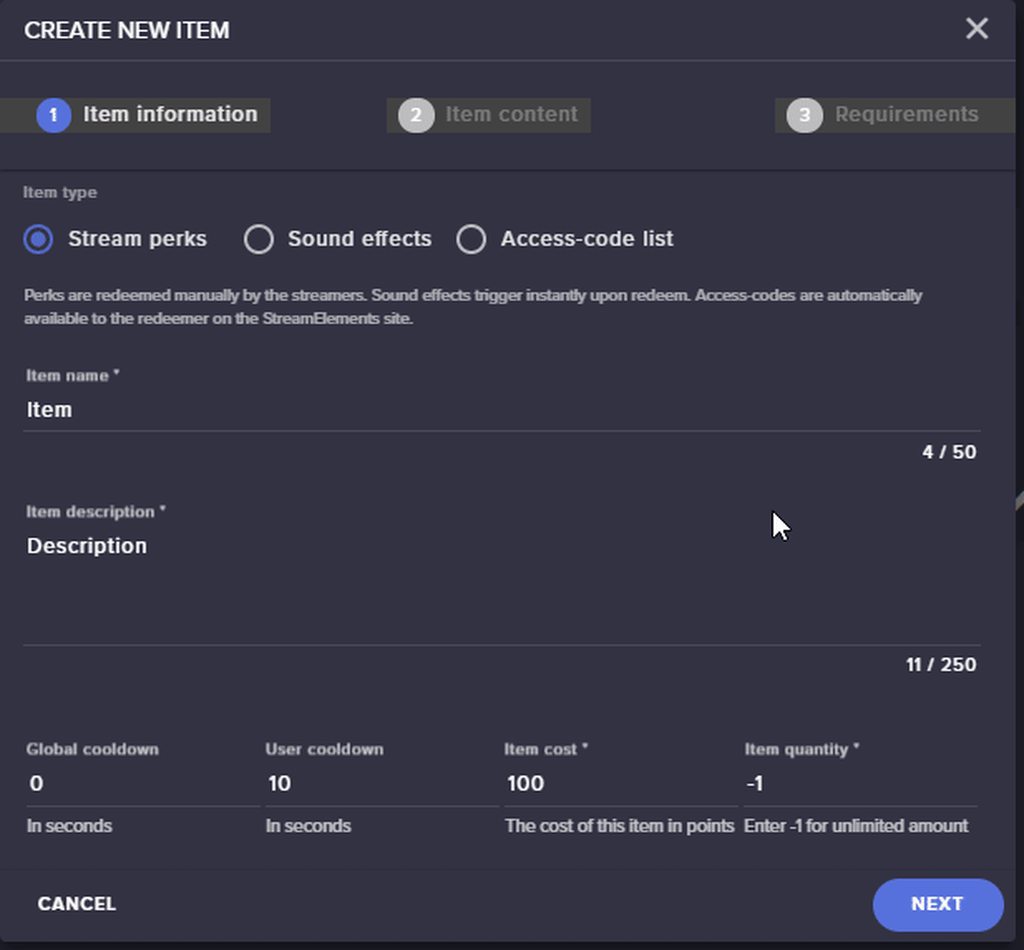
Hi guys. I try to upload a file to the stream element store, but I can't figure out how to upload my files.
atomic hollow
@lyric trench you mean the thumbnail or the what appears on stream when its redeemed?
lyric trench
No the item that will be downloaded
atomic hollow
there is nothing your viewers can download on the store
lyric trench
no, just the thumbnail.
I click on create new item, but I cant upload any items
I'm confused
 lyric trench
On item conent I should be able to add my content right?
lyric trench
SO, If my viewer get something from the store I have to send the actual item (overlay in ths case) to the viewer
atomic hollow
yeah
lyric trench
Ok, thanks for the help. I set up another store for the downloads, with a code, and then give the code through elements stream store GG 😄
 limber bane
Hi Guys, Im having issues with the loyalty points for 2 people, it worked ok for them a few days ago, the slots still work, but when they try to redeem things it says this "Sorry you don't have enough points" when they have plenty of points, i've tried resetting their points to zero then back to what it was, but nothing seems to help, any ideas on how to fix this issue?
 iron spoke
I am a full 100% noob. Some1 told me that a Elgato was a good thing to use for streaming, but i dont know which one is good. Could you guys help me out?
winter zenith
@limber bane did they change there name by any chance?
@iron spoke thats not really a SE related question I would through tat in #general-chat to open a discussion with other people to see what there opinion is
I would say Elgato HD60 but... 
limber bane
@winter zenith one of them yes, but the points didnt carry over so i gave points to his new name and removed from the other one, the other i dont think so, i'd have to ask, even with name changes is there a way to fix it? as i said he can still play slots etc, just not redeem
winter zenith
@limber bane pls tell both of your Viewers to sign in to the SE Dashbord:
https://streamelements.com/dashboard
Log out. and then back in
StreamElements
The Ultimate All in One Platform for Streamers
it sounds stupid but this should help the accounts to verrify again and its should be fine
limber bane
Thank you 😄
 daring wharf
Wondering if someone can help me. Whenever i try edit my tipping settings it says "Saving" then "Something went wrong" everytime i try update it?
winter zenith
hmmm 
is there a panel unfinished wich needs to be filled in?
is something displaying "red" on the site like you didnt fill out a pannel that has to be filled out?
daring wharf
Nope, not at all. If i try edit anything to do with the tipping it says "saving" then "something went wrong" 🤔
winter zenith
wich browser do you use?
daring wharf
Google Chrome
daring wharf
Nope 🤔
winter zenith
maybe close the whole browser and re open it


 craggy crest
Ennopp needs help with his hypecup
daring wharf
🤔
craggy crest
When someone cheers, the cheers don't drop into the cup
This is why you see no cheers in his cup live on stream right now
Been trying to find out
for the past 3 weeks
and it's annoying me.
winter zenith
Deleting the HypeCup widget from the Editor and readding it should work
@craggy crest
daring wharf
I also tried another browser and i'm still having the same issue 🤷
winter zenith
@daring wharf okay try something here with me please.
Log out of StreamElements - Delete your Cache - Log back in
if this doesnt help
please try to press
Crtl + F5 while on the tipping page see if this helps
 karmic flint
can I get viewers here?
winter zenith
while on the Tipping Page pls press F12
open up these Tabs:
make a screenshot and send it to me in DM pls
@daring wharf
daring wharf
For sure, i'll try relogging into paypal on it first incase it's that
winter zenith

daring wharf
Haxxor work 
winter zenith
@karmic flint not really if you use SE full in you can get added to the Sellout channel
nocturne pelicanBOT
@karmic flint Are you a StreamElements all-in-one streamer and interested in stream promotion when you go live? Please fill out this application https://strms.net/sellout and if you meet the 3 requirements posted in the :pushpin: pinned message in #welcome you will be added to the stream announcements.
signal depot
How can I export my commands and give them to my buddy for his stream elements?
winter zenith
or you can chat with people in #general-chat and become friends and watch each others streams @karmic flint
karmic flint
sounds good thank you
winter zenith
@signal depot since all is in the cloud you cant export your commands YET you would need to give him the responds unfortunately
signal depot
Dang ok. Thanks @winter zenith
I have about 115 commands that I'd like to share with the community I'm in. A bunch of police ten codes
signal depot
Yea you can see why I'd wanna share them haha. No big deal they'll have to input them on their own if they want to imitate it.
My viewers can type !10-4 or any code they hear in stream and SE would tell them what it means
zenith widget
10-4 
winter zenith
thats impressiv AF
zenith widget
but yea if you want you can put that export of commands in the ideas tab/page
winter zenith

zenith widget
Not sure if its in the works really 
karmic flint
tipping page only links to paypal? not available for credit cards only?
winter zenith
no only Paypal and for some G2A ATM
karmic flint
ok
craggy crest
It doesn't show up
serene granite
@daring wharf do you want to have tipping presets enabled, or not?
winter zenith
@craggy crest the streamer deleted the Hype cup widget and put it back in
yet if he replays a event with bits it doesnt display bits falling into the cup
correct?
daring wharf
@serene granite What does "Tipping Presents" do
serene granite
take a look at https://streamelements.com/scottfpmg/tip
daring wharf
Wait everything has just started saving fine?
serene granite
under Tip Amount
daring wharf
Ah i see 🤔
serene granite
the problem saving was because of a small bug we're fixing now (deleting all the tipping presets is causing it)
so if you don't want to use tipping presets you can disable them
craggy crest
@winter zenith That is correct.
daring wharf
Ah i see.
craggy crest
I even clipped the scene where explains it https://clips.twitch.tv/CuteBoredLardGivePLZ @winter zenith

If that helps you figure out what is causingit.
daring wharf
@serene granite I will remove tipping presents. Thankyou for your help ❤
serene granite
np
craggy crest
@winter zenith Any luck?
zenith widget
@craggy crest I looked at the clip, bcs Kiwa can't watch it at her work place
It seems that both cups from the clip don't match up what they have inside
Also is he using SLOBS?
craggy crest
OBS?
zenith widget
and it doesn't look like he deleted it
craggy crest
He is using OBS
zenith widget
ok, just asking, because of the bitboss present there
 signal pollen
Hey guys hoping you can help, was diverted here from the live chat. I have 2 issues. FIrstly i was wondering if there was any way to change a giveaway title name once you start the giveaway? secondly My alert sounds are doubling up? I had one custom sound applied, just changed it. The alert comes through with the default ding the first custom sound and then the new one haha. any ideas?
zenith widget
@signal pollen You can't edit a giveaway name once its started
nocturne pelicanBOT
@signal pollen Make sure to :ballot_box_with_check: “Shutdown source when not visible” for all browser sources (all OBS scenes). If using studio mode, uncheck “Swap Preview/Output scenes After Transitioning.” Also keep in mind that sound can play from any overlay loaded in the browser (editor or launched). https://i.imgur.com/FegZJQS.png https://i.imgur.com/yY0wcFl.png

 zenith widget
@signal pollen Also check the variations for the alerts
winter zenith
to be honest I think it will be easier if the streamer comes to us @craggy crest @zenith widget .
This messaging between 3 corners is hindering the solution. we can help him for sure he just needs to visit us
signal pollen
ok that solves that one thankyou! annnd ill give that second one a try! thanks legend @zenith widget
omg it worked. really appreciate it mate, can't believe how easy that was......grrrr @zenith widget
zenith widget

craggy crest
@zenith widget @winter zenith He said when he stream will be finished ro come back in and he'll personallty talk to you guys wbout what the issue is
zenith widget
Best course of action 
winter zenith
twitch needs more people like you 
zenith widget
I'll go DM to not spam the ish out of #helpdesk-twitch
 blissful apex


 woven gorge
Could I delete messages using this bot?
zenith widget
What messages in particular?
Auto delete curse words? if yes: check the bot filters
woven gorge
No i mean like deliberatly delete messages from a guy
zenith widget
/ban <username>```
numbers in the timeout command are secondsTime said user out for 1 second. It'll remove all previous comments by user.
@woven gorge
woven gorge
@signal depot could u give me the comand
zenith widget
The one that I gave in the block brackets
woven gorge
yes but even if i put 1 sec it wont remove their previus msgs
winter zenith
from the overlay?
zenith widget
It removes them with <deleted message>
woven gorge
Could i send a screenshot?
winter zenith
sure
woven gorge
This is what happened when i tried it
But even with the timer it seems that the guy that i timeout is still able to send messages
before that time expires
zenith widget
because you timed him out for 1 second - after 1 second he can resume talking in your chat
woven gorge
No i tried with 30 seconds as well
He was still able to send messages
I timed one guy out for an hour and he was still able to send a message
zenith widget
Mind trying to time me out for 30 seconds
winter zenith
I advise you to download a twitch extension called BBTV @woven gorge
its way easier timing people out that way
or permit them to use links
zenith widget
 molten marten
My mediashare keeps saying that no active widgets are detected, sometimes it just works. But 60%+ of the time it says this.... I tried making a new overlay , adding it, removing it, nothing...
zenith widget
@woven gorge ⤴
@molten marten Do you have the media share widget in your overlay?
That error is given when you press the "Show on stream" button
molten marten
Yes, and i have it in the overlay
Only thing i changed is size, made it 1080p
I am not live at this moment, but it happens while streaming too
Ok so i solved it, i needed to skip the streamelements video about media share
add a new song and skip to it...
winter zenith
oh okay
molten marten
Thanks anyways 
zenith widget
Was about to ask that my self, but multitasking 
 frigid ice
hello my chatstats still bug 404 - Page Not Found I change my name yesterday Eriinny to EriiKornioTV
zenith widget
@frigid ice Did you try logging out and back in?
frigid ice
yes I did
 cedar fulcrum
Hello @frigid ice what is your twitch name?
frigid ice
EriiKornioTV
 zinc mirage
anyone know if stream elements has a slideshow function?
 near escarp
@zinc mirage do you mean like images?
zinc mirage
i wanna display previous work on my stream while im live streaming working on the next one
@near escarp yes
 pine hemlock
There's an image rotator widget
near escarp
@zinc mirage you do have the "Image rotator/slideshow"
 tacit anvil
same here with chatstats 404 page not found
tight harness
@tacit anvil I believe that happened when you changed your name on Twitch, if that's the case I can fix that
tacit anvil
would be amazing 😄 my twitch name is axeloukoz
tight harness
Yep, that's why, fixing it for you now 😃
tacit anvil
thanks 😄
tight harness
All done 
tacit anvil
WOOO! thank you again 😄
pine hemlock
Are they subscriber items