#helpdesk-twitch
1 messages · Page 283 of 1
 normal silo
Oooohhhh. I'll try it out. Thanks @zenith widget
 zenith widget
I think there is a plugin or a program that has a counter mechanic with a hotkey, but I'm not sure
@thin jasper Well if he recently changed names, then he may need to logout of SE and then back in. Loyalty points should start to work
 thin jasper
okay, let me see if hes tried that/if itll work
 stuck hamlet
@blissful nova You're really better off making 1 overlay for the alerts, because currently there's multiple sounds due to many different alertboxes.
On his dashboard, he needs to make the bot join.
@thin jasper
thin jasper
twitch dashboard or the streamelements one?
zenith widget
se dashboard
stuck hamlet

thin jasper
lol
zenith widget
also his tip page is broken from the panel - he needs to update that
I like how you copied my msg word for word 
thin jasper
😂
zenith widget
Wizebot, nightbot and now SE bot 
 lament wedge
@zenith widget thank you. I'll give it a go.
 placid drift
Good morning guys 😃 i have a little problem with my alerts. Follower Subscriber und Re-Sub is working during stream but Host and Raid not... when I do a test over the dashboard Live/offline it works and it is showen in OBS and the sound is also there. (Count is on 0 so the alert always shows up 😉 ) but when someone raid/hosts me there is no alert at all 😦 what am I doing wrong?
zenith widget
!host
 nocturne pelicanBOT
Twitch doesn't have a "notification system" for hosts (unlike follows, subs, raids, etc.) so the only way for StreamElements to know that you are being hosted is to connect through you to twitch. This connection is made on:
- SE Dashboard page - https://streamelements.com/dashboard
- SE Activity Feed page - https://streamelements.com/dashboard/activity
- Ground Control desktop app - https://streamelements.com/groundcontrol
Please have one of these open during your stream in order to receive host event notifications.
 vital wyvern
^
zenith widget
As for the raid, when was the last time you actually got raided?
placid drift
@zenith widget yesterday 😉
zenith widget
Did it show up on the activity feed?
placid drift
nope 😦
zenith widget
then you didn't get raided
you got hosted and the above will solve it for next time
placid drift
but my friend told me he raided me
zenith widget
did he type /host or /raid in his chat when he finished his stream?
placid drift
i will ask 😃 but thanks for the quick reply 😃 i will keep ground control open from now on 😃
 river knoll
I need help with the alert box is so hard!
vital wyvern
shoot
river knoll
i have everything set up but when i put it in obs (with the right dimensions) nothing pops up
zenith widget
Did you click save?
river knoll
yeah
vital wyvern
^
zenith widget
did you add the right overlay?
river knoll
yes
zenith widget
and also did you enable the desired alert check boxes for the widget?
Also to test if they pop up in OBS as well, use the bell icon on the bottom left corner of the editor
river knoll
ive done all of that
zenith widget
what OBS are you using?
zenith widget
SLOBS is know to have issues with our Overlays and it takes some poking around to make them work properly
vital wyvern
I highly recommend to use the real OBS Studios instead 😃
zenith widget
⤴
You can still use SLOBS with our overlays, but me personally I'm not sure how that version of OBS functions
 gentle imp
make sure the browser source on your OBS is set to 1920x1080 resolution or it won't show properly
river knoll
ok ill try that
 cyan sky
Quick question if you want to switch from paypal to g2a pay how or were do you do it? Tipping only has a paypal email
zenith widget
Did you connect your G2A Pay account in the tipping settings?
cyan sky
cant see where to do it i only see a paypal option
river knoll
@gentle imp you sir. Are a god
gentle imp

river knoll
Thanks for the help guys been sat here ages trying to work this shit out 😂 
gentle imp
you're welcome, glad it's sorted 🙂
river knoll
❤
cyan sky
this is all i see
zenith widget
I think someone from Staff needs to enable it for your account. Just in case, could you try loging out and back in check if it appears? 
zenith widget
Can you tell me from which country you reside in?
cyan sky
US
zenith widget
That explains it. So currently we are working on stabilizing G2A for USA, as G2A Pay mostly works with Euro. We are planning on releasing it soon ™ (no actual ETA really), but its in active development at the moment.
Do you want us to active it for you? Do note that you may experience some issues and the activation may take some time as I have to poke a member of the Staff
cyan sky
yes if you dont mind
zenith widget
OK. I'll poke a staff member to active it for you, but am not sure if his in the office at the moment, so it may take a bit of time.
cyan sky
ok will they message me on discord or?
zenith widget
I'll DM you when its done
vital wyvern
they* @zenith widget 
zenith widget
"they" as in all the staff? Nah I'm poking 1 person only 
vital wyvern

 limber bane
Hi guys have an uregent problem, a streamer i mod fo is doing subathon, im trying to add time to the counter widget but its not counting up when i do it, in the widget the time goes up, but on the stream it doesnt, how can i fix that?
zenith widget
Make sure to click Save
This will unfortunately reload the overlay for the streamer
But will update the timer/countdown
limber bane
its not updating it when i do that tho @open sinew
even saving then exit. it is updating in the editor, just not on stream
zenith widget
Hmm I'm testing it right now and adding minutes, but it really not going up. Let me try something.
Also I think you tagged someone randomly
OK yea I found a workout, but its a bit long-ish. I'll DM what I can suggest @limber bane
limber bane
thank you !!
 lament blade
hi got a question i wanne put in a new donation goal. but somehow it tell me already half of it is done
how do i get this empty 😄
zenith widget
From this page -> Goals tab -> https://streamelements.com/dashboard/session
Reset the goals and your done
lament blade
thanks KeiZar
I'm editing a new(old) Overlay now; but all the cheer sounds are the same; no variational sounds as it is in other overlay(s)..
are those sounds somewhere to find?
 warm sand
hi hi is there someone on who can help me real quick?
zenith widget
Just shoot us with the question/issue
vital wyvern
Holla at us 
 halcyon crown
 winter zenith
hello 
 grim heart
Anyone around to help out with spam filters?
grim heart
Whenever the filter catches someone, it doesn't just delete the offending message. It deletes all of that person's messages. I'm wondering if there's a setting somewhere to change that, or if I could have messed up some settings to cause it.
zenith widget
Thats a twitch thing
Because the bot times out some one, twitch's chat automatically "deleted" all of the previous message - I think it part due to thinking that the person is perma banned for offensive spam
grim heart
Oh, any way to fix it?
zenith widget
You can use an extension for the chat called BTTV or FZZ that upon changing a setting or two, you can actually view the deleted message
Only real fix is actually Twitch doing it and its not a problem to be fixed actually.
grim heart
I suppose that's that, then. Thank you.
zenith widget
The real issue is, the chat platform Twitch uses is super outdated and is almost considered a legacy feature, but Twitch have admitted they can't touch most stuff on the chat features, because it was built on an old infrastructure and it will take even more time to actually remake the chat function for the platform
grim heart
Heh, okay. Thank you for the info.
winter zenith
Using the Import tool on the top right
by downloading the SE to SL import extension
you can delete it afterwards from your extensions
and make sure to be loged into StreamElements as well as StreamLabs
winter zenith
whats the error message?
lament blade
i dont know how to put the overlays in my streamlabs obs app
 frigid flare
Browser source
nocturne pelicanBOT
@lament blade To add your overlays to OBS, add a new browser source in your scene. Paste your overlay URL in the browser source properties, set the dimensions to 1920x1080 (unless you changed them on the website), and :ballot_box_with_check: “Shutdown source when not visible” https://youtu.be/KDvLynUqXI4
lament blade
thanks
 valid solar
is there a way to cancel someone chargeback
zenith widget
You can dispute it via PayPal
If the person is doing a chargeback on a tip/donation, you can dispute it, but you will have to provide good evidence in other for PayPal to be on your side
winter zenith
If it is a huge tipp I would always ask if it's real or not. If the Person with the same username answer best is to Screenshot or Clip this moment
For uses like this
 smoky hemlock
I have a command that I was using on Twitch using this code $(urlfetch https://logosart.de/warframetime/botapi.php) It used to work until today (it showed a day night cycle on a game) but now when i use the command it says StreamElements: Unable to open file! Im not sure whats going on with it, the website is up and running
 tight harness
@shadow jasper What are you typing exactly?
 shadow jasper
tight harness
shadow jasper
tight harness
No problem 😃
 kindred gull
Hi! Is there a variable list for commands in Twitch bot? I want to make a shoutout command but I don't know the variables of that.
 narrow coyote
https://streamelements.com/dashboard/bot/commands/variables Also, I believe there is a template for shot outs, you can also check #command-share
kindred gull
Ok, thanks!
 kind epoch
How do i empty the tip jar?
winter zenith
in the overlay manager
click on the Hypecup widget and in the "hypecup actions" the seconde icon is the "empty cup" icon
 near grail
I am having a problem with ground control
its offscreen
i cant manage to open in on my desktop
 weary mist
@near grail you are on PC, correct?
Close ground control, open a folder, then in the url bar, type %appdata%, hit enter. find the ground control folder, and delete it. restart ground control
 dusty merlin
is there any command , so that vieuwers can join a queue to play with the streamer?
weary mist
@dusty merlin there is not one directly, but what I recommend doing is using the stream store, and creating a Queue stream perk. Doing this will allow you to set a loyalty point cost on joining the queue, and you can approve/deny people from the redemption list when you finish playing with them
dusty merlin
ohh okk thankyou very much I will try it right away! 😃
near grail
@weary mist fixed it already
weary mist

 buoyant remnant
Hello! I'm trying to use the streamelements overlay, I've tried the static ones and the animated ones. However, you can't see the overlay, you can only see a little help button on the bottom right. How can I get my overlay to show up?
weary mist
@buoyant remnant what software are you using
buoyant remnant
OBS
buoyant remnant
It's OBS 0.9.1
weary mist
@buoyant remnant That sounds like OBS classic. Please head over to www.obsproject.com and grab the latest OBS Studio. OBS Classic lost any development august 2016
@near grail are you talking about viewing your stream on your phone?
either internet or twitch
narrow coyote
yeah, latest version is 21.1.2
buoyant remnant
Olay, thank you!
near grail
@weary mist im checking if its works on my phone my twitch stream
but it hangs
and on pc it works fine
weary mist
probably something up with your phone, not too sure. there isn't much I can do on that, lol
weary mist
you said its working on your pc, so its likely just your phone
if you can view your stream from twitch, that means the data is making it to twitch, then back to you
near grail
true
 void hill
can anyone help me, im new and im trying to figure out how to load a set of scenes from the streamlabs website into obs to use
weary mist
Are you sure its streamlabs you are getting them from?
void hill
sorry streamelements, i just uninstalled streamlabs, and my brain is still in wakeup mode
weary mist
once you create the theme, is super easy. You can launch the specific overlay, copy that link, and follow the directions from the bot
nocturne pelicanBOT
@void hill To add your overlays to OBS, add a new browser source in your scene. Paste your overlay URL in the browser source properties, set the dimensions to 1920x1080 (unless you changed them on the website), and :ballot_box_with_check: “Shutdown source when not visible” https://youtu.be/KDvLynUqXI4
void hill
ok thank you
 pallid cedar
hello everyone... i need some help with alerts.. i have an idea and css code .. just need someone who can "fix" it 😛
 dusky viper
Hey so I am missing streamelements bot in chat
I didn't unmod him
I did recently change my twitch name from MrRainerG to evilvillain could this be the cause?
weary mist
yea
 elder sorrel
Yep yep
weary mist
Here is what you need to do
Part the bot, log out of streamelements, clear your cache, log back in, join bot to channel
this will make our system pick up the new name, and get the bot in the right channel
because currently the bot is hangin out, alone, in your old name, wondering where everyone wnet
the poor thing is going to get super lonely
dusky viper
how do I part the bot?
weary mist
there is a button in your dashboard
weary mist
lament blade
How do I make the bot read aloud messages
narrow coyote
You can set up text to speech (TTS) on alerts, but nothing from the chat bot
 fickle moat
Where do we find this
narrow coyote
TTS will be in the advanced settings of an alert, in the alert widget from an overlay
 slender anvil
?
narrow coyote

 storm pelican
I've noticed that the twitter feed appears to be having issues for a few days. Not sure if it's a known issue or not
In other words, posting tweets to chat
 tawny pivot
Twitter is currently doing some massive changes to their stream APIs.
storm pelican
Ah, gotcha. I did hear something about them doing some crazy rate limiting now on client ids. 
tawny pivot

Last year we announced our plan to retire Site Streams & User Streams, and replace them with the Account Activity API (currently in beta). We are delaying the scheduled June 19th deprecation date.
Retweets
787
Likes
672
 Twitter
It's a mess and not much we can do about it right now 
storm pelican
totally understand
 cloud kelp
hey, i have a question. How can i find how much bitrate i need in obs, i live in belgium if that helps
lament blade
is there any way to integrate spotify into the song request system on the stream elements bot?
weary mist
@lament blade not at this time, though we are looking at doing that in the future
narrow coyote
@cloud kelp https://stream.twitch.tv/encoding/
weary mist
@cloud kelp The best thing for that would be to do a speedtest, then see what your upload speed is
you will want between 2-4k for 720p, 6-8k for 1080p
so if your upload is 2mb, go for around or under 2k
lament blade
what about storing custom variables or variable info? I'd like to do a command where I set what ship and what style of ship I am running in a game, but I'm having to go in and edit the command output each time which can be 5-6 times a stream
elder sorrel
What can you do with 30Mbps upload 🤔
lament blade
max would be around 30k, which might melt your CPU 😄
cloud kelp
@narrow coyote what would you recomend for the settings? (HD 720 frame rate etc.)
narrow coyote
did you not look at the twitch link? those numbers are pretty on point
cloud kelp
okay
narrow coyote
and frame rate and resolution will depend on your hardware
i can throw out random numbers all day, but you will need to let us know your cpu, gpu, encoder settings, and upload speed to give you a better answer
lament blade
Are the only bot variables the ones listed in the variables list? No way to make your own?
and I take it no way to make audio commands?
no ranks 😦
weary mist
at this time, the only variables you have are the ones on that list. As for audio commands, you can use store redemptions (sound effects), and use the $(redeem) variabel
and ranks are a planned thing, amongst a lot of other things. Our dev team is small though, so it comes with time
lament blade
kk
I'll stick with deepbot for now then. Glad to hear more is coming 😃 any plans for custom stored variables?
weary mist
possible in the future. check out the ideas board. It is where we keep track of most wanted features, and you can get reports when something gets worked on
@lament blade does deepbot have an API you can use?
lament blade
no, it's run locally on my machine
weary mist
do you have the VIP version?
lament blade
yup
weary mist
I could swear there was a way to do things via API on it with that
lament blade
you mean call a web api?
weary mist
our deepbot import is designed around the api
lament blade

GitHub
client-websocket - Documentation for the DeepBot Client WebSocket Library
I guess it does indeed have one
weary mist
because we have a $(customapi) variable, so you could pull some parts of deepbot that you want
lament blade
true, but I'd still have to create the commands and run deepbot locally to do it, I was looking at doing a conversion and just dumping off deepbot all together
It's all working on deepbot currently
 oak quarry
hi 😃 anyone got an idea how to get a fortnite win counter into obs? :p (fortnite tracker and this stuff just shows too much. dont wan't to have so many (imo) uninteresting stats. i just want the wins to be shown 😒 like #1 today: x times. (or like ninja with this little trophe)
weary mist
@oak quarry at this time, you can only show the counters in the chat (like a command). If you want to have it in the overlay, it would have to be manually updated
oak quarry
okay, ty
 sullen tundra
where do i go to find my jwt token?
nocturne pelicanBOT
@sullen tundra You can find your JWT token on your account channels page: https://streamelements.com/dashboard/account/channels
(Don't forget to click on "Show Secrets")
 heavy spoke
Hello again im back, I emailed paypal and they told me to create a “buy” button which I did but, I dont know how to implement it onto my streamelements tipping page any advice/help?
narrow coyote
There would not be anything to implement into your tipping page. if your paypal account is setup properly to accept money, the paypal API does all the work
weary mist
Basically the tipping page we set up already has your buy button setup
We do all the work, you just need to put in your paypal address in the tip settings, and put the link to your page in your panels
heavy spoke
thats what they said my issue was  idk what to do anymore
 dense jackal
Cle I believe when I helped you last the issue to be with the person tipping to you, not your own paypal. Has other donations worked ?
heavy spoke
in the past yes, but 2 people have been trying to donate to me, which makes me think that its my paypal.
dense jackal
Maybe they are donating from a weird place? I've never seen someone have this types of issues
weary mist
@heavy spoke when you check your paypal email in the tip settings, is the email address 100% correct
heavy spoke
well
weary mist
worked fine for me
heavy spoke
thats probably why
weary mist
This could create issues
heavy spoke
ahhhhh
I had no idea, I recently just linked my bank account to my paypal im just waiting for the two transactions to appear.
once I finish that I should become verified correct?
weary mist
That will help, also make sure you have all your personal information filled out as well
narrow coyote
I thought that was also linked to email verification
heavy spoke
yeah I do, thank you all for the help.
 north cradle
Kappagen not working? Can run test from overlay editor but emotes in chat do not appear on screen.
weary mist
@north cradle Nothing has changed with Kappagen. There are certain settings that can cause them to not appear. Give me a few minutes to pull up your overlay and check it out. What is the name of the overlay you are playing with?
north cradle
I only have 1 overlay
weary mist
heavy spoke
Scalper thanks for helping figure what was wrong man, you guys are such an amazing support team 
weary mist
heavy spoke

weary mist
@north cradle do you mind if I turn on the bot for a minute? I am trying to see if having it muted is effecting the kappagen
@north cradle I am escalating this issue. I can't seem to get it to work on your account, but it works perfectly fine on mine. I will let you know what I find out
 rough dagger
How do I get donations messages to pop up while I'm streaming? I checked allow messages in the overlay editor and saved, but all I see is their name and amount, not their actual message?
nocturne pelicanBOT
Please refrain from using [at]everyone or [at]here
rough dagger
@weary mist any advice?
 pine hemlock
Make the size of the alert box bigger
rough dagger
rgr
 valid jay
how do i reset dono goal on twitch overlay?
narrow coyote
valid jay
thanks! ur the real allstar!
 still terrace
Hello. I just recently got a sub button. I was wondering how can i change the loyalty points specifically to subscribers?
Cant see it on loyalty settings menu
pine hemlock
Log out of Streamelements and log back in
and it will show up in the loyalty settings
still terrace
Ahh thank you. Should have realised to try that tho :D
 faint schooner
Hi Help desk, is there any way to create another contest or create a default? Because it resets every time.
weary mist
@faint schooner there is a history of contests that you have run on the right hand side of the screen. You can recreate a previously run contest from there
faint schooner
Okay thanks!
 lapis kelp
I need some help with my stream you guys might not have the answer but still worth to ask.
Anyways, it’s might not be a problem you have a answer for, but whenever I start a stream and I play the game rainbow Six Siege online, I get kicked for having a high ping. Then I have to stop my stream anything you can help with?
Can someone help me.
Help please? It’s a problem with twitch.
And this is the help desk for twitch.
 swift parcel
For SE related things I already mentioned you in the #general-chat
lapis kelp
Ohh ok
 old flicker
good afternoon, i need help with my overlay. im trying to get it to perfect size in obs. but it aint fitting correctly
 crimson yew
1920x1080 should do. @old flicker
pine hemlock
Ask a more specific question and we can assist
 zealous flint
ok so my webcam doesnt fit in the spot it goes its way too wide the overlay cam andi cant adjust my camera
the hight is perfecvt just not the width and i tried editing it in the editor but i cant do anything with it
https://gyazo.com/2307ac09f9d308cab69d5fee314bfebc if you look here you can see how much room there is for the width
 crimson yew
Clicking on the cam in the scene menu then going over to the right and selecting edit scene (it should put a red box around your selected source) then you can adjust the size of the window in preview mode and if you want to ignore the aspect ratio just hold shift when adjusting the size it really should work.
zealous flint
ah ok thanks so much
crimson yew
You're welcome!! -danced- 
 tame tartan
Is it possible to see !watchtime leaderboard?
 rugged trench
@dense jackal Regarding my previous issue "Yesterday at 8:12 PM"
I think the real issue is with Twitch themselves. I messaged them as well and they just stated there were issues. "sorry"?? idk if that means it's fixed or not..
pine hemlock
@tame tartan Dont believe so currently
 olive loom
hey uhh with loyalty regarding cheering,
do the points get distributed every 100 bits or every time a cheer is over 100 bits regardless of amount?
 near ore
Hello! Does anyone know how to set up for my social media to swap in and out on the stream? So, Like the facebook logo, and the user fade in by my picture in picture, then after a couple seconds it changes to youtube, then a few seconds, then twitch, then facebook again, etc. Rather than have them all on at the same time?
 red mural
Does anybody know if the media request feature is possible to use in term of say song request for like a Beat Saber stream?
crimson yew
You're wanting to turn on song request? @red mural
I'm not sure how to do that. @near ore That's actually something I'm wanting to know as well. I'm sure someone will respond and know the answer to that.
pine hemlock
@near ore you can use the image rotator widget to accomplish this. Create multiple images with the social media logo and your username and the widget has settings to rotate through them etc
olive loom
did my question get lost in the messages? feelsbadman
i guess I should specify: if a viewer were to cheer 60 bits one day and 40 bits another day, would the bot recognize that it adds up to 100 and distribute the points normally or no?
crimson yew
I doubt it, but I'm not sure entirely sure.
weary mist
I can't remember the exact details, but I think its a ratio distribution
lets say you have 100 points per 100 cheer, they would get 60 points for cheering 60
 sweet jewel
I am receiving an echo in my notifications
lament blade
lol
sweet jewel
any ideas?
lament blade
do u have obs and the overlay open?
sweet jewel
no
elder sorrel
@sweet jewel Did you shut off browser sources when not visible?
sweet jewel
in obs?
elder sorrel
Yee
lament blade
my dashboard is white
sweet jewel
interesting, I dont think I did
lament blade
american know how to solve it when i click on dashboard on website and its white
yh im using chrome
elder sorrel
Huh, I don't. I never had that issue before. I'm sure one of the support hero fellers will crack down on this page soon 😄
sweet jewel
how do i shut off the browser source?
elder sorrel
You right click on your browser source & should be 'properties'. Should give you the check box to click for 'Shutdown source when not visible'.
sweet jewel
Ahhh yes thank you!
elder sorrel
No prob 👍
kind epoch
Stream Elements Queue Moderation is not working , please help , i don't want to get banned 😦
stuck hamlet
Can you elaborate on the "not working" what exactly isnt working? 😃
kind epoch
The approval part it won't let me filter the list
stuck hamlet
I see requests from your moderators, and you have settings to exclude moderators from entering the moderation queue.
kind epoch
This is in control panel
No that's fine they can moderate the songs
The list is what i want to filter on my end either through chrome or ground control
 tribal dagger
anyone know how to hook up a webcam?
stuck hamlet
I understand that @kind epoch When a moderator in your stream requests a song, they will not be put into the "filter section". All regular viewers will be.
tribal dagger
i have a webcam its just OBS wont see it
stuck hamlet
Awesome 😃
tribal dagger
How do i add a webcam to obs. Im new to streaming
tribal dagger
okay
thanks
i got it working with help of others but thank you for helping aswell
 forest stag
Is there anyway to copy your alert box over to different overlay? So you don't have to manually create for each layout?
 clever mango
Yes, just a sec
To duplicate a layer on an overlay select the layer that you want to duplicate in the layers drawer (bottom left of the editor) and then select the duplicate button with the red asterisk right above the layers panel. You can duplicate a layer to the same overlay or to other overlays.
forest stag
Thanks^ I figured it was possible just didn't know how to do so THANKS!
 inner owl
@red mural where is "sources"?
 sick salmon
theres a show on stream setting for song request but it says i need a widget? i don't know what widget i need when i look at what sources i can add
stuck hamlet
Media Share Widget on your overlay @sick salmon
 deft gate
anyone know if i can make my widgets work on my facebook stream and not just twitch as i mainly stream on facebook ?
if it is possible of course
 dreamy citrus
hi guys i need help with a problem im facing with my stream. I recently opened a Giveaway and i have gambling turned on as well on certain occasions sometimes my Viewers get below 0 and reach around -5 or -30 ext. if theres any way to fix this please let me know thank you 😄
 tired onyx
Hi there, maybe im just forgetting something obvious. I am trying to do a giveaway for a channel. I checked that im moderating for the right channel - put name / press create and start. I see the message on the channel that the giveaway has started. But !ticket is not giving people any entries
 royal roost
Streamelements exstensions sägs i got 36 subs but i got 26, can i reset it somehow?
vital wyvern
@royal roost if you go into your Stream Elementes editor you can change the number under "DATA" which is next to "WIDGETS" 😃
royal roost
ill check it out 😃
on widget data is says 25 but on the streamelements under my stream it says 36
vital wyvern
Have you selected the right overlay? 😃 and or could you post a screenshot?
vital wyvern
give me a few minutes and il see what could be done 😃 @royal roost
royal roost
@vital wyvern 😃
I think the problem is with the extension. StreamElements Leaderboards becouse i cant even see my teir 3 subs 😛
vital wyvern
could you try and remove the extension and then add it again ? 😃
to see if that fixes the issue
@royal roost The issue has been reported and our dev's will look into the issue 😃 thank you for helping us improve 
 round moss
Hi, new to using stream elements. I went in and set up a simple blank overlay and added the "Media Share" Widget, but media request still says "No widget found" When I try to have it play some stuff I threw in queue. I saved the overlay and tested other widgets to make sure that was not the issue, it just seems to be media share.
vital wyvern
@round moss could you post a screenshot of your editor and where it says "no widget found"
 vital wyvern
while doing this, do you have either the Stream Elements dashboard up or the Ground Control app up and running?
round moss
I use the browser dashboard and have the overlay imported via a browser source
vital wyvern
try and delete the media share widget and add it again then save
round moss
Oh I got it. I had to skip the tutorial video over the queue to get it to register. Thanks for your help @vital wyvern
vital wyvern
no problem @round moss 
 wheat bison
Hi
 @wheat bison
wheat bison
@wheat bison
wheat bison
Maybe 😉 got a small problem my monthly counters are not working they are 0 again every stream or when i launch the overlay directly
vital wyvern
which type of widgets are you referring to ?
wheat bison
follower and subscriber count
vital wyvern
have you recently changed your twitch name ?
wheat bison
No
During the stream if someone subscribes or follows the counter goes up but then the next time its 0 again and the old data seems not to be loaded, so at them moment it works likes a session counter
zenith widget
@wheat bison Make sure the widgets are set to show the monthly count and not the per session one
zenith widget
Two things you can do. Delete the widget and readd it again, or go to the Data tab above the overlay editor -> Aggregates -> Refresh Aggregates
wheat bison
Did add a new second count and did a refresh still 0 but inside the aggregats the number is also 0
 misty ermine
anyone here know why my logitech c922 background replacement doesnt work? doesnt pop up in obs as "personify chromacam c922" :<
nocturne pelicanBOT
For the best OBS support, please join their discord where OBS devs and support volunteers are available all the time discord.gg/obsproject
narrow coyote
@misty ermine That would be a question for logitech or OBS
misty ermine
ofcourse, but ive pretty much viewed through all of google and their pages and just seem to find more people with same problem but no solution :<! im sorry
thanks thought!
vital wyvern
@wheat bison last month, was it working for you then?
wheat bison
Started using it last week so still new
vital wyvern
and from last week, how many follower or subs have you gotten
wheat bison
Inside the dashboard the data is fine
4 since june 3 and it is also insiede the dashboard
vital wyvern
@wheat bison go into data then > Totals > Reset session, then log off and log in again
 hearty peak
Anyone been having issues with the twitter chat messages not working? It’s been a couple days and my twitter posts haven’t been showing up with that module
wheat bison
@vital wyvern nothing changed
vital wyvern
@wheat bison have you added the Stream Elements bot to your twitch channel?
wheat bison
No i did not
vital wyvern
The Stream Elemenets bot is crucial for this to work 😃
 olive bloom
Hey I was wondering, I want to mute the alertbox in OBS but can't find how!
I tried lowering the alert's sound in the overlay editor but it doesn't make a difference, its still loud! Even at 0% sound volume in the overlay editor, the sound plays back in obs. How do I mute the thing?
wheat bison
Ok, i will try it but a little unclear to me why, every other data like total, session, cheers and so on is displayed ok. And the Chatbot is needed for monthly data?
vital wyvern
@olive bloom if you are using the Stream Elements Ground Control, you will be able to mute it from your windows audio control
hearty peak
@olive bloom did you save your changes in the editor?
If you haven’t applied the changes the browser source in OBS will continue to use the original settings, sometimes you need to refresh the source as well
olive bloom
I am not using Ground Control, what is that?
And yes I saved multiple times
vital wyvern
@hearty peak the reason why the twitter messages is not showing, is due to that twitter has discontinued their stream API 😦
nocturne pelicanBOT
Our Desktop App Ground Control: https://streamelements.com/groundcontrol
vital wyvern
@olive bloom
this is our desktop application for the activity feed which you can see on the Stream Elements dashboard, and has additional features such as media share and who has followed you and or hosted
and remember to add the Stream Elements bot to your twitch chat 😃
wheat bison
Ok, added the bot, reseted session and aggregates , logged out and back in, and i am still at 0
olive bloom
@vital wyvern is it something I can use straight away or will it mess with things? I have an important stream coming up in 2h 30mins
hearty peak
@vital wyvern ah is that why you guys are looking at doing the follower alerts for twitter or?
winter zenith
Hallo @wheat bison Chanpai had to leave , when I see that correctly you are german?
Wanna tell me again whats you problem? (can be in german too)
@olive bloom sorry your problem was that the alertboxes are too loud am I correct?
kind epoch
Hello, what is the command to addpoints?
olive bloom
@winter zenith yes I would like to mute them for certain sessions
narrow coyote
!addpoints or !bonus @kind epoch
olive bloom
however I don't seem to be able to
winter zenith
@olive bloom is the alert box in a seperate overlay there for a seperate browser source in OBS
olive bloom
yes, its a separate browser source
winter zenith
@hearty peak Twitter started discontinueing there original API there for the Modual seems to have problems and it will be worked on , have to be honest here that this is not a highe prioraty ATM
@narrow coyote I am not familiar with OBS but In Xsplit you can mute seperate Layers is this also possiblke in OBS?
hearty peak
No for sure it’s not a big deal honestly just didn’t know ^^
winter zenith
hearty peak
I’d rather you all focus on the stuff your focusing on ;P especially that mobile app
winter zenith

kind epoch
Is the command !addpoints or !pointsadd
narrow coyote
no, audio is all based on the audio sources. so the alert is playing out of the default desktop audio by default, for example
@kind epoch its addpoints, its all listed here https://streamelements.com/dashboard/bot/commands/default
olive bloom
hmmm, the problem with mine is that lowering the sound volume (both sliders) in the overlay editor seems to do nothing even after saving/refreshing
narrow coyote
Volume slider is working just fine for me in alert box, what browser are you using?
olive bloom
chrome
narrow coyote
If the end goal is no sound, why not just clear the audio?
olive bloom
yeah I think I might end up doing that
I wanted to mute it only for this upcoming stream though.
No worries, I'll duplicate the overlay and clear the audio.
 sleek matrix
why i don'T see resub ?
olive bloom
Thank you for the help guys!
sleek matrix
like they don'T appear in the overley
olive bloom
have a great day
nocturne pelicanBOT
@sleek matrix Twitch prime (new and resub) and paid subscriptions (resub only) must be shared in chat manually by the person subscribing in order for the subscription information to be sent to StreamElements. For twitch prime, the user needs to have sharing enabled on https://www.twitch.tv/settings/prime. For paid subs, if the share box doesn't show up immediately it will when they refresh the page. https://i.imgur.com/VNJN0Uv.gif https://i.imgur.com/2297EA7.png

 sleek matrix
thank you its really appreciat
narrow coyote
sleek matrix
@narrow coyote Is there possible to make my subs goal appear and disapear like every 2 sec or ? i can only make it slide left to right ?
narrow coyote
pretty sure the only way you would be able to do something like that would be to write a custom event list. Only other option I would see would be to have these elements in their own overlay that you show and hide manually
 young coral
In the Alerts Widget, what variables can be used in "Alert Message"? Is there a way to show Tier as a number instead of "$25.99". Also idea, list all the available variables 
young coral
Setting up variables and was wondering if i can show Tiers as numbers instead of prices
narrow coyote
If you are talking about the event list, that is not something I can show you. that will require knowledge of CCS and JS
vital wyvern
@young coral on the Stream Elements dashboard, you go down to Chat Command > then go to Variables you will find them 😃
young coral
❤
sleek matrix
@narrow coyote ok thank you
narrow coyote
for the other method it would just be a matter of putting the things you want to hide in their own overlay, that you would turn on and off in your broadcast software
sleek matrix
@narrow coyote because i was looking to get the ''CODE'' to make one but i don't find it 😦 it's like kinda hard because im new in this ... and i wanna update my stream and be bigger
narrow coyote
the custom event list is a widget, it just uses CSS , JS, and HTML to power it. If you know what you are doing, you can dive right in, otherwise you will want to start with learning some CSS and JS, or finding someone that can help you with it
sleek matrix
but alright thank you
narrow coyote
it is designed for more advanced users
vital wyvern
@young coral ah i might have mistaken something here, my apologies
sleek matrix
ok thank you really appreciat
young coral
anywhere
clever mango
We are working to update all widgets with the appropriate variables
young coral

clever mango
It's one of many many tasks
 candid wigeon
Hi 😄 I got a question aswell, hoping not disturbing you guys 😄 Is there anyway to manipulate the !watchtime value or even make an own command where I can set the values for people manually (while it also counts up while they watch)?
young coral
true big project
Is there a number variant of {tier}? as that only shows the price of the sub instead of number.
sleek matrix
yeah thank you
young coral
@candid wigeon I would say no as it seems to be a variable users can't edit, you would have to use something else if you wanted to edit the variable and change the watchtime. I would only ever see this working if we were able to make our own custom variables
candid wigeon
sleek matrix
@narrow coyote i know i need to code it in CSS but how did i add the last sub in CSS to make them show
young coral

clever mango
@candid wigeon It's possible through the API only at this time. If you are up for it, you can enter #dev-chat and give it a shot
young coral
oOOoo dev stuff 
narrow coyote
default custom event list is already setup to get all events. you can modify it to only have follow events, but again, you need to be familiar with these languages in order to do this.
candid wigeon
ufff I dont rly want to bother others with it.. people will get used to watchlist after being mad at me for not having their old numbers for like 2 weeks 
young coral
Yeah the pain of the dev life outweighs the stream hate  api documentation looks cool tho
narrow coyote
Custom event list and alerts offer custom css support
 polar sparrow
yeah but i no see code !
where i can found code for alert ?
i understand but , what the name code for " Subscriber/follow " the name of guys in css ?
clever mango
#dev-chat is the place for anything relating to custom code/API work
Users in there have worked with the widgets before and can help
polar sparrow
@clever mango ok
near ore
Hello, is it possible to merge layers? That way when I move one, it will also move which ever others are linked / merged.
clever mango
@near ore Not at this time. Give this an idea an upvote 😃 https://streamelements.helprace.com/i552
near ore
Oh, ok thank you. Just did.
 humble relic
why does my overlay make my obs crash?
 undone vale
when i add the music it dosent play? on the alertbox
 deft peak
How do i make it so my name "chiaration" has a capital C so it displays "Chiaration" (MY OCD is killing me)
 dreamy arch
Can u make it adaptable for Android twitch streamers
candid wigeon
alrighty i got another question :yay:
songrequests goes through media request. BUT is there anyway to actually import a playlist? because songrequest is a little difficult if you have spotify running and others requests stuff
 normal igloo
@candid wigeon At the moment SE Doesn't support spotify Or should I say spotify Doesn't support SE So at the moment it's only YouTube playlist unfortunately
humble relic
can anyone help me
candid wigeon
alright thank you :3
normal igloo
@candid wigeon np
vital wyvern
okay @humble relic do could you give me some more detail ? 😃
humble relic
they said my obs is crashing due to my browser source which is my overlay
which is streamelements
vital wyvern
Can you take a screenshot of your browser source properties, so i can see what might cause it
humble relic

 errant bear
my chat cant post links and i have link protection off help meeeeh
 vital wyvern
@humble relic do you get any error messages when OBS crash?
humble relic
i have a logfile but no error it just says that it crashed
narrow coyote
Can you share the log?
vital wyvern
@undone vale can you give me some more details pls? 😃
undone vale
oh no its fine man thankyou i fixed it
vital wyvern
@dreamy arch we are currently developing a Stream Elements applications for all mobile users, ETA will come 🔜
dreamy arch
Thank God
vital wyvern
@undone vale good to hear 😃
dreamy arch
If you need testers come to me because I'm a Android twitch streamer
weary mist
@humble relic can you send a screenshot of your scene/source lists?
I was running a much worse machine and had zero issues with SE animated overlays with a cup and kappagen, lol. I don't think it is the overlays, but could be something slightly related
narrow coyote
Are you using hardware encoding, like nvenc? this expectation can occur from that. Was this previously working, and just crashing now? If so, reinstalling OBS might be a worth a try. The browser source plugin is crashing, and we are not going to be able to read the stack trace to say what exactly triggered it. Only an OBS dev would be able to say.
normal igloo
Agreed with scalper If it wasn't for kite I wouldn't even be able to use obs
weary mist
and I would recommend a full reinstall anyways.
@humble relic don't run away on me, lol. Ping me when you get those shots, or DM me
humble relic
 weary mist
got it
clever mango
@deft peak We will fix this on our end
weary mist
So its when you swap profiles
how long are your source lists in the profiles?
I would recommend using scenes instead of profiles for game switching
profiles are more for different streaming accounts (youtube, twitch, mixer, etc)
narrow coyote

weary mist
What you are using to switch are "Scene Collections"
which is like the folder that the scenes are stored in
So instead of just switching scenes, you are switching to a whole new file
which means OBS has to load up all the scenes and sources for that collection (which it doesn't have loaded already)
this is mine:
I use different sources to switch games
but I have a streamdeck to make the swapping easy
You could do different scenes for the swapping, i have done that before as well.
humble relic
whats streamdeck
weary mist
Its a hardware tool used to hotkey things
which is $10 off right now, lol https://amzn.to/2LzZ5m2
elder sorrel
Very useful Stream Deck 
humble relic
wow ok nice
weary mist
Try out what I said @humble relic, and instead of a new scene collection, just add a new scene with your sources. Switching between them will not cause the crash (im about 95% sure on this)
candid wigeon
hmhmhm the sfx sounds is a little difficult.
so i gotta go to stream store and set up an sfx sound file.
i did that.
i also made a custom command to use for the viewers
same name. the command itself is !eliseee
and the command does nothing but ${redeem eliseee} while the sound file is also called eliseee
at the stream store.
it says "@candid wigeon, you successfully redeemed eliseee for 25 Asche." but no sound is played
where is my mistakes 
swift parcel
make sure the redemption widget is apart of your overlay
swift parcel
"store redemptions"
swift parcel
no problem
 sturdy trellis
Does twitch announce every host on your channels whilst you are broadcasting?
undone vale
i have a ryzen 1700x but i have to use nvenc since my fps drops and nvenc looks better aparently
dreamy citrus
here it is, i found the clip i have mentioned. The way my system works is to enter for a ticket my viewers must have 100 credits on some occasions though even if they are over 100 it drops them under 0 i just want to figure out how to stop this issue that would really mean a lot
normal igloo
@sturdy trellis yes
sturdy trellis
mine doesnt & thats why SE isnt announcing all my hosts. Do you know how i can rectify this?
normal igloo
@sturdy trellis Not a lot you can do about that as SE Uses data from the twitch api so if api Is down or playing up SE Of course can't receive that data So in other words blame twitch for your problem 
sturdy trellis
pass the buck much lol
clever mango
@sturdy trellis Sounds like you'll need to contact Twitch. We 3rd parties can only do what we're given by Twitch/YouTube
normal igloo
or what TerraBuck Said
normal igloo
np
 worn wedge
Have stream element bot in discord? 😃
normal igloo
@worn wedge not yet
worn wedge
By the way leaderboard have problem?
Because all old subs has deleted
Is that a bug or something
?
normal igloo
@worn wedge You're talking about The twitch extension?
worn wedge
Yes.
normal igloo
I seen other people mention about that before So chances are it's a known issue @worn wedge
 gilded otter
So, I can't get the chat widget to work
worn wedge
Ok i hope your support will fix it soon! 😃 @normal igloo
gilded otter
I was told to make it 1080p, and I did that, but it still does not work
normal igloo
@worn wedge my support I'm not staff my friend Just a guy with a lot of spare time
But yeah hopefully they will be fixing it soon
worn wedge
Ok Ty for your fast respawn by the way 
normal igloo
@gilded otter And your chat is not working in the Edit window on SE?
@worn wedge np
gilded otter
The chat is working in the edit window in SEE
SE*
but when I get it into OBS it does nothing
normal igloo
@gilded otter Did you make sure your overlay was saved And you have a correct link in obs Also maybe try refreshing the overlay in obs
gilded otter
I'm adding chat separate from the overlay, and I just added it
It shows a grey box if I chose black background for the chat, but not chat actually shows up
normal igloo
Strange @dense jackal Would you happen to know Why this is?
gilded otter
Am I allowed to post a picture of what it's doing in here?
normal igloo
@gilded otter Go ahead
gilded otter
This is what it does after removing it completely and re-adding it with a black background, and I have been typing to test it and nothing is there.
normal igloo
Never seen that issue before 🤔
@narrow coyote As I know you use chat widget Do you know any reason for this?
narrow coyote
Just to be clear, you typed in your chat after launching OBS and saving the overlay?
narrow coyote
so what am I looking at in the screenshot? if you made an overlay with just the chat in it, it needs to be added in OBS at full resolution, what is in the screenshot appears to be scaled down
gilded otter
I was told by support I could change the size once it's in OBS, but here is one were it is fit to screen and still not working
narrow coyote
does the chat show up in the overlay editor?
gilded otter
Yes
I copy past the link into a browser source in OBS and it does that
It's set to 1080p
narrow coyote
and you set it to 1920x1080, because 99.9999% of the time this problem happens, it was not added at the right resolution
weary mist
when you add it to OBS, did you change the width to 1920, and height to 1080
weary mist
give me a minute, i will test it in my obs
@gilded otter this is using your overlay in my obs
gilded otter
I donno then
weary mist
and are you putting everything in its own overlay for a reason? You can make it so everything is on one, instead of 14 seperate ones
gilded otter
Well It won't line up properly
weary mist
not sure what you mean about that. You can manually move and align everything in the editor. There is even an option to stop the snapping if that is giving you issues
gilded otter
It never lines up properly for me, with my custom overlay
normal igloo
@gilded otter You mean when you move the stuff with your mouse like the Alert box Chat widget and so on Right?
gilded otter
Nothing lines up if I add it altogether, it all moves at once, when they are all together, that's why I do it seperate
normal igloo
@gilded otter Oh I think I know the issue you're having Have you tried moving your stuff about whilst using The position size and Style Settings?
gilded otter
I don't know what that means, but if I add all my labels in one overlay, I can't ever seem to get them to line up right
Having it separate allows me to change my images whenever as well
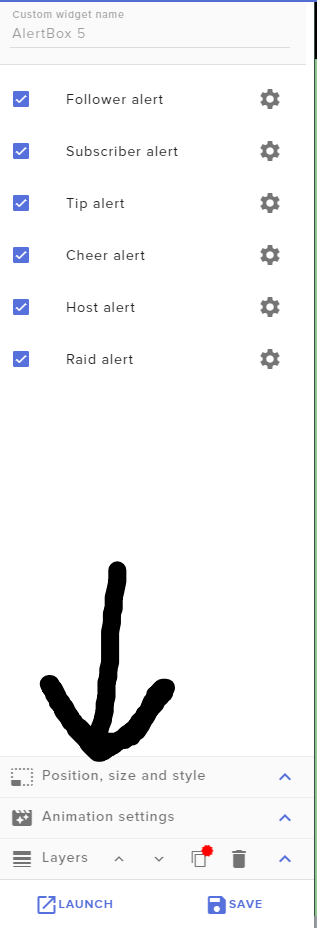 gilded otter
Ah yeah, I am meaning when they are all together I have to move each separately and save it and see if it lines up properly and do that over and over again
weary mist
The best thing to do is to take a screenshot of your current setup, or canvas, and put it in an image widget
Or have obs open on the side, and just move and save
gilded otter
On a side note, is there a viewer count yet?
 past coral
how can I change the message given in response to !givepoints and other default commands?
north cradle
@weary mist My emotes are working today!
weary mist
woot 😃
north cradle
Thanks for all your help yesterday!
weary mist
@past coral default commands can't be changed at this time, unless there is a module for it
 south mica
does anyone know how to setup a queue system?
 azure swift
Is there a place where we could suggest improvements or request features?
stuck hamlet
azure swift
I use Media Share ALL THE TIME (it’s amazing) and often times my viewers request music that is simply awesome! What would be really neat would be a feature where I could add (the current song) to my default playlist. Also a shuffle feature would be nice too 😃
Any idea when the new Cheer Boss will be ready? I’d be down to beta test 😁👍
 languid nymph
Hello. how do i change the twitch channel on my bot. since i renamed the channel on twitch?
pine hemlock
Part the bot, logout of Streamelements, log in, join bot
 shadow flax
Could someone help me set my alerts to show when a subscriber, resubs and how many months they have been subbing. I am in the voice support channel
 twin thunder
I have a problem guys. Yesterday i added my youtube channel, today i wanted to add my twitch. I was logged of so i logged in with twitch, but then i saw that i could not add YT
The Channel you tried to add is linked to a different account.
what can i do to fix this
both on the same email adres
yet not linked
clever mango
Please get the JWT token for each account and message them to me. We will merge the accounts.
nocturne pelicanBOT
@twin thunder You can find your JWT token on your account channels page: https://streamelements.com/dashboard/account/channels
(Don't forget to click on "Show Secrets")
tribal dagger
Im having trouble adding a chat-box to my overlay on OBS. I cant seem to find any videos on it.
lament blade
I changed my twitch name and now my pfp is just a ? With a tv
clever mango
pfp?
tribal dagger
profile picture
lament blade
^
clever mango
@lament blade have you parted the bot, logged out, logged in, and joined the bot?
lament blade
I will try
clever mango
@tribal dagger Do you have the widget in your overlay?
lament blade
I have logged out and in multiple tomes
pine hemlock
@lament blade where are you talking about
 clever mango
Ok, occasionally the image doesn't pull from twitch but you can manually change your profile image by going to your SE profile page > https://streamelements.com/YOURNAMEHERE
then click on your profile image and set it how you'd like
lament blade
Thanks so much!
 sullen dock
hey everyone
i could use a little help if anyone is free
no rush and it's like 2 min
i know exactly what i need done so no bs troubleshooting
twin thunder
what is jwt token?
nocturne pelicanBOT
@twin thunder You can find your JWT token on your account channels page: https://streamelements.com/dashboard/account/channels
(Don't forget to click on "Show Secrets")
 ionic wedge
how do i export the loyalty points from streamlabs anybody know how?
trying to import them to strewam elements
tight harness
From the SL chat bot?
ionic wedge
how do u get it from that?
clever mango
Were you using the loyalty twitch extension? If so, there is no export from that.
 sonic bough
i know this has been asked, but i must know when that awesome twitter alert will be in effect and where!
ionic wedge
I was using that biut i cant see an export from that? @clever mango
clever mango
Soon™ @sonic bough
sullen dock
if one of y'all can scroll up a tiny bit in chat that'd be shweet
sonic bough
@clever mango frickin excited!
weary mist
@sullen dock if you don't ask a question, no one is going to respond. There is always someone here to help, and just what you said gives us no reason to respond
sullen dock
@weary mist usually someone pms me or pops into my stream lol
my bad
just need a dono name fix
had staff fix it a while ago but i noticed a little oopsy that i want tofix
weary mist
@sullen dock you are able to edit names on your tip list https://streamelements.com/dashboard/tipping/list
gilded otter
How do you create a scrolling widget?
weary mist
@gilded otter if you are talking about on a text widget or stream label, there is a scrolling option in the text settings, bottom left
gilded otter
Ah, thank you
 real obsidian
I am having problems on mobile. Do I need to setup things on the desktop?
 proud pumice
@real obsidian no. What issues? What mobile?
lament blade
i need to download my uploaded music things how do i do that
@proud pumice help pls xD
proud pumice
explain what do you mean :o
lament blade
ive got some music on streamelements but i need them for streamlabs
so i have to download them
 desert rose
How do I apply my overlay over my gameplay on ps4? Do I have to use remote play on my console and connect it to obs ?
desert rose
No I do not
desert rose
A streaming card.. what exactly are these? Sorry I’m new
narrow coyote
You will have to stream from a PC, either using a capture card, or remote play
narrow coyote
the overlay is added in broadcasting software, like OBS, and you will add your gameplay as a source as well, either with a capture card, or remote play on the PC
lament blade
kite can i give him the capture card im using (idk if it is advertising or not)
show him what im using
i sent it pm
narrow coyote
you can dm it, or discuss it further in #general-chat
lament blade
ok
desert rose
And the little “👁” icon on obs I’m guessing is what you use to change from each overlay with obs?
lament blade
i dont use obs so idk xD
narrow coyote
the eye is to show or hide a source, if you dont know how to use OBS, you should look up some general tutorials on it
you can add the overlay as a browser source in OBS
!add
nocturne pelicanBOT
To add your overlays to OBS, add a new browser source in your scene. Paste your overlay URL in the browser source properties, set the dimensions to 1920x1080 (unless you changed them on the website), and :ballot_box_with_check: “Shutdown source when not visible” https://youtu.be/KDvLynUqXI4
 indigo bone
Anyway to have a command that will tie into leader board like all time point stat, or bits donated?
 stray harness
im need help with my overlay is zoomin too the corner and not showing the hole overlay
nvm got it
lament blade
i still need help tho how can i download the music that ive uploaded?
narrow coyote
What are you referring to, like sound files uploaded via the browser editor or stream store?
If that is the case, that is not something that is possible
real obsidian
@proud pumice I am new to Twitch and trying to set it up on my iPhone 7 Plus. So far I have the Avatar.
 loud rover
Don't know if anyone's on, but is there a way to generate invite links to my personal discord server via the bot on StreamElements? I've seen many a folk use the !discord chat command to do so, and was wondering if that's something SE can do.
indigo bone
@loud rover 100% go to chat commands
loud rover
@indigo bone Would I just make a custom one named !discord and then generate a link that never expires and paste it in whenever anyone types it?
 cedar fulcrum
Hello @loud rover Yes sure just make a custom command and add your link there 😃
loud rover
Aight, I was making this waay more complicated than it is, hahah. Thanks!
cedar fulcrum
Welcome!
 abstract dome
is there a way to check your sublist and like see the months and tiers?
 frosty lantern
Not sure if it has months and tiers as i havent used it in a while @abstract dome . But i know in the twitch dashboard , revenue down the bottom theres a link to " email me my subscriber list"
lament blade
Anyone else having issues with the Overlay editor currently? (or is this on my end)
cedar fulcrum
Hello @lament blade What is the issue exactly?
lament blade
None are working
Just gets a glitched screen when I try to open it
Tested on 3 different browsers
Nevermind lol I was clicking the wrong button 😂
 tardy mulch
i was wondering, like... why does when deleting a picture/video/sound it kinda removes it from the storage but then it updates back to the size with the file
cedar fulcrum
Hello @tardy mulch , If you delete it from the overlay editor, you will still be able to find it in the storage.
tardy mulch
im doing it from the stream store
cedar fulcrum
You need to change the size of your images to make them fit your store.
lament blade
Can you ADD music on you Twitch live on the PS4 ?
 atomic hollow
@ebon kestrel you need to add them as moderators on Streamelements
 ebon kestrel
I have a question for points
!givepoints ${sender} gave 10 ${pointsname} to ${user} PogChamp
I used that command and it pops up in chat that you gave this persone this ammount of points but it actually dint go thorught
atomic hollow
you just need to do !givepoints {user} {amount}
ebon kestrel
thankss
lament blade
Hey so im just trying to get the streamelements app working -its asking for a JWT token, but the link given is just sending me to the main streamelements page. Any idea where i can find this code manuallly?
Of course, let me help you
https://streamelements.com/dashboard/account/channels
Click on "show secrets"

StreamElements
The Ultimate All in One Platform for Streamers
omg awesome, thank you so much
No problem c:
 light mauve
I'm looking at adding some goals to my overlays, but they're showing numbers from all time - is there a way to set a start and end period?
For example, I want to show concurrent subs, or tips from the beginning to the end of this month.
cedar fulcrum
Hello @light mauve You can edit your goals and set customized numbers just to go
https://streamelements.com/dashboard/session
StreamElements
The Ultimate All in One Platform for Streamers
 rough jacinth
Guys, please, upvote this: https://streamelements.helprace.com/i486-allow-the-streamer-to-sort-their-own-store-items (sort elements in store by groups, or manually or somehow)
light mauve
Thanks @cedar fulcrum !
narrow coyote
Its best to just post your problem or question
 proven ruin
oh ok
i withdrew my donations from my paypal
and i want to reset my donations goals back to zero
i cant find any way to do that
narrow coyote
https://streamelements.com/dashboard/session Goals. You can also do this from the Overlay Editor, under the data tab
narrow coyote

 honest lodge
My chat alerts are not showing in my chat
Is there a problem?.... i enabled tje feature
nocturne pelicanBOT
@honest lodge Please connect your Twitch and/or YouTube channel with Discord by going to ⚙ Settings and then Connections here in Discord. https://streamable.com/eg92w

 cedar lynx
So today I had my first resub and it upped the subscriber goal. Am I correct in understanding then that each "subscriber" is effectively every single month subscribed? I thought it would count towards unique subscribers, not also counting resubs. Is there a way to exclude those on the counter?
 summer mulch
It's not possible right now but we plan on adding it in the future
You can use the total subs widget and edit the text for it to look like a sub goal 
cedar lynx
ah yeah that would work for now 😃
just wanted to make sure that was the expected functionality before messing with it
 cobalt mica
Quick question, on my overlay, there is a scrolling text that says currently playing: no song. Is there a way to link to my Spotify so it will say what the song playing is?
 hollow void
Hello Staff where do I find the sub/follower/host/donations sound panel/menu to change it to what i want?
vital wyvern
currently there is no way to link to your spotify sadily @cobalt mica
cobalt mica
@vital wyvern So, what is that displaying?
Like, what is the music it is referring to
vital wyvern
@hollow void to customize your overlay/alert, you would need to go too your Stream Elements dashboard > My Overlays > select your overlay > go into editor and place the widgets
if you give me second i will give you a link to our youtube tutorial on how SE overlay editor works 😃
zenith widget
@hollow void https://www.youtube.com/watch?v=X7XrDdRE7Fk&index=3&list=PLCDDKlFdScbEwdx5AntcQIS1InkFJwHtv here is the video
@cobalt mica Those are songs from YT
@cobalt mica https://www.youtube.com/watch?v=17eUkoZ6eIs&index=14&list=PLCDDKlFdScbEwdx5AntcQIS1InkFJwHtv here is a video guide you can use to setup the Media Request widget
cobalt mica
Thank you
vital wyvern
^
hollow void
@vital wyvern and @zenith widget thank you 😃
vital wyvern
no problem, this is why we are here 😄 
hollow void
😄
 crimson heath
Hello
my chatbot doesnt response to chat commnads. how can i reconnect streamelements to my twitch channel
 serene granite
@crimson heath
please do the following:
- On the dashboard, Part Channel on the right
- Sign Out on the top right
- sign back in
- Join Channel
crimson heath
thank you so much
lament blade
How many sub badges affiliates can get? I still didn't receive this one email
and a friend couldn't tell me either
i've heard 3 & 4 yet
 odd forge
I want to try IRL stream. But is there any SE support on that mather? Can i get some kind overlay or alerts on irl streams using twitch app or something?
vital wyvern
@lament blade that would be a question for Twitch
 vivid sapphire
Beautiful people I am in need of help very much
vital wyvern
@odd forge if the app are using browser source that would work, but for now none of the apps uses this, but Stream Elements is currently developing an streaming app
@vivid sapphire shoot 😃
vivid sapphire
It would seem I am unable to change the name of my bot via ground control because I do not have the "oAuth token" setting for the bot within the ground control app. Does anyone know how to fix this? I have tried to restart the app and also part the channel and rejoin the channel for the bot
nocturne pelicanBOT
@vivid sapphire Custom bot name requirements
- StreamElements bot modded and in chat
- Active overlay with alerts
- StreamElements tipping page in the panels below the stream (!panels)
- Create a twitch account for the name you want to use
- Ground Control app must be running
Steps to enable custom name
- Sign in to https://twitch.tv with the bot account
- Install and run Ground Control (!gc for download)
- Visit https://twitchapps.com/tmi/ and generate an oAUTH token
- Copy/paste everything in the box to Ground Control oAuth settings and enter the name for the bot account
- Restart Ground Control (custom name may take a few minutes to take effect)
zenith widget
If you don't meet the requirements above then the options won't show up in GC
vivid sapphire
ive followed those steps and they do not work lol
zenith widget
If you meet them, restart GC
vivid sapphire
xD
zenith widget
The requirements are more important then the steps
vivid sapphire
yup i meet them
zenith widget
Then restart GC
vivid sapphire
i have
zenith widget
are you on a Mac?
vivid sapphire
nope
zenith widget
vivid sapphire
exactly lol


 zenith widget
I'm on your channel and the donate button shows me a link to SL

Ok I see it updated, restart GC and then follow the steps
How about no?
vivid sapphire
I joke i joke 😛
zenith widget

 sly basalt
How would I show the last game a user played in one of the chat bot notifications? Like what variables would I use to make something like this "Setakei last played Final Fantasy XIV online"?
zenith widget
I believe the variable is ${game ${user}}
odd forge
@vital wyvern oh sounds awesome that they working on an own app! 😄 and thanks for the help! 😃
sly basalt
@zenith widget thanks!
vivid sapphire
@zenith widget my bad thank you again!
vital wyvern
@odd forge no problem at all 😄
vivid sapphire
@zenith widget got one more for you
my bot doesnt seem to be sending any tweets in chat even though i have multiple accounts followed.
zenith widget
@vivid sapphire The answer to that is, Twitter are stopping some APIs from working, which hinder the bot from talking in chat about tweets and such
Afaik, a workaround(???) is being worked on, but can't really say for sure on that really and no ETA, but something is being worked for with Twitter
vivid sapphire
oh how lame 😦
zenith widget
vivid sapphire
ok cool thought I was crazy lol
zenith widget
@vivid sapphire If you haven't seen it, check #297092117933719552 I think that is related to the current Twitter thing
weary mist
@kind epoch you add the backup playlist to the settings page on the website, then ground control links to your account and pulls the list
kind epoch
ahh okies thanks
indigo bone
Anyway to have a command that will tie into leader board like all time point stat, or bits donated?
 rigid ingot
hey, is it possible to redeem an item from the store with a command and use the same command for a counter? like triggering a sound and count how often that was usedß
ß
?
 spare violet
Hi, why i don't see G2A Pay in my payment methods?
zenith widget
@indigo bone Only command that can show loyalty points is !top with its added options but to show top tipper/bits, not sure that is possible via bot
@spare violet What country are you from?
spare violet
@zenith widget Finland
indigo bone
hm wonder if i can edit that command somehow
zenith widget
@indigo bone Its a default bot command, so you won't be able to. Sorry.
You can add an alias to it and cooldowns, but not much after that
indigo bone
can duplicate and then edit that one ?
zenith widget
@rigid ingot I'm not sure if that is possible, due to a loop protection set on the bot. At least thats what I'm thinking.
@indigo bone There are some templates for commands you can use. Check the variables as well, as there is one that is ${user.rank} that is tied to the loyalty points.
As for an actual duplicate to the Top command, I'm not sure about that, as the !top command has options to show top watchtime online and/or offline
@spare violet Want to confirm something internally, so hold on.
 undone torrent
I changed my twitch channel name now none of my timers and chat commands are working
vital wyvern
@undone torrent part the Stream Elements bot from your channel and add it back in
elder sorrel
You can part the bot from your channel, log out of Stream Elements, & join bot. That should do it.
vital wyvern

zenith widget
@spare violet Since I can't DM you, want us to enable G2A Pay on your account? Just need a quick confirmation.
spare violet
@zenith widget No, i don't have g2a pay account yet
zenith widget
We can still enable the option for you and later you can connect your account.
spare violet
Ok thank you so much
 pulsar gulch
hello guys
does anyone know ... some weeks ago i was right clicking people in my chat and got like a bar where i can adjust timeout time or bann etc
zenith widget
@pulsar gulch Thats most likely from the BTTV extension
pulsar gulch
thank you
zenith widget
@spare violet Just to confirm, your twitch name is the same as your discord name, right?
spare violet
@zenith widget Yes
zenith widget
@spare violet Done. You should be able to see G2A Pay in the tipping settings page now.
spare violet
@zenith widget  I see it, thank you so much
 wanton jetty
Anyone know the command so users can gift each other points ?
vital wyvern
^
elder sorrel
⤴
 glossy pelican
I need help with Media Share. I am streaming from my PS4 using the Avera Live Gamer Portable 2 capture card which is connected to my Mac. I am trying to set up media share to play music quietly in the background. I have it added to my overlay and the song names pop up but on stream you can not hear the music. When i turn my computer sound up it plays out of my computer when i test it off stream.
Not sure what to do to get it to play. May be because i mute my computer mic during stream because i talk through my headset. I mute it so that you dont hear me talk twice and so it wont create an echo. Not sure if thats the problem or not. If anyone can help me figure this out I would greatly appreciate it.
zenith widget
If you've muted your computer sounds in general while streaming, then thats the issue. Try not full muting computer sounds and use Windows Sound mixer to determine the volume which would be best for while streaming. Ask your chat while adjusting of how it sounds or get a friend to help on that matter
glossy pelican
Okay, any suggestion for something other than windows sound mixer considering that I am on a Mac?
zenith widget
ooh I spaced out that you said Mac 
Well this will be tricky...I think there was an audio mixer for Mac and OBS, but I'm not sure on the link or what it was called. You will have to google it, but I think it works like this: You can add different audio sources to OBS using it. This means that you can have it play music, mute your speakers only, not the computer sounds and adjust the volume via OBS
glossy pelican
Okay that would be perfect. I will google it. If you think of the name please let my know.
Thank you for the help!
zenith widget
I don't even remember who it was from this Discord who links that particular mac audio mixer for obs 
glossy pelican
Open Broadcaster Software
Advanced Audio Capture with Mac OS X
So I’ve been using Soundflower and WavTap to capture my mac audio for a long time. But I’ve never been really happy, as they have both been unreliable and unstable. I’ve been looking for an alternative for...
zenith widget
If it gives you the ability to add the browser on its own audio source then I guess yes @glossy pelican
 tardy talon
So, I just set up the media share, so my viewers can listen to music
But...what's the best way of lowering the volume for myself, but not for my viewers?
The headset I use tends to be rather loud on music
 boreal kelp
Hey guys, I just reached the parameters to get affiliate and didnt get an email nor nothing, when do I get it?
elder sorrel
Did you click the Invite button in the Achievements webpage, @boreal kelp ?
normal igloo
@boreal kelp Usually with reaching affiliate You should get a invite notification on twitch With the step-by-step instructions