#helpdesk-twitch
1 messages · Page 279 of 1
 stuck hamlet
 upper steeple
do you have to be live for your sub leadboard to show on the extension? I have refreshed multiple times and it still says no data.
stuck hamlet
That is currently not functioning, just a small hiccup. We should have a fix for it shortly. 😃
upper steeple
@stuck hamlet ah gotcha, was like o_0 when I saw it
stuck hamlet
❤
 celest temple
Soo ummmm
The Tip alerts in my overlay for my alerts, I checked out Bits part, went into the Variations settings and all the the amounts the variations is gone.
upper steeple
@stuck hamlet also yesterday I had a raid alert go off twice, one right after another all by the same person.
Went raid alert, host, raid
celest temple
@dense jackal. If you get chance, Prob you might want to alert a dev. For some reason, my variations settings are wiped for my bits.
stuck hamlet
might of been Twitch sending 2 pings our way, but ill definitely double check with devs 😄 @upper steeple
upper steeple
@stuck hamlet thank you ^_^ 
 tawdry basalt
Hi, how i create a command to give points to everyone in chat?
 misty wagon
For the caster @tawdry basalt you can add aliases up to 4 with the pencil
It's a default command
 long ridge
Hello
When i set Timer offline 30min...means that all 30min the timer must come right?
can someone help me?
 zenith widget
I'm not sure if the offline timer is affected by chat lines, but I assume so. This may mean you will need to have an active offline chat, for the timer to be triggered as well. @long ridge
long ridge
ah ok.... thx
 peak stone
is the servers down or something? cause i cant seem to get my overlay to appear on stream
 ebon forum
Site is loading, got a slight delay but everything works. Let me check OBS
 lament blade
@ebon forum site isn't even loading for me
 honest knoll
yea thats the issue im having with it cant connect to the website
ebon forum
Everything fine here, both OBS and overlay in the browser
Can you guys ping streamelements.com?
lament blade
I'll check
ebon forum
Ping or tracert please and feel free to share the results here
lament blade

I can
But it's the assets page
See, now, @ebon forum
If I ping cdn.streamelements.com
 ebon forum
ok, checking that now, everything fine on my end
lament blade
That's weird
ebon forum
i probably know why, my ISP is using IPv6, not IPv4, so i get a different connection
wait a second, getting a timeout on the 4th packet

 ebon forum
Yes i see it
lament blade
@ebon forum, api.streamelements is also down: https://gyazo.com/2f478b25270bcf54d622427881c8c188
 honest knoll
just glad im not the only one with this issue
lament blade
@honest knoll same tho 😛
 south sluice
@lament blade can you do tranceroute to api.streamelements.com?
tracert api.streamelements.com
south sluice
also to cdn.streamelements.com
lament blade
Oof, it shows private stuff
south sluice
send me in dm
lament blade
I'll PM it to you @south sluice
south sluice

honest knoll
yea that doesnt work either cant get ipv6
lament blade
@south sluice do I need to wait for 30 hops, or?
lament blade
I've got 20 on both
south sluice
can you send it to me?
lament blade
Will do
south sluice
thanks
south sluice
@honest knoll can you DM me your location and ISP ?
honest knoll
@south sluice yea sure gimmie a few seconds
 stone pawn
is there a known bug with the cheer alert? changing the alert message has no effect 😃
zenith widget
Are you trying to change the cheer alert it self? I suggest looking into the variations.
 radiant crest
The Twitter module does't seem to be working for me, for a few days now if not longer.
I've already try to turn it on and off and re-set it up again but nothing.
thoughts?
zenith widget
We are working on fixing it. No ETA.
radiant crest
Aaah so it is known, cheers!
lament blade
can someone help me?
zenith widget
Just shoot the question, don't be shy. 
lament blade
i want the !roulette thing in my stream so i have the loyalty thing on but the !roulette command doent work
zenith widget
You need to enable the module for it to work here: https://streamelements.com/dashboard/bot/modules
zenith widget
The points? with !addpoints <user> <points>
lament blade
okay! ❤
zenith widget
A negative number (example !addpoints keizar -10000) will remove points only until hitting 0
stone pawn
@zenith widget thanks! .-) helped. Another Q, is the SE loyality system also tracking watching hours and if, where can i check it?
zenith widget
@stone pawn It is. With 2 commands "!watchtime <user>" and "!top online"
stone pawn
is there no way to actually view it in an overview?
zenith widget
Unfortunately, no.
Not sure if its in the ideas board as well, but I assume it is, as people ask about it.
 nocturne pelicanBOT
@stone pawn Here is the StreamElements Ideas Board: https://strms.net/ideas
zenith widget
If you see it, you can upvote it. If its not there, you can make it
The more upvotes, the higher on the list it gets for features for the devs 😃
 wheat cosmos
I added a sound clip to the stream Store but it doesn't play in stream when redeemed. Is there something else I have to do to get it to play when redeemed?
 narrow coyote
You need to add a store redemption widget to your overlay
wheat cosmos
I don't think he has an overlay  I'm assuming that's necessary?
narrow coyote
Yes, the sound is played through the store redemption widget, and that requires an overlay
wheat cosmos
Okay ty
 normal barn
Telstra makes me sad
 velvet fjord
Hey. any idea why chat-widget isn't working for me in OBS? Nour's tried to help me fix it before, but we couldn't figure out why. When chat is in use, the messages show in the overlay tab on the Streamelements site, however not in the browser source of OBS. Just blank.
Here's what I'm dealing with, any chat message shows on the widget tab of Streamelements; https://gyazo.com/10abe7aae721a1b6a054bc8a4bcf3aa3 However blank in obs. https://gyazo.com/493c3d1e98aafb38703c428dd86d4a53


 wild ivy
Try logging out then back in.
on chrome
That worked for me
Yeah just try logging out and back in 😃
most issues are resolved like that
 old galleon
is there any way of getting the sound clibs back from a widget? i upgraded my pc and i dont have the original sound files anymore
wild ivy
the default ones or custom ones?
old galleon
custom
wild ivy
I think they will save it somewhere i'm not sure though you might need staff for that one
old galleon
hmm guess ill have to remake them in the meantime
wild ivy
You have the correct scene?
velvet fjord
Yeah
wild ivy
Right I have to get back to work I will help when I can 😃
Try deleting and adding again
velvet fjord
Don't worry dude, it's been a problem I've had for weeks. Tried just about everything ;D
old galleon
i tried to do that today actually and it didnt work
velvet fjord
I'mma just use the Streamlabs chat for now until I find a solution.
zenith widget
Is the chat widget on a different overlay then the main overlay you're using during that scene?
velvet fjord
Yes, it's a separate browser source for chat.
zenith widget
Well, 2 things come to mind. The added browser source's resolution is not set properly or you've placed the browser source BEHIND the main overlay
You can move the position of the sources around
velvet fjord
I've got both of those perfectly fine, no worries mate. It's been a long term issue that several streamers have tried to aid me with.
zenith widget
Did you try deleting the chat widget, clicking save and then readding it again?
velvet fjord
Indeed yes
zenith widget
Just trying to follow up on some solutions my self, as this is interesting really
Did you try deleting the entire overlay and making it again?
Other thing maybe, you can clear the browser source's cache. I think it was under the Properties section bellow the "shut down when not active"
Anything else I can't think of at this point.
It also seems a bit odd to me, to have the chat widget on a separate overlay(and browser source) then the main overlay you are using. Unless you are actually showing chat during gameplay, which then I understand
misty wagon
@velvet fjord listen carefully to @zenith widget he's waaaaay above the level of plebness I'm at when it comes to support 
You can send him an editor link too perhaps. Thanks @zenith widget
misty wagon
Oh and jump in voice later today, we'll continue our talk
zenith widget
I don't compute
misty wagon
hush @zenith widget the adults are talking 
zenith widget
I won't be around in like an hour, cuz I got stuff to take care of at home and then BIRTHNIGHT PARTEYYY

misty wagon
Ooh congrats! but I meant @velvet fjord 😛 🍰 don't get to drunk
zenith widget
It ain't my partey - a friends one 
velvet fjord
@zenith widget Cleared the browser source's cache and all is great now thanks! Yes, I'm showing the chat during gameplay. @misty wagonWill do! I head out in around four hours, I'm assuming you'll be on within this space of time?
zenith widget
what coincidence 
misty wagon
I shall be, in space, and time 
velvet fjord
Marvellous 
 narrow coyote
So, OBS cache can get funky. As someone that has 2-4 browser sources per scene, I usually have one that has a borked cache each time OBS loads, it's best to check all your scenes before stream. If you see a missing element, refresh browser cache on that source. Once that is done you should all good for that session
This typically only happens with the browser sources that are not set to shutdown when not visible
 gray phoenix
Hello, i am new here and i want to know something about this tip method, well, i select tipping method G2A Pay, it connects, everything is okay but in streamelements dashboard it tells to "setup tipping page <paypal method> ", any help or G2A Pay is totally useless in tipping service?
ebon forum
@gray phoenix PayPal and G2APay are different payment providers, Paypal is just Paypal, G2APay covers pretty much everything else around the world.
gray phoenix
@ebon forum I get it, two different payments, but why in dashboard still say to setup the tipping service with paypal?, i already did it with G2A Pay, in other words paypal should dissapear from there because make people confused if they earn tips or not using G2A.
ebon forum
@gray phoenix nope nothing will disappear, those are 2 different options, you can have both - this is why Paypal is still there. Viewers will only see G2APay-option, no Paypal if you did not set that up.
@gray phoenix and if you stream in English, i recommend Paypal, most English speaking viewers use Paypal.
lament blade
i hope you guys can help me... ive seen streamers use what looks like a video as their alerts, but i can find any mdia file formats i can save as, only images of gifs,
ebon forum
@lament blade .webm video format is supported for our overlays, so just convert your videos and be happy 😃
gray phoenix
@ebon forum Thanks.
lament blade
your a legend... thank you @ebon forum 👌
ebon forum

 frigid flare
so
used the importer
and it seems to have come across
but the emulate alerts doesnt show up
and the text is just default
run follow alert and it just comes up with this
lament blade
next stupid question... any idea why my alert audio comes up twice like an echo?
lament blade
been doing it for months now, no matter what i try
nocturne pelicanBOT
@lament blade Make sure to :ballot_box_with_check: “Shutdown source when not visible” for all browser sources (all OBS scenes). If using studio mode, uncheck “Swap Preview/Output scenes After Transitioning.” Also keep in mind that sound can play from any overlay loaded in the browser (editor or launched). https://i.imgur.com/FegZJQS.png https://i.imgur.com/yY0wcFl.png

 frigid flare
wait. so i cant have swap preview/output scenes after transitioning if i use streamelements
lament blade
cheers man!!!
 dense jackal
studiomode is for that OR you can have just an overlay for the alertbox and just make sure you have that checked @frigid flare
frigid flare
ah okay
lament blade
ah.... my overlay has all my other stuff in it too will that still work?
frigid flare
afaik if you uncheck the swap thing
it should work
basically if you are using studio mode. when you have other things keeping the source active it plays audio still
when its in the preview window
but with that unchecked it will only load one thing
i just use the thing that needs to be unchecked so have to do a work around
if you follow all the steps it should work @lament blade
dense jackal
If you don’t have a lot of overlays (3-4) putting alertbox (and kappagen mediashsre, anything with sound) on one overlay
long ridge
i think timers are not working for me...can someone support pls?
dense jackal
check shutdown source when not visible on that, you can leave the other overlays always on for seemless studiomodeless transition @frigid flare
@long ridge What are your timers? can you screenshot them for me?
long ridge
so my timer are enabled.....but i get no messages after the chat is writing @dense jackal
dense jackal
So the way our timers work, is they check the last five minutes of your wait time for the amount of chat lines
so for loots after 5 min it checks the last 5 min for 15 chat lines
if that hasn’t passed then it won’t post
long ridge
mom
 atomic hollow
Hey @frigid flare nice to see you here again 
dense jackal
Are you still having CSS alerts issues @frigid flare ?
atomic hollow
Its been almost a year i think :)
frigid flare
yeah. didnt really stream for like the last 6 months as i got a new job and so havent really looked into anything
not sure yet @dense jackal
atomic hollow
One of the first streamers i helped when i started this job
dense jackal

atomic hollow
Youre not doing cheermotes anymore? They were fucking sick
frigid flare
getting back into it
just havent had time since like december cause new job
moved down to sydney
been busy af
dense jackal
what abt me wasn’t I one of ur first  @atomic hollow
atomic hollow
You were my first kiss Tom
dense jackal

frigid flare

atomic hollow
Jdude had some complex shit
frigid flare
^^^^^^
atomic hollow
With his dj khaled alerts
frigid flare
@misty wagon was talking to me earlier
and i was like
i break everything
like legit
EVERYTHING
atomic hollow
lmao
dense jackal

frigid flare
he was like "we got an importer it does it all for you"
i was like i broke the importer
my alerts broke the importer and overlay page
atomic hollow
We can give you a new role "platform breaker, beware"
 make the the happiest memer
 cedar lynx
hahaha
dense jackal
“Beware will break whatever he touches but also is kind”
cedar lynx
the best way to be
dense jackal
like a friendly giant xd
cedar lynx
😂
frigid flare
BEWARE: BREAKS PLATFORM SUPPORT WITH CARE : BEWARE
atomic hollow
lol
dense jackal
it’s like a beware of dog sign with a tiny corgi
frigid flare
i wish
 frigid flare
mainly just barely get a chance to stream these days with work
trying to get back into it
but its finding the balance between work and streaming
atomic hollow
Its a tough balance indeed
frigid flare
yeah 😛
frigid flare
@atomic hollow did i get you on twitter at some point
frigid flare
ahhh under a different handle
atomic hollow
Say hey to haiiambelle if you see her, love that girl
frigid flare
belles great
was trying to organise a dnd thing with her and some mates
but fell through
lament blade
are there overlays for twitch banners in stream elements?
 cerulean cradle
is there a chat command variable to grab the URL for the most recent tweet? Trying to automate the "retweet this live announcement" in a chat command
cedar lynx
my workaround was to create a Tweet intent URL so people just write their own tweet for their followers
!tweet --> "Click here to share this stream with your followers {intent URL}"
for example
cerulean cradle
interesting... I'll take a look thanks
misty wagon
@cerulean cradle I think I saw one in #command-share
@lament blade what type of banners are you looking for?
dense jackal
@gray phoenix click the tiny pencil on the right in your overlay manager
gray phoenix
@dense jackal Thanks but doesn't work, i test on dota 2 with purple void animated in game.
and OBS
 dim heron
hi there! how do i give loyalty points (as a viewer, not a streamer) to another viewer?
misty wagon
@dim heron if the streamer has that command enabled its
 indigo bone
You think animated overlays lag more? Does it even effect anything?
 sturdy trellis
im not getting any host announced. i have the activity feed open & GC open, Ive discussed this in the help live chat and was told to part bot from channel which i did to no avail
 stiff cove
Same here my host announcement hasn't been working
sturdy trellis
TBH never really has. I get occasional one Now & again
indigo bone
is the host box checked on ground control ?
dense jackal
Looking into this @sturdy trellis That is what you need for hosts to work
@gray phoenix That's because our preset overlays are all 1920 x 1080 they only work for that res they would need to be remade for that res
gray phoenix
@dense jackal o k, i will remade them, thanks.
sturdy trellis
cheers @dense jackal its not just me though
dense jackal
Hosting seems to be working on other accounts do you have a host limit so that it doesnt show say 0 viewer hosts @sturdy trellis
@indigo bone animated overlays do lag more but that's because of the amount of encoding that a brodcasting softwarte has to do
indigo bone
do i need to delete alert overlays when i duplicate them or will it replace the one ?
sturdy trellis
its just twitch chat all boxes are checked all limits ok & its not just mine
@stiff cove is having the same problem
indigo bone
looks like i need to delete the older ones
dense jackal
Yeah you gotta delete older duplicates @indigo bone
 azure swift
any word about the countdown? it's finally showing the right day...but I put, for example tomorrow at 6pm. It shows tomorrow at 6pm but the timer countdown says 1 day // 23 hours / 30m
dense jackal
🤔 your countdown shows this which is correct I don't see anything for sunday @azure swift can you try doing it again?
 neon sparrow
@misty wagon is there a way my admins can give people points?
neon sparrow
my mod has tried this and she has full access but it doesn't work
dense jackal
Are they a mod in your chat? Or have supermod perms on SE?
azure swift
it looks like it works now...i made another time for tomorrow and it seems to be good
yesterday I created a time that was just 24h away and it was showing nearly 48 hours. thanks!
lament blade
@dense jackal #426825216887619594 sth to delete
dense jackal
ty @lament blade
 near grail
Anyone knowledge on avermedia lgp lite? i wont work for me
 tardy gate
hello, I am wanting to setup on my channel for charity streaming and I use tiltify so all money goes straight to the charity and need to know where to set that up at as I want to only use streamelements as my bot and overlay system. also is there a problem on the site to edit overlays as its just taking so long to even bring an overlay up to edit?
misty wagon
@tardy gate in your overlay editor choose widgets. Also if you use Chrome browser make sure Hardware Acceleration is turned off in settings.
Other questions you can ask in #helpdesk-twitch 
 quick cipher
Just a note that if your alert audio suddenly goes out, it's because you updated chromium to include Google's new autoplay prevention https://waypoint.vice.com/en_us/article/xwmqdk/googles-attempt-at-fixing-autoplay-videos-has-broken-countless-games
tardy gate
okay thank you for the swift answer but I have one other problem, I happen to mod for another streamer and am a supermod on his streamelements and I have to fight to get to my own channel dashboard instead of his and it brings his channel up and I cant choose mine alot of the time
near grail
What is better obs studio or obs classic?
 clever mango
@near grail It isn't even a debate at this point. Classic was deprecated 2 years ago in favor of studio
@tardy gate When you're moderating for someone will you see a green bar at the top. Click on the stop button in that bar to return to your own channel
tardy gate
okay thanks, thought that was to stop being a mod for them but if its just a way to get to my own channel great.
misty wagon
For that we have the
tardy gate
lol, okay and thanks, after hitting that stop button I could access my overlays so was doing a cross between both of the channels.
lament blade
Does anyone know how to let spotify play while im streaming from my ps4?
 worn wedge
Im super moderator why i cant see stats of stream?like follow,sub etc
clever mango
@lament blade play it through PS4 (if possible) or play it through speakers that your mic can pick up
@worn wedge Super moderator applies to the chat bot. Do you have dashboard manager access?
nocturne pelicanBOT
Chat/Bot Levels
100 - viewer
250 - subscriber
300 - __regular __
500 - moderator (twitch mods automatically placed at this level)
1000 - super moderator
1500 - broadcaster
Dashboard Manager Levels (least to most access)
Bot Supervisor (can add super moderators from dashboard)
Editor
Full Access
https://i.imgur.com/s61Liry.png
 worn wedge
hmm i dont know i can change commands etc but i dont know if i have access
clever mango
You can access the streamer's SE dashboard?
worn wedge
What is SE? sorry dont know
clever mango
StreamElements
worn wedge
i have access but cant see stats for follow sub etc
clever mango
That is only visible to Full Access or Broadcaster
worn wedge
Ok thnx for info 😃
lament blade
Thanks, @clever mango
 shy steppe
Hi lovely people, can I please get some assistance with, I think, a resolution issue with overlays?
nocturne pelicanBOT
The default resolution for StreamElements overlays (theme and custom) is 1920x1080. Please add them in OBS at their full resolution and use CTRL+F to fit to screen if necessary. You can then downscale your stream in OBS settings > Video if you'd like https://i.imgur.com/6bWXxjR.png
 shy steppe
I started with an overlay at 1080p, and OBS was set to show a 1080p canvas and scale to720p. My PC is showing it's age, so I lowered my desktop resolution to 720p, lowered the OBS canvas resolution to 720p, and changed the overlay resolution from 1080p to 720p. But the overlay isn't scaling down in the streamelements overlay editor, it's cutting off the bottom left, bottom right, and top right corner and only showing me the top left corner.
clever mango
Do that help?
shy steppe
No, sorry, I looked for a solution on my own for a bit and tried to follow all the documentation like this already.
clever mango
Ok, reading what you wrote
shy steppe
It didn't help, so I came here to ask. I'm not sure what I'm doing wrong here.
And the overlay shows up the same way in OBS.
clever mango
Leave the overlay on the site at 1080p and use CTRL+F to fit it to the canvas size
in OBS
shy steppe
Well the idea is that I want to lighten the load on my CPU by eliminating scaling.
clever mango
You can reduce the size of the overlay on the site but all of the layers will need to be scaled manually
the editor is old and doesn't scale automatically at this time
shy steppe
After CTRL+F
clever mango
1080x720?
shy steppe
shy steppe
Right, here, I can set the overlay to 1080p, that works fine:
My issue is that I'm trying to have everything set to 720p to eliminate scaling.
clever mango
Ok, then you can change the native res of the overlay on the site to 720p
shy steppe
Well, to eliminate scaling in OBS.
shy steppe
Oh. Dang. I thought changing the native res of the overlay was meant to change all elements to that resolution.
So I was confused when I had the native res set to 720p but the overlay was still trying to discplay at 1080p.
I don't understand the purpose of the native res, then? But you answered my questions and I see what I need to do. Thanks for the help!
 teal yoke
hi guys... do we have a widget for activity feed?
lament blade
@teal yoke no?
teal yoke
why the ?
 normal igloo
@teal yoke what exactly do you want to do
clever mango
@teal yoke event list
teal yoke
@clever mango seems like it
normal igloo
Oh nevermind 
teal yoke
foolow, subs, tips
normal igloo
gg @clever mango 
lament blade
Um.... is there a way to reset a sub goal... i have 5 subs currently (just had a month long break) and set a goal for 15 and its saying: "Sub goal 26/15"
lament blade
Cheers man.... i'll give it a go 👌
 rugged forum
How do you reset loyalty points for everyone on the channel?
clever mango
Click on leaderboards on the left side of the dashboard
then reset current, all-time or both
rugged forum
And that also sets everyone's points to 0 ?
rugged forum
Thank you! 😃
 exotic dew
Quick question. Timers for chatbot, how do those work? Like, sending specific messages every x minutes
 rain imp
can any one recommend a good multi twitch type deal to have for the bot?
 pastel latch
is there any plans to be able to transfer Watch time from Deepbot to StreamElements?
rain imp
is there a way to make the bot repeat the multi link previously created without typing it out? I copy pasta the command from the #command-share
 zenith shell
Hey there, got a question. Is there anyway I can see it so when i get donation or bits the donator gets the equivalent chat currency, like $5 gets 500 currency
lament blade
Hi, I'm having issues with the timers, even though I have intervals and chat lines set up, the bot still will randomly spam 2 or 3 commands within the space of a minute, what am I doing wrong?
what the heckle is a JWT token and how do I find it
@lament blade https://streamelements.com/dashboard/account/information ?

StreamElements
The Ultimate All in One Platform for Streamers
confused on where it is still @lament blade
I just Googled it tbh
rip
OK go here: https://streamelements.com/dashboard/account/channels - Check the 'Show Secrets' thing and then you can see it
StreamElements
The Ultimate All in One Platform for Streamers
ty
 quaint nacelle
Hello guys, I encountered an issue on StreamElements with the stats. All pages on my profile work apart from the stats page here: https://stats.streamelements.com/c/castledaft_
Reviewing the API calls on the page it is that https://api.streamelements.com/kappa/v2/chatstats/castledaft_/stats?limit=100 is failing. I have recently changed my username and it is different from the first time I signed up- so it could be that.
I was referred by @misty wagon 😃
So this url works (my old username) https://api.streamelements.com/kappa/v2/chatstats/surdaft/stats?limit=100
This leads me to believe that you store under twitch usernames instead of twitch ID's which was phased out by twitch a while back
clever mango
@quaint nacelle Fixed
lament blade
hi
i need help with the overlays
i use NVIDIA GEFORCE to stream, due to my laptop not being the greatest is there a way the overlays will work with this?
narrow coyote
The geforce experience app does not support adding a browser source, so you can not use an overlay with that. You can try OBS Studio with nvenc encoding
 abstract grove
How do u add stream elements in twitch stream
narrow coyote
well, the overlay is added in your broadcasting software (as long as it supports browser sources). The bot can be added from the SE dashboard, and you can add your tipping link to a panel on twitch

Setting up StreamElements is easy, learn how to in this video, hosted by Twitch Partner GIRLvsDUMB - Got any questions, or just want to say "Hey"? Join our D...
lament blade
the encoder settings dont show
narrow coyote
what do you mean? what you are referring to?
 coral lava
Any idea on when mixer is coming? Also support/integrated alerts all in one are coming?
Like for multi streaming
 wheat prism
Is there a way to create a custom command that is like a store command, where it will check the person has the points to call the command and then deduct the points afterwards... but not have it in the Store .. but a custom command?
 ionic thorn
ok so im trying to get transitions to work on obs with a video clip, but my overlays from streamelements take too long to load and the transition timing cant be set long enough
is there a way to not have my scenes lag when i try to load them
its like the brb scene and starting soon scene
they just take too long for obs to load them
coral lava
How long is your transition. Are u using the ones that come with obs or a custom one?
ionic thorn
its a custom one
coral lava
How long is it?
ionic thorn
like one second
it takes a good 2-3 seconds for the brb overlay to load
it really shouldnt take that long
coral lava
That’s the issue then. Takes at least one second to load the next scene not really a way to speed it up either.
Do you have refresh when scene is active checked?
That could make it take longer.
I’d suggest getting a longer transition if u can.
ionic thorn
where is that setting?
nocturne pelicanBOT
Check out this tutorial for OBS’ studio mode which allows you to preload scenes before transitioning. https://www.youtube.com/watch?v=W8iWsD2Lq3U
ionic thorn
where is the refresh when scene is activated setting?
narrow coyote
Browser source properties
 vague storm
is media request the same as song request?
narrow coyote
yes
 weary mist
what is the issue you are running into
vague storm
i think i jsut turned it on
do i need to add stream elements to obs as a source first?
narrow coyote
you will operate media request from https://streamelements.com/dashboard/mediarequest/general by default it will play through your desktop audio source. You can also use the media request widget if you want, to display the video in your overlay
weary mist
no, it will work whenever you want it
vague storm
nothing is happening
do i have something not enabled
i had it enabled to online only whoops
but now im not hearing anything
im being dumb
but i had to go into queue and click play
how do i auto play?
 wise cliff
ionic thorn
wise cliff
ionic thorn
my refresh browser source wasnt enabled
the overlays are still too slow
and yes, even with studio mode
narrow coyote
They will take time to load, you use studio mode to preload the scene you want to transition to
ionic thorn
@narrow coyote i got it.. thanks!
vague storm
how do i change the volume of the song request on the stream elements ground control
the speaker just mutes it
clever mango
@vague storm I highly recommend disabling song request in the ground control settings and using the website for media request. The program is being completely re-written and does not fully support the updated media request system at this time.
vague storm
okay thank you
is there a smaller box rather than having chrome jsut open on a whole monitor
like a pop out version?
clever mango
There is not though the website will downscale the page better
vague storm
so then is there a way i can put follower alerts on the same page?
does that have to be done in overlay?
 cold badger
hello i need help with some overlay things
clever mango
@vague storm No, there is a popout window for the activity feed if you'd like to use that
@cold badger What's up?
 cedar fulcrum
Hello @crisp sky , You need a capture card in order to stream with an overlay on you PS4.
wheat prism
Hi, when redeeming an item the message that shows is username, you successfully redeemed !test for 100 points ... how do i customize this message?
lament blade
Posting again because I think my question was missed. I'm having issues with the timers, even though I have intervals and chat lines set up, the bot still will randomly spam 2 or 3 commands within the space of a minute, what am I doing wrong?
Screenmshot showing timers being posted within 2 minutes of each other
atomic hollow
@wheat prism you cant change default command responses
@lament blade changed your name recently?
lament blade
Its not my stream, I'm an editor for someone else and they haven't changed their name recently
Or ever in fact
atomic hollow
streamer name?
lament blade
lilegg666
atomic hollow
is there a chance she has commands that have the same responses as timers?
lament blade
Possibly, would that make any difference if no one has actually used the command?
atomic hollow
could these commands have keywords attached?
lament blade
Just checking
Nope no keywords in the commands
Like if you look at the screenshot of the interval timings I posted, should this be happening or am I just misunderstanding exactly how the interval/chat lines thing works?
atomic hollow
im trying to see if these messages are indeed triggered by the timers since we have zero complaints about timer bugs
lament blade
No one triggered them manually and they don't have keywords. Full shot of chat when it happened
Also another example where a second timer went off 1 min after the previous one
wheat prism
@atomic hollow oh really , damn, i don't mind the response.. but the fact that it puts an emote at the end of the line bothers 😃 ..... not the end of the world 😃
 tardy nest
Just a question can i put a overlay on my stream without a pc because i dont have a good pc. I play on Xbox one
lament blade
@atomic hollow Any luck with the timer thing? Are you able to DM me if you find anything or should I just keep checking back here?
nocturne pelicanBOT
@tardy nest Here is a guide on how to setup the most essential tools for streaming from your console, while using StreamElements tools without involving a Capture Card! It's easy to do, take 4 minutes to read and 10 to 15 minutes to setup!
Read all about it here: https://blog.streamelements.com/how-to-stream-on-console-7b620b1c46c3
tardy nest
I dont need that i want to setup a stream overlay i am already streaming but dont have pc or obs.
Sorry if it was rude
lament blade
I don't think you can have overlays if streaming from a console directly with no capture card
 lament blade
RIP
tardy nest
Bcuz overlays are hella good
But now i only have a bot and my mic rip
And a another question can i have any webcam on for the Xbox or nahh
lament blade

Windows Central
Whether you're jumping into a Skype video call or broadcasting to thousands across the world, these are our top picks for Xbox One webcams.
gray phoenix
Hello, where i can find the donation button/link?
 pine hemlock
You can set up your tipping page here: https://streamelements.com/dashboard/tipping - Press 'open my page' to get the URL
gray phoenix
@pine hemlock Thank you
stone pawn
hey, is there any way to customize the text color for the twitch chat widget? 😃
lament blade
Yes there is c: let me me quickly open it so i can show you
"text settings"
And there you can change the color
stone pawn
wow.
@lament blade i highly apologize to state dumb questions 😄 thank you for the answer ❤
lament blade
It's fine, no problem 
stone pawn
somehow i repeat myself in saying that there is a reason why i do have a blind emote 🙈
Would have another question tho 😃 I imported my commands from my old nightbot, can i somehow alter count variables that are used in the commands? 😃
Got it. 😃
cedar fulcrum
Hello @gray phoenix You need to become Twitch affiliate and twitch will unlock them for you.
gray phoenix
@cedar fulcrum thanks
stone pawn
Who can i contact if my ankbot curreny import fails?
normal igloo
@stone pawn Probably the ankbot People As it is their thing But that's my guess tho
stone pawn
@normal igloo the ankhbot people didnt code the ankhbot import to SE would be my guess tho? 😃
cedar fulcrum
@stone pawn Please make sure you logged in your Streamlabs and StreamElements account and then import 😃
stone pawn
the streamlabs bot currency import works through an exported CSV file from the streamlabs bot (ankhbot)
 worthy turret
i cant setup my obs properly need help
stone pawn
i guess its rather something with the csv import 😃
normal igloo
@worthy turret What seems to be the problem you're having?
worthy turret
overlay and streaming
 prime idol
hey guys lm new to StreamElements l need some help setting up the shop
normal igloo
@prime idol https://www.youtube.com/watch?v=hoNYfLw1Gg4

Stream store is where your viewers can spend their points on cool perks. Watch the video and learn how to set your own store. ----- Join our discord for liv...
prime idol
oh Thank you
normal igloo
np
@worthy turret Ok well what's the issue you're having with overlay and streaming
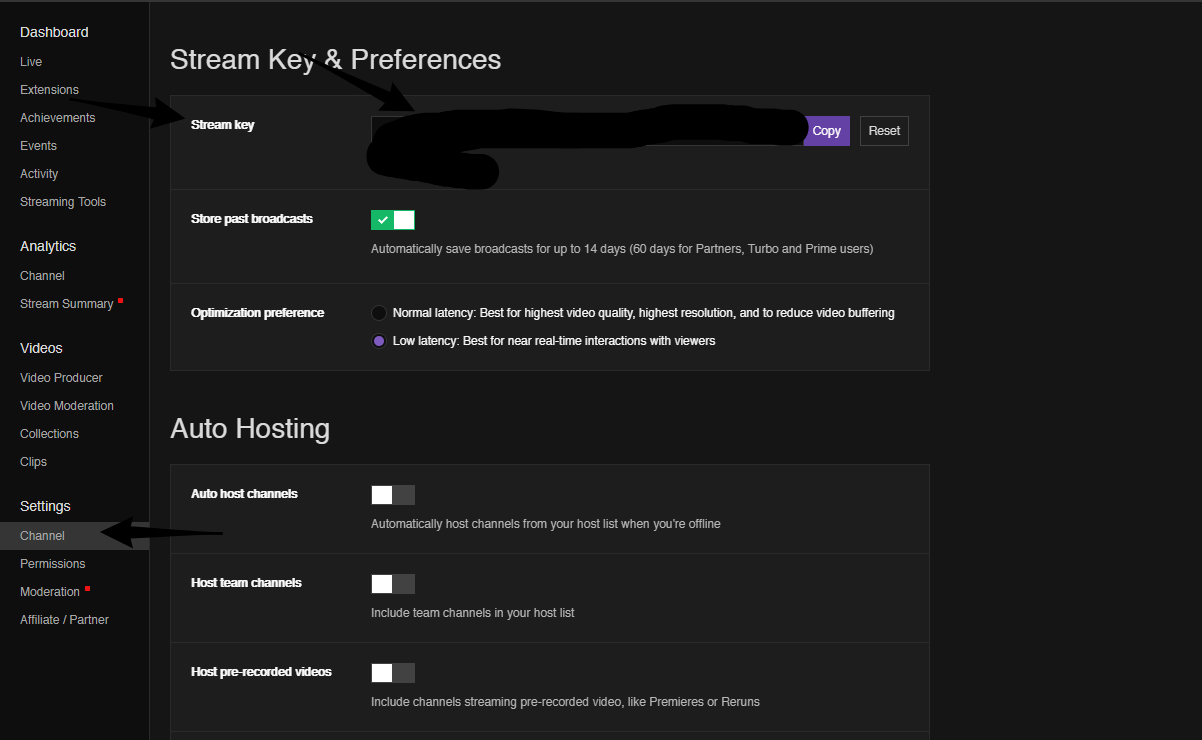
worthy turret
like evrytime its says streaming key and dont know what to put in there and overlay is going all black and only showing some things
normal igloo
@worthy turret To find your streaming key Go to your dashboard channel settings And do not share your key with anybody
worthy turret
ok
normal igloo
@worthy turret As for your overlay not sure what's causing that tho
worthy turret
is it account id
normal igloo
what
worthy turret
stream key
normal igloo
@worthy turret Go to your dashboard channel settings stream key
zenith widget
@worthy turret To help out on setting up OBS for you, I suggest looking at this video: https://www.youtube.com/watch?v=BtZazqLgBjw
It shows everything you need from getting the stream key, finding the perfect server to stream on, how to setup game sources and other things.
If you are having trouble on anything during the video, either rewatch that segment, or you can ask in #general-chat for assistance, as this particular channel is for help regarding SE Tools.
 pulsar gulch
Hello 😃
Is there an option that will let me to change between youtube and twitch ? or do i always need to relog
 glad zinc
the donations cut for PayTM via G2A pay is way to high any chances of getting it fixed(in future)?.... am talking about the new donations methods which SE introduced
 serene granite
yea
it's being worked on
apparently there's some new regulations in India and taxation is extremely heavy on foreign companies
glad zinc
@serene granite nice
@serene granite Its INDIA lol they need to implement TAX on everything
serene granite
good stuff
 white lintel
Where to set a minimum amount for hosts for the event list?
Because people hosting me for 0 viewers appear in there :D
 summer mulch
@white lintel Edit the alertbox widget in your overlay, you have a minimum viewer count on hosts alerts
white lintel
Yeah I got that, but for my event list? D:
summer mulch
@white lintel You'll need to use the custom css event list and edit the code for that
 jolly flame
Yo, I've created a new overlay for my stream, it's just a pretty basic long bar at the bottom of the screen, and I want to display latest follower, latest sub, latest dono and top dono inside it. But I want them to all scroll across it from right to left one after the other, I have no issue adding in widgets for each of these and making them scroll and fit, but I need them all inside one text box so that they can scroll after each other, if that makes sense. Can anyone help?
Tried the custom event list and was gonna edit the CSS and stuff but I barely remember how to use CSS so maybe there's any easier way?
white lintel
Okay thanks
zenith widget
@jolly flame if you want to remember some basic CSS/JavaScript I can recommend you https://www.w3schools.com/ or khan academy. The things you asked are only possible with the custom event list
lament blade
Is anyone able to answer my question? The guy that was looking at it has gone quiet 
jolly flame
@zenith widget Damn ok, thanks 😃
lament blade

pulsar gulch
Any idea why i have a delay on my webcam while switching scenes ?
jolly flame
@zenith widget Is there any way to see the CSS of the standard latest follower widget? So that I can copy it to create the same thing but for latest sub etc.
I asked in #dev-chat np
 nocturne sonnet
Ok so I set up all of my alerts and while I was streaming I could hear the alert sounds but when I rewatched the stream after the alert sounds weren’t there?? Any Ideas?
narrow coyote
If you heard the sounds on your end, but they were not on your stream, that would indicate that the audio source that was playing the alerts was not set as a source to be broadcast
nocturne sonnet
Thank you @narrow coyote do you know how I would fix that?
Would that be in the stream elements settings of it??
narrow coyote
No, this would be with your broadcast software itself. For example, if the alerts are palying from your desktop audio, you will want to make sure that is a source in your broadcast software.
nocturne sonnet
Ok thanks @narrow coyote I’ll double check it
 faint chasm
Hello
narrow coyote
 need help with something?
faint chasm
Is there a stream elements mobile app?
narrow coyote
A mobile streaming app for android is currently in development, its in closed beta right now
narrow coyote
Unfortunately, no more users are being added at this time. That may change as development continues, so make sure to check when things are posted in #announcements and #270206314561404928
 short ruin
hello
summer mulch
@short ruin 
short ruin
how is everyone
narrow coyote
Do you need help with anything? Otherwise #general-chat is the best place to chill and chat
short ruin
sorry about that
ok when i put a media source how can i make sure it plays only what the viewers request
narrow coyote
if you are talking about media request, you will need to route the audio in a way that you will not hear it. by default, it will be broadcast from what is set as your default audio output
short ruin
ok thank you
lament blade
Can someone answer my question please? I can post it again if needed.
short ruin
what is it
lament blade
Posting again because I think my question was missed. I'm having issues with the timers, even though I have intervals and chat lines set up, the bot still will randomly spam 2 or 3 commands within the space of a minute, what am I doing wrong? More screenshots to follow:
No one triggered them manually and they don't have keywords. Full shot of chat when it happened
short ruin
i dont know
lament blade
Also another example where a second timer went off 1 min after the previous one
zenith widget
I'm able to explain what may cause your problem.
short ruin
i just asked so other people could see ^^
zenith widget
When a timer is created, you are using chat lines in order to trigger the timer you have set.
That means that there is an internal timer on the bot(5 minutes), in which the chat lines need to be met.
From what I can see, some chat lines are close to each other and some external timers as well.
If you have a lot of active chat(5-10+ people talking regularly, or 2-3 people chatting really fast), that can trigger couple of timers at the same time.
lament blade
Oooooh, I thought it was mainly triggered by the interval time, plus as long as the chat lines amount is also met
Any way to just have them fire off as per the interval and nothing else?
short ruin
there ya go someone answered it 😄
zenith widget
If the chat lines are NOT met in the 5 minute internal timer(which is set by us), then that internal timer is refreshed and the bot starts counting again.
Its not a good idea to rely on the internal timer, but just keep in mind for your time(external) that its 20 minuites +/- our internal timer
so If you have a command that triggers every 30 minutes with 20 chat lines and another at 35 minutes at 15 chat lines, both should trigger at the same time roghtly
lament blade
Advice for trying to get 1 timer fired every 5 minutes? Keep the chat lines different for each timer?
zenith widget
So if a timer is 35 minutes (external), place a 20 chat line
the lower the minutes the lower the chat lines
or just experiment - I'm not sure on the optimal, but going above 50+ chat lines is a bad idea and there is possibility the timer won't trigger...ever
lament blade
Cool, thanks I will do some experimenting then
zenith widget
unless you have copy pasta monsters in your chat
lament blade
Haha its a pretty fast chat but nothing like that, thanks for the explanation dude
zenith widget

 crimson vortex
hello .. need small help .. anyone here?
i connected my stream elements bot to youtube (earlier it was connected to my twitch) .. but now i cant make it connect to twitch .. how do i connect it back ?
lament blade
@misty wagon just like general "about me""subscriber benefits" type for the channel abnners
 azure crypt
Quick question, none of my custom commands seem to be working. Any ideas?
normal igloo
@crimson vortex You tried logging out and logging back in
@azure crypt I resume bot is in chat?
azure crypt
Yeah @normal igloo
pine hemlock
Try parting the bot, logging out of SE, logging back in, joining bot again
could just be a hiccup
pine hemlock
I'll ask
 tacit pagoda
Is TTS supposed to disable when you enable Custom CSS on the Alert Widget?? It seems like this shouldn't be the case but for me I setup the widget, go to follower alert, and enable TTS. Then enable Custom CSS and it breaks the custom image loading from StreamElements and replaces it with that stupid shark. That's ok, I can fix that, but the TTS is disabled and idk how to fix that.
lament blade
do I need to keep a tab open for the SE overlay to work properly?
normal igloo
@lament blade no Have the overlay in your OBS everything will be fine
lament blade
thanks for the swift reply @normal igloo
tacit pagoda
@lament blade mrmissra, you shouldn't have to. I usually login to Stream Elements just in case I need to redo a song or redemption alert or something but you shouldn't have to keep it open
normal igloo
@lament blade np
lament blade
gotchu @tacit pagoda
normal igloo
@tacit pagoda tts for follower alert? 🤔
tacit pagoda
@normal igloo If you go into the settings, there is a TTS option where you can enable TTS (which is checked) and announce action (which is checked) then it will read aloud the alert message on the first name like "FeelsBadMan is now following!"
EDIT: I use it because sometimes I can't see the notifications popup so the sound catches my attention, and people like the robot reading out their names 😃
teal yoke
hi guys the hypecupe its using wireframe cubes for the follower event... Its that intended or a bug?
normal igloo
@tacit pagoda So there is never noticed that before 🤔
@tacit pagoda Not sure why it's disabling it tho
tacit pagoda
Me either. I know some of the controls don't hide but when you enable Custom CSS it makes sense (like the image loading you can just put your image directly in the CSS) but the voice it seems like a bug/glitch. I never tried having Custom CSS before but as soon as I did it killed the voice.
normal igloo
mmm Interesting I have never used Custom CSS In my life So unfortunately I'm not much help to you on that one 
Hopefully one of the staff who know what they're on about will help you out on that tho 
tacit pagoda
Thank you though! I appreciate the help. In the meantime, I'm trying to rework my images so I dont have to use Custom CSS at all hopefully. The text was running off my background, and I wanted to have the background and a GIF loading.
pine hemlock
@azure crypt Do you have the custom bot name enabled on Ground Control
azure crypt
Yes I did. My bad. I didn't think that would affect it. @pine hemlock
nocturne pelicanBOT
@azure crypt Custom bot name requirements
- StreamElements bot modded and in chat
- Active overlay with alerts
- StreamElements tipping page in the panels below the stream (!panels)
- Create a twitch account for the name you want to use
- Ground Control app must be running
Steps to enable custom name
- Sign in to https://twitch.tv with the bot account
- Install and run Ground Control (!gc for download)
- Visit https://twitchapps.com/tmi/ and generate an oAUTH token
- Copy/paste everything in the box to Ground Control oAuth settings and enter the name for the bot account
- Restart Ground Control (custom name may take a few minutes to take effect)
azure crypt
Thank you @zenith widget and you're a hero 😎
zenith widget
@tacit pagoda I think if you enable the Custom CSS for the alerts widget, in order to "fix" the TTS, you will have to add it as a code line some where. I'm not sure how much the Custom CSS option reads into the SE API, but you can try if you understand some CSS by looking the variables here: https://dev.streamelements.com/#speech/
If by chance I'm wrong, someone else will have to help you on the matter. Not sure if in #dev-chat someone will be able to help.
tacit pagoda
Thank you, KeiZar. I will look into this, but at first glance it seems way way over my head! I think the easy answer is just to stop using custom css. I'll put in a #💭︱feedback-and-ideas to be able to have a background for the alert along with the ability to have a GIF image to the left of the text in the popup. That was what I was attempting to do with the Custom CSS.
zenith widget
You mean like this? 
@tacit pagoda If the answer for the above is "yes", then the next picture will help even more to move the text up, down right or left even more
weary mist
tacit pagoda
I'm new to Discord! Give me a break :p
teal yoke
Please help me senpais 😢
tacit pagoda
What is your problem @teal yoke ? I can try and help!
zenith widget
So the answer is "yes". Place the layout from the 1st screenshot, then go to 'text settings' -> advanced and adjust the padding of the text
and it will line up the way you want. I just made it quick and dirty
weary mist
as for the background, for now, you can create a GIF with the static background and the one moving part
@teal yoke I believe that is a bug, though it stopped doing that for me a while ago
zenith widget
Aah there was a catch, that there should be a background image as well?
teal yoke
@tacit pagoda in the HypeCub widget the follow event is getting a wireframe cube to the cup
@weary mist how did you fix it?
weary mist
you may have to add an image or change the image in the cup settings for the follower alert
I can't remember, it was a while ago
tacit pagoda
@zenith widget Yup. Thank you. Now you see my dilemma! 😃 I am just working around it by foregoing the GIF image for now. People seem to love the TTS voice. I like my shiny new notifications I made far to much to lose those so this is how itll have to be for now.
teal yoke
@weary mist how do i do that?
weary mist
@tacit pagoda have you considered creating the background and gif into one image?
teal yoke
there's not option to custom images
weary mist
@teal yoke all the hypecup images can be customized in the settings for each alert type
teal yoke
@weary mist hmm i can chance the text, but i cant find the option to change the images
*change
weary mist
open overlay in editor, click on hypecup widget, then click the gear next to followers, then click pencil next to default follower @teal yoke
 molten cipher
question! probably stupid but is there a way to change the bots name?
teal yoke
@weary mist
tacit pagoda
Yup! Someone just posted it. You have to download the Ground Control App then
"@azure crypt Custom bot name requirements
- StreamElements bot modded and in chat
- Active overlay with alerts
- StreamElements tipping page in the panels below the stream (!panels)
- Create a twitch account for the name you want to use
- Ground Control app must be running
Steps to enable custom name
- Sign in to https://twitch.tv/ with the bot account
- Install and run Ground Control (!gc for download)
- Visit https://twitchapps.com/tmi/ and generate an oAUTH token
- Copy/paste everything in the box to Ground Control oAuth settings and enter the name for the bot account
- Restart Ground Control (custom name may take a few minutes to take effect)"
 weary mist
@teal yoke
teal yoke
@weary mist let me try that
molten cipher
how do i sign in with the bot account?
teal yoke
@weary mist POGGERS
tacit pagoda
And thanks @weary mist I will give that a try as a workaround for now.
teal yoke
@weary mist thank you for that!!!
tacit pagoda
@molten cipher I believe you create a brand new Twitch account. Then that is what you use
weary mist
@molten cipher You must have access to sign into the twitch name you want to use
molten cipher
so make a new twitch account but how does it get connected. lol its way to early for me to be doing this
weary mist
@molten cipher the connection part is all in that message that starcrescendo sent
molten cipher
okays
 wary olive
Hello, my robot can't show Tweet in my chat, but other commands, like !uptime, !followage are ok, please check 😃
pine hemlock
Twitter module is broken for now - it's being worked on
wary olive
😫 Thank you
teal yoke
@weary mist hi i just update the image on my hypecupe follow widget but i seems kinda bugged now .
molten cipher
alright. so i made a new account and went through all the steps but the bot account i made wont connect to stream elements so now its just two different bots in chat
weary mist
did you set everything up in ground control?
@teal yoke without context of what you think is bugged, I have no clue what I am looking at, other than a cheer and something else
@molten cipher
molten cipher
yea i set it all up. set up the auth code and the name
stone pawn
Hey, is anbody able to help me regarding the currency import of ankhbot to SE? whenever i try to import the currency.csv it fails
weary mist
ok. try this out for a second: Part and rejoin bot, if that doesn't work, restart ground control @molten cipher
@stone pawn what information is in the csv? If you can get it into username,points format, I can give you a different way to import it
teal yoke
@weary mist the image its not entirely showing... it keeps flicking and becoming semi invisible
stone pawn
@weary mist i think its name,points,hours right now
molten cipher
@weary mist what do you mean part and rejoin bot
weary mist
if you take out the hours part (we can't import that), we can get the import done @stone pawn
@molten cipher from your dashboard, part the bot, then have it rejoin
stone pawn
@weary mist i need that 🙈 my viewers will be mad if i get rid of that info
its even more important than the points xD
weary mist
I don't know what to tell you. Right now we have no way to import that
stone pawn
will have to stick to the shitty streamlabs bot than, thank you for the help anyway. i know everyone would be mad at me so i just cant switch it completely 🙈
teal yoke
@weary mist i just want it to work... i dont mind using the default image... what did you do to fix it?
weary mist
@teal yoke lol, i said it multiple times, I have no idea what I did
@stone pawn sent you a DM
 tepid lion
Hello everyone, I don't know how to export my streamoverlays to obs. I watched the video tutorial, but their obs looks way different and I am unable to find the button they are pressing in the tutorial. Could someone help me please?
normal igloo
@stone pawn In theory you could use Both for now Just have everything disabled for sl And just have the hours enabled I know it's not a perfect workaround And it's for hassle of using two bots But it is the only workaround I can think of for you
nocturne pelicanBOT
@tepid lion To add your overlays to OBS, add a new browser source in your scene. Paste your overlay URL in the browser source properties, set the dimensions to 1920x1080 (unless you changed them on the website), and :ballot_box_with_check: “Shutdown source when not visible” https://youtu.be/KDvLynUqXI4
 oak quarry
hi 😃 can i somewhere mute the SE sound of getting a new follower?
weary mist
@oak quarry in the alertbox settings
teal yoke
@weary mist I DIDI IT!!! got it to work
weary mist

tepid lion
@nocturne pelican Thats my problem. I don't have the option to add a browser source somehow. And your obs looks way different then mine
stone pawn
@normal igloo thank you sir 😃 Hopefully this will be fixed at some points 😃
teal yoke
just go to advanced and disabled "this is a spritesheet " option
oak quarry
maybe quite a poor question. but where do i find the alertbox settings? :x
normal igloo
@stone pawn I hope so editing watch time has been something I've been Asking for for quite a while 
weary mist
@oak quarry open the overlay in the editor, click alertbox
normal igloo
In fact you know what SE Give Give me a few minutes I have something I need to get off my chest brb 
tepid lion
oh, found my problem. The version of obs I had is from the 15th century xD
weary mist
xD
tepid lion
it was v0.659
weary mist
lmao
tepid lion
-_-
tepid lion
i didnt know that
untill recently my internet wasn't good enough for streaming, so I didn't care to look out for that
normal igloo
Ok I'm back this is all I could think of for now https://i.gyazo.com/3b11edf320aacd8f592dbe44a2a1cbb2.png
 normal igloo
Oh yeah my bad sorry @clever mango
 alpine hamlet
hello how can create mods commands in the chat
weary mist
!cmd
nocturne pelicanBOT
You can make changes to custom commands in chat with!command add/remove/edit/options/show Valid flags for !cmd options are: -cd (number) -usercd (number) -cost (number) -level (number) -type (say, whisper or reply) -count (number). --- Example: !cmd options twitter -usercd 60 -type reply -level 250
weary mist
!levels
nocturne pelicanBOT
Chat/Bot Levels
100 - viewer
250 - subscriber
300 - __regular __
500 - moderator (twitch mods automatically placed at this level)
1000 - super moderator
1500 - broadcaster
Dashboard Manager Levels (least to most access)
Bot Supervisor (can add super moderators from dashboard)
Editor
Full Access
https://i.imgur.com/s61Liry.png
weary mist
@alpine hamletusing a combination of the above, you can create commands in chat for the different user levels
 sonic bough
Are we able to create a playlist for the media share widget? If no one requests songs I would like to have my own playlist I can listen to in the meantime
narrow coyote
You can provide a public playlist from YouTube, under the media request settings, in the backup playlist field
indigo bone
whats the best way to start an overlay from scratch ? delete it and redo it ? if its a super theme how can i just add the one
weary mist
@indigo bone you got it. And with the super themes, there is no way to create just one scene out of the 5. Sorry about it
indigo bone
Okay thought so, thanks !
summer mulch
@minor haven Ask here
lament blade
Hi all, is it possible to upload custom bit icons for bitcup?
misty wagon
@lament blade
 lament blade
doing this for a DnD channel. I put the cup inside of a treasure chest, cut the chest so it's in two parts so it looks like it's falling into the cup. have copper, silver, gold, diamonds, and ruby gifs created for the bits
misty wagon
Post it on <Streamable.com> and show it of in #creative-chat
coral lava
any idea on when mixer support is coming?
narrow coyote
tentatively later this year, you can follow this idea to get updates on it https://streamelements.helprace.com/i532-add-mixer-account
lament blade
i have problem with watchtime when i and my friends and followers type !watchtime its coming up name has spen 0 seconds watching brok3nherotv pls help
if anyone can help me get my add variant button back on the cheer alerts?
or can you not add variants for the cheers, just tips?
narrow coyote
@lament blade Do you have loyalty enabled? watch time is tied to that
@lament blade What are you not seeing? looks fine to me
 errant bear
Ground control app not working need helps
lament blade
how do i turn that on
@narrow coyote on the image I linked, the add variant button for specifically bits is gone (this is for the hype cup)
I see it for tips, hosts, etc. but not for bits specifically
narrow coyote
@lament blade https://streamelements.com/dashboard/loyalty
@lament blade You might need to try and recreate the cup
 summer mulch
@timid frigate You need to activate them here: https://streamelements.com/dashboard/bot/modules
StreamElements
The Ultimate All in One Platform for Streamers
lament blade
by any chance, is there a place to log bug reports?
OH nevermind 🤦 I need to edit the existing ones, apologies. this isn't a bug, just me not understanding how it works 😃
Thank you all!
short ruin
could someone help me whenever someone request a song it ethier plays a random video or it just says deleted link
!songrequest <deleted link>
ModeratorVerified
: @drake68311, added Movie Trailers Source - "THE END OF THE F***ING WORLD Official Trailer (2018) Netflix" to the queue at #1 (playing ~now)
pine hemlock
You have hyperlinks disabled in your twitch settings for your channel
 zinc leaf
Hi, I just need help with the streaming overlay. For notifications, even though I clear the sounds and give it a notification sound to use, I still get the default sound played, in an irritating manner. Should I ignore this, or is there a way to deal with it?
zenith widget
@timid frigate You can add loyalty points to your self from this page: https://streamelements.com/dashboard/leaderboard/current or via the chat command "!addpoints <user> <points>" - negative number removes points until hitting 0.
@zinc leaf Look into the variations of the alert you are trying to change. Usually that is used over the "main" sounds and images
zinc leaf
Alright, I'll try that, and get back to you.
zenith widget
I'm not sure what you want is possible via the dashboard via a mobile browser.
zenith widget
Either click the 3 dots next to "Current" and see what options you have, or switch to a PC/Laptop or go your twitch channel and in the chat just use "!addpoints <username> <points>
 timid frigate
Ok thanks
zinc leaf
@zenith widget Thank you, it seems to have worked.
 queen field
So i tried inputting a !lurk command and i submitted it before I was finished setting it. So does anyone know how to delete a command?
zenith widget
@queen field
queen field
I didn't realize I had to scroll to the right to see that on my computer
@zenith widget thank you
misty wagon
@modern pecan
 modern pecan
Is there a !subcount command for SE?
tacit pagoda
Hello again. Sorry, but I have another issue to report today. I stream at 5:15PM on Tuesdays. But the leaderboard countdown thing is never correct. I am in EST and selected America/New York in timezone config and 1715 as the military time, as pictured, and as 5:15pm is in military, I even used an online calculator to be sure I wasn't crazy. But the widget shows 6:15PM and the countdown is incorrect. Further, I tried playing with the time either adding or removing an hour but it still does not correct the widget. I believe there has to be some sort of bug in the time zone conversion/calculation that's happening within the widget itself? That or an interdimensional vortext that does not allow 5:15PM to be selected. 😮
 frigid talon
Hey, my subscriber gift is just showing text when my regular subscribe has everything. What am I doing wrong?
tacit pagoda
@frigid talon I bet you changed the default subscriber thing, but by default StreamElements has different variations for different subscription levels. Go into your overlay and into your alertbox widget, then go to the subscriber alert and choose "variations". You'll see a bunch there. You can delete them all to make the default take effect, or you can change the different variation levels to suit you
Sorry the screenshot I made got cutoff, this is a better shot of the problem:
 vague flicker
how do you live on twich?
tacit pagoda
How do you go live? Use a broadcasting tool like PS4 or Xbox One have built in or on PC use OBS Studio
@vague flicker
lament blade
how can i add points to a viewer from chat? just so i dont have to go in dash all the time?>
pine hemlock
!addpoints
lament blade
General question, do we not have the ability to rotate resources in the editor, or am I just missing something in the UI?
dense jackal
No @lament blade we want to completely revamp our overlay editor in the future to allow this kind of thing. Right now it's best to think of it as a staging area to add already completed graphics
lament blade
@dense jackal Thanks for the timely response. You have some really nice assets in one of the themes, I just was hoping to flip them and use them on top instead of the bottom 😃
dense jackal
You may be able to do it with doing it normally on SE and doing some fiddling on OBS @lament blade
 chilly shuttle
I am in need of assistance
dense jackal
What's the issue @chilly shuttle
chilly shuttle
I'm having trouble changing the bot's name. I was reading on the forum area that it was a feature that was rolled out recently and they said if you had trouble to come here
nocturne pelicanBOT
@chilly shuttle Custom bot name requirements
- StreamElements bot modded and in chat
- Active overlay with alerts
- StreamElements tipping page in the panels below the stream (!panels)
- Create a twitch account for the name you want to use
- Ground Control app must be running
Steps to enable custom name
- Sign in to https://twitch.tv with the bot account
- Install and run Ground Control (!gc for download)
- Visit https://twitchapps.com/tmi/ and generate an oAUTH token
- Copy/paste everything in the box to Ground Control oAuth settings and enter the name for the bot account
- Restart Ground Control (custom name may take a few minutes to take effect)
dense jackal
Came to the right place @chilly shuttle
dense jackal
I'm genuinely curious btw what forum did you see to find us 😄 @chilly shuttle ?
dense jackal
oh
misty wagon
@modern pecan accept the friend request ;)
For !subcount you can use these variables
There is no !subage. According to our devs there is no proper (read reliable) Twitch API for it so we are not offering it yet till the API improves.
chilly shuttle
I only just moved to streamelements yesterday so I'm still in the process of moving stuff over and figuring it out. I decided to use it because I was interested in the chat currency. I used to use nightbot
lament blade
thank you @pine hemlock
teal yoke
hi guys!! help, how do i empty my hypercup cup?
 fickle dune
Hey guys!
I changed my name on Twitch, and now the StreamElements Bot doesn't join my channel. Any ideas?
 elder sorrel
@fickle dune Try signing out & signing back in SE. Also try part with your bot in SE & join again
fickle dune
Oooh - I didn't see the part channel option earlier
elder sorrel
Those are the only two things I can think of that should fix it 😃
teal yoke
😢
lament blade
Can someone help me add a custom command?
elder sorrel
@teal yoke Someone can correct me if there's a quicker way but I believe you can clear it in the overlay editor.
I don't use the hype cup personally but checking if that works 😅
teal yoke
@elder sorrel thank you i love you!!!
fickle dune
@elder sorrel Thanks my man - I really apprecaite that!
elder sorrel
@teal yoke You can go into the overlay editor and use the 'clear cup' button if you want to empty it.
 charred osprey
Can someone help me with media request.
Says there is no widget, I made an Overlay for Media Request and added it. Still doesn't work
elder sorrel
Awesome 😃
 deft flame
hello, what is the maximum number of loyalty points a user can have?
i had a user successfully gamble 92 quadrillion points
and it reset their points to 69
weary mist
it is what ever the max integer value that computers can store, so it it ends up being larger than that, it will likely error, and cause that to happen
deft flame
i tried to set the user's points to the upper bounds of a 64bit signed integer (9,223,372,036,854,775,807)
but i had to shave off a few digits
more importantly
With these settings, users in my channel can request unlimited songs via media request. What am I doing wrong?
deft flame
@weary mist 
weary mist
then there must be something limiting it then (I learned something new today)
that is a rediculous amount of points, lmao
 charred osprey
can someone help me with media request, says there is no active widget even though I do have the widget added
deft flame
@weary mist omg thank you I thought that was for voting ❤
charred osprey
Google Chrome
weary mist
do you hvae ground control open?
charred osprey
yes i do
weary mist
that could be causing an issue (from what I have told).
make sure to 100% use the site when trying to share on the stream
 charred garnet
why aren't my redemption alerts and host alert not working when i stream but when im offline testing they work fine and i have had other ppl host me when i am offline and it works fine so idk
modern pecan
@misty wagon Okay 😄
charred osprey
anyone?
dense jackal
What's your stream @charred osprey
 royal quarry
Hope everyone is having a good weekend 
 bold patrol
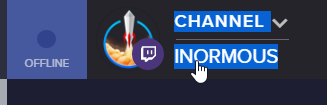
once I have someones invite and have full control how do I start editing their stuff instead of my own?
 proud pumice
click this https://i.imgur.com/bYCYzOF.png
 bold patrol
gotcha
lament blade
a friend told me i could change my streamelements bot name is that true and if so how
nocturne pelicanBOT
@lament blade Custom bot name requirements
- StreamElements bot modded and in chat
- Active overlay with alerts
- StreamElements tipping page in the panels below the stream (!panels)
- Create a twitch account for the name you want to use
- Ground Control app must be running
Steps to enable custom name
- Sign in to https://twitch.tv with the bot account
- Install and run Ground Control (!gc for download)
- Visit https://twitchapps.com/tmi/ and generate an oAUTH token
- Copy/paste everything in the box to Ground Control oAuth settings and enter the name for the bot account
- Restart Ground Control (custom name may take a few minutes to take effect)
normal igloo
Ok very obvious and stupid question But it's late at night and my mind is blank When it comes to Points for tips How exactly does the multiplier work
 wise thunder
Hello, where can I find my JWT token? I click on 'my account' on the desktop app but it just redirects me to the site itself.
nevermind, I finally found it
dense jackal
😄
normal igloo
hey @dense jackal \ 
 honest crystal
uhm anyone on ?
Need to know how to find my tips link so i can put it on my panel.
and how to put it on my panel
normal igloo
@honest crystal https://streamelements.com/Your name/tip
StreamElements
The Ultimate All in One Platform for Streamers
narrow coyote
@normal igloo It will multiply the dollar amount against the bonus amount, so if your bonus is 100, and they tip you 13.50, their bonus should be 1300
normal igloo
@narrow coyote Even after your explanation I'm still lost
honest crystal
i messed up and reloaded it befor copying my link
normal igloo
I think I should go bed And ask again in like 5 / 6 hours
 copper pollen
Hey guys, just wondering is there a way to merge a few accounts together so on the cheers leaderboard a person who changed their name a few time can have correct stats?
normal igloo
@narrow coyote Yeah I think I be back in like 6 / 7 hours and ask again This is currently my brain >>>>
 west gull
so, the extension still says it will be one day extra till my next stream, even though the next is in under an hour
narrow coyote
if you go into the extension settings and save it again, does it still show the incorrect time?
west gull
yes it does
honest crystal
hay does anyone have any panel images i can use?
 livid ingot
How does someone access my steam store?
narrow coyote
!store is default command in chat to pull up a link to your store, if you use the extension, you can also have the store displayed in there
@honest crystal google twitch panel template and you can find many free basic ones
normal igloo
Or I can DM you @honest crystal
narrow coyote
@west gull I will poke around to see if others are reporting this as well, i had this when it was first updated, but have not seen this issue since the last update
west gull
alright, its a weird issue tbh
 soft flume
Hello! I’m pretty new to twitch and I’m currently strictly using the twitch app on my Xbox to stream. Is there a way to incorporate stream elements through that since I’m not currently using OBS to stream?
narrow coyote
!console
nocturne pelicanBOT
Here is a guide on how to setup the most essential tools for streaming from your console, while using StreamElements tools without involving a Capture Card! It's easy to do, take 4 minutes to read and 10 to 15 minutes to setup!
Read all about it here: https://blog.streamelements.com/how-to-stream-on-console-7b620b1c46c3
 restive lantern
Hey team - my alerts were working fine again until someone in chat gifted a sub and now NONE of my alerts are popping anymore. Usually if I refresh the source it works again, but is there any idea what's causing this? it's really disruptive and misses subs ;_; Originally I thought it was because I had 2 alert boxes for diff type of alerts, but i consolidated them last night to only have one.
 hearty crater


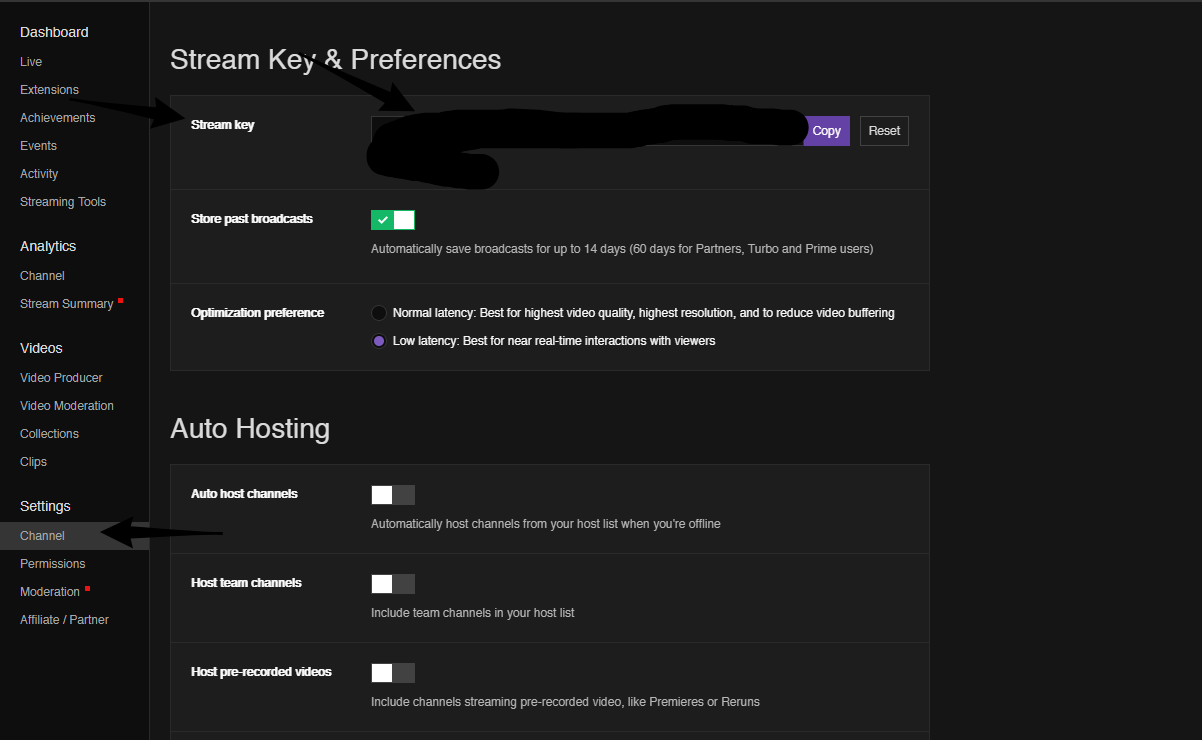

 normal igloo
@hearty crater Not German but what seems to be the problem?
 vale pelican
Hello, I have just one quick question. It wont let me set a preview image for my items and Ive tried everything I can think of. What should I do?
narrow coyote
so are you having an issue uploading the image, or what exactly is happening?
vale pelican
I have a photo that I would like to set as the preview and when I go to click on upload, it doesnt do anything and it's a format it accepts
it just kinda sits there
narrow coyote
what browser are you using?
vale pelican
edge
narrow coyote
The site is built with chromium, and the uploading can have issues with browsers that are not built with chromium. If you try chrome, i would expect it to work
vale pelican
okay thank you so much
 vague jasper
If I took an overlay from streamelements how would I put that overlay on my stream If im using bebo (other streaming software)
narrow coyote
if it supports a browser, or sometimes referred to as a web source, you add it with your overlay URL, and set it to 1920x1080
vague jasper
ok thamks
teal yoke
hi guys
do we have a bot that connect with discord?
sorry if i ask to many questions... but i simple love streamelements
and want to use its features at the max
narrow coyote
A discord bot is planned, but no eta on it yet
teal yoke
@narrow coyote thank you!!!
narrow coyote

 onyx kiln
Quick q: is there any way to add a custom api/url text element to the overlay?
I want to pull a status file from our bot and have it appear, but it's located in another state.

 vale herald
How do I make a myuptime command
elder sorrel
You can add a alias for !uptime for it.
You can check that at https://streamelements.com/dashboard/bot/commands/default
StreamElements
The Ultimate All in One Platform for Streamers
 winter zenith
@onyx kiln you probably wanna ask stuff like that in #dev-chat
Most support heros cant help you with questions like that sorry
lament blade
livid ingot
How does someone check their points level? by !points?
onyx kiln
@winter zenith That's a good idea, thank you.
Also, I think I might have puzzled it out, it looks like it requires a "custom event" and a bit of javascript to poll the api I'm looking to hit.
winter zenith
@livid ingot yes !points would be the correct command
You can also give it another alias so it fits your loyalty points System name
livid ingot
Eh, it will do
 pulsar elm
So having dramas when I’m streaming. People who are watching can hear my squad all the time but most of the time can’t hear me. Sometimes they can’t but most times not. I’m running a blue snowball mic and on my elgato program it says it’s picking my voice up fine but somehow it isn’t being included into my stream. I have checked that the commentary button is active so unsure what’s happening. Has anyone got any advice
stone pawn
Hey boys, is there any way to replicate a currency game like the popular "bankheist" with the SE bot? i found raffle, but im not sure if its really it
winter zenith
@stone pawn look into #command-share
@pulsar elm do you have your mic source set in your obs?
pulsar elm
I’m running my overlays threw elgato game capture
zenith widget
@vale herald alias is used mostly with chat commands. It is another way of using the command. Example: if you have a command called !facebook that gives a link to your FB page you can set an alias !fb for quicker use on the advanced settings of the command.
Practically doing the same thing but with different names
stone pawn
@winter zenith what should i see there? 😃 checked it all. Couldn't find anything bankheist related 😃
winter zenith
@pulsar elm you should Start streaming with OBS more Control, ability to use sick overlays and overall a better stream quality
pulsar elm
@winter zenith for some reason when I use obs it lags alottt and I’ve got the settings all turned down
winter zenith
Lags in game or in stream? Probably wrong Bitrate and stuff like that
@stone pawn damn you are right I mixed it up with Russian Roulette :KiwiSad:
stone pawn
@winter zenith all good 😄
pulsar elm
@winter zenith lags in the stream. But like when I use it straight from elgato game capture it doesn’t lag. Only when I’m using obs
 untold crest
I have a question: is it possible to add flags to regex command call (for example /i so It will be case insensitive?) . I want bot to response: My current LoL division is {APICALL}. ATM I have something like it, but I want it a little bit more clear:
cedar lynx
@untold crest there's a case insensitive flag for regex, I can only assume it would work here https://stackoverflow.com/a/9655186