#helpdesk-twitch
1 messages · Page 275 of 1
 worthy onyx
 zenith widget
worthy onyx
zenith widget
worthy onyx
the image didn't save
zenith widget
- What browser are you using?
- How did you try to upload the image?
worthy onyx
chome and a overlay i have
zenith widget
I would suggest to watch this video: -->> https://www.youtube.com/watch?v=X7XrDdRE7Fk&index=3&list=PLCDDKlFdScbEwdx5AntcQIS1InkFJwHtv <<--
It explains configuring an overlay, from the preset overlays we have to uploading pictures and setting them up.
zenith widget
refresh the overlay editor page
worthy onyx
done
 brave veldt
how do i add chatbot to my stream i watch a vid on it but a bock came up when they logged in ther was nothing for me?
if some1 couldhelp me
zenith widget
from here https://streamelements.com/dashboard on the right click on "Join Channel"
brave veldt
thanks @zenith widget
zenith widget

zenith widget
If you've managed to upload it, then when you press "Set Image" you are seeing it in the image gallery right?
If yes, hover your mouse over it and then press "Submit"
zenith widget
so to recap, your using chrome, cannot upload an image, even after refreshing the overlay editor?
 rough shore
can someone call me and help me figure this stuff out, I can share screens. I am so confused.
zenith widget
@worthy onyx Asking around for assistance, cuz I'm out of ideas on your issue. Stay tuned.
@rough shore Mind telling us the problem first? Maybe the issue is fixable without sharing your sreen
rough shore
I have an overlay, but everytime I use it , It only shows on part which is new follower. Nothing else.
I trried expanding
but nothing happened
Its supposed to show followers, subscribers, facecam, etc..
zenith widget
Did you set the resolution in OBS to 1920x1080 for the browser source?
rough shore
Let me check.
zenith widget
To make it faster, just select the source and press "ctrl+f"
also follower, sub and tip should be in the same box. Make sure you have selected them properly in the overlay editor/widget options
rough shore
Also, In the overlay it said it popped up for folllowers
do I have to configure any of that
zenith widget
"it said it popped up for followers" 
elaborate maybe?
Do you have these options ticked?
worthy onyx
i'm so confused
worthy onyx
click on the alert box @rough shore
rough shore
in the overlay editor
zenith widget

rough shore
does it automatically have a sound
worthy onyx
i'm so confused right now and mad
rough shore
Keizar
worthy onyx
yes
rough shore
Ok
zenith widget
@worthy onyx So you don't have any problems with uploading pictures and sounds to your alert box, but you're having issues with the bare bones image widget?
are you sure you followed the steps in the video I gave you?
@rough shore The alert box widget comes with some default alerts for followrs, subs and tips. To change them, you can click on the "cog wheel" and click on "Variations". After you're done editing, click on save and you should be good
worthy onyx
yes
rough shore
Ok thankyou
 lament blade
hi guys
zenith widget
@worthy onyx I don't want to sound rude, but the instructions I gave you and the video guide is the simplest fix to your problem. Either you are NOT using chrome or you have NOT refreshed the page if this is the first time you are using the overlay editor
lament blade
if anyone has a few minutes i just need help with 1 thing plz
ty
btw i ❤ stream elements
zenith widget
I have a few moments
lament blade
ill dm u so i dont bother everyone else
zenith widget
shuffles eyes between discord and looking for music to listen on spotify
lament blade
if thats ok
 normal igloo
@lament blade and we  you What seems to be the problem
zenith widget
I'd prefer here - you won't bother anyone. This way if I'm giving wrong info, someone can correct me
lament blade
no problem at all..just need to add a header to my stream with my twitch name on it
lament blade
can u guys look at my stream n tell me ur thoughts and what i can add?
besides a header
zenith widget
@normal igloo This is on you, Community Contributor 
normal igloo
Yes sir 
zenith widget
Would you mind deleting the link and just leaving your twitch name
worthy onyx
i did refresh the page
normal igloo
@lament blade Ok well for starters You need twitch panels
zenith widget
its not really technical, as this a design view for your own channel. You should go with what feels good for you and experiement for example
lament blade
panels are?
how do i add a header with my twitch name on it?
i want it on the very top
zenith widget
You would need a designer
lament blade
where?
zenith widget
I would suggest going to #art-marketplace and DMing someone you think is a good artist
and ask for his price(if not listed)
lament blade
k
zenith widget
Else, get Photoshop some how and make your banner
worthy onyx
@zenith widget look in your messages
zenith widget
@worthy onyx I will call you, since you DMed me and I want you to share screen and show me what your doing
lament blade
thx guys
normal igloo
@lament blade
This is how your channel looks at the moment no panels of information of social media Or schedule
All things are very much needed as in twitch live streamer https://gyazo.com/aecb84a808eb1f255911ad0a1429ffe6
 worthy onyx
i don't know how to do that
normal igloo
@lament blade Also I probably dm it if you want But if you don't have Photoshop and / or the $$$ I can get a link where you can get basic panels And when I mean basic I mean very basic but it's a start
normal igloo
Alright give me a second I shoot you in the DMS
lament blade
tyt
normal igloo
@zenith widget 

 rotund radish
can anyone help me with and FPS problem in OBS when i turn on my overlay
zenith widget
Are you using an animated overlay?
rotund radish
Yeah, i dropped it to 1280x720 and it kinda helped a little on the fps but not as much
zenith widget
Are you using SLOBS by any chance?
rotund radish
No, only a camera overlay and alert
zenith widget
So I take it, your using the original vanilla OBS version, not the Stream Labs version?
rotund radish
correct
zenith widget
What are your PC specs?
rotund radish
21.0
 nocturne pelicanBOT
Make sure to :ballot_box_with_check: “Shutdown source when not visible” for all browser sources (all OBS scenes). If using studio mode, uncheck “Swap Preview/Output scenes After Transitioning.” Also keep in mind that sound can play from any overlay loaded in the browser (editor or launched). https://i.imgur.com/FegZJQS.png https://i.imgur.com/yY0wcFl.png


 gloomy plume
Looks like extensions are broken again 😦
normal igloo
@gloomy plume What seems to be the issue?
gloomy plume
Hi James! I was able to access the Extension and update it early this morning when it was mentioned here that it was working again. Came back to my PC this morning and now the extensions will not load, not am I able to update the settings on the Extension through the Dashboard
rotund radish
I try that and it didnt really help @zenith widget
zenith widget
Then what are your PC specs?
Cuz the other option is, your internet connection is not so stable/good
and you should switch away from an animated overlay
normal igloo
@gloomy plume Interesting Seems fine for me I will find out if it's a known issue for you
zenith widget
as those are resource intensive
normal igloo
@zenith widget ^^^^
gloomy plume
Appreciate it @normal igloo
rotund radish
Processor AMD FX 6300 Six-core , GeForxe GTX 1050 TI, Windows 10, 8192MB RAM...i feel like it was my UPC becasuse its so old, i was going to buy a new one but i didnt want to if that wasn't the issue
181.47 download , 11.87 upload btw
rotund radish
no
worthy onyx
@zenith widget one more thing
zenith widget
@rotund radish Nowadays, most PCs have 16GB ram or at least SSD to run at a decent pace. I would strongly suggest switching over to a static overlay rather then an animated one.
worthy onyx
@zenith widget how do i remove a song from the thing
rotund radish
I was using the "Blue Electric Overlay" its basically a overlay cam with recent donator, sub, follow, etc nothing really serious on it. (Take your time to reply)
Yeah i apologize, i wasn't using an animated overlay
zenith widget
@worthy onyx Watch this video, buddy -> https://www.youtube.com/watch?v=17eUkoZ6eIs&list=PLCDDKlFdScbEwdx5AntcQIS1InkFJwHtv&index=15
@rotund radish So the FPS problem may come down to OBS Settings really. Your output stream should be at 720p 30FPS max and around 2500-3000 bitrate(even though I'm not sure your upload can handle more....30mbps = 3000 bitrate more or less
unless I forgot how the bitrate was calculated
also, when streaming make sure that you have the game, obs and pop out the chat from twitch and close down everything else
maybe keep discord open if you talk to friends that way
rotund radish
Yeah i had my stream at 720p at 60fps with 3500 bitrate, my computer can take it at 60fps but when i open the overlay in goes down right to 30fps
normal igloo
@zenith widget 2500-3000 bitrate .30mbps for 720 Is pretty much the standards now days
zenith widget
He said above that his upload was...11mbps?
181.47 download , 11.87 upload btw
yeah....about that bitrate and fps issue

normal igloo
11 up for 720p at 60fps with 3500 bitrate tho?
zenith widget
When I wanted to stream 3 years ago i had 10mbps upload and I could not do anything about it, having a beast for that time of a PC
that was my only issue back then and it maybe your at the moment
 narrow coyote
what type of encoding are you using, the 6300fx is a really weak processor for streaming
rotund radish
im using x264
narrow coyote
and 3000 bitrate would only be 3mbps 
zenith widget
@narrow coyote To the rescue! \  /
/
narrow coyote
yeah, thats not going to work well for you at all
zenith widget
was it 3mpbs = 3000 bitrate? i forgot really
normal igloo
Don't worry guys @narrow coyote Is here to Save the Day once again 
narrow coyote
i would be surprised you would get 60fps without an overlay with x264 on that processor
zenith widget
I don't mind @narrow coyote giving a hand, as I want to go have a smoke. Plus I think his done brushing his cats if his here
normal igloo
narrow coyote
yeah, but i still need to go get food 
rotund radish
Yeah, i get smooth 60fps without any overlay
narrow coyote
well, any browser source you add is going to add cpu usage, and that cpu is not a good cpu for encoding
normal igloo
Hey just remember guys @narrow coyote @zenith widget
we are StreamElements We’ll always save the day!
And if you think we can’t
We’ll always find a way!
rotund radish
so is it a cpu problem, because i was going to buy a new oine
but i didnt know if that was really the problem
narrow coyote
you are using x264 encoding, that is software encoding, it 100% relies on your cpu, any extra workload you have, will impact total performance, especially when streaming
i recently went from an 8350 to a 2700x, and i would not even dare use x264 on the 8350. The 2700x can handle x264, medium on a single streaming setup
using console of course is dfferent
rotund radish
I also tried using my graphic card as well and i still get 30fps
narrow coyote
yeah, 1050 is also not really strong for encoding
gloomy plume
Just wanted to know if there was a way for a Broadcaster/super moderator to add a song to the Media sharing via a chat command
narrow coyote
that would be the best, for now, you could stream 30fps
rotund radish
yeah, i did
but 60fps look so better lol.
now i have one more thing if you dont mind me asking
narrow coyote
are you affiliate? if you are not or usually dont get transcoding settings in twitch, doing 30fps lower bitrate can be better for your viewers
rotund radish
I am not.
narrow coyote
with that your viewers will only have access to source, so it is good to be mindful of the bitrate setting, as some people view from mobile or sources where even 3000-3500k can be too much for them
that is why it is common for smaller streams to target 720p 30fps, and step up to 60 once you get access to transcoding settings
rotund radish
Alright, then i'll stream at 30fps until i can get up there.
now how much bitrate do you recommend?
im sitting at 3500 atm
last question
i apologize
narrow coyote
with x264 you could probably get by with 3000k for 30fps
https://stream.twitch.tv/encoding/ this is actually a good breakdown
rotund radish
Ok, thank you very much everyone that helped @narrow coyote @zenith widget @normal igloo 😄
narrow coyote
no problem 
 fresh dune
hello! I need help regarding changing TTS for cheers. I tried changing from 300 to 100 bits and for some reason it's not working and it still only activates at 300 bits.
normal igloo
@fresh dune Did you make sure you saved it
fresh dune
@normal igloo yes! I saved it multiple times. logged out. closed browser and did it again. tried a different browser, doesnt work =/
could just be a glitch but i'll try deleting the alert, redoing it and update here just for future reference
 rocky river
the !watchtime command only seems to work for some viewers in the chat and not for all.. for some it just says 0 seconds and others it says the actual watchtime. Does anyone know whats happening or how to fix? @me please when answering
fresh dune
but idk if its because i turned TTS on for my variations which could possibly be the reason?
normal igloo
@rocky river I take it they are not new viewers?
rocky river
Its someone whos been there for the past 2 days
normal igloo
@fresh dune I'm not sure but it's worth trying
rocky river
and someone whos been there 9 months ago and now again
normal igloo
@rocky river Well as I know StreamElements Gets that kind of data off the twitch api so Could be a twitch api Issue
rocky river
Ok thanks
fresh dune
idk its just glitched. nothing in the TTS settings says 300 bits to trigger TTS. im saving the hell out of it when i changed it to 100 and not sure why its not triggering
 dry prawn
Gday, is it possible to move images from one overlay to another?
I have these panels id like to use instead of my current ones
zenith widget
@dry prawn On the overlay editor, open the layers, choose what you want to be copied over and press this button
This will duplicate it over other overlays, but do note that if you change it, you will have to copy it again in order to save changes on other overlays
normal igloo
@fresh dune Strange not sure why that's not working for you We shall look into this for you Apologies for any inconvenience 
fresh dune
i think the variation TTS setting basically cancelled out the TTS for the main TTS setting. @normal igloo such an odd thing for it to do. TTS should just have its own seperate setting so that it doesn't happen. which I don't mind. I had to delete my variations in order for it to work correctly. it was so weird because nothing no longer had TTS activated at 300 and I switched it to 100 and it still didnt work. most likely a glitch. i figured it out but had to remove my variations 
 sleek maple
quick question..
if I'm streaming from console, do I need OBS and a capture card in order to incorporate the themes to my twitch?
zenith widget
@sleek maple Yes
sleek maple
alright, thanks!
normal igloo
@fresh dune Sorry to hear about that We shall look into this further and I like your idea for TTS Feel free to share it at #💭︱feedback-and-ideas
fresh dune
@normal igloo sorry one more question. it might be a dumb one but when friends spam something such as "@@@@@@@@@@@@@@" on cheer for TTS, does it automatically not work? i dont even have the anti spam for TTS on and it doesnt read it outloud
zenith widget
I think that cheer TTS is filtered based on the bot filters you set for symbols or banned words
or it may be part of the Tip Moderation
normal igloo
^^^^^^
fresh dune
i dont have anything banned nor do i have any anti spam on
zenith widget
Then it maybe is an internal setting to ignore the "@" symbol for example...do they spam other symbols?
fresh dune
@ works for streamlabs but ive been using streamelements and i really really dont want to switch over @zenith widget
so lets say a message was like "a helicopter sounds like this @@@@@@@@@@@@" it doesnt work lol i know its something small but it kind of sucks @zenith widget
zenith widget
Do they spam other symbs and the TTS does or does not trigger on them?
fresh dune
@zenith widget no.
zenith widget
Because the sound of the symbols may come or not with the TTS voice pack
fresh dune
OHHHH
lament blade
how do i add someone who can approve song requests and media share?
zenith widget
So one TTS voice may not have any sounds by default in it for "@@@@@" symbol
fresh dune
@zenith widget i was just going to ask because i use the australian voice. i should probably just use the american one probably
lament blade
is it super moderator?
 serene granite
@lament blade give them the bot supervisor permission. check this tutorial: https://www.youtube.com/watch?v=zl_h-ttZDF0

Learn how to add moderators to your StreamElements account, or being added as a mod. --------- Overlay Manager guide: https://youtu.be/X7XrDdRE7Fk AlertBox g...
lament blade
thanks ❤
zenith widget
Its all pre-recorded sounds really @fresh dune so the australian voice may not have the symbol sounds
SOme one from staff can confirm this, whom has actually dabled with the TTS voices, Not sure who it was 
fresh dune
@zenith widget fuh. thank you so much for clarifying that with me. i figured but wasnt sure
zenith widget
As for the changed TTS settings for the lowered cheer number, did you actually find a work around? Cuz that may be the the actual fix
fresh dune
@zenith widget im just going to assume that the american TTS voice can do it but i dont understand why it didnt at least say the first portion of the message "a helicopter goes................"
zenith widget
I can say for the Bulgarian TTS - there is barely any sounds for symbols
fresh dune
@zenith widget it cancelled out the whole message. didn't atleast say what it could.
zenith widget
It may block the entire message due to the sheer number of symbols at the end and as anti spam settings
lament blade
i can't generate an invite link
zenith widget
You haven't chosen access? @lament blade
fresh dune
@zenith widget but the anti spam is not even enabled.... thats whats confusing me. its turned off
but i will for a fact test out a diff TTS voice and let you know
I'll update on it for future reference
fresh dune
@zenith widget nope. and im testing rn as we speak and it doesnt work.
@zenith widget i tried both. it doesnt say every single @ symbol
no anti spam is on
zenith widget
Then I'm not sure on the issue really
fresh dune
@zenith widget ooof. that sucks thanks for trying to help.
 cursive obsidian
does anyone have a tutorial on how to do commands that trigger sound effects in streamusing stream elements ? I've been trying to use it via item redemption but its not working and not playing the sound
normal igloo
@cursive obsidian item redemption Is the only way of doing so at the moment
cursive obsidian
yeah, ive been uploadeing the sound in item store as a sound effect... made a chat command like "$(redeem wtf"
 summer mulch
@cursive obsidian Did you add the store item redemption widget to your overlay?
normal igloo
Was just about to ask God damn you @summer mulch
cursive obsidian
When I use the chat command for instance use !epic
summer mulch
Try being faster than a turtle 
cursive obsidian
it redeems the item for me
but not for other ppl
so I think i need to edit the chatcommand so that is gworks for everyone
normal igloo
@summer mulch yeah yeah
cursive obsidian
yes
summer mulch
Everyone will see the redemption live
cursive obsidian
but I don't want myviewer to type "!redeem epic"
I want it to work on the command "!epic"
i tried this command $(redeem wtf
so in the command line it says !wtf
and the response is setup as: $(redeem wtf)
is that correct ?

 tranquil snow
Probably a pretty dumb question inc here.... which variable should i use while making a shoutout command?....
normal igloo
@tranquil snow Check out ${1}, at https://twitch.tv/${1}
 normal igloo
@stuck hamlet Oh my bad then 
tranquil snow
is that link supposed to work? 
 pine hemlock
use what onslaught posted.
no the link doesnt work that james posted because discord messes with it
hence why you have to use coding to post it correctly
 tranquil snow
tried both, nothing works... This is where being dumb gets you in life. But hey, atleast im having fun! 
pine hemlock
Theres a shoutout command in the templates when creating a new command
you can just edit that if you wish
then the context is !shoutout usernamehere
and it will replace {1} with their username
 round geyser
Looking through a streamer i help out his recent events log, and noticed he got hosted by this account, which doesn't exist. Did something go wrong in the back-end? http://cl.phantombot.tv/rrfW

Shared with CloudApp
tranquil snow
ahhhhhhhh i see 😄 Thanks 😄
 feral rampart
i've got a quick question. i use SE and i got 2 different overlays. one for when i'm full cam and one for when i'm in game. and thing is that it takes a while for everything to load in the CLR browser. i saw tim has SE too, but his show up instantly (almost like he's using local versions of the overlay)
is there a way to make texts like last sub and last donation local and only keep alert box as CLR browser?
(basically i'm saying that stuff takes a second to load when i swap scenes, because the CLR browser plugin shuts down when source is not visible)
lament blade
You can use the studio mode, and switch scenes like that, they will load before you change them @rose kettle
feral rampart
@lament blade Ohh they do, i had no idea! That's exactly what I need, thank you @lament blade
I mentioned you twice there oops, but yeah thanks
 stuck hamlet
@round geyser i can only assume it was filtered by our alert filtering, but that has been disabled until further notice.
lament blade
Hey @misty wagon ... do you have access to a media package that streamelements provides? Such as the Rocket and stuff. I'm trying to make a customized panel for my channel that links to my streamelements tip page
or if any other staff here has access to a press package or something
nvm, was able to find one
 misty wagon
Yes we have, but let me look which one is a public folder
pine hemlock
@stark python Change the image/sound for the variations under your sub alert to get rid of the default shark
 stark python
@pine hemlock I have changed both the sound and the image, and the image shows in the settings that I've changed it, but when I go to test a sub event, it still shows the shark
The text customization works, the sound works, it's just the image I can't shake. I've tried changing then saving, removing the image and then choosing an image, no luck!
It's just the sub alert that has the issue, the others work fine
normal igloo
@stark python May I ask why do you have What looks like 3 alert boxes on top of one another ?
tranquil snow
any1 having problems with the stream elements twitch extension?
normal igloo
@tranquil snow I personally have no issues at the moment what seems to be the problem ?
stark python
I guess I assumed I had to have a separate alert for each one? (follow, donation, sub) 😅 is that wrong? Lol
tranquil snow
setting my schedule to be monday 16:30 / 4:30pm and shows its 9 hours untill next stream and its showing under tuesday...
dont know wth is going on
normal igloo
@stark python No just one alert box is enough Of course make sure you have everything you want turned on tho
@tranquil snow And you make sure that the time zone is set for your location?
tranquil snow
it is
stark python
Lol whoops!! Thank you! Though I just got rid of the unnecessary ones and still same issue ☹️
normal igloo
@tranquil snow Not sure why that's happening for you I know there are a few known issues at the moment We shall look into this tho
@stark python Have you tried changing the image in a different browser ? Maybe a browser issue
stark python
Awesome, that did it!! Thank you!
normal igloo
@stark python No problem happy that your issue finally got sorted out Please feel free to contact one of the team if you require any more for Help
 winter zenith
Second of All you need to input the URL from the overlay to your obs as a Browser source @stray dove
!Multi @stray dove

winter zenith
Make sure to ballot_box_with_check “Shutdown source when not visible” for all browser sources (all OBS scenes). If using studio mode, uncheck “Swap Preview/Output scenes After Transitioning.” Also keep in mind that sound can play from any overlay loaded in the browser (editor or launched). https://i.imgur.com/FegZJQS.png https://i.imgur.com/yY0wcFl.png
 lament sentinel
Hello anyone that could help me in reset my tipping leardboard? its bugged since i just went from streamlabs to streamelements
 delicate prairie
I have a host alert that should only trigger with a minimum value of 10 people - however when I get a host for an amount of zero, the audio from my video still plays but doesnt display the video. anyone have any idea why?
its especially weid because my alert is only a video, the audio is not separate within the alert
pine hemlock
@lament sentinel You have to manually remove the donations
lament sentinel
ok @pine hemlock ... thank you
I have another quesiton..
I changed my username a few months ago
and now i cant add my twitch channel in my accounts channels, this appears: http://prntscr.com/jndu45
 lament blade
where do i find my JWT token?
pine hemlock
Accounts page
pine hemlock
Nope. the show secrets slider needs to be enabled
lament blade
thank you for the help
 serene spindle
The tips are not showing up in my activity feed or my alertbox and the tipping page is properly configured and and moderation is not enabled. What could it be?
 clever mango
@serene spindle Your donation panel goes to streamlabs, not streamelements.
serene spindle
So I would have to remove it from streamlabs?
clever mango
Yea, tips need to be sent through our page so that we are notified by PayPal
your page is https://streamelements.com/raptorcupc8ke/tip
serene spindle
And just change it on my channel right? Because the paypal is removed from streamlabs
clever mango
Right, just swap the link under your stream
serene spindle
LOL I can't believe I forgot that! Also another question, is it possible to start a tip goal at a certain #? or can it only start at 0?
nocturne pelicanBOT
If you are using the total follower/total subscriber widget, reset your session from the Activity Feed to fetch updated data from twitch. If you’re using goal widgets, you can edit the progress of any goal by going to Activity Feed > Widget Data > Goals. This can also be found in the overlay editor by selecting DATA (next to WIDGETS) > Goals
clever mango
That applies to tip goal as well 😃
serene spindle
Thanks for the Help! I new switching from Streamlabs would be a great decision! 😃
clever mango
Happy to have you
gloomy plume
Hey there, having an issue when someone uses the Media Share option. Their songs are playing twice after they have been requested
Using the Ground Control program, the song plays a second time
clever mango
Do you have the mediarequest website page open in addition to ground control? @gloomy plume
 graceful sail
Hello, having some trouble updating the streamelements extension on twitch. The "save" button doesnt seem to work. I've refreshed and removed and reinstalled the extension and nothing seems to be working.
clever mango
What does it not seem to be saving?
graceful sail
I would like to add some options to display, as in the store items and chat stats but it does not seem to show up after "saving".
clever mango
do you get a confirmation message at the top in a teal colored bar?
graceful sail
nope. I tried editing my other extensions and they seem to be doing just fine.
clever mango
Which browser are you using?
graceful sail
Chrome
clever mango
Hmm
You should be seeing this when pressing Save
Maybe there is a browser extension that is blocking
Can you try incognito mode in Chrome?
graceful sail
It was working fine the first couple days I installed it.
alright, hold on.
sadly no luck still. :(
nocturne pelicanBOT
Please refrain from using [at]everyone or [at]here
clever mango
@unreal bluff Advertisement/stream promotion is not allowed in this server. If you stream with StreamElements chatbot and alerts, and tipping service you may apply for promotion in the #402919550066229250 channel. (See the 📌 pinned message in #welcome for the application) Thank you for respecting the server rules.
@graceful sail It may be an issue on Twitch's end since I am able to save it without issue at the moment
If it's still not working for you tomorrow I'm happy to escalate it to the dev team
graceful sail
Alrighty, I'll try again later and update if I need any more help. Thank you! :)
serene spindle
Sorry to ask again, one of my viewers jsut subbed and no notification in alert box and no notification in activity feed
pine hemlock
@dry prawn Activity Feed -> Widget data, goals tab
nocturne pelicanBOT
@serene spindle Twitch prime (new and resub) and paid subscriptions (resub only) must be shared in chat manually by the person subscribing in order for the subscription information to be sent to StreamElements. For twitch prime, the user needs to have sharing enabled on https://www.twitch.tv/settings/prime. For paid subs, if the share box doesn't show up immediately it will when they refresh the page. https://i.imgur.com/VNJN0Uv.gif https://i.imgur.com/2297EA7.png

 dry prawn
thanks cuda
serene spindle
Okay! Thats works and the notification for bits doesnt show up, show sin activity feed though
*shows in
 glossy walrus
Can I please have help
 frosty lantern
Whats your problem @glossy walrus
glossy walrus
It’s not really a problem but is there anyway I can get the same style icon like these but for Snapchat?
frosty lantern
Check dms @glossy walrus
clever mango

 proud pumice

stuck hamlet

frosty lantern


 azure swift
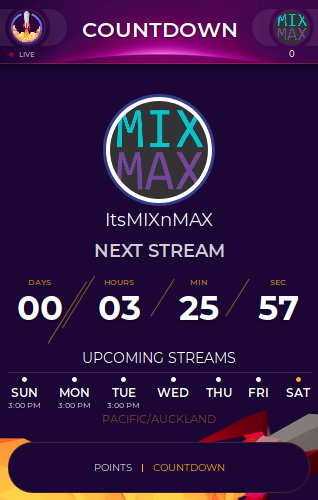
Hey guys...having an issue with the new extension. As you can see, I have two countdown extension up...I would LIKE to use StreamElements but even though I have the correct time shown, the TIMER is wrong. The correct days may be shown, but in the "config" I have to set everything to one day earlier, just for it to show up correctly on the main channel.
Any thoughts?
 mortal python
@azure swift hey, We've been having similar issues with the extension. I was told they are currently updating the extension to fix this by @dense jackal . My extension is still only working on and off, so I've had to disable the countdown in the meantime. Settings: https://imgur.com/7Jgwswz & Results: https://imgur.com/7PxvuXl

 dense jackal
This is true ^
glossy walrus
Hi guys I’ve been having trouble uploading an image to my overlay I have it as a png but still won’t upload any suggestions?
dense jackal
Are you using chrome @glossy walrus
 hot scarab
sso an item from the store is a sound but when you redeem it othing happens on stream how does that work?
dense jackal
If it is categorized as a sound effect you need to have the store redemption widget in your overlay to hear it @hot scarab
Works the same way as the alertbox
glossy walrus
Thank you @dense jackal
dense jackal
hot scarab
how do you get the widget?
dense jackal
Do you have an overlay in your system yet? @hot scarab
azure swift
ok great...because I REALLY want to use this for my countdown...i don't like the other one 😃
hot scarab
oof so that means you would have to create a new overlay through streamelements
dense jackal
Hopefully it will be fixed soon, updates have to be pushed on twitch's schedule so we do what we can and appreciate your patience @azure swift
I mean you can add it to an existing overlay that you use, or create a new one if you don't have one yet @hot scarab
dense jackal
np @hot scarab
nocturne pelicanBOT
options You can make changes to custom commands in chat with!command add/remove/edit/options/show Valid flags for !cmd options are: -cd (number) -usercd (number) -cost (number) -level (number) -type (say, whisper or reply) -count (number). --- Example: !cmd options twitter -usercd 60 -type reply -level 250
clever mango
@remote nimbus
 remote nimbus
!woot woot
 wanton jetty
is there a easy way to deafen alerts ??
 terse orchid
The cheer boss how do I add it to the streem?
 weary mist
@wanton jetty not easy, unless you make two sets, and just switch between them
@terse orchid it is not available at this time
terse orchid
Ok thx
wanton jetty
ok could do with being a feature
hot scarab
so i added the stream store widget to an overlay but the picture doesnt show up, you can only hear the sound?
when you redeem it you cant see it but when you emulate it you can
dense jackal
You can only hear the sound no image shows for a sound effect @hot scarab
dense jackal
if it was a store item it would redeem the stoe redemption widget's sound and show it's picture
hot scarab
yeah its a store item
and it shows the pic too when you emulate it
but when you redeem it it doesnt show pic
only sound
any ideas?
hot scarab
no sound efecs
dense jackal
? Do you mean you have sound effects checked in the store?
or you have stream perk checked?
hot scarab
i have sound effects checked in store
dense jackal
ok when testing an item redemption it tests stream perks
dense jackal
All good
hot scarab
thanks
 rich kayak
So I was wondering if it's possible to require viewers to say something every 10 mins to gain points
zenith widget
You can set a command with a user cooldown on it, which they can type to receive a random number of points
but set the loyalty points gained every 10 minutes to 0, so that you remove the passive method
zenith widget
Aah sorry, that was fairy custom made with API calls and setting up 2 chat bots to trigger each other's proper commands
I just remembered the idea from 2 days of discussions if its possible to be made.
rich kayak
So it's not possible with stream elements
zenith widget
Via only SE tools - no. Via using external tools(2 chat bots) - yes, but will take time to setup and adjust properly.
So for loyalty points its best to have the passive gain.
zenith widget
you can remove its points and add it to the ignore list
rich kayak
I've tried that and they're still getting points
rich kayak
Hmm I'll try again
zenith widget
but yea, write the name in the field and press enter then on "save".
rich kayak
Thanks
zenith widget
Afterwards fine the bot and just click on this:
for both current and all time points. This will set it to 0
lament blade
Hi again 😛 I have another question about media donations, is there a way for the streamer or mod to skip a donation, the way we did it on the previous platform is that I would allow something I felt was fine but if the streamer doesn't like it, he would then skip it on his side, I have no idea how you do that in streamelements, I even tried pressing the forward button on the media player and I'm assuming the streamer tried that as well, but the media kept playing, we are still learning though so any help would be welcome.
zenith widget
Queue moderation should allow you to skip song requests
even if donated via tips
lament blade
Even if we've allowed them?
zenith widget
if they are allowed, only way to skip them then is to "fast foward"/skip via the "next song" button
lament blade
We tried that and it didn't do anything 😦
zenith widget
If its the last song and you don't have a backup playlist
then maybe thats the case
zenith widget

lament blade
XD
lament blade
I have no idea! All I know is that's what he plays media with and then when people send in media donation he just pauses it and turns it back on.
zenith widget

lament blade
Ahh, no cross wires
 sour minnow
Hey just wondering how Do you add points in twitch chat to people
zenith widget
!addpoints <user> <points>
lament blade
he has his own play list, then we have media donations.. yeah I guess it is for him really lol
sour minnow
Ok thankd
zenith widget
There are plans for spotify, but can't give any ETA
@sour minnow Also for !addpoints, if you set a negative number it will subtract points, but not set a negative number bellow 0. Example: If I have 100 points and you do !addpoints keizar -200, it will set my current points to 0.
There is another command "!bonus" which I think also gives all-time points
sour minnow
Thanks for the help guys
zenith widget
wanton jetty

 cedar fulcrum

 inland knoll
hi there on the stream chatstats how do I remove my bot from it - the switch at the top doesn't appear to do anything 😃
zenith widget
At the current moment there is no way to ignore someone on the chat stats page
 ebon atlas
is there a way to disable the profile icon on the tipping page?
winter zenith
Not that I know of, why? :)
 stone spire
Is there anyway to export the tip list or top tippers to like a csv or spreadsheet?
 atomic hollow
@ebon atlas you can add a blank PNG
so the profile pic becomes transparent
@stone spire you can do that using the API
stone spire
Is there any documentation on it?
atomic hollow
 proven ruin
can i have some help?
zenith widget
proven ruin
i wanna do irl stream with phone but when i use ace stream it will get me live but i cant see myself or the chat or any notifications. basically i need a tutorial for it
i already linked it with my stream elements overlay
i just dont know the basics to it
zenith widget
@strange heart Do you mean the info bellow your stream?
 strange heart
On your channel
zenith widget
@proven ruin I'm not sure as to how to help, as I'm not familiar with IRL streams from phones or "ace stream". What I would suggest is, google "ace stream tutorial" or "irl phone streaming tutorial"
@strange heart you mean this?
strange heart
I want to know how to put my discord all my social medias in there and the donation page in my info on twitch
strange heart
I'm on my phone right now I'll show you what I'm talking about
proven ruin
yah i googled streamelements app and it showed ace stream. it seems streamelements madr it for streaming irl? like streamlabs app?
strange heart
proven ruin
i personally dont like streamlabs myself since im used to stream elements
zenith widget
@strange heart I think you can edit that from a PC/browser not the actual twitch app from the phone
@proven ruin
strange heart
Okay thanks
zenith widget
@proven ruin From what I can tell, people actually use the Twitch App to stream from phones and having a 2nd phone to look at chat or alerts during streams. Not really sure on how to get the actual alert widget as an overlay
I think while streaming from twitch app, you can still look at the chat at the same time
 celest temple
Okay, this going to prob make me sound stupid for asking this question. But is there way that if someone Cheers and certain amount of bits, I can play a particular sound?
zenith widget
@celest temple Yes. Via the variations. Let me get you a screenshot
@proven ruin I'd suggest just googling "irl phone streaming". I saw plenty of videos and guides...more or less
@celest temple So on the overlay editor, click on your alertbox widget, then the cogwheel for the cheers
proven ruin
yes i get it now. i thoyght you needed an app to stream irl. sorry. thanks.
 untold crest
With overlays: i would bet "Phone as pc camera" (i am pretty sure it has to be in same network as pc, but you can use vpn), you can setup stream with that camera in obs and use overlay you want.
celest temple
Ah, thanks @zenith widget
narrow coyote
The ace live streaming app was aquired by SE, it's old and buggy and not really supported. SE is currently developing a new streaming app. The Twitch app will allow you to stream IRL, and see chat, bit there is no native support for browser sources, so there is no way to use an overlay with it. Some people get really fancy with irl streams and will use an rtmp to actually stream from a PC using OBS to add whatever you want to what you are capturing from the mobile device
 midnight topaz
just want to say, that the End Screen of the Spark Animated Super Theme for Overwatch is in the style of the Dark Matter one, and not in the style of Spark
 ripe herald
You are totally right @midnight topaz I'll fix it 😃 tnx for the info
midnight topaz
np, glad to be of service
midnight topaz
np, I'd most likely use the Dark Matter, cause I like to separate the lower third from the rest of the overlay parts (less things to load when changing scenes)
ripe herald
Sounds good
midnight topaz
yeah, since all chat scenes on Dark Matter have the chat box at the same place, and lower third is the same ^^
 spring valve
it is possible to remove loyality-points from viewers or set them on a blacklist for the points....how can I remove viewtime from users, in my case from bots, so that they don´t appear in the !top online command?
 gentle imp
you can make ppl be ignored by bot
https://streamelements.com/dashboard/loyalty scroll down to ignored users, writte name and hit enter @spring valve
cedar fulcrum
Hello @spring valve , Yes this is possible In order to remove points use the command !set points <name> <number>
spring valve
no, i don´t want to remove points, i want to remove viewtime
the blacklist in the loyalty-settings only works for points
zenith widget
Afraik there is no way to remove watch/view time from the !top online leaderboard. There is no way to ignore it for that as well. Only thing that can be ignored is loyalty points as pointed above.
spring valve
would be a nice function to implement
narrow coyote
You will want to create an idea for this so it can be tracked and voted on https://streamelements.helprace.com/s1-streamelements/ideas
 hot fulcrum
For the media request since I am streaming from my ps4 do I need anything like obs on my laptop in order to get the media requests to play on my stream?
normal igloo
@hot fulcrum Recommended to check this out https://strms.net/consolestreaming And you can just open your media request But of course it won't sound as good Then if it was on obs

StreamElements - Legendary Live Streaming
The beginners guide to streaming on PS4 / Xbox
hot fulcrum
Thank you James
 spare oar
Hey, i'm trying to activate chat stats, but it's not letting me :\ is there anything I should be doing beforehand?
normal igloo
When a streamer thx me for helping I go; no thank YOU! We just provide a service & when done, put our feet up and enjoy what YOU are doing!
@spare oar Strange Normally you should be able to just Get to it Maybe try in a different browser
 elder sorrel
@spare oar Are you using Chrome? 🤔
 half finch
is there any way to delete an account? mistakenly created separate accounts for twitch and youtube
spare oar
Chrome gives same error 😦
clever mango
@spare oar That page is not functional right now. It's still in development.
spare oar
@clever mango oh okay! thanks for the heads up
elder sorrel
Not sure about deleting an account for Twitch & Youtube. 🤔 Not sure if that is functioning currently as well.
normal igloo
@elder sorrel He asked the same question in #helpdesk-youtube Looks like TerraBuck Has sorted him out
elder sorrel
Sweet, just saw that. Was about to say that I think SE Support people would have to manually do it
normal igloo
Well I know what I'm adding to my notepad
Now I know how to answer for deleting an account 😂
 cosmic elm
Is there any way to export my loyalty points(viewer) list?
normal igloo
@cosmic elm Unfortunately not what I know of
cosmic elm
Is there a way of cleaning up the viewer list? It's rather bloated
 wheat cosmos
Is there a reason that the addpoints command wouldn't work?
normal igloo
@wheat cosmos make sure it's turned on in the default commands
@lament blade Well for starters hey Welcome to SE When you say labels I take it you're talking about follow notifications and so on?
zenith widget
@cosmic elm Do you want to remove a person from the loyalty point leaderboard?
If yes, unfortunately, you can only remove their points(set them to 0)
cosmic elm
Why is exporting not a thing in Streamelements?
clever mango
We've got an open API. Anything can be exported. Here's a tool someone made for points: https://github.com/Slikrick/streamelements-csv
 serene granite
@lament blade they are on the overlay manager
cosmic elm
Wow, thanks @clever mango
lament blade
hey @serene granite I found them but I'm having trouble position the labels on my obs
positioning*
wheat cosmos
It is enabled
serene granite
@lament blade you should position them in the overlay manager
make sure the overlay on our website is the same resolution as your OBS canvas
most likely 1920x1080
atomic hollow
lament blade
thanks so much @atomic hollow
atomic hollow
lament blade
but I still have problems
when I move them around in the editor, the same is not replicated in obs
normal igloo
@lament blade Make sure you are saving the changes the editor And you may have to reload Your Scene in obs To see the changes in obs
lament blade
okay I'll try this @normal igloo
normal igloo
np
lament blade
oh yeah, it works now!
You guys have such an amazing support team.
Keep up the good work 😃
normal igloo
@lament blade That's great to hear Even though I'm not on support team. tho I'm just some random guy who helps where he can
@lament blade Feel free to get back in touch with us if you need anything else of course
wheat cosmos
The addpoints command is enabled but I can't get it to add points
zenith widget
!addpoints <user> <points>
wheat cosmos
Doesn't work
wheat cosmos
Streamer gave me full control. That should work, right?
Yeah loyalty points are working
normal igloo
@wheat cosmos Are you added as a SUPER MODERATOR?
zenith widget
^^^
 tight harness
@wheat cosmos Full Control is access to the dashboard but doesn't mean you have Mod or Super Mod for chat commands 😃
That's done separately in User Management
wheat cosmos
Ohhh okay I'll check with him
 normal igloo
@wheat cosmos that's great to hear of course do get back in touch with us if there's anything else you need
nocturne pelicanBOT
Chat/Bot Levels
100 - viewer
250 - subscriber
300 - __regular __
500 - moderator (twitch mods automatically placed at this level)
1000 - super moderator
1500 - broadcaster
Dashboard Manager Levels (least to most access)
Bot Supervisor (can add super moderators from dashboard)
Editor
Full Access
https://i.imgur.com/s61Liry.png
 zenith widget
@normal igloo @wheat cosmos ^^^
normal igloo
zenith widget
if you want to mess around with settings regulars and other mods being just mods
This is usefull for both your streamer and command control 😉
 broken hazel
im having an issue where followers etc tip data says no data on obs when there is data and i have done imports
normal igloo
@broken hazel have you only just start using SE ?
broken hazel
yeah just switched from ankhbot
normal igloo
@broken hazel There's your problem then SE Only uses the data From when it was first used
lament blade
hey, so i ran into a problem with trying to get the SE bot into my chat. i've had it join and part like three times and have'nt been able to get it to join. any suggestions?
 silent hill
is there a streamelement overlay to create like donation topic, setup etc ??
narrow coyote
You can set the labels from the data in the overlay editor or https://streamelements.com/dashboard/session @broken hazel
broken hazel
hmm so no data on the overlay until i get new followers subs etc ?
normal igloo
@lament blade Strange Have you tried any different browser ?
broken hazel
ah sweet thanks
narrow coyote
@silent hill What do you mean by donation topic?
silent hill
on twitch, under the stream windows, i got like a donation section, setup section, want a picture overlay, and if people press donate its linked to the tipping
like all streamers have
normal igloo
@broken hazel That is correct If you had a new follow Before using SE it will not show up As there is no way of SE Getting that data So yes you will have to wait until you get new followers subs etc I hope this answers your questions please let us know if there's any more we can do for you
narrow coyote
those are panels, nothing really to do with your overlay. SE does not have panels, but you can find plenty of free templates for panels online
silent hill
ahh okay, thank you
narrow coyote

zenith widget
If your actually referring to the panels bellow your stream you can use this image to setup your own donation "button" under your stream
narrow coyote
!panels
nocturne pelicanBOT
Twitch's official help guide for Panels: https://help.twitch.tv/customer/portal/articles/2416760-how-to-edit-info-panels
normal igloo
@silent hill It's only basic but if you looks for panels I can hit you up in the dms
 wary token
Hey there. Is there some command that i can add to change the game im playing on twitch? i mean, via chat?
without having to acess twitch config for this?
normal igloo
@wary token !setgame
normal igloo
You can find it in default commands so yes just do !setgame
@wary token
Make sure you have it enabled of course tho
wary token
cant fint it 😛 Thanks tho
broken hazel
ill have a stream and see how it copes i think i have everything set up for it. thanks guys for the replys 😛
zenith widget
!setgame is the command your looking for 
normal igloo
@wary token You can't find it? Should be in default commands
wary token
its ok. i tried now and its working. thanks a lot 😄
normal igloo
@broken hazel @wary token No worries let us know if you need anything else
narrow coyote
its under the super moderator commands, you can also ctrl+f to search for it
normal igloo
^^^^
wary token
im doing the command but when i reload the page its not changing tho. im mod in the chat
is it only for broadcasters? i have level 1000 tho
zenith widget
Are you a Super Mod?
wary token
yes
zenith widget
Then your not typing the game correctly
zenith widget
seems fine to me
normal igloo
Changing games has always been an issue on Twitch Takes me like 10 times before it changes
wary token
oh
normal igloo
Hope it's something twitch will one day fix But let's be honest I don't see that happening in Time soon
narrow coyote
If the bot responded that the game was set, not much more you can do
 pale grail
Hello, so i've Disconnected my Stream elements from my Twitch because i dont wanna use it anymore but the Stream elements bot still shows up in my chat when i do commands. How do i get completley rid of it
normal igloo
Also what kite said
zenith widget
use "!bot part"
pale grail
what do you mean with !bot when i type in nothing happens. Im new to all this
pale grail
I'm suing a different programm wich is easy for me and the streamelements bot is blocking the other bots commands
it worked thank you. dont get me wronf Stream elements is super cool and all the ppl are sure lovley its just not for me ^^
lament blade
Why dont my donations show up on my overlay?
normal igloo
@lament blade Have you recently start using SE?
 cursive heron
why would bot not give feedback in chat for purchasing giveaway tickets? points are spent and ticket is purchased, bot just doesn't say anything. Bot talks normally to all other commands.
lament blade
@normal igloo yes
normal igloo
@lament blade Have you received any donations Why's using SE?
normal igloo
yoo @narrow coyote Please correct me if I'm wrong But wouldn't the bot need to be in chat to get that info ? ^^^^
narrow coyote
@lament blade Your tipping panel links to a StreamLabs tipping page
bots not needed for that, but you do need to use the SE tipping page for SE to be able to alert on it
normal igloo
@narrow coyote Oh ok thank you for Clarifying
I clearly need more coffee in my system
lament blade
@narrow coyote my streamlabs alerts on it and I use a streamlabs donation link since I use their obs. So you're saying for it to work correct I can't use that link?
pine hemlock
If you're using our overlay, you need our tipping page.
Theres no linking between two platforms
narrow coyote
if you want to use a StreamElements overlay, and expect the tipping to show up on it, you need to also use StreamElements tipping
normal igloo
@lament blade StreamElements does not work with streamlabs so you need our tipping page. for our overlays
lament blade
@narrow coyote @pine hemlock alright I'll just have to find a new overlay on streamlavs then thank you
@normal igloo
narrow coyote
or import your SL alerts into SE
normal igloo
Or what kite just said
elder sorrel
⤴
lament blade
@narrow coyote what do you mean?
normal igloo
@lament blade You can import SL alerts into SE Meaning you can use SL alerts on SE
lament blade
@normal igloo how do I do that?
narrow coyote
You can import your SL alertbox into SE, then you would just need to switch your tipping page https://streamelements.com/dashboard/account/import?provider=streamlabs
pine hemlock
Meaning you dont have to redo your alerts*
lament blade
@narrow coyote ohh I want to use the SL dono page, I like the look of it better.
narrow coyote
well, the SE tipping page is going to be updated in the near future, if that is your only reason
lament blade
@narrow coyote the SL one just looks way more clean and such
@narrow coyote plus I use SL for everything else besides the overlay
 normal igloo
Well if you use SL for everything Then why are you using our overlays Instead of SL ? 
@lament blade
lament blade
@normal igloo because I don't like their free ones  they are garbo tbh
@pine hemlock that doesn't look too bad but can you change the name of the page and the tip "xxx" button
@pine hemlock or can users not edit that
normal igloo
Well in that case @lament blade
lament blade
@normal igloo but I like their obs and their custom chat bot it's amazing
zenith widget
@cursive heron Do you have this enabled via the chat alerts module for the bot?
 sharp patrol
Hi, I want to you your overlays in my twitch channel, where can I find the steps by steps?
zenith widget
@sharp patrol you can watch our video guides here: https://strms.net/welcome
sharp patrol
THanks
zenith widget
cursive heron
@zenith widget yes. other !redeem commands work. just !ticket doesn't provide feedback.
cursive heron
it is unique for giveway

 cursive heron
so that may have been missed? there is no way to change it?
normal igloo
@zenith widget
zenith widget
https://streamelements.com/dashboard/giveaways the option is located here
cursive heron
right, but if giveaway is active you cannot change, correct?
cursive heron
okay. next giveaway I will pay attention for this checkbox. thanks!
 exotic hinge
who has access to the admin panel? 😃
i cannot copy my alert box to another overlay because its not showing my custom overlays
:/
 rancid bane
any nerds here? 🤓
normal igloo
@rancid bane They are helpers here Not sure about any nerds tho
zenith widget
aah ok
rancid bane
What’s a good buffer size?
normal igloo
@rancid bane What do you mean?
 rose kettle
@rancid bane The max you can do depends on your upload speed. If your upload speed is say 5mb/ps Use 4500 or even 4000 to stay safe
wanton jetty
Is there anyone here who could add some CSS to my donation goal to make it look like a fortnite health bar ?
Id love it too blend in
https://chrisis.live/s/2805182002_1.png

So the goal is like 0 | 100
in line with it
 warped ether
Is there a way to do a test alert to make sure everything is working smoothly?
warped ether
ooooh
zenith widget
@wanton jetty
normal igloo
this is me when I see @zenith widget Replies before me
zenith widget


 rancid bane
@rose kettle @normal igloo sorry for late reply just came back from dinner 😄
I mean this
normal igloo
@rancid bane No problem hope you had a nice dinner
 half wing
hi 😃
nocturne pelicanBOT
@silent cove Are you a StreamElements all-in-one streamer and interested in stream promotion when you go live? Please fill out this application https://strms.net/sellout and if you meet the 3 requirements posted in the :pushpin: pinned message in #welcome you will be added to the stream announcements.
normal igloo
@half wing hey
warped ether
So streamelements has free themes to use for streaming, but does it have free images for channel panels aswell?
normal igloo
@zenith widget As far as I know that's correct Don't quote me on that tho
@warped ether Currently no But I can DM you To where you can get free panels tho
warped ether
please do >.<
 near grail
Hi, so i added elements to my streams but i dont know hoe my viewers get !points automatically
normal igloo
@near grail Go to loyalty settings You will find everything you need in there
near grail
Thx james
normal igloo
@near grail That's totally up to you 50 1 5 100 Every 10 minutes Totally up to you
elder sorrel
⤴
near grail
Oke
Anyone know when and how to get partnered on twitch?
So i can use the bot in his full potential
zenith widget
What bot on its full potential?
If your with our bot, then your using it in its full potential
also to get partnered you need to grind those streams and numbers.
nocturne pelicanBOT
@near grail Are you a StreamElements all-in-one streamer and interested in stream promotion when you go live? Please fill out this application https://strms.net/sellout and if you meet the 3 requirements posted in the :pushpin: pinned message in #welcome you will be added to the stream announcements.
normal igloo
@near grail Going to your twitch dashboard the Achievements first thing you see Path to partner
near grail
@zenith widget i mean i cant really use bits and sub functions in streak elements if im not partner
zenith widget
then you need to get to affialte
normal igloo
^^^^
 fallow lake
how do i obtain the OAuth Token when changing my bots name
normal igloo
@fallow lake You mean the JWT Token?
zenith widget
!rename
nocturne pelicanBOT
Custom bot name requirements
- StreamElements bot modded and in chat
- Active overlay with alerts
- StreamElements tipping page in the panels below the stream (!panels)
- Create a twitch account for the name you want to use
- Ground Control app must be running
Steps to enable custom name
- Sign in to https://twitch.tv with the bot account
- Install and run Ground Control (!gc for download)
- Visit https://twitchapps.com/tmi/ and generate an oAUTH token
- Copy/paste everything in the box to Ground Control oAuth settings and enter the name for the bot account
- Restart Ground Control (custom name may take a few minutes to take effect)
fallow lake
ya whatever token it is that allows me to change the bot name lol
normal igloo
Oh nevermind
zenith widget
@fallow lake ^ step 2
normal igloo
thx @zenith widget
zenith widget
 loud nexus
!alerts
Rip I tried, I am curious since I have transferred over how do my overlay alerts work on OBS
Came from streamlabs
nocturne pelicanBOT
To add your overlays to OBS, add a new browser source in your scene. Paste your overlay URL in the browser source properties, set the dimensions to 1920x1080 (unless you changed them on the website), and :ballot_box_with_check: “Shutdown source when not visible” https://youtu.be/KDvLynUqXI4
normal igloo
@loud nexus
loud nexus
Awesome thank you, Yeah how do I test the alerts themselves
 errant kestrel
I think you hit preview
normal igloo
@loud nexus Going to my overlays then go to the overlay you're using and should have a little Bluebell on the bottom left That's it
normal igloo
@loud nexus Yep the little blue bell on your Bottom left even
normal igloo
np Let us know if you need anything else
loud nexus
I was looking through the menus not the screen 200 IQ plays. I will thanks.
normal igloo
np
lament sentinel
Hey guys, ive a quesiton
lament sentinel
1- how can i sort items on a store?
2- when people click on the play button of my store the audio level isnt the same as the one i put in item
did i gotcho @normal igloo ? :P
nice plug -_-
normal igloo
@lament sentinel #1 You mean like shuffle that items about If so that's not possible At the moment #2 Even I have issues with audio Levels So I don't really know what to tell you with that one All I can suggest is Maybe play with your audio settings Unless one of the member of staff can help you Otherwise
 mortal ice
Thanks 🙏🙇
nocturne pelicanBOT
@mortal ice Are you a StreamElements all-in-one streamer and interested in stream promotion when you go live? Please fill out this application https://strms.net/sellout and if you meet the 3 requirements posted in the :pushpin: pinned message in #welcome you will be added to the stream announcements.
lament sentinel
@normal igloo #1 in dashboard i cant find a button to sort the items
#2 who can I tag to solve this problem?
normal igloo
@lament sentinel #1 Oh you mean for the recent events? #2 Anyone who is is SE.STAFF or SE.CHAMPION
But by the looks of it you just got me at the moment
lament sentinel
@normal igloo no, like.. im my store i want to sort the order or my items but i cant find a option for it, @summer mulch can u help with my issue? :P
 pulsar gulch
Hello , how was that fix when someone donates / follow / buys from store i hear the alert 2 times
but when i check it from SE website it's 1 time 🤔
normal igloo
@lament sentinel Oh my bad for misunderstanding then That is currently not possible at this time To change order your items
lament sentinel
@normal igloo im a streamer aswell and i used streamlabs for over 2 years and im moving everything to streamelements, and im figuring things out. Pretty simple to do the transition
oh ok james, thanks buddy.. now i just need to figure out the audio issue
from the store :/
normal igloo
@lament sentinel No worries I try my best
Hopefully one of the member of staff will contact you About your audio issue
@pulsar gulch You probably have two Alert widgets in your overlay
pulsar gulch
checked and i don't
normal igloo
mmm Not sure then
lament sentinel
@normal igloo now that im thinking... how can i put like the recent donator etc? 🤔
normal igloo
@lament sentinel so it shows up on stream?
normal igloo
@lament sentinel Go to my overlays then Whatever overlay you use And you can find all that in widgets
lament sentinel
wait.. so what happen when i switch scenes from obs?
with different hud positions for the donos
OH I SEE! ive to make different overlays?!
pulsar gulch
Is there any supp on ?
normal igloo
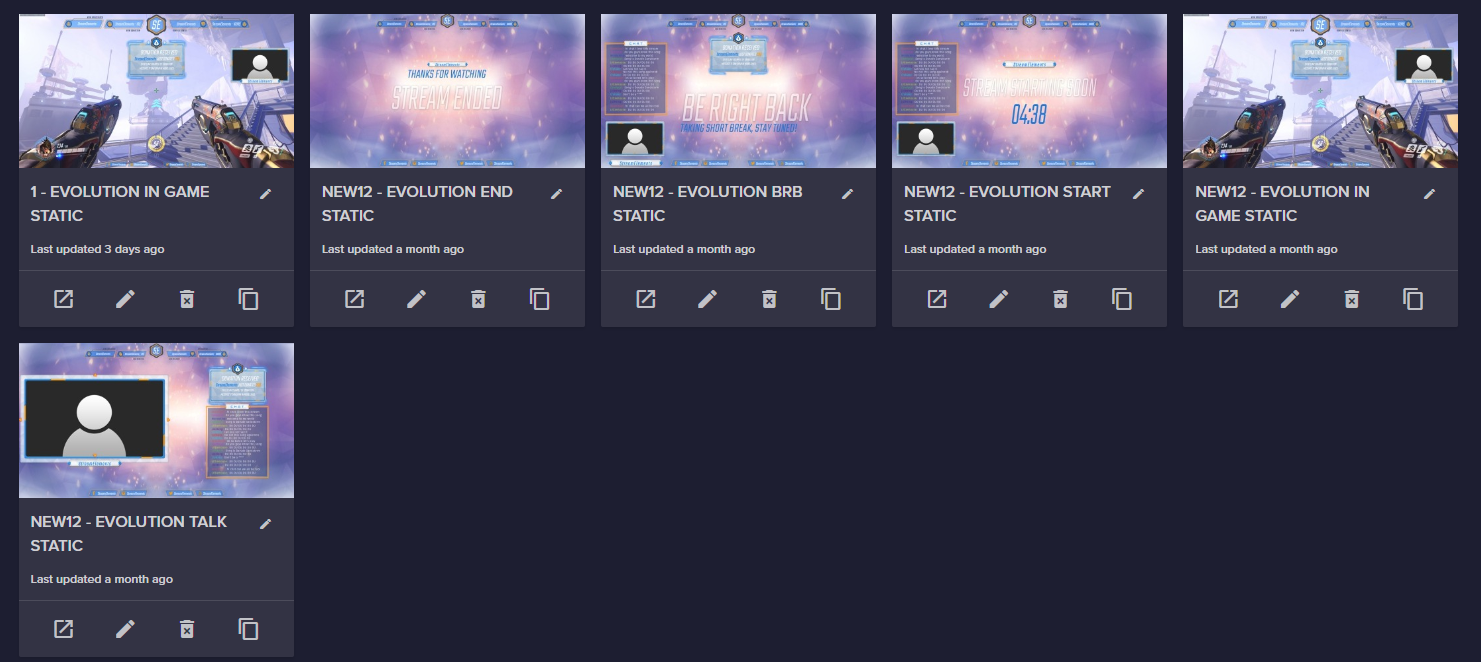
@lament sentinel That is correct You will need different overlays For each scene For example https://i.gyazo.com/800f2a13cd7df0af1c96f6b6e349c6a3.png
 lament sentinel
@normal igloo hell yeah! thank you again! :D
normal igloo
@lament sentinel np
lament sentinel
@normal igloo when i do the transfer from streamlabs to streamelements the donations and top donos they all get lost right? i feel like its not possible to recover that probably
dense jackal
Whatsup @pulsar gulch
nocturne pelicanBOT
@pulsar gulch Make sure to :ballot_box_with_check: “Shutdown source when not visible” for all browser sources (all OBS scenes). If using studio mode, uncheck “Swap Preview/Output scenes After Transitioning.” Also keep in mind that sound can play from any overlay loaded in the browser (editor or launched). https://i.imgur.com/FegZJQS.png https://i.imgur.com/yY0wcFl.png
dense jackal
@lament sentinel They will all be transferred but any widget data can be changed here if needed https://streamelements.com/dashboard/session
lament sentinel
@dense jackal I transfer everything from streamlabs and my donations got all random
should i do it again till its not random? 🤔
dense jackal
What do you mean by random? The dates are all messed up?
lament sentinel
yes
and one of the guys got 50% of all the money i made on stream
which its impossible
50% of my streaming career xD
dense jackal
Hmmm one sec let me check something with our import tool @lament sentinel
How many times have you imported?
dense jackal
Taking a look now and seeing what I can do @lament sentinel
lament sentinel
@dense jackal aight thank you. If is not possible well... i dont mind to reset all data from donos.. but i would like to have that tracked
dense jackal
@lament sentinel add me as a friend I'll talk more in dms
lament sentinel
@dense jackal done
 knotty spade
anyone having issues with Bonus not rewarding points with all?
dense jackal
@knotty spade what is your twitch channel?
weary mist
djtechlive
dense jackal
@knotty spade This is a really weird issue since addpoints is working
and bonus responds correctly to the bot
knotty spade
right
dense jackal
We are removing and readding bonus as an alias
knotty spade
just started figuring it out today since we been doing so many adds
dense jackal
maybe after stream part the bot and join the bot again
knotty spade
can do
knotty spade
yep thanks
dense jackal
tip: you can disable the default points command make a new one called glitches with the same response @knotty spade and in advanced settings you can make it whisper a user so it doesnt spam the chat
 toxic forge
so how do i add the peoples names like recent followers and recent subscribers into my overlay?
on obs
dense jackal
It will be through our overlays you add them as widgets