#helpdesk-twitch
1 messages · Page 246 of 1
 wet bramble
 tight harness
Yes, an alert box if you want every scene to show alerts
wet bramble
ok
so i have a custom overlay. how do i upload that to streamelements so i can add the widget?
??
tight harness
Are they images? If so use Insert Image, are they videos? If so use Insert Video
wet bramble
its just a overlay that my buddy made me there is a ticker at the bottom that shows recent subs and whatnot
that be considered a image of video?
tight harness
That's a widget, we have our own widgets which display that
To add widgets, click Widgets
wet bramble
it wont let me upload my overlay
tight harness
What are you trying to upload from your overlay?
wet bramble

MediaFire
MediaFire is a simple to use free service that lets you put all your photos, documents, music, and video in a single place so you can access them anywhere and share them everywhere.
this is the overlay im trying to upload to the website to add the widgets
tight harness
Alright, that's an image, so Insert Image
 dry ingot
what do you guys gain from people using your service?
tight harness
You mean do we take any fees? No
dry ingot
ok well thanks for the fortnite overlay
tight harness
No problem 
wet bramble
so i inserted image, do i set image after?
dry ingot
but can people donate to you guys if we wanted?
tight harness
@dry ingot No, we don't accept donations, word of mouth is enough
 white cradle
There’s no other place to say this so I’ll just say it here, are you still coming to Mixer because you deleted the mixer coming soon button on your website.
tight harness
@wet bramble Yes, make sure the image is on the overlay, otherwise it won't show.
wet bramble
okay i go to press upload but nothing happens
 winter monolith
Good afternoon, I was wondering if there is any way to reproduce the songrequest normally from the managers' control panels since I have a collaborative channel and it is important for us that all streamers can use the songrequest without stopping after each song
tight harness
white cradle
Ok.
tight harness
Says planned here 
white cradle
Thanks.
wet bramble
when i press upload, it doesnt do anything. Submit doesnt show up
tight harness
@wet bramble Okay, what's your username? I'm going to have a look what you've done so far
wet bramble
Rumors_12
tight harness
Which overlay?
wet bramble
brian
wet bramble
thats what im saying, it isnt letting me upload any images
tight harness
Did you try clicking on Select Files and selecting the file?
tight harness
This is when you're editing an overlay and you click on Insert Image, Set Image, Upload, Select Files
tight harness
We have a tutorial video for that https://www.youtube.com/watch?v=hoNYfLw1Gg4
 lament blade
any1 wanna hop in voice and help mw make a custom overlay
wet bramble
yeah i selected the file i go to press upload and it doesnt do anything
dry ingot
do you guys have offline screens?
lament blade
no
wet bramble
can anyone else help me? im trying to upload a personal overlay and add a widget to it. I go to edit overlay, insert image, set image, select file, choose the picture, then try to press upload but it doesnt do anything after that
wet bramble
yeah nothing that helps
winter monolith
Good afternoon, I was wondering if there is any way to reproduce the songrequest normally from the managers' control panels since I have a collaborative channel and it is important for us that all streamers can use the songrequest without stopping after each song
lament blade
can someone help me the twitch chat widget isnt working
 dapper otter
I'm having that same issue @lament blade - I'm currently using all streamelements, minus the chatbox
lament blade
yeah it's so dumb
dapper otter
I wouldn't go that far. it's probably just some small issue on our end 😃 @lament blade
lament blade
like ill type and it goes into the chat but nothing shows up on the widget
dapper otter
I currently am using the streamlabs chatbox in place of streamelements until I can get it fixed
yeah, same here, it works in the browser, but not in OBS
lament blade
mine doesnt even work in the browser
dapper otter
I'd say just wait patiently and someone will help us out soon @lament blade
tight harness
@wet bramble I said press Submit after it's uploaded, pressing Upload again won't submit it
@winter monolith Not sure I understand what you mean by "reproduce the songrequest normally"
@lament blade Isn't working in what way?
Also, on what account is this for because your username linked to Discord shows no account on our system
tight harness
The twitch account zepherrs isn't linked to our system, so what account are you referring to?
dapper otter
@tight harness My chat issue is this: I can get the box to show on OBS, but it remains blank regardless of chat content. I am using OBS Browser source
winter monolith
if im in a manager panel control and i start the reproduction of the queue this stop after every song
lament blade
1080
 lament blade
i need it small
tight harness
Right, but I think that's probably why you're having problems
Regular one is on the right
lament blade
my friend is streaming rn with the same thing and the same size as mine
tight harness
So you have it show 1 message at a time?
tight harness
lament blade
yeah like that
lament blade
yeah mine arent
tight harness
That is your account
Your overlay, and I went to your channel and typed test in your chat
As you can see, it worked 😄
tight harness
Did you add the overlay to OBS as 1080?
lament blade
1080 by what?
tight harness
1920 x 1080
 sharp dock
I just recently switched from Streamlabs Chatbot over to StreamElements. I've noticed that on my Leaderboard I'm listed twice. My channel name is maz0hyst but I changed my Display name to Maz0hyst. I've tried to remove the points from the Maz0hyst entry, but it removes it from the lower case one instead.
Is there a way for me to remove the duplicate of my name?
tight harness
@dapper otter Possible yours needs the same thing ⤴
dapper otter
@tight harness In the process 😃 Thank you so much!
tight harness
No problem
@sharp dock If the import contains usernames with capital letters in them then it can cause duplicate names, yes. I believe there's a way for some staff to wipe your leaderboard entirely but I don't believe I have the access
sharp dock
😮
tight harness
@winter monolith We're going to look into it, seems like a weird issue which nobody has mentioned before
winter monolith
Thank you very much!
sharp dock
I think I have that option as well on the leaderboard page. I'll have to wipe it clean and just toss my viewers some extra stuff. Thanks so much!
tight harness
No problem, I can click on Reset, but that sets points to 0, doesn't remove the users
lament blade
Im only getting 20 fps when streaming help me
sharp dock
@tight harness Oh I see! So only staff has the ability to wipe usernames, etc then?
tight harness
Only some, I don't
sharp dock
Alright, I'll poke around here over the weekend to see if anyone with access might be able to do that for me  Thanks!
tight harness
No problem
lament blade
someone help me
 narrow coyote
@lament blade that would come down to your streaming setup, and broadcast software settings
dapper otter
Workin perfect @tight harness Thanks for the help! I'm now 100% streamelements lol
tight harness
Awesome! 😃
narrow coyote


winter monolith
btw @tight harness , Exist any way to follow this? i really need to know when this would be working
lament blade
@narrow coyote what can affect it though that bad once i stopped i jumped 50 fps
tight harness
@winter monolith One sec i'll DM you
winter monolith
Thx
narrow coyote
It will depend on what your cpu and gpu is, and what your output and video settings are for your broadcast software
lament blade
i have an 6700k and a 1080
narrow coyote
are you using OBS? what are your output and video settings
lament blade
just changed it to 720 gonna see how it does 1 sec
its working fine on 720
with 4500 bit rate
narrow coyote
yeah, if you were trying to do 1080p as your video output, 720 at 60 or 30 fps would be the recommended
 frail goblet
I’m having problems with hosting. Whenever someone hosts me it won’t show it in the stream.
 nocturne pelicanBOT
@frail goblet
Twitch doesn't have a "notification system" for hosts (unlike follows, subs, raids, etc.) so the only way for StreamElements to know that you are being hosted is to connect through you to twitch. This connection is made on:
- SE Dashboard page - https://streamelements.com/dashboard
- SE Activity Feed page - https://streamelements.com/dashboard/activity
- Ground Control desktop app - https://streamelements.com/groundcontrol
Please have one of these open during your stream in order to receive host event notifications.
 mystic hedge
Anyone know why my alerts are echoing when someone follows, subs or anything? plz @ me if you reply ❤
nocturne pelicanBOT
@mystic hedge Make sure to :ballot_box_with_check: “Shutdown source when not visible” for all browser sources (all OBS scenes). If using studio mode, uncheck “Swap Preview/Output scenes After Transitioning.” Also keep in mind that sound can play from any overlay loaded in the browser (editor or launched). https://i.imgur.com/FegZJQS.png https://i.imgur.com/yY0wcFl.png


 dense jackal
Also check your overlays for extra hidden alertbox
mystic hedge
Ok thanks
lament blade
So im using redlare and dont have a face book or insta so what should i do?
can someone get me the reddit logo for the theme?
 vital wyvern
Hey @lament blade you can edit /remove the logos from the overlay but going into "My overlays" and select the pen on the overlay
lament blade
ik that but
It would look really weird
idk what to do
dont have insta or facebook
nvm i got an idea
move twitter to outside pannel then delete the inside
vital wyvern
yes, you can delete it by selecting the layer, this is located bottom left corner
the images should be named after their social media type
lament blade
How does that look
Maybe put my name Big in middle
even though it is at top
I got an idea nvm
vital wyvern
Putting your name there also looks good 😃
lament blade
whats undo\
How does that look
can i change the "spam filters" only if iam offline? i see my chat "streamelements hat fire_stormhd für 1 Sekunden in den Time-Out versetzt." but i never see a message from this guy
 crude current
Is there a way to give myself points when I'm the streamer on twitch?
 solar slate
why when i set the sub alert to a certain thing it still does that beeping one? i have a costom sub emote and want to you that but it stilll does the beeping one
 wise cliff
I have my Media requests set up for 2 free requests then 500 loyalty points, I've had someone test it out but it does not draw from the loyalty credit
 celest knoll
Would anyone be able to help me Make a !lurk command that people can use in my channel when they are lurking to promote themselfs?
solar slate
i really need help ive looked everywhere and cant find a fix
 native horizon
German here ?
Does anyone know how I can show my upload speed in realtime in the stream in OBS?


 nimble relic
Hey guys, I had a viewer subscribe with Amazon Prime, but its not showing up in my dashboard or updating in my overlay, has anyone else had issues with prime subs not showing up?
 wanton jetty
Its all broken buddy
nimble relic
How long has it been broken? lol
Follows work fine, I think its just the prime subs
wanton jetty
well iv been streaming an hour
and the screenshots i posted show the GC doesnt even connect
nimble relic
That might be on your end, the gc works fine for me, even showed a follower from 30mins ago. Ive been trying to figure out the sub issue for 3 days
 jolly gazelle
When I receive follows, it takes a long time to come through on my stream and on my overlay
 sacred verge
What are you using @jolly gazelle
 simple frigate
I have a question for the custom command
if i want so put the user name into the sentence what code do i use
{name} ?
or {user}
nvm got it
 fringe hound
Greetings, excuse me because I do not skip the alerts in the overlay?
 lean elm
Hello. Is there a scrolling version of giveaways widget rather than a box
 proud pumice
@lean elm nope, any example of how you'd like it to look like?
@fringe hound what? are you looking for a way to skip alerts?
its possible from this page https://streamelements.com/dashboard/activity

StreamElements
The Ultimate All in One Platform for Streamers
top right corner
lean elm
@proud pumice like we have a scrolling text. Instead of text, it updates the giveaway information like tickets, enterants etc
proud pumice
oh, that, nope, dont have it, but it sounds like a cool idea, could you add that to the idea board?
lean elm
Ok
proud pumice
lean elm
Done! Thumbs up please!
dense jackal
what's the issue @regal kite
 regal kite
em when i got my overlay in from streamelements to obs i started lagging as f
nocturne pelicanBOT
Make sure to :ballot_box_with_check: “Shutdown source when not visible” for all browser sources (all OBS scenes). If using studio mode, uncheck “Swap Preview/Output scenes After Transitioning.” Also keep in mind that sound can play from any overlay loaded in the browser (editor or launched). https://i.imgur.com/FegZJQS.png https://i.imgur.com/yY0wcFl.png
regal kite
no
proud pumice
try a static one
its possible your computer isnt strong enough / doesnt like our animated overlays
we've seen that happen before
regal kite
aw its the only fortnite overlay come on
dense jackal
All browser sources need shutdown source when inactive checked, or is it just one overlay?
proud pumice
all :x
 uncut quarry
How does the command for multiraffle look like?
regal kite
idk
tight harness
@uncut quarry !raffle is multi raffle, !sraffle is single raffle
uncut quarry
Yes but how do I dertermain how many winners the multiraffle pulls?
regal kite
@tight harness
tight harness
@regal kite Want to tell us what the problem is instead of just tagging us with no question? 😄
 full grail
@dense jackal what is your issue alert sound playing miltiple times
tight harness
Can't do that, sorry, just type your question @regal kite
regal kite
okits hard to describe
tight harness
@uncut quarry You don't, it's set by the system and not configurable
regal kite
i have an stream is offline overlay and dont know how to put it so it is always at my page
dense jackal
@full grail i don’t have an issue, but if you are having echoed alerts make sure all your sources have “shutdown source when not visible” checked on obs
uncut quarry
Ok
full grail
@dense jackal i had that but i solved it in a different way
tight harness
@regal kite https://www.twitch.tv/settings/channel here where it says Video Player Banner
regal kite
ok thx
dense jackal
put alertbox in its own overlay ? @full grail
regal kite
how do i download the overlay from streamelements?
tight harness
@regal kite You don't
regal kite
huh
full grail
@dense jackal no i just cleared all the sounds from each alertbox except for one works like a charm
proud pumice
@regal kite please watch the tutorial videos before blasting them questions okay? https://strms.net/welcome

Setting up StreamElements is easy, learn how to in this video, hosted by Twitch Partner GIRLvsDUMB - Got any questions, or just want to say "Hey"? Join our D...
regal kite
ive watched all videos
tight harness
@regal kite Then you should know that our graphics are meant to be used as browser sources in OBS, not for downloading 🤔
regal kite
i know but i need to download it to put it up on my offline banner
proud pumice
we dont provide offline banners
you can make a snapshot of whatever you want and use it as a banner
dense jackal
¯_(ツ)_/¯ @full grail but then you have more cpu usage as well
proud pumice
common man, you're killing us here
regal kite
ye sry
proud pumice
try googling some questions, keep this for SE related support
regal kite
ok
dense jackal
awesome then! Always good to hear unique ways of implementing our system
 radiant crest
When you make a custom trigger for a command so it doesn't need the !
is it possible to make it so that it only triggers when the word and ONLY the word is being said.
Now it also triggers when the word is in an sentence.
tight harness
@radiant crest Keywords trigger wherever they are in a sentence, that's just how they're designed currently
If you want just 1 word to trigger them that's what aliases are for, but that requires the ! at the start
regal kite
@tight harness how do people se on sellout that im live
proud pumice
!sellout
nocturne pelicanBOT
Are you a StreamElements all-in-one streamer and interested in stream promotion when you go live? Please fill out this application https://strms.net/sellout and if you meet the 3 requirements posted in the :pushpin: pinned message in #general you will be added to the stream announcements.
tight harness
Did you fill in the application? It isn't instant, the applications have to be reviewed. @regal kite
regal kite
oh ok
 tame forge
hELLO, how do i change my social media thingamajigs on the overlay?
regal kite
i can help you
 livid summit
I have a quick question. I have a sound set up for a follow notification and then I have variations set up as well with the same sound. Would that cause the follow alert to be doubled when I stream. For some reason it doubles when streaming but not while testing on the overlay editor.
tame forge
@regal kite i found out myself, thanks anyway
regal kite
np...
tight harness
@atomic owl Need more details than that
@tame forge Click on them, type what you want into the text boxes
Ahh you figured it out, cool
 atomic owl
i redeem a sound its not working i press in my Streamelements play and its working
nocturne pelicanBOT
@livid summit Make sure to :ballot_box_with_check: “Shutdown source when not visible” for all browser sources (all OBS scenes). If using studio mode, uncheck “Swap Preview/Output scenes After Transitioning.” Also keep in mind that sound can play from any overlay loaded in the browser (editor or launched). https://i.imgur.com/FegZJQS.png https://i.imgur.com/yY0wcFl.png
tight harness
@atomic owl Did you add the Store Redemption widget to your overlays?
atomic owl
no ?
tight harness
That's why you don't hear the sound, the sounds come from that widget
lament blade
hello my name is asteri and i'm not existing
livid summit
Thanks @nocturne pelican I did not do that so that's probably the problem 100%. Thanks!
tight harness
@lament blade Yeah, this happens when people change their name, I've brought it up
@livid summit No problem
tight harness
@lament blade Yep
 fierce sun
I've been trying to change my currencies name today but get "Error updating loyalty" When will I be able to change it or is there a fix?
proud pumice
@lament blade usually works when you logout / log back in
still doesnt work? let us know so we could look into it
old nickname page still works?
lament blade
@proud pumice relogging on twitch, rejoining the bot, relogging in se multiple times; changing browser, different devices
proud pumice
@fierce sun what name are you trying to change to? might be too long
fierce sun
Currency name from Choungs to Flames
proud pumice
@lament blade looks rekt, we'll have to take a look, marking it down
@fierce sun ill try changing it for you
fierce sun
Thanks
proud pumice
@fierce sun i see the issue, give us an hour and we'll have that sorted for you :)
fierce sun
Appreciate that, out of curiosity may I ask what the problem was?
proud pumice
its reporting a wrong status to the server denying it from updating anything
fierce sun
Ahh ok fair enough. Appreciate you sorting it out.
lament blade
can i change the "spam filters" only if iam offline? i see my chat "streamelements hat fire_stormhd für 1 Sekunden in den Time-Out versetzt." but i never see a message from this guy
 frail mauve
Does stream elements have the option from "green screen" overlays? I am in my living room and trying to keep the background out if possible
 ebon forum
@frail mauve OBS or Xsplit have that option, those are your local camera settings.
 midnight moon
Hey there :) Is there a way to enable/disable store redemptions via chat?
 elder sorrel
I believe we have that in Command_Share. Let me look real quick.
midnight moon
@elder sorrel I appreciate it!
elder sorrel
I don't see it in there. Thought I saw it before. Not sure if there is another way besides the SE website 🤔
dry ingot
my "top tip" has no data. i havent received any tips but why isnt it just blank like the "lastest tip and lastest sub?
 boreal flax
hey, is the sr command not working for others? it stoped working while i am live https://gyazo.com/2c6b352aa9c815fece7ea2ebd4256d6f

nothing in the command changed, the bot just isn't reacting
 worn cradle
is it possible to rename the streamelements bot to something clever to match the channel?
elder sorrel
Yes you can!
Let's see. I think this is the command
!bot
!custombot
I forget the command. Need to find it somewhere 
Found it!
!rename
nocturne pelicanBOT
Custom bot name requirements
- StreamElements bot modded and in chat
- Active overlay with alerts
- StreamElements tipping page in the panels below the stream (!panels)
- Create a twitch account for the name you want to use
- Ground Control app must be running
Steps to enable custom name
- Sign in to https://twitch.tv with the bot account
- Install and run Ground Control (!gc for download)
- Visit https://twitchapps.com/tmi/ and generate an oAUTH token
- Copy/paste everything in the box to Ground Control oAuth settings and enter the name for the bot account
- Restart Ground Control (custom name may take a few minutes to take effect)
elder sorrel
@worn cradle
 twin vale
Is there a way to test notifications outside the editor?
elder sorrel
@twin vale Are you using OBS Studio?
twin vale
Yes
elder sorrel
Sweet, you can test with that with the editor.
twin vale
I also use Xplit
elder sorrel
So if you test the follow alert on the editor & have OBS on: It should be playing the alert on both.
narrow coyote
you can also mute the editor, so you dont get double sounds when testing
twin vale
I am going to give it a try. When i set those i was using xplit. Thanks @elder sorrel
Ohh good idea KATE. Thx guys for such quick responses
twin vale
I just switched to OBS yesterday, had been using xplit for a few months.
elder sorrel
Oh nice! Kite with the tip as well about muting the editor is pretty sweet (cause I didn't know that was there until now) 
I've been letting the double sound go off when I first tested.
narrow coyote
OBS 

twin vale
Ohh my thats a high recommendation. Will give OBS that good old college try. Thx
narrow coyote
@boreal flax Are you still having issues with the media request command? I just tested with the link you tried and that did work for me, do you have other commands that are not working?
midnight moon
@elder sorrel Ah, dang! Thanks anyway :)
Second question - is there a way to turn down the sound effect volume in the streamer's headphones?
I know the site controls the volume of what the viewers hear but it plays max volume in my headphones
narrow coyote
@dry ingot I believe that with the top tip widget you will want some text in the no data field of the widget
@midnight moon I would recommend using the volume mixer to turn down your broadcasting software volume, so they will hear sounds normal, and your ears wont bleed
midnight moon
@narrow coyote Oh man, I should have thought of that. You are smart. Thank you! <333
narrow coyote
 no problem
elder sorrel
@narrow coyote Is there a command to enable/disable store redemption via chat?
narrow coyote

midnight moon
hahaha
narrow coyote
I have no idea, but I am going to play with some stuff for a bit
elder sorrel
Sounds good. Smart Kite on the case, @midnight moon 😎
midnight moon
you guys are the best <3 thank you.
narrow coyote
 I dont think I am smart enough for this one. My only thought was maybe with
 !command but I cant seem to get this to work with redeem, or specific redemption items
elder sorrel
Is there a default command listed in the SE Site? (Currently at work so work PC blocks the site).
 south sluice
Which workplace blocks StreamElements? 
 elder sorrel
Cox Communications
lament blade
is there any way to make the cup refill tokens less bouncy? nothing ever refills in my cup after I do a scene transition
 pine hemlock
The reill is based off the configuration of the tokens im pretty sure, if you lower the bounce it should cause the refill to have less bounce as well
lament blade
I took it to zero, they still bounce out on reload 😦 then ones that happen during session, they sit in there like rocks instead of the bit splosions
still no answer ^^
why don't the reloads behave the same as the ones that are dropped in?
or have a separate level of bouncy?
pine hemlock
I can't answer that. I'm not a developer
 narrow coyote
I am not really sure. If you have not tried yet if might be worth trying disabling, and re-enabling media request. If that does not work, try parting the bot from your channel and rejoining it
boreal flax
fixed, thanks :D
something of the new media request options was disabled, i just noticed
 eager frigate
Can somebody enlighten me on how the raffle winner is chosen, in an stream on multiple single raffles (!sraffle) we notice the winner is always from the first 5 people that enter the raffle. Either this is an real coincidence from our side, or something is off. Average people joining the raffle is 50-70 or something.
I've asked the mods for future raffles to copy the first 10 !join's on each raffle, and the winner. So we are gathering proof if needed.
 wintry junco
I just got the streamlabs obs but when i try test widgets nothing happens so im afraid my alerts dosent work, i can see my overlay i made but how can i see if they work ?
wintry junco
yeah
 winter zenith
Ok, just needed to make sure 😃 some people confuse StreamElements with StreamLabs 
wintry junco
haha yeah 😄
winter zenith
Ok and you are testing the alerts in the Overlay Editor of StreamElements?
wintry junco
overlay editor
winter zenith
Did you change your name by any chance?
 silver patio
Trying for a third time.
Why does the SE stats email for the stream statistics differ so much from the stream statistics from twitch itself?
Todays stream it says 712 unique chatters whilst twitch stats says 328 ?
wintry junco
no noo changes
 clever mango
@silver patio Our unique chatters is the number of unique usernames in the chat room during the stream. Twitch records the number of unique names that sent a message. That is why their number is lower.
wintry junco
yes
silver patio
So the SE mail is unique viewers then?
clever mango
chatters
silver patio
But if they dont chat they arent chatters? 😄
clever mango
I can enter your chatroom without viewing your stream
winter zenith
Can some one look into the account of @wintry junco ? pls?
@tight harness Pretty please? :<
clever mango
If I'm in your chatroom I'm considered a chatter since I'm in the chatters list
silver patio
Maybe change it to unique viewers to avoid confusion, just a tip 😄 Thanks for the quick answer this time!
clever mango
It's not viewers though.
silver patio
since you are automatically in the chatroom if you are logged in
Logged in viewers*
tight harness
@winter zenith Will do
winter zenith
thank you 
clever mango
I am in your chatroom right now but I have no twitch player open for you. Therefore I am a chatter but not a viewer.
I can also have the player but no chat client
then I would only be a viewer
silver patio
I get what you mean
tight harness
@wintry junco Am I alright to run a test event on your account?
 warped nymph
Is there a way you can do it on phone ?
warped nymph
How do you put a overlay on stream?
ebon forum
Depends on with what you stream.
warped nymph
Do you need a pc or game capture
ebon forum
our overlays are designed for the PC so far with the basic resolution: 1920x1080. you can make custom ones for any resolution and use them in all programs that support browser sources
So if you are on the console - yes, PC+capture card. On PC - just the right software. And so on.
tight harness
@wintry junco Okay so your overlay's alerts played perfectly fine in both our website and my OBS Studio, so the problem seems to be with SLOBS, you'd have to ask them
wise cliff
I never saw it I got an answer to my question. I have my Stream Elements Media Share set to provide everyone with 2 free song requests then charge 500 bones (loyalty points) for each one after but it isn't working
Someone tested and they get unlimited requests
wintry junco
@tight harness oh thxs man il take a look there 😃 thxs again.
tight harness
@wintry junco No problem
@wise cliff What did you set your exempt group to? And what group does this person go into?
 cursive cove
When in the "My Overlays" tab this is what I see. I have tried zooming in and out, tried refreshing... Nothing worked. Help?!
clever mango
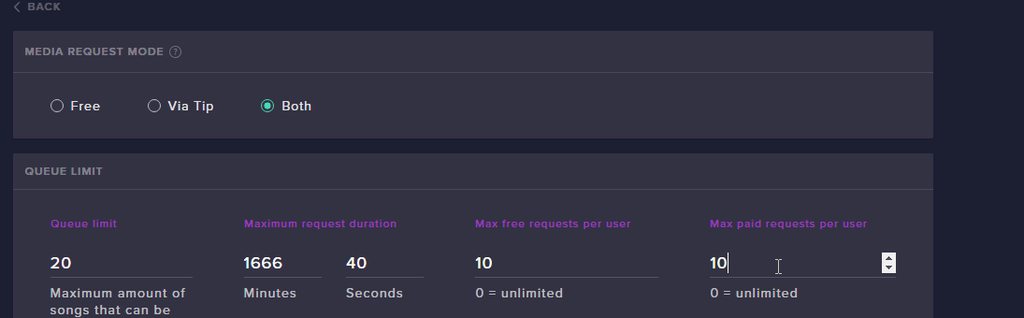
@wise cliff There is a misunderstanding here. The "max free requests per user" does not mean free in terms of loyalty points. It means free in terms of paying money to request. It is the number of requests that a person can have through the bot at any time.
In terms of the number of requests they were allowed to make, does this person fall in the exempt user level group at the bottom of the media share settings?
@cursive cove what type of device are you on? What is the resolution of the screen?
cursive cove
PC, Chrome and 1920x1080
cursive cove
hmm, Still seems to be the same :/
clever mango
Is the whole page distorted or just the section you screenshot?
cursive cove
Just this section
clever mango
I'll have to see if a dev can look into it tomorrow when they're back in the office. Does another browser do this as well for you?
cursive cove
Seems to work on other browsers. Just doesnt work on Chrome
clever mango
OK, please visit chrome://version/ and take a screenshot of the full page. Send that screenshot to me in a message and I'll see if a dev can help.
 ivory jolt
Is there any ETA for when the hotkeys for songrequests will be fixed btw? 🙈
winter zenith
there will be for sure
clever mango
@ivory jolt possibly this upcoming week
ivory jolt
Sweet! 😄
 meager vault
Can I export my currancy so I can use it in a different bot?
 frosty aurora
Hey what's up everyone ! Today I did my first official stream (I did one yesterday to try everything, and all I did was working), I'm using a very simple overlay with alertbox and chat module. Today I couldn't find a way to get the chat module running 😦 It worked fine yesterday and I think I didn't change anything (well, not sure, i'm a twitch beginner). I had the alertbox working today so the overlay definitely is working and linked to obs in a way
Am I missing something? Thanks a lot in advance 😄
 dense beacon
I re installed my PC today. But when lauching my setup and all now there is none at last sub and last donation. Is it because there is no record of it? 😛
meager vault
That kinda sucks...okay I guess i'll figure something out.
dense jackal
@meager vault this is what we have used in the past It is an external script that I had a friend make, its pretty simple.
Read me (steps): https://github.com/Slikrick/streamelements-csv
Zip Download: https://github.com/Slikrick/streamelements-csv/releases/tag/0.2.0(edite
 meager vault
Okay thanks!
dense jackal
@frosty aurora what is your stream name? try refreshing your cahce or making sure you have shutdown source when not visible checked
@dense beacon reinstalling your pc should have no effect on our counts, as they are done on the site
dense beacon
@dense jackal I found the problem. The image was above the layer 😛
dense jackal
Alright 😄
frosty aurora
My stream name is : smartspinfrance
I had to reset stream key before today's stream maybe that messed up with smthg
I tried refreshing cache, and shutdown source (..) is checked
I'm off pc atm I'll take another look at it later today and update if it works or still not 😄 Ty !
dense jackal
when you get a chance go here https://streamelements.com/dashboard/account/channels and dm me a full access link
frosty aurora
refresh cache is the option on obs when I click on the browser source linked to the overlay, right?
dense jackal
yep!
frosty aurora
ok so yes that's what I did. I stopped the stream, refreshed etc.. relaunched and still nothing so there might be something else
dense jackal
You can revoke my access to your account later but with the beauty of StreamElements I can hop into your overlays and see what the issue is
after you send me a generated link from that place above ^
frosty aurora
ok give me few minutes i'll do it now, thanks for your time !
dense jackal
np it's what we do, sorry for not respoding faster
frosty aurora
not more than few dozens of minutes, don't apologize for being that fast 😄
 humble roost
dense jackal
humble roost
dense jackal
You don't see the pencil to the right of them?
 dense jackal
np
wise cliff
Sorry I lost my phone connection. So this 'Loyalty Points Cost' does not mean in terms of loyalty points?
There seems to be a separate section for Tipped Requests and a section for Bots and Loyalty which is what I'm saying does not seem to be working
dense jackal
What Terrabuck was asking @wise cliff is that did the person testing happen to be a mod? or someone exempt of media share settings?
wise cliff
No he was not a mod, and I don't really have any restrictions in place for media share
dense jackal
it does mean it costs loyalty points and it seems to be working on my system currently
At the bottom of setting it says exempt user level, make sure it says moderator.
dense jackal
was it on moderator?
wise cliff
No it was on Everyone I set it to Moderator
wise cliff
So with the free requests set to 2 does that still allow people to make 2 song requests without costing loyalty points?
lament blade
@dense jackal check it now
dense jackal
Looks good!
lament blade
Can i get added now?
clever mango
@wise cliff requests through the bot always cost the amount set in the loyalty points cost
it's just "free" in the sense that they aren't paying money for the request
wise cliff
I'm referring to the top line where it's "Max free requests per user"
clever mango
Yes
That means the maximum number of requests that a person can add through the bot
dense jackal
you are added @lament blade
wise cliff
Ooohhh okay
lament blade
sweet
wise cliff
Gotcha
 wheat kettle
Is this where I go when I have a question about streamelements
I need a bit of help
dense jackal
what's the issue @wheat kettle
wheat kettle
#helpdesk-twitch I have my timers set up and the bot is active ect ect BUT my timers literally never go off
dense jackal
what is your stream @wheat kettle
wheat kettle
Streamed for a good hour and a half just to make sure and never did they pop up. 10 minute online intervals and 30 minute offline intervals.
wheat kettle
set to 5
Do I need to turn off chat lines? twitch.tv/Lifeless_World
RIP Alright ill change it and check it out. Thanks for the tiparoonie
dense jackal
lament blade
is it normal that i duplicate a overlay and have the same URL? thought i can duplicate a overlay and change some things for another scene
but it all have the same URL =/
dont want to do everything new
clever mango
@lament blade they are unique URLs
check the middle of the URL
the end will be the same
lament blade
no, i put it in OBS Studio and now my new scene have the same design as the others
clever mango
did you change the duplicated scene?
lament blade
but for me the site is buggy ^^ i ask already 3 times for the "Spam filters" cause i cant change anything init
yeah, i change positions and everything
clever mango
and it saved? There's a confirmation at the bottom right when saving
lament blade
yeah, the "new" scene is in the other one now too
i have 2 gaming scenes 1 for pc games and 1 for console games
lament blade
no i delete the other scene already now
the creative scene is the new i want to do now, but i dont want to start from 0
clever mango
so you're going to duplicate one?
dry ingot
do i make my paypal account a personal one or a business?
clever mango
your choice but business will hide your personal information when people send money to you
dry ingot
so what do big twitch guys do they have it hidden right?
clever mango
yes
dry ingot
cool
 cold lynx
hello, how do i unlink my channels and remove streamelements account?
lament blade
@clever mango but what is with that "Spam Filters" section, i had a problem yesterday that the chat show me "streamelements hat fire_stormhd für 1 Sekunden in den Time-Out versetzt" but i never see a message from that person and want to disaeble the spam filters but if i reload the page they are always activated
clever mango
You can disconnect streamelements from twitch here https://www.twitch.tv/settings/connections
cold lynx
ok thx
clever mango
@lament blade Fixed. The problem was in your symbols protection setting. The minimum and maximum were not within the accepted range. All spam filters are disabled now.
dense beacon
Hey, I wanna ask. There is a lot of people joining chat and song request a movie trailer.. Everyone the same. Can I ban it or something?
clever mango
disable the Block Hyperlinks setting here https://www.twitch.tv/settings/channel
dense beacon
I already have that but .. my music stops and goes direct to this trailer all the time.
It does become like this already "dj_k33mst4r: !sr ***" but my music interupts and plays a damn trailer everytime 😛
clever mango
you do not want to block hyperlinks
lament blade
@clever mango sub Points goal is not possible atm?
clever mango
@lament blade Not yet, it's on our to do list
lament blade
ok cause i want 2 sub goals, one for a daily sub goal and one for reaching sub points for new emote slot
 pale cobalt
My stream has horrible frames, it could just be that my computer sucks but it used to look fine up until about 2 weeks ago
lament blade
So for some reason I dont think my mic was working
And the stream cant hear it
even though OBS says that audio is being picked up
@clever mango one last question, why i cant set the text from "Current Song" centered?
clever mango
@lament blade it's on the bug list
give it a vote here and you'll know when it gets fixed https://streamelements.helprace.com/i681-text-cannot-center-or-right-align-in-the-current-song-widget
lament blade
Great panel maker
 lean glade
Hello :),
is there a Filter on Streamelemts wich can Filter if some followers are bots or was it just lucky ?
because today we had a Stream where the Streamer got some Follower Bots but happily they didnt shown up as a Alert so i would like to know if there is an Filter autmaticly from "your" service
dense jackal
We have filters but there is no real way to protect against the bots @lean glade https://streamelements.com/dashboard/bot/filters
 lunar dock
Is there a certain amount of time a giveaway will run for before terminating? I was wondering because I intend on having a giveaway that may go for around a week, if possible.
lean glade
@dense jackal that is not the Problem but the Streamer didnt got any alerts from these Bots wich followed but clearly i can see that they had followed so that is what i really want to know 😄
why arent these followes showing up or sometimes some Hosts aren't coming as a alert
aswell
dense jackal
oh I see, as for hosts you need one of these three open
!host @lean glade
eck
its not working
 dry hare
I blame someone else
nocturne pelicanBOT
@lean glade
Twitch doesn't have a "notification system" for hosts (unlike follows, subs, raids, etc.) so the only way for StreamElements to know that you are being hosted is to connect through you to twitch. This connection is made on:
- SE Dashboard page - https://streamelements.com/dashboard
- SE Activity Feed page - https://streamelements.com/dashboard/activity
- Ground Control desktop app - https://streamelements.com/groundcontrol
Please have one of these open during your stream in order to receive host event notifications.
dense jackal
there we go
dry hare
it's just slow 😄
 serene cairn
Hey guys! I want to start using a capture card because I stream on console, would you recommend buying an El Gato? Or is there something that’s cheaper that works just as well
lean glade
yeah i know that it is open and the "Alert Box" is binded with obs but still sometime it doesnt show some hosts or Follows like these 10 bots
i hope you can understand what i am trying to tell
lunar dock
@lean glade As far as I know, there is no way to filter bots.
It may just be coincidental
lean glade
hmmmm
dense jackal
@serene cairn elgato is the go to from what I hear
lunar dock
I'm 99% positive I have gotten bots that followed me before, but the notification always went through.
There was nothing I could do to filter it.
I'm not sure if there is a moderation feature that can be enabled for events like that, but that could be a possibility as to why they didn't go through on said streamer.
dense jackal
follows aren't always instant since the api is slow for this, and for hosts one of those has to be open, those would be the only reasons you are not seeing the alerts on your activity feed
lean glade
so am i thats why i am wondering why they are like invisible @ Streamelements :D
@dense jackal i dont care about the Activity i or the Streamer just want to have the Alert on the Stream 😛
i think i will try it when some Voice support is reachable my English is not that good on Writing 😦
but anyway thanks for the fast help 😃
lunar dock
@lean glade Hope you get it figured out 😄
serene cairn
@dense jackal Yeah that’s what I’ve heard not sure if I want to pay that much though lol
dense jackal
@lean glade when you test alerts are they showing correctly?
lament blade
How do i make an overlay my screen when im offline
lean glade
@dense jackal yeah they are
@lament blade you need to Upload ur offline screen on twitch
lament blade
where
lean glade
Channel & Videos
 flint summit
WHen using media player how to I save the settings for cost per song and subscriber discount?
lean glade
@lament blade its on german but the first one m8
lament blade
k
 stone sky
lean glade
stone sky
lean glade
@flint summit i think at the bot ? but i am not sure if i am understanding the question right
 weak grove
having problems with media share. We have a backup list playing but when someone request a song it will not play. it should interrupt our list and play the requested song. Is anyone having problems with this? We have the widget enabled on our overlay in which it pickups our backist just fine with title and all. Any ideas?
hello???
lament blade
Would you guys be able to help with an Overlay issue?
weak grove
having problems with media share. We have a backup list playing but when someone request a song it will not play. it should interrupt our list and play the requested song. Is anyone having problems with this? We have the widget enabled on our overlay in which it pickups our backist just fine with title and all. Any ideas?
i am streaming currently so if you need to check it out you can go to twitch page
lament blade
Most of the overlays I was looking at, I found one, went to try and put them into OBS and I think it's a screen size issue but the big ones like the BRB/AFK one don't fit my screen.
weak grove
and request a song
 weary mist
@lament blade make sure to edit the width to 1920 and height to 1080 in browser source settings
dense jackal
there is no twitch page connected yo your twitch account @weak grove
weak grove
see frozengamingCom
lament blade
I got a 1440x900 monitor and that's what I have set in OBS
 echo hound
Songs aren't going to pending approval even though I have queue moderation on
weak grove
@echo hound having same problem
 minor kindle
umm so with the media request, the settings aren't saving. Don't see a save button on that page.
dense jackal
They save automatically @minor kindle
echo hound
@dense jackal is there an issue with queue moderation on media requests right now?
dense jackal
We are looking into your issues @echo hound @weak grove
echo hound
Ok, cool
weak grove
cool thanks
minor kindle
@dense jackal Well it isn't for me 😄
dense jackal
Are you using chrome @minor kindle ?
minor kindle
@dense jackal Yup
dense jackal
Try hitting enter after entering a new number or value
dense jackal
https://i.imgur.com/98WyCQs.gifv this is what I'm seeing when I try to change stuff on my account, is there a specific setting you are trying to change?
 minor kindle
All of them.
And it isn't popping up that little save thing for me
Going to try Edge
Not working on Edge either -_-
dense jackal
🤔 try opening in an incognito window possibly an extension is blocking it?
so @echo hound the people who are sending song requests are they mods? or yourself?
dense jackal
@minor kindle we are looking into your issue
minor kindle
Thanks
dense jackal
and will update you if we find out what's wrong
minor kindle
I mean, it is working but none of the settings will change. So I can't make it sub only for example. Or enable vote skipping.
dense jackal
feel free to dm me to keep open comms so we can get this fixed
weak grove
@dense jackal i having peeps who are watching request songs adn its not playing. Widget is in overlay. i can see title from our own play back list. When a watcher request a song it does not play. According to video on youtube it should have interrupted our playlist and played the request song. by view.
dense jackal
@weary mist kang fixed in dm's
weary mist
👍
lament blade
I am having problems with the Overlays from StreamElements. When I add the overlay into "CLR Browser" and make it 1920 x 1080 , It just shows a "Blue help thing" at the bottom right of my screen and doesn't show the overlay.
narrow coyote
CLR Browser? That sounds like you are using OBS Classic?
narrow coyote
!classic
nocturne pelicanBOT
OBS Classic was deprecated in October of 2016 and is no longer supported by OBS or StreamElements. Please update to OBS Studio at https://obsproject.com
lament blade
Studio lags my pc 😦
narrow coyote
what are your system specs? cpu, gpu, ram?
 runic bison
Having the same problem as Kang @dense jackal Media Share settings aren't updating at all
dense jackal
Make sure every entry on the settings is filled in that's what helped Kang
this can be empty
https://i.imgur.com/98WyCQs.gifv but you should see the save when it works
weak grove
samething here as well
hey all just noticed loyalty point accomulation is not working either.
dense jackal
try parting and rejoining the bot to your channel @weak grove and making sure it is modded
weak grove
ok loyalty points are working again...any idea on media share-song request
 inner wedge
What is going on with the update to the song/media requests? Can't change volumes, drop down not dropping down beneath playback options etc
dense jackal
You can change the volume, you need to expand the size of the window @inner wedge
@weak grove send me a full access link to your account I will take a look
frosty aurora
10/10 Support 💪 
weak grove
media share still not working
 queen ravine
Hey guys! I am actually having an issue with the "chat" widget. It doesnt want to show it in OBS. But when i set other widgets to like the alerts, it shows up but not the chat. Not sure whats happening. ive been doing a lot. i hope you guys can help me! ❤
dense jackal
I mentioned above to send me a full access link so I could check out your account @weak grove
weak grove
not sure how to send full acces
dense jackal
@queen ravine would you mind sending me a full access link as well you guys can go here https://streamelements.com/dashboard/account/channels and click full access then generate link and dm it to me
queen ravine
@dense jackal thanks man! reallly appreciiate it !
lament blade
Is there a way to display session data, like session followers in chat? Is that stored in a variable that a chat command can grab?
weak grove
@dense jackal thank a bunch...you all rock
 marble cloak
@dense jackal - Did us a solid - Kudos
dense jackal
Maybe with some api tricks and our session data here https://streamelements.com/dashboard/session @lament blade just a total followers variable ${channel.followers} is what we have currently
 stiff cove
Am I able to set up a streamlab chat bot for my ps4 stream from my phone?
I mean streamelement
Sorry lol lack of sleep
dense jackal
Totally! just sign into our website then on the right side of the dashboard hit join bot, once the bot is in your chat, rememebr to mod it by typing ”/mod streamelements”
if you hit it big i reccomend getting a capture card and getting a high end pc, so you can do more 😄
stiff cove
Yessir those are definitely my goals, I am starting off with a positive attitude and bare minimal material lol! Thank you for the help. I was recommended to use streamelement from friends.
 remote stratus
anyone here that can help me out with my overlay a little bit?
 steady fiber
So, i'm testing the "Moonstone" Overlay package, and are trying to change the alert sounds. All alerts worked perfectly, EXCEPT for subscriber alert. No matter how much i try to clear the sound and add a new one it just resets to the old standard one. thoughts?
weary mist
@steady fiber check the variations tab
steady fiber
@weary mist how did i not think of that.... Thanks though, will probably work now 😉
dense jackal
@remote stratus what's the issue?
remote stratus
@dense jackal @weary mist just helped me out, tyvm tho
 crude wind
Any way to use “quotes” ?
pine hemlock
!quote add inserttexthere
 carmine abyss
Hey team I have bought up in the past my bits not having TTS even though they meet the requirements. Which is 100+ for TTS now it does do the TTS for some and not others, still. Even though I was told it was fixed last time I spoke with your support staff
pine hemlock
Do you have spam filtering enabled for donations? It may be because repetition in the one that TTS didnt work
If you replay the alert with the console tab open while in the overlay editor, generally a reason will show why the TTS doesnt play in red text
carmine abyss
@pine hemlock No spam filters or anything I just went and looked to confirm.
 upper steeple
will there be a command made for mods to approve song requests with the queue moderation from chat anytime soon?
 echo karma
Hello! The song request option doesn't show up in my StreamElements dashboard. Only Media request. Is there amodule or setting I need to change for it to show up?
 atomic hollow
media request also includes song request @echo karma
echo karma
Oh, I had no idea. Trying to set it up. Thanks for the assist!
lament blade
Hi there. Since the media share I cannot ajust the volume of the songs when I or any of the viewers make a song request.
 serene granite
@lament blade if you're using ground control, make the window a bit wider
 crystal zodiac
hey guys, one of my viewers cannot redeem any rewards in my loyalty store - it says that he doesn't have enough currency, even though he does. The redemptions seem to be working for everyone else - any ideas?
 hollow pine
When I stream Im not lagging but on my stream it is? Its skipping most if not all frames and apparently keeps buffering. Help? What settings should I change on OBS?
 low fractal
Hello
I'm tryin to add my twitch chat to an overlay, Can anyone give me some guidance on how to do it ?
LIke i can use that butttttt
winter zenith
Hello
low fractal
it's ugly there has got to be a better way no?
low fractal
alright
winter zenith
There you can costumize it to be transparent, have a backfround Color
To disappear after a while and so on 😃
winter zenith
No problem let us know if you need anything else ❤
low fractal
is there anyway to get a pop out window of recent events?
like how it works with stream labs?
winter zenith
Yes with our app called „Ground Controlls“
I am on mobile so I sadly cant send you the link 😦
But just google „StreamElements Ground Control“ you will find it 😃
hollow pine
When I stream Im not lagging but on my stream it is? Its skipping most if not all frames and apparently keeps buffering. Help? What settings should I change on OBS?
 shadow jasper
hey i wanted to set up a gueue sytem for joining my squad in game
low fractal
cool Imma look again but unsure where to find the JWT token
shadow jasper
but it won't work out what i tried
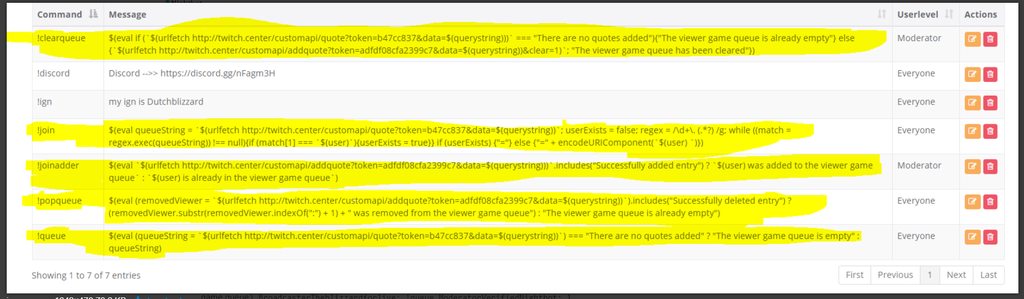
i know i first tried on nightbot but i'm just stepping over to streamellements
winter zenith
@shadow jasper I dont think we have variables like that, but its on the idea Bord 
shadow jasper
okay
winter zenith
@hollow pine either your bitrate or your internet provider cant stream your quality to Twitch
How high is your bitrate in obs?, what quality did you set to stream? How fast is your Internet Upload?
 summer merlin
Hey is someone free to help me out with something?
winter zenith
Sure just shoot
summer merlin
Ok so I'm trying to configure media request settings
winter zenith
Yes
hollow pine
bitrate is 3000, 30fps. rescaled output to 720p and internet upload is 6.74
summer merlin
I don't see anywhere to save the settings, so I tried simply entering the ones I want and coming back to the page, but they dont stick
Does that make sense?
winter zenith
Yes there is a known issue with our new media request system
You have to but at least 0.01 in the coast length even if you are not using this option
Its also marked red in the settings because if this doesn’t have a value its not going to save 😦
So please change all your settings to your desire, and type at least 0.01 into the coast per seconds
Then it should save 😃
@hollow pine sounds good, maybe go to the obs discord ask whats going on
hollow pine
ok
summer merlin
I have a value entered there as well, still not saving for me
it's enough to enter the values and just leave the page right?
summer merlin
the latest version of Chrome
summer merlin
let me try incognito
summer merlin
lemme check
Do I have to leave cost per second enabled or just have a value entered?
cause im entering a value but then disabling it
summer merlin
Still not saving for me I'm afraid
It was defs entered as a period and not a comma as well
winter zenith
I ask around, maybe try using a different browser?
It should work for Chrome best
But still thats odd
summer merlin
I'll try some basic troubleshooting steps on my end and let you know
winter zenith
Thank you for your helpfullness
summer merlin
I tried in incognito and after clearing the browser cache, still a no go 😦
tight harness
You have to have something in every field, if it's not saving then you have a field on that page without a value or option selected in it
Cost per second is just the most common one, but it could be any of them
summer merlin
Ok I think I've got it, I was not setting a max request duration
tight harness
Yeah, that's the second most common one
summer merlin
Yep, all sorted, thanks a lot for the help!
tight harness
No problem
summer merlin
Just some feedback, it would be nice if those fields would prompt you to say that an input is mandatory, or be pre populated with a default value
in the case of the max request duration, there was no indication that anything needed to be entered there
Other than that, cool feature, I look forward to using it 😃
tight harness
Alright, thanks 😃
summer merlin
Btw I see you are using Zendesk chat for your customer support. How do you like it?
tight harness
Yeah it functions well, pretty neat
low fractal
how do you guys make a lviing doing this or Just doing it to help the community?
accept donations or what?
shadow jasper
are there any custom command pro here who can help me with my queu system problem
low fractal
hey dutch what are u tryin to do
Im not help\but might wanan copy you once you figure it out LOL
sounds intresting
shadow jasper
lets say i wana make a queue sytem for joining my squard for ingame
tight harness
@low fractal We don't accept donations, we're backed by some very generous investors such as Samsung
low fractal
you squad?
what do u mean squad tho
Nice.. how is samsung going to realive any profit from a free system?
realize
Love what is goin on here just seems like a money pit unless they play to monetize at somepoint?
plan*
shadow jasper
so viewers can play with me alot easier
low fractal
what game?
shadow jasper
i already tried to tinker somting for it but won't work out
low fractal
like is is gunna integrate with discord or something
shadow jasper
the game will be most of the time warframe
low fractal
ahh..
well if U figure it out lemme know 😄 ❤
might wanna copy it for when i do a PLay with subs night or something
shadow jasper
i'll try to remember
low fractal
I sent you a message Ill check up on ya
Id liek to help but Imma Programming NOOB
and would be useless
shadow jasper
i'm not geat ad it either but i know the basics thou
tight harness
@low fractal All I know is that we don't plan on ever taking a fee from donations and we don't plan on ever charging for our features anything more than that is above my pay grade 
low fractal
Nice
sounds pretty good
samsung might do something once they build a large community
like sponsored events etc.. bascially free advertising at that point
well sorta..
lament blade
Hello! I have a quick question regarding overlays and alerts.
I have my own overlay with slot for alerts and latest follower, etc. Is there a way I can implement that overlay with streamelements or use the streamelements alerts directly into OBS instead of making an overlay?
 elfin pivot
Hey i was wondering how do we add to Sfx to commands"|?
tight harness
@lament blade Everything goes into the overlay, graphics, the alert box, the widgets, everything. Then you add that overlay via browser source into your OBS
That's the idea anyway, technically you could have your graphics locally added to OBS, but if you have it in your overlay then you can use that overlay anywhere on any PC without having to have the files on you
@elfin pivot At the moment you do that by utilising the stream store with a sound effect item
elfin pivot
oh k to easy cheers amte
lament blade
Oh, so I can put my overlay graphics in the overlay "maker"?
elfin pivot
mate @tight harness
lament blade
suppose with the image widget
lament blade
Awesome! Thanks alot!
tight harness
No problem
 oblique isle
hej guys does anyone haves problem with the custom layout we made in SE with the text from Follower Goal , Sub Goal and Cheer Goal , everything was fine on my last stream , not the size of the text is to big and changing in SE the size or giving another text format does not change anything
Im Using Roboto 18" but this is not the Robotos Text Format and its oversized
 ripe herald
try to refresh browser source of the overlay in the OBS @strong mason-Rec#9094
 strong mason
Ey, dont tag me in that xD
ripe herald
damn how many Tex we have 
oblique isle
@ripe herald its showing me the samme in SE Editor
ripe herald
what's your twitch username
oblique isle
gamestreaminglive but i have now removed them and im on it rekreate new goals again in the same look , so far follower goad lets me edit it now..
ripe herald
oh, wanted to check it
oblique isle
but was wonder what happenet as the overlay was okey in my last stream , you can see here https://www.twitch.tv/gamestreaminglive

just tryed now to make me ready for streaming and noticed the oversized text on goals
ripe herald
Well im not sure i would check but if it's deleted can't say for sure now
 pliant bison
@oblique isle you overlay is just too much in the face....tone it down a bit
 upper steeple
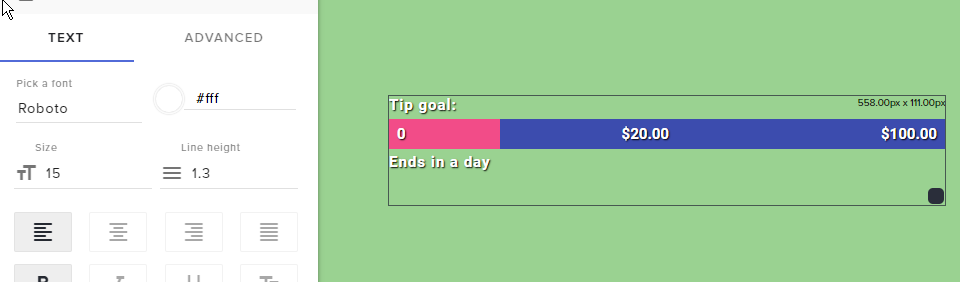
any reason the text on my dono goal just got huge while i'm live?
ripe herald
did you try to change font size and refresh overlay in OBS @upper steeple
oblique isle
@ripe herald ok after removing all my goals and rekreate it , it lets me editi all like it was before , but for some reason the old one was stuck and was not editable even if i cahnged in the se editor the font size to 2 its stayed oversized
it seems Lord have the same bug as i have
now i notice the cheer goal and the amout of cheers are not in line , the icon is up and the amount is somehow on the right side under the line.
ripe herald
yeah i see what you mean
upper steeple
@ripe herald i'm live i haven't done anything
oblique isle
seems something is going wrong with the goals only , as everything other is stayed as i have saved before
ripe herald
reported to devs tnx for the info and sorry for the issue 😦
oblique isle
np hope they will easly found it out 😉
ripe herald

 lean crane
On my overlay at the top my name is semi cropped out how can I fix it to show my whole name in the editor?
ripe herald
@lean crane in overlay manager pull this so box is bigger https://i.imgur.com/rCdV8ts.png
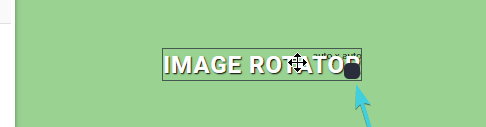
and don't forget to save and refresh browser source in OBS
lean crane
@ripe herald Thanks so much.\
ripe herald
np, hope it's fixed now
oblique isle
@serene granite i can confirm , all is again in the line. thanks guys for the fast fix 😃
serene granite
np, sorry for the hassle
 dim heron
Quick but important question. If I change my Twitch Display/Username and log back into StreamElements, will I lose everything I have on there or will the information, my overlay links, etc remain?
lean crane
How do I have to format the command for the stream store? I want it to be !airhorn but it will not let me advance to the next step.
The command line is red.
elder sorrel
I think all you have to do is type "airhorn". As the command will show "!redeem airhorn
I'm not home so I can't check directly 😅
lean crane
LOL I'm an idiot thanks alot.
elder sorrel
Did that work? I hope it did 😂
I'm trying to load the site with my phone.
Oh sweet, yep you're good @lean crane 👍
dim heron
Guess I'll ask again later
elder sorrel
I wish I knew the answer to that 🤔 Someone should be getting to your question soon, @dim heron 😄
Imma test that with another account with I get home.
dim heron
No worries
lament blade
<@&382267076632379392> My apologies for being so abrupt, but I'm at my wit's end in regards to OBS/Twitch. If there's anyone who can hop into a call with me and solve my problem I would be more than grateful. Thank you in advance.
winter zenith
Some people (like me) cant hop into Voice Support often 😦
so it would be best if you state your problem in Text here so people like me can try to help you
lament blade
@winter zenith Well not too long ago, roughly around January/February I was streaming League of Legends at 720p 60fps flawlessly. Now when I wanted to get back into streaming I seem to run into the problem with either my game has low fps or my stream's quality is somewhat "choppy".
winter zenith
okay, what resolution are you streaming? (still 720 60Fps?)
and what bitrate do you have set up in OBS ?
lament blade
The game itself is running at 1080p 60fps, my stream however is at 720p 60fps with a bitrate of 2500
elder sorrel
Also are you using the encoder x264 or NVENC?
lament blade
At the moment NVENC, I have tried both x264 encoders. It's just very difficult the actual cause of this problem
winter zenith
3500-5000 is recomanded
x264 is better in my opinion
the problem seems to be your bitrate
also maybe you need to run LOL in Borderless windows mode or something like that maybe your CPU cant handle it
lament blade
That's what perplexes me the most, my I was streaming league flawlessly before with the same computer specs less than 3 months ago
 coral lava
alerts broken?
coral lava
yea alerts are not showing for me
lament blade
oh nvm
winter zenith
You didn't change your name just now by any chance? @coral lava
coral lava
nope
winter zenith
@lament blade I dont know what to tell you, 2500 isn't really enough for 720p 60FPS if you saw the link I send you
coral lava
u really want atleast 3k but 2500 would work just wont be pretty
elder sorrel
Hey, @winter zenith (hope your day is going great!) Asking for a friend if you know the answer: " If I change my Twitch Display/Username and log back into StreamElements, will I lose everything I have on there or will the information, my overlay links, etc remain?"
winter zenith
everything will remain 😃
just log out and back in with twitch
@coral lava did you try parting the bot, loging out, logging back in and let the bot join?


 winter zenith
@dim heron if you rename your twitch account no need to fear! Just log out of StreamElements Dashboard and log back in and everything should be fine again (no you wont lose overlays and other stuff)
 cobalt mesa
Having issues again with song requests for subs only since the new change/updates....... Is there a way to fix this?
elder sorrel
Thanks, Kiwa 😄
coral lava
@winter zenith where do i find part channel?
winter zenith
on the dashboard on the middle right "part" in the bot section
coral lava
that fixed it thank you
 finite viper
silly question - I'm trying to have a command call an api; is there a way to have the bot post the RESULT of the api call rather than the link I'm calling?
dim heron
@winter zenith @elder sorrel. Thank you so much for the answer. I was stressing out with that. Was worried that switching to a catchier name would make me have to restart a lot of prep work. Thanks again!
winter zenith
no problem
dim heron
Will it even update the tipping page? I'll just need to swap the link on my Twitch channe
*channel
 pulsar gulch
Hello best support in the world
Can anyone help me with something small .. i guess
Is it possible to make a command for each viewer ? so only he and I could use it ? @winter zenith
finite viper
@pulsar gulch you customize based on variables https://streamelements.com/dashboard/bot/commands/variables ... not sure if that will give you the intended result though
StreamElements
The Ultimate All in One Platform for Streamers
winter zenith
@pulsar gulch no you can make a command possible for Everybody- Regulars (you can set those yourself) - Subscriber - Mods - Super Mod - Broadcaster
@dim heron I think so yeah
 strong maple
How can i create a command from chat and set user level for usage? It's also possible to set alias for this command?
dense jackal
i believe !level or !setlevel either way it is under default commands
 valid perch
I don't know if it happens, but since the last Ground Control update the Keybindings don't work. Does it happen to anyone else? Is it a bug?
minor kindle
How do you import stuff from StreamLab Chatbot?
tight harness
@minor kindle
dense jackal
@strong maple it is a default command
dense beacon
A question. I am using the song request through the Ground Control but the songs are quite low. Something to fix that?
dense jackal
@valid perch it is because of our new media request, we are currently rewriting ground control so that it is fixed 😄
There's a volume slider, if you make the ground control window bigger, as well as volume mixer @dense beacon
dense jackal
did that work?
dense beacon
Yeah I had it only on a small window xD
dense jackal
ah haha all good
minor kindle
@tight harness Thank you.
tight harness
No problem 😃
valid perch
@dense jackal thanks!
minor kindle
@tight harness Hmm, so if you are using StreamLabs currency, how do you export that?
The "points" file that the StreamLobs file created was just for the local currency, not streamlabs.
oblique isle
One question about setting up the Tip ping in SE. Is it only posible to use with PayPal or are there any other ways too ?
Aksing this becuase my country is limited to this access and does not alove us to register on paypal , as ive tryed im getting the same message from paypal too.
Streamlabs for example alows to register the donation page with paypal , credit cards , bank account , or even skrill..
tight harness
@minor kindle I believe the local points are the only thing they allow to be exported 🤔
dense jackal
currently only paypal but we are working on more options @oblique isle could be out as soon as next week 😄 what country do you reside in?
 nocturne ermine
hi all
 dapper phoenix
I have a question. I am trying to set up an alertbox widget with custom sounds and gifs. Changing the gifs works fine, but the sound is where I have a problem. I upload my sound and choose it for the alert, but when I emulate an event for that kind of alert, it plays the default sound and my custom sound with a slight delay. I can't seem to get rid of the default alertbox sounds...
ebon forum

oblique isle
@dense jackal he mate , thats are avesome newst to me now ❤ im from Bosnia and Herzegovina
dense jackal
Check your variations @dapper phoenix
ebon forum
@dapper phoenix check the variations for the alerts please, you probably have a variation with default sounds playing.
argh, @dense jackal was faster 
dense jackal

oblique isle
the most and best solution for us is if its posible to recive it trough swift code like twitch is doing..
dense jackal
We are adding all sorts of awesome payment options
ebon forum
@strong mason-Rec we will have a LOT of different payment methods soon, so a couple would work in your region, just be patient and check #announcements
dapper phoenix
I don't have any variations set up for it. it only has one option which is to play my gif and sound and it will still play the original sound too @dense jackal @ebon forum
dense jackal
@dapper phoenix send me a editor link here https://streamelements.com/dashboard/account/channels
and I will look into your overlays