#helpdesk-twitch
1 messages · Page 234 of 1
 tight harness
tight harness
tight harness
@winged hedge Is TheFacelessGab your username on Twitch?
 quartz charm
Hey Stream elements support sorry for the trouble, but quick question. For redeem system, my notification is working fine, but the notification for new ones i made are not popping up. is it dues to updating speed? cause i updated it around 6 hrs ago
 winged hedge
Any ideas for my problem ? 😛
tight harness
The contest widget is showing in the overlay manager just fine
winged hedge
Should i restart OBS ?
tight harness
quartz charm
@atomic hollow the one that should show up in stream
tight harness
You could just tick 'shutdown source when not visible' in the browser source properties and then hide -> show it @winged hedge
quartz charm
@atomic hollow i have a few redeem notification and they all work except for 2 that i remade
Alert in stream for store redemptions yes
like in the overlay
 atomic hollow
@quartz charm twitch channel?
quartz charm
yup!
winged hedge
Oh okay. Let me try this @tight harness
quartz charm
@atomic hollow Samu
quartz charm
Best_Streamer and Hands
But best_Streamer is the important one
Thank you for your help!
winged hedge
Am i right ? @tight harness
winged hedge
yes
winged hedge
So i have to change the resolution of the widget ?
tight harness
No, of the browser source
Your screenshot shows 800 x 600
But it's meant to be 1920 x 1080
winged hedge
wait
tight harness
The properties page of the browser source, change it to 1920 width and 1080 height
 gentle imp
he didnt get that name by chance 😄
 fair rampart
FYI RE my custom bot issue from a few nights ago...just loaded GC and tested...it's back. On its own. 😄 @atomic hollow @serene granite @dense jackal
gentle imp
bots have a mind of their own
 narrow coyote
skynet confirmed 
 lament blade
Hello I'm on mobile is there anyways to stream with an theme overlay over my live streams?
 hoary jay
I've had stream elements bot and been using the overlays for a while, I just don't accept tips at all atm. Anyway I'm still able to be approved for the Now Live feature?
 dense jackal
coming very soon @lament blade
 vapid badge
@hoary jay You need donation set up and in your bio, whether you accept tips or not, in order to appear in #402919550066229250
vapid badge
No problem! ✌
dense jackal
I’m just curious, why do you not accept donations @hoary jay?
I won’t convince you otherwise just genuinely curious
hoary jay
I don't think my channel really provides enough quality to merit anyone donating money to it. I also don't need the $ so it doesn't seem right to accept it. Could be going to better things or streamers that need it more.
I think my donation just links to charity.org or something. Haven't messed with it in a while.
dense jackal
Ah ok cool 😄
hoary jay
Kind of a bummer though that I've been in on stream elements for a while now, but I have to have donations setup for a small shoutout lol. I'm basically free advertising.
lament blade
Is the only way to stream is through stream labs app?
dense jackal
you mean on mobile @lament blade ?
lament blade
Yes @dense jackal
dense jackal
We have ace live streaming, and we are currently developing our own StreamElements app
 vital wyvern
can't wait for it oh boi :3
lament blade
Will it have features like themes?
 burnt sky
Do songrequest support spotify ?
 serene granite
not yet, but we have a plan for adding it
we've made the plan!
now we just have to stick with it.
stick to it?
dense jackal
@Mysticize Yep!
burnt sky
hehe nice hectic 😄 do anyone else have problem with "chatty" taking alot of cpu power ?
gentle imp
if you are looking for an alternative, have a look at Trillian @burnt sky
burnt sky
thx ripp ill try
 zenith lion
hello, i have a question
do you know why i do not receive anymore the stream reports to my email?
can i activate it again?
atomic hollow
which channel?
 winter zenith
Maybe you unsubscribed from them by accident 
zenith lion
that is what i though but nobody touch that
winter zenith
we can resub you to the Reports must be done Manually, I think Shadowboxer is on that 😃
 silent sapphire
hello.. I have a question about chat alerts for the subscribers tab
gentle imp
Hi Karla, ask away, we'll do our best to answer them
gentle imp
ahh portugues ❤
silent sapphire
on the months section, well, it says that 1 is for new subs..
lol ❤ spanish but very similar 😃
gentle imp
damn hehe, but true
silent sapphire
when I add a new line it automatically says 2 months, my question is, will that text appear for only 2 month subs notifications
or for all subs (2 months, 3 months, 10 months)
gentle imp
yeah 2 months and above unless u state otherwise
aka creating new variations for 5, 10 etc
if you don't it will use the 2nd
silent sapphire
if I add another line with : 12 months with a diffferent text, will notifications for 2, 3, 4, 5, etc months will be the same as the 2 month notification, until the 12 month notification?
gentle imp
exactly 😃
gentle imp
indeed, in fact I have to setup more for myself ^^
silent sapphire
yeah me too lol
I've been using streamelements for a while now but never took the time to change those as I had the doubt and never thought I could ask here
gentle imp
yeah been there too hehe
you can also add variations to a lot of other things, cheers, follows, etc
gentle imp
where is that? 😮
silent sapphire
I mean, the negative numbers, you can scroll down or up on the selection
agh is not showing wait
gentle imp
I tried it, probably a bug lol
tight harness
I'd suggest keeping it at least 1 😄
gentle imp
^
 gentle imp
you're welcome, anytime, have awesome streams
silent sapphire
I will come back with more questions 
gentle imp
😄
tight harness
You seem very certain of that 😄 haha
 molten heath
hey, is there a way to show my song from spotify on obs through SE ?
gentle imp
no yet @molten heath soon™
molten heath
oh  ok, thanks
 nimble owl
does any 1 know how to get rid of adds in sr?
serene granite
on the browser, you could use adblock
on the widget there isn't a way right now, but we're working on a solution
nimble owl
oki 
 simple frigate
you can change the !redeem (name) to just !(name)?
vapid badge
Depends on what you want to do with that command @simple frigate !
simple frigate
play music clip
we talk about this last time lol
just seeing if there a fit for it
lol
vapid badge
What you can do is this :
Set up a custom bot command (like !guccigang) that sets the bot up to type in the chat !redeem guccigang and your song should be playing right away !
 safe kettle
When my streamelements bot noticed a follower, it thanks them in chat and I am notified in game. But if two or 3 viewers follow at the same time, the bot only recognized the first one and I miss the next 1 or 2. Is there a way to make the bot recognized the 2nd and 3rd follower?
 velvet fractal
So I finished streaming last night. Usual thing I like to do is wake up the next morning before work and check my stats that SE usually sends me. I didn't recieve an E-Mail this time around and I like getting them to just keep track of progress. Does this happen from time to time? 🤔
lament blade
Hey, how do I change the sounds for the notifications? Since I don't have a second monitor, I rely on sounds to dictate what type of notification it was.
 fossil anvil
Install the Ground Panel of StreamElements
@lament blade

StreamElements
The Ultimate All in One Tools Platform for Streamers
 edgy kindle
@fossil anvil Like Zayine said, they dont have a second monitor  @lament blade You can do this in the overlay editor when you click on the Alert Widget
Click on the gear for each notification and you can change the sound
 fossil anvil
😛
lament blade
Now uh... @edgy kindle where might I find my widgets? 
edgy kindle
Give me just a moment 
lament blade
You got it
edgy kindle
Alright so go to your overlay you want to edit
You'll see this side panel http://puu.sh/zIoHz/98d867329e.png and click on the ^ button for Layers to expand the menu
 lament blade
yup yup
 fossil anvil
@edgy kindle when possible check #helpdesk-youtube
edgy kindle
Each of these gears will allow you to change the settings for each notification
lament blade
<33333
edgy kindle
@fossil anvil I'm personally not aware on where to find that but let me ping someone who might
fossil anvil
Okay
lament blade
Are we able to ask questions about OBS here?
dense jackal
we try our best for obs
 ebon forum
sure
lament blade
Do you know how I can mute specific scenes, or even better have them automatically mute when I'm not currently using them?
edgy kindle
Under properties for each source turn on "shut down when not in use"
ebon forum
@lament blade yes. for browser sources this is "shutdown when not visible" in the settings
edgy kindle
^or that wording
ebon forum
yeah whatever the right wording is xD
lament blade
See, I tried that but unfortunately I'm still getting multiple sounds at once from the same notification.
edgy kindle
Then something is off(design wise), did you import from streamlabs?
dense jackal
check yourscene for multiple alertboxes
lament blade
Well, apparently enough messing around with the settings fixed it
¯_(ツ)_/¯
Okay, one last question
How do I make the custom sounds affect resubs? Right now any deviation from a first time 4.99 sub causes it to be default
edgy kindle
@lament blade You'll go to the subscriber notifications and you should see a menu that says "Variations"
 chrome cliff
Hello I want do command !wins in this command you will see how much games i wins today and i want do !setwins this command will change number of wins in !wins how do it?
lament blade
Can anyone tell me what unique chatters means, it says had 3 viewers but 6 unique chatters?
 clever mango
@lament blade chatters is the number of unique usernames that were in your chat room while the stream was live
lament blade
Ok thanks terrabuck
safe kettle
I think my question may have been overlooked. My stream elements bot isn't notifying me of every follower and sub if I get more than one at a time. It only registers the first one. Is there some sort of spam delay filter that I can change with the notifications from the bot so I don't miss anyone?
clever mango
Wins Counter
Command: !win
Response: $(count wins)
Command: !wins
Response: $(getcount wins)
To edit the counter use !editcount wins #
@chrome cliff
dense jackal
@safe kettle I haven't heard of this before, I would reccomend parting and rejoining the bot, next time it happens please @ supportheroes
chrome cliff
thx terra
lament blade
hi im having trouble with an overlay im using atm i add it as a browser source but it only shows a portion of it zoomed in
 nocturne pelicanBOT
@lament blade Make sure to :ballot_box_with_check: “Shutdown source when not visible” for all browser sources (all OBS scenes). If using studio mode, uncheck “Swap Preview/Output scenes After Transitioning.” Also keep in mind that sound can play from any overlay loaded in the browser (editor or launched). https://i.imgur.com/FegZJQS.png https://i.imgur.com/yY0wcFl.png

 safe kettle
@dense jackal I'll try ty
lament blade
am i allowed to show a screenshot of my problem?
dense jackal
@lament blade go right ahead and send it
lament blade
i hit CTRL F to fit it on the screen but for some reason its huge
how can i shrink that?
dense jackal
What's the resolution on your Streamelements overlay?
and what is the resolution of your browser source
dense jackal
can you take a picture of this https://i.imgur.com/FegZJQS.png
your browser source settings
also I have the same wallpaper engine background good choice 
lament blade
alright ill mess with those and see what i can do
thanks
haha im a pure dark souls fan
remastered comes out on my bday
dense jackal

 green yacht
hey do i need to keep streamlaps open in my browser so the alerts pop up or no?
streamelements* lmao
tight harness
You need the StreamElements activity feed open for host alerts, either from our site or Ground Control (our desktop app) 😄
!gc
nocturne pelicanBOT
Our Desktop App Ground Control: https://streamelements.com/groundcontrol
green yacht
thx, chrome takes a lot of ram 😦
tight harness
Ground Control it is then
green yacht
yeah, thx 
 formal fog
Hello i was wondering where can i change the chat message when someone follow me like: "Thank you for following"
narrow coyote
you can change the message in your alert widget for the follower, and for the chat, you can customize the chat alerts that the bot says during the follow event
assuming you are using the chat alert module for the bot
clever mango
From the dashboard select Modules > Chat Alerts
 bright tartan
Is there a way to do a poll with the chat bot?
 dim dragon
So, how set up s/e to give points to other people?
narrow coyote
like !givepoints?
narrow coyote
its a default command, if you enable it, you can test it in your chat with !givepoints, if its working, it will tell you the format of what parameters it needs
im pretty sure its disabled by default also
formal fog
thx @narrow coyote ❤
narrow coyote
green yacht
Hey, wherer do i JWT token?
tight harness
Click on your username in the top right hand corner, then tick Show Secrets
 fathom knot
My stream elements dashboard says im offline, but im streaming and chat commands work
talked to support yesterday and said they would have the problem resolved today
something to do with 2 accounts somehow?
clever mango
Hi @fathom knot did you chat with support here in the discord? Do you remember who you spoke with?
tight harness
Yeah, I just showed Terra the conversation that was had yesterday
fathom knot
oh okay
clever mango
I'm checking on this @fathom knot
fathom knot
okie doke
dim dragon
Thank you for the help, I had another person here come and help me while I was streaming, thank you @winter zenith
 stuck hamlet
@fathom knot Unfortunately your account won the lottery and got duplicated, we've fixed the issue but it will only take place when we restart our services, and i currently do not have an ETA on that just yet
stuck hamlet
We'll let you know when it's up and running 
fathom knot
I appreciate that 👌
 cosmic latch
so for what ever reason.. when I go to test teir3 alerts it wont work. And it as a whole lags my pc.. what can i do?
 pine hemlock
Try duplicating the widget and deleting the old one and saving
(and refreshing obs browser cache)
 tidal raptor
is there a way to save stream elements as png file
lament blade
@cosmic latch are you using chrome?
dense jackal
@tidal raptor like the overlays?
tidal raptor
yah
tidal raptor
im trying to get overlays to work with xplit
lament blade
Not to be downloaded
Xplit does allow you to add the overlays there as a browser source
tidal raptor
damn 😦
lament blade
Have you tried doing that? 😄
lament blade
Add a new browser source and make it 1080p
tidal raptor
i have tried but its too big
lament blade
Right click it and find the option to fit it to your screen?
tidal raptor
hold on
lament blade
on OBS it's ctrl + F
tidal raptor
ok ill try it right now
lament blade
Sounds good
silent sapphire
guys,,, I dont know if its just me
but I get an error when trying to save modifications on chat alerts
Its been like this all day
pine hemlock
Make sure theres no blank values
silent sapphire
there arent
 proud pumice
let me check on your account
silent sapphire
Ive tried dozen times
proud pumice
whats the name of the overlay?
pine hemlock
Its not overlay perry
proud pumice
chat alerts?
pine hemlock
chat alert module?
proud pumice
alrighty, checking
silent sapphire
tidal raptor
see @lament blade
proud pumice
karla_green is the twitch channel right?
pine hemlock

lament blade
I'm confused, it's to big or cutting off some parts? @Rampage1428#1063
tidal raptor
cutting off sorry
 ember lily
Hi, when do you think this update is going to be live because im hyped af! https://streamelements.helprace.com/i178-add-ranks-to-the-loyalty-system/1/newest
pine hemlock
perry usually that message occurs when something has no message/value in a field @proud pumice
lament blade
Make sure the browser source is at 1920 x 1080
when you right click it and go to properties
tidal raptor
it is but my stream resolution is lower
lament blade
You are using our super themes correct?
pine hemlock
xsplit expert is probably asleep
I like how we're all useless when it comes to xsplit

proud pumice
@silent sapphire found and fixed the issue, you had -1 here: https://i.imgur.com/Xy1m9Uz.png
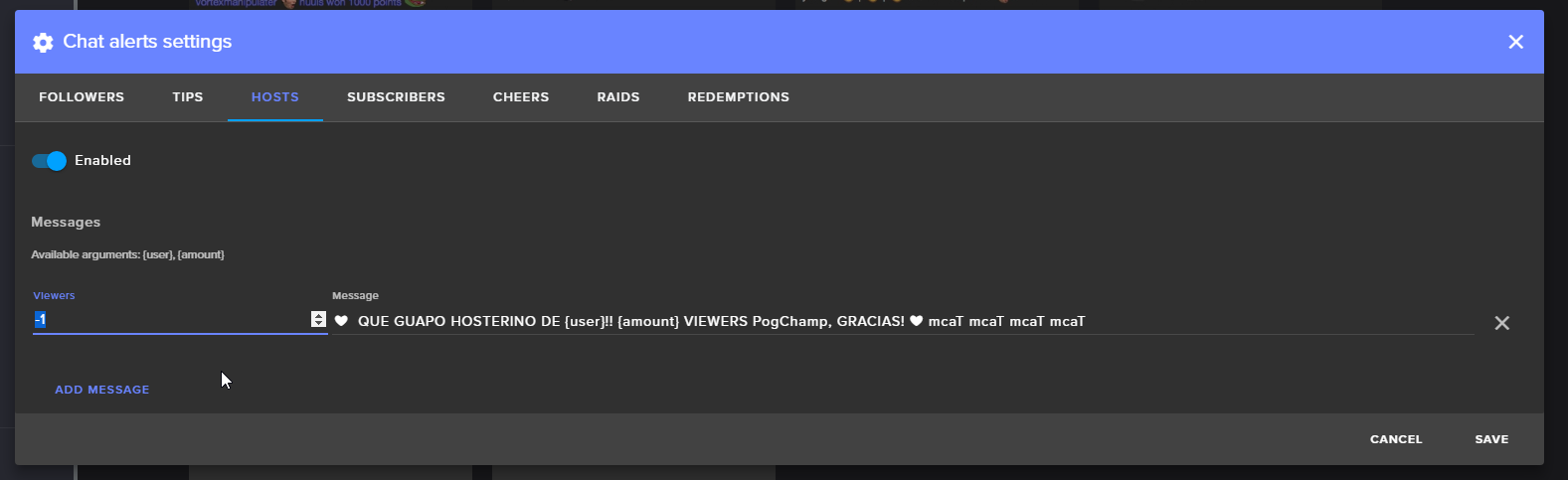
refresh the page and you can continue editing
tidal raptor
idk @lament blade
lament blade
Did you create your own overlay from 0 or did you choose one of our themes? @Rampage1428#1063
 native falcon
So I have a problem with the raffle module. My mods are able to type !raffle and start a raffle while I'm not online or without my authorization. Are there any settings to change this besides un-modding?
tidal raptor
@lament blade got it i had to goto properties chose custom resolution and put 1920x1080 Thank you 😍
lament blade
is it good now? 😄
edgy kindle
@native falcon You can set super mods in the rank settings and limit who has access
tidal raptor
yes thank you thank you thank you i dont have to spend hours making my own now!
 robust breach
Help please, when I use the overlay that I customized, it makes me lag frames like crazy in OBS. My computer should be more than able to handle it is the problem. Any suggestions?
silent sapphire
still getting the error 😦 @proud pumice
proud pumice
if you refreshed the page you shouldnt get the error, it works for me when i click save on it now
make sure that the https://i.imgur.com/Xy1m9Uz.png isnt -1 anymore
lament blade
Can you tick "shutdown source when not visible" for all your browser sources? @robust breach
native falcon
@edgy kindle I only have one supermod no other mods in stream elements only on twitch
lament blade
Great to hear, have a nice day @Rampage1428#1063
edgy kindle
@native falcon Stream Elements automatically sets twitch mods as mods in SE
silent sapphire
I did, every number its positive
edgy kindle

StreamElements
The Ultimate All in One Platform for Streamers
silent sapphire
but when I click save I get the error
edgy kindle
@native falcon
silent sapphire
even if I dont make any modification
silent sapphire
sure, lets see
native falcon
@edgy kindle I deleted all mods on se except the one supermod
edgy kindle
@native falcon
http://puu.sh/zIylQ/3b1b2b72cb.png
You can set the default command !raffle to Super Mod or Broadcaster

 agile basin
I am trying to rename the chat bot to BubbleBot, but everytime I try it just makes it my username intsead.
proud pumice

clever mango

silent sapphire
thanks Perry you da best! 😄
pine hemlock

native falcon
Ahhhh ok @edgy kindle sweet 😃
proud pumice
no you are @silent sapphire
edgy kindle
@native falcon I'd suggest making !addpoints broadcaster only or simply disable it to stop abuse as well
silent sapphire
@agile basin can you rename StreamElements bot? 😮
pine hemlock
!rename
nocturne pelicanBOT
Custom bot name requirements
- StreamElements bot modded and in chat
- Active overlay with alerts
- StreamElements tipping page in the panels below the stream (!panels)
- Register the twitch account for the name you want to use
- Ground Control app must be running
Steps to enable custom name
- Sign in to https://twitch.tv with the bot account
- Install and run Ground Control (!gc for download)
- Visit https://twitchapps.com/tmi/ and generate an oAUTH token
- Copy/paste everything in the box to Ground Control oAuth settings and enter the name for the bot account
- Restart Ground Control (custom name may take a few minutes to take effect)
edgy kindle
@agile basin You need to get the auth token on your bot's twitch account
native falcon
Ok ty for the help @edgy kindle your the best 😃
proud pumice
you gotta own that bot account name
robust breach
Can someone help me please ❤
proud pumice
@robust breach whats the issue? :D
edgy kindle
@agile basin You got the code from the bot's twitch account?
robust breach
@proud pumice When I use my overlay browser source in OBS, it makes me lag frames while I play games.
edgy kindle
In order to have a custom bot name you have to make a second twitch account for the bot.
edgy kindle
Get the oAuth token with that bot account
robust breach
@proud pumice But my computer should be able to handle it, is there something that I'm missing or should know?
edgy kindle
We'll be sure to fix the !rename command so it's better understood
ember lily
Hi, when do you think this update is going to be live because im hyped af! https://streamelements.helprace.com/i178-add-ranks-to-the-loyalty-system/1/newest
proud pumice
did you shutdown source when inactive on all the overlays? @robust breach
robust breach
I only use one.
proud pumice
!multi
nocturne pelicanBOT
Make sure to :ballot_box_with_check: “Shutdown source when not visible” for all browser sources (all OBS scenes). If using studio mode, uncheck “Swap Preview/Output scenes After Transitioning.” Also keep in mind that sound can play from any overlay loaded in the browser (editor or launched). https://i.imgur.com/FegZJQS.png https://i.imgur.com/yY0wcFl.png
silent sapphire
Can I do the bot name change without active overlay alerts? I dont use overlay alerts only chat alerts 🤔
 flat valve
refreshing browser cache is not working to restore the twitch chat on the overlay - of slightly signifigant note - i changed my twitch password today, and had to do a bunch of new oath tokens
robust breach
@proud pumice I had the second box checked as well, could that be why?
dense jackal
@silent sapphire you just need an overlay built on your account
robust breach
Really?
proud pumice
because it reloads all assets every time
silent sapphire
how is that? @dense jackal
proud pumice
reload = lag on PC
robust breach
Oh like every time it refreshes?
But shouldn't it only refresh when I make it active?
silent sapphire
I dont use obs or anything on pc, I stream from console. is it doable?
proud pumice
it depends on lots of stuff, but in any case its best to not have that marked
dense jackal
@silent sapphire you don't have to be using it, just create a blank one
proud pumice
try it and let us know if it fixed it @robust breach
robust breach
@proud pumice Sounds good, I'll try it out now and come back with some feedback. Hopefully this works out okay. Thank you so much!
proud pumice
sure thing!
robust breach
I started the game, currently queuing into a match. So far, so good. More info coming in a sec.
@proud pumice I love you, no homo. ❤
proud pumice
haha
robust breach
StreamElements master race
silent sapphire
^
ember lily
Can you guys please suport my idea so they might add it? https://streamelements.helprace.com/i758-ranks-based-on-loyalty/1/newest
agile basin
I gave up on naming the bot lmao. I do have another question- How would I make it have a command for rank in LoL?
narrow coyote
What went wrong with the bot name? Did you have a second twitch account for the bot, with the name you wanted the bot?
agile basin
yes ;-;
I got the code for it
pluged it in
Bot never responded to commands.
So I went ahead and added the bot to have "bot permissions"
on mt SE account
and it still didnt do anything
narrow coyote
it might be worth trying having your bot leave your channel, log out of the SE site, log back in, and then rejoin the bot
lament blade
What are you typing on the command message?
agile basin
Just testing the usual commands
 scenic sage
Q: where can i get the url for obs to add the overlay i made
narrow coyote
i tried !ping, and no response
clever mango

lament blade
You can make a new custom command and put the title "elo" for example and on the response "i'm ___rank"
agile basin
true
lament blade
And then manually edit it if you gain or drop ranks
agile basin
I wanted it to update with every game, some people do that.
That could always work though
lament blade
Yeah 😄
ember lily
Can you guys please suport my idea so they might add it? https://streamelements.helprace.com/i758-ranks-based-on-loyalty/1/newest
lament blade
You posted that 3 times already 
lament blade
one on general 2 here and one on ideas and on random
ember lily
that is ture 
lament blade
@scenic sage on your overlay there is something called "launch" on the bottom left
that will give you the link
scenic sage
Thanks!
lament blade
Np
edgy kindle
@agile basin I can help with the LoL commands
@agile basin http://gotme.site-meute.com/api/v1/commands-generator Connect your twitch account and you can generate commands to work with lol; Not every command works but basic ones like rank, elo, runes, and lastgame work
agile basin
😮
narrow coyote

 dense jackal
silent sapphire
!rename
nocturne pelicanBOT
Custom bot name requirements
- StreamElements bot modded and in chat
- Active overlay with alerts
- StreamElements tipping page in the panels below the stream (!panels)
- Create a twitch account for the name you want to use
- Ground Control app must be running
Steps to enable custom name
- Sign in to https://twitch.tv with the bot account
- Install and run Ground Control (!gc for download)
- Visit https://twitchapps.com/tmi/ and generate an oAUTH token
- Copy/paste everything in the box to Ground Control oAuth settings and enter the name for the bot account
- Restart Ground Control (custom name may take a few minutes to take effect)
silent sapphire
- ground control app on my account or bot account?
narrow coyote
you will use the OAuth form the bot account, but everything else, like the JWT will be from your main account that is linked with StreamElements
narrow coyote
you must be missing one of the requirements, because your custom bot name is not showing
do you have a tipping page in your panel on twitch, and an active overlay with an alert box widget?
narrow coyote
In your dashboard, under my overlays
do you have an overlay that has an alert widget?
narrow coyote
if you just made it, you might want to close and reopen GC
 stuck hamlet
@silent sapphire Can you close ground control please?
silent sapphire
thank you
stuck hamlet
Open it now, and check.
cosmic latch
Yes I am using Chrome @lament blade
silent sapphire
Its the same, just the jwt token
nocturne pelicanBOT
Our Desktop App Ground Control: https://streamelements.com/groundcontrol
 broken coral
lookin 4 someone 2 vchat to help a noob to set up :3
silent sapphire
no 😢 still the same @stuck hamlet
could you check my SE account to see if the overlay thingy is fine?
silent sapphire
😢
 silent sapphire
:((((
stuck hamlet
Only other solution is to just wait :/
oh wait
you're on a super old version of ground control
a version that doesnt support renaming

its not giving you an update?
wait
are you on mac?
silent sapphire
yes
stuck hamlet

silent sapphire
D:
stuck hamlet
I'm not sure if our GC on mac can handle that
I'll have to get info from the devs, but they are currently asleep... i really don't think GC on mac supports it :/
stuck hamlet
I really couldn't tell you why Mac isn't supported yet.. :/ Windows is on version 1.4.3
 sand wind
anyone available here?
Had a user sub to my twitch channel but for some reason SE wont recognize that he subbed on the dashboard or the app
I know he did because he showed me the SS of him subbing and he has the sub emotes
stuck hamlet
!share
nocturne pelicanBOT
Twitch prime (new and resub) and paid subscriptions (resub only) must be shared in chat manually by the person subscribing in order for the subscription information to be sent to StreamElements. For twitch prime, the user needs to have sharing enabled on https://www.twitch.tv/settings/prime. For paid subs, if the share box doesn't show up immediately it will when they refresh the page. https://i.imgur.com/VNJN0Uv.gif https://i.imgur.com/2297EA7.png

 stuck hamlet
Did this happen?
sand wind
Didnt see anything in chat or nothing.
I have the bot to tell me in chat, and Ive had prime subs notify just fine. but for some reason his did not
dense jackal
Twitch does not send us a notif, if the above does not happen so that's most likely why it did not show. Would you like us to test the sub alert?
sand wind
give me a few just in a game atm ill get back to ya sorry
dense jackal
np
sand wind
ok so I got him to checkbox from the link u provided
but how come on the SE dashboard (website) it dosnt show he subbed
will it not even show up in the dashboard if he didnt have it checked at time of sub ?
stuck hamlet
We only receive the notification when it's shared in chat.
stuck hamlet
You could do that, but ask him to reload your stream, maybe it will show up and he can show it, im not sure tho
sand wind
ok thx for the help
flat valve
I reset my twitch password today and my overlkays no longer show twitch chat. Streamelements bot is active and responding to commands+ parted and rejoin channel. I refreshed the cache on all overlays in OBS and also tried recreating the chat widget - nothing works
pine hemlock
Log out of se and log back in
flat valve
@pine hemlock i owe you a beer man, thanks
 echo silo
For a couple of weeks now I don't get any host alterts anymore. I don't know which settings to check since I haven't changed anything and when I switched from Streamlabs to Streamelements in January it worked perfectly.
stuck hamlet
!host
nocturne pelicanBOT
Twitch doesn't have a "notification system" for hosts (unlike follows, subs, raids, etc.) so the only way for StreamElements to know that you are being hosted is to connect through you to twitch. This connection is made on:
- SE Dashboard page - https://streamelements.com/dashboard
- SE Activity Feed page - https://streamelements.com/dashboard/activity
- Ground Control desktop app - https://streamelements.com/groundcontrol
Please have one of these open during your stream in order to receive host event notifications.
echo silo
Thank you very much !!
 torn quarry
Can someone discuss the store
Like if I wanted to give away a bunch of Keys and it being accessible thru chat is an option
Can they get them straight from the stream
or do they have to go to another site
 weary mist
@torn quarry You have to already have the keys themselves, and have them entered into the store item
torn quarry
Right
There is an option for Redeemable via chat
I trying to understand the functionality
Sorry never used it before and not a lot of info
weary mist
Yes, they would be able to use a command like !redeem key, and it will give them the item
I haven't tried it via chat, so not sure how that is handled itself. Let me test
torn quarry
should i jump in voice chat
weary mist
Nah, I put my sexy voice away, now I just sound like shit 
torn quarry
Damn it
weary mist
lol
torn quarry
how am I supposed to get tucked in for bed
weary mist
Mind doing me a favor? Jump into my channel, and do !redeem item ( will give you points for it, its a test item)
torn quarry
sure
weary mist
It gave me a link to get the code, and I want to see if it works for you too
torn quarry
is it scalper on twitch?
weary mist
lord_scalper
torn quarry
lol that was interesting so you can control it
and it can definitely handle huge hits to the store
LOL
torn quarry
anyone ever load test this say at like 1k people hitting it at once
weary mist
as you can tell, my bot knows that happens 
torn quarry
Yeah it was angry
weary mist
I know Nightblu3 did a contest a few times, the bot handled it perfectly fine
torn quarry
Nice
weary mist
he gets like 20k-30k viewers
torn quarry
Well I may stress test this thing hahahahaha
stuck hamlet
https://www.twitch.tv/castro_1021 is the biggest guy doing contests daily right now
handling it no problem 😃
lament blade
Can you rename the chatbot?
stuck hamlet
!rename
nocturne pelicanBOT
Custom bot name requirements
- StreamElements bot modded and in chat
- Active overlay with alerts
- StreamElements tipping page in the panels below the stream (!panels)
- Create a twitch account for the name you want to use
- Ground Control app must be running
Steps to enable custom name
- Sign in to https://twitch.tv with the bot account
- Install and run Ground Control (!gc for download)
- Visit https://twitchapps.com/tmi/ and generate an oAUTH token
- Copy/paste everything in the box to Ground Control oAuth settings and enter the name for the bot account
- Restart Ground Control (custom name may take a few minutes to take effect)
 timid crest
Hey there! I was wondering if anyone happened to know of a way to set an "origin point" for the Kappagen emotesplosions?
dense jackal
unfortunately no, you can confine them to a region or area, but not start them from a single point @timid crest
timid crest
Gotcha! Thanks so much for the response ❤
dense jackal
lament blade
anyone around to help?
my streamer friend asked me to change a command from to mod to everyone (song requests) how would i change that via a command
stuck hamlet
is the command set to that, or is the song request module? @lament blade
Cause if its the module, you can't :/
lament blade
set to it i believe
stuck hamlet
Streamer in question?
lament blade
caravanius
stuck hamlet
Which command does he want to make it to everyone?
lament blade
song requests...
lament blade
i believe for him its !sr
stuck hamlet
Can someone try now? Cause theres no reason they shouldnt be able to
The streamer has song request max 5 seconds long
I changed it to 5 minutes now...
lament blade
thanks
stuck hamlet
maybe that was theissue
lament blade
probs
stuck hamlet
Is it working?
lament blade
fixed
stuck hamlet
Cool
 thorn lark
Looking for some help and advice please guys. Having alot of trouble getting my game to capture on obs. Constantly getting a black screen? Ive also tried window capture aswell as game capture but still black? The games ive tried are fifa 18 rocket league and pubg. Any help would be very appreciated
vital wyvern
@thorn lark one thing i would recommend is going to OBS discord and ask there at first, since they are the experts on obs :3
!obshelp
nocturne pelicanBOT
For the best OBS support, please join their discord where OBS devs and support volunteers are available all the time discord.gg/obsproject
vital wyvern
they have a much higher chance of finding out the problem 😄
thorn lark
ha thank you im new to all this as you can tell
vital wyvern
No problem @thorn lark we have all been there :3
gentle imp
@thorn lark I had that problem, exit OBS, right click obs shortcut and run as admin
if that works, edit shortcut so it always runs as admin
thorn lark
@gentle imp have given it a go but no luck, appreciate the advice tho. I seem to have found a few ideas on the obs discord so thanks for pointing me in the right direction
gentle imp
strange, good luck 😃
ebon forum
@thorn lark if you still struggle to capture the game - run as admin, enable the anticheat hook in the game capture properties, cross your fingers and hope for the best. also switching ingame from fullscreen to borderless windowed helps sometimes. if that does not stick, display capture is always an option, but uses slightly more performance and you should be careful with stuff on your screen when alt-tabbing 😄
gentle imp
yeah that's why I always use game capture and my suggestions and yours always worked for me
 marsh lodge
Hey all, just a quick question. Im using Stream Elements to make an overlay and the font im choosing in SE isnt carrying across to XSplit when I test the overlay. Is this an issue or will the correct font show when I stream?
tight harness
Seems the same on OBS:
Although it's not filling my whole canvas because my canvas is 1080p
Is it the alert text in particular?
You may just need to refresh your overlay in xsplit
tight harness
Just needs refreshing 😃
marsh lodge
Derp. Thank you so much!
tight harness
No problem 
lament blade
Someone mind taking a look at the !whereisamaz command for amazhs? doesn't seem to be updating 
silent sapphire
any dev available? 👀
ebon forum
@silent sapphire support here. What do you need - we can forward that to devs
silent sapphire
about the rename of the bot...
I need to know if its possible or not so I stop trying 😦
ebon forum
Well, Onslaught probably reported that already 😃
silent sapphire
 tame parrot
so the follower alert worked for me, but not it dosent show up when people follow the channel, anyone know why?
tight harness
Are you currently offline?
clever mango
@silent sapphire Mac version does not support bot renaming at this time.
It will in the future but I do not have an ETA at this time. A rebuild of the application on windows and mac is planned and I expect it to be supported on both platforms with that build.
 wanton jetty
Anyone else having issues with live sub count and also iv got the "Tweet" module enabled and it should be picking up any tweets i post, I disabled reply and retweets as didnt want them being posted...
tight harness
@wanton jetty What kind of issues with the live sub count? Also is there a problem with the tweet module or are you just making a statement of the fact you enabled it? 😛
clever mango
Total subscribers is not "live" right now but is being worked on so that it will be
wanton jetty
@tight harness Theres a problem with it, as its not posting my tweets in chat
@clever mango ahh oka
clever mango
@wanton jetty please post a test tweet


 clever mango
OK, issue confirmed with the module. It's been reported here. Please 👍🏽 to be updated
 untold sorrel
Does anyone know how to make a command which will tweet out the stream for people? They click the link and it automatically tweets on their behalf?
wanton jetty
Thats against TOS
untold sorrel
I can find one for Nightbot but I'm not sure it translates the same
untold sorrel
Well they have to confirm the actual tweet themselves
wanton jetty
use "ClickToTweet" then
clever mango
you can use clicktotweet.com to create link for a pre-made tweet
wanton jetty
^
untold sorrel
And then make a command using that created URL?
clever mango
yep
untold sorrel
Okay thanks! I didn't know clicktotweet was a thing!
Cheers team! Always as awesome as ever
clever mango
wanton jetty
👍
narrow coyote
@drowsy dune I can help with your bot name, first, do you have a second twitch account that will be used for the bot name? That is where you will get the OAuth for Ground Control
 timber owl
i am struggling pretty hard i had all my sounds working yesterday ground control and my microphone and then come back today and reload stream and all of the sudden my mic isn't working anymore any help?
gentle imp
Hey @timber owl, nothing much related to StreamElements but did you check if microphone is not muted? one of the last updates kept muting my mic auto on boot
windows updates that is
narrow coyote
@drowsy dune I was looking at your page, and it appears that you do not meet one of the requirements for renaming the bot, StreamElements tipping page in the panels below the stream.
 stone spire
are quotes fixed yet?
winter zenith
what do you mean? 
green yacht
hey ppl, do someone knows if i have to keep the overlay open on the browser?
narrow coyote
for streaming? you will use the link from your overlay as a browser source in the app you are streaming with, like OBS for example
gentle imp
no word yet @stone spire 😦
robust breach
@proud pumice It ended up still making me lag frames yesterday....
@proud pumice The overlay did.
proud pumice
How strange. Does a static overlay lag you too? Or just animated ones
 alpine wyvern
Hi guys! When i use the twich chat alert, everything i type is shown twice on the chat alert
How can i remove that?
I only want to shown up it once
proud pumice
It shows twice only in editor. Works fine in obs
@alpine wyvern launch the overlay and see
alpine wyvern
Okay, thanks!
lament blade
it's working @clever mango
clever mango
Great, thanks!
gentle imp
@robust breach have you marked all browser sources to shutdown when not visible on all scenes?
cause if you don't then it will load them all, even when not on that scene
robust breach
@gentle imp Yes.
@gentle imp Wait, I think I might know why. Can you use Voice chat rn? Or just text?
gentle imp
just text for me, am at work but if u prefer u can dm 😃
robust breach
Okay so, I had anther scene with the same game capture, could that be why?
gentle imp
probably not because when not active it unloads game if I'm not mistaken
robust breach
Okay then I truly have no clue, I'll try again though.
gentle imp
for instance hype cup and kappagen eat a lot of resources, same as animated themes like Perry said above
robust breach
It's fine and doesn't lag frames up until get into a game of Fortnite and start playing, but when I'm in the lobby, it's fine
Yeah, I'm using the animated super theme: Purple Void
gentle imp
that can be it, if u can try a static theme instead, just for testing purposes, see if it makes it better
robust breach
Even on the theme, I only have a few layers
Ya know? Like it's not even super busy or anything
But I'll try that.
gentle imp
there's more factors to it obviously, like bitrate, resolution, fps
even on the game capture itself, try disabling the multi thing if u have it enabled
multi adapter or something, don't recall name exactly
but fortnite is kind of a heavy game aswell
 patent forge
Hi can you help. Twitch resubs don't seem to be appearing or getting an notication on stream. Both normal and prime. It's done this with prime before
narrow coyote
are they sharing their resub in chat?
robust breach
multi adapter? Like on the game capture properties
gentle imp
hey @patent forge your subscribers need to share in order for it to show
on the game capture properties @robust breach
narrow coyote
robust breach
uncheck that?
gentle imp
ty @narrow coyote 😄
narrow coyote
robust breach
?
gentle imp
yeah, try disabling that, see if u notice any improvement
right where is the subscribe button @patent forge they have a share option
patent forge
Oh you mean the actual subscriber has to do it?!
gentle imp
yeah
patent forge
Like share the fact theyve resubbed?!
gentle imp
exactly, it's the only way atm we have to acknowledge it
robust breach
that's not an option, im using streamlabs OBS just cause its cleaner and such
should i try normal obs
gentle imp
narrow coyote
yeah, its a twitch thing, SE cant get the alert, unless they share their resub, that is the only way SE gets notified
narrow coyote
yeah, i would say just use OBS over SLOBS
gentle imp
do try regular one plz perhaps it will be better
patent forge
Ahhhh okay thanks for the help I'll tell em when I'm next live to make Shure to do it. Works normal.just not resubs
silent sapphire
do the /me before notification custom text works with stream elements to color the whole text?
gentle imp
if they do it on your next stream it will trigger the alert @patent forge 😃
and you're welcome
no @silent sapphire that is a twitch thing, it highllghts to the person who has their nick mentioned, so if it has your nick it will highlight for you
robust breach
Currently configuring OBS
gentle imp
if you want to address a certain command to the caster or target it is possible though @silent sapphire
that will highlight them
robust breach
@gentle imp The "Multi-Adapter Compatibility" option isn't there
I'm using the game capture source, should I use something else?
gentle imp
nah, that's the correct one, are you running it as admin?
gentle imp
that's what we would think but it doesnt unless u right click and select run as admin
you can change the shortcut so it runs always as admin though, on properties
gentle imp
good question, no clue
but do you notice any improvement just by using regular obs studio?
robust breach
Yes, just played a solo and there was a huge improvement, stills some dropped frames, but I'm doing another test to see what happens when I turn off the browsersource.
simple frigate
so when i do the !so command it alwasy adds the @ to the url
how do i change that?
robust breach
@gentle imp ^^
weary mist
@simple frigate if you go into the custom command, there are a couple options. Check to see if the @ is hard coded into the command, or change the way the bot responds (advanced)
robust breach
@gentle imp Okay so it is the overlay that is causing it, I'm going to try it again with the overlay though, do you think if I drop the framerate a bit that would help?
weary mist
What all do you have in the overlay? certain widgets can be a bit combersom.
robust breach
The alert wideget, and one widget for recent follower and one for donations, that's it, and it's an animated one
weary mist
ok
robust breach
but it's not busy at all
weary mist
Are you running CPU or GPU encoding in OBS?
robust breach
like, it's somewhat simplistic
not sure
but I have a 1070 should I make sure it's GPU?
weary mist
nvec, or x269 (or close to that)
Depends on what your CPU is
also, do you have more than one overlay?
robust breach
AMD FX 8300
narrow coyote
Lol, you are too fast, I'm on my phone at lunch
robust breach
8 core, 3.1 ghz or so
weary mist
@robust breach you might consider trying GPU, it might help out a bit
narrow coyote
I would for sure recommend trying nvec for encoding if you are using x264, that CPUs architecture is not the best for encoding
weary mist
@simple frigate you can remove the @ sign from the response if you want
simple frigate
which one do i removed
Fly over to ${1}, Direct flight is provided https://twitch.tv/${1}
 weary mist
also, @simple frigate, did you change your twitch name? The one in your discord profile doesn't exist
lol
simple frigate
causei do !so @ (name) then
narrow coyote
You could also try a lower framerate, like 30, and something I do, because my PC is a potato, is once my stream is running, I disalbe the preview in OBS, that little bit less could usage can go a long way
simple frigate
@weary mist fixed
weary mist
you should also play around with this setting (in advanced)
because there is a difference between say and reply
narrow coyote
Yeah, if you right click in the preview window, there are a few options in the context menu, including disableing the preview
weary mist
and if you are doing !shoutout @user, then the bot will pull in the @. You do not have to @ someone to shout them out
simple frigate
its easier that way when you at them
weary mist
you don't have to at them, Twitch chat will auto complete without the at
narrow coyote
If I disable preview, gives me just enough CPU back so I can use kappagen in my overlay 
weary mist
I do it all the time
simple frigate
 gentle imp
@robust breach good to hear, u can also try a static theme instead
robust breach
For streaming, what do I set the encoder to to use my GPU
narrow coyote
Nvec
weary mist
@simple frigate try typing !so pap, then hit tab
weary mist
it should select you from the list, and you don't even need the @ sign
simple frigate
ok i see but there no way to fix that?
weary mist
@robust breach When you play, you could limit framerates in the game to 30-60. no limits tend to hit the GPUs hard
narrow coyote
Did you see some of the other stuff I suggested @robust breach like trying a lower framerate or disabling the preview in OBS
weary mist
@simple frigate No, because the bot is always going to grab the first word, and since the word contains the @, it will be there
weary mist
👍
robust breach
hmm okay, and I have it limited to 60 ingame, ill try disabling the preview
narrow coyote
@robust breach I also have this weird problem with streaming fortnite, I have found, for me at least, that I have to have vsync on, as much as that sucks, for it to stream smoothly for me, since you limit in game to 60 now, might be worth a try to see if it helps
narrow coyote
You can try disabling it, if you can play without vsync it is usually better that way, not so much for resources, mainly for input latency
Do you try to stream at 30 or 60 fps on twitch? If you are using 60, trying 30 for your video output, and 30 on the browser source may help
lament blade
=> Ground Control
When you have an SR playing; you see the Song Name (Title) below the Video
When you have BackupPlaylist Playing, it's empty.
Possible way to add the songname/title there for the backupplaylist too? makes it easier to copy for chat / tell name
or do i have to #💭︱feedback-and-ideas it?
clever mango
I believe you meant to post that in #💭︱feedback-and-ideas
but no need
the entire system will be changing soon and that will available
lament blade
nah i thought i had the songtitle there below, and just deactivated it somewhere; could also have been the SR song name
but since new system; sounds gud
 dim sorrel
Hey, I'm trying to create a new follow alert and in order to do it the way I want I'm having to use 3 alert boxes. One that does everything except follows and two just for the follow alert. One of the follow alert boxes only pops up half the time I trigger a test follow. Is it bugging out because i have too many alert boxes?
narrow coyote
do you have variations, and have it set to pick randomly from the variations?
dim sorrel
no, I don't have any variations
narrow coyote
so you have 2 separate follower alert widgets, and do you want them to play at the same time?
dim sorrel
yeah
tight harness
I know why this is
dim sorrel
Its honestly because I want the text to pop up above an image. but the only layouts for images with text is for it to be ontop of, to the right side and under
tight harness
You can have multiple alert boxes in 1 overlay but you shouldn't have multiple alert boxes with the same event ticked in 1 overlay, it's possible if you have it across 2 overlays but be aware this means that they both trigger at the same time
narrow coyote
did you try setting the line height on the text in the alert widget?
I think you should be able to get the text where you want in a single alert
dim sorrel
Yeah I did, but the widget box cuts it off, no matter how large I make it
tight harness
You can try what I said
dim sorrel
Sean, I did what you said though. I have three alert boxes. two of them are follow alerts that I want to trigger at he same time. they both do different things. one is just text and the other is just the picture.
tight harness
And you put them in separate overlays?
dim sorrel
ohhh I see
tight harness
Basically if you have 2 alert boxes with the same event ticked they need to be in separate overlays to work correctly
dim sorrel
Would that make it laggy? having too many overlays attached to one obs overlay?
tight harness
Nah, they'd be very basic
dim sorrel
alright, thank-you! ❤
tight harness
No problem
 marble river
I need some help guys and I'm hoping someone here could offer some advice or at least point me in the right direction so I can find my answers.
I cannot get my emote explosions to work
my chat emotes work but the emote explosions do not. Any advice?
narrow coyote
so the kappagen works for chat emotes but not explosions? so if you try like !kappagen, or an alert, no explosion?
marble river
ok i just tried !kappagen and that works but when someone follows, hosts, ext it will not alert. What am i doing wrong
didn't know we could type !kappagen 😃
narrow coyote
and your kappagen widget looks like this in the editor?
marble river
Yes 😃
narrow coyote
marble river
and I have selected my emotes. if i click test follow it will work but when someone actually follows me.....nothing
narrow coyote
and when you get a follower, does the follower alert show ok, from the alert widget? just no explosions?
marble river
my follow alert was through streamlabs. I since brought that over, and that will work but not the explosions
narrow coyote
ok, I have not come across that before, and not sure if it could be related to the import, let me ask around to see if anyone has come across this before
narrow coyote
yeah no problem, I will let you know what I can find out!
 coral kelp
why are my hosts not showing up even when i have my dashboard open
clever mango
@marble river when you emulate a follower the emotesplosion works in the editor, OBS, or both?
@coral kelp they are not showing up in your activity feed?
marble river
@clever mango they show up in OBS but not on stream elements
clever mango
What browser are you using?
marble river
I was using firefox but was having issues so am now over at chrome and not much better
it wont give me a list of emotes currently. I'm hoping if i can get those to pop up then this will work better
any idea why there are no emotes showing?
clever mango
None at all?
marble river
nope its an empty box. I refreshed my screen now the box wont pop up at all
clever mango
did you just add this kappagen widget or is it old?
marble river
I just started over and am adding a brand new one.
 whole orchid
does anyone have a in depth description on the quote command?
couple details im missing
marble river
ok....i think i just got it 😃
I had to switch over to chrome and re-import all of my stuff and use an old layout and redo it and boom! I think its workign
thank you for all of your help
clever mango
Hmm very strange but glad it's working for you
marble river
if you don't mind, i have one more easy question. For the store redemptions do i need to set an alert for each redemption? or just one alert and it will play the stuff i have in my store? example being my gif and my sound?
clever mango
!quote add .............
Adds a quote
!quote remove #
Removes a quote
!quote #
Shows a specific quote
!quote
Shows a random quote
@whole orchid
whole orchid
ok, and i did i search, thats the limitations at the moment
sorry should have did search first
cant refill old numbers, and cant see list at the moment
clever mango
Correct, will come with the new quotes system
whole orchid
thankss terra
clever mango
@marble river For redemptions, the item will show in the widget if there is an image and ✔ this item shows an alert in the item settings. If no image is added, the default image/sound in the store redemption widget is used.
marble river
For some reason I saved and now my emotes don't show up again....very weird
ok @clever mango let me go look at my setting
@clever mango ok I'm slightly confused. In my store I have an image and a sound set up. In my overlay though it is set as a generic image and no sound. Will I need to set that up for each of my item redemtions if I want the image and the sound to play in my stream? I don't see where the check mark is that you were talking about it.
dense jackal
@marble river sound effects in the store do not show anything only make a sound, make sure they are stream perks
clever mango
Right, to have an item's image and sound in the alert the item needs to be a stream perk
 clear gorge
i have a question, is there anyway that i can create an overlay telling which song in songrequest is playing?
clever mango
Sure, in the overlay editor select WIDGETS at the top and then find Current Song
marble river
Thank you for all of the help guys!! You really helped me get this thing going after struggling with it for a few days! You guys rock!
dense jackal
it's what we do
 fathom compass
I'm having an issue that when users bet in a contest, the bot doesn't send a confirmation in chat to confirm their entry, when it always used to do so
clever mango
Are they being entered?
fathom compass
Yes, they show up on the overlay
clever mango
There's a new option in contests
It sounds like this was unchecked
It is checked by default
fathom compass
That might have been it, I'll pay more attention when creating the next one
 fierce dirge
is there away i can view twitch chat through streamelements?
narrow coyote
Chat should be coming in a future release of Ground Control
fierce dirge
how do you view chat atm?
narrow coyote
Personally, I just use a pop out chat from my channel, others use third party apps
fierce dirge
ok i got you
dense jackal
One app I like is called Chatty 😄
 tardy lark
Hey guys, just joined because I can't seem to figure out how to properly setup the bot to use my bot I created for twitch with a custom name. I found a few random blurbs about it and can't seem to get it right. Any help would be greatly appreciated. And if there is already a guide on this, a link would be graciously appreciated.
narrow coyote
@tardy lark I do not see a StreamElements tipping page on your Twitch page, and I also do not see the StreamElements bot modded in your twitch chat
tardy lark
I parted the bot during all of this. I can rejoin it but it'll take a minute
nocturne pelicanBOT
@tardy lark Custom bot name requirements
- StreamElements bot modded and in chat
- Active overlay with alerts
- StreamElements tipping page in the panels below the stream (!panels)
- Create a twitch account for the name you want to use
- Ground Control app must be running
Steps to enable custom name
- Sign in to https://twitch.tv with the bot account
- Install and run Ground Control (!gc for download)
- Visit https://twitchapps.com/tmi/ and generate an oAUTH token
- Copy/paste everything in the box to Ground Control oAuth settings and enter the name for the bot account
- Restart Ground Control (custom name may take a few minutes to take effect)
narrow coyote
^ you will also need to ensure you have the StreamElements tipping page in your panels, and that you have an active overlay with alerts
tardy lark
10-4, I think I can follow that. thank you.
narrow coyote
no problem, just let us know if you have any more questions/issues with renaming the bot
 clever nimbus
Is there a way for a command to be triggered after a certain amount of time? An auto command function?
narrow coyote
you should be able to set up a chat timer for something like this
clever nimbus
Do you know how to set that up?
clever mango
The bot ignores it's own messages so a timer cannot trigger a chat command. Timers can post messages with variables.
unless of course that variable calls another command like the $(redeem) variable
clever nimbus
Ahhh so create the message in timer to be posted
tardy lark
How do I have no groundcontrol Oauth token? I have JWT Token which links me to the stream elements page. I'm clearly missing something in the translation.
narrow coyote
the oauth is something that you generate through twitch, for the account that is going to be used for the bot name
so login to that twitch account in your browser, and then go to https://twitchapps.com/tmi/
tardy lark
no, not yet. maybe it takes a minute.
dense jackal
You have to have Streamelements Tipping page in your twitch panels
tardy lark
frick, I forgot to save it I suppose. logging back in.
dense jackal
All good
 formal silo
Hello. I just changed my Twitch username (from "AdventuresOfFreso" to "Freso") and it seems all points have been lost in the transition. Is there a way to s/AdventuresOfFreso/Freso/ and transfer all accumulated points for all channels I've earned points in?
tardy lark
GOT IT ❤
narrow coyote
clever mango
@formal silo No, the points will need to be given to the new name in the channels where you have earned them. The command default is !addpoints freso # and if they want to remove points from the old name !addpoints freso -#
formal silo
@clever mango Ugh.
narrow coyote
@lament blade it would be best to continue in here, so we dont flood #welcome too much
you should be able to edit anything in the overlay itself, using the overlay editor. Once you create it, you can go into my overlays, and the overlay you want to edit you will just need to click the pencil to open it in the overlay editor, like this
once you are in the editor you can customize the widgets, remove ones you dont want, or add ones you do want
Once you are in the overlay editor you can click on the item you want to edit, and that should jump you to the widget, with the options being on the left
 scenic anvil
I'm trying to import StreamLabs Alerts & Tips, it had me install a Chrome extension, but when I try to import using the extension all it says is an error has occurred, and the options are faded out. Suggestions?
clever mango
Hi @scenic anvil, please check your "My Overlays" tab to see if there is a new overlay imported from streamlabs
scenic anvil
I have no overlays
clever mango
Ok, now visit http://streamelements.com/dashboard/tipping/tip-list and check that there are no tips imported
scenic anvil
yeah nothing has imported, nothing is set up on that page
clever mango
Ok, do you have the streamlabs dashboard and the streamelements dashboard open now in separate tabs?
scenic anvil
i do not
clever mango
Please open them and then try the extension again
scenic anvil
That seems to be doing the trick 😄
lament blade
so, is there a bug with fonts? I've tried switching widget fonts to use the roboto font... it worked for one, added a new text element, tried switching it to roboto, then they both turned into an ariel font, and no matter what I do, it will not display the roboto font
Are you saving the overlay? and then refreshing it
yes
I've cleared my cache, tried different browsers, all sorts of things
but suddenly the roboto font will just not work
dense jackal
@lament blade are you sure it's not just bold roboto?
lament blade
let me check
dense jackal
Because I can see how it looks arial, and it's default in bold
dense jackal
No prob
clever mango
Tommy boiii 
lament blade
One last question, is there a way to add a scroll to the countdown widget? 😃
dense jackal
Don't believe so, wouldn't that be kind of disorienting though?
clever mango
I thought the same
lament blade
On my stream startup page i've had a slow scroll through obs for text saying that the stream is starting soon, haven't had any complaints about it
from end to end, slow speed
dense jackal
No yeah, just text or a picture, but a changing timer 🤔 . Either way I don't think we can do it