#helpdesk-twitch
1 messages · Page 195 of 1

 raw shell

I've also checked and unchecked them
Hm alright it seems to have now shown up after 30 minutes
and me checking and unchecking mutiple times
Also for the overlays, that have top tip and recent tip do those only update after getting a tip while using streamelemets. Just asking because I just switched over
and those are not updating
so I'm assuming they will once someone tips while I am live.
 pine hemlock
They update with tips via our service correct. You can also edit the data for them here: https://streamelements.com/dashboard/session
 weary mist
The activity feed will update as they come in, but it will not populate backwards (depeding on when you signed up)
 little fractal
question with full mod control why is there not a way to update stream title and game from the streamers dashboard?
raw shell
yea i just found that link @pine hemlock thanks
Is there a way to access that from the webpage or do I have to go directly to the link everytime?
weary mist
@little fractal That itself requires the oauth for the streamer themselves, so putting that in the mod dashboard would be a security leak. The streamer can give you super mod access, and you can do it from chat, or they can give you access through twitch itself
@raw shell you can get to that from the ACtivity feed -> Widget Data, or through the data tab in your overlay editor
little fractal
I have access in twitch i just spend my time in SE so i was curious but i do understnad the security risk..thanks
weary mist
No problem :)
 gritty pine
heave weird issue with the bot on our channel comands like !leaderboard and !gamble are working but if I try to do !points it doesn't respond
 lament blade

 tight harness
@worthy token I'm going to DM you about the issue you experienced if that's okay 😃
 worthy token
 loud iron
Can I keybind "next song"?
pine hemlock
@loud iron With our desktop app yes
loud iron
Not website?
pine hemlock
dont believe so
loud iron
Alright
 clever mango
!add @shell zinc
 nocturne pelicanBOT
@shell zinc, To add your overlays to OBS, add a new browser source in your scene. Paste your overlay URL in the browser source properties, set the dimensions to 1920x1080 (unless you changed them on the website), and :ballot_box_with_check: “Shutdown source when not visible” https://youtu.be/KDvLynUqXI4
 shell zinc
what about when the stream is done how do you put the ending over lay
 tulip acorn
I have an issue where my alerts are delayed and host alerts won't play at all. I have all allerts set up on all 5 of my overlays, but I have the sound disabled on all of them except for 1.
lament blade
Do you have the activity feed open? And are the hosts at least one viewer hosts? @tulip acorn
lament blade
is there a way to transition overlays while streaming?
pine hemlock
We've got a few reports of donations not alerting. we're looking into it @mossy agate
lament blade
Yes, you can switch scenes on OBS or Xsplit @simple solsticedAdict#2763
oh yeah
😛
shell zinc
how do you add the ending overlay on stream elements
pine hemlock
!add
nocturne pelicanBOT
undefined, To add your overlays to OBS, add a new browser source in your scene. Paste your overlay URL in the browser source properties, set the dimensions to 1920x1080 (unless you changed them on the website), and :ballot_box_with_check: “Shutdown source when not visible” https://youtu.be/KDvLynUqXI4
lament blade
Record what? 
tight harness
Stream it 
shell zinc
the ending stream @lament blade
lament blade
Do you have the "ending stream" overlay on https://streamelements.com/dashboard/overlays ?
shell zinc
yes
lament blade
hey guys , is there a way to get a custom sound effect for specific viewers or is that not possible yet , for example i want !redeem bob and bob has his custom sfx ring or text command , is this already a thing or will it be ?
then follow what the bot says here
!add @shell zinc
nocturne pelicanBOT
@shell zinc, To add your overlays to OBS, add a new browser source in your scene. Paste your overlay URL in the browser source properties, set the dimensions to 1920x1080 (unless you changed them on the website), and :ballot_box_with_check: “Shutdown source when not visible” https://youtu.be/KDvLynUqXI4
lament blade
in the overlay is there a way to clear ur recent alerts that show when u add in the widgets?
Click on "launch overlay" And copy the URL link
shell zinc
i did then do i stream it
lament blade
And then follow what the bot said ^
tight harness
@lament blade You can add custom commands to trigger redemptions, you just use the variable ${redeem <item name>}
lament blade
If you want to stream it yes
tight harness
But it still triggers as a regular redemption
tulip acorn
I get chat alerts from my chat that tells me they sub. I don't keep my activity feed open when I stream. They are at least one @lament blade
lament blade
so no sfx will play when i create that right ? im tryna get it so only the individual can use that command
tight harness
@lament blade That would still allow everyone to use it, it's not made yet where only 1 person can trigger it
shell zinc
was wondering how i have it going while i was off line?
lament blade
thank you @tight harness i'll see what i can do
shell zinc
was wondering how i have it going while i was offline? so it can say "stream ended"
shell zinc
how do i get the offline picture to be on?
lament blade
You have to still be live to show up the "Stream Ended" Overlay on OBS
@shell zinc
tulip acorn
@tight harness the Overwatch spark overlay
tight harness
@tulip acorn Is the alert purposefully 0% volume?
tulip acorn
Yes, I only have the volume up on the starting overlay because all of them are in the same scene. I do that so that all of them won't play at once. @tight harness
tight harness
You tick 'shutdown source when not visible' so only one of them is open at once
You don't need to mute them
tulip acorn
@tight harness If I do that, they lag behind my scene changes.
tight harness
Then you use Scene Transition 'Fade' or Studio Mode
tulip acorn
I use fade, but it still lags.
 silk patrol
@tulip acorn try to use a longer transistion. A browsersource is a webpage, no webpage loads instantly.
if you have only one overlay across all your scenes, you can split it in 2 : one with your alertbox that you shutdown when not visible, and another one with just your text/images that you leave loaded all the time
 mossy agate
@pine hemlock ty 😃
 proud pumice
 @mossy agate
 slender anvil
is there a way to track what a person has redeemed from the store. because im trying to add something to my stream where people can redeem ingame stuff such as currency. and once we are done with one world there redeemed items will travel to the next work we go on
idk if that made sense xD
 slim cairn
@slender anvil Do you mean like if anybody redeems where you can see it or do you want to track a specific person?
slender anvil
like i want to track what a certain person redeems so that i can remember what they have to get in the game
slender anvil
no when type the username in it doesnt pop up what they redeemed
slim cairn
If they redeemed something it should show up there
Attempt searching on https://streamelements.com/dashboard/store/redemptions/items

StreamElements
The Ultimate All in One Platform for Streamers
slender anvil
but is there like a way to see what a user has redeemed in general
clever mango
On the store redemptions history page (the link I posted above) you can search by a username and it will show the streamperks or access codes they have redeemed
If you don't see the entries there on the history page then they haven't been approved on the page that @slim cairn posted
slender anvil
only some usernames work
clever mango
I've tried 5 different names and all worked
slender anvil
here its hard to explain
clever mango
what name is not working for you?
slender anvil
i see the redemptions but when i search there username the redemptions dont show
clever mango
ok just a moment while I check your redemptions
slender anvil
kk
clever mango
Ok what I discovered from this is that users who redeem through the bot cannot be searched while users who redeem on the store page can be searched. I've reported it on the problems site and you can upvote at https://streamelements.helprace.com/i644 to be notified as it is fixed
@slender anvil
Thanks
slender anvil
ok tank ya
 slim spruce
how do i find the JWT token for the SE ground control?
clever mango
!jwt @slim spruce
nocturne pelicanBOT
@slim spruce, You can find your JWT token on your account information page (Click on your name next to the Sign Out button) https://streamelements.com/dashboard/account/information
slim spruce
I just started learning about the whole streaming (learning cliff)
thanks
terra you lost me
😛
<-------- streaming for dummies
lament blade
Did you click on the link?
lament blade
If you tick "show secrets" You'll see "JWT Token"
slim spruce
im having issue with chrome not opening links atm
lament blade
Copy and paste that on Ground control
clever mango
Then on the dashboard click on your name in the top right next to Sign Out
that will take you to the same page
slim spruce
cool go it thanks
lament blade

clever mango
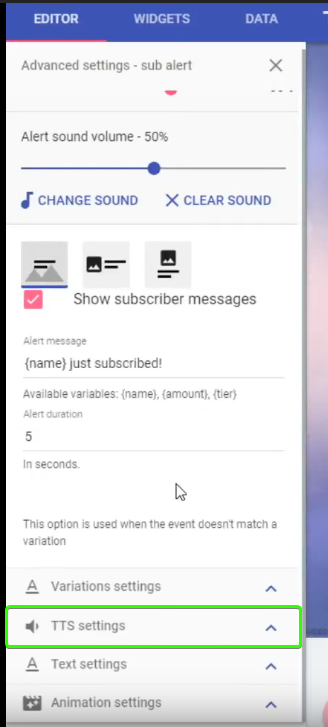
@severe dagger What you're looking for is TTS (text to speech) settings in the alertbox. Check this video https://youtu.be/8LVRd2X4HvU?list=PLCDDKlFdScbEwdx5AntcQIS1InkFJwHtv for a tutorial on the alertbox
Once you watched it if you still have questions feel free to ask them here 
 severe dagger
@clever mango Thank you!
clever mango
The video covers variations mainly but you can see that once she goes into sub alert settings in the left panel there is TTS settings right below where she selects variations settings. The TTS settings are what you will to enable and set up. They can be used with subs, tips, and cheers.
 summer scarab
Hey, can someone help me with the theme overlays? I'm trying to customize one of the themes you have to offer but on the top it has the social media bar. I'd like to keep it but I don't need things like discord and facebook up there. But I do in fact want snapchat. I could add it manually but then it ruins the aesthetics of the theme, what do i do about that? Do you happen to have premade icons for different social medias? you're welcome to pm me
 crisp geyser
hi, any idea why songs stop playing before they ending?
pine hemlock
@BtoRockss®#0731 Its a bug that is being looked into
nice tagging system discord
@vernal fablea K#6957 Which overlay are you using? Some include premade icons
what the fuck
@vernal fablea K#6957
clever mango
@summer scarab
pine hemlock
its ok
crisp geyser
Thanks
pine hemlock
Not sure if that one has extra icons but if you'd like you could send a message to our designer and see if she may be able to help you out @summer scarab . Her username is @ripe herald
summer scarab
thank youu
 eager geode
!duplicate
nocturne pelicanBOT
undefined, To duplicate a layer on an overlay select the layer that you want to duplicate in the layers drawer (bottom left of the editor) and then select the duplicate button with the red asterisk right above the layers panel. You can duplicate a layer to the same overlay or to other overlays.
clever mango
The devs believe they found the cause of the issue. If you notice it still occuring let us know.
clever mango
xD
 vernal nymph
@clever mango I figured it out my issue from before (all set up now) after a bit of experimenting the only thing i dont know is whats the difference between using 'entire screen' and just using the box selection. what will happen to kappa gen if i use just the box selection?
I still wish they had the feature from kappagen that let you pick a point for the emotes to originate from
clever mango
Using just the box will reduce the system resources since it will only scan/render/encode in the box. Using full screen will disregard the size of the box and use more resources
vernal nymph
ah okay
clever mango
@rapid tapir kappagen request ⤴
vernal nymph
thank you terrabuck! 😄 have a good day
 ancient jay
so a streamer im watching is getting internal server error when ever i try and use his commands not sure what that means
 stuck hamlet
What is the command suppose to answer?
ancient jay
its a custom command to redeem an ingame item
it usually says "username" has redeemed "item"
ancient jay
it is not happening with my overlay and stream just his as far as i can tell.
and how do i do that, he only has 1 screen as well
 untold turtle
Hey quick question can i assign different sounds to like follower host n raid sounds
Because so far when i save them one by one it only saves one and when i go to emulate it the sounds aint there back to standard
tight harness
@ancient jay To make the bot part and rejoin you go to the dashboard, you click on Part Channel on the right, then you click on Join Channel
@untold turtle You haven't changed the Variation Settings yet?
untold turtle
Im new to using this
tight harness
It's fine, we're here to answer any questions you may have
If you go to Variation Settings you can change your variations there
If you still have default variations then when you emulate an event and it triggers the variation which just so happens to be default still you'll still get the default alert
untold turtle
I have a follower one but doesnt seem to save other ones welk it says its saved but when i emulate them only one works that i set
How do i get to that
tight harness
I can look into it, which overlay of yours are you using at the moment?
GTA or Red Flare?
untold turtle
Gta
tight harness
You have no variations for follow alert so it should just play the same alert
Am I alright to test the alerts? will it interrupt anything?
untold turtle
Yeah test ahead its not online stopped stream to test it
untold turtle
Its that two alerts the host and raid
tight harness
So do tip alerts
tight harness
Alright, well you don't have any variations added for host alerts yet
And raid is the basic sound as well
untold turtle
How do i go about doing that
 flat valve
bot is having server internal errors on !redeem requests
i have toi force part it and rejoin
tight harness
Click on the cog/gear next to the alerts you want to change, click on Variation settings at the bottom left, then click on Add New Variation
Did that fix it or is it still a problem? If so I can test it for you if you like @flat valve
flat valve
it fixes it temporarily @tight harness
tight harness
@ancient jay Excellent 😃
@flat valve Very weird, haven't heard of that one before unless I missed it, I'll ask the others
untold turtle
Whats best for condition and requirement ammount
untold turtle
See for required ammount how do i change to just play it even if someone raids with o viewers
No*
tight harness
They don't trigger for 0 viewers
 wind patrol
Hey, I've been having some issues with my tipping alert, can anyone help? 😮
tight harness
What kind of issues?
wind patrol
the tip alerts don't go off, but bits, follows, etc work
untold turtle
Thanks for the help @tight harness
tight harness
No problem
 next spruce
is the song request fixed yet?
pine hemlock
Not yet :(
 stone spire
rip
 nocturne moth
rip
also, I keep getting stream summary emails for some reason
gotten 3 fromm the same stream
*from
 tender pendant
I ave tried for hours to get timers in my chat to work I have 2 set up I even did 2 min intervals so I could test them and they never show up in my chat online or offline anyone know the fix
pine hemlock
Have you tried lowering your chat lines? Is the bot in your channel?
 verbal jackal
Entre a comprar cosas con mi dinero de twitch en JaidefinichonLIVE. Compre un articulo de 1000000 de chauchas y me cobraron 2000000 de chauchas. #helpdesk-twitch. Y ahora unos 10 minutos despues de escribir lo anterior quede con 0 chauchas
tender pendant
I have yet to the minimum of 5 lines
weary mist
@tender pendant the lines have to be met before the timer will trigger. If you want to test it, change the chat lines to zero, and wait the 2 minutes
flat valve
@tight harness yup - doing it again
tight harness
It's been noted in our support staff channel, it's almost 4 AM for me so I'll need to get some rest myself 
 obsidian prairie
Hello, I'm sure this is a common question here, but my timers also did not work in my past stream today
er they half worked. the first 20 min they showed, but didn't show the remainder
ohhh
i was not aware of the chat line
but, can anyone assist with the time intervals? If I set a timer to 10 min, does this mean it will show every 10 min in the chat? I feel this is a pretty stupid question, but wanted to make sure
 elder sorrel
Yes if you have the chat lines set to 0.
obsidian prairie
cool thanks. Does it start once you go live, or is there another factor?
lament blade
Let's say, if you set it to 10 mins and 5 chat lines, if the time passes and you've gotten enough chat lines, the timed messaged will send, if it didn't, it won't until it gets enough chat lines ><
There are online and offline intervals, but the online one should start counting once you go live
obsidian prairie
ok cool thanks!
I have them set for both online and offline, and I am checking my twitch chat now as a test
I have them set to 0 line
lament blade

obsidian prairie
Now only if I could get this to connect to both my Twitch and YouTube stream at the same time! That would be perfect! 😃
obsidian prairie
Oh nice! I use restream, and this would be perfect
lament blade

elder sorrel
I forget one thing about the #402919550066229250 page? What was the 3rd thing I need to have done? I remember using the Bot & Overlay.
lament blade
Tipping page @elder sorrel
elder sorrel
Oh that's right. I'll get to that 😄
 vague trail
how would one delete or edit commands? (normal and or timer)
elder sorrel
For Timer you should see the Trash can & pencil Actions on the far right to click on.
Same goes for Chat Commands.
 muted pilot
is there any support for people charging back?
vague trail
Trash can & pencil Actions on the far right to click on. would not be there for me sadly.
elder sorrel
Weird 🤔
muted pilot

weary mist
@vague trail zoom out;)
 opal sluice
Hey guys, fresh face here - just a quick question - activating !song how is this done? Not very clear on the site.
 pure warren
Just me or is Search function on Dashboard Chat Command and Leaderboards pretty useless? In Commands it doesnt even search, while in Leaderboards it just open small window without edit button
 thorn glen
Probably a stupid question. But how do I add a profile image to my StreamElements page?
clever mango
@pure warren It should search when you press enter
@opal sluice !song is activated when songrequest is enabled
thorn glen
I figured it out.
clever mango
@thorn glen 
opal sluice
@clever mango Done that, still giving me strife let me double check
clever mango
It only works for requested songs
this is due to the api call limit that youtube is restricting us to
It's expected to be raised in the near future
opal sluice
@silk gate Sorry let me just confirm songrequest is enabled "check" but the slider isn't blue in chat commands this is ok?
clever mango
Hey @muted pilot send me a message and I'll see what we can do to help
 sage hare
Is there a way to make a death counter
opal sluice
@clever mango Got it - so it works perfectly fine no worries please ignore my question 😃 thank you
clever mango
!rip ➡ $(count deaths) increases the death counter
!deaths ➡ $(getcount deaths) checks the death counter without counting up
@sage hare
pure warren
@clever mango I noticed that when I press enter for desired command it dissapears from list and no new window shows up. Only tested on Chrome (incl. Incognito)
When I delete from Search bar it reappears back on list
clever mango
@pure warren That's the page's behavior right now. search query + enter will search. removing the query + enter will return to all commands
sage hare
So confused
pure warren
Um yes I know? Problem it doesnt help me. Because it doesnt open any new window.
weary mist
@sage hare Command: rip
response: $(count deaths)
when you go to create a command, it will make more sense
each will go into a seperate field
pure warren
@sage hare
clever mango
@pure warren what happens when you remove what you were searching for and press enter?
sage hare
@pure warren thank you
pure warren
Lets say I search for !m9lore, and press Enter.
Nothing happens, command just dissapears from list down below. I remove !m9lore from Search and it reappears back. Something happens but window of that command doesnt show up
clever mango
search with the !
sage hare
Will it automatically restart or do i have to put a command for that as erll
pure warren
Restart what?
weary mist
if you want the command to reset to zero, use !editcount deaths 0
sage hare
Liks say stream has ended will the count be restarted or do i need a mod command
pure warren
it will not restart
sage hare
How would i write that as a command
weary mist
!editpoints deaths 0
sage hare
For the response part
pure warren
To restart each stream? You cant with current amount of variables and no command chain, only with !editpoints as Scalper wrote
clever mango
@pure warren This is what I'm seeing in chrome.
Typed uptime, pressed enter
removed uptime, pressed enter.
https://i.imgur.com/rl4mQve.gifv
 pure warren
!editpoints is default command
sage hare
No not points i meant the death part
pure warren
wops
@livid dawn you can use !editcounter deaths 0 each start of stream
Just type in chat "!editcounter deaths 0"
pure warren
Far right side of command, each command has "Pencil"
sage hare
Will this work as well to reset everything
clever mango
It will not
sage hare
Damn
clever mango
!editcounter deaths 0 needs to be used
clever mango
It's a default so you don't need to make a custom command for it
clever mango
np
sage hare
I don't see it in default commands
pure warren
Under "MODERATOR", 4th command
pure warren
On Default Commands tab
sage hare
Found it! Thanks!
pure warren
@clever mango https://streamable.com/a95cn

 clever mango
😄
 glossy nimbus
how do i give someone supermod?
clever mango
!level <name> 1000
glossy nimbus
Thanks!
glossy nimbus
when i do !setcommunity is there any way to add 3 communities at once?
it just kee[ps changing them
clever mango
when it was set up there was only 1 community possible and it hasn't been rewritten yet
so for now just one
 rotund wigeon
hello
stone spire
Is there anyway to export the tip list?
 lusty laurel
Hi there! is there anyway to give 2x loyalty points to just subs? I'm not finding the tab if there is :S
 boreal zealot
Does anyone know how to setup timed messages? ex. every 30minutes the bot will say something specefic for you without being prompted
elder sorrel
Yeah, go to Timers -> Top right click New Timer. Can set how many minutes it takes for the auto message to show up when you're online/offline.
Make sure Chat lines are at 0.
boreal zealot
OH thank you @elder sorrel seems so obvious now. I kept looking around in chat commands.
elder sorrel
No prob. Glad to help 😄
 serene granite
@lusty laurel yes, on the loyalty settings page
elder sorrel
For can I be put on the #402919550066229250 section? Got the Bot, Overlay & Tip page all set up 😄
 fringe moat
hello @serene granite my !sr doesnt work for my viewers
 shy stirrup
 spiral olive
umm my overlay is bugged. not showing donations?
 atomic hollow
@elder sorrel done 😃
elder sorrel
Thanks, @atomic hollow. Much appreciated.
atomic hollow
checking about the issues guys
 timber torrent
Hello,
Does the Alerts from Streamelements also shown on Stream, if the Bot ist not in Chat?
atomic hollow
sure, if the overlay is used in your OBS
timber torrent
okay, thanks 😃
 woven needle
So I recently changed my name on twitch - and I went to go a look at my chat stats for my channel but it only shows the old channel name, but I can't seem to get it to update.. any ideas?
 sick salmon
do i have to have a streamelements tab open for it to work like the notifications in chat?
 gentle imp
some things require u to have SE page open yea
having dashboard page open is enough
but followers, overlay and many others don't require it
 rocky sluice
can I use donated money in my account without using paypal?
woven needle
Basically I think the chat stats are not seeing my name changed account as a new account, is anyone able to reset it?
tight harness
@woven needle tried relogging?
@rocky sluice PayPal is the only available donation method currently
@sick salmon for the host alerts to work at least yes
@cunning oracle you're referring to the Spam Filters, right at the bottom by Timers
I believe just the domain name
Np
woven needle
@tight harness Hi, thanks for the reply. I did try re-logging but it just shows my old account again, is someone able to manually reset it? I can't be the first person to have this problem?
serene granite
@woven needle whats your previous twitch username and your new twitch username ?
woven needle
Previous is: Wilson0121 New one is: MaxWilsonn
lusty laurel
StreamElements: @SirGriz, an error occured while placing your bet: internal server error
i get this meesga for contests
tight harness
@lusty laurel Thanks for telling us, this was something that started occurring late last night
serene granite
@lusty laurel did you get it right now?
lusty laurel
its back to error
serene granite
whats the channel name
serene granite
thanks, we're on it
woven needle
@serene granite are you able to manually change my account on the chat stats?
serene granite
yes
here's your link https://stats.streamelements.com/c/maxwilsonn
it needs to be lowercase
 pearl light
woven needle
pearl light
woven needle
@serene granite brilliant, thank you very much. Just another small thing. The link from my Streamelements dashboard still goes to my old account, can this be changed also?
serene granite
I don't think there's a way to change this right now, but I'll see with our devs
woven needle
@serene granite Ok, not to worry. I assume my new account stats page will only record going forward and won't be retrospective?
serene granite
correct
serene granite
np, sorry for the inconvenience 😃
 elfin magnet
Hey peeps! Is there any way to change color on themes? Like bottom part and such.?
silk patrol
@elfin magnet unfortunately you can’t. Some themes are available in multiple color schemes. If you know how to use editing software, you can do a print screen and edit the part you want
elfin magnet
Oh. Thanks for the info.
tight harness
You can try right clicking on the overlay browser source, clicking on Filters, adding the filter Colour Correction and changing the Hue Shift
Although it'll change the Hue of everything in the overlay
gentle imp
or open the overlay, inspect it with browser tools, download it and edit on the software of ur preference ^_^
gentle imp
thank you too, you guys are awesome, just giving something back when I can and if I know 😄
 tranquil bramble
So i was wondering, is there a WEB API available for Stream Elements?
tranquil bramble
Awesome thanks
lament blade
Hi, when I request a song the song cuts in the middle and skips to the next one, how can I fix this
tight harness
@lament blade We've had a few reports of this recently, how often would you say it's happening?
atomic hollow
is it on your twitch channel?
lament blade
no
timber torrent
Help! I have a Problem: I have set my Overlay and put it in OBS. If I test the Alerts, it shows it on OBS but if someone follow, it don't shows. What's wrong? 😦
 glad reef
when you tested the alerts did you test all of them?
lament blade
Do you have followers ticked on the alert box? :D
timber torrent
Yes, I test all of the Alerts
lament blade
And does it show on the overlay editor when you test follow alerts, but not on OBS?
timber torrent
The Follower Alerts an all other Alerts are shown on the Overlay in the Editor, if I test it
glad reef
but on obs not?
lament blade

timber torrent
If I test it, at OBS are also shown, but on Stream not
tight harness
I'll have a look into your account if that's alright
timber torrent
Yes 😃
tight harness
The 'Game Overlay' one?
timber torrent
Yes 😃
glad reef
hey can someone what tell me what is the streamelemants champion thing?
timber torrent
The Test shows the Alert on OBS but if a User follows or hosting me, it don't shows on OBS. 😕
tight harness
Hmm, what resolution are you using?
timber torrent
1280 x 720
tight harness
Ahh I see
We'd normally suggest 1080p on the site and then adding the browser source as 1920 x 1080 and then using Ctrl + F to fit it your canvas
atomic hollow
@glad reef its SE users that help other users and are just cool people
tight harness
I've just followed you, now we wait to see if it shows up 
Takes a bit longer when you're offline
Hmm, no alert 🤔 you're right
timber torrent
No Alert 😦
tight harness
It can't be a resolution issue because the test alerts work fine and we don't hear it when I followed for real 🤔
timber torrent
But why it not shown, if a real Follow or Host or anything comes? 😦
tight harness
Do you have the activity feed open?
This is required for host alerts at least
Check the pinned messages of his channel for an explanation
timber torrent
You mean the Dashboard from the Homepage? I have it open, yes.
tight harness
There's 3 options, that, the activity feed page or Ground Control (our desktop app), one of those is required for host alerts to work at least
But my test should have worked so I've mentioned it in the support staff channel to check i'm not overlooking something
timber torrent
But your real Follow are also not shown it the Activity Feed or do you have only test it?
The other Follow, what comes today, is shown in the Activity Feed but your real Follow not, if you have real followed
tight harness
I followed you for real
To test it
And the chat alert came up to show this
But not the alert in OBS
timber torrent
Yes, in OBS it don't shows the Alert if you real followed 😦
tight harness
Yes, that's what I saw and described too
timber torrent
Okay, when I can expect that it works?
tight harness
We need to get to the bottom of why it's happening first
timber torrent
Okay, but can I something do at the moment or do I have to wait for now?
tight harness
I'll just try something
tight harness
I've made a test overlay with a brand new alert box, then followed on my alt account
The follow on my alt account hasn't announced yet
Okay, that triggers in the chat but didn't trigger on the brand new alert box in the test overlay either 🤔
Passed on my findings to the Staff
timber torrent
So, not only I have the Problem, rather also you as it seems to me. Seems to be a general Problem with the Alert Box, right?
tight harness
We're looking into it now, nobody else has reported this
timber torrent
Okay
glad reef
thanks @atomic hollow
timber torrent
There was a Alert now on OBS from seboxer 😄 That was a real Follow, right? 😄
timber torrent
Nice, but what was the Problem, that the Alerts not shown before? 😃
atomic hollow
its only when youre offline it takes time
timber torrent
Wait...the Alert from a real Follow only triggeres and shows in OBS, if I am not streaming? 🤔
atomic hollow
no, when youre offline it can take up to 15 minutes to appear
tight harness
Are you having this issue while live?
timber torrent
Yes, if I streaming, the Alerts don't shows in OBS, if comes a real Follow
atomic hollow
can you go live now so we can take a look?
timber torrent
Okay
timber torrent
Okay, I have startet my Stream now
 long ridge
Hello...how can i restart the Countdown in streamelements
timber torrent
Can I go offline now, with my Stream 😄
long ridge
hm when i try nothing happenes
atomic hollow
you click refresh cache on the browser source in OBS?
serene granite

 analog grotto
Can you change the name of stream elements bot ?
lament blade
That feature might come soon 😄 https://streamelements.helprace.com/i282-modify-the-bot-s-twitch-name
It's been started and we are testing it
atomic hollow
almost ready for all
serene granite
give it an upvote to get notified when its live
analog grotto
thanks all i have just upvoted it
lament blade
tight harness
 ebon atlas
@lament blade im a secret tester as i found a way
lament blade
O_O?
tight harness
What?
ebon atlas
cough not telling you
tight harness
Tester of what though? 😛
gentle imp
I'm a tester too, for wife's cookings 😄
lament blade
Oh you found a way to get the bot to have a custom name? @ebon atlas
tight harness
@gentle imp 
 jolly flame
Heyo, my timers don't seem to be working anymore, I've tried parting the bot, turning off timers, logging out and back in, then turning timers back on and joining the bot again, still nope 😦
gentle imp
countdown widget? just refresh the browser source
jolly flame
Not that no, timers, as in like, every 30 minutes & 20 chat lines, the bot posts something
 winter zenith
Quick question, I have a Contest in my Overlay wich I set to fade out after 20 Seconds, I saved everything and tried it in XSplitt out but it doesent fade out after 20 Seconds It stays the whole time :(
But In The Overlay editor it fades out in the preview. Are there Options to delete cookis in Xsplitt? Should I import the URL again ?
Also I am not home to try it out at the moment just was couriose bc it didnt seem to work for me yester day so I blendet it out :S
tight harness
and the lines?
jolly flame
haven't tried changing those no, suppose I can just change them to something random then change them back to what I want again?
gentle imp
if only fades away when contest is over I think @winter zenith
tight harness
Yep, correct ⤴
winter zenith
Oh
tight harness
20 seconds after it's over
winter zenith
Thanks 😃
gentle imp
yw 😉
tight harness
No problem 😃
 tight harness
@jolly flame Well they're based off of those settings, so if the settings aren't met the timers don't go off
So that's the first thing to try 😄
gentle imp
yeah that and lines required for it to post message
jolly flame
Oh yeah I get that, but I'm definitely meeting the requirements for the timers to go off
They just suddenly stopped working one day
Along with my viewers not gaining points, but that was fixed by parting the bot and rejoining
tight harness
Is this since last night?
jolly flame
Nah, was about a week ago
tight harness
Hmm, haven't heard of anyone else having issues with them 🤔
jolly flame
Yeah it's weird
tight harness
If it was an issue with timers in general i'd have expected more reports
tight harness
Alright sounds good 😃
gentle imp
instead just make a new one and see if it works lol
 wintry gust
Hey everyone. Is there a support staff member available for a chat regarding the giveaway system? Would be great. Cheers ^^
tight harness
What are your questions?
wintry gust
Question is if giveaways can also be thrown out to multiple users at once with one click. For dropping a certain giveaway to X users at the time.
jolly flame
Oh yeah I should make one that's after like 1 line
gentle imp
that's what I did and beware online and offline requirements
tight harness
@wintry gust One winner per click currently
But if you have any ideas like this feel free to post them on our ideas board: https://strms.net/ideas
We like to keep suggestions organised 😄
gentle imp
you can draw more than one winner per giveaway though, just need to click for each
tight harness
Exactly 😃
wintry gust
ye but you have to click ^^
sure, you could write a script doin that pretty fast for let's say 50 times
tight harness
gentle imp
hehe
wintry gust
but the idea is havin some kind of lootbox drop system like esl has e.g. while they stream csgo events... you know... watching... surprise lootbox because random... the next problem is... you won't be able to give that lootbox an extra randomness for content... it should be like a "Give Lootbox to random viewer -> Viewer "opens" lootbox -> Random Price out of lootbox"
but ye... strms.net/ideas
gentle imp
if you make that into ideas, I'll upvote too
wintry gust
I guess we'll have to search for an external programmer to do it :/
 winter apex
So people don’t stream at 1080p due to the bitrate capping at 6000 right??
gentle imp
I would assume so, at least I don't exactly to that reason but could also be limited by their hardware
720p at 60fps looks much nicer
elder sorrel
That and some peoples' Internet can't keep up with the high resolution. So 720 is a good start
😄
winter apex
I keep mine at 720p60
But was just curious about stepping up the quality and how it would react
I have a 6700k and a GTX1070 with ‘eh’ upload speeds
tight harness
I input it into OBS at 1080p then use the option in Video settings for downscaling to 720p
gentle imp
u can try a better encoding on the cpu preset
default is set to very fast, try fast and see how it goes/looks
 formal drum
Good afternoon
i'd like to ask you something. I'm in trouble with my obs classic and your overlays. It works on obs studio but non on classic.
could you help me please? 😃
lament blade
Obs classic hasn't received updates in over a year so they are a bit outdated for the overlays to work perfectly on it, we recommend using our overlays on OBS studio @formal drum
 misty wagon
@gentle imp nice color bro
tight harness
OBS Studio ftw  Classic is so outdated nowadays
elder sorrel
Didn't know classic was still in use 
lament blade

gentle imp
ty @misty wagon 
 runic sigil
@lament blade está aí moça?
lament blade
Estou sim @runic sigil
runic sigil
Eba! rs..
então, é que quero colocar os host no event list, mas queria que aparecesse só a partir de um minimo.
lament blade
Então você teria que mudar isso no alert box na sua overlay, porque o event list irá mostrar todos os eventos que acontecerão ><
 cloud solstice
guys any idea when are we going to see Youtube and Mixer Intergation ?
lament blade
Sério? pera eu vou ver com outras pessoas ><
lament blade
@cloud solstice Youtube intergration is being worked on right now, the mixer intergration will follow,
cloud solstice
@lament blade cheers , Looking forward to this . Thank you
lament blade
No problem, it will come really soon hopefully 
lament blade
@runic sigil Eu conferi com outras pessoas e não tem uma forma de fazer com que os hosts não apareçam no Event List, mas voce pode votar nisso https://streamelements.helprace.com/i647-widget-event-list-set-min-amount-to-be-shown E talvez eles irão colocar essa opção logo
runic sigil
obrigada, votei lá!
lament blade
Nada
 keen wadi
format for a !so command? (shoutout)
clever mango
There's a template in custom commands
 clever mango

runic sigil
eu não estou conseguindo instalar a extensão para a twitch 😦
lament blade
O que acontece quando você tenta?
Tenta instalar e depois clicar em Configurar
E depois você tem que Ativar ela
runic sigil
lament blade
Isso acontece quando você clica em "instalar" ?
 lament blade
https://www.twitch.tv/ ( seu nome) /dashboard/extensions
Está ali em baixo na esquerda?
Em "instalados"
runic sigil
pronto instalei, só não esta aparecendo informação.
outra duvida, eu vi que tem o comando !givepoints , porém eu gosto de limitar o tanto que eles podem dar. Aí tentei personalizar e fiz um comando !caridade, com a resposta: ${sender} deu 10 ${pointsname} acordes para ${user} PogChamp
mas não está funcionando, só funciona com o givepoints
tem como limitar a quantidade dada? ou personalizar esse commando?
lament blade
Não tem como, infelizmente 😦
runic sigil
ah que pena. obrigada
lament blade
Denada 
 serene nimbus
can SE say something when some one follow?
 faint oasis
A stream in which I mod is having an issue that one of their followers changed their Twitch UN but the points will not work w/ their updated name in Elements.
 summer sigil
@serene nimbus Yes, once logged into SE go to Modules under Bot at the bottom and turn on Chat alerts. Then click Settings and you can configure what gets alerted
tight harness
@faint oasis This is easily solved, the streamer or somebody with dashboard access who can edit the leaderboard can fix this easily enough
 shrewd plume
Thank you so much @summer sigil 👍
tight harness
Remove points from the old username and add them to the new username
serene nimbus
@summer sigil thanks 😃
 tough trench
Hello there. I seem to be having issues with my Host Alerts. They are not displaying. They work fine when emulating them; but the actual host alerts don't work. They used to work just fine.
tight harness
@tough trench Do you have the activity feed open anywhere? If not, view the pinned messages for this channel for an explanation as to why you need to do this
tough trench
will check this and report back
tight harness
Alright 😃
tough trench
Okay, so I have it open now in StreamElements (streamelements.com/dashboard/activity). Do I need to leave it open at all times?
and can I just have the dashboard open? does it need to be activity feed?
tight harness
Just the dashboard is fine 😃
Any one of these 3 is fine:
- SE Dashboard page - https://streamelements.com/dashboard
- SE Activity Feed page - https://streamelements.com/dashboard/activity
- Ground Control desktop app - https://streamelements.com/groundcontrol
tough trench
okay, i didn't have it open before. leaving it open should fix the alert then?
tight harness
Yes absolutely
We used to have it within the overlay but we changed it to the activity feed because it's much more secure that way
tough trench
Gotcha thanks
tight harness
No problem 😃
tough trench
I'll report back next time I get a host and see if it's fixed
 summer summit
So what if I have graphics for overlays? I didn't see a way to ul things? I could be missing something.
tight harness
Awesome
Add Image, Upload, Select Files, choose the file you want to upload
Best done via Chrome or Firefox, preferably Chrome
tight harness
No problem 😃
faint oasis
@tight harness I don't think she realize she could edit the leaderboard. I'll let her know, Thx!
tight harness
No problem 😃
 pale quiver
yoo hello witch se staff can i private msg to ask something
slim cairn
@pale quiver What do you need?
tight harness
I may be able to help depending on what it's about
pale quiver
about se and stream
slim cairn
Is it about how to use the site or something about the company?
tight harness
I'm support staff, do you think that'll be sufficient?
pale quiver
no @slim cairn
slim cairn
If you don't feel comfortable PM Legendary and he can redirect you to another staff member or he can help you
summer sigil
How does the Emote Combo work? Do they all have to be separate users? Ex: I do an emote, someone else does the same emote then I do the emote again is that 3x?
tight harness
It's based on how many of that emote was posted with x seconds, it's not dependant on who posted them
summer sigil
Okay, so it could be just one person doing the same emote over and over with x seconds
tight harness
Answered TrollGamerBG's questions in PMs
 pine radish
i have a quick question
tight harness
Ask away 😃
pine radish
in the overlay editor it seems that elements like to snap to grid positions, is there a way to disable the snapping?
tight harness
Yes, the waffle icon
 obtuse gyro
top right area iirc
tight harness
Yep 😃
pine radish
😲
thank you
ok one more
can you highlight and move multiple elements at the same time?
tight harness
Not yet, but it's been suggested
pine radish
ok thank you!
pine radish
you guys are the best, thanks again
tight harness
You're very welcome 😃
tight harness
We actually requested dev access from them and they said no
pine radish
booooooo
tight harness
This was some time ago though, we're just waiting until we ask again, we don't want to pester them
pine radish
i wonder why they wouldn't provide access
tight harness
Not sure
pine radish
ok one more 😄
when i choose themed overlays it seems they're all in 1080, is there a way to change the resolution on those or are they locked?
tight harness
Keep them at 1080p on the site, add them as 1920 x 1080 into OBS, then use Ctrl + F to size it to your canvas
You can use the option in Video settings to downscale it to 720p or whatever 😃
pine radish
awesome ty
tight harness
No problem
 echo jasper
Anybody have an issue with the tip goal bar not showing the progress colored portion of the bar?
tight harness
Not heard of anybody experiencing issues with this, no
echo jasper
It shows correctly on the SE website within the editor but not coming through in OBS with the rest of the overlay elements.
tight harness
Shows as one colour on your editor for me too
echo jasper
Yeah, my editor shows both colors.
 echo jasper
Yes, I tried that but don't want to take up that much screen space.
tight harness
Yeah of course
 thorn lark
I can stream my xbox gameplay fine, i can also stream my overlay and alerts fine but i cant stream them at the same time lol. im very new to this so if someone could help oit be great
lament blade
Did you put the overlay below the gameplay?
tight harness
@echo jasper I've mentioned it to the staff, it doesn't normally behave that way but it seems even if I make a new bar on my own account it's doing the same thing, but my old bar seems fine
thorn lark
I think the issue is I dont know how to add the gameplay to the obs. Ive only streamed gameplay through the xbox
pine radish
stream it from a cable into a capture card on your pc maybe?
tight harness
⤴
echo jasper
Yes, this bar was fine until I updated the goal date....it was at that time it started acting up.
Thanks for bringing some attention to it @tight harness
thorn lark
i was hoping it could be done without a capture card. I do have one but hadnt set it up yet
tight harness
No problem
 pulsar gulch
hi
pine radish
you can stream it over wifi via the xbox app on pc, i've done that before but it gets pretty choppy for my setup
pulsar gulch
i have a problem with my cheer notification , can someone help me ^^ ?
tight harness
Could you elaborate what the issue with your cheer notification is?
thorn lark
i did stream it through the app on my laptop but it i couldnt do it and the overlay same time
pine radish
were you able to at least get the stream to show-up in obs?
 lavish shore
Quick question. Probably going to look stupid for asking this. Is there a way i can possibly add in a counter that whenever a certain event happens on stream the counter goes up? Thanks :)
thorn lark
nope
pine radish
i suppose a window capture of the streamed game would work, it's been a while since i tried that setup
obtuse gyro
As far as i know @lavish shore you can make a command for something like that with the bot, but as far as an on stream counter goes, im not sure.
One of the support champins should be able to tell you
tight harness
@lavish shore You can make a chat counter command, but not an on-screen counter yet
lavish shore
Alright would a chat counter be simple to setup?
tight harness
Yes
thorn lark
Ok Shaolinftw thank you for trying to help me out. I will look into that and decide weather I should just get my capture card setup
tight harness
@lavish shore
pine radish
yea honestly that's the best bet for console streaming that i know of
lavish shore
Thanks a bunch @tight harness
tight harness
No problem
thorn lark
I have an Elgato HD 60 pro so makes sense to use it instead of wasting it lol
pulsar gulch
@tight harness i want to activate the TTS , and after I do that .. it's still not working ~ i can hear only that classic beep and that's it
pine radish
@thorn lark PM me if you want more help bud
tight harness
What have you activated it for?
You had it set to a number less than 1 for sub alerts, but i've fixed that
obtuse gyro
@pulsar gulch ^
pulsar gulch
@obtuse gyro yes ?
obtuse gyro
just making sure you saw that legendary fixed it for you haha
pine radish
this is the next level of customer support - thank you streamelements - you guys are the best!
tight harness
pulsar gulch
@pine radish insane
 shrewd cave
Hi guys! I seem to be having some issues with my alerts - specifically, my follow alerts work fine, but the host and raid alerts, which used to work, don't.
the worst part is I can't even seem to troubleshoot because in the browser, with the mock alerts, everything seems to work fine
it was only once I streamed last week and got real hosts and follows that I noticed only the follows worked
ebon atlas
What's the duration of the host alert
shrewd cave
hm, 10 seconds
obtuse gyro
iirc if someone hosts you with too few viewers it wont show up @shrewd cave
you might also need to keep one of the streamelements sites open? one of the support champions will clarify if im wrong
shrewd cave
huh, I would accept that, except someone literally hosted me with 100+ viewers last week, LOL
so that doesn't appear to be the issue
tight harness
@shrewd cave Check pinned messages, second one down 😃
lament blade
how come when you get a few noitifications its makes the stream lag and stream elements can't keep up with the alerts? i had a real hard time with this tonight... in a big way we was waiting 5-10 mins sometimes for them to show
shrewd cave
@tight harness OH! okay, got it! That's probably it, hahaha, thank you! I'll try that out today 😃
obtuse gyro
haha i was right about one thing! feelsgoodman
tight harness
Awesome 😃
obtuse gyro
@lament blade What do you mean? it made your stream lag? or were the notifications just taking a while to show up?
if the latter, the overlay has to run the notification for the time you set it to before it moves on to the next one
lament blade
it made my game lag.... i got a raid tonight and i had the sounds coming though but no alerts on overlay.... the game laged real bad. i only had one overlay in obs aswell
obtuse gyro
@lament blade ill search the support docs for you unless a support champion gives you the anwer before i do haha
lament blade
ah ok, i did have a look but couldnt see anything @obtuse gyro
obtuse gyro
not sure if this will help but do you have "shutdown source when not visible" for the overlay ticked in obs?
 eternal falcon
Hi guys, im currently setting up my stream, and cant figure out which link to use for my donation page. (The link people click to donate)
lament blade
no, i only have one overlay
pulsar gulch
@tight harness the cheers are still not working
i can hear only the beep sounds ..
the rest of them works .. subs / tip / host etc..


 obtuse gyro
@lament blade try ticking it, @tight harness he is having a lag issue, could you help him? i cant seem to find anything
@eternal falcon youre using the SE tipping right? just to make sure
eternal falcon
Yeah
tight harness
Lag issue? 🤔 what's your CPU usage during streaming and gaming?
pine radish
is there an undo button in the overlay editor?
obtuse gyro
@eternal falcon On your SE dashboard under the tipping page, when you hit the "open my page" button, thats the link
legendary, he said it happened to him when he had a lot of notifications to be displayed
dont know if that helps
lament blade
CPU is normally about 5% when streaming
obtuse gyro
and shaolin, if you didnt hit save you can just refresh the page
not sure if theres an actual undo button though, check the top right bar
pine radish
got ya, that's what i've been doing - ty
tight harness
5% doesn't seem high
eternal falcon
@obtuse gyro Man i cant find it, am i retarded? FeelsBadMan
obtuse gyro
streamelements.com/lord_scalper/tip
this is the url, where lord_scalper should be your username @eternal falcon
tight harness
@pine radish An undo button is planned
 cold silo
heyyy i use streamelements and was wondering if i could be in the sellout section 👀
pine radish
ty
eternal falcon
Thank You :D, that works when i change the name to my own.
obtuse gyro
@eternal falcon for future reference, if you scroll down under the tipping page in your dashboard, the button should be there
eternal falcon
When i click dashboard, i see no tipping page at all
obtuse gyro
Sorry haha, i call the dashboard the home page when you log in to stream elements
its on the right side where it says "dashboard", "themes gallery" etc
ill screenshot it if you still cant find it @eternal falcon
tight harness
!sellout @cold silo
nocturne pelicanBOT
@cold silo, to be announced in #sellout you need to be using our Overlays, Tipping Service (preferably linked in panels) and the StreamElements bot. (Modded in your channel)
tight harness
😃
eternal falcon
Oh yeah that tipping page i can find, but there is no link to go to "my donation page". All i can do is change settings
OMG I SEE IT NOW
IM LITERALLY DUMB
cold silo
thankyou!
tight harness
It seems you're good, I just checked 😃
cold silo
its linked and everything and overlays are working aswell c:
tight harness
There you go, all done
cold silo
😄
 spring cargo
it says offline on the webpage but i started streaming on obs confused
 solemn raptor
Hello! One of my viewers recently changed their names and when I transferred their points over to the new name they weren't able to redeem any prizes. I remedied this by adding the points back to the old account name but because they are listed as a different name they aren't accruing any new points via the loyalty setting or the !addpoints all setting. I was told I could edit their name but the only place I see that I can edit their information is in the leaderboard. Is there another place I can edit their information to correctly reflect their current UN?
lament blade
It does have some delay, @spring cargo
spring cargo
more than 12 min or do i refresh?
lament blade
Or wait, you mean on the streamelements webpage?
Or your own twitch channel says your offline? @spring cargo
obtuse gyro
If its the SE webpage i had the same issue but since its only aesthetic i didnt really care
tight harness
@solemn raptor You can ask them to log out of the site and back in
But they should definitely have the points on the new name
pine radish
is there an easy way to click an element that is behind another element in the overlay editor?
lament blade
Yes, if you go on the layers and select it there ><
Or lock the elements you don't want to move
lament blade
Np
obtuse gyro
today i learned: you can lock the elements
 patent wraith
Is this possible to change the game but whith another command than !setgame, like, create a !gamecs which will set the game to Counter-Strike: Global Offensive ? maybe using the ${game} variable
nocturne pelicanBOT
undefined, Check out the new ideas board https://strms.net/ideas. You'll be able to add your ideas, upvote others that you like, and track their progress with email notifications. Adding and upvoting ideas also helps the staff know which ideas should be prioritized so please take some time to upvote the features that you’d like. The #ideas channel is best used for discussing ideas already on the board.
patent wraith
Okay, thanks ! 😃
pine radish
is the follower goal wideget only supposed to track recent follows? it doesn't seem to want to show my total followers/goal
tight harness
It's a short-term goal widget
It only tracks how many you gain from when it started
You're thinking of the Total Followers widget
lament blade
solemn raptor
Nobody else has had to log into Stream Elements to accrue points so i dont think that is the problem
tight harness
But they need to relog if they changed their name
So it knows which account they're trying to redeem from
solemn raptor
I will let them know and see if it works.
tight harness
Alright
 wheat cradle
Can anyone help me create a command please
obtuse gyro
uh i dont know much about commands but id be willing to go over trying to add it with you so we could both learn how to do it
wheat cradle
I want to addaxode just like !redeem but called !purcahzd
!purchase, what is the variable for an item?
obtuse gyro
@wheat cradle did you look at the command docs? sorry i dont know the variables but i can look at them for you if you want since im free
wheat cradle
Yeah I checked the variable list don’t see one for a created item
obtuse gyro
@weary mist @tight harness @lament blade <-- theyll help you once they can
tight harness
You can add an alias called purchase to the !redeem command
lament blade
^
tight harness
Find the !redeem command, edit it, go down to Alias, click on that section, type in purchase, press Enter, save/submit 😃
wheat cradle
I want to rephrase it though, do t like how it’s pronounced once you execute the !redeem very ocd haha
tight harness
There's no changing that yet
But it is planned to make responses to default commands more customisable
wheat cradle
Yeah that’s why I wanted to recreate, could you not send me the command variables for !redeem so then I can type my own automated message?
tight harness
The variables for !redeem aren't public knowledge because you can't recreate it in a custom way, you can remove the !redeem part of the command by making a custom command with the response ${redeem <item name>} but it still gives the default response message
wheat cradle
So pretty much there’s no changing the automated message from redeem in anyway?
weary mist
@wheat cradle correct, but like he said, it's a planned update to have that possible
obtuse gyro
^ I keep thinking the things I'm remembering that have been said before are wrong but theyre not
wheat cradle
another question, so if one of my viewers buy an item, for me they purchase a spin of a wheel they’ve created, does what they have purchase save somewhere?
Like how will I know if somebody has purchased somethig
obtuse gyro
uh, i tried looking through the dashboard, and as far as I can tell there isnt @wheat cradle
 thorn crystal
Hello. I'm currently working on moving from Streamlabs to StreamElements. I want to import my loyalty points over. I know that Streamlabs doesn't have an export for that, but I was able to create my own CSV. However, when I try to import it into StreamElements, it says it can't import the points. Any ideas on how I can get my points over?
tight harness
Are you using Ankhbot/Streamlabs import on this page? https://streamelements.com/dashboard/account/import
thorn crystal
XD I didn't even try that one. I used the streamlabs import tool but that only does tips. Hold on, let me try it.
lament blade
That one should work 😄
thorn crystal
Import failed. Of course, it could be a problem with my homemade CSV file. Do you know of any way to export loyalty points from Streamlabs?
tight harness
I don't i'm afraid
lament blade
Try that without using your custom CSV file?
thorn crystal
Then what should I use?
weary mist
@wheat cradle @obtuse gyro there is a redemptions page, accessable from the top right of the StreamStore page
tight harness
Was it the Import from CSV you tried before?
thorn crystal
Yes
tight harness
You could try this: https://filter.dj/CSVtoStreamElements.html
As long as you keep to the format name,points
thorn crystal
I'm wondering if there's just some issue with my CSV file. It's just a list of usernames in one column and the respective points in the other.
tight harness
Then try https://filter.dj/CSVtoStreamElements.html 😄
Because that's exactly what it needs
name,points
thorn crystal
OK, let me try this
Success!!!
FYI, in case you run into someone trying to export points from Streamlabs, I went into my loyalty points manager, copied the usernames and points, and then pasted it in a spreadsheet. I then exported that spreadsheet to a CSV file.
thorn crystal
One more thing I need help with. I added a chat box to my overlay and then went into my channel and sent a test message. The message was repeated in the overlay 6 times.
tight harness
It'll be repeated in the overlay manager but not in OBS 😃
You don't need to worry about that
thorn crystal
Well thanks for all of your help. I'm excited to see how SE works on stream tomorrow.
tight harness
Enjoy! If you have any more questions just ask
thorn crystal
Will do!
pine radish
another quick question - if your stream overlay has a countdown widget - what's the best way to reset the countdown? so far i've been going in and hitting save on the overlay but i'm sure there's a better way
tight harness
Reload the overlay
Make sure it shuts down when you hide it (shutdown source when not visible in the properties of the overlay on OBS)
pine radish
got ya ty
tight harness
No problem 😃
tight harness
Did you change it on the left to show more than just session top donation?
Session is just from the current stream
tight harness
Yeah, you click on the widget and then it's on the left
tight harness
Not animating in what way?
 olive cedar
like my latest donation is scrolling right to left as well as top dono
but the latest subscriber is just stagnant
tight harness
Did you tick scrolling?
olive cedar
Is that under animation settings?
tight harness
No, I believe it's under Text Settings
olive cedar
yup, you right
Lastly, I wasnt getting tip alerts on stream or hosts
I recently added the bot to my channel. Was it the lack of the bot that prevented this?
obtuse gyro
look at the pins above
//sorry to interrupt
you need to have one of those SE pages open for hosts to work
tight harness
With tip alerts that could be a different thing
In Tipping > Tip Moderation did you tick 'Enable Moderation'? @olive cedar
olive cedar
no its not enabled
tight harness
And you're providing the StreamElements tipping page link now instead of your previous one?
tight harness
It will have been 😄
 finite viper
hello - this is probably a silly question, but is there a way to take chat input for use in a poll?
olive cedar
Is there a way to test and make sure the new settings go through?
Like tip alert test etc
tight harness
Absolutely, the blue circle in the bottom left of the overlay manager
That's our event emulator
@finite viper We have a poll feature on our ideas board: https://streamelements.helprace.com/i190-poll-tool
It's currently under review but know that we really like the idea 😃
finite viper
Thanks! :D :D :D
tight harness
No problem 😃
olive cedar
sweet
Just need new sounds for the events lol. Is there a good place to get those ? Or does stream elements have some as well?
tight harness
We normally recommend http://www.myinstants.com as a good place to start
 olive cedar
Thank you! Yall are awesome
tight harness
No problem 😃
olive cedar
Okay final question. I'm having custom art done for my channel. How can that be incorporated into the alert widget?
lament blade
There is an option to change image 😄
olive cedar
Even if the imagine im having done is animated?
tight harness
Absolutely
lament blade
Yep
tight harness

olive cedar
much love ❤
tight harness
lament blade
lusty laurel
hey streamelements! i was wondering if there was a way to give subscribers 2x loyalty points per minute?
lament blade
Absolutely!
lament blade
https://streamelements.com/dashboard/loyalty Subscriber Multiplier
tight harness
If you recently got affiiliate and don't see it yet, simply relog 😃
lusty laurel
oh thank you! 😃
tight harness
No problem
olive cedar
yessir. And I still hear the original sound in the background of my new sound alert
tight harness
Remember to change the variations of the alerts in Variation Settings, also when you add the overlays into OBS remember to tick 'shutdown source when not visible' in the properties of each and every overlay browser source because otherwise you'll have some in the background which can still go off
olive cedar
Nah Im still hearing the ting ting behind my new sound