#helpdesk-twitch
1 messages · Page 188 of 1
 atomic hollow
its in final testing stages
and ground control is just another option, you can use either or
atomic hollow
@lapis vault thank you, we appreciate it ❤
 pliant hound
Guys... I think one of the default commands is derping. xD
I used the !ping command and got this: "streamelements has been running for 9 days 20 hours! elementsS". What's with the elementsS at the end?
pliant hound
Ah, it's because my bot is on? Poor Yu. She keeps breaking things.
 winter sparrow
Can the SE Songrequest feature support Spotify? If so, how?
pliant hound
@winter sparrow Not currently, they're still working on it. For now, the Current Song widget only supports Plug.dj, Dubtrack.fm and Song Requests.
 tulip spindle
help. Since using stream elements my stream is unusable. Its just skipping, with no dropped frames and my net is fine. Anyone have any idea
 ebon atlas
@tulip spindle is it the whole overlay or just videos
tulip spindle
the video
 serene granite
@tulip spindle are you using an animated supertheme ?
tulip spindle
no
 heavy pecan
i need help
i just created my overlay from photoshop, how do i add a widget so i can put whoever followed recently on screen
atomic hollow
@heavy pecan go to the overlay manager --> widgets
heavy pecan
thank you ill try it
atomic hollow
you can watch this - https://www.youtube.com/watch?v=X7XrDdRE7Fk&feature=youtu.be

Create an amazing overlay with StreamElements, watch our video guide to learn how. ----- Tipping page setup: https://youtu.be/eLzxRkq7tJo Add KappaGen to you...
serene granite
@tulip spindle I see that you have 6 overlays, are you loading each one as a separate browsersource on OBS ?
heavy pecan
i dont see overlay manager
@serene granite how do i manually add my layer in the overlay manager
serene granite
there are no separate layers in an overlay
atomic hollow
overlays to be used in StreamElements can only be created in our overlay manager
heavy pecan
nvm i added an image and i grabbed my overlay
 clever mango
@heavy pecan Here's what you can do:
- export your photoshop project to a .png image
- upload your png to the overlay editor and make it bottom layer in the layers panel (bottom left of the editor)
- Adjust the size of the layer within the position, size tab on the left. The canvas by default is 1920x1080
- Add widgets on top of the graphic
- Add this finished overlay to OBS as a browser source
- Profit

heavy pecan
why is it so hard to edit layers in streamelements
like im trying to move latest follower but instead it makes me move my overlay
clever mango
you can lock any layer in the layers drawer
heavy pecan
ok
clever mango
when clicking in the editor it will only select the layer on the top
clever mango
Is it beneath another layer in the same spot?
heavy pecan
i just resized it
but whenever i delete latest follower and its left with (name) it turns black dot
clever mango
Keep in mind you can also select a layer from the layers drawer and then use the arrow keys on your keyboard to move 1px at a time or Shift+arrows to move 10px at a time
heavy pecan
help please
clever mango
what is your twitch name?
clever mango
that black box is the box that is clicked and dragged to expand the widget boundaries
heavy pecan
ok
it wont let me click it
what if a follower name shows up, im afraid it will be in a different position
clever mango
Would you like me to look at your overlay? It will be easier to help
clever mango
I don't see that image above in either of your overlays. Was it deleted?
clever mango
Try saving again
clever mango
Just a sec
heavy pecan
wait how do i test the overlay @clever mango
clever mango
This is what I'm seeing for the PUBG overlay
One thing that might cause issues is that the image you uploaded has a massive canvas compared to the actual graphic
clever mango
I expanded the latest follower widget box
please refresh
convert mp4 to gif with any number of online converters. Here's one: https://ezgif.com/video-to-gif
heavy pecan
ok let me check
thank u very much @clever mango
how do i add my gif in tip alert @clever mango
i forgot where i found it
clever mango
Please take advantage of the youtube tutorials provided by StreamElements. Here's one specifically on the alertbox: https://www.youtube.com/watch?v=8LVRd2X4HvU

Learn how to customize your alerts and setup different alerts variations with StreamElements Alertbox ----- Overlay Manager guide: https://youtu.be/X7XrDdRE7...
And here is one on the overlay manager as a whole https://www.youtube.com/watch?v=X7XrDdRE7Fk
Create an amazing overlay with StreamElements, watch our video guide to learn how. ----- Tipping page setup: https://youtu.be/eLzxRkq7tJo Add KappaGen to you...
heavy pecan
alright i finished my overlay
pliant hound
@heavy pecan I asked the SE labs that same question before and here is where they suggested you get sounds for your alerts:
heavy pecan
IM STREAMING NOW
 dim forge
if i stream in 720p what should my overlays width and height be ?
heavy pecan
cut off
dim forge
but i want to reset it what would it be
 tight harness
@dim forge you should leave it as 1080p on the site and add it as 1920 x 1080 to OBS and then when it's in OBS use Ctrl + F if you use a different size canvas to fit it to your canvas size
 vapid badge
Good afternoon, I've got a question. When I add a sound effect for things like "New Subscriber" or "Tip Received", the added sound plays along a gling noise every time ? Looks like a default sound effect, does anyone have an idea on how to get rid of it ?
Thanks a lot !
 lament blade
Can you check your variations? :D
vapid badge
Nothing there :(
tight harness
Do you have another overlay added to OBS which has the default alert box and which you haven't ticked 'shutdown source when not visible' in the browser source properties yet?
 strange junco
Any suggestions on most needed nik nacs and settings config. Very new but knowledge isnt "potatoe" 🥔
 brazen dragon
hey, my friend @lament blade makes overlays @daring bear said you guys were looking for someone
atomic hollow
@wooden meadow what do you mean?
 wooden meadow
I dont know where to put the link
vapid badge
@tight harness Not that I know of
atomic hollow
watch this please - https://www.youtube.com/watch?v=X7XrDdRE7Fk&feature=youtu.be
Create an amazing overlay with StreamElements, watch our video guide to learn how. ----- Tipping page setup: https://youtu.be/eLzxRkq7tJo Add KappaGen to you...
tight harness
@vapid badge If you don't have variations then you should check that then 😃
wooden meadow
nvm
vapid badge
Added one, still get my jingle on top of the default "gling" noise 
wooden meadow
I know you do browser source
but it only pops up as new follower
do i have to make a different scene for each overlay
tight harness
@vapid badge Not sure what you mean by added one 😄 I want you to tick an option in the properties for overlays
vapid badge
Oh I though you were telling me to add a variation which I just did !
(I'm sorry this is such a mess... 😕)
serene granite
@wooden meadow you want a different scene for each overlay
wooden meadow
Thanks hectic
serene granite
np 😃
wooden meadow
oh shit im so sorry but how do i find out the right resolution for obs
so it fits the black screen perfectly
like how many pixels
serene granite
what's your twitch username?
We can have our bot announce your stream in #291219887274328064 if you use StreamElements as your main service for overlay, bot and tipping.
lament blade
only?
 lost fractal
how do you get on the sellout thing?
lament blade
If you are streaming with StreamElements
- chatbot (modded and in chat)
- tipping service (link in panels below stream)
- overlays (theme or custom) @lost fractal
Once that is done, you can request to be on it 😄
lost fractal
i think i got that all set up my twitch is twitch.tv/dwp1992
lament blade
You also can link your Discord account with your Twitch 😄 second
wooden meadow
How do i set up the chat in the box
or does it do that automatically?
im set
boutta strream rn
lament blade
OwO
Don't advertise here, you can request being added on #291219887274328064 @wooden meadow
All done @lost fractal 
OwO
lost fractal
ow thank you @lament blade i got an email from perry when i didnt stream for two week i think it was kinda cool when a that happen other stream bots dont do that so ill be useing streamelements for the rest of my streaming carrer
lament blade
Glad to hear that 
 late river
Hello! I have a few questions about streaming. I got an email saying "I se you haven't streamed in a while, talk in Discord of anything" Well, I feel like #welcome is just spammed with joinings that no one really reads that, and this kind of a support, so that is why I am here.
-
I am wanting to stream twice a week. I was thinking Tuesdays: 4 - 6 on the Twitch platform, then on Saturdays from 1 - 3 on the Mixer Platform. Would this even work? Are there any tips on times when I SHOULD stream.
-
How does this whole tipping thing work, I came across an article on reddit that said any tips you get, you have to log as it is income, does the tipping page from Stream Elements Cover thse requirements?
-
Is there a way to make chat announcements, using the bot, to say stuff?
-
Is there an easy way to keep track of chat, Rather than having to switch screens to see the chat in the twitch website? This is what I have extreme problems with.
-
How do I save my streams as like YouTube Videos? If I do this, can they be copyrighted with the songrequest bot music? How does that all work?
That is all I have for right now. Thanks for any responses!
 slim cairn
I'll answer whatever I can. For the first thing, I don't recommend streaming on 2 separate platforms. I would attempt growing an audience on twitch but you could do Mixer too.
For tipping after you sign up on the SE website and put in the preferred way of payment your viewers can donate you money. https://m.youtube.com/watch?v=eLzxRkq7tJo is the official tutorial on how to set it up
StreamElements tipping system is guaranteed to increase your tips! Watch our guide to learn how to setup your own. ----- Got any questions, or just want to s...
For the chat problem, some people get multiple monitors or you could use your phone or a spare laptop
 weary mist
Tons of questions, and some we can answer. As for hte best time to stream, that will depend on you. Figure out what games to play, and then do some googling. There are several websites that give the high/low times for these game.
If you want to stream on two platforms, make sure you major advertise that. Bring your viewers back and forth between each, otherwise you wil be starting from scratch on both. Its normally advised to build your viewer base on one, then start on the others. this way you have a name when moving to another platform
Tipping is a form of income. Make sure to look up your countries rules on this (considered contractor or freelance, as if you are self-employeed)
Chat alerts just need to be turned on in the modules section of the site
Once you are done streaming, your VOD can be exported directly to youtube (from twitch)
And yes, they can be flagged as copywrited material. If you are conserned about that, I highly recommend using the backup playlist option, and turn off song requests. This way you can build a playlist of non-copywrited material to play in the background
@late river I think we answered your questions pretty well, let me know if there is anything else 😃
late river
Thank you both! I will do some research and if I do anything I will get back to ya.
slim cairn
Yep @crystal lion just ask away
 crystal lion
oh right ok
so umm the widget for
the alertbox
how do i change that animation
like instead of the shark popping up and stuff
 pine hemlock
@crystal lion https://www.cuda.live/s/twnaA3go.gif
 crystal lion
oh damn u r a life saver thx bro!!!!
i have been messing about for 10 mins and i can't believe i didn't see that button right there
LOL!!
pine hemlock
lol
 regal yew
Is there any supporters online?
regal yew
Well i have this problem with my host alert not popping up on my stream when i get a host but if i go test it it works fine and all but when i actually get a host it dosent show up all my other alerts works fine
 stone spire
Anyone familiar with Plane9?
lament blade
The host alerts won't show up if it's a 0 viewer host @regal yew , or maybe you can check if you set up the limit to something high?
regal yew
i'll check
lament blade
Also you need to have the activity feed open, either on the website or ground control ><
tight harness
Check the pinned messages in this channel, second one down 😃
regal yew
Ty for the help guys
lament blade
Np
stone spire
Anyone else having trouble with viewerlists atm?
pine hemlock
Probably. twitch has been issues all week
 lunar furnace
i'm wanting to work on making my own animated overlay for OBS in Stream Elements but have no clue what program to use... file type to save as or anything to work with it
pine hemlock
Any of the file types the upload supports work. Animation is generally .gif or webm for video
stone spire
So my cursor is showing up on every window captured except the one I have capture cursor on lol
But only sometimes 😒
 inner furnace
i recieved a twitch pm from @edgy iris saying he asked me to verify my buisness email with him or staff. is this correct?
serene granite
yea, @edgy iris is one the people who go out and greet the users who use our platform. She makes sure you don't have any issues, and that you're making the most out of StreamElements
inner furnace
ok thats great. getting a random twitch message about that usually ends in a troll, so i wanted to make sure. so far i believe i am using it to its potential.
 flat valve
hmm.. sell-out bot is not reporting me starting my stream... ?
serene granite
how long ago did you start it ?
flat valve
10M
tight harness
It did message that you were streaming today 🤔
wooden meadow
How does the chat go into the chatbox
tight harness
Have you got the overlay set to 1080p?
flat valve
it said i stopped.. lyesterday - bnut not seeing one for streaming when i started this morning
tight harness
Yesterday? you weren't added to it until today 
tight harness
Interesting, it's showing you as added 🤔
flat valve
So i was offline on twitch for ~8 hrs, when I cam back in today and started streaming - it didnt report anything
pine hemlock
There's nothing we can really do about it. It's a bot created by someone else. If it works, great. If not.. There's nothing on our end
You're added to it. That's all we can do
flat valve
thats ok, was just wondering if I needed to do something other than start stream
 round geyser
The Now Live bot, even though it's absolutely amazing, has some issues with it sometimes. I'm having the same issues on my end with the bot.
pine hemlock
The bot doesn't even show as online so they're probably having issues
lunar furnace
how can i get added to the bot or anything like that because i would love to be able to reach more ppls
tight harness
You need to use 3 things, our tipping system, our overlay manager (custom or theme) and our bot (modded in your channel)
lunar furnace
ok... well im using stream element and set up my tipping stuff on my dashboard as well as have 2 of the super themes im using in obs..... the bot im not so sure i have or how to do
i am also in the works of making my own custom theme once i can get it figured out as to how to do it
pliant hound
@tight harness Is that automatic if we meet all 3 requirements or do we need to do something?
tight harness
You need to ask once you meet those requirements so we can double check that all the requirements are met (often they aren't) 😛
Then we add people manually who meet all the requirements, once we've done that then the bot will do the rest
pliant hound
I meet all the requirements... I just don't livestream xD
tight harness
Ohh yeah, I remember 😄
Want me to add you anyway? considering you meet the requirements 
 worn kernel
anyone herre for assistance?
tight harness
What do you need assistance with?
worn kernel
does streamelements offer a chat box area to see twitch chat?
i need one that will also show the twitch icons not the commands to display the icon
tight harness
We have a Widget called Your Twitch Chat, yes
tight harness
When you edit an overlay in the top left you'll see Widgets
worn kernel
ok thanks again
tight harness
No problem
worn kernel
LG looks like that is a widget that shows in the stream i meant one for me i can see and use on my other monitors when im live..
tight harness
Ohh, yeah that's not a thing yet
clever mango
It is being considered for the dashboard and ground control app
worn kernel
ok thanks
i use scorbot chat but it doesnt display the emotes and i dont like uwing the twitch dash.
it doesnt show viewer names
clever mango
check out Chatty or Chatterino
They're desktop IRC clients that have a lot of customization and are lighter weight
 turbid reef
chatterino 


 clever mango

turbid reef

worn kernel
ok ill check it out
 hollow river
Hi, how can I delete all my chat commands at once and start all over?
I've import multiple times from StreamLabs Chatbot and now I have a lot of repeated commands 😦
clever mango
@hollow river How many do you have? Unfortunately there isn't a way at this time to delete multiple at a time but I'll help to delete them
hollow river
Ahahaha 😅 tks
clever mango
You just want to remove duplicates or all?
pliant hound
@tight harness Sure, you can add me. That way, when I do start streaming, it'll be one less thing for me to worry about. Thanks :)
hollow river
give me 10 minutes brb
 safe carbon
What would cause the chat box to display messages more than once? I was getting the same message 5 times and now twice each
pliant hound
I knew about Chatty but had never heard about Chatterino before, it seems nice. Although, by the time I start streaming, I hope that and all the other SE featuresd I'm waiting for will already have been implemented. A girl can dream, right? 
clever mango
@safe carbon It's just a visual but in the editor. It won't happen on stream
Please upvote the issue here (about 20 seconds to register and upvote) https://streamelements.helprace.com/i562-twitch-chat-widget-posts-messages-multiple-times
That way the devs can prioritize bug fixes and you get updated when it's fixed
safe carbon
Oh okay, same with kappagen?
tight harness
@pliant hound i'll need to do it when the bot isn't derping about 😛 
clever mango
@safe carbon If it's doing multiple emotes per emote posted in chat it's the same thing yep
safe carbon
Thank you! @clever mango 
clever mango
Please do upvote that and the site is also the place for feature requests. There are tons on there that need some love 😃
safe carbon
I just upvoted it 
clever mango
thanks so much 
heavy pecan
Need help
tight harness
What do you need help with?
heavy pecan
What is it called where it is like a control room to monitor ur twitch donations and read them and stuff
tight harness
I believe you're referring to this: https://streamelements.com/dashboard/activity/moderation
pliant hound
@tight harness I have just turned off SE Ground Control. Is that what you needed?
tight harness
No 😮 the NowLive bot is being buggy
 analog pumice
can i change to name of the bot what it says whenn someone follows
tight harness
You mean change the name of the bot in general?
analog pumice
in my stream right now i set to say welcome to the mf nuthouse when someone follows i know it can be set but can it be changed to something else
tight harness
Right, you go to Modules > Chat Alerts > Followers
analog pumice
thanks i couldn't remember where it was at
heavy pecan
What’s the link again?
tight harness
heavy pecan
Does it only show donations and stuff or who followed when the livestream is active
tight harness
Ahh okay, what you meant was the activity feed
That's available on the main dashboard page even, but also here: https://streamelements.com/dashboard/activity
heavy pecan
Ok will it work when livestream active
tight harness
Yes
tight harness
Yeah
 lilac gale
anyway to test recent tips if you got no tips on your stream elements tip page
tight harness
Recent Tips in Widget Data is only populated from actual tips
But you can use the event emulator in the overlay manager to test the overlay side of things temporarily
lilac gale
ah right but no way to see if the recent tips is set up 😦
tight harness
If you're just wanting to test the overlay side of things then the event emulator should test it fine for you
lilac gale
i cant seem to get anything to appear for the recent tips, emulating a tip doesnt make it appear on recent tips widget for me
 hoary kindle
Hi, I had posted in here I think back in October... about having issues with people redeeming from my stream store, I'm still having some issues.. was it ever resolved? Is it just me having probalems with it now?
 unkempt sparrow
hello, quick question, I want to create a command for when I raid or host other channels and I want the subs of my channel to copy and use my channel emote. but when i created the command, it doesnt show the emote only the words for the emote. Is there a way to show the emote or a way for the stream elements bot to be a sub or whatever setting so that it can post the emote instead of the words of the emote?
clever mango
@unkempt sparrow someone would need to gift the bot a sub to your channel
 noble fractal
Im having a problems with my overlays in obs when the browser source is in my obs it makes my streram go to 10-15 fps but when i remove it goes back to 60 FPS
unkempt sparrow
@clever mango ok thank you
clever mango
@hoary kindle Same issue? I'll check your posts from before
hoary kindle
Thank you
clever mango
@hoary kindle So when users redeem one of your stream perks, is the issue that you are not able to accept/deny it? I see two redemptions in the last 15 minutes that were completed
 tulip adder
i have windows defender blocking me from download stream elements what do i do
hoary kindle
@clever mango yeah that's right, I just tested it and I didn't get to see those redemptions before they went through
clever mango
You should be able to whitelist the installer and program @tulip adder
clever mango
It's just that microsoft hasn't certified the program yet or something along those lines. It's completely safe
And it's open source on github
@hoary kindle I'm going to create an item and test the redemption
hoary kindle
ok sure
 velvet wren
Someone please help @noble fractal Because I don't want to be his tech support anymore 
tight harness
@tulip adder They're darkened because youtube support is being developed at the moment and not available yet
tulip adder
ok thx
clever mango
this is strange @hoary kindle I cannot redeem anything on your stream store page 
I'll try in chat
hoary kindle
@clever mango I've been having these issues for a while and would love to be able to have my store back up
clever mango
Ok I redeemed an item and it showed in the activity feed. I am now on https://streamelements.com/dashboard/store/redemptions/items and I see it there
I'll try to accept it
OK that worked
hoary kindle
why didn't the ones I tried earlier work?
clever mango
I'll try redeeming those as well
hoary kindle
ok
lilac gale
it makes life a hell of a lot easier
clever mango
OK @hoary kindle I see the problem with "Choose my champion"
lilac gale
that works i guess
clever mango
It is set as a sound effect
hoary kindle
oh what
clever mango
those aren't accepted/denied like a stream perk
hoary kindle
but it used to work?
clever mango
Sound effects just play a sound effect
heavy pecan
Does anyone know where to find gif music that repeats so I can put it in my donation efect
clever mango
I changed it to Stream Perk
hoary kindle
thank you
clever mango
i'll test
hoary kindle
I wonder why it worked before :/
heavy pecan
Could I pay someone
clever mango
It will work but it won't let you accept or deny
clever mango
At some point it must have been switched to SFX
hoary kindle
is there a way to get a message in chat when someone redeems it?
clever mango
The bot can post when something is redeemed yes
Modules > Chat Alerts > Redemptions
weary mist
depends on your definituion of beast, and how you are streaming. There are a hundred different setting combinations that can cause issues with streaming
hoary kindle
@clever mango I did see it but can't reply
@clever mango I did see it but can't reply
heavy pecan
Bc I only get 100 FPS on very low in PUBG
hoary kindle
@clever mango I did see it but can't reply
safe carbon
Another chat box question. When I browser source streamelements into obs the chat doesn't appear in obs at all (well just the white box shows)
hoary kindle
@clever mango I did see it but can't reply
weary mist
depends on your definituion of beast, and how you are streaming. There are a hundred different setting combinations that can cause issues with streaming @heavy pecan
 tropic sage
hi can someone help me
weary mist
@tropic sage ask your questions, or else we can't 😉
weary mist
double click on the browser source, and change the width to 1920, and the height to 1080. Then save, and hit CTRL+F
tropic sage
thanks @weary mist
 tender linden
Can I be a sellout? 😂
clever mango
 👉🏽🎙 errrhh is this thing on?
tender linden
Yeah
safe carbon
Discord being glitchy for me.. Not sure if message went through
clever mango

@SharpColours_ Heyaaa! Our team is currently investigating this further! Sorry for the hassle just now!
 Twitter
It seems to be back up now
@safe carbon which version of OBS are you using? (top left corner)
Also what dimensions did you set for the browser source?
safe carbon
It's obs 20.1.3 (64 widows) and default 800w 600h
clever mango
Ah that's why
safe carbon
The other stuff in layout work just not chat
clever mango
did you change the overlay dimensions on the site?
safe carbon
I don't think so. Not sure how 😳
clever mango
Ok, the default dimensions are 1920x1080
so the browser source needs to match
if it doesn't fit the canvas after changing it use CTRL+F to fit it
safe carbon
Perfect! Thanks again! 
lament blade
where do you find the alert box to put on ur stream?
pine hemlock
My overlays -> Create an overlay, add the alertbox widget
tight harness
Widgets > Alert Box (add)
lament blade
ohhhhhhhhhhhhhh thx
clever mango
These tutorials will be helpful https://www.youtube.com/watch?v=X7XrDdRE7Fk&feature=youtu.be https://www.youtube.com/watch?v=8LVRd2X4HvU
pine hemlock
Are you on chrome? If not, use chrome
lament blade
-_-
tight harness
Is that a problem?
lament blade
it still fails
noble fractal
Im having a problems with my overlays in obs when the browser source is in my obs it makes my streram go to 10-15 fps but when i remove it goes back to 60 FPS
@clever mango
clever mango
You're added to the bot but it is maintence at the moment
 drifting basin
ah
lament blade
hey terra can u add gifs as images in alerts?
lament blade
well mine aint workin
clever mango
@noble fractal I'll help you here shortly
 narrow olive
Is the twitch API making streamelements a bit wonky at the moment?
noble fractal
thank you so much
narrow olive
none of my donations have appeared on my streamelement dashboard 😦
pine hemlock
twitch api has nothing to do with paypal
but there may be an issue we arent aware of yet
narrow olive
i got 3 donations on my stream today, none appeared on the dashboard (all 3 went through to paypal) no alerts went off but 2/3 appeared on the tipping page for some reason
lament blade
i cant upload a sound or image to add to my alerts
 edgy iris
You have to have StreamElements tab open for it to appear @narrow olive
narrow olive
Thanks @pine hemlock ❤
pine hemlock
Its never required anything but today seems weird
narrow olive
is it due to AGDQ this week + overwatch tournament?
pine hemlock
Unlikely
clever mango
@narrow olive you have pending tips waiting for approval
clever mango
because of tip moderation
pine hemlock
Oh. 🤔
lament blade
hey cuda i cant upload an image or sound to add to my alerts
it just says failed to upload file
clever mango
@narrow olive on your activity feed you'll see them at the top under pending
once you approve they will show up everywhere
you can disable this manual approval by unchecking "Enable Moderation" in the tipping settings
@lament blade are you using chrome? If not please try that
lament blade
i am
narrow olive
OH! I didn't even know that was a thing. Thank you @clever mango
clever mango
@lament blade what type files are you uploading?
clever mango
try a hard refresh of the page CTRL+Shift+R
lament blade
still doesnt work
 rigid fractal
heyyyyyyyyyyy
dono alerts arent working up when i test them they are. follow alerts are fine
would apprecitate some help
pine hemlock
You might have tip moderation enabled
which means you need to manually approve them
https://streamelements.com/dashboard/activity to approve/deny the alerts
https://streamelements.com/dashboard/tipping/moderation to disable moderation
rigid fractal
i disabled moderation but the website doesnt see the tip
he used the elements tip page
clever mango
@lament blade please take a screenshot of what you see when you upload
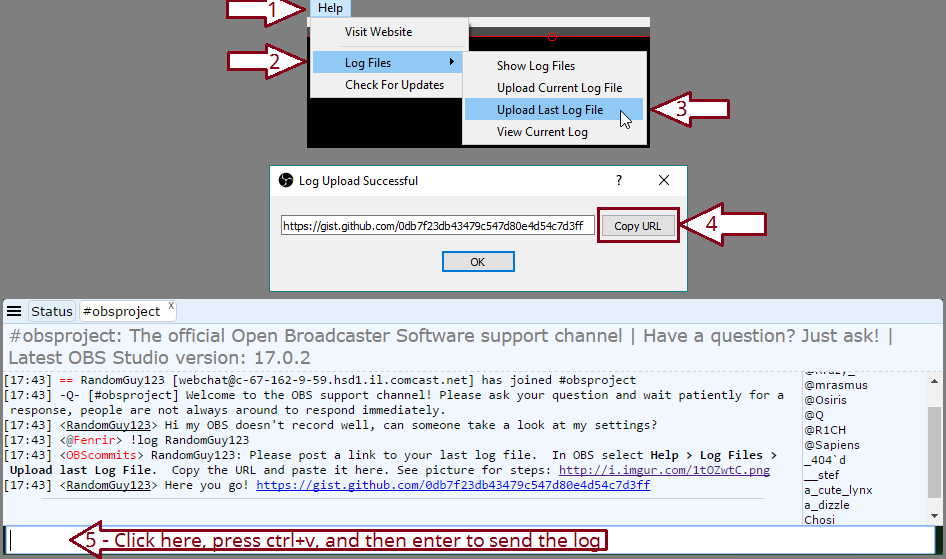
@noble fractal Please post a link to your last log file. In OBS select Help > Log Files > Upload last Log File. Copy the URL and paste it here. See this picture for steps: http://i.imgur.com/SMPvPb8.png
 rigid fractal
@pine hemlock any help?
tight harness
@rigid fractal See anything in here: https://streamelements.com/dashboard/activity/moderation ?
clever mango
also, did you receive an email from paypal confirming the transaction?
rigid fractal
yes, i saw the push notification from Paypal on my phone with $amount and name
but nothing on streamelements and no alert on stream
@tight harness no i dont see anything pending there
clever mango
This is a pretty rare scenario but I'm confident that what happened is that the paypal notifications API had issues at the time of the tip and so when they completed the payment on paypal's site the transaction data was not sent back to streamelements.
Luckily you can manually import the missed donation.
And add a tip
fill in the transaction details and ☑ Imported Tip at the bottom
tight harness
We're aware of one other instance of this happening today
clever mango
It's unfortunate but it is very rare (thousands of transactions through streamelements each day)
Sorry that it happened to you 
lament blade
I used to use anhkbot and all my viewers have all there hours on it.. is there a way i can move or manually add there hours using streamelements?
pine hemlock
I dont believe theres an import for hours currently.. just points (unless im unaware that we changed anything)
clever mango
I believe it's being worked on at the moment. I'll confirm
 tight harness
lament blade
@clever mango
lament blade
http://graphicarea.net/wp-content/uploads/2016/05/Tiga-Twitch-CSGO-Overlay-Download-Blue.png is what im trying to upload

but even if i do any other images it doesnt work
i think i found text in red
oh yeah
 crimson yew
Is it possible to reset the loyalty points?
lament blade
i did
clever mango
What does it say?
lament blade
Failed to load resource: the server responded with a status of 400 (Bad Request)
i can send u the full log
oh wait
theres a bunch of text in red
clever mango
what is the file size?
@crimson yew you can reset the current leaderboard entirely or individual entries. You can reset individual entries on the all-time leaderboard and the full board reset is being fixed.
@lament blade please compress the image that you're trying to upload into a .zip and attach it here
lament blade
compress?
clever mango
right click > Send to > Compressed zip folder
lament blade
got it
clever mango
drag the zip here please
lament blade
 spice sparrow
I'm a mod in someones channel that uses stream elements, why doesn't it show?
lament blade
but i dont think its the image itself it happens with anything i try to upload
@clever mango
clever mango
I'm not sure why it would give you that error but I'll upload it for you. Next steps are to try incognito mode, try another browser like firefox, and then try resetting your router
also, go ahead and relink your new twitch name with discord
lament blade
?
@spice sparrow  can i have the twitch name? do you mean mod or do you have dashboard access?
Mod / Super Mod is not the same as Dashboard access
clever mango
@lament blade discord settings > connections > twitch
it says your twitch is mariospeedy when it's now speedadict
lament blade
well i dont know why my computer is cracked about uploading things
spice sparrow
@lament blade my twitch is WitchFuWillow_ and my son has me as a mod on his twitch channel
@lament blade my sons twitch is coolcasualgamer
lament blade
Yep, you are a mod on his channel, you mean you can't see the sword? or... you are trying to have dashboard access on Stream Elements website? @spice sparrow
spice sparrow
@lament blade Up by my name on the dashbord where it says who you mod for it says I don't mod any channels
tight harness
Then you don't have Dashboard access yet, Dashboard access is done via a link which can be created here: https://streamelements.com/dashboard/account/channels
clever mango
your son creates the link and sends it to you to invite you to moderate his dashboard
spice sparrow
Ahhhhhh ok, thank you.
tight harness
No problem 😃
lament blade
@clever mango is there a specific width and height on the overlay you have to put in on obs?
clever mango
 lament blade
ah thank you
 vapid rapids
hey there streamelements guys
i need your help!
i am trying to find a way to marquee bit donation text. i would also like a way to make the money text a custom color and the rest of the text another color
so far
i have a marquee set up
and it looks good
but it does not have colored amounts
please ping me if this can be a thing 😦
tight harness
If it's not already a thing which I don't believe it is then you can suggest it here on our ideas board: https://strms.net/ideas @vapid rapids
 fast stone
Hey! On the tipping page for donators, it gives them an option to include a youtube link. What happens, will this video play on stream? If so, how do I remove this option?
tight harness
It's a way to allow tippers to priorities their song requests too
@fast stone All of your song request settings are here: https://streamelements.com/dashboard/songrequest/settings
You've got the option to turn off paid song promoting (prioritisation), song requests via tips and whether you want media share to cost anything
fast stone
dope, thanks
tight harness
No problem 😃
tight harness
With OBS you can record it as you stream, which is where there's a Start Streaming and a Start Recording button
pine hemlock
Twitch saves vods which you can download with 3rd party apps or you can record and stream at the same time
heavy pecan
Oh that’s cool
But isn’t it double the lag
If it’s on one monitor
@tight harness
Sorry for tagging u so much I just have no patience
tight harness
It doesn't matter which monitor you have it on
But yes, it'll require your PC to do some extra work, yes
 dense jackal
@heavy pecan one option if you want is i’m pretty sure you can download twitch vods or re- record them if necessary
heavy pecan
@tight harness
So can I just record and stream off my other monitor
I assume I still have no lag on my main one
tight harness
Yes
You may want to tag somebody else now though because it's 4 AM here now in the UK
dense jackal
Night guard activate
lament blade
What's up?
heavy pecan
How do I record my
Second monitor with my main one
So like second monitor has OBS and I want to record to my main one
lament blade
Create a display capture and select the monitor you want
lost fractal
do have it where it can veiw a window?
lament blade
Then create a game capture?
lament blade
Yep, just nothing too advanced
 calm mural
yo where can someone help me?
lament blade
I can help you 😄 @calm mural What is going on?
lament blade
Have you set up anything yet? OBS, anything on StreamElements?
calm mural
not at all only installing obs and stream elemeents thats it @lament blade
lament blade
There is a really good playlist that will go over StreamElements 😄 https://www.youtube.com/playlist?list=PLCDDKlFdScbEwdx5AntcQIS1InkFJwHtv
lament blade
No, you would need to use OBS or XSplit ><
lament blade
A Live Streaming and Recording Software like OBS
heavy pecan
@lament blade
Whenever I stream it keeps stuttering and buffering when I’m viewing it on a different device
calm mural
@lament blade WHAT DO U RECCOMEND OBS OR XSPLIT
lost fractal
i like obs when im stream from my pc just waiting a part i need for my xboxone so i keep using obs
dense jackal
@heavy pecan settings I use when streaming also a 4k bitrate
dense jackal
whats ur hardware and your settings dm me them
 worldly geyser
quick question
if you want to remove people from the leaderboard list all together
how do you do that?
Because i feel it's super cluttered with 0s
im also getting an error that i can reset all time leaderboard
heavy pecan
What r u talking about @worldly geyser
lament blade
Hey-o. Is this the right place to ask a quick question?
Er....a second one, I mean. That was already a quick question XD
lament blade
lol Okay...I'm just trying to upload a preview image for something in my loyalty store, but the upload button doesn't seem to be working...
dense jackal
Whatsup :d
😄
@lament blade try doing it in a incognito tab
I've only other seen one person with this issue and it was a cache or extension issue
You are using chrome correct?
lament blade
Edge, actually.
dense jackal
yeah you need chrome bc SE runs with chromium or any other browser that has chromium
heavy pecan
Lol Thankee
lament blade
XD
worldly geyser
@heavy pecan the leaderboard list on the webpage of the bot? for loyalty points
dense jackal
@worldly geyser myb you cannot currently remove names from the board
and resetting specifcally the all time leader is bugged atm
and something we are working on fixing
worldly geyser
Why can you not remove the names? there are 80000
in mine that would be nice to remove and have a clean start
dense jackal
they can be reset but not removed it shouldnt really affect anything though
but it is a good QOL change that I would like as well if you want you acan make a post abt it in our #💭︱feedback-and-ideas board
 serene helm
How do you delete or edit custom commands?
I made an error with a variable and now I can't figure out how to fix it
worldly geyser
it bugs my OCD like crazy to see 80000 names once i reset and the leaderboard numbers are high now after reset :/
calm mural
HEY I NEED SOME HELP WITH OVERLAYS
did not mewn to type in caps
plz join voice support someone
serene helm
Nevermind I figured it out
dense jackal
@calm mural whats the problem? can you screenshot or explain?
@worldly geyser I'm sorry that's how it is right now 😦
you can submit your idea here https://streamelements.helprace.com/s1-streamelements/ideas to bring more attention to it and we will see what we can do 😃
worldly geyser
done and posted!
dense jackal
Aweesome I will upvote 😄
 lyric totem
Hey SE awesome peoples, just a question, are there any plans to offer local installs of a overlay at some point?
 nocturne moth
btw any update about the song request bugs? It's becoming quite a chore for me.
heavy pecan
Guys
Need help again
Everytime I open an application on my other monitor, it just does it to my second one
@lament blade
Is this normal
dense jackal
not at the moment @lyric totem you can always suggest a good idea on our #💭︱feedback-and-ideas page like i posted above^ 😃
@nocturne moth what bugs are you referring to?
heavy pecan
@dense jackal can we call I will explain a problem
nocturne moth
song requests just stoppin at random, the que getting out of olrder, and the whole list just getting erased
dense jackal
i’m not sure about those bugs but i will make sure they are reported and not atm @heavy pecan
heavy pecan
K.
 waxen valve
my stream elements aler keeps comign up with "name" where the username should be and my parameter is set and has always been set to {name} in the alert box overlay manager ?
@dense jackal
@frosty lantern
 lapis vault
I was wondering... can a command of the SE bot, have another command in it?
i mean, actually execute it
 gentle imp
@waxen valve try {user} see if that works
@lapis vault yep, I have at least one setup like that 😄
lapis vault
and how can you do that?
i would love to have it for commercials and for a special think i'm developing
but it doesn't seem to work. can I pm you?
gentle imp
of course 😃
 quick mulch
What's going on with the alerts? it's playing more than one alert sound and not only the one chosen?
atomic hollow
do you have multiple broswers sources in OBS?
lunar furnace
ok now that im awake and tried to catch up with all the chatter LOL im wanting to 1. make my own overlays to put in Stream elements specificially animated overlays.... AND how do i finish getting set up to be on the sell out bot
lapis vault
Hey shadow, can you confirm me that the bot doesn't execute commands wrote by itself?
gentle imp
I couldn't help Enkk, if anyone else can check it plz 😃
atomic hollow
@lunar furnace hey, in the overlay manager you can create any overlay you like, automated or not
and to be a sellout you need to use our overly+bot+tipping
@lapis vault what do you mean? sorry I dont follow
quick mulch
Scene one has one browser source. Established for scene starting. Scene two has another established for in game. Scene 3 would be for brb etc and so forth and so one. I also have my sound muted on the website editor. So it's not that. I check my alert to change the sound volumn. It didn't do this before. I tried clearing the sound and redoing it. But still it plays the alert chosen and also one in the file directory on site not chosen for the alert. I even made sure my alerts where x'd out on streamlabs to double check as people have been having issues with that as well lately. But it still does it.
 limber yacht
I'm streaming fortnite
lapis vault
Can a command of the bot execute a command for the bot? for instance, something like !command that says !command2.
and then !command2 gets executed.
atomic hollow
@quick mulch you just have to make sure that all sources are set to shutdown when not active, thats where the sounds are coming from
lunar furnace
@atomic hollow my big question is like program to make said overlay images to upload LOL
i also use overlay in OBS+ have tipping page stuff set up in SE- missing whatever the bot might be afaik
gentle imp
@quick mulch on browser sources tick shutdown source when not visible, should fix it
atomic hollow
@lapis vault currently no, thats not an option
atomic hollow
@lunar furnace youre a sellout now 😃
quick mulch
Looks like that solved it so far. Thanks guys.
atomic hollow
❤
lunar furnace
i do digital graphic design @atomic hollow just trying to find a good program to make the stuff to upload as appearance overlays 😄
atomic hollow
oh, we work with most video formats, I recommend using WEBM, create the video file you like, save it as WEBM and upload it to our overlay manager
lunar furnace
kk
i just dont know what would be the best program for me to work with because there is so many and right now im having to work off of free programs that dont have a steep learning curve LOL
atomic hollow
sure, what is your question?
 full mirage
any admin from SE available?
 thorny radish
can someone please help me with the slots game i just need someone to send me a group of emotes the way they are in the module so i can copy and paste them mine is not working i have added emotes several times
gentle imp
@thorny radish I use this ones Kappa PogChamp BibleThump
they are case sensitive and don't forget to hit enter for them to be added
 neat plume
so i just started streaming from xbox, whats the best commands and extensions to be using???
 mossy plover
Hey guys. Just wondering if someone can help me with the loyalty leaderboards. I've reset the current lb so i can start it from scratch but when I try to reset the All time LB it came up with an error message. How do i get it to match my Current LB without manually changing every user's amount?
gentle imp
if u reset it while on all time tab it doesn't work?
thorny radish
@gentle imp the best info so far.. it was make sure you hit enter that no one else was saying
tight harness
@full mirage What do you need help with?
@mossy plover What was the error message?
mossy plover
@tight harness It says "Error: Could not reset leaderboard"
tight harness
On your xandslay account right?
mossy plover
yes that's the one
tight harness
The points don't seem that high, they definitely didn't reset?
mossy plover
Well i was hoping to get them to match the current leaderboard. is that possible?
tight harness
You can reset them but you can't sync them
gentle imp
@thorny radish did it work? 😃
mossy plover
@tight harness ok that's fine I was hoping I could sync them up cause I just started the points system in my last stream and i assume they should be matching at this point.
tight harness
People get bonuses in the current leaderboard that they don't get in the all-time leaderboard, all-time is just from watching whereas current is affected by a bunch of different loyalty settings, modules, etc @mossy plover
mossy plover
oh ok. I had a feeling maybe I wasn't understanding so that did make it a lot clearer. Thanks very much for that 👍
tight harness
No problem 😃
full mirage
@tight harness I want to delete my account in streamelements
tight harness
@full mirage Do you know how to Disconnect services from your Twitch account? Because that's all you need to do, you do it here: https://www.twitch.tv/settings/connections
 summer urchin
@dense jackal hi hi me again, just wantted to let you know, that i can upload the picture on my laptop. so it must have been something on the pc stopping it
tight harness
He's probably asleep right now 😄 but thanks for letting us know 👍
summer urchin
thanks for the help @tight harness
tight harness
thorny radish
@gentle imp yes it did thanks so much
dense jackal
@summer urchin we had someone else with this issue last night and using incognito mode worked, could have been a cache issue or extension issue
summer urchin
i dont normally use that particular pc for my work, but i will keep that in mind for future. hopefully this new laptop will hold out for a good while
 dry crest
the alerts sounds don't play on OBS
clever mango
@dry crest 👋🏽 Please post a link to your current log file. In OBS select Help > Log Files > Upload Current Log File. Copy the URL and paste it here. See this picture for steps (make sure you select current!): https://i.imgur.com/kbbbvTU.png
steps 1-4 in the picture and paste here 😃
dry crest
@clever mango https://gist.github.com/09452956fec0fcaae8d70bafc1213db8
Gist
OBS 20.1.0 (mac) log file uploaded at 2018-01-15, 09:17:00
clever mango
Ah I see.. Thanks. There is an issue with the newer versions of OBS for mac when it comes to playing mp3 files in a browser source. OBS reports that it will be fixed in their next version. For now, please use this version https://github.com/jp9000/obs-studio/releases/download/20.0.1/obs-mac-20.0.1-installer.pkg
summer urchin
hi me again, is there a way to widen the bar on the left, when your editing overlays?
summer urchin
thankies
clever mango
Sounds like a nice idea for the #💭︱feedback-and-ideas board https://strms.net/ideas A new editor will be worked on before long and this is something that could be considered
dry crest
@clever mango oh , thought it might be something to do with StreamElemts because it used to work before I switch over from nightbot . but thank you
 spark nest
can i get some help with obs here?
tight harness
Sure, what's up?
spark nest
ok
so
cuz i use some live YT channel for my music on stream
so i like playing with music and i can hear it nicely and perfet volume
but my stream is so
like
low volume
only music
i mean
i can bearly hear it
perfect*
 fast sky
what sw do you use @spark nest ?
spark nest
sw?
tight harness
software
fast sky
software
fast sky
you could use the sound system there to do changes, so you viewers can hear both you and the music perfectly. mostly its the music that should be in the background
tight harness
You have a volume bar on OBS where you can change the level of your audio
fast sky
both soundbars(the green bars) should have both the same level, at least thats what i have done
pine hemlock
Discord.gg/obsproject can help you better with obs questions
lapis vault
Hello guys. Do you have any idea if it possibile to automate the process of opening bets?
Like, at the start of a game.
I don't think it's possibile right now, with the power provided by SE.
clever mango
you can use the SE API to start contests but idk how it could be tied to a game starting
lapis vault
hum, let's say that I have a web server. I'm specifically talking about league of legends game, so there are apis that -for instance- can provide the status of a player (in game-not in game)
one could make an active service that every 30 seconds interrogates those league of legends api, checks if the status has muted from "not ingame" to "ingame" in those 30 seconds
and then use SE apis in order to open the bets?
do you think that's viable?
clever mango
I believe so. Have a look at https://dev.streamelements.com
and there is an #dev-chat channel where you can ask questions
lapis vault
that's lovely mate! than you so much
 quiet nymph
how do you reset a tip goal ?
 zinc wasp
So, I am using stream elements to be an overlay. And I'm checking other overlay and it's completely fine. But, the main overlay I use is only loading 1/4 of the whole overlay. And I check the website and OBS, and both show the same mistake. I don't want to redo all the overlay, I just want to know if it's possible for me to fix.
weary mist
check the sizes you have set on the site. Are you using a custom one (you made it) or a theme @zinc wasp
quiet nymph
right on
zinc wasp
A theme.
@weary mist
and this happened just recently. Yesterday it was working just fine.
weary mist
@zinc wasp Click the pencil next to the name of the overlay, and make sure the size is set to 1080p, then do the same in OBS
quiet nymph
can I set a timer on the fade in and out on a tip goal widget ?
zinc wasp
It didn't work.
quiet nymph
waht..
weary mist
@quiet nymph from what I know, it doesn't work that way
@zinc wasp let me look at it real fast. What is the name of the overlay you are using
quiet nymph
tip goal
zinc wasp
FORCE FIELD - IN GAME
quiet nymph
I see the fade in and out and those are set. it just never fades out/
pine hemlock
There's no animations for certain widgets.
pine hemlock
A goal is static, why would it fade out
quiet nymph
I do not want it in someone face all the time, just to fade in every 2 minutes for 20 sec.
pine hemlock
The animations are only really designed for stuff like the alert box where something is shown for a few seconds then uses an exit animation
I don't think what you're trying to accomplish is possible
If you think it's a feature that should be added, create an idea here: https://strms.net/ideas
quiet nymph
ok thank you sir
weary mist
as a note, Mr.Buff taken care of in DMs 😃
atomic hollow
taken care of 
 pure warren
As Moderator, I can add new Moderators, even Super Moderators. Not good.
weary mist
@pure warren Are you talking about through the dashboard, or through the chat command
pure warren
dashboard
weary mist
dashboard access is not on level with moderators. You have to make sure you don't give access to anyone you do not trust. Yes, they can add more, but the mod/supermod levels are only for chat
pure warren
Still dont see why Dashboard mods can add new mods, for Super Mod I understand
atomic hollow
hey @pure warren who are you modding for?
pure warren
randomrambo
atomic hollow
thanks
pure warren
Is BOT > Overview Event logs working? I can see how many commands, messages today were, but dont actually see anything in that log. This works correctly?
Here is picture:
https://i.imgur.com/vXWEupd.png
tight harness
Yes that's normal https://gyazo.com/35aea77bbb2e0570b6e969fdd81cd4da
 graceful yew
is it easy to create a !hype command with emotes as the response?
weary mist
yeah, for sure. You just put in the text for the emotes. Just remember, if you want the bot to use sub emotes, you do have to gift the bot a subscription, or be partnered with twitch and have them give the bot a sub
 lilac roost
Hi can any help mere here . I can t seem to get any of my chat commands to work. some show they are on and some off. But none are working. WHat am I doing wrong ?
tight harness
Is the bot in your channel?
weary mist
depends. What is your twitch name?
lilac roost
bearsheeze
lament blade
Can someone help me. I can't see the alerts like when someone start following me. I don't get it
weary mist
@lilac roost bot was muted, I unmuted it for you 😃
@lament blade are we talking visual alerts, or chat alerts?
lament blade
visual alerts
graceful yew
thanks @weary mist
weary mist
@lament blade ok. And you have these set up on your overlay? What is your twitch name
weary mist
thats fine, I am looking at your overlays right now. Are you looking at them in the overlay editor, or in OBS?
lament blade
nvm the alerts just showed
weary mist
👍
gentle imp
SE Magik ^_^
tight harness
There is a bit of a delay for follow alerts, especially when you're offline
 lunar furnace
i hate being broke..... trying to find an easy to use program that i can make my own overlay from scratch to put in SE thats animated with all sorts of fail for two days now
clever mango
ask in #creative-chat for suggestions maybe they can help 😃
lunar furnace
kk
lilac roost
MAybe i can get help again luls 😄 -- I cant get the bigno game to work now ^^ 😄
tight harness
What did you type to try and get it to work?
lilac roost
!bingo
tight harness
That'll be one, there's more to it than that
lament blade
Hey,
tight harness
You haven't specified the amount you want to reward or what kind of emotes you want people to guess
lament blade
If i try to make a overlay, the site doesnt open, it keeps white
just a white screen
lilac roost
ahh
tight harness
And you can set the maximum bingo amount in Modules > Bingo (Settings)
@lament blade What happens when you add it to your OBS as a browser source?
lament blade
Idk if anyone can help me here xd
tight harness
Of course we can 😃
lament blade
The problem is,
ill make a gifd
wait
i might just be retarded
im just retarded, sry xd
tight harness
You go to My overlays, Edit your overlay by clicking on the pencil
lament blade
got it already, dont worry!
tight harness
No problem 😄
lament blade
yeah sometimes im just actually stupoid
But, if i add like alerts, can i test alerts maybe>?
lilac roost
Legendary_studios do I type in that bttv thingy ? sry im noob at this
lament blade
@tight harness can i like test alerts?
tight harness
Yes absolutely, you use the event emulator, the blue circle in the bottom left with the bell icon 😃
@lilac roost Yes you do
Just one of those options
lunar furnace
https://nerdordie.com/resources/free-resources/free-scene-maker/
would yall say this is a good one to attempt to make overlays for SE in OBS usage

Nerd or Die
Free Scene Maker allows you to create your own scenes for Twitch, YouTube Gaming, and any streaming platform. Easy to set up and customize.
lilac roost
@tight harness So sorry for being dumb here. Im trying like this --> !bingo bttv/twitch 1000 .... Can u show me how .. Hta example is me trying to bingo with twitch emotes and 1000 coins 😄 haha
 simple garnet
How do I get added to the sellout portion since I use streamelements as my streaming bot?
simple garnet
Thanks terrabuck I appreciate it!
lunar furnace
from my read over it looks like its a bit more like full on actual overlay making as far as frame decor and such but i am so frustrated trying to find a wa and find something that i can make my own to put in SE overlay editor LOL @clever mango
lament blade
Hey guys, i'd like to thank stream elements for helping me to get better with streaming!
weary mist
❤ 👍
lament blade
and special thanks to @tight harness for helping me kinda with overlay!
simple garnet
Yeah @lunar furnace it’s just like the SE overlay. The overlay editor is a pain at first to use. If you keep messing with it you will find they have some great stuff though
I used a bunch of other things but I’ve been slowly adding more and more streamelements things to my stream and will eventually move completely to SE stuff once I get it all done
lament blade
@weary mist what resolution do i nhave to type in my obs for overlay?
weary mist
width is 1920, height is 1080
lament blade
Thanks!
lunar furnace
oh yea i have 2 super themes im just wanting to make something a bit more my own and do like color changes and such
trying to figure out how to do that mostly
lol i went from flat out streamlabs to SE in the past month cold turkey LOL
 indigo bone
Good morning everyone, how can I turn the music video off on the ground control for song req?
indigo bone
Roger that.
 alpine lagoon
So I am just getting strated with streaming and want to set up the streamelements stuff on my stream and cannot figure out how to do it so my followers can see them in my stream, heeelllppp!!
 clever mango
We have a youtube tutorial on the overlay manager system here: https://www.youtube.com/watch?v=X7XrDdRE7Fk&index=3&list=PLCDDKlFdScbEwdx5AntcQIS1InkFJwHtv I recommend watching this for lots of great info and then if you have further questions we're here for you @alpine lagoon
@young wind Nope, just change the dimensions of the browser to the dimensions of the overlay - 1920x1080
alpine lagoon
Awesome, thanks so much!!
 young wind
I did that
young wind
 weary mist
@young wind scroll down, click refresh cache
clever mango
you changed the size of the overlay to 1280x720 on the site
so you'll want to match it in OBS
weary mist
ah, that does it too
lilac roost
@weary mist my man can u tell me the exact phrase for bingo like !bingo bttv/twitch 1000 like this or ?
young wind
I don't understand
weary mist
I just did !bingo twitch 100
clever mango
weary mist
and it started the bingo with 197 twitch emotes, lol
clever mango
The default is 1080p
young wind
Oh Could you fix it?
clever mango
fixed
weary mist
@lilac roost what is your twitch name, I will check out your account real fast
lilac roost
bearsheeze 😄 hahaha
young wind
thanks m8
clever mango
@young wind but you'll need to go into the editor and adjust everything for 1080p now
young wind
Great!!!!
weary mist
@lilac roost  you had the module disabled. Try it now
clever mango
I changed the background to 1080
refresh if you're in the editor now
I'll let you handle the rest 😃
young wind
Ok
lilac roost
ty so much it didnt show me as disabled hmm ty man
weary mist
lmao
I don't know how I managed to win that one
it might have been a weird cache issue. Oh well
 cedar atlas
How does the whole sell out thing work..? ;v;
dense jackal
- Use SE overlays 2. SE Bot 3. Have our tipping page linked in your bio 4. ???? 5. profit
cedar atlas
But it'll pop up on the discord automatically? o:
dense jackal
we will add you manually once u got all dos thingies
cedar atlas
Ah okay c:
lament blade
In editor mode how do I copy a video that I deleted by mistake?
lunar furnace
i love this design just trying to figure out how to change color of it or build a simular one from scratch in a different color
lament blade
Nevermind, did it!
 toxic basin
Can I CTRL + Z in the Overlay editor?
dense jackal
Unfortunately no way to change the color @lunar furnace 😦
Not currently @toxic basin if you make a mistake refresh the page, try to save often
We are working on overhauling our entire overlay editor I believe this is a change we want to make




 lunar furnace
try to save often but beware the mess if you save and realize after the save the mistake you made that you gonna have to fix LOL
@dense jackal thats a bummer but i guess me hunting for a way to make pretty overlay myself still continues LOL
dense jackal
We have a heck of a lot of options I hope there's one you can find 😃 @lunar furnace
lunar furnace
oh im using that one and the tanks one..... just wanting to make my own for some variety LOL
plus i work from home doing digital graphic design LOL
self taught mind you
dense jackal
I am self taught meme lord
lunar furnace
lol
dense jackal
and bad speller