#helpdesk-twitch
1 messages · Page 179 of 1
 tight harness
 young wind
OBS settings
 silk patrol
@young wind OBS master Class https://www.youtube.com/playlist?list=PLzo7l8HTJNK-IKzM_zDicTd2u20Ab2pAl

YouTube
✰ Welcome to the MOST in-depth OBS tutorial course EVER made! ✰ I've spent most of 2017 working on this on and off and I'm super proud to release it to you. ...
young wind
These do not cover me
 lament blade
What do you need help with? o:
tight harness
Any settings in particular or just all of them?
lament blade
That video covers OBS really well
 karmic bronze
one other question related to the chat alert bot module--
if someone has me on autohost and it switches to host me, it seems like I'm not getting a chat alert notification for it nor an alertbox notification
is that normal or am I also missing a setting here?
 naive finch
anyone help with a custom command to donate points to another viewer please?
tight harness
@naive finch There's already a default command for this
lament blade
!give
tight harness
!give <name> <points>
naive finch
cheers guys
silk patrol
@young wind Try to keep non-SE stuff in #welcome to avoid flooding the support channel. OBS settings may vary based on your PC specs/upload speed/game you capture
tight harness
No problem
lament blade
@karmic bronze If it's 0 viewers it won't show up, but if it's more it will
silk patrol
@young wind Try to keep non-SE stuff in #welcome to avoid flooding the support channel. OBS settings may vary based on your PC specs/upload speed/game you capture
young wind
All of them
tight harness
Then that video playlist MrAlucardDante sent you does cover you
lament blade
Watch the video @silk patrol sent 😄
karmic bronze
ty alice
lament blade
c:
lament blade
I'm a super mod for a popular streamer.
Is there a way I can enable the gifting of points? for each viewer to give points to each other?
As a supermod. I am not the streamer.
 clever mango
It's a default command called !give
if you have dashboard access you can enable it
otherwise someone else will need to enable it
lament blade
Dashboard access --- Is that by default, available to supermods?
or is that something completely different
clever mango
It's different. Supermod has to do with command permissions
 simple crest
can i have media share without the overlay thing in stream elements? just with obs, already have overlay's
clever mango
Dashboard access is given by the streamer to trusted people which allows them to log into streamelements as the streamer at 3 different options of access
simple crest
dont wanna do them again
tight harness
Dashboard access links are made here https://streamelements.com/dashboard/account/channels
clever mango
media share requires the media share widget in a streamelements overlay
tight harness
A different part of the website 😄
simple crest
so i need to make all my overlays in stream elements again and put that in?
clever mango
have you created any on the site?
simple crest
no, made it myself
clever mango
Ok, just create a blank overlay and place the media share widget on it where you want it to appear in OBS. Then add the overlay to OBS as a browser source
dimensions are 1920x1080 when you add to OBS
 simple crest
yea 
 weary mist
you can also add any images you have created, just to store them on the cloud. Then, if you ever travel anywhere, you could set up using SE, and be ready to go. Some people like to do it all at once, some like to migrate slowly. Which ever works for you, we can help
simple crest
nice!
lament blade
I need help. I have viewers that are requesting songs via !sr and I have link protection turned off yet they are still getting auto timeout for 60 seconds
tight harness
@lament blade That'll be a setting in your twitch or another bot then if it's turned off
lament blade
Okay ty.
lament blade
I don't have that selected
tight harness
Does anything put a message in the chat when the people get timed out? 🤔
If StreamElements times people out you get a bit of text in the chat saying that was what timed them out
lament blade
1:53 Ban Timeout ninjagod555: Wait it's back.
1:53 Ban Timeout ninjagod555: YES
1:53 Ban Timeout ninjagod555: !sr https://www.youtube.com/watch?v=MDQxs__0tg0
streamelements timed out ninjagod555 for 60 seconds.

Final Fantasy X-2 Real Emotion Videocutcene from Final Fantasy X-2 HD Remake in 1080p. Game Movies: http://www.youtube.com/playlist?list=PLil5ubW9RRy8oemeDoj...
tight harness
Then it has to be enabled in Spam Filters, is it saving properly when you untick it?
tight harness
Somebody just requested a song and didn't get timed out 
lament blade
It seems to only be happening to the user NinjaGod555. They are the only one getting timed out

lament blade
Poor guy xD
tight harness
Passed it on 😄
lament blade
ty you so much
tight harness
No problem 😃
lament blade
Also if someone requests a song and it can't be played should it auto skip. Or is that a suggestion?
 stuck hamlet
Hey @lament blade I set "reasons" for the bans, i just want to double check it's truly because of the link (which i dont think it is). Could you unmod him and ask him to try again and tell me what it says as a reason?
lament blade
No reason has shown any of the times it has timed out it said "streamelements timed out ninjagod555 for 60 seconds
 lament blade
oooo
stuck hamlet
or strangely, caps. but we'll know when he gets banned again
lament blade
lol yay
stuck hamlet
I'll fix your symbols spam, is that cool? 😃
stuck hamlet
Okay, so it shouldn't distrub anyone anymore 😃 Let us know if anything else comes along!
clever mango
 onslaught
lament blade
I will, thank you so much
stuck hamlet
Reasons are there now, so you'll know 😃
lament blade
Love that. thanks so much
@stuck hamlet I have timer commands set up and they haven't been going off yesterday and today. Did I mess up a setting for that as well?
stuck hamlet
Let me have a look.
lament blade
ty
stuck hamlet
but Also if someone requests a song and it can't be played should it auto skip. Or is that a suggestion?
This would be hard to do, as Youtube doesn't let us know that it isnt available, but will pass it along, hopefully could be worked on 😃
lament blade
Awesome. Thanks.
stuck hamlet
I see that lines are a bit high for the level of activity i see in your stream (no offense, pls no hate me). I could longer the amount of lines as well for you.
It only checks the number of lines, of the last 5 minutes, so 30 is kinda high. imo
lament blade
No offense taken. I just didn't want the timers to go off like every two lines
lament blade
Yeah that will work.
stuck hamlet
Awesome, will lower them :))
clever mango
So if your timer is 30 minutes and 30 lines, what this means is the timer will post if between minute 25 and minute 30 there are 30 lines posted. 25 minutes after it is posted it will start checking the lines again and post again if 30 lines are met over the next 5 minutes.
 silver sky
how to make for myself to alert at sellout that im streaming
stuck hamlet
so i lowered them to 20 lines, if they are still not popping up, we can try 15 😃 @lament blade
let me know!
clever mango
@silver sky
f you are streaming with StreamElements
- chatbot (modded)
- tipping service
- overlays (theme or custom)
you can request to have your live stream automatically announced in the #291219887274328064 channel.
lament blade
I will thanks
silver sky
@clever mango I have it all
tight harness
@silver sky I don't see a tipping panel below your stream 😄
clever mango
@silver sky please reconnect your twitch and discord so your twitch shows in your discord profile
 little fractal
question guys...trying to add new notification gifs in my overlays but I am having some problems...even though it is loaded in it keeps showing the defaults
lament blade
Did you check your variation settings?
tight harness
Sounds like you only changed the main one but not the variations in the Variation Settings, make sure to edit all of the variations to how you want them 😃
little fractal
Im not 100 percent on what you are saying. I got one of them to work but not the rest
little fractal
so I need to add it for all the variations...why cant it be global
tight harness
If you don't have any variations it is global, but by default variations are added and unless you change them they are at their default state
little fractal
so i need to delete the variations
tight harness
If you don't want variations, yes
little fractal
by gerorge i think i got it
lament blade
Or you can just customize it
tight harness

little fractal
it all makes since now hahahah thanks guys
tight harness
No problem 😄
lament blade

clever mango
Just know that the resubs and gifted subs will now look just like a new subscription
little fractal
yeah i will work on that variance when i find some new animations
lament blade
Cool 😄
tight harness

little fractal
let me get to the point where i have a good bit of subs come back and i may change it.
Thanks again you two for all your help. Thats why i use SE
lament blade
Have a great day ❤
 long python
Hey there I'm just wondering if any of the themes on the website are available to use without the website itself. I have YouTube that I use to stream and it doesn't seem very compatible with SE
clever mango
If you stream to youtube with OBS or Xsplit you can use the themes
the widgets won't be compatible but the graphics and text will show
long python
I use OBS yes sir, but when trying to login to SE, It only allows for Twitch
clever mango
and youtube support is development now
clever mango
do you have a twitch account
long python
Yes sir
clever mango
You can login with that and when youtube support is added you'll just link that to the same account
long python
Oh okay and keep my edited themes?
clever mango
yep
tight harness
Soon ™ 
long python
Oh thats neat, well thank you so much for the info! I guess I'll try my best to get my head around editing the themes and such
lament blade
Stay tuned c:
 lament blade
If you need any help with the overlay manager just ask away 😄
tight harness
We have some tutorials to do with the overlay manager on our youtube too if that'd help
clever mango
https://youtube.com/streamelements/videos and we're always here to answer questions
 gaunt light
I want a Girl from my community to come live with me , anyone have an idea how can i make it happen she has a webcam in her laptop
is there a way for me to add her to my obs ?
anyone?
tight harness
Nice #welcome question in #helpdesk-twitch Denatherion 
 robust narwhal
I have a good friend who is a Partner host me the last few nights with a couple hundred viewers. Each time, my host alerts do not trigger (not an auto-host). It seems to sometimes fix its self when I manually go into my overlay editor and initiate a host manually.
gaunt light
I require support 😄
tight harness
😄
clever mango
@robust narwhal please see the latest pinned message in this channel
robust narwhal
@clever mango Got it. TY for that.
tight harness
@gaunt light Video call and capture the window?
clever mango
So just have one of those three open during stream and you'll fine 😃
weary mist
@gaunt light I did skype, and captured it in OBS when I did the StreamElements Live Academy in June. Worked like a charm
You could probbaly use Discord too if you wanted. Or google hangouts. Tons of options
lament blade
Yep and just crop the sides
gaunt light
I try to do it
with discor
I went Windows Capture
while i see her in Webcam . i just geet a blank black screen
tight harness
🤔
Also, bear in mind that if you change the windows like look at a Discord server chat it'll capture that instead of the video call
weary mist
I think discord is like ground control, an iframe of the website
so its special
You might have to do desktop capture to grab it
clever mango
you can disable hardware acceleration in discord which should then allow for window capture
weary mist
😮
gaunt light
Where is this fiture
 gaunt light
got that
I can't have it done from discord so I am switching to SKype
Isn't there any function in OBS / Twitch for that ? Co streaming simultainsly ?
tight harness
You can do multistreams but not just the webcam
 slim cairn
Skype 
tight harness

gaunt light
is there accleration thingy aswell @clever mango
lament blade
Do you have two monitors ? Or 3 🤔 last case scenario just put her full screen in one monitor and display capture
gaunt light
Can't do that since i am using the other screen for Stream chat monitoring
lament blade

gaunt light
Shows Black Screen when i go Windows mode
weary mist
Try desktop
clever mango
discord does?
gaunt light
Yep
weary mist
Then add a filter to crop it down
gaunt light
but discord i cannot go into my room and talk with my friends while streaming
What do you mean crop it ?
Will do this on discord i guess
clever mango
gaunt light
And liose the option
weary mist
Once you add the source, right click, and go to filters
Then click the plus sign, and select crop
Adjust settings to what you like, and you are good to go
 barren otter
Hey friends, Sean/Ls tried helping me but we came to a dead end. So anyone trying to manually enter a CSV file into Stream Elements do you have suggestions or a template? I am running into every problem possible trying to import my current file. TY in advanced.
barren otter
I figured 😄
clever mango
where did you import?
tight harness
Using Import from CSV on the imports page
barren otter
I shot right for hard mode.
Do explain I am not great with Excel or this kind of conversions
weary mist
yeah, that link is name,points
tight harness
Ahh, what format does the Import from CSV use? 🤔
Didn't realise it was different from the filter.dj one
clever mango
I'll find it, sec
username,twitch id,current,alltime
It's the revlo export format
 velvet mica
how does one use a webcam with streamelements?
lament blade
You set up the webcam on OBS, but on StreamElements you can use great overlays to put around the webcam
velvet mica
alright thanks lol
lament blade
😄
long python
I set up the themes to my liking which took some time, but as Terra said earlier there is no YouTube support for notifications. Does anyone know a way I can get around this? If not, when is YouTube support likely to be here?
tight harness
It's in active development, I don't believe there's any public ETA for it yet because it's a huge project
long python
Understandable 😦
barren otter
@clever mango I f**king love you
tight harness
It shouldn't be long but of course with a project this size delays can happen
barren otter
Completed TY again LS
tight harness
😃
barren otter
That link was beyond helpful BTW
Suggestion: Add it to the "Import to CSV" selection, something of an affiliated site blah blah
tight harness
I knew about the link but I mistakenly thought the link and Import from CSV were the same thing, apparently not 😄
barren otter
❤
tight harness
❤
barren otter
Still perhaps including that link in the import area would save some tickets, idk
tight harness
I imagine so as well
 sweet crescent
hi, I have had a couple of subscribers using twitch prime that didnt show in the activity, is there something I need to set?
 vestal trench
I haven’t got any subs yet  I’ve been affiliated for 2 weeks now
lament blade
Twitch prime subscribers can choose not to share their subscription , did something apear in the chat?
vestal trench
Alice is there a discord bot
sweet crescent
no nothing appeared in the chat @lament blade is that why?
tight harness
No, not Discord bot yet, it's on the ideas board
vestal trench
Ok nice
weary mist
@sweet crescent yes
tight harness
sweet crescent
ahh ok, thanks
lament blade
Yes @sweet crescent , if they choose not to share it, then it won't show up on stream elements ><
weary mist
@sweet crescent prime subs normally have to refresh after submitting their sub, then share it so that the API sends the information
 fickle grotto
so i was livestreaming csgo on normal obs with a 4:3 scale and it was fine, but now i have obs studio but if i do a display capture now, it shows black bars on the stream
tight harness
OBS Classic hasn't been updated in over a year so Studio is still the way to go
fickle grotto
i know, im using studio now but its showing black bars
im doing a display capture but my game scale is in 4:3
tight harness
Because you're using 4:3 and that's an ususual aspect ratio
fickle grotto
but on my screen i dont see black bars but on the stream i do
lament blade
In the edit are were you can import those icons whats the point of that
fickle grotto
but then why does it work on regulair obs?
and im doing a display capture so it shouldnt have black bars
tight harness
fickle grotto
i dont get it
tight harness
That's an OBS Admin posting on their forums stating that the Twitch player is designed for 16:9
So your aspect ratio is the problem
fickle grotto
my stream is 16:9
tight harness
So where did 4:3 come from? 😄
fickle grotto
but my game not, and that is fullscreen and im doing a display capture
my game is 4:3 and my stream is 16:9
and im fullscreen display capturing
tight harness
But your monitor is a 4:3 ratio monitor?
fickle grotto
no
my screen is 16:9
im doing that so my game is streched out
pro players also do that
tight harness
Right
fickle grotto
i know its stupid that im asking this in the StreamElements discord but i was just curious if you guys knew this
tight harness
The only other reason you should get them is if your capture source is not 16:9, which your game isn't
fickle grotto
how do i change that?
tight harness
Change your game from 4:3 to 16:9
tight harness
OBS Admins has said on their forums that that is the problem
If you want to fix it, there's your answer 😄
tight harness
No problem ❤
fickle grotto
😚
 foggy nebula
How would I go about resting my tip goal in my overlays. I set the new date for the new goal but it still shows the amount gained from the last goal
lament blade
On the top left of the overlay manager, click on "data"
And then "goals"
Tip goal progress is what you need to change 😄
foggy nebula
Awesome. thanks!
lament blade
np ❤
 coral talon
Are there any overlays without cam? or any you could suggest that dont use Camera, i dont have one (yet)
tight harness
You can hide the camera border in the overlays @coral talon
That's what the eye symbol next to each layer in the Layers list on the left is for 😃
foggy nebula
I figured it out. Thanks everyone. Now time to go liveeeeee
foggy nebula
@lament blade helped figure it out for me
tight harness
I was talking to Soprano C 😄
lament blade
@foggy nebula ❤
coral talon
@tight harness i figured it out
it was a little tricky with some things, because i am currently only developing my viewer base
and then adding like more social media
and the camera removal was easy, but yet a little annoying, because everything kept snapping together
and so on
but in the end it worked out
lament blade
Great :D
tight harness
😃
coral talon
Must say, enjoying playing around with the editor tool
saves me the extra 12 euros from photoshop
tight harness
Glad you're enjoying it 😄
coral talon
Cheers!
 indigo bone
so my commands arent doing the emote in the channel any idea? and how can i get my own emote to work with the channel commands ?
tight harness
Is StreamElements subbed in your channel? If not, it can't do your sub emotes
tight harness
Partner can get it for free by asking Twitch, Affiliates have to use sub gifting
indigo bone
what about regular emote ?
 ebon forum
regular emotes work
sub emotes work only if the bot is subbed to the channel where the emotes come from
indigo bone
ScaredyCat used to work and not anymore
tight harness
Regular emotes work because it's just using the emotes the same as anyone else in your chat
ScaredyCat just worked fine for me 🤔
indigo bone
weird think the spacing is messed up ill look into it
tight harness
Alright 😃
coral talon
im experiancing this very odd thing, every time i close my OBS it just crashes
which is strange to me
has anyone else had that?
tight harness
Had it occasionally, yes
coral talon
Nothing to worry about?
ebon forum
not in the last year. happened before.
if it does not mess up your recordings and/or logfiles, nothing to worry about
tight harness
I mean, it could be worse, it could crash when you're using it and not just shutting it down
coral talon
that would be a lot worse fair point
ebon forum
check your OBS logfiles, if they are OK you're good
tight harness
Isn't working right?
tight harness
Ahh right 😃
indigo bone
hm weird ScaredyCat doesnt work with me, is there like a max i can use
tight harness
Nope
indigo bone
Anything else u can think of? Idk why it's not working
 eager forum
hey anyone help? how do i edit how many points someone gets for example like 1 point per minute etc
 elder schooner
How do i make stream elements say when someone follows?
tight harness
@eager forum You just change it on the Loyalty Settings page where it says Amount https://streamelements.com/dashboard/loyalty
And below it is says "How many points should viewers get for watching?"
But it's per 10 minutes, not per minute
So set it to 10 for 1 per minute, but the payout is every 10 minutes
@elder schooner In the chat or on the overlay?
elder schooner
Chat
tight harness
Modules > Chat Alerts
 woven yew
is there a way to update the follower/tip goal outside the overlay so it updates on all of your scenes? or is going into each overlay itself the only way to do it?
tight harness
Activity Feed > Widget Data > Goals
coral talon
Could it be possible that my browser source (theme) can affect my frame rate?
woven yew
awesome! i knew i saw it before and couldnt fine it. thank you!
tight harness
No problem 😃
woven yew
find*
tight harness
@coral talon It's possible that the themes will make your computer struggle a little, make sure to tick 'shutdown source when not visible' for each of the overlay browser sources you add
indigo bone
@tight harness very strange indeeed
tight harness
Yep, that'd do it
@indigo bone Let me know if you notice any other emotes doing the same thing 🤔
indigo bone
It used to work months ago. I can't wrap my head around it
coral talon
i am having a weird situation here
I have been told my stream lags, even though my bit rate stays (somewhat) constant
on my laptop it seems to stream fine
 stoic kindle
How do I add an overlay to my stream using the site?
tight harness
@stoic kindle Do you not have an overlay yet? Do you want to create one from scratch or use a premade one?
stoic kindle
A premade one
tight harness
This is where you find them: https://streamelements.com/dashboard/themes 😃
stoic kindle
Thank you
coral talon
no no
i am streaming from my main pc
but since i dont have a second monitor
i use my macbook for the dashboard
 limber summit
Is there any way I can change ALL my alerts on all scenes at once?
simple crest
hey any1 getting ads in the media share thing?
clever mango
There is not but you could set up one alertbox and then duplicate it to the other overlays
@limber summit
@simple crest yes, there's no way to avoid them
limber summit
@clever mango yeh. Just a bit of a pain, because then I have to delete them from all the scenes, then dupe them, just want an easy way of changing them all :(
simple crest
oh ok :/
clever mango
How many different overlays do you have? Deleting the alertbox from each one shouldn't take but a minute or so
 tepid copper
Guys I need Help my monitors 1440p and Ithink thats affecting my ability to use premade overlayss and i dont knmow how to fix it
coral talon
if you go on your overlays, press the small pen there
you can chose your resolution
which you stream in
tepid copper
Where at?
coral talon
like when you eddit it
press the one that is blue on my screenshot
and there it should be allow you to choose
lament blade
You should make the overlays in 1080p on the website, and also on OBS, but then you can resize it on OBS to fit your screen, you can press Ctrl + F in OBS to fit the overlay to your screen. it would stretch it a bit @tepid copper
tepid copper
@lament blade Just when OBS is open Period or where at well the overlay is up?
tight harness
Make it 1080p on both OBS and the site
Then when it's in OBS at 1080p use Ctrl + F
lament blade
^ 😄
tepid copper
I feel Like such a moron got it. Thank you guys
lament blade
No problem 😄
tight harness
No problem 😃
 astral epoch
whats the variable to select a string with spaces after a command?
clever mango
I think you're looking for $(1:)
astral epoch
hmm I tried that but get an error with it but let me recheck my spelling
yeah getting an error with that - this is going out to a url for quotes and was working in nightbot using $querystring
clever mango
what is the response you're looking for? an example will help
astral epoch
it passes a string (the quote) to the website, and the website responds with the quote being added - would I need queryescape?
clever mango
is it through an api? Is the string at the end of a URL?
clever mango
ok just a sec
silk patrol
@astral epoch try this instead of urlfetch ${queryescape}
astral epoch
ok so replace urlfetch with query escape?
clever mango
It's ${customapi.https://URLGOESHERE$(queryescape $(1:))}
silk patrol
yup, you have access to queryescape or pathescape https://i.imgur.com/hvwCbtZ.png
 astral epoch
cool will try that
is there a command to show the quotes added to streamelements? that way I could bring the external quotes into it
clever mango
There is but the quote system is still quite new and will be upgraded. Right now you add quotes with !quote add <text> and the bot gives you a # for the quote. You can then show that quote with !quote <#>
 crude turtle
What do you have to do to be able to have your stream in the sellout chat?
lament blade
These are the requirements:
- chatbot (modded)
- tipping service
- overlays (theme or custom)
clever mango
There's no dashboard page at this time for quotes at this time so most people create a google doc/sheet to keep track of them
sorry Sean
tight harness
 it's okay
clever mango
xD
astral epoch
ok i'll do that then and make a backup 😃 thanx for your help
crude turtle
So as long as i haver that all setup it will post here? or do i have to do something to get it to start posting
lament blade
You have to let us know when all of that is set up 😄
crude turtle
Well its all setup!
tight harness
lament blade
You should connect your Discord with your Twitch, the account connected right now must be your old one
crude turtle
Of course 🤦
Alright have added a panel to the stream. Should link to the right place
lament blade
😄
crude turtle
Thank you!
lament blade
Have a nice day ❤
tight harness
No problem 😃
crude turtle
You too! 🤗
 rancid jetty
If i use the song requests on my stream will i be forced to listen to the music too or can it play on stream without me listening to it myself?
tight harness
@rancid jetty You can do it if you learn how to use a 3rd party virtual audio mixer
lament blade
😄
rancid jetty
alright thank you
tight harness
No problem
 sterile charm
Hello! I recently joined this Discord group and signed in for streamelements, Anything for beginners Who wants to start a good stream channel??
tight harness
@sterile charm Have you checked out our youtube videos yet? https://www.youtube.com/streamelements/videos 😃
lament blade
^ You should watch the video and if you like specific features and need help setting it up, just ask away o:
sterile charm
Oh! They have tutorials!! Neat! Thanks for the link btw! But I’m asking more for, tips and what to think about on what to start on a stream and how to get people to watch you!
lament blade
Personality makes a huge part in getting viewers in my opinion 😄
sterile charm
That’s true, you gotta be nice :3
tight harness
Interacting with your audience 😃
tight harness
I know, but if you want to grow you need to interact with the first people who come in and show them that you want to interact with them, keep them interested 😃
sterile charm
The bad part is
I can’t see who is watching me XD cause I only have 1 moniter not 2
lament blade
Test your stream before you go live to make sure your music isn't too loud compared to microphone... Things like that c: and just be yourself and have fun!
 pine hemlock
Use your phone for chat if you have to
lament blade
Yes 😄 you can even mod your chat using your phone(:
sterile charm
Does everything exist in the YouTube channel?
 crude perch
i setup sr but it wont play music on stream pls help 😦
tight harness
@crude perch Do you have the song request page open? Or Ground Control (our desktop app)?
tight harness
No problem
lament blade
Yeah 😄 It covers the features, but it is also it is going to be remade @sterile charm
sterile charm
Oh okay! If anyone knows league of legends, I kinda want that theme on my stream.. :3
tight harness
We have a League of Legends super theme 😃
If you go here: https://streamelements.com/dashboard/themes and then type League of Legends
sterile charm
You do?! Okay I love this I’m already Inlove
tight harness
In the search bar in the top right 😃
lament blade
😄
sterile charm
I’m so happy I found this! It’s gonna be so fun now! I have to thank you 2 for helping me and giving me the welcome experience
You don’t know how happy I am now!
tight harness
You're very welcome and i'm very glad that you're happy and feel welcome!
sterile charm
❤
lament blade
Good luck on streaming! 😄 I hope you enjoy it c: @sterile charm
lament blade
❤ i'm sure they will
sterile charm
You all are so kind.. it’s rare finding people like this
I admire this kindness! :3
I will ask specific questions later on when I’m testing streamelements cause there is a lot I have to ask, but right now I’m at the phone so can’t do anything
lament blade
I admire you ❤ Thank you so much, I will be more than happy to help you 😄
sterile charm
Haha no need to admire! I’m just a fellow human new to streaming but I will gladly say thank you ❤️ it would be really grateful of you helping me out,
pine hemlock
 👌
👌
clever mango
cuda  👉
👉
lament blade
👀
 naive beacon
the chat alert from one someone hosts a stream is not working and i noticed that the last host was tracked about 3 months ago. how can i fix this?
tight harness
@naive beacon check the top pinned message in this channel
naive beacon
i dont see this code im an editor for a streamer could that be why?
tight harness
Code?
Oh, no the streamer just needs the activity feed open somewhere
Whether it's on the site or using our desktop app Ground control
By code it means internal coding
naive beacon
i get it now thanks
tight harness
No problem
clever mango
Anyone with access to those three pages can have it open. A dashboard mod can have it open for the streamer if they're not able to
naive beacon
sweet i was just going to ask that question
clever mango
and just one of the three needs to be open
 winged sundial
Hey guys question. How can i make it that only my current emotes show up in the Kappagen
its still shows all my old emotes even though there are not in there
clever mango
Try typing !emotes update in chat and then logging out and back in
winged sundial
The old one are still there
clever mango
what kind of emotes are these? When do they show? Chat emotes or event emotesplosions?
winged sundial
both
if i put in kappagen it shows my old ones mixed with my new ones. But the old ones are not even shown in option they are not ther
but they still appear
clever mango
So you're using the !kappagen command?
winged sundial
Yes if i put it in, in my chat is also shows my old one that are nowhere listed anymore and they still come up for an even such as if someone follows
clever mango
The old emotes that are showing up are they twitch sub emotes or bttv? It seems that they are cached in the widget
winged sundial
Th old ones where twitch sub emotes but been removed 16 days ago. They also not on bbtv
 dusty parrot
How would I use the user last message variable to make a mod command to view the last message of a user? Thanks, plz @ me and examples are appreciated 🙂
clever mango
@winged sundial I'm 90% sure that creating a new kappagen widget will fix this but I'm also looking to see if there is way to fix the current widget. I will tag you when I hear back from the devs
winged sundial
ok thank you so much 😃
clever mango
Command: lastmessage
Response: ${user.lastmessage}
Mod: !lastmessage <username>
Bot: Kappa 123 Kappa 123 Kappa 123 Kappa 123 Kappa 123 Kappa 123 Kappa 123 Kappa 123
@dusty parrot
In the advanced options for the custom command change the command to moderator
 dense jackal
are you using obs studio or classic?
 wispy sage
im not sure which obs im using, just downloaded it from the website
says OBS 20.1.3
oh obs studio
dense jackal
https://i.imgur.com/a1rORns.png not showing up for you at all ?
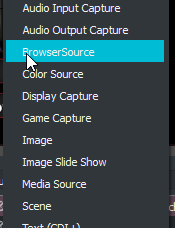 wispy sage
nope
dense jackal

wispy sage
after audio output capture it jumps to color source
dense jackal
check with obs support https://obsproject.com/forum/ They would know more about this issue , otherwise I would suggest updating your obs or uninstalling and reinstalling

Open Broadcaster Software
Open Broadcaster Software is free and open source software for video recording and live streaming.
wispy sage
which one do you have, studio or classic?
wispy sage
i see, thanks 😄 hopefully i can find some solution
dense jackal
That is really interesting never seen that before hope they can help resolve it for you!
 honest charm
do i have to add a audio capture source in obs for it to pick up my mic?
havnt used obs in years so just remembering everything.
dense jackal
@honest charm go to settings then audio https://i.imgur.com/rTpQ1uj.png set the mic you want and the desktop audio device here
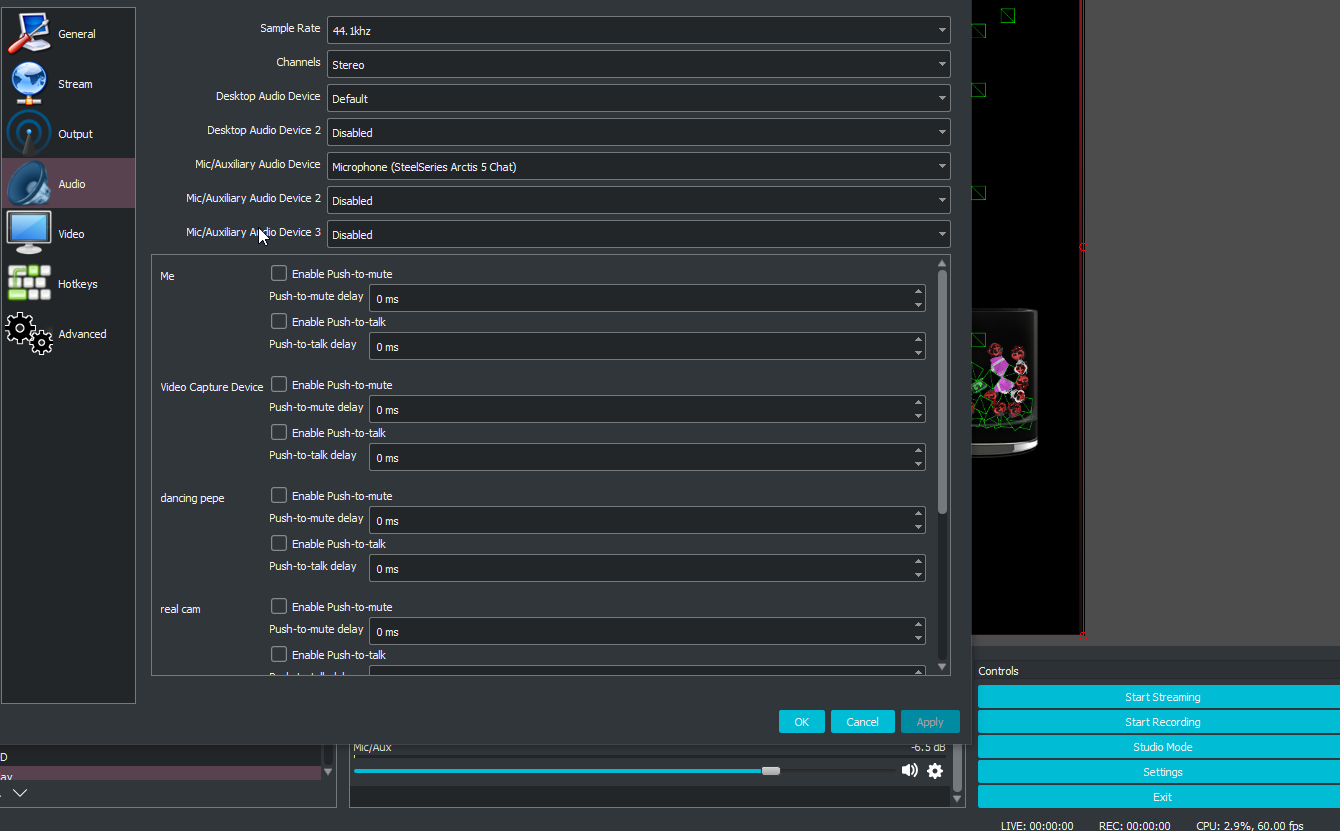 honest charm
yeah already set that up just making sure i couldnt remember if you had to or not haha thanks @dense jackal
dense jackal

clever mango
@wispy sage reinstall OBS and make sure browser plugin is checked during install
dense jackal
I forgot that was even a thing 
honest charm
one more question for S.E when editing a overlay is there a way to add a hyperlink button? so say i have a "facebook" spot on my overlay would i just add my facebook link or can it become a hyperlink button
dense jackal
In the way that they would click on a facebook icon actually on your stream and it would take them to your facebook?
honest charm
correct
dense jackal
That would have to be done through a twitch extension which I'm not sure there is but we are always taking ideas for ours anyway I like that Idea 😄
honest charm
why thanks ! ill add it into the #💭︱feedback-and-ideas channel. for now ill just add the link extension.
dense jackal
dope
 lost pilot
I'm new to streamelements and loved using it! My stream quality looks to much better, but i've noticed that my cpu usage has jumped from 5-10% (before streamelements) to about 20% (after streamelements) in OBS. I tried closing all my apps in the background, could it be that streamelements is using a lot of my cpu usage?
honest charm
what cpu are you running?
lost pilot
i5-6500 paired with rx 480 and 8GB DDR4 2133Mhz RAM
honest charm
im no expert in any way but i just upgraded from an 15-6500 to a i7 7700k and the differnce is astronamical.
lost pilot
I'm assuming because of the extra threads which would be useful. I was fine streaming the occasional Fortnite and CS:GO but last night i noticed lower fps and sometimes stuttering due to OBS cpu usage :/ im not in the market of buying a new pc atm
dense jackal
go for ryzen they are better bang for buck atm for streaming
are you using superthemes?
lost pilot
only built my system last year, can't really afford buying a new rig which college... and yes i am
with college*
think the superthemes could be the culprit?
dense jackal
animated superthemes can cause more cpu usage simply because it is more encoding the cpu has to do when streaming
The way streaming works, streaming a still image is much easier than a changing one, hence why you may get quality drops or cpu spikes if you spin around fast in a game
honest charm
so with the tip portion of s.e how does that work they just donate and bam it works? never done tips before with streams
lost pilot
Makes sense. I'm not sure if the new Intel security patch could also have something with it. I didn't notice any difference with games but it might have afftected streaming. And that makes perfect sense
dense jackal
Tips go straight to your paypal, we don't touch it, our page is there for paypal api so we can send the alert 😄
lost pilot
are there other "lighter" themes or templates i can find on the streamelements site?
dense jackal
It's not the intel patch honestly this whole chip thing is crazily overhyped, it only makes a difference for bigger companies and people who use VMware often
there are static themes for every animated theme were you using the fortnite supertheme?
lost pilot
I know it's affected servers and was told that it wont ipact performance on the average consumer. It was just a theory on my part if it affected streaming or cpu usage.
and i don't remember but ill double check right now
and VM's are typically already slow... Feelsbad
lost pilot
ryzen 1600 probably best bet right?
dense jackal
I had an i5-6500k and just got a Ryzen 1600 for $180 at microcenter
lost pilot
and i was using the Spark Super Theme btw
dense jackal
2.5-3x better
honest charm
for canada the i7 7700k was on sale for 350$
lost pilot
and I live in Canadia so prices tend to be pretty steep... Im hoping to buy a "cheap" secondary pc to stream. Might save a bit of money that way. Ill have to do my research
 narrow nymph
Hi
honest charm
im in the process of building one right now
dense jackal
narrow nymph
Can someone help me get set up with StreamElements?
lost pilot
Specs?
dense jackal
lost pilot
@dense jackal do you have a link?
narrow nymph
Hello?
lost pilot
oh man...
dense jackal
lost pilot
thanks
dense jackal
whatsup @narrow nymph what can I help with
narrow nymph
Hey mate
thanks for responding
I am trying to get set up with StreamElements
going live for the first time
I created a super theme and some overlays but have some questions
- Where do I edit the details of my social media links (twitter fb etc)
dense jackal
give me your best shot 
 misty wagon
https://streamelements.com/dashboard/profile @narrow nymph

StreamElements
The Ultimate All in One Platform for Streamers
dense jackal
^
lost pilot
you can edit the theme on the site and change the text
updates automatically as well so you don't need to manually reupload the link to your browser source on OBS
narrow nymph
Thanks
Will have more questions shortly 😃
can I make the camera rectangle in my super theme any bigger?
 dim glade
@narrow nymph Should be able to just click on it and drag it out to make it larger. Should scale as you drag.
I had an issue when I used a supertheme. My OBS CPU usage went from 1% to 50% just by adding a super theme as a browser source. The moment I deleted it from OBS, straight back to 1%. Is this typical?
dense jackal
Is it an animated super theme @dim glade also what is your cpu?
 hasty arrow
Is the theme being used in one scene or multiple? If used in multiple, are they set to "Shutdown source when not visible"?
narrow nymph
So I updated my profile but the social widget on the overlay is not updated with the data. Am I missing something? @dense jackal ?
dense jackal
in a supertheme you have to change the text manually they are not widgets
for social media
narrow nymph
Oh shit. U serious?
dense jackal
Just go into the overlay manager click edit on the one you want to change, click on the text box and change it real quick 😄
promise it's easy
hasty arrow
I guess since I'm here, I'll ask a quick question. Can I import images from other overlays? (Example: use social media icons from a super theme in a different theme)
dim glade
@dense jackal It is animated. Using an i7-4790K
@hasty arrow Good suggestion on the multiple scenes. I will investigate.
dense jackal
multicore or single core? if u kno multicore is much better
animated superthemes can cause more cpu usage simply because it is more encoding the cpu has to do when streaming
The way streaming works, streaming a still image is much easier than a changing one, hence why you may get quality drops or cpu spikes if you spin around fast in a game
jumping from 1-50% is incredibly unusual though
it's more on average 2-8%
checking @hasty arrow
ok so @hasty arrow go to your overlay editor and find the widget or image you want to copy
hasty arrow
Ok
dense jackal
open layers and click the little button next to the trash can https://i.imgur.com/JIbTjZC.png
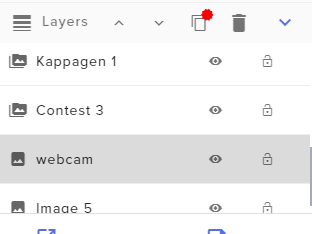
it will duplicate it to any other overlay
Sorry for the wait my support is rusty
lost pilot
how can you set this up "Shutdown source when not visible" @hasty arrow
dense jackal
that is in your obs in your browser source properties
hasty arrow
Thank you @dense jackal
lost pilot
Thanks guys! 😃
dense jackal

 sonic thistle
i know i asked this before and ws told a few daze - but can anyone in here help me with info how to get more audio gif storage
 indigo bay
https://www.myinstants.com/index/id/ is the sound effect from here free for use ?
 slim cairn
@indigo bay I'd imagine yes, but don't quote me on that.
 crimson quest
is there any way to make a poll with streamelements?
 crisp rivet
Hello, it is able to add in "Duel settings" more then one solution (ex. 5 random option) ? if not it will be in the future ?
slim cairn
@crimson quest Currently no, but you can upvote it at https://streamelements.helprace.com/i190-poll-tool
crimson quest
thanks upvoted
slim cairn
@crisp rivet I don't quite understand what you mean, could you be a bit more specific please?
crisp rivet
in Modules we have "Duel" section and in "Duel settings" we have Duel response, but there is only one response, it is able to add more response ?
slim cairn
Ah, currently there is not a way for multiple responses but you can request it at https://streamelements.helprace.com/ if it hasn't been requested already.
Make sure to also share it in #💭︱feedback-and-ideas for other people to upvote it too
crisp rivet
Ok thanks for information
 clear dust
Has the Change Bot Name been added yet?
stuck hamlet
it is currently in beta @clear dust
 keen wadi
Questionnnnn. Since I am a nub when it comes to commands. I want to set up a command to add people to a list pretty much. so they can type !join or something like that that adds there name to a list (for viewer games) and then also is there a way to set up a poll so like i input options and peopel can vote
stuck hamlet
We don't have that feature yet, but you can definitely upvote it here: https://streamelements.helprace.com/i197-viewer-queue-system
It's currently under review, but would help to get more upvotes 😃
keen wadi
reeeeeeeeeeeeeeeee :<
stuck hamlet


 keen wadi
oh no
stuck hamlet
pls no hate
keen wadi
omg ew se brb changing eveerything @misty wagon i dont wanna anymore
stuck hamlet
rekt nerd 
misty wagon
@keen wadi this is dad telling you it's bedtime 
keen wadi
i dont wanna :<
misty wagon
oh ffs I just accidentally clicked close on my left screens browser!!!  I blame you @keen wadi 20+ tabs!
 narrow olive
is the overlay editor broken or something?
stuck hamlet
no?
narrow olive
it keeps playing sounds even though i've removed all sounds from the alert widget
and apparently .wav and .mp3 formats are not valid .wav and .mp3 formats 
stuck hamlet
What browser are you using?
narrow olive
I've used edge, firefox and chrome
same issue
cuz i thought it was just something with the browser at first
stuck hamlet
you should use Chrome for our site. works the best and has no issue importing
and eeeeeeeeuh
the sound issue, are you sure you removed all sounds and dont have anything open anywhere else?
narrow olive
yupp, i even muted the browsers so the test sound would only come through OBS. and it plays the "default" sound with the template AND my custom one at the same time. and if I delete both sounds they still play when i test. even after saving and refreshing the editor
stuck hamlet
Would you be down to do a quick teamviewer session?
clear dust
Alright @stuck hamlet thanks for the update.
narrow olive
I have major trust issues with teamviewer. got "pranked" once and had my system32 deleted 😦
stuck hamlet
I mean, imagine the bad rep we would get if an SE staff member deleted your system 32
:p
narrow olive
True that 😛 Screen share i dont mind but it's the giving controll to someone i have the issue with 😦
stuck hamlet
Screen share i can't hear, and it would be less than 5 minutes, you'll watch me the whole time 😃
or we can try to resolve it with words still 😃
I dont want to make you nervous :p
narrow olive
I'm happy with words 😄
stuck hamlet
Alright, so how many overlays you got on OBS?
narrow olive
1
stuck hamlet
really? damn. simplicity is key
amirite
anyways :p can you head to the browser source properties and hit refresh cache?
narrow olive
well i did a clean slate cuz i wanted to make a transition to streamelements 100% and not 50% 50% different things
i've done that
stuck hamlet
Currently the only sound i hear is "oh shit someone followed, thanks"
pine hemlock
Are you sure you don't have an extra browser source or web tab open with the overlay
narrow olive
yes....
stuck hamlet

narrow olive
it's the same if I change the sub sound, the "pling" from the original SE template is still there
stuck hamlet
you have like 7 scenes
narrow olive
i figured it out
stuck hamlet
you lie to me
pine hemlock
narrow olive
they are all streamlabs
 narrow olive
i did say i was wanting to make transition to 100% stearmelements
cuz it's better
regardless, i figured it out. as it turns out i have an IQ of a potato and I am sorry for wasting your time

 narrow olive
i had two instances of streaming software open, one with the one i was "having issues with" and another with another streamelement overlay on... which was making that sound..... in other words. @narrow olive = 🥔 IQ
 narrow olive
didn't say anything about an extra streaming software though 
naive finch
@stuck hamlet can you go into Soltek1H SE and enable the !give command please bro
stuck hamlet
Done
naive finch
cheers 😄
 wheat compass
hola, acabo de abrir la tienda para que cangeen puntos por mierdas, pero y si yo quiero dar puntos a alguien, como lo hago?
pine hemlock
@olive lintel
stuck hamlet
is that spanish?
stuck hamlet
ah
tight harness
They asked how to give points to people
 humble ether
I need some help with donations
Is there a way to get a list of the donations only done on SE ? so excluding or maybe deleting the ones done on SL that i have imported ?
stuck hamlet
no
humble ether
so if you by mistake have pressed the "import" button twice, you are just fucked?
stuck hamlet
you have to delete the tips you imported
humble ether
by hand ?
stuck hamlet
not that hard
stuck hamlet
well if you used SL say from Month 1 to 6, and the SE from month 7 to 12, you can delete all tips from month 1 to 6 without deleting any SE tips.
idk if that makes sense..
but ive done it previously
stuck hamlet
Wouldnt be hard
humble ether
Is there a way to delete duplicates ?
stuck hamlet
no specific button to push, but we have an open api to collect all that info
humble ether
okay yeah,, so you guys can do it, we can't ? 😃
stuck hamlet
Anyone can do it.
tight harness
You just need to use the API 😃
humble ether
okay yea fair 😉
 north glacier
Who do i need to msg if i want some help?
tight harness
You just put your question in here
north glacier
so . what is the prob https://gyazo.com/818e9d18085249c0d6cd4952ab9f0b0f
 ebon forum
Well it is our Ground Control being blocked by BattleEye
tight harness
True 🤔
ebon forum
we cant do anything about it, ask the game dev why the heck their anticheat blocks us
tight harness
If they think Ground Control is going to allow you to cheat in their game then that's pretty hilarious 
north glacier
HAHA
ebon forum
hey, having alerts and hotkeys for songrequests can be cheating 😛
north glacier
can u guys contact them ? no way they gonna answer me
tight harness
That's what it is, they've basically flagged the app as being a cheat program  and no
ebon forum
We are in the same boat, we have no contacts to the devs. The best is to use twitter to poke multiple people there
tight harness
Don't believe it works like that
ebon forum
So far i know PUBG uses Battleye and a few other surviver/battle royal games.
tight harness
Pretty sure we'd know about it if PUBG was flagging the app
ebon forum
Yup. Maybe Rust or something jerky like ARMA/DayZ
north glacier
so what are we doing now?
ebon forum
@north glacier you go poke the game devs on twitter. and would be nice if you can tell us the game that blocks us
tight harness
As cryonic said there's nothing we can do, what you can do is ask them on Twitter why it's been blocked so they can realise their mistake
ebon forum
It is definetly not a general BattlEye error, otherwise we would see people who stream Rust, DayZ, Arma-games or PUBG complain about that. The anticheat gets updated frequently, but maybe somebody forgot to update or has some jerky settings
north glacier
oki doki
 worn cradle
question if i enable a tip leadrboard, where can i see said leaderboard?
tight harness
On the tipping page 😃
The public one
It creates another panel on the left of the page for it
lament blade
what's the max bitrate to stream on twitch as affiliate btw?
stuck hamlet
there is no max, if i am not mistaken, but twitch would rather you stay below 6k
tight harness
I think technically the "max" is meant to be 6k but people occasionally go over it, just got to think that your viewers need to be able to download that
lament blade
so 5k might be fine?
i think I could handle 6k but my viewers 
Best way to know is to do a netstat o:
stuck hamlet
5k is a good medium imo.
lament blade
upgrade from 4k to 5k 
stuck hamlet
just yesterday, Shroud was streaming at 15k
lament blade
15k 😮
well if i have no issues and viewers don't complain, i try in the future 6k ... 😄
stuck hamlet
if you have encoder settings, it doesnt matter what you stream at, because viewers can lower it on their own
lament blade
those are mine rn
 dawn glen
60 fps 1080 here
I have no net limit, just make it viewable for the majority. still same quality 3500 or 5000
lament blade
you've there 3500, i had 2500
dense jackal
use ur hardware of x264 if you can
dawn glen
- I stream runescape so it's not really required for higher than 3500
dense jackal
ah
dawn glen
also depends on your hardware
higher bitrate = cpu works harder to encode
unless you're encoding on a separate rig
dense jackal
ofc
lament blade
only have software x264
stuck hamlet
you look like ur set to simple
 sudden tiger
Does SE have things for branding?
sudden tiger
yes and also I want to be a betatester
stuck hamlet
contact @serene granite if you'd like to be a beta tester
dense jackal
r u pro mlg?
lament blade
@stuck hamlet now in advanced
dawn glen
I'm pro mlg at sucking at rs 😦
stuck hamlet
yeee, it's just more settings @lament blade
if you're interested in my set up: https://www.onslaught.ca/s/k1vsf9zA.png

i stream off my CPU cause it can handle it, not everyone can
dense jackal
i’ve always heard streaming off ur graphics is better but mayb not 
stuck hamlet
euh better in what sense?
better quality, no
better preformance on your rig, sure
dense jackal
better performance
 dense jackal
sorry i’ll be buying my $9999999 ryzen 999999999 i69-4200kek then i’ll use x264

 dawn glen
@stuck hamlet what kinda settings should I have for NVENC?
stuck hamlet
settings shouldnt change really.
dense jackal
pulling up mine @dawn glen but i gotta get outa bed first
dawn glen
ok bb
stuck hamlet
dense jackal
dense jackal
ye
stuck hamlet
you'll see more quality loss if you play more colourful games/more happening on screen
 stuck hamlet

 native horizon
Hello, how and where can I reset my Tip Goal?
tight harness
No problem 😄
lament blade
stream elements es completamente gratis
lament blade
That is from paypal
native horizon
At the beginning where I was at SE also no fees were deducted from Paypal and now at once again? and when do other methods come to donate than Paypal?
silk patrol
@native horizon Paypal fees have always been a thing. Paypal takes 3% + $0.30. New payments gateways are planned
you can learn more here https://salecalc.com/paypal
native horizon
Well somehow this is already since I'm here so about 6 months planned. For me, the Donate is important and because SE is currently uninteresting for me
silk patrol
no matter what tool you use, you will always have paypal fees, unless you use another payment provider. But unlike other platforms, we don't take a cut from your tips, it goes straight to your paypal account
native horizon
That's the way it is said in German translated! SE wants to have big streamer, I know enough big streamers but they only come when translated to German. Somehow, too little happens where it matters most.
I would like to have everything from one source and not at 3 different providers
stuck hamlet
Yes, we have been working to get other payment methods for a while now, but we are trying to get the best option for streamers. It's not as easy as you may think, a lot of legal stuff happens behind public eye.
native horizon
ok
stuck hamlet
We are also working on translations, we hire other companies to do that for us, they have to go through the entire site and rename everything, so yes, that may take some time.
native horizon
But Germany is an Important Twitch Market, Why is Translated to Russian First? Explain this to me please! I have 2 streamer on hand each has over 500,000 followers and always has between 3,000 and 6,000 viewers who would come to SE if it is in German!
stuck hamlet
That's easy, we have people dedicated here for streamers like that. We have support members in german if you ever need it.
We translated in Russian because Russian is a valid community on Twitch. I don't know specifically why that language, but i know we have more planned.
 proud prawn
I have another qeustion
What about Songrequest. is it just a matter of enabling it and done?
 alpine glen
Hello guys, I have a little question. When I redeem an item via chat without !redeem I would love for the output to not be returned (to keep chat clean). Is there a way to do this? Thanks.
tight harness
Enable it, have either the song request page or Ground Control open @proud prawn
tight harness
Yes
proud prawn
Thanks you mr dragon.
tight harness
If you want to add a playlist, do it in settings under Backup Playlist
Put the playlist link in there and Save 😃
clever mango
@alpine glen At the moment, no. But the team plans to make default commands editable like custom commands so at that time this might be possible
alpine glen
that is awesome news @clever mango , thanks a lot for the quick answer
 rocky lotus
is there any way to customize the tips page more?
alpine glen
I tried to make a workaround it by making the bot send a whisper instead
but it still sends the message on twitch chat
any idea why?
weary mist
do you have chat alerts for redemptions turned on in the modules section?
tight harness
@rocky lotus Customise it how?
tight harness
😄
alpine glen
where do I find this option? (i know i've seen it somewhere)
tight harness
Modules > Chat Alerts
alpine glen
this is so weird, even when turning it off, making the command whisper
it still shows up 😮
clever mango
AFAIK there is no way to make !redeem command reply with a whisper
tight harness
Did it save properly?
alpine glen
@user you successfully redeemed item for X points
clever mango
since it is a default command
alpine glen
haha
but that disable button is there for a reason, ain't it?
here is the thing, I am using the command to trigger sounds
so it would be messy having an output text for each time someone triggers the command 😄
weary mist
I think it is because the $(redeem) variable triggers the !redeem command, and the !redeem command has a return message by default that we can't turn off
alpine glen
XD
clever mango
⤴
alpine glen
bummer, but it's okay, at least I know that it's working
until we can turn it off, I'll keep em' disabled
clever mango
Again, once the default commands can be customized what you want will likely be possible
tight harness
👍
alpine glen
thank you so much guys
tight harness
No problem 😃
 left moat
I have a problem removing the points in the leaderboard all time tab, it doesnt work. please help Twitch.tv/axely
tight harness
Are you trying to remove all points or just an individual's points?
tight harness
Right, yeah we knew about this bug, it's been fixed already, just needs to be deployed 😃
left moat
okay thank you for replying 😃 5⭐
 hazy river
for some reason I can't get the song request via tipping to work? I had a friend try it last night and it couldn't go through, any ideas?
tight harness
Presumably you've checked the option for it is enabled in song request > settings?
hazy river
yup!
silk patrol
was the youtube link pasted in the message field?
hazy river
yup, he did that and typed a message but it kept saying he wasn't allowed apparently
says song request is disabled even though it's enabled in settings
just tried it myself
tight harness
Make sure your settings meet these guidelines: https://i.imgur.com/t28AhpK.png
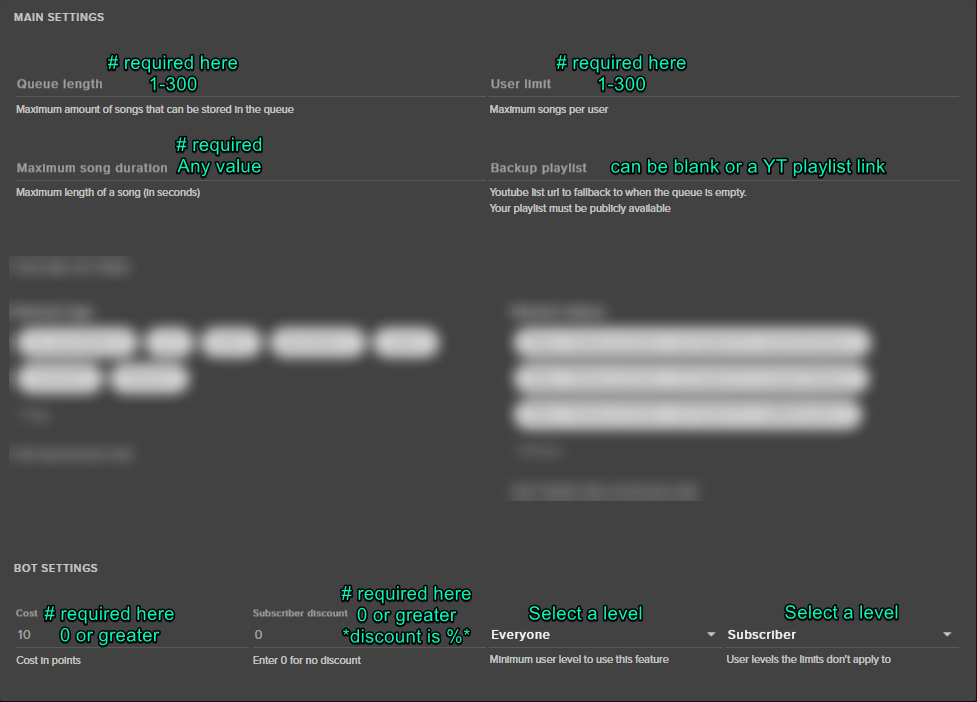
 latent mist
Hey everyone! My problem is that the all-time leaderboard looks unbelievably rigged 😄 It's never been touched (and due to a current bug we couldn't even if we wanted to), but some of my viewers have so many points like I've already streamed around 1k hours and they've been there constantly(I streamed 503 according to Twitch). What could be the problem? 😃 If you need a twitch link, it's twitch.tv/smebjulak
tight harness
You'll be able to edit and reset points on the all-time leaderboard soon enough, it's being tested on the beta site currently
latent mist
And is it possible that the site has been counting points badly due to some error? We've been counting for hours given our current data, but the numbers just don't seem to match at all, there are huge gaps in-between 😄
tight harness
Should be accurate to my knowledge
clever mango
All-time points begin the moment that you sign into StreamElements the first time and for as long as you have loyalty settings enabled with X points/10 minutes
If your loyalty settings have always been the same and have always been enabled then the all-time should be accurate. It only increases by being in chat during live streams and increases by the X points/10 minute settings. This is how the !watchtime command is calculated. It takes the number of points someone has on the all-time board and divides it by the number earned every 10 minutes.
 silk blaze
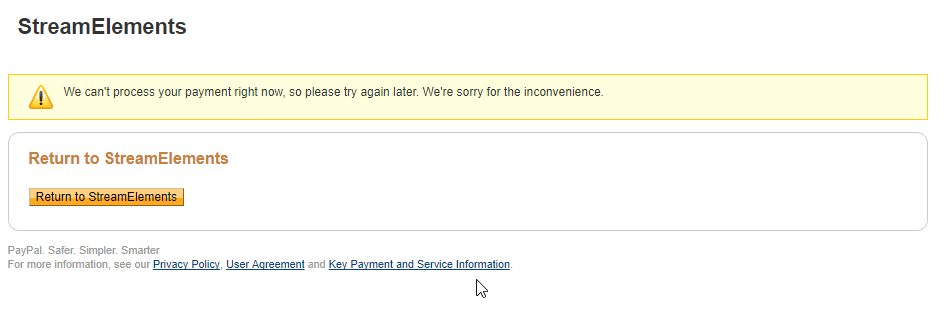
Guys - Is there an issue with PayPal and donations right now? Trying to donate to a streamer and PayPal keeps giving a failed try again later before even logging into PayPal
clever mango
If this error occurs on a paypal page you'll need to contact them
@silk blaze
If it's occuring on the SE tipping page then we can look into it
silk blaze
@clever mango I press login on paypal and I see this: https://i.imgur.com/JYm3m08.png then this https://i.imgur.com/Llk4p4S.png