#helpdesk-twitch
1 messages · Page 158 of 1
 clever mango
 proud pumice
hooray @bold ridge got sorted out
make sure you follow us on twitter for updates :>
 bright star
helpppp
 grizzled sail
just popping in to check on when the event jar dropping all events every scene change upon opening obs will be fixed~
having my cup full at the start of the stream is disheartening when every new follow/sub etc just bounces out bc it's full already
clever mango
I'm a bit confused. What would your ideal cup do in regards to cup filling/refilling/emptying?
They're actively working on this so your feedback will be helpful
 livid ingot
My overlay isnt showing up on my stream
livid ingot
im using bebo
clever mango

grizzled sail
Is there a "reset" option on the cup? Have i missed it?
livid ingot
Well that explains it lol
bright star
is there someone that can voice support me? im a tad lost
clever mango
Hope they can get that resolved
@grizzled sail In the hypecup settings there is a "clear cup" button but it's not clearing the cup in OBS right this moment. A fix has been implemented and is just waiting deployment
 tight harness
Hey JT  @bright star
grizzled sail
Sounds good, I'll get working on a post for the hype cup on the suggestions website ^^ i was so happy when i found out you guys had your own
yup that would definitely explain why i missed it xd
bright star
hi @tight harness
tight harness
Good to see you here 😃 what's up?
bright star
im confused on how this thingy works XD
tight harness
I'll be in there in a moment buddy 😃 @bright star
bright star
tyty
 rustic matrix
does stream elements do a shout out command so i can shout out other twitch streamers thx
 silk patrol
@livid ingot We are not bebo btw
@rustic matrix yup, when you create a new custom command, there is a template for the shoutout command
clever mango
yea he got that message from their discord most likely
rustic matrix
ok where would i find this thanks
silk patrol
@rustic matrix go there https://streamelements.com/dashboard/bot/commands/custom create a custom command, slect the command template
feel free to watch our tutorials on youtube, you can also use the help button in the lower right corner
rustic matrix
thank you for your help got it ☺
 sonic egret
Hello Guys i need help again please how can i fix this my icons stacked like that on my hype cup... 😦
tight harness
sonic egret
@tight harness yey thank you!! its a big help!! appreciated
tight harness
@sonic egret Sorry I was putting that in the chat for somebody else I was in TeamViewer Support with 😃
It seems like the body bounds setting is too high 🤔 @sonic egret
grizzled sail
WHat body type do your icons have? I had the problem too when they were capsule or square and changing it to circle fixed it
tight harness
That too, the body type and/or the body bounds look wrong to me
 quasi portal
Asking for a friend - does anyone know a Super Mario Maker bot-thing that integrates with StreamElements ? (warp world doesn't I think) might be the wrong place to ask 🤔
tight harness
@quasi portal I haven't heard of anything like this, this would be the place to bring it up as an idea: https://strms.net/ideas 😃
quasi portal
I have to admit i'm not too into it myself as I've never played the game - integration stuff might be needed on the other end not StreamElements I guess 🤔 but I'll definitely have a look to see if there's something like it in the ideas pile, thanks! 👍
 storm venture
destinycommand:
https://pastebin.com/Qs7NJnyn

 weary mist
👍
 agile basin
Is there an easy way to see top tippers of just one month?
tight harness
@agile basin You can go here: https://streamelements.com/dashboard/tipping/list then set the 'from date' and 'to date' at the top of the page accordingly 😃
 sharp elbow
How do you empty your cup?
 stuck hamlet
You'd have to head to your overlay and on the cup widget, hit the 3 bars, "clear" button
 sharp elbow
Thank you! ❤
stuck hamlet
😃
 heady quest
@stuck hamlet hey, I am curious as to why my SE page is loading so slow, any ideas as to what I can do to remedy this
stuck hamlet
You can trn Hardware accelaration off in the chrome settings
heady quest
@stuck hamlet Thanks, such an easy fix
stuck hamlet
😃
heady quest
Also is there a way to clear my loyalty list so I have no one on the list
@stuck hamlet the Leaderboard I mean
heady quest
I know that, but all it does is reset the points, I would like to remove every name on the list
heady quest
hmm, any idea if that could be something to add further down the road, not a big deal but would be nice
heady quest
will do, and one last thing, the sellout tab, how does one get added to that list or is it something we post in personally
stuck hamlet
You have to be using our overlay, tipping and bot, and we will add you manually
heady quest
i use both already, also met some of you personally at Twitchcon, was excited to learn what was new, loving the Nightmode so far
stuck hamlet
both? i listed 3 things 
heady quest
lol, i mean I use all three
stuck hamlet
ill add you
heady quest
actually which bot you refering to
let me double check on that one
i know i do the tipping and overlay
heady quest
how do i check if that is active
heady quest
ah thanks, and thanks for adding me to the list, I enjoy using StreamElements especially for the Overlays. I appreciate your help so far tonight. @stuck hamlet
stuck hamlet
No problem 😃
 polar forge
Hello, I was hoping someone could help me. Tonight during my stream someone followed me, but the alert sound/music sounded as if it was trying to play twice and it just either sounding like a echo or just plain horrible. I tested this out some nights ago and everything was working fine but today it's a mess, even when I'm in the testing environment. Any suggestions?
weary mist
@polar forge double check to make sure all your browser sources have the "Shutdown when not visible" checked, this could cause duplicate sounds
 fleet summit
i forgot how tog et the chat messages how to appear automaticaly because my emssage is et are not appearing
@stuck hamlet do you know how to fix it
weary mist
are you talking about timers? @fleet summit
weary mist
if you scroll all the way down on the left hand side, its the last thing on the list 😃
@fleet summit
fleet summit
i just seen that but it has not been doing the automic messages though is that odd
weary mist
do you have chat lines set?
fleet summit
yes
weary mist
so the timer has to meet both the chat lines and the time amount.
once those chat lines are met, then the timer will trigger if the time has been met
you can get around that by changing chat lines to zero
weary mist
thats fine, but remember. It will trigger every 5 minutes ONLY if the 3 chat lines are met
fleet summit
with the lines does it mean if 3 people type ?
this is ok right
@weary mist right?
weary mist
yesa
fleet summit
thank you
 lament blade
Ok sorry brother yyou again
is there a way to have auto ban when someone say a certrain phrase
like boy will auto ban when it put down
weary mist
yeah, that will be under spam filters, banned words
lament blade
I am sick of troll
that come into my stream first time they ask is if i have austism because i dont
im done with it im just auto ban them because im done getting hurt from it
all . the trolls can kiss my ass good bye I wish twitch would do something about this
weary mist
you can use twitch's automod as well
both options will do what you need, though twitch will only stop the messages. The bot will time them out for x amount of time, where you define the amount of time
 pine hemlock
lament blade
pine hemlock
lament blade
thanks that weird I couldnt find that on my side
 placid vigil
idk why but for me it takes so long to open the Homepage and when its open its laggy as hell
stuck hamlet
Try disabling hardware accelaration in chrome settings
 fierce mulch
hi i've been getting "The website/overlay doesn't load except for the Help button" problems all day today and my overlays on obs dont load either, have tried everything thats been said but doesnt fix anything
fierce mulch
just when i click login it goes to white but with the help button at the bottom
the homepage loads most of the time
also this is on firefox, on chrome it doesnt load anything but just says "this site cant be reached" etc
stuck hamlet
it sounds like theirs an issue with your router
you could try unplugging it for 1 minute
and then trying again
fierce mulch
okay ill try 😃
ok that worked thanks 👍 thought it wouldnt have been that since everything else but streamelements was working
 ancient wigeon
when you see someone made a clip of a comment i made over something not working with SE 🤦
stuck hamlet
❤
 minor heart
My streamelements kappagen emotesplosions are like 30 seconds earlier than my stream labs notificatiosn on stream. Anyone know a cause as to why? and how to fixhtis?
 atomic hollow
for which events?
atomic hollow
well I guess we are just faster than streamlabs, why not use our follower alret?
minor heart
didnt know you guys had one tbh. I JUST found out about you guys a few hours ago
thought you all only had the in chat notifications and explosions
atomic hollow
we can do it all
alerts, donations, overlays, loyalty

Create an amazing overlay with StreamElements, watch our video guide to learn how. ----- Tipping page setup: https://youtu.be/eLzxRkq7tJo Add KappaGen to you...
minor heart
thanks
 proud gate
morning
stuck hamlet
Morning 😃
proud gate
i changed the name of my twitch channel and since i did it the bot never joined againt to it T_T
any1 knows how to fix it?
right now nothing works T_T
stuck hamlet
Part the bot from your channel, log out of SE and log back in 😃
tight harness
Beat me to it 😄
stuck hamlet
Then make the bot join again!
tight harness
Yeah, try both logging out and logging in then the part channel and join channel 😃
Always does the trick 😄
tight harness
Good stuff 

stuck hamlet
👌
proud gate
another stupid question >:<
tight harness
Fire away 😄 sure it's not that bad 
proud gate
when i used to import data from streamlabs, i had just to presh the button et voila!
now to import alertbox y had to writte the alertbox URL
tight harness
Yep
proud gate
and i dont know what it is
xDDDDDDDDDD
i tried with the address that i use in OBS for alertbox but it dindt work
(and i hope that it is not the same case that with the bot xDDD9
stuck hamlet
Can you provide me the url you used?
proud gate
give me a sec
tight harness
I'll give you ice cream 🍦
proud gate
derua
proud gate
WOOOOOOOOOOW
jummm im thinking
maybe i made a mistake
.<
what i wanted to import is the information
of these days that bot didnt work
is not that right?
im sorry im so dumb with this staff
stuck hamlet
which information?
proud gate
on my dashboard i dont have new information for 8 days
stuck hamlet
That would be because you changed your name
and just now it updated because you logged out and back in
So any new info will be reghistered
tight harness
It'll work from now 😃
proud gate
ohhhh theres is no way to inlude it by hand?
tight harness
Nope, sadly not
proud gate
like tips
tight harness
Ahh, that's easy 😄 you go to Activity Feed on the left then Widget Data to change your Widget Data like text labels
Did you import before or after changing your name?
tight harness
Ahh, right 😄
And do you see any tips here: https://streamelements.com/dashboard/tipping ?
proud gate
wow it workssssssssssssssssss it is what i wanted! i didnt know this page existed U^^ (widget data)
tight harness
Yeah, it's pretty cool 😄
tight harness
That's alright, it'll update automatically now 😃
proud gate
yuo i modified the data, thanks! 😄
tight harness
No problem, glad you got it all sorted 😃
tight harness
For that, you can have another scoop of ice cream 🍨
proud gate
YEEEEEEEEEEEEEEEEEEEY
tight harness

tight harness
Ahh, do you have 2 overlays in your OBS? If so, make sure to go into the properties for the browser sources (overlays) and tick shutdown source when not visible 😃
lament blade
Hi Legendary
tight harness
@proud gate There is something, if you have your overlay manager open (unmuted) and you have OBS open you'll hear the sound in both 😄
Hey Emerson 
lament blade
tight harness
No problem 😄
 amber dagger
Heya! I got the time variable $(time.CET). Is it possible to display the time in am/pm format?
tight harness
@amber dagger Not currently but it's a nice idea, you should consider adding it here: https://strms.net/ideas 😃
amber dagger
So even american users are getting the 14:44? Wow.. They can handle this without any riot? kappa
tight harness
No riots as of yet, but we've got the water cannons ready just incase 💦
 hearty peak
So does the copy widgets work between all overlays in the overlay menu? It’s just a drop down menu of all the stuff you’ve created?
tight harness
Yeah it works for all of them
hearty peak
What information does it save? Is it gonna save size and position? Or just variations, text settings etc
tight harness
A gif was put in #270206314561404928 - that should demonstrate how it works 😃
hearty peak
Yea I saw it just want checking to see if it’s viable for stuff like chat box cause if it saves the size of the box and or the position it won’t be viable cause if I move it and save it in one overlay it will in the others too
tight harness
Should copy everything as far as I know
Duplicating it to another overlay, editing it and then saving it won't save the changes for the original
Only for the duplicate
hearty peak
Ah ok. That’s fine then
tight harness
😃
 spring shard
Anyone else having issues updating modules while managing another streamers channel?
 serene granite
no. What user are you managing and what module are you trying to update?
spring shard
Managing QueenE's modules. And none of them wants to update. All states there's an error.
tight harness
Interesting 🤔 haven't noticed this myself while doing it for support
serene granite
what's your twitch username?
spring shard
Tjockas
serene granite
can you ask queenE to visit https://streamelements.com/logout and then log back in quickly ?
spring shard
Not currently, she's activly streaming. I'll ask her to do it after the stream though.
serene granite
if she can do it between games, it shouldnt really affect the stream in any way.
but whatever works
 strong dock
Aww man. Re order stream store... oh yes
tight harness
Was this meant to go in #💭︱feedback-and-ideas ? 😛
serene granite
i think he's commenting to the sneak peek 😛
 hearty peak
so been playing around with the duplication feature, are there plans to eventually add global settings for widgets?
i.e. the ability to go into for example the chat widget and if i wanted to globally change in all my overlays from the Roboto font to X font and it apply to all the overlays
cause while the duplication feature is cool and definitely helps you still have to go into each individual overlay and re position and size and save each one
it just makes going in to make small changes a hassle ya feel?
tight harness
Not a bad idea 🤔
But it'd need to be well labelled so people don't do it by accident 😄
hearty peak
well IMO, the way you would do it is add a sub menu in the overlay manager
clever mango
Duplication should make identical copies including widget position and all settings
hearty peak
where you could go in and see all the availible widgets
and click a cog wheel to open their settings
tight harness
I was more referring to the globally saving changes to settings
hearty peak
it does terra but the location of assets isnt identical in all my overlays
so once i copy i then have to go into each overlay and move and reposition, which is also not an easy process
too many overlapping assests means you either have to guesstimate x y values, manually use the arrow keys or to be able to drag move an asset all the way to the top so you can click it above the rest
clever mango
I'm confused. With global settings wouldn't you still need to setup each widget in each overlay in terms of positioning?
hearty peak
initially yes
tight harness
🤔
hearty peak
the issue im running into right now for example:
i set them up all individually long ago before duplication was in place
well because i have 9 overlays theres minor differences, like one might be font size 35 and another might be 25
 fickle pecan
Is there any problem with the follow age of viewers
hearty peak
when theres no reason for the difference other than i was tired and not paying attention
and theres way to globally just go in and make them all the same font or font size or highlight animation
across the board
if that makes sense
clever mango
@fickle pecan not that I'm aware of.. do you have an example from chat?
fickle pecan
@clever mango i've been following a stream for like 8 months ago but now when i type the command i found that i'm following him for like 2 minutes
streamer*
clever mango
@hearty peak so at this point you are wanting to be able to go into the settings of one chat widget that you like and click "make all settings here apply to every chat widget in every overlay" ?
without affecting positioning?
clever mango
so duplication that disregards position and size
tight harness
A very long time ago
hearty peak
yes i understand
clever mango
you can't have different chat widgets for different scenes
fickle pecan
@Terra🅱uck i've been following a streamer for like 8 months ago but now when i type the command i found that i'm following him for like 2 minutes
clever mango
@fickle pecan chatroom name please
hearty peak
the point is though that i should have the ability to just change stuff like font, animation, text size, text color, etc without having to go to each widget in each asset. its just a nightmare when i want to go in and make small changes
fickle pecan
@clever mango streamer's channel ?
clever mango
the stream where you are typing the command
clever mango
just a moment please
fickle pecan
@clever mango take your time
serene granite
what you're describing are very good points, but in order to implement them we'd have to rewrite our entire overlay system.
that is something that we plan to do actually, but a bit further down the line
we actually have a very long document with notes for the new system, i'll see that these are added.
hearty peak
yea i appreciate it, its basically just a nightmare to go in and make changes when you have 9 overlays and you have to go in and tweak every variation, it just makes something like changing font take an hour for something that should be a couple min
clever mango
@fickle pecan it seems that you unfollowed the channel and refollowed which reset your follow time
Another service (not streamelements) is also reporting that you've been following for 14 minutes
fickle pecan
@clever mango i don't remember that i unfollowed the channel cause like i'm always watching his stream
and the follow button is green
clever mango
3rd party services only report what twitch tells them. If you didn't unfollow, then twitch messed up and that affects services like streamelements
tight harness
Also not sure if it's been mentioned yet but refollowing messes up your followage
Which is intentional
By messes up I mean resets it to the new follow time
fickle pecan
@clever mango Ah ok i see
so the 8 months of following disappeared
pine hemlock
Blame twitch api
clever mango
it will if you click on the follow button again which unfollows (intentional or accidentally)
or if twitch api messes up
pine hemlock
You're welcome to email them and complain
clever mango
even if you re-follow after clicking unfollow it starts the timer again
fickle pecan
@tight harness but i'm sure that i didn't press the button 😕
fickle pecan
@clever mango when i type this !myptimeg it gives me how much hours i was watching the stream since i followed the channel right ?
clever mango
that's a custom command so I'll have to see what it does
fickle pecan
@clever mango ok i'll let you see
clever mango
@fickle pecan please type that command in chat. The room is in 30-minute follower mode so I can't type
@fickle pecan that command is a wizebot command, not streamelements.
it appears to be the same as !watchtime on streamelements which is the amount of time that you have watched the stream
fickle pecan
@clever mango i thought it's a streamelements command
@clever mango sorry for wasting your time
clever mango
You didn't. We're here to help 

 primal sandal
Hoping someone can help me here, I'm adding text to my overlay and widgets which is fine, but when the URL loads in OBS, the text colours and fonts aren't carried over, its just white and in Times New Roman, do I need to modify the CSS manually?
 candid whale
is there a way to exclude someone from the chat leaderboard?
tight harness
@primal sandal Once you've changed the text in the overlay manager, could you click Save in the bottom left, then do Ctrl + Shift + R, see if it all looks right in the overlay manager 😃 then I want you to go to OBS, right click on your overlay, click on Properties, then scroll down to Refresh cache on current page, click on that and see if it all looks right for me please
tight harness
All good now? 😄
primal sandal
I'm ashamed of myself. 😂 All good thank you!!
tight harness
Don't be 😃 happy to help
serene granite
@candid whale i'm checking, will let you know.
tight harness
@candid whale Do you mean the Ignored users part of the Loyalty Settings page?
tight harness
Hmm, shame, I'd have thought it would do, at least Hectic is looking into it 😃
 regal thunder
hm, a question how would you display what the person i am shouting out was last seen playing... what i have now is "!Shoutout Nobruc" and it gives the response "Everyone go show the amazing ${1} some love! twitch.tv/${1} and show them the Potato Division Love" but i wanted to add the game too
regal thunder
aw thanks! imma try it out
serene granite
@candid whale there's no way to make chatstats ignore users unfortunately, but that sounds like a good thing to add to our ideas board @ https://strms.net/ideas
When you add it link it in #💭︱feedback-and-ideas and I'll be sure to upvote it personally 😃
regal thunder
another question, how do you show more options on the new extention ... on the preview it shows store and more options. in mine it only appears points chatter and chat stats
clever mango
coming soon
regal thunder
oh nice! 😄 good luck with that guys´
candid whale
tight harness
@candid whale Best to put it in #💭︱feedback-and-ideas 😃
People will look there for nice ideas to upvote
candid whale
right sorry
 amber turtle
hey so im watching the inital setup video and im very sorry if this comes off as weird but whoever works are stream elements tell the girl who made this video shes the most beautiful human being on the planet thanks
tight harness
I'll pass on the message
serene granite
@atomic hollow you're getting compliments.
tight harness

amber turtle
ok actual question im trying to edit this overlay and this one text box isnt moving
these overlays are super nice im just trying to move the dono one next to the camera and its not moving
tight harness
Can you check for me if it's locked into place? You'll be able to see this in the Layers section on the left, by clicking on the padlock by the name of the Layer you'll toggle locked/unlocked
amber turtle
its unlocked
tight harness
Is there something else infront of it that you're clicking instead in that case?
That's the only other thing it could be if it's definitely unlocked 😃
amber turtle
just the scrolling text that says delete with delete or whatever clicking everywhere in the box
tight harness
If you're wanting to move the image behind the text then you could very well be clicking on the text instead of the image, I'd suggest moving the text out of the way temporarily just so you can get to the image, an alternative would be to find the image in the Layers list on the left and selecting it there, then you'll be able to drag it because it'll be selected 😃
amber turtle
ok i just made it really big and it let me move it so i moved it where i wanna be and im putting it back to sizew
tight harness
Excellent, that's awesome
 full seal
Hi guys! I just got to installing the extension, but when I press configure to configure it, nothing appears but StreamElements Leaderboards [sub] created by StreamElements. I've tried logging out and in, uninstalling and reinstalling, and tried with other extensions with success. Have I missed something?
tight harness
Hey Nikki, you haven't missed anything, the extension it still a work in progress and we're still asking for initial feedback, collecting ideas of how to improve it and what else to add, that kind of thing, i'll just fetch you the link to our ideas board for improvement suggestions 😃
full seal
Oh okay! It's not configurable yet 😛
tight harness
I'll just quickly grab my food out of the oven before it burns then i'll be right back with you 😃 one moment please
full seal
Thanks bunches. I'm working on switching from another alert system today because I'm very tired of their issues. May I ask for help here if I need it? 😃
tight harness
I'm back 😄
amber turtle
okay after youre finished helping this fine human being i have another question should i uninstall streamlabs if im going to switch over to this? i imported my settings and what not but do i need to do anything else?
tight harness
@full seal Absolutely 😃
@amber turtle That's entirely up to you, we are an all-in-one service so we are all you'll ever need 😃
amber turtle
thats that shit i do like okay how do i set up this tipping page or is that all on the youtube and i need to just watch videos and be resourceful
full seal
Please god, be all I ever need....
tight harness
@amber turtle The youtube videos are very well made and very helpful, they were however made some months ago so they are a little lets say outdated, but seeing as we offer 24/7 support that's never going to be a problem
amber turtle
PogChamp
tight harness
@full seal @amber turtle If either of you need any help just ask, we'll get right back to you 😃
amber turtle
alright i need some assistance with this dangole tipping page
tight harness
What seems to be the issue with it?
amber turtle
just how do i set it all up and make sure its working properly
tight harness
What i'd like you to do for me is explain to me exactly what's missing from it and then I can give you a detailed explanation of what exactly you have to do still 😃
So to begin with, we need to check the very basics, have you got your Paypal email in there already?
amber turtle
yes
tight harness
Alright, excellent 😄 next, I'd like you to tell me if you'd like to set a minimum amount or not
amber turtle
no the 1 is fine for now
amber turtle
what exactly does that mean
tight harness
If you have it unticked people can donate anonymously
If you tick it people have no choice but to login with their Twitch credentials to the site before they donate, it's to try and combat chargebacks
tight harness
Excellent choice 😃
Agreed 😄
Next you have the option for Tipping presets on or off, that's basically amounts that you can have displayed as suggestions for people to donate, would you like that?
amber turtle
oh they are just suggestions? then yeah
 spiral lion
im new to this stream elements thing can somebody please help me
tight harness
@spiral lion Absolutely, what seems to be the problem?
spiral lion
resizing
tight harness
@amber turtle Yeah they're just suggestions, you can input them under Tipping presets and then press Enter to input them in once you've typed the amount
@amber turtle You've also got Suggested amount, which is how much you want to have displayed as the default donation amount, people can still change it of course 😃
@spiral lion What are you trying to resize? An overlay?
amber turtle
yeah i enabled it i thought of something different
spiral lion
yes overlay stuff
tight harness
@spiral lion Could you tell me what resolution you've set it to and what resolution your monitor is? They should match
@amber turtle That's everything from that page, you can now go onto Tip Moderation
spiral lion
i dont know im guessing 1080p
tight harness
@spiral lion When you're making the overlay in the overlay manager, set it to 1080p when it asks for your resolution, then when you add the overlay to OBS set the height to 1080p and the width to 1920 for me please 😃
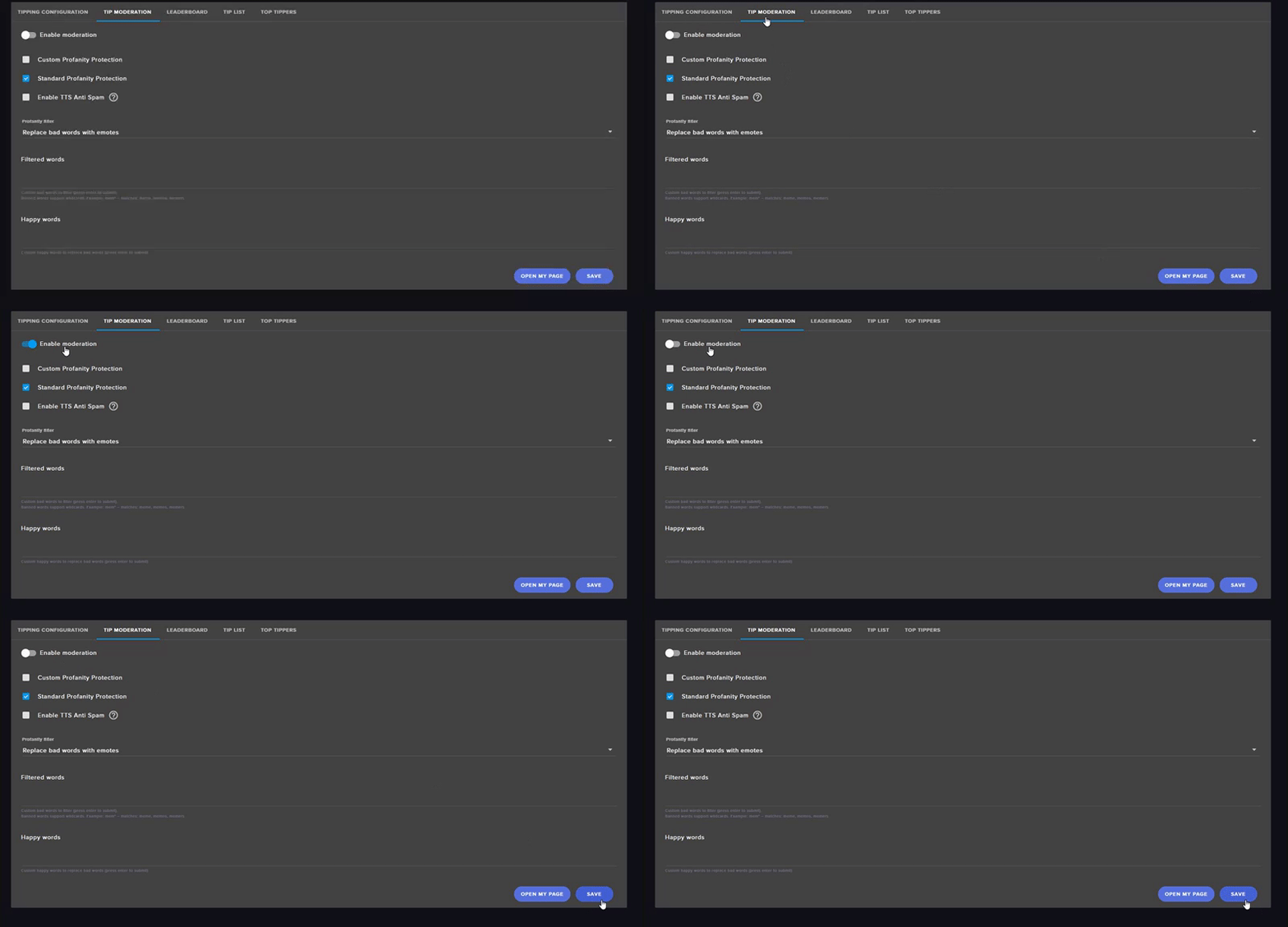
@amber turtle When you're on the Tip Moderation page, make sure to only tick Enable moderation if you want to manually accept tips when they come in, if you want them to automatically be accepted do not tick this
amber turtle
okay with moderation theres really only one word i dont want and thats obviously the N word im cool with everything else i say most of them myself i just dont want people donating spamming that word
tight harness
@amber turtle All of the other options should be self-explanatory 😃 let me know when you've filled that out or if you have any troubles
amber turtle
so the filtered words i would just put the words i dont want?
tight harness
Absolutely yes 😃
The Happy words are just words you want to replace the filters words with
amber turtle
so say i put the N word but what if someone spells it with like 2 Rs or more gs will it go through?
tight harness
Yes it will, it has to be an exact match
spiral lion
can you help me by using teamviewer please
amber turtle
okay then im just not having text to speech theres not a chance in hell im risking a ban cause some guy wants to be a douche
tight harness
@spiral lion Absolutely, are you alright to wait just a moment while I finish up with Galvexo? 😃
spiral lion
yes ill just have to delay my stream at 4pm
tight harness
@amber turtle Are you all set now? Bigteddybeargaming is in a rush because they have a stream soon 😃
Don't want to delay their start
spiral lion
im sorry
amber turtle
im good go help him ill just use my interweb skills and figure all of it out if i REALLY need help ill ask
alright @tight harness if youre still here do i have to set a completely different browser source in OBS for alerts like follower dono etc or is it built into the overlay
amber turtle
if its anything less than 10/10 im reporting you to the authorities
tight harness
Deal
@amber turtle Ohh, I just read your question, I can answer that now 😄 1 overlay! 😃
amber turtle
and do i have to have the stream eleements dashboard open for the top donator and follower and all that to update???
tight harness
Not for that, but you do need it open for hosts to register
Either the activity feed page, the dashboard or our desktop app Ground Control 😃
amber turtle
the desktop app is called ground control?
amber turtle
okay and if you have a second how do i set up custom donation sounds and stuff
tight harness
Do you want some variations for different amounts?
amber turtle
not right now in the future when i get bigger i will
but for right now just something
i have a clip of kled from league of legends saying holy shit and i want that as the dono sound
tight harness
Do you have that sound ready to upload already?
amber turtle
yes
tight harness
Awesome 😃
 wet nebula
When I swap between scenes on OBS the SE overlays seem to take a few seconds to load up, before they do it's just a black screen with bordless cam/gane capture on.
Maybe I'm just missing something simple but no idea ^^
tight harness
@amber turtle Alright, well you know the overlay manager? when you're in there you click on the alert box widget, then on the left you click on the gear/cog next to Tip Alerts, then you can upload the sound and an image there 😃
amber turtle
@wet nebula i think its just cause its a 3rd party program and it just takes a second for the new overlay to load but thanks legendary for the help
tight harness
@wet nebula Sorry only just got round to reading your message it's because you're essentially loading a webpage and like any other webpage it takes a few seconds to load up, you can count this by using studio mode to pre-load the scenes before switching to them. Alternatively fade transition with a few seconds for the transition also seems to work for me
@amber turtle No problem 😃
tight harness
In Settings > Hotkeys
amber turtle
which setting is it
tight harness
Also Studio Mode is directly below Stream Recording which is directly below Start Streaming on the right of OBS 😄

In the middle there
Settings > Hotkeys > Find which scene you want to set the hotkey for to switch to > Set a key > Click Okay 😃
 hexed herald
has the website been running really slow for anyone else?
hexed herald
yea
tight harness
Do you know if you have Hardware Acceleration enabled in your Advanced settings?
hexed herald
probably whatever is default
tight harness
Advanced Chrome settings that is
I think it's on by default
Try disabling it and see if that improves it for you 😃
tight harness

However, we've noticed that in some cases it doesn't run more efficiently, it's worse, like in this case
Sometimes it's better, sometimes it's worse, hit and miss really
hexed herald
any way to turn it off for specific sites? this is the only site I'm having issues with.
tight harness
Nope, it's either off or on
wet nebula
@tight harness Yeah I had that feeling but just wasn't sure of how I'd sort it. I've currently got fade transition with 250ms duration but I'll try the studio mode :()
😃
hexed herald
any idea if there will be a fix @tight harness
wet nebula
Yeah studio mode fixes the delay as its already pre-loaded, thanks 😃
tight harness
@hexed herald We're working on seeing if there's anything we can do on our end
@wet nebula No problem 😃
 viscid mango
does studio mode take more resources?
tight harness
Seeing as it loads 2 scenes I want to say yes
viscid mango
thanks I've just never used it before
viscid mango
honestly I got OBS set up off a guide and never really explored any of it
tight harness
OBS Studio is good, but there's a lot of exploring to do before you know how to fully use all of it's features 😄
 frozen rock
May I get some assistance with my overlay editor?
tight harness
Sure, what's up? 😃 @frozen rock
frozen rock
I am trying to add two AlertBoxes, but when i add and alter the second one the settings from it apply to the first one also
tight harness
Right, what you want to do is focus on 1 for now, set that how you want it, save, reload the overlay, make the second alert box, set that up, save, reload again. then test their events and they should work as intended 😃
frozen rock
okay, you know if this is something that is going to be addressed? just a little annoying to have to reload the editor but not that big of a deal.
tight harness
I'm asking now 😃 @frozen rock
lament blade
The top cheer I got is ca 850, exact number doesn't matter
But today in the stream it just said 100 Bits by another person!?
Even refresh, other browser, still 100 instead of those always 850 Bits
Everyone had this issue (20 viewer)
lament blade
I talk about the number you see on top of twitch chat
tight harness
Ohh, the Twitch feature
fleet summit
how do i fix it to where the bits show for a chear
lament blade
Most streamer have there a 5k or 10k number, I've "only" 850
tight harness
@lament blade More than I've got, why are you complaining about that? 😂
lament blade
I mean, he bought 500 bits just to be top cheer again xd but whyy
Wait really
You never got >850?
Sb of my class said "give me 100€ and I give you 10k bits" xd
tight harness
I got 10,100 before, but I reset it monthly
Most people reset it occasionally
Some do it every stream
lament blade
Where can you reset it
tight harness
@fleet summit You mean in the alert box or KappaGen?
@lament blade Make sure you have Mod Icons enabled in your chat settings, then click on the trash can
fleet summit
alert box because it did not show the person giving bits
lament blade
@tight harness could it be when you delete chat?
fleet summit
do i redo the alert box?
lament blade
Did you got the sound?
tight harness
@fleet summit Should do this already by default
But that may help
@lament blade No, you do it how I said you do it 😄

 lament blade
I think I've it activated
Since if a mod can delete it, it was maybe unintended by him xd
tight harness
Mine's 100 and I last reset it on the 1st, you're doing better than me
lament blade
Still more than my PayPal
And the egirl of the community donated to every streamer of this game 100 Bits beside me :c that feels really bad :x
She's not even following 

 lament blade
Guess so :c
fleet summit
what is token bounce?
tight harness
How bouncy the icons are that drop into the cup
fleet summit
tips are the same as bits right
tight harness
Tips are donations, bits are cheers, they're separate
 hoary bluff
hi for the stream store redemption is there a url link i have to connect to obs? if so where is it?
tight harness
Nope, in Widgets there's a Store Redemption widget
Add that to your overlay in the overlay manager 😃
hoary bluff
where is the widget section?
tight harness
https://gyazo.com/4a85a0aec52ae74567bff68950525a2d @hoary bluff

See it in that gif? 😃
hoary bluff
i see the gif thank you
i am now trying to figure out how this overlay process works.
tight harness
Any part in particular or in general? we actually have a rather useful video to help with it 😃
hoary bluff
i guess i'll view the video because its all confusing
tight harness
Create an amazing overlay with StreamElements, watch our video guide to learn how. ----- Tipping page setup: https://youtu.be/eLzxRkq7tJo Add KappaGen to you...
There you go
tight harness
No problem 😃
hoary bluff
is there a video specifically for stream store alerts?
tight harness
Absolutely 👍 https://www.youtube.com/watch?v=hoNYfLw1Gg4

Stream store is where your viewers can spend their points on cool perks. Watch the video and learn how to set your own store. ----- Join our discord for live...
 hallow harbor
i noticed a ton of lag in the laayer editor when changing the font of my "streamer" name..
tight harness
@hallow harbor Yeah, i've noticed that, i'm pretty sure it's a known bug but i'll double check for you 👍
hearty peak
pepePls emote is not showing up in a twitch chat of a stream i edit, just tested it in my SE chat and it worked fine
thoughts?
to clarify, not showing up in the SE chat widget
it is showing up in their chat
tried deleting and readding did not correct
hearty peak
nope
tight harness
Tried refreshing the overlay after doing that?
hearty peak
that worked, gracias
tight harness
Awesome 😃
hearty peak
thats weird i didnt have to do any of that in my channel when i added it XD
shrug sciene amirite?
tight harness
You're right 😉
 rich arrow
Is there a section to edit the panels on twitch?
 north shore
Thanks @tight harness my viewers love the gambling bot ❤ ur help was a god send
 heady spire
Is it weird that I get signigicant lag when an evenhappens and I am live
significant*
pine hemlock
Go to your own channel and scroll below the video and theres an Edit panels button @rich arrow
pine hemlock
@heady spire Depends on your setup and whats on your overlay really. more animations = more cpu usage
 timid pulsar
Hey, is there a command to give all viewers a certain amount of points?
weary mist
!bonus all #
 ruby cypress
!addpoints all #
stuck hamlet
either or works
 lapis anvil
I just setup a "tip goal" in my overlays and it's not starting at $0. How do I have that goal start at 0?
hearty peak
any fix for tip goals not starting at 0?
lapis anvil
^
 broken bane
My stream store has sounds for purchase, but ppl did not get the sound played over the stream like it used too. I had SE open on chrome.
 stuck bridge
How do I get the streamelements bot to not time out my viewers that are the only ones talking in chat
hearty peak
do you have automod settings on @stuck bridge ?
if none of those are on
then its twitch not SE
and you need to check your twitch settings
pine hemlock
@hearty peak @lapis anvil Data tab in overlay manager, goals tab, set to 0
or activity feed->widget data
goes to the same place
@broken bane Sounds get played via the store redemption widget on your overlay, double check its on the overlay you're currently using.
 worn cradle
hi guys! im trying to link my donation to get them to show up on alters, when i test it does but when someone tips through the page it doesnt x.x
 swift parcel
And just as I enter your channel I hear "i have to approve it?" So I assume you have tip moderation on 😃
So you need to turn that off @worn cradle
swift parcel
dashboard > tipping
https://i.gyazo.com/6f594b85552f059749732c286534211b.gif
 worn cradle
thank you!
swift parcel
If you're worried that proganity protection won't work it will
agile basin
Is there a way I can set my sub goal to look like a donation goal? I dont like the charge up bar.
weary mist
not at the moment, though I believe it was put on the ideas board. you can go upvote it there to move it up the list of what we build next
 molten raft
Hey guys. I want to use the StreamElements extension but because my bot and my own usernames (past ones) are all the top of the leaderboards. How can I make them disappear? Resetting their points doesn't fix the All Time points.
stuck hamlet
Unfortunately cant remove them from all-time, but you can ignore the bots and yourself in the loyalty settings
molten raft
oh?
how so?
oh i see
So there is 0 way to remove my usernames from all time :(?
What if I backup the loyaly settings, remove myself from the csv, and re-import them?
and also reset my loyaly settings?
stuck hamlet
that could work 
molten raft
ok so how do I export my loyalty?
stuck hamlet
https://github.com/Slikrick/streamelements-csv/releases/tag/0.2.0 This external app should help
molten raft
ok. And then if I select Import -> Other will that allow me to input what is coming from this?
@stuck hamlet Any idea how to use this program?
stuck hamlet
Yea, download the streamelements-csv-windows64.zip
molten raft
nvm found the readme
stuck hamlet
👌 its a bit different
and then use this to re-import: https://filter.dj/CSVtoStreamElements.html
molten raft
alright so I've got an all-time and top
Do I just need to import the all time to reset both tables?
because both have VASTLY different values
stuck hamlet
umm
you just wanted to reset all time, so edit the all time file to remove yourself and bots
and then just reupload the alltime file, and choose the option "all time"
pine hemlock
It's not built by us
molten raft
yeah I know 😃
Thanks a lot for the help
Gonna give it a shot now
crosses fingers it works
pine hemlock
There's no way to completely remove a username from the point leader board. If you reset them and upload your points, even if you remove yourself from the csv your username will still exist on the leaderboard with 0
molten raft
that's fine
I just don't want Artren1680 and ArtrenTV to be #1 lol
I want my viewers to be xD
pine hemlock
Then what you're doing should work yeah
molten raft
awesome!
Thanks for always being crazy fast to respond to support questions guys/gals. It's for sure one of the reason I won't be switching systems as long as you're around 😃
stuck hamlet
❤
molten raft
Importing takes a long time lol
stuck hamlet
depends how many users you have
molten raft
yeah it's a long list. I think
 fast topaz
is there any news about wether or not there will be christmasy things added like there was halloween stuff for overlays and whatnot? i looked around but didnt see anything
stuck hamlet
yes, there are plans 😃
fast topaz
yay :3 i hope they come out soon i love christmas and i loved being able to add halloween stuff without having to make an overlay(im not very artisticly inclinded and i have my limits) so im hoping they come soon 😃
molten raft
Oh ok @stuck hamlet it's still going after 15 minutes
stuck hamlet
too long, are you using the site i linked you to reimport?
 stuck hamlet
np np
stuck hamlet

molten raft

 daring bear
Can i remove people from a giveaway?
Had a guy multijoin and i dont wanna draw a winner and him win considering ive had to ban him for saying the N word and multijoin
stuck hamlet
You cannot, but you can draw multiple winners if he is picked
just pretend it didnt happen
stuck hamlet
ban them
 slim cairn
Burn them up in the fire made out of the guy who you banned’s ashes 
worn cradle
Hi! guys a question, how does twitch calulate view is the people dont have accounts but are watching the stream? My mom likes to watch my stream while at work but doesnt want a twitch account, will it still count her towards my average viewers? - And is it Ip based per a comuter or be based on an ip from my home?
 sage wolf
Hey, figured I'd see if anyone has experience with the Overlays taking forever to load when I switch scenes, I've made it so they are shutdown when not visible so that I don't get notification sounds echoing in the background. I figured OBS would cache the page in some form to allow it to load 'almost' instantly but I have about a 5-10 second delay where it loads the browser source when transitioning scenes.
stuck hamlet
@worn cradle Yes she will still count, and i believe it is computer based.
@sage wolf You can use OBS Studio to get around this, 5-10 seconds is a big delay, which i can only assume comes from low speeds of internet. :/
worn cradle
Awesome, I was also wondering if my mom and dad are watching from the house will they each count as a viewer if its the same Ip or is it the device Ip that matters?
sage wolf
Yeah this is with the latest OBS Studio, internet is fairly fast and the overlays launch instantly from the Streamelements site when I load a preview
One would expect 100/40mbps would load the source quick enough
 sage wolf
Ah right, yeah.. might just have to mess with that. Trying to get studio mode working with an OBS remote is pain haha
stuck hamlet
obs remote?
worn cradle
@stuck hamlet - Any ideas of my second question?
stuck hamlet
i answered that, I said i believe it is computer based, not IP.
worn cradle
oh i missed that!
sage wolf
OBS Websocket + http://t2t2.github.io/obs-tablet-remote/
stuck hamlet
Im not Twitch support tho, dont take my word for it :p
 long pasture
Behold: Literally the thing that was most important to me was changed
however I can't seem to figure out how to rearrange them?
stuck hamlet
@long pasture Viewers choice: https://www.onslaught.ca/s/nr9zb65w.gif

this is on the public page
long pasture
OH!
even better, I don't have to organize them!
this is literally the most exciting change to streamelements that has occurred (for me). second being the extension in twitch
Are there any plans for an overlay? It'd really be helpful for ppl like me with terribly weak CPUs
overlay twitch extension*
stuck hamlet
We have plans for that, but it probably wont be graphics like what we have in our gallery
long pasture
Just found the helprace.com page on it. tbh even if it does basic overlay stuff like let me have my border and other static stuff without it costing me CPU, it'll be awesome. This is hands down the best all-in-one bot on the market you fellas have on your hands, thanks so much for making it. It's even better than the paid bots somehow
 cursive quail
Any plans for multi-platform streaming? Like streamers doing both Twitch, YouTube/Youtube Gaming at the same time?
SE's stats and dashboard is just Kreygasm
But we keep having to use like 3 services for the "same thing". Bots, Overlays, Stats, Tipping (Streamlabs is the "winner" of tipping/donations atm, since they allow Paypal, CC and Paysafe/Skrill 😒
wasn't sure if I should put it in support or ideas o.O
stuck hamlet
We have plans to implement more tipping options and support for various other sites. Currently the one in the works is Youtube
 dapper apex
Is there something like quotes available in the SE bot?
tight harness
Yes, you can use the commands to add them, remove them and get the bot to display them currently, you use the commands !quote add <message>, !quote remove # and !quote # (to show them)
We do plan on having a page on the site for them eventually to make it more user friendly 😃
dapper apex
Thanks! No way now to find them in the dashboard or import quotes from my old bot?
tight harness
Nope
dapper apex
Okay, i'll put 'em in manually. Thanks for the quick reply
tight harness
No problem 😃
cursive quail
@stuck hamlet Hm, okay. Looking forward to it. Will be transfering stuff over to StreamElements once that happens I guess 😃
stuck hamlet
i dont remember the issue
serene granite
@cursive quail once what happens ?
 scenic radish
@serene granite Where do i find where to edit "thank you for following" messages?
tight harness
@scenic radish Modules (on the left navigation menu) -> Chat Alerts -> Click on Settings for the Chat Alerts section -> Followers tab 😃
scenic radish
thank you!
tight harness
No problem 😃
cursive quail
[10:18 AM] Onslaught: We have plans to implement more tipping options and support for various other sites. Currently the one in the works is Youtube
lol
😄
 honest blaze
is there any plans to add chat and giveaway UI to ground control?
 brisk flint
Is SE able to search for viewers in the browser? It seems that it does not work at all....
tight harness
@brisk flint Search for viewers in the browser? 🤔 I'm not sure I follow what you mean
 torn comet
would anyone be able in assisting me with setting up stream elements? im a first time user and im not sure as to what im doing
tight harness
@torn comet Have you tried the youtube videos yet? 😃

YouTube
Official youtube channel for StreamElements tutorials https://StreamElements.com
torn comet
nope, i literally just linked the service to my twitch seconds before i join this discord
tight harness
Ahh, I see 😃 the youtube videos are always a good starting point, it allows you to set it up at your own pace, and then if you have any questions about how to set something up I can show you
torn comet
thank you so much, ill definitely get in touch if i have any issues
tight harness
No problem, we're always around and happy to help 😃
 thorn spear
If someone buys a item from my store, gets a code then accidently clicks out of the page so the code is gone, how do they find out what code it was they had? Just curious.
 alpine surge
hey dudes! i think the lazer cylinder alien tip jar is broken, it freezes every time something happens
like an event happens
pine hemlock
Obs or the editor @alpine surge
I dont see any freezing
Try ctrl+shift+r , make sure Hardware acceleration in chrome if off - if you're not using chrome, try using chrome
 upper steeple
can any staff hop in on a friends stream that i mod for to help them with something?
tight harness
@upper steeple What's their twitch name?
upper steeple
Natsushin
thorn spear
@stuck hamlet is that for me, or the viewer can do that too?
never mind checking answer it for myself
tight harness
You've got https://streamelements.com/dashboard/store/redemptions/history on your end @thorn spear
torn comet
is there maybe a desktop app for stream elements?
pine hemlock
tight harness
There is indeed! We call it Ground Control ⤴
torn comet
noice
tight harness
torn comet
what the hell
tight harness
We have a #370646439052967936 channel if you want to spam lyrics, this is #helpdesk-twitch
 winged flume
I'm giving support, in that that song is very motivational
tight harness
That's true
winged flume
But I'll move it there
tight harness
Appreciate it 😃
lament blade
How do you delete custom commands? :)
tight harness
https://streamelements.com/dashboard/bot/commands/custom - Do you see the Actions part on the right of this page?
You've got a trash can icon and a pencil icon, if you've shrunk down your window make sure to full screen it 😃 alternatively there may be a scroll bar along the bottom to reach those options
lament blade
Bugger! Lol i had the screen on minimised window 😝
tight harness
Ahh, yeah that'll do it 😛
lament blade
I dont see a trash can though or a pencil
tight harness
Do you see a scroll bar?
lament blade
2 secs let me refresh page as there doesnt seem to be a scroll bar
tight harness
To clarify, you can delete custom commands like you asked but default commands can't be deleted
lament blade
Oh no im trying to delete a custom command as it wasnt set up properly and its appeared now :)
Ive finally deleted them :)
tight harness
Ahh cool, glad you've got it now 😃
lament blade
Thankyou :)
tight harness
No problem
 serene nimbus
 ember falcon
Hey guys, is the bot down? It isn't responding in my friend's channel
atomic hollow
checking
ember falcon
Thanks



 winter sparrow
Hey guys, I have as issue with the twitch chat in the overlays
tight harness
@winter sparrow What's the issue you seem to be having with it?
winter sparrow
The chat contents don't carry over to a different overlay when I switch scenes in OBS. Is that an OBS problem?
tight harness
It'll be because the overlay is loaded fresh when you switch scenes
If you had the overlay never shutdown it wouldn't wipe, but that'd use more CPU
And potential cause double alert sounds
winter sparrow
Alright... but every other streamers chat is current when they go back to their "chat" screen from the "game" screen. I can't do that?
tight harness
Admittedly I haven't used it a whole lot but whenever I have i'm pretty sure it's wiped when I switched scenes 🤔
I can test it in my OBS, see how it goes
Yep, that's normal
winter sparrow
Oh.. well that's, uhm.. yeah
tight harness
If you want it any differently this is the place to request it 😃 https://strms.net/ideas
pine hemlock
The issue is when the scene shuts down.
You could have just an overlay dedicated to chat and not have it shut down, that way it would technically keep its contents on scene swaps - but i dont know much cpu usage you're looking at there
 echo lodge
Good morning Stream elements
Looking for help with my stream alerts.
Hosts are not showing up
what can I do to fix that?
pine hemlock
Keep the dashboard or activity feed part of our website open, or use our Ground Control app while streaming in order for host information to be receieved
pine hemlock
Newish. We did it to protect your twitch information with the new dashboard access we added.
echo lodge
Ok thanks for the info @pine hemlock
 upper whale
Hey my donos arent shown in stream Alert/Top Tip and recent tip
received it at paypal and it's shown on streamelemnts homepage
pine hemlock
Do you have tip moderation enabled? If so you need to manually accept donations for their information to be shown
tight harness
tight harness
If they're still in your recent events list you can replay them
If they're still pending you can accept them
upper whale
they arent shown there >.<
tight harness
Are they still pending?
tight harness
 atomic osprey
my obs is being choppy help me plz
go on my stream if u want to know what i am talking about
upper whale
thanks worked out and disable moderation to get them always in my stream am i right?
tight harness
Yes
@atomic osprey Have you got multiple overlays in your OBS and you didn't tick 'shutdown source when not visible' in the properties yet?
tight harness
Possible, looks like your PC is struggling
But could be down to settings you put in OBS
upper whale
my dono sounds and alerts are always twice is the sound playing for my preview and live showing ?
atomic osprey
yea but its fine on my pc just the obs is screwing up
tight harness
@upper whale If you have the overlay manager open and OBS then yes
@upper whale Also if you have multiple overlays without ticking 'shutdown source when not visible' in the properties you'll get that in OBS too
upper whale
so my preview needs to be shutdown when not visible or everything
but the preview is fine if its shown 😄
tight harness
You do that for every overlay browser source on OBS
You can click on the speaker icon in the top right of your Overlay Manager on the site to mute it to stop it from happening there
 humble ether
Heyo!,, so,, new twitch extension,, top chatter is nightbot and streamelements,,, how to fix?? does not seem like i can change the top chatters anywhere to exclude bots or just reset those stats,, anyone ??
serene granite
we don't have a way of editing top chatter data right now @humble ether , but give this idea an upvote https://streamelements.helprace.com/i468-excluding-users-from-loyalty-settings-should-apply-to-the-chat-leaderboard to help us prioritize this issue.
 silk void
anyone know how i can add a command so that if i put in chat !so (users name) it will say something like go check out (users name) at (user channel link) @here
tight harness
Yeah, there's actually a template already for this when you go to create a command
When you select the template it gives you this: Check out ${1}, they are playing ${game ${1}} at https://twitch.tv/${1}
lament blade
when I reach 10k Bits, will i get then 10k $ => exchanged to euro => - paypal transaction to my pp?
tight harness
You get it in dollars, you convert it through Paypal
lament blade
ok, how much would i loose then? if i'd get exactly 100$
tight harness
How would I know? 😄 It's not even SE-related 😛
lament blade
but streamign related 😃
tight harness
Check a currency converter
 fading dust
Hi, I don't know if this is a Bug or an Idea, but, the Song Request widget, when set to Current Song, displays "No Song" when playing from the backup playlist. It would be really great if it just worked the way it does when playing a song directly requested by a viewer.
tight harness
We're aware of that, it's due to our API call limit with youtube currently, we're working on trying to get them to raise it 😃
weary mist
@fading dust we do have a command that you can implement that can search, and return the youtube ID
fading dust
Ahh, I see! I've worked with the youtube api before, and understand that struggle, hah.
@weary mist Ah, does it return the ID or the video title?
tight harness
ID, but then you can add the song via the ID easily enough once it gives it to you 😃
fading dust
Thanks, I can script something up using my own youtube api calls with the ID. What is the command?
tight harness
!command add !search Here's your video id: $(customapi.https://decapi.me/youtube/videoid?search=$(queryescape $(1:)))
Or just add it through the dashboard from Here's your video id:.... 😄
fading dust
Ahh, great! Thanks so much.
tight harness
No problem thanks @weary mist for reminding me about that 😄
weary mist
lol
fading dust
Hm, but I don't seem to be able to get the video ID or title via bot commands when it's playing from the backup playlist.
weary mist
yeah, the backup playlist is something we will integrate once we get the bonus from youtube with the new integration
fading dust
Gotchya! Until then I can set something up by capturing the window and keying out the BG I suppose, or using a BrowserSource in OBS and cropping it. Is there any timetable for when the backup functionality might be included?
weary mist
as soon as youtube integration is released. Its slowed a bit so we can catch up on v2 fixes/etc. There is no set ETA, never know what is going to slow things down till its out. But it is the top project
fading dust
Understood, thanks.
 lyric totem
FYI I've been seeing this a lot, not just from SE but from other Browser Sources, after the Win 10 Fall Creators update my OBS takes a crap when a Brower Source is active causing FPS to go down to 32, once disabled OBS will stay at 60. If anyone knows of a fix that would be great as I've had to drop back down to 30 FPS for stream, yeah it doesn't look terrible, but 60 is better and looks smoother, suggestions would be awesome, much love!
 tough pike
hey just a quick question: which widget do I have to enable to show the sound effect (and its gif) that a user can reeem on the store?
is the store redemption widget enought? because it doesn't say anything about the sound perks
tight harness
@lyric totem One good thing to check would be that your hidden browser sources are shutdown when not visible in their properties settings
@tough pike That would be the Store Redemptions widget in the Widgets page 😃
It shows the name and image for Stream Perk redemptions and plays the sounds for sound perks
Simply add that to your overlay, save, and you're all good 😃
tough pike
oh okay thanks, since it doesn't say anything about the sound perks I wasn't sure
tight harness
No problem
 strong crypt
So I am having a weird one. On my alert boxes, all my overlays are playing their sounds no matter which overlay is active. So if I have 2 overlays, both with the same follower sound for example, it doesn't matter which overlay is linking into OBS, both sounds play (giving a weird echo effect.) If I have 2 different sounds for follower you will hear both sounds. Is this the right place to report something like that?
weary mist
If you go through your OBS, open the browser source properties, and click "Shutdown when not active"
This will stop those sounds from playing
strong crypt
ok thanks I will do that tonight
weary mist
👍
strong dock

I've missed the se support team. Hadn't been in since like weds. Hope u all had a great holiday... if u are in the US
tight harness
@strong dock I'm in England but I appreciate the nice wishes all the same 
strong dock
;) well belated guy fawkes day coming?
tight harness
It was on the 5th November but i'll take it
strong dock
Hence the belated
tight harness
It was the coming part which threw me 😛
strong dock
Oh weird. I didn't type coming?
Silly phone
Hope it starts snowing soon... 👀 🌨
In SE
 acoustic totem
Hi all! Quick music question since I see some of that in here right now. I was wondering if SE can show current song playing when you have amazon prime music playing? Or if not is there a specific player that SE prefers?
tight harness
@acoustic totem We support youtube playlists, dubtrack.fm and plug.dj currently 😃
acoustic totem
I don't know the last two at all, so I was not sure what they are when I saw them there, lol. I will go look them up online. I have done searches to see if there were overlays that work with my prime membership since didn't amazon buy twitch? You would think they would talk to eachother, lol. 😜
tight harness
It's not so much whether Twitch talks to Amazon but rather what APIs we can get calls from 😃
acoustic totem
oh, ok. I learn so much here, you guys rock!
 gentle olive
Hi friends! I'm running a giveaway and there are more tickets purchased than should be possible. Is there a way to check who bought the tickets? Thanks!
lyric totem
@tight harness Can confirm the only Brower Sources I have even in OBS is the SE ones
weary mist
@gentle olive do you have "subs get 2-5x more likely chance to win" turned on?