#helpdesk-twitch
1 messages · Page 138 of 1
 worldly plover
 pine hemlock
Could be.
 ebon dew
Question about the #291219887274328064, how does that work?
pine hemlock
Use our overlay, tipping, and bot and we will add you
ebon dew
im actually doing all of that xD
 weary mist
let us know once you get it all set up 😃
ebon dew
i've already clicked start stream,
 clever mango
@ebon dew just update your tip panel on twitch with the streamelements link
ebon dew
kk
clever mango
so people can tip you through streamelements
ebon dew
now i need to remember how do do that xD
ebon dew
on twitch?
clever mango
Do you have the tipping link?
clever mango
Go to your channel, scroll down, click edit panels
pine hemlock
You have to not be on the beta site, open you page and theres an edit slider under your stream
clever mango

 drifting steeple
Ah, maybe someone has the answer. I know that you can use the tweet module to allow certain tweets to appear on chat. Is there a way to not only grab a custom tweet of the last tweet from someone but also a URL to that tweet to add to the command response?
ebon dew
so i need to find my tip link
clever mango
it's https://streamelements.com/tip/YOURTWITCHNAME
drifting steeple
I thought its https://streamelements.com/YOURTWITCHNAME/tip?
clever mango
Both work
@ebon dew you're now a #291219887274328064. Thanks for streaming with StreamElements 🚀
@ebon dew make sure you have ALL browser sources set to ☑ shut down when not visible
double click the browser sources to open properties
@raven solar @buoyant arch @lament blade @lament blade Check your stores 😉
 willow valve
love the premade overlays!👌
weary mist
❤
clever mango
RESET on the dashboard leaderboard
 abstract dome
ty
 stuck hamlet
Do explain
 muted locust
so, I receive notifications on my email that I received a donation on paypal
but the alert doesn't show up on the stream
even if the minim is $1
stuck hamlet
Do you have tip moderation on?
stuck hamlet
There it is (;
muted locust
what would I do without you being awesome and without me being a dummy
thank you so much
stuck hamlet
Haha, no problem
clever mango
browser?
 gloomy laurel
yes
clever mango
sorry, which one?
gloomy laurel
oh sorry! haha google chrome
gloomy laurel
Google Chrome 61.0.3163.100 (Official Build) (64-bit) (cohort: Stable)
pine hemlock
Some users are having issues with that specific build of chrome and our website
clever mango
Please try disabling hardware acceleration if it is enabled in your chrome settings >> advanced settings
Also, is this all StreamElements pages? @gloomy laurel
gloomy laurel
yes, couldn't click on anything
pine hemlock
If hardware acceleration is off and you're still having issues go to: chrome://settings/help
and it will update
to the latest version that shouldn't have the same problem
pine hemlock
gloomy laurel
is there a way to turn off all default commands?
clever mango
if it comes back please report this as we are collecting data on this. It seems to be a sporadic problem issue given how many users are using the site but we'll still collect data to see how we can improve the site
gloomy laurel
will do
gloomy laurel
yep, gotcha ty
 final stream
When you use a theme can you make the words like in the bar on the bottom be links?
weary mist
no, the problem is that people can't click on said links
clever mango
add your username there and clickable links in the twitch panels
final stream
So like for example you would just put your twitter address in there?
final stream
Can you move or turn off the event emulator in the editor? It's preventing me from moving an item
clever mango
use the zoom out or you can click on the layer and use arrow keys
the emulator doesn't move
final stream
zoom out did the trick
 crimson quest
got a question, im trying to setup a trigger that if someone asks what game is this or what game are you playing, it auto messages what im playing
right now !game sets game im playing
is there a way so if someone that doesnt have the same level as me, it just shows the current game?
clever mango
${game} is the variable that displays the current game
create a custom command with that variable in the response 
crimson quest
ok I wil try that, thanks
can you have more than one cmd with the same !game trigger?
i have it to set my game
i guess i can change my game to setgame
i'll try that, thanks
clever mango
@crimson quest you're confusing command name with variable
!game is a command name that triggers a response
${game} is a variable that is in the response of any custom command
crimson quest
yes, well I would want !game to trigger that variable as well
but i think i can see what to do
thx
clever mango
It can't because that's a default command
crimson quest
ah ok
clever mango
and their responses can't be edited
but you could use !setgame for that default command
and !game to list the game
crimson quest
i think so yes, thanks!
clever mango
don't forget that you can click advanced under custom commands to be able to add keywords
A keyword could be "What is this game"
and the bot would response
so no !game needed
crimson quest
ah ok
i'll do that then
how do we delete a custom command? all i see is disable option
crimson quest
got it working, thank you
 charred vapor
#helpdesk-twitch when will streamelements be for youtube
 fathom yacht
quick question - is ground control broken for anyone else
clever mango
@charred vapor It's now the major project with the new site being out. No ETA at this time
@fathom yacht  what is it doing/not doing?
fathom yacht
it keeps saying something is broken on our site
"something is wrong on our site"
and won't pull up anything
clever mango
I recommend uninstalling and reinstalling https://streamelements.com/groundcontrol
charred vapor
@clever mango awesome cause i just got a idefinite ban on twitch so is there anyway i can get a image of the destiny 2 overlay to use on my youtube livestream?
clever mango
@charred vapor you can stream to youtube with the overlay graphics right now
charred vapor
what how
clever mango
just add the browser sources with nothing but graphics to your streaming software and stream to youtube
 hasty nacelle
Hey I'm looking to import ankhbot points into StreamElements. I have a currency csv file but unsure on how to proceed. Any help?
charred vapor
but i cant access the site without signing into it with my twitch
charred vapor
no i got an ip ban to follow
fathom yacht
@clever mango still no go. I'll hit you up tomorrow to fix this further.
clever mango
Sorry about that @fathom yacht !
Please have this page open during your stream so you get host alerts https://streamelements.com/dashboard/activity
clever mango
@hasty nacelle  please visit https://filter.dj/CSVtoStreamElements.html
hasty nacelle
you're the man! thanks!
clever mango
add your csv text NAME,POINTS format
hasty nacelle
Will do, thanks!
quick question, whats does Current mean on the leaderboard in SE?
I know all time is all time points, but not sure what Current means
@clever mango
clever mango
current is the real time total
including chat games, bonuses through !addpoints, contests, etc...
all-time is the points earned just by the loyalty settings
hasty nacelle
ahhh gotchya, thanks!
 lament blade
I cannot delete custom commands?
I do not know if I am just missing the button to edit / delete a custom chat command or not?
 swift parcel
look for the trashcan icon you might have to scroll right?
lament blade
@swift parcel Nope, that didnt work. Still no trash can / delete button / edit button
 edgy kindle
@lament blade There is a small grey bar below your commands tab that you may not realize but its a scroll bar
You can also middleclick and scroll this way
final stream
I modified one of the supplied themes and am using it now, my stream looks cleaner and more professional. However, the songrequest will not advance to the next song when one song is finished
edgy kindle
@pearl flint This is most likely due to the fact that your browser source was configured wrongly
@pearl flint
Overlay Settings: 1080p
Browser Source: 1920x1080
and then with the source selected in OBS hit the key combination CTRL+F to fit to screen
 outer geyser
My latest sub and follower are now missing? have parted/rejoined channel, refreshed cache in obs? any ideas?
edgy kindle
@outer geyser Missing from your activity feed or on your overlay?
 pearl flint
@edgy kindle Thanks
outer geyser
on my overlay just says Latest subscriber: <blank> Latest follower:<blank> tipper and cheer working though
edgy kindle
@outer geyser Okay so do you have your overlay open on the Editor?
outer geyser
yep
edgy kindle
Click the tab at the top that says Data.
You can modify the options at the top and simply save changes
outer geyser
Their names are in there but not overlay, tried just hitting save, still not in overlay
outer geyser
chrome
final stream
Where can I find my tip page URL to change the url in my panel on twitch?
outer geyser
dlete and readd the widgets maybe?
edgy kindle
@outer geyser Could be; We did push out updates today to fix some of the issues
@final stream https://streamelements.com/user/tip
Replace user with your name
final stream
bueno ty
outer geyser
ok that fixed it! I just deleted and re-added the widgets. TY anyways 😃
edgy kindle
Np; I'ma go grab me a bowl of chili lol
pearl flint
@edgy kindle How do I easily reset the timer?
edgy kindle
I'm not 100% but I believe saving the editor or refreshing your overlay in obs
final stream
@edgy kindle how can you make the currently playing ticker show the names of songs on the default playlist, and if you cannot, do you plan to add this? It seems sill to have it ticking "no song" along while songs are obviously playing
edgy kindle
Im not sure honestly i dont really mess with song request features lol but i'll see if i can get someone who can
pine hemlock
@final stream Youtube api is limiting us, so we can't show backup playlist song data. only song requests
final stream
mmm. lame.
final stream
yeah
I mean lame on them
Not ya'll
Can you change what it say when there is no song? I'll look
Nope. Would be nice if I could just make it blank when there is no song. I'm sure you could put an argument in that slot to do it but I don't know the code
stuck hamlet
Awake
stuck hamlet
Also, we might of found a solution for this issue. It's just to see if it's possible/making it
We aren't going anywhere
Don't worry
final stream
😃
 broken bane
contest and giveaways no longer show. also, very laggy UI now using web browser. Thanks
 south totem
Hi! I don't know if this has been resolved before, just came into the discord. Myself and a fellow streamer have been having trouble with the redemption alerts used in the store. The points are charged but only the sound plays, the gif animation does not show on screen. I have several of these and only one shows up correctly. I've tried using both Chrome and Firefox, any suggestions?
 slim cairn
I got a problem with ground control, whenever there is no songs playing the song requests just stop working
I have no backup playlist
It says it requested it but it doesn’t appear in ground control until I restart it
 ancient prism
Does anyone have commands that would tie in to league of legends to get the rank of a user and other facts like game detials?
slim cairn
There’s no commands like that in Stream Elements.
You can request it at https://streamelements.helprace.com
Probably won’t be top priority though, so it might take a while. @ancient prism
pine hemlock
You can ask in #dev-chat @ancient prism
Thats something an api is probably around for
 next spruce
My song requests is broken
ancient prism
there are some and im going to use it i was just wanting to see if anyone had ones already setup
pine hemlock
@south totem Store redemptions don't support gifs at the moment. A still image works.
@south totem Also if your store item is set to "sound effect" instead of stream perk it wont show an image, only a sound
@next spruce Can you explain in more detail, whats not working
 sonic egret
Hello Guys Any Update on Subscriber Luck Bar on Giveaway? Thanks
next spruce
I try to enable it and then it says settings cannot be saved
south totem
Hope its a feature soon. Anyway, one of my items does work with a gif. Thanks @pine hemlock
pine hemlock
@next spruce I see what you're saying. Will bring it up - sorry for the inconvienance
next spruce
Easy as - thanks x
pine hemlock
@sonic egret Don't have any info for you at the moment sorry
sonic egret
@pine hemlock i already sent this Screenshot but i think Sir onslaught already Sent report to this matter or problme... still no Luck Bar for my Subscriber.. well update only hehe thank you!!
pine hemlock
We've got a fair list of stuff but yes we're looking into everything in order of severity
:)
sonic egret
thank you appreciated.. 😃
 lone terrace
Quick question, is there anyway to give streamelements a sub to my channel so that the bot can use my emotes ? I am an affiliate and not partner.
pine hemlock
As an affiliate unlikely. Partners have the ability to give free subs to their channels by emailing partnerhelp but I don't believe they offer this for affiliates.
You could technically email twitch and maybe but its unlikely
 deft lichen
Working on an overlay, and while in the alert settings some of the files (GIF and sound) I upload aren't showing up when I use the event emulator.
pine hemlock
What browser are you using and what specific alert?
deft lichen
chrome and for the sub/cheer
pine hemlock
sub and cheer both have variations by default, are you seeing the default image/sound show up when you emulate them? if so, its because of the variations
and you need to edit those images/sounds as well
deft lichen
Alright, thanks 👍🏽
 mystic holly
Hi Hi, I am having some kind of problem that was not there before. I created a new overlay with KappenGen in it. It works for Emotesplosions but it will not work for my Chat Emotes. The Streamlabs bot is in my channel. It is like my BetterTTV emotes won't go on to my stream when used in chat but they do work for the Emotesplosion. They just stopped working and I can not figure out what is wrong. I would so appreciate any help. 😃
 silk patrol
@mystic holly make sure this checkbox is ticked in the kappagen settings https://i.imgur.com/Xh1YtqP.png
 mystic holly
It is checked.
It looks just like that. And Enable emoji is checked.
It was working fine and poof. Now won't work with any BTTV chat emotes.
But only in chat. So far on testing it works for follows, subs and such under emotesplosions.
I am baffled
silk patrol
I just did a test on mine and it works. Can you send me your overlay link in a DM please?
@mystic holly
 shadow cliff
Every time I try and install the stream elements desktop app it does not stay installed, anyone had that?
 trail lichen
Whenever i try to connect gamewisp, (Settings>Integrations & Imports) And click "CONNECT NOW" then "accept" i end up with this error minus the keys i labled "Censored": https://pastebin.com/BTtE1PLQ

Pastebin
 lost ridge
Any ideas on how to view chat without viewing my stream at the same time?
silk patrol
@trail lichen We are aware of it. unfortunately, Gamewisp servers weren't very reliable lately, so it's probably an issue on their side
 misty wagon
That good old Nokia 3310, old laptop, second hand tablet or monitor
trail lichen
Gotcha
misty wagon
The GW api 
silk patrol
@lost ridge if you add /chat at the end of your twitch link, you'll get a window with just the chat. so something like this www.twitch.tv/yourname/chat
misty wagon
and open that in a browser with F11, that works too
I have given an old Samsung S2 to a friend. Open Twitch, chat only, works great.
 nova magnet
StreamElements dashboard page is blank or doesn't load when I log in using Twitch. how do i fix this? thanks.
silk patrol
@nova magnet Can you try to do a hard refresh with CTRL+F5 (or CTRL+SHIFT+R)?
nova magnet
didn't work unfortunately @silk patrol still blank
trail lichen
I didnt think CTRL+F5 worked, i thought it was SHIFT+F5
nova magnet
i mean it did refresh, but page is still blank
silk patrol
@nova magnet remove the dashboard part of the URL, it should bring you back to the main page and you'll be able to try to log again
nova magnet
ok, this is depressing and funny at the same time
@silk patrol yup, i was able to go back to the main screen but as soon as i try logging on using my twitch account, it goes to the dashboard again which is blank
silk patrol
can you scroll in the console? because the first 404 is googletagmanager. i'm logged on my dashboard right now
nova magnet
here's the entirety of the error on the console
 serene granite
try visiting https://streamelements.com/logout
nova magnet
i did, took me to streamelements.com, then i logged in, same thing 😢
i also cleared my entire cookies earlier twice. no dice
serene granite
ok, try going to twitch's site and open the connections section and disconnect us over there
then go to https://streamelements.com/logout
then on the home page, open the f12 menu on chrome, go to the application tab, and clear everything you can
nova magnet
ok
it didn't work either.
is it possible that it's due to my IP address being compromised? i'm having a ton of sites that ask for reCAPTCHA before proceeding, streamelements included
serene granite
hmm, could be
can you try with a phone on a cellular network
or a computerwith a different IP somewhere else?
nova magnet
i used a VPN and I got in. i think it's indeed my IP address
serene granite
ok, please pm me your IP address and we'll check it
lament blade
hi, how do i get the link that someone can edit my overlays?
misty wagon
Generate link, from Account
 agile basin
So I added a test gif for subs, but I actually really wanted to keep the shark.. Anyway to get it back? I dont see it in the images
 stiff forge
so, a client has issues with lag, because of the amount of browser sources i set him up with. is this something you guys have heard of before? to clear it out, i've set up 6 overlays in SE: Alerts, Donationgoal, 2 screen overlays, a waiting screen and a countdown.
waiting screen and countdown only hold Stream Labels.
overlays only hold 1 image and Stream Labels
and the Alerts only hold the overlays
then i also have some pages that grabs data from api.
lament blade
@misty wagon how do i come there?
stiff forge
anyone have any ideas to why that would cause lagg?
misty wagon
top right, click on your name @lament blade
lament blade
ty
misty wagon
Unsure @stiff forge I'm no expert in those, we need to wait for an expert. Meanwhile have a  and a
and a 
silk patrol
@agile basin you would have to delete the widget and add it back to get the dancing shark again
@stiff forge why not try to combine as much stuff as possible into a single overlay? this way it will use less resources. Also make sure he ticked the shutdown when not visible on most of his browsersources (at least the ones that make sound)
@stiff forge finally, he might wanna lower his settings depending of what system he has. An i7 is recommend to stream, anything below that will have some issues at some point with video encoding/rendering
stiff forge
@silk patrol sure his main issue with that is having an i5 and not an i7 - i've actually tried hard to narrow it down to as few as possible - tho there's still a few places where i can compromise. only having 1 SE overlay just isn't gonna be possible, sadly
silk patrol
@stiff forge the waiting screen and countdown can be on other scenes and with the shutdown when not visible checkbox ticked. This way they won't be loaded and will on use resources when displayed.
the donation goal can be integrated into any overlay. for the alert, I get it since i'm doing it myself. but with an i5, he won't be able to play, stream and have multiples overlays loaded at the same time. i only have 1 main overlay and 1 alert overlay, and I can't stream any "good looking" game with my i5
the "keep on overlay always up and running and put the alert on another trick" only works if you have 1 overlay. if you use multiples, it will suck too much power out of your PC and studio mode should be used instead
if he has a very good GPU, he can also try hardware encoding, the quality will be a bit worst, but the stream might be more stable
stiff forge
so you would integrate the donationgoal into the overlay? - i mean i could set up scene collections for the different overlays - it's only gonna be changed out on game changes. it's an "upper" and "lower" - different looking overlays tho. so that could also help abit out.
do you have any experience with the "-disable-gpu" setting for OBS? i googled the issue i had and ended up with that solution, but havent gotten to test it on his system yet. for me it runs just like without the setting tho
silk patrol
unfortunately no, can't help you with that
stiff forge
btw. the way i have the donation goal, is so it's on all obs sources, but changed in look via CSS
and the fact that if i put a donation goal on .. let's say 2 SE overlays, i would have to change both of them for how big the goal are, and what it is, which is why i settled with 1.
silk patrol
that's true, but again, each overlay will use 2-7% depending on it's content, which is huge for an i5
 quaint flame
Hi there again i was using songrequest and as obvious as it was
people came in and trolled
with racist and very offensive songs
but for some reason the skiping and etc was not working
so i had to mute the desktop sound because i was not able to skip or stop the songs is this a bug or did i miss something?
 dense prairie
Good morning everyone 👋🏻 Can anyone tell me if there is a possibility to apply alertbox settings from another theme to the current theme? like message, sound and duration settings?
pine hemlock
@quaint flame We're having some issues with songrequests but haven't heard of skipping not working correctly. Either way - In songrequest settings we have a way to ban video tags to help prevent stuff like this.
Also, we have an app called Ground Control that lets you use keybinds to skip songs, I just tested it and it seems to be working like normal. If you're interested.. it's under Activity Feed on the website.
There's a banner on the right side of the screen that says Ground Control. In its settings you can bind a key to skip/pause songs and alerts.
@dense prairie Currently we don't have a way to copy widgets/widget settings to other themes. It's an idea thats been suggested and we're looking into the possibility of it.
A way to work around it is have a seperate overlay for just alerts.
dense prairie
@pine hemlock thanks for your reponse ❤ would be great, in the meantime i copy this stuff my self 😄
 harsh dove
 upper steeple
okay so song requests is extremely messed up. I put in a link and it doesn't even bring up the correct backup playlist that is playing on youtube. It brings up something completely different
serene granite
where did you add the link exactly @upper steeple ?
clever mango
@upper steeple a fix for song request settings will be deployed shortly
upper steeple
@serene granite i added itt on the song request settings page on the site and hit save
 narrow cipher
Stream perks in the store are not working again
stuck hamlet
could you elaborate?
 winged sundial
Good morning everybody. I am looking for the person that told me the other day if I would need help setting up the tipping page to come talk to them. If you in here Lime please contact me 😃
stuck hamlet
@hearty peak @winged sundial
 hearty peak
Der herro
winged sundial
Hey there Lime
hearty peak
If you give me Abouttttt 10 min I can help you out. Just woke up and need to let out my god ^^
winged sundial
Its all good, take your time no rush. Just write me when you ready 😃
 wanton mango
Good afternoon ^-^ I was wondering if the Ground Control app generates and updates local text files with session data like latest follower/donations and stuff? Working on a dynamic overlay and I figure this would be the best way to implement that.
clever mango
It does not. All data is added/maintained from the overlay manager
upper steeple
T_T song requests aren't registering when people request them when my backup playlist is playing
clever mango
Does the bot respond? @upper steeple
upper steeple
yes
but i have to refresh the song request page for it to pick up tthat peopl requested stuff
clever mango
I'll look into this @upper steeple. Thank you for the report and I'm sorry that SR is not cooperating today. The devs are working on it right now and I'll keep you updated.
hearty peak
@winged sundial if you hop in voice support I can walk you through it ^^
winged sundial
ok
narrow cipher
@stuck hamlet When items are redeemed in Chat, the sound and image are not being played or shown 😃
stuck hamlet
@narrow cipher do you have the store redemption widget?
stuck hamlet
just a redemtion widget. That's all you need.
 valid jay
is there a way to get Credit Card Tips? or only Paypal?
pine hemlock
Paypal handles credit cards, even without a user having an account. But specifically no we don't have a way to process only credit cards.
We're adding more payment methods soon™
valid jay
thank you
final stream
How can you change the resolution on an existing overlay? I went 1920x1080 but am getting chop so I am lowering resolution in obs, need to change overlay to match
valid jay
right click the source, >Transform > Strech to fit screen

 naive beacon
Does full control for mods give access to the tip setting?
silk patrol
@naive beacon it gives access to everything, they are basically you with that role, so be careful with who you put as an admin
naive beacon
Ok
wanton mango
Is the overlay manager for mods a bit borked for anyone else at the moment? When I click on edit overlay it takes me to the page but nothing shows up. When I add a new object it doesn't appear. I tested it on Chrome and Firefox. I can seem to edit my own overlays fine though
silk patrol
@wanton mango yeah, it's not working right now, we are aware of it
wanton mango
Cool cool, thanks!
final stream
How can you restore the default salert sound?
silk patrol
@final stream delete and add the widget back. If you haven't saved yet, you can exit the overlay and open it again
final stream
That worked except now I lost the alert image that came with the theme I modified
silk patrol
oh it was a premade theme, then you have to load the whole theme back
final stream
F that I modified the heck out of it
 ripe herald
@final stream what theme it was ?
final stream
purple fold
final stream
I fixed everything I just can't restore the alert image with the words inside of it
ripe herald
Will send you on private now
clever mango
 ❤
❤
hearty peak
@valid jay hey dad Kappa
ripe herald
@final stream check dm 😃
 midnight plume
is there a way to not play a notifcation with autohost ?
clever mango
Not yet - you can upvote the idea here https://streamelements.helprace.com/i307-disable-autohost-alerts
It's currently being reviewed
midnight plume
okay thanks 😃
 strong dock
Just wanted to say all the support peeps of SE are awesome. ;)
lament blade
Is there a way to name different levels, so if you watch 5 hours you have a custom level?
clever mango
@lament blade Not at this time - please upvote it here https://streamelements.helprace.com/i178-add-ranks-to-the-loyalty-system
It's also under review
 harsh jasper
anyone else experiencing song request problems?
upper steeple
@harsh jasper yeah they are trying to fix them, I was having problems as well when i streamed
harsh jasper
awh that's great then, glad im not the only one 😃 awesome
 torpid pulsar
@midnight plume you can go into details and set the minimum amount to host to 1 on the overlay and that will fix your issue
 jolly flame
Hey guys, how do I hide the video on songrequests? Used to be an option for it before the update, can't seem to find it now
silk patrol
@jolly flame we disabled it because it was causing issues with playlist. we are in contact with youtube because their API/player isn't the best
 ember falcon
Hey guys, did the link to access a streamer's song list get changed? The link I have at the moment shows the queue as empty even though we're listening to song requests at the moment. https://streamelements.com/willowbee/songrequest
pine hemlock
We'll look into it. theres a few more songrequest bugs that popped up
 tight harness
Thanks for the report 😃
ember falcon
No worries, just wanted to let you guys know something was up 😄
pine hemlock
Twitch chat is down currently
clever mango

 pine hemlock
nah. just another day
ember falcon
Gotta love Twitch
 unreal basalt
Is something going on with twitch atm?
clever mango
Yes
strong dock
Yup it 
tight harness

unreal basalt
Ok for a sec I thought i got banned or something
 calm zephyr
hey guys today is the bot not so funny xD i mean he is not in the chat or its only i ?
nevermind he is there but always so late why is he so shy ?
clever mango
Twitch is having major issues
 quick shard
I am having trouble with the Alert system
clever mango
Twitch is having chat, API, and loading issues. This affects ALL 3rd party twitch services.
quick shard
I am not even looking at twitch rn, I am looking at OBS and Stream Elements only
clever mango
What sort of troubles are you having with the alerts?
final stream
I blame society
quick shard
The follow and cheer pics will not change, the rest are fine
pine hemlock
Cheers have variations by default. Check the variation settings. As for your follow image, can you try ctrl+shift+r and see if it updates after changing the image?
 crisp kestrel
Hello, if i change the "minimun amount" at Host Alerts at my overlay, andd make it from 0 to 5 for ex. will it appear host with 5 viewers and more?
clever mango
@crisp kestrel yes
lament blade
Is there a known issues with Host alerts? Mine haven’t worked in a week. They don’t even show up in the activity feed. I manually triggered the last one that did show up like 7 days ago and the next few worked but then it just stopped working again entirely.
clever mango
Check the latest pinned message in this channel @lament blade
lament blade
Oh. That’s why they worked and stopped working. Will that get fixed?
clever mango
That's how they are pulled from twitch now. One must remain open. I recommend ground control
quick shard
@clever mango the worked perfectly thanks!!
lament blade
Ah. Okay. Thanks!
quick shard
ctrl+shift+r
crisp kestrel
@magic pawn but.... how to hide the alert from "Event List" ?
clever mango
There is no way to disable the events coming in. That setting is only for the alerts that show up.
hearty peak
is the bot starting to catch up or still behind?
pine hemlock
Should be back, if its not responding part it and rejoin @hearty peak
hearty peak
kk just had a sub alert that hadnt shown up yet
pine hemlock
 Let us know if anything else gets missed
 fathom gazelle
How do I get my Spotify current song to show up on my stream using Stream Elements
pine hemlock
We don't currently have spotify integration
fathom gazelle
Anyone have any ideas on how to get it to show up using anything else?
clever mango
Checkout Snaz
fathom gazelle
ok thanks!!! ❤
mystic holly
Anyone else having issues with KappaGen?
pine hemlock
I haven't heard anything. Can you explain specific @mystic holly
mystic holly
@silk patrol looked into it lastnight but couldn't figure it out.
pine hemlock

mystic holly
I have a scene setup for KappaGen only. It is working for my emotesplosions, least I think it is.
Haven't tested it yet live.
But KappaGen is not picking up any of my BetterTV emotes
If I try a command in my channel that has BTTV emotes, nothing shows up on my stream.
It is weird. It is like picking up on some of my emotes but not my BTTV ones.
pine hemlock
let me see if i can reproduce it
mystic holly
Chat emotes specifically are not working.
I go live tonight so praying the others are working. I is sadface without them, lol
silk patrol
@mystic holly I just thought about this, you might need to update emotes with this command !emotes update not sure if it will fix it. But I can confirm that standard BTTV chat emotes work on my kappagen
silk patrol
yup
 past wharf
hey guys can anybody help me i made an alert box with own sound but there is still this little ping sound how can i remove it?
pine hemlock
I just added a new emote to my channel and it didnt show up until i did !emotes update - it also shows on my kappagen when i use it in chat @mystic holly
can you try removing the Kappagen widget, Ctrl+shift+r and re-add the widget.
And go back into select emotes. are they showing?
silk patrol
@past wharf check the variations
mystic holly
I do beleive @silk patrol did that lastnight. I also did the !emotes update and nuffins.
I will try taking it out and readding it
past wharf
@silk patrol all turned off but its still there
mystic holly
I redid it. So strange. It is only my BetterTTV Channel Emotes that won't work. I checked everything else. They all work, my sub ones, my personal ones, twitch all work, it is only the ones, which a ton of my commands use those.
pine hemlock
You have the bttv channel emotes thing selected? https://www.cuda.live/s/q106p9x1.png

Whats your twitch channel? @mystic holly
quick shard
Setting up my Stream Elemnets overlays....On Stream!
pine hemlock
@past wharf If you remove the variations and still hear the default. Did you hit save, and do you have obs open with your overlay? The cache may need to be refreshed for the browser source
mystic holly
Yes, none will work from this section wether they are blue'd or not.
pine hemlock
Can you dm me your overlay link and your twitch channel name? @mystic holly
mystic holly
Yepper
 floral pulsar
When my backup playlist is playing, my overlay shows "no song", is this a bug?
tight harness
Not a bug, it's intentional, we have a limit of how many youtube API calls we can make and this would take up a fairly large amount of API calls for every song that was played, how it is currently only requested songs show up on the current song widget, if we get an increase in our limit we can look into adding things like that
floral pulsar
Ah okay, thank you! I was just making sure I wasn´t doing anything wrong! 😄
past wharf
@pine hemlock saved and restartet everything its still there
pine hemlock
@past wharf Do you have an old tab open or something?
Also try and ctrl+r
to reload without cache
 coral kelp
silk patrol
coral kelp
silk patrol
@steph(thesqrtminus1)#9981 you have to do !emotes update first
 tawny pivot
👆
past wharf
everything works now thx for the help ! 👍🏿
 simple axle
Hey there guys! Do you know if there is a way to add videos for using in overlays? I am noticing its not allowing any video formats in the 'upload' segment... I notice when I made a gif, it counted it as a image and not a video. So I'm assuming there is a way I'm just not understanding
simple axle
Ahhh thank you @ripe herald
fathom gazelle
So I made a playlist from Youtube to play on my stream.. I added the playlist to Stream Elements.. But the current song playing isnt showing up using the Widget Current Song.. There is music playing but it say's "Current Song : No Song"?? What did I miss in the setup?
 plain compass
is there a desktop app of streamelements?
clever mango
"It's intentional, we have a limit of how many youtube API calls we can make and this would take up a fairly large amount of API calls for every song that was played, how it is currently only requested songs show up on the current song widget, if we get an increase in our limit we can look into adding things like that" - @tight harness
@plain compass yes, it's called Ground Control
download it from the activity feed page
final stream
It would be cool as a workaround to give us the option to edit what the current song widget says if there is no song.
clever mango
That is also the reason we don't currently do searches through !sr
youtube link or video ID only
fathom gazelle
Well i could do the Text File in OBS but it keeps changing the size after a song changes and I cant figure out how to stop that either.. FML
final stream
Current Song : Weezer Playlist
clever mango
@final stream I like the idea. I'll see what we can do
pine hemlock
Yeah its a good idea.
final stream
I know ya'll got your hands full
clever mango
Not promising it will happen though...
final stream
All I see is Something promise something something something
 storm venture
Hello can I translate bot outputs?
 grim dune
Hello! When I open up my overlays, everything is just blank for some reason.
misty wagon
@storm venture some but not all.
silk patrol
@storm venture you cannot change the default commands output. But most of them can be recreated like the points command
jolly flame
@silk patrol Thanks for the reply, good to know!
plain compass
any idea why my chat is deleting every single link even command links
storm venture
@silk patrol So in custom comands I use !points and create my own sentence?
misty wagon
You can add an alias for !points by clicking on the edit icon at the right. Aliasses can be added at the bottom
plain compass
@misty wagon my channel keeps deleting links and i have on twitch settings that disabled idk why it keeps deleting
misty wagon
Please add your Twitch channel to your Discord profile so it's easier for us to check your channel @plain compass
PS: I read u the first time 😉
plain compass
its connected already lol
misty wagon
Type /mod streamelements in your chat @plain compass that should solve it
plain compass
thank you thank you thank you
is there any way for song requests to do just !sr <name> instead of having to put link?
storm venture
And can you have plural name for points name?
misty wagon
You can have max 5 aliasses as in my example above @storm venture
Not right now @plain compass we only got a limited amount of 'points' from YouTube and with the amount of channels we help, we would run out of those points in moments
storm venture
@misty wagon thanks !points is translated and point name is set in plurar by default 😉
weary mist
@plain compass For that, we want it to, but we had to disable it due to API restrictions from Youtube. Each search for song request costs around 100 points with the api, while a link request is 7 points. The limit is around 1mil points a day, so in the interest of letting everyone request songs, we had to disable the search for song request
plain compass
 misty wagon
misty wagon
misty wagon
@weary mist you any idea?
weary mist
its a twitch thing
pine hemlock
The twitch channel has link deletion in it enabled
misty wagon
Oooooooh
pine hemlock
#blametwitch
weary mist
mods and up can see it, viewers can't
misty wagon
Yeah will be okay next time. Twitch is a bit weird today
misty wagon
I was polite
final stream
Yeah it's been pretty bad today.
edgy kindle
@storm venture Most likely not but it sounds like a nice change so please head over to #💭︱feedback-and-ideas and click the link in the channel topic 👌 You'll be able to post your idea there in detail so people can upvote it
stiff forge
is it possible to rename the bot?
pine hemlock
Not currently @stiff forge
stiff forge
alright, thanks
silk patrol
@storm venture @edgy kindle there is a ${uptime} variable available
edgy kindle
@silk patrol He means to change the output format.
silk patrol
@edgy kindle then he can create a custom command with the uptime variable
edgy kindle
But you're not understanding that he's wanting to change the output of the variable
silk patrol
Yeah nvm, i thought it was the command, not the actual variable
 hollow zodiac
so im a affiate and its not showing subscrivbers today or bits today and it wont give subs x3 the ammount of points i have set. help?
weary mist
log out of SE, and log back in @hollow zodiac
 coarse heath
To edit one of your alerts do you go into alertbox and press add??? Then change from there or will that somehow add another thing?
stuck hamlet
just edit them here: https://www.onslaught.ca/s/jAh7x2uq.png
 coarse heath
Onslaught??? I’ve never been there. The only way I get to a screen that looks like that is by clicking on the widgets tab then clicking on add alertbox
upper steeple
Any eta on the fix for song requests?
edgy kindle
@coarse heath When you click on a widget on your overlay the side panel opens up with options for the widget
weary mist
@upper steeple which fix, specifically?
upper steeple
@weary mist the settings not saving correctly
and then it not recognizing song requests unless i refresh the page
or not going back to the backup playlist once the requests have finished
weary mist
ah, all those, lol
upper steeple
yeah
coarse heath
@edgy kindle I go >SE site>dashboard>myoverlays>click on the pencil on one of overlays> then the widgets pop up :/ where am I going wrong
edgy kindle
@coarse heath No where; You click on the actual widget in the green area if you have added one
weary mist
I am noto sure on an ETA, but I remember those being on the list to get fixed up. Is this on the site or through Ground Control
upper steeple
both
weary mist
🤔
coarse heath
The green area (overlay does not show up) and yes I’ve premise about 5 of the overlays
I have thimbnails with lil icons under them @edgy kindle
weary mist
@upper steeple I will let you know what I find out
edgy kindle
@coarse heath I'll try and get a screenshot of what i mean
coarse heath
Oh I get what you are saying @edgy kindle
What I’m saying is that does not show up from my dashboard
I have thumbnails
Not the big overlay with layers
edgy kindle
I'll show you in just a second.

When you have the widget selected, in this case the alert box, your settings will be on the left side
coarse heath
And if I click a thumbnail it opens the widget page. And yes, like I said I get that... but the overlay itself does not show from dashboard
edgy kindle
Hmm does not show from the dashboard?
 coarse heath
It was as I asked in the beginning. You have to click on the pencil (edit) icon under the thumbnail of myoverlays to get the big overlay to show up
Thx bunches @edgy kindle
edgy kindle
Np
quick shard
@coarse heath do not forget to save your progress at the bottom left hand side of the overlay screen BEFORE exiting. That way you have no worries about losing anything
 silent zealot
Hello 👋
Can you guys help me with something?
I'm not able to change the currency box in tipping page on StreamElements
weary mist
what is your twitch name
silent zealot
zattofps
weary mist
@silent zealot
silent zealot
I mean, I can change from USD to CAD but BRL gives me an error message
silk patrol
@DreamAngelCore#5238 Actually, only save when you are sure, because the only way to "undo" something is to exit the overlay without saving 😃
silent zealot
Oh ok
weary mist
I am posting it on our bug board as we speak. I wasn't able to change it on my account either
silent zealot
Right. Thank you!
weary mist
👍
 kind jacinth
I noticed that when I get 2-3 or more followers in the same seconds, the notification of some follower doesn't appear on the stream nor in the chat with the bot
weary mist
@kind jacinth can you describe to me how you are testing this so that I can replicate it on my end?
or how you are noticing it
 vocal leaf
is !songqueue bugged?
weary mist
@vocal leaf yes
vocal leaf
darn
weary mist
its on the list to be fixed though, so thats good news, lol
vocal leaf
👍
kind jacinth
@weary mist Nevermind... I think I did an error xD sorry ;w;
weary mist
 all good 👍
 olive arrow
Can you rename the chat bot?
weary mist
not at this time @olive arrow
olive arrow
Ok thanks for amazingly quick reply
weary mist
👍
 radiant condor
one little question
weary mist
one little answer, coming up
weary mist
just putting your address in there
radiant condor
at least as broadcaster hehe
pine hemlock
You just enter your email
radiant condor
oh nice
weary mist
just double and triple check to make sure you didn't typo it
radiant condor
oki, tyvm
and is any way to change the size of the themes without cutting them hehe
weary mist
when you set them up in OBS, do it with width 1920, height 1080, then hit ctrl+r to have it auto scale to your canvas
radiant condor
yep, done that, so the scale isn't affecting the encode or obs?
radiant condor
oh ok, as cpu usage i have no problem, not even close at 40% usage, but on ram, i guess is my fault and i have to get more hehe
any way, tyvm gl and have great streams
streaming time
weary mist
👍
 modest flame
host alerts not showing up on obs, not sure if its a stream elements issue as it s not updating there either. also follower alerts have started double pinging as it were recently
pine hemlock
Please have Activity Feed https://streamelements.com/dashboard/activity OR Ground Control https://streamelements.com/groundcontrol open during stream to pull host events
modest flame
do i have to have stream elements up a window in the background now when live cos i didnt used to have to?
pine hemlock
Also if you are having double sounds, make sure "shutdown source when not visible" checked in your browser source properties.
 tacit pendant
I must have missed something, but is there a chat box anywhere you can put on the dashboard?
pine hemlock
@modest flame Yeah thats how it works currently from what i've heard. Thats why its a pinned message. Either have our app open or the acitivity feed.
@tacit pendant there is a chat widget for overlays yes
On the dashboard itself, no
tacit pendant
yeah, i meant the dashboard itself... ok then
guess i have to use the twitch app for that then
modest flame
@pine hemlock thanks, ill see if that solves the problem for me when i next stream, thank you for your time and assistance 😃
pine hemlock
Np. let us know if you need anything else
modest flame
will do thanks @pine hemlock 😃
olive arrow
Can you set timer commands?
pine hemlock
On the site there is "TImers" on the left bar all the way at the bottom
if you cant see it, zoom out on your browser
olive arrow
That’s what I thought but couldn’t see it. Thanks
grim dune
Hi there! Can someone tell me if these Trick or Treat Widget animations and such will be available all the time? They are freaking amazing!!!<3
 thorn loom
can anyone help me with my capture card audio? i know its not stream elements but i cant figure this out
pine hemlock
@grim dune I don't have an answer on availability but thank you :) I'll see what our plans are
stuck hamlet
They are suppose to be
grim dune
@pine hemlock My vote is keep them because oh my goodness, I couldn't be more happy about them! Thanks for always being awesome you all!<3
lament blade
Hi! i would love some help with this seing as i cannot get it working again. A couple of days ago this happend. I had the URL properly set up withing a browser source that then suddenly just stopped working. I've tried to make other scenes other overlays but nothing works. All i get is the little help icon in the bottom right corner.
Currently in the voice support channel if anyone reads this quickly enough
edgy kindle
@lament blade Your OBS is outdated 👌
edgy kindle
OBS Classic is no longer supported by OBS by over a year now and we cannot create fixes for it
lament blade
ah.. so i guess i'll be looking into other streaming softwares then, cheeeers! 😃
lament blade
been streaming for a long time and the only reason i never switched over was bcz of the quality difference between them, has that over the past year changed?
edgy kindle
Studio is constantly getting updates however because I have never used Classic I cannot say if the quality difference is different.
lament blade
guess i'll have to find out 😃
edgy kindle
You can always checkout Xplit if OBS Studio is not for you
edgy kindle
Np 👌
lament blade
specially since it's been like 4-5 days ago it just randomly stopped working :)=
oh btw
now that i've got your attention
do you have some difficulties with the website? Because for me it's slow and laggy as hell. NO problem what so ever on any other website.
edgy kindle
What browser do you currently use?
lament blade
Chrome
edgy kindle
Give me one quick minute to find a possible fix 👌
lament blade
Cheers
edgy kindle
Head to Chrome://Settings and go to your advance settings and make sure Hardware Acceleration is turned off under System

@lament blade
lament blade
it was on
let me check
omg
you are a wizard sir. and we have the same name more or less aswell. So cheers to you.
edgy kindle
Sorry but my name isnt Matt lol that is an image i found during my quick search
lament blade
well now im dissapointed. rename yourself. Kappa
edgy kindle
Lol sorry but I go by Derpy 90% of the time where applicable
lament blade
well mate you just saved me hours of pain and torment. Cheers.
atleast now i can manouver the website properly 😄
edgy kindle
You're welcome; We hope to have you for a while 👌
lament blade
for sure 😃
edgy kindle
Once you start using the overlay system, tipping, and the channel bot I can add you to our #291219887274328064 channel 👌
 unkempt forge
someone said the other day that the reason the webpage crashes for me might be due to browser extentions in chrome, so i tried firefox where i dont have any extentions at the browser crashes whenever i go to the stream elements page. anyone know what's up? I want to run a giveaway but can't
edgy kindle
@ELFinSOX#2056 What exactly is happening if you don't mind?
lament blade
i should be already derpy 😃 been using streamelements for a long time 😃
edgy kindle
Ah okay 👌
 rocky lion
Hello! I'm having some issues with CPU/GPU usage when I use SE overlay :/
edgy kindle
@rocky lion By any chance are you using KappaGen?
edgy kindle
KappaGen is part of SE
rocky lion
well I'm just using overlay for LoL and my FPS decreases so hard
lament blade
oh btw Derpy, i must ask quickly since you probobly know this by heart. But scene switching with streamelements is abit harsh and takes awhile to load. Is this computer dependant or?
scene switching between overlays that is
edgy kindle
@lament blade The longest i've seen transitioning is roughly 3 seconds when using a super theme due to all the animations
@rocky lion Are you using one of our themes or super themes?
lament blade
so nothing really to do there to make it smoother?
part from not using a super theme that is
rocky lion
I was trying with a supertheme just 2 overlays from one of them
edgy kindle
@lament blade Possibly let me see if I can ask about that
@rocky lion Super themes are a bit resource heavy due to the file types used but we should have a decent regular theme you can use for ingame
By any chance when you added the browser sources did you make sure to check the box in OBS that says "disable when not visiable"?
rocky lion
yup...
edgy kindle
Alright thats a good start; are you outputting in 720p or native 1080?
lament blade
cheers derpy ❤
edgy kindle
How about game quality? Max, Custom, Low?
rocky lion
it's same ultra or lowest
same FPS ingame
it's League of Legends
it isn't heavy for graphics card
edgy kindle
Right now the only thing i can suggest is to try and see if it changes with a regular theme rather than a super ingame
rocky lion
maybe that could help
I think rendering MP4 in obs browser uses lots of ram and graphics
edgy kindle
It's not MP4 though
rocky lion
is it gif?
edgy kindle
It's Webm format
rocky lion
oh..
 ancient iron
I find that having the super themes active increases my xsplit cpu utilisation dramatically
rocky lion
yup
if you're encodign via software CPU is always 100%
if you do it via GPU FPS decreases
I have a GTX970 :/
ancient iron
I had to go back to static images because xsplit would use 60% cpu while in preview mode, not even encoding
edgy kindle
I'm sure you'd be able to use the supers while not ingame but ingame will probably need the static
Personally i find the animations ingame distracting to the viewers
rocky lion
or run just text in SE and overlay locally
ancient iron
I have a separate stream pc so makes no difference for me
lament blade
Hi any can help me please?
ancient iron
Main overlay is clean, just a. Full chat scene. Start and end scene. Takes up too much resources.
edgy kindle
@lament blade Ask your question and i'll let you know if I can answer it lol
ancient iron
And unloading it is to slow on transition
lament blade
is it just me or is there no undo button when editing an overlay?
CTRL-Z not workin
@edgy kindle Hi Derpy i have problem with Current Song + Plug.dj
What name need copy¿?
edgy kindle
@lament blade There is no undo button for the overlay editor sadly but it is a highly requested feature
lament blade
aight
edgy kindle
I'll find you the idea page for it so you can upvote it
@lament blade I'm doing a quick query about it 👌
lament blade
Ok @edgy kindle I solved this problem 😄 dont worry ^^
edgy kindle
Ah alright
@lament blade it can be computer dependent. If they use OBS, use studio mode to let the overlay load, then switch once its loaded because the overlays are so large (animated and whatnot), the shutdown source makes it so that OBS clears out the cache when it isn't visible. Then when it comes visible again, it reloads the cache, which could take 3-5 seconds This is the answer I was given
lament blade
well i did what you did and now the scene switching is fab
could've just been that i used obs classic
downloaded studio now so
edgy kindle
Ah okay
 golden geyser
Yeah OBS Studio is GOAT
edgy kindle
GOAT?
golden geyser
Greatest of all time
edgy kindle
ah lol
lament blade
lul
edgy kindle
Over a year ago yes
lament blade
I'd love an option as to where you can change the text of certain area, like all the overlays are pre made in a specific way to say ''Starting Soon'' or what not, and i can't change it to my language 😦
well being an image and all but still 😛
edgy kindle
You may need to get in contact with our artist then for modifications like that 👌
lament blade
they'd do that? 😛
edgy kindle
Possibly lol I've requested images from her with modifications
She's currently offline but her name is @ripe herald
lament blade
well that's not the thing i wanna get into at 3am 😄 should probobly just go to bed 😛
edgy kindle
Lol alright well glad I could help you with whatever issues you were having
lament blade
yeah thanks mate 😃
 smoky lark
Am I able to get the bot subbed to my channel? I think I seen some people able to do it or am I blind?
clever mango
@smoky lark If you're a twitch partner, it's free and you can do it by emailing partner support. If you're an affiliate, you might be able to gift the bot a subscription to your channel when that becomes available
smoky lark
@clever mango Gotcha yea im a partner. I appreciate it! Thank you
 fast topaz
im trying to edit an overlay on my friends twitch showing her how to do stuff and it wont let me upload anything to make a overlay with
clever mango
@fast topaz which browser are you using?
fast topaz
chrome
clever mango
and what are you trying to upload?
fast topaz
just pictures atm
clever mango
.png format?
clever mango
Yea, overlays are currently not visible for dashboard admins. The dev team is aware and working on this. I'm not sure if the uploader is related to this issue. I'll do some testing.
clever mango
Yes, uploading does appear to be working.
I'm going to test one more thing real quick...
 pale iron
Is there a reason I can't copy/paste my JWT into ground control? I can't type that damn thing out..... I can't tell what are I's and what are L's...
clever mango
Are you able to highlight it? @pale iron
pale iron
Yeah it gives me the option to copy but can't paste into GC :/
clever mango

pale iron
Weird :/ Thank you anyway 😛
lament blade
Why doesn't the video uploader for widgets allow you to upload in mp4s?
broken bane
ground conrtol no longer shows up. It worked one time today after install, after I closed it, it will show in task manager but no UI
lament blade
or rather why isn't that part of the options availble.
pine hemlock
@lament blade We use webm to keep file sizes down
lament blade
then someone mind telling me how i easily can turn a mp4 into mp3 without troubles? 😛
pine hemlock
@broken bane try going to C:\Users\YOURUSERNAME\AppData\Local\ground_control and removing the contents and reinstalling ground control
clever mango
@lament blade check the pinned messages in this channel for a mp4-webm converter
pine hemlock
lament blade
now im sad i just realized the file is 250mb to big to upload to streamelements anyway 😛
third party software inc
broken bane
@pine hemlock UI is showing ofter fix. BUT close is strat again , no UI. If I delete those contents and reinstall it works. I can't see doing this every time tho
lament blade
nvm studios had an option for video 😛
clever mango
@lament blade Large video files should be added directly into the broadcasting software
 sharp elbow
alerts echoing every time they go off? D:
clever mango
@sharp elbow did you check that every browser source in OBS is shutting down when not visible?
pine hemlock
@broken bane Can you try uninstalling the program via the control panel, then check that folder and delete any remaining contents
When you reinstall it, install it as admin
broken bane
@pine hemlock in did install as admin, but did not uninstall through the CP. Ill do that now thanks
lament blade
Anyone knows why the timer on my overlay doesnt reset everytime i switch scene?
nvm
clever mango

sharp elbow
ty its fixed now 😃
broken bane
@pine hemlock I removed via CP, emptied folder, ran install as admin. UI works, but only the one time. after that no UI shows and I get this. I also allowed in open in the firewall.
pine hemlock
Can you upload SquirrelSetup.log from that folder
broken bane
sure
pine hemlock
Weird. It barely even says anything. I'll send it to the dev of the program and see if he can figure out anything from it. as for the moment I don't have any real answers @broken bane
broken bane
@pine hemlock thanks. Strange thing it works right after install, then when I close, I cant use it anymore unless I do the above.
pine hemlock
Yeah im not sure. Haven't heard anyone have any issues for a while.
Can you give us your pc specs too @broken bane
clever mango
If you search for "system information" it gives a detailed system summary. You can screenshot that and send in a DM to cuda or I
broken bane
ok
clever mango
got it 👍🏽
pine hemlock
dm it to ian @clever mango
 untold estuary
Have the contests been fixed?
clever mango
Some fixes have been deployed but more are coming
@untold estuary Here's the key for contests right now: Once the betting is closed, the page cannot be closed or left until after a winner has been selected.
 scenic nova
Hi guys, I just got moderator access to another streamers dashboard (full control) but when I launch the Overlay editor for any of his overlays, it just shows a blank editor. I'm pretty sure his overlays are not empty on his end. Is this a known bug in Mod mode?
clever mango
It is @scenic nova. Dev team is aware and working on it.
scenic nova
Great thanks @clever mango
 polar karma
Quick question. I have been messing with the overlays and added them through browser source. The issue I am having is that when I switch scene in OBS, it takes about 5 seconds for the overlay in the next scene to show up. Is there something I can do to reduce that time?
clever mango
Speed is based on download speed and ping to the servers that they are hosted on
So not really much you can do for loading. I recommend enabling studio mode when transitioning to preload the next scene before actually transitioning to it. Disable studio mode after transition. This can all be done with hotkeys in OBS
If your load time was lower, you could use a longer fade transition or a custom stinger transition
polar karma
There we go, I completely forgot about the whole studio mode because I usually know which scene to switch to. I will give that a shot and see how it goes. Just sometimes I want to switch scenes quick and don't think about preloading it. Thanks for the help. hopefully this will work.
lament blade
I was having an issue with the quote system everytime I try to add a quote it put quote #0 added but it isn't truely added
clever mango
@lament blade Thanks for letting us know about that. I'll do some testing and report back 😃
lament blade
thank you
clever mango
@lament blade Ok, I'll report the bot response to the devs. For now, just ignore the "#0" in the bot response when adding. It is actually adding them as seperate quote 1,2,3... Here's how this works https://i.imgur.com/SYH6KTP.png
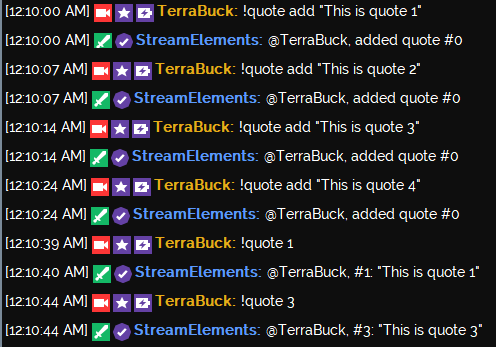
There isn't a quotes page on the dashboard yet so we recommend creating a google spreadsheet or something similar where everyone can see the quotes in the system and their #
lament blade
Is anyone good here on how to do a set up with an AverMedia live gamer portable setup through obs?
thank you @clever mango
 distant glen
hey, i got a donation come through, and it's showing in my paypal, but streamelements has yest to see the notification but im seeing it in my paypal, how do I get it to do the notification on stream?
 foggy basin
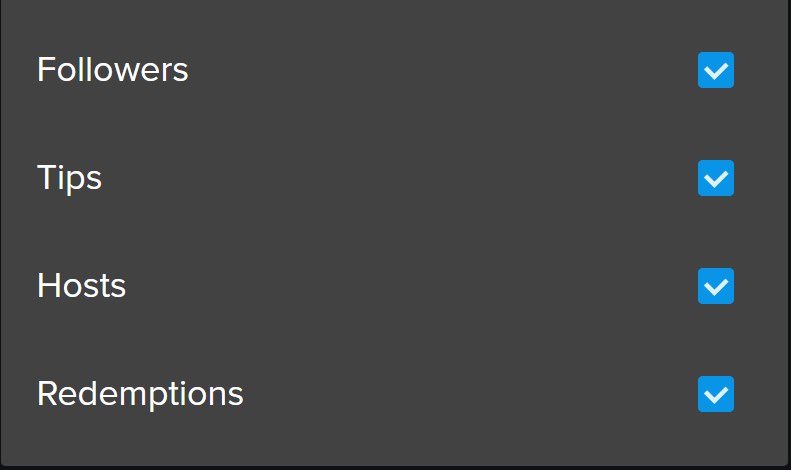
i have a question about a feature in this elements thing, https://i.imgur.com/4e3F0Jf.jpg what is redemtion?
 weary mist
@foggy basin that is for your loyalty store, if people redeem something, it will show what it was
foggy basin
thanx
edgy kindle
@distant glen Do you have an overlay created and in-use on OBS?
 tropic tapir
ANyone online for support?
distant glen
yup @edgy kindle
lament blade
How about "black words"
tropic tapir
How do you get your subscribers to sync with SE, I had a few while I was offline but it does not update and show them.
edgy kindle
@distant glen And do you have the alert box widget?
@tropic tapir Subscribers sync I believe 15 minutes after a stream has ended however if you need to manually edit it you can use the Data tab in the Overlay Editor
tropic tapir
ok, yeah it has been way longer then 15 min after the stream, as well as they happened before my last stream and still has not updated.
edgy kindle
Hmm let me check that out 👌
golden geyser
I’d also try logging in and out again @tropic tapir
fast topaz
is there a way to make a follower goal with it being a bar like a tip goal?
distant glen
@edgy kindle ok i figured out what happened, for some reason I had to confirm the donation, how do I change it to where I dont have to confirm donations?
edgy kindle
@distant glen You never did reply to my last question lol Tip Moderation was going to be the next question I had asked you lol but you turn it off in Tipping
distant glen
yeah, sorry I didnt reply, stream was up and I was in the middle of a game. thanks! got it fixed 😄
 ornate hearth
Moving through pages in Leaderboard just change number, not people or points for me. Also, searching a person in this should allow us to edit that person's info as well.
fast topaz
are there ranks anywhere that im just not seeing?
 dusk sequoia
Hey guys, I made a Overlay how do I put the Recent Followers/Donations/Subscribers on the Overlay?
ripe herald
@dusk sequoia https://i.imgur.com/vsMTFWB.gifv


 dusk sequoia
Ty :D
upper steeple
is there a way to refresh ground control without closing and opening it again?
 naive topaz
Hi all, how do i enable my mods to approve tips?
 gaunt light
Anything new today with out Streamelements?
misty wagon
@upper steeple Not to my knowledge but I've seen a button called Reset Session of which I'm afraid to push it 
@gaunt light  yes, I'm going outside my house for 4 hours, it's scarry. I'm also planning on listening to 1930 Electric
naive topaz
Understood @misty wagon but can the mods do that? I don't know how to tell them to approve them?
misty wagon
I know a mod can see it in webacces but unsure how it looks from chat. Any of my colleagues might know that answer.
naive topaz
Ok. Ty @misty wagon
gaunt light
@misty wagon Brace yourself Son , What about Streamelements Overlay can we copy from an overlay to another overlay ?
upper steeple
@misty wagon i've pushed it, doesn't seem to do antyhing
silk patrol
@upper steeple If i remember correctly, that button reset the values for the session data of your overlay. There is no way to refresh GC
upper steeple
@silk patrol T_T
 desert prairie
Can I export my points somehow? I like taking backups
In case something happens with stream elements that is outside my controls I want to have all the points from my users saved
silk patrol
@desert prairie you can if you are familiar with API calls https://dev.streamelements.com/#points
desert prairie
Or is there an admin here who can add an export button? You got import but not export
Still no idea where to click in that. Tried the "get" button but just jump into another menu.
any help from a a mod? @woeful oriole ?
silk patrol
@desert prairie i'm checking.
 atomic hollow
@desert prairie im on it, give me 5
@desert prairie the only way to export your points currently will be via our API
do you know how to do basic API calls?
lament blade
Hey guys anyone happen to know why i cannot use game capture in a borderless window of PUBG?
pine hemlock
Make sure you have anti cheat compatibility hook enabled in the game capture settings. should work fine
you might have to tab out and back in a few times or something for it to work though
silk patrol
@lament blade also check multi-adapter compatibilty if you have multiple monitors
silk patrol
@lament blade oh nvm, it's for multi GPU PCs, i used to run an SLI 😃
 fast lark
Yeah don't switch it on its useless
It just puts more load on your CPU
and you don't really gain any fps from it :<
dusk sequoia
Is there a way to put a outline of color on the text for the Lastest Follower?
stuck hamlet
Outline, no. Not currently
stuck hamlet
Of course 😃
desert prairie
Why can you not make it so that we can export our points?
Like Revlo
Normal people have no idea how API works
stuck hamlet
Hello @desert prairie the devs are hard at work on a lot of different things. Things that take priority over this. But, I can send you a tool for this if you'd like (:
silk patrol
oh yeah I forgot about that tool
 cinder ibex
Just a question... Is it possible, to "pause" a donation goal, and start another? For example, while doing a personal goal, you're doing a charity stream&goal, and then go back to the personal goal?
Can probaply do it manually...
pine hemlock
Would have to do it manually. The data for the goal widget is under the Data tab in the editor, then the goals tab. You can edit the values between the two when you swap.
You could also "hide" your current goal so you dont have to go back and edit the goal title/text to save yourself some time in the end
cinder ibex
Oke, I figured, that would be the way to do it... Thanxs!
pine hemlock
upper steeple
T_T i'm gonna stop using song requests till the fix is deployed cause it doesn't want to play my backup playlist once the requests have stopped. So I will wait patiently, come on devs you can do it
 dense jackal
i believe in the devs 👌🏻💦💯
stuck hamlet
that issue isnt really our issue. Chrome/Youtube made it not auto play, but we are working on a work-around
 molten flare
Hey. I'm having some issues with redemptions. It doesn't show in my activity feed, nor does it show on the overlay (and I have added the alertbox).. it plays the sound, but no image, no text and doesn't show in activity feed 😦
stuck hamlet
did you add the "Store redemption" widget? @molten flare
molten flare
@stuck hamlet Yeah
silk patrol
@molten flare Also, if the redemption was a sound effect, it won't appear on the activity feed. only in the redemption history. The alertbox is used for twitch events, you have to add the store redemption widget for stream store events as Onslaught said and make sure that you enable the "Redeeming this item shows an alert" setting on your items
 feral axle
im having issues seeing Roshu_gaming overlay and im a Full Admin For Him ts Just not Showing them
silk patrol
@feral axle we are aware of the issue. we are working on fixing that
molten flare
@silk patrol Redemption is both a sound, a picture and text. It's supposed to show the text "etc xxx redeemed choose a game") I'll double check with the item settings, thx 😃
silk patrol
@molten flare What I mean is that on the first panel of your iteam settings you have stream perk and sound effect. if your item is a sound effect, you won't see the text and the image on your overlay. you'll only hear a sound
feral axle
host seems to have a bit of problem on Bot and overlay on Roshu_Gaming
clever mango
@feral axle Check the latest pinned message in this channel please 😃
molten flare
@silk patrol I see! I chose sound effect on all, because I wanted it to play a sound too.. I'll change it to stream perk instead then 😃
silk patrol
there you go 
molten flare
Thanks, it works now! 😃
 ocean eagle
Anyone know of any Twitch timers that intergrate with StreamElements? The sort that you can set 1 sub = add x minutes, 1 donation = add y minutes etc.
clever mango
@ocean eagle At this time there aren't any direct integrations but I think it's a great idea for a new widget. Please visit #💭︱feedback-and-ideas and see the link for the ideas board in the channel header 😃
 cobalt galleon
Hello! Im mod on a stream and working on ideas and items for ger point shop. Is there anyone that can link some 'populär' or bigger shops for some inspiration? Dunno if this is right # to go to!
silk patrol
strong dock
 @stuck hamlet
ocean eagle
Thanks @clever mango !
cobalt galleon
Ty!
 serene nimbus
help
feral axle
Thanks for the {ammount} Viewer Host thespacebots! DoubleChinToad this isnt right
serene nimbus
do I need to refresh browser source every time I start giveaway?
silk patrol
@feral axle it's amount with one M
 wary sapphire
hello, i use streamelements for everything but I want to do a subathon in a few days. i was wondering if streamelements has any feature like a timer that will get time added to it if someone tips/subs/cheers/etc.
silk patrol
@Zepla#9326 Yup, it's called the train count
clever mango
different widget
At this time this widget is not available but I it is being added to the ideas board https://strms.net/ideas Please visit and upvote the idea 😃
silk patrol
The train count widget does something similar. it shows a timer for subs, follows or tips. Everytime someone subs, follows or tips, the timer is resetted to it's initial value and the counter is upped by 1
clever mango
This widget would countdown but get set amounts of time added for a sub, tip, cheers, etc
it's for extending the stream time with each sub, tip, cheer
feral axle
Thanks For the help we gotr it fixed
silk patrol
@Zepla#9326 Feel free to upvote this idea to be notified when things change https://streamelements.helprace.com/i263-subathon-tool-tab
wary sapphire
@silk patrol so id need 3 different train widget for subs , follows, & tips? i dont fully understand how it works ^^;;
silk patrol
@Zepla#9326 yeah 1 train widget can only do 1 type of event. So if you want all of them, you have to add 3 widgets
wary sapphire
is there someway i can see an example of it in action or emulate an event for it?
strong dock
@clever mango hmm nice.. maybe average to use this for my extra life stream... and any other charity ones.
silk patrol
@Zepla#9326 Yeah, add it to your overlay, then emulate an event using the blue bell in the lower left hand corner