#helpdesk-twitch
1 messages · Page 135 of 1
 ancient wigeon

 silk patrol
@ancient wigeon Not yet, here's an easy fix :
create 2 overlays : one with your alertbox/store redemption widget, and another one with everything else. make sure you shutdown the alert overlay when it's not visible using the checkbow in the browsesource properties, and do not shutdown the other overlay, this way it will always keep the data loaded
ancient wigeon
and then I close obs and it alll goes away :P
silk patrol
at least it won't be empty when you switch scenes. better than nothing 😃
 ripe herald
@silk patrol if song is playing from backup playlist will it show on chat with !song
silk patrol
@ripe herald don't think so since we can't pull it on the overlay, but I can't confirm
 silk patrol
yep, those commands work only with the queue
 worn pivot
Quick question: any idea why my user pic doesn't show? I can see the ones from my mods that I invited to the dashboard but mine always shows as missing https://gyazo.com/9b682ac4794f4a2b92d7f84f770efd3e
 ripe herald
did you set up profile image
on profile page
@worn pivot
go here and click on icon/profile image left to change it
worn pivot
oh hell, I am an idiot -.-
for some reason I thought it was supposed to automatically populate it, thanks
ripe herald
no worries 😄
 hallow harbor
Are we about to make our own tip cups? Also can we make our own bits too?
 past cosmos
Is anyone else getting problems with lag when the cup is in use? My girlfriend is having a struggle streaming today, notably better when the cup is out of action though. Hoping this will resolve it for now but definitely disappointing that it's happening. Any advice is welcome!
 tight harness
@hallow harbor Many people already do make their own cups by putting an image over the already available cups, also you've always been able to make your own tokens to drop into the cup, that was available since day 1 of the cup being launched
hallow harbor
I think I need to venture into the cup before asking lol "kicks self"
tight harness
 no problem
hallow harbor
Isn't the cups ppl make not as good though
tight harness
@past cosmos No problems with that here, what specs is she running on?
hallow harbor
Err transparent or look legit
tight harness
@hallow harbor I imagine the problem with allowing people to just make their own is that the dimensions of the cup need to be set so the tokens fall into it properly
past cosmos
16GB RAM, 1060 GPU, pretty confident the CPU is my Intel Core i5-6600K 3.9GHz but can't check this very second.
hallow harbor
Hmm need to see some ppls custom cuperooos
past cosmos
Never had any problems but haven't streamed for a few weeks while we were on holiday, returned (with new cup added) and having a bit of a bother with it today.
hallow harbor
Can bits be turned into liquid??!?
tight harness
@hallow harbor It is being discussed those the idea of allowing people to make their own cups
silk patrol
@past cosmos an i5 is a mid tier CPU, not recommemnd for streaming + animated overlays
tight harness
Lmao
 misty wagon
Like pee in someone's cup? 
hallow harbor
Lol latte your on the same track ^
past cosmos
Roger that. Weird it wasn't giving us any problem before though!
Would've thought the 3.9GHz would have been enough too.
Admittedly probably two less cores.
hallow harbor
Lolol yass see
But I'd make his stream like straight down into the bit cup
You think that would b ok on twitch lol?
 cinder lotus
hey guys, how can I make another giveaway when one is already running?
I just see the current giveaway and I do not want to close it
 serene granite
you can't have more than one running
cinder lotus
ah, thats sad. Just wanted to make a quick one yesterday and then I was forced to switch to nightbot
hallow harbor
If you want to make a quick one just do like a raffle
The winner of the raffle could take the prize
hallow harbor
[sraffle
Change the points though if you want to do this
And the timer
So the stream elements bot I believe in modules have a raffle system
silk patrol
@past cosmos number of cores matters more than per-core frequency when it comes to streaming/video encoding. I'm on an i5 too and I'm facing the same issue
cinder lotus
thanks I will look into it @hallow harbor 😃
hallow harbor
Yah man so if you were to type [raffle that's for multiple winners, and [sraffle =single winner raffle. This is normally used for points and players would need to type !join to get in. Reason I say change the timer is because it's very short if just turning it on. Also the points are very high if you try to keep points to a minimum etc.
@cinder lotus
misty wagon
@hallow harbor @tight harness https://streamable.com/sycji Don't know how to move the text and don't had enough sleep to tinker with it but this is a follower alert
 hallow harbor
Lololol that's dope but will it be yellow water?!?
misty wagon
It's an example that I made in 10 mins using stock from Google to show that your own creativity can go far. The rest is up to you content creators 😉
Go for it
hallow harbor
Ah sweet everyone just bug him about it so when he's not tired he'll be like shit
Ima have to see what I can do (newb here) when I get on computer
misty wagon
Made and updated to V2 with sound
Don't watch when you are triggered to pee easily 
tight harness
Sorry if you mentioned this earlier but what exactly is the problem with super overlays? @hushed barn
 hushed barn
oh no worries i think i mentioned this in the general chat @tight harness
Just that the overlays werent working for me
no matter what i did in obs the overlays just didnt show up
i apologise if im ignorant but i just started trying to use SE yestd and was super confused why the overlays werent working when other overlay systems like streamlabs worked fine
 slim cairn
Try re-adding it
Get the link again and make a new browser source
If that doesn’t work then try using another super theme to see if it works at all.
 unreal geyser
a quick question, i am using a game that incorporates a 10 minute countdown timer, is there a way to activate a countdown timer when someone in chat uses a command?
tight harness
There is a countdown widget, but it's not linked to chat commands currently
You can try suggesting it on the ideas page
 lament blade
Hi
Update v.2 has broken the stream store ^^'
- once in two the purchases do not work but deduct the points.
- we can no longer edit the products of the stream store.
I also offer my help if you want to release a translation in French (I'm French) Your tool is great, much better than others and I'd like to help you.
Greg / Gowbli
 clever mango
@lament blade Hi there, thanks for the report! I think we've got an idea of what is happening here. In regards to your first point, when you say that they "do not work" do you not see the alert? Are the redemptions showing up here: https://streamelements.com/dashboard/store/redemptions/items ?
lament blade
Once in 2, purchases do not work, they appear in the history but no warning + deduction points.
clever mango
Yes, there is no alert but do they show up here? https://streamelements.com/dashboard/store/redemptions/items
clever mango
So the redemptions worked
there was just not an alert
We are aware of this
Here's what is happening
lament blade
ok ^^
clever mango
When items are purchased on the stream store SITE, the alerts are not working but the items are being redeemed. When viewers redeem stream store items in CHAT, everything appears to work normally.
lament blade
yes
clever mango
Now, about the editing of items.... I haven't heard of this being a problem yet so I will check it out.
lament blade
I changed my twitch name, and my points were resetted
you want a video?
(for edit)
clever mango
That would help yes 😃
silk patrol
@lament blade loyalty points are tied to your username, you would need to ask the streamer to give them back to you
lament blade
ohhh alright, Thanks! appreciate the fast response
Goodmorning everyone, i wanted to enable the games in stream elements so i went to modules and enabled all of them. But at the chat commands it still says disabled + i doenst work on the twitch chat aswell. Anyone any thoughts?
silk patrol
@lament blade we are aware of this and we are looking into it
 chilly isle
Hello there! I had a few questions:
My latest subscriber widget is not displaying my repeat subs (2 months, etc.) is there something im missing in that widget that could fix that?
Also, my bit alerts are coming through incorrectly. I have the minimum donation set at 10 bits for the alert to go off, but it continues to alert when someone donates less than 10.
Any help is super appreciated! Thank you!
lament blade
@clever mango ; https://youtu.be/rQN0zf981YE

 limpid jolt
Hey Guys! I can not get Ground Control App to work after update - keeps saying "Something is wrong on our site..." 😦 I've updated JWT Token and restarted the app a few times... still no luck 😦 Please help! 😄
 random kettle
hey guys i have some problem with the songrequest... maybe anyone can help me ?
clever mango
We'll help you all in order 😃 Thanks for your patience
Ok @lament blade let me take a look
 stuck hamlet
@limpid jolt do you know how to get to your appdata folder?
stuck hamlet
I've been bamboozled
clever mango
Thanks @lament blade the team is also aware of this. They'll be fixed soon 😃
stuck hamlet
I know nothing about Mac
lament blade
@clever mango np ^^
clever mango
@random kettle Could you explain in detail what is happening?
random kettle
yeah sure...
i use the PUBG Sunburst Overlay
bottom left there's "Now playing"
i activated songrequest, downloaded the groundapp, filled the queue with songs, but it still says "no song" playing actually..
clever mango
Got it
It's bugged right now
Normally the the requested songs will show in this widget
backup playlist songs cannot be displayed but requested ones will show when working properly (soon)
random kettle
what does soon mean?^^
clever mango
As soon as the devs can get it fixed
Can't provide a specific ETA since there are many projects going on right now
random kettle
okay... ~ordering a choir:"GO DEVS GO DEVS"
just joking, thanks for the fast support 😃
clever mango
It's a relatively quick fix
Just will take some time before they can start working on it
They're working super hard (16 hour days lately)
silk patrol
@chilly isle  viewers have to share their sub in order for us to be aware of it. Have you checked the variations on your alertbox for cheers alerts as well as the default value. There is a minimum amount setting for the default alert, the default image and sound will be played if no variations requirements are met
clever mango
Sorry about skipping your question invicta 😦
chilly isle
I have, i had a subsciber share a Sub last night, it showed up in my alert box but did not show in the latest sub widget. But as i check streamelements now it is there so maybe it fixed itself?
And i have the default/minimum value for cheers set at 10, Do i need to add that as a variation as well for it not to alert when less than 10 bits are cheered?
You're good @clever mango ! no worries!
silk patrol
@chilly isle Using variations for stuff like this might be a better idea
 dim cedar
hide/show video button on songrequest doesn't work :/
browser: firefox beta
silk patrol
@dim cedar we disabled it because it was causing issues with how the youtube players handles playlists
dim cedar
yeah but ppl who change it before can't show video now
silk patrol
@tawny pivot ⤴
clever mango
This is known. Fix is coming
BTW, the site is optimized for chrome so we highly recommend it for the most stable experience
chilly isle
So im setting up a variation for bits now...is there a save button im not seeing on the variation setup? It sounds like a stupid question i know but i legit dont see one
dim cedar
put try catch on js and force remove it StreamElements.songrequestHideVideo xD
its stupid but work xD
silk patrol
@chilly isle yup, bottom right corner https://i.imgur.com/DmtIrBI.png
 chilly isle
That option doesnt show up for me, weird. Might be something on my laptop
chilly isle
Firefox is the browser. my laptop is 15" i believe?
clever mango
resolution?
chilly isle
1920x1080, same as usual. Ill try on my PC when i get home and see what happens
clever mango
Try chrome please. Certain aspects of the site are optimized with chromium in mind.
chilly isle
gotcha can do
clever mango
Definitely a firefox issue
dim cedar
i can test it
clever mango
tested here. Chrome will work 😃
clever mango
The editor is the key feature of the site that is optimized for chromium since OBS uses chromium browser source
It's best to do all overlay editing with Chrome
 drifting grove
How to remove this new Help button from bottom right corner of stream ?
silk patrol
@drifting grove try to refresh the cache of your browsersource (go into properties, the button is at the bottom)
 dense bough
I have a small Problem, I cant refresh my status and Title of the Dashboard in the Streamelements settings
Theres an error comming up
clever mango
Devs are aware. Thanks for the report 
misty wagon
@clever mango did you actually sleep? 
 prime sleet
When i try to edit a item in the store all the fields are empty, including image,name,description,etc. I cant modify only quantity and save, so really i need complete all the info each time
clever mango
@prime sleet Devs are aware. Thanks for the report
clever mango
@zenith nova It will be fixed. Porting over to the new site yesterday brought some bugs that will be fixed.
It's not there currently
 zenith nova
When approximently ? 😃
clever mango
I don't have an ETA since there is a lot that they are working on.
lament blade
So anyone has right now time to max out my settings? 😄
clever mango
Not sure what you mean...
lament blade
assisting in getting the best stuff you can have for now
clever mango
Well in regards to stream elements it's a good idea to set up your loyalty section quick so that viewers can start earning currency by watching and getting bonuses. Add items to your stream store and add the store redemption widget to your overlays. Speaking of overlays, look through the themes or create your own in the overlay manager. Use the widgets to add things to your overlay and the Data tab to edit your widget data if needed.
If you haven't yet, you should check out the SE youtube page for tutorials (a little outdated since they were created with the old site but still helpful) >> https://youtube.com/streamelements/videos

YouTube
Official youtube channel for StreamElements tutorials https://StreamElements.com
lament blade
i just watched loyalty settings, and it didn't said if those bonus boints are unique or addet to the base amount(per minute)
clever mango
Bonuses are added when a person follows, subscribes, tips, hosts, cheers
or are you talking about subscriber multiplier?
lament blade
so when it triggers an alert basically 
and for stream store, you can add a sound there, where will it be played?
Since in the redemption widget you also add a sound 
 serene nimbus
Redeem from the web will send an alert to stream today?
serene granite
yes, redeem from web was fixed
serene nimbus
I see it now !!! thanks a lot my best stream tool!!!
lament blade
oh btw ty for cancelling the prev sound during testing through diffrent sounds
it makes it much easier now
clever mango
No one listens to what streamers want more than 
silk patrol
@lament blade if you don't provide a sound/image in the store item settings, the default values on the store redemption widget. if you put a sound/image on the item, this will be used instead
lament blade
you have to add a sound through this button i clicked
you are forced to, atleast yesterday
silk patrol
you are forced if it's a sound effect, you don't have to put a sound for a stream perk
lament blade
oh i see ty 😄
 candid cargo
I have issues with the leaderboard viewing from online. When I go to the 2nd page or any other pages, it doesn't change. Using chrome
candid cargo

tight harness
Ohh yeah 😮
silk patrol
legacy bug
clever mango
I never noticed it on the old site
guess I didn't scroll through the leaderboards much 
 pulsar sierra
unable to reconnect my gamewisp account since the update, comes with up with some HTML txt and asks me to try again, just reporting it in
clever mango
@pulsar sierra Thanks, their API was returning errors recently but the dev team is working with them on it
pulsar sierra
fair enough, thanks for speedy reply
candid cargo
So when I leave the website and come back, it says to connect with twitch instead of saying my dashboard when I am logged in
clever mango
It seems that the public leaderboard pages are completely fine
It's the dashboard leaderboard pages that are having some scrolling bugs
tight harness
Yeah, which used to work fine for me when I last checked it, not sure how long ago that was though 😛
silk patrol
@candid cargo just click on it, you'll be logged in automagically
clever mango
the dashboard not coming up when logged in is something that the devs are aware of
tight harness
What you were referring to just before my message, the navigation of the leaderboard pages from the dashboard
clever mango
Gotcha
candid cargo
Also when I visit my account history events, it seems to spam multiple events for one click
clever mango
Is that page with IP addresses?
candid cargo
yeah
clever mango
There is work to be done on that page still
silk patrol
@candid cargo Still the same for me
clever mango

hallow harbor
Anyone ever noticing when hitting the Edit for stream store and editing for me a sound effect redemption it doesnt edit it ......
i tried switching the imagien multiple times
silk patrol
@hallow harbor the edit function is borked right now, we are aware of it
candid cargo
at the bottom right I see the little prompt of an error
 feral axle
Yea Host and Alert Not Working
unreal geyser
hmmm, total subscriber count not showing up, everything seems to be working aside from the sub total
silk patrol
@feral axle you would have to be more specific. i'm watching a streamer that uses SE and her alerts are showing
clever mango
In order to have host alerts work while streaming, the streamer must have the activity feed open on the site OR have ground control open
feral axle
Not showing My Host
clever mango
I believe it needs to be the Activity Feed page
not recent events on the dashboard
Ground Control application also will work
feral axle
and his alerts and his Chat notifys
arent
i could give u the link
so u can see for self
unreal geyser
hmm, looks like total subscribers arent updating for twitch
unreal geyser
the total subscribers one
on totals in DATA, it says that i have 0 total subscribers
silk patrol
@unreal geyser you can do a hard refresh by going on the widget data page and hit the reset button in the totals tab
unreal geyser
nope not working
 raven solar
When you go to edit an item in the shop, it loads a screen with no information on it. Bugged?
silk patrol
@raven solar known issue, being worked on
unreal geyser
total subscribers in the widget data page, still says 0 subs after i have reset the session
cup and alerts work though
silk patrol
@unreal geyser reporting, thanks for letting us know
unreal geyser
no worries
 proper idol
Hello. Concern: I am attempting to import my nightbot commands and timers. The timers have imported just fine but no custom commands are importing? Thoughts?
clever mango
The import tools are not fully up-to-speed yet since we launched the brand new site yesterday. The devs will have it working as soon as they can get to it.
 warm umbra
just updatet the Ground control "app", and it says i need to enter the JWT token, and get sent to "my account", but i can't find anything there that is called JWT?
silk patrol
@warm umbra if you go on that page https://streamelements.com/dashboard/account/information and click on the little arrow to the right of your profile line, you'll get it
tight harness
It's the SE desktop app, it allows you to manage song requests, allows you to use hotkeys to pause/skip alerts, gives you your activity feed outside of the website, it's a nice thing to have 
warm umbra
@silk patrol Thank you 😄
proper idol
Link??
tight harness
proper idol
Thank you
tight harness
If you click on Activity Feed on the website it's on the right
proper idol
Should have known it was that obvious of a URL haha
tight harness
😄
candid cargo
When will ground control have hotkeys to control overlay? like trigger a sound or image?
candid cargo
That is when I think Ground Control is going to be boss
clever mango
No, honestly that hasn't been discussed yet but would be a good idea to add to the ideas board
 stark robin
Hello, I cannot start any raffle, even the module is turned on
clever mango
Yes
pulsar sierra
can't find my JWT token on the website, is it the account ID?
serene granite
no. hit the downward facing arrow on the row with your email and then show secrets
pulsar sierra
Thanks @serene granite
serene granite
np 😃
stark robin
@clever mango Thank you! Do you know maybe when it will might work again?
clever mango
I don't
serene granite
@stark robin what's your twitch username?
stark robin
Marcosica
serene granite
mm any chance you can disable polish only chat on twitch?
not sure how to get around that 😒
actually never mind, I've got another channel with this issue to test on
thanks 😃
 unique ore
Where's the download for Ground Control at?
serene granite
unique ore
thank you
serene granite
np 😃
serene granite
#pandemic
unique ore
I couldn't remember the location @clever mango...Thanks for the heads up!
clever mango
Makes monitoring during streams so much easier. And it'll be getting even better soon
 signal umbra
is there a problem with the soundrequest? my overlays still says no song
clever mango
requested songs are not showing in the widget right now. It'll be fixed
signal umbra
ah, cool thx for the info @clever mango
unique ore
On ground control....are the settings stored locally or in appdata?
also dashboard statistics chart is broken too fyi
serene granite
can you show a screenshot ?
unique ore
serene granite
can you try ctrl+shift+r
unique ore
checking if it's broke in chrome
serene granite
oh, is that ff?
unique ore
yeah i just realized
serene granite
can't even file that as a bug report, i'll get yelled at 😉
unique ore
lol i know
one sec
yeah chrome it looks fine so nvm
but ground control......any idea? I'm needing (preferring) to run a second installation of it. If the settings are in the installation folder i can copy/paste it to a new directory.
serene granite
you want to run two instances for two different twitch channels?
unique ore
yes. I don't need them at same time, so i could keep swapping jwt tokens, but would prefer not to.
serene granite
You're probably best experimenting , much faster than waiting till we find the answer :p
unique ore
i'm kinda doing that now....figured that it'd be faster if you had an answer than me experimenting lol
There's a file "squirrelsetuip.log" that makes multiple referrences to appdata.....so i'm going to assume that's where it stores everything ;n;
stark robin
YEE!! <2
 muted locust
Hello @serene granite , are you there?
serene granite
aye
muted locust
I hope you are doing well buddy
I am running into a weird and funny encouter
I want to integrate chat into the overlay except that
when I test it by writing something on the twitch channel, I see the message duplicated on the overlay (on streamelements.com)
but nothing actually shows up on obs
serene granite
100% sure you hit save?
muted locust
200% sure
serene granite
ok, using OBS studio?
serene granite
you see the widget on OBS and it's blank, or do you see no widget?
muted locust
I see the widget but it's empty
serene granite
ok
its the resolution of the widget then
what did you set it on our site?
it bugs out when its less than 500x500 i reckon
do you see it?
muted locust
now, I do
and I am playing the xfiles song now
the resolution is 1920*1080 so that I can zoom out easily on OBS
this is so weird
thank you so much though, I will let it sink in a bit
serene granite
np 😃
muted locust
you rock 😉
 nocturne arch
Is the streamstore causing anyone else issues? I can't update the amounts on any of my audio commands
serene granite
ya there's an issue with that and its very high in our priority list
i think a workaround is creating a new item and deleting the old one
but only if its urgent for you to edit it.
nocturne arch
Thanks though, I have over 50 items so that's not really an option right now 😃
serene granite
we'll fix it, it's top priority.
nocturne arch
🤗
 lost ridge
Need some help, i want to get a camera surround on the talk screen, as pictured, but when i go to edit it, i can't find where i can put it in, can't copy from another overlay.
feral axle
roshu_gaming won 100 points in roulette and now has 6285 points! FeelsGoodMan i had this changed to DoubleChinToad
😦
serene granite
there's an issue with the roulette module that's being fixed @feral axle
feral axle
and modules are not being saved i deleted the se twitter placeholder and it still there
For Roshu_Gaming
clever mango
That is the issue with modules
feral axle
like i have his Name There
clever mango
They're not saving
stuck hamlet
@lost ridge could you elaborate? I'm not sure what you mean
stuck hamlet
Are you saying the talk show one doesn't have a border?
lost ridge
@stuck hamlet the picture shows a camera surround but when i go to edit the "Talk" one, there isn't one there
 cloud solstice
Hey Streamelements heros !! How is it going ? I would like to say Thank you very much for the new design /features on your website .Well done you guys !! Now I am so looking forward for Youtube integration .Will it include a chatbot /loyalty system giveaways etc ...? and if yes are we able to customize the bot name ? cheers boisss 😄
serene granite
youtube support is next on the agenda, and it will support everything possible on youtube
its a different platform than twitch, so some stuff won't work :/
cloud solstice
wonderful Stuff Hectic .yeah Youtube is quite limiting when it comes to developers which is weird cause things like this can support them .anyway I apreciate your hard work . I am willing to help you with French/Arabic lanaguges if needed . 😃
 slender flicker
hi i need some help can someone help me on voice support ?
 narrow cipher
Trying to edit Stream Perks in chat, and nothing is showing for the items.
e.g Cant change sound level
Cant alter image
etc
narrow cipher
SeemsGood
 tight rover
Just a sanity check: didn't there used to be loyalty settings for cheers? I'm not seeing the option?
tight harness
@tight rover Can you try Ctrl + Shift + R for me when you're on this page? Want to make sure that you're not seeing a cached version of this page. That was a bug that we discovered last night but it was believed to be fixed now 🤔
misty wagon
Sheppy, I got you drunk to often to talk about your sanity alright
 grim dune
Hiiii!! So, I've been having some issues with my Stream Elements. Everything seems to be working except my host alerts and the whole being able to login thing. I can't login at all. We've done refreshes and cookie cache all the things clearing, but still no luck.
tight rover
@misty wagon I saw you lurking the other day, too. ;)
@tight harness I'll refresh, see if that works.
tight harness
@TheStinkRat#2247 do you have an overlay set up?
tight rover
@tight harness No dice, still no cheers options under Loyalty. Do I need to purge my browser cache, do you think?
grim dune
@tight harness I do indeed!
clever mango
@tight rover Try that, just the cached data and images
grim dune
@tight harness first, wonderful dragon photo. 10/10. Also, the person I spoke with yesterday (hectic I think) said the devs were looking into the issue and I'd receive an email if that helps
 upbeat topaz
Is streamelements having trouble? Normally I can stream with 2ms render time with my overlay on. Now I'm jumping up to 17ms render time with my overlay on. If I hide the SE overlay, I'm down to 2-3ms.
tight harness
@grim dune Ahh okay, so you're waiting on that email currently? Would you like me to see if I can get an update for you?
clever mango
@slender flicker on my way
grim dune
@tight harness that would be super awesome!! The nice Latte person told me to come to the discord to straighten things out after seeing a post, so I figured I'd listen to Latte
 amber dagger
Hi. Is there a problem with the songqueue since the update?
tight harness
@upbeat topaz I haven't heard of any problems like this yet, will keep an eye on it
@amber dagger Yes, there are some issues with it, the devs are aware and working on fixing those issues currently 😃
amber dagger
Ok. Thanks mate. 😃 bb
slender flicker
#helpdesk-twitch i have a probleme with my sub count it show more subs than i have . twitch id : hitskygam3s
 unreal basalt
Is the site down?
misty wagon
Nothing known to use atm @unreal basalt
It might be slow as we are doing bugfixes real time for Dashboard 2.0
tight harness
@slender flicker Is it slightly more?
unreal basalt
I just get a blank page with the help button in the bottom right
 ebon forum
@tight harness he has a couple of subs more than twitch is showing, this is pre V2, a couple of weeks already
tight harness
Yeah, they'll likely be free-subs which the dashboard doesn't show but are still in the API as subs
That's why I wanted to know if the amount was just slightly more so I could work out if that was the case 😃
ebon forum
Yeah twitch messed around with that a bit
 robust jolt
Was bit cheer loyalty removed in the latest update?
clever mango
No, the devs are working on it
robust jolt
Ah ok Thank you
slender flicker
@tight harness i have 20sub and it shows that i have 23
misty wagon
You can edit it here to the correct number https://streamelements.com/dashboard/session
tight harness
I think they mean Total Subscribers count which can't be edited
slender flicker
@misty wagon thanks for the help !
tight harness
If you mean Total Subscribers then that can't be edited, because that's pulled directly from Twitch's API, they give us a count of 23 subs, they show you 20 because they don't include your own sub or any bot subs on your dashboard because they're non-paying subs
 civic bolt
Guys anyone experiencing issues with the hosts on SE? By issue i mean no alert, and it doesnt even appears on the dashboard
 mortal basin
i need help with my overlay, it is set up correctly (at least it worked last time) but now it only shows a "help" icon on the bottom right of the stream..
clever mango
@civic bolt do you have ground control (StreamElements desktop program) running?
civic bolt
nope, never had
clever mango
Do you have this page open during your stream?https://streamelements.com/dashboard/activity
@civic bolt
civic bolt
nope and never had
clever mango
@mortal basin refresh your overlay cache - double click the browser source and scroll down to refresh cache
@civic bolt one of those two needs to be open during the stream
in order for the twitch API to send us host events
civic bolt
everything worked fine, but for 2 days now i dont get the host to se
mortal basin
@clever mango what do you mean 'browser source'?
civic bolt
yes
 plain nacelle
Quick question, when someone has time 😄
civic bolt
oh, sry 😄
clever mango
@civic bolt make sense now?
civic bolt
nope, doesnt makes any, since never used any of those, and everything worked fine
clever mango
Because we used a different method before
grim dune
@lament blade Ive had the same issue.
clever mango
With the new site came a new method for pulling host information
https://streamelements.com/dashboard/activity OR Ground Control need to be running
clever mango
Yesterday
civic bolt
now it makes senmse 😄
clever mango
Did you notice the brand new site?
civic bolt
*senmse
mortal basin
@clever mango it didnt work
civic bolt
just the popup, but i dont open the site everyday so didnt notice any changes 😄
mortal basin
literally every overlay i am using has this bug atm..
feral axle
@{user} you got {emotes} and lost your {points} ${pointsname} DoubleChinToad i changed the name
civic bolt
but thx for the info 😃
clever mango
Then go into your browser settings and delete all cached data and images "since the beginning of time"
mortal basin
but on streamelements when i press launch overlay ,i see it fine, the problem is when trying to display it in my stream..?
feral axle
but i dont wanna clear cache i love my cash 
clever mango
@mortal basin Look in the top left of your OBS program. What version of OBS do you see?
mortal basin
v0.659b
clever mango
That's OBS classic
misty wagon
That's old
clever mango
No one supports it much anymore, including OBS.
mortal basin
ive always used obs classic
clever mango
It's been 13 months since last update. Please visit https://obsproject.com for the update
ebon forum
updating to OBS studio will be a shock 😄
mortal basin
cause it looks weird af
ebon forum
do it, classic has not been updated for more than a year
mortal basin
if it fixes my overlay error then i will
misty wagon
A positive shock for sure
mortal basin
ok.. does obs studio need clr browser to work?
feral axle
yes
clever mango
Wait a minute
Studio does not need the seperate CLR Browser because it now includes the browser in the program
 wanton sluice
This isn’t support exactly. But since most of the brains behind SE are here. Thought you’d want to know. I’ve had more than a couple compliments on my overlay yesterday. Said it looked sharp. Just passing it on
clever mango
CLR browser is deprecated. That's why it will not work with new overlays
 sturdy viper
OH wait
CLR doesn't work with OBS?
I had a CLR broswer for emotes on classic OBS
and it doesn't work anymore
😦
ebon forum
OBS studio has it included
tight harness
OBS Studio has a tick box to install/include Browser Source plugin with the OBS installation
 edgy kindle
@sturdy viper CLR doesnt need to used on Studio because it has a new Browser Source built in
feral axle
^
sturdy viper
but I'm using classic 😦
clever mango
Don't
sturdy viper
how come it doesn't work on classic ?
 scarlet hound
Something seems wrong about these statistics:
feral axle
BrowserSource > CLR Browser
clever mango
😃
misty wagon
Classic was discontinuid 13 months ago
feral axle
More Like CLR BOWSER
mortal basin
lol
sturdy viper
ohhhhhhh so can I have both to see what i need to copy and etc?
and then delete the old one?
but thank you ! I suppose I need to switch to studio now... xD
sturdy viper
@terse canyon What install?
 terse canyon
obs studio
terse canyon
yeah 😃
clever mango
Those of you updating to OBS Studio... check this link out for a scene converter that may help with the transition. https://obsproject.com/forum/resources/obs-classic-to-obs-studio-scene-converter.430/

Open Broadcaster Software
terse canyon
oh nice!
feral axle
i had a sound and did a test for the alert and didnt save for cheer sound
 broken holly
Has anyone else had issues with streamelements site loading slowly or just crashing? Started for me before the updated site (well done by the way 👍 )
prime sleet
HUm... My total suscribers say 0 today
But i have not 0 suscribers xD
Count broken?
lament blade
Hi
misty wagon
lament blade
i have a problem with my Overlay
misty wagon
Here is some  and a
and a  I will call @ripe herald as she is trolling me right now and obviously bored
Calling @ripe herald
PS: what version of OBS are u using?
 swift parcel
@prime sleet did you just get affiliate?
feral axle
ohai @swift parcel 
ripe herald
#ignore
lament blade
0.659b is the version of my OBS
ripe herald
10/10
misty wagon
I knew it @lament blade I'm psychic
ripe herald
@clever mango is here to help
misty wagon
OBS discontinued Classic 13 months ago, please get OBS Studio, it's awesome
broken holly
^
misty wagon
⬆
lament blade
should i delet OBS Software now and download the OBS Studio ?
clever mango
Yes please
misty wagon
@lament blade I apoligize for my collegues, everyone is memingful tonight
They hate it when old people are right 
clever mango
ripe herald
🅱 roken
 dark nest
:[ what is this little help bar in place of my text overlays https://gyazo.com/eee52eee88327518c5435f84bf6d53c4
 dark nest
oo was it answered
clever mango

dark nest
all i saw was talk of classic
 ripe herald

dark nest
yea
misty wagon
@dark nest ignore my collegues @ripe herald and @clever mango the memes are #broken
misty wagon
Sorry Jade, they are meming this old guy in voice on my own Discord. No worries, we got you
Terra is just a bit slow with his typing, he's getting old too #broken
He's telling me bad things now #asmr
clever mango
Log out of StreamElements
press CTRL+F5 to hard reload the site
Go into your chrome settings and clear your cached files and images
Then re-log into the website
misty wagon
It's so weird to hear him talk outloud what he's typing. Sign of age
serene granite
@dark nest if you're getting that on OBS then edit the browser source properties and click on Clear Cache
dark nest
neato
prime sleet
@swift parcel I have affiliate since some months ago. 40 subs. But in streamelements count say 0 today
broken holly
@clever mango still having issues :/ however, everything loaded and I was able to edit my giveaway in Edge 👀
misty wagon
@prime sleet you can edit it here https://streamelements.com/dashboard/session
terse canyon
love the new name look XD
ripe herald

tight harness
It's the new trend I guess
ripe herald
#blame @misty wagon
misty wagon
I blame @ripe herald She made me do it and now we can't change back 
terse canyon
LOL
ripe herald
wasnt meeeeeee
misty wagon
Denial #broken
ripe herald
#🅱 roken
clever mango
@broken holly The dev team is pushing out real-time updates throughout the day which can slow things down at times
We highly recommend google chrome as the site is optimized with chromium in mind
misty wagon
It was removed 
hallow harbor
i figured it out 😛
broken holly
Oh yeah, I absolutely prefer chrome, I'm just tryna get everything set for tomorrow without too much panic xD thanks for the response tho @clever mango 😄
hallow harbor
Is there a way that song request will auto play requested songs? I usually run a playlist then someone will request one and it will just sit there until i play it
this was 2 days ago
Idk i understand my question..
tight harness
@hallow harbor We're aware of it, it's on the bug report page
hallow harbor
kk thanks
The command to buy tickets !ticket #
is there a way i can make a new command that does same thing !tickets #
for giveaways*
tight harness
I'll have to check that, one sec
hallow harbor
i just don't see a way to edit giveaway command
tight harness
You can add a command alias in Default Commands
So you can try
It basically just adds another version of the command with different wording, but !ticket # would still work
tight harness
!enter is for buying tickets, so I think that's what you want and what I meant 
hallow harbor
Yah i mean !ticket works
tight harness
Ahh, !ticket is an alias of !enter
hallow harbor
i wanted to make !tickets work everyone accidently does it
tight harness
You can add more
tight harness
hallow harbor
u da baaassss
tight harness

sturdy viper
So I'm trying to convert OBS classic into studio and I did the conversion and I am trying to "import" ? onto studio and it says it already I have it imported but I don't see any of my scenes? 😦
tight harness
@sturdy viper You probably imported your settings
sturdy viper
but my screen is still black?
tight harness
Yes because you haven't set up your scenes and sources yet
tight harness
Yeah, like I said you probably imported your settings, but scenes and sources aren't settings, I remember having to do this manually too
sturdy viper
ohhhhhhhhhhhhhhhhhhhhhhh
tight harness
But considering how OBS Classic hasn't been updated in over a year it's worth it
tight harness
no problem 😃
 weary salmon
hey, my total follower count widget is showing 29955 and i have way less than that, tried removing and adding a new widget but still shows that same number
tight harness
That is weird 🤔 1 sec let me try it
serene granite
ya there's a problem with that
tight harness
Ahh
weary salmon
alright np, ill check take it off for now, thanks!
tight harness
Yeah, for me it's only 10 higher than what it's meant to be
weary salmon
oh also i have an issue where when im editing my overlays scenes the webpage will freeze and i have to open a new tab and log into streamelements again
tight harness
@weary salmon Are you using Chrome?
weary salmon
usually when i try to switch scenes to edit, the next scene i move to will just be frozen
yes
tight harness
Good 😃
 ripe elk
Hello people from stream elements 😄 I have 2 problems : when i turn out song request, the song request by chat automatically turn on even if i turn it off, and i get a 404 error when i try to load the page for the "tip ping songrequest page " at the url "streamelements.com/ramythenoob/songrequest" 😃
is it a feature still not implemented or do i have a problem ?
tight harness
@weary salmon Have you heard of the setting in Chrome called hardware acceleration?
weary salmon
oh also when i try to change text fonts it will jsut freeze on the spot, just found that one out
yeah, turn it off?
tight harness
Yep
weary salmon
cool thanks
tight harness
@ripe elk Song requests has a few issues at the moment, it's on the top priority list to fix 😃
ripe elk
alright, also as an idea (during the time we're on the topic), i didn't see a "minimum to tip for song request" in euro, only in points 😃
thank you very much !
and have a good day/night
 devout kettle
hey guys, is there any way to change the text from the default commands?
i want to write it myself in spanish, not in english, but i dont know how to change it
ripe elk
try to go there " https://streamelements.com/dashboard/bot/commands/default "
@devout kettle if it's what you meant :p
tight harness
You can't change the text for default commands currently
ripe elk
oh the text :p my bad 😉 have a good day way
tight harness
But I know translation is something that's been mentioned many times before
devout kettle
well not even translating
whoever that wants to place a custom message on the !givepoints for example
instead of the typical
{sender} gave {pts} {ptsname} to {target}
is that something you have in sight?
tight harness
If you have ideas this is the place to go: https://strms.net/ideas
Putting them in here will just get them buried i'm afraid 😄
devout kettle
or maybe in the ideas tab in discord?
tight harness
That's for discussing ideas already on the ideas board
devout kettle
oh really?
tight harness
Yes
Otherwise the same problem occurs, they'll get buried
The ideas board is a much more organised way for us to collect ideas
devout kettle
well i asked right here for a super moderator access and you did it
tight harness
Many people asked for mod access for many months
devout kettle
yeah i can guess so
 gilded girder
any way to save a playlist og shuold i keep adding songs?
 toxic parcel
For the new and amazing moderator login, does the owner have to make a new link for every mod that they want to add?
tight harness
@gilded girder Yes, go to the song request page, click on Settings, you'll see a place to put a 'Backup Playlist' link
gilded girder
thx
toxic parcel
@tight harness
clever mango
links are one-time use and expire in 72 hours
tight harness
Yeah
I knew about the 72 hour expiration, didn't know it was one-time use
Makes sense
toxic parcel
Gotcha Thanks guys 
tight harness
hallow harbor
Can i add a redeemable that no one can use/see but me?
misty wagon
Not at this moment or there must be a creative workaround that I'm unaware of
hallow harbor
kk thanks
 tacit yacht
Hey, sorry if this has been recently asked or answered - but is there any options for subscriber multipliers or any "sign on" bonus for when people subscribe for loyalty points? I thought their used to be, but I don't see them anymore.
clever mango
There will be a fix out tomorrow for this 👍🏽
 serene pagoda
I can't edit my store items
tight harness
We're aware of issues with the store, the devs are working on it
tacit yacht
Yeah, was gonna say it isn't loading for me so it's probably a site issue
tight harness
Yeah, we upgraded to the new site yesterday and it opened up a lot of cool new things that have been worked on for some time but along with that also came some bugs
Luckily they're getting fixed rather quickly 😃
 agile ridge
I was just editing a new overlay and after saving it everything is lost 😮 is it related to those issues @tight harness
tacit yacht
That's good. SE is awesome. I used to use StreamLabs but they never integrated a loyalty system, they just did but it's a mess so I'm like... nah bra.
clever mango
Welcome!
agile ridge
nvm all good now, just a little server hiccup it seems 😛
tight harness
Ahh cool 😃 I was just about to check the bug reports page, was going to say it didn't sound familiar 😛
 indigo gyro
yup regarding that, i guess a lot of ppl are using it as it s randomly laggy at some points ? 😃
lament blade
can you make people timeout themselves?
clever mango
TwitchCon and a brand new site at the same time
@lament blade yes, checkout the !vanish command template
lament blade
thanks bb 😄
 olive loom
hey uhh, I've got a few problems with the new streamelements:
- recent contests page doesn't show up when in dark mode
- all of my images in the stream store are missing
- i cant edit rewards
- having full access to another person's streamelements is a little buggy with the contests portion, sometimes the contest wont show up , i can't see the number of entrants, and i can't pick a winner
i hope this is the right channel to report bugs
lel
tight harness
It is indeed
clever mango
Thanks for the report! The devs are working out bugs and those will get squashed soon 😃
tight harness
👢 🐛
olive loom
thank u thank u
 runic bridge
Is the approval page still not working? 😄
 sage wolf
Is it possible to have multiple overlays with seperate URLs? I have two layouts, one for my ultrawide games and one for my normal 16:9 gameplay. Ideally I want to seperate the layouts just slightly for each to maximise screen-space.. Is this a thing or have I gone about creating overlays incorrectly?
misty wagon
Yes got it somewhere
Nm, @swift parcel incomming
hah to slow!!
And i'm off to bed ❤ @swift parcel
swift parcel
You can have as many overlays as you want @sage wolf
though ultra wide might be an issue? But I remember seeing that it can be done
misty wagon
yes, def gonna sleep now
clever mango
@runic bridge It is not working but the devs are hard at work on it
 vale anchor
the subscriber number widget is showing 0 for me today, what could be the reason?
swift parcel
general check list to see if things will kickstart it back : 1) log out and log back in, 2) ctrl+f5
lost ridge
anybody know how to format the Twitter tweeter?
swift parcel
it watches accounts that you put into it
so the two that are in there the bot will push tweets that those accounts put out
runic bridge
@clever mango Thanks!
sage wolf
@swift parcel only issue is everytime I create a new overlay it uses the exact same URL, so when I edit one overlay it edits the other. Was there something I missed doing?
swift parcel
there are slight differences in that url
I use two different overlays
i know they look the same but they are different
clever mango
https://streamelements.com/overlay/overlayidentifier/overlaytoken
The token is always the same
The identifier is the difference
 pearl flint
Okay thanks
clever mango
@pearl flint you enable it by clicking launch in the bottom left corner of the editor, copying the link and pasting it into a browser source in the streaming software
pearl flint
@clever mango Thanks
clever mango
Stream Elements - Legendary Live Streaming
Setting up your Overlay with StreamElements is quick and simple. In case you need help, here is a guide to help you with the initial setup…
 manic reef
edgy kindle
manic reef
edgy kindle
Try loading it on Chrome
Our website was designed with Chrome in mind considering it's the majority browser market right now 👌
olive loom
also contests aren't saving to recents 😦
im streaming now, and i have to rename every time
clever mango
Also on the chopping block
We appreciate the reports though 👍🏽 Sorry about the inconvenience during your stream
 turbid moth
my overlay will not show up on my stream. I just get the help button that pops up on my stream preview instead of my overlay
edgy kindle
@turbid moth What version of OBS do you use?
turbid moth
0.659b
edgy kindle
Upgrade to Studio and your issue should resolve itself
turbid moth
when I upgrade do I need to make a whole new setup?
edgy kindle
There is a link above in chat, i'll get it for you, that'll help you transition everything over
Open Broadcaster Software
turbid moth
thank you!!
edgy kindle
@lapis goblet Is this a custom command?
 lapis goblet
ill look
rn
wow
ok maybe u should look into it, it is named; !tip on the default command page, but u need to write !donate in chat to activate it, thats why i couldnt find it
edgy kindle
Np 👌
lapis goblet
❤
 wintry rune
@swift parcel Hey, I ask told to ask you about importing points from brain bot?
swift parcel
@wintry rune Did you get the currency data from superstringman? If you haven't DM him and ask him for it. once you get it go here and follow the directions> https://filter.dj/CSVtoStreamElements.html (note it'll ask if it should be current or all time points choose current)
wintry rune
Yes, I got the data from him, however that was the link I was given at one point, however due to their API change it seems it has been broken.

fails each time :/
clever mango
That link is not working at the moment but you can use the revlo tool on the site
It's just a csv import tool
swift parcel
ah there we go
wintry rune
I've also tried the revlo tool, each time it fails too :(
wintry rune
Sure
 crisp needle
after update the song request name display from the overlays its broke, if you can see pls...
clever mango
The dev team is working on it 👍🏽
tacit yacht
I've noticed when I go to edit my Store items, the information to edit does not show up at all. Is that being fixed tomorrow too?
I click edit and instead of editing information it's as if I clicked "new item" but I didn't.
 rocky lion
Hello I have a question about overlay
clever mango
@tacit yacht It's on the debug list
I can't say if it will be tomorrow with certainty but odds are good
rocky lion
Hello?
clever mango
Hello
edgy kindle
@rocky lion Ask your question lol
tacit yacht
Ok 😃 thanks.
rocky lion
I don't see song request working in overlay
clever mango
It's being fixed
rocky lion
I mean, it apperas like "no song"
clever mango
Thanks for the report 😃
rocky lion
ok thanks
lapis goblet
is there a way like Revlobot, when the stream is offline, people cant use roulette?
😃
clever mango
Not automatically but anyone who can access the dashboard can disable it with a couple clicks
 uncut sapphire
I've created my own super theme through individual overlays. Is there a way to organize it together in "My Overlays," just like how downloaded themes are organized together?
 atomic hollow
@uncut sapphire there is no way to sort that currently
@wintry rune points upload page will be fixed within 24 hours
wintry rune
Ahh, Thank you!
atomic hollow
❤
uncut sapphire
Ah, that's too bad. Custom organization goes a long way in usability.
wintry rune
Also, I noticed I can no longer access the /dashboard/account/information when I'm moderating another channel anymore, but I could before?
 grizzled kraken
Hey so I recently became a twitch affiliate and I have a question. How do you get subs to show up in the recent events & activity feed?
clever mango
@grizzled kraken please log out of StreamElements, press CTRL+F5, then log back in
grizzled kraken
yup that worked thanks @clever mango
clever mango

@wintry rune Account information is no longer accessible by moderators for security reasons
wintry rune
oh, alright.
atomic hollow
what do you see?
@wintry rune i can upload your points now but it will be instead of what you have now and will not add to the current points
please confirm
 paper marten
So have have all the chat filters and if i change it and go away it all gets checked back on
after i levave the screen
wintry rune
That's fine, however I need it done for my friend not me.
atomic hollow
oh
wintry rune
Didn't work >.>
wintry rune
honeyri is her's while mine is linktlh
wintry rune
Alright. 1 moment
atomic hollow
twitch username
wintry rune
Is twitch id just twitch username?
clever mango
honeyri
atomic hollow
yes
wintry rune
alright her twitch id is honeyri
lament blade
Hello! Just finished up another stream. Follow alert issue I had yesterday seems to be fixed! However, now the Host alerts are not showing up. I checked the Stream Elements dashboard and they actually don't even show up under there as well.
However the chat bot notified in the chat.
clever mango
Are you looking at recent events on the dashboard? @lament blade
 onyx anchor
Hey guys, I'm trying to get the hearthstone overlay to fit my OBS screen but all the stuff doesnt show up or sits in the center of my screen
wintry rune
Yes. :D Thank you so much!!
atomic hollow
my pleasure
wintry rune
She'll be happy to see that. xD
lament blade
I DM'd you some photos @clever mango
atomic hollow
@onyx anchor please check the resolution of the browser source
make sure it matches the resolution set in SE
onyx anchor
yeah. I've been trying to mess with the resolution but im still not able to get it to fit. I set it to 1080
atomic hollow
both in OBS and StreamElements?
onyx anchor
yes in OBS. For SE where do I go to set a size ? I only know of the opening option where you can set it in 1080 or 720
edgy kindle
@onyx anchor When you set it to 1080p in the overlay editor you have to set OBS to 1920x1080 for your browser source and then CTRL+F
atomic hollow
 silent zealot
Hey! After a few hours setting up my overlay on streamelements I'm stuck because I can't save any changes/upload images/sounds/etc and can't save any tweeks I did on existent overlays.. Server problems maybe?
clever mango
Which browser are you using?
silent zealot
I tried opera and google chrome
clever mango
Hmm
silent zealot
I can't simulate events as well
 agile basin
cant edit store items 😦
 versed kernel
I cant get images to upload
versed kernel
edge
terse canyon
Ew! XD
Just poking my 2 cents in. XD
Edge has a ton of issues. Not sure if it's related here though
clever mango
The new site is best optimized for google chrome because of it's current market share and also because OBS browser uses chromium.
clever mango
Xsplit?
versed kernel
bebo
clever mango
Ah I see
terse canyon
So long as it's not gameshow
clever mango
👌🏽
clever mango
not for uploader
terse canyon
Kk
silent zealot
62.0.3202.62 @clever mango
 serene owl
how exactly do i get help? for my stream elements
serene owl
so i use muxy for my alerts bc i dont wanna move everything over and its already set up there. but i got stream elements for the chat part of it. to post in my chat the follows and all that. but it dont seem to post it. it has mod and the 8ball game works in my chat it just dont seem to post my alerts for some reason
silent zealot
I don't think so. Installed it 2 hours ago because I was having problem with Opera @clever mango
And it was working earlier.. dunno what to do.
clever mango
@silent zealot try logging out of the site, press CTRL+F5, then log back in and test
feral axle
Did you Guys Fix The Module issue Yet?
clever mango
Fix was deployed for modules
silent zealot
No progress
serene owl
@clever mango do i have to be streaming to test it?
clever mango
Try clearing all cached images and files from the chrome settings
The bot will post chat alerts when the streamer is offline @serene owl
silent zealot
Still not working
silent zealot
Sure
serene owl
ok it is still not working then @clever mango
clever mango
@serene owl Check your module > Chat Alert settings again to make sure that they are enabled
serene owl
@clever mango it is
feral axle
im having issues using the arrow keys on here
serene owl
@clever mango yea i saw is there a spacific way to replay old follows? im clicking the replay button to see it pop up more for clarification but its not reposting anything
feral axle
when i edit a cmd via dashboard i cant use left or right arrow key its bugged
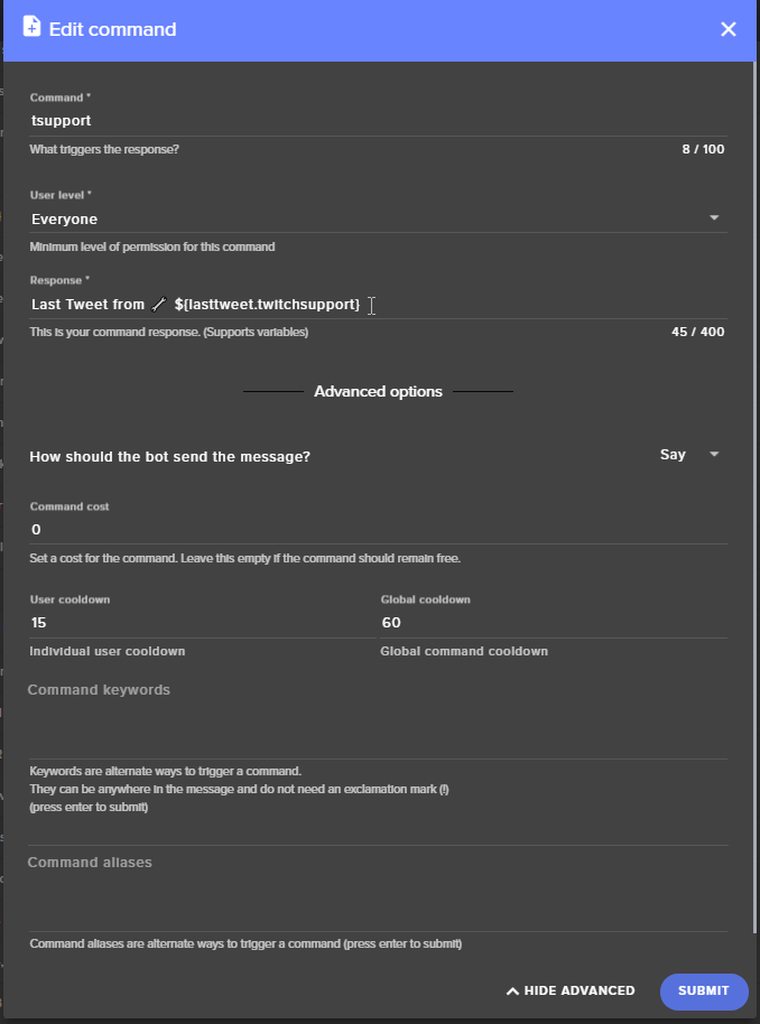

 feral axle
yea
clever mango
It's working
feral axle
its not for me
clever mango
browser?
feral axle
chrome
clever mango
you're clicking in the response box where the text is?
feral axle
hallow harbor
hey terra u ever stream with ps4?
clever mango
I have not
clever mango
@feral axle I think there is a chrome update available for you
After that the only other thing I can think of is Disconnect/Reconnect your keyboard
I cannot replicate this issue no matter how hard I try
Try incognito mode as well to see if that makes a difference
feral axle
yea cant go left or right on on screen
will try the updated chrome tho
still nothing will try incognito
https://puu.sh/y5Ey8/0434f8bb80.mp4 works on other sites @clever mango
@clever mango found the issue it was Darkmode
casuing it
clever mango
darkmode on the site?
feral axle
it was dark mode