#helpdesk-twitch
1 messages · Page 134 of 1
 hollow zinc

 clever mango
Thank you Lord @hollow zinc
 warm umbra
@stuck hamlet do you know when the update is done? 😃
clever mango
Which one?
 stuck hamlet
🤔
 serene granite
@warm jetty are you experiencing any issues ?
warm umbra
yeah. testing out the giveaway, but the person helping me can't enter. doesn't matter wich commands we try to use. and also trying to enable the 8ball and raffle function, but nothing happens
 lament blade
The overlays doesnt work. Not on the website nor in OBS, nothing shows up. I've entered it correctly with the url and the right settings. Anyone wanna help?
 ripe herald
 lament blade
Already done that
clever mango
 The dev team are actively working on the site, deploying updates in real time as reports come in. We thank you for your patience during this transition to the new, upgraded site.
Troubleshooting Steps:
- Log out of the website
- Hard Reload: CTRL + F5 or CTRL+Shift+R
- Chrome Settings > Advanced > Clear browsing data > Clear from beginning of time ☑ Cached images and files"
- Log in
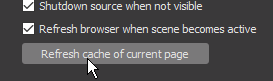
If you have overlay issues, REFRESH CACHE of the browser sources in OBS. If this does not fix the issue, please be patient as the dev team pushes updates to fix bugs. Thank you
 gaunt light
Having trouble in OBS guys
ripe herald

gaunt light
I've set up my Webcam , On 2 scenes. one is gameplay Mini camera , and one is transition , huge camera
But when i go between Sources . I have to manully deactivate and activate the camera
on when i want . it doesn't do the switching anyone know ?
 feral axle
wats the good tip settings for this
since i wanna make my own but wanna know some good ranges so i will be happy with
clever mango
Everyone does it differently 
stuck hamlet

clever mango
stuck hamlet
Depending on size too
clever mango
The only wrong way to use presets is to not use them 
They are great for both streamer and viewer
🚨 ATTENTION 🚨
**GROUND CONTROL IS NOW UPDATED. PLEASE RESTART THE PROGRAM **
stuck hamlet
🤔
clever mango

 proud pumice
@median hollow
Did you save the overlay?
Did you set it up with proper size?
1920x1080?
Does the overlay work when you load it on browser?
 sharp wind
@clever mango Hi, while changing notification video on alertbox in editor ... if i put video with sound will it use that sound or i have to input sound separetly?
 narrow cipher
stream perks are not sending any sounds 😦
clever mango
There is a volume slider for the video sound if there is sound
narrow cipher
also not showing gifs 😃
feral axle
anyone know the css element for the ip's so i can blur my own ips with Stylish
sharp wind
@clever mango thank yoU!
clever mango
best to post that in #dev-chat where the devs live and tag Darko
@Peter Cushing#7646 Were they working before?
stuck hamlet
BAMBOOZLED
clever mango
discord 
stuck hamlet
@narrow cipher
clever mango

stuck hamlet
(;
feral axle
 Thanks For the #helpdesk-twitch Member since
30/06/2017
clever mango
Please stand by as the devs push out updates. This transition is massive and the devs are working around the clock to make everything work.
 runic steeple
So who would i ask for any what software to use / get to help clip audio from minutes, down to 8-10 seconds?
 velvet wren
There seems to be an issue with my Tip leaderboard, it's now blank. I've tried clearing cache and images it still appears blank.
clever mango
you can ask in general chat and someone may direct you to a resource @runic steeple
runic steeple
@clever mango okay ty, sorry wasnt to sure where to talk first. 😃
clever mango
no problem
 cursive quail
when I open the overlay editor the green screen is not showing up
 median hollow
my overlays doenst works :C
proud pumice
@cursive quail did you do hard refresh?
cursive quail
yes
cursive quail
PC
serene granite
@cursive quail please click on the zoom out icon on the top right corner
cursive quail
still not working
serene granite
can I connect to your computer with team viewer quickly?
 faint ether
im having the same problem i tried hard refresh login out and in all that stuff
clever mango
It's something that the devs are working on. For now, once the editor loads you can click zoom in multiple times to bring the overlay up
velvet wren
I don't know if it was missed but there also seems to be an issue witht he Tip loaderboard on the Tip page.
proud pumice
@velvet wren it'll be fixed in a few mins
Were fixing the zoom for @faint ether @cursive quail
velvet wren
Awesome 😃
clever mango
What is wrong?
median hollow
i set my overlay as always im on stream on my obs board
but now i dont see all my ovelray
clever mango
you're only seeing part of the overlay?
median hollow
ye
 median hollow
already this
velvet wren
Have you got any transformation settings changed?
clever mango
@median hollow please take a screenshot of your browser source properties in OBS and DM it to me. Thank you
This window
ripe herald
What version of OBS is this
 peak oak
Let me start by saying i love the new Dark mode. So happy it is here.
I think i found an error. In Firefox the dashboard shows as this, but in Chrome and IE the Dashboard bar graph shows up fine
ripe herald
@clever mango 
clever mango
I have that screenshot but your overlay URLs are private. Don't share them publicly
Please write your message again without the screenshot
@peak oak the site is optimized for chrome
 wheat torrent
super bummer, just got a 25 dollar sub, but nothing happens
and my overlay is gone
feral axle
also https://stats.streamelements.com/c/bacon_space dont work since i think this is reason why it leads to dashboard on redirect login
peak oak
okay. i was just making sure they know
serene granite
fixing that right now @feral axle thx for reporting
 serene granite
won't be long
clever mango
The dev team are actively working on the site, deploying updates in real time as reports come in. We thank you for your patience during this transition to the new, upgraded site.
Troubleshooting Steps:
- Log out of the website
- Hard Reload: CTRL + F5 or CTRL+Shift+R
- Chrome Settings > Advanced > Clear browsing data > Clear from beginning of time ☑ Cached images and files"
- Log in
@wheat torrent
feral axle
@clever mango no i ment is that a keyboard macro so u dont type it all over again 
<footer class="copyright"><a class="waves-effect waves-light btn">Reload</a></footer>``` Anyone Know how To Reload a Page Doing This Since i couldnt find any usefull tips on Google

 tranquil bramble
Anyone else having problems with tipping?
Doesnt work when u click tip
Whats wrong?
feral axle
@serene granite https://streamelements.com/login?return=https:%2F%2Fstats.streamelements.com Found the issue
for Login on stats site
wheat torrent
did not work @clever mango
clever mango
We've got the entire dev team working right now to fix these issues. They are pushing updates in real-time to the new site. They'll be fixed ASAP.
wheat torrent
Thanks 😃
tranquil bramble
How about that Donatuin issue?
clever mango
Yes
 hazy thistle
Any update on the Twitch extension ?
clever mango
We're a little busy at the moment with the brand new site 😃
But the extension IS coming
 twin thorn
can you make me fresh donuts?
clever mango
Donuts are @misty wagon 's responsibility
clever mango
you'd better with that name
 indigo gyro
hey guys 😃 kinda new to StreamElements, sounds like a good all in one thing to have my shiet going, but is it a known issue that when i wanna edit overlays, i have nothing showing ? or is it just me ? thanks 😄
clever mango
Is it only showing white?
indigo gyro
yup
twin thorn
ty lattemote:)
indigo gyro
no matter what i add
clever mango
zoom in a bunch of times
in the editor
to see the green canvas
It's a current bug that is being worked on right now
Actually
indigo gyro
no amtter how many times i click cant see nothing but white 😦
clever mango
are you using chrome?
clever mango
The site is optimized for chrome because it's the most popular browser but more importantly OBS uses chromium for browser sources so the editor needs to be using chromium
 runic ibex
should i currently wait aswell since im having the same white space issue?^
 ionic relic
Hi!, I need help with my nightbot anyone have some usefull commands? 😃
runic ibex
also new to stream elements but love how much is available already
clever mango
For overlays that are showing blank in the editor use RESET ZOOM. This bug will be fixed ASAP. Thank you for your patience. https://streamable.com/fbpkn

 velvet mica
only a corner of my overlay is showing up
clever mango
in OBS?
velvet mica
yea
clever mango
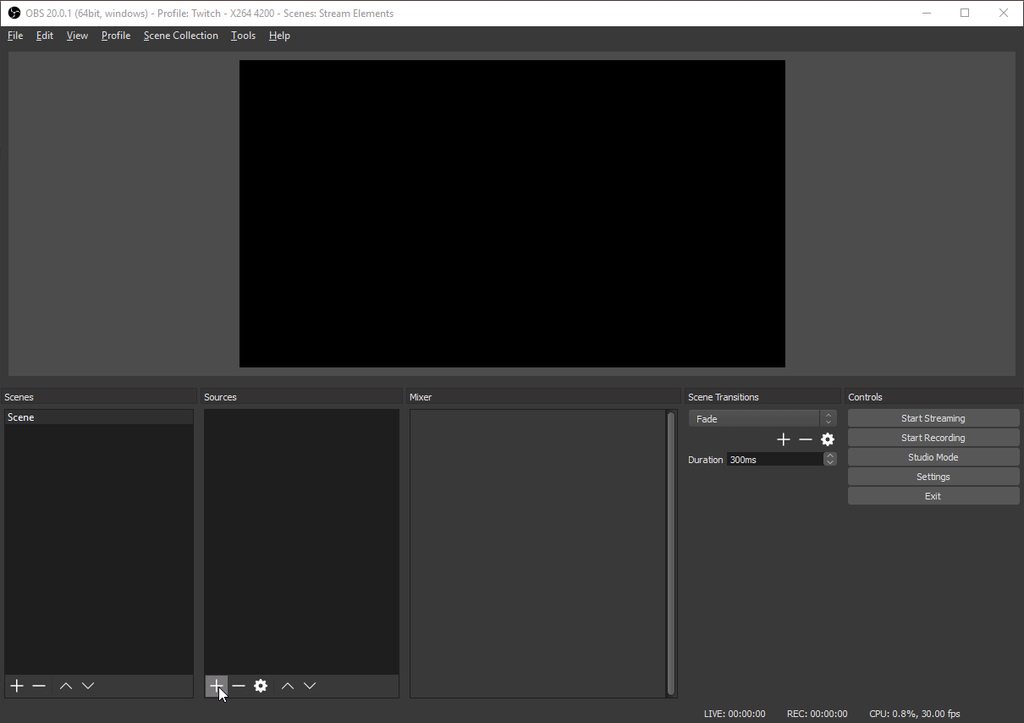
Browser source dimensions must be the same as on the site (default 1920x1080) and ☑ shut down source when not visible
velvet mica
i did that its only showing a corner of the overlay on the site as well
its one of the preset overlays
serene granite
@tranquil bramble @lament blade @lament blade fixed your tipping page
clever mango
DM me the link please
velvet mica
ok
 serene nimbus
Stream elements down?
feral axle
@serene granite https://stats.streamelements.com/c/bacon_space @hollow zinc this used to work?
still don't work
feral axle
👌
serene nimbus
that white screen of death
clever mango
we haven't had any reports yet of this yet and it's working fine here
please try this
- Log out
- Hard Reload: CTRL + F5 or CTRL+Shift+R
- Chrome Settings > Advanced > Clear browsing data > Clear from beginning of time ☑ Cached images and files"
- Log in
sharp wind
everything seems really delayed right now
serene granite
@serene nimbus did that fix it for you?
@sharp wind we're deploying a few quick fixes so it can effect speed
clever mango

 gilded girder
i tryed to log out hard reset and all that still no overlays showing up in OBS
 bright junco
My Ground Control is broken since the new update. I re-added my JWT Token like it said and i just get it asking me to "Connect with twitch", i click it and it's just black and that's it
clever mango
Are you logged in on StreamElements site and Twitch site?
bright junco
yeah
clever mango
https://streamelements.com/dashboard/account/security go here and reset the token
then try adding JWT again
feral axle
serene granite
thx
serene granite
fixing.
feral axle
welcome
clever mango
thanks
 clever mango
can you connect with twitch?
 clever mango
Looking into this
bright junco
Thanks
gilded girder
excuase me but this is some BS that my overlays not working with OBS Classic it work fine before the update and i cant figure obs studio out thanks a lot streamelements
bright junco
Studio is a lot better than classic in my opinion
Classic don;t get updates anymore no?
serene granite
we absolutely CANNOT support streaming software that its own developer stopped maintaining more than a year ago AND then support browsers such as chrome and firefox that get updates every month
gilded girder
well not on my pc because my overlay still doset come up on obs
ripe herald
you need to refresh in obs
I dont know if classic have that option
but this is OBS Studio like hectic said we can't support something not supported from creator itself
 upper steeple
did ground control update? cause it said updating but still says You entered an invalid JWT token
upper steeple
okie
serene granite
GC did update
@upper steeple please restart ground control
and enter your new JWT token from the site
ionic relic
Hi! I would like some help
Im new to stream elements and want to know how to create the twitch chat overlay :c
 misty wagon
 @ionic relic all tutorials can be found here https://www.youtube.com/streamelements/videos

YouTube
Official youtube channel for StreamElements tutorials https://StreamElements.com
ionic relic
Thanks
serene granite
Latte just gave you a great fishing rod
upper steeple
okay enabled song requests on ground control and i hit the eye symbol to show the video and it does nothing
clever mango
The video is showing, right?
It shouldn't be possible to disable the video right now
upper steeple
nope its not showing
clever mango
request or playlist
upper steeple
playlist
would always show before
unless that got changed
without the video showing my playlist doesn't load everything
 lunar dock
Hello everyone, @misty wagon referred me here. I was wondering if anyone else was having similiar issues to me with StreamElements. It seems to randomly freeze during my streams. This typically happens if I have been streaming for at least 3+ hours. I just wanted to know if there was anything I could do to fix this. Thank you!
serene granite
@lunar dock we just released a huge upgrade to our site and systems, so if you could check if this is occuring on your next stream and let us know please
clever mango
@upper steeple there is a problem with song request settings saving right now. Devs are now aware and are looking into it
lunar dock
@serene granite Ok! I just saw your upgrade. You guys do a great job!
upper steeple
@clever mango okay thank yuou
lunar dock
I will refer back to here if the issue continues
No problem! Thanks for making an awesome streaming platform 😄
@serene granite Also, I'm very happy with how quick you guys got back to me! Thanks again! Hope you're having a good day/night.
serene granite
you too 😃
clever mango
@upper steeple Please log out of the site, CTRL+F5, then log back in
Restart Ground Control as well
upper steeple
@clever mango still won't show video
upper steeple
 upper steeple
1.3.2
clever mango
Would you like to teamviewer?
lunar dock
@serene granite Hello again 😄 I almost forgot that a while ago I tried updating the maximium amount of points of the MULTI section under the Raffle module to 10,000 and it would not update. I just tried this again after the update and the error is still the same. It says, "There was an error updating the module"
upper steeple
@clever mango thats fine
 high ginkgo
Hello guys ! My channel stats webpage isn't working but I've already logged in to have those stats ^^' (Link : https://stats.streamelements.com/c/khernoza) (Sorry for my bad english :x)
serene granite
chatstats has an issue right now, we're on it
high ginkgo
Oh ok ^^
lunar dock
@serene granite Did you see my previous message? Not trying to be bothersome or anything though 😓 😛
 tacit tundra
Hello, I have a problem with channel when i'm admin. I set new contest, people place points but I don't have this content anywhere. In tab 'past contents' I have a bet's from 2 months ago... Someone can help me?
tacit tundra
Full access
clever mango
The contest is currently running, right?
tacit tundra
nope, that end ~20minutes ago but I can't chose result
tacit tundra
no
clever mango
you have a what?
 lilac falcon
hmm strange, my brb overlay etc are working, but when I am in a game, my normal overlay aint working
 ancient prism
yes its known or yes itll be worked on
tacit tundra
@clever mango name chanell: inetkoxtv
clever mango
Yes, it can be fixed at some point
lilac falcon
-_- now my brb overlay is also not working anymore
clever mango
@tacit tundra when you click on CONTESTS tab in the left panel of the site, what shows?
tacit tundra
I can create new contest
clever mango
So the previous contest closed. Did you pick a winner?
Or hit refund?
You should then see the recent contests on the right of that page
tacit tundra
Nope, i can't select winner because I don't have any active contests
 quiet stag
hi there! can anyone help me with exporting my loyalty points please? 😃
clever mango
Do you see past contests on the right? @tacit tundra
tacit tundra
I have a only contests from 2 months ago
clever mango
When was this contest created?
tacit tundra
~30min ago
clever mango
@lilac falcon @quiet stag @jolly ice I'll be with you all shortly
quiet stag
thanks 😄
misty wagon
yes @ancient prism
if it's not a meme, it's not a theme! 
clever mango
@tacit tundra log out, CTRL+F5, log back in and go back into the streamer's account
does that fix things?
ancient prism
lol @misty wagon
clever mango
If not, please have the streamer check if the contest is showing from their end
tacit tundra
I try on another browser but the situation is the same
I have only past contests from 2 mounth ago...
clever mango
@tacit tundra please have the streamer check if the contest is showing from their end
gilded girder
got my overlay and all that in OBS now but the follower count and last follow do not say the same as before ??
tacit tundra
contest was be close now but i can't chose winning option
on my account and streamer account
 calm yoke
im trying to set up my stream and add single widgets to my stream without adding the entire overlay. how would i do this
serene nimbus
redeem didnt send the alert and didnt even show up on my activities
clever mango
@serene granite Can you look into what @tacit tundra is reporting please ^^ Thanks
@lilac falcon are you still having these issues with overlays?
 jolly ice
Here's my issue with Plug.DJ: I have set it up correctly as I have done multiple times, but now it just keeps saying "No song" even tho there is a song playing.
gilded girder
nvm got it fixed now
serene nimbus
Redeem alerts do they work for some one/?
lament blade
Greetings. I am currently setting up overlays and the recent tipper and top tipper are not loading my tippers. It either shows $0 or No Data
clever mango
Hello everyone, I'll be with you shortly. I'm currently assisting someone but I'll be returning here.
lilac falcon
@clever mango it seems that the overlay now takes up around 5 minutes before its all loaded in. seems to be working, but it takes a while to load in.
misty wagon
@lament blade You can add/edit here https://streamelements.com/dashboard/tipping/list but, where did you import data from
lament blade
I was tipped directly from Stream Elements Tipping page
I have this donator as my most recent however it does not show in the *recent tipper widget in the overlays. Just $0
misty wagon
I'll poke someone to look into it or come back with questions.
lament blade
Sounds good. Thanks!
serene nimbus
Redeem alerts do they work for some one?
jolly ice
Anyone else that has problem with the "current song" widget?
clever mango
Ok, moving down the queue of people here.... let's see
@jolly ice how can I help with plug.dj
?
jolly ice
I have inserted my room name into the correct field and I got it working in the past. However now it won't work at all
Even tho a song is playing since I am lisening to it, it still says "No song"
clever mango
link me the room please
jolly ice
that also goes for Dubtrack and Song request
wow Plug,DJ just went down or something
nvm how it's back

plug.dj
Join a party. Be a DJ. Or just listen. Enjoy music together and chat with people from around the world right now.
clever mango
Thanks, I'll check it out here
jolly ice
But I tested with the other 2 options and they didn't work either.
clever mango
Thanks for the report. I passed the information to the dev team 👍🏽
jolly ice
Alright
clever mango
We'll have it working as soon as possible
clever mango
There sure is
misty wagon
With a lot of TTS voice to choose from
clever mango
@lament blade Are you in the overlay editor now?
 lament blade
Yes I am
clever mango
@jolly ice hey, check the current song widget again
maybe log out, CTRL+F5, and log back in first
Actually, it hasn't deployed yet but I'll let you know when
@lament blade Check the DATA tab next to widgets
From this section you can edit all kinds of data including latest tipper information
lament blade
I'll give it a look, thanks!
clever mango
You can also find this from the activity feed page
so you can edit data without having to go into the editor
clever mango
you can add in the name and amount and then save
yes, it is but we just updated the entire site and that introduces some bugs
lament blade
Got'cha!
Thank you for the quick response, Terra!
I look forward to the new features ❤
clever mango
It should be pulling automatically from now but if you have trouble, we'll be here to help 👍🏽
 tight harness
@jolly ice You also chose Brian! Awesome! 😄
clever mango
@serene nimbus Hi there, stream store redemptions?
tight harness
I can test it now
No problem here https://gyazo.com/03fa02777fd9f2e5dca70c5586d819c8
 clever mango
Alert worked?
tight harness
Didn't have OBS open, one sec
clever mango
tested it here and it seems to be working fine @serene nimbus
I get the bot response in chat and the alert on stream
lunar dock
@clever mango I messaged @serene granite but I don't think they are here right now. I was just wondering if there is any way I can change the multi-raffle maximum point limit to 10,000. I tried before and after the site update to change it to 10,000 but every time I do, it comes back saying, "There was an error updating the module" If you're busy helping @tight harness, I completely understand. Just get back to me when you can, please. Thank you!
serene granite
looking at it now @lunar dock , sorry for the delay.
clever mango
^

 strong apex
Are redemptions broken? I've had people redeeming things on my stream, but I'm no longer getting the redemption notice on my overlay.
 swift parcel
 here to help for a bit at TC but sitting
clever mango
thanks @swift parcel 
@strong apex I can't seem to replicate this as I've been testing and I'm getting alerts
Try Refreshing Cache for your browser source in OBS
lunar dock
I just tested redemptions on mine and the notification is working for me
Just to try to help 😄
strong apex
Tried refreshing the cache, nothing.
lunar dock
Your other notifications are working as usual? @strong apex
strong apex
Yup
clever mango
@jolly ice
lunar dock
Have you tried going into the overlay editor and manually simulating someone redeeming an item? @strong apex
clever mango
@strong apex since we've got mod dashboard access now  I'll take a look for you. I just need an invite. Send me a DM please
strong apex
The overlay editor no, but I have the actual browser source open and nothing is working.
lament blade
Is there a way to reset the countdown timer? It hit's 00:00, I hide the scene in OBS and make it visible again but it's still 00:00
clever mango
Because the scene isn't set to shutdown when not visible
☑ that box in the browser source properties
ALL browser sources should have that box ☑
 spare jay
is it just me or are most of the Overlays Duplicating over time?
Found and removed something like 3 instances of my Super Theme Stream Name and removed every single one of them
swift parcel
Are you accidentally clicking near the dupe button? Like when editing or are you just seeing it dupe by itself?
jolly ice
the current long thing works for me now
spare jay
oh ... nope I ain't clicking the Duplication button it just starts duplicating after I click save ... sorta how I think I solved my Ghostly Chat problem
tight harness
Duplicating when you click Save? never heard that one before 🤔
 burnt silo
Chat stats wont work 😦 When I click on it it tells me 'the streamer wasn't found' and on the page, im logged out of stream elements (not logged out as soon as i click to go back to my dash etc...)
spare jay
Well I just realized it while I was going through personally to touch up and change the Kappa Generator for my overlay to make the Emjo's Smaller so they don't completely Blot out the Screen at funny moments or milisecond Funnies, to realize there was 4 instances of my Twitch name, 2 of every other overlay in the scene, including the Twitch Chat, configured to block two different Bots in both! .... so I think I solved my ghostly chat issue!
tight harness
@burnt silo The chat stats page problem is already reported, they're on it 😃
 humble coral
Eta on non-beta hypecup that retains bits
spare jay
but any who if it repeats to duplicate again I will poke yall again ... just thought I would at least mention there could be a potential problem
humble coral

burnt silo
okay thanks 😄 (i just like seeing what emotes been used the most xD)
tight harness
@humble coral I haven't heard of any ETA for that recently sadly
serene nimbus
so does store redeem work?
clever mango
Are you redeeming it in the store?
serene nimbus
yes
clever mango
We just discovered that when redeeming in the store, an alert does not show. Redeeming in chat will show the alert. The devs will be working on this.
The redemptions will go through either way
clever mango
You can enable the chat !redeem for the items and it will show the alerts
until it is fixed
 wide schooner
hi ..is the overlay editor broken ? i wanted to do some modifications but it isn't loading properly ! i'm not getting pictures and the text is all messed up..but its showing up on obs like its suppose to !
 idle flare
hey where can i see how long i've streamd for? i know i get emails after every strema, does it show somewhere on the streamelements site?
clever mango
Not at this time @idle flare. You can see that info on twitch dashboard though.
tight harness
@wide schooner What browser are you using?
idle flare
also where do i find my jwt token
idle flare
ty
clever mango
Click the drop down arrow and show secrets
 supple juniper
where can i find premade layouts?
tacit tundra
guys, can You help me? I have a problem with contests...
humble coral
Oh
clever mango
@tacit tundra we didn't finish our conversation earlier. I sent you a message but you didn't respond 😃
wide schooner
is the overlay editor broken ?
humble coral
Doesn't twitch dashboard have analytics @idle flare
idle flare
maybe stable
clever mango
What's wrong @wide schooner ?
humble coral
It does show stats like that for the week not sure about month
tacit tundra
@clever mango You hook Hectic and that was the last message 😃
clever mango
Did the streamer log in and check contests?
tacit tundra
yep
wide schooner
any ideas why it won'y load the overlay properly ? there are no pics and the text is all in the wrong place
show's on stream fine though ? i tried the night mode ...
tacit tundra
inetkoxtv
serene granite
oh i know them
tacit tundra
😃
tight harness
@wide schooner I just opened my overlay manager multiple times without any issues, doesn't seem to be broken
 subtle nexus
i was wondering where i can find the thing for followers , tips ,hosts ,redeptions i can't seam to find it help plz
tight harness
Are you making an overlay or using a Super Theme?
subtle nexus
whats a super theme?
tight harness
Pre-made overlays
tight harness
Click on Widgets and then under Stream Alerts the first thing you'll see is AlertBox
That's it 😃
This is while you're editing your overlay
subtle nexus
ok thx so much for the help
tight harness
No problem 😃
subtle nexus
i found it thx
umm when i test the alert it only shows a small bit of it in the corner
on obs
serene granite
@fossil sinew did you enable tip moderation by any chance?
 fossil sinew
I might have let me check. Does that stop it often?
clever mango
That requires manual approval of tips that come in before they will show up on dashboard and alerts
fossil sinew
Oh, okay. thank you
clever mango
Was it enabled?
tight harness
@subtle nexus That sounds like the resolution you put in OBS for your overlay is wrong
subtle nexus
what do i put?
tight harness
The resolution of your monitor
fossil sinew
@clever mango yes it was
 unique sand
I can't seem to find the subscriber bonus / multiplier in loyalty settings. I've been an affiliate since almost day 1. I disconnected streamelements from twitch Connection settings, and re-authorized, but still nothing.
serene granite
@lunar dock the issue you reported was fixed, waiting to be deployed later
subtle nexus
i have no idea what it is
clever mango
@fossil sinew were you able to approve them?
subtle nexus
@tight harness i have no idea what the resalution is
fossil sinew
It won't let me approve it though
clever mango
I'm being told that it's not working currently but will be fixed soon
tight harness
@subtle nexus Try 1920 x 1080 (just a guess)
subtle nexus
ok thx
fossil sinew
@clever mango Were you saying that tip moderation isn't working right now?
tight harness
No problem 😃
clever mango
Correct @fossil sinew
We recommend everyone DISABLE tip moderation right now until we get it fixed. It shouldn't be too long
fossil sinew
Ahh, that makes since
subtle nexus
whats wrong with it?
clever mango
?
jolly ice
Is it just me or is OBS bugged?
clever mango
in what way?
 delicate ibex
"StreamElements: @Bjustus9, failed to enter giveaway: Sorry you don't have enough points" -- uses the word "points" instead of the custom defined name for points
jolly ice
I setup the webcam between 2 scenes, put both to "disable when inactive" or w/e it's called but it's still only showing at one
clever mango
@delicate ibex It's on the list of things to fix
unique sand
@jolly ice I had trouble with that too, try switching to a scene without the cam, then to the second cam scene
jolly ice
That is working, but it will be shortkut keys since I am going to stream CSGO
and switch between intermission and in-game
unique sand
Maybe set up a transition scene? Like a quick wipe effect or something, then set up shortcut to transition. 🤷 it's an issue with OBS. Annoying to deal with.
jolly ice
yeah I hate it soooo much
unique sand
Do you have cam delay because of a cap card?
jolly ice
I don't use cap card
unique sand
Hmm 🤔 my issue was due to having filters on one scene but not on the other. Not sure what's going on for your situation.
jolly ice
w/e I just go in the hotkey settings and "hide" the cam on one key and enable it on another
unique sand
👍
jolly ice
That seems like it's working
 agile ridge
Hey guys, one of my overlays is loading correctly on the editor but not on the actual browser, do you have any idea what could be happening?
jolly ice
Like it's just showing the "help" button in the bottom right corner?
agile ridge
nvm, seems to be caching issues 😃
clever mango
yep
agile ridge
yep haha
jolly ice
How can I put my stream in the "sellout" channel?
tight harness
There's 3 things you need to use to be added to the #291219887274328064 channel, they are: overlay, bot and tipping page
jolly ice
What bot? My own or SE's bot?
tight harness
SE's bot
jolly ice
okay then I guess I have to add that and then I should be set
since I use the tipping page and a overlay
agile ridge
@tight harness wasn't aware of that sellout channel, I've been using the full stream elements suite for almost a month now, how can I verify that to be added to the channel?
 crimson quest
so checked out the new site, love it, but a question, it says i have no moderators, is that for element stuff, not the twitch stuff? cause i do have a mod listed in my user management
tight harness
Yes that's for SE stuff
crimson quest
cause a reg mod still can control like commands and stuff right, the super mod
tight harness
@crimson quest Correct, through the chat. But this is dashboard access, it's because it's access to a different thing that it's separate
crimson quest
ok just wanted to be sure thx
tight harness
@agile ridge Passed your request on 😃 not sure how to add people to it myself (or even if I have access to) 😄
No problem 😃
agile ridge
Thanks a lot! 😄
unique sand
Anybody have a solution to not seeing subscriber multiply/bonus on Loyalty settings as an affiliate?
jolly ice
Is https://twitchapps.com/tmi/ down?
unique sand
Looks like it to me
unique sand
Having problems with Twitchapps.com website today? Check whether Twitchapps server is up or down right now for everyone or just for you.
tight harness
@unique sand Recently became an affiliate?
unique sand
Nah, been affiliate since like day 2
To save you from digging to find my last message: I disconnected SE from Twitch > Connections, logged out, and re-authorized
Still not seeing it
tight harness
🤔
I see the bar just fine but i'm a partner rather than an affiliate so I can't replicate the conditions, hopefully there's another affiliate around who can check for us
unique sand
Just for documentation. I'm not crazy, right?
tight harness

You're also missing the sub and cheer bonus options
On top of the bar not being there
@unique sand It seems to be missing for another one of the support staff who is also an affiliate, we'll make sure the devs know about it
unique sand
👍 Thinking about dropping Ankh for SE so I can not have to boot it up and can have it running 24/7!
clever mango
Cloud 
unique sand
☁
 tawny pivot
Running things locally 

 unique sand
Mostly so I don't have multiple bots and my viewers can type !sub !donate etc anytime.
serene granite
had a spanish streamer streaming from our booth at twitchcon today, uses ankhbot normally... obviouslly the bot didnt travel with her to twitchcon... the chat was filled with commands that dont get responses
so.. using local bots in 2017 
unique sand
Ain't bot.
clever mango
Also was streaming from a StreamElements computer so luckily she had her overlays in the cloud and could add them to OBS in a few clicks
 ebon forum
who the hell runs bots locally? rent a server for 10$ a month, let it run there 😄
ebon forum
backup, full access to a linux server and much more 😃
unique sand
Somebody pushing out hotfixes? Site's not really loading right now.
lunar dock
@serene granite Thanks for helping! 😃
 tight harness
I only had the Help button earlier, Ctrl + Shift + R fixed it for me though
 tight rover
My dashboard is 404 not found right now
 ashen hull
im having the same issue ^
ebon forum
yep. probably updating now
ashen hull
ahh ok thanks
ebon forum
for EU it is a bit early, for US.. no idea 😃
 untold laurel
I keep getting a 404 trying to connect to the site
tawny pivot
try again 👀
untold laurel
made it now, took 3 tries
tight rover
Store items broken, kinda. Editing the store items brings up the "fresh new item" dialogue box.
Also, some of the images are the incorrect resolution.
 strong dock
ok ya night mode.... but is there not a nightmode for ground control?
ebon forum
eh? ground control was always white for me 😄
is has a night mode, but is still bright as hell
ebon forum
serene granite
then theres a tiny slider on the top left corner
 ebon forum
this is the night mode. still bright, my eyes 😄
serene granite

ebon forum

strong dock
MOON... not mood... omergawd
 coral kelp
is there any easy way to get a list of all commands
to copy/paste and put below my channel
also is there a way to make the bot say something in chat after it times a user out
like,
user: heck
user timed out for 10 seconds
streamelements: dont say swears! (10 sec timeout)
something like that
sharp wind
wasted 2 days on trying to fugure this shitty obs settings... i got ryzen 5 1600 oced and its 6 core 12 thread with 1060 6gb shouldnt be problems with streaming at 30 fps ... and im only getting shitty frames .. unplayable ... please if someone has a good obs settings guide link me .. tywm! 
ebon forum
@sharp wind i can help with settings that are not general, but geared towards your stream. need a bit more infos tho, tell me your current settings (encoder, bitrate, profile) and what you use from us and what game you stream
 shadow oxide
Any reason when using the Song Request widget to show what is playing, all it displays is "Currently playing: No song". I have completely removed the widget, added it again, removed all songs from queue and re-added songs. Refreshed browser cache as well.
 thorn loom
serene granite
thorn loom
serene granite
@thorn loom we're aware of that issue,devs still fixing it
 tender mango
Kinda sad that V2 hasn't fixed the bugs with fonts that have numbers in the name like Press Start 2P...
serene granite
the overlay editor is a bit of a huge mess
but we did improve it greatly
ive even heard the phrase "its actually usable in firefox now"
not to mention some serious laggyness its had recently should be mnuch better
tender mango
i'm still getting the same weird laggyness in my chrome, even without extensions, which is weird
it's always worked fine on my laptop chrome for some reason though
 next spruce
my leaderboard has completely vanished?
serene granite
@next spruce we're aware of that too, its on the list
next spruce
Sorry if someone has already mentioned this - but my compact mode isn't working either?
(for ground control)
sharp wind
@ebon forum x264 6000bitrate i want to stream pubg but it hits too much i was using full overlays but now i decreased to only notifications and chat and recent follower tips and stuff
 bronze lichen
Any idea why the dashboard is freezing all the time like 15-30 seconds? Using Chrome / Addons: BTTV, Adblock
lament blade
anyone wanna add mods as admins? https://gyazo.com/77623f2fb92fefe83134cd6316850d3c


send your moderators the invite link
you're welcome 😄
ebon forum
@sharp wind drop your CPU profile a step, this will help. or reduce the resolution - that CPU cant handle 1080p streaming with a heavy game in the background.
 timid yacht
Does it make all Moderators Admin or is there a way to make only certain Moderators Admin?
Kinda like making only Super Moderators Admin and keeping normal Moderators as they are now...
@ebon forum does obs classic use less cpu than obsStudio (@standard mode not studio) ?
 edgy kindle
@timid yacht You select what level of access you want a specific person to have access to.
You send them the invite link and it's a one time use
timid yacht
So, just to be clear....by one time use means you have to invite them every single time? lol
edgy kindle
No
timid yacht
Wouldn't that get annoying over time?
edgy kindle
Once someone accepts the invite the invite is disolved
timid yacht
Oh okay, so once they accept invite then they have full access and won't be removed until I remove them right?
timid yacht
Sounds great, I'm going to send my self Admin invites to each streamer I help with SE, so I won't have to be logged into their accounts anymore. 😃
@edgy kindle Thanks for the help ❤
edgy kindle
Np 👌
lament blade
your support doesnt seem derpy 🤔
how does one change their avatar on the SE website?
edgy kindle
You need to change it on twitch :D
lament blade
Hello! I was streaming today and the alerts were not showing up during follows and hosts. However I could still hear the sounds being played, just not visual notification of showing the user who followed/hosted.
next spruce
Sorry if someone has already mentioned this - but my compact mode isn't working either?
(for ground control)
clever mango
I'm using compact mode right now but I'll note this for the devs to look into @next spruce
 chrome orchid
I've run into a problem where it doesn't use any of my overlays it just shows the Help button at the bottom right corner of my stream
clever mango
@lament blade send me a DM and I'll take a look
@chrome orchid what version of OBS are you using?
Top left corner of the program
chrome orchid
classic
clever mango
Classic has been deprecated for over a year now. Please upgrade to studio and then we can troubleshoot if you're still having issues.
chrome orchid
okay.. it was working fine last night but thank you though
clever mango
This issue may not be caused by classic but everyone should be using studio now and we need to rule out the old software first
lament blade
my avatar still isn't changing..
chrome orchid
the thing that i noticed was that all my overlays have the same urls
idk if that was always the case
clever mango
They look very similar but each one is different
fossil sinew
My overlay editor keeps becoming unresponsive. Any ideas to fix?
 dusty comet
I'm not having any donations come up on screen atm, anyone else?
clever mango
@lament blade https://streamelements.com/kromezillah
click the profile image and select another or upload one
It's working for me
Google Chrome
@fossil sinew browser?
dusty comet
Any idea on the donations?
fossil sinew
I'm using Chrome
dusty comet
It's a really fucking bad look when people donate and it doesn't come up on screen
It's not in my activity feed either
fossil sinew
@clever mango
dusty comet
Yeah
clever mango
That's why
clever mango
DM me and I will take a look into your account
@fossil sinew how often is this happening?
lament blade
i did it! i did the thing! lol thanks @clever mango u da best
fossil sinew
@clever mango I DM'd you
 runic bridge
Same thing with me. Someone just donated and it didn't appear in my feed or show up in my overlay.
Could have triggered after the update?
shadow oxide
Any reason when using the Song Request widget to show what is playing, all it displays is "Currently playing: No song". I have completely removed the widget, added it again, removed all songs from queue and re-added songs. Refreshed browser cache as well.
 gaunt zealot
Host alert for me isn't showing up. I double checked my overlay so it should be good. Seems like the new Beta stuff is the cause possibly.
clever mango
@runic bridge Hi, please go to this page https://streamelements.com/dashboard/tipping/moderation
Is "Enable Moderation" checked?
@shadow oxide It's currently not working but the devs are aware and will get it fixed soon. Plug.DJ and dubtrack.fm will both work in the widget
 wanton sluice
well.. call me crazy but I just tipped myself $1 to test the tipping through SE, and to see if it actually shows. So far so good.. tip accepted.. alert fired off, and paypal has the payment
clever mango
@gaunt zealot are the hosts showing in the recent activity on the dashboard?
wanton sluice
wonder if I should convert to a paypal buisiness account.
misty wagon
💯 % for sure
wanton sluice
actually.. what I should do is get a seperate paypal account.. JUST for twitch
i use paypal for lots of stuff. be easier to keep them seperated
does the paypal.me address matter? or is it solely email address
gaunt zealot
yes they are showing up @clever mango
clever mango
DM me and I'll take a look at your account
misty wagon
unsure @wanton sluice but a seperate account can be a good idea in your case
 rotund silo
So I was useing the overlays last night but they arent loading on my scence tonight????
clever mango
OBS version? Top left of the program
rotund silo
0.659b
clever mango
Please update to the latest version of OBS https://obsproject.com
If it's still not working after updating, then we'll troubleshoot 👍🏽
 cursive anvil
Hey  , im currently editing a sub alert but when i click "remove video" and/or try add a image for my sub alert the god dam shark wont fuck off, any ideas 🤔
clever mango
Is it a variation or the main sub alert on the left panel?
cursive anvil
main alert 🤔
clever mango
When you emulate, it's emulating a subcribe alert for 2+ months. There's a variation by default for that
cursive anvil

clever mango
Click variation settings and you'll see it
cursive anvil
haha god dammit i got it, thank you bud
clever mango
Emulate a subscribe alert and click the 1
you'll see the main alert
you can delete the variation if you want all sub alerts to be the same
cursive anvil
i got it working how i wanted it thank you
clever mango
👍🏽
cursive anvil
👍
 solar wind
Having a small issue with SE tonight, wondering what would cause the ?help to appear in the bottom right of the stream?
also no points for hasty crop job
clever mango
Just a small bug that will be squashed soon. Try refreshing the browser source cache
clever mango
Thanks! 😄
 hexed herald
@clever mango how do I reset browser source cache? Think it may fix an issue in having with a follow alert sound. New site works great and is faster than old was btw.
clever mango
Double click the browser source and then scroll down to Reset Cache
clever mango
Glad to hear you're enjoying the new site!
Dev team put months of work into it and are now pulling 16 hours days to make sure that they push out real-time bug fixes
solar wind
would mods with the new systems be able to hit that?
or is that locally on the browser viewing SE
misty wagon
Hit what @solar wind ?
solar wind
browser source cache, half asleep me is a bit braindead
clever mango
That's in OBS so they wouldn't be able to do that for you
They can edit overlays for you on-the-fly in the editor while live though
solar wind
I'm on the mod side actually
clever mango
Oh I see
solar wind
trying to avoid breaking the flow of the stream
clever mango
Yea, anything in OBS would need to be done by the streamer
solar wind
unless a direct control system was in place
 young sand
Why cant i delete commands
 grim prairie
When are they going to enable subscriber bonus to loyalty settings...
clever mango
@young sand what commands are you trying to delete? It's working fine here
grim prairie
also delete commands wokrs for me
young sand
i don't see one
clever mango
is your window full screen?
grim prairie
doesnt sound like it
young sand
but no actions
misty wagon
It's there 😉 what browser do you use?
clever mango
There is a scroll bar at the bottom of the page
you need to scroll right if the window isn't full screen
grim prairie
look at @clever mango being so patient with internet newbies!
 slim cairn
Not necessarily newbies, just inexperienced users
clever mango
are you able to scroll right?
young sand
edit or delete
young sand
nope i'm not
young sand
i was on one lel
slim cairn
Idk why I decided to get into this. It’s 11:30 and I have school tomorrow. Just remember, the mitochondria is the powerhouse of the cell!
clever mango
lol
young sand
understandable
clever mango
Ok, so at the bottom of the page there is a small scroll bar
young sand
yeah, i'm pretty sure i tried doing that, hang on my computer is restarting
clever mango
that will get you over to the section that is hidden because of the small window width
slim cairn
@grim prairie I used to use a Mac, a good screenshot app is called “light shot screenshot” you can get it off the Mac App Store
young sand
but i think i didn't use that
slim cairn
To screenshot it you have to press something in your hot bar cause Mac doesn’t support hotkeys out of the application for some reason
grim prairie
@slim cairn while that is helpful and nice, I WOULD NEVER USE A MAC!! they are silly and wasteful ;P
clever mango
@grim prairie are you a new affiliate with twitch?
slim cairn
Oh I thought you were on a Mac lol
slim cairn
I misread my bad.
grim prairie
@slim cairn no i said i hate mac 😛
clever mango
@grim prairie Subscriber and Cheer loyalty bonuses are bugged atm but they are a feature that SE has
grim prairie
@clever mango if you are talking about my stuff, i had access to the subsriber bonus option yesterday, after the new patch i dont
slim cairn
Ok last words for the night, ribosomes produce proteins for the cell.
young sand
oh thanks menu @clever mango
clever mango
that worked?
young sand
Yeah.. menu wat, i meant meng
clever mango
Goodnight everyone! 
misty wagon
Ni Ni @clever mango I'm gonna follow you soon 💤
 unique ore
it looks like connecting gamewisp is broken right now
stuck hamlet
Please elaborate? @unique ore
 hallow harbor
Did u guys just add this Nightmode?
unique ore
it's been coming for a bit now.....they got that and the mod login done
 vale jacinth
What is the duel command in streamelements' command list? How does it get set up? Does anyone have a link?
edgy kindle
@vale jacinth You need to enable the !Duel Module under the Module's tab
unique ore
Can you do a second install of ground control or is there a way to have ground control referring to two different channels?
edgy kindle
@unique ore What are you trying to do?
unique ore
I have my own channel I use.
I also run our community hub channel where we run a podcast and other things. I'm moving it over to use se and would like to be able to control it same as my own stream
edgy kindle
Alright I'll take a look
unique ore
Ty
edgy kindle
@unique ore For single use it seems the only way to do it is to change the JWT token but i'll see if you can have two instances open
unique ore
I don't need two open at once. Just didn't want to have to swap tokens all the time
I'll try one of those parallel instance installers. Had good luck with them from time to time.
 hardy bloom
Currently unable to edit the store items details using chrome browser and windows 7 any advice?
edgy kindle
I'll take a look 👌
hardy bloom
tyvm
edgy kindle
Hmm what exactly is your issue with the store item detail? like what are you trying to edit @hardy bloom
hardy bloom
prices. when I click edit it comes up as a blank section and doesn't allow me to save changes
but this does go for anything in the way of editing
edgy kindle
Yeah I can see that; Let me see if it's on our bug list 👌
@hardy bloom Alright well I let our devs know about this however on our list it was fixed 4 days ago 👌
hardy bloom
sounds good ty you all take care and stay safe
 ornate hearth
Running into a few bugs today. Just ran into an error where song request claimed there weren't any songs in the queue but there are 5 in the song request list. A refresh of the browser window fixed it.
 cosmic elm
Is my graph meant to look like this? Using Firefox, but looks the same on Chrome too.
 silk patrol
@cosmic elm the filter bar shouldn't be that big, but it's working fine on my end with chrome
 dusk pond
Hey all, if I want to create an alert that just plays for a single amount or a range of amount how do I go about doing that? I see in the advanced settings for tip alert there is a min amount but im not sure about setting the single amount or uper limit
 clever badge
Did you remove subscriber luck from giveaways on purpose?
silk patrol
@dusk pond what you are looking for is called variations, you can find them in the settings of each type of alert
@clever badge I don't think it was removed, but I can't confirm since i'm not at least an affiliate. Try to log out, refresh the cache (ctrl+f5) and log back in
dusk pond
@silk patrol ah I see that now, thanks for the quick reply!
clever badge
Ok, gotta double check that one. I couldn't find sub luck anywhere yesterday
Also if you are planning to improve the giveaway section, I would still recommend to include subs only option, like it was there in the first place
 round otter
Hello guys, I have a problem with Subcriber count.. it shows me 0 instead of XX can you help me with that? I tried to restart it and does not help. Thx HermanCZ
edgy kindle
@round otter Are you having this issue on your overlays?
round otter
Yes
 worthy sundial
hello does anyone know why does my roulette not work? i alr enabled it in the settings
edgy kindle
@round otter You can manually set the information on your overlay editor via the Data tab
@worthy sundial What does the page say when you try to enable the command?
edgy kindle
Is that for the module or command page @worthy sundial
worthy sundial
module page
edgy kindle
Try enabling it on the command page
round otter
@edgy kindle ok, but i want it automaticaly, it is not possible at this time?
edgy kindle
@round otter The new update might have some issues but the devs have been working on it 👌
@worthy sundial Alright i'll take a look
worthy sundial
ok thank u
round otter
@edgy kindle thanks a lot for quick answers 😃 bb
silk patrol
@round otter Data will be pulled at the end of each stream. you can go on the data page (https://streamelements.com/dashboard/session) and hit the reset aggregates ot reset totals button to force a refresh
edgy kindle
@worthy sundial Just a quick question but have you tried using the command since enabling the module? like in your chat
silk patrol
@worthy sundial go on the modules page, disable roulette and hit CTRL+F5, then try to enable it again
edgy kindle
^Try this because i just disabled the module, reenabled, and visually the icon is disabled under commands but it still works in chat
edgy kindle
What browser are you using?
edgy kindle
@worthy sundial We're trying to find out lol
With most of the devs asleep right now ¯_(ツ)_/¯
worthy sundial
😦
feels bad
my raffle module and duel module all are enabled but in the command page
it's not activated
edgy kindle
We are aware
 gentle imp
Just a headsup, can't change follower alert volume on FireFox cause the volume bar is on top of the change sound button
silk patrol
@gentle imp this is a known issue. our website is optimized for chrome for 2 reasons : chrome has a 60% market share right now, OBS uses chromium for its browsersources
gentle imp
ok ty 😃
lament blade
Hi, please I have a problem with my tip page.
silk patrol
@lament blade your link is broken, here's the right one https://streamelements.com/monicaastray/tip, you can get it by going into your tipping settings and click on the OPEN MY PAGE button in the lower right corner
lament blade
well this link is generated when I clicked on main page on that dolar sign, and link from my twitch account is working
silk patrol
@lament blade that button might be broken. thanks for letting us know
lament blade
no problem 😃
silk patrol
can you send me a screenshot of that button you're talking about?
 hoary crystal
do i need to reset my personal access token in the new dashboard??
serene granite
@hoary crystal only if the jwt leaked
hoary crystal
im in ground control, and it sais that my jwt token is invalid. Where do i find it? Im in my account page
serene granite
click on the downward facing arrow on the right side of the row with your email address
then click on show secrets
thanks @lament blade , will fix
lament blade
thanks 😃
hoary crystal
thanks! 😄 what do i use the twitch and overlay token for?
tight harness
You don't need that for anything at the moment, they're just there so you can see what they are, right now you just need your JWT token 😄
hoary crystal
Alright thanks! 😄