#helpdesk-twitch
1 messages · Page 63 of 1
 silk patrol
 autumn star
hmm maybe
once all this is working properly I can switch over from using strexm and streamlabs, so I hope they can get this all figured out soon =/
I mainly stream IRL so I need to make sure it's working properly before my stream as it's not easy while I am out and about
 wraith bobcat
Hi, can anyone help me. I got a question concerning AutoDJ? 😃
silk patrol
@wraith bobcat Sure what is your question?
wraith bobcat
Thank you Alucard, When users requests a song, instead of the bot replies back on the main chat with their request being granted etc. Is there a way to make it whisper the user instead. My intent is to avoid clutter on the main chat. Thank you 😃
silk patrol
@wraith bobcat Unfortunately no, and I don't think there is a way to prevent this right now. i'm not sure if this has already been requested. We have a webpage for all the feature requests. Check it out here, if it has not been requested yet, feel free to add it https://strms.net/features
wraith bobcat
That's unfortunate, but thanks for answering and I added that idea to the idea "box"
thank you ^^
 slow orchid
I get an error when trying to import from deepbot. It says "Failed to connect, with message vip exclusive. Check your API Secret is correct." I've tried resetting API secret 3 times - still this message. What to do?
silk patrol
@turbid reef @hollow zinc one of you can help maybe ? ^
 ripe laurel
I got my main issue with the leaderboard resolved where the names weren't changing but now the numbers don't change when switching between current and all time but the names reset to page one: https://youtu.be/MZCvCfEPBWA Got an e-mail reply saying the issue was resolved and to rate the customer service.

 ripe laurel
Not yet. Only two options with no middle ground.
I would rate good for addressing my original inquiry but bad for not addressing my reply when asked for my reply.
 oblique thorn
@stuck hamlet
Alright, I've been digging into what causes the high CPU usage I reported about yesterday, and this is what I've found: https://pastebin.com/bfetTzjD

Oh man, here I thought you were part of the staff! Sorry for bothering ya with a mention 😟
 stuck hamlet

silk patrol
@oblique thorn thanks for that, that's pretty neat. It would be great to have other "test subjects" to get an average result (maybe someone with windows 10 and a more recent CPU)
oblique thorn
Indeed, I know parts of my system is a bit dated (probably why I noticed it in the first place), but if any more people are willing to do tests on their system, please do so and keep us posted 😃
silk patrol
@oblique thorn were you streaming, or just monitoring obs on your desktop ? I can try to replicate your testing process when I got home
oblique thorn
I was just monitoring it on my desktop
silk patrol
ok thx
 vague pond
Hello
I got a little question to ask. Is there any feature where you can have to bot send a message out with for example a link to my stream store to let new poeple that they can claim different rewards and such
the bot*
oblique thorn
You have the timers, if you wanna send it on regular intervals
And you have the Modules -> Chat Alert where you can customize the "new follower" message
vague pond
alright thanks
silk patrol
@vague pond and you have the !store command too. but you can't use commands with timers, the bot doesn't aknoledge itself
people can also type !commands to get a list of all the available commands
 lavish axle
hey can i have help with a new overlay
oblique thorn
we'll try
silk patrol
in the overlay manager ^^
lavish axle
ok
silk patrol
oblique thorn
Click the "New Overlay" button, on the top right (if you have none since before)
silk patrol
@lavish axle in the upper right corner, there is a big blue button called "NEW OVERLAY"
 jolly ice
Does anyone know why this is happening?
http://prntscr.com/fna93k
 silk patrol
@jolly ice which widget is that?
stuck hamlet
your browser source doesnt match your overlay resolution
jolly ice
@silk patrol It is just the Overlay thing I setup in OBS in 1080p preset. It is happening for me with all the tests.
silk patrol
@jolly ice what @stuck hamlet said
jolly ice
So OBS's BrowserSource does not support 1080p browser captures?
silk patrol
right click on it and go into properties, change the height and width to 1920 and 1080
jolly ice
Alright. Done that now but the overlay widget stuff does not work at all anymore for some reason
It won't even show on the website panel
lavish axle
u new to streaming
silk patrol
Stream Elements - Legendary Live Streaming
- Get latest OBS Studio https://obsproject.com/download
- Build Overlay on https://streamelements.com/dashboard/overlays (instructional…
you have also access to amazing video tutorials there https://www.youtube.com/channel/UCjerlCIbLPQwSnYlClkjDXg/videos

YouTube
Official youtube channel for StreamElements tutorials https://StreamElements.com
 atomic hollow

Need help setting up your Overlay Manager? Got any questions, or just want to say "Hey"? Join our Discord server: http://bit.ly/DiscordStreamElements
 zenith parcel
Where I can use KappaGen?
silk patrol
@zenith parcel it's a widget in the overlay manager
jolly ice
Can you setup to show the most recent donator? I cannot find it in the widgets
silk patrol
@jolly ice it's called recent tips
lavish axle
will some one do it for me a new overlay
silk patrol
@lavish axle have you watched the video posted earlier?
lavish axle
i will tell u wot i want on it
silk patrol
we can't do it for you, you have to learn how to do that kind of stuff, so you can change it in the future
watch the video, you'll learn a lot in it
jolly ice
Can you submit a overlay so others can use it? Just curious if that's possible
silk patrol
@lavish axle in the upper left corner, you have access to premade themes
jolly ice
Yes but can you submit your own to that library?
silk patrol
@jolly ice no you can't but that's a great idea, you can submit it here https://strms.net/features
jolly ice
I am from Sweden. Why do you want to know? 😃
silk patrol
Because i'm from France and Pierre is a common name here ^^
jolly ice
Ahhhh 😛
 coarse karma
where can i enable the function that requesting song through typing some keywords instead of the link? thanks!
stuck hamlet
So youtube's API works in a very special way. We get allocated 1m points to spend every single day. (capped at 16m a month)
Searching a song costs us ~100 points, meanwhile direct urls only cost 7. We currently have so many people using songrequest that we had to disable the search feature until we can get these limits increased.
silk patrol
@coarse karma you can't right now
jolly ice
@coarse karma There is a good bot called PhantomBot that enabled those types of features.
Custom Commands, update title and ALOT more from the bot instead of going into Twitch all the time.
silk patrol
@jolly ice you were able to do it with StreamElements, but as Onslaught said, we can't do it anymore for the time being. but it might be back one day
stuck hamlet
Zilla 
Promoting another bot, in a service that provides that, and much more...
hmmm
jolly ice
It is just a bot, not something to replace StreamElements
It does not provide anything like Elements does it just helps control the stream and it's free to use.
stuck hamlet
That's not my point + we want people to take advantage of ALL our features, not just some.
We offer the same thing
So you shouldn't be promoting something else in here
 rapid tapir
Chill 😜
jolly ice
Yes I know, but PhantomBot controls other stuff that Elements dosen't. If you want, I can get you a login to my bot setup so you can see what I am talking about.
But if it's classed as advertisment, i'll stop.
rapid tapir
Its all good. Hopefully we will be able to open up keyword songrequests soon again
jolly ice
Why did you take it down in the first place?
stuck hamlet
So youtube's API works in a very special way. We get allocated 1m points to spend every single day. (capped at 16m a month)
Searching a song costs us ~100 points, meanwhile direct urls only cost 7. We currently have so many people using songrequest that we had to disable the search feature until we can get these limits increased.
rapid tapir
^
Basically, too many people used it, so we would run out of points every day
And then songrequests dont work for anyone
jolly ice
Why don't make it so users get points per hour of watching? Like, after 1 hour of watching you get like 10 points as a individual stream watcher
rapid tapir
Then you could request a song every 10 hours.
And it would still not fix the issue
We are trying to contact youtube to increase our limit
jolly ice
Do you know why the limit is there in the first place?
rapid tapir
But until they do that, theres no reasonable way of providing song search
Because youtube doesnt want you to spam their API
They overdo it on the limits however
jolly ice
So basically in the technical details, it's a hardware limitation and bandwidth limitation
rapid tapir
Id mostly argue an arbitrary limitation on youtubes side
jolly ice
Yes in their hardware and bandwidth setups
stuck hamlet
i think what benni means, is that they can afford it
jolly ice
I am a fully educated IT technician, from what I can understand that's basically why they have the limit. So their servers and bandwidth will get overloaded from the API requests.
rapid tapir
They handle many billions of searches every day, they should be able to handle a few million more without noticing 😛
Eventually they would, yes
Pure speculation, but i believe its more that they want to keep people on their platform
Others shouldnt be able to make a clone of their website using their API, so they limit it heavily.
jolly ice
By the way, do you guys have Text To Speach for the donation alerts?
rapid tapir
Yes.
jolly ice
Oh nvm found it
What do you guys think about this? It's something simple I made. THe image is just made in Photoshop and took about 20 minutes
silk patrol
@jolly ice remember that you are in the #helpdesk-twitch channel, feel free to post this kind of stuff in #welcome instead 😉
jolly ice
oh rip xD
silk patrol
no worries tho ❤
 split harbor
hey! I know the overlays are set up for cloud streaming on mobile, is there a way/a guide for using them on ps4?
silk patrol
@split harbor you can't use the overlay on a console right now. your only solution is to use a capture card hooked to a PC
jolly ice
Rekt M8
zenith parcel
@silk patrol thanks
rapid tapir
@turbid reef whens ps4 app? 
jolly ice
Do you guys have plans to implement a music widget for Spotify and not just the 2 already existing?
 unkempt oasis
Coming Soon™
jolly ice
Awesome!
coarse karma
thanks for replying about the sr question ❤
jolly ice
In the songrequest thing, how does the "Paid song promoting" feature work?
split harbor
how do I change the total follower value again? it reset... again :/
stuck hamlet
https://streamelements.com/dashboard/session @split harbor
split harbor
hmm okay - in that case, the numbers are all correct, and the overlay isn't responding properly
going to try updating anyway, as I wanted it to be out of 50, but as you can see, 39 isn't either of those numbers
 weary mist
@jolly ice when people tip, they have an option of putting in a song link. That song would then be placed in the #1 slot of the queue
jolly ice
Is there a option so they get points for the amount they donate?
Like if they donate $5 they get 5 points to spend in whatever they want related to the stream
stuck hamlet
 split harbor
no, 14/50.
weary mist
that is very weird. and that is from the follower goal widget?
split harbor
yup
reset it to read 14 and now it does, but it's definitely a bug
because I hadn't touched that in ages.
weary mist
it might have happend in the last few days due to a reset of the bot, so it reset the session without actually recording the information
and saving the info corrected the issue.
 analog helm
Hello. Is there any way to use contest as browser source to add it on stream screen?
 tawny pivot
You can find the widget in the overlay editor 😃
analog helm
oh, my thanks 😄
weary mist
at this moment, it isn't possible
but you can build the timers using the same variables you can with the chat commands
 cold fiber
But how do I make the bot use different timers every 10 lines?
How do I turn off the tipping page?
please, I really need to turn off the tipping page
 dense jackal
what do you mean by turn off?
cold fiber
I don't want people sending me tips from SE for now, I want to disable the tipping page
ripe laurel
The only way people can get to your tipping page is if you give them a link to it to click on. You can omit the link from your profile. No way to remove PayPal from the tipping page at the moment.
https://streamelements.com/dashboard/bot/commands/default here you can disable the !tip command.
cold fiber
How do I remove the link to the tip page from my SE profile?
ripe laurel
I don't see a link on my profile. Where do you have it? On the page viewable to the public?
Oh the top. Let me see.
cold fiber
Yes, there is a link to the tipping page in the top
dense jackal
profiles look like this https://streamelements.com/tomathin
dense jackal
I don't believe there is a way to do that
ripe laurel
People generally watch on twitch. The only thing i can think of is have the phrase under where it says Tipping YourName to say to not use that page.
https://streamelements.com/dashboard/tipping That would be the Donation memo on here, just in case people do view your stream on the SE site and click there.
dense jackal
but if you're using the SE profile page, you should most likely be using our tips so that it can work on the overlay
ripe laurel
I just woke up so i should probably go start my day 😾
dense jackal
I mean our tipping page is the best out there,integrated with our overlay and kappagen, we don't take a cut, option to make people sign in to help combat chragebacks too
ripe laurel
Plus it'll support more payment options in the near future.
cold fiber
I know that, SE is amazing from what I'm seeing here
 crisp plinth
and pay to play an extra long song request
dense jackal
Not trying to pressure you @cold fiber take your time 😄 You have my pms if you have any more questions
dense jackal
When people are using our tips and overlays we can ping our admins to add you to the sellout channel 😄
stuck hamlet
Using our Tipping service and Bot, asking, we will put you in there.
dense jackal
^
stuck hamlet

dense jackal
oh wow ur pic is so animated
stuck hamlet
ye
cold fiber
got it, thanks
jolly ice
How long does it take for the Follower Widget to update the follower list? Mine is just blank even tho I have 7 followers
stuck hamlet
Should be pretty instant
jolly ice
stuck hamlet
Unfortunately I cannot help, I am going to bed
weary mist
@jolly ice The latest follower will update when you get a new Follower. You should be able to set that information as well in the Activity Feed -> Edit Session
jolly ice
Alright thanks @weary mist
 humble quartz
Is there a way to mute either the OBS or the browser so that the alerts don't get repeated
humble quartz
It's just audio overlap with slight desync
I tried that, but when I mute OBS it bugs out and no desktop audio plays
and I have SE open for song request
weary mist
have you tried out the Ground-Control app?
its a desktop application that can do your activity feed and Song Requests/backup playlists
weary mist
ouch
humble quartz
idk why
 maiden rose
Hey, is there a way to change the game or title of the stream as a mod?
weary mist
)There is a way, but I believe it defaults under supermod (checcking now
yeah, the broadcaster can change the permissions on the command so mods can do it as well
maiden rose
Ooh, I see now. Thank you, I'll let the streamers know! 😄
OH actually, while I'm here, is there a way to make a command for transfering points?
I can get the sender, user, and point names down, but when they enter an amount, I don't know the right terminology for that. Kinda of like when people duel each other for a certain amount of points
 final isle
Team, when adding a Tip Goal, how can you set it to 0? Every time I add the widget it shows having an amount already.
weary mist
activity feed -> edit session @final isle
@maiden rose !givepoints <username> <points> @maiden rose
final isle
@weary mist do BITS go towards to Tip Goal? Or only $?
weary mist
@final isle only tips for the moment
 small field
If I want the bot to post a specific message every x minutes, is there a way to do that? I don't understand the timer interface...
 worn oasis
Just wanted to let you know, that uploading is just working with chrome for me at the moment. not with IE and not with edge 😃
maiden rose
This is what I got so far, but I can't get the 6 points to show in the command, nor transfer to the selected user ;-;
Do I specifically use <points>?
 nova rune
Hey, trying to set up my songrequest with a backup playlist from youtube. Somehow it only plays the first song and then stops.
Seeing as I wouldnt have a dickload of SR's id prefer it to play the whole playlist and continue w here it left off, anything im missing?
Can't seem to get it to even play the whole YT-playlist
 prisma sluice
 arctic linden
same
 wind moat
so for the slotmachine i want to use my own emotes in the machine does anyone know how i can give streamelements bot a sub so it can use my emotes?
 worldly geyser
Is the bot down?
wind moat
im not having any bot issues
 misty wagon
Same here in the channels I'm working on 👌
 mint thicket
is it possible to share access to someone like it's possible on nightbot and revlo?
ripe laurel
Dashboard access is a highly requested feature that is being worked on.
misty wagon
^^ Soon ™ 😉
mint thicket
oh thank you for info!
 timid fable
Hey guys, there is anyway to play a different sound effect for different redemptions at the store?
 ember falcon
Hey, is there any way for me to import branebot currency to StreamElements? If I had a CSV file would I be able to just use the revlo import?
misty wagon
I'm asking devs @ember falcon
ember falcon
Thanks
misty wagon
@timid fable it's one of the #💭︱feedback-and-ideas that is coming
timid fable
@misty wagon thanks 😃
 buoyant warren
does streamelements have a community goal like revlo did?
 clever mango
Not yet but I believe it is being worked on
Do we have an ETA for a cup widget update?
 vivid trail
@clever mango Cheer cup is being reworked and will have a lot of new functionality. For example, a big donation will tip the cup.  🍵 🎆 No exact ETA yet, probably within a couple of weeks.
 old mural
Is it possible for mods to change settings like point amount gained and that stuff
 hollow zinc
That's in the works, but no ETA yet.
 wanton mango
What is that thing where if you use all of streamelements for a stream you get a reward or entering into something? (I worded that weirdly)
weary mist
sellout?
wanton mango
Oh okay, so you just message a SE mod with proof? I thought I saw a pinned message or link somewhere but I can't find it anymore lol
weary mist
yeah, just let me know, as long as you have the tip page, the bot modded, and the overlay set up, I will get you added to the sellout list
oblique thorn
Is it just me... or is setting a custom Overlay size actually not supported? I tried making a small overlay item (590x300). But when I refreshed the Overlay Index page, it was back to 1440x900
weary mist
it worked for me, I made one customized for my phone screen
 trim perch
hoow do you stop the read out loud in discord...
weary mist
@trim perch It is in user settings, have to find the one that disables TTS
its under text & images
oblique thorn
@weary mist If you go in to your Overlay Manager now, and check the size of the Overlay, is it still smaller than 1440x900 ?
weary mist
👍
ripe laurel
I think those are just the default values that show up and you can change it to something else or just don't save.
If i launch my overlay it's fine.
The mouseover says Edit overlay, not Properties for instance.
oblique thorn
You might be right, and I might have had my sizes changed when I renamed a few of them
 untold estuary
Is there any one that can help me - I am trying to transition my follow alerts from StreamLabs but the image I Use does not seem to overlay the follow / alert text properly.
weary mist
possibly
untold estuary
@weary mist do you know if we can take the "is following" portion of out oa follow alert? I just want it to say the name.
weary mist
I believe so, let me checkon that
oblique thorn
I should really stop but... here goes:
I noticed that if I make a small overlay (590x300) and only put the chat in it (taking upp all the space), then launch the overlay. Now, it will display chat log just fine BUT try to open the Inspector and make the canvas smaller than 1200px wide, and the chat disapears. Resize the canvas to over 1200px, and it will reappear 😉
untold estuary
@weary mist nvm I found it
weary mist
lul, i was just about to tell you 😉
oblique thorn
Okay, found it:
Why is there a media query in the CSS that explicitly does not display Twitch Chat if the screen is smaller than 1200px?
weary mist
thankya
rapid tapir
@oblique thorn sounds like super legacy code to me, ill look into it tomorrow
chat widget was recently rewritten, I might have overseen something
thanks for the report!
rapid tapir
Yep, you create a new overlay, add a KappaGen widget there
 pulsar solstice
ah ok cool thx
 upper root

 toxic willow
so random question... in alerts (donation alert) the {amount} truncates the zeros past the decimal... so say someone donated $5.50 it displays $5.5 instead...
is there another variable that shows two zeroes after the decimal?
weary mist
@toxic willow not yet, though it has been brought up
toxic willow
rgr, its just confusing sometimes, gives false hope when i see 5.5 and think its 55
not false hope, just a bit of a let down
trim perch
in discord, is it possible to make a text channel viewable by my mods only
weary mist
yessir
weary mist
create the channel, hit the gear, make it so everyone can't read, then make the mod role so it can read
trim perch
ty ❤
weary mist
👍
 random wadi
How do I program a chat command to use a variable from a user as part of the response? For example: !like tea would return: constantwarfare likes tea.
weary mist
${user} likes ${1}
or for more than one variable after the command, ${user} likes ${1:}
random wadi
That did it Scalper, thank you. I had the first part figured out, just couldn't get it to repeat the second part!
weary mist
😃
cold fiber
I would like to fully restart the SE settings to start all over again, how do I do that?
To completely remove the integration with my channel
weary mist
right now, that is not possible. the only thing you can do is to reset the leaderboards 😦
 dawn wasp
Is anyone getting bit donations appearing twice in the activity list? Tips seem to be fine though.. It's really messing with my accounting D:
weary mist
I have heard it happening sporatically. I only have it happen once
not sure how to fix it. You could attempt to log out, clear cache, then log back in. Not sure if it will do anything, but it might help
Also, have the bot part and rejoin if that doesn't work
@dawn wasp
 winged glacier
Hey guys how do i show my twitch chat on stream using streamelements?
ripe laurel
There's an overlay widget.
weary mist
❤ rinnie
ripe laurel
I spend way too much time on here. Should motivate myself to go get stuff done 
 muted knot
That's how I feel about all discord servers and twitch chats sometimes 🤔
Or maybe I just lurk in too many channels 
ripe laurel
I'm mainly in one channel but sometimes i'll be in others when they're streaming as well, usually keeping the one i mod open.
DISCORD i just have this server and my own.
I should check more often since a few minutes ago a sub said he didn't know how to join the DISCORD.
weary mist
lol, I have like 30ish servers atm
 toxic parcel
How do you increase size of the donation bar. Altering the "size" doesn't help.
weary mist
yeah, that is something I reported already 😦
 knotty warren
well damn
weary mist
yeah....
knotty warren
That sucks
 ancient wigeon
Riddle me this - with nightbot I can make a command to tell people what time it is for me, in 12 hour time
how can I do that with streamelements as a command?
weary mist
@ancient wigeon there is a timezone variable, which is at the dead bottom of the variable list. Let me know if you figure it out, I have trouble with that one.
ancient wigeon
I've been trying that, but I can't seem to get it to work correctly
I'm MST, but it still says its 07:31 for me, which is wrong in both 24 hour and 12 hour format
lol
weary mist
lol, same
 proud pumice
Yeah hold up ill get proper one for you
weary mist
😃
ancient wigeon
:O
weary mist
yay
ancient wigeon

weary mist
the  will not be blamed for this one 😉
proud pumice
example of accurate tims
$(time.PST8PDT)
${time.Asia/Seoul}
You can specify time zones using locations so LA would be ${time.America/Los_Angeles}
weary mist
ahhh, interesting
ancient wigeon
would canada be categorized under America?
proud pumice

This is a list of time zones in the tz database release 2017b. The list is derived from the zones, links, and rules specified in zone.tab and the 7 "continent files" – africa, antarctica, asia, australasia, europe, northamerica, and southamerica...
proud pumice
got canada list there
ancient wigeon
now does this translate to 12 hour time, or military time?
proud pumice
but it just links to americas ;D
i believe its all 24h clocks
kinda of a global standard
ancient wigeon
Well at least it's the right time now. Nightbot has the ability to do 12hr time - will that be possible in the future on SE?
:)
proud pumice
yeah dont see why not
ancient wigeon
;) Well this will do for now
Now I just need the cheer cup to work with follows/donations instead of just bits, and I can replace streamlabs as well :D
weary mist
${time.America/Denver} worked for me
ancient wigeon
I just put America/Edmonton
weary mist
@ancient wigeon don't worry, I will be the first to let you know. Or I think I will, because I will be shouting it from the rooftops 😃
proud pumice
@ancient wigeon im pondering if i should tease how our new cheer cup looks like
cuz it'll blow your mind
(and the cup)
proud pumice
its fully customizable so let me throw a couple of shitty images on it
proud pumice

100% customizable on images and behavior
cup falling over ability
moving cup by user from chat ability
weary mist
ooooo
ancient wigeon
Words can not describe
thats a big set of balls in that cup
@proud pumice I have to ask...ETA?
proud pumice
these are wehat we call bombs, when someone drops a serious resub tip or cheer he can blow the cup up
proud pumice
ETA? probably around 2-3 weeks for full release
 weary mist
very much so
proud pumice

stuck hamlet
Perry
proud pumice
Onslaught
stuck hamlet
Can you pin what you said about time zones
proud pumice
@ancient wigeon what do u usually stream?
stuck hamlet
example of accurate tims
$(time.PST8PDT)
${time.Asia/Seoul}
You can specify time zones using locations so LA would be ${time.America/Los_Angeles}
proud pumice
example of accurate times
$(time.PST8PDT)
${time.Asia/Seoul}
You can specify time zones using locations so LA would be ${time.America/Los_Angeles}
https://en.wikipedia.org/wiki/List_of_tz_database_time_zones
This is a list of time zones in the tz database release 2017b. The list is derived from the zones, links, and rules specified in zone.tab and the 7 "continent files" – africa, antarctica, asia, australasia, europe, northamerica, and southamerica...
stuck hamlet
Thanks babe
ripe laurel
He probably means the / on top of the 8.
ripe laurel
Debating on doing my dailies or sleeping and doing them later.
While you're at it would you mind pinning the YouTube's API about the song requests? 😸 In case people do look at pins.
ancient wigeon
^^^
ripe laurel
Or have an FAQ linked to people who join the server. I saw a welcome message when i first joined.
ember falcon
Hey guys, I still need help if possible. I have a CSV file containing usernames and point amounts, is there any way I can have it imported to StreamElements?
 sick wharf
Hello, i cant edit / delete my custom commands! How to fix it?
pulsar solstice
Hey guys I wanted to link my Paypal e mail for tipping. I tried to send a donation amount and PayPal opened BUT why is it in Chinese wtf?
weary mist
@sick wharf are you working out of the dashboard?
muted knot
🤔 I think I saw this mentioned earlier this week (Wednesday-ish?), but all of my tips are showing up double in Ground Control and the dash
sick wharf
@weary mist
weary mist
@ember falcon which bot did you export from?
ember falcon
Branebot
weary mist
@sick wharf which browser is that? I can't tell
dawn wasp
@weary mist I tried the part/rejoin and we'll see if we get any more dupes - is there a way to remove the existing duplicates from the activity/totals?
weary mist
@dawn wasp not that I know of
@muted knot hmmm, that is weird. Sebbity is getting that with his cheers. I will add it to the bug list to see if they can give me more information
ember falcon
The csv format is different than Revlo so I can't just use the revlo import
muted knot
I don't entirely want to rule out that maybe I had two dash tabs open while I was importing (succesfully, woo!) today, for now I am just deleting all the double entries
weary mist
@ember falcon how different is it? does it half all the same columns, but maybe in a differnt order?
sick wharf
I`m using Chrome probably is from adblock i don't know, on opera looks like it working! Thanks
weary mist
@sick wharf weird, first time chrome isn't the browser it worked in for someone
ember falcon
@weary mist It only has usernames and point totals whereas Revlo has usernames, twitch ID, points total, and all time points
weary mist
@tawny pivot, any ideas on importing from BaneBot? @ember falcon has a CSV from them
sick wharf
@weary mist I was using Chrome to setup all the bot but now after couple of weeks it failed, really fishy 😃
weary mist
@ember falcon also, link your twitch account to discord 😉
ember falcon
It's not my twitch account that needs to be used
weary mist
@sick wharf yeah, it might just be a special case, it has been working fine for me all night
ember falcon
I'm just a moderator asking on behalf of my streamer. I just need to know it can be done before I bother them with it
weary mist
ahhhh
I see
can you DM me their info? that way I can pop in and help if needed later on 😃
 dusty comet
Hi there! I asked a few days ago, but I'd like to ask again since no one seemed to really know - so sorry for the repeat if you've already read my question before.
Is there a way to make it so that the top donation adds up? So like, say John donated $10, then later donated another $5, the top donation would be: John $15; as opposed to: John $10
Also is there a way to show the uh, 0 at the end of donations with cents? My current latest donation displays as $4.2, and comes up as $4.2 in the alert - but is actually $4.20. It kinda triggers my chat's OCD, they bring it up a lot
weary mist
@dusty comet at this time, the answer to both is no. BUT, you can see the total top donation on your donation page. As for getting it to be something you show on stream, both have been requested several times. you can check out the link the in pinned message in #💭︱feedback-and-ideas to upvote anything you want added, along with adding anything you find is not already on the list.
dusty comet
Thanks @weary mist ! 😃 Pleasure to have heard from you
weary mist
👍
sick wharf
@weary mist it was the bottom bar had to slide right 😦 sorry laptop screen 😦

 muted knot
Gn Scalper!
 lament blade
Hey loves, its the first time i want to make a raffle and i want to make it for my subs, is there a way to do that? 
ripe laurel
There's a raffles module but IDK if you'd be able to set the command to subs only. I haven't tried the various modules yet.
proud pumice
@lament blade !giveaway
!giveaway start <userlevel> <keyword to join> <length in seconds> <cost in points>
without the <>
lament blade
so userlevel is Sub then? or do i have to set that somewhere else first? thank you perry!
 royal parcel
Hey, can anybody help me with separating tip goal from alert box? I want 2 separate Browser Sources in OBS so that I can change size and position independantly 😃
 shrewd ivy
Hello, anyone has fps issues with the streamelements overlays? I just made a test with a simple overlay, only Kappagen and Contets widgets in it and it chunks my fps while streaming. Obs suddendly drops from 60 to 25-30-35, games get bad stuttering. If i disable the source everything goes back to normal. Any ideas?
ripe laurel
You can manually set user levels. 300 regulars, 500 mods, 1k super mods @lament blade There's a command !level username number.
@royal parcel you can create two overlays and have one with just the alert box and another with just the tip goal.
royal parcel
Wow... that easy? Now I feel dumb ._.
ripe laurel
I personally keep everything on one overlay and adjust on the site and have one browser source added Not sure about frame rates though so can't help with that.
Subs are level 250. If you give them level 300 they'll have access to regular and below commands.
proud pumice
@royal parcel fyi having two browsersources takes more CPU power
oblique thorn
@proud pumice Doesn't it depend a lot on what you have in the browser sources? Static ones doesn't take that much if I recall correct
shrewd ivy
That's what i am doing, only one overlay with everything i need on it and only one browser source on OBS. But as soon as i enable it it kills my fps 😦
lament blade
Okay so it would be lovely if it added subs automatically as regulars, or an option for that 😄 cause typing +100 people in by hand is actually really annoying :/ plus sub numbers vary everyday so you always have to remove, add them by hand then 😒
 golden wing
out of curiosity is there a full variable list for in chat commands? i noticed a variable in a "default command" that wasnt on the dashboard variable tab
proud pumice
@oblique thorn yeah, they dont take too much
but still, least is better 😄
@lament blade youre talking about gamewisp subs?
lament blade
uhh no, the level thing i have about 100 subs and i want to make a raffle just for subs so i have to add all of them as regulars by hand to have them as a group >_<
proud pumice
but you can do a giveaway just for subs with level 'subs'
stuck hamlet

lament blade
but there is no level subs in my dashbaord
proud pumice
its a chat command
lament blade

proud pumice
@turbid reef does the !giveaway access level for subs is !giveaway start subs
or !giveaway start subscribers
 turbid reef
both should work
lament blade
but what for example if i wanted to give subs extra rights, like theyre able to post links. how do i add rights to that level if i can grasp it anywhere :/
proud pumice
you dont do settings per group
you do group for each setting
so for example links permission
you go on the spam filter for links
and exclude subs
lament blade
aight that makes sense
proud pumice

stuck hamlet
proud pumice

lament blade
Thank you 😃 😍 I feel SE can do so many things if only you know them. are you thinking of adding like a Information spreadsheet or something similar by any chance? cause i think a lot of questions have to be answered unecesary often, were people just could learn for themselves
lament blade
True, but it would be easier if there was a place to just read all of the features somewhere, because how will i search for something that i dont know about yet D: SE university means its in planning or are you refering to discord?
ancient wigeon
@proud pumice couple question, probably with obvious answer. 1. any plans for a mod dashboard (ala, nightbot)? and 2. any plans for a discord bot?
proud pumice
- yes we call it roleplay as, initial work started on it, will take a while.
- no plans at this moment, but our api allows it so we just might take some 3rd party dev to do that quickly for us
ancient wigeon
Sync user groups (regulars, mods etc) to specified discord server groups, events, and the ability to use the same commands we make in the SE dashboard in discord
so basically, just like nightbot
you guys are on to creating the one thing that makes everything else obsolete, man
proud pumice
can be improved 😛
we're adding tons of superthemes soon so people dont have to create their own
ancient wigeon
:)
Seriously though, moobot, nightbot, streamlabs, etc. All screwed unless they start doing exactly what you're doing (offering everything) - but even then, they'd be late to the game. Only thing people might still use instead is self-hosted bots like ankhbot etc, to have custom bot names.
Unless of course that's something you plan to offer for a fee later.
ripe laurel
Some users want to be able to use their own emotes in roulette.
lament blade
Partnered Streamers can give a permasub to SE just like they can to Nightbot/ Moobot etc. so then the Bot can use their emotes 😃
ripe laurel
Are permasubs for lowest tier only since twitch has multiple tiers now?

 upbeat cedar
Hi there. I'm just starting to use streamelements, and I was wondering if my viewers can gamble their loyalty points while the stream is live. I looked through the bot commands and only saw commands relevant to contests. Revlo had a command called "!gamble" that gave users a 38% chance to double their points, a 2% chance to triple, and ^a 60% chance to lose.
lament blade
Look for the !roulette widget in the module @upbeat cedar 😃
vivid trail
@upbeat cedar Similar games to !gamble are roulette and slot machine 😄 There's also bingo, emote pyramids, etc in modules
upbeat cedar
Oh, thank you very much, @lament blade. I was looking through chat commands. And thank you, @vivid trail. Those look great!
vivid trail
@lament blade Thank you for sharing that email. 😃 I've always wondered how many permasubs partners could get and it's really nice to know that bots aren't counted.
 upper frost
hey! Is there will be a option to import points from AnkhBot?
 frosty lantern
can someone tell me how to get the thing so people can check how many minutes they have watched for? dunno how to do it or set it up
unkempt oasis
${user.time_online}
vivid trail
@upper frost According to this thread, https://www.reddit.com/r/Twitch/comments/40arhg/anyone_know_how_to_get_ankhbot_to_transfer_points All of the Ankhbot data saves in a readable format here: C:\Users\YOURNAME\AppData\Roaming\AnkhHeart

reddit
Hi, i just got done building a new computer and i need a way to transfer the currency system,commands ect. over to the new computer.. Ive tried...
@upper frost Gotta use a program to convert sqlite to .csv. Then support staff can add it to Stream Elements I believe
frosty lantern
@unkempt oasis is there a way to update the watchtime?
like change it manually like before i got stream elements
unkempt oasis
Not that know of.. @turbid reef ?
frosty lantern
because mine says only 1 day for people that have done way more. such as one of them reached 100hours from the amount they collected in stream currency
turbid reef
can you export that data from other services ?
 olive bloom
hey there! I added an overlay which was supposed to add a real-time count of my followers (follower goal: X/500) but it counts wrong! I used the default command {count}
How do
How do I make it count all my followers? I have 300+ and it shows 150 or some random number
unkempt oasis
@olive bloom You can change the counts here. https://streamelements.com/dashboard/session
olive bloom
it looks like this, how do I properly change it? I don't want to mess it up and I don't really understand how it works 😃
 low marlin
Any ideas why cheers are coming up twice in my activity feed? (Also doubling my recorded totals for bit donations)
 glossy glen
are the developers working on a multi user feature, i mean when you can add someone to be able to access the dashboard???
i would really like to see something like that
 wide schooner
is it possible to manually add follower info
sorry i'm sure its been asked 100 times
unkempt oasis
@olive bloom You change the Follower count to what your number of followers is and then click Save
@glossy glen It's being worked on and it's coming soon
glossy glen
@unkempt oasis that would make this bot 100%, i think its already great but that would ooohhhhh ❤ ❤ ❤ ❤
olive bloom
@unkempt oasis thank you very much 👊
lament blade
@proud pumice if youre still here, is it supposed to give a reply after the giveaway has started? and how do people enter
proud pumice
@turbid reef ^
turbid reef
yes its supposed to announce the giveaway
lament blade
both dont work :/
turbid reef
do other command work?
 proud pumice
did you enable the cmd from the menu?
lament blade
yeah its enabled
 visual pollen
Hey anyone help me a second?
stuck hamlet
I have 2
 edgy stag
Just a quick one - where do you set up donation alerts? Do you have to be using an SE overlay for them to work? I love the SE donation perks like leaderboard etc but so far, whenever someone donates it doesn't pop the sound and animation on screen. This was being done through twitchalerts previously.
lament blade
Its in the Overlay Editor as a widget I think
visual pollen
I have setup some store items, one is a sound effect. When clicking it on my store it plays fine. When people redeem them it doesn't play on stream?
edgy stag
@lament blade so you have to use an SE overlay? That's a shame.
stuck hamlet
Sparky. Overlay manager, alert box.
Sparksy*
The overlay manager can be used exactly like any other alert system 
How is it unfortunate?
edgy stag
@stuck hamlet what if you use overlays already created by someone else?
Will they work together?
stuck hamlet
@visual pollen how are they redeeming it
What do you mean exactly? @xSparksyx#8673
Nice tag 
edgy stag
Lol 😃 no it's okay, just asked the streamer and apparently this should work fine - he was having problems where donations weren't popping, but he knows how to make your overlay work with his current one, just not tried it yet as he didn't need to create new overlays so hadn't looked at that function.
edgy stag
Thanks!
 haughty mirage
Hey, is there any way I can use your service to make a revlo style raffle, where you spend points on tickets and one is drawn at random?
tawny pivot
@haughty mirage That'd be the giveaway system we're releasing in a few days 😉
haughty mirage
Omgggggg!!!! That's lucky haha
 restive jetty
is there a way to do a time based alert with SE? Thinking like have an alert show that says follow me on twitter or follow my channel every 15m or so
unkempt oasis
@restive jetty You can, On your dashboard at the bottom is Timers
restive jetty
Sorry, I mean like an on screen/overlay type thing not just a chat message.
stuck hamlet
you can use image rotator
thats what i go
idk if darko fixed it yet tho @hollow zinc
restive jetty
ah! This looks like what I'd be looking for
hollow zinc
Yeah image rotator is working.
restive jetty
Thanks @unkempt oasis , @stuck hamlet and @hollow zinc
stuck hamlet
but the timer thing darko
is that reworked
or added, i guess, cause both are good features
hollow zinc
Yeah. Now you can set for how long you want to show 1 image, and the time between each image
 restive jetty
Where you looking for the ability to have X seconds between each image and then Y seconds between looping the whole chain?
stuck hamlet
Griff's got it
restive jetty
That would be a sweet enhancement
stuck hamlet
@hollow zinc do you understand what Griff is talking about?
hollow zinc
ye ye
hollow zinc

It will happen tho.
I have a solid idea what needs to be done, just the queue is a bit long 😛
stuck hamlet
how much do i have to pay you under the table to push it up the queue? 
hollow zinc
I strongly advise against corruption
unkempt oasis
That to me seems like "I strongly advise against corruption, but I am willing to accept your donation to advance your idea"
restive jetty
Assuming the donation is sizable enough
 drifting badge
i need help with 2 things. #1 when people ppurchse things from my store how do i get a onscreen notification. #2 how does the bingo work.
hollow zinc
🤔 It'll happen... eventually 🤔
@drifting badge in the overlay editor, under the Widgets page of it, there's a widget called Store Redemptions. Add that to your overlay and after that alerts from the store will start appearing.
drifting badge
@hollow zinc thank you so very much so how about bingo
stuck hamlet
I believe you start a bingo, and the first person to find the emote the bot is "thinking" of wins.
hollow zinc
So, you start a bingo event by typing !bingo [twitch/bttv] [amount]
then people type emotes in chat
and if someone guesses it, they get points 
drifting badge
o ok thanks
proud pumice
oppa gangnam style
stuck hamlet
op op op
upbeat cedar
Hi there. I just had a quick question as someone who is converting from Revlo. Is there any way to delete my name (the broadcaster) and the bots from the all-time leaderboard without resetting everything?
tawny pivot
It's something we're working on adding 😃
 torpid pulsar
So just finished my stream and had my first Tip/Donation but for whatever it shows under "My Tips" but didn't show up on my overlay or "Dashboard"
upbeat cedar
@tawny pivot thank you for the reply. I just wanted to be sure that there wasn't some way to do it that I could not find.
ripe laurel
Did you add the relevant widgets to your overlay @torpid pulsar ? There are a few pertaining to donations.
torpid pulsar
Yeah I have the alert box set up on my overlay and in testing it works, but the tip doesn't even show up on my dashboard
weary mist
@torpid pulsar did you enable tip moderation?
torpid pulsar
Thank you
weary mist
👍
I did the same thing for my first tip in SE
didn't even realize I had gotten one until paypal told me
torpid pulsar
I had a viewer come in and tell me and I was looking everywhere for it but at least now I know for future reference
but now that this is resolved I can go get some sleep
weary mist
👍 rest up. #streamlyf
muted knot
I'm still having issues with importing the tips - aside from the duplication issue
Page 1 @ SL shows 100 entries, and they have all imported, (although each entry double, apart from the oldest entry on page1 -- and the entries on page2 haven't carried over at all
weary mist
that is something I will point @tawny pivot at
ripe laurel
Eidrm submitted a fix Thursday and i guess it hasn't been implemented yet. That's why i asked if you had over 100 tips that day @muted knot so it's on the list 😸
muted knot
Naw @ripe laurel; before, the import wouldn't finish. Now it does, but with some.. side effects 
ripe laurel
Sounds like it's getting there 👍 I hope it gets resolved soon!
muted knot
Me too 😄 I don't really want to start off with inaccurate books or inputting it all manually  I have faith
restive jetty
There's a giveaway through chat command avialable. Do you mean similar to revlo giveaways?
 distant marlin
yes
restive jetty
the revlo style module isn't available yet.
distant marlin
bc with chat, nobody can see how many people entered or anything
tawny pivot
We're currently working on a proper giveaway system on the website.
distant marlin
thank you
so far i came with an idea how to charge people to get in giveaways is with priced command
so how does giveaway command work at all? how people enter and how much it cost?
the chat one
restive jetty
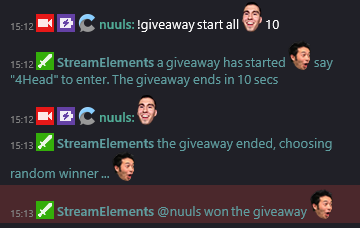
Current one just has a keyword and a timer for how long to run and then it picks a random winner
restive jetty
It would be giveaway start "Keyword" "timer in seconds" as the command
restive jetty
NP, here's a screen from the #270206314561404928 channel. https://i.nuuls.com/v4etC.png
 distant marlin
"all" can be also "subs" ?
restive jetty
I'd imagine so. Never set one up yet
tawny pivot
Yes it can.
distant marlin
k thx for your help and time
restive jetty
Thanks @tawny pivot
distant marlin
@inland solar sorry for bothering, does it cost to enter in giveaway
weary mist
It cost what ever it is set at.
weary mist
!giveaway start <userlevel> <keyword> <time in seconds> <cost in points>
distant marlin
ok thx
 tacit crystal
Hello, noob question here
if i setup 50 points on BINGO, it will be the max payout?
 silver kettle
I'm trying to implement chat on my screen. I have the widget, I have it displaying as a browser source. The issue is that nothing comes up. I'm not sure how to fix it or how I would go about changing it. I've already tried a second widet and things aren't showing.
weary mist
@tacit crystal it would be the max payout if that is how you set it up in the module. You can also define how much you want the payout to be when you start the bingo (!bingo twitch 50)
weary mist
@silver kettle are you clicking save on the overlay editor
untold estuary
Does the bits jar widget count only bits and tips? Can it also drop things in it for subs and follows too?
Cup widget, I forget what it's called
stuck hamlet
@untold estuary The Cheer Cup is been re-written completely 😃
stuck hamlet
only thing right now is cheers
weary mist
I keep hearing a week or two
tacit crystal
what's the command for a single raffle?
ripe laurel
!sraffle
ripe laurel
Click on Show Advanced to set a cooldown for commands.
Custom commands.
Default commands you can edit.
cold fiber
not cooldown
there is !uptime command and an alias for !downtime, but there is no command that actually tells me for how long the stream is off
like in the other bot that I use there is a varible called %DOWNTIME% FOR THAT
ripe laurel
I'm not seeing one. You can suggested it through the pinned message link on #💭︱feedback-and-ideas if it's not already there to be upvoted though.
muted knot
I have another question about the tips import - is it possible for all of the donation info to be pulled on import? The paypal email used for the donation currently isn't being imported it seems, however if I download the csv from SL, all the information is there @weary mist
weary mist
That is a good question @tawny pivot
muted knot
So far I'm really impressed with most things, but if I'm going to be using SE for tips, I really want to be sure that I'm not going to have more work down the line for when it comes to the accounting 😛 I've had to manually input 30+ entries into SL before and that was more than a ballache in regards to retrieving paypal addresses, etc 🤣
lament blade
Hey, is there any way to edit the default !donate command?
muted knot
What I did was disable it under default and make my own 😃
(I believe it's !tip with !donate as an alias)
muted knot
untold estuary
30+ entries of what @muted knot ?
 opaque mountain
hey guys.. I am having issues using stream elements. i am a minecraft and OW streamer, however i am lagging like hell in both games when I use SE overlay
i have tried both software and hardware encoding
any idea's?
muted knot
Donation entries that were from another tipping solution @untold estuary so I had to manually add them to SL - that's a lot of information to transfer 1-by-1
untold estuary
I guess I dunno what you mean by donation entries.
muted knot
As in, one donation with all it's associated information
untold estuary
Does the SL import not take care of that?
muted knot
It seemed to not import the paypal emailaddress in the entry for me
But I've been having some import issues 😃
weary mist
@opaque mountain hmmm, is it CPU that ends up getting maxed out?
opaque mountain
@weary mist thats the thing, the CPu always sits at around 10-20% usage
weary mist
is that OBS telling you, or your Task manager
opaque mountain
even when im lagging like a cheap chinese watch lol
both
and it only happens when i use an overlay from SE
weary mist
hmmm, somewhere you are capping your resources. that is the only time I ever had the lag issue
I was maxing out my CPU while playing doom
opaque mountain
hmm
 atomic cobalt
Hello, could I get some assistence for a quick issues please 😃
proud pumice
@atomic cobalt
yeah ofc
You plan to do the streaming lesson right?
CBenni told me about it 😄
atomic cobalt
ah nice and yes @proud pumice I am having an issues with giving points to all viewers myself but my mods can do it... Ican give points to 1 user no problem but for some reason when I use all it says it can't find that user
proud pumice
what command are you doing?
the bonus command is for a single user only, to add points to everyone you need to do !addpoints all 100 for example.
atomic cobalt
well I renamed the command from !givepoints to !freeminds to match my brand so I run the command like this: !freeminds all 100 and i couldn't find that user in the database :/
proud pumice
read up ^
atomic cobalt
sorry i mean that one "addpoints" to "freeminds" @proud pumice
this is the command line for that one i changed:
!freeminds Give points to viewers. Use 'all' for all chatters
or could i have broke the command by renaming it @proud pumice ?
 turbid zealot
Hmm whenever I pop my alert I will be cut in half on my obs screen any idea why ?
@misty wagon
nvm got it
atomic cobalt
yup, that was it @proud pumice I put the origanal command name back and it works fine now.So it seams if you channge the name of some of the commands it breaks the command 😦
weary mist
@atomic cobalt have you tried putting your command in as an alias?
proud pumice
@atomic cobalt put the cmd back and just add what you want as an alias
 smoky lark
Any word on Giveaways? in Desperate need
atomic cobalt
ya, I was thinking about doing that Thanks @proud pumice
arctic linden
Hi. I was wondering if there's a way to export points on SE
weary mist
Not at this time, Nani
 gritty walrus
Hey, songrequest question: I have a backup playlist put in my settings, but it will only play the first song in the list, then it just stops. Also, while it does automatically start once requested songs run out, it always autoplays the first song on the playlist, which means that song can get played a lot. Any solutions?
arctic linden
any idea of when ? @weary mist
weary mist
@gritty walrus make sure to have the video visible
@arctic linden not sure, as it isn't high on the priority list at the moment
 feral finch
My google-fu has failed me, thus come I crawling in here... any links to somewhere explaining where and how I can set up giveaways with streamelements?
weary mist
yes
I have the command, give me a second
!giveaway start <userlevel> <keyword> <time in seconds> <cost in points>
that giveaway is one ticket only. Multi tickets are on their way. VERY Soon™
feral finch
ah thanks, any way to control all the variables involved, like tinkering with costs, sub multipliers, etc etc? Also if there's some knowledge base or other repository of info out there, that'd be grand to teach myself
 severe gulch
Ive got one question, if someone bought a Sound in the shop via chat is it automatically played? And even when how can i make it sound in the stream?
dense jackal
it is played when redeemed autopmatically @severe gulch
@feral finch We have plans to make it a module very soon so you can buy tickets and change more variables like revlo did
 dim garnet
Hey folks quick question. I have to go to the points command, open it and hit save every day. Is that an issue because I changed the name of the command?
weary mist
@dim garnet not sure. It could be. I recommend keeping it as !points, and just adding an alias as what you call your points
@tacit crystal the slider bar
dim garnet
Ok I'll try that. Thanks @weary mist
gritty walrus
@weary mist thanks, i'll try that! any reason video has to be showing? uses more comp resources when it's showing...
weary mist
It's a big with the youtube embedded player I think
 fathom yacht
I'm having a problem with alert sounds from my overlays in OBS.
They were working fine, I'd set up a couple cool variables and then all of a sudden they won't work. I get sound in my browser but only the visual alert in obs. And sound for follower alerts but not with any of the custom sounds I put in.
So right now follower and host alerts look/sound fine but anything with custom sounds, the sound isn't coming through. I restarted OBS, my computer, tried a different scene, duplicated the overlay. It worked fine through part of last night but stopped working mid stream
weary mist
does it work if you launch the overlay in the browser?
fathom yacht
Yes
weary mist
ok, then its an obs thing
weary mist
did you refresh the cache on the browser source? sometimes that fixes it
fathom yacht
How can I do that
PS I'm running obs via Mac so please be tolerant of my non PC self
weary mist
so, click on the source, then the gear at the bottom, that should bring up the source settings
then
fathom yacht
Ok did that. No go.
Still sounds for follower alerts but not for custom tipping etc
Visuals are coming through fine
weary mist
I would go in and re-set those sounds in the overlay editor, just to make sure. not sure why obs is doing this, though it did just crash my computer
fathom yacht
I tried that. Will do it again right now Think I'm going to delete the sound and re import them this time too. This is driving me crazy
 fickle vector
Hey support, my friend switched to streamelements today, and since, every time he gets a host, OBS crashes. Not sure what's causing it, figured I'd start here. Any known issues regarding this?
fathom yacht
Yeah still no audio and also I noticed it doesnt do the text to speech
weary mist
@fickle vector I recently been experiencing similar issues. Though its obs that is having the issues
fickle vector
@weary mist thanks. I'll reach out to OBS then
 thick eagle
Anyone else having issues with SR?
weary mist
@thick eagle the search function is disabled for the time being. you can still !sr links and video ID's
thick eagle
The link didn't work either... let me try and depart channel and return
fathom yacht
Thank you anyway for your help!! Excited for this I've switched everything over to stream elements and was really annoyed when things started not working!! Can't wait to use it all tomorrow again.
weary mist
@thick eagle it looks like it is working, your song queue is quite full
thick eagle
It was old songs
but I got it working now
Just had to depart the channel and bring it back in
weary mist
yeah, sometimes it forgets what its doing a good smack is a good fix
thick eagle
Lol
untold estuary
Is there a way for me to remove the !playlist command from being used? I am using another bot for song requests right now and it triggers both bot's commands.
torpid pulsar
@untold estuary you can turn it off under song request
smoky lark
@weary mist Any plans of having giveaways tab on the dashboard with overlays?
Or will it be in chat only?>
weary mist
@smoky lark very much in the plans
untold estuary
@torpid pulsar that does not turn off that command though
just turns everything else off
smoky lark
@weary mist Thank you sir
weary mist
👍
@untold estuary you can also turn off the song request command in the default commands section of chat commands
 wraith marlin
does anyone else have issues with the song request player stopping at the end of a song, and now continuing to the next one?
weary mist
@wraith marlin make sure to have the video visible, its a known bug with the embeded youtube player
weary mist
are you viewing from the site or the desktop application
muted knot
Showing video -> Refresh, is what worked for me @wraith marlin
wraith marlin
thanks, the refresh worked
proud pumice

 ornate zenith
can tips be on screen seen in the stream or can that not ( sorry for my englisch dutch streamer)
hollow zinc
@ornate zenith you mean like an alert?
ornate zenith
yes that people the alert of a donation can see in my stream
ripe laurel
You can use the alerts widget on the overlay to show that on stream.
Once you set up your tipping page and create a new overlay, when editing the overlay second from top left is the Widgets. Then the AlertBox and the settings you can customize the Tip alert a bit 😺
hollow zinc
^ What the person who ❤ Rinnie said.
 neat helm
Seems to be a bug with the alert box.... Worked fine played my Image and sound but then got hosted a second time and it went back to the default sound and no image showed.
 serene granite
hey @neat helm , I answered via email :)
It's most likely the "Shutdown source when not visible" checkbox that's missing in your browser sources on OBS
frosty lantern
it will probably be the actual overlay link sorta thing so what i do is depending on what your using you should be able to click on it and go into options and click refresh (in Obs/Xsplit)
it will relaunch the overlay
@zenith parcel
zenith parcel
Okay, thanks @frosty lantern
neat helm
Awesome Thanks @serene granite
serene granite
np 😃
 cursive nexus
okey soo i do need some help. i imprted my Commands from Nightbot
but some off them doesnt work anymore
and i have no clue how to fix it
example would be we had an !spank Command where you could spank another user in chat
cursive nexus
now the command still work but it doesnt apply it to a person like "spanks Mike" instead it says "spanks $user
ahh okey
thanks
what is it if it should hit the person who trigger the command
for example just user
the person who wrote it in chat
nvm
i missed the dolar sign
atomic hollow
its always a bad idea to miss the $$$$$

Latest video off of Lil Dicky's debut album "Professional Rapper." Download the album here: http://smarturl.it/LilDickyiTunes Watch Lil Dicky create the most...
stuck hamlet
Gotta make that 
cursive nexus
hahah Lill dicky 😄 ayy
i gotta say! i love on your Filter options
were it says "Quality chat" the emote above it ive only seen in Sodapoppins chat haha
i see the irnoy 😄
atomic hollow
sure, just do an offline interval and youll see it now
cursive nexus
Thank you 😄
maaan. why dident i have this bot first thing i did xD
i use like 4 diffrent programs and just realized yo got all those feutures in an "overlay"
FailFish
dem feels
stuck hamlet

 sleek ember
does someone quickly have the chat code for doing giveaways for me? :)
cursive nexus
what do you mean? an example`
atomic hollow
!giveaway start <userlevel> <keyword> <time in seconds> <cost in points>
 summer coral
Anyone having issues creating contests? I'm sure I'm doing something stupid. Keep getting this error creating my own: An error occured.
Could not fetch contests
proud pumice
either all or "everyone"
sleek ember
I just realized StreamElements hasn't noticed any hosts my stream received so far and therefor also not given out any rewards for hosting. Is that because I don't have a host-alert over StreamElements?
stuck hamlet
If it's not showing on your dashboard, it might be bugged.
sleek ember
nope, it's not on my dashboard. if I filter for hosts it shows none
 round cedar
how do i make my ovelay work?
cursive nexus
Btw is there i way i can change the !points in to something else?
sleek ember
in your command list you can edit it ^^
cursive nexus
well that would make sense xD but theres no !points in my Chat commands
unless im looking at the wrong list xD
nvm find it
default commands
weary mist
check under the default chat commands. I recommend adding the new command as an alias, so new people that come in will be able to use the default to get their points
lol
cursive nexus
Thank you!
 elder mango
Hi anyone else been having issues with only sound for alerts paying and the vsiuals not showing? this occured during my stream tonight.
 upper steeple
when i trigger a store redemption in the overlay manage nothing comes up on my obs anymore and it doesn't even make any sounds in the overlay manager
upper steeple
just the default in the overlay manager when you hit the emulate store redemption
atomic hollow
test it buy buying an item directly in your store
atomic hollow
the way it works is different now
muted knot
Good afternoon! Any word on if there's something I can do/fix for my importing issue? 
atomic hollow
yeah the emulate is a bit crazy now, we will fix it
@muted knot didnt @lean birch contact you?
muted knot
Not that I'm aware
atomic hollow
never trust aussies I guess
muted knot
I feel that 
upper steeple
not all my store pictures appear in the alert when the item is redeemed, assuming since they just did this it is gonna have some bugs or does the picture have to be a certain size or something?
upper steeple
lol


 upper steeple
i believe the widget is big enough its not tiny or anything
let me try changing the pictures of some
atomic hollow
@hollow zinc fluffy butt needs you
 drifting glade
Concerning the loyalty system it appears that it applies points every 10 minutes versus every minute. This is a change for those coming from Revlobot. Is there any way to change this setting as a streamer?
-P
atomic hollow
no, we dont believe in lowering that to less than 10 minutes
if someone isnt watching you for 10 minutes he is not worthy of points
serene granite
Coming from Chief of Trolling, that's a harsh statement right there.
hollow zinc
@upper steeple if an item is sound effect it will not appear as an alert. Sound effects are played without anything else on screen if you have the widget.
upper steeple
@hollow zinc everything is marked as stream perk and some pictures appear for the items when others do not
hollow zinc
Noted. Will take a look.
drifting glade
@atomic hollow What if I wanted to increase it- deciding someone isn't worth of points unless they watch for an hour? My question remains my fleshy friend.
atomic hollow
I understand @drifting glade I was partly kidding since we dont have a way to change that currently
so we created a logic behind it
cursive nexus
i dont understand the ground program
i can pause music but cant skip songs
even ig i use same hotkey
summer coral
When you add the store redemption widget and make sure you select "redeeming this item shows an alert", do you need to delete the "stock" image in the overlay or should the image from the store take precedence. I've tried a couple and so far only the image that is in the overlay (bouncing present) is coming up. I will check some others.
drifting glade
@atomic hollow Thank you for the quick response.
atomic hollow
❤
@summer coral no need to delete the stock image
try to test using a purchase on your stream
no through emulate
upper steeple
@atomic hollow as far as the widget being big enough i have made it the size of the whole screen and still some of the pictures show and others don't lol, just wanted to let you know even though I know @hollow zinc is looking into it
summer coral
Yeah, I am trying the stream purchase and not the emulation. I'll go back through every purchase and edit the "redeeming this items shows an alert". They are all togggled on, but I will save with them off and then save with them on again to see if that helps. Thanks! Love the addition!
hollow zinc
Refresh the overlay once you make changes to the items.
summer coral
Do you mean save it again or delete the widget and add the widget again after I've made changes? sorry... 😃
upper steeple
@hollow zinc refreshed, still some show others don't
hollow zinc
It doesn't show the image at all, or is it showing the one that's set on the widget?
upper steeple
the default widget image on the ones that don't show
summer coral
For me its only the default widget as well. Haven't gotten any to show yet but I'll keep trying.
@hollow zinc I do notice something else interesting. When I try and toggle on and off the "redeeming this items show an alert" from individual store items and save it, I get a message that pops up briefly in the bottom right of my scsreen "something went wrong". When I look at the redemption item again my changes appeared saved, but that seems strange.
hollow zinc
Can you pinpoint which ones don't show for you so i can test it and see what's going on ?
@upper steeple
upper steeple
let me go through them again
join a game, snapchat follow, twitter shoutout, personal postcard, twitter follow, choose my next character, story time, blind the fluff, make your own bot command, unmod a mod for a day are all the ones that don't show the picture when the alert goes off
hollow zinc
yeah i saw it 😉
 peak oak
@proud pumice and @tawny pivot the Item redeem Gifs/pics showing up in alerts. I was looking for it in the Items that i have up in the stores. the only click boxes i see are on page one (stream perks and Sound effects) and Page two Redeemable via chat. What tab is the "redeeming this item shows an alert" in
atomic hollow
its in the 2 step of stream perks items
peak oak
okay then it is not showing for me on Chrome
this is where i am looking. i maybe wrong
hollow zinc
You're cached. Ctrl/Cmd + Shift + R
peak oak
just did it
still not there
ooooooo i think i know why
the pick i have is a gif
pic*
i just opened a still pic one and it is there
proud pumice
this sounds vewwy strange