#technology
1 messages · Page 464 of 1
 south rune
 humble iris
They teased that prices would go down back 2009, I was paying around $400 for top end GPU, and buying 3 at a time for SLI, now nearly $2,000 fir single GPU. I say that's bullshit.
I'm on pass 6 of R23
My CPU won't boost, using 20-threads
only at 39c 100% load
south rune
Its only european markets they are increasing prices. US remains unchanged on mrsp prices.
humble iris
either way I will use this 2080 for 10 years if I have to keep playing the current games for 10 years. they won't get my money.
I'm setting on the same PC since 2014, my GPU has 7 more years warranty.
south rune
Yeah, with DLDSR and NIS and then overclocking, you could squeeze a good few years out of it.
humble iris
I bought the 2080 in DEC 2018
lol. I scored 9023 in Cinebench R23 at 3.0GHZ, it would not even boost. I will run it later at 4.2GHZ maybe get another 2000 will see. plus I have everything open.
humble iris
just for fun, but also to see how it fairs against newer CPUs, and the fact it was $2,000.00 CPU in 2016, I paid $200.00 last month for it to upgrade from my old one. 5930k to 6950X
south rune
Out of curiosity. Do you use a ram drive?
humble iris
It is a brand new CPU never used, but it has some tiny scratches, it's called New Blem from China Guaranteed and it has been 100% stable, and overclocked to 4.2GHZ no issue.
humble iris
south rune
Out of curiosity. Do you use a ram drive?
I have a RAID 0 array with 6 Western Digital Blacks 1TB for a 6TB Raid ) Array, I have it setup with 8GB L1 system ram cache, and a 1TB NVMe Samsung 980 L2 Cache. But my OS is on a 970 Evo Plus 500GB, and a secodary NVMe SN750. I have a total of 13 drives in my PC it won't fit anymore. lol..
south rune
How much Ram?
humble iris
32GB Quad Channel 3200MHZ
thinking about adding another 32GB
I keep a build log here. It's just for fun. https://builds.gg/builds/raid-red-rtx-ws-14981
 latent light
If you add memory you probably won't be able to run at 3200MHz anymore
humble iris
I thought about as well. at least not when the CPU is overclocked.
My board compatibility chart does show a 8x8=64GB running at 3200MHZ 14-14-14-34 @ 1.35v I know it's a risk, plus not being in the same kit. The kit that was tested is $629.00, but I don't need the 14cas I'm fine with 16 which is what I'm running now.
 mortal wadi
hey guys can someone help me out,i jus bought a new monroe that has 165hrtz for my ps5 to play 120fps,do i need a certain hdmi for it ?
 eager sun
mortal wadi
hey guys can someone help me out,i jus bought a new monroe that has 165hrtz for...
eager sun
mortal wadi
hey guys can someone help me out,i jus bought a new monroe that has 165hrtz for...
you need hdmi 1.3 or better
the cable included with the monitor usally supports everything the monitor does
mortal wadi
yea i alr got it,my ps5 cable that came w it works
i checked cuz i went on rainbow six and it jus changed my screen
humble iris
Gamers Nexus saying the 6500 XT is a mobile GPU on a discrete board. https://www.youtube.com/watch?v=ZoTugQDugNw
 quick locust
humble iris
Gamers Nexus saying the 6500 XT is a mobile GPU on a discrete board. https://www...
quick locust
humble iris
Gamers Nexus saying the 6500 XT is a mobile GPU on a discrete board. https://www...

Tom's Hardware
"You're holding it wrong." —Steve Jobs
humble iris
Ohh nice, I did not see that, but Steve rips it apart
card is pure trash as we expected it to be.
 marsh gull
its better than a 1070 and cheaper than a 3050, its not complete garbage but amd did cheap out a bit on it (4 gb of vram, 2 displayport ports...)
and coming from a 1650 super with 4gb of vram it actually isnt enouph
so thats also why i bought an rx 6600
frankly at 1080p that card is a beast
in bf5 high 1080p i get over 200fps
in ultra its about 160
and high is 180 fps (which is what i play at)
 toxic wigeon
I was just thinking of a monitor that's the same height horizontally as my monitor vertically. Put it to the side yadda yadda
 opaque saddle
That would be very expensive. Plus, you would want a monitor that has the same resolution and the same size as your primary monitor
If they aren’t matching the same size and same res, it will not look perfectly on a windows pc. What it means is that from the one you were thinking, the smaller screen could be running at at different scale compared to the primary one
toxic wigeon
Hence usb monitor
opaque saddle
So everything can be 2x larger or 2x smaller
Look. The monitor you should look at is around 15.18” (16:9) including stand, 13” without stand, ideally running at 1440p
quick locust
There's quite a few 15 inch usb monitors
But less than 13 inch isn't that common in my experience
They do exist though
 opaque saddle
Check out asus MB14AC/MB16AC
opaque saddle
But that could be cheap from Amazon UK to AU
14” at $269, 15” at 369-500
However, it is UK stock, so if anything went wrong, you may have to delivery it to the UK to get it repaired, unless it has international warranty
Tbh, I’d rather spend that money on a better gaming monitor since 369-500 dollars running 1080p 60hz is just too expensive for a non gaming monitor
humble iris
marsh gull
its better than a 1070 and cheaper than a 3050, its not complete garbage but amd...
Don't forget all the encode and decode it's missing.
marsh gull
humble iris
Don't forget all the encode and decode it's missing.
yeah they cheaped out
but i mean its msrp might be less bloated since there might be less demand
latent light
16MB Infinity cache isn't enough to accommodate for the weak 64-bit memory bus
96-bit and 6GB memory would of been lit
 prime jasper
They wanted to cut cost down
latent light
107mm^2 die area is very small
prime jasper
Its a laptop sku meant to be paired with a laptop cpu
Look at the die shots lol
Gamers nexus did a teardown of a xfx card
 prime jasper
Only 5.7 t flops
latent light
25% less compute units than 5500XT
prime jasper
5500xt had 28?
 prisma anvil
My friend's 1070 looks like is gonna rock on for years to come.
prime jasper
Thank god i got my 6700 xt when i did
prime jasper
prisma anvil
My friend's 1070 looks like is gonna rock on for years to come.
1070 is still a good card
prisma anvil
prime jasper
1070 is still a good card
Yeah she is gonna be cpu bottlenecked prob
6600k only 4c/4t
prime jasper
Aa yea
prime jasper
Yea
humble iris
prisma anvil
6600k only 4c/4t
could get a used 7700k to upgrade.
 cursive ermine
Can rx 6600 xt run minecraft
 midnight crypt
no you need more than a gpu to run the game
marsh gull
cursive ermine
Can rx 6600 xt run minecraft
it cant you need at least a 3090 ti to run very poorly the game in 480p
latent light

Tom's Hardware
Genoa and Bergamo support is coming.
Zen 4 and Zen 4c get Linux support
prime jasper
marsh gull
it cant you need at least a 3090 ti to run very poorly the game in 480p
It aint even out yet
quick locust
latent light
https://www.tomshardware.com/news/amd-preps-for-zen-4-different-types-of-cores-n...
nice, hopefully more smooth launch than with alder lake
Alder lake had some issue with scheduler and still lacks features
latent light
Any major features?
 leaden spruce
marsh gull
prime jasper
It aint even out yet<:JoyTeeth:802613789563289650>
leaden spruce
marsh gull
prime jasper
It aint even out yet<:JoyTeeth:802613789563289650>
well, ig no ones playing minecraft then lmao
latent light
Refreshed PS5 and Xbox Series consoles likely to use TSMC's 5nm silicon instead of 6nm, since 6nm doesn't provide enough improvement over 7nm to justify it, plus there was rumors of a Zen 2 based SoC sample being tested on 5nm several months ago
It would be like when the Xbox One APU was ported to 14nm from 28nm for the Xbox One S/X
 mild gale
can someone help me. I play on high settings in bfv but game looks worst than my math grades
midnight crypt
its probably the godawful TAA you cant disable
quick locust

Tom's Hardware
It can be installed remotely, too.
 proud trellis
the fuck
 raw turtle
mild gale
can someone help me. I play on high settings in bfv but game looks worst than my...
raw turtle
mild gale
can someone help me. I play on high settings in bfv but game looks worst than my...
game resolution?
mild gale
1080p
raw turtle
mild gale
1080p
what render resolution?
mild gale
100
raw turtle
can you send a picture of what it looks like?
 idle dust
are M.2s with a read speed of 5000 MB/s good?
 supple bane
yes and no
is that a good read speed? yes
is it worth spending money for that kind of speed ? no
5000mb/s will have 0 impact on load times compared to a decent sata ssd
no point for it imo
i highly doubt you have a NIC and switch that could take advantage of that speed, no professional applications to my knowledge will benefit from that. programs wont load faster and they are very expensive
literally only thing i can think of that would make that worth it is if you have a server that can also read at that speed, you have a 40 gig nic and switch, and you want to transfer large files from your server to a local machine a lot
 clear oxide
anyone know why I can't even queue for a game? it finds a game but then I'm back in the lobby
fuck this game is quite literally unplayable lmao
eager sun
clear oxide
anyone know why I can't even queue for a game? it finds a game but then I'm back...
restart your game
clear oxide
that was the first thing that came to mind and its still not working
restarted my pc too
eager sun
its a bug but it basically doesnt appear anymore
maybe verify your game files
it should just disappear at some point
clear oxide
i got into 2 games in the past 2 hours.
it works if I queue enough times
but I'm not about to do all that just to play a match lmao. Think I'll just quit this trash for a couple of months until things change
eager sun
in my experience restarting the game/verifying game files fixed it i never kept queuing
humble iris
quick locust
https://www.tomshardware.com/news/moonbounce-malware-hides-in-your-bios-chip-per...
This must be they created to sell TPM 3.0
humble iris
idle dust
are M.2s with a read speed of 5000 MB/s good?
Yeah they are good, what is your use case, it's really good for making system images and backups. What takes an hour to compress and transfer will take 7 minutes. Some games will load much faster, Star Citizen being one of them, I beleive the slowest game to get to the menu, NVMe really speeds that up. It's also faster for game rendering the Shadercache stored on an NVMe can be increased to whatever you want, to speed render times. I'm looking into getting a fasrer NVMe set, but I'm on PCIe 3.0 so I need a Dual NVMe raid card. But I don't think my motherboard support Bifurcation So I may wait until I upgrade my motherboard. Keep in mind you will need a motherboard that the M.2 supports PCIe 4.0/5.0 not 3.0
humble iris
I paid $350 for a 3.0 1TB SN750 heat sink model 3 years ago. I can get a 4.0 SN850 Heat sink model for $219 today
Actuall $199 at wd.com
latent light
I paid $99 for a 3.0 1TB WD Black 2400 read/1800 write in summer 2018
We are not the same
latent light
That's nearing the limit of 3.0 iirc
humble iris
the heatsink is EK and looks awesome
yeah it's maxed on 3.0
Actually looking at my invoice I was wrong, $279 and I got the SN750 HS model, and a FREE 2TB WD Black HDD
I feel better now.
latent light

 lunar dawn
latent light
I wish gen4 prices went down
lunar dawn
latent light
I wish gen4 prices went down
honestly even pcie gen3 is good enough for ssd
humble iris
lunar dawn
honestly even pcie gen3 is good enough for ssd
yes it sure is, but I want 5.0
lunar dawn
considering no ssd can use the full pcie bandwidth wich is like 32gbs on x16
lunar dawn
humble iris
yes it sure is, but I want 5.0
well ... its gonna be expensive thats all i know lol
and tbh there wont be a difference between pcie gen 4 vs gen 5 ssds
perhaps gen 4 ssds wll become cheaper
humble iris
gen 5 ssds will be available
lunar dawn
humble iris
gen 5 ssds will be available
maybe ... considering the chip shortage
humble iris
z690 is already PCIe 5.0
lunar dawn
while it is true they might be out of stock on release
latent light
Gen 5 could get scalped
humble iris
the SSDs or boards?
latent light
SSDs
lunar dawn
latent light
Gen 5 could get scalped
i mean ... welcome to 2022 i guess
everything gets scalped
even the 6500xt
wich literally uses a 64bit bus
humble iris
latent light
Radeon W6300M uses 32-bit bus
lunar dawn
the thing is in the real world you re gonna be bottlenecked by your cpu (loading games or big projects) when a ssd is that fast
humble iris
right now it's cheaper to buy DDR4 memory and use it as Ram drive, or Ram cache
lunar dawn
and also software not optimized for that kind of ssds i guess like very old software
humble iris
lunar dawn
and also software not optimized for that kind of ssds i guess like very old soft...
Software?
lunar dawn
humble iris
Software?
game engines for example
and directstorage support wich is stll unknown
latent light
Games already don't take advantage of the fastest PCIe gen4 drives, PS5/Xbox Series would of been fine with gen3 imo
lunar dawn
latent light
Games already don't take advantage of the fastest PCIe gen4 drives, PS5/Xbox Ser...
indeed
thats exactly what im saying
even gen4 is overkill
like the gen3 bandwidth is so high you cant even use it all
we ll have to see with direct storage coming to win11/win10
humble iris
I don't know why you all think a faster SSD wouldn't be faster, cause it is. If you play 2042 and you are waiting on your squad to load you would know.
lunar dawn
humble iris
I don't know why you all think a faster SSD wouldn't be faster, cause it is. If ...
thats now how it works
lunar dawn
ssds is faster sure but a certain point your just bottlenecked by your cpu, second most games dont even use the full potential of pcie gen3
lunar dawn
humble iris
why am I always waiting?
also because the game is dying
even battlefield1 has more players
so ... longer matchmaking
humble iris
okay you don't get, I'm actually talking to the people that I know and we measure the loading and know what the hardware is
and this from the begining
lunar dawn
humble iris
okay you don't get, I'm actually talking to the people that I know and we measur...
well if its the same cpu hardware except for ssd than yes you re right but anyway games in general dont use the full potential of a ssd
humble iris
okay.. I disagree but only based on experience, I don't have a youtube video to prove it.
lunar dawn
humble iris
okay.. I disagree but only based on experience, I don't have a youtube video to ...
anyway you shiuld watch this video https://www.youtube.com/watch?v=4DKLA7w9eeA
when direcstorage support gets added to windows thing might change
humble iris
dude I can't watch LTT, they are so tarded
lunar dawn
humble iris
dude I can't watch LTT, they are so tarded
kek then search on google
and whats wrong with ltt
humble iris
Sorry I have my own personal findings.
lunar dawn
bruh
humble iris
everyone just sees a graph, and is like okay
same LTT that says Audio cards are useless
lunar dawn
humble iris
same LTT that says Audio cards are useless
for normal users yes
for people that make music no
this is my opinion
humble iris
okay, I do both, but okay. Most people that think that don't have an audio card, just onboard trash.
they are getting better, but still junk to me
lunar dawn
humble iris
okay, I do both, but okay. Most people that think that don't have an audio card,...
honestly ... the best solution is just get good headphones and also if its for gaming only not even studio ones
humble iris
Also what really gets me is, My onboard audio is really great, says the person using a USB headset which is actuall an audio card.
humble iris
lunar dawn
honestly ... the best solution is just get good headphones and also if its for g...
yes, USB headset is an audio card
Sorry guys, I sound like I'm ranting, I'll tone down. I'm not mad, I'm smiling
 brittle root
any recommendations for symmetrical headphones?
humble iris
lunar dawn
anyway you shiuld watch this video https://www.youtube.com/watch?v=4DKLA7w9eeA
watched it 2 years old. and what were they even doing?
the best test is what you actually know
try backing up your os drive and see how long that takes., copy a folder of an Apache web server with several websites, and web apps. trust me the difference is major.
 noble bane

 robust socket
Hii, I have Lenovo Yoga 500. Is BF4 Playable on it?
 knotty dagger
does anyone know why i start battlefield 2042 from ea desktop it will just black screen and stuck at black screen
prime jasper
robust socket
Hii, I have Lenovo Yoga 500. Is BF4 Playable on it?
An ultrabook?
Gaming on an ultrabook? No i dont think so
 near rune
robust socket
Hii, I have Lenovo Yoga 500. Is BF4 Playable on it?
near rune
robust socket
Hii, I have Lenovo Yoga 500. Is BF4 Playable on it?
Maybe, maybe not
You didnt tell anything whats inside of it so i cant tell
prime jasper
Its a yoga
robust socket
near rune
You didnt tell anything whats inside of it so i cant tell
The Graphics Card Was Intel HD 520 and GeForce 940m
robust socket
prime jasper
Its a yoga
yeah
robust socket
prime jasper
If the settings are turned down
Okay
What BF is most compatible for the specs bro?
near rune
1942
prime jasper
Battlefield generally leverages the cpu due to the player counts and physics and stuff (i might be wrong) so having a good cpu is more important that a good gpu. That said i think you’re gonna be bottlenecked by your cpu before the gpu bottenecks
robust socket
prime jasper
Battlefield generally leverages the cpu due to the player counts and physics and...
Okay thanks for this information :)
robust socket
prime jasper
Dont just take my point
Sureee
Btw my Laptop was Dual GPU, Is it affect @prime jasper ?
prime jasper
Dual 940m?
robust socket
prime jasper
Dual 940m?
940m and HD 520
near rune
If it has 2 gpus doesn't mean it can use both for one task
It will use the less powerful one for light tasks like browsing and the dedicated one for heavier
robust socket
I see, alr
prime jasper
Yea the integrated one is used for standard display out, the more powerful discrete card is used for games
robust socket
prime jasper
Yea the integrated one is used for standard display out, the more powerful discr...
In my case the 940m is more powerful than the 520 right?
prime jasper
Yea
robust socket
and.... is it CPU upgradeable?
prime jasper
No laptop i know of has an upgradable socket for a cpu change
robust socket
prime jasper
No laptop i know of has an upgradable socket for a cpu change
oh okay :)
so will my laptop run BF4?
With all specs I said
prime jasper
Should work fine on low settings
robust socket
prime jasper
Should work fine on low settings
okaay
btw, what bf has most nature maps?
Like mountain, Forest, snow, etc
quick locust
there's a few laptops with socket for cpu
but they tend to be large desktop replacement ones
like the one with ryzen 3900 pro and b450 chipset
robust socket
quick locust
like the one with ryzen 3900 pro and b450 chipset
I see, Thanks for it :)
prime jasper
Those arent really for regular laptop users
marsh gull
prime jasper
No laptop i know of has an upgradable socket for a cpu change
the high end ones have socketed cpus
prime jasper
marsh gull
the high end ones have socketed cpus
Nah i mean changeable cpus
marsh gull
prime jasper
Nah i mean changeable cpus
yeah you can swap them
since they're socketed
prime jasper
Really? Haven’t heard of many in the market that do that honestly
marsh gull
prime jasper
Really? Haven’t heard of many in the market that do that honestly
there's msi and origin pc to the extent of my knowledge
marsh gull
lmao its pretty unique and interesting
lunar dawn
robust socket
so will my laptop run BF4?
i mean its an old game so probably yes
cursive ermine
Is rx 6600 xt + i5 10400f a bottleneck??
cursive ermine
Alright thanks 👍
prime jasper
But no more else it’ll bottleneck
 dry pike
All systems have bottlenecks. What is the bottleneck of a system might even vary depend on game. What is important is that the system is as balanced as possible.
 deft crow
Carbonic
latent light
Carbonic
deft crow

latent light

Cryptocurrency prices have been in freefall with Ethereum shedding nearly 40% over the past month, falling to under $2,500 for the first time since late July 2021. Falling crypto prices mean lower profits for miners, and therefore more GPUs for gamers. As expected, graphics card mining feasibility has been consistently depleting over the past co...

 pale quartz
marsh gull
yeah you can swap them
pale quartz
marsh gull
yeah you can swap them
in 99% of cases it is impossible to swap the processor
just because the socket is AM4 doesn't mean it's possible to upgrade it, it isn't for laptops
OEMs fuse the chip onto the socket so even if you wanted to you wouldnt be able to upgrade it
quick locust
The ones will full socket usually are
But they're big desktop replacement
Not ultrabooks lol
99% is soldered BGA
pale quartz
yeah to say that you should be able to upgrade a laptop CPU when it's literally designed in the first place for power efficiency is just silly
quick locust
Yes plus physical space needed
 vestal bear
latent light
https://www.hardwaretimes.com/amds-radeon-rx-6900-xt-is-the-worse-mining-gpu-3-y...
vestal bear
latent light
https://www.hardwaretimes.com/amds-radeon-rx-6900-xt-is-the-worse-mining-gpu-3-y...
hah 6900
latent light
True gamer card 
quick locust
G6900 with 6900XT on Z690 with ddr5 6900
quick locust
Yeah
 latent light
Waiting for Rembrandt mini NUC sized PCs
DDR5 is so expensive tho
Makes it pretty bad value
quick locust
How does Toshiba N300 compare to WD reds
Considering buying more of N300s
so I can have raid
humble iris
Space X Satellite train tonight. https://findstarlink.com/
Depending on where you are, it might be happening now
 karmic barn
anyone having issues playing on a party? i froze and crashed 3 times playing with a friend... yesterday played solo and was fine
so my guess the last update might have messed with the party system?
or then its at my end.. but i find it odd that playing solo i don't have issues
(both on PC btw)
and im the only one crashing
its weird
prisma anvil
DDR5 is bad value.
However hynix ic around 6000 cl36 is the best now
I'd say if u are made out of money that is the way to go.
Plus buildzoid just made a ddr5 oc guide. I am testing them soon as well
latent light
Yeah DDR5-6000CL36 is better than all of DDR4
prisma anvil
Max tuned bdie beats micron and ties around samsung in gaming.
Hynix is a tall order haha
latent light
DDR5 next year will be impressive
 robust socket
Hey Guys, any recommendations for non gaming laptop that can still powerful for gaming?

 robust socket
Is it Victus HP Laptop 16 worth it?
quick locust
Wonder how AMD RX-421ND compares to AL-314
quick locust
 lunar dawn
robust socket
Is it Victus HP Laptop 16 worth it?
lunar dawn
robust socket
Is it Victus HP Laptop 16 worth it?
specs?
robust socket
lunar dawn
specs?
Processor: AMD Ryzen 5 5600H
Memory: 16GB
Graphics: AMD Radeon Graphics
Graphics: NVIDIA GeForce RTX 3060 Laptop GPU
lunar dawn
robust socket
Processor: AMD Ryzen 5 5600H
Memory: 16GB
Graphics: AMD Radeon Graphics
Graphic...
i mean thats a very good laptop especially for gaming
robust socket
lunar dawn
i mean thats a very good laptop especially for gaming
Its at $1300+-
robust socket
lunar dawn
i mean thats a very good laptop especially for gaming
okay noted, thanks :))
 fallen harbor
hi loves
anybody has any hardware suggestions to build a server pc for a small company? only 5 employees would connect to the server
fallen harbor
supple bane
what is it being used for ? <@!110109566850584576>
a billing software
and backup of information
thats pretty much it
supple bane
backup of information, so im guessing redundancy is important? in which case they will want some kind of raid setup
say like 4 1tb hdd's? in some kind of raid other than raid 0
fallen harbor
i got one 1tb ssd for os and main softwares, one 1tb hdd for data and a 2tb hdd for backup
wdym raid
supple bane
raid is a system to stripe data across drives
it means depending on what raid number you use, you can have 2 drive faliures and not lose a single piece of data
fallen harbor
the main concern and priority is for the five employees to be able to use the billing software without it lagging and freezing
our current server has an i3 2120 and 12gb ddr3 ram
im asking for cpu and ram suggestions mostly tbh
would i5 12400 be enough or not
supple bane
without knowing anything about the software i cant say tbh. because its just as likely to be a storage bottleneck as it is a cpu bottleneck
fallen harbor
16 24 or 32 gb ram
supple bane
personally, i would have the current server run as it usually would under load then look at whats actually being utilised/maxed out
then upgrade that part
in my experience cpu really isnt important for basic servers
as long as its modern itll work just fine.
fallen harbor
supple bane
personally, i would have the current server run as it usually would under load t...
I just tried checking this in the task manager of the server computer while it was lagging for the employees trying to open excel files but the task manager showed idle-like activity for cpu and ram
pale quartz
fallen harbor
i got one 1tb ssd for os and main softwares, one 1tb hdd for data and a 2tb hdd ...
if it's an actual server
hard drives aren't an option
asynchronous access will slow you down to a crawl, it has to be SSDs only
it'll need to be a full SSD config preferably you're looking at PCIe 4.0
pale quartz
fallen harbor
would i5 12400 be enough or not
no it wouldnt
you'll need a 12 core minimum for that number of people 5950x might be up for consideration for purchase
preferably for backups you should be running data over a LAN network to an external drive, it should not be onboard the main system for security reasons
segregation is key for data integrity
memory 32GB will be required at a minimum aswell, cheaping out isn't an option
more people accessing one server at once the highly more critical multicore scaling becomes for thread cycling, = 4/5 people, cheaping out on the processor will cost you dearly
fallen harbor
pale quartz
you'll need a 12 core minimum for that number of people 5950x might be up for co...
what cpu would you use for a server used by 30 employees?
pale quartz
30 employees? you're talking Xeon/epyc level processor at that scale
TR/epyc is mandatory for that amount
fallen harbor
okie
pale quartz
it depends how many are concurrently accessing it at one time but once you get past 15 users you're entering actual server grade territory with 64GB/16 core+ processors being required
pretty much anyways
fallen harbor
in our company its just five but afaik no more than two or three are inside at the same time usually
pale quartz
if two/three are accessing it you can work with a 12 core like the 5900x
equip it with an NVMe drive 3.0/4.0 tlc grade you won't have any freezing issues
fallen harbor
thing is that the budget that gerency gives is very limited so theres no way i can get a 12 or even an 8 core probably
pale quartz
you have two options
latent light
RTX 4090 leak
 pale quartz
you can either get old server grade hardware which will be rendered basically non functional in less than 3 years or tell them there's no way to get what they're wanting in that budget
fallen harbor
i tried to change their mind but i wont tbh
theyve been using an i3 2120 for 10 years as a server now
and think the issues are actually mostly just employee laziness
pale quartz
company clearly don't give a shit about data security lmao
2120 is vulnerable to numerous exploits
fallen harbor
its a miracle they are giving me permission to get a new pc at all
fallen harbor
pale quartz
company clearly don't give a shit about data security lmao
yeah forget about that
pale quartz
they don't have a choice, that processor won't function on modern software stacks
pale quartz
point exactly
your company is probably breaking numerous data protection laws by the sounds of it tbh the regulator would like a word with them
fallen harbor
i think i5 14200 with 32gb ram and 1tb ssd is the most i will be able to get with the budget
fallen harbor
pale quartz
your company is probably breaking numerous data protection laws by the sounds of...
well you know this is the third world
its kinda like hell nothing really matters
fallen harbor
and hardware is overpriced here
at least twice as expensive
with wages that are around 8 times lower
pale quartz
ehh even then the 600k will be a much better decision even if the parts are massively overinflated to begin with
you'll get by with it for much longer
12400 isn't a part that can operate well for server class operations tldr
pale quartz
np
eager sun
pale quartz
np
I dont know anything about servers but why do you think the 12600k would be much better ?
pale quartz
because when you're increasing your core count by 4 there is much more headroom for users concurrently accessing the system to be able to do their own I/O operations without collapsing the processor in on itself
6 - 10 especially with e cores makes a big difference for volume headroom
latent light
E-cores on 12th gen are comparable to kaby/coffee lake in IPC
pale quartz
fallen harbor
i guess the tldr would be the more cores the better the multitasking
for servers specifically yes
cores/threads, anyways
ADL is latency sensitive for process scheduling so maxing out cores isn't an option without avoiding freezing
pale quartz
latent light
E-cores on 12th gen are comparable to kaby/coffee lake in IPC
IPC for the ecores is basically a non factor nobody accessing the server will be doing high throughput work anyways
latent light
I'd probably recommend a i7-12700F
That's supposed to cost a little bit more than 12600K
pale quartz
yeah not, based on the conversation really a feasible option
12600k is skimming the surface of cost increase/reasonable purchase for something on a tight budget
12700f is increasing cost by around 20% for 2 cores and 4t, isn't a good purchase for a budget
latent light
12700F is $30 more than 12600K
fallen harbor

 warm stag
Is there any good cheap processors someone can recomend, I'm using "i5 4590 @ 3.30GHz" But only get 15 fps in bf2042
fallen harbor
warm stag
Is there any good cheap processors someone can recomend, I'm using "i5 4590 @ 3....
i5 10400f is cheap for its performance but if youre getting 15fps on a 4590 id say your settings are wrong, or your gpu is even worse
eager sun
pale quartz
6 - 10 especially with e cores makes a big difference for volume headroom
thx
warm stag
fallen harbor
i5 10400f is cheap for its performance but if youre getting 15fps on a 4590 id s...
My Grahics card is NVIDIA GeForce GTX 1060 6GB
fallen harbor
4590 is bad and old yes but should give more than 15fps
warm stag
fallen harbor
4590 is bad and old yes but should give more than 15fps
Yeah ik, I'm getting 15 fps in 128 player, in 64 i get 20 fps
eager sun
i believe nothing is wrong 4590 is only a 4core which is already a nightmare for bf2042 and single core performance is also next level bad
warm stag
All my settings are lowest, and my resolution is lower too
fallen harbor
anyway id recommend i5 10400f or r5 5600
pale quartz
fallen harbor
you saying i should buy a gpu too?
gpu not required
 molten coral
warm stag
Is there any good cheap processors someone can recomend, I'm using "i5 4590 @ 3....
molten coral
warm stag
Is there any good cheap processors someone can recomend, I'm using "i5 4590 @ 3....
If you wanna upgrade you will also need a new motherboard and memory. So it isn't going to be ''cheap''.
fallen harbor
pale quartz
gpu not required
doesnt f mean no igpu?
latent light
4th gen Intel has enough single-core performance for any games just doesn't have enough cores
pale quartz
warm stag
My Grahics card is NVIDIA GeForce GTX 1060 6GB
you'll be needing a GPU too
pale quartz
fallen harbor
doesnt f mean no igpu?
12600k, I was going by
with the f you will need a gpu
also a reason to get the 12600k
fallen harbor
i was asking grim cause he said 12700f
warm stag
molten coral
If you wanna upgrade you will also need a new motherboard and memory. So it isn'...
Why cant I just replace the processor on my current motherboard?
pale quartz
warm stag
Not that bad
it is
you won't get good frames with that card
you need to upgrade both
warm stag
Oh
fallen harbor
warm stag
Why cant I just replace the processor on my current motherboard?
because your current motherboard is only compatible with 4th gen of intel
molten coral
warm stag
Why cant I just replace the processor on my current motherboard?
Because it's just a bad idea, you will need to hunt for an old CPU that isn't going to be worth your money.
pale quartz
upgrading the processor will give you moderate gains you will still be massively GPU starved
warm stag
fallen harbor
because your current motherboard is only compatible with 4th gen of intel
How do you know this?
fallen harbor
because i google
eager sun
pale quartz
because it's an intel chip socket lol
lmao
fallen harbor
intel boards are only compatible with one and only generation of cpus
molten coral
Kinda
pale quartz
fallen harbor
i was asking grim cause he said 12700f
you're right under this you'll need to get a external GPU all the more reason to get the 12600k
fallen harbor
best you can do with your mobo is an i7 4770 i guess which would be a dumb upgrade
pale quartz
fallen harbor
intel boards are only compatible with one and only generation of cpus
not entirely true
actually it's not true
warm stag
fallen harbor
best you can do with your mobo is an i7 4770 i guess which would be a dumb upgra...
Ohhh
pale quartz
there are cross generation compatibility sockets they are just rare
latent light
Intel's new LGA1700 socket is supposed to support more than 2 generations this time (12th, 13th, 14th)
molten coral
latent light
Intel's new LGA1700 socket is supposed to support more than 2 generations this t...
How generous of Intel to be supporting more than 1 generation lul
latent light
I heard even Lunar Lake could be on LGA1700
pale quartz
supporting more processors is not easy
as much as people give intel shit it's a design limitation
AMD was a mess with it on older chipsets
and with AM5 it will definitely have less support than AM4
latent light
Lisa Su said AM5 will see the same longevity as AM4 did
eager sun
pale quartz
as much as people give intel shit it's a design limitation
idk if you know but you can run 6-7-8-9th gen on Z270 so clearly intel didnt need to come out with a new chipset every generation
(minimal mods needed fpr 8-9th gen on z270)
pale quartz
eager sun
idk if you know but you can run 6-7-8-9th gen on Z270 so clearly intel didnt ...
no, they did, architectures are not designed with older support in mind
latent light
I'm sure AM5 wont have the BIOS ROM issues that AM4 did and won't cut off BIOS features and interface to support future gen CPUs
pale quartz
and Intel's problems are much more complicated than just they didn't need to
than people think anyways it was a problem they made themselves
pale quartz
latent light
I'm sure AM5 wont have the BIOS ROM issues that AM4 did and won't cut off BIOS f...
it just won't support as many future processors
AM4 was a support anomaly and it will not repeat itself, not even AMD wanted to keep AM4 supported this long they had no choice
eager sun
pale quartz
no, they did, architectures are not designed with older support in mind
hm ok thats just what it seems like to me if i can use z270 for 4generations by doing minimal mods
pale quartz
the reason intel needed new chipsets is because of how unstable 14nm was on older gen chips
voltages and wattage consumption was highly irregular and unstable between each generation it was impossible to account for
which is why each chip has modified pin layouts per generation, it's not a coincidence that transitioning to 10nm allows them to "support" (we'll see for how long) future generations on 1700
latent light
Lisa Su quote: "I don't have an exact number of years but I would say that you should expect that AM5 will be a long-lived platform as AM4 has been. I think we're expecting AM4 to stay in the marketplace for quite some years and it will be sort of an overlapping type of thing."
pale quartz
yeah, long lived platform, it will not live as long as AM4 did
those are 2 entirely different things
latent light
AM4 will keep going for a couple more years apparently but it will just be Zen 3 refreshes
pale quartz
AMD backed themselves into a hole and AM5 will have segregated limitations, whether that's through the chipset or socket remains to be seen
but this AM4 run won't return
supporting it on older chipsets has been a complete mess for AMD with massive incompatibility issues, but they had no choice when they literally were non existent in the CPU market 5 years ago
latent light
It was a mess because 300 series motherboards were probably the worst generation of motherboards ever
pale quartz
not just because of that
300 was its own affair
actually getting the BIOS working for even the 400 series ROMs was a total nightmare
for OEMs, and AMD
and they won't go through that again next socket round, they aren't stupid
latent light
I heard 300 series boards were underdeveloped by manufacturers because they didn't have faith in AMD
pale quartz
the 300 series chipset wasn't made by AMD, it was outsourced
which is why it was a mess
latent light
Lol
X670 when
I believe the first AM5 boards are gonna be 700 series to match with Ryzen 7000 naming
latent light
Yes
 lusty star
Ryzen 9 10950X when 😂
latent light
I think they're gonna adopt a whole new name after Ryzen 9000
Doubt there will be a Ryzen 10000
toxic wigeon
10600
pale quartz
latent light
I think they're gonna adopt a whole new name after Ryzen 9000
that's not the current plan
based on what I've been told anyways, Zen 5 isn't finished yet so things can change but they're sticking with the same naming past 9000
toxic wigeon
What's that?
latent light
Zen 4c is basically the E-core version of Zen 4
latent light
Zen 4 has 8 cores per chiplet
Zen 4c has 16 cores each
All they did to make Zen 4c cores smaller is cut the cache in half iirc
toxic wigeon
Right
pale quartz
latent light
I feel like Zen 4 + 4c is gonna happen
"perhaps"
current plans are to integrate little cores into the APU chips, no plans for desktop as of now
latent light
Little cores do make sense for an APU, that means more room for the iGPU
iGPU takes up a lot of space
pale quartz
current internal plans are just for pure big CCXs on Zen 4 desktop, Zen 5 will integrate little cores on desktop but Zen 4 little desktop is 50/50 chance of happening
it depends how RPL pans out
latent light
I wanna see AMD do 8+16 with Zen 4/4c so it can directly compare to RPL
1 P-core CCD and 1 E-core CCD
pale quartz
more or less a fantasy don't expect, if it does happen little cores to be on the top desktop line
they will take the place of big cores instead aka low TDP desktop parts
Zen 4 max core count is 16, it won't go higher this generation
 pale quartz
CCX scheduling
not as easy as you think for inequal core counts
which is why it was canned early on for little cores on the top SKU
latent light
Zen 4 has been taped out for so long, first engineering sample was leaked over a year ago lmao
Zen 4 is pretty much ready but DDR5 availability affects launch date
pale quartz
yeah Zen 4 was used as the original prototype for TSVs fun fact
before it got working on Zen 3
latent light
Thought Zen 2 was first to test TSVs
pale quartz
working prototype
they have been trying since Zen 2 but it never worked properly back then
 gusty plaza
Anyone have resize bar enabled and noticed more fps in 2042?
pale quartz
gusty plaza
Anyone have resize bar enabled and noticed more fps in 2042?
there is yes
latent light
Zen 2 clocks would of been so shitty with 3D cache
gusty plaza
Ty
pale quartz
Zen 2's biggest issue with TSVs was the half constructed monstrosity Zen 2 released with on the CCX
gusty plaza
I heard ddr5 was actually a drop in performance
pale quartz
it's not that's a myth
internal testing for Zen 2's TSVs were god awful for latency literally not usable
latent light
Yeah Zen 2 cache, memory and CCX latency was pretty bad
3D cache negatively affects latency too
pale quartz
you can see why TSVs never came out for the Zen 2 refresh (it was actually supposed to)
I forgot what I got told but the latency penalty was something like 30% with the TSV prototypes just a shitshow
gusty plaza
So you think the 5800x3d coming out will be bad?
latent light
Latency penalty on Zen 3D is tiny and doesn't matter because bandwidth is so much higher
pale quartz
the 5800x3d will be a good chip, well, it is, I've seen how it performs lol
gusty plaza
Better then 5900x for gaming?
latent light
5800X3D is the best gaming CPU period
gusty plaza
Dayum ok
pale quartz
gusty plaza
Better then 5900x for gaming?
it will be yes
just don't expect it to be cheap, like at all, it's going to cost as much as the 5900x
gusty plaza
I'll try to sell my 5900 if that proves true
latent light
There may not be a 5900X3D coming because it would be too expensive to make and the 5800X3D is already enough to dethrone the 12900K in gaming
pale quartz
there isnt
there was very serious discussions going on to integrate vcache into the 5900x but it's canned
5800x will be the only SKU with it
latent light
AMD already demonstrated a 5900X3D early sample last summer
pale quartz
they did, and as I say it was seriously being discussed for mass manufacturing, but it's not happening
pale quartz
its more complicated on their part than you'd think than just cost to make
the reason, well aside from cost why it was canned is because a 5900x3d was actually outcompeting some Zen 4 parts
pale quartz
you can tell can't you
and unsurprisingly AMD don't want to give people a reason not to upgrade
quick locust
good thing they compete for once
latent light
5900X3D would of been a good bit faster than 5800X3D in gaming
cursive ermine
asus strix rx 6600 xt good? just ordered one
latent light
A lot more cache
pale quartz
precisely why it (will) never come out
the 5900x already has a massive cache and the gains the 5900x had from even more were nuts
also fun fact that Zen 4 chip that was sustaining 5ghz on all cores for the show was a silver binned sample
quick locust
I just bought 275 usd worth of HDDs
so
but I might upgrade in a gen or two in cpu and mobo
pale quartz
you really like yeah let me spend my money on more rust
quick locust
cost much less than a ssd raid
besides I am the only user
not like the other guy who needs a proper server
pale quartz
the risk of data corruption on those drives alone would drive me paranoid
what you running raid of like 6
pale quartz
 gets beat by one SSD vs 4 hard drives
quick locust
AMD RX-421ND would be quite a lot better
than AL-314
yeah, but then I would not have redundancy
gusty plaza
Dumb question maybe? Do I have to change anything in bios to get PCIe 4.0 operating properly? I have a crosshair 8 dark hero mobo
pale quartz
GCN architecture 
quick locust
I already have decent amount of SSDs, this is just for long term NAS storage
pale quartz
gusty plaza
Dumb question maybe? Do I have to change anything in bios to get PCIe 4.0 operat...
you do not
gusty plaza
Ty
quick locust
it will auto set to highest supported
pale quartz
the BIOS detects 4.0 by itself, the card/drive just has to support it
pale quartz
quick locust
I already have decent amount of SSDs, this is just for long term NAS storage
till your spinning rust screeches and makes you deaf
 gusty plaza
I'm running Nvidia auto tuning rn I can't believe how far it's pushing my Strix 3060ti
quick locust
and I can lose one without losing data
pale quartz
gusty plaza
I'm running Nvidia auto tuning rn I can't believe how far it's pushing my Strix ...
yeah don't expect anything from that
Nvidia cards are shit with clock scaling you'll get no noticeable gains
gusty plaza
Well I think it's gonna cap at +200 or so MHz on GPU clock
pale quartz
quick locust
and I can lose one without losing data
said every hard drive user ever 
quick locust
But yeah these N300s should last a while, and I can lose one due to raid 5
considered raid 6 but would half my storage
pale quartz
gusty plaza
Well I think it's gonna cap at +200 or so MHz on GPU clock
yeah you will notice basically no difference in framerate
ampere is garbage for clock scaling
gusty plaza
True
quick locust
four 4 TB ssds would be pricy and not very useful for my use
pale quartz
why are you so adamant on RAID
gusty plaza
With tweak 2 I was able to crank all sliders max lol
pale quartz
you're better just leaving it as stock
quick locust
Cause I don't want data loss lol
pale quartz
you'll gain no benefit from maxing the card
pale quartz
quick locust
Cause I don't want data loss lol
just use a LAN for storage lmao
set up some garbage drive externally and just run it off one ssd
quick locust
nah I just use this NAS
gusty plaza
Anyone know where the cool n quiet setting is in Asus bios?
pale quartz
those are CPU parameters, they do not affect the GPU
quick locust
my gigabyte bios is a bit of a mess
quick locust
 pale quartz
I hate asus's gimmick features tbh they're very annoying
they have one useful thing but still package all this nonsense like cool n quiet with it
quick locust
less chaotic than this folder

though i removed half of it by now
down to 900 gb ish
pale quartz
quick locust
less chaotic than this folder
I would use that as a dataset just to benchmark my own SSD for throughput on sorting algorithms
pale quartz
then probably watch it die after its finished
 quick locust
chia and it'd be dead in less than month
pale quartz
nah
quick locust
just get NAS with 4 of these 
 pale quartz
it'd be so slow to process it would actually survive longer than a 8TB one
gusty plaza
Look at the stats on this m.2 adata gammix s70 lmk what you think
pale quartz
quick locust
just get NAS with 4 of these <:Kappa:562440529028055040>
to think this will be matched by a single drive in under 2 years is a scary thought
quick locust
this was from 6 months ago, pain
 pale quartz
126 SMART corruption errors 
quick locust
pale quartz
to think this will be matched by a single drive in under 2 years is a scary thou...
imagine pcie 5.0 x16 aic ssd
pale quartz
I mean like
 pale quartz
it sounds good till then 2 years after that it's beaten by 6.0 lmao
pale quartz
tell that to Nvidia
pale quartz
enjoy being liquidated for the rest of your money
pale quartz
nah both your ISP needs some way to begin scalping cards
quick locust
epic
 molten coral
very epic
latent light
pale quartz
it sounds good till then 2 years after that it's beaten by 6.0 lmao
Why are we jumping to new PCIe standards so quickly
pale quartz
mostly cause PCIe for the longest time was lulling in the dust
latent light
Intel only stayed on 4.0 for little over a year
pale quartz
the designers never really intended PCIe for what it is now back in 2.0
and their targets only really changed with 3.0
latent light
PCIe 5.0 drives are gonna be like $300 for 1TB
I was hoping to see 5.0 replace 4.0 pricing and 4.0 would come down to 3.0 prices lmao
 coarse nimbus
Tech prices coming down? What year do you think it is
quick locust
💤
 coarse nimbus
That English looks a bit sus 
 prisma anvil
Can we not say 5800X 3D is the fastest gaming cpu?
it didn't even release yet
lol
You time traveled?
prisma anvil
gusty plaza
Dayum ok
No the 5800X 3D is not the fastest gaming cpu because it didn't release or get reviewed by independent reviewers
right now the fastest is the 12900k
when it releases and beat 12900k, then it will be the fastest gaming cpu
gusty plaza
Lol ok so my 5900x was the best before 12900k. Is that what you're saying 😂
prisma anvil
gusty plaza
Lol ok so my 5900x was the best before 12900k. Is that what you're saying 😂
no, I am saying we should stop saying something is the fastest when its not released yet and no one reviewed it
gusty plaza
I asked a question. I made no factual statements
gusty plaza
Bra u tagged me
gusty plaza
You mean sorry
prisma anvil
nah
gusty plaza
Lol
prisma anvil

prisma anvil
Daniel Crag is better
jk
5900X is a beast tho ur good for like 4 more years
unless u wanna chase dragon etc
prisma anvil
oh.
gusty plaza
Fuck it
gusty plaza
I think I need 1.41 volts to run cinibench multicore now ooof
prisma anvil
if its cool then dont worry let pbo do its ting
gusty plaza
Oh it's cool never over 70c in cinibench
Lil more juice I think
Oh shit I had it at stock voltage. Try again derp
prisma anvil
Man some laptop heatsink is a joke
tiny fans and heatpipes and they really said pL2 of 90w for a bit llol
even after repaste with kryonaut it was hitting 80c at 45w power draw
gusty plaza
LFM Breakthrough 128 NA Squad 3
deft crow
I have an issue with my wifi. I decided to do a network restart, and now it won't connect to wifi, and the error keeps saying, "there might be a problem with the driver for the wifi adapter."
How do u fix this?
 atomic jackal
guys
i realized my gpu doesnt use a lot of watts
why does this happen?
and should i overclock?
it only used 140watts
at %100
its a 3060
 storm osprey
isnt that normal?
eager sun
atomic jackal
at %100
it cant go over 100% usage so why would you want it to pull more power ?
storm osprey
i think they are assuming 140w power draw for his card is low and is saying its at 100% to show its maxed out
eager sun
if he means 100% gpu usage power draw is irrelevant
140W is also normal as you said so yeah nothing weird going on
storm osprey
you can overclock anything
atomic jackal
well my card is extremely cool so theres a lot of room
eager sun
atomic jackal
can i overclock it ?
yes that might help a bit but dont expect too much sub 5% performance gain
eager sun
atomic jackal
idk why it runs so cool but its definitely nice
bcs only 140W thats low for a gpu
atomic jackal
it is?
eager sun
atomic jackal
it is?
yes
atomic jackal
ive seen 2060's hit 80 degrees so thats why im pleasantly suprised
latent light
RTX 3060 is rated at 170W but can go up to around 200W from boosting
atomic jackal
hmm then why is mine using 140 instead of 170?
latent light
What clockspeed is it boosting to in games
latent light
Triple fan cooler?
eager sun
i gained 3% from overclocking my 1080 to 2140mhz + mem oc nvidias boost is too strong
gusty plaza
if you have a 3000 use resize bar
latent light
I imagine your 140W reading is just the graphics power alone not including video memory power draw
latent light
I don't think that gives a TBP reading
gusty plaza
need hw monitor
latent light
Hw monitor was pretty inaccurate for me
atomic jackal
hw monitor says 130W
gusty plaza
show im pulling 170w on 3060 ti seems right on
atomic jackal
latent light
I don't think that gives a TBP reading
it does
gusty plaza
you probably dont have power management set to max performance in nvidia control panel
so it throttles
atomic jackal
my gpu is supposed to have a gaming switch and a normal one
but i dont see a switch
hmm is my gpu defective or something
lol
gusty plaza
its a tiny finger nail switch on the front top left
atomic jackal
oh yea i see it now
tiny black switch
dont know if i will bother with opening my glass panel for thst
gusty plaza
yea it should be set to p (when power is off)
gusty plaza
q is bad lol
atomic jackal
doesnt control panel do the same thing
@gusty plaza as far as i know it just gets a more aggressive fan curve
my temps are already great
gusty plaza
it will tend to throttle more on q mode
atomic jackal
ill see if me putting it into max perf will get more wattage
if it does great
if it doesnt ill consider the switch
mhz dropped down to 35 when setting it to max perf
wtf lol
watts are exactly the same
weirdly though
my fps have skyrocketed
man this card is quite peculiar
humble iris
quick locust
just get NAS with 4 of these <:Kappa:562440529028055040>
Does this require Bifurcation X4/X4/X4/X4? or does it recognize as just a single X16 card? I wanted to get one, it will be PCIe 3.0 4 times faster then a PCIe 3.0 NVMe if configured in raid 0, So it should be around 14,000MB/s. The only thing that stopped me is my board does not have Bifurcation to split it up in (4) x4 slots. Only a straight x4 or x8 or x16 not 4 actuals.
Literally cannot find if this card requires Bifurcation or not.
toxic wigeon
So whenever I play terraria my GPU makes a buzzing noise
I'm assuming GPU because it's kinda being forced to be used
It's hitting 61C but it shouldn't be that bad.
humble iris
Is it fan noise? or that weird coil whine?
humble iris
toxic wigeon
So whenever I play terraria my GPU makes a buzzing noise
If you are not sure, try setting up a fan curve where the fans do not come on but set them to come on before 83c or whatever, and if you can hear the noise while fans are not spinning then it might be coil whine. If not then there may a wire loose, or a bad fan. Basically see if makes noise without fan.
prime jasper
toxic wigeon
So whenever I play terraria my GPU makes a buzzing noise
Do you have v sync on?
Or any frame limiter
 lofty light
It'll be coil whine unless you've got something stuck against the fans
 stuck tangle
im trying to play a game and this appears what i do

 marsh gull
stuck tangle
im trying to play a game and this appears what i do
marsh gull
stuck tangle
im trying to play a game and this appears what i do
say yes
its normal dw
stuck tangle
i did
marsh gull
its just side stuff thats required to run the game
stuck tangle
ugh fine
marsh gull
never had this problem before
 tough mulch
Hey guys
Can someone help me fix battlefield 1 multiplayer
it simply does not run smooth
The single player is fine.
prime jasper
toxic wigeon
A Radeon 5800x
Radeon HD 5800?
toxic wigeon
Ye
latent light
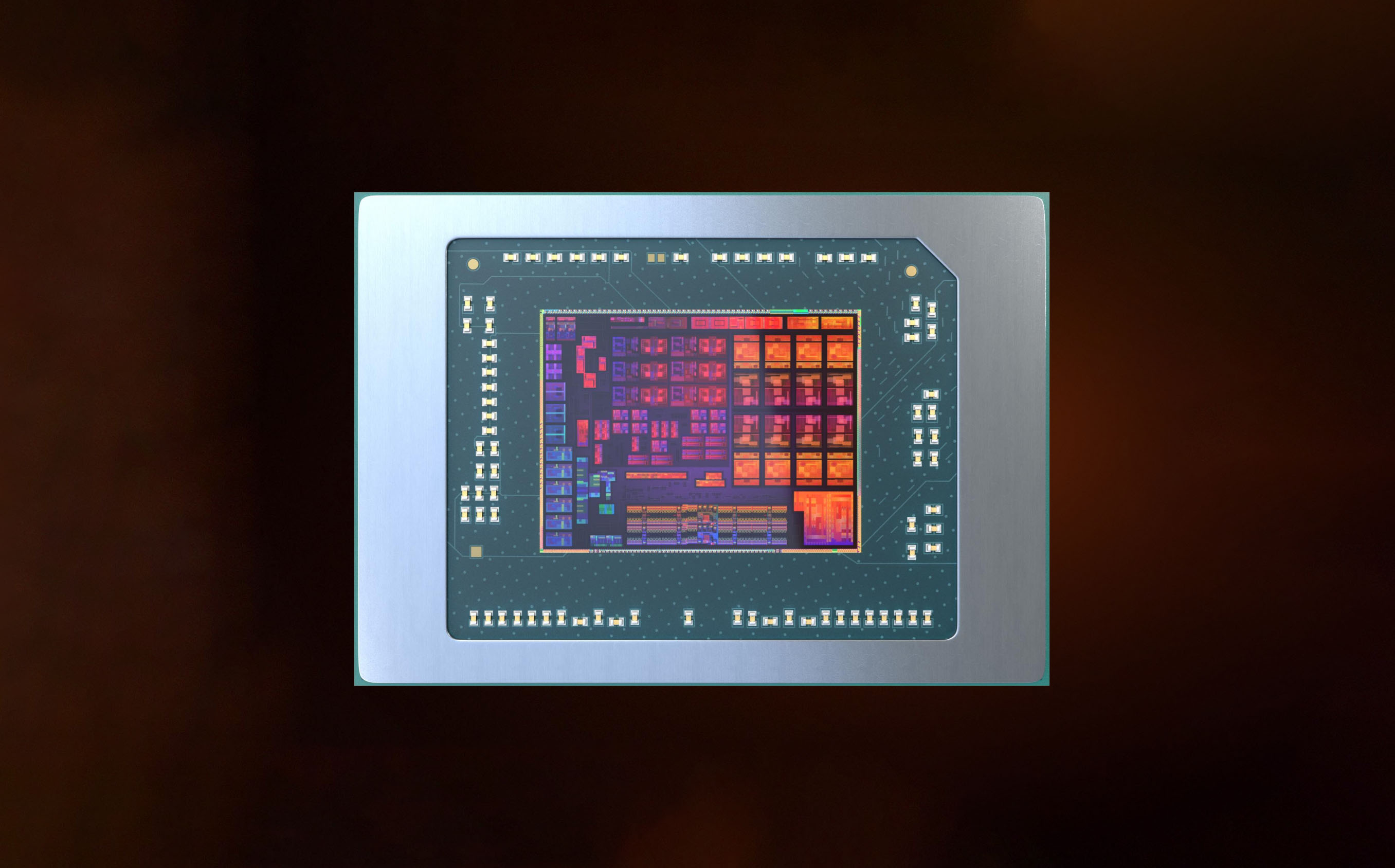
AMD Ryzen 9 6900HX, a high-end Zen3+ CPU with up to 4.9 GHz boost A new entry on the Geekbench website shows the first 3rd party performance figures of the new AMD processor. Those are the first non-AMD tests results posted after the 2022 Product Premier where the company has first shown its new processors […]
 steel yoke
 latent light
Seems like Intel may launch the fastest mobile GPU
lunar dawn
i mean it sounds like you need glasses /s
latent light
 coarse nimbus
ah yes...the red bars, are quite red
prime jasper
Don't people know all informations about this following gun:High-Impulse Weapon System(Lacroix Samouraï 76mm Urban Warfare Weapon)?
why does dx12 cause bf5 to crash
actually it does that for lots of my games and im not sure why
i have an rx series gpu so dx 12 is perfect for it, and when i use it for bf5 i see an extreme fps boost compared to dx11
 plush karma
Question, what happened to Battlefield 1 optimization? I knew that something was messy, bc my pc shouldn't have many stuttering as it does, as like, there's a YT that I used to watched, where like, 5 years ago, he was able to play the game safely at 60 fps, while his setup was like, a FX-6300 and a R7 from the high end at the time, my gpu is a RX 580 and I have a R5 1400, that even, isn't that much of a good CPU at this point, it was very good for casual low graphics gameplay in the time it was released.
I've searched a bit and reached some debates on reddit, about the optimization of the game getting really bad after I think, the Russian DLC, what the hell actually happened to the game? Some said stuff about netcode changes, changing how your CPU worked while in game, and other stuff, but idk, feels so fucking weird that I can't even play stable 60 fps on a 2016 game
latent light
I played BF1 fine on a 4-core/4-thread i5-4690K back then but I never played when the Russian DLC came out
latent light
plush karma
Question, what happened to Battlefield 1 optimization? I knew that something was...
RAM configuration is important too, if you happen to only have one stick of RAM in single-channel mode then you will only have half the potential bandwidth
toxic wigeon
So what's the prime difference between the Rm850x and the RM850x V2? Is the V2 just higher quality?
storm osprey
hmm, im seeing the v2 came out a few years ago, and the other one came out in 2021?

Tom's Hardware
Corsair upgraded its best-selling line RMx family with new models featuring smaller dimensions and quieter operation. And despite limited PCB space, performance remains similar from one generation to the next.
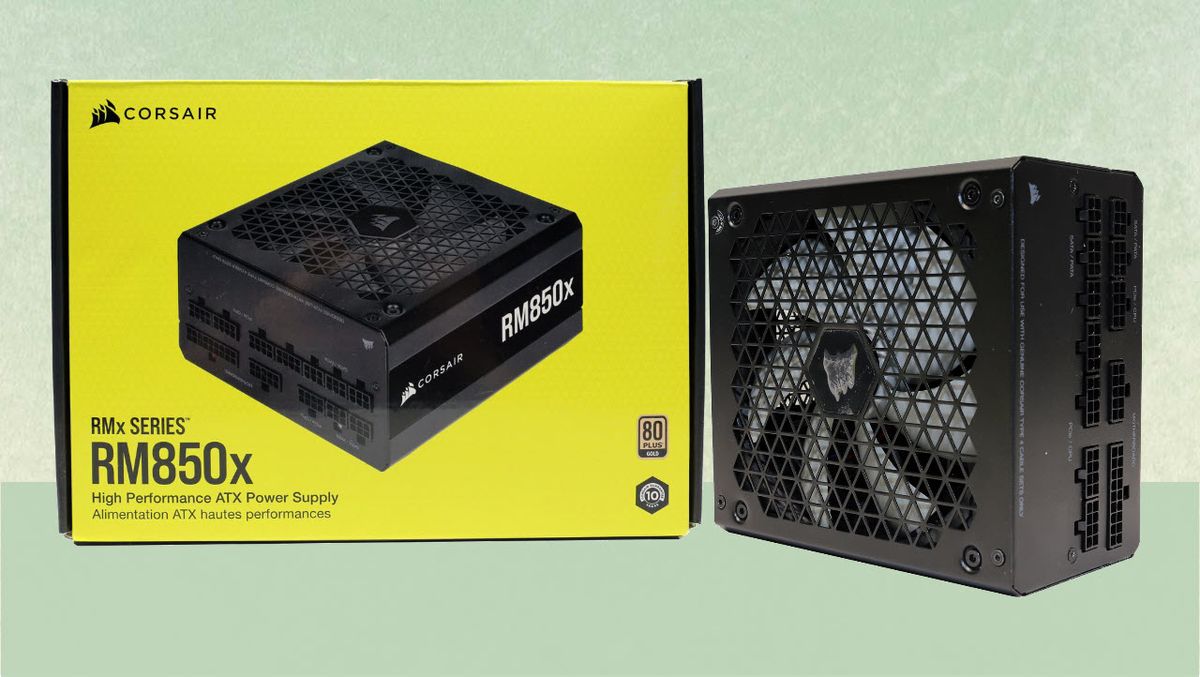
Tom's Hardware
The Corsair RM850x is the new leader in the 850W Gold category.
the 2021 psu coming with the triangle mesh design
toxic wigeon
Hm
So really that's just it, Smaller and quieter. Which isn't too much of a concern.
Cause no matter what it'll fit into the lian li 2
But it'll be better for cables
Side note. When I walked into my mates house and heard his PC run it was so weird


 lunar dawn
atomic jackal
yo how am i able to select 2880x1660 with a 1080p panel
lunar dawn
atomic jackal
yo how am i able to select 2880x1660 with a 1080p panel
what are you trying to do?
render higher res then downsample or whatever the process is called to 1080
toxic wigeon
Bahhhhh is thermal paste essential????
Also, Is there a 3d programm where you can use it to build PC's to get a general idea how to?
Actually that's a good idea
opaque saddle
toxic wigeon
Bahhhhh is thermal paste essential????
essential. Strongly recommended to put it on, not so much, not too little, it fills up the gap between air and the processor' metal plate which can decrease cpu temp

Build your very own PC empire, from simple diagnosis and repairs to bespoke, boutique creations that would be the envy of any enthusiast. With an ever-expanding marketplace full of real-world components you can finally stop dreaming of that ultimate PC and get out there, build it and see how it benchmarks in 3DMark!PC Building Simulator has alre...
Price
$19.99
Recommendations
33052
eager sun
atomic jackal
which is why its pointless
Nvidia says you will end up with more detail compared to rendering it in 1080p right away. Im sure they know what they are doing and didnt invent garbage but imo the performance loss is significantly more noticeable/important than whatever image quality improvement you get
atomic jackal
eager sun
Nvidia says you will end up with more detail compared to rendering it in 1080p r...
should i turn off dldsr then?
eager sun
Sorry i was talking about DSR. DLDSR does the exact same thing but significantly reduces performance loss so you could try it out i guess. I personally wouldnt use something like that though
 misty cedar
Why is there no dedicated team to manage the exchange of updated battlefield 1
toxic wigeon
So between the Msi b550 pro and the tomahawk, What's truly the difference? Just overclocking and usb socketS?
opaque saddle
Usually it has differences in build quality, overclock ability and rear IO. Apart from price differences,, the PCIE slot may be trimmed (2 vs 1)
sometimes the onboard sound chip can be better
plush karma
latent light
RAM configuration is important too, if you happen to only have one stick of RAM ...
I have 2 2400mhz
And if I remember well
Fx wasnt able to go much more than that since it was ddr3
Still I wonder how the fuck DICE managed to fuck the optimization this much
2x 8gb btw
lunar dawn
toxic wigeon
Bahhhhh is thermal paste essential????
yes
i mean you can test a pc without it
like you can see if it post then turn it off
but thats about it
storm osprey
theres also thermal pads
humble iris
toxic wigeon
Bahhhhh is thermal paste essential????
Yes it is, but as far as brands and all that, I haven't noticed any difference at all, I've used Arctic Silver, Arctic Silver Ceramic, Zalman STG-1, Zalman STG-2, The paint on kind, and even the cheap stuff that comes in the Hyper 212 boxes. It all works the same, but the higher quality brands will last longer, and perform longer. I recommend Arctic as I have used it for many years, and even have 10 year old builds with it still original application. I've been meaning to pick up some MX-4/5 and some Corsair XTM50 to try out, I have used the pre applied corsair TIM as well, and worked the same. I like the Arctic Silver Ceramique as it's non conductive, and performs well, but the silver is the best. There is a lot of hype these days so I recommend any popular name brand product should work just fine.
humble iris
toxic wigeon
So between the Msi b550 pro and the tomahawk, What's truly the difference? Just ...
Depending on what CPU you use, and if intend on overclocking, check power delivery, PCIe lanes supplied by the CPU and/or Chipset, multi-phase power, gold content, etc.. etc..
Tomahawk has (2) Lan ports
Tomahawk has ALC1200 Audio vs Pro has ALC892
Pro has 2 more USB 2.0 ports then Tomahawk
Pro has TPM Header, Tomahawk does not say
I'm sure there are more differences.
latent light
ALC1200 is quite a bit better than ALC892
 rose prawn
Oooo... a technology channel.. anyone help me get a Joystick (Thrustmaster 16000m) working with BF2042?
I've installed and configured XOutput and HidHide, successful had Steam recognize the joystick as an xbox controller, configured the joystick mapping in XOutput, and yet still BF2042 does not recognize that I have a joystick/controller plugged in. I mean technically, I can't tell if knows anything or not, I've just found that I can't remap any buttons because it doesn't recognize that I'm pressing any buttons or anything like that.
why is this game SOOO terrible that it doesn't support joysticks is BEYOND me...
quick locust

SearchSecurity
A new ransomware type known as DeadBolt is impacting users of QNAP's NAS products, demanding more than $1,000 from victims.

latent light
Mid-range i5-12500H laptop CPU outperforms the fastest last-gen laptop CPU i9-11980HK
 proud compass
what mice do you use? i use the zowie ec1
 wintry wolf
razer basilisk v3
storm osprey
proud compass
what mice do you use? i use the zowie ec1
logitech g pro x superlight
 wet notch
proud compass
what mice do you use? i use the zowie ec1
wet notch
proud compass
what mice do you use? i use the zowie ec1
zowie fk2
storm osprey
wet notch
zowie fk2
i miss my fk2, clicks were a little heavy but the shape mmmmmmmmmmmmm
wet notch
yeah the shape is awesome
i have one of the newer ones where the cord is slightly different
it points just a tiny bit upwards, dunno why they did that
my cord never got stuck on anything
wet notch
oh, maybe that is why they changed it then
im just worried its gonna break soon
the scroll or a button or something
latent light

G.SKILL Releases Extreme Low Latency DDR5-6400 CL32 Memory Kit (27 January 2022) – G.SKILL International Enterprise Co., Ltd., the world’s leading manufacturer of extreme performance memory and gaming peripherals, is delighted to announce the launch of an extremely low-latency, high-speed DDR5-6400 CL32 32GB (2x16GB) memory kit under the Trident...
CL32 
lofty light
Why are you pinging people
lunar dawn
 unborn cove
<@!499656949491564554> hi
unborn cove
<@!499656949491564554> hi
hi
toxic wigeon
So how does updating a b550 BIOS work?
Can you boot up the computer like normal and get some sort of update by going through the website or is it more complicated
lunar dawn
toxic wigeon
So how does updating a b550 BIOS work?
i mean it depends on motherboard model but tbh you just download the update file, if its an exe you can just execute it
if its another type of file (usually inside a zip folder) you just need to unzip the folder and put that file on a usb then go into your bios and select that file in the bios update options
or you can just search how to update (model) b550 bios on google
toxic wigeon
Yeah I kinda wrote that, Searched up and god its scary
lunar dawn
toxic wigeon
Yeah I kinda wrote that, Searched up and god its scary
i mean .... its literally not
you just put one file and it does all the work
for you
just dont turn it off and you re good
lunar dawn
what b550 do you have
prime jasper
toxic wigeon
I'm looking at getting the MSI b550 A PRO
Get a b550 tomahawk
Spending more on a mobo is never a mistake