#technology
1 messages · Page 448 of 1
 quick locust
Which cable
 coral dust
So does this game run better on windows 11 than windows 10?
 merry wagon
coral dust
So does this game run better on windows 11 than windows 10?
merry wagon
coral dust
So does this game run better on windows 11 than windows 10?
Idk if windows 11 has gotten its optimization update yet
 lunar dawn
coral dust
So does this game run better on windows 11 than windows 10?
lunar dawn
coral dust
So does this game run better on windows 11 than windows 10?
basically the same
unless you have a 12th gen intel
wich runs better on win11
 valid locust
Windows 11 with VBS off is barely any faster, like 1-3%, EXCEPT for storage read, that has like 20%+ for some reason
 thorny bridge
Used windows 11
 silent plaza
voting 🔴
i can take 11600k now with black Friday
or
i can wait for 3 months maybe more
and take 12600k
11600k=1
12600k=2
 hearty roost
If you take 12600k you need a new mainboard
if you need aswell for an 11600k a new mainboard, than go for Ryzen instead and join the masterrace
silent plaza
i have to get a new board and cooler for both
silent plaza
hearty roost
if you need aswell for an 11600k a new mainboard, than go for Ryzen instead and ...
11600k is better than r5600x right ?
and cheaper
hearty roost
Only in games where raw single core power is needed
And cheaper for in my country around 20€ depending on where you want to buy it
Mostly the r5 5600x is better. And if there is a game where the intel core is better there just a few fps between them
and for proof https://www.youtube.com/watch?v=-B2dS57rl_8
the only thing where intel is better than the amd in power usage.
 green ginkgo
is dx12 not enabled by default in bf2042
 atomic latch
I just discovered that deleting the BF2042 Documents folder (both normal and Open Beta folders) actually somewhat improved performance, at least on my end. No significant increase in FPS but it is much smoother now.
 atomic scroll
@prisma anvil after f ing about with the ram cl 19 @ 3000 is max stable
but afer some youtube watching i uped the grafics settings and my fps inproved about 10 fps
to about 85 to 120
but its mostluy abbout 90to 95
 rancid haven
Just wanna give a shout out to ea/dice for making my pc unusable until my gpu is repaired
 vocal saffron
this warship waiting screen simulator is the fucking bomb!
 latent light
@silent plaza

5600X faster than 11600K in most cases, also uses a lot less electricity and generates less heat
11600K even loses to the 10600K in some cases
Best value CPU will probably be when the i5-12400 comes out, will have 5600X performance for under $200
hearty roost
But when this happens Ryzen 6000 could be announced already
And than the prices for I guess nearly any Ryzen drop huge.
 teal mesa
green ginkgo
is dx12 not enabled by default in bf2042
teal mesa
green ginkgo
is dx12 not enabled by default in bf2042
Im getting a direct x12 error and literally cannot q the game up
its almost like i got a game that i cannot play
green ginkgo
thats on you if you have an old pc
teal mesa
green ginkgo
thats on you if you have an old pc
me?
atomic latch
What's your specs?
teal mesa
17-9700k, 2080 super, 16 gig 3200 ram, 1tb ssd, 2 tb hardrive
 fickle torrent
hey guys anyone know how i can add my ps5 friend? we both have crossplay on but its not letting me search for his name, says no results
teal mesa
says soemthing to do with driver but ive deleted and re installed numerous times and still nothing
green ginkgo
ok well lets wait for optimization updates
atomic latch
teal mesa
says soemthing to do with driver but ive deleted and re installed numerous times...
hearty roost
DX12 errors is an Windows issue aswell.
teal mesa
thats what im getting^^
 pale quartz
hearty roost
But when this happens Ryzen 6000 could be announced already
pale quartz
hearty roost
But when this happens Ryzen 6000 could be announced already
ryzen 6000 is zen3D, that will not be coming out till Q1 2022
Zen 4 is not launching till the end of 2022
teal mesa
atomic latch
Try this: https://help.ea.com/en/help/faq/clear-cache-to-fix-problems-with-your-...
i tried this and still nothing. im starting to think its a battlefield issue
atomic latch
Try repairing your game install. If it still doesn't work, then yeah it's a battlefield issue. It's weird though, since your 2080 super should be recognized by the game
teal mesa
atomic latch
Try repairing your game install. If it still doesn't work, then yeah it's a batt...
so i tried drivers delete and re install, game re install, cache, 2 ea accounts and nothing
pale quartz
 latent light
We talk tech rumors here sir
coral dust
Does Gsync help out in 2042?
Anyone using it?
pale quartz
read
pale quartz
latent light
We talk tech rumors here sir

latent light
AMD isn't finished with its RDNA 2 GPU lineup and is allegedly working on two new graphics cards, the Radeon RX 6500 XT & the RX 6400.
atomic latch
4GB only?
atomic latch
6500XT 8GB could be interesting. The next RX 580 if done right. But then again the RX 6600 was honestly underwhelming so idk what they can do with a 6500XT
latent light
There was an early testing sample of the RX 6800 with only 8GB lol
Also heard about samples of 6900XT with 32GB
These will never exist for consumers
 coarse nimbus
4gb? why would that still be a thing 
latent light
At least it wouldn't be good for mining unlike RX 6600
RTX 3050 Ti has also been shown with only 4GB memory
pale quartz
these things will be clock processing machines.. meaning they'll punch way above their weight even if 4GB is woefully inadequate
latent light
4GB is good for playing modern titles on low-medium settings, which is probably what you're going to be doing anyway to get highest fps
pale quartz
modern titles? Minecraft perhaps lmao
latent light
You can't play 2042 at ultra settings 1080p if GPU only has 4GB

Under 10 fps for 1650 Super lmao
pale quartz
what do you mean can't run?! my 1050ti cost $300 and can't run 2042?! bad DICE awful optimisation!!
coarse nimbus
gamer be like "do i need ultra on everything?? yes"
 uneven current
Console players be like "there's a choice?"
I'm suprised the game is that well optimized /bad looking tbh
My gpu is more than 3 years old and still runs it Max settings at 4k perfectly fine
Kinda suprised they used last gen tech instead of going next gen
But also not suprised cause current gpu market
latent light
Buddy of mine still has a GTX 1080Ti for 4K
uneven current
Yeah my 2080ti is maybe 20% faster, it's totally fine outside msfs2020
pale quartz
uneven current
Kinda suprised they used last gen tech instead of going next gen
they didn't use "last gen tech", the frostbite engine was upgraded specifically for newer hardware
just because it runs well on older hardware =/= DICE magically using last gen stuff
 gaunt briar
hi guys best pc $500 budget
latent light
Console
uneven current
What I mean with last gen stuff is, it's not a graphical master piece and step far from the last battlefield @pale quartz
It's close to same
latent light
gaunt briar
hi guys best pc $500 budget
$500 PC wont be for gaming especially with market situation
gaunt briar
latent light
$500 PC wont be for gaming especially with market situation
good answer
uneven current
Used enterprise hardware with broken gpu fixed in oven
pale quartz
the graphics of the game are quite stunning idk what you're saying
uneven current
Maybe my game is bugged then
gaunt briar
if i bought a $500 gaming pc its probably a scam
uneven current
After 100m Noone has animations
latent light
$500 gaming PC won't run games
pale quartz
 uneven current
Ground textures at a lot places muddy as hell
In vehicle cockpit textures have barely any detail or use detailed pbr tsytures
latent light
Texture bugs
uneven current
They look flat
uneven current
pale quartz
pale quartz
?
uneven current
Do you see the 14 year difference?
pale quartz
yes..?
I played crisis on the older consoles lol
that's not even a close comparison whatsoever
uneven current
Tf
The buildings in ur scree shot look like gta San Andreas buildings with vignette
pale quartz
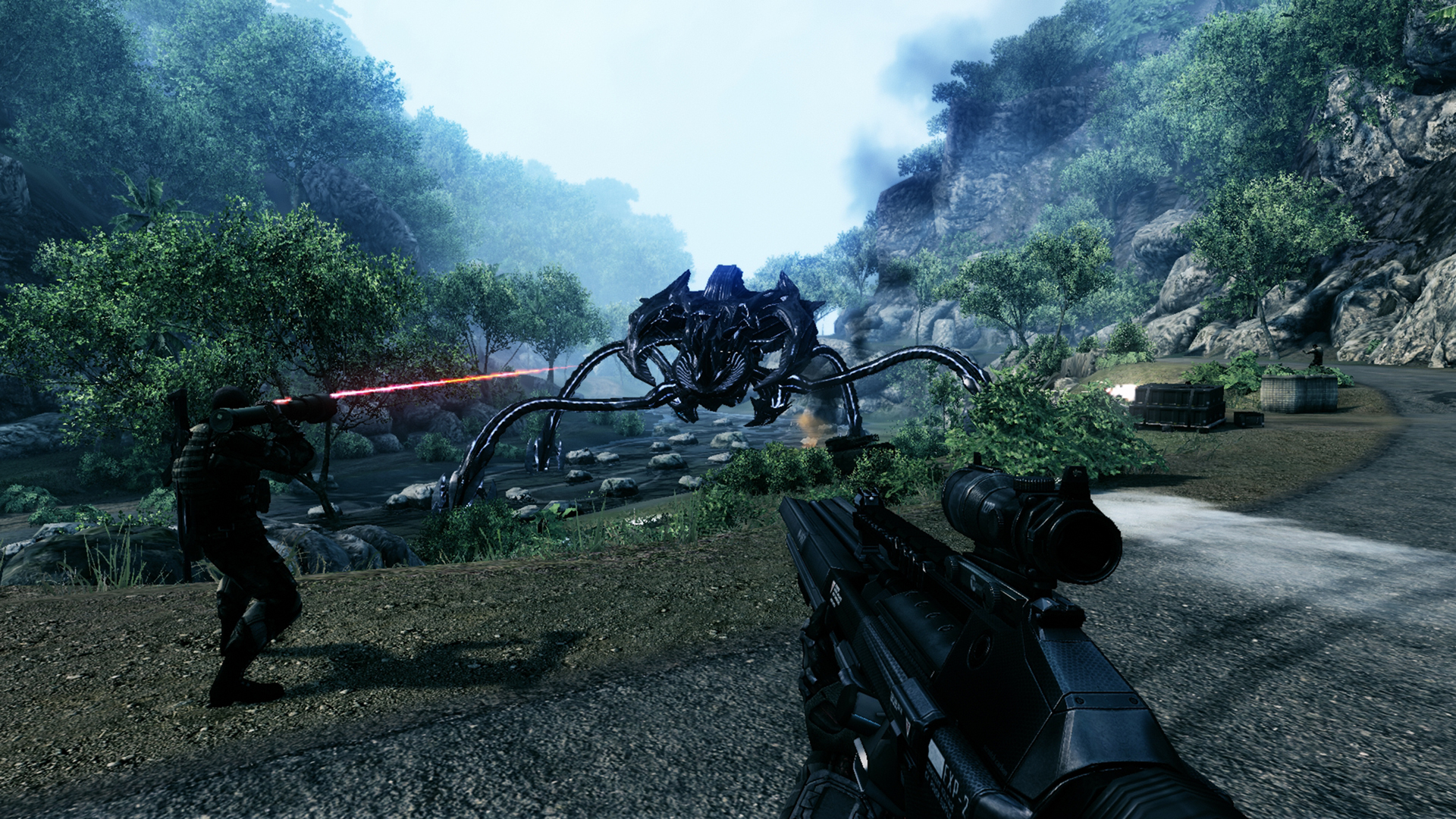
idk if you didn't look at your own screenshot but lighting and shadow detail in crysis doesn't exist whatsoever with texture models being a totally warped ass mess
saying they're even remotely close is kind of a joke
 heady peak
guys has anyone got a dualsense working on pc yet, when i turn it on my character just looks at the floor
pale quartz
heady peak
guys has anyone got a dualsense working on pc yet, when i turn it on my characte...
dualsense does not work with origin
uneven current
I don't say crisis looks better, just that it doesn't look like it's 14 years better
I'm saying battlefield 2042 doesn't look like a big step better than bf1 did back then compared to the titles before, hell even bf5 currently looks a lot better in many situations than battlefield 2042
pale quartz
you need to use steam
pale quartz
uneven current
I don't say crisis looks better, just that it doesn't look like it's 14 years b...
you realise you're looking at a compressed screenshot right?
tbh it sounds like you've barely even touched the game to say that lmao
uneven current
You realize I'm playing 4k maxed with no dlss and still complain?
And have 60h in it + 20h beta?
 midnight crypt
You cant do much better with photogrametry
heady peak
@pale quartz i got it working on apex with an application called duelsensex it emulates a ps4 controller and works perfect then i go on battlefield and my guy likes his feet
midnight crypt
Texture wise
pale quartz
heady peak
<@!162568099839606784> i got it working on apex with an application called duel...
DSX is a third party intermediary 2042 does not support it via origin, it will only work on steam
heady peak
so i put the game on steam, then plug it in
pale quartz
no
you will need to have the game physically installed on steam
controller support had never been supported by origin
 wise remnant
logitech mx-master anybody use that one? i can't use my side buttons when i want to bind them
pale quartz
yes, and origin doesn't support controller, so there isn't much you can do other than that
uneven current
wouldnt smth like xpadder/rewasd work?
pale quartz
nothing is guaranteed to work
uneven current
worst case you emulate mouse n keyboard with rewasd
pale quartz
steam has only ever been the platform to guarantee controller support
 delicate reef
Uplay and fc6 works well, haptic too
pale quartz
I actually haven't tried fc6 with controller heard it works well though
delicate reef
Yeah the triggers and the different weights that you can feel with different guns is cool
pale quartz
delicate reef
Yeah the triggers and the different weights that you can feel with different gun...

uneven current
@pale quartz https://i.imgur.com/QaQiMAl.jpg thats what it looks like for me 😦
pale quartz
lmao you've definitely screwed something
uneven current
yeah but hwat 
only thing i dont have enabled is ray traced ambient occlusion and dlss and reflex
pale quartz
no clue
uneven current
and well all the post processing bullshit*
midnight crypt
F
 lost schooner
Does the game still have framerate issues? I'm at low settings and took steps from a video I found to reduce framerate problems, but I still lag and rubberband. Had no issues at all with the beta.
hearty roost
Yes. Until you have seen a new Nvidia Driver. Rubberbanding and bad ping is a overflowing server issue compared with some gadgets. But Ping issues your own problem.
 left musk
@hearty roost only nvidia ?
hearty roost
Yep only Nvidia. AMD has a working driver and it does his job
 novel dew
Force DX12
midnight crypt
the game is dx12 only
novel dew
not by default, in the settings_profile its set to 0
 quartz kindle
keep getting a direct x error since yesterdau any fix?
midnight crypt
try a fresh install of your gpu drivers
 fallow pewter
https://cdn.discordapp.com/attachments/402835360004177930/911757564717461564/unknown.png
why does it say it has been running for that long ? 5 days 9 hours 9 mins 21 secs
midnight crypt
because you havent turned your pc off for 5 days
midnight crypt
are you sure you didnt put it in sleep mode
fallow pewter
yes, 100% shutdown
i just restarted it now its the right time thanks tho
i got 1 more question though
https://cdn.discordapp.com/attachments/402835360004177930/911759333564493854/unknown.png
this my RAM tab, and the thing i circled translates in english to "Assured", why does it say 29GB when i only got 16GB RAM ?
@ me if anyone knows, thx
 thorny halo
so.. what the hell is the point of the heavy suppressor? it has the same effects as the others, but you lose 10 dmg! others are -5 dmg. what is this new devilry?
i've always been a fan of suppressors but i feel like this game just takes a huge dump on those things
 verbal cliff
thorny halo
i've always been a fan of suppressors but i feel like this game just takes a hug...
verbal cliff
thorny halo
i've always been a fan of suppressors but i feel like this game just takes a hug...
I just put an suppressor on my mp28
Every other gun sucks with one on
 prime jasper
Crash and force restart on launch. I have installed all the visual libraries, directx, disabled nvida overlay, repaired origin, actually did a complete factory restore, and still does it...
I was able to play a little in the beta but it started doing it there too.
As you can imagine I am a little angry about it. I don't have time to mess around for hours trying to fix. anyone else have this problem?
It started by saying "setup messed up try reinstalling" now it goes passed that and I even got to connecting to online services, but now it crashes right after the easycheat bar fills (again). I repair now and it says complete, whereas before I would get the aforementioned error message
hearty roost
fallow pewter
yes, 100% shutdown
Windows fast start. PC does not get fully out with it.
hearty roost
fallow pewter
https://cdn.discordapp.com/attachments/402835360004177930/911759333564493854/unk...
Means a virtual cache. Like if the PC has any important data that windows dont want to lose
pale quartz
fallow pewter
https://cdn.discordapp.com/attachments/402835360004177930/911759333564493854/unk...
you are confusing yourself, you have 2 types of memory, main memory, and what's called shared allocated resources - without delving into 3 paragraphs about how graphical engines such as OpenGL and D3D handle transit buffer requests, what this doing is reserving a certain allocation of storage as ZRAM from your I/O device (in GB), aka 13GB of storage which is used by the OS for handling swapping requests e.g. superfetch and what not which rely on JIT data access to be responsive, it's nothing to be worried about, it's also why the English term for this is "committed", or "shared", because the I/O reserved storage is shared amongst multiple pieces of hardware for usage depending on what's required and cannot be used for actually storing files
prime jasper
Does anyone have the issue that they are getting literally 1-3 FPS in the Game Menu and in Game?
I have a RTX 2080
 cloud mango
Yo can someone help me out. My game has really low frames in menu anyone know why?
 honest bison
gaunt briar
if i bought a $500 gaming pc its probably a scam
honest bison
gaunt briar
if i bought a $500 gaming pc its probably a scam
welp no 500 bucks pc will be good for today's games. So it might be a "gaming pc" but a very old crappy one, which means you probably scammed yourself
 sterile venture
does 2042 support resizable bar? and does it help or nah
latent light
https://videocardz.com/press-release/micron-and-mediatek-first-to-validate-lpddr5x-memory-technology
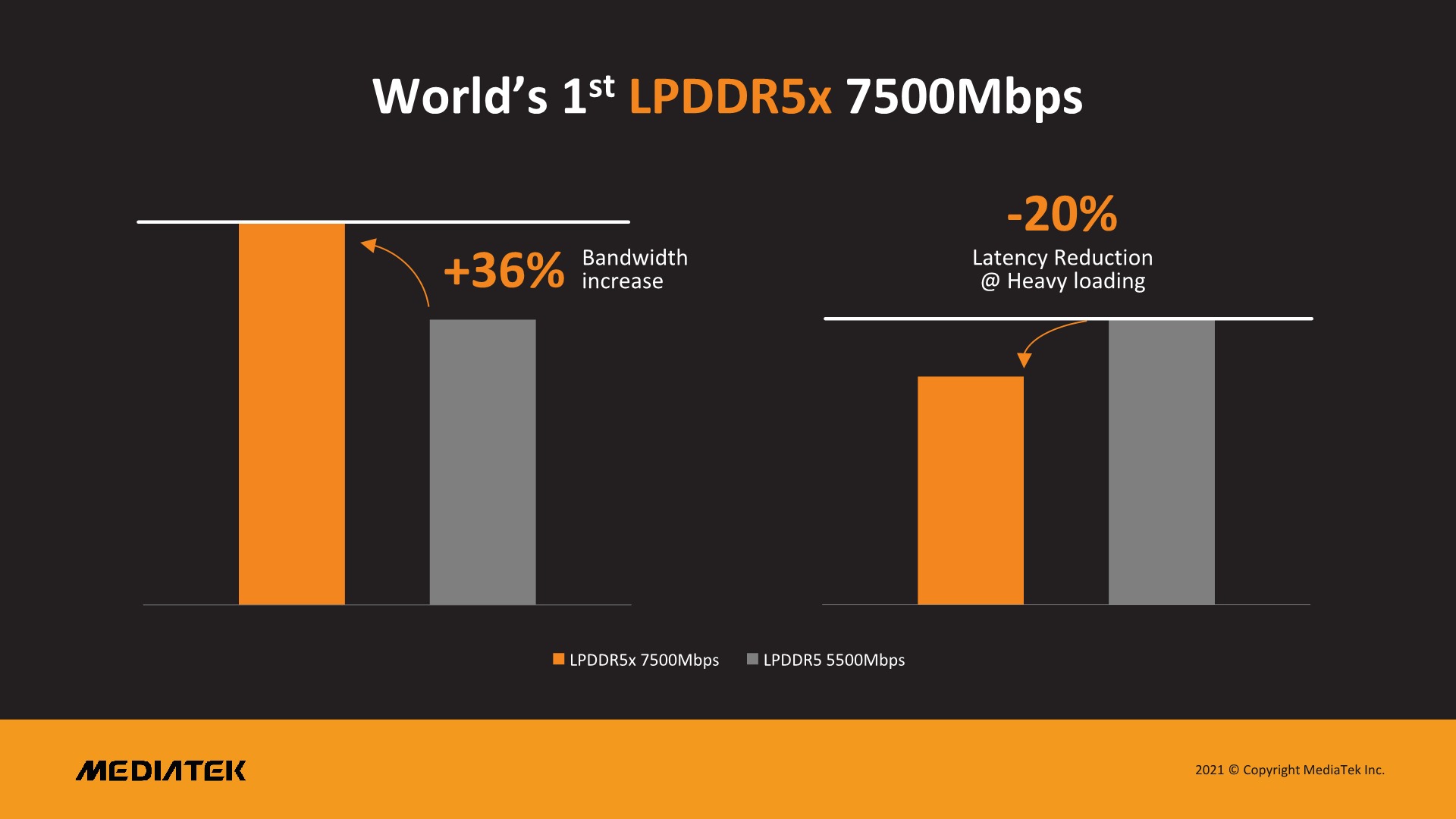
Micron and MediaTek First to Validate LPDDR5X Built on Micron’s leading 1α node, world’s fastest mobile memory unlocks artificial intelligence and 5G innovation for smartphones LAGUNA BEACH, Calif., Nov. 19, 2021 — MediaTek Executive Summit – Micron Technology, Inc. (Nasdaq: MU) announced today that MediaTek Inc. has validated Micron’s low-power...
 pulsar grail
Is it me or after the update, my fps has went down significantly? running a 3070 and have the same graphics pre-update
atomic latch
By update you meant the D1 patch?
 ivory knoll
Anyone got the fix for controller aiming bug?
pulsar grail
atomic latch
By update you meant the D1 patch?
yea. is the fps drop something ppl have been experiancing?
atomic latch
pulsar grail
yea. is the fps drop something ppl have been experiancing?
Yeah, it's all over the place so even good systems sometimes struggle
 short pawn
I found a computer store in one of this Asian super centres and it was called CCPu computers
 solid maple
lmao
i just realsied when you have windows 11 and you reinstall 10 again even tho the only choice to take remove all , it only clears C , all the other data on your hdd is safe
i thought its gonna be like a full format
 marsh gull
i got an rx 6600 at a computer center
for 500usd
its still overpriced but the only other decent option availabale was an rtx 2060
so it was a no-brainer
atomic latch
Yeah, not a good deal but considering current circumstances, it's good enough.
verbal cliff
marsh gull
for 500usd
Paid around 550 usd for mine
 modern gull
@supple bane Wonder what my VRM temp will be with the new cooler  My VRM temps haven't been that good with the AIO, pretty much limiting OC capabilities for me
 mortal iris


 stiff nimbus
On pc I keep getting that yellow symbol and eveything runs so slow it’s like the matrix, is there any solution for this as this only happens in the 128 players main game mode
And when I play hazard zone or whatever eveything runs really smooth
 rotund crescent
stiff nimbus
On pc I keep getting that yellow symbol and eveything runs so slow it’s like the...
rotund crescent
stiff nimbus
On pc I keep getting that yellow symbol and eveything runs so slow it’s like the...
get better internet?
stiff nimbus
I already have fast internet
rotund crescent
a better pc?
stiff nimbus
My pc is fine I have rtx 3070 i7 11th gen 16gb ram
rotund crescent
ram is a little low. perhaps your internet isnt as good as you thought it was?
stiff nimbus
This game is good when it works but most of the time performance just kills everything
rotund crescent
im getting good performance. i just feel like the poeple with issues are playing with borderline pcs or shit internet
stiff nimbus
I’ll just have to wait for patches I guess
marsh gull
atomic latch
Yeah, not a good deal but considering current circumstances, it's good enough.
yeah im really happy cause my build with it turned out awesome
marsh gull
verbal cliff
Paid around 550 usd for mine
honestly rn id say its a decent deal
hearty roost
Windows 11 > Windows 10. After the AMD fix its better.
marsh gull
i prefer using windows 10 tbh i tried both
 prisma anvil
I prefer win11 cause I see about a minor score increase in my benchmarks.
Consistently.
 pale badger
CPU usage is really high in 2042. And it's using all cores. I'm happy for that (as it's been an issue in many games, using only 1 core), but when all are used my CPU boost clock only goes to 4.3 instead of 4.7 or 5.0 or whatever I've configured 😦
prisma anvil
Did you unlock the power limit in the bios?
pale badger
Bumping the all-cores-clock.. feels like it's gonna run hot as the devil? 
prisma anvil
Long duration power limits. Etc.
pale badger
Can't remember what settings I'm running atm, haven't touched those things in a while. But should maybe take a look
Whats long duration power limit?
prisma anvil
So your cpu can draw as much power as it can.
Or it will only draw like intel stock powerlimit after 56s
pale badger
Oh, didn't know about that one
prisma anvil
What's ur cpu?
pale badger
i7 8700k
prisma anvil
Yeah unlock the power limit.
pale badger
Feels like I got it yesterday but.. damn.. it's like 4 years ago now.
prisma anvil
Then set a vcore voltage, load line caliberation, core clock ratio and ring clock ratio
From the 3 8700k I see they hit about 4.7-5ghz all core. Voltage ur safe up to 1.4v just make sure ur temp are in check.
pale badger
4.7ghz all core sounds sweet
hm, maybe I haven't even overclocked this CPU at all when I think about it. Maybe I'm thinking of my ol' i5 2500k. That thing was a beast.
But I'm gonna look into it, thx for the knowledgesharing @prisma anvil 🙂
 regal pagoda
Is there gonna be any improvement concerning the RTAO or any other sort of ray tracing ? Because right now RTAO is absolutely pointless, and consumes 35 fps average
pale quartz
pale badger
CPU usage is really high in 2042. And it's using all cores. I'm happy for that (...
this is an entirely normal procedure
all core turbo clocks are significantly less than single core, in order to increase it you will need to reduce the thermal temperature of your processor (boosts are based on temperatures)
pale quartz
regal pagoda
Is there gonna be any improvement concerning the RTAO or any other sort of ray t...
performance improvements probably not RTAO is naturally very demanding on the GPU and that cannot be changed, if you don't want it simply leave it disabled
lunar dawn
pale badger
CPU usage is really high in 2042. And it's using all cores. I'm happy for that (...
did you unlock power limit in bios and also are you using and all core overclock or single core
 buoyant jewel
Hi everyone! how to fix cpu frametime? I have 5800x 6900xt with 3600gb cl16 ram. Gpu renders 150-200 fps with 4-8ms, while cpu bottlenicking with 60-110fps with 15-30ms with HUGE drops (cpu usage is about 45%, while gpu is 70%). I have already turned on dx12, disabled all overlays but it seems nothing can help. Can I do something to make it run better or the problem is about optimization of this pathetic game on dev side
prisma anvil
buoyant jewel
Hi everyone! how to fix cpu frametime? I have 5800x 6900xt with 3600gb cl16 ram....
Prob game optimization. Try update mobo bios, turn on pbo2, get amd new chipset driver. See if it might help.
 glass iris
oh no i see people with ryzen 5600 bottlenecks a 3070 and i have a 3600x with a 3070 will the bottleneck be super high or will i get around the same fps around 120 on 1440p high
i know that one way to get better fps is to make the rez higher since then the system depends on gpu more than cpu
buoyant jewel
prisma anvil
Prob game optimization. Try update mobo bios, turn on pbo2, get amd new chipset ...
just did it today, nothing had changed..
glass iris
and any thoughts on when they will fix the cpu bottleneck problem soon or u guys think it needs around 3months or so
buoyant jewel
glass iris
i know that one way to get better fps is to make the rez higher since then the s...
Im playing on 2k (tried all settings from low to ultra), nothing changes for me
prisma anvil
buoyant jewel
just did it today, nothing had changed..
Prob game then. Ur ram is decently fast as well.
buoyant jewel
prisma anvil
Prob game then. Ur ram is decently fast as well.
Yeha, Ive upgraded from 3200 cl16 ballistix to 3600 cl16 gskills this summer
glass iris
buoyant jewel
Hi everyone! how to fix cpu frametime? I have 5800x 6900xt with 3600gb cl16 ram....
u would get probably 180/250 if gpu was on 100% but the bottleneck on this game is insane from how bad cpus are utilized xd and i thought these stutters are rare so cant u deal with it since its super short and then it goes back to normal or it happens alot 4 u?
prisma anvil
buoyant jewel
Yeha, Ive upgraded from 3200 cl16 ballistix to 3600 cl16 gskills this summer
If u got bdie then u can go ham on the oc. Maybe 3600 cl14 or 3733 or 3800 cl14-16 with slight infinity fabric oc
glass iris
hopefully they fix optimization and make it so a 1050 can run it on 1080p low
marsh gull
i mean its below the minumum spec after all
glass iris
marsh gull
i mean its below the minumum spec after all
yeah but optimization can lower the specs needed
 supple bane
modern gull
<@!440595567291400213> Wonder what my VRM temp will be with the new cooler <:Woa...
supple bane
modern gull
<@!440595567291400213> Wonder what my VRM temp will be with the new cooler <:Woa...
Im guessing probably worse. The nhd 15 isnt a downdraft cooler. Its fans wont blow air on the vrms. but with an AIO the block isnt too obstructive so airflow from the case fans can blow over the heatsinks, but with a big, hot, tower cooler in the way that wont be a thing
buoyant jewel
glass iris
u would get probably 180/250 if gpu was on 100% but the bottleneck on this game ...
it happens almost every minute, but the most huge drops happen at the beginning of each match
glass iris
buoyant jewel
it happens almost every minute, but the most huge drops happen at the beginning ...
what rez do u play on?
buoyant jewel
prisma anvil
If u got bdie then u can go ham on the oc. Maybe 3600 cl14 or 3733 or 3800 cl14-...
yeah, they're b-dies, but I dont want to sacrifice a week tuning them. I jsut enabled DOCP profile and chill
prisma anvil
buoyant jewel
yeah, they're b-dies, but I dont want to sacrifice a week tuning them. I jsut en...
True haha
glass iris
try 4k this sounds weird but game depends on gpu more when u higher the rez i saw people say they get better fps on 1440p than 1080p
marsh gull
glass iris
yeah but optimization can lower the specs needed
fair enouph
glass iris
buoyant jewel
it happens almost every minute, but the most huge drops happen at the beginning ...
oh u dont have dlss amd i forgot did they release there dlss thing for amd idk this might make it worse might make it better
bc i think this tech depends on cpu so who knows maybe better maybe not
and did u update windows it might help
modern gull
supple bane
Im guessing probably worse. The nhd 15 isnt a downdraft cooler. Its fans wont bl...
I was thinking air will flow past VRMs a bit compared to the AIO pump doing nothing Also i don't have a side fan that blows air towards the vrms
glass iris
out of the topic but anyone knows how to fix BSOD? i built my pc around 8months/1year ago and i get alot of BSOD mostly when i start it up happenes once and then doesnt happen againt until the next day most of the time the performance is good so thank god it didnt affect the hardware
buoyant jewel
glass iris
oh u dont have dlss amd i forgot did they release there dlss thing for amd idk t...
nope. but it doesnt matter, my problem is about cpu, not gpu which is fine
supple bane
modern gull
I was thinking air will flow past VRMs a bit compared to the AIO pump doing noth...
No but your case fans will blow air across them.
modern gull
supple bane
No but your case fans will blow air across them.
There should be some airflow still, but i guess we'll have to see if it is a major improvement or nothing at all
supple bane
modern gull
There should be some airflow still, but i guess we'll have to see if it is a maj...
Did it arrive yet?
modern gull
supple bane
Did it arrive yet?
Nope, won't get it until tuesday or wednesday
 sour nest
both my CPU and GPU arent used to 100% in BF2042 and im getting 40 50fps on low. what's the problem here?
specs ryzen 5 1600x 1060 6gb 16gb 2666mhz
 vapid estuary
the game doesn't utilise 100% of ur cpu
 digital vault
@sour nest its steal alpha of 2042 
 gilded thunder
I wonder if having win 11 is a factor
vapid estuary
it only drops like 3fps i think
gilded thunder
Well then my computer is just bad lol
 wanton summit
im gettin low fps warnings ingame and everyone starts to teleport , but i have 40-60 fps . anyone else ?
hmmm ingame it says 32 ms , if its working correctly
 frosty charm
Is future frame rendering better for fps?
midnight crypt
yes
 astral olive
Anyone on the latest nvidia driver getting 10%+ nvrla.exe cpu usage? Is that normal. I've killed the process and renamed the exe for now. I saw something about it being an issue before?
 storm rune
anyone has idea why my gpu is fully cranked up with like 0 gpu usage?

1080p
did that moment ago, nothing helped
i'll just reinstall my drivers
started randomly
yea downloading one rn

 tepid cave
Hello, I have a good pc that should be able to run BF2042 perfectly fine but it cant, I put the graphic settings to the lowest possible and messed with the setting a lot yet I still get lots of lag. Can anyone help?
storm rune
cpu?
tepid cave
storm rune
cpu?
Ryzen 7
storm rune
full?
name

think it helped
and the gpu is 11 degrees cooler
must've been a bug
yea, you help because at least you replied 
tepid cave
storm rune
full?
AMD ryzen 7 3700X
storm rune
hmm yea, it should run it pretty "fine"
new drivers?
have you messed with the cfg file?
tepid cave
no?
storm rune
tepid cave
no?
yea but really, do you have the newest drivers?
tepid cave
yeah
storm rune
good

Whats 0% MM?
https://www.mouse-sensitivity.com/forums/topic/4704-conversion-method-guide-and-other-faqs/
https://www.desmos.com/calculator/kiala2basq
FOV?
https://themetalmuncher.github.io/fov-calc/
Notepad++?
https://notepad-plus-plus.org/downloads/
Config?
Fr33thy's Drive
Configs, files and folders
https://drive.google.com/drive/folders/1oc...
you should try this
and take his cfg file
 cursive ermine
Me with gtx 1650 and ryzen 7 2700 getting 50 fps max 
 grand relic
@prime jasper How do I fix the insane CPU bottleneck caused due to bad optimization in. BF2042
My GPU produces 130fps ar 4K ultra
CPU processes 70 of those at most, in 128p breakthrough
latent light
cursive ermine
Me with gtx 1650 and ryzen 7 2700 getting 50 fps max <:sad_clown:764678490464583...
GTX 1650 too weak for decent fps in BF2042, also having only 4GB VRAM on this GPU doesn't help
grand relic
R7 3700X OCed to 4.5GHz and 3080 Ti Vision OC
3600MHz ram
2x8
970 plus
Windows 10 latest
Internet is about 110mbp/s down and up
That I did
There's zero issue for loading
Doing perfoverlay.drawfps 1 in games console shows that my GPU fps is waaaaay ahead of my CPU fps and this is the only game with this issue
I was just checking
I play on 1440p
I have a 1440p 170hz
Ayy, same CPU cooler
The crazy CPU bottleneck became apparent when I realized I have same exact fps on 720p low vs 4k ultra
Because CPU fps is always at 80ish
The only thing that changes is usage
As I said the loading times have no issue
It's like 40% full
Even less
The BF4 runs like an absolute dream, so do BF1 and V
This is the first DX12 title and the first time I'm having these issues
CPU fps doesn't change. So I get the same fps regardless of the setting
And CPU utilization is 30-40
 thin swallow
thank you for being a god for a ton of players
 orchid osprey
So I've been having problems playing bf2042, my fps is quite low and I've lowered textures and such but it hasn't seemed to work
thin swallow
you tried DX12 + 0 Shadow yet?
thin swallow
whats shadow
orchid osprey
No idea
orchid osprey
What in notepad?
thin swallow
lemme find how to quicky;l
orchid osprey
Ok thanks
 lofty kindle
quick question, i havent updated the latest gpu drivers, if i download the drivers should my fps increase in bf2042 currently getting 50/60 on low
 blissful panther
why does Sundance keep crashing amd drivers
blissful panther
i have an AMD Radoen VII and everytime i get near the person "Sundance" my game crashes
alr thanks then
cursive ermine
guys do u think that gtx 1650 with i5 10400f can handle the game good?
the motherboard is Gigabyte B460M Gaming and i also got 16 gb ram
windows 10 pro, ssd is Crucial BX500 480GB
and internet speed is 500 mbps
prime jasper
Ay, can anyone help me with the ridiculously high cpu usage i have in bf2042
 raw turtle
cursive ermine
guys do u think that gtx 1650 with i5 10400f can handle the game good?
raw turtle
cursive ermine
guys do u think that gtx 1650 with i5 10400f can handle the game good?
should do alright, maybe 60ish fps on low 1080p
raw turtle
prime jasper
Ay, can anyone help me with the ridiculously high cpu usage i have in bf2042
what CPU?
cursive ermine
hmm alr
raw turtle
also there is probably no fix
blissful panther
blissful panther
i have an AMD Radoen VII and everytime i get near the person "Sundance" my game ...
Oh and uh heres the error message i get (it would not let me take a screen shot from pc so i had to from phone thats why its kinda like that)

 violet sundial
My game is running terrible today and this is the only day that this has happened. Is this normal?
raw turtle
violet sundial
My game is running terrible today and this is the only day that this has happene...
try restarting pc?
violet sundial
i did
 indigo elm
can some one explain to me why i have 30 fps in game on low, with an 3060ti, i7-6700 😒
violet sundial
apex legends runs fine but battlefield dies
raw turtle
indigo elm
can some one explain to me why i have 30 fps in game on low, with an 3060ti, i7-...
i7 6700 is the reason
cursive ermine
alright ty 👍
violet sundial
yeah i was just saying that to clarify that its not my pc itself it's probably the game
indigo elm
raw turtle
i7 6700 is the reason
its weird that its not enough when they say it is
prime jasper
cpu: i5 9600k
gpu: RTX 2080
ram: 20gb 2666mhz
violet sundial
2080 ti and i9
raw turtle
actually i take that back, but the 6700 is still not near enough
over 6 years old at this point
6 year old quad core
it's not good enough for the most CPU intensive game released in modern day
blissful panther
how do i do that?
raw turtle
yeah 20gb? that's not right
delicate reef
@indigo elm go into Manage 3D Settings and try this.
 raw turtle
that won't do anything most likely
prime jasper
My ram is 4gb+16gb running in dual channel. (yeah it's weird but it works). I have a 3tb hard drive paired with a 16gb optane ssd. windows is up to date and i'll try the sfc stuff
raw turtle
"power settings" are useless unless its on a mobile chip
delicate reef
raw turtle
that won't do anything most likely
Just got a 2060 and 3070 5 more frames each about :)
raw turtle
delicate reef
Just got a 2060 and 3070 5 more frames each about :)
on the same map?
raw turtle
still 5 fps lol
delicate reef
raw turtle
still 5 fps lol
Every dollar counts
raw turtle
won't even notice that
delicate reef
Anyway, I just provide tips and help rather than shoot someone down right away. It's proven to work so far 
Best of luck
blissful panther
its already up to date
violet sundial
should i try reinstalling the game? or should i wait for an update or something
they're fully updated
quick locust
why would you run sfc
Also use driver from website/package manager, the one auto installed by windows is usually a bit older
lunar dawn
violet sundial
they're fully updated
to what version, you can check in nv control panel > system info the bottom
violet sundial
lunar dawn
to what version, you can check in nv control panel > system info the bottom
496.76 on 2080 ti
quick locust
not really anything related to 2042
sfc is only windows files and libraries
unless you have broken files/file corruption in Windows there's not much need to run it
what
they all do
fickle torrent
anyone got a fix for the infinite matchmaking menu loop thing?
quick locust
you don't need to
intel has DSA and graphics command center
though most intel updates is through windows update or just included with kernel on linux
fickle torrent
@prime jasper even if i have it on steam?
 fickle torrent
@prime jasper actually managed to get into a game, gonna try that after ill let u know what happens
 forest sleet
Tried already
fickle torrent
@prime jasper for context, https://www.youtube.com/watch?v=yIOf6odLKbY (two games in a row have worked today, so far....)
lunar dawn
violet sundial
496.76 on 2080 ti
then id use ddu in safe mode to uninstall driver and reinstall latest
fickle torrent
things are working fine today, a little too well
blissful panther
ill try and see if it works
prime jasper
psst i did the stuff you recommended
i now have 50 frames instead of 40
yeah but i still have stutters and all that
guess i gotta wait for a major patch
low
future frame rendering?
pale quartz
Nvidia low latency does not increase the framerate lol
it reduces input latency
it actually decreases the average framerate by its own design
prime jasper
The same
Nothing really changed
yeah i give up
ty tho
this game just needs to be fixed
turned it off and it's still bad
maybe there's a hidden setting that's cooking my cpu
 frozen fractal
any of you had luck fixing the stutter ?
quick locust
hm
i forgot to enable vnstat as a service
and to change its permissions
so i have large laps in my network usage history
🤦♂️
Fedora
 chrome skiff
My old Sapphire r9 290 just died I think I got it in 2013... What a great card
quick locust
Rip
 dense ravine
Hey I need some help.
So I’m trying to change my controller mapping, and I am on ps5. Over the time I have gotten into fps games, I’ve adopted a pretty weird controller setup which works really well if I want to have an advantage over default settings. The main inputs I want to change are melee to Circle (O), and crouch/prone to R3 (right stick) I also want to change my ads and fire buttons from L2 -> L1 and R2 -> R1, because of the travel time it takes to input the triggers. The last change I want to make is my Jump/vault/climb from X to L2, because I use both my middle and index fingers on my left hand to grip both L2 and L1 at the same time (don’t ask why, just happened over time) But, whenever I do all of this, I run into numerous problems. 1) Whenever I map the attachment wheel to R2, and use switch attachments, I literally cannot change my magazine type because whenever I press circle to switch ammo types my character melees, which therefore reverts the change and takes me out of the attachment wheel.
2) there are numerous mapping inputs which are now un set, which I cannot map to anything because they were a combo of buttons, such as calling in things, it has to be L1 + L2 but since I changed the inputs, I can’t map “calling in” to ____ buttons because it won’t register 2 inputs at a time
I really can’t change my controller style because this is how I have been playing cod, splitgate, and other fps titles for years, and cannot get used to the default settings, if anyone can help me, please, it would be very useful as I don’t want to regret buying a $90 game. (PS5 price for BF2042 in Canada)
Thank you to whoever takes the time to read all of this.
atomic latch
sounds like a CPU bottleneck
atomic latch
Yeah, this game is very CPU demanding. Have you tried the DX12 fix?
 gritty bloom
oh no, do you turn on dx12 ingame?
atomic latch
It's not in game, it's in your documents folder. Basically go to you Documents/Battlefield 2042/settings and edit the file "PROFSAVE_profile"
Then just find the setting for DX12 and set it to one.
gritty bloom
alright! thanks, lemme try that then
prisma anvil
gritty bloom
dlss auto
With ram speed about 3200 cl16 xmp u should get around 100 fps. Just tuned someone with similar spec.
The profile thing won't help. It's placebo.
thorny bridge
I have gtx 1660 super gigabyte amd ryzen 5 3600 16 gb ram used windows 11 updates not working for me method do u have solution appreciated 👍
prisma anvil
Yeah I tuned someone here with a 9700f and got over 100 most of the time.
gritty bloom
prisma anvil
With ram speed about 3200 cl16 xmp u should get around 100 fps. Just tuned someo...
my stock speed is 2666mhz, not sure if i can boost it all the way up there.. I have it on 29xx something, Really need some new part, damn
prisma anvil
gritty bloom
my stock speed is 2666mhz, not sure if i can boost it all the way up there.. I h...
Yeah ur heavily ram bottlenecked
thorny bridge
I have gtx 1660 super gigabyte amd ryzen 5 3600 16 gb ram used windows 11 updates not working for me method do u have solution appreciated thumbsup
prisma anvil
I can't even get past 90fps without xmp over jedec
quick locust
Just use xmp then?
thorny bridge
I have activated xmp
prisma anvil
If ur ram have it and mobo supports it, yes
For zen3, 11th gen intel users who have xmp over 3600. Don't go over 3600 or it will de sync infinity fabric or go to gear 2 and make ur game fps worse. Either try ur luck with infinity fabric overclocking or force memory controller go gear 1 or manually downclock to 3600 after applying xmp.
honest bison
Should I update the GPU drivers to the bf2042 ones? im getting 80-120 fps as for now on old drivers
atomic latch
Nah, the newer drivers dont really add much except for DLSS support.
prisma anvil
If u want. I don't see much performance difference
Maybe 0 maybe 5 or less I can't feel it.
left musk
Just wanted to give @prisma anvil a quick shoutout, helped my fps issue 🙂
 vague star
I have a 1660 super and i7-9700f. I run this game on 50-70 fps, what can i do to improve fps
I play on low graphics and have made changes to the nvidia control panel setting for the game
 broken pike
have a 5800x with 3080 - 32g 3200 ram - complete system liquid cooled...getting around 100fps with all settings on high...does that sound right for where this game is at right now?
Clyde
BOT
— Today at 4:34 PM
prisma anvil
broken pike
have a 5800x with 3080 - 32g 3200 ram - complete system liquid cooled...getting...
pretty much could be abit better
prisma anvil
vague star
I play on low graphics and have made changes to the nvidia control panel setting...
if u have good cooling u can unlock power limits, check if ram is slotted right and xmp is enabled
broken pike
Came overclocked from pre-built - EK Fluid
prisma anvil
broken pike
Came overclocked from pre-built - EK Fluid
idk how they overclocked but its pretty much a ram bottlenecked at this point
broken pike
prisma anvil
if u have good cooling u can unlock power limits, check if ram is slotted right ...
okay...i'll check the xmp setting ...pretty sure it's enabled...maybe just wait and see if they optimze game more in near future?
prisma anvil
broken pike
okay...i'll check the xmp setting ...pretty sure it's enabled...maybe just wait ...
yeah, basically
broken pike
....k...thx for the info
prisma anvil
broken pike
okay...i'll check the xmp setting ...pretty sure it's enabled...maybe just wait ...
even at stock xmp, I assume its 3200 cl16 its still bottlenecking
broken pike
think switching to 3600 will help...even 32g
prisma anvil
broken pike
think switching to 3600 will help...even 32g
abit, u want 3600 with the lowest cas latency (cl)
for zen3 best is 3600 cl14 xmp ram
broken pike
sounds good...I'll check it out...thx again
prisma anvil
broken pike
sounds good...I'll check it out...thx again
also check the prebuilt overclock. I usually dont trust them.
midnight crypt
Its not
 left timber
where do i
vague star
thank you @prisma anvil it didnt really help much with fps but i am up at a steady 60-80
prisma anvil
vague star
thank you <@!135653835938070528> it didnt really help much with fps but i am up ...
u unlocked the power limit?
 hidden thorn
Is battlefield 2042 worth it?
vague star
yes
hidden thorn
I have an Xbox one though does that change anything
vague star
xb1 with new games isnt all that good
get the newer xbox, it will run new gen games better
prisma anvil
oh then ur prob gpu bottlenecked
prisma anvil
the other guy has the same cpu as u and was getting around 100ish
vague star
what gpu
prisma anvil
2080 super
vague star
and is his cpu oc
frozen fractal
have anyone actually had success with the auto settings in graphics?
atomic latch
Yes
I used it on Auto, set my system to Medium, and runs pretty well considering the whole optimization issue
short pawn
cant turn off weapon dof
did console command
and profile manually
still on
game automaticly sets dof to 1 when i open
cursive ermine
What would yall buy for gaming amd ryzen 7 2700 or i5 10400f?
prisma anvil
cursive ermine
What would yall buy for gaming amd ryzen 7 2700 or i5 10400f?
if you only got these 2 choices, 10400f, just way higher IPC
 slate ivy
So any idea what could be the issue: after the recent BF and Driver update, my GPU use only goes up to 80% and my CPU goes to 27%, however, im still stuck at 60-80 fps
prisma anvil
slate ivy
So any idea what could be the issue: after the recent BF and Driver update, my G...
whats ur specs cpu gpu ram
slate ivy
5950x, 3080ti, 64GB DDR4 3600 (with bios settings changed accordingly)
prisma anvil
slate ivy
5950x, 3080ti, 64GB DDR4 3600 (with bios settings changed accordingly)
Hmmm what's ur settings. 27% is about right as this game uses 8 threads and you have 32.
At medium it should get 120+ ez
 wraith sky
What resolution you gaming at?
slate ivy
Ultra + FOV 90 + all "visual extra stuff" like filmgrain, bloom, etc. disabled @ 1440p
prisma anvil
Do u have raytracing disabled?
slate ivy
wait is is enabled by default?
prisma anvil
I forgot you gotta check.
slate ivy
i might have to check that when i get home.... thanks 😄
prime jasper
@slate ivy this game is in early acces bro .. battlefield 4 was more disgusting in early opening then this game now.. i get also only 50-60 fps and got a fucking 3,5k pc but its normal i guess after 2-3 months they gonna fix dat and u can run around with 120-140 fps
 regal warren
I have i7 10700 - RTX Geforce 2060 super and @slate ivy And only get 80-90 fps no more than 100 have 16 threads is that normal??
slate ivy
i hope it gets better with updates, my need to dial down some unnecessary visual things hoping to find something that gives me a big boost like settings grass textures to low in GTA V giving you a 30% FPS boost
prisma anvil
prime jasper
<@!123157562362298369> this game is in early acces bro .. battlefield 4 was more...
What's ur spec? I think u need help if u are getting that fps
prisma anvil
regal warren
I have i7 10700 - RTX Geforce 2060 super and <@!123157562362298369> And only ge...
Sounds about normal check ur ram if xmp is on and also remove all power limit (if u have decent cooling)
modern gull
regal warren
I have i7 10700 - RTX Geforce 2060 super and <@!123157562362298369> And only ge...
I recently disabled HT, but what is your GPU usage like? If it is at 100% you can't really get more fps out of your system with your current gpu
 warped apex
12700K vs 12900K: what would you choose for BF2042 to play in 1440p?
modern gull
regal warren
<@!279414895974285314> look pls pm
2 sec 
 kind jungle
I have ryzen 3 3300x with 1650 super. Is my system too weak for this game? Cus sometime i get crazy stutter
quick locust
3300X is only quad core
frozen fractal
whats the console command for fps cap in 2042 ?
rivatuner giving me judder i just cant get rid of, frametimes are solid on the graph
 feral gull
my gpu usage is stuck at 40%.. this is unplayable
warped apex
feral gull
my gpu usage is stuck at 40%.. this is unplayable
What's your CPU?
modern gull
Tbh HT is somewhat over rated for games if you have 6+ cores. You might get better performance disabling it at that stage
 slate holly
anyone else's EA play RPC not working when playing battlefield?
quick locust
modern gull
Tbh HT is somewhat over rated for games if you have 6+ cores. You might get bett...
not really
pale badger
anyone got some experience with replacing old thermal paste, is it worth it? haven't touched stuff since I installed the CPU cooler 4 years ago.
 glad hemlock
i'm getting like 100-115+ frams with my 1080ti and 5600x
pale badger
I don't know if it ages and looses a lot of thermal-transfer-performance 
 latent eagle
quick question: what fps can i expect with ryzen 5 2600 and 1070? i dont want to get the game if i cant get stable 60fps
latent eagle
yeah thats what i was thinking aswell, but this hardware is fairly common for low-medium end pc`s
modern gull
quick locust
not really
If you try 4c8t HT off you probably will see performance loss, but 6c+ HT off you might see performance improvement
Several variables to this ofc. But i would assume HT to provide good boost, but from my research it mostly in games seems to be good for low end cpu like 4c8t
marsh gull
latent eagle
quick question: what fps can i expect with ryzen 5 2600 and 1070? i dont want to...
in low you'll get almost all the time above 60 fps. I used to have a 1650 super and a ryzen 3 3100 and in low i had an average above 60 for most of the time
so dont worry
marsh gull
glad hemlock
i'm getting like 100-115+ frams with my 1080ti and 5600x
nice
i have a radeon rx 6600 and a 5600x an i use medium settings 1080p an i get an average of 90 fps
which is very playable
marsh gull
feral gull
my gpu usage is stuck at 40%.. this is unplayable
maybe turn on future frame rendering and maybe your cpu is bottlnecking your system?
latent eagle
marsh gull
in low you'll get almost all the time above 60 fps. I used to have a 1650 super ...
thank you!
marsh gull
kind jungle
I have ryzen 3 3300x with 1650 super. Is my system too weak for this game? Cus s...
its normal
marsh gull
latent eagle
thank you!
no prob you'll run it fine
the curious thing about this game is that you may not have crazy high framerates but its veeery playable, even at 60-70 fps
like it feels smooth
even tho you dont have 144 fps
latent eagle
in bf5 i have around 110
marsh gull
latent eagle
in bf5 i have around 110
yeah i love bf5 for its optimisation its so ez to run on mid range hardware
hearty roost
pale badger
anyone got some experience with replacing old thermal paste, is it worth it? hav...
4 years are ok. Shouldn`t change much if it was from beginning a good thermal paste. If you want to replace it stick with thermal grizzly.
latent eagle
pale badger
anyone got some experience with replacing old thermal paste, is it worth it? hav...
if your temps are fine you dont really need to touch it, same with gpu thermals
pale badger
hearty roost
4 years are ok. Shouldn`t change much if it was from beginning a good thermal pa...
Aight, I'll let it be then 🙂
latent eagle
replacing thermal paste on GPU voids your warranty
marsh gull
latent eagle
if your temps are fine you dont really need to touch it, same with gpu thermals
yeah pretty much
marsh gull
latent eagle
replacing thermal paste on GPU voids your warranty
i mean gpu warranties arent that long either (3years on average)
hearty roost
latent eagle
replacing thermal paste on GPU voids your warranty
Not on all and totally not in all country its a really hard grey zone.
pale badger
latent eagle
if your temps are fine you dont really need to touch it, same with gpu thermals
Temps are fine I guess but did some overclocking yesterday and figured if I could gain a few degrees by replacing old paste that wouldn't hurt I guess.
latent eagle
yeah, but it also hurts resale value i wouldnt want to get a gpu thats without sticker, who knows what has been done with it
latent eagle
pale badger
Temps are fine I guess but did some overclocking yesterday and figured if I coul...
i mean if you get some good thermal paste you could, but also you can change fan settings in BIOS to be more aggresive, or lower voltage and see if its stable
hearty roost
latent eagle
yeah, but it also hurts resale value i wouldnt want to get a gpu thats without s...
Here in germany, as an example no screw is locked by an sticker.
pale badger
latent eagle
i mean if you get some good thermal paste you could, but also you can change fan...
True 🙂
latent eagle
What cpu do you have?
pale badger
8700k
hearty roost
pale badger
Temps are fine I guess but did some overclocking yesterday and figured if I coul...
Sure just stick with thermal grizzly conductonaut or kryonaut. Can improve temps a lot. High class thermal paste.
latent eagle
pale badger
8700k
you can get some quite good specs out of that 5.2-5.5Ghz
pale badger
bumped it to 4.9GHz, -200MHz AVX offset that kicks in when running battlefield. Haven't had time to fine-tune or compare temps too much.
hearty roost
But beware if you want thermal paste like the conductonaut its liquid metal. Its not like normal thermal paste
pale badger
latent eagle
you can get some quite good specs out of that 5.2-5.5Ghz
Unsure how far I can go with my Noctua NH-U14S, and if my cpu-sample is up for it. 5.2+ sounds really high on all cores though?
latent eagle
thats a pretty beefy cooler, on what voltage are you running it at?
quick locust
latent eagle
you can get some quite good specs out of that 5.2-5.5Ghz
that's only for highest bins
most 8700K can only do 5.0 to 5.1
latent eagle
can i link you a post with few ppl who have tried to overclock it and see if it maybe works for you?
pale badger
latent eagle
thats a pretty beefy cooler, on what voltage are you running it at?
Think i configured it at 1.33. Ain't got much overclocking experience so unsure if thats high or low
quick locust
latent eagle
replacing thermal paste on GPU voids your warranty
This depends on area. It's not the case for EU and US.
hearty roost
pale badger
Unsure how far I can go with my Noctua NH-U14S, and if my cpu-sample is up for i...
Noctua is good but 5.2+ more with the nh 15 the big one. With u14 5ghz I guess shouldn´t be a problem.
latent eagle
quick locust
This depends on area. It's not the case for EU and US.
here [serbia] they wont accept it if you have cracked the sticker, when you buy a prebuild you cant even open sidepanel without voiding warranty
quick locust
serbia isn't in EU
latent eagle
quick locust
serbia isn't in EU
nope its not
quick locust
and a lot of prebuilts have shipping packaging inside of them
so i guess that'd be a stupid issue there
pc full of the packaging bag
latent eagle
well they dont really do that here, they just put it in a box and thats it, delivery drivers dont really care about them. thats why when you are getting something expensive you go in person to take it
feral gull
marsh gull
maybe turn on future frame rendering and maybe your cpu is bottlnecking your sy...
that seems to have worked, thx
hearty roost
Nvidia has issues to utilise more GPU power. Most people only can wait for a fix from Nvidia.
lunar dawn
pale badger
Unsure how far I can go with my Noctua NH-U14S, and if my cpu-sample is up for i...
you ll def need a noctua nh d15
the big boi
or an aio
pale badger
lunar dawn
you ll def need a noctua nh d15
Yeah, unsure if it rocks with my RAM though, if it's any bigger in that particular direction
hearty roost
the big boiiiiii  Hes thicc
lunar dawn
pale badger
Yeah, unsure if it rocks with my RAM though, if it's any bigger in that particul...
well you can mesure the distance with your ram and also check how big the cooler is on google
or you can get an aio (like 360 mm or better)
hearty roost
nh d15 likes low profile ram
lunar dawn
indeed
hearty roost
Up to 43mm I mean should be same like my Be Quiet boi
lunar dawn
nh d15 likes to get all the air it possibly can
marsh gull
feral gull
that seems to have worked, thx
no prob makes the game seem wayy smoother for some reason lmao
latent eagle
feral gull
nvm... still 50 percent
what app are you using for monitoring? windows task manager is not good at reporting accuratly usage
prisma anvil
pale badger
Unsure how far I can go with my Noctua NH-U14S, and if my cpu-sample is up for i...
5.2 is very good, but u are using avx offset
you want avx offset to be at 0
latent eagle
where my stock cooler gang at
hearty roost
prisma anvil
intel stock cooler is mad
Intel Stock cooler 
prisma anvil

latent eagle
i tied my old cpu cooler to my motherboard using zip ties, its for 2011LGA socket
hearty roost
Probably can use a 60mm fan, it would keep the Intel core cooler 
Or some random copper heatpipe
pale badger
prisma anvil
5.2 is very good, but u are using avx offset
not running 5.2 (if that was how it was perceived), running 4.9, 4.7 with AVX.
Ain't I gonna run into issues with AVX offset set to 0 in some scenario? if some tasks hardcore AVX usage makes the CPU sweat a lot
prisma anvil
pale badger
not running 5.2 (if that was how it was perceived), running 4.9, 4.7 with AVX.
...
so in this case u would do 4.7ghz all core
avx offset 0
all my homies hate avx offset
marsh gull
latent eagle
where my stock cooler gang at
used to be part of it lel
prisma anvil
heck even windows use some light avx
pale badger
ok. just to kind of 'know what I'm actually running', no "random-factor", or is there any actual drawbacks of having avx playing around with the CPU alot?
like overhead due to it fiddling with the clock
prisma anvil
just a pain to dial in oc with 0 benefit and inconsistent clock speed
pale badger
aight 🙂
latent eagle
open up side panel for few C less
prisma anvil
8th gen use **** tim between the cpu die and the ihs
🥲
delid for -15 to 20c
but i dont recommend it
unless u are THAT GUY
pale badger
Hehe nah. When I switch CPU in the future I'll let the kids have this one. Don't wanna risk deliding stuff. never done it before so unsure how hard or what risks it comes with.. but.. I'm not that hardcore 🙂
feral gull
latent eagle
what app are you using for monitoring? windows task manager is not good at repor...
msi afterburner and rivatuner. Playing in 2k with a rtx 3070 and r5 3600. Even with all the graphics turned up to the max, including raytracing, my gpu usage still stays below 60% and even if i put it on low, i see no difference in fps. Also enabled dx12
prisma anvil
I am THAT GUY, not fun 🤣
pale badger
Went all-out on the cooling on my old Gefore 2 titanium back in the day but have played it pretty safe since then 😄
latent eagle
pale badger
Hehe nah. When I switch CPU in the future I'll let the kids have this one. Don't...
you need special tools and it can go south really quick, i saw reddit post of one guy breaking his cpu in half
prisma anvil
feral gull
msi afterburner and rivatuner. Playing in 2k with a rtx 3070 and r5 3600. Even w...
enable dx12 is placebo. also ur cpu and ram bottlenecked
latent eagle
feral gull
msi afterburner and rivatuner. Playing in 2k with a rtx 3070 and r5 3600. Even w...
poop game
kind jungle
marsh gull
no prob you'll run it fine
omg after i turned up xmp i have no crazy stutter anymore, but my cpu went from 77 to 81 degree on loading is that ok?
feral gull
prisma anvil
enable dx12 is placebo. also ur cpu and ram bottlenecked
my ram is running at 3200 mhz with xmp on
pale badger
latent eagle
you need special tools and it can go south really quick, i saw reddit post of on...
Yeah that's what I'm afraid of 😄
Split it in half and you can't even make a keychain out of it
prisma anvil
feral gull
my ram is running at 3200 mhz with xmp on
this game scales with ram as hard as warzone going from my 3600 cl16 xmp to 4000 cl15 manual tune got me 20 more fps
latent eagle
pale badger
Split it in half and you can't even make a keychain out of it
high risk high reward
feral gull
have no issues on any other game, even get around 80 fps in cyberpunk with everything on ultea/psycho
latent eagle
how does it feel to play cyberpunk at ultra?
feral gull
latent eagle
how does it feel to play cyberpunk at ultra?
pretty nice actually, graphics look nice.. the game is still shit
latent eagle
i played it on launch, never crashed once but still with all sidequets done 45 hours for whole game is too little
feral gull
prisma anvil
I actually like the game at the current state
they did fix some issues, that's true, but the physics, the ai, the mechanics.. everything is just bad
latent eagle
skyrim is 10 years old now and that game took me well over 100 hours
feral gull
just like battlefielsd 2077
pale badger
prisma anvil
this game scales with ram as hard as warzone going from my 3600 cl16 xmp to 4000...
Wish I knew that 4 years ago when I got my 3000mhz ddr4 huh 😅
"I'm just gonna do gaming, no need for fast RAM"
pale badger
Yeah, games are catching up, utilizing the hardware that is produced. Good in a way I guess. But more expensive gaming 😛
feral gull
pale badger
Wish I knew that 4 years ago when I got my 3000mhz ddr4 huh 😅
the game is just an unoptimized piece of shit.. not caused by ram,
marsh gull
kind jungle
omg after i turned up xmp i have no crazy stutter anymore, but my cpu went from ...
its fine
its still under manageable temps
latent eagle
marsh gull
its still under manageable temps
dry ice is always a solution if it gets hot
hearty roost
pale badger
Wish I knew that 4 years ago when I got my 3000mhz ddr4 huh 😅
3000 isnt bad. Not all CPUs are better with higher ram
quite many cpus losing performance with a to high clock on ram
or starting to be unstable
pale badger
I love this place. many other rooms are so toxic, but here we're just chillin', talking hardware.. and if you feel bad a bro comes and says "don't worry bro, not all CPU's are better with higher ram".
prisma anvil
thats because they de sync infinity fabric or go to gear 2
in that case u want to aim for lower cl (cas latency) rather than higher speed
pale badger
Read about cas latency back in the day but couldn't wrap my head around it. have been scared about that stuff since then 😄
prisma anvil
from my test zen 3 and 11th gen rocketlake hit a wall around 3600-4000 running 1:1:1 and gear 1
I heard alderlake can do around 4000 at gear 1 but I didn't test it yet
yeah ram oc is a pain
normally i tell people get the cheapest 3600 cl16 and enable xmp
and tell people to get 3600 cl14 if they are rich
feral gull
I still feel like i've been ripped off by dice at this point, i literarly bought an rtx 3070 and a 2k 165hz monitor just for the sake of this game. Just to see that the performance is not even close to what has been promised.
pale badger
@feral gull same, got a 3070 too for this game just to see it work at 25% 😄
prisma anvil
i aint gonna lie this game is still badly optimized
but high players game ram speed matters
pale badger
That frostbite engine mining dogecoins while we play or something?
prisma anvil
cant get over that wall
feral gull
Guess i'm gonna spend my timp in enlisted until dice decides to get their shit together
Time*
But yeah.. Having a relatively capable machine.. I'd say it's in the upper end of the mid range area just to load into kaleidoscope and wanting to cry in anger right after was a bad deal
pale badger
if 128 players is what made this game eat CPU like this, i'd say it's not worth it. 64 was just fine imo, didn't see any reason to go 128 and just make parts of the gameplay a big fluster cuck
feral gull
I don't think it's the player count
Althougj it does eat up quite a bit of the cpu load overall, something can be done to transfer some of the tasks to the gpu
They really really need to get their shit together
My dissapointment is inmeasurable and my day has been ruined
Also, leaving this behind, did you oc your 3070?
prisma anvil
feral gull
I don't think it's the player count
it is. same story in warzone
pale badger
feral gull
Also, leaving this behind, did you oc your 3070?
Tried some when I got it but can't really remember the results. Didn't really feel a need for that extra performance so I let it run on defaults after that.
feral gull
I get constant 170 fps in warzone without any issues whatsoever
prisma anvil
thats cause its easier to run than 2042
feral gull
So, 50 fps in 2042 on low, vs 170 on warzone, low as well.. I'd say the perfirmance gap is a bit too big
Performance*
But yeah, got to be honest as well, it's a tiny bit bettet in hazard zone
 jovial linden
I played with a 2060 and a 9700k and was hitting around 110 on everything low, i upgraded to a 2080 super and now i get 60-70
let’s go
feral gull
jovial linden
I played with a 2060 and a 9700k and was hitting around 110 on everything low, i...
Sad reacts only
feral gull
It is the ram.. Trust me
hearty roost
yeah the ram
hearty roost
jovial linden
I played with a 2060 and a 9700k and was hitting around 110 on everything low, i...
Dont worry Nvidia messed up with high end cards.
or mostly with any card
feral gull
This "buy it first, we'll fix it later" marketing strategy is getting ridiculous
prisma anvil
feral gull
But yeah, got to be honest as well, it's a tiny bit bettet in hazard zone
yeah less player
I get about 130-170 in 2042 170-300+ in warzone
game is not optimized haha not gonna defend
feral gull
Really hope they will fix it.. Asap
prisma anvil
but even with optimization ram scaling will still be present
feral gull
With optimization, 3200 will be enough
prisma anvil
its actually ram latency
not just speed
speed does correlate to ram latency
its complicated haha
for example 3200 cl14 will beat a 3600 cl18 usually
feral gull
My dudes, with low gou usage
Please try something out. Reset the graphic settings to default abd let me k ow if that fixes the issue for you
Found a weird reddit thread but it seems to have worked for some people
Fuck i hate my phone keyboard
hearty roost
I ve deleted the settings folder so often as well as a fully reinstall of Nvidias driver
frosty charm
how is BF2042 only 47 GB?
feral gull
frosty charm
how is BF2042 only 47 GB?
Dont use warzone as a standard, 47gb is more than enougj
hearty roost
Cause its not Activision
frosty charm
Based
marsh gull
frosty charm
how is BF2042 only 47 GB?
it will get bigger as more maps, guns and updates are added to the game
and i mean it aint a bad thing either
frosty charm
feral gull
Dont use warzone as a standard, 47gb is more than enougj
I was using battlefront 2 as a standard tbh which is 91 but it probably has more maps and overall more content
frosty charm
marsh gull
and i mean it aint a bad thing either
not sure if I should be impressed cause it's well compressed or disappointed cause it shows how little content the game has
or does it?
marsh gull
frosty charm
not sure if I should be impressed cause it's well compressed or disappointed cau...
i mean the game so far has decent content and it will expand over the next weeks
but i wouldnt cry over bf 2042 not occupying enouph space in our drives
feral gull
marsh gull
but i wouldnt cry over bf 2042 not occupying enouph space in our drives
I wish that was the o ly thibg we could get to complaib about
frosty charm
feral gull
Found a weird reddit thread but it seems to have worked for some people
could you link it?
marsh gull
feral gull
I wish that was the o ly thibg we could get to complaib about
fair enouph
frosty charm
I get only about 25% GPU utilization on task manager with my 2060
but about 80% CPU usage
and I get 50 fps average in conquest
marsh gull
frosty charm
I get only about 25% GPU utilization on task manager with my 2060
turn on future frame rendering and turn up the graphic settings
frosty charm
marsh gull
turn on future frame rendering and turn up the graphic settings
turn them up?
marsh gull
frosty charm
turn them up?
ex: instead of low put them on medium
frosty charm
feral gull
Idk how to do it from the reddit phonw app
bruh just click the share button below the post slightly right from the centre and it will come up
marsh gull
feral gull
Future frame rendering does nothing
it helps with smoothness and gpu utilisation
frosty charm
feral gull
Fuck me in the ass and call me sally
who is sally?
feral gull
frosty charm
who is sally?
My stupid second personality
 hollow bloom
frosty charm
and I get 50 fps average in conquest
hollow bloom
frosty charm
and I get 50 fps average in conquest
what ur pc spec?
frosty charm
hollow bloom
what ur pc spec?
i7 9750H (laptop)
RTX 2060
16 GB RAM
SSD
hollow bloom
frosty charm
i7 9750H (laptop)
RTX 2060
16 GB RAM
SSD
oh wtf u must have better fps
i got 60 fps with my i5 1050 ti 16gb
frosty charm
I am using DLSS on performance mode and I still can't get stable 60 fps in conquest
it's fine in smaller modes
hollow bloom
https://steamcommunity.com/sharedfiles/filedetails/?id=2655504032
try to use this guide
its help me a lot with my fps
frosty charm
hollow bloom
oh wtf u must have better fps
I think part of it is that it's a laptop
hollow bloom
frosty charm
I think part of it is that it's a laptop
hmm mb
i dont rly use laptop for games
frosty charm
weird thing is the low GPU utilization
hollow bloom
i just hope what dice will fix this shit in next update
marsh gull
frosty charm
wait no it's your about page
im a pcsexual (jk)
frosty charm
marsh gull
im a pcsexual (jk)
even so, that's better than being dreamsexual
marsh gull
frosty charm
yo <@!682772514916532272> love your status
thx for the support man RGBTQ+ will rule the world
marsh gull
frosty charm
even so, that's better than being dreamsexual
speedrun music intensifies
frosty charm
marsh gull
thx for the support man RGBTQ+ will rule the world
you should print that on a t-shirt
marsh gull
frosty charm
you should print that on a t-shirt
tru man for sure
feral gull
I have a bf2042 poster that i will burn as a protest
Like those idiots did with the nike shoes
pale badger
That'll teach em! 
latent light
Ryzen 6000 'Zen 3D' will not have RDNA2 graphics for AM4 desktop CPUs because the platform doesn't support DDR5
RDNA2 graphics will be exclusive to Ryzen 6000 mobile 'Rembrandt'
lunar dawn
frosty charm
i7 9750H (laptop)
RTX 2060
16 GB RAM
SSD
check temps
with programs like hwinfo64
frosty charm
lunar dawn
with programs like hwinfo64
I do, I use throttlestop for that
I get at most 86
and I can decrease it by disabling intel turbo boost
I even have a cooling stand with extra fans
I know...
lunar dawn
frosty charm
I get at most 86
what about gpu
also check the cpu clock while playing
anyway if you want a good tool to check temps use https://www.hwinfo.com
in sensor only mode
pale badger
I'm using RealTemp. is it considered trustworthy?
lunar dawn
pale badger
I'm using RealTemp. is it considered trustworthy?
its not bad but hwinfo is way way more advanced
like it gives you all info about system
frosty charm
lunar dawn
what about gpu
I meant the GPU goes to 86 max. The CPU can get up to like 95
lunar dawn
frosty charm
I meant the GPU goes to 86 max. The CPU can get up to like 95
damn thats kinda bad
you should also check the clock speeds
frosty charm
it's lower if I disable intel turbo boost, but that tends to hurt fps
frosty charm
lunar dawn
you should also check the clock speeds
ok what do those tell me?
lunar dawn
frosty charm
it's lower if I disable intel turbo boost, but that tends to hurt fps
i mean thats the point ... slower cpu is easier to do
lunar dawn
frosty charm
ok what do those tell me?
basically faster cpu = better fps
and with no turb boost is goes slower
but its easier to cool
frosty charm
ye
lunar dawn
if the cpu gets too hot it simply clock down and becomes slower
frosty charm
I have heard about undervolting
frosty charm
lunar dawn
if you dont know what you re doing
that's the thing...I don't know what I'm doing
lunar dawn
and second clean your laptop fans and perhaps also repaste it (if you havent change the thermal paste in 1-2 years)
frosty charm
I cleaned it not too long ago cause I had to replace the battery since the old one bloated
lunar dawn
frosty charm
that's the thing...I don't know what I'm doing
then watch a tutorial on youtube but anyway dont mess with voltages too much
frosty charm
repaste is gonna be hard cause it's under the fans
lunar dawn
i use a -125 mv undervolt on cpu cache and core on my i 8750h
lunar dawn
frosty charm
repaste is gonna be hard cause it's under the fans
thats the point ...
you have to remove the fans
frosty charm
Yeah
lunar dawn
remove the screws and remove the fans
frosty charm
but I need this laptop for university
lunar dawn
i mean repasting isnt hard
frosty charm
there is a risk of something going wrong
and looking at the current hardware prices I don't want to risk it
lunar dawn
frosty charm
there is a risk of something going wrong
well ... tbh its really isnt hard
you remove the screws and clean the old paste with alcohol
anyway your hardware can live longer at lower temps
higher temps are usually bad for hardware
frosty charm
I know that
lunar dawn
frosty charm
I know that
also there are a lot of tutorials on how to do it on yt
lunar dawn
killing? nah
 cold finch
I have so much stuttering in this game.. its unplayeble... Anyone know how to fix the stutter/rubberbanding?
My specs i5-6900k, rtx2070, 8gram
prime jasper
Has anyone had any luck setting up a HOTAS?
feral gull
cold finch
I have so much stuttering in this game.. its unplayeble... Anyone know how to fi...
it's just the game being unoptimized.. i've been trying to fix that for a few days now. Doesnt matter if the settings are low or ultra.. on my rtx 3070 it ranges between 50-70
 storm osprey
the game is cpu dependent, and we cant claim unoptimized because theres literally nothing out like it
hell in comparison to halo infinite i would say 2042 is very well optimized
prime jasper
How on earth can you say that lol
 bitter pilot
rubberbanding is mainly induced by network.
storm osprey
prime jasper
How on earth can you say that lol
which part?
prime jasper
That it's well optimized compared to Halo
verbal cliff
storm osprey
hell in comparison to halo infinite i would say 2042 is very well optimized
Bruh I’m getting 120 fps on high settings on infinite and only 70-90 in 2042
bitter pilot
cold finch
I have so much stuttering in this game.. its unplayeble... Anyone know how to fi...
i always recommend running a benchmark on userbenchmark.com
After receiving the results you see what component isn't working as expected and from there you can determine what do do next, if at all. If anything is fine i would point the finger at the game and say it's unoptimized (spoiler: it is!)
storm osprey
because on halo i get 110 fps, while 2042 i get 95, but infinite has way more players, much larger maps, and better graphics
big team battle has 24 players... basically 1/5 the amount 2042 has, infinites largest map is like a quarter the size of 2042s smallest map.. these games are not equal and yet performance isnt that far off from eachother
feral gull
storm osprey
because on halo i get 110 fps, while 2042 i get 95, but infinite has way more pl...
quit bullshitting
cold finch
I can Play other games fine with No problems, only bf2042 i have problems with
cold finch
feral gull
it's just the game being unoptimized.. i've been trying to fix that for a few da...
Okay ty. Its so annoying was hype for the game to play.. but ye what to do
storm osprey
feral gull
quit bullshitting
i have no reason to lie to some randos on the internet
feral gull
storm osprey
i have no reason to lie to some randos on the internet
then dont
storm osprey
well im not so...
storm osprey
feral gull
then dont

Halo Infinite Multiplayer gameplay at 1440p and Ultra settings on i7 10700F + RTX 3080
WATCH NEXT:
○ Battlefield 2042 1440p DLSS 2.2 Quality - https://youtu.be/t9Ty3FRzqds
○ Battlefield 2042 4K DLSS 2.2 Quality - https://youtu.be/45_1-nXcRug
○ Bright Memory Infinite 4K DLSS 2.3 Performance - https://youtu.be/5o-6w1M3XpY
○ Forza Horizon 5 4K Ext...
i dont play on ultra though, but most everything else is the same, this dude gets 90-100 fps
feral gull
not talking about halo infinite
storm osprey
feral gull
not talking about halo infinite

i have a 10700k and 3080, this is 10700k and 3090, but i dont play at ultra settings
feral gull
on rtx 390, 1440 it should be at least 120fps
storm osprey
... you realize that statement isnt true for halo infinite either right?
quick locust
feral gull
on rtx 390, 1440 it should be at least 120fps
Games are different
storm osprey
@feral gull https://www.youtube.com/watch?v=FqDXSc6tCrQ

Buy Gamekeys at CDKeys ►https://www.cdkeys.com/?mw_aref=JansnBenchmarks
Please hit the thumbs up button and subscribe if you like what you see.
Recorded with my dedicated RECORDING/STREAMING PC via Capture Card.
This video was directly Captured from my ULTRAWIDE GAMING Monitor OR my OLED 4K HDR GAMING TV.
Support me by becoming a Member on thi...
hes barely getting 120 fps in small game mode outside of fights
feral gull
you really have no clue what game optimization means, do you
storm osprey
theres multiple aspects to it, which i assume now you are going to change your topic of optimization to bugs and not performance since i proved what fps i was getting for both games and how they are similar
feral gull
check forza horizon 5 for refference. One of the most optimized games out there
nope, optimiuzation. I can del with the bugs, but i can;t deal with how dice fucked up everything when it comes to performance overall
storm osprey
? i just showed two sources that with a 5800x and a 3090 that infinite gets 10 fps more than 2042...
storm osprey
video i linked has 5800x and 3090, 1440p ultra in small game mode they are getting about 120fps average, go to the screenshot for 2042 and you get 112 for the same specs...
delicate reef
feral gull
check forza horizon 5 for refference. One of the most optimized games out there
I play that in 4K on an overclocked 3090 and still only do 80fps.

2042 nets me about 95fps
Less frames in horizon 5 for sure though
storm osprey
imagine complaining about 2042 performance when with the same specs infinite gets 8 more fps with 8 players, tiny map, and no vehicles..
delicate reef
Rat race be like
storm osprey
tbh i dont think halo scales very well, and 2042 is cpu dependent, so since i play at 1440p its a weird scenario of how close they perform
but thats still the fact of the matter that at 1440p infinite and 2042 perform really close to each other, even though 2042 has waaaaaaaayyyyyy more going on
delicate reef
Hard to compare different engines and how they utilize lighting, LODs, etc etc. So eh
storm osprey
its not hard to see halo small game mode and 2042 conquest and know which one is more impressive, and then have them compare within 10 fps on eachother
feral gull
so you're still claiming that bf2042 is well optimized and that it's perfectly normal for it to behave like that on high end systems
delicate reef
It's not normal. Could be better, but I've seen worse.
storm osprey
as a generalization i dont think we can claim how good or badly optimized 2042 is because there arent many points of reference to compare it to, but compared to halo infinite which hardly anyone is complaining about optimization, 2042 gets pretty close to it
delicate reef
Games just be demanding these days. I mean again, 2042 gets more frames on a 3090 than Horizon 5, (sometimes RDR2) and about the same in Horzion Zero Dawn
Again, 2042 could be better, but it need optimization for all cards. Not just a few
prisma anvil
I think they can squeeze about 10-20 fps more in this game. Beta to now was about 10 fps increase. Maybe they somehow make this game utilize all your cores and threads instead of just 8. That would be awesome.
 gleaming tangle
I have an i7-8700K overclocked to 4.8GHz, and I'm CPU bottlenecked at around 70-90 fps on 64 player bot servers. All my settings are low (but this shouldn't matter because it seems like the GPU is doing 160+ fps anyway). Anyone else know how to improve CPU performance or do I just need to wait for either a patch or a new CPU?
feral gull
gleaming tangle
I have an i7-8700K overclocked to 4.8GHz, and I'm CPU bottlenecked at around 70-...
the cpu for sure
prisma anvil
gleaming tangle
I have an i7-8700K overclocked to 4.8GHz, and I'm CPU bottlenecked at around 70-...
Better ram probably
lunar dawn
gleaming tangle
I have an i7-8700K overclocked to 4.8GHz, and I'm CPU bottlenecked at around 70-...
lower graphics setting/lower res= more cpu bound
higher graphics quality/resolution = more gpu bound
also what are you using to check fps
msi afterburner or steam/origin/nvidia overlay work well for me
gleaming tangle
Yeah I understand that it's CPU bound but upping the settings only seem to use the GPU more but don't lower CPU usage
I'm using msi afterburner to record averages
lunar dawn
gleaming tangle
I'm using msi afterburner to record averages
dont record average framerate
but real framerate
i mean just framerate
gleaming tangle
Yeah that's what I'm doing
delicate reef
Thats what I just did
Ultra 4K with 3090
95fps in 2042
95fps in Horizon Zero Dawn
86fps in Red Dead Redemption 2
84fps in Forza Horizon 5
72fps in FarCry 6
62fps in 2077 (dlss too)
Is 2042 really terrible optimization? No. Can it be better? Yes.
Gotta try halo later
storm osprey
2042 is just so cpu bound that the higher the resolution the better the performance is relative
storm osprey

Support us on Patreon: https://www.patreon.com/hardwareunboxed
Join us on Floatplane: https://www.floatplane.com/channel/HardwareUnboxed
Buy relevant products from Amazon, Newegg and others below:
Intel Core i9-12900K: https://geni.us/xEZFptS
Intel Core i9-12900KF: https://geni.us/hCMbu
Intel Core i7-12700K: https://geni.us/8KvA
Intel Core i7-1...
thorny bridge
Graphics Card gtx 1660 super gigabyte amd ryzen 5 3600 shutter fps do u have solution 😀
prisma anvil
No. 😃
feral gull
OC your cpu to the brink of death apparently
midnight crypt
Get a better pc
midnight crypt
I know
cloud mango
yo my computer is pulling super low frames but only in menu can someone help me out?
 molten coral
game was using 24GB after I closed it back to 7,7 
 gleaming tangle
delicate reef
Ultra 4K with 3090
95fps in 2042
95fps in Horizon Zero Dawn
86fps in Red Dead R...
gleaming tangle
delicate reef
Ultra 4K with 3090
95fps in 2042
95fps in Horizon Zero Dawn
86fps in Red Dead R...
You've got 95 fps? What CPU?
quick locust
4.2? Which cpu
 opaque wren
Someone that knows how the hell i can play bf2042? i cant pass the <connecting to online services> part
delicate reef
gleaming tangle
You've got 95 fps? What CPU?
Yes. Slightly overclocked i9 9900k
feral gull
fuck Dice, requested a refund and never touching this piece of garbage ever again
 proud trellis
feral gull
fuck Dice, requested a refund and never touching this piece of garbage ever agai...
proud trellis
feral gull
fuck Dice, requested a refund and never touching this piece of garbage ever agai...
bye
storm osprey
i wonder how bad steam reviews would have been for bf4 launch
storm osprey
youd assume so, its only logical, but people arent logical so who the frick knows
 wet notch
2042 getting bad reviews because of technical stuff, like bugs, performance etc or gameplay choices, or both?
supple bane
feral gull
I overclocked my cpu to 4.2 ghz
Thats not really an overclock
Thats the same as the max boost of the 3600. You have it operating in factory speeds
feral gull
they declined my refund.. guess i'm stuck here
supple bane
Therefor its not an overclock
thorny bridge
Graphics Card gtx 1660 super gigabyte amd ryzen 5 3600 shutter fps do u have solution
feral gull
4.4 is unstable, guesss i lost the sillicon lottery
supple bane
On what voltage?
feral gull
1.2v
feral gull
verbal cliff
Started getting 100+ fps on breakthrough
what did you do
verbal cliff
Lowered all my settings to low and kept anti aliasing on max
supple bane
You can go lots higher than that
Infact 1.2v is lower than stock i believe
Its actually kinda impressive you are getting locked 4.2 at 1.2v
verbal cliff
Using a ryzen 5 3600 and rx 6600 xt 32 gb ram 3200mhz
thorny bridge
Hi