#technology
1 messages · Page 440 of 1
 undone mountain
 keen whale
been trying since 5
its not 10
oh try this
close over clocking applications
close discord
fully
and backround app
disable origin game overlay
 prime jasper
weird fix but fixed the persistance error for me
https://www.reddit.com/r/battlefield2042/comments/qsfvko/unable_to_load_persistent_data_fix/
 left timber
What’s unable to load persistence data??
 misty lichen
bruh what is this directx error
 maiden thorn
its an error thats happening when you try to load into a game
left timber
For me or the other guy
maiden thorn
@left timber you
left timber
Ok
maiden thorn
its happening on bf 2042, but you can do the portal mode without a problem
left timber
Ok thanks
 lapis storm
After getting shit frames on my 1070 TI, I have now upgraded and it will be here next week
 uncut cloak

 uneven light
For me all of the solutions (dx12, shadow render, enabling dlss, control flow guard) are simply a placebo.
I had an fps boost, but then it only happens in some certain maps like the antartica one. When it goes to orbital, especially when it rains, fps goes back to 50 ish.
So my joy didn’t last long
The only way to get stable 60-70 fps is turning off ray tracing for me
 placid birch
lapis storm
After getting shit frames on my 1070 TI, I have now upgraded and it will be here...
placid birch
lapis storm
After getting shit frames on my 1070 TI, I have now upgraded and it will be here...
what do you count as shit frames?
 thorny bridge
Me too
keen whale
GUYSSSSS
:The thread tried to read from or write to a virtual address for which it does not have the appropriate access
this is for dx12
i think bf2042 needs some sort of special permissions
 onyx cipher
I have a rtx 3060, 24gb ram, amd r9 5900hx, and game is on a ssd
but I dont get fps higher than 60
its always between 45-55
man tbf, the optimization is so sh*t
uneven light
keen whale
:The thread tried to read from or write to a virtual address for which it does n...
How to grant it the access
keen whale
uneven light
How to grant it the access
idk
you just need to give it full access to pc
that might work
onyx cipher
keen whale
turn down graphics
i m on medium settings
keen whale
onyx cipher
i m on medium settings
ok
onyx cipher
and vysnc is off
also my fps is always similar no matter what setting I m on
from low to ultra, it's all between 40-50
onyx cipher
idk abt that, but my friend has 120 fps in game
keen whale
or a 20 series
onyx cipher
he also use 3060
onyx cipher
hmm
keen whale
to many backround program open
onyx cipher
nah I made sure everything is closed when playing
keen whale
use the same drivers as him
lapis storm
placid birch
what do you count as shit frames?
60-70 frames
placid birch
what's your cpu
 pallid flint
this game is unoptimized right? im not crazy?
 verbal nimbus
Not trying to sound spoiled but i feel like performance should be better on a rtx 3070 ryzen 5600x I'm getting 60 fps with drops idk whats up
pallid flint
verbal nimbus
Not trying to sound spoiled but i feel like performance should be better on a rt...
i feel ya man 3080 and 5800X is not optimized at all
im getting like 60% cpu usage and 80 Gpu usage
onyx cipher
pallid flint
this game is unoptimized right? im not crazy?
yea
 dusky cliff
LFG Hazard Zone
verbal nimbus
I have a series x and im getting better performance on that than my pc somethings up
dusky cliff
wrong channel, sorry
 marsh gull
verbal nimbus
Not trying to sound spoiled but i feel like performance should be better on a rt...
marsh gull
verbal nimbus
Not trying to sound spoiled but i feel like performance should be better on a rt...
what resolution?
prime jasper
can anyone help me with this error code its a driver error
 sterile oxide
verbal nimbus
Not trying to sound spoiled but i feel like performance should be better on a rt...
sterile oxide
verbal nimbus
Not trying to sound spoiled but i feel like performance should be better on a rt...
nah you good lmfao, game has glaring optimization issues and i believe they are working on a fix
the game doesnt use my gpu when playing whatsoever
like 0-1%
luckily my cpu can handle the game on all low and get 70-80 fps so i can still play until its fixed
but i really do feel bad for those people with 30 series cards and top of the line pc's that cant get above 60fps despite the settings they are on
lapis storm
sterile oxide
but i really do feel bad for those people with 30 series cards and top of the li...
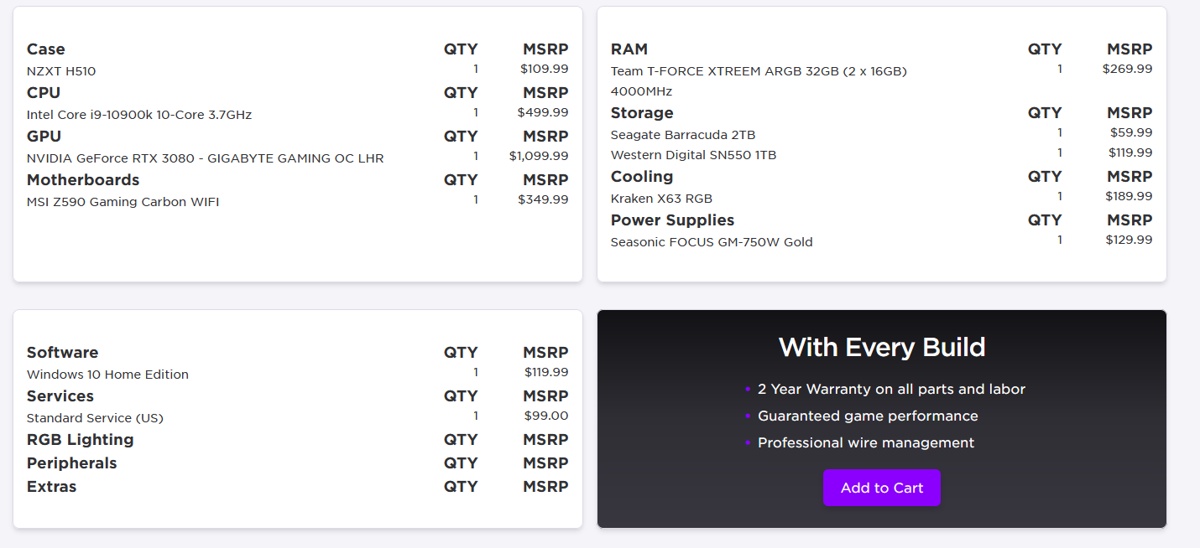
i just forked out 3500 USD today for a brand new PC w/ a 3080 and i9 10900k because i felt like my 1070ti just wasn't doing the trick....
 honest bison
lapis storm
i just forked out 3500 USD today for a brand new PC w/ a 3080 and i9 10900k bec...
honest bison
lapis storm
i just forked out 3500 USD today for a brand new PC w/ a 3080 and i9 10900k bec...
nicee
lapis storm
hopefully everything wrong with 30 series cards gets fixed by next weekend when it comes in
lapis storm
NZXT
lapis storm
Honestly don't know how they have so many in stock when everyone else gets shipments once a month
sterile oxide
only prebuilt where i had options and it cost me $100 more than it would for me to build a pc myself
which is crazy
lapis storm
literally paid half the cost for just the GPU KEKW
sterile oxide
getting parts rn is hard af
lapis storm
u could say that again
honest bison
lapis storm
NZXT
why didnt you get the 3090 nzxt build for 500 more?
has a i9 11900k
64 gb ran
5 tb storage (1 being ssd nvme)
for just $500 more it seems like a better deal
@lapis storm
lapis storm
because i don't have 1440p
😦
plus the taxes on that would be like 600 instead of the 400 in taxes i paid and that would put me JUST out of my budget 😦
honest bison
lapis storm
because i don't have 1440p
i just built in nzxt builder a 3080 pc with 32 gb ram and it costs $2850
why did you pay $3500?
verbal nimbus
https://www.newegg.com/abs-ala239/p/N82E16883360103?item=N82E16883360103 this was the prebuilt i got a few months back not having issues with any game besideds 2042 I'm not sure what I'd need to upgrade to make it worth it.
verbal nimbus
I ended up getting a "aorus" rtx 3070 with the build
 final burrow
rtx 2070 super and im getting good fps 140-180fps on custom settings
i7 9700k mult core enhanced to 4.8ghz and its water cooled
marsh gull
poggers
 ember orchid
Anyone happen to have an issue where bf2042 isn’t utilising your gpu at all?
Sits at 1% on nzxt cam and I get around 30fps lol
using a brand new 3060ti
Installed yesterday, played BFV on ultra with rtx on and got around 90-110fps
Drivers and everything are up to date
 orchid talon
why cant i play it keeps saying unable to load persistnce data
ember orchid
lapis storm
i just forked out 3500 USD today for a brand new PC w/ a 3080 and i9 10900k bec...
Tbh you probably would’ve been better off using your 1070, I’ve seen numerous people saying they’ve been getting 60-70fps on high/ultra with 10 and 20 series cards, seems a lot of people are having issues (including me) with 30 series lol
 storm rune
final burrow
rtx 2070 super and im getting good fps 140-180fps on custom settings
storm rune
final burrow
rtx 2070 super and im getting good fps 140-180fps on custom settings
It seems like your game is working fine, not like ours...
Im getting 70 (with drops below 60) to 120 fps on r5 5600x and rtx 3070
honest bison
Guys i figured something out
im getting basically 144 fps now
the issue is the gpu utilization
honest bison
It used to be 60% for me and i got 80-100 fps
storm rune
I have 60-70% gpu usage..
honest bison
Now i get 90+% and im getting max fps (since my game is caped at 138 fps)
It goes over that easily
 snow viper
Anyone figured out a fix to the Persistent data error?
storm rune
But how did you fix it
honest bison
storm rune
But how did you fix it
I did nothing
Restarted the game
And it just worked
storm rune
Lmao
honest bison
i will remove vsync to see how many fps i get
storm rune
What's your specs and res
storm rune
The game just seems to be bugged and isnt utlizating GPU for most of the people, there are some Lucky guys for which the game seems to be working fine @verbal nimbus @pallid flint
Cpu?
verbal nimbus
Im getting the same performance as you (aorus rtx3070 ryzen 5600x)
verbal nimbus
But im not getting anywhere close to 100fps
verbal nimbus
More like 70-80 with drops to the mid 50s its annoying af
storm rune
Yea
Similar
I think its just a bug with the gpu uti and it'll get fixed
Like it fixed it self for @honest bison
verbal nimbus
I hope so pretty much bought this pc for this game haha and to have my xbox run it better is some bs lol
storm rune
Yea
It's clearly a bug
The game is beautiful, but this bug is very annoying
Hope it will get fixed in day one patch or even earlier
verbal nimbus
Hope they fix asap already had one of my friends with a 3060 refund it
storm rune
Like i've been watching some streams
Guys with 3080 and i9 10/11990k were getting 80 fps in this game
storm rune
final burrow
rtx 2070 super and im getting good fps 140-180fps on custom settings
And then there is this guy
verbal nimbus
I have friends with gaming laptops with worse specs getting better performance idk whats up
prime jasper
I'm getting fairly good performance at 1440p at high settings (around 90fps) using a 3070 and i11700k
storm rune
Yea "gaming laptops" you cant even compare them to the peroframnce that you should be gettng @verbal nimbus
storm rune
prime jasper
I'm getting fairly good performance at 1440p at high settings (around 90fps) usi...
Whats your gpu uti
And that isnt good at all
prime jasper
I mean over 60 is good in my book
storm rune
I was getting 170 fps on ultra in 1440p in bf5 with my setup
Now im getting drops below 60
On low-high hybrid
honest bison
storm rune
Like it fixed it self for <@345704314448117781>
Yeah it must be a bug
prime jasper
well this is a completely new generation in terms of the consoles these are on
prime jasper
but the game isn't taking full uti of my system anyways'
storm rune
How much gpu % does it take @prime jasper
storm rune
Yea
verbal nimbus
Has dice commented on performance?
prime jasper
but it isn't doing much with ym cpu
storm rune
That should be on 95-99% in 1440p
prime jasper
yeah
storm rune
Lets just hope they'll fix this asap
It clearly has to be a bug
Like in the lobby before game my gpu is at 99% usage but it gets to 50-70% ingame..
prime jasper
yeah, i reckon it's a bug
 small kelp
👌
storm rune
Sadly didnt work for me when i tried it
prime jasper
any tips on how to fix this error, respond to me and ill dm you the sc
small kelp
storm rune
Sadly didnt work for me when i tried it
maaan fck. I went from 50% gpu usage to 100
could have changed today. I’lm see when i get hime from work in 8 hours
storm rune
i'll see
once again
i enabled dx 12 in cfg file
and did that
will see in a moment
small kelp
👍
storm rune
well that didn't do anything
but i changed my res to 1440p
and im getting like 70-90% gpu usage
but yea still the fps are low and should be higher
if a guy on i9 9700k and rtx 2070 super is getting 140-180 frames and im barely getting 110 and drips below 80
with r5 5600x and rtx 3070
there's clearly something wrong
small kelp
Do u have dlss on or off?
storm rune
off
small kelp
Yeah games poorly optimized
honest bison
small kelp
maaan fck. I went from 50% gpu usage to 100
How are your fps looking now
honest bison
Nice
lapis storm
ember orchid
Tbh you probably would’ve been better off using your 1070, I’ve seen numerous pe...
see that's why im hoping by official launch they will fix these issues, if not, i still got a beefy ass system
small kelp
ofc once they fix dlss it should boost by 30-60 fps
honest bison
small kelp
Last night i had 120-160
I might try that. Tho in hazard zone im getting 120+ fps atm so
Not super necessary
storm rune
small kelp
dlss off
Btw whats in your pc
honest bison
He said 3080 Ti
 sullen silo
I hope the Nov 19 patch will fix a lot
 weak girder
if any of you guys have a 1650 super, how does bf2042 run?
 ancient ridge
can someone srsly help me
everytime i launch 2042 it resets my settings
how do i allow it on my windows 10 anti virus because it keeps blocking it and thats why it keeps resetting the settings
but everytime i go to my anti virus it just closes itself
ancient ridge
weak girder
if any of you guys have a 1650 super, how does bf2042 run?
i have 1660 ti
and it still runs like ass
weak girder
ancient ridge
and it still runs like ass
ah
ancient ridge
games just not optimized
weak girder
yep
ember orchid
I have a 3060ti and i get 30fps lol
small kelp
storm rune
Btw whats in your pc
ye 3080ti
ember orchid
Games just not utilising GPU’s so I guess we’re gonna have to wait
small kelp
i7 11700k also
 sterile pecan
I'm getting an error saying cannot load persistant files or something similar any one fixed this?
ancient ridge
ember orchid
I have a 3060ti and i get 30fps lol
hmmm
 pale kraken
sterile pecan
I'm getting an error saying cannot load persistant files or something similar an...
pale kraken
sterile pecan
I'm getting an error saying cannot load persistant files or something similar an...
its a server issue, dice will have to patch the servers on their side
small kelp
ember orchid
Games just not utilising GPU’s so I guess we’re gonna have to wait
https://www.reddit.com/r/battlefield2042/comments/qs97jn/quick_dx12_tweak_to_improve_microstutter_fps/?utm_source=share&utm_medium=ios_app&utm_name=iossmf fixed mine. I got to 150 fps on ultra now
ember orchid
small kelp
https://www.reddit.com/r/battlefield2042/comments/qs97jn/quick_dx12_tweak_to_imp...
I’ve already done that haha, no difference for me
 frail dagger
I am having constant fps drops in the game, i did not have this during beta. I usually have 90ish fps on medium low settings but every 2 - 3 min it drops to 15 fps for 3 or 4 seconds... is there way to fix it? (rtx 2080 - 16gb ram - i7 1100, updated drivers, tried different graphs, nothing worked)
small kelp
ember orchid
I’ve already done that haha, no difference for me
man that fuckin stinks 😰
small kelp
frail dagger
I am having constant fps drops in the game, i did not have this during beta. I u...
Ur game isnt utalizing ur gpu
small kelp
Same for all. For some not all fsr from actually this works. Worked for me. went from 50-70 fps to 120-160
Called optimization
Nothing u can do if that dont work except wait.
frail dagger
No, like im not having problem with high fps reach... the drops are problem, they are massive and shouldnt be happening on regular basis
during beta i didnt had this problem
i wonder what is causing it
small kelp
Well yeah
ur gpu is not being used
hence why fps drop.
Do that and it might fix it.
frail dagger
... the solution you have sent has nothing to do with gpu utilization btw...
you know that right?
you just bypass windows scan.
 split current
small kelp
And all input lag gone
split current
small kelp
And all input lag gone
Well im geting more fps without dlss. Ultra settings around 130-150 on 2k and with dlss 90-120
Even if its set to fps there are greater lags spikes
small kelp
split current
Well im geting more fps without dlss. Ultra settings around 130-150 on 2k and wi...
Thats brcause dlss is broken. Turn that shit off
frail dagger
That is also wrong...
DLSS is maximizing the settings you choose
if you choose quality ofc u gonna lose fps.
split current
frail dagger
That is also wrong...
How can it be wrong when i ve seen it myself ingame?
And set it to fps Most of the time
small kelp
dlss is broken atm but theyre probably gonna fix it
split current
Balance made it even worse for me idk
small kelp
makes no diffrence between quality and ultra perfromance
all u get is lower gpu usage
and lower fps
frail dagger
You probably have chosen wrong settings for the Dlss, the AI is adjusting it on the setting you have chosen but poor game optimization is also problem
split current
frail dagger
You probably have chosen wrong settings for the Dlss, the AI is adjusting it on ...
All maxed out?
frail dagger
and more gpu power usage isnt always good for fps since it caused less reliability.
it makes it unstable
split current
Well with a 3080ti which is good overclocked it should run smooth?
frail dagger
No.... OC is def big no no for gaming
too unstable
you want the balanced for performance
split current
No other Game is unstable and on 5 different benchmark it run smooth
Cant be that the game puts the gpu on More stress then some benchmarks
So it cant run unstable
Bfv got me around 200+fps but 2042 is sleeping
frail dagger
(?) I'd like you to provide examples for that if you have. long OC will 100% ruin your gpus life span faster and gaming few hours on OC mode is never suggested.
I also doubt that what you OC is just default setting on your tweak app...
its prob just some high performance with extra voltage
you wont be able to have stable game experience like you said on real OC mode for hours
especially not solid 200+fps
after 2 3 hours you should be seeing your fps drops
split current
Well its Not true that i put the voltage higher. Thats the only thing i havent touched
A friend of mine did the oc for me and said i shouldnt touch it, cuz its Not worth it
frail dagger
Thats just higher voltage, It won't even matter if clockspeed is still same...
you did not game on "OC" like you thought
you wouldnt be anyway
split current
Well if the powerusage and clockspeeds are put higher its oc isnt it?
frail dagger
depends on what you are doing and what you are aiming for
But mainly OC is simply can be reffered as pushing your card to higher performance
but it also drains itself and can be bad for your gpu if you have no idea
 low swan
Overclocking as long as it’s stable is not going to kill your card any faster
frail dagger
gaming on OC is never stable unless you have some god tier cooling or you just gonna game for 1 hour or less session on open case (maybe?)
or someones gpu will turn into a heater
low swan
I mean that’s just not true. Most cards come factory overclocked. As long as your OC isn’t crashing your PC and causing memory issues it’s fine.
Modern cards have algorithms as well to auto OC
frail dagger
Higher frequency and voltage, the fps drops are also becomming bigger. even is smallest stutter game might crash. there is videos on youtube explaining reasons of it.
low swan
They will push themselves provided you have cooling that’s capable. I gamed on an OC 1080ti for like 4 years and had no issues. I gave it to a friend when I got a 3080 and he’s had no problems either
It also kinda depends on the game. But in BF 2042’s case it’s a CPU problem
low swan
It’s mostly a CPU problem. Most people having issues are their CPUs bottlenecking their GPU
frail dagger
Amd processors not fully used, intels get weird
rams sometimes not enough
vram also causes
its fucked
low swan
Yeah I think it’s primary down to RAM speed and resolution you’re playing it
I wanna say it’s an NVIDIA driver issue because I don’t think people with AMD cards and having as much of a problem
frail dagger
I tried it on 4k 2k and 1080p
4k was shit
2k was solid
1080p suprisingly had less fps
low swan
4K has been fine for me on a 3080 with DLSS on quality
 thorny crest
from what i saw on youtube tbh ultra and high not much differents
low swan
Yeah I can imagine. Have you tried DLSS at all?
thorny crest
some people said it my cpu cant handle the game i check on websites it says it can handle
so not sure
low swan
Are you getting better performance in Portal? I think the 128 player count is causing issues for CPUs in all out warfare
frail dagger
Im just having constant fps drops, I think the reason behind is shaders....
bigger maps
 weary flax
scroll up to yesterday chat you'll see , its not ur CPU problem its dice problem
thorny crest
yes the more bigger map means the more fps you lose
frail dagger
game was smoother on beta for me
low swan
It’s weird cause the beta was pretty bad for performance on my end. But the release game is fine 🤷♂️
There’s definitely some BS going on
frail dagger
Im waiting for the next patch and the actual release on nov 19
they might push some hotfix
and maybe a sudden driver update from nvidia maybe?
low swan
That’s what I’m hoping for too. But I feel like Day 1 patches never fix a lot, I guess we’ll find out in a week
frail dagger
I say, 1 month is best guess.
After a month bf games get better
remember bf4 release
💀
weary flax
1 month? id say half a year
frail dagger
Nah, not that much.
prime jasper
any 1 know if joystick working for flyiny ?
storm rune
split current
Well im geting more fps without dlss. Ultra settings around 130-150 on 2k and wi...
What specs do you have
Idk this game is kinda bs now
Im thinking about changing my r5 5600x to r7 5800x 
split current
3080ti msi Gaming trio and r7 5800x @4.85ghz
split current
Both geting around Max 70-75 c• on benchmarks
storm rune
split current
3080ti msi Gaming trio and r7 5800x @4.85ghz
Think you should be getting more fps than that
And whats your gpu usage
storm rune
Lol
storm rune
Yea im playing forza horizon 5 and i have constant 95-99% in 1080p on my pc lol
storm rune

Well hope they'll fix the utilization problem

Watched this guy
Has like 80-90 fps
On rtx 3080
split current
I just want a smooth game without errors, i also hast many directx crashes and my Friends too
split current
My friends Geting around 100fps on ultra 1080p with 1080ti and 70fps on 1070 high
But his 1080ti is watercooled and he has an i7 7700k around 5.0 ghz
Custom watercooling is great but to expensive
storm rune
split current
My friends Geting around 100fps on ultra 1080p with 1080ti and 70fps on 1070 hig...
Im getting lower fps on rtx 3070
Than the 1080ti
split current
On 1080p??
storm rune
split current
On 1080p??
Yes
split current
Raytracing off?
storm rune
Yes
storm rune
Nvm, dont think its worth to change the cpu


 split current
And stuff like this off too?
storm rune
Yea
 atomic latch
Go to your %username%/documents/BF2042/settings/PROFSAVE_profile.
find GstRender.ShadowQuality
Set it to one.
split current
Well a my old 1080 performs better Ort Same as a 3060ti so idk
split current
Only on bf2042
 modern flare
Or MAYBE
storm rune
Maybe from nvidia
modern flare
is a new game
storm rune
Or the game
modern flare
so they have to fix things
split current
Might be but i guess its also the drivers
They might messed the drivers up on the 30 Series idk
storm rune
Yea
split current
I have to check later pc is Turned off
storm rune
atomic latch
Go to your %username%/documents/BF2042/settings/PROFSAVE_profile.
find GstRende...
Will do later
split current
Are the server online again?
I couldnt play yesterday cuz it didnt let me ingame or join a Match
 barren wyvern
split current
Are the server online again?
barren wyvern
split current
Are the server online again?
Are you also getting the error codes when trying to get in a match?
barren wyvern
split current
Yes
Same here, any official announcements?
split current
Idk havent checked it. just went mad to bed
barren wyvern
split current
Idk havent checked it. just went mad to bed
yhea same here 🙂
ancient ridge
game runs like poo poo
small kelp
ancient ridge
game runs like poo poo
Same for us all😖
 dry pike
storm rune
496.96
dry pike
storm rune
496.96
GeForce 496.49 is the latest driver, there is also GeForce 496.61 Hotfix but that doesn't contain anything for Battlefield, just some other games.
 rare tartan
Hi !I’ve got i7 6700k, 16gb of Ram, 3060ti, windows on a nvme, battlefield 2042 on a SSD, and in 2k , my pc can’t reach 60fps stable… i put video settings on low or ultra, it seems to be quite the same. I’ve got 40-50 fps , but 35 when i shoot … any idea ? ( i reinstalled windows, latest drivers etc )
storm rune
dry pike
GeForce 496.49 is the latest driver, there is also GeForce 496.61 Hotfix but tha...
Ywa im sorry
I forgot how it was named and wrote something that I thought it was @dry pike
storm rune
rare tartan
Hi !I’ve got i7 6700k, 16gb of Ram, 3060ti, windows on a nvme, battlefield 2042 ...
Gpu usage? %
rare tartan
storm rune
Gpu usage? %
95 %
 stuck cedar
Any pc players unable to play due to 'unable to load persistence data'? I can't play 😦 😦 😦
atomic latch
Apparently, you have to disable crossplay
storm rune
stuck cedar
Any pc players unable to play due to 'unable to load persistence data'? I can't ...
Yes
Had the problem
When i was trying to play earlier
rare tartan
storm rune
But your cpu is old af too
I know but i can play Forza Horizon 5 in ultra in 2k at 100fps lmao
stuck cedar
atomic latch
Apparently, you have to disable crossplay
This worked!
storm rune
rare tartan
I know but i can play Forza Horizon 5 in ultra in 2k at 100fps lmao
Yea
Lets wait for day one patch
And see
rare tartan
Beta was running well, I had 70 fps constantly 😦
Day one patch, please, make some miracles !
ancient ridge
yeah its like were playing beta numeral dos
stuck cedar
update: it worked for one match, and is now happening again hahaha
small kelp
stuck cedar
update: it worked for one match, and is now happening again hahaha
U just gotta keep trying. eventually u get in
atomic latch
stuck cedar
update: it worked for one match, and is now happening again hahaha
Yeah unfortunately it's not a cure. But you will get less "persistence" errors so yeah just keep trying.
 lunar dawn
rare tartan
Hi !I’ve got i7 6700k, 16gb of Ram, 3060ti, windows on a nvme, battlefield 2042 ...
lunar dawn
rare tartan
Hi !I’ve got i7 6700k, 16gb of Ram, 3060ti, windows on a nvme, battlefield 2042 ...
i found a couple things that helped me: using nvidia reflex on+boost, fullscreen (not borderless), using future frane rendering, disable vsync and motion blur and also try dynamic resolution or dlss if you have a capable card
outiside of the game also you cant th editi the config file (helped me a lot), its in documents/battlefield2042/settings/profsave_profile open it with notepad and search for 2 things
dx12enable and set it to 1
and shadowquality and set it to 0
save the file and open the game
also try all low settings with no rtx ofc
this is how i got 90 fps on a 1070
atomic latch
lunar dawn
i found a couple things that helped me: using nvidia reflex on+boost, fullscreen...
DX12 works? It's a stuttery mess on BFV and BF1 so I didnt bother even trying it here lmao
lunar dawn
atomic latch
DX12 works? It's a stuttery mess on BFV and BF1 so I didnt bother even trying it...
bf2042 is only dx12 that line seems to fix some issue but idk why its there
the game itself is only dx12 you can force to dx11 if you want but its probably way worse
atomic latch
Ahh I see. The game works fine for me as it is but I assumed it was DX11 since I saw that DX12 command in the config.
lunar dawn
also bfv and 1 were created in dx11 rhen dx12 got added
lunar dawn
atomic latch
Ahh I see. The game works fine for me as it is but I assumed it was DX11 since I...
as i said unless you use commands to force to dx11 rhe game will automatically run at dx12 (like your case) that line doesnt in fact make sense since the game is already dx12 but it fixes stuttering issues if you put it to 1
small kelp
lunar dawn
as i said unless you use commands to force to dx11 rhe game will automatically r...
Doesnt it also improve fps to some extent
storm rune
Bf2042 was build on dx12, its working very good (no stuttering) but there is something wrong with gpu usage
 short pawn
need help with all out warfare where i can only connect to hourglass and orbital servers where when i try to join anything else it says that my data could not be loaded even though it joins the server for a seccond before disconnecting
its prob my pc and not servers but idk how to fix
atomic latch
short pawn
need help with all out warfare where i can only connect to hourglass and orbital...
It's probably a server issue. A lot of people were also having issue connecting with other maps.
short pawn
renewable is now playable
lunar dawn
small kelp
Doesnt it also improve fps to some extent
yes
lunar dawn
lunar dawn
i found a couple things that helped me: using nvidia reflex on+boost, fullscreen...
@rare tartan anyway try this
 lone skiff
The DIrectX function "m_devicePlat-> CreateCommitedResource(&headProps, D3D12_HEAP_FLAG_NONE, &platDesc, creationState, clearValuePtr, __uuidof(**(&resource)), IID_PPVARGS_Helper(&resource)" ) failed with error DXGI_ERROR_DEVICE_REMOVED ("The video card has been physically removed from the system or a drvier upgrade for the video card has occured. ") Graphics processor: "NVIDIA GeForce RTX3070", Driver: 49649. This error is usually caused by a problem with the graphics card drivers; please install the latest drivers.
GPUBreadcrumbs:
Here is the error and this one happens when I want to stream BF2042 and my drivers are up to date.
I post here because there is no help room.
lunar dawn
lone skiff
The DIrectX function "m_devicePlat-> CreateCommitedResource(&headProps, D3D12_HE...
download ddu (here :https://www.wagnardsoft.com/forums/viewtopic.php?f=5&t=3793) (click official download here) and use it in safe mode (you can google how to get into safe mode) (important) to remove the nvidia driver then exit safe mode and download latest drivers from nvidia's website
lone skiff
Ok and normaly after the problem will be fix ?
lunar dawn
lone skiff
Ok and normaly after the problem will be fix ?
probably yes
lone skiff
ok i hope thx !
 wet abyss
i do not have the best setup. 1070TI with 16gb ram and an m.2 but i have tried everything. i just can not get past 40fps no matter what settings i use. switching from low to high makes maybe 5-6fps difference. resolution a tiny bit. i have tried everything
i just ugh
lunar dawn
lone skiff
ok i hope thx !
also id you dont know how to use ddu (its pretty easy anyway) search for a guide (there s one on the driver faq post on r/nvidia) or a youtube tutorial
lunar dawn
wet abyss
i do not have the best setup. 1070TI with 16gb ram and an m.2 but i have tried e...
i have basically your same gpu in my second pc, try these settings #technology message
lone skiff
lunar dawn
also id you dont know how to use ddu (its pretty easy anyway) search for a guide...
ok, i need to up to window 11 ? i see in the link you give me
 ancient spindle
wet abyss
i do not have the best setup. 1070TI with 16gb ram and an m.2 but i have tried e...
ancient spindle
wet abyss
i do not have the best setup. 1070TI with 16gb ram and an m.2 but i have tried e...
well people here will just tell you "Its a CPU bottleneck, just get a better pc"... Even tho high end rigs are having issues running the game.
 bleak turret
unknow error // 2:1401J:1102I:101I
lunar dawn
lone skiff
ok, i need to up to window 11 ? i see in the link you give me
no you dont need windows 11
wet abyss
lunar dawn
i have basically your same gpu in my second pc, try these settings https://disco...
will do thanks man
lone skiff
ok
lone skiff
lunar dawn
also id you dont know how to use ddu (its pretty easy anyway) search for a guide...
i will follow this video https://www.youtube.com/watch?v=bP-2B14Nckw
lunar dawn
lone skiff
i will follow this video https://www.youtube.com/watch?v=bP-2B14Nckw
oh yeah that a nice tutorial
lone skiff
lunar dawn
oh yeah that a nice tutorial
ok !
lunar dawn
lone skiff
ok !
keep in mind that when you re in ddu to choose your gpu manufacture (the guy in the video has amd, you need to choose nvidia)
lone skiff
lunar dawn
keep in mind that when you re in ddu to choose your gpu manufacture (the guy in ...
yeah
lunar dawn
wet abyss
will do thanks man
yeah let me know if it helps
prime jasper
lunar dawn
i have basically your same gpu in my second pc, try these settings https://disco...
we cant do more than those steps to gain more fps ? i got 1070 and i7-6700 cpu and consistently hitting 40-50 max
lunar dawn
prime jasper
we cant do more than those steps to gain more fps ? i got 1070 and i7-6700 cpu ...
well overclocking and tweaking the config file even more if you want
prime jasper
um okay
 atomic jackal
guys, power outages are a daily occurence in my house, so what are some good but not too expensive ups that i can use?
c type
and no im not in the us
 frail moat
i have an i7-770 and a gtx 1080 running at 1080p all low
do you think that it will be any better from the beta (40-50fps)
 midnight crypt
no
lone skiff
OK i have finish i will test & i tell you if it's ok @lunar dawn 🙂
lunar dawn
lone skiff
OK i have finish i will test & i tell you if it's ok <@!499656949491564554> 🙂
:)
wet abyss
all we can do is hope from now till the 19th they release opitmation and performance fixes
lone skiff
lunar dawn
:)
My pc completely crash... But it's only when I stream with obs
small kelp
Go to obs discord for that. they will help
lone skiff
Obs have an official discord?
small kelp
yeah
storm rune
atomic latch
Ahh I see. The game works fine for me as it is but I assumed it was DX11 since I...
No, it was fully made on dx12.
 nova ginkgo
hi, i tried last night and again this morning but it says i cannot connect to multiplayer everytime i queue, even though I am connected to internet (and its quite solid) so i know that shouldnt be a problem
 haughty cloud
nova ginkgo
hi, i tried last night and again this morning but it says i cannot connect to mu...
haughty cloud
nova ginkgo
hi, i tried last night and again this morning but it says i cannot connect to mu...
turn crossplay off, worked for me
 outer oracle
Hello, my computer using crucial 8*2 16GB 3200hz ram. My game will crash after turn on XMP but it won’t happen in other game
small kelp
outer oracle
Hello, my computer using crucial 8*2 16GB 3200hz ram. My game will crash after t...
have u tried a repair?
outer oracle
Try for other ram and it is ok, but BF2042 would crash in this ram. But playing other game is no problem
small kelp
Just turn xmp off then untill patch 1 comes out
outer oracle
Patch 1 ?
small kelp
When the first patch to bf rolls out
keen whale
small kelp
When the first patch to bf rolls out
what is xmp and how dop i turn it off
 quartz pelican
keen whale
what is xmp and how dop i turn it off
quartz pelican
keen whale
what is xmp and how dop i turn it off
in ur bios, ram settings
storm rune
@keen whale if u dont know what it is than probably you dont even have it turned on

In my case it looks like this
Just look for something called xmp in your bios
small kelp
keen whale
what is xmp and how dop i turn it off
like the one above said if u dont know u dont have it on, but i’d suggest u turn it on. Ur only use like 50% of ur ram with it off.
keen whale
ok ill try doing this
storm rune
outer oracle
Ok
Day one patch comes out next friday
keen whale
i spent 7 hours yesterday trying to fix this
small kelp
keen whale
i spent 7 hours yesterday trying to fix this
what mb do u have?
storm rune

@keen whale and btw, what mb and ram do you have
Because turning on xmp increases fps.
prime jasper
dude
small kelp
storm rune
Go in to bios
He shouldnt mess around in bios unless he knows what to do. shit can go sideways 😂
keen whale
I know what I’m doing
prime jasper
why did i spend my money on this game
small kelp
keen whale
I know what I’m doing
You ever been in bios before?
storm rune
small kelp
He shouldnt mess around in bios unless he knows what to do. shit can go sideways...
🤣
small kelp
outer oracle
Patch 1 ?
Have u updated bios?
keen whale
small kelp
You ever been in bios before?
Yes
small kelp
keen whale
Yes
Then just go and turn ”xmp” on and touch nothing else.
small kelp
outer oracle
Last month
👍
keen whale
My fucking pc is not even letting me go into bios
outer oracle
small kelp
👍
It effect ?
keen whale
I shift clicked on readtart
Clicked on bios stuff
And it just restarts and turns on
small kelp
outer oracle
It effect ?
Can sometimes. But its good u updated.
small kelp
keen whale
I shift clicked on readtart
reset cmos
keen whale
What is that
small kelp
au have a small battery on ur motherboard, remove it and wait 10 min and put it back then start
outer oracle
small kelp
Can sometimes. But its good u updated.
Yeah, hope it will be ok on Friday
small kelp
it’ll set ur settings in bios to default
keen whale
small kelp
au have a small battery on ur motherboard, remove it and wait 10 min and put it ...
To risky
storm rune
While it powers up just spam f2/del
keen whale
mb?
keen whale
Asus
small kelp
ah
keen whale
What
small kelp
spam del when u turn pc on
keen whale
Ok one sec
small kelp
if ur unsure while i bios, please dont touch anything.
keen whale
Should I have secure boot on. Could that be giving me the directx error
Oh yeah btw there is no xmp
small kelp
Take a picture of bios and send please
small kelp
picture please
keen whale
I’m gonna try installing nvidia studio ready drivers cuz they were released 2 days ago
 magic monolith
Hello guys I have a small problem. I built a PC for a friend of mine back in July , but he didn't turn it on until today. The problem is that the graphics card does not output anything. The PC turns on just fine (AIO fan, case fan, GPU fans, RGB) but still no output through HDMI. The gpu is a GIGABYTE RTX 2060 OC. Any suggestions?
keen whale
magic monolith
Hello guys I have a small problem. I built a PC for a friend of mine back in Jul...
Try restarting the computer
magic monolith
He doesn't have a dp cable nor a monitor that supports dp
midnight crypt
did yall put the hdmi cable into the gpu
magic monolith
midnight crypt
did yall put the hdmi cable into the gpu
Yep
midnight crypt
and not the mobo
atomic latch
Maybe faulty cable. You have another HDMI?
magic monolith
atomic latch
Maybe faulty cable. You have another HDMI?
I'll ask him. Do you think it's the cable?
atomic latch
I hope so. It's usually either the cable or the GPU, hopefully not the GPU.
magic monolith
atomic latch
I hope so. It's usually either the cable or the GPU, hopefully not the GPU.
Could it be a bad GPU fit?
atomic latch
Yes it is possible, can't hurt to try just refitting it to be sure.
small kelp
is it a faulty pcie?
magic monolith
small kelp
is it a faulty pcie?
I don't think so. The PC is brand new. I can tell him to try a different PCI-e but i don't think it will make any difference
small kelp
magic monolith
I don't think so. The PC is brand new. I can tell him to try a different PCI-e b...
tbf from the looks of it its not working, so yeah trying wont hurt.
magic monolith
Ok. First, I'll try to reseat the GPU and if that does not work I'll try a different slot
Thank u
 deft ferry
Thx a lot. I cant refund the game because 24 hours have passed till i started the game. It is not playable on my PC and streaming is absolute impossible. So i paid 100 bucks for a game i cant play (running round as a target for other players is not playing). Thats fkn awseome!
midnight crypt
why did you not refund it immediately
atomic latch
deft ferry
Thx a lot. I cant refund the game because 24 hours have passed till i started th...
You can try appealing. Origin has a policy that they'll allow up to 72 hours for refund especially for technical issues.
 hearty roost
magic monolith
Hello guys I have a small problem. I built a PC for a friend of mine back in Jul...
hearty roost
magic monolith
Hello guys I have a small problem. I built a PC for a friend of mine back in Jul...
Fastest test. Put the GPU in a different PC, still no signal to the monitor its dead.
deft ferry
midnight crypt
why did you not refund it immediately
Because i wanted to play a Battlefield game and wont abandon it, after a few minutes. my system is over the minimum req but it is technically running, but far from playable. Pre access because i want to stream the games i play is impossible. Im fkn sad
magic monolith
hearty roost
Fastest test. Put the GPU in a different PC, still no signal to the monitor its ...
I'll see if he has a spare PC lying around
midnight crypt
deft ferry
Because i wanted to play a Battlefield game and wont abandon it, after a few min...
are you streaming and playing on the same pc?
deft ferry
midnight crypt
are you streaming and playing on the same pc?
Jepp, because money is an issue.
midnight crypt
ye theres your issue
deft ferry
I dont have the money to spend another 1500 bucks for a new graphic card and additional 500 bucks for an ew cpu and board...
hearty roost
deft ferry
Jepp, because money is an issue.
Thats the issue you try one of the current CPU loaded games on the marked while you stream. And Battlefield 2042 is not really friendly to old specs
midnight crypt
i dont recommend streaming and playing on the same pc with this game
deft ferry
I said it was my plan, but even playing without streaming isnt working. Im a better AI bot with this sluggish moving around
hearty roost
Or you have an R9 5900x works for the most people really fine with 120fps +
deft ferry
hearty roost
Or you have an R9 5900x works for the most people really fine with 120fps +
smart ass
small kelp
deft ferry
Because i wanted to play a Battlefield game and wont abandon it, after a few min...
Or u could wait till they fix it.
hearty roost
It won`t run smoother even if they optimize more. If youre close to minimum req. youre technically fu*
storm rune
magic monolith
Hello guys I have a small problem. I built a PC for a friend of mine back in Jul...
Try turning it on without ram sticks
small kelp
hearty roost
It won`t run smoother even if they optimize more. If youre close to minimum req....
wait his close to minumum?
storm rune
Or with one ram stick
 tame berry
Anyone an idea how to fix the error code 100122 (0xC0030004)? 
small kelp
I sont think he knows what minimum is. its minimum 30 fps 1080p
hearty roost
small kelp
wait his close to minumum?
"over minimum" I would call this close to minium or he could say recommended
small kelp
so 45 fps 1080p
magic monolith
storm rune
Try turning it on without ram sticks
If it was a RAM problem, wouldn't the mobo have detected it? I mean, it should display an error code
deft ferry
1700X gtx 1080Ti and 32GB RAM is over the minimum
hearty roost
deft ferry
1700X gtx 1080Ti and 32GB RAM is over the minimum
yeah your CPU is limiting as hell
 quick locust
good thing youre on am4, can upgrade it pretty easily
atomic latch
Yeah, even a Ryzen 2000 can do you well and you can usually find them for cheap second-hand.
storm rune
magic monolith
If it was a RAM problem, wouldn't the mobo have detected it? I mean, it should d...
Nope, I didnt have any screen output when I had problem with ram
hearty roost
Thats actually not an issue of battlefield. Ryzen 1st gen isnt really good in games. My 2700x limiting my 3080 at around 50%. 3xxx whould lift it allready and 5xxx jez you could run into 200 fps on some systems, after what I have seen
hearty roost
atomic latch
Yeah, even a Ryzen 2000 can do you well and you can usually find them for cheap ...
Would be an improvement for sure. But would still limit the 1080ti.
magic monolith
storm rune
Nope, I didnt have any screen output when I had problem with ram
Hmmm. Another thing to try
small kelp
hearty roost
Would be an improvement for sure. But would still limit the 1080ti.
He should just force a higher resolution pull some power away from the cpu
hearty roost
Would help
small kelp
atleast it would be more stable that way
hearty roost
He could try this https://www.reddit.com/r/battlefield2042/comments/qs97jn/quick_dx12_tweak_to_improve_microstutter_fps/?utm_source=share&utm_medium=ios_app&utm_name=iossmf gave me atleast stable 60 fps on ultra sometimes up to 70
deft ferry
i tried 1650 and still <50 FPS im just a target for others. Not for 100 bucks
small kelp
deft ferry
i tried 1650 and still <50 FPS im just a target for others. Not for 100 bucks
so find a fix and stop crying in here because that wont help.
small kelp
hearty roost
He could try this https://www.reddit.com/r/battlefield2042/comments/qs97jn/quick...
yeah should give a stable fps. mine jumped from 70 to 150 with that
sterile oxide
hearty roost
He could try this https://www.reddit.com/r/battlefield2042/comments/qs97jn/quick...
does this at all fix the gpu usage issue?
hearty roost
Currently it seems more like an Windows compatible issue. Just heard from some guys it runs quite smoth on new gen consoles
small kelp
sterile oxide
does this at all fix the gpu usage issue?
in most cases, yes.
hearty roost
sterile oxide
does this at all fix the gpu usage issue?
for some people
atomic latch
deft ferry
i tried 1650 and still <50 FPS im just a target for others. Not for 100 bucks
Go to your %username%/documents/BF2042/settings/PROFSAVE_profile.
find GstRender.ShadowQuality
Set it to zero.
Try this
small kelp
wait even ps5 lags????
sterile oxide
i did mess around with the dlss settings in the config and i got an fps boost
and more fps stability
storm rune
small kelp
in most cases, yes.
Didnt in mine
small kelp
storm rune
Didnt in mine <:Sadge:719185176965545994>
The keyword here is ”most” 😘
 hearty roost
sterile oxide
i did mess around with the dlss settings in the config and i got an fps boost
hearty roost
sterile oxide
i did mess around with the dlss settings in the config and i got an fps boost
DLSS is again nvidias fault it runs terrible in battlefield 2042. Maybe they forgot to insert dlss 2.0 instead they used 1.0 
deft ferry
small kelp
so find a fix and stop crying in here because that wont help.
This doesnt help. Ill give Republikas tip a try when refunding fails.
sterile oxide
ive been gone for like 11 hours did dice give any sort of update or make any changes overnight?
hearty roost
Also a big question is. Is the game currently with the day 1 patch or does it comes at 19.11? Right now it has the same space like in the beta.
small kelp
Neither dies crying iver a refund. We’ve told u countless of things to do. But if u gon insult people n shit then u can handle ur own shit.
@deft ferry
small kelp
hearty roost
Also a big question is. Is the game currently with the day 1 patch or does it co...
Next patch is commin friday it seems
hearty roost
small kelp
Next patch is commin friday it seems
Guess its the entire Day 1 Patch than.
small kelp
ye
hearty roost
could fix a huge amount. And if I look at my 10.2 hours playtime. Havent seen actually much bugs.
besides performance issues just the Scope bug, Got once the revive bug and the terrible crossplay server stability. Overall I am happy with this launch. In past we had tons more of issues.
deft ferry
small kelp
Neither dies crying iver a refund. We’ve told u countless of things to do. But i...
Telling me to buy new hardware isnt that great... I tried all of the tips and settings out there. I love Battlefield otherwise i wont be upset that much.
small kelp
deft ferry
Telling me to buy new hardware isnt that great... I tried all of the tips and se...
Well its the hard truth, 1080ti is getting more n more behind. My 3080ti struggles in this game.
hearty roost
small kelp
Well its the hard truth, 1080ti is getting more n more behind. My 3080ti struggl...
Thats why I have bought a month ago a 3080. To rest my Vega 64 in peace.
small kelp
But being a dick about it dont help. Hardware dont hold forever
small kelp
hearty roost
Thats why I have bought a month ago a 3080. To rest my Vega 64 in peace.
i went all out with 3 2k monitors 3080ti watercooling for this years bf 😂👌
wet abyss
and yet you just said. "my 3080ti Struggles in this game"
does that not seem like an issue to you
hearty roost
small kelp
i went all out with 3 2k monitors 3080ti watercooling for this years bf 😂👌
Need a new cpu. But this comes around christmas with new mainboard and ram. Will be awesome
atomic latch
hearty roost
Need a new cpu. But this comes around christmas with new mainboard and ram. Will...
Intel? I heard 12th gen is pretty good.
hearty roost
atomic latch
Intel? I heard 12th gen is pretty good.
Hell no. In games it has no huge improvement.
Also if the leaks are true AMD will smacks Intels ass with the 6th gen 
small kelp
hearty roost
Need a new cpu. But this comes around christmas with new mainboard and ram. Will...
i was lucky my old mb crashed this year so they gave me a full refund of everything. so i got i7 11700 k as well, got a full rog strix build now 👌
hearty roost
small kelp
i was lucky my old mb crashed this year so they gave me a full refund of everyth...
wild
prime jasper
ARE SERVERS BACK UP
hearty roost
prime jasper
ARE SERVERS BACK UP
there where never down?
 whole stump
prime jasper
ARE SERVERS BACK UP
whole stump
prime jasper
ARE SERVERS BACK UP
best would be if you post this in every channel /s
prime jasper
hearty roost
there where never down?
FOR PC MP
for pc multiplayer it is
conquest/breakthrough multiplayer
hearty roost
prime jasper
FOR PC MP
I was playing and still playing. If you mean the Data error just set crossplay to off.
prime jasper
dude
it dosent work
i tried that
litterally ask everyone
the "Crossplay fix" dosent work
midnight crypt
i see plenty of people playing
midnight crypt
ive seen both
hearty roost
i play as well
deft ferry
small kelp
fck
Must be a hardware issue, buy another one and try if it runs smoother.^^
magic monolith
storm rune
Nope, I didnt have any screen output when I had problem with ram
We just tried a power cycle and everything worked. So....
small kelp
Lol
 livid wagon
small kelp
im back down to 60% usage on gpu xD
livid wagon
small kelp
im back down to 60% usage on gpu xD
this is an optimization issue people are experiencing including me
dont worry about your hardware
small kelp
livid wagon
this is an optimization issue people are experiencing including me
yea i know
 turbid pawn
I have a beast of a pc, but I'm getting frequent crashes. Anyone having same problem?


 quick locust
!!support
 silent oasisBOT
ℹ️ Have an issue with Battlefield or your EA/Origin account? Contact EA Help:
If you need to contact the EA Help team for questions you might have regarding game or account issues, head over to https://help.ea.com
ℹ️ Have thoughts to share regarding Battlefield? Submit your feedback:
If you want to help the Battlefield team with constructive feedback to make the title/franchise even better, head over to https://answers.ea.com/t5/Battlefield/ct-p/battlefield
ℹ️ Have you encountered a bug? Report it:
If you have previously unknown technical issues you'd like to highlight, head over to https://answers.ea.com/t5/Bug-Reports/i/m-p/7141703
ℹ️ Have an issue related to the Official Battlefield Discord server? Let us know:
If you need help related to this Discord server you can send a Direct Message (DM) to our ModMail bot! Please know that we can not help you with any game or account issues!
keen whale
i couldnt find anything on the help website
prime jasper
has anyone been getting crashes for - dxgi_error device_hung? ive had it a few times
midnight crypt
no youre the only one in the world
prime jasper
bruh i get this wierd asf "directx function" driver error
 timber briar
Guys are any of you having issues with pixelated fire and smoke effects? I have found that it's caused by DLSS and reported it here
https://answers.ea.com/t5/Bug-Reports/DLSS-Makes-Fire-and-Smoke-Pixelated/td-p/10957628
Upvote it please, so that it gets fixed - currently DLSS doesn't work AND provides worse quality with regards to smoke/fire
 hidden phoenix
Any fellow single-PC 2042 streamers out there? I normally use NVENC encoder but this has been impossible with 2042 due to severe render lag/missed frames. Anyone else experience this and/or have a fix?
Specs:
i9-9900k
2080 super
32gb RAM at 3200mhz
small kelp
timber briar
Guys are any of you having issues with pixelated fire and smoke effects? I have ...
Im actually surprised they havent fixed it yet tbh
 warm flare
How have people been finding running BF2042 hardware wise
 muted plover
Still no fix or acknowledgement that controllers on PC aren't working. Sad times. I legit can't play the game thanks to that. Full controller support yet there's no way to get it to stop lagging.
@warm flare A 3080 Ti can't keep 60 fps in 1440p so that should sum it up. They put zero effort into this game and released it to meet their yearly quotas.
midnight crypt
they did put effort into the console versions
muted plover
The console version looks just as buggy.
muted plover
They haven't even acknowledged the issues.
muted plover
And I've spent a day trying to fix controller and nobody seems to have the issue except me. But makes no sense and I've trouble shooted everything that i can.
The biggest issues aren't even on that list.
hearty roost
muted plover
Still no fix or acknowledgement that controllers on PC aren't working. Sad times...
my Xbox Controller works, also I can change the settings 
muted plover
When I aim on my ps4 controller there's a 1 to 3 second delay in between input and movement on screen.
hearty roost
also switching permanently between m n k and my Controller works fine
muted plover
I legit can't find a single person having my issue and its not my controller being faulty.
Well i can't use keyboard and mouse I'm disabled. I also tried my xbox controller it does it too.
It worked fine in beta. And is advertised with full controller support.
I hate when a game is broken and everybody's response is to play on keyboard and mouse. That's not an excuse for the devs or an option for everyone.
Its a crossplay title and should have what is on the Store page.
hearty roost
I assume it now. And how do you write so fast?
midnight crypt
ask for a refund or wait until they fix it
muted plover
They denied my refund.
midnight crypt
contest it
 tacit night
muted plover
When I aim on my ps4 controller there's a 1 to 3 second delay in between input a...
tacit night
muted plover
When I aim on my ps4 controller there's a 1 to 3 second delay in between input a...
Oof that's horrible
Just don't do charge backs.....i heard companies just ban your acc if u do that
muted plover
Low vs Ultra preset is a difference of 2 to 7 FPS and there's 100% cpu usage 24/7 on a CPU above recommended on low settings and even in 1080 down from my native 1440p.
There's just something fundamentally broken on a technical level in this game.
I'd never risk a charge back as my Steam account is worth 30k.
small kelp
yeah i hope either nvidis releases an ipdate or that they fix the game
muted plover
I don't see it getting in terms of fps.
 glacial totem
HOW DO YOU FIX THIS DIRECTX12 BULLSHIT?
muted plover
I've only seen a single game get better in terms of frame rates in the last few years.
small kelp
glacial totem
HOW DO YOU FIX THIS DIRECTX12 BULLSHIT?
in files
muted plover
Marvels Avengers gained like 40 FPS from release to todays build.
glacial totem
small kelp
in files
where bro?
muted plover
The easiest fix is for EA to add AMD's FSR and at least make it playable.
muted plover
My friend has a 3080 Ti and a 11th gen i9 and can't keep 60 fps on high settings.
glacial totem
small kelp
https://www.youtube.com/watch?v=JOlehlvsELw&ab_channel=techHow
i dont have them files yet, havent been able to launch the game yet so no files have generated
muted plover
Its shocking how bad this is and I suffered every battlefield release of the last decade and a half.
glacial totem
i only have crashdumps and screenshots
small kelp
muted plover
My friend has a 3080 Ti and a 11th gen i9 and can't keep 60 fps on high setting...
same setup, i get up to 90 fps but huge input lag😂
glacial totem
@alpine field
muted plover
On controller?
small kelp
mkb
muted plover
Even mouse lags for me until.i unplug my controller
Like i tried everything in settings and nothing makes it better.
keen whale
THERE IS NO FIX TO THE DIRECTX FUNCTION ERROR ONLY DEVS CAN FIX
glacial totem
keen whale
THERE IS NO FIX TO THE DIRECTX FUNCTION ERROR ONLY DEVS CAN FIX
PEOPLE ARE FIXING IT SOME HOW
@alpine field YO
keen whale
glacial totem
PEOPLE ARE FIXING IT SOME HOW
THEN HOW ARE THEY FIXXI NG ITTTT
prime jasper
Game crash game crash aaand game crash
glacial totem
HOW TO FIX DIRECTX12 FUNCTION ERROR INSTANT CRASH ON GAME LAUNCH?
 alpine field
how to fix directx error? DX12 I tried install nvidia drivers , upgrading winver from 1909 to 20g2 and to 21h1
alpine field
reddit kids doesnt know shit tried everything
what they said
how to fix directx error? DX12 I tried install nvidia drivers , upgrading winver from 1909 to 20g2 and to 21h1
lunar dawn
glacial totem
HOW TO FIX DIRECTX12 FUNCTION ERROR INSTANT CRASH ON GAME LAUNCH?
what kind of error
alpine field
how to fix directx error? DX12 I tried install nvidia drivers , upgrading winver from 1909 to 20g2 and to 21h1
 sour fractal
gsync on or off?
alpine field
off
midnight crypt
It doesnt
sour fractal
yes
midnight crypt
Gsync is for your monitor
sterile oxide
ok what hz is the monitor
sour fractal
144
sterile oxide
ok what fps are u getting in game
sterile oxide
then yea i would turn it on
midnight crypt
Gsync should stay on
sterile oxide
👍
keen whale
does turning of gsync fix direct x error?
sour fractal
just trying to optimize, but i guess its just the state of the game :D
sour fractal
no but i only got the direct x error when i put up settings in afterburn?
keen whale
how do i turn of gsync
midnight crypt
keen whale
does turning of gsync fix direct x error?
No
sour fractal
when i set memory clock down i didnt get the direct x
sterile oxide
keen whale
how do i turn of gsync
nvidia control panel
keen whale
where do i go in nvidia control panel
alpine field
how to fix directx error? DX12 I tried install nvidia drivers , upgrading winver from 1909 to 20g2 and to 21h1
sterile oxide
keen whale
where do i go in nvidia control panel
search in the windows search bar
and if you have a gsync monitor
you can turn it off
or on
alpine field
how to fix directx error? DX12 I tried install nvidia drivers , upgrading winver from 1909 to 20g2 and to 21h1
sterile oxide
gsync is nvidias vsync replacement, if you have a gsync compatible monitor it is essentially a much better version of gsync
if you dont have a gsync monitor
you cant toggle it on or off
because you monitor doesnt support it
its for matching frames to the refresh rate of you monitor to make the game appear much smoother
midnight crypt
alpine field
how to fix directx error? DX12 I tried install nvidia drivers , upgrading winver...
You dont
alpine field
midnight crypt
You dont
i dont what
 pale quartz
sterile oxide
if you dont have a gsync monitor
pale quartz
sterile oxide
if you dont have a gsync monitor
this isn't true actually
the drivers were unlocked last year to allow gsync to be enabled on non certified monitors, it can be manually disabled
keen whale
pale quartz
the drivers were unlocked last year to allow gsync to be enabled on non certifie...
how
midnight crypt
Open the nvidia control panel
pale quartz
keen whale
how
 alpine field
how to fix directx error? DX12 I tried install nvidia drivers , upgrading winver from 1909 to 20g2 and to 21h1
 hidden mesa
i still cant get a refund on origin for bf42
alpine field
how to fix directx error? DX12 I tried install nvidia drivers , upgrading winver from 1909 to 20g2 and to 21h1
sour fractal
alegron, i only got the error when my overclock settings was too high
when i turned my mz down, i could play
keen whale
pale quartz
there is no gsync options
keen whale
alpine field
how to fix directx error? DX12 I tried install nvidia drivers , upgrading winver...
YOU CANT
alpine field
ram
alpine field
keen whale
YOU CANT
U CAN
alpine field
its not the issuee
u are too stupid to overclock @keen whale so i guess u didnt even do that
alpine field
LMAO
keen whale
wierd
alpine field
i mean its boosting ur ram but wont fix DIRECT X ERROR
how to fix directx error? DX12 I tried install nvidia drivers , upgrading winver from 1909 to 20g2 and to 21h1
keen whale
i might try downgrading drivers
midnight crypt
alpine field
how to fix directx error? DX12 I tried install nvidia drivers , upgrading winver...
spamming your issue here wont fix it
keen whale
midnight crypt
spamming your issue here wont fix it
fax
alpine field
midnight crypt
spamming your issue here wont fix it
u still mad since 1 hour
midnight crypt
who is mad?
keen whale
im trying to underclock memeory
keen whale
alpine field
u still mad since 1 hour
ur mad kid
alpine field
keen whale
ur mad kid
u are mad
keen whale
alpine field
u are mad
no you are
alpine field
u mad?
keen whale
alpine field
u mad?
no u
alpine field
how to fix directx error? DX12 I tried install nvidia drivers , upgrading winver from 1909 to 20g2 and to 21h1
keen whale
alpine field
how to fix directx error? DX12 I tried install nvidia drivers , upgrading winver...
ur mad
keen whale
alpine field
how to fix directx error? DX12 I tried install nvidia drivers , upgrading winver...
stop spamming
alpine field
u mad?
keen whale
@placid harbor sorry for @ but 343333427505790976 Alegr0n is spamming a constant message
keen whale
alpine field
u mad?
are you even a hacker
alpine field
u mad?
keen whale
alpine field
how to fix directx error? DX12 I tried install nvidia drivers , upgrading winver...
whats with the ananoymous pfp
keen whale
alpine field
u mad?
no
alpine field
u still mad?
keen whale
alpine field
u still mad?
nah i think you are.
keen whale
🤣
alpine field
u wanna buy?
keen whale
OMG OMG OMG WHAT
midnight crypt
no the game is horrible
keen whale
I added
alpine field
how to fix directx error? DX12 I tried install nvidia drivers , upgrading winver from 1909 to 20g2 and to 21h1
 brisk kindle
I can't play the game either thanks to the direct x crash :(
alpine field
SAME
how to fix directx error? DX12 I tried install nvidia drivers , upgrading winver from 1909 to 20g2 and to 21h1
brisk kindle
?
alpine field
u still mad?
how to fix directx error? DX12 I tried install nvidia drivers , upgrading winver from 1909 to 20g2 and to 21h1
keen whale
alpine field
u still mad?
yeah very much
how to fix directx error? DX12 I tried install nvidia drivers , upgrading winver from 1909 to 20g2 and to 21h1
alpine field
how to fix directx error? DX12 I tried install nvidia drivers , upgrading winver from 1909 to 20g2 and to 21h1
keen whale
ahh r u Aleg0n
 granite kestrel
Stop spamming
alpine field
how to fix directx error? DX12 I tried install nvidia drivers , upgrading winver from 1909 to 20g2 and to 21h1
keen whale
MR ADMIN PLZ
granite kestrel
We don't work for EA
keen whale
HELp
keen whale
granite kestrel
We don't work for EA
THAN GET A JOB THERE
granite kestrel
keen whale
granite kestrel
https://help.ea.com
THAT SHIT DOESNT WORK
midnight crypt
"This channel is not for tech support. Read the pins for more information!"
alpine field
how to fix directx error? DX12 I tried install nvidia drivers , upgrading winver from 1909 to 20g2 and to 21h1
midnight crypt
if yall didnt know
granite kestrel
midnight crypt
"This channel is not for tech support. Read the pins for more information!"
This
brisk kindle
Wow
midnight crypt
yikes
granite kestrel
Stop asking for support here
keen whale
BF! is Goty
granite kestrel
Last warning
lunar dawn
use ddu in safe mode (you can google how) and install latest dch nvidia driver (496.49) wich supports 2042
keen whale
granite kestrel
Last warning
🧕
lunar dawn
i mean it should work
brisk kindle
Gotta read pins not for tech support
lunar dawn
its simply reinstalling the gpu drivers nothing fancy
 verbal cliff
brisk kindle
Gotta read pins not for tech support
verbal cliff
brisk kindle
Gotta read pins not for tech support
pain
its whatever dice will probably end up fixing the game later
keen whale
lunar dawn
its simply reinstalling the gpu drivers nothing fancy
ive done that
lunar dawn
keen whale
ive done that
i mean reinstalling with ddu
keen whale
lunar dawn
i mean reinstalling with ddu
ok im trying now
REINSTALLing thogh
you can only uninstall
lunar dawn
keen whale
you can only uninstall
yeah uninstall them with ddu in safe mode then go to https://www.nvidia.com/Download/Find.aspx
keen whale
lunar dawn
yeah uninstall them with ddu in safe mode then go to https://www.nvidia.com/Down...
if this works i will kiis you
oh yeah im uninstalling not in safe mode
lunar dawn
keen whale
if this works i will kiis you
and download latest (important: select dch as type (win 10 64bit or win 11) and download latest game ready)
keen whale
cuz im alpha
lunar dawn
standard drivers arent being developed anymore by nvidia btw