#technology
1 messages · Page 22 of 1
 quick locust
If you have a copy of the 1000 usd report then sure show
Not going to buy that
You can see the subtitle and your Q1 and Q2 numbers you quoted earlier is the same as here
 quick locust
damn 1000 usd well spent
quick locust
 pale quartz
this is JPRs actual data for 2018 market share
pale quartz
this is JPRs actual data for 2018 market share
look at graph for 2018
its the same numbers, your chart is Q4 and Q3
with your "last year" market share as Q4 2017 in the graph
pale quartz
ah I see why it's 10%
JPR are factoring RDNA2 shipments only
stock production will have ceased near the end of that quarter for RDNA2, combine that with a 30%+ drop in shipments = cut in half shipments, it's not reflective of the actual market
quick locust
Source from report?
But yeah that graph I shared is the same data as the chart you sent, from JPRs reports
If it's an issue with them not counting RDNA3 then sure, JPR's problem
pale quartz
Jon Peddie noted in the new report: "The third quarter is usually the high point of the year for the GPU and PC suppliers, and even though the suppliers had guided down in Q2, the results came much below their expectations".
"All the companies gave various and sometimes similar reasons for the downturn: the shutdown of crypto mining, headwinds from China's zero-tolerance rules and rolling shutdowns, sanctions by the US, user situation from the purchasing run-up during Covid, the Osborne effect on AMD while gamers wait for the new AIBs, inflation and the higher prices of AIBs, overhang inventory run-down, and a bad moon out tonight".
"Generally, the feeling is Q4 shipments will be down, but ASPs will be up, supply will be fine, and everyone will have a happy holiday".
the data was gathered up until September, right up on when RDNA2 stock was drying up for ramping RDNA3 production, it's listed in JPRs own notes on the report
quick locust
That explains why rdna3 isn't in it, but still means AMD had less then than in years before
Meaning the 10% number is fine
Though, curious for Q4 data whenever it comes
pale quartz
no, it's not
quick locust
It is, for Q3
pale quartz
the numbers are reflecting nvidias oversupply, it isn't reflecting the GPU market share
Nvidia never did ramp down ampere stock like AMD did with RDNA2, they are supplied with 7 months worth of additional inventory according to their Q1 report for 2023 which they still need to sell, the numbers are deceptive for correlating
quick locust
If only AMD could produce rnda3 in numbers beyond 5
pale quartz
 we can wish
quick locust
But yeah nvidia flooded the market in q3
Also surprised Intel is at 4% in it
Expected more like 0,1% lol
pale quartz
the numbers are going to be all over the place up until Q3 2023 for both vendors when demand and supply stabilises, we'll have an accurate picture then
Nvidia will have gotten rid of most of their oversupply by then and AMD should have a stable quantity of RDNA3 cards
quick locust
But the whole of rnda2 years they didn't break 24%, kinda wish they did
pale quartz
quick locust
Also surprised Intel is at 4% in it
the numbers are favourable for intel because they had well, a non existent share to begin with, and a crash in demand from NV/AMD and intel beginning to ship then means they can artificially inflate numbers
quick locust
Also I assume the intel numbers sometimes going to 0,1% before arc is either margin of error or 1 dude buying a larrabee
pale quartz
in reality it's probably around 2% once that error margin is removed
quick locust

pale quartz
arcs supply is still a paper launch and they've got 0 intention of increasing supply with their Q1 report
quick locust
well theyre spamming them out rn


Intel shipping thousands of Arc A7 GPUs to Europe The price of Arc A750 is dropping in the UK, France has thousands of cards in stock. Intel Arc A7 Limited Edition GPUs, Source: TechSpot As soon as Intel announced a price cut for the A750 GPU, retailers have been relatively quick to respond by lowering […]
quick locust
So Q1 dreams
quick locust
pale quartz
only 6 months overdue
More actually, meant to launch earlier than it did
pale quartz
they did technically launch, till some people decided to import buggy arc cards from China to test them
pale quartz
that'll save intel money!
 molten coral
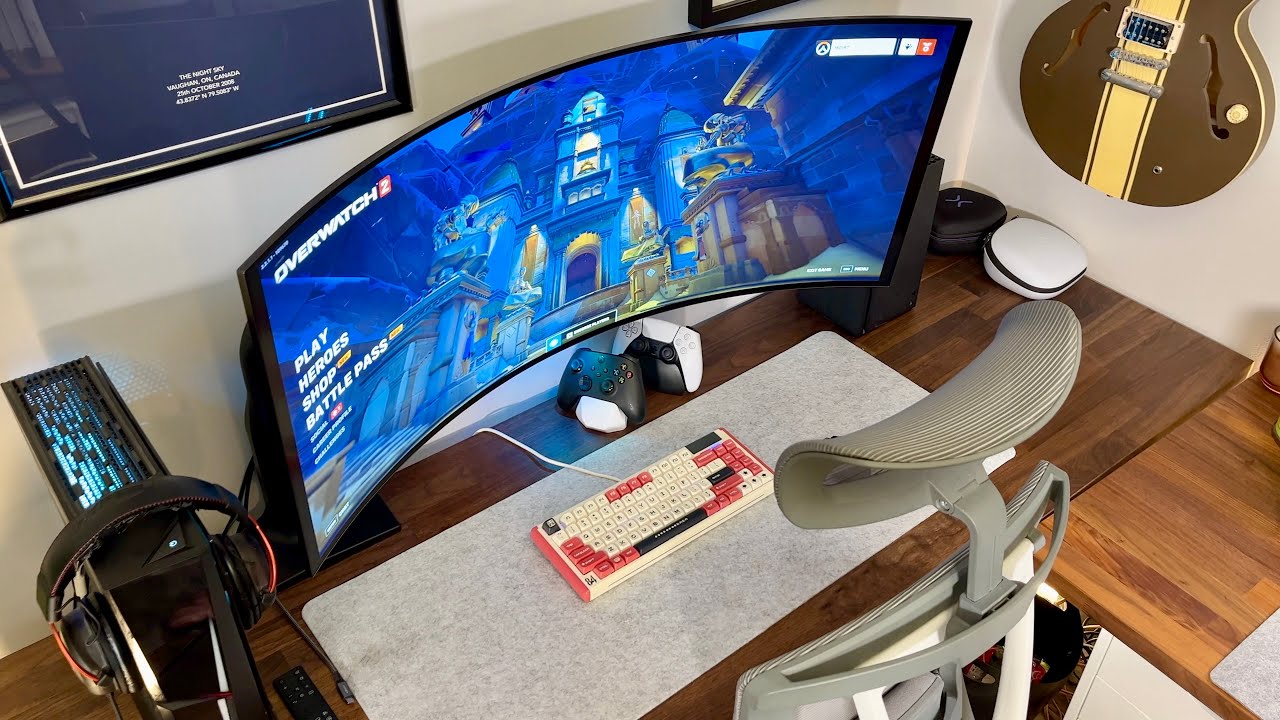
So I’ve currently a 49” Samsung UW, as you can see in the picture the panel is breaking down or something as when this happens I’ve to pull the plug from the monitor and power cycle the monitor so it works normally again.
Now I’m looking for a new monitor, preferably a little bit smaller than this and a bit more height and I was wondering if anyone has some suggestions.

Now I saw this monitor which peaked my interest as I like the width and height but it’s 1700USD which is quite expensive.. https://youtu.be/9ak4ULggeYM
Find the 45GR95QE here!
(LG 45GR95QE on LG.COM) http://bit.ly/3JWeeiY
(LG 45GR95QE on Best Buy) https://geni.us/BumRXuJ
45GR95QE First Video Full review! - https://youtu.be/E_fFtAjLOdA
All other items in my setup can be found below.
Purchasing through affiliate links directly support this channel.
Setup Product Links:
HEAVY DUTY MONITOR AR...
pale quartz
molten coral
Now I saw this monitor which peaked my interest as I like the width and height b...
Samsung are releasing quantum dot OLED shortly, so if you can survive until then get it, otherwise the LG C2 or the Alienware aw34
actually you may already have it available, search for the OLED G8
molten coral
Hmm let me have a look
pale quartz
the AW34 does have a QD-OLED panel, next best option
molten coral
I see that the G8 is in a store nearby I’ll have a look tomorrow. I’ve to say I’m not sure how I feel about going back to 34” after gaming in 32:9 for 5 years.
But just gonna have to checkout some monitors
Ohh they also have the AW34
pale quartz
both are solid options
 nocturne drift
I tested zen4 today, 7900X
solid clock speed
pbo is agressive holy
One MAJOR problem the core to core delta temp is mad. I got 30c delta
stock pbo2 core 0 66c, core 3 96c. This is with the customer remounting it 2 times.
30c delta is crazy
The power draw is not bad at all. it did 5.3 ghz all core at 1.24v asus llc5 drawing only 160ish watts. Problem is with a 360mm aio core 0 is 61c and core 3 is 85c.
what in the ihs are they using.
zen4 delid is the meta? 
Funny thing is the reason why the customer's PC crashes was NORTON
GOOD OLE NORTON

 left cargo
If my computer has an i5-12500h cpu, does that fall short of the requirements to play battlefield 2042?
molten coral
pale quartz
Samsung are releasing quantum dot OLED shortly, so if you can survive until then...
Size wise I think the C2 is amazing, like not too big not too small.


 prime jasper
would be slightly too large from that range imo
molten coral
My desk is a bit deeper than the desk in the picture so would be fine for me I think
prime jasper
Only one way to find out
 errant cypress
I bought a 48 inch c2 but it's for ps5
 dry pike
left cargo
If my computer has an i5-12500h cpu, does that fall short of the requirements to...
dry pike
left cargo
If my computer has an i5-12500h cpu, does that fall short of the requirements to...
CPU wise it should not be that bad. It DOES have 12 cores although 8 are efficiency ones. With laptops it can be hard to say though, it depends on the cooling.
 molten flame
nocturne drift
what in the ihs are they using.
molten flame
nocturne drift
what in the ihs are they using.
They should go back to AM4 heatspreader but I think the configuration of the resistors prevent that
nocturne drift
molten flame
They should go back to AM4 heatspreader but I think the configuration of the res...
I think it's to match the height of the AM4 platform. I wish they didn't cause clock speed and power draw is good.
Power draw at 100% load that is
left cargo
dry pike
CPU wise it should not be that bad. It DOES have 12 cores although 8 are efficie...
ty kind stranger
nocturne drift
I love skatterbencher
Explaining everything in such detail
Asus give him a raise lol
quick locust

Sponsor: Lian Li O11 Dynamic EVO on Amazon - https://geni.us/ovS0F9
The AMD Ryzen 9 7950X3D is launching alongside the R9 7900X3D, with the R7 7800X3D launching in April. The 7950X3D curiously was the only CPU sent, and given the unique core parking behavior in Windows, we wonder whether the 7900X3D might make more sense (or the 7800X3D, althoug...
nocturne drift
Honestly not bad. Best stock performance maybe using 6000 xmp ram. Ridiculously more power efficient
6% faster than 13900k using 6000 overall tested by amd.
Glad I got the 13900ks for 500. Will be the fastest cpu for now when maxed out. But ngl not to bad.
Although 7800X 3D should be a banger. If u can pbo2 on it. So AM5 users should wait till April
pale quartz
you can PBO2 it
nocturne drift
I saw from the skatterbencher video
Really good.
Hope 7800X 3D bin isn't trash tho.
nocturne drift
pale quartz
you can PBO2 it
Can u static oc it?
nocturne drift
I static oc ed a 7900X 2 days ago and I was impressed
5.3ghz all core at just 1.24v
I'd do alot higher if the core to core delta is not 30c 💀
prime jasper
is it possible to simulate 7800X3D with 7950X3D
pale quartz
prime jasper
is it possible to simulate 7800X3D with 7950X3D
its just one CCD, turning off the other gives near identical performance
molten flame

No more 3 GHz iGPU clocks on Ryzen 7040HS It has been reported that AMD updated product pages for its mobile Ryzen 7040 series, codenamed Phoenix. AMD Phoenix could be the most interesting Ryzen laptop silicon this year. Not only does it feature Zen4 microarchitecture, it also comes with RDNA3 integrated graphics. What is important […]
prime jasper
nocturne drift
It's even slightly faster.
interesting. there is big difference in some games when disabled the second CCD.
pale quartz
its not a scheduling issue
nocturne drift
Prob will get better later.
pale quartz
the chipset is expecting boost clocks from the primary CCD, it being switched off turns off this behaviour
nocturne drift
Then shouldn't that make the cpu slower not faster?
pale quartz
no, the game influence can be faster or slower depending on whats being run
single core boost primary games will suffer, cache heavy games will benefit
nocturne drift
I see.
prime jasper
what is the maximum fps in frostbite?
 pale quartz
the frostbite engine doesnt have a frame cap
prime jasper
nice
pale quartz
frame caps are only introduced to engines to combat timing issues with the processing logic, tldr older engines
prime jasper
that engine is something else i swear
pale quartz
the game was developed 7-8 years ago, so it uses the source engine
heavily modified*, but same engine issues
prime jasper
yep heavily modified
nocturne drift
I actually like apex legends moves soo nice.
Game will close itself if u oc ur cache too high tho.
molten flame

Support me on Patreon:
https://www.patreon.com/der8auer
Music / Credits:
Outro:
Dylan Sitts feat. HDBeenDope - For The Record (Dylan Sitts Remix)
Paid content in this video:
- /
Samples used in this video:
- /
--------------...
nocturne drift
The guy who has 30c core to core delta after 2 remounts need this.
 toxic wigeon
One interesting thing I noticed was that the lows are lower than intel's chips.
prime jasper
prime jasper
what is the maximum fps in frostbite?
Did any reviewers test bf2042 out of curiosity, I doubt it since multiplayer only but would be cool to know
molten flame

 misty ocean
anyone able to help me with installation issues?
ive tried everything i could think of
 small zinc
Why static OC Ryzen 4 when PBO overclocked all cores to 5.7?
nocturne drift
Because in idle it goes to 5.6ghz. In cinebench it goes to 5.1ghz while at 96c+. Customer was not comfortable with that so I found a sweet spot. Now looping cinebench at 5.3ghz at 1.24v at 84c
pale quartz
if it goes to 5.6 on idle then the battery config wasnt set properly lol
nocturne drift
Cooler is h150i elite capellix
nocturne drift
small zinc
Mine boosts to 5.7 and stays under 75
Cinebench r23?
Sure do a cinebench r23 run and show us ur hwinfo minimum clock speed.
Let's see if it's 5.7 ghz
nocturne drift
pale quartz
if it goes to 5.6 on idle then the battery config wasnt set properly lol
Max boost clock is literally 5.6ghz on amd website.
pale quartz
yeah thats max boost lol
nocturne drift
Yeah
nocturne drift
No problem.
Oh wait he is streaming to me.
So I guess not idle.
But 5.6ghz streaming to me. 5.1ish ghz doing cinebench r23
30c core to core delta.
Stock pbo temp is 96ish.so I give amd doing exactly as the spec says
Pretty good.
Except the default tdp cause it was drawing north of 200w in cinebench. But mobo vendors always ignore that anyways
small zinc
nocturne drift
Max boost clock is literally 5.6ghz on amd website.
7900x boosts slightly higher
It’s actually 5696 to be exact
PBO
nocturne drift
Yeah doing super light workload like streaming in discord.
small zinc
Playing games primarily
nocturne drift
Very very light games.
small zinc
Which made a huge difference for my 4090
nocturne drift
Heavier game won't reach close to 5.6+ghz at all
nocturne drift
Show us.
small zinc
When I get to my PC later I will
nocturne drift
I told you how to. Play a game let's say 2042.go to. Hwinfo64. And show us ur min clock speed after a while.
U can start hwinfo while u are in a match cause menu screen is very cpu heavy
small zinc
Mazda. I know you get a hardon anytime I type something because you like to argue. Just accept that some chips have better Jim’s than others.
Bins
nocturne drift
Yeah but what you are saying makes no logical sense.
nocturne drift
Classic.
nocturne drift
I'm telling you you are wrong, and I don't care what you say.
small zinc
Its ok to be wrong Mazda. Just accept you made a blanket statement that wasn’t factual
nocturne drift
I don't.
toxic wigeon
Shut up and move on.
small zinc
👍
toxic wigeon
Nobody is wrong, don't care.
nocturne drift
Thanks.
small zinc
The draw power for the 7950x3d is pretty impressive
168 watts under full load
Looks like it handily beats the KS too at 6 GHz
AMD kind of knocked it out of the park
nocturne drift
My 13900ks is here. Ayeeee
I might go for the Z790 hero if the apex guy can't sort his stuff right.
Maybe ddr5 7800.
He is rmaing thru Asus but i think apex is at a shortage right now. Hope I get that apex. Although a white mobo in a black build is abit of a L lol
small zinc
Think I might buy the 7950x3d. Not that I really need it. Not like my 4090 is gonna benefit all that much from another 10-20% when my OLED monitor is 175hz and pretty much peg that out on literally any game
small zinc
Any ATX 3 PSU is pretty nice at this point to have the 12 pin built in instead of using Nvidias dumb adapter
Problem with the Shift PSU is they decided to put the connectors on the side. Not a fan of that
But it’s specs are nice
83amps on the 12 volt rail I believe?
Waiting on Seasonic Vertex PSU’s myself
Not paying $400 bucks for the ASUS Loki
left cargo
dry pike
CPU wise it should not be that bad. It DOES have 12 cores although 8 are efficie...
ty kind stranger
 white echo
toxic wigeon
Nobody is wrong, don't care.
white echo
toxic wigeon
Nobody is wrong, don't care.
Um I got a suspicious message
I gotta DM the msg tho if thats ok?
toxic wigeon
white echo
Um I got a suspicious message
Open a modmail and we can help you from there. :D
 mystic junco
hey i was wondering if anyone could help me with my headset? I have logitech G935 and every other time im going to use the mic it just won’t work, the mic has a slight red light to it when it doesn’t work and i’ve tried every setting in the world in feels like and the only thing that makes it works again is if i restart the computer, and yes i’ve checked all the settings on the pc too😭
small zinc
mystic junco
hey i was wondering if anyone could help me with my headset? I have logitech G93...
Hey Jenny. Sounds like a software /firmware issue. What I recommend is going to your device manager, and uninstalling the headset and device software by right clicking on “Sound, Video, and Game Controllers”.
Reboot your PC, and reinstall the latest Logitech software and reboot again
Does that particular headset have a dongle to it?
mystic junco
if i understand dongle right then no
small zinc
See if that cures the problem. Once you fully uninstall and remove the device software and reinstall again, should be able to update the firmware again and hopefully corrects itself
I’ve seen this issue before
mystic junco
okey i will try that now, thank u for the help:)
pale quartz
mystic junco
hey i was wondering if anyone could help me with my headset? I have logitech G93...
have you got logitech g hub?
mystic junco
yes
pale quartz
mystic junco
yes
i had that headset before odd, sensor could be getting conflicted with its mute function, pretty sure its possible to switch it off entirely within g hub iirc, worth a look
mystic junco
okey i will look
pale quartz
mystic junco
okey i will look
and just to be double sure make sure youve got the mic set as the default option like this, (right click set default), otherwise software can change it
 mystic junco
pale quartz
and just to be double sure make sure youve got the mic set as the default option...
mystic junco
pale quartz
and just to be double sure make sure youve got the mic set as the default option...
haha it’s hard getting help in english and the pc being in another language but i will try my best
pale quartz
mystic junco
haha it’s hard getting help in english and the pc being in another language but ...
what is your native language?
small zinc
Deco is also right. I'm not a big fan of Logitech software myself. If that's all it is, just a function of the software changing the microphone default and its mute function, then that should be a pretty simple fix.
Sometimes these headsets require a "hard reset". Essentially rebooting the headset back to factory settings
mystic junco
pale quartz
what is your native language?
swedish
mystic junco
small zinc
Sometimes these headsets require a "hard reset". Essentially rebooting the heads...
yeah it sucks it was a gift from my boyfriend not even a year ago, they’re weird
mystic junco
yea it is
mystic junco
no just when i charge them they’re plugged in
small zinc
I misread that, I'm sorry
mystic junco
hahaha no problem
small zinc
I think Deco and I are essentially saying the same thing though. Both of us think it's a software issue
pale quartz
mystic junco
swedish
för Windows sök efter inställningen "ändra systemljud", gå därifrån till inspelningsfliken och se till att mikrofonen är vald som standardenhet (den kommer att ha en grön markering bredvid sig), för g935, om inte då högerklicka på den och ställ in den som standardkommunikationsenhet och standardenhet, starta sedan om programvaran (t.ex. slagfält) för att mikrofonen ska byta till den
alternativt inom logitech g hub bör du kunna hitta ett alternativ för att stänga av mute-funktionen på headsetet (g935 har en sensor som känner av automatisk mute när den fälls upp, vilket är vad den röda lampan betyder)
om du har headsetet anslutet kommer mikrofonen bara att fungera via USB, så se till om den är vänd till den på headsetet
(translation)
small zinc
pale quartz
för Windows sök efter inställningen "ändra systemljud", gå därifrån till inspeln...
Does Logitech do what Astro does have have "Voice" and "Game" ?
That could be confusing to her if so
Or rather Windows having multiple line in options
pale quartz
worse, they've got a flip switch on the headset itself which routes the USB channel for PC and "other devices"
if its on the wrong section the mic wont work whatsoever
small zinc
The LED is red which means it's probably just muted.
I'm assuming she only has one mic selection
pale quartz
it does, tldr is the mute function is automatic for when its flipped up on the headset itself, can fuck itself over sometimes and stop the mic functioning
had it occur more than once when i used it
mystic junco
yeah i know about the mic thing, flipping it up and then its turned off, problem is when i flip it down it doesn’t work
pale quartz
so its when you flip it up, then down correct?
mystic junco
yeah or just when i turn on the headset for the first time of the day, haven’t touched it and it still doesn’t work
small zinc
I personally think it's still a software issue. Probably easier at this point to fully uninstall the device software via device manager to completely remove the any windows drivers for it as well as fully uninstalling any Logitech software. Removing the wireless receiver for it as well obviously. Restart the PC, reinstall the receiver, the software, and any firmware updates there might be.
pale quartz
ugh yeah i remember this issue not fondly, theres plenty of reports of it happening from years ago aswell, my general advice is to not flip it up unless absolutely need be, you can change the mute function to be a key combination within g hub as a workaround
faulty sensors
pale quartz
small zinc
I personally think it's still a software issue. Probably easier at this point to...
it will come back, the software reads via the sensors
mystic junco
pale quartz
ugh yeah i remember this issue not fondly, theres plenty of reports of it happen...
the g hub is so confusing
pale quartz
mystic junco
the g hub is so confusing
yeah its not great, dont have the headset anymore so cant lay it out easily, what youre looking for is to remap the buttons on the headset to the mute function, it will be under system/keys/macro from memory
mystic junco
i have uninstalled it now
pale quartz
theres the macro there

as a way around it (if you reinstall it)
sorry i couldnt be of more help, the logitech headsets werent known as that reliable for the glitches
pale quartz
device manager - audio inputs and outputs will allow you to uninstall the drivers for the headset
 mystic junco
thank u
pale quartz
np
small zinc
Man. 7950x3d already sold out on AMD
Amazon has them for $7 dollars more for some reason. AMD storefront
mystic junco
@pale quartz i can’t seem to find the mute thing:(
pale quartz
mystic junco
<@162568099839606784> i can’t seem to find the mute thing:(
under Logitech g hub click into the headset, there'll be a macro option on the left menu, click create new macro, title it "Mute Mic", at the bottom is a prompt, click it then click system (actions?) iirc, then audio command, and mute audio input
afterwards click done, save the macro and then bind it to a button on the headset
mystic junco
thank u!
pale quartz
mystic junco
thank u!
no worries
small zinc
Top 124 on Superposition Benchmark with just a PBO overclock only on a 7900x
Not bad
21431 score "1080p extreme" preset
 river crown
anyone know how to fix high cpu temp?
 midnight crypt
a better cooler

 molten flame
sad thing is, 7800X3D likely only gonna be $50-100 cheaper than 7900X3D
nocturne drift
Destiny 2 lightfall is here. Man I wish I built my pc earlier lol
quick locust

Sponsor: Thermal Grizzly Kryonaut thermal paste (on Amazon - https://geni.us/JMVNtOE ) & Hydronaut for water cooling (Amazon - https://geni.us/Fsray )
Acer is one of Intel's first board partners to enter the market, and the Acer BiFrost Predator A770 GPU is a weirdly designed, unique video card. The BiFrost card runs an axial fan and a blower fa...
small zinc
prime jasper
7950X3d coming in two days
Where do you live? Got mine today
 stone monolith
My pc runs like shit on bf2042😭 can anyone point me in the right direction on what I should upgrade first ?
My specs are
Intel i7-9700k
RTX 2070 super 8GB
M.2 SSD 500GB Samsung
M.2 SSD 1TB Samsung
1TB HDD seagate
Asus ROG strix Z390-F gaming
Seasonic focus GX 750w psu
Corsair Hydro 100i RGB platinum
16GB ram vengeance rgb pro
pale quartz
stone monolith
My specs are
processor and GPU are first
that's motherboard for you aswell, z390 is EOL
stone monolith
I thought so, iv been looking at cpu + motherboard upgrade but I wasn’t too sure
I’m wanting to get the ryzen 9 5950x
pale quartz
you won't gain anything from it, get the 13600k or the 5800x3d
(alternatively the 7000 x3d chips if you're wanting maximum performance)
 primal terrace
Does anyone know how to fix the "GPU Hang" error ?
prime jasper
Ddu and driver install
primal terrace
prime jasper
Ddu and driver install
already did that
prime jasper
🤷
primal terrace

 thorn osprey
For all that are unable to use slow and lagy EA apps and like to stay with Origin this is 3 sec fix https://www.youtube.com/watch?v=wE2I_jnCIGU
molten flame

HotHardware
The Jiushark Diamond JF13K uses dual 120mm fans, seven heatpipes, and a diamond shaped radiator to cool performance CPUs with a height of just 92mm.
Wonder if heatsink can passively cool 65W 5600/7600 
nocturne drift
stone monolith
Intel i7-9700k
RTX 2070 super 8GB
M.2 SSD 500GB Samsung
M.2 SSD 1TB Samsung
1...
This should run 2042 fine.
Are all these not throttling? What is ur ram and is xmp enabled?
I found 6000 cl32 g skill ram that has hynix A die.
821A
It booted 7600 on Z790 hero.
Impressive.
Corsair 1000% won't put a die at 6000 cl32
Twitter has no chill lol. Both sides are fighting lol.
7950X 3D is faster on average stock, 13900k/ks with tuned A die is faster. Doesn't mean all reviewers and average customers knows how to do it. It goes both ways.
What bothers me is leakers saying 20-30% faster and leaking slides that's completely ridiculous
And people who tune and can get the 13900k/ks faster should also admit 7950X3D is the best out of the box.
lol
 nocturne drift
toxic wigeon
512 MB of Cache.
river crown
the game uses 100% cpu usage making my pc hot, how do you fix this?
 candid flame
turn up the fans
river crown
Cant play with 95c for a long tjme
river crown
fine for laptop?
candid flame
yup
molten flame

Inland PCIe Gen5 SSD costs $350 MicroCenter lists new SSD based on PCIe Gen5 standard. The new solid-state drive from Inland offers up to 10 GB/s of sequential read speed and up to 9.5 GB/s of write speed. Those are the claims of the company that has just released its first Gen5 SSD which is […]
Gen5 NVMe bad value
midnight crypt
is that molex
molten flame
yeah for tiny fan
pale quartz
the fan speed isn't actually due to the fan itself, ironically
it will be running on a DC current
molten flame
sad how Gen5 drives from a low-end brand like Inland cost nearly 2.5x more than top-end Gen4 drives
 coarse nimbus
Imagine your nvme making so much heat you need a fan on it smh
 ivory creek
i heard the gen5 ssds with built in fans make the sound of angry insects
lol
i hate highpitched noices
so i cant say im jelous
btw i have the default blow out prism cooler on ryzen cpu and when i put the sideplate on which is glass it get extremely hot so i have to keep it off
should i put in the effort and install my nh-d15 cooler?
its so ugly tho, brown and beiege, i like the prism rgb
midnight crypt
you could probably get away with not having em on
if you have good enough airflow
ivory creek
i heard the sn850 throttle without the proper sink, and gen5 is a step up so i think they need active cooling
midnight crypt
well shit
ivory creek
sn850 was the go to pcie4 nvme ssd for so long, now firecuda 340? something is out which is even better? what to buy?
firecuda is supposed to have really good lifespan aswell
midnight crypt
either that one or fury renegade
ivory creek
im planning to buy a nvme once directstorage get commonly used, now im only on a sata 3 ssd
lol
ivory creek
i bought a rtx 3090 some months ago so my craving to just buy something is set for a while
hehe
midnight crypt
makes sense
ivory creek
question is what i should do with my gtx 1070, gift it to someone or try to sell it for like 80 usd?
ive had the gtx 1070 clocked from the day i bought it tho, and i really dont want to scam someone and have it break just as they buy it
ivory creek
the temps were fine, but i overclocked it to the max
midnight crypt
then it def should be fine
ivory creek
i could always say that they will get their money back if it acts up
midnight crypt
pretty sure people would think youre scamming them
ivory creek
ill just give it to my dad then
he'd need a stronger psu but i think i have that aswell
lol
he is running a gtx 660 right now
lol
but he doesnt game
midnight crypt
seems like the cards pull about the same power
 pale quartz
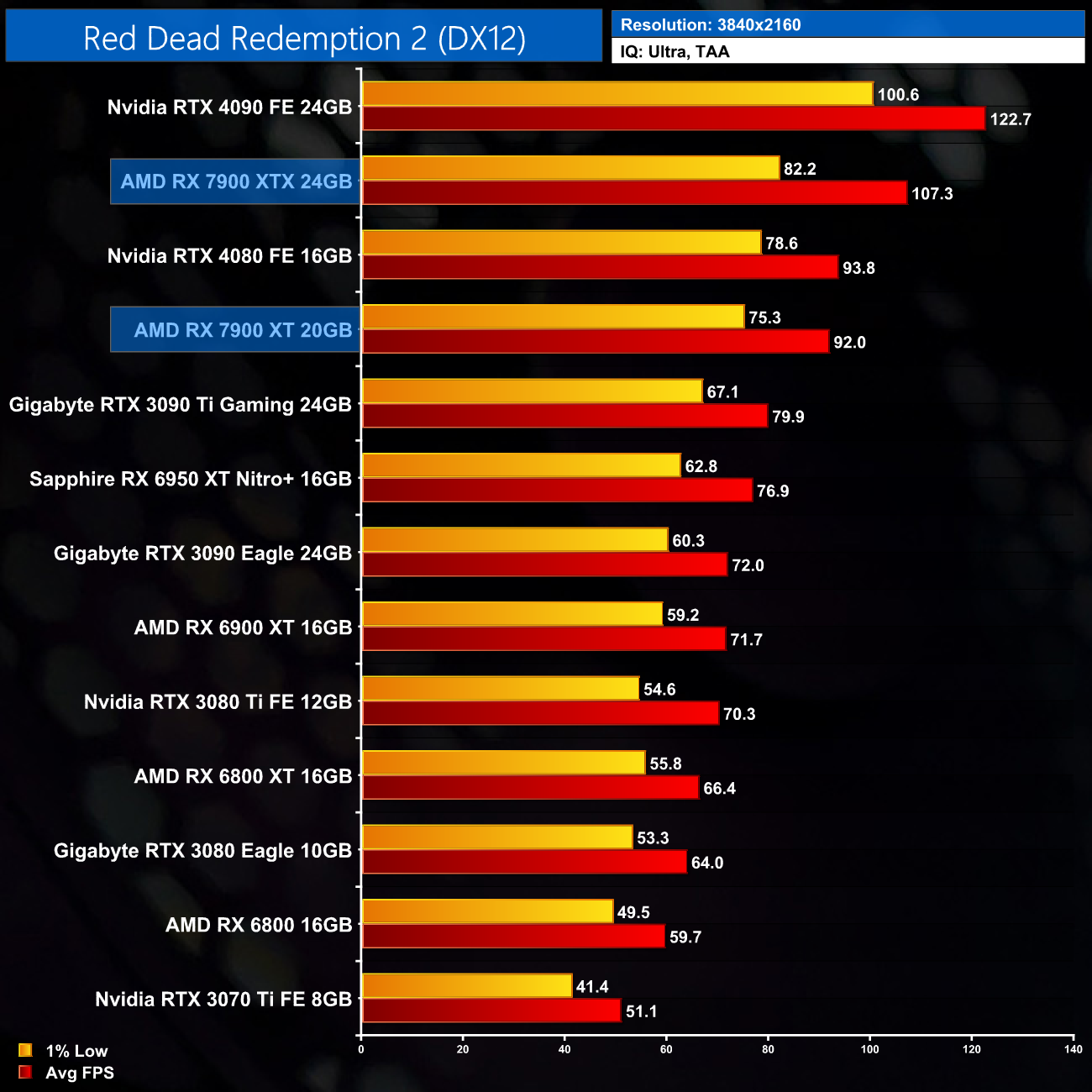
lol nothing like decent being considered sub 60 frames
prime jasper
around 90 fps is decent for me, rip 3070
but probably dropping the most demanding settings could do that easily
 sand tide
quick locust
sand tide
quick locust
coming from a 6600 user i can tell u that as of todays patches i get 165fps smooth as butter
6600 XT that is.
very inaccurate graph
nvm max settings my bad
lol
quick locust
pale quartz
lol nothing like decent being considered sub 60 frames
Decent compared to similiar tier cards
quick locust
sand tide
coming from a 6600 user i can tell u that as of todays patches i get 165fps smoo...
Yeah same, this is just everything maxed lol
to get 60 you need 3070 and up in it, at least when maxed
Probably 6800 too, but they didnt test that
quick locust
yep
 storm osprey
pale quartz
lol nothing like decent being considered sub 60 frames
storm osprey
pale quartz
lol nothing like decent being considered sub 60 frames
at 1440p max settings though? yea thats decent
just turn off something like motion blur and not youre at 60 fps
 stone stone
am i the only one getting lots of packet-loss/ game stutter/ lag in multiplayer?
I tried everything from new wires, playing solo servers, lowering graphics, removing background programs, chaining the profsave_profile to dx12, also tried updating everything and i still have to same problem.
It mostly happens when im in a server for longer than 5 mintues.
3060ti
24bg of ram
samsung monitor 240hz
AMD Ryzen 5 5600X 6-Core Processor 3.70 GHz
Desktopz
GPU low %
CPU high %
Windows 10
storm osprey
Ethernet
molten flame
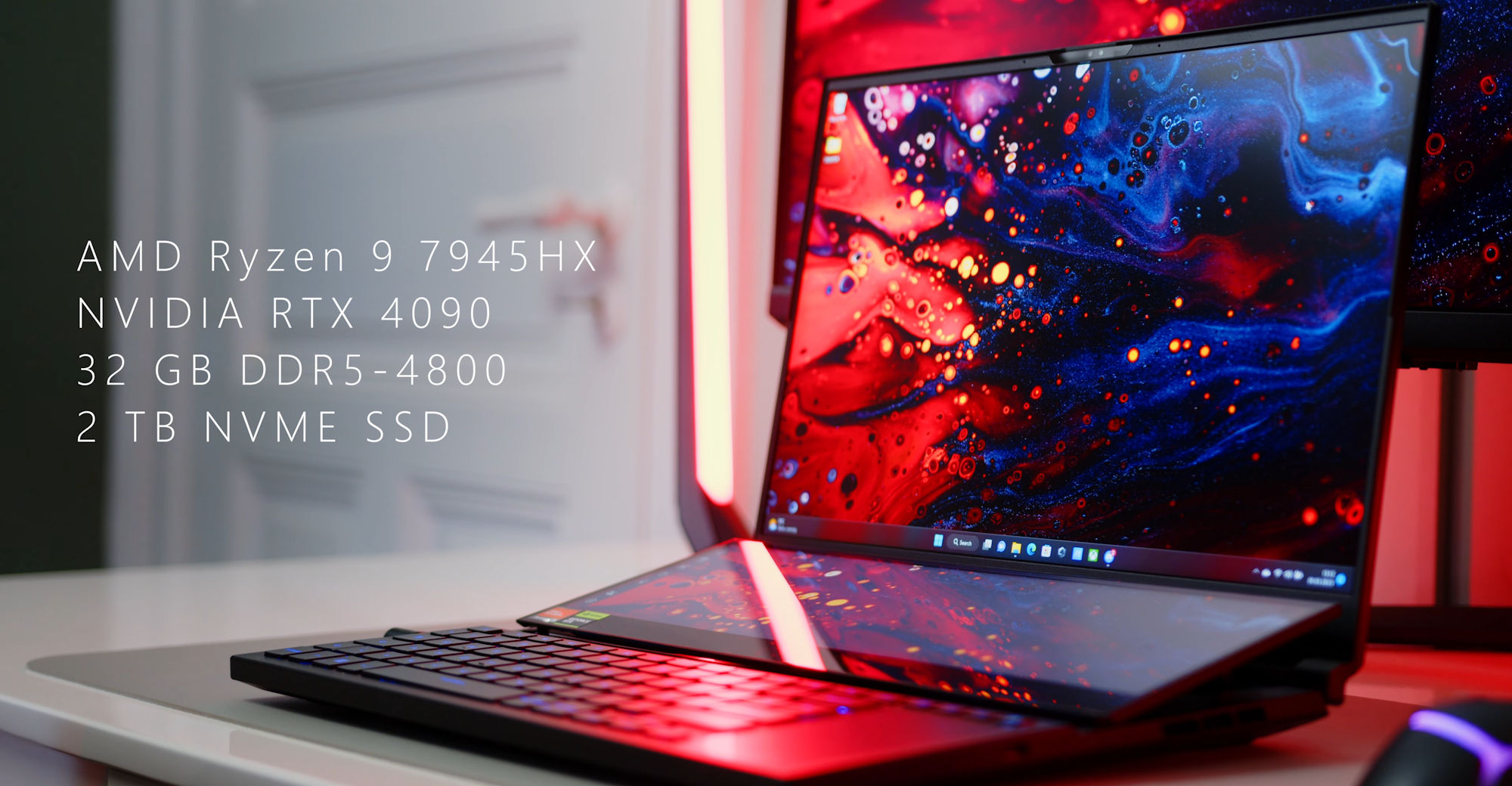
AMD Dragon Range claims performance crown at less power than Intel Raptor Lake-HX Notebookcheck has the very first review of AMD Zen4 laptop CPU from 7045HX range. ASUS 2023 ROG Zephyrus Duo 16, Source: Notebookcheck The 16-core Zen4 Raphael has now been tested by the Notebookcheck team who took brand-new ASUS ROG Zephyrus Duo for […]
Dragon range very strong
 loud lotus
My steam version wont open it opens the EA app and then goes back to play. Everything is updated and reinstalled. The launcher wont even pop up. Verified files also. BF1 loads fine
nocturne drift
molten flame
https://videocardz.com/newz/amd-ryzen-9-7945hx-dragon-range-processor-has-better...
dat efficiency coming thru without the bs ihs
prime jasper
Do i need heatsink for m2nvme ssd? For gaming of course. 😂
pale quartz
no
pale quartz
loud lotus
My steam version wont open it opens the EA app and then goes back to play. Every...
are you using the latest version of the EA app?
loud lotus
pale quartz
are you using the latest version of the EA app?
Yes off the website
pale quartz
loud lotus
Yes off the website
open terminal run the command Winget --upgrade and make sure its actually the newest revision
 cursive marten
So apparently the discord bot Mee6 has lost it's verification, which means it can no longer be added to new servers.
rest in piss, Mee6, fucking trash ass bot
 hexed notch
Anyone else here look at their cpu usage in game and smile
pale quartz
hexed notch
Anyone else here look at their cpu usage in game and smile
nope
storm osprey
hexed notch
Anyone else here look at their cpu usage in game and smile
nope, as long as performance is good thats all that matters, otherwise i probably just spend a bunch of money on my cpu that i didnt have to
prime jasper
hexed notch
Anyone else here look at their cpu usage in game and smile
i look at it then yell the piece of shit to run faster
prime jasper
storm osprey
nope, as long as performance is good thats all that matters, otherwise i probabl...
Cpu’s are not that much expensive as gpu’s are
Its insane
😂
molten flame
wanna see 7950X3D with 4800 CL40 memory compared to 6000 CL30
toxic wigeon
My friend just got a 7950x3d, He's loving it.
 toxic crater
Guys I am thinking upgrade my specs. I am now using i7 12700K with RTX3060, I ran 2042 on 4K with DLSS performance. My budget is around $1.5K. aim to play 2042 on 4K with DLSS quality. Any suggestions?
midnight crypt
4090
toxic crater
Emm, no way I can get a 4090 with 1500…
Oh forgot to say. 1500 Canadian dollars. I am in Canada
With 15% freaking sales tax
toxic crater
Can it run RDR2 in 4K above 60FPS without DLSS?
If yes, DLSS doesn’t really matter…
toxic crater
Okay, I am going to see some test videos! Thank you!
prime jasper
toxic crater
Can it run RDR2 in 4K above 60FPS without DLSS?
Even 3090 and 6950xt can
storm osprey
toxic crater
Can it run RDR2 in 4K above 60FPS without DLSS?
Depends on settings. I got 60 fps with a 3080 at 4k with some medium settings.
 molten flame
RDNA3 is AMD Ampere moment
 gaunt wren
prime jasper
https://www.kitguru.net/wp-content/uploads/2022/12/RDR3.png
gaunt wren
prime jasper
https://www.kitguru.net/wp-content/uploads/2022/12/RDR3.png
Why no Intel on this list?
storm osprey
gaunt wren
Why no Intel on this list?
pretty sure if it was even included, no intel gpu is better than a 3070 ti
gaunt wren
storm osprey
pretty sure if it was even included, no intel gpu is better than a 3070 ti
The Intel Arc A770 (16GB) has 3070 specs, so...
storm osprey
3070 ti > 3070 though
pale quartz
molten flame
wanna see 7950X3D with 4800 CL40 memory compared to 6000 CL30
will make a grand total of 0 difference lol
dry pike
4800 will probably be more stable as memory stability on AM5 is absolutely shit right now
pale quartz
dry pike
4800 will probably be more stable as memory stability on AM5 is absolutely shit ...
4800-6000 run fine on even bronze samples
your board experience will differ
dry pike
For most at least. But AM5 memory stability issues seem to be pretty wide-spread across boards. My Gigabyte board and bios is probably crap too but that is besides the point.
small zinc
Got my new 7950x3d in my system. Still tweaking the PBO settings. Seems to only want to boost to 5Ghz all cores instead of 5.7
ivory creek
my 3090 keep switching between states and make a roar sound when going up and down the fan curves as i barely use it. when its fully used it doesnt happen
lol
i wonder if my neighbors can hear it
i can hear tem screaming as they die and kill people in games at night tho
so it would fit them
we have this computer company here in sweden with a lot of qualified tech experts working compared to other it places who have no clue. is it rude that i abuse the fact that you're able to call them for free support if ure interested in buying something even tho im not always looking for stuff to buy?
i regularly buy from them tho
every single year they're voted as the retailer of the year
its not even fun anymore
lol
molten flame
small zinc
Got my new 7950x3d in my system. Still tweaking the PBO settings. Seems to only ...
the CCD with the 3D cache has a peak boost for 5.0 GHz on 1 core
nocturne drift
I'd blame mobo tbh, 2 customer builds all do 6000 cl36 one expo 6000 cl30
are there bad apples, sure. but so far so good
zen2 was a meme and zen3 was slightly better.
prime jasper
dry pike
For most at least. But AM5 memory stability issues seem to be pretty wide-spread...
I only hear good about gigabyte am5 bios
prime jasper
Is that something that can be alleviated with firmware or is it set like that forever
pale quartz
prime jasper
Is that something that can be alleviated with firmware or is it set like that fo...
the scheduler isn't in any firmware of the chip, it's at the OS stack level of the interface, so yes it can be changed
nocturne drift
my oc friend in microcenter discord got 4133 cl14 stable and finally beat my work 13900kf timespy score with 6666 DDR5.
thats impressive
esp since timespy scales with DDR5
I have decided not to get a contact frame nor delid.
it is what it is. if i can only do 5.7ghz all core I am good with that
quick locust

Intel fixes multi-monitor power issue It works but not in all instances. Intel Arc A7 GPUs were known to suffer from high idle power consumption from the very start. The company has provided a guide on how users can achieve lower power states when using Arc GPUs. This may greatly reduce the power consumption (below […]

Jon Peddie Research
Intel’s surprise jump in Q4 unlikely to be repeated.
dry pike
nocturne drift
I'd blame mobo tbh, 2 customer builds all do 6000 cl36 one expo 6000 cl30
Sample size of 2
dry pike
prime jasper
I only hear good about gigabyte am5 bios
We are on different forums then 
small zinc
molten flame
the CCD with the 3D cache has a peak boost for 5.0 GHz on 1 core
Actually I’ve been reading it’s like 4 cores
But scatter bencher has managed to OC the 7950X3D to 5.9 GHz using curve optimizer
I’ve been playing around with it
prime jasper
dry pike
We are on different forums then <:cursed_tea:1080931809308717208>
Are they talking about b650 or x670
Because forums here tested the gigabyte b650 it ran cl30 6000 first try and overall no complaints
Good vrm too
HUB also had similar experience with b650 lineup from gigabyte
dry pike
prime jasper
Are they talking about b650 or x670
x670, I have no doubt AMD made improvements in B650 to compensate
molten flame
ordered 5800X3D yesterday 
also got extendable mini-ITX case
Phanteks Evolv shift XT
 stoic plaza
https://prnt.sc/zjbTM6GNwrm2 Can someone help me with this pls ?
quick locust
!!support
 silent oasisBOT
ℹ️ Have an issue with Battlefield or your EA/Origin account? Contact EA Help:
If you need to contact the EA Help team for questions you might have regarding game or account issues, head over to https://help.ea.com
ℹ️ Have thoughts to share regarding Battlefield? Submit your feedback:
If you want to help the Battlefield team with constructive feedback to make the title/franchise even better, head over to https://answers.ea.com/t5/Battlefield/ct-p/battlefield
ℹ️ Have you encountered a bug? Report it:
If you have previously unknown technical issues you'd like to highlight, head over to https://answers.ea.com/t5/Bug-Reports/INFO-How-to-Bug-Report/td-p/10940830
ℹ️ Have an issue related to this Battlefield Discord server? Let us know:
If you need help related to this Discord server you can send a Direct Message (DM) to our ModMail bot! Please know that we can not help you with any game or account issues!
toxic wigeon
 molten flame
https://videocardz.com/newz/microsoft-introduces-edge-video-super-resolution-for-nvidia-and-amd-gpus

Microsoft announces VSR for Edge Microsoft is enabling Video Super Resolution for their Edge browser. The video upscaling feature is now available to GeForce and Radeon users. Microsoft confirms that all RTX models (20, 30 and 40 series with Tensor cores) and Radeon RX 5700-7800 series will support this technology. The AI technology will only [...
cursive marten
okay..?
prime jasper
molten flame
https://videocardz.com/newz/microsoft-introduces-edge-video-super-resolution-for...
Edge do be balling
Best browser imo
nocturne drift
toxic wigeon
https://cdn.discordapp.com/attachments/722286091201150976/1081615112303034441/IM...
Urs?
toxic wigeon
No just a meme.
nocturne drift
Oh haha
Looks like dark kingpin loses to apex
Time to go to msi kingpin
That actually would be dope
gaunt wren
molten flame
https://videocardz.com/newz/microsoft-introduces-edge-video-super-resolution-for...
Good feature... For those who enjoy it drawing 100+ watts of constant power when enabled even on the lowest mode/setting.
molten flame

Intel Meteor Lake desktop platform with more PCIe lanes With rumors about the cancellation of the Meteor Lake-S desktop series, one must not forget that the platform specs must have been already shared with certain Intel partners. This does not confirm or debunk what will happen to the next-gen Core series, but rather what Intel […]
small zinc
I do find it a bit amusing that with Z790 platform Intel basically needs highly tuned memory in order to keep up with X3D CPUs. But in general a 7950 X3D on DDR5 6000 PBO2 outperforms a 13900k on DDR5 7600.
midnight crypt
no
small zinc
midnight crypt
no
Yes
😁
An undervolted 7950x3d on PBO which we all know is 5.05 GHz scores 1,000 less points
Whereas a 13900k is at 5.5 GHz
midnight crypt
no
small zinc
Well. Benchmarks just proved you wrong
But AMD has absolutely taken back the performance crown both in multi core computing, and now gaming again.
small zinc
So. Some YouTube channel nobody has ever heard of benchmarking a CPU that isn’t available until next month.
Noted.
Who’s results are vastly different than just about every other review showing the 7950x3d beating the 13900k on average by 6%
Hmmmm
🤔
nocturne drift
Yes because 7800X 3D is 7950X 3D with one of the ccd disabled. As seen on Hardware unboxed. Disabling one ccd and making it a 7800X 3D results in higher overall average.
small zinc
I don’t doubt the 7800x3d will perform very well because of the reduced latency on just one ccd. That’s always been the case with Ryzen 7 and 9
But it’s not officially out yet
Lol
nocturne drift
True but that is gonna be a great cpu. Unless amd completely f people on the clock speed.
The r9s if u want max performance get ready to park your cores depending on your work load.
small zinc
Depends. The X3D CPU’s aren’t officially over clockable due to C stepping
But PBO2 is pretty efficient
nocturne drift
The guy reached 5.05-5.15 ghz in his video. Now idk how that works but looks like it's overclock able
Skatterbencher also did a tutorial on pbo 3D chips
small zinc
5.05 is really what the X3D skus are locked to unfortunately
With PBO2 fudging the clocks a bit
nocturne drift
Max boost. He was hitting 5.15+ in shadow of tomb raider.
Not some super light workload
small zinc
Yeah mine hits 5.2 in certain cases
That 5.7 AMD claims just isn’t quite true
Now granted I haven’t tried Prime 95 to see what they do under 100% load
nocturne drift
The 5.7ghz is the non 3D V cache ccd
small zinc
Skatterbench hit 5.9 using curve optimizer, which is really just one core
But still impressive nonetheless
nocturne drift
Yes but I realize it's also just non 3D V cache ccd
small zinc
Unfortunately messing around with curves makes things so unstable
nocturne drift
Idk if u need to disable that ccd to pbo on the V cache ccd
But hey that's none of my problem I'm prob gonna get sht on trying to go ddr5 7600 + on 13900ks
small zinc
nocturne drift
Idk if u need to disable that ccd to pbo on the V cache ccd
Maybe? But right now it seems that most AGESA boards have things locked down until someone figures out a way to either unlock the BIOS or AMD releases new chipset drivers
Hell even Ryzen Master is like: 🤷♂️
nocturne drift
Oh I see. The guy in the video increased the bus clock from 100 to 102
Kind of like bclk
molten flame
bus clock tweaking unstable tho right
nocturne drift
It's fine, i think newer chips de sync the ram etc and make it so it's just clock speed.
So it's a kind of a smart way going at it.
If other stuff is a no go in this case.
ivory creek
nvidia has started selling Founders Edition rtx 4000 cards to marketprice here in sweden
nice
you were apparently not able to for several years here
but now they're back
im now able to buy a new rtx 4070 ti for less than what i handed out for my rtx 3090 some months ago
rip
oh well i was expecting this so no big deal
ivory creek
the prices have dropped somewhat here ye, and no i wouldnt sell my 3090 but maybe if i had waited? im under the impression that 4070 ti is faster than 3090
prime jasper
ivory creek
nvidia has started selling Founders Edition rtx 4000 cards to marketprice here i...
Founders edition looks nice
But not better than asus version 😁
ivory creek
ye founders look great
molten flame

Tom's Hardware
New images of the I/O Die, too.
Around 14% shrink on the cache chiplet (7nm family)
25% greater cache chiplet to base chiplet bandwidth
Redesigned for difference in area (tsv in L2 due to overlapping)
Achieved through design optimizations, dtco and process improvements
Still limited in clocks due to shared power domain (voltage cap) for base die and cache chiplet (room for improvement)
ivory creek
would be cool if u could hire some tech company to mod your regular cpus to get 3d vcache on them
molten flame
CPU architecture itself needs to be able to work with it
ivory creek
maybe in the future if they made it like an added piece on top with extra architecture so it became optional
haha
nah i really have no clue how that works. but would be cool
molten flame
stacking compute chips isn't a good idea, only currently possible to do cache/memory/io atm
nocturne drift
Pls don't sell 3090 for 4070ti
 weak girder
ivory creek
now that you're encouraging me to i just might
weak girder
ivory creek
now that you're encouraging me to i just might
What u gonna do with it
enjoy battlefield 5 at 4k 280 fps instead of that choppy 4k 260 fps
ivory creek
gonna turn on framegeneration and get 4k 560fps instead of 260
pale quartz
@dreamy raptor sorry missed the context of this, what board are you running by chance
 dreamy raptor
pale quartz
<@647516858777600001> sorry missed the context of this, what board are you runni...
dreamy raptor
pale quartz
<@647516858777600001> sorry missed the context of this, what board are you runni...
board? like mother board thing?
pale quartz
yes
pale quartz
its displayed here
 dreamy raptor
ROG STRIX Z390-H GAMING
issue is packet loss ive never got it fixed and comepletly unplayable reloads in slomotion my footsteps are 7 meters infront of me
its crazy
and planes fly around and tp back and shit
pale quartz
are you plugging the LAN cable directly into the router from the pc? based on prior messages youre using a receiver from the port
dreamy raptor
pale quartz
are you plugging the LAN cable directly into the router from the pc? based on pr...
no but that still not issue man my friend has also doesnt lan he uses also wireless and runs 126 players fine
pale quartz
yes, but thats not comparable
dreamy raptor
why?
pale quartz
wireless standards are not stable, his situation even if it works doesnt mean it can be used for yours
youll have desyncing issues because your receiver cant sustain the throughput for the signal, either for a wall, or some other interference impeding the signal
pale quartz
no, how far is your router from the receiver?
pale quartz
where you are plugging the ethernet cable into, how far is that distance to the actual router
pale quartz
through a roof or wall?
dreamy raptor
wall
pale quartz
there will be concrete in between there, which is your issue
pale quartz
drywall is more or less equivalent to signal impedance as concrete
you will never have a stable connection under these conditions, so youll need to bypass using wireless entirely, so youll have to get a powerline adapter
dreamy raptor
but why have i never had this issue in any other game?
pale quartz
because battlefield 2042's required bandwidth at all times for a stable connection is much higher than other games
and when the signal impedes, your throughput will drop
get a powerline adapter and you wont need to use wireless, it'll connect directly to the router
dreamy raptor
i searched powerline adapter but i dont understand lol
where im supposed to put it
also they are supper expensive
pale quartz
it seems complicated but its pretty straightforward, you need 2, and youll place one in a power port at the router, and one at the pc, then simply connect them both via ethernet, sync them up and its done
you can get some cost effective on amazon
dreamy raptor
man i just wants refund
pale quartz

TP-Link AV500 Powerline Extender comes in a set of two adapters to quickly and easily expand your home’s Ethernet through your power outlets and into hard to reach areas using HomePlug AV technology. To set up, plug one adapter into a nearby outlet and connect it to your router using the included...
dreamy raptor
cant i just get a long one lan cable?
dreamy raptor
whatever bro thanks for the help im just never going to get to play it looks fun tho
pale quartz
no problem
nocturne drift
ivory creek
gonna turn on framegeneration and get 4k 560fps instead of 260 <:keanu:81609910...
input lag and half of the vram
toxic wigeon
How?
nocturne drift
Heck I know.
 winged skiff
Can 5600X + 3090 work with 750w PSU?
i currently rocking 5600x + 3070ti, but planning to upgrade to 5800X3D and 3090 later this year
but Im starting with the GPU first, so that's why I ask
this is what im getting
this is my current PSU
as long as I dont overclock, 5600X + 3090 I'm getting should be good until I upgrade my PSU yeah?
quick locust
Nvidia recommended is 750W
pale quartz
winged skiff
as long as I dont overclock, 5600X + 3090 I'm getting should be good until I upg...
its not guaranteed, bronze efficiency means your output current is significantly lower than a gold rated power supply at max load, you'll be coming very close to the peak output the PSU can handle, so you might get rolling shutdowns by the power supply
winged skiff
pale quartz
its _not_ guaranteed, bronze efficiency means your output current is significant...
I was reading that I can undervolt the GPU or limit the wattage using afterburner
will that work?
pale quartz
no, software control simply limits output wattage, I am extremely skeptical of that power supply being able to handle the 3090s current safely at all
molten flame
I bought a cell phone booster, basically just a modem that takes a SIM card
pale quartz
the 12V rail on the PSU is splitting to 3V and 5V, which means there's no dedicated rail, it isn't safe to operate a card like a 3090 with it
molten flame
Ampere transients are a problem too
winged skiff
hmm alright, so it's not recommended?
molten flame
850W gold rated PSU from Corsair, SeaSonic, Lian Li, EVGA are minimum for 3090 tbh
1000W recommended
winged skiff
I was thinking upgrading to 850w PSU Gold, but that have to come like later on while I save up
I can purchase the 3090 now
this is what I wanted to purchase
will this be enough? not planning to OC or anything like that, strictly stock
pale quartz
rule 1: never buy something you can't safely operate
winged skiff
but yeah, probably in like 3-4 months from now
pale quartz
stock is not enough, overclocking does not matter
the current on the card is extreme even at stock, and as mentioned you're going to have serious transient shutdown issues cause of the card, tldr is, don't buy it unless you want to risk thermal protection triggering
pale quartz
this is gold certification
molten flame
750W is recommended for just 3070 on Nvidia website
pale quartz
750 watts@80% curve efficiency is borderline enough to run the cards stable because they have dedicated 12V rails, your power supply does not
winged skiff
pale quartz
750 watts@80% curve efficiency is borderline enough to run the cards stable beca...
will the PSU I linked above be enough?
pale quartz
I have no idea, there's nothing about how the 12V rail operates from the base page
pale quartz
though thats beyond the point really, with a power supply you should be exceeding your minimum rather than just is it enough
winged skiff
granted it's single rail, but ya, like you said
well the issue is that, between 850w and 1000w, the jump is extremely high for the price in my country
pale quartz
you'll pay for it through the lower current in the long run
any marginal price at current power costs over 5 years will be more expensive rather than the reverse
molten flame
I'm using 650W gold PSU with 65W CPU and 130W GPU 
winged skiff
my PSU is already 750w
if my siblings turns on the AC and microwave, the electric in my house shut down
pale quartz
DC output as a % of cost efficiency flattens out once you approach 80% of the wattage, so 680W, which is where the input for output in the rest of the increase becomes
pale quartz
winged skiff
if my siblings turns on the AC and microwave, the electric in my house shut down
you know that in total that's 2.2kW of power right
nocturne drift
Hi, one of my 3090 died from a 850w powersupply that is not good
pls dont even try
thanks
pale quartz
well that's all you need to know lol
winged skiff
nocturne drift
Hi, one of my 3090 died from a 850w powersupply that is not good
which powersupply?
just so I can avoid
nocturne drift
evga 850w GA Supernova
winged skiff
oh wow okay
winged skiff
say I purchase this 3090, slap it onto my 750w and just use it for normal browsing and retro/indie game for now until I purchase the 1000w PSU next month
it's still okay, right? as long as I dont game too hard till end of this month?
pale quartz
do not use it period
nocturne drift
corsair rm series, seasonic focus series, evga G5 or above, like G6 G7 etc
and a bunch more in the psu tier list
pale quartz
^
winged skiff
hmm okay, so I better off getting new PSU first, and then the GPU?
pale quartz
yes
winged skiff
found this, it's a bit cheaper than the one I linked above
it's not on the tierlist tho sadly
but will this be alright? i hnestly not sure about PSU and whatnot
pale quartz
as a bit of guidance ATX 3.0 power supplies is what you should be looking at
winged skiff
so the XPG Cybercore is the one I should get huh
pale quartz
if possible anyways, they'll be the defacto standard going forward for GPUs, if you purchase one now you avoid a needing an upgrade again in 2-3 years
pale quartz
winged skiff
so the XPG Cybercore is the one I should get huh
if it's ATX 3 then yes, it'll more than support the current for the 3090
a point of note is the manufacturer components, XPG are a small-ish manufacturer, so if you need additional things e.g. cables, you'll have to order from them directly
winged skiff
pale quartz
a point of note is the manufacturer components, XPG are a small-ish manufacturer...
it's fine, funnily enough there's a lotsa XPG/ADATA SSD and PSU being used in my country
so part should be safe to get
pale quartz
last answer part yes
cursive marten
reddit
402 votes and 38 comments so far on Reddit
Well that's interesting.
headphones with interchangeable driver units.
 north crow
oh huh, that's really interesting
cursive marten

ハウジングのつまみを180度回転させることで開放と密閉の切り替えができる
ヘッドホンを自作しました。
開放した時は広がりがあり、キラキラとした高音と深い低音が。
密閉した時はバスレフポートが働き締まりのある低音が出て音質が激変します。
45mm ウールコーンドライバー搭載
インピーダンスは32Ωです。
バンドはレザーで自作。間に蒸れ防止のメッシュ生地を挟みました。
制作期間:1ヶ月
ヘッドホンやスピーカーを制作したりなど
いろいろなものを作っています。
宜しければコメント&チャンネル登録お願いします。
http://www.youtube.com/channel/UCppdvPVPcWkPRrOt8G2rSFg?sub_confirmation=1
Twitter
http...
winged skiff
pale quartz
the ATX 3 is the cybercore 2, this one isn't ATX 3 certified
ah okay
how about this
it's cheaper than the cybercore I linked
and on the PSU tierlist, it's higher + multirail?
eh nevermind just atx3 compat
cursive marten
cursive marten
https://www.youtube.com/watch?v=yZnCRU06Ad0
it's a shame i can't read Japanese so i can't really understand the text here
So, what i think is going on here is that they're trying to make them so that they can be sort of open backed and closed back at the same time, depending on the orientation of the slotted piece on the outside. that's an interesting concept.
it is clear that this company or person puts a lot of effort in what they do.
pale quartz
winged skiff
and on the PSU tierlist, it's higher + multirail?
yup will be totally fine
power supply meets the ATX 3 specifications, so it's the top of the standard
cursive marten
 pale quartz
very good cost value for the power wattage might I add, nice find
north crow
cursive marten
https://www.youtube.com/shorts/GMV3GLHaPhM
I love the magnets here
wonder if we'll see something like this mass produced at any point
cursive marten
they're fitted with magnets that's cool as hell
yeah if this could be mass produced that'd be really cool to see
winged skiff
pale quartz
very good cost value for the power wattage might I add, nice find
alright I'll put it on my wishlist, probably gonna pick it up end of this month
so no putting the 3090 on my PC until I buy that PSU?
or it's fine for just browsing?
pale quartz
first
winged skiff
i honestly just use my PC for emulating android game and browsing tbh
cursive marten
https://www.youtube.com/watch?v=Y8_jCpQYG64 They seem to be particularly known around the headphone community already for this mod to a pair of AKG K701's

AKGの名器 澪ホンこと K701を改造しました。
eイヤホンで6,600円で購入したボロボロのK701を購入。
ハウジングを回転させると音の開放具合が変わり音質が変化する
機構を搭載。
3Dプリンターでハウジングを作成し、塗装しました。
ヘッドバンドもレザーで自作。メッシュ生地を使い
蒸れにくくしています。
バランス化改造も施し、3.5mm 4極プラグを埋め込み
3.5mm 4極→4.4mm 5極ケーブルでバランス接続が可能です。
制作期間:1ヶ月
ヘッドホンやスピーカーを制作したりなど
いろいろなものを作っています。
宜しければコメント&チャンネル登録お願いします。
http://www.youtube.com/channel/UCppdvPVPcWkPRrOt8G2...
pale quartz
it's not a case of using it, that power supply is at risk as soon as its put in
cursive marten
They've clearly got experience in working with headphones.
winged skiff
pale quartz
it's not a case of using it, that power supply is at risk as soon as its put in
I see
guess I'll ust buy the 3090 first, and then slap it on when the PSU arrives
cause Im just afraid this 3090 will sold out first lol
pale quartz
is there a reason you're targeting the 3090 in particular? it doesn't have particularly good cost value
winged skiff
that's what's available on my region
either that, or zotac/gainward/and 1 other
theyre all priced with only $20-$50 differences
pale quartz
what about RDNA3 or rtx 40?
winged skiff
yeah
the 3090 im getting is $700, meanwhile 7900xtx is $1600, while the 4090 is $2600
so no way I can purchase it
pale quartz
yeesh unlucky
winged skiff
truest
winged skiff
and the gainward/zotac is like $650-$680
no such thing as used market here sadly
the used market is either xx50/xx60, or mined GPU i dont want to ake a chance on
welll, outside of what I wanetd basically
im currently rocking 3070ti
i wanted the 4080, but the price is just too expensive here
pale quartz
RDNA2 and RDNA3 cards are terrible at mining, so they're good value propositions second hand if there's any listed, just my advice, dunno how that equates in your region but gl
winged skiff
well the 6950XT is roughly the same price as the 3090, just a tad cheaper
not sure which one to get since the last AMD card I used was back on radeon 7000?
pale quartz
6950xt is faster than the 3090 at pure raster performance, slower in raytracing, so if you care about RT don't buy it, otherwise it's fine
winged skiff
but 3090 is better at 3d modeling and AI training, yeah?
pale quartz
if you need CUDA do not buy it yes
winged skiff
saddd
pale quartz
3d modelling not so much, cross support is essentially equal
pale quartz
yes there isn't really well any vendor exclusive software I can think of that exist for 3D modelling
it's mainly CUDA for ML
AMD does have ROCm, but unless your software supports it (it 90% won't), you'll have to keep within Nvidia
though I say 90% with a bit of "maybe", it's worth a look, I suppose
quick locust
I'm trying to set up oneAPI in tensorflow rn but getting arc acceleration to work is a mess
pale quartz
surprised?
quick locust
Since I'm not on their WSL2/Ubuntu main way of doing things
Doing things natively in OpenSuSE
 bleak basin
Ima just ask here maybe someone can help, I have a pretty good pc and I play battlefield on low graphics but my game still won’t run clean, it sometimes drops down to 40 fps when much stuff happens and idk why
bleak basin
north crow
and what resolution are you running the game at?
Uuuh not sure tbh
north crow
those specs should be plenty to run the game on high, let alone low
bleak basin
Yea that’s what I thought too, but I still got performance issues
And idk why
It’s very annoying cause I really like the game but can’t enjoy it cause of the performance
candid flame
is your game installed on an SSD with plenty of free space left?
ideally not your boot drive?
candid flame
that drive might not be able to handle both your OS and battlefield
pale quartz
are you running out of memory mid game?
if it drops mid way through to 40, it sounds like paging is being instantiated
bleak basin
pale quartz
are you running out of memory mid game?
I don’t think so
pale quartz
16GB will be cutting it close, check just to be sure
if it hits above 15GB page swap will kick in
bleak basin
What is page swap?
pale quartz
page swap is where the OS will begin using the drive to swap in memory once you reach near your maximum RAM allocation to stop the OS crashing
it will tank your performance if it occurs
bleak basin
Ooh
Well I’m not on my pc rn have to check later
What can I do if it’s over 15GB
Get more ram? 😅
pale quartz
pretty much
the game uses anywhere from 6-8GB depending on the map, so you're borderline on the minimum, maybe cut down background programs, but that's not a solution compared to more memory
pale quartz
you have mixed sticks in your system?
bleak basin
Rn I have 2 identical 8GB in my pc
pale quartz
do not add those other 2 4GB sticks
they will fry your performance, always keep them the same
get an additional 2x8GB kit as you've got
bleak basin
Alr so I should get the same 2 again?
pale quartz
yes
pale quartz
and one more thing since you're on an Nvidia card, if you're on the latest driver, uninstall it for the previous driver, it's currently causing issues with high CPU utilisation with the Nvidia container
both of those and you should be fine
bleak basin
Dont think it’s cause of that I have that issue for a longer time
pale quartz
then yeah probably running out of memory
pale quartz
np gl
bleak basin
pale quartz
np gl
Alright just checked, my RAM is on 14GB out of 16, my CPU is on 100% my GPU is fine buuuut, i just see the game is on my HDD cause thats on 100% too
pale quartz
swap it over to the SSD and get more memory
bleak basin
can i just move it or do i have to delete it and install it on my ssd again?
pale quartz
yes you can just move it, if you've installed it via steam there's an option to move over the game to the SSD
properties - local files - move install folder
if it's via EA play there is no inbuilt functionality so you'll have to move the folder then have the launcher pick up on the installation
also additionally on that 100% utilisation, make sure the Nvidia container isn't running with high utilisation as mentioned earlier
bleak basin
pale quartz
also additionally on that 100% utilisation, make sure the Nvidia container isn't...
where can i check that?
ah and yeah i got it on steam
just making some space on my ssd rn
just gotta find out what games are on my ssd lol
pale quartz
task manager - click the CPU tab under processes, it'll show utilisation as a % of each process (highest to lowest)
pale quartz
steam - settings - downloads - steam library folder, has an interactive UI
 bleak basin
omg thank u
pale quartz

bleak basin
thats weird
i have a 1TB ssd and only got 66,1GB free
but the biggest game on it is 88GB
and the rest aint big
how am i using that full 1TB wtf
pale quartz
windows uses around 40GB of storage, probably got stuff youve downloaded taking up space
windows has a full breakdown of whats being used in the settings, here, click the c:\ drive then

 bleak basin
thanksss
pale quartz
np
bleak basin
finally got some space alr, ima move it now
bruh#
i cant move it to my ssd it says: directory already exists
pale quartz
bleak basin
i cant move it to my ssd it says: directory already exists
steam stores game in your x86 drive, full command is press the win key + r which will bring up run, then this
C:\Program Files (x86)\Steam\steamapps\common
, press enter, if theres a battlefield 2042 folder there delete it
bleak basin
yup there was
pale quartz
should be able to move it over now, might need to restart steam
pale quartz
yeah np
molten flame

AMD FSR 2.2 plugin now available for Unreal Engine As promised, AMD has now released the newest FSR library as a plugin for Unreal Engine powered games. Around two weeks ago, AMD released a source code for its FSR 2.2 upscaling technology. The latest version has been available for at least two months now with […]
bleak basin
pale quartz
yeah np
is it normal that my CPU is on a 100% tho?
pale quartz
bleak basin
is it normal that my CPU is on a 100% tho?
its a 6 core processor, so yes, you can switch on nvidia low latency in the control panel to mitigate the load to around 95%, but theres no way around it other than upgrading the processor
bleak basin
which processor would u recommend for me (if u know one out of ur head u dont have to search extra)
pale quartz
5800x3d or zen 4 x3d would be my default recommendations
bleak basin
aight
i played a little bit btw and yea it was over 15GB mid game
i would go rq and buy new RAMs, u think that would fix the problem even tho my CPU is struggling too?
pale quartz
yes
molten flame
my 5800X3D will arrive in 2 days but I only have RX 6600 lmao
 viral ibex
anyone else having the issues that their ea games don't work and an old origin windows pops up blocks you from properly using ea launcher .....
dry pike
viral ibex
anyone else having the issues that their ea games don't work and an old origin w...
That login window seems older than Origin.

time machine detected
viral ibex
dry pike
That login window seems older than Origin.
strange thing is... i never had origin installed on any on my drives that i currently use in my pc... and on my windows install
dry pike
viral ibex
strange thing is... i never had origin installed on any on my drives that i curr...
help.ea.com for support - https://answers.ea.com/t5/Bug-Reports-Technical-Issues/bd-p/ea-app-bug-reports-en for bug reports 🙂

Report bugs and get help from the community with technical issues.
viral ibex
i only ever had often issues with battlefield 2042, since this issue causes friends to not being able to see me online at all
but now it is an issue with all ea games
nocturne drift
Got my friend's 12700k to 4000 cl16 flat today on Samsung bdie.
Loose trefi and trfc to counter corsair rgb heat.
molten flame

Tom's Hardware
An Nvidia driver bug can cause high CPU usage even when no games are running.
High CPU usage even when idle

pcgamer
But there are workarounds should even the worst happen.
Moral of the story, don't update driver every time a new one comes out
I normally stick with the same one for 3-6 months
toxic wigeon
I update because it makes my brain feel good.
Seriously though. There are so many driver updates you'd be forgiven for missing out on them.
candid flame
molten flame
https://www.pcgamer.com/both-amd-and-nvidias-latest-drivers-can-do-very-bad-thin...
is this article paid by Nvidia lmao
came out immediately when people started talking about the faulty Nvidia driver
"both AMD and Nvidia fucked up!"
regarding AMD it's not even their fault
molten flame
Random high CPU usage has appeared in very many Nvidia drivers
pale quartz
it is AMDs fault
but this bullshit equivalence to the nvidia container issue is nonsense
something something a bug which affects 50 people compares to hundreds of thousands having to revert their driver
candid flame
wasn't it something about windows pushing updates during the AMD driver installation which then messes things up?
man I just want an RDNA 3 laptop
pale quartz
no, the insider revisions of the WDDM overwrite the chipset version that's public, aka they are beta releases, this is an easy error for the development team to solve and was simply an incompetent oversight
candid flame
https://rog.asus.com/laptops-group/
this website is a nightmare. It keeps auto-scrolling up and down for me, I can't read or see anything for more than half a second

ROG makes the best laptops for PC & lifestyle gaming, eSports, and content creation.
midnight crypt
its doing you a favor
 lofty light
molten flame
I normally stick with the same one for 3-6 months
lofty light
molten flame
I normally stick with the same one for 3-6 months
Just never update your drivers until a new game comes out that needs it 
candid flame
https://www.asus.com/laptops/for-gaming/tuf-gaming/asus-tuf-gaming-a16-advantage-edition-2023/
I never understand these pages

ASUS Global
Bristling with high-refresh rate displays and competitive GPUs, ultra-durable TUF Gaming laptops deliver a reliable portable gaming experience to a wide audience of gamers.
where is the BUY button
The entire page is bullshits about the laptop, but where can I buy it? 
midnight crypt
at their retail partners
ivory creek
new bios available for msi x570 unify. ive read everything from improved fps and a smoother windows performance to some people getting problems with their ram
should i update?
ivory creek
well i updated both bios and amd chipset drivers and everything seems fine so far
nocturne drift
OMG I was in destiny and the new 3 big azz vex and 4 people spamming strand made my fps drop from 200 to 50-70 fps
After they ded it went back to 200

Can't wait to test this next month on the new pc
molten flame

NVIDIA might be working on a new RTX 3060. Apparently, there is yet another RTX 3060 variant coming. The XX60 class GPUs are among the most popular in the NVIDIA lineup. As graphics cards become more expensive to buy, customers may need to consider buying cheaper variants. A great example of such a cheaper model […]

quick locust
Maybe it gets closer to my A770
 regal pagoda
Hello, I just discovered there is a new Shadow Filtering video setting in the game, which can be PCF or PCSS, any more info about that ?



 plucky token
https://nvidia.custhelp.com/app/answers/detail/a_id/5450 nvidia hotfix driver
errant cypress
Nooo i have 3060
 brave path
I’m looking forward to buy MSI oled laptop but for taskbar do I need to hide it even tho I set the taskbar to black and it shouldn’t cause the burn in right because window taskbar is basically show same spot
candid flame
plucky token
https://nvidia.custhelp.com/app/answers/detail/a_id/5450 nvidia hotfix driver
it introduces massive stuttering to some games, nice
 elfin charm
Can some one help me i have for a long time i cant play Battlefield 2042 its says unable to connect but i use Ethernet cable and psn plus?
 waxen orbit
Hello can someone help me fix my battlefield when i try to launch nothing happends, u have tried to restart my computer, fix game files, download and reinstall.
pale quartz
!!support
silent oasisBOT
ℹ️ Have an issue with Battlefield or your EA/Origin account? Contact EA Help:
If you need to contact the EA Help team for questions you might have regarding game or account issues, head over to https://help.ea.com
ℹ️ Have thoughts to share regarding Battlefield? Submit your feedback:
If you want to help the Battlefield team with constructive feedback to make the title/franchise even better, head over to https://answers.ea.com/t5/Battlefield/ct-p/battlefield
ℹ️ Have you encountered a bug? Report it:
If you have previously unknown technical issues you'd like to highlight, head over to https://answers.ea.com/t5/Bug-Reports/INFO-How-to-Bug-Report/td-p/10940830
ℹ️ Have an issue related to this Battlefield Discord server? Let us know:
If you need help related to this Discord server you can send a Direct Message (DM) to our ModMail bot! Please know that we can not help you with any game or account issues!
small zinc
Anyone download the new hotfix driver yet? Any improvements or worth it? Dont feel like my CPU is arbitrarily spiking so feel like the hotfix isn’t necessary, but curious if any actual performance boosts.
candid flame
small zinc
Anyone download the new hotfix driver yet? Any improvements or worth it? Dont fe...
performance drop actually
games keep freezing for half a second after I installed it
errant cypress
I thought that cpu usage was a problem with the finals. The fans started spinning crazy as soon as I opened the game.
candid flame
turning HAGS off gets rid of the stutter, but I never had to turn it off with previous nvidia drivers
small zinc
errant cypress
I thought that cpu usage was a problem with the finals. The fans started spinnin...
Oh that reminds me to download that again. I played the first test a while back.
winged skiff
Is there a good guide for unndervolting?
I did undervolt, managed to get lower voltage & power draw at for the same fps, but my temp stays the same prior to undervolting
did I do something wrong, or my room is just hot?
pale quartz
no, undervolting doesnt = less heat
small zinc
pale quartz
no, undervolting doesnt = less heat
Well, that's not entirely true. Undervolting does produce less power draw, therefore less heat is a byproduct of it.
small zinc
winged skiff
Is there a good guide for unndervolting?
What are you trying to undervolt? CPU? GPU? Both?
But in any case, there are all kinds of tech forums and guides online on how to do as such
pale quartz
small zinc
Well, that's not entirely true. Undervolting does produce less power draw, there...
the reported temperature, the sensors on GPUs are on or around the die, only serious levels of mV undervolting will actually produce any difference
and by then youre approaching instability
prime jasper
Is the hotspot reading on rdna3 gpus a new sensor?
small zinc
pale quartz
the **reported** temperature, the sensors on GPUs are on or around the die, only...
Reducing temperatures is a direct result of undervolting. Period.
pale quartz
did you even bother reading the first comment