#Forza Horizon 6
1 messages · Page 2 of 1
 fringe mesa
 solar shard
you know, I'm starting to think that the correct thing to do, at least when we're adding custom tone mappers, is to gamma correct after LUTs instead of at the end like SDR
solar shard
well, the thought process is that these LUTs may be authored using captures of the game in
I've seen games where the shadow steps themselves look fucked without gamma correction
anyway, right now the issue is SDR mode. No gamma correction means psycho causes crushing with the mismatch. If I gamma correct afterwards, it just makes psycho weird. However if I gamma correct the LUT output and then let psycho work with that, it looks right
fringe mesa
change encoding to 2.2 for SDR
solar shard
yeah guess I could just do that
fringe mesa
add a menu to the mod with links
and a load/unload shaders button
indiana jones has that
solar shard
I'm still gonna try to slop together the preprocessor stuff
but either way I gotta add that load/unload button so I'll do that now
fringe mesa
might require renodx::utils::shader::use_replace_async = true; for load/unload to work and that messes with devkit so you'll need to remember to turn that off when using devkit
solar shard

alright
devkit is basically dysfunctional for me anyway
the big rework has yet to work for me fully in a game unfortunately
solar shard
alright got it added
does not need async btw
changing the encode means I actually have to hunt down the final shader permutations 😩
really hope it's just sdr and sdr photomode
but being a post processing shader too, might change with game settings
may just stick with pow to srgb correction since this is the only permutation I need
you know, I just realized an alternative to the live loading thing. Could simply build out all the permutations and package all those precompiled shaders into the addon, then options in the menu can just switch which shader is used to replace
stutter free
just not ideal for color grading sliders I guess
would make addon sizes large
solar shard
- add mod menu with on/off toggle for easy comparisons
- adjust tone map configuration for both SDR and HDR
I'm getting happy with how it looks now
need to see if the sky clipping is solvable and still need to clamp UI
 violet pasture
Thanks for the work man
 dense coyote
Damn I was just getting used to this beautiful mod, literally was fine 4 hours ago...but now my game hard crashes when I turn my wheel on... so bizarre. I uninstall reshade and I can use my wheel again lmao.
Anyways nice mod though, not a reno problem aha.
edit - turns out it was display commander, it would hardcrash forza when connecting wheel.
solar shard
so strange
I'm surprised the menu design in these games has survived as long as it has. It looks nice at a glance but it's so obnoxious to use
 atomic kraken
yeah i remember previous games being kinda clunky
glad i was right about the skies looking clipped lol
thought i was going crazy 
atomic kraken
its sky specifically?
 abstract verge
Are they clipping early because their skys are bad or something
solar shard
the skies are ass
abstract verge
Ah so they are trying to hide it probably
solar shard
well, they're ass for reasons beyond just that
I've just gotten so used to modern games having much better sky rendering
skybox feels very close to the camera and there's no cloud system really
solar shard
you get a texture that scrolls and that's it really
 fallow swallow
they've used real skies taken on location since fh3, i feel like they look lower res/less impressive most of the time here than those older games tho, like they put less resources into it for whatever reason
 limpid sparrow
solar shard
* add mod menu with on/off toggle for easy comparisons
* adjust tone map configu...
limpid sparrow
solar shard
* add mod menu with on/off toggle for easy comparisons
* adjust tone map configu...
Thanks! What are your recommended settings?
 smoky cloak
solar shard
* add mod menu with on/off toggle for easy comparisons
* adjust tone map configu...
smoky cloak
solar shard
* add mod menu with on/off toggle for easy comparisons
* adjust tone map configu...
Toggle isn't changing the image for me
abstract verge
Same doesnt change for me too
smoky cloak
What sharpening we using?
smoky cloak
Default 0.5?
abstract verge
0.33
 sturdy torrent
smoky cloak
Toggle isn't changing the image for me
sturdy torrent
smoky cloak
Toggle isn't changing the image for me
yup it doesnt change the image
 rose meadow
 pulsar peak
Testing the new version!
Is it in reshade now to turn off and on? Let’s see
Yes!
Hrmmm turning it off and on doesn’t do anything
yeah I see thats the same for others

reshade refuses to save the button and path for screenshots, first time ive seen this
any ideas"
i need to set it every darn time I play forza horizon 6 for some reasonn
pulsar peak
I recommend you turn on the drive camera in settings. It’s off my default and super awesome for drifting and you’ll be doing a lot of drifting

This drew distance is insane. I can’t think of another game like this
 olive junco
pulsar peak
olive junco
pulsar peak
why does it looks so oversaturated?
olive junco

 limber fiber
pulsar peak
Hrmmm turning it off and on doesn’t do anything
limber fiber
pulsar peak
Hrmmm turning it off and on doesn’t do anything
same
pulsar peak
olive junco
why does it looks so oversaturated?
Muhahahahaha that’s the way I like it baby
pulsar peak
limber fiber
same
Yeah seems to not have worked first version with this. Jon will fix.
 calm holly
yeah im using it, such a beautful game needs good HDR. Hopefully no ban
 slim token
The mod is just on/off or am I missing something ?
limber fiber
the mod is just on/on
slim token
any info on what profile 1/2/3 changes ?
smoky cloak
Foliage shadows (or textures) noticeably draw in as you drive along, even at max settings
Wish that could be improved, it's distracting
calm holly
changing on or off in renodx settings doesnt make a difference?
 twilit lily
Not rn seemingly
pulsar peak
 calm holly


 edgy lintel
pulsar peak
Draw distance
edgy lintel
pulsar peak
Draw distance
I think only game that can come close to this level of draw distance is Crimson Desert
 copper vortex
edgy lintel
I think only game that can come close to this level of draw distance is Crimson ...
copper vortex
edgy lintel
I think only game that can come close to this level of draw distance is Crimson ...
AC Shadows had it really good as well funny enough.
But this is impressive.
Nice to see that in a Forza game.
LOD probs still cucked, I reckon 
slim token
There are pop-ins in foliage
copper vortex
Sadge, but kinda expected.
I tend to not notice when driving and doing shit, though
Only when slow driving.
slim token
the PC version could have a LOD slider..
copper vortex
It doesn't have one? Or like diff settings.
slim token
I mean, An extreme/max setting that would eliminate all of it or 99% of it
It's way better than 4 or 5 though
 unreal summit
slim token
There are pop-ins in foliage
unreal summit
slim token
There are pop-ins in foliage
ye its terrible
fallow swallow
smoky cloak
Foliage shadows (or textures) noticeably draw in as you drive along, even at max...
I notice it more with RTGI on :/ some level of pop in in certain places seems to be unavoidable tho unfortunately
calm holly
has anybody elses performance degraded since launch day? could run it with DLAA 70-80fps easy, now im struggling to get 50-60
pulsar peak
calm holly
has anybody elses performance degraded since launch day? could run it with DLAA ...
make sure you have the latest reno, first versions had logging going insane and reducing peformance
could be that
otherwise ive been fine
using Preset M too
 digital sentinel
calm holly
has anybody elses performance degraded since launch day? could run it with DLAA ...
digital sentinel
calm holly
has anybody elses performance degraded since launch day? could run it with DLAA ...
there's a memory/vram leak in the game from what I've read since early access started, so need to restart the game after a few hours
calm holly
nah its persistent. I restarted it, cleared the shader chache etc. Nothing helped. really weird
 fierce rover
also read about wireless controllers causing fps loss
digital sentinel
works for me just fine with a dualsense via bt
pulsar peak
Weird. Not having any of these issues
Not the stutter either
Been using a dual sense wirelessly the entire time
smoky cloak
pulsar peak
using Preset M too
Same. DLSS Quality
digital sentinel
same, had to disable reflex because it doesnt seem to work properly
also force vsync via gpu driver and disable the ingame one
pulsar peak
Yeah same lol
digital sentinel
~90-110fps depending on the scene, 3440x1440 dlaa
pulsar peak
Reflex is likely what’s causing the stutter did for Pragmata too
smoky cloak
I tried DLAA with Frame Gen and it was great except for some disgusting artifacting behind back of car
digital sentinel
yeah, disabled FG because of that
smoky cloak
I've locked to 90fps
calm holly
smoky cloak
I tried DLAA with Frame Gen and it was great except for some disgusting artifact...
it works but it kinda annoys me that i could play with just DLAA and no FG on launchday, and since then I cant and have to play with 2x FG
nothing has changed tho, settings wise. very weird.
comments all have the same issue
Only things I've changed are the latest Windows update, plugging in my controller instead of using Bluetooth, and disabling…
 Reddit
calm holly
Reddit
calm holly
had it on preset L since launch
calm holly
yeah thanks, i already did that too. This was with and without reno. Seems like a really really weird bug
fierce rover
that aint normal
the guy fixed it with a gpu driver reinstall
I did notice my afterburner set my gpu to 0% power limit yesterday
smoky cloak
What have 5090 users settled on?
smoky cloak
4K, Max settings, DLSS Quality (preset M), locked to 90fps via DC, 0.5 sharpness via RCAS
Is where I'm at
It's pretty great. Only annoyance is foliage LODs and some finer details (railings etc) being a bit funky
pulsar peak
yeah the LODs can be weird but its way better than previous games
this is the first time the map feels properly detailed
and not like a flight sim map
forza horizon 5 almost got there
but the RTGI really helps with shadow coverage everywhere and at long distances so it doesnt look as flat as a flight sim map now
digital sentinel
too bad RTGI has too much noises and PG didnt bother to add ray reconstruction to the game
 random furnace
pulsar peak
random furnace
pulsar peak
What is this? Microsoft (Car) Flight Simulator?
pulsar peak
digital sentinel
too bad RTGI has too much noises and PG didnt bother to add ray reconstruction t...
people already complaining RT is too heavy RR gonna make people go insane
anyone know why reshade wont save my screenshot button and screenshot path? need to redo it every time I play
is there an ini I can edit
random furnace
pulsar peak
is there an ini I can edit
all settings, that doesn't involve shader setup, is in the Reshade.ini AFAIK
pulsar peak
thats all thas in there
just weird, never had this issue with any other game and reshade
 ornate tundra
solar shard
* add mod menu with on/off toggle for easy comparisons
* adjust tone map configu...
ornate tundra
solar shard
* add mod menu with on/off toggle for easy comparisons
* adjust tone map configu...
When toggling on and off, is it meant to apply straight away? Because im not seeing a difference. I have hdr set up in game
random furnace
pulsar peak
try checking another ini where it worked and then copy from there, as you already mentioned, it isn't being saved, so you won't find the lines in there
we also had another case where some specific option wasn't saved, seems to be a rare unregular issue
pulsar peak
random furnace
try checking another ini where it worked and then copy from there, as you alread...
kk
Ok. I think I got it. Time to test
And is preset m or L better for this game?
I’m on M
limber fiber
i'm on M for less ghosting
 runic tide
Excuse me guys, for the Forza mod do I need to install the original Reshade, not the addon one? Cus it's online
solar shard
smoky cloak
Toggle isn't changing the image for me
Oh, maybe I do need that flag musa mentioned if no devkit is loaded then
 ivory flint
runic tide
Excuse me guys, for the Forza mod do I need to install the original Reshade, not...
ivory flint
runic tide
Excuse me guys, for the Forza mod do I need to install the original Reshade, not...
you'll need the addon version
runic tide
ivory flint
you'll need the addon version
have you guys disabled online or will they not ban on a game like this
solar shard
solar shard
Oh, maybe I do need that flag musa mentioned if no devkit is loaded then
Surely I can programmatically enable it if no devkit and disable it if there is devkit.
It’ll be a while till I can fix it though. In the meantime if anybody wants it to work you can install the Reno devkit and then pretend it doesn’t exist.
 topaz ferry
runic tide
have you guys disabled online or will they not ban on a game like this
topaz ferry
runic tide
have you guys disabled online or will they not ban on a game like this
you wont get banned
 lofty marten
my game wont start with reshade addon
random furnace
lofty marten
my game wont start with reshade addon
walk us through it, what did you do and what happens now?
lofty marten
is installed reshade with full addon support on gamelaunchhelper.exe and the game wont open. I cant install it on the game's exe since i have it on xbox app.
topaz ferry
lofty marten
is installed reshade with full addon support on gamelaunchhelper.exe and the gam...
you gotta be doing something wrong. it works fine on xbox app
lofty marten
yeah the first time i got an error and now on the 2nd boot it works fine.
random furnace
always best to try multiple times, I also have some rare games here and there that have a weird game start crash.. maybe some shader compilation weirdness or something
 thin knot
does anyone know what this car is
 smoky cloak
So far I think I prefer the Mexican setting.
ivory flint
thin knot
does anyone know what this car is
toyota chaser
smoky cloak
And it's been a good while since I booted up FH5 but FH6 looks identical to how I remembered FH5! I'm sure there are improvements though
solar shard
limpid sparrow
Thanks! What are your recommended settings?
Not much to mess with. Sat at neutral and the brightness settings to preference would be recommended.
 spark meteor
smoky cloak
And it's been a good while since I booted up FH5 but FH6 looks identical to how ...
spark meteor
smoky cloak
And it's been a good while since I booted up FH5 but FH6 looks identical to how ...
Your mind is broken, FH6 looks ways better than any other forza game before that. RTGI alone makes it a gamechanger but i can see it if you don't have the hardware to run raytracing extreme.
calm holly
holy fuck dlss preset M/L take such a massive fps hit. Went from 70-80 to 50-60
compared to preset K
 fallen jolt
limber fiber
i'm on M for less ghosting
fallen jolt
limber fiber
i'm on M for less ghosting
I just noticed ghosting with preset M behind my car. Gone with preset L. I also think preset L has less RT noise/flickering issues on vegetation and less flickering on water.
calm holly
L has almost no ghosting. K is horrible. Debating on switching to L again but im losing like 15-25fps.. 5070ti
fallen jolt
Yeah Preset L is heavy in this game
I honestly don't see issues with FG though, so I leave it on for now.
spark meteor
calm holly
L has almost no ghosting. K is horrible. Debating on switching to L again but im...
i use 3440x1440 rt extreme with max settings and DLAA , NO Framegen and i hover around 70-110 fps depending on the area and time with 5070Ti and 5700X3D ...
calm holly
spark meteor
i use 3440x1440 rt extreme with max settings and DLAA , NO Framegen and i hover ...
what preset tho?
limber fiber
fallen jolt
I just noticed ghosting with preset M behind my car. Gone with preset L. I also ...
will try thanks
fallen jolt
spark meteor
i use 3440x1440 rt extreme with max settings and DLAA , NO Framegen and i hover ...
I would try preset L with DLSS quality instead of DLAA. IMO DLAA is pretty useless these days compared to Quality Preset L
calm holly
this is preset K for me. I cant do without DLAA, DLSS Quality is losing too much detail
 spark meteor
fallen jolt
I would try preset L with DLSS quality instead of DLAA. IMO DLAA is pretty usele...
spark meteor
fallen jolt
I would try preset L with DLSS quality instead of DLAA. IMO DLAA is pretty usele...
the difference in clarity is really visible to me, i prefer dlaa tbh . i am on preset M btw @calm holly
fallen jolt
Worth testing out DLDSR + DLSS balanced instead of DLAA
thin knot
ivory flint
toyota chaser
thanks the logo on the front intake looks so different
the chase is some kind of reward car though i think so guess i gotta get lucky
spark meteor
fallen jolt
Worth testing out DLDSR + DLSS balanced instead of DLAA
rather dlss ultra performance
fallen jolt
xD
spark meteor
@pulsar peak Hey mate, do you use any reshade on top of reno ?
pulsar peak
spark meteor
<@314921862180241414> Hey mate, do you use any reshade on top of reno ?
I used the black floor fix to adjust gamma a bit in on of the lilium options in reshade
spark meteor
SO Reno does not work atm ? I can switch from off to profile 1 2 or 3 but nothing changes
pulsar peak
Reno works
 fallen delta
pulsar peak
I used the black floor fix to adjust gamma a bit in on of the lilium options in ...
fallen delta
pulsar peak
I used the black floor fix to adjust gamma a bit in on of the lilium options in ...
isnt that crushing black levels?
pulsar peak
It’s just the toggle that doesn’t
pulsar peak
fallen delta
isnt that crushing black levels?
Nights are too bright for me
fallen delta
is the native hdr black floor raised
 ancient sapphire
Is there a guide on how to setup Lilium black floor fix correctly ?
I've never used it, lol.
Or is it a simple toggle like Reno ?
 sour glen
I haven't had time to check Reno for this game but does it make nights darker?
Nights are too bright in this game man
pulsar peak
fallen delta
is the native hdr black floor raised
Not sure. But again I’m only using the gamma option there
 arctic bone
yeah i guess the sun kinda blows

 sour glen
solar shard
* add mod menu with on/off toggle for easy comparisons
* adjust tone map configu...
sour glen
solar shard
* add mod menu with on/off toggle for easy comparisons
* adjust tone map configu...
Hi Jon, will you make nights darker by any chance?
solar shard
Wasn’t planning to. Doesn’t help that I can’t offer options really.
arctic bone
cursor positioned on the sun, 1/3 the power of highlights on the car
 sour glen
solar shard
Wasn’t planning to. Doesn’t help that I can’t offer options really.
sour glen
solar shard
Wasn’t planning to. Doesn’t help that I can’t offer options really.
Gotcha, one more question, I have the gamepass version, how do i install it? when I open reshade addon it doesnt find the game
solar shard
I’ve always just manually placed the files
You can extract the reshade setup exe and get the reshade64.dll
sour glen
I put everything where the exe of the game is correct?
solar shard
Yeah
sour glen
so i only need this file? and then the one pinned here and its ready?
 copper vortex
Btw, game doesn’t have anti cheat?
sour glen
copper vortex
Btw, game doesn’t have anti cheat?
I was thinking that, will reshade cause some issue or banning?
random furnace
Some say it's only server side checks
copper vortex
sour glen
I was thinking that, will reshade cause some issue or banning?
Always a risk associated with it, but enforcement happening or not is a risk you take.
Like I don’t mind it with PoE, cause GGG kinda cool with it.
Anyone else I think twice cause they get trigger finger even with false positives.
Definitely at your own risk thingy when using on online games.
random furnace
sour glen
I was thinking that, will reshade cause some issue or banning?
No reports ever of someone getting banned with Reshade. Most anticheats know the program and will tell you to turn it off if they don't like it
So only warnings, no bans etc.
copper vortex
Nothing Reno can do about that.
topaz ferry
You arent going to get banned lol
sour glen
@solar shard I just installed the file you said along with the Forza 6 mod pinned here but the game doesnt detect reshade, what am I missing?
 golden spruce
pulsar peak
golden spruce
pulsar peak
these colors are beautiful! Is this with the renodx beta hdr?
solar shard
sour glen
<@82555599505588224> I just installed the file you said along with the Forza 6 m...
Rename to dxgi.dll
 topaz ferry
spark meteor
Does that look good or bad ? Trying to fine tune atm .
topaz ferry
spark meteor
Does that look good or bad ? Trying to fine tune atm .
only you can answer that
pulsar peak
golden spruce
these colors are beautiful! Is this with the renodx beta hdr?
yes they are!
pulsar peak
spark meteor
Does that look good or bad ? Trying to fine tune atm .
the blue/grey night indeed
its tough
spark meteor
that blue is a bummer for sure
but the overall asthetics are nice
the distance lod's are crisp in here
pulsar peak
yeah the lods are amazing
smoky cloak
Are most 4k folks sticking with DLAA? It does look better...
Might sacrifice the framerate
sour glen
solar shard
Rename to dxgi.dll
now it works but this all I see when I select renodx, on and off, is this normal?
 topaz ferry
sour glen
now it works but this all I see when I select renodx, on and off, is this normal...
topaz ferry
sour glen
now it works but this all I see when I select renodx, on and off, is this normal...
yeah
spark meteor
sour glen
now it works but this all I see when I select renodx, on and off, is this normal...
that toggle does nothing
 solar shard
sour glen
now it works but this all I see when I select renodx, on and off, is this normal...
solar shard
sour glen
now it works but this all I see when I select renodx, on and off, is this normal...
Yeah that’s normal, and I have to fix the toggle
fringe mesa
You can set Use presets to false
sour glen
okay but usually when i use reno there is a menu there that i can toggle or there are recommended settings
smoky cloak
One toggle, one defect 😁
 floral trellis
sorry for my ignorance, but is this true?
 random furnace
floral trellis
sorry for my ignorance, but is this true?
random furnace
floral trellis
sorry for my ignorance, but is this true?
Forza?
fierce rover
smells of crimson desert
floral trellis
random furnace
Forza?
nah Crimson Desert
topaz ferry
floral trellis
nah Crimson Desert
this is a forza channel
sour glen
this is how my game looks with HDR on now after installing Reno

 autumn urchin
pulsar peak
using Preset M too
autumn urchin
pulsar peak
using Preset M too
Preset L better
random furnace
floral trellis
nah Crimson Desert
it's still not fully functional again, the many update have made it hard to keep up for the devs
floral trellis
random furnace
https://discord.com/channels/1408098019194310818/1488181809433936084
my bad
autumn urchin
I am using 4k dlss quality and preset L with forced latest dlss dll
floral trellis
random furnace
it's still not fully functional again, the many update have made it hard to keep...
right
The only mods that I've seen not get crushed are user interface mods for the most part
pulsar peak
autumn urchin
Preset L better
is it? I will try L!
random furnace
sour glen
this is how my game looks with HDR on now after installing Reno
The screenshot is not in HDR, so it's hard for us to tell
Try to take screenshots with Reshade, it should give you a HDR PNG, it might look wrong in Windows photo viewer but discord can display it correctly
floral trellis
@random furnace I will say that this has been massive for me on my 3090ti

love the extra performance
 broken rain
L is heavier then M, roughly 20%-30% less frames on the same dlss level.
L is designed for ultra performence to get a better image quality on that upscaling level
sour glen
random furnace
The screenshot is not in HDR, so it's hard for us to tell
Try to take screenshot...
now?

i made the screenshot with reshade
smoky cloak
Is there much of a difference between preset M and K when using DLAA?
broken rain
smoky cloak
Is there much of a difference between preset M and K _when using DLAA_?
depends on your gpu
broken rain
M and L are better then
smoky cloak
I've never really used L tbh. The extra perf hit seems tough to stomach. I'll give it a try though.
broken rain
smoky cloak
I've never really used L tbh. The extra perf hit seems tough to stomach. I'll gi...
It is, you will not see any difference between them, except you use ultra-performance dlss
solar shard
fringe mesa
You can set Use presets to false
Ah nice, didn’t think there was a flag for it already, was planning to slop something lol.
random furnace
sour glen
now?
Yes that worked 🥳
sour glen
random furnace
Yes that worked 🥳
Does it look good? Any improvements I should make?
smoky cloak
Looks pretty great to me
RenoDX is pretty much plug and play. It'll come down to the calibration of your screen
Do you like how it looks?
random furnace
sour glen
Does it look good? Any improvements I should make?
Personal taste really.
I personally would add a little more contrast, but that is up to you 🫡
 wispy eagle
where's the in game hdr options? or there's none
 rancid elbow
Brightness at the top of Video settings
fierce rover
you gotta actually enter the world so to speak
 worn granite
It is for forza and there is a 10% performance improvement with resizable bar on for nvdia.
AFAIK amd it's broken with Sam enabled
worn granite
atomic kraken
surprising how rare that is
Yeah same for fhz5 when the game released nvdia didn't enabled rebar by default, so people force it with nvpi and saw also huge gains there.
atomic kraken
goddamn
its always stuff like that that makes me wonder how much performance we're missing out on lol
wispy eagle
really? rebar helps a lot in this game?
smoky cloak
spark meteor
Your mind is broken, FH6 looks ways better than any other forza game before that...

💡Description:
This video showcases a detailed graphics and gameplay comparison between Forza Horizon 6 (2026) and Forza Horizon 5 (2021).
🕒Timestamps:
0:00 - Intro
0:06 - Water Physics
0:59 - Foliage Physics
2:04 - Environmental Destruction
3:00 - Sand Details
4:06 - Fall Damage
5:36 - Textures
6:20 - Side By Side Driving
6:52 - Tire ...
wispy eagle
in windows hdr calibration my tv calibrates to 1070 nits but in the ingame test.. the logo clips at 900. which one should i follow?
 lusty rain
rt off and rt on in this game looks abut the same
 reef bane
lusty rain
rt off and rt on in this game looks abut the same
reef bane
lusty rain
rt off and rt on in this game looks abut the same
really depends on the situation, obviously if you're looking at reflective glass, a pond, a puddle rt will be a million times beetter
worn granite
wispy eagle
really? rebar helps a lot in this game?
It's automaticaly enabled for this game if you're using latest driver
lusty rain
reef bane
really depends on the situation, obviously if you're looking at reflective glass...
no it doesnt
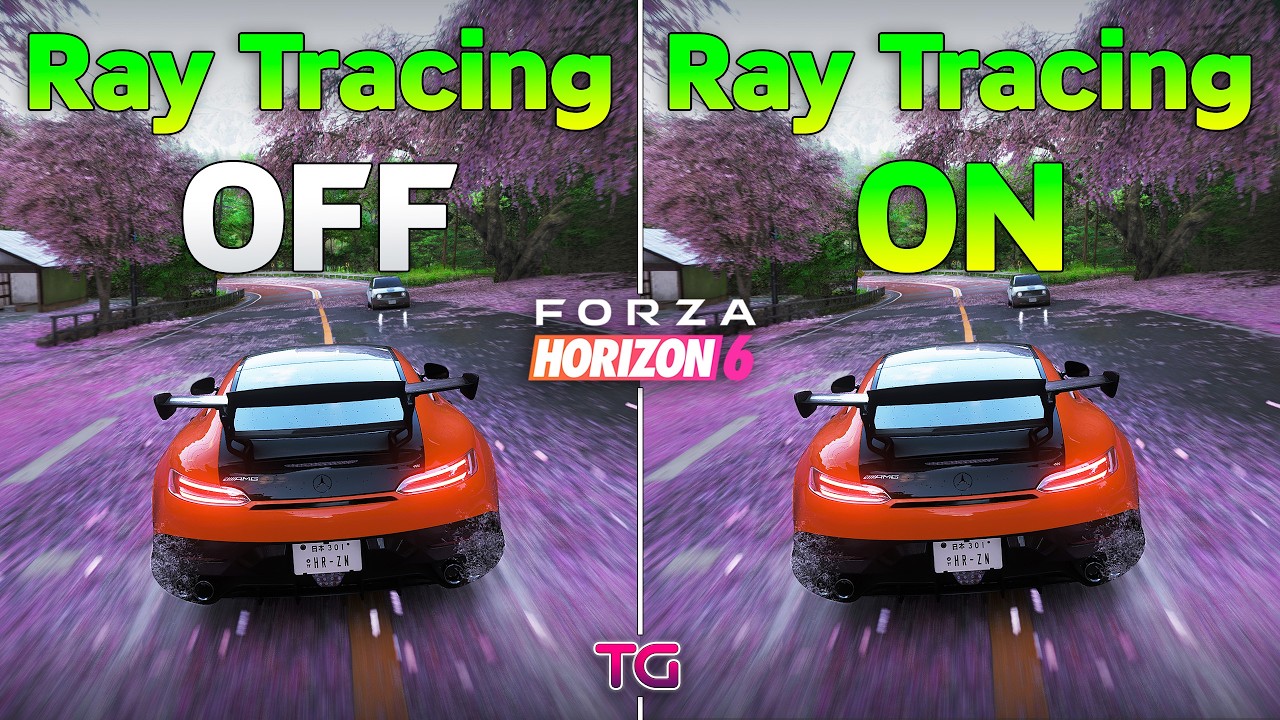
Forza Horizon 6 : Ray Tracing OFF vs ON | 4K
Buy games at the best prices on Eneba:
https://ene.ba/TestingGames01
https://ene.ba/TestingGames01-Games
https://ene.ba/TestingGames01-GiftCards
4K, Extreme Settings, DLAA
System:
Windows 11
Ryzen 7 9800X3D - https://bit.ly/3NZh3Rb
MSI MPG X670E CARBON - https://bit.ly/3YWS871
RAM 32GB DDR5 600...
broken rain
lusty rain
no it doesnt
you mean it doesnt look better?
copper vortex
lusty rain
https://www.youtube.com/watch?v=srURJsSHBtg
Lmao, holy shit that RT cost.
random furnace
here's another video just in case
https://www.youtube.com/watch?v=Sj0rM0Bns2o
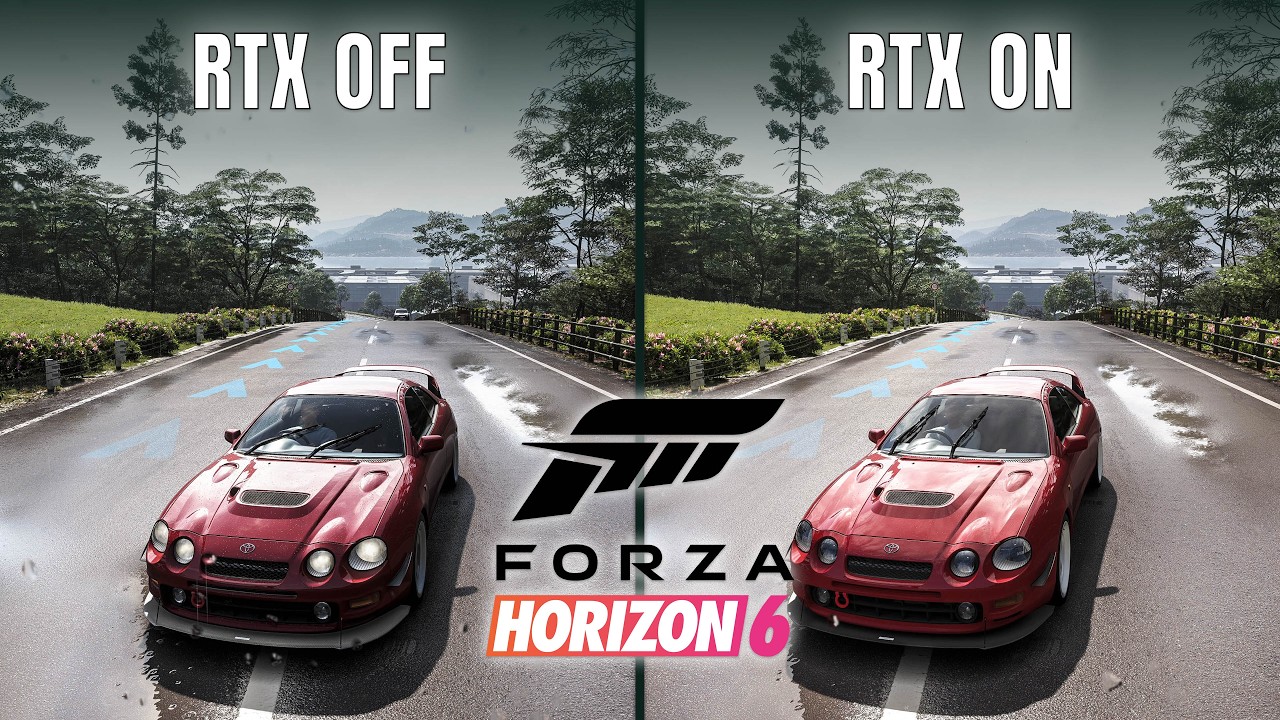
Support the channel and grab your games at the best price:👇
🔗 https://ene.ba/RTXLobby-Games
🎮 https://ene.ba/RTXLobby
🎁 https://ene.ba/RTXLobby-GiftCards
⚡ USE CODE: "RTXLobby" and save more on Eneba using my personal code at checkout!
- Monday 12:00 CET - Friday 12:00 CET - 5% for games, DLC, game points
- Friday 12:00 CET - Mond...
wispy eagle
preset L 1080 - 4K
 smoky cloak
What's the tldr on those vids? Just turn off RT?
reef bane
lusty rain
no it doesnt
uhh it really does though
pulsar peak
I’m not trying to be mean. But if you can’t tell what RTGI does how do you tell HDR differences?
smoky cloak
pulsar peak
If you can’t tell the difference you shouldn’t be in this server
Maybe we need an entry exam
pulsar peak
Hahaha
fallen jolt
lusty rain
no it doesnt
If you don't have an eye for how visuals are grounded by RTGI, then enjoy your free performance, but don't speak for others.


 smoky cloak
The flip side is I also have an eye for the RTGI noise and artifacts
 pulsar peak
fallen jolt
If you don't have an eye for how visuals are grounded by RTGI, then enjoy your f...
pulsar peak
fallen jolt
If you don't have an eye for how visuals are grounded by RTGI, then enjoy your f...
Pretty much this
fallen jolt
reef bane
https://tenor.com/view/shh-cats-gif-14317670277085954258
Well, who doesn't? 🙂
I don't see that much noise in actual gameplay tbh, but sure...RR would be nice.
 tranquil narwhal
DLSS-RR sure would be nice, game can be real noisy with RTGI
abstract verge
The game has dll for it but they do not use it
tranquil narwhal
hopium for a patch adding support then
spark meteor
random furnace
The screenshot is not in HDR, so it's hard for us to tell
Try to take screenshot...
is this shot in HDR ?
 abstract verge
HDR
 spark meteor
lusty rain
rt off and rt on in this game looks abut the same
spark meteor
lusty rain
rt off and rt on in this game looks abut the same
hell no it doesn't
spark meteor
abstract verge
HDR
thx
sturdy torrent
im also making a compariosn video for RT vs NO Rt in this
abstract verge
pulsar peak
oh nice!
smoky cloak
The first Rush race (Pier Pressure) is insanely fun. So good
spark meteor
smoky cloak
The first Rush race (Pier Pressure) is insanely fun. So good
i love the race against the mecha
pulsar peak
Omg so good
 silk cairn
Does anyone have a comparison between native vs renodx hdr ?
silk cairn
Ty
spark meteor

 floral moon
Does anyone use OptiScaler when it comes to FG for FH6?
And DisplayCommander for locking the FPS?
 coral marsh
floral moon
And DisplayCommander for locking the FPS?
coral marsh
floral moon
And DisplayCommander for locking the FPS?
I use relimiter with adaptive smoothing and VRR cap. why would need optiscaler?
 unkempt swift
abstract verge
unkempt swift
abstract verge
wish it was pathtraced, definitely could be done with upscaling shame
 supple carbon
 lavish blade
anyone with a 4080/5070ti have an idea what dlss settings to use?
lavish blade
anyone with a 4080/5070ti have an idea what dlss settings to use?

Testing the Nvidia GeForce RTX 5070 GPU in FH6 at 1080p, 1440p and 4K resolutions, using the Maximum settings with and without Ray Tracing, DLSS and Multi Frame Generation!
⏱ Timestamps ⏱
Intro, Specs, Stuff - 0:00
1440p Max / RT Off / DLAA - 0:33
1440p Max / RT Off / DLSS Q - 9:20
1440p Max / RT Off / DLAA / FG 2x - 13:41
1440p Max / RT O...
unkempt swift
next gen like every game will have pathtracing at least AAA
since the pee-es-6 is pushing RT hard
spark meteor
lavish blade
i'm on 3440x1440
I personally use DLSS Q and FG 2X on top of these settings

 spark meteor
unkempt swift
wish it was pathtraced, definitely could be done with upscaling shame
spark meteor
unkempt swift
wish it was pathtraced, definitely could be done with upscaling shame
i hope it gets it only implemented when rr presets have been updated to the quality of dlss 4.5
unkempt swift
spark meteor
i hope it gets it only implemented when rr presets have been updated to the qual...
RR 4.0 is fine and much preferred over no RR and dlss 4.5. Definitely would rather have pathtracing than dlss 4.5, but yes I am not sure why Nvidia is dragging their feet on updated RR
spark meteor
it's a personal preference at this point, i agree
nbidia should get their shit together
unkempt swift
dlss 4.5 is good but like a sidegrade over 4.0 for me running preset L in most games
it does make dlss balanced look nearly as good as dlss quality 4.0 even performance at 4k sometimes looks amazing to me
but I guess that is where it's meant to be used for more aggressive upscaling, it doesn't really make quality and dlaa look much better though
spark meteor
it doesn't , no
dlss p 4.5 looks almost as good as dlss q 4.0 , aye
why leaving rr on 4.0 is a mystery for me
unkempt swift
yeah rr can be noisy, I think some people say that dlss 4.5 can sometimes be comparable or better than RR, but not my experience at all
RR is like a must for pathtracing for me
spark meteor
unkempt swift
yeah rr can be noisy, I think some people say that dlss 4.5 can sometimes be com...
comparable, maybe in some specific situations but better, no imo

Nexus Mods :: Forza Horizon 6
This mod aims to be a complete rework of car sounds in FH6. While still a work in progress, this includes all my previous sound mods, so those who use them all have an easier time keeping track of stu
👍
spark meteor
 limber fiber
 solar shard
The glow up for taillights makes the mod worth it tbh lol
They’re so weirdly dull normally
 zealous bramble
Gorgeous mod. I run low paperwhite and game clips max nits to a 1000 instead of 2500 without the mod so its a no brainer
arctic bone
its an upgrade alright
 unkempt grove
I don't really get the drivatar difficulty levels in this game. It feels like on the higher difficulties they just get boosted straight line speed no matter what class their car is, and they somehow rocket up to like 300 kph evry time. But then on tracks with lots of corners, it's pretty easy to beat them just by outbraking them into turns
arctic bone
expert feels borderline but pro and beyond feel like shit to play against
unkempt grove
so I set the difficulty pretty high because I want the challenge, but on a lot of tracks there's not much I can do because the AI just pulls away on the straights, even with lower class cars. Then on other tracks it's the complete opposite and almost too easy, to the point where I wish I could raise the difficulty even higher
arctic bone
granted im playing with 0 assists and manual on a pad but it makes zero sense for the ai to have the grip of a F1 car when youre driving some shit ass 2000s sedan in the wet
 full aurora
Download tunes by competent tuners and every race will be easy.
arctic bone
also the AI still feels like it has 0 awareness of your position on the track and has no race etiquette
not about to listen to another game where they handwave that shit as 'uhh actually its mapping player behavior'
full aurora
Yeah, the AI in these games has always been sub-par.
They'd need something like Gran Turismo's SOFI or whatever it's called.
arctic bone
sophy yeah, its great even if its only a preview with the DLC and enabled for some quick races
unkempt grove
I don't even mind the AI driving itself that much. I get that this is more of an arcady game so I'm not expecting super realistic racing. But the fact that it always feels like I'm driving a much slower car than the rest is really annoying
arctic bone
if the ai was more sophisticated I dont think theyd have to scale their top speed the way they do at least thats how i view the two as interconnected
unkempt grove
Puts me at the back of the grid at the start, gives me 3 laps to overtake AI opponents on rails... aaah how i missed this…
 Reddit
spark meteor
Reddit
spark meteor

 unkempt grove
ye, for sure, the drivatar difficulty should probably scale other aspects
spark meteor
it almost feels like the ai in this game is the most basic iteration pg could find or was willing to spent resources on
find some friends and race together
way better experience
spark meteor
arctic bone
also the AI still feels like it has 0 awareness of your position on the track an...
it's simple and basic, they just follow the racing line 100% of the time and are reckless
 unkempt grove
and also the racing line braking points are kinda shit. You can never really trust it to tell you when you should brake or not. That's kinda standard thing in racing games, though, but here it feels even worse than usual. Probably not much different from the other horizon games
the AI, of course, follows it too so when there's a braking point marked on the racing line that you can completely skip, the AI still brakes anyway and the race becomes easy
I'm wondering if it wouldn't be better to just turn it off completely
sturdy torrent
 spark meteor
unkempt grove
and also the racing line braking points are kinda shit. You can never really tru...
spark meteor
unkempt grove
and also the racing line braking points are kinda shit. You can never really tru...
use shadertoggler to disable the hud completely, way more immersive experience
spark meteor

 placid wind
is there a way to turn of chromatic abherration

 placid wind
is there a way to turn of chromatic abherration
placid wind
placid wind
is there a way to turn of chromatic abherration
ah, its in "hud and gameplay" lul
 radiant lotus
unkempt grove
I don't really get the drivatar difficulty levels in this game. It feels like on...
radiant lotus
unkempt grove
I don't really get the drivatar difficulty levels in this game. It feels like on...
forza horizon games are infamous for their rubber banding
only way to win on high difficulties is to hit the AI on the turns
also i remember in horizon 5 you could restart a race and teh AI would race completely different, so you'd go from a hard af race to a easy one
 pale echo
Game is so much fun
 solar shard
- fix on/off toggle
- remove useless profile selection
@fringe mesa so yes async is needed, and it works with or without devkit. If I don't have async on, then the on/off toggle only works if devkit is also loaded.
I've got a feeling trying to slop this live loading thing isn't gonna work out now that github copilot got neutered model options
 wet locust
does the in game "maximum brightness" slider in HDR section is in nits ? i mean my monitor is 1000nits but the symbol only disappear at 10000 value.
solar shard
it is in nits, yes. And that probably means your monitor is tone mapping
which monitor is it?
fringe mesa
you might be able to add cbuffers if you find which root signatures you need to skip
solar shard
honestly I'm not sure I care enough. The in-game options are solid enough
contrast slider would be cool I guess but eh
wonder if there's any other sliders I have access to that I could hardcode and hijack lol
hmmm nothing reasonable I guess
anyway, part of me kinda likes how clean it is to "just work"
fringe mesa
ya
solar shard
alright now to grab the UI shader that's flash banging out 10k nits
spark meteor

fringe mesa
that contrast boost that they have in hdr
is that consistent between LUTs
like can you just reverse it to get sdr contrast
solar shard
I'm not even using it
fringe mesa
oh right
solar shard
but they form both the SDR and HDR color in this lutbuilder and output to two RTVs, then sample in compositing based on if SDR or HDR is used
fringe mesa
are you crawling the lut or just doing 0.18
solar shard
so I could just use SDR if I wanted
just doing 0.18 but I need to make it more accurate
sometimes it's off
fringe mesa
ya a loop with a couple samples to find the inflection point
solar shard
I still don't really "get" that. Like I conceptually get it, just the math is lost on me still
fringe mesa
slop will do it
solar shard
I know I knew it at some point cause it's like, calc 1 stuff
fringe mesa
you'd have to add a new sample and then measure slope
and see which direction causes slope increase vs decrease
solar shard
I'll give it a try after I fix this UI shader
fringe mesa
being able to describe what you want to do in lots of detail helps slop a lot
atomic kraken
I guess not if you can't get cbuffer injection for the game
Is this common with new games?
Not being able to inject or whatever
solar shard
only happened to me with this game where it crashed
but musa had issues with reengine games for a while with their RT
atomic kraken
Oh wack
placid wind
solar shard
* fix on/off toggle
* remove useless profile selection
on -> off crashed game for me
solar shard

I tested without devkit loaded, wonder why it's doing that
anybody else try it yet?
placid wind
in game or in menu
its fine for me at main menu now...
let me try again in game
fine now in garage, working
yeah fine now who knows lul
solar shard
I think I had a random crash or two with it before actually, but I thought it was just devkit shenanigans
spark meteor
placid wind
but ya fine now i guess
works fine for me for the last 10 mins or so ...
toggle does not produce any crash
it's working fine
placid wind
it crashed for me first time moment i did it but unreproducible
solar shard
ominous but hopefully not frequent enough to be a major problem
solar shard
guess it's unsafe in some way
solar shard
I mean like not thread safe or something
placid wind
meant what i said was sort of applicable to anything but ye
man i cannot get wheel settings i am happy with
sturdy torrent
on vs off working perfectly fine
spark meteor

Today we're taking a look at all 109 Widebody Kits found in Forza Horizon 6. We have brand new Liberty Walk Silhouette kits, new Origin Lab kits, custom kits, new forza kits and designer specials. This video took forever to create and I hope it helps towards your Forza Horizon 6 Experience.
▬▬▬▬▬▬▬▬▬▬▬▬▬▬▬▬▬▬...
sturdy torrent
 dense coyote
placid wind
man i cannot get wheel settings i am happy with
dense coyote
placid wind
man i cannot get wheel settings i am happy with
after messing around myself and trying a few other peoples set ups, this is what ive settled on for now. maybe it will work for you.
https://www.patreon.com/posts/forza-horizon-6-158387721
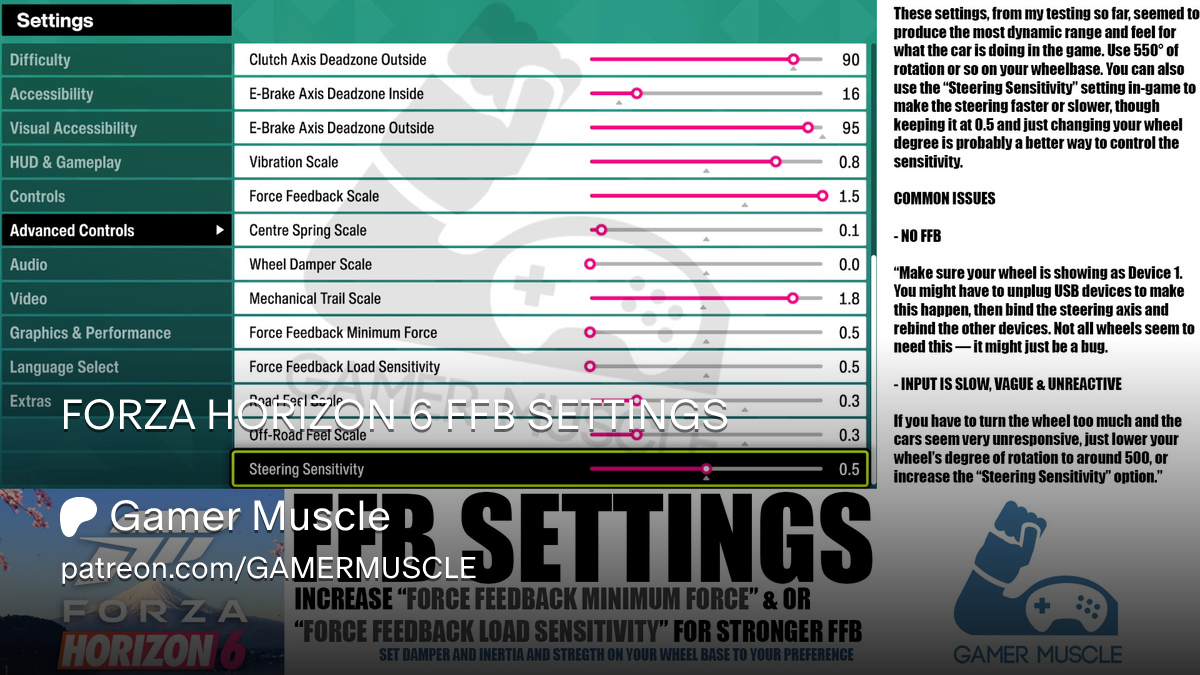
Patreon
FORZA HORIZON 6 FFB SETTINGS by Gamer Muscle on Patreon. Join Gamer Muscle's community for exclusive content and updates.
 safe jacinth
spark meteor
use shadertoggler to disable the hud completely, way more immersive experience
safe jacinth
spark meteor
use shadertoggler to disable the hud completely, way more immersive experience
is the game playable like that? I want to close all the HUD when the game releases too but how can I find the events like that then?
wet locust
solar shard
which monitor is it?
xiaomi gpro 27i
i apply e EOTF fix so maybe thats why
on gpu 3D lut
wet locust
thats the EOTF curve im using cause the HDR is too dark by default and also fix the red tint by increasing blue contast and decreasing red contrast by one tick. not optimal but no choice
 placid wind


@solar shard left is reno. feel like its blowing out to white a bit too much here?


those lights are gaining like 600 nits, probably why
solar shard
I probably do need to reduce the blowout a smidge since I dropped cone response in the last update
placid wind
you plannin to gib sliders at some point
solar shard
can't
placid wind
ah dang
time of day really affects those lights
deep night to dusk and can't get em like that anymore
solar shard
may need to reduce highlights a little bit more still
this is already with highlights reduced btw
game bright
placid wind
IRL those lights are properly bright, but maybe a tad there and a tad off blowout
solar shard
ultimately blowout/hue has to do with peak and paper white


 solar shard
using photo reference is essentially just comparing to whatever picture formation system is used for the photo
but yeah it should probably go more to orange than white
may switch from cone response to contrast
then I won't need blowout, which goes to white, and LMS tone map will probably handle it better
but, the blowout generally looks more in line with how the game is "supposed" to look
placid wind
it would be interesting to get real measurements of brake lights
i was noticing last night, they are incredibly bright these days (as are all car lights)
placid wind
if you want to test a similar scenario
go to mountain road (too much light in city)
photo mode
time of day: night
weather: heavy precipitation
but yea without knowing shit, just a slight trim to blowout / highlights would probably "fix" it good enough, but i'm only staring at brake lights
 inland plover
Excuse me. How do I install it?
smoky cloak
inland plover
Excuse me. How do I install it?
Install Reshade with Add-on support to your game folder.
Download the RenoDX add-on file from the pinned comment.
Drop the Add-on in your game folder.
Make sure HDR is enabled in game.
Optional but recommended for slight performance boost - disable the other two addons within the reshade add-on menu in game, and restart the game. You don't know these ever when using only renodx
pulsar peak
placid wind
ah, its in "hud and gameplay" lul
I find the toggle doesn’t actually remove CA
 modest light
Yo guys I got the game on the xbox app(regional pricing xD), does it work the same as for steam games and is it bannable online?
spark meteor
modest light
Yo guys I got the game on the xbox app(regional pricing xD), does it work the sa...
yes and no
i use the play anywhere version
bans are highly unlikely
modest light
spark meteor
yes and no
kk ill try it now
olive junco
Reshades worknwith gamepass games?
 native yacht
olive junco
Reshades worknwith gamepass games?
native yacht
olive junco
Reshades worknwith gamepass games?
yes, I play so much on Xbox app with Gamepass PC, just you must install the reshade on gamelaunchhelper.exe, not on game.exe like on Steam, Epic, GoG, etc.👍
olive junco
Alright cool
modest light
Are you guys using preset L here?
digital sentinel
I use M at 3440x1440 DLAA, looks good to me
modest light
I am trying L at 1440p both dlaa and quality got artifacts in road lines and stuff
modest light
digital sentinel
I use M at 3440x1440 DLAA, looks good to me
whats your dlss sharpness at?
digital sentinel
default 0.5 ingame, I dont think its too sharp
modest light
hmm i tried from 0 to 0.5
native yacht
modest light
I am trying L at 1440p both dlaa and quality got artifacts in road lines and stu...
happen me the same with Forza Motorsport
modest light
i see
idk which preset to use even
past few games were just ray reconstruction xD
native yacht
its already out on Gamepass in any region?
modest light
idk
if anyone is experienced with dlss 4.5 is it maybe preset L at DLAA thats causing issues?
digital sentinel
digital sentinel
I use M at 3440x1440 DLAA, looks good to me
dlss 4.5 here, no issues for me
native yacht
are you use Nvidia Inspector Profile? but in this case I would say that the game need RR
modest light
Ye I think maxed out rt can make stuff grainy since thats what im running
no denoiser
digital sentinel
yeah because of the lack of RR I switched to SSGI, the noise with medium level RTGI was just too much, high RTGI then too taxing on my system
modest light
i dont notice it always but when I do its shit, dlaa preset L which in theory should be the best xD
maybe theyll bring full path tracing with rr
abstract verge
Preset L and M makes rt noise worse
K and E is better at RT noise but
K has more ghosting
E is blurrier overall
 fervent inlet
i personnally dont use RTGI at all because once u are in forest or tunnel u have a shitton of noise or even under the car
but its already in reported issues from devs so it might change soon
fallen delta
wouldn’t adding RR fix that
digital sentinel
it should
native yacht
fallen delta
wouldn’t adding RR fix that
and with greater low performance 😫
inland plover
RayTracing doesn't even work for this game on Linux with AMD GPU.
digital sentinel
shouldnt RR improve performance or have a negligible effect on fps? I've only used it on one game in the past, alan wake 2
Detailed PC Specs
GeForce RTX 5060 Ti 16GB Asus TUF - Core +300 Memory +3000, power 110%, PCIE 5.0
AMD Ryzen 7600 (Asus Enhanced PBO On) (Deepcool AG620 Air Cooler)
32GB Ram DDR5 6,000Mhz CL30 (16x2 Dual Channel)
Gen4 NVME SSD (Read/Write 7,300/6,700 MBps)
Asus Rog Strix B650E-F PCIE 5.0 Motherboard
Resizable Bar - On
Windows 11 Pro
Recording ...
@S2GamesBench
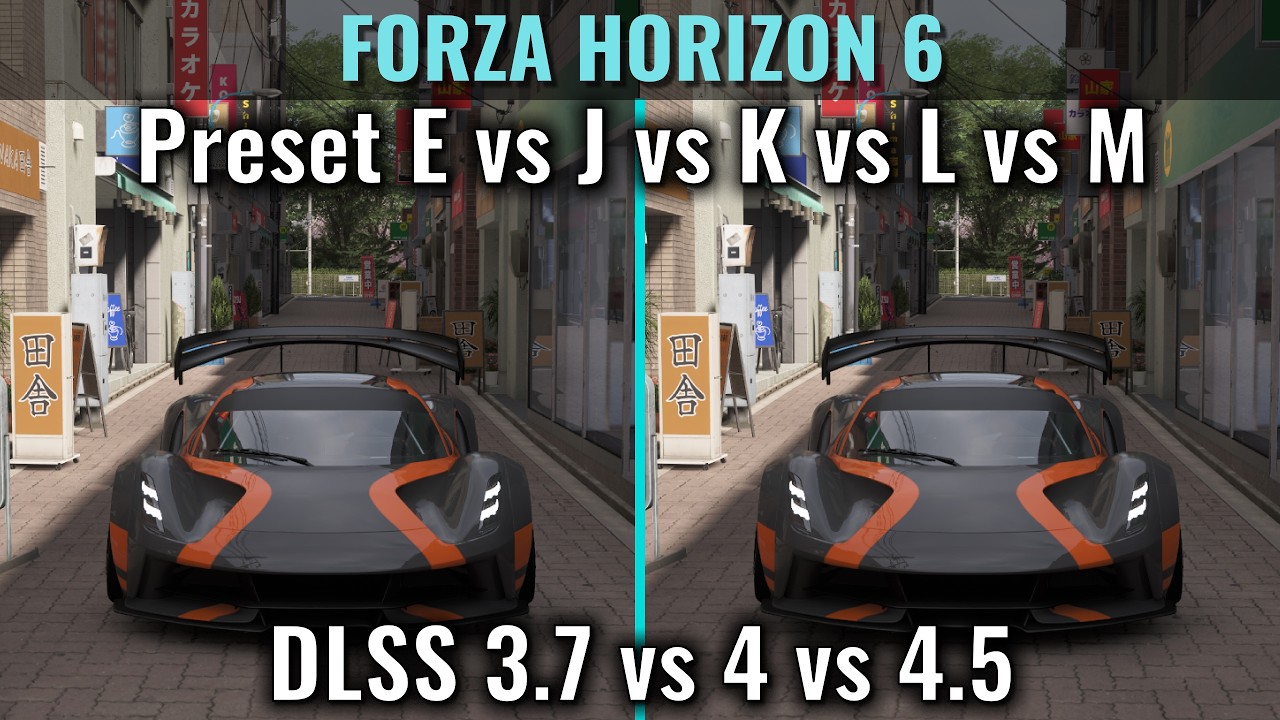
DLSS 4.5 struggles with ray tracing on, especially preset M, with ray tracing kept off DLSS 4.5 works fine (03:24 05:39).
DLSS 4 Preset K while not being perfect does better than 4.5 presets when RT is kept on.
If you plan to keep ray tracing on, use preset K.
If you plan to keep ray tracing off, you can use M or L.
If you plan to keep ray tracing off but have 30 or 20 series GPU, use preset K.
calm holly
but dlss 4.0 has so much worse ghosting than 4.5
just saw the video, holy shot 4.5 is really bad lol
with ray tracing
ornate tundra
4.5 seems to hit the performance hard too
 bronze cosmos
4.5 doesnt play well with denoisers
 marble geyser
placid wind
<@82555599505588224> left is reno. feel like its blowing out to white a bit *to...
marble geyser
placid wind
<@82555599505588224> left is reno. feel like its blowing out to white a bit *to...
nah left here is way better
From my experience that's what psychov does
maybe a tad off or something but everything about the left image is better
placid wind
marble geyser
nah left here is way better
It’s better overall for sure but I’d be curious if it could be less white while not making other stuff too punchy
Reducing paper white to 50 kinda gave me a happy medium for those lights but of course that’s not actually a solution lul
The issue is that there are a bunch of cars with lights like this that are blowing out to white and imo they shouldn’t (to this degree, if possible)
Cars like the Silvia which model an incandescent bulb, you get a nice falloff from the light source so hue is preserved for most of the lamp
 sour scaffold
brothers and sisters, a forza 5 lover here! would i love this thing tomorrow or be meh?
random furnace
Why is everyone forgetting the brother of DLSS Preset K? J is great for fast games, try it if you don't like K, L or M
unkempt grove
radiant lotus
forza horizon games are infamous for their rubber banding
yeah, honestly, I feel like that's the case here too. Sometimes I struggle to catch up to a few cars that get ahead early in the race, and when I can't close the gap I just restart and often I can get into the top 3 within the first three corners and then the race feels a lot easier
pulsar peak
random furnace
Why is everyone forgetting the brother of DLSS Preset K? J is great for fast gam...
They tested J?
Seems like K is the way to go with ray tracing on
random furnace
pulsar peak
Seems like K is the way to go with ray tracing on
it takes a few seconds to switch the preset, I would just try it myself instead of listening to a video 
no but seriously, other people don't have my sensitivities, I try myself and then find what I like best for which game
before L was out, J helped me in TombRaider and co a lot against ghosting
nowadays it's 90% L with some J/K here and there
 proper fulcrum
so whats the best DLSS preset for the least amount of ghosting? its my #1 biggest issue with the game
pulsar peak
J or K it seems
I’m gonna go with K as that guy does a ton of these videos and compares games like this weekly
random furnace
proper fulcrum
so whats the best DLSS preset for the least amount of ghosting? its my #1 bigges...
DLSS 4.0: K is the most stable, J is the best against ghosting
DLSS 4.5: L and M are very good against ghosting
DLSS 3: C is anti ghosting, E/F are the most modern ones, could be fine for ghosting for you
 slim schooner
random furnace
nowadays it's 90% L with some J/K here and there
slim schooner
random furnace
nowadays it's 90% L with some J/K here and there
M is better in most games in my experience
 grizzled helm
SDR/RenoDX SDR

 pulsar peak
slim schooner
M is better in most games in my experience
pulsar peak
slim schooner
M is better in most games in my experience
M looked horrible in that video
grizzled helm
look at that sky detail come back. fh6 vanilla is clipped to hell in SDR

 proper fulcrum

Testing the Nvidia GeForce RTX 4070 12GB GPU in FH6 at 1080p, 1440p and 4K resolutions, using the Max settings with and without DLSS, Frame Generation and Ray Tracing!
⏱ Timestamps ⏱
Intro, Specs, Stuff - 0:00
1440p Max / RT Off / DLAA - 0:23
1440p Max / RT Off / DLAA / FG 2x - 2:18
1440p Max / RT Off / DLSS Q - 6:01
1440p Max / RT Off / D...
that spoiler ghosting / trailing against the wall

 pulsar peak
Probably not as reshade would definitely fuck with blizzard anti cheat stuff
UE4/5 definitely has Reno
pale echo
for D4 just use the black floor fix with reshade without addon
spark meteor
grizzled helm
love the RTGI in this game. just wish it wasn't this noisy
Is your VRAM full or are these low res ground textures because of framegen ?
grizzled helm
spark meteor
Is your VRAM full or are these low res ground textures because of framegen ?
this is embarrasing but I am running off of a VM in a hard drive. don't have another choice atm because my main PC is acting as a server for the time being
spark meteor
gotcha
smoky cloak
I suddenly seem very CPU limited when yesterday I wasn't 🙃
slim token
wish it had realistic smoke in dirt roads
calm holly
random furnace
Why is everyone forgetting the brother of DLSS Preset K? J is great for fast gam...
just tried preset J. While its slightly better than K, its still way too unsharp and not nearly as crisp as L/M
 carmine rampart
Yeah I don't like Preset K/J in this game either. The two 4.5 presets are for sure the way to go even with the more noisy RT resolve.
Still deciding between Preset M Balanced or Preset L Performance though.
 woeful bay
Guys, when I enable HDR, the whole image looks washed out, even with RenoDX
carmine rampart
You on Nvidia? I had this issue too once. Look if Nvidia RTX HDR is enabled in the game filters. Sometimes it's on top of the games HDR which looks terrible.
If that's not the case try setting max brightness to about ~5% window size peak brightness of your display and paper white to about ~100 nits if you're in a dark room. ~200 is better for bright rooms.
smoky cloak
carmine rampart
Yeah I don't like Preset K/J in this game either. The two 4.5 presets are for su...
Heh, I've just decided I like K with some RCAS...just not the ghosting right behind the car, but in real world use I find that less egregious than the RT noise, which is terrible
I think I've settled on preset K, DLAA, max settings, FGx2, locked to 120fps...
woeful bay
carmine rampart
You on Nvidia? I had this issue too once. Look if Nvidia RTX HDR is enabled in t...
YES, RTX 4070
carmine rampart
I think the RT noise also highly depends on the internal res. Since I'm on 5120x2160 with DLSS Balanced my internal res is still 2970x1253 which is high enough to mask most of the noise.
woeful bay
What’s the best preset in the NVIDIA app for this game?
carmine rampart
There's no best preset. It depends on what you want. Best ghosting mitigation? Preset M/L. Best Noise mitigation? Preset K/J.
Preset M/L are also a lot sharper than Preset K/J
smoky cloak
carmine rampart
I think the RT noise also highly depends on the internal res. Since I'm on 5120x...
I'm doing 4K quality
carmine rampart
woeful bay
Is anyone playing on an OLED TV? I’d like to know the best settings you used
Yeah I do. What do you mean with best settings?
slim schooner
calm holly
just tried preset J. While its slightly better than K, its still way too unsharp...
K and J are just obsolete. It makes no sense to use them imo (with 4000 series or newer)
Either M or L depending on the game. Most times M is good enough
woeful bay
carmine rampart
Yeah I do. What do you mean with best settings?
On the TV and in the game
carmine rampart
slim schooner
K and J are just obsolete. It makes no sense to use them imo (with 4000 series o...
If you're sensitive to RT noise, Preset K is obviously much better. If they would be obsolete they would've been removed. Also Preset M/L are much more expensive on older hardware.
carmine rampart
woeful bay
On the TV and in the game
We don't know your TV and we have no idea what your target framerate is for the game? HardwareUnboxed has a good optimization guide on youtube.
slim schooner
carmine rampart
If you're sensitive to RT noise, Preset K is obviously much better. If they woul...
K looks so blurry to me now. I’m so used to the crispness of the new models
woeful bay
carmine rampart
We don't know your TV and we have no idea what your target framerate is for the ...
I’m using a 42-inch OLED C5 with a 7800X3D + 32GB RAM + RTX 4070
carmine rampart
woeful bay
I’m using a 42-inch OLED C5 with a 7800X3D + 32GB RAM + RTX 4070
Just looked at rtings review. Peak brightness ~1100 nits. If you wanna be safe from ABL go with 1000 nits.
woeful bay
Does RenoDX work on the Game Pass version?
carmine rampart
Paperwhite default is 200 but personal preference mostly. I would keep it between 100-200
carmine rampart
woeful bay
Does RenoDX work on the Game Pass version?
Yes. Must install Reshade with full Addon support onto the launch .exe instead of the game .exe
woeful bay
carmine rampart
Paperwhite default is 200 but personal preference mostly. I would keep it betwee...
ok
thnaks
woeful bay
carmine rampart
Yes. Must install Reshade with full Addon support onto the launch .exe instead o...
I tried it here, but it says I need permission to open the Forza Horizon 6 file.
carmine rampart
Install it to the launcher .exe not the forza horizon 6 .exe
zealous bramble
for fh6 reno specifically if i touch saturation or paper white much my brake lights look pink (lg g5 calibrated)
smoky cloak
slim schooner
K looks so blurry to me now. I’m so used to the crispness of the new models
I was a preset M fan for life before this game, but I prefer K with DLAA here
placid wind
I wish there was a middle setting between RTGI high and medium. Medium is a massive perf boost but the denoising makes some foliage super blurry
abstract verge
Honestly anything medium and low shouldnt exist
The noise is just that bad
I dont think anyone would choose to play with them
placid wind
I was…I mean even in high the noise can be bad in tunnels and stuff
So it’s like, at some point it just is what it is
I swapped to high plus DLSS quality
Which trades some less GI noise for more subpixel aliasing
Power lines are awful
Reflections in puddles also noisy with DLSS regardless of setting
placid wind
DLAA is a big upgrade but with high RT, during rain, perf is pretty low
woeful bay
How do you guys take screenshots with HDR enabled?
abstract verge
Reshade
 odd crystal
do you have to use offline or can i use online without risk of being banned?
limber fiber
woeful bay
How do you guys take screenshots with HDR enabled?
windows + g and SKIV
calm holly
yall, disable SAM and/or REBAR with Nvidia Inspector for a smoother frame pacing, pretty buggy with it enabled
woeful bay
abstract verge
Reshade
how?
abstract verge
woeful bay
how?
In settings tab you can designate a screenshot key and it should take hdr screenshots for you next to game's exe
digital sentinel
limber fiber
windows + g and SKIV
What's SKIV?
abstract verge
Special K Image Viewer
ornate tundra
woeful bay
I’m using a 42-inch OLED C5 with a 7800X3D + 32GB RAM + RTX 4070
I have the same TV, i set paper white to around 160-180 and my peak brightness to 1000 (or adjust it with the slider in game or in reno), when avaliable I set my UI brightness lower (around 100) to reduce the risk of burn in from static objects.
You can also you a program called "ColorControl" to reduce dimming and adjusting some settings, though i suggest looking into it first before aimlessly adjusting settings lol.
limber fiber
abstract verge
In settings tab you can designate a screenshot key and it should take hdr screen...
you maybe have to put .png instead of jxr in the same tab
woeful bay
ornate tundra
I have the same TV, i set paper white to around 160-180 and my peak brightness t...
I’m going to do that. And what settings do you use on the TV?
rancid elbow
sour scaffold
brothers and sisters, a forza 5 lover here! would i love this thing tomorrow or ...
Definitely better than 5 I would say. The map alone is a big improvement.
ornate tundra
woeful bay
I’m going to do that. And what settings do you use on the TV?
HDR: Game Optimiser (User Settings)
Advanced Setting -
Brightness -
OLED Pixel Brightness: 100 (Your choice)
Dynamic Tone Mapping: On
Epression Enhancer: Off
Near Black Detail: 0
Video Range: Auto
Motion Eye Care: On
Colour -
Tint: 0
Colour Gamut: Auto Detect
White Balance -
Colour Temp: Warm 40
Method: 2 Points
Point: High
Red, Green & Blue: 0
Some will say turn off the Dynamic tone Mapping or enable Hgig, but for me, i prefer it on.
carmine rampart
ornate tundra
HDR: Game Optimiser (User Settings)
Advanced Setting -
Brightness -
OLED Pixel ...
OLED Pixel brightness should ALWAYS be at 100.
Dynamic Tonemapping is meant for static metadata content like movies or tv shows, not video games.
Warm 50 is the most accurate color temperature on LG TVs unless they changed it in the 5/6 series models. (I'm wrong. It's warm 40 now)

 digital sentinel
carmine rampart
OLED Pixel brightness should ALWAYS be at 100.
Dynamic Tonemapping is meant for ...
digital sentinel
carmine rampart
OLED Pixel brightness should ALWAYS be at 100.
Dynamic Tonemapping is meant for ...
iirc warm40 is the right value on 5 and 6 series
carmine rampart
digital sentinel
iirc warm40 is the right value on 5 and 6 series
Ah okay nevermind then. I have a G3 where it was still warm 50.
woeful bay
ornate tundra
HDR: Game Optimiser (User Settings)
Advanced Setting -
Brightness -
OLED Pixel ...
thanks
ornate tundra
carmine rampart
OLED Pixel brightness should ALWAYS be at 100.
Dynamic Tonemapping is meant for ...
so you leave you DTM off for games?
rancid elbow
That's what you should do if you'r'e going for Accuracy yes
calm holly
RenoDX with Reshade "Curves" to darken the nights. 4K with DLSS M Quality, Extreme

 frail elk
rancid elbow
Definitely better than 5 I would say. The map alone is a big improvement.
frail elk
rancid elbow
Definitely better than 5 I would say. The map alone is a big improvement.
I frequently see areas with very flat lighting. Its not consistent but is present to my eyes. I'm not running ray tracing but is ultra settings.
Fh5 lighting was good everywhere
pulsar peak
calm holly
RenoDX with Reshade "Curves" to darken the nights. 4K with DLSS M Quality, Extre...
whats a reshade curve to darken nights
also that isnt night lol


 frail elk
Also low lod draw distance terrain. Especially at those grass terrain when nearing snow mountain areas
pulsar peak
lods are fine given the map size and speed, its tough to do it without killing perfomance
LODs overall are pretty good

how big is this map compared to like crimson desert?
frail elk
Asset Lods like these trees buildings are fine but that terrain suddenly going ultra low res bugs me
pulsar peak
definitely could be better but theyre pushing the limits of LODs and speed for games
cant think of another open world game where you move this fast
and has a map this big
 carmine rampart
ornate tundra
so you leave you DTM off for games?
carmine rampart
ornate tundra
so you leave you DTM off for games?
Yes because you can set the max brightness value in game to match your displays capabilities. DTM is for when a movie mastered for 10,000 nits peak brightness but you don't want it to clip. It automatically maps the movie/tvshow into what your display can physically show.
carmine rampart
frail elk
I frequently see areas with very flat lighting. Its not consistent but is presen...
Probably because the world is much more vertical so we have more general shadowed regions which makes the lighting look more flat
carmine rampart
frail elk
Also low lod draw distance terrain. Especially at those grass terrain when neari...
LODs on Extreme are the same as highest settings FH5 I feel.
slim schooner
smoky cloak
I was a preset M fan for life before this game, but I prefer K with DLAA here
Interesting. Guess i will see tomorrow when I can finally play
carmine rampart
The vertical map exposes more LOD issues than the flat FH5 map. If you look into the distance when driving up the mountain in FH5 the LOD can look pretty bad too. I feel like they were smart putting that mountain in an area with not much foliage.

 carmine rampart
pulsar peak
carmine rampart
pulsar peak
Holy sharpening artefacts though haha
pulsar peak
carmine rampart
Holy sharpening artefacts though haha
Yeah need to turn it down. Not used to using this sharpener
 safe jacinth
is default settings good or do i need to do some custom settings? I'm waiting for game to be released in 1 hour
carmine rampart
safe jacinth
is default settings good or do i need to do some custom settings? I'm waiting fo...
Watch the HardwareUnboxed optimization guide.
safe jacinth
carmine rampart
Watch the HardwareUnboxed optimization guide.
I meant for renodx settings
carmine rampart
RenoDX has no settings. Just on or off
safe jacinth
thank you so much
pulsar peak
carmine rampart
RenoDX has no settings. Just on or off
Not entirely true. The in game brightness etc was modified so you change the in game settings which have been tuned for Reno
smoky cloak
pulsar peak
Too oversaturated for my tastes tbh
pulsar peak
smoky cloak
Too oversaturated for my tastes tbh
hahaha yeah I like saturation and contrast mmmm
smoky cloak
Fair enough, this is a game to crank it up in if that's your thing!
pulsar peak
haha definitely
 wooden timber
Why doesn't fix the Renodx file sunglow clipping ?

 humble widget
Does Reno fix the overbrightened nights in this game?
 silent charm
would people recommend trueblack 500, peak 1000 or EOTF boost on the msi mpg 271qr x50 for this game?
solar shard
wooden timber
Why doesn't fix the Renodx file sunglow clipping ?
haven't found a fix yet
may not be possible
wooden timber
humble widget
Does Reno fix the overbrightened nights in this game?
I don't know what the Renodx file does , the car lights at night are incorrect, and the sun's glare seems cut off.
random furnace
calm holly
just tried preset J. While its slightly better than K, its still way too unsharp...
not really surprising, L/M does a double take and is much more advanced
but if it's just sharpness, you could try the RCAS shader from ReShade in combination with J as someone mentioned here, it can help mitigate it
of course only if you don't like the denoiser problem with L/M, then I would just stay on them 😉
 dense glen
silent charm
would people recommend trueblack 500, peak 1000 or EOTF boost on the msi mpg 271...
dense glen
silent charm
would people recommend trueblack 500, peak 1000 or EOTF boost on the msi mpg 271...
trueblack 500 for this game
random furnace
silent charm
would people recommend trueblack 500, peak 1000 or EOTF boost on the msi mpg 271...
just try it out 🙂
On my monitor I thought I would like peak 1000 more than peak 1500, but in the end I stayed with 1500 because it's just that beautiful and the ABL or dimming is not as bad as I thought it would be
solar shard
wooden timber
I don't know what the Renodx file does , the car lights at night are incorrect, ...
what do you mean by incorrect?
smoky cloak
Looks great to my untrained eyes Jon
 low wren
nice work
orange is orange now 😄
woeful bay
Guys, which of the two formats is better for taking HDR screenshots?
 low wren
woeful bay
Guys, which of the two formats is better for taking HDR screenshots?
low wren
woeful bay
Guys, which of the two formats is better for taking HDR screenshots?
jxl is better
depends where you want to post them
if it's for discord then png
woeful bay
discord and whatsapp web
low wren
png then
woeful bay
ok
unkempt grove
is it normal for the red flares during street races to look so bad with dlss enabled?
woeful bay
Has anyone found the AE86 yet? I searched on YouTube for where to find it and found nothing
I found it, I even teared up a little lol
solar shard
welp, I've spent a bunch of time trying a bunch of stuff and literally none of it has worked out 😭
slim schooner
Game not unlocking in gamepass for us plebs 
low wren
solar shard
welp, I've spent a bunch of time trying a bunch of stuff and literally none of i...
you've done a good job as it is man
don't stress too much 🙂
low wren
slim schooner
Game not unlocking in gamepass for us plebs <:despairge:1409648830307369061>
man i changed my region to NZ and it unlocked at 1pm no problem, didnt have to restart or anything
 frail pivot
44 mins
slim schooner
Its at 2am?
low wren
close xbox app fully then do this to unlock now
slim schooner
The countdown i saw was to 1
frail pivot
yeah seems like
slim schooner
low wren
close xbox app fully then do this to unlock now
Will try!
No luck
Whatever I´ll install it in the morning
frail pivot
the nz timezone method works
placid wind
@solar shard if i wanted to play around with this mod, am i better off forking from shortfuse and then pulling in your stuff or just forking your repo. or does it not matter. i have no plans to commit anything back, just an excuse to play around and learn at this point.
solar shard
uhhhhh well, my code is an absolute mess right now, but for this game probably just forking mine
placid wind
don't worry i'm gonna slop it up more
wish i could use my work funny money; effectively unlimited use of latest / heaviest models lul
 wet dragon
I'm not sure what everyone is talking about but switching to preset L looks great. At least it cleaned up the noise in the shadows under trees. But I'm still early.
ah I see a bit of noise when I'm not moving but it's a lot harder to notice.
wet dragon
ehhh nvm still some weirdness that is too hard to ignore.
wet dragon
man smoke looks like ass regardless of preset
pulsar peak
It’s gonna get extra busy in here with full launch day coming up!
Only been premium so far
 visual nova
nighttime in this game really looks like that one random rtx lighting demo from nvidia

 old quartz
Headlights in the night with my 4000 nits modded panel are insane lol
fringe mesa
@granite nimbus please help unslop
We need volumetrics or something
The city looks awful
 fringe mesa
ya same
but I actually wanted to try out this game for the graphics
but the graphics are ass
natural environments are fine
but cities are so ass
wet dragon
I've crashed twice already womp
 wispy bramble
fringe mesa
but the graphics are ass
wispy bramble
fringe mesa
but the graphics are ass
i dont think the graphic can be solved by renodx ? or you guys can somehow make it possible
proper fulcrum
this game shits itself soon as i open afterburner + RTSS lol
woeful bay
proper fulcrum
this game shits itself soon as i open afterburner + RTSS lol
I left Riva like this, then it’s going to work
 low wren
proper fulcrum
this game shits itself soon as i open afterburner + RTSS lol
low wren
proper fulcrum
this game shits itself soon as i open afterburner + RTSS lol
relimiter works 
digital sentinel
unkempt grove
is it normal for the red flares during street races to look so bad with dlss ena...
from what I've read on reddit the red flares have been like that since the previous game, unsure if its a PC "feature" or a bug that PG doesnt bother to fix
solar shard
anybody take the time to experiment with dlss presets and know which one happens to handle the noise in the RTGI the best?
digital sentinel
solar shard
anybody take the time to experiment with dlss presets and know which one happens...
Detailed PC Specs
GeForce RTX 5060 Ti 16GB Asus TUF - Core +300 Memory +3000, power 110%, PCIE 5.0
AMD Ryzen 7600 (Asus Enhanced PBO On) (Deepcool AG620 Air Cooler)
32GB Ram DDR5 6,000Mhz CL30 (16x2 Dual Channel)
Gen4 NVME SSD (Read/Write 7,300/6,700 MBps)
Asus Rog Strix B650E-F PCIE 5.0 Motherboard
Resizable Bar - On
Windows 11 Pro
Recording ...
placid wind
solar shard
anybody take the time to experiment with dlss presets and know which one happens...
they're all different versions of shit, seems to be down to preference
anything except DLAA on K, L, M (all that i've tried) and subpixel aliasing is terrible
not GI, just...everything
K is probably better since its softer
wet dragon
M has been my preference personally
placid wind
RTGI on medium has pretty high softness + noise in low light areas with any preset
wet dragon
K and L both sucked
placid wind
i'm doin DLAA, Preset M, RTGI med
wet dragon
if I could do DLAA I would go for that
placid wind
its the balance of perf / noise for me (including aliasing)
wet dragon
definitely disapointed in the noise
placid wind
i'm anti frame gen so i don't use that. i could run DLAA + RTGI high otherwise.
digital sentinel
I couldnt stand the medium RTGI noise, switched to maxed out SSGI, preset M with DLAA, looks fine enough to me when going a bazillion miles per hour
solar shard
when I tested options in-game, fsr2 seemed to do well with the noise
placid wind
IDK what this game is doing to make DLSS perform so poorly (visually) + pretty bad RT denoising all around
placid wind
maybe the power lines lack motion vectors or something
they're always hard but in this game its particularly bad
RDR2 with DLAA its hard to spot much breakup
fitna try preset E
smoky cloak
DLSS K with DLAA is the sweet spot for me. 4K 5090, 2xFG, RCAS. Only remaining gripe is some ghosting directly behind the car, which I've learned to live with.
Preset M was noisy with RTGI
placid wind
E might actually be good lul
 old quartz
Normally it is connected to my living room TV for couch gaming
proper fulcrum
woeful bay
I left Riva like this, then it’s going to work
thanks
placid wind
i'm back to preset L + quality + high RT atm
this might be it. the subpixel aliasing is manageable and there is little RT noise.
TBH SSGI is fine in 80% of scenarios...if i had a mid range GPU, just run that, fuck RT lul
wet dragon
im getting awful stutter even though my performance is good weird
digital sentinel
disable ingame vscync and force it via driver
and disable reflex from the ingame options if you're on nvidia
marble geyser
fringe mesa
We need volumetrics or something
don't put this curse on us they might actually do it
marble geyser
 granite nimbus
Dont care for drivingslop
granite nimbus
Dont care for drivingslop
you do care for crimson desert? i thought that was slop game
 marble geyser
granite nimbus
I left
marble geyser
granite nimbus
I left
Did care*
Daily updates for that shit is so ass for yall
😭
wispy bramble
fringe mesa
god damn wtf
fallen jolt
smoky cloak
DLSS K with DLAA is the sweet spot for me. 4K 5090, 2xFG, RCAS. Only remaining g...
Try DLDSR (x1.78 @ 100% smoothness) + DLSS Preset L @ balanced or quality. I think overall it looks better than Preset K + DLAA.
wet dragon
digital sentinel
disable ingame vscync and force it via driver
I always have it that way, vsync, and as far as reflex won't it be on regardless since I'm using FG? I can try the toggle though.
digital sentinel
wet dragon
I always have it that way, vsync, and as far as reflex won't it be on regardless...
I did see @fierce rover test frametimes with FG on and off, and off was significantly smoother than on
wet dragon
I'll give it a try, surprisingly decent framerate without it, granted I'm on performance/balanced.
solar shard
Btw I pushed an update into snapshots and things happened and I forgot to post a build. Now I’m in bed.
Minor update, just some small tweaks to the tone mapping.
If anybody wants it, it’s probably live through the link on the renodx mods wiki page
smoky cloak
fallen jolt
Try DLDSR (x1.78 @ 100% smoothness) + DLSS Preset L @ balanced or quality. I thi...
Cool I'll try, thanks
smoky cloak
solar shard
If anybody wants it, it’s probably live through the link on the renodx mods wiki...
Will try this too 😎
marble geyser
just realized i could finally play it
did the opening looks great so far
not sure how much of a difference I would've noticed vs default hdr tho lol
very pretty game
fallen jolt
marble geyser
not sure how much of a difference I would've noticed vs default hdr tho lol
pretty big difference IMO, especially at night in the city area. Default hdr has often times poor blacklevel. Colors are also affected.
 misty epoch
solar shard
If anybody wants it, it’s probably live through the link on the renodx mods wiki...
misty epoch
solar shard
If anybody wants it, it’s probably live through the link on the renodx mods wiki...
can someone link me to this, I cannot find this page
GitHub
Renovation Engine for DirectX Games. Contribute to clshortfuse/renodx development by creating an account on GitHub.
marble geyser
fallen jolt
pretty big difference IMO, especially at night in the city area. Default hdr has...
Yeah from the screenshots i've seen it looks really awesome
will have to do some testing myself when i have time
 obsidian panther
Hmm how much modding potential does forza 6 have? From the screenshots and videos, the graphics looks a bit too “clinical”
pulsar peak
Probably not too invasive due to it being online and having some form of checks. But nexus has tons of mods already from car models to sounds and more. I added a mod that brings back the Forza horizon 3 water splashes on the screen. So there’s some potential for sure
low wren
marble geyser
not sure how much of a difference I would've noticed vs default hdr tho lol
you can really tell the difference toggling on/off
colours look more colourful and closer to what they should be
orange looks orange for example now
wispy bramble
so this mod is currently the best way to play?
fallen delta
it feels a bit over saturated, do you guys leave saturation at 100?
marble geyser
 marble geyser
fallen delta
it feels a bit over saturated, do you guys leave saturation at 100?
marble geyser
fallen delta
it feels a bit over saturated, do you guys leave saturation at 100?
100?
you mean 50?
default it usually 50 or around there unless it's changed recently
low wren
marble geyser
you mean 50?
the mod is just on/off


 marble geyser
yeah saturation is a bit much there lol
low wren
oh i like saturation 🙂
marble geyser
fair enough
 south grotto
hows game
fallen delta
marble geyser
default it usually 50 or around there unless it's changed recently
default is at 100 for me
low wren
south grotto
hows game
good so far after a few hours
more of the same when it comes to forza horizon, they've not strayed from the formula
if you liked the other ones then you'll like this
marble geyser
fallen delta
default is at 100 for me
is it a in game setting?
low wren
 south grotto
low wren
good so far after a few hours
more of the same when it comes to forza horizon, t...
south grotto
low wren
good so far after a few hours
more of the same when it comes to forza horizon, t...
ngl Fh5 "story" felt ultra cringe
low wren
south grotto
ngl Fh5 "story" felt ultra cringe
yeah same here
it's a big car circle jerk with everyone egging each other on about how great they are at driving etc
marble geyser
probably not gonna be any different based of my first 30 minutes
marble geyser
good thing that's not why anyone plays these games ig
south grotto
tru but would be nice to have a decent story
where im not treated like im 3 years old
low wren
one thing that i've noticed so far is that all the trees are destructible so you're not gonna hit some solid oak flying through a forest wrecking your combo
south grotto
 south temple
is this works on gamepass version?
low wren
south temple
is this works on gamepass version?
yes
south temple
low wren
yes
i tried it but no diff maybe something wrong with my preset or install?
low wren
south temple
i tried it but no diff maybe something wrong with my preset or install?
use RHI to make sure it installs correctly
#1474481327691665553 message
south temple
low wren
use RHI to make sure it installs correctly <:gigachad:1409720491492507749>
http...
so reshade 6.7 not working anymore?
low wren
south temple
so reshade 6.7 not working anymore?
6.7.3 is latest
south temple
yes i using that preset
i installed on gamelaunchelper.exe its works but the reshade not have diff on and off
low wren
you dont need to worry about that with RHI
it'll install reshade next to the games proper exe and work no problem
south temple
hmm ok i will try rhi should i uninstall my reshade before?
low wren
south temple
hmm ok i will try rhi should i uninstall my reshade before?
yeah delete the dxgi.dll next to gamelaunchhelper
south temple
low wren
yeah delete the dxgi.dll next to gamelaunchhelper
which one i should install
 low wren
south temple
which one i should install
low wren
south temple
which one i should install
you'll be good like that
if you want a frame limiter just choose one of them, relimiter is pretty good but either will do
they're optional really
south temple
low wren
you'll be good like that
if you want a frame limiter just choose one of them, re...
Ic ic, so it is safe for fh6? Despite it being multiplayer?
low wren
yeah you need reshade for renodx
i blacklisted these for you too so they'll be hidden when you refresh

 frozen edge
Can't wait to try it out
low wren
frozen edge
Can't wait to try it out
playground have nailed it again man
game is fun
south temple
off - on

 frozen edge
Is my first forza horizon game
low wren
frozen edge
Is my first forza horizon game
you're in for a treat then ha
frozen edge
How is the fomo? That's kinda worrying me a bit
south temple
its looks like without mods the sky was washed out like tree
frozen edge
Played 5 on the cloud a bit and I remember it had a lot of fomo cars and events
low wren
frozen edge
How is the fomo? That's kinda worrying me a bit
game will have legs so you won't miss anything
horizon 5 was supported for months/years
frozen edge
Legs?
digital sentinel
knees and toes?
low wren
frozen edge
Legs?

 fringe trench
frozen edge
Legs?
fringe trench
frozen edge
Legs?
leg
 slim schooner
fringe mesa
slim schooner
fringe mesa
Holy shit they did this in crimson? Good shit. Is it perf heavy?
grizzled helm
slim schooner
Holy shit they did this in crimson? Good shit. Is it perf heavy?
not that heavy
fallow swallow
frozen edge
How is the fomo? That's kinda worrying me a bit
gonna have to wait and see, first festival playlist doesnt start for a couple days but there's some sort of "playlist history" thing now so hopefully its better than it was
grizzled helm
depends on the settings though. the renodx crimson mod is like a remake
even has custom ray tracing shaders to replace the game's implementation
slim schooner
grizzled helm
depends on the settings though. the renodx crimson mod is like a remake
Nice stuff. I guess I’ll check it out when I finally buy the game. Dunno if I’ll have a lot of perf to spare at 4K with a 4080 tho
I heard with RR this game is HEAVY
grizzled helm
yeah and the game kinda relies on RR for a good chunk of its ray tracing impact
yet stuff like grass shading is still broken with RR, only renodx fixes it
slim schooner
Thanks Forge 🙏
grizzled helm
looks like a 2.0 overhaul

 fallow swallow
 grizzled helm
you can see more in #crimson-desert ofc. but this really shows that reno could solve so much in games
abstract verge
 fallow swallow
frozen edge
E:0-17
fallow swallow
frozen edge
E:0-17
can apparently be from windows debloaters, having metered connection on, or other stuff that can block connecting to microsoft services like your hosts file or something
 spark meteor
unkempt grove
is it normal for the red flares during street races to look so bad with dlss ena...
spark meteor
unkempt grove
is it normal for the red flares during street races to look so bad with dlss ena...
blocky minecraft flares, yeah .... annoying af
spark meteor
digital sentinel
> second 5090
he always needs to flex with that. I hear that constantly in crimson desert channel from him ^^ you get used to it.
frozen edge
fallow swallow
can apparently be from windows debloaters, having metered connection on, or othe...
Hosts files was it
Holy
The FFB is so good
 dark moss
is there a fix for bright nights ?
digital sentinel
spark meteor
he always needs to flex with that. I hear that constantly in crimson desert chan...

fallow swallow
dark moss
is there a fix for bright nights ?
not besides lowering overall brightness as far as i know :( been brighter since 5 sadly, 4 was darker at night
spark meteor
fallow swallow
gonna have to wait and see, first festival playlist doesnt start for a couple da...
fomo is gone, every car from any playlist can now spawn in the map for you to buy with credits after the festival has ended.
fallow swallow
spark meteor
fomo is gone, every car from any playlist can now spawn in the map for you to bu...
it'll be really good if they do that, think a dev said they might do something like that with the aftermarket cars but i didnt think there was any confirmation beyond that?
dark moss
fallow swallow
not besides lowering overall brightness as far as i know :( been brighter since ...
Game is gorgeous but i really don’t like the how the night looks. Hopefully renodx gets an update that fixes it or something
spark meteor
fallow swallow
it'll be really good if they do that, think a dev said they *might* do something...
that is exactly how it works now, you missed a car, go for aftermarket random spawns
fallow swallow
nice if true, im still doubtful they'll completely get rid of fomo... here's hoping
spark meteor
fallow swallow
nice if true, im still doubtful they'll *completely* get rid of fomo... here's h...
CM_Artie (Fh6 dev) said in the forums that we can earn reward cars "across several series". The achievements also dropped…
 Reddit
it's true
no need to be doubtful
fallow swallow
yep, i guess my faith in a modern AAA game completely getting rid of fomo isnt high... im just concerned with the way they word this that it'll only be certain secondary cars and not every one available as part of it
 spark meteor
 spark meteor
fallow swallow
yep, i guess my faith in a modern AAA game completely getting rid of fomo isnt h...
spark meteor
fallow swallow
yep, i guess my faith in a modern AAA game completely getting rid of fomo isnt h...
understandable
 keen dune
how can I install renodx?
spark meteor
keen dune
how can I install renodx?
GitHub
Renovation Engine for DirectX Games. Contribute to clshortfuse/renodx development by creating an account on GitHub.
keen dune
perfext, is there also a ultra realistic shader out? Or are you just using renodx only
spark meteor
using reno only , i just played with saturation and contrast a bit on my own .
keen dune
hm I saw some 4k ultra realistic shader for horizon 5 so I want to improve my graphics also 😄
spark meteor
keen dune
hm I saw some 4k ultra realistic shader for horizon 5 so I want to improve my gr...
where ?
keen dune
on youtube
spark meteor
i'd like to improve that here
 keen dune
what are your settings bro? iam confused about mine
what do you choose here? I have a RTX 5080
 fallow swallow
keen dune
hm I saw some 4k ultra realistic shader for horizon 5 so I want to improve my gr...
fallow swallow
keen dune
hm I saw some 4k ultra realistic shader for horizon 5 so I want to improve my gr...
theres probably reshade presets available in places, usually tend to overdo things and not look great imo, i think it looks fine with just reno
spark meteor
keen dune
what are your settings bro? iam confused about mine
gimme a sec to boot up the game


 keen dune
Okey I copied your settings
fallow swallow
keen dune
and here, dont know which I need to use.. cant use both
ray tracing is more demanding and may have more noise, but is more accurate and tends to look better, if you want more performance use screen space, can use real time preview in game to compare
spark meteor
I use screen space reflections instead of ray traced ones. rtgi is on though
fallow swallow
rt looks better in a lot of places but screen space looks pretty good too, been swapping between using it and not, glad you dont need to restart between settings changes like the older games
spark meteor
tweak it to your liking
 spark meteor
it is very subtle
keen dune
oh okey
spark meteor
switch on or off at nights
fallow swallow
make sure hdr is on at the top of video settings btw, was off by default for me on first launch
easier to tell in game, not sure theres any difference in the menu
keen dune
https://www.youtube.com/watch?v=Cf204gn_c-8 this is what I meant with ultra realistic

Cruising in a BMW M4 Competition G82 in Forza Horizon 5 using PXN VD Series steering wheel setup hope you enjoy the video!
Discord : https://discord.gg/2mfuhWg
PC Specification: (DESKTOP)
Processor : Ryzen 5900x
GPU : Nvidia RTX 4090
RAM : 32GB DDR4
fallow swallow
keen dune
https://www.youtube.com/watch?v=Cf204gn_c-8 this is what I meant with ultra real...
if they're using a reshade preset its probably just some extra contrast/sharpening, doesnt look too different from vanilla
spark meteor
reflections are better
south grotto
"ultra realisitic" more like dogshit xd
fallow swallow
I'd just use reno and not anything else to begin with and can mess with effects or presets later
fallow swallow
south grotto
"ultra realisitic" more like dogshit xd
yea not a fan of 99% of those ultra realistic 4k photoreal rtx on ass presets lmao
spark meteor

foggy weather
@keen dune You could turn on rt reflections if you have a 5080 . Game looks okay to me .
slim schooner
Any must have mods?
spark meteor
I use https://www.nexusmods.com/forzahorizon6/mods/54 and https://www.nexusmods.com/forzahorizon6/mods/13
Nexus Mods :: Forza Horizon 6
This mod aims to be a complete rework of car sounds in FH6. While still a work in progress, this includes all my previous sound mods, so those who use them all have an easier time keeping track of stu

Nexus Mods :: Forza Horizon 6
Replaces all 36 tracks of the Horizon Pulse radio station with Eurobeat, specifically those used throughout the Initial D anime
fallow swallow
spark meteor
<@1057699601165062215> You could turn on rt reflections if you have a 5080 . Gam...
yea on a 5080 you should be good with both, think rtgi is more demanding on high than reflections too iirc
spark meteor
fallow swallow
yea on a 5080 you should be good with both, think rtgi is more demanding on high...
rtgi is more demanding, yes