#PRAGMATA
1 messages · Page 3 of 1
 strange sage
what tile size and scale are you using?
 shut dome
logically that would be the one to use when using path tracing
and the ray tracing one when using ray tracing
but im not sure
strange sage
or are those still default? Those are the settings we were saying crash if changed, turning on RC doesn't crash, changing the sub-options does
shut dome
not sure what tile size is sorry, I did 5 bounces of PT tho only other thing I changed
no its radiance cache on or off thats it, that was doing it
i was one of the folks who pinpointed this yesterday
 latent briar
Where is this setting?
 tight hinge
Re framework, need a separate .lua script, don't bother.
strange sage
shut dome
just the path tracing one didnt fuck up for me so far
Yee, seems like the PT options for bounces are fine to change, I might test to see what specifically causes crashes with RC options changed
strange sage
latent briar
Where is this setting?
Need REFramework and the "pragmata_tweaks.lua" script then it appears under Generated UI in the REFramework menu
strange sage
latent briar
Where is this setting?
#1475553827255222486 message
link to the script file so you don't have to dig for it
shut dome
@arctic glen can you pin the latest lua for reframework/pragmata
 blazing dagger
didn't some people a few hours ago say that radiance cache leads to crashes?
 fervent frigate
this is still with Lilium's HDR RCAS?
shut dome
yes and no
path tracing one doesnt
and extra PT bounces doesnt
ray tracing one does
there are both ray tracing and path tracing headings with the same toggles
i turned it all off to get past that one crash, but since then no crashes and thats like 4 more hours of playing
 oblique cedar
Does Radiance Caching work on AMD cards? Hopefully we'll get a noisy path tracing bypass soon!
 plucky axle
shut dome
i turned it all off to get past that one crash, but since then no crashes and th...
plucky axle
shut dome
i turned it all off to get past that one crash, but since then no crashes and th...
so there's only 1 crash ant its there?
shut dome
at least for the ray tracing we have identified yes
only path tracing tested after that
most have just kept it all off
but I am testing with path tracing radiance cache on and PT bounces at 5
I did not use the higher res shadow maps option, I didnt find them to look too bad so I rather save the 2GB of vram
 frail glen
do you use match hdr or sdr?
 slate marsh
Can Chromatic Aberration be turned off in this game? I saw a couple screenshots and it looks AWFUL with it
 rain girder
fervent frigate
this is still with Lilium's HDR RCAS?
rain girder
fervent frigate
this is still with Lilium's HDR RCAS?
Yes, and im using it quite heavily since im playing on 4k perofrmance mode most of the time lol.
frail glen
rain girder
Yes, and im using it quite heavily since im playing on 4k perofrmance mode most ...
Im just tuning that how much you set?
fervent frigate
rain girder
Yes, and im using it quite heavily since im playing on 4k perofrmance mode most ...
same actually so I'll try it out
fervent frigate
slate marsh
Can Chromatic Aberration be turned off in this game? I saw a couple screenshots ...
set lens distortion to On without CA in the graphics settings, or off you don't like that at all
fervent frigate
shut dome
but I am testing with path tracing radiance cache on and PT bounces at 5
like this, right?
 shut dome
yeah!
 native orbit
I don't recommend using radiance cache, it causes crashes
native orbit
at least one crash i reproduced multiple times
shut dome
that was ray tracing radiance cache
native orbit
There is only one setting to enable or disable radiance cache
 shut dome
toggle under path tracing has been ok after that crash
look under ray tracing
its there too
rain girder
frail glen
Im just tuning that how much you set?
Ive set it to .935 🥴 which might be too much but I like it.
shut dome
that was the one we were originally turning on
frail glen
rain girder
Ive set it to .935 🥴 which might be too much but I like it.
that much, is it so blurry in this game?
shut dome
I do not find the game blurry
but I am using DLAA 2160p
turn off bloom and lens flare in the in game options
that ruins the image
native orbit
@shut dome can you screenshot your config as i am confused
blazing dagger
shut dome
toggle under path tracing has been ok after that crash
where / when is that known crash?
rain girder
frail glen
that much, is it so blurry in this game?
Not sure if its blurry because of the Chromatic arberation or what but im also playing on 4k dlss performance mode. It brings out the details in the suit and the wall panels. It will probably look awful to me tmmrw and ill turn it down lol .
shut dome
blazing dagger
where / when is that known crash?
after the 4th red beacon in fake new york
blazing dagger
so basically exactly where I am 😄
shut dome
native orbit
<@314921862180241414> can you screenshot your config as i am confused
the original instructions posted here showed the ray tracing cachce under the ray tracing options, there is a header you can open for ray tracing too
im not in game atm
frail glen
rain girder
Not sure if its blurry because of the Chromatic arberation or what but im also p...
its probably because of ray reconstruction wasnt it the same problem in crimson desert. they need to update that
shut dome
I might be wrong and hallucinating like AI lol
Will check once I’m back in
But I’ve had path tracing radiance cache and 5 PT bounces since after getting past that crash. And no issues.
native orbit
I fear you are spreading misinformation
strange sage
If anything, the correct info would be that it crashes in one spot with RC enabled
shut dome
Well I’m telling the truth that post crash spot I’ve had it all on with no issues
native orbit
you are thinking about bounces maybe? that had two settings, one under radiance cache and one under PT?
shut dome
native orbit
you are thinking about bounces maybe? that had two settings, one under radiance ...
Maybe will check
frail glen
what does radiance cache do anyway?
shut dome
But I’m saying after that crash spot I’ve had both on with no issues and am back at the shelter after the Terra dome
rain girder
frail glen
its probably because of ray reconstruction wasnt it the same problem in crimson ...
Putting it that high brings out the details in the androids face and the writing on the suit.
 strange sage
native orbit
you are thinking about bounces maybe? that had two settings, one under radiance ...
strange sage
native orbit
you are thinking about bounces maybe? that had two settings, one under radiance ...
That would make sense, it was mentioned to me that the bounces, tile size, and scale should be kept the same because those cause crashing
specifically under the Radiance Cache tab
frail glen
rain girder
Putting it that high brings out the details in the androids face and the writing...
Ill try it Im also on 4k performance with my 5070ti
strange sage
bounces under the PT tab seem to be fine according to others here
shut dome
yeah sorry, and to be clear I removed reno and reframework to get past the crash, i turned radiance cache and increased bounces again after that with no issues and I am past the terra dome which is the third area
I guess I am saying its safe to turn it all back on after that crash spot
sorry for my poor communication on that
blazing dagger
is the crash during a cutscene or should we just not enable it while we're close to the location?
fervent frigate
shut dome
turn off bloom and lens flare in the in game options
you left lens distortion on?
shut dome
I turned that off but that doesnt really cause blur
native orbit
strange sage
That would make sense, it was mentioned to me that the bounces, tile size, and s...
The only thing I had enabled was radiance cache, and that caused the crash alone.
There is only one radiance cache toggle as far as I can see

 strange sage
native orbit
The only thing I had enabled was radiance cache, and that caused the crash alone...
strange sage
native orbit
The only thing I had enabled was radiance cache, and that caused the crash alone...
Fair, so would it be fair to say it seems like it crashes at one specific spot and seems to be stable after that from what @shut dome said?
native orbit
I'm pretty sure the RT settings are irrelevant if you are using PT
shut dome
strange sage
Fair, so would it be fair to say it seems like it crashes at one specific spot a...
Yes correct
My settings
 native orbit
At the moment you have a multiple users all reporting crash at that one point
shut dome
I’m using the new lua too
native orbit
i guess most of us turn it off and dont test later levels, also we probably dont have the ray bounces ticked under radiance cache, maybe that helps
shut dome
no
I just swear the original LUA had that and maybe that was the mix up
notice im using the newer one called lite too
mmmmmm new suit

finally starting to play today
native orbit

 urban creek

 stark cave
where do you get the latest LUA ? and where do you put that file ? I have nothing under scripted UI
Thnx
I dont have that pragmata setting at the bottom...
fervent frigate
stark cave
where do you get the latest LUA ? and where do you put that file ? I have nothin...
latest file: #1475553827255222486 message
install reframework and then put that file in:
PRAGMATA\reframework\autorun
stark cave
fervent frigate
latest file: https://discord.com/channels/1408098019194310818/147555382725522248...
thank you vm
native orbit
The two script versions are identical AFAIK, maybe the new one has shadow resolution as well but you really need to be careful about VRAM in this game
I am pushing 16GB in the second area and i dont even have the in game settings maxed out
native orbit
stark cave
thank you vm
Just be warned, if you use radiance cache you might get a crash and lose a fair amount of progress due to this game's save system
fervent frigate
that crash happens right here
native orbit
Yeah i can reproduce it again, with exact same settings as @shut dome
fervent frigate
@shut dome I think your settings are wrong
native orbit
So the question now I think is are later levels safe? because the entire first level was fine
 steep trench
u can try it urself im gonna turn back on after that spot, the performance increase is huge for me
urban creek
steep trench
u can try it urself<:gigachad:1409720491492507749> im gonna turn back on after ...
roughly ~10%
steep trench
from smooth dlss quality x2 fg (on) to laggy dlss balanced x2 fg (off)
native orbit
yeah i do miss the perf boost but im not sure if i have the patience to test it further without a good autosave
steep trench
i think the save point is enough for me to not minding those progress lost if i unlock those shortcut door
stark cave
So with PT and settings to max and the shadow tweak in reframework at ultra and 5 PT bounce and RC activated I am using 18gb of VRAM so far on my 4090
Game looks nuts
Obviously I am not far enough to have experience any crashes
Thats on DLSS quality 4K averaging 80-125 fps no issues
FGx2 offcourse
steep trench
my poor 4080s gonna keep at 3 unless there is a screenshot convince me there is a difference between 3 and 5
shut dome
fervent frigate
<@314921862180241414> I think your settings are wrong
Oh what should I change?
 arctic glen
yeah there is one spot where radiance cache crashes, idk about other spots
I have been turning it on and off
 arctic glen
no its fine
at least through the dome there is only one place I have had a crash from it, and I really want those extra 10 frames lol
but yeah no autosaving kinda means its frustrating to risk
 modest stirrup
Once you know where the crash point is, it’s pretty easy to avoid I think or just revert settings before passing it. And the hard fight is one time only, once it’s done and you managed to save, it doesn’t occur again.
plucky axle
we need to restart the game to do on/off that right?
 ivory stirrup
But only in wired mode or is there a workaround?
arctic glen
plucky axle
we need to restart the game to do on/off that right?
nah it can be changed live
ivory stirrup
steep trench
my poor 4080s gonna keep at 3 unless there is a screenshot convince me there is ...
So 3 is about optimal? What are the game defaults?
ivory stirrup
arctic glen
at least through the dome there is only one place I have had a crash from it, an...
So what exactly does this cache do and why is it not ingame by default? I'm new to reengine
arctic glen
cause its not really fully implemented
can look worse in some places, better in others
rare crashes in specific places
 ivory stirrup
arctic glen
cause its not really fully implemented
ivory stirrup
arctic glen
cause its not really fully implemented
Implemented by engine itself, the game dev side, or modder side?
arctic glen
engine itself
I mean they seem to have mostly implemented it
but its not fully fleshed out
rain girder
I’m playing on a 4090 and I’m not really seeing any performance improvement from using radiance cache. I’m roughly around the area where people are crashing. Is it because I’m not hitting vram limit ?
arctic glen
its about 10% perf increase
ivory stirrup
arctic glen
I mean they seem to have mostly implemented it
Since when is it a thing and how does it work in other games? So it's just a toggle but they dont enable it? And it's not enabled in any of their games yet on default?
ivory stirrup
Never heard of sharc either
 frank jetty
rain girder
I’m playing on a 4090 and I’m not really seeing any performance improvement from...
frank jetty
rain girder
I’m playing on a 4090 and I’m not really seeing any performance improvement from...
I didn't see that much of an improvement on 5080 also, but FPS is already high enough so that might be it
ivory stirrup
rain girder
I’m playing on a 4090 and I’m not really seeing any performance improvement from...
FG on or off? I'm not using fg so it'll hopefully be good for me but I'm also not maxing out on vram
steep trench
ivory stirrup
So 3 is about optimal? What are the game defaults?
game default is 3 ig
arctic glen
3 is default yeah, slight difference going to 5
frank jetty
I guess if you are running game at 40-50 FPS and want a bit more to turn on fg and have it more stable, yeah makes sense, but if you are already hitting above 60 then it becomes just ok
ivory stirrup
steep trench
game default is 3 ig
And ya'll are running the game with RT settings maxed = 3 rays?
arctic glen
yeah I often drop to a 45 or 50 base at dlss quality 5k x 2k in some areas, I am also using higher res shadows though
rain girder
ivory stirrup
FG on or off? I'm not using fg so it'll hopefully be good for me but I'm also no...
I am using framegen on 4k performance mode and getting 106 fps in the NY area. Regardless of radiance cache on or off.
frank jetty
ivory stirrup
And ya'll are running the game with RT settings maxed = 3 rays?
I removed the script for now at least, since game is running smooth
steep trench
ivory stirrup
But only in wired mode or is there a workaround?
always wired for haptic, DSX mentioned they r gonna make a driver for wireless but it already been months so i dont count on it
 zinc ermine
fervent frigate
that crash happens right here
zinc ermine
fervent frigate
that crash happens right here
Confirming that I've crashed here twice in a row
zinc ermine
it's annoying because the fight immediately prior is the toughest non boss fight in the game up till that point
arctic glen
yeah lol
frank jetty
steep trench
always wired for haptic, DSX mentioned they r gonna make a driver for wireless b...
I've been waiting for that also, that they will make it emulate as if it's wired and you can have it unwired, but nothing so far, for example, Ff7 rebirth haptics just works wired. So I always use that game as a demo to try dsx to see if they implemented it
ivory stirrup
steep trench
always wired for haptic, DSX mentioned they r gonna make a driver for wireless b...
Are haptics TRIGGERS often used in game or just rare cases or maybe too much? Got any opinions fun feature or annoying? The only game where it was really big for me was Returnal (dual firing modes)
arctic glen
the first time getting to it feels like a big effort though and losing the progress feelsbadman
tight hinge
I love the cooling on the MSI Suprim Liquid 5090 - game is nearly pulling 600W and I don't break 60C
steep trench
arctic glen
the first time getting to it feels like a big effort though and losing the progr...
yea true lol
ivory stirrup
You guys think game could use some patches or hot fixes or seems like good to start playing?
arctic glen
game seems good as is tbh
tight hinge
ivory stirrup
You guys think game could use some patches or hot fixes or seems like good to st...
It's probably th smoothest launch I can remember
plucky axle
so this chace can be activated on cyberpunk too?
tight hinge
Just play it
steep trench
frank jetty
I've been waiting for that also, that they will make it emulate as if it's wired...
idk i just feel they making promises for too long already, not having hope on it.
frank jetty
It seems good and stable, and gameplay is so fun
arctic glen
cyberpunk already uses a radiance cache by default
frank jetty
steep trench
idk i just feel they making promises for too long already, not having hope on it...
Yeah
steep trench
ivory stirrup
Are ~~haptics~~ TRIGGERS often used in game or just rare cases or maybe too muc...
just a gimmick implement in this game i would say. nothing like returnal that has actual function. but i think this is how most of the games implement this feature
arctic glen
why is returnal so goated
tight hinge
Spiderman 2 implements it pretty nicely
I actually had to turn the intensity down. My aging hands
ivory stirrup
arctic glen
why is returnal so goated
Only reason the sequel might be the last game I buy on ps5pro for a while, I have trust in it since it was indeed so goated
arctic glen
returnal feels bad to play cause it makes every other game feel worse lol
tight hinge
That's sekiro 😛
ivory stirrup
steep trench
just a gimmick implement in this game i would say. nothing like returnal that ha...
I was using some app that lets you make your own trigger responses which is kinda fun but it's a fixed function always active
Works wireless ofc
So I don't get it why they can't make it work wireless officially
rain girder
ivory stirrup
Are ~~haptics~~ TRIGGERS often used in game or just rare cases or maybe too muc...
I really liked it in ratchet and clank too. Also has dual firing modes on guns.
steep trench
ivory stirrup
So I don't get it why they can't make it work wireless officially
adaptive trigger always working in wireless, only haptic feedback not
i probably would like to play returnal if it got a more cartoon like art style lol sadly those aliens dark art style makes me uncomfortable 🙁
tight hinge
I just wish returnal wasn't a rogue light. I never get on well with them
My monkey brain needs linear progress
steep trench
if it is not punishing too much im good with that. hades did that perfectly.
ivory stirrup
tight hinge
My monkey brain needs linear progress
Hey you should give it a try still because roguelite is not a roguelike and there is linear progress in a sense of:
- your starting gear levels and unlocks level up as you progress/fail
- there is metroidvania style unlocks that ease your progression in future runs so you power up faster
It's not as punishing as you might think, don't believe the criticisms too much
steep trench
the resource lost death punishment is also the reason why i dont like playing dead cells lol
ivory stirrup
Game is beatable in one single run if you're really good (my friend did it first time playing I watched him), and I beat my first entire playtrough in less than 10 deaths. Once I got pretty deep I wasn't dying anymore, it was just a few dumb deaths early
Returnal is way shorter and "easier" than something like dead cells, you shouldn't skip on it if roguelite "aren't your thing"
steep trench
yea def better than dead cells, i only dont like returnal because of the art style so it doesnt help
shut dome
What does tile size do?
 loud hatch
the bosses in this game are extra hard compared. Difficulty diffierence versus regular enemies is massive
ivory stirrup
steep trench
yea def better than dead cells, i only dont like returnal because of the art sty...
Btw really cool thing about the game and the artstyle (kinda spoilerish maybe?) ||it's one of those "it was all in your head" games and once the revelation hits and you connect all the mistery and nonsense in the world it hits really good||
steep trench
loud hatch
the bosses in this game are extra hard compared. Difficulty diffierence versus r...
exactly what i said before, thought the same😂
arctic glen
what I mean about returnal is it just runs super well, looks great, and the inputs feel really good, low input lag, good frame pacing, interacting with the game is super polished
loud hatch
steep trench
exactly what i said before, thought the same😂
imma take a break. rage quit
arctic glen
so far I have thought the bosses were kind of too easy? idk
ivory stirrup
loud hatch
the bosses in this game are extra hard compared. Difficulty diffierence versus r...
Just gotta come prepared. If you have a revival item on you (some rng) and stacked up hp it's almost impossible to fail it. I died/lost runs to traps more often than bosses
arctic glen
the harder part is when game throws 20 enemies at you for me
 stray oxide
arctic glen
the harder part is when game throws 20 enemies at you for me
stray oxide
arctic glen
the harder part is when game throws 20 enemies at you for me
use multihack
steep trench
ivory stirrup
Btw really cool thing about the game and the artstyle (kinda spoilerish maybe?) ...
i watched the full gameplay on youtube so i know how the rest of it in a full run but those still makes me feel sick so i didnt continue lol
arctic glen
yeah of course
 unreal terrace
Anyone getting 6x frame gen or DFG to work? setting flags in nvpi seems to do nothing for me
loud hatch
ivory stirrup
Just gotta come prepared. If you have a revival item on you (some rng) and stack...
i only have 2 extra health pots. Didnt see upgrade for this back from shelter
arctic glen
its just a lot easier to be panicky with a lot of enemies
ivory stirrup
Eh that just takes some practice you could actually use the spire game mode to get better dealing with multiples
That one is super fun too just to mess around as well
arctic glen
I havent died except for dodging into a lightning circle lol, just mean relative difficulty
steep trench
so far ive died once in that crash spot fight and barely died in that second area boss fight lol
ivory stirrup
arctic glen
I havent died except for dodging into a lightning circle lol, just mean relative...
Yeah this happens a lot lol maybe more than getting hit by projectiles, dodging and jumping into stuff
arctic glen
girl said jump, I jump into a spinning laser
steep trench
dont know what to do with the ||whole map wave|| in the second area boss fight 😂
arctic glen
I just ran towards it and tried to dodge through but failed each time and won anyways
unreal terrace
wow just got RHI, i've been living like a cave man
arctic glen
its become quite a nice tool
steep trench
arctic glen
I just ran towards it and tried to dodge through but failed each time and won an...
same, lmao
still dont know how to bypass that attack after the fight lol
urban creek

 winged wharf
I have installed the RenoDX HDR mod for Pragmata but now it wont launch the game as it does not like the dinput8.dll i put in there
steep trench
i found it is hard to capture good screenshot in 32:9 without capture mode
rain girder
urban creek
I took the exact same pic in the same suit lmao
steep trench
winged wharf
I have installed the RenoDX HDR mod for Pragmata but now it wont launch the game...
use RHI to install
save u the hassle
winged wharf
I am going to be stupid here, my bad but RHI?
winged wharf
Wow, I did not know that existed and I have installed RenoDX for so many games, Cheers man!
 tacit wasp
Anyone playing on a 5080 here? With maxed settings at 4K, DLSS Quality, FG x2, and PT, I’m getting around 60–70 FPS in the starting area. That seems about right, or no?
loud hatch
tacit wasp
Anyone playing on a 5080 here? With maxed settings at 4K, DLSS Quality, FG x2, a...
60-70 present fps with fg? Or base fps
tacit wasp
loud hatch
60-70 present fps with fg? Or base fps
present fps with fg
arctic glen
winged wharf
I am going to be stupid here, my bad but RHI?
there is a channel in this discord too #1474481327691665553
arctic glen
tacit wasp
Anyone playing on a 5080 here? With maxed settings at 4K, DLSS Quality, FG x2, a...
4k quality probably a bit much for a 5080, 5k x 2k quality on a beefier 5090 I drop to around 90 sometimes
also have everything heavily overclocked
tacit wasp
arctic glen
4k quality probably a bit much for a 5080, 5k x 2k quality on a beefier 5090 I d...
Alright, I’ll switch to Balanced or Performance for now and just enjoy the game.
Thanks for the quick reply, really appreciate it :3 ❤️
stray oxide
does this work for anyone with UW? if i use the Ultrawide fix under Graphics, it zooms in a good chunk, is that on purpose?
 stray oxide
 severe roost
How can I install pragmata tweaks lite?
severe roost
How can I install pragmata tweaks lite?
#1475553827255222486 message
u need REFramework ofc
and u put the .lua into the fodler reframework/autorun
severe roost
Ty
shut dome
Indeed
ivory stirrup
why can't i find pragmata in nvidia profile inspector? how do you add it?
 glass shard
ivory stirrup
why can't i find pragmata in nvidia profile inspector? how do you add it?
glass shard
ivory stirrup
why can't i find pragmata in nvidia profile inspector? how do you add it?
Make a new profile and add the exe
shut dome
What does tile size do in reframework? Same settings are as radiance cache etc. and what to set it to as best? Default seems to be 5
 rigid glen
stray oxide
does this work for anyone with UW? if i use the Ultrawide fix under Graphics, it...
rigid glen
stray oxide
does this work for anyone with UW? if i use the Ultrawide fix under Graphics, it...
check the maintain horizontal fov and that should fix it. It's under the ultrawide stuff
stray oxide
enable vertical fov alongside the Ultrawide fix makes the fov normal again
 subtle steeple
@arctic glen so there is a "CullingAngle" and "SolidAngleCullingThreshold" that control the light reflections the default value is 2.5, changing one of them to a lower value improves the distance
left image is 2.5 right image is 1
seems fine for me, unless it breaks anything else

 arctic glen
ah yeah good find, that makes sense, I forgot to look for culling
Added RT Culling - setting to ~1 does noticeably improve reflections

 eternal nacelle
Does radiance still crash the game in specific scenarios like before or? 
arctic glen
still that one spot afaik
eternal nacelle
Ah so it's good beyond that?
native orbit
has anyone reported a radiance crash beyond that point? would be good to vaguely try and document it
it's so weird it's related to moving across a loading line I assume, it doesn't seem dependent on revealing a new light source
eternal nacelle
not that I'm aware of at least  I'll turn it back on and report back if I think I run into it again (with testing to make sure it wasn't a normal crash)
Just hit the new zone last night anyway after that area so 
eternal nacelle
arctic glen
Added RT Culling - setting to ~1 does noticeably improve reflections
Is that a drop in addition or replacement to the original from early yesterday?
steep trench
i like this pre order suit so much but i dont want to use it to ruin the vibe of the story lol

this game art design is soooo good
right on my spot 
arctic glen
native orbit
has anyone reported a radiance crash beyond that point? would be good to vaguely...
I havent run into one
 finite walrus
so it's after a boss fight in ||new york|| yeah?
just gonna keep it off until after that then
steep trench
nope, a fight before that
 rustic sail
No wonder I never saw the crash lol
arctic glen
finite walrus
so it's after a boss fight in ||new york|| yeah?
just gonna keep it off until af...
after big roof fight
shut dome

im in the second last area of the game with no crashes since that one spot using radiance cache and extra PT bounces
finally get to explore the moon surface itself, suprised this wasnt earlier lol

game looks incredible, honestly a better showcase of the engine that RE9 since re9 is so drab in comparison and only a couple settings, they go wild here with settings, colors, reflections, path tracing and more, so good
steep trench
my fps is getting worse and worse each area dang
shut dome


 shut dome
steep trench
my fps is getting worse and worse each area<:Stronge:1442285847951970557> dang
shut dome
steep trench
my fps is getting worse and worse each area<:Stronge:1442285847951970557> dang
dang, I am holding at 120 the entire time, using frame gen tho
steep trench
shut dome
dang, I am holding at 120 the entire time, using frame gen tho
u got mfg i got only 2x
shut dome
yes lol
finite walrus
fg turning off in menus is a bit annoying
shut dome
so many games do that its annoying as f
steep trench
cant tolerate this anymore im gonna use dlss enabler for mfg
native orbit
finite walrus
fg turning off in menus is a bit annoying
I feel like this is a good thing considering how much it garbles UI. and most menus being transparent won't help
PS thanks for RHI been using it recently and underestimated the value of not having to copy and paste stuff
 maiden needle
culling
 steel coral
unreal terrace
Anyone getting 6x frame gen or DFG to work? setting flags in nvpi seems to do no...
steel coral
unreal terrace
Anyone getting 6x frame gen or DFG to work? setting flags in nvpi seems to do no...
Not working for me either
 frosty gust
You didn’t download the add-on version of reshade
The ReShade website has 2 download links
 gilded acorn
What did change with the update today?
 prisma quest
New reno update looks like it has slightly different defaults. instead of ACES customized tonemapper theres just ACES and a separate mid gray slider. by default it's on 10.0 to match sdr
prisma quest
arctic glen
Added RT Culling - setting to ~1 does noticeably improve reflections
is this setting also in the full LUA you originally shared here too? what's in the lite compared to the full one now?
arctic glen
I dont think it is, the lite version is only the few settings most people would want to change
prisma quest
ok gotcha. i never tried any of the scripts yet and was gonna drop the newest one in to see. looks like that might be one of the only settings i'd be able to use since i don't have PT
arctic glen
shadows too
prisma quest
oh, any recommendations? i'm already using Max shadows setting in-game
im just bringin the menu up now in reframework
saw culling angle at 1 was good, i dnt wanna hurt performance too much since im playing natively (RT blurriness with FSR upscaling way worse)
And wait, Radiance Cache is separate from PT section so can I use that still for performance uplift with regular RT?
hmmm seems Radiance cache has me lose 10-15 FPS
frosty gust
radiance cache causes crashes aooarently
frosty gust
prisma quest
New reno update looks like it has slightly different defaults. instead of ACES c...
aces with midgray at 10.0 is equivalent to the old aces customized
aces with midgray at 4.8 is equivalent to the old aces
aces with midgray at 15.0 is the version of aces they use in hdr
urban creek
shut dome
finally get to explore the moon surface itself, suprised this wasnt earlier lol
thx for spoiling it , damn man ...
straight up posting pics from the end of the game ....
urban creek

 steep magnet
@stray oxide can u pls send me pragmata tweaks the full ver. not the lite one pls
urban creek
steep magnet
<@237270132014055425> can u pls send me pragmata tweaks the full ver. not the li...
steep magnet
urban creek
thank u i really appreciate it
 cyan swift
arctic glen
what I mean about returnal is it just runs super well, looks great, and the inpu...
cyan swift
arctic glen
what I mean about returnal is it just runs super well, looks great, and the inpu...
is the on PC? because I restrained from buying it because a lot of steam reviews said it runs very poorly on pc.
ivory stirrup
arctic glen
Added RT Culling - setting to ~1 does noticeably improve reflections
whats the difference between old tweaks and lite?
arctic glen
1000 settings versus like 7 relevant ones
 bronze ether
Can you please share a save with Lunatic difficulty unlocked?
Want to start playing at a proper difficulty level from the get go.
arctic glen
cyan swift
is the on PC? because I restrained from buying it because a lot of steam reviews...
yeah PC
steep trench
how much performance lost for that reflection adjust
ivory stirrup
anyone know is it possible to change the font color (or brightness) in reframework UI to something that doesn't burn your eyes on high nit displays? 
ivory stirrup
arctic glen
1000 settings versus like 7 relevant ones
Any other tweaks we should be using besides radiance cache?
I can still see boiling with PT RR on and preset E... Shouldn't E fix that?
as I thought my inspector settings didn't go trough
shut dome
bronze ether
Can you please share a save with Lunatic difficulty unlocked?
Want to start play...
I don’t think anyone feels this game is easy?
It gets very tough with large groups of enemies and the red rooms are tough too
I wouldn’t be too worried?
ivory stirrup
I can't force preset E in this game, help 
E works if I disable PT but not with PT/RR on am I missing something?
bronze ether
shut dome
It gets very tough with large groups of enemies and the red rooms are tough too
I play games with slowmo/bullet-time via Cheat Engine speedhack toggle, so red rooms won't bother me much. It's like true cinematic matrix-style experience. so, can you upload a save please?
steep trench
ivory stirrup
E works if I disable PT but not with PT/RR on am I missing something?
just confirming u r forcing RR not SR to preset E?
bronze ether
shut dome
No one here is done the game yet
it's relative short game + hypervisor was available 2 days before release.
steep trench
emmm using CE and saying this game too easy
shut dome
Sir this is a Reno DX server not a savegames and cheats server lol
shut dome
bronze ether
it's relative short game + hypervisor was available 2 days before release.
We don’t pirate games???
Just go search for one. No one here has finished the game
bronze ether
shut dome
We don’t pirate games???
nobody asks you to. we're just community of gamers.
cyan swift
ivory stirrup
I can't force preset E in this game, help <:despairge:1409648830307369061>
You can force preset E with DLSS Swapper
ivory stirrup
steep trench
just confirming u r forcing RR not SR to preset E?
Yes. As in other recent games, not using RR to get rid of RT noise makes everything 🤮
I would be fine using basic RT but it's just too noisy (needs RR)
Still some boiling on D, trying to swap. Ok so you day DLSS swapper let me try that
ivory stirrup
cyan swift
You can force preset E with DLSS Swapper
Do I need to swap to a specific dll?
cyan swift
You dont need to swap dlls unless you want to update to the lastest you just need to set ray reconstruction preset to E in pragmata settings.
ivory stirrup
I set it in profile inspector but no worky
cyan swift
Nvidia APP can override the games Dlls anyway so you dont need to swap
cyan swift
ivory stirrup
I set it in profile inspector but no worky
It worked for me with Dlss swapper you can verify with the dlss indicator you enable on windows register
ivory stirrup
Yep it's still on D
cyan swift
ivory stirrup
I set it in profile inspector but no worky
Can you check if Nvidia App is overriding it? nvidia app forces Preset D if you have it on recommended
ivory stirrup
Good call that's probably it
arctic glen
RR override must be per game and not global as well
 obsidian axle
arctic glen
RR override must be per game and not global as well
obsidian axle
arctic glen
RR override must be per game and not global as well
Preset E better then D here bro?
ivory stirrup
cyan swift
Can you check if Nvidia App is overriding it? nvidia app forces Preset D if you ...
Still stuck on D, I don't know what else I could try 😔
obsidian axle
arctic glen
much
Should I increase ray bounce?
arctic glen
ivory stirrup
Still stuck on D, I don't know what else I could try 😔
did you set global to default and specifically pragmata to E
arctic glen
obsidian axle
Should I increase ray bounce?
not a huge difference, slight difference up to 5
ivory stirrup
arctic glen
did you set global to default and specifically pragmata to E
Global where? Nvidia app doesn't even recognise the game but I added it anyway and set to this:
 obsidian axle
arctic glen
not a huge difference, slight difference up to 5
obsidian axle
arctic glen
not a huge difference, slight difference up to 5
Can u post the latest LUA script bro?
arctic glen
ivory stirrup
SR preset is not related
obsidian axle
ivory stirrup
Global where? Nvidia app doesn't even recognise the game but I added it anyway a...
why don't u use NPI?
ivory stirrup
I did but it doesn't work
arctic glen
post global RR preset and pragmata RR preset screenshot from nvpi
arctic glen
obsidian axle
Can u post the latest LUA script bro?
#1475553827255222486 message
ivory stirrup
Just a sec, it looks like after updating the drivers a new profile appeared in NPI (it didn't detect.thebgame before I had to manually add it)
No it's still in D

 heady karma
ivory stirrup
heady karma
ivory stirrup
you're forcing SR to preset E, you need to force RR
 ivory stirrup
oh shit
i just realised it too

theres another one down there

lesson learned 😅
 blissful phoenix
arctic glen
https://discord.com/channels/1408098019194310818/1475553827255222486/14950792115...
blissful phoenix
arctic glen
https://discord.com/channels/1408098019194310818/1475553827255222486/14950792115...
Is there a way to turn on rr using RT with the script?
 jovial crag
quick question, is "RenoDX Commander" and RHI "Reshade HDR Installer" the same thing?
blissful phoenix
jovial crag
quick question, is "RenoDX Commander" and RHI "Reshade HDR Installer" the same t...
Yes
jovial crag
blissful phoenix
Yes
ty!
 ashen shale
Does anybody have the same issue: It seems that PT is not enabled and Screen Space Reflections are still handling everything. GPU is somewhat utilized, but I have no idea why this is happening.
arctic glen
blissful phoenix
Is there a way to turn on rr using RT with the script?
you can try with this one
blissful phoenix
arctic glen
you can try with this one
Thanks! I'll test it in a few hours
ivory stirrup
heady karma
you're forcing SR to preset E, you need to force RR
it stopped working after system reboot i dont know anymore whats up with this 😭
 heady karma
ivory stirrup
it stopped working after system reboot i dont know anymore whats up with this 😭
heady karma
ivory stirrup
it stopped working after system reboot i dont know anymore whats up with this 😭
You don't have the game exe in the profile
ivory stirrup
what the heck
heady karma
Press the icon with a + and add it
ivory stirrup
oh god you're right there's 2 of them now

 round flame
isnt preset e just going to add a lot of ghosting like it did with re9?
heady karma
round flame
isnt preset e just going to add a lot of ghosting like it did with re9?
Doesn't seem to and D boils badly
round flame
guess ill give it a shot too
ivory stirrup
finally fixed and yes, D boils but not as bad as anything else with PT/RR off that shit is just disgusting and unplayable
rain girder
Some up close shots 🤖


 urban creek
@shut dome Crimson Desert LOD's all over again ... look at the wall and the clock or the pictures .... stunning Capcom xD

 drowsy barn
Can anyone clarify for me - am I supposed to adjust the in-game hdr brightness settings after installing Reno, or should I just leave everything at default?
 hearty rampart
drowsy barn
Can anyone clarify for me - am I supposed to adjust the in-game hdr brightness s...
hearty rampart
drowsy barn
Can anyone clarify for me - am I supposed to adjust the in-game hdr brightness s...
just leave it alone, it doesnt apply. reno overrides them
drowsy barn
hearty rampart
just leave it alone, it doesnt apply. reno overrides them
Appreciate it!
 clever chasm
urban creek
<@314921862180241414> Crimson Desert LOD's all over again ... look at the wall a...
clever chasm
urban creek
<@314921862180241414> Crimson Desert LOD's all over again ... look at the wall a...
That doesn't even look like LOD stuff. Isn't there any fonky VRS type fuckeries going on in this game maybe ?
Maybe even low res post processing nonsense.
That's not low detail
That's just freakin pixelated.
urban creek
clever chasm
That doesn't even look like LOD stuff. Isn't there any fonky VRS type fuckeries ...
it's so far only this wall in that rem section
you can see the difference better in that shot when you zoom in
 clever chasm
urban creek
it's so far only this wall in that rem section
clever chasm
urban creek
it's so far only this wall in that rem section
Well if that's the only fonky place, we might just be alright lol😅
shut dome
urban creek
<@314921862180241414> Crimson Desert LOD's all over again ... look at the wall a...
Whyyyyy lol
urban creek
was kidding, only found one wall like that so far
but it was obvious once it popped up
clever chasm
urban creek
you can see the difference better in that shot when you zoom in
There's a lot of missing shadows here. I am guessing this might not be a PT screenshot 
urban creek
clever chasm
There's a lot of missing shadows here. I am guessing this might not be a PT scre...
funny thing, it is
clever chasm
You're kidding right
 clever chasm
urban creek
clever chasm
urban creek
That is more in line with what I would expect. But (in your other screenshot) how the hell can you end up with such a flatt picture when you're path tracing the damn thing ?
urban creek
it's a reward that you get ingame, i dunno, looks like a different game in the safe room
clever chasm
My guess is that background might as well be a jpeg at this point lol
urban creek
 urban creek
clever chasm
My guess is that background might as well be a jpeg at this point lol<:kekpepeha...
urban creek
clever chasm
My guess is that background might as well be a jpeg at this point lol<:kekpepeha...
some sort of maybe, yes
doesn't reflect the quality of the game at all
clever chasm
urban creek
doesn't reflect the quality of the game at all
Good to know !
urban creek
it's just a wierd spot now in my safe room that bugs me
clever chasm
urban creek
There we go ! Not flat. That's what we like ! The stair stepping is somewhat insane though. There's definitely some weird "day-one dead space remake" VRS nonsense going on here.
Hopefully, @arctic glen will fix
urban creek
no, not flat at all but in the main game hub area ... well, it is what it is
which stair stepping do you mean ?
clever chasm
urban creek
which stair stepping do you mean ?
What do you mean😅 there isn't a single clean line in your shot 😂 .
urban creek
hey, it's not 4k xD
clever chasm
1080p ?
urban creek
uwqhd 3440x1440
clever chasm
Then that's still weird.
clever chasm
Maybe I'm just zooming like madman
I'm on phone after all
I might be over compensating
urban creek
when zoom in it warps to stairway to heaven , yes
it's for sure more blurry compared to 4k
dlaa would make it a bit better but then my fps crash hard
clever chasm
Meh, I don't think it's that blurry.
urban creek
if you used to 4k and dlaa it might look that way
clever chasm
Not at all. I'm a 1440p boy
urban creek
i also think it's fine, i am glad i can even play it with path tracing
clever chasm
Just used to dlss being very good at smoothing lines
urban creek
that might be a bit because of framegen, or not ?
it makes the picture a bit more blurry
clever chasm
urban creek
i also think it's fine, i am glad i can even play it with path tracing
Agreed ! I did hear PT was surprisingly performant.
ivory stirrup
Are you guys using 2.2 or lower aces min nits? What does that even mean?
urban creek
i left it on default at 2.2
clever chasm
ivory stirrup
Are you guys using 2.2 or lower aces min nits? What does that even mean?
2.2 is gamma logically.
Typically the way to go
urban creek
lower aces doesn't look ok on my display
clever chasm
urban creek
it makes the picture a bit more blurry
Once again I don't find those lines blurry. I just find them a bit pixelated.
steep trench
playing on 4k dlss performance looks wayyyyyy better than on 1440p dlss balanced
urban creek
clever chasm
Once again I don't find those lines blurry. I just find them a bit pixelated.
i guess we meant the same thing
ivory stirrup
True even 4k ultra looks very good in most games
steep trench
even with the 42"/27"(16:9) difference
urban creek
steep trench
playing on 4k dlss performance looks wayyyyyy better than on 1440p dlss balanced...
internal resolution matters
4k performance should be a higher internal base resolution compared to 1440p balanced
steep trench
urban creek
4k performance should be a higher internal base resolution compared to 1440p bal...
ys, 1440p quality has lower resolution than 4k performance
i think i might just find one day to sell my 32:9 and switch back to my c2 as main display
urban creek
hard to believe you even think about going back
steep trench
this 32:9 is too harsh for my 4080s
urban creek
upgrade the 4080, not downgrade displays
steep trench
if i still got a job and the display card price is not that crazy but both not happening in lifetime
i didnt even consider 4090 at that time when i build my pc, that price is insane
urban creek
i miss the days where i could get a top tier gpu for below 1k
now you get a 70 tier card for that
steep trench
true and it will only getting even worse, so switching back the display is a better choice ig
urban creek
it will hurt
steel coral
urban creek
upgrade the 4080, not downgrade displays
This all the way, I bought 32:9 before I upgraded my 2070 super (LOL I know), I’ll never go back
steep trench
choose my poison again either blurry balanced 1440p lower fps or sharp dlss performance 4k 16:9 lower peak brightness higher fps
steel coral
Also did anyone manage to make FG 6x to work? Mine maxes up at 4x
steel coral
steep trench
choose my poison again<:kekpepehands:1409649023870173377> either blurry balanced...
You could install optiscaler and adjust the scaling resolution to your liking
urban creek
steel coral
Also did anyone manage to make FG 6x to work? Mine maxes up at 4x
do you really wanna go that route ? o.O
steel coral
urban creek
do you really wanna go that route ? o.O
I gotta use all that 240hz loll
120 fps with path tracing is not enough for me
Hitting almost max ref rate with rt only
steep trench
steel coral
You could install optiscaler and adjust the scaling resolution to your liking
it is about my 4080s cant handle it otherwise i could just use quality for less hurting my eyes 32:9 1440p is just barely less pixels than 4k, and PT dlss q is def not suitable for 80 cards
urban creek
i see, makes sense, i sit on a 144Hz panel scratching that 138 cap
steep trench
poor 120hz and cant even reach 80fps with fg here
 hidden pond
steep trench
poor 120hz and cant even reach 80fps with fg here<:Stronge:1442285847951970557>
hidden pond
steep trench
poor 120hz and cant even reach 80fps with fg here<:Stronge:1442285847951970557>
does dlss perf look bad in 2k?
steep trench
hidden pond
does dlss perf look bad in 2k?
ys especially without transformer 2 model, means RR looks bad
even balanced is blurry af
steel coral
steep trench
poor 120hz and cant even reach 80fps with fg here<:Stronge:1442285847951970557>
Im running it on balanced rn because I can’t go back from preset L as well I’ll have to run rcas with PT if I manage to make this x6 FG to work
fervent frigate
steel coral
Im running it on balanced rn because I can’t go back from preset L as well <:kek...
6x FG is easy to install, you're having trouble?
steep trench
steel coral
Im running it on balanced rn because I can’t go back from preset L as well <:kek...
im using rcas 0.75 with performance and it already good enough for me, ig because i got blur my eyes with that 1440p balanced too much
steel coral
fervent frigate
6x FG is easy to install, you're having trouble?
Yeah, making changes in nvpi doesn’t seem to work for me, it maxes up at 4x
fervent frigate
yes you need the latest streamline files as well
steep trench
fervent frigate
that yes
steep trench
i dont have 6xfg so i cant test it for u but ig u need this
steel coral
steep trench
im using rcas 0.75 with performance and it already good enough for me, ig becaus...
If your priority is to get a bit more fps, I’d advise to actually try adjusting the base upscaling resolution using optiscaler - I managed to find out that you can tinker a bit with it without giving up that much on quality, since dlss is already running on such a low base resolution that it looks ass either way lol
steep trench
https://ngx.download.nvidia.com/d6e9b45e-d4f6-4a84-a460-bf61decae3e8/org/nvidia/team/ngx/models/sl_sdk_0/versions/133888/files/1B0_E658703.zip
original link if u worry about security
steel coral
fervent frigate
that yes
So its not enough to just override FG with nvpi, like you do with DLSS upscaler? Overriding the upscalet actually works for me
steel coral
steep trench
https://ngx.download.nvidia.com/d6e9b45e-d4f6-4a84-a460-bf61decae3e8/org/nvidia/...
Ty
fervent frigate
steel coral
So its not enough to just override FG with nvpi, like you do with DLSS upscaler?...
exactly, that only overrides the main dlss file, but you also need the streamline
steep trench
steel coral
If your priority is to get a bit more fps, I’d advise to actually try adjusting ...
if i need to lower the resolution i could even turn down to performance which i think balanced is already blurry af for me so i might just give up on this
fervent frigate
steel coral
So its not enough to just override FG with nvpi, like you do with DLSS upscaler?...
make sure your settings is like this. adjust it as you see fit though

I have a 240Hz display, and dynamic mode tends to overshoot, so I set a 220 FPS cap to stay below the monitor's refresh rate
ivory stirrup
Is using noise slider better in this game than the shadows slider? Anyone tried it out? I quite like it a lot tbh


Default/noise100/shadow75
(I like using noise50)
I dislike games that are too dark on the shadows (even if not crushing) so for this screenshot I'm using lower aces instead of 2.2 as well. It fixes black floor but doesn't (almost) crush the shadows. It's just better for clarity and gameplay imho
Screenshots look more crushed than ingame as usual, don't know why this happens. But on my end I have full detail in the shadows on that black cube
 tame jewel
steel coral
120 fps with path tracing is not enough for me
tame jewel
steel coral
120 fps with path tracing is not enough for me
this dude can see the speed of light
ivory stirrup
I'm experimenting with locked 60 in ultra perf instead of perf+fg on my end. So far can't tell the resolution drop. The above screens are on ultra perf as well
steel coral
fervent frigate
I have a 240Hz display, and dynamic mode tends to overshoot, so I set a 220 FPS ...
Yeah I got the same problem with some other game, 5x is fine but 6x tends to overshoot it to 230-240. Also, do I have to swap all .dll files from the zip file?
 charred crypt
ivory stirrup
Screenshots look more crushed than ingame as usual, don't know why this happens....
charred crypt
ivory stirrup
Screenshots look more crushed than ingame as usual, don't know why this happens....
do you mean when viewing them in Discord? Probably because the screenshot brightness still scales with the Windows SDR brightness slider when they're viewed in Discord instead of SKIV, so they're likely being made dimmer unless you have that slider at 31+
ivory stirrup
charred crypt
do you mean when viewing them in Discord? Probably because the screenshot bright...
Ooh ok. Yeah my windows slider is at 0
steel coral
tame jewel
this dude can see the speed of light
Im used to hitting 240, so going back to 120 fps makes a difference for me
charred crypt
yeah, I keep mine low as well, but HDR screenshots scale with it when viewed in Chrome/Discord
ivory stirrup
ivory stirrup
I'm experimenting with locked 60 in ultra perf instead of perf+fg on my end. So ...
Diana's hair looks a little better in performance, but apart from that I really can't tell between ultra.
Does anyone else get occasional stutter jank (is it shader comp?) is that due to framegen cause I think I still got it without fg and it should be easily locked 60
tame jewel
steel coral
Im used to hitting 240, so going back to 120 fps makes a difference for me <:kek...
And than there's me, I can't even tell the difference between 120 and 165 on my monitor
steep trench
lucky i’m too poor to not encounter this problem
rustic sail
ivory stirrup
Diana's hair looks a little better in performance, but apart from that I really ...
You're just exaggerating the stutter 2x with FG, that's about what I've gathered. I also ended up with UP to use PT, and found the differences smaller than not.
steel coral
tame jewel
And than there's me, I can't even tell the difference between 120 and 165 on my ...
That’s true tho, I can’t see it in this range as well
But yk 120 to 240 is very noticeable. Tho I’m able to hit it with 6x frame gen only
steel coral
steel coral
Yeah I got the same problem with some other game, 5x is fine but 6x tends to ove...
@steep trench could you help me with the .dll question?
tame jewel
steel coral
That’s true tho, I can’t see it in this range as well
frankly anything above 90 is basically the same to my eyes, I only notice it if I do some intense A/B testing
steel coral
Good for you I guess
I wish I didn’t experience 240hz lol, but it’s so good
Cant go back
Tho if I had to choose again, I’d go with 144hz monitor
steep trench
steel coral
<@745555411498827786> could you help me with the .dll question?
ys just replace all of them
ivory stirrup
steel coral
Cant go back
Me playing with 60 locked fps
steel coral
steep trench
ys just replace all of them
Yeah just did that. 200fps with PT with DLSS on balanced. Shits insane
Tysm guys
 cinder oyster
ivory stirrup
Screenshots look more crushed than ingame as usual, don't know why this happens....
cinder oyster
ivory stirrup
Screenshots look more crushed than ingame as usual, don't know why this happens....
Windows SDR brightness has to be 31 for the screenshots to show at the correct brightness, that might be it idk
ivory stirrup
Yeah that was it
steep trench
urban creek
<@314921862180241414> Crimson Desert LOD's all over again ... look at the wall a...
def art intentional, it is the low pixel effect same as main menu and on the other screen
 dusk oyster
Wow, changing Shadow Res from Highest to Ultra in that script immediately eats up an additonal 4gb VRAM
fervent frigate
steel coral
Yeah I got the same problem with some other game, 5x is fine but 6x tends to ove...
the difference in latency between 4 and 6 is very minimal, so that's why I go for 6 at 220
shut dome
In the final area how. So good
Not posting anymore shots
@arctic glen is there a script like this for re9?
arctic glen
yeah
shut dome
Oooo ok
tight hinge
This is 4K DLSS balanced. Screenshot taken via reshade. It looks pretty blurry, noisy and slightly aliased viewing it now on my phone

Why is that? Which part of the end to end is eating that resolution?
steep trench
looks completely normal for me
tight hinge
Or maybe it really does look like that if I zoom in close enough on my monitor too
steep trench
for the noisy feeling u probably having filmgrain on, other than that i think there is no problem in terms of clarity
urban creek
steep trench
def art intentional, it is the low pixel effect same as main menu and on the oth...
i spotted it in the second area of the game aswell, right when you come out of the tunnel and look down at printed NY , just look right to the building and through the windows ... i can't unsee it now :/
looks like a low res jpg
cyan swift
What does the Noise slider in the effects tab actually do?
steep trench
urban creek
i spotted it in the second area of the game aswell, right when you come out of t...
i did notice some low res texture before but just a few, didnt pay attention is it in that area but im good with that as long as it is not everywhere lol
tight hinge
steep trench
for the noisy feeling u probably having filmgrain on, other than that i think th...
Yep, on 25 in RenoDX
tight hinge
urban creek
looks like a low res jpg
I think that's RR? Has a tendency to just delete fine texture detail
loud hatch
tight hinge
Yep, on 25 in RenoDX
i dont really like film grain. I appreciate the option though. I always turn it off even in reno
unreal terrace
bruh guess I found the crash spot
frosty gust
cyan swift
What does the Noise slider in the effects tab actually do?
It’s like a camera noise effect
The game doesn’t always apply it
I disabled the effect and just replaced with low strength film grain by default
 pliant hemlock
Do you all like to apply the pre tone map curve or nah? Just curious
 wanton remnant
Hey guys where is the radience cache and ray bounces option in REF, I can’t find it anywhere
 cyan swift
frosty gust
It’s like a camera noise effect
cyan swift
frosty gust
It’s like a camera noise effect
I see and what about Pre-tone mapping? for me it makes the game a little bit brighter like if the black was raised a little when I turn it on
frosty gust
What do you mean pre tonemapping
cyan swift
frosty gust
What do you mean pre tonemapping
Sorry I meant Apply Pre-tone Map Curve option
shut dome

only short 9 achivements on the first run, not bad
gonna get back to Mouse PI now but will definitely return to pragmata soon
frosty gust
cyan swift
Sorry I meant Apply Pre-tone Map Curve option
They apply another tonemap before ACES in SDR but skip that in HDR
I just run that tonemapper but with peak set to a super high value so it doesn’t actually compress to sdr
loud hatch
frosty gust
I just run that tonemapper but with peak set to a super high value so it doesn’t...
If around 400nits peak due to TB400, it compresses?
frosty gust
The actual compression comes from aces at the end
The pre tone map curve is basically just exposure / contrast adjustment
loud hatch
Also Musa, I understand that match hdr defaults the game brightness to 150. For default settings, it defaults to 203 even though Im on 465 peak nits. Is 203 ideal number-wise, or 150 still?
frosty gust
loud hatch
Also Musa, I understand that match hdr defaults the game brightness to 150. For ...
No 203 is just the “standard” even though I find it way too bright
There’s no ideal number
Just based on preference / viewing environment
Treat it how you would the volume slider
150 for match hdr is based on the tonemapper used in hdr. The add an exposure boost but if you remove that then 150 matches the hdr tonemapper
 left bison
i am on a similar display and tend to slide it down to 120 pw
loud hatch
frosty gust
No 203 is just the “standard” even though I find it way too bright
Ok, coz since moving to TB400, I was used to 114 game brightness already but in this game, its too dim
 wary loom
is default aces mid gray tone the recommended for hdr? i tried the one tha's supposed to match hdr and it looked kinda washed
wanton remnant
native orbit
There is only one setting to enable or disable radiance cache
Does anyone know why I don’t have any of the pragmata tweaks available in my reframework menu
 heady karma
wanton remnant
heady karma
wanton remnant
it's under "Script Generated UI"
 arctic glen
did you copy the script into autorun folder
wanton remnant
What script?
Sorry I don’t have much experience with mods lol
Oooh got it I found the script in the chat history, thanks!
 little frigate
what are the best hdr settings? i dont see a recommended option.
 late glen
@arctic glen i noticed enabling transparent RT enables mirror like reflections, and changing RT res ratio from 0.5 to 1.0 increases the resolution of this reflection, but it doesn't get any benefit past 1.0, is that normal?
 sacred jetty
was i meant to disable something from the tweaks mod in the ending scene
i just crashed the game 
finite walrus
this game is really good
prisma quest
finite walrus
this game is really good
game is incredible, been having a blast. the combat and hacking mechanic is such a breath of fresh air too
tight hinge
I love how streamlined the experience is
Especially having come from Crimson Desert...
 stone locust
finite walrus
this game is really good
stone locust
finite walrus
this game is really good
I may have to give it another chance. The demo didn’t completely pull me in, wasn’t really feeling the hacking mechanics and what not
steep trench
shut dome
Just finished it
no crash with radiance cache?
steep trench
sacred jetty
was i meant to disable something from the tweaks mod in the ending scene
u sure it is always crashing at the same spot? if yes probably radiance cache
stone locust
steep trench
no crash with radiance cache?
Is that one of the Ray tracing optimizations in REFramework?
steep trench
for the performance boost from Lazorr script
stone locust
steep trench
for the performance boost from Lazorr script
If I turn that on in RE9 it crashes my game
finite walrus
stone locust
I may have to give it another chance. The demo didn’t completely pull me in, was...
i never tried the demo but the full game is really fun
you unlock some things along the way to make the hacking better too
steep trench
stone locust
If I turn that on in RE9 it crashes my game
so far it is confirmed it crashes the game in one particular spot at area 2 in this game
stone locust
steep trench
so far it is confirmed it crashes the game in one particular spot at area 2 in t...
just turn off?
steep trench
it runs fine after passing that spot
ys, turn off, pass that area, turn back on and so far no other people reported it crashes again. so i’m not sure the one saying end game crash is because of this or not
frail glen
steep trench
it runs fine after passing that spot
what spot is that exactly? so I can turn it on when I passed it
steep trench
frail glen
what spot is that exactly? so I can turn it on when I passed it
#1475553827255222486 message
this door
#1475553827255222486 message
obsidian axle
@arctic glen bro would LOD Bias change bring any texture benefit to this game? Sometimes textures look off like in RE9
 thorn lynx
Is there a way to force Path Tracing via config on AMD cards like in RE9?
Asking because on Nvidia, you can get pretty high quality transparent reflections if you have PT enabled and then enable ASVGF with Lazorr's mod. It's not as expensive as enabling full on PT, so its a good compromise.
I know you can also get transparent reflections by just enabling Transparent RT with Lazorr's mod, but it's pretty low res that way.
 latent escarp
Guys, what preset you settled on for RR/Path Tracing?
sacred jetty
steep trench
u sure it is always crashing at the same spot? if yes probably radiance cache
nope it didnt crash once i restarted the game
steep trench
sacred jetty
nope it didnt crash once i restarted the game
thx for confirming. then probably not related to that.
steep trench
latent escarp
Guys, what preset you settled on for RR/Path Tracing?
rr preset E
shut dome
Other than the one crash spot radiance cache is safe the rest of the game
latent escarp
steep trench
rr preset E
thanks, does it fix those shimmerings when moving?
steep trench
latent escarp
thanks, does it fix those shimmerings when moving?
i didnt recall i have shimmering in this game. what i know is E fixed the boiling
latent escarp
Hmm, english is not my native, maybe i used the word wrongly, but i dont know what boiling refers to either.
 cinder oyster
Preset E for sure in this game. Haven't noticed anything too bad so far like I did in RE9 with preset E. Plus optiscaler output scaling isn't working in Pragmata, so the boiling with preset D is terrible
 granite blaze
How does preset E affect visual fidelity other than fix the boiling?
left bison
probably makes it worse unless the game specifically supports the dof guide buffer that the preset exists for
it is a workaround preset that exists for cyberpunk and no other reason
cinder oyster
left bison
it is a workaround preset that exists for cyberpunk and no other reason
Cyberpunk doesn't use E
left bison
well, something does
shut dome
bronze ether
can you please share a save with Lunatic difficulty unlocked?
Hrmm it’s not in the usual local app data spot. Do you know where?
cinder oyster
I think only Indiana Jones and Doom ship with E
shut dome
This game is probably my best graphics of 2026 so far
left bison
thats gotta be it then
arctic glen
there is an accumulation error in D that induces boiling in virtually every game
bronze ether
shut dome
Hrmm it’s not in the usual local app data spot. Do you know where?
<Steam-folder>\userdata\<user-id>\3357650\remote\win64_save\
share the whole dir just to be sure please
shut dome
arctic glen
there is an accumulation error in D that induces boiling in virtually every game
Is it? I just feel it’s the limitation of the current RR and it needs more love
Is there really a version with zero boiling?
arctic glen
I dont think you realize how much magic RR is doing
the boiling is generally because it is filling in so much information from very few samples relatively
latent escarp
Does anyone get this crashes? I get them just when im in the shelter while in the upgrade menus! Is it Reshade related?
 left bison
you probably have an unstable overclock or undervolt
bronze ether
latent escarp
Does anyone get this crashes? I get them just when im in the shelter while in th...
what GPU are you using? your PSU meets minimum requirements for that GPU?
 timid granite
latent escarp
Does anyone get this crashes? I get them just when im in the shelter while in th...
timid granite
latent escarp
Does anyone get this crashes? I get them just when im in the shelter while in th...
I got this same error with unstable undervolt
latent escarp
4080 super 1000 watt PSU
i do have an undervolt
on my 13900k
but never got such an error
and i tested the undervolt with Prime95, Cinebench23m and Intel XTU
bronze ether
latent escarp
and i tested the undervolt with Prime95, Cinebench23m and Intel XTU
that's all useless, btw. it can still crash at some point
latent escarp
but you guys mean unstable underwolt on my CPU or GPU?
left bison
gpu
latent escarp
i only have it on my CPU
left bison
🤷♂️
 bronze ether
latent escarp
i only have it on my CPU
bronze ether
latent escarp
i only have it on my CPU
CPU PCIE controller responsible for GPU slot data exchange
 bitter blade
Is there any way to get rid of shadow smearing in Path Tracing mode? Preset E of DLSS RR doesn't change much compared to default Preset D
arctic glen
I don't think so
bronze ether
arctic glen
I don't think so
can you please add disabling RR for path tracing, so game could be switched to DLSS presets K-L? with rendering resolutions high enough it shouldn't produce too much noise (TAA component will take care of that).
stray oxide
bronze ether
can you please add disabling RR for path tracing, so game could be switched to D...
pretty sure it will be pretty noisy on PT without RR
bronze ether
stray oxide
pretty sure it will be pretty noisy on PT without RR
it's still better than suffering bluriness of D/E presets with RR
cinder oyster
bronze ether
can you please add disabling RR for path tracing, so game could be switched to D...
#1475553827255222486 message
bronze ether
cinder oyster
It's unplayable
why? can you show a screenshot? what native resolution and DLSS quality setting are you using?
 civic juniper
L/M are not replacements for proper denoisers like RR
you'll just end up with a garbage noisy picture
oblique cedar
latent escarp
and i tested the undervolt with Prime95, Cinebench23m and Intel XTU
OCCT and Y-Cruncher are pretty good for that sort of thing I find
bronze ether
civic juniper
you'll just end up with a garbage noisy picture
I think Nvidia DL DSR 5120x2880 rendering resolution combined with DLSS Quality can fix that.
bronze ether
civic juniper
DLSS 4.5 is not a denoiser
everything that has TAA component in it IS a denoiser
latent escarp
oblique cedar
OCCT and Y-Cruncher are pretty good for that sort of thing I find
I do have OCCT, from what i do read on the internet a lot of people get that dxgi error in the game, maybe its not my CPU's undervolt
cinder oyster
bronze ether
why? can you show a screenshot? what native resolution and DLSS quality setting ...
I don't have a screenshot, but the biggest difference will be in motion anyways. You can try it for yourself though, I linked the script that lets you disable RR
oblique cedar
latent escarp
I do have OCCT, from what i do read on the internet a lot of people get that dxg...
It's good to have a peace of mind as a stable base. I tend to start with Y-Cruncher then progress to Prime95 and then Run a few OCCT tests. Maybe run memtest after that just for good measure. That gives me peace of mind.
bronze ether
cinder oyster
I don't have a screenshot, but the biggest difference will be in motion anyways....
I need to get a save first with Lunatic difficulty unlocked. only then I can start playing the game. @shut dome just a kind reminder.
shut dome
Will get to it soon! Playing mouse pi atm will get to it after
bronze ether
shut dome
Will get to it soon! Playing mouse pi atm will get to it after
ok, thanks
latent escarp
oblique cedar
It's good to have a peace of mind as a stable base. I tend to start with Y-Crunc...
When i built the PC i also ran memtest86 or 86+ can't remember exactly
I also run MSI Afterburner snd Aida64 for my sensor panel, could that dxgi error be triggered beczuse if this background processes?
 echo zenith
Man, why are most people who are in charge of tweaking contrast, saturation, and colour balance in most games absolutely shit at their jobs?
Like every goddamn game nowadays is so washed out and desaturized
I've tweaked my visuals with a custom preset I made ages ago to deal with this issue in most games, and it looks so much better now.


 fading breach
steep trench
playing on 4k dlss performance looks wayyyyyy better than on 1440p dlss balanced...
fading breach
steep trench
playing on 4k dlss performance looks wayyyyyy better than on 1440p dlss balanced...
And performance dlss + 2.25 dldsr looks better than dlaa in most tittles and u get better performance
 stoic mountain
i like first variant...
echo zenith
genuinely, why?
It's just bad contrast
and desaturated
there's haze all over the image
stoic mountain
its just your opinion bro
bronze ether
echo zenith
Man, why are most people who are in charge of tweaking contrast, saturation, and...
it's because of consoles. they cannot make PC port to look much better than PS5 one, otherwise it will hurt console sales and Sony will be mad on them. PS5 is a 10 year old outdated hardware with 720p native res, so they simulate the same experience on PC. only mods, manual config edits and advanced features like Nvidia DLDSR or presets K-L can fix that (when combined altogether).
stray oxide
yea too oversaturated
fading breach
latent escarp
Does anyone get this crashes? I get them just when im in the shelter while in th...
Me
a couple of times
stoic mountain
i really dislike your variant. its too dark. but if you like it go with it no problem with this
fading breach
But idk why
latent escarp
fading breach
Me
Do you also have an underolt on your CPU? You get the error just in the upgrade menus just like me?
stray oxide
latent escarp
Does anyone get this crashes? I get them just when im in the shelter while in th...
ive had this crash only once, and it happened exactly as i tried putting my RTSS overlay on, so i assume its some kind of interference since i use SK and Reshade and REFramework
latent escarp
stray oxide
ive had this crash only once, and it happened exactly as i tried putting my RTSS...
Next time i play I'll stop afterburner and rtts
stray oxide
i do use afterburner to undervolt my 4090, i just dont use the RTSS Overlay in this game
timid granite
for me specifically it was gpu undervolt that caused DXGI errors since it started happening when I turned on PT and that's way more taxing than the usual RT so I knew it was that lol
steep trench
fading breach
And performance dlss + 2.25 dldsr looks better than dlaa in most tittles and u g...
im already using balanced
stray oxide
anyone tried if this game allows custom RR % upscaling?
steep trench
bronze ether
it's because of consoles. they cannot make PC port to look much better than PS5 ...
resolution doesnt related to those oversaturated colors
steep trench
echo zenith
I've tweaked my visuals with a custom preset I made ages ago to deal with this i...
nexusmod “truehdr” preset
ashen shale
Ok, I have had the issue that Path Tracing is not working for some reason. When uninstalling RE Framework, Reshade, erasing the RenoDX file and LUA file, it now works.
Did anybody experience this? Can we somehow Pin the correct files please?
Edit: I installed from RHI and NexusMods RenoDX.addon file. I tried another version of RE Framework too, to recreate the steps.
frail glen
Is pt even worth it for this game. Lose so much fps and having to use fg, also blurrier picture in general. Feels like only viable for 5090 or sub 4k res
arctic glen
runs better than a lot of games without PT, FG works well
civic juniper
PT is always worth it
arctic glen
throw a little RCAS in
frail glen
arctic glen
runs better than a lot of games without PT, FG works well
Maybe my use case isn't good. 5070ti at 4k performance I have to use x3 fg to get 115fps which is my refresh limit. Thinking about just doing normal rt
stray oxide
any updates on the Radianche Cache crashing? still only happens in that one save point thing?
arctic glen
yeah 5070 might be a bit underpowered for 4k
arctic glen
stray oxide
any updates on the Radianche Cache crashing? still only happens in that one save...
afaik
stray oxide
ok good to know, ill keep it off until i reach that point and turn it on afterwards
ashen shale
frail glen
Is pt even worth it for this game. Lose so much fps and having to use fg, also b...
I find it worth it. Quality or Balanced mode upscaling, a little softer, but very nice bounced lights.
timid granite
what does radiance cache even do in this game?
arctic glen
10% perf improvement, sometimes worse visuals, sometimes slightly better
ashen shale
frail glen
Maybe my use case isn't good. 5070ti at 4k performance I have to use x3 fg to ge...
Shoud be fine, but I guess it's up to taste. The Raster implementation is exceptionally well done. I use the 5080, so not much more horsepower in comparison, but I prefer the PT (even without Reno working right now, trying to install manually now).
ashen shale
arctic glen
10% perf improvement, sometimes worse visuals, sometimes slightly better
thanks, interesting.
timid granite
arctic glen
10% perf improvement, sometimes worse visuals, sometimes slightly better
and this works with PT?
arctic glen
yes
timid granite
I read about crashing but where exactly does that occur?
arctic glen
in the second zone after big roof fight
frail glen
ashen shale
Shoud be fine, but I guess it's up to taste. The Raster implementation is except...
What res and refresh are you aiming for on a 5080 with pt?
ashen shale
frail glen
What res and refresh are you aiming for on a 5080 with pt?
4k at 114 FPS Rivatuner cap, no VSync nor VRR
dusk oyster
frail glen
Maybe my use case isn't good. 5070ti at 4k performance I have to use x3 fg to ge...
Using Radiance Cache with everything else maxed, I can manage 4K 120 with 2x FG on my 5070 Ti
There are some dips, but it's pretty smooth overall
ashen shale
ashen shale
Ok, I have had the issue that Path Tracing is not working for some reason. When ...
Saw that on nexus, the recommended RE Framework and Reshade are under required. Installed manually, it disables Path Tracing and Ray Tracing.
Why 
dusk oyster
dusk oyster
Using Radiance Cache with everything else maxed, I can manage 4K 120 with 2x FG ...
3x gets me locked to my VRR cap of 137
DLSS Perf
timid granite
why would capcom hide radiance cache and not present it in the settings?
dusk oyster
Because it's not fully implemented
bronze ether
steep trench
resolution doesnt related to those oversaturated colors<:kekpepehands:1409649023...
partially it does. try DLDSR 5120x2880 (1.78x 4k) and you will see.
fading breach
latent escarp
Do you also have an underolt on your CPU? You get the error just in the upgrade ...
I have UV + OC the CPU and OC the GPU but in everygame are stables
But it could be that
fading breach
steep trench
im already using balanced<:kekpepehands:1409649023870173377>
Ye, i usually use P or B cuz i get more fps with better visuals
ashen shale
ashen shale
Ok, I have had the issue that Path Tracing is not working for some reason. When ...
I found the culprit but not the reason. RE Framework disables RT and PT for me. I have erased all files and am now reinstalling PRAGMATA and then manually try it one more time. Probably RHI did install some files that made a conflict somewhere, if interested I'll update if it worked.
steep trench
bronze ether
partially it does. try DLDSR 5120x2880 (1.78x 4k) and you will see.
if u say so
frail glen
dusk oyster
Using Radiance Cache with everything else maxed, I can manage 4K 120 with 2x FG ...
You can't hold that with only x2. Only in the interior parts but outside it drops into the 80s
steep trench
ashen shale
4k at 114 FPS Rivatuner cap, no VSync nor VRR
won’t u guys have tearing without vsync?
i always having tearing
tame jewel
ashen shale
4k at 114 FPS Rivatuner cap, no VSync nor VRR
Why no vrr tho
steep trench
just saw that 114fps no vrr is insane, creating frame pacing issue by urself
tame jewel
yeah why won't you use vrr lol, especially for framerates different from your monitor's refresh rate, frametimes are always ass when unlocked + no vrr
hidden pond
tame jewel
yeah why won't you use vrr lol, especially for framerates different from your mo...
vrr was a lie all along
native orbit
Just want to know why no one is shipping Nvidia's neural radiance cache. has some very cool ML in it
ashen shale
steep trench
won’t u guys have tearing without vsync?
That is why I set the cap below 120 Hz, sometimes 110, sometimes 114. Works usually very well. Had Tearing in RE9 though and had to enable VRR.
ashen shale
tame jewel
Why no vrr tho
The whole image raises somehow the blacks, might be placebo though, but I swear the image looks better with VRR off.
steep trench
there are always tearings even lower than max fresh rate for me
ashen shale
steep trench
there are always tearings even lower than max fresh rate for me<:Stronge:1442285...
what display? I use LG G2.
steep trench
any, now 491cqp and c2
tame jewel
ashen shale
The whole image raises somehow the blacks, might be placebo though, but I swear ...
What? lol I've never heard of such a thing. I know of vrr flicker in dark scenes with framerates fluctiations but never black level raise
steep trench
just the start of the spaceship panning thru the moon animation i can already see tearing
ashen shale
Haha that is why I say it's probably placebo. If I run in trouble (MSI Afterburner, Steam Overlay and Nvidia overlay Frametime analysis) I'll just enable it again. For now I have a good time 🙂
 nocturne walrus
@frosty gust add to git
 pearl raptor
nocturne walrus
<@251818887526612992> add to git
pearl raptor
nocturne walrus
<@251818887526612992> add to git
Ce serait cool
glass shard
Do we have a stutter fix when using FG? Tried reflex cap with display commander but seems to not solve it, unlike requiem
 lethal flame
Try VRR cap and pace raw frames
blazing dagger
glass shard
Do we have a stutter fix when using FG? Tried reflex cap with display commander ...
Do you also get periodic big drops but only with FG?
lethal flame
Pragmata's DLSS quality is good enough though, not much difference with DLAA, so I just turn frame gen off with DLSS quality with path tracing and RR on, everything maxed out.
stray oxide
i got it set up like this, and i only get maybe a tiny stutter when entering new area, not rly during gameplay
 ashen shale
I found the culprit but not the reason. RE Framework disables RT and PT for me. ...
ashen shale
ashen shale
I found the culprit but not the reason. RE Framework disables RT and PT for me. ...
Reinstalling and not using RHI but installing files manually worked. PT once again enabled.
glass shard
blazing dagger
Do you also get periodic big drops but only with FG?
Happened once but only tested the intro. Can reproduce the stutters in specific points at the starting cutscenes
glass shard
stray oxide
i got it set up like this, and i only get maybe a tiny stutter when entering new...
SK might me the way to go. Ty
 wise roost
Why does the pragmata mod need the reframework ? Reshade loads without issues at least in the demo
 meager walrus
So do you guys load REFramework + Reshade + Special K?
stray oxide
meager walrus
So do you guys load REFramework + Reshade + Special K?
i do just fine
only had 1 crash when enabling RTSS overlay, so i just dont do that anymore
i just use SK's OSD instead if i wanna check smth
meager walrus
what's your dll names?
dxgi for Reshade and dinput for ReFramework?
blazing dagger
this is what I mean with periodically

always as if FG disappears for 1s or something
 hollow nymph
wise roost
Why does the pragmata mod need the reframework ? Reshade loads without issues at...
hollow nymph
wise roost
Why does the pragmata mod need the reframework ? Reshade loads without issues at...
They added antitemper i guess
tight hinge
Yup. Demo doesn't have DRM, main game does.
Reframework allows reshade w/ addons to get round it
dusk oyster
frail glen
You can't hold that with only x2. Only in the interior parts but outside it drop...
Interiors are capped, outside I get between 110-120 with 2x FG. I'm using a fairly aggressive OC to be fair. 3150mhz core and +3000 on memory.
tight hinge
dusk oyster
Interiors are capped, outside I get between 110-120 with 2x FG. I'm using a fair...
Which DLSS render mode?
frail glen
dusk oyster
Interiors are capped, outside I get between 110-120 with 2x FG. I'm using a fair...
I dont really believe it, its still a 5070ti so cant be that different from mine. No way you get cosistent 110fps outside with 2x
or is it without PT
loud hatch
maybe ultra performance DLSS mode
frail glen
loud hatch
maybe ultra performance DLSS mode
yeah has to be, hes not getting that at 4k performance
loud hatch
for reference, this is 5090 + 9800x3d performance at 4K DLSS Quality + x2 FG.
GPU is undervolted + 80% power limited
 frosty gust
nocturne walrus
<@251818887526612992> add to git
frosty gust
nocturne walrus
<@251818887526612992> add to git
Can’t cause I had to make a separate branch since it requires changes to RenoDX’s core
Gotta wait for ShortFuse to merge
nocturne walrus
frosty gust
Can’t cause I had to make a separate branch since it requires changes to RenoDX’...
Just add the Nexus link for god sake musa
frosty gust
Eepy
nocturne walrus
At least it's there
 dusk oyster
frail glen
I dont really believe it, its still a 5070ti so cant be that different from mine...
dusk oyster
frail glen
I dont really believe it, its still a 5070ti so cant be that different from mine...
It's 4K Perf DLSS, I'll double check when I get home.
That's with Radiance Cache, without it's around 80-90fps
I could be mistaken on the exact numbers.
native orbit
shadow quality placebo (with PT on)? https://x.com/BMKing23/status/2045821269510127843
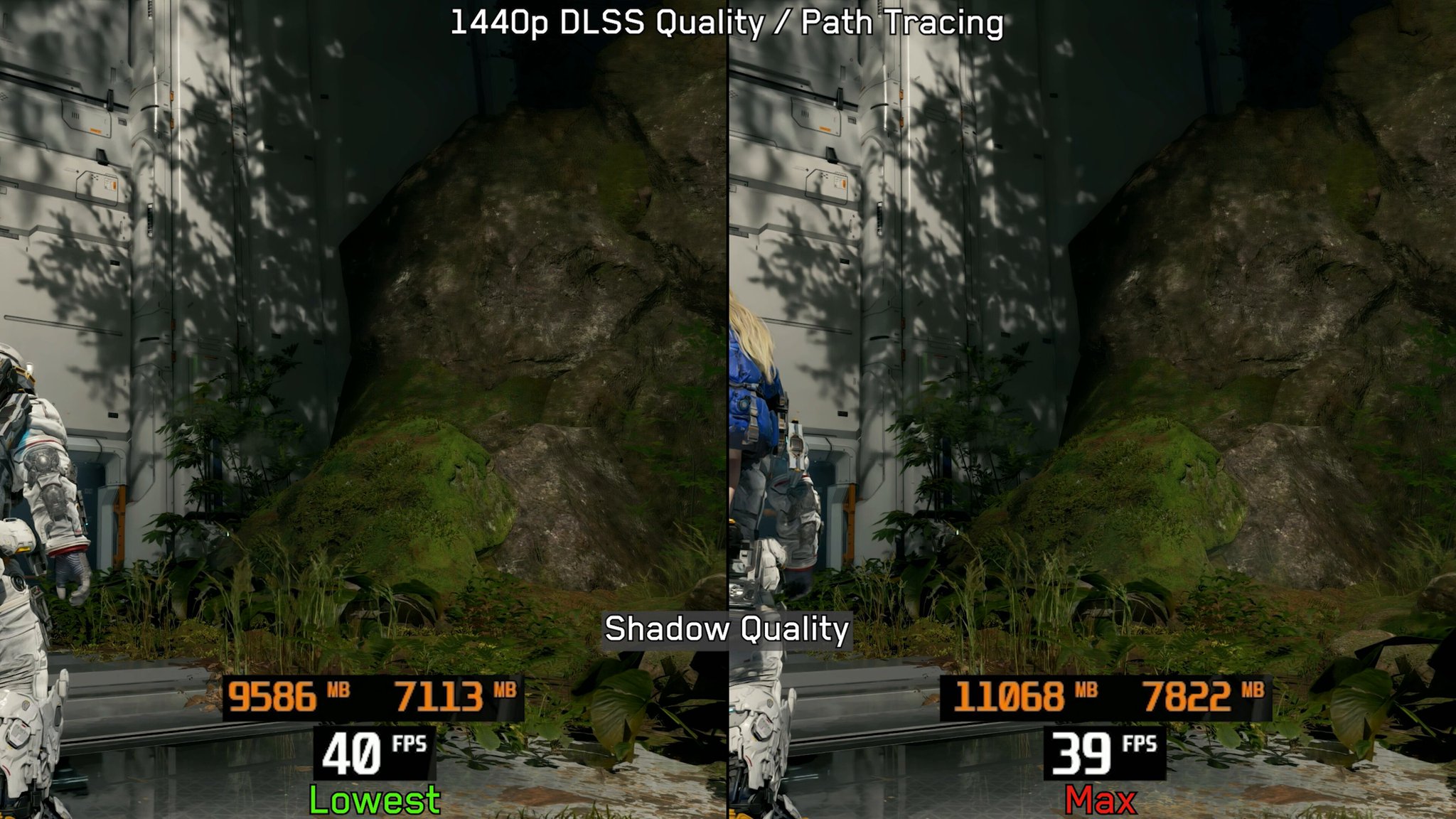
If you're using Path Tracing in #PRAGMATA, set Shadow Quality to Lowest. This saves a significant amount of VRAM with no noticeable visual impact.
 X
·
arctic glen
native orbit
shadow quality placebo (with PT on)? https://x.com/BMKing23/status/2045821269510...
X
·
arctic glen
native orbit
shadow quality placebo (with PT on)? https://x.com/BMKing23/status/2045821269510...
this is due to a fundamental misunderstanding of shadow quality setting
and will definitely be a noticeable degradation in some scenes
PT uses shadow map fallback past a certain distance
steep trench
even it is just april but i can already say this is my goty lol
native orbit
arctic glen
PT uses shadow map fallback past a certain distance
yeah I was wondering about this when I was using your script, but I was not in a scene with long view distances
BenchmarKing is normally pretty solid but not infallible I guess
 feral kindle
Sometime channel that focus on benchmark or graphic analysis can misinform the viewers.
I still remember in one of the DF MH videos, they were saying one of the outfits had graphics artifacts from texture compression, but that was a design choice and the side quest explains why the outfit looks like that.
stoic mountain
native orbit
shadow quality placebo (with PT on)? https://x.com/BMKing23/status/2045821269510...
why you need save VRAM
native orbit
I was pushing 16GB in the second level but unsure if it caused any perf issues
stoic mountain
native orbit
I was pushing 16GB in the second level but unsure if it caused any perf issues
4k?
shut dome
He’s not wrong tho. He’s there to make best optimized settings and for most they won’t notice and the trade off for that much vram is good for some
Obviously just crank it all to max if you’re a high end pc owner lol
Like many of us here
lol
timid granite
I set shadows to high instead of max since I always have a bunch of stuff open in the bg
it can overflow vram on my 16gb card otherwise lol
 south owl
wet mode OP


 merry temple
hi all
frosty gust
nexus not letting me upload the new version
ok got nexus working
https://www.nexusmods.com/pragmata/mods/13

Nexus Mods :: Pragmata
Rewrite of the game's tonemapping/post processing to fix errors in handling of HDR. This includes 2.2 EOTF emulation, adjustments to tonemapping, fixes for brightness controls. Other enhancements incl
 tame quail
frosty gust
ok got nexus working
https://www.nexusmods.com/pragmata/mods/13
tame quail
frosty gust
ok got nexus working
https://www.nexusmods.com/pragmata/mods/13
No changelog
What did you do
frosty gust
tame quail
No changelog
What did you do
they have a new changelog section
you have to click the date
they should probably make it clearer
 frosty gust
ah probably the cdn shit where it doesn't update immediately
just added more sliders
shadow contrast
highlight contrast
tame quail
kwel
frosty gust
now it can be copied and pasted into re9

 blazing grove
Does anyone know if theres a mod to limit menu FPS when fg is turned on? My gpu turnes into a space heater whenever i pause the game 😅
frail glen
blazing grove
Does anyone know if theres a mod to limit menu FPS when fg is turned on? My gpu ...
FG isnt on when in menu
blissful phoenix
blazing grove
Does anyone know if theres a mod to limit menu FPS when fg is turned on? My gpu ...
Display commander I think
blazing grove
Oh ok, I'll try that out. What I mean is FG 4x hits 227 (4x 60 fps) , but the menu runs at 120 fps which makes my gpu go to 100%.
 slow sparrow
Any news about radiance cache and where it all crashes? Or is it just 1 area
drowsy barn
latent escarp
Does anyone get this crashes? I get them just when im in the shelter while in th...
The upgrade menus are crash city for me. Sometimes I get this error, but usually it just goes straight to desktop. Disabling afterburner/rivatuner didn't help. My limited testing skills tell me it's related to frame gen somehow.
latent escarp
drowsy barn
The upgrade menus are crash city for me. Sometimes I get this error, but usually...
Do you also have a CPU undervolt or any other overclock or something?
drowsy barn
Nothing other than the factory overclock my PNY card shipped with
latent escarp
drowsy barn
Nothing other than the factory overclock my PNY card shipped with
I see, maybe its just the game if other people are getting these errors crashes in the same place as me, i do have an underolt on my CPU and someone told me it could be that but my rig was very stable in general and did a lot of CPU stress tests and they passed just fine
shut dome
Crash where?
There is one crash we know of when using radiance cache
I finished the game with it on after that spot with no issues
@arctic glen said they crashed in Terra dome but I didn’t. But I did have an area in Terra dome that got super framed
latent escarp
shut dome
Crash where?
I got them just in the shelter and just in the upgrade menus, no radiance cache
cinder oyster
I've had major slowdowns in the upgrade menus a few times, but never crashed
latent escarp
 shut dome
latent escarp
I got them just in the shelter and just in the upgrade menus, no radiance cache
shut dome
latent escarp
I got them just in the shelter and just in the upgrade menus, no radiance cache
Oh weird
Oh wtf
We just got crash to desktop no error and pin pointed it was radiance cache
This is new
drowsy barn
cinder oyster
I've had major slowdowns in the upgrade menus a few times, but never crashed
Sometimes I'll start to get a huge spike about every 10-15 seconds or so. I've found that I can sometimes avoid the crash if I leave the menu when this starts happening. Otherwise, I'll crash after 2nd or 3rd spike.
arctic glen
shut dome
<@162283147277369344> said they crashed in Terra dome but I didn’t. But I did ha...
I didn't crash in the dome
just the one office space
latent escarp
Spikes or some freezes where you cant move in the menu for like 2 seconds?
arctic glen
never seen that
drowsy barn
Freezes for about 2-3 seconds
drowsy barn
5070 ti, 7800x3d
steep trench
never happen for me too
i like how this game simulate training are not disturbingly hard

 latent escarp
And it doesn't show the older versions lower
frosty gust
latent escarp
And it doesn't show the older versions lower
click

 latent escarp
frosty gust
click
latent escarp
frosty gust
click
It was better like it was before, i mean how nexus showed everything in one place
frosty gust
ya it should be a dropdown I think
latent escarp

Clean and every info in one place
New file, old files...
Anyways thank you so much for the mods you do, the game still have places that look washed out but i guess thats how the game is made. But the HDR looks crazy good in places like the Shopping District
stray oxide
there is all changelogs here
 latent escarp
 stray oxide
weird, no clue
latent escarp
So strange, i don't have any info for today's file
frosty gust
latent escarp
So strange, i don't have any info for today's file
their cdn or something is ass so you might be able to see it if you clear cache
 prime meteor
anyone getting full screen artifacting with renodx? I remember it used to happen with RE9 too and I had to update reframework to fix it
im on latest version rn tho
latent escarp
What kind of artifacting? Everything seems okay for me, I played for a few hours!
latent escarp
prime meteor
you mean that full screen tearing? I didnt see any on my system!
 nova dagger
what the heck does this radiance cache setting yall keep mentioning in the tweaks even do? Does it make anything look worse at all?
prime meteor
supposed to make PT run better I guess
arctic glen
10% performance improvement, some places look a little worse, some a little better
nova dagger
by turning some stuff off from it i would imagine?
arctic glen
no
nova dagger
interesting
cyan swift
Do someone know how to walk on Keybord and mouse?
prime meteor
if implemented correctly it would actually look less noisy and would run much better
modest stirrup
shadows are a little washed out with cache radiance on, I prefer the look over the fps gain. God bless MFG though
prime meteor
these are just tweaks
arctic glen
shadows aren't really changed at all, not sure what you are looking at
there are particular locations where the look changes negatively
but its not a generalization
modest stirrup
I was in a kinda dark room and when turning cache radiance on/off it looked less bright, as if AO was less effective
arctic glen
majority of the time there isn't really a noticeable difference, and I also saw less light leakage in a couple instances
modest stirrup
cache radiance off definitely looked more punchy, maybe upping contrast would aleviate that
arctic glen
I guess about half the game I don't need the extra fps, but the other half its nice to stay above 100-120 at 5k x 2k
modest stirrup
I'd rather stay in DLSS balanced instead of performance but some places or fights are pretty brutal, cache radiance can keep me in balanced easy
arctic glen
yeah I am on quality an don't want to drop to balanced
modest stirrup
Damn that might be pretty heavy in quality no? My GPU would be sucking Watts like crazy. I'm always uneasy when it draws more than 400W with my UV
arctic glen
I am running a gpu about 10-15% faster than a 5090, 9950x3d, 6400 cl28 ram, everything is overclocked
modest stirrup
You must be sweating buckets next to that thing dude
arctic glen
lol, it does get a bit hot, I am ready for my roommate to leave so I can put PC in other room
modest stirrup
I like good performance, but noise and heat is also a main concern so I made a nice UV and I usually stay under 400W slightly above stock performance. You ever posted a picture of your rig?
arctic glen
nah, nothing that looks fancy/good lol
modest stirrup
Mine is a back monolith. I hate RGB and keep things neat.
arctic glen
I would be embarrassed of my RAM
its gold and RGB but it was the best 96 GB kit I could find lol
modest stirrup
Sometimes you gotta get what’s at hand, even if it’s RGB crap
 latent grail
96GB ram you can buy another 5090
arctic glen
sad but true
modest stirrup
And run DLSS5
arctic glen
I would honestly plug in another GPU if it would be beneficial
I ran 3 GPUs back in crysis days when nothing could run it lmao
modest stirrup
Ah yeah. I remember I had a SLI of 670 at the time. GTA V was running like a charm. Then came the goated 1080Ti
charred crypt
rare hitting GPU max power moment


 latent escarp
So i checked if my CPU's undervolt was at fault for this error i get just in the shelter while I'm in the upgrade menus, i disabled my undervolt and still get the crash so it's not because of my CPU and i don't have any other undervolt or overclock! Im gonna disable RTSS and see if its that, i also have Aida64 for my sensor panel....

 austere yacht
1
native orbit
I have had one random pragmata crash that I don't think was related to any mod. the error message was similar to that IIRC but never happened again and wasn't reproducable
latent escarp
And its also not because of RTSS or Aida64
bronze ether
so basically Path Tracing+Ray Reconstruction is unplayable in this game. it blurs the whole screen, adds dark noise all over it and makes everything look shit. Path Tracing without RR (via pragmata_tweaks.lua script) shits with that dark noise and makes it even more obvious.
left Ray Tracing on, disabled PT, disabled RR, 5k resolution via DL DSR, DLSS preset L + Quality, now the game is finally looking good.
any advice on how to improve standard Ray Tracing via pragmata_tweaks.lua?
ivory stirrup
bronze ether
so basically Path Tracing+Ray Reconstruction is unplayable in this game. it blur...
Have you tried preset E? Game looks perfect for me now (with RR) there was some boiling in D which E got rid of and I have no complaints now. 4K performance it's sharp enough, even ultra perf looks good (except Diana's hair that's only part where it gets a bit worse)
 late barn
do they? It's basic rumble only according to pcgamingwiki
ivory stirrup
late barn
do they? It's basic rumble only according to pcgamingwiki
Yeah I didn't manage to get anything working in wireless mode
heady karma
4k quality RR E image quality is alright, performance looks weird as always
late barn
ivory stirrup
Yeah I didn't manage to get anything working in wireless mode
I mean, you won’t get haptics when using it wirelessly anyway
in any game
bronze ether
ivory stirrup
Have you tried preset E? Game looks perfect for me now (with RR) there was some ...
that one thing I haven't tried, but based on my experience with Crimson Desert, preset E vs D doesn't change much. although RR in CD looks much better (because of no PT probably).
cinder oyster
bronze ether
so basically Path Tracing+Ray Reconstruction is unplayable in this game. it blur...
Disagree that PT+RR is unplayable, but if you really don't like the look then you can enable ASVGF via the Pragmata Tweaks script while having PT enabled in-game. Also disable RR with the script as well
ivory stirrup
bronze ether
that one thing I haven't tried, but based on my experience with Crimson Desert, ...
Yeah this game is different preset E actually works here confirmed by most folks here do like it
Crimson desert slop tracing is just a whole another can of worms it's done very differently
There's so many variables with this, so you always have to give different presents a try
ivory stirrup
cinder oyster
Disagree that PT+RR is unplayable, but if you really don't like the look then yo...
Got any other tweaks suggestions? I only have radiance enabled
cinder oyster
ivory stirrup
Got any other tweaks suggestions? I only have radiance enabled
For PT just increasing the bounces to 5 and lowering RT culling to 0
south owl
latent escarp
So i checked if my CPU's undervolt was at fault for this error i get just in the...
i started getting these in outfit menu and anything with videos playing after the driver update. might be a coincidence but just letting you know
ivory stirrup
cinder oyster
For PT just increasing the bounces to 5 and lowering RT culling to 0
What does lowering the culling do?
cinder oyster
But if you're using radiance cache for performance reasons then I probably wouldn't increase bounces to 5, it has a small performance hit
ivory stirrup
Yeah I'm ok with how the game looks I'm more interested in more performance
latent escarp
south owl
i started getting these in outfit menu and anything with videos playing after th...
thanks, it may be their fault, im on the latest drivers too!
bronze ether
cinder oyster
Disagree that PT+RR is unplayable, but if you really don't like the look then yo...
quick question, where to look for ASVGF toggle in Pragmata Tweaks menu?
found it
steep trench
steep trench
i like how this game simulate training are not disturbingly hard
i take back what i said
bronze ether
strange how ASVGF almost doubled the fps
ivory stirrup
bronze ether
strange how ASVGF almost doubled the fps
ASVGFTthing? Do tell more 👀
cinder oyster
That disables PT
cinder oyster
ivory stirrup
What does lowering the culling do?
#1475553827255222486 message
ivory stirrup
Oh sweet, this doesn't hurt performance much I suppose?
cinder oyster
No performance hit from what I've seen
dusk oyster
frail glen
I dont really believe it, its still a 5070ti so cant be that different from mine...
This is the lowest framerate spot I can find immediately.
It probably drops below 50 native fps in combat at times.
 bronze ether
cinder oyster
That disables PT
bronze ether
cinder oyster
That disables PT
but you initially suggested to have PT enabled + ASVGF + RR disabled. what's the whole point then?
cinder oyster
bronze ether
but you initially suggested to have PT enabled + ASVGF + RR disabled. what's the...
#1475553827255222486 message
You get good transparent reflections if you have PT enabled in-game + ASVGF vs just enabling RT in-game
bronze ether
cinder oyster
You get good transparent reflections if you have PT enabled in-game + ASVGF vs j...
clear, thanks
cyan swift
Hey Musa what you think about this settings? This is are the settings I have found so far that have a more punchy and contrast look on my tv leaving the sliders at default, the Pre-Tone map Curve and the aces mid gray with match SDR or HDR seems to look a little bit more washed out on my tv like if black were raised

the option lower aces min nits in the sdr eot emulation seems to wash out the image a little bit too on my tv
urban creek
prime meteor
It doesn't look like "ass", cmon ... It's just that PT is so much better in this game .
steep trench
those train sim fight after 20+ are so disgusting
ivory stirrup
shut dome
Console versions in shambles
PS5Pro a actually looks very good but others are yikes, yeah