#Resident Evil Requiem
1 messages · Page 16 of 1
 frank badge
 last kiln
i've seen videos about the setup
last kiln
i've seen videos about the setup
Could you share it?
Now i'm in this situation, everything works fine but ref menu doesn't open (not a big problem)
last kiln
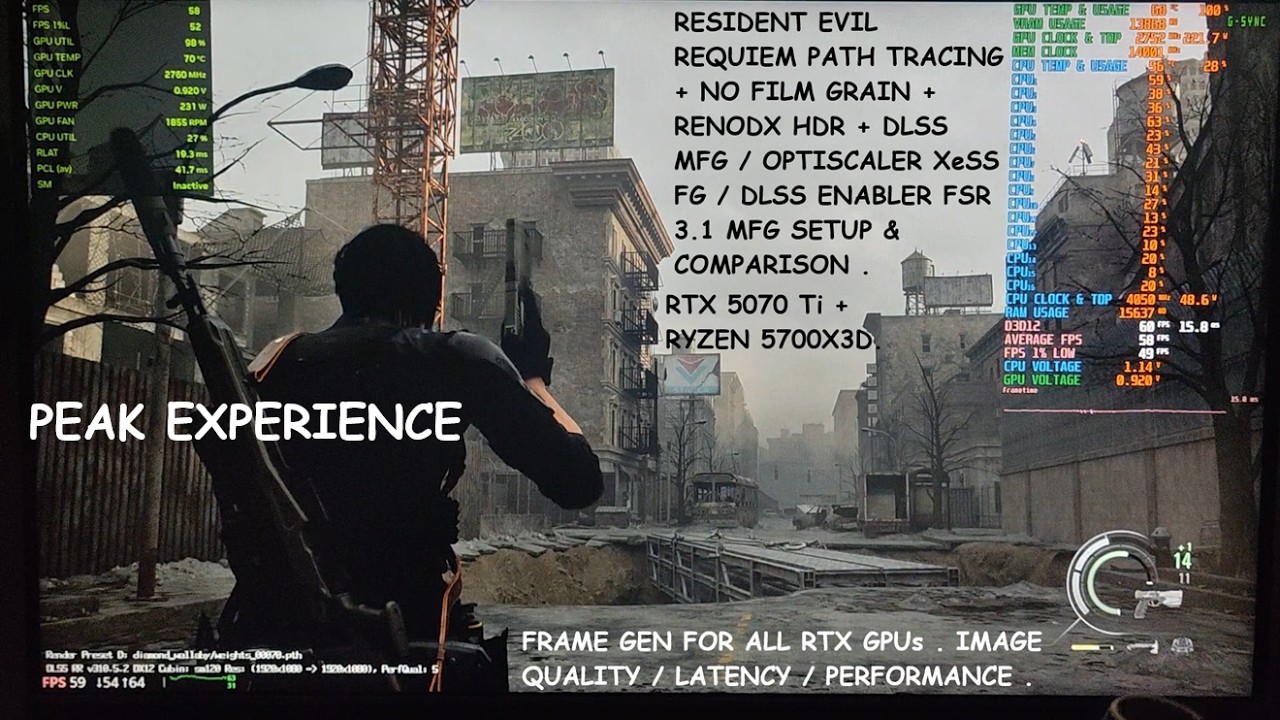
Timestamp :
- Resident Evil Requiem GeForce Hotfix GPU Diver : 00:00
- Video Overview : 00:27
- Ingame Film Grain : 01:00
- REFramework Required for Loading Mods : 01:14
- Ingame DLSS : 01:24
- Download REFramework Nightly Build : 01:49
- Download No Film Grain Mod [Important] : 02:04
- Download RenoDX HDR Mod : 02:20
- Download DLSS Enabler Mo...
frank badge
last kiln
https://www.youtube.com/watch?v=AxwsH8JeByw
Thank you Dio Brando
Thank you both Snow and nichgo
 unkempt seal
last kiln
https://www.youtube.com/watch?v=AxwsH8JeByw
unkempt seal
last kiln
https://www.youtube.com/watch?v=AxwsH8JeByw
ignorant question, what is the usecase of dlss enabler? mainly here?
 patent kernel
unkempt seal
ignorant question, what is the usecase of dlss enabler? mainly here?
patent kernel
unkempt seal
ignorant question, what is the usecase of dlss enabler? mainly here?
Dlss enabler is for using dlss mfg with unsupport device
Something like nukem dllsg to fsr3 but its support mfg
 kind fossil

Experience Resident Evil 9 like never before with the brand new Flat2VR 6DOF mod! Today we’re pushing the RE Engine to its limits on an RTX 5070 Ti to see if RE9 Requiem is the ultimate VR horror experience. This is Talemann1982 VR Mod adding vr headset tracking and 6dof motion to the newest entry in the Resident Evil franchise.
This mod is n...
 regal needle
Just curious. I know most VR headsets aren't OLED. But does Reno work in VR?
 nocturne vine
kind fossil
https://www.youtube.com/watch?v=YNBVRJVsJ0E
nocturne vine
kind fossil
https://www.youtube.com/watch?v=YNBVRJVsJ0E
@last kiln
nocturne vine
regal needle
Just curious. I know most VR headsets aren't OLED. But does Reno work in VR?
PSVR2 is OLED.
And reno can work in VR if you're playing a 2D game, since all the mods are for 2D games.
regal needle
Yes, that's why I said most. I was just wondering about Reno and VR
regal needle
Thank you 🙂
nocturne vine
If you're looking to play 2D games in VR, and by that I mean ..
Like flatscreen games, putting it on a screen when in VR space, like a theater experience kinda thing.
I know you can inject SK in SteamVR and shit, so that means ReShade can be injected with it, and ergo, RenoDX, too.
last kiln
nocturne vine
<@224536426316824576>
yeah i saw
last kiln
nocturne vine
And reno can work in VR if you're playing a 2D game, since all the mods are for ...
no work
psvr2 doesn't have HDR on pc
in fact steamvr entirely has no HDR
nocturne vine
Oh, right. wtf.
last kiln
the entire VR ecosystem has no HDR path
nocturne vine
idk why I forgot Reno is for HDR
regal needle
So Hollow Knight Yes, CyberPunk, No
nocturne vine

Yeah, sorry.
No, no HDR on PCVR.
So, you can inject it, but it's not gonna work, be broken.
last kiln
it's just gonna be
nocturne vine
So, ergo, no work.
last kiln
sdr
regal needle
Ok, thank you 🙂
 civic cairn
leaks regarding a potential future RE remake
||Resident Evil Code Veronica Remake is being directed by Kazunori Kadoi & Yasuhiro Anpo, same duo who directed Resident Evil: 2 Remake & Resident Evil: 4 Remake; noted by a leaker (take with grain of salt) Dusk Golem
https://insider-gaming.com/resident-evil-code-veronica-remake-led-by-re2-re4-team-its-claimed||
 dense vortex
so a leak who is the director of a game is now considered a spoiler huh
nocturne vine
No harm in putting a spoiler when in doubt.
civic cairn
just there for the purpose of protecting those who would rather find out on their own, or maybe haven't played the game yet and wonder what the future of resident evil is, etc really
dense vortex
tbh "spoilers for potential future RE games" makes it sound like some RE10 story details leaked lol
dense vortex
civic cairn
eh you got a point
don't worry, not a big deal, just funny to me, not what I expected when I clicked that spoiler lol
civic cairn
appreciate you pointing it out though, i think the adjusted wording now should be work better
i hope photo mode for this game comes out soon
regal needle

#residentevil #residentevilrequiem #gaming
Just found this out
Goodbye Chunk
 sturdy tide
You trying to leave IV guy without a job?
civic cairn
Just wanna say thank you Musa again for this RE9 HDR fix, it’s my first game I’ve played in HDR & also made it my favorite Resident Evil. Clocking about 90 hours on this game bc of you 😭
 sweet estuary
Jfc
civic cairn
well some of it is messing with hdr settings and free camming 2 take pics & also trying to platinum
 queen kernel
i have about 60 with 4 playthroughs, last two on insanity, so lots of dying lol
 dense fjord
I clicked 'reset all' so which is the better choice to click next? purist or preserve shadow detail?
 unique snow
imho preserve shadow detail
civic cairn
dense fjord
I clicked 'reset all' so which is the better choice to click next? purist or pre...
it all is personal preference after setting the peak brightness corresponding to your monitor. reset all defaults to what the creator of the mod thinks is best, purist is an emulation of what is believed to be intended by the developers, and preserve shadow details is basically disabling the 2.2 SDR EOTF emulation to help prevent the (intentional) darkness
could be wrong but yeah
 distant cape
So if you don't select purist or preserve shadow details- what exaclty is that mode?
 somber field
display commnader is not anymore?
 granite jungle
Hello, thanks for this mod!!
Something isn’t working for me – I must have made a mistake – but in the Reshade menu, I adjust the Renodx settings as I want, I’ve disabled and then re-enabled HDR in-game and everything’s fine, but when I restart the game, everything reverts to the default settings. How can I make the changes I’ve applied permanent so I don’t have to change everything every time I restart the game?
Many thanks!!
 fierce edge
Is there a way to prevent this extreme bloom when using RenoDX? Everything looks great 99% of the time but then I’ll just randomly get the actual sun thrown in my face.


 polar summit
fierce edge
Is there a way to prevent this extreme bloom when using RenoDX? Everything looks...
polar summit
fierce edge
Is there a way to prevent this extreme bloom when using RenoDX? Everything looks...
this isn't RenoDX related, it's an fov fix that affects cutscenes as well
https://www.nexusmods.com/residentevilrequiem/mods/99 use this instead

 fierce wedge
granite jungle
Hello, thanks for this mod!!
Something isn’t working for me – I must have made a...
fierce wedge
granite jungle
Hello, thanks for this mod!!
Something isn’t working for me – I must have made a...
game folder might be set to read only causing reshade.ini to not save
granite jungle
fierce wedge
game folder might be set to read only causing reshade.ini to not save
Oh Thanks a lot !!
fierce edge
polar summit
this isn't RenoDX related, it's an fov fix that affects cutscenes as well
Oh duh, I can’t believe I didn’t think of that. Thank you. I’ve been using the fov slider that’s built into ReFramework, but I’ll check this out
unique snow
this one is so much better
granite jungle
fierce wedge
game folder might be set to read only causing reshade.ini to not save
The game folder was set to read-only; I disabled this setting, launched the game, then restarted the computer, but the folder reverted to read-only. As a result, I can’t save preset 2 and have to change it every time I launch the game.
fierce wedge
granite jungle
The game folder was set to read-only; I disabled this setting, launched the game...
Is your issue that your settings aren’t saving or that specifically it’s reverting to preset 1
Cause the mod always reverts to preset 1
granite jungle
fierce wedge
Is your issue that your settings aren’t saving or that specifically it’s reverti...
Thanks for your reply. The problem is that I want to use preset 2, but it always reverts to preset 1
fierce wedge
granite jungle
Thanks for your reply. The problem is that I want to use preset 2, but it always...
ya shortfuse made renodx that way
it always launches to your first preset
granite jungle
fierce wedge
it always launches to your first preset
Right! Thanks! That’s reassuring. So I can change the settings for preset no. 1 as I like, and they’ll be saved as normal, thanks!
fierce wedge
granite jungle
Right! Thanks! That’s reassuring. So I can change the settings for preset no. 1 ...
ya
granite jungle
fierce wedge
ya
Perfect, Thanks a lot !!
distant cape
I tried the artificial light removal mod and it worked great for the Grace sections at the care center- but the Leon stuff in Racoon City is just way too dark in third person with it.
 signal sky
distant cape
I tried the artificial light removal mod and it worked great for the Grace secti...
signal sky
distant cape
I tried the artificial light removal mod and it worked great for the Grace secti...
Played with it off with no issues. It’s harder to see but you shouldn’t really be able to see in pitch black rooms
sweet estuary
@fierce wedge @rich smelt I am trying to capture a frame of requiem using renderdoc
but its not working for some reason
 rich smelt
Req has RT and stuff
I would use Nsight
or PIX
Also their anti tamper might block you
sweet estuary
rich smelt
Also their anti tamper might block you
even with REFramework?
I thought it bypassed all of that
 sweet estuary
ic
 stiff remnant
Does someone has these black artifacts while using ray tracing ? Especially on his weapon
I am on a 5070, ray tracing high, everything else on high as well, already tried with native resolution and with upscaling, nothing changes
Without ray tracing, it's ok
 sonic musk
What Ray reconstruction model are you using?
stiff remnant
sonic musk
What Ray reconstruction model are you using?
I am with path tracing disabled, it's just ray tracing on high
But about the preset, I set Nvidia app to "recommended"
stiff remnant
It helped a little when I removed film grain, it was worse before
But yeah, I guess there is no fix ?
sonic musk
Not really no
Unless someone figures out how to use ray reconstruction without pt
stiff remnant
:/
 winged apex
distant cape
I tried the artificial light removal mod and it worked great for the Grace secti...
winged apex
distant cape
I tried the artificial light removal mod and it worked great for the Grace secti...
Flashlight
 uneven halo
If you use ultra+ you can use rr with ray tracing
At that point though may as well use pt as the Perf hit from rr is going to be within range anyway
sweet estuary
uneven halo
At that point though may as well use pt as the Perf hit from rr is going to be w...
This isn’t crimson desert, RR doesn’t have that high of a perf hit
uneven halo
Turn it on and off and see the results
stiff remnant
I will give it a try later, thanks for the suggestion
distant cape
Are people using D or E preset with Ray Reconstruction? Which has less ghosting in third person?
polar summit
D has less ghosting with default settings
E also flatout fails to denoise at times
D has some pretty bad boiling without further tweaks tho, so pick your poison
distant cape
Cool thanks. Guess I’ll just go with D.
stiff remnant
uneven halo
Turn it on and off and see the results
I used Ray Reconstruction on ultra+ with Ray Tracing
It was not that taxing, but it didn't solved the problem
It only fixes with Path Tracing active as well
Thanks for the suggestion
 lament walrus
If you still see shutters, try this setting. This is the algorithm I developed for DC for Frame Generation, which should help with shutters. max_queue=1 for lower latency, max_queue=3 for better stability. This algoritm is still under research, which is why I didn't set it by default yet. (FPS Limiter Preset).
Reflex set to 'low latency', no boost.

 primal rune
What do i do to make the black not look too washed out when I’m in a room with light? Cuz any light on me make the black that i see washed out, i notice that if i up Shadow to max that does work, or lower to 0 the pre & post tone map shadwo sliders
I don’t know the best combination can any one help me ?
By the way i did click preserve shadow detail preset
dense fjord
lament walrus
If you still see shutters, try this setting. This is the algorithm I developed f...
where do I get that DC tab?
lament walrus
dense fjord
where do I get that DC tab?
GitHub
Advanced ReShade addon for professional window management, display control, and NVIDIA Reflex integration. Features borderless mode, aspect ratio preservation, full-screen prevention, and comprehen...
You have to install Display Commnader as addon.
 inland topaz
dense fjord
where do I get that DC tab?
inland topaz
dense fjord
where do I get that DC tab?
make sure you install resahde with addon support and not regular reshade
dense fjord
TY!
lament walrus
I'm making improvements to make UIfps limiter + window manager focused.

 urban grail
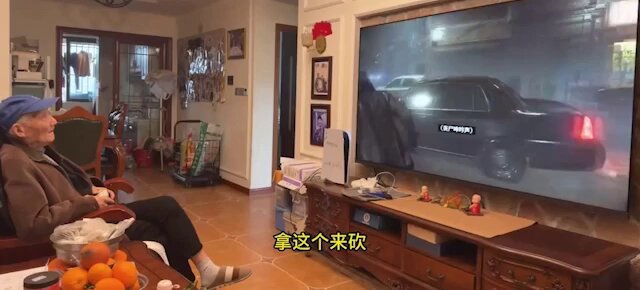
A 91-year-old streamer became a social media star after beating a horror game without any guides
Chinese gamer Yang Binglin, known as Game Grandpa, completed Resident Evil Requiem without using a single walkthrough. He streamed the entire playthrough and solved everything on his
 X
·
X
·
 mental glen
what a chad
 stray finch
most grandparents: hOw dO pHoNe wOrK
 limpid ivy
lament walrus
https://github.com/pmnoxx/display-commander/releases
limpid ivy
lament walrus
https://github.com/pmnoxx/display-commander/releases
Will this addon dont conflict with XeFg, which is included in Optiscaller?

 thorny grotto
mental glen
hope im gonna still be mentally fit enough to play games at old age
thorny grotto
mental glen
hope im gonna still be mentally fit enough to play games at old age
our generation will never see that age number bro 
queen kernel
if AI isn't completely removed from public consumption (like it should be) and is shoved down our throats, then we'll have dementia by 50
unkempt seal
queen kernel
if AI isn't completely removed from public consumption (like it should be) and i...
this lol.
thorny grotto
queen kernel
if AI isn't completely removed from public consumption (like it should be) and i...
Don't worry, whatever u are eating right now is full of chemicals, microplastics and cancer inducing elements
your brain will be the last thing u will lose 
unkempt seal
thorny grotto
Don't worry, whatever u are eating right now is full of chemicals, microplastics...
So, full brainrotted due to AI slop + microplastics on my balls. gotcha
thorny grotto
unkempt seal
So, full brainrotted due to AI slop + microplastics on my balls. gotcha

 tawdry lynx
 limpid ivy
lament walrus
I'm making improvements to make UIfps limiter + window manager focused.
limpid ivy
lament walrus
I'm making improvements to make UIfps limiter + window manager focused.
And what are the features of this addon, in terms of the effect on the picture or on the response, can it somehow improve these parameters?
For example, I use XEFG with Optiscaller, dlss quality. In the screenshot, you select the second line in the FPS Limiter , namely Use Reflex Latensy markers , max qued = 1
How does this affect the picture? Or is it better to use a native? By the way, after installing this mod, I lost subtitles in Requiem :)) That is, the subtitles of the Npc 🙂
lament walrus
limpid ivy
And what are the features of this addon, in terms of the effect on the picture o...
** FG low latency algirthm, which fixed frame pacing issues**- the "use reflex markers max_queued=1/2/3", is an experimental algoirthm I developed for Frame Generation fps-limiting. It's not mentioned in the UI.
Current algorithms, like nvapi's reflex fps imiter, or SK's fps limiter focus on latency, but accordfing to testing, they do poor job at frame pacing . @mental glen and other people, including myself, tested, this approach, it does help in many games #1423918603035476041 message compared to other algoirhtm.
I wanted to make max_queued=1 the default, but it need a bit of research on how to make it work in all games. That's why max_queued=2 exists.
My plan for a while, was to create a library for fps limiter, offering this and different algorithms for fps limiting.
This I think deserves spending more time on developing, writing research paper on it, doing comparision, and auto-tweaking settings.
TLDR max queued =1/2/3, are parameters to the algorithm, that's a different setting, than DXGI's max queued frames setting.
civic cairn
just a friendly reminder for musa whenever you have free time 🙏 (if this gets annoying react w/ a 🤝 or 👍 if it’s ok)
fierce wedge
tried the tricubic b-spline filtering but it didn't fix the banding
limpid ivy
lament walrus
** FG low latency algirthm, which fixed frame pacing issues**- the "use reflex ...
Thank you very much for your explanation! It's very interesting, although it's not entirely clear to me as a regular person. However, I have a question: For Re Requiem, what is the best setting to choose if I enable 2x fg in the game's settings, use Dlss quality, and use XeFg in Optiscaller? What should I choose in the Fps Limiter section, and should I set max_queued=1? Additionally, what should I pay attention to, such as the latency level in ms and Frame Parcing? I understand that a lot depends on the graphics card (I have a 2080 ti palit dual).
lament walrus
limpid ivy
Thank you very much for your explanation! It's very interesting, although it's n...
I'll renamed the "max_queued=1" algorithm to be "DCPaceLock(q=1)", it's an algorithm I designed.
lament walrus
limpid ivy
Thank you very much for your explanation! It's very interesting, although it's n...
DCPaceLock(q=1) may decrease fps in some games, you would see it imediately if that happens, hence more reseach is needed, otherwise I would enable it by default.
If it doesnt' work then DCPaceLock(q=2), which is "pace real frames ... max_queued=1/2/3).

I'm going to work on UI rewrite, to make this simpler self explanatory.
This algorithm is a proof of concept I wrote testing a few strategies. I can be improved further, but needs more work to do so, eventually make it into library, it would be good to write a research paper about it. It can be improved futher, but making it work with all games, allowing for better control between low latency and pacing.
limpid ivy
@lament walrus By the way, there's an addon called Dlss fix, do you think it will improve the response time? Have you tried using it?
lament walrus
limpid ivy
<@437033745686724617> By the way, there's an addon called Dlss fix, do you think...
lament walrus
limpid ivy
<@437033745686724617> By the way, there's an addon called Dlss fix, do you think...
This fixes DLSS-FG compatibility with RenoDX. It has no affect on pacing.
lament walrus
limpid ivy
<@437033745686724617> By the way, there's an addon called Dlss fix, do you think...
I tried previous version, but I couldn't get it to work.
I'm looking for feedback, list of games where it doesn't work. I fixed Doom: The Dark Ages, to make it work with Vulkan, but there could be more games where something doesn't work as it should.
lament walrus
limpid ivy
Thank you very much for your explanation! It's very interesting, although it's n...

Btw, "Reflex: Status: Fails" also needs rename means that native reflex implementation is not done properly the developer. I'll add a fix later, for affected games.

 low badge
Is this just a Reno copy? It's a new mod from the RE9 ENUX guyhttps://www.nexusmods.com/residentevilrequiem/mods/1242?tab=description

Nexus Mods :: Resident Evil Requiem
ShadeCore is a real-time modding and post-processing engine for games and 3D applications.It hooks into the graphics pipeline and provides live visual control, preset management, and a stable ex
 terse field
Dude is relentless lol
nocturne vine
HDR Ultra Pro Max
mental glen
whats worse is that his enux copy is STILL up and mods just locked comments
and the dmca that @worthy cradle opened on his github didnt seem to do anything yet either lol

GitHub
ENUX HDR Visual Fix source code for Resident Evil Requiem - uwlntilbbg/ENUX_HDR_Visual_Fix
that shit still up
 lament walrus
limpid ivy
Thank you very much for your explanation! It's very interesting, although it's n...
lament walrus
limpid ivy
Thank you very much for your explanation! It's very interesting, although it's n...
5000 series may not need the new DCPaceLock algorithm, because it has flip metering. I'm on 4090, so it's needed. I suspect nvidia implemented something similar in their driver to what I'm using. (in concept)
winged apex
Why do these losers do this stuff
 worthy socket
winged apex
Why do these losers do this stuff
worthy socket
winged apex
Why do these losers do this stuff
targeted at people that don't know any better, rack up those download points in nexus, free money off the backs of others etc
low badge
I was pretty sure it was another ripoff, but I don't know enough to be able to tell for sure. To me RenoDX is magic.
queen kernel
the dude is about to become the champion of plagiarism lol
it's like that's the point
 limpid ivy
I have an Sdr Tv w905a, and I have 12 bits set in the Nvidia control panel. I also use the Reshade Addon with the renodx mod for Re 9 to remove Film Grain. I tried the SpecialK plugin by placing it in the Framework's plugin folder. For some reason, this plugin activates two brightness sliders that I can't adjust. When I turn off SpecialK, everything returns to normal. Why do you think this is happening? Let me take a screenshot.
limpid ivy
When using the SpecialK plugin, RenoDx has a peak brightness of 1000, game brightness of 203 and Sdr EOTF 2.2 . Without this plugin, these sliders are not active for me. So SpecailK thinks I have Hdr?
 fierce wedge
renodx always has those settings
didn't code anything separate for sdr
no benefit to using the mod in sdr
unless you wanna mess around with sliders
there's nothing to fix in sdr
limpid ivy
fierce wedge
renodx always has those settings
In general, I saw that the SpecialK64 plugin has a setting that changes like a slider, it seems that the parameter 0.325 was initially set there, and if you right-click on it, the value goes to 80 cm just for Sdr. As for the slides, they are active in Vanilla + Tone nmap mode, like this.
 foggy needle
mental glen
https://github.com/uwlntilbbg/ENUX_HDR_Visual_Fix/
foggy needle
mental glen
https://github.com/uwlntilbbg/ENUX_HDR_Visual_Fix/
🎉 F. yeah. the stuff on Nexus is DOWN...
i dont know why github is soooo slow these days..
they still didnt shut down the last one we reported
mental glen
thank GOD man
queen kernel
foggy needle
🎉 F. yeah. the stuff on Nexus is DOWN...
whoa, nice to see you here, Alea 🙂
mental glen
foggy needle
🎉 F. yeah. the stuff on Nexus is DOWN...

letsfucking go
bros banned on nexus as well
all 3 of his slop mods gone
well
not slop since the actual things are good but you get what i mean

 fierce wedge

maybe that was bad
giving kudos will let him know it was me
then he'll steal my shit more readily
fierce wedge
probably on the server anyway
 rich smelt
 terse field
mental glen
terse field
mental glen
GitHub as well?
terse field
foggy needle
terse field
GitHub as well?
sadly not. im not sure whats up with github the last weeks, but they are really slow or dont do anything at all. we reported the last issue over 2 weeks ago, nothing happened. and this one, well.. we will see...
stuff like this makes me sad and mad.
limpid ivy
fierce wedge
renodx always has those settings
In the Special K Discord, they threw me a version where there is no Hdr activation, just for SDR users and there are no similar problems with Hdr activation.
26.3.25.3
-
Further changes to prevent HDR override when RenoDX is loaded, hopefully
it correctly sets the colorspace in recent builds.- This change allows SDR users to use RenoDX, for the RenoDX mods where such
a thing makes any sense.
- This change allows SDR users to use RenoDX, for the RenoDX mods where such
limpid ivy
fierce wedge
Not sure what sk is doing
I get it, but you see, there are different versions of SpecialK. In fact, I wanted to use SpecialK in conjunction with Optiscaller with XeFG activated (this is a frame generation tool). Allegedly, SpecialK has some tweaks for adjusting input to reduce latency and so on.
limpid ivy
lament walrus
5000 series may not need the new DCPaceLock algorithm, because it has flip meter...
Hello.ello. I'm testing the SpecialK plugin, and I'm curious about your zzz display commander addon. Does it have similar function?
lament walrus
Yes, Display Commander has similar general functionality as Special-K. It’s build as Reshade addon for better compatibility.
limpid ivy
lament walrus
Yes, Display Commander has similar general functionality as Special-K. It’s buil...
For the sake of interest, I'll try your addon, because with SpecialK I have a Frametime of about 1.5 ms on average. It's better without it, I thought it would help on the contrary, or maybe there are some interesting tricks that I haven't mastered yet.
lament walrus
limpid ivy
For the sake of interest, I'll try your addon, because with SpecialK I have a Fr...
I meant Display Commnader to be Special-K's light weight alternative, rewritten from scratch. Containing the general purpose functionality. I'm working on improving the UI/UX.
limpid ivy
lament walrus
I meant Display Commnader to be Special-K's light weight alternative, rewritten ...
I agree, this is the advantage of your addon, in order to provide similar or the same functions, only with less load on the system and, accordingly, maintaining a low input delay. For example, I don't see any advantages in using SpecialK yet. I tried it in the Optiscaller Fg bundle . Maybe I'm wrong.
civic cairn
FYI: new update 1.4gb out -- wouldn't update until reframework is patched for new update
though i will test if it is actually broken or not
 bronze oak
Any idea what the new update changes?
civic cairn
reframework is broken. so avoid updating or launching steam, run the game's exe by folder. and no not at the moment
PHOTO MODE ADDED
civic cairn
I lied chat
reframework DOES work
but idk about reshade, testign now
nevermind. reshade and reframework work fine. make sure you're on the most recent nightly version of reframework
lament walrus
limpid ivy
I agree, this is the advantage of your addon, in order to provide similar or the...
To Special-K creadit. Special-K pioonered a lot of features. Like HDR Swapchain upgrade, with it's own auto hdr.
Added controller support for DualSense, for games where it doesn't work. And, ton of other niche features, such show showing achievements without realing on steam overlay, etc.
One big feature was adding texture caching, ability to swap and replace textures in dx11 games, allowing people to use texture packs, etc.
sonic musk
civic cairn
reframework DOES work
Afaik REF breaking with every update was partially REF fault, it's been fixed so it should happen again unless Capcom goes out of their way to break it
kind fossil
civic cairn
PHOTO MODE ADDED
Meanwhile Otis_Inf camera tools been out since the game was released pretty much, and are superior 😄
 heady arch
Gonna play the ME trilogy(Legendary Edition), HDR with RenoDX or SDR ?
 echo frost
I am having issue with screen flickering on AMD at the start of the game. Anyone knows something about what is causing that ? Is that some bug with AO or SS ?
Main menu is fine but as soon as I load into start of the game its very distracting and can't find a way around it yet.
echo frost
echo frost
I am having issue with screen flickering on AMD at the start of the game. Anyone...
Seems Ray-Tracing bug 
stray finch
civic cairn
reframework DOES work
i wish it had a autoupdater
frank badge
someone could help me load otiscaler and renodx with specialK in re9? i don't want to use reframework
fierce wedge
mod requires reframework
frank badge
fierce wedge
mod requires reframework
dont need it, just want xefg
fierce wedge
everything requires reframework
cause of the anti tamper
reframework is what bypasses the anti tamper
frank badge
fierce wedge
everything requires reframework
i have strange bug with latest game version, my fps goes from 120 to 30 random even in the menu
i think is ref the cause
cant play the game
echo frost
frank badge
someone could help me load otiscaler and renodx with specialK in re9? i don't wa...
You install Optiscaler like in any other game
frank badge
echo frost
You install Optiscaler like in any other game
Optiscaler doesn't qork without ref
stray finch
frank badge
i think is ref the cause
i doubt it
civic cairn
kind fossil
Meanwhile Otis_Inf camera tools been out since the game was released pretty much...
Is it really
nocturne vine
Otis tools? Yeah, almost always superior to any native photo mode.
Barring any effect features and such in some photo modes.
civic cairn
nocturne vine
Barring any effect features and such in some photo modes.
scary using an injector though :(
well tbf i am using reshade..
kind fossil
civic cairn
Is it really
Yes, much better
kind fossil
civic cairn
scary using an injector though :(
well tbf i am using reshade..
He's legit, none of his tools are risky, he's always active on discord in his server too
 wet kiln
civic cairn
reframework DOES work
wet kiln
civic cairn
reframework DOES work
I'm on the latest reframework and the game crashed on first boot post update but it seems to be running just fine on the second one.. weird
 fickle dust
Since the 13th till now , no new updates on renodx right ?
 civic cairn
kind fossil
He's legit, none of his tools are risky, he's always active on discord in his se...
civic cairn
kind fossil
He's legit, none of his tools are risky, he's always active on discord in his se...
Yea I started using it. It seems much more useful, ima have fun with this… :D
inland topaz
fickle dust
Ok so I was forcing PRESET E which makes it look like shite
I keep hearing this but I forced E and didn’t see anything like this
Maybe something changed in an update, idk
I played it on release
fickle dust
inland topaz
I keep hearing this but I forced E and didn’t see anything like this
Nah E is awful
It has more downsides than good
I finished game once on E and now swapped to D
D is much more stable
inland topaz
Doom games require E
 heady arch
I'm suriprised there is no mod for Space Marine 2
fierce wedge
heady arch
I'm suriprised there is no mod for Space Marine 2
There is one

GitHub
Renovation Engine for DirectX Games. Contribute to clshortfuse/renodx development by creating an account on GitHub.
I think it’s Tonemap ass though
nocturne vine
civic cairn
scary using an injector though :(
well tbf i am using reshade..
Played some more yesterday, it sucks how bad FG gets without VRR in this game. Had to disable FG since I can't use VRR in this game.
But min maxing it, had fun. Gonna resume more today. Soon™ 
nocturne vine
Still in Grace's section, but I grabbed the ||organ in freezer from garage and got attacked||
On that side of the map going upstairs and clearing things, etc. Will continue from there next.
nocturne vine
I stopped playing while I was already in that building, though.

I resumed from there.
But I spent a good time fiddling around with some stuff, too.
civic cairn
I wanna know your final runtime when you finish 😂
terse field
nocturne vine
Played some more yesterday, it sucks how bad FG gets without VRR in this game. H...
Why no VRR?
nocturne vine
terse field
Why no VRR?
the dumbass miniLED I am using has terribad ghosting issues due to its local-dimming algo.
I initially accepted them as the only con of that set, until I realized disabling VRR fixes them.
But then, you're left with no VRR so RIP.
I just had to reduce from DLAA + FG to DLSS Quality only, so it's w/e.
Game still 
terse field
Where tf did your LG TVs went lol
nocturne vine
On my desk
the 65" is sitting on the floor
The 85" miniLED replaced that.
Now a 120" screen is soon to replace that miniLED.
terse field
nocturne vine

GTA 6 on 120", boio.

Jason will practically be in my room.
... and so will be Lucia. 
Been a non-issue thus far, ghosting isn't really an issue in anything except for SUPER DARK scenarios, which is basically this game 99% of the time.
Even Alan Wake 2 didn't have issues, since a lot of it is intentionally raised there.
Cronos did, though.
So, pretty much an issue for horror games only. Games like Stellar Blade, or R&C Rift Apart, etc. Non issues.
terse field
What MiniLED TV are you using?
nocturne vine
TCL QM7K 85"
Bought it last year for putting it in the lounge so when mom comes over, she can watch her sports or soap opera and shit on it.
Figured I'd put it next to my 65" LG and try to calibrate or just compare.
nocturne vine
Originally wanted it for a week, but then it just won me over, lol. Watching movies on this thing is very nice.
nocturne vine
civic cairn
But 98”
I had 98" available at QM8K, but QM7K only had 85" and I was like might as well do QM7K for the times fam is over and nephew/nieces wanna play some games with console.
Otherwise 98" would've been better overall.
civic cairn
I only got 98 so my parents can brag lmao
nocturne vine
Thing about miniLEDs (TCL ones especially) is that they get better in larger sizes, brightness and all.
civic cairn
But it was a really good deal
terse field
nocturne vine
TCL QM7K 85"
Should've gotten a Sony Bravia 9 bruv 
nocturne vine
terse field
Should've gotten a Sony Bravia 9 bruv <:gigachad:1409720491492507749>
Helllllllll nah. Mfers still don't have HGiG.
But mainly cause it'd have cost 3x more 😛
Remember, this TV's mission was to display 'soap opera', it's already seriously overkill for that job.
News, sports, all that shit.
And Sony would've been an import, so even costlier, and no warranty.
 fair heart
I appear to have found a semi-fix for the Residsnt Evil Requiem DLSS VRAM leak that happens later game. I found that after loading in with it set to DL SS balanced and FG x3, if I revert to performance DLSS with FG X2, then back, my VRAM stays under 94% and there’s no stuttering.
I’m running a 5070 Ti, 4K, max settings with path tracing. Also using the Display Commander add in.
sturdy tide
FG from lower than 70~80 native is bad, and x3 is barely worth it with 165hz and starts to make sense around 240hz.
Capped 60 with DLSS Performance is better, especialy with a good cap like in Display Commander instead of ingame, but eh, up to you.
I forgot I have DX12 tax on Linux though and can't compare my 4090 that easily, maybe 5070 Ti gets enough native frames without it.
I remember Reflex causing stutters though, so native with it off has another benefit.
stiff remnant
sturdy tide
FG from lower than 70~80 native is bad, and x3 is barely worth it with 165hz and...
70-80 ? Isn't like 60 to 120 already ok ?
sturdy tide
If you use FG your native FPS drops, need headroom for that and in general.
If you're getting 60 with x2 that would be 100 from base 50 after FG tax, give or take.
And you're GPU bound now, unless you capped below 100 or native 50.
stiff remnant
sturdy tide
If you're getting 60 with x2 that would be 100 from base 50 after FG tax, give o...
Yeah, I know, I thought you were saying 70-80 base after the frame gen
I also think some games are also less taxing in frame gen
Like Crimson Desert I loss a lot more base fps than Re Requiem
 knotty apex
just try to make sure your framerate after 2x fg is 120ish, some wiggle room is fine
terse field

My opinions about the ninth major RE installment have been aged in an oak barrel like wine- true connoisseurs appreciate that it takes weeks, if not months, for complaints to develop the complex notes and full-body that Château Nerrel™ consistently delivers. No scrubs allowed.
Support on Patreon: https://www.patreon.com/Nerrel
Discord: https...
Your mod is mentioned @fierce wedge
fierce wedge
oh shit
fierce wedge
terse field
Reno is once again breaking containment
he actually cares about hdr
his video on metroid prime 4
frank badge
 daring cypress
DLSS fix addon helps
daring cypress
DLSS fix addon helps
what is it?
daring cypress
frank badge
what is it?
#1413548071987576862 message
although, the problem fixed itself later on on it's own without it 🤷♂️
I've already finished the game
sweet estuary
new patch?
unkempt seal
sweet estuary
new patch?
days ago?
fair heart
Anyone have any luck getting dynamic FG to work with Requiem?
fair heart
Also has anyone had issues with noticeable VRR flicker in RE Requiem and found a fix?
signal sky
No VRR flicker for me
Youre probably hammering your system too hard and can’t keep steady frametimes or you have something setup wrong
Game has mega stable frametimes
 solid shale
fair heart
Also has anyone had issues with noticeable VRR flicker in RE Requiem and found a...
solid shale
fair heart
Also has anyone had issues with noticeable VRR flicker in RE Requiem and found a...
It’s not related to the game, that’s just ur monitor. Try a frame cap, it should help. Or just disable gsync for just RE9 in Nvidia app and use a frame cap
unkempt seal
just got the game finally. reno on this game overwrites the game's hdr sliders? or do we still have to set them or reset them?
fierce wedge
unkempt seal
just got the game finally. reno on this game overwrites the game's hdr sliders? ...
overwrites
unkempt seal
fierce wedge
overwrites
excellent! thank you !
unkempt seal
Wth is this
 unkempt seal
Lmaaao. How is this game like this wtf this is so bad
terse field
Bro managed to hit the lottery in the funny bugs department


 sonic musk
 stray finch
mental glen
bros entire acc is gone
stray finch
mental glen
bros entire acc is gone
 mental glen
yurr
civic cairn
LETS GOOOO
fickle dust
unkempt seal
Wth is this <:kekpepehands:1409649023870173377>
what preset are u forcing if this is PT ?
ALSO
finally done with this piece of shit
 unkempt seal
fickle dust
finally done with this piece of shit
unkempt seal
fickle dust
finally done with this piece of shit
if piece of shit then why slog through it? 😄
unkempt seal
fickle dust
what preset are u forcing if this is PT ?
not forcing anything. default is RR Preset D
fickle dust
unkempt seal
if piece of shit then why slog through it? 😄
Because some sections are just shaq sleep. I wanted to finish challenges for fun
fickle dust
unkempt seal
not forcing anything. default is RR Preset D
Shouldn’t look like that
Tho I admit PT is half good half ass in this title
unkempt seal
fickle dust
Shouldn’t look like that
yeah it was just in that starting area dunno wtf was going on
fickle dust
unkempt seal
yeah it was just in that starting area dunno wtf was going on
If you want real eye tricks , try forcing preset E 
unkempt seal
fickle dust
If you want real eye tricks , try forcing preset E <:kekcry:1110756403351670895>
Already tried it lmaao, crazy ghosting
Crazy how AW2 has almost perfect implementation in comparison. Zero ghosting, smearing
distant cape
unkempt seal
Crazy how AW2 has almost perfect implementation in comparison. Zero ghosting, sm...
What RR Preset does AW2 use?
sonic musk
All games so far use D except fir the Doom TDA which uses newer E, because DoF is fucked with older models
E however has horrendous ghosting in the darker areas
unkempt seal
distant cape
What RR Preset does AW2 use?
D but E looks even better on it from what I tested
sweet estuary
unkempt seal
D but E looks even better on it from what I tested
E gives you artifacts on water reflections
If you set the ray tracing to max
unkempt seal
sweet estuary
E gives you artifacts on water reflections
With max PT? need to check. Am due for another playthrough after I finish requiem
polar summit
unkempt seal
Crazy how AW2 has almost perfect implementation in comparison. Zero ghosting, sm...
Worth nothing than alan wake is not full PT
sonic musk
It's about as full as any other game advertised as using PT
polar summit
Isn't it doing some hybrid RT/raster lighting, I vaguely remember the DF video mentioning something of the sort
unkempt seal
sonic musk
It's about as full as any other game advertised as using PT
I was gonna say, I'm pretty sure this was the case
perf hit kinda says it as well. and visually when toggling it
unkempt seal
polar summit
Worth nothing than alan wake is not full PT
https://youtu.be/rYXoDmhOm2M?si=wiKPVYnoyXn1A394&t=147
you might be correct

Testing Alan Wake 2, Rasterization VS Path Tracing, DLSS 4K
ENEBA - great place to buy games (PS5, Xbox, PC)! https://ene.ba/Bang4Buck
All games, DLC! https://ene.ba/Bang4Buck-Store
Gift Cards! https://ene.ba/Bang4Buck-GiftCards
Affiliate
🔧 SPECS 🔧
◾️ CPU - AMD Ryzen 9 9950X3D - PBO - 30 Curve Optimiser
◾️ Cooler - Custom Water ...
sonic musk
Again, it's more or less the same as other PT games, the difference is that they use baked lighting for the GI fallback instead of light cache, the latter would have too much lag for a game where lighting conditions change abruptly
Haven't seen that panel about RE9 implementation, but I suspect they might be doing something similar, as they also don't use any caching
AW2 also isn't a "raster" game, they use something similar to the SW Lumen on all platforms, again with the baked fallback to avoid boiling and light lag
PT in games is still far from being a real deal like you see in the offline engines like Blender, it still relies on a bunch of hacks to work, each with their own downsides
polar summit
https://youtu.be/tXfwvohROPA?is=8qouUBH1D-DfnE7O 14:00 onwards he talks about something akin to baked fallback you mentioned

We've established that Alan Wake is a stunning game both on consoles and on mainstream PCs, but what if you want to push up to the next level and tax your GPU with high-end path tracing features? In this extended video, Alex goes in-depth on each and every RT feature in the game, checks out DLSS ray reconstruction and discovers Remedy's chosen f...
Also if RE9 was doing something similar shouldn’t it react just as fast to light changing?
It is quite slow and lingers for a while compared to AW2
sonic musk
It does in the RT mode because of the denoiser
PT with the default RR model is almost instantaneous
polar summit
I can tell you it is absolutely not instantaneous
Flashlight can take ages to clear fully
sonic musk
 polar summit


also visible in that video
could of course be something else entirely
but it does look like light lingering
the portion that was lit actually looks darker, so might not even be that
camera movement also clears it pretty much instantly
but just sitting still takes a good 30 seconds for it to recover completely
sonic musk
I mean, you can enable radiance cache with U+ and see how bad it gets
polar summit
Oyea i did, and it is indeed MUCH worse
unkempt seal
polar summit
It is quite slow and lingers for a while compared to AW2
I was gonna say this
I've never seen it like this in aw2
sonic musk
I only ever seen light linger with preset E
polar summit
This was with preset D
polar summit
camera motion clears it basically instant tho
so hard to notice when actually playing the game
maybe it's a RR artifact idk
sonic musk

Did the entire playthrough with PT, haven't seen any obvious light lag
sonic musk
polar summit
camera motion clears it basically instant tho
There's a flickering light at the very beginning of the hospital section where I've tested this
So not moving the camera
Maybe it's only affecting the flashlight
polar summit
sonic musk
There's a flickering light at the very beginning of the hospital section where I...
there is visible linger there as well
but it is relatively quick
unkempt seal
sonic musk
Maybe it's only affecting the flashlight
flashlight looked disgusting at the beginning (I've only played the first 10 mins multiple times to test different things) until I turned IBL off then it looked good
the edges were boiling to hell
sonic musk
polar summit
but it is relatively quick
I mean it's all temporal accumulation, so it will never be truly perfect
But it is significantly more reactive than games that use caching for fallback
polar summit
yea for sure
but my point is, it is nowhere near alan wake 2
Alan wake 2 reacts as fast as raster
it's wild
sonic musk
Again, I dunno what RE9 is doing excacly
There's an hour long presentation about it on the nvidia channel, but I haven't gotten around to watching it yet

Watch the full replay of our GDC 2026 session to see how see how Capcom engineers brought real-time path tracing into RE ENGINE for Resident Evil Requiem and PRAGMATA. This talk will cover the challenges of adapting a modern AAA architecture for real-time path tracing and explain the advanced optimization techniques used to squeeze every bit of ...
polar summit
I skipped a bit ahead, and apparently they ARE using ReSTIR GI, but u+ tweaks shows it's off by default?
unkempt seal
polar summit
Alan wake 2 reacts as fast as raster
I bought a 4090 to play it full PT when it launched cause Im a big AW fan, I thought all PT games would be like this. Little did I know
polar summit
they also mention being able to use only IBL lighting to reduce noise in indirectly lit scenes
which doesn't track at all lol
that setting is completely broken
polar summit
unkempt seal
I bought a 4090 to play it full PT when it launched cause Im a big AW fan, I tho...
I think RE9 is a better looking game than AW2 overall 🤷♂️
unkempt seal
polar summit
I think RE9 is a better looking game than AW2 overall 🤷♂️
I mean in terms of these technical issues
Texture wise I think AW2 is miles ahead
The amount of low res textures Ive seen so far in re9
Is nuts
polar summit
worth noting that RE9 doesn't properly set a negative LOD bias for DLSS
but yea from a technical aspect AW2 is in a better state
altho it has it's own issues like LOD popin
easily fixable tho from what I understand
AW2 also has higher polygon counts compared to RE9
polar summit
polar summit
worth noting that RE9 doesn't properly set a negative LOD bias for DLSS
I'd have to replay to say for sure, but I would guess a good chunk of the low res textures are due to this
stray finch
polar summit
I'd have to replay to say for sure, but I would guess a good chunk of the low re...
did you report it tho 
polar summit
stray finch
did you report it tho <:patrickNotes:1410072116082118778>
To Capcom?
Maybe I should
stray finch
Yes
sonic musk
I've said this before, but negative LOD bias can introduce severe moiré artifacts
There might be a reason why it's not used
And RR shaves off a lot of high-frequency detail by itself
It makes Leon look 10 years younger lmao
If you force it with U+ on the non PT path, you can see how it removes detail from people's faces and stuff
Preset E seems better, but again, ghosting galore
Once JoHien puts out the RT mod for RE9, this plus CNN DLSS should be the best way to play the game
unkempt seal
polar summit
altho it has it's own issues like LOD popin
true, fully agree. Flawless widescreen fixes it fully btw
unkempt seal
polar summit
AW2 also has higher polygon counts compared to RE9
yeah that's what it always felt like to me
it just has a "higher poly" look just on a surface level gaze, totally not technical ofc, just has that "look"
unkempt seal
polar summit
worth noting that RE9 doesn't properly set a negative LOD bias for DLSS
oh... I didn't know that 😮
unkempt seal
sonic musk
Once JoHien puts out the RT mod for RE9, this plus CNN DLSS should be the best w...
Is Johien's mod for RE9 gonna be based on RT instead of PT?
I was finishing RE4 last night with his mod and even with TAA it looks incredible oO and super stable
sturdy tide
JoHien mods? Guess I'm replaying 2, 3, 4, and maybe Village...
sonic musk
unkempt seal
Is Johien's mod for RE9 gonna be based on RT instead of PT?
I was finishing RE...
I assume it's going to be an RT tweak like the previous mods
I dunno if you can fudge with the PT implementation without breaking it
unkempt seal
sturdy tide
JoHien mods? Guess I'm replaying 2, 3, 4, and maybe Village...
100% worth it
polar summit
sonic musk
I've said this before, but negative LOD bias can introduce severe moiré artifact...
Fwiw, I’ve seen nothing of the sort with -1.000 DLSS balanced when I was messing around
Of course not representative of the whole game
fair heart
Anyone had any luck with dynamic frame gen? I can get it semi-working but it will exceed my refresh rate. I’ve had some luck using display commander to limit FPS, but it’s glitchy
sonic musk
fair heart
Anyone had any luck with dynamic frame gen? I can get it semi-working but it wil...
Apparently dynamic frame slop is just busted
You need to push the GPU hard to prevent it from going above the target
Goofy ass tech
fair heart
I mean, it kinda works forcing it with profile inspector
DLSS quality feels very close to how balanced looked/felt before, using preset B. I’m on a 5070 Ti with path tracing 4K
Display commander seems to be limiting the frames without breaking it
unkempt seal
fair heart
DLSS quality feels very close to how balanced looked/felt before, using preset B...
Have u tested preset B without dynamic? It felt the same to me
 analog cave
@fierce wedge why does purist use Per channel instead of by luminance? Wouldn’t it be overall more accurate to determine it by luminance?
analog cave
fierce wedge
What the developers would have seen
Ah yeah that makes sense, thanks bro 🙏
fair heart
unkempt seal
Have u tested preset B without dynamic? It felt the same to me
Yes, if dynamic actually works my GPU is always close to 100%
unkempt seal
fair heart
Yes, if dynamic actually works my GPU is always close to 100%
yeah I was asking without dynamic tho, if you saw any measurable difference
 storm badger
Hello, i'm currently using this optiscaler addon but i keep seeing the black levels too high


any suggestions?
polar summit
Not every scene needs 0 nit floor?
You can put scene grading scaling and secondary scene grading scaling to 100 that should improve it tho
storm badger
polar summit
Not every scene needs 0 nit floor?
there is a white patina which is kinda annoying. Cyberpunk had similar issue but it was fixed with The optiscaler addon. With RE 9 is still present even with the mod
polar summit
storm badger
there is a white patina which is kinda annoying. Cyberpunk had similar issue but...
I'm not sure what you mean, do you mean banding?
try the sliders I mentioned maybe they help with that as well
storm badger
polar summit
try the sliders I mentioned maybe they help with that as well
nope

there is still this patina maybe cause by the light, not sure
polar summit
Hmm i don't see anything weird in that picture
try taking an HDR screenshot with reshade
storm badger
polar summit
try taking an HDR screenshot with reshade

with those 2 option at 100 it gets a black crush, details on dark corners disappear without the white patina disappearing
npt sure this last screenshoot helps
polar summit
i don't see any black crush
and I'm not sure still what you mean with patina
maybe i'm just insensitive to it
storm badger
there is something strange on how the game shows me the image and how it shows it in the screenshoots


with and without options enabled
In the game there is a way bigger difference where the details of the box on the left side are basically black
btw the patina issue is the same i experience "except on a way bigger level" on windows even after calibrating it
polar summit
try retain shadow detail preset
 fading isle
What is “white patina” exactly?
distant cape
Hmm I dont see that setting on the latest DC addon? Confused how to uncheck that. I do get stutters with Reflex on tho.
 dense sapphire
distant cape
Hmm I dont see that setting on the latest DC addon? Confused how to uncheck that...
dense sapphire
distant cape
Hmm I dont see that setting on the latest DC addon? Confused how to uncheck that...
Yeah I haven't played RE9 since DC changed, so I'm not sure about the new settings. See if any of the new limiter options help with the stutter
distant cape
All good I’ll just keep using afterburner and cap it at 114
storm badger
polar summit
try retain shadow detail preset
Unfortunately didn't work either
storm badger
fading isle
What is “white patina” exactly?
it's like the black levels are way too high.
Texture which should be dark grey are more "white" overall... not sure to clearly explain it
this is something similar to what i was experiencing in cyberpunk but a bit different because here blacks are black meanwhile in cyberpunk blacks where gray
 royal spear
storm badger
it's like the black levels are way too high.
Texture which should be dark grey a...
royal spear
storm badger
it's like the black levels are way too high.
Texture which should be dark grey a...
So basically raised black levels or "white tint"?
urban grail
storm badger
it's like the black levels are way too high.
Texture which should be dark grey a...
ya weird same happens to me guess its a lighting bug?
only in this game happens somehow
in cp77 with the lilium shader got perfect black level and hdr pop in that game.
 lunar bridge
Already beat this game but im curious if the denuvoless version runs any better
winged apex
probably not
 silver lark
storm badger
Hello, i'm currently using this optiscaler addon but i keep seeing the black lev...
silver lark
storm badger
Hello, i'm currently using this optiscaler addon but i keep seeing the black lev...
pretty new to this, how do you see black level too high ? graph bottom right or numbers top left ?
 ornate nova
What s the best setting for now ? TY
storm badger
royal spear
So basically raised black levels or "white tint"?
Would say a white tint. This happen only in bright or whenever there is light source. Dark rooms do not have this issue. I would exclude a simple rises black levels
storm badger
urban grail
ya weird same happens to me guess its a lighting bug?
Yup I suspect also. Not sure why tho...
storm badger
silver lark
pretty new to this, how do you see black level too high ? graph bottom right or ...
The ofset from the bottom of the chart. Cyberpunk had a constant offset which caused even black rooms to be grey instead. RE 9 is more complex seems to affect only lightning. HDR gaming always a pain
urban grail
storm badger
The ofset from the bottom of the chart. Cyberpunk had a constant offset which ca...
Ya crazy they still releasing broken hdr games in 2026! U have a oled monitor or miniled?
storm badger
urban grail
Ya crazy they still releasing broken hdr games in 2026! U have a oled monitor o...
oled
urban grail
ic then its def. bugged^^
this the first game in hdr where i noticed that lighting bug
in sdr its almost non existent

sdr pic here
blacks in sdr looks almost perfect, but in hdr , some texture on the ground here in that shot are like pulsating white luminosity with the renoDX mod, i didnt tried vanilla hdr in this shot yet, and its very distracting, fck weird ^^
unkempt seal
urban grail
blacks in sdr looks almost perfect, but in hdr , some texture on the ground here...
I gotta be honest I haven't seen any of what you're describing oO really odd
urban grail
ya its the first time for me to, i was noticing this "bug" think ,in a HDR game
u have a nvidia or amd?
could be driver bug related not sure
silver lark
storm badger
The ofset from the bottom of the chart. Cyberpunk had a constant offset which ca...
allright i see thx. for cyberpunk you mean in vanilla version ?
inland topaz
@fierce wedge is the "by luminance with per channel chrominance" from your gow mods the same thing just named differently?
inland topaz
i assume its an earlier version
fierce wedge
Well doesn’t break st all
The one in the older mods isn’t good with dark blue and purple
inland topaz
as in the re9 is less likely to break compared to gow?
fierce wedge
Ya
 obtuse mica
i tried to enable motion blur to see how it looks in this game but i don't notice any difference, not even object motion blur, i wonder if it's only for cutscenes
storm badger
silver lark
allright i see thx. for cyberpunk you mean in vanilla version ?
Yes, vanilla has bad black levels
ornate nova
Hdr Settings in game need to be set to défault or adapt cursor ,
winged apex
lunar bridge
Already beat this game but im curious if the denuvoless version runs any better
i want to try it out of curiosity and it seems like it doesn't work with reframework or something, there is just a black screen, game's running but no gpu load or anything
urban grail
 nocturne vine
Lmao, saw that post on Reddit. Peak.
urban grail
Guess the ABL emergency button kick in
sonic musk
urban grail
https://x.com/NikTek/status/2042979557213638751
Fixupx is your friend


 vagrant thicket
Can't get renodx to work with the cr@cked version of the game. The legit one worked just fine. Is it normal or am i missing something?
vagrant thicket
Nvm it's working now. Running the game exe as administrator was the issue. Launching without admin fixes the issue
 vagrant thicket
It's quite system specific. I didn't see much impact on my system. 9950x3d and 5080
With the cr@cked version, reframework is not needed for renodx. Just tested
Perhaps in some specific places it is outperforming. But yeah, i do notice the game feels overall a bit smoother with lesser loading times in the cr@cked one
sonic musk
Worthless video
Dunevo's impact on the performance has been documented extensively at this point, It affects the CPU performance only, and unless you play on a low power machine like the PC handheld, the performance impact is the margin of error stuff
There are many valid reasons to bitch about Dunevo but performance is not one of them
stray finch
if it's worthless why are the numbers different
terse field
urban grail
Implying that Denuvo has an impact of VRAM is the proof you need this is all BS
And like it's been said, unless you are on a so severely CPU limited machine, i.e. to the point where you'd not have an enjoyable experience no matter what, Denuvo is not going to matter performance-wise.
At best, some games depending on your configuration might have longer loading times, but that's really it. In a normal gaming scenario, it won't affect your performance for shit.
Denuvo has been one of the go-to whining and bitching topics in the gaming space for years, and while indeed it's an issue when it comes to games preservation when it's not removed over time for example, you are not losing performance because of it, unless again your PC is so, so shit you should not play a given game in the first place
urban grail
Denuvo not really affecting the performance, the fps should be pretty much the same, but it 100% affect the loading times especyally on the first run
where it needs to check ur PC Id first for about 90 seconds or so
then a little longer loading times to load,continue ur save
and some randoom micro stutter
especyally before it triggers the cutscenes
i noticed
terse field
Were you able to reproduce these micro stutters 1:1 with and without Denuvo multiple times to make sure that's the only difference, and not traversal stutters (which RE Engine has a fair amount of) or shader compilation stutters?
urban grail
still firing up some ubisoft games from time to time
and it takes a a lot to get first into the game, that at some point i felt the game got stuck or my pc freeze
but the denuvo was working checking ur PC ID
but also true Ubisoft games have some extra layers of DRM added on top of the Denuvo Drm
they own Drm added on top of the Denuvo = the best experience for gaming with the Ubisoft games^^
terse field
And the way they load data is still slow as shit on current gen games as it was on previous gen ones, and given Denuvo is usually checking things during that type of moments... it's not going to help the loading times
Someone did a good analysis of what Denuvo does in Hogwarts Legacy, and... it's not doing much
As we already know
urban grail
And i still think the paying customer should'n get the worse experience
even if its not a huge difference still
terse field
Companies protecting their releases, especially the large and expensive ones, is understandable at the end of the day. The way Denuvo should be used is that after the main release window where most of the sales are done, it should get removed contractually or something along those lines. And while this is getting more common thankfully, this is something entirely at the discretion of the company and thus it's often not happening still
And slightly longer loading times with more or less no real performance impact is a small price to pay to protect that release window, if we're being honest. But it should be removed after that, yes.
urban grail
Ya i agree with this, for them using denuvo to protect the launch the first month or two where the huge majority of theyr sales comes in. but should be removed after that.

8y old game still has 50 layers of Drm protections
takes 3 minutes to fire the game till denuvo + ubi own drms checks ur PC id for the token
 wild ridge
The hypervisor bypass has a performance impact so if that's used it's invalid by default
urban grail
i nv tried the hypervisor and prob. never gonna try it :))
goes to deep in ur PC bios security at the Kernel level i heard
unkempt seal
vagrant thicket
Perhaps in some specific places it is outperforming. But yeah, i do notice the g...
On a 7800x3d + 5090, capping at 100 fps with DC. Every so often (very rare btw) I'd get the occasional VRR flicker, it was worse if Reflex capped at 116 on my 120hz TV. RE2, 3 and 4 had 0 of this. Overall performance has been ultra solid but those very occasional VRR flickers / spikes were a bit annoying but they were very far out in between. Curious if denuvo could be contributing to that
urban grail
try the cracked ver. to for testing^^
 lilac coral
Just started the game up for the first time, installed everything from REFramework to RenoDX and I get those weird traversal or scene change stutters. Sometimes also when moving the camera fast. Tried the fix in DC (you need to change one setting which is "2" to "game default", dunno about the name right now, then you get the settings back which are in the screenshot pinned here) but doesn't work. Any "final" fix right now? Playing it maxed out with DLSS Perf and 2x FG.
sweet estuary
sonic musk
https://fixupx.com/NikTek/status/2042979557213638751
this was happening to me for a while and some other people, if you check the hdr den display and monitors channel, i think its a bug on the lg firmware side
urban grail
Ya could be a bug for sure but also My 2 cents guessing its that flame from that gun its to bright and fast, and the ABL kicks in instant as a safety measure, panic mode 🤣

Thats a older oled model and had limited brightness i rem and very agressive ABL compared to today standards at least shouldn't happen anyway so most likely a bug for that model.
ornate nova
Hi, game settings hdr need to be set to défault or custom it ?
 crystal glen
I have been enjoying how reno looks in-game, but read on the nexuscomments about REFramework that REF causes lots of fps issues. Is this still true?
winged apex
no
sonic musk
winged apex
why is this guy's framerate jerking constantly
unkempt seal
lilac coral
Just started the game up for the first time, installed everything from REFramewo...
how often are you getting these? I've had a few throughout the game which caused vrr flickering (5090) RR quality / 2x fg. Limiting to 100 fps in DC Lite with limiter preset to DQ=1 helped but didn't completely eliminate it, there were still a couple here and there but it was very occasional
lilac coral
unkempt seal
how often are you getting these? I've had a few throughout the game which caused...
Pretty much constantly. Especially when scenes change in cutscenes or scripted events.
unkempt seal
lilac coral
Pretty much constantly. Especially when scenes change in cutscenes or scripted e...
with those settings how many fps are u getting? try limiting with DC to 100 and use q=1 or q=2
even on the main menu I do see a couple of hitches here and there
lilac coral
unkempt seal
with those settings how many fps are u getting? try limiting with DC to 100 and ...
Maxed out 116 (reflex limiter) with 50% GPU usage in the Hospital.
unkempt seal
lilac coral
Maxed out 116 (reflex limiter) with 50% GPU usage in the Hospital.
try what I said, I was getting more vrr flickering aka spikes when near reflex limit
lilac coral
I read in a forum that deactivating fullscreen optimisation/ running the exe as admin should help and I will try that next
lilac coral
unkempt seal
try what I said, I was getting more vrr flickering aka spikes when near reflex l...
I will, but I can’t say I get much VRR flickering
unkempt seal
lilac coral
I read in a forum that deactivating fullscreen optimisation/ running the exe as ...
that seems like the classic reddit generic recommendations for any "issue" in games
never done that tbh
unkempt seal
lilac coral
I will, but I can’t say I get much VRR flickering
it depends on the monitor / tv. my tv is probably more prone to that
but vrr flickering = sudden spike
lilac coral
unkempt seal
that seems like the classic reddit generic recommendations for any "issue" in ga...
Steamforums but yea 😅
unkempt seal
C9
lilac coral
Ah, c2 here
BTW I also read FG seems the issue and I tested it a bit and it seems to be fixing the stutters but I really want to play with it on.
unkempt seal
I'll wait for someone else to chime in but what I did above helped. It doesn't fully eliminate it
I even had a micro stutters in the end credits, but pretty much none during the entire last part of the game for example
odd
lilac coral
unkempt seal
I'll wait for someone else to chime in but what I did above helped. It doesn't f...
So, I tested your method. Sadly the input lag gets a bit worse which I don't like but it seems to improve the stutters a bit. But as I said, deactivating FG eliminates the problem almost completely.
lilac coral
Maybe deactivating Reflex alltogether will fix it.
 sweet thicket
Any consensus on what settings we should be using for the best looking game possible? I run PT + HDR + Reno but sometimes things just look blurry
Also, shouldn't many of these options be irrelevant with PT?
 unkempt seal
lilac coral
So, I tested your method. Sadly the input lag gets a bit worse which I don't lik...
unkempt seal
lilac coral
So, I tested your method. Sadly the input lag gets a bit worse which I don't lik...
yeah, the gameplay is slow anyway so that;'s why I dont mind
 analog apex
lilac coral
Just started the game up for the first time, installed everything from REFramewo...
analog apex
lilac coral
Just started the game up for the first time, installed everything from REFramewo...
i honestly sus reframework, none of this stuff happens without it, idk how things now compared to launch week, but i had nasty stutters in cutscenes when the camera switch and in general gameplay and especially it got worse in the middle section of the game, then at the time i uninstalled everything back to vanilla, and it was very smooth and fluid again even in the same sections i had problems with, i eventually installed both mods again and it was actually fine for a while?? but still same problems returned again even in my testing sections so i have no idea lol
dense sapphire
sweet thicket
Any consensus on what settings we should be using for the best looking game poss...
What's your resolution and DLSS quality? You can turn off lens distortion, that blurs the image
terse field
CA will give a sense of blurring on edges, but not lens distortion
sweet thicket
dense sapphire
What's your resolution and DLSS quality? You can turn off lens distortion, that ...
3440x1440p + DLSS on Balanced
If I switch off of Path Tracing to RT High, everything is crisp and sharp
Here's an example. 1st Image is Path Tracing, 2nd is Ray Tracing High. Mabe I'm high and it's just the depth of field tho lol

 dense sapphire
sweet thicket
Here's an example. 1st Image is Path Tracing, 2nd is Ray Tracing High. Mabe I'm ...
dense sapphire
sweet thicket
Here's an example. 1st Image is Path Tracing, 2nd is Ray Tracing High. Mabe I'm ...
PT will be blurrier because Ray Reconstruction isn't as sharp as DLSS SR 4/4.5. It does look very soft in that screenshot though, do you know if you changed the RR preset?
sweet thicket
I haven’t changed the preset no
I remember reading somewhere about changing it to Preset E through NPI?
Could also be my resolution?
dense sapphire
I don't like E in this game, it weirdly oversharpens and also blurs certain things
Can you afford to use DLSS quality? It would make a big difference at your res
You can also use optiscaler for output scaling which I highly recommend
sweet thicket
dense sapphire
Can you afford to use DLSS quality? It would make a big difference at your res
I've got a 4080, so Quality is a little tough to run
I haven't tried optiscaler, is there a performance hit with it?
dense sapphire
sweet thicket
I haven't tried optiscaler, is there a performance hit with it?
Small but 100% worth
Like 5% or less
sweet thicket
I'll try it right now
dense sapphire
Try 2.0x output scaling with Lanczos2 or FSR1 as the downscaler. Lanczos2 will be sharper, but more aliased
Didn't really notice any additional aliasing with lanczos2 in this game though
dense sapphire
terse field
CA will give a sense of blurring on edges, but not lens distortion
You're right, it's the CA specifically. It's pretty strong in this game though and blurs close to the center of the screen
sweet thicket
dense sapphire
Try 2.0x output scaling with Lanczos2 or FSR1 as the downscaler. Lanczos2 will b...
Hmm. Using those gives me some disco lights

I'm messing with some settings. The sharpness is already helping
dense sapphire
shouldn't be getting those at DLSS balanced with 2x output scaling
Unless I'm misremembering
But RR breaks at certain upscale ratios like that
sweet thicket
You're right. I was on Performance when I was testing earlier
Ty, this has actually helped a lot
analog apex
sweet thicket
Hmm. Using those gives me some disco lights
lol
kind fossil


i like when the mods for resident evil requiem stop making sense because why the fuck is grace ashcroft breaking wooden boxes with her head
 FixupX
·
fair heart
FixupX
·
fair heart
Any new stuff for RE9?
 wary gust
kind fossil
https://fixupx.com/rdrcowgirl/status/2043618548291940521?s=52
wary gust
kind fossil
https://fixupx.com/rdrcowgirl/status/2043618548291940521?s=52
Well no one care
fierce wedge
fair heart
Any new stuff for RE9?
I’ll prob add aces as a tonemapper option in a week or so
After pragmata
fair heart
fierce wedge
I’ll prob add aces as a tonemapper option in a week or so
Is that superior to the one currently in RDX?
fierce wedge
probably won't be very different
but I can use it as a base to modify and make something nicer that's still accurate to vanilla
they bake their tonemapper into a LUT
I'm likely just ACES
in pragmata it is
fair heart
Thats interesting, I find that I like how RE9 looks with the default LUT turned down (using the slider in RDX)
Seems like the default washes out the colors
fierce wedge
those luts are before the tonemap lut
they apply color tints with those luts and then after do the tonemap in another lut
fair heart
fierce wedge
they apply color tints with those luts and then after do the tonemap in another ...
gotcha I wonder what modifying the second LUT would look like
I've played with it in Cyberpunk with limited results
Honestly could never find a LUT I truly liked in that game lol
 pure chasm
fierce wedge
they apply color tints with those luts and then after do the tonemap in another ...
pure chasm
fierce wedge
they apply color tints with those luts and then after do the tonemap in another ...
That lut would need to be disabled to avoid double tonemapping, or you already bypass it and take over with your tonemapper?
fair heart
pure chasm
That lut would need to be disabled to avoid double tonemapping, or you already b...
sounds like it can be bypassed
fair heart
fair heart
sounds like it can be bypassed
at least the second one since it is baked into tone mapper, but I think you can already disable/decrease the first LUT as well in current RDX
fair heart
hmm anyone know why the ray tracing tweaks mod for Reframework got removed?
unkempt seal
fair heart
hmm anyone know why the ray tracing tweaks mod for Reframework got removed?
isn't that useless anyway for re9?
fair heart
unkempt seal
isn't that useless anyway for re9?
Seems to increase my performance turning some of them on.
sonic musk
fair heart
hmm anyone know why the ray tracing tweaks mod for Reframework got removed?
If you're referring to the one I think you do, it was Ai sloped code from the similar mods to the other RE engine games and ultra plus for Re9
 fair heart
sonic musk
If you're referring to the one I think you do, it was Ai sloped code from the si...
fair heart
sonic musk
If you're referring to the one I think you do, it was Ai sloped code from the si...
Oh wow if that’s the case I’ll remove it. It was recommended by someone on here I believe. It did seem to increase performance with some of the tweaks
analog cave
sonic musk
If you're referring to the one I think you do, it was Ai sloped code from the si...
There’s an ultra plus for RE9?
sonic musk
analog cave
There’s an ultra plus for RE9?
 formal grotto
analog cave
There’s an ultra plus for RE9?
formal grotto
analog cave
There’s an ultra plus for RE9?
its pretty useless as always if you ask me
analog cave
sonic musk
https://discord.com/channels/1296187754979528747/1477506311553028167
Thanks 🙏
analog cave
formal grotto
its pretty useless as always if you ask me
Ehhh depends
Clair obscur hugely benefits from U+
dense sapphire
The re9 one isn't a typical U+ mod, it doesn't do anything out of the box, it just exposes hidden settings
The biggest thing is it allows you to disable IBL sampling, which will reduce ghosting with PT
unkempt seal
formal grotto
its pretty useless as always if you ask me
RE9 does not have U+, they just released a script that exposes a lot of hidden options. That's it.
U+ is incredibly useful for most games that it exists for. Clair Obscur is one of them, SH2, etc night and day. Couldn't play without it
 wise iris
sonic musk
https://discord.com/channels/1296187754979528747/1477506311553028167
wise iris
sonic musk
https://discord.com/channels/1296187754979528747/1477506311553028167
Is it linked to U+ discord? its says No Access for me 🤔
 fresh bison
wise iris
Is it linked to U+ discord? its says No Access for me 🤔
fresh bison
wise iris
Is it linked to U+ discord? its says No Access for me 🤔
you'd need the role for RE, it's under Ultra Minus games
wise iris
fresh bison
you'd need the role for RE, it's under Ultra Minus games
Got it, thanks.
formal grotto
dense sapphire
The biggest thing is it allows you to disable IBL sampling, which will reduce gh...
I tried IBL off and it improves just the boiling on surfaces but the particle ghosting it introduces is absurd 🤣 RE needs a higher ray count for meaningful improvements to the boiling, none of the U+ options gave me a improvement, increasing ray count in the mod does not cost any fps which is already telling a lot.
fair heart
btw RElimiter works really well with RE9, finally got dyanmic frame gen to work properly with the game
polar summit
formal grotto
I tried IBL off and it improves just the boiling on surfaces but the particle gh...
where particle ghosting
is it in the room with us
formal grotto
polar summit
where particle ghosting
You can have a look at any particles, dust or amber I tested it coinicidentaly in the RC gunshop and there it was immediately distracting. Obviously there is downsights for those in engine options, as there was a reason capcom/nvidia enabled it per default, would be flatout crazy to believe we are smarter than them. Right now there is no option thats decreases fps, thats obviously the only way to make PT more pretty.
polar summit
formal grotto
You can have a look at any particles, dust or amber I tested it coinicidentaly i...
I have had a look
in several places
there is no particle ghosting
or rather ibl sampling on/off doesn't affect it one way or another
formal grotto
Whats the benefit of having ibl enabled?
polar summit
ibl sampling on is just broken
it is of benefit in very few scenes, like the starting street
but for the most part it just doesn't work properly for whatever reason
unkempt seal
formal grotto
You can have a look at any particles, dust or amber I tested it coinicidentaly i...
Played through the entire game with IBL off and had zero of those issues oO
unkempt seal
formal grotto
You can have a look at any particles, dust or amber I tested it coinicidentaly i...
If you think so the load into raccoon city and report back loool.
IBL off looked great throughout the entire game to me
 dire helm
Can you turn it on/off in realtime? I'll try it out
I played with whatever the default is.
Saw a bunch of noise on the volumetrics coming in from a window in the early horror section, but other than that didn't see much distracting
fair heart
Any idea when this will get a Reno update? Currently in Raccoon City but can hold out for the new tone mapper
mmm advertising the AI slop on the newest drivers 😄
 terse field
fair heart
Any idea when this will get a Reno update? Currently in Raccoon City but can hol...
terse field
fair heart
Any idea when this will get a Reno update? Currently in Raccoon City but can hol...
Why would it get a new update in particular? Meant to do what?
fierce wedge
terse field
Why would it get a new update in particular? Meant to do what?
the ocio luts seem to literally just be:
HDR - RRTODT.Academy.Rec2020_1000nits_15nits_ST2084
SDR sRGB - ODT.Academy.sRGB_100nits_dim

GitHub
ACES Core Transforms. Contribute to aces-aswf/aces-core development by creating an account on GitHub.
GitHub
ACES Core Transforms. Contribute to aces-aswf/aces-core development by creating an account on GitHub.
fair heart
fierce wedge
I’ll prob add aces as a tonemapper option in a week or so
Was just about to reply with your previous message lol
fierce wedge
at least that's what they use in pragmata and re9 seemed to be the same as pragmata
well hdr is def that one cause it looks identical, sdr seems ever so slightly different
 oak flint
@fierce wedge @sonic musk best setting ?
fierce wedge
oak flint
<@251818887526612992> <@292977505789280257> best setting ?
for now I'd say either defaults or preserve shadow detail depending on if you're ok with black crush
fair heart
@fierce wedge lmk if I can help test out that new RDX update y’all are working on for RE9. 😄
I’m gaming on a calibrated Bravia OLED (peak 1000 nits), so I might be able to provide some useful feedback regarding HDR and color
fierce wedge
i'll prob work on it tomorrow or the day after
fair heart
fierce wedge
i'll prob work on it tomorrow or the day after
thanks for everything you guys do. Reno truly improves the visuals and experience in every game
Was just testing out Jedi Survivor with newer RDX branch and dynamic frame gen. Game is looking crisp, and finally runs smooth. But now I'm switching to RE9 😄
 fair heart
Just got to this part and... wow.
 fair heart
I ❤️ RenoDX
 sweet thicket
fair heart
btw RElimiter works really well with RE9, finally got dyanmic frame gen to work ...
sweet thicket
fair heart
btw RElimiter works really well with RE9, finally got dyanmic frame gen to work ...
What is RElimiter?
fair heart
sweet thicket
What is RElimiter?

GitHub
Framerate limiter + more. Contribute to RankFTW/ReLimiter development by creating an account on GitHub.
sweet thicket
Ty
fair heart
Fixes dynamic frame gen issues
Another alternative is Display Commander if you’re not using dynamic frame gen
sweet thicket
Unfortunately I'm still on the 4080, so I don't have the option :/
What does Display Commander do?
fair heart
sweet thicket
What does Display Commander do?
similar to relimiter but has a bunch of options for frame pacing algorithms. For example I was able to use it to eliminate my VRR flicker in RE9
Reno On v Reno off shot

 fair heart
Reno On v Reno off shot
fair heart
fair heart
Reno On v Reno off shot
IMO with RDX it looks like the game is running with higher settings, more like actual "path tracing" 😄
If anyone is interested these are my settings (for peak 1000 nits)

 static fossil
fair heart
IMO with RDX it looks like the game is running with higher settings, more like a...
static fossil
fair heart
IMO with RDX it looks like the game is running with higher settings, more like a...
is this 4k native
really sharp and clear
 dusky parcel
Thanks for this mod, it made my experience with the game so much better...
 desert nebula
dusky parcel
desert nebula
desert nebula
dusky parcel
desert nebula
Thanks 🙂
 formal grotto
fair heart
mmm advertising the AI slop on the newest drivers 😄
formal grotto
fair heart
mmm advertising the AI slop on the newest drivers 😄
I actually think its nice 🤣 you can obviously tone down the intensity but that certainly is a huge improvement over vanilla might be fixing black hair in RC too 😅
 silk lance
Hey guys
I did copy the dinput file from REFramework, installed rehsade 6.7.3 without any addons and disabled the two optinos as mentinoed in the guied, however, in reshade menu I do not see any renodx tab or options
 soft frigate
Is the latest reframework crashing this game now, Im crashing everytime after the initial cutscene.
dense sapphire
silk lance
I did copy the dinput file from REFramework, installed rehsade 6.7.3 without any...
You installed reshade with full add-on support or no?
silk lance
Good question
silk lance
Ah I'm stupid. I downloaded the normal ReShade. Not the addon supprot whateve.r
soft frigate
Yea I used to have that problem lol
analog cave
fair heart
similar to relimiter but has a bunch of options for frame pacing algorithms. For...
What settings on relimiter did you use to get rid of the flicker?
silk lance
dense sapphire
You installed reshade with full add-on support or no?
It was that. Thanks.
Any preset or something? Or how do I know what settings are better? Try and error?
fierce wedge
@sonic musk

So I guess I’ll use ACES 15 nit midgray peak 1000 as the tm since that’s the exact one they use in HDR
Pragmata likely isn’t hdr first with how long it was in development
Doubt they did some massive revamp after 2023
Gonna rewrite the mod after i update death stranding 2 for the latest patch
 toxic narwhal
fair heart
If anyone is interested these are my settings (for peak 1000 nits)
toxic narwhal
fair heart
If anyone is interested these are my settings (for peak 1000 nits)
first time playing i really like these
fair heart
static fossil
is this 4k native
DLSS quality 4K native, max settings with path tracing
fair heart
analog cave
What settings on relimiter did you use to get rid of the flicker?
I still get some flicker in RElimiter, Display Commander completely eliminated it with the pace native frames frame limiter preset.
toxic narwhal
fair heart
I still get some flicker in RElimiter, Display Commander completely eliminated i...
display command vs relimiter in general? i understand vrr flicker but i haven't had any
fair heart
toxic narwhal
display command vs relimiter in general? i understand vrr flicker but i haven't ...
RElimiter works well with dynamic frame gen. Other than that Display Commander does way more. It has multiple frame limiter/sync algorithms.
This is the VRR flicker in Vanilla RE9 with Gsync enabled
dense sapphire
fair heart
I still get some flicker in RElimiter, Display Commander completely eliminated i...
How's latency with pace native frames vs the default game reflex limit?
fair heart
dense sapphire
How's latency with pace native frames vs the default game reflex limit?
The read out from the Nvidia overlay shows higher, but it feels just as smooth if not smoother overall with less stutter
RElimiter has the lowest latency
static fossil
fair heart
DLSS quality 4K native, max settings with path tracing
huh
is it native or dlss quality
fair heart
static fossil
is it native or dlss quality
The native resolution of the display is 4K, DLSS is set to quality
Actually might have been balanced at that point 🤷♂️
toxic narwhal
fair heart
RElimiter works well with dynamic frame gen. Other than that Display Commander d...
but does display commander FEEL better
like relimiter FEELs better than RTSS relex frame limited
toxic narwhal
fair heart
RElimiter has the lowest latency
this i think answers my question
reflex always
fair heart
DC feels better if you’re not using dynamic frame gen
With RElimiter is still get VRR flicker occasionally
fair heart
We got the Pragmata update, so hoping RE9 is next 😄
unkempt seal
fair heart
btw I've noticed more vrr flickering when reshade window is opened, whenever I'm changing settings etc, noticed that even if you dont touch it it causes much more flickering by just being open
fair heart
unkempt seal
btw I've noticed more vrr flickering when reshade window is opened, whenever I'm...
This is true
unkempt seal
toxic narwhal
but does display commander FEEL better
my experience has been that DC does feel better than RElimiter. I do enjoy the simplicity of RElimiter though. But DC Lite is also quite simple
Haven't tested DFG though
fair heart
unkempt seal
Haven't tested DFG though
DFG is sick, when it works lol
 wraith kite
 sick jetty
Gonna need to try this script
Is it pinned here @glacial basalt
Is it on the other server
 glacial basalt
sick jetty
Is it on the other server
glacial basalt
sick jetty
Is it on the other server
its in the resident evil channel, but RE9 there are fewer straight improvements other than disabling IBL sampling in RC
analog apex
just realized driver forced anisotropic filtering looks way better for some reason?


the details are destroyed in the pictures but the difference is obvious in person, for example in the start area the sidewalk vents are clear and visible all the way into the street and texture detail are visible on brick walls in the far buildings unlike the default they only get clearer as you get close
for some reason it gets even worse at DLAA?? but forcing it from the driver fixed it regardless
fair heart
sick jetty
Gonna need to try this script
Script? 👀
No update to Reno for RE9 yet I take it
urban grail
Selfie's Power
#shorts #re9
formal grotto
analog apex
just realized driver forced anisotropic filtering looks way better for some reas...
Why are the tile joins so weirdly dark and contrasty when forcing AF via driver?
sweet estuary
analog apex
just realized driver forced anisotropic filtering looks way better for some reas...
Driver forced AF always looks better for some reason
Did you put negative lod bias to allow or clamp?
analog apex
i think when you set it to 16x from the driver it gets changed to clamp automatically
analog apex
formal grotto
Why are the tile joins so weirdly dark and contrasty when forcing AF via driver?
that's how it looks normally in this area even close around the character, as you get close you see them load in
sweet estuary
analog apex
i think when you set it to 16x from the driver it gets changed to clamp automati...
Yes but do you change it back
analog apex
no i keep it at clamp
sonic musk
Note that clamping disables the negative lod bias when upscaling
So the textures will look more blurry the more agresive upscale factor is
analog apex
yeah
analog apex
sonic musk
Note that clamping disables the negative lod bias when upscaling
So the textures...
i was playing at native this playthrough, i was very confused why at native it was much worse in that regard, like textures a little bit away in the distance looked noticeably blurry, it happens both at DLAA and defualt TAA or no AA, doesn't happen with fsr 3 native AA though lol
fair heart
I remember noticing this as well^
fierce wedge
lut scaling off / on


only affects the darkest shadows now
improves rather than reduces visibility
fierce wedge
just gonna make game brightness default to 150
there's no reason you should set it so high for a horror game
you're supposed to play this at night
oak flint
fierce wedge
you're supposed to play this at night
Doesn't koklusz sdr reference white is 300 ?
fierce wedge
oak flint
Doesn't koklusz sdr reference white is 300 ?
what he means by that is the default setting of the brightness slider is close to the brightness of sdr at 300 nits
but I think the game's brightness slider is way too high by default
end users might be too stupid to adjust the brightness slider though
I guess 203 is fine
 noble veldt
@fierce wedge Just finished the game. What a great experience. Very grateful to you and your dedication to the community with your mod(s). The game looked amazing from beginning to end. Going to try pragmata next
static fossil
fierce wedge
you're supposed to play this at night
idk i felt like the shadows were a bit too dark in the west wing of the care center
fierce wedge
static fossil
idk i felt like the shadows were a bit too dark in the west wing of the care cen...
cause the mod is crushed
new version is gonna have less contrast
static fossil
Quite marvelous
oak flint
fierce wedge
I guess 203 is fine
You should change it, otherwise it will become standard
fierce wedge
oak flint
You should change it, otherwise it will become standard
people are gonna complain the mod is too dim I think if I set to 150
cause the game defaults to a super high brightness
oak flint
fierce wedge
people are gonna complain the mod is too dim I think if I set to 150
Set to 204 or 205, let them question
Why not 203
fierce wedge
ya fuck it i'll just do 203
oak flint
fierce wedge
new version is gonna have less contrast
Shadow contrast or color contrast ?
fierce wedge
oak flint
Shadow contrast or color contrast ?
shadow contrast is just 50 now and 2.2 emulation is disabled
just gonna do what I did in pragmata and slightly lower the minimum nits in aces
fair heart
I've been holding out beating it for the new RDX, decided to stop yesterday after beating the first boss in raccoon city
fierce wedge
it's done I think
might change default settings before uploading idk
but i'll send what I have now
static fossil
fair heart
I've been holding out beating it for the new RDX, decided to stop yesterday afte...
hows the performance there
heard there was crazy stuttering and fps drops
fierce wedge
vanilla hdr defaults with peak maxed out / renodx defaults peak 1000


ah film grain was off with vanilla there
fair heart
fierce wedge
but i'll send what I have now
Hell yeah!
fair heart
static fossil
hows the performance there
It’s hit or miss. Sometimes something breaks with DLSS and VRAM starts filling up and I have to reset it. But using dynamic frame gen and Relimiter or Display Commander it’s been very playable with max settings at 4K
fair heart
fierce wedge
might change default settings before uploading idk
You submitting to Nexus?
fierce wedge
messing aronud a little more
but ya I'll just upload to nexus in a sec
vanilla hdr defaults peak 10k / renodx defaults peak 10k

 fair heart
Happy to be a guinea pig if I can help 😄
Nexus is gonna think I’m DDoS-ing them for how many times I’m refreshing the RE9 mod page 😄
fierce wedge
updated

Nexus Mods :: Resident Evil Requiem
Rewrite of the game's post processing shaders to fix errors in handling of HDR. This includes 2.2 EOTF emulation, adjustments to tonemapping, fixes for brightness controls. Other enhancements include
sweet thicket
Awesome!
fair heart
fierce wedge
updated
❤️ you @fierce wedge!
fair heart
fierce wedge
updated
 fair heart
trying to get passed this part so I can actually see

definitely looks a lot better in dark than previous SDR EOTF 2.2 emulation
 crystal glen
fair heart
trying to get passed this part so I can actually see
crystal glen
fair heart
trying to get passed this part so I can actually see
What is HDRFrame?
 warm sage
Is there a mod or a tweak or something that exists yet that would allow me to apply anti aliasing to the items during the close ups when you find them?
the close-ups honestly look so bad
crystal glen
@fair heart can you ELI5 if I should be using the SDR EOTF emulation when using HDR? and why you have it on lower ACES min. Also, the description for slider match hdr +4 ticks from the left - is confusing to me
fair heart
crystal glen
What is HDRFrame?
HDR screenshot app
fair heart
warm sage
Is there a mod or a tweak or something that exists yet that would allow me to ap...
I mean you can do pretty much any kind of processing on a screenshot. The in game photo mode allows for some lens focus changes that might accomplish what you’re looking for
fair heart
crystal glen
<@164918363225587722> can you ELI5 if I should be using the SDR EOTF emulation w...
@fierce wedge can probably better explain, but I believe you want to use the ETOF SDR emulation to improve the ETOF tracking in HDR.
fierce wedge
It’s probably not relevant in this game
warm sage
fair heart
I mean you can do pretty much any kind of processing on a screenshot. The in gam...
im not talking about the photo mode im talking about when you first find a new item or key or something and it shows the item all super zoomed in. By default the game does not anti alias these items it seems and they look jagged and ugly. Rotating the item around and inspecting the texture/art is not satisfying because of it
fierce wedge
You basically just have to guess if the game was graded in sdr on srgb displays, sdr on 2.2 displays, or in hdr
2.2 looks like shit
So I assume they didn’t grade on 2.2 displays
dense vortex
maybe they did hdr first
fierce wedge
They said in 2023 they were going to switch to hdr first
So even though the sliders are broken
It looks good
And I think it’s plausibly hdr first
fair heart
Yeah so that slider may not do anything, but otherwise the above settings look great 😄
dense vortex
fierce wedge
And I think it’s plausibly hdr first
is it like this in pragmata as well?
ok, I see your mod description on nexusmods, looks like not
weird, maybe they're still using their old workflow for pragmata, and for requiem they changed it
dense sapphire
I feel like LUT scaling can look very strange at times. I thought so too in RE2. It allows you to see things in dark areas that I don't think the devs want you to see and gives a posterized look to shadowed areas
dense sapphire
It's probably just my display's near-black performance
polar summit
dense sapphire
It's probably just my display's near-black performance
I get the same in peak 1k
Looks good in tb400 tho
So i just do lut scaling off in peak 1k and on with tb400
dense sapphire
Yeah I only use TB400 and my monitor has raised near-blacks in every mode. I usually have contrast at 55 in NVCP to counteract it, but I guess it reset and that's why it looked so bad with LUT scaling on. Looks fine after setting contrast to 55 again
fierce wedge
dense vortex
weird, maybe they're still using their old workflow for pragmata, and for requie...
Pragmata is mixed
It has some old code but is largely new code
lilac coral
@fair heart What are your DC settings for eliminating VRR flickers and stutters?
warm sage
fierce wedge
It has some old code but is largely new code
Hey so if you guys are using frame gen and are getting stutters in this game and pragmata, try limiting your FPS with RTSS instead of the nvidia app. Apparently theres some issue with re engine and fps limits + reflex but RTSS doesnt have that issue for some reason. anyway try it out maybe that fixes your stutter
it fixed my stutter problem in both games for me at least.
not sure about the VRR issue though
soft frigate
fierce wedge
updated
This fixed the crashing for me on a new install, Thanks.
lilac coral
warm sage
Hey so if you guys are using frame gen and are getting stutters in this game and...
It also works with ReLimiter to an extend. VRR flicker is still there but the stutters are mostly solved.
analog cave
@fierce wedge Are defaults fine to use because I know you switched the SDR EOTF
to Lower ACES
Okay I scrolled up in chat and found the answer, lmfao

fair heart
lilac coral
<@164918363225587722> What are your DC settings for eliminating VRR flickers and...
Believe it was “pace native” or “pace generated” presets, but I will have to check next time I’m in game
fair heart
warm sage
Hey so if you guys are using frame gen and are getting stutters in this game and...
I’ve currently got the dynamic frame gen compatibility slider set to 112 FPS in Relimiter. Watching the frame time numbers I found that dropping it under the VRR limit gave lower latency
fair heart
Have to convert it from jxr to png, also doesn’t let you do a selection part of the screen
warm sage
fair heart
I’ve currently got the dynamic frame gen compatibility slider set to 112 FPS in ...
doesnt dynamic frame gen not work with fps locks? IIRC it won't crash or anything, but it will just max out at your maximum set frame gen multiplier and never actually lower the multiplier when it actually needs to like it should with dynamic frame gen, and just remains at x4 or x5 or whatever you set it to the whole time. Does Relimiter fix this issue?
fair heart
warm sage
doesnt dynamic frame gen not work with fps locks? IIRC it won't crash or anythin...
When it works correctly it will go up and down. But it’s definitely not completely stable/reliable in its current state with RE9. You can’t use it with vsync or any normal frame limiters, or it will stick at a higher multiplier
warm sage
fair heart
When it works correctly it will go up and down. But it’s definitely not complete...
so youre saying that with relimiter limiting fps and not nvidia app, and no vsync, youre able to make dynamic frame gen behave as its supposed to, but with a cap to fps?
because if thats the case that would actually make dynamic worth using
fair heart
warm sage
because if thats the case that would actually make dynamic worth using
Yes it’s great. But occasionally it will still get stuck and I have to click the dynamic frame gen compatibility checkbox on and off in Relimiter. I also use NVPI-R profiles to get it working
warm sage
ah, so it sounds like how I got it to "work" for hitman 3 by just opening the menu every time it got stuck since it seemed every time you made frame gen turn off it would reset the multiplier. It still wasnt really working and was annoying to do so it wasnt worth it imo
fair heart
warm sage
ah, so it sounds like how I got it to "work" for hitman 3 by just opening the me...
Dunno if it will work with that game. It works better in some games than others. I haven’t been able to get it to work in some older games at all, like Returnal
warm sage
it does, its just if you want to try to fuck with capping your FPS it becomes a fools errand for any game imo
fair heart
Cyberpunk it works correctly, Crimson Desert it mostly works, with RE9 it works maybe 80% of the time
fair heart
warm sage
it does, its just if you want to try to fuck with capping your FPS it becomes a ...
That’s what the dynamic frame gen target is for
warm sage
its what its SUPPOSED to be for but waht it actually is is just an average
fair heart
warm sage
its what its SUPPOSED to be for but waht it actually is is just an average
Yea I had to lower it to 112 FPS, seems to work better than my VRR limit of 116
You want it to undershoot FPS target with lower multiplier, than overshoot
warm sage
im just gonna wait until nvidia actually fixes their shit before i start trying with dynamic again
cuz at least they said theyre working on making it have a cap
fair heart
warm sage
im just gonna wait until nvidia actually fixes their shit before i start trying ...
Might be waiting a while
warm sage
yeah probably lmao
warm sage
wouldnt that be nice. now THAT is what we'll be waiting forever for.
fair heart
That would be a game changer, because it wouldn’t have to be fluctuating between large numbers that are too high or low than target
warm sage
yeah it would be the ideal way to frame gen forever pretty much
fair heart
Ideally both DLSS should be able to change dynamically by percentages to give best image and FPS
oak flint
4K Processing
https://www.youtube.com/watch?v=uKcs4d4Qan0

A body has surfaced at an abandoned hotel in the Midwest, the latest in a mysterious string of deaths throughout the United States.
FBI intelligence analyst Grace Ashcroft has been assigned to the case—in the same place where her mother was murdered eight years prior. But when word gets out that a police officer has gone missing at the hotel, ...
fair heart
oak flint
4K Processing
https://www.youtube.com/watch?v=uKcs4d4Qan0
Same here. Idk how you play with the default FOV tho, it’s like tunnel vision to me 😄
fair heart
Anyone else think Grace’s movement speed is ridiculously slow? Especially after going from Leon to her?
oak flint
fair heart
Anyone else think Grace’s movement speed is ridiculously slow? Especially after ...
in first person, can't differentiate between running and walking
terse field
fair heart
Anyone else think Grace’s movement speed is ridiculously slow? Especially after ...
That's kind of the whole point, tbh
fair heart
terse field
That's kind of the whole point, tbh
Yeah I get her play style is supposed to be slower and stealth focused, but realistically her “running” is slower than a brisk walk
static fossil
fair heart
Anyone else think Grace’s movement speed is ridiculously slow? Especially after ...
get a mod or something