#Nioh 3
1 messages · Page 2 of 1
 trim ivy
It is pretty good but Nioh 2 is a lot better. Nioh 1 IMO had the better map designs for missions. N2 had the better combat QoL. The burst mode is a real hit or miss.
Just don't abuse the Sloth and weakness spells on bosses for N1. It makes the game REALLY easy and unfun 
 pine trench
is sloth in 3
in 2 they nerfed sloth
but it was still strong
I heard in 1 it basically made the mobs cripples
 languid rune
trim ivy
It is pretty good but Nioh 2 is a lot better. Nioh 1 IMO had the better map desi...
languid rune
trim ivy
It is pretty good but Nioh 2 is a lot better. Nioh 1 IMO had the better map desi...

trim ivy
pine trench
I heard in 1 it basically made the mobs cripples
The debuff last quite a long time. It made them really slow like punching in a dream lol. The weakness is just more bully. You can basically kill a boss in seconds without being punished.
 brittle mantle
sloth is still good but they nerf it every game
it lasts even less in 3 and reups aren't nearly as effective
pine trench
gotta finish code vein 2 so I can hop on this
brittle mantle
they learned their lesson from Ronin where the "open world" is now just a bunch of Nioh 2 level strung together
it's much better than the wide open plains of nothing in Ronin
pine trench
I dont mind the open world
I just want
to make sure all the "collectibles" in NG carry over
like kodama
so I can do all the kodama in NG
and never have to find them again
wrong long I got all the flags
eery single one
even small flags
didnt carry over to NG+, so I quit
languid rune
that sounds annoying yeah
brittle mantle
the flags were so awful in Wo Long
Wo Long was just a whole lot of systems I didn't like but overall, still had fun
 dusky zinc
https://www.nexusmods.com/nioh3/mods/18?tab=description
this works if you want a better fov and camera distance
just change the CustomizableCamera.dll to an asi and put them next to nioh3 fix if you're using that
otherwise just install it how it says on the mod page
set exaggerated values to prove it works


Nexus Mods :: Nioh 3
Allows the user change the field of view (FOV) and camera distance
here it is dialled in a bit better

 sturdy solar
pine trench
is sloth in 3
sturdy solar
pine trench
is sloth in 3
let's say I finished the game and had sloth for 90% of the game in my quick items
 marsh charm
do you actually work/sleep? honest question lol, the game was released 8 days ago, and 286/24 = ~12
ahhh it's nioh2 xDDD
my bad
marsh charm
😄
sturdy solar
after all it is the sequel to my fav game on steam
marsh charm
yea Nioh 2 is one of my favorite "hard" games too
next to Monster Hunter World
Nioh 3 is quite good so far
I locked the framerate to 60fps and I have zero performance issues now
no camera stutter or anything
I use specialK to smooth out the frametime tho
marsh charm
yea as long as the framerate does not drop below 120
but my display is 120hz and I need to lock the fps to 115 for gsync to work
sturdy solar
I got 240, so no issue here
marsh charm
yea
it's fine even at 60 fps imo
the cpu usage increases by 30-40% if I switch to 120fps mode btw
it's weird
and I'm using a 9800x3d 😄
I have never seen this CPU working this hard in a game before
80%+ constant CPU usage
sturdy solar
yeah it hammers the CPU
people say their CPUs get really hot
I guess this is the first time this oversized AIO is working for me lol
360mm 🐸
this beast

 marsh charm
I needed something thats quite/relaible and can fit in this case haha
marsh charm
 sturdy solar
Solid Version: 18.73 kg, TG Version: 18.84 kg
marsh charm
I can imagine haha
marsh charm
how so?
sturdy solar
you can only use like 2m cables without DSC
marsh charm
that's not a lot yea
sturdy solar
so you would need to put the case on the desk
or get some sort of cage that goes up with the desk
but it is XL
so you would need something custom made I guess
marsh charm
you have to integrate the PC into the desk 
sturdy solar
hehe
 keen plover
Wish we had some katana engine experts like we do with UE to get stuff working in Nioh 3 which the devs clearly don't even know how to run properly themselves
 mild steeple
so on a G5 i'd rather use vanilla HDR?
 trim ivy
sturdy solar
this beast
trim ivy
sturdy solar
this beast
I have the same AIO but tbh my old NZXT x63 280mm had similar cooling temps.
Poor thing sitting in a closet now with all my other PC parts. I should probably donate lol.
sturdy solar
it's very quiet at least
 glacial quiver
@sturdy solar I went even bigger 😂, got a Corsair 9000d
sturdy solar
29.1kg damn
 sullen terrace
sturdy solar
this beast
sullen terrace
sturdy solar
this beast
Using this same 360mm AIO and my 9800x3d hits 80 C in Nioh 3 even after reducing PBO limits slightly and adding a -10mV offset
 pale crater
sometimes the game does shader compilation during gameplay
so you get very high cpu usage
most of the time the cpu usage is around 60% in the openworld
for me its around 60c
9800x3d with some eclk oc
sturdy solar
sullen terrace
Using this same 360mm AIO and my 9800x3d hits 80 C in Nioh 3 even after reducing...
I have PBO with -15 all core offset, don't think I saw past 67 degree or so, but tbh I haven't really checked, only thing I know is that I don't hear the fans lol
sturdy solar
pale crater
for me its around 60c
yeah
pale crater
im using custom water cooling but since im using eclk oc, my cpu voltage should be higher than yours
its around 1.30v
sullen terrace
sturdy solar
I have PBO with -15 all core offset, don't think I saw past 67 degree or so, but...
Something isnt right then in my build. I will say it was very difficult to mount this arctic LF3 pro so maybe i need to unmount and redo the paste. Might not be spread out or enough after having to take it on and off
sullen terrace
Those stupid brackets this thing comes with sucks, the mounting block on the AIO basically wont clear them unless u leave the brackets really loose
Then tighten them after
sullen terrace
Pretty sure i have the latest, just got it in january
sturdy solar
if you got the package it should say v2 where the bar code is
very small letters
they say the mounting was improved
sullen terrace
Mine says Rev.3
sullen terrace
And i still hate it lol
Im also worried my pump somehow isnt working right but the speeds are reading properly, at 80% it reads 2800rpm ish, and i can feel the pump vibrations a bit when i touch the lines, but like my old kraken z73 was wayyyyyy louder than this
Everyone says the pump is loudon this thing but mine is so quiet
sturdy solar
yeah I don't hear it really
sullen terrace
Eventually ill just repaste, might be the issue. Bought one of the thermalright contact frames i didnt know existed before too
So i can install that bc i did get small amounts of paste in the gaps around the cpu, not much but enough to annoy me and i didnt wanna break any of those little gold chiplets trying to clean
So i said eff it and mounted
But yeah this game makes it run so hot so im gonna have to try to see if repasting and remounting does the trick but im worried i wont get the thing back on. Took me quite a while the first time
glacial quiver
Tbh it's why I stayed away from artic this time till they understand that their mount for their cooler is plain terrible
keen plover
their aio cooler is very good though
sturdy solar

Digital Foundry is now fully independent! Join the DF Supporter Program and support the team: https://bit.ly/3jEGjvx
Team Ninja offers up a relatively decent port of Nioh 3 for PC users - with a welcome lack of shader compilation stutter alongside a robust options menu promising good things. Low input lag and demanding but decent enough perform...
 tranquil shore
coop is so weird in n3, it doesnt find any friends games until they invite me via steam, then it appears. I don't have to accept the invite, merely having it there ready to click is enough
 unkempt creek
sturdy solar
people say their CPUs get really hot
unkempt creek
sturdy solar
people say their CPUs get really hot
it's not uncommon to see my 5800X3D at 85-90° during gaming, but I can't notice any stutters or throttling. the cooler i use is dark rock pro 3, and I re-checked and reinstalled the thermal paste situation, since this thing was keeping the old 1700X very very cool (never went about 60 at the lowest fan setting) but here it's always above 80° no matter how much you crank up the fans. Is this the offset skew reporting higher than it actually is or what?
 next compass
Well you're still within safety limits there even.
unkempt creek
so that's.. normal? and I shouldn't bother cooling it down?
next compass
I wouldn't say normal but I don't recall what a Dark Rock Pro 3 gets average, it seems high-ish but. I don't go over 60-62c on my 9700x.
unkempt creek
less demanding games and tasks it's around 75° but anything that pushes it (or decompressing, encoding) it's 85°+ all the time
 indigo narwhal
mild steeple
so on a G5 i'd rather use vanilla HDR?
indigo narwhal
mild steeple
so on a G5 i'd rather use vanilla HDR?
no these comment section people are psychotic
 deft eagle
I don't think they have calibrated screens either by some of the comments, but its really easy to see the difference with reno... Has a nice slider up top to go back to vanilla mapping
indigo narwhal
he paid for that bt.2020 coverage and hes gonna use it
 tranquil heron
unkempt creek
less demanding games and tasks it's around 75° but anything that pushes it (or d...
tranquil heron
unkempt creek
less demanding games and tasks it's around 75° but anything that pushes it (or d...
Are u using pbo?
unkempt creek
very likely
I'm not sure what exactly it's called like in my bios but I'm pretty sure it should be turned on (by default) and why wouldn't you want that performance?
as long as it's not throttling which i don't think it is?
 candid ermine
Damn this chat is reluctantly making me want to revisit my pbo/CO on my 9800x3d, which I havent touched for like 12 months.
I'm hitting 71C
unkempt creek
If I'm not mistaken the first X3D which I have is the hottest of them all, but it's not causing any issues, it's just really hot
trim ivy
On my 9800X3D most my games are about 50-55C including Nioh 3 🤔 I personally just set the PBO to be auto (on) and do not tweak it. The only time I see it go over 55C is usually when something like shaders is happening.
keen plover
yeah the 7800x3d runs at mostly the same temps as well
shame the game runs like hot garbage if you don't run it at a constant 60
no way you'll be stable on the 120 setting with all the issues
 naive widget
It runs fine at 120? Just turn down some settings
sturdy solar
keen plover
no way you'll be stable on the 120 setting with all the issues
framegen
tbh it's a good implementation
keen plover
framegen adds some other issues which is also shown in a couple videos
marsh charm
@pale crater Which char should I use? I can't decide... I think keeping her Japanese makes more sense than using an European face preset 😩
 sturdy solar
is this like mh wilds
for you
I recall you took most of your time creating a character and then tweaking HDR
marsh charm
sturdy solar
is this like mh wilds
ofc 😄
I spend the first 8+ hours in the editor
Ok I finished the demo section this time before jumping into the editor
sturdy solar
I knew it!
pale crater
marsh charm
<@741650424498487316> Which char should I use? I can't decide... I think keeping...
uhhh... i play male character

marsh charm
but you complained about the editor xD
sturdy solar
I used the default char 🐸
looks fine! also I always have a helm on anyway
btw you can edit your char at any time in the hub (mirror)
pale crater
marsh charm
but you complained about the editor xD
ya because female presets dont look good so i ended up playing a male one
🤷♂️
marsh charm
sturdy solar
looks fine! also I always have a helm on anyway
sacrilege 
marsh charm
pale crater
ya because female presets dont look good so i ended up playing a male one
yea the default presets, other than the very default, look bad
I like how mean this one looks:

but this one looks Japenese
 trim ivy
I tried making my Nioh 2 female and didn't come close. The hairstyle I used isn't an option in 3 🙁 The graphics on 3 looked much worse in the player creation too.
My Nioh 2 vs Nioh 3


Nioh 2 hair textures were so well made too.
marsh charm
trim ivy
I tried making my Nioh 2 female and didn't come close. The hairstyle I used isn'...
I reinstalled Nioh 2 and tbh Nioh 2 looks much worse in-game when it comes to character shading and lighting in general
the editor is better, but the characters look worse imo
I mean the character looked good in the editor in Nioh 2, but the actual in-game models looked worse
in Nioh 3 the in-game models look just as good as in the editor if not better
but yea the hair shading is not great in 3
but DLSS 4.5 helps
trim ivy
Nioh 3 definitely looks better overall but not too much. I personally think the models look similar in-game but that is just me.
I tried 4.5 on N2 but I was not able to get it to change the model preset
pale crater
marsh charm
I reinstalled Nioh 2 and tbh Nioh 2 looks much worse in-game when it comes to ch...
ya nioh 3 has better lighting and textures
though imo ronin looks even better
mild steeple
is anyone playing this at 120hz w/o stutter?
even if i make 100% sure that fps is stable it is limited at 117fps for VRR headroom -- and it still stutters...
so i have to put the TV in 165hz mode for it to reach not 117 but exactly 120hz.
anyone else observe this? is the game really this anal about this?
marsh charm
Wo Long looks quite decent too
marsh charm
mild steeple
is anyone playing this at 120hz w/o stutter?
even if i make 100% sure that fps i...
yes it's "intended"
you have to lock the game to either 60 or 120
180 might work too
mild steeple
i know that but... c'mon 117 is practically 120 T_T
marsh charm
it's not
mild steeple
as i have noticed 🙁
mild steeple
here's hoping for a patch (not holding my breath..)
marsh charm
it's the katana engine
they are not going to patch it
they implementet that dynamic framerate feature
you can turn it on
mild steeple
but that won't fix the 117 <->120 mismatch/stuttering i suppose
mild steeple
i mean it works at 165hz and then cap ingame to 120
but i don't like using the 165hz mode on the G5
marsh charm
use 144hz
or custom 130hz
what's the vrr range?
oh it's 165hz
so yea you can just use w/e refresh rate then
marsh charm
trim ivy
I tried 4.5 on N2 but I was not able to get it to change the model preset <:heih...
how so? Just use Nvidia Profile inspector
mild steeple
marsh charm
oh it's 165hz
yeah but the g5 has that nasty habit of crushing blacks at 165hz 🙄
marsh charm
mild steeple
yeah but the g5 has that nasty habit of crushing blacks at 165hz 🙄
then lower the refreshrate 😄
130 should be fine if you want a 120fps lock
trim ivy
marsh charm
how so? Just use Nvidia Profile inspector
I tried nvpi/dlss swapper/nvidia app (unsupported for dlss overrides) and no matter what it showed preset k on any dlss setting. The debugger kept showing it as K.
marsh charm
trim ivy
I tried nvpi/dlss swapper/nvidia app (unsupported for dlss overrides) and no mat...
did you replace the dll?
trim ivy
Yes with 310.5.2 up to the recent ones
 trim ivy
I didn't try rthat but I had no luck. I'll probably try again in a bit.
marsh charm
I replaced the dll in the game folder then I used Nvidia PI to change the preset to M
I don't have the nvidia app installed
that messes up the profiles
it could be that
trim ivy
Possibly but I use the app for other things :(N2 dlss stuff is greyed even though it has it in-game
 marsh charm
delete the Nioh 3 game presets with the Inspector
recreate one using the old NVCP
then Profile Inspector should work
this is how I fixed my games when I was testing the app lol

GitHub
NVPI Revamped - A better oragnized, documented, user friendly NVPI fork - xHybred/NvidiaProfileInspectorRevamped
trim ivy
marsh charm
delete the Nioh 3 game presets with the Inspector
Are we talking about 2 o3  N3 4.5 works fine. It is N2 I cannot do it.
marsh charm
oh lol idk I did not test N2 with newer DLSS
I was talking about Nioh 3 when I said that DLSS 4.5 improves the hair rendering
but Nioh 2 Complete edition should work fine with DLSS 4.5
trim ivy
trim ivy
I tried 4.5 on N2 but I was not able to get it to change the model preset <:heih...
Oh cause I mentioned N2 but you may have thought I said 3 lol
marsh charm
trim ivy
Oh cause I mentioned N2 but you may have thought I said 3 lol
oh yea haha
trim ivy
I am confused now. Now preset M actually works on Nioh 2 after doping the same steps. I used 310.5.3 on it and override on NVPI with the preset M.
🤷♂️ glad it works at least
sturdy solar
I just used the nvidia app to override to L, no issue
trim ivy
It was probably when 4.5 came out that it was not wanting to work. I guess it works now.
dusky zinc
DLSS Tweaks works well for both games too
 stone wing
I tried preset L and it does some strange things, in particular to hair.
I can post the screenshot later, haven't tried preset M because I thought it might do the same thing and K looks fine imo
tranquil heron
I seriously dont get why people call this game PS3/PS4 looking it doesnt look that bad. For how it works could it look better? Yes but its still nice
next compass
Well real problem in that comparison is PS4 games still look great all turned up today especially if you can Luma.
 arctic prawn
variable frame rate support please
 autumn python
candid ermine
Damn this chat is reluctantly making me want to revisit my pbo/CO on my 9800x3d,...
autumn python
candid ermine
Damn this chat is reluctantly making me want to revisit my pbo/CO on my 9800x3d,...
Depends on which software and what part pf the cpu temps people are talking about.
For example the cpu package temperatures reported by the motherboard and ryzen master are much lower than the active core temperatures.
Mine 9950x3d cpu package is around 56 - 61 degrees however some core temps spike up to 72 - 73 degrees and CCD0 (3d cache core complex) temp is also over 70 since the game uses the whole CCD
So what temperatures and which sensors people are talking about is an important factor with modern cpus...
This package temperature vs core temperature difference will still be present with a single CCD 9800x3d although probably less than a dual CCD cpu like mine
autumn python
Also I dunno about other vendors but asus motherboards report lower cpu package temperatures than other places consistently.
Like ryzen master and hardware monitor shows 66 degrees for cpu package temperature while asus mobo sensor reports 55 - 56... Wild difference.
That is why when mentioning software measured temperatures, always mention the used software and temperature sensor. Something to keep in mind.
autumn python
Also a question to everyone who uses dlss 4.5:
Does not the foliage shimmering and framegen artifacts/ghosting with rainy parts on the game drive you crazy?
This is the only title I have seen those issues to the extent of what I am seeing here...
Dlss preset K is much more tolerable in terms of foliage shimmering to my eyes. Framegen is unbearable to my eyes for the sections I mentioned with both dlssg 4.0 or 4.5
I use 75% resolution scaling with 1440p ultrawide monitor
Also I set global illumination to the ultra since I know it affects shimmering stuff, but it still annoys me this damn game has so much foliage in general, I sticked with 4.0 preset K but it is still there..
keen plover
autumn python
Also a question to everyone who uses dlss 4.5:
Does not the foliage shimmering ...
Preset L looks fine for me. Not really having issues with foliage
autumn python
Never tried L preset on 4.5, only tried M..
Not sure if it makes a difference but I will try that. Thanks for the opinion!
candid ermine
I'm not having problems with preset M, frame gen, 50% render @4K
Max settings in game
The lighting in general just looks terrible though
candid ermine
autumn python
Depends on which software and what part pf the cpu temps people are talking abou...
Good post btw
mild steeple
uhm i am late and this probably has been asked before but what to do if the game looks really washed out / raised black-ish with renoDX compared to vanilla HDR?
autumn python
probably make sure game is in HDR mod in the first place... Check if HDR content is properly engaged by windows etc..
mild steeple
yup everything HDR is enabled :/
autumn python
re-install graphics drivers (to remove driver level shader cache) maybe.. The game compiles shaders every lunch but it is not done in depth after the first time. Reno and vanilla HDR stuff uses different shaders, maybe your game did not properly compile Reno shader or smh... I don't know what else to say other than that it is definitely not washed out when it works properly...
sturdy solar
vanilla hdr is pretty good imho, I played with it instead in the end (if you can't go over 1000nits)
autumn python
it can be caused by different things but washed out content on a HDR enabled display 90% of the time means; content (game in this case) is not in HDR mode
mild steeple
autumn python
it can be caused by different things but washed out content on a HDR enabled dis...
thx. but searching this thread i am apparently not the only one w desaturated colors from reno
mild steeple
couldn't find an expedient solution so i guess ill be sticking to native hdr for the time being
unkempt creek
mild steeple
thx. but searching this thread i am apparently not the only one w desaturated co...
I've been using Reno on every game possible that I could since I discovered it, and didn't run into this issue once. In fact, the colors always look much better. What do you even mean by desaturated? Compared to what? What display are you using and what is desaturated compared to what? SDR? Autohdr? Native HDR?
mild steeple
unkempt creek
I've been using Reno on every game possible that I could since I discovered it, ...
thx. see comments above. normally same applies for me.. except for this game; and yes compared to native HDR. on a LG G5.
unkempt creek
But native HDR colours are a mess. I just don't see in what world that is the better option. Care to make a comparison picture?
deft eagle
I think it might be personally
Though i don't think their adaptation helps as it can seem pretty extreme at times
candid ermine
mild steeple
thx. see comments above. normally same applies for me.. except for this game; an...
I got used to the desaturated renodx and now native hdr burns my eyes. It's so crushed
deft eagle
It can be severely headache inducing yeah lol, not sure how people prefer it
 brisk pecan
mild steeple
thx. see comments above. normally same applies for me.. except for this game; an...
brisk pecan
mild steeple
thx. see comments above. normally same applies for me.. except for this game; an...
Same for me. I increased it to 60, which I normally would never do in other games.
 noble zinc
You need to update to the newest posted reno here or on nexus not the snapshot on github the most recent update has much closer to sdr colors than the first couple of releases
you don't need to bump saturation on it
mild steeple
noble zinc
You need to update to the newest posted reno here or on nexus not the snapshot o...
Oh boy I dled fr9m github so that might be just it , will check it out asap. Thanks!
 dull agate
Just finished the game, thanks everyone that helped with this amazing mod
pale crater
@fluid raven can you add a bloom slider? It looks bad in this game and completely turning off feels too much for me
deft eagle
That would probably be great. Also wish there was a way to tone down the adaptation but doubt thats doable with the tools that exist. I can dream though
 fluid raven
pale crater
<@125339581204660224> can you add a bloom slider? It looks bad in this game and ...
fluid raven
pale crater
<@125339581204660224> can you add a bloom slider? It looks bad in this game and ...
Already uninstalled the game, sorry
pale crater
ah ok
dusky zinc
fluid raven
Already uninstalled the game, sorry
Did you just jump in, make a reno mod then just uninstall it? 😂
fluid raven
More or less 😂
dusky zinc
Lol, fair enough 
mild steeple
https://www.nexusmods.com/nioh3/mods/14
anyone tried this?


Nexus Mods :: Nioh 3
An ASI plugin for Nioh 3 that can add custom resolutions, expand ultrawide support and more.
pale crater
mild steeple
https://www.nexusmods.com/nioh3/mods/14
anyone tried this?
its bugged
some enemies stop attacking
marsh charm
pale crater
some enemies stop attacking
that's a feature 
mild steeple
pale crater
some enemies stop attacking
that's just my ninja stealth!
dusky zinc
nioh 3 performance shits the bed in the 2nd big zone oof
held 120fps with 2x fg easily in the first zone
only managing 90 in the 2nd with same settings
unkempt creek
dusky zinc
nioh 3 performance shits the bed in the 2nd big zone oof
held 120fps with 2x fg ...
languid rune
unkempt creek
why that shid so desaturated xd
unkempt creek
Downloaded my own HDR clip on mobile and reuploaded the phone just slop converted it or something 
 mild steeple
uhm... is there any fix for the Foliage flickering like crazy on any other Global Illumination setting other than ultra?
(or very low)
autumn python
Using preset K makes it better but yeah it is a DLSS issue. A lot of people don't notice that say it is fine though. Even GI is set to ultra it is there -.-
also set screen space reflections to low or very low it helps a bit but I don't know what else could be done, it is not happening that bad in all regions though if it makes you feel better 😄
mild steeple
autumn python
also set screen space reflections to low or very low it helps a bit but I don't ...
thank you will try that!
increasing resolution scaling also helped a bit for me and yeah, switched back to model K from model M
- "new"(?) version of renodx from nexus is much better as far as the perceived "desaturation" is concerned. still running saturation 55 but it looks pretty great now 🙂
autumn python
mild steeple
thank you will try that!
increasing resolution scaling also helped a bit for me ...
I assumed you were on the latest version which was shared here at the time, when I said it is not desaturated. Some earlier versions had that issue indeed
stone wing
tranquil heron
I seriously dont get why people call this game PS3/PS4 looking it doesnt look th...
Because the games graphics are inconsistent, there are moments where it looks phenomenal because its using more modern lighting techniques. But in situations where the lighting is more simple, the cracks show, and its pretty ugly. Game's standard grading also likes to crush detail, which is something a lot of PS3 era games did. On top of that its performance cost never aligns with its graphical fidelity, theres a lot going on in a scene, but if its so miniscule that the player doesn't notice its just wasted performance.
But I digress
I think the game looks great personally, I have an eye for how moody they were able to make some environment with new fog and lighting techniques. But I am also blessed to have a good PC that can maintain a solid 120 fps maxed out.
glacial quiver
The biggest issue is how little of your GPU the game uses even on high/ultra, for example on my 5090 I never see more than 40% usage
marsh charm
glacial quiver
The biggest issue is how little of your GPU the game uses even on high/ultra, fo...
why is that a problem?
it means that you don't need a 5090 to run the game at high/ultra
autumn python
the problem is how much cpu it takes to run it on 120 fps (no fake fps) consistently and even with the most powerful cpus on the current market, you would drop to 110-115 fps due to cpu load on some occasions on a game engine which has its delta time tied to target frame rate
you can argue if the cpu bottleneck is so hard, compared to gpu utilization with this level of graphics fidelity on a good graphics card; they could might as well have put better visuals in the game, but gpu utilization being low by itself is indeed a good thing...
brittle mantle
I still have no clue how it's gobbling up so much cpu usage. Katana Engine is well and truly fucked.
pale crater
their 120fps is by doubling everything in 60fps mode
so you get double the cpu usage of 60 fps mode
ps1 era logic
 marsh wolf
Is it normal for the game to crash with nvdia frame gen and the mod
glacial quiver
marsh charm
why is that a problem?
Instead it's using the CPU aka badly coded engine 😂
glacial quiver
autumn python
you can argue if the cpu bottleneck is so hard, compared to gpu utilization with...
It's improperly coded, even a 9950x3d isn't properly loaded 🤣
sullen terrace
glacial quiver
The biggest issue is how little of your GPU the game uses even on high/ultra, fo...
At 1440p i’m at 100% gpu utilization on my 9070xt with fsr4 60% (so around balanced mode) enabled. And my 9800x3d still hits 60%-90% utilization
brittle mantle
I'm playing Ronin after beating Nioh 3 because Nioh 3 made me feel like it took a few steps back and man, Ronin looks so good compared to Nioh 3 lol
the lighting especially in Nioh 3 is a huge step back
pale crater
ya ronin had a bigger budget
pine trench
nioh2 was nioh1.5
and nioh2 was peak, so
if the prophecy continues
nioh3 stays a mid game
and nioh4 will be peak
languid rune

 restive rampart
pine trench
nioh3 stays a mid game
restive rampart
pine trench
nioh3 stays a mid game
tbh I played them all and Nioh 3 Combat is peak. They simplified some aspects of Nioh 2 (but in a very smart way) making combat more fluid for those who use all the mechanics
i'm not loving the open map style and this stupid quest system
but fuck I play Nioh for the gameplay and it's so satisfying
sturdy solar
nioh3 combat is even better than 2, but I like the levels in 2 more, that being said we all played nioh2 with all DLCs
nioh3 is getting 2 DLCs
and the amazing endgame (imho) from 2 was in the last few DLCs
glacial quiver
At least 2 dlc
unkempt creek
restive rampart
i'm not loving the open map style and this stupid quest system
That's the main thing I actually prefer over the old design
They took cues from elden ring and some other games and I think it works well
brittle mantle
My main problem with Ronin was that it was just a big open map and the missions were just parts of that map. Nioh 3's zones are like 5 Nioh 2 maps stitched together so it's better in that sense but it is a bummer how much of a visual downgrade it is
But combat in Nioh 3 is amazing so I still had a great time and I'm excited for the dlc zones
indigo narwhal
pine trench
nioh3 stays a mid game
this user definitely knows what they are talking about
 languid rune
 keen plover
indigo narwhal
keen plover
indigo narwhal
Nioh 2 was way more barebones than 3 at release
people keep compared a finished game to a new one
stone wing
Nioh 2, after the first playthrough you barely have enough to make a fun build. It's incredibly grindy. I lost interest after.
Nioh 3 offers you fun and functional skill builds in the first few hours. But it also means it's easy to experiment with different playstyles. I can see myself going through post game content when the DLC brings it. That said, you have more tools out of the gate, which does make Nioh 3 feel a lot easier.
deft eagle
Honestly i love 3 so far. i have complaints sure ...the world mobs are a big weak, some of the bosses hit boxes feel really off, obviously the performance and crashes, and my biggest probably their rediculous overly strong adaptation that gives me a headache...but the game is super fun to play. I also feel they did a little bit better of a job in relaying the plot this time
sturdy solar
excited for the DLC
arctic prawn
katana engine
languid rune
glacial quiver
You mean lighting issues engine 🤣🤣🤣
autumn python
arctic prawn
katana engine
Doesn't quite cut it, technically
arctic prawn
 restive rampart
arctic prawn
restive rampart
arctic prawn
such a bullshit picture I can downgrade Nioh 3 settings and make it look like Tenchu
1988 Dark Soul 2 for NES
mild steeple
so if your display is at 120hz then there is no way to play this game stutter free at 120fps mode with frame generation?
(bc fg will force reflex and that will limit fps to ~115 =! 120 = stutter)
this is beyond retarded
sturdy solar
there is a way to disable reflex, iirc someone posted it in here
or you can use fsr fg
pale crater
sturdy solar
there is a way to disable reflex, iirc someone posted it in here
no you disable vrr instead of reflex, without vrr reflex wont cap you to 116 fps
you dont want fg without reflex lol
languid rune
ez 150ms input lag
pale crater
ya without vrr its like 50ms
sturdy solar
pale crater
no you disable vrr instead of reflex, without vrr reflex wont cap you to 116 fps
ah yeah that was it
pale crater
not a deal breaker, this game has super low base input lag
pale crater
mild steeple
so if your display is at 120hz then there is no way to play this game stutter fr...
disable gsync for nioh 3 with nvidia profile inspector
mild steeple
pale crater
disable gsync for nioh 3 with nvidia profile inspector
but i like gsync 🙁
sturdy solar
nioh/katana engine games don't work with vrr anyways
I mean it works
but it is a bad experience
 olive moon
mild steeple
so if your display is at 120hz then there is no way to play this game stutter fr...
olive moon
mild steeple
so if your display is at 120hz then there is no way to play this game stutter fr...
Sure there is, spend more money for a 240hz monitor
languid rune
Bruh
olive moon
Shame that they had some solution in the engine for dwo and couldn't implement it here
mild steeple
olive moon
Sure there is, spend more money for a 240hz monitor
well the g5 is 165hz but that's opening another can of worms
mild steeple
sturdy solar
but it is a bad experience
actually never considered turning it off; you mean it is a bad experience since the game is hard coded to run 30/60/120/240 w no variations allowed?
sturdy solar
yeah you get either:
a) animation skips
or
b) slowdowns
the in-game menu has a toggle for a or b
which happens when you can't hold your target framerate (that you set in the menu, 30/60/120... etc)
I guess this is an improvement over nioh 2, were slowdown was the only outcome iirc
mild steeple
thanks;
a general question about VRR that i have always wondered (sorry for OT): For smooth single player experience does it even make sense to have VRR enabled when you cap your fps well below your refresh rate anyway to get stable frame times/fps? i.e. i usually have my display at 120hz and cap at 80fps for a sensible compromise between performance and visuals -- could i just turn VRR off in this case for the same experience? (not nioh related but games taht actually allow for variable framerates w/o slowdowns/skips)
languid rune
mild steeple
well the g5 is 165hz but that's opening another can of worms
You can try 165hz with black level 52 and 120fps cap with FG
I do that sometimes even tho it’s not a perfect solution for black levels
pale crater
sturdy solar
nioh/katana engine games don't work with vrr anyways
no they work, just at specific value
languid rune
But better than being stuck at 60 fps for this game
pale crater
120fps on a 144hz screen with vrr is smooth
sturdy solar
pale crater
no they work, just at specific value
you misunderstand what I meant (my bad probably), I mean if you are at 110 fps e.g. you will get slowdown or animation skips
even tho in normal games you would notice anything
thanks to vrr
pale crater
that should be variable frame rate
sturdy solar
yeah probably what I should have wrote 
pale crater
theres actually one katana engine game that works perfectly with variable frame rate
Dynasty Warriors Origin
pale crater
mild steeple
thanks;
a general question about VRR that i have always wondered (sorry for OT)...
no you cant, you get judders without vrr when theres a mismatch between fps and refresh rate
naive widget
If it’s divisible it should work fine with just vsync
So for 120 it would be 60/40/30
mild steeple
naive widget
So for 120 it would be 60/40/30
/80 iiuc?
naive widget
Nope, it needs to divisble by a whole number, 2,3,4 etc
For 80 you’d need to run at 160hz
mild steeple
thanks so if my display can only do 165, it should be 82 (.5 will probably not matter)?
naive widget
It will matter
mild steeple
can rtss cap at .5 intervals?
naive widget
That I do not know
pale crater
mild steeple
can rtss cap at .5 intervals?
you need half vsync
rtss default cap doesnt work well without vrr
you need the scanline sync if you want vsync off, but its quite tricky to get correct
mild steeple
so 165hz -> nvcpl vsync on -> rtss 82.5 cap is not a good idea
naive widget
pale crater
you need half vsync
Afaik this does incur vsync latency but yea
naive widget
You could make a custom resolution @160hz
mild steeple
thanks. scanline sync is moving the tear-line out of the visible area of thre screen ? might look into that
marsh charm
sturdy solar
nioh/katana engine games don't work with vrr anyways
it works as long as the framerate is locked
sturdy solar
yea
pale crater
mild steeple
naive widget
Why not just keep vrr on?
yeah that's the thing, i would love to but: VRR Flicker
i never noticed it much on the C9 but on those newer OLEDs with their insane nits i find it irritable in some games under certain conditions (nioh being the latest example) -- guess i am very sensitive to this issue :/
S95f was the worst returned it for that reason, G5 is a lot better but still noticable
mild steeple
wdym? so far i have been playing with VRR on but the flicker
languid rune
mild steeple
yeah that's the thing, i would love to but: VRR Flicker
i never noticed it much...
That’s sounded a bit like you don’t wanna use VRR on the G5
naive widget
mild steeple
yeah that's the thing, i would love to but: VRR Flicker
i never noticed it much...
What I noticed on my monitor is that it basicaly never flickers as long as the monitor refresh rate is resonably close to whatever fps the game is running at
I usually just vsync/reflex lock to either 120 or 100 hz and have basicaly no flicker
mild steeple
naive widget
What I noticed on my monitor is that it basicaly never flickers as long as the m...
absolutely. but i am running a 4070ti S so not enough headroom for great visuals at 4k(w dlss) + consistent 120fps.
usually 80fps cap helps here (but ofc not so much in nioh)
naive widget
mild steeple
absolutely. but i am running a 4070ti S so not enough headroom for great visuals...
You could try making a custom resolution with 80hz in nvcp
mild steeple
naive widget
I usually just vsync/reflex lock to either 120 or 100 hz and have basicaly no fl...
yep i found setting display to 100hz and shooting for 96fps is even better, but again, not for nioh T_T
same for custom resolution at 80hz i suppose !=nioh
mild steeple
naive widget
I just did 120 vsync
w or w/o VRR is the million dollar question 😄
120fps is just crazy demanding in some areas
naive widget
w/o
naive widget
mild steeple
120fps is just crazy demanding in some areas
Yea i wanted to crank the settings
So i used frame gen
naive widget
naive widget
I just did 120 vsync
With the monitor set to 240hz to be clear
I didnt notice any weird judder or stutters
But maybe im just insensitive to it
mild steeple
this game.... if it wasn't so addictive i'd never devote so much time fiddling w settings >.<
sturdy solar

■Adjustments ・Made it possible to set equipment from different Styles in Equipment Appearance. ・Added an Acolyte (Benevolent Grave) who can be called upon without using Ochoko Cups in the mission Escape from Hitokoto Slope. ・Increased the effects of the Sanada Crest Protection "Ki Consumption (Jump)." ・Increased the effects of the Otan...
marsh charm
"Made it possible to set equipment from different Styles in Equipment Appearance"
peak patch
mild steeple
naive widget
What I noticed on my monitor is that it basicaly never flickers as long as the m...
thanks again for that info, i found a (very bad) solution that kinda works for me:
display to 100hz, enable FG, "nioh3fix.ini" at 48fps (i know i know ...), make sure that i stay at 96fps constantly, enable VRR == pretty much flicker-free
pale crater
mild steeple
thanks again for that info, i found a (very bad) solution that kinda works for m...
that option breaks enemy ai
we had that dicussion if you check above msg
the only way to play this game is at fixed 60/120
mild steeple
pale crater
that option breaks enemy ai
I am aware but so far they still attack?
naive widget
afaik it's not all enemies that break
honestly for nioh just use frame gen and vsync to 120
wait nvm that doesn't work cuz of reflex
autumn python
mild steeple
thanks again for that info, i found a (very bad) solution that kinda works for m...
I would just play base 60 fps without frame generation at that point...
Or if you can bruteforce just 120 native fps with reflex disabled
or you could try to overclock your monitor a bit like +10 hz (if the panel is 10bit you could try to go down 8bit and with some manual config in custom resolution creator within nvcp) just to stay within VRR Reflex range on 120hz so you can use 60->120 frame generation
marsh charm
or just disable VRR and use latent sync
mild steeple
Thanks for all the replies
@marsh charm latent sync is specialK ? Display commander? Both?
Cheers
marsh charm
mild steeple
Thanks for all the replies
<@504732204887179275> latent sync is specialK ? Displ...
Not sure about Display commander but SK supports it yea
pine trench
marsh charm
"Made it possible to set equipment from different Styles in Equipment Appearance...
stuff like that is huge
I remmber wu long on release didnt have any transmog preview
and it was ass
idk if they changed it later
well huge in a game where a big part of it is char customization + fasion
pale crater
naive widget
wait nvm that doesn't work cuz of reflex
works if you disable vrr
pale crater
marsh charm
or just disable VRR and use latent sync
you can use reflex with vsync without vrr
marsh charm
pale crater
you can use reflex with vsync without vrr
latent sync is better than normal vsync
even is you use reflex with vsync
pale crater
marsh charm
latent sync is better than normal vsync
not when gpu load is high
you still get visible tearing
marsh charm
pale crater
not when gpu load is high
we were talking about a 60fps lock with FG
pale crater
marsh charm
we were talking about a 60fps lock with FG
ya this game
marsh charm
yea
pale crater
the gpu load can be still very high at 60fps
marsh charm
well yea it depends on your gpu
pale crater
everything except 5090
marsh charm
at native maybe
pale crater
no at dlss quality or even performance with preset m/l
this game is really demanding when you reach chapter 2
marsh charm
good old bad optimisation then
but dropping frames with vsync enabled is not ideal either
aka pick your poision lol
pale crater
marsh charm
the game ran perfectly so far <:kekpepehands:1409649023870173377>
where are you currently
not the intro at least ?
marsh charm
pale crater
where are you currently
Idk I’m clearing the map lol
I was in a yokai infested cave or something
that was the last “main” quest I did
indigo narwhal
You likely need to turn terrain down to high from ultra for ch2
It is basically free before then but very heavy there
Noticed fucking model texture quality somehow having a very high perf hit in a couple areas too lmao
So yeah just leave fucking everything on default except gi
Kind of mad about how dogshit df's coverage was but nobody plays these games so whatever
Dynamic resolution is completely useless for preventing stutters
 exotic kelp
is there even a single non Reno mod on the nexus for this game that is useful? 😄
marsh wolf
indigo narwhal
Dynamic resolution is completely useless for preventing stutters
Always has been
marsh charm
I'm struggling with the contrast
45 with 55 highlights look fine, but it also looks bad sometimes
it's the volumetric fog stuff I think
pine trench
marsh charm
45 with 55 highlights look fine, but it also looks bad sometimes
you're not supposed to crnak highlights up too high without cranking up other sliders to compensate
especially in an already bright game
marsh charm
pine trench
you're not supposed to crnak highlights up too high without cranking up other sl...
I lowered the contrast
and I cranked up the highlights to compensate
pine trench
now thats something
never really seen people lower highlights
I dont think it was mapped out
why not just lower game brightness?
pine trench
increase shadows?
pine trench
oh
I didnt fire the game up, so idk how stuff was wired up
I assume ritsu doesnt have gamma correction exposed
marsh charm
nope
pine trench
a scuffed workaround would be to disable gamma correction, and then add back a bit of contrast
the math kind of works out
marsh charm
so yea I had to be creative lol
pine trench
if shadows is broke thats no gud
marsh charm
pine trench
a scuffed workaround would be to disable gamma correction, and then add back a b...
yea that's what I would do too
pine trench
@steel owl do lilium's shaders have a "reverse black floor fix"
 steel owl
No
pine trench
the SDR TRC FIX lets you select input and output
steel owl
Not for hdr
pine trench
but idk if the hdr one has it
rip, if there was an fx that could undo gamma correction
he could just increase gamma
I dont want to re-compile with just gamma correction 0
because idk how the draw stuff is wired up
gotta go look into it
@marsh charm try this out for memes, might be busted
if its srgb gamma, you can slowly increase contrast to compensate for srgb memes
this might be hard grief because the code is hardcoded to work with 2.2 color I think
if its busted lmk so I can delete it; so people dont accidently download it
marsh charm
pine trench
<@504732204887179275> try this out for memes, might be busted
it looks good I think
but sec
pine trench
I doubt thats going to fix much if at all
I'll eventually dig into the game when I play
ritsu doesnt plan on maintaining it anymore
marsh charm
@pine trench Ritsu's default vs yours


that gamma correction is not great
I mean the non gamma corrected version is not perfect either but it's a lot better
and well we can use flare
which is not ideal but still better lol
pine trench
marsh charm
<@664732951724032001> Ritsu's default vs yours
its not that gamma correction is bad, gamma correction is working as intended
marsh charm
I mean yes
marsh charm
but the game was not designed with gamma correction in mind
steel owl
marsh charm
but the game was not designed with gamma correction in mind
maybe they just have bad taste
pine trench
its just I noticed a few people prefer gamma correction off + a bit of contrast instead of gamma correction on
the math kind of works out
steel owl
per channel go brrr
marsh charm
with gamma correction the auto exposure is crushing everything to oblivion ofc
pine trench
@unkempt pebble 's monitor also has EOTF grief
so he plays gamma correction off + contrast in some games
pine trench
marsh charm
the game looks like shit tbh
the katana engine isnt exactly bleeding edge
marsh charm
yea.. 😄
pine trench
but I rather have fun games that look like shit
pine trench
marsh charm
<@664732951724032001> Ritsu's default vs yours
@fluid raven stuff like this is why I started exposing gamma correction again
Jon ran into similar memes in Grim Dawn
gamma correciton off + renodx contrast is sometimes preferable to gamma correction on and then messing with shadows for some people
iirc shortfuse said the math works out so thats a W
is the UI griefed btw
since I also turned off ui gamma correction
hopefully the UI isnt encoded, that would be bad
 unkempt pebble
Honestly we need a good min nits calibration option in Reno
pine trench
unkempt pebble
Honestly we need a good min nits calibration option in Reno
"reee blacks not 0"
also define reno
unkempt pebble
Just like a built in function to call
unkempt pebble
pine trench
"reee blacks not 0"
I’m thinking the other direction lol. Offer calibration for people on griefed panels
pine trench
unkempt pebble
I’m thinking the other direction lol. Offer calibration for people on griefed pa...
musa's gamma slider
might work
sec
right after exposure its basically a pow offset, how brightness works in sdr games
  float3 color = untonemapped;

  color *= config.exposure;

  // gamma
  float lum_gamma_adjusted = renodx::math::Select(lum < 1.f, pow(lum, config.gamma), lum);
Old shadow slider kinda was that I guess
pine trench
shadow and contrast is based around 0.18/midgay
but this is based around 1, and right after exposure so right onto the entire image
also config.gamma isnt gamma correction its a custom colorgrading slider
sec
marsh charm
unkempt pebble
Honestly we need a good min nits calibration option in Reno
it's like Wuchang's LUTs, fixing them is "correct" but it messes up the art direction
pine trench
    new renodx::utils::settings::Setting{
        .key = "ColorGradeGamma",
        .binding = &shader_injection.tone_map_gamma,
        .default_value = 1.f,
        .label = "Gamma",
        .section = "Color Grading",
        .min = 0.75f,
        .max = 1.25f,
        .format = "%.2f",
        .is_enabled = []() { return shader_injection.tone_map_type != 0; },
    },
reducing it = brighter
increasing it = darker
steel owl
unkempt pebble
Honestly we need a good min nits calibration option in Reno
neutwo has min
unkempt pebble
Oh right, I forgot
pine trench
didnt see a aces-like min
pine trench
have fun I guess
pine trench
marsh charm
it's like Wuchang's LUTs, fixing them is "correct" but it messes up the art dire...
nah man, those lcd luts can eat my whole ass
marsh charm
 pine trench
this is on a newer codebase
idk if the wuchan'g mod handles luts differently, this is only black floor lut scaling
but lut scaling off (ugly luts) just feels like grief
lut strength 100 + lut scaling 100 = 
marsh charm
pine trench
lut strength 100 + lut scaling 100 = <a:maratrolldisway:587922311802257422>
yea it looks good
marsh charm
oh hmm
pine trench
pinned in #1411800884303626311
marsh charm
the wuchang mod is different I think
pine trench
it has all of wu-chang in it (sdr path and ini path)
this is on the newer code, so I'd suggest running this for wuchang
marsh charm
I will definitely test it thanks!
@pine trench this is the Wuchang mod

lut scaling 70 is the default
unkempt pebble
Honestly it might work better to just reverse the luminance differences and only take the color in Wuchang lol
pine trench
but 70 is prolly fine too if you want a bit of that washed out look
pine trench
unkempt pebble
Honestly it might work better to just reverse the luminance differences and only...
in extended I do inverse scale
instead of upgradetonemap
the thing I showed you in grim dawn
color * scale
// sdr code (lut sampling in this case)
color / scale
unkempt pebble
I’m talking about something we do in mh wilds
pine trench
if we go by the artistic intent
the post lut color is the intended color
thats how you're supposed to play
its just raised blacks that are a slight grief
unkempt pebble
That black wash look is a common grading trope outside of video games. China fucking loves it apparently, since basically all their AAA games do it.
marsh charm
yea 100/100 looks great in wuchang with unreal-extended
and the colors are a lot more accurate too
nice
pine trench
unkempt pebble
That black wash look is a common grading trope outside of video games. China fuc...
right, but if you keep the lut and just do black floor lutscaling; its a nice mix of the two imo
marsh charm
unkempt pebble
I’m talking about something we do in mh wilds
I should really get back into that game, I stopped playing after I "finished" my preset lol. I will have to readjust everything with the new mod tho
pine trench
a few people told me its the best souls game they played in a long time
unkempt pebble
marsh charm
I should really get back into that game, I stopped playing after I "finished" my...
I think you’ll like the new mod a lot more
pine trench
whats "your preset", because it might just work out of the box
unkempt pebble
He’s talking about mh wilds
pine trench
oh mb
marsh charm
yea haha
pine trench
I lost track
marsh charm
and I was using an unorthodox preset to fix the weird colors
pine trench
is the new mod with luminosity?
unkempt pebble
I mean new as of a month or so ago, whenever that last rework happened
pine trench
I lost track of the MHW reworks
like 5 people worked on it
different stuff happened
marsh charm
pine trench
a few people told me its the best souls game they played in a long time
Wuchang is definitely one of the best classic style souls like games
gameplay wise at least
pine trench
I'm finishing up code vein 2, and after that its nioh 3
marsh charm
the level design kinda sucked in 1 but I loved the combat
pine trench
its not bad
the level design is better
the combat is cool too
is it worth 70$
I guess if you liked 1
keysites might have it for 50
you can only have 4 abilities instead of 8; but they actually did a big W
in CV1 like 5 of your 8 abilities where buffs
marsh charm
I'm not going to buy another game until I finished the other 4 I bought lol
pine trench
they just offset the buffs to other places
like when you explore the open world, you can touch a rock and it unlocks a perma attack buff for the region
marsh charm
oh nice
pine trench
base edition is 54$ on keysites, I can suggest it for that if you enjoyed 1
u+ is mandatory btw, the game's graphics are cooked
marsh charm
AI Limit's DLC is going to be cool too
pine trench
didnt play that yet
marsh charm
pine trench
u+ is mandatory btw, the game's graphics are cooked
just the usual then lol
pine trench
marsh charm
just the usual then lol
well usually u+ is a bonus, here its mandatory
exotic kelp
Does the game have any anti cheat or can I use reno online?
sullen terrace
exotic kelp
Does the game have any anti cheat or can I use reno online?
Ur safe to use Renodx in this game Online. I use it and played coop with a friend without issue
exotic kelp
sullen terrace
Ur safe to use Renodx in this game Online. I use it and played coop with a frien...
perfect
 lime jolt
encountered a progression breaking bug where a grey smoke wall just prevents me from progressing on the final level, so so frustrating
pine trench
lime jolt
encountered a progression breaking bug where a grey smoke wall just prevents me ...
is there a suicide item
surely that would fix it
also is that kasha, nice
wheel waifu is in the game
 lime jolt
tried suicide, reloading, jumping, ninja teleport, everything
pine trench
I have a bat I run on demand to backup saves every hour, didnt run it in a long time
but now that I know nioh3 has a chance of locking progression
might have to start backing up saves
you setup the variables in the bat, and then make a windows task
::Location of the saves -- FOLDER THAT GETS BACKED UP
set PATH=C:\Users\desktop\Documents\KoeiTecmo\Wolong
LMAO the github build is Wo Long
how the turn tables turned
deft eagle
The game also creates a single backup first load of each game session, which isn't enough if its during an hours session, but it is there
pine trench
lime jolt
https://cdn.steamusercontent.com/ugc/13359893615227618354/AF7B9301171CA7003B5A4B...
@lime jolt did it fix itself?
lime jolt
Nope still can't continue
lime jolt
Did both, and sent in a bug report ticket as well, KT asked for my saves and I haven't heard back
pine trench
lime jolt
Did both, and sent in a bug report ticket as well, KT asked for my saves and I h...
can you like
force mission complete with a cheat
like try to backup your save
and find a kill all cheat or no-clip cheat
maybe if you no-clip through the wall
it will somehow progress?
backup your save
lime jolt
I'll try that all tomorrow
indigo narwhal
yeah that wall is supposed to lock you in to that fight gauntlet not lock you out, i tried to replicate it twice
as a general rule uh don't listen to anything marat says
returning from the mission and doing it again still has that wall pop up too early?
maybe uninstall nioh3fix if youre using that framerate adjustment feature
lime jolt
Yeah it does, it's also an issue on the old medicine sidequest
That's where I first noticed it
indigo narwhal
looking through the nexusmods comments i'm seeing a lot of reports of broken progression due to the mod so i would uh yeah uninstall it immediately if you have it
elevators not working in certain missions
not just the framerate adjustments but the lod adjustments as well
it's possible they like, tie the script that starts that gauntlet to a certain object being loaded in so if you've made things load in further away the fight's going to start sooner than it should
lime jolt
can confirm it was Nioh 3fix
 elfin apex
oh man i was only using nioh 3 fix for the menu framegen, what a bummer if it's causing all these issues even with the other features off.
pine trench
203 nit sdr in hdr (with trc fix/2.2 gamma) reference
 pine trench
I think leaving the B parameter alone, and nudging the gamma offset is better than b * 0.3 which crushes too much based on desmos
found bloom
stock bloom vs. half strength vs. 0 strength (off)
(ignore the blue artifacts, they appear whenever I enable lilium's analsys tool)


 pine trench
Update submitted as a PR, if anybody wants to use the build for now; here it is:
pine trench
pine trench
Update submitted as a PR, if anybody wants to use the build for now; here it is:
@marsh charm you where having issues with crushed detail, I undid ritsu's "paramater hack"
you can try that with 2.2 gamma (default), and if something is too dark or too bright; just move the new gamma slider in UserColorGrading
pale crater
pine trench
anybody have requests
bloom slider?
pine trench
pine trench
Update submitted as a PR, if anybody wants to use the build for now; here it is:
.
pale crater
Mb thanks ill try it
pine trench

the bloom slider only goes down .. idk anybody that would want to increase KT bloom
let me know if the new gamma slider at 1.03 is preferable to the old mod's way of "decreasing brightness"
if the bloom shader had the game render sampled inside of it, I could added really cool custom bloom thats smart and avoids dark pixels
but the bloom gets blended a special way, so for now its just a regular linear strength slider
indigo narwhal
youre good dog i dont want to run your code
deft eagle
Oooh can't wait to play again in a few days with these improvements
pine trench
yea ima start the game in a few days, so I'm "cleaning up" the mod
marsh charm
pine trench
you can try that with 2.2 gamma (default), and if something is too dark or too b...
Thanks! 🙏 I will test it tonight
pine trench
this should work out of the box, even with 2.2; but if you dont like it you can either turn 2.2 off or mess with the gamma offset
pale crater
pine trench
stock bloom vs. half strength vs. 0 strength (off)
(ignore the blue artifacts, ...
i play nioh 2 with 25% bloom using a mod

KT bloom is the worst ive ever seen
glacial quiver
I yeeted bloom off 😂
deft eagle
Nioh 3 has its flaws and I do think I still prefer 2 somewhat, but its a fantastic game. Just wish it was longer... forcing myself to take breaks so I don't finish too quickly
sturdy solar
remember nioh 2 launched with all the dlc on pc
pine trench
I didnt play nioh2 pre-DLC
Hell I didnt even do the nioh2 DLC missions, I went straight to the underworld when I got to DOTN and fought all of the DLC bosses there; dlc3's last boss was floor 50
(I guess I farmed a couple of DLC missions on the easiest difficulty to get a skill book, but that doesn't count)
but polly told me pre-dlc nioh2 was better than pre-dlc nioh3
pine trench
mystery solved why sdr is darker than hdr
went down a whole rabbit hole researching
tl;dr sdr default brightness settings match 2.4 gamma
when you enable hdr, you get srgb gamma, which is more or less "similar" to 2.2
the differnce between 2.2 and 2.4 is just per-channel contrest
latest commit added a bt1886/2.4 slider for people that really want the dark sdr look; but the preferable option is 2.2 + moving the colorgrading gamma slider up to what you like -- since thats also a gamma offset; but luminance based so it doesnt crush
tl;dr 2.2 gamma is techinacly correct, its just the game defaults to 2.4 in sdr with default brightness for some reason; so if ya'll like that crank up gamma
deft eagle
sturdy solar
remember nioh 2 launched with all the dlc on pc
Ive not played the dlc yet and am only referring to ng content, I've actually been saving the dlc so i still have something new to try
pine trench
time to start playing nioh3 for realsies
ima set NVCP's fps limit to 120 just to be safe; but polly said 60 -> 120 (2x fg) doesnt grief the AI so I'll just prayge that stays stable
indigo narwhal
let us know how unsatisfying playthrough 1's difficulty is for an elite nioh 2 gamer like yourself
deft eagle
The world mobs are definitely easy. Some bosses do give me a hard time though
indigo narwhal
no it definitely is outside of a couple of wall boss fights
ng+ brings the general difficulty back up to where id expect
main thing is you just dont take very much damage in playthrough 1
so i think that's more or less fine in terms of striking a balance of not alienating noobs too much and keeping the meat there for the longtime fans
pine trench
indigo narwhal
damn bro hilarious
anyway if youve had the displeasure of knowing marat for any length of time he's about to turn this channel into his personal blog and venting room
deft eagle
indigo narwhal
main thing is you just dont take very much damage in playthrough 1
I think its less the damage and more the aggression personally. Enemies frequently have long pauses or waits between combos or attacks
pine trench
I Dont like too much spoilers, but are there "missable kodama" like Nioh2, where I'd have to re-do the whole ass campaign mission if I miss one
or since this is open world its not that big of a deal?
indigo narwhal
seemed about the same as 2 to me in that regard
pine trench
I just unlocked the shrine I can level up at, which has the battle scrolls; and a collectibles list
so yea gotta cehck every corner 
deft eagle
Only area I've really found where you'd need to redo it to find them is the crucibles. They don't seem to really be in battle scrolls, at least most of them
pine trench
idk what that is, but I'm having fun so far
the world yokai seem easier though
in nioh2 on NG gakis would fuck me up
here I'm just clapping every "non-elite" with light + heavy
but I'm having a lot of fun coming from code vein 2; so no complaints tbh
I feel like the play is to just enjoy the game, and forget about nioh2/stop comparing everything the game does differently to nioh2
deft eagle
It definitely is, its an incredibly fun game, they just need to up world mob aggression a bit
pine trench
I wonder when I get onmyo, I'm pumping magic because I remember in nioh2 you'd buff yourself with talismans regardless of build/weapon
also the odachi scales iwth magic, so its a win win
I really like the new/ronin-styled scaling system; where instead of having A magic scaling, all weapons scale equaly accross 3 stats
in Nioh2 they eventually added an affix that let weapons drop with whatever scaling you want, but thats already post-game udnerworld tier shit
glacial quiver
there is a pretty broken omyo build under ninja i mostly run that when farming, for regular consistent play its not that great since you'll run out of magic too quickly XD
pine trench
glacial quiver
there is a pretty broken omyo build under ninja i mostly run that when farming, ...
I'm not looking for broken, I just remember buffing myself with like 4 talismans before a boss
and leveling magic = more slots
I remember using a barrier talisman, another talisman, buffing my weapon with purity or an element, a familiar
if this game is the same, 2 element debuffs = confusion which is really stronk
sturdy solar
I'm just gonna say the enhanced shrapnel bomb is the single best skill in the game lol
tranquil heron
The anime parry with katana(forgot name) is dope too
tranquil heron
pine trench
I just unlocked the shrine I can level up at, which has the battle scrolls; and ...
If u level exploration level for an area they will show on map
pine trench
tranquil heron
If u level exploration level for an area they will show on map
yea I noticed that
its pretty awesome
also your character has a kodama tracker built in, so if you're near one you see them on the minimap even if you found none
tranquil heron
pine trench
if this game is the same, 2 element debuffs = confusion which is really stronk
https://www.reddit.com/r/Nioh/s/rY2xZwiecX it works little different
As we're about to experience peak, I figured I'd let the masses know of some big changes to Confusion in Nioh 3. Before I…

 Reddit
pine trench
tranquil heron
https://www.reddit.com/r/Nioh/s/rY2xZwiecX it works little different
Reddit
pine trench
tranquil heron
https://www.reddit.com/r/Nioh/s/rY2xZwiecX it works little different
I try to have as little info as possible, but ty
I just run the game and figure things out
tranquil heron
Ok sorry then
pine trench
nah d.w
also I try to avoid googling things for games I'm invested in because there's been a few times I'd google a simple thing
and the first suggested result would be
SPOILER NAME LAST BOSS FIGHT
EVIL [BEST FRIEND's NAME] LAST BOSS FIGHT
tranquil heron
pine trench
SPOILER NAME LAST BOSS FIGHT
Yup that sucks
Im taking a break rn got a little overwhelmed as im the person that needs to explore every inch. Playing nioh1 rn for first time and im having ton of fun
pine trench
tranquil heron
Im taking a break rn got a little overwhelmed as im the person that needs to exp...
I did that for code vein 2
before progressing the main story
I did every single side objective the game let me do
doing that here too
its just how I play these games
tranquil heron
I got around 80 hours and i dont struggle on bosses or exploration but will get back coz its ton of fun and the combat is just chef's kiss
deft eagle
I do struggle on bosses sometimes, especially cause my finger joints can lock up on me but never in world. I've died in world of course but never really felt pressured. Agree that the combat is great though... and love ninja. Definitely see myself going through the new game plusses once more are out and doing multiple playthroughs
tranquil heron
deft eagle
I do struggle on bosses sometimes, especially cause my finger joints can lock up...
Ye ninja style especially after playing ninja gaiden 4 is a good feeling
glacial quiver
deft eagle
I do struggle on bosses sometimes, especially cause my finger joints can lock up...
Input is pretty broken right now
deft eagle
Definitely had deaths to the game ignoring inputs yeah. Though i have actual joint issues so sometimes its me and moving my fingers just gets difficult
Or painful
pine trench
pale crater
pine trench
yes
pine trench
ty, I kept going back with the ones I had
tranquil heron
pine trench
ty, I kept going back with the ones I had
Iirc you will get popup when u get one that can access
sullen terrace
anyone else feel like this mod crushes shadows too much? i beat the whole game with it ignoring any issues I may have had bc the game's fun and still looks better than SDR.
This is inside Hamamatsu Castle near the shrine w/ default settings. Can barely see the books or that corner/side of the room directly above my character's head
 marsh charm
try adjusting the gamma
sullen terrace
marsh charm
try adjusting the gamma
Just seeing this, gamma slider on the renodx menu? mod overwrites in-game sliders no?
pine trench
@sullen terrace is this the old mod? looks like it, because the black is straight up rip
here try this
the current repo build is griefed
sullen terrace
pine trench
<@330243573788442625> is this the old mod? looks like it, because the black is s...
Probably, I think I was just using whichever one was off of Nexus Mods
pine trench
sullen terrace
Probably, I think I was just using whichever one was off of Nexus Mods
oh thats the rip build
sullen terrace
If that ones not update where should I look for latest revisions? I have the clshortfuse renodx github library bookmarked
but it also didnt look updated
pine trench
gonna have to put a psa on nexus
nobody likes maintaining nexus, but sadly people download from there
sullen terrace
Totally can understand that yeah
so other than here does this stay updated with these builds too? https://github.com/clshortfuse/renodx/wiki/Mods

GitHub
Renovation Engine for DirectX Games. Contribute to clshortfuse/renodx development by creating an account on GitHub.
I had this bookmarked too i check sometimes
downloaded the one u shared here with me and i'll be checkin it tonight, so thank you. assuming default settings are fine?
pine trench
sullen terrace
If that ones not update where should I look for latest revisions? I have the cls...
the list usually goes
-> bleeding edge discord
-> snapshots on github (sometimes shortfuse takes weeks to merge something, like this isnt merged yet)
-> literally anyywhere else
->
->
->
-> nexusmods is like last years version because nobody here maintains nexusmods
pine trench
pine trench
you're going to have to update to the latest reshade btw
pine trench
if your mod isnt named nioh3-dev, its the griefed version
sullen terrace
renodx-nioh3 was what i currently have
so i'll just remove it and replace with the new one
sullen terrace
should i uninstall reshade first and reinstall it?
pine trench
if you want it to be a bit darker, crank up the gamma slider (not EOTF emulation, there is a colorgrading slider named gamma)
the current mod's darkness is a "bug"
sullen terrace
gotcha
actually shoot, looks like i gotta update reshade bc i had old version installed for nioh 3
sullen terrace
im using OptiScaler bc i have a 9070 xt, so optiscaler is dxgi.dll
think reshade is Reshade64.dll here
pine trench
yea the entire reno codebase (and all new versions of mods) requires 6.7.3 now; since thet had an api update
pine trench
pine trench
just rename that to reshade64.dll then
pine trench
sullen terrace
im using OptiScaler bc i have a 9070 xt, so optiscaler is dxgi.dll
optiscaler good stuff
sullen terrace
yeah i use it for every game that i cant get fsr4 into
pine trench
I used it in codevein 2 for optifg to add XessFG (the game had no FG)
xessfg is awesome
I'm on nvidia so I use DLSS FG when its avaliable, but XeSS FG is like almost as good and I have no complaints
sullen terrace
yeah i used it instead of amd fg and it works really well, sometimes better than amd's
i dont use FG in Nioh 3, dnt rlly need it to hit 120
gpu paired with a 9800x3d
pine trench
I'm playing 60 -> 120
sullen terrace
ah ok
pine trench
I'm a 14900k + 5090
sullen terrace
mine felt horrible doing that
idk why
cuz i tried it, so then i just opted for optimized graphics settings to typically stay between 117-120
pine trench
if the game didnt have a hard fps cap you always had to be at, I'd crank it up to something else
sullen terrace
some areas it will drop to 90s but cant help that, games heavy
pine trench
sullen terrace
cuz i tried it, so then i just opted for optimized graphics settings to typicall...
ah all ultra here
60 -> 120 I'll never drop below 60 = no slowdowns / AI memes
I can prolly try 3x MFG though for fun
sullen terrace
yeah for w/e reason the amd fg in nioh 3 feels bad when doing 60-120
way less smooth and choppy
i even use RTSS for frame cap which helps fg usually, but it still was bad
pine trench
nowadays I just use nvidia's framelimiter
its pretty good, only downside is it resets on driver update
but its a backup fps limiter, since the game needs an fps limit set or else the delta time is rip
sullen terrace
Amd’s fg sometimes just hard garbage frametimes unless u use RTSS so i just always set async framerate limit with it
indigo narwhal
(pretty sure the game is already using the reflex limiter and using anything else breaks pacing)
sullen terrace
indigo narwhal
(pretty sure the game is already using the reflex limiter and using anything els...
reflex cant be used by amd gpus obviously which is what im on. have to use optiscaler to get antilag 2 working
indigo narwhal
In any case I was not able to get smooth camera movement with any sort of external limiter
Profoundly fucked up engine
olive moon
i haven't been any issues with framepacing using either fsr fg or xefg targeting 60 -> 120 
xefg performs noticeably worse though
indigo narwhal
If I tried to like, set the in-game limiter to 240 and cap to 120 with nvcp or rtss reflex mode it would just not be stable vs just not fucking with anything
Briefly messed with some of display commanders features and I think that worked okay but I just do not care
It works as-is so best not to touch it
pine trench
olive moon
i haven't been any issues with framepacing using either fsr fg or xefg targeting...
I'm running no mods, just using the ingame settings (that where a bit weirdge to setup)
like the fps limit option changes depending on your FG setting
but so far very happy with 2x -> 120
might try 3x -> 180
indigo narwhal
Get outta here stinky
What do you mean might try dog it takes half a minute to test
Grandmas GPU should handle it fine
pine trench
sullen terrace
This is inside Hamamatsu Castle near the shrine w/ default settings. Can barely ...
@sullen terrace these are my settings, I slightly cranked up the gamma to 1.05; but you can drop it down if you want it brighter;

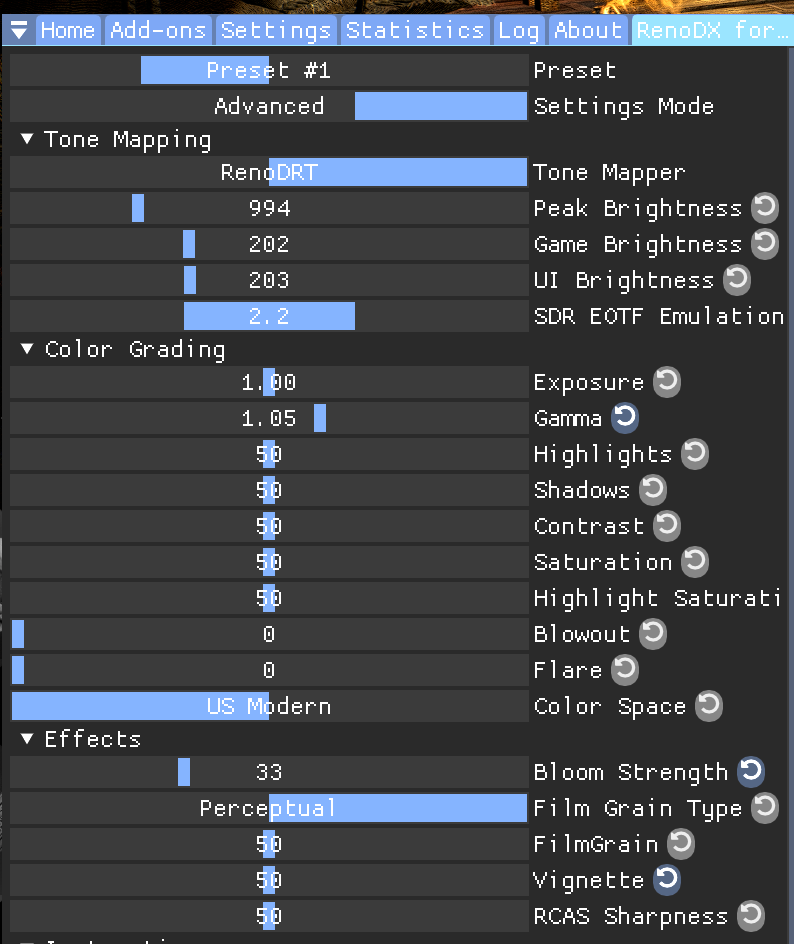

the mod ships with defaults at 1.03 "gamma"
 sullen terrace
pine trench
<@330243573788442625> these are my settings, I slightly cranked up the gamma to ...
sullen terrace
pine trench
<@330243573788442625> these are my settings, I slightly cranked up the gamma to ...
I use the True Black 400 mode on my monitor because the peak 1000 isnt as good on mine. Calibrated it clips at 450 nits so thats what my peak brightness default is, game brightness defaults to 111 so I wouldnt make it darker going to 1.05. I might lower the gamma slightly
pine trench
sullen terrace
I use the True Black 400 mode on my monitor because the peak 1000 isnt as good o...
@sullen terrace the gamma slider is a mix of exposure and contrast; you can just set it at 1.0 if you want
musa plays games on true black 400, with a 100 nit paper white; in a dark room you still get 4x+ range so its a solid experiance
sullen terrace
Yeah might try that out later. It still seemed somewhat dark at 1.03 so I might even try just reinstalling everything to see if it helps. I also sometimes play in a lit room, so I can try tonight with lights out
Thx though man, it was def better than the old build though
pine trench
I assume you're on a qd oled monitor
since you mentioned tb 400
cant imagine playing something dark in a lit room with that, esp if there is direct light hitting the monitor
pine trench
the only "mechanical" complaint I have is stuff like the odachi (all weapon specific skill skill trees tbh) are tied to samurai locks
in Nioh2 you earned skill points for a weapon by using that weapon; so you could max out all the weapons. Locks where only used for samurai, ninjutsu, and onmyo (they where special)
I know we have infinite re-specs for free at the bonfire, but it would be nice to mess around with different weapons without going through a bunch of menus to undo odachi points and put it into idk the katana
imo having all your weapons maxed out doesnt make you stronger, since you really only use 1 (or two with the mastery); just like the other games
its not the end of the world since I usually stick to one weapon; but it would streamline things imo
The weapon trees feel a lot smaller compared to 2 though, so maybe just playing the game you get more than enough samurai locks for atleast 2 weapons
naive widget
pine trench
the only "mechanical" complaint I have is stuff like the odachi (all weapon spec...
that has it's own downsides tho
swapping weapons in that case means you go from a full unlocked one to nothing
pine trench
naive widget
swapping weapons in that case means you go from a full unlocked one to nothing
how is that any different from right now?
I have skill points in the odachi, swap to katana; and its empty
iirc the point system scaled by amrita gained; so you'd get a lot of the early points FAST
naive widget
well right now you can just swap the points
pine trench
I remember doing the achievement in Nioh2 to get X profficiency in all weapons, and iirc you had to do all the dojo missions fo rall weapons (maybe just points)
and it didnt take long at all
pine trench
naive widget
well right now you can just swap the points
I mean killing 3 yokai isnt exactly hard
naive widget
Yea I mean if it's that quick then it's w/e
pine trench
I dont know of locks are front loaded, or you get a consistent ammount all game; but if they give you multiple weapons worth of locks; thats fine
naive widget
they do
pine trench
also I'm not exactly complaining, just felt like the old system was cooler
naive widget
yea that's fair
also just swapping points over to a different weapon doesn't necessarily mean anything if you don't use the unlocked combos
pine trench
naive widget
Yea I mean if it's that quick then it's w/e
it was fairly fast, and you'd get like a ton of points just wacking a end game monster with 0 skill points
ofcourse it tapers down, but as a whole skill tree points was not really an issue
naive widget
using the weapon and unlocking them gradually feels more natural as you learn to use them as you unlock them
pine trench
naive widget
also just swapping points over to a different weapon doesn't necessarily mean an...
thats what I'm saying
naive widget
aye yea
pine trench
no harm in having all weapons like nioh2, since you'd only use 1 or 2 weapons
so it just made it comfier
for post game you still had to get the affix, fuck what was it called
let me find a nioh2 build progress video I recorded
Mystic Dyad (Weapon Name)!
every weapon had lets call them super talent point, that normally you could have only 1 of
but in super post game DLC, items could drop with a "Mystic Dyad (odachi)" affix; which let you learn both of them -- which for some weapons is huge
naive widget
I think my 1 complaint with nioh 3 is that it just felt
too easy
there was 1 boss that farmed me but other than that it felt kinda easy
compared to other soulslikes
pine trench
ngl I dont use ninja (not because I heard its op, but because I dont want to play a ninja) so samurai only with an odachi
and I just killed turbo baba
naive widget
ninja just starts off stronger
pine trench
I got clapped a few times, but it wasnt anything crazy
pine trench
the big thing is, idk if I was just worse than I am now (still not good at these games)
naive widget
the samurai combat is just toooooo good
pine trench
but in Nioh2, the first mission with the mezuki boss
the enki and yoki would shit on you
naive widget
pine trench
the big thing is, idk if I was just worse than I am now (still not good at these...
could be as well
I also thought i just got better at these games
but i was messing around in elden ring shortly before nioh 3
and nah i got deleted
pine trench
I came into nioh3 after code vein 2, which is just mash 1 button to win
naive widget
so still just as bad as ever