#Unity Engine
1 messages · Page 9 of 1
 light marsh
 main wharf
Default upgrade covers a lot of cases tbh.
You can use Lilium's Analysis shader to figure out the rest.
On bottom left is colors graph, if stuck to smallest triangle even when bumping saturation all the way up game likely needs R11G11B10_float upgrade.
On bottom right you want to look for values above Game Nits value (default 203).
light marsh
Other mods require you to Disable Generic Depth and Effect Runtime Sync under the Addons tab. Is this required for the Unity Reno?
main wharf
light marsh
Other mods require you to Disable Generic Depth and Effect Runtime Sync under th...
Does any addon actually requires this?
Afaik disabling them is more to reduce ReShade's performance overhead by a slight, can help in most expensive games but I don't think it's a hard requirement.
light marsh
I see. Thank you so much Voosh
 proper vine
rxddit.com
Starsand Island has been temporarily removed from Steam after developer Seed Sparkle Lab admitted to using unauthorized visual elements from another game.
Developer issued public apology:
Dear Islanders,
Due to an oversight during the planning phase, certain core visual elements from a classic title were used without proper authorization w...
@woven crag
 woven crag
yeah i saw that but no big deal they just gotta change some assets
it's so weird how this game just can't avoid controversies lol
proper vine
wonder if maybe they took it off to reset reviews?
how were the reviews for it anyway?
You'd think it'd be really easy to just take the assets out of the game
woven crag
reviews were good iirc but there were also allegations about some fake positive reviews
 storm vapor
the addon works great in the We Were Here Tomorrow demo and in Chained Wheels (a friendslop game)
 torn rose
MOUSE: P.I. For Hire is an action-packed first-person shooter that draws inspiration from the classic cartoons of the 1930s. Its black and white rubber hose visuals are drawn by hand, frame by frame, delivering a striking vintage aesthetic. Unravel layers of corruption with a thrilling noir-fueled detective story, lively environments to ex…
Price
$29.99
Release Date
Apr 16, 2026

Google says it will be on Unity as well
Really interested how its gonna look with B&W
 hearty bronze
i wouldnt expect it to work out-of-the-box
main wharf
hearty bronze
i wouldnt expect it to work out-of-the-box
Based on..?
 sleek tangle
did you get iracing working with Renodx? Was thinking of buying it on the steam sale
 kind kernel
hearty bronze
assuming the bw filter clamps
kind kernel
hearty bronze
assuming the bw filter clamps
another b/w Unity game, White Shadows, just has its filter as a lut which doesn't clamp
main wharf
hearty bronze
assuming the bw filter clamps
Huh? There are multiple supported b&w games already. You can achieve this easily with Unity's color grading (internal LUT) no matter used pipeline.
Add-on also upgrades baked LUTs, including unity store plugins ones.
hearty bronze
ah right i didnt think about luts 😛
main wharf
One-Eyed Likho would be another example
main wharf
hearty bronze
ah right i didnt think about luts 😛
Yet that's how most if not all Unity games do grading.
hearty bronze
thats kinda weird
doesnt it make user-defined grading settings more annoying to implement in games?
i guess those arent really options most of the time anyway
main wharf
hearty bronze
doesnt it make user-defined grading settings more annoying to implement in games...
Uhm, what do you mean by that?
LUTs aren't a new thing, usually games that don't make use of internal ones just make their own baked ones with an external software.
Fairly sure all pipelines support both.
main wharf
Not 100% sure how it goes on dev-side but I'd expect Unity provides neutral LUT, which devs can put in any color editing software and work on.
hearty bronze
right
realtime colour grading changes would have to be done outside of that lut though, right?
main wharf
Can use multiple ones along with lerps
Internal LUT has a bunch of effects and parameters, so unless grading change is really specific, that makes for an easy way to edit grading in realtime aswell.
hearty bronze
ah okay
 fiery vapor
how does the addon rewrite look in Inertial Drift?
oh I just realised
inertial drift doesn't actually have the output shaders 😭
oh no it's even worse
in game and level select have different output shaders
nvm they don't but it's still weird
swapchain proxy crashes the game
current fix I found (in latest snapshot) to make HDR sliders work properly in this game is to set Blit Copy Hack to "Scaling Only" and set Scaling offset to 1
main wharf
fiery vapor
current fix I found (in latest snapshot) to make HDR sliders work properly in th...
This doesn't help crashes.
main wharf
fiery vapor
swapchain proxy crashes the game
Uhm, why are you using proxy though? I dont think game needs it, does it?
main wharf
fiery vapor
~~oh no it's even worse~~
I'm confused.
fiery vapor
main wharf
This doesn't help crashes.
oh no I didn't mean by crashes
main wharf
fiery vapor
how does the addon rewrite look in Inertial Drift?
No idea, you probably should stick to snapshot
fiery vapor
there I edited my post oops
main wharf
I can't test rewrite with devkit being borked
fiery vapor
main wharf
I'm confused.
I took that back after that post
I'm glad the vignette is adjustable because it turns out it hides 90% of the brightness
although although getting rid of it does raise the black level significantly
but that's an easy fix with reshade, nothing to complain about really
I gotta post a pic I swear it looks much nicer
main wharf
fiery vapor
current fix I found (in latest snapshot) to make HDR sliders work properly in th...
I don't think that's intended, is it?
Again I would stick to latest snapshot.
fiery vapor
main wharf
I don't think that's intended, is it?
Again I would stick to latest snapshot.
oh sorry this is talking about latest snapshot
main wharf
fiery vapor
how does the addon rewrite look in Inertial Drift?
Aw I thought test version because of this.
fiery vapor
oops
main wharf
Cant remember this was needed before, was game updated?
 bronze galleon
sleek tangle
did you get iracing working with Renodx? Was thinking of buying it on the steam...
bronze galleon
sleek tangle
did you get iracing working with Renodx? Was thinking of buying it on the steam...
Haven't tried again since last time, was too broken
main wharf
Still gotta check what's going on there, something with proxy seems broken with some RenoDX base code update.
Will try with latest code later this week, though devkit causes CTD when used along addon currently, makes things a bit tricky.
bronze galleon
Ouch
sleek tangle
bronze galleon
Haven't tried again since last time, was too broken
I havent tried it yet, but I did try Special K HDR with iracing arcade and the colors were all broken
bronze galleon
@main wharf you should join the REPLACED server, I just did a shameless plug for RenoDX but after release gotta show them how wonderful their game looks in RenoDX HDR
Some actually native RenoDX implementation would be cool af
bronze galleon
 lapis schooner
<@328585230657257473>
lapis schooner
<@328585230657257473>
TY TY TY
bronze galleon
lapis schooner
played circa 5mins
Hopefully there's nothing new and mod doesn't need an update
1min remaining for install...
Fucking Galaxy decided to throttle on me today of all days 
 regal moth
thankfully only 5 gbs
lapis schooner
bronze galleon
TY TY TY

i did try reno and it did seem to work but said missing shaders so thought might as well share
lapis schooner
bronze galleon
Hopefully there's nothing new and mod doesn't need an update
i do actually want to play it so... sorry i guess? 😛
bronze galleon
lapis schooner
i do actually want to play it so... sorry i guess? 😛
Yeah, do be sorry for your sins 
(= enjoy the fuck out of it !)
But yeah, just new game sequence is fucked
Need mod update
main wharf
Incoming... Though for some reason snapshot fails building with latest commits.
So it's gonna be here
 dense thorn
Ouuuuh replaced is out? 
bronze galleon

regal moth
anyone else stuttering or just a me thing?
main wharf
main wharf
Incoming... Though for some reason snapshot fails building with latest commits.
Aw, this should be fixed when I rebase with latest renodx code. Though I'm not sure I wanna do this for now.
It's just something with dependencies, submodules or whatever. The "external" folder, looks like things got mixed up when I locally updated submodules to latest but only on secondary branch, not main one... Anyway, will see later.
main wharf
bronze galleon
<@328585230657257473> you should join the REPLACED server, I just did a shameles...
I sent a message, will see if they ever respond. Tried to give a couple hints so they might not even need help or an HDR monitor to make it. It should be relatively easy I think assuming Unity provides everything that's needed.
main wharf
lapis schooner
<@328585230657257473>
Here. Thanks for dump as usual!
@bronze galleon @regal moth
bronze galleon
main wharf
I sent a message, will see if they ever respond. Tried to give a couple hints so...
Thanks for that, hopefully they'll take it into consideration seriously
bronze galleon
main wharf
Here. Thanks for dump as usual!
<@288812329423077386> <@132197013637824512>

regal moth
Thanks!
bronze galleon
TY TY TY
lapis schooner
damn that was quick!
main wharf
Hopefully I didn't mess anything up. Feels weird to work on old code after spending so many hours on addon rewrite xD
main wharf
lapis schooner
damn that was quick!
One single shader, took longer to compile than edit, especially after laptop went in eco mode (low battery/no charger as I'm at work now).
If there's an issue I'll only be able to look into it tonite (in 5 hours or so).
Probably will get game anyway.
bronze galleon
Yeah get it first, enjoy it !
Damn film grain do be strong af in this one
And Reno can't do anything about it unfortunately 🙁
main wharf
bronze galleon
Damn film grain do be strong af in this one
Oh yea I just added Bloom slider I think.
Will do rest later
lapis schooner
flashbanged
 bronze galleon
main wharf
Will do rest later
bronze galleon
main wharf
Will do rest later
Take your time man, it's 100% playable, works as expected for the most important : the game looks gorgeous ootb
main wharf
lapis schooner
flashbanged
cant open .jxr on phone 
lapis schooner
main wharf
*cant open .jxr on phone* <:despairge:1409648830307369061>
you dont want to trust me


 bronze galleon
bronze galleon
bronze galleon
bronze galleon
bronze galleon
Wonder why it would for him
main wharf
bronze galleon
Wonder why it would for him
Seems like Linux shenanigan, though I understand they fixed it?
bronze galleon
Oh apparently yes 🙂 Hadn't followed up, relieved 🙂
main wharf
main wharf
Here. Thanks for dump as usual!
<@288812329423077386> <@132197013637824512>
@last scarab hope you don't mind the ping.
Here's current working build in REPLACED.
Haven't been able to update snapshot got some issue with github currently.
Though I'll also add more Effects sliders by tomorrow, currently only Bloom one would work.
 lapis schooner
 last scarab
lol last i played a 2d game was a decade, this'll be a treat
last scarab
lol last i played a 2d game was a decade, this'll be a treat
technically it's 2.5D 
bronze galleon
lapis schooner
technically it's 2.5D <:pepeUglyBastard:1409649590625501215>
They've done such an impressive job with the depth
WTF, how do I spoiler pictures
lapis schooner
when you upload it, button
bronze galleon
HDR REPLACED w/ RenoDX Unity (first is with defaults except Reinhard + BT 1886 and the others are at contrast 60 - damn I love THAT look)


 bronze galleon
lapis schooner
when you upload it, button
bronze galleon
lapis schooner
when you upload it, button
Fucking noob moment ngl 
Might have redone the prologue like 5 times now, with various settings, that's really the ones I'll stick to I think
Moving 3 sliders, looking forward to moving a 4th one for film grain but that's it really, doesn't need any retouching
Tho admittedly, sometimes there's this odd mismatch in brightness between source lights and their reflections
But apart from that, it's really all one could ask for ❤️
lapis schooner
bronze galleon
Tho admittedly, sometimes there's this odd mismatch in brightness between source...
yeah i noticed this
 last nexus
@bronze galleon is it possible to native hdr neva ?
doesn't seem the work with the unity mod
bronze galleon
Yeah it works fine for me
last nexus
idk in my book not going above 203 nits = sdr clamp
bronze galleon
Yeah ig
last nexus
so basically not working
bronze galleon
I mean I can for sure push sliders around and it works but I wouldn't
last nexus
no it's oesn't
bronze galleon
UI can be bright af too
bronze galleon

last nexus
let's say the game is conservative i understand
but if i push highlights at 100
it should go above 203
so it's just sdr
 fading cradle
Is there any plans to support SDR mod in Replaced ? Maybe there is something to improve in this range ?
main wharf
fading cradle
Is there any plans to support SDR mod in Replaced ? Maybe there is something to ...
SDR? Uhm. You can set Peak, Game and UI Brightnesses to 80 I guess, but I think you're better off just playing without mod at this point.
Unless you want the grading sliders maybe? I guess you can set tonemapper to Vanilla for this purpose, will keep game's original SDR tonemapping and should still allow to use grading (and effects) sliders.
main wharf
last nexus
it should go above 203
Assuming game brightness is 203, then most likely yea.
I guess some upgrade could be missing if you use DSR/VSR..? Default RGBA8_typeless might have to be set to Output Ratio in that case.
last nexus
using neither
tried all upgrades and proxy swapchain no success
didn't try output ratio
lemee see
that was it
you're a god damn genius
main wharf
last nexus
didn't try output ratio
I don't think game has any resolution scaling setting, does it?
So this doesn't make sense.
Another particular case is if game's aspect ratio differs from monitor's aspect ratio, e.g game is forced 16/9 on 21/9 monitor, with letter/pillar boxing. In which case one should set upgrade to Any Size...
main wharf
last nexus
you're a god damn genius
Wut. Well no idea why, but glad it worked lmfao.
last nexus
was just output ratio yeah
 median anchor
Just about to start neva also, what do I need to do?
main wharf
median anchor
Just about to start neva also, what do I need to do?
Change RGBA8_typeless in Resources Upgrades from Output Size to Output Ratio it seems.
It's the only upgrade that's not disabled by default.
I find it a bit odd this is needed though... Usually that's when some resolution scaling occurs, VSR/DSR or when game's internal resolution is locked for example to 1440p on 4K desktop.
median anchor
I also have to set game brightness to 80 for stuff to look reasonable, is that expected?
bronze galleon
Neva needs to be set to gamma if it isn't automatically
main wharf
bronze galleon
Neva needs to be set to gamma if it isn't automatically
Should be automatic since I updated add-on after your report. Pretty sure that's already in latest snapshot.
 exotic wraith
Replaced is just the latest unity Reno build? Any specific settings?
main wharf
main wharf
Here. Thanks for dump as usual!
<@288812329423077386> <@132197013637824512>
Use this build for REPLACED.
Having issues with github lately so I can't update snapshot.
Still quite busy at work, though I'm off next couple days, will try to solve this so I can keep snapshot updated.
exotic wraith
Ok thanks!
main wharf
exotic wraith
Replaced is just the latest unity Reno build? Any specific settings?
As for settings... Can't remember. Maybe RG11B10_float upgrade if colors are clamped to bt709 space.
exotic wraith
Kk will try it out
last nexus
SDR vs HDR with 65 highlights

 fading cradle
main wharf
SDR? Uhm. You can set Peak, Game and UI Brightnesses to 80 I guess, but I think ...
fading cradle
main wharf
SDR? Uhm. You can set Peak, Game and UI Brightnesses to 80 I guess, but I think ...
I just remember how great the mod for Silksong turned out, because of this, I will find out in the game I like, but will there be any improvement if it is needed specifically for the SDR color range 🙂 I'm not an expert, but when I saw the difference in Silksong, I realized that sometimes developers can't bring everything to mind.
Maybe Replaced doesn't need any adjustments, for example, in color bitness ( i mean 10 bits or 12 bit ), or maybe it does, I don't know 🙂 So I played for an hour and a half and I want to say that during the postponement of the game from March to April, the developers clearly did something, in a good way, with the visual part of the game. In addition to a smoother picture, there were 1-2 statters, graphically it looks cleaner or better.
sleek tangle
lapis schooner
played circa 5mins
how is it? does it have native hdr?
main wharf
sleek tangle
how is it? does it have native hdr?
It has a demo you can try.
And native HDR only with RenoDX currently.
 spice flume
Hello friends, which rendering API do I select for Replaced?
(when installing reshade)
lapis schooner
main wharf
It has a demo you can try.
And native HDR only with RenoDX currently.
game seems locked to bt.709 looking at lilium sliders, turned on R11G11B10_FLOAT to any size and the main menu has some DCI-P3 color but havent seen any in game yet
main wharf
fading cradle
I just remember how great the mod for Silksong turned out, because of this, I wi...
I see.
Afaik Silksong doesn't originally have any kind of tonemapping. It just clips highlights in SDR.
In that case RenoDX allows to display more details even in SDR, by compressing the extra range into 0-1 instead of game just cutting anything above 1. As for bitness, I believe Silksong fully renders using 8bit resource formats, hence the upgrade.
REPLACED makes use of a tonemapper, so it's a different case. It also already renders in higher bitness without any mod so don't expect that big of a change really.
The main benefit would be Color grading and Effects sliders really.
main wharf
lapis schooner
game seems locked to bt.709 looking at lilium sliders, turned on R11G11B10_FLOAT...
Yea I seemed to remember this from demo. Any size might be overkill, but might not harm either. Output size is likely enough.
main wharf
spice flume
Hello friends, which rendering API do I select for Replaced?
Dx11/dx12
lapis schooner
main wharf
Dx11/dx12
it's dx11
spice flume
Thanks guys
spice flume
lapis schooner
it's dx11
Yeah it's the same option as DX12
main wharf
lapis schooner
it's dx11
Doesn't make a difference for ReShade installer yea
lapis schooner
true
main wharf
Ah lol or you meant I typo'd, wrote twice dx12 xd
lapis schooner
main wharf
Yea I seemed to remember this from demo. Any size might be overkill, but might n...
output size wasn't enough to upgrade menu to dci-p3, you get 5% dci-p3 with any size
main wharf
Alright, gud to know.
lapis schooner
main wharf
Alright, gud to know.
barely seen any in game though, like a 0.5% maybe when moving between areas for a brief half second
main wharf
lapis schooner
barely seen any in game though, like a 0.5% maybe when moving between areas for ...
As long as it's not clamped even if you push saturation up, all good.
lapis schooner
main wharf
As long as it's not clamped even if you push saturation up, all good.
pushing it to 60 changes BT709 to 66% and DCI-P3 33% and the color grading changes
in game its more like 99.97% / 0.02%
main wharf
lapis schooner
pushing it to 60 changes BT709 to 66% and DCI-P3 33% and the color grading chang...
Yea all good then.
main wharf
lapis schooner
in game its more like 99.97% / 0.02%
Will depend on scene really, but at least it's not clamped.
spice flume
Looks pretty neat

Hmm my reshade screenshot is showing up quite differently to how it was in game
main wharf
spice flume
Hmm my reshade screenshot is showing up quite differently to how it was in game
Might depend how you view it. E.g Firefox can't display HDR pics properly. Dunno about Windows default image viewer, someone mentionned they had to download some extension (I assume from Microsoft Store) for it to display HDR pics properly.
main wharf
bronze galleon
Moving 3 sliders, looking forward to moving a 4th one for film grain but that's ...
Added Film Grain slider (and RenoDX's perceptual film grain) to REPLACED.
bronze galleon
main wharf
Added Film Grain slider (and RenoDX's perceptual film grain) to REPLACED.
You're the best, Man ❤️
Thanks so much
main wharf
Aw, also added default upgrades for the game, so R11G11B10_float will be Any Size when first booting addon.
And I attempted to fix snapshot not building... It would fail almost instantly and now it seems to be building so far. There's hope
bronze galleon
Github do be temperamental I guess ?
main wharf
I noticed UI is clamped in code. Will experiment later with unclamping it and rolling off instead.
main wharf
bronze galleon
Can be pushed rather high it seems
Uhm from what I get from code it should only hit whatever UI Brightness is set to.
bronze galleon
Sounds.. normal ?
main wharf
bronze galleon
Sounds.. normal ?
Yeaa that's expected indeed. But how about... HDR UI..? 🙈
bronze galleon
I mean more 300 nits is already too much for me but it does reach that easily
150 is my typical sweet spot usually
main wharf
There's a bloom pass on UI only, and it's then clamped. I'm not fan of the result, especially that very first "scene" (written intro).
I already have "UI Behavior" slider in addon, might aswell make use it 😅
It'd be optional to unclamp it pretty much
main wharf
bronze galleon
Github do be temperamental I guess ?
More like me not having a clue how it works. I stick to the workflow @crimson spear taught me, everything goes well. As soon as I do something slightly different, I'm just lost lmao. Shit's complicated.
Things went wrong when I started working on addon update with most recent RenoDX basecode, while keeping snapshot/main branch to outdated RenoDX basecode (until I make sure most recent doesn't break anything).
Somehow main branch ended up getting part of the most updated stuff (\external folder, submodules or whatever they're called) and would fail building with the following error:
No url found for submodule path 'external/json' in .gitmodules
I managed to find this commit: chore(deps): add nlohmann/json submodule at v3.12.0 from 13th March.
For now rebased main branch until this commit as I don't want snapshot to be incompatible with devkit (which would be the case with most recent RenoDX basecode).
Hopefully will do the trick... Will see in an hour or so.
Still building... There's HOPE
main wharf
bronze galleon
I suppose this is a change from the demo which had UI pretty raw
Aw wait nvm. The part I was thinking about isn't even UI, the very first written intro is actually part of render 🤦
Oooh, LUT scaling seems nice here.
 sour drum
main wharf
More like me not having a clue how it works. I stick to the workflow <@125339581...
sour drum
main wharf
More like me not having a clue how it works. I stick to the workflow <@125339581...
psycho tm coming (someday) with a revamped version?
main wharf
sour drum
psycho tm coming (someday) with a revamped version?
Been working on that yea. No ETA there's still a lot to do, not counting psychotm also is work-in-progress. I'll try to share another test build this week after I do some testing and make sure it's usable at least in some games.
Don't get your hopes up tho, there'll be broken stuff and it won't support all currently supported games at first. Will likely be a month at least before I actually update snapshot to that.
main wharf
main wharf
Oooh, LUT scaling seems nice here.
Heeeh yea, I think it does what it's supposed to do... Nice.


Snapshot still building... Cursed days soon be past hopefully 🙈

VICTORY!!!
 sour drum
main wharf
Been working on that yea. No ETA there's still a lot to do, not counting psychot...
sour drum
main wharf
Been working on that yea. No ETA there's still a lot to do, not counting psychot...
so kind of similar to ue extended situation?
main wharf
sour drum
so kind of similar to ue extended situation?
Uhm, maybe I don't know.
sour drum
main wharf
Uhm, maybe I don't know.
a major revamp of the mod that'll break a lot of games short term, but is better long term, merged with main whenever its done, I mean
bronze galleon
main wharf
Heeeh yea, I think it does what it's supposed to do... Nice.
This is just LUT scaling ? 😮
main wharf
bronze galleon
This is just LUT scaling ? 😮
Yes, internal LUT one. From 0 to 100
main wharf
bronze galleon
This is just LUT scaling ? 😮
It's my own function there hence why it's disabled by default. I have no confidence to the point I'm still surprised when it works as intended lmfao
bronze galleon
You should trust yourself more
Time and time again you do great and when sometimes you don't, you fix stuff pretty quickly 🙂
 crimson spear
main wharf
It's my own function there hence why it's disabled by default. I have no confide...
crimson spear
main wharf
It's my own function there hence why it's disabled by default. I have no confide...
Blackfloor scaling only?
bronze galleon
Man thank you soooo damn much for the film gran slider now working in Replaced
Settled on vanilla at 25
They went too hard imo but this is a nice sweet spot
main wharf
crimson spear
Blackfloor scaling only?
Yea. I don't work on lut sampling as RenoDX function does, but rather edit the one responsible function in lutbuilder. Lift Gamma Gain
float3 liftGammaGain(float3 input, float3 lift, float3 gamma, float3 gain){
  return sign(input) * pow(abs(input * gain + lift), gamma);
}

float3 liftGammaGainScaling(float3 lifted, float3 original, float3 lift, float3 gamma, float3 gain, int encoding = 0){
  // 0 - linear bt709, 1 - linear ap1, 2 - srgb
  if(injectedData.colorGradeInternalLUTScaling == 0.f){return lifted;} else {
    float3 new_gain = 2.f * (pow(liftGammaGain(0.5f, lift, gamma, gain), 1 / gamma) - liftGammaGain(0.f, lift, gamma, gain));
    float3 new_lift = pow(liftGammaGain(0.f, lift, gamma, gain), 1 / gamma);
    float3 unclamped = original < (0.5).xxx ? liftGammaGain(original, new_lift, gamma, new_gain) : lifted;
    float3 unclamped_linear;
    float3 lifted_linear;
    if(encoding == 2){
      lifted_linear = renodx::color::srgb::DecodeSafe(lifted);
      unclamped_linear = renodx::color::srgb::DecodeSafe(unclamped);
    } else if (encoding == 1){
      lifted_linear = renodx::color::bt709::from::AP1(lifted);
      unclamped_linear = renodx::color::bt709::from::AP1(unclamped);
    } else if (encoding == 0) {
      lifted_linear = lifted;
      unclamped_linear = unclamped;
    }
    float lifted_y = renodx::color::y::from::BT709(abs(lifted_linear));
    float unclamped_y = renodx::color::y::from::BT709(abs(unclamped_linear));
    float3 scaled_linear = lifted_linear * renodx::math::DivideSafe(unclamped_y, lifted_y, 1.f);
    float3 output = lerp(lifted_linear, scaled_linear, injectedData.colorGradeInternalLUTScaling);
  if(encoding == 2){
    output = renodx::color::srgb::EncodeSafe(output);
  } else if (encoding == 1){
    output = renodx::color::ap1::from::BT709(output);
  } else if (encoding == 0) {}
  return output;
}
}
Something about calculating new lift, gamma and gain values based on 0 remaining 0 and replacing old values with new ones. @desert herald had a good explanation on this method somewhere, might be in HDR Den though.
crimson spear
I guess unity has a cbuffer for gain?
main wharf
crimson spear
I guess unity has a cbuffer for gain?
For lift, gamma and gain yea.
The only thing I don't understand is the 0.5 split. Got that from trying shit on desmos, function would break above 0.5 without it.
main wharf
bronze galleon
They went too hard imo but this is a nice sweet spot
Yea, in comparison perceptual seems invisible. I'll do perceptual at 75 or something like that when I play
main wharf
Snapshot's updated, yaaaay!
bronze galleon

fading cradle
main wharf
Snapshot's updated, yaaaay!
Can I have an exact link, please? I know one link, but I'm not sure if it's the right one or not.
fading cradle
main wharf
Always the same, it's in first pinned message:
[64-bit](https://notvoosh.github...
Or you can link to the github page, since I have a 404 error.
dense thorn
main wharf
Heeeh yea, I think it does what it's supposed to do... Nice.
looks neat
fading cradle
I just wanted to take a look, maybe besides unity, you have some descriptions on the page, maybe there are some sections.
dense thorn
does the game have UW support? bit surprised by those blackbars in your screens xd
 jaunty thorn
@main wharf should we force LUT shaper to vanilla for correct output ?
 main wharf
dense thorn
does the game have UW support? bit surprised by those blackbars in your screens ...
main wharf
dense thorn
does the game have UW support? bit surprised by those blackbars in your screens ...
It does yea, no window-boxing in UW it's alright.
Though game has some weird shenanigan going on when resizing window, that was Windowed 2560x1440 on 3440x1440 monitor, which seems to break somehow. Also game somehow has 3441*1440 resources in Borderless Window, it's as if their UW support was slightly borked. But it works!
main wharf
jaunty thorn
<@328585230657257473> should we force LUT shaper to vanilla for correct output ?
Uhm shouldn't with latest snapshot, so make sure to use that. Date in addon's UI should be today's.
main wharf
main wharf
Here. Thanks for dump as usual!
<@288812329423077386> <@132197013637824512>
I assume you're getting warning about LUT Shaper, which would only occur with outdated addon. I added support for full game yesterday with this build, and was only able to update snapshot a bit earlier today.
dense thorn
main wharf
It does yea, no window-boxing in UW it's alright.
Though game has some weird she...
thx for info
prolly gonna cop that soon then
jaunty thorn
main wharf
I assume you're getting warning about LUT Shaper, which would only occur with ou...
yes thx, the last build works perfectly
main wharf
fading cradle
I just wanted to take a look, maybe besides unity, you have some descriptions on...
main wharf
fading cradle
Or you can link to the github page, since I have a 404 error.
Weird, link seems to work fine here. Tried another browser or maybe just private navigation? Maybe blocked by some extension or something.
bronze galleon
main wharf
Yea, in comparison perceptual seems invisible. I'll do perceptual at 75 or somet...
Could RenoDX somehow tone the weird DoF down somehow or is it out of scope ?
Some scenes it works perfectly but others idk what the hell they did but it's nonsensical
Like it will blur the background which is just like a couple meters aways from the focused on characters and action, as well as forefront of the scene, and it just feels off
 night mural
main wharf
Added Film Grain slider (and RenoDX's perceptual film grain) to REPLACED.
night mural
main wharf
Added Film Grain slider (and RenoDX's perceptual film grain) to REPLACED.
what settings do you use? can you ss
main wharf
bronze galleon
Could RenoDX somehow tone the weird DoF down somehow or is it out of scope ?
I don't have a DoF slider, do I? 😅
Joke aside yea probably can look into it and hook it to Lens slider bcoz I'm lazy to make a new one.
bronze galleon
main wharf
I don't have a DoF slider, do I? 😅
Joke aside yea probably can look into it and...
No you don't, hence the out of scope part 😉 But don't bother really, it was just out of curiosity, if it's more the scope of another dedicated mod, better let that task to such mod
main wharf
bronze galleon
No you don't, hence the out of scope part 😉 But don't bother really, it was jus...
Nah should be doable in that shader I'm already editing anyway, will have a look soon.
 ember fog
Ooo this is nice. Thanks for working on replaced. Might have to buy this soon
night mural
is it possible we can get a thread for replaced?
bronze galleon
main wharf
Nah should be doable in that shader I'm already editing anyway, will have a look...
Okie dokie 🙂 Well thanks a lot if only for considering it 😉
main wharf
night mural
what settings do you use? can you ss
Might not have time to play before tomorrow maybe so not sure yet.
I usually stick to default for most settings anyway, especially when they look that close to original SDR/"intended look".
My current go-to's would be:
- lower Game's Brightness (80) and UI Brightness (100 or 110). This is me playing in full dark room.
- tone down bloom a bit (25/30).
- increase LUT Scaling (both) to 100 (though in REPLACED there's no User LUT, only Internal).
- change Film Grain Type to Perceptual and adjust its intensity to my liking (I really enjoy grain, probably more than the average).
That's pretty much it to be honest.
main wharf
night mural
is it possible we can get a thread for replaced?
Like crimson-desert one..? I have nothing against personally but I genuinely don't think game's that notorious tbh, is it? Nor is this Unity thread much active anyway, so it'll likely be all about REPLACED for some time.
Aw nvm, crimson desert is a channel. Yea I dunno, doesn't make sense unless game gets a dedicated mod, which won't be from me.
 summer hinge
For the mod to work in replaced, we just have to download the generic unity mod from github and then roll with the defaults correct ?
main wharf
dense thorn
does the game have UW support? bit surprised by those blackbars in your screens ...
Wait, from what I'm reading game actually has letterboxing for 16/9 users...
lmfao it's not a bug, it's intended. I just thought not because it doesn't happen on 21/9 monitor. So I guess that's how game's supposed to be played, 21/9
UW wins, noice. Don't think I've seen this except Hellblade 2
 ember fog
Even better reason for me to buy it
main wharf
summer hinge
For the mod to work in replaced, we just have to download the generic unity mod ...
Yup'
night mural
yeah i was playing on my tv and it was like a movie but im gonna try on my 5k2k tomorrow
 young garnet
meanwhile current game and last game I've played don't support 21:9 
main wharf
bronze galleon
Could RenoDX somehow tone the weird DoF down somehow or is it out of scope ?
Here, maybe. DoF slider it is.
To be honest I remember already being lazy to add one for at least a couple games, as it wouldn't be used for most, but that's also true for other Effects sliders, not every game has Lens Dirt yet I have a slider sooooo...
Now to remember and revisit the few games/shaders I can hook new slider to. 😅
bronze galleon
Right when I had just booted the game up again 
 hearty sandal
Any chance you could do the vignette as well?
main wharf
hearty sandal
Any chance you could do the vignette as well?
Wait is there a vignette..? Mmh true I didn't look for this
Time to boot game again I guess
bronze galleon
Oh game is updating now anyway, nice
main wharf
hearty sandal
Any chance you could do the vignette as well?
Ok yea there is. Quite light I didn't notice, but yea I can do. New build incoming very soon™
bronze galleon
main wharf
Here, maybe. DoF slider it is.
To be honest I remember already being lazy to add...
Damn, it rocks ! Thanks so much yet again ❤️
lapis schooner
bronze galleon
Could RenoDX somehow tone the weird DoF down somehow or is it out of scope ?
what is weird about it? it's just an artistic choice and i see no issue with it
don't get people's hate boner for dof
bronze galleon
I would agree but the scene where you ||meet Tempest's Dog|| just made me go fuck that, no way this makes any sense even artistically
Can't fucking blur a background which is just 2 meters behind AND blur the fuck out of everything at the scene forefront
Or if you do, just a bit less
So far, halving the slider to 50 makes it way more appreciable for me
hearty sandal
Lol yeah... I can never not notice a vignette. Such a distracting effect to me. I appreciate it!
bronze galleon
It's about DoF tho, not Vignette
lapis schooner
vignette is not nearly the same thing as dof
hearty sandal
I was responding to voosh, sorry
bronze galleon
Oh, my bad
main wharf
bronze galleon
I would agree but the scene where you ||meet Tempest's Dog|| just made me go fuc...
I would remove original DoF with Cinematic Unity Explorer to replace it with IGCSDoF shader when attempting to take "advanced" shots, but in this game CUE can't toggle any of the post-processing, likely because custom stuff.
So slider's actually very welcome, even if not for gameplay.
main wharf
hearty sandal
Lol yeah... I can never not notice a vignette. Such a distracting effect to me. ...
Hooked Vignette slider to game's Vignette (REPLACED), thanks @hearty sandal for letting me know.
bronze galleon
main wharf
I would remove original DoF with Cinematic Unity Explorer to replace it with IGC...
So far DoF 50 really is super nice
Keeps artistic intent but without overdoing it
Like Film Grain 🙂
Man, Kal cooked HARD with his latest Unity focused builds
Dropped PCL latency by a crazy 5ms overall at a locked 120fps
main wharf
Oh, Morbid Metal released earlier this month..?
Remember trying demo, was a bit boring but game looks nice.
Aw, is early access 😞
No roadmap 😞😞
Should come soon though, mmh
We know many of you are eager to see what’s coming next. We’ll be revealing the full Early Access roadmap during Find Your Next Game (FYNG) — April 17. Save the date!
Will wait for more info, but at this price I might grab it just to take pics in it, at least until more content comes.
night mural
am i meant to do any of this for replaced?
 bronze galleon
Wish the Wingman's brightness wasn't broken lol some neat keybinds to up it or lower it would be so nice, maybe I should ask the devs, but there's lore reasons so idk
 main wharf
night mural
am i meant to do any of this for replaced?
main wharf
night mural
am i meant to do any of this for replaced?
Afaik, no.
The following point about Colors being clamped to BT-709 => Upgrade R11G11B10_float: technically yes, but I made this happen automatically for this game since latest snapshot. So you should already have R11G11B10_float set to Any Size by default (in REPLACED).
 vernal hatchBOT
{send:#security:
🚨 @everyone/@here used
User: Voosh ({userid})
Channel: Unity Engine
Content: New Patch now live now on Steam! @everyone
Key fixes include:
- Wingman no longer breaks while using a fast scroll feature (horizontal movement) on a Brightness setting
- Fixed rare cases with level transition during which Reach could get stuck in a death loop
- Reach no longer can walk on air in his jacket during intro titles sequence
- Increased difficulty of the escape sequence after the first boss fight
- Wingman localization fixes
- Some minor visual fixes
Please update before continuing your journey through Phoenix-City!
}
main wharf
@bronze galleon They heard you lmfao
Woops, carl-bot not happy about me forwarding a @everyone
vernal hatchBOT
{send:#security:
🚨 @everyone/@here used
User: Voosh ({userid})
Channel: Unity Engine
Content: Woops, carl-bot not happy about me forwarding a @everyone
}
main wharf
Bruh.
main wharf
bronze galleon
Wish the Wingman's brightness wasn't broken lol some neat keybinds to up it or l...
Wingman no longer breaks while using a fast scroll feature (horizontal movement) on a Brightness setting
bronze galleon
main wharf
<@288812329423077386> They heard you lmfao
Not sure they did tho, that's on latest GOG patch
(maybe Steam is one patch ahead)
main wharf
bronze galleon
(maybe Steam is one patch ahead)
It is I think yea. v1080 on Steam and v1077 on GoG
bronze galleon
main wharf
> Wingman no longer breaks while using a fast scroll feature (horizontal movemen...
Actually it's just fixing a game breaking bug 
You'd get stuck on Wingman and no controls would do anything anymore besides scrolling its wheel up or down but couldn't back out of it, so Alt+F4 and reload...
main wharf
Woops. Well maybe it's still included in "Some minor visual fixes"...
Else maybe you should report whatever's going on, devs seem pretty reactive
bronze galleon
When asking about it, they made it clear it's supposed to be broken so it's lore reasons
The only downside is it's very context dependent as in one place it will be nice to read, in others like right under a strong light it will be quite harsh
 twin wharf
Ultrawide monitors/game with internal resolution not matching monitor => use dedicated mod to get proper resolution or some generic app (e.g. Borderless Gaming). Else needs R8G8B8A8_typeless from Output Size to Any Size.
Why do you recommend Borderless Gaming?
SK has a TON of Unity features for fixing input, and frame pacing in addition to all of the functionality of Borderless Gaming 🙂
main wharf
twin wharf
> Ultrawide monitors/game with internal resolution not matching monitor => use d...
Because I'm ignorant. 😆
Will update.
fading cradle
main wharf
Because I'm ignorant. 😆
Will update.
Considering the new update for the game, will your mod be updated, or is nothing broken and the mod version is the same?
main wharf
fading cradle
Considering the new update for the game, will your mod be updated, or is nothing...
Doubt update breaks mod. If it ever happens lemme know, but gameplay fixes and such shouldn't affect mod.
 dusky vault
main wharf
Might not have time to play before tomorrow maybe so not sure yet.
I usually sti...
dusky vault
main wharf
Might not have time to play before tomorrow maybe so not sure yet.
I usually sti...
100 LUT scaling looks nice but crushes a lot of detail near the edges of the screen. I think 50 is a good balance
main wharf
dusky vault
100 LUT scaling looks nice but crushes a lot of detail near the edges of the scr...
Is it mod or your screen? Analysis looked ok towards that when I tested, though I am doubtful about scaling function so might be an issue I dunno.
 twilit osprey
Replaced - i am getting red error from reshade and notification in lower right with the newest file. is defender detecting it or is it a setting i need to do? the previous add-on of voosh works every time, this new one gives me an error. using game pass version for Replaced.
main wharf
twilit osprey
Replaced - i am getting red error from reshade and notification in lower right w...
Screenshot of the error pls.
dusky vault
main wharf
Is it mod or your screen? Analysis looked ok towards that when I tested, though ...
0 vs 100


Not my screen, my screen has raised near blacks
But see how the objects in the foreground lose detail
LUT Scaling 75

I think 75 looks good here
main wharf
dusky vault
But see how the objects in the foreground lose detail
Vignette happens after grading/scaling/tonemapping, still not sure what you mean though.
dusky vault
The latches on the crate are no longer visible at 100, the seats blend in with the carpet in the bottom right, the armrest is barely visible, the object on the very left is no longer visible
Turning vignette to 0 doesn't help much
But LUT scaling at 75 retains all these details so I think it's a good balance
twilit osprey
@main wharf this time defender didnt block it, it worked. but i am getting 203 nits, not working. see anything in the settings? it is set to 1000 nits.
 main wharf
twilit osprey
<@328585230657257473> this time defender didnt block it, it worked. but i am get...
main wharf
twilit osprey
<@328585230657257473> this time defender didnt block it, it worked. but i am get...
Yes. Under resources upgrades click both colored reset buttons 🔄 to set RGBA8_typeless and RG11B10 upgrades back to default.
twilit osprey
main wharf
Yes. Under resources upgrades click both colored reset buttons 🔄 to set RGBA8_t...
yes, this worked, thank you. do you personally use black floor raise fix by lilium on this? it kinda helped with the previous addon file. it helped with the greyish blacks.
dusky vault
twilit osprey
yes, this worked, thank you. do you personally use black floor raise fix by lili...
Try increasing LUT scaling
twin wharf
🤣
I forgot messing with the Unity Fixed Delta Time breaks physics in a lot of platformers.
I set it slightly above the 50 Hz, just enough to improve smoothness but not break physics in an immediately apparent way last night.
This morning I come back to Replaced with that slightly adjusted delta time and I spend 10 minutes wondering why I can't make a certain jump...
I am my own worst enemy.
bronze galleon
twin wharf
🤣
I forgot messing with the Unity Fixed Delta Time breaks physics in a lot of p...
You should reach out to Sad Cats Studio & tell them how to make their game smoother, I asked them during the demo phase if they could untie their physics to that fixed delta time but they should receive & understand it better coming from you
twin wharf
Oh cool. I usually assume these developers are unreachable and don't bother 🙂
Helps to be playing games from smaller developers.
bronze galleon
Yeah they're quite reachable, after all we do play as R.E.A.C.H
Reach Devbetter if I may dare
 verbal lotus
Iirc the recent Super Monkey Ball game that released on Switch had this error and John from Digital Foundry pointed this exact issue out and the devs fixed it. Hope that Sad Cat does the same! Seems like such a small thing that can improve the experience for so many
main wharf
twilit osprey
yes, this worked, thank you. do you personally use black floor raise fix by lili...
What previous addon file, on which game?
No in general BFF along RenoDX out of the box sounds overkill. You can use BFF after setting RenoDX's EOTF to Off. They pretty much do the same thing.
 sweet mural
Why does film grain disappear from some areas once a certain brightness level is reached?
1000 vs 400 nits

 dense thorn
perceptual filmgrain does this
very dark areas have most grain, becoming less and less the brighter it gets
its probably more complicated than this but im not big brain enough for that
sweet mural
It doesn't look good in motion
twin wharf
main wharf
Because I'm ignorant. 😆
Will update.
Cool 🙂
SK has become somewhat transformative for Unity engine games in the last year, with fixes for PlayStation controllers and massively improved frame pacing and fixedDeltaTime stuff for smooth animation.
Thankfully with recent work on RenoDX/ReShade 6.7.0+ compatibility, it just works out-of-the-box in all Unity games tested now too.
RenoDX on its own can do Borderless stuff though, can't it? Can't really see why Borderless Gaming is a thing anyone needs.
main wharf
twin wharf
Cool 🙂
SK has become somewhat transformative for Unity engine games in the last...
Last time I tried RenoDX's force borderless flag wouldn't resize window to fit screen, which is the point of using SRWE, Borderless Gaming or such.
main wharf
dense thorn
perceptual filmgrain does this
Yup' perceptual grain does, though I think here is vanilla one. Just pushed a fix so it keeps its original behavior of applying everywhere highlights included.
main wharf
sweet mural
Why does film grain disappear from some areas once a certain brightness level is...
Should be fixed here, thanks for letting me know!
sweet mural
main wharf
Should be fixed here, thanks for letting me know!
Yes, thanks a lot ❤️
Those film grain "blind spots" seem to be gone now

 lapis schooner
is there a film grain disable now?
main wharf
lapis schooner
is there a film grain disable now?
Film Grain slider in Effects yea. Set to 0 to disable, but you can also either increase/decrease it or switch to Perceptual (ShortFuse's) film grain.
 fallen linden
@unborn current Figured this would be a good spot to ask. I am about to try the unity mod in prism peak. Have you tried it out yet?
main wharf
fallen linden
<@69554102069108736> Figured this would be a good spot to ask. I am about to try...
No demo no try 😞
Give it a shot and let us know how it goes!
fallen linden
seems to work just fine
only issue is dropping down to medium settings causes it to clamp, but w/e

the default upgrade worked just fine
main wharf
fallen linden
only issue is dropping down to medium settings causes it to clamp, but w/e
Any details on what changes between high and medium? Feel free to add devkit and dump shaders with graphics set to medium, maybe I can figure what's going on.
Though depending what they do, it may actually be a resource upgrade matter. Like maybe render resolution is reduced, so RGBA8_typeless has to be Output Ratio. And/or maybe they use FSR1/EASU which usually requires RGB10A2_typeless upgrade...
main wharf
fallen linden
haven't tried any size or rgb10
Both are worth a shot. They could be reducing internal LUT size (assuming game even uses one) in which case only Any Size would upgrade it (RGBA8_typeless)
If that doesn't work then it's likely code, though I kinda doubt there's extra code with "lower" settings, sounds odd.
fallen linden
I threw rgb8 and 10 to any size and its unclamped
rgb8 on any size is what did the trick
weird how output ratio didn't do it
main wharf
main wharf
Both are worth a shot. They could be reducing internal LUT size (assuming game e...
^
Internal LUT could be 1024x32 with High setting, and 256x16 with Medium, maybe.
fallen linden
weird
main wharf
Or they could be doing some weird resolution scaling thing where scaling happens in two passes, horizontal then vertical or the opposite. Though I don't remember seeing this in any Unity game... Dragon Age Inquisition does that and its pretty old now.
main wharf
fallen linden
weird
Addon has hardcoded 1024x32 resource upgrade, hence why that one always happen. I didn't add 256x16 yet because I've been trying to resize LUT to 1024x32 in this case... Small LUT really isn't good for color accuracy and it gets worse with HDR. No luck so far tho
 unborn current
fallen linden
<@69554102069108736> Figured this would be a good spot to ask. I am about to try...
unborn current
fallen linden
<@69554102069108736> Figured this would be a good spot to ask. I am about to try...
No it unlocked at 3 am and I have work
I was planning to do a play through and investigate the options for reno after
main wharf
unborn current
I was planning to do a play through and investigate the options for reno after
Seems to work out of the box with Graphic settings higher than Medium. Setting Medium or below requires to change default upgrade (RGBA8_typeless) to Any Size.
unborn current
But it looks like it's half figured out
sour drum
Superhot MCD crashes with the devkit + swapchain proxy, any ideas why?
It's missing shaders, I can't dump the remaining ones
It also worked before, I dumped it partially last month, just didn't get it all
main wharf
sour drum
Superhot MCD crashes with the devkit + swapchain proxy, any ideas why?
It's mis...
- (You don't need addon to dump shaders, just devkit.)
- Crash can occur when addon and devkit aren't built with same RenoDX basecode. So let's say you updated addon to latest, then you also have to redownload devkit from pinned message.
Also getting devkit from main repo won't work because current Unity Engine addon is built on older source.
sour drum
main wharf
* (You don't need addon to dump shaders, just devkit.)
* Crash can occur when ad...
oh, so you can dump without the mod?
with SDR swapchain?
bronze galleon
That's the whole point of dumping shaders, SDR shaders so mods can be updated with them to upgrade to HDR properly
sour drum
bronze galleon
That's the whole point of dumping shaders, SDR shaders so mods can be updated wi...
yeah that I know, I just assumed you need hdr swapchain too for some reason
bronze galleon
For some Reno mods fixing native HDR yeah, but not for most
main wharf
sour drum
oh, so you can dump without the mod?
Yup
 ornate wave
@main wharf MOUSE P.I has no peak brightness slider idk if it has anything to do that the game is black and white and also sliders dont work only ui slider
sour drum
this is probably it, but idk for sure
it seems to fully work, some highlights are just clamped
torn rose
ornate wave
<@328585230657257473> MOUSE P.I has no peak brightness slider idk if it has anyt...
Hehe, i was about to post same thing
main wharf
I'll check in a bit when at home thanks.
Tho no peak slider is scary, game may be using custom shaders.
ornate wave
torn rose
Hehe, i was about to post same thing
xD
crimson spear
Finished REPLACED, looks phenomenal with the mod!
sour drum
will probably get broken with constant updates idk, but here's the dump anyway (missing output shader)
main wharf
sour drum
will probably get broken with constant updates idk, but here's the dump anyway (...
Break on update not necessarily. Depends on pipeline and what gets updated I guess.
Was it working previously?
sour drum
main wharf
Break on update not necessarily. Depends on pipeline and what gets updated I gue...
not sure, first time testing it. marked like this on the wiki
 main wharf
sour drum
not sure, first time testing it. marked like this on the wiki
main wharf
sour drum
not sure, first time testing it. marked like this on the wiki
Ah, the ???? is usually someone who reported it works but without specifying upgrades so I added this until it's filled 😅
Yup. 8 months ago, dang
The TAA thing was fixed it seems. So yea I guess updates broke it again, all good will check dump
 quick robin
could some one make the hdr for replaced pleaaaaaaaaaaaaaaaaaaaaaaaaaaaaaaaaaaaase
-_-
i like the game very much 👉 👈
main wharf
quick robin
could some one make the hdr for replaced pleaaaaaaaaaaaaaaaaaaaaaaaaaaaaaaaaaaaa...
Bruh.
quick robin
whut?
main wharf
Tried using search?
quick robin
i did the only message which pop ups is mine
main wharf
 quick robin
main wharf
quick robin
main wharf
i cant see the link wtf
main wharf
quick robin
i cant see the link wtf
Link of..? Add-on? It's pinned in this thread or on RenoDX github wiki.
quick robin
is the same , the link to the addon but weird cant find it
well let me take a look. Sorry for being stupid
 main wharf
quick robin
main wharf
quick robin
Oldest pinned/first message of the thread.
bronze galleon
main wharf
Should be fixed here, thanks for letting me know!
Or this one
quick robin
is universal?
main wharf
quick robin
is universal?
Unity Engine add-on
main wharf
GitHub
Renovation Engine for DirectX Games. Contribute to clshortfuse/renodx development by creating an account on GitHub.
quick robin
should i just add it to the folder and done?
or do i need to activate something in the game?
main wharf
Same as any other RenoDX addon
main wharf
Add-on adds HDR to SDR games.
bronze galleon
The day you see an HDR option in an Unity game plz ring me up
main wharf
It's ok. Didn't expect search to include that many results. Tho some scrolling would have gotten you there ngl
quick robin
the game crashes with the default name of reshade
which one do i sopouse to be renaming to?
main wharf
quick robin
the game crashes with the default name of reshade
I don't think it had to do with dxgi naming.
Maybe exclusive fullscreen mode? Or some overlay (RTSS, Nvidia App...)
proper vine
twin wharf
Cool 🙂
SK has become somewhat transformative for Unity engine games in the last...
You don’t use borderless?!
quick robin
reshade 6.73
hearty sandal
dxgi.dll works fine for me
quick robin
then why in the hell is crashing on me?
main wharf
quick robin
then why in the hell is crashing on me?
Boot game without ReShade or without add-on and change fullscreen mode to borderless window.
Aka very first sentence in pinned troubleshooting message. 😅
For real tho why the hell do Unity games still default to FSE in 2026...
main wharf
quick robin
dindt liked it eighter
Send ReShade log please
hearty sandal
D:\games\REPLACED-InsaneRamZes\renodx-unityengine.addon64 🤔
quick robin
yeah my guy
i read that before sending it xD
cant afford im from venzuela too expensive
with D3D11.dll didnt crashed. Thanks
main wharf
hearty sandal
D:\games\REPLACED-InsaneRamZes\renodx-unityengine.addon64 🤔
Lol didn't notice, thanks.
main wharf
quick robin
with D3D11.dll didnt crashed. Thanks
Well yea I really dunno what goes on with non-legit version of games, so you're a bit on your own there. Glad this did the trick, tho as people said it works fine with ReShade as dxgi.dll, at least for GoG and Steam versions. Dunno about MS one, but I played a few other Unity games on Game Pass and dxgi.dll would work fine aswell. Might be something about whatever store emulator is used there, I dunno.
twin wharf
proper vine
You don’t use borderless?!
Of course not. The developer of that software is a real dick, and also steals code without attribution and then sells Borderless Gaming.
 chilly yacht
I'm using the Game Pass version and haven't had any issues, though I used RHI to install Reshade and RenoDX. It's incredible to have HDR in a newly released game that doesn't support it. Thanks for the work @main wharf
proper vine
twin wharf
Of course not. The developer of that software is a real dick, and also steals co...
Oh I didn’t know that was a specific thing I thought you were just saying you used windowed or exclusive fullscreen only lol
quick robin
main wharf
Well yea I really dunno what goes on with non-legit version of games, so you're ...
yeah but whats the issue?
if i cant afford and i want to play the game what other chocie have
if someone wants to donate to me so i can buy the game i hav eno issue with that
but well you ask for the log and i sent it i could just edited but well
sorry didnt mean to be rude on the devs but i cant afford to get the game
im not from europe or united states where they have a more stable economy
it is what it is my guy
but also if for some reason you gonna ask for the log and take a look at the path
and called some random guy a day well my dog, sent me money and i buy it so you dont have issue with it, what do you think? @hearty sandal
when i can afford i will buy the game because i liked it thats for sure, but right now i cant, sorry
quick robin
main wharf
Well yea I really dunno what goes on with non-legit version of games, so you're ...
is the same is not a matter or if the game is original or not
it dpends maybe of some other configuration under my system maybe it mine it conflicts with others dlls idk
main wharf
quick robin
yeah but whats the issue?
Huh, I have no issue, you do you, no need for justification. All I'm saying is that crash is likely related to the version of the game you're using. Please end this topic now, it's against server rules.
quick robin
main wharf
Huh, I have no issue, you do you, no need for justification. All I'm saying is t...
yah i didnt mean to said that to you that voosh
is just that the other guy called the path
like dog why are you investigatin wanna aim to someone?
aim to those who cracked it
main wharf
quick robin
like dog why are you investigatin wanna aim to someone?
End it please.
 wide inlet
forgive me, you do have a computer to play the game on, and presumably it cost some money to purchase said computer. apparently you also own a display capable of HDR (why would you be here otherwise). Seems like the problem isnt cash flow. 
main wharf
wide inlet
forgive me, you do have a computer to play the game on, and presumably it cost s...
Don't...
wide inlet
Thats fine.
main wharf
I appreciate that. Enjoy the game!
quick robin
but voosh thats is what happen when a dude triggers a path, sorry didnt knew about the rules
 main wharf
ornate wave
d4mn
main wharf
ornate wave
d4mn
Should be fine, will send a build in a bit.
Though there's some never seen yet stuff, that will definitely be handled better when I'm done rewriting addon.
Maybe I can partially do it "the new way" though, shaders seem very specific to the game/slightly custom'd despite being mostly Unity's stuff.
bronze galleon
hearty sandal
D:\games\REPLACED-InsaneRamZes\renodx-unityengine.addon64 🤔
Yeah, pains to see that for this gem... Those devs deserve all the support possible out there
bronze galleon
main wharf
Don't...
Sorry for adding to it man, hadn't scrolled down yet
twilit osprey
main wharf
Should be fixed here, thanks for letting me know!
is this the latest add-on for Replaced?
main wharf
twilit osprey
is this the latest add-on for Replaced?
Snapshot's updated aswell
@sour drum @ornate wave @torn rose
Added Phasmophobia shaders, also one permutation for SMCD and whatever weird stuff MOUSE: P.I. For Hire does. No idea how this last one will work, as I said it'll definitely be better after I'm done rewriting the addon as update handles edge cases all the same and in a way cleaner way.
Lemme know if something's off and please join ReShade.log when doing so.
hf!
ornate wave
main wharf
<@292670836052328451> <@1212603682865160265> <@221593852702752768>
Added Phasmo...
Alr sir ill try
sour drum
main wharf
<@292670836052328451> <@1212603682865160265> <@221593852702752768>
Added Phasmo...
32 bit build?
main wharf
sour drum
32 bit build?
Oops 😂
sour drum
main wharf
Oops 😂
I constantly forget myself that shmcd is 32 bit
fallen linden
unborn current
No it unlocked at 3 am and I have work
It breaks the photos
which isn't unexpected tbf
any size causes them to be corrupt and on output size its just black
unborn current
F
main wharf
fallen linden
It breaks the photos
Is this like a photo mode/something that can just be swapped for ReShade/SKIV/GameBar feature, or is it a gameplay thing?
Seems like part of gameplay kinda

Feel free to send ReShade.log after doing that photo thing, just in case I can figure something there.
I can do hotswap for specific games if needed.
Could be too much upgrades, or not enough I never know with these. Well I guess it's a mismatch of some kind, so either way.
ornate wave
main wharf
<@292670836052328451> <@1212603682865160265> <@221593852702752768>
Added Phasmo...
it works good so far on mouse pi, but is it normal that the fps cut in half using this? like without the addon fps go to 170 and with it runs at 80
fallen linden
main wharf
Is this like a photo mode/something that can just be swapped for ReShade/SKIV/Ga...
gameplay
main wharf
ornate wave
it works good so far on mouse pi, but is it normal that the fps cut in half usin...
Nope, this sounds like a lot. Maybe too much logging, is ReShade.log file size abnormally huge?
ornate wave
main wharf
Nope, this sounds like a lot. Maybe too much logging, is ReShade.log file size a...
1,376kb
main wharf
ornate wave
1,376kb
Sounds... OK I think, feel free to send it here.
Though I'm heading to bed soon, might only have a look tomorrow
ornate wave
main wharf
Sounds... OK I think, feel free to send it here.
Though I'm heading to bed soon,...
alr sir, here
main wharf
Uh. I see a couple weird things in there. Not sure what/why nor if that's what causes perf hit...
d3d12 device why...
17:57:58:518 [30620] | DEBUG | [RenoDX] utils::resource::OnInitDevice(Hooking device: 0x00000232a8055108, api: d3d12)
17:57:58:519 [30620] | INFO  | [RenoDX] mods::swapchain::OnInitDevice(0x00000232a8055108, native: 0x000002329850e120)
17:57:58:519 [30620] | DEBUG | [RenoDX] utils::pipeline_layout::OnInitDevice(Hooking device: 0x00000232a8055108, api: d3d12)
17:57:58:519 [30620] | DEBUG | [RenoDX] utils::shader::OnInitDevice(Hooking device: 2416590541064, api: d3d12)
And also a bunch of ReShade fx seems to be loaded.
main wharf
ornate wave
alr sir, here
Just for info, various overlays show incompatibility with RenoDX, from crashes to stuff not working properly... If you have any try to disable them, or close background apps for testing purpose. Most commonly RTSS/Afterburner and Nvidia App
ornate wave
main wharf
And also a bunch of ReShade fx seems to be loaded.
so should i try removing shaders and see if it works better?
ornate wave
main wharf
Just for info, various overlays show incompatibility with RenoDX, from crashes t...
ah ye i forgot
main wharf
ornate wave
so should i try removing shaders and see if it works better?
Mh, checking "Load only enabled effects" in ReShade Settings tab should be enough I think.
ornate wave
main wharf
Mh, checking "Load only enabled effects" in ReShade Settings tab should be enoug...
yes
main wharf
ornate wave
yes
Then Reload at the bottom of ReShade Home tab. All disabled effects should then be removed from the effects list.
main wharf
ornate wave
yeah it runs better but not as good as with no addon
A very small perf hit isn't unusual, this also happens when enabling HDR in games with native one. But shouldn't be anything crazy really
Can send new log, maybe I missed something and I should be able to see a bit clearer without all the reshade effects errors/warnings
ornate wave
main wharf
A very small perf hit isn't unusual, this also happens when enabling HDR in game...
ik
main wharf
main wharf
d3d12 device why...
```cpp
17:57:58:518 [30620] | DEBUG | [RenoDX] utils::resour...
Yea seems all normal to me, except for this d3d12 device thing which doesn't make any sense to me, never noticed it but maybe is normal I dunno...
main wharf
Maybe I can think of something else after I sleep... Right now that's all I got. Would be nice if by then someone else can try the game and share .log and their experience, might help.
Hf
ornate wave
main wharf
Maybe I can think of something else after I sleep... Right now that's all I got....
aight sleep well pepe_smoked
 sour drum
main wharf
<@292670836052328451> <@1212603682865160265> <@221593852702752768>
Added Phasmo...
sour drum
main wharf
<@292670836052328451> <@1212603682865160265> <@221593852702752768>
Added Phasmo...
Superhot I think works now, I didn't see any clamped highlights so far.
Phasmophobia works partially, some lamps remained clamped (log from phasmophobia)
it also has a weird quirk where highlights are dimmed a lot when you look at them or get close to them

 fading cradle
@main wharf I want to share screenshots with the RenoDx mod enabled and when the Presets are disabled. Am I correct in understanding that when the Presets are disabled, this is the image without the mod?
I liked the Film Grain in Perceptual mode. It's more detailed and doesn't have the same dullness that Vanilla has.
Since I have an SDR TV, do I need to turn off SDR EQTF Emulation?
And do I need to set the brightness sliders to 80 in Peak, Interface, and Brightness? I set them to 203 in each, but is that wrong?
I'm using DSR with a degree of 2.25x, which means the resolution is higher than FullHD. I need to adjust the sliders at the bottom of the mod settings table, which are called Rargb or something similar. By default, I have it set to 11.


Judging by the screenshots, you can see that with the mod, there's a certain veil that disappears. When I played without the mod, I didn't pay attention, and the result is very similar to what happened in Hollow Knight Silksong.
I was referring to these settings at the bottom , like R11G11B10 .What are the values below, and what do they affect?
For example, if i activate R16G16B16A16, what is it?
 twin wharf
fading cradle
<@328585230657257473> I want to share screenshots with the RenoDx mod enabled an...
twin wharf
fading cradle
<@328585230657257473> I want to share screenshots with the RenoDx mod enabled an...
Holy crap. That's got worse near-black than original SDR did.
Wish I could just give you an HDR TV so you don't have to put up with that 😛
fading cradle
@twin wharf Thank you, it sounds great) Hardly anyone would refuse such a gift :)), Your words are very pleasant to me, I'm sure the Oled TV with HDR probably impressed me 🙂 Yes, there is a difference with and without the mod. Plus, the W905a itself is pretty good at displaying dark colors in general, but I think here, in the game itself, the brightness setting is very simple and thanks to the mod, such adjustments can be achieved.
In these two screenshots, I first removed the mod from the folder and then put it back in. You can see how the Vanilla Film Grain looks slightly noisier, but the headlight is clearer, and with the other Film grain mode, the noise is softer and the headlight is less sharp.


But the light intensity itself is stronger. It's probably better to set it to 150 or 100 instead of 203, in three settings (Peak Bright, Bright, and Bright UI).
light marsh
I just got Replaced also and I'm excited for a RenoDX mod 🙂
main wharf
fading cradle
<@328585230657257473> I want to share screenshots with the RenoDx mod enabled an...
I said all 80 for a reason, now you ask if 203 is wrong... Yes it is.
EOTF off yea.
I also suggested to stick to vanilla tonemapper or not to use mod for SDR. You won't get same benefit as Silksong's one here, I said that already.
main wharf
fading cradle
I was referring to these settings at the bottom , like R11G11B10 .What are the v...
Upgrades corresponding resource format:
https://learn.microsoft.com/windows/win32/api/dxgiformat/ne-dxgiformat-dxgi_format
chilly yacht
Is anyone else experiencing micro-stuttering/hitching in Replaced whenever the autosave icon appears?
I love how the game looks with HDR; I like the Perceptual film grain way more than the vanilla one.
regal moth
There is a bit of stutter but not sure I tied it to saving.
main wharf
sour drum
it also has a weird quirk where highlights are dimmed a lot when you look at the...
I guess this also happens without addon? Looks weird indeed, auto exposure or something maybe?
chilly yacht
regal moth
There is a bit of stutter but not sure I tied it to saving.
In my case, during the nearly 2 hours I played, it stayed at a solid 116 fps, and only when the auto-save icon appears is there a spike that drops it to 80-60, where you can notice the typical VRR flickering on OLED.
summer hinge
Hey yall. Just wanted to know what's the sitch with the mod in Mouse P.I. and Opus Prism Peak. Does it work with both? Are there any specific upgrades that need to be made? Ty
main wharf
main wharf
<@292670836052328451> <@1212603682865160265> <@221593852702752768>
Added Phasmo...
^ Use this build for Mouse PI thingie, I'll update snapshot later. Should work out of the box.
@summer hinge
Someone reported noticeable performance hit in that game, I'd appreciate if someone else can share their experience (and corresponding ReShade.log).
Regarding Prism Peak it works out of the box aswell unless Graphic Setting is set to Medium or less, in which case default upgrade (RGBA8_typeless) should be switched to Any Size.
Aw, something about photos is broken in Prism Peak. Again I'd appreciate some ReShade.log after triggering the issue, maybe I can figure it out with that.
Else I'll get game for 2 hours demo on Steam eventually
quick robin
main wharf
Upgrades corresponding resource format:
https://learn.microsoft.com/windows/win3...
hey voosh im enjoying much the game, such awesome.
Thanks for doing the hdr mod, dunno if it was you but there it goes
🙂
regal moth
main wharf
^ Use this build for Mouse PI thingie, I'll update snapshot later. Should work o...
I didn't notice any performance loss personally, not sure what system that person is running it on. I can try doing a log when I play next. Directions for that are around here somewhere.
Am I doing what's at the bottom of your most recent pin here?
Or does that solely apply to when you are searching for deepfried issues?
summer hinge
main wharf
^ Use this build for Mouse PI thingie, I'll update snapshot later. Should work o...
Thank you very much. Won't be able to check rn as I'm away from home
main wharf
regal moth
Am I doing what's at the bottom of your most recent pin here?
Devkit shaders dump? Nah shouldn't need, that was already provided by someone else and I added them already.
ReShade.log is automatically created in game's folder everytime game runs with ReShade installed, no need to do anything specific for that.
main wharf
regal moth
I didn't notice any performance loss personally, not sure what system that perso...
Ok thanks. Might be something specific to that system as you said.
 fossil magnet
getting this in mouse in only this level so far, second image is just a youtube screenshot of what it's supposed to look like. just using the addon with default upgrades and settings.

 light marsh
@main wharf is the profile or settings for REPLACED complete or somewhere I can download? Thank you 🙏
regal moth
@main wharf Don't mean to double ping you but heres the log for Mouse PI. Completely forgot I could just take the log from my couple of hours of gameplay I already had.
regal moth
Switching DLSS from Balanced to Performance causes the entire scene to become almost completely black, almost. That's a first for me.
also there are a couple of transparent effects like the Menu UI that is opened in a journal. You can see through the journal a bit.


 fossil magnet
regal moth
fossil magnet
regal moth
this is like my identical issue i posted above but when i was using dlaa entire game until that level caused it to go black. i'm gonna mess with dlss settings now very interesting.
fossil magnet
regal moth
do you have lens distortion off? i turned it off and that happened to me regardless of dlss/dlss option
regal moth
sorry I dont get notifications can't figure it out. Mine is on.
and yes I confirm turning it off does that regardless of setting.
fossil magnet
ok turning off lens distortion in the level of my example actually fixes the issue for that level from what i can see so might be a temp solution to just flip it whenever needed.
main wharf
fossil magnet
ok turning off lens distortion in the level of my example actually fixes the iss...
No warning in addon when it happens?
main wharf
light marsh
<@328585230657257473> is the profile or settings for REPLACED complete or somewh...
Not sure what you mean, I don't know of such thing as profiles to download.
Game should work out of the box as long as you use updated addon.
main wharf
regal moth
Switching DLSS from Balanced to Performance causes the entire scene to become al...
Same here, any warning in addon when it happens? If so refer to it and pinned troubleshooting message to dump missing shaders and share it there.
(Else might be a typo in those I added already, will double check)
main wharf
main wharf
Same here, any warning in addon when it happens? If so refer to it and pinned tr...
Aw, find a couple small typos in there indeed. Fixed in this build.
Though none that would cause reported issue, so I think there likely are a couple more missing shaders. Addon should warn about that in UI.
torn rose
main wharf
<@292670836052328451> <@1212603682865160265> <@221593852702752768>
Added Phasmo...

main wharf
torn rose
Yup', warning's there. I never booted game, worked blindly out of the dump I was provided.
Can't do much if dump is incomplete...
torn rose
Anything i can do?
main wharf
Yea, check last part of pinned troubleshooting message.
main wharf
torn rose
i see now
Just to be clear, I mean pinned message in this thread. Well basically this last part:
Game is deepfried => check addon UI as it's likely warning about missing output shader. Follow below's instructions to provide shaders dump.
Download devkit (64 - 32 bits) in game folder (can be loaded along addon), turn on Auto-Dump, make sure to fully load game, not just title menu. Make sure to reach the point game is deepfried.
Then you can send zippedrenodx-devin this channel, with ReShade.log could help.
torn rose
yes just a moment
autodump on, in game segment
Last log
I just dismissed that "deep fried" part since it's just blacked out instead
main wharf
torn rose
I just dismissed that "deep fried" part since it's just blacked out instead
Well it is deep fried technically, the black & white version of it
main wharf
torn rose
Here added one more shader. Though I'd expect a few more eventually, maybe depending game graphic settings I dunno. Anyway feel free to provide more dumps if this happens again.
regal moth
Sorry Voosh like I said not getting notifications. Thank you Venetian for stepping up! If I notice another issue and get a warning I'll shader dump.
main wharf
regal moth
Sorry Voosh like I said not getting notifications. Thank you Venetian for steppi...
No worries and no rush really. I dont have any discord notification enabled either.
twilit osprey
@voosh for replaced, internal lut scaling at 50 seems a nice compromise to get rid of washed out look. the black bars and the washed out look is otherwise distracting.
no way to get rid of black bars rite?
main wharf
twilit osprey
no way to get rid of black bars rite?
Probably multiple ones. I'm on 21/9 myself so I don't get these, and I haven't played game yet anyway.
I can look into it later.
twilit osprey
i keep going back to lut 50. it makes black bars and the background blacks almost the same color. otherwise, they are greyish.
main wharf
ShaderToggler could do depending how bars are drawn. As far as I've noticed game renders behind letterboxing so chances are it could be enough.
main wharf
main wharf
ShaderToggler could do depending how bars are drawn. As far as I've noticed game...
Ah no, doesn't work here, and likely will be trickier because game does 21/9 regardless of monitor's ratio.
Similarly, we’re working on a fix for the letterboxing for Steam Deck players. It’s not as simple as it would be in a full 3D world: the world is build like a film set to the screen dimensions we need. But we hope to have good news for you on this next week as well.
Maybe it'll be an in-game setting and not only for Steam Deck...
twin wharf
light marsh
I just got Replaced also and I'm excited for a RenoDX mod 🙂


Sorry to hear that.
dense thorn

bronze galleon
REPLACED PhotoMode mod is nice but man, why do devs never think of non QWERTY users...
Such a pita to move on AZERTY
 uneven sluice
you know what's worse
non-rebindable games that are locked to QWERTY for movement (looking at you Endfield)
main wharf
bronze galleon
REPLACED PhotoMode mod is nice but man, why do devs never think of non QWERTY us...
You mean that mod right? I haven't tried but Cinematic Unity Explorer works in the game.
main wharf
main wharf
You mean that mod right? I haven't tried but Cinematic Unity Explorer works in t...
This is fully rebindable
twin wharf
SK has a feature to swap those keys for different keyboard layouts, but it's not exposed as a user config setting for general games 😕
Wrote it for a few game-specific mods. At some point I'll have to turn it into a proper feature.
SK's overlay itself should properly handle that stuff, but you might not even know you can use the letter keys to navigate around the UI since it's not normally in keyboard nav mode (Caps Lock).
bronze galleon
main wharf
You mean that mod right? I haven't tried but Cinematic Unity Explorer works in t...
Yeah the one from the guy we chatted a bit with in REPLACED server 😊
bronze galleon
main wharf
This is fully rebindable
Oh 
uneven sluice
although i think Windows is able to switch layouts for specific apps only? idk how it works
bronze galleon
uneven sluice
although i think Windows is able to switch layouts for specific apps only? idk h...
Just rebinds your whatever layout to any of the selected ones 😊
main wharf
main wharf
https://github.com/originalnicodr/CinematicUnityExplorer
Isn't game specific, works in a vast majority of games. Definitely worth learning to use it imo if you're into taking shots.
Free cam, pause, HUD toggle, high LOD toggle etc...
And also compatible with IGCSDoF shader and addon.
bronze galleon
twin wharf
SK has a feature to swap those keys for different keyboard layouts, but it's not...
Yeah but if I do that, then the game which supports AZERTY (and rebinds) will visually show and use the wrong bindings 😅
It's only that PhotoMode mod that has its own hardcoded bindings
main wharf
main wharf
And also compatible with IGCSDoF shader and addon.
I used that in recent Morbid Metal shots (#🖼️gallery message) and also other Unity games pics I took, super good stuff.
bronze galleon
main wharf
Isn't game specific, works in a vast majority of games. Definitely worth learnin...
Eh, I'm only interested in looking how they built the scenes, I barely ever take screenshots 😅
fading cradle
@main wharf I would like to clarify for a friend who has an OLED display. Will he need to enable HDR in Win 10 for the mod to work correctly?
He has AORUS FO48U OLED
main wharf
fading cradle
<@328585230657257473> I would like to clarify for a friend who has an OLED displ...
Yes.
twin wharf
bronze galleon
Yeah but if I do that, then the game which supports AZERTY (and rebinds) will vi...
How often do you actually need to see WASD / equivalent key prompts to know how to walk around in a game? 🤣
bronze galleon
Honestly, just once if need be, but it's kind of an "OCD" thing if the keybinding settings menu shows the wrong ones, always rubs me wrong
 amber mortar
Mouse PI dump, underwater and title screen in particular are really dark
main wharf
amber mortar
Mouse PI dump, underwater and title screen in particular are really dark
Thanks will check when I'm home in a few hours.
 main wharf
amber mortar
Mouse PI dump, underwater and title screen in particular are really dark
main wharf
amber mortar
Mouse PI dump, underwater and title screen in particular are really dark
Here you go.
amber mortar
Works great, appreciate the quick update
fallen linden
main wharf
Aw, something about photos is broken in Prism Peak. Again I'd appreciate some Re...
sorry I got kinda lazy
I haven't really played the same since then.
The lack of cloud saves kinda killed my motivation to play it rn
 regal moth
thankfully I can switch DLSS now but there is still transparent ui only on certain parts.

 ornate wave
<@328585230657257473> mouse p.i issue
ornate wave
ornate wave
<@328585230657257473> mouse p.i issue
@main wharf asked me for new dump idk
ornate wave
regal moth
thankfully I can switch DLSS now but there is still transparent ui only on certa...
this game has dlss ? tf
regal moth
yeah!
ornate wave
cool i can use optiscaler then
main wharf
ornate wave
<@328585230657257473> mouse p.i issue
Thanks, added one more shader here. Also attempted to fix UI, maybe..?
main wharf
twilit osprey
no way to get rid of black bars rite?
Coming in some future game update.
regal moth
main wharf
Thanks, added one more shader here. Also attempted to fix UI, maybe..?
Seems fixed to me!
Can't see through the heart or notebook
amber mortar
Notebook transparency and title screen are fixed. Played through 6~ levels with autodump on, attached here. Underwater is still dark though
main wharf
amber mortar
Notebook transparency and title screen are fixed. Played through 6~ levels with ...
Aye thanks. How about this
amber mortar
That fixed it , thanks 👍
crimson spear
@main wharf https://store.steampowered.com/app/1947910/OPUS_Prism_Peak/
This game has a camera functionality but the images are black with the mod, any ideas?
OPUS: Prism Peak is a narrative adventure where you play as a weary photographer stranded in the Dusklands, traveling with a girl who's lost her memories. Together, you'll uncover the mysteries of this land through your camera and find your way home.…
Price
$22.49
Recommendations
397
 main wharf
crimson spear
<@328585230657257473> https://store.steampowered.com/app/1947910/OPUS_Prism_Peak...
main wharf
crimson spear
<@328585230657257473> https://store.steampowered.com/app/1947910/OPUS_Prism_Peak...
Yea people mentioned that, I asked for log but none was provided yet.
I'd say either too much upgrades or not enough, resource type mismatch of some kind.
Add-on can do hotswap for specific games, so that'd be a solution eventually.
I'm off work tomorrow and the day after, can grab the game for 2 hours to have a look if needed.
Or without cloning maybe some specific targeted upgrade, only RTVs and such.
Gonna try to fix it within these couple days.
main wharf
amber mortar
That fixed it , thanks 👍
Thank you for your contribution!
I feel game should be fully playable by now, will update snapshot later or tomorrow.
main wharf
main wharf
https://store.steampowered.com/app/1866130/Morbid_Metal/
Damn this is really impressive for a single dev's job. Feels great, looks amazing and runs so smoothly.
Strongly advice if you're into fast-paced hack'n'slash!
main wharf
Prism Peak also needs r11g11b10_float upgraded btw, for WCG (Output size seems enough).
main wharf
main wharf
Internal LUT could be 1024x32 with High setting, and 256x16 with Medium, maybe.
I can confirm this is definitely the case.
main wharf
crimson spear
<@328585230657257473> https://store.steampowered.com/app/1947910/OPUS_Prism_Peak...
Aye, got it first attempt of trying random stuff:
void AddOPUSPPUpgrades() {
      renodx::mods::swapchain::swap_chain_upgrade_targets.push_back({
          .old_format = reshade::api::format::r8g8b8a8_typeless,
          .new_format = reshade::api::format::r16g16b16a16_typeless,
          .ignore_size = false,
          .usage_include = reshade::api::resource_usage::render_target,
          .usage_exclude = reshade::api::resource_usage::copy_dest,
      });
}
Oof, fixes photo but still missing an upgrade, spoke too soon.
main wharf
Got it!
-# and within 2 hours refund window, lovely. Thought I wouldn't make it with that huge intro lmao
@crimson spear @summer hinge @unborn current @fallen linden
OPUS Prism Peak photos fixed.
Wipe [renodx] section in ReShade.ini and use this build. Should set everything that's needed automatically, no need to touch upgrades (even with Medium Image Quality setting).
No need to remove [renodx-presets] either.
Waiting for your feedback to update snapshot.
Hf!
Photos are clamped to SDR tho. A bit lazy to look into upgrading this...
I think game originally just clips, no tonemapping, so photos should be relatively accurate to SDR/original.
quick robin
@main wharf quick question: is shinobi also unity engine?
 odd osprey
Gonna try this with mouse pi. Any try?
uneven sluice
mouse had a bunch of shaders uploaded here since release
any of the latest builds should have them
odd osprey
Ok awesome!
odd osprey
main wharf
<@125339581204660224> <@1231238756452012093> <@69554102069108736> <@450725351044...
Is this one?
 severe burrow
hey guys, anyone knows if Ball x Pit had any changes? I've seen posts from people running it fine with just default presets on older posts and it's listed on the github list
but for some reason on mine it simply does nothing at all even trying to upgrade RGB8 or RG11B10
Tried again on a fresh reshade reinstall and dunno what could be doing it. Just tried megabonk with the same unity addon version and it's still working fine
odd osprey
does reno have a ui remover for unity games? or is there a reshade add on for that?
woven crag
main wharf
Damn this is really impressive for a single dev's job. Feels great, looks amazin...
Add-on works perfectly ootb iirc. Great game. A mini warframe/dmc
woven crag
severe burrow
hey guys, anyone knows if Ball x Pit had any changes? I've seen posts from peopl...
Still works fine for me in the current version. But you can't adjust UI separately because there is no separate UI, hdr tonemapping is applied properly where it should be tho, looks great
If you need upgrades I would have to check which one it is
severe burrow
yeah, I'm really confused. I'm using the latest version in git and I've seen specifically your posts about it, neocodex. But mine it's simply clamped at 203 no matter what I do and also enemy VFX sometimes glitch covering the entire screen
also, saturation slider couldn't go over 709
might try nuking the whole installation folder and then reapplying reshade
woven crag
I'll share my settings when I'm on and also test with newest version I'm still on old one,just in case. Nuking is always a good option too
But I think it did need one of the specific upgrades
severe burrow
tysm in advance :)
odd osprey

finally fixed the banding and made it a bit darker versus grey
looks so much better
just need to find a way to remove the hud
is there a basic hud toggle for unity games for reshade?
odd osprey
Ty!
 crimson spear
main wharf
<@125339581204660224> <@1231238756452012093> <@69554102069108736> <@450725351044...
crimson spear
main wharf
<@125339581204660224> <@1231238756452012093> <@69554102069108736> <@450725351044...
Working! Thanks 🙏
 sweet spindle
main wharf
Aye thanks. How about this
sweet spindle
main wharf
Aye thanks. How about this
This is the build for the Pi Mouse game ? Just arrived here after sometime
main wharf
main wharf
<@125339581204660224> <@1231238756452012093> <@69554102069108736> <@450725351044...
Yea, the one later works aswell. Will update snapshot when I'm home.
woven crag
severe burrow
tysm in advance :)
Upgrade_R8G8B8A8_TYPELESS=3
this is the only thing i use 🤷♂️
sweet spindle
odd osprey
I’ve been using that one for Mouse!
Wich one ?
odd osprey
The one they replied to
sweet spindle
odd osprey
The one they replied to
Tks
odd osprey
Np
woven crag
has anyone tested Dave the Diver?
played trough the game on console... new dlc coming out, thinking of getting it on pc for a replay.. sucks to lose my save but idk, would be nice to have hdr..
bronze galleon
RenoDX HDR is great, Dualsense Haptics are great, game is great 🙂
twin wharf
SK can fix the stutter in the game too.
Couldn't at the time it originally shipped, but can now.
 odd osprey
A mod for the game MOUSE: P.I. For Hire that restores cut content like enemies, weapons & levels. Along with new quality of life fixes like level replay & more!
 X
X
We’re making a mod!
MOUSE: Reloaded is a fan mod project that aims to be the definitive mod for @mousethegame
The mod includes:
-Cut enemies
-New cut weapons
-Other cut content
-Level replay
-Other quality of life fixes
Share what features you might like to see below!
Follow for updates & more!
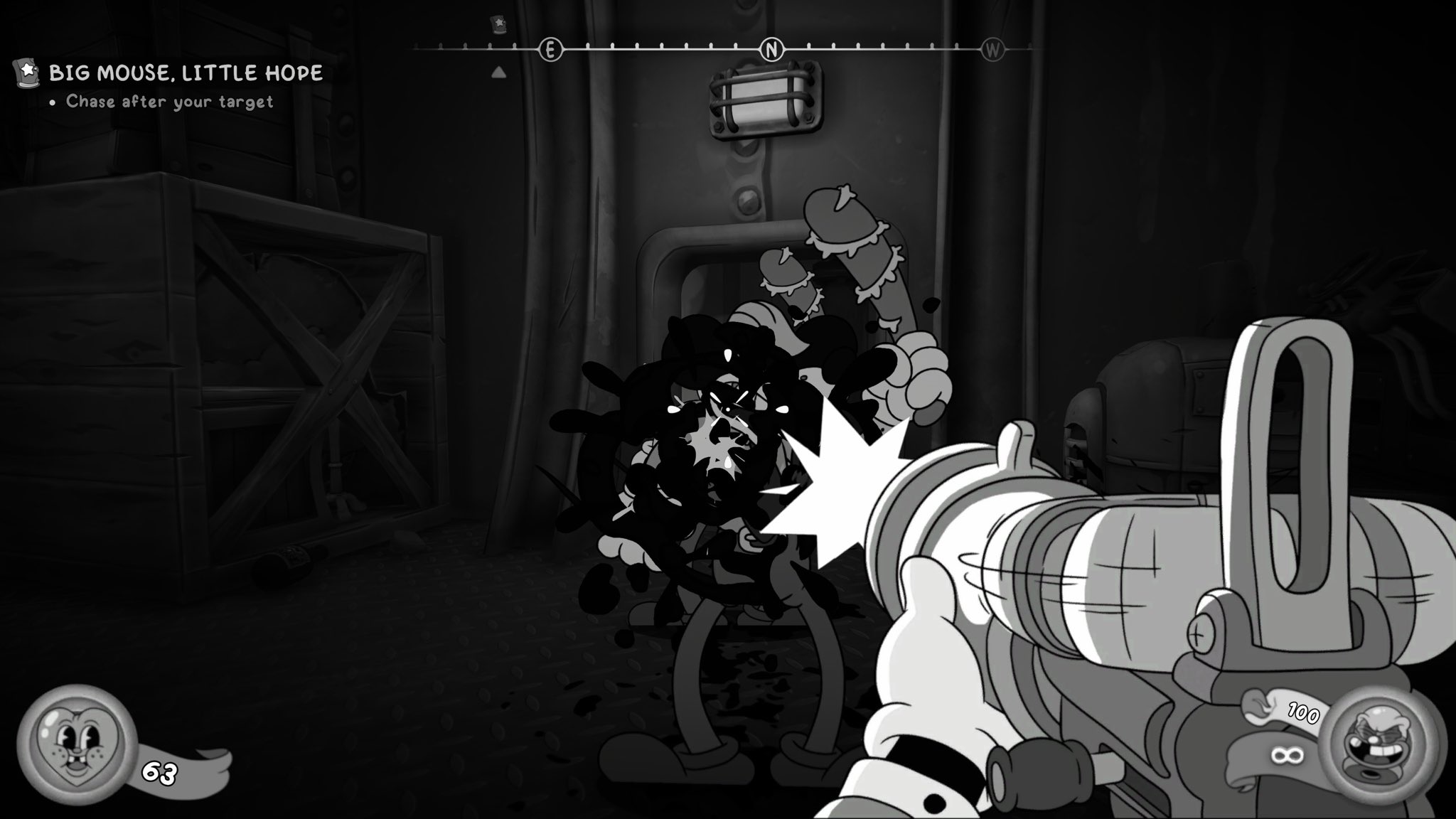 X
·
X
·
For mouse!
 covert copper
main wharf
<@125339581204660224> <@1231238756452012093> <@69554102069108736> <@450725351044...
covert copper
main wharf
<@125339581204660224> <@1231238756452012093> <@69554102069108736> <@450725351044...
Appreciate this. For what it's worth there's an issue with the Dusklands Filter that is required for parts of the story. I think it's supposed to look mostly normal just with some extra chromatic aberration & fish eye. With the mod on the viewfinder becomes incredibly dark and captured photos are mostly illegible (which is problematic for deciphering the hidden info the lens is supposed to reveal)
mod set to off + no filter -> mod set to off + dusklands filter -> mod on + dusklands filter


going through the other filters I have, same thing happens with the Fisheye Lens, but the ones that just change the hues (e.g. warm/cool) are fine
odd osprey
What’s the best guide to show people for adding Reno to Unity?
main wharf
covert copper
going through the other filters I have, same thing happens with the Fisheye Lens...
Missing shader likely. Addon would display a warning in UI. Gotta dump shaders with devkit.
sour drum
2 dumps:
Raft seems to work ootb, but the sun is weird. It goes past game brightness, but looks dim/clipped. Maybe it's just how it is, idk, some games have dim sun
Speedrunners 2 demo, missing output shader

 queen totem
In Vampure Crawlers, I noticed that the generic unity addon seems to mess with the color grading in unintended ways when not using the vanilla tonemapper. Vanilla on left

 main wharf
queen totem
In Vampure Crawlers, I noticed that the generic unity addon seems to mess with t...
main wharf
queen totem
In Vampure Crawlers, I noticed that the generic unity addon seems to mess with t...
Vanilla looks odd to me, or is it how it looks without addon?
Please share ReShade.log here (when using addon) I'll have a look at used shaders.
Aw there's a demo, I guess I can have a look at it when I get the chance. Thanks for report!
queen totem
main wharf
Vanilla looks odd to me, or is it how it looks without addon?
Please share ReSha...
vanilla on left, changing LUT shaper to vanilla also looks extremely close to left. The entire screen is supposed to be red-tinted, but the color shift erroneously into green on what I believe are highlights on the right. I'm still in the same sesh but here's my log. For transparency, I play on linux
I can also +1 that the brightest parts of the chest opening sequence are erroneously black in HDR as well, in sdr these pixels are white
Vanilla / RenoDRT / No tonemapper


 main wharf
queen totem
vanilla on left, changing LUT shaper to vanilla also looks extremely close to le...
main wharf
queen totem
vanilla on left, changing LUT shaper to vanilla also looks extremely close to le...
Thanks for log.
I guess there's another shader running after Unity's post-processing and it's not liking HDR.
Again will check when I get the chance.
main wharf
queen totem
I can also +1 that the brightest parts of the chest opening sequence are erroneo...
Did you try to change offsets in Compatibility sections?
 broken ridge
is there any reason schedule 1 is marked how it is? I've been playing it and have had no issues
 main wharf
broken ridge
is there any reason schedule 1 is marked how it is? I've been playing it and hav...
main wharf
broken ridge
is there any reason schedule 1 is marked how it is? I've been playing it and hav...
Yea wiki needs an update, currently most games are marked 🚧 yet should work just fine.
Same reason addon is "WIP/draft" here I guess, I genuinely didn't expect to manage to keep support for everything without breaking the rest, Unity's a mess.
Been very busy with work since December, I'll have more time off from next month onwards and plan to finish rewriting addon.
Maybe then I can also tackle wiki, streamline game-specific Notes and update Statuses.
Basically at this point 🚧 means "Should work but lacks testing/feedback". The very few games I know need more work for sure have a note like "Not entirely playable yet" or something.
covert copper
main wharf
Missing shader likely. Addon would display a warning in UI. Gotta dump shaders w...
no warning popped up in the UI or reshade log, but grabbed the devkit from the pins and did a dump before equipping the filter, moved those aside, equipped the filter and dumped the new ones
oh the full dump is way smaller than I thought it would be, so here's that too fwiw
and log
main wharf
Aye, one missing shader in there, added it.
@sour drum same for speedrunners.
covert copper
👍 thanks it works
woven crag
queen totem
I can also +1 that the brightest parts of the chest opening sequence are erroneo...
tonemap offeset=2 fixes it
At least it did in the demo. Game coming out soon, here's hoping they don't change something again. But probably not
queen totem
game's already out :)
woven crag
Wait what? I didn't get any notification! It's a bit late for out of season aprils fools..?!
Neither on my email neither on my steam news section (why is that thing not showing stuff you really want, for some games it just doesn't or stops appearing even if you follow. Happen this to anyone else?)
sour drum
broken ridge
is there any reason schedule 1 is marked how it is? I've been playing it and hav...
I mark most games added as 🚧 too, if I haven't tested them enough, even if they seemingly work fine.
✅ imo should be reserved for at least some playtesting, ideally a playthrough without major issues.
Though some 🚧 games are half-finished/still have missing shaders, so that's a bit of a lottery
sour drum
main wharf
Aye, one missing shader in there, added it.
<@292670836052328451> same for speed...
raft - sun is still dim, but not clamped. It's ~100 nits above game brightness.
speedrunners - colors shifted

 main wharf
sour drum
raft - sun is still dim, but not clamped. It's ~100 nits above game brightness. ...
main wharf
sour drum
raft - sun is still dim, but not clamped. It's ~100 nits above game brightness. ...
Raft I didn't have a look at dump yet so yea no change here.
Woops will double check speedrunners.
main wharf
sour drum
raft - sun is still dim, but not clamped. It's ~100 nits above game brightness. ...
sour drum
main wharf
speedrunners works now, thanks
superhot 1 dump. It still looks off at places, might be some shaders missing
odd osprey

ModDB
Welcome to MOUSE: Reloaded, the definitive mod for MOUSE: P.I. For Hire that adds cut content to the game such as weapons, explosives, enemies and more! Along with fun additions such as red ink blood, crosshair options, along with many other quality...
were making a mod for mouse pi for hire
red ink blood mod is out now
woven crag
Dave the Diver is missing some shaders in night time (possibly more later in the game?) should I do a dump? Anyone actually played trough the game with the mod?
It also doesn't seem to uh... Tonemap properly. It mostly peaks around 400 and the only thing that actually went all the way up to 2000 was pouring that green tea in the restaurant it was radioactive bright, so I think something might be off here
 thorn idol
So can replaced use unity RenoDX?
odd osprey
uneven sluice
isn't it way too early for this kind of overhaul
say that to every mod here? lol they all start at launch or even before if there is a demo haha
uneven sluice
an HDR mod is way different to a "restore everything" mod
you can't even know if they are planning to add the ennemies/weapons/whatever in the story DLC or in future updates
main wharf
woven crag
Dave the Diver is missing some shaders in night time (possibly more later in the...
May it depend on game settings? Post-processing toggles can change shaders.
Feel free to dump yea, if anything so you can play the game.
main wharf
woven crag
It also doesn't seem to uh... Tonemap properly. It mostly peaks around 400 and t...
Could it be that game just doesn't get much bright? With it being mostly 2D sprites and all.
You can use FakeHDR Boost in effects, or any other ITM method if you prefer.
woven crag
Did try that, and just using it a little turned the beverages nuclear bright  its like the only thing that uses a different shader than the rest of the game. It's only small part of the game tho mid to late game you get staff to do that for you. But I was curious why is this thing peaking max nits while rest of the game is a lot lower. It doesnt look bad but I think it could be improved
I also have a feeling some dlc areas might come with new shaders too but that's late game stuff and I don't have a save on this platform
Maybe I could try getting a save actually
odd osprey
uneven sluice
an HDR mod is way different to a "restore everything" mod
you can't even know if...
There are many that do more
uneven sluice
many idk, some yes absolutely
main wharf
woven crag
Did try that, and just using it a little turned the beverages nuclear bright <:k...
Aw did I misunderstand? What is your peak set to in Reno?
woven crag
2000
main wharf
Ok so it's not overshooting. How is tonemapping not working properly then I'm confused?
woven crag
Ah ok, so what I meant is
Normal game looks fine (close to SDR but not clamped to 200, it goes to about 400-500 but it seems like it's missing some detail like sun reflecting from the sea should be brighter?)
But in one situation when pouring a drink, it's using a different shader, that one did go all the way to 2000
I had a bit of fakeHDR boost turned on at the time too, so it was extra cursed
And then the night time came and I got the missing shader warning so I was ok should have run the devkit
Oh maybe I could try the offsets
Ah it was late I was just testing it out
main wharf
woven crag
Ah ok, so what I meant is
Normal game looks fine (close to SDR but not clamped...
Like this?

Should be brighter based on what..?
Doesn't seem bright/clamped in SDR, so no reason for it to be brighter in HDR, unless I'm missing something..?
The drinks being overly bright could be a bug, though again it should be compared with SDR.
woven crag
Ah I see what you mean. Sure, in that form it's correct then. The drinks were hmm well they were not bright in SDR at least that I remember
main wharf
main wharf
The drinks being overly bright could be a bug, though again it should be compare...
I dont know enough about the game, this could happen if game renders in SDR so a bunch of resources are upgraded.
Should be accurate if game renders in HDR and only output resources (after post-processing) are upgraded.
woven crag
Too bad it can't go higher for the sun etc in HDR so you're saying theres no resource/texture to tonemap it?
main wharf
woven crag
Too bad it can't go higher for the sun etc in HDR so you're saying theres no res...
Huh? Tonemapping won't necessarily make things brighter than they originally are. Or well, display mapping in this case.
Again you can use fake HDR boost or Highlights/Contrast sliders if you feel like it.
I feel you're confused with inverse tonemapping which would "boost" highlights (white) to peak.
woven crag
So this means even in SDR the sun and it's light /other light sources were not even set to max sdr brightness or something else?
So the base curve is, uhh.. lower?
main wharf
woven crag
So this means even in SDR the sun and it's light /other light sources were not e...
SDR's max equals "Game Brightness" in HDR.
Anything above that level was clipped in SDR.
I don't think game has any tonemapping originally, seems just clipping.
 faint loom
missing shaders
main wharf
sour drum
I mark most games added as 🚧 too, if I haven't tested them enough, even if they...
Or just still get updates that change shaders.
Phasmophobia is an example, Windblown's another.
Early access games in particular are more susceptible to have major changes. Already released/finished games are less likely to break, as gameplay fixes don't affect mod, only graphical changes.
woven crag


Default settings (HDR / SDR) - it's just a little 🤷♂️
Tonemapping works of course, I'll dump the shaders just gotta get more locations in
main wharf
woven crag
Tonemapping works of course, I'll dump the shaders just gotta get more locations...
Well if there are missing shaders yea feel free. But it won't change the fact game doesn't get any bright in some locations. It is what it is, again feel free to ITM. Fake HDR Boost is meant for these.
woven crag
Mhm yeah probably not much we can do but there were missing shaders for the nighttime and the tea was messed up so I wanna give it a try
 main wharf
woven crag
main wharf
woven crag
Oh that's UI
main wharf
woven crag
Is it affected by color grading? As in, does blowout to 100 or saturation to 0 make it white?
main wharf
Yea though offset wouldn't necessarily fix this, as I mentionned earlier without even seeing screenshot it might be from resource upgrade. In practice that'd just be one shader to manually clamp.
woven crag
this is the first dump but it does not have the missing shaders i encountered in prologue
main wharf
woven crag
this is the first dump but it does *not* have the missing shaders i encountered ...
Won't be able to do much with this I think
woven crag
it's an "event time of day" situation
hm alright ill keep huting for it
so should i dump only after i found something?
main wharf
woven crag
so should i dump only after i found something?
Yea either that or just enable auto-dump then reproduce missing shader situation.
 main wharf
faint loom
missing shaders
main wharf
faint loom
missing shaders
Here should work
main wharf
woven crag
not affected by color grading
Well then FakeHDR Boost shouldn't affect it either... So I'm even more confused by your previous statements.
main wharf
woven crag
Anyway this should really be an easy fix.
Unrelated to the rest of the game being dim for which you can just ITM/boost to your liking.
woven crag
main wharf
Well then FakeHDR Boost shouldn't affect it either... So I'm even more confused ...
I thought it was this bright because of fakehdr boost, it turns out its already this way
woven crag
main wharf
Anyway this should really be an easy fix.
Unrelated to the rest of the game bein...
Yeah, still better than other hdr solutions
in regards to framerate, PSA for Dave the Diver cap your fps to 50 and use smooth motion to avoid stutter
 main wharf
woven crag
I thought it was this bright because of fakehdr boost, it turns out its already...
main wharf
woven crag
I thought it was this bright because of fakehdr boost, it turns out its already...
Yea it's just UI exploding from resource upgrade. Gotta clamp it manually is all.
woven crag
And again I forgot to try the offsets
main wharf
woven crag
And again I forgot to try the offsets <:kekpepehands:1409649023870173377>
UI seems separated fine already, offsets won't do anything.
It's for the other way around, if grading affects UI.
woven crag
oh I'm such a dumbass, forgot I was messing with toggles yesterday somehow left lut shaper at vanilla that's why it looks so off today, i thought I was going crazy
uneven sluice
woven crag
in regards to framerate, PSA for Dave the Diver cap your fps to 50 and use smoot...
you can probably use sk to get rid of that garbage camera system

 woven crag
uneven sluice
you can probably use sk to get rid of that garbage camera system
woven crag
uneven sluice
you can probably use sk to get rid of that garbage camera system
Hmm... Thanks for the tip, not sure I know how, I might just use the lazy method of frame smoothing
uneven sluice
sk has a Unity section where you can override the deltatime of the game
it may break physics in games that tie their systems to 50hz deltatime
but it can also smooth games that rely on 50hz for their camera
woven crag
uneven sluice
it may break physics in games that tie their systems to 50hz deltatime
The unlock fps mod broke some bosses yeah it's why this discussion was started and frame smoothing was suggested
main wharf
woven crag
oh I'm such a dumbass, forgot I was messing with toggles yesterday somehow left ...
Happens.
woven crag
This game is so good I might start another playtrough this summer. Even tho I put in like a 100h in my first one grinding like a madman. I highly recommend it
faint loom
main wharf
Here should work
Thanks, but should I change any of the sliders? since the game now looks washed out in my eyes.
 main wharf
faint loom
Thanks, but should I change any of the sliders? since the game now looks washed ...
main wharf
faint loom
Thanks, but should I change any of the sliders? since the game now looks washed ...
Nah that's likely some typo. Will fix later.
severe burrow
woven crag
Upgrade_R8G8B8A8_TYPELESS=3
omg neocodex you saved me!!!! I had tried every other combination of different upgrades except for "any size" option <3
that was just it. I usually just try output size or ratio
man, this things work misteriously. wish there was a wiki or general structured place to read about and start developing an intuition on where to read about what each of those tweaks can help in which situation and witch my break. Cause some of the other upgrades made the enemies glitch out and I ended up giving up
btw, good replaying of Dave the Diver. I played it with nothing but the inverse tone mapping "hdr" of SK and it's such a gorgeous game. contemplating redplaying it with the new DLCs and knowing I there's Reno for it too!
I wouldn't sleep on the Special K's unity frame pacer, tho. SK is a bit scarier at the beginning but I find it much more intuitive and less "toggle and hope this one works than reno" and with the amount of games using unity you'll be thankfull to be able to match the internal delta time to framerate
main wharf
severe burrow
omg neocodex you saved me!!!! I had tried every other combination of different u...
There is latest pinned message (troubleshooting) and RenoDX github wiki (link in first pinned message). Wiki's incomplete though, so refer to troubleshooting for missing games.
severe burrow
I really appreciate a lot the sharing of information in projects as those. It's mostly a shift in culture thing I guess. I'm not the usual jump into asking kind of guy and like reading documentation before bothering people but ever since things became dirscord and sometimes github centric it's just all so spread out :(
I'm reading the pinning message now, but I usually default to trying to use the search function - which is a total mess - and it's hard to know when you've been thorough. git is a bit weird for me too I guess. To this day I'm still often surprised when a blue hyperlink actually is an hyperlink to a different page and not just a skip to somewhere down like an index
please don't take it as ingratitude, I just've been very anxious in general with the amount of knowledge now imbued in Discord and how at the whims of a shady company we're atm with so much specialized knowledge into various communities that have no webpage counterpart
main wharf
I appreciate feedback thanks.
I guess I can try to sum up pinned message inside addon's UI. Also probably should include a button linking to github wiki. (:
severe burrow
main wharf
I appreciate feedback thanks.
I guess I can try to sum up pinned message inside ...
that would do a lot! the other project I heavily use is SK. At the beginning it was quite dauting but nowadays there's plenty of tooltips and the wiki is competent enough I helped onboarding a friend recently and it was 10x easier than the first time when all knowledge was spread across discord messages 😅
if tooltips explanations would become too big to be helpful (which most of the time they are cause it's hard to summarize) just as little as a hint to where you can learn more about does so much for incentivizing users to seek the information instead of repeating questions. At least I know I'm the type that always feels terrible when I'm asking something probably is already explained somewhere and look like I didn't bother to give some effort
woven crag
severe burrow
btw, good replaying of Dave the Diver. I played it with nothing but the inverse ...
there's a couple of mods availble that would be well suitable for a replay; reduce recipe upgrade grind (configurable), add harpoon upgrades to the shop, adn the "Expansion" mod with tons of configurable QoL (quick travel, faster walk speed, minimap) and even more gear upgrades to purchase in the shop. checking this out made me convince i'm gonna start over (i had over 100 hours on the console, didn't do everything i wanted yet but with this extra content gives you more reason to farm endgame) 👍
woven crag
severe burrow
omg neocodex you saved me!!!! I had tried every other combination of different u...
happy it helped. i was thinking of contributing to github compatible games list but i'm still affraid it's something i shouldn't be touching, as i'm just a user
 solemn lake
Was trying to use the addon for Shapez 2 but doesn't seem to work. I don't see any warnings about shaders missing though.
 woven crag
severe burrow
btw, good replaying of Dave the Diver. I played it with nothing but the inverse ...
woven crag
severe burrow
btw, good replaying of Dave the Diver. I played it with nothing but the inverse ...
if youre gonna use mods the bepinex on nexus is outdated and broken, use latest version like this one here https://builds.bepinex.dev/projects/bepinex_be/755/BepInEx-Unity.IL2CPP-win-x64-6.0.0-be.755%2B3fab71a.zip
main wharf
solemn lake
Was trying to use the addon for Shapez 2 but doesn't seem to work. I don't see a...
Send ReShade.log please
 sharp eagle
How would I install this so I could have reno working with zenless zone zero?
solemn lake
main wharf
Send ReShade.log please
woven crag
main wharf
Won't be able to do much with this I think

got the broken night again, here's the shaders caught only in this scene
ah, and this is where i set the lut shaper to vanilla and forgot to set it back 😅
kind kernel
sharp eagle
How would I install this so I could have reno working with zenless zone zero?
Use the dedicated mod:
#1330764788711555166 message
sharp eagle
Sweet thanks!
odd osprey
Any Unity devs here?
main wharf
woven crag
ah, and this is where i set the lut shaper to vanilla and forgot to set it back ...
I almost automated that switch and back, but thought some people may not notice it so I kept the obviously broken output and went with warning message instead.
Thanks for dump, checking in a bit.
main wharf
woven crag
Uhm, please send full dump
woven crag
Don't have Could you combine it with the one from before?
main wharf
woven crag
Don't have <:despairge:1409648830307369061> Could you combine it with the one fr...
Aw I did not check previous one first my bad, it has one missing shader. I'mma assume it's the one since I can't find any in 2nd dump. Build incoming in a bit
severe burrow
when you do these builds they all get added to the general unity addon?
main wharf
severe burrow
when you do these builds they all get added to the general unity addon?
Yes. I mostly add stuff blindly, so I like to wait for people's feedback before I update snapshot/github.
main wharf
main wharf
faint loom
Thanks, but should I change any of the sliders? since the game now looks washed ...
Yup' typo indeed. Try this last build above ^
main wharf
woven crag
^ this should be fine.
Regarding the UI thing I'm not sure though, just to confirm are you using all default settings resources upgrades included? Wiki says to upgrade R11G11B10_float, so I'm assuming RGBA8_typeless output size is enough.
I remember someone played the game and didn't report such issue.
main wharf
solemn lake
Was trying to use the addon for Shapez 2 but doesn't seem to work. I don't see a...
^ try this latest build please
woven crag
main wharf
^ this should be fine.
Regarding the UI thing I'm not sure though, just to confi...
Thanks!! 🙏 Haven't tried the upgrade, will do!
woven crag
main wharf
^ this should be fine.
Regarding the UI thing I'm not sure though, just to confi...
I meant to mention, one would probably not notice if their screen isn't as bright, but to me it was certainly an outlier. It's not a big deal at all, I was just wondering if that could be a key to solving some stuff
severe burrow
btw, not sure how helpful it is to mention but special k has a remaster swapchain option that goes separetely through 8 bits, 10 and 11
iirc dave the diver has a few weird shaders that also break on special k if you do the remastering basically because the game is almost all pixel art stuff and then there's those isolated traditional 3d render stuff that happens time to time
they're the same that are getting super bright as far as I can see through the screenshots, like the pouring drink minigame
solemn lake
main wharf
^ try this latest build please
Looks like it is working now. Thanks for looking into it.
severe burrow
btw, @main wharf , regarding what we talked earlier about troubleshooting messages and stuff, as far as I researched and looed into the github, discord searches, etc, the upgrades are still kinda of a blackbox to me. It's turn em'om and pray it works or it don't. I get the part that usually the 8bit chain is enough and the 10-11bit solves a lot of the ones stubborn to expand beyond rec709 but I wonder if there's any logic for noticing patterns and stuff besides just trying the options
specially regarding the output sizes/ratios/etc. This setting I honestly don't have a single clue how opperates. I sorta get what upgrading 8, 10 and 11bit channels do because of Special K but the ratio/size/any aspect of it I have no idea
queen totem
Another issue I noticed with vampire crawlers, it seems like the addon removes UI bloom
https://party.transkittycorner.com/no reshade crawlers bloom.png?k=xmCi&cache
https://party.transkittycorner.com/yes reshade yes renodx crawlers no bloom.png?k=hRa0&cache
No reshade, yes bloom
reshade and renodx, no bloom

 queen totem
Vanilla / RenoDRT / No tonemapper
queen totem
queen totem
Vanilla / RenoDRT / No tonemapper
Doesn't seem to affect bloom in the world, light sources seem to still have bloom
we don't get to know the true glory of card shine yet
 queen totem
Also breaks other bloom effects like NO FUTURE

 woven crag
Survivors or Crawlers?? The last screen is from survivors?
The cursed stuff in crawlers was related to bloom iirc, but changing the offset fixed that instead, so maybe try playing with offsets a bit more?
queen totem
woven crag
Survivors or Crawlers?? The last screen is from survivors?
Both crawlers LOL
you can see the card poking out of the right side of the screenshot, both are cropped
queen totem
woven crag
The cursed stuff in crawlers was related to bloom iirc, but changing the offset ...
I don't recall offsets working, I think it's just a matter of its shader being broken
main wharf
severe burrow
btw, <@328585230657257473> , regarding what we talked earlier about troubleshoot...
Output size: resources with same size as window (= monitor if borderless)
Output ratio: resources with same ratio as window
Any size: all corresponding resources regardless of their size
main wharf
woven crag
I meant to mention, one would probably not notice if their screen isn't as brigh...
A key to solving what? I dont think so, is UI.
main wharf
queen totem
Another issue I noticed with vampire crawlers, it seems like the addon removes U...
Downloaded demo yday but was too exhausted to take a look, will check when I get the chance.
severe burrow
main wharf
Output size: resources with same size as window (= monitor if borderless)
Output...
yeah, I kinda guessed from their descriptions but it's waaaay beyond me why would each individual swapchain upgrade path have such varying results. And if there's any logic that can be infered when trying them beyond just going one by one and hoping one of them works
Is that something that can be reasoned or is it really just hit or miss depending on how each game behaves?
main wharf
severe burrow
Is that something that can be reasoned or is it really just hit or miss dependin...
Uuuh... Pretty much what pinned message says.
So there are mostly 3 types you'd mess with, RG11B10 only for gamut clamp and both others for range clamp (RGBA8_typeless and RGB10A2_typeless).
main wharf
severe burrow
Is that something that can be reasoned or is it really just hit or miss dependin...
Regarding size it's case-dependant.
Resolution scaling occuring after post-processing usually requires Output ratio.
Some other edge cases like games with locked internal resolution or rendering at a different ratio from window/monitor would need Output ratio or any size...
severe burrow
I have some intuition about the different chains in terms of bits (8, 10, 11) but I couldn't ever figure why or what the ratio/size/any means in regards to the settings, when they'd usually work or why
I know very little about unorm on some unity games for eg but I really have no idea how swapchain "sizes" work
woven crag
I know nothing about this stuff but I'm very stubborn when I want to make it work so I just blindly bruteforce toggles one by one until it works 
After all that fails I will come here to beg someone to help out, that's the typical procedure
odd osprey
I am adding in renodx in a mod I am doing that overhauls the game, how do I properly credit you guys, @main wharf you do the unity based one and the mouse specific updates it had?

ModDB
A mod for the game MOUSE: P.I. For Hire that restores cut content like enemies, weapons & levels. Along with new quality of life fixes like level replay & more!
mod page
can actually get proper hdr and black and white with reno and the settings I put as default
main wharf
odd osprey
I am adding in renodx in a mod I am doing that overhauls the game, how do I prop...
Just don't.
Feel free to link ReShade's and addon's links if compatible for whoever's interested, that'd be enough.
Doesn't make sense to me since mod is likely to be used mostly by SDR users.
odd osprey
main wharf
Just don't.
Feel free to link ReShade's and addon's links if compatible for whoe...
absolutely will do it that way!
thank you for the reply
good advice
I did make a mod to add HDR to the game, that is its own thing just FYI when you see it adds HDR
woven crag
is there a devkit addon for 32bit? i want to dump shaders but cant get the devkit to load
 desert herald
woven crag
is there a devkit addon for 32bit? i want to dump shaders but cant get the devki...
desert herald
woven crag
is there a devkit addon for 32bit? i want to dump shaders but cant get the devki...
yes
just build the x86 version
or get the addon32 from the Releases page
woven crag
dump for Hand of Fate 2. it's half-working - soft clamped to SDR, can use fakeHDR to boost, but it doesn't seperate the UI which gets boosted too. hopefully not too much work with this one?
and this one does need swapchain proxy if this means anything
"old" game, but damn does it hold up. there's just something about it that is really special, a true hidden gem. I remember playing this when I couldn't even get a stable 60 on 4K, now it's butter smooth and if we could get HDR working.. now that would be something
 dense ferry
I'm also interested in getting Vampire Crawlers' bloom fixed for Reno, anyone figure it out?
woven crag
What's actually wrong with it? I think I'm playing with bloom off if I do the offset then?
dense ferry
woven crag
What's actually wrong with it? I think I'm playing with bloom off if I do the of...
The bloom effect is basically missing, and I’m pretty sure I can see some black highlights when opening a chest etc.
woven crag
The black stuff should be gone with tonemap offset=2
dense ferry
Ok
main wharf
main wharf
Downloaded demo yday but was too exhausted to take a look, will check when I get...


 main wharf
twilit osprey
main wharf
twilit osprey
Why is RGBA8_typeless default upgrade disabled?
Set it back to default by pressing 🔄 button on the right.
If still clamped, might be because of black bars, in which case set RGBA8_typeless to Any Size (or get rid of letter-boxing)
main wharf
woven crag
dump for Hand of Fate 2. it's half-working - soft clamped to SDR, can use fakeHD...
Try this maybe
woven crag
Wow that was fast, gonna give it a try ❤️
woven crag
main wharf
Try this maybe
Forgot to mention it's 32bit 😅
main wharf
woven crag
Forgot to mention it's 32bit 😅
Ah well should've checked.
woven crag
should have said it too 😆
well i was asking for 32bit devkit just above so i was assuming you'd be on what's going on
twilit osprey
main wharf
Why is RGBA8_typeless default upgrade disabled?
since i upgraded rgb10A2_typeless, i disabled rgba8_typless. but now i tried all combinations for these 2 and restarted the game 5-6 times after changes. nothing worked so far. still 220 nits max.
i set rgba8_typless to any size. didnt work after restart.
the unity file I am using is the 64 bit one from renodx mod page. it says file from last monday.
 pulsar plinth
good afternoon, was just wondering if esoteric ebb works ootb. couldnt find it on the wiki.
woven crag
On the 27th consecutive night of working overtime, you finally return to your empty room and, as usual, switch on your computer. Instinctively, you add a game that catches your eye to your library.
It’s your 1000th one.
Unlike when you were a teenager, your enthusiasm for games has faded, and there’s no one left to play with. You drift of…
Release Date
To be announced

reshade fails to load in this game, any tricks we can do with dll renaming or something?
main wharf
twilit osprey
since i upgraded rgb10A2_typeless, i disabled rgba8_typless. but now i tried all...
Weird. Enable both to any size, restart game and send ReShade.log please.
Though just to be sure, also disable any overlay/background apps.
I remember RTSS in some cases prevented resource upgrades. Also Nvidia App is known to interfere.
main wharf
pulsar plinth
good afternoon, was just wondering if esoteric ebb works ootb. couldnt find it o...
Yea game was reported to work. I'm not sure whether it needs RG11B10_float upgrade for WCG. You can try to increase saturation and use Lilium's HDR Analysis shader to check if colors go out of smallest triangle (CIE graph bottom left, BT709).
woven crag
main wharf
ok something is a bit off with this one; everything works, but gamma is significantly raised, and funnily it gets washed out even more if you enable 2.2 emulation. this is with game gamma slider lowered to about 10%


which makes some parts of the game a little too dark?


so i increased the gamma slider back to around 20% which makes the dealer scene normal, however it does wash out the rest of the game a bit again
it's definetely playable (and the HDR transform is incredible) i can live with it but i wonder what's going on, never seen this before
disabling user lut gets rid of the ugly blue glow at least

 twilit osprey
main wharf
Weird. Enable both to any size, restart game and send ReShade.log please.
twilit osprey
main wharf
Weird. Enable both to any size, restart game and send ReShade.log please.
both on any size worked. 👍🏻 This is for Nocturnal (in case anyone searches)
uneven sluice
woven crag
reshade fails to load in this game, any tricks we can do with dll renaming or so...
works when using SK with reshade as ReShade64.dll in game folder
but it's missing a shader, just dumped the game
 small token
Star Ocean The Second R is missing some shaders in some spell effects later game
main wharf
woven crag
ok something is a bit off with this one; everything works, but gamma is signific...
Yea probably derped. Will check later on
main wharf
twilit osprey
both on any size worked. 👍🏻 This is for Nocturnal (in case anyone searches)
Has to do with letter-boxing.
Basically game renders at a different resolution and ratio than monitor.
main wharf
woven crag
it's definetely playable (and the HDR transform is incredible) i can live with i...
What happens is I'm exhausted, rushed adding shaders during break at work instead of having a nap. Also post-processing/tonemapping isn't Unity's but some plugin I barely know, probably messed up somewhere.
woven crag
I feel bad for asking all of this what would we do without you? 😭 Get your rest, and don't worry about it being derped, I am immensely enjoying the game with hdr it is such a treat! When the little gems and card foils spark on 2000 nits, oh it is sooo perfect it brings so much LIFE to the game!
The weird gamma is really not bothering me after the adjustments, just giving feedback that you might want to know.
main wharf
woven crag
I feel bad for asking all of this what would we do without you? 😭 Get your res...
Nah don't I'm soon done. Break mid next week, then part-time, will have more time to rest, mod and even play games!
Also gonna finish rewriting addon when devkit is fixed.
main wharf
woven crag
ok something is a bit off with this one; everything works, but gamma is signific...
Here should be good. You probably want to reset game's gamma/brightness setting to default.