#Unreal Engine
1 messages · Page 18 of 1
 tulip kayak
if the resource is bgra8
or rgba8
then you still can't do anything
in addition to adding the autohdr code you need the resource to be hdr compatible
video is UI resource so
 vital knoll
oh yeah if i did find the shader, someone needs to maintain ue extended addon along with the AutoHDR code specifically for NTE too right? so it's just a hassle
like wuwa video autohdr
vital knoll
aight i'll deprioritize this shit and try again later sometime
yup positive those are the only shaders that draws video cutscenes



clicked them all
 charred solstice
@dusty girder @tulip kayak do you happen to have the pre-ue extend NTE character lut work spriwar did..? i found this cvar...
r.Tonemapper.AllowToonFlimMap | Int32 | 1 | 0x160 (RenderThreadSafe, Scalability)
Allows separable tone mapping parameters for characters.
0: Disabled.
1: Allow toon film mapping (default).
tulip kayak
i mean
if you disable it
we go back to the game's lutbuilder being applied on the character
charred solstice
hmm you sure...either you did a super good job, it's not working, or I can't tell difference at glance...guess I take out the magifying glass
charred solstice
that's what I think as well, but i guess found too late
Ooh ok, side by side I see it now, it did indeed go back to game lut builder
charred solstice
had to default settings, now it's clear


@tulip kayak thank you for your free labor on making a better then default version of character lut lol. Well at least now people have a choice on game lut or spri lut depending on how they want to grade their NTE color
I'm sorry I couldn't find it when it released
vital knoll
charred solstice
what settings does this?
charred solstice
charred solstice
<@664732951724032001> <@221530925849116672> do you happen to have the pre-ue ext...
this
though i guess it's good to know it exist, in case rendox gets broken in patches, and spri is a busy cat
 split dagger
Thank you for making this, the game is going to look so damn gorgeous in hdr
split dagger
oh no i get a crash to desktop with the mod installed 🙁 other than ReShade.log are there other logs i can take a look at? log has about 10 Failed to close immediate command list with error code E_FAIL! before it CTD
 vivid snow
split dagger
oh no i get a crash to desktop with the mod installed 🙁 other than `ReShade.log...
vivid snow
split dagger
oh no i get a crash to desktop with the mod installed 🙁 other than `ReShade.log...
me too!!!!!!!i even wonder if i'm the only one having this problem.....
 mild hazel
idk, have played for quite a while without much issue on my end
vivid snow
do i need any additional setting?
mild hazel
when do you CTD
vivid snow
when launching the game
mild hazel
nvidia drivers need to be up to date, and reshade must be 6.7.3
mild hazel
other than ini HDR should be good, what's in your reshade.log
maybe clear shaders too
vivid snow
I don't know much about this. I just installed ReShade with default settings and didn't change anything else.
mild hazel
reshade.log is next to your game executable, is it steam or gamepass
some folks said gamepass has more trouble
you can also use regular ue-extended with ini HDR, I added the support to that
 mild hazel
the bottom of it
vivid snow
 mild hazel
interesting, have never seen that error and now there are 3 people with it
split dagger
mild hazel
when do you CTD
Game starts briefly and shows a background splash screen. Then, before any loading spinner appears it drops out to desktop.
I tried clearing shaders, no change. I've attached the bottom of my reshade log
 vivid snow
split dagger
Game starts briefly and shows a background splash screen. Then, before any loadi...
vivid snow
split dagger
Game starts briefly and shows a background splash screen. Then, before any loadi...
yes!!!
split dagger
running a dual monitor setup, game loads on main screen (sdr), i have to shift+win+ right arrow to move it over to hdr screen. (If that has any impact)
ill try the ue-extended addon, see if there's any difference
mild hazel
the one with graphics is doing a lot more advanced stuff
with replacing fog and injecting resources into shaders
vivid snow
The ue-extended addon works fine, but the standalone can't.
split dagger
interesting, game loads with ue-extended
one difference i saw was with Liliums hdr analysis running, it shows the game is in SDR with the sub2 mod, SDR initally with ue-extended then swaps to HDR after a few seconds
mild hazel
game will be in HDR regardless if you set your ini HDR correctly
cant be in SDR if you did that
split dagger
strange, i followed your guide:

 vital knoll
try unblock
split dagger
vital knoll
try unblock
no change
charred solstice
when I see that it never unlocks for some reason, I just copy and pasted to a new text file or duplicate it
though usually it works anyway
split dagger
gotta set the correct settings that lazorr described
vital knoll
try, creating it to other drive .txt file, then put the settings inside the .ini then try again
also does anyone know why my NTE now does Chexk Resources every start? anyone experiencing it too?
mild hazel
- fix (hopefully) resource binding and race condition that could cause crash on launch
I made a Subnautica 2 post #1505537205647441960 message
 west canopy
We should have made one for NTE
At least to talk about it so we don't spam here
Warning to anyone playing chapter 4 main quest takes like 5 hours to complete and locks you into an instance for most of it. It's not a bad quest but would have been actually decent if they cut about 1/2 of it. Lots of effort put into production compared to other gachas but just way too long to the point it's loses it's appeal
west canopy
charred solstice
<@221530925849116672> thank you for your free labor on making a better then defa...
Yeah so I'm not sure what was the issue here, from my understanding the time table was like that:
- initial mod with washed out character colors
- fixed luts for that but chars were still very brightly lit, it was just a nitpick I was making
- I'm not sure what spiwar did but he adjusted the character glow and now it's perfect
So I'm not sure what you mean with "we have a choice with spri lut or game lut?"
 dusty girder
so the default settings for the weeb game has it run a special lut for only characters
it doesnt use the generic ue filmic aces approximation for tonemapping, but their simple per channel s curve that clips heavily
the first implementation was just slapping on default unreal filmic paramaters and seeing how it works, which ended up being desaturated; because thats how ue-filmic works -- while their character tonemapper tries to clip
the solution was simple, just tune the unreal filmic params a bit to make the curve closer to their shit
as for what the glow/super bright char fix was, it was just divide the input color by 35%; a magic number "that just works"
@west canopy
charred solstice
yep, the inital ue-mod couldn't even detect the hero model.
was it 35%? marat? I can actually lower it by that amount in the httoonlightscale cvar to see if it matches up lol
dusty girder
?
charred solstice
there is a cvar in the game call r.httoonlightingscale
charred solstice
that scales the herolight
dusty girder
nothing to do with unreal cvars
or unreal anything
it just takes a color and multiplies it by 0.65 to dimm it
charred solstice
ya, i'm just casually pondering if i can make it do the same thing with the cvar, if it's just a flat 35%
but anyway, the renodx mode works great, just hope patch doesn't break stuff...like live services sometimes do
dusty girder
even if it does, its like 2 shaders
the hardest part would prolly be convincing spiwar to redownload the game
charred solstice
someone managed to gaslit spriwar into redownloading endfield, so every other patch?
west canopy
Someone buy that man an extra drive
charred solstice
btw was it neo or syphie who wanted some NTE lumen+ engine tweaks?
west canopy
I was just testing the stuff you posted out of curiosity. But I did inquire for further explanation/stuff I could do with them
charred solstice
ya i did some work
west canopy
The thing is if I drop the input rendering to 860p with optiscaler I actually can't tell a difference between 1080p input and can run your tweaks in full PT mode hitting decent frames
charred solstice
but lumen specificly i think i can turn on megalights now
west canopy
That would be interesting id love to try that
I just have an issue with optiscaler not detecting DLSS in-game it's so random idk what causes it to stop working
Is there a way to permanently change the input % for DLSS for a game so I don't have to use optiscaler?
west canopy
Yeah, I don't use anything above 1080p input I can only go lower
There's literally no difference down to 720p
charred solstice
DLSS just uses the same screen % a TSR
 rose adder
https://github.com/clshortfuse/renodx/discussions/557 i followed this guide you made step by step
GitHub
Neverness to Everness RenoDX HDR Mod Instructions: We need to setup a few ini cvars in order for the mod to work. Go to %localappdata%\HT\Saved_Global\Config\Windows\ Create a new text file, and na...
charred solstice
rose adder
https://github.com/clshortfuse/renodx/discussions/557 i followed this guide you ...
try to open up the engine.ini and copy all the content to a fresh text file and rename that to engine.ini . Apperently some people are getting blocked by windows security, thinking it might be maleware
charred solstice
west canopy
That would be interesting id love to try that
Lumen RT, aka HWRT +megalights, somewhat decent reflections on the cheap (still using streentracing) (Hospital is borked, don't use it in there) This is merely a meme to insert megalights in it.
More performant then RT but umm...i say it pretty...good?
you may or may not crash somewhere, IDK, NTE hates something related to a certain threshold of RT (probably it's streaming performance optimizations). it' a tight rope to walk when I was tweaking it.
Since this is not using Nvidia RTXGI at alll~ there's no card restrictions, but you must use nvidia RR, it megalights blows up on denoising big time, which I am not sure how to fix.
west canopy
charred solstice
Lumen RT, aka HWRT +megalights, somewhat decent reflections on the cheap (still ...
damn, that's a lot of stuff! and with this, RR should be forced enabled even if I have a global preset L override?
charred solstice
correct it's forced
but i found a problem...hospital is pitch black~ so seeing what HWRT is doing to make it so...perfect phyical
likely it wanted autoexposure which NTE decides not to use
west canopy
what's up with the ! settings?
charred solstice
it means turned off, but keeping it in the file in case i want to turn it on
rose adder
charred solstice
Lumen RT, aka HWRT +megalights, somewhat decent reflections on the cheap (still ...
i just dont understand how this one works and the previous didn't
charred solstice
rose adder
i just dont understand how this one works and the previous didn't
what do you mean this one works?
that's just a plaything tweak, for curious NTE players here
rose adder
i mean this is what i get from following spiwar's guide

so clearly i am doing something wrong here
charred solstice
rose adder
so clearly i am doing something wrong here
so my test engine.ini magically works?
rose adder
yeah that's why I'm super confused
charred solstice
rose adder
yeah that's why I'm super confused
likely the download or something typo
delete all the settings not seen on spi's guide
rose adder
i wanna share the screenshot here but windows hdr screenshot is shit
charred solstice
there, you have a clean setting
 rough ledge
you didn't save the ini 
west canopy
charred solstice
it means turned off, but keeping it in the file in case i want to turn it on
Is there any specific setting in there that could be heavy on cost or unnecessary I might consider toggling, or are all of them non negotiable for this setup to work properly?
And this only affects the lumen version of it, it doesn't change RT modes?
charred solstice
technically it's RT, hardwarelumen (HWRT)
and megalights applies to all modes, except SSR
megalights is strange
it's already kinda trimmed, otherwise just use lumen
but yes, some funk in the hospital
tulip kayak
rough ledge
you didn't save the ini <:domLaugh:1364263450099847308>
Or its one of those people
Who hide the file extension

rough ledge
mild hazel
time to actually play subnautica now that the random issues are resolved...
fwiw it was only working for people with ultrawide lol
west canopy
charred solstice
it's already kinda trimmed, otherwise just use lumen
But this is RT in Lumen mode, right? When you say "otherwise just use lumen" you mean vanilla?
west canopy
charred solstice
but yes, some funk in the hospital
Haven't been there yet, is that a story sequence or standard inworld?
rough ledge
horror minigame
 solemn merlin
split dagger
gotta set the correct settings that lazorr described
solemn merlin
split dagger
gotta set the correct settings that lazorr described
whos lazorr
split dagger
lazorr is the person who made the subnautica 2 renodx mod you're trying to use
mild hazel
see the mod forum post
charred solstice
west canopy
But this is RT in Lumen mode, right? When you say "otherwise just use lumen" you...
if you don't like it, don't use it
solemn merlin
oh theres legit mod now
solemn merlin
split dagger
lazorr is the person who made the subnautica 2 renodx mod you're trying to use
i didnt use the actual subnautica renodx but the generic one
 atomic oak
subnautica 2 crashing during gameplay just for me?
 edgy tartan
i cant get subnautica 2 mod to work its showing a washed out image and the reshade hdr shaders arent loading i have the gamepass version that may be why
 rocky briar
I cant get it working either mines also super washed out
atomic oak
edgy tartan
i cant get subnautica 2 mod to work its showing a washed out image and the resha...
Reshade 5.7.3 + ue extended and sdr path off works for me. Still crashing after a while though, dont bother with the game.
west canopy
charred solstice
Lumen RT, aka HWRT +megalights, somewhat decent reflections on the cheap (still ...
Ok so I gave this a try for a while yesterday and oh boy, it was choppy as hell. Even more so than the original PT mode. I kept going as I was hoping it's maybe just some new shader compile, but it continued to be very, very choppy
Are there any parts of those upgrades we could salvage to make Lumen look better without making it run bad?
charred solstice
west canopy
Ok so I gave this a try for a while yesterday and oh boy, it was choppy as hell....
it should not be choppy unless you're in the wrong mode
are you running it with lumen?
I get around 60-70fps in lumen with megalights
so i donno
west canopy
Yeah lumen ofc. 55-65 without fg, choppier than vanilla PT at 35-45 base shrug

It's like it's doing mega shader comp stutters all the time, didn't stop after about 2h of play
charred solstice
I donno then, works for me,
maybe remove r.CompileShadersForDevelopment=0, as can trigger a bigger shader recompile
there is no way megalights is that bad, heck even hw lumen isn't that bad
 fluid mango
heyo guys is there a directive 8020 RenoDX mod
charred solstice
no one has posted 8020 luts i believe
mild hazel
I launched it, sighed that PT runs at 35-40 fps on my setup and shelved it for working on later
and that was just in a small room looking at a door
mid 70s with 2x FG ain't it
 glossy cipher
charred solstice
no one has posted 8020 luts i believe
glossy cipher
charred solstice
no one has posted 8020 luts i believe
I think there was a dump? But as Lazorr said, most ignore the game atm, since it is a technical mess
one can hope that they try to fix it, but maybe we just need to wait for next gen 😄
charred solstice
mild hazel
I launched it, sighed that PT runs at 35-40 fps on my setup and shelved it for w...
did you at least managed to get the cvardump? I'm interested, after messing with the latest greatest cvars, I can kinda tell how notoriously bad the performance can get with no real visual results.
 peak galleon
this guy did
atomic oak
mild hazel
I launched it, sighed that PT runs at 35-40 fps on my setup and shelved it for w...
Directive 8020 with PT is 30fps@1440p@5090@70ms latency right now and looks absolutely terrible at the same time.
mild hazel
charred solstice
did you at least managed to get the cvardump? I'm interested, after messing with...
sampledlighting indirect alone costs like 30
I do have a dump
and by 30 I mean like 40% total performance
there is a quarter res setting that helps but need to test visual impact more
 silver stag
I tried to get EXPERIMENTAL 1.2 version of Satisfactory working with universal Unreal Engine RenoDX addon but it just displays black screen
I can bring up ReShade menu but that's pretty much all I can see
They upgraded UE5 game engine to a newer version so maybe it's something to do with that?
peak galleon
silver stag
They upgraded UE5 game engine to a newer version so maybe it's something to do w...
read the reno page better, it explains black screens with ue games
silver stag
peak galleon
read the reno page better, it explains black screens with ue games
Hmm alright, I kind of thought it'd be similar to Unity universal plugin at first
west canopy
charred solstice
maybe remove r.CompileShadersForDevelopment=0, as can trigger a bigger shader re...
Didn't help, it was a fun experiment but makes it unolayable on my system pretty much. Could be the cpu (5800X3D), I was getting up to 116 fps (I always have to use FG with any RT) with reduced input res (still looking good) but hitches were still there, it was really bad. PT vanilla is not nearly this bad shruge

 shell igloo
silver stag
They upgraded UE5 game engine to a newer version so maybe it's something to do w...
shell igloo
silver stag
They upgraded UE5 game engine to a newer version so maybe it's something to do w...
them upgrading to 5.6 may come with the Unreal caveats
namely the lutbuilder not updating every frame and needing an INI edit to change the behavior
also, the lutbuilder used by Satisfactory 1.2 may be new too, so that would need a new dump
silver stag
What would you guys recommend in terms of settings for Satisfactory to improve the HDR look?
Khazar once said:
that would then be a very neutral image and you can set contrast, saturation etc. to whatever value you want"```

Any tips for where to start tweaking these settings for a mild enhancement to HDR presentation?This is where I'm at to begin with, obviously I changed the peak brightness
note: UI brightness seems to be the actual game brightness slider, but I kept it at 203 for now
UI Brightness doesn't do anything it seems

If there's been any 'how to achieve HDR look with RenoDX sliders' written guide or video guide that I missed then I'd really appreciate a link
 next lion
I spent way longer deciding between "I'm an Adult" and "I'm a Kid" than I ever thought I would when looking something up 🤣
https://webkinz.fandom.com/wiki/Blue_Moon_Lagoon
 bleak nest
next lion
I spent way longer deciding between "I'm an Adult" and "I'm a Kid" than I ever t...
bleak nest
next lion
I spent way longer deciding between "I'm an Adult" and "I'm a Kid" than I ever t...
Lmao wtf. Why is that even a thing.
 dusty girder
if ya'll are having stability issues with mixtape, Lazzorr swears by ini tweaks with upgrade path off
default settings just upgrade the relevant resources, but modern UE5 games are a meme
 tepid ridge
dusty girder
if ya'll are having stability issues with mixtape, Lazzorr swears by ini tweaks ...
tepid ridge
dusty girder
if ya'll are having stability issues with mixtape, Lazzorr swears by ini tweaks ...
Oh wait what’s this? This is a way to play mixtape without crashes?
dusty girder
tepid ridge
Oh wait what’s this? This is a way to play mixtape without crashes?
try the generic ini tweaks, change output path to off in ue extended, and restart the game
@mild hazel said it should be rock solid stable
but he might play for 5 minutes
and say its stable
tepid ridge
dusty girder
try the generic ini tweaks, change output path to off in ue extended, and restar...
Where can I find the generic ini tweaks?
dusty girder
tepid ridge
Where can I find the generic ini tweaks?
follow this guide, but find the mixtape folder:
https://github.com/clshortfuse/renodx/discussions/557
also in renodx go to advanced, set "Upgrade Path" to off, and restart the game
also use reshade 5.7.3
I didnt update extended for 5.8 yet
tepid ridge
Gotcha. Thanks a lot! Will try it tomorrow
Hope it’s stable. I played 1h today and thought how cool it would look in hdr
It’s mega clipped in sdr
mild hazel
dusty girder
<@162283147277369344> said it should be rock solid stable

I mean FG is required in basically every game and I don't want to mess with DLSS fix generally speaking
mild hazel
wasnt me
mild hazel
🤷
bleak nest

dusty girder
I think it was max
tepid ridge
dusty girder
oh the game has fg
Doesn’t have it. Doesn’t even have dlss lol
Just TSR
tepid ridge
dusty girder
wait maybe I'm feeding the guy fake news
What I read was that no matter what it was unstable with Reno
Mostly when you pause it
That’s why I started to play in sdr
silver stag
Does something like this mean we are supposed to use both or either?
 silver stag
dusty girder
also use reshade 5.7.3
silver stag
dusty girder
also use reshade 5.7.3
You mean 6.7.3 I think
charred solstice
west canopy
Didn't help, it was a fun experiment but makes it unolayable on my system pretty...
well the only difference really between this and RT, is the culling. Lumen has a much farther range, and in fact it doesn't cull lights and shadows at all, which is why you get that nice nightview. I have it culled for performance in my RT tweaks, so that's the really only big differences.
I suppose i can put a hard limit on it, as should be good practice, and see if NTE hitches less...though it doesn't really hitch for me in general.
 indigo plank
silver stag
Does something like this mean we are supposed to use both or either?
indigo plank
silver stag
Does something like this mean we are supposed to use both or either?
both
 solar prairie
Demo for The Adventures of Elliot just dropped. HD-2D game from Square. Dunno if Reno works will check later during the day

https://store.playstation.com/product/EP0082-PPSA32309_00-MILLENNIUMTALEEP
Play the newly released Prologue Demo for free!
A brand-new action RPG from the creators of OCTOPATH TRAVELER and BRAVELY DEFAULT – The Adventures of Elliot: The Millennium Tales combines stunning HD-2D visuals and exciting action-adventure gameplay for the first time...
 bold hawk
silver stag
This is where I'm at to begin with, obviously I changed the peak brightness
not...
bold hawk
silver stag
This is where I'm at to begin with, obviously I changed the peak brightness
not...
Also, you'd be better off using ue extended instead of generic one. It's better and newer. You can find latest in pinned menu
silver stag
bold hawk
Also, you'd be better off using ue extended instead of generic one. It's better ...
Much appreciated
 amber sapphire
What’s the plan for Lego Batman?
Do we know if it has HDR yet?
Will it have its own Reno if so or work off the regular UE5 Reno?
Given the art style and colours I think having its own would be cool and worth it
But I’m just curious!
I’m annoyed it launches at midnight ET tonight for consoles but not until 1pm ET tomorrow on pc. Denuvo and later launch. Thanks Warner
amber sapphire
steam says HDR!
cant wait
hope the UE5 one works out of the box at least
wait wtf
steam says it unlocks in 3 hours
did I get the days confused
OMG I DID BECAUSE IT WAS A LONG WEEKEND ITS OUT TODAY HOLY SHIT
shell igloo
if it's unmodified Unreal, the HDR will be broken
amber sapphire
oh myyyyy
stock UE5 it is
we will know in 2 hours and 40 minutes
will be in the office for a bit later so I will be playing a bit after it unlocks
peak galleon
shell igloo
they never shipped HDR
they did in a different engine iirc
shell igloo
oh yeah nvm
Star Wars Skywalker does have HDR
but uh
hm
KoKlusz never posted an analysis
solar prairie
solar prairie
Demo for The Adventures of Elliot just dropped. HD-2D game from Square. Dunno if...
Works with UE Extended and UE (Extended destroys the base UE mod in this game). Saw 2 crashes when new shaders where being compiled during cutscenes, they didnt happen when I wasn't using the mod. Needs RGB10->Output and [/Script/Engine.RendererSettings]
r.LUT.UpdateEveryFrame=1 in engine.ini (must be created), to control the sliders in real time. Great demo. No DLSS support tho and it can't be forced with Luma
amber sapphire
Batman in 25 minutes!
 true raft
extended looks like it will work
 peak galleon
does it have any native?
 stoic narwhal
supposedly it does
I haven't launched yet but Spider said it was in the description
true raft
peak galleon
does it have any native?
it does
amber sapphire
true raft
extended looks like it will work
I’m pumped! At work. Going back home soon
amber sapphire
true raft
extended looks like it will work
That’s just the usual UE5 Reno?
Or is extended some other special one
stoic narwhal
? you don't know about UE extended?
You've been around so much I assumed! it's the updated version of UE5 Reno but it still isn't officially released or something.
Others know more, but I've used it over basic UE reno for everything lately.
peak galleon
true raft
it does
does it have local co-op on pc
mild hazel
amber sapphire
Haven’t used it as much
is the one I gave you instructions on for Samson
amber sapphire
ohhhhh
 tame raft
Spider, you can just use the reshade installer instead, you'll have all the tools you need
 amber sapphire
and it does the extended one?
tame raft
yes, it's the green UE button
amber sapphire
uhhhh it seems a lot of sliders dont work
lego batman
none of the colour grading is working
Yeah it’s fucked up

halp lol
HDR off

looks way better
just gonna do HDR off for now hahaha
hdr on its washed out and sliders dont work and theres that weird fucking graphics corruption on top
needs work
shell igloo
.
amber sapphire
ok....massive issues and workarounds for what is fairly unusable out of the box
stoic narwhal
Just put the engine.ini edit in and it should work
sometimes it won't update until you switch a graphic setting
shell igloo
also, the graphical issues may be due to shaders
clean your shader cache and let it compile with reno/hdr enabled
amber sapphire
yeah will do it just didnt realize
i loaded the game for the first time with reno and reshade lol
its not the cache
game just black screens now
wont even launch
awesome
this is a mess sorry
disabled reno and game launches fine now
so yeahhhhhhhhhhhhhhhhhhhhhhhhhhhhhhh
just want the game to work and not have graphical corruption out of the box lol
amber sapphire
yeah its just annoying to figure out since they dont work immediately
stoic narwhal
gimmie a sec and I'll check which setting
I have to do this with almost every ue5 game with extended
It's just second nature now sorry, didn't even think about the issues
shell igloo
amber sapphire
yeah its just annoying to figure out since they dont work immediately
most instructions are in the wiki
and like, of course mods can have issues and hurdles?
mild hazel
its missing a lutbuilder for sure
amber sapphire
shell igloo
and like, of course mods can have issues and hurdles?
yes I am trying overcome them
shell igloo
mild hazel
its missing a lutbuilder for sure
yeah i bet it does too
amber sapphire
just describing whats happening lol
shell igloo
btw, will you take a look at this one Lazorr?
or are you more focused on subnautica atm
stoic narwhal
@amber sapphire switch settings mode to advanced and switch r10g10b10a2_UNORM to output size, restart
mild hazel
would also want upgrade path off
stoic narwhal
that makes sense too
amber sapphire
i cant find the engine ini for batman
amber sapphire
AppData\Local\Warner Bros. Interactive Entertainment\LEGO Batman - Legacy of the Dark Knight\SaveGames\steam
mild hazel
C:\Program Files (x86)\Steam\steamapps\common\LEGO Batman - Legacy of the Dark Knight\Engine\Config
mild hazel
haven't 100% confirmed, but that is where the config folder is
no config folder in appdata
shell igloo
that's kinda unusual
amber sapphire
folder is empty lol
amber sapphire
yeah making it now will put in that config folder
mild hazel
we just need to add the lutbuilders
amber sapphire
ok engine ini placed
mild hazel
only UI slider is working
amber sapphire
reinstalled reshade and reno
going back in and will pick that option @stoic narwhal
Weeeee
All black again. Weird it wasn’t that first time tho wtf
Ok changed the thing to output size. Restarting
mild hazel
dude
its not going to work
not a black screen either but yeah its not going to work either way
mild hazel
need to figure out why sliders don't work and add support
amber sapphire
It’s doing that weird thing where it doesn’t like DLSS
stoic narwhal
boo, well it usually works lol
mild hazel
no luts are being dumped which is odd
amber sapphire
stoic narwhal
That's a new one for me
amber sapphire
I’ve seen it before when Reno doesn’t work right with UE
stoic narwhal
it should work with the extended but there is a dlss fix floating around somwhere
don't know if it will help this
also as Lazorr said it's just not working right at all
I'd wait on reno atm
¯_(ツ)_/¯
mild hazel
its very standard that a brand new game on a newer version of UE doesnt work
its just there are constantly people behind the scenes adding support for every game
stoic narwhal
I'm surprised TT is using a newer version
amber sapphire
the HDR doesnt look bad so far at least gonna play now!
shell igloo
which version does it use? 5.7?
amber sapphire
Lego plastic eveywherr
It looks really good
Very colourful game so it’s worth a good Reno
mild hazel
here you go, right now sliders only change when you toggle hdr on and off
 hushed wagon
mild hazel
here you go, right now sliders only change when you toggle hdr on and off
hushed wagon
mild hazel
here you go, right now sliders only change when you toggle hdr on and off
@naive badge
 naive badge
I'll check it out soon
mild hazel
joy, UUU crashes the game, bad sign for UE4SS
true raft
should hdr be on or off for batman?
tame raft
true raft
should hdr be on or off for batman?
on
true raft
ty couldnt tell with the washed out menus
nvm idk what what up with the menus fixed on restart
mild hazel
make sure it is setting HDR upgrade path to off
amber sapphire
mild hazel
here you go, right now sliders only change when you toggle hdr on and off
LETS ROCK
mild hazel
its supposed to by default
true raft
mild hazel
its supposed to by default
i must have flip it on somehow ty
true raft
i was messing with stuff def on me
mild hazel
noice, found its AES key as well
tame raft
u+ support incoming?
 gritty sparrow
If I have a game where it doesn’t look right, where’s the instructions again that tell me how to use the dumped data?


 amber sapphire
mild hazel
I need to fix the pop in
amber sapphire
mild hazel
I need to fix the pop in
yes its bad shit literally pops into view
no fade or any imposters its just POP
cars and pedestrians lol
its bad
mild hazel
still trying to find addresses
 placid siren
hmm, not blurple?
amber sapphire
no rush! hahaha
placid siren
maybe they ditched ACES
mild hazel
I didnt actually check what it was using
I did see when I decomped that cbuffers 35-42 were largely missing
not sure exactly what that means
amber sapphire
Ok testing now
Ok so should any slider work now? lol
None are. I did the ini too
amber sapphire
I did!
mild hazel
delete everything else you did
amber sapphire
Delete the engine ini too or no?
mild hazel
yeah no engine ini
amber sapphire
Ok
alright heading back in
did everything
Ok already we are better. UI looking proper now with Reno
Oh yeah holy shit
It looks so good
The colours and HDR really is good
Oh yeah when you say turn hdr on and off. You mean in the in game settings?
Yup can see the change
Omg yes thank you this looks so much better now and the game really does look good so many colours
hrmmm game crashed opening reshade
lol
Heading back in!


looks so good

 woeful bluff
So RenoDX works with this without any special addon/config?
Just install with Reshade Installer, leave it alone, turn HDR on in game and call it a day?
mild hazel
#1411800884303626311 message
amber sapphire
@mild hazel been doing work


 woeful bluff
Very pleased with how well the game runs maxed out with DLSS Quality + 2X FG on a 5080 and 39GX950B
About to test out HDR w/ Reno now
amber sapphire
yeah im doing everything maxed with no issues, dlss quality 2x FG, looks amazing hitting 116fps no issue
really suprised with how good it looks

 amber sapphire
yeah but dont install reno there
use the one from chat and copy paste it into the game folder
woeful bluff
@mild hazel so you're probably the one to ask. I still question myself on this. But my 39GX950B has a peak of 1500 nits, Windows only detects the 10% margin at 603 nits and Reno usually defaults to 1000 nits. Should I just leave at 1000, drop to 604 or bump to 1500? 
Always a cluster honestly. Because some games don't offer proper scaling either. Meanwhile Batman has a legitimate brightness and black level separation slider 
I always assume you leave Reno at 604, set the in game slider to 1500 and call it a day
 The game drops the bat symbol at 600 as well
mild hazel
sounds like you have new LG monitor with bad edid
I have the 45 inch, and my edid profile is messed up too
woeful bluff
Everyones 39GX950B has the same 604 EDID from what I gather because of how LG handles EDID. Can't recall what site, RTings? They said it's because they report the 10% window in the EDID
Then LG displays use integrated DTM to hit the peaks
Even though DTM is disabled
So I'm always confused on what the hell to set things to anymore, compared to my last monitor
mild hazel
I just change mine with CRU
woeful bluff
Think I saw there's some white balance issues with an EDID edit so I voted against doing it
placid siren
amber sapphire
How it’s going
okay, blurple
mild hazel
but if you are capped at 600 then probably don't want to go over 600
woeful bluff
Yeah my AW3423DWF had zero issues with it. EDID was good, everything else was good
Love this monitor but jesus christ
mild hazel
I just change my edid and set to 1000
amber sapphire
placid siren
okay, blurple
hahaha
omg they got the lint and dust on the lego cloth capes down pefectly
 mild hazel
I think there is a fake light solely for specular highlights
I am standing in an unlit corner and

ugh
woeful bluff
Alright got interrupted with work
Reno worked before HDR was enabled, turned HDR on and then Reno stopped working  deleted the .ini and settings don't change anything
Killed all of Reshade, rebuilt from scratch and still doesn't work now
Oh duh I'm blind
 don't install mods while also trying to work from home


 solar prairie
HDR On in-game for Batman or SDR path w/ Extended ?
tame raft
solar prairie
HDR On in-game for Batman or SDR path w/ Extended ?
On in-game
amber sapphire


 solar prairie
tame raft
On in-game
solar prairie
tame raft
On in-game
thank you


 bleak nest
@tepid ridge did you do w/e was needed to try and play Mixtape again, without crashes?
Did that help/work?
tepid ridge
bleak nest
<@306848037290901506> did you do w/e was needed to try and play Mixtape again, w...
Since it was not confirmed to be really stable I didn’t bother tbh. I rather just play it
tame raft
bleak nest
<@306848037290901506> did you do w/e was needed to try and play Mixtape again, w...
I finished Mixtape with UE, I only had 1 crash in track 4 and that's it
 rose widget
when deactivating and activating in my lego batman there is no difference
solar prairie
Hopefully Batman isn't a UE stutterfest
amber sapphire
It isn’t!
shell igloo
it has traversal stutter though
amber sapphire
noticed it for the first bit in the open world but I think it was dealing with the last few shaders and nothing since, even when driving, but I only have half the open world unlocked

 shell igloo
not like you could pirate it anyway
 brave gull
Completely exited my consciousness after seeing those spec sheets
shell igloo
it runs absolutely fine
devs just smoked crack making that spec sheet up
rx580 does 40-50 at 1080p native low with TSR AA
1060 with same settings, 50-70
hushed wagon
hi chatgpt, I am making a current Gen demanding UE5 game with Lumen. Please generate me a spec sheet
make sure to include latest upscaling technologies. don't make mistakes
 strong plaza
WIll lego batman get a game specific renodx mod or will it only have the general unreal mod?
split dagger
brave gull
People actually buying that game?
looks pretty good so far?
 stoic narwhal
Yeah game runs very well I think.
glossy cipher
amber sapphire
use the one from chat and copy paste it into the game folder
the one from this chat gets compiled into the main github repo, so any RHI user will get the updates too
the generic engine addons always get updated into the repo, so no need for chat specific shenanigans, unless it is being communicated as Discord only for testing etc.
it's the game specific addons that sometimes don't come to github/Nexus on time, but we are trying our best to poke the devs for it
 manic tangle
split dagger
looks pretty good so far?
manic tangle
split dagger
looks pretty good so far?
It is actually pretty well optimized, quite a surprise after the requirements were published!


 split dagger
colors are great
tame raft
amber sapphire
may I introduce you to #🖼️gallery
amber sapphire
Sorry lol
mild hazel
- Fix to preserve original look in LEGO Batman Legacy
tame raft
amber sapphire
Sorry lol
no it's fine, it's just the screenshots may go unnoticed here
amber sapphire
mild hazel
- Fix to preserve original look in LEGO Batman Legacy
I’ll give this a try later!
tame raft
a bit off topic but any idea why there isn't a nexus page for the new lego game yet?
amber sapphire
It’s in early access right now
Full release is Friday
Probably hasn’t had one mod made for it yet due to that
Was looking last night too haha
It’s UE5 so it’s easily moddable won’t take long once it’s out fully
tame raft
what's what I'm thinking as well but many games with advanced access had their pages up on time like forza
mild hazel
amber sapphire
It’s UE5 so it’s easily moddable won’t take long once it’s out fully
denuvo, pretty obscured AES key, annoying exe modifications
amber sapphire
Oh right
 rapid vigil
Is there a fix for the native HDR in that game, it looks kinda blown out
 tranquil lava
i keep getting a black screen in lego batman, did r10g10b10a2 unorm upgrade, weird
glossy cipher
tranquil lava
i keep getting a black screen in lego batman, did r10g10b10a2 unorm upgrade, wei...
are you using the newest UE extended? a little above is a new version of it
also maybe try to clear your reshade.ini settings after updating the addon, or it might interfere with the auto detect
mild hazel
tranquil lava
i keep getting a black screen in lego batman, did r10g10b10a2 unorm upgrade, wei...
turn on HDR in game, fresh reshade.ini, ue extended, thats it
tranquil lava
that's exactly what i did, no idea what might be wrong ;((
tame raft
mild hazel
- Fix to preserve original look in LEGO Batman Legacy
@tranquil lava are you using this?
tranquil lava
yeah
tame raft
try to start from scratch, remove reno and dxgi.dll, then check if the game launches normally
tranquil lava
it does, same with reshade, goes black after the addon in added
tame raft
then try to remove all extra non-game files from the Win64 folder and only keep these two files:
dxgi.dll
renodx-ue-extended.addon64
tranquil lava
still no luck, cant figure out what might be wrong on my side, will try some other reshade version but i doubt thats the case ;((

that was it haha
tame raft
you were using a version older than 6.7.3?
tranquil lava
actually the latest one from git repo
glossy cipher
tranquil lava
actually the latest one from git repo
do you happen to have a link?
tranquil lava
glossy cipher
do you happen to have a link?
sure, that's the one https://github.com/crosire/reshade/actions/runs/25993243945
tepid ridge
Was trying extended in mixtape and it has a scene in chapter 5 where it breaks the game and you can only see the UI
tepid ridge
I also feel like it looked better in SDR cause of the retro vibe it has tbh
mild hazel
tranquil lava
sure, that's the one https://github.com/crosire/reshade/actions/runs/25993243945
probably need to use 6.7.3
any newer version may break dx12 stuff
mild hazel
if anyone wants sliders to work in real time for batman, I just dropped a minor U+ for it - mostly just increases shadow quality, draw distance, and lets reno sliders work in real time
glossy cipher
mild hazel
if anyone wants sliders to work in real time for batman, I just dropped a minor ...
here is the link to the Ultra Plus Manager which handles these profiles:
https://www.nexusmods.com/site/mods/1586

Nexus Mods :: Modding Tools
Ultra+ Manager is our teams new manager redesigned from the ground up, now with a more focused and modern interface to promote ease of use.
mild hazel
- Fix blue correct in Batman
should be in main repo shortly
but just FYI blue correct was wrong
amber sapphire
mild hazel
if anyone wants sliders to work in real time for batman, I just dropped a minor ...
OH SHIT
amber sapphire
mild hazel
but just FYI blue correct was wrong
Will use this!
Busy with the new texture pack for crimson desert atm
Gonna test Reno and U+ for Batman soon!
amber sapphire
alright about to test lego batman with u+ and new reno
@mild hazel its normal that ultra plus manager doesnt show all the usual list of things like others?
i guess due to denuvo etc its not so open and easy to modify?
nvm saw the note now
naive badge
Mod looks great

 flat hazel
how is the game overall for you? is the lego humor intact?
stoic narwhal
very fun, and of course lots of lego humor
naive badge
Game is outstanding
It balances the nature of Batman's legacy, world, themes, etc with the stylization, humor, and lightheartedness of Lego
almost perfectly
 low light
Can Unreal Engine(vanilla-
/extended) mod cause additional stutters? I get less stutters in stellar blade without the mod.
dusty girder
low light
Can Unreal Engine(vanilla-
/extended) mod cause additional stutters? I get less ...
recompile shaders with the mod installed
-
delete any cache files in the game's %localappdata% folder
-
go to
%localappdata%\NVIDIA\DXCacheand delete everything there
that should force the game to re-compile shaders with renodx installed; and stutters should go away
low light
@dusty girder game compiled shaders again when i launched it with renodx
tame raft
low light
<@664732951724032001> game compiled shaders again when i launched it with renodx
yes
 thick patio
guys, which reno i should go for new lego batman? Just generic UE5 mod from github?
shell igloo
mild hazel
- Fix blue correct in Batman
this one
mild hazel
that should be available in the main ue extended now
 delicate ferry
anyone else experiencing crashes in Lego Batman, in the first mission after getting the batsuit, as soon as you open the upgrade menu?
onyl removing reshade fixes it
west canopy
charred solstice
well the only difference really between this and RT, is the culling. Lumen has a...
Would it be possible to make a preset for RT that uses GI but doesn't bump up the reflections and other stuff too crazy? I mostly like the PT mode because how it improves the lighting and colors and I really don't care about the reflections I would put those down to SSR or lumen level if I could just keep the PT GI and some of the improved shadows 
 tough cypress
Hi! I want to use renodx-ue-extended.addon64 with Directive 8020, as far as I understood as is it doesn’t do anything, and it looks that way. I dumped the LUT, understood what I should redact, but didn’t exactly understood all the steps I need to do. I tried to decomp dumped file, but it says “Could not create library.”. I’m not even sure that I do something that I should. Can someone direct me please? Thank in advance!
charred solstice
west canopy
Would it be possible to make a preset for RT that uses GI but doesn't bump up th...
yes you can turn off lumen's fallback, and it saves like +25% fps it's actually not that different in reflections, more like metal surfaces are "brighter" when using the RTXGI and not fall back to lumen
turning off lumen reflections entirely is not advise as it's already somewhat cheap, it's using a cheap trick to get those reflections, via screen tracing lumen.
so what NTE is doing is running an entire HWRT in the background, and then using RTXGI over it..not just reflections ,but even lighting is being lumen merged in the background. If you get rid of it, the image drastically changes.
and now I refuse to call NTE "Pathtracing" anymore. It's sadly a creative half ass hybrid, out of necessity. If they went full PT in their current build, without more cooking it would end up like the disaster that is D8020.
I made an attempt to fully turn on RTXDI and GI together...it works in limited capacity. This is the real phonebooth in PT.
 mild hazel
tough cypress
Hi! I want to use renodx-ue-extended.addon64 with Directive 8020, as far as I un...
mild hazel
tough cypress
Hi! I want to use renodx-ue-extended.addon64 with Directive 8020, as far as I un...
you need to run the script that downloads dxc and what not into the bin directory
tough cypress
mild hazel
you need to run the script that downloads dxc and what not into the bin director...
And there I’ll be able to decomp .cso file?
rapid vigil
What can be done about HDR in that game?
 twilit lantern
rapid vigil
What can be done about HDR in that game?
twilit lantern
rapid vigil
What can be done about HDR in that game?
i set r10g10b10a2_unorm to output size with in-game hdr on and upgrade off with decent results but tbh i havent played much since

 mild hazel
tough cypress
And there I’ll be able to decomp .cso file?
mild hazel
tough cypress
And there I’ll be able to decomp .cso file?
How are you trying to decomp
mild hazel
if you post the lutbuilders I might be able to throw something together
tulip kayak
Gjb him the slutbuilders
tough cypress
mild hazel
How are you trying to decomp
.\decomp.exe lutbuilder_new_0xF85C3EA9.ps_6_6.cso -f --use-do-while
tough cypress
mild hazel
if you post the lutbuilders I might be able to throw something together
Much appreciated
mild hazel
only one?
stoic narwhal
delicate ferry
anyone else experiencing crashes in Lego Batman, in the first mission after gett...
I didn't thankfully.
tough cypress
mild hazel
only one?
That’s strange thing actually, probably
Initially there was quite amount, then only one, now another one appeared. I’ll now send all I have
mild hazel
this one is a pattern I am unfamiliar with so gonna defer to Marat
tough cypress
mild hazel
this one is a pattern I am unfamiliar with so gonna defer to Marat
Pattern you mean internals of the file? Just in case all dumped files
mild hazel
yeah I mean the shader
mild hazel
tough cypress
Pattern you mean internals of the file? Just in case all dumped files
see if this works
its not correct but it probably works
trying to make it correct
this should be good I think
 inland sierra
has anybody gotten the unreal engine mod looking right for rogue core yet? I can't get the settings right it looks totally off by default
this is my first time trying to use the generic ue mod
the sdr grading bypass gets close but the highlights on ellie's jets for example are like way oversaturated greens and the game is significantly darker which isn't very helpful for gameplay aha
tough cypress
mild hazel
this should be good I think
I’ll try to check it within 24 hours, thanks!
bold hawk
inland sierra
has anybody gotten the unreal engine mod looking right for rogue core yet? I can...
Dont use generic, switch to extended, link is in pinned messages. Its better and newer
mild hazel
oh shit I didn't know rogue core was out
inland sierra
bold hawk
Dont use generic, switch to extended, link is in pinned messages. Its better and...
thank you sm I will try
mild hazel
rogue core lutbuilders got me 
 vivid rune
So with the lego batman should i use the extended pinned in messages or the latest generic one that is avaiable at RHI ?
mild hazel
vivid rune
So with the lego batman should i use the extended pinned in messages or the late...
extended via RHI should be fine
- Should support Rogue Core with HDR on in game
Add to Engine.ini at steam path C:\Program Files (x86)\Steam\steamapps\common\Deep Rock Galactic RogueCore\RogueCore\Saved\Config\Windows\Engine.ini
r.HDR.UI.CompositeMode=1
r.LUT.UpdateEveryFrame=1```
- Make it read only balmy sleet
Honor of kings world seems to work fine with extended. (Besides ui brightness effecting game brightness)

Didn't even touch Resource upgrades
 vital knoll
balmy sleet
Honor of kings world seems to work fine with extended. (Besides ui brightness ef...
vital knoll
balmy sleet
Honor of kings world seems to work fine with extended. (Besides ui brightness ef...
how did you able to play that game? i see that you need a wechat or something to verify your CN identity
damn that game looks gorgeous
balmy sleet
It has us signups someplace
balmy sleet
vital knoll
damn that game looks gorgeous
It actually also a performs really well to so far getting 100+ maxed with dlss perf 4k
90+ in areas with a lot of npcs
 dusty girder
balmy sleet
Honor of kings world seems to work fine with extended. (Besides ui brightness ef...
dusty girder
balmy sleet
Honor of kings world seems to work fine with extended. (Besides ui brightness ef...
read the pins
..
balmy sleet
Ye im just lazy
dusty girder
you can just load a save or change scenes then
balmy sleet
vital knoll
nvm you use 4k so must be 5070
5070ti
dusty girder
balmy sleet
5070ti
4k + upscaling + fg >>>> lower resolutions
balmy sleet
no fg  its in the files but I cant turn it on in the menus
vital knoll
balmy sleet
no fg <:Sadge:1075545994218963034> its in the files but I cant turn it on in the...
try out optiscaler then choose nukem
dusty girder
code vein 2 had amd fg hidden, no ingame option
but I used optiscaler with XeSSFG, great stuff
thing is iyou'll need to use the ini path for xessfg; idk about nukm/fsr3
 boreal grail
luna abyss works with ue extended natively
The game have stylized lifted black floor. Reccomended to use "-25" shadow parameter, to set up pure blacks instead of grey.
Update: Dash causing SDR when creating screen warping effect. B8G8R8A_TYPELESS - "Any size" fixes this bug.

 mild thicket
so excited for HoK, the game is so damn smooth but last time I tried to get HDR the game wouldn't launch for me
tame raft
mild hazel
Directive 8020 still maxes out at ~203 with this
 unreal siren
@mild hazel I have the same issue as an another guy here in Lego Batman, everytime we open the Upgrade Menu we crash. This is the log
19:56:25:710 [18840] | INFO  | [RenoDX] mods::shader::OnInitDevice(101174628600)
19:56:25:710 [18840] | DEBUG | [RenoDX] utils::resource::OnInitDevice(Hooking device: 0x000000178e7a50f8, api: d3d11)
19:56:25:710 [18840] | INFO  | [RenoDX] mods::swapchain::OnInitDevice(0x000000178e7a50f8, native: 0x00000016ff39f530)
19:56:25:711 [18840] | WARN  | [RenoDX] mods::shader::OnInitPipelineLayout(Forcing cbuffer index 0x000000171040f8e0: 13 )
19:56:25:711 [18840] | INFO  | [RenoDX] mods::shader::OnInitPipelineLayout(Creating D3D11 Layout 0x000000171040fe00: 1 )
19:56:25:711 [18840] | INFO  | [RenoDX] mods::shader::OnInitPipelineLayout(0x000000171040f8e0, injection index: 0, injection layout: 0x000000171040fe00, cbvIndex:13 )
19:56:25:748 [18840] | INFO  | [RenoDX] utils::resource::OnDestroyDevice(101174628600)
19:56:25:748 [18840] | INFO  | [RenoDX] utils::shader::OnDestroyDevice(101174628600)
19:56:25:749 [18840] | INFO  | [RenoDX] mods::shader::OnDestroyDevice(101174628600)
19:56:25:749 [18840] | INFO  | [RenoDX] utils::resource::OnDestroyDevice(101174628600)
19:56:25:749 [18840] | INFO  | [RenoDX] mods::swapchain::OnDestroyDevice(101174628600)
19:56:25:749 [18840] | WARN  | Reference count for ID3D11Device0 object 000000178E7A50F0 (00000016FF39F530) is inconsistent (3).
yeah the dump didn't have what was needed, grabbed it from the game a bit ago
this will work
HDR on in game, upgrade path off in reno
 sharp fable
mild hazel
sharp fable
mild hazel
iim using this version and it seems like none of my sliders work, I even put the text in an engine ini
mild hazel
for what
sharp fable
yeah my sliders still arent working
mild hazel
it works
unreal siren
mild hazel
must be 6.7.3
Yes I'm using 6.7.3
mild hazel
hdr on, upgrade path off, sliders apply when you turn hdr off and on
sharp fable
even when i set the preset to off it doesnt look like it changes anything to the game lol
sharp fable
mild hazel
hdr on, upgrade path off, sliders apply when you turn hdr off and on
i have done all of this :)
mild hazel
sounds like its working then
sharp fable
i think it is cause i just flipped the slider on the hdr screen and it seemed to change a lil bit
mild hazel
sharp fable
okay i understand now
you can also drop this in game directory and sliders will work real time
does a few other things but basic stuff like increase shadow quality and better LODs
mild hazel
unreal siren
Yes I'm using 6.7.3
driver?
mild hazel
mild hazel
you can also drop this in game directory and sliders will work real time
batman a bit annoying about inis for some reason
unreal siren
mild hazel
I have the latest Nvidia driver, I have no more issues it seems, since your last version here
mild hazel
🤷 shouldnt have changed anything
unreal siren

mild hazel
will try to get 8020 and rogue core support merged up today for main build, for now the ones in chat
tame raft
mild hazel
this works for 8020, thanks
 wicked onyx
@mild hazel is your reno builds for lego batman supported by RHI?
 mild hazel
batman should be on the main yeah
wicked onyx
where is this main, this is it https://github.com/clshortfuse/renodx/wiki/Mods#related-mods ?
GitHub
Renovation Engine for DirectX Games. Contribute to clshortfuse/renodx development by creating an account on GitHub.
mild hazel
for ue extended not atm
GitHub
Renovation Engine for DirectX Games. Contribute to marat569/renodx development by creating an account on GitHub.
wicked onyx
would be nice to have some info/datahseet when reno is compatible with RHI
mild hazel
I just said it would work
for batman
the official repos usually lag behind a day or two, otherwise RHI says its on discord usually
 brave aurora
wicked onyx
would be nice to have some info/datahseet when reno is compatible with RHI
brave aurora
wicked onyx
would be nice to have some info/datahseet when reno is compatible with RHI
If you know a game works with ue ext, you can ask Rank to add it in the manifest on the https://discord.com/channels/1408098019194310818/1474481327691665553
RHI will automatically default to extended and will show in info that it's supported
wicked onyx
brave aurora
If you know a game works with ue ext, you can ask Rank to add it in the manifest...

 pallid compass
what is the difference between extended, and the previous one?
solar prairie
mild hazel
you can also drop this in game directory and sliders will work real time
they don't work real time with this for me
pallid compass
pallid compass
what is the difference between extended, and the previous one?
Reno UE mod
solar prairie
solar prairie
they don't work real time with this for me
fixed. had to install through u+
mild hazel
pallid compass
Reno UE mod
it supports HDR on by default and supports doing that alongside some SDR upgrades for some UI stuff etc
native DLSS FG support being the biggest thing from supporting HDR on path
 simple forge
what do resource upgrades do and should I turn them on (Playing Stellar Blade)
mild hazel
only need them if reno doesnt work with defaults
usually SDR path needs a particular upgrade
 ocean violet
mild hazel
native DLSS FG support being the biggest thing from supporting HDR on path
ocean violet
mild hazel
native DLSS FG support being the biggest thing from supporting HDR on path
Wait what I don't need to do the dlss fix addon with the extended unreal engine?
And let's say stellar blade I'm using the old one, I had to disable hdr in game and make renoxd unreal engine mod do the work, how about the ue extended?
mild hazel
ocean violet
And let's say stellar blade I'm using the old one, I had to disable hdr in game ...
you would turn HDR on in game, and turn upgrade path off in reno
ocean violet
mild hazel
you would turn HDR on in game, and turn upgrade path off in reno
This is for the extended right? Because when for the previous version I had to keep hdr in game disabled for stellar blade they told me here?
mild hazel
yes
ocean violet
The extended still needs the dlss fix addon?
glossy cipher
ocean violet
The extended still needs the dlss fix addon?
no
 torpid saddle
Hi, nothing's working for me with Batman. Could you provide a quick tutorial on how to install it?
 unborn tartan
Lego Batman seems to have good native HDR, no ?
mild hazel
torpid saddle
Hi, nothing's working for me with Batman. Could you provide a quick tutorial on ...
hdr on, install addon, done
define "nothing is working"
naive badge
 shrewd badge
Missing grading stuff from SDR
shrewd badge
Missing grading stuff from SDR
what is it missing
shrewd badge
naive badge
what is it missing
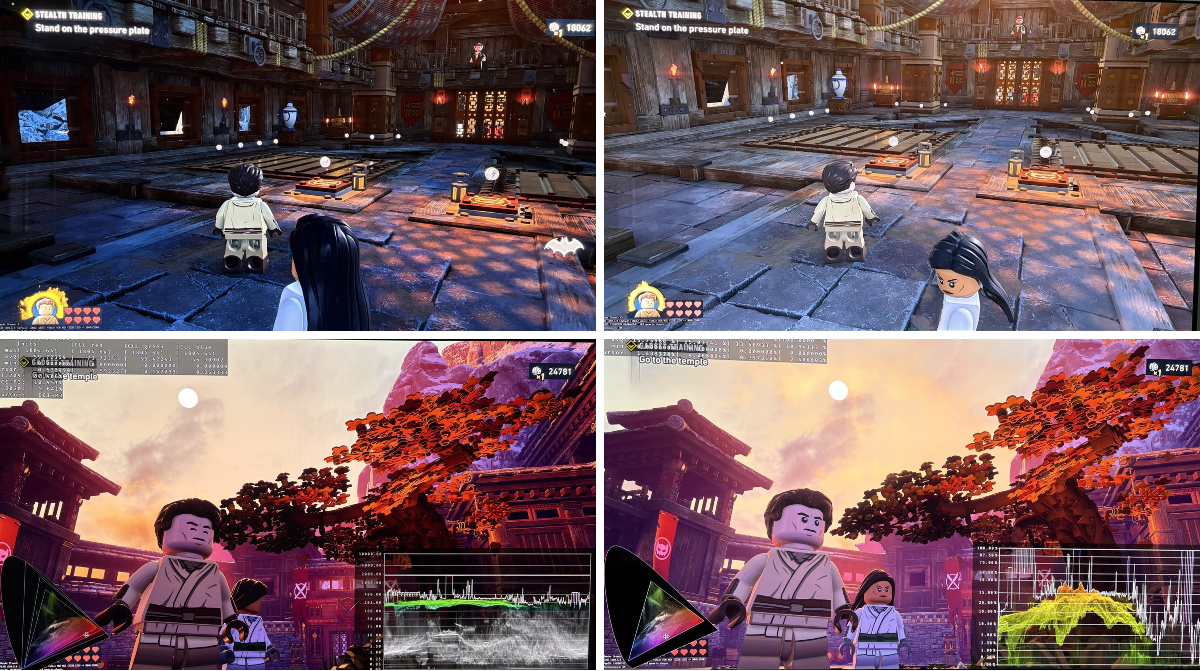
HDR analysis #LegoBatman: Legacy of the Dark Knight.
I only played the PC version, but HDR is most likely similar implemented on Xbox and Playstation consoles.
Another low effort HDR implementation, unfortunately.
The game uses Unreal Engine 5. It seams they simply used the
 X
·
naive badge
X
·
naive badge
interesting
I didnt really see since I played in HDR first
im assuming the ue5 solution just prioritizes contrast and saturation because thats what a lot of people like
 celest jackal
is there dolby atmos in the game? i cant seem to get it
dusty girder
shrewd badge
https://x.com/HDRgameAnalysis/status/2057924651515559953
they actually didnt use the generic implementation
they probably used the weirdest one out of all the implementations that I've seen
mild hazel
dusty girder
they probably used the weirdest one out of all the implementations that I've see...
it was different yeah
is anyone else crashing on occasion with reno
for batman
I was gonna post it to nexus, but not sure what is causing occasional crashes
celest jackal
yeah i haven’t had a crash yet played a few hours
 dusk nest
Hey guys. I am new to UE renodx. Anyone know the issue here with Borderlands 3? I followed the instructions in the wiki.
 dusty girder
dusk nest
Hey guys. I am new to UE renodx. Anyone know the issue here with Borderlands 3? ...
dusty girder
dusk nest
Hey guys. I am new to UE renodx. Anyone know the issue here with Borderlands 3? ...
borderlands3 isnt built into UE extended (yet), get the standalone mod
@regal kayak needs to send me that one lutbuilder
dusk nest
dusty girder
borderlands3 isnt built into UE extended (yet), get the standalone mod
Thank you!
torpid saddle
mild hazel
define "nothing is working"
Thanks. HDR is enabled. I installed Reshade with the add-on (I tested both the standalone executable and the shipping version). I copied the Renodx Extended file to the same directory where Reshade is installed. The Renodx interface appears in-game, but when I adjust the sliders, nothing happens—even after disabling and re-enabling HDR.
 sullen solar
torpid saddle
Thanks. HDR is enabled. I installed Reshade with the add-on (I tested both the s...
sullen solar
torpid saddle
Thanks. HDR is enabled. I installed Reshade with the add-on (I tested both the s...
You're sure the sliders aren't doing anything after disabling and enabling HDR? Try setting dechroma to 100 and toggling HDR just to make sure it isn't working
celest jackal
what dlss model are you guys using?
 mental lagoon
the one that fits for the fps i need
 spare holly
what is the extended version of reno? I want to use it for lego batman, do I just use the unreal snapshot may?
 half mortar
mild hazel
is anyone else crashing on occasion with reno
half mortar
mild hazel
is anyone else crashing on occasion with reno
I had 2 crashes, both when in the 'upgrade' computer in batcave
tame raft
mild hazel
is anyone else crashing on occasion with reno
I played it for an hour with 0 crashes
 mystic radish
mild hazel
you would turn HDR on in game, and turn upgrade path off in reno
mystic radish
mild hazel
you would turn HDR on in game, and turn upgrade path off in reno
Musa said you should continue using upgrade path
celest jackal
celest jackal
yeah i haven’t had a crash yet played a few hours
had a few crashes since this
unborn tartan
Which addon do we use for Lego Batman ?>
mild hazel
extended
unborn tartan
Link ? I've tried the extended and sliders do nothing in the image
mild hazel
it works, toggle HDR off and on to change sliders
unborn tartan
generic path etc disabled ?
mild hazel
yeah, HDR on in game, upgrade path off
you can max dechroma for an easy test of it its working
mild hazel
celest jackal
had a few crashes since this
I noticed that clearing shaders can help
glossy cipher
spare holly
what is the extended version of reno? I want to use it for lego batman, do I jus...
Unreal Extended is in the pins
mild hazel
batman is also in the main build
mild hazel
celest jackal
what dlss model are you guys using?
also basically M in every game (granted I tweak every game to support using 4.5 better), but you would want to turn sharpening off
sullen solar
Does anyone else get a slight freeze/hitch on cutscene transition when using fg in lego batman? Doesn't happen without fg
mild hazel
yeah
I just got mappings generated and dumping all the games assets.... so maybe I can disable them turning FG off
celest jackal
mild hazel
also basically M in every game (granted I tweak every game to support using 4.5 ...
how do i turn off sharpening for batman? can i do it through nvpi
mild hazel
I think there is an option in game but you need to set it every time you launch
celest jackal
also using model M on quality is that fine?
mild hazel
you might also be able to get an engine.ini working in AppData\Local\Dinner
I am using M on quality rn yeah
mild hazel
I just got ultrawide working without default blackbars so thats cool
sullen solar
Engine.ini worked for me in LEGO Batman - Legacy of the Dark Knight\LEGOBatmanLotDK\Binaries\Win64, have to add -EngineINI=Engine.ini as a launch option
And set to read-only
celest jackal
when i toggle renodx off and on in reshade, i cant see a difference in game, i can only see a difference in the menus, is that normal?
mild hazel
what do you mean by toggle
celest jackal
just setting it to off in the preset tab instead of preset #1
mild hazel
that doesn't really turn reno off
celest jackal
oh okay no worries then


 meager plinth
hello guys
it seems that the sliders don't work in batman
i have hdr on in game but when i change exposure for example i don't see changes
mild hazel
sliders work
toggle hdr
or you can do this #1411800884303626311 message and set r.LUT.UpdateEveryFrame
or you can install U+ which sets that
meager plinth
you choose the first one like i did ?
 shell igloo
target shipping.exe
vital knoll
good tip about finding the x is to open the game, then go to task manager and open file location 
meager plinth
shell igloo
target shipping.exe
thank you
it works
celest jackal
meager plinth
thank you
it works
do ur sliders work? i cant seem to get the sliders to change anything
strong plaza
wicked onyx
<@162283147277369344> is your reno builds for lego batman supported by RHI?
What's the difference between RHI and RDXC? They look the exact same to me
mild hazel
RHI is the current version
celest jackal
i know it’s for sure working cos i uninstalled and compared a screenshot but the sliders just don’t do anything which is weird
mild hazel
toggle hdr off and on to change sliders or do the above
 regal kayak
dusty girder
borderlands3 isnt built into UE extended (yet), get the standalone mod
regal kayak
dusty girder
borderlands3 isnt built into UE extended (yet), get the standalone mod
Bl3 is, it’s bl4 that isn’t
 soft flax
mild hazel
if anyone wants sliders to work in real time for batman, I just dropped a minor ...
soft flax
mild hazel
if anyone wants sliders to work in real time for batman, I just dropped a minor ...
will this mod decrease performance at all? i seem to get a bit more stutters and slightly lower fps
mild hazel
it significantly increases LODs and turns up shadows
soft flax
do the realtime sliders also have a perf impact cuz its updating every frame?
mild hazel
shouldnt really no
soft flax
i might just leave it cuz i fixed frame gen and im at 150fps now, hopefully it doesnt drop too much in the big cities
i just wish it stuttered less
but i think thats an engine issue
 eager nacelle
What was your problem with fg?
soft flax
it just wouldnt work at all
i had to go to nvidia app - global settings and set the frame gen mode to "use 3d app setting" instead of preset B
cuz i cant edit the individual profile for lego batman for some reason
eager nacelle
Odd
soft flax
just shows this forever
 mild hazel
it feels like they did something funky with FG
soft flax
they mustve cuz steam cant even recognize the FG frames

it justs increases the normal fps number instead of showing both fps like normal
mild hazel
having trouble finding streamline and dlssg stuff in their assets too
 rotund thistle
for lego batman do I need both the ue5 addon and the dlss fix? just one or the other? github says snapshot invalid for the dlssfix addon, is that okay?
mild hazel
ue extended
rotund thistle
where do I find that?
shell igloo
pins
mild hazel
github, here, RHI
rotund thistle
ty, so just this single add on, no others? any slider adjustments or console commands needed?
mild hazel
at this point I'll just make a nexus page even if there are some crashes
seem rare enough and fixed by clearing shaders
rotund thistle
should I just use default values?
mild hazel
yeah pretty much
mild hazel

Nexus Mods :: LEGO Batman: Legacy of the Dark Knight
Rewrite of the grading pipeline to fix HDR and controls for tonemapping, paper white, UI brightness, and color grading.
now when people ask just link to this page
naive badge
soft flax
i had to go to nvidia app - global settings and set the frame gen mode to "use 3...
For me, I had added the shipping.exe program to the Nvidia app, and then the game wouldnt use FG until I forced Preset B lmao
I only tried that cuz the same thing was happening to people in unmodded Forza 6 (Im one of those people)
and thats the solution I found online for that game
force preset B
the common denominator for me in both instances was I had overriden the super resolution preset
Sadly I dont know if that is what caused it because I hadnt enabled FG before overriding SR both times
soft flax
naive badge
For me, I had added the shipping.exe program to the Nvidia app, and then the gam...
ohhh theres a seperate shipping exe?
hmm i try to add it and it says its already added lol rip
naive badge
meager plinth
you choose the first one like i did ?
Its just the one in this screenshot
naive badge
soft flax
hmm i try to add it and it says its already added lol rip
But yeah it seems like Nvidia has officially added the game to their app
soft flax
yeah its not working for me
naive badge
So thats why thats happening
soft flax
cuz the officially added game isnt working for me
soft flax
eh no point the game works fine for me now
just annoying the officially added one doesntr work in the app
 mild hazel
if anyone that has an issue with batman crashing on occasion wants to try this and lmk if it helps
naive badge
Well your other games might not use Preset B anymore
Since you changed the global setting
so you could set it back if you want and then use DLSS swapper to fix Batman potentially
Honestly I wouldve used dlss swapper myself instead of adding the program to nvidia's app but I forgot I had the program on my pc lmao
 steel lion
Does anyone els have a problem with screen going black sometimes in mafia the old country with reno installed?
spare holly
mild hazel
if anyone that has an issue with batman crashing on occasion wants to try this a...
this works for me, crashed multiple times before but now havent at all in 2.5hrs
 strange pebble
Has anyone got Reno working with NTE on Linux? Always crashes for me
 weary belfry
mild hazel
if anyone that has an issue with batman crashing on occasion wants to try this a...
weary belfry
mild hazel
if anyone that has an issue with batman crashing on occasion wants to try this a...
It reduced the frequency but I have still had crashing in the skill menu with this version.
If I spend longer then 15 seconds looking at the skills it tends to happen
charred solstice
strange pebble
Has anyone got Reno working with NTE on Linux? Always crashes for me
I believe it's been reported it's just standard dwproton
 dapper sail
mild hazel
or you can install U+ which sets that
dapper sail
mild hazel
or you can install U+ which sets that
is it supposed to do that on install of U+ on the game? I checked the directory after install and Engine.ini wasn't there
strange pebble
charred solstice
I believe it's been reported it's just standard dwproton
I'm using DW Proton. ReShade itself is working fine but as soon as I add Reno it crashes at startup
 daring night
sullen solar
Engine.ini worked for me in LEGO Batman - Legacy of the Dark Knight\LEGOBatmanLo...
daring night
sullen solar
Engine.ini worked for me in LEGO Batman - Legacy of the Dark Knight\LEGOBatmanLo...
how do I add that as a launch argument to the exe? Adding it via steam under launch arguments is not working
mild hazel
dapper sail
is it supposed to do that on install of U+ on the game? I checked the directory ...
no, U+ just contains the setting
half mortar
weary belfry
It reduced the frequency but I have still had crashing in the skill menu with th...
same here
 shy dew
/回顶
sullen solar
daring night
how do I add that as a launch argument to the exe? Adding it via steam under lau...
i did it through steam, it works for me
mild hazel
you can just do this
 daring night
I did but changing the lut as example does not change in realtime despite this
they do change after turning hdr on/off though
mild hazel
it works if you do that
daring night
I must have typoed somewhere but it is not changing in realtime for me despite copying your instructions
 mild hazel
🤷 thats all I have and it works
daring night
it does change very visibly if I turn hdr on and off and change the lut, so I know renodx works as it should but it does not change in realtime for me
could be worse
mild hazel
ok, new version for batman on nexus, must clear shaders https://www.nexusmods.com/legobatmanlegacyofthedarkknight/mods/19
Nexus Mods :: LEGO Batman: Legacy of the Dark Knight
Rewrite of the grading pipeline to fix HDR and controls for tonemapping, paper white, UI brightness, and color grading.
stoic narwhal
mild hazel
seem rare enough and fixed by clearing shaders
I cleared my shaders and the game didn't recompile... Any other way to force one?
brave gull
sorry i haven't kept up with the extended mod has anyone created a list of supported games yet? I didn't see anything in pins
 spark blaze
Can't get the sliders to work for me, Only one that works is UI brightness. I have the newest reno mod and tried the engine.ini trick
Tried toggling hdr on and off ingame and nothing aswell
glossy cipher
spark blaze
Can't get the sliders to work for me, Only one that works is UI brightness. I ha...
which addon file did you use?
spark blaze
glossy cipher
which addon file did you use?
Newest one he just posted
glossy cipher
spark blaze
Newest one he just posted
did you let the game recompile shaders?
spark blaze
Used this setting that was on the mod page and it seems to work now

I swear i read above that none of that was needed
glossy cipher
spark blaze
Used this setting that was on the mod page and it seems to work now
nice! looks like the auto detect had an issue, you mean the output size?
mild hazel
huh, that upgrade shouldn't be needed...
I forgot I had turned it on testing some stuff
on SDR path
spark blaze
i mean it could've been something else i did but i think that is what fixed it
i probably restarted the games 10 times in like 5 minutes
It started working when i upgraded and restarted the game one more time
mild hazel
yeah idk, I turned it off and still works just fine
stoic narwhal
Any idea how else to get shaders to compile for batman? Deleted everything in dxcache but it didn't recompile.
getting a ton of stutter now
mild hazel
any time I delete dxcache it recompiles
glossy cipher
stoic narwhal
i even reinstalled, nothing
worst case, reinstall GPU drivers
mild hazel
can try deleting Dinner_PCD3D_SM6.upipelinecache
stoic narwhal
in games folder? or elsewhere?
mild hazel
localappdata dinner
stoic narwhal
glossy cipher
worst case, reinstall GPU drivers
I'll try that next
dinner, what in the hell is that folder name lol
still nothing deleting that
drivers it is!
glossy cipher
first game I have heard of that refuses to recompile shaders.. normally they can't wait to do that again 
stoic narwhal
yeah it's a first for me as well. I cleared what I should, reinstall nada. Hopefully drivers does it.
nope
fresh driver install? would that make a difference if it didn't work.
glossy cipher
stoic narwhal
fresh driver install? would that make a difference if it didn't work.
did you switch versions? that would probably help
stoic narwhal
nah just a reinstall of what was newest, I'll try a clean one
glossy cipher
it might check for version change, no idea what the inner workings is
stoic narwhal
welp that didn't work either fucking weird
west canopy


not a fan of "full RT" just crushing shadows so much
i don't have Mei's additional cvar improvements turned on becaues it killed my performance, but a lot of the times this is another example where suffering so much performance for getting RTGI (and what looks to me like missing AO in lumen mode) is really not worth it for me
Lumen mode, while having shitty reflections (i really don't care) and what I describe as some missing shadows/AO and not perfect lighting - is at least always playable, and never causing issue like crushing
so much dark crush looks more unnatural to me than Lumen mode "aproximation"
I have shadows slider at 70 btw, doesn't help
rotund thistle
whats the diference between the old and new file on nexus? old one looks like it was working for me just fine
also, how do you delete shaders?
vital knoll
west canopy
does your resources reverify every restart?

it's annoying
reinstalling doesn't work
charred solstice
vital knoll
does your resources reverify every restart?
Nope it needs to like most gacha games it’s paranoid
charred solstice
west canopy
I have shadows slider at 70 btw, doesn't help
Or you know… umm use the brightness slider in game to set it properly to you monitor
Shadows are fine I even lower skylight even more on mine to go darker, aka less game like. It’s between you. And your monitor. And anyone that doesn’t like it can go up in brightness like games do in standard
In fact in vanilla they’re using litterally the same direct lighting and csm, so “ray tracing” problem is kinda in your head.
vital knoll
charred solstice
Nope it needs to like most gacha games it’s paranoid
im confused by your "nope" 
charred solstice
vital knoll
im confused by your "nope" <:despairge:1409648830307369061>
it does it because it's paranoid about people hacking and things. almost every gacha does this step.
with that said, I think lumen is probably the best settings in NTE, because the devs in their use of city builder, made it so a lot of the overworld has limited compatibility with raytracing. Of course once you move pass the overworld, and into instance content, that changes signifiantly.
balmy sleet
dusty girder
read the pins
strangely [SystemSettings]
r.LUT.UpdateEveryFrame=1 doesn't work.
Game looks great

Camera mode is also real good
dusty girder
balmy sleet
strangely [SystemSettings]
r.LUT.UpdateEveryFrame=1 doesn't work.
did you remember to set engine.ini read only
worst case scenerio you just load a save or find what triggers a scene change in your game; no big deal
dusty girder

balmy sleet
dusty girder
worst case scenerio you just load a save or find what triggers a scene change in...
 it just its not working not even restarting the game will make a change maybe I need a resource upgrade on?
probably custom Chinese bullshit
celest jackal
anyone getting traversal stutter in lego batman? is there a fix
shell igloo
can't fix engine-wide issues
spare holly
I tried to run batman with relimiter VRR cap and adaptive smoothing without Vsync, but it would be really stuttery. Works perfect with vsync on. I also use FG, is this expected behavior?
 lyric isle
stoic narwhal
welp that didn't work either fucking weird
lyric isle
stoic narwhal
welp that didn't work either fucking weird
If you haven't fixed it yet, try using DDU, it has a Clean Shader Cache button and that always worked for me
half mortar
mild hazel
ok, new version for batman on nexus, must clear shaders https://www.nexusmods.co...
On what path are the shaders I should clear?
I used DDU to clear shaders and game is recompiling them on launch. Did not need to search for Dinner_PCD3D_SM6.upipelinecache
 west canopy
charred solstice
with that said, I think lumen is probably the best settings in NTE, because the ...
west canopy
charred solstice
with that said, I think lumen is probably the best settings in NTE, because the ...
I would agree on that, but what do you mean by significantly, in a good way or a bad way? For example I in the heist mode, there's no RT at all.
(or there is and I can somehow run it at max fps? But i really didn't notice any difference)
charred solstice
west canopy
I would agree on that, but what do you mean by significantly, in a good way or a...
umm no, heist mode has the most RT, it's lights are all way higher rate of compliance
west canopy
Huh, did not notice a difference at all
charred solstice
This is a debug mask of DI lights in overworld and in heist. Anything black is not in the RT pipeline.

 charred solstice
west canopy
Huh, did not notice a difference at all
charred solstice
west canopy
Huh, did not notice a difference at all
that's you, or maybe because GI is less contrasting inside heist. Again devs made RT especially similar across settings, on purpose
even the vanilla GI pass is set to merge at -50% saturation and -20% brightness into lumen, so that's also why daytime is RT and lumen is extremely close. For better or worse, RT looks like lumen.
strong plaza
mild hazel
https://www.nexusmods.com/legobatmanlegacyofthedarkknight/mods/19
Is this the same as the ue extended addon that I downloaded already or is this better?
vital knoll
strong plaza
Is this the same as the ue extended addon that I downloaded already or is this b...
it's just a dedicated mod, so you guys won't run into headaches with the ue extended
strong plaza
vital knoll
it's just a dedicated mod, so you guys won't run into headaches with the ue exte...
Alright I'll replace the addon with it then, do I need to clear shaders in any way or do anything at all?
mild hazel
coming from an older version to the latest, I would clear shaders
strong plaza
mild hazel
coming from an older version to the latest, I would clear shaders
So should I do it for every game every time there's a new update to the renodx mod?