#Unreal Engine
1 messages · Page 6 of 1
 tulip kayak
i'll plan to just properly patch one shader and let ai do the rest
instruction pilling AI is my new hobby
 dusty girder
its no thard, but its not as straight forward as shortfuse's ue-generic thats tonemappass
tulip kayak

dusty girder
if the decomp has named lutbuilders
its literally this
  UECbufferConfig cb_config = CreateCbufferConfig();
  cb_config.ue_filmblackclip = FilmBlackClip;
  cb_config.ue_filmtoe = FilmToe;
  cb_config.ue_filmshoulder = FilmShoulder;
  cb_config.ue_filmslope = FilmSlope;
  cb_config.ue_filmwhiteclip = FilmWhiteClip;
  cb_config.ue_tonecurveammount = ToneCurveAmount;
  cb_config.ue_mappingpolynomial = MappingPolynomial;
  cb_config.ue_overlaycolor = OverlayColor;
  cb_config.ue_bluecorrection = BlueCorrection;
  cb_config.ue_colorscale = ColorScale;

  SV_Target = ProcessLutbuilder(float3(_787, _789, _791), cb_config, SV_Target, OutputDevice);
  return SV_Target;
sm6 has named decomps a lot
in that case its free
also if the lutbuilder has an sdr lut
you have to feed it to processlutbuilder()
the sampler and texture
tulip kayak
let me check the current ones
dusty girder
also you need the lutweights cbuffer, ai sucks at that
so you have to map it yourself
by looking at the code
tulip kayak
does this still auto dump lutbuilders
dusty girder
no
not yet
didnt setup any sdr path or swapchain stuff yet
its only replacing shaders and injecting cbuffers (native hdr type mod)
thats a WIP
but yea I dont think wuwa is a good test for this, since I think the grading shaders expect an srgb encoded sdr color
so even if you do all this, you're going to have to tonemap it back down to sdr to run through the grading shader, and upgrade tonemap
might aswell stick to wuwano's method
tulip kayak
dusty girder
might aswell stick to wuwano's method
like the game is gonna get its own hdr implementation
there's really no reason for me to do this
other than
dusty girder
I mean feel free to try
tulip kayak
if I don't feel like dealing with their extra color grading code i could just disable it
kek w
tulip kayak
uh,
dusty girder
compare code between your lutbuilder and a named one
just to understand what you're looking for, waht it does
tulip kayak
what's the ini config line again
dusty girder
 tulip kayak
ok by the composite shader you mean the shader drawing the ui
tulip kayak
its not the last shader
its the three shader here

we have all the ui shader for this game cuz hide UI shenanigans
dusty girder
no so
when you use ini tweaks
there should be a new ui shader
that is only used in the hdr path
and its basically all ui shaders combined
and its going to be the last ui shader in the list
tulip kayak
so it should hide all the ui shaders if you draw/undraw it?
dusty girder
yes
tulip kayak
then this game is using custom ui
makes sense because they have their own cvars for their UI
tulip kayak
dusty girder
dont thik the mod will work well w/o one
you'll need to patch all the ui shaders?
if no comp ui?
dusty girder
well
the whole point of the composite shader
is its kind of like a swapchain proxy
you want to blend ui with scene
if its just a ui shader
with no blending
its going to look ugly a.f
dusty girder
thats not theissue
the issue is no composite shader
handling and scaling shaders individually
with no game sample
is ass
and ugly
but you can try just replacing the lutbuilder for now
see how it looks
forget about the UI for now
its just UI
tulip kayak
let's say hypothetically i want to try it for now
just to deal with the oversaturation from the UI
dusty girder
no idea what the issue is, maybe the ui needs to run in srgb
so you pq decode, encode srgb, run code, pq enode
is it ue4?
or5?
tulip kayak
ue4
dusty girder
ue4 with sm6 is too custom
for this
you're also probably going to need to inject ue4ss
thats why its oversaturated
ue4 doesnt respect ini the same as modern ue5
tulip kayak
I probably just need the UI decoded differently
dusty girder
so you need ue4ss + my script to sent the cvars properly
idk if the anticheat will let that in though
tulip kayak
ue4ss might not work with anti cheat though
dusty girder
yea thats a riperoni then
what you can do is just use the unreal extended code for the sdr path
ima eventually add an sdr path
just add it to the wuwa mod
will look better than tonemappass
you're going to have to swap out pq encode/intermediate encoding in lutbuildercommon.hlsli with srgb encoding an scaling the color
(renderintermetiatepass)
and then a proxy shader with your own code or swapchain ass
tulip kayak
nah
I'll make this ui work
if not im just not doing anything
and wait for the official hdr 
 charred solstice
dusty girder
ima eventually add an sdr path
charred solstice
dusty girder
ima eventually add an sdr path
HDR path means UE needs to be in HDR as well? aka windows autoHDR is on, oppose to SDR path where windowsHDR is off?
tulip kayak
charred solstice
HDR path means UE needs to be in HDR as well? aka windows autoHDR is on, oppose ...
windows desktop hdr needs to be on
actually
probably not even
you just need the cvar
why u talking about auto hdr here
lol
charred solstice
it depends if UE needs bUseHDRDisplayOutput=true, in which case windowsHDR need to be on, or UE just rejects it as SDR
dusty girder
bUseHDRDisplayOutput doesnt do shit
all games ignor eit
autohdr should always be off
charred solstice
does not in my games
i always need that toggle for UE to start giving HDR output
dusty girder
[SystemSettings]
r.AllowHDR=1
r.HDR.EnableHDROutput=1
r.HDR.Display.OutputDevice=3
r.HDR.Display.ColorGamut=2
r.HDR.UI.CompositeMode=1

[/Script/Engine.RendererSettings]
r.LUT.UpdateEveryFrame=1
this forces UE to run its hdr path if it doesnt have native hdr
dusty girder
charred solstice
i always need that toggle for UE to start giving HDR output
do you know whats happening?
since bUseHDRDisplayOutput does nothing, the game launches as an sdr game
autohdr sees an sdr game
when autohdr sees an sdr game, it hijacks it; and applies autohdr
so congradulations you're playing your game with w11 autohdr
charred solstice
i mean if your game supports HDR in game, the usersettin is basically just bUseHDRDisplayOutput=true
dusty girder


pls, just go use regular ue-generic for now
ue-extended is a work in progress, and will eventally support the sdr path aswell so its going to be easy to use
for now its just a work in progress
the only people messing with it are helping test
its not officially released or supported yet
charred solstice
eeehh...then sorry for disrupting, just asking... as it's just ue thing
dusty girder
nah d.w, just sharing
bUseHDRDisplayOutput does nothing
atleast through the ini
if you want to force the native ini path you have to : https://github.com/clshortfuse/renodx/discussions/494
also there are other things outside of just forcing the hdr path, like creating the composite shader
charred solstice
that i know, I usually need both sides of the ini to finally get ue hdr to display, if reno doesn't need that, then great, as i don't need to muck around with windowsHDR which is why UE is such a pain to HDR at times

 tulip kayak
@dusty girder im gleaming so far
so just find the cbuffer and set it with UEconfig
and replace that one line to multiply it with 0.0f
and that's it for lutbuilder?
tulip kayak
dusty girder
so you pq decode, encode srgb, run code, pq enode
just did bt2020::from::BT709 for it to unfuck itself


 celest ferry
So the new Unreal addon automatically fixes framegen?
 coarse axle
transformer FG works without flickering using this version
celest ferry
coarse axle
transformer FG works without flickering using this version
i still get flickering on loading screens, been using transformer and htis version
but it's greatly redued
fine patterns on armor still seem to flicker more in FFXVI
tulip kayak
what the fuck
coarse axle
FFXVI isnt UE
 tulip kayak
charred solstice
ff7rebirth uses UE
tulip kayak
charred solstice
ff7rebirth uses UE
Not ffxvi
celest ferry
i'll double check UE games
coarse axle
celest ferry
I get flickering from Reno in FFXVI
thats a separate issue, the addon isnt stable. Has crashing and such
charred solstice
tulip kayak
Not ffxvi
ya it uses that old whatever engine, they kept hacking at
tulip kayak
charred solstice
ya it uses that old whatever engine, they kept hacking at
So its irrelevant cause no one mentioned it
Lol
Were talking abt 16 here
charred solstice
tulip kayak
Lol
I thought he just typo-ed cause UE lab
can't blame me for having too many FFs
celest ferry
coarse axle
thats a separate issue, the addon isnt stable. Has crashing and such
It's other games too but I'll try to remember if they are UE or not
tulip kayak
celest ferry
It's other games too but I'll try to remember if they are UE or not
Any game that upgrades the sdr path instead of using/fixing hdr will have transformer flicker
 peak galleon
there's a lot of banding still in HDR, worse in SDR though
 blazing scaffold
Yeah, banding in the fog mostly, bad in noth standards! Have you guys got crashes in Reanimal?
 unique ice
how? i just get black screen. even with R10G10B10A2_UNORM set up
dusty girder
tulip kayak
and replace that one line to multiply it with 0.0f
@tulip kayak not multiply, replace the cbuffer with 0
 sullen spoke
unique ice
how? i just get black screen. even with R10G10B10A2_UNORM set up
sullen spoke
unique ice
how? i just get black screen. even with R10G10B10A2_UNORM set up
make sure you're using the latest addon from here and follow instructions in following post https://discordapp.com/channels/1408098019194310818/1411800884303626311/1472023414586867804
those are my settings from reshade.ini
unique ice
i need the engine.ini changes too, right? where can i find/create that? i tried adding it to GameUserSettings.ini (and setting to readonly) in \AppData\Local\HighOnLife2\Saved\Config\Windows but im still running in sdr
 stoic narwhal
I just did it and have it working, I added the engine.ini changes to gameusersettings and also made an engine.ini with those lines in the same folder. Working great for me
unique ice
stoic narwhal
I just did it and have it working, I added the engine.ini changes to gameuserset...
got it working thanks
 plain wolf
Hello, I'm getting a black screen on the new game Reanimal but the mods page on GitHub says it's supported, any idea?

 woeful gorge
Haven't tried this new one and maybe I have some settings wrong but reanimal looks more muted in hdr.
 meager cliff
huh, reanimal worked pretty good for me with the version from github
 willow harness
dusty girder
```ini
[SystemSettings]
r.AllowHDR=1
r.HDR.EnableHDROutput=1
r.HDR.Display.Outpu...
willow harness
dusty girder
```ini
[SystemSettings]
r.AllowHDR=1
r.HDR.EnableHDROutput=1
r.HDR.Display.Outpu...
Tried these but the still no luck


 glacial idol
Is this step necessary to make tonemapping slider work? (UE generic)

None of the silder works except color space and UI brightness. Is it normal? I did reload from the game main menu.
 rocky mortar
UE Extended>RenoDX>Native HDR
rocky mortar
rocky mortar
UE Extended>RenoDX>Native HDR
Is the new addon supposed to have different results than RenoDX?
Sorry for my ignorance
glacial idol
Are tonemapping sliders only work if the game is listed on here? https://github.com/clshortfuse/renodx/wiki/Mods#unreal-engine-
GitHub
Renovation Engine for DirectX Games. Contribute to clshortfuse/renodx development by creating an account on GitHub.
I tried Solar Ash and the sliders work.
I am confused because someone posted a High on Life 2 clip (UE extended) and the sliders work in realtime.
But when I try it. Only the UI brightness works (correctly applied to only UI)
 untold wadi
rocky mortar
Is the new addon supposed to have different results than RenoDX?
Sorry for my i...
untold wadi
rocky mortar
Is the new addon supposed to have different results than RenoDX?
Sorry for my i...
Yes
untold wadi
glacial idol
I am confused because someone posted a High on Life 2 clip (UE extended) and the...
Realtime sliders require adjusting engine.ini
 untold wadi
This specifically
[/Script/Engine.RendererSettings]
r.LUT.UpdateEveryFrame=1
Other lines will mess up generic UE
glacial idol
untold wadi
This specifically
```
[/Script/Engine.RendererSettings]
r.LUT.UpdateEveryFrame=1...
This is only needed for UE extended, right? I've done this and set the Engine.ini to read only, but the sliders are still not working.
untold wadi
SystemSettings are only for UE extended
glacial idol
I treid 6.6.2 and 6.7.1, with adddon of cos
untold wadi
UpdateEveryFrame works with both
 brazen comet
plain wolf
Hello, I'm getting a black screen on the new game Reanimal but the mods page on ...
brazen comet
plain wolf
Hello, I'm getting a black screen on the new game Reanimal but the mods page on ...
also hving this issue. Have you fixed it?
glacial idol
hmm... I added UpdateEveryFrame on generic UE addon and still, only color space and UI brightness sliders work..
brazen comet
brazen comet
also hving this issue. Have you fixed it?
its the renodx addon. Black screen goes away when removing the addon file
brazen comet
brazen comet
also hving this issue. Have you fixed it?
fixed the issue now. Reshade version stated on github is a must. Black screen happens with the latest version of reshade.
 digital oak

 atomic oak
peak galleon
there's a lot of banding still in HDR, worse in SDR though
atomic oak
peak galleon
there's a lot of banding still in HDR, worse in SDR though
There indeed is a lot of banding sadly in Reanimal, Nvidia also does not detect the game just yet. So you need to add the exe to nvidia app manually if you want to override dlss3.7 with 4.5 in order to get a little less banding in fog.
 civic hamlet
Is this build ok for High on Life 2? I'm asking as everything is working while outside in the city, but I just entered inside a building (I'm playing the game and it's a new checkpoint) and nearly everything stopped working (only UI brightness slider is working correctly), and I have no idea why.
peak galleon
atomic oak
There indeed is a lot of banding sadly in Reanimal, Nvidia also does not detect ...
i never bother, i just use the dlss that comes with the game
atomic oak
peak galleon
i never bother, i just use the dlss that comes with the game
Huge oversight. DLSS4/4.5 Model M transformer is MUCH superior to DLSS3 CNN model, there is no reason not to use the NVIDIA App override, the difference is stellar tbh and also does improve HDR, color banding and Tonemapping.
peak galleon
atomic oak
Huge oversight. DLSS4/4.5 Model M transformer is MUCH superior to DLSS3 CNN mode...
buddy all i care about is:
- playing the game
- having ultrawide work
- having HDR work if possible (but i'll play SDR too idc)
everything else is secondary
i cannot be fucked spending hours tweaking shit
and yes i know it's a one click thing but iirc, they also neutered the button that let you auto set latest dlss iirc
if you have to pick a specific preset on a per game basis to get the best, it's a user experience fail
 shell igloo
NVPI global override to M 
peak galleon
shell igloo
NVPI global override to M <:pepeToast:1309186285243469824>
doesn't work if you want to swap between quality and dlaa or something though does it
atomic oak
shell igloo
NVPI global override to M <:pepeToast:1309186285243469824>
Its literally that, a one time change in the nvidia app UI for all games the nvidia driver covers, reanimal is too new of a release and not covered by the drivers just yet.
shell igloo
peak galleon
doesn't work if you want to swap between quality and dlaa or something though do...
why wouldn't it work
peak galleon
shell igloo
why wouldn't it work
well it would work but not the optimal preset if you are swapping dlss modes on different games
shell igloo
atomic oak
Its literally that, a one time change in the nvidia app UI for all games the nvi...
nvapp override relies on the app actually recognizing the game so it's less effective
shell igloo
peak galleon
well it would work but not the optimal preset if you are swapping dlss modes on ...
K is never optimal for image quality, the "recommended" option is due to perf concerns
atomic oak
The recommended Option used K for balanced and above
peak galleon
i dont know shit about the presets and i dont want to know, that is my point. i want devs to pick for me or nvidia to do it for me.
i dont want to have to press or change anything
shell igloo
🤷🏻♂️
peak galleon
tweaking is not really very fun
atomic oak
peak galleon
i dont know shit about the presets and i dont want to know, that is my point. i ...
Thats also fine. Then the recommend mode is the one for you, meant for minimal configuration, its applied globally without any more complexity. It has got super easy since a few weeks ago when Nvidia added the functionality to Nvidia App👍 👍

Super easy fire and forget, you can literally forget about the setting tomorrow👌
peak galleon
atomic oak
i guess the only downside to this is forgetting you set it and then a game crashes with it or something
atomic oak
No dont worry, you can literally just forget the setting. Its on recommended mode, nvidia choses whats best for the game and DLSS quality/dlaa/performance. It will all be handled by the driver, also only with games which support dlss natively, there is 0 risk, I never had any issues with a dlss version mismatch or something, they are all backwards compatible. I fidle around quite a lot with dlss versions for a long time trying to minimize the ghosting of earlier models 😁
The recommended label was just added in the last driver release, so you would need to update your driver to latest if that option is not available for you just yet.
 limpid palm
untold wadi
Added Reanimal support
limpid palm
untold wadi
Added Reanimal support
Does this mod adjust the image for SDR or doesn't it make sense?
peak galleon
untold wadi
Added Reanimal support
were there new shaders? renodx-unrealengine from github seems to work fine here
the UI slider does change the game brightness though
untold wadi
One new shader
peak galleon
nice, will it be PR'd?
untold wadi
Already merged
 lost lichen
peak galleon
i guess the only downside to this is forgetting you set it and then a game crash...
lost lichen
peak galleon
i guess the only downside to this is forgetting you set it and then a game crash...
Very unlikely.
lost lichen
atomic oak
No dont worry, you can literally just forget the setting. Its on recommended mod...
Nvidia doesn't choose anything for certain games. Recommended currently will give you L on UP, M on P and K on the rest. No matter the game. It's called recommended because it follow NV's own documentation. Before it would just force one newest preset for all modes.
lost lichen
peak galleon
i dont know shit about the presets and i dont want to know, that is my point. i ...
Then you better not override at all.
 ebon dome
as others have said, the main menu is roasted but in-game, it looks great. Thanks!
 peak galleon
lost lichen
Then you better not override at all.
peak galleon
lost lichen
Then you better not override at all.
i tried it in reanimal and it does help a lot with the banding 
DLAA in game + recommended
dusty girder
@untold wadi the draw lut every frame thing doesnt work in lies of p; tested it a few days ago
probably because its literally the only ue4 game with per-scene luts
dusty girder
civic hamlet
Is this build ok for High on Life 2? I'm asking as everything is working while o...
@civic hamlet yes
well then I need new lutbuilders
I only got 2 that lazzor sent me
uninstall ue-extended, download ue-generic, enable dump lutbuilders, go into the area it stops working (with initweaks enabled), and send me all the lutbuilders
I really have to graft all the ue-generic stuff over, those instructions are dumb a.f
 eager lynx
Finally gave a try to Ghostrunner with RT so dx12 and it didn't crash so I guess I should edit the wiki to reflect it
celest ferry
I cannot get High on Life 2 working with the snapshot uploaded to the repo today. My Lilum's analyzer shows that I'm stuck at 203 nits, but it occasionlly pops to 700. The peak slider only works if I drop it below 200. What is the solve here? Thank you!
 brave gull
rocky mortar
UE Extended>RenoDX>Native HDR
brave gull
rocky mortar
UE Extended>RenoDX>Native HDR
damn native better than reno here lol
brave gull
You gotta turn HDR off everytime for returnal apparently (i wouldn't know the game won't launch) which sounds annoying so I outta try this extended ue
I'm guessing you gotta re-edit all the shaders though so it won't work for everything yet
dusty girder
rocky mortar
UE Extended>RenoDX>Native HDR
@rocky mortar if you're playing with UE Extended, you have to make sure native hdr is on in game
no ini tweaks
here is the latest build
let me test
dusty girder
brave gull
You gotta turn HDR off everytime for returnal apparently (i wouldn't know the ga...
didnt add all the lutbuilders yet
so returnal probably wont work yet
SDR vs UE Extended HDR (ingame HDR on)


I think I have returnal, wont be too muc work I think
 flat hazel
hey guys, is this unreal engine mod the best way to get hdr in the new dragonquest please? im on maternity leave trying to deal with rain and kids and have like 5 minutes.
dusty girder
I deleted it
dusty girder
flat hazel
hey guys, is this unreal engine mod the best way to get hdr in the new dragonque...
dragonquest is custom
needs a custom mod
yea I gotta download it, ima go eat; no promises today but
I'll look into it
flat hazel
dusty girder
needs a custom mod
no thats nice, i know a little bit. ill search around
dusty girder
nobody made one yet so
flat hazel
no you guys are the go to for sure. just wanted to check here first. thanks Marat.
dusty girder
np gl
charred solstice
does oblivion count? it's kinda like one of those where the pipeline was setup but no toggle was ever finalized?
dusty girder
charred solstice
does oblivion count? it's kinda like one of those where the pipeline was setup b...
oblivion's shaders arnt added yet
oh shit it has named lutbuilders
wouldnt be a lot of work to add
rocky mortar
dusty girder
here is the latest build
It works but changing the sliders doesn't except for UI Brightness
dusty girder
rocky mortar
It works but changing the sliders doesn't except for UI Brightness
lies of p doesnt have real time sliders
open the equips menu and close
and it will update
rocky mortar
Native vs UE Extended

 rocky mortar
dusty girder
lies of p doesnt have real time sliders
rocky mortar
dusty girder
lies of p doesnt have real time sliders
ah ok
charred solstice
will UE extend, have the same dump lut possiblity, or will modders need to go into hunting themselves?

 dusty girder
did you get rid of ini tweaks?
you can reduce blowout a bit, I might've set it too strong
in the latest version
rocky mortar
dusty girder
did you get rid of ini tweaks?
yeah i don't have any, I'm playing with U+ if that make a difference
brave gull
damn wtf returnal got hella wide gamut coverage even with native hdr
rocky mortar
rocky mortar
I've Dead Island 2 installed, I'll check it out
doesn't seem to work, maybe a custom version
dusty girder
dead island is custom
just added returnal support
lets test
idk if ti will work
the composite shader is custom
returnal native hdr on seems to work just fine

 brave gull
wdym native hdr works fine? like there's no different between native and ue?
dusty girder
ingame native hdr on can stay on
brave gull
oh i thought extended doesn't even work with hdr off
dusty girder
dusty girder
returnal native hdr on seems to work just fine
but with this build you can launch returnal, let it stay in native hdr, and thats it
brave gull
yeah i mean looks good hard to tell a difference though native hdr looks pretty good
i'd keep testing but there's a tornado warning i bettter turn off my pc lol
rocky mortar
tested Banishers with cvars and didn't work
and tested The Casting of Frank Stone, the game has native HDR but the addon doesn't seem to work
dusty girder
dusty girder
rocky mortar
and tested The Casting of Frank Stone, the game has native HDR but the addon doe...
that game wont work with this, custom everything
@rocky mortar @brave gull sorry bois I fucked up, use this build
if your blowout slider doesnt get set to 75, set it yourself (or lower if you want)
brave gull
ohh i was wondering why ur light tenctacle thingys were white
 steel lion
So whats the best way to use HDR in High on Life 2?
dusty girder
dusty girder
<@470261959900528650> <@439675916822511616> sorry bois I fucked up, use this bui...
this this ini tweaks works very well, but apparently there is an area with a new lutbuilder
so somebody needs to get me that
maybe @mild hazel can
apparently when you leave the city and enter the house
dusty girder
 mild hazel
could try it next
mild hazel
could try it next
btw the old blowout slider is now called "dechroma", so use that to test
mild hazel
dusty girder
btw the old blowout slider is now called "dechroma", so use that to test
should I use the version you just posted
dusty girder
yea
mild hazel
idk when I will get to house
haven't been in a house since beginning of game
ah I found one
dusty girder
dm me it, and I'll get it fixed
mild hazel
aight, relaunching now
dusty girder
I also got some more hue/chroma fixs
but I'll send ya'll that when you get me the new lutbuilders
dusty girder
I've added some more High on Life 2 lutbuilders, thanks to lazorr for finding them
civic hamlet
dusty girder
well then I need new lutbuilders
Please let me know if they are ok, it's the first time I do this
dusty girder
dusty girder
I've added some more High on Life 2 lutbuilders, thanks to lazorr for finding th...
doe sthis not work?
civic hamlet
dusty girder
doe sthis not work?
I'll try it right now and report back
celest ferry
what do the LUTbuilders do?
Anyone have the symptom where only the Peak Shader works and only below 200 or something?
dusty girder
compiling
@civic hamlet remember to reset the default value for blowout and hue shift; I changed those up
let me know if it works
civic hamlet
dusty girder
let me know if it works
Unfortunately it's not working. Only UI brighteness works. I completely deleted reshade.ini and used the default one just to be sure nothing was left of previous installation. The game is the gamepass/windows store version. Everything was fine in the previous game area.
civic hamlet
ok, I'll do it right now
civic hamlet
not working. I'll retake lut files, may I did something wrong.
dusty girder
did the game become black and white?
civic hamlet
no
dusty girder
gamepass version might not accept
ini tweaks
idk anything about gamepas
but you said an older area worked
civic hamlet
yes, it worked fine
dusty girder
no idea
get the ue-generic mod, dump lutbuilders on (with ini tweaks), and load into the area that doesnt work
civic hamlet
let me check the lut thing, maybe I did it wrong
dusty girder
[SystemSettings]
r.AllowHDR=1
r.HDR.EnableHDROutput=1
r.HDR.Display.OutputDevice=3
r.HDR.Display.ColorGamut=2
r.HDR.UI.CompositeMode=1

[/Script/Engine.RendererSettings]
r.LUT.UpdateEveryFrame=1
I have lazorr playing, apparently things are just fine
what area are you in?
like the name
civic hamlet
that's the ini I'm using
dusty girder
ok good
civic hamlet
it's the area after a "parking lot", that was in the open
dusty girder
@mild hazel did the mod work for you there?
mild hazel
I dont know but I suspect there are probably some areas that need lutbuilders
dusty girder
(1.0f - exp2(dot(
I also used generic ue mod before, and it worked like that (now I know, it was strange at first but didn't know what was going on): in the very first area after the intro it wasn't working, I went through the door and the mod started working, then I reached the city and it didn't work again. So I come here and saw the new ue-extended mod.
mild hazel
it works in the city for sure
celest ferry
dusty girder
gamepass version might not accept
GamePass version works with non-UE Reno mods for me
civic hamlet
dusty girder
gamepass version might not accept
I usually had no problem using RenoDX with Gamepass games
mild hazel
it should be working in most of the game
civic hamlet
I'll take lut files again, give me a minute
mild hazel
but they have a shit ton of luts
I spent a long time mostly focused on frame times trying to smooth out some stuff so might not have noticed when it wasnt working
dusty girder
take your time
if you can when dump lutbuilders is on
exit the area, and go back in
civic hamlet
civic hamlet
dusty girder
exit the area, and go back in
unfortunately I can't, it's not an open world game, it's just checkpoints
dusty girder
civic hamlet
already in the mod
best thing I can offer is a fresh compile
make sure only addon in your folder is
dxgi (reshade) + addon
civic hamlet
ok
dusty girder
maybe dump lutbuilders isnt grabbing it for some reason
somebody would need to get the devkit out
civic hamlet
is there a specific reshade version I should use?
dusty girder
latest one with addon support
civic hamlet
ok, that's what I'm using
dusty girder
yea no idea, if its a short area
I guess its not the end of the world
until somebody finds the lutbuilder
civic hamlet
sure, not a big deal, I'm not complaining at all, I'm in fact very grateful for your mod and work, I use it all the time
civic hamlet
dusty girder
send reshade.log I guess
 wind hill
dusty girder
I've added some more High on Life 2 lutbuilders, thanks to lazorr for finding th...
wind hill
dusty girder
I've added some more High on Life 2 lutbuilders, thanks to lazorr for finding th...
from here
dusty girder
dusty girder
this one
also you need ini tweaks, engine.ini:
[SystemSettings]
r.AllowHDR=1
r.HDR.EnableHDROutput=1
r.HDR.Display.OutputDevice=3
r.HDR.Display.ColorGamut=2
r.HDR.UI.CompositeMode=1

[/Script/Engine.RendererSettings]
r.LUT.UpdateEveryFrame=1
idk where it is for your game
 nova thistle
any hope for romeo's max nit menus with extend?
celest ferry
coarse axle
transformer FG works without flickering using this version
I'm using Musa's latest vrsion of FFXVI mod with Transformer model M enabled and I still get flicker so maybe it's only fixed in Unreal? Got it if so
celest ferry
tulip kayak
Any game that upgrades the sdr path instead of using/fixing hdr will have transf...
Isn't there an optin to bypass this or something in some of the reno mods
civic hamlet
dusty girder
also you need ini tweaks, engine.ini:
```ini
[SystemSettings]
r.AllowHDR=1
r.HDR...
I'm using latest file and correct engine.ini. Directory structure really is the same for Windows Store UE games except for "Windows" directory (both game and appdata folders), which is named "WinGDK". I tried to start a new game and the mod works fine (I just tried to start a new game, firt playable are), but as soon as I load the old checkpoint area the mod stops working correctly. EDIT: just kept playing until next checkpoint, mod works again
dusty girder
yea no idea, that one area's lutbuilder is missing
and for some reason ue-generic doesnt dump it
dusty girder
nova thistle
any hope for romeo's max nit menus with extend?
wait for the sdr path to get added, but then you'll loose framegen
or somebody that owns the game to try and fix it
tulip kayak
celest ferry
Isn't there an optin to bypass this or something in some of the reno mods
what bypass u talking about
lol
celest ferry
tulip kayak
what bypass u talking about
As I recall one of the Reno addons have a line at the bottom of the Reno pane that says something like “if game is using SDR path then click this to try and fix it” or something
 dire ice
I tried Octopath Traveler and it seems to work fine, but it's not listed on the page. Like OP 2, it requires B8G8R8A8_TYPELESS Output Size, otherwise the UI brightness slider doesn't control the UI but the actual graphics.
peak galleon
dire ice
I tried Octopath Traveler and it seems to work fine, but it's not listed on the ...
add it then, it's open for anyone to edit
dire ice
Ah. Didn't even notice that these are editable. Added.
It also ruined the satanic nature of the page, because it had 666 revisions, now it has 667 💀
 placid siren
celest ferry
Isn't there an optin to bypass this or something in some of the reno mods
placid siren
celest ferry
Isn't there an optin to bypass this or something in some of the reno mods
#1413548071987576862
celest ferry
placid siren
<#1413548071987576862>
Gotta remember to do this thanks
placid siren
Once I move everything to Reshade 6.6 based, I can just include it
 fluid valley
dusty girder
also you need ini tweaks, engine.ini:
```ini
[SystemSettings]
r.AllowHDR=1
r.HDR...
fluid valley
dusty girder
also you need ini tweaks, engine.ini:
```ini
[SystemSettings]
r.AllowHDR=1
r.HDR...
Hey I tried this for High on Life 2 with the engine ini and when it loads up I get the splash screen and then just a black screen with music on the main menu. I can't access reshade.
dusty girder
no idea sorry
fluid valley
do I use just renodx-ue-extended.addon64 or do I need something else?
sullen spoke
fluid valley
do I use just renodx-ue-extended.addon64 or do I need something else?
you should just be able to use ue extended with the engine.ini settings
you could try copying the reno settings from my post to see if this fixes it https://discordapp.com/channels/1408098019194310818/1411800884303626311/1472165937607217288
glacial idol
fluid valley
do I use just renodx-ue-extended.addon64 or do I need something else?
ue-extended.addon64 is alternative to renodx-unrealengine addon, use one only. You get black screen with unrealengine addon without "upgrade fix"
 rigid dawn
peak galleon
i tried it in reanimal and it does help a lot with the banding <:hug:14096490209...
rigid dawn
peak galleon
i tried it in reanimal and it does help a lot with the banding <:hug:14096490209...
hello dont mind me looking at your old message but what are you recommending here? I want to do it as well
Reanimal has no HDR so does RenoDX enable the UE5's own HDR (=from the engine, which is disabled by the game)?
peak galleon
no it's renodx hdr
rigid dawn
okay
also does anyone know how to turn the framegen on in reanimal? I see the dll files in the game folder but no option in the game
when I click reshade app it says its specifically built for singleplayer games only and I also get a Win32/Pomal!rfn which I hope is a false positive
I wonder if I will get banned for this? Im gonna play it with a friend via friends pass
 west canopy
Plasmaguy saying he's getting black screen in High On Life 2 and "he tried all compatibility settings"?
And he's ITMing above 1000 because he doesn't want to look up for the UE commands that would give him accurate HDR  what has happened to our prophet
placid siren
i don't think anybody has dumped shaders for High on Life 2 (as noted in the pinned comment)
sullen spoke
placid siren
i don't think anybody has dumped shaders for High on Life 2 (as noted in the pin...
lazorr has been providing shaders for this up the chat a little bit
placid siren
sullen spoke
lazorr has been providing shaders for this up the chat a little bit
didn't find any
 sullen spoke
hmm
maybe i'm mistaken
2 mins
mild hazel
I have the shaders from ini HDR being turned on
there are quite a few different lutbuilders
 delicate ferry
I was playing REANIMAL and as soon as the demo portion was over renodx stopped working. Extracted these LUT Shaders
limpid palm
I attempted to launch Reanimal using the most recent version of the unreal addon, but the screen remained black. I could hear the menu sound, and Reshade indicated that it was installed, yet it didn’t react to the Home key.
How to fix it ?
Where to find ue-extended.addon64 ?
limpid palm
Without the addon file, ReShade was installed, and the Home button worked. But when I put the addon back into the folder on the next launch, all I got was a black screen, and nothing displayed at all. Only music and sounds were audible. Could the issue be with the addon file?
Maybe its all black and no tab from Reshade because i have sdr tv ?
steel lion
So what looks the best? The extened addon or the regular addon?
limpid palm
I came across this solution yesterday, but the issue is that when the addon file is in the game folder, apart from a black screen, the ReShade menu doesn’t activate—it simply doesn’t show up, so I can’t enable anything or access any upgrades. This has never happened before. When I press Home, all I get is a dark screen with background music and no ReShade menu options. Without this file, ReShade works perfectly fine.
Maybe i need to download extended addon , but i didnt find him in mod list . Where is it ?
 tame raft
dusty girder
tame raft
dusty girder
@limpid palm here
 true raft
Was anyone able to get this working on REANIMALS? I've made the engine.ini with all of the lines posted above, installed the newest reshade with addons but when I try to adjust any of the sliders nothing happens. Even if I out to menu and reload. Any help would be fantastic been trying to get this to work all morning. Thanks
limpid palm
tame raft
<@507673775278522378> here
Everything worked with this file, but do I need to create an engine.ini file separately ? And in which folder should I create it and write what I need?
placid siren
delicate ferry
I was playing REANIMAL and as soon as the demo portion was over renodx stopped w...
not all the reanimal shaders still haven't been patched
maybe @untold wadi has a faster flow than i do, since got other stuff going on
tame raft
limpid palm
Everything worked with this file, but do I need to create an engine.ini file sep...
I haven't started the game yet since it's missing shaders as ShortFuse pointed out
but in general if you're going to use the extended version, then check this guide by Marat:
https://github.com/clshortfuse/renodx/discussions/494
tame raft
limpid palm
I attempted to launch Reanimal using the most recent version of the unreal addon...
but going back to your original question, you just need to change R10G10B10A2_UNORM to Output Size as pointed out in the wiki here:
https://github.com/clshortfuse/renodx/wiki/Mods
 stable cliff
Quick question: if my only intention is to use the RenoDX mod can I skip both the "effects" and "add-ons" installation on Reshade?
 indigo plank
stable cliff
Quick question: if my only intention is to use the RenoDX mod can I skip both th...
indigo plank
stable cliff
Quick question: if my only intention is to use the RenoDX mod can I skip both th...
Yes, and you can disable the Generic Depth and Effect Runtime Sync addons which are installed and enabled by default in ReShade
west canopy
stable cliff
Quick question: if my only intention is to use the RenoDX mod can I skip both th...
You can also delete shaders folder, I then manually move only liliums HDR analyzer in there
true raft
Hey im still having issues loading the new addon. Any idea why? I've updated to latest reshade and thought that was the problem but it still will not load the addon. Thanks
delicate ferry
also having an error with the new addon
20:24:59:450 [ 4308] | ERROR | Failed to register add-on, because the requested API version (19) is not supported (18)!
20:24:59:450 [ 4308] | ERROR | Failed to load add-on from 'E:\SteamLibrary\steamapps\common\REANIMAL\Everholm\Binaries\Win64\renodx-unrealengine.addon64'
indigo plank
delicate ferry
20:24:59:450 [ 4308] | ERROR | Failed to register add-on, because the requested ...
update your reshade installation
delicate ferry
indigo plank
update your reshade installation
I was already using reshade 6.7.1 but reinstalled it and still getting the same error with the new renodx addon
true raft
delicate ferry
I was already using reshade 6.7.1 but reinstalled it and still getting the same ...
same
should be 6.7.2 though
untold wadi
delicate ferry
20:24:59:450 [ 4308] | ERROR | Failed to register add-on, because the requested ...
oof mb
delicate ferry
true raft
should be 6.7.2 though
didn't know 6.7.2 was already out. Updated but still the same
untold wadi
It's an issue with my build, will upload another one
peak galleon
untold wadi
It's an issue with my build, will upload another one
can we get a patched build for reanimal please? ❤️
new shader #1411800884303626311 message
untold wadi
delicate ferry
didn't know 6.7.2 was already out. Updated but still the same
Test this
Ran the wrong command and lost my vulkan reshade changed files
 true raft
untold wadi
Test this
true raft
untold wadi
Test this
I think its working, but im having the issue where only the ui slider does anything. Had this happen before and cant remember how I fixed it
delicate ferry
untold wadi
Test this
working perfectly. thank you so much @untold wadi 🙏 🙏 🙏
true raft
true raft
I think its working, but im having the issue where only the ui slider does anyth...
I really can't figure this out. It looks like when I load into the game it functions as it should for the first second then kicks over to the UI brightness affecting everything and being the only slider that does anything :(
 honest linden
Just joined up to try to get RenoDX to work with High on Life 2. Think I finally got it working, just wanted to thank the people that make this mod. I use it in almost every game available.
 ashen sleet
When i use universal unreal engine renodx mod it works fine with dlss (quality, etc), but game starts randomly crashing with “fatal crash” dialog if i try to use it with dlaa. And it looks like its same on 3 different games i tried. While without mod dlaa works fine. Is there any solution for this issue?
On reanimal that crash was very occasional and mostly on entering/exiting menus or changing settings, but it also randomly crashed several times during my playthrough in gameplay.
charred solstice
ashen sleet
When i use universal unreal engine renodx mod it works fine with dlss (quality, ...
are you running out of vram? DLAA is pretty much the penultimate vram killer. Some games just lag to death when they start running out. UE tends to fall on the crash side of it.
ashen sleet
charred solstice
are you running out of vram? DLAA is pretty much the penultimate vram killer. So...
I don’t think so. I’m on RTX 4090. Also without mod DLAA works fine
rigid dawn
is there a black raiser for the black parts only? like most oled monitors' hdr, my peak 1000 nits has insane black crush
 upbeat kindle
What is the latest DLSS FG fix for UE5? In Mafia The Old Country, I've light flickerig when activate FG.
charred solstice
rigid dawn
is there a black raiser for the black parts only? like most oled monitors' hdr, ...
color grading shadows is probably what you're looking for
pop it up and you should have less shadow crushing, assuming your monitor hasn't blown it up on their end
tame raft
upbeat kindle
What is the latest DLSS FG fix for UE5? In Mafia The Old Country, I've light fli...
I think this is what you're looking for #1413548071987576862
tame raft
honest linden
Just joined up to try to get RenoDX to work with High on Life 2. Think I finally...
did you use the universal one on the wiki?
honest linden
tame raft
did you use the universal one on the wiki?
I used the one shared on this channel.
tame raft
the renodx-ue-extended one?
honest linden
tame raft
the renodx-ue-extended one?
Think it was this one: #1411800884303626311 message
So yes, that one lol
Someone on Reddit claimed the one on the wiki wasn’t as up to date as the one shared on this Discord. So that’s what I went with
steel lion
I might be tripping, but i think UE extended looks better than the generic one in High on life 2.
upbeat kindle
tame raft
I think this is what you're looking for <#1413548071987576862>
Thanks
 fresh wind
10k nits, who released the holy hand grenade?
 desert heron
https://bskyx.app/profile/denshattack.bsky.social/post/3mf7r7elnda2p
turns out this might be an unreal game

🗨️ 1 ♻️ 50 💙 89
Demo is LIVE 👀
To celebrate we’re running giveaways for merch, Steam vouchers, an exclusive train skin and even launch keys! We're going all out! 🚅
Jump in, tell us what you think, drop a review and wish list if you enjoy it! 🔥
Full details here 👉 buff.ly/Mpcjzaa
starts off as SDR, once you honk the horn the game immediately upgrades lol
time to start with upgrade copy destination
next I'll try R10G10B10A2_UNORM
and... PERFECT
perfect upgrade

this doesn't look good...

 raw lion
desert heron
https://bskyx.app/profile/denshattack.bsky.social/post/3mf7r7elnda2p
turns out t...
raw lion
desert heron
https://bskyx.app/profile/denshattack.bsky.social/post/3mf7r7elnda2p
turns out t...
Yup'! ^.^'
desert heron
it upgrades pretty easily lol
shell igloo
twice this month i've surprised at indie games being unreal rather than unity
denshattack and deadline delivery
ebon dome
Crisol works great with UE extended except the pause menu lol

in-game is fine and looks good
 ebon dome
okay so it seems that the pause menu stuff is only when you're outside and it's raining
dusty girder
if somebody can get me fresh .cso files of the lutbuilder dumps for mafia new country, I can make a native hdr fix mod
@white stag you have the game iirc
 white stag
dusty girder
if somebody can get me fresh .cso files of the lutbuilder dumps for mafia new co...
white stag
dusty girder
if somebody can get me fresh .cso files of the lutbuilder dumps for mafia new co...
aight gimme a moment
 tepid ridge
ebon dome
Crisol works great with UE extended except the pause menu lol
tepid ridge
ebon dome
Crisol works great with UE extended except the pause menu lol
Oh wow
dusty girder
here is ue-extended with mafia old country native hdr support
instructions:
-> drop addon in game folder
-> turn on native hdr in game
-> done
notes:
-> sliders dont apply in real time, and it seems the ini tweak to update lutbulders every frame doesnt work; so for sliders to apply you have to load a save or open/close a menu
-> if you had renodx installed before in the game folder, delete reshade.ini and re-install reshade
-> this will work with framegen and all that good stuff!
tepid ridge
Does updating lutbuilders every frame not hurt perf?
dusty girder
tepid ridge
Does updating lutbuilders every frame not hurt perf?
in my experiance no
I assume you're talking about
[/Script/Engine.RendererSettings]
r.LUT.UpdateEveryFrame=1
mathmatically there is probably some sort of perf hit, but its like peanuts
tepid ridge
Yeah. I’m usually skeptical of adding things that run every frame. But I guess just grabbing luts should be ok
tame raft
dusty girder
here is ue-extended with mafia old country native hdr support
instructions:
-> ...
is extended better than the multi-game one?
dusty girder
its multigame too, but it doesnt have all the games ue-generic has (yet)
its just a side project I'm working on
it goes about doing things in a different way, also supports native hdr/ini hdr for framegen and all that
tame raft
about that, framegen and multi-framgen used to work fine with the generic mod for me, are you referring to something else?
dusty girder
tame raft
about that, framegen and multi-framgen used to work fine with the generic mod fo...
ue-generic is incompatable with DLSS FG/MFG unless DLSS-Fix works
highlights flicker (well not just highlights, any color above sdr)
because all the generated frames are sdr
tame raft
I read about that a lot here but weird, I never had that issue
dusty girder
that means you're probably playing in sdr or broke something
tame raft
I'm pretty sure I was playing in HDR, here's Returnal for example

I'm also playing with VRR on, could that be "fixing" the flicker?
tame raft
for returnal? it's the generic
dusty girder
returnal automatically turns native hdr on every launch
so ue-generic is kinda broken there
tepid ridge
dusty girder
that means you're probably playing in sdr or broke something
I think it only happens with DLSS 4 FG no? 3.7 or so is good. I had this issue in banishers and I solved it like that
dusty girder
tepid ridge
I think it only happens with DLSS 4 FG no? 3.7 or so is good. I had this issue i...
oh yea
non transformer is good
but
MFG is only ytasnformer
tepid ridge
Yeah mfg for sure
I personally just use 3.8 or so when I’m in unreal. Don’t have mfg anyway
dusty girder
if extended works with native hdr on in your game, you can use transformer, its worth it
tame raft
dusty girder
returnal automatically turns native hdr on every launch
I'm using pmnox's display commander addon to fix that actually, now it stays always off
I'll check with Mafia now, generic vs extended with framegen 4x
dusty girder
tame raft
I'll check with Mafia now, generic vs extended with framegen 4x
remember to delete reshade.ini and re-install reshade
unless you never used renodx with mafia before
then its fine
tame raft
isn't deleting reshade.ini enough? installing reshade just adds the dxgi.dll
dusty girder
tame raft
isn't deleting reshade.ini enough? installing reshade just adds the dxgi.dll
yea its enough
you dont even need to delete all of reshade.ini, just all the renodx parts
but yea just drop the addon in, turn on native hdr, and enjoy
charred solstice
So one fix for FG flickers is if you run it through a post processing shader like autoHDR, etc,etc etc, basically HDRing those fake frame. Of course that's essentially destroying your image, for the sake of the flicker, to varying degree, but it's a case by case bases.
dusty girder
charred solstice
So one fix for FG flickers is if you run it through a post processing shader lik...
thats not a fix
thats just stretching the image to sdr, so you just have bright sdr; not hdr
charred solstice
dusty girder
thats not a fix
it is not, it's a very bad case of a cheap temu bandaid
dusty girder
play the game however you want, its your game; but I'd prefer less fps/no fg
over "bright sdr"
charred solstice
I mean in the best world you sacrifice nothing, but aftering playing on some RT modes...everything else feels like mud, especially when you HDR. dlssfix is getting there though.
dusty girder
what game?
tame raft
dusty girder
ue-generic is incompatable with DLSS FG/MFG unless DLSS-Fix works
just tried the generic mod and yes, it's flickering a lot, these two screenshots are taken a few seconds apart


here's the extended version working fine
 dusty girder
 enjoy
enjoy
tame raft
thanks Marat!
tame raft
oh absolutely, it almost looks like a real image on my OLED
 candid umbra
Is there any working mod for Dragon Quest VII Reimagined (apologies if I missed it). I’ve tried the generic UE version and it doesn’t do much to the highlights. And the generic Luma crashes the game. I wish I knew enough to make one myself but hoping someone with the skills can figure it out.
dusty girder
dq7 needs a custom mod
dusty girder
tame raft
I'm pretty sure I was playing in HDR, here's Returnal for example
@tame raft ue-extended supports returnal btw; but with its native hdr on
desert heron
desert heron
next I'll try R10G10B10A2_UNORM
might try and upgrade the timesplitters fan remake with this
tame raft
dusty girder
<@286746935665229826> ue-extended supports returnal btw; but with its native hdr...
oh sweet, I'll try that as well. do you have a wiki/list of supported games? I totally wasn't aware of that and saw your message about mafia by complete accident
tame raft
extended behaves identically to the generic one, I still have to upgrade R10G10B10A2_UNORM and disable the in-game HDR or it will look like this. it's also still flickering
 tame raft
dusty girder
<@470261959900528650> <@439675916822511616> sorry bois I fucked up, use this bui...
tame raft
dusty girder
<@470261959900528650> <@439675916822511616> sorry bois I fucked up, use this bui...
I tried the specific file you shared before when discussing Returnal and that one works great! I was still using the Mafia one earlier but it seems it's not backward compatible
 tame raft
dusty girder
tame raft
dusty girder
this one works too, so it's specifically the mafia addon that's not backward compatible
peak galleon
peak galleon
new shader https://discord.com/channels/1408098019194310818/1411800884303626311/...
bumpity bump, anyone know if this got pr'd yet or merged in a build?
tame raft
untold wadi
Test this
have you tried this? literally below your message
peak galleon
tame raft
have you tried this? literally below your message
i believe that message was directed at someone else comment? but no i haven't tested it
tame raft
it's a series of messages that leads back to REANIMAL's luts you're referring to
but yeah, that addon from Ritsu should work, unless new luts are discovered later in the game
peak galleon
thanks
west canopy
what is this reno ue extended mod about?
tame raft
.
 wicked parrot
should this work with any game?
candid umbra
dusty girder
dq7 needs a custom mod
Is there any WIP mod for it? Or any other UE game’s mod that works?
 bold hawk
UE+ doesn't seem to work in Still wakes the deep. With ini tweaks none of the sliders work and game looks sdr. With HDR enabled ingame only UI brightness works. Upgrade path is known to break FG. Do you need a shader dump?
dusty girder
tame raft
extended behaves identically to the generic one, I still have to upgrade R10G10B...
@tame raft you have to set "Upgrade Path" to off
I thought I sent you a addon that already has returnal to off by default, but I guess not
Upgrade Path Off = use game's native hdr or ini tweaks
dusty girder
wicked parrot
should this work with any game?
with games that are supported so far
but adding support isnt too crazy
tame raft
dusty girder
<@286746935665229826> you have to set "Upgrade Path" to off
I thought I sent yo...
that did the trick, thanks!
tame raft
dusty girder
with games that are supported so far
is there a list or a wiki of supported games?
dusty girder
not yet
tame raft
afaik, these are the currently supported games:
Code Vein 2
Crisis Core
High On Life 2
Lies of P
Like a Dragon: Ishin!
Lost Soul Aside
Mafia: The Old Country
Returnal
Romeo is a Dead Man
- many more
unsupported games:
Stellar Blade
dusty girder
are you just going through the commit history
there are more, for example Code Vein shaders are used for like 50 games
Lost Soul Aside native hdr works too
I remember testing that
tame raft
no, I'm going through everything that's been shared in this forum
dusty girder
Crisis Core works
sdr path, with upgrades
honestly I have dump lutbuilders, you can just test the game, if the contrast slider doesnt work, enable dump lutbuilders
and I can add it for you
latest build, has some experimental stuff in it
tame raft
dusty girder
honestly I have dump lutbuilders, you can just test the game, if the contrast sl...
sounds good, okay!
dusty girder
I added some beta tonemappers shortfuse made, if you want you can play around with them
N2 5 peak, 100/100 is the default
tame raft
Psycho Beta4 100h 0b is interesting, I think it even looks slightly better than the default

 dusty girder
yea its a beta, and not used "correctly" so expect mixed results; its just there for fun
 deep wedge
dusty girder
latest build, has some experimental stuff in it
deep wedge
dusty girder
latest build, has some experimental stuff in it
Is there a full list of the supported games for ue extended addon? I saw a few games mentioned a couple of comments above. Is that all or are there more?
dusty girder
no list yet
tame raft
tame raft
afaik, these are the currently supported games:
Code Vein 2
Crisis Core
High O...
@deep wedge you can check the above but it's far from being a full list
 sour river
where is the fix archive for UE when using DLSS framegen? Used latest repo from github and I get an insane flicker ingame for Stellar Blade
tame raft
sour river
where is the fix archive for UE when using DLSS framegen? Used latest repo from ...
remove the current addon you have and reinstall reshade
tame raft
dusty girder
latest build, has some experimental stuff in it
then try this one
sour river
tame raft
remove the current addon you have and reinstall reshade
I have no addons on it, reinstalled and redownloaded everything and I get the flicker when framegen is on
tame raft
dusty girder
latest build, has some experimental stuff in it
just to be sure, are you using this specific addon, @sour river?
dusty girder
stellar blade doesnt work iwth native hdr in ue-extended
I can add the native hdr lutbuilder, but it will be a bit different
stellar blade needs the sdr path sadly
that game is cursed
 quasi garden
any guides on this one (from the guides tab)?
Modding SM5 Lutbuilders:

[Placeholder]
its not too different from sm6
for ue-generic
just look at any fixed sm5 shader in ue-generic
you set 4 colors and thats it
quasi garden
and just use the cmd_decompiler.exe instead
dusty girder
y
tame raft
sour river
where is the fix archive for UE when using DLSS framegen? Used latest repo from ...
nevermind, check here instead: #1413548071987576862
you'll need the addon from the wiki again
dusty girder
Since people are messing around with UE-Extended, here is the snapshot for the latest version:
https://marat569.github.io/renodx/renodx-ue-extended.addon64
not all games are supported yet, and there are still things to workout
but if you want to test, feel free
the path setting determines if the mod uses the native hdr/ini path or upgrades the game from sdr to hdr
(off = use game's native hdr/ini, on = upgrade to SDR)
-> by default it upgrades sdr to hdr just like UE-Generic; where you need to select resources to upgrade
-> if a game had a native hdr setting, try using that first, and make sure Upgrade Path is off
--> if the game is known good, it should set the path to off itself
for dump lutbuilders to work you have to enable the sdr path (even if the game's native hdr is on), dump lutbuilders, and then turn off the sdr path setting
I still dont have all the games from ue-generic, but we're getting there!
WHY DO MY SLIDERS NOT WORK?
- Unreal engine 5 doesnt have realtime sliders by default, create an Engine.ini file if it doesnt exist, and add this in:
[/Script/Engine.RendererSettings]
r.LUT.UpdateEveryFrame=1
If sliders still don't work, the game is not supported (yet) and needs shaders added
If you're doing ini tweaks, put these in Engine.ini (create it if it doesnt exist) [And don't forget to set Path to off in the mod!]
[SystemSettings]
r.AllowHDR=1
r.HDR.EnableHDROutput=1
r.HDR.Display.OutputDevice=3
r.HDR.Display.ColorGamut=2
r.HDR.UI.CompositeMode=1

[/Script/Engine.RendererSettings]
r.LUT.UpdateEveryFrame=1
- Note, sometimes a game deletes Engine.ini on every launch; so set it to read-only
- UE4 games dont respect ini tweaks; use the sdr path for them -- UE5 gud
-> there is an advanced way with UE4SS; will document more later
Update!:
If you guys share lutbuilders for ue-extended, please include both the existing and new lutbuilders (if existing lutbuilders end up getting dumped)
the existing lutbuilders help me fix the new lutbuilders faster
existing lutbuilders dump as lutbuilder_0x12345678
-> this means the lutbuilder is already in the mod
new lutbuilders dump as lutbuilder_new_0x12345678
-> this means they're not in the mod, and I need to fix them up!
 pastel sand
dusty girder
Since people are messing around with UE-Extended, here is the snapshot for the l...
pastel sand
dusty girder
Since people are messing around with UE-Extended, here is the snapshot for the l...
Fow Avowed as well? Sorry but I'm a bit lost whit all this new UE-Extended thing I'm reading all over.
dusty girder
pastel sand
Fow Avowed as well? Sorry but I'm a bit lost whit all this new UE-Extended thing...
yea avowed works out of the box, with the ingame native hdr on
dusty girder
 thick belfry
Also, didn't you say that blowout at 100 is basically ITM?
thick belfry
Also, didn't you say that blowout at 100 is basically ITM?
re-worked it 20 times
you can also try new psycho beta4
0-50 hueshift
0 blowout
thick belfry
Just tried it, still looks bad
100 hue shift + 65 blowout + 1 PerChPeak is as close to the SDR as I could get, both with mewtoo and psychomob
The other one is useless imo
also bring back the clipping slider
pastel sand
west canopy
what is this reno ue extended mod about?
Same! Anybody help keep us normies in the loop please. Haha.
 split dagger
i'm looking into project wingman, I've set the majority of resources to output size, what's the downside to doing this?
 dusty girder
thick belfry
also bring back the clipping slider
dusty girder
thick belfry
also bring back the clipping slider
the clipping slider wont do anything here
also @thick belfry dont use stellar blade ini tweaks or native hdr, thats the one game thats conisdered busted; use the sdr path
thick belfry
I don't
dusty girder
thick belfry
Just tried it, still looks bad
100 hue shift + 65 blowout + 1 PerChPeak is as cl...
yea I'm not a fan of NRG, thats probably getting cut
but you probably dont want to use blowout with psycho
at most use a bit of hue shift
max channel should be 100/100
if you're testing stellar blade, honestly that might've just been straight up broken by something
test another game
dusty girder
 dusk orchid
@dusty girder 👋 🙂
thick belfry
dusty girder
if you're testing stellar blade, honestly that might've just been straight up br...
I can't think of another ue game that has demo avaliable 
dusty girder
I've been testing the
eternal strands demo
with ini tweaks (so set processing to off in the mod)
I guess the sdr path should work fine too
let me try the sdr path, I've only tried the ini path
thick belfry
Noice, will try it out
SB could probably use the bespoke mod then
Changing exposure complealy fucks up the colors in a way I haven seen before
dusty girder
thick belfry
SB could probably use the bespoke mod then
this is all based on that codebase
only thing that would change is probably default colorgarding sliders
bro I'm a fucking dummy
I forgot I use this in every game now
[/Script/Engine.RendererSettings]
r.LUT.UpdateEveryFrame=1
so I was like
"why do my sliders not work"
I deleted it 
sdr reference -- N2 Max Ch 100/100 -- Psycho4 0/0


sdr reference -- N2 Max Ch 100/100 -- Psycho4 0/0


 dusty girder
btw remember guys, you can always add a bit of hue shift/blowout to Psycho; its just the stock defaults are 0/0 for it; and 100 is too much
thick belfry
how is psycho better than mew2 btw?
dusty girder
psycho uses n2 (atleast in the UE mod)
its just doing it differently
N2 displaymaps by max channel to user peak; which doesnt blow out aswell
thats why I have hue shift and blowout that take the input of a 500 nit per-ch color
and use that to "fix" the "max-ch memes"
psycho is by luminosity (LMS stuff)
the LMS stuff blows out really nice, looks natural
doesnt even need any blowout from a reference color, "it just works"
adding a bit sometimes helps, but as a whole its cool stuff
NRG will probably be killed off
and it will be
N2 Max Channel
N2 Luminosity (current psycho4)
thick belfry

dusty girder
you know how you can tonemap per channel
by luminance
there is also tonemap by max channel
and luminosity
you can use mewtwo for all 4 of those
(there are also more)
thick belfry
I understand the first two, not really the latter two
dusty girder
luminosity/lms is based on the cones in our eyeballs
I dont get it 100% either
max channel tonemaps based on the max rgb channel
so its like
float3 linear_color; // untonemapped color
float max_ch_scale = max(max(max(color.r, color.g), color.b), peak_nits)
float3 max_ch_tonemapped = (linear_color * max_ch_scale)
thats very basic max channel scaling
so if you have a tonemapper like n2
all its doing is making a big number go small
what that number is doesnt matter
it can be Y (luminance), individual RGB channels (per-ch), eyeball cones (LMS/Luminosity)
classic reinhard color / (color + 1) is used outside of graphics programming; shortfuse found it in a music AI
since all its doing is making a float go to 1 or less
thick belfry
dusty girder
luminosity/lms is based on the cones in our eyeballs
Sobotka approved
thick belfry
From agx
dusty girder

Francis "Frank" Sobotka is a fictional character in season two of the HBO drama The Wire, played by the actor Chris Bauer.

dusty girder
dusty girder
sdr reference -- N2 Max Ch 100/100 -- Psycho4 0/0
idk anything about agx, but it looks really nice here
and here is with a bit of blowout if you dont like the saturation
thick belfry
dusty girder
max channel tonemaps based on the max rgb channel
So max channel is basically per channel but only for the high values?
dusty girder
no
per channel individually scales each channel
so
tonemap(color.r. peak)
tonemap(color.g, peak)
tonemap(color.b, peak)
thats per-channel
shortfuse calls max channel tonemap by hue, in a way it is hue preserving and has almost no blowout (thats why huehsift and blowout are default 100)
it creates a scale based on r g b channels, and then only multiplies color by scale
similar to how luminance tonemapping is
float3 untonemapped;
float old_y = GetLuminance(untonemapped);
float new_y = mewtwo(y_luminance, peak);
float scale = new_y / old_y;
float3 luminance_tonemapped = untonemapped * scale;
I've added Wu Chang to ue-extended; so whenever github finishes compiling (probably an hour from when I post this message)
Both ini hdr and the sdr path with upgrades will work
for ini hdr set the path to off in the mod (and restart the game), and ofc add the generic INI paramaters
tame raft
dusty girder
I forgot I use this in every game now
```ini
[/Script/Engine.RendererSettings]
...
you previously said to add that for ini hdr (e.g., High On Life 2) should it still be added with the latest addon?
also btw, that game is like Returnal, the upgrade path should be set to off by default
dusty girder
tame raft
you previously said to add that for ini hdr (e.g., High On Life 2) should it sti...
if you use ini hdr or native hdr, path has to be off
and updateeveryframe is just for sliders to update in real time
the full ini tweak list is
[SystemSettings]
r.AllowHDR=1
r.HDR.EnableHDROutput=1
r.HDR.Display.OutputDevice=3
r.HDR.Display.ColorGamut=2
r.HDR.UI.CompositeMode=1

[/Script/Engine.RendererSettings]
r.LUT.UpdateEveryFrame=1
okay thanks
dusty girder
I added the REANIMAL lutbuilders to UE-EXTENDED, and ritsu added them to UE-Generic; so I'll unpin the post
(If you're interested in trying the mod in said game, wait for the plugin to compile; takes about an hour from when I made this post)
quasi garden
Alone in the Dark (2024) (sm5) and Nightingale (sm6)
dusty girder
I played alone in the dark
the new one
it was a pretty solid game
very mid but I liked it
did both routes
quasi garden
yeah, ive only done maybe an hour or two, i rarely finish games these days :/
dusty girder
its not a long game
its actually very short
you might finish this one
I have 19h for 2 playthroughs, also I have 2 working braincells
so puzzles took me 5x longer than the average person
pastel sand
dusty girder
I added the REANIMAL lutbuilders to UE-EXTENDED, and ritsu added them to UE-Gene...
So you are kind of like in the process of moving all the old UE add-ons into a more universal one if I understand correctly?
dusty girder
pastel sand
So you are kind of like in the process of moving all the old UE add-ons into a m...
yea, and all the ue-generic stuff too
all the standalone ue addons are on the same codebase, with the only difference being 2 shaders
so I've taken that codebase, upgraded it, and made it modular
so its easy to add games to it
pastel sand
Awesome. Quite a feat for "2 working braincells" haha.
 pastel sand
Tales of Arise maybe? Haha...
pastel sand
It's already working with RenoDX, iirc Ritsu had to do some stuff to fix it some month back though. Just in case you were lost on where to continue haha.
dusty girder
yea they had to make some math safe in the output shaders, it wouldnt be hard to add
dusty girder
 digital raptor
Tales of arise has unsafe pows in output shaders
digital raptor
Tales of arise has unsafe pows in output shaders
yea I just saw them
digital raptor
So luma probably won't work ootb
dusty girder
I think they fixed it
I seen people talk about it
in the luma thread
wouldnt be hard to add arise though if the only non-lutbuilder issue is
the unsafe pows
digital raptor
Yea, I wanted to add the game specific fixes to luma
pastel sand
digital raptor
Had to fix them up
Oh it was you^^' I remember now. 😅
pastel sand
digital raptor
Yea, I wanted to add the game specific fixes to luma
Its on LUMA?! Why I've been missing all this stuff for months?
dusty girder
quasi garden
**Alone in the Dark (2024) (sm5)** and **Nightingale (sm6)**
I'll add these later, and probably support alone in the dark native hdr too in ue-extended; its just 5am here in nyc
dusty girder
digital raptor
Yea, I wanted to add the game specific fixes to luma
did they add it?
digital raptor
pastel sand
Oh it was you^^' I remember now. 😅
All good lol
digital raptor
dusty girder
did they add it?
No
dusty girder
do you know
digital raptor
Luma UE has crashing issues
digital raptor
Ehh maybe I can find a reshade log
dusty girder
if not I gotta download it
ya log would be fine
I can search based on shaders its replacing
digital raptor
@dusty girder
dusty girder
digital raptor
<@664732951724032001>
I searched all of hdr den for tales of arise
digital raptor
But there's no "replacing" line in here?
dusty girder
no commit with arise lutbuilder except
digital raptor
arise lutbuilder was already included
dusty girder
digital raptor
<@664732951724032001>
lets c
dusty girder
digital raptor
<@664732951724032001>
looks like the game started and crashed
or start and closed
20:44:35:956 [ 9180] | INFO | [RenoDX] mods::swapchain::OnCreateResource(Upgrading, flags: 0x0, state: 0x80000000, format: r10g10b10a2_unorm => r16g16b16a16_float, width: 32, height: 32, usage: undefined(cc4), complete: 0)
digital raptor
oh xD
dusty girder
there was a 32x32x32 texture upgraded
but no replacing
weird stuff
if anybody has it installed
I can tell you what to do
@pastel sand do you have it installed?
digital raptor
0x876F0F03 is the lutbuilder in the main menu
dusty girder
digital raptor
`0x876F0F03` is the lutbuilder in the main menu
how'd you find that
pastel sand
dusty girder
<@347422289530322944> do you have it installed?
Yes.
dusty girder
@pastel sand enable dump lutbuilders, restart game, turn game on, run around
and then send me all the lutbuilders in the renodx folder
digital raptor
dusty girder
how'd you find that
still have the game installed 😅 on a slow ass hdd though
that same lutbuilder is also used in game
dusty girder
wait this might be griefed
I think this is an old ass version
of ue
with no blue correct
I dont support that yet
digital raptor
ah :/
pastel sand
dusty girder
<@347422289530322944> enable dump lutbuilders, restart game, turn game on, run a...
Having coffe at desk. Can do it right away. Do I need something else like the devkit add-on or something? Should I test as many areas as possible?
dusty girder
no rush
dusty girder
dusty girder
<@347422289530322944> enable dump lutbuilders, restart game, turn game on, run a...
if you have the game installed, grab the lutbuilders
it has to be ue-extended because
if there is a lutbuilder that I already have in the mod
I dont have to dig for cbuffers
pastel sand
Wait I have old .cso files form the last time I did this things. I should delete those probably right? Just did this like once.
dusty girder
wait all the work is done
somehow magically
all the cbuffers are the same as returnal
so I just need the lutbuilders
digital raptor
you have to add those output shaders from the normal UE mod
dusty girder
  UECbufferConfig cb_config = CreateCbufferConfig();
  cb_config.ue_filmblackclip = asfloat(cb0[36].w);
  cb_config.ue_filmtoe = asfloat(cb0[36].y);
  cb_config.ue_filmshoulder = asfloat(cb0[36].z);
  cb_config.ue_filmslope = asfloat(cb0[36].x);
  cb_config.ue_filmwhiteclip = asfloat(cb0[37].x);
  cb_config.ue_tonecurveammount = asfloat(cb0[66].z);
  cb_config.ue_mappingpolynomial = asfloat(cb0[26].xyz);
  cb_config.ue_overlaycolor = asfloat(cb0[43].xyzw);
  cb_config.ue_bluecorrection = asfloat(cb0[66].x);
  cb_config.ue_colorscale = asfloat(cb0[42].yzw);
I think they're still missing from your extended mod
dusty girder
digital raptor
you have to add those output shaders from the normal UE mod
yea ik
I need the lutbuilders first
digital raptor
yea true
dusty girder
added the output shaders
since it takes 1 second
ima do 0x876F0F03 while I wait for the rest
ima use the hlsl repo since it has all the sm5 regex fixs already
pastel sand
On it. I'm already everving some weird effect and maybe some clamping.
dusty girder
well yea
the shaders arnt in there yet
you're just there to find the lutbuilders
and send them
this is a first
theere is no tonecurveammount
pastel sand
Sorry. I'm playing. This game is so good haha.
Been doing stuff with Dump LUT Shaders on. I can tes tmore areas if needed. Not sure how this work.
dusty girder
in the game folder
there isa /renodx/ folder
it should have stuff in it
also you have to restart the game after you enable dump lutshaders
its 5am so if you can get those lutbuilders and play later that would be nice
pastel sand
Nah just joking. I'm at it haha.
Restarting with dump LUT on.
Testing as many areas adn attacks as I can. This should help, right?
dusty girder
go to a few
so all the tonecurveammount does is
    // Tonemapped color in the AP1 gamut
    float3 ToneMappedColorAP1 = FilmToneMap( ColorAP1 );
    ColorAP1 = lerp(ColorAP1, ToneMappedColorAP1, ToneCurveAmount);
Forest, ice, city, cave... How do LUTs usuallt trigger? Just by entering or they can set more specifically for small areas and such?
dusty girder
if it doesnt exist, that should mean its 1?
dusty girder
pastel sand
Forest, ice, city, cave... How do LUTs usuallt trigger? Just by entering or they...
look inside the folder
if more dont keep spawning
that means we're good
pastel sand
Just two. I think they're the same I got from when Akuru fixed it.
pastel sand
Oh I deleted them. But just guessing since they were 2. I can probaly recover them.
dusty girder
only 1 file?
pastel sand
And this from renodev
dusty girder
you said there where 2 fies
pastel sand
dusty girder
no
I only care about files in the renodx folder
that dumped
the only file that dumped is that one file?
digital raptor
pastel sand
these really are from the last time with the devkit, you only need to share the ones in the /renodx/ folder
pastel sand
dusty girder
the only file that dumped is that one file?
After visiting many biomes and fighting triggering as many effects as possible.
Just that one.
Can try again though.
dusty girder
ok
try this addon
it might be a bit broken
if it is lmk
also upgrade b8g8r8a8_typeless output size
and idk what else
you can do that now
pastel sand
dusty girder
also upgrade b8g8r8a8_typeless output size
This were my settings.
 digital raptor
oh wait no, rgba8typeless upgrades
digital raptor
pastel sand
This were my settings.
should be good
dusty girder
these older UE shaders are missing the ToneCurveAmmount cbuffer, that controls this lerp
    // Blue correction
    ColorAP1 = lerp( ColorAP1, mul( BlueCorrectAP1, ColorAP1 ), BlueCorrection );

    // Tonemapped color in the AP1 gamut
    float3 ToneMappedColorAP1 = FilmToneMap( ColorAP1 );
    ColorAP1 = lerp(ColorAP1, ToneMappedColorAP1, ToneCurveAmount);

    // Uncorrect blue to maintain white point
    ColorAP1 = lerp( ColorAP1, mul( BlueCorrectInvAP1, ColorAP1 ), BlueCorrection );

    // Convert from AP1 to sRGB and clip out-of-gamut values
    float3 FilmColor = max(0, mul( AP1_2_sRGB, ColorAP1 ));
it lerps ap1 color and tonemapped color
so if its missing, 1.f should be the same
as it not existing
yea 1.f looks fine
pastel sand
Working fine, but red is almost pink.
dusty girder
pastel sand
Working fine, but red is almost pink.
set the tonemap test to psycho
set hue shift to 0, blowout to 0, and play with it
also please test this
pastel sand
Have another LUT file, but probably bacause I restarted the game?
dusty girder
send it
pastel sand
pastel sand
🫡
dusty girder
AI gaslit me on some of these older SM5 shaders
but it seems defaulting tonecurve to 1 is fine if it doesnt exist
pastel sand
dusty girder
and please tell me if its broken or not
With Dump LUT on just in case as well right?
dusty girder
you can keep it on if its not destroying your fps
but if the game is in hdr its fine
pastel sand
dusty girder
also upgrade b8g8r8a8_typeless output size
Oh I missed this.
r8g8r8a8_typeless came set to output by default in the latest add-on you shared.


Maybe it's just this.
 dusty girder
arise is busted
ohh let me c
@digital raptor we're good, just set aa to taa
not taa + smaa
and I set these upgrades, but most arnt needed
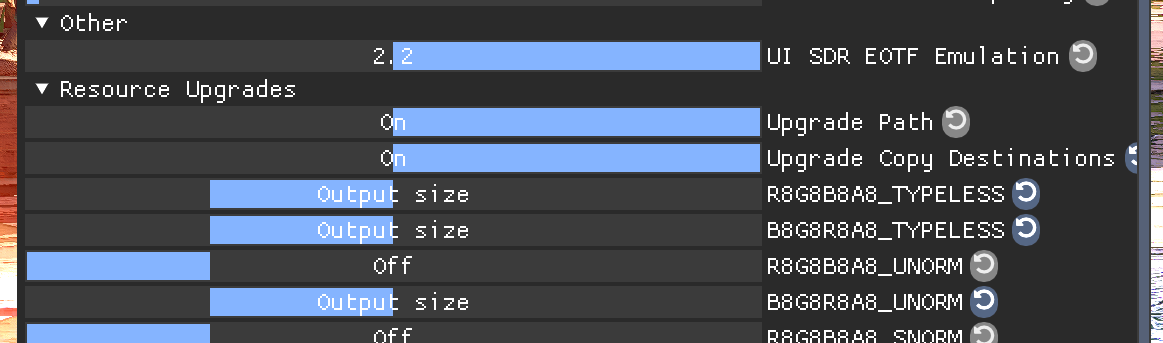

 digital raptor
dusty girder
<@208960001807613952> we're good, just set aa to taa
digital raptor
dusty girder
<@208960001807613952> we're good, just set aa to taa
Ah so taa + smaa is not supported?
dusty girder
digital raptor
Ah so taa + smaa is not supported?
no, turning that off is what fixed it
sdr -- hdr (n2 max ch 100/100) -- Psycho (0/0)


 pastel sand
Don't know what I did but I no longer see pink sword and fire even using N2 max Ch.
dusty girder
the game will be a bit more contrasty because I'm forcing the filmic tm instead of the legacy tm/mobile tm
but imo those tms look washed out
pastel sand
I can tell right away highlights are brighter using Psycho 0/0. But maybe due to bloom some materials are kind of blinding.

Guess it was like this before.
dusty girder
you can increase blowout a bit if you want
jjust turn off bloom
you know people talk shit about the filmic tm
but the legacy ue tm looks washed out
pastel sand
Yes I see you guys using those sliders very comfortably, but I don't want to break things so I'm asking GPT a bit about what exactly I should expect from each.
pastel sand
dusty girder
but the legacy ue tm looks washed out
Also noticed Extended has way more contrast. Would this be the change in tm you're mentioning?
Extended N2 Max Ch/Generic

 dusty girder
pastel sand
Also noticed Extended has way more contrast. Would this be the change in tm you'...
dusty girder
pastel sand
Also noticed Extended has way more contrast. Would this be the change in tm you'...
yes
you can offset it by increasing shadows or lowering contrast
for me it feels like a free next gen upgrade
pastel sand
Looks like a great option, but wouldn't it deviate a tad bit from the original look?
Oh I think this is what I saw on DQ XI mod, but have to double check. There are two options for UE tone map iirc.
 unique blaze
west canopy
dusty girder
sdr -- hdr (n2 max ch 100/100) -- Psycho (0/0)
unique blaze
west canopy
dusty girder
sdr -- hdr (n2 max ch 100/100) -- Psycho (0/0)
How do I get the psycho? Is this in the extended mod?
digital raptor
Yes
pastel sand
So Extended is a whole new tone mapper to keep an eye out for, but different from RenoDRT then? This is what I've come to understand within my limited knowledge haha. Then, if we don't want to mess that much with a game and keep closer to the out of the box look, Reno would be the choice I guess?
untold wadi
pastel sand
So Extended is a whole new tone mapper to keep an eye out for, but different fro...
Since UEGeneric was released, Musa revamped unreal's tonemapper. Unreal extended uses Musa's code.
pastel sand
untold wadi
Since UEGeneric was released, Musa revamped unreal's tonemapper. Unreal extended...
I see. An improvement I guess since Musa is an absolute reference here.
Does this have something to do with UE making some changes to how HDR is going to be implemented from now on in the pipeline or something like that?
untold wadi
No, previous method was made to be as generic as possible, and easy to implement
Extended more or less fixes UE's tonemapper
pastel sand


What would we be looking her ein extended? I've been trying it in a couple games now, but ends up feeling more pink.
untold wadi
Less white washed
pastel sand
Good to know. I definitely trust blindly you HDR sages, but I'm trying to be up to date and understand more and more when you guys talk haha.
pastel sand
untold wadi
Less white washed
This might be what Musa fixed #🧪lab message or I'm completely clueless still? Haha.
untold wadi
What's correct is a bit contentious 😅
Better to just think of it as a different approach for HDR
ebon dome
latest version of extended broke the UI in Crisol


 broken cave
I tried several settings for Layers of Fear Remake but none seem to work. Is there a very specific setting for this game? Does it even need RenoDX?
dusty girder
ebon dome
latest version of extended broke the UI in Crisol
@ebon dome I dont remember adding support for it