#The Witcher 3
1 messages · Page 7 of 1
 tribal sable
 stark anvil
I should see how gamut compression looks for SDR too
 slate forge
I think one of the settings just reset without me realizing it so nevermind btw
 cold basin
ill play around with it, anything specific i should look out for
stark anvil
Hard to say. Maybe just a scene or area/weather that looks wrong and looks far more normal if you move lut grading to 0.
cold basin

cold basin
stark anvil
Hard to say. Maybe just a scene or area/weather that looks wrong and looks far m...
should i move lut scaling slider at all or keep 100
stark anvil
Honestly doesn’t really matter much. It was a lot of effort for a comically low amount of gain
cold basin

stark anvil
I’m just worried I fucked up the blending
cold basin
so far not seeing any issues with it
stark anvil
Oh idk if better vanilla even uses LUTs
cold basin
seems to
stark anvil
Okay
cold basin
going 0 lut grading defo changes it
looks less colorful in the area im in rn in skellige
right here


 stark anvil
I might default lut scaling to 0 lol
honestly not too sure what to do. I think their sampling code itself might be raising the output from the LUTs
cold basin
stark anvil
I might default lut scaling to 0 lol
what no i wouldnt do that i think
ah wait scaling
cant read
cold basin
the previous versions were basically lut scaling 0 or
because it didnt have lut scaling
?
stark anvil
yes
w/o hue correction vs w/ hue correction


without the grading

hmmm I might be grabbing the color in the wrong spot lol
tribal sable
would just have to hue correct before and after the lerp from y
probably won't have a noticeable difference
stark anvil
I think I have it in the right spot then
cold basin
 stark anvil
yeah doesn't seem worth hue correction
stark anvil
has anybody here bothered figuring out sensible graphics settings? I haven't really bothered much, I just recall loads of people saying there were some wasted settings with ultra+ preset
got my game tuned where 16 GB of vram is simply not enough in some parts of the game and need to do something about it 
cold basin
Hmm I only turn shadows and vegetation down 1 notch
Shadows still affect FPS with RT shadows
I think technically can put them to very low and almost looks the same
As long as you use RT shadows that is
stark anvil
will give that a shot and see how it works out
finally found one of the super pink candles
wait a sec, it's their saturation code that's pushing it pink 👀
time to try out hue correction again'
gah, gotta get up for a bit, will try later
 rose whale
I wish I would be as motivated as you at work lol
cold basin
stark anvil
wait a sec, it's their saturation code that's pushing it pink 👀
ayo
its not just candles though but Im intrigued
btw, do you know what is up with like the image changing sometimes to be way darker as if its like running lut builder(?) or something like that? often happens after conversations n cutscenes or loading screens. pressing the start menu often fixes it after a few seconds, often just does it on its own too. Bit random tbh @stark anvil
maybe i can record it but i assume youve seen it yourself already, would be surprising if you didnt
stark anvil
I’ve seen it. It’s a vanilla problem I think?
I suppose I should boot it up without the mod to be sure of that, I can’t really remember
I think it’s just different parameters for gameplay/cutscenes/weather states without a smooth transition though
Sometimes you just watch a lut pop into place and idk how it could be a Reno problem
cold basin
stark anvil
I’ve seen it. It’s a vanilla problem I think?
i havent played vanilla

well
actually i did
but i dont remember that being an issue before
maybe i have alzheimers though
tribal sable
there's the shader that blends between 2 different tonemaps
could have an error there potentially
stark anvil
I do feel like it’s happening more. Maybe i fucked something up when doing tonemap extrapolation
 plush ember
I need opinion on this, could I improve something visually ?
https://www.youtube.com/watch?v=TTJQ6H3h8Ds

Explore a dark-fantasy open world as monster slayer Geralt of Rivia in The Witcher 3: Wild Hunt. From the murky swamps of Velen to the bustling city of Novigrad and the spirited islands of Skellige, Geralt must track down his adopted daughter Ciri before the wraiths of the Wild Hunt claim her incredible power for themselves.
Mods List: Update S...
stark anvil
God I want to add better motion blur to this game so bad lol
(Watched Geralts foot move in the video)
stark anvil
stark anvil
time to try out hue correction again'
didn't help
stark anvil
okay let's find out if I'm the cause of the sudden changes in tonemapping
no the game just does that
slate forge
stark anvil
Honestly doesn’t really matter much. It was a lot of effort for a comically low ...
I spent an hour+ in the elven ruin used in Wandering in the dark messing with some of this stuff (couple other areas I use as test areas as well). LUT Scaling 100% helps with the raised blacks in super low light situations. I'd imagine it'd be less noticeable with players using artificial player light.
I ended up defaulting to LUT grading strength at 0 for now though because in most of the cases I was testing it I didn't think the gains were worth the change in the way low light areas looked.
I havent' really seen any situations were the colors seem off.
stark anvil
The LUTs aren’t super heavy in this, but I do generally think they look nice. It definitely looks more natural without em though, which many will prefer.
slate forge
they help in some scenes for sure. I've been on a quest to make this game look as well lit as possible without artificial light so they might just have to be sacrificed.
Something about a way the game's LUT works doesn't look quite right at <one nit. I was having to use the Flare setting to make things look more natural but with when removing the LUT grading it becomes optional
stark anvil
I need to see if it makes sense to add a control for the toe of their tonemapper
slate forge
I assume you'd have to be in a dark room to even see the difference but hoepfully it is noticeable. (these are taken with a very low Flare setting as well which I forgot to turn off.)


They are labled but It should be 1.) LUT with 100% scaling, 2.) LUT but with no scaling. 3.) No LUT grading.
taken with the Reshade
The difference the scaling makes I think is still quite obvious, not sure the difference between the grading carries over as well in screens
 dim wyvern
 cold basin

 tall merlin
i had a visual bug last night in novigrad where sun shafts were coming out of candles at night time and even while indoors
will post a screenshot soon
not sure if its related to reno or even just a base game bug but i dont have any mods that touch anything like that
cold basin
base game bloom bug
stark anvil
oh, I thought of a kinda obvious solution for shadow darkening
cold basin
found Jon in the game

 cold basin
Jon cooking once again
stark anvil
I need to rethink how the sliders are organized in this mod
Or maybe not, might just need to move some things in/out of intermediate setting mode instead
that'll be a problem for nexus posting though
simply drop toe a bit and you can see
didn't need to fuck with the tonemapping parameters when I already had untonemapped midgray adjusted 🤷
maybe I should give them more intuitive names and put the terminology into the tooltip
Yeah I will
cold basin
found some new drip

i like this armor
uhh ill try, what is this supposed to improve? shadow detail in daytime?
stark anvil
any time
cold basin
lemme load it up and play with it, i just run 90ish tonemapping strength so far, that helped
stark anvil
one sec
cold basin
wha
stark anvil
- split tonemapping strength option into highlight and shadow sliders
- move some settings into the intermediate menu
- change warning messages and location
cold basin
kek
stark anvil
just saving you some trouble
cold basin
oge
was literally about to launch
what did u change
whys bro calling me out like that


woah
stark anvil
?
plush ember
 stark anvil
yeah, feel like ~75 is pretty good with RTGI
cold basin

heh funny, pretty much where i settled in that clip
ah ffs forgot that discord always brightens the vids
in vlc it looks correct
stark anvil
need to go into a cave and see if it's playable without a torch or cat
cold basin
yeah ill report back if i find any issues
for now this is much better than reducing the tonemapper strenght on prev builds
because highlights dont get affected
i like it
thank you

stark anvil
ye. visibility has been driving me nuts while playing
 stark anvil
rtgi looks great but it's such a mixed bag
cold basin
100 vs 72

 stark anvil
nah rtgi has bad enough overdarkening issues that it doesn't always help
cold basin

 stark anvil
that one building in the first little town in white orchard is still cooked lol
cold basin

stark anvil
actual pitch black
nothing you can do about it other than fix rtgi itself
but most areas aren't that bad at least
stark anvil
the fuck, I found another saturation permutation
this game will perpetually give me things to do I swear to god
only seems to exist with vignette on, weird. Not the case for the other permutations
cold basin
bro lut scaling 0 looks so ass in some dark places kek and no thats not from the tonemapper shadow


Rec preset 0 lut scaling vs what im running atm


probably not perfect but im working on it
discord compression also dont do it any favor kek
 quiet sandal
the amount of shit mfs need to fix Per Channel shittery


Jon, can you seperate flame shader drawing?
You could just run seperate processing to not get pink flames on that
stark anvil
tbf a lot of those are there just cause I think it's interesting to see which parts do what
stark anvil
quiet sandal
You could just run seperate processing to not get pink flames on that
pretty sure I tried already
quiet sandal
welp oof
I hoped on the HDR look button + Red text trend now as well

Will add shitposts to Endfield addon
Just have to since I said so
stark anvil
- add additional vignette permutation
worried there will be even more of them now
need to upload to nexus 😩
 cold basin

stark anvil
 atomic prawn
https://tenor.com/view/you-have-to-let-go-anthony-mackie-takeshi-kovacs-altered-...
atomic prawn
https://tenor.com/view/you-have-to-let-go-anthony-mackie-takeshi-kovacs-altered-...
But the gains!
cold basin
 rare scroll

 night yarrow
@stark anvil call of duty games do target 2.4

saw this
So if we send code values to an SDR panel as sRGB, these values are actually interpreted and displayed using BT. 1886.
probably out of topic but i just reply here i guess

start from page 42
 spring crown
This presentation is 8 years old and the recent games do match pow2.2
night yarrow
ive only checked bo6 and mw2019
both dont match sdr perfectly
which according to this presentation is intended
they do hdr first and tonemap the image to sdr afterwards
and Jon and that guy were discussing about infinite warfare
which is 2 year before that presentation
the old color pipeline mentioned there was exactly what they did in that game
spring crown
night yarrow
both dont match sdr perfectly
https://github.com/user-attachments/assets/f183395f-a623-42ca-a721-72fdb37736b4
https://github.com/user-attachments/assets/0370a4ba-a813-4fe2-93ab-dc99e7227883
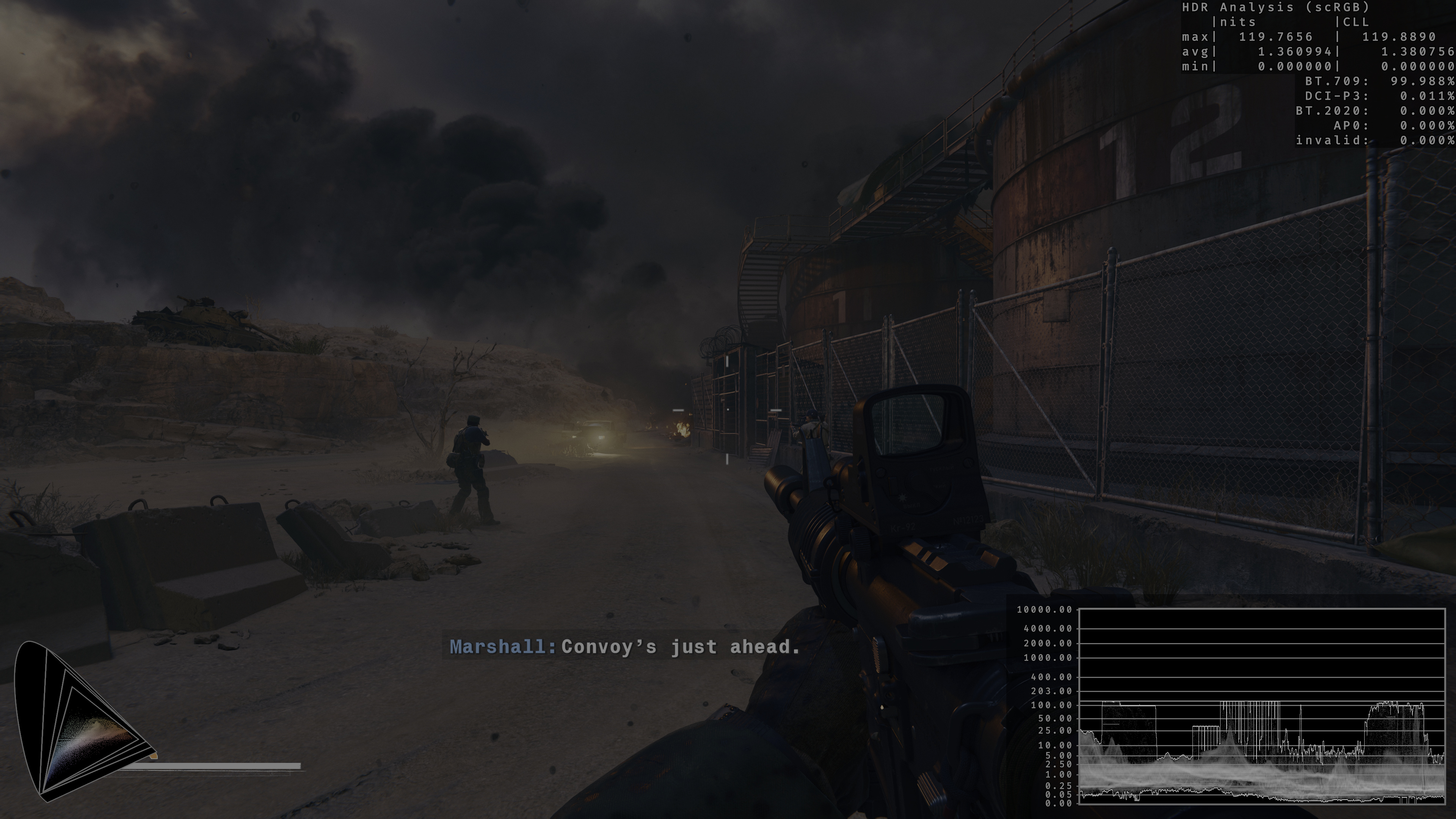
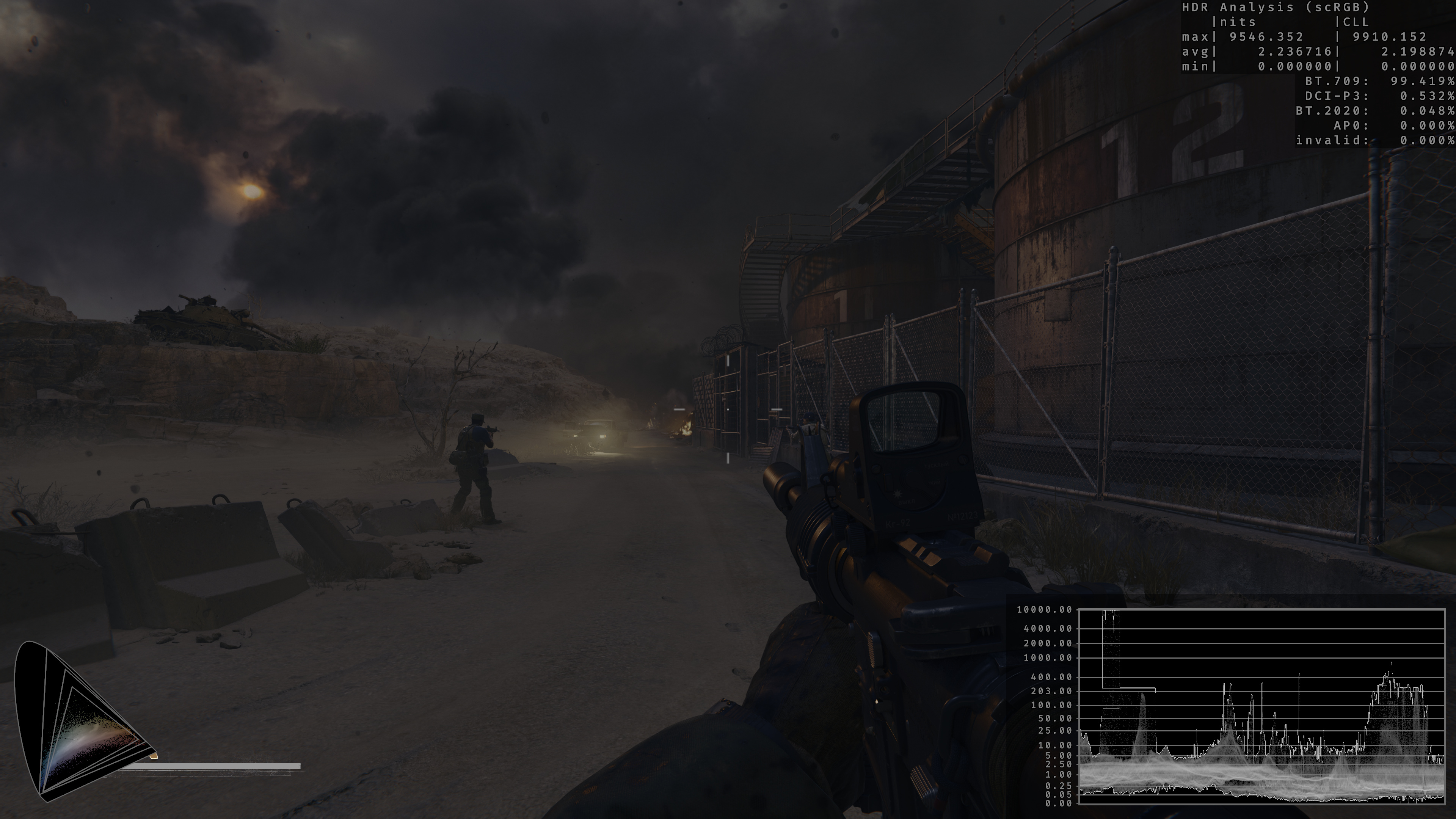
It's as good of a match as I've seen
night yarrow
spring crown
https://github.com/user-attachments/assets/f183395f-a623-42ca-a721-72fdb37736b4
...
there are some minor contrast difference
spring crown
Of couse it is
ITS IN HDR
night yarrow
its a dark scene
i also dont think they would go back to the "sdr first" route
their hdr wasnt upgraded from hdr
dont think they will go backwards
spring crown
Highlights count towards the average too
And the UI skews the numbers
night yarrow
did you check another map though
night yarrow
i mean
spring crown
night yarrow
i also dont think they would go back to the "sdr first" route
Who said they did
spring crown
Not anymore
night yarrow
spring crown
Not anymore
thats why i say not sure
night yarrow
spring crown
https://github.com/user-attachments/assets/f183395f-a623-42ca-a721-72fdb37736b4
...
theres actually a noticeable contrast difference on the left side of the image
but all of this dont really matter
we are not talking about current cod games
advanced warfare/infinite warfare/mw1re/mw2re
those 4 games share the exact same code in sdr (confirmed by the person who modded those games)
which is what mentioned in that presentation
 gusty silo
My favorite witcher 3 topic, call of duty!
cold basin

stark anvil
Kind of inseparable topics when you think about it
 unreal badge
Human sacrifice if the Bridge-from-Witcher3-to4-DLC is named Calls of Duty.
But which calls will Ciri follow, and what should Geralt do about it? Find out playing!


 foggy gate

 abstract tulip
cold basin
abstract tulip
cold basin
Skellige is all fun and games until your realize the amount of POIs it has and the percentage of them only accessible via a boat 
cold basin
abstract tulip
Skellige is all fun and games until your realize the amount of POIs it has and t...
yeah i saw that... ive been avoiding the POI grind a little bit kek

fucking question marks every where

im already lvl 28 and im only at this point inthe main quest which is like 1/3rd lmao


still a lot to do ey


 tribal sable
@stark anvil
I see you're doing per channel blow out and hue shifts after uncharted 2
you could just delay them to the end
so you don't get any hue clip
like apply them right before max ch tonemap
might help with the pink candle
cold basin

stark anvil
tribal sable
I see you're doing per channel blow out and hue shifts after uncharted 2
I do it this way because the game looked better by dynamically adjusting the peak target with what the game was doing normally
I can’t do that outside of uncharted2 until we can cache cbuffer values for use in later shaders
tall merlin
in crookback bog i get an issue with the latest version where the exposure? drastically changes and the image obscenely over brightens if i look up slightly too much. doesnt happen on the version you reworked bloom on, released on the 27th (that was what i was using prior) not using any lighting mods and it doesnt happen with the bloom rework one so im not rly sure why
i tested in novigrad and it wasnt happening at least
stark anvil
tall merlin
in crookback bog i get an issue with the latest version where the exposure? dras...
Maybe you found the third grading shader!
I’ll test there and try to replicate
tall merlin
if you cant replicate let me know if i can help
stark anvil
Alright it’s gotta be that then, must have done the math wrong
stark anvil
stark anvil
I do it this way because the game looked better by dynamically adjusting the pea...
But yeah it feels like cdpr was using uncharted2 like grading and not tonemapping
Their shit makes no sense
Also I did originally set it up as you said, pink candle was still a problem unless you set it basically to just raw SDR.
cold basin
lets hope witcher 4 wont be this cooked lmao
but since its UE5 it probably wont suck that much
stark anvil
I’m getting the sense it was a bit of the Wild West back then
cold basin
i think cp77 isnt nearly as cooked is it
stark anvil
Not sure
stark anvil
I mean I think they used tonemapping as proper tonemapping at least
tribal sable
stark anvil
I do it this way because the game looked better by dynamically adjusting the pea...
do you need to dynamically adjust the hue shifts or just the blowout
unreal badge
abstract tulip
Skellige is all fun and games until your realize the amount of POIs it has and t...
My Witcher 3 troubles of "gotta catch 'em all" have basically disappeared thanks to mods. You can take a look at
- True Exploration - No pre-discovered map markers (edited so that boats are always visible on map)
- Point of Interest Reveal

Nexus Mods :: The Witcher 3
Hides most map pins that you haven't visited yet.
 cold basin
If I do a run in the future I will probably use something like that
For now where I wanna do a 100% run I don’t mind too much
unreal badge
True Exploration gives me such piece of mind.
cold basin
Yeah I bet hehe
Wonder how they will go about it in W4
Witcher 3 is great, but I’m not too fond of for example it showing basically everything to you for quests etc and they aren’t really made in a way that you could play it without those indicators due to often not having good descriptions of where something is located.
unreal badge
Hmm, yeah, I can't really imagine navigation without any indicator. What also helped me, the goal markers stay, but I disable the way to the goal displayed on the minimap. So I often open the main map in order to see whether I should go left or right around some mountains, but then the rest of the way I "find my own tracks" instead of going more or less excatly the way that the way navigation line would show.
stark anvil
tribal sable
do you need to dynamically adjust the hue shifts or just the blowout
You know, I hadn’t considered separating it like that. Maybe just hue since the blowout would be largely driven by clip in SDR anyway.
cold basin
they aint even tryna hide it kek
 rose whale
Gotta be Twins
I encountered an issue where the exposure changed depending on where the camera was facing too. I'm not sure if this is region-specific, but it happened in Novigrad, where I was standing between a shaded and a sunny area.
Can post a video if needed
cold basin
i think its just the game tbh
 proper valve
the timing of this lol. I was thinking of playing the metro games for the first time lol
 stark anvil

cold basin

cold basin
 stark anvil
tall merlin
in crookback bog i get an issue with the latest version where the exposure? dras...
stark anvil
tall merlin
in crookback bog i get an issue with the latest version where the exposure? dras...
what time of day/weather condition was this?
cold basin
 tall merlin
stark anvil
what time of day/weather condition was this?
tall merlin
stark anvil
what time of day/weather condition was this?
it was 2pm iirc
around 1-3pm but im pretty confident was 2pm clear day
very sunny
however i recall waiting to 7am and it still happenin
stark anvil
remember which part of the bog you were in by any chance?
tall merlin
i was by the sign
stark anvil
like near the orphanage?
stark anvil
it's not happening for me 😩
tall merlin
shit, is there anything i can do to help when i get on my pc later
stark anvil
you could send the save just to be extra safe
tall merlin
will do, i dont see any mods i have that could cause this either. the only lighting related mods i use are cozy fires and no artificial player light and this doesnt happen with the prior builds so
cold basin
 stark anvil
tall merlin
will do, i dont see any mods i have that could cause this either. the only light...
stark anvil
tall merlin
will do, i dont see any mods i have that could cause this either. the only light...
might just be a confluence of conditions making this shader load
slate forge
cold basin
yeah i saw that... ive been avoiding the POI grind a little bit kek
keeping the map to default and finding the POI's naturally makes for a better experience, imo
cold basin
yeah i suppose
tall merlin
@stark anvil just went back to the save with the version that causes it and it was still happening so here u go

doubt u need save photo but im sending it anyway
stark anvil
thanks
tall merlin
good luck 🫡
stark anvil
still not happening
what mod and in-game settings?
(afaik the only relevant in-game setting is vignette I guess)
tall merlin
tried with and without vignette on in settings, let me send my settings rq
also tested like every slider on reno
stark anvil
just so I know for sure what I'm looking for, could you post a screenshot of it looking wrong?
tall merlin
rt is maxed out, no sharpening in game


i can yea
recording a video is definitely a better move though
this is pretty much what is going on, its wihin my displays brightness range but it jumps from dimmer to bright af moving my camera like barely up at all


if i go past a threshhold of looking up too much
doesnt happen at all with the bloom rework version, its super jarring and immediately noticeable and its not like im staring at the sky, its like barely looking up does it
my modlist if u want to see it, i havent tested without mods but maybe something is conflicting?

https://www.nexusmods.com/witcher3/mods/8865 also using

Nexus Mods :: The Witcher 3
Improves Ray-Traced Reflections and Shadows
stark anvil
@cold basin apparently that hard transition in exposure from cutscenes to gameplay was from this, if you used it https://www.nexusmods.com/witcher3/mods/11144

Nexus Mods :: The Witcher 3
Fixes the water color mismatch when using Ray Tracing Reflections.
fixed now
(going through my mods to see if anything I'm doing coujld be causing problems and updating things lol)
stark anvil
he's got loads of good fixes
I'm seeing the issue now
I think it might have been one of my mods making this shader not load
it's a transitional one iirc
lemme fix it
I've clearly done something wrong but I keep going over it and it seems logically right 
night yarrow
cold basin
i think cp77 isnt nearly as cooked is it
worse
stark anvil
oh I see what I did wrong, annoying
cold basin
stark anvil
<@380859926680961024> apparently that hard transition in exposure from cutscenes...
uh no i do not have this installed
only things i have in regards to RT are ini tweaks
some is rt some is shadow pop-in stuff
 stark anvil
okay got the bug fixed
cold basin
oh?
stark anvil
talking about the grading bug
stark anvil
no the one that guy mentioned lol
cold basin
oh that
stark anvil
me having a modded game too is not exactly the best for dev
stark anvil
I'm 99% sure it was a bug created by other mods
artifical lights also did it I think
cold basin
stark anvil
<@380859926680961024> apparently that hard transition in exposure from cutscenes...
what were you talking about here then?
stark anvil
check if you have updates
my problem is gone now
the problem where the transition was stark was caused by mods doing something that prevented the transitional grading shader from running
so it just hard swapped
cold basin
wait im fucking dumb
stark anvil
updated my mods, now I get that shader permutation showing up
 stark anvil
(which then showed that I broke that same shader in a different way lmao)
stark anvil
cold basin
the modlists im running has that water reflection fix
the updated version also has a new requirement btw
cold basin
aw fuck
stark anvil

Nexus Mods :: The Witcher 3
Collection of fully imported classes (all attributes) without any functionality on its own. Meant as a baseline dependency for other mods to reduce merge conflicts.
I'll post a build in a sec so reno isn't griefing
cold basin
i dont know if i can install that without issue
stark anvil
you might already have mods using it to begin with
stark anvil
promotional lighting got a 2.0 release, might have to check that out
better vanilla also got an update
cold basin

 tall merlin
ty goat
cold basin
ok no script errors with the shared imports installed
guess i can update the reflection fix
ok, updated.. lets see if its actually fixed
gonna update reno as well i guess even though i dont have that other issue
stark anvil
you will now that you updated that mod
we just had the same mod storm that hid the issue
cold basin
ah okay wtf
so updating rt water fixes the lut thing after cutscenes, but that update comes with that exposure issue you fixed in reno

stark anvil
yeah the shader I fucked up was just not ever showing up so I never realized I fucked it up
when I said this lol
cold basin

cold basin

road to 1000h

only half the achievements so far
guess itll easily beat my most played Singeplayer game with skyrim at 520h
rose whale
I am probably over 1k in Skyrim if I count every version of it lol
abstract tulip
stark anvil
<@380859926680961024> apparently that hard transition in exposure from cutscenes...
Fixed harsh transitions between Env Areas/Zones
oh damn, he fixed the issue
reinstalling
stark anvil
That issue was new with 3.4.0
Other mods were creating the problem before that
And if you still use those same old mod versions, this update won’t change anything
abstract tulip
ight, I'll update it
stark anvil
I always come back to vanilla weather
HDR makes some of the shortcuts taken in the weather mods more obvious too
abstract tulip
yeah I don't even bother trying out new LMs anymore
I think it still, overall, looks the most consistent in every region, in any TOD/weather
tall merlin
i agree
 heady dune
 heady dune
unreal badge
cold basin
i dont know if i can install that without issue
heady dune
unreal badge
cold basin
i dont know if i can install that without issue
Shared Imports? You can, pretty much guaranteed.
At least one of the most fantastic mods requires/comes with it it as well; probably more. It's fine to wait for after your first playthrough, though. But then check out Random Encounters Reworked (RER).
rose whale
How demanding is hulk hogens next gen texture mod?
slate forge
I retuned the Denoiser. Biggest change is that the game reacts to changes in light MUCH faster (turning off and on a torch in low-light situations no longer looks awkward). Still tweaking but if anyone wants to test it here is its:
I'm actually shocked that something like this isn't just a standard mod on mid-high end systems already. From what I can tell it make a big difference
cold basin
rose whale
I am probably over 1k in Skyrim if I count every version of it lol
Then I’m far over that as well
I played an ungodly amount
Xbox 360 about 700h
rose whale
So you are a person of culture I see
cold basin
PC Legacy Version should be about… 8-900h..
But I played that as a 12-15 year old
I had unlimited free time
And motivation
Im surprised I’ve not quit Witcher 3, I usually have a really hard time these days to stay committed to a game this long
I mean this playthrough I started on nov 30th or so
rose whale
cold basin
Im surprised I’ve not quit Witcher 3, I usually have a really hard time these da...
Same but i just blame the quality of games these days
Hope its not because I got older as well and loosing interest
Just blame the devs
cold basin
Yeah I guess that’s what is keeping me playing Witcher so far
Most of the content I’ve played was good
Just few quests where I was like man they could’ve written that better or whatever
rose whale
Indeed
unreal badge
slate forge
I retuned the Denoiser. Biggest change is that the game reacts to changes in lig...
There are a bunch of ini tweaks on Nexus, sometimes claiming the wildest things, but most suffer from lack of explanations and updates and responses to questions and comments and such. Maybe some of them are good, but definitely some are nonsense. Good luck!
cold basin
slate forge
I retuned the Denoiser. Biggest change is that the game reacts to changes in lig...
I’ll take a look, that definitely annoys me
slate forge
unreal badge
There are a bunch of ini tweaks on Nexus, sometimes claiming the wildest things,...
For sure. This one I just posted 100% improves the game reacts to light. When you turn the torch off the light no longer awkwardly hangs around a second or so
cold basin
Putting away a torch takes like 15 seconds to fully update the lighting
Like if you’re in a cave
slate forge
Yeah it's always annoyed me which is why I started to look into it, so far this difference is night and day better
slate forge
My only concern would be that it is taxing on lower end-systems or something but I kinda doubt it anyways.
unreal badge
rose whale
How demanding is hulk hogens next gen texture mod?
I would say no, but depends if your system is already on its limits without it? Otherwise I wouldn't worry about it.
The modification has only little impact on performance, the game should run similar as before mod installation. If you play on Ultra+ textures, video card memory demand will be higher.
cold basin
4090 should be able to handle it
slate forge
I noticed no performance change
unreal badge
slate forge
For sure. This one I just posted 100% improves the game reacts to light. When yo...
will try! I think I know what you describe, though it has not bothered me, it's probably one of those things you can't unsee once you've realized it doesn't have to be that way. xD
slate forge
Hogans mod runs fine on my 4090, but the "Preallocated Buffer Size Boost" did help fix some texture weirdness I was getting with Hogan's mod
unreal badge
is that the mod recently released? it sounded good
slate forge
unreal badge
will try! I think I know what you describe, though it has not bothered me, it's ...
Yeah I play without the artificial player light as well so I think that exacerbates the problem.
The denoiser change is one I literally just made last night when deep diving into the DX12 settings to find potential improvements. Posted here since It's people actively playing who want to improve the look of the game
unreal badge
me too (Artificial Light off). Ah yes. The buffer thing is the recent mod. Where does your ini file go, the usual spot? The Witcher 3 Wild Hunt GOTY*bin\config\platform\pc* ?
stark anvil
cold basin
Most of the content I’ve played was good
Yeah that’s the big selling point of this game. Theres slop content like places of power and guarded treasure with nothing of value but for the most part the content feels extremely worthwhile.
Almost all dialogue contributes meaningfully to the world
slate forge
ususally spot, yes
unreal badge
for the others, Preallocated Buffer Size Boost (PBSB) just one ini line, but apparently not just snake oil

Nexus Mods :: The Witcher 3
Increases the Preallocated Buffer Size from 38 to 256 for large modlists and large graphics mods
I use a bunch of ini tweaks but none that touch those sections you do.

I probably ought to comment some of these files while I still have a chance of figuring out where they're from or what they're supposed to do XD
rose whale
unreal badge
I would say no, but depends if your system is already on its limits without it? ...
5070 ti / i9 14900k it is
I guess I should be fine
Maybe I should also take a look at rt improved reflections and shadows as well when I am at it
cold basin
unreal badge
for the others, [Preallocated Buffer Size Boost (PBSB)](https://www.nexusmods.co...
is there any point setting it to say 512 for example
mine was 38 by default, would be cool if it actually does improve stability because i did have a few crashes
unreal badge
apparently, though I just took 512 "because" XD
slate forge
rose whale
Maybe I should also take a look at rt improved reflections and shadows as well w...
If you do (that mod does improve the reflections overall) set "RtRadianceScreenTraceZThreshold=0.0005" Or something small like that instead of zero. putting it at zero causes the game to disregard essentially all screen space info (which the system was designed around) and can cause certain cases of reflections to be lit differently. "0.0005" seemingly solves the problem that putting it at "0" was trying to fix but while keeping some valuable screen space info.
unreal badge
took me a while to test, my safe was a conversation right before a fight I died 3 times in. Testing again without your denoise now...
*save?
cold basin
unreal badge
apparently, though I just took 512 "because" XD
same
btw i randomly found this in the rendering ini in bin config base, could maybe help with the RTAO being so dark

im too lazy to figure it out though

slate forge
cold basin
im too lazy to figure it out though
I have it set to 1, based only on a RTAO mod I got off nexus though. I've liked the way my game has looked in that regard and never changed it in 6+ months so I suppose it at least doesn't hurt
 cold basin
hmmge
i may mess with it at some point
kinda dont wanna break anything though
im happy with my settings atm
slate forge
Not sure I'd bother then, but if anything the change is subtle as with many RTX tweaks in this game honestly
slate forge
unreal badge
took me a while to test, my safe was a conversation right before a fight I died ...
LMK how you end up liking the denoiser tweak once you get the chance to fully try it out. Biggest difference I've noticed was turning off and one torches or flames in caves or stuff like that.
unreal badge
Was testing in the cave at the end of Rose on a Red Field.
The mod Cozy RTX Fires can interfere and reduce the gains from your tweaks. Its main setting modifies "Direct Light Strenght", and as soon as I put that above vanilla default value, the light starts to linger around again for longer. At vanilla value or 0, your ini is instantaneous and a great effect.
 slate forge
unreal badge
Was testing in the cave at the end of Rose on a Red Field.
The mod [Cozy RTX Fir...
slate forge
unreal badge
Was testing in the cave at the end of Rose on a Red Field.
The mod [Cozy RTX Fir...
ahh, Yeah I do use slightly below the vanilla value for Direct lighting currently so that makes sense. Good insight. Not sure I'd be able to make it so it is strong enough to accoutn for the "Cozy" increase. I could try though. Glad it made the noticeable change at vanilla values.
unreal badge
That setting is described as
Direct Light Strength - Sets the ray intensity of direct lights from most lightsources in the game
slate forge
I used that mod for a bit as well but found that it did make some scenes too "red" as well so I tuned it back and switched to a slight increase in lightculling range instead
stark anvil
I stopped using rtx fires and just tweaked my own
I should probably look at more parameters though
unreal badge
I was very confused because I am currently using new VGX Lighting mod, and author wrote he uses what seem at first to me crazy high settings 21 for direct light strenght and 3 for additive lights, so I am very torn and can't yet settle on anything for long. With other lighting mods, to me only cozy or at most cozier preset looked "good" to me.
That's what I get for changing more than 1 setting at the same time. Suddenly your effect seemed gone, hehe.
slate forge
unreal badge
I was very confused because I am currently using new VGX Lighting mod, and autho...
So yeah, I'd say both of those are too high (especially direct lighting) Additive lighting at 2-3 looks amazing in some scenes, but will cause light bleed and other weird reflections in other situations. I've spent way too much time experimenting with these settings hoenstly.
pretty much all of them have a tradeoff somewhere
unreal badge
I especially dislike how Geralt's face or hair can look with higher direct light. Gotta find some other way. What/where's this light culling?
slate forge
one sec
unreal badge
because the issue that Cozy adresses is an issue 😭 damn game
slate forge
[RTXGI]
LightCullingDistanceTweakCoef=1.5
unreal badge
else I'll just see if I like the VGX at lower cozy setting
slate forge
that's about as high as you can go without causing issues with some reflections and stuff like that
Culling at something like 2.4/2.5 looks incredible indoors imo, but causes other issues in other areas (- reflections and some bleed, but they aren't gamebreaking at all so some people would find that setting to be worth it i'd imagine)
stark anvil
there's also this https://www.nexusmods.com/witcher3/mods/11250

Nexus Mods :: The Witcher 3
This mod fixes lighting issues in certain areas of the world and provides a more balanced lighting base.
weather mod agnostic tweaks for probe placements and whatnot
heady dune
stark anvil
there's also this https://www.nexusmods.com/witcher3/mods/11250
this is only if you don't use RT
 unreal badge
slate forge
Culling at something like 2.4/2.5 looks incredible indoors imo, but causes other...
unreal badge
slate forge
Culling at something like 2.4/2.5 looks incredible indoors imo, but causes other...
seems to do something! thanks, experiments later. now gotta get on my phone, "just one more test I'll call back" was over 10 minutes ago
cold basin
unreal badge
Was testing in the cave at the end of Rose on a Red Field.
The mod [Cozy RTX Fir...
ah well rip i use like direct lighting strenght 5

unreal badge
Try it, I think at 5 (Cozy preset) Nick's tweaks might still shorten the lingering noticeably, considering to run with that for a while. If the culling also helps to bring some more light back, that would be fantastic.
slate forge
Yeah, I'd imagine if nothing else the denoiser tweak won't hurt but just might not be the almost instant on/off you get if you are at default direct lighting
cold basin
kk will try
 weary socket
Has anyone tried combining any lighting overhauls with HDR and RenoDX? I've been eyeing that VGX Lighting Mod but I dunno, it somehow looks super desaturated and low contrast for me when combined with Reno 🤔 Maybe someone here tried some other overhaul and can point me to something better too
cold basin
theres not a single weather mod made with renodx and proper hdr in mind
so none will look as intended most likely
it could still look good with some ofc
unreal badge
You've a bunch of options. Mostly it depends on your taste. I'm really bad at getting good shots, but took some earlier when testing. This is with the new VGX.
cold basin
but ive not tried it
i only use better vanilla lighting
which jon uses as well when working on the mod afaik
unreal badge
Seems fine to me in that cave now in this combination.
- Artificial Player Lights: gameplay lights off
- Cozy RTX Fires: Cozy preset = Direct Light Strength 5 or maybe something between default and 5
- also in Cozy: Additive Lighting Amount depending on the lighting mod I alternate between default and 0, needs more playing to figure out which I like to keep for VGX lighting, currently 0
- Nick ini for less lingering
- plus added to his ini that [RTXGI]
LightCullingDistanceTweakCoef=1.5


(all with latest Reno from this channel and Recommended preset.)
cold basin
what this do LightCullingDistanceTweakCoef=1.5
weary socket
cold basin
i only use better vanilla lighting
this one, correct? https://www.nexusmods.com/witcher3/mods/7821

Nexus Mods :: The Witcher 3
This mod preserves the vanilla lighting base and applies new changes and fixes, balances to make the regions better.
unreal badge
it's still pretty dark with these settings, but I hope it will work out elsewhere too and be fine overall.


 cold basin
weary socket
this one, correct? https://www.nexusmods.com/witcher3/mods/7821
cold basin
weary socket
this one, correct? https://www.nexusmods.com/witcher3/mods/7821
yessir
a proper weather and lighting mod with reno in mind would be sick ofc, but doubt that any of the modders that make these kinds of mods care about hdr
unreal badge
cold basin
what this do LightCullingDistanceTweakCoef=1.5
Nick posted this earlier as an potential alternative to direct light strength that Cozy Fires uses.
weary socket
Thanks a lot guys, I'll probably settle for that better vanilla lighting 🤔
unreal badge
slate forge
I used that mod for a bit as well but found that it did make some scenes too "re...
here, invictus
cold basin

unreal badge
weary socket
Thanks a lot guys, I'll probably settle for that better vanilla lighting 🤔
- Better Vanilla is great
- same author has also just updated Promotional Atmosphere Lighting Mod, also great, but might also go in the direction too desatured possibly for your taste, been a while since I played previous version, but there's many screenshots on Nexus
- VGX you already saw on Nexus
- follow https://www.youtube.com/@TheWhiteWolf_7Kz his main project looks stunning, not yet released though. He does so many videos I need to search which is about his main one, haha

then there are a whole bunch of lighting mods on some Discords, usually when they're based on somebody else's work who might no longer be active in Witcher 3 and not reachable anymore and so not ideal to release public on Nexus, a bit chaotic but for many different tastes
cold basin
shits so confusing man
stark anvil
cold basin
which jon uses as well when working on the mod afaik
I use it on and off. I try to do vanilla when working on the mod. Though tbh I think I’m back to simply preferring vanilla lol.
cold basin
well better vanilla isnt too different is it
stark anvil
Depends where you are
cold basin
okay
stark anvil
In general it’s more desaturated, which I don’t think is actually super beneficial now that it’s not hue clipped aggressively.
cold basin
i just got to kaer morhen at lvl 29
i technically still have a few quests to do in skellige and a bunch of POI's
stark anvil
Better vanilla seems to make the sun more dim lol
cold basin
- i should be able to do HoS expansion now
unreal badge
Kaer Morhen is pretty small compared to the rest of the game. Maybe similar to White Orchard?
cold basin
yeah i saw
i mean makes sense, not really any people to do quests for n stuff
im really looking forward to toussaint, the screenshots ive seen looked so cool
stark anvil
But in theory any weather mod will work correctly with renodx. You can use the purist preset to see the weather mods almost entirely as intended. Just know that highlights could suffer depending on choices the mod author makes.
cold basin
but yeah kinda funny that i have done all Contracts already before even getting that Necromancer main story achievement lmao

stark anvil
stark anvil
But in theory any weather mod will work correctly with renodx. You can use the p...
@weary socket
Could also set the tonemapper to vanilla to know you’re looking at it right (not recommended for playing really lol)
Though I did setup vanilla to work with sliders and whatnot lol
weary socket
Thank you for the answer!
I did setup that vanilla enhanced lighting mod and it looks fine, plus makes clouds look much better from the few minutes that I spent looking around
unreal badge
White Wolf has so many videos, this one is the project I'm looking forward to. https://youtu.be/XyIlO0tHu5s?si=ubLA0ufb0PyKBcWL

A new E3 2014 project I'm working on, this LM is trying to mimic the E3 2014 demo lighting.
It's a completely new LM that I started from scratch and isn't based on any other existing LM, or even any of the edits I've made in the past.
This LM will be available on Nexus Mods when I'm finished.
If you want to follow the development and news of th...
stark anvil
I still have gripes with better vanilla. I don’t like how novigrad looks particularly in the countryside. Torches can also look strange sometimes, and sun brightness can be odd (but the game struggles with that in general I guess).
stark anvil
unreal badge
White Wolf has so many videos, this one is the project I'm looking forward to. h...
I don’t get the fixation on the E3 look still being such a thing all these years later lol
cold basin
unreal badge
White Wolf has so many videos, this one is the project I'm looking forward to. h...
im just seeing the first 20 seconds of it
shit looks awful
why would anyone want it like that
xd
maybe its because of no RT i unno
weary socket
cold basin
why would anyone want it like that
subjective taste, previous games looked less colorful/more gritty than what default W3 looks like
cold basin
also like foreground all colorful like this and then back ground just blue

???
peak ong fr

cold basin
im just quick to find inconsistency issues like that i guess
those bother me so hard
like maybe kaer morhen could look a lot better with some lighting mod, but atleast its looking very consistent even in the distance

which is why i like it
unreal badge
ah, you just don't understand the spirit of the lighting mod mentality. Dunno how to describe it. This might be a small insight. You should see the amount of acronyms thrown around sometimes, you need to study their lineages and trace them back. Wait until you get to Toussaint's candles!! ;-P
 slate forge
unreal badge
ah, you just don't understand the spirit of the lighting mod mentality. Dunno ho...
slate forge
unreal badge
ah, you just don't understand the spirit of the lighting mod mentality. Dunno ho...
Did some more testing and tweaking. This seems to be more fleshed out and handles ghosting/noise better in the few very low lit scenes that it was occurring during testing. Difference probably won't even be noticale outside of those edge cases though
 rugged nest
unreal badge
for the others, [Preallocated Buffer Size Boost (PBSB)](https://www.nexusmods.co...
rugged nest
unreal badge
for the others, [Preallocated Buffer Size Boost (PBSB)](https://www.nexusmods.co...
Does this have any perf hit
rugged nest
slate forge
Did some more testing and tweaking. This seems to be more fleshed out and handle...
Does this have a big perf impact?
(srry but im tight on perf in this game as you can imagine xDD)
slate forge
Testing more now, also may have intoduced a bug in reflections with that version so I deleted for now.
cold basin
@slate forge do you have a clue what i can do to fix geralts armor appearing giga red in reflections?
i have the ini tweaks from the ray bleach mod
but doesnt seem to fix everythign just some
cold basin
cold basin
goofy ass red reflection
as seen here
slate forge
cold basin
<@189575987069976576> do you have a clue what i can do to fix geralts armor appe...
usually that only happens on dyable armor. You can replace the dyable armor with non-dyable 4k variants to get rid of the issue, but you have to sacrifice the ability to dye thos armors
that's what I did
cold basin
Mine is dyable yeah
It’s the ursine Witcher armor
Found it few days ago, really like it

slate forge
This .ini should be fixed - some of the specular denoising settings were causing artifacts so I just removed them and it seems normal now but with the same benifits
slate forge
cold basin
Found it few days ago, really like it
yeah, it's one of my favorites too. Only real fix is to get a non-dyable version on nexus
cold basin
Works well even with cozy fires
cold basin
slate forge
yeah, it's one of my favorites too. Only real fix is to get a non-dyable version...

Maybe I can find something I like..
slate forge
cold basin
Im using the first version you posted rn
if you like that one no real reason to switch tbh, I just tried to eliminate ghosting and noise in extreme cases
 cold basin
hm
i like most of these changes
except the ursine xd
i use ursine with black dye rn
looks sick
maybe i have to live with the gray brown one
slate forge
yeah it's tough, one of the only downsides to the game are those annoying little bugs they just never fixed in the next-gen version
maybe if the rumors of an expansion for this year are true they will actually take the time to fic or imrove most of that stuff
cold basin
doubt it tbh
afaik its not even cdpr making it right
that other studio that also does the witcher 1 remake
forgor the name
so i bet they just add the content but there wont be any technical improvements
Fools Theory
was the name
ah well i will just use the mod u put in
the other retextures i can find are trash
letsgoo that worked

thanks
unreal badge
OFG's Retexed Bear Armors uses the 4k texture mod as base too (+ half a dozen other mods). Images in file section, not in images.
 heady dune
Benis is making a new LM!
 unreal badge
slate forge
This .ini should be fixed - some of the specular denoising settings were causing...
unreal badge
slate forge
This .ini should be fixed - some of the specular denoising settings were causing...
thanks for sharing
heady dune
W4 lighting based
cold basin
unreal badge
[OFG's Retexed Bear Armors](https://www.nexusmods.com/witcher3/mods/9087?tab=fil...
oh shit i like that color scheme
ah its called bear armor
i was just looking for ursine on nexus
thanks i guess ill switch to that, i like that more
unreal badge
Witcher armor mods you can run 2 searches. bear/ursine; cat/feline; manticore/red wolf; wolf?wolven; gryphon is also spellllled in all kind of ways
cold basin
in the witcher 3 mod folder
what mod has higher prio?
further up or down
when sorted by name
or how does it to the order
xd
unreal badge
it's almost, but not exactly, windows sort order alphabetically. A beats B. The part that differs I gotta look up, something about numbers or underlines or such
cold basin
yeah i imagined as much, with the mod list im running theres a bunch of mods with 0's to keep them higher up
xd
unreal badge
yep
Lewis did a summary half a year ago after new discoveries by I think 2 other mod devs, should be this from Wolven Workshop Discord.
 slate forge
cold basin
so i bet they just add the content but there wont be any technical improvements
slate forge
cold basin
so i bet they just add the content but there wont be any technical improvements
Sadly that's probably true, but glad the fix worked for you 👍
unreal badge
Jon, for April Fools release RenoDX update with additional presets.
- E3 2013
- book-accurate preset
- E3 2014
- Witcher 4
- Henry Cavil
- VGX [some year goes here]
- et cetera
🙂
tall merlin
unreal badge
At least one of the most fantastic mods requires/comes with it it as well; proba...
this is really cool, thanks for sharing
tall merlin
anyone tested dlss 4.5 in witcher 3 yet?
skimmed through the LTT video to see some screenshots

 unreal badge
Afraid I went off too much into general modding topics, will try to tone it down a bit, this is RenoDX channel.
(But I love how WhiteWolf startet out making videos about other peoples' mods, then tweaked and remixed them, and at some point over the years "suddenly" he's become an authority of his own, advising other devs on what works and how and creating his own visions now. Faith in humanity 🆙)
unreal badge
tall merlin
anyone tested dlss 4.5 in witcher 3 yet?
AMD card. XD
tall merlin
unreal badge
AMD card. XD
what gpu u got?
unreal badge
Radeon RX 7900 XTX
 cold basin
tall merlin
anyone tested dlss 4.5 in witcher 3 yet?
cold basin
tall merlin
anyone tested dlss 4.5 in witcher 3 yet?
seems good, damn sharp even at dlss balanced
cold basin
tall merlin
sorry to be off topic but
 tall merlin
i dont have an amd gpu but its meant to be a better version of fsr for gpus that dont have fsr4. sort of akin to how xess works i guess but less so just enabling it, think u have to go set it up
tall merlin
cold basin
seems good, damn sharp even at dlss balanced
yea ima have to turn rcas off or down a lot
tall merlin
got to the first point in the story that i was like wtf is this writing last night, when u meet triss
hopefully the rest of the game isnt like that
tall merlin
cold basin
even at 0.10 its too much
i figured it would be yea
gotta figure out if i should use L or M
people are saying they like L a lot more even at higher input resolutions
night yarrow
L is heavier
tall merlin
gonna use M then
gpu is overheating and i cant do anything about it until my ptm comes in so i have to play low input resolution w dlsstweaks for a bit
this update is lifesaving in that regard though
unreal badge
tall merlin
have u tested int8 fsr thing yet?
Don't know what that is. Will search.
Generally I'm very happy with FSR just for AA in Witcher 3. no upscaling or frame generation, prefer it to vanilla XESS and I don't need to jump through hoops with DLSAA enabler and all that stuff, think it had its own new drawbacks when I tried it last.
I can just about run game at enough FPS to be still playable (to me), though from yesterday AMD claims I had only like 37 FPS which probably is unusable to anybody else.
tall merlin
unreal badge
Don't know what that is. Will search.
Generally I'm very happy with FSR just for...
i explained it here

i play at a pretty low input fps and resolution before upscaling and framegen atm so dw its ok. better than not having upscaling or framegen
saw a couple people on the hellsite praising it. no idea how good it is, just thought id suggest it to you. hardware unboxed has a video reviewing it
 unreal badge
OK, hooked, project for today
Hm. From that video, it claims that the game to use this DLL in already need to support FSR 3.1. And while I dunno which FSR version Witcher 3 comes with, it does not allow frame-gen, merely FSR for AA. That then might mean one would need to setup that "unlock DLSR even though you have AMD gpu that will actually use FSR instead" with that leaked FSR4 dll? Hmmmm.
Ah. Optiscaler. Time to join more Discord servers...
night yarrow
preset L looks great in this game
unreal badge
GitHub
OptiScaler bridges upscaling/frame gen across GPUs. Supports DLSS2+/XeSS/FSR2+ inputs, replaces native upscalers, enables FSR3 FG on non-FG titles. Supports Nukem mod for DLSSG-to-FSR3 FG. - optisc...
tall merlin
night yarrow
preset L looks great in this game
yeah this is an insane difference from K
wow
im running L rn
cold basin
I feel like even K looked good with new DLSS version
tall merlin
the problem areas for me with K are gone in this game
branches of trees would never stop shimmering for me
no matter the input resolution
night yarrow
tall merlin
branches of trees would never stop shimmering for me
rtao related
transformer has issue with rtao on foliage
so it sucks in UE5
cold basin
Or wait maybe we are talking about different things
Can you guys try K with new DLL? I genuinely can’t tell whether or not it’s Transformer 1 or 2
tall merlin
ohh i thought u meant the last dlss version when u said K. idk why i forgot K is still main preset in this game
cold basin
I tried with screenshots and I couldn’t tell, but I was told K would use the old model… I’m
Not so sure if it does
 cold basin
tall merlin
cold basin
tall merlin
That would tell me that J and K don’t use the new one
tall merlin
im running my game at a relatively low resolution rn but im gonna test M

it does seem to use the new one
its the default preset for higher quality it seems
cold basin
Im confused
night yarrow
probably stick with M
cold basin
tall merlin
its the default preset for higher quality it seems
Yeah but they could just have done that for performance reasons
night yarrow
L is too demanding
 night pond
cold basin
I feel like even K looked good with new DLSS version
night pond
cold basin
I feel like even K looked good with new DLSS version
Agreed, Transformer model preset K is amazing
I think L and M look over sharpened to me atm and the performance hit is brutal if you don’t have a 40 and 50 series card
night pond
I have a 4080 and it’s still a noticeable hit
cold basin
cold basin
nvm, K is definitely still Transformer 1
.
tall merlin
i dont notice much of a hit from preset m, it seems more so when im using framegen
on a 4080
night pond
Yeah k is solid
tall merlin
is k even actually transformer 2 tho
@cold basin seems to think it is not
given the artifacts he had on old k are still there but fixed with m or l
or w.e
tall merlin
saw that earlier
night pond
I know for a fact model J and K had issues with disocclusion artifacting (I found them most apparent in Kaer Morhen with all the foliage and shadows).
I might have to test model M in those scenarios because I reckon they’d clear them up
cold basin
Should
stark anvil
Excited to try DLSS stuff out today lol
rose whale
Wait dlss 4.5 is out for us?
Same cant wait
So which preset is basically the new K?
K was the best imo
night yarrow
K is obsolete
rose whale
night yarrow
K is obsolete
Really? I hope for a more performant version ?
And wth is happening to the lighting in LTTS video. Its like night and day difference
rose whale
So M is the new best one for best PQ
night yarrow
in this game yes
 tall merlin
found a couple places so far in witcher 3 where M has looked noticeably worse, but overall it looks better
unreal badge
tall merlin
i was about to say, maybe optiscaler?
Doubled my framerate. Oxenfurt from 40-ish to 80 or more; Novigrad to still around 70 or more
- OptiScaler with...
- FSR4 DLL add...
- Nukem's dlssg-to-fsr3
If no problems will occur while actually playing, this is a fantastic improvement. Thanks!


the frame gen method I tried previously was something other than OptiScaler, I didn't like that one. DLSS enabler or somerthing like that, it wasn't to my liking somehow.
unreal badge
possibly that I would lose V-Sync and friends was what bothered me before. But I can just turn it on via OptiScaler in its gui. Wheeeee. I value non-tearing images over non-shimmering chainmail (thanks to AA) and over HDR.
tall merlin
Not playing in vrr?
unreal badge
this is my second monitor with FreeSync Premium Pro, can't go back to teared images.
tall merlin
tall merlin
found a couple places so far in witcher 3 where M has looked noticeably worse, b...
M and L have a lot more aliasing in this game, its really bad in some areas, to the point im considering going back to K on the last dll. i just tested both and K from the prior dll is so much more stable in some areas
its a shame because a lot of the improvements are great
didnt test K on the new dll yet
seems like its unchanged but i wanted a direct comparison with what i was using prior
gonna stay on prior dll K for now
the aliasing was actually ridiculous in some areas with L and M
stark anvil
dang preset m finally makes the foliage in tw3 look kinda solid in motion
there s something about the sharpness that is a bit off putting. Doesn't look natural. Kinda looks like it's trying to maintain the same sharpness of AA off which, in modern games, is just not how they're designed to look
like AA off in next gen tw3 even just does not look like it used to look in the old gen version
maybe a mip bias thing idk
(all this is at 3440x1440 output res, testing both qualty and balanced modes)
tall merlin
its failing to do AA in a lot of areas
went to the dreamer lady after meeting triss and that room is absolutely filled with shit that is aliasing on M or L but not K
stark anvil
maybe fxaa on top looks solid lol
tall merlin
almost every object
the volumetrics and foliage issues are so much better though
such a shame
tall merlin
stark anvil
maybe fxaa on top looks solid lol
true
night yarrow
stark anvil
dang preset m finally makes the foliage in tw3 look kinda solid in motion
ya thats how the new presets look
they try to emulated the look without taa now i think
night yarrow
tall merlin
its failing to do AA in a lot of areas
because its too sharp that exposes the specular aliasing a lot
stark anvil
something about this just isn't lookng right to me. preset k looked pretty much exactly how I wanted other than foliage/ghosting
spring crown
stark anvil
there s something about the sharpness that is a bit off putting. Doesn't look na...
I feel like it was trained on the sharpened footage
I can see what looks like a mild ringing here and there
All edges are very high contrast now
stark anvil
yeah I kinda feel like ringing is happening on grass
night yarrow
it doesnt look like a "traditional" oversharpened image though
personally i do like it in tw3
not in other games
spring crown
It looks like AI sharpening like those recent Cameron 4ks
night yarrow
because it is ?
spring crown
But not as strong
night yarrow
technically
stark anvil
I think logistically it kinda is that, but I think to some extent that's how all dlss models work.
night yarrow
i still think its better than K
stark anvil
either you're averaging the pixels together or you're doing something else to try to blend them smarter
night yarrow
if i have to choose one ill choose M
spring crown
stark anvil
I think logistically it kinda is that, but I think to some extent that's how all...
This is why I think sharpening was in the data source
And the model now is trying to recreate that
stark anvil
I don't think they'd be trying to emulate actual sharpening though. I can't imagine there is anything beneficial there
like just run a sharpening filter afterwards
stark anvil
stark anvil
I guess it looks better with the driver update, still a bit off though
dang preset L looks good
night yarrow
M is similar but more performant
stark anvil
L just looks like better M which I guess makes sense
night yarrow
it should technically
takes more time to process
1.18ms vs 1.38ms on my 5090
but i found them to be extremely similar
in this game at least
so i ended up with M
stark anvil
so do the presets populate as options in optiscaler?
if so I'll just install that to make comparing easier
night yarrow
stark anvil
so do the presets populate as options in optiscaler?
why not
M and L are always there
they just lable as (unused)
stark anvil
I don't use optiscaler so I didn't know lol
night yarrow
i found it to be too convenient to ignore lol
stark anvil
pretty minor performance difference at 3440x1440 on a 5070 ti
rose whale
The pattern of his armor really looks much cleaner too me

The pattern of his armor looks much cleaner too me
 stark anvil
is there a way to make optiscaler block inputs
night yarrow
use DC to block
rugged nest
night yarrow
1.18ms vs 1.38ms on my 5090
I’ve seen people with 40fps+ differences between M and K
Pretty insane
Need to test in my 4080
rugged nest
If I loose more than 5fps is probably not worth it
night yarrow
i posted that early
rugged nest
At performance
night yarrow
it depends on the internal res instead of the ratio
rugged nest
night yarrow
at dlaa
Yeah DLAA is just not really used tho. I wonder about quality/balanced/perf
rugged nest
night yarrow
it depends on the internal res instead of the ratio
Yeah I usually use 1080p internal
DLSS P at 4K
night yarrow
rugged nest
Yeah DLAA is just not really used tho. I wonder about quality/balanced/perf
there is an official chart
night yarrow
just do some basic math
rugged nest
I do not know what needs to be calculated there lol
night yarrow
you are at 10ms base if your game is 100fps
add that extra ms to it
and redo the math
rugged nest
Hmmm gotcha
night yarrow
super simple
rugged nest
I think I personally loose between 4-7%
Based on my calculations
Which would roughly be around 4fps in most cases, or around that
Probably worth it
With L i would loose around 6-8fps
rose whale
so L has even better pq?
stark anvil
at dlss quality 3440x1440, preset L is giving me 55 fps, preset K is giving me 59 fps. Preset M is 57 fps
rose whale
stark anvil
at dlss quality 3440x1440, preset L is giving me 55 fps, preset K is giving me 5...
Do you prefer L over M as well?
quiet sandal
rugged nest
I’ve seen people with 40fps+ differences between M and K
Going off of FPS alone is pointless, you should only be working in ms
Loosing 500FPS when youre base is 1000FPS is fuck all even though you've lost '50% of your framerate'
rugged nest
quiet sandal
Going off of FPS alone is pointless, you should only be working in ms
Loosing 5...
Im translating the ms to fps
I calculated at 60/80/100 and 120
Which is what I usually play at
stark anvil
rose whale
Do you prefer L over M as well?
I think L looks more natural yeah
rugged nest
Preset losers or preset Merde, which side are u on
Is ultra performance comparable to K performance now?
Or nah
night yarrow
preset moron
rose whale
 rugged nest
rose whale
rugged nest
rose whale
Huh so M is the only one that never uses that?
stark anvil
yeah they say it does
would affect post processing as well if they do it right and run it at full res after upscaling
wait no it shouldn't really...
wait nvm yeah it would
anything running before tonemapping anyway
rose whale
DLSS effectively does its own exposure and tone-mapping decisions internally, especially when Auto Exposure is used. It’s not just a pure spatial upscaler – it operates on already tonemapped or exposure-dependent data, and in some cases it applies its own interpretation of brightness
stark anvil
I guess dlss would probably be post tonemapping
or....hmmm
I'm gonna shut up now
dlss is supposed to be before post processing entirely
that's all I really know
rose whale
DLSS 4.5 still makes exposure-related decisions, but it does so more conservatively and consistently than earlier versions hence highlights appear brighter in some caswes
stark anvil
it's not always done that way though
stark anvil
rose whale
DLSS 4.5 still makes exposure-related decisions, but it does so more conservativ...
dlss always needed exposure
rose whale
interesting at 3:10
Digital Foundry is now fully independent! Join the DF Supporter Program and support the team: https://bit.ly/3jEGjvx
Our CES 2026 coverage kicks off with a look at Nvidia's impressive tech demos. Oliver and Alex got to go hands-on with DLSS 4.5 and Dynamic Multi Frame Generation, before moving onto a range of demos including G-Sync Pulsar (more...
quiet sandal
RTX HDR 2.0
tall merlin
id like to be able to use it but the aliasing is so bad at times, tested even more and had to stop bothering with it. i just wanted preset k with bugfixes basically
night yarrow
tf my game keeps crashing
tall merlin
weird
rugged nest
night yarrow
actually i think K is the one that got griefed
it did and badly
proper valve
spring crown
wtf
unreal badge
cold basin
what mod has higher prio?
I gotta correct myself, that was over-complicated.
The best and simplest way is to just look at the sort order that Script Merger shows you in case of more than 1 mod trying to touch the same files. Script Merger display order is the same that the game engine uses, so you don't need to memorize anything much, can just rename folder, refresh/re-run Script Merger and see if the mod you want to "have priority" show up on top/first. In example screenshot, Wolf Restored is first.


Nexus Mods :: The Witcher 3
A new edition of Script Merger, with a completely fresh UI, support for Windows Light and Dark themes, and several new automation options, allowing for completely hands-off merging in many cases.
unreal badge
stark anvil
is there a way to make optiscaler block inputs <:wojakdead:859193038454915093>
hahaha, my save was in a tavern, and whenver I left-clicked something on OptiScaler gui, Geralt would punch somebody and start a fight XD
abstract tulip
tall merlin
anyone tested dlss 4.5 in witcher 3 yet?
seems to be a mixed bag from what I can tell
better image stability and less ghosting but it seems more demanding, has issues with specular aliasing and some are saying it's oversharpened
that's what I gathered from the discussion at digital foundry server
I haven't updated drivers/DLSS dlls yet but I'm probably going to stick to 310.4 for now


 stark anvil
 prisma bramble
it's doing some weird things to the way light looks on foliage
it just doesn't look very natural
prisma bramble
more testing ive done in avatar and control
it just makes more foilage
more detail everywhere
but if there is no more detail to recover, it just over sharpens
stark anvil
I think the core problem that's being run into here is that games aren't actually designed to look as sharp as no AA
like it's more than just the jaggies that looks bad when you force TAA off in games
I wonder if increasing mip bias might actually look better lol
like here's the mip bias for the witcher 3 in quality mode

though it's possible I just don't know how to read it in optiscaler
stark anvil
prisma bramble
oh yeah, did you take these with reno installed?
if you were just raw dogging SDR here, cdpr forces NIS sharpening when you use DLSS
stark anvil
alright just wanted to be sure
forcing preset L/M without it has got to look really bad...
 flint bane
Hi, I’m having an issue with the RenoDX addon.
My setup:
AORUS FO32U2 monitor,
HDR Peak 1000,
Windows 11 HDR calibrated to 1000 nits,
RenoDX settings are default, peak set to 1000, paper white 200,
The image is way too dark.
On the screenshot you can barely see Geralt’s back, and the building and the woman walking on the bridge are almost invisible.
Any idea what could be causing this or how to fix it?
 stark anvil
I think that's just kinda how the novigrad countryside grading is
what gamma were you using before you installed renodx?
flint bane
stark anvil
what gamma were you using before you installed renodx?
default (slider centered).
stark anvil
I can compare in novigrad just to make sure I didn't break something I suppose


looks how it's supposed to
let me be sure I guess, get waveforms going


yeah that's just how it is
I think ABL might be the problem here
rose whale
prisma bramble
I think that actually looks quite good
flint bane
stark anvil
I think that's just kinda how the novigrad countryside grading is
Thanks for the suggestion about grading, setting the tonemapper shadow strength to 0 fixed the issue.
flint bane
stark anvil
What tool are you using to check HDR?
stark anvil
it's a great slider, wish I'd thought of it sooner lol
stark anvil
flint bane
What tool are you using to check HDR?
lilium hdr analysis
reshade shader
GitHub
ReShade shaders focused on HDR analysis, (post) processing and (inverse) tone mapping. - EndlesslyFlowering/ReShade_HDR_shaders
cold basin
prisma bramble
here are some screens
Really having a hard time saying which I like more
stark anvil
These presets leave me more conflicted than any they’ve put out lol
cold basin

tall merlin
K>M