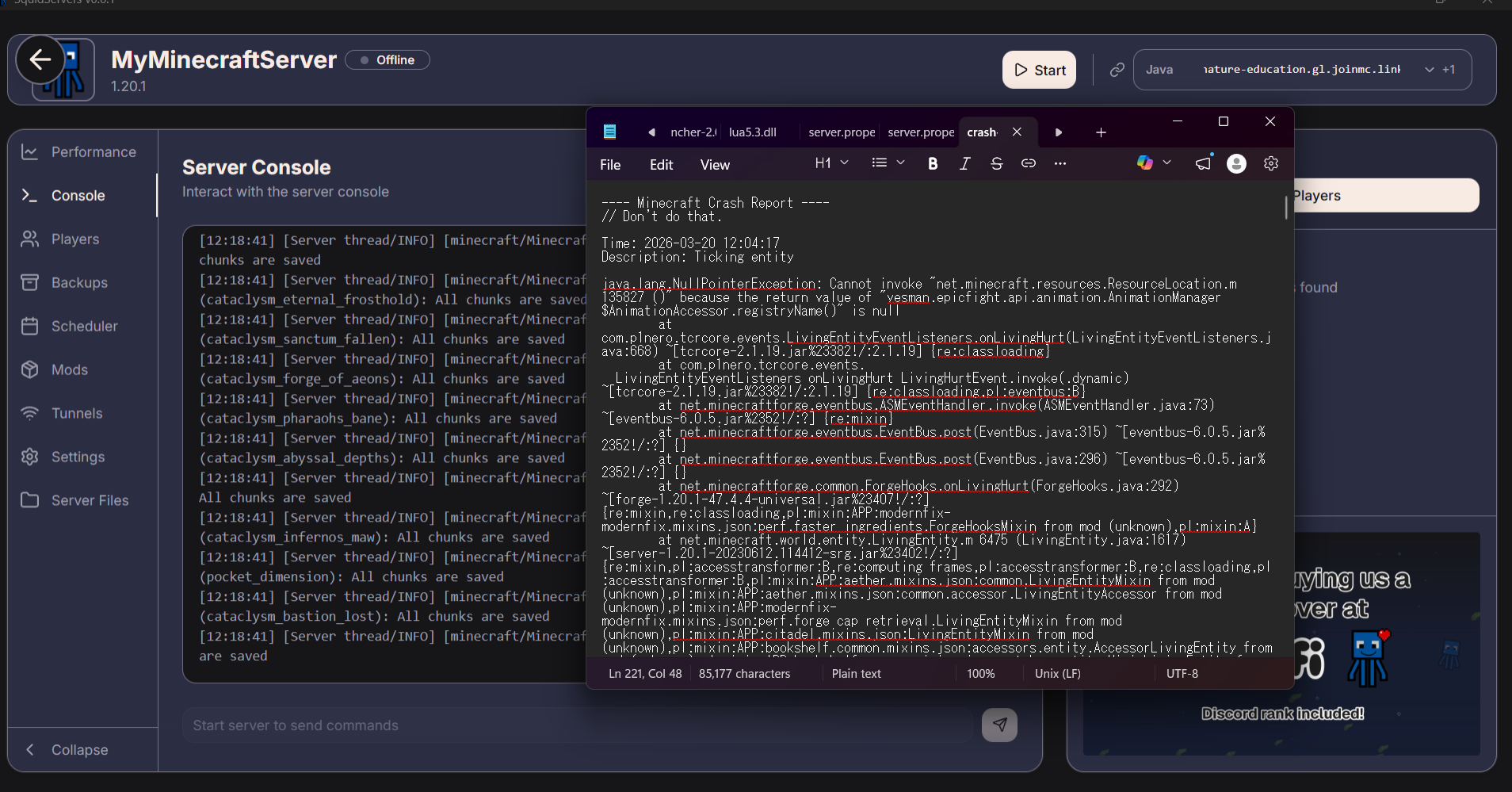
#the server keep crashing while walking in overworld, serverpack versaion is 2.0.21
1 messages · Page 1 of 1 (latest)
 hexed pond
ok i thing its fixed on version 2.0.21.1, p1nero just upload it 12min ago. ill waiting for the server pack
 winged plume
hexed pond
ok i thing its fixed on version 2.0.21.1, p1nero just upload it 12min ago. ill w...
winged plume
hexed pond
ok i thing its fixed on version 2.0.21.1, p1nero just upload it 12min ago. ill w...
How to fix it???
I'm using latest version server pack still having this problem
 young mortar
hexed pond
this is the crash log:
young mortar
hexed pond
this is the crash log:
also what server host is that
hexed pond
young mortar
also what server host is that
its squidserver, its basically a software to simplify minecraft local hosting, its had crash report so its ez to use and troubleshoot
hexed pond
winged plume
I'm using latest version server pack still having this problem
i try version 2.0.21.1 on single player and it fix the issue, but not try it on server yet, ill try it tonight using 2.0.21.1. ill give u update. or u can try it by yourself
winged plume
hexed pond
i try version 2.0.21.1 on single player and it fix the issue, but not try it on ...
Now it dosen’t crash immediately It crashes 10/15 min later after going overworld
hexed pond
winged plume
Now it dosen’t crash immediately It crashes 10/15 min later after going overworl...
have u try version 2.0.21.3? it says Fix kill cam invunerable bug
Fix some server crash bug. but im not try it yet
winged plume
hexed pond
have u try version 2.0.21.3? it says Fix kill cam invunerable bug
Fix some serve...
Try it :3
Your server crashes after 10/15 min???
hexed pond
im about to try it now, but u said u already try it so its no need to try it XD
winged plume
I tried 2.0.21.1 it fixed the issue of instant crash but it crash after 10 mins now
hexed pond
lemme try the 2.0.21.3, ill give an update soon
hexed pond
winged plume
I tried 2.0.21.1 it fixed the issue of instant crash but it crash after 10 mins ...
r u using correct java btw? and how much ram that u allocated on the server?
winged plume
hexed pond
r u using correct java btw? and how much ram that u allocated on the server?
9 GB
Yes correct one
Which java version you use?
hexed pond
winged plume
Which java version you use?
17.0.8. ok i have tested it and run fine after playing it for more than 30min. but there is a problem
my dragon wont grow up and cant fly
hexed pond
ill restart the server and see if my dragon is fixed or not
i mean this mod run good at version 2.0.12 singleplayer or server. im doing 2.0.18 above for my friend sake, for better performance but yea its kinda painful to find the version that run properly
ill start a new server with 2.0.21.3 version, and see if the dragon is a bug or its just missed by the server a split second so the server didnt catch it, cuz there is no bug report here
winged plume
Yeah try
hexed pond
ok someone just reported the same issues at version 2.0.21.3, the dragon is become tiny and didnt grow up on server pack. well guest we need to wait for p1nero to fix that on next version. just give him a time
if u really wanna play with your friend, just try 2.0.12. its work fine, but its an heavy mod 247mod, and for performance that he removed 50+ mod is 2.0.18 above, so u chose.
p1nero said to fix the dragon bug just add this mod into server mod folder
also add the mod into your own minecraft
ill try it now, ill give an update soon
hexed pond
ok its fixed
i have tried it myself
enjoy gaming guys
use 2.0.31.3 and add this mod into your own minecraft mod folder, and server mod folder
 mild geyser
emm one thing these not because these files are needed
it only need to add any 6 mods in order to use...
hexed pond
so its needed?
winged plume
@hexed pond crash fixed at 2.0.31.3??
hexed pond
just add this 6 mod to fix the dragon issues
hexed pond
winged plume
<@1000310456520548362> crash fixed at 2.0.31.3??
21.3 u mean?
winged plume
Yes
hexed pond
wht spec your computer have
hexed pond
i run it localy with 24gb ram ryzen7 7000 5060 8gb vram and i had no issues
do u using java 25.0.3 or 17.0.8?
winged plume
I use shockbyte hosting
hexed pond
25.0.* or newes
winged plume
Java at PC?
hexed pond
yea try to using java 17.0.8
winged plume
Change java version at pc or server?
hexed pond
using java for your launcher and the server
there is should be in the setting menu
not pc, just the minecraft launcher and the server
winged plume
Which versions
 hexed pond
winged plume
I downloaded this
hexed pond
winged plume
I downloaded this
its ok
winged plume
 hexed pond
hexed pond
hexed pond
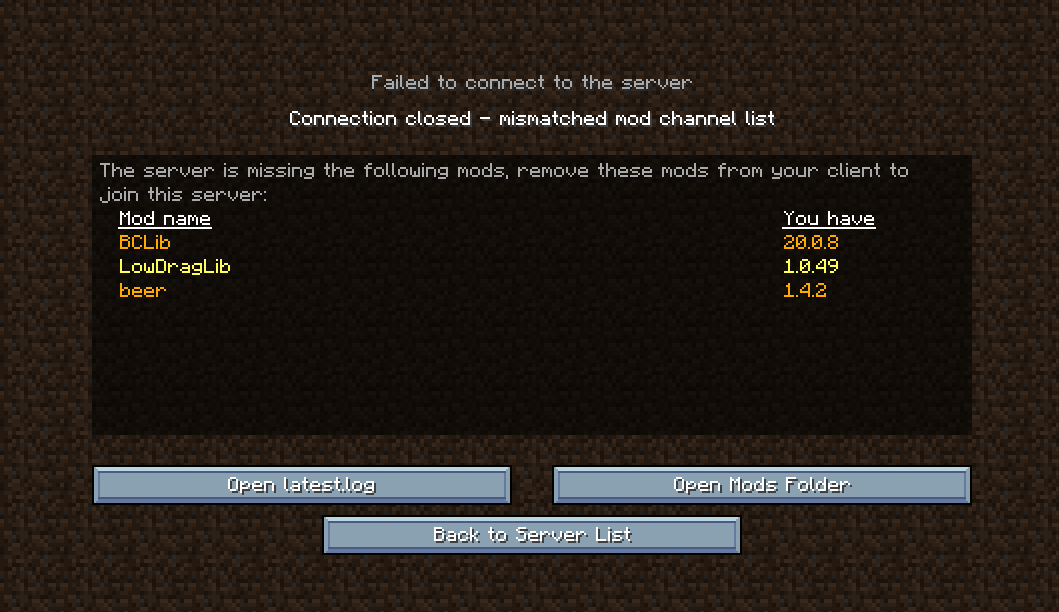
u forgot to add this
winged plume
i added
hexed pond
on your client?
winged plume
yes
hexed pond
u need to add it on both
minecraft client/launcher, and the server
u need to close the launcher after adding the mod tho
winged plume
Can you share me your server files please?
through google drive or any transfer method
hexed pond
u know how to add java on launcher right? just go to the java folder, bin, javaw.exe, then open
hexed pond
it wont work bro cuz my server file is simplefy by the software that coded as it should
winged plume
are you using 21.3 ?
hexed pond
basicly wht im doing is, using 8gb ram each, server 8gb, minecraft launcher 8gb. 1.20.1 forge, 17.0.8 java. install the server pack for the server, and the basic mod pack for the launcher
yea its 2.0.21.3
and add 6 mod on both
winged plume
 hexed pond
u cant using basic modpack from launcher for making the server tho, it wont work. i have try it before
winged plume
Is it okay?
hexed pond
yes
winged plume
hexed pond
basicly wht im doing is, using 8gb ram each, server 8gb, minecraft launcher 8gb....
Like Server pack will be on server
Normal Modpack will be on my pc
hexed pond
yea
winged plume
can't use mods of serverpack?
hexed pond
u can but some mod needed a config wichis its hard to find it one by one
hexed pond
its better that way, server pack for server, and normal modpack for minecraft launcher
winged plume
bro launched new version
winged plume
I'll hold one more day, Let's see how many version he updates
hexed pond
winged plume
btw both the launcher and the server should use java 17.0.8
winged plume
@hexed pond you tried the new 2.0.24?
winged plume

Crashed at 2.0.24
Used Java 17, Installed server-pack mods at clientside and tried game
@sullen socket
winged plume
hexed pond
I installed those 6 mods too
 sullen socket
did you port your old save?
sullen socket
can you share the log?
winged plume
sullen socket
can you share the log?
sullen socket
winged plume
I installed those 6 mods too
not need those mods now
winged plume
should i remove them and try again?
sullen socket
what did you do before crash
winged plume
sullen socket
what did you do before crash
I go to overworld and crashed after 2 sec
winged plume
your test server having same issue?
Btw im not using normal mods, I downloaded serverpack and using server mods into clientside and serverpack mod at server
winged plume
sullen socket
why not use the client
It's so big list of mods
curseforge will work?
winged plume
sullen socket
also you are not playing the latest one
yes i able to play with curseforge
hexed pond
winged plume
<@1000310456520548362> you tried the new 2.0.24?
2.0.23 work well for me, ill port my world and update to 2.0.25
hexed pond
winged plume
Btw im not using normal mods, I downloaded serverpack and using server mods into...
i told u before, u need to install server pack for server, and normal pack for client/launcher
u can not just copy mod from server pack and paste it to client mod folder, there is config, gui, resource pack, exc that u need to copy also if u doing that way. its ez to just install the normal modpack into client
winged plume
Im using curseforge and it’s work fine
winged plume
@hexed pond can you enter nether? Nether is working fine for you?