#I cant figure out how automatic trains work... It's been hours.
99 messages · Page 1 of 1 (latest)
 humble bramble
 storm briarBOT
Could not find "Nopath" in FAQ tags. Did you mean "No Path"?
No path has four causes:
Signals on the wrong side/unpaired
Train stops on the wrong side/unattached
Incorrect locomotive direction
No physical path
Signals and train stops belong on the train's right side in the direction of travel.
To find the location of the problem:
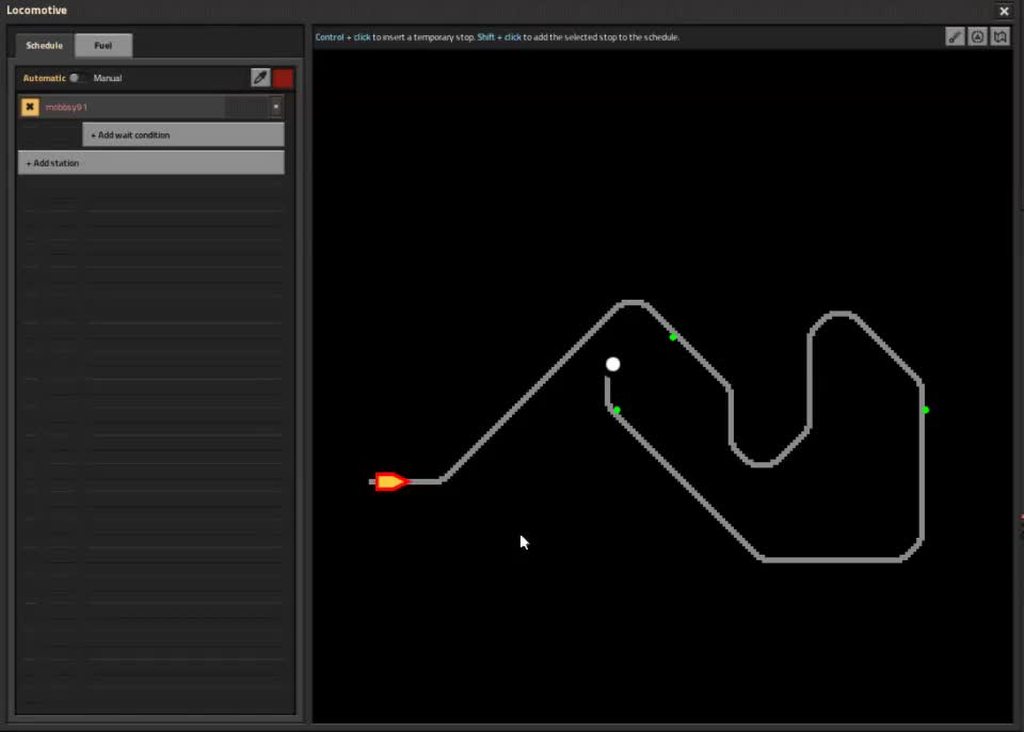
Open the train GUI, hold ctrl, and mouse over the map.
There will be a line connecting the train to your mouse cursor if the rail/signals allow it to travel there.
->Find the point where the line disappears, where you expect it to continue.
 rose tangle
The station there is already on the wrong end. Trains always drive up to and stop with their front at the station
rose tangle
Where do the steps in the faq lead you?
Show that spot and I can tell you what's wrong
rose tangle
To illustrate my point above: this train cannot reach this stop as it is facing the wrong way
rose tangle
 deep drum
Ok i just took everything down
deep drum
Ok i just took everything down

rose tangle
rose tangle
To illustrate my point above: this train cannot reach this stop as it is facing ...
Trying that image again... Technical difficulties

Stops must always be on the right side of the track, as seen from an incoming train
rose tangle
deep drum
right?
Doesn't really matter whether you start with tracks or stations
rose tangle
Please, show what you are doing.
"it doesn't work" is not something I can use to help you...
deep drum
rose tangle
Please, show what you are doing.
I sent a screenshot
rose tangle
Where?
 rose tangle
Station is on the wrong end, the train would need to approach it from the right to be able to find it
put it all the way at the end of the track, and on the right hand side of it, as seen from an incoming train
deep drum
 deep drum
rose tangle
put it all the way at the end of the track, and on the right hand side of it, as...
deep drum
rose tangle
put it all the way at the end of the track, and on the right hand side of it, as...
Ok but that won't work
rose tangle
Why not?
Make sure to back up the train a bit before trying to send it to that station, so it isn't parked past it
deep drum
Still nothing
 deep drum
Nope
 rose tangle
Also, which way is the train trying to go?
rose tangle
deep drum
Nope
That's still sticking waaaaay past the station...
deep drum
Still nope
 rose tangle
Which stop is the train trying to go to?
deep drum
The other one?
rose tangle
What does that one look like? Does it have the same issue, maybe?

 rose tangle
Station is on the left side of the track
rose tangle
Stations always go on the right side, as seen from an incoming train.
As indicated by the arrows and train outline when holding the station
deep drum
Ill change them both to the right i guess
Won't work though
bruh
It won't even let me place it on the other side
rose tangle
deep drum
It won't even let me place it on the other side
There are signals marking it as a one-way track smewhere then
You don't need signals, so remove them
deep drum
Ha... dude I dont got signals
rose tangle
You don't need them yet
deep drum
rose tangle
You don't need them yet
I mean i have signals just not down
rose tangle
What do you mean?
deep drum
rose tangle
What do you mean?
Ok i got to place it on the other side
but still no path
rose tangle
+faq no path | follow the troubleshooting steps in here to find where the problem is, show that area.
storm briarBOT
No Path
No path has four causes:
Signals on the wrong side/unpaired
Train stops on the wrong side/unattached
Incorrect locomotive direction
No physical path
Signals and train stops belong on the train's right side in the direction of travel.
To find the location of the problem:
Open the train GUI, hold ctrl, and mouse over the map.
There will be a line connecting the train to your mouse cursor if the rail/signals allow it to travel there.
->Find the point where the line disappears, where you expect it to continue.
rose tangle
You do not need any signals yet
rose tangle
deep drum
Yeah I dont know what it would be under
To find the location of the problem:
Open the train GUI, hold ctrl, and mouse over the map.
There will be a line connecting the train to your mouse cursor if the rail/signals allow it to travel there.
->Find the point where the line disappears, where you expect it to continue.
 rose tangle
If my instructions are somehow unclear, please actually let me know...
 rose tangle
What happens if you add the second?
deep drum
It just won't work
rose tangle
What does it do, if not "work"?
 rose tangle
Right, so no path
Follow the troubleshooting steps from the FAQ I linked above to find out where the issue is, and show me that location.
deep drum
I have tried that but ill do it again
rose tangle
Until where can you trace the path?
"Not at all" and "all the way" are useful answers too
rose tangle
What changed?
deep drum
All i did was flip the station
rose tangle
The one at your base?
deep drum
Yes
rose tangle
deep drum
Nope
Didn't we leave that one on the correct side?
deep drum
rose tangle
Didn't we leave that one on the correct side?
I thought so
So you need them opposite of each other?
Also is there a way to fast delete walls?
rose tangle
deep drum
So you need them opposite of each other?
Yes, the train goes in the other direction when it approaches the other stop, so to keep it right of the train it needs to be on the opposite side of the track
rose tangle
deep drum
Also is there a way to fast delete walls?
 +
+ 
deep drum
What the heck are planners
 serene coyote
deep drum
What the heck are planners
serene coyote
deep drum
What the heck are planners
should be some to the right of your toolbar (toolbar is on the bottom middle of your screen) There are colorful squares there, and those are the planners. they only work if you have robots though.
red one is the deconstruction planner, it's a draggable box that marks everything inside to be deconstructed by robots.
the upgrade planner (I havent used it much, so a little of this is assumption) marks items to be upgraded to a better varient if one is available, like a yellow conveyor to a red conveyor
blueprints are a draggable box, and if you drag it over placed items, it saves a copy of the exact layout, basically being a copy-paste tool for builds. If you have construction robots, it automatically builds the blueprints you paste, as long as the items used for building are available somewhere, like in a logistics chest