#archived-modded-support
1 messages · Page 609 of 1
 ruby leaf
 heavy sail
You need to download the mods Custom Music and Custom NPC Fixes.
ruby leaf
I put the npc fix back in after I removed it, and I already have the custom music in there
Maybe I have to redownload that as well? it should be under "mods that require this one" for the PyTK yeah?
Should i send a screenshot of my loadout?
cuz i have Custom Music from the update in the folder
heavy sail
I'm not that familiar with SVE, but it says they aren't there? I would like a screenshot to check it out.
 shy orbit
Expanded\CustomMusic because it contains files, but none of them are manifest.json. you have custom music folder there, but it doesn't seem to contain the correct files
ruby leaf
I just copied and pasted from the update zip though Dx
shy orbit
custom npc fixes doesn't appear anywhere on the log as far as i can see
heavy sail
Yeah you might have to install Custom NPC Fixes from Nexus.
ruby leaf
It's there, it's listed after the custom music, but I fixed that by putting it back in from removing them from the folder
It's the custom music part that's making it error
shy orbit
okay, first, what's inside the custom music folder?
heavy sail
You might have to install Custom Music from its own page and delete that folder if the right files aren't there.
ruby leaf
I'll try that really quick
and just the config file and the .dll
shy orbit
i suggest deleting the folder and reinstalling it
also, is all of your SVE installation inside the folder Expanded?
heavy sail
Yeah, if there's no manifest in that folder, it won't work.
ruby leaf
I just reinstalled the custom music mod
it's working now
so it's the file that came with the sve update that wasn't working
thanks for y'als help
heavy sail
you might have to contact FlashShifter to get that fixed for everyone else.
ruby leaf
I will!
shy orbit
@ruby leaf if SVE files are inside the Mods folder in a subfolder named Expanded, and you install a custom npc with a folder that comes alphabetically before Expanded, it can cause problems with npcs in festivals
it's better if the SVE installation folder is named something starting with AA for example
ruby leaf
I haven't had that issue. Thanks for letting me know though just incase it does become one
 upper yacht
Hi. What is wrong with downloading mods via Vortext. Some people contacted me my mod has broken json if they download it via Vortex and they want fix for me, but I don't know how vortex works or whatever. My mod's manifest.json is valid and manual install works. Is here anyone who has this kind of problems on vortex with other mods?
 fair vessel
🤔 Hmm, I dunno. I can try it when I'm next at my laptop.
Were they updating with Vortex? Or installing it for the first time with vortex?
upper yacht
Idk, the discussion thread is here under the red posts: https://www.nexusmods.com/stardewvalley/mods/4582?tab=posts

Nexus Mods :: Stardew Valley
It's time to adventure! Go on an adventure with the villagers from Pelican Town as companions!
 robust bison
I know that many people have problems using vortex with sdv
 ashen elbow
yeah
fair vessel
It has a pretty fiddly interface. It's not exactly noob-friendly
upper yacht
I am not sure If this is a problem which I can solve by edit something in my mod, or it's pure vortex problem.
ashen elbow
it might be a vortex thing
siince ive seen people who had issues with mods when useing vortex
upper yacht
oh, okay. Thanks 🙂
fair vessel
Yeah, even smapi itself has people run into issues sometimes when they try to update with vortex 🤷
 fickle sundial
okay so I think I may have got Boarding House, Stray Catfe and Athanaeri to all work together. Firstly I had to remove the map properties from the Athaenaeri pathway, then I set a dependency on it for Boarding House. @fickle sundial
@outer turret a dependency on the manifest like with sve? is still don’t know what’s happening, but one of the persons that had the error just told me it’s fixed with the new update and i didn’t do anything
 outer turret
Nice! I think SVE fixed it. But yes, just like that.
I did redo the entrance though so it matched my map.
fickle sundial
ok thanks, i’ll try that out
outer turret
I'm using Reimagined2
I also rearranged all my maps and everything broke (or rather, the Athaenaeri patch broke the Stray Catfe warps), so I've determined that the load order in my game at least is: Stray Catfe > Boarding House > Athanaeri
heavy sail
@outer turret speaking of SVR2, does the BusStop work with Boarding House and Stray Catfe?
outer turret
I made my own map for all three of them, since none of them are designed to look aesthetically pleasing in the REimagined2 map
because Boarding House's entrance way is in a somewhat odd spot, I made it more central. Hopefullt this also cuts down load time!
heavy sail
I wish I had more experience with TMXL, so I could do that myself.
outer turret
I could send mine to you - but it now includes Athaenaei as well
(and I programmed it into Boarding House's TMXL file so I have to be careful not to over-write it with every update)
 molten rivet
If I get a mod that I like more than the Medival Mod, what do I do? The mod does the same thing as the medival
outer turret
remove the Mediaeval mod?
heavy sail
@outer turret I like the Bus stop area in SVR2, so I would like the patch.
molten rivet
How/
outer turret
did you want the Boarding House TMXL file too? I cnanot promise it is up to date.
heavy sail
Sure.
outer turret
or are you comfotrable editing content files?
heavy sail
I'm good on editing content files, just not TMXL ones.
As long as it isn't TMXL, I'm fine with editing it.
outer turret
you can totally add it using content patcher. It's just a map replacement file
heavy sail
Oh ok then.
outer turret
Good luck!
heavy sail
Might have to report this on the SVR2 page, but I've been seeing little texture issues around the lake near Robin's house (only happens because of my recolor mod).
molten rivet
So I downloaded a dog mod, and im making a new save, but there is a whole bunch of dog options on the nexus mod file, but at choosing a pet at making a file it only shows 3 options. Im using Elle's new Dogs mod
Can someone help? It says Also includes skins for Adopy'N'Skin but i dont get it
shy orbit
are you using adopt'n'skin?
molten rivet
In what way are you saying?
shy orbit
wait a bit
molten rivet
https://www.nexusmods.com/stardewvalley/mods/3871
Link to the mod

Nexus Mods :: Stardew Valley
Provides 101 different retextures to replace your dog with! Also includes skins for Adopt 'n Skin/More Animals.
shy orbit
okay, so it seems the content patcher version (download 1) generates a config.json file after you run the game once with the mod installed, and you can choose the dog skins you want there
i haven't used the mod, so i'm not completely sure, but that's what it seems like
molten rivet
Sorry, I dont exactly get you
shy orbit
the adopt'n'skin download is for the adopt'n'skin mod that works differently
 wind plover
Hello! Do I have to run the game each time after I download a mod? Or can I download them all and them run the game once I'm done?
molten rivet
Yes. I downloaded 6 mods before loading the game
shy orbit
@molten rivet okay, can you explain the issue in more detail?
molten rivet
So im making a new file. When you get to choose what cat/dog you want I was wanting a husky from the mod, but only 3 options came up, A brown Boston Terrier, Black and white bull terrier and a French Bulldog
shy orbit
i'll generate the config file and take a look at it
molten rivet
https://www.nexusmods.com/stardewvalley/mods/4011
I also found this, Im thinking would I need that

Nexus Mods :: Stardew Valley
Adopt new pets, find wild horses, and randomize and select custom skins for everyone!
shy orbit
you don't, unless you want multiple dogs and/or random skins for them
but, you are using the first download now, right?
molten rivet
In what way first download? Sorry mods are kind of new to me
shy orbit
from the mod page, it has two files, the first one is the main download
molten rivet
Oh, Yes I am
shy orbit
okay. so, there should be a config.json file in Mods/[CP] Elle's Dog Replacements
molten rivet
Yes, there is
shy orbit
you can edit the file with a simple text editor (like notepad), and choose the skin you want that way
depending on what dog you chose
molten rivet
This came up
heavy sail
Notepad is a good option.
shy orbit
unfortunately i'm not familiar with how windows does these things. however using whatever that would come from microsoft store wouldn't be good necessarily
 sharp belfry
notepad is passable, notepad++ is good
heavy sail
Huh, Notepad works great for me, but that's just me.
shy orbit
don't need anything good for this
molten rivet
shy orbit
so, those options are named after the files in [CP] Elle's Dog Replacements/Assets
so you can look at what the files there look like and choose it based on the filename
molten rivet
I pressed assets and this came up
shy orbit
yeah, those are the files. they are just png files so you can open them with a image viewer of some sort
molten rivet
How do I select one?
shy orbit
not sure what you mean
molten rivet
Select one to have as my dog? I see the one I want
shy orbit
ah, see what filename it has and put that in the config.json for the dog option you chose
shy orbit
yes
molten rivet
shy orbit
hm? i think there's a misunderstanding somewhere
molten rivet
I dont get what you mean by put the filename is config.json
shy orbit
ah
molten rivet
Luckily I had a backup notepad opened
shy orbit
for example you have "Dog 1": "BullyBrindle", in the config, change it so that it reads "Dog 1": "CollieGrey",
(that would be for the dog option 1)
if you chose another you'd have to modify their line
molten rivet
There, changed it
shy orbit
well, if it went right it should work now
molten rivet
So if i load the game it show be good?
shy orbit
yeah, and if it isn't we can try again
molten rivet
It worked
shy orbit
alright
molten rivet
Tysm! x
shy orbit
no problem
molten rivet

wind plover
Hiya! I have another problem 😦 I'm trying to install this mod but my Mac won't recognise the file type
I naively tried to convert the file to a .zip but it just kept duplicating the zip folder 😅
heavy sail
I could send you a zipped version of it. Instead of 7z. Give me a sec.
I use the mod myself so I could help.
heavy sail
Hold on real quick.
wind plover
Take your time!
wind plover
Thank you so much!
molten rivet
I shall also thank you, i noticed this mod in this chat and the same thing came up
shy orbit
there is a program for mac that can unzip 7zip files
wind plover
😮 What's it called?
shy orbit

Mac App Store
The Unarchiver is a small and easy to use program that can unarchive many different kinds of archive files. It will open common formats such as Zip, RAR (including v5), 7-zip, Tar, Gzip and Bzip2. It will also open many older formats, such as StuffIt, DiskDoubler, LZH, ARJ an...
molten rivet
Also I seen someone have a mod where the loading 'Stardew Valley' screen is black and white, anyone know what it is>
heavy sail
I think that's a UI mod. What exactly does it look like in-game? If there was a screenshot for it.
molten rivet
Instead of Brown and cream, the words are black, and around it is white
heavy sail
I could try looking it up, hold on a sec.
molten rivet
Nvm I found it
Well not exactly it, but a similar one

Nexus Mods :: Stardew Valley
Theme interface for PC/Android. compatible both English and Thai language.
But they include files that i dont have
 hushed elbow
Would anyone be willing to help me? Trying to get a couple mods to play together but not sure how possible it is. Was hoping someone could point me in the right direction or let me know if its be pointless? 😅
molten rivet
I could try help you
heavy sail
What mods do you want?
hushed elbow
Appreciate it. Just a moment I'll pull them up
molten rivet
👌
hushed elbow
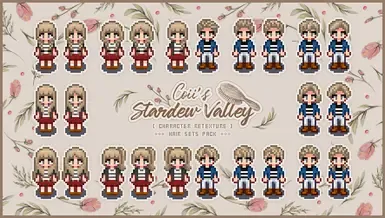
Nexus Mods :: Stardew Valley
Adds to farmer's hairstyles. (Long and Short version.)
molten rivet
So do you have SMAPI downloaded?
hushed elbow
And this one

Nexus Mods :: Stardew Valley
Replaces the appearance of player sprites and clothing to look a bit less bulky and child-like, and can be easily customized with additional options! Content Patcher compatible.
Yes. Let me pull up the error real quick I'm trying to solve
 native dragonBOT
@hushed elbow Can you upload your SMAPI log to https://smapi.io/log (see instructions on that page) and share the link here?
molten rivet
Coii's Hair set needs Hat wont mess hair up mod
heavy sail
No pressure, logs will just help address the problem easier.
hushed elbow
I understand. I just appreciate the help lol. I'm brand new to modding Stardew and unfortunately my Fallout modding knowledge isnt helping.
molten rivet
So with the Cooii's hair mod, it the same thing i had with my dog mode
heavy sail
The issue is that both of the mods want to load the same thing, you might have to give up one of them.
hushed elbow
Ah I suppose theres nothing I can edit in either to get them to play along?
heavy sail
I can edit it real quick, I have experience with mod creating.
molten rivet
Wait so im trying to do Coii's hair mod, and im trying to change it to long hair, but its not working
hushed elbow
I would greatly appreciated cuz I'd love to use the cleaner looking player sprite with Colis hair
heavy sail
I'll fix them up and send them to you. It may take a while.
hushed elbow
No rush. Still going through what mods I want lol
molten rivet
IM loving this aready. Loaded it up with all the mods
hushed elbow
That's pretty
molten rivet

Nexus Mods :: Stardew Valley
A map recolour of terrain, buildings and water, it also replaces all the trees, grasses and bushes with a new set of design.
Thats the mod
hushed elbow
I'm taking a slightly more harvest moon approach with my setup 🤣
molten rivet
Tbh i never played Harvest moon
wind plover
OH MY GOD that's gorgeous
molten rivet
My mods
wind plover
I've trying my best not to download any cosmetic mods because it seems like a very very deep rabbit hole to jump into
hushed elbow
Yeah it's a slippery slope lol
molten rivet
I find the Vanilla world basic
hushed elbow
It was very fun the first playthrough but theres just some QoL stuff I'd like to change to make it easier to get stuff done during my limited down time
Plus some mods on YouTube look really fun!
heavy sail
Might take a little longer than I thought @hushed elbow
hushed elbow
That stinks but like I said no rush. I just appreciate the effort 😅
heavy sail
Quick question beforehand, have you installed Hats Don't Mess Up Hair yet?
hushed elbow
Yes
molten rivet
https://www.youtube.com/watch?v=8O5sNb_T1ZE&t=591s
https://www.youtube.com/watch?v=bJdqh5HVSbk&t=565s
I used these videos to help me find some mods, other I found myself

The Top 10 GREATEST Stardew Valley Mods of ALL Time!
➤THESE ARE THE 10 MOST POPULAR AND MOST DOWNLOADED STARDEW VALLEY MODS ACROSS THE COMMUNITY OF ALL TIME!
Get The Stardew Valley Game!👇🏻
➤https://store.steampowered.com/app/41...
All Mods Mentioned Here!👇🏻
➤https://www.nex...

► My Top 10 Favourite Visual Mods that I Use In Stardew Valley.
These Mods are xnb. Files and do not require SMAPI to install.
►Stardew Valley is an open-ended country-life RPG! You’ve inherited your grandfather’s old farm plot in Stardew Valley. Armed with hand-me-down tools...
heavy sail
That second link is XNB mods, not really recommended anymore.
As long as you didn't use any of those. @molten rivet
molten rivet
Why not?
heavy sail
!xnb
native dragonBOT
XNB mods often break the game and are not recommended. See https://stardewvalleywiki.com/Modding:Using_XNB_mods for more info (and a list of Content Patcher alternatives), and https://stardewvalleywiki.com/Modding:Player_Guide/Troubleshooting#Reset_your_content_files to fix problems caused by XNB mods. For mod creators, see https://stardewvalleywiki.com/Modding:Editing_XNB_files for help unpacking & editing them (including for use with Content Patcher).
molten rivet
But i found the mods also on Nexus
heavy sail
Oh, then it should be fine. I double-checked your mod list.
molten rivet
You got me scared for a second
hushed elbow
Yeah I've been trying to be careful making sure everything I need is installed
outer turret
So.... random thing... today ingame is Spring 13 - the Egg Festival. I leave my house to head for it, trigger a cut scene in the BusStop area, and when it finishes, Jasper is just standing there. I wander up to him and he says "Strings/schedules/Jasper:marriage_13" so I add that into his strings and restart the day (mostly because I lost the egg hunt but anyway...). And when I talk to him again, he says the dialogue. Nowhere in his schedule is he programmed to leave the farm today, or to say that?
Could it be from Immersive Spouses maybe?
heavy sail
Probably, they possibly conflict.
hushed elbow
@heavy sail you're the best!
outer turret
aha it is!
no, it's not a conflict! IT's a bonus feature!
It's wicked 🙂 I can totally put in compatibility patches for this
I wasn't expecting it to be generically set for any spouse.
molten rivet
So whenever I check my discord for messages and press alt+ tab it comes to discord, then when i go back to sdv and click on the sdv button on the bottom of my pc, it comes up with this along with SDv, can I close this while playing sdv, or not
molten rivet
So dont close it
outer turret
indeed! It must remain open. It's also good to check if your game does anything unexpected - like lags or freezes.
heavy sail
Delete Enhanced Player Sprites and download this one, it should fix your issue @hushed elbow
hushed elbow
@heavy sail at the gym, will test it out when I got back to my laptop. Again thank you so much
heavy sail
No problem, hope it helps you!
molten rivet
What part should I change to choose a horse colour, and which part to change the saddle colour
heavy sail
Open the config.json, not the content.json.
molten rivet
There is only these
heavy sail
Oh, you have to load SMAPI for config.json to generate. It's just a little bit harder and risky to do with content.json.
But I can help you.
molten rivet
Should I have a SMAPI shortcut on my desktop?
heavy sail
If you want. You don't need one.
Just load up SMAPI, then get out of it after awhile. Then I can help you edit the config.json (because then it should appear).
molten rivet
Load up the website for it?
 cursive wharf
How do I open the chat/console ingame in multiplayer?
heavy sail
@molten rivet No, the StardewModdingAPI.exe
@cursive wharf open the chat with / and open the console by minimizing the game to the SMAPI log.
No different than singleplayer.
cursive wharf
Uh-... /? You don't happen to know on a Nordic keyboard layout, cause that's Shift+7 for me
heavy sail
Oof, uh... I wish I knew more to help.
cursive wharf
Somewhere near enter or left shift I believe?
No worries I can set my keyboard to UK layout for testing
molten rivet
Sorry, I dont get you
 royal arrow
You start the game with mods loaded, that uses SMAPI. Load up the game until you get to the title menu, then quit. The config file should then be created
heavy sail
Open this.
molten rivet
You mean this?
heavy sail
Yup, now just give a sec, then close the game
molten rivet
Ill give it a minute, since i have to do something rq
heavy sail
No worries.
molten rivet
Im back, should it be good now?
heavy sail
It should.
heavy sail
Now you should be able to change it how you want it to be.
But you might need the content.json for the options
cursive wharf
Is there an easy way to copy configs from me to my friend? I was going to give them the whole mod folder via drive with Configs done, but they insisted on doing a manager install instead and didn't want it... So now we need to configure all their mods
heavy sail
I've done that before, you could just send them the mods.
cursive wharf
Won't that make their mod manager really angry?
royal arrow
I wonder if you can just send them the individual config files, but that won't be fast lol
heavy sail
what mod manager do they use?
cursive wharf
Vortex
molten rivet
So now whne i get an in game horse It should be the colour i want with the saddle i want
cursive wharf
I could've done this in 3 minutes via Teamviewer as my whole Stardew Mod Folder went into my Drive, Configs ready, but noooo they had to do it with the manager and be proper and stuff... sigh
heavy sail
@cursive wharf It might cause them some issues, I have no experience with Vortex, but heard that it causes some bugs.
@molten rivet Yup.
molten rivet
Okay, Tysm! x
 torn mason
my opinion is that vortex is definitely not the proper way for stardew modding
royal arrow
I also believe manual modding is the way to go for SDV
heavy sail
most definitely
cursive wharf
I do modding for Skyrim with MO2
... Did Stardew manually because if NMM from back in day is anything to go off, it breaks more things than it fixes >_>
royal arrow
Oh ya, for Skyrim, you need that sweet virtual folder and all the control over load order and such
torn mason
Stardew doesn't have any mod load order stuff, it's all just unzip into the mods folder and you're good to go
cursive wharf
Yep
torn mason
Vortex works most of the time but it has a habit of breaking stardew mods occasionally and it's a headache when it does
cursive wharf
It also took us 45 minutes to even -get his mods working
heavy sail
I'm gonna go disable Vortex on my mods, brb.
royal arrow
Yea doesn't it have a way of making config files and manifest files go 💥?
cursive wharf
Sounds like great fun
NMM used to break my savegames, and while I never used Vortex, it feels like I'd rather not
royal arrow
I lucked out that the 2 people I occasionally play multiplayer with trust me to just hijack their computer with my thumb drive full of mods and set it up for them.
cursive wharf
Yeahhhhh he wanted to do it 'The real easy way'
And then blames me when it doesn't work, even though I said immediately Ok go ahead, but I won't be able to help you because I don't use Vortex
royal arrow
He might change his mind after this experience, maybe 😅
cursive wharf
#Doubt
X, Big X
Oh well, so long as it starts working eventually, it's his hard work not me
heavy sail
I'm gonna go disable Vortex on my mods, brb.
Done. Now I'll never get Vortex complaints.
royal arrow
Well. You might get complaints from people who want to use it, but can't 🤣
cursive wharf
Welcome to the Holy Fold, former Infidel
heavy sail
@royal arrow Not my problem. 
royal arrow
By the by, that's the "mod manager download" right? I've never used Vortex, I quit back when it was still called Nexus Mod Manager (NMM) and I've not looked back 
cursive wharf
Yep, I guess so?
heavy sail
Pretty sure @royal arrow
royal arrow
I'm gonna hop on your bandwagon then 
cursive wharf
My Skyrim and SSE are bound to MO2 for 'manager download' tho, as is Oblivion/Morrowind/Fallout
molten rivet
I get all my mods from Nexus
cursive wharf
I used to use NMM, but it broke too many times so I swapped to MO2 when SSE released
royal arrow
Yea I used it for Skyrim at first (I know, trust me, I learned when stuff broke and I needed to reset my game files) before discovering MO1 from Gopher. I've refused to migrate to MO2, but I don't even remember why LOL
hushed elbow
MO2 is so good tho
royal arrow
Yea if I ever return to Skyrim, FO3, or FNV, I'll have to check it. I also just hate change, that might have been it
hushed elbow
Yeah took me forever to suck it up and make the switch. Especially with fo3 and NV, soo much better
@heavy sail ahhhhhh it worked thank you!!!!
 thorn nova
I am trying to get into stardew valley mods and i downloaded smapi, but i don't know where it went in my computer files. Can someone tell me where the file goes by default?
torn mason
You mean where you downloaded the SMAPI files, or you've already installed and don't know where it installed to?
thorn nova
I have already installed and don't know where it installed to
torn mason
it will be in your stardew valley folder
royal arrow
 you may also find it helpful to check out the getting started guide https://stardewvalleywiki.com/Modding:Player_Guide
Do you want to play Stardew Valley with mods? This guide is for you!
thorn nova
I checked the guide and followed those instructions to get smapi, then i downloaded a mod off of nexus but i couldn't find where the mod i downloaded went
torn mason
Usually the default download place is the downloads folder, but will depend on your settings. You can look at your download history in your browser to take you to where the files end up though
royal arrow
Did you click the download speed (slow download for free membership)?
torn mason
Sounds like something messed up and the download didn't actually go through  I guess I'd just try again and see if it was a fluke, or if there's something blocking the download
thorn nova
I tried again and i didn't work, so how do i check if there's something blocking it?
 dire fractal
Is that a manual download or the mod manager download?
thorn nova
mod manager
dire fractal
Vortex?
thorn nova
nexus
dire fractal
For vortex, I believe once SMAPI is enabled it doesn't show in the mod list because it's the prerequisite for basically everything else. Not sure if NMM does the same.
royal arrow
Nexus' mod manager is Vortex. I don't use it, but I know there a separate guide for using it for SDV here https://wiki.nexusmods.com/index.php/Modding_Stardew_Valley_with_Vortex#:~:text=To begin%2C open up Vortex,to confirm your active game
dire fractal
If you go to your Stardew Valley directory on the computer, is there a file named 'StardewModdingAPI' ? If so it's probably just stealth-present. 😉
thorn nova
i am installing vortex and it is working now
 onyx light
Is it just me or all the Health Bar mods stopped working?
I always see the ??? sign even after attacking them
royal arrow
That's odd. If it did stop working, the one I use is listed here
https://github.com/Zoryn4163/SMAPI-Mods/releases

GitHub
Mods for SMAPI. Contribute to Zoryn4163/SMAPI-Mods development by creating an account on GitHub.
onyx light
Hm...lemme try that one right now and see one sec
 quasi lodge
how do i run my game without smapi?
i just want to play with a friend but they dont have mods
royal arrow
You launch directly from the Stardew Valley exe in your game folder. You can make a shortcut to it on your desktop, and name it something like "Stardew Valley Base Game" or something, so you know
quasi lodge
where do i find that tho?
royal arrow
In your game folder
torn mason
so we don't know where you have installed stardew valley on your computer, but if you're using steam it'll be in the same folder steam puts all the other games
quasi lodge
its on my desktop
torn mason
not your steam shortcut, the folder it installs games into
onyx light
@royal arrow That mod worked! Thanks!
Also, is anyone here using [CP] Secret Statues Retextured?
torn mason
if you are using steam and you have no idea where that is though, you can go into your library, right click stardew valley -> properties -> local files -> browse local files
that will open up the location of your game
onyx light
I loaded the mod, but I don't see any changes to the secret statues...
 royal arrow
I have! Hope you've been well too
 limber fjord

royal arrow
Also I personally just pinned the steam / steamapps / common folder to my quick access, so I can quickly get to all my games >_> (I even have the Stardew Valley / Mods folder pinned because I go in there to tweak my files so often lol)
 deft rover
Hi
I tried to launch smapi using steam
But I can't wgat should I do?
royal arrow
Hi, have you seen this guide? https://stardewvalleywiki.com/Modding:Player_Guide
It includes instructions based in your OS. You'll need to set the steam launch options
Do you want to play Stardew Valley with mods? This guide is for you!
royal arrow
Can you copy-paste here what you pasted?
deft rover
It still use the original game
Yep
Hold on
D:\Steam\steamapps\common\Stardew Valley\StardewModdingAPI.exe
royal arrow
You're missing " at the beginning and at the end of the path. You also need %command% after the path
At least I think it's %command% one sec
royal arrow
Yup it is %command%
deft rover
Is the commad after the " or not
royal arrow
After, so it should be
"D:\Steam\steamapps\common\Stardew Valley\StardewModdingAPI.exe" %command%
deft rover
With the space?
royal arrow
Yup
royal arrow
No worries, you're not stupid! It's hard with quotes because sometimes you think it's a speech/identifier thing, or just there for emphasis lol
It happens 
molten rivet
Does anyone have a good texture mod?
royal arrow
ConniePony, are you looking for textures for a specific thing?
Buildings, maps, NPCs, objects, or...?
molten rivet
For the nature, like tree's, grass, and objects
royal arrow
Ah, for nature stuff you might want to look at Eemie’s Just Another Map Recolor, Stardew Foliage Redone, or Flower Valley. These are only a few
I also like A Less Yellow Stardew
molten rivet
Currently have Stardew Foliage Redone, but not really a fan
royal arrow
I have a whole visual appearance section in my mod list, you could look at it for ideas https://docs.google.com/document/d/1_qmtiO74ENg99aDL97xhLjVawV5pQLQtmHCidLTnbRc/edit?usp=drivesdk

Google Docs
LenneDalben’s Stardew Valley Mod List These are all the mods I use, so you can take a look for recommendations! I’ll update this list periodically, to add new mods, or revise some notes, or potentially remove mods if they break. I tried to use a Dropbox paper like Gender Drag...
 cedar nimbus
Hey so I got the tailor cat mod and I can't seem to find the tailor cat's store. Does anyone have any idea where it could be
The picture shows it by water but I've checked everywhere possible
 pine ledge
Forest. Right about where Andy's house is in SVE.
I'll see if I can get a quick screenshot
cedar nimbus
Thanks
royal arrow
Also did you get the letter from him? He shows up the day after you get the letter
cedar nimbus
I also have the expanded pack so that doesn't interfere with the placement right?
Oh the day after alright. It's the same day
pine ledge
Oh. Right. Letter. Haven't gotten that yet whoops
 rancid badger
I got a request for a way to get rid of the strobing flashes of lightning on stormy days for photosensitive folks. The initial idea was just to turn off stormy days, but of course I'd rather let them keep the gameplay elements of Lightning Rods and just suppress the flashes. I couldn't find an existing mod for this, but I wanted to double check before I make one. Does it exist?
 glass yoke
Does anyone know if there are any images of the expanded farm maps for SDV Expanded? I successfully installed Expanded yesterday and started playing a new save game, but my farm (I chose riverine) does not appear to be any different than the un-modded riverine farm. I am also interested in seeing some nice wideshots of all the different maps in Expanded for comparisons' sake. 🙂
royal arrow
Are you using the Immersive Farm 2 Remastered mod? It's a separate download within the SVE page. If so, could you provide your log so we can help troubleshoot more?
!log
native dragonBOT
Can you upload your SMAPI log to https://smapi.io/log (see instructions on that page) and share the link here?
pine ledge
@cedar nimbus Here you go. I marked the Tailor Mouse tiles with red roof tile.
rancid badger
(If you are using IF2R, it only replaces the standard farm layout, so Riverland will be unchanged)
royal arrow
Oooh good call. I don't use SVE so I didn't realize that. I wonder if you could go rogue and modify it so it does replace the riverland map
glass yoke
No, I am not using Immersive Farm 2 Remastered... I'm new to all this and didn't know it was a thing. 😬
I just installed the base SVE
royal arrow
Ok so you'd need to get that, and like kdau said, it only replaces the Standard farm. So the easiest thing would be to get IFR2, and start a new save on the Standard farm o:
glass yoke
GOTCHA, thank you both! I'll consider it, made several hours' progress into this new save and would hate to start over again
Is this the one? When I use the full IF2R name the only version that comes up in Nexus is in Espanol. https://www.nexusmods.com/stardewvalley/mods/3561

Nexus Mods :: Stardew Valley
An updated version of Immersive Farm 2: A large farm with a Spa, Quarry, a larger Greenhouse and much more.
rancid badger
IF2R is actually on the SVE mod page itself. It's just a separate download on that page
glass yoke
Ohhh I see
rancid badger
The other "Immersive Farm" mods are alternate versions of the same original work
hushed elbow
Would yall consider SVE a "must have" mod
glass yoke
I see, I see
rancid badger
Btw, to answer your original question more directly, the Stardew Planner is an easy way to get a broad overview of different stock and (not all, but many) modded farm maps: https://stardew.info/planner/
Plan your Stardew Valley farm! ...on a coffee break!
(Of course it does much more than that)
deft rover
I tried it
It's a really good mod
royal arrow
SVE changes a lot as well, so it can be tricky to have other mods in addition to it. I set up a separate mod group just for it, and I plan to use it on a new save as well. More on mod groups below
!modgroups
native dragonBOT
See this link for how to load different mod groups: https://stardewvalleywiki.com/Modding:Player_Guide/Getting_Started#Can_I_have_different_mod_groups.3F.
Do you want to play Stardew Valley with mods? This guide is for you!
hushed elbow
I mean I'm pretty sure I'm not using anything that would conflict but I'm not entirely sure
glass yoke
I kind of like the challenge of the riverside farm, so I may or may not install the IF2R. Thinking.
hushed elbow
One way to find out I guess
deft rover
Can someone tell me what mod does recolor the town building?
royal arrow
 @hushed elbow another way is to check this 😆 https://github.com/FlashShifter/StardewValleyExpanded/wiki/Troubleshooting#incompatible-mods

GitHub
The Stardew Valley Expanded mod for Stardew Valley. - FlashShifter/StardewValleyExpanded
deft rover
I looked for it in Nexus but I can't find it
 young escarp
is there any sort of mod that can let you use junamos inside a greenhouse couse i have a super massieve green house that is imposible to do by hand.
royal arrow
@deft rover I'd say Gwen's Medieval Buildings, or Flower Valley
hushed elbow
@royal arrow oh that is useful 😶. Thanks!
 daring wagon
@young escarp did you get BennyB's greenhouse? LOL
deft rover
Thanks I'll look for it
daring wagon
I have it and I love it, but it is really hard to do by hand. I've seen a mod that says it does that, but haven't tried it yet because it's pretty old. I get by pretty well on sprinklers and the tractor mod, so that might help you
fair vessel
Wow.
My game just crashed so hard that my computer bluescreened and I lost every config file for every mod that was running >.>
daring wagon
It was a real revelation that I could use the tractor in the greenhouse-you can summon it by pressing backspace
royal arrow
@fair vessel did you finally test that weird circular dependent reference thing??
fair vessel
hm? lol no
This was just routine opening of the game, I thought 
Ooh, the CP mod configs are safe at least
royal arrow
(you remember, we were joking that it would destroy your game)
fair vessel
Just the smapi config api ones are reset
royal arrow
But also, how did this happen  never heard of something like this
young escarp
@daring wagon no i got the 50x50 one
daring wagon
That's pretty big too! If you have the tractor mod, you can use it in there. The only junimos in greenhouse mod I saw was last updated several years ago, but you can search junimo on Nexus or check one of the lists people have come up with.
BennyB's is bigger than all of IF2R, I think
young escarp
i have been there was 1 called greenhut but its aperantly broken
daring wagon
I loooove it
royal arrow
That's cool that you can use the tractor inside the greenhouse. Is that true for all greenhouses, I wonder, vanilla and other custom ones?
daring wagon
You can use the tractor anywhere
deft rover
Thanks
It is the flower valley mod @royal arrow
daring wagon
Just call it with backspace XD
I use it to harvest my tea plants inside my house cause I'm lazy
royal arrow
Aha, I never use the shortcut, so that explains why I didn't know lol
daring wagon
It summons and dismisses back to its garage with the same keybind, so you never have to worry about leaving it somewhere weird overnight if you're testing a new area
deft rover
Sadly the flower vally mod is obsolete
royal arrow
Dee Jeh, I have a link to the latest updated one on my mod list, if you still have it open?
dire fractal
Shit when I use tmx wedding, suddenly my stardew closed
daring wagon
@dire fractal are you playing multiplayer?
royal arrow
Yea it's in there
dire fractal
No, I still not even put the tmx on my farm
daring wagon
hmm. Is tmx wedding the name of a mod?
fair vessel
But also, how did this happen
@royal arrow I have no idea. There was no crash log, just the regular smapi log that cut off abruptly while Content Patcher was editing assets on startup
https://smapi.io/log/dd730c7e51264e678c0175cdb8406aef
dire fractal
JJory's TMX Wedding Set
daring wagon
oh it is!! It's beautiful
fair vessel
I thought I saw giant red text in the console just before it went blue, but that didn't show up in the log
dire fractal
Yeah but author already said the warning
daring wagon
You just downloaded and installed it and your game crashed?
royal arrow
@fair vessel did you add / remove mods before loading? Can always cautiously try loading it again 
dire fractal
Yes, or maybe my ram... i need to check again
daring wagon
!log @dire fractal
native dragonBOT
@dire fractal Can you upload your SMAPI log to https://smapi.io/log (see instructions on that page) and share the link here?
royal arrow
Oh no, not an elusive irreproducible bug although it might be too early to call it that
deft rover
I can't find it in the document 😅
fair vessel
Fixing all my configs is pretty annoying though. Glad it was on my testing profile so I only had ~40 mods loaded
young escarp
@daring wagon do you know what vertion of the tractor mod is for 3.4.1 because im playing with three diffrent groops an do want any vertioon mis maches
*3.4.1 of SMAPI
dire fractal
My smapi crash or latest log?
daring wagon
@young escarp Ahhh, no sorry. You'd have to check the Nexus page, but I think that's one that leaves old versions up.
royal arrow
@deft rover it's in the Aesthetics / Appearance: Map Edits section o.o "Content Patcher Flower Valley"
young escarp
it dose but it dosent tell me whithc vertion of the mod is for 3.4.1
deft rover
Whoops 😅 @royal arrow
Thanks for telling me
royal arrow
(I always use the search function, it's too long to scroll through lol)
young escarp
ohb nvm it dose whrn you expend the catagory
daring wagon
@dire fractal preferably one where it crashed
fair vessel
Tractor Mod v4.10 says it's good to work with smapi v3.3 +
deft rover
Is there a way to use othe farm building mod while using that?
royal arrow
@deft rover yes, Flower Valley has a config file to toggle off the farm buildings
deft rover
Thanks
young escarp
@fair vessel yah i just figerd out uoi neeed to click on the veriton entry to see
daring wagon
Whoops I have to run now, sorry to drop in the middle of trying to help 😦 have to bring someone a forgotten lunch. GL Shophia XD
dire fractal
Its ok, now I know whats the problem. Thank you Halla
 summer inlet
My game keeps crashing
But uh- not really?
It just freezes, will it still generate a log?
shy orbit
you can try, it might
and if it doesn't freeze immediately at launch, there should be something on the log already
native dragonBOT
Can you upload your SMAPI log to https://smapi.io/log (see instructions on that page) and share the link here?
shy orbit
@summer inlet well, i don't see anything i can help with. how long did you wait before closing the game?
shy orbit
okay, i guess that's long enough
shy orbit
i don't know what the options are
heavy sail
@summer inlet Your game is freezing while loading a save, if I have that correct?
summer inlet
Yup
heavy sail
I had an issue like that in the past, let me check your mods first.
summer inlet
Also I tried again after updating the 2 mods
Same thing happened
heavy sail
When did this issue start for you?
summer inlet
Today -_-
Just awhile ago
Thing is
I used mods on a save
Switched to vanilla for awhile
Went back to play modded about 30 minutes later, and it just froze and wouldn't unfreeze
I've even restarted my phone
fair vessel
Oh dear. Yeah switching between modded and vanilla on the same save can cause problems. Depending on the mods you use. Anything that affects save data is suspect.
Was the mod list always the same as the one in the log?
fair vessel
Oof you have Json Assets mods
summer inlet
Could that be it?
It save was on forest farm and I do also have a mod that changes the forest farm
fair vessel
If you ever play with JA mods and want to remove those mods or play the save vanilla, you need to first delete and remove all JA items from everywhere in the world, save the game.
To be extra safe, next uninstall the JA modpack (but leave Json Assets itself), open the game, play through another day then save.
After that you can uninstall JA or load it vanilla and it should be fine
summer inlet
So is that it?
fair vessel
Seems likely
summer inlet
Well
To put it simply
Fuck.
Oh well,
Thank you for much jonqora!
fair vessel
yw. Sorry about your save
You might be able to recover it by digging into the save backups folder and finding a version from before you loaded it vanilla
summer inlet
Wasn't a main save file
Doesn't matter ¯\_(ツ)_/¯
fair vessel
Ooh, and I just saw the Community Center Bundles Overhaul mod. If it wasn't the JA one, that one could have done it too
 untold widget
So, SVE requires Content Patcher, Json Assets, TMXLoader and other mods. Are those available on Android or not? Or do they work through SMAPI?
dire fractal
How do we get smapi for android?
hushed elbow
Oook. So it appears my mods arent conflicting with SVE so far >.>
fair vessel
So, SVE requires Content Patcher, Json Assets, TMXLoader and other mods. Are those available on Android or not? Or do they work through SMAPI?
@untold widget These are all available on android. They do work through smapi, so you need smapi for android is all
untold widget
Ahhh, okay then. Thank you! 
fair vessel
https://github.com/ZaneYork/SMAPI-Android-Installer/releases/tag/1.5.7 download here, it's off the play store for some reason
dire fractal
Ty
royal arrow
ParasiteAdam, that seems like cause for celebration 😆 I guess you're being cautious o:
hushed elbow
@royal arrow I have years of Fallout modding under my belt. No matter how stable everything is the fear is still there 😅
royal arrow
LOL I hear you. In Skyrim, FNV, and FO3, I save every 2min 
never know when it's gonna crash to desktop
hushed elbow
Exactly
dire fractal
Wait how do we add mods to smapi?
royal arrow
Have you seen the getting started guide? https://stardewvalleywiki.com/Modding:Player_Guide
Do you want to play Stardew Valley with mods? This guide is for you!
dire fractal
Wut is the best file explore app for Android
royal arrow
ES Explorer is pretty popular
fair vessel
Yeah I use that one
royal arrow
Since I switched to a Motorola phone, the default one works well. I definitely needed ES Explorer when I was on a Samsung phone though >_>
 supple echo
a weird question, if I'm making multiple mod groups and want to use some of the same mods in more than one group, would it work to put shortcuts to the mod folders or should I copy the whole folder into each group?
fair vessel
I... have no idea lol. Try it?
I have not a clue if smapi will follow folder shortcuts or not
royal arrow
I just have multiple copies. Like I have some of the same mods in my Mods main folder as I do my Mods (multiplayer) folder. Curious to hear if your experiment works o:
supple echo
it'd save disk space on some of the bigger ones. 🙂
dire fractal
Uhm
shy orbit
might be worth it for some music mods
dire fractal
How do we unzip a mod into the mods
royal arrow
Agreed! It just didn't occur to me to find another way, good to be inventive 😆
shy orbit
but not for others i'd say
dire fractal
Folder*
 dark mesa
!sve
native dragonBOT
Stardew Valley Expanded (https://www.nexusmods.com/stardewvalley/mods/3753) is a mod which adds a lot of new content and areas to the game. It has many dependencies, so be sure to follow the install guide which is on the github wiki along with FAQs and troubleshooting steps for common issues: https://github.com/FlashShifter/StardewValleyExpanded/wiki
dark mesa
guys do you know some cute ass mods for like clothes?
 dreamy timber
Hey.. i just reinstalled the game and smapi on my pc after getting fixed. Everything is installed properly but for some reason whenever i try to turb on the game it gives me this error message “oops! SMAPI cant find the game. Make sure youre running stardewmoddingapi.exe in your game folder. See the readme.txt file for details”
fair vessel
Sounds like you need to reinstall smapi -
When you downloaded the smapi folder, did you put it in your game folder maybe? It needs to be outside the game folder for the installer to run properly
fair vessel
Somewhere like Desktop would be fine
dreamy timber
I also just tried running the game before installing smapi but it says “running” then it stops
Yeh, its not running
fair vessel
So the game itself isn't running? That's concerning :/
dreamy timber
Yeah
fair vessel
You may need to reinstall
dreamy timber
I did, this would be the 4th time ;-;
fair vessel
Ah dear
Can you share a screenshot of inside your Stardew Valley game folder?
fair vessel
Do you want to toggle some mods or all mods?
fair vessel
Nah nah
 runic frost
and then i want to use the mods for solo player
fair vessel
Okay then just press ok and leave that blank
runic frost
ok
fair vessel
If it's blank it will launch from Steam without mods
runic frost
and if i toggle mods on and off, will it corrupt my files?
like, i have a modded greenhouse which is massive compared to the original one
fair vessel
No. Just make sure you only open modded save files when you are running the mods for them
fair vessel
You can run the game fine without mods and only open the unmodded or multiplayer save files and it will be fine
runic frost
so i have to make a new save file? if i want it to run without mods
dreamy timber
fair vessel
Even if you accidentally open the wrong save file by mistake ... just close it without saving.
runic frost
ok
so i canot switch between my current file with mods and without mods can i?
sorry if its confusing
i'm also on mac too
fair vessel
Yeah you should make a new save file.
If you want to take an existing modded save file and start using it without mods on multiplayer... you might be able to but it will depend a lot on which mods you were using
runic frost
ah ok right
fair vessel
Some mods are safe to switch back and forth, some will crash your game or corrupt the save if you try to play on a modded save without using the mods
fair vessel
If you want to try it, first make a backup copy of the whole save folder somewhere else in case it goes wrong
dreamy timber
Was that the picture you needed
runic frost
how to create bake ups?
fair vessel
Yeah @dreamy timber that looks good for your game... I don't know why the game isn't running.
But I also don't see smapi in there, so it looks like smapi didn't install correctly at least
dreamy timber
I havent installed it yet
fair vessel
Oh ok
dreamy timber
I just wanted to test the game before installing mods
It works fine on my laptop, but i used to play it on this pc before it broke
fair vessel
And how are you trying to launch the game? Are you clicking there on the Stardew Valley chicken program, or are you launching through Steam?
dreamy timber
I tried both ways
fair vessel
@runic frost read here to learn about where the save files are stored and what to copy to back them up https://stardewvalleywiki.com/Saves
@dreamy timber I just noticed something funny. Can you rename the chicken file to add .exe at the end?
I think it's supposed to be .exe
dreamy timber
So it should be named “stardew valley.exe?
fair vessel
capitals
Stardew Valley.exe
fair vessel
I think. This is just a hunch, we'll see if it helps
dreamy timber
I got this
fair vessel
O_o
That was when launching with Steam?
What if you double click right on the renamed chicken file
dreamy timber
It says its loading but nothing happens
runic frost
so i said 'ok' to that box you mentioned
and it still ran with smapi
and cannot open stardewvalley exe
fair vessel
Oh wait!
runic frost
as its a windows document thing??
fair vessel
@runic frost I forgot you're on mac. Steam launch options don't change anything for mac, it launches smapi automatically
To play vanilla, you can look into using mod groups and create a group with no mods in it
runic frost
yep
fair vessel
!modgroups
native dragonBOT
See this link for how to load different mod groups: https://stardewvalleywiki.com/Modding:Player_Guide/Getting_Started#Can_I_have_different_mod_groups.3F.
Do you want to play Stardew Valley with mods? This guide is for you!
cursive wharf
So I can -swear- that I managed to find a map with 'Suggested Placements' for SVE in terms of building, including sheds, barn, coop, even tractor garage... But now I can't find it. Anyone got a clue?
runic frost
thanks i'll have a look at that
fair vessel
@cursive wharf yeah I know the one you mean. It might be on the SVE wiki?
cursive wharf
Looking all over but no luck
fair vessel
dreamy timber
Does the name need the space in between?
fair vessel
yes
dreamy timber
;-; idk why its not working
cursive wharf
Thank you @fair vessel
fair vessel
@dreamy timber I'm stumped. Since we can't get even the vanilla game working for you, and you've reinstalled multiple times... maybe need to head over to #vanilla-tech-support channel
Once you get the vanilla game working again, we can investigate the smapi stuff here more
fair vessel
sorry
runic frost
it seems so complicated
i think i'll just finish my save file with the mods currently
then uninstall smapi when i don't want mods any more for future game files
do i have to uninstall mono too
how do i uninstall mono do i legit delete the folder
fair vessel
I don't think you have to remove mono no
If you want a less complex way to do mod groups, do this
If you want to switch to use no mods for a bit, rename your Mods folder (e.g. ModsInactive)
And then make a new empty folder next to it called Mods
Then run the game and it will use the empty mods folder, so you will have no mods
To go back, delete the empty folder and rename the one with mods inside back to Mods
runic frost
ok
and just keep switching doing that
i'll try
and i need to name my mods folder - the one with mdos in - Modsinactive'
 restive zodiac
Oh no, there is ... a new jump mod... https://www.nexusmods.com/stardewvalley/mods/6546 I haven't tried it yet, but now it is lurking at the edge of my brain...
fair vessel
Yeah. Or anything you want except Mods, basically
 fervent minnow
Anyone here use Harp of Yoba Redux?
runic frost
ok thanks
restive zodiac
Not in awhile. I mean, I always end up installing it but I haven't used it in ages because I hardly ever start the game except to test something a million times in a row 😅
torn mason
im just gonna--
torn mason
( not mine, but part of a MP group of mine so we have a similar number except for aesthetic mods )
runic frost
i run the smapi installer and then choose 'unintall'
do i also need to delete my mod folder too when i decide to stop using mods entirely?
supple echo
update: putting aliases in a secondary mod folder doesn't work, SMAPI still loads no mods when I run that set, at least on Mac. Oh well, copying time!
torn mason
you can delete it if you're sure you don't want to use them yeah, but them being there won't affect anything
supple echo
still installs like 50 mods for multiplayer because I can't live without them apparently 
torn mason
ah, if you just want to temporarily play without mods you can launch the stardew valley exe directly, or put a . in front of the mods folder to disable the mods
( or make mod groups and direct the "vanilla" mod group towards an empty Mods folder )
torn mason
renaming it anything else also works, the . is just my habit. SMAPI will specifically look for mods in the "Mods" folder so if you rename it anything else, it won't find the mods
runic frost
sick it works
thanks!!
helps me out a lot yay
like i love my mods generally but i'll creeate a new save file anyway
torn mason
the . works for disabling mods inside the mods folder, if you want to temporarily disable one for a reason
specifically in front
runic frost
thanks
fair vessel
So if you rename ContentPatcher to .ContentPatcher it will disable that particular mod.
 gentle nest
Hello peoples much smarter than I! I am new to Stardew modding, I used to mod Skyrim a ton, and am having a wee issue. I only have texture mods installed and some are being overlapped but I don't know by what. I'm using Gwen's Medieval Craftables/Buildings and they're the only textures I'm using that edit those textures. I did have Elle's Seasonal Buildings but I removed it in favour of the former. Other mods I currently have: Oasis Greenhouse, Seasonal Floorings, Seasonl Villager Outfits, Vibrant Pastoral Recolour, and Rustic Country Walls and Floors. What did I mess up in order to have some textures being overrode? Thank you! <3
shy orbit
@supple echo did you try with ln?
either with symbolic or hard links
(if those even exist on mac)
royal arrow
@gentle nest can you provide your log? That will give us more info. See link below
!log
native dragonBOT
Can you upload your SMAPI log to https://smapi.io/log (see instructions on that page) and share the link here?
hushed elbow
Are there texture mods for the okantlife in this game? 🤔
royal arrow
Also Elsha, when you say textures are being overlapped, do you mean there's weird glitches, or just that you're seeing a texture other than the one you want? A screenshot might help
gentle nest
The textures I want are behind the default and yes one moment on the log!
fair vessel
Cool cool. A screenshot to show us which textures are showing up wrong in game may also help 🙂
gentle nest
Oh this is going to be difficult, I removed the windows key from my keyboard because of keybinds in my MMO's and idk where it currently is, gimme a few to look for it LOL
fair vessel
@hushed elbow what is okantlife?
Oh my - once you find the windows key, sounds like you should pin or shortcut to the stardew appdata folder for future reference
supple echo
um… I just made Mac-style aliases. I'm not sure which those are.
royal arrow
(I also pinned the Error Logs folder to my quick access, because a) I need the error logs the mostest but also b) Daily Screenshot screenshots and saves are easily accessible from there 😅)
fair vessel
either with symbolic or hard links
I think these distinctions are Linux-only wizardry 😅
dire fractal
What is a content patcher?
hushed elbow
@fair vessel crap 😑 I meant plant life. I've dropped my phone one to many times and now the keyboard gets screwy.
gentle nest
just a few there is a list of others
aaaaaaaaaaaaaaand https://smapi.io/log/0a858ce670164183bf0e3c79daf2b37d
shy orbit
@supple echo https://ss64.com/osx/ln.html
fair vessel
Content Patcher is what we call a framework mod - a fancy C# code mod that makes it possible for people without programming experience to make new types of mods that change the game using packs of text files (mostly) and maybe image files and stuff, no code needed.
gentle nest
i think i did that right, lemme know if im dumb lol
fair vessel
so there are hundreds of mods called "content patcher mods" or "content packs" that are packages of files that the Content Patcher framework mod knows how to read. And then Content Patcher tells the game what to change.
royal arrow
Thumbs up for doing it right, you're not dumb lol
hushed elbow
So yeah aside from my phone having a stroke. If anyone knows any good plant life texture mods I'd appreciate it
fair vessel
I really like Stardew Foliage Redone for re-texturing trees and bushes and all that
royal arrow
@hushed elbow got some on my mod list https://docs.google.com/document/d/1_qmtiO74ENg99aDL97xhLjVawV5pQLQtmHCidLTnbRc/edit?usp=drivesdk
Google Docs
LenneDalben’s Stardew Valley Mod List These are all the mods I use, so you can take a look for recommendations! I’ll update this list periodically, to add new mods, or revise some notes, or potentially remove mods if they break. I tried to use a Dropbox paper like Gender Drag...
Elsha, my phone is being slow in loading your log
shy orbit
@supple echo so if you wanted to make symbolic link to ~/Mods1 with the link being called ~/Mods2, the format would be ln -s ~/Mods1 ~/Mods2
hushed elbow
@fair vessel @royal arrow thank you both so much!
supple echo
huh
royal arrow
Ok is that from after loading up your save, Elsha?
supple echo
okay
shy orbit
it's best to use absolute paths for both the source and the link in my experience
gentle nest
yeap!
dire fractal
Idk how to add a content patcher, it didn't work-
hushed elbow
Hey guys dumb question, the extra 4 hearts for the event log only show up on a NPC you're married to right? 🤔
fair vessel
@gentle nest Vibrant Pastoral Recolor mod is the problem, it is editing the same tilesheets
gentle nest
ahhhhhhhhhh
fair vessel
You can rename the folder... e.g. aaaVibrant Pastoral Recolor
dire fractal
How do we add a content patcher
royal arrow
Unless there's a config file to toggle off some of those edits?
fair vessel
Or you can add a dependency on it inside the manifest of medieval craftables (and any other mod that is getting overwritten)
royal arrow
Also is that a snazzy reshade? It's not listed in the SMAPI list up top o.o
gentle nest
fair vessel
@dire fractal first you would download the Content Patcher framework from here https://www.nexusmods.com/stardewvalley/mods/1915 and unzip it into your Mods folder
Then you download whatever content patcher mods you want, and unzip them into your Mods folder too
@gentle nest looks like the config isn't specific enough. You should add a dependency or use the rename trick
gentle nest
i went into this:
royal arrow
Yea the dependency method is more reliable than the rename trick
fair vessel
Editing Vibrant Pastoral Recolor mod will be far more work believe me
Just open the manifest.json of Medieval buildings and edit that
royal arrow
Yea the shipping bin was only 1 of the textures you were having issues with though. I mean, you could try setting those to false in the config.json (not content.json) and see if that resolves it for you
Otherwise like Jonqora said, adding the dependency to Medieval Buildings' manifest.json is the next option
royal arrow
Yep, so you can copy-paste one of the existing dependency fields, and change the unique ID to be the same for Vibrant Pastoral Recolor
fair vessel
Yep! Add a new section
        {
        "UniqueID": "grapeponta.VibrantPastoralRecolor",
        "IsRequired": false,
}```right under the Hudson Valley one, following the same pattern
royal arrow
(Jonqora got the ID from the manifest.json in Vibrant Pastoral Recolor, by the by)
fair vessel
And then you can check to make sure there's no errors in the file by putting everything from it in https://smapi.io/json
gentle nest
juuuuuust making sure it looks correct from here lol
cause the brackets are red
and that scares me lol
fair vessel
And then you might need to do the same thing inside the manifest.json for the medieval buildings mod, if any of those things get overwritten
royal arrow
They're red because you have the cursor next to them, all good lol
gentle nest
oh lmfao
royal arrow
It's trying to helpfully highlight
royal arrow
If you didn't have them in pairs, and instead had only one, that's when you go and have a mini heart attack lol (then they wouldn't be red)
gentle nest
yeah i would have chose a nice calm colour, not a danger colour ahahaha
royal arrow
Agreed 😆
fair vessel
purple would be nice 🤔
dire fractal
 tired apex
Apologies for interrupting, however when someone who knows more about linux can assist me that would be amazing ^-^
dire fractal
Like this?
royal arrow
Purple is indeed overlooked a lot
fair vessel
@dire fractal your Content Patcher folder is still compressed. You need to unzip it
fair vessel
Oh, I see
then delete the old zipped one
royal arrow
No worries about interrupting! We're used to multiple conversations at the same time here ask your question and someone will help if they can, @tired apex
fair vessel
Then try running the game then with smapi, and if your mods don't work post a log https://smapi.io/log
gentle nest
It workededededd!!!!!! but here's the log anyways incase something did go wrong lmfao https://smapi.io/log/4b51dffc5bc8478ab429ed72b9819f39
tired apex
Ah thank you!
I'm trying to get multiple mod folders working however the executable file to well- execute and it refuses to work on the double click
gentle nest
thank you thank you!!!!!!!!!!!!!! <3333333333333
fair vessel
Looks great! 🏆
gentle nest
screeeeeeeeeeeeeeeeeeeeeeeee
royal arrow
!modgroups are you following this?
native dragonBOT
See this link for how to load different mod groups: https://stardewvalleywiki.com/Modding:Player_Guide/Getting_Started#Can_I_have_different_mod_groups.3F.
Do you want to play Stardew Valley with mods? This guide is for you!
gentle nest
you guys are wonderful thank you so much! <3
shy orbit
@tired apex the file likely doesn't have execute permission
tired apex
I followed the guide there, I even had my dad, who is a programmer for a living, look it over. I can run it in the Konsole and all it says is that it's a directory
shy orbit
can you show us the contents of the file
tired apex
Of course! Let me load up discord on my pc real quick
royal arrow
Ah, looks like Vibel knows what they're doing. Pointing to that guide is the extent of my Linux knowledge 😅
tired apex
top left
supple echo
@shy orbit HEY SYMLINKS WORK!! thanks! I also did a little research and found a utility that will let you make them from the "services" menu in the finder, so I don't have to type in all those file paths every time :)
https://github.com/nickzman/symboliclinker/releases
GitHub
A contextual menu plugin & service for Mac OS X that allows users to make symbolic links in the Finder - nickzman/symboliclinker
tired apex
Screen shot wont let me crop >:(
shy orbit
it needs to point to the launcher script
that is named StardewValley inside the game folder
tired apex
So erase the space
shy orbit
@supple echo hey, nice
@tired apex no
that "Stardew Valley" is the name of the game folder i suppose
you can try adding StardewValley after it, i'm not sure about how the game folders look in steam
tired apex
Could it possibly be StardewValley.exe
shy orbit
no
tired apex
Its running!
shy orbit
alright
tired apex
Thank you so much!
shy orbit
no problem
 white wing
Are there any mods that let you buy in larger stacks? Like, Multiples of 50/100 for buying stone/wood.
royal arrow
StackSplitX on Nexus might do what you're looking for o:
Download the unofficial update here though https://community.playstarbound.com/threads/updating-mods-for-stardew-valley-1-4.156000/page-11#post-3353213
Chucklefish Forums
dire fractal
@dire fractal
untold widget
I saw that SVE's Immersive Farm has two farm types — with and without fences. How to toggle them and which one is better, in your opinion?
white wing
@royal arrow Thank you very much! I'll take a look at it!
royal arrow
@untold widget is there a config file? o:
royal arrow
As far as "better", I think that's subjective lol depends on if you like the aesthetics, and the practical benefits of the fences
 dark mesa
HI
I downloaded SVE
i put everything in the mods folder
but it's the same map without anything new
what should i do?
royal arrow
Did you download the Immersive Farm 2 Remastered file from the SVE mod page?
royal arrow
Are you using the Standard farm type? IFR2 only replaces the Standard farm
royal arrow
!log can you provide your log then? That will give us more info to troubleshoot
native dragonBOT
Can you upload your SMAPI log to https://smapi.io/log (see instructions on that page) and share the link here?
royal arrow
Hmm, did you by any chance open the farm map file and edit it?
dark mesa
yes
i downloaded more hairstyles mod
and there was a file called read me which said i have to drag the hairstyles.xnb into content/my farmer
royal arrow
Oh no, not XNB 
supple echo
!xnb oh no
native dragonBOT
XNB mods often break the game and are not recommended. See https://stardewvalleywiki.com/Modding:Using_XNB_mods for more info (and a list of Content Patcher alternatives), and https://stardewvalleywiki.com/Modding:Player_Guide/Troubleshooting#Reset_your_content_files to fix problems caused by XNB mods. For mod creators, see https://stardewvalleywiki.com/Modding:Editing_XNB_files for help unpacking & editing them (including for use with Content Patcher).
royal arrow
Glowbug beat me to it lol
royal arrow
So I recommend you reset your game files per the 2nd link the governor message , then check the 1st link for a CP alternative to your hairstyle mod
No you don't need to uninstall the game
Back up your saves first, just in case
!saves
native dragonBOT
Use this guide to find your save files: https://stardewvalleywiki.com/Saves.
dark mesa
there s no important saves
oh god
it's too much to read
wouldn't it be easier to just reinstall it
royal arrow
If you want lol but then move your mods folder elsewhere first
That way you don't have to re-download those 
dark mesa
do you know any hairstyles mods that won't break my game?
royal arrow
I know some, but you can search for the one you use in https://stardewvalleywiki.com/Modding:Using_XNB_mods
Someone may have converted the one you wanted to use to CP
←Index
I use this one, the CP version https://www.nexusmods.com/stardewvalley/mods/2869
Nexus Mods :: Stardew Valley
Adds to farmer's hairstyles. (Long and Short version.)
dark mesa
thank you for your help
okay i uninstalled it
but the mods were still there
so how can i uninstall it 100%?
shy orbit
there shouldn't be a need to do that
if it's steam it probably just removes things that come from the game
royal arrow
Oh they were? I've not had to uninstall my game before, so I just assumed they would all be deleted o.o
supple echo
if what you have is a folder called "Mods," the vanilla game installer probably won't delete that for you. You might not even want it to, if you want to reinstall and put the non-xnb mods back 🙂
but the files for the base game should be gone now
royal arrow
That is neato! I thought it just deleted the whole SDV folder and everything in it lol
But yea it should be fine ayala, since what we were most interested in was resetting your game files to get rid of XNB mods 
supple echo
so just reinstall vanilla, and you might have to reinstall SMAPI (guessing, I haven't done this either), and then you can get set back up
supple echo
what's happening?
dark mesa
and i uninstalled it and installed it
supple echo
are you getting an error message, or what?
 rain lava
!log
native dragonBOT
Can you upload your SMAPI log to https://smapi.io/log (see instructions on that page) and share the link here?
rain lava
The Immersive Farm 2 can't find a tilesheet
You wanted to play on;y IF2R and not SVE?
I'm not sure if it can be done
fair vessel
It used to be possible, but a recent update to IF2R made it depend on SVE tilesheets
supple echo
ohhhh, that is a thing isn't it
rain lava
yup
fair vessel
It wasn't on purpose, just an unfortunate side effect of some other changes
dark mesa
so what do i gotta do now?😅
fair vessel
There are ways to make it work if you need to, the easiest way is reverting to a previous version of IF2R
rain lava
install SVE
supple echo
I guess we got distracted by the XNB mod (although not using that will still be better for you in the long run)
dark mesa
it is installed
fair vessel
(unfortunately the SVE mod page does not keep old versions posted)
supple echo
no, you've got the farm installed but not SVE proper
rain lava
yup
dark mesa
and i can't use them both at the same time?
rain lava
you have to use them both
royal arrow
ERMEHGERD ayala I'm so sorry, I didn't notice that earlier!!! You never had all of the SVE stuff installed
You have some, but not all the SVE required files
supple echo
SVE has a lot of bits and pieces. I missed a few when I first installed it too. You want all the SVE-download folders and all the IF2R folders
royal arrow
The IFR2 map only replaces the Standard farm
dark mesa
hmpf too bad
supple echo
I think you can play SVE with the other farms, but there won't be changes to those farms (or the intro)
it won't crash your game, just won't give you anything new on your farm. The rest of SVE will still have lots of extra stuff. 🙂
rain lava
only the farm map
dark mesa
does it look better or?
royal arrow
But as we noted, it doesn't work by itself, you need SVE installed as well
It's huge. There's screenshots in the SVE mod page, I think
dark mesa
okay i'll use it then
thank you very much everyone
i'm quite tired and couldn't see such a minor mistake

supple echo
okay, this is the standard vanilla farm when it's totally empty, no trees or debris or anything (i.e. it won't look exactly like this in game but this is what it's built on)

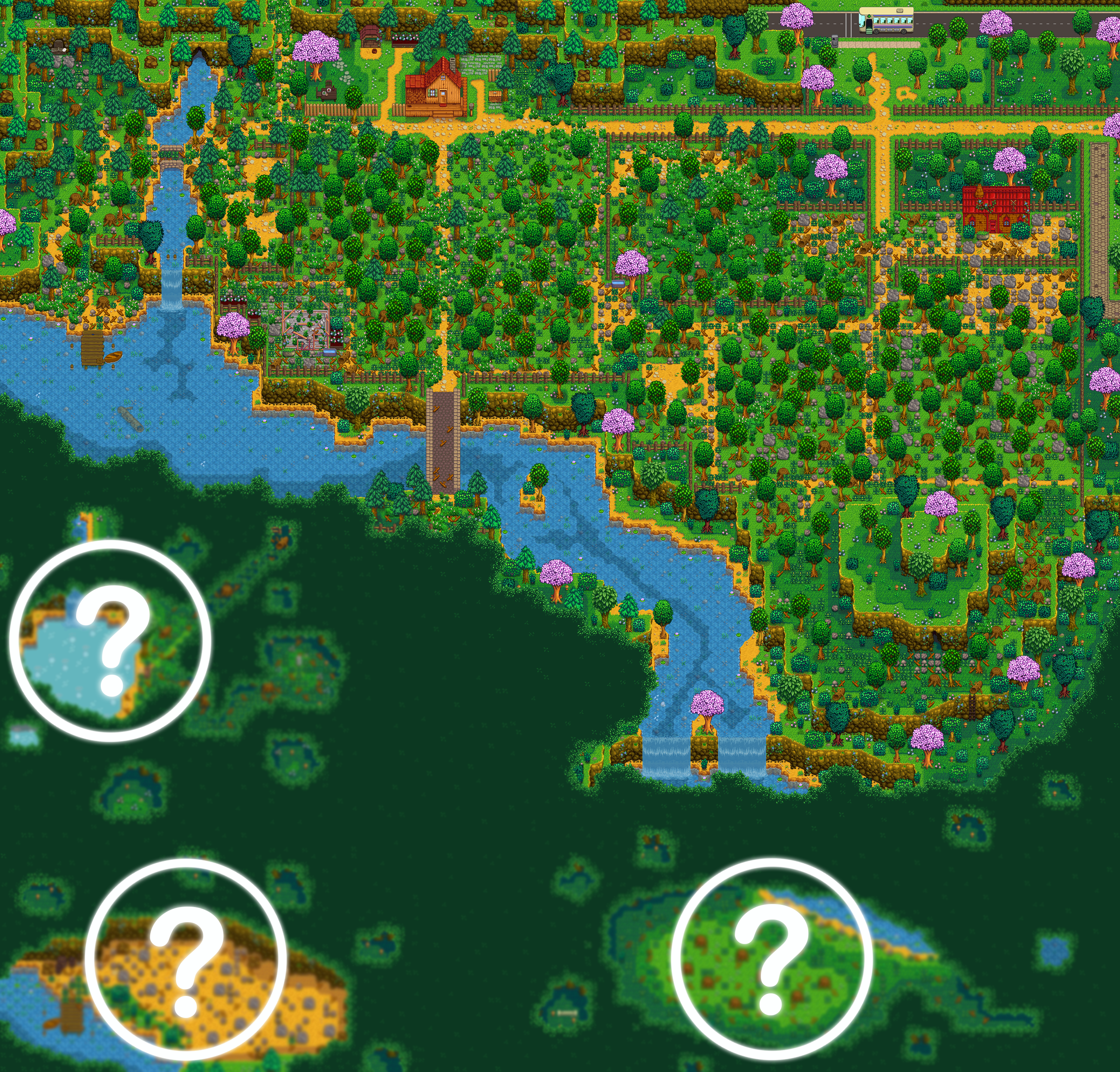 supple echo
and Gwen there has beat me to a zoom-out of the immersive farm map!
supple echo
(and the bus stop, because a bunch of your extra space is added south of the bus stop)
it's pretty fun to explore, though for me it's waaaaaaay more farm than I actually need.
dark mesa
@royal arrow for the Coii hairstyles do i have to extract them and add them to the folder ?
cuz there s a file read me
royal arrow
Make sure you get the CP version, it's the 2nd file listed.
royal arrow
Then you just extract to your Mods folder o:
supple echo
glad we got you sorted out!
(does anyone else ever feel less like a knowledgeable mod-user and more like a hapless player in a trench coat and funny mustache 😄 )
untold widget
What are some light-weight mods (that are less than 10 mb) that you would recomend?
restive zodiac
(We are all hapless players in trench coats and funny moustaches, I'm pretty sure 🕵️ )
!modrecs You could check out the Pathos list, since they're mostly QoL mods. Most mods that don't include a ton of assets are pretty small, too
native dragonBOT
Check out https://gist.github.com/Pathoschild/b608892d3e60bd25d0eea71ca7584649 for a list of mods recommended by Pathoschild! They're all compatible with the latest versions of SMAPI and Stardew Valley on Linux/Mac/Windows.
untold widget
ah, okay, thanks!
restive zodiac
Is it under 10mb total for all your mods, or per mod?
untold widget
per mod
restive zodiac
Oh yeah, most mods aren't nearly as weighty as something like Seasonal Outfits and will come in under that.
(On the other hand, Seasonal Outfits is worth the file size... :D )
untold widget
Okay
restive zodiac
(Most individual mods, anyway )
royal arrow
@supple echo like mouse said, we're all that silly. But other people see the cheeto color or green color and are like "ooh this person is wise" and we're like "lol nu we just broke things and had to figure out how to fix "
supple echo
haha
 dawn burrow
for the mods to work, do I really have to keep these images on my phone?
supple echo
I am still but a humble villager
royal arrow
It's ok, it took me a while to get to be a "shepherd." and remember the levels and roles are just for fun (except for maybe junimo lol), just means we've talked a bit in the chat 😆
supple echo
lol.
dawn burrow
...
supple echo
and Enzo, if you're patching the look of certain items, I believe you do need the images, but I would think (not sure) they'd be buried in your file manager somewhere. Are they popping up someplace you don't want?
fair vessel
@dawn burrow if those images are from inside various mod folders, yes you need to keep them
If they are duplicates stored elsewhere, no need
dawn burrow
Ok
Thx
Can I put them all together in one folder?
Because my gallery is all messed up