#archived-modded-support
1 messages · Page 598 of 1
 oak solar
oak solar
oak solar
im guessing it must be somewhere in the game save data
il back up my save and try changing the date back to the 12th of spring year one
what day do joja fix it
yea some things break
 royal arrow
!modrecs Faven#6390
 native dragonBOT
@wheat igloo Check out https://gist.github.com/Pathoschild/b608892d3e60bd25d0eea71ca7584649 for a list of mods recommended by Pathoschild! They're all compatible with the latest versions of SMAPI and Stardew Valley on Linux/Mac/Windows.
oak solar
but il just warp forward time again
royal arrow
Faven, Pathos' list has quality of life mods, which I think is what you're looking for :)
 torn root
Oh boy...I think Multiple Spouses and Family Planning are bugging out together, guess I should remove the latter. Saying "yes" to three days in a row of babies has wrought five days worth of babies. That math don't add up.
royal arrow
Any chance twins are a feature? 
Although you can also provide your log and see if there's errors
!log kaiidth#5663
native dragonBOT
@torn root Can you upload your SMAPI log to https://smapi.io/log (see instructions on that page) and share the link here?
torn root
I'm sure it has something to do with the half-dozen updates I should theoretically run...but if it keeps it up after I go do all the updating and removing I def will log it and see if anybody knows what's up, just like. Look. I can only suspend my disbelief of LOOK THEY MIGHT BOTH HAVE HAD, UH, MULTIPLES so far. it'll get kinda wild if they both had octuplets.
oak solar
update: Most seems to be fine but it did count some of the days as propper days so I have a lot of eggs and my stuff grew
:D
 summer inlet
!log
native dragonBOT
Can you upload your SMAPI log to https://smapi.io/log (see instructions on that page) and share the link here?
summer inlet
Now we wait becuase there no way I'll be able to help
 grim totem
There's a few other errors and warnings on there too. Some I can't shift
royal arrow
!patchsummary @quartz jetty
native dragonBOT
@quartz jetty Can you do these steps to provide more info?
- Load your save and view the content that should be patched.
- Type
patch summarydirectly into the SMAPI window and press enter. - Upload your SMAPI log to https://smapi.io/log (see instructions on that page).
- Post the log link here.
torn root
wahey, updating everything and removing the other mod fixed it! Now I just have to convince myself that Leah and PC could have had twins and triplets at the same time rather than twins and a single...pfff. The witch cursed them. who knows.
royal arrow
ooh, one thing, have you checked the mod comments for both the mods to see if anyone else has noticed an issue?
 quartz jetty
royal arrow
quartz jetty
royal arrow
@quartz jetty ok, so from the patch summary, it doesn't look like you have anything editing the Community Center except for SVE, and you have all your mods updated, so I'm not sure what's causing the glitch
you don't by any chance use any XNB mods, do you? XNB mods would require directly replacing game files
quartz jetty
I don't think I do
Only XNbs are SVE, Climates of Ferngil (which is meant to be compatible with SVE?) and Darker Dirts and Cliffs (which is a Content patcher mod)
royal arrow
oh, no those are fine
XNB mods actually go into your Content folder rather than Mods folder
royal arrow
yea I'm not sure what's causing your visual glitch, hopefully someone else in the chat knows what's up o:
grim totem
Could the new content patcher update cause json assets to stop working?
royal arrow
you know the drill, right o: need the log 
grim totem
I've been wanting for help with a pervious log lmao
royal arrow
lol all good
First one I see is Duplicate object: Prickly Pear just added by NeosSucculentfarm, already added by Bonster's Fruits and Veggies! so those 2 different mods are adding an item with the same name, and JA is like "oh no duplicate objects!" I think the succulent farm one is newer, so I recommend letting the mod author know
grim totem
Ahhh. Thank you
royal arrow
other errors I see are related to Fancy Lamps and I think Hisame More Recipes. Do you have the latest versions of those mods? I see the log says there's an available update, but I know that sometimes the mod's manifest.json just doesn't have the latest version #
grim totem
I haven't touched either and are upto date (manifest.json not having latest version number) and have been working fine. Just strange they don't wanna work now. There's now new updates for either aswell
Deleted succulents and its working again now. Phew. Strange
Thanks for the help @royal arrow
royal arrow
You're welcome! Also wait, no other errors either o: ?
royal arrow
LOL oh wow that's interesting that it caused enough issues to break other JA mods o: but hurray for not having those errors! Sorry I couldn't help you out with your Get Glam issue, I don't use it so I'm not well-versed in it. I think you may have mentioned that other Android users also have issues with it?
torn root
https://smapi.io/log/adfd551b770e4c0d8c75d41cee81c1f7 I THOUGHT it had stopped bugging...and I still need to figure out what I messed up with the sprites. But like. Baby #9. I didn't realize I had two left to update, could those really be causing bugs with a completely unrelated mod?
grim totem
Think so. Doesn't seem to affect the game though. And I can't get rid of the pfm yellow ones. So I ignore them lol
summer inlet
Hey question
Say you started a save but haven't got the cc cut scene yet
Could I still gets Minervas harder cc
royal arrow
Bunny, I know that some of the soda mods and shaved ice mod for some reason are giving people those warnings, idk why.
there are 2 I think I could help with though:
Ignoring content pack: [PFM] Fish Breeding 2.0.0 from /storage/emulated/0/StardewValley/Mods/FISH/[MNF] Fish Breeding Tanks/[PFM] Goldfish Bowl and Koi Tank. It does not have any of the required files.

Ignoring content pack: [PFM] Champagne Wishes 1.0.2 from /storage/emulated/0/StardewValley/Mods/PRODUCE/Champagne Wishes/[PFM] Champagne Wishes. It does not have any of the required files
you could try reinstalling the champagne wishes and fish breeding mods, and making sure you have all the dependencies
@summer inlet yes you can! I actually accidentally loaded a save that I had planned to use the vanilla CC bundles, and it is able to change to a CC bundle mod, so you're good in your case 
summer inlet
Okay cool
grim totem
Tried all that already @royal arrow 😓 and champagne wishes was a new download. Was hoping it might help fixes some other yellows
 summer inlet
I got it thanks!
It was Minerva
I put cc...
Not community centee
That's why
Okay I can't use Minervas becuase there's to many mods there sooo
royal arrow
There's other harder CC bundle mods, but if you're looking for one that uses some JA items in particular, you can try this one https://www.nexusmods.com/stardewvalley/mods/6361

Nexus Mods :: Stardew Valley
A bundle overhaul mod which utilizes the new crops, fruits and maschines provided by PPJA and tries to create a challenging but not frustrating experience playing Stardew Valley.
 toxic ridge
Hey guys I'm using alot of mods and got tons of errors. I already updated most of my stuff but the problem still remains..
any idea? Log: https://smapi.io/log/2e03f08c144b4dbb9a4e41283bc90d47
summer inlet
I only want the veggies and fruit mod so basically i want a harder one that uses vanilla items mostly
royal arrow
@grim totem I just checked and Champagne Wishes lists the shaved ice mod as a requirement, which has issues of its own, so that might be why Champagne Wishes doesn't work fully. Not sure about Fish Breeding though o.o
Cake, this is the one I use, if you're looking for recommendations:
Original mod (don't download this version, I'm including it for the pics and description): https://www.nexusmods.com/stardewvalley/mods/1062
Unofficial update (download this version): https://community.playstarbound.com/threads/migrating-xnb-mods-to-content-patcher-packs.141577/page-125#post-3358330

Nexus Mods :: Stardew Valley
Overhauls the Bundles in the Community Center, the collections, items, and the rewards.
grim totem
Ah thanks. Problem with them mods is they all depend on each other and it gets confusing 🥴 lol
Thanks for looking. I spoke to the people who made the fish tanks. They couldn't understand the error either lol
Think I removed the shaved ice because it had issues
summer inlet
That's perfect
Lenne4dawin
What do I actually need to download on that page
I can't find it
 restive zodiac
It's an attachment to the post, and you need to be logged in :)
royal arrow
@toxic ridge there's a couple things I can help with:
for the first block of red text, Skipped mods, SMAPI was unable to add the Boarding House Nut Butters mod because you're missing 1 mod, BHForageables. That looks like it may be provided on the Boarding House mod page, but I'm not sure.
2nd issue I see that you have an item added by 2 different mods: Flower Crown is added by Kawaii Hats for Json Assets and New Objects for Garden Village. I think you can remove the kawaii hats for json assets and that should fix a lot of your issues
toxic ridge
I'll try that out :3
native dragonBOT
Content Patcher (https://www.nexusmods.com/stardewvalley/mods/1915) is a mod which loads content packs to change the game's images and data without replacing XNB files. If you want to make mods using Content Patcher, start at https://stardewvalleywiki.com/Modding:Content_Patcher.
summer inlet
Oh so CP means it requires It? Why does it have [cp] in the start
royal arrow
Yea it's just a naming convention to let you know it requires CP. Like how mods that use Json Assets have JA at the start
 ornate atlas

summer inlet
Hi miss coy!
ornate atlas
Hewwo
summer inlet
Hewowo
ornate atlas
How are you liking the mods
summer inlet
very
ornate atlas
summer inlet
w<
torn root
I've been poking around in my files for a bit, is there a way to delete kids without it upsetting PC/spouses? It's not that I don't love them, I just REALLY don't think the four of them need ten kids. I'd like to erase from existence a couple of them |:
a couple of the ones that are bugged, at any rate - didn't say they could exist in the first darn place
torn root
dobe?
ornate atlas
Dove
royal arrow
ya if you've made it to having the ||witch's hut||
ornate atlas
Hi lenne 
torn root
ohh, sorry, I forgot that was a thing - I haven't managed yet to figure that'n out.
 bold tusk
Does anyone have the link to the latest updated Smapi for mobile?
 robust bison
is it not on the playstore?
bold tusk
Is it now?! Let me check!
It wasn't the last time I played on Mobile... To be fair that was last year
Yeah I didn't find Smapi on the play store
robust bison
oh yeah I think it got taken down
then it should be on github
https://github.com/ZaneYork/SMAPI-Android-Installer
I think this is it, but im not sure

GitHub
SMAPI Installer for Android. Contribute to ZaneYork/SMAPI-Android-Installer development by creating an account on GitHub.
bold tusk
Thanks bud. Yeah this my new phone so I gotta start all over :(
grim totem
Yeh it got taken down off playstore for some reason
 split patrol
Is there a mod that allows you to grow trees in a farm building, like your house or shed?
or even crops
royal arrow
@split patrol is this sort of what you're looking for? https://www.nexusmods.com/stardewvalley/mods/6221
 split patrol
Yes but was hoping for a shed :<
I found out a way, hopefully it won't crash my game later or anything 
quartz jetty
Is there any mod to remove the bus travel animation? I know faster animations can speed it up but it becomes a jumpy glitchy mess for me
grim totem
@royal arrow succulent mod got updated after I reported the bug. I can have my succulents back! 😁😁
 pallid basalt
I need mods
royal arrow
Woohoohoo!!! I'm so glad, @grim totem
robust bison
!modrecs Meliodas#4915
native dragonBOT
@pallid basalt Check out https://gist.github.com/Pathoschild/b608892d3e60bd25d0eea71ca7584649 for a list of mods recommended by Pathoschild! They're all compatible with the latest versions of SMAPI and Stardew Valley on Linux/Mac/Windows.
 strange river
@quartz jetty I've reset your nickname to fit with rule 4. Please feel free to use any nickname that follows that rule :)
 vernal acorn
Hey guys, idk if this is the right place to ask, but how do you merge xnb files or if that even is possible?
restive zodiac
You'd need to start by unpacking them https://stardewvalleywiki.com/Modding:Editing_XNB_files#Unpack_game_files and then edit the image files in an image editor, such as paint dot net or GIMP. Hope has a nice template here https://cdn.discordapp.com/attachments/156109690059751424/583794944897056768/Hairstyle_Template.png.
That said, if you're on any platform that supports SMAPI modding - Windows, Linux, Mac, Android - you'd be much better off looking at Content Patcher or (possibly not Android?) Get Glam packs, which don't require overwriting the game files.
A number of XNB mods have been converted to CP here https://stardewvalleywiki.com/Modding:Using_XNB_mods#Alternatives_using_Content_Patcher, and you can find all Get Glam packs by going to the mod page https://www.nexusmods.com/stardewvalley/mods/5044 and clicking the Requirements drop down. (Random example: https://www.nexusmods.com/stardewvalley/mods/5802)
royal arrow
I've personally manually merged CP hair packs (they were png files) using GIMP and the alignment chart (that is a super nice one, better than the one I have)
vernal acorn
Oh oof, it doesn't work for me. 😿
I tried merging pngs too, but the hairstyles ingame end up buggy.
I'll keep trying though. Thanks guys. 
restive zodiac
Which part doesn't work for you? What mods are you trying to merge and what platform are you on?
royal arrow
Yea we need a little more detail to help 
vernal acorn
Ah, I'm using an android, and I enjoy Yuriyuri and Coii's hairstyles. I wanna merge them but several failed attempts later, I decided to ask for help.
GIMP doesn't work on android.
royal arrow
Ah. Would you be able to merge the files on a computer and then transfer the file to your android device o: ?
vernal acorn
Thanks for the idea, I haven't thought of that.
 shy orbit
@dire fractal does who's greenhouse actually change the exterior though?
the log doesn't appear to show the mod altering the exterior
immersive farm 2 remastered however seems to be doing it
royal arrow
@restive zodiac hi there, a user (Gaybriel#6494) is having an issue with using a greenhouse recolor with IFR2 and SVE. I know you know the secrets of the invisible greenhouse, so would you be able to help o: ?
restive zodiac
Are you following the instructions here https://github.com/FlashShifter/StardewValleyExpanded/wiki/Troubleshooting#custom-greenhouse-interiorsexteriors-if2r ?
royal arrow
Haaaaaaa he could sense it >_>
restive zodiac
That's the interior tiles. Are you using the overrides folder from the guide I linked?
(Although I think that mod will need a map edit to exit properly to the right coordinates, since it uses a door instead of a normal warp.)
summer inlet
This is odd
royal arrow
What's odd o: ?
summer inlet
Look at the hardwood stumps
The have the animation of being axed while I'm holding a pic
shy orbit
speaking of hardwood, i never managed to find out what mod was spawning additional stumps in the secret woods
royal arrow
Ohhh ok. Cake, I think it's in the Tractor settings whether it'll axe the stumps, but idk why it's doing it when you have the pickaxe in hand o.o
Vibel, this is probably obvious but do you have any mods that edit the secret woods? If not, I think Farm Type Manager components might be the next to look into o.o
summer inlet
Yea, ussaly the axe would take care of it but I only have the basic axe
I'm just confused why it's doing than with the pic out
royal arrow
Yea, that's odd. Anything in your log?
shy orbit
hm, it didn't occur me to check if something was editing the map, what is it called?
royal arrow
There's a couple different mods with deep woods in the name, but you can also look at any FTM components you have and check their mod pages to see if they do anything with the stumps
 idle bramble
yo really quick nexus mods is the main site for mod downloads?
royal arrow
Yes it is! 
There are some mods on the Chucklefish forums and ModDrop as well, but nexus mods is the main site
 tight tusk
@shy orbit i'm also having a problem with the secret woods having extra stumps. i've tried removing jasper from my current save file but it's still there. weirdly enough when i removed walk to the desert, garden village and jasper, it went back to normal
also i've used who's greenhouse in the ifr2 map before, i don't think it changes the greenhouse exterior. only the farmhouse cellar and greenhouse interior. whatever mod i used for the farmhouse exterior and buildings like hudson valley or eemie's medieval buildings would affect the greenhouse exterior instead
 proven venture
hi how do i upload my smapi log? my game won’t start no matter what i do
shy orbit
@tight tusk jasper has this in Woods-Patch.tmx <property name="Stumps" value="17 9 3 22 8 3 26 7 3 31 8 3 44 7 3 48 8 3 20 18 3 26 16 3 36 16 3 40 14 3 50 16 3 33 26 3 38 26 3 43 26 3 48 26 3"/>. assuming those are coordinates delimited by 3's, they do match the placement of some extra stumps at least (i checked a few)
proven venture
do i just send the link? catbox wouldn't let me upload it
shy orbit
if you uploaded the log to the site, then yes (i don't know what catbox is)
proven venture
it's something the wiki recommended
https://smapi.io/log/78b96315c18f419aa9d3eb47f2b7e26e but ye heres the log
native dragonBOT
See https://stardewvalleywiki.com/Modding:Player_Guide/Troubleshooting#Reset_your_content_files for instructions on resetting your game files! You may also want to check this list of XNB > Content Patcher conversions (https://stardewvalleywiki.com/Modding:Using_XNB_mods#Alternatives_using_Content_Patcher) to see if there are already replacements for any XNB mods you may have been using :)
shy orbit
(the resetting your game files part)
proven venture
oooooh
shy orbit
you do also have some problems with some mods not loading because of missing dependencies
and this [BL] Desert 1.0.6 because you have multiple copies of this mod installed. Found in folders: Mods\[BL] Desert (1.0.6), Mods\GardenVillage-1-1-3\[BL] Desert (1.0.6)
split patrol
Hello, I am using the Upgrade Empty Cabins mod along with the Cabin as Sheds mod but it is not letting me upgrade the cabins? Any help would be appreciate! Log: https://smapi.io/log/c56b329e596a41278f9588f139b4a03b
I tried removing Cabin as Sheds mod but i am still not able to upgrade. I keep getting that error
 simple patio
@split patrol start a new farm and then try?
split patrol
I am, that is a brand new save file to test it out : o
simple patio
Is instant build switched on? If so you need to turn it off before building cabins.
split patrol
it is off
tight tusk
@shy orbit thank you! hmm what if i just delete the fairy pools instead?
simple patio
@split patrol the mod requires this mod to work - https://www.nexusmods.com/stardewvalley/mods/6145
From what I can see you don't have it

Nexus Mods :: Stardew Valley
Empties out cabins for storage or decorating space. Intended for singleplayer use.
shy orbit
@tight tusk might not be a good idea.. if jasper uses it
split patrol
isn't it the other way around? Jen's requires upgrade cabin, not vice versa?
besides, i want to use Cabin as Shed mod which would be incompatiable with Jen's : o
simple patio
They both need to be installed for both of them to work, If cabin as shed is incompatible with Jen's then I'm afraid neither Cabin upgrade or Jens will work
You can try though
But for cabin upgrades to work you need Jens
simple patio
if you don't mind could you post the new log?
split patrol
sure!
i am going to try using an older version of the upgrade cabin and see if it works
well using the old version of the mod seems to work at least
simple patio
Yeah I tested the up-to-date version of the mod and it's pretty broken
simple patio
no problem! c:
summer inlet
!log
native dragonBOT
Can you upload your SMAPI log to https://smapi.io/log (see instructions on that page) and share the link here?
summer inlet
Send than maybe
proven venture
i'm so close to being it, it's frustrating
thats the old one nvm
https://smapi.io/log/f6374a135684481c88cb40941357f608 this one should be it
simple patio
@proven venture try removing sundrop and custom furniture and see if it works
proven venture
will do
 neon palm
Good day. Regarding about my issue on shops not showing up portraits. It happens for both STF and TMXL shops. Vanilla shops are fine. I already tried removing almost all mods, and just kept those I wanted to test. Here's the log:
Any known issues or configuration that cause portraits of custom shops not to work?
royal arrow
Did you check the mod comments for the custom shops for which you're not seeing the portraits, to see if anyone else mentioned this issue? o: I've only seen it for some people on Android depending on their zoom settings o.o
Also could you provide a screenshot of what you do see?
proven venture
i finally got everything to work! thanks!
neon palm
This is for GV shop - bakery
I tested it for GV, Tailor Mouse and Mermaid island.. none of them shows portrait 😦
robust bison
and they're supposed to have portraits right
royal arrow
Yea they are
neon palm
their assets tell they have portraits
royal arrow
And there's nothing in the log after you open one of the shops, right?
neon palm
nothing weird just these normal logs:
[Shop Tile Framework] Refreshing stock for all custom shops...
[Shop Tile Framework] Generating stock for GVFlorist
[Shop Tile Framework] Generating stock for GVSeeds
[Shop Tile Framework] Generating stock for GVDiner
[Shop Tile Framework] Generating stock for GVBakery
[Shop Tile Framework] Generating stock for GVClothier
[Shop Tile Framework] Generating stock for GVArtisanry
[Shop Tile Framework] Generating stock for GVMachines
royal arrow
Ok. I know STF has a verbose logging option in the config, can you enable that to true temporarily, try opening a custom shop, and see if there's anything new in the log?
neon palm
should I take out STF or their folders? i just thought maybe the path has something to do
sure will try
royal arrow
PS without STF the shops wouldn't load at all o: so I don't think taking STF out would help o.o
neon palm
i mean, take it out and put on the mod folders instead of subfolders
royal arrow
Oh! What's the folder path you have now, Mods > [STF] Tailor Mouse? Or something else o: ?
neon palm
Mods > [PPJA] Tailor Mouse > [STF] Tailor Mouse
yeah i just dropped the whole folder
I'll try to take them out out the top folder and let's see
royal arrow
Ah, I have mine the way I showed it, but idk if that would be enough. You could always quickly test that theory for the Tailor Mouse and see if it works!
Any luck with the STF verbose log?
neon palm
nothing crazy with verbose log too
https://smapi.io/log/551b9c3761c74938848a4dc942164a23
royal arrow
As a side note, don't forget to switch the verbose log back to false when you're done testing (unless you want to keep it on)
neon palm
found out the reason now 🙂
portrait doesn't work on window mode
it has to be window borderless or full screen 😹
 left path
Can you spawn the wedding ring throught the cjb item spawner mod?
 keen moss
Yep
 rancid badger
So this may be a new issue: I have DSVO and CoF together and had my first late fall snow day happen
There were mostly vanilla portraits and mostly DSVO sprites, but some exceptions on each count
keen moss
Yeah snow is only supposed to trigger in winter so that's how it's setup. If there's snow not in winter it won't load much if anything. I could add a token to include fall 28 in that if CoF is installed it'll load the snow sprites.
rancid badger
That's the weird part...it was the 26th! I can recreate it and send a log if needed; I was too tired after stream to remember 
(I also have video of it for that reason, of course, and can DM a link)
keen moss
Eh it's not something I need a log for. I could also just slap fall into the snow season token
If you can recreate it, try changing this dynamic token:
{
            "Name": "WeatherVariant", // Snow Indoors/Outdoors
            "Value": "_Snow",
            "When":
            {
                "Season": "winter",
                "Weather": "snow",
            },
        },
But include fall under season
Should work?
rancid badger
Okay, will do. Seasonality of the outfits is a nice-to-have, of course, but having the characters suddenly turn un-diverse is disconcerting. Thanks!
keen moss
Yeah. DSVO also is very far behind SVO so there may be stuff missing. They're waiting to update all at once while I prefer to update as stuff is finished.
 autumn sand
hey! i kinda need help on modding? i downloaded smapi and content patcher, changed steam launch options and opened stardew valley
but i dont have the mods folder
 outer turret
@tight tusk jasper has this in Woods-Patch.tmx
<property name="Stumps" value="17 9 3 22 8 3 26 7 3 31 8 3 44 7 3 48 8 3 20 18 3 26 16 3 36 16 3 40 14 3 50 16 3 33 26 3 38 26 3 43 26 3 48 26 3"/>.
@shy orbit thise are the regular secret woods stump placement I forgot to remove then from the woods patch and also broke the warps to Mermaid Lagoon and deep woods. I'm not sure if that is what you are discussing here but I thought I'd chime in. The warps will be fixed when I upload my 1.15 version later this week.
If you are having issues just delete Fairy Pool (both folders)
It will not break Jasper.
You will need to do a terrain reset to remove the stumps though (or chop em). Sorry it was a rookie mistake!
@tight tusk might not be a good idea.. if jasper uses it
@shy orbit he was going to but i actually added it as a temp map as well. So it's just an additional area to explore and fish
robust bison
@autumn sand have you ran smapi yet
autumn sand
yeah
wait oops im kinda doodoo i didnt check the programfilesx86
 sorry to trouble you ! thank you for helping though
shy orbit
@outer turret i see. i don't use those mods so i didn't have warp problems
autumn sand
does anyone know how to fix this ?
outer turret
Download it again maybe?
neon palm
@autumn sand did you delete the manifest or maybe put it on a subfolder?
autumn sand
err i didnt touch the files but ill try and redownload it, see if it works
ahh for content patcher do i need to extract the zip files into the mods folder ?
robust bison
yes
outer turret
Possibly an I interrupted download? Happens to me sometimes!
autumn sand
do i only move the files with [CP] in the title to the mods folder? im redownloading the files
or do i extract the whole zip file to the Mods folder?
 fair vessel
Does anyone know of any mods for SDV that are designed specifically and only to patch a known bug(s) in the game?
restive zodiac
I responded in #making-mods-general but I thought this was the quintessential https://www.nexusmods.com/stardewvalley/mods/4417
neon palm
@autumn sand normally you can extract the whole zip file to mods folder but if not, the mod description should have instructions
restive zodiac
Another one (now obsolete) that comes to mind was one I always used until 1.4 fixed it - all it did was make the secret woods falling leaves respect season
Another one did nothing but fix the bee house range being different than intended...or that stopped Leah's cabin music from continuing to play after you left her cabin... there was a bug that stopped trees from dropping seeds if you leveled up midday that had a mod
autumn sand
@autumn sand normally you can extract the whole zip file to mods folder but if not, the mod description should have instructions
@neon palm oooo i see
outer turret
@outer turret i see. i don't use those mods so i didn't have warp problems
@shy orbit I'm glad. They will be optional in the next update but I want to get his marriage schedule tested first.
 rain pier
hunger
robust bison
yeah another hunger adds a hunger bar
robust bison
 rain pier
thank you
robust bison
np
 tranquil jay
oooo
 unreal moat
Is there a mod that let pigs go outside and find truffles in the winter? If not, would it be hard to make one?
 fresh gazelle
I don't think there is one already @unreal moat but you could suggest it here: https://github.com/StardewModders/mod-ideas

GitHub
Submit ideas for mods to create, or find your next mod project! - StardewModders/mod-ideas
unreal moat
ty
neon palm
Anyone has idea on what will happen if the calendar becomes full with birthdays i.e. with so many custom npcs?
just out of curiosity
royal arrow
That's an excellent question, I believe it came up on mod ideas because someone had a suggestion on how to declutter it. Idk what the actual issue looks like though, so presumably the only thing that would happen is there's a lot of overlap on certain days, and you can't quite read whose birthday is when?
Using the Happy Birthday mod, I pick my birthday as Summer 19 to be vaguely similar to my actual birthday, that day is also Demetrius' birthday, but it's no biggie to have 2 people have birthdays on the same day currently
neon palm
I see. I think the easier question for insight is if two custom npcs share the same birthday, do their birthdates remain or somebody gets booted out to next day? I vaguely remember somewhere that if you put a birthday on a festival, that's what happens.
or maybe if the same logic as happy birthday mod, they just show up one person in the calendar but the dates remain 🙂
royal arrow
Ah ok, the game logic for festival days is different though.
I think if 2 custom NPCs share the same birthday, or 1 custom NPC and 1 vanilla NPC share the same birthday, it should be fine? I don't think they should get booted o.o
But I have no data to back that up! Lol do you know of 2 custom NPCs that share a birthday? I could test it o.o
also for Happy Birthday, it places the farmer's face on a different spot than the NPC, like so o:
restive zodiac
I think shared birthdays will work, but only one will show on the calendar.
neon palm
that's great, i was a bit worried that npcs will be limited. So it's possible to have an actual town population. 😆
 dire fractal
im new to the game and i need mods pls

 dire fractal
thx
royal arrow
@dire fractal
Check out the player guide on the wiki https://stardewvalleywiki.com/Modding:Player_Guide
And check out https://gist.github.com/Pathoschild/b608892d3e60bd25d0eea71ca7584649 for a list of mods recommended by Pathoschild! They're all compatible with the latest versions of SMAPI and Stardew Valley on Linux/Mac/Windows.
Do you want to play Stardew Valley with mods? This guide is for you!

Gist
Stardew Valley mod recommendations. GitHub Gist: instantly share code, notes, and snippets.
 junior musk
Is it normal that NPC Map Locations is giving me an ongoing stream of errors in co-op?
I feel like that didn't happen before. Maybe it's because I'm using the Expanded version but we're playing a standard map?
dire fractal
Yeah maybe
junior musk
"This mod failed in the Gameloop.UpdateTicked event."
dire fractal
Yeah maybe it's this
Because Sve has some extra maps
So I guess the map is looking for those locations
restive zodiac
You should definitely use the versions that fit your actual mod list, yeah.
junior musk
Oh hmm.
restive zodiac
Unless "standard map" is just talking about the farm - it doesn't matter if you use IF2R or not for NPC Map Locations.
junior musk
The map DOES work. It's just this endless stream of errors that's bugging me
Nope I'm using the Vanilla forest map lol
restive zodiac
Like... Marnie's Forest map?
Not forest farm?
I'm just clarifying because what Randy was talking about initially was if you are using the SVE version of NPC Map Locations without using SVE, and I was agreeing but then checking to make sure you weren't just talking about the farm, which doesn't matter. So Forest Farm is fine, vanilla forest map where Marnie and Leah live is not 😄
(I suggest just uploading your SMAPI log, which provides all that kind of information up front without confusion, hehe https://smapi.io/log has instructions for how to share it!)
junior musk
Hmm
It doesn't happen when I'm alone. But once the farm hand joins, I get all these errors
Oh well
The problem is it's partly in Japanese because that's my system's language lol
 craggy drum
What was the thing you needed to put in launch options again
i remember that i took it out because i didnt want mods but its been half a year and i like them back
junior musk
[22:59:51 TRACE game] 195378101249290861 connected
[22:59:57 TRACE SMAPI] Received connection for vanilla player -513233543573194258.
[22:59:57 TRACE game] Approved request for farmhand -513233543573194258
[22:59:58 ERROR NPC Map Locations for Stardew Valley Expanded] This mod failed in the GameLoop.UpdateTicked event. Technical details:
System.ArgumentNullException: 値を Null にすることはできません。
パラメーター名:source
場所 System.Linq.Enumerable.All[TSource](IEnumerable1 source, Func2 predicate)
場所 StardewModdingAPI.Framework.SMultiplayer.<>c__DisplayClass19_01.<BroadcastModMessage>b__1(MultiplayerPeer peer) 場所 C:\source\_Stardew\SMAPI\src\SMAPI\Framework\SMultiplayer.cs:行 380 場所 System.Collections.Generic.List1.RemoveAll(Predicate`1 match)
場所 StardewModdingAPI.Framework.SMultiplayer.BroadcastModMessage[TMessage](TMessage message, String messageType, String fromModID, String[] toModIDs, Int64[] toPlayerIDs) 場所 C:\source_Stardew\SMAPI\src\SMAPI\Framework\SMultiplayer.cs:行 380
Goes all haywire after the farmhand enters
royal arrow
@craggy drum hi there, should be part 2 of installing SMAPI https://stardewvalleywiki.com/Modding:Player_Guide/Getting_Started
Do you want to play Stardew Valley with mods? This guide is for you!
junior musk
The Japanese really just says "The value can't be null"
royal arrow
Blue_Three, I recommend posting your full log here anyhow, because it gives us a lot more info than just the error
junior musk
Guess I'll just have to try out
royal arrow
which platform / OS are you on, Sky?
royal arrow
ok so here, it's part 2 https://stardewvalleywiki.com/Modding:Installing_SMAPI_on_Windows
This page explains how to install SMAPI (the tool which lets you use mods) on Windows. See also:
you'll likely need to install SMAPI again just to be able to get the text you need to copy-paste, but that's ok!
royal arrow
it takes a few seconds at most lol you got this
craggy drum
fair
royal arrow
your mods will be fine, they won't go away or anything
junior musk
I think the issue with that NPC Locations error is that she isn't using it. Another person I played with had it installed and I never got that error.
junior musk
Just overwrite them
royal arrow
that depends on the mod, honestly. Some can just be directly updated, others will require removing the old folders and then installing the new ones (like if the mod author changed a lot). It's definitely safer to just remove the old folders and install the new ones
craggy drum
alright
junior musk
Yeah I was gonna say
 knotty swan
heya guys can i get some help? i struggle to get some mods to work and idk how to fix this, ive tried updating smapi and all but they just wont work
summer inlet
!log
native dragonBOT
Can you upload your SMAPI log to https://smapi.io/log (see instructions on that page) and share the link here?
summer inlet
Now we wait for someone like Lenne who actually knows what there doing
summer inlet
Nope here comes Lenne lol
royal arrow
Cake, you flatter me (there are people out there who definitely know more, let me take a look)
knotty swan
yay \o/
knotty swan
oh my i see a wall of text incommingXD
royal arrow
alright so, X'ildah, the block of red text is Skipped mods, says some of your mods couldn't be installed because you don't have the latest version of SMAPI (you're actually several versions behind). I'd start by downloading and installing the latest version of SMAPI. It looks like you didn't properly install SMAPI because there's a folder for it in your Mods folder, check the install instructions for that, and remove the folder you have for it inside Mods.
Then download the latest version of FeTK, get the link by searching for the mod on https://smapi.io/mods
I don't know if Expanded Fridge and More Artifact Spots have updated versions, check https://smapi.io/mods for those as well, see if there's an update or alternative for those, but remove the versions you have now.
You can also update NPC Map Locations, so grab that update as well.
I recommend removing No Soil Decay and instead getting No Soil Decay Redux, available on nexus (the version you have is outdated).
There's an unofficial update for Prismatic Tools, check https://smapi.io/mods for the link
All that should take care of the issues you have o:
knotty swan
thank you so much for taking time to answer:) i will do as you suggested and see if it works, thanks again ❤️
summer inlet
I knew Lenne probably would be able to help
royal arrow
ye as long as your issues aren't super complex game errors then I'm like  at that point we'd need Jonqora, mouse, or someone else lol
Hiya X'ildah, it looks like you put the SMAPI installer folder inside your Mods folder o: you have to put the SMAPI installer folder somewhere like your Desktop or Downloads folder, and then run the install on windows bat file that's inside the SMAPI installer folder
oak solar
hullo, I was wondering if anyone knows if there is a mod where you can see ingame as your playing how many points you will get from grandpa's evaluation/see what you have to do for more
knotty swan
omg that made it work! no more red or purple lines!!!!!
royal arrow
Penguins I don't know if there's currently a mod for that (hehe I know Jonqora is working on one that does some of what you're asking), but what you can do is check on a website, lemme find the link
summer inlet
Hey Lenne why can't I react to your messages
royal arrow
idk o:
oak solar
Hey Lenne why can't I react to your messages
what does it say
royal arrow
@oak solar here https://mouseypounds.github.io/stardew-checkup/
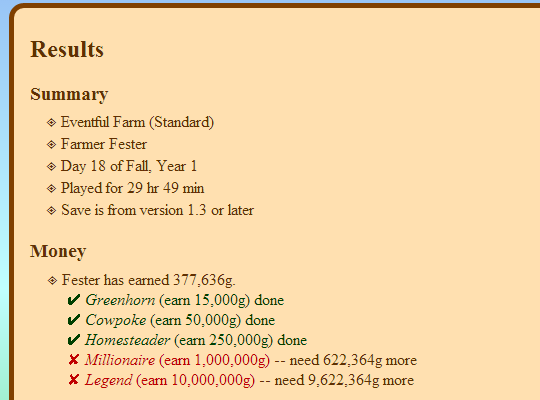
An app to read a Stardew Valley save file, check the progress of various achievements and milestones, and list what's missing.
oak solar
Thanks
summer inlet
Oh it works odd
It just said reaction blocked but it worked now so we good,wonder why it didn't work
oak solar
that happens if the person you add a reaction to has blocked you :/ Might also happen in other cases eg possibly if direct messages are off and your not friends on discord
summer inlet
doesn't matter much was just curious ¯\_(ツ)_/¯
knotty swan
can someone suggest a beautiful remake of stardew? i see alot of them but dont know which one to choose
royal arrow
depends on what you're looking for o: just map changes, or big overhauls? Stardew Valley Expanded (SVE) is popular
unreal moat
Anyone know which mod squeezes sap from your trees seeds. I remember seeing it on nexus a while back, but I can't find it now.
junior musk
Does somebody here using NPC Map Locations have a minute to join me in a test game? I want to test if it's going to get me the same kind of errors as before.
@unreal moat This maybe? https://www.nexusmods.com/stardewvalley/mods/5112

Nexus Mods :: Stardew Valley
--Who didn't want to pull his own saplings?-- It brings a Machine to grow your own Sapling!!This Mod is in englisch, portuguese, chinese and german.
royal arrow
@fair vessel I had Shane and Pam disappear in JojaMart again! So I used debug where name
debug where shane
[Console Commands] > Shane is at JojaMart, 13,-747
debug where pam
[Console Commands] > Pam is at JojaMart, 13,-480
there was nothing in the log when I entered the JojaMart though
fair vessel
Oooh! that's useful!
It looks like - who was it that predicted they were probably wandering offscreen?
royal arrow
you o.o lol
fair vessel
Nah not me
royal arrow
although possibly also Wingheart?
fair vessel
Someone was saying a pathing glitch could cause them to clip through the walls into the endless void
Because yep, that looks like Shane is 747 tiles north of the jojamart wall
and I bet x = 13 is in line with the door warp
quartz jetty
I remember vaguely a mod that added options in shops to buy a 999 stack all at once, am I hallucinating or can I just not find it?
royal arrow
now I'm remembering other names in that convo: Gervig, Wingheart, you, maybe even mouse? it was a while back.
I wasn't stalking Shane and Pam to see which door they went through though o.o I just went in at 6pm to give Shane a gift, since the map said he was in the JojaMart
iirc the theory was that it's because they went through the "incorrect" door? I'll run a patch summary and then see if I can find what's editing the jojamart o.o
fair vessel
It might also be the town - if it's a problem with a warp tile in front of Jojamart
post a log too, if you can - it will show Trace logs for patches by non-CP mods
@quartz jetty You might be thinking of CJB Item Spawner, which spawns stacks of 999 items?
Or maybe the mobile shop UI, which has a slider bar (maxing out at 999 if you have the $)
royal arrow
prepare yourselves if you look, it's a huge log https://smapi.io/log/13b91cebd57a4eb2ae7daac78cc4e624
 candid loom
Anyone have any suggestions on mods that will get me my artifacts quicker? I see a couple on Nexus, but I'm wondering if anyone actually has any experience with any. Tired of wandering around looking for worms. Lol
royal arrow
Hmm, I don't know if it's quicker but there is a mod on nexus called Artifact System Fixed o.o
candid loom
Yeah I think that one increases drop rate for a few of them, if I remember right.
Have you tried it?
royal arrow
Yea I use it, but I've had it for a while so I don't remember if it's faster
fair vessel
There's a mod that makes digspots much more common, too!
candid loom
There's two, actually. I assume the one you're talking about is the one that was last updated in November?
fair vessel
Yes, the other one no longer works
The preview image for it is... quite something huh? 😆 lol
https://staticdelivery.nexusmods.com/mods/1303/images/3340/3340-1548450213-118361527.png

 royal arrow
to me they're worms, and that's definitely unsettling LOL I imagine that's configurable? 😆
fair vessel
I'd hope so! lol
candid loom
Lol yeah. I was looking at that like "Well I don't need THAT many." 🤣
fair vessel
Yes, it is.
candid loom
I believe it is, yes.
restive zodiac
@royal arrow The joja void is a really simple fix, pathfinding is just dumb with double doors. You can test this if you want to see if it still happens https://cdn.discordapp.com/attachments/678284714829807636/682250629988483082/CP_Vanilla_Map_Overrides2.zip
(Just a reminder too that patch summary only tells you about CP patches to a thing, so if you're looking for any mod that edits something you should search trace :) For example no TMXL edit would show up there )
royal arrow
Thanks, mouse! I'll keep that in mind (I'll test what you sent in a sec, but I've had struggles even reproducing this bug 😕)
restive zodiac
Yeah, if the door caused it, it's hard to nail down with a lot of mods, because it's not any of the mods' fault, just can happen when they pick a route that goes through the far door.
royal arrow
that's fair. In my case, sometimes just reloading the save (or rolling it back if I'd already finished the day) makes it so the issue doesn't happen again, but then I'd lose the day's progress. testing rolling back the save now
um, I'm a little unclear on how to use what you sent, mouse o.o do I just drop that into my Mods folder, or do I need to follow the readme? 
restive zodiac
Just drop it in Mods, sorry!
The readme is for using it as a(n outdated) template pack for overriding maps, but since I always have it on hand it frequently ends up being used for some small patch to send to something else 😅
dire fractal
can someone help me i cant instal the new smapi
royal arrow
Ok, test 1, Shane entered through the right hand door, and continues to exist in the shop o.o I didn't try to get in his way, that's for test 2 o,...,o
@dire fractal which platform / OS are you on?
dire fractal
window
royal arrow
Did you check here? https://stardewvalleywiki.com/Modding:Installing_SMAPI_on_Windows
This page explains how to install SMAPI (the tool which lets you use mods) on Windows. See also:
dire fractal
i just updated my smapi but it gives error
restive zodiac
Can you tell us the error?
royal arrow
(Pam also entered through the right hand door and continues to exist in the shop, here we go, test 2, obstruct them  )
)
Did you run the install on windows bat file and then got the error? Could you translate the error for us o: ?
dire fractal
ok
restive zodiac
Is that from the installer or running SMAPI? If it's from the installer, make sure you completely extract the folder first
(ie don't run it from inside the zip file, take the whole installer out of it and put it somewhere first)
dire fractal
ok
The file internal / windows-install. Cannot find exe. Check that you have entered the name correctly and then try again
royal arrow
Ok, did you try unzipping the installer folder somewhere, like desktop or Downloads folder, and then running the installer? Like mouse said, it won't work if you try to run the installer from inside the zip file
royal arrow
To clarify: which file did you try to run, the install on windows bat file?
royal arrow
(Test 2: obstruct them was technically a success, both Pam and Shane went through the right hand door, and continued to exist in the shop.
Test 3: remove vanilla override provided by mouse, and see what happens. Shane, unobstructed, went through the left hand door, and continued to exist in the shop. Pam, obstructed, also went through the left hand door, and also continued to exist the shop. So I got nothin' 😖)
dire fractal
how do i just update smapi without just instaling the new one
restive zodiac
hehe, yeah... In those cases it sounds like their schedule would have been normal (left door, always ok) but only went through far door because inner door was removed :P
You just install the new one, bubble! SMAPI cleans up old files automatically :)
dire fractal
ok
royal arrow
but this is what I'm saying, it's not a reproducible bug, even on reloading the same in-game day 😆
restive zodiac
Yeah, just meant hard to nail down. Far door with mod installed is just because there is no other door with it installed 😄
royal arrow
ok cool. so as far as a workaround, would keeping that override potentially avoid the issue?
restive zodiac
(provided another mod doesn't edit it after...) It would 100% avoid the door-caused joja void problem (although just changing the tile under the door also works and is less invasive), but void walking problems in general can be caused by other things, so it's still possible it could happen if that wasn't the cause a specific time
royal arrow
ooooh ok, so if anything, it would help narrow it down a bit if I kept the override in there, because then if the issue still occurs, I can eliminate the door as a cause o: !
grim totem
Just downloaded 'SvFishingMod' says to edit the configuration file to config. But I can't open it. Anyone know how I can?
shy orbit
can't in what way? did you try opening it with a text editor?
royal arrow
ah, it's a .cfg file, not a .json file. But yea try seeing if you can open it with a text editor
 jovial nimbus
Do you guys recommend using the "Stardew Valley Expanded" mod for someone playing for the first time? Or should I save it for another save?
royal arrow
it's recommended after you've played for a while, not for your very first time with Stardew Valley
it changes a lot of stuff, adds new content, etc. so it can be overwhelming if you're also learning the game for the first time
jovial nimbus
Alright thank you! I'll wait until I'm ready
 ashen garnet
..>! Huh. Well I learned something new: Automate works on the trash cans in town
royal arrow
yea I think the only time they don't is if you're also using Better Garbage Cans? but I'm not sure
ashen garnet
never heard of BGC
royal arrow
it's by the same person who makes Better Train Loot and a couple other "Better X" mods
ashen garnet
But I had no idea it worked. I put a chest near Clint's for geode overflow and then didn't understand why I couldn't click the can
so now I need more chests because I have a desperate need to feel like my recycle machines are worthwhile
 shell jackal
Does anyone know if the Example machines in CFR were ever converted to PFM format? Mainly the Alien Idol.
royal arrow
to clarify the name of the mod was "Example Machines"?
shell jackal
No, they were an optional download on the CFR page. If I remember correctly.
royal arrow
ah, ok, gotcha. That's a good question! let me see if I can find
@keen moss hi there 😄 iirc you mentioned you'd worked on migrating machines from CFR to PFM, if so, do you know if the example machines that were an optional download on the CFR page were converted to PFM?
keen moss
To my knowledge they were not
ashen garnet
er... the what? sorry to interrupt, but anyone want to tell me what an alien idol is?
shell jackal
Ah okay. I can finally get rid of CFR, but I would miss the alien idol.
royal arrow
it's on the optional downloads of Custom Farming Redux as an example machine, is what I know o.o
shell jackal
The Alien Idol produces a Rare Seed every day when placed outside
 wide wasp
Just downloaded the White water farm replacement map and it’s not working
I thought it might be the rar so I extracted it but it’s still not working
Idk what to do
royal arrow
hi KittyLrose, can you provide a little more detail by what you mean when you say it's not working?
Additionally, did you grab the version on nexus here? ▶️ https://www.nexusmods.com/stardewvalley/mods/1293?tab=files if so, that's an XNB mod which is outdated and no longer recommended (directly replaces game files, which makes it harder to uninstall and less compatible with other mods).
There is a Content Patcher (CP) alternative available here:
https://community.playstarbound.com/threads/migrating-xnb-mods-to-content-patcher-packs.141577/page-9#post-3275665
If you come across another XNB mod in the future you like, you can check here to see if someone has converted it to CP https://stardewvalleywiki.com/Modding:Using_XNB_mods
 real sage
Has there been a recent change in how I install mods? Like do I no longer extract all a mod's folders?
restive zodiac
No, you still need to extract mods. Make sure you read the mod page description for any specific instructions in case they have options and such.
 gusty marsh
Hi everyone! hope everyone's well! I'm having an issue with my farm not loading, the error mentions both pytk, and cp trying to patch a forest event, any clue what mod is causing this conflict? here's the log:
Update: removing "looking for love" fixed it
 stone vigil
hey, I've got an issue with an event involving penny not being able to get a job. I've got uh...287 mods and I'm not sure which one adds it. Part way through the event you get a response but all responses send you back to the same response box, effectively soft locking the game if you don't skip the event. here's my SMAPI log https://smapi.io/log/95c4c4414e894716869c1145cf9d9805, with the relevant portion being
[game] An error occured in the base update loop: System.Collections.Generic.KeyNotFoundException: The given key was not present in the dictionary.
  at System.ThrowHelper.ThrowKeyNotFoundException () <0x42b6e1b0 + 0x00017> in <filename unknown>:0
  at System.Collections.Generic.Dictionary`2[TKey,TValue].get_Item (System.Collections.Generic.TKey key) <0x410e6b70 + 0x0004b> in <filename unknown>:0
  at StardewValley.Dialogue.chooseResponse (StardewValley.Response response) <0x42f45ec0 + 0x002b7> in <filename unknown>:0
  at StardewValley.Menus.DialogueBox.receiveLeftClick (Int32 x, Int32 y, Boolean playSound) <0x42e814e0 + 0x0012b> in <filename unknown>:0
  at StardewValley.Game1.updateActiveMenu (Microsoft.Xna.Framework.GameTime gameTime) <0x42887b50 + 0x00b89> in <filename unknown>:0
  at StardewValley.Game1._update (Microsoft.Xna.Framework.GameTime gameTime) <0x4287f000 + 0x02f9f> in <filename unknown>:0
  at StardewValley.Game1.Update (Microsoft.Xna.Framework.GameTime gameTime) <0x425e0dd0 + 0x000bb> in <filename unknown>:0
  at StardewModdingAPI.Framework.SGame.Update (Microsoft.Xna.Framework.GameTime gameTime) <0x42311000 + 0x04d1f> in <filename unknown>:0
Also while we're here, I always get a shit load of json assets errors but they don't cause as much harm, however I would still like to fix it
also ignore the tractor error, I fixed that one but didn't restart the game since I'm still in the first spring and therefore do not have a tractor yet.
also here's the dialogue box I'm being presented with if it rings any bells
also whoever programmed this event couldn't have possibly put us not behind a tree?
tight tusk
that's the penny expanded mod. you're using sve, and the cp conversion was made with vanilla maps in mind
 tidal grove
hey, I saw a list of reocmmend mods earlier
and one of them had a random gen forest
anyone know what mod that might be
tight tusk
deep woods
tidal grove
thank
stone vigil
Yeah I figured out it was Penny expanded
I'm guessing I've probably just gotta uninstall it huh
Cause I'm not uninstalling sve
It also looks like it was last updated in 2018 and is still using xnbs
Meaning the only thing you could really do is probably rebuild it from scratch
tight tusk
there's a cp conversion of it, the link is posted in the comments
stone vigil
yeah i found that but apparently it uses load instead of editdata so it's probably gonna have compatibility issues
i'll install that one but if it doesn't fix it I'll just uninstall it altogether
any advice for all the json assets errors?
also it conflicts with the penny dialogue overhaul, which I frankly forgot I had installed, so I'm gonna uninstall that one since expanded seems more extensive. If it still doesn't work, I'll reinstall overhaul and uninstall expanded
royal arrow
@gusty marsh hi there, I recommend leaving a comment in the looking for love mod page, if you haven't already. The mod author may be able to fix a compatibility issue
stone vigil
yeah it didn't work
gusty marsh
okay, will do! : )
unreal moat
@unreal moat This maybe? https://www.nexusmods.com/stardewvalley/mods/5112
@junior musk nope, but thanks for trying
Nexus Mods :: Stardew Valley
--Who didn't want to pull his own saplings?-- It brings a Machine to grow your own Sapling!!This Mod is in englisch, portuguese, chinese and german.
fair vessel
yeah i found that but apparently it uses load instead of editdata so it's probably gonna have compatibility issues
@stone vigil one thing you can try - just open up the content.json yourself and change every Load to an EditImage (if it's an image) or an EditData (if it's something else)
stone vigil
I just uninstalled it, I imagine that wouldn't fix the dialogue bug anyway
I could try it since I just realized I accidntally sold Pierre some ancient seeds I got from gunther and am gonna restart the day anyway
neon palm
Someone mentioned deepwoods... is it the NPC Jasper mod (its added location) that is messing up with it?
restive zodiac
Probably, but it's a simple fix
junior musk
Can anybody here enter a random co-op game with me for about a minute? Trying to replicate an error message I was getting previously.
fair vessel
You can actually launch a second instance of smapi yourself
neon palm
I used to have no problems with deepwoods even with SVE and mermaid lagoon, but suddenly I get looping errors in the secret forest and I had to take out the lagoon and deepwoods together
restive zodiac
You can either not use the fairy pool files, or you caaan ... try replacing the Woods-patch.tmx with this one
fair vessel
Start smapi once and load up a Host save, start a second smapi window and you can join
restive zodiac
(I have not tested this, I just edited it in notepad to remove the properties)
neon palm
Thank you @restive zodiac will try that patch then 🙂
junior musk
Oof. I'm not sure that would work but okay.
What's gonna happen with the log when i do two instances?
fair vessel
You'll get two logs
junior musk
Aren't they gonna overwrite each other?
fair vessel
I've never done it myself yet, but I don't think so
junior musk
Alright let's see
fair vessel
Main instance: launch, co-op => host, make sure save has an extra cabin built
Second instance: launch, co-op => LAN game, leave IP box empty, click OK
 hushed trellis
if i got a mod that makes the cellar or greenhouse bigger, would it delete everything that was already in it? or just not work?
restive zodiac
If it just expands on what was already there, everything will probably be fine left there. I'd just install it and see what the damage is (like completely open space will be fine, but changed layout of greenhouse might end up with crops in walls or something), then adjust as needed. Crop Transplant and NoClip Mode are helpful for this :)
hushed trellis
Ohh, thank you! i'll try that.
 short thunder
i was looking around online about installing mods for the switch, and there’s a lot of talk about LayeredFS, and being able to use it to install mods. does anyone know if its legit, and if so how safe it is?
restive zodiac
I'm not really familiar with the Switch modding scene since I don't have one, but if it involves jailbreaking it, there's always going to be some risk of bricking your device, or getting banned from Nintendo's online services if they find out/detect it. It's possible to use mods for Stardew once you have access to the files if you go that route anyway, but your choice of mods is much more limited than on PC/Android still, because you'll never be able to run SMAPI mods - just ones that completely replace game files, which most people don't make for a lot of good reasons :\
short thunder
hmm, okay. thank you!
 inner geyser
Hey guys 🙂 so after being gone for a while, I just got around to updating a ton of mods ... everything is looking good except for one yellow text warning I was wondering if anyone could help solve it https://smapi.io/log/0b711fdbc572469cb6c3f62bf7069d89
 gleaming kestrel
AHAHAHAHA, I FIGURED OUT MY FURRY MOD/SVE FIX
robust bison
nice
 distant lotus
I'm trying to download SMAPI but I don't have winzip
gleaming kestrel
You can get 7zip online for free :)
(And you'll be using it a lot when you mod, lol)
distant lotus
once I get that, how do I get it to work
gleaming kestrel
7zip? You just install it and run it. It'll show a list of unzippable files (.zip and .rar) in the chosen folder (it defaults to your Download folder, conveniently).
You select the file you want to unzip, and then click the "Extract" button at the top of the window. From there you choose where to extract it (I usually put it on my desktop first so I can then move it where it needs to go manually and I'll explain why in a second).
For SMAPI, you'll go into the folder and chose the folder that has the installer for your OS, then execute the correct .bat file.
That'll automatically install SMAPI where it needs to go.
distant lotus
I'm confused
gleaming kestrel
Which part?
distant lotus
all of it
gleaming kestrel
Okay, what step are you on?
distant lotus
I just got stardew on my computer cause I normally play on my switch so this is new to me
I just installed 7zip
gleaming kestrel
Okay, and have you downloaded SMAPI already?
gleaming kestrel
Right, don't try to open that. Open 7zip instead.
That'll show you a list of files in your Download folder.
Find the SMAPI file (SMAPI-3.6.1-installer.zip)
distant lotus
i have 7zip open in my files
gleaming kestrel
I'm sorry, in your files?
distant lotus
thats where it was sent
i'm getting frustrated because I'm new at this and don't know anything about mod files and stuff. getting mods for minecraft was hard enough
gleaming kestrel
I know, I'm just trying to figure out where we are so I can walk you through it.
Do you see a window similar to this?
gleaming kestrel
Okay, if you've installed 7zip and opened it, that's the basic window you see
distant lotus
it said it installed but idk how to open it
gleaming kestrel
Just have to find where it installed itself. Program Files maybe? I run mine from a shortcut on your desktop
my desktop* lol
gleaming kestrel
Ahhh I gotcha. Okay, I had to go looking for my folder too, rofl.
You want "7zFM"
distant lotus
distant lotus
ignore all my old files. my computer is 3 years old
gleaming kestrel
XD No worries, my DL folder looks like that too. Okay, so you select the SMAPI zip, then click "Extract" up near the top of the window. It'll ask where you want to extract it to.
I recommend your desktop for the moment, which you can select by clicking those three dots on the right.
distant lotus
dire fractal
Something weird is happening with the dirt recolor mod a less yellow sdv.
I cant tell if its bc of farm mode or what but the dirt in the greenhouse is vanilla :/
Its weird bc in the town its Recolored but greenhouse is ignored.
gleaming kestrel
Okay! So inside that folder there's a folder, and inside that folder is another folder and some files:
Do you have any kind of greenhouse mod, Alex?
distant lotus
gleaming kestrel
Back up a folder, Kat. You want the one that looks like the screenshot I posted
distant lotus
dire fractal
Not any that changes the dirt.
I have the farm suite mod that has a new layout but b4
gleaming kestrel
There ya go. Now just double click on "install on Windows"
distant lotus
(i have autism so i'm sorry if I made this seem difficult)
gleaming kestrel
Hrm. Farm Suite does say it includes a custom Greenhouse, so maybe that's it?
(You're fine! I can be the same way, need to be walked through things before I understand. XD)
distant lotus
gleaming kestrel
Okay, do you use Steam, Kat?
distant lotus
yes
gleaming kestrel
So the next step we have to do is follow those directions, so we go into our Steam library, right-click on Stardew Valley, and select "Properties"
distant lotus
gleaming kestrel
From there, choose "Set Launch Options", and that gives you a little dialogue box. Copy and paste this into that box:
"D:\Steam\steamapps\common\Stardew Valley\StardewModdingAPI.exe" %command%
Sorry, not that.
Um.
Whatever your green text says.
"C:\Program Files (x86)\Steam\steamapps\common\Stardew Valley\StardewModdingAPI.exe" %command%
distant lotus
ok I entered it
gleaming kestrel
All right, so hit OK and you're all set to start modding! (Which I will also walk you through, don't worry)
distant lotus
on the twitch desktop app it gives you options for mods
gleaming kestrel
Lemme pop open Twitch, since I don't use it. I'm an old school manual type, lol
distant lotus
lol
gleaming kestrel
Also you can get rid of that SMAPI installer folder now, you don't need it anymore.
distant lotus
alright
gleaming kestrel
Looks like with Twitch it'll be as easy as just finding an add on and clicking "Install", rofl
I definitely recommend "Content Patcher" as one of the first ones you get, since a LOT of mods rely on it now.
distant lotus
yea I use it for minecraft mods
gleaming kestrel
Content Patcher allows mods to alter game files -- like sprites and such -- without actually replacing the base files, so it makes it MUCH easier to remove a mod if you don't like it anymore.
distant lotus
on the switch you're basically stuck with plain stardew valley so i caved in and got it on my computer
gleaming kestrel
Looks like not a whole lot of people put their Stardew mods on CurseForge, so we might have to teach you how to do it the old fashioned way after all.
distant lotus
oh fun
gleaming kestrel
It's not too bad once you learn the pattern. X3 It'll eventually become muscle memory.
gleaming kestrel
XD There's quite a few that do that! Let me find my favorite
distant lotus
i need a reason to care about the pigs XD
distant lotus
yea
gleaming kestrel
Cool

This one makes the animals cuter

Nexus Mods :: Stardew Valley
Replaces pigs with foxes - now for Content Patcher
And there's the fox replacer
distant lotus
THE PIG IS ROUND
distant lotus
how do I use this
gleaming kestrel
OKAY!
So go to the "Files" tab. We won't bother with the mod manager, so just choose "Manual Download"
distant lotus
lemme make an account
gleaming kestrel
Also a good idea. Especially since Nexus is the best place for SDV mods
(This is a rabbit hole you will never escape from)
(I currently have like 120 mods and no shame)
distant lotus
i have a stardew valley modpack for minecraft
gleaming kestrel
Oh noooo that sounds adorable
gleaming kestrel
Okay, so now we need to run 7zip again, and find "CP_Qute_Animals", and extract it like you did the SMAPI file. Again, I recommend putting it on your desktop for a reason you'll see in a second.
Let me know if you need me to walk you through extracting again. ^_^
distant lotus
ok its on the desktop
gleaming kestrel
Okay, so you've got a folder that is CP_Qute_Animals and a bunch of numbers, right?
distant lotus
yes
gleaming kestrel
I've found that if we just put that in our mod folder, the game gets confused and is like
wtf is this shit I can't read this shit
outer turret
You can either not use the fairy pool files, or you caaan ... try replacing the Woods-patch.tmx with this one
@restive zodiac I'm sry again for my error woth the woods patch. Thanks for fixing it for me until I next update!
gleaming kestrel
So inside that folder, you find a folder named [CP] Qute Animals
That's the one we need
distant lotus
alright
gleaming kestrel
So the next step is to find your mods folder. You've got Steam installed in your Program Files (x86), right?
distant lotus
yep
gleaming kestrel
All right, so you gotta go into the Steam folder and navigate to your SDV Mods folder:
distant lotus
got it
gleaming kestrel
Now you can drag and drop the [CP] Qute Animals folder into the Mods folder, and you're done!
distant lotus
moved it
distant lotus
I just got the game on pc like an hour ago so it'll be a bit before I see it
gleaming kestrel
I hear you.
distant lotus
tysm for the help!
gleaming kestrel
You're very welcome!
Feel free to DM me if you need help or a refresher course.
Installing other mods is basically the same process, but some of them have a rabbit hole of requirements, lol.
distant lotus
oop
dire fractal
hi there having issues with several mods
but the one we deffo cant figure out is the error that the folder is empty? when they arent
one sec ill send the log link
robust bison
start by cleaning up the outdated mods
dire fractal
we are nottt tryna fix that yet
 lean mural
Hey! My BF and I want to play Stardew on Steam together, but its saying version mismatch? We both have 1.4.5, does having mods affect this? Only I'm using mods though
It didn't affect me previously
dire fractal
why is 'bf' in bold
lean mural
I just need help ;;
lean mural
drats, alright
 naive drum
mods do affect it
also make sure you're both actually loading 1.4.5, sometimes people have stardew installed twice by mistake
summer inlet
@lean mural
HELP IS HERE
naive drum
you also all need the same mods, unless they are only simple retextures or specifically say that only one player needs them!
summer inlet
I'm pretty sure someone can use a mod like CJB cheats and someone else can't and it should work fine
naive drum
yeah that mods says that it's OK to have desynced
summer inlet
Same with time skipper all thought that's buggy
naive drum
but most mods, you want all the players to have the same mods
summer inlet
What mod is the one your using
lean mural
there are a lot lol, it's never been an issue in the past so idk, I've deleted a fair chunk of em
alright problem solved :)
dire fractal
hey i still got my problem
it says the mod folder is empty but
it isnt empty at all
this is mostly with aesthetic mods. like portraits
 wide mantle
Hey everyone! I need some help, I tried to use some anime portraits but then changed my mind and went back to original ones. But Robin stayed anime, probably something went wrong and I was wondering, is it possible that someone just sent me an original xnb file with portrait for Robin? Or this isn't this simple? 
fair vessel
@dire fractal What are the mods you're using? They might be XNB mods, which don't work to put inside the Mods folder.
If they are Portraiture mods, I think you have to put them somewhere special inside the Portraiture folder.
@wide mantle if you previously installed XNB mods, this is what you should to to reset them
!reset
native dragonBOT
See https://stardewvalleywiki.com/Modding:Player_Guide/Troubleshooting#Reset_your_content_files for instructions on resetting your game files! You may also want to check this list of XNB > Content Patcher conversions (https://stardewvalleywiki.com/Modding:Using_XNB_mods#Alternatives_using_Content_Patcher) to see if there are already replacements for any XNB mods you may have been using :)
stone vigil
I'm getting another issue with a dialogue box softlocking things, this time with attempting to start the flower dance (year one, if that matters) https://smapi.io/log/1a7a0bf1b856450599d629e4256d2a2c
Relevant portion:
     An error occured in the base update loop: System.NullReferenceException: Object reference not set to an instance of an object
  at StardewValley.Utility.getFarmerNumberFromFarmer (StardewValley.Farmer who) <0x4143bb20 + 0x00039> in <filename unknown>:0
  at StardewValley.Event.setUpFestivalMainEvent () <0x41439d90 + 0x00817> in <filename unknown>:0
  at StardewValley.Event.answerDialogueQuestion (StardewValley.NPC who, System.String answerKey) <0x403cd2e0 + 0x00233> in <filename unknown>:0
  at StardewValley.Dialogue.chooseResponse (StardewValley.Response response) <0x403ccfb0 + 0x001bf> in <filename unknown>:0
  at StardewValley.Menus.DialogueBox.receiveLeftClick (Int32 x, Int32 y, Boolean playSound) <0x40378e10 + 0x0012b> in <filename unknown>:0
  at StardewValley.Game1.updateActiveMenu (Microsoft.Xna.Framework.GameTime gameTime) <0x404ce880 + 0x00b89> in <filename unknown>:0
  at StardewValley.Game1._update (Microsoft.Xna.Framework.GameTime gameTime) <0x404c3000 + 0x02f9f> in <filename unknown>:0
  at StardewValley.Game1.Update (Microsoft.Xna.Framework.GameTime gameTime) <0x404bf210 + 0x000bb> in <filename unknown>:0
  at StardewModdingAPI.Framework.SGame.Update (Microsoft.Xna.Framework.GameTime gameTime) <0x40c11120 + 0x04d0f> in <filename unknown>:0
At first I was getting errors suggestion the issue might be with Multiple Spouses but even after uninstalling it the issue persists
outer turret
Does Automate work with modded machines?
naive drum
if you have PFMAutomate, yes
outer turret
can I use them both together?
fair vessel
@stone vigil Which NPC were you talking to that caused dialogue problems?
gleaming kestrel
/fusses
On the one hand, I love DustBeauty's recolors. On the other, her interiors recolor doesn't play quite perfectly with ACC and also she apparently lifted assets wholesale from other modders without permission. :(
gleaming kestrel
Good lord. Which mod is it?
outer turret
Farmer's Market?
stone vigil
@fair vessel Lewis. Even if I talked to no npcs and went straight for Lewis it caused the bug. Note it only loops if I ask for the festival to start, if I tell him we're not ready yet I can leave and do whatever I want. But as soon as I tell him to start, I get stuck in a loop and it doesn't matter which option I pick, you're softlocked and can only escape by force closing the game (since you can't bring up the pause menu to quit properly in this state)
outer turret
Just so everyone knows, I've updated Jasper now so the Fairy Pool shouldn't create issues with your woods maps anymore. Also he might work properly in multiplayer now. In regards to his 6-heart event should hopefully work its changes for everyone once the host triggers it.
stone vigil
Anyway I'm going to bed, if anyone figures out my issue DM or mention me
outer turret
do you have anything that edits the map?
or have accidently overwritten the dance strings?
tight tusk
thanks lemur! will let you know if i encounter anymore issues with the secret woods (hopefully none)
outer turret
all this time I had double stumps in my woods and I never really thoguht about it.
have you found the fairy pool yet?
tranquil jay
woah magic man
naive drum
Lemurkat, PFMAutomate needs Automate and is basically a compatibilty patch
tranquil jay
the ammount of mods needed for farmer market is amazing
after opening a mod theres another mod with another mod with another mod
tight tusk
@outer turret yup! thought it was pretty neat. i haven't found the secret cave yet though, will explore the area more when i get to play later
outer turret
MrMustacheFreak note that some of those are actually part of the PPJA mega pack
so you've already downloaded them.
Thanks a r i. I haven't put more than tile data in their yet. I don't know exactly where I was going with it. It's one of my "future storyline" places.
tranquil jay
oh
some are in mega pack?
does megapack contain all because my logs say i have multiple copies of alot of mods
outer turret
but one of my next mods will hopefully connect up all my doorways/trapdoors and provide short cuts beneath the village between East Scarpe, Secret Woods, Mine and maybe Sewer. Depending on which of my mods you have installed. MAybe even Grampleton at some point (if I led a hand to building it)
tranquil jay
when i check the folder file theres only 1 of each
outer turret
yeh that'll be it
tranquil jay
can i delete all the ppja file exept the mega pack?
outer turret
as long as they're in both yes
but not all will be.
PPJA is a rabbithole to fall down.
grim totem
Hiya can anyone help me with an issue with my mailbox and shipping bin please?
 rain lava
what's the issue?
native dragonBOT
Can you upload your SMAPI log to https://smapi.io/log (see instructions on that page) and share the link here?
rain lava
Vibrant Pastoral Recolor overwrites. give me a sec and i'll make you a dependency to solve the problem.
grim totem
Thank you kindly
tranquil jay
i deleted a few mods which made the red text even bigger :/
tight tusk
check your log mrmustache, that will tell you which mods cannot be loaded because of certain mods that might have been deleted
rain lava
@grim totem Replace manifest inside Mods/[CP] Shipping chest with this one
and send me your manifest from Eemie's Victorian Buildings
i can't find it on nexus O.o
rain lava
drop into discord
grim totem
?
rain lava
click it, hover over discord window and release
or click + symbol next to chat and find the file
 split flicker
uhh... this is a modded area right?
it's outside of the quarry
idk which one of my mod could've aadded this
tight tusk
no, it's not
grim totem
I'm on android
tight tusk
@split flicker that's part of the 1.4 update. you get something at the end
rain lava
nvm, i found it on moddrop. One sec
split flicker
oh damn
I have no idea this existed
I'm very surprised
OHHH
that's where you get the golden scythe
interesting
other than that does this area serves any purpose?
rain lava
Replace inside Eemie's victorian buildings. check if it works properly now
grim totem
Lmao sorry. Thanks
royal arrow
@split flicker nope, but now on the mines, you may get a random level that looks like that area
split flicker
ah okay
it is a pretty long area
that's kinda annoying, but oh well xd
more variation is good
@royal arrow by mines, you meant hte skull caverns, right?
royal arrow
No I mean the mines o.o this off topic though, you could ask over in #stardew-spoilers and get more details (it's vanilla content)
outer turret
Aside from the Haywrites Monster Pack (which doesnt feel quite canon friendly enough to me) and one scene in SVE, do any other mods add to the Dwarf lore?
 spiral viper
i've downloaded the expanded mod, but when I open the game it says I have 6 mods loaded but the game is normal.
outer turret
I'd check the log Cosmic as you may have assets trying to load twice.
spiral viper
how do I?
royal arrow
!log Cosmic Rain#5134
native dragonBOT
@spiral viper Can you upload your SMAPI log to https://smapi.io/log (see instructions on that page) and share the link here?
spiral viper
thx
outer turret
Sry I was posting about something ages back by mistake.
(The shared bit with the mine i think I bumped my screen and thiught someone had just posted it.
spiral viper
grim totem
@rain lava thank you, its fixed 😊
rain lava
@spiral viper read the log. The text in red tells you what mods you're missing and gives all links
spiral viper
alright thank you
stone vigil
@outer turret Sorry, I'm having trouble falling asleep. Is there a smapi (or more likely content patcher) command to show exactly what mods are editing what files?
I'm not going to be able to actually do it right now but I can in the morning
native dragonBOT
Can you do these steps to provide more info?
- Load your save and view the content that should be patched.
- Type
patch summarydirectly into the SMAPI window and press enter. - Upload your SMAPI log to https://smapi.io/log (see instructions on that page).
- Post the log link here.
royal arrow
Note that patch summary will only tell you about Content Patcher (CP) mods. So if you have TMXL mods, their edits won't show up in the patch summary. You'd have to look in the Trace part of the log
 floral quarry
hello ?
tranquil jay
hi
 sharp belfry
wew, hello guys, haven't been here a while
sharp belfry
just out of curiosity, how many mods is minerva at? broke the 1000 yet?
(im currently at 699, sned halp)
fresh gazelle
nice, I am at 2
tranquil jay
hm
grim totem
Hiya. Me again lol. I love yellogs Wood craftsbles. But don't want to use them all. It doesn't have a config file. Is there anyway to change which ones?
tranquil jay
ah i screwed up making my own job harder with mods
royal arrow
@grim totem you'd have to go rogue and edit the content.json. You can comment out the sections you don't want, by adding 2 slashes // at the beginning of each line for that section. This isn't a detailed example, but like so:
Changes:
//{
//"EditImage": assets/craftable.png,
//"ToArea": X Y Z,
//},
Be sure to also comment out the brackets, { },
You can also verify your edits before loading them in game by copy-pasting the content.json into json.smapi.io and it will check to make sure your edits have the correct syntax.
royal arrow
Oh no, they didn't label it! (Sometimes they do) For that then, you'd have to open up the png file with a software that shows a grid, and then either count pixels, or the software you use to open it counts for you. On PC I use GIMP, and as you hover the mouse over the image, it shows you the coordinates
grim totem
Ahhh no. Android falling short again
royal arrow
Yea I think there's probably software / app on android that lets you do that, but idk of one o.o I don't use android for SDV, though
grim totem
Thanks @royal arrow ill see what I can find
dire fractal
Anyone got any clothing mods ((preferably for male farmers)) that doesn't require get glam? That mod is so buggy
royal arrow
Here's 3:
BB Shirts for Json Assets https://www.nexusmods.com/stardewvalley/mods/3942
Coii’s Clothing Collection for Json Assets (the link is a repository for multiple converted mods, this one is included under Main Files) https://www.nexusmods.com/stardewvalley/mods/3374
Missy’s Shirts for Json Assets (the link is a repository for multiple converted mods, this one is included under Main Files) https://www.nexusmods.com/stardewvalley/mods/3374


Nexus Mods :: Stardew Valley
A hub for ONLY ports to JsonAssets of various collections, both official & unofficial.
And to buy them, you can get Tailor Mouse https://www.nexusmods.com/stardewvalley/mods/4798

Nexus Mods :: Stardew Valley
Hat mouse's distant cousin has come to the valley to sell clothes, oke poke? Adds a new merchant designed to sell JA clothing.
dire fractal
Blesss
Many thanks
 pseudo atlas
help i downloaded mods on my mac and now stardew doesnt open anymore
i deleted all the mods but it still doesnt work
royal arrow
Hi, did you take a look at the getting started guide to make sure you installed SMAPI correctly, and put mods in the correct place?
https://stardewvalleywiki.com/Modding:Player_Guide
Also, are you using any XNB mods? Those would go into the Contents folder instead of the Mods folder, which means they're directly replacing game files, and XNB mods are not recommended
Do you want to play Stardew Valley with mods? This guide is for you!
pseudo atlas
i did follow the guide correctly
but it just doesnt work anymore
should i uninstall it?
royal arrow
Can you try the troubleshooting steps here, and let us know if these help? https://stardewvalleywiki.com/Modding:Player_Guide/Troubleshooting
Did something go wrong with your game? This is the page for you. (This page isn't only for players who use mods!)
 primal bloom
if that doesn't work u can reinstall everything
and rmb to put ur saves somewhere to hv backup of ur worlds in case u lose em
neon palm
are there free tilesets for SDV that I can play with for map-making?
Aside from DaisyNiko's and Ace's...
for something urban.. roads, pavement, sidewalks
royal arrow
I'm not sure, have you tried searching the nexus for Modders Resources? I think that's a tag and/or a category o.o
neon palm
I haven't so I'll try 🙂
junior musk
Here's my (originally 14MB!) Smapi log https://smapi.io/log/2db46316afa54eb7ace94970c8996173
Co-op partner has no mods. NPC Map Locations gives lots of errors, but it does work just fine in game for me (as far as I can tell).
(There's some Japanese in there unfortunately)
Error messages start as soon as second players joins the farm
dire fractal
Is it normal for dialogue mods to work differently on PC compared to Mobile?
For example, for the Yandere Sam and Seb mods on PC, I sometimes get different dialogue I've never seen b4 on mobile.
Same with the elliott dialogue expansion too🤔
royal arrow
Do you have the same exact dialog mods on PC and mobile o: ?
dire fractal
Ye.
I love them too much lol
royal arrow
Lol all good, my first thought was if they're different, then they could be overwritten / winning conflicts differently, but if they're the same, then I got nuthin lol
 timid sail
does anyone else have issues with playing multiplayer w/ mods??
native dragonBOT
@timid sail See https://stardewvalleywiki.com/Modding:Player_Guide#Do_mods_work_in_multiplayer.3F for details on how mods work in multiplayer. :)
timid sail
tysm
fair vessel
@dire fractal Maybe if the mod folders are named differently, or organized differently in folder trees between mobile/PC, the order that they load will be different and which dialogues get overwritten by others could change.
Same if there are any other mods you have on PC, but not on mobile, that touch dialogue files
Also possible that if you have a lot of mods adding rich dialogue with specific day/season/heart requirements, it would be very unlikely to see them all on first playthrough; starting another game could have you land at different heart levels during different times of the year, showing you dialogue you'd never had a chance to see before.
restive zodiac
@restive zodiacI'm sry again for my error woth the woods patch. Thanks for fixing it for me until I next update!
I don't think there's anything to be much sorry for really; it's a common oops and since you'd separated it into a separate pack you made it easy for people to avoid if they had troubles :) I didn't actually test that one, just edited it in notepad so hopefully it even worked 😄 @outer turret
 ember tinsel
Every time i open smapi, it doesn't load the mods, because it says that he cant load the mods dll, i have tried uninstall stardew valley the game and install it again, do the same for smapi,and the mods, but it does not work.https://smapi.io/log/ea933c630d3b4d03a31566cf86fc8f50
fair vessel
That's a weird one
It says there are invalid characters in your path, but the path looks fine to me...
royal arrow
Have you asked about this issue before? I think I saw someone ask about this issue and idr if it was you o.o
Did you download SMAPI from Nexus or Github? You should be downloading it from Nexus because Github is just the source code o.o I say that because I saw a post online of someone having that issue, and Pathos noted that they downloaded the source code from Github, rather than the release from Nexus
 tulip lotus
I'd try running the game.
If all is well, you should get a little command prompt type thing come up
Are you installing mods manually?
Oh
Okay
What mods do you have?
Okay, cool. Both of those require SMAPI.
Did you install it?
Okay, great
I honestly haven't played in a while
You installed stardew through steam?
That should be fine, I guess?
The issue is that SMAPI isn't running
No, you shouldn't need to.
..You know you have to run SMAPI, not Stardew Valley, right?
No buddy
Go to your Stardew install folder
Click on StardewModdingAPI.exe
Run it
Then your mods should work.
It's fine, we all start somewhere.
So, when you install a game, it's put into a folder with all the game files. SMAPI was installed to that folder
It should be in Steam > steamapps > common > Stardew Valley
restive zodiac
( You can start SMAPI from Steam if you set your launch options. See Part 2: configure Steam here https://stardewvalleywiki.com/Modding:Installing_SMAPI_on_Windows#Option_A:_use_SMAPI.27s_installer)
tulip lotus
Depends where you installed steam. By default it should be in whatever disk you installed Stardew to > Program Files (86x) > That directory above ^
Yeah you can do that too
restive zodiac
(This is only necessary on Windows - Linux and Mac can just start from Steam as normal.)
tulip lotus
Oh christ I forgot that was a thing. Thanks.
restive zodiac

You can just double click it to run it from the folder. Achievements and such won't work that way, though, nor invite codes.
 silk mulch
not sure if this is the place to ask but.. is there a mod that changes the horse's hitbox to be smaller (so it can fit through any space in town without map editing)
restive zodiac
silk mulch
💖 thank youu i've been trying to find it for a week
restive zodiac
@dire fractal Either that or change your launch options as mentioned earlier!
See Part 2: configure Steam for how to do that https://stardewvalleywiki.com/Modding:Installing_SMAPI_on_Windows#Option_A:_use_SMAPI.27s_installer
inner geyser
Hey everyone 🙂 , I was wondering if someone could help me fix the warning i am getting ... i remomed all mods but the two needed to run to be sure nothing else was conflicting https://smapi.io/log/3736dcbedc4845dbb5ca18099da0ccd6
tulip lotus
If you want your mods to work, yes. Or you can go into launch options and steam and set it to use that instead of the default Stardew executable
You're looking for #vanilla-tech-support @inner geyser
inner geyser
oh sorry ... when i was here before i always posted here .. my bad
restive zodiac
@inner geyser @tulip lotus This is the correct place for help with using mods
inner geyser
um ... okay .. i posted on game support alos .. o well sorry again :/
inner geyser
thanks was fixing to do that 🙂
restive zodiac
Samundra, have you made any edits to DSVO? Have you tried a fresh install?
inner geyser
i did a fresh install cause its been a while since i played ... it still threw error and i didn't get a config
restive zodiac
I think they've been fixing to do a big update, so if it's a fresh install it's possible that it's a bug with the pack.
Oh, it didn't make one? I'll look.
In the meantime could you check with this version of CP to see if it's an oops that managed to make it to release ? https://www.nexusmods.com/Core/Libs/Common/Widgets/DownloadPopUp?id=27134&game_id=1303
inner geyser
"Version": "1.15.0", that is the CP version
restive zodiac
Right, I linked you version 1.14.1, if the link didn't work you can just grab it from old files.
inner geyser
aw okay ... ill go grab it then
okay error is gone and i got my config now .. only thing is CP is begging to be updated 😄 thank you
restive zodiac
 we have failed in our testing duties
Glad you got it sorted! There will probably be an update for it soon. I'm just going to test if it works once the config is generated.
inner geyser
no one failed ... it was a quick fix and in all creations there will be ups and downs ... only fail if you give completely up .. and thanks you 🙂
restive zodiac
Oh, I just meant testing the pre-release version of latest Content Patcher to make sure it was backwards compatible :)
inner geyser
oh 🙂
restive zodiac
Hmm, I get the DSVO warning in the latest CP, but it does still generate the config for me.
ugh
I hit enter too early :P
inner geyser
weird ... not sure why i didn't get it .. but everything is working great now ...
😄
restive zodiac
@tired brook
In the latest version of CP there's a warning for DSVO (https://www.nexusmods.com/stardewvalley/mods/4079) that doesn't happen in 1.14.x. It seems to be this patch
"LogName": "Haley Summer Indoor",
"Action": "Load",
"Target": "Characters/Haley",
"FromFile": "Characters/Haley/{{HaleyVariant}}/Haley_{{season}}{{Indoor_SeasonalVariant}}_{{HaleySummerIndoorColor}}.png",
"When":
{
"Season": "summer",
"HaleyVariant:disable": "false",
"HaleySummerVariant": "indoor",
}
},``` from this log <https://smapi.io/log/3736dcbedc4845dbb5ca18099da0ccd6>
This log's player ( `Samundra#8311` ) said it was not generating the config, but that part did work for me when I went to reproduce. (I get the error but the config does appear as normal.) Testing failure lol .. i figured it was cause when i came back i had over 50 mods needing updated .. which was why i removed everything but the two to see if it was why the errors were tossed
it took forever to update and sort things the last two days .. but now everything is working really good 🙂
 restive dagger
Hey folks, I wanted to update https://smapi.io/mods with Android compatibility info... Is this site editable? If not, who should I contact with updates?
restive zodiac
That page pulls info from here https://stardewvalleywiki.com/Modding:Mod_compatibility which just needs a wiki account to edit :)
outer turret
You can also comment out sections using/* and */to bookend the code you want to hide.
 static frost
is there a hunger mod that works with unlimited energy? Really like the the idea of hunger but not the hugest fan of limited energy.
restive dagger
mouse and Lemurkat, thank you!
robust bison
another hunger mod
static frost
does it work with unlimited energy? I like the idea of if you don't eat you're going to starve to death, it's a bit neat concept.
static frost
sweet
also would anyone happen to know if Better Balanced Crafting Recipes is updated to 1.4?
robust bison
I would check the update date and comments
restive dagger
so shoot... I was hoping to add something like "works on Android" to the list of mods (since so many mods don't work, and asking around often yields "I think SMAPI mods only work on windows/linux/mac" (sorry if I'm generalizing)). I don't want to mess up the pretty table formatting, though.
It seems like the table is made for "this works in the current version" and additionally, "some mods fail with Android". Any thoughts on how I could add a "this mod works on Android" (rather than "this mod fails on Android")?
restive zodiac
I don't maintain that table, but at first thought that feels like the opposite of how the table is designed, with a general "yep this works" just meaning it works as a foundation, and then all the other info is on top of that. My instinct would be to instead add android warnings to things that did not work on android, so that "yep this works" became accurate for all platforms
This seems like a pain in the ass to mass-test on mobile, so maybe there's a different way to arrange it.
restive dagger
mouse, I agree. It's just that so many mods (that I've tried on mobile, Android), seem to have some issues. ... or maybe it's just the mods that I try that have issues!
 fathom wind
Hello everyone! It's been a while since I've played on my modded save, and appartently there is a new version of SMAPI out now. I don't want to ruin everything, so I need some help learning how to update the SMAPI from actual people, because I'm way too nervous of messing things up for me to trust myself using just written instructions.